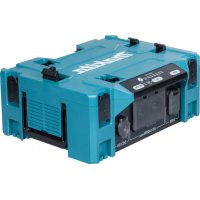
BAC01 - Generator MAKITA - Free user manual and instructions
Find the device manual for free BAC01 MAKITA in PDF.
 FR
FR
 BG
BG
 CS
CS
 DA
DA
 DE
DE
 EL
EL
 EN
EN
 ES
ES
 ET
ET
 FI
FI
 HU
HU
 IT
IT
 KK
KK
 LT
LT
 LV
LV
 MK
MK
 NL
NL
 NO
NO
 PL
PL
 PT
PT
 RO
RO
 RU
RU
 SK
SK
 SL
SL
 SQ
SQ
 SR
SR
 SV
SV
 TR
TR
 UK
UK
 ZH
ZH
| Product type | Portable power converter / Battery generator |
| Brand | Makita |
| Model | BAC01 |
| Rated power (continuous) | 1400 W (VA) |
| Peak power | 2800 W (VA) |
| AC output | 2 x mains socket, pure sine wave, 50/60 Hz (selectable) |
| USB-A output | 2 x 5 V, 2.4 A |
| USB-C output | 2 x USB-PD 30 W |
| 12 V DC output | 1 x cigarette lighter adapter, 12 V, 10 A |
| Power supply | Portable power supply PDC1200 or PDC01 (Makita 18 V batteries) |
| Dimensions (L x D x H) | 395 mm x 345 mm x 163 mm |
| Net weight (converter only) | 7.3 kg |
| Operating temperature range | -10 °C to 40 °C |
| Protection | Overload, overheating, total battery discharge |
| Power display | Graduated output indicator (up to 1400 W in red) |
| Audible signal | Configurable alert (dedicated button) |
| Air filter | Washable, removable |
| MAKPAC attachment | Possible (optional accessory) |
| Maintenance | Cleaning with a damp cloth and soapy water; washable filter |
| Safety | Do not use in a damp or explosive environment; keep out of reach of children |
| Repairability | Entrust to a Makita approved service center – original spare parts |
Frequently Asked Questions - BAC01 MAKITA
User questions about BAC01 MAKITA
0 question about this device. Answer the ones you know or ask your own.
Ask a new question about this device
Download the instructions for your Generator in PDF format for free! Find your manual BAC01 - MAKITA and take your electronic device back in hand. On this page are published all the documents necessary for the use of your device. BAC01 by MAKITA.
USER MANUAL BAC01 MAKITA
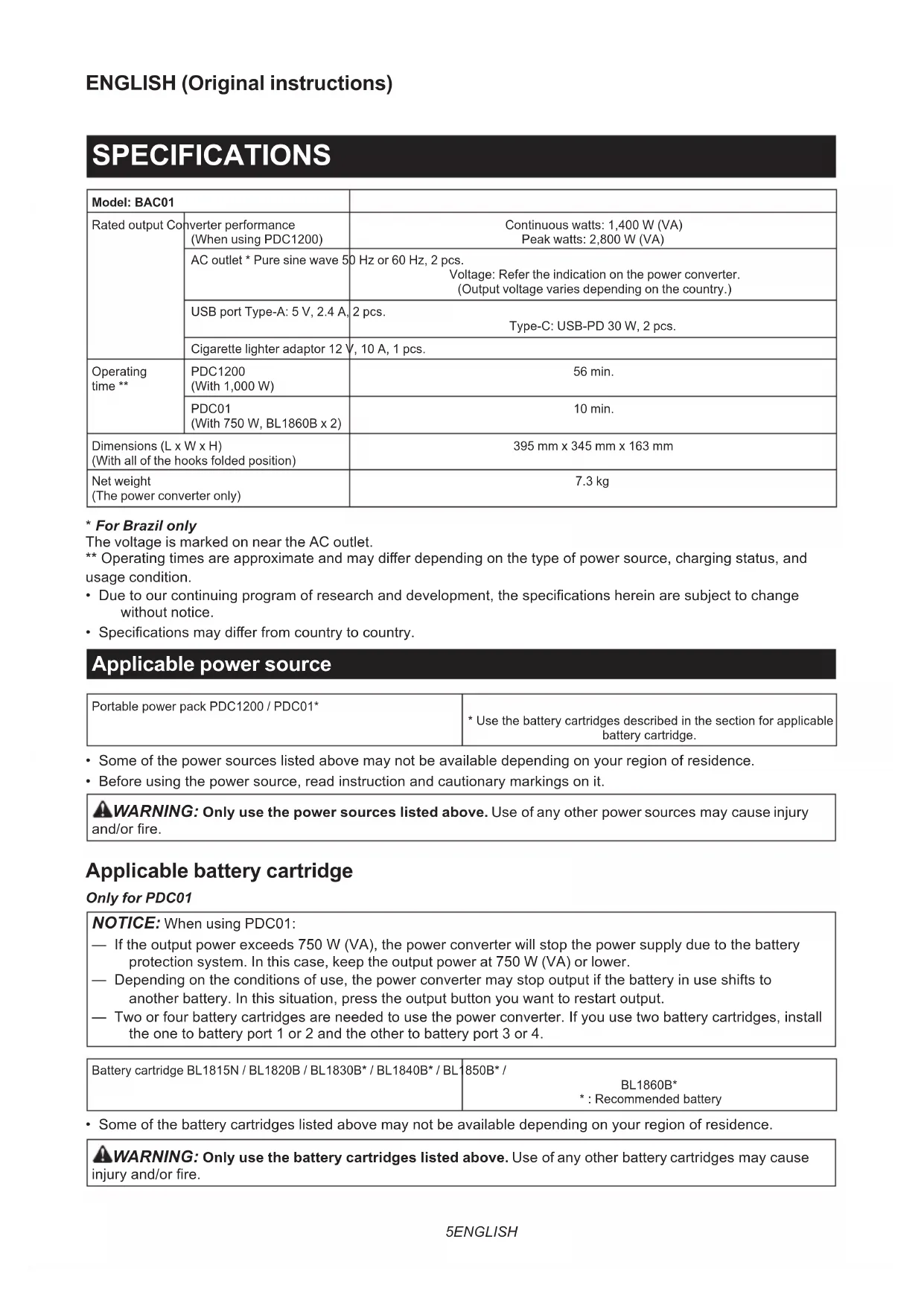
| Model: BAC01 | ||
| Rated output Co | verter performance (When using PDC1200) | Continuous watts: 1,400 W (VA) Peak watts: 2,800 W (VA) |
| AC outlet * Pure sine wave 50 Hz or 60 Hz, 2 pcs. Voltage: Refer the indication on the power converter. (Output voltage varies depending on the country.) | ||
| USB port Type-A: 5 V, 2.4 A, | 2 pcs. Type-C: USB-PD 30 W, 2 pcs. | |
| Cigarette lighter adaptor 12 V, 10 A, 1 pcs. | ||
| Operating time ** | PDC1200 (With 1,000 W) | 56 min. |
| PDC01 (With 750 W, BL1860B x 2) | 10 min. | |
| Dimensions (L x W x H) (With all of the hooks folded position) | 395 mm x 345 mm x 163 mm | |
| Net weight (The power converter only) | 7.3 kg | |
- For Brazil only
The voltage is marked on near the AC outlet.
** Operating times are approximate and may differ depending on the type of power source, charging status, and usage condition.
- Due to our continuing program of research and development, the specifications herein are subject to change without notice.
- Specifications may differ from country to country.
Applicable power source
| Portable power pack PDC1200 / PDC01* | * Use the battery cartridges described in the section for applicable battery cartridge. |
- Some of the power sources listed above may not be available depending on your region of residence.
- Before using the power source, read instruction and cautionary markings on it.
WARNING: Only use the power sources listed above. Use of any other power sources may cause injury and/or fire.
Applicable battery cartridge
Only for PDC01
NOTICE: When using PDC01:
If the output power exceeds 750 W (VA), the power converter will stop the power supply due to the battery protection system. In this case, keep the output power at 750 W (VA) or lower.
Depending on the conditions of use, the power converter may stop output if the battery in use shifts to another battery. In this situation, press the output button you want to restart output.
Two or four battery cartridges are needed to use the power converter. If you use two battery cartridges, install the one to battery port 1 or 2 and the other to battery port 3 or 4.
Battery cartridge BL1815N / BL1820B / BL1830B / BL1840B / BL1850B* /
BL1860B*
*:Recommendedbattery
- Some of the battery cartridges listed above may not be available depending on your region of residence.

WARNING: Only use the battery cartridges listed above. Use of any other battery cartridges may cause battery and/or fire.
Symbols
The followings show the symbols which may be used for the equipment. Be sure that you understand their meaning before use.

Read the instruction manual.

Only for EU countries
Due to the presence of hazardous components in the equipment, waste electrical and electronic equipment, accumulators and batteries may have a negative impact on the environment and human health. Do not dispose of electrical and electronic appliances or batteries with household waste!
In accordance with the European Directive on waste electrical and electronic equipment and on accumulators and batteries and waste accumulators and batteries, as well as their adaptation to national law, waste electrical equipment, batteries and accumulators should be stored separately and delivered to a separate collection point for municipal waste, operating in accordance with the regulations on environmental protection.
This is indicated by the symbol of the crossed-out wheeled bin placed on the equipment.
Intended use
The appliance is intended to convert the power of Makita portable power pack to various outputs.
SAFETYWARNINGS
WARNING: Before use, be sure to read the instruction manual of your product to be used with this power converter.
Power Converter safety warnings
- In order to ensure good performance and long-term service life, pay attention to protect the power converter from the following conditions.
Corrosive gas and liquid
Salt mist and oil mist
Mechanical impact and vibration
High humidity
Extreme temperature (too cold or too hot) The suitable ambient temperature range is between -10ircC and 40ircC 14 F and 104ircF
Electromagnetic noise (e.g. electric welding machine, high-power equipment)
Radioactive material
- Place the power converter on a horizontal surface with no undulations and stable place. Otherwise falling accident may occur.
-
When carrying the power converter, disconnect the power source and all appliances connected to output port. Otherwise falling accident may occur.
-
When carrying the power converter, always hold the carrying handles firmly with both hands. Do not carry the power converter by holding any other part. Otherwise falling accident may occur.
- Do not use the power converter with wet hands. Do not expose the power converter to rain or wet conditions. The risk of electric shock. The power converter is not water proof.
- Do not insert metal objects, like pushpins, wires or other small metal objects into the outlets and air vents. The risk of electric shock.
- Do not disassemble the power converter. The risk of electric shock.
- Do not give a strong impact to the power converter such as dropping. It may cause malfunction which results in electric shock.
- Check for misalignment or binding of moving parts, breakage of parts and any other condition that may affect the operation. If damaged, have the appliance repaired before use. Many accidents are caused by poorly maintained appliances.
- Always set to an appropriate AC frequency. Otherwise malfunction may occur and injury result.
- Do not operate the power converter in explosive atmospheres, such as in the presence of flammable liquids, gases or dust. A small static charge or spark may ignite the dusts or fumes, creating a fire or explosion.
- Do not allow anything to cover or clog the air vents. Use the power converter where nothing interfere the air vent. It may cause a malfunction or fire.
- Be careful not to trip over the cord during operation. Put the cord into the cord pocket.
- Do not use the power converter for medical equipment. Unexpected malfunction may cause an accident.
-
To reduce the risk fire, excessive heat, explosion, leak of electrolyte, electric shock, or injury, observe the following precautions.
-
Do not connect the appliance that exceeds the rated output of the power converter.
Do not connect to general AC power grid directly. -
Store the power converter indoor, well-ventilated, and low humidity place.
- Keep the power converter out of reach of children when storing. Otherwise serious incident may occur.
- Do not step on the power converter. Also, be careful not to give a strong impact to the power converter when installing it with MAKPAC or power source. Doing so may cause malfunction or personal injury.
- The slot for earthing pin on the AC output has no voltage and current. This product does not require earthing of AC appliance because it is not connected to the general AC power grid.
Safety warnings for battery-operated appliance
Battery-operated appliance use and care
- Prevent unintentional starting. Ensure the switch is in the off-position before connecting to battery pack, picking up or carrying the appliance. Carrying the appliance with your finger on the switch or energizing appliance that have the switch on invites accidents.
- Disconnect the battery pack from the appliance before making any adjustments, changing accessories, or storing appliance. Such preventive safety measures reduce the risk of starting the appliance accidentally.
- Recharge only with the charger specified by the manufacturer. A charger that is suitable for one type of battery pack may create a risk of fire when used with another battery pack.
- Use appliances only with specifically designated battery packs. Use of any other battery packs may create a risk of injury and fire.
- When battery pack is not in use, keep it away from other metal objects, like paper clips, coins, keys, nails, screws or other small metal objects, that can make a connection from one terminal to another. Shorting the battery terminals together may cause burns or a fire.
- Under abusive conditions, liquid may be ejected from the battery; avoid contact. If contact accidentally occurs, flush with water. If liquid contacts eyes, additionally seek medical help. Liquid ejected from the battery may cause irritation or burns.
- Do not use a battery pack or appliance that is damaged or modified. Damaged or modified batteries may exhibit unpredictable behaviour resulting in fire, explosion or risk of injury.
- Do not expose a battery pack or appliance to fire or excessive temperature. Exposure to fire or temperature above 130ircC may cause explosion.
- Follow all charging instructions and do not charge the battery pack or appliance outside the temperature range specified in the instructions. Charging improperly or at temperatures outside the specified range may damage the battery and increase the risk of fire.
- Have servicing performed by a qualified repair person using only identical replacement parts. This will ensure that the safety of the product is maintained.
- Do not modify or attempt to repair the appliance or the battery pack except as indicated in the instructions for use and care.
Important safety instructions for battery cartridge
- Before using battery cartridge, read all instructions and cautionary markings on (1) battery charger, (2) battery, and (3) product using battery.
- Do not disassemble or tamper with the battery cartridge. It may result in a fire, excessive heat, or explosion.
- If operating time has become excessively shorter, stop operating immediately. It may result in a risk of overheating, possible burns and even an explosion.
-
If electrolyte gets into your eyes, rinse them out with clear water and seek medical attention right away. It may result in loss of your eyesight.
-
Do not short the battery cartridge:
(1) Do not touch the terminals with any conductive material.
(2) Avoid storing battery cartridge in a container with other metal objects such as nails, coins, etc.
(3) Do not expose battery cartridge to water or rain.
A battery short can cause a large current flow, overheating, possible burns and even a breakdown.
- Do not store and use the appliance and battery cartridge in locations where the temperature may reach or exceed 50ircC (122°F).
- Do not incinerate the battery cartridge even if it is severely damaged or is completely worn out. The battery cartridge can explode in a fire.
-
Do not nail, cut, crush, throw, drop the battery cartridge, or hit against a hard object to the battery cartridge. Such conduct may result in a fire, excessive heat, or explosion.
-
Do not use a damaged battery.
-
The contained lithium-ion batteries are subject to the Dangerous Goods Legislation requirements. For commercial transports e.g. by third parties, forwarding agents, special requirement on packaging and labeling must be observed. For preparation of the item being shipped, consulting an expert for hazardous material is required. Please also observe possibly more detailed national regulations. Tape or mask off open contacts and pack up the battery in such a manner that it cannot move around in the packaging.
- When disposing the battery cartridge, remove it from the appliance and dispose of it in a safe place. Follow your local regulations relating to disposal of battery.
- Use the batteries only with the products specified by Makita. Installing the batteries to non-compliant products may result in a fire, excessive heat, explosion, or leak of electrolyte.
-
If the appliance is not used for a long period of time, the battery must be removed from the appliance.
-
During and after use, the battery cartridge may take on heat which can cause burns or low temperature burns. Pay attention to the handling of hot battery cartridges.
- Do not touch the terminal of the appliance immediately after use as it may get hot enough to cause burns.
- Do not allow chips, dust, or soil stuck into the terminals, holes, and grooves of the battery cartridge. It may result in poor performance or breakdown of the appliance or battery cartridge.
- Unless the appliance supports the use near high-voltage electrical power lines, do not use the battery cartridge near high-voltage electrical power lines. It may result in a malfunction or breakdown of the appliance or battery cartridge.
- Keep the battery away from children.
SAVE THESE INSTRUCTIONS.
CAUTION: Only use genuine Makita batteries. Use of non-genuine Makita batteries, or batteries that have been altered, may result in the battery bursting causing fires, personal injury and damage. It will also void the Makita warranty for the Makita appliance and charger.
Tips for maintaining maximum battery life
- Charge the battery cartridge before completely discharged. Always stop appliance operation and charge the battery cartridge when you notice less appliance power.
- Never recharge a fully charged battery cartridge. Overcharging shortens the battery service life.
- Charge the battery cartridge with room temperature at 10ircC - 40ircC (50°F - 104°F). Let a hot battery cartridge cool down before charging it.
- When not using the battery cartridge, remove it from the appliance or the charger.
- Charge the battery cartridge if you do not use it for a long period (more than six months).
PARTS DESCRIPTION
Fig.1
- Switch panel
- Latch
- Output board
- Carrying handle
- Air vent
- Hook A
- Hook B Use only for PDC1200.
- Hook C Use only for PDC01.
- Plug (input)
- Cord pocket
- USB output button
- AC output button
NOTE: The shape of the AC outlet varies from country to country.
- Frequency switching button
- DC 12V output button
- Beep sound button
- Output indicator Refer to the section for how to interpret the output indicator.
- USB Type-A output 1
- USB Type-A output 2
- USB Type-C output 1
- USB Type-C output 2
- AC output 1
- AC output 2
- DC 12 V output (For Cigarette lighter adaptor)
ASSEMBLY
CAUTION: Hold the power converter and the power source firmly when installing or removing power source. Failure to do may cause them to slip off your hands and result in personal injury or damage to the power converter and the power source.
CAUTION: Before operation, make sure that the cord is placed properly and the socket is inserted into the plug all the way.
Mounting the power source
For PDC1200
Attach the power source to the power converter as shown in the figure.
CAUTION: Make sure that the power source is securely installed to the power converter. Otherwise it may accidentally fall out of the power converter and cause injury to you or someone around you. If you can see the red indicator as shown in the figure, the power source is not locked completely.
Fig.2: 1. Red indicator
When removing the power source, lift the power source up while pushing down the lock button.
Fig.3: 1. Lock button
For PDC01
Attach the power source to the power converter as shown in the figure.
Fig.4
To remove the power source, perform the installation procedure in reverse.
Connecting the power source
- Open the cap of the plug.
- Align the arrow mark on the socket with that of the power converter, and then insert the socket into the plug all the way.
Fig.5: 1. Cap 2. Plug (input) 3. Socket 4. Arrow mark
NOTICE: Do not insert the socket forcibly. If the socket cannot be inserted easily, it is not being inserted correctly.
NOTICE: When unplugging, do not hold the cords but hold the socket. Otherwise, the cords may be damaged and cause a malfunction.
NOTICE: Always close the cap of the plug firmly when the power source is not plugged. Otherwise foreign matter may enter the power converter and cause a malfunction.
Cord pocket
You can put the cord into the cord pocket as shown in the figure.
Fig.6
Installing MAKPAC
Optional accessory
The power converter can be attached to the top or bottom of MAKPAC as shown in the figure.
Fig.7
CAUTION: Make sure that the power converter is securely fixed to the MAKPAC with the four latches. Otherwise falling accident may occur and cause personal injury.
OPERATION
▶ Fig.8: 1. Power button
- Press the power button of the power source to turn it on.
- Connect your appliance to appropriate output.
When using AC output, select appropriate frequency by pressing and holding the frequency switching button.
NOTE: The frequency can be selectable only when the AC output stops.
NOTE: Frequency setting is memorized. Next time, the power converter will start with the same setting.
- Press the output button you want to use.
The power converter starts the output and the output button at work lights up. - Press the output button again to stop.
- Press the power button of the power source to turn it off.
NOTICE: You may not be able to use an appliance which requires a large amount of power to start up even if the power output of the power converter is kept within the rated power range.
NOTICE: The power converter may not supply power to some USB devices.
NOTICE: Before connecting USB device to the power converter, always backup your data of USB device.
NOTICE: You cannot charge the power source with the power converter using power banks available in the market.
How to interpret the output indicator
Fig.9
- The output indicator lights up according to the wattage being output.
- When the power output reaches 1,400 W(VA), the lamp on "1400" will light up in red. This lamp starts blinking in red when the power converter becomes overloaded.
Turning the buzzer on/off
Fig.10: 1. Beep sound button
Press and hold the beep sound button to turn on/off buzzer sound.
NOTE: Buzzer setting is memorized. Next time, the power converter will start with the same setting.
Protection system
The power converter is equipped with the following protection system.
Overload protection
Each output has overload protection as follows:
- AC output
When the power converter detects an excessive wattage, the power converter stops all AC output with intermittent beep sound.
- USB output
When the power converter detects an abnormally high current, the power converter cuts off the USB output of which high current flows.
DC 12V output
When the power converter detects an abnormally high current, the power converter stops DC 12V output with intermittent beep sound.
If the total output of AC, USB, and DC 12V exceeds the rated output of the power converter for a certain period, all the output will be stopped with continuous beep sound. In this situation, turn the power source off and stop the application that caused the power converter to become overloaded. Then turn the power source on to restart.
NOTE: When the power converter becomes overloaded, the "1400" lamp of the output indicator blinks in red.
NOTE: The beep sound stops by pressing any button on the switch panel.
Overheat protection
When the power converter is overheated, the power converter stops all output with continuous beep sounds. In this situation, let the power converter cool before turning on again.
Overdischarge protection
When the remaining capacity of the power source gets low, intermittent beep sounds and the output button at work blinks. In this situation, remove the power source and charge it.
When the remaining capacity of the power source becomes even lower, all output will be stopped.
MAINTENANCE
CAUTION: Always be sure that the power source is removed before attempting to perform inspection or maintenance.
NOTICE: Do not wash the connector with water. Risk of malfunction.
NOTICE: From time to time wipe off the surface of this product using a cloth dampened in soapy water.
NOTICE: Never use gasoline, benzine, thinner, alcohol or the like. Discoloration, deformation or cracks may result.
To maintain product SAFETY and RELIABILITY, repairs, any other maintenance or adjustment should be performed by Makita Authorized or Factory Service Centers, always using Makita replacement parts.
Cleaning
If the power converter is dirty, wipe the power converter with a dry cloth or cloth dampened in soapy water.
Filter
CAUTION: After cleaning the filter, be sure to re-install it. Operating the power converter without the filter may cause malfunction.
Remove the filter by pulling it out as shown in the figure. Wash the filter, then dry it.
Fig.11: 1.Filter
To install the filter, follow the removing procedure in reverse.
OPTIONAL ACCESSORIES
CAUTION: These accessories or attachments are recommended for use with your Makita tool specified in this manual. The use of any other accessories or attachments might present a risk of injury to persons. Only use accessory or attachment for its stated purpose.
If you need any assistance for more details regarding these accessories, ask your local Makita Service Center.
- Portable power pack
- Makita genuine battery and charger
MAKPAC
NOTE: Some items in the list may be included in the tool package as standard accessories. They may differ from country to country.
SPECIFICATIONS
ACCESSIONS EN OPTION
VEILIGHEIDSWAARSCHUWINGEN
OPTIONELE ACCESSOIRES
Sikkerhedsadvarsler for strømomformer
Sikkerhetsadvarsler for likeretter
Fig.8: 1. Strømknapp
- Trykk paa stromknappen pa stromkilden for a sla den pa.
- Koble apparatet til den aktuelle utgangen.
MAKPACi paigaldamine
Lisatarvik
*: Zalecany akumulator
TIETO POKNY USCHOVAJTE.
TYTO POKNY USCHOVEJTE.
A UPOZORNENI: Pouziveje pouze originni akumulatory Makita. Pouzivani neoriginalnich nebo upravenych akumulatoru Makita muze zpusobitexplozi akumulatoru a nasledny pozar, zraneni a jine poskozeni. Zanika tim také zaruka spolecnosti Makita na zaizeni a nabijecku Makita.
Tipy k zajisteni maximálniživot-nosti akumulátoru
Operite filter in ga osu-site.
SI.11: 1.Filter
PoaXoJa aKymyIaTopHa 6aTepeH
Camo 3a PDC01
BENEXKA:Korato ce n3non3Ba PDC01:
Ako n3xOHaTa MoHocT haBnUn 750 W (VA), npoe6pa3yBaTeJrT Ha moHocT ue cnpe da noDaBa 3axpaHbAne nopadn 3aJeCtBaHeTo Ha cnCTemata 3a 3aunTa Ha 6aTePnra. B To3n cnUyai noDpbjkaTe CTOnHOCT Ha n3XoHaTa MoHocT 750 W (VA) nn no-HnCKa.
B 3aBnCmOCT ot yCNoBnTa ha yNtpe6a, npeo6pa3yBaTeJrHa moUHocT moKe da cnpe da ocNpyBa nXoDnHaT a MOuHocT, ako 6aTePnra, KOrTO ce n3noJ3Ba, ce 3aMeHN c npyra. B ta3n cItyaun HaNTcHete 6yToHa 3a n3xoDnHaT a MOuHocT, aKO NCKaTe Da pecTapTpape T3xOHaT a MOUHocT.
3a n3no3BaHe Ha npoe6pa3yBaTeJHa MoUHocT ca Heo6xoDmN DBe NIn YeHnpAkyMnaTopHn 6aTePnn. Ako n3no3BaTe Dbe akymyNaTopHn 6aTePnn, NoCTabeTe eHnata B nopTa 3a 6aTePnn 1 nn 2, a npyrata-B npota 3a 6aTePnn 3 nn 4.
- Hякон о akумлалopнite 6aTeepи, nocoeyn no-rope, moKe Ja He ca HaJIuHb B 3aBcIMocT ot PernoHa Ha MeCTOxKUBeEHe.
A PEPENPEXEHE: N3non3BaTe cMo nocoueHnTe no-rope akymnaTopn 6aTePN.
I3non3baheTo Ha npytn akymynaTOpHn 6aTepn MoKe Da npuHn HapaHbAe n/nn noKap.
CNMBOJIH
No-dony ca onucaHn CmBONITE, KOITo MOKe Ja ce 3nON3BaT 3a Ta3n MaunHa. 3aJbJXKITeHNo e Da ce 3aNO3HaTe C TexHInTe 3HaueHn, PpeDn Da npNCtBnIte KbMa6Ota.

IpooyetepbkoBODCTBOTO3a ekCnloatauia.

Cama 3a ctpaHn ot EC
IopadnHaHnHyNETo Ha OnaChn KOMNo-HeHTN B oOpyDbaHETo OTnaDbuNTeOT eEkeTpnueecko n eEkeTPOHO bOpdyBaHe, AkymnatOpn N 6aTePm MoKe Da NMaT OTPcuatEnHO B3DeJeCTBne BbPxy OKoHaTa CpeDa N YOBeShKOto 3dpaBe. He n3xBpIaTe eEkeTpnueeckn N eEkeTPOHN yPeDen Hn 6aTePm c 6ntobnte OTnabn!
CbINaCHO Ebponeckata DnpeKtNbBa 3a OTnabuTe O eNEKtpueceKO n eNEKtpoHNO obOpyBaHe N aKymnaTopn N 6aTePnn N OTnabuN O T aKymnaTopn N 6aTePnn N HeHOTO aadTnpaHe KbM HauNoHaHTo 3aKHOdaTeJICTBO, OTnabuNTE O eNEKtpueceKO n eNEKtpoHNO obOpyBaHe, 6aTePnn N aKymnaTopn Tp8Ba Da ce cbBipat OTdEnHO N da Ce DOCTABT Do OTdEneH CbBipatehen NyHT 3a OTnabuN, FyHKUOnHpaUc BflNaCHO HapeD6nte 3a Ona3BaHe Ha OKONHaTa cpeA.
Toba e yka3aHO Upe3 CnMBOJ Ha 3aYeptHa c KpbCT KoFa HA KOJIeIua, NocTabeH Bbpxy o60pyDbaHeto.
PpeHa3NaueHne
YpeT e npedHa3HaeH 3a npoe6pa3yBaHe Ha MoUHocTtHa npehocmna 3axpaHbau Moyn Makita do pa3NnHn BnOBe n3XoJHa MOuHcT.
BaxHH nHctpyKuN 3a 6e3oNaCHOCT 3a akymylaTopHaTa 6aTePnA
- Ppei Da n3noj3BaTe akymyNaTopHaTa 6aTePn, npoTeTe BCnKn HnCTpyKuNn N npedynpaTeJHn MapKnpoBKn Ha (1) 3apAHOTo yctpOcTBo 3a 6aTePnnte, (2) 3a 6aTePnnte n (3) 3a n3noj3Baun 6aTePnnte npoDyKT.
- He pa3rno6BaIte n He npomeHnTe aKymy- natopHaTa 6aTeprna. Toba moKe da npeDn3BnKa nokap, nperepaHe nnB3pNB.
- Ako mouhoCTTa Ha MaunHaTa HamaJee MHoro, BeHara cnpete Da pa6OTHe. ToBa MoKe Da DOBeGe Do pNC OT nperpBAHe, Do Bb3MOXn N3rapHHN I daKe Do ekCnNo3nn.
- Ako B OuHTe BN nonaHne eJekTpOJIr, n3nJIaKHeTe rC qInCTa BOda n BeDHara notbpcTe nekapca nOMoU. ToBa moKe da IOBeDe do 3ary6a Ha 3peHneTo BN.
5.He daBaTe Ha KbCo aKymyIaTOPHnTe 6aTePn:
(1) He DoKocBaIte KIeMIte c npoBoIMMaTePnAJI.
(2) 36raBaeTe cBxpaHbAHeTo Ha akymyataTopHnTe 6aTeepn B KOHTeHep C dpyrMeTaJHn PpeMmTu KaTO NpOHN, MOHeTN n dpyrn noo6Hn.
(3) He n3naarTe akymylaTopHnTe 6aTeepnHa BOda NIN DbXd.
3aKbCBAHeTo Ha aKyMylaTOpHa 6aTePnmaOKe Da DoBeDe Do npOTNuHa He MHOrO CnEn ToK, Do npErpBaHe, Do Bb3MOxHn 3raPpAHHn I daKe Do pa3NaDaHe Ha 6aTePnTa.
- He cxbxpaHbAaTe n He n3non3BaIte ypeJa akyMylaTOPHnTe 6aTePNn Ha MeCTa, KbDeTo TemnepaTypaTMOKe Da DOCTnRHe Nn HaDMnHe 50ircC (122 F).
7.He n3rapnTe akymyNatopHnTe 6aTepeHH DaKe n aKO Te ca cepno3HO NOBpeDeHN Hn HAnbJHo n3HoceHN. AkymyNatopHaTa 6aTepeHH MoKe da ekcnloDnpa B OrH.
8.He 3a6nBaTe NpOHN,He pexKeTe,He cMaKKBaIte,He XBbpNlTe,He n3nyckaiTe HYeDPaTE B TBbPd npEaMeT aKymlaTopHaTa6aTePNr. Tei DeicTBnMoKe Da npEiN3BnKaT noXap, nperepaBe nnB3pNB. -
He n3noJ3BaIte NOBpeDeHn akymyIaTopHn 6aTePnn.
-
CbDpKauTe ce JntHeBO-NOHn akymyNaTOpHb6aTePNCa 06eKT Ha N3NCKBaHnraTaHa 3aKoHOdaTeNCTBOTO 3a ONAChn CTOKn. Pn TbproBcKn npeBO3n, HAp. OT TpeTu cTpaHn, CneIHTOpN, Tp6Ba Da ca Ce Cna3BaT cNeuaJHn N3NCKBaHn 3a ONAKObaHe n eTKeTpHahe. 3a NOrTOBka Ha apTNkUyna, KOTo Tp6Ba Da 6bDe n3npaTeH, e Heo6xOdIma KOHCyIITaCnca CekCnept No ONaCHnte MaTePnAn. MoJ, cNa3-BaTe n eBeHTyaJIHo No-NoDpo6HnTe HaCuIOHaHN pa3Nope6n.
3aeneTe c nenta nnn noKpnnte OTkpntte KOHTaTn onakobaiTe akymynatopHaTa 6aTepynno TaKB HauH, Ye da He MoKe da ce npemeCTBa B ONAKOBkata. - Pn n3xBpna He Ha akymyataopHaTa 6aTePnra n3BaTeOTypeHa n3XBpneTe Ha NOxOJaIO MAcTo.Cna3BaIte MeCTHInPe pa3nped6n 3a n3xBpnaHe Ha akymyataOpHn 6aTepn.
- 3nON3BaTe 6aTePnnte cAmo C npOdyKTnte, onpeJeHn ot Makita. NocTabraHeTo Ha 6aTePnIte KbM HeODo6peHn npOdyKTN MoKe Da npeDu3-BNka NoXap, npeprBaHe, B3pNB INN IN3TuHahe Ha eJEnKTPoJIrT.
- Ako ypeBt HMa Da ce n3NoJ3Ba npoDbJxN-TeJHo Bpeme, 6aTeepnra Tp86Ba da ce n3BaAnOT Hero.
- IIO Bpeme Ha n cne ynoTpe6a akymynatopHata 6atepy Moxe Da noeMe TOnnHa, KOrTo MoXe Da npuHn H3rapHn Hn HnckKoTeM- nepaTyprn H3rapHn. BnMaBaIte, Korato 6opabnte C ropeunTe akymynatopHn 6atepn.
- He dokocbaite KneMaTa Ha ypeDa BeHara cneYynotpe6a, TbK KaTo e Bb3MOxHO da e DOCTaTBuHO HarpaTa, 3a Da IpeDuN3BnKa n3rapaHna.
- He no3BoJBaIe cTpyKn, npax nIn noUba Da noJenBAt NO KIemnte, OTBOpNTe n KaHaJIte Ha akymyIaTOPHaTa 6aTePn. Toba moKe Da doBeDe Io loi pa6oTHn XapaKTepnCTnKn IIn nobpeDa Ha ypeDa nIn akymyIaTOPHaTa 6aTePn.
- OcBeH aKO ypeBbT NOdIbPka H3NON3BaHeTO B 6n3OCT DOBnCOKOBONTOBn eNEKTPoNPOBOu, He n3NON3BaHTe akymyNatOPHaTa 6aTePN 6n3O Do BnCOKOBONTOBn eNEKTPoNPOBOu. Toba MoKe Da DObEe Do Heu3npabHocT IIN IOBpeDa Ha ypeDa nn AkymyNatOPHaTa 6aTePN.
- Na3eTe akymyIaTOPHata 6aTePnO T deua.
3A7A3ETE HACTOUINTEHCHPKU.
A BHIMAHNE: N3non3BaIte cmo opnHannn akymylatopn 6atepn Ha Makita. Pnp n3noJ3BaHe Ha pa3JInuHn OT akymyIaTOpHnTE 6atePnn Ha Makita nn CTapn akymyIaTOpHn 6atepn MOKe Da ce NOUyn npbCKaHe Ha akymyIaTOpHaTa 6atepna, KOEt O da DoBeDe DO noXap, HapaHraBaHe IIN nobpeDa. Toba cbUO ue anHynpa rapaHcunrTa Ha Makita 3a ypeDa n 3apAnHOTo yCTpoNCTBO Makita.
CbBETn 3a nOdIbpxaHe Ha MaKcMmaJIHo IbJIbIg XNBOT Ha aKyMyJatOpHnTe 6aTepnn
- 3apeKdaTe akymyNaTopHnTe 6aTeepu, npeTe Da ca ce pa3peDnHaHbNHO. Korato 3a6eNeXKeTte, Ye MoUHocTTa Ha ypeDa HAmAraBa, BnHarn cnnpaTe pa6oTaTa C Hero n 3apeDeTe akymyNaTopHata 6aTeepu.
-
Hnkora He npe3apekdaite HanbIHO 3apeDeHa akymyIaTOPHa 6aTePnI. Ppe3apIbT cKbcBa ekcnloaatauOnHHJ XINBOT Ha 6aTePnIra.
-
3apekdaTe akymyIaTopHaTa 6aTepe npn cTaNHa TeMnepaTypa ot 10ircC - 40ircC (50ircF - 104ircF) .OcTabe 3arpeTne akmyIaTopHb aTeepn Da ce oxlaT, npedn da Tn 3apeKdTe.
- Korato He n3non3BaTe akymylaTopHaTa 6aTe-pn, n3BaTeTe oT ypeDa nn 3apdHoto yctpoiCTBO.
- 3apeTe akymyIaTOPHaT6aTePnA, aKo He CTe ro n3non3BaJn dJbIbI nepNoD OT BpeMe (noBceOT wecT Meceua).
ОписимеHAЧАТ Norte
Φnr.1
- NaheJ 3a npBkIIOUbaHe
2.3akJIOUBAuΦHKcaTop - N3xOJa nJaTka
4.Дрьжka 3a npehacnHe - BeHTnJIaCNoHHN OTBOpN
- Kyka A
- Kyka B Използваite само за PDC1200.
- Kyka C Изпалзваши само за PDC01.
- Uencen (BxOa)
10.Джобзакбен - ByToH 3a USB n3XoD
- ByToH 3a npOMEHHNBOtOKOB n3XoJ
3A6ELEKKA:ΦOpMaTa Ha KOHTaKTa 3a IpomEHINBOTOKOBO 3axpaHbHe e pa3JIuHa B pa3JIuHInTe DbpKabN.
- ByToH 3a npeBknHouBaHe Ha yecToTaTa
- BytoH 3a n3XoD c noctOraHHo HanpeXeHne 12 V
- ByToH 3a 3ByKOB CnRhan
16.ИндикатогинхODHaTMOHOCHTanpaBte cnpaBkaВ pa3deJa 3a TOBa KaK daIHTepnpeTpape INDikatopa Ha N3XODHaTAMOHOCT. - USB Tnn-A n3xoD 1
- USB TnA n3xoD 2
- USB Tnn-C n3xoD 1
- USB TIN-C H3XoD 2
- ПоменловOTOKOB n3xod 1
22.ПоменnotokOBиXOD2 - 3xOc c noctoHn HnpeXeHne 12 V (3a aan- Tep 3a 3anaJka)
CΓJIIOБЯBAHE
ABHIMAHNE:ДрькTe 3dpaBo npeo6pa3yBaTeJI Ha MoUHOCr N 3axpaHBAuN r3TOUHKn, KOraTo MOHTnPaTe Nn CBaJIte 3axpaHBAuN r3TOUHKn. AKe He ro HAnpaBnte, Te MoKe da ce N3IIb3HaT OT pBuTe Bn I TOBa Da IOBeDe Do HapaHraVe Nn NobPeDa Ha npeo6pa3yBaTeJI Ha MoUHocr N 3axpaHBAuN r3TOUHKn.
ABHIMAHHE:праза ce yBepete,кавьт e naeJNO 3akpenen H Ye rHe3dTo e noCTaBeHO dokpa B uencena.
MOnTnpaHe Ha 3axpaHbauNIA3TOUHNK
3a PDC1200
3akpenete 3axpaHbaunia n3ToUHK kBm npoe6pa3yBaTeJHa MoUHOCT, KaKTo e Noka3aHo Ha fNHypata.
A BHIMAHNE: YBepete ce, ye 3axpaHbauyraT n3TOUHNK e HaedekdHO MOHTnpaH KbM ppeO6pa- 3yBaTeJr HA MoUHocT. B npOTuBEH cIyuaI Toi MOKe Da n3nadHe cIyauHaIO NTpeo6pa3yBaTeJr HA MOUHOC T DA npuHH HapaHraBaHe Ha Bac IIN Ha HAKORO OKOIO BAC. B cIyauYe BnKdaTe cepBeHn INHnKaTOp, KaKTo e NOKa3aHO Ha qNpypata, TOBa O3HaUaBA, Ye 3axpaHbauJr n3TOUHNK He e qNKCu paHnblHo Ha MCTOTO cn.
Φn.r.2: 1. YepBEN INHINKaTOp
Korato cbaIaTe 3axpaHbauNn I3TOUHnK, NOBdInHete ro Harope, dOKaTo HAtNcKaTe 6yToHa 3a 3aKJIIOuBaHe.
Φn.r.3: 1. ByToH 3a 3akJIHOHaHe
3a PDC01
3akpenete 3axpaHbauu n3ToUHK kBm ppeo6pa3yBaTeJHa MoUHOCT, KaKTo e NOKa3aHo Ha fNrgypata.
3a da cbaInTe 3axpaHbauNnI N3ToUHmK, n3nbHHeTepoueDypata 3a MOHTnpaHe B o6paTeH pei.
Cbbp3BaHe Ha 3axpaHbauNnI N3TOUHnK
- OTbopete kanaaykata Ha uenceJa.
2.Подравнete CTpeлkaTа Bbpyr rHe3dToC Ta3N Bbpynpeo6pa3yBaTeЯ Ha MOuHocT nNoCTaBeTe DOKpai rHe3dToB uenceHa.
Φur.5: 1.Kanauka 2. Uencen (BxoD) 3.Γhe3do - Ctpenka
BENEXKA: He HATnCKaIte rHe3dOTo cbc cnla. Ako rHe3dOTo He MoKe Da 6bJe JecHO BmKHaTO, He e 6nlo nocTabeHa npabuHNO.
BENEXKA: npn n3BaXdaHe He dpbXte Ka6eJNTe, a rHe3dTo. B npOTuBEH Ka6eJInte MoKe da ceNOBpeIa N da npEduN3BkAT HEn3npaBHOCT.
BENEXKA: BnHarn 3aTbaprTe 3dpaBO kanaKata Ha uencena, Korato 3axpaHbauNt N3TOHnK He e BkNoUeH. B npotnBeH cIyuaB npeo6pa3yBaTeJHa MoUHOCT MOKe Da BnA3aT UyKdN TeJa N da npuHHT HEn3npabHOCT.
Джобза kaбел
Mokete da noctabite Ka6ena B Dko6a 3a Hero, KaKTo e nokaaho Ha cnrypata.
Φnr.6
MOnTnUpaHe Ha MAKPAC
DonbHumEnHa npuHaedHexHocm
Ipeo6pa3yBaTeJrHa MoUHocT MoKe da 6bJe npKpeneH KbM rOpHaTa nn DoJIHaTa Yact Ha MAKPAC, KaKTo e NOKa3aHo Ha fHypata.
Φnr.7
ABHIMAHNE: YBepete ce, ye npeo6pa3yBaTeJrHa MoUHOCT e 3dpaBO fHKcnpaH KbMMAKPAC c YeTnPte 3akIIOuBaun fKcaTopa. B npOTuBeH cnyau Toi MoKe Da naHe N da npuHH HapaHraBaHe.
Ekcnloataza
nr.8: 1. ByToH 3a 3axpaHbAHeTo
- Hatnche 6ytoHa 3a 3axpaHbaHeTo Ha 3axpaHBaunn H3TOUHNK, 3a Da rO BKJIIOHTe.
- CbpxKeTe ypeDa KbM nOxOJa u3XoHa MOHOCT.
Korato n3non3BaTe npomeHJINBOTOKOBaTa n3XoJaMoUHOCCT, n36epete NOxOJaTa Ta YecToTa Upe3 HaTnCKaHe n 3aDbpxKaHe Ha 6yToHa 3a NpeBKnUcbHe Ha YecTOtata.
3A6EJEXKKA: YecToTAta MoKe Da ce n3bnpa cAmo KOrato npomeHnBOTOKOBaTa N3XoHa MOUHOCT e cnpHa.
3A6EJEXKKA:HaCTpOikKaTa HaYeCToTAta Ce 3anaMetra. CneBaunn TnT ppeObpa3yBaTeIaT HaMOuHOCt Ie Ce CTapTnpa Cbc CbuaTa HAcTpoiKa.
- Hata 6yToHa 3a n3XoHaTa MoHocT, KOrTO nCKate Da n3NoJ3BaTe.
Ppeo6pa3yBaTeIaT Ha MoUHocCT CTaptnpa n3XoHaTa MOnHOCT N 6yToHbT 3a Hea CBETBa. - HatncheTe OTHOBo 6yToHa 3a n3XoHaTa MoHIOCT, 3a Da JcnpTe.
- HatncheTe 6yToHa 3a 3axpaHbaHeTo Ha 3axpaHBaunr N3TOUHNK, 3a Da rO N3KNIOHTe.
BENEXKA: Bb3MOxHO e da He MoXeTe da n3No13BaTe ypeI, KOITo N3NCKBa rOJMAO KOnHcCTBO MOUHOCT 3a CTApTnpaHe, DOpn AKO N3XoHaTa MOUHOCT Ha ppeo6pa3yBaTeJI HA MOUHOCT ce NOdIbPka B pAMKIne Ha HOMHaJIHHaDnAna-3OH HA MOUHOCT.
BENEXKA: Npeo6pa3yBaTeJrT Ha MoUHOCr He MoKe Da noDaBa 3axpaHbHe KbM HraKo USB yCTpoiCTBa.
BENEXKKA: BnHaru 3ana3BaIte pe3epBHO konne Ha daHHnte B USB yCTpOcTBOTO, npEdu da ro CBpbXeTe KbM npeo6pa3yBaTeJHa MOUHOCT.
BENEKKA: He MoXeTe Da 3apeXdaTe N3TOHnKa Ha 3axpaHbAe C npeo6pa3yBaTeJr Ha MOuHOCT, KATO H3NON3BaTe BbHUnHe 6aTePnn, PpeDna-raHH Na3apa.
Kak Da TbIkyBaMe NHdNkaTopa Ha N3XoHaTa MOUHOCT
Φnr.9
- INДикаторьТ Ha n3XoДнаТ MaUHOC T CBETN B 3aBnCmOCT OT n3XoDHaT a MoUHOCT.
Korato n3xoHaTa MoHoc TocTnHe 1400W (VA), lamnata Ha,1400" ue CbETe B cepBeHo. Ta3n lamna 3anOyBa da Mura B cepBeHo, KORATO npoe6pa3yBaTeJrT Ha MoUHOCT e npetOBapeH.
BkIIOUbaHe/U3KIIIOUbaHe Ha 3yMepa
Φur.10: 1. BytoH 3a 3BykoB CnHAn
HaTnCHHe 3aApbXKe 6yToHa 3a 3ByKOBn CnHa, 3a Da BKnIOuHTe/INKIOuHTe 3ymepa.
3A6ELEKKA: Hactpoikkata Ha 3ymepa ce 3anameTBA.CneBaunn pnt npeo6pa3yBaTeJrHa MoUHocT Ue Ce cTaptnpa Cbc CbuaTa Hactpoika.
Cnctema 3a 3aunTa
Ppeo6pa3yBaTeIaH MaOuHocT e Cha6eH cbc CneHata CNCTema 3a 3auNTa.
3aunTa cpeu npTeOBapBaHe
BcKa n3xOJHa MoUHOC TmA 3aUHTa OT IpTeOBapBaHe, KaKTo CNeDBA:
-ПомениBOTOKOBИЗXOD
Korato npeo6pa3yBaTeJrHa MoUHocT OTKpne TBbpDe Bucoka MoUHocT, ToI CNnpa OcnHypBaHeto Ha MOUHOCT Ha IpOMEHNIBOTOKOBn N3XODN3Daba PpeKbCBAu 3BYKOBCIHAn.
USBn3x0d
Korato npeo6pa3yBaTeIaT Ha MoUHoc TOKPne Heo6nauHbBcOK ToK,ToN 3KnOuBa USB n3XoJa, ppe3 KOITOn npOTTuA Tok C BucOko HanpexKeHie.
- I3xOc nocToHHn HanpeXeHne 12 V
Korato npeo6pa3yBaTeJrH a MoUHOCT OTKPne TOK C Heo6uauHo BnCOKO HAppeXeHne, ToI CNIPA oCNpyraBaHTo Ha MOUHOCT Ha n3XoJa C NoctoHHo HAppeXeHne 12 V nN3daBa npeKbcBaU 3ByKOB CnHaJ.
Ako obuata n3xoJHa moHocT-3a npomEnIbO hAnpexeHne,USBn3a noctoHHo HanpexeHne 12 V -HaDbwn HOMnHaHnTa n3XoJHa MoUHocT Ha npeo6pa3yBaTeJna MoUHocT 3a onpeJeHn nepnoD ot Bpeme,OCnpyraBaHeTo Ha cyaIATA n3XoJHa MOUHocT ige 6bnde CnpraHO n ce n3daBA HepeKbChat 3ByKOB cnHajl. B TaKb CnyaH n3KnIOUte 3axpaHbaJnna n3TOUHmN ppeKaTeTe n3NOJ3BaHeTo, Koeto npetobapBa npeo6pa3yBaTeJna Ho MOnHocT.CneT ToBa BKIOUeTe 3axpaHbaJn n3TOUHk, 3a da ro CTaptnipate OTHBO.
3AБЕLEЖKA: KORATo nppeo6pa3yBaTeJrT Ha MoUHocT ce npetOBapn,JaMaNpTa ,1400"Ha INdikatopaHa n3XODHaT a MOuHcT MIna B UepBeHo.
3AEBEKEKA: 3ByKOBnT CnHAn Cnnpa, KOraTo HATNCHeTe KOITOn I da e 6yToH Ha naHeJa 3a npEKBJIIOUBAHe.
3aunTa cpeu nperepaHe
Korato npeo6pa3yBaTeJrHa MoUHocT nperpee, ToI cnIPA oCnrypRaHeTo Ha N3XODHa MoUHocT n3DaBA HenpekcbatN 3ByKOBn CnHaN. Ppi TOBa noJIOxHne octaBeTe npeo6pa3yBaTeJrHa MoUHocT da N3CTnHe, npeDi Da To BKJIuOHTe OTHBO.
3aunTa cpeu npekomephopa3pekdahe
Korato octabaunrKaunaunTe Ha 3axpaHbaunn 13toyHK cTaHe HncbK, np03ByuBaT npeKbcBauu 3BykOBn cnHaJn 6yTohBT 3a 13XoHa MoUHOCT npn pa6ota mira. B To3n Cnyau n3BaTe 3axpaHbaunn 13toyHnk n ro 3apeDeTe.
Korato octabaunrKaunaTET Ha 3axpaHbua n3TOHnK CTaHe Oue NO-HNCbk, cyaNaTa H3XoHa MOUHOCT ue 6bnde CnpraHa.
PONDPRbXKA
BHIMAHNE:IpeNdaH3BbPwBaTe npoBepka HnnpdRpXka,BnHaN ce yBepraTe,Ye 3axpaHbAunr N3TOUHNKe n3BaJeH.
BENEXKA: He MInTe KOHeKTopa c BODa. PnCK OT NOBa Ha HEn3npaBHOCT.
BENKKA: NepnoDnUHO36bpcBaIe TNOBbpx-HOCTTa Ha To3N npOdyKT C Kbpyna, HABNaXHeHa cbc canyHeHa B0da.
BENEXKA: He n3noJ3BaIte 6eH3nH, HαΦTa, pa3peInte, cnpT u dp. noo6H. ToBa moKe Da npuHH o6e3uBeTBAHe, deΦopMaunu nnnyKHaTIHN.
3a da ce noDbpxa BE3OnAChOCTTA n
HAJEXHIOCTTA Ha npOyKa, pEmoHTte, noDpBkKaTa nn perynipaHeTo Tpr6Ba Da ce n3BbPwBaT OytbnHomooien cepBn3 nn fapuHn cepBn3Hn cehTpOBe Ha Makita, kato BnHarn Tpr6Ba da n3non3BaTepe3epBn qactn OT Makita.
Почистванe
Ako npeo6pa3yBaTeIaH Ma MoUHOCT e 3aMbpcEH, u3bPwTe Ro CbC cyxa Kbpna NnN KbPna, HABNaXHeHa Cbc canyHeHa Boda.
ΦnTbp
A BHIMAHNE: Cnei nouictbaHe Ha qHnIbpa He 3a6paBnTe da ro MOHTnpate OTHOBO.
Pa6oTaTc npeo6pa3yBaTeIa Ha MoUHocT 6e3 qunTbP MOKe Da IOBeIe Do HEn3npaBHOCT.
CbaIeTe cHITbpa, KaTo rO n3DbpNaTe, KaKTo e noka-3aHO Ha cHypaTa.
H3MnTeΦnntbpa, CneToba rnoocyuweTe.
Φnr.11: 1. Φπηrbp
3a da noctabnte qnntbpa, n3BbpweTe ropHnte JeicCTBnB o6pateh pei.
ДОПьнHTЕЛНИAKCECOAPN
A BHUMAHNE: IpenopbUba ce n3noJ3BaHeTo Ha Te3n akcecoapu nn HakpaHnC C Baunn MHCTpymeHT Makita, onncan B HactoJIOTO
pBKOBOcTBo. 3no3BaHeTo Ha pyu akcecoap nn HAKpaHnU MOKe Da DOBeDe Do onaCHOCT OT TeJeCHn NOpeDn. 3no3BaTe CbOTBeTHna akcecoap nn HAKpaHnK cAmo No npedHa3NaueHne.
Ako imate Hxka ot nomoa 3a noboe ne npob6nctn OTHOCHO Te3n akcecoapn, ce obbphete KbM MeCTHna cepBn3eH ueTbp Ha Makita.
-ПренocIM 3axpaHBaU MoDyI
- OpiuHaJIHa akymyIaTopHa 6aTePnI y3apJHO yctpoIcTBo Ha Makita
MAKPAC
3A6ELEKKA: HЯkon apTnkyIOn OT cnncbKa moKe Da ca BKInoueH N KOMnIeKTa Ha nHCTpyMeHTa, KaTO cTaHapTHN akcecoapn. Te moKe da ca pa3JInuHn B pa3JInuHnTE dIbpXaBn.
SPECIFIKACIJE
| Model: BAC01 | ||
| Nazivni izlaz Uči | kovitost pretvarača (pri upotrebi sustava PDC1200) | Kontinurana snaga: 1.400 W (VA) Vršna snaga: 2.800 W (VA) |
| AC izlaz * Čisti sinusni val 50 | Hz ili 60 Hz, 2 kom. Napon: Pogledajte oznaku na pretvaraču snage. (Izlazni napon razlikuje se ovisno o zemlji.) | |
| USB ulaz Tip A: 5 V, 2,4 A, 2 | kom. Tip C: USB-PD 30 W, 2 kom. | |
| Adapter za upaljac za cigarete | 12 V, 10 A, 1 kom. | |
| Vrijeme rada ** | DC1200 (s 1.000 W) | 56 min. |
| PDC01 (sa 750 W, BL1860B x 2) | 10 min. | |
| Dimenzije (D x Š x V) (sa svim kukama u preklopljenom položaju) | 395 mm x 345 mm x 163 mm | |
| Neto težina (samo pretvarač snage) | 7,3 kg | |
Kopo3nBn racOBn n TeuHOCTN
Coneha napea maceha napea
MexaHnUyIaPn INB6paun
—TOnemaBnaxKHOCT
—EkctpemHa TeMnepaTpya (npectydeHo nnn npetonno) CoDBeTHNOt ONcer Ha am6neHTaJIHa TeMnepaTpya e nomery -10 irc C n 40 irc C (14 irc F n 104 irc F
EneKtpomarHeTeH yM (Ha npimep, eNeKtpnHa MaunHa 3a 3aBapyBahe, BNCOKoHaONHcKa onpema)
— PaɪnəʊkɪnBæn Maɪepɪŋaɪn
- Ctabete ro npetbopayot Ha eheprna Ha xopn3oHTaHa NOBpwnHa 6e3 Bdna6HaTHHn Ha cta6uHNO MecTo. Bo cnpoTbHo, MoKe da dojde do Hecpeka 3apaAn naIaHe.
- Kora ro npenecybaTe npetbopaOT ha eheprnja, ncknyte ro n3Bopot Ha hanojyBaHe n cnte anapatu wTo ce noBp3aHc co n3ne3HaTa nopTa. Bo cnpoTnBHO, moKe da dojde Do Hecepeka 3apaAn naHaBe.
- Kora ro npenecybate npetbopauot Ha eheprnja, cekoraw ubpcto dpkete rna paaknte 3a hocbe co dbte paue. He npenecybajte ro npetbopauot Ha eheprnja taka wto Ke ro dpxnte 3a Hekoj dpyr den. Bo cnpoTNBO, moxe da doje do Hecpeka zapadn nafahe.
- He kopncTeTe ro npetBopauot Ha eheprnja co BnaJn paue. He n3IoKyBaJte ro npetBopauOT Ha eheprnja Ha doxN nn BlaxHn ycNoBn. OnachOcT od ctpyeH yap. PpetBopauOT Ha eheprnja He e BOODTIOpeH.
- He cTaBajTe MeTaHn NpeDMeTn, Kako wTo ce HrIuKn, XnCn HnMaN MeTaHn NpeDMeTn BO OTBOpHTe n BO OTBOpHTe 3a Bo3dYx. OnachocT oD CTpyen yap.
- He packlonybajte ro npetBopaot Ha eheprnja. OnachocT od ctpyen ynap.
- He n3IoxyBajTe ro npetbopauOT ha eheprnja Ha cnIeH yIap, kako wTo e naHaBe. MoKe da npEiN3BnKa DeΦeKt, ITO Ke npEiN3BnKa cTpyeH yIap.
- Побереталл NOДВИЖНTE ДJOBONCE n3MeCTeHn nIN 3aIJIaBeHn, CkpseHn nIN BO Hekoja dpyra cocToj6a wTO MOxE da BInJae BP3 pa6oTeHbTeO. Ako anapatOT e OwTeH, nonpaBete ro nped Da ro Kopunctte. Mhory HecpeKn ce npedn3BnKaHN oJ loWO odpxyBaHN anapatN.
-
Cekoraw noctabete ro Ha cooDBeTHata ppekBeHcju 3a DBOHacOuHa ctpya. Bo cnpotnBHO,MOKe da dojde Do deqekt n da HactaHe cepno3Ha nobpeda.
-
He pa6oTeTe co npetBopauOT ha eheprnja BO cpeHn KaDe wTo nocToon onaChOCT od ekcnno3nja, kako Ha npimep BO npncyctBO Ha 3anaNB TeuHOCTn, racOBn nn npab. Man cTaTuHe HaboJ nn NcKpa MoKe da ja 3anaNat npaunHaTn nn NcnapyBaHaTa n Taka da Hactane noXap nn EKcnno3nja.
- He do3BOJyBaTe HnTo Da rN nOKpne nn da rN 3aRnabN OTBOpnte 3a BO3dyX. KopncTeTe ro npetBopauOT Ha eHeprJa Ha MeCTo KaDe wTO HnTo Hema Da n PpeuHa BeHTnlaunjaTa Ha BO3dyXOT. Toa MoKe Da npedn3Bnka DepeKT nn noXap.
- BHIMAbajTe Da He ce ConHete Ha Ka6eIOT 3a BpeMe Ha pa6oTata. CTabete ro Ka6eIOT BO ue60T 3a Ka6eI.
- He kopucTeTe ro npetBopauOT ha eHepruja 3a MednunHcKa onpema. HeouekyBaH depeKT MoKe Da npedn3BnkaaT Hecpeka.
- 3a da ro HamaNTe pN3NKOT od noxap, npekymepHa TOnnHa, ekcnno3nja, nCTekyBaBe Ha eJKeKTPoNtOT, eJKeTpUyeH yap nn NobpeDa, npndpxyBajTe ce do cIeHNBE MepKn Ha npetna3nBOcT.
He noBp3yBajTe anapat wTo ja HaIMnHyBa HOMHaJIHaTa N3Je3Ha MOKHOCT Ha npETbOpaOT Ha eHeprJa.
He noBp3yBajTe ro DnpeKTHo Ha onuTa eJekTpnuHa MpeKa 3a DBOHacOuHa cTpyja.
- UybajTe ro npetBopauOT ha eheprnja Bo 3aTBopeH,do6po npoBeTpeh npocToP co Hn3OK CTenEHa BJaXHOCT.
- YbajTe ro npetBopauOT ha eHepnja noJaNeky od doaT ha deca kora ro ckJaNpate. Bo cnpoTINBHO, MoKe Da DojDe Do cepno3Ha Hecpeka.
- He ra3eTe ro npetBopauot Ha eheprnja. NcTo Taka, BHIMaBajTe da He ro ydpnte cunHo npetBopauOT Ha eheprnja kora ro MOHTnpate co MAKPAC nnco n3BOP ha HanojyBaHe. Toa moKe da npedn3Bnka depeKT nn TeJeCha nobpeDa.
- OTBOPOT 3a HrIATA 3a 3a3emjyBaHe Ha N3ne3OT 3a HauH3MeHnUHa cTpyJa Hema HAnOH n CtpyJa. 3a oBoJ npOn3BOD He e NoTppe6Ho 3a3emjyBaHe Ha anapaTOT 3a HauH3MeHnUHa cTpyJa 6nDejKn He e NOBp3AH Ha ONuTaTa eNeKTPnuHa MpeXa 3a HauH3MeHnUHa cTpyJa.
Бe36eHocn npEynpeyBaHa 3a ypeI wTo pa60Tu Ha 6aTePm
KopncTeHe n rpnka 3a ypeoT wTo pa60Tu Ha 6aTeepu
- CnpueTe HeHaMePHo CTapTyBaHe. YBepeTe ce DeKa npEKNHyBaOT e BO NCKnyeHa NOOx6a nped NOBp3yBaBe co 6aTepnjata, noNraBe nn HocHe Ha ypeTo. HoceHbTo Ha ypeTo CO npCTOT Ha npEKNHyBaOT nIi PnKlNyBaHbTo Ha ypeOT BO n3BOp Ha eNEKtpnHa eHepnja Co Bknyeh npEKNHyBaC ce npuHa 3a HecpeKn.
2.ИЗваде ja 6aTeprnjaTа od ypeIoT nped BpweHe HaroDyBaHa, npomeHa NaDoaTOU nIIN cKlaInpaHbE Ha ypeIoT.Obne IpeBEHTuBn 6e36dHcNm MepKn ro HAmanyBaat pN3IKOT oCnYuajHo CTapTyBaHbE Ha ypeIoT.
3. NonheTe cMo Co nonHaoyoDpeHOnCTpaHa Ha npOn3BODnteIoT. NOnHau wTo e cooDBeTeH 3a eEHeN Tn6BaTePnuja MoKe Da CO3daJe pN3uK OJ NOxap KOra Ce Kopuctn Co Dpyra 6aTePnuja.
4. Kopnctete ypeu camo co KOHKpeTHo HameHeta 6aTepnja. KopnCTeHBeTo dpyrN 6aTePN MOKe Da co3dae pn3NK od NOBpeDa nIN noXkap.
5. Kora 6atepujata He ce KopncTn,dpxete ja HactpaHa OD npyrn MeTaJIHn npeDMETn, KaKo ITO ce cnojyBaNKn, MoHtN, KnyueBn, WpafoBn nn dpyrMaHn MeTaJIHn npeDMETn ITO MOXkA Da NocnykAe KAKO Bpcka Od eEN Ha Dpyr npNKnyOK.KpatknOT cnoj Ha 6atepuckTe npNKnyOuOn MoKe da doBeede Do n3ropeHnU nn noXap.
6.ПиссуниHa 3noynoTepe6a,ODбatepnjata MOKeДa nCTeue TeuHocT.N36erHyBaJTe KOHTaKT co Hea.AKOdoJeDo HeHaMepeH KOHTaKT,N3MnJTe CO BOJa.AKO TeuHocTa DoJde BO Donnpco OChTe,No6apajTe DOnONHnTeHa MeNcunHcKa nomOw.TeHuOCTa WTo nCTeKna OD 6aTepnjata MoKeДa npedn3Bvka nputauna JINn N3ropeHnU.
7.He KopncTeTe 6aTeepn nn ypeD wTo ce OwTeTeHn nn MeHyBaHn. OwTeTeHnTe nn MeHyBaHnTe 6aTeepn MoKe da npKaKyaBaT HEnpeBnIINBO OndecyBaHe wTo pe3yItnpa co orAh, ekCnNo3nJa nn onaChoc od nobpeDa.
8. He n3noxybajte r6baTepeHnTe nJypeDoT Ha orah nnI npekymepHa TemepaTypa. N3noxehocTa Ha orah nnI TeMnpaTypa Ha1 130ircC MoKe da npedn3BnKa ekcnno3Ja.
9. CneTe r n cnte ynaTCTBa 3a nonHebe n He nonHete r n 6aTePnnte u nn ypeDTo HAdBOp od TemnepaTyPhNt ONce HabeDeH BO yNaTCTBOTO. HenpaBUNHO To MeHyBaBe n nn MeHyBaHbeto Ha TeMnpaTypn HAdBOp oHabeDEHNot ONcer MoKe da ja ouTetu 6aTepnjata n da ja 3rolemn onacHocTa od oran.
10. CepBncpajTe kaj KBaHnФnkyBaHO Jnue 3a nonpaBKn Koe KopnCTn Camo HDeHTnHu pe3epBn DeNoBn. Oba Ke OBO3MOxN odpxyBaHe Ha 6e36eHOCTa Ha npOn3BODoT.
11. He moiФикУBJTe rH, HHTy O6nUyBajTe ce da rH nonpaBaTe ypeDOT nIN 6aTepujata, OCBEN KAKO uTo e HaBeDeHO BO yNaTCTBOTO 3a KopncTeHe n rpnka.
BaxHH 6e36eHocn yNaTcTba 3a kaceTata 3a 6atepnjata
-
Ппд Корисе На Касета 3а 6atepnjaTa, npoHTajTe rN cNTe yNaTCTBa N O3HaKn 3a npETnA3JIbOcT Ha (1) noIhaOT 3a 6atepnjata, (2) 6atepnjata n (3) npOn3BODOT wTo ja KOpNCTn 6atepnjata.
-
He packlonyBajTe ja, HHTy ekcnepmuMeHTnpajTe co kacetata 3a 6atepnuja. Toa moKe da pezyntupa co noxkap, npekyMepHa TOnnHa nn EKcnn03na.
- Ako onepaTHBHOTo BpeMeTO cTaHaNo npekymepHo KpaTko, npecTaHeTe BeDhaW co pa60ta.Toa moKeJa pe3yItnpa Co pN3NK OJ nperpBeBaHbe, MOxHN N3ropeHnCu, Na dypu N ekcnno3nja.
4.Ako eIektpoHn HabHe3e BO BaWnte OUn, n3MnjTe rco Yncta Boga n NobapajTe MeuunHcKa Hera BeHa. Toa MoKe da pe3yItnpa co ry6eHe Ha BaWnOT BnD. - He npedn3BnkyBajTe cnoj Ha kaceTaTa 3a 6atepnjata.
(1) He donnpajTe rN KOHTaKTnTe co HnKaKOB npoBODnB MaTepnjaJ.
(2) 36erhyBajTe da ja yBaTe kacetata 3a 6atepna Bo caad co dpyrM MeTaNn npedmetn kako wTO ce wajkn, MoHETN cI.
(3)Ha n3noxybajte ja kacetata 3a 6aTepnjata Ha Boda mnn Doxk. Kpatknot cnoj Ha 6aTepnjata Moke da npedn3Bnka rolem npotoK Ha eJekTpnuHa eHepnja, pnerpeBaHe, moXHN n3ropeHnucn, na dypn n pad Ha HanojBaBeTo.
- He cknaadnpajte n He KopncTeTe rnypeodot n Kacetata 3a 6aTepnjata Ha Mecta Kaede wTO TemnepaTypata MoKe Da DoCTNRHe nn HAdmNHyBa 50ircC (122 F).
- He naIete ja kaceTata 3a 6aTepujata dypn n Kora e MHORY oWTeTeHa nIN neJIOCHO notpoWeHa. KaceTata 3a 6aTepujata moKe da ekCnIOdnpa aKO ce CTABN BO ORAH.
- He 3akobybajte ja,ceye te ja,cpnajte ja, cnnyuataje ja kacetata 3a 6atepuja, Huty ynpajte ja od Tbpd npedmet kacetata 3a 6atepujata.TaKBOTO OndecyBahe moKe da pe3yntnpa co noxap, ppekymepHa TOnnHa nnN ekcnno3na.
- He KopncTeTe oWTeHa 6aTepnja.
- CoDpKaHnTe 6aTePmN CO NHTymoBn JoHN ce NODIOXHN Ha ycIOBnTe BO PpaBnIata 3a onaCHn npeMEn.
3a KOMepujaHn TpaHcnpT Ha np. od TpeTu nua nocpeHNu, Mopa Da ce cneDaT noc6hnte ycnoBHa naKyBaHaTa nn O3haknte. Pn noTRObKa Ha npedMeToKoj TpeBa da ce HcnpaTn, KOncyItnpajTe ce co ekCnept 3a onachm MaTePiJann. NcTo TaKa, CneDeTe nnotenjuanHO NoTeaHnTe HaunOHn npabnla.
3aIeneTe rncnennbna nHTa nnMacknapajte rnoTBOpeHnte KOHTaNT, a 6aTeepNJata cNaKyBaJte ja, Taka wTO Hema da ce DnKu CNo6oDHO BnakyBaHeTo.
-
Kora ja φρnate BO otnaД kacetata 3a 6aTepnjata, n3BaTe ja od ypeDOT n φpneTe ja ha 6e36eHNo MecTo. NocHTyBajTe rN JOKaHNHTe 3aKOHcKn npONncn wTO ce odHeCyBaAT Ha φpnaBe Ha 6aTepnjata BO otnaD.
-
KopncTeTe r6aTeepnnte camo co npOn3BOAnTe Ha3NaueHn od Makita. MoNTnpaBeTo 6aTePnHa HeycOrnaceHnte npOn3BOm MoKe Da pe3yItnpa co noXap, npeKymepHa ToPnHa, ekCnNo3nJa nn nCTeKyBaHe Ha eJIeKTpOJnTOT.
13.Дokonky ypeodT He ce kOpuctn noDoJr BpeMeHcKn nepnoD, 6aTeepNJata Mopa da ce n3BaAn oJypeoT.
14.прази no ynotpe6aTa, kaceTata 3a 6aTepeNJata moKe da npMn TOnNHa wTo moKe da npEni3BnKa n3ropeHnCn NnN n3ropeHnCn Od HnCKa TeMnepaTypa. BnImabajte kaKo pakyBaTe co XeIeKInTe kacetn 3a 6aTeepn. - He donnpajTe ro tepMNHaJOT ha ypeDoT HenocpeNo no ynotpe6aTa 6ndejkn MoKe Da ce 3arpee DOBOJHO 3a da npeN3BnKa n3ropeHnCn.
- He do3BOyBajTe DeNaHKn, npab nnn 3emJa da ce 3aRnAbat BO TepMHAnHe, OTBOpnte nn Kne6oBnTe Ha KaceTata 3a 6aTepeJa. Toa MoKe Da pe3yItnpa co Cna6a n3Be6a nnn naHa HanojYBaHeTo Ha ypeD0t nN KaceTata 3a 6aTepeJa.
- OcBeH aKO ypeoT He noDpJyBa ynoTppe6a Ha eJeKtpnHy DaIHOBoN CO BnCOK HAnOH BO 6n3Ha, He KopncTe je kaceTa 3a 6aTepnJa BO 6n3Ha Ha eJeKtpnHnTe DaIHOBoN CO BnCOK HAnOH.Toa MoKe da pe3yItnpa co DeΦeKT nIi NaI Ha HANOjYBaHeTo Ha ypeoT nIi KaceTa 3a 6aTepnJa.
18.Држete ja 6aTeprnjaTanaOdaNeky od deua. cyBAJTE FOYATCTBOTO.
BHIMAHNE: KopncTeTe cmo opurnHaHn 6aTeepn Ha Makita. KopncTeHeTo HeopunHaHn 6aTeepn Ha Makita n nn 6aTeepn uTo ce n3MeHt MoKe da pe3yntnpa co pacnykBaHe Ha 6aTeepNJata, npedN3BNUkByajkn noXap, TeLecHa NOBpea n OwTeTyBaHe.Toa nCTO Taka ke ja noHHTn rapanuJaTa 3a ypeDor n noHauOT Ha Makita.
Cobetn 3a odpxyBaHbe MaKcImaJIeH pa6OTeH BeK Ha 6aTepnjata
- 3aMeHete ja kacetata 3a 6aTepujata nped cenocno da ce ncpa3n. Cekoraaw 3anpeTe ja pa6oTata Ha ypeDoT n HanoNHeTe ja kaceTaTa 3a 6aTepujata KORA Ke 3a6eEnKeTe Deka NOMAJa MOKHOCT Ha ypeDot.
- HnKoraw HeMoJTe Da nonHIne cIeNoCHO noJIHa Kaceta 3a 6aTepuJa. IpeKymepHTo nONHeBe ro ckpaTyBa pa6oTHnOt BEK Ha 6aTepuJaTa.
- Nonhete ja kacetata 3a 6aTepujata Ha co6Ha Temnepatypa od 10ircC - 40ircC . Do3BonerTe 3arpeahata kaceta 3a 6aTepujaa ce onaHn pede da ja cTabnte Ha noJIHeHe.
- Kora He ja kopncntte kacetata 3a 6atepnja, n3BaTe je od ypeodT nn nn nonHaOT.
- NonheTe ja kacetata 3a 6aTepejata DOKOnky He ja KopnCTnTe nOdoJro Bpeme (NoBeKe OJ WecT Meceu).
ОПИС HA ДЕЛOBΥТЕ
Cn.1
- PanaheI co npeknHyBaun
- Pe3e
- ɪnʒeɪsɪtərɪ
- Paça Ka 3a Hocebe
- BeHTnlaunja Ha BO3dyXOT
- Kyka A
- Kyka B Ce kopncn camo 3a PDC1200.
- Kyka B Ce kopncn camo 3a PDC01.
9.Пиклuyok(B№3) - 3a ka6e
- Konue 3a USB-нзлe3
- Konque 3a n3Je3 3a DBOHacOuHa cTpya
HANOMEHA:O6JIKOT Ha 3JIe3OT 3a DBOHACOuHa CTpyja ce pa3NIkyBa oD 3Emja BO 3Emja.
- Konue 3a npomeHa Ha ppeKbeHnjuTa
- Konue 3a n3Je3 Ha eDHOHACOuHa cTpyja oD 12 V
- Konque 3a 3ByuHen CunHan
16.Индikatop 3a n3Je3 IorIeHete ro deJOT 3a Toa KaKo da ro TOnKyBaTe INdikatopot 3a n3Je3. - USB TnA n3ne3 1
- USB Tyn An3ne3 2
- USB Tnn C n3ne3 1
- USB Tm n C u3ne3 2
- 3Jne3 3a DBOHACOuHa cTpyja 1
22.ИЗлелздBOHACOУнСТура 2 - 3a eHohacOHa cTpyja oD 12 V (3a aanTep Ha 3anaJaKa 3a ciIrapu)
COCTABYBAHbE
ABHIMAHNE: UbpcTo dpXeTe rN npetBopaOT Ha eHepnja n N3BOPoT Ha HanojyBaHe Kora MOHTnPaTe NN OTCpaHyBaTe N3BOp Ha HanojyBaHe. Bo cnpotuBHO, MoKe Da BN Ce JIN3HaT OD paCte N da npedn3BnkaaT TeNecha NOBpeDa INN OwTeTuBaHe Ha npetBopaOT Ha eHepnja n Ha N3BOPoT Ha HanojyBaHe.
ABHIMAHHE: PpeI da pa6oTnTe, ocHpyeTe ce Deka Ka6eNoTe cTaBeH npaBUNHO Deka uTekepot e BMeTHaT ueNoCHO BO pnpKnyOKOT.
MOnTnpaHBe Ha n3BOpOT Ha HanojyBaHbe
3a PDC1200
PnucBpcteTe ro n3BopOT Ha hanojyBaHe Ha npetBopauOT Ha eHeprnuJa kako wTo e npkaKaHo Ha cnikata.
A BHIMAHNE: Ocnypete ce deka n3BopoT Ha HanojyBaBe e 6e36eHNO MOHTnpaH Ha npetBopayot Ha eheprnja. Bo cnpoTnBHO, moKe cnuyajHo Da nCnadHe od npetBopayot Ha eheprnja n da npedn3BnkyBa NOBpeDa Bam NIn HeKOMy OKOly Bac. Ako MoKeTe Da ro BnITe CpBeHnOT INDnKaTop KaKO wTO e npNKaxaHo Ha CnKaTa, n3BopOT Ha HanojyBaBe He e cIeNoCHO 6nOKnPaNb BO MecTo.
Cn.2:1.LipBENHINDKaTOp
Kora ro otctpaHyBaTe n3BOpOT Ha HanojyBaHe, noDnHrHeTe ro n3BOpOT Ha HanojyBaHe Harope DoNeKa ro TypKaTe KonHeTo 3a 3aknyBaHe HaDony.
Cn.3: 1. Konue 3a 3akIyUyBaHbe
3a PDC01
PnucBpcteTe ro n3BopOT Ha HanojyBaHe Ha npetBopaOT Ha eHeprJa Kako wTo e npkaKaHo Ha cnKata.
Cn.4
3a da ro otctpaHnTe n3BOpOT Ha HanojyBaHe, cneDeTe ja noCTankata 3a MOHTnpaHe no o6pAteH peOcneJ.
Kopo3Bn racOBn TeuHOCTN
CnanaHa mHa n ybHa mHa
MexaHnUknydapn n Bn6paunje
BncoKa BnaXHoCT
-
Ektpemha TemnepaType (npebuwe xnaHOnnn npebuwe Bpyhe) Noroan oncer TemnepaType okonHe je n3Mehy -10ircC n 40ircC 14°F n 104°F.
— EneKtpomarHetHa 6yka (Hnp. eJekTpunHn anapatn 3a 3abapnbBe, onpeMa BeJIne chare)
PaNnOaKTHBmMaTePnJaJI -
NocTaBnTe npeTbapaHanoHa Ha xOpn3oHTaJIHy n Cta6nIHy NObpunHy 6e3 Bn6paunja.Y cynpoTHOM,MOKe doHn Do naJa.
- KaHa HocHe npETbapau HanajaHa, NCKbUyHTe H3BOp HanajaHa n CBe ypehaje npNKbUyeHe Ha H3Ja3HN npNKbUyak. Y cynpoTHOM, MOKe doHn do nada.
4.Дok npenocnte npetBapau HanajaHa,pyuke 3a HOweHe yBeK dpXnTe c o6e pyke.Dok npenocnte npetBapau HanajaHa HEmoJTe ra dpxKatn 3a 6nlo Koju Dpyr n deo.Y cynpOTHom, MOKe DoHn Do naa. - HemojTe DoOpnBaTu npetBapau HanoHa Mokpnm pykama. HemojTe n3naratu npetBapau HanoHa Knsu Nln Bna3n. Noctojn pu3nk Od cTpyjHor ynda. PpeTbapau HanoHa Hije BOoOTnopaH.
- HemojTe yMeTaTN MeTaNHe npEmdTe, kao wTO cy uNoDe, KNue NnI dpyre MaNe MeTaNHe npEmdTe y n3na3e N BeHTnIaunOHe OTBope. IoctoJn pn3nk oD ctpyjHor ydapa.
- HemojTe pactaBbaTn npetbapau HanoHa. Noctoju pn3nk od ctpyjhor yapa.
- HemojTe 03BOJNTn Da npETbapau HanoHa Tpnn jake ydapue, kao wTo je Hnp. Na. To MOKe n3a3BaTu KBap KOju MOKe DOBecTn Do CTpyjHor ydapa.
- Поберпесда Л И ма He npopabHbTnx nI IN cnENJIbeHIN NOKpeTHNX DeNoBa,Да Л И mAs NOIOMJIeHINx DeNoBa nДЯЛNoctoJe dpyrN np6JIemKojn Mory yTucaTn Ha paId. Ako je ypehaj owTehen, nonpaBIne ra npe KopuHHeBa.MHore He3roDe cy y3pOKOBaHe loIIM ODPXkABaHem ypehaja.
- YBek noDecnHe Ha odroBapajhy AC ФрекВeHunjy. Y cynpOTHom MoKe DoHn Do KBapa и NOBpeHa.
-
HemojTe KOpNCTnTn PpeTBapa HanoHa y OkpyKeHbMa rDe moKe doHn Do ekCnNo3nJe, Ha npImep, y npncycTBy 3anaJbNBx TeuHOCTn, racOBa nn npaunHe. Mani CtaTuKn Ha6oJ nn BapHnca Mory 3anaHTn npaunHy nn nCnapeBa, DOBoDeh n Do noKapa nn EKcNNo3nJe.
-
He do3BOInTe da 6nlo wTa npekpnje nn 3anyuBBeHTnlaaOnHe OTBope.KopncTne npetbapau HanoHa TaMo rKe HwTa He 6noknpa BeHTnlaaOnHn OTBOp.To moKe da n3a3OBe KBapnnnoKap.
- 06paHTe naXbY da ce He canNeteTe Ha ka6n TOKOM pada. CTaBNTe Ka6n y uen 3a ka6n.
- HemojTe KOpNCHTn NpeTBapau HAnoHa ca MeuHcHcOM ONpemOM. HeoueKbAHN KBap MOKe n3a3BaTu HecpeHy.
15.Дабnte cmaHbHn np3nk od noxapa, npekomephor 3arpeBaHa, ekcnno3nje, cypeBa eNeKtpoHnTa, cTpyjHor ydapa HnNoBpeDa, npndpKaBajTe ce cneDehnx mepa npedocToxHocTH.
HemojTe npKbUyNBaTn ypehaj kojnpemaayje Ha3NBUHny n3Ja3Hy cHary npetBapau HanoHa.
HemojTe ra dIneKTHo npNKbYnBaTn Ha 3ajeHNuKy eNeKtpompeKy ca Han3MeHNuHM HanajaHem.
- YyBajTe npetBapau HanoHa y 3aTBopeHOM npocTopy, Ha do6po npoBeTpehom Mecty ca HnCKOM BnaXHoHy.
- UyBajTe npetBapau HanoHa BAH Domawaja Deue npuNkOM CKJaAnuTHeBa.Y cynpoTHOM MOKe doHn Do 036nIbHe He3roJe.
- Na3nte Da He 3ra3nte npetBapau HanoHa. Takohe, na3nte Da, npuikom noctabbaHa HA MAKPAC nIn n3Bop HanajaBa, npetBapau HanoHa He npetpnu jake yapue.To moke da DOBeDe Do KBapa NIn TeJeche NobpeDe.
- OTBOP 3a JxuCy 3a y3emJbeHe Ha N3na3y 3a HAn3MeHnUHy Ctpjy Hnje NOd HanoHOM HHTN Kp03 Hbera Teue Ctpja. Obai npOn3BOd He 3axTeBa y3emJbeHe ypehaja ca HAn3MeHnUHom Ctpjom jep Hnje npNKbYueH Ha jaBHy Mpexy HAn3MeHnUHe Ctpjye.
Бe36eHocHa yno3opeHb 3a ypehaj koju paDi Ha 6aTepeNiJe
Kopuhebe n odpxaBaBe ypehaja kojn paHn Ha 6aTepeNiJe
- CnpeHTe cIyajHo NOKpeTaHe. YBepnte ce da je npeknau y nckbyeHOM noLoXajy npe Hero wTo nobExete 6atepiJy, noDnHete anapat nnNochete da ra Hocnte. HoWebe anapata ca npCTom Ha npeknau ynn HanajaBe anapata doK je npeknau ykbyuH nobehaba pN3NK od He3roDa.
- YKJIOHInTe 6aTePnju N3 ypehaja npe 6NIO KaKBnx npnilarOHaBaHa, 3aMeHe onpeme nn cKaJaINTeHa. OBaKBe npeBENTNBHe 6e36eHNOCHe Mepe CmAbjy pn3NK oD cnYcAajHor yKbYuBaHa ypehaja.
-
ПунITEбатунИСКьувОпомоу npьак кojи je Habeo npon3Bojah.Ако ce nybaч Кожи щамен 3a odpehenbу Встубатубатикористca дуromбатериом,mоже da dohedo onachoctn od noхара.
-
Ypehaje KopnCTHe NCKJbUyHBO ca odroBapajyHm 6aTepnjama.KopuShHeJe Dpyrnx BpcTa 6aTepuJa MoKe Da n3a3OBe pn3NK oI NOBpeNe I noKapa.
- KaDa ce 6aTepuJa He KopnCTn, DpxNte je DaJIbe Od npyInx MeTaINHnx npedMeTa, nonyt cnajanuca, HOBnuHa, KJbUyeBa, ekcepa, 3aBpTaHa nDpyInx MaInx MeTaINHx npedMeTa KoJn Mory Da npecnoje Dba npNKbUyka. KpataK cnoj n3MeHy npNKbUyaka 6aTepeJe MoKe Da DoBeDe Do ONeKOTnHa IIN noXapa.
- Y cnyajy 3nooyntpe6 6aTepnje H3 He moxe nCuyptn TeHocT. Y Tom cnyajy, na3nte da He dohete y DoOp C hOm. Ako cnyajho dohete y DoOp C 6aTepnjom, nCnepe Mecto doHnpa BODOM. AKO TeHocT Docne y OUn, Notpaxknte n Nomoh nekapa. TeHocT Koja nCuyprn n3 6aTepnje MoKe Da n3a0Be npTuauNJy nn ONeKOTnHe.
- HemojTe Da KOpncTnTe 6aTepeNjy Nnn ypehaj KoJn cy OwTeHeHn Nnn npenpaBbeHN. OwTeHe He nn npepaBbeHe 6aTepeJne Mory DOBeCTn Do HEnpeDbuNbBx Cntyaunja Kao wTO cy noXap, EKcPiOnJa Nnn pN3NK od 3aDo6nJaHa na NobpeDa.
- HemojTe Da n3naKeTe 6aTeepnju nn ypehaj BAtpn nn BncoKoJ TemnepaTpyn. N3naRaHe BAtpn nn TempePaTpyn n3HaD 130 irc C Moke DOBeCTn Do EKcnNo3nje.
9.Пидржавajte ce CBnx ynyTcTaBa 3a nybebe n HemojTe da nyHnTe 6atepnjy nIn ypehaj n3HaD oncera TemnepaType KoJn je HabedeH y ynyTCTBIma. HeicnpabHO nyBeHe nIn nyBeHe Ha TemnepaTypama n3HaD HabedeHor oncera MOKe OwTeNTu 6atepnjy n NObeHaTu pN3NK od noxapa. - CepBncupaBe Tpe6a Da o6abn KBaHnФNKOBaHa OC6a Koja he KopnCTHTn cAmo nDeHTnue pe3epBHe DeIOBE.To h omoryhnt 6e36eHNO KopuShnebe npou3bOda.
- HemojTe Da MoDnΦkyjete Nn NOKywaBaTe Da nonpaBNTe ypehaj Nn 6aTepnjy OcM Ha Naunn Ha3Haueh y ynyTCTBy 3a ynoTpe6y n OdpKaBaHe.
Baxha 6e36eHocHa ynyTCTBa Koja ce Ondoce Ha yloXak 6aTepeNiJe
- Ppe ynoTpe6e yNoIka 6aTepuJe, npOHTajTe CBA ynyTCTBa n 6e36eHOCHe O3HaKe Ha (1) nyBaCy 6aTepuJe, (2) 6aTepuJn n (3) npOn3BDoY KoJn KopNCTn 6aTepuJy.
- He pactabjbajte n He npenpaBbajte ylojak 6atepuje. Tme mokeTe da n3a3OBete noxap, npekomepeho 3arpeBahe nnEKCnIoo3njuy.
- Ako ce BpeMe paDa 3HaTHo cKpaTnJO, OdMax npctaHnte ca KopuWheBem. To moKe da IOBeDe Io pn3nka OI npErpeBaHa, Moryhnx ONEKOTnHa, na Yak n EKcnNo3nJe.
-
Ako eIeKToPoiNT Docne y oOu, nCpePnte nx YNCTOM BOOM N OdMax 3aTpaxnTe NOMoh nekapa.To moKe Da doBede Do r6ntka Bnda.
-
HemojTe da n3a3nBaTe kpaTak cnoj ylouKa 6atepuje:
(1) HemojTe DoOpnBaTn npKbUyke 6HNO KojIM npOBODHM MaTepnJaONM.
(2) 36erabajtecknaadnwehe ynooka 6atepnje y kytnjna ca pyrnm metaHn m npedmetma kao wTO ekcepH, HOBun H nTd.
(3) HemojTe Da n3naKeTe yIoxak 6aTepeJbe BOIN NNI KNU.
Kpatak cnoj 6atepnje MOKe da DOBeDe Do BeJNKor npoToKa CTpyje, nperpeBaHa, Moryhnx oneKOTnHa, na Yak n pereopeBaHa.
- HemojTe Da cKlaaHHTNe i KOpNCTNTe ypehaj uNoXaK 6aTePnje Ha MeCTnMa rDe TemepaTypa MoKe Da dOCTnRHe Nn npemaun 50ircC (122°F).
- HemojTe da nante ynoxak 6atepnje qak Hn KaJa je 03bNoHO oWtehen Nn noTnyHO noxa6an. Ynoxak 6atepnje moKe da ekcnlonpa y BaTPn.
- HemojTe Da 3akBaTe, ceYeTe, nomHe, 6aate nnHcnyuTate ynoXak 6aTepeJne, nnDa HbHMe yDapate No YBpcToJ NOBpUHH. Ha Taj HauHH MoKeTe Da n3a3OBeTe noXap, ppeKoMEphO 3arpeBaHe nn EKcnNo3nJy.
- HemojTe da KopnCTnte oWteheny 6atepnjy.
- Caapxkahe nHTnjym-jOHcKe 6aTepejne noDnexy 3aKoHv O npBeBO3y onachnx MaTepnja. PpnnkOM KomepuJnaHOR npBeO3a, Hnp. od cTpaHe TpeHx Iina a npBeO3Nka, Mopa ce o6paTNT Noce6Ha naXbHa Ha CneuJaIHe 3axTeBE NaKOBaHa N ObelEkaBaHa. PpnnkOM pnppeMe MaTepnja3a npeBO3, Notpe6Ho je cabetobatn Ce ca ctpyuKaOM 3a onache MaTepeJne. TakoJe o6paTHe NaXbBy Ha eBentayHne DaJbe HaunohJHne npOnice. OmotajTe Tpakom IInn npekPnje OTBopeHe KOHTAKTE u 3anaKyjTe 6aTepejny Tako da ce He MOKe NopepaTH yHyTap NaKOBaHa.
- KaJa oJnaxKeTe yJoxKa 6aTepeNje Ha OtnaI, n3BaJnte Ra n3 ypehaja I OJnoXnTe Ha 6e36eHNo MecTo. PnpIpxKaBajTe ce lokaJIHHx npOnca y Be3u ca OJnaraHbem 6aTepeNje.
- BaTepeJJe KOpNCTnTe cAmO ca npOn3BODnMa Koje je HabeJa KomnaHnJa Makita. NocTaBbaHe 6aTepeJJe Ha npOn3BOe KoJn Hncy ycarnaWeHm MOKe Da IOBeDe Do NoXapa, npeKoMepeH eTOnlNote, ekCnIO3nJe nnu UypeBa eNeKtpoInTa.
- Ako ce ypehaj He KopnCTn TOKOM dyxker nepnoa, 6aTepnja Mopa da ce n3BaAn n3 ypehaja.
- Tokom n HaKOH KOpHneHa, yNoXaK 6aTePnJe MoKe Da aKyMynipa TOnNko TOnNtE Da To MoKe DoBecTn Do oneKOTnHa, yObUajEHnx HnCKoTeMnepaTypHnx. NaKbNbO pyKyjTe BpyHm yNouCnMa 6aTePnJe.
- He do npjte KOHTaKe ypehaja Odmax HakoH Kopuwheha jep cy MoKDa TOnIKo BpyHn da Mory da n3a3OBy oneKOTHe.
-
BoDInTe paUyHa da ce cTpyroTnHa, npaunHa nn 3eMba He 3aIraBe y KOHTaKtMa, pyuNcama n XJle6OBnMa yNoWka 6aTepeJne. Y cynpoTHOM MOKe DoHn Do Iooer yUnHka nn nperopeBaHa ypehaja nn yNoWka 6aTepeJne.
-
OcHm aKO ypehaj To He NoopjkaBa, HEmoJTe Da Kopncntte yloXak 6atepnje 6n3y BnCOKHOHONCKnx pa3BOdHnx JHHja eNEKtpnue cTpyje. Y cynpOTHom MoKe Do hN do KBapa Nn nperopeBaHa ypehaja Nn yNoWka 6atepnje.
18.ДржnteбаериьВандомашaja Deue.CaувAJTE OBO YIYTCTBO.
A PAXHbA: Kopncnte camo opunnHaIhe Makita 6aTepeJe. KopuShneBe Makita 6aTepeJa Koje Hncy OpunnHaIHe uN6aTepeJa Koje cy N3MeHbeHe MoKe Da doBede Do npcaHa 6aTepeJe, Koje MoKe Da n3a3OBe NoXkap, Teleche NobpeDe uNn Wtety. To he TakoHe noHNsTHTn rapaHunjy KomnAnije Makita 3a Makita ypehaj nnybau.
CabeTN 3a MaKcHMaJHo TpaJaHe 6aTepeNJe
- HanyHnTe yIoxak 6aTepeJne npe Hero wTo ce notnyHO nCnpa3HN. YBeK npeKnHnTe pad ypehaja n HanyHnTe yIoxak 6aTepeJne kada npimetnte da je cHaRa ypehaja cna6nja.
- HnkaJa HeMoJTe Da NOHO BnyHHe NTnyHo HanyBHeHn yNoKak 6aTepeNje. PpenyBaBaBe cKpaHyje paHN BeK 6aTepeNje.
- Пунhte уложак батери ќ на соб hoj Temпетатуги змehу 10°C и 40°C (измену 50°F и 104°F). Сачекajтда се врун уложак батери ќ охлади пе поьева.
- KaJa He KopnCTte yNoXaK 6aTepeNje, n3BaInTe ra n3ypehaja nn nyBaaya.
- HanyHnte yloXak 6aTepeJe aKo ra HeheTe KopnCTNTn DyKe BpeMe (Bnue od Wect Meceu).
Опс дЕлобА
Cnka1
- KoHTpoJIHa Ta6Ia
- Pe3a
- ɪnɜːnərɪŋoʊə
- Puyka 3a Hoewe
- BeHTnlaUHOHn OTbOp
- Kyka A
- Kyka B KopncTn ce camo 3a moJeP PDC1200.
- Kyka U KopncTn ce camo 3a moJeN PDC01.
- ytnkau (yna3)
- Μεπ 3a καδπ
11.ДугметаUSBи3ла3 - Dyrme 3a AC n3na3
HANOMEHA: O6nK AC n3na3a ce pa3nkyje y 3aBnCHOCTN oD 3eMJbe.
- Dyrme 3a npomeHy ppeKBeHnje
14.ДугметаDCилалд 12V - Dyrme 3a 3BvHn CnrHan
16.Инданкатори3ла3aPornejaTe OeIbak ca TymaueHem INdikatopaи3la3a. - USB TnA n3na3 1
- USB TnA n3na3 2
- USB TIN C n3na3 1
- USB Tnn C n3na3 2
- AC n3Ja3 1
- AC n3Ja3 2
- DC n3na 0d 12 V (3a aanterep 3a yana bau 3a cnirapete)
MOHTAXA
AAXbA:YBpCTO dpxnTe npetBaapu HanoHa n3BOp HanajaBa KaDa npNKByyjete Nyn yknaBaTe n3BOp HanajaBa.AKO TO He ypaIte, MORY Bam NCKIN3HyTN n3 pyky n HaHeTI Teleche NOBpeDe INn OwTeTITN npetBaapu HanoHa n 3BOp HanajaBa.
AAXHB: Ppe pada, npoBepnte da Ine je ka6n npabunno noctabJeH n da Ine je yTuHnua yMeTHyTa y yTuKaUdo Kpaja.
PnKbUyBaHbe n3Bopa HanajaHa
3a mojePDC1200
PnKbUynte n3BOp HanajaHa Ha npTeBaPaH aHOHa KaO wTo je npKa3aHo Ha cInu.
AAXHbA:BodTe paUHa da n3BOp HanajaBa 6yde YBpcto npKbUyen Ha npetBapau HanoHa. Y cynpoTHOM, MoKe cIyuaJHO da nCnadHe n3 npETbapaua HANOHa I Da n3a3OBe NOBpeDy Bac INn HeKora nopei Bac.AkO npimEtnte UpbEnn HndkaTOp KAO wTo je npka3aHo Ha cInuN, n3BOp HanajaHa Hnje notnyho 3akByuH.
Cnka2:1.LpBeHn HndkaTOp
Kaanda knahaTe n3BOp HanajaHa, noDnHnTe n3BOp HanajaHa harope doK nCTOBpeMeHO npNTnCKaTe Dyrme 3a 3aKnbyuabaBe.
Cnka3:1.DyIme 3a 3aKbUyBaHaBe
3a mojePDC01
PnKbUyHte n3BOp HanaJaHa Ha npetBaap HanoHa KaO wTo je npKa3aHo Ha cInu.
Clnka4
Ia 6ncte yknohnn n3BOp HanajaBa, npmehnte noctynak npnkbyuHaBa o6pHyTM peoCneom.
PnKbUyINBaHbe n3Bopa HanajaHa
- OTbOpnte noklona u ytnkaaya.
- Nopabhajte O3NaKy CTpeNue Ha yTuHnCn ca O3HaKOM Ha npetBapay HanoHa, a 3aTm UMeTHnTe yTuHnCu y yTuKaay Do Kpaja.
Cnka5:1. Poknona2.Ytkau (yna3)
3. YtunHnua 4. Ozhaka ctpenue
OBABEWETHE: HemojTe HaCNH0 yKONyBaTn yTuHnU. Ako yTuHnU He MoKeTe NaKO da yKOnuTaTe, To 3NaU Da je He yKOnuBaTe npabUNHO.
OBABEWTEHE: PnHnKOM NCKONyBaHa HEmoJTe DpKaTu Ka6NoBe BeH dpXnTe yTuHnCy. Y cynpoTHOM, Ka6NoBm Mory da ce OwTe Tn N3a3OBy KBap.
OBABEWITEHbE:YBeK YBpCTo 3aTBOpHTe NOKlonau yTnKaHa KaDa n3BOp HanajaHa Hnje yKonuHa. Y cynpoTHOM, CTpaHe MaTepnJe Mory yhN y npETbapau HaNoHa n pOy3POKOBaTN KBAP.
en 3a ka6n
Ka6n moKeTe noCTaBtyn yen 3a Ka6n kao wTo je npKka3aHO Ha cnHn.
Clnka6
IocTaBbAbe MAKPAC yyTpoJe
Onuohu doamhu npu6op
IpeTbapau HanoHa je Moryhe npuBpCTnTu 3a Bpx IINI dHO MAKPAC cyTpone kao uTo je npka3aHo Ha cNtN.
Cnka7
AAXHB: O6abe3Ho npOBepuTe da Ine je npetBapau HanoHa YBPcTo npuBpuHEn 3a MAKPAC cyTpony nomohy cheupn pe3e. y cynpoTHOM, MoKe DoHn Do naa n TeNECHnx nobpeda.
PAД
Clnka8:1.TacTep 3a yKbuyuBaHe
1.ПиNTИСНTEДугme3aHANajaHeHaN3BOPY HanajaBa da6nCTe ra yKbUynIIN.
2.Пркьучte ypehaj Ha odrobajhyи 3na3. Kaа корпсте AC n3na3, n3abepnte odrobajhyфpekbeuniy npTnCKOM IdpkaHbEm dYrMeTa 3a npomehyфpekbeunje.
HANOMEHA:ΦpeKBeHcunjy je moryhe n3a6paTn camo kaJa je AC n3Ja3 3ayCTaBJeH.
HANOMEHA: PoeaBaIbe fpeKBeHcJe ce Memopuie. Cnehe nyt, npetbapau Hana he 3anoTn paD ca nCTm PoeaBaHem.
- Пи捜снITE Дугme 3a ИзпаЗ Кожи Лиге Дд Користпe.
IpeTbapau HanoHa Nokpehe n3la3 n DyrMe aKTHBHor n3la3a CBETNI.
4.Понobo npntuCHnTe Dyrme 3a n3na3 da 6ncte ra 3ayctabnJi. - PnTnCHnTe DyIme 3a HanajaHe Ha nBOpY HanajaHa da 6nCTe ra NCKbUyniN.
OBABEWITEHE: MoKDa HehTe MoHn Da KopncTHe ypehaj KoJn 3axTeBa BEnKy Chary 3a NOKpeTaBe YAc N Ako Ce N3Ja3Ha Chara npETBapau HaNoHa OdpXaBa y HOMHAnHom Oncery CHare.
OBABELTEHE: IpeTBapau HANOHa MoXda Hehe 6nTu y cTaHy da Hanaja nojeDHe USBypehaje.
OBABEWITEHE: Ppe noBc3nBaHa USBypehaja 3a OBaj npeTBapau HanoHa, yBekHanpaBNTe pe3epBHy konjy cBojnx noTaTaka caUSBypehaja.
OBABWETEHE: N3BOp HanajaHa He MoKTe NyHnT npETbapayem HanoHa nomohy ekCTepHnx 6aTepnja DoctynHx Ha TpKnWtY.
Kako TymaunTN INHdkaTOp n3Ja3a
Cznka9
- INДИКАТОР ИЗЛАЗСВЕТЛУ CСКЛАДу ca IN3ЛАЗHOM CHaROM.
Kaanda n3na3Ha chara DocnHe 1.400 W(VA), ykbyuHc ce uPBeHa lamnua Ha ,1400". Oba lamnua he noetn da Tpeepn uPbeHom bojom KaDa ce npetbapau HanoHa ppeonTepeTn.
yKJbUyNBaHbe/NUckJbUyNBaHbe 3ByHOr CNrHaJa
Cnka10: 1. DyIme 3a 3ByHn CnHaJ
PnTncHnte n dpKnte dYrMe 3a 3ByHn CnHn Da 6nCTe yKbByuJn/NCKbByuJn 3ByHn CnHn.
HANOMEHA: IoepaBaIbe 3ByHOr cHraJa ce MemopuWe. CJeHeN npT, npETbapau HAnoha he 3anOeTu paD ca nCTnM IooeBaHaBem.
CnCTem 3aWTNTe
Obaj npetbapau Hanoha je onpembeH cJeedeHm cnCTeMOM 3a 3aHTnTy.
3awtnta od npeontepeheha
CbaKn n3Ja3 nMa cneJeHy 3aHTTu oN ppeontepeheha:
- AC n3Ja3
Kaanda npeTbapau HanoHa deTeKtyje npeBEnky chary, npetbapau HanoHa 3ayctabla cab AC n3Ja3 y3 nCnpeKuDan 3ByHn CnHaJ.
- USB n3n3
Kaanda pteTbapau HanoHa DeTeKTyje a6HopMaJHo cHaxHy cTpyj, npetbapau HanoHa npeKnJa USB n3n3 Kojer n3na3n ChaxHa cTpyja.
- DC u3ja3 oD 12 V
Kaanda npeTbapau HanoHa deTeKTyje a6HOpMaJHo cHaxHy cTpyj, npeTbapau HanoHa 3aycTaBba DC u3na3 od 12 V y3 iCnpeKnDaH 3ByuHn CnHan.
Ako ykynHa n3Ja3Ha cHara Han3MeHnUHe cTpyje, cTpyje Ha USB npNKbUky u jeHOCmepHe cTpyje od 12 V y odpehHom nepnoDy npemaun HomnHaHy n3Ja3Hy CHary npETbapau HanoHa, ceKoynaH n3Ja3 he 6ntu 3ayctabbeH y3 KOHTnHynpaH 3BvHn CnHn. Y OBOJ CNTyaUni, NcKbUynte n3BOp HanajaBa u pectaHnTe ca ynotpe6om Koja je n3a3Bana npeontepehe ne npETbapau HanoHa. 3atm yKbUynte n3BOp HanajaBa da 6nCTe ra noHOBO nokpeHynn.
HANOMEHA: KaDa ce npetBapau HanoHa npeontepetu, lamnua uHdkaTopa u3Ja3He cHare "1400" he nocte Ta Tpeneepu CpBeHom 6oJom.
HANOMEHA: 3ByuHN ciHAn ce 3ayCTaBba npTnCKOM Ha 6nNo Koje DnyMe Ha KOHTpONHOJ Ta6n.
3awtnta oJ npepebaHa
Kaanda ce npetbapau HanoHa nperpeje, npetbapau HanoHa 3ayctabla bce n3na3e y3 Henpekuan 3ByHn cnHai. Y oOBJ cTuyaunjnyCTnte da ce npetbapau HanoHa oxlaani ppe noHOBHor kblyUbaHa.
3awtnta od npeBelenkor npaxKheBa
Kaanda ce npeocan KaanaTet n3Bopa HanajaHa cMaHb, yye ce nCnpeknDaHn 3ByHn CnHAn n DyrMe 3a akTnBn n3na3 Tpeepn. Y OBOJ cnTuayuJn, yKnOHnTe n3BOP HanajaHa n HanyHnte ra. Kaanda ce npeocan KaanaTet n3Bopa HanajaHa jow Bnwe cMaHb, cab n3Ja3 ce 3ayCTabla.
OДРЖABAиE
AAXbA: Ipe hero wto noyheTe ca nperneDom nn OdpkaBaHem, yBek npOBepnte da nn je 3BOp HanajaHa yKnOHeH.
OBABEWITEHbE:HeMoJTe npaTnpNKbUyak BOOM. Noctojn p3Nk Od KBapa.
OBABWETEHbE: NObpeMeHo o6pnuHTe NOBpUnHy OBor npOn3BOda KpNOM HaBnaJxEHOM y BOd n ca canyHom.
OBABEWTEHe: HnKaH HeMoJTe Da KOpNCTnTe Hafty, 6eH3nH, pa3pehJbau, anKoxoN cInuHa cpeDcTba. MoKe DoHn Do ry6ntka 6oje, deOpmaunje nn OwTeHeBa.
БE3БЕДAHиПОУЗДАн рад anaTа rapaHTyjemocamоankoпоравke,Cвako дpyro OdpxaBaHbe nIINoDeшаВаHe, npenycTte OBlaawheHOM cepBnCyKOMnaHne Makita nIINфбрчКOM cepBnCy,y3ynOTpe6by opuHaHnx pe3epBnX DeJIOBA KOMnaHneMakita.
Ynshenebe
Ako je npetbapau HanoHa npJBaB, o6pnuTe ra cyBOM Kpnom nJn Kpnom HaBnaXeHOM y BODn ca canyHOM.
ΦnITeP
AIAKbA:HaKoH uWheBa cInTepa,06aBe3HO ra noHOBO NOCTaBtE. PaI npetbapau HaNoHa 6e3 cInTepa MoKe IOBecTn Do KBapa.
YknOHnTe qntep Tako To hete ra n3Byn Kao wTo je npka3aHO Ha cnu.
Onepnte qntep, na ra 3aTM ocyuinte.
Cnka11: 1.Φntep
TEXHIYHXAPAKTEPNUCTNKN
| Мо德尔: BAC01 | ||
| Номиньни Вухид | Проблемыпс; nevръорова (Y разл Викорисань PDC1200) | Посmium поухнicitь: 1 400 BT (BA) Мakсимальни поухнicitь: 2 800 BT (BA) |
| Розетка змін Horo Stурум* | Еможьовский синуcoideльный синhal 50 Га abo 60 Га, 2 šт. Hашиг:a disb'tься дani на поръоровач e leektrupho'e heprii. (Beluchina вухидной поурtni pi3n'tься заlexно b'd краини.) | |
| USB-noprТ Type-A: 5 B, 2,4 A, 2 št. Type-C: USB-PD 30 BT, 2 št. | ||
| Адамер онлайнпс приктува | 12 B, 10 A, 1 št. | |
| Час роботу** PDC | PDC1200 (ПOTужнICTю 1 000 BT) | 56 xB |
| PDC01 (ПOTужнICTю 750 BT, BL1860B × 2) | 10 xB | |
| Розмірі (Д × Φ × B) (3 усima ragчам в скlaдану моложени) | 395 MM × 345 MM × 163 MM | |
| Маça netто (Пише пereьъоровач e leektrupho'e hepriti) | 7,3 kT | |
*Tinbku dny Bpa3unii
3haueHHHa npyRn Bka3aHe 6Jra po3eTKn 3MiHHoro Ctpymy.
** Yac po6oToI e npi6n3Hm i MoKe BiDpi3HraTncs 3aIeXHo BiD Tnpy DxkepeNa KInBNeHHa, pIBHa 3apAyn yMOB BIKOpNCtAHN.
- OckijbKn Hawa nporpama HaykoBx DocniDkeHb i po3po6ok TpuBae 6e3nepepBHO, HabeHei TyT TexHiXapakTepcntkn MoKyTB 6TyN 3MInHei 6e3 nonepeJKeHHa.
- Y pi3Hnx kpaIHax TexHiHi xapaKtepcntkN MoKyTb 6yTu pi3HmN.
3acTocOBHe DxKepeNo XnVBneHHN
| Портаивский бlosк женинray PDC1200 / PDC01* | * Виkopисовские kaceни з Akумл AnyTopom, onисанí в роздіп, до письеши з actocobим kaceТам з Akумл AnyTopom. |
- Y deaKnx periohax Bka3aHi Bnue xepepeJia KInBHeHnry MoKyb 6yTu HeIOCTynHi.
-Пелед ВИКОРИСТАНМДжЕрелаЖИВЛЕнHЯпочNTайTe ИСТPyкцIТa nonepeДжУВальHi HanICN Ha HbOMY.
A NOPEJXEHH: BnKOpncTObyIe NWe dxe Jxepena XnBHeHH, yKa3aHI Bnue. BnKOpncTAnHb 6ydb- knx iHux dkepei XnBHeHH MoKe npu3BecTN Do TpaBMvBaHH Ta/a6o noxeki.
3actocobha kaceTa 3 akymyIaTOPOM
Tinbku dpa PDC01
YB4A:Ypa3i BnKOpncTaHHPDC01:
-
RaKIO BuxiHa nOtJxHicTh nepeBnUyE 750 BT (BA), nepeTBopIOBaueJeKtpuHoi eHepri i npunHHTb XINB IeHHa cpe3 cnpaIbOByBaHHcNCTeMn 3axncty akyMnyTopa. YCbOMy pa3i niTpmyTe BxixHy notyxH icTh Ha pIBHi 750 BT (BA) a6o HxKye.
3aIeKHO BiD yMOB BnKOpNCtAHH NepetBopHOa eNektpuHoi eHeprMoKe npunHHTu BuaBaTu BuxiHN CnHAn, kUO BIn NepemKHeTbC3 BnKOpNCtOByBaHOro akyMylrTopa Ha iHsN akyMnyrTop. Y ciN cHTyaCiHaTNCHTb KONKy BNXOy, kNn Notpi6Ho nepe3anyCTTu.
-Дявикорисання nepetbopobaya eeneKtpnHoi ehepri noTpi6hi Di bI a6o 0tupn Kacetn 3 akymyJrTopom. Y pa3i BvKOpnsanHH JBOX KACET 3 akymyJrTopom HanaWtYnte dNra OdHiE i npT 1 a6o 2 akymyJrTopa, a nna Ihuoi -npT 3 a6o 4 akymyJrTopa. -
DeaKi KaceTn 3 aKymyIaTOPOM, rki Bka3aHO Bnue, MoKyTb 6ytu HeoctynHmN 3aJeKHO BiBaWoro perioHy abo Micu nepe6yBaHH.
A NOPEJXEHH: BnKOpNCToBvIe IuIe KacETn 3 aKymyTApOM, npeIiueHi BnIe. BnKOpNCTaHH 6bIb-axix iHux KACET 3 akymyTApOM MoKe npu3BeCTn Do TpaBMvBaHH N/a6o NokeKi.
CNMBOJIH
Dani HabeJeHO CmBOJN, kI MOKyTb 3aCtOCOByBaTnCJ DnI No3HaueHHo6NaHahHH. NpeI KOpIcTyBaHHM nepekoHaTeC, IIO Bn Po3yMiTe ixHe 3HaueHH.

UHTaTe nociBnK 3 ekCnnyatauji.

Ni-MH Li-ion
Tinbkn nja kpaH EC
Yepe3 HaBnHCTb B O6laHaHHI He6e3neuHIX KOMIOHEHTIB BiXoDN eJKeTpuHOrO Ta eJeKtpoHHoro 60laHaHHa, akyMnyTopnTa BaTapei MoKyTB HeaTNBHO BNINBaTN Ha HABKOINHc cepeoBnue Ta 3dopoB'raJIIOHN.
He BnKnJaTe eNeKtpuHi Ta eNeKtpoHHi npna 60 6aTape pa3om 3 no6yToBmN BiXoJam!
BidiNobiHDo DnIpeKTHBn EC CTocOBHO BIDXODIB eNEKTPuHOro Ta eNEKTPoHOro 6bNaHaHHa, AkymyIaTOpB, 6bTaapei Ta BIDXODIB aKymyIaTOpB i 6bTaapei, a TAKOK BIDNObiHDo Do II aAnTaUcII Do HauioHaJIbHOrO 3aKaHOHaBCTBa, BiXoDn ENEKTPuHOrO 6bNaHaHHa, 6bTaapei Ta akymyIaTOpu CnID 3epiRAtu OkpMo I DOCTaBnTn Ha NyHKT p03diJIbHOrO 36Opy KOMyHaJIbHX BIXoDIB, AKN PpaUoe 3 DOTpIMAHHM nPabIN OxopoHN HABKOINHbIoro CEpeDoBnua.
Lcno3haeHo CmBONOM y BnrrnI nepeKpcneHOro CMITTCBOKOHTHeHa 3 Konecamn, HaeceHnM Ha obnaHannr.
Ppns3HaueHn
Ppnilad npn3haeHm dny nepetBopeHH eJektpnuHoi eheprii nopTaunBHorO 6noka KnbneHHa Makita B pi3hi BuxiDi ciHaJI.
Pnc.8:1.KhonkaXnBneHHa
- HatnCHITb KHOJky XNBJIeHHa JKepeJa XNBJIeHHa, 06 yBIMKHyTuN OTO.
2.Пдкнчысвпрпадdo BiDnOBiHOrO BxOyD.
Y pa3i BnKopncTahHn BnXOy 3MiHHoro CtpMy Bn6epiTb BiNIOBIDHy cactOty, HATNCHYBUN Ta yTpmyoyn KNONky nepemikahnhy cactOTn.
PIMITKA: Yactoty moXHa Bn6upaTn Nlle ToDi, KOJI IN BXiD 3MiHHO CTrpMy BmKHeHO.
PIMITKA: HanaWtBuHnHa cactOn 3anam'TOByeTbC. HAcTyNHorO pa3y nepetBopIOBaueKtpuHoi eHepri 3anyCTntbC 3 TAKM camm HanaWtBuHHaM.
- HatnCHItb KNONky BNXOy, kN Bx OoyTe BIKOPNCTOByBaTu.
IpeetBopIOBaU eNeKtpuHoi eHeprii noHe BuaBaTn BxIDHn CnHAn, a KHOJa BIDNOBIDHO BNXOy 6yde CBITNTNC. - HataHcHtB KhoNky BuxOdy upe pa3, 06 BumKHyTu Ioro.
- HatncHtB KHONky KINBJIeHHa JKepeJa XINBJIeHHa, 106 BUMKHYTu NOrO.
YBAGA: Bn He 3MOXeTe BnKOpNCToByBaTu npuHa, dna 3aNyCKy koro Notpi6Ha BnCoka notyxHicTb, HABITb KaO BuXiHa nOtjXHiCTb nepetBOpIOBaau eNeKtpnuHoi eHepri i nepe6yBaC B Mexax HomHaIbHoro diana3ohy notyxHocti.
YB4A: IpeETBOpOBaU eNeKtpnHoi eHepri MoKe He NODaBATN KMBHeHHHa DeKei USB-npncTpoi.
YBAG: Npeed nikJIOeHnEM USB-npncptpoo do nepetbopOBaHa eNEKtpnHoi eHeprii 3abXdn CTbOpHTe pe3epBHi KOnii daHnx, 0o 36epira- tbcra Ha USB-npncptpoi.
YBAGA:ДжеретохиВнгьг希HemoxKnBO 3apdntuB iD nepetbopOBaHa eNeKTpNHOi eHepri3a DOonomorOIO 3apdHnx pncTpoIB cepiHoro Bnpo6HNTBa.
Oпис iндикаTopа BuxiДноI notyxHocTi
Pnc.9
- IHdkaTOp BuxiHOI NOtyxHocTi 6yde cBtIN TnCra BiINOBiIDHO DO BEInuHN NoTyxHocTi, 0o BuJaEtbcr.
- Koln BuxiHa noTyXHicTb doCrae 1 400 BT (BA), lamna 6iJn no3HaKu «1400» 3acBiyetcba cepBOHM. Lj lamna noUHaE 6JImMaTu cepBOHM KOIbOpom y pa3i nepeBaHTaxeHHa nepetBopIOBaay eNeKtpnHoI eHeprii.
YbIMKHeHHa Ta BmKHeHHa 3ByKOBOrO cnHaNy
Puc.10: 1. KhoNka BBIMKHeHH Ta BUMKHeHH 3ByKOBOrO CnHany
U6 yBIMKHyTN a60 BUMKHYTN 3ByKOBu CnHaJ, HaTnC-HiTB i BTPMMyTe KHONKy BBIMKHeHHa Ta BUMKHeHHa 3ByKOBOrO CnHaJy.
INPIMITKA: HanauTyBaHHa 3BykoBOrO cHany 3anam'YTOBvETbcra. HAcTuHoro pa3y nepetbOpOBau eNEKtpnHOi eHepri 3AnycTHTBCr 3 TAKM CAMM HanauTyBaHHm.
CnCTema 3axncty
IpeetBopIOBaueJekTpnuHoi ehepriOchaueHO Habe-DeHO HIXKc CnCTeMOIO 3axuCTy.
3axnct Bi nepeBaHTaXeHHN
KoxeHN BnixiMa 3axnCT BiI nepeBaHTaXeHHr, K3a3NaueHo HxKYe.
Buxid 3miHHoro cTpymy
KoN nepetbopioBau eJektpnHoi eheprii BnABnE HaMipHy NOTyXHiCTb, BIn npinnHRe noauy BNXiHoro CnHaJy 3MiHHoro CTpyM, CNOIaOuN npO ce nepepNBaactm 3BykOBm CnHaON.
- BnxiD USB
KoJI napeTBopIOBaueIeKtpnHoi eHepriBnBnBnAHO BnCOKn CTPM, 10 npOxoDnTb uepe3 neBn BxID USB, BIn BiDknOuae cei BxID.
Buxid Hanpyru 12 B noctiHoro cTpymy
KoJI nepeTBopIOBaueIeKtpnUHOeHepriBnABJNE aHOMaJIbHO BnCOKn CTpyM,BIN npuINHReNoauy BnIXiDHorO cnHaJy Hanpyr 12 B noctiHoro CTpyM,cnoBIaOOn npo ce nepepNBactm3ByKOBUM CnIHAnOM.
JaKIO 3araIbHa BxixHa noTyXHcTb BxOy 3MiHHoro cTpyM, BxOy USB Ta BxOy NoCTiHoro cTpyM 12B nepeBnUyBaTmme HOMiHaIbHy BxixHy noTyX-HicTb nepeTBopIOBaY aEneKTPnHoi eHepri npOTaROM neBHoro nepioDy, yci BxixHi CnIHn6yde BmKHeHO, 0C cynpoBOJyBaTmTeBc6e3nepePBHM 3ByKOBm CnHajOM. Y TakOMy pa3i BmKHtB dKepeNo KINBJeHHaN pynnHITb pO6ToY, nID qac BVkoHaHHraKOi cTAIOc nepeBaHTaxKeHHa nepeTBopIOBaY aEnKTPnHoi eHepri II. 06 nepe3aNyctNTn dKepeNo XNBHeHHa, yBIMKHITb Ioro 3HOy.
PnIMtKA: Y paazi nepeBaHTaxeHHa nepeTbOpioBaua eNeKtpuHoi eHeprii lamna «1400» iNdkaTopaBnxiHOi notxHocTi 6nMae cepBoHm KOnbopom.
PIMITKA: 3ByKOBn CnHnB BMNKaETbCnHaTNCKaHHm 6yDb-RAKOI KHOKN Ha NaHeJI nepEMNKaYIB.
3axnct BiD neperpibaHna
KoNn nepetBopOBauch eektpnuHoi ehepii nepepipBa-ctbca, BIn npnnnncnoaCy BCix BnxidnxCnHaIIB, cNoBIaOuN pO ce 6e3nepepBnM 3BykOBm CnHa-nom. Y Takomy pa3i daTte nepetBopOBauch eektpnuHOi ehepiioxoNoHyTu, nepu HIX 3HOBy BMkaTu Noro.
3axnct BiD haMipHoro po3pIKeHHa
KoN 3aIINsKOBA eMHICTb DKepeNa JKNBHeHH Ctae Hn3bKOIO, NyHae nepePnBvAcTn 3ByKOBu CNrHaN I NOUHaE 6JIIMaTI KONKa BNXOy, 10 BuNKOpNCTOBy-ETcR. Y ciJ CuTyaui 3HIMITb DKepeNo XNBJeHH N 3apdItb Noro.
KoN 3aIIuKOBa EMHICTb DkepeNa KINBneHHra Ctae UHe HxHIO, yci BnXoN bye De BmKHeHO.
TEXHI4HE
OBCJnyrOByBAHHa
OBEPEXHO: NpeEd BnKoHaHHm OrJy a6o TexHIO 06cnyROByBaHH npIcTpoIO 06OB'3KOBO 3HimaTe DxepeNo KINBHeHH.
YBAGA:He MInTe 3'cNHyBaU BDOIO.1HaKwE MOKe BUNHKHTN HeCnPaBHICTb.
YBARA: CnIepioAnuH NoptnpaTn NOBepxHOp npncTpO raHcyipKoO, 3BOJoxeHO MmJIbHO BOIOU.
YBAG: HikoJIH He BnKOpNCToByte ra30JIH, 6eH3HH, po3piJxgyBaU, cnIPT Ta noDi6Hi peyoBHN. IX BnKOpNCtAHH MoKe npN3BeCTn Do 3MHN KObOpy, deOpMaqui a6o NoRbTpiuH.
ДязбeэчньБ3ПЕКТаHADIINHOCTI npoDyKUJI, II peMOHT, a TAKOx po6OTn 3 o6cnyroBvBAHHa6o peruNIOBaHH NOBHHI BIKOHByATncb yNOBHOBaKeHMMa60 3aBOIDcKIMn cepBICHMn ueHtpamMakita i3 BIVKOpNCtAHHm 3aNCACTIH BIVo6HNTBA KOMNaHII Makita.
YHJ
Ku npetBopOBauelektpnHoi ehepi3a6pydHn, npotpiB noro cyxHO afo 3BOJoxeHO MJIbHO BOHO raHupKOHO.
PhiBtp
AOBEPEXHO:nicra ouuueHHaipbtpa Ioro cnid o6OB'3KOBO BCTAHOBHTHa Mlce.
Ekcnnyatauia nepetBopHOBaay eNektpnHoi eHeprii 6e3 pfIbTaMoKe npN3BecTu Do HecnpaBHOCTi.
3HIMITb φiNbTp, BNTaRHyBUn NOrO, JK Noka3aHo Ha pucyHKy.
Ppomnte Ta Bucyitb pfinbtp.
Pnc.11:1. Iap b p
Uo6 yctahOBHTn fijbTp, BUKOHaIe npoueDpy NOro 3HrT8y 3BOpOTHomy nopRkQy.
ДОДATKOBE ПИЛАДЯ
OBEPEXHO: Ye doataKOBe Ta donomixHe 06naHaHHpeKOMeHDoBaHO BnKOpNCTOByB aTN 3 IHcTpymEtom Makita, 3a3NaYeHm y ciin HcTpykuii 3 ekCnnyataui. BnKOpNCTaHH 6yNbJAKoro iHwOro doataKOBoro Ta donomixHoro 06naHaHH MoKe CTahOBHTn He6e3neky TpaBMvBaHH. BnKOpNCTOByTe doataKOBe Ta donomixHe 06naHaHH JIWe 3a npu3HaYeHHM.
Y pa3i Heo6xHocT i OTPMaTn DOnOMOry B 6InbW DeTaJIbHOMy O3HaNoMJIeHHI 3 OChaUeHHM 3BepTaI-TeCb Do MicuEBOr cEpBichoro UHTpy Makita.
- IopTaUNBHH6JIOK XNBJIeHHA
OpriHaBnAkyMnyTop Ta 3apAnHn npncptiMakita
MAKPAC
PIMITKA: Dieki eIemEnTn CnNCKy MoKyTB BXO-NTu Do KOMNekTy IHcTpMeHTa JK CTaNapTHe npnaad.BoHm MoKyTB BiDiPI3HrTncs 3aJIeKHO BId KpaIHn.
TEXHINUeCKNE XAPAKTEPNUCTUKN
IpoHTaTe pyKOBOCTBO no 3KcNpyataun.

ToIbko dna cTpaH EC
B Cb3n C HanuHem B O6OpDobAHm
onachbIX KOMHOHETOB OTXoDbI 3NeKTPn-
ueckoro n 3NeKTPoHORO 6OpDobAHn,
akymyJrTopbI 6batape MoYr OKa3bI
BaTb HeraTtBHe BInHHe Na OKpyKaIO
U cyPeDu N 3OpOBe YenOBeka.
He bIbpaCbIABaTe 3NeKTPnuCeCKne N 3NeK-
tpoHHbye UcTPOCTBA NN 6batape BMeCTe
c 6bOtBBIMN OTxODAM!
B COOTBETCTBMn C DnpeKTHBOE EC no
OTXoDM 3NeKTPnuCeCKOr N 3NeKTPoH-
Horo 6OpDyOBAHn, NO aKKymJrTopam,
6batapeM n OTxOdAM aKKymJrTopOB IN
6batape, a TAKKe B COOTBETCTBN C ee
aAdantauNei K HauNoHaJIbHomy 3aKOHOda-
TeNBCTBy, OTXoDbI 3NeKTPnuCeCKOr O6OpD-
doBAHn, 6batape N aKKymJrTopbI CNEyET XpaHHTb OTDeJIbHO N DOCTaJIbTb Ha
NYHKT pa3DeJIbHOrO c6ObpKMOHaJIbHbx
OTXoDB, pa6ToaOHn C co6JIIOHeHM
npABnO xopAHI b OKpyKaIOJe CpeDi.
3To 06O3NaHcEO CmBOnOM B VBe nepe-
yepKHyTORO MycOPHOrO KOHeHepa Ha
Konecax, HaHeceHHbIM Ha 6OpDyOBAHne.

Ni-MH Li-ion
Ha3HaueHne
DaHHoe yctpoCTBO npeHa3NayeHO nIpyeO6pa3oBaHnna MoUHocTn NOPTaUNBHor 6JOKa NITAHn MaKita Bpa3NHyBle BapNaHTbblIXoHDHO MoUHocTn.
MEPbI BE3OПACHOCTN
OCTOPOXHO: NpeeHaayalom 3KcnnyatauHn 68a3aTeIbHO O3HaKOMbTecb C pyKOBOcTBOM NO 3KcNpyatauHn CBOero H3deJnA, C KOTOpbIM 6ydet HcNoB3OBaTbc DaHHbI aKKymyIaTOpHbI npeo6pa3OBaTeIb TOka.
IpaBnla TexHnKn 6e3oNaChOCTn Pn NcNoJIb3OBaHn aKKyMylrTopHoRo Ipeo6pa3OBaTeJr TOka
- B ueJx oecneueHn BbICOKo 3ΦΦeKTHB-Hoctn pa6Otbl N dInTeIbHoro cPoka cnyX6bl O6paHTte BHmAHHe Ha Heo6xoDnMoCTb 3aunTbI aKKyMylTopHoro npeo6pa3OBaTeJIa TOka OT nonadHa B cJeDuOne ycNoBnA.
Koppo3nOHHO-akTNBHeIra3bI INKIOCTN
— CoJHOH TymAH n MacJHbIy TymAH
MexaHueckne ydapbN Bn6paun
BbICOKaBJaXHOCTb
-3KCTpeMaJIbHbIe TemNepaTpbyi (CNIuWKO XOIOJHbIe INI CNUWKOM KApKHe yCIOBnY) Ydo6HbI dInana3OH TemNepaTpOpkpyKaIOJIero BO3dyxa coCTaBnReT O-T 10ircC Do 40°C (OT 14°F do 104°F).
-3NeKtpomarHnTHbIe nomexn (HaNPmep, 3NeKtpocBaOpOHa MaUNHa, BbICOKOMUHoe o6OpydoBaHne)
— PañnoaakTbHbIe MaTePnAbIbI
- Pa3MecTne AkkymyIaTOPbI INpeo6pa3OBaTeJIb TOka HA TOpN30HTaNbHOINOBepXHOCTn 6e3 HEPOBHOCTe N B yCTOnuHBOM MceTe. B IpoTUBHOM CInyae OH MOKeT yNaCTb.
3.Пипенихочаakkyмлг�ного npeo6pa30BaTeJIa TOKA OTOeINHЯITE NCTOCHNK NHTAHNn BCE yCTpoiCTBa, NOdkIIOUeHHbIe K BbIXOD-HOMy npToY.ВпOTINBHom cIvyae OH MOKeTynactb. - Pn nepeHocke aKKymyIaTOpHoro npeo6pa3OBaTeJIa TOKa cNeIyET KpenKO depKaIb erO 3a pyKoRTKn dIa nepeHocKn o6eIMN pykAmn. He nepeHocIne aKKymyIaTOpHbI npeo6pa3OBaTeJIb TOKa, dePka erO 3a IIO6yIO dpYrJO Detalb. B npOTNBHom clyuae OH MOKeT ynaCTb.
5.He nCnoJb3yIte aKKymJrTOpHbI npeo6pa3OBaTeNb TOKa C MOKpbIMn pykAmn. He noBBepraTe aKKymJrTOpHbI npeo6pa3OBaTeNb TOKa BO3DeiCTBnIO DOxJn IIN BnArn. 3To BNeueT onaCHOCTb NopaxeHn 3JeKTPnuCeKM TOKOM.AKKymJrTOpHbI npeo6pa3OBaTeNb TOKa HE ABJIeTcR BODoHepOnHuaeMbIM. - He BCTaBJIrTe MeTaNJHcEckne npEdmTbI, TaKHe KAK KaHcJIepCKNe KHOKN, npOBoDa HnDpyrHe MeJKNe MeTaJIHcEckne npEdmTbIB PO3eTKn I BeHTNJraUHOHHbIe OTBepCTn. 3TO BJIeueT OnaCHOctb NopaxeHnI 3JIeKTpUHcEckm TOKOM.
-
He pa36npaTe aKKyMylTOpHbI npeo6pa30BaTeJIb Toka. 3TO BNeHuT OaCHocTb NopaxKeHHa 3NEKTPnueckm TokOM.
-
He donyckaTe cunbHoro MexaHueckoro BO3deIcTBnHa akKymIaTOpHbI npeo6pa30BaTeNb TOKa, HanpImep 6pocHn. 3To MoKeT Bbl3BaTb erO HeuCnpaBHOCTb, BeDyUyIO K IopaxeHHIO 3NeKtpUeCKM TOKOM.
- Y6eHNTecb B COOCHOCtN,OTcYrCTBn DEΦOpMaun DBNXyuxxCyaY3NOB, NOIOMOK KaKnx-NN6o Detanei nn Dpynx DeΦeKTOB, KOTOpbIeMOryt NOBnraTb Ha pa60ty yctpoiCTBa.B Cnyuae NOBpeXdEHHyycToiCB erO Heo6-XoIMO OTPeMOHTnPoBA Tb nepe HcNoJIb-3OBaHHeM.MHOKeCTBO HeCuaCThblx CnyaEB RAIIeTcpe3yNbTaTom HeHaIneJaero yxoJa 3a yCTPOCTBaM.
- 063aTeIbHO yCTaHaBnBaIte yCTpoIcTBO Ha COOTBETCTBYUOyU YACTOTy NpeMeHHORo TOka.B npOTuBHOM Clyuae BO3MOxHO BO3HnKHOBeHne HEnCnpaBHOCTN, pINBOJAE K TpaBME.
- He 3KcNlyaTnpyTe aKKMyJrTOpHbI npe-6pa3OBaTeJIb TOKa BO B3pbIBOONaCHO atmocpepe, B YaCTHOCTn Pn HAnuHN JERKO-BOcPNaMeHIOUxxCra XndKOCTeR, Ra3OB Nn NblN. He3NaHTeJIbHbI CTaTHueckn 3aprd Nn NCKpa MoKeT BOCPNaMeHHTb NblN Nn Napbl, CO3dAB Oyar BO3rOpAHn Nn ONaCHOCTb B3pbIBa.
- CneIte 3a TeM, YTO6bI BeHTnIaHIOHHbIe OTBepCTnI He 6bln nepeKpbITbI NIN 3acOpHe bI YeM 6bl To HN 6blNo. IcnoJb3yIte aKKMyJIaTOpHbI nPeo6pa3ObATEJIb TOKa B MeCTax, rDe HNUTo He npEnrTCTByET OTBOy BO3dyxa. 3TO MOKeT pNBecTI K HeNCpPaBHocTNI BI BO3rOpAHIO.
- Bo Bpempa60bI cneDnte 3a Tem, yTO6bI He cnOTKHyTbcra O wHyp. YKJaDbIbaIte WHyP B KapMaH dIy WHpy.
- He nCnoB3yTe aKKyMnyTOpHbI pneo6pa- 3OBaTeNb TOka dIg MeDnUHcKOrO o6OpyDoBaan. HenpeDbUdEHHa HeuCnpaBHOCTb MoKet npNBecTN K HeuCyaCTHOMy CnyaIO.
15.ДЯ chnkeHnOnaChocTn Bo3ropaHn,nepe rpeBa,B3pbIbA,yTeuKn 3NeKtpoNtA,nopaXeHn 3NeKtpnueckm TOKOM nIN NOyueHn TpaBMbl co6nOdaaTe cJeDyUoune MepbI npedocTopoXHocTn.
He nodknHouaTe yCTpoiCTBa, MouHocTb KOToPbIX npeBbIwaET HOMHaJIbHyIO MOuHOCt b aKKyMylrTOphoro npeo6pa30BaTeJRA TOka.
He nodknouaTe yctpoiCTBO K cetu 3neKtpoNTAHN O6eero NOnb3OBaHn Hapmyu. - AkkymyTophI npe06pa3OBateJIb Toka CJeNyET XpaHHTB 3aKpbITOM NOMEueHn IN XopoIo npoBeTpBaemM MecTe npn Hn3KoB BnaXHOCTN.
- Bo Bpem xpaHnna DepeKnte akkymnyTopHbI npeo6pa3OBaTeNb TOKa B MecTe, HeDoCTynHom dner Tei. HeBbINOJIHeHne daHHoro Tpe6obAHnma MoKeT nobJeYb 3a co6oN cepBe3Hoe npOncseCTBne.
18.He hactynaTe Ha aKKymyJrTOphbI npeo6pa3OBaTeJIb TOka.KpOME TORO, CneIe 3a TeM, YTO6bl He dOnyckatb CNlbHbIX MExAHnueCKNX BO3DeIcTBn HA aKKyMyJrTOphbI npeo6pa3OBaTeJIb TOka npn erO yCTaHOBKe C KeiCOM MAKPAC HIN NcToUHkOM nHTAHN. 3TO MOKET npNBecTNI K HEnCnpABHOCTNI INI TpaBMe.
19. THe3do 3a3eMnIooJero WtBbIpaH a BbIXOde nepemehHoro TOka He haxoDITcN oD HAnpRjXeHHem, Nyepe3 Hero He npoteKaet ToK. DaaHoe n3dJIne He Tpe6yET 3a3eMnEHNy yCtpoiCTBa nepemehHoro TOka, NOCKOBky He NODKnIO-ueHO K O6Ue CTeN PNTAHNna nepemehHoro TOka.
IpaBnlaTexHnK6e3ONaCHOCn npNIOJb3OBaHn aKKyMylrTOpHbIM yCTpoiCtBOM
3Kcnpnyatauia n 06cnykBaHne aKKymyIaTOPHO yCTpoiCtBa
- He donyckaTe clyaHoro 3anycka. Ipekde Yem noDKIIOUaTb aKKymJrTOpHbI 6NOK, noDHNMaTb HnI nepeHocuTb yCTPOcTBo, y6eINTEcB TOM, yTO nepeKIIIOUaTeNb HaxOdNTc B BBIKIOUeHHOM NOLOKeHH. Ecnn npn nepeHOcKe yCTPOcTBa NaLeu nONb3OBaTeJIH HaxOdNTc Ha nepeKIIIOUaTeJe NnN NTaNHe NoDAETcHa yCTPOcTBo C BKIOUeHHbIM nepeKIIIOUaTeJIeM, 3TO MOKET pINBeCtN K HeCuaCTHOMy clyaHIO.
- Npeed BbInOnHeHnem perylnpOBoK, CMeHoN npHaIeXHocTe HxnpAHeHnem OTCoeDn-HaIte aKKymJrTOpHbI 6JOK OT yCTpoiCTBa. TaKe npoPhiJIaKTnueckne Mepbl npeIOctopokHOCTN CHIXKaIOT pNCK cIyuaHOrO BKJIIOUeHnYyCTpoiCTBa.
- 3apjkaTe aKKymyIaTOJbKO 3apjIbIM yCTpOInCTBOM, yKa3aHHbIM n3rOToBnTeJIeM. 3apJHoe yCTpOInCTBO, NOxOJaUe dJRA OJHO Tnna aKKymyIaTOpOB, MOKeT npNBecTI K NOXApy npN erO nCIOJIb3OBaHN C dpyrIM aKKymyIaTOpHbIM 6IOKOM.
- NcnoJb3yIte yctpoiCTBa TOnbKO c yka3aH- HbIMn dIg HIX aKKymyIaTOpHbIMn 6IOKAMN. IcnoJb3OBAHne dpyrIx aKKymyIaTOpHbIX 6IOKOB MoKet npNBecTI K TpaBMe nIIN NOkApY.
- Korda akkymnytohpb6nok He ncnonb3y- etcra, xpaHnte erO OTdeIbHO OT MeTaNnuecknx npedMeTOB, TaKx KaK cKePKN, MOHeTbI, KInouH, rBO3dN, Wypynbl NnDpyrne He6oJIb- Wne MeTaNnueckne npedMeTbI, KOtOpbl E MOryt npNBecTN K 3akopauNbAHIO KOHTaKTOB akkmynToPHorO 6noka MeKdy co6oJ. KopotKoe 3ambikahne MeXdy KOHTaKTMn akkymnytohPHorO 6noka MoKet npNBecTN K OxKorAm NnnoKapy.
- Pn HnpabHbHom 6paueHnn n3 aKkymyJrTOpHoro 6Ioka MoKeT NoteYb XnDkoCTb. N36eraTe KOHTaKTA c Hei. B Cnyae KOHTaC Koxe npomOte MeCTo KOHTaKTA oBnHBbIM KOnuYeCTBOM BObl. B Cnyae nonaHaHn B rna3a 6paTneTecb K Bpauy. XnDKoCTb N3 aKKymJIrTopa MOKeT Bbl3BaTb pa3dpaxKeHne nn OXoRn.
7.He nCnoJIb3yIte aKkymJIaTOPHbI 6nOK uN yCTpoIcTBOC NOBpeKdEHHMaM NIN MoNΦKaUmaM.NOBpeKdEHHbIE NIN MOINΦuNpOBAH HbIe aKKymJIaTOPbI MOrYt pa6oTaTb HeKOppeKTHO, YTO MOKeT pInBeCTN K NoXapy, B3pbIBy NIN TpaBMIpOBAHIO.
8. He noDBepraTe aKKMyJrTOpHbI 6JOK nJN yCTPOINCTBO BO3DeIcTBIO ORHa Nn BBICOKo TMnepaTypbl. Bo3deIcTBne ORHa Nn TMnepaTypbl Bblwe 130ircC MoKET npNBecTN K B3pbIBy.
9. Cnédynte BCem HNCTpyKUIM No 3aprAKe I He 3apraXaTe aKKymyIaTOPbI bLOK nnn ycTpoiCTBO npn TemnepaTypax, BbIXOaux 3a npdeBbl yka3aHHoro B INHCTpyKUIN dnaana-30Ha. 3apRkA, BbINOJIHReMaH He npabuNbHO nII npn TemnepaTypax, BbIXOaIXx 3a npdeBbl yka3aHHoro dnaana30Ha, MoXeT pInBecTu K NOBpeKDeHIO aKKymyIaTopo I NOBICITb pNC IOXapa.
10. CepBnchoe 6cbnyKbAHne yctpoCTBa DOJXHO BbINONHtBCa KBaNΦuPObaH- HbIM CNEuaNCTOM NO pEmOHTy TToIbKO C NcNoJIb3OBaHMe NDeHTNuHbIX 3aNaChbIX Yacte.NTO No3BOJNT OBeCneuHTb 6e3OnaCHOCTb yctpoCTBa.
11. He nbIaTaeCb camOCToTeJIbHO peMOHTnpoBaTb ycTpoiCTBO nINn aKKyMylrTOpHbIN6NOK nIN BHOcHTb N3MeHeHHB INx KOHCTpyKcuIO; cTporo co6JIouaTe HnCTpyKcuIN NO INX 3KcnNyatauIN.
Baxhble npabnla Texnkn 6e3oNaChocTn dJa pa6OtbI c aKKymyJrTOphbIM 6JOKOM
- Npeed nCNoB3OBAHHe m AKKymyIaTOpHoro 6noka npouHTaTe Bce HcTpyKuun n ppeDynpeKdaIOUne HaIncn Ha (1) 3apAHDom yCTpoiCTBe, (2) aKKymyIaTOpHOM 6noke n (3) INCTpyMeHTe, pa6OtaIOUeM OT aKKymyIaTOpHoro 6noka.
- He pa36npaIte 6Iok aKKymyIaTopa n He BHOCHTe N3MeHEnB eRO KOHCTpyKcHIO. 3TO MOKeT npINBeCTn K NoXapy, nepepeBy nnB3pbIBy.
- EcIn BpeMa pa60tbl aKKymyIaTOpHOro 6Joka 3HaunTeIbHo cokpaTnIOcb, HeMeIeHHo npeKpaTnte pa60ty. B npotNBHom cIyue, MoXeT BO3HNKHyTb nepepeB 6Joka, TTo npHBedet K OxOram N daKe K B3pbIBy.
- B cnyae nonaahanna 3neKtpoHnTa B rna3a npomoyTe nx 06nIbHbIM KOINueCTBOM YNCTO BODI HEMeDIneHHO 6paTntecb K BpaCy. 3To MOKeT npNBecTN K NOTEpe 3peHHa.
- He 3aMbikaTe KOHTaKtbl aKKymyIaTOpHOro 6noka MeKdy co6oB:
(1) He npnKacaiTecb K KOHTaKTam KaKNMn-Im6o TOKOpBOJauNMI npedMeTam.
(2) He xpaHnTe aKKymyIaTOpHbI 6JOK B KOHeHepe BmecTe C dpyrIMM MeTaJINuCeCKIMN npEmdMeTam, TAKIM N KAK rBO3dN, MOHeTbI N. I.
(3) He donyckaIte nonaHa Ha akKymJIaTOpHbI 6JOK BOdJI UIN DoxJa.
3aMbIkaHHe KOHTaKToB aKKyMylTOpHOro 6NoKa MExdy Co60 MoKeT npNBecTu K Bo3- HNKHOBeHHIO 6OJbWoTO Toka, nepepeBy, BO3MOxHbIM OXOrAM N DaXe NOJOMKe 6NoKa.
6. He xpaHnte n He nCnOb3yIte ycTpoiCTBO n 6NOK aKKymJrTopa B MecTx, rTe Tempea-typa moKeT IOCTnRaTb Nnn PpeBbIwaTb 50ircC (122ircF)
7.He 6pocaiTe 6nok aKKymyIaTopa B oroHb, daKe ecnn OH cnIbHO NOBpeKdEHN NIN NOHocTbO BbiueN3 cTpor. BLOK aKKymyIaTopa MOKeT B3OpBaTbcN ION DeiCTBnEM ORH.
8. 3anpeeheo B6nBaT b rO3dN B 6nok aKKMyJIaTopa, pe3aTb, IOMaTb, 6pocatb, poHrtb 6JOKnn yDapAraTb erO TBepdbIM npEpmetom. TaKne DeiCTBnMOryT npiBeCTN K noXapy, neperpeBy nnB3PbBy.
9. He nCnoJIb3yIte NOBpeXeHHbI aKKymJrTOpHbI 6JOK.
10. BxOJaIeB KOMnJIeKT JNTHm-NOHHbIe AKKyMyJITOpbl DOJXHbI 3KcNJIyATnpOBaTbC8 B COOTBeCTBm C Tpe6oBaHmM 3aKOHoDaTeJIbCTBa 06 onachbIX TOBapax.
Pn KOMMepuecko TpaHcnpTupOBke, HAnpImep, TpeTbeN CTOpOH NJIN 3KcneIHTOPOM, Heo6xoDIMO HaHeCTNaYnaKOBky CneuaNbHbIe npedynpexdEHHy n MapKnupOBky.
B npocce NoTROBn ycTpoNCTBa K OTnpaBKe 6b3aTeIbHO npOKOHcyIbTyPnyTEc b Co CneuaJIInCTOM NO ONaChbIM MaTePnaJAm. TakoCo6blOdaIte MeCTHbIe Tpe6oBAHn I HopMbI. OH MoYr 6bItb CTPOKe.
3aKpOte nIIN 3aKpeNITe pa3OMKHyTbIE KOHTaKTbI n yNaKyTe aKKyMylrTop TaK, YTO6bl OH He nepeMeuaJcR no yNaKOBke.
11.ДЯуTNIN3aUN6JOKaakKymyIaTOpa n3Bne- KITe erO n3 yCTPOcTBa n yTuIN3npyTe 6e3o- NaChbIM cNoCobOM.BbINONHraTe Tpe6OBaHn MeCTHOrO 3aKOHOdaTeJIbCTBa no yTuIN3aUN aKKymyIaTopa.
12. NcnoJb3yIte aKkymyIaTOpbI ToJIbKO c npOdyKUne, yka3aHHoM Makita. YcTaHOBka aKKyMyJrTOPOB Ha npOdyKUIO, HE COOTBeTCTBYIOUyIO Tpe6OBaHnM, MoKeT npINBeCTN K NOxApY, nepe-rgeBy, B3pBiBy nIIyTeueKe 3NeKTpONIta.
13. Ecnn yctpoCTBOM He 6dyT NOIb3OBAtbcra B TeueHne dNITeNbHO nepNoa BpeMeHn, n3BNEKNTe AKKyMylrTOP n3 yctpoCTBa.
14. Bo Bpemnncne nncnoB3OBAHn6nok aKKymyIaTopa MoKet HArpeBaTbC, YTO MoKET cTaB npuHHoOxOROB, B TOM uNcNe Hn3- KOTemnpaTyPbIx. BybTe octOpoxHbI npn 06paueHN C ropnM 6JOKOM aKKymyIaTopa.
15.He npkacaTecb K KOHTaKtAm yCTpoiCTBa Cpa3y NocIe MCNOJb3OBAHn, NOCKoJIbky OHN MOryt 6bITb DOCTaTOUHO ROPaYHMN, YTO6bl BbI3BaTb OXKOrn.
16. He donyckaIte, YTO6bI KPOwKn, nbInb Hn 3emna npuHnnaN K KOHTaKtAm, OTBepCTnM n na3am Ha 6Noke aKKymJrTopa. 3TO MOKeT npNBecTu K CHNXeHNIO 3KcNpyaTaUOnHHbIX napaMeTpOB, NOLOmKe yCTpOJCTBa nnn 6Joka aKKymJrTopa.
- EcIn yctpoCtBO He paccHTaHO Ha nCNoIb-3OBaHHe B6n3n BBICOKOBOJbTHbIX INHHN 3NeKtponepeDaH, He nCNoB3yIte 6Nok AkkyMyJrTopa B6n3n BBICOKOBOJbTHbIX INHHN 3NeKtponepeDaH. 3To MoXeT npUBeCTn K HeINcnpabHocTn, NOIOMKe yctpoCtBa Hn 6Noka aKKymjTopap.
- XpaHnTe aKKymyIaTOp B HeDoCTynHom dJa DeTei MeCTe.
COXPAHNTE DAHHbIE NHCTPYKcN.
A BHIMAHNE: NcnoB3yIe TOnbKO cHpMeHNbIe aKKMyJrTObI MaKita. NcNoJIb3OBAHne aKKMyJrTOPOB, IpON3BeDeHHbIX He KOMnHaHneiMakita, INN aKKMyJrTOPOB, NOBepHyTbIX MOINΦKaUaRM, MOKeT pINBecTN K B3PbIBy aKKMyJrTOpa, noXapy, TpaBMam I NOBpeKdEHHIO mYuIeCTBa. 3To TaXke ABTomAtuYeCKn AnHynpyET rapaHTIO Makita Ha yCTpoIcTBO n 3apJdHOye YcTpoIcTBO Makita.
CobetbI no obecneueHIO maKcImaJIbHOro cPoka cnJx6blaKKymyIaTopa
- 3apjkaTe 6JOK aKKymyIaTopa Do TOrO, KaK OH nonHocTbIO pa3pIaNTc. O6raTeNbHO npekpatnte pa60Ty c yctpoIcTBOM n 3apJdTe 6JOK aKKymyIaTopa, ecN Bbl 3amEtJIH CHHXKeHHe MoUHOCrPa60TbI.
- HnKOrda He nO3apJxJaTe NoJIHOCTbIO 3apJxEHHb6JOK aKKymJrTOPOB.Ipe3apJrKa cokpaaaet cPOK cnyk6bl aKKymJrTopa.
- 3apkaTe 6JOK aKKymyIaTOPOB npn KOM- HATHOH TeMnepaType B 10 - 40 irc C (50 - 104 F). Ipeed 3apdkoR ropqero 6loka aKKymyIaTOPOB daHTe emOCTbITb.
- EcIn 6Jok akKymyIaTopa He nCNoJIb3yETc, n3BJIeKInTe erO n3 yCTpoiCtBa nIN 3apdHoro ycTpoiCtBa.
- 3apndte noHHO-nHTneBbI aKKMyJrTop- HbI 6JOK,ecn BbI He 6yTe NOJb3OBA TbCn IHCTpyMeHTOM dNITeJIbHOe Bpem (6oJee Wectn MecaueB).
ONICAHNE DETAJEIN
Pnc.1
- NaheJIb nepeKJIouaTeJeI
- 3aueJka
- BbIXoHnaHa nHaJIb
- RykoTka JIJI nepeHockn
- BeHTnJIaIcHHObTBePCTne
6.ФИкcaTop A
7.ФИКСАТОВ ИспόЛБЗУЛТЕ ТОЛБКО ДЯР PDC1200.
8.ФИКСАТОРСпсользУтЕ только дя PDC01. - WTekep (BxOa)
- Kapman dnia shypa
- Khonka BbIXOda USB
- Khonka BbIXoJa nepemehHoro ToKa
PIMMEUHNE: OopMa po3eTKn nepemehHOro ToKa pa3nuaaetcB 3abucmOCTN OT CTpaHbI.
- Khonka nepeklnoueHna YaCToTbI
- Khonka BbIXOda NOCToHHoro ToKa 12B
- KhoNka 3ByKOBOrO CnHana
- ИнданаTop Выхова См. раздел ИНерпетаци сигнанов Индана- Тopa Выхова.
- USB Type-A Bbixo1
- USB Type-A Bbixo2
- USB Type-C Bbixo1 1
- USB Type-C BbIXoI 2
- BbIXoI nepemehHoro Toka 1
- BbIXoN nepemehHoro ToKa 2
- BbIXoN oCtOaHHoro ToKa 12 B (IIN na npNKypuBaTeIb)
MOHTAX
ABHIMAHNE:Kpenko depknte aKKymyIaTOP HbI npeo6pa3OBaTeJIb TOKa NnCTOuHNK NITaHn npn yctaHOBKe nH ChrTmN nCTOuHNKa NITaHn. B npotNBOM cnyae OH MOrYT BbICKoJIb3HyTb N3 pyk IN pnpunHnTb TpaBMy INn NOBpeXdEHne aKKyMyJrAToPcHOMy npeo6pa3OBaTeJIIO TOKa INCTOuHNKy NITaHn.
ABHIMAHHE: Npeed hauanom 3Kcnnyataun y6eNTecb B TOM, YTO uHyp pacnoNoXeH HAnneKaaum O6pa3OM, a rHe3do BCTabNeHO B wTekep do ynopa.
YctaHOBKa NCTOUYHKa NHTaHHa
ДЯ PDC1200
PnKpEnTe NCTOChNk NtTaHnK AkKyMyJrTOpHOMy npeo6pa3OBaTeIHO ToKa, KaN POKa3aHo Ha pncuHKe.
A BHIMAHNE:Y6eHntecbBTOM,HTO NCTOHTHK nHTAHnHaTeXHO npKpEnIeN KaKKymJrTOpHOM npeo6pa3OBaTeIIO ToKa.B pOTINBHOM cny-ue OH MOKeT CnyaHNO BbInactb N3 aKKyMJIrTOpHoro npeo6pa3OBaTeIa TOKa, npuHHB TpaBMy Bam INI KOMy-Im60 N3 OKpykaHoux.EcII Bbl BnDITe KpacHbI INdIKaTOp,Kak NOKa3aHO Ha pNCyHKe,TO nCTOHTHK nHTAHN He 3aΦNKcnpoBaH NOINHOCTbIO.
Pnc.2: 1.KpacHbI INnDnKaTOp
Pn CHTN NCTOCHNA HNTAHN NOHNMTe ERO BBePx, NaabNBAH Ha KHONKy 6NoKINPOBKN BHN3.
Pnc.3:1.Khonka 6nokinpOBKn
Дя PDC01
PpikpeiTe nCTOuHnK nITaHnK aKKymJIaTOpHOMy ppeo6pa3oBaTeIHO ToKa, KaNOKa3aHo Ha pucHyke.
Pnc.4
IIN CHTINN NCTOCHNA NITAHN BbINONHNTe pOceDpy yCTaHOBKn B O6paTHOM NOPAKe.
IodKIIIOUeHne NCTOuHnKa nITaHnA
- OtkpoTe 3aInyuKy ITekepa.
- CoBmecNTe CTpeNkY Ha rHe3De co CTpeNkoi Ha aKKyMyIaTOpHOM npeo6pa3ObaTeJe TOka, a 3aTeM BCTaBbTe rHe3Do B WtKepe Do ynopa.
Pnc.5: 1.3aunyuka 2. UTekep (BXoJ) 3. Hne3do
4.3haok ctpenkn
PIMMEAHHE: He BCTaBnIe rHe3do c npmMeHenem Cnbl. Ecnr rHe3do BXoJNT C TpydOM, 3TO 3HaHT, OHO BCTaBnIeTc HEnpaBnIbHo.
PIMMEAHNE: Pn pa3beHHeHn He epKntecb 3a Hypbl, a depKntecb 3a rHe3do. B npOTNBOM Cnyae Hhpybl MOrTy 6bITb NOBpeXdeHbI n CTaTb PpUHHO HenCnpabHOCTN.
PIMMEYAHNE: Heo6xOJMo nIOTHO 3aKpbI-BaTb 3arNyUk y WTeKepa Ha To BpeM, KOrdaNCTOuHnK NITAHN He NoDcoEINHe. B IpOTNBOMClyuae BO3MOXHO pOnHKnHOBeHne NOCTOPOHNXMaTePnaIOB B aKKyMylTophB I PpeO6pa3OBaTeNbTOKa, YTO MOKeT Bbl3BaTb ERO HEnCnpaBHOCTb.
KapmaH dIy shhypa
Hyp MoKHO NOMeCTb B KapMaH dIa shHya, KaK noka3aHO Ha pucyHke.
Pnc.6
UctaHOBka KeincoB MAKPAC
DononHumenbHbe npuHaedexHoemu
AkkymyIaTOPbI Npeo6pa3OBaTeJIb TOKa MoKeT KpeINTBcK BepXHeN INHIXHeN NOBepxHOCTN KeiCa MAKPAC, KaN Oka3aHo Ha pncyHke.
Pnc.7
BHUMAHNE:Y6eHNTecbBTOM,HTOaKKMyJITOpHbIN ppeo6pa3oBaTeJIb TOKa HAdExHO npKpENNeK KeCy MAKPAC c NOMOuBIO YeTbIpex 3aueNok.B npOTnBHom cnUyae Bo3MOxHO naDeHne yCTpoiCTBa C npuHHeHem TpaBMbl.
3KCNJYATAUN
Pnc.8:1.KhONka NHTaHnA
1.Дя BKIOUeHnI NCTOuHnKa NHTaHnHaXmTe erKHOKNy NITAHnI.
2.ПОДСОЕДИНITEСBOЕ yCTPОИCTBO K COOTBETCTBYIOU-UMeMy BIXOyD.
PnncnoB3ObaHn BbIXoJa nepemEnHoro Toka Bbl6epnte COOTBeTCTByIOUyU Yo AcToTy, Haxmam u ydepXnBA KhoNky nepeKIOUoyEHn YAcToTbI.
HHTeppeTaCnHaIOB HNdkaTopa BbIXOda
Pnc.9
- INДИКaTOp BbIXOda 3aRopaETcB COOTBeTCTBnC MOUHOCTbH, NOdBaEMOH Ha BbIXoJ.
Korda BbIXoHna MoHocTb DoCTnraet 1400BT (BA), naMaHa "1400" 3aropaetc KpaChbIM. Pnp neperpy3ke akkymyIaTOPhoro npeo6pa3OBaTeJIa TOka 3Ta naMaHaHuHaeT MuraTb KpaChbIM.
BkIIOueHne/OTKIOUeHne 3yMMepa
Pnc.10: 1.KhONka 3ByKOBOrO CnHaJa
ДяВКЛЮЧЕНЯ/OTKЛЮЧЕНЯ 3Byka 3yMMepa HaxMNTe n ydePkJBaTe KHOKNy 3ByKOBOrO CnHana.
PIMMEUHNE: Hactpoika 3ymmepa coxpaHareTcB namrtn. B cneyuOni pa3 akKymyTophni npoe6- paoTeIb Toka 3anyckaTcra TToJ Xe HacTrokoN.
CnCTema 3aunTbI
AkkymyIaTOPbI nIpeo6pa3OBaTeJIb TOKa OCHaIaetc cJeNyUoIe CnCTEmOI 3aUNTbl.
3aunra ot neperpy3kn
Kakdbi BbIXoN IMeET 3aUHTy OT neperpy3KN, pean3ye Myu CneDyUOzIM o6pa3OM:
- BbIXoN nepemehHoro Toka
Korda aKKymyIaTOPbI npeo6pa3OBaTeJIb TOKa 6hApxNBAeT N36blTOHy MOUHOCTb, aKKymyIaTOPbI npeo6pa3OBaTeJIb TOKApneKpaIaet IOnaCy NITaHnHa BCE BbIXOdbI nepMeHHORo TOKAc npepbIBNCbIM 3ByKObbIM CnIHaNOM.
- Bbyxod USB
Korda aKKyMylTOpHbI npeo6pa30BaTeJb TOKa 06HapxNBAeT aHOMaNbHO BbICOKn TOK, aKKyMynTOpHbI npeo6pa30BaTeJb TOKa npekpaJaET nOauly nHTaHnHa bIxOd USB, yepe3 KOTOpbI npOTEKaeT BbICOKn TOK.
BbIXoNocToHHoro Toka 12 B
Korda aKKymyIaTOPbI npeo6pa3OBaTeJIb TOKa 06HapyKINBaET aHOMaIbHO BbICOKn TK, aKKymyIaTOPbI npeo6pa3OBaTeJIb TOKa npekpaIaET noDaUy nTuTHe Na BBIXoN NOCTOHHORo TOKa 12B C npepbIBNCtBI M 3ByKObbIM CnIHAnOM.
EcnymcmmapnHa BbIXOHaMa MOUHocTb nepemehHoro TOka,a TAKKe ToKOB uee3 BbIXoDb USB nNoCToH-Horo TOka 12 B npebbiIaet HOMHaIbHyo BixoDhyo MOuHocTb akkymyIaTOPHO npoe6pa3oBaTeJra TOka B TeueHne HeKOtOPoROp nepnoDa,To noJaau NITAHN Ha BCE BbIXoDb npekpalaetc C HenpepbIBhBIM 3ByKOBbIM CNrHAnOM.B 3OTom cnyae BbIKIIOHTe IcTOHnK NITAHN INPepKaPTNe pa60Ty,I3-3a KOTopoN pON3Owla neperpy3ka aKKymyIaTOPHO npoe6pa3oBaTeJra TOka. 3aTeM BkIIIOHTe IcTOHnK NITAHN dIg nepe3anycka.
PIMMEUHNE: Pnp neperepy3ke akkymyIaTOpHOro npeo6pa3ObaTeNa ToKa NaMaNa "1400" HndnKaToPa BbIXOa MrraET KpacHBiM.
PIMMEUHNE: IJIpypeKpaueHn3ByKOBOrO cnHaIa CneJyET HaxaTb NIO6yKHOKNy Ha naHeI nepeKlnouateIeN.
3aunTa OT neperpeBa
Pn neperpebe aKKymyIaTOPHoro npeo6pa3OBaTeJIa TOka OH npeKpa7aeT NOdauY NITAHNA Ha BCE BbIXOdbc HnpepbIBHbIM 3ByKObIM CNrHaJOM. B 3Tom cIycae daTe aKKymyIaTOPHOMy npeo6pa3OBaTeJIIO TOKa OCTbITb NepeD NOBTOHPbIM BKIIIOueHHeM.
3aunTa ot nepepa3pIckn
Pn naeHnn ypoBn 3apra nctouHnKa Toka Do Hn3- Koro ypOBn noaetc npepbIbnCTbI 3BykoBo cnHaan, a KHonka pa6oTaOoo BbIXOda miraet. B 3tOM cnyae CHMNTe nctouHn NITaHn I NO3aprAInTe erO.
PnIaIbHeIeMnoHKeHInypoBHa3apraNCTOHTHnKaPiTaHnIpeKpaIaeTcIOnaYPiTaHnHa BceBbIXObl.
OBCJNYXINBAHNE
ABHUMAHNE: Npeed BbINOJIHeHnEM OcMoTpa HnTexHnueckoro 6ocnyxNBaHn8 o6raTeNbHO OTcoeHNrIte NCTOCHN KNTaHn.
PIMMEUAHNE: He MoIte pa3bEm BOIOJ.
3To BneueT 3a co6oB pNCK BO3HnKHOBeHnHeNCnpaBHOcTn.
PIMMEAHHE:BpemotBpeMeHn npoTpuaTe NOBepxHOCTb DaHHORIO 3dEJIINr TprkOcN,CMOueHHoB MBIbHOB BOe.
PIMMEAHHE: 3anpeaatec nCnoB3oBaTb 6eH3nH, pactBopnten, cnptn npyrne noo6HbIe KNDKocTN. 3TO MOKeT npNBecTN K oBeCuBe-UNBAHNIO, deOpMaunn TpueHHAM.
IЯ obecneueHn B3OJACHOCTn HADEXKHOCTN obOpydoBaHnpeMOHT, IIO6oe dpyroe Texo6cnykuaHne nI nperyIpOBky Heo6xoDmIo npOn3BOuTb BynoIHomOeHHbIX cepBuc-zeHTpax Makita nIIN cepBnC-CEHTpax npEepnPaTn C nCNoIb3OBAHnem ToJIbKO cMeHHbIX uacteI npOn3BOIDCTBa Makita.
Ounstka
B cnyuae 3arpa3HeHnA kkyMnyaTOpHoro npeo6pa0BaTeJIa Toka npoTpnte erO cyXoI TKaHbIO uNtprIKoI, CMOeHHoB MblbHO BOe.
ΦnNbTp
BHUMAHNE: Nocne ounctkn fNb-tpa 6ra3aTeNb yctahOBITE ero Ha MeC
3Kcnpnyataunna akkymynTopHoro npeo6pa3OBaTeTn ToKa 6e3 fNbTpma MoKeT npNBecTu K BO3HKnHOBeHNIO HncnpabHocTu.
CHIMITE pJIbTp,NotaHyB erO hapyKy,KaK noka3aHo Ha pucyHke.
PpomOnTe pInbTp, a 3aTEM BbCywnTe erO.
Pnc.11:1.ΦnIbTp
IyctaHOBKn pnlbTpa NOBtOpnte npoceDpy erO CHATN B O6paTHOM nopAKe.
ДОПОЛНТЕЛБHBIE ПИнадлEXЖHOCTN
BHIMAHNE: DaHHbIe npHaJNeXHocTn HIn npncnoc6JIeHnpeKOMeHdYOTcA DnN HCNoJIb-3OBaHnC mHCTpymeHTom Makita, yka3aHHbIM B HaCToIeM pyKOBoDcTBe. NcNoJIb3OBAHne dpyrnx npHaJNeXHOCTe nII npCnoc6JIeHn MOKeT npINBeCTN K NOlyeHnIO TpaMbI. IcNoJIb3yIe npHaJNeXHOCtB nII npCnoc6JIeHne TOnbKO nO yka3aHHOMy Ha3HaueHnIO.
EcnBAM Heo6xOIMO coDeICTBNE BNoJyEHN DOnONHtJIbHOH INΦOpMaUN N O3TN M pNHaJNeXHoCTaM, CBXHTecb C BaUM CepBuc-ueHtpom Makita.
- IopTaINBbI 6JIok nITaHnA
OpunHaJIbHbI aKKymJrTOp n 3apJdHoe yCTpOu-CTBO Makita - Keic MAKPAC
PIMMEUHNE: HeKoTOpbIe 3JIeMeHTbI cNnCKa MOryTBXODNTB KOMNKeT INHCTpyMeHTa B KaueCTBe CTaHapTHbIX npCnocO6JIeHNI. OHI MOryT OTnIuYATbCB 3aBNCmOCTN OT CtpaHbl.
TEXHINKAJIbIK CINATTAMAJAPbl
| Yüngr: BAC01 | ||
| Hominahäbligy KyaT | Tyrpehändipriiš eHimdiniRi (PDC1200 naïdaanhaɪnfaɪda) | эрдайыm δeріnetiH BA rT: 1 400 Bt (BA) En xofapfby BA rT: 2 800 Bt (BA) |
| AT pozětekácsi * Módylǎuča | hanbaFahn cHHycoNDaMbI KToJIbH 50 Γι ΜeMeCE 60 Γι, 2 daHa. KepHey: ToKtbH aKKymJЯrToplbI K TypIeHdIPriiHjnderi HycKaUdbI KapaHbI3. (SbIfbc KepHey āp énde ārpTpni δoNaDbI). | |
| USB-noprA Tуpri: 5 B, 2,4 A | 2 daHa. C Tуpri: USB-PD 30 Bt, 2 daHa. | |
| Temeki TúTAtkBiHbH iadantepi | 12 B, 10 A, 1 daHa. | |
| Паудалиу укытbl** | PDC1200 (1 000 Bt ke3de) | 56 миH. |
| PDC01 (750 Bt ke3de, BL1860B x 2) | 10 миH. | |
| Өлшем dipei (YxExБ) (букil in'rekter ep bokTeiin TpyraHnda) | 395 MM x 345 MM x 163 MM | |
| Таэ салмьг (Tek TOKtbiH aKKymJЯrToplbI K TypIeHdIPriiSi) | 7,3 кr | |
* Tek Брацунда
Kephey aHbImaIbTOK po3ETkacbIHbIH xHaBHnda KepceTijreH.
** PnIaIaNHy yaKbITbI IamaJAN KepcTeINReH KeHe KyAT Ke3iHe, KyaTTay KyiHe KeHe nnJaIaNHy KaFdaNbHa Kapae3reWe 60Jybl MymkiH.
3epTteMye3ipnydiY3diKci3 6aIapnaMacbiHa 6aIIaHbICTbIOcbI KyKaTafBi TexHKaBcCnNaTTamAp eckepTyci3 e3reptiny MyMKiH.
- TexHnKaJIbIK CnIaTTaMaIapBb eIe IepIyI bMyMkiH.
PaiandaHya 60aTbIn KyaT Ke3i
PaindaNaHyfa 6oNaTbIH aKKymyIaTOP KapTpniXi
TeK PDC01
HA3AP CAJIbIHbI3: PDC01 naДанынБИFaHda:
- 750 Bt (BA) 7aMacbHaH acbin KeTce, TOKtbn akMyIaTOpIbIK TypneHidpii akMyIaTOpDbH Kopfay Kynecine 6aanahbictb Kyat 6epytdoktaDa. ByJ kafdaJa, 750 Bt (BA) Hemece oan H KEM DeHreJe yCTaHb3.
KoJdaHbICTaftbIakkMyJrTOp 6acaakkMyJrTOpfaaybcIbIbIca,naJaIaNHy wapTTApBHa KapaTOKtBuH aKKMyJrTOpIbIK TpyneHdiprii KyaT 6epMeyi MymKiH. Byn KaFdaIa, KyaATbI KaITa mbifapa 6actay ysiH shIFbc KyaT TyMeuir H 6acbl3.
TOKtbIH aKKymJrTOPJIbIK TpyneHdipriuH naIdaIaHy yuiH eKi Hemece TeP aKKymJrTOP KapTpndki KaKeT 6oIaIbI. EKI aKKymJrTOP KApTpNdxIH naiDaIaHaCahbI3, bipeYIH 1-1i Hemece 2-1i aKKymJrTOP nopTBiHa, eKINsiciH 3-1i Hemece 4-1i aKKymJrTOP nopTBiHa opHaTbIHbI3.
AkkymyIaTOp KapTpIaXJI BL1815N / BL1820B / BL1830B*/ BL1840B*/ BL1850B*/
BL1860B*
*: YcblHbIfah aKkyMnyTop
ECKEPTY:KorapbIa KepceTirreH aKKymJrTop KaTpNdxepiH fHa naJaIaNbIHbI3.AKKymJrTop KaptnIxdepinH 6acka Typnepi naiDanaHcHbI3, XapaKaT anybiHbI3 XoHe/Hemece ept uIFbyMmKiH.
Bennrinep
TeMeHde Ka6bIKTa naJaIaNbIybl MyMKIN 6enrinep KepcTeJIReH. NaJdAnaHy aIbIHda onapdbIH MaftbHaCbIH TyciHn aJIbHbI3.

PaiDanaHyXeHInDiIHyCKayIbIKTbIOKbl WbIfbIHb3.

Ni-MH Li-ion
TeK EO endepine aphaIaH
Ka6bIKTa kayinti KypamdaCTapdbIH
6OnyibaHa 6aIIaNbICTbI, 3NeKTpNIk
XHe 3JIeKTPoHDbIK Ka6bIKTapdbIH,
AkkymyTOpnap MeH 6atapeenapDbIH
KaIbIKTapbl KopwaH an optara XHe aam
DeHCayIbFbHa Kepi ecepH TnI3yIM MyMkiH.
3NeKTpNIk XHe 3NeKTPOHDbIK
KpybIbIaNapDbI HEmecE 6atapeenapDbI
TyPbIcTBIK KaIbIKTapMeH 6ipre tacayra
60JMaIbI!
3NeKtpnIK JHe 3NeKtpoHbIK
Ka6DbIKTapdbIH KaIdbIKTapbl XHe
aKKymJyTopnap MeH 6aTapeJnap KHe
aKKymJyTopnap MeH 6aTapeJnapblH
KaIdbIKTapbl, COHaai-Ak OJaPbIH YTTbIK
3aHHaMaFA 6eIMdEnyi TypaBl EyponaBbIK
DInpeKTNbAfa CcNkeC, 3NeKtpnIK
Ka6DbIKTapdbIH, 6aTapeJnapblH XHe
aKKymJyTopnapblH KaIdbIKTapbl 6eNEK
XHHaNybl XHe KOpShaAH oPaTHbl KOpFay
epexKeIepiHe CcNkec XyMbIC ICTeTIH
TyPbMCtBk KaIdbIKTapbl XHHay NHyKTlHe
KeTkiIiy KepeK.
BnyKaabikka opHanaCTbipInFaH aKac cb3bIKnEH cb3bINFaH dEHTeNEkTI KOKbc KwiriHbEnrici apkbblkpceTine.i
KoIaHy MaKcaTbI
KypbInfbl Makita nopTaTnBti KyaT 6epy 6norbHbH KyaTbH TypneHdpin, eptypni KbIbIn uBifapyra aphanran.
KAYINCI3ДIK BOИьIHSHA ECKEPTYJIEP
ECKEPTY: naДанану anDbIHda, ocbI TOKTbIH aKKymyIaTOPbIK TpyneHdpriWimeH bIpre KONDAHbINaTBiH eHIMH HcKayNbIFbIH OKbIN WbIFbIHb13.
ToKtbln aKKymyIaTOpIbIK TpyneHdipriiwiHin Kayinci3dk TexHnKaCbI 6oBbIHwa eckepTynep
- KypbIfblXaKcbI icTeyi XaHE y3aK yaKbIT KbI3MeT etyi ywiH, TOKTBH aKKyMnTOpNtK TypneHdipriwiH TeMeHderi XaFdaanapdaH Kopray KepeK:
Koppo3nJaBikra3KHeCyBbIKbIK
Ty3dbI 6y XaHEmaJIbI 6y;
MexaHnKaIbK acepKeHe dipin;
XorapblbInrAdbInbIK;
-WeKTeH acaTbIH TeMnepaTypa (TbIM CybIK HEMeCE TbIM bICTbIK) KonaiNbI KOpwaHaH opTa TemnepaTypacbl -10°C XeHe 40°C (14°F XeHe 104°F) apaJIbIFbIH KypaIbI;
-3neKtp-MarHnTTik WY (MbIcAbl, 3neKtpnIK DAnHeKepey MaunHaCbI, Kofapbl KyaTbI Ka6DbIK);
paannoakntnbImatepeuaj.
- ToKtbIH aKKymyIaTOpNbIK TypJeHdpriiH Keip-6ydbipj KOK KeJdeHeH 6etKe XaHe opHbIKbI Jepre KObIHbI3. ΘuTnece Kypblnbl Kynan Ketyi MymkIH.
- ToKtbIH aKKyMyJrTopnbIK TpyneHdiPriiIH TaCbIFaHda, KyaT Ke3IH XHe Kyat WbIFbcIH KocbIFAH KypblfblnapdbIH 6aplbIFBH axbipaTbIHbI3. Θntnece Kypblfbl Kylan KeTyi MymkiH.
- ToKtBIn aKKymJrTOpNbIK TypneHdipriiin TaCbIHaHa, Tacy TyTKaJIapbIH mHDeTTI Typde eKi KOJIbHbI36eH MbIKTaN YCTaHbI3. TokTbIN aKKymJrTOpNbIK TypneHdipriiIN Ke3 KeIReH 6acKa 6eNIkTeH YCTAN TAcBImAhbI3. ΘIITnece KypblfkiYanKeTyIMMKH.
- ToKtBnAkkymyIaTOpNbIK TpyneHdipriiin DbIMKBIN KOJMeH naJaIaNbHaB13. ToKtBnAkkymyIaTOpNbIK TpyneHdipriiin XaHbIpda Hemece bInFaIbI XaFdaI Napda naJaIaNbHaB13. 3NeKTp TORBI COFYbl MYMKH. ToKtBnAkkymyIaTOpNbIK TpyneHdiprii ci cy eTKi3eDi.
- Po3eTkajapra xhe aya TecikTepihe XancbipMa WereNep, cbIM Temipnep CnKtbl MeTaN 3aTTapDbHemece 6acka ycaK MeTaN 3aTTapDbCaImHaB13. 3neKtp Torbl cOrybl MymkiH.
- ToKtbH aKKyMyJrTOpMbIK TpyneHidpiiwH 6eWekTeMeHi3. 3NeKtp Torbl COfybl MymKiH.
- KyaTbIn anraH Ke3deriJe, TOKtbIn aKKymyTAOpNbIK TypneHdipriWih KATbI cokKbI anybHa kon 6epMeHi3. 3JekTp TorbIHcYbHa ce6en 6oNaTbIH akaynbIK opBH anybl MYMKIH.
- Ko3raMaJIbI 6eNeKTepeH bIbIcBIn KETnerEH XeHe TyTbINbIN KaIMaHaBbIH, 6eNeKTepeH 3aKbIMdaNMAraHbIH XeHe XyMbICKa Tepic acep eTe anaTbIH 6acKa XaFaJnAPdbIH 6ap-KoFBIH TeKcepiH 3aKbIMdaNFAH 6oNa, KypblfBbIH JxOHderEH coH 6ipak naDanaHbIHbI3. Xa3aTaibIM OKrFaJapDbIH Ke6i KypblfBJaPfa Dypbc TexHnKaJIbIK KytIM KepCetINMereHdiKTeH opbIH anaDbI.
-
MindeTTI TpyTe TNICTaHbIManbl TOK Xniririhe OPhaTbIHb3. Θntnece akaynbIK opbHanybIXe H aDAMdap kapaKaT anybIMyMKiH.
-
TokTbH aKKMyJTopNbIK TpyneHdipriWIn aHaIacbIHDA Te3 TyTaHaTbH cybIKTbIKTap, ra3dap Hemece waH cnaKtbi 3aTTapDaH TypaTbH Xapblny Kayni 6ap optaJa paNaIaHyra 6oImaMdbi. KiKeHTaI CTaTKaJIbIK KyaTH Hemece yuKbIH waHaDapDbI Hemece 6ynapblTyTaTbIN, ept WbIfapbyI Hemece Xapblbc OpbIH aIybl MyMKH.
- Aya teciktepi eWTeHe XannaybI Hemece 6ite Meyi Tnic. ToktbH akkymyTOpnbIK TypneHdipriuH aya teciktepi eWTeHe XannaiTBH Xepde naDanaHbIHb3. AkaynbIK opbH anbyi Hemece ept WbIFybl MymKIn.
- NaJaHaHraH Ke3e, Ka6eJIbRE waJbIHbIN KaMaHbI3. Ka6eJIbI KaNTacbHa cAbIn KOJIbHI3.
- TokTbH akKymJyTopnbIK TpyneHdipriiwH MeuHaNbIK xa6dbkTa naJaHaHa6aHbI3. KyTneren AkaynbIK caIapbIHah Ka3aTaBIM OKfApbIH aNybl MyMKiH.
-
ΘPT, wamadah Tbc Kbl3y, kapbIbIC, 3neKtpoJnTTiH arbybl, 3neKtp TorbHbIH COfByI Hemece kapaKaT any KayniH a3aHTy ywiH TeMeHderi caKTbIK waapanapbIH opbIHdaHbI3.
-
TokTbIH akKMyJrTopIbIK TypHeHdiPriiHiH HomHaJIbI KyaTbIHaH acatbIH KypblfBiHj KaJFaMaHbI3.
-
KaJIbI aHbIMaJIbI TOK 3JIeKTp XeJIcIHe TikeJen KaNfAmHaHbI3.
-
TokTbIH akKMyJnTopIbIK TypJeHdipriiH iWTe, XaKcbI JeNDeTIeTIH XHe bINFaIbIbIK DeHreI TeMeH XepDe caKaTbI3.
- CaKaTaHaN Ke3De, TOKTbIH aKKyMyJrTOpJIbIK TypHeHdipriiH 6aIaNapDbIH KOJIb JKeTneTIn H Kepde caKaTaHbI3. Θntnece aybip KaIdaI opbIH anybl MymKiH.
- TokTbH akKymJyTopNbIK TpyneHdipriiH aKneH 6acnahb3. MAKPAC aanTepeIme Hemece Kyat Ke3imeH opHaTKaH Ke3de, TOKTbH akKymJyTopNbIK TpyneHdipriiH KaTbI COfBIn anMaHB3. Ohda KaFdaJa, akaybIK naJa 6onybl HeMece aam Jkapakattahybl MymKiH.
- AINbIMaNbI TOK WbIFbcIHdaFbIXepre Kocy iciriHe apHaJIFaH YawbIKTa KepHey MeH TOK KO, Byn eHIMdi Xepre KocydbIH KaKeTI KO, ce6e6i on XaNNbI aINbIMaNbI TOK XeNiciHe XaNfAHbIN TyprAh KO.
AkkymyIaTOPmEn XyMbIc icTeiTIn Kypblfblfa apHaJFaH Kayinci3dk 6oBbIHwa eckepTynep
AkkymyIaTOPMeH KymbIc icTeuTIn KypblfblHbI naJaHaHy XaHe KyTim KepceTy
1.Ke3deucoK icke Kocblnydb6oNdbipMaHbI3. AKKymyTOp XINHaFBiH XaJIraMaC 6ypbIH, KypblfbiHbIXHHaMaH TypbIn Hemece TacbImdAmac 6ypbIH,aybcIbtpbIN- Kockblwbl eWipyni Kynde eKeHHe Ke3 xeTKi3H3.KypblfbiHbI CaycaftbHb3DbI aybICTbIPBn-KOCKblWBHa KObln TacbImday Hemece aybICTbIPBn-KOCKblWB KoCyJbI KypblfbiHb Kyat Ke3iHe KOCy Ka3aTaBIM OKNfara aKEN COfybl MymkIH.
2. KaHdai Da 6ip Ty3eTynep Xacay, KepeKxapaKaTapDbI aybictbipy Hemece KypblfBihCaTay aIdbIHda aKKMyJrTOP XHaFbIH KypblfBlda anXbipTaBHbI3. OcbHdai anDbHany waapanapbl KypblfBHLhKe3deicok icKe Kocblny KaynH a3aHTaBl.
3. Tek eHdpuyi KepcetKeH 3apdTay KypbIfblcBIme H 3apdTaHbI. Bip aKymyJrTop 6nOrbiHa caikec Keletih 3apdTay KypblfbcIH 6acka aKKymjrtop 6nOrbIme naiDaIahy ept KayniH TydbipyMymKiH.
4. Ka6bIKTapbI TeK KepcTeINreH akymyIaTOp 6IOKTapbIMeH faHa naJaIaNbIHbI3. Ke3 KeIReH 6aKa aKKymIaTOp 6IOKTapbIH naJaIaNaHy xapaKaT any MeH ept IbIry KayniH TydbipByi MymKiH.
5.AKKymyIaTOp 6NorbIn naIdaIaN6arAH Ke3Je, OHbI Kara3 KbICTbIPfBItap,TbIHdAp,KiTTep, Werenepe, 6paHdaIap CnKtBImeTaII 3aTTap MeH 6ip KneMmaIah ekIHwicHe Kocblbc Xacay MymkIn 6acKa WafBm H MetaII 3aTTapDaH ayNaK YcTaHbI. AKKymyIaTOp KNeMManapbIHbIH KbICKa TynbIK TaNYbI KyIW KAnyra Hemece eptKe eKen corybIMyMKiH.
6. Dypbic naIandaanH6arAn Ke3de aKKyMnTOpdaH cybIKTBk aYbIMyMKiH; TIn KETneyre tbipbcihb3.Erep a6aCbI3da TIn KETceHi3, cymen waibHb3. Erep cybIKTBk Ke3re Tureh 6oIca, MeduHaJIbIK KEMeKke JyriH13.AKKyMnTOpdaH sbIKKaH cybIKTBk tiTipKeHy Hemece Kyikke ce6en 6Olybi MymKiH.
7. 3akbIMdaJraH HeMece e3reptinre H aKKymyIaTOp 6IorbIH HeMece KypblfbiHbI naJaHaHa6aHbI3. 3akbIMdaJraH HeMece e3reptinre H aKKymyIaTOpnapdAn HTeNKeCiHne ePT, Xapblbc HeMece XapaKaT any KaynHe OkeJeTIH KyTnerEH XafDaJnap TybHdaBy MymKiH.
8. AkkymyIaTOp 6norbH HeMece KypbInfBihIOr He WamadaH TbIC KofapbI TeMnepaTypa ocepineH caKtaHB3. OT Hemece 130 °C WAMacbIHah KofapbI TeMnepaTypa ocepj Xapblbicka eKeNyi MYMKIH.
- 3aprTayfa KaTbICbI HycKaynapdbIH
6apnbIFbIH opbIHdaHbI3 XeHe aKKyMnyTop
6norbIH HeMece KypblfBbIH KepcetinreH
Tempepa aykbmbHaH Tbic 3aprdTaMaHbI3.
Dypbc 3aprTaMaY HeMece KepcetinreH
aykbIMHaN TbIC TempepaTypa 3aprTay
aKKymyTAOpDbI 3aKbIMDaYbIXeHE ept WbIfy
KayniH apTTbIPybl MykIn. - XeHDey KymbIcTapbH 6iJIkiT MAmah TeK TnicTi KocaIKbI 6eJWeKTePdi NaJaJaHa OToBipBn opbIHdaybI Tnic. Byn eHIMHi Kayinci3dirih KaMTamacbi 3 eTeDi.
- KypbIrfbHbI HeMece akKymJrTop XnHaBbIH naJaIaHy XHe KYTIm Kepcety HcyaynapbIHda CnNaTTaIraHHaH 6acKa KOJImeH e3repTyre Hemece XeHdYe re apeket etnehi3.
AkkymyITop KapTpIxHe apHaJIFaH MaHbI3DbI Kayinci3dk HycKaynapbl
- AkkymyIaTOp KapTpIaJxH naIaIaHa6ac 6ypbH, (1) AkkymyIaTOpDbH 3apIaTay KypblfBcHbIaFbI, (2) AkkymyIaTOpdaFbI XHe (3) AkkymyIaTOpDbI naIaJaHaTaBH eHimderi 6apIbIK HcyKaYnap MeH eCKepty 6inrinepi OHbIN WbIFbHbI3.
- AkkymyIaTOp KapTpIaXIH 6eIeKeTeMeHi3 Hemece e3 6etH3we aubin XeHdEmeHi3. On ept, WamadaH TbIC Kbl3y Hemece kapbiny KaDaIaNapbHa anbIn Kenyi MyMKiH.
- ErepakymyIop KaptpnDxin naIaIahy yaKbITb6iptaIaN KbICkapFaH 6oJca, naIaIahydbI Depey TOKtaHB13. Byn KbI3bIN KeTy, bIKTmAlN KyiKTeP Hemece Tinti KaPbIbIC KayniH TyDbipybl MymkIH.
- Erep 3neKtpoNT Ke3iH3re Turen 60Jca, Ke3iH3di Ta3a Cyme HaaBbHb3 XHe Depey MeuHauBik KEmekke KyrHin3. Byn Kepy Ka6iTeHEn aHbipbIyra aken cokTbipybIMyMKIn.
- AkkymnyTop KapTpNdxH kAnfacynapbH 6ip 6ipimeH MaTAcTBipMaHbI3:
(1) KneMmaIapbI Ke3 KeIReH ToK eTki3riu MaTePnaIapra Turi36eHi3.
(2) AkkymyTop KaptpnDxin iwiHne Werenepe, TnbHap, T.6. 6aca MeTann 3aTTapbl 6ap KOHTeHepde caKTamaHbI3.
(3) AkkymyIaTOp 6JorbIH cyFa caImMaHbI3 HEmece XaH6bIp actbIHda KaJIbIPMaHbI3. AkkymyIaTOp tyicnepeHH tybIKTaYbI YJKeH TOK aFBiHBiHbIH naJa 6OJyBHa, Kbl3bn KeTyre, bIKTMaN KyIKTePre XaHe TiInti 6y3blNyfa ce6en 6OJybl MyMkiH.
- KypblfBihbXHe aKKymJrTop KapTpndxH INemepatypacbi 50°C (122°F) wamacbIHdaFbI Hemece OdaH acaTbH Xepnepde caKtamaHb3 XHe naidanah6aHb3.
-
AkkymyIaTOp 6Iorbl KaTbI 3aKbIMdaIaH Hemece ToJIbIFbIMeH To3FaH 6oNca Da, OHbI OTKa XaKnaHbI3. AkkymyIaTOp 6Iorbl OTTa XapblBn Ketyi MyMkiH.
-
AkkymyIaTOp KapTpndxin Wereneyre, Kecyre, 6acyra, NaKtbypyra, Kynatya Hemece OHb KaTb3aTneH coryfa 6onMaIdb. Byn epekeTTep ept, Wamadaan Tbc Kbl3y Hemece Xapblny KardaNapbHa anBn KeNyIMMKIN.
- 3aKbIMdaIraH aKKymyIaTOpdbI naIdaIaN6aHbI3.
- KInhaKa kipetin NHTN-NOHdbi
aKkymyIaTOPnap DeHCayNbIKKa XHe
KOpwaHaH opTara 3nHDbI 3aTTap 3aHaMaCbI
TaanTAPbIHcA KeKC KapacTBipbIaNbI.
KomMepuIbIK TAcBImaJday ywiH, MbicAlbI,
ywiHti TaanTAP, 3KcneDITOPnap ywiH
KanTaMaJa xHe TaHbAnayda apHaBt TaanTAP
caKaTAYbI Tnic.
Xi6epineTIN eHIMdi DaBbIHday ywiH Kayinti 3aTTap
BoBbHsa capanBbIMaMaHMeH KeHecy KepeK.
CoBbEme KaTAP yNTTBk epExeNepDi de ToNBk
Kapan WbIFbIHbI3.
AusbIK TyIcneLepDi kaybln, aKKymyIaTOPdbI
Kantamara Ko3raImaTbIHdae etin
opHaNaCTbIPbIHbI3. - AkkymyIaTOp KapTpIaXiH Kdere JapaTkA H Ke3de, OHbI KypblrIbIaH WbIrapBIn aIbIn, Kayinci3 JepeDe Kdere JapaTbIHbI3. AkkymyIaTOpdbI KeDere JapaTyFa KaTbICTbI XeprinikTi epexeNepDi opbHaHbI3.
- AkkymyIaTOpnapbI TeK Makita KomnaHnrcbI KepcTeKeH eHIMdePmeh 6ipre naDaHaHbIHb3. AkkymyIaTOpnapbI yInecimDi eMec eHIMdepre opHaTy eptKe, KbIbIN KeTyRe, KapblbICKa HEmece 3JNeKTpOJT arYbHa eKen cOKtBIPybl MyMKiH.
- Erep Kypblrbl y3ak yaKbIT 60nbl naJaIaNbImaTbIH 60Jca, Kypblfdafl bI aKKMyIaTOPdbI anbl TacTay Kepek.
- AkKymyIaTOp KapTpNdxH naIaIaNHy Ke3iHde XHe naIaHaHFaHH KeIH, ON Kbl3bIN, Kyikke HEmeCE ToMeH TeMnepaTypaJIbI Kyikke eKeJyI MymkIH. bIcTBk akKymyIaTOp KapTpNdxepimeH xMybIC icTeReHde caK 6OJIbIbI3.
- NaJaHaHFaHHaKeiH KypbIrfHbIH KEmMaCbIH 6ipDeH yCTaMaHb3, ON KYIOre ce6en 6oNaTbIHdai bICTbIK 6onybl MymKiH.
- AkkymyIaTOp KapTpNdxHIn KJEmMaJIapbHa, caHbIaynapbHa XHe OYbIKTapbHa KOHka, WAn Hemece KipDIn TybpIN KaNyBH 6oIbIPMaHbI3. Byn KpypbIrfbHbH Hemece aKkymyIaTOp KapTpNdxHIn EhimdInirHi HaWapIaybHa Hemece CbIHbHa anbIn Kenyi MymKiH.
- KypbInfblXorapblBOblTb3neKtpnik KyatKeiinepi XaHbHda naDanaHyra XapaMdb60nMaCa, AkkMyJrTopnbIK KapTpndKdIXorapbl BOblTb3neKtpnik Kyat Keiinepi XaHbHda naDanaHa6hB3. ByI KypblfbHbH HeMece akKMyJrTop KapTpndKhiH ICTeH WbIfybiHa Hemece CbHbHa anbln Kenyi MYMKIH.
- AkkymyIaTOpdbI 6aJalapdaH ayJaK yCTaHbI3.
OCbl HYCKAYLAPDbI
CAKTAHbI3.
CAK BOJIbIHbI3: Tek TynHycKa Makita
akymyIaTOPnapbIn naJaIaNbIHbI3. TyNHycKa
emec Makita akymyIaTOPnapbIn Hemece e3reptinre
akymyIaTOPnapdbI naJaIaNHy hTeNkeciHde
ept, kapaKaT any Hemece 3aKbIMdaIyfa ce6en
6oNaTbHn akymyIaTOPkapblbYbHa eKeNyi MymKiH.
On coHdai-ak Makita Kypblrbcbl MeH 3apraTay
Kypblrbcbl yuHm Makita KeniDiirHH KyuH XOABbl.
AkkymyIaTOPdbIH MaKcImaIbI Kbl3MeT eTy MEP3imin caKtay 6oYbIHwa KeHeCTep
-
AkkymyIaTOp KapTpndxIH KyaTbI ToIbIbImeH OtbIpcMac 6ypbIH 3apraTaHbI3. KypblfbHbIH KyaTbI a3 eKeHdirIH 6aikaraH Ke3de, Kypblfbi Kymbcih TOKtaBn, AkkymyJIaTOp KapTpndxIH 3apraTaHbI3.
-
TOnbIfbImeH 3aprTaJraH akKymyIaTOp KapTpNdxiH eWkaWah KaI Ta 3aprTaMaHaB13. ApTBk 3aprTay akKymyIaTOpDbIH KbI3MeT etTy MEP3imH KbickapTaAbI.
- AkkymyIaTOp KapTpNdxiH 10°C - 40°C (50°F - 104°F) 6eJMe TempepaTypaCbIHda 3apAITaHbI3. 3apAITamac 6ypbIH akKMyJIaTOp KapTpNdxiH cyblbIbI3.
- AkymyIaTOp KapTpIaXIH naIaIaHaH yaKbITTa OHbl KypblIFbIaH HeMece 3aprTay KypblIFbICbIH aJIbIH3.
5.ErepakkymyIaTOpKapTpNdxiH y3ak yaKbIT 60bI (aNTbI aHaH apTbIK) naJaHaH6aFaH 6oJcaHbI3, OHbI 3aprTaHbI3.
БэлшКТЕР СИПATTAMACБI
Cyper1
- KockbiwTap naHeni
- bcbipma
- Kyaṭ wɪbɪrapi naheji
- Tacy tyTkacbl
- Aya teciri
- A inreri
- B inreri
PDC1200 Kyat 6epy 6JorbImeH fHa naaJaHaHbIbI3.
- C inreri
PDC01 KyaT 6epy 6JorbImeH fHa naJaJaHaBbIb3.
- WTekep (kipic)
- Ka6eB kaNTacbl
- USB wbfbc Tymewiri
ECKEPTNE: AINbIMaJIb TOK IbIbICbI eJRE KapaepTypNi 6onybl MymKiH.
- AaHbMaJIb TOK WbIFapy TymMeWiri
- Kniikri aybictbipy Tymewiri
- 12 B TypaKbI Tok WbHApy TymMeWiri
15.ДьбьсТыкСИгнТуМeшiri - Wbifbc KyaT INHdkaTopbl
Wbifbc Kyat INHdkaTopbIHbIH TycihkTeMeciH
6epetih 6eimdi kapaHbI3. - USB A typi, 1-wibibic
- USB A Tpyi, 2-wbifbc
- USB C typi, 1-wbifbc
- USB C Tpyi, 2-wibifbic
- AHHbIMaJIb TOKTbIH 1-WBbIFbcBI
- AINHbIMaNbI TOKTbIH 2-WBbIFbcBI
- 12 B TypaKbI Tok WbIFbcI (Temeki TyTaTkblbHbIH anaTepiHe apHaHa)
K¥PACTbIPY
CAK BOJIbIHbI3: KyaT Ke3iH opHaTkaH Hemece WbIFapraH Ke3De, TOKTbIH aKKyMnIaTopbIK TypneHdipriiwH XHe KYaT Ke3IH MblkTaN YCTaHbI3. MblkTaN YCTaMaCaHbI3, ONAP KOJIbIHbI3DaH cbIpBIn KeTIN ci3di JapaKaTTaybl Hemece ToKtBIn aKKyMnIaTopbIK TypneHdipriiwH XHe KYaT Ke3IH 3aKbIMdaybl MYMKH.
CAK BOJIbIHbI3: naJdaanH6aT pybIn, Ka6eJIb dypblCTan caJIbHraHbHa XHe po3eTka WTekepre ToJIbIK TbIRbINrFaHbHa Ke3 KeTki3iHi3.
KyaT Ke3iH opHaTy
PDC1200 kyaT 6IorbIHda
KyaT Ke3IH CypETte KepCetINrReHDeI TOkTBH aKKyMyJrTopJIbIK TpyHeNdiPriiWine KaJIFaHB3.
CAK BOJIbIbI3: Kyat Kezi TOKtBuH
akkymyJrTopnbIK TpyneHdipriiHHe MbIKtan
OpHaTbINFaHbIHa Ke3 XeTki3iH3. ΘnTnece
ON TOKtBuH akyymyJrTopnbIK TpyneHdipriiHEn
abaiCbI3da Tycin KeTin, ci3di Hemece KacbHbI3daFbl
aadMbI JkapaKaTTaybl MyMKIn. CypETTE
KepcTeiReHde Kbi3bl INHdkATop KepiHIn Typca,
Kyat Kezi ToJIbIFbIMeH KylbITaNfAH JOK.
Cypet2: 1. Kb3bl INHdkaTop
KyaT Ke3iH WbIFapfAH Ke3e, KynbINTay TyMeWuIRIHTemeh 6acBn TypbIn Kyat Ke3IH XOFapbl KeTepiH3.
Cyper3: 1. Kýnbīntay Tyμmeùjiri
PDC01 ylrici ywiin
KyaT KezIH CypETTE KepCetINrReHdE ToKtBtH aKKyMyJIaTOPJbIK TypHeHdipriWHe KaJIFaHbI3.
Cyper4
Kyat Kezih Wbifapy yiwih opHaTy npoueypacbH KepiciHwe opbIHdHaB13.
KyaT Ke3iH XaNray
- WTeKepeiKaKnaFbH aWbHbI3.
- Po3eTkadaftbI KepcTeKi 6eJrici MeH ToKtBnAkkymyTOpJbIK TypneHdipriuHderi KepcTeKHiTypaJAN, po3eTKaHbI WTeKepeToJbIK Knrizhi3.
Cypet5: 1. KaKnaK 2. UTekep (kipic) 3. Po3eTka
- Kepcetki bejirici
HA3AP CAJIbIHbI3:po3eTKaHbI KUwTeN
Kuriz36eH3. Po3eTka OHaJ Kuriz3iImCe, ON dYpbIC
CaJIbHbIN KaTkaH XOK.
HA3AP CAJIbIHbI3: aXbIpaTkaH Ke3de, Ka6eJIbIe mec, po3eTKaHbI yCTan TapTbIHbI3. ΘIITnece Ka6eJIb 3aKbIMdaJIbI, aKayIbIK naJa 6OJybl MymKiH.
HA3AP CAIbIHbI3: KyaT Kezi KaIraH6araH Ke3de, WTeKepeiH KaKnaFbIH MInDeTTI
TpydeMbIKtanKa6bHbI3. 2HTneCE TOKtbIH
aKKyMylrToplbIK TpyHeHdipriiHc 6eDe 3aTTap Kipin,
aKaylbIK naJa da 6onyMiymKiH.
Ka6eNb kaNTacbl
Ka6eBcI cypTe KepeTinreHdE KcIaTacbHa canyFa 60anaBl.
Cyper6
MAKPAC opHaTy
KocbIMwa KepeK-kaPak
TOKbIH aKKMyIaTopbIK TpyneHdipriiHcypette KepceTirreHdei MAKPAC KeciH yctiHri Hemece actbHfbl KaftbHa XaJfayfa 6oJaBl.
Cyper7
CAK BOJIbIHbI3: TOKtbIH aKKyMyJrTopNbIK TypHeHdipriuHIMAKPAC KeicHe Tept bICbIPMaMeH MbIKtan 6eKiITJreHHe K3 XeTKi3H3.
ThnecKypan Kynan,kapakattaybIMyMKiH.
Пайдалану
Cyper8: 1. Kyaat TyuMeuwiri
- Kyat Ke3iH Kocy YsiH OHbIH Kyat TYmeWirih 6acbiHb3.
- KypbIJIfBbHb3DbI Tnicti Ublfbicka JkAnFaHb3.
AinbimabitOK sbifbcih naaJahraHKe3e, KniikTi ayibctbipy Tymewirih 6acbin Typbin Tnicti KniikTi TaHaHbI3.
ECKEPTNE: XniiNkTI 6epin TpyraH aHbIMaIbI TOK TOKtafAH Ke3de faha TaHdayfa 6oJabl.
ECKEPTNE: Kniik npaMeTpi ece caKaTaIaIbI. TokbH akymyIaTOPbIK TpyIeHdpriiKeIeci KOnbl con npaMeTpmeH icke KocbIaNbl.
- PanaHbIHbI KeJeTIH WbIFbc KyaT TYMeWirIH 6acbHbI3.
TOKbIH aKKMyJITOpJIbIK TpyIeHdipriWi TK sbIFapa 6aTaai bI JxHe icKe KocblfAH WbIfbc Kyat TYMeWiri KaHaDbI.
- TokTaTy yWIn WbIfBc Kyat TYmEwirH KaTaNacbIHb3.
- Kyat Ke3IH eWipy yuH OHbH Kyat TYMeWirH 6acblb13.
HA3AP CAIbIHbI3: TOKtbIH aKKyMnyTopnbIK TypneHdiPriihiH sbIfbcbl HomHaIdbI KyaT WerinHe 6oNca da, icKe Kocblny ywiH KeN KyaATbI KaKet eTeTIH KypblfbiHbl naJaHaHa aJMybIHbI3 MymKiH.
HA3AP CAIbIHbI3: TOKTBH aKKyMnTOpNbIK TypneHdiprii kei USB Kypblfbnapfa Kyat 6epmeyi MymkIH.
HA3AP CAIbIHbI3: TOKtBnAKKymyTOpNbIK TypneHdiPriiHe USB KypblfBiHbIK Kocy anDbIHda, USB KypblfBldarbl DepeKTePdiH caKtBk KeiwipMecih MindeTTI TypDe Xacan aNbIHbI3.
HA3AP CAIbIbI3: caTbIaTbIH Kyat 6nOKTapbIH naJaIaNbIN, TOKTbIH aKcMyJrTopJIbIK TypJeHdipriiMeH Kyat Ke3IH KyaTTay MyMKIH emec.
Ubifbc Kyat NHdNKaTOPbIHbIH TycihkTemeci
Cyper9
- Μυfbic KyaT INHДИΚaTOPbI ΜυIKKaH KyaTka cəиKec KaHaDbI.
- 1400" WAMBI KI3BIN TYCTI 6ONBIN KaHaDbI. ToKTBH aKKMyJATOpNtIK TYPNeHdpriWHe WAMADH TBIC KUW TYCKEHDe, 6yJ WAM KI3BIN TYCTI 6ONBIN KIbINbIKTaN 6aTaNbl.
- AHybImaJIbI TOKTbIH WbIFbcIbI
Wamadah TbIC KyatbI aHbIKtaFaHda, TOKtbIH aKKymyTTopbIK TypneHidpiWi bHfapblFaH 6yKIn aHbImaJIb TOKtI aXbipataDbI XaHE y3iK y3ik dIb6bICTbIK cHrHan 6pepi.
- USB wblfbcbl
念 etteriendxofapbTOKtbaHbIKtaHaHa,TOKtbIH aKKymyIaTopbIKTypneHdpriWiXOFapbTOK eTeIH USBwifbcihaxbipataabi.
12B TpyakTbI TOK WbIFbcbl
念 deTteriEHN KOFapbI TOKtB aHbIKtaFaHda, TOKtBnAkkymyIaTOPbIK TypHeHdipriWi uBIFapbINFaH 12 B TypaKTB I TOKtB aXbIPaTaDbI XeHe y3ik-y3iK dbl6bICTbIK cRHaJ 6pepi.
Ainbimai ToKtbH, USB MeH 12 B TypaKbI ToKtbIH
kaannb WbIfbc KyaTb6eJrini 6ip yaKbIT 6oBbI ToKtbIH
aKKMynTOpNbIK TypHeDipriWHiH HOMHaHbI WbIfbc
KyaTbHaH acbn KeTce, KyaTTbH WbIFybl TONbIFMeH
TOkTaIdbXeHe y3ak DbIbCTbIK CnHAn 6epiJeI.
ByJ XaFdaJa, Kyat Ke3iH eWipiH3 XHe TOKtbIH
aKKMynTOpNbIK TypHeDipriWHiH WaMaDaH TbIC
KyKTEnYiHe ce6en 6onraH KymbICTbI TOKTaTbHbI3.
CodaH Kein H Kyat Ke3iH eWipin KocbHbI3.
ECKEPTNE: ToKtbIH aKKyMyJrTOPbIK TpyHeHdipriWHe WAMaDaH TBIC KUW TYCKeHDe, WbIFbc KyAT INDkaTOpbIHbIH "1400" WAmbl Kb3bl TycTI 6oBbIN XbINbIKTaIbI.
ECKPTNE: IbIbIcTBIK CnIRHaJI KOKBliWTap naHeniHderi Ke3 KeJireh TyMeuik 6acblnfaHda TOkTauibl.
Kbl3bin KeTydeH KopfahbIC
Kb3bn KeTkeHne, TOKtbn aKKMynTOpNbIK
TypneHdipriwi WbIfapblFaH 6ykn KyaTbI aKbIpaTaDbI
khe y36en dIb6bcTbIK cnHAn bepedi. Byn KaFdaJa, Kaeta icKe Kocy anDbIHDa TOKtbH aKKMyJrTOPbIK
TypneHdipriwiH cybltn anblh3.
3apraTbIH 7aMaHaH TbIC TaycblIybiHaH KopraHbIC
Kyat Ke3iHIN KaIHaN KyaTbI a3aIHaN Ke3Je, y3iK-y3iK dbIb6tBc KInHan bepineJi XeHe icKe KocblraH WbIFbc KyaT TyMeWiri KbInbNbIKTaIdbI. Byn XaFdaJa, Kyat Ke3iH WbIFapBIn, KyaTTaHbI3.
Kyat Ke3iHn KaIHaN KyaTbI OdaH da KEM 6oJFaHda, WbIrapbInFaH 6yKin TOK axkbiPaTbJaDbI.
TEXHINKAJIbIK Kbl3MET KOPCETY
CAK BOJIbIbI3: kapan TeKcepy Hemece TexHnKaJIbIK KytIMiH opBbHday anDbIHda, MiHdeTTI TypDe KyaT Ke3iHiH WbHapBbIFaHBiHa Ke3 XeTKi3iH3.
HA3AP CAJIbIHbI3: xanfaraWtbcymeHxyyfa 6oJmaIbI. AkaynbIK opbIH aJybl MymKiH.
HA3AP CAJIbIHbI3:OCbI OHIMHI 6eTIH aHaCaHda ca6bIHdbI cyFa MaJIbIHraH WY6epeKneH cyptiHi3.
HA3AP CAIbIHbI3:KaHapMaIbI,6eH3nHdi, cyblITKbIITbI, cNpTTi Hemece corah YkCaC 3aTApdbI eWkaWah naJaIaNbHaBbI3. HAtnxeciHe Tycci3deHy, 6yInHy Hemece JapbIKtap naIda BoNyBaHa eKeJyIMyMKiH.
EHIMH KAYIIC13IIM MeH CEHIMDIIINIH KaMaTbMcBIs eTu yuH,KeHDey KymbIcTapbI,Ke3 KeIReh 6aKaTexHnKaJIbK bI3MeT KepCteY Hemece petTey epaMbIM Makita KocalkbI 6eJWeKTEpi naiDaIaNyapKbIbMakita KomnaHraCbIHbIH eKiIeTTi Hemece 3aybITbIK bI3MeT KepCteTy opTaJIbIKTapbl TapaNbHaH opbHdanybi KepeK.
Ta3anay
ToKbIH aKKymyIaTOpNbIK TpyIeHdipriiWi kip 6oNca, OHbl KypraK Wy6peKeHN HeMece ca6bHdbI cyra cAn MaNbIHraH Wy6peKeHN CyptiH3.
ΦnJIbTp
CAK BOJbIHbI3: Ta3anaarH coH,Финьтрд kaHTa opHaty KepeK. ToKtbiH akKMyJЯrTOpNbIK TypneHdipriiHфиьTpci3 naJaHaHcaHbI3,akayNbIK opBH aIybl MymkiH.
ΦnnbTpdi cypETTE KepceTINrEHeI TaPbIn WbIFapbHbI3. ΦnBtpdi JxbyIHbI3, codAn KeiH KentipiHi3.
Cyper11: 1. Φιηλήτρ
ΦnBtpdi opHaty ywH wBfapy npoceypacbH KepicHwe opbIHdaHbI3.
KOCbIMWA KEPEK-ЖAPAKTAP
CAK BOJIbIHbI3: Byn Kepek-JkapaKTap MeH KOHdbIpMaJap OcbI HycKayNbIKTa KepcTeINreH Makita KypaJIbIMeH 6ipre naJaIaHaYra YcbIHbIaIbI.Ke3 KeJREn 6acka KepeK-JkapaKTap MeH KOHdbIpMaJAPDbI naJaIaHy aadMdApDbIH JapaKaTTaHbYbHa eKenyi MymKiH.KepeK-JkapaTbI Hemece KOHdbIpMaHbI TEK e3 MaKcaTbIHda fHa KOJIdaHbIHbI3.
Ocbi kepk-kaapakTap TypaIbI KocbIMwa MAnimet any yuHIN KEMK KaKet 6onca, XeprinikTi Makita KbImet KepcTeOpTaIbIbHa xa6apJaCbIb3.
- NopTaNtBiKyat 6epy 6norbl
- Makita Tynhycka akkymynTOpbl xhe 3apdTay Kypblfblcbl
MAKPAC
ECKEPTNE: Tizimderi keibip 3nemeHTep cTahapTTbKepeK-kapaKTap petIHde KypaIdbH kantamacbHa 6Olyb MyMKIH. OJap enre 6aJIaNaHbCTbApTppl 6Olyb MyMKIH.
規格
ydi ydi ydi ydi ydi ydi ydi ydi ydi ydi
g jLgS gS 1000000000000000000000000000000000000000000000000000000000000000000
#
J 1
1
yai jil dala nllab la jia j j a:bljA 1
2
1 1
j1:11
a
g
JUUGWgGyBnBnBnBnBnBnBnBnBnBnBnBnBnBnBnBnBnBnBnBnBnBnBnBnBnBnBnBnBnBnBnBnBnBnBnBnBnBnBnBnBnBnBnBnBnBnBnBnBnBnB
01 1 1 1 1 1 1 1 1 1 1 1 1 1 1 1 1 1 1 1 1 1 1 1 1 1 1 1 1 1 1 1 1 1 1
Silygjy jolalai y jgl y 4 gia gai lai S
gai jilii jilgs
9.5
J 1400"
Sij jssgals/
10
golj 1 j glaa aS2.
j 10000000000000000000000000000000000000000000
i
j 1
a 1
1
jua 1 j0j2j j j j j j
a 1
25 ≤ 21 < 21
USB
Jus 1
1 1S USB
Δ = Δy + Δz
12V
Ji:15
12V 0
12V 15000000000000000000000000000000000000000000000000000000000
1400
aui 5
1 1
1
1 1
Sii jgi Jjua 2 o jgl Jjg
cabi 1j
1
gluaa 12
Jds Jds 13
12V 14
4.2.4.5
16
1A-UGUSB .17
2 A-USB .18
1 C-USB .19
2 C-USB .20
1 21
2 2.22
(S)12V 23
SΔOBC = SΔCOD + SΔBOC
.2
3.3
Joo 4
1.4 5
A.6
B 7
PDC1200
C.8
PDC01
()
10
USB 11
y 1
41 25
i 1
- C5g 2. AS 3. AS
jy jy y 100000000000000000000000000000000000000
.
- jyj yj yj yj yj yj yj yj yj yj yj yj yj yj yj yj yj yj yj yj yj yj yj yj yj yj yj yj yj yj yj yj yj yj yj yj yj yj yj yj yj yj
jui 2jgi jgi g i jg jg jg jg jg jg
中
1 1
6K
MAKPAC
S
MAKPAC 1
7
Aa 1y
JAKAKAP
jgaaa aal jy
#
gale 1:8k
.1
2
j0g0s jololn j1 jil gily jzj 1d jgl
yblj jg 100 g jilq. yjdlj yjgl q
oliluii liqla bgi oaiy iia slo olisius ly bi 1u si jily .12
i 150
j1 jy jdy dgy gai oolal ygab cda ygolal j 13
gdu jj gdoaluljgdudu 14
y j 1111111111111111111111111111111111
a 15
la 1yau la alydu Lg y g jia ojai
ccll 1y j 1. g 5 y j 5 5 5 5
j1. j1i j1i j1s j5 as auiuaiai d g g i 2
jglg juiuio s jgsi p 0s
y
a
.
gla y la jie Caiyla gla 45 yla bau r 1j gla
S
005 1
J 1
1 1
4 s jg 4s iis oaii jgi Jj g j gbi
m = 311
aabj y aal jao abaaibyl Jooe eolis aai bly JooJ 13]
1
Jusu 1s aui jioe! 2ss. jilal
1
J 1
Aa
11
J 1
y
oi 100000000000000000000000000000000000000000000000000
Ji jia jia jia Jai jia jia jia jia jia jia jia jia jia jia jia jia jia jia jia jia jia jia jia jia jia jia jia jia jia jia jia jia jia jia jia jia jia jia jia jia jia jia jia jia jia jia jia jia jia jia jia jia jia jia j
y
SΔOBC = SΔCOD + SΔBOC - SΔBOC
Jus Jus Jus Jus Jus Jus Jus Jus Jus Jus Jus Jus Jus Jus Jus Jus Jus Jus Jus Jus Jus Jus Jus Jus Jus Jus Jus Jus Jus Jus Jus Jus
2y gaaa1 aably yj jz1 sag
JyMakita
MAKPAC
Aii 12y1 plsiuily aaiy J
ylaai pi
y
aai jil aigal no lae
y
J 1
yoo yoo oo yoo
USB
y j 1
yU 1
DC 12V
aaiy aaii jia jia yaiy iay
eaiy iiei y
g
- S .

Jz.12
j.13
DC 12V cJr.14
jolal 1.15
c. 16
J 1
A E USB 1.17
A E USB 2.18
Cg USB 1.19
CgUSB 2.20
1.21
2 22
()DC12V.23
J 1
2
3
Jann Jann.4
4.3.11.5
A dshai.6
B 7
.PDC1200 5
C 8
.PDC01
().9
aaii jaiiaai jai.10
USB 1.11
jai jia jia jial jilil islo kii 1
J 1
21.
Jusgiie 1e kalyu ylll uoe jg! gte lae jal: Jua! Uae u, aellall Jua. qayy e sla Jia 28, Jaiall
dulld jnd
6J
MAKPAC
3
LsMAKPAAC 1
7
MAKPAC 454y 4011 Jg Cn 454: A
Jie
aalj .1:8J
Aalaii aai bll juaa gic jaa gai ai bll jjg kaii .1
J.2
jaiyN ge bainly cuiial 20 jill 22 22 jail jil jihaii
aai jll jie jie jie loie 11 11 11 11 11
J 111111111111111111111111111111
alilil yllbll jj 3
aill j 1
A. 4
aljaiy jaiy 1aai jiae jaii jaii .5
#
J 1
aal 1
albll juaa jdaai
PDC1200
Jg 1
1 1 1 1 1 1 1 1 1 1 1 1 1 1 1 1 1 1 1 1 1 1 1 1 1 1 1 1 1 1 1 1 1 1 1 1
aljai 1:2
jai j1:3
PDC01
J5
Jssaa 1
aalbail jdae juaogj
.1
gagall gaiyai 10000000000000000000000000000000000000000000000000000000000000000000
13 ay 85bgsn y jally plsswn pe y jgns 13.17
g 1
yjll jgl jgl jgl jgl
JibbI Jglue 1y, yjblly.18
i
aMakita 4
gui jiai jiai aie gai ydi aiee ciuyjy jiy iay
J 1
Jalld, jld JaldMakita Jia
i 1
A
jglg jglj 1j1j1j1j1j1j1j1j1
(3)g 2)g (1)
A. AB. B. A. B. C. D. E. F.
y 2
jai jia jia jia jia jia jia jia jia jia
Jaaa aagaae aae aee aee aee aee
ailllll llllll 10000000000000000000000000000000000000
jlll 13i 15i jlll aill lllll
y
.
y j 1000
j j 1
aay
j
j 15
Juaenl Jla Ia
1
#
1
y
culllallllllllllllllllllll
J 1
j4jgS1j4jgS10gS10
gaiell aegygi ybiy jaiy gaiy jay
y j 1
aaiy aaiy jaiy jaiy jaiy jaiy jaiy jaiy
xie 1


NI-MH
Li-ion
gadai jiaui
Makita 10000000000000000000000000000000000000000000000
A
aalil
aalalalalalalalalalalalalalalalalalalal
aie aiee eae aee
aalal jao aolal ao oolal
aalal jaii g aai i 1
y
Jiui aaiil jll jll
y j 1
ji 15.21 jij 15.21
Aa
(1)
-10°C C 1
(104°F, 14°F) 40°C
auiy 8yS1 aai yai jia ayuulua yuyi ciuaa
(a)
aalss
2
bga 4a
alalal 8 jg jg jg jg jg jg jg jg jg jg jg jg jg
Jaaa aae aee ae ae ae ae ae ae ae 4
- Applicable battery cartridge
- Only for PDC01
- Symbols
- Intended use
- SAFETYWARNINGS
- Power Converter safety warnings
- Safety warnings for battery-operated appliance
- Battery-operated appliance use and care
- Important safety instructions for battery cartridge
- SAVE THESE INSTRUCTIONS.
- Tips for maintaining maximum battery life
- PARTS DESCRIPTION
- Fig.1
- ASSEMBLY
- Mounting the power source
- For PDC1200
- For PDC01
- Connecting the power source
- Cord pocket
- Installing MAKPAC
- Optional accessory
- OPERATION
- How to interpret the output indicator
- Fig.9
- Turning the buzzer on/off
- Fig.10: 1. Beep sound button
- Protection system
- Overload protection
- Overheat protection
- Overdischarge protection
- MAINTENANCE
- Cleaning
- Filter
- OPTIONAL ACCESSORIES
- ACCESSIONS EN OPTION
- VEILIGHEIDSWAARSCHUWINGEN
- OPTIONELE ACCESSOIRES
- Sikkerhedsadvarsler for strømomformer
- Sikkerhetsadvarsler for likeretter
- MAKPACi paigaldamine
- Lisatarvik
- TIETO POKNY USCHOVAJTE.
- TYTO POKNY USCHOVEJTE.
- Tipy k zajisteni maximálniživot-nosti akumulátoru
- PoaXoJa aKymyIaTopHa 6aTepeH
- CNMBOJIH
- PpeHa3NaueHne
- BaxHH nHctpyKuN 3a 6e3oNaCHOCT 3a akymylaTopHaTa 6aTePnA
- 3A7A3ETE HACTOUINTEHCHPKU.
- CbBETn 3a nOdIbpxaHe Ha MaKcMmaJIHo IbJIbIg XNBOT Ha aKyMyJatOpHnTe 6aTepnn
- ОписимеHAЧАТ Norte
- Φnr.1
- CΓJIIOБЯBAHE
- MOnTnpaHe Ha 3axpaHbauNIA3TOUHNK
- 3a PDC1200
- 3a PDC01
- Cbbp3BaHe Ha 3axpaHbauNnI N3TOUHnK
- Джобза kaбел
- MOnTnUpaHe Ha MAKPAC
- DonbHumEnHa npuHaedHexHocm
- Ekcnloataza
- Kak Da TbIkyBaMe NHdNkaTopa Ha N3XoHaTa MOUHOCT
- BkIIOUbaHe/U3KIIIOUbaHe Ha 3yMepa
- Cnctema 3a 3aunTa
- 3aunTa cpeu npTeOBapBaHe
- USBn3x0d
- - I3xOc nocToHHn HanpeXeHne 12 V
- 3aunTa cpeu nperepaHe
- 3aunTa cpeu npekomephopa3pekdahe
- PONDPRbXKA
- 3a da ce noDbpxa BE3OnAChOCTTA n
- Почистванe
- ΦnTbp
- A BHIMAHNE: Cnei nouictbaHe Ha qHnIbpa He 3a6paBnTe da ro MOHTnpate OTHOBO.
- ДОПьнHTЕЛНИAKCECOAPN
- A BHUMAHNE: IpenopbUba ce n3noJ3BaHeTo Ha Te3n akcecoapu nn HakpaHnC C Baunn MHCTpymeHT Makita, onncan B HactoJIOTO
- Бe36eHocn npEynpeyBaHa 3a ypeI wTo pa60Tu Ha 6aTePm
- KopncTeHe n rpnka 3a ypeoT wTo pa60Tu Ha 6aTeepu
- BaxHH 6e36eHocn yNaTcTba 3a kaceTata 3a 6atepnjata
- Cobetn 3a odpxyBaHbe MaKcImaJIeH pa6OTeH BeK Ha 6aTepnjata
- ОПИС HA ДЕЛOBΥТЕ
- COCTABYBAHbE
- MOnTnpaHBe Ha n3BOpOT Ha HanojyBaHbe
- Бe36eHocHa yno3opeHb 3a ypehaj koju paDi Ha 6aTepeNiJe
- Kopuhebe n odpxaBaBe ypehaja kojn paHn Ha 6aTepeNiJe
- Baxha 6e36eHocHa ynyTCTBa Koja ce Ondoce Ha yloXak 6aTepeNiJe
- 18.ДржnteбаериьВандомашaja Deue.CaувAJTE OBO YIYTCTBO.
- CabeTN 3a MaKcHMaJHo TpaJaHe 6aTepeNJe
- Опс дЕлобА
- Cnka1
- MOHTAXA
- PnKbUyBaHbe n3Bopa HanajaHa
- 3a mojePDC1200
- 3a mojePDC01
- PnKbUyINBaHbe n3Bopa HanajaHa
- en 3a ka6n
- IocTaBbAbe MAKPAC yyTpoJe
- Onuohu doamhu npu6op
- PAД
- Kako TymaunTN INHdkaTOp n3Ja3a
- yKJbUyNBaHbe/NUckJbUyNBaHbe 3ByHOr CNrHaJa
- CnCTem 3aWTNTe
- 3awtnta od npeontepeheha
- 3awtnta oJ npepebaHa
- 3awtnta od npeBelenkor npaxKheBa
- OДРЖABAиE
- Ynshenebe
- ΦnITeP
- 3actocobha kaceTa 3 akymyIaTOPOM
- Tinbku dpa PDC01
- YB4A:Ypa3i BnKOpncTaHHPDC01:
- Ppns3HaueHn
- Oпис iндикаTopа BuxiДноI notyxHocTi
- YbIMKHeHHa Ta BmKHeHHa 3ByKOBOrO cnHaNy
- CnCTema 3axncty
- 3axnct Bi nepeBaHTaXeHHN
- Buxid 3miHHoro cTpymy
- - BnxiD USB
- Buxid Hanpyru 12 B noctiHoro cTpymy
- 3axnct BiD neperpibaHna
- 3axnct BiD haMipHoro po3pIKeHHa
- TEXHI4HE
- OBCJnyrOByBAHHa
- YHJ
- PhiBtp
- ДОДATKOBE ПИЛАДЯ
- Ha3HaueHne
- MEPbI BE3OПACHOCTN
- IpaBnla TexHnKn 6e3oNaChOCTn Pn NcNoJIb3OBaHn aKKyMylrTopHoRo Ipeo6pa3OBaTeJr TOka
- IpaBnlaTexHnK6e3ONaCHOCn npNIOJb3OBaHn aKKyMylrTOpHbIM yCTpoiCtBOM
- 3Kcnpnyatauia n 06cnykBaHne aKKymyIaTOPHO yCTpoiCtBa
- Baxhble npabnla Texnkn 6e3oNaChocTn dJa pa6OtbI c aKKymyJrTOphbIM 6JOKOM
- COXPAHNTE DAHHbIE NHCTPYKcN.
- CobetbI no obecneueHIO maKcImaJIbHOro cPoka cnJx6blaKKymyIaTopa
- ONICAHNE DETAJEIN
- MOHTAX
- YctaHOBKa NCTOUYHKa NHTaHHa
- ДЯ PDC1200
- Дя PDC01
- IodKIIIOUeHne NCTOuHnKa nITaHnA
- KapmaH dIy shhypa
- UctaHOBka KeincoB MAKPAC
- DononHumenbHbe npuHaedexHoemu
- 3KCNJYATAUN
- HHTeppeTaCnHaIOB HNdkaTopa BbIXOda
- BkIIOueHne/OTKIOUeHne 3yMMepa
- CnCTema 3aunTbI
- 3aunra ot neperpy3kn
- - BbIXoN nepemehHoro Toka
- - Bbyxod USB
- BbIXoNocToHHoro Toka 12 B
- 3aunTa OT neperpeBa
- 3aunTa ot nepepa3pIckn
- OBCJNYXINBAHNE
- Ounstka
- ΦnNbTp
- BHUMAHNE: Nocne ounctkn fNb-tpa 6ra3aTeNb yctahOBITE ero Ha MeC
- ДОПОЛНТЕЛБHBIE ПИнадлEXЖHOCTN
- * Tek Брацунда
- PaindaNaHyfa 6oNaTbIH aKKymyIaTOP KapTpniXi
- TeK PDC01
- Bennrinep
- KoIaHy MaKcaTbI
- KAYINCI3ДIK BOИьIHSHA ECKEPTYJIEP
- ToKtbln aKKymyIaTOpIbIK TpyneHdipriiwiHin Kayinci3dk TexHnKaCbI 6oBbIHwa eckepTynep
- AkkymyIaTOPmEn XyMbIc icTeiTIn Kypblfblfa apHaJFaH Kayinci3dk 6oBbIHwa eckepTynep
- AkkymyIaTOPMeH KymbIc icTeuTIn KypblfblHbI naJaHaHy XaHe KyTim KepceTy
- AkkymyITop KapTpIxHe apHaJIFaH MaHbI3DbI Kayinci3dk HycKaynapbl
- AkkymyIaTOPdbIH MaKcImaIbI Kbl3MeT eTy MEP3imin caKtay 6oYbIHwa KeHeCTep
- БэлшКТЕР СИПATTAMACБI
- Cyper1
- K¥PACTbIPY
- KyaT Ke3iH opHaTy
- PDC1200 kyaT 6IorbIHda
- PDC01 ylrici ywiin
- KyaT Ke3iH XaNray
- Ka6eNb kaNTacbl
- MAKPAC opHaTy
- KocbIMwa KepeK-kaPak
- Пайдалану
- Ubifbc Kyat NHdNKaTOPbIHbIH TycihkTemeci
- Kbl3bin KeTydeH KopfahbIC
- 3apraTbIH 7aMaHaH TbIC TaycblIybiHaH KopraHbIC
- TEXHINKAJIbIK Kbl3MET KOPCETY
- Ta3anay
- ΦnJIbTp
- KOCbIMWA KEPEK-ЖAPAKTAP
- #
- 1
- g
- gai jilii jilgs
- Sij jssgals/
- i
- a 1
- cabi 1j
- MAKPAC
- m = 311
- y
- ylaai pi
- aai jil aigal no lae
- dulld jnd
- Jie
- albll juaa jdaai
- PDC1200
- PDC01
- aalbail jdae juaogj
- i 1
- j
- gadai jiaui
- aalil
- aalal jao aolal ao oolal
Brand : MAKITA
Model : BAC01
Category : Generator