RMCPM381E - Saucepan Redmond - Free user manual and instructions
Find the device manual for free RMCPM381E Redmond in PDF.



| Product Type | Electric Pressure Cooker / Multi-Cooker |
| Brand | Redmond |
| Model | RMC-PM381E |
| Power | 900 W |
| Supply Voltage | 220-240 V, 50/60 Hz |
| Bowl Capacity | 5 L |
| Bowl Coating | Non-stick |
| Display | LED |
| Dimensions (L × W × H) | 290 × 330 × 300 mm |
| Net Weight | 4.7 kg |
| Number of Automatic Programs | 12 programs (Rice/Grains, Yogurt/Dough, Slow Cook, Cook, Soup, Fry, Stew, Baby Food, Paella, Porridge, Steam/Boil, Bread) + Express mode |
| Special Features | MASTERCHIEF LITE (adjust temperature/time during operation), Keep Warm (up to 12 h), Reheat, Delay Start (up to 24 h), Sound Signal Disable, Control Panel Lock |
| Adjustable Pressure Levels | Yes (via pressure button) |
| Safety | Steam release valve, shut-off valve, thermal fuse, overpressure sensor, automatic lid locking system |
| Housing Material | Stainless steel / plastic (depending on model) |
| Cleaning and Maintenance | Dishwasher-safe bowl, hand-washable lid and seals, removable valves |
| Included Accessories | Non-stick bowl, steam basket, steam cooking container, measuring cup, spatula, serving spoon, recipe book, power cord, manual |
| Warranty | See service booklet (included) |
Frequently Asked Questions - RMCPM381E Redmond
User questions about RMCPM381E Redmond
0 question about this device. Answer the ones you know or ask your own.
Ask a new question about this device
Download the instructions for your Saucepan in PDF format for free! Find your manual RMCPM381E - Redmond and take your electronic device back in hand. On this page are published all the documents necessary for the use of your device. RMCPM381E by Redmond.
USER MANUAL RMCPM381E Redmond
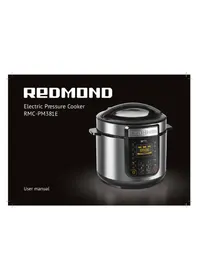
Electric Pressure Cooker RMC-PM381E
User manual
GBR 6
FRA 13
DEU 21
ITA 29
ESP 37
PRT 45
DNK 53
NOR 60
SWE 67
FIN 74
LTU 81
LVA 88
EST 95
ROU 102
HUN 109
HRV 116
SVK 123
SVN 130
CZE 137
POL 144
SRB 152
GRC 159
BGR 169
RUS 177
UKR 185
A2
REDOMOND

Carefully read oil instructions before operating and save them for future reference. By carefully following these instructions you can considerably prolong the service life of your appliance.
The safety measures and instructions contained in this manual do not cover all possible situations that may arise during the operation of the appliance. When operating the device the user should be guided by common sense, be cautious and attentive.
IMPORTANT SAFEGUARDS
- The manufacturer shall not be responsible for any failures arising from the use of this product in a manner inconsistent with the technical or safety standards.
- This appliance is intended to be used for nonindustrial use in house hold and similar spheres of application. Industrial application or any other misuse will be regarded as violation of proper service conditions. Should this happen, manufacturer is not responsible for possible consequences.
- Before plugging in the appliance ensure that the circuit voltage matches operating voltage of the appliance (see technical specifications or manufacturer's plate on the appliance).
- Use an extension cord designed for power consumption of the appliance as the parameter mismatch may result in a short circuit or fire outbreak.
- The appliance must be grounded. Connect the appliance only to a properly installed power point. Failure to do so may result in the risk of electrical shock. Use only grounded extension cords.

CAUTION! While in use the appliance heats up! Care should be taken to avoid touching the housing, bowl, or any other metal parts while operating. Make sure your hands are protected before handling the device. To avoid burns, do not lean over the appliance while opening the lid.
- Unplug the appliance after use, before cleaning or moving. Remove the power cord with dry hands holding it by the plug, not cord.
- Do not place the cord in doorframes or by heat sources. Do not twist or bend the power cord, ensure it is not in contact with sharp objects, corners and edges of furniture.
TOP PLEASE, NOTE: damaging the cord may lead to a failure that will not be covered by the warranty. If the cable is damaged or requires replacing, contact an authorized service center to have the cord replaced. - Never place the device on soft surfaces or cover it to keep ventilation slots clear of any obstruction.
- Do not operate the appliance outdoors to prevent water or any foreign object or insect from getting into the device. Doing so may result in serious damage of the appliance.
- Always unplug the device and let it cool down before cleaning. Follow cleaning and general maintenance guidelines when cleaning the unit.
- Always keep the steam release valve, pressure control valve, O-ring inside of lid, condensate collection container in clean and serviceable conditions. Do not plug in the device, if there are damages, blocks, deformations of valves, inner lid and O-ring or if the condensate collection container is full. When replacing O-ring by yourself, use only spare O-ring included into the delivery set of the device.
- When cooking food under pressure, ensure that the bowl is filled with water or other liquid of not less than 1/5 of bowl volume.
DO NOT fry and bake under high pressure! - To avoid blockage of the steam release valve, fill the bowl with products and water of not more than 4/5 of the bowl volume. When boiling the products capable to swell up in hot water or produce the foam – not more than 3/5 of the bowl volume.
DO NOT start the cooking program under high pressure if the device lid is not completely locked!


- When opening the steam release valve during or after cooking process, a strong vertical flow of hot steam is possible. Do not lean over the lid and keep hands away from the valve holes during its opening.
- Once the pressure in the working chamber is increased, the lid lock system is activated automatically. Do not open the device lid without preliminary normalizing the pressure in the working chamber.
- Once the liquid and pureed dishes are cooked, let the device cool for 5 to 10 minutes prior to release the pressure in order to avoid escaping of hot liquid through the steam release valve.
- Open the device lid using only the installed plastic handle. Lift the device only using the special handles placed at the frame sides and only when power supply is off.

DO NOT immerse the device in water or wash it in running water!
- This appliance can be used by children over 8 y.o. and physically or mentally challenged persons or as well as those who lack experience and knowledge only provided they have been given supervision or instruction concerning use of the appliance in a safe way and understand the hazards involved. Children should not play with the appliance. Keep the appliance and the power cord out of reach of children under 8 y.o. Cleaning and maintenance should not be performed by children without supervision.
- Keep packaging (film, foam plastic and other) out of reach of children as they may choke on them.
- No kind of modification or adjustment to the product is not allowed. All the repairs should be carried out by an authorized service center. Failure to do so may result in the device breakage, property damage or physical injury.

CAUTION! Do not use the appliance in case any defect has been noticed!
Technical Specifications
| Model.... | RMC-PM381E |
| Power.... | 900 W |
| Voltage.... | 220-240V, 50/60 Hz |
| Electrical safety.... | class I |
| Bowl capacity.... | 5 L |
| Bowl coating.... | non-stick |
| Display.... | LED |
| Steam valve.... | removable |
| Lid.... | removable |
| Overall dimensions.... | 290 × 330 × 300 mm |
| Net weight.... | 4.7 kg |
| Safety system.... | 4 safety features: |
| • steam release valve | |
| • shutoff valve | |
| • thermal fuse | |
| • excess pressure sensor |
Automatic programmes
| Pressure cooker mode: | Multicooker mode: |
| RICE/GRAIN | YOGURT/DOUGH |
| SLOW COOK | BAKE |
| SOUP | FRY |
| STEW | BABY FOOD |
| PILAF | PORRIDGE |
| STEAM/BOIL | BREAD |
| EXPRESS |
Functions
| MASTERCHEF LITE (changing the cooking temperature and time during cooking process) | yes |
| Keep Warm | up to 12 hours |
| Keep Warm mode disabled in advance | yes |
| Reheat | up to 12 hours |
| Time Delay | up to 24 hours |
| Audible signals disabled | yes |
| Control panel lock | yes |
Packaging Arrangement
| Electric Pressure Cooker | 1 pc |
| Bowl with non-stick coating | 1 pc |
| Steaming container | 1 pc |
| Trivet | 1 pc |
| Measuring cup | 1 pc |
| Stirring paddle | 1 pc |
| Serving spoon | 1 pc |
| Cookbook | 1 pc |
| Power cord | 1 pc |
| User manual | 1 pc |
| Service booklet | 1 pc |
In accordance with the policy of continuous improvement, the manufacturer reserves the right to make any modifications to design, packaging arrangement, or technical specifications of the product without prior notice. The specification allows an error of ±10% .
REDMOND
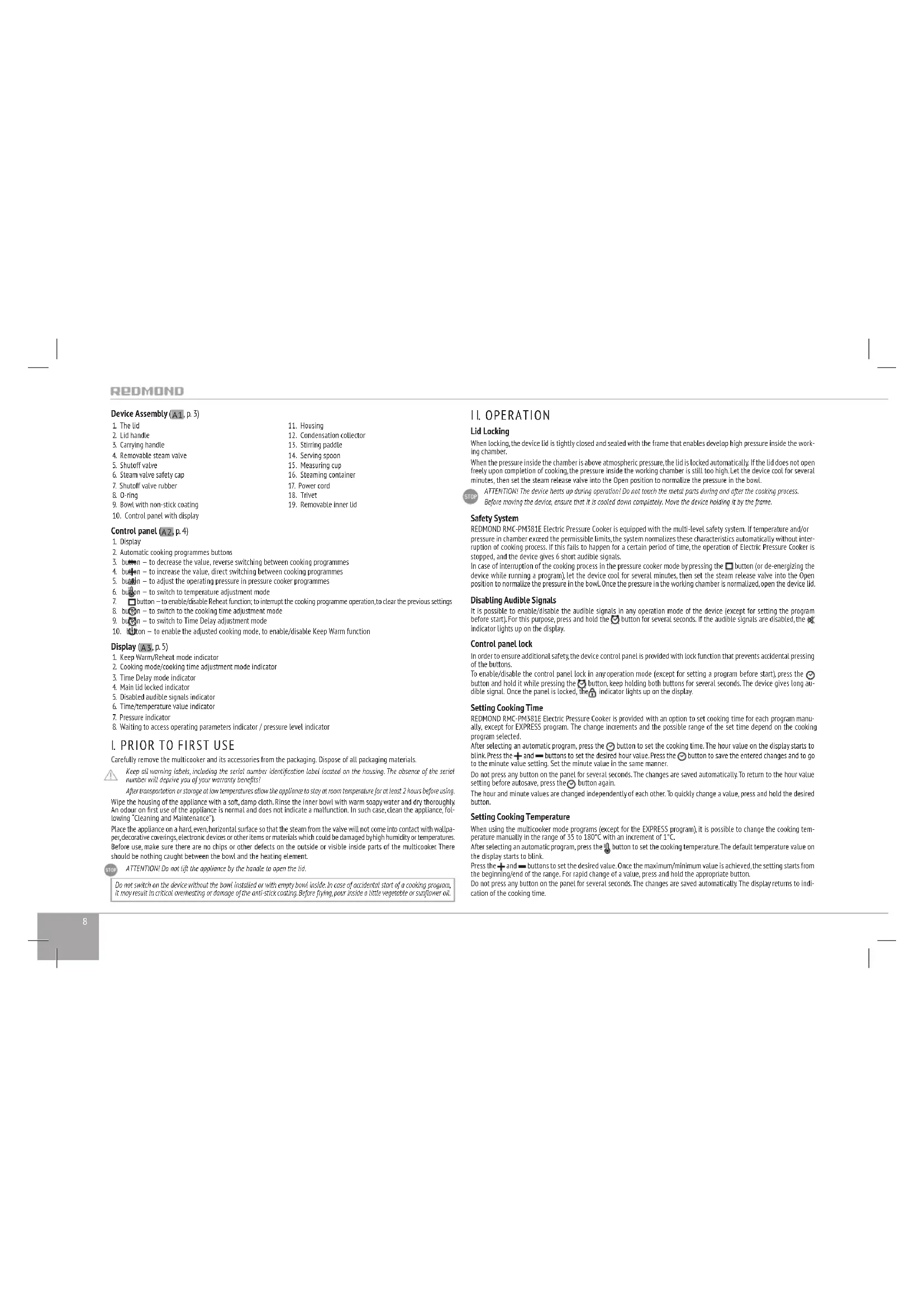
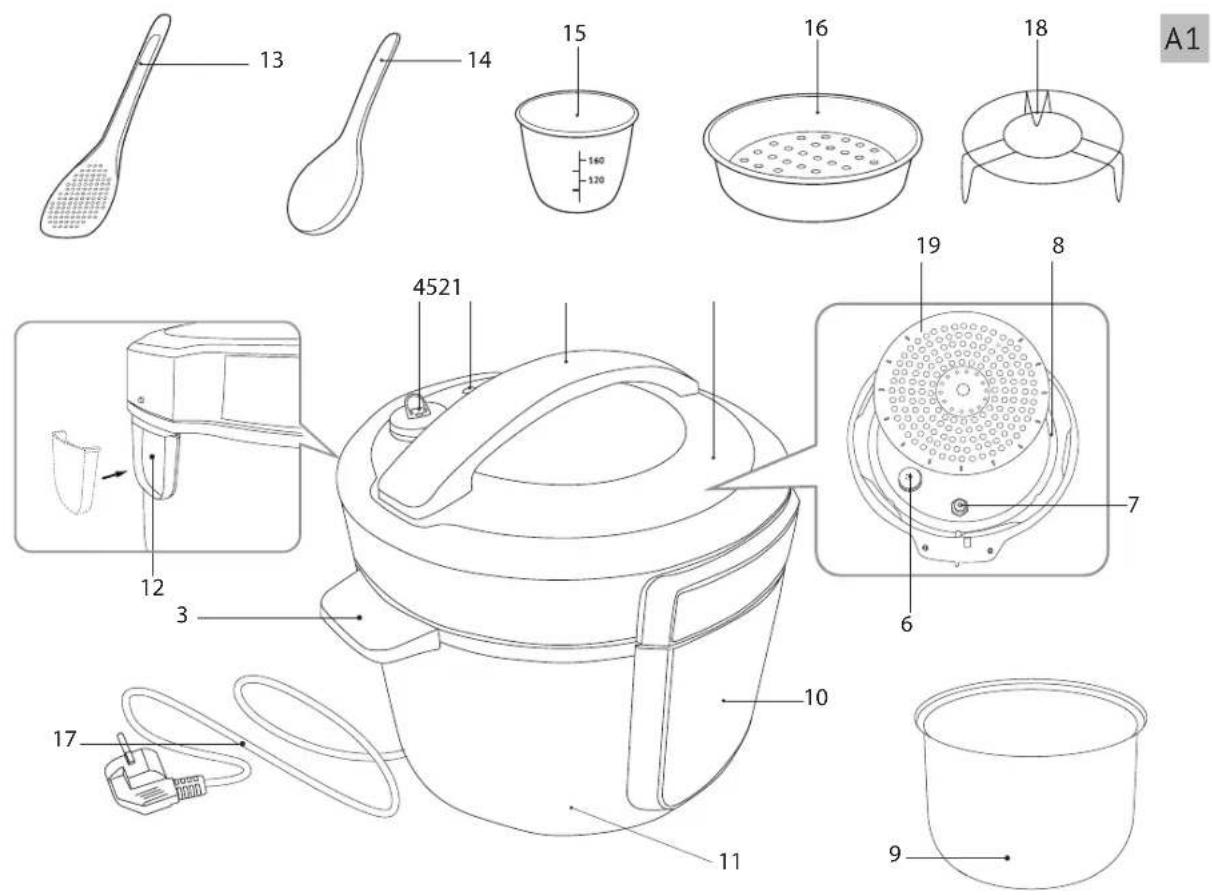
Device Assembly (A1, p. 3)
1 The Llc
2 Lid handle
-
Carrying handle
-
Removable steam valve
-
Shutoff valve
-
Steam valve safety cap
-
Shutoff valve rubber
& O-ring
-
Bowl with non-stick coating
-
Control panel with display
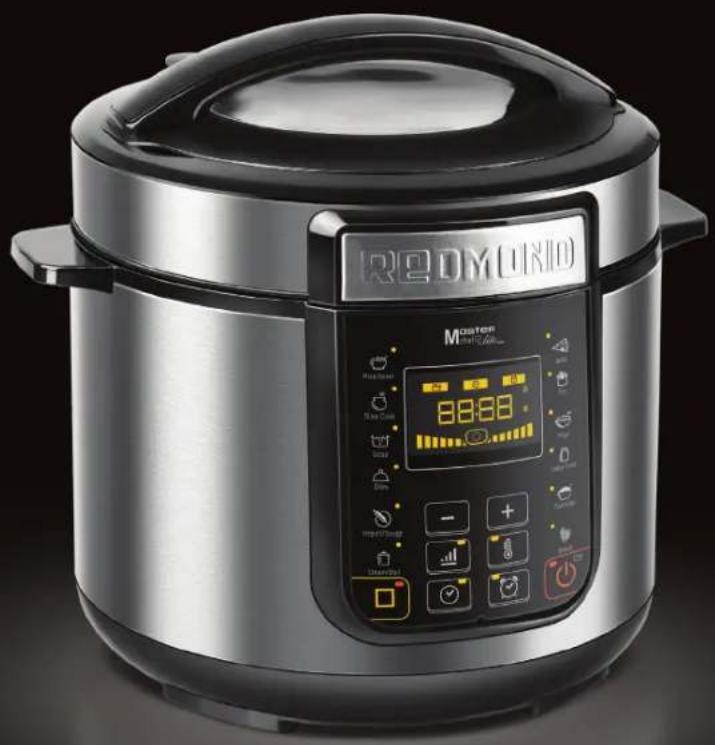
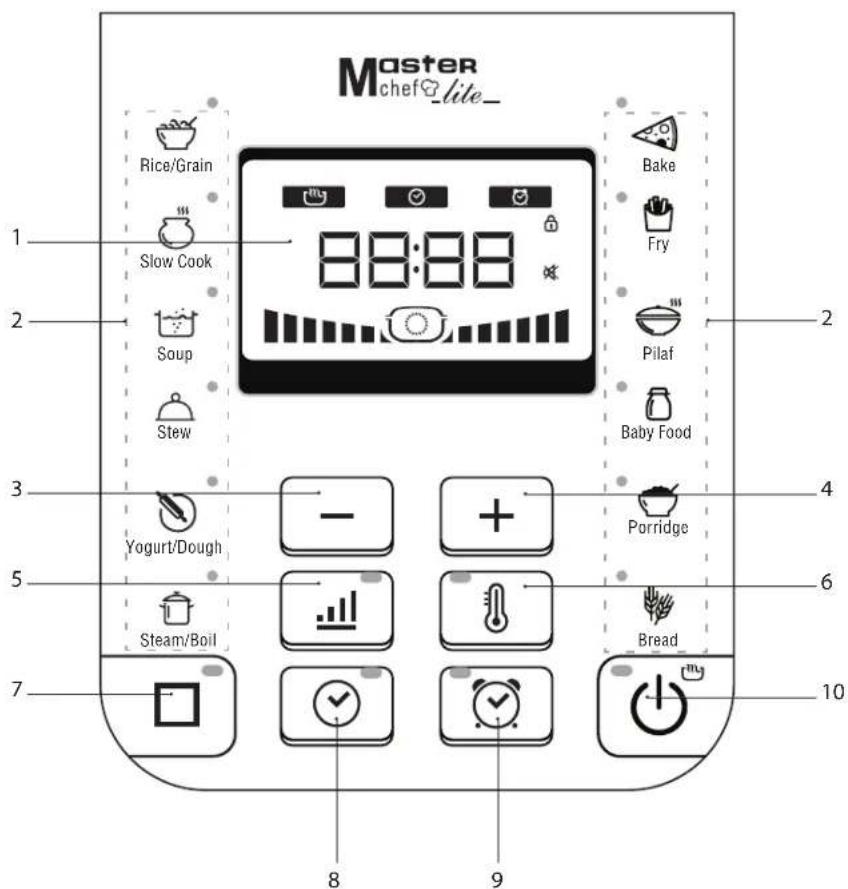
Control panel (A.2, p. 4)
-
Display
-
Automatic cooking programmes buttons
-
button - to decrease the value, reverse switching between cooking programmes
-
burden - to increase the value, direct switching between cooking programmes
-
button - to adjust the operating pressure in pressure cooker programmes
-
button - to switch to temperature adjustment mode
-
□ button - to enable/disable Reheat function; to interrupt the cooking programme operation, to clear the previous settings
-
button - to switch to the cooking time adjustment made
-
button - to switch to Time Delay adjustment mode
-
Button - to enable the adjusted cooking mode, to enable/disable Keep Warm function
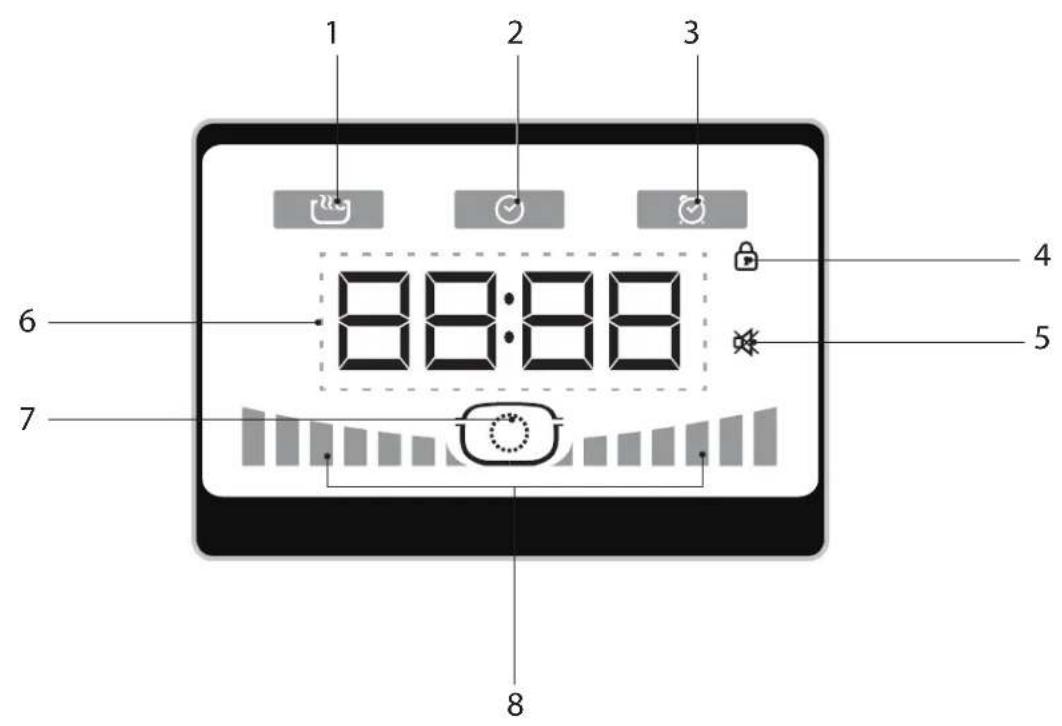
Display (A3, p. 5)
-
Keep Warm/Reheat mode indicator
-
Cooking mode/cooking time adjustment mode indicator
-
Time Delay mode indicator
-
Main Lid locked indicator
-
Disabled audible signals indicator
-
Time/temperature value indicator
-
Pressure indicator
-
Waiting to access operating parameters indicator / pressure level indicator
I. PRIOR TO FIRST USE
Carefully remove the multicooker and its accessories from the packaging. Dispose of all packaging materials.

Keep all warning labels, including the serial number identification label located on the housing. The absence of the serial number will deceive you of your warranty benefits!
After transportation or storage at low temperatures allow the appliance to stay at room temperature for at least 2 hours before using. Wipe the housing of the appliance with a soft, damp cloth. Rinse the inner bowl with warm soapy water and dry thoroughly. An odour on first use of the appliance is normal and does not indicate a malfunction. In such case, clean the appliance, following "Cleaning and Maintenance".
Place the appliance on a hard, even horizontal surface so that the steam from the valve will not come into contact with wallpaper, decorative coverings, electronic devices or other items or materials which could be damaged by high humidity or temperatures. Before use, make sure there are no chips or other defects on the outside or visible inside parts of the multicooker. There should be nothing caught between the bowl and the heating element.

ATTENTION! Do not lift the appliance by the handle to open the lid.
Do not switch on the device without the bowl installed or with empty bowl inside. In case of accidental start of a cooking program, it may result in critical overheating or damage of the anti-stick coating. Before flying, pour inside a little vegetable or sunflower oil
II. OPERATION
Lid Locking
When locking, the device lid is tightly closed and sealed with the frame that enables develop high pressure inside the working chamber.
When the pressure inside the chamber is above atmospheric pressure, the lid is locked automatically. If the lid does not open freely upon completion of cooking, the pressure inside the working chamber is still too high. Let the device cool for several minutes, then set the steam release valve into the Open position to normalize the pressure in the bowl.
ATTENTION! The device heats up during operation! Do not touch the metal parts during and after the cooking process. Before moving the device, ensure that it is cooled down completely. Move the device holding it by the frame.
Safety System
REDMOND RMC-PM381E Electric Pressure Cooker is equipped with the multi-level safety system. If temperature and/or pressure in chamber exceed the permissible limits, the system normalizes these characteristics automatically without interruption of cooking process. If this fails to happen for a certain period of time, the operation of Electric Pressure Cooker is stopped, and the device gives 6 short audible signals.
In case of Interruption of the cooking process in the pressure cooker made by pressing the □ button (or de-energizing the device while running a program), let the device cool for several minutes, then set the steam release valve into the Open position to normalize the pressure in the bowl. Once the pressure in the working chamber is normalized, open the device lid
Disabling Audible Signals
It is possible to enable/disable the audible signals in any operation mode of the device (except for setting the program before start). For this purpose, press and hold the button for several seconds. If the audible signals are disabled, the indicator lights up on the display.
Control panel lock
In order to ensure additional safety the device control panel is provided with lock function that prevents accidental pressing of the buttons.
To enable/disable the control panel lock in any operation mode (except for setting a program before start), press the button and hold it while pressing the button, keep holding both buttons for several seconds. The device gives long audio signal. Once the panel is locked, the indicator lights up on the display.
Setting Cooking Time
REDMOND RMC-PM381E Electric Pressure Cooker is provided with an option to set cooking time for each program manually, except for EXPRESS program. The change increments and the possible range of the set time depend on the cooking program selected.
After selecting an automatic program, press the ⏻ button to set the cooking time. The hour value on the display starts to blink. Press the + and - buttons to set the desired hour value. Press the ⏻ button to save the entered changes and to go to the minute value setting. Set the minute value in the same manner.
Do not press any button on the panel for several seconds. The changes are saved automatically. To return to the hour value setting before autosave, press the 📋 button again.
The hour and minute values are changed independently of each other. To quickly change a value, press and hold the desired button.
Setting Cooking Temperature
When using the multicooker mode programs (except for the EXPRESS program), it is possible to change the cooking temperature manually in the range of 35 to 180°C with an increment of 1°C.
After selecting an automatic program, press the button to set the cooking temperature. The default temperature value on the display starts to blink.
Press the + and - buttons to set the desired value. Once the maximum/minimum value is achieved, the setting starts from the beginning/end of the range. For rapid change of a value, press and hold the appropriate button.
Do not press any button on the panel for several seconds. The changes are saved automatically. The display returns to indication of the cooking time.

To protect against overheating, the maximum running time of a program is limited to 2 hours when the cooking temperature is set above 150°C.
Setting Pressure Level
When using the pressure cooker mode programs, it is possible to change the pressure level manually. Press the "all" button to go to the pressure setting. The indicator and pressure level scale on the display start to blink. Use the "and" but - tons to adjust the pressure. The number of marks on the pressure level scale changes symmetrically. Once the maximum minimum value is achieved, the setting starts from the beginning/end of the range. For rapid change of a value, press and hold the appropriate button.
Do not press any button on the panel for several seconds. The changes are saved automatically. The display returns to indication of the cooking time value, the pressure indicators stop blinking.
Once an automatic program starts up, the pressure level indicator blinks until the device achieves the installed working characteristics. The pressure level scale is gradually completed up to the installed value. After achieving the working characteristics, both indicators continue to light until the end of cooking process.
Time Delay function
The Time Delay function enables setting of the time interval after which a cooking program starts. The time may be set in the range of 1 minute to 24 hours with an increment of 1 minute.
After selecting an automatic cooking program, press the button to set the delay time. The indicator lights up, the hour value on the display starts to blink. Press the and buttons to set the desired hour value. Press the button to save the entered changes and to go to the minute value setting. Set the minute value in the same manner. Do not press any button on the panel for several seconds. The changes are saved automatically. To return to the hour value setting before autosave, press the button again. After autosave, the indicator goes off, the indicator lights up and the display returns to the indication of cooking time. To see the time delay value, press the button.
The hour and minute values are changed independently of each other. Once the maximum/minimum value is achieved, the setting starts from the beginning/end of the range. For rapid change of a value, press and hold the appropriate button.

The Time Delay function is not available when using the FRY and EXPRESS programs.
When the Time Delay function is active, the indicator of selected program and 📄 indicator light up, the minute countdown timer is indicated on the display and the 📄 indicator lights up (if the Keep Warm function is active). To see the time of cooking program, press the 📄 button.
Once the function work is over, the device gives three short audible signals and selected cooking program starts.

It is not recommended to use the Time Delay function, if the recipe contains perishable products (eggs, fresh mild, meat, cheese, etc.).

p Warm
This function automatically activates at the end of the cooking cycle and keeps the food warm at 70-75°C for 12 hours. When Keep Warm is active, the button indicator and indicator light up and the display indicates the direct time count of running in this mode.
If necessary, the Keep Warm may be disabled by pressing the button.

The Keep Warm function is not available when using the YOGURT/DOUGH and EXPRESS programs.
Preliminary Disabling of Keep Warm
Enabling the Keep Warm upon completion of a cooking program is not always desirable. Taking into account this fact, REDMOND RMC-PM381E Electric Pressure Cooker provides an option to timely disable this function while running of the main cooking program. For this purpose, while running of a program press the Button, the Indicator goes off. To enable the Keep Warm again, press the Button once again ( indicator lights up).

For users' convenience, the Keep Warm is disabled automatically without option to enable it manually when the cooking temperature is set below 20°C. While running a program the temperature is set above 20°C, the Keep Warm enables automatically
Reheat
REDMOND RMC-PM381E Electric Pressure Cooker can be used to reheat cold dishes. Proceed as follows:
-
Put all products to the bowl, install the bowl into the device frame.
-
Close the lid, connect the device to electrical outlet.
-
Press the □ button. The □ button indicator and ℝ indicator light up, the timer begins to count the heating time. Once the temperature achieves 70°C, the device gives two short audible signals.
The device reheats the dish up to 70-75°C and keeps it hot for up to 12 hours. If necessary,reheat can be stopped by pressing the □button.The ⚪indicator goes off and the device goes to the standby mode (--- on the display).
Thanks to the Keep Warm and Reheat functions, the Electric Pressure Cooker can keep a product hot for up to 12 hours. However, it is not recommended to leave a dish hot for more than 2-3 hours since sometimes this may result in change of its taste.
MASTERCHEF LITE Function
The MASTERCHEF LITE function enables changing of cooking time and temperature when running automatic programs in the multicooker mode (except for EXPRESS program). The range and increment of cooking time depend on the selected program. The temperature range is from 35 to 180°C with an increment of 1°C.

When the Time Delay function is enabled, the MASTERCHEF LITE function is not available.
The MASTERCHEF LITE function can be especially useful when cooking upon complex recipes that require a combination of different cooking programs (e.g. stuffed cabbage, beef Stroganoff, soups and pasta to different recipes, fruit preserves, etc.).
To change cooking temperature:
- When a cooking program runs, press the button. The temperature value on the display starts to blink.
When making further temperature change, the latest set value is displayed.
- Press the +nd buttons to set the desired value. Once the maximum/minimum value is achieved, the setting starts
from the beginning/end of the range. For rapid change of a value, press and hold the appropriate button.
- Do not press any button on the control panel for several seconds. The changes are saved automatically.
To protect against overheating, the maximum running time of a program is limited to 2 hours when the cooking temperature is set above 150°C.
When changing the cooking time while achieving the working characteristics (if it is provided by the factory settings), the preheating process is interrupted. The countdown of a program running starts. Changing of cooking time does not influence on the process of preliminary heating.
To change cooking time:
-
When a cooking program runs, press the ⏻ button. The hour value on the display starts to blink.
-
Press the + and - buttons to set the desired hour value. Press the button to save the entered changes and to go to the minute value setting. Set the minute value in the same manner. Do not press any button on the panel for several seconds. The changes are saved automatically. To return to the hour value setting before autosave, press the button again. The hour and minute values are changed independently of each other. To quickly change a value, press and hold the desired button.
-
Do not press any button on the control panel for several seconds. The changes are saved automatically.
if you set the cooking time to 00:00, the program stops running.
General Procedure for Using Automatic Programs
IMPORTANT! When using the water boiling device (for example, when boiling products), DO NOT set the cooking temperature above 100°C. It may result in overheating and failure of the device. For the same reason, DO NOT use the BREAD, FRY and BAKE programs to boil water.
-
Prepare (measure) the necessary ingredients.
-
Put the ingredients in the bowl in accordance with the cooking program and install the bowl it into the frame. Ensure that all ingredients, including liquid, are below the maximum mark on the inner surface of the bowl. Ensure that the bowl is aligned properly and is in tight contact with the heating element.
-
Close the device lid and turn it anticlockwise against stop.
ATTENTION! If you cook at high temperatures with much vegetable oil, always leave the device lid open.
- For cooking in the pressure cooker mode, bring the steam valve to the Close positions, in the multicooker mode — to the Open position.
REOMOND
-
Connect the device to electrical outlet.
-
To select an automatic cooking program, press the relevant button on the control panel. It is possible to select a cooking program by pressing the + and buttons. The programs are switched circle-wise, the indicator of selected program lights up.
- If necessary, change the default cooking time.
- If necessary, change the cooking temperature (for multicooker mode programs) or pressure level (for pressure cooker mode programs).
- If necessary, set the start delay time.
The characteristics may be changed in any order.
When pressing the Button on any setting stage, the program with the entered characteristics starts.
- Press the ⏻ button to start a cooking program. Depending on the cooking program selected, countdown starts after or upon achievement of the necessary temperature and pressure in the bowl.
i In some automatic programs, the set cooking time counting starts only after the device has reached the set operation temperature. For example, in the STEAM/BOIL program the countdown starts only after water is boiled and sufficient dense steam in the bowl is formed.
While achieving the set characteristics, the and all indicators blink, and the pressure level scale is filled up. When using the pressure cooler mode programs, the pressure level scale is filled up to the set pressure value. Once the working characteristics are achieved, the device gives an audible signal. The indicator stops blinking, all indicator and pressure level scale go off or light up continuously if the program runs under pressure.
- Three short audible signals notify that a cooking program is finished. Once the program running/Keep Warm is over, "End" inscription appears on the display for several seconds.
-
When using the pressure cooker mode programs, upon completion of cooking let the device cool for several minutes. Then bring the steam valve to the Open positions to normalize the pressure in the working chamber.
Press the button to cancel the entered program, interrupt the cooking process or Keep Warm.
DO NOT:
STOP 50 MD. -
fill the bowl with products and water over the maximum mark on the inner surface of the bowl;
- cook in the pressure cooker mode without adding water or other fluid (min. required fluid level is 2 measuring cups):
- use the pressure cooker mode to fry products on oil.
To obtain a high-quality result, you are suggested to use the recipes for cooking from the cookbook attached to the pressure multicooker, designed specifically for this model. Relevant recipes can also be found on the website www.redmond.company.
Table of Default Settings
| Programme Recommendations for use | Default time | Adjustment range/Increments | Under-pressure cooking | Time Delay | Waiting to access operating parameters | Keep Warm | |
| RICE/GRAIN | Cooking whole and crushed grains, and various side dishes | 0:10 | 1 min - 2 h / 1 min | √ | √ | √ | √ |
| SLOW COOK | Cook baked milk, canned meat, fresh chains, meat jelly and aspic | 1:00 | 1 min - 5 h / 1 min | √ | √ | √ | |
| SOUP Cook different types of soups and broths 0:20 | 1 min - 4 h / 1 min | √ | √ | √ | |||
| STEW | Make meat, fish, vegetable, side and multicomponent dishes stews | 0:20 | 1 min - 4 h / 1 min | √ | √ | √ | |
| YOGURT/DOUGH | Cook different yogurts, proofing dough 8:00 | 10 min - 12 h / 1 min | √ | ||||
| Programme Recommendations for use | Default time | Adjustment range/increments | Under-pressure cooking | Time Delay | Waiting to access operating parameters | Keep Warm |
| BABY FOOD | Cook baby food | 0:10 | 1 min - 4 h/1 min | √ | ||
| PORRIDGE | Cook porridges with milk | 0:20 | 1 min - 4 h/1 min | √ | ||
| STEAM/BOIL | Steam meat, fish, vegetables and other foods | 0:10 | 1 min - 2 h/1 min | √ | √ | √ |
| BAKE | Baking cakes, pies, puff, and yeast pastry | 1:00 | 1 min - 4 h/1 min | √ | ||
| FRY | Frying meat, fish, vegetables and multicomponent meals | 0:18 | 1 min - 1 h/1 min | √ | ||
| PILAF | Cook meat, fish, poultry, and vegetable pilafs | 0:20 | 1 min - 3 h/1 min | √ | √ | √ |
| BREAD | Make bread from rye and wheat flour (including dough brushing stage). | 3:00 | 1 min - 4 h/1 min | √ | ||
| EXPRESS | Quick cook rice, flufly water porridge.Press and hold the egg button for several seconds to start a program in standby mode. Appear on the display | Automatic shut-off after complete boiling of water |
III. COOKING TIPS
Recommended Steam Times for Different Foods
| Meal | Weight, g / Quantity, pcs. | Water, ml | Cooking time, min |
| Pork/beef fillet (cut into 1.5-2 cm cubes) | 500 | 800 | 30/40 |
| Mutton fillet (cut into 1.5-2 cm cubes) | 500 | 800 | 40 |
| Chicken fillet (cut into 1.5-2 cm cubes) | 500 | 800 | 20 |
| Meatballs/outlets | 500 | 800 | 25/40 |
| Fish (fillet) | 300 | 800 | 15 |
| Seafood mix (frozen) | 300 | 800 | 5 |
| Potatoes (cut into 4 pieces) | 500 | 800 | 20 |
| Carrots (cut into 1.5-2 cm cubes) | 500 | 800 | 35 |
| Beet (cut into 4 pieces) | 500 | 1500 | 90 |
| Vegetables (frozen) | 500 | 800 | 5 |
| Eggs | 5 um. | 800 | 10 |

Please note that these are only approximate guidelines. Steaming times may vary depending on the quality of foods and your personal preferences.
Recommendations for Using Temperature Modes
| Temperature, °C | Recommendations for use | Temperature, °C | Recommendations for use |
| 35 Proofing dough, cooking vinegar 110 Sterilize tableware | |||
| 40 Make yogurts 115 Make sugar syrup | |||
| 45 Starter 120 Make fore shank | |||
| 50 Fermentation 125 Stew meat | |||
| 55 Make fondant 130 Make pudding | |||
| 60 Make green tea and baby food 135 Brown cooked foods | |||
| 65 Cook vacuum sealed meat 140 Smoke foods | |||
| 70 Make punch 145 Bake vegetables and fish (in foil) | |||
| 75 Posteurize liquids, make white tea 130 Bake meat (in foil) | |||
| 80 Make mulled wine 135 Bake fermented goods | |||
| 85 | Make cottage cheese and other dishes, requiring long cooking times | 160 Fry poultry | |
| 90 Make red tea 165 Fry steaks | |||
| 95 Make oatmeal | 170 Fry in butter | ||
| 100 | Make jams or meringues | 175 Cook chicken nuggets | |
| 105 | Make meat jelly | 180 Cook chips | |

You can also refer to the recipe book provided with the appliance.
IV. ADDITIONAL FEATURES
• Make cheese, cottage cheese
• Make fondue
• Sterilizing tableware
• Pasteurize liquid foods
• Baby food heating

For the details, see the recipe book or web-site: www.redmond.company.
V. ADDITIONAL ACCESSORIES
(sold separately)
Additional accessories for the REDMOND RMC-PM381E Electric Pressure Cooker and information on the innovations are available through www.redmond.company and our authorized dealers.
VI. CLEANING AND MAINTENANCE

ATTENTION! Before you start cleaning the appliance, make sure that it is unplugged and has completely cooled down!
General Guidelines
- Prior to first use or in order to remove the odor after cooking steam half a lemon for 15 minutes using the STEAM/BOIL programme.
- Do not leave cooking bowl with foods or liquids inside closed multicooker for over 24 hours. Store cooked foods in refrigerator and reheat when required, using Reheat function.
- Unplug the appliance if you don't use it for a long time. Working chamber, including heating disk, bowl, lid, O-ring, steam and lock valves should be clean and dry.
DO NOT immerse the appliance in water or wash under running water!
DO NOT use a sponge or tissue with hard or abrasive surface or abrasive pastes. DO NOT use any chemically aggressive substances or any other agents which are not recommended for cleaning items that come into contact with food.
- Be careful when cleaning the rubber parts of Electric Pressure Cooker. Their damage or deformation may result in an inappropriate operation of the device.
- Clean the housing when necessary. The bowl, lid and O-ring, steam and lock valves need to be cleaned after each use. Condensate, accumulating during cooking, needs to be removed after each use. Clean the interior of the cooking chamber when necessary.
To Clean the Housing, Lid and O-ring
Use soft damp cloth or sponge to clean the housing, lid and O-ring. To remove the sealing ring, gently pull it towards you. If necessary, use a mild soap solution and wipe the surface dry to remove soap residue and water spots.
To Clean the Bowl
Wash the bowl by hand, using soft sponge and mild soap, or in a dishwasher (following its manufacturer's recommendations). If necessary fill the bowl with warm water, let soak and clean. Wipe the outer surface of the bowl dry before positioning it back inside the multicooker.
When the multicooker is used on a regular basis, inner non-stick coating of the bowl may partially or completely change color, which does not indicate a defect.
To Clean Removable Steam and Lock Valves
- Carefully pull the steam valve upwards in the deepening of the lid.
- Remove the inner lid by pulling it towards you.
- Remove the cap on the inner side of the lid by pulling it towards you.
- Remove the silicone sealing insert of the lock valve and remove the valve itself. Rinse all parts of the steam and lock valves.
- Reassemble the valve in reverse order of disassembly. Place the lock valve back into its original position, put the sealing insert on it, fit the protective grid of the steam valve to the thrusts until tight. Tightly fix the steam valve to the slot on the lid of the appliance.
ATTENTION! To avoid deformation of the valve's rubber, do not twist and pull it after removal, cleaning and mounting.
DO NOT clean the inner lid in the dishwasher.
To Remove Condensate
In this model the condensate accumulates in the special cavity on the housing around the bowl and drains into a special container, located on the back side of the appliance.
- Open the lid, remove the bowl. If necessary slightly lift the front part of the electric pressure cooker, so that condensate completely drains into the container.
- Remove the container, slightly pulling it.
- Pour the condensate out. Wash the container, following the instructions aforementioned and insert into the place.
- Wipe off any condensate remaining around the bowl with a dry cloth.
Cleaning the Working Chamber
Compliance with the user manual guidelines minimizes the risk of food particles or liquids accumulating inside the cooking chamber.
However, if the inside of the chamber gets dirty, clean it to prevent improper operation or malfunction of the unit. Walls of the cooking chamber; surface of the heating disk, and the casing of central thermal sensor (located in the middle of the heating disk) can be cleaned with a damp (not wet!) sponge or cloth. Remove any traces of soap or detergent if using any to prevent unwanted odors during cooling. If there is a foreign object in the cavity around central thermal sensor, carefully remove it using tweezers, trying to avoid pressing on the casing of the sensor. Clean heating disk with a damp medium-hard sponge or synthetic brush, if necessary.
REOMOND
During regular operation of the device, the heating disc may totally or partially change its color. This is not a sign of the device failure and does not influence on its operation.
Transportation and Storage
Before repeated operation or storage completely dry all parts of the appliance. Store the assembled appliance in a dry, ventilated place away from heating appliances and direct sunlight. During transportation and storage, do not expose the device to mechanical stress, that may lead to damage of the device and/or violation of the package integrity.
Keep the device package away from water and other liquids.
VII. BEFORE CONTACTING THE SERVICE CENTRE
| Problem Possible cause Solution | |||
| Display shows the error code: E*, the device gives 6 short audible signals | System error, possible control board or heating element malfunction | Unplug the appliance and let cool down. Close the lid tightly and plug in the appliance | |
| Appliance does not switch on | Power cord is not connected to the appliance and/or socket | Ensure that the power cord is connected to the corresponding inlet on the housing of the appliance and to the socket | |
| Wall socket is not working properly | Connect to a properly working wall socket | ||
| Power supply failure | Check the power supply. If not available, contact local electricity supply company | ||
| Dish is taking too long to cook | Power supply interruption (power supply is unstable/underrated) | Ensure that the power supply is stable. If unstable/underrated, contact local electricity supply company | |
| There is a foreign object between the bowl and the heating element (grain, food particles, debris, etc.) | Unplug the appliance and let cool down. Remove foreign object or objects | ||
| The bowl is not properly positioned Properly position the bowl into place | |||
| Hearing disk is dirty | Unplug the appliance and let cool down. Clean heating disk | ||
| Hot steam escapes from under lid during cooking. The count of program running time starts | Inner lid and cooking bowl fail to seal her-metically | The bowl is not properly posi-tioned | Properly position the bowl into place |
| The lid is not closed properly; foreign object under lid | Remove foreign objects (grain, food particles, debris, etc.) from under the rim, if any. Always close the lid until it clicks into place | ||
| Sealing ring is dirty, deformed, or damaged in any way | Check the sealing ring. Replace, if necess-sary | ||
| Hot steam escapes from under lid during cooking. The count of program running time fails | Sealing ring is Lost Check the sealing ring | ||
| When the device operates in the pressure cooker mode, steam keeps going out of the hole of shutoff valve. The count of pro-gram running time fails | Shutoff valve is dirty | Clean the shutoff valve according to the Maintenance Section | |
| Shutoff valve or its sealing rubber is lost | Check for shutoff valve and its sealing rubber | ||

Environmentally friendly disposal (WEEE)
The packaging, user manual and the device itself shall be taken to the applicable collection point for the recycling of electrical and electronic equipment. Do not throw away the electronic waste to help protect the environment. Old appliances must not be disposed with other household waste but must be collected separately. Municipal disposal of recyclable wastes is free of charge. The owners of old appliances are required to bring it to a waste tre. With this little extra effort, you can help to ensure that valuable raw materials are recycled and pollutants are appropriate.
This appliance is labelled in accordance with European Directive 2012/19/EU – concerning used electrical and electronic appliances (waste electrical and electronic equipment WEEE).
The guideline determines the framework for the return and recycling of used appliances as applicable throughout the EU.
in case you didn't manage to eliminate the defects, please refer to the authorized service centre.

V. ACCESSORI AGGIUNTIVI
(venduto separatamente)
Control panel (A.2, p. 4)
- To avoid blockage of the steam outflow valve, fill the bowl with products and water of not more than 4/5 of the bowl volume. Quando ferver pro-
REDOMOND
• Gjør pst, cottage cheese
• Gjør fondue
• Sterilisering servise
• Pasteurize flytende mat
• Babymat oppvarming
- REDOMOND
- IMPORTANT SAFEGUARDS
- REDMOND
- DEVICE ASSEMBLY (A1, P. 3)
- CONTROL PANEL (A.2, P. 4)
- DISPLAY (A3, P. 5)
- PRIOR TO FIRST USE
- OPERATION
- LID LOCKING
- SAFETY SYSTEM
- DISABLING AUDIBLE SIGNALS
- CONTROL PANEL LOCK
- SETTING COOKING TIME
- SETTING COOKING TEMPERATURE
- SETTING PRESSURE LEVEL
- TIME DELAY FUNCTION
- P WARM
- PRELIMINARY DISABLING OF KEEP WARM
- REHEAT
- MASTERCHEF LITE FUNCTION
- TO CHANGE COOKING TEMPERATURE
- TO CHANGE COOKING TIME
- GENERAL PROCEDURE FOR USING AUTOMATIC PROGRAMS
- REOMOND
- COOKING TIPS
- ADDITIONAL FEATURES
- ADDITIONAL ACCESSORIES
- CLEANING AND MAINTENANCE
- GENERAL GUIDELINES
- TO CLEAN THE HOUSING, LID AND O-RING
- TO CLEAN THE BOWL
- TO CLEAN REMOVABLE STEAM AND LOCK VALVES
- TO REMOVE CONDENSATE
- CLEANING THE WORKING CHAMBER
- TRANSPORTATION AND STORAGE
- ENVIRONMENTALLY FRIENDLY DISPOSAL (WEEE)
- ACCESSORI AGGIUNTIVI
Brand : Redmond
Model : RMCPM381E
Category : Saucepan