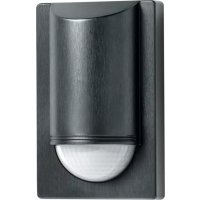
IS 2180 ECO - Motion detector STEINEL - Free user manual and instructions
Find the device manual for free IS 2180 ECO STEINEL in PDF.


| Product type | Infrared motion detector |
| Brand | Steinel |
| Model | IS 2180 ECO |
| Dimensions (H × W × D) | 120 × 78 × 55 mm |
| Weight | Approx. 150 g (estimate) |
| Power supply | 230–240 V, 50 Hz |
| Detection angle | 180° horizontal, 90° vertical |
| Detection range | 5 m or 12 m (adjustable via lens) |
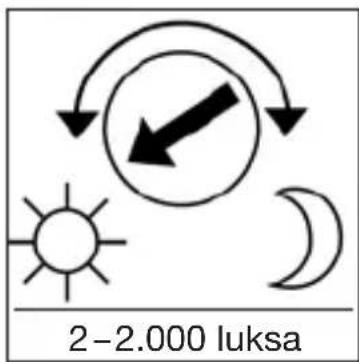
| Twilight setting | 2 to 2,000 lux |
| Time delay | 10 s to 15 min |
| Maximum switched power | 2,000 W (incandescent/halogen lamp) |
| Protection rating | IP 54 |
| Operating temperature | –20 °C to +50 °C |
| Main functions | Motion detection, automatic lighting switching, time delay and twilight threshold settings |
| Maintenance and cleaning | Clean the lens with a damp cloth, without detergent |
| Safety | Disconnect power before intervention; installation by a professional in compliance with standards |
| Spare parts and repairability | Available accessories: angle wall brackets; repair under manufacturer warranty |
| Manufacturer warranty | 5 years for detectors (consumers and contractors) |
Frequently Asked Questions - IS 2180 ECO STEINEL
User questions about IS 2180 ECO STEINEL
0 question about this device. Answer the ones you know or ask your own.
Ask a new question about this device
Download the instructions for your Motion detector in PDF format for free! Find your manual IS 2180 ECO - STEINEL and take your electronic device back in hand. On this page are published all the documents necessary for the use of your device. IS 2180 ECO by STEINEL.
USER MANUAL IS 2180 ECO STEINEL
natural_image
Close-up of a metallic wall-mounted device with a curved lid and a circular base, no visible text or symbols on the object itself.
GB . . . 14 Follow written instructions!
natural_image
Illustration of a rural house with a 180° angle and a circular diagram showing a fence, set against a landscape background (no text or symbols)natural_image
Illustration of a house with a circular target and a person walking, showing light rays reflecting from inside (no text or symbols)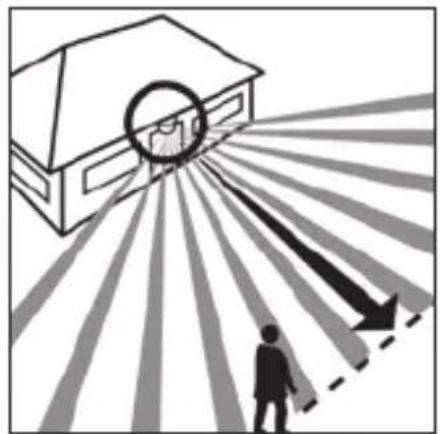
natural_image
Illustration of a house with a circular target and arrows pointing toward a person walking, no text or symbols present2 W < LED < 8 W 175 W
LED > 8 W 350 W
natural_image
Illustration of hands using a screwdriver to install a component into a cabinet (no text or symbols present)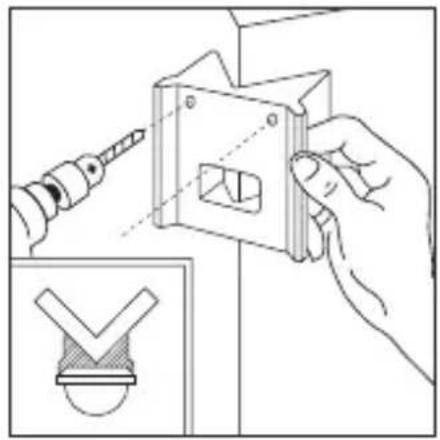
natural_image
Illustration of a hand using a power tool to adjust a mechanical component, with an inset showing a checkmark symbol (no text or labels present)natural_image
Line drawing of a bird cutting a bird, showing blade and wing structure (no text or symbols)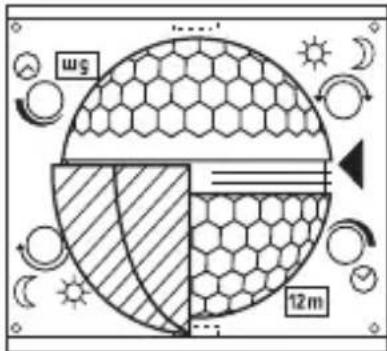
natural_image
Diagram of a microfabricated structure with hexagonal mesh pattern and diagonal striped lines, no text or symbols present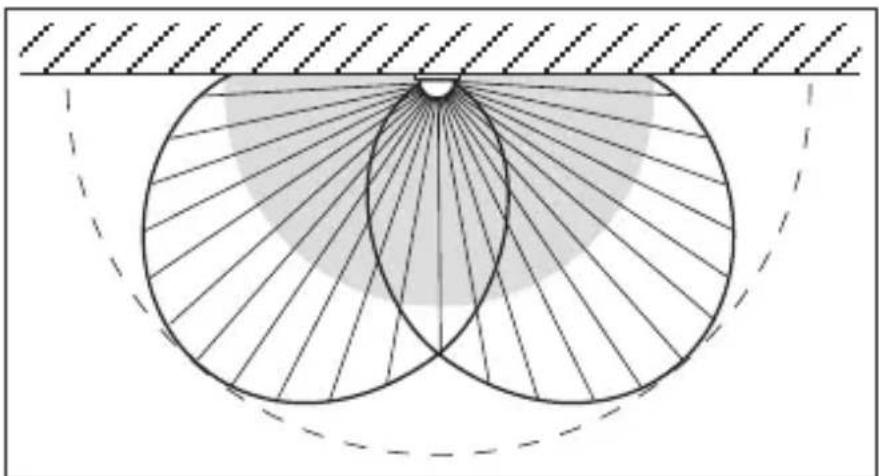
natural_image
Geometric diagram showing concentric circles with radiating lines and a shaded region, no text or symbols present.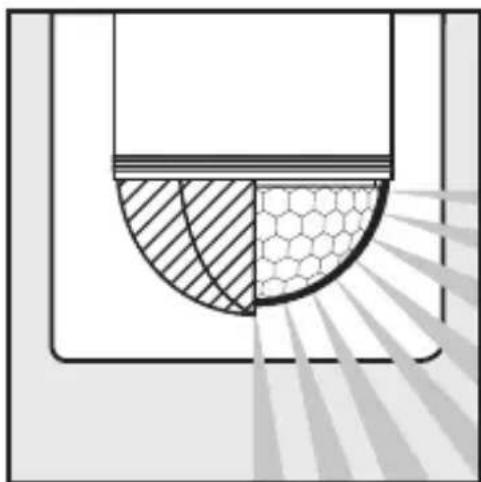
natural_image
Diagram showing a cross-section of a container with shaded regions and a hexagonal pattern inside, no text or symbols present.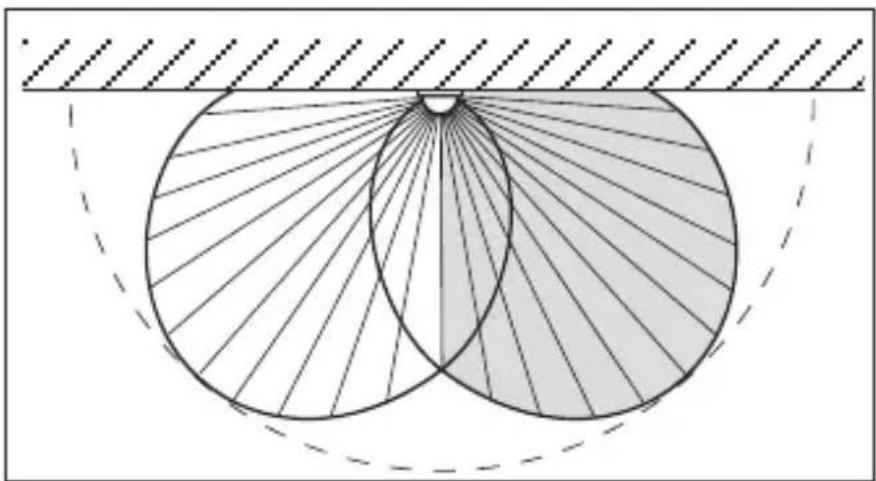
natural_image
Geometric diagram showing two overlapping circles with radiating lines, enclosed by a dashed rectangle (no text or symbols)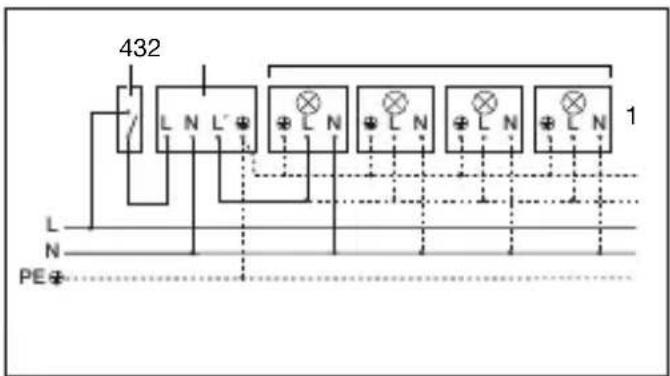
Congratulations on purchasing this STEINEL Infrared Sensor and thank you for the confidence you have shown in us. You have chosen a high-quality product that has been manufactured, tested and packed with the greatest care.
Please familiarise yourself with these instructions before attempting to install the sensor since prolonged reliable and trouble-free operation will only be ensured if it is installed properly.
We hope your new Infrared Sensor will give you lasting satisfaction.
1. System components
1 Security screw
2 Front cover
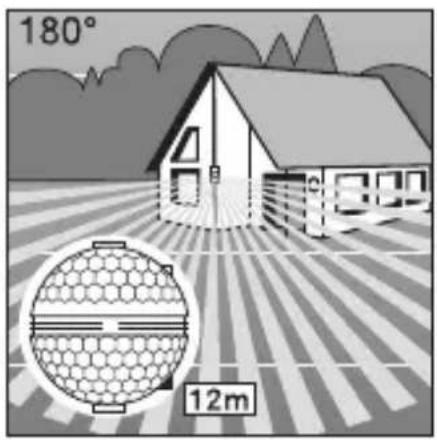
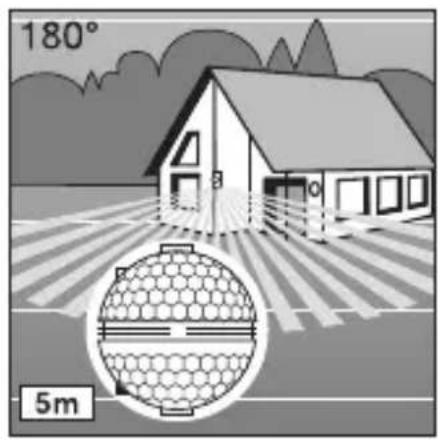
3 Lens (can be removed and turned for selecting the max. basic reach settings of 5 m or 12 m)
4 Light threshold setting control 2–2,000 lux
5 Time setting control 10 sec. - 15 min.
6 Clip (housing can be flipped up for assembly and connection to mains power supply)
2. Technical specifications
Dimensions (H × W × D): 120 × 78 × 55 mm
Output:
| Incandescent / halogen lamp load | 2,000 W |
| Fluorescent lamps, electronic ballast | 350 W |
| Fluorescent lamps, uncorrected | 500 VA |
| Fluorescent lamps, series-corrected | 900 VA |
| Fluorescent lamps, parallel-corrected | 500 VA |
| Low-voltage halogen lamps | 1,000 VA |
| LED < 2 W | 100 W |
| 2 W < LED < 8 W | 175 W |
| LED > 8 W | 350 W |
| Capacitive load | 132 μF |
Connection: 230–240 V, 50 Hz
Detection angle: 180° horizontal, 90° vertical
Sensor reach: basic setting 1: 5 m max. basic setting 2: 12 m max. (factory setting) + precision adjustment from 1–12 m by means of clip-on shrouds
Time setting: 10 sec.–15 min. (factory setting: 10 sec.)
Light threshold: 2–2,000 lux (factory setting: 2,000 lux)
Enclosure: IP 54
Temperature range: -20 °C to +50 °C
3. Principle
GB
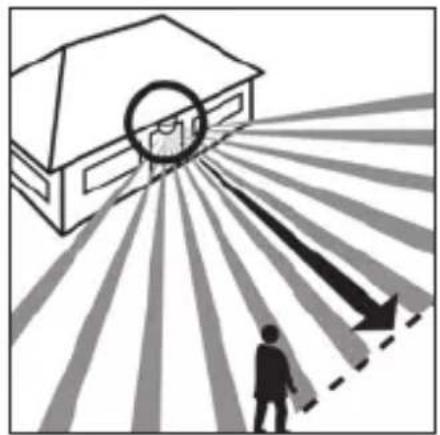
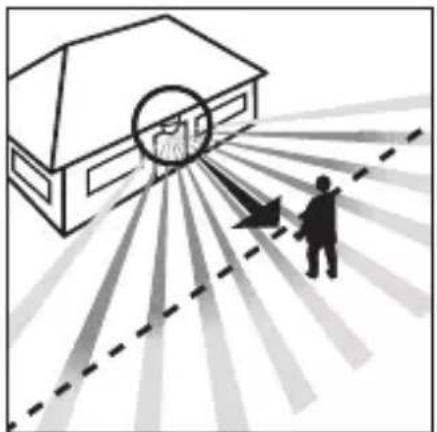
The IS 2180 ECO is equipped with two 120^ pyro sensors which detect the invisible heat emitted by moving objects (people, animals etc.). The heat detected is electronically converted into a signal that switches on loads (e.g. a light) connected to it. Heat
is not detected through obstacles, such as walls or panes of glass. Heat radiation of this type will, therefore, not trigger the sensor. With a 90° angle of aperture, the two pyro sensors cover a detection angle of 180°. The lens can be removed and turned,
thereby permitting two max. basic reach settings of 5 m or 12 m.
With the separately available wall brackets, the infrared sensor can be easily mounted on inside and outside corners.
natural_image
Illustration of a rural house with a 180° angle and a circular diagram showing a hexagonal grid pattern, no text or symbols present.Reach max. 12 m Reach max. 5 m
natural_image
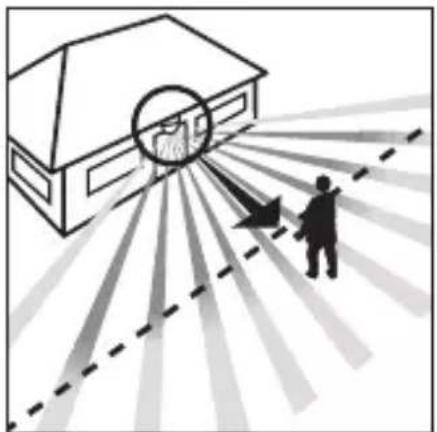
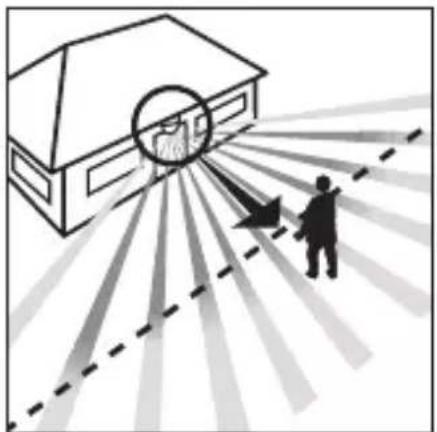
Diagram showing a house with a circular target and a person walking toward it, radiating from a dashed line (no text or symbols)Direction of approach: towards the sensor
natural_image
Illustration of a house with a circular target and radiating lines, showing a person standing near a large house (no text or symbols)Direction of approach: across the detection zone
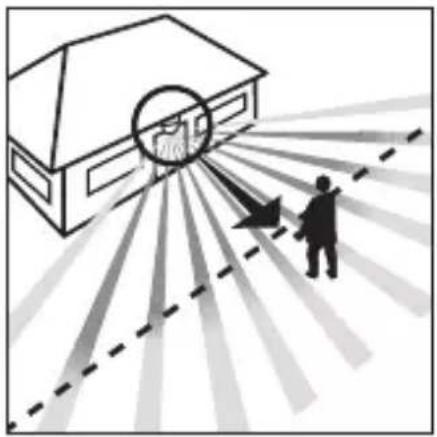
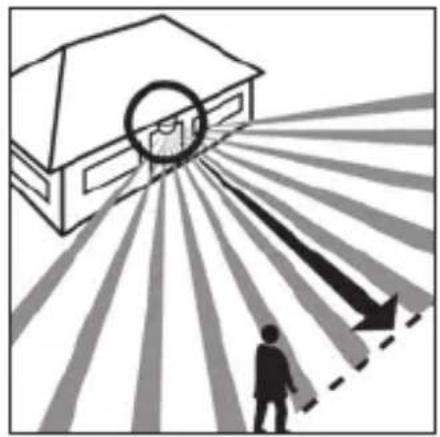
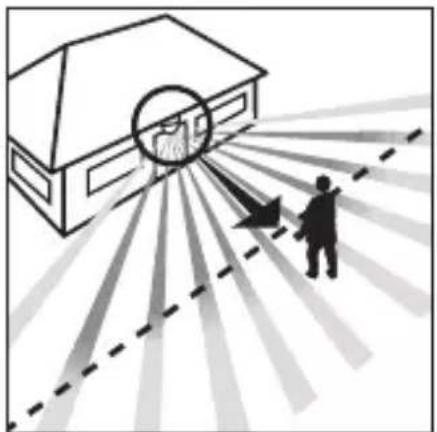
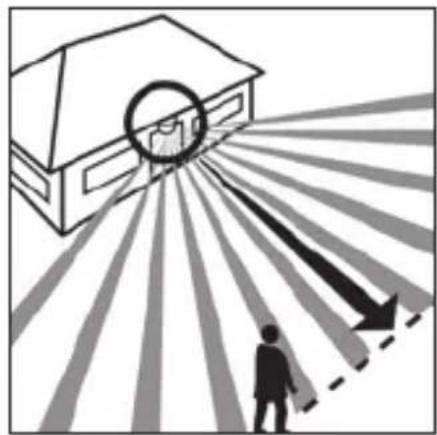
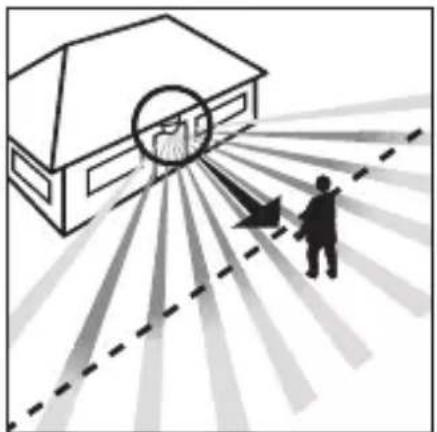
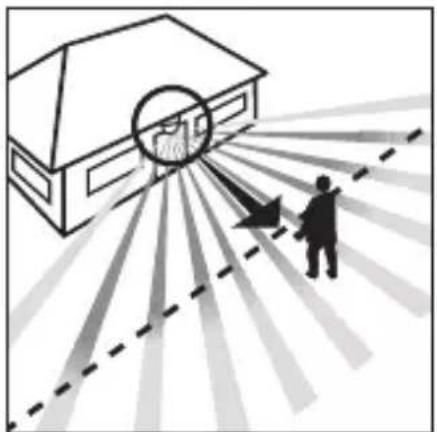
Important: The most reliable way of detecting motion is to install the unit so that the sensor is aimed across the direction in which a person would walk and by ensuring that no obstacles (such as trees, walls etc.) obstruct the line of sensor vision.

4. Safety warnings
■ Disconnect the power before attempting any work on the motion detector.
■ The electrical connection lead must be dead during installation. Therefore, switch off the power supply first and check that the circuit is disconnected using a voltage tester.
■ Installation of the sensor involves work on the mains power supply. This work must therefore be carried out professionally in accordance with the applicable wiring regulations and supply conditions.
(DE: VDE 0100, AT: ÖVE-EN 1, CH: SEV 1000).
■ Please note that the sensor must be protected by a 10 A circuit breaker. The mains supply lead must be no greater than 10 mm in diameter.
■ Only carry out time and light threshold settings with the lens fitted.
5. Installation / Wall mounting
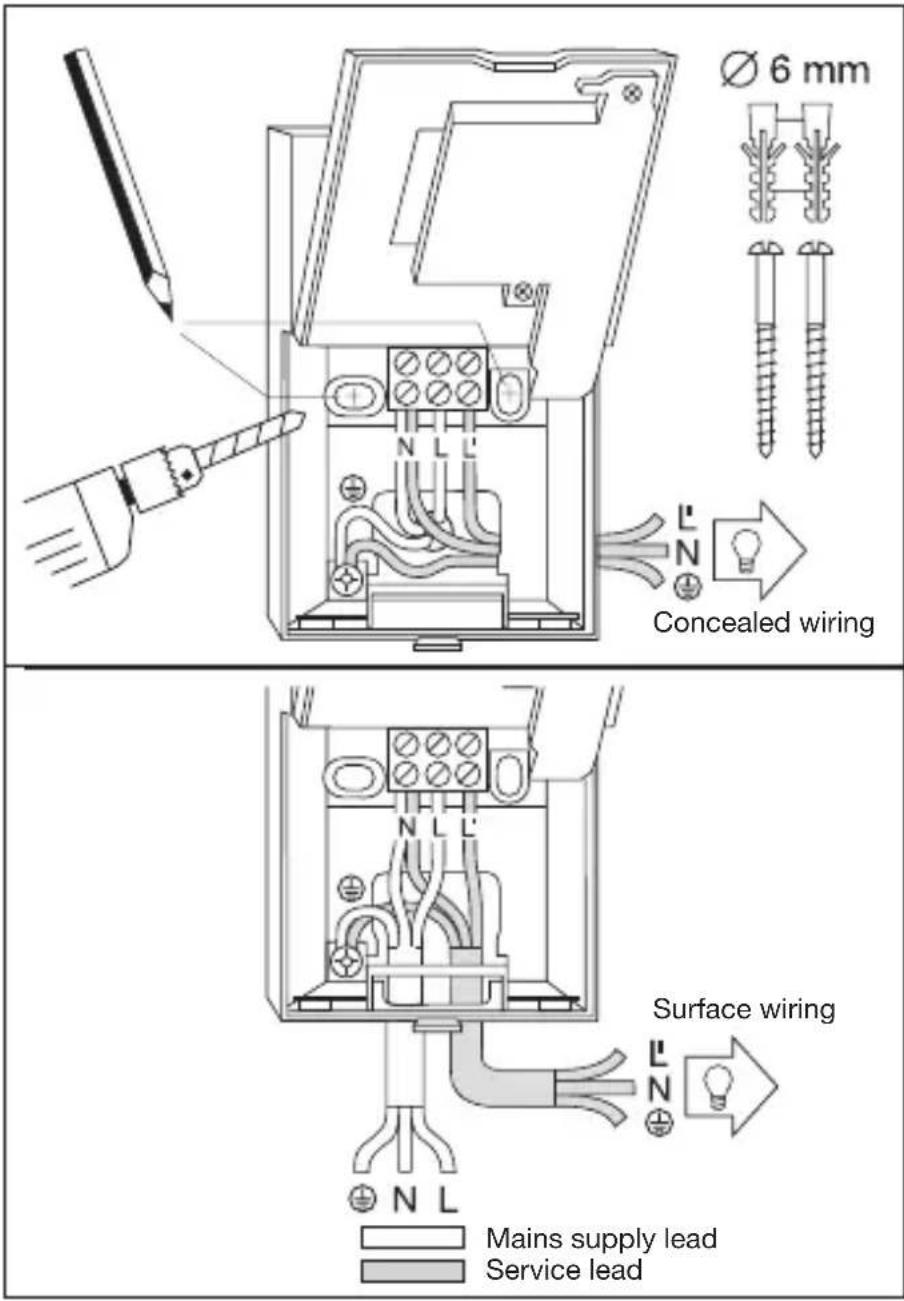
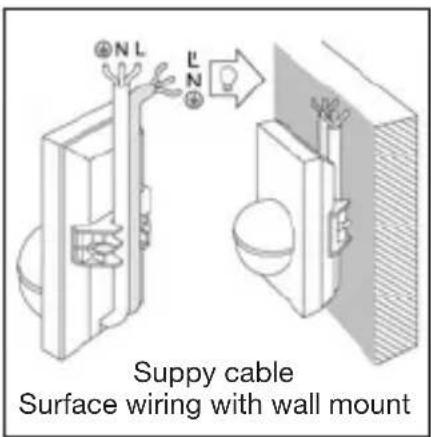
Note: The separately available inside corner wall bracket can also be used for wall mounting. In this way the cables can be conveniently routed behind the device from above and through the opening of the surface-mounted cable feed line.
The site of installation should be at least 50 cm from a light because heat radiated from it may trigger the sensor unintentionally. To obtain the specified ranges of 5 / 12 m, the sensor should be installed at a height of approx. 2 m.
Installation procedure:
- Detach front cover 2,
- Release clip 6 and flip up lower half of housing,
- Mark drill holes, 4. Drill the holes, insert wall plugs (6 mm dia.), 5. Break open cable entry for surface or concealed wiring.
- Feed through mains supply and service cable and connect to terminals. Use sealing plugs for surface wiring.
a) Connect mains supply lead
The mains supply leads is a 2 to 3-core cable:
L = phase conductor N = neutral conductor PE = protective-earth conductor ()
If you are in any doubt, you must identify the cables using a voltage tester; once you have done so, disconnect the power supply again. Connect the phase (L) and neutral conductor (N) to the clamp-type terminal. Connect the protective earth conductor to the earth terminal (
A power ON / OFF switch may of course be installed in the power supply lead. Alternatively, you may use a normally closed contact pushbutton to activate the sensor manually for the duration of the time setting.
b) Connect service lead The service supply lead to the light is also a 2 to 3-core cable. Connect the light's current-carrying conductor to the terminal marked L'. The service lead neutral conductor must be connected to the terminal marked N together with the
mains lead neutral conductor. Connect the protective-earth conductor to the earth contact (
- Screw on housing and close again.
- Fit lens (set reach to either 5 m or 12 m max), see 'Reach setting' section.
- Select time 5 and light
threshold setting 4 (see 'Functions' section).
- Locate front cover 2 and fit security screw 1 to protect cover from unauthorised removal.
Important: Reversing the connections may result in damage to the unit.
6. Installation using corner wall mount
natural_image
Illustration of a hand using a screwdriver to install a component into a cabinet (no text or symbols present)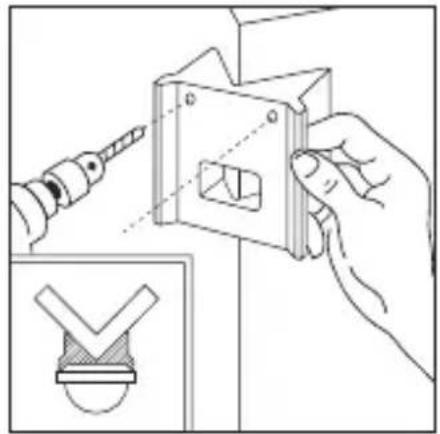
natural_image
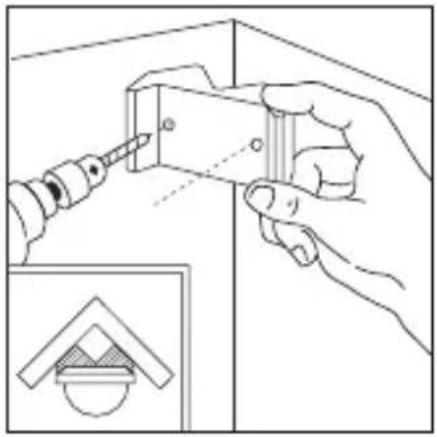
Illustration of a hand using a screwdriver to adjust a mechanical component, with an inset showing a checkmark symbol (no text or labels present)With the corner wall brackets, the IS 2180 ECO can be conveniently mounted on inside and outside corners. Use the corner wall bracket as a drilling template when drilling the holes. In this way you place the drill hole at the right angle and the corner wall bracket can be mounted without any problems. The corner wall brackets (EAN 40071085131 black / 40071085148 white) are available as accessories.
7. Functions
Once you have connected the unit to the mains power supply, closed the housing and fitted the lens, you are
ready to put the system into operation. Two setting controls are concealed behind the front cover 2.
Important: Only carry out time and light threshold settings with the lens fitted.
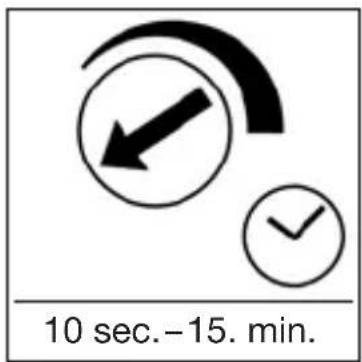
Switch-off delay (time setting)
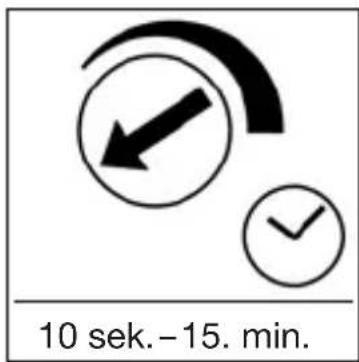
The chosen light ON time can be varied continuously from approx. 10 sec. to a maximum of 15 min. Turning the adjustment screw fully anti-clockwise selects the shortest time of approx. 5 sec., turning the adjust-
ment screw fully clockwise the longest time of approx. 15 min. The shortest time setting is recommended for setting the detection zone and performing the walk test.
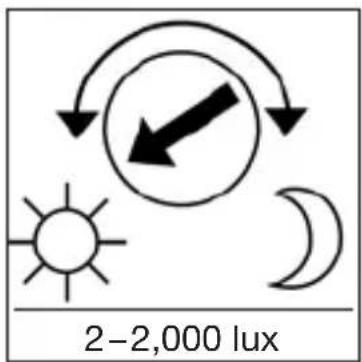
Twilight setting (response threshold)
The chosen detector response threshold can be adjusted continuously from approx. 2 lux to 2,000 lux. Turning the adjustment screw fully anti-clockwise selects daylight operation at approx. 2,000 lux.
Turning the adjustment screw fully clockwise selects twilight operation at approx. 2 lux. The adjustment screw must be turned fully anti-clockwise for setting the detection zone and performing the walk test in daylight.
8. Basic reach settings
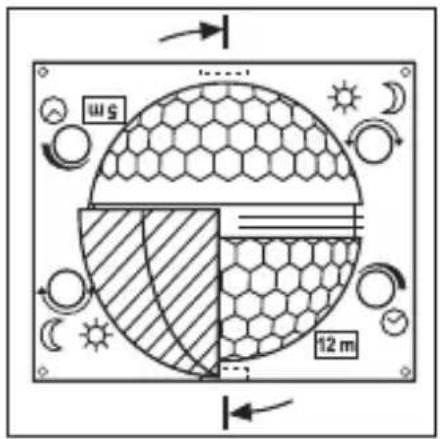
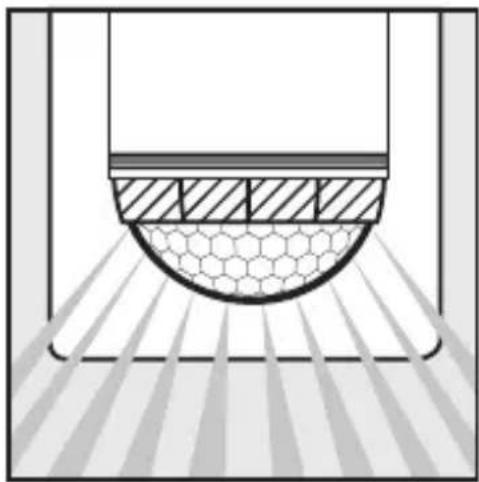
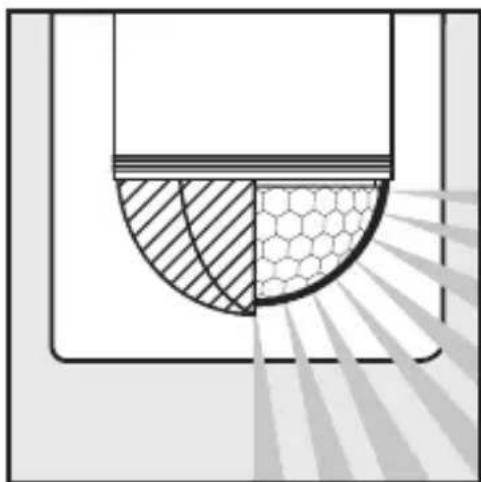
The lens of the IS 2180 ECO is divided into two detection zones. One half covers a max. reach of 5 m, the other half a max. reach of 12 m (when installed at a height of approx. 2 m). After fitting the lens (press lens firmly into the channel provided) you will see the max. reach setting (12 m or 5 m) at the bottom right.
Using a screwdriver, the lens can be unclipped from the groove at the side and re-positioned for the reach you require.
9. Examples
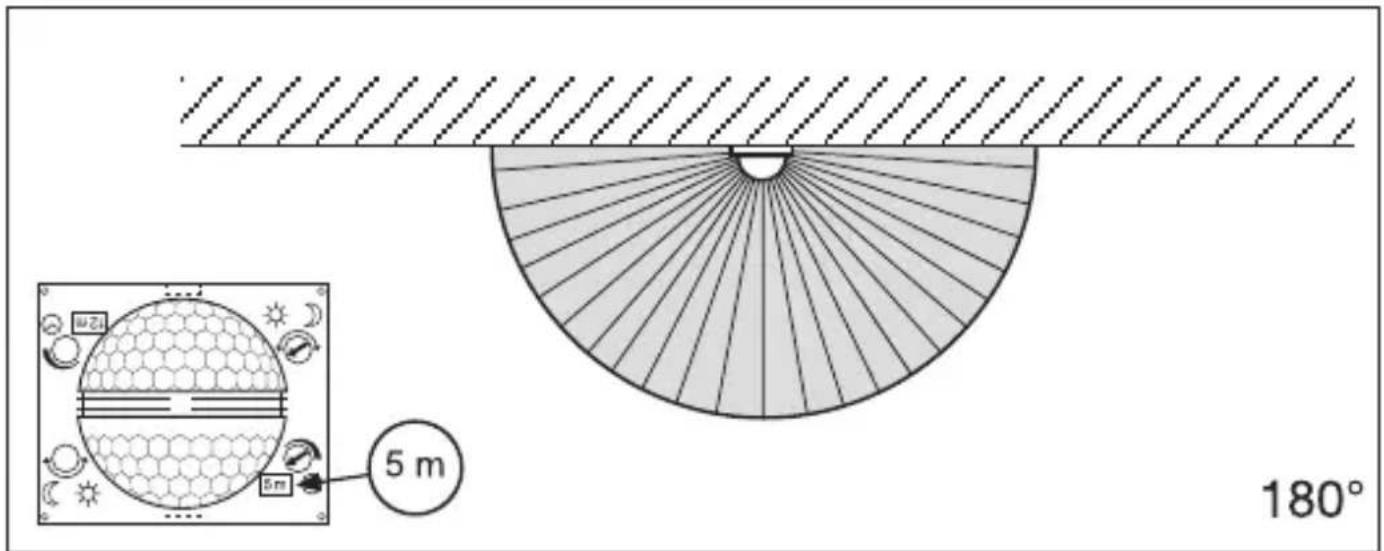
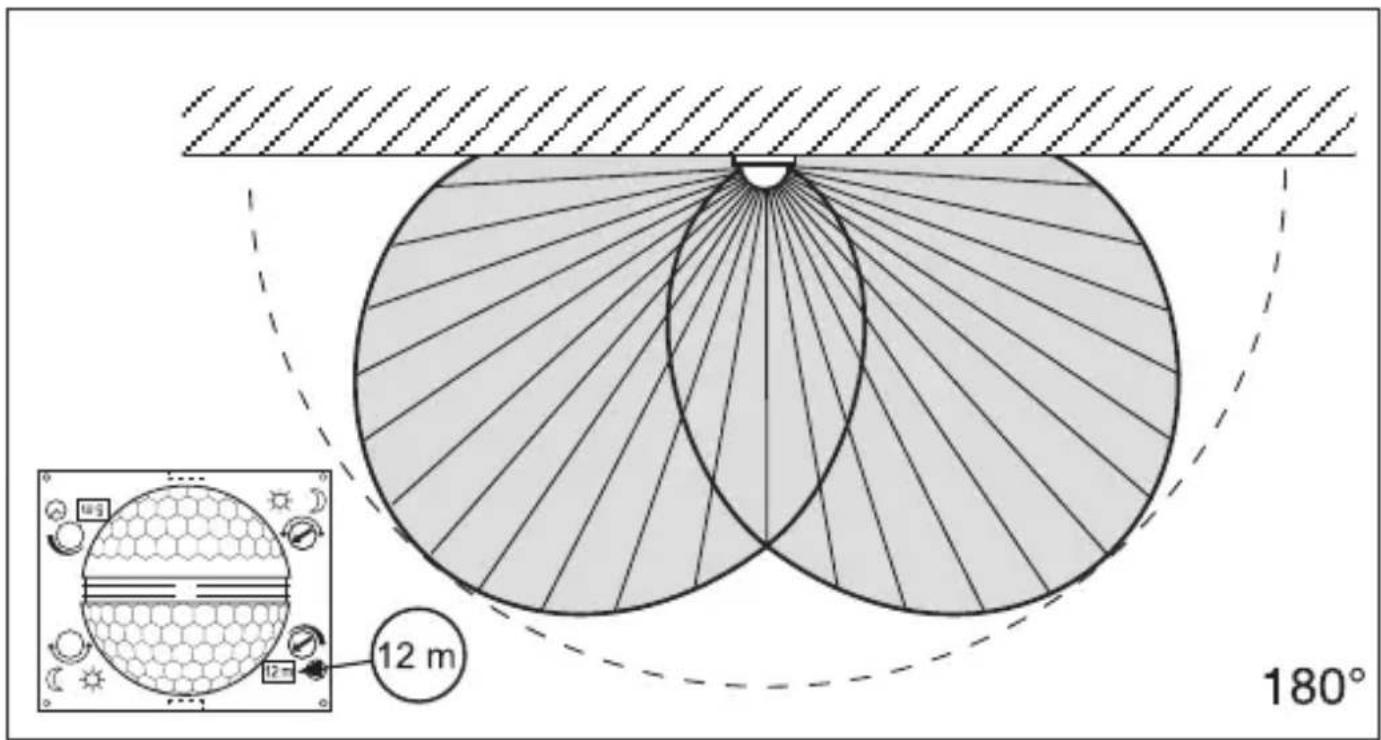
10. Precision adjustment using shrouds
GB
natural_image
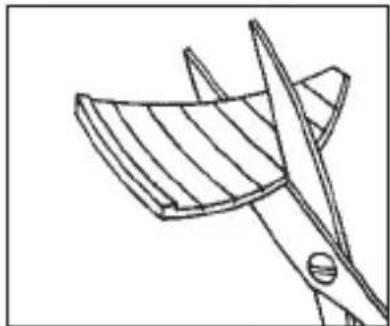
Line drawing of a bird cutting a bird wing (no text or symbols)Shrouds may be used to define the detection zone exactly as you require in order, for example, to blank out or specifically target paths or neighbouring premises.
The shrouds can be divided or cut with a pair of scissors along the vertical and horizontal grooves. They can be clipped into the top channel around the centre of the lens. They are fixed in place by fitting the front cover.
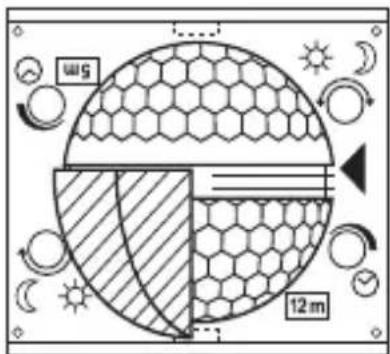
(See below: Examples showing how to reduce the angle of detection and shorten the reach).
11. Examples
natural_image
Diagram of a microfabricated structure with hexagonal lattice pattern and diagonal striped lines, no text or symbols present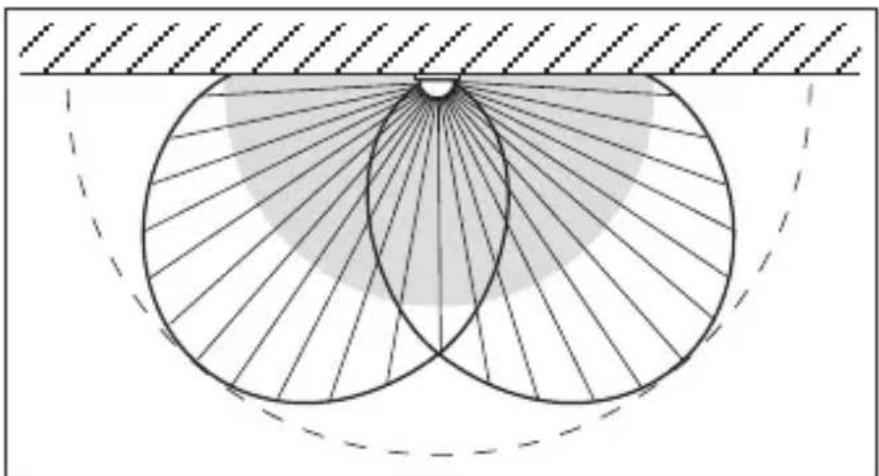
natural_image
Geometric diagram showing concentric circles with radiating lines and a shaded region, no text or symbols present.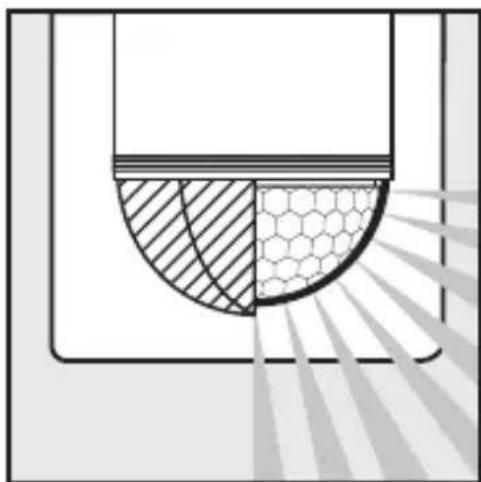
natural_image
Diagram showing a cross-section of a container with shaded regions and a hexagonal pattern, no text or symbols present.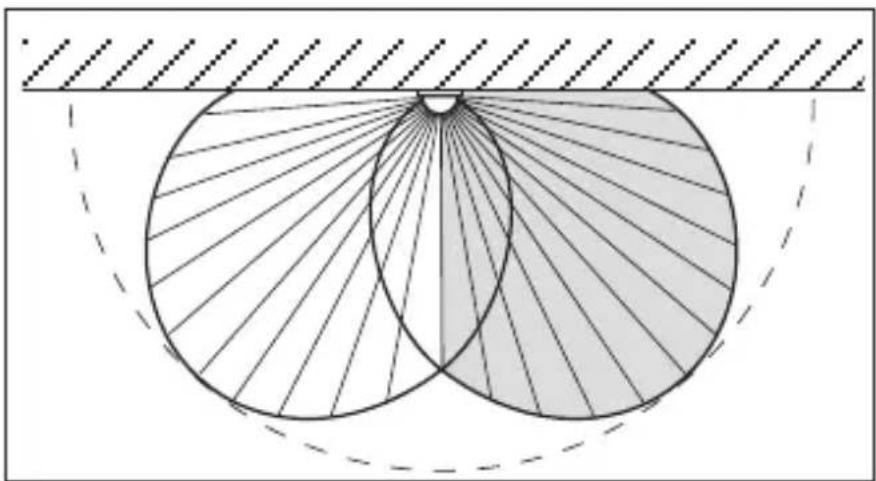
natural_image
Geometric diagram showing two overlapping circles with radiating lines, enclosed by a dashed rectangle (no text or symbols)12. Wiring examples
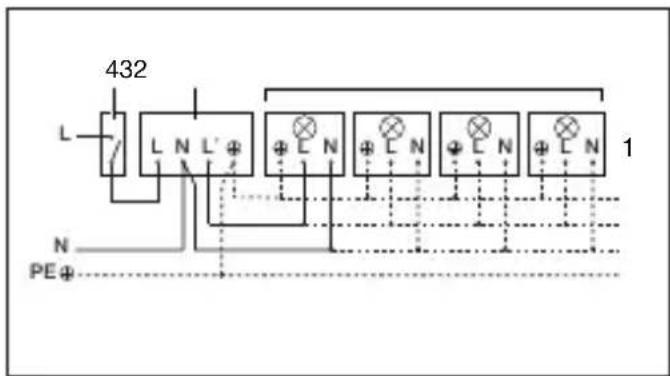
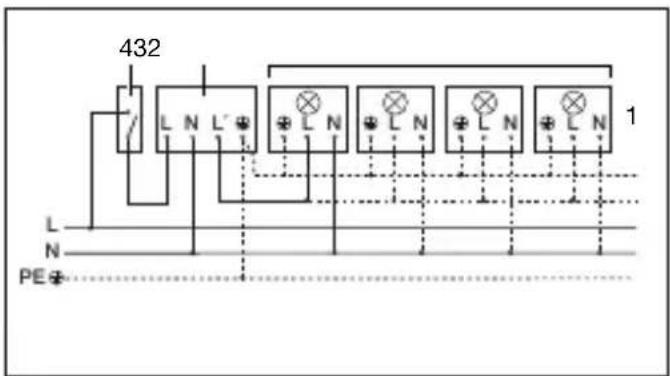
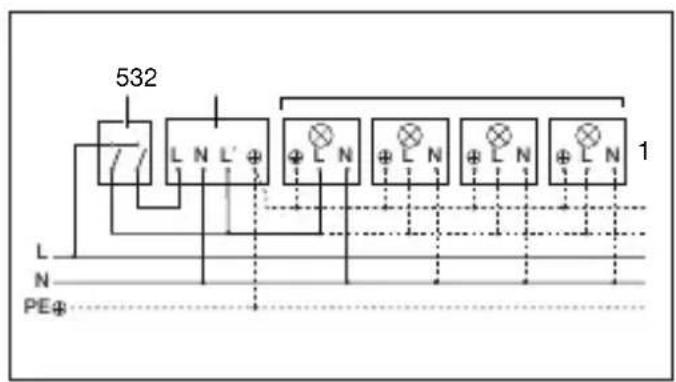
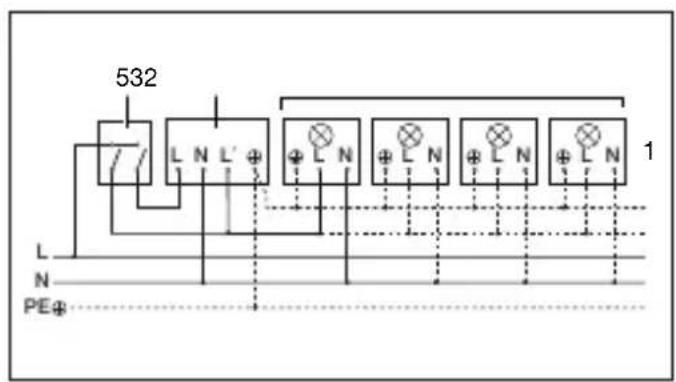
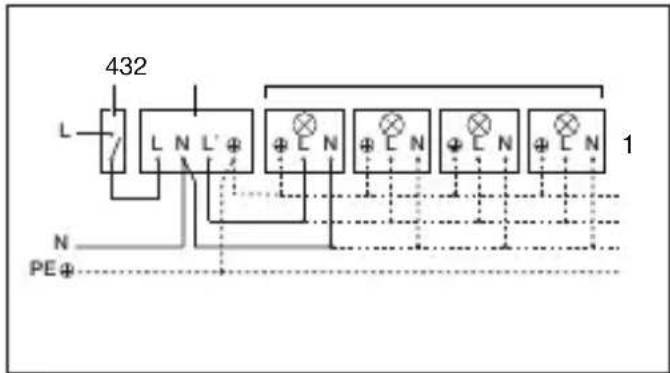
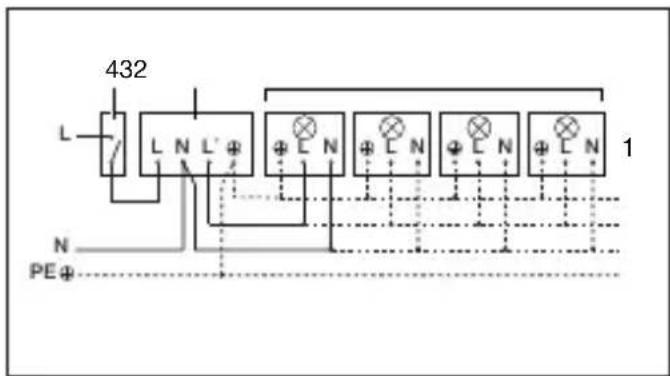
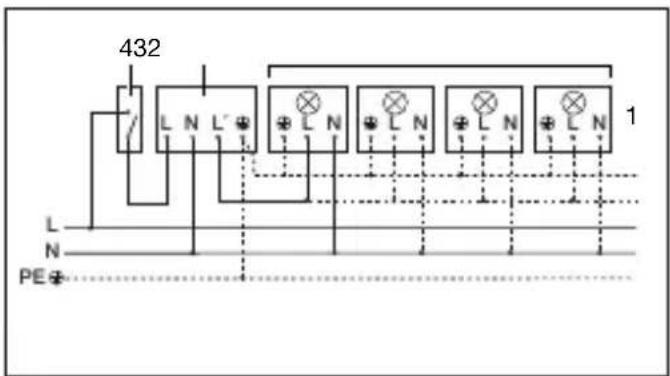
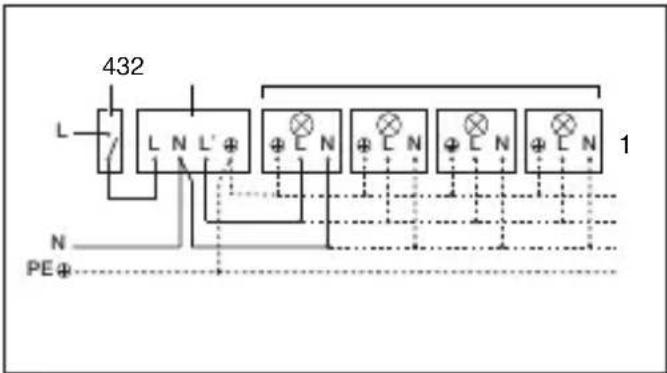
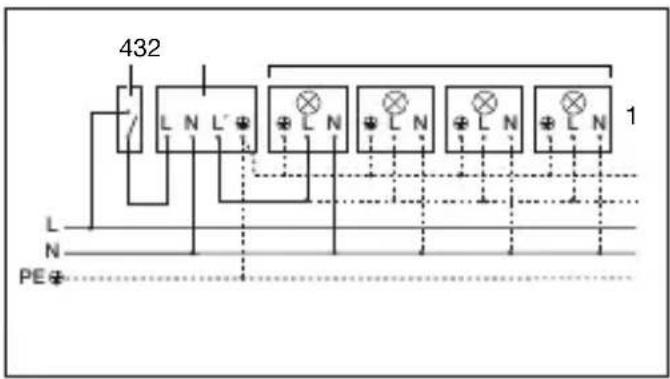
- Light without neutral conductor 2. Light with neutral conductor
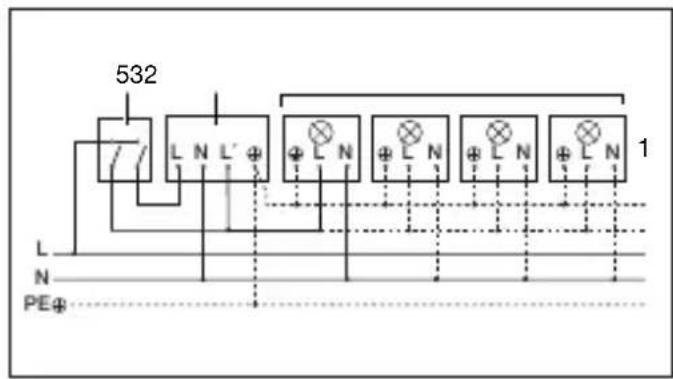
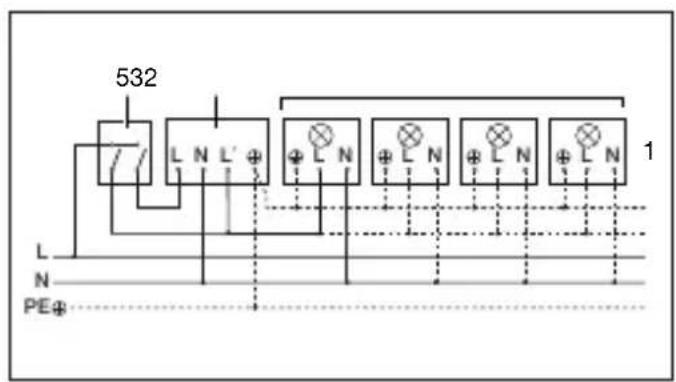
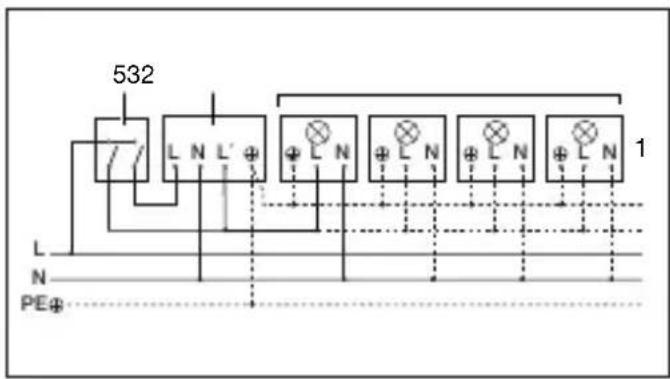
- Connection using series switch for manual and automatic operation
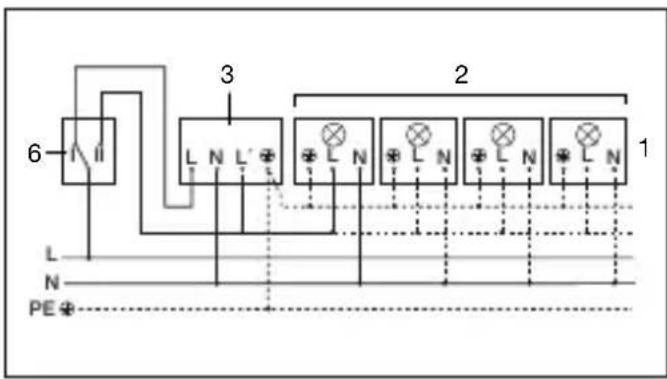
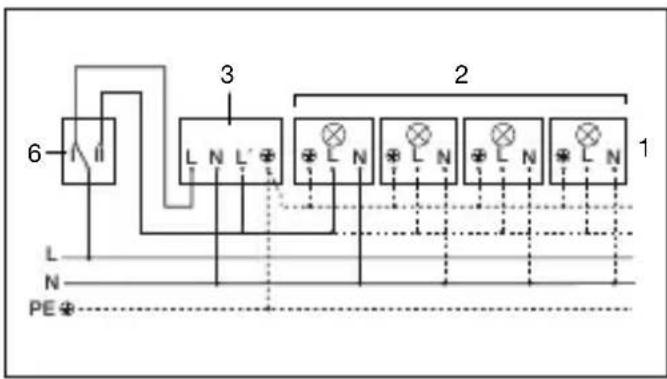
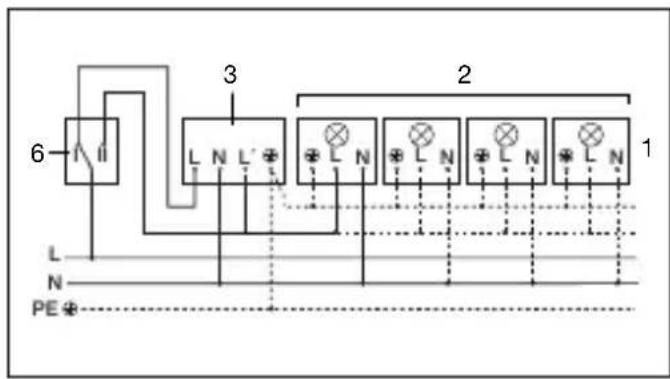
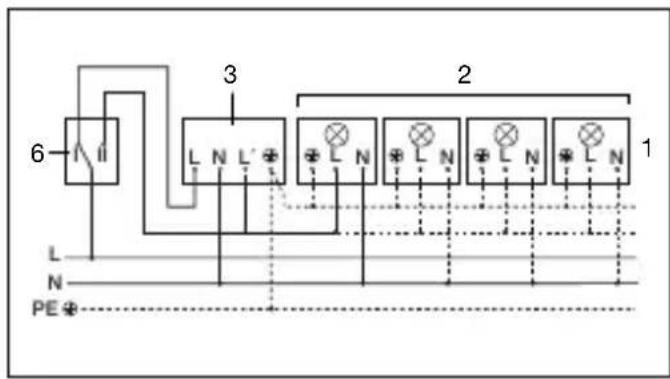
4. Connection to double-throw switch for permanent light ON and automatic operation
Setting I: automatic operation Setting II: manual operation for permanent light ON Important: the unit cannot be switched OFF, but operated only at settings I and II.
1) e.g. 1 - 4 × 100 W filament bulbs
2) Service load, light of 2,000 W max. (see Technical specifications)
3) IS 2180 ECO connection terminals
4) Indoor switch
5) Indoor series switch, manual, automatic
6) Indoor double-throw switch, automatic, permanent light ON
13. Operation / Maintenance
The Infrared Sensor is suitable for switching light on and off automatically. The unit is not suitable for special burglary alarm systems since it lacks the tampering protection prescribed for this purpose.
Weather conditions may affect the way the motion detector works. Strong gusts of wind, snow, rain or hail may cause the light to come on when it is not wanted because the sensor is unable to distinguish
sudden changes of temperature from sources of heat. The detector lens may be cleaned with a damp cloth if it gets dirty (do not use cleaning agents).
14. Troubleshooting
GB
Malfunction Cause Remedy
| IS 2180 ECO without power | ■ Fuse faulty; not switched ON■ Short circuit■ Mains switch OFF | ■ Renew fuse, switch on mains power switch, check wiring with voltage tester■ Check connections■ Switch on |
| IS 2180 ECO will not switch ON | ■ Twilight control set to nighttime mode during daytime operation■ Bulb faulty■ Mains power switch OFF■ Fuse faulty■ Detection zone not properly targeted | ■ Adjust setting■ Change light bulb■ Switch on■ Renew fuse, check connection if necessary■ Re-adjust |
| IS 2180 ECO will not switch OFF | ■ Continuous movement in the detection zone■ Light is in detection zone and keeps switching on as a result of temperature change■ Set to continuous operation by indoor series switch | ■ Check detection zone and re-adjust if necessary or fit shrouds■ Re-adjust zone or apply shroud■ Set series switch to automatic mode |
| IS 2180 ECO keeps switching ON / OFF | ■ Light is in detection zone■ Animals moving in detection zone■ Heat source (e.g. extractor hood outlet) in detection zone | ■ Adjust detection zone or fit shrouds, increase distance■ Adjust detection zone or fit shrouds■ Adjust detection zone or fit shrouds |
| IS 2180 ECO switches on when it should not | ■ Wind is moving trees and bushes in the detection zone■ Cars in the street are being detected■ Sudden temperature changes due to weather (wind, rain, snow) or air expelled from fans or open windows | ■ Blank off sections using shrouds■ Blank off sections using shrouds■ Adjust detection zone or change site of installation |
15. Disposal
Electrical and electronic equipment, accessories and packaging must be recycled in an environmentally compatible manner.
Do not dispose of electrical and electronic equipment as domestic waste.
EU countries only:
Under the current European Directive on Waste Electrical and Electronic Equipment and its implementation in national law, electrical and electronic equipment no longer suitable for use must be collected separately and recycled
in an environmentally compatible manner.
16. Manufacturer's warranty
Manufacturer's warranty of STEINEL GmbH, Dieselstrasse 80-84, DE-33442 Herzebrock-Clarholz, Germany
All STEINEL products meet the highest quality standards. For this reason, we, the manufacturer, are pleased to provide you, the customer, with a warranty under the following terms and conditions:
The warranty covers the absence of deficiencies which are proven to be the result of a material defect or fault in manufacturing and which are reported to us immediately after detection and within the warranty period. The warranty shall cover all STEINEL Professional products sold and used in Germany.
Our warranty cover for consumers
The provisions below apply to consumers. A consumer is any natural person who, on entering into the purchase transaction, neither acts in exercising their commercial nor their self-employed activity. You can opt for warranty cover in the form of repair or replacement which will be provided free of charge (if applicable, in the form of a successor model of the same or higher quality) or in the form of a credit note. In the case of sensors, floodlights, outdoor and indoor lights, the warranty period for the STEINEL Professional product you have purchased is: 5 years,
for hot-air and hot-melt gluing products: 1 year in each case from the date on which the product was purchased.
We shall bear the shipping costs but not the transport risks involved in return shipment.
Our warranty cover for entrepreneurs
The provisions below apply to entrepreneurs. Entrepreneur is a natural or legal person or partnership with legal personality who or which, on entering into the purchase transaction, acts in exercising their or its commercial or self-employed activity.
We have the option of providing warranty cover by rectifying deficiencies free of charge, replacing a product free of charge (if applicable, in the form of a successor model of the same or higher quality) or by issuing a credit note. In the case of sensors, floodlights, outdoor and indoor lights, the warranty
period for the STEINEL Professional product you have purchased is: 5 years, for hot-air and hot-melt gluing products: 1 year in each case from the date on which the product was purchased. Within the scope of warranty cover, we shall not bear your expenses accruing from subsequent fulfillment nor shall we bear your expenses for removing the defective product and installing a replacement product.
Statutory rights accruing from defects, gratuitousness
The warranty cover described here shall be applicable in addition to the statutory rights of warranty – including special consumer protection provisions – and shall not restrict or replace them. Exercising your statutory rights in the event of defects is gratuitous.
Exemptions from the warranty
All replaceable lamps are expressly excluded from this warranty. In addition to this, the warranty shall not cover: - any wear resulting from use or any other natural wear of product parts or
16. Manufacturer's warranty
GB
any deficiencies in the STEINEL Professional product that are attributable to wear caused by use or other natural wear, - any improper or non-intended use of the product or any failure to observe the operating instructions, - any unauthorised additions, alterations or other modifications to the product or any deficiencies attributable to the use of accessory, supplementary or replacement parts which are not genuine STEINEL parts, - any maintenance or care of products that is not carried out in accordance with the operating instructions, - any attachment or installation that is not in accordance with STEINEL's installation instructions, - any damage or loss occurring in transit.
For this reason, we recommend that you keep your receipt of purchase in a safe place until the warranty period expires.
Application of German law The warranty shall be governed by German law excluding the United Nations Convention concerning the International Sale of Goods (CISG).
Making claims
If you wish to make a warranty claim, please send your product complete and carriage paid with the original receipt of purchase, which must show the date of purchase and product designation, either to your retailer or directly to us at STEINEL (UK) Ltd. – 25 Manasty Road, Axis Park, Orton Southgate, GB-Peterborough Cambs PE2 6UP United Kingdom.
FR
Cher client,
natural_image
Diagram showing a house with a circular light source emitting rays, and a person walking away from the window (no text or symbols)natural_image
Illustration of a house with a clock face and radiating arrows, showing a person standing below (no text or symbols)natural_image
Illustration of a hand using a screwdriver to install a component into a cabinet (no text or symbols present)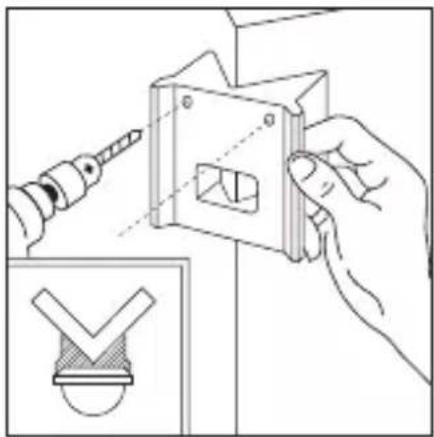
natural_image
Illustration of a hand using a power tool to adjust a metal bracket with a checkmark symbol (no text or labels present)natural_image
Line drawing of a bird's wing with wings and tail (no text or symbols)natural_image
Diagram of a microfabricated structure with hexagonal mesh pattern and diagonal striped lines, no text or symbols present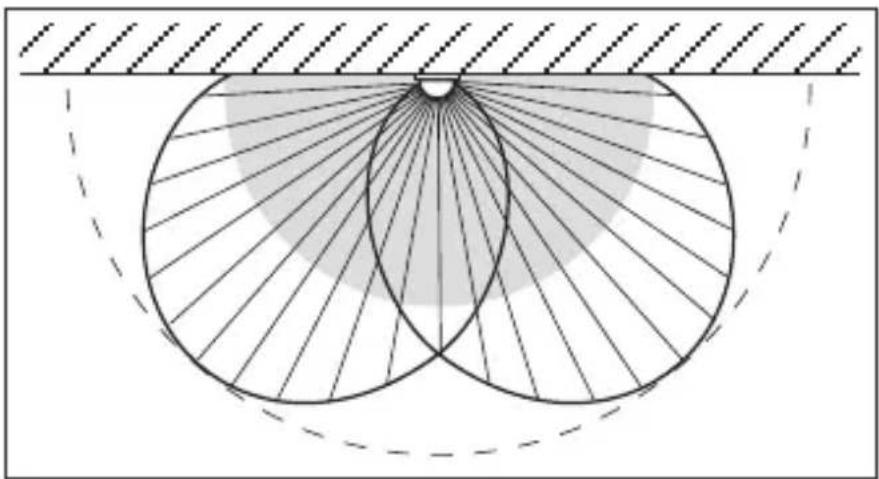
natural_image
Geometric diagram showing two intersecting circles with radiating lines and a shaded region, no text or symbols present.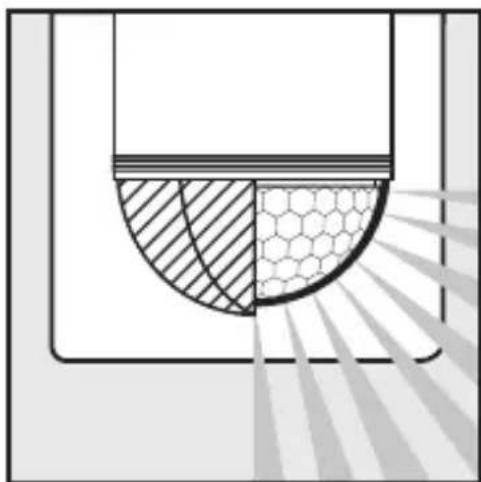
natural_image
Diagram showing a semi-circular structure with hatched and hexagonal patterns, possibly representing a mechanical or structural component (no text or symbols)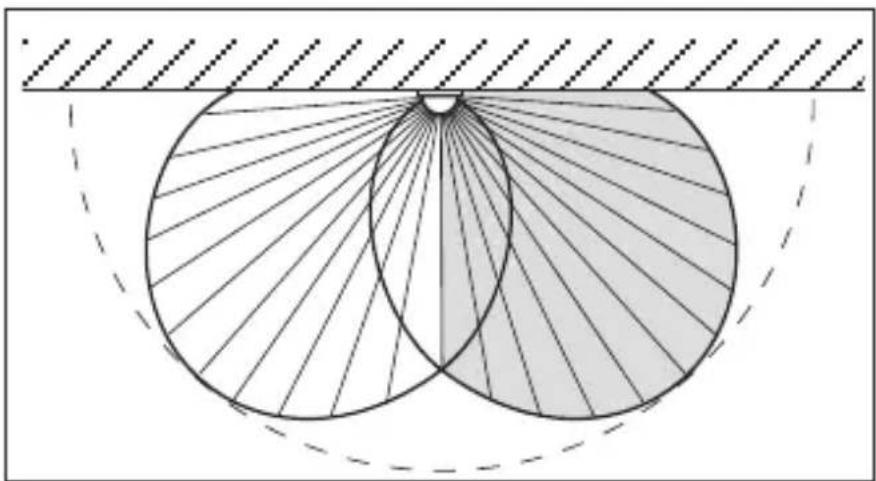
natural_image
Geometric diagram showing two overlapping circles with radiating lines, enclosed by a dashed arc and hatched background (no text or symbols)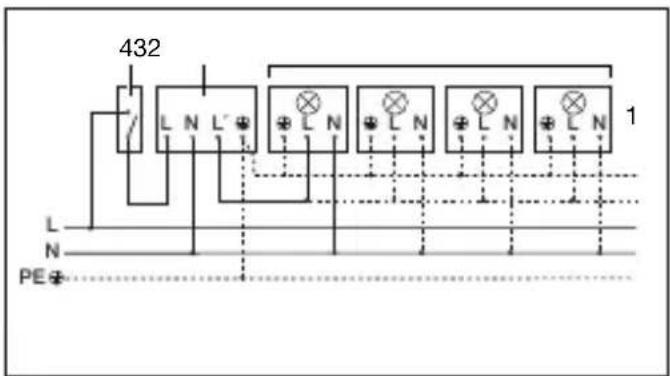
natural_image
Diagram showing a house with a circular aperture and a person walking away, emitting light rays (no text or symbols)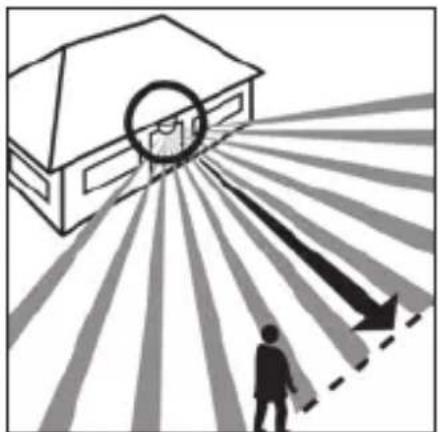
natural_image
Illustration of a house with a circular arrow pointing outward from a person walking, surrounded by radiating lines (no text or symbols)natural_image
Illustration of hands using a screwdriver to install a component into a cabinet (no text or symbols present)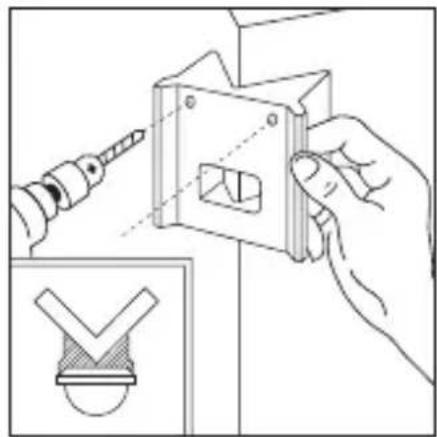
natural_image
Illustration of a hand using a power tool to adjust a mechanical component, with an inset showing a checkmark symbol (no text or labels present)Schemerinstelling (drempelwaarde)
natural_image
Line drawing of a bird cutting a bird, showing blade and wing structure (no text or symbols)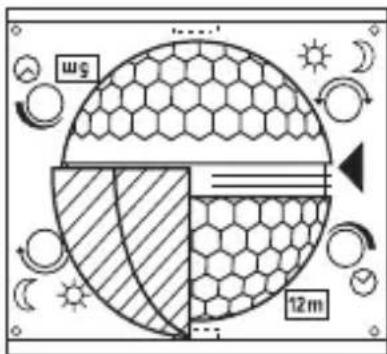
natural_image
Diagram of a microfabricated structure with hexagonal mesh pattern and diagonal striped lines, no text or symbols present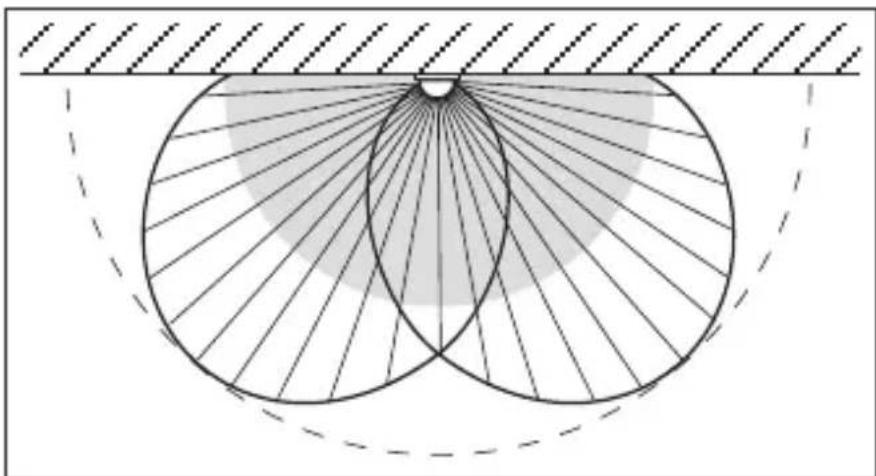
natural_image
Geometric diagram showing concentric circles with radiating lines and shaded regions, no text or symbols present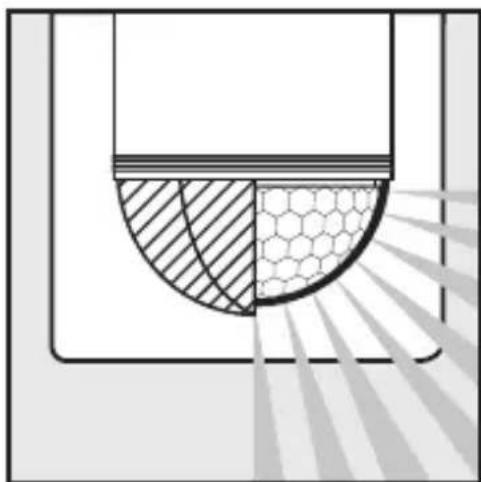
natural_image
Diagram showing a cross-section of a container with shaded regions and a hexagonal pattern inside, no text or symbols present.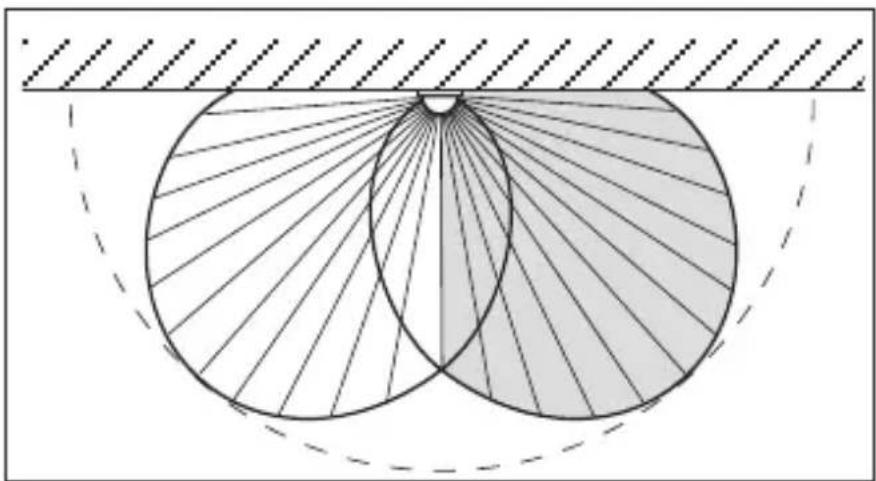
natural_image
Geometric diagram showing two intersecting circles with radiating lines, enclosed by a dashed arc and hatched background (no text or symbols)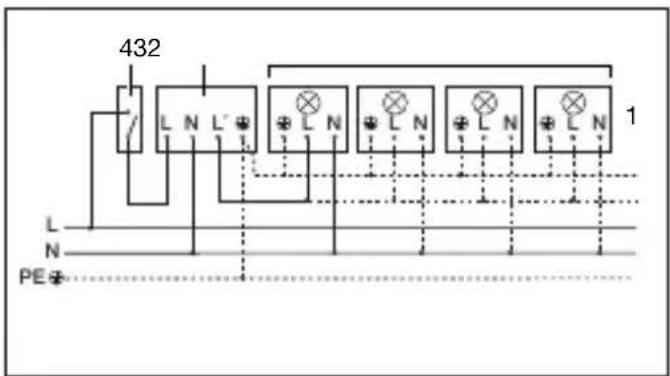
natural_image
Illustration of a rural house with a 180° angle and a circular diagram showing a hexagonal grid pattern, no text or symbols present.natural_image
Diagram showing a house with a circular target and a person walking toward it, radiating from a dashed line (no text or symbols)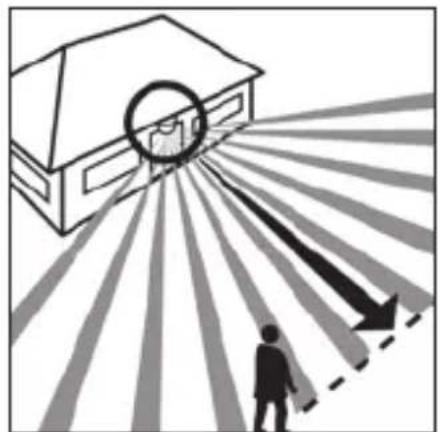
natural_image
Illustration of a person standing under a circular target with arrows pointing outward, no text or symbols presentnatural_image
Illustration of hands using a screwdriver to install a component into a cabinet (no text or symbols present)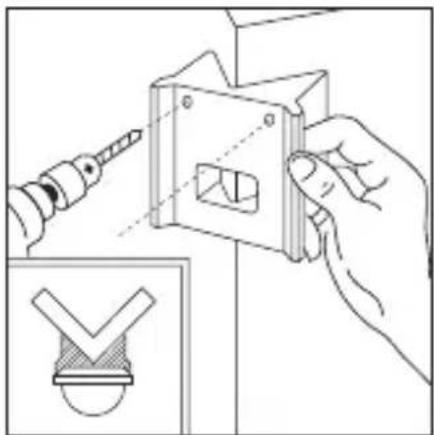
natural_image
Illustration of a hand using a power tool to adjust a mechanical component, with an inset showing a checkmark symbol (no text or labels present)natural_image
Line drawing of a bird cutting a bird, showing blade and wing structure (no text or symbols)natural_image
Diagram of a microfabricated structure with hexagonal mesh pattern and diagonal striped lines, no text or symbols present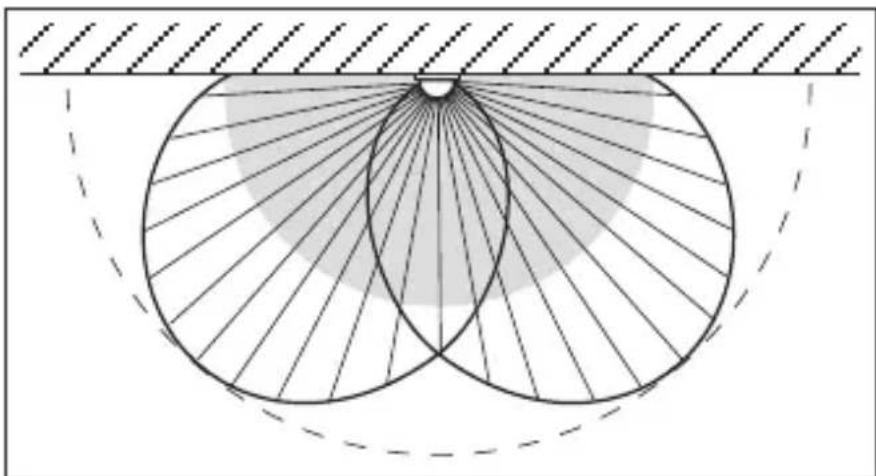
natural_image
Geometric diagram showing concentric circles with radiating lines and a shaded region, no text or symbols present.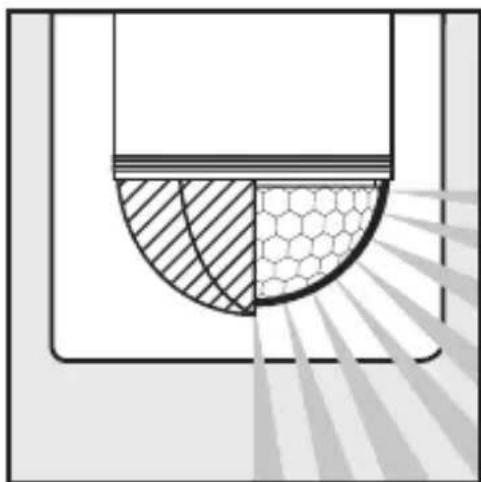
natural_image
Diagram showing a cross-section of a container with shaded regions and a hexagonal pattern, no text or symbols present.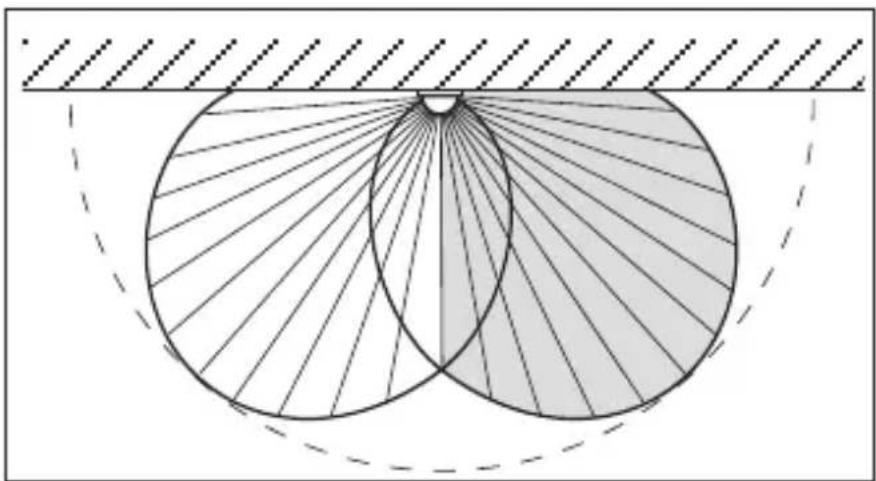
natural_image
Geometric diagram showing two overlapping circles with radiating lines, enclosed by a dashed arc and hatched background (no text or symbols)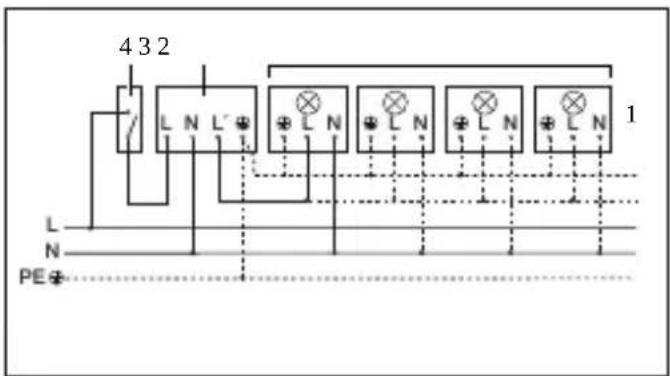
natural_image
Diagram showing a house with a circular target and a person walking, illustrating an outdoor scene (no text or symbols)natural_image
Illustration of a house with a circular target and radiating arrows, showing a person standing below (no text or symbols)natural_image
Illustration of a hand using a screwdriver to adjust or install a component, with an inset showing a window frame (no text or symbols)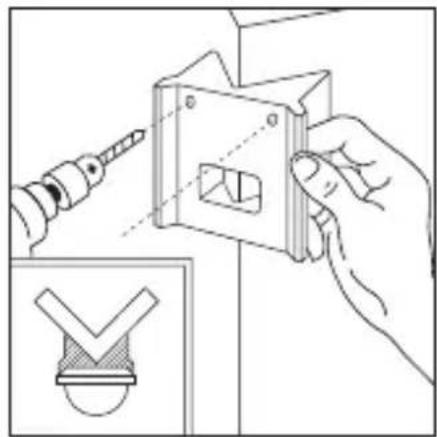
natural_image
Illustration of a hand using a power tool to adjust a metal bracket, with an inset showing a checkmark symbol (no text or labels present)Regulación crepuscular (punto de luz ambiental)
natural_image
Line drawing of a bird cutting a wing with blades and a handle (no text or symbols)natural_image
Diagram of a microfabricated structure with hexagonal mesh pattern and diagonal striped lines, no text or symbols present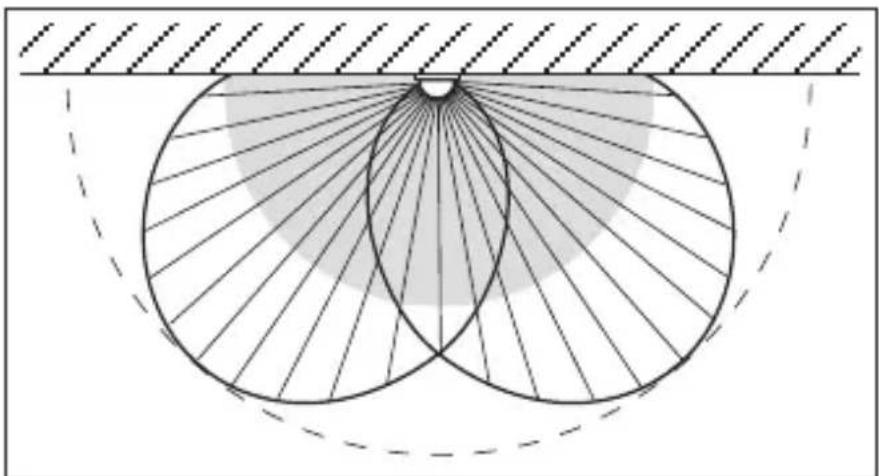
natural_image
Geometric diagram showing two intersecting circles with radiating lines, enclosed by a dashed arc and hatched background (no text or symbols)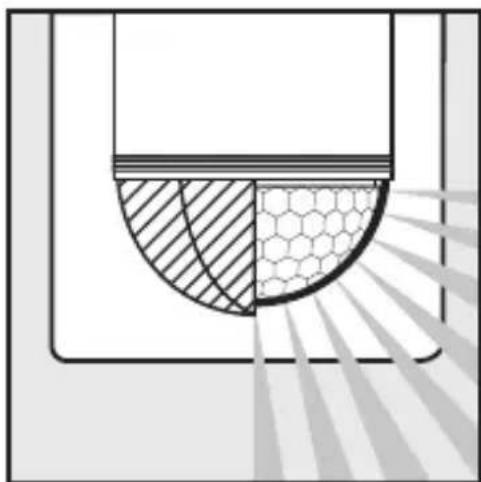
natural_image
Diagram showing a cross-section of a container with shaded regions and a hexagonal pattern, no text or symbols present.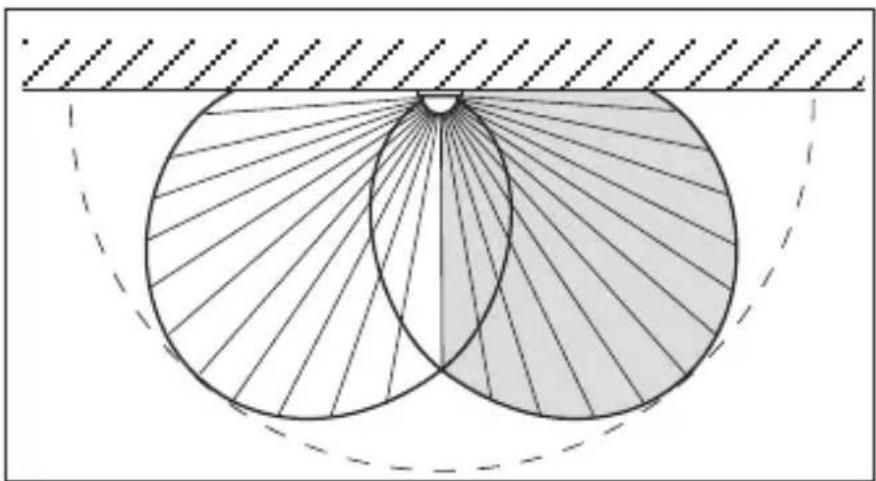
natural_image
Geometric diagram showing two overlapping circles with radiating lines, enclosed by a dashed rectangle (no text or symbols)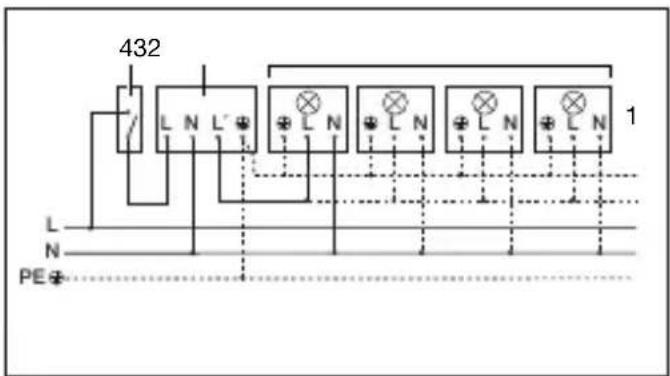
- Lámpara sin conductor neutro 2. Lámpara con conductor neutro
natural_image
Illustration of a rural house with a 180° angle and a circular diagram showing a hexagonal grid pattern, no text or symbols present.Alcance máx. 12 m Alcance máx. 5 m
natural_image
Diagram showing a house with a circular light source emitting rays, and a person walking away from the window (no text or symbols)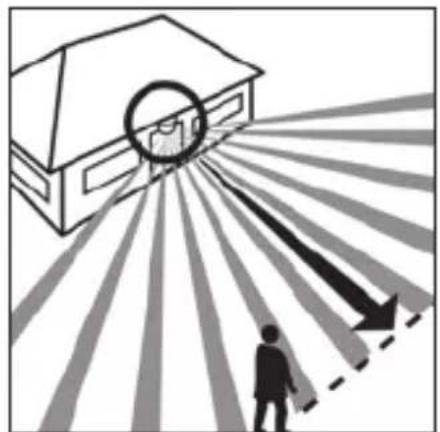
natural_image
Illustration of a house with a circular target and radiating lines, showing a person walking toward it (no text or symbols)natural_image
Illustration of hands using a screwdriver to install a component into a cabinet (no text or symbols present)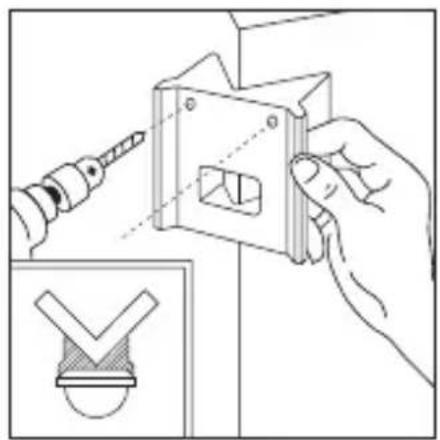
natural_image
Illustration of hands using a power tool to adjust a mechanical component with a checkmark symbol (no text or labels)natural_image
Line drawing of a bird cutting a bird, showing blade and wing structure (no text or symbols)natural_image
Diagram of a microfabricated structure with hexagonal mesh pattern and diagonal striped lines, no text or symbols present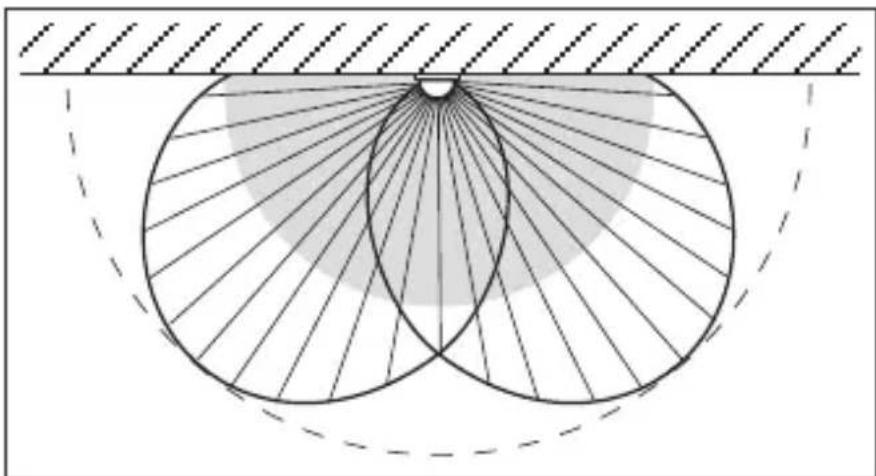
natural_image
Geometric diagram showing concentric circles with radiating lines and a shaded region, no text or symbols present.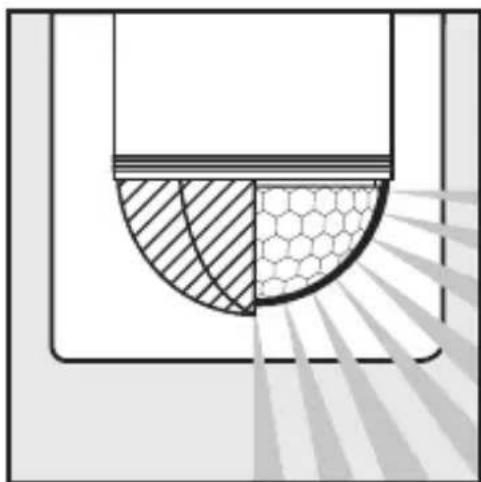
natural_image
Diagram showing a semi-circular structure with hatched and hexagonal patterns, possibly representing a mechanical or structural component (no text or symbols)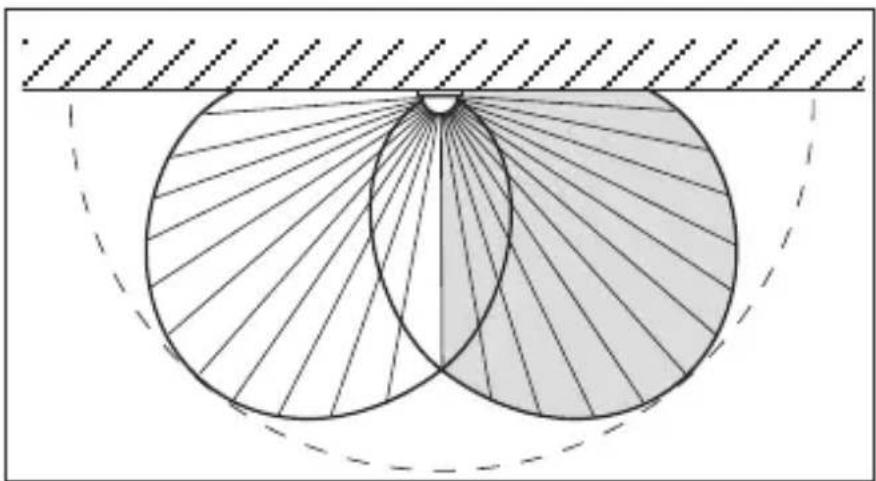
natural_image
Geometric diagram showing two overlapping circles with radiating lines, enclosed by a dashed rectangle (no text or symbols)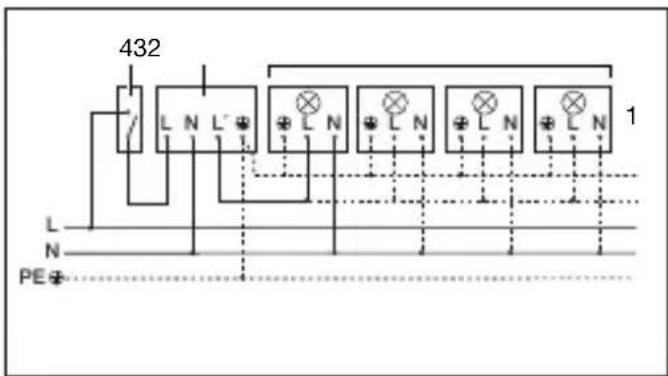
2 W < LED < 8 W 175 W
LED > 8 W 350 W
Kapacitiv belastning 132 μF
Nätanslutning 230–240 V, 50 Hz
Bevakningsvinkel 180° horisontell, 90° vertikal
Sensorns räckvidd
natural_image
Illustration of a house with a person walking toward a circular target, radiating lines indicating distance or perspective (no text or symbols)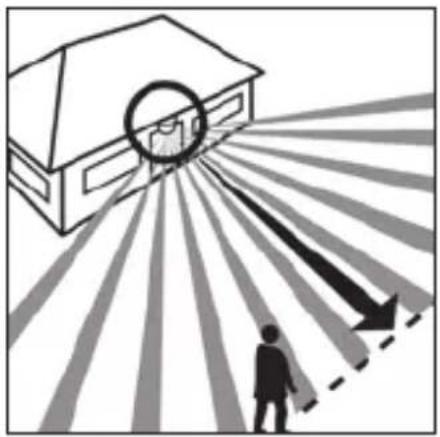
natural_image
Illustration of a house with a circular target and radiating arrows, showing a person standing below (no text or symbols)natural_image
Illustration of hands using a screwdriver to adjust or install a component, with an inset showing a small house outline (no text or symbols)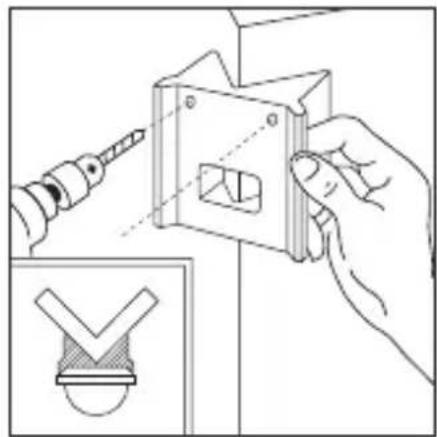
natural_image
Illustration of a hand using a tool to adjust a mechanical component, with an inset showing a checkmark symbol (no text or labels present)natural_image
Line drawing of a bird's wing with wings and tail (no text or symbols)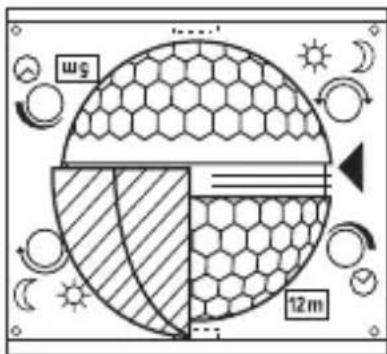
natural_image
Diagram of a microfabricated structure with hexagonal mesh pattern and diagonal striped lines, no text or symbols present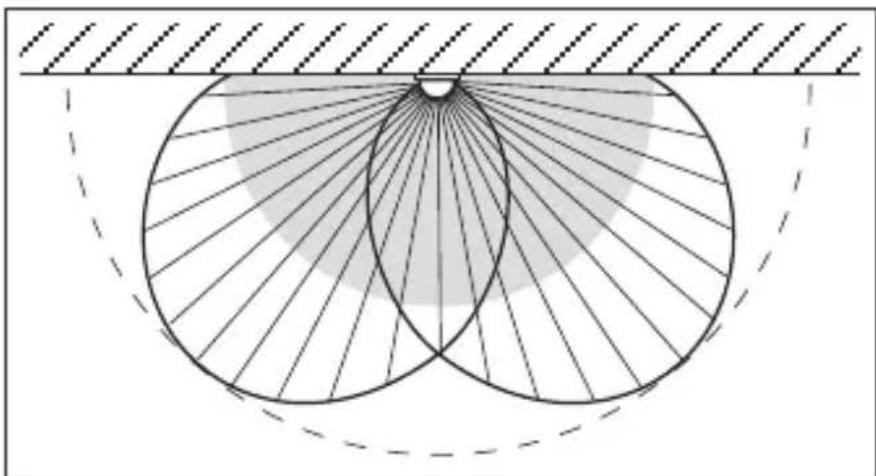
natural_image
Geometric diagram showing two intersecting circles with radiating lines, enclosed by a dashed arc and hatched background (no text or symbols)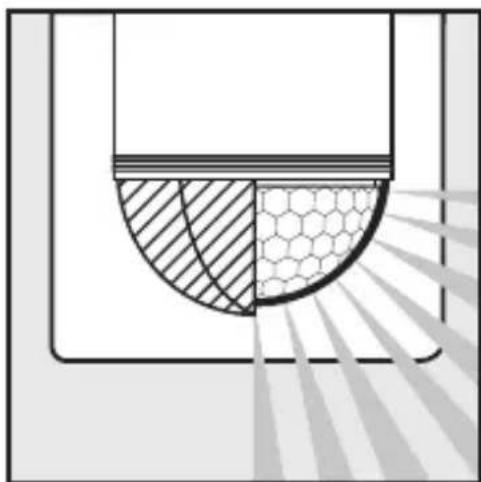
natural_image
Diagram showing a semi-circular structure with hatched and hexagonal patterns, possibly representing a mechanical or structural component (no text or symbols)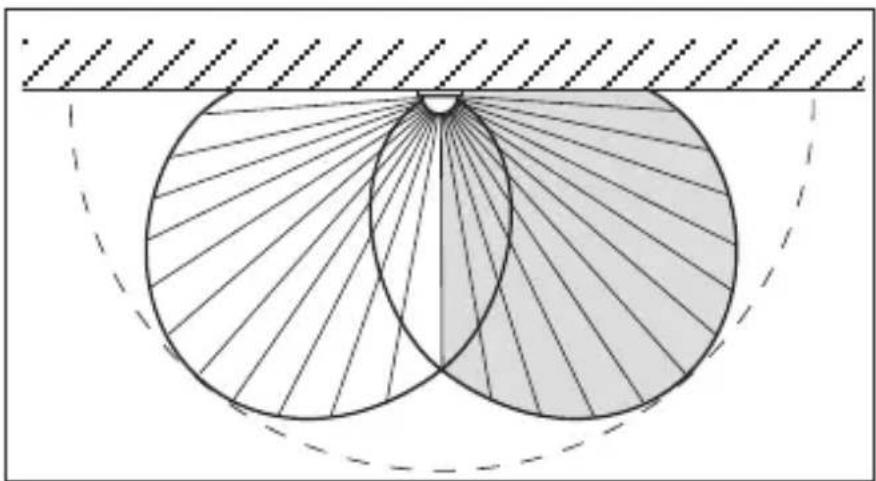
natural_image
Geometric diagram showing two overlapping circles with radiating lines, enclosed by a dashed arc and hatched background (no text or symbols)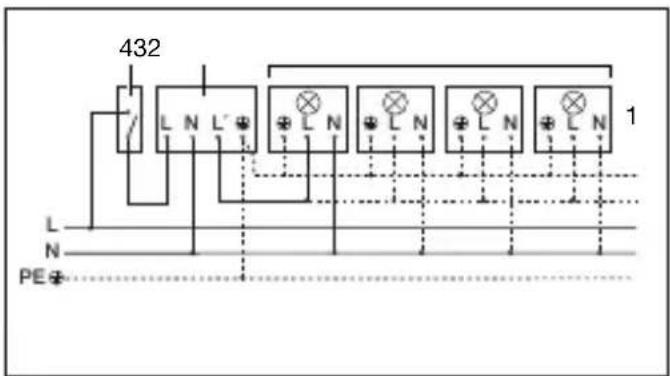
natural_image
Illustration of a rural house with a 180° viewing angle and a hexagonal grid pattern, no text or symbols present.natural_image
Diagram showing a house with a circular target and a person walking, illustrating an optical or signal path (no text or symbols)Gangretning: Mod sensoren
natural_image
Illustration of a house with a circular target and radiating lines, showing a person walking toward it (no text or symbols)Gangretning: På tværs af overvägningsområdet
natural_image
Illustration of hands using a screwdriver to adjust or install a component, with an inset showing a mechanical component (no text or symbols present)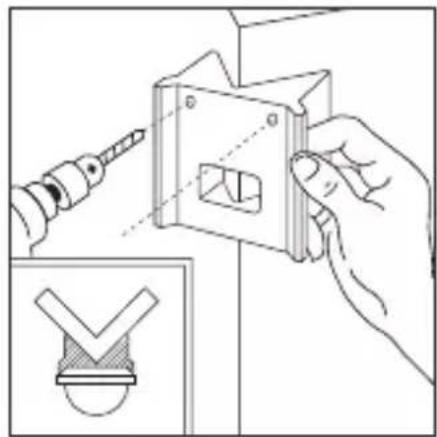
natural_image
Illustration of a hand using a tool to adjust or install a mechanical component, with an inset showing a checkmark symbol (no text or labels present)natural_image
Line drawing of a bird cutting a bird, showing blade and wing structure (no text or symbols)natural_image
Diagram of a mechanical or structural component with concentric layers and radial lines, no text or symbols present.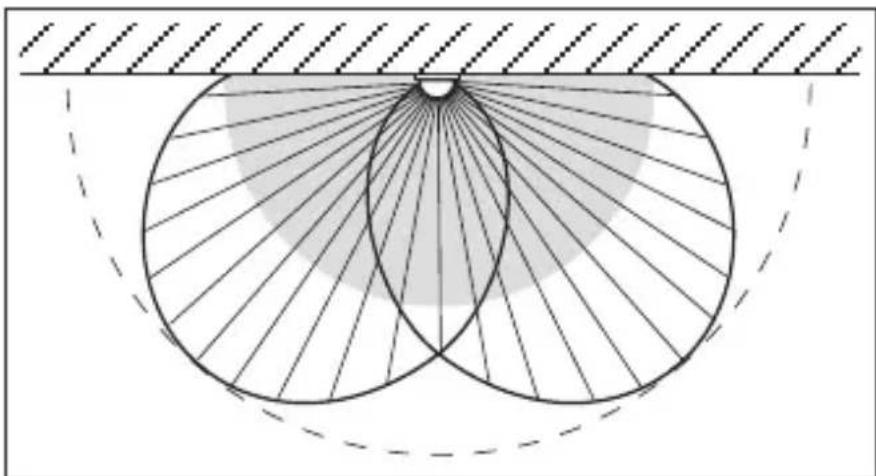
natural_image
Geometric diagram showing concentric circles with radiating lines and a shaded sector, no text or symbols present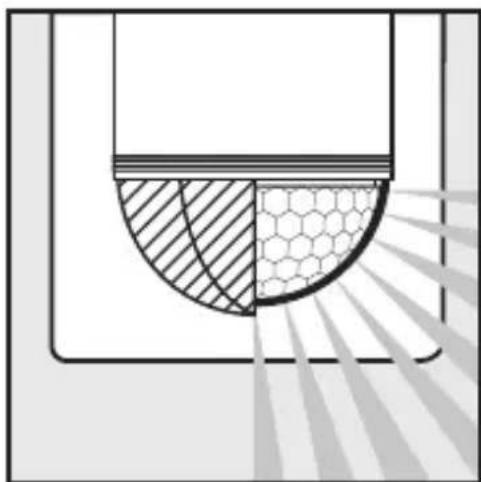
natural_image
Diagram showing a cross-section of a container with shaded regions and a hexagonal pattern, no text or symbols present.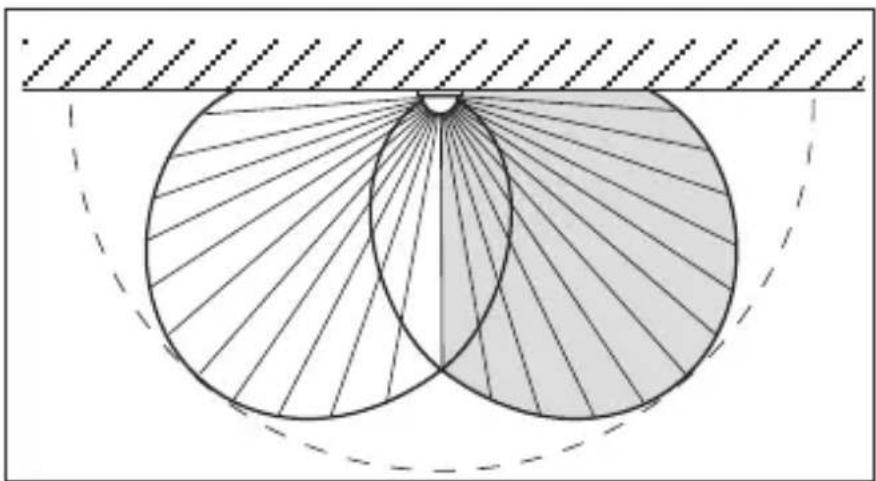
natural_image
Geometric diagram showing two overlapping circles with radiating lines, enclosed by a dashed rectangle (no text or symbols)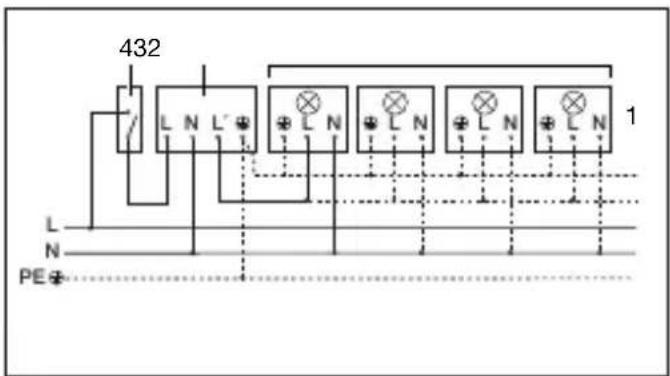
3. Tilslutning via serieafbryder til manuel og automatisk drift
4. Tilslutning til konstant belysning og automatisk drift via omskiftningskontakt
natural_image
Illustration of a rural house with a 180° viewing angle and a circular diagram showing a hexagonal grid pattern (no text or symbols)natural_image
Illustration of a house with a circular target and directional arrows, showing a person walking toward it (no text or symbols)natural_image
Illustration of a house with a circular target and radiating lines, showing a person walking toward it (no text or symbols)natural_image
Illustration of hands using a screwdriver to install a component into a cabinet (no text or symbols present)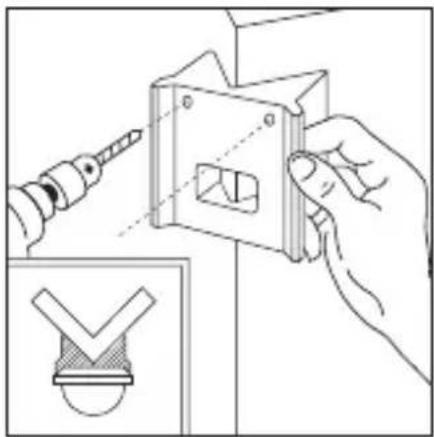
natural_image
Illustration of a hand using a power tool to adjust a mechanical component, with an inset showing a checkmark symbol (no text or labels present)natural_image
Line drawing of a bird's wing with scissors, no text or symbols presentnatural_image
Diagram of a microfabricated structure with hexagonal mesh pattern and diagonal striped lines, no text or symbols present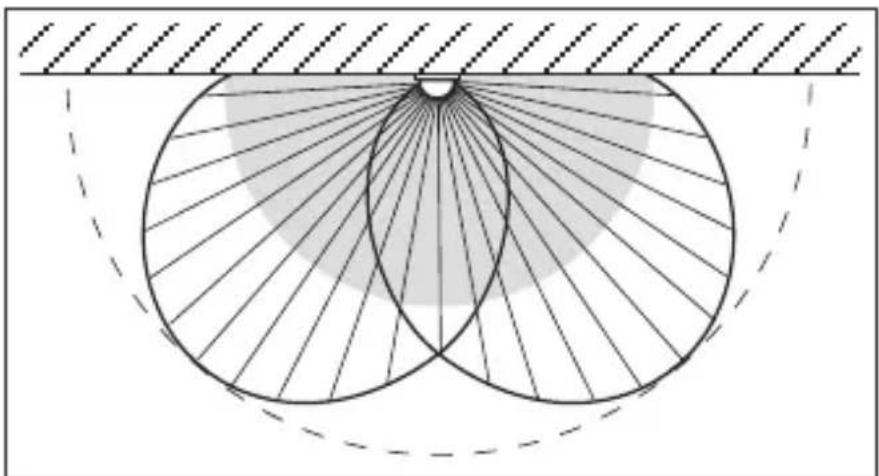
natural_image
Geometric diagram showing concentric circles with radiating lines and a shaded region, no text or symbols present.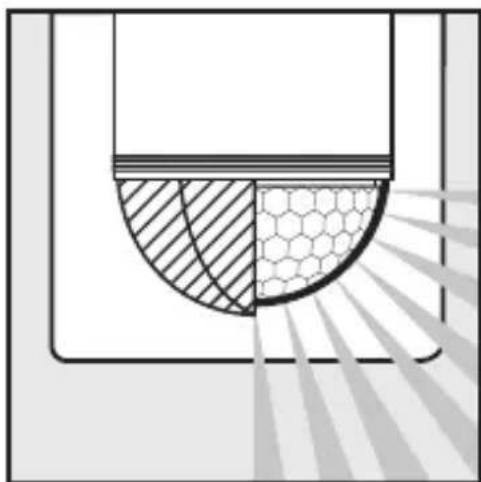
natural_image
Diagram showing a cross-section of a container with shaded regions and a hexagonal pattern, no text or symbols present.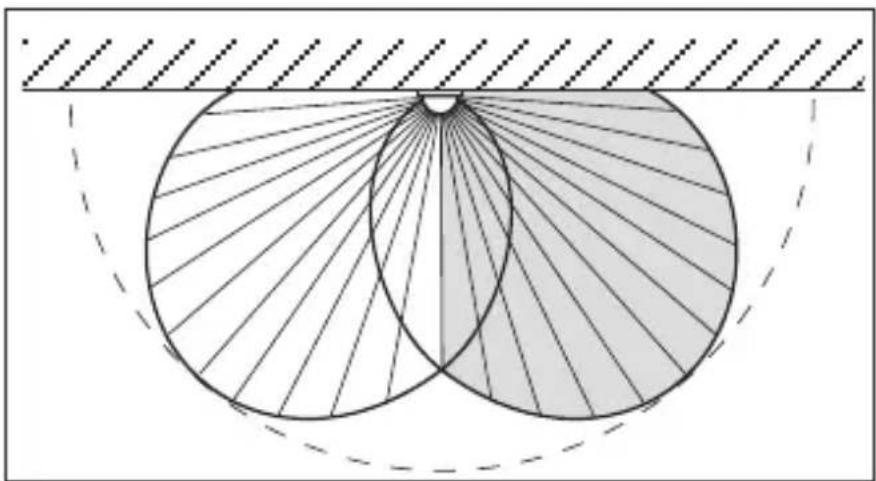
natural_image
Geometric diagram showing two overlapping circles with radiating lines, enclosed by a dashed rectangle (no text or symbols)2 W < LED < 8 W 175 W
LED > 8 W 350 W
Kapasitiv belastning 132 μF
| Nettilkobling | 230–240 V, 50 Hz |
| Dekningsvinkel | 180° horisontalt, 90° vertikalt |
| Sensorrekkevidde | Grunninnstilling 1: maks. 5 mGrunninnstilling 2: maks. 12 m (fabrikkinnstilling)+ finjustering med dekkplater 1–12 m |
| Tidsinnstilling | 10 sek.–15 min. (fabrikkinnstilling: 10 sek.) |
| Skumringsinnstilling | 2–2.000 lux (fabrikkinnstilling: 2.000 lux) |
| Kapslingsgrad | IP 54 |
| Temperaturområde | -20 °C til +50 °C |
3. Virkemåte
natural_image
Illustration of a rural house with a 180° viewing angle and a circular diagram showing a hexagonal pattern, no text or symbols present.Rekkevidde maks. 12 m Rekkevidde maks. 5 m
natural_image
Diagram showing a house with a circular light source emitting rays, and a person walking away from the window (no text or symbols)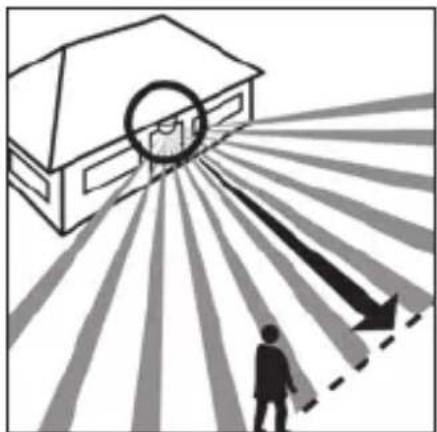
natural_image
Illustration of a house with a circular arrow pointing outward from a person walking, no text or symbols presentnatural_image
Illustration of hands using a screwdriver to adjust or install a component, with an inset showing a small mechanical component (no text or symbols)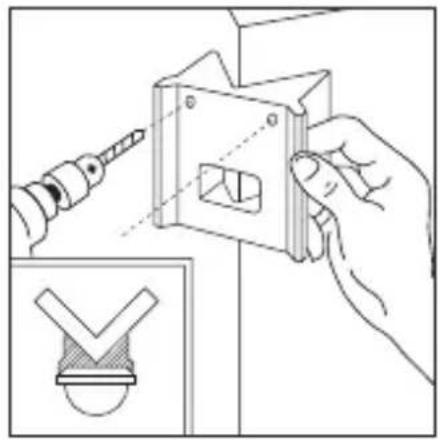
natural_image
Illustration of a hand using a power tool to adjust a mechanical component, with an inset showing a checkmark symbol (no text or labels present)Med hjørneveggfestene kan du enkelt montere IS 2180 ECO i inner- og ytterhjørner. Bruk hjørneveggfestet som boremal når du borer hullene. Dette sikrer at borehullet kommer i riktig vinkel, slik at hjørneveggfestet kan monteres problemfritt. Hjørneveggfeste (EAN 40071085131 svart / 40071085148 hvitt) fås som tilbehør.
7. Funksjoner
natural_image
Line drawing of a bird's wing with striped wings and a small circular object at the tail (no text or symbols)natural_image
Diagram of a microfabricated structure with hexagonal mesh pattern and diagonal striped lines, no text or symbols present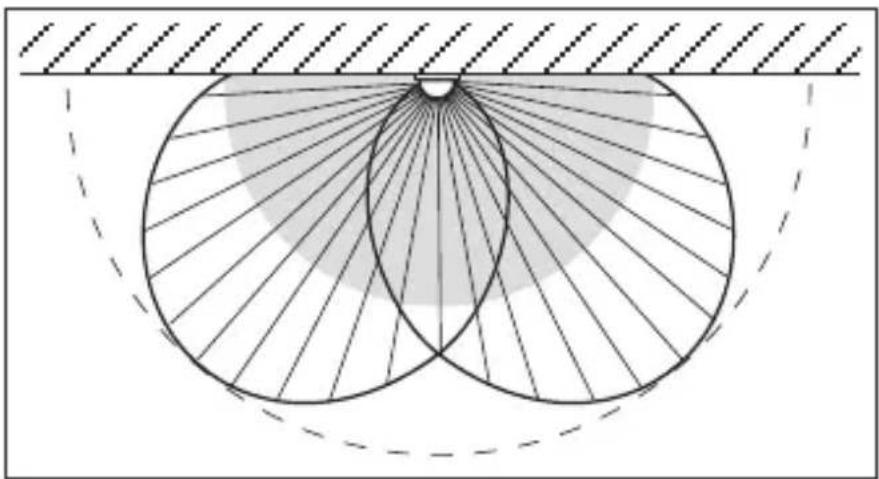
natural_image
Geometric diagram showing two intersecting circles with radiating lines and a shaded central region, enclosed by a dashed arc (no text or symbols)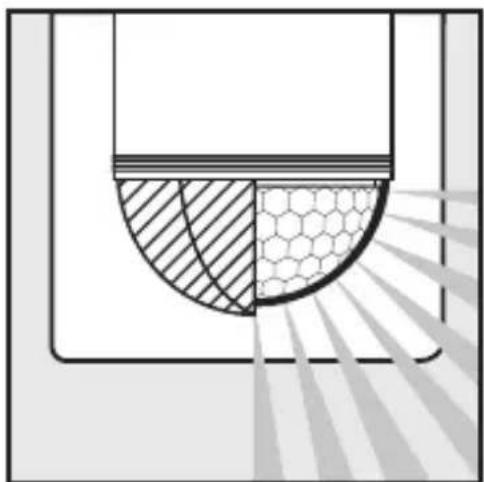
natural_image
Diagram showing a cross-section of a container with shaded regions and a hexagonal pattern, no text or symbols present.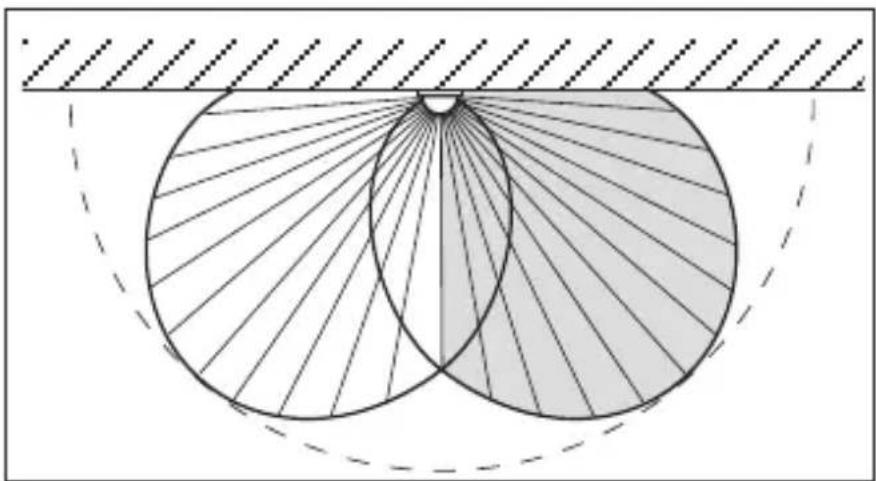
natural_image
Geometric diagram showing two overlapping circles with radiating lines, enclosed by a dashed arc and hatched background (no text or symbols)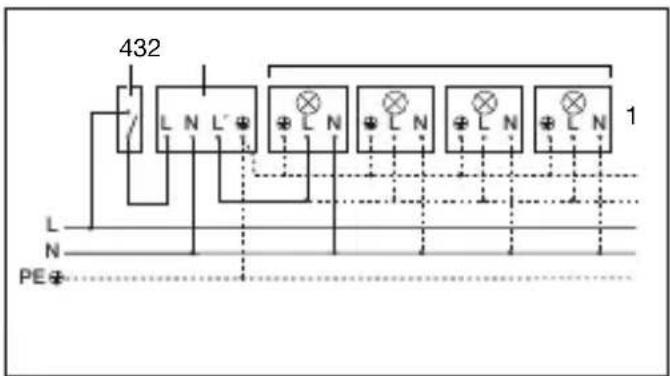
1. Lampe uten nulleder 2. Lampe med nulleder
2 W < LED < 8 W 175 W
LED > 8 W 350 W
natural_image
Illustration of a rural house with a 180° viewing angle and a circular diagram showing a hexagonal grid pattern, no text or symbols present.natural_image
Diagram showing a house with a circular target and a person walking, illustrating safety or lighting (no text or symbols)natural_image
Illustration of a house with a circular target and radiating arrows, showing a person walking toward it (no text or symbols)natural_image
Illustration of a hand using a screwdriver to adjust or install a component, with an inset showing a small mechanical component (no text or symbols present)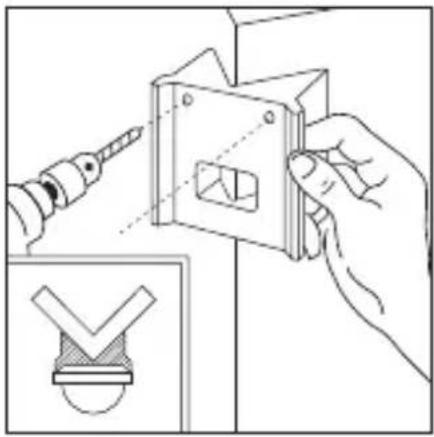
natural_image
Illustration of a hand using a screwdriver to adjust a mechanical component, with an inset showing a checkmark symbol (no text or labels present)natural_image
Line drawing of a bird cutting a bird, showing blade and wing structure (no text or symbols)natural_image
Diagram of a microfabricated structure with hexagonal mesh pattern and diagonal striped lines, no text or symbols present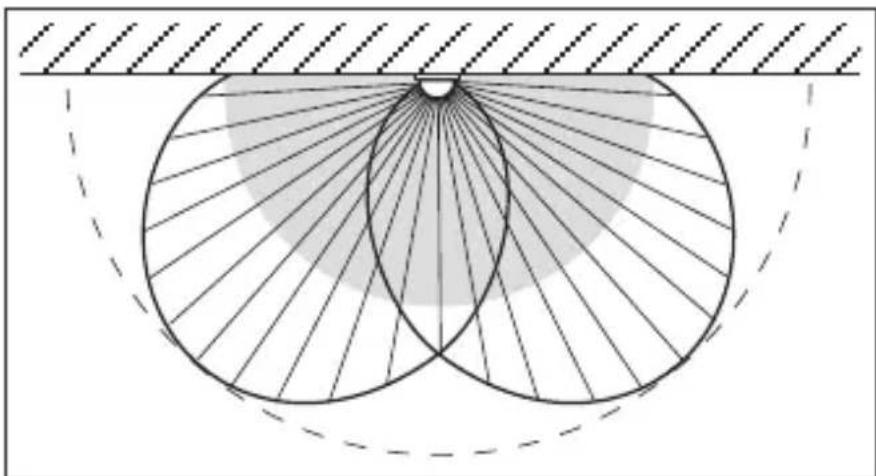
natural_image
Geometric diagram showing two intersecting circles with radiating lines, enclosed by a dashed arc and hatched background (no text or symbols)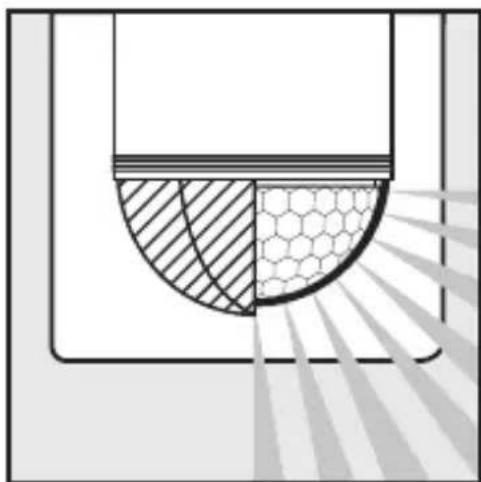
natural_image
Diagram showing a semi-circular structure with hatched and hexagonal patterns, possibly representing a mechanical or structural component (no text or symbols)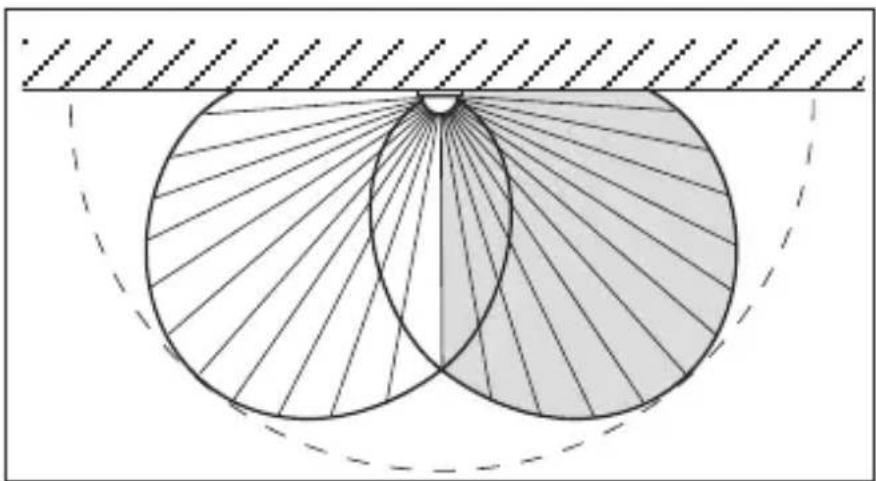
natural_image
Geometric diagram showing two overlapping circles with radiating lines, enclosed by a dashed rectangle (no text or symbols)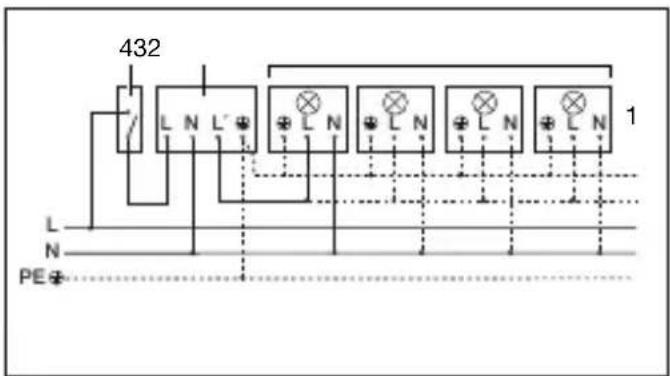
2 W < LED < 8 W 175 W
LED > 8 W 350 W
natural_image
Illustration of a rural house with a 180° angle and a circular diagram showing a hexagonal grid pattern, no text or symbols present.natural_image
Diagram showing a house with a circular target and a person walking, illustrating an outdoor scene (no text or symbols)natural_image
Illustration of a house with a circular target and radiating lines, showing a person standing toward it (no text or symbols)natural_image
Illustration of hands using a screwdriver to install a component into a cabinet (no text or symbols present)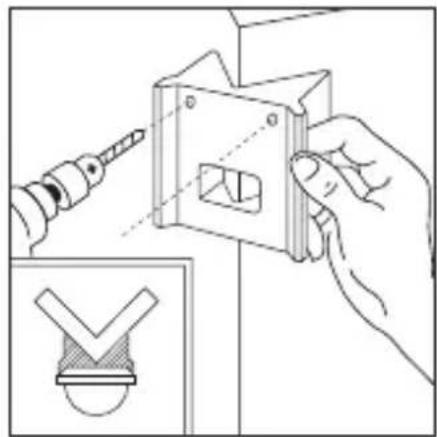
natural_image
Illustration of a hand using a tool to adjust a mechanical component, with an inset showing a checkmark symbol (no text or labels present)natural_image
Line drawing of a bird cutting a bird, showing blade and wing structure (no text or symbols)natural_image
Diagram of a hexagonal mesh structure with diagonal light beams, no text or symbols present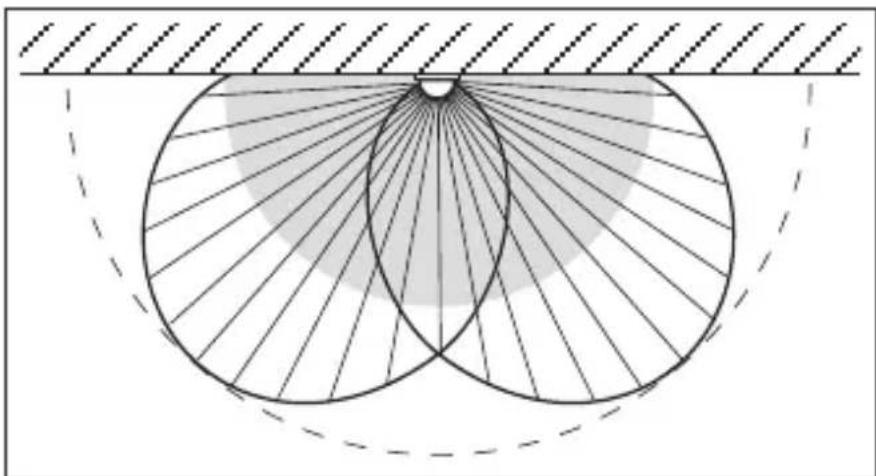
natural_image
Geometric diagram showing two intersecting circles with radiating lines and a shaded region, no text or symbols present.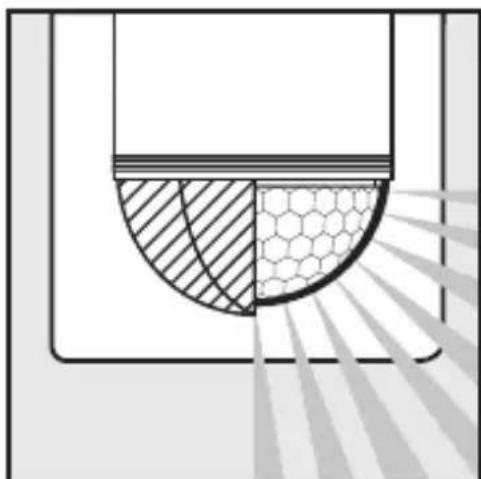
natural_image
Diagram showing a semi-circular structure with hatched and hexagonal patterns, possibly representing a mechanical or structural component (no text or symbols)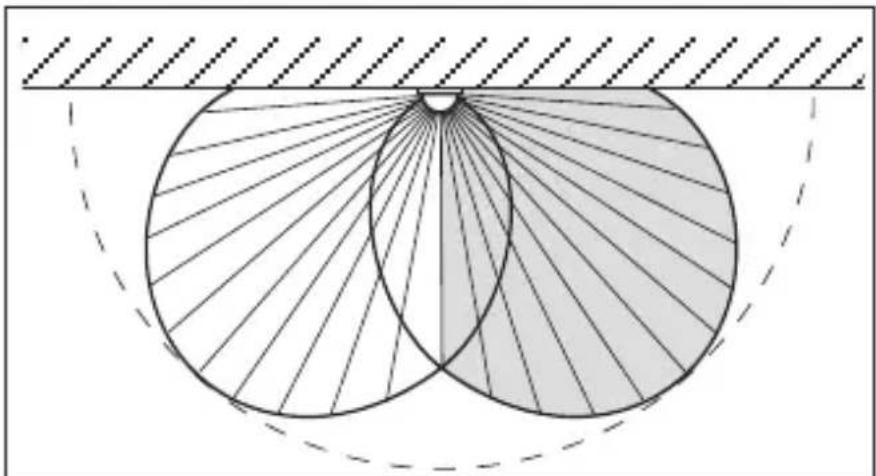
natural_image
Geometric diagram showing two overlapping circles with radiating lines, enclosed by a dashed arc and hatched background (no text or symbols)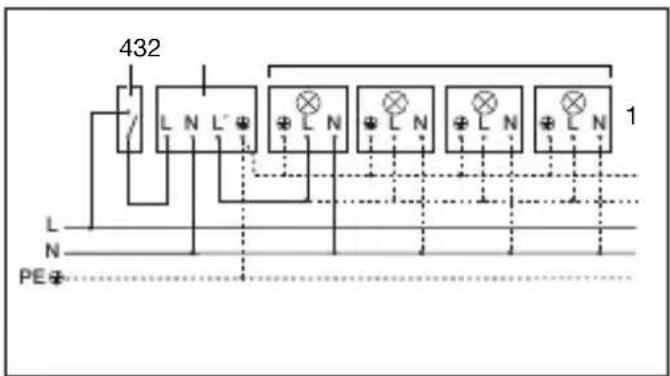
- Nötr iletken bulunmayan lamba 2. Nötr iletken bulunan lamba
natural_image
Illustration of a rural house with a 180° angle and a circular diagram showing a hexagonal grid pattern, no text or symbols present.natural_image
Illustration of a house with a circular target and directional arrows, showing a person walking toward it (no text or symbols)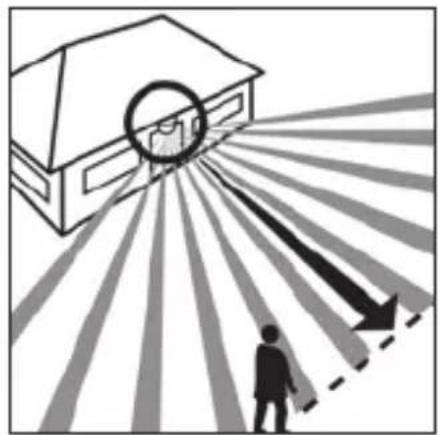
natural_image
Illustration of a house with a circular target and radiating arrows, showing a person walking toward it (no text or symbols)natural_image
Illustration of a hand using a screwdriver to adjust or install a small component, with an inset showing a wooden bracket detail (no text or symbols)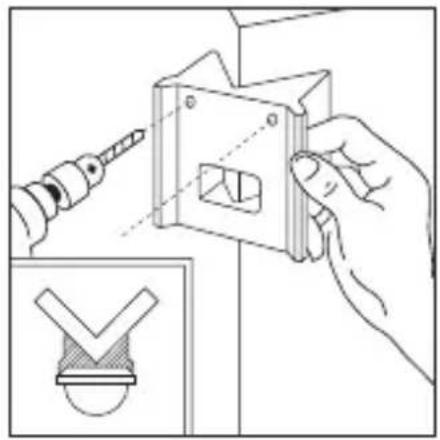
natural_image
Illustration of a hand using a power tool to adjust or install a mechanical component, with an inset showing a checkmark symbol (no text or labels present)natural_image
Line drawing of a bird cutting a bird, showing blade and wing structure (no text or symbols)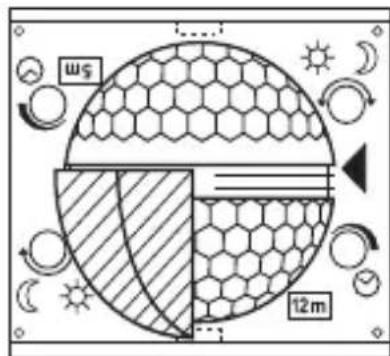
natural_image
Diagram of a hexagonal mesh structure with diagonal striped pattern, no text or symbols present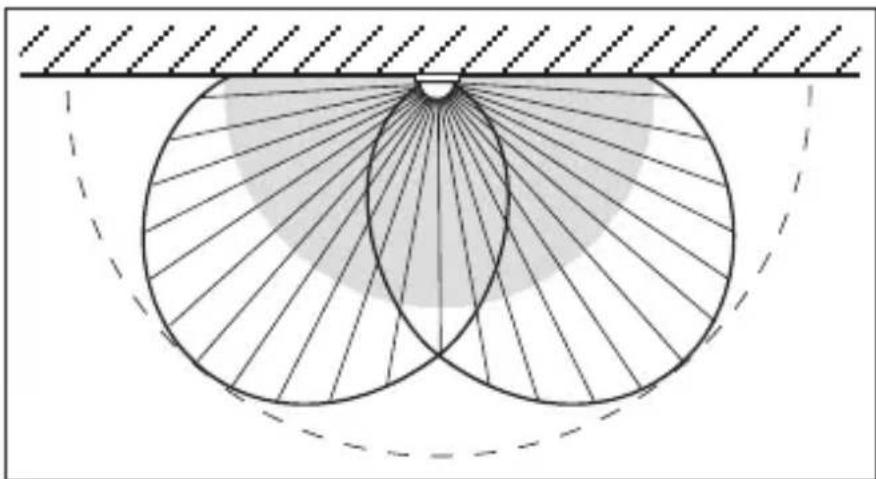
natural_image
Diagram of a geometric or optical setup with concentric circles and radial lines, no text or symbols present.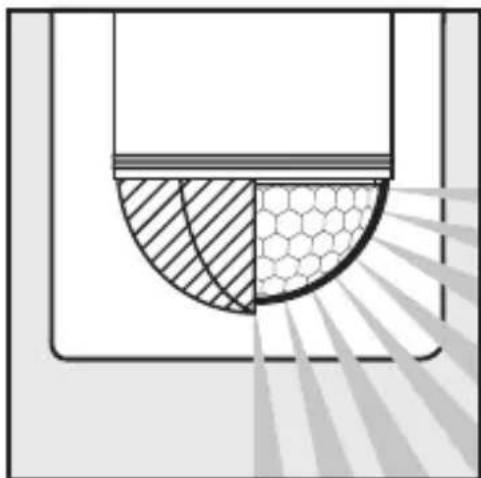
natural_image
Diagram showing a semicircular structure with shaded regions and a hexagonal grid pattern, no text or symbols present.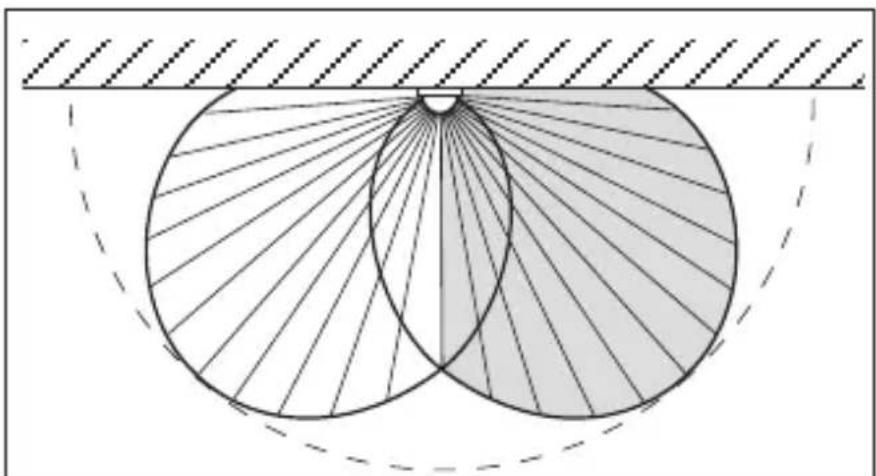
natural_image
Geometric diagram showing two overlapping circles with radiating lines, enclosed by a horizontal line and a dashed arc (no text or symbols)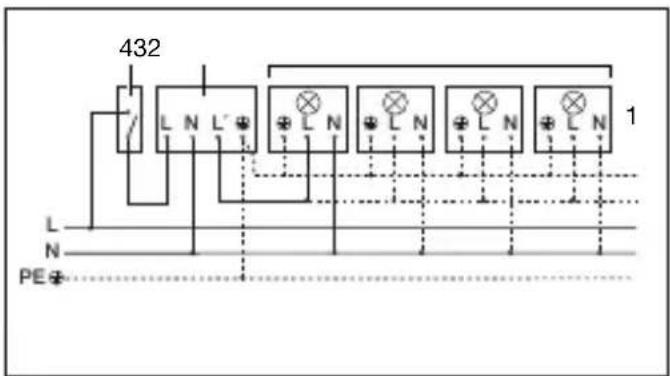
natural_image
Illustration of a rural house with a hexagonal grid pattern and 180° angle indicator (no text or symbols on the diagram itself)Dosah max. 12 m Dosah max. 5 m
natural_image
Diagram showing a house with a circular light source emitting rays, and a person walking away from the window (no text or symbols)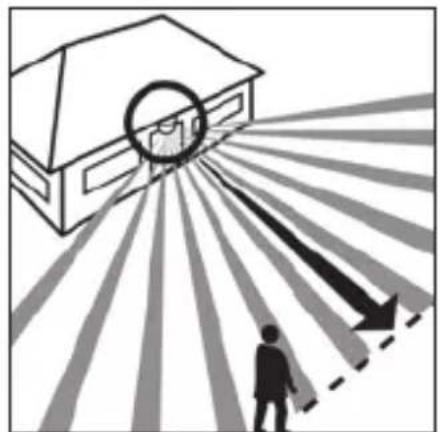
natural_image
Illustration of a house with a circular target and radiating lines, showing a person walking toward a building silhouette (no text or symbols)natural_image
Illustration of hands using a screwdriver to install a component into a cabinet (no text or symbols present)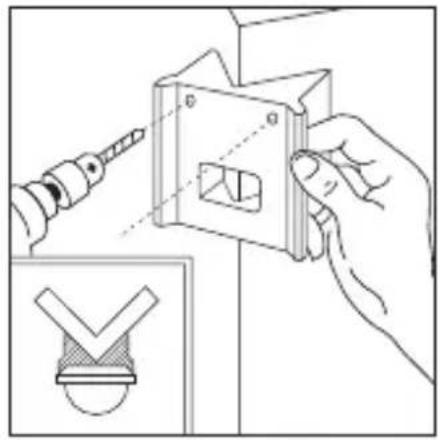
natural_image
Illustration of hands using a tool to adjust a mechanical part with a checkmark symbol (no text or labels)natural_image
Line drawing of a bird cutting a bird, showing blade and wing structure (no text or symbols)natural_image
Diagram of a microfabricated structure with hexagonal mesh pattern and diagonal striped lines, no text or symbols present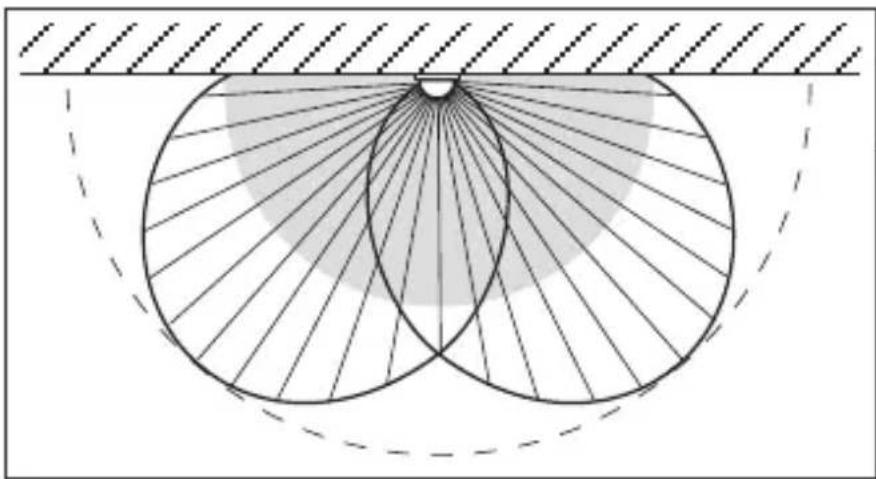
natural_image
Geometric diagram showing two intersecting circles with radiating lines and a shaded central region, no text or symbols present.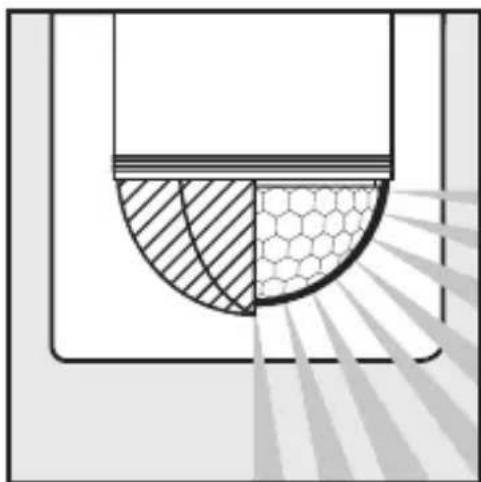
natural_image
Diagram showing a cross-section of a container with shaded regions and a hexagonal pattern, no text or symbols present.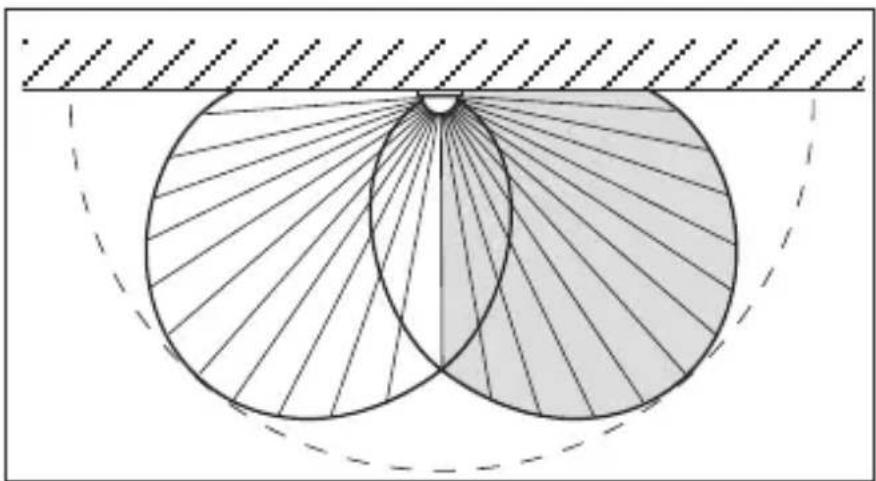
natural_image
Geometric diagram showing two overlapping circles with radiating lines, enclosed by a dashed rectangle (no text or symbols)natural_image
Illustration of a house with a 180° angle and a circular diagram showing a hexagonal grid pattern, no readable text or symbols.Dosah max. 12 m Dosah max. 5 m
natural_image
Diagram showing a house with a circular target and a person walking toward it, radiating from a dashed line (no text or symbols)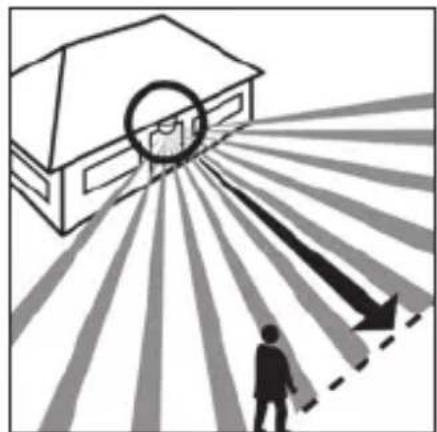
natural_image
Illustration of a house with a circular target and radiating lines, showing a person walking toward a building silhouette (no text or symbols)natural_image
Illustration of a hand using a screwdriver to adjust or install a component into a cabinet (no text or symbols present)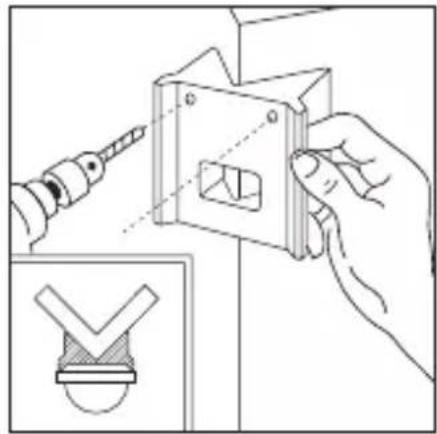
natural_image
Illustration of a hand using a power tool to adjust a mechanical component, with an inset showing a checkmark symbol (no text or labels present)Nastavenie stmievania (prah citlivosti)
natural_image
Line drawing of a bird cutting a bird, showing blade and wing structure (no text or symbols)natural_image
Diagram of a mechanical or structural component with concentric layers and radial lines, no text or symbols present.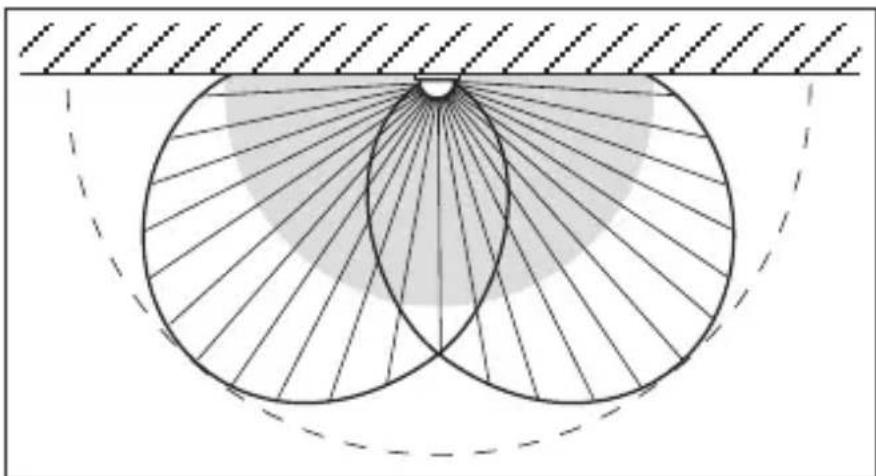
natural_image
Diagram of a geometric or optical setup with concentric circles and radial lines, no text or symbols present.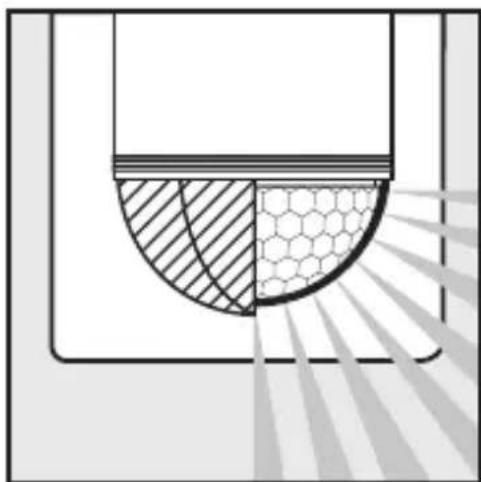
natural_image
Diagram showing a semicircular structure with hatched and hexagonal patterns, no text or symbols present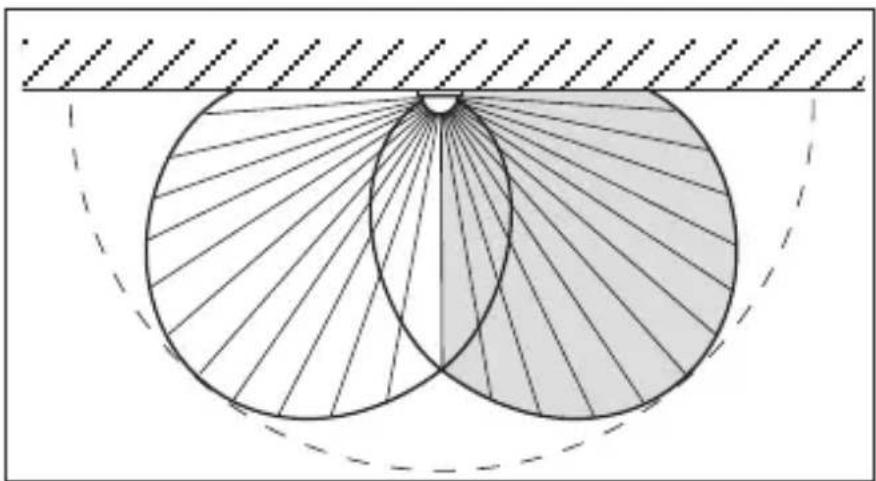
natural_image
Geometric diagram showing two overlapping circles with radiating lines, enclosed by a dashed rectangle (no text or symbols)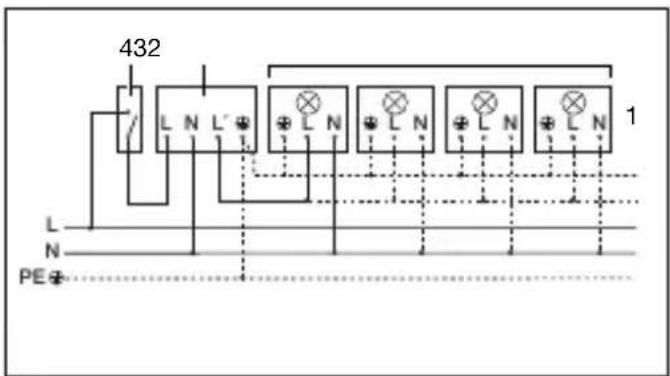
2 W < LED < 8 W 175 W
LED > 8 W 350 W
natural_image
Illustration of a rural house with a 180° angle and a hexagonal grid pattern, no text or symbols present.natural_image
Illustration of a house with a person walking toward a circular target, radiating outward with arrows indicating light or shadow (no text or symbols)natural_image
Illustration of a house with a circular target and radiating lines, showing a person walking toward it (no text or symbols)natural_image
Illustration of hands using a screwdriver to install a component into a cabinet (no text or symbols present)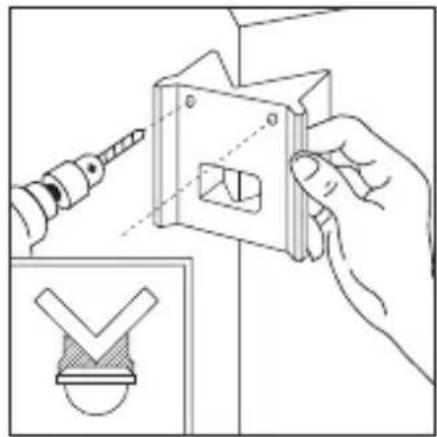
natural_image
Illustration of a hand using a screwdriver to adjust a metal bracket with a checkmark symbol (no text or labels)natural_image
Line drawing of a bird's wing with wings and tail (no text or symbols)natural_image
Diagram of a microfabricated structure with hexagonal mesh pattern and diagonal light beams (no text or symbols)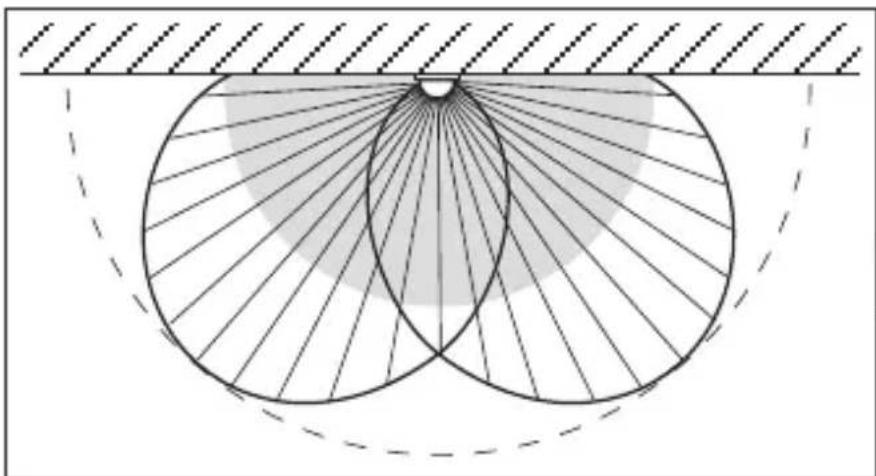
natural_image
Geometric diagram showing concentric circles with radiating lines and a shaded sector, no text or symbols presentPL
natural_image
Diagram showing a cross-section of a container with shaded regions and a hexagonal pattern, no text or symbols present.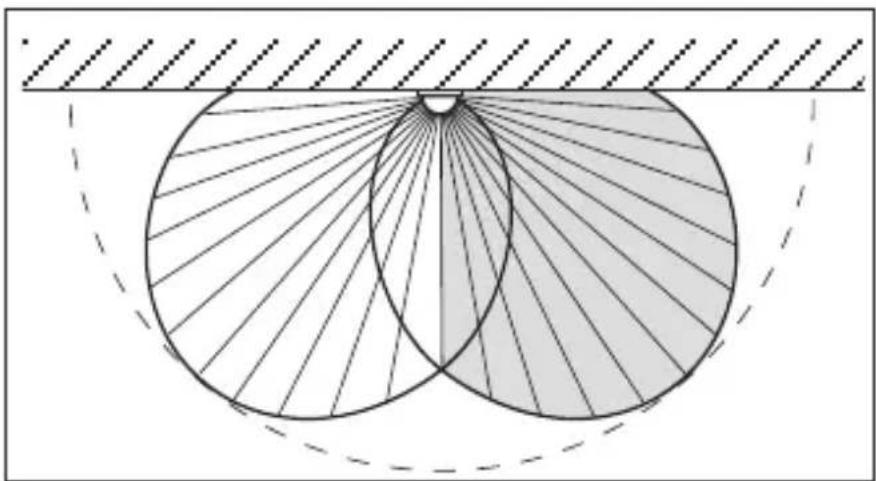
natural_image
Geometric diagram showing two intersecting circles with radiating lines, enclosed by a dashed rectangle (no text or symbols)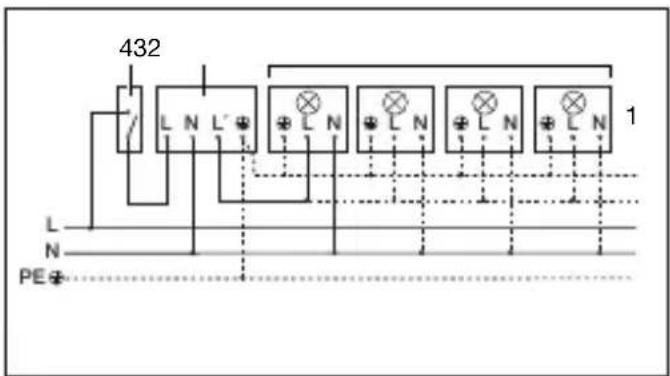
natural_image
Illustration of a rural house with a 180° angle and a circular diagram showing a hexagonal grid pattern, no text or symbols present.natural_image
Illustration of a house with a person walking toward a circular target, radiating outward with arrows indicating direction (no text or symbols)Directia de deplasare: frontal
natural_image
Illustration of a house with a circular target and radiating arrows, showing a person walking toward it (no text or symbols)Directia de deplasare: lateral
N = conductor de nul
natural_image
Illustration of a hand using a screwdriver to adjust a small component in a cabinet (no text or symbols present)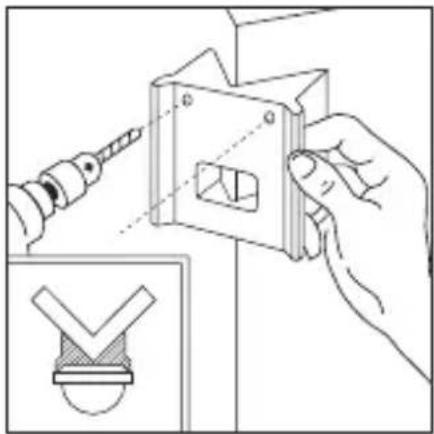
natural_image
Illustration of a hand using a screwdriver to adjust a mechanical component with a checkmark symbol (no text or labels present)natural_image
Line drawing of a bird-shaped object resembling a bird or wing with wings, viewed from above (no text or symbols)natural_image
Diagram of a mechanical or structural component with concentric layers and radial lines, no text or symbols present.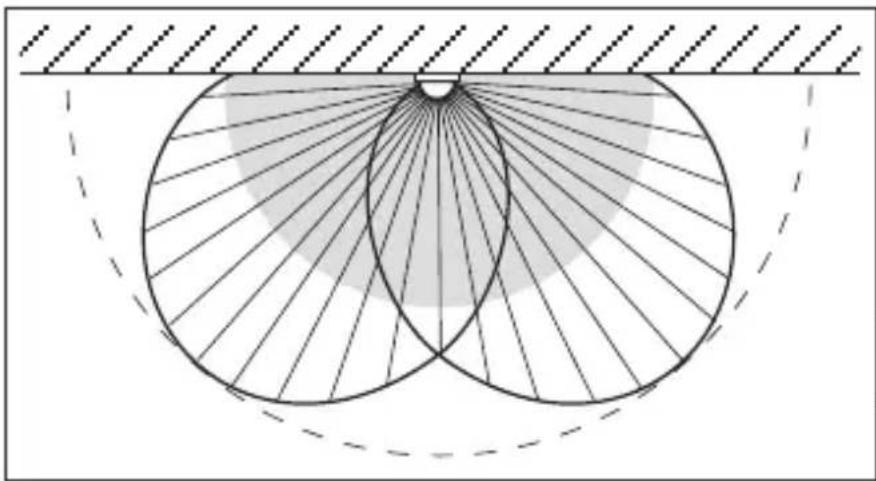
natural_image
Geometric diagram showing two intersecting circles with radiating lines and a shaded region, no text or symbols present.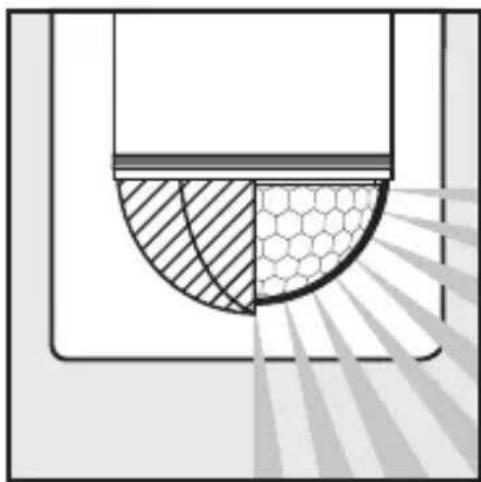
natural_image
Diagram showing a cross-section of a container with shaded and patterned sections, no text or symbols present.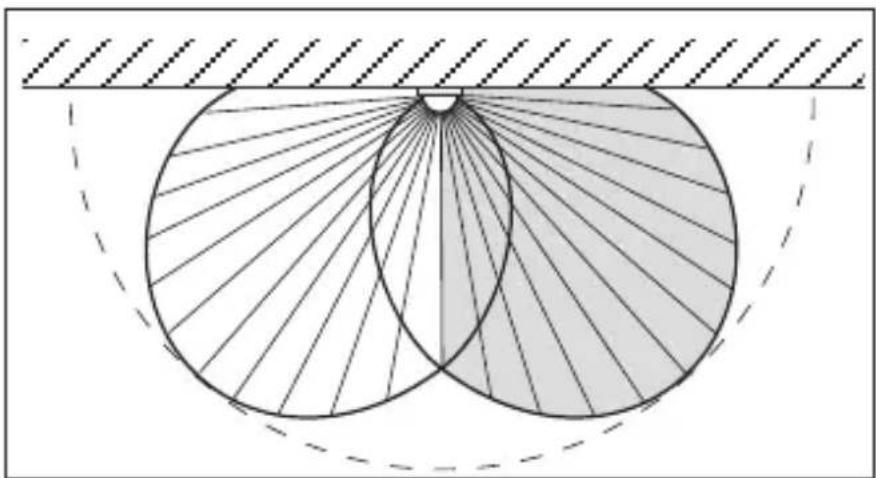
natural_image
Geometric diagram showing two overlapping circles with radiating lines, enclosed by a dashed rectangle (no text or symbols)12. Exemple de conectare
2 W < LED < 8 W 175 W
LED > 8 W 350 W
natural_image
Illustration of a rural house with a 180° angle and a circular diagram showing a hexagonal grid pattern, no text or symbols present.Doseg maks. 12 m Doseg maks. 5 m
natural_image
Diagram showing a house with a circular light source emitting rays, and a person walking away from the window (no text or symbols)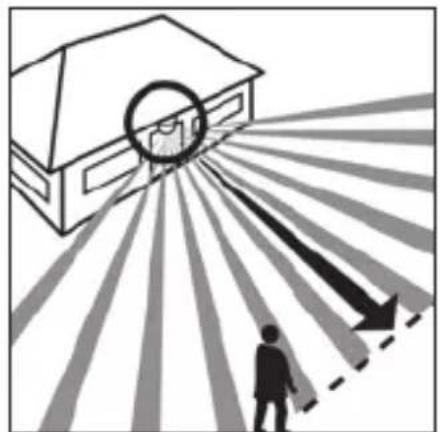
natural_image
Illustration of a house with a circular target and radiating lines, showing a person walking toward it (no text or symbols)Smer hoje: frontalna Smer hoje: stranska
Pomembno: Zaznavanje premikanja bo najbolj za- nesljivo, će montirate aparat s strani na smer hoje, zaznavanja senzorja pa tudi ne smejo ovirati nobene ovire (kot so npr. drevesa, zidovi itd.).

4. Varnostna navodila
■ Pred vsemi deli na javljalniku gibanja je treba prekiniti dovajanje napetosti!
Ob montaži mora biti električni vodnik, ki ga boste priključili na aparat, brez napetosti. Zato najprej izklopite tok ter z indikatorjem napetosti preverite, da naprava ni pod napetostjo.
natural_image
Illustration of hands using a screwdriver to adjust or install a component, with an inset showing a small mechanical component (no text or symbols)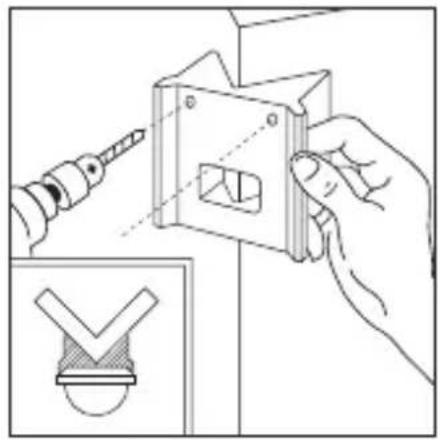
natural_image
Illustration of hands using a tool to adjust or install a mechanical component, with an inset showing a checkmark symbol (no text or labels present)natural_image
Line drawing of a bird's wing with wings and tail (no text or symbols)natural_image
Diagram of a microfabricated structure with hexagonal mesh pattern and diagonal light beams (no text or symbols)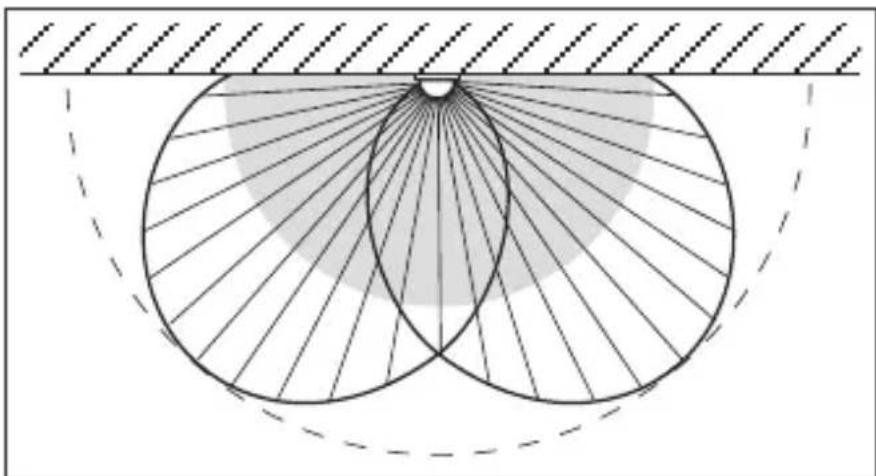
natural_image
Geometric diagram showing two intersecting circles with radiating lines and a shaded sector, no text or symbols present.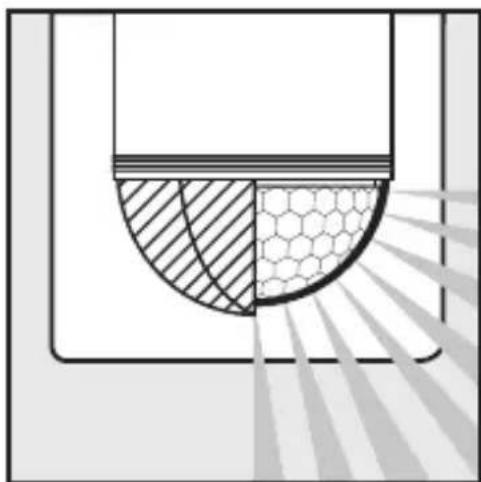
natural_image
Diagram showing a semi-circular structure with hatched and hexagonal patterns, possibly representing a mechanical or structural component (no text or symbols)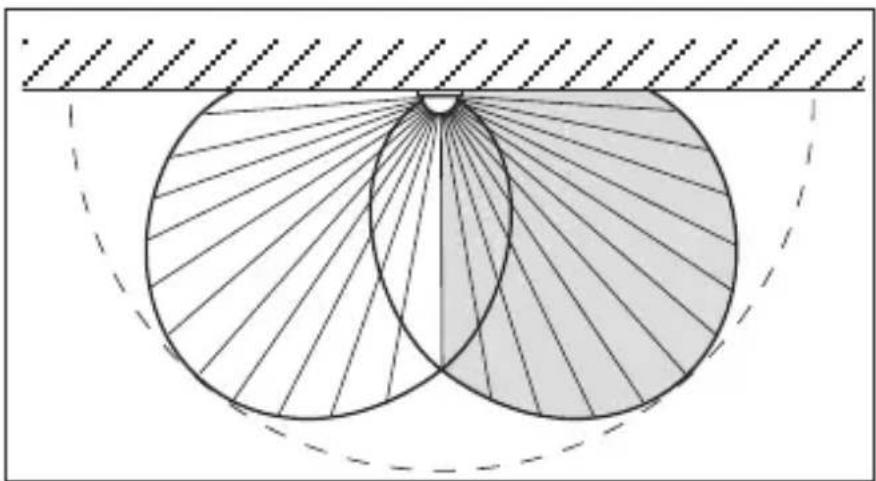
natural_image
Geometric diagram showing two intersecting circles with radiating lines, enclosed by a dashed rectangle (no text or symbols)12. Primeri priklopa
natural_image
Illustration of a rural house with a 180° angle and a hexagonal grid pattern, no text or symbols present.Domet maks. 12 m Domet maks. 5 m
natural_image
Diagram showing a house with a circular target and a person walking away, radiating from a dashed line (no text or symbols)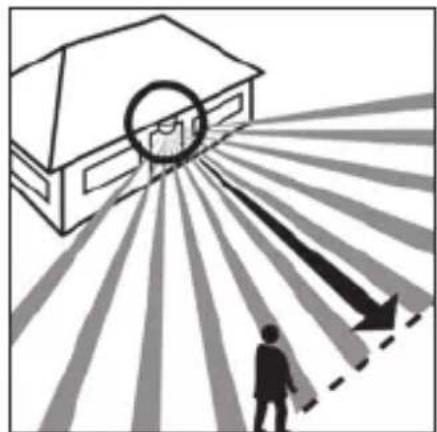
natural_image
Illustration of a house with a circular target and radiating lines, showing a person walking toward a building (no text or symbols)natural_image
Illustration of hands using a screwdriver to install a component into a cabinet (no text or symbols present)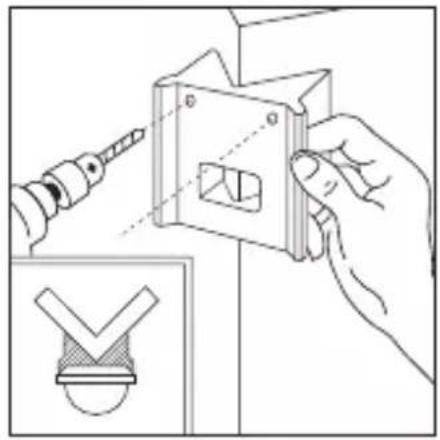
natural_image
Illustration of hands using a tool to adjust a mechanical part with a checkmark symbol (no text or labels present)Uz kutne zidne držače, IS 2180 ECO može se jednostavno montirati na unutarnje i vanjske kutove. Upotrijebite kutni zidni držač kao predložak za bušenje tijekom bušenja rupa. Na taj način postavljate izbušenu rupu pod pravim kutom i kutni zidni držač može se montirati bez problema. Kutni zidni držači (EAN 40071085131 crni / 40071085148 bijeli) dostupni su kao dodatna oprema.
7. Funkcije
Nakon što je izveden priključak na mrežu, kućište zatvoreno i stavljena leća, možete aktivirati uređaj.
Iza dizajniranog prednjeg poklopca 2 postoje dvije mogućnosti podešavanja.
Važno: Vrijeme i svjetlosni prag podešavajte samo kad je leća montirana.
Kašnjenje isključivanja (Podešavanje vremena)
Željeno trajanje svjetla može se kontinuirano podesiti od približno 10 sek. do maks. 15 min. Korekcijski vijak na lijevom graničniku znači najkraće vrijeme približno 10 sek., a korekcijski vijak
na desnom graničniku znači najduže vrijeme od približno 15 min. Kod podešavanja područja detekcije kao i za test funkcioniranja preporučuje se podesiti najkraće vrijeme.
natural_image
Line drawing of a bird cutting a bird, showing blade and wing structure (no text or symbols)natural_image
Diagram of a microfabricated structure with hexagonal mesh pattern and diagonal striped lines, no text or symbols present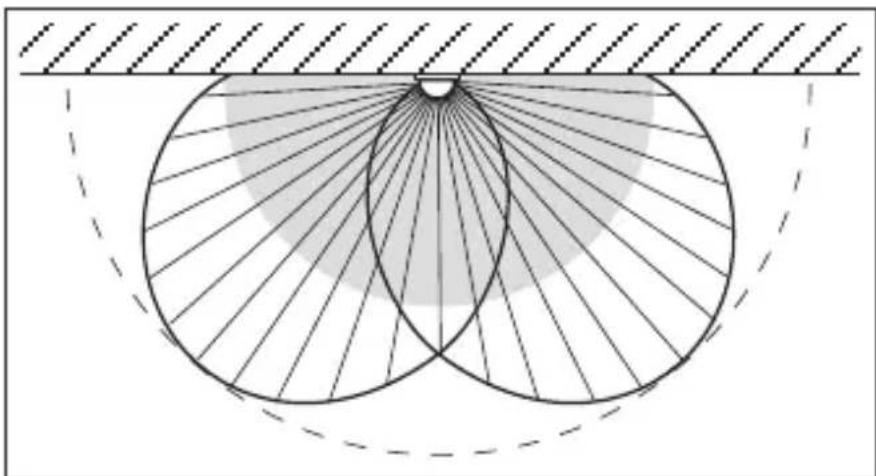
natural_image
Geometric diagram showing concentric circles with radiating lines and a shaded region, no text or symbols present.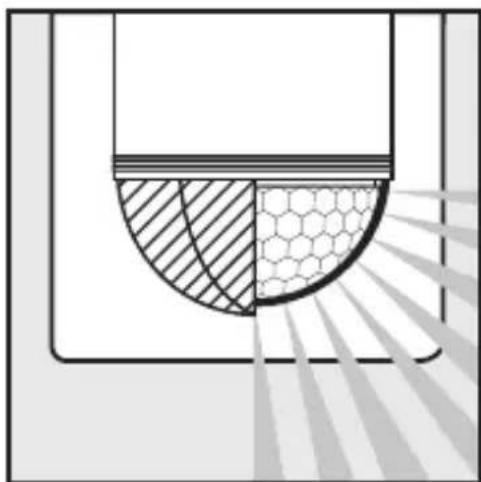
natural_image
Diagram showing a cross-section of a container with shaded regions and a hexagonal pattern, no text or symbols present.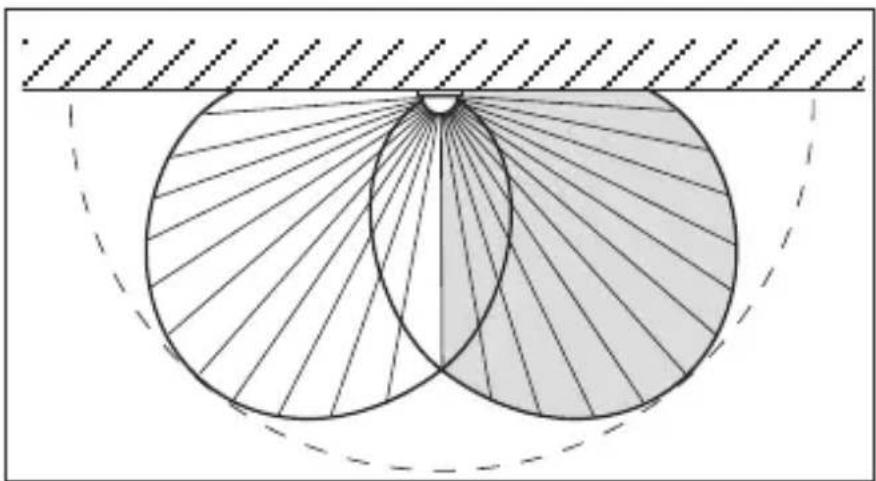
natural_image
Geometric diagram showing two intersecting circles with radiating lines, enclosed by a dashed arc and hatched background (no text or symbols)natural_image
Illustration of a rural house with a 180° angle and a hexagonal grid pattern, no text or symbols present.natural_image
Illustration of a house with a person walking toward a circular target, radiating outward with arrows indicating light or shadow (no text or symbols)natural_image
Illustration of a house with a circular target and radiating lines, showing a person walking toward it (no text or symbols)natural_image
Illustration of hands using a screwdriver to adjust or install a component, with an inset showing a small house outline (no text or symbols)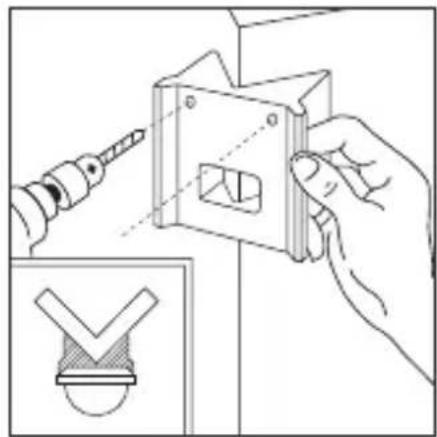
natural_image
Illustration of a hand using a tool to adjust a mechanical component, with an inset showing a checkmark symbol (no text or labels present)natural_image
Line drawing of a bird cutting a bird, showing blade and wing structure (no text or symbols)natural_image
Diagram of a microfabricated structure with hexagonal mesh pattern and diagonal striped lines, no text or symbols present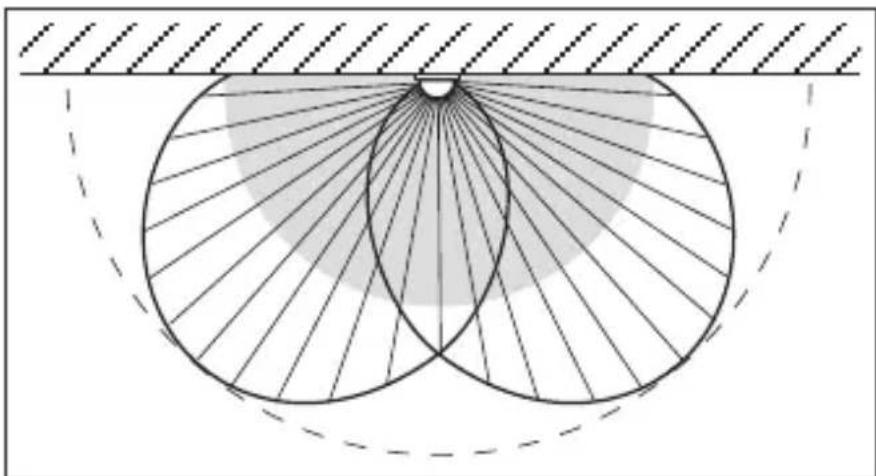
natural_image
Geometric diagram showing concentric circles with radiating lines and shaded regions, no text or symbols present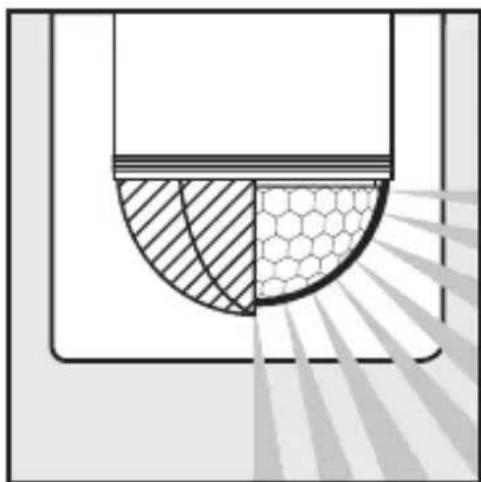
natural_image
Diagram showing a semi-circular structure with hatched and hexagonal patterns, no text or symbols present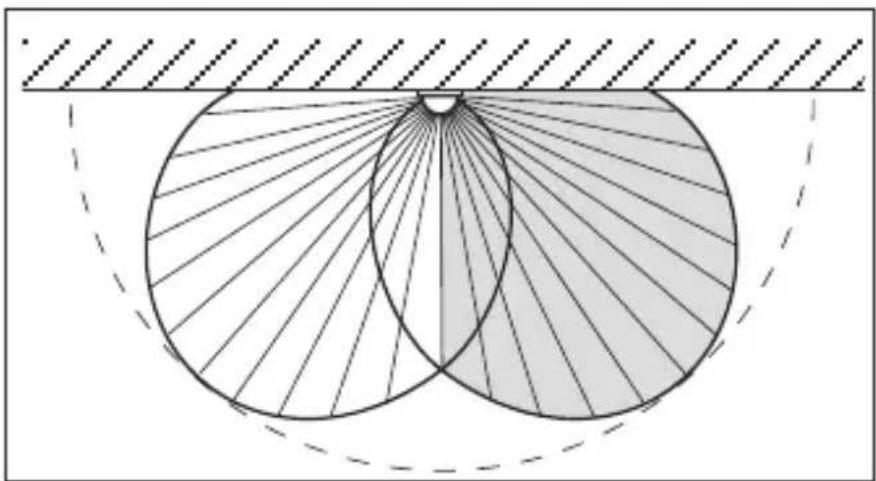
natural_image
Geometric diagram showing two intersecting circles with radiating lines, enclosed by a dashed rectangle (no text or symbols)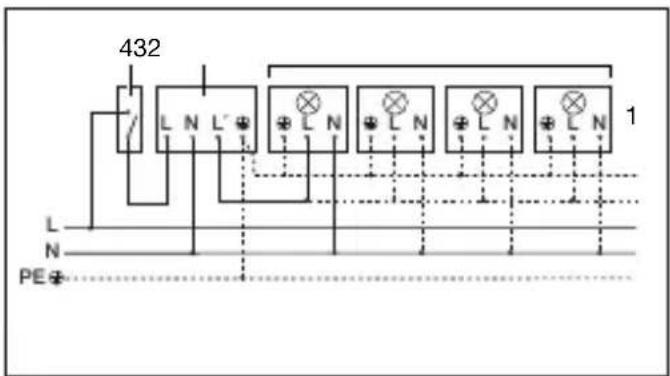
natural_image
Illustration of a rural house with a 180° angle and a circular diagram showing a hexagonal grid pattern, no text or symbols present.natural_image
Diagram showing a house with a circular target and a person walking, illustrating an outdoor scene (no text or symbols)natural_image
Illustration of a house with a circular target and radiating lines, showing a person standing near a large arrow (no text or symbols)Svarbu!
natural_image
Line drawing of a hand using a screwdriver to install a small component into a cabinet (no text or symbols present)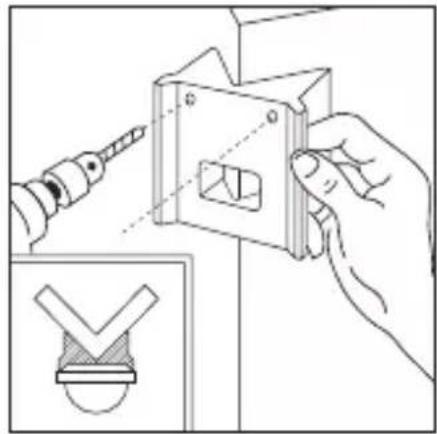
natural_image
Illustration of a hand using a tool to adjust a mechanical component, with an inset showing a checkmark symbol (no text or labels present)natural_image
Line drawing of a bird-shaped object with curved blades and a small circular mark (no text or symbols)natural_image
Diagram of a mechanical or structural component with concentric layers and radial lines, no text or symbols present.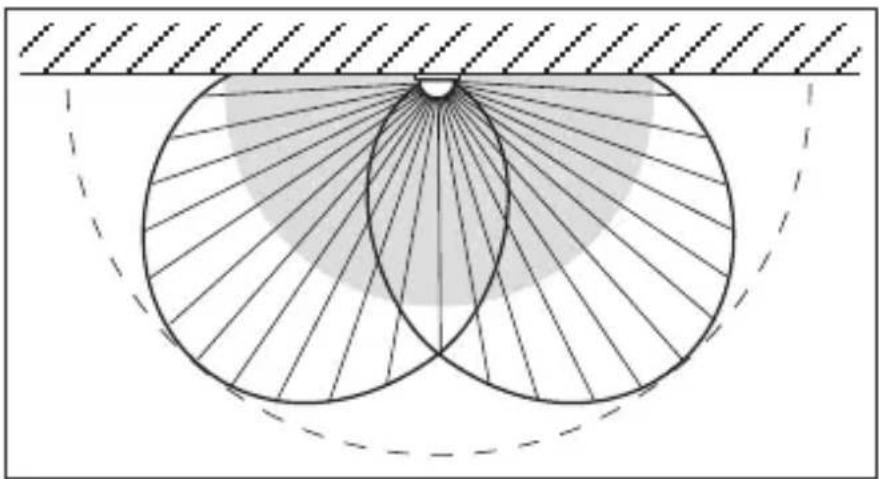
natural_image
Geometric diagram showing concentric circles with radiating lines and shaded regions, no text or symbols present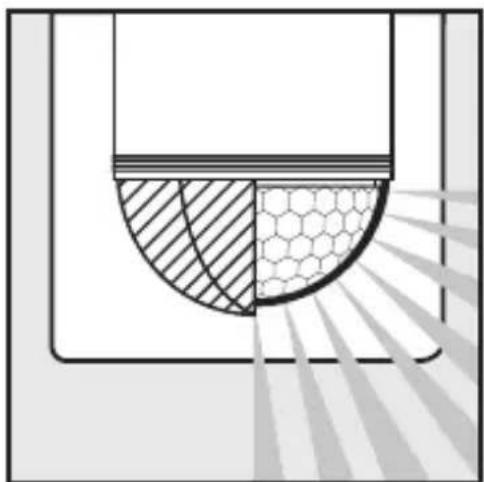
natural_image
Diagram showing a cross-section of a container with shaded regions and a hexagonal pattern, no text or symbols present.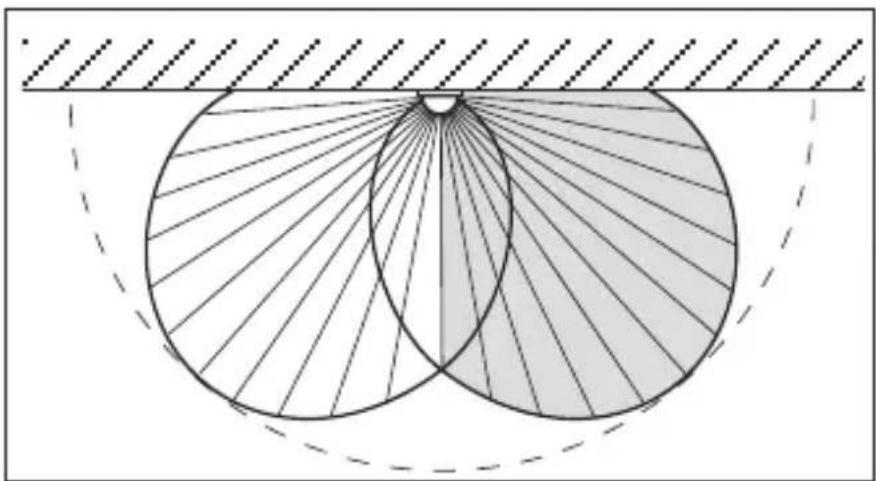
natural_image
Geometric diagram showing two intersecting circles with radiating lines, enclosed by a dashed rectangle (no text or symbols)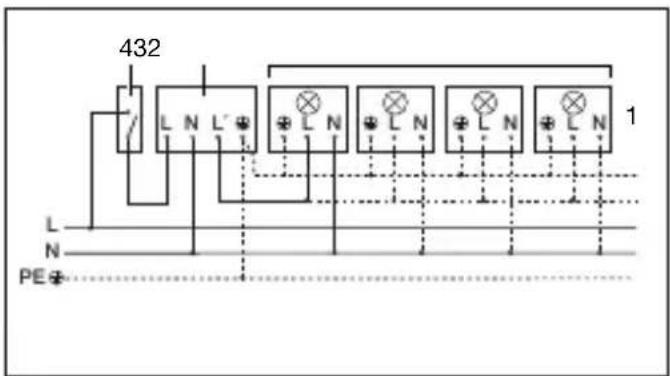
natural_image
Illustration of a rural house with a 180° angle and a circular diagram showing a hexagonal grid pattern, no text or symbols present.natural_image
Diagram showing a house with a circular target and a person walking toward it, radiating from a dashed line (no text or symbols)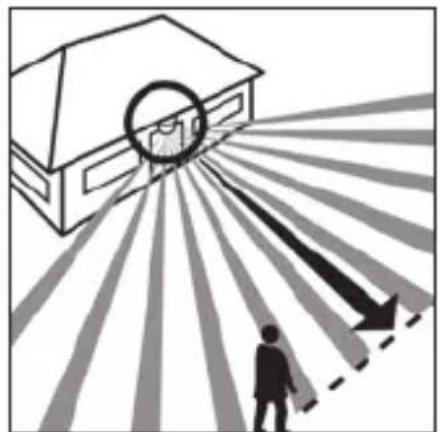
natural_image
Illustration of a house with a circular target and radiating lines, showing a person walking toward it (no text or symbols)natural_image
Illustration of hands using a screwdriver to install a component into a cabinet (no text or symbols present)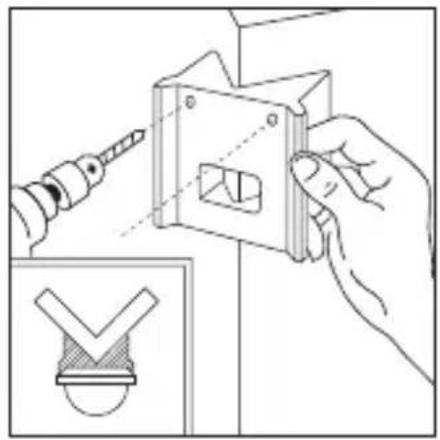
natural_image
Illustration of a hand using a screwdriver to adjust a mechanical component with a checkmark symbol (no text or labels)natural_image
Line drawing of a bird's wing with wings and tail (no text or symbols)natural_image
Diagram of a microfabricated structure with hexagonal lattice pattern and diagonal striped lines, no text or symbols present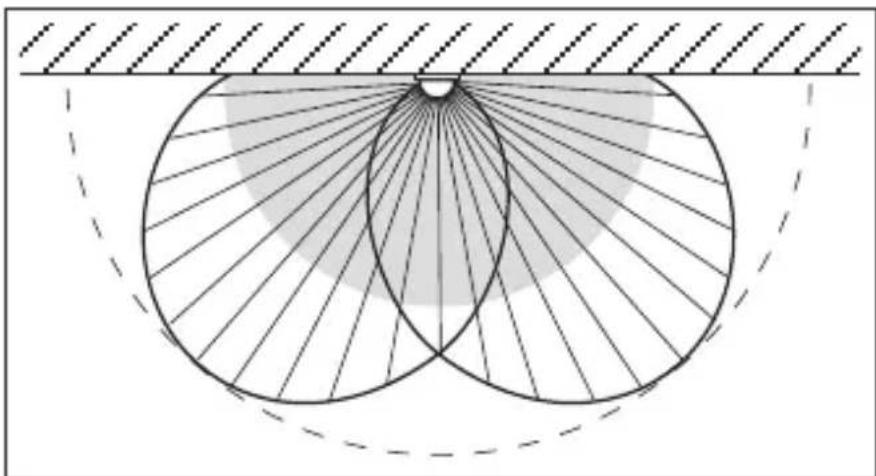
natural_image
Geometric diagram showing two intersecting circles with radiating lines and a shaded sector, no text or symbols present.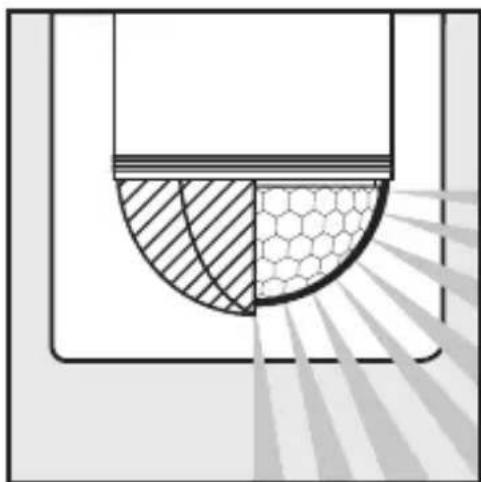
natural_image
Diagram showing a semi-circular structure with hatched and hexagonal patterns, possibly representing a mechanical or structural component (no text or symbols)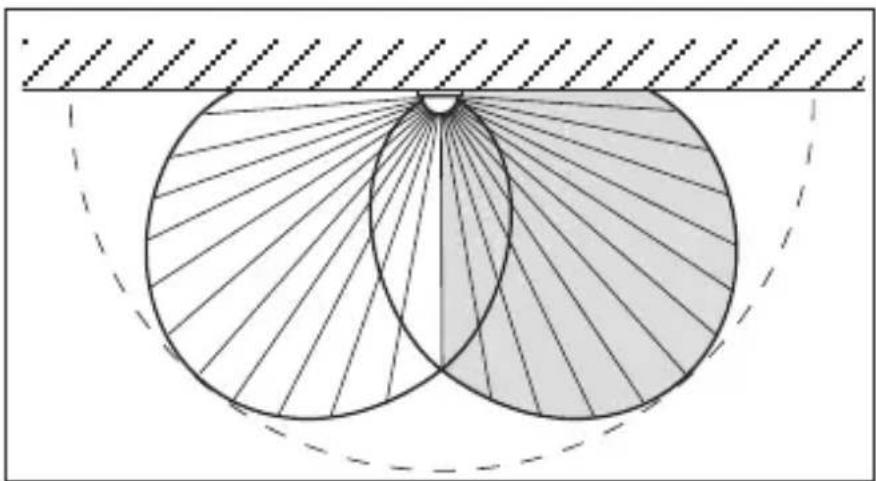
natural_image
Geometric diagram showing two intersecting circles with radiating lines, enclosed by a dashed rectangle (no text or symbols)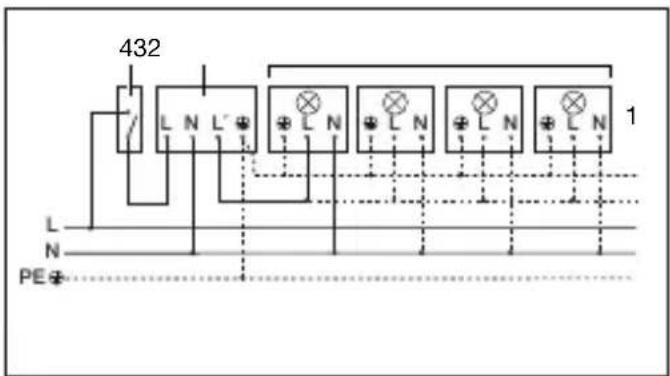
2 W < LED < 8 W 175 W
LED > 8 W 350 W
natural_image
Illustration of a rural house with a 180° angle and a circular diagram showing a hexagonal grid pattern, no text or symbols present.natural_image
Illustration of a house with a person walking toward a circular target, radiating outward with arrows indicating direction (no text or symbols)natural_image
Illustration of a house with a circular target and radiating arrows, showing a person walking toward it (no text or symbols)natural_image
Illustration of hands using a screwdriver to install a component into a cabinet (no text or symbols present)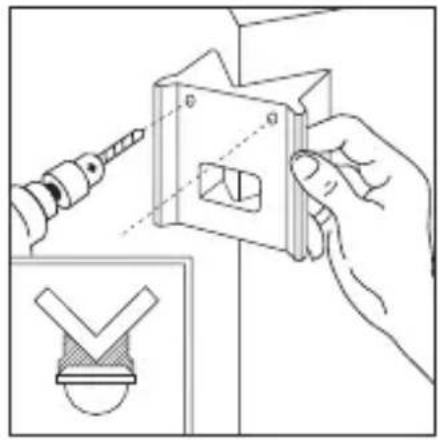
natural_image
Illustration of a hand using a screwdriver to adjust a mechanical part with a checkmark symbol (no text or labels present)natural_image
Line drawing of a bird cutting a bird, showing blade and wing structure (no text or symbols)natural_image
Diagram of a mechanical or structural component with concentric layers and radial lines, no text or symbols present.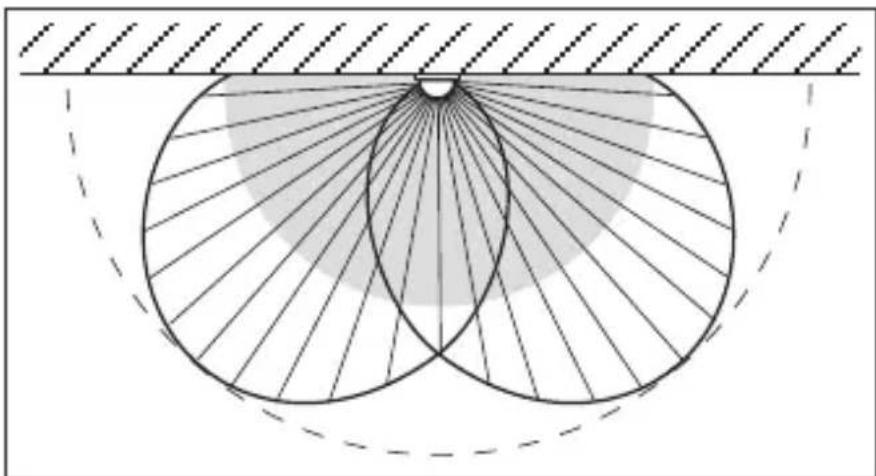
natural_image
Geometric diagram showing concentric circles with radiating lines and a shaded sector, no text or symbols present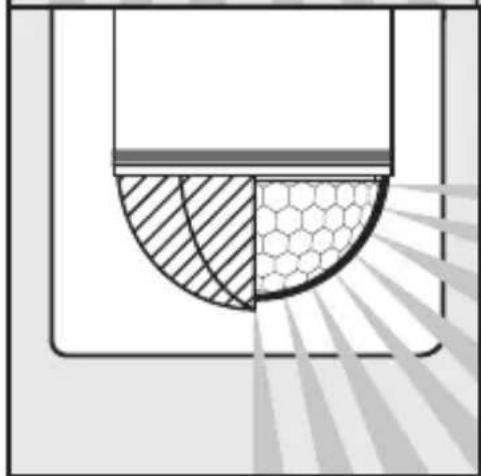
natural_image
Diagram showing a semicircular structure with shaded regions and a hexagonal grid pattern, no text or symbols present.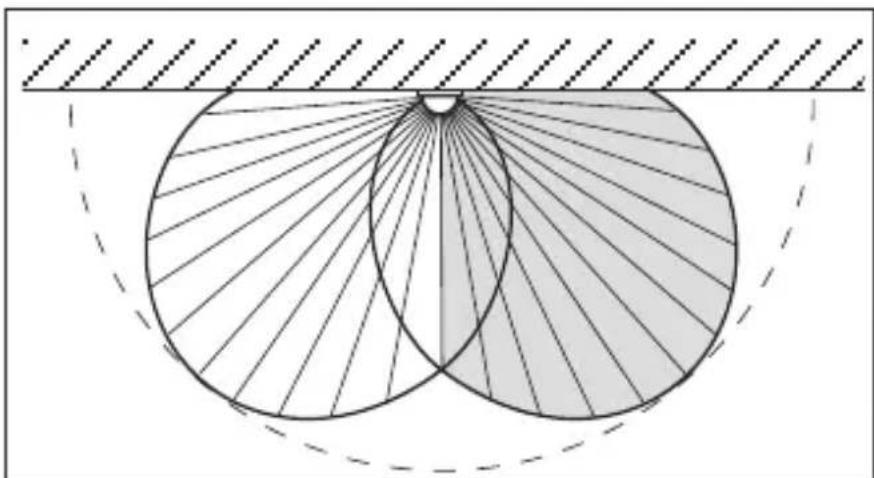
natural_image
Geometric diagram showing two overlapping circles with radiating lines, set against a hatched background (no text or symbols)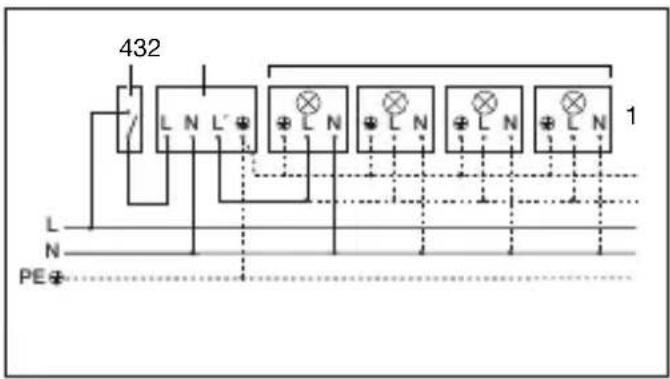
natural_image
Diagram showing a house with a circular light source emitting rays, and a person walking away from the window (no text or symbols)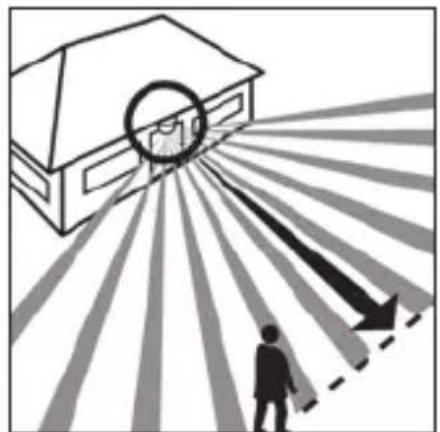
natural_image
Illustration of a person standing under a circular target with arrows pointing outward, no text or symbols present走动方向:正面 走动方向:侧面
natural_image
Illustration of a hand using a screwdriver to install a component into a cabinet (no text or symbols present)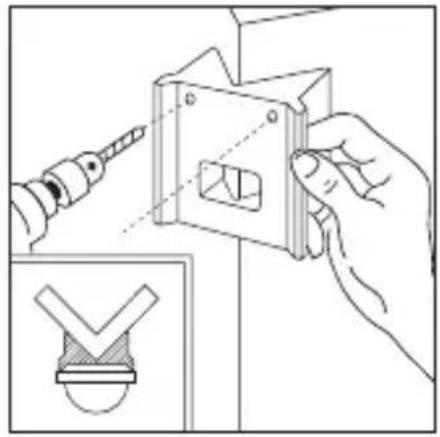
natural_image
Illustration of a hand using a screwdriver to adjust a mechanical part with a checkmark symbol (no text or labels present)亮度设置 (响应阀值)
natural_image
Line drawing of a bird cutting into a wing (no text or symbols)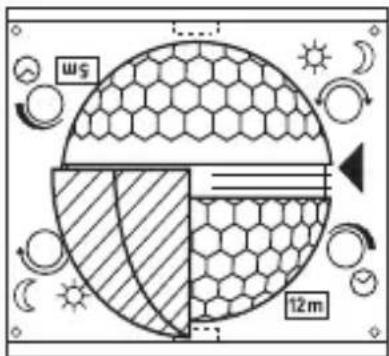
natural_image
Diagram of a mechanical or structural component with concentric layers and radial lines, no text or symbols present.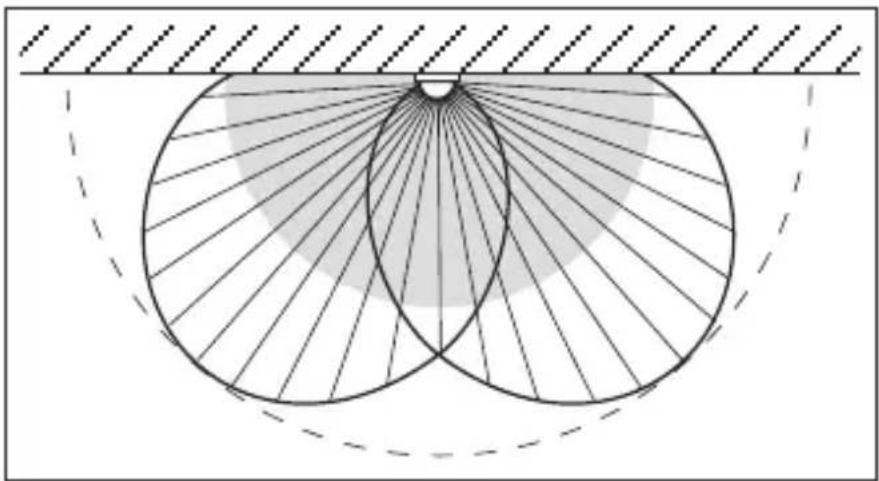
natural_image
Geometric diagram showing two intersecting circles with radiating lines and a shaded region, no text or symbols present.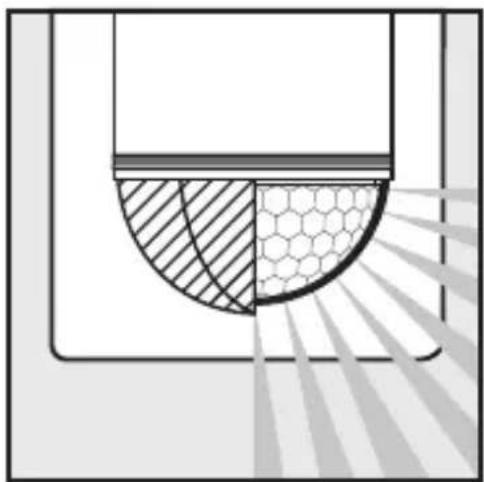
natural_image
Diagram showing a cross-section of a container with shaded and patterned sections, no text or symbols present.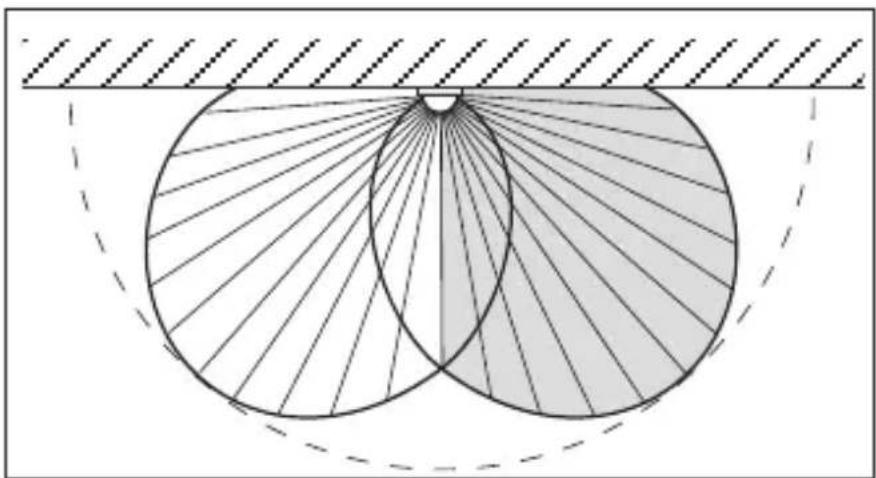
natural_image
Geometric diagram showing two overlapping circles with radiating lines, enclosed by a dashed rectangle (no text or symbols)12. 连接示例
- 灯,无零线 2. 灯,有零线
natural_image
Illustration of a rural house with a 180° angle and a circular diagram showing a hexagonal grid pattern, no text or symbols present.natural_image
Illustration of a house with a circular target and a person pointing toward it, radiating from a dashed line (no text or symbols)natural_image
Illustration of a house with a circular target and radiating arrows, showing a person walking toward it (no text or symbols)natural_image
Illustration of a hand using a screwdriver to adjust or install a component into a cabinet (no text or symbols present)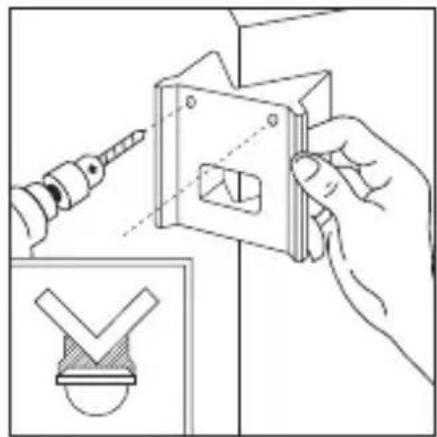
natural_image
Illustration of a hand using a screwdriver to adjust a mechanical component, with an inset showing a checkmark symbol (no text or labels present)7. Эксплуатация
natural_image
Line drawing of a bird cutting a bird, showing blade and wing structure (no text or symbols)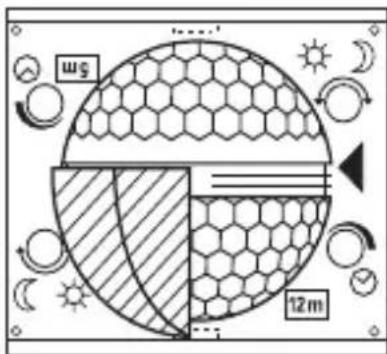
natural_image
Diagram of a microfabricated structure with hexagonal mesh pattern and diagonal striped lines, no text or symbols present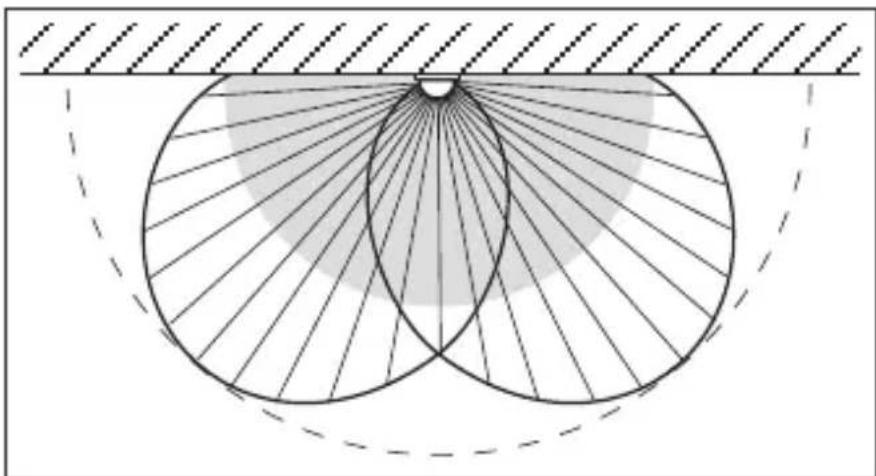
natural_image
Geometric diagram showing concentric circles with radiating lines and a shaded region, no text or symbols present.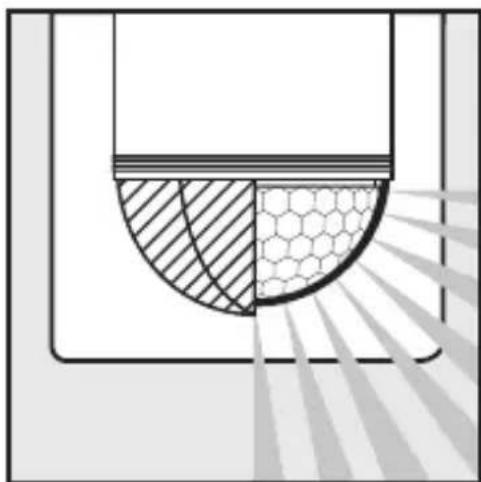
natural_image
Diagram showing a semi-circular structure with hatched and hexagonal patterns, possibly representing a mechanical or structural component (no text or symbols)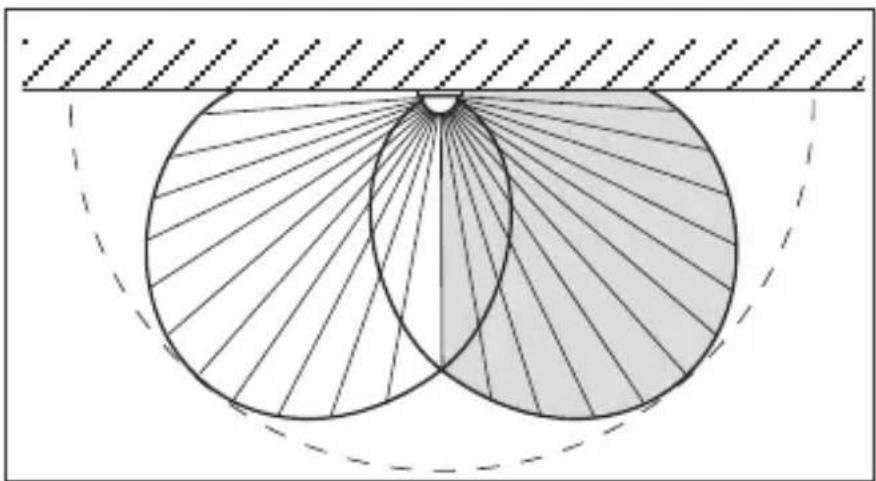
natural_image
Geometric diagram showing two intersecting circles with radiating lines, enclosed by a dashed arc and hatched background (no text or symbols)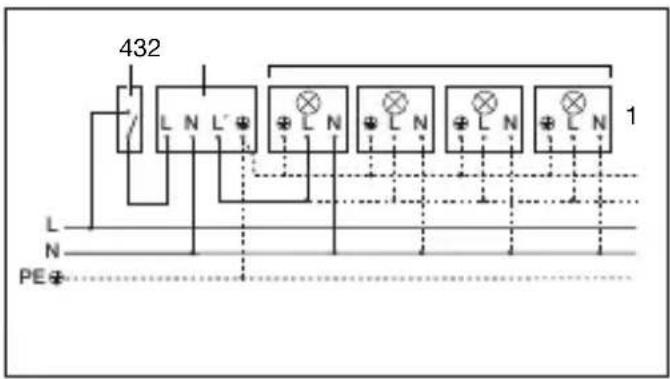
flowchart
graph TD
    A["6"] --> B["Switch"]
    B --> C["3"]
    C --> D["2"]
    D --> E["1"]
    style A fill:#f9f,stroke:#333
    style B fill:#ccf,stroke:#333
    style C fill:#cfc,stroke:#333
    style D fill:#fcc,stroke:#333
    style E fill:#ffc,stroke:#333
natural_image
World map silhouette in grayscale, showing continents and oceans without any text or labelsContact
www.steinel.de/contact


- System components
- Technical specifications
- Principle
- Safety warnings
- Installation / Wall mounting
- Installation procedure:
- a) Connect mains supply lead
- Installation using corner wall mount
- Functions
- Switch-off delay (time setting)
- Twilight setting (response threshold)
- Basic reach settings
- Examples
- Precision adjustment using shrouds
- Examples
- Wiring examples
- Connection to double-throw switch for permanent light ON and automatic operation
- Operation / Maintenance
- Troubleshooting
- Disposal
- EU countries only:
- Manufacturer's warranty
- Our warranty cover for consumers
- Our warranty cover for entrepreneurs
- Statutory rights accruing from defects, gratuitousness
- Exemptions from the warranty
- Making claims
- FR
- Cher client,
- Schemerinstelling (drempelwaarde)
- Regulación crepuscular (punto de luz ambiental)
- Tilslutning via serieafbryder til manuel og automatisk drift
- Tilslutning til konstant belysning og automatisk drift via omskiftningskontakt
- Virkemåte
- Funksjoner
- Lampe uten nulleder 2. Lampe med nulleder
- Nastavenie stmievania (prah citlivosti)
- Exemple de conectare
- Varnostna navodila
- Primeri priklopa
- Funkcije
- Kašnjenje isključivanja (Podešavanje vremena)
- Svarbu!
- 连接示例
- Эксплуатация
- Contact
Brand : STEINEL
Model : IS 2180 ECO
Category : Motion detector