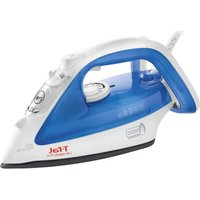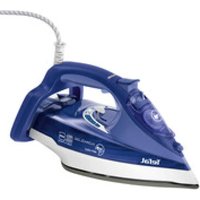
Ultimate Anticalc FV9625 - Iron TEFAL - Free user manual and instructions
Find the device manual for free Ultimate Anticalc FV9625 TEFAL in PDF.



| Technical Features | Steam iron, 2600 W power, continuous steam output of 50 g/min, pressing function of 220 g/min. |
|---|---|
| Usage | Temperature setting adapted to different fabric types, ceramic soleplate for optimal gliding. |
| Maintenance and Repair | Built-in anti-scale system, removable 300 ml water tank, easy soleplate cleaning. |
| Safety | Automatic shut-off after 8 minutes in vertical position and 30 seconds in horizontal position, overheating protection. |
| General Information | Weight of 1.6 kg, 2.5 m cord, 2-year warranty. |
Frequently Asked Questions - Ultimate Anticalc FV9625 TEFAL
User questions about Ultimate Anticalc FV9625 TEFAL
0 question about this device. Answer the ones you know or ask your own.
Ask a new question about this device
Download the instructions for your Iron in PDF format for free! Find your manual Ultimate Anticalc FV9625 - TEFAL and take your electronic device back in hand. On this page are published all the documents necessary for the use of your device. Ultimate Anticalc FV9625 by TEFAL.
USER MANUAL Ultimate Anticalc FV9625 TEFAL
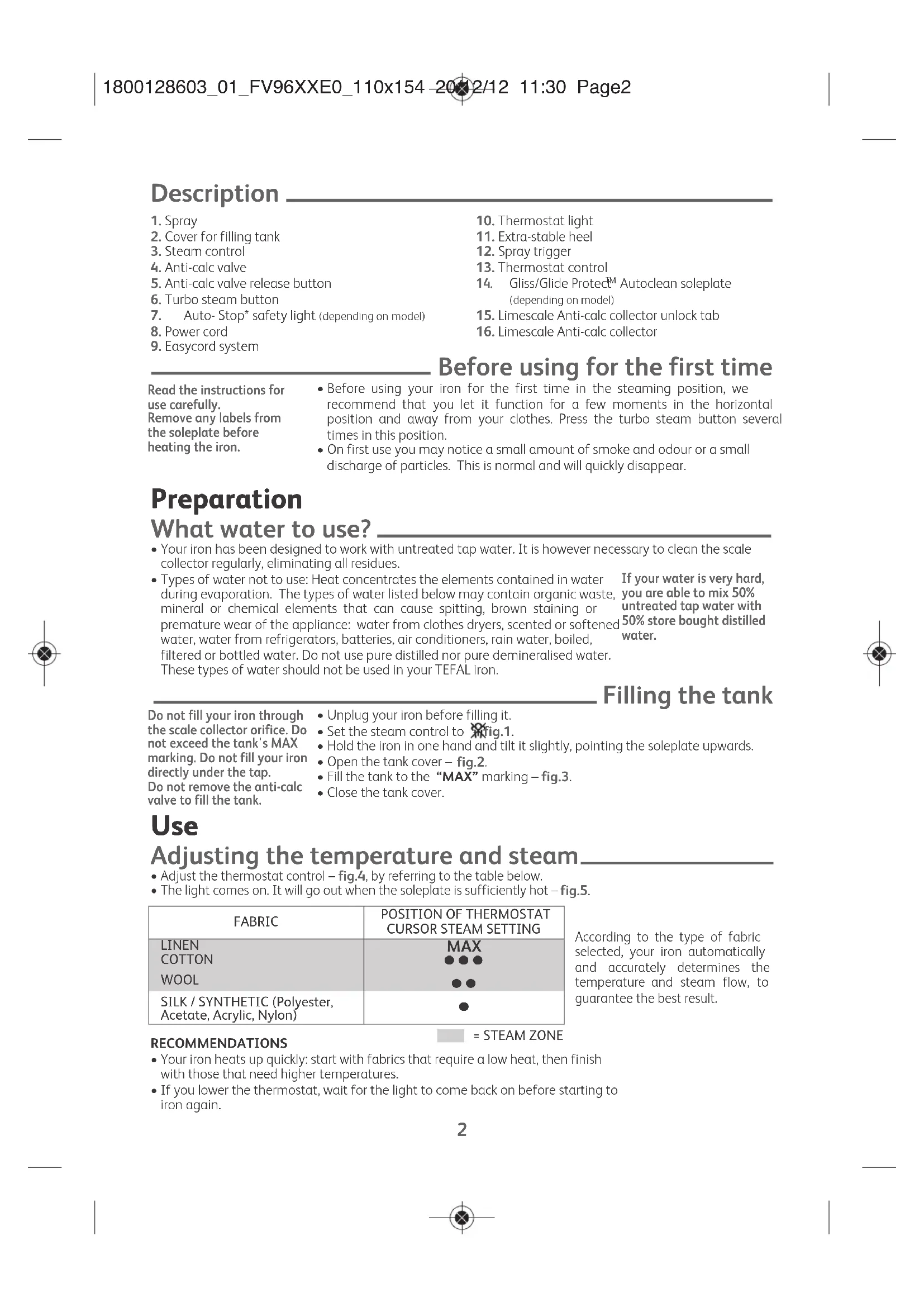
- Spray
- Cover for filling tank
- Steam control
- Anti-calc valve
- Anti-calc valve release button
- Turbo steam button
- Auto- Stop* safety light (depending on model)
- Power cord
- Easycord system
Read the instructions for use carefully. Remove any labels from the soleplate before heating the iron.
- Before using your iron for the first time in the steaming position, we recommend that you let it function for a few moments in the horizontal position and away from your clothes. Press the turbo steam button several times in this position.
- On first use you may notice a small amount of smoke and odour or a small discharge of particles. This is normal and will quickly disappear.
Before using for the first time
Preparation
What water to use?
- Your iron has been designed to work with untreated tap water. It is however necessary to clean the scale collector regularly, eliminating all residues.
- Types of water not to use: Heat concentrates the elements contained in water during evaporation. The types of water listed below may contain organic waste, mineral or chemical elements that can cause spitting, brown staining or premature wear of the appliance: water from clothes dryers, scented or softened water, water from refrigerators, batteries, air conditioners, rain water, boiled, filtered or bottled water. Do not use pure distilled nor pure demineralised water. If your water is very hard, you are able to mix 50% untreated tap water with 50% store bought distilled water.
These types of water should not be used in your TEFAL iron.
Do not fill your iron through the scale collector orifice. Do not exceed the tank's MAX marking. Do not fill your iron directly under the tap. Do not remove the anti-calc valve to fill the tank.
- Unplug your iron before filling it.
- Set the steam control to fig.1.
- Hold the iron in one hand and tilt it slightly, pointing the soleplate upwards.
- Open the tank cover - fig.2.
- Fill the tank to the "MAX" marking - fig.3.
- Close the tank cover.
Filling the tank
Use
Adjusting the temperature and steam
- Adjust the thermostat control - fig.4, by referring to the table below.
The light comes on. It will go out when the soleplate is sufficiently hot - fig.5.
| FABRIC | POSITION OF THERMOSTAT CURSOR STEAM SETTING |
| LINEN | MAX |
| COTTON | ● ● ● |
| WOOL | ● ● |
| SILK / SYNTHETIC (Polyester, Acetate, Acrylic, Nylon) | ● |
According to the type of fabric selected, your iron automatically and accurately determines the temperature and steam flow, to guarantee the best result.
RECOMMENDATIONS
- Your iron heats up quickly: start with fabrics that require a low heat, then finish with those that need higher temperatures.
- If you lower the thermostat, wait for the light to come back on before starting to iron again.
EN
- If you are ironing a fabric comprising a mixture of fibres: adjust the temperature to the most delicate fibre.
- If you put your thermostat in the "MIN" position, the iron does not become hot.
Using the water spray trigger (spray)
Check that there is water in the tank before using the spray trigger.
- When ironing with the steam or dry function, press the spray trigger several times in succession to remove stubborn wrinkles – fig.6.
Obtaining more steam.
- Set the thermostat control to "MAX" or "●●●".
- Press the turbo steam button from time to time -fig.7.
- To avoid water dripping onto your clothes, wait a few seconds before pressing again.
Smoothing garments vertically
Hold the iron a few centimetres from the fabric so as not to burn delicate fabrics.
- Hang the garment on a hanger and hold the fabric using one hand. The steam is very hot so you should always do this with the garment on a hanger - never while someone is wearing it.
- Set the thermostat control to "MAX" - fig.8.
- Pulse the turbo steam button - fig.7 and move from top to bottom - fig.9.
Dry Iron function
- Adjust the temperature to the fabric being ironed.
- Set the steam control to fig.1.
- You can iron when the light goes out.
Additional functions
Gliss/Glide Protect™ autoclean soleplate (depending on model)
- Your iron is equipped with a catalytic self-cleaning soleplate.
- Its exclusive coating permanently eliminates impurities generated during normal use.
- It is recommended that you always rest your iron on its support base to preserve its self-cleaning coating.
Auto-stop safety function (depending on model)
In normal use, the autopost light is on!
- The electronic system cuts the power and the auto-stop light flashes if the iron is placed on its support base for more than 8 minutes or left flat for more than 30 seconds - fig.10.
- To restart the iron, simply shake it gently until the light stops flashing.
Anti-drip function
- The automatic steam selection function is based on the fabric being ironed, which is integrated into your iron, reduces the steam flow at low temperatures and prevents the iron from dripping onto your clothes.
Cleaning and maintenance
Descale your steam iron easily
Do not put any descending products (vinegar, industrial descending agents...) to rinse out your iron: they could damage it.
- To prolong the steam performance, your iron is equipped with an integrated limescale collector. This collector, which is located on the iron's support base, automatically collects limescale that forms inside the iron.
- It is recommended that you clean the collector every 4 months. The amount of scale collected will depend on the hardness of the water.
BE CAREFUL: this operation should only be carried out when the iron has been unplugged for more than one hour and has cooled down completely. To carry out this operation, the steam iron must be close to a sink so that water can flow from the tank when opened. - Hold the iron in one hand and tilt it slightly, pointing the soleplate upwards.
To descale the iron:
- Once the steam iron has completely cooled down, raise and turn the tab to unlock it - fig.11-12.
- Remove the collector from the iron, it contains the limescale collected in the iron - fig.13.
To clean the collector thoroughly rinse in water to remove the limescale inside - fig.14. - Reposition the collector in its housing and turn the tab a quarter turn to the right in order to lock the collector and ensure it is watertight - fig.14 and 15.
In addition to this regular maintenance, it is recommended that the self-clean function is performed once a year.
- If you live in a very hard water area, perform the self-cleaning operation on a more regular basis.
- Put the steam button on DRY - fig.1.
- Place the iron on its base with a full tank and set the thermostat to the "MAX" position - fig.8.
- When the light goes out, disconnect the iron and place it over a sink.
- Remove the anti-calc valve.
- Shake the iron lightly and horizontally above a sink until part of the water (with the impurities) flows from behind the appliance - fig.21.
- Once you have finished this operation, replace the anti-calc valve, inserting it until you hear a click - fig.20.
- Plug in your iron and let it stand on its base for 2 minutes in order to clean the soleplate.
- Unplug your iron and when the soleplate is lukewarm, dry it with a soft cloth.
- When you next use your iron, switch it on in the horizontal position, holding it away from you, to remove any water and limescale residue left in the baseplate.
WARNING!
The iron does not work without the limescale collector.
Clean the anti-calc valve (every 4 months)
Warning!
- Never touch the end of the valve - fig.18.
-
The iron does not work without the anti-calc valve.
-
Unplug your iron and empty the tank.
- Set the steam level to dry.
To remove the anti-calc valve, press the self-clean extraction button fig.16 and pull the valve upwards -fig.17. - Let the valve soak for 4 hours in a glass of commercially available white vinegar or natural lemon juice - fig.19.
- Rinse the valve under tap water.
- Reposition the anti-calc valve; push it until it clicks - fig.20.
Cleaning the soleplate
Your steam iron is equipped with a self-cleaning soleplate (depending on model):
- Its exclusive active coating continuously eliminates all impurities that can be generated under normal conditions of use.
- Ironing using the incorrect temperature could however leave traces that require manual cleaning. In this case, it is recommended that you use a soft damp cloth on the still warm soleplate so as not to damage clothing.
Your steam iron is equipped with the Ultragliss soleplate (depending on model):
- Clean with a damp non-metallic sponge or damp soft cloth while the soleplate is still warm.
Warning! Using any abrasive sponge damages the self-cleaning coating (according to model) of your soleplate - fig.22.
Do not use corrosive or abrasive products.
Storing your iron
- Unplug it and wait for the soleplate to cool down - fig.23.
- Empty the tank and set the steam control to . Little water may remain in the tank.
- Wind the cord around the heel of the iron. Position the iron on its support base - fig.24.
EN
A problem with your iron?
| PROBLEM POSSIBLE CAUSES SOLUTIONS | |
| Water flows through the holes of the soleplate. | You are using the steam function when the iron is not hot enough. |
| You are using the Turbo steam button too often. | |
| You have stored the iron flat, without emptying it and without setting the control to See the section «Storing your iron». | |
| The anti-calc valve is not properly positioned. Correctly position the anti-calc valve: push it until it clicks. | |
| You have put water in the anti-calc collector housing. Never put water in the anti-calc collector housing. | |
| Brown drips are coming out of the soleplate and staining your clothes. | You are using chemical descaling products. Do not put any descaling product into the water tank. |
| You are not using the correct water. Perform a self-clean and consult the «What water to use?» section. | |
| Your clothing has not been rinsed sufficiently or you are ironing a new garment before washing it. Make sure that your laundry is rinsed sufficiently so as to remove any deposits of soap or chemical products on new clothes. | |
| Fibres have built up in the holes on the soleplate and are burning. Perform a self-clean. Clean the soleplate with a non-metallic sponge. Vacuum the soleplate occasionally. | |
| The soleplate is dirty or brown and may stain clothes. | The temperature is too high. Clean the soleplate as advised above. Refer to the temperature chart to adjust the thermostat. |
| You are using starch or you are using starch. Clean the soleplate as advised above. Spray the starch on the opposite side to that being ironed. | |
| Your iron produces little or no steam. | The tank is empty. Fill it. |
| The anti-calc valve has collected too much scale. Clean the anti-calc valve. | |
| Your iron has limescale. Clean the anti-calc valve and perform a self-clean. | |
| Your iron has been used with the dry function for too long. Perform a self-clean. | |
| The soleplate is scratched or damaged. | You have positioned your iron flat on a metallic iron support. Always rest the iron on its support base. Refer to the section «Cleaning the soleplate». |
| You have cleaned your soleplate with an abrasive or metallic sponge. | |
| Your soleplate emits particles. | Limescale is starting to build up on your soleplate. |
| Water is flowing from the tank cover. | You have not closed the cover properly. Check that the tank cover is properly closed. |
| The iron releases steam or water on filling the tank. | The steam control button is not set to Check that the steam control button is set to |
| The spray does not release water. | The tank is not full enough. Add water to the tank. |
| The water flows from the back of the iron. | The collector is not properly positioned in its housing. Reposition the collector in its housing. |
If you have any problems or queries please contact our Customer Service helpline as listed below.

Environment protection first!
① Your appliance contains valuable materials which can be recovered or recycled.
Leave it at a local civic waste collection point.
Beschreibung
Rengøring af anti-kalk stangen (hver 4. maned)
PereylnpaTe TemnepaTypaTn npaTa
- PerynpaTe ByToHa 3a ynpabHeHne Ha TepMoCTaT - fig.4, KATO HnPaBnTE CnpabKa C TabnUcTa NO-dony.
CunHanHata naMnUka CBetBa. Ta ue 3arache, koroTo nIOuata e eoCTaBHyO harpTa -fig.5.
BHHMaHHe!YnOTpe6aTaHa a6pa3uBcH TaMNoH NOBpeKda
-ИЗКИОЧТЕНΗОУ АKTINВО NOKРПЕЙ NOЗБOLЯBA ДА OTСТРАВBA NOCTОHNO BCNUK3aMbpcBaHЯ, KONTO 6nxA MoIи Да ce HaTpyNAT ExeJedHeBHO B HOPMaHIn yCNoBЯ HA yNtpe6a.
cAMONOuHCTBaUTo OOKPNTNE (B 3aBNCUMOCT OT MOJena) Ha NIOUaTa Bn -fig.22.
- Iaene C HnOxOJaI npOrpama MoKe BCE NaK Da OCTaBn CneiN, KOnTO CE HyKaT OT pUH NouCTBaHe. B To3n CnyAa, Ce npenOpbYBa Da ce N3No3Ba MeKa IN BnaXHa KbPNa BbPxy BCE Oe XnAdHa NIOua, 3a Da He NOBpeInTe NOKpTNTo.
Napnata Bn IOTn e cHa6dena C nNoya Ultragliss (B 3aBNCMOCT OT MOeNa):
-OKaTO nnoyatae BCE Oue XnaJaKa,ra NOUcHTeTe C HEmTaIe H BnaKeH TaMnOH.
Hukora He n3noJ3BaJTe arpecuBn nn a6paunBn npenapatn.
CbXpaHHeHaIOTnraTa
-ⅢклioчeteЯиИЗакайт,ДOKаТоПLOЧАТИЗCTINHe -fig.23.
-Изпра themselves pe3epboapa и поставete 6byToHa 3a уnpabneHne Ha napaTa B no3nue. nAnko BOda moKe da octaHe B pe3epboapa.
- Habinyte shhpya okono 3aHaTa Bnka Ha IOTnra. NocTabete IOTnra BeptnKaHbBpxy neta - fig.24.
Иmate побLEM CBaшаТюТя?
| ПОНБЛЕМ ВьЗМоЖн | ПОНЧИНИ ПЕШЕНИ | |
| Вовата Истua OT ot bovopite Ha поча. | Истесе пара, дожato яotna вce оше He e doctaыно Тогл. | Истесе, дожato син haillata Лamпчka Истес. |
| Wistnbate ppekanenho checfo bytoha 3a DoobnHITENHa npapa | Истесе Няколko sekydn Mekdy BCSKa ynotpeba. | |
| Пocstabii Stce xoxuZoHTaIIHO BaIIATA IOTN, be3 da IizTOUte Hbe da loCTabITE ByToHa 3a UnpaBHeHne Ha napata B no3nucia | Haprabete cnpabka c rIbaba «CbXpaHene Ha IOTNtA. | |
| АntibapOBuNKOBmHФJITbR He e nOCTaBEn Do6pe Ha macto Cn. | Пocstasete OTHOB IObpe aHTIBAPOBuKOBmHФJITbR; HATINCHTe FO, DOkato Cyte UprakBaHc. | |
| Порадиа e BODA B rHesdoto Ha pezebroapara 3a Cb6PbHae Ha KOTNeHn KaMbK. | Hikora He dOyusckai Te da nOlaHne BODA B rHesdoto Ha pezebroapara 3a Cb6PbHae Ha KOTNeHn KaMbK. | |
| От поча Истua kaфзii ZaSTOBc IIцалотдрха. | Истесе ХIMUNHIO ONUCTBAUmpenapatni npotiv KBOTNEH KaMbK. | He do6abayite Hinkabbs npenapat npotiv IKonlen KaMbK b8b BODa T B pezeboapara. |
| HsnoJIbATE npabINHn BnD BoDA. | Haprabete camonoucTBaHne Hnaprabete cnpabka c mlaba «KakBa BODa DA INOON3Sate?'. | |
| Hinuki OTdpexa ca ce cb6pAln B otbOPrte Ha ploUaTn Ca Ce Obbln. | Haprabete camonoucTBaHne. POnCTe TIOUATA C hemetanHa b6a. ПОЛВaIte OT bpeme Ha bpeme OTbOPrte Ha IIOUATA. | |
| Поча e zambyceHa nii KaPhBa IMOke Da nizcaIa Iprexite. | Истесе пекално Bvscoka Temnepatypa. | ПочETe IIOUATA, kakTo e NocOeyHo No-rope. Haprabete cnpabka c tabuLlata c tempepatypitHe, 3a da peryIiprate TepmoCTa. |
| Дрсха BA He cdo6pe IzHnAkHATA nII pyk IzhONbATE KOla. | ПочETe IIOUATA, kakTo e NocOeyHo No-rope. Pa3npbchete KOnata Bbpxy NOpBXHOCCTA 3a IIOUHe. | |
| Ваша IOTY IpoBn MaNKo Ily NiKakBa Naopa. | Pe3epBoApbTe epazeh. HnblHete ro. | |
| ANTIBAOBOKOBHITФIITbpE azmbpcen.ПOnCTe A | Haprabete CamonoucTBaHne | |
| Bauata IOTY e nblna C kOTLeh KaMbK. | ПочETe aHTIBAOBOKOBHФJITbR Haprabete camonoucTBaHne. | |
| Bauata IOTY e nIbnBaHn ppeKaneH Dblro Bpeme Ha cyxo. | Haprabete camonoucTBaHne. | |
| Поча e naidopackaHa nii NobpeDeHa. | Iocstabii STce xopuZoHTaIIHO Bauata IOTN Bbpyx MetalHn NocTBa. | BHHaNoCTABaHte Bauata IOTN BePrtKanHOb |
| Iocstcbii STce IIOUATA c abpaZInBeH nII MetalHn TamnoH. | Haprabete cnpabka c rIbaba «POnCTBaHc Ha IIOUATA. | |
| Поча ВИИЗБРЯЧТУ. | ПочATA Bn 3aIOUBA Da HatpyNBa KOTLEH KaMbK. | Haprabete ngocTBaHc To nOndpBXKAta, npenopbuaHn B hapbnuHn Ka 3a unotpeba. |
| Вodata Истua OT ot bVorpa Ha pOc3pBOapa. | He cte 3aTbopnI IObpe OTbOra Ha pezebroapara. | Почерету дду OTbOрьт ha pezeвcoapara e do6pe 3aTbOprch. |
| IOTNHa IOTyCKa napa B kparnHa IIbHcHToHa pOc3pBOapa. | IbIb3aHbI 3a uPpavienhe Ha napata He ce HAMIPA Ha NOIINIA | Почерету дду bTyOHbI 3a uPpavienhe Ha napata c noctaben Ha no3nIpyr |
| ПуьевstatorbI He nIpbcka Boda. | Pe3epBoApbTe He e doctaTbHNo PbIeN. Iodabete BoDA | Bpezepboapa. |
| Вodata Истua OT zadnata NaCT Ha IOTMIta. | Pe3epBoApbTe 3a Cb6pAne Ha KOTLH KAMbK He e IocTbChn pabINH B rHc3dTo Cn. | Почeste obparho pezeperboapara 3a c6bipana He KAOTCH KAMbK B rHc3dTo My. |
PnB CBAKbB Dpyr npo6nem ce o6bpHeTe KbM OToOpu3npaH ueHTbp 3a 06cnykBaHe, 3a da npOBepnte BaWataIOTNA.
Urunun Tanitimi
- Sprey
- Hazne doldurma agzi
- Buhar kumandasi
- Kireç onleyici cubuk
- Kirec onleyici cubuk ickatma dugmesi
- Ekstra buhar duğmesi
- Auto-Stop* emniyet gõstergesi (modeline gore)
- Elektrik kordonu
- Easycord sistemi
10.Termostat
11. Ekstra dengeye sahip taban
12. Sprey tetigi
13.Termostat kumandasi
14. Gliss/Glide Protect™ Autoclean* taban (modeline gore)
15. Toplayicin kilit acma dili
16. Kirec toplayici
ilk kullanim öncesi
- Akuo Bn BCTaHOBtepMOcTaHa No3HauKy "MIH", npacka He HarpiaTMeTbca.
3BOJIOXeHHaHHH (po3npuckyBa)
IpekoHaiTecA,IOBpe3epByapI
E BOa, nepi Hix HATnCKaTN Ha
KHOKNy PO3npNCkyBaHH.
KoN Bu 6bnpaTe BiDnapIOBaHH a60 cyne npacyBaHH, HATNCHt b KINbKa pa3iB Ha KHONky po3npncyBaHH, 106 3BOLOXHTN OJr Ta po3rnaDTN CnIbHI CKNaIKn fig.6.
Oo6 oTpImatn 6ilbwe napn.
- Hanaatnyte perynatop tempepatyn ha no3haKy "MAX" a6o "●●●".
- Yac BiD yacy HaTnckaIte Ha KhoNkY Typ60napa - fig.7
-Ⅲo6 yHnKHyTn pO3xJyBaHH BODn Ha 6iIN3Hy, DOpymyIeCb iHTepBaJIy B KInbKa CeKyHd MIX DbOMa HATNCKAHAM NKHONK.
TpmaTe npacky Ha BiDctahi KInbKOx caHTmEtpiB BId TkaHHn, 06 He cnaNTn DeikatHi BOLOKHa.
IpaCyIte B BepTnKaJIbHOMy NIOJoxeHHI
I NobicbTe OaH HbiwAnky Ta po3TnHtTkAHHy pykoO.OckJIbKn npa Dyke rapya, HiKoH He po3rJaXyIe OaH Ha IIOx, Nlwe Ha BiwAni.
- HanauTyIe peryIaTOp tempeIaTpIHa nO3HaUky "MAX" - fig.8.
-IMnybcamHaTnckaIe KaHONKy Typ6onapa -fig.7i BiDnapioIte 3Bepxy do HN3y -fig.9.
Cyxe npacyBaHHa
ObepiTb TemnepaTpy BiinobiHNo TINy TkAHHH.
- HanaTuYte napoperyIaTOp Ha fig.1.
Moxete nouHaTn nicra TOrO, Jk CbitIOBni iHnKaTOp norache.
ДоаTKOBi Функцii
Пида Ва Gliss/Glide Protect™ autoclean (залекно вд мodyпи) _
Bawa npacka o6naHnHa aBTOOCHIO niOuBOIO, i OunueHH BID6yBaCTbca 3aBdAn KaTaNi3atopy.
- YhiKaIbHe NOKpTTT NiOoBn Do3BONHe 6e3nepepbHO BuaIaIaTI 3a6pydHHeHH, kI BHHkaIbT npN
HOPMaIbHOMy BnKOpNCTaHHI npACKn.
-ⅡIJI36epekeHHaBTOOCHORIO NOKpTTTpeKOMeHIOBaHO 3aBKn BCTaHOBIOBaTN IpaCKy y BepTKaJIbHe NOIOKeHHa.
3an06ixHe ABTO-BUMNKaHHa (3aJIeXHO BID MoIeI)
B HopMaJIbHOMy pexnmi iHnkaTOp aBTOMaTHUHO RBMKaua He Cbitntbcra!
- EneKtpoHncaCtema BmMkac KINBHeHH, i CBITNOB mIHnKaTOp 63neKn aBTO-BmMKHeHH MInrOITb, kIIO nepeBa y BnKOpNCaHHI npackn, BCTaHOBeHOY bEptNKaJIbHOMy nIOJKeHHI, cTAHOBnTB 8XBNH, a60 30 cekyHa pIBHIO NOBepxHi - fig.10.
- II6 npacka 3HOBy noHana IpaIOBaTN, IOCTaTHbEO Heo IereHko NoxHTaN, IO6 CBITNOB mIHnKaTOp Norac.
Функця aHTN-Кpanля
- PnHcHn ABToMaTHO Bn6bpy IHTeHCNBHOCTi BiIaNpIbAHnB 3aJIeKHOCTi BiO sbpaHOI TKaHHN D03BOJc 3MeHUNTN BIXIN napn npn HnBkX TempePaTypaX iYHKnHyTn BUnHeHH KpaIeNb BOIN Ha OJr.
OuHcHnHa i DOrJa
Ierko ouuptyte cboIO napoby npacky
He BnKOpncTObyIte 3ac06n
dIyBnDaeHnHaKnNy
(ouet, npomncIobi 3ac06n
dIy BnDaeHnHaKnNy...)
dIy npomnbAHnBaWoI
npackn:BOHMOkyTb I
3aWKoNDtN.
-Длгпрдбхенгпорiodу yTBopehня napn,у BaWy npacky 6yno BMOHTOBaHO KOJIeKTop HaKNpy.Lei KONEKTOp 3haxOHTbcraB 3aHniчactnHi BaWoI npackn,i BIn abTOMaTHNO Ha3bnpye HAKIN,akN yTBopIOETbcra BCEpeHNi npackn.
- PekomeHdyetybca OunuYBaTn KOleKTop KoxHi 4 Micu. KInbKic3i6paHoro HAKNY 3aIexKaTmE BID JOKCTKOCTBODN.
YBara!IIO onepauio He cnid npoBOnTn, kku npacka He 6yna BiKkIoueHa BID enekTpponocTaayHn BnpOobx 6iNbwe roHNi i ne NobHicTHe oxonona. Lio6 BIKOHATN IO ONepauio, Heo6xIdHO NOCTaBnTn npacky 6In yMnBaIbHnKa, OcklbKn NiCnBikpTTpe3epByapy, 3 HbOro MoKe BNTiKaTn BODa.
Bibmit npacky by pyky 3nerka haxniltb i ndoowboio Doropn.
UK
PpHmnpo60n:
- Pnicra Toro, AKn npacka nobHicTIO oxonoHe, nDnHimtTa noBepHitb pyuKy, uOb BdkpnTu OTbip -fig.11-12.
BHTaHITb KOLEKTop 3 npackn, aJxhe BIn MICTNb HAKIN, IIO yTbOpNBc BcepeNHi npackn - fig.13.
-Дя NOBHorO OUYIeHHKoJIeKTOpa,doCTaTHbO IORO npOMnTn BOIOU,io6 yCyHyTN 3 HbOrO HaKN -fig.14. - Nomicitb KonekTop Ha3aB O TBiP i NobepHtB pyKu Ha YBeptb oBeptBa BnPaBO dIra TOrO, 0o6 3a6NOKyBaTINoro Ta nepekoHaTeCb, 0o BiH HepyXOMNI -fig.14 i 15.
Kpim zuoro perynapHoro TexHHoro 06cnyroBaHHa peKOMeHyETbCnpoBODNTCaMOOuueHHaHa pIK.
KaBaa B0aMiCTNTb 3aHaTTO 6aRATO BAnHky, BnKoHyTe npOeDpy abTOOuHueHHy qactiie.
BctaHObitpeyIaTOpnapHaCyXH-fig.1.
- Noctabte npacky Ha n'aty, noBHn 6aK i BCTaHObitb TepMOCTaHa "MAX" - fig.8.
- Konn cblno 3rache, BIMKHTb npacky i NOMICTb II HaY mNBaHNKOM.
3HIMITb npOTnHaKNHH CTPNKHeB.
- CtpychITb npacky M'ko i ropn3oHTaIbHo Hau yMnBaIbHnKOM, nOKn He BnIe DeKa KInbKiCTb BoDn (3 6pydO) uepe3 NiOswBy - fig.21.
B kiHci onepaui, noBepHtB npOTnHaKnHm CtpnKeHb Ha Micue, HATNCHTb Ha HbOro DO KnaaHH - fig.20.
BkIIOUITb npacky Ha 2 XBNHNN, B noLoXeHHa n'ATi, UoB BnCyuHTn NiOuBY.
BIMKHiTb npacky, i koni niOwBa cTaHe TenIO, npotpiTi M'AKOIO TkaHNOIO.
- Pn HAcTyHOMy BIKOPNCaHHI, BBIMKHiTcBcOIO npacky B rOpN3oHTaIbHOMy NOnOKeHHI NOaJI BiD 6iIN3HN, 06 OuNCTtNi nioowBy BiD 3aNNikB BOJ Ta HKnny.
ybaral!
IpaKa He npauc6e3
Konektopa Hakiny.
OuHyTe aHTnHaKnHnCTepXeHb (KoXHi 4 Micra)
ybaral
-HikonHeTopkaTece KInuKa CtepXn - fig.18.
-Пpacka He npaio6e3 aHTnHaKnHOrO cTepkn.
BIDKIIIOHTb npacky BID eNEkTpOmepeXI Ta BNINrTe BODy 3 pe3epByapy.
Habeitb napobn kypcop Ha cyxe npacyBaHHa
-Ⅲo6 BNTaRHTn aHTNHaKINHn CTepXeHb, HaTNCiTb Ha KHONKy cMOOuHcEHH - fig.16 i NotarHtB CTepXeHb DorOpn -fig.17.
- IocTaBte CtpnKehb Ha 4 roHn B cKnHky 3 6iINM CNpPTOBm OuTOM a6o JIMMOHHM COKOM - fig.19.
Pomnnte CtpnxKeHb BOIOIO 3-niKpaHy.
BBeITb aHTINHAKUNHH CTpHXKeHb Ha MICe; BDaBNIOTe NORO NOKn He Nooyete KnaaHaHH - fig.20.
OuHHeHHn iDOWBn npackn
Lapoba npacka 6nadha aBTOOCHIO niOswBOIO (3aIeXHO BID Moeni):
- YHikalbHe aKTHBHe NOKPHTT niIOoWN Do3BOJNE 6e3nepePBHO BnAaTN yci DOMiIKN, Aki MOxTy b YTbOPIOBaTNCb 0OJeHHO npn HopMaJIbHNx yMOBax ekCNIyatauji.
JaIIOI npacyBaHHBnKOpNCToByeTbcHHeiNobiHa nporpama,Ha niOwBI MoKyTb 3aIIuWATncb CINi, kIOTpe6yIcTb YIuEHH BpyHy. B TaKnx BnPaJkax peKOMeHIOBaHO npOTnpaTN Ie Tenny NiOuBY M'AKoTO Ta BONOrO IO raHvIpKOIO, 06 He NOWKOJNTN NOKPITTT.
YBara!BukopunctHH
a6pa3nBHOIry6kn
npu3BOUHTb
NOWKOJKeHH
ABTOOCHORIO NOKPNTT
(3anexhoBIDMOdeni)
niöowbnu - fig.22.
Lapoba npacka 6nlaHaHa niouBoU Ultragliss (B3anexHocti BID moJI):
3ДиСнОTe YIeHЯ Ⅲe TENIOI NIOUBN 3a DonOMoHO BOJOrOI HEMeTaneBOI raHupKn.
3a60pOHReTbcR
BUNOPUCTOBYBaTu
arpecnBhi a60
a6pa3nBHI 3ac06n.
36ɪpaɪnɪŋɪpɑːn
Bijdknioitb npacky BiE nektpomepeki i noekei T okn niOoBa oxonohe - fig.23.
Bnnnte Body 3 pe3epByapu Hanaunte iHTehcunhictb napn H B pe3epbyapi moke 3aunntncb He3haHa KInbKiCTb BOIN.
- Hamotai Te uyp npackn Habkoio II 3aHb0i qactHH. NocTaBe npacky B BepTKkaIbHOMy NOIOXeHHi -fig.24.
Празблеми 3 Baшою пpackою?
| ПОНБЛЕМА можлів | ПОНБЛЕМА можлів | |
| Черешоть рідішівВитікісі в {@да. | Ви ВИКОПСТОВУЕТ ПAPСК, КOLIM BОHA ige HedoctaTHb HapPilacb. | Зачекайе, поki norgache indikatop. |
| Ви ВИКОПСТОВУЕТ KONKу TypбОнаразоцпacto. | Зачекайе кільka seskyн дрет кожнмHATNCKAHHM KHOPIK. | |
| Ви пocstавлій пapackу в poprizontalnye poloxeyн, He BIVKBIWII BODy 3 pezebpayapu Ta HeHalaHTYBABWII INTECHINBICTh BIDnapIOBANHnHa | ДИВ. роздд «36mpanHn pypackn" | |
| ANTINAKIHNCH STPOKYEH HENpavBILBOH BCTAHOBJIeO. | ВитгIHIT b AHTINAKIHNCH STPOKYEH:nomcTtB HaMiCe I ZdABNIOte Yoro NOKHeNo neNoyTe KnaaHnH. | |
| Ви hablін BODY 3 OTBIP DЯ KONEKTOPa HAKINy. | Hikonii He HAIVAIATE BODY B OTBIP DЯ KONEKTOPa HAKINy. | |
| На пidочь 3'явинькКорчимеві полock, a Na 6blizni - корчимеві плам. | Ви ВИКОПСТОВУЕТ XIMUHII ZACOBДЯ BVIDANENH NAKINy. | He dozabaiye ximiuhi zacobdi yvidanenHnHakinnydo BODi Bpezepbyapi. |
| Ви ВИКОПСТОВУЕТ HENpavBILHNI TINI BODiN. | П探测дд abTOOUIUENH I dN. рozdln «Jky bodypekOMeHdyeTB CAVIKOPSTOByaTn DIAPOBNT? | |
| Волokha TKAHINH NAKOINHINCSB B OTBOPax pIDouBvInI rOpytB. | П探测дд abTOOUIENH. ONUcTiB pIDouBHyHemetaneBGO rykoIO. Yac BiD hucy BIDCMOKTuYteBONOKH 3 OTBOPB INIOUH. | |
| Пidочь bspudn aaboKorчимеві пожkeЗбPydNHn 6blizni. | Ви ВИКОПСТОВУЕТ ZAHADTO BIVSOKY TempepaTyPru. | Очирпь пidowby 3a BIVSeONICAHMMI npabINAMM.ДИВ. tabIoNo TEMpeparTp, uOb npabINbNo obpatnHeobxIDHy tempepaTyPru. |
| Ваш b6lin3a Byuna noGarO npOLONOCKAHa,abo BIVKOPSTOVBETe KPOXMAJIb. | Очирпь пidowby 3a BIVSeONICAHMMI npabINAMM. P03npckyIte KPOXMAJIb 3 pOToIeKHOgo do npacSyBaHnB 6Oky Blizni. | |
| Ваша праcka ВИрбліma lo abo 3O8cIM He BIVO6LnE napу. | Pezeрыар nopoxkH, HANOBHIT MyoTO BODO. | |
| ANTINAKIHNH CTPOKYEH BZbpydNissc. ONUcTiB aHTIN | HakinHn CTPOKYEH. | |
| Y bAsi II pIacui yTbrcmbaHakin. | Очирпь antINaKINH NCTPOKeHb I探测dltbABTOOHIeHn. | |
| Ваша праcka 3aHADTO DOBRO BIVKOPISTOBYBuaLb Bpekmi cyxOg INpacsaHnR. | П探测dltb ABTOOIIeHn. | |
| Пidочь пidrayana haaboNtokdxeHa. | Ви NOCTABYN CBOU PpACKy B Trop3OTaNBHe poloxeyнHa metalaeBv NIDCTABKV. | Завд n CTaBte PpACKy B BervTKaJIbHe pOLOKeHn.ДИВ. рozdln «OIVSeONIHa NIDOKBn. |
| Ви оMuZyBANI PIdOwBy pIpaCKn abpOzIBHOnO aboMeTaneBOU rykoIO. | ||
| 3пдOWиппраocknВdINOJIOBCEчASTOOK. | Y BAsi II pIacui TOnHAnE NaKOpNHyBaTncb HAKIN. | П探测dltb OUVIeHnT a Te XeHnHe o6cNryOByaHnN,Описань b IncTpyKUII. |
| Черес кршку pezeрвуарВитkae в {@da. | Ви погано зaunHmNi KpUShKy pezebpayr. | Пeverконайтес, ilso кршka pezeрвуару ДобpeЗнeha. |
| Праcka ВИДИЕ пapyпяпяпяпяпяпяпяпяпяпяпяпяпяпяпяпяпяпяпяпяпяпяпяпяпяпяпяпяпяпяпяпяпяпяпяпяпяпяпяпяпяпяпяпяпяпяпяпяпяпяп�. | KypccpH HalauTgyBaHnI INTeHcIMBHoCTI BIVApOByBaHnHa 3HzOAnDbTc HApNo3NaUcLi | Пeverконайтес, ilso InteHcIMBHiCtB BIVapOByaHnHa HalaTObaHa HaNo3NaHcy |
| Рoznilovbay He pOznilov Bode. | Pezeрыар He doctaTHb OZaOBoHn. DoIyite BoDn Epezepbyap. | |
| Вoda BvItkae 3 zadNboJChantnIпраckn. | KolekTpor HENpavBILNo BCTaHOBIneH, BCTaHOBiB KolEkpTOp y BVDIJIeHn DIAKOLEKToP. |
Y BUNaIky BUNHKHeHHH IINHX npo6nEM, 3BepTaItecB aBTOpU3OBaHn cepBicHn ceHTp dna nepeBipKn BaWoi npackn.

He 3a6pydHIOIte OTOuyOue cepeobnuei
① BaW npuJaM icTntb MaTepiAn, rki MoXHa nepepoBHTn i BvKOpncTaTn ue pa3.
BiddaTe Ioro B nyHK 360py BTOpCnPOBuHN.
Onncahne
1.PacnpbcknbaTeNb
2.Kpbuika 3anolneHnpeepByapa
3. Perylntop napa
4. IpOTUBON3BECTKOBbI CTepXeHb
5.KHONKa n3BneHn npOTMBOn3BeCTKOBORO CTepeXHr
6. KhoNka npoBoro yapa
7.CBeTOBOHINDKaTOP aBTOOTKIOUOeHnR* (B3aBNCIMOCNTOTMOeN)
8.巾HypnTahn
9.CncremaEasycord
10.ИндikaTop HarpeBaHn
11.3KCTpaWnPOkAIIyTkaYIgAINB60JIbWeYCTOHNBOCTN
12.KhONKa paCnpbICKnBaHnA
13. PerynTrop TemnepaTypbI
14.ПошВa Gliss/Glide Protect TM Autoclean* (B 3aBnCHMOCTN OT MOdENI)
15. PbyaXoK INBLeueHn KOnJIeKToPa
16. KonnekeTOp dJa c6opa Hakinn
Ipeed nepBbIM nCNoJb3OBaHHeM
BnmaTeNbNo npOuTne ·IpeKJe CEm NcOnb3OBaTb yTOr B napOBom pexmE, cobetyem Bam npOepKaTb ero nHCTpykUIO. Ecln Ha HeCKoJIbKO CeKyHd B rOpN3OTaNbHOM pexmE, Ho He HAd 6eJbEM. B TaKnx Xe noDowBe yTHora eCt b YCNOBnX, HAKMITE HeCKoJIbKO pa3 Ha KONky napOBoro yDapa.
3TNIKETK,CHIMMITE INX, Bo Bpema nepBbix NcNoJIb3OBAHn, n3 yTIOra MoKeT bIeJIaTBcA DbIM, cneUΦNueCKn npexJe Yem 3anax mEnKHe qACTuCb. 3To RAJIeHHe He IMeET HnKaKx IocIeCTBn I OueHb NCNOB3OBaTb yTIO. 6bICTPO NcYe3HT.