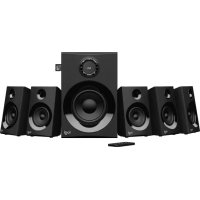
Z607 - Bluetooth speaker LOGITECH - Free user manual and instructions
Find the device manual for free Z607 LOGITECH in PDF.



| Product Type | 5.1 home theater system with subwoofer and 5 satellites |
| Brand | Logitech |
| Model | Z607 |
| Connectivity | Bluetooth, USB, SD, 3.5mm auxiliary input, RCA input (DVD), FM radio |
| Supported audio formats | MP3, WMA, WAV, APE, FLAC (USB/SD) |
| Total power | 40 W RMS |
| Frequency response | 40 Hz - 20 kHz |
| Power supply | Mains 220-240 V, 50/60 Hz |
| Subwoofer dimensions | Approximately 24 x 24 x 38 cm |
| Satellite dimensions | Approximately 10 x 10 x 18 cm each |
| Total weight | Approximately 5.5 kg |
| Main features | Bluetooth playback, USB/SD, FM radio, 5.1/2.1 modes, remote control, auto standby |
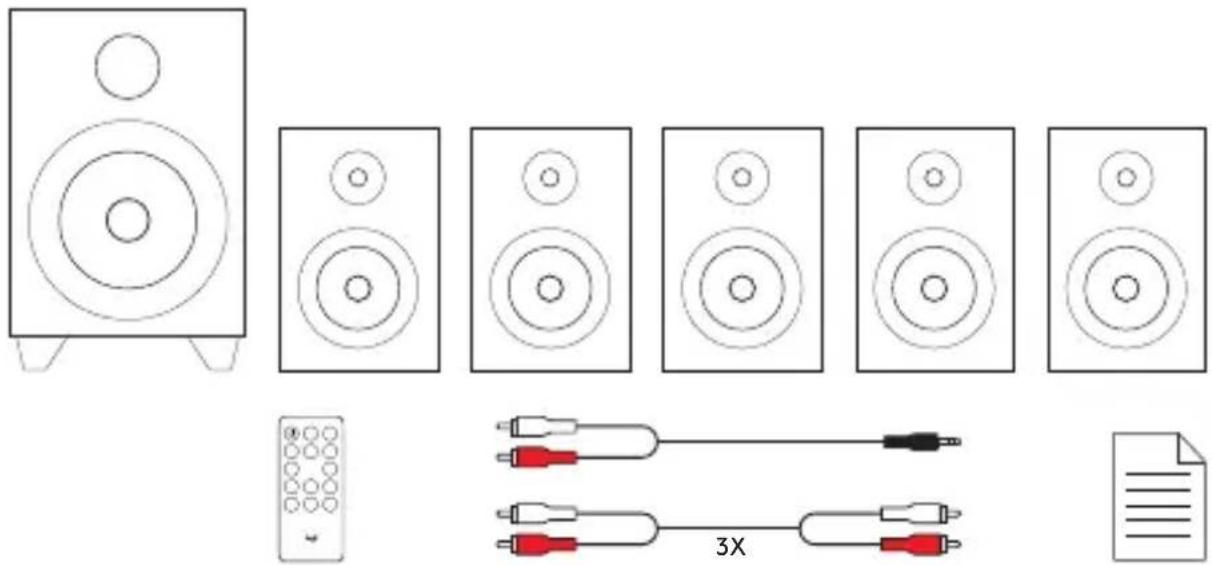
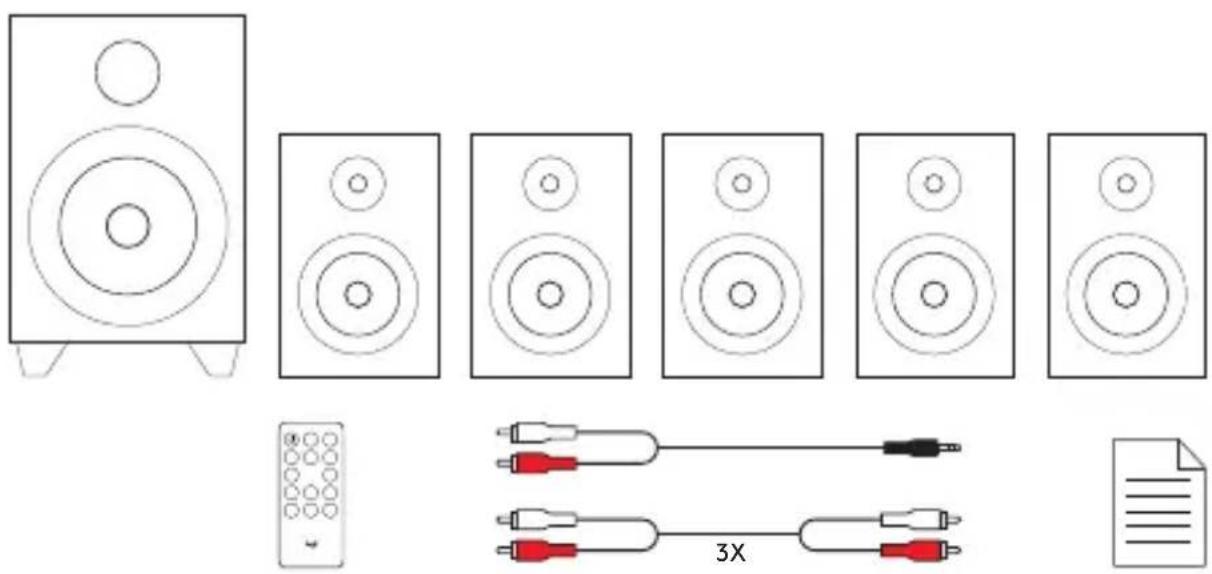
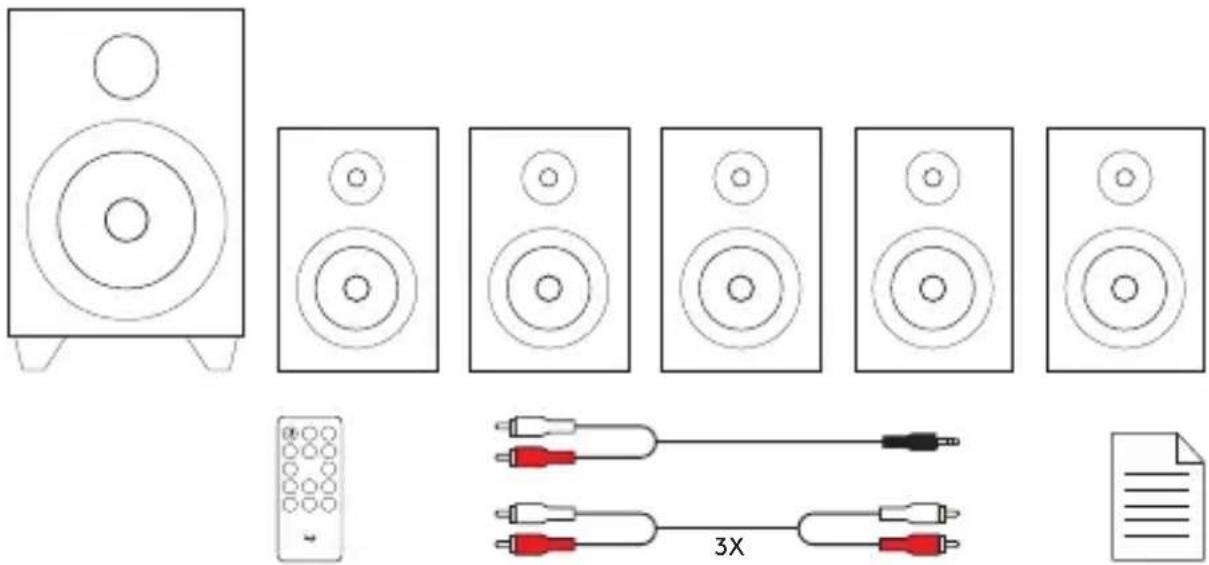
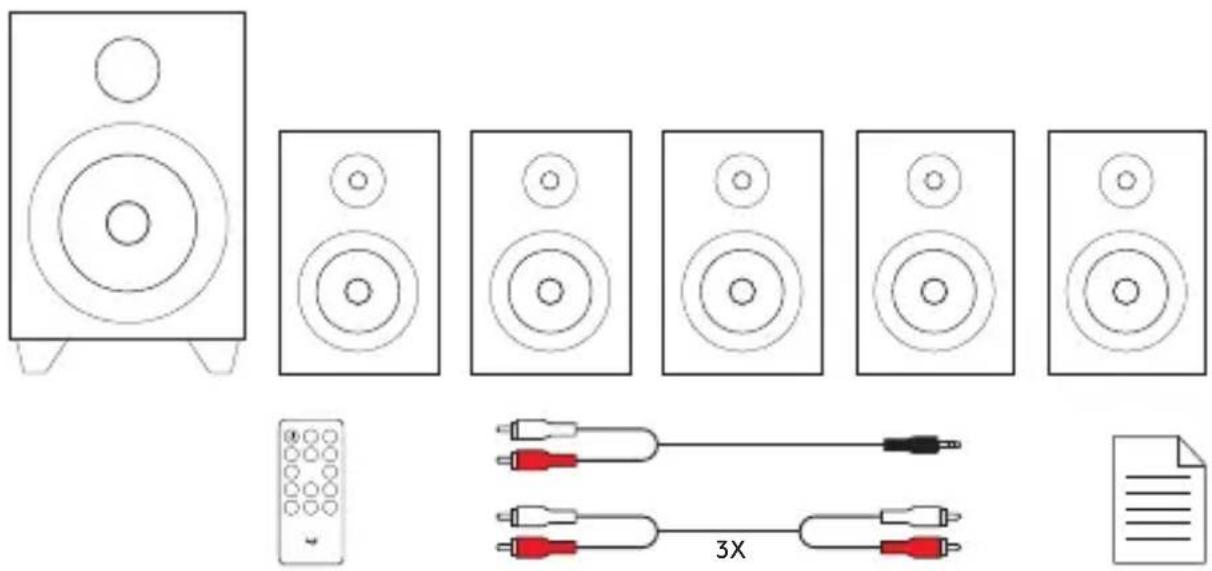
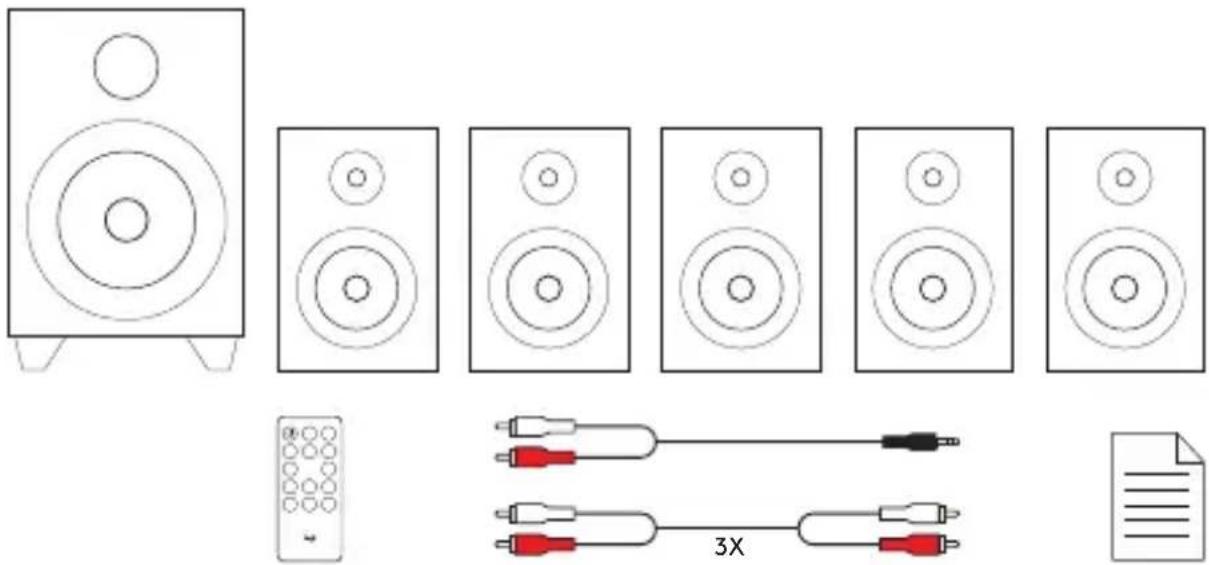
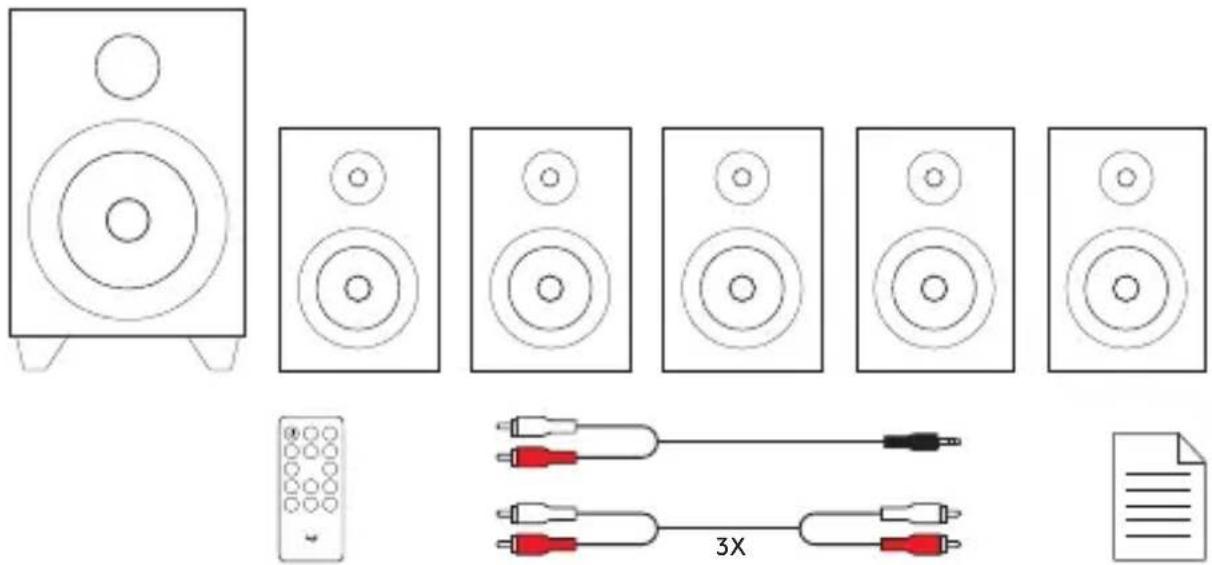
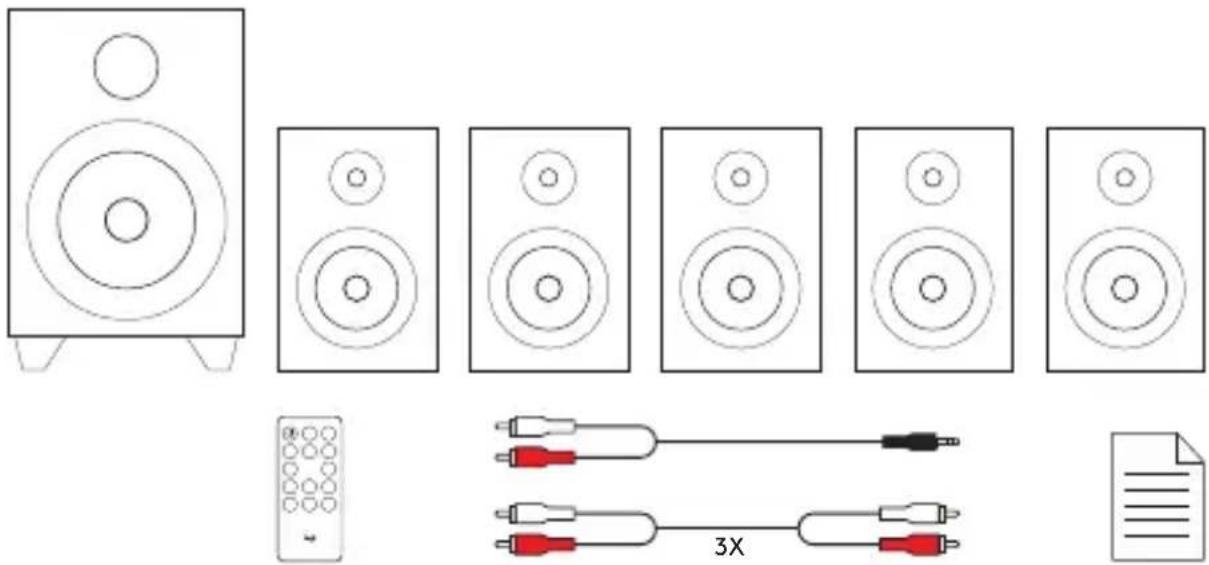
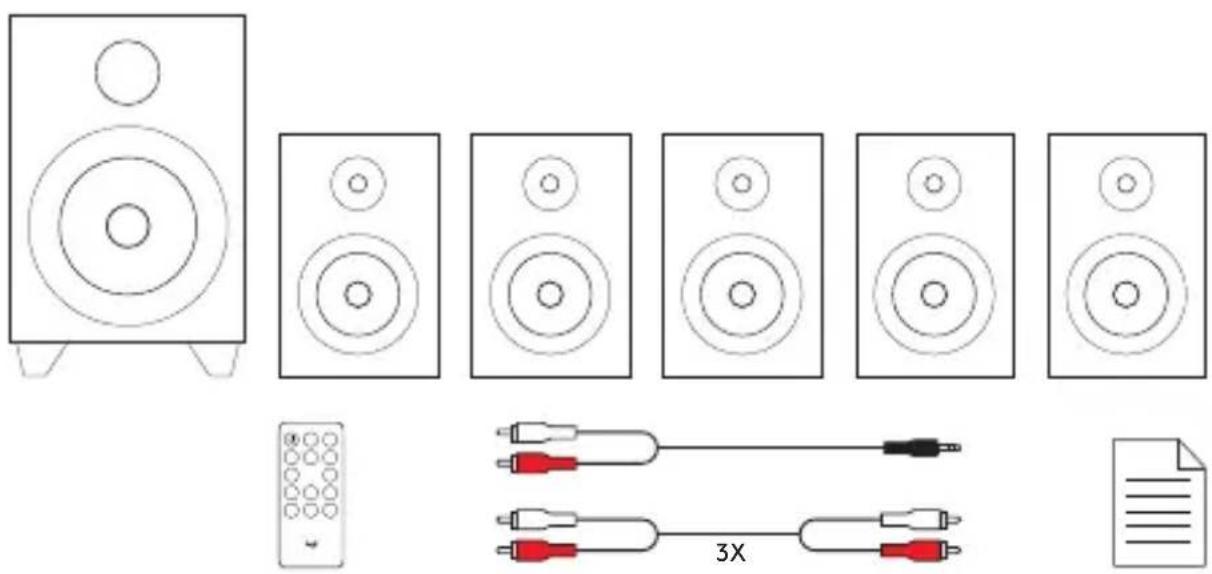
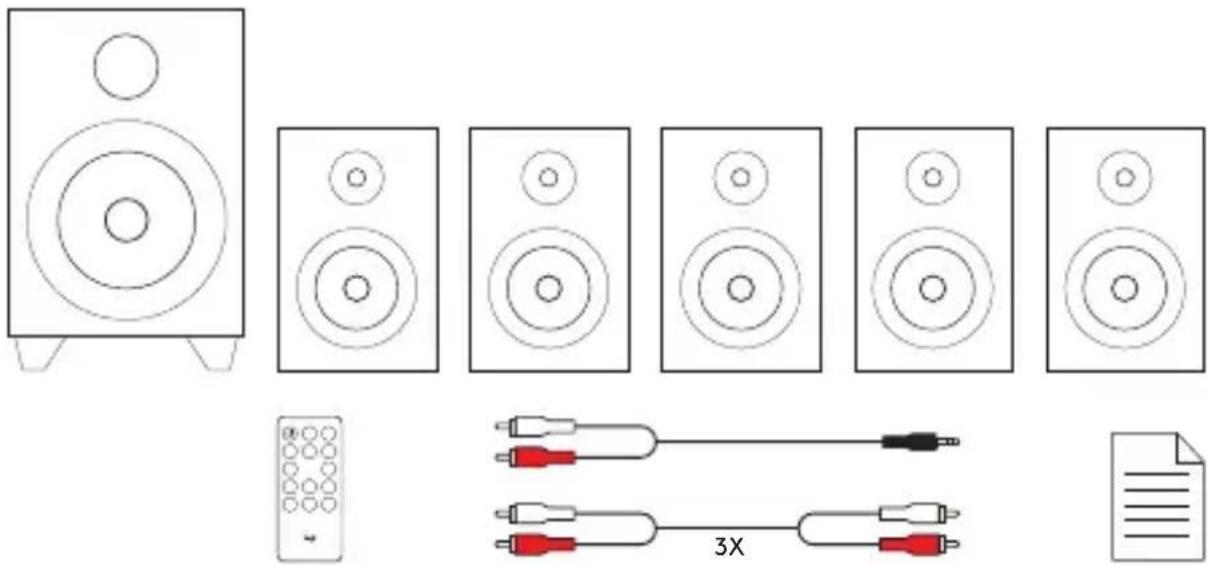
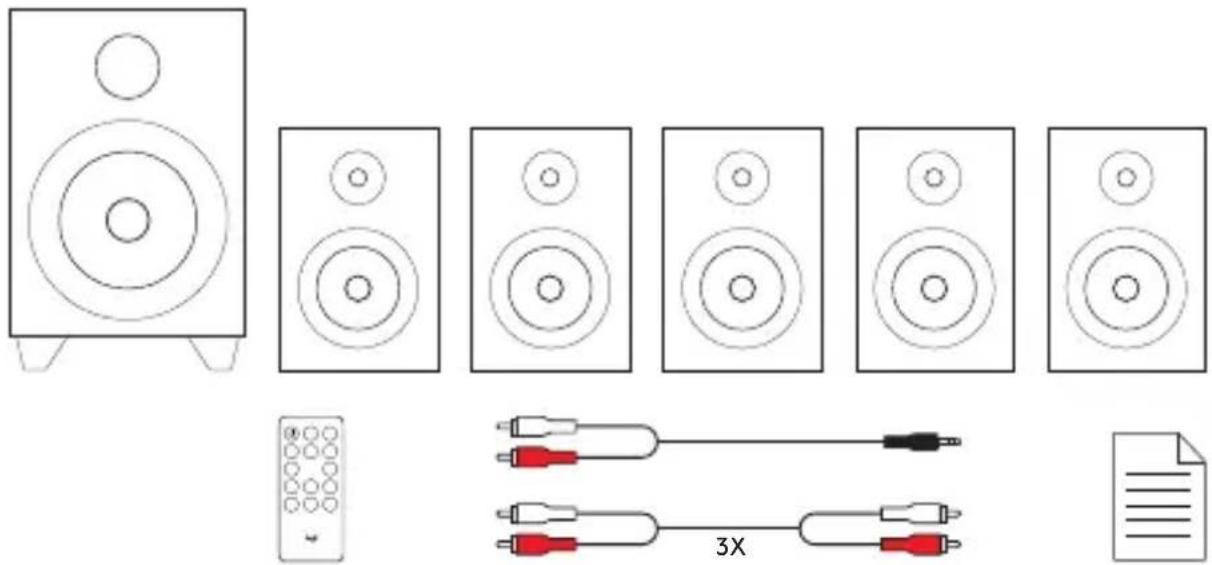
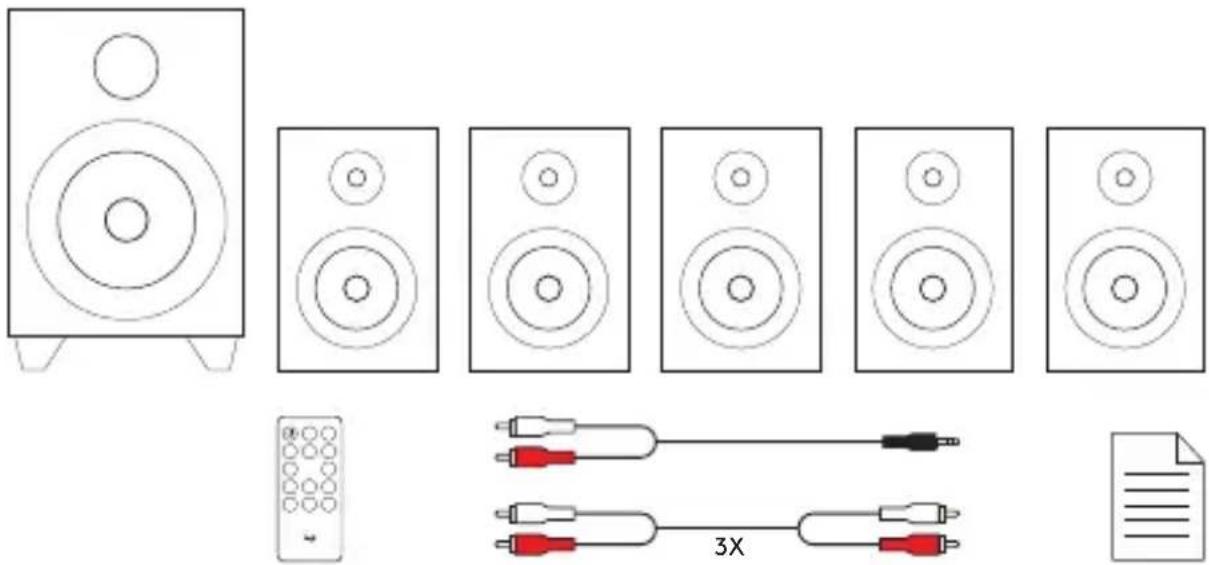
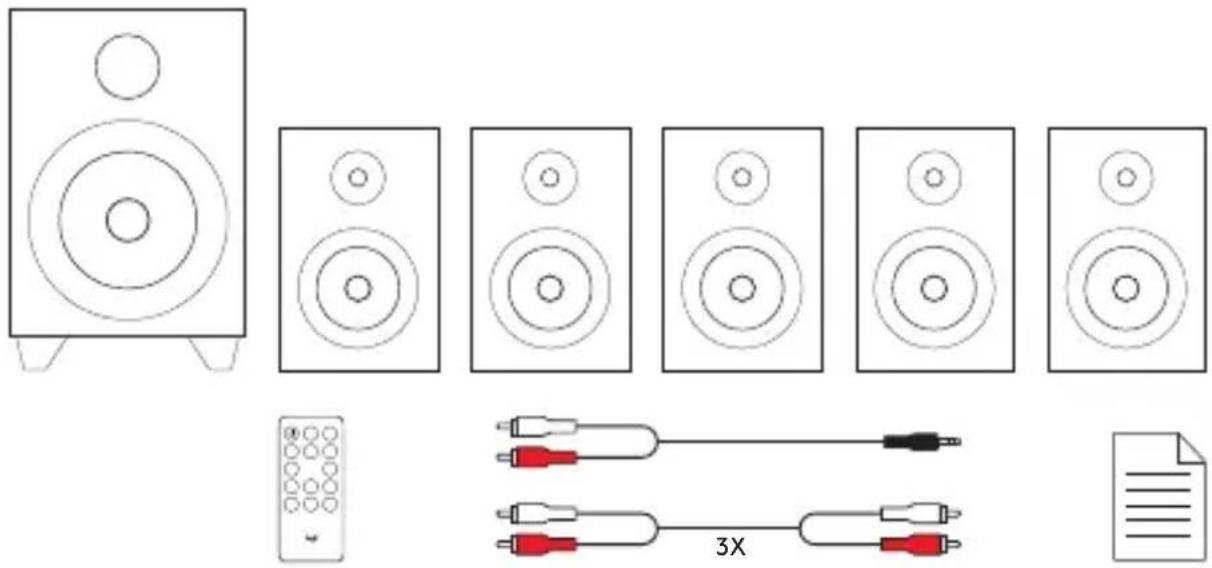
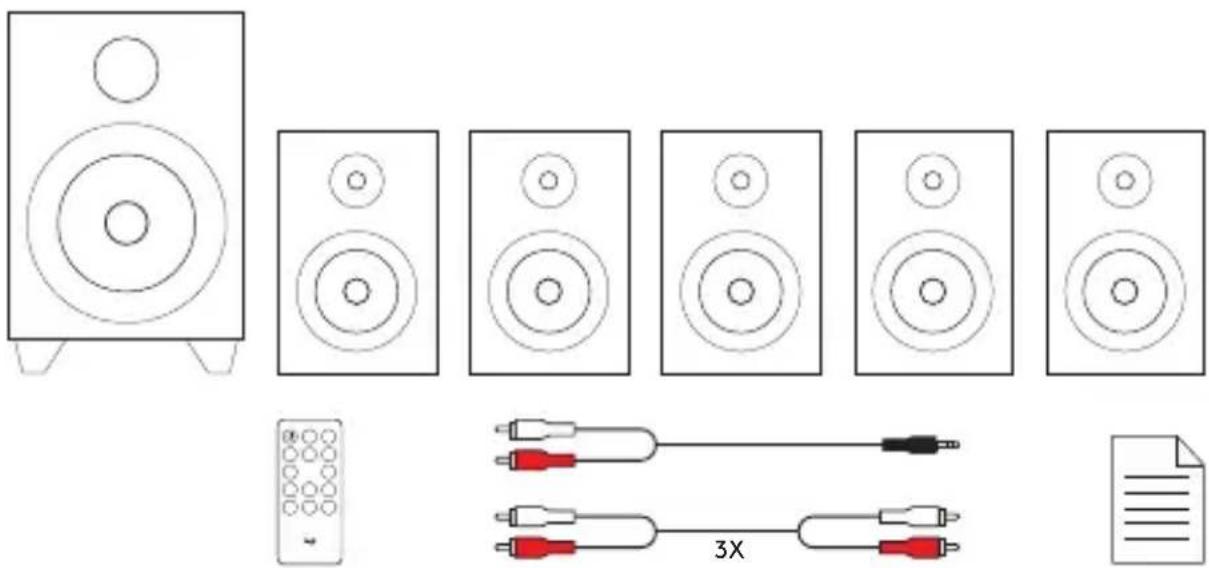
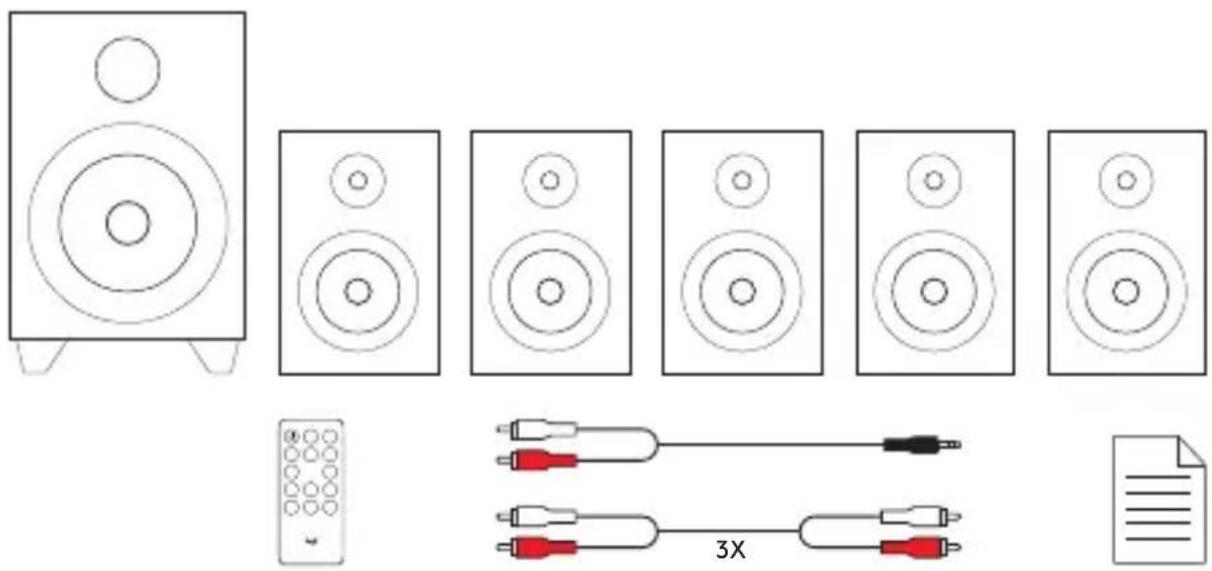
| Box contents | Subwoofer, 5 satellites, remote control, RCA cables (x3), 3.5mm to RCA cable, documentation |
| Care and cleaning | Unplug before cleaning; use a soft dry cloth; avoid solvents and moisture |
| Safety | Do not open the device; do not expose to water or heat sources; use only the provided adapter |
| Spare parts and repairability | Remote control and cables available; fixed non-removable power cable; professional repair recommended |
Frequently Asked Questions - Z607 LOGITECH
User questions about Z607 LOGITECH
0 question about this device. Answer the ones you know or ask your own.
Ask a new question about this device
Download the instructions for your Bluetooth speaker in PDF format for free! Find your manual Z607 - LOGITECH and take your electronic device back in hand. On this page are published all the documents necessary for the use of your device. Z607 by LOGITECH.
USER MANUAL Z607 LOGITECH
natural_image
Line drawing of a multi-tiered audio amplifier with multiple speakers and a remote control unit (no text or symbols)logitech®
English 3
Deutsch .....14
Français 25
Italiano. 36
Español 47
Português ..... 58
Nederlands 69
Svenska 80
Dansk .91
Norsk. 102
Suomi 113
Ελληνικά 124
По-русски. 135
Po polsku. . . . . . . . . . . . . . . . 146
Magyar. 157
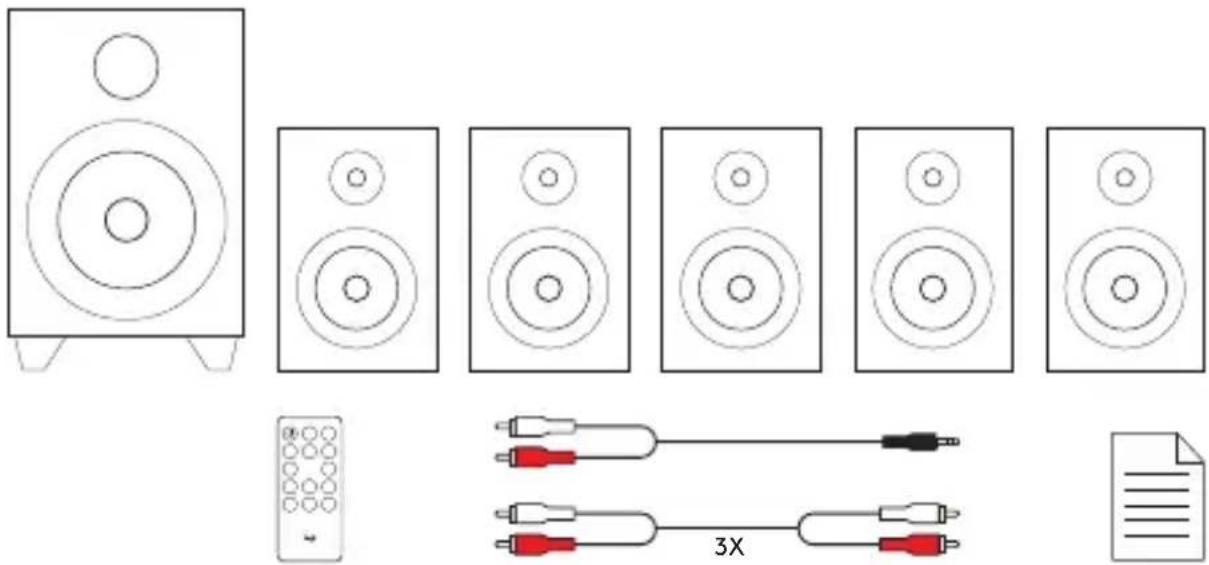
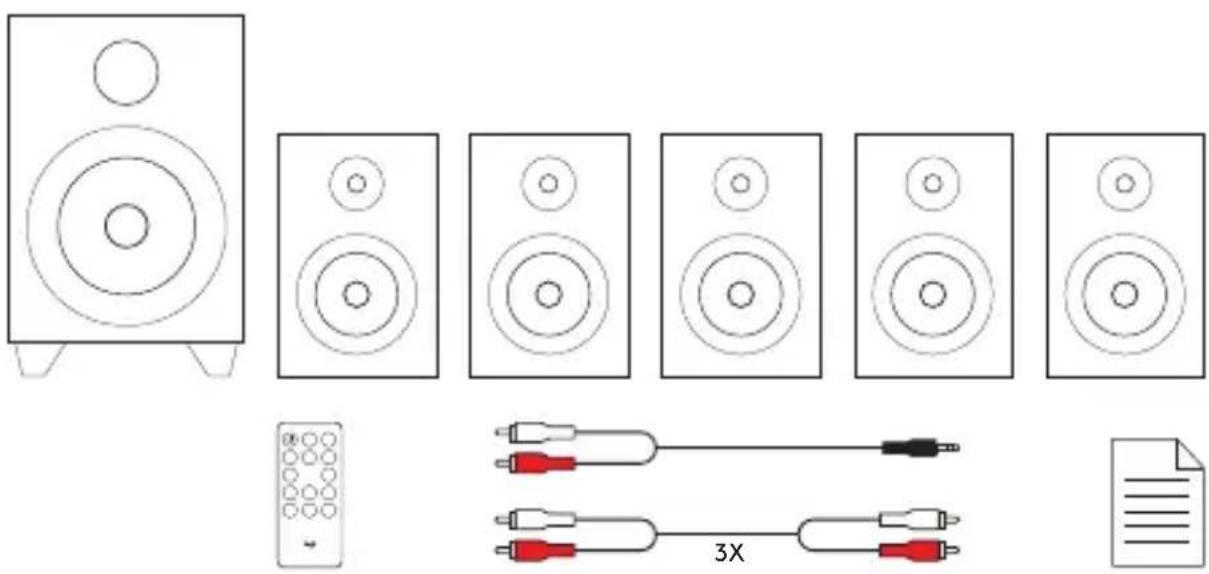
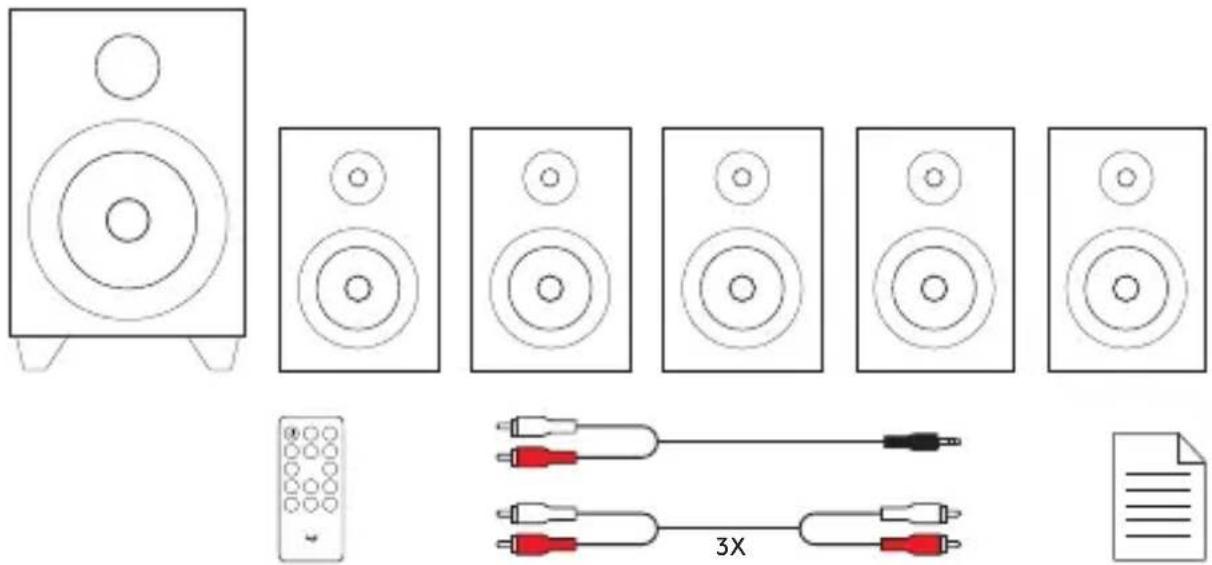
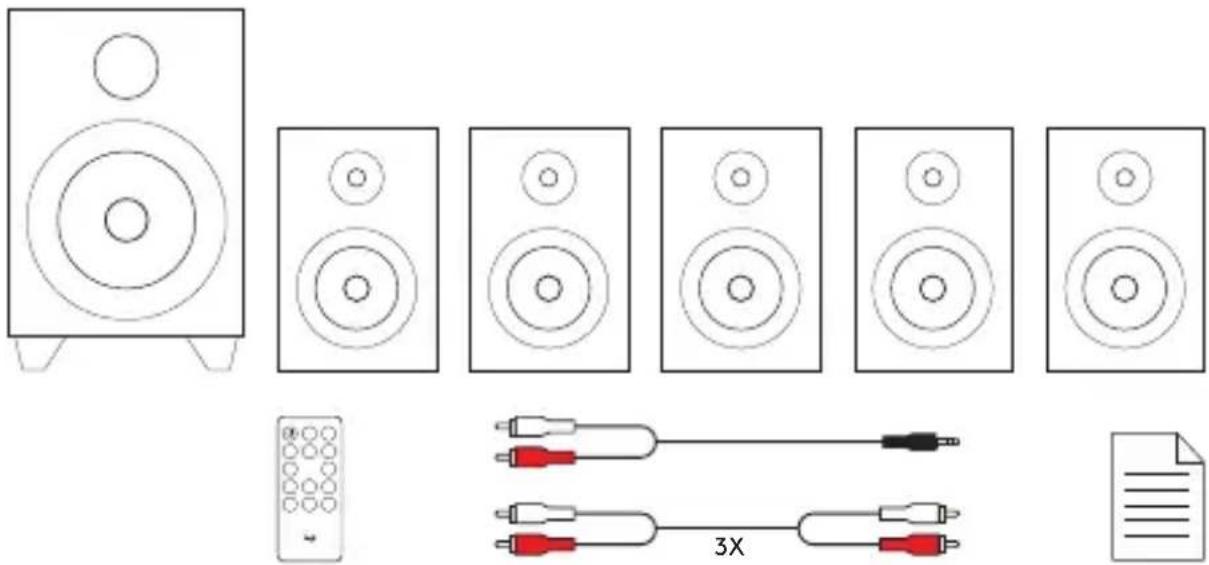
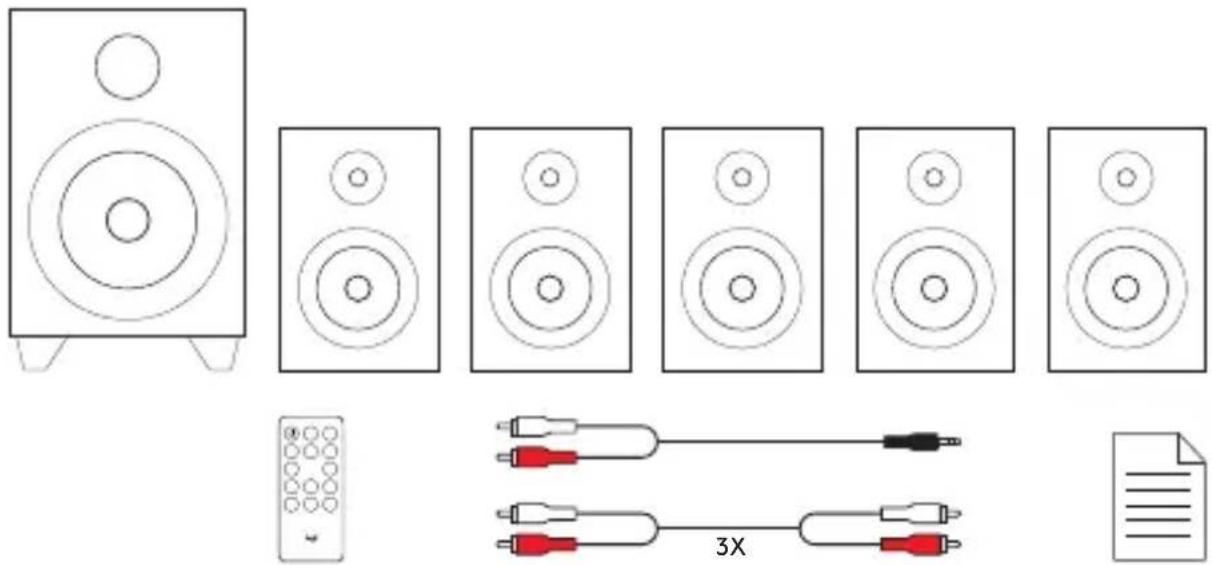
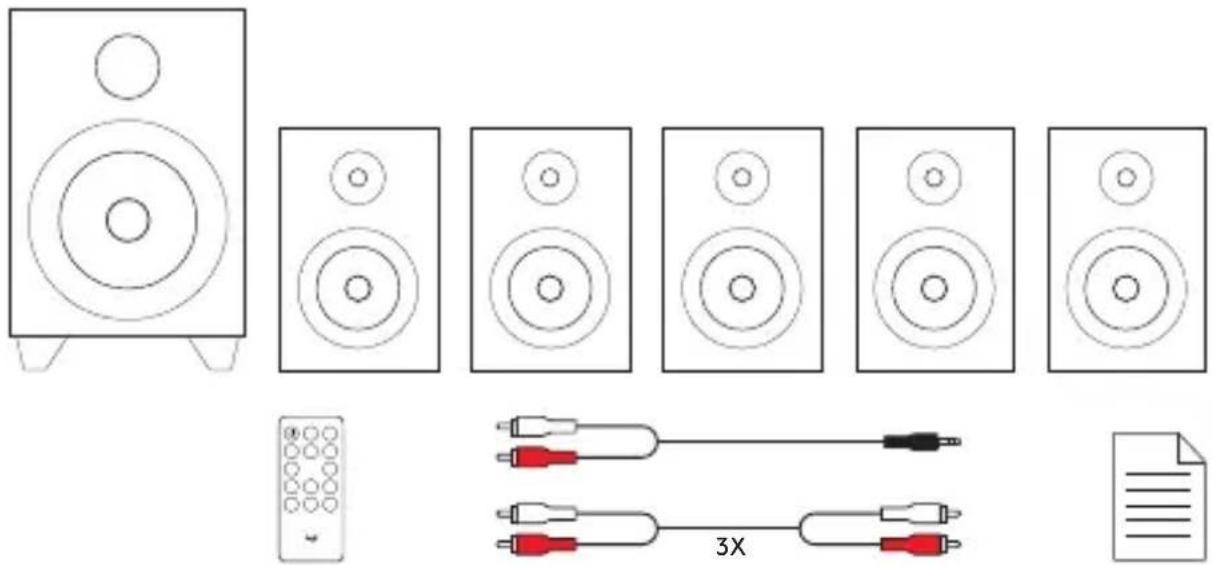
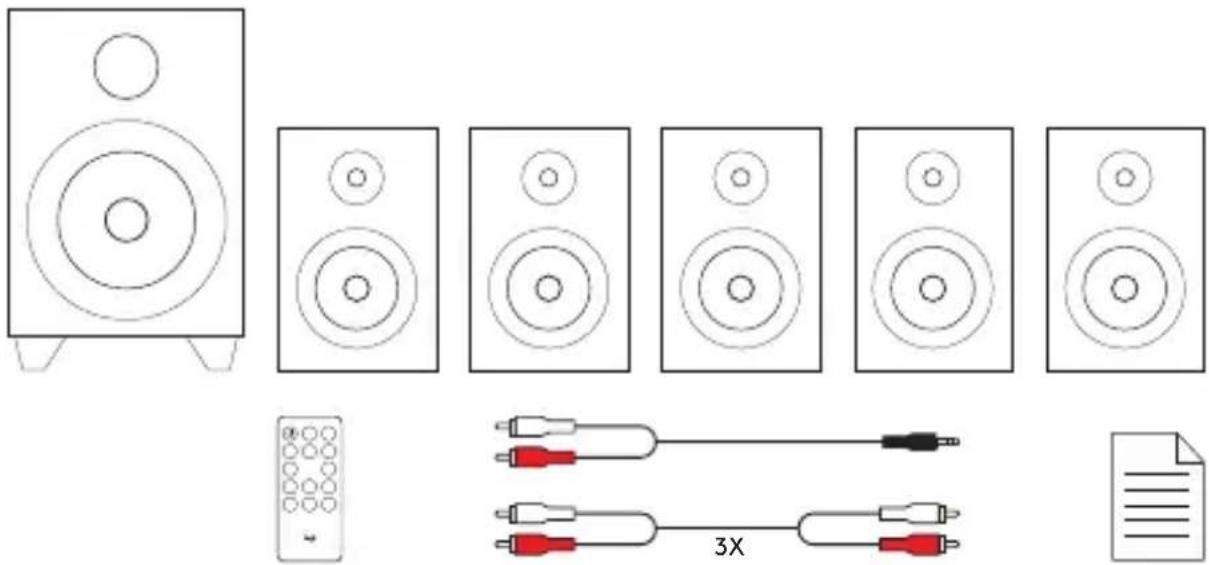
- Subwoofer with fixed power cable and FM Radio Antenna
- Five satellites - 2 front satellites, 2 rear satellites, 1 center satellite
- Remote control with button cell battery
- Three RCA to RCA cables
- One 3.5mm to RCA cable
- User documentation
English
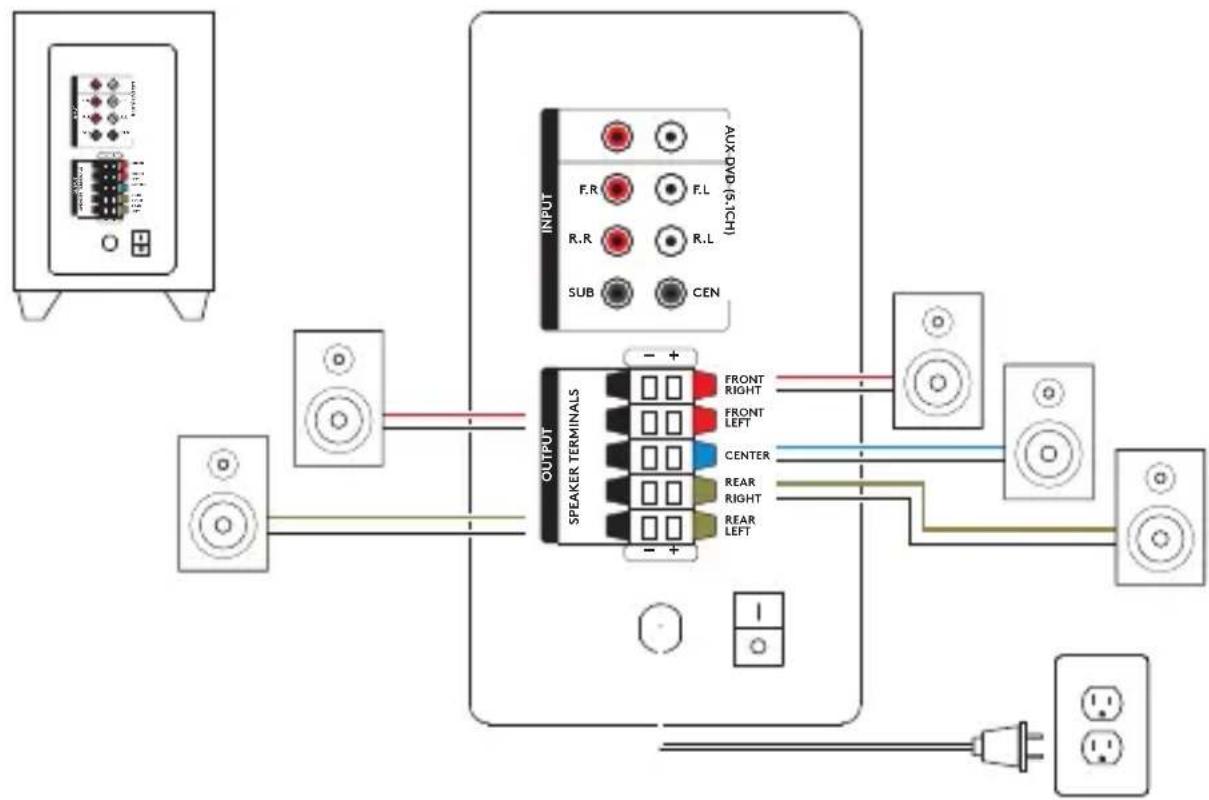
5.1 SYSTEM SETUP
flowchart
graph TD
    A["Speaker Terminal 1"] -->|Power Line| B["Speaker Terminal 2"]
    C["Input Device"] -->|Power Line| B
    D["Power Supply"] -->|Power Line| B
    B --> E["Speaker Terminal 3"]
    E --> F["Output"]
    style E fill:#f9f,stroke:#333
    style F fill:#ccf,stroke:#333
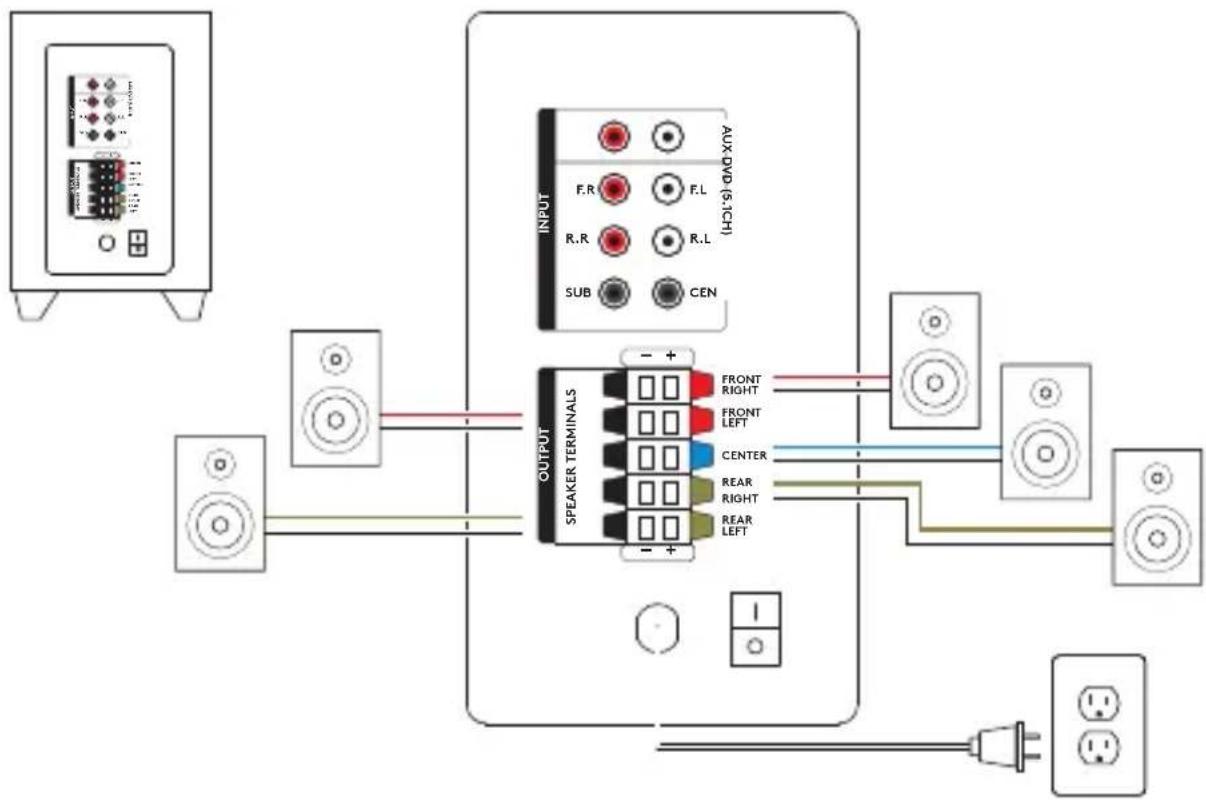
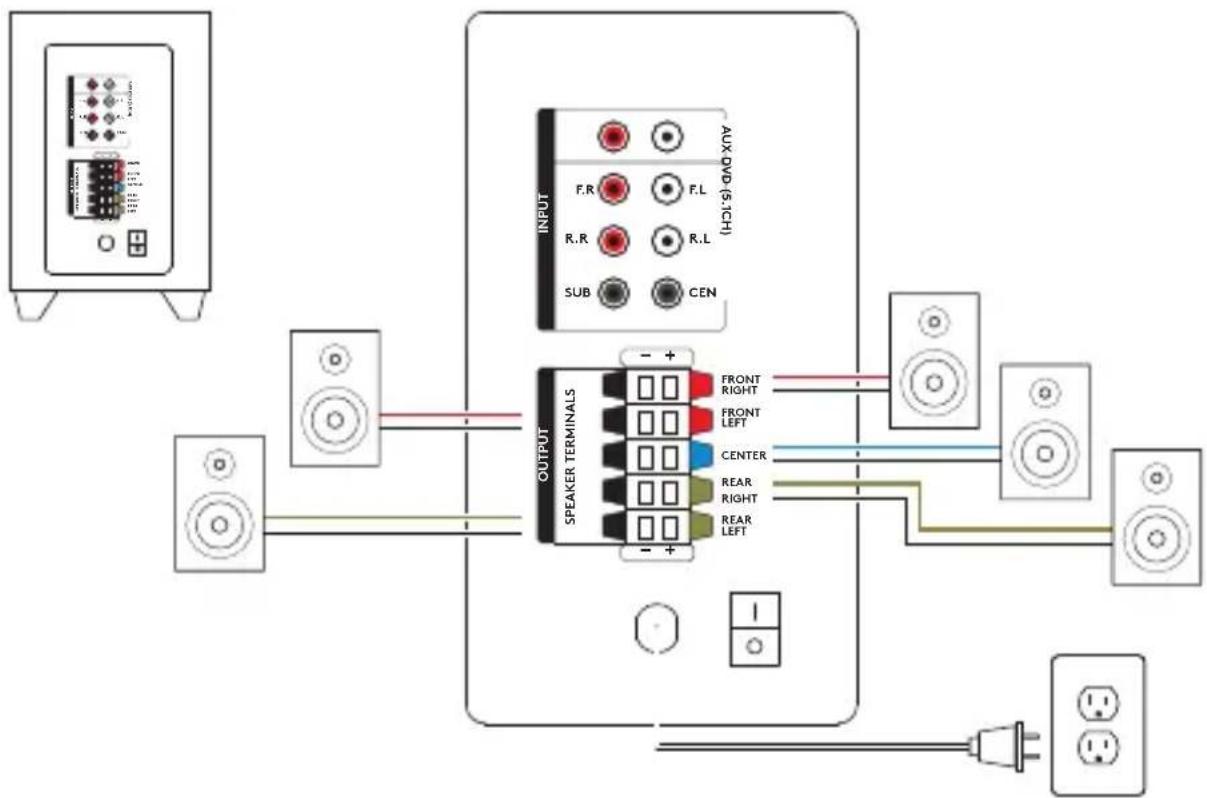
- Connect each satellite to its corresponding plug on the subwoofer back panel.
- Plug power cord in AC power outlet.
- Turn on the system from the subwoofer back panel switch.
-
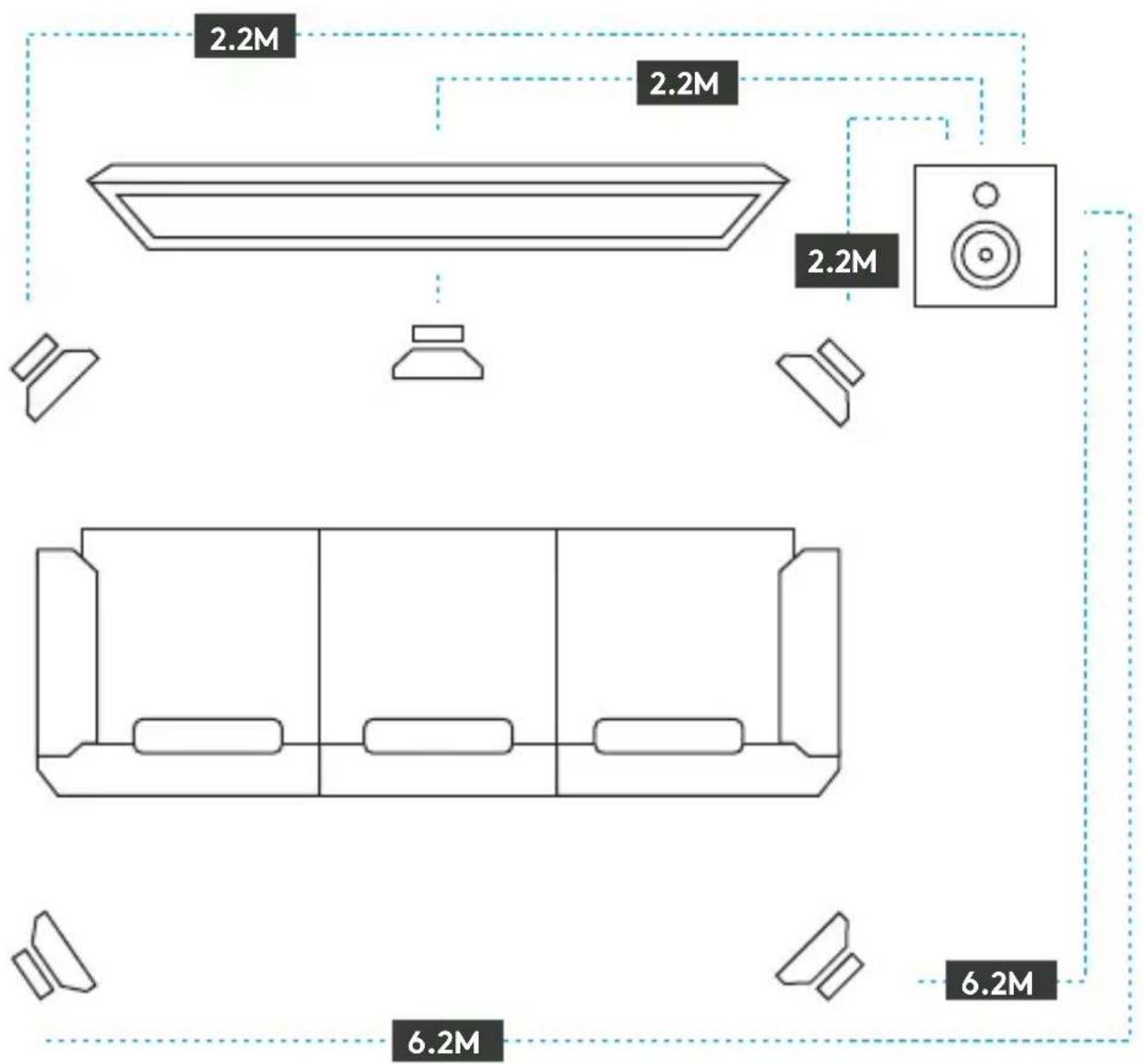
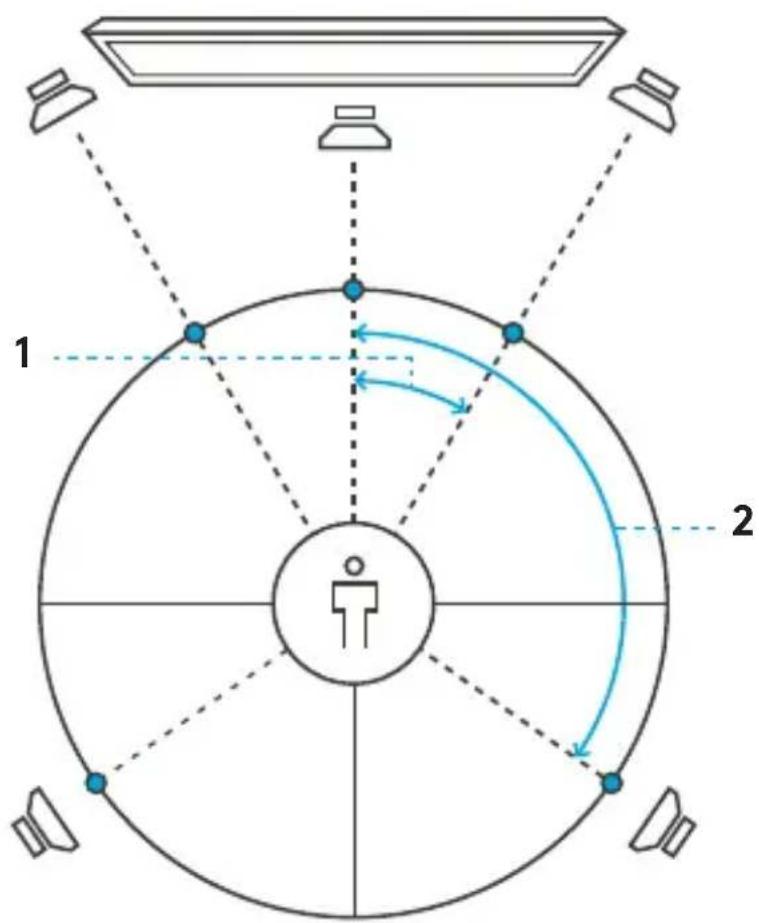
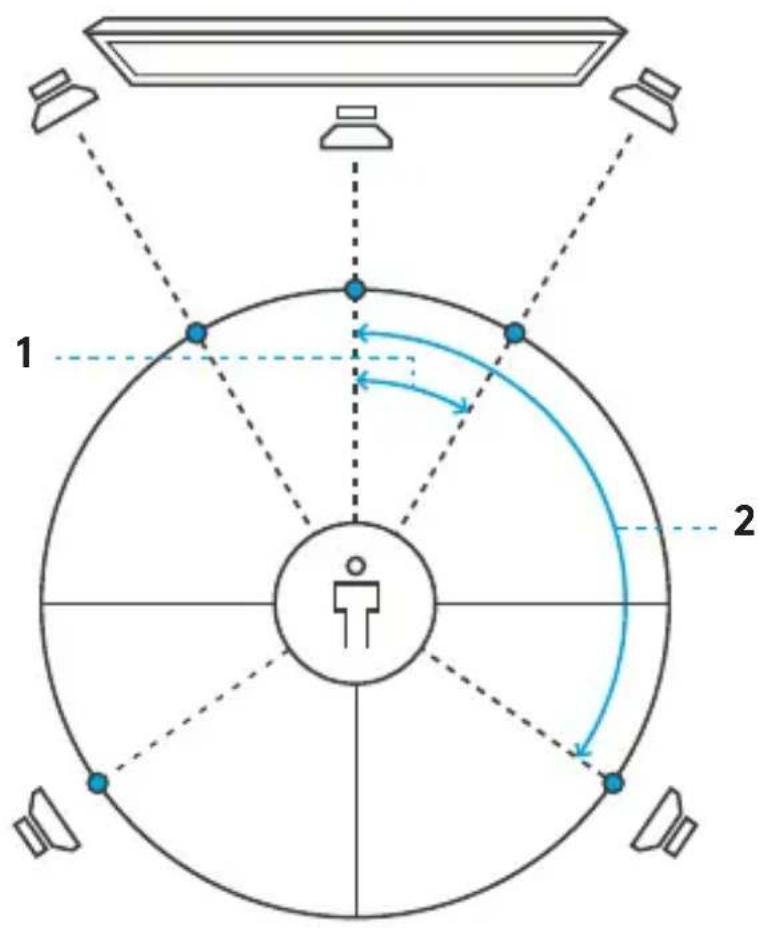
For optimal sound place each front speaker 30 degrees from the center point.
-
For optimal sound place each rear speaker 120 degrees from center point.
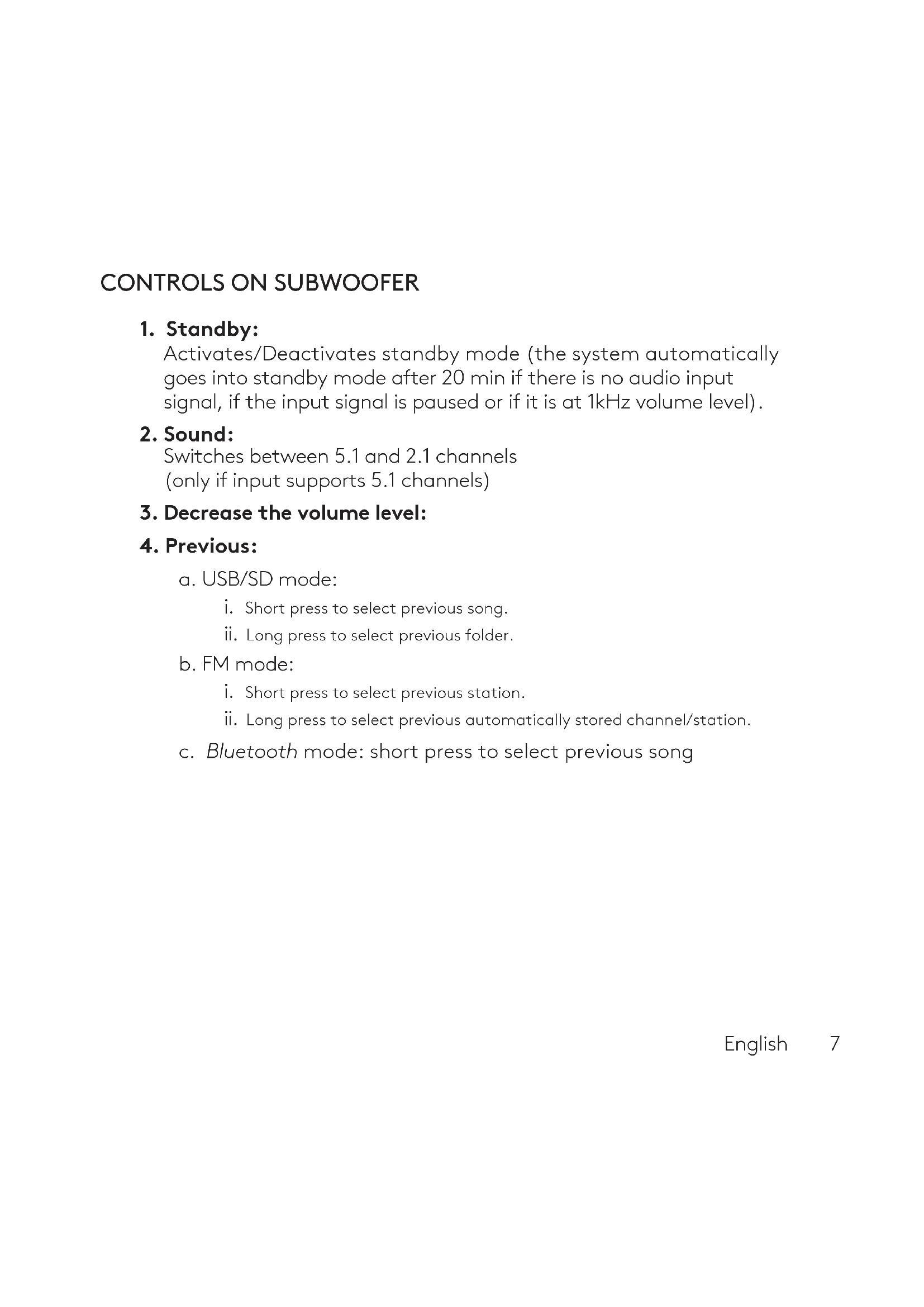
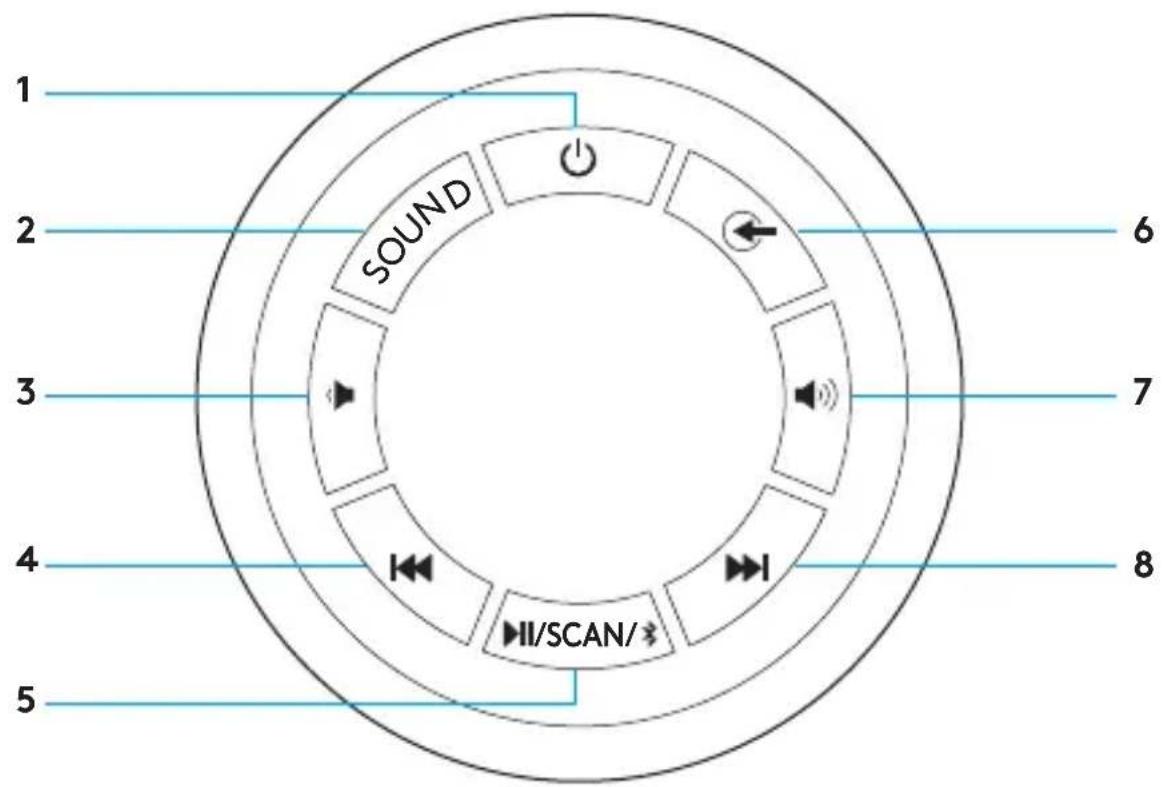
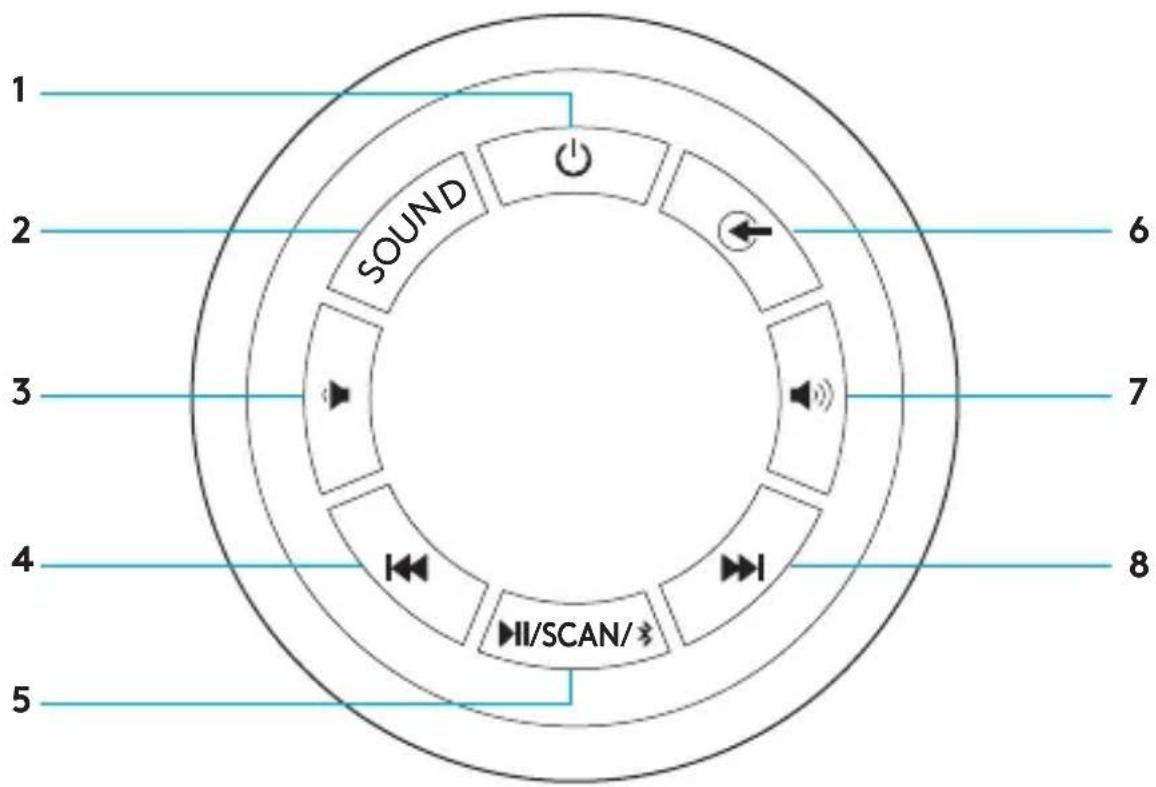
CONTROLS ON SUBWOOFER
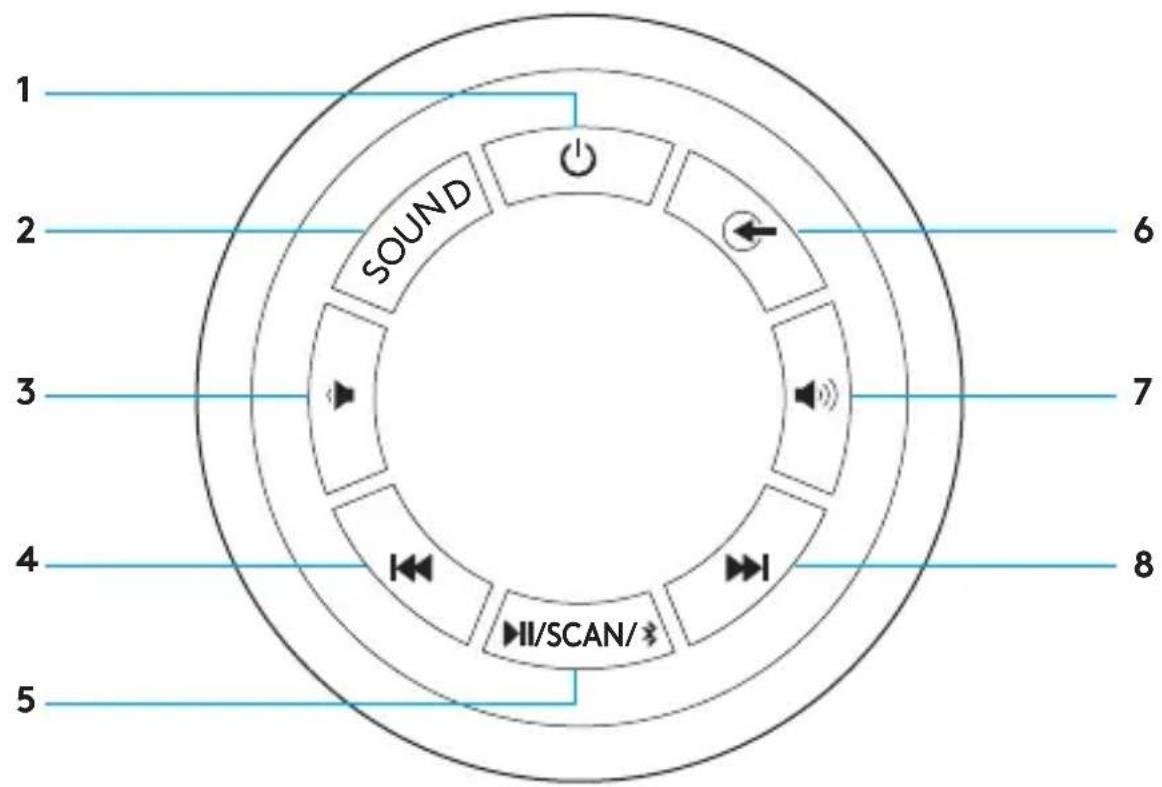
- Standby
- Sound
- Decrease volume
-
Previous
-
Play/Pause/Scan/Bluetooth® Pairing
- Source
- Increase volume
- Next
CONTROLS ON SUBWOOFER
1. Standby:
Activates/Deactivates standby mode (the system automatically goes into standby mode after 20 min if there is no audio input signal, if the input signal is paused or if it is at 1kHz volume level).
2. Sound:
Switches between 5.1 and 2.1 channels (only if input supports 5.1 channels)
3. Decrease the volume level:
4. Previous:
a. USB/SD mode:
i. Short press to select previous song.
ii. Long press to select previous folder.
b. FM mode:
i. Short press to select previous station.
ii. Long press to select previous automatically stored channel/station.
c. Bluetooth mode: short press to select previous song
5. Play/Pause/Scan/Bluetooth Pairing:
a. USB/SD Mode: Short press to play/pause music.
b. FM mode:
i. Short press to start auto search, second short press to select a station.
ii. All active frequencies are stored automatically in different channels.
c. Bluetooth mode:
i. Short press to play/pause music.
ii. Long press will start bluetooth pairing mode, LED will quickly blink 'bt' on the display.
6. Source:
a. Switch between Bluetooth, AUX, DVD, USB/SD and FM mode. LED display on subwoofer panel will indicate related source mode.
7. Increase the volume level:
8. Next:
a. USB/SD mode:
i. Short press to select next song.
ii. Long press to select next folder.
b. FM mode:
i. Short press to select next station.
ii. Long press to select next saved channel/station.
c. Bluetooth mode: short press to select next song.
LOCAL AUDIO SOURCES
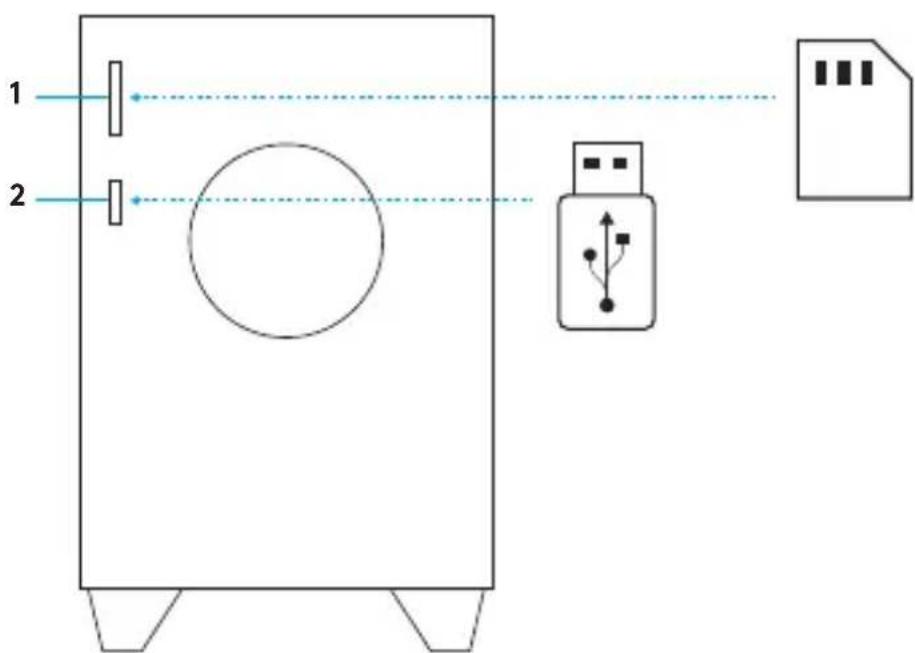
- SD card slot 2. USB drive slot
i. To play audio fully insert SD card into SD card slot and select SD/USB source from either remote control or controls on the subwoofer.
ii. To remove SD card simply pull it out of the slot.
iii. Z607 supports up to 32GB SDHC cards with the following audio file formats: MP3, WMA, WAV, APE, FLAC.
SD card not included
i. To play audio insert USB drive into USB slot and select SD/USB source from either remote control or controls on the subwoofer.
ii. To remove USB drive simply pull it out of the slot.
iii. Z607 supports up to 32GB USB drives formatted FAT16 or FAT32 with the following audio file formats: MP3, WMA, WAV, APE, FLAC.
USB drive not included
English
REMOTE CONTROL
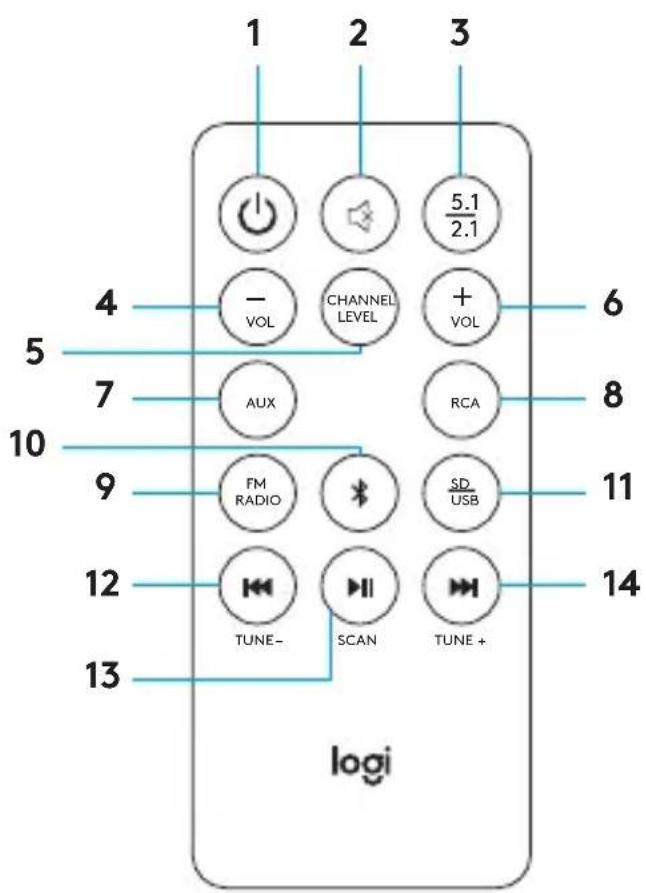
1. Standby:
Activates/Deactivates standby mode (the system automatically goes into standby mode after 20 min if there is no audio input signal, if the input signal is paused or if it is at 1kHz volume level).
2. Mute: Mutes the system.
- 5.1/2.1: Switches from 5.1 to 2.1 channels as needed (only if input supports 5.1 channels).
4. -Vol:
a. Decreases the master volume.
b. When selecting channel level button first, -vol decreases the volume of the selected channel.
5. Channel Level:
Controls volume of speaker channels. Press once to cycle through front (F) speakers, rear (R) speakers, center (C) speaker, and subwoofer (S), select the channel and adjust the volume of that unit or channel from 5 to -5. System will save channel volume adjustment.
6. +Vol:
a. Increases the master volume.
b. When selecting channel level button first, +vol increases the volume of the selected channel.
-
AUX: Selects 3.5mm AUX input.
-
RCA/DVD: Selects RCA input.
-
FM RADIO: Selects FM Radio.
-
Bluetooth/Bluetooth Pairing:
a. Short press selects Bluetooth mode.
b. Long press will start Bluetooth pairing mode, LED will quickly blink 'bt' on the display.
- SD/USB: Selects SD/USB input.
12. Back/Previous/Tune-:
a. On FM Radio Mode:
i. Short press to advance to previous station.
ii. Long press to select the previous saved station.
b. On Bluetooth mode: short press to select previous song.
c. On USB/SD mode:
i. Short press to select previous song.
ii. Long press to select previous folder.
13. Play/Pause/Scan:
a. On FM Radio Mode: Short press to start auto search, second short press to select a station.
b. On Bluetooth mode: Short press to play/pause music.
c. On USB/SD mode: Short press for play/pause music.
14. Next/Tune+:
a. On FM Radio Mode:
i. Short press to advance to next station.
ii. Long press to advance to the next saved station.
b. On Bluetooth mode: Short press to select next song.
c. On USB/SD mode:
i. Short press to select next song.
ii. Long press to select next folder.
LONGER CABLE LENGTH FOR FLEXIBLE PLACEMENT
English
INHALT
flowchart
graph TD
    A["Light Lamp"] --> B["Central Human Figure"]
    B --> C["Zone 1"]
    B --> D["Zone 2"]
    C --> E["Left Side"]
    D --> F["Right Side"]
    style B fill:#f9f,stroke:#333,stroke-width:2px
    style C stroke:#000,stroke-width:2px
    style D stroke:#000,stroke-width:2px
CONTENU DU COFFRET
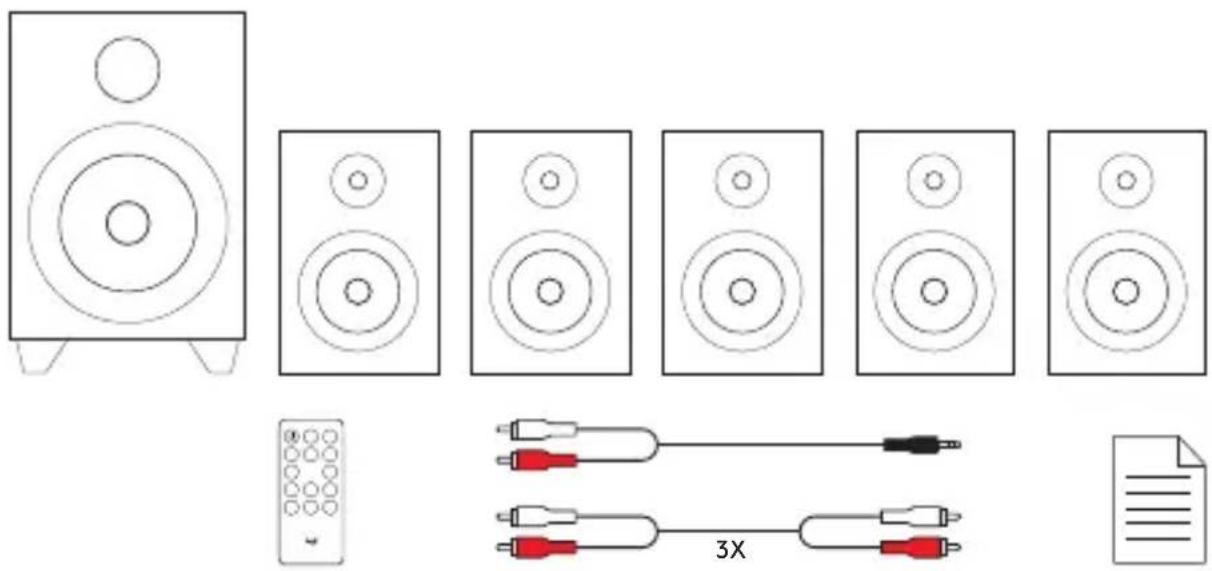
CONTENIDO DE LA CAJA
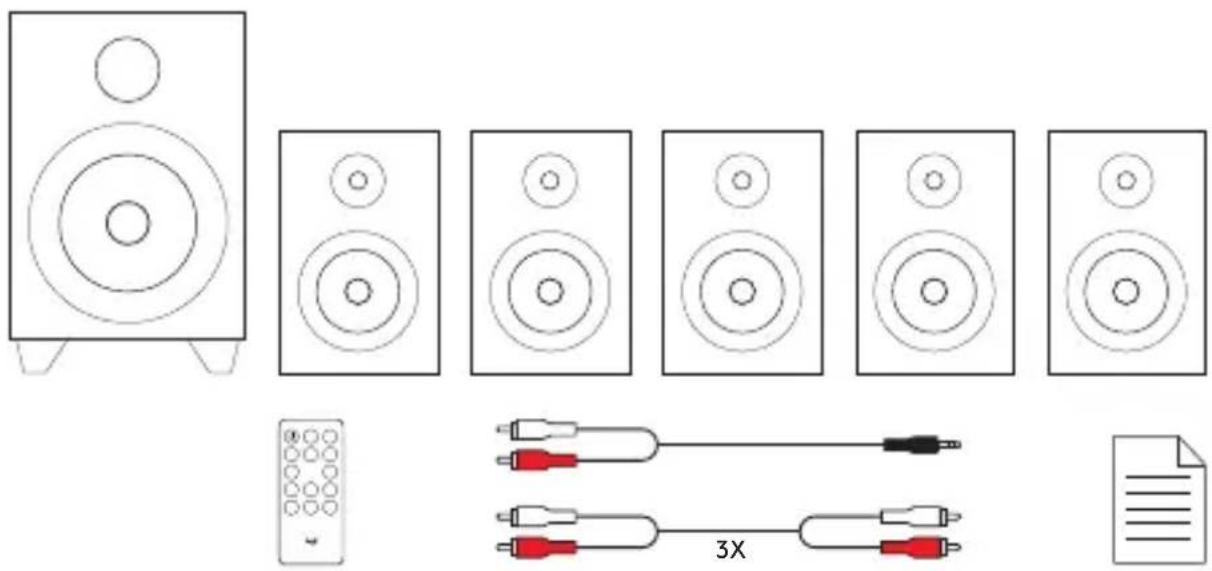
ITENS INCLUÍDOS NA EMBALAGEM
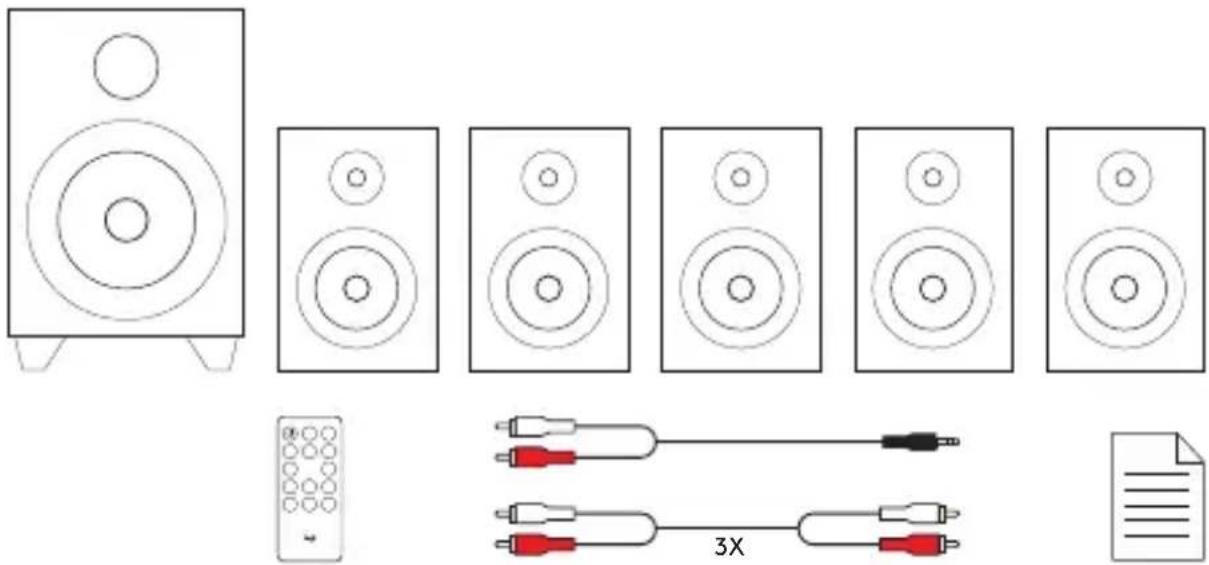
INHOUD VAN DE DOOS
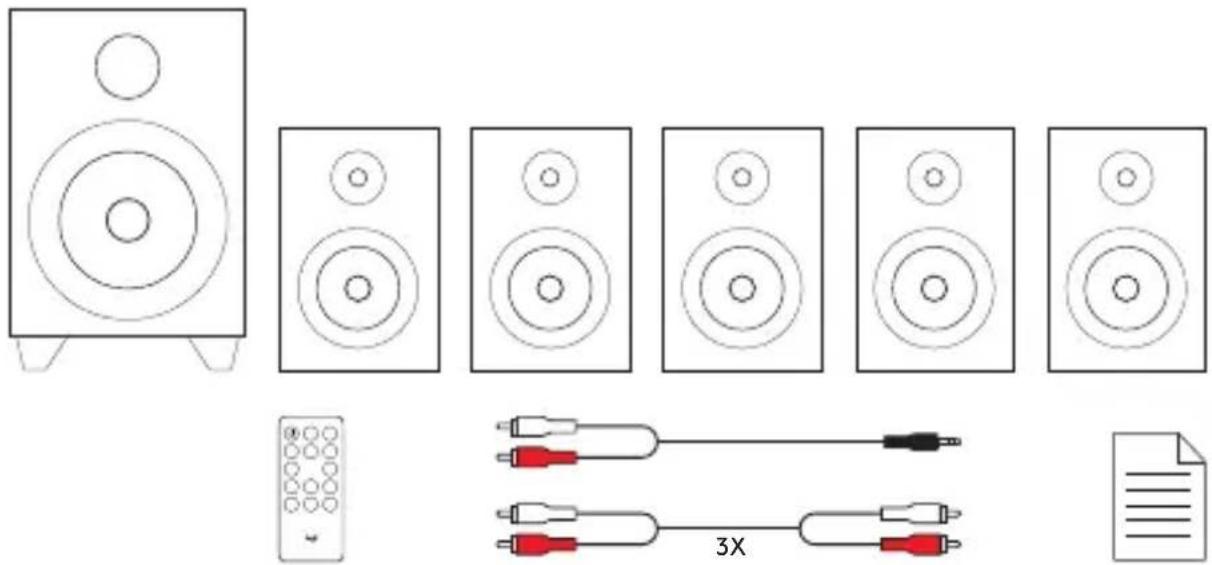
KNOPPEN OP SUBWOOFER
- Stand-by
- Geluid
- Volume verlagen
-
Vorige
-
Afspelen/pauzeren/scannen/Bluetooth®-koppeling
- Bron
- Volume verhogen
- Volgende
KNOPPEN OP SUBWOOFER
1. Stand-by:
VAD FINNS I LÅDAN?
- – Subwoofer med fast nätkabel och FM-radioantenn
- Fem satelliter - 2 främre satelliter, 2 bakre satelliter, 1 mittsatellit
- Fjärrkontroll med knappcellsbatteri
- Tre RCA till RCA-kablar
- En 3,5 mm till RCA-kabel
- Bruksanvisning
DET INDEHOLDER KASSEN
5. Afspil/Pause/Scan/Bluetooth-binding:
a. USB/SD-tilstand: Tryk kort for at afspille/pause musik.
b. FM-tilstand:
Dansk
I ESKEN
PAKKAUKSEN SISÄLTÖ
КОМПЛЕКТ ПОСТАВКИ
ZAWARTOŚĆ ZESTAWU
A CSOMAG TARTALMA
flowchart
graph TD
    A["Light Source"] --> B["Central Human Figure"]
    B --> C["Light Source 1"]
    B --> D["Light Source 2"]
    B --> E["Light Source 3"]
    B --> F["Light Source 4"]
    B --> G["Light Source 5"]
    style B fill:#f9f,stroke:#333,stroke-width:2px
    note right of B
        Blue Arrow indicates direction or flow from center to outer ring
    end
OBSAH BALENÍ
OVLÁDACÍ PRVKY NA SUBWOOFERU
OVLÁDACÍ PRVKY NA SUBWOOFERU
OBSAH BALENIA
ВМІСТ УПАКОВКИ
KARBI SISU
Eesti
IEPAKOJUMA SATURS
flowchart
graph TD
    A["Light Lamp"] --> B["Central Human Figure"]
    B --> C["Zone 1"]
    B --> D["Zone 2"]
    C --> E["Left Side"]
    D --> F["Right Side"]
    style B fill:#f9f,stroke:#333,stroke-width:2px
    style C stroke:#000,stroke-width:2px
    style D stroke:#000,stroke-width:2px
DĚŽUTĚJE RASITE
КАКВО ИМА В КУТИЯТА
ŠTO JE U KUTIJI
- Bas zvučnik s fiksnim kabelom za napajanje i FM radio antenom
- Pet satelita - 2 prednja satelita, 2 stražnja satelita, 1 srednji satelit
- Daljinski upravljač s gumbastom ćelijskom baterijom
- Tri kabela s RCA na RCA priključcima
- Jedan kabel s priključkom 3,5 mm na RCA priključak
- Korisnička dokumentacija
Hrvatski
POSTAVA SUSTAVA 5.1
flowchart
graph TD
    A["Speaker 1"] --> B["Speaker 2"]
    C["Speaker 3"] --> D["Speaker 4"]
    E["Speaker 5"] --> F["Speaker 6"]
    G["Speaker 7"] --> H["Speaker 8"]
    I["Speaker 9"] --> J["Speaker 10"]
    K["Speaker 11"] --> L["Speaker 12"]
    M["Speaker 13"] --> N["Speaker 14"]
    O["Speaker 15"] --> P["Speaker 16"]
    Q["Speaker 17"] --> R["Speaker 18"]
    S["Speaker 19"] --> T["Speaker 20"]
    U["Speaker 21"] --> V["Speaker 22"]
    W["Speaker 23"] --> X["Speaker 24"]
    Y["Speaker 25"] --> Z["Speaker 26"]
    AA["Speaker 27"] --> AB["Speaker 28"]
    AC["Speaker 29"] --> AD["Speaker 30"]
    AE["Speaker 31"] --> AF["Speaker 32"]
    AG["Speaker 33"] --> AH["Speaker 34"]
    AI["Speaker 35"] --> AJ["Speaker 36"]
    AK["Speaker 37"] --> AL["Speaker 38"]
    AM["Speaker 39"] --> AN["Speaker 40"]
    AO["Speaker 41"] --> AP["Speaker 42"]
    AQ["Speaker 43"] --> AR["Speaker 44"]
    AS["Speaker 45"] --> AT["Speaker 46"]
    AU["Speaker 47"] --> AV["Speaker 48"]
    AW["Speaker 49"] --> AX["Speaker 50"]
    AY["F.R."] --> Z
    AZ["F.L."] --> Z
    BA["R.R."] --> Z
    BB["R.L."] --> Z
    BC["SUB"] --> Z
    BD["CEN"] --> Z
    BE["AUX-DVD (SICH)"] --> Z
    BF["FRNT RIGHT"] --> Z
    BG["FRONT LEFT"] --> Z
    BH["CENTER"] --> Z
    BI["REAR RIGHT"] --> Z
    BJ["REAR LEFT"] --> Z
    BK["+/-"] --> Z
    BL["FORNT RIGHT"] --> Z
    BM["FORNT LEFT"] --> Z
    BN["FORNT RIGHT"] --> Z
    BO["FORNT LEFT"] --> Z
    BP["FORNT RIGHT"] --> Z
    BZ["FORNT LEFT"] --> Z
    CA["FORNT RIGHT"] --> Z
    CB["FORNT LEFT"] --> Z
    CC["FORNT RIGHT"] --> Z
    DD["FORNT LEFT"] --> Z
    DE["FORNT RIGHT"] --> Z
    DF["FORNT LEFT"] --> Z
    DG["FORNT RIGHT"] --> Z
    DH["FORNT LEFT"] --> Z
    DI["FORNT RIGHT"] --> Z
    DJ["FORNT LEFT"] --> Z
    DK["FORNT RIGHT"] --> Z
    DL["FORNT LEFT"] --> Z
    DN["FORNT RIGHT"] --> Z
    DOF["FORNT LEFT"] --> Z
    DP["FORNT RIGHT"] --> Z
    DR["FORNT LEFT"] --> Z
    DS["FORNT RIGHT"] --> Z
    DT["FORNT LEFT"] --> Z
    DV["FORNT RIGHT"] --> Z
    DW["FORNT LEFT"] --> Z
- Spojite svaki satelit na njegov odgovarajući utikač na stražnjoj ploči bas zvučnika.
- Ukopčajte kabel za napajanje u utičnicu izmjeničnog napajanja.
- Uključite sustav s pomoću sklopke na stražnjoj ploči bas zvučnika.
OPTIMALNI RASPORED ZVUČNIKA ZA PROSTORNI ZVUK 5.1
flowchart
graph TD
    A["Light Source"] --> B["Central Human Figure"]
    B --> C["Position 1"]
    B --> D["Position 2"]
    style A fill:#f9f,stroke:#333
    style B fill:#ccf,stroke:#333
    style C stroke-dasharray: 5 5
    style D stroke-dasharray: 5 5
ŠTA JE U PAKOVANJU
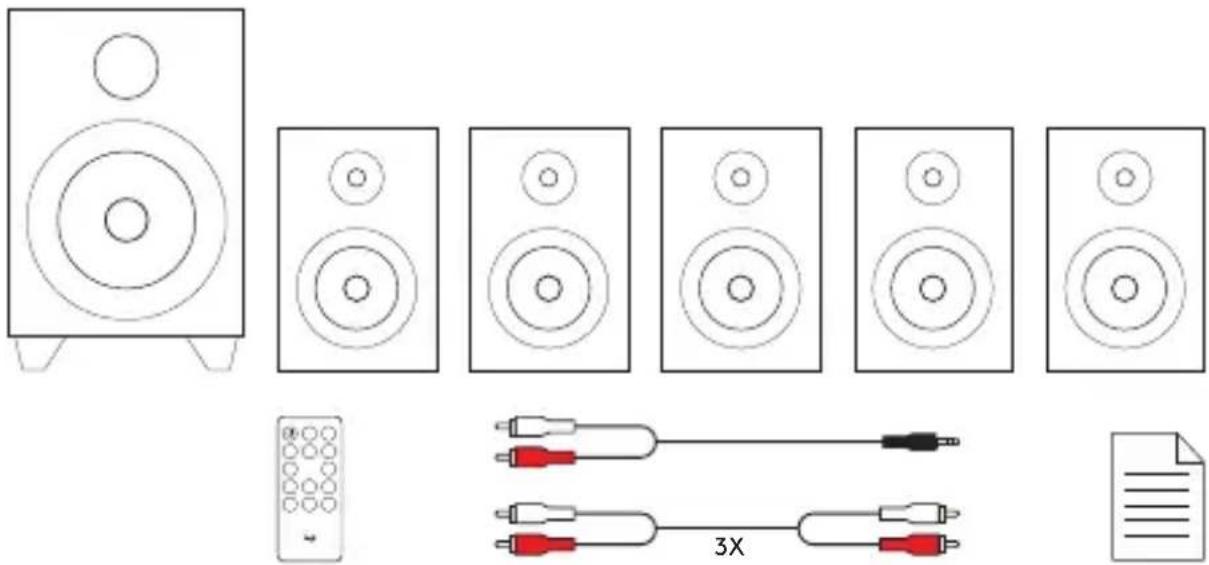
- Niskotonac sa fiksnim kablom za napajanje i FM radio antenom
- Pet satelita – 2 prednja satelita, 2 zadnja satelita, 1 centralni satelit
- Daljinski upravljač sa dugmastom baterijom
- Tri kabla RCA na RCA
- Jedan kabl 3,5mm na RCA
- Dokumentacija za korisnika
5.1 KONFIGURACIJA SISTEMA
flowchart
graph TD
    A["Speaker 1"] --> B["Speaker 2"]
    B --> C["Speaker 3"]
    C --> D["Speaker 4"]
    D --> E["Speaker 5"]
    E --> F["Speaker 6"]
    F --> G["Speaker 7"]
    G --> H["Speaker 8"]
    H --> I["Speaker 9"]
    I --> J["Speaker 10"]
    K["OUTPUT SPEAKER TERMINALS"] --> L["F.R"]
    K --> M["F.L"]
    K --> N["R.R"]
    K --> O["R.L"]
    K --> P["CEN"]
    Q["INPUT AUX-OVO (SICH)"] --> K
    R["OUTPUT FRONT RIGHT"] --> K
    S["OUTPUT FRONT LEFT"] --> K
    T["OUTPUT CENTER"] --> K
    U["OUTPUT REAR RIGHT"] --> K
    V["OUTPUT REAR LEFT"] --> K
    W["Power Supply"] --> X["Output"]
- Svaki satelit povežite sa odgovarajućom utičnicom sa zadnje strane niskotonca.
- Priključite kabl za napajanje u utičnicu naizmenične struje.
- Uključite sistem preko prekidača sa zadnje strane niskotonca.
OPTIMALNO 5.1 POSTAVLJANJE ZVUČNIKA ZA OKRUŽUJUĆI ZVUK
flowchart
graph TD
    A["Light Lamp"] --> B["Central Human Figure"]
    C["Light Lamp"] --> B
    D["Light Lamp"] --> B
    E["Light Lamp"] --> B
    F["Light Lamp"] --> B
    G["Light Lamp"] --> B
    H["Light Lamp"] --> B
    I["Light Lamp"] --> B
    J["Light Lamp"] --> B
    K["Light Lamp"] --> B
    L["Light Lamp"] --> B
    M["Light Lamp"] --> B
    N["Light Lamp"] --> B
    O["Light Lamp"] --> B
    P["Light Lamp"] --> B
    Q["Light Lamp"] --> B
    R["Light Lamp"] --> B
    S["Light Lamp"] --> B
    T["Light Lamp"] --> B
    U["Light Lamp"] --> B
    V["Light Lamp"] --> B
    W["Light Lamp"] --> B
    X["Light Lamp"] --> B
    Y["Light Lamp"] --> B
    Z["Light Lamp"] --> B
    AA["Light Lamp"] --> B
    AB["Light Lamp"] --> B
    AC["Light Lamp"] --> B
    AD["Light Lamp"] --> B
    AE["Light Lamp"] --> B
    AF["Light Lamp"] --> B
    AG["Light Lamp"] --> B
    AH["Light Lamp"] --> B
    AI["Light Lamp"] --> B
    AJ["Light Lamp"] --> B
    AK["Light Lamp"] --> B
    AL["Light Lamp"] --> B
    AM["Light Lamp"] --> B
    AN["Light Lamp"] --> B
    AO["Light Lamp"] --> B
    AP["Light Lamp"] --> B
    AQ["Light Lamp"] --> B
    AR["Light Lamp"] --> B
    AS["Light Lamp"] --> B
    AT["Light Lamp"] --> B
    AU["Light Lamp"] --> B
    AV["Light Lamp"] --> B
    AW["Light Lamp"] --> B
    AX["Light Lamp"] --> B
    AY["Light Lamp"] --> BA["Central Human Figure"]
    BA --> BB["Central Human Figure"]
    BB --> BC["Central Human Figure"]
    BC --> BD["Central Human Figure"]
    BD --> BE["Central Human Figure"]
    BE --> BF["Central Human Figure"]
    BF --> BG["Central Human Figure"]
    BG --> BH["Central Human Figure"]
    BH --> BI["Central Human Figure"]
    BI --> BJ["Central Human Figure"]
    BJ --> BK["Central Human Figure"]
    BK --> BL["Central Human Figure"]
    BL --> BM["Central Human Figure"]
    BM --> BN["Central Human Figure"]
    BN --> BO["Central Human Figure"]
    BO --> BP["Central Human Figure"]
    BP --> BQ["Central Human Figure"]
    BQ --> BR["Central Human Figure"]
    BR --> BS["Central Human Figure"]
    BS --> BT["Central Human Figure"]
    BT --> BU["Central Human Figure"]
    BU --> BV["Central Human Figure"]
    BV --> BW["Central Human Figure"]
    BW --> BX["Central Human Figure"]
    BX --> BY["Central Human Figure"]
    BY --> BZ["Central Human Figure"]
    BX --> CA["Central Human Figure"]
    CA --> CB["Central Human Figure"]
    CB --> CC["Central Human Figure"]
    CC --> CD["Central Human Figure"]
    CD --> CE["Central Human Figure"]
    CE --> CF["Central Human Figure"]
    CF --> CG["Central Human Figure"]
    CG --> CH["Central Human Figure"]
    CH --> CI["Central Human Figure"]
    CI --> CJ["Central Human Figure"]
    CJ --> CK["Central Human Figure"]
    CK --> CR["Central Human Figure"]
    CR --> CS["Central Human Figure"]
    CS --> CT["Central Human Figure"]
    CT --> CU["Central Human Figure"]
    CU --> CV["Central Human Figure"]
    CV --> CW["Central Human Figure"]
    CW --> CX["Central Human Figure"]
    CX --> CY["Central Human Figure"]
    CY --> CZ["Central Human Figure"]
    CZ --> DA["Central Human Figure"]
    DA --> DB["Central Human Figure"]
    DB --> DC["Central Human Figure"]
    DC --> DD["Central Human Figure"]
    DD --> DE["Central Human Figure"]
    DE --> DF["Central Human Figure"]
    DF --> DG["Central Human Figure"]
    DG --> DH["Central Human Figure"]
    DH --> DI["Central Human Figure"]
    DI --> DJ["Central Human Figure"]
    DJ --> DK["Central Human Figure"]
    DK --> DL["Central Human Figure"]
    DL --> DV["Central Human Figure"]
    DV --> DW["Central Human Figure"]
    DW --> DX["Central Human Figure"]
    DX --> DXB["Central Human Figure"]
KAJ JE V ŠKATLI?
CONTINUTUL CUTIEI
KUTU İÇERİĞİ
محتويات العبوة
flowchart
graph TD
    A["Light Source"] --> B["Central Human Figure"]
    B --> C["Light Source 1"]
    B --> D["Light Source 2"]
    B --> E["Light Source 3"]
    B --> F["Light Source 4"]
    B --> G["Light Source 5"]
    style B fill:#f9f,stroke:#333,stroke-width:2px
    note right of B
        Blue Arrow indicates direction or flow from center to outer ring
    end
:USB/SD ∪ ∪ ∪ ∪ ∪ ∪ ∪ ∪ ∪ ∪ ∪ ∪ ∪ ∪ ∪ ∪ ∪ ∪ ∪ ∪ ∪ ∪ ∪ ∪ ∪ ∪ ∪ ∪ ∪ ∪ ∪ ∪ ∪ ∪ ∪ ∪ ∪ ∪ ∪ ∪ ∪ ∪ ∪ ∪ ∪ ∪ ∪ ∪ ∪ ∪ ∸ ∪ ∸ ∸ ∸ ∸ ∸ ∸ ∸ ∸ ∸ ∸ ∸ ∸ ∸ ∸ ∸ ∸ ∸ ∸ ∸ ∸ ∸ ∸ ∸ ∸ ∸ ∸ ∸ ∸ ∸ ∸ ∸ ∸ ∸ ∸ ∸ ∸ ∸ ∸ ∸ ∸ ∸ ∸ ∸ ∸
:Bluetooth . Workshop
:USB/SD ∪ ∪ ∪ ∪ ∪ ∪ ∪ ∪ ∪ ∪ ∪ ∪ ∪ ∪ ∪ ∪ ∪ ∪ ∪ ∪ ∪ ∪ ∪ ∪ ∪ ∪ ∪ ∪ ∪ ∪ ∪ ∪ ∪ ∪ ∪ ∪ ∪ ∪ ∪ ∪ ∪ ∪ ∪ ∪ ∪ ∪ ∪ ∪ ∪ ∪ ∸ ∪ ∸ ∸ ∸ ∸ ∸ ∸ ∸ ∸ ∸ ∸ ∸ ∸ ∸ ∸ ∸ ∸ ∸ ∸ ∸ ∸ ∸ ∸ ∸ ∸ ∸ ∸ ∸ ∸ ∸ ∸ ∸ ∸ ∸ ∸ ∸ ∸ ∸ ∸ ∸ ∸ ∸ ∸ ∸ ∸
?תְפֹרָה בְּוֹת
.הכלההוּרָהוּרָהוּרָהוּרָהוּרָהוּרָהוּרָהוּרָהוּרָהוּרָהוּרָהוּרָהוּרָהוּרָהוּרָה
:FM ıvın.ı
.הכלההוּרָהוּרָהוּרָהוּרָהוּרָהוּרָהוּרָהוּרָהוּרָהוּרָהוּרָהוּרָהוּרָהוּרָהוּרָה
:Bluetooth-7 tim'v/Bluetooth .10
Bluetooth LED-7, Bluetooth-7 LED-7.
.USB/SD 77:11:SD/USB .11
:-Tune/oderre/oderre .12
:FM 172024.8
.הכלההוּרָהוּרָהוּרָהוּרָהוּרָהוּרָהוּרָהוּרָהוּרָהוּרָהוּרָהוּרָהוּרָהוּרָהוּרָה
.הכלההוּרָהוּרָהוּרָהוּרָהוּרָהוּרָהוּרָהוּרָהוּרָהוּרָהוּרָהוּרָהוּרָהוּרָהוּרָה
- :הכלה/ה
.הכלההוּרָהוּרָהוּרָהוּרָהוּרָהוּרָהוּרָהוּרָהוּרָהוּרָהוּרָהוּרָהוּרָהוּרָהוּרָה
.הכלההוּרָהוּרָהוּרָהוּרָהוּרָהוּרָהוּרָהוּרָהוּרָהוּרָהוּרָהוּרָהוּרָהוּרָהוּרָה
.הכלההוּרָהוּרָהוּרָהוּרָהוּרָהוּרָהוּרָהוּרָהוּרָהוּרָהוּרָהוּרָהוּרָהוּרָהוּרָה:Bluetooth
:USB/SD γγγγ.λ
.הכלההוּרָהוּרָהוּרָהוּרָהוּרָהוּרָהוּרָהוּרָהוּרָהוּרָהוּרָהוּרָהוּרָהוּרָהוּרָה
www.logitech.com/support/z607


© 2018 Logitech. Logitech, Logi and the Logitech logo are trademarks or registered trademarks of Logitech Europe S.A. and/or its affiliates in the U.S. and other countries. The Bluetooth® word mark and logos are registered trademarks owned by the Bluetooth SIG, Inc. and any use of such marks is under license. SD and SDHC Logos are trademarks of SD-3C LLC. All other trademarks are the property of their respective owners.
- SYSTEM SETUP
- CONTROLS ON SUBWOOFER
- Standby:
- Sound:
- Decrease the volume level:
- Previous:
- Play/Pause/Scan/Bluetooth Pairing:
- Source:
- Increase the volume level:
- Next:
- LOCAL AUDIO SOURCES
- REMOTE CONTROL
- Mute: Mutes the system.
- -Vol:
- Channel Level:
- +Vol:
- Back/Previous/Tune-:
- Play/Pause/Scan:
- Next/Tune+:
- INHALT
- CONTENU DU COFFRET
- CONTENIDO DE LA CAJA
- ITENS INCLUÍDOS NA EMBALAGEM
- INHOUD VAN DE DOOS
- KNOPPEN OP SUBWOOFER
- Stand-by:
- VAD FINNS I LÅDAN?
- DET INDEHOLDER KASSEN
- Afspil/Pause/Scan/Bluetooth-binding:
- I ESKEN
- PAKKAUKSEN SISÄLTÖ
- КОМПЛЕКТ ПОСТАВКИ
- ZAWARTOŚĆ ZESTAWU
- A CSOMAG TARTALMA
- OBSAH BALENÍ
- OVLÁDACÍ PRVKY NA SUBWOOFERU
- OBSAH BALENIA
- ВМІСТ УПАКОВКИ
- KARBI SISU
- IEPAKOJUMA SATURS
- DĚŽUTĚJE RASITE
- КАКВО ИМА В КУТИЯТА
- ŠTO JE U KUTIJI
- POSTAVA SUSTAVA 5.1
- OPTIMALNI RASPORED ZVUČNIKA ZA PROSTORNI ZVUK 5.1
- ŠTA JE U PAKOVANJU
- KONFIGURACIJA SISTEMA
- OPTIMALNO 5.1 POSTAVLJANJE ZVUČNIKA ZA OKRUŽUJUĆI ZVUK
- KAJ JE V ŠKATLI?
- CONTINUTUL CUTIEI
- KUTU İÇERİĞİ
- :-Tune/oderre/oderre .12
Brand : LOGITECH
Model : Z607
Category : Bluetooth speaker