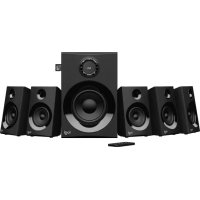
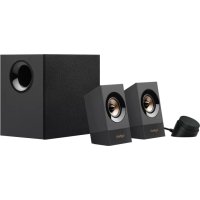
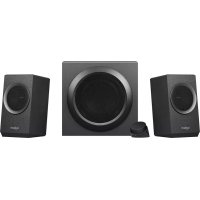
LOGITECH Z600 - Bluetooth speaker

Z600 - Bluetooth speaker LOGITECH - Free user manual and instructions

Find the device manual for free Z600 LOGITECH in PDF.
📄 116 pages English EN Download 💬 AI Question
Notice LOGITECH Z600 - page 4
Pick your language and provide your email: we'll send you a specifically translated version.

User questions about Z600 LOGITECH

0 question about this device. Answer the ones you know or ask your own.

Ask a new question about this device

The email remains private: it is only used to notify you if someone responds to your question.

No questions yet. Be the first to ask one.

Download the instructions for your Bluetooth speaker in PDF format for free! Find your manual Z600 - LOGITECH and take your electronic device back in hand. On this page are published all the documents necessary for the use of your device. Z600 by LOGITECH.

USER MANUAL Z600 LOGITECH

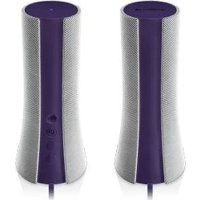
natural_image Two white meshed speakers with textured surfaces against a dark background (no text or symbols visible)

Logitech®

z600

Bluetooth® Speakers

Setup Guide

Logitech Bluetooth Speakers Z600

English. 4

Deutsch 8

Français 12

Italiano....16

Español .20

Português....24

Nederlands .28

Svenska .32

Dansk .36

Norsk 40

Suomi .44

Ελληνικά. 48

По-русски. . . . . . . . . . . . . . . . . . . . . . . . . . . . . . . . . . . . . . . . . . . . . . . . . . . 52

Magyar .56

Česká verze 60

Po polsku .64

Eesti 68

Latviski 72

Lietuvių 76

Hrvatski .80

Srpski .84

Slovenščina .88

Slovenčina. 92

Română 96

Български....100

Українська 104

Türkçe 108

  1. العربية

Logitech Bluetooth Speakers Z600

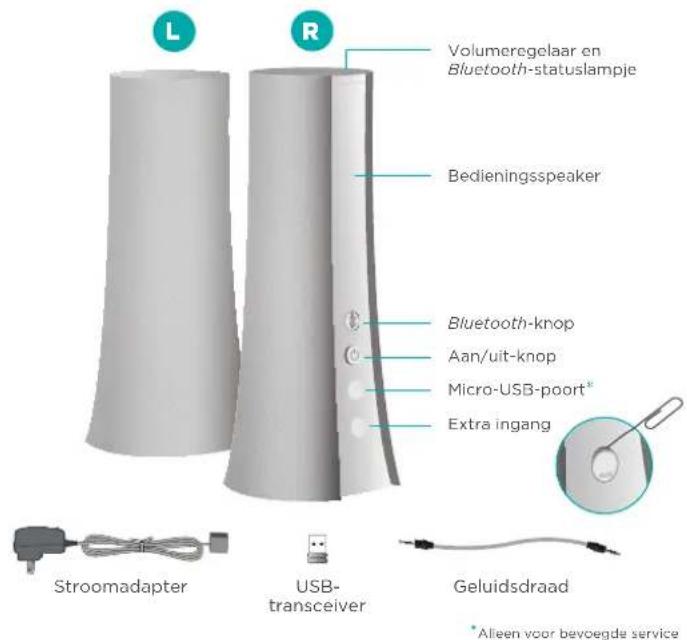
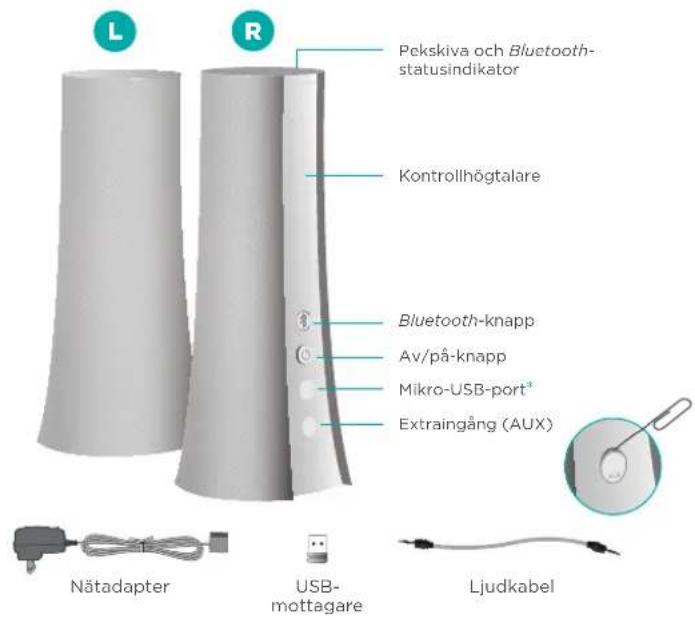
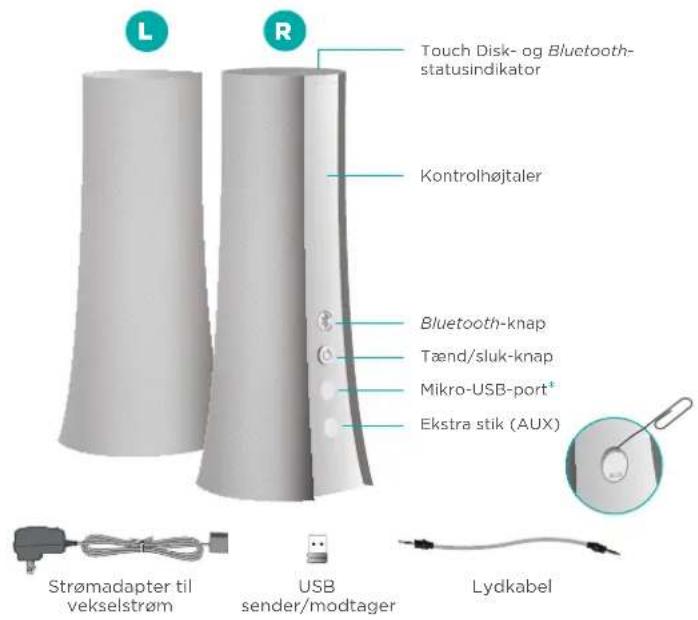
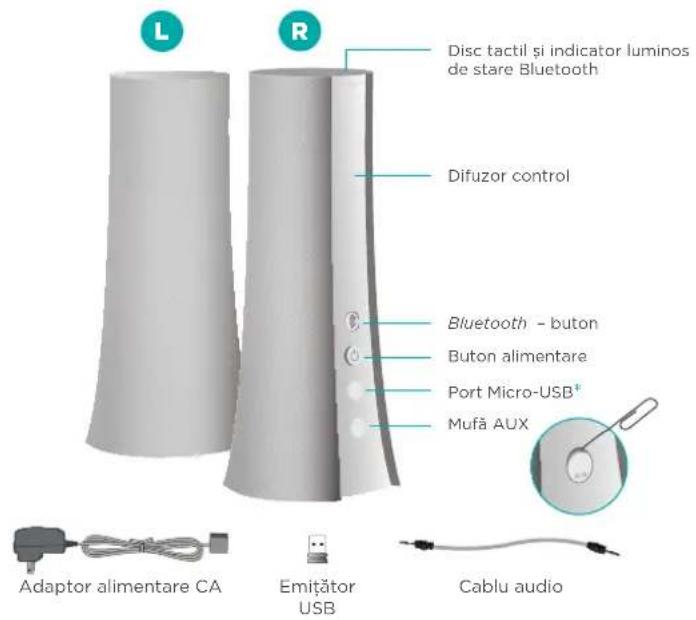
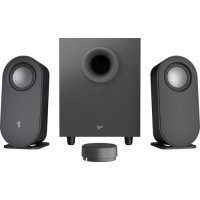
Your speaker system
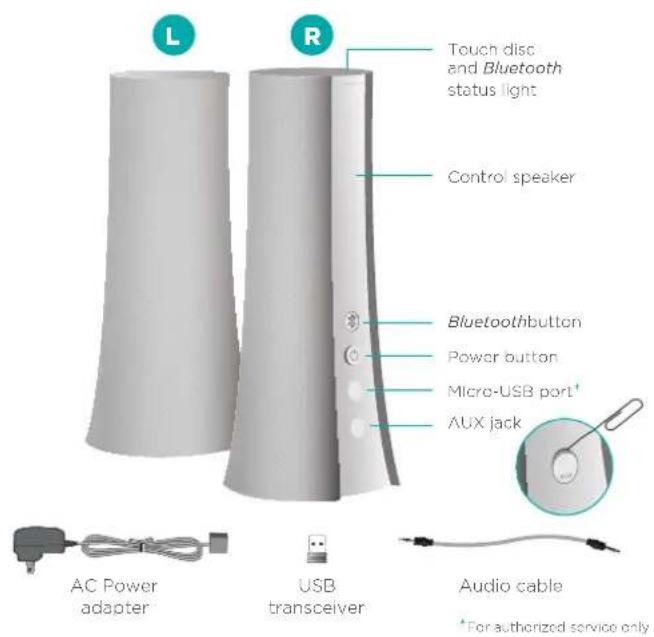
LOGITECH Z600 - 1

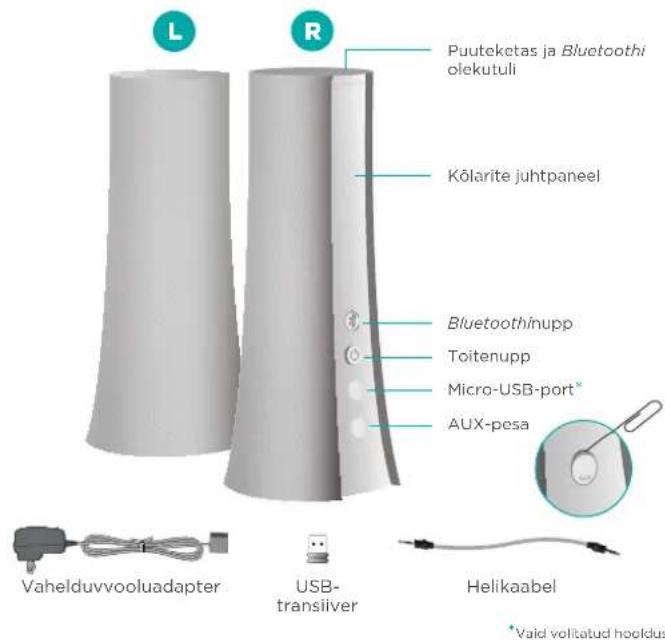
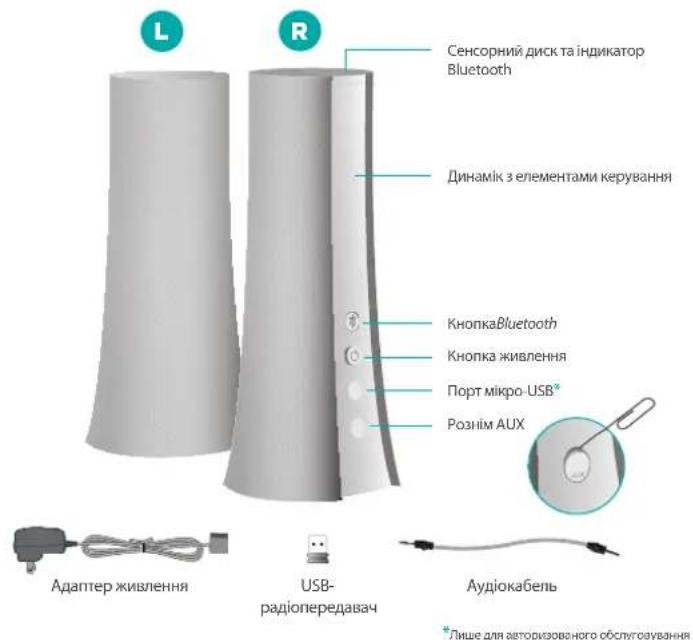
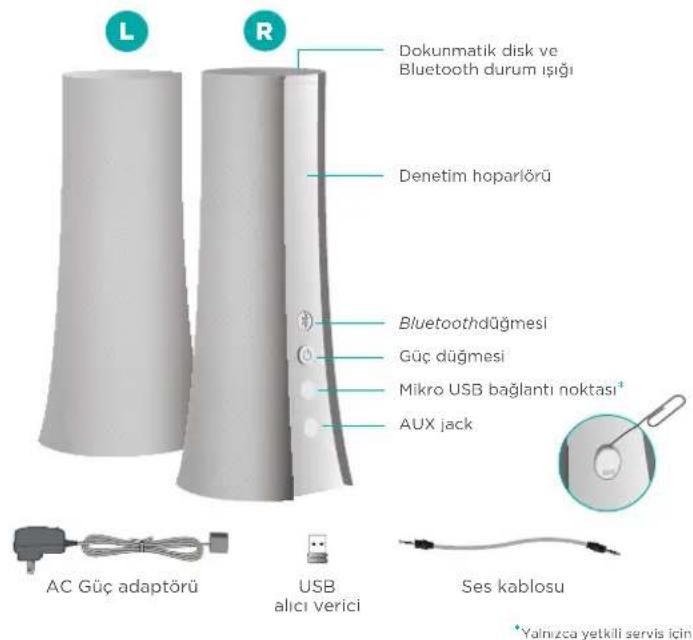
text_image L R Touch disc and Bluetooth status light Control speaker Bluetoothbutton Power button Micro-USB port* AUX jack AC Power adapter USB transceiver Audio cable *For authorized service only

4 English

Attach cables

Connect the speaker wires to the Y-connector and plug the power supply into an outlet.
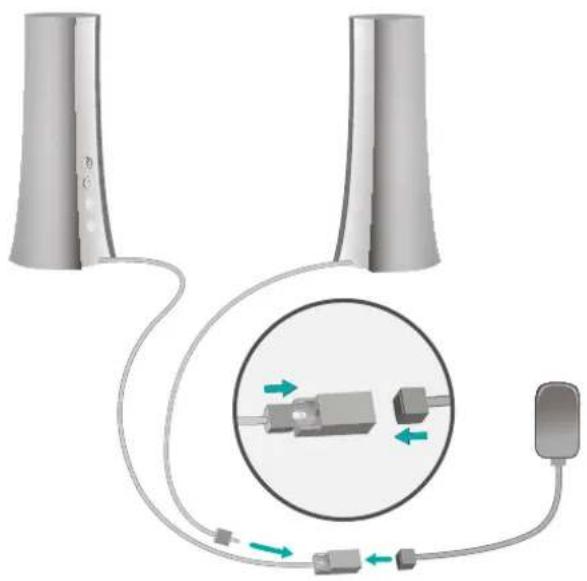
LOGITECH Z600 - Attach cables - 1

natural_image Diagram showing two cylindrical devices connected to a device with a circular inset view of internal components (no text or symbols)

Wireless choices First-time setup

To better fit your audio devices and personal style, Logitech Bluetooth® Speakers Z600 offers a choice of wireless connection options.

USB transceiver

Use the transceiver if your computer doesn't support Bluetooth wireless technology.

LOGITECH Z600 - USB transceiver - 1

natural_image Diagram showing two cylindrical devices connected to a laptop with a connected device icon (no text or symbols)

OR

Bluetooth devices

Use Bluetooth wireless technology to play audio from multiple devices or a device lacking USB.

LOGITECH Z600 - Bluetooth devices - 1

flowchart
graph TD
    A["Two Towers"] --> C["Bluetooth Symbol"]
    B["Smart Device"] --> C
    D["Smart Device"] --> C

Logitech Bluetooth Speakers Z600

On the control speaker

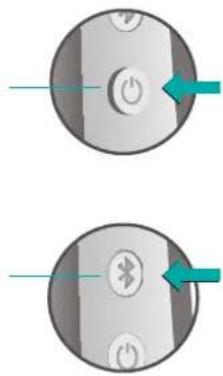
Press the Power button. A tone tells you the speakers are powered on and ready for use.
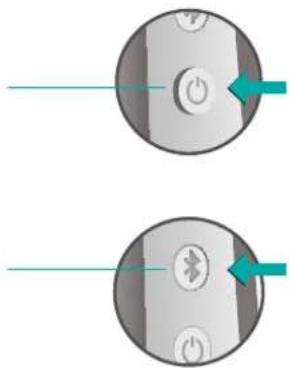
LOGITECH Z600 - On the control speaker - 1

natural_image Two circular buttons with power and Bluetooth indicators, no text or symbols present

Pairing a Bluetooth device

Press the Bluetooth button. The status light blinks rapidly to indicate the speakers are ready for pairing.

On your laptop

LOGITECH Z600 - Pairing a Bluetooth device - 1

Logitech Bluetooth Speakers Z600

Add devices

Pair up to eight Bluetooth devices with your speakers. (Any three devices can connect simultaneously.)

For each device repeat the instructions in "First-time setup."

Adjust volume

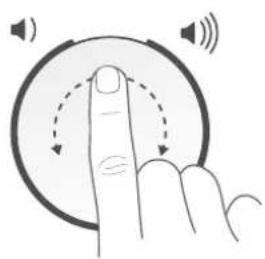
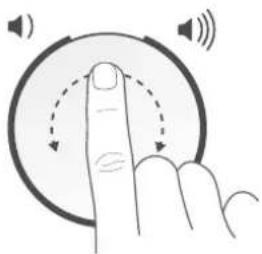
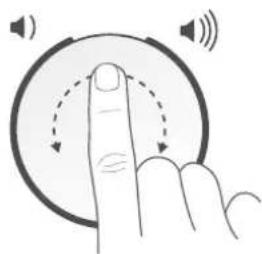
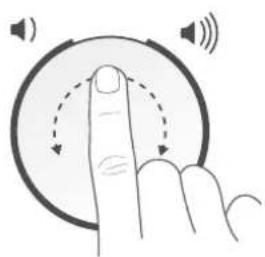
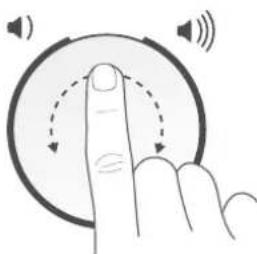
Use the touch disc on top of the right speaker to adjust volume.

Swipe in a clockwise direction to raise the volume. Swipe counterclockwise to lower volume.

Tap once to play a tone confirming the speakers are powered on.

Reconnecting a Bluetooth device

If you paired a device with the speakers, you can reconnect to that device whenever it is within range.

Smartphone/tablet

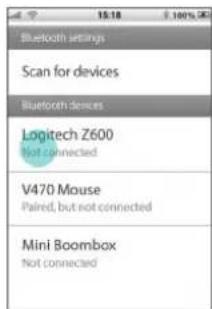
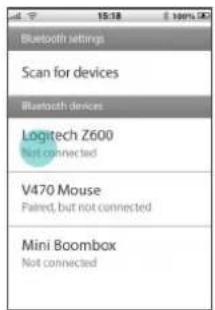
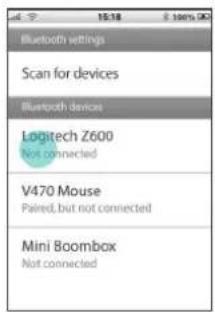
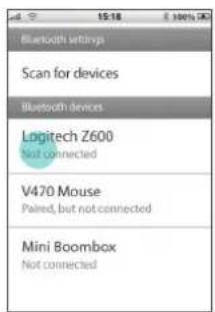
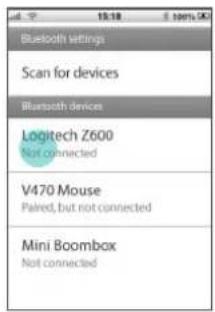
Tap or click Logitech Z600 in the list of available Bluetooth devices.
LOGITECH Z600 - Smartphone/tablet - 1

natural_image Hand gesture pointing at a circular button with sound waves, no text or symbols present

LOGITECH Z600 - Smartphone/tablet - 2

text_image Bluetooth settings Scan for devices Bluetooth devices Logitech Z600 Not connected V470 Mouse Paired, but not connected Mini Boombbox Not connected

Setting sound output on a laptop

If connecting from a laptop, you may also need to reselect the speakers as the sound output device.

Mac OS X Windows 7

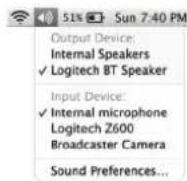
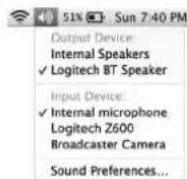
Option-click the volume icon in the menu bar to display audio input/output settings.

Choose Logitech Z600 from the Output Device list.

LOGITECH Z600 - Mac OS X Windows 7 - 1

Windows 8

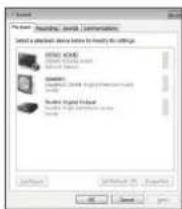
Right-click the Sound icon in the taskbar and select "Playback devices" from the context menu. In the Playback tab, select Logitech Z600 in the list of devices and click Next.

LOGITECH Z600 - Windows 8 - 1

LOGITECH Z600 - Windows 8 - 2

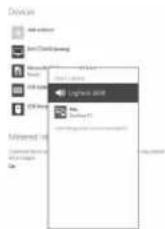
Open the Settings charm and choose Change PC Settings. Click Devices and select Logitech Z600 in the list of devices.

LOGITECH Z600 - Windows 8 - 3

text_image Adobe Advanced AutoCAD Microsoft Teams Microsoft Teams Log-14.2001 AutoCAD Microsoft Teams Log-14.2001

Support Your thoughts?

Visit Product Central, your online destination for world-class support.

www.logitech.com/support/z600

Find tutorials, troubleshooting tips, and guidelines for using Logitech Z600 with Bluetooth devices. Product Central is also home to lively forums that connect you to an active community of knowledgeable users.

Please take a moment to tell us. Thank you for purchasing our product.

www.logitech.com/ithink

Logitech Bluetooth Speakers Z600

natural_image Diagram showing two vertical cylindrical devices connected to a circular device with internal components, no text or symbols present.

8 Deutsch

natural_image Illustration of a finger pressing down on a circular button with sound waves (no text or symbols)
text_image Bluetooth settings Scan for devices Bluetooth devices Logitech Z600 Not connected V470 Mouse Paired, but not connected Mini Boombox Not connected
natural_image Diagram showing two cylindrical devices connected via a cable to a circular connector with internal components, no text or symbols present.

Options sans fil Première configuration

flowchart
graph TD
    A["Conical Tower 1"] --> C["Laptop"]
    B["Conical Tower 2"] --> C["Laptop"]

ou

Dispositifs Bluetooth

natural_image Hand gesture pointing at a circular button with sound waves, no text or symbols present
text_image ad 15:18 sems.90 Bluetooth settings Scan for devices Bluetooth devices Logitech Z600 Not connected V470 Mouse Paired, but not connected Mini Boombox Not connected

www.logitech.com/ithink

Logitech Bluetooth Speakers Z600

natural_image Diagram showing two cylindrical devices connected to a circular device with internal components, no text or symbols present.
flowchart
graph TD
    A["User Icon"] --> B["Device"]
    C["Device"] --> B
    B --> D["Laptop"]

OPPURE

natural_image Hand gesture pointing at a circular button with sound waves, no text or symbols present
text_image Bluetooth settings Scan for devices Bluetooth devices Logitech Z600 Not connected V470 Mouse Paired, but not connected Mini Boombox Not connected

www.logitech.com/ithink

Logitech Bluetooth Speakers Z600

natural_image Diagram showing two cylindrical devices connected to a circular device with internal components, no text or symbols present.
flowchart
graph TD
    A["Large Cylinder"] --> C["Bluetooth Symbol"]
    B["Small Device"] --> C
    D["Smartphone"] --> C

Logitech Bluetooth Speakers Z600

natural_image Circular device with a power button and a green arrow pointing to it, no text or symbols present.
natural_image Circular device with Bluetooth and power button symbols, no readable text or labels

En el portátil
LOGITECH Z600 - www.logitech.com/ithink - 1

Logitech Bluetooth Speakers Z600

natural_image Hand gesture pointing at a circular button with sound waves, no text or symbols present

Reconectar un dispositivo Bluetooth

text_image Bluetooth settings Scan for devices Bluetooth devices Logitech Z600 Not connected V470 Mouse Paired, but not connected Mini Boombox Not connected

www.logitech.com/ithink

Logitech Bluetooth Speakers Z600

natural_image Diagram showing two cylindrical devices connected to a circular device with internal components, no text or symbols present.

Logitech Bluetooth Speakers Z600

flowchart
graph TD
    A["Two cylindrical objects"] --> B["Laptop"]
    style B fill:#fff,stroke:#000
    note right of B: USB icon

ou

Dispositivos Bluetooth

natural_image Hand gesture pointing at a circular button with sound waves, no text or symbols present
text_image Bluetooth settings Scan for devices Bluetooth devices Logitech Z600 Not connected V470 Mouse Paired, but not connected Mini Boombox Not connected

Configurar a saída de som num computador portátil

www.logitech.com/ithink

Logitech Bluetooth Speakers Z600

Uw speakersysteem
LOGITECH Z600 - www.logitech.com/ithink - 1

natural_image Diagram showing two connected devices with a magnified inset illustrating internal components (no text or symbols)
flowchart
graph TD
    A["Two cylindrical tanks"] --> C["Laptop"]
    style C fill:#fff,stroke:#000
    note right of C: User icon

OF

Bluetooth-apparaten

natural_image Hand gesture pointing at a circular button with sound waves, no text or symbols present
text_image Bluetooth settings Scan for devices Bluetooth devices Logitech Z600 Not connected V470 Mouse Paired, but not connected Mini Boombox Not connected

www.logitech.com/ithink

Logitech Bluetooth Speakers Z600

Ditt högtalarsystem
LOGITECH Z600 - Bluetooth-apparaten - 1

natural_image Diagram showing two vertical cylindrical devices connected to a circular device with internal components, no text or symbols present.
flowchart
graph TD
    A["User Icon"] --> B["Laptop"]
    C["Input Device"] --> B
    D["Input Device"] --> B

ELLER

Bluetooth-enheter

natural_image Two circular buttons with icons and arrows pointing to them, no text or symbols present

Koppla en Bluetooth-enhet

text_image Bluetooth settings Scan for devices Bluetooth devices Logitech Z600 Not connected V470 Mouse Paired, but not connected Mini Boombbox Not connected

LOGITECH Z600 - Koppla en Bluetooth-enhet - 1

natural_image Hand gesture pointing at a circular button with sound waves, no text or symbols present

www.logitech.com/ithink

Logitech Bluetooth Speakers Z600

Højtalersystemet
LOGITECH Z600 - www.logitech.com/ithink - 1

natural_image Diagram showing two connected devices with a magnified inset illustrating internal components (no text or symbols)
flowchart
graph TD
    A["Large cylindrical device"] --> C["Bluetooth Icon"]
    B["Small electronic device"] --> C
    C --> D["Mobile Device"]

Logitech Bluetooth Speakers Z600

natural_image Two circular icons with power and Bluetooth buttons, each with a green arrow pointing to it (no text or symbols)
natural_image Hand gesture pointing at a circular button with sound waves, no text or symbols present
text_image Bluetooth settings Scan for devices Bluetooth devices Logitech Z600 Not connected V470 Mouse Paired, but not connected Mini Boombox Not connected

www.logitech.com/ithink

natural_image Diagram showing two cylindrical devices connected to a circular device with internal components, no text or symbols present.
natural_image Hand gesture pointing at a circular button with sound waves, no text or symbols present

LOGITECH Z600 - www.logitech.com/ithink - 1

text_image Scan for devices Bluetooth devices Logitech Z600 Not connected V470 Mouse Paired, but not connected Mini Boombox Not connected
natural_image Diagram showing two connected devices with a magnified inset illustrating internal components (no text or symbols)

Logitech Bluetooth Speakers Z600

flowchart
graph TD
    A["Two cylindrical devices"] --> C["Laptop"]
    B["User icon"] --> C

TAI

Bluetooth-laitteet

flowchart
graph TD
    A["Large cylindrical device"] --> C["Bluetooth Symbol"]
    B["Small electronic device"] --> C
    C --> D["Mobile Device"]
natural_image Hand gesture pointing at a circular button with sound waves, no text or symbols present

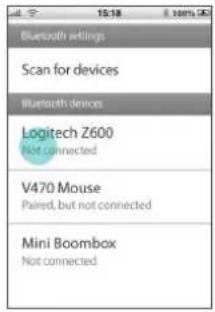
Tap or click Logitech Z600 in the list of available Bluetooth devices.
LOGITECH Z600 - Bluetooth-laitteet - 1

text_image Scan for devices Bluetooth devices Logitech Z600 Not connected V470 Mouse Paired, but not connected Mini Boombox Not connected
text_image Send Send: Send: Send: Commandants Send any command to send before this message. No findings NOTICE (NOT) Send to: Send to: Send to: Send to: Send to: Send to: Send to: Send to: Send to: Send to: Send to: Send to: Send to: Send to: Send to: Send to: Send to: Send to: Send to: Send to: Send to: Send to: Send to: Send to: Send to: Send to: Send to: Send to: Send to: Send to: Send to: Send to: Send to: Send to: S Send to: Send to: Send to:

www.logitech.com/ithink

www.logitech.com/support/z600

natural_image Diagram showing two connected devices with a magnified inset illustrating internal components (no text or symbols)
flowchart
graph TD
    A["Input Device 1"] --> C["Laptop"]
    B["Input Device 2"] --> C["Laptop"]

'H

Συσκευές Bluetooth

flowchart
graph TD
    A["Smart Device"] --> B["Bluetooth Symbol"]
    C["Smart Device"] --> B
    D["Smart Device"] --> B

Logitech Bluetooth Speakers Z600

Στον έλεγχο ηχείων

natural_image Two circular icons with power and Bluetooth buttons, each with a teal arrow pointing to it (no text or symbols)
text_image Bluetooth settings Scan for devices Bluetooth devices Logitech Z600 Not connected V470 Mouse Paired, but not connected Mini Boombbox Not connected

LOGITECH Z600 - Στον έλεγχο ηχείων - 1

natural_image Hand gesture pointing at a circular button with sound waves, no text or symbols present

www.logitech.com/ithink

Logitech Bluetooth Speakers Z600

natural_image Diagram showing two connected devices with a magnified inset illustrating internal components (no text or symbols)

Logitech Bluetooth Speakers Z600

flowchart
graph TD
    A["Two cylindrical devices"] --> C["Laptop"]
    style C fill:#fff,stroke:#000
    note right of C: Dot-dash line connecting 'Device 1' to 'Laptop'

ИЛИ

text_image Bluetooth settings Scan for devices Bluetooth devices Logitech Z600 Not connected V470 Mouse Paired, but not connected Mini Boombox Not connected

LOGITECH Z600 - www.logitech.com/ithink - 1

natural_image Hand gesture pointing at a circular button with sound waves, no text or symbols present

Output Device: Internal Speakers √ Logitech BT Speaker

Input Device: ✓ Internal microphone Logitech Z600 Broadcaster Camera

Sound Preferences.

LOGITECH Z600 - www.logitech.com/ithink - 2

LOGITECH Z600 - www.logitech.com/ithink - 3

www.logitech.com/ithink

natural_image Diagram showing two cylindrical devices connected to a circular device with internal components, no text or symbols present.
flowchart
graph TD
    A["Large cylinder tank"] --> C["Laptop"]
    B["Small circle icon"] --> C["Laptop"]

VAGY

Bluetooth-eszközök

flowchart
graph TD
    A["Large cylindrical device"] --> C["Bluetooth Symbol"]
    B["Small electronic device"] --> C
    C --> D["Smartphone"]

Logitech Bluetooth Speakers Z600

text_image Bluetooth settings Scan for devices Bluetooth devices Logitech Z600 Not connected V470 Mouse Paired, but not connected Mini Boombbox Not connected

LOGITECH Z600 - Bluetooth-eszközök - 1

natural_image Hand icon pointing at a circular button with sound waves, no text or symbols present

www.logitech.com/ithink

natural_image Diagram showing two connected devices with a magnified inset illustrating internal components (no text or symbols)
flowchart
graph TD
    A["Two cylindrical devices"] --> C["Laptop"]
    style C fill:#fff,stroke:#000
    note right of C: Device icon (red circle)

NEBO

Zařízení Bluetooth

flowchart
graph LR
    A["Device Icon"] --> B["Laptop"]

Logitech Bluetooth Speakers Z600
LOGITECH Z600 - Zařízení Bluetooth - 1

natural_image Two circular icons with arrows pointing to power and Bluetooth buttons (no text or symbols)

Logitech Bluetooth Speakers Z600

Přidání zařízení

text_image Bluetooth settings Scan for devices Bluetooth devices Logitech Z600 Not connected V470 Mouse Paired, but not connected Mini Boombbox Not connected

LOGITECH Z600 - Přidání zařízení - 1

natural_image Hand gesture pointing upward with sound waves around the circle (no text or symbols)

www.logitech.com/ithink

natural_image Diagram showing two cylindrical devices connected to a device with a magnified inset illustrating internal components (no text or symbols present)

Logitech Bluetooth Speakers Z600

flowchart
graph TD
    A["Device Icon"] --> B["Input Device"]
    C["Input Device"] --> D["Output Device"]

LUB

natural_image Illustration of a finger pressing a circular button with sound waves, no text or symbols present

LOGITECH Z600 - Přidání zařízení - 2

text_image Bluetooth settings Scan for devices Bluetooth devices Logitech Z600 Not connected V470 Mouse Paired, but not connected Mini Boombox Not connected

www.logitech.com/ithink

Logitech Bluetooth Speakers Z600

Teie kölarisüsteem
LOGITECH Z600 - www.logitech.com/ithink - 1

text_image L R Puuteketas ja Bluetooth olekutuli Kõlarite juhtpaneel Bluetoothinupp Toitenupp Micro-USB-port* AUX-pesa Vahelduvvooluadapter USB- transiiver Helikaabel * Vaid volitatud hooldus

Kaablite paigaldamine

natural_image Diagram showing two connected devices with a magnified inset illustrating internal components (no text or symbols)
natural_image Hand gesture pointing at a circular button with sound waves, no text or symbols present
text_image Bluetooth settings Scan for devices Bluetooth devices Logitech Z600 Not connected V470 Mouse Paired, but not connected Mini Boombox Not connected

www.logitech.com/ithink

natural_image Diagram showing two connected devices with a circular inset illustrating internal components (no text or symbols)
flowchart
graph TD
    A["Two cylindrical devices"] --> C["Laptop"]
    style C fill:#fff,stroke:#000
    style_D["Central Device Icon"] -.-> C

VAI
Bluetooth ierices

flowchart
graph TD
    A["Large cylindrical device"] --> C["Bluetooth Symbol"]
    B["Small electronic device"] --> C
    D["Small smartphone"] --> C
natural_image Two circular icons with arrows pointing to power and Bluetooth symbols, no text or labels present.
natural_image Hand gesture pointing at a circular button with sound waves, no text or symbols present

LOGITECH Z600 - Kaablite paigaldamine - 1

text_image Bluetooth settings Scan for devices Bluetooth devices Logitech Z600 Not connected V470 Mouse Paired, but not connected Mini Boombox Not connected

Logitech Bluetooth Speakers Z600

www.logitech.com/ithink
natural_image Diagram showing two cylindrical devices connected to a circular device with internal components, no text or symbols present.
flowchart
graph TD
    A["Two cylindrical tanks"] --> B["Laptop"]
    C["User icon"] -.-> B
natural_image Two circular icons showing power and Bluetooth components with arrows pointing to them (no text or symbols)
natural_image Hand gesture pointing at a circular button with sound waves, no text or symbols present

Pakartotinis „Bluetooth“ irenginio prijungimas

text_image Scan for devices Bluetooth devices Logitech Z600 Not connected V470 Mouse Paired, but not connected Mini Boombox Not connected

www.logitech.com/ithink

natural_image Diagram showing two cylindrical devices connected to a circular device with internal components, no text or symbols present.

Bežični izbori Prvo postavljanje

Da bi audiouređaji bolje odgovarali vašem osobnom stilu, Logitech Bluetooth® Speakers Z600 zvučnici nude izbor mogućnosti bežičnog povezivanja.

USB primopredajnik

Upotrijebite primopredajnik ako računalo ne podržava Bluetooth bežičnu tehnologiju.

LOGITECH Z600 - USB primopredajnik - 1

flowchart
graph TD
    A["Large cylinder"] --> C["Laptop"]
    B["Small robot icon"] --> C["Laptop"]

ILI

Bluetooth uređaji

natural_image Circular device with a power button and a teal arrow pointing to it (no text or symbols)

Uparivanje Bluetooth uređaja

natural_image Close-up of a computer mouse with a power button and speaker icon, no visible text or symbols
natural_image Hand icon pointing at a circular button with sound waves, no text or symbols present

Ponovno povezivanje Bluetooth uređaja

text_image Bluetooth settings Scan for devices Bluetooth devices Logitech Z600 Not connected V470 Mouse Paired, but not connected Mini Boombax Not connected

www.logitech.com/ithink

natural_image Diagram showing two connected devices with a circular inset illustrating internal components (no text or symbols)

Bežični izbori Prvo podešavanje

flowchart
graph TD
    A["Device 1"] --> C["Laptop"]
    B["Device 2"] --> C["Laptop"]

ILI

Bluetooth uređaji

Koristite Bluetooth bežičnu tehnologiju za reprodukovanje zvuka sa više uređaja ili uređaja koji nema USB.

LOGITECH Z600 - Bluetooth uređaji - 1

flowchart
graph TD
    A["Two Towers"] --> C["Central Device"]
    B["Smartphone"] --> C
    D["Mobile Device"] --> C
    C --> E["Bluetooth Symbol"]

Logitech Bluetooth Speakers Z600

Na kontrolnom zvučniku

natural_image Hand gesture pointing at a circular button with sound waves, no text or symbols present

Ponovno povezivanje Bluetooth uređaja

Ako ste uparili uređaj sa zvučnicima, možete da ponovo povežete sa tim uređajem svaki put kada je u opsegu.

Pametni telefon/tablet

Dodirnite ili kliknite na Logitech Z600 na listi dostupnih Bluetooth uredaja.

LOGITECH Z600 - Pametni telefon/tablet - 1

text_image Bluetooth settings Scan for devices Bluetooth devices Logitech Z600 Not connected V470 Mouse Paired, but not connected Mini Boombox Not connected

Podešavanje zvučnog izlaza na laptop računaru

Ako povezujete sa laptop računara, možda ćete morati da ponovo izaberete zvučnike kao izlazni uređaj za zvuk.

Mac OS X Windows 7

Kliknite na ikonu za jačinu zvuka na traci menija da biste prikazali podešavanja za ulaz/ izlaz zvuka.

Odaberite „Logitech Z600“ sa liste izlaznih uredaja.

LOGITECH Z600 - Mac OS X Windows 7 - 1

Kliknite na ikonu za zvuk na traci zadataka i izaberite „Playback devices" (Reprodukuj uređaje) u kontekstualnom meniju. Na kartici „Playback" (Reprodukcija) izaberite „Logitech Z600" na listi uredaja i kliknite na dugme „Next" (Dalje).

LOGITECH Z600 - Mac OS X Windows 7 - 2

text_image Settings Setting / Options / Settings Select the following: File Type (Windows Not App) OK Cancel Help OK Cancel Help Set to: [ ] 保存文件 (100%) [ ] 查看文件 (100%) [ ] 执行工作 (100%) [ ] 状态 (100%) [ ] 帮助 (100%) [ ] 取消 (100%) [ ] 关闭 (100%) [ ] 帮助 (100%) [ ] 取消 (100%) [ ] 帮助 (100%) [ ] 取消 (100%) [ ] 帮助 (100%) [ ] 取消 (100%) [ ] 帮助 (100%) [ ] 取消 (100%) [ ] 帮助 (100%) [ ] 取消 (100%) [ ] [ ] 帮助 (100%) [ ] 取消 (100%) [ ] 帮助 (100%) [ ] 取消 (100%) [ ] 帮助 (100%) [ ] 取消 (100%) [ ] 帮助 (100%) [ ] 取消 (100%) [ ] 帮助 (99.99) [ ] 变动 (99.99) [ ] 变动 (99.99) [ ] 变动 (99.99) [ ] 变动 (99.99) [ ] 变动 (99.99) [ ] 变动 (99.99) [ ] 变动 (99.99) [ ] 变动 (99.99) [ ] 变动 (99,99) [ ] 变动 (99,99) [ ] 变动 (99,99) [ ] 变动 (99,99) [ ] 变动 (99,99) [ ] 变动 (99,99) [ ] 变动 (99,99) [ ] 变动 (99,99) [ ] 变动 (99,99) [ ] 变动 (99,99) [ ] 变动 (99,99) [ ] 变动 (99,99) [ ] 变动 (99,99) [ ] 变动 (99,99) [ ] 变动 (99,99) [ ] 变动 (99,99) [ ] 变动 (99,99) [ ] 变 动 (88.88) [ ] 变 动 (88.88) [ ] 变 动 (88.88) [ ] 变 动 (88.88) [ ] 变 动 (88.88) [ ] 变 动 (88.88) [ ] 变 动 (88.88) [ ] 变 动 (88.88) [ ] 变 动 (67.23) [ ] 变 动 (67.23) [ ] 变 动 (67.23) [ ] 变 动 (67.23) [ ] 变 动 (67.23) [ ] 变 动 (67.23) [ ] 变 动 (67.23) [ ] 变 动 (67.23) [ ] 变 动 (54.44) [ ] 变 动 (54.44) [ ] 变 动 (54.44) [ ] 变 动 (54.44) [ ] 变 动 (54.44) [ ] 变 动 (54.44) [ ] 变 动 (54.44) [ ] 变 动 (54.44) [ ] 变 动 (67.23) [ ] 变 动 (67.23) [ ] 变 动 (67.23) [ ] 变 动 (67.23) [ ] 变 动 (67.23) [ ] 变 动 (67.23) [ ] 变 动 (67.23) [ ] 变 动 (36.55) [ ] 变 动 (36.55) [ ] 变 动 (36.55) [ ] 变 动 (36.55) [ ] 变 动 (36.55) [ ] 变 动 (36.55) [ ] 变 动 (36.55) [ ] 变 动 (36.55) [ ] 变 动 (67.23) [ ] 变 动 (67.23) [ ] 变 动 (67.23) [ ] 变 动 (67.23) [ ] 变 动 (67.23) [ ] 变 动 (67.23) [ ] 变 动 (67.23) OK Cancel Help

LOGITECH Z600 - Mac OS X Windows 7 - 3

Otvorite meni „Settings“ (Postavke) i odaberite „Change PC Settings“ (Promeni postavke računara). Kliknite na „Devices“ (Uređaji) i izaberite „Logitech Z600“ na listi uredaja.

LOGITECH Z600 - Mac OS X Windows 7 - 4

Logitech Bluetooth Speakers Z600

www.logitech.com/ithink

natural_image Diagram showing two cylindrical devices connected to a circular device with internal components, no text or symbols present.
flowchart
graph TD
    A["Large Cylinder"] --> C["Bluetooth Symbol"]
    B["Small Tablet"] --> C
    D["Smartphone"] --> C

Logitech Bluetooth Speakers Z600
Na kontrolnem zvočniku

Pritisnite gumb za vklop/izklop. Zvočni signal vam pove, da so zvočniki vklopljeni in pripravljeni za uporabo.

natural_image Hand gesture pointing at a circular button with sound waves, no text or symbols present
text_image Bluetooth settings Scan for devices Bluetooth devices Logitech Z600 Not connected V470 Mouse Paired, but not connected Mini Boombox Not connected

Logitech Bluetooth Speakers Z600

www.logitech.com/ithink

Logitech Bluetooth Speakers Z600

natural_image Diagram showing two cylindrical devices connected to a circular device with internal components, no text or symbols present.

Logitech Bluetooth Speakers Z600

natural_image Hand icon pointing at a circular button with sound waves, no text or symbols present
text_image Bluetooth settings Scan for devices Bluetooth devices Logitech Z600 Not connected V470 Mouse Paired, but not connected Mini Boombox Not connected

www.logitech.com/ithink

Logitech Bluetooth Speakers Z600

Sistemul de difuzoare
LOGITECH Z600 - www.logitech.com/ithink - 1

natural_image Diagram showing two cylindrical devices connected via a cable to a circular connector with internal components, no text or symbols present.
natural_image Hand gesture pointing at a circular button with sound waves, no text or symbols present
text_image Bluetooth settings Scan for devices Bluetooth devices Logitech Z600 Not connected V470 Mouse Paired, but not connected Mini Boombox Not connected

Logitech Bluetooth Speakers Z600

www.logitech.com/ithink

Logitech Bluetooth Speakers Z600

natural_image Diagram showing two connected devices with a magnified inset illustrating internal components (no text or symbols)
flowchart
graph TD
    A["Large cylindrical device"] --> C["Laptop"]
    B["Large cylindrical device"] --> C["Laptop"]

ИЛИ

natural_image Close-up of a circular button with a power button and a teal arrow pointing to it (no text or symbols)
natural_image Close-up of a circular device with a Bluetooth symbol and power button, no text or labels visible

На вашия лаптол
LOGITECH Z600 - www.logitech.com/ithink - 2

Logitech Bluetooth Speakers Z600

natural_image Hand gesture pointing at a circular button with sound waves, no text or symbols present
text_image Bluetooth settings Scan for devices Bluetooth devices Logitech Z600 Not connected V470 Mouse Paired, but not connected Mini Boombox Not connected

Output Device: Internal Speakers √ Logitech BT Speaker

Input Device: ✓ Internal microphone Logitech Z600 Broadcaster Camera Sound Preferences...

LOGITECH Z600 - www.logitech.com/ithink - 3

www.logitech.com/ithink

Logitech Bluetooth Speakers Z600

Система динаміків
LOGITECH Z600 - www.logitech.com/ithink - 1

natural_image Diagram showing two connected devices with a magnified inset illustrating internal components (no text or symbols)

Logitech Bluetooth Speakers Z600

flowchart
graph TD
    A["Large cylinder"] --> C["Laptop"]
    B["Small circle icon"] --> C["Laptop"]

АБО

Пристрої Bluetooth

flowchart
graph TD
    A["Two Towers"] --> C["Bluetooth Symbol"]
    B["Smartphone"] --> C
    D["Smartphone"] --> C
natural_image Two circular icons with arrows pointing to a power button and Bluetooth symbol (no text or labels)
natural_image Hand gesture pointing at a circular button with sound waves, no text or symbols present
text_image Bluetooth settings Scan for devices Bluetooth devices Logitech Z600 Not connected V470 Mouse Paired, but not connected Mini Boombox Not connected

www.logitech.com/ithink

Logitech Bluetooth Speakers Z600

Hoparlör sisteminiz
LOGITECH Z600 - Пристрої Bluetooth - 1

natural_image Diagram showing two cylindrical devices connected to a circular device with internal components, no text or symbols present.
flowchart
graph TD
    A["Input Device 1"] --> C["Laptop"]
    B["Input Device 2"] --> C["Laptop"]

VEYA:

Bluetooth aygıtları

natural_image Hand gesture pointing at a circular button with sound waves, no text or symbols present
text_image Bluetooth settings Scan for devices Bluetooth devices Logitech Z600 Not connected V470 Mouse Paired, but not connected Mini Boombox Not connected

www.logitech.com/ithink

natural_image Diagram showing two cylindrical devices connected via a cable to a device with a magnified inset illustrating internal components (no text or symbols)

Logitech Bluetooth Speakers Z600

LOGITECH Z600 - www.logitech.com/ithink - 1

www.logitech.com/ithink

LOGITECH Z600 - www.logitech.com/ithink - 2

text_image Bluetooth settings Scan for devices Bluetooth devices Logitech Z600 Not connected V470 Mouse Paired, but not connected Mini Boombox Not connected

إضافة أجهزة

natural_image Hand gesture pointing at a circular button with sound waves, no text or symbols present

Log tech Bluetooth Speakers Z600

Phone numbers

LOGITECH Z600 - Phone numbers - 1

Belgié/Be gique Dutch: -32 (0)2 200 64 44; French: +32 (0)2 200 64 40

Česká Repuolika +420 239 000 335

Eastern Europe English: 41-(0)227614025

Argentina 0800 555 3284

Brasil -0800 891 4173

Canada +1-866-934-5644

Chile -230 020 5484

Colombia 01-800-913-6668

Latin America 1800-578-9619

Mexico 01,800,800,4500

United States -1 646-454-3200

LOGITECH Z600 - Phone numbers - 2

Logitech

©2013 Logitech, Logitech, the Logitech logo, and other Logitech marks are owned by Logitech and may be registered. The Bluetooth word mark and logos are registered trademarks of Bluetooth SIG, Inc. Mac and OS X are trademarks of Apple Inc., registered in the U.S. and other countries. Windows, Windows 7, and Windows 8 are either registered trademarks or trademarks of Microsoft Corporation. All other trademarks are the property of their respective owners. Logitech assumes no responsibility for any errors that may appear in this manual. Information contained herein is subject to change without notice.

620-004756 004
Manual assistant
Powered by Anthropic
Waiting for your message
Product information

Brand : LOGITECH

Model : Z600

Category : Bluetooth speaker