Exercise Monitor E203 - Exercise bike Energetics - Free user manual and instructions
Find the device manual for free Exercise Monitor E203 Energetics in PDF.



Frequently Asked Questions - Exercise Monitor E203 Energetics
User questions about Exercise Monitor E203 Energetics
0 question about this device. Answer the ones you know or ask your own.
Ask a new question about this device
Download the instructions for your Exercise bike in PDF format for free! Find your manual Exercise Monitor E203 - Energetics and take your electronic device back in hand. On this page are published all the documents necessary for the use of your device. Exercise Monitor E203 by Energetics.
USER MANUAL Exercise Monitor E203 Energetics
Exercise Monitor E-203
ENERGETICS
Content
Introduction 02
Legend 03
The display and it's symbols 04
The computer housing 04
Assembly and activation 05
Connecting the computer 05
Computer activation 05
Start, control and signals 05
Sleep mode 05
Quick start 06
Basic values and settings 07
Programs - functions and settings 08
What is a program 08
Individual settings/training parameters 08
Application of the programs 10
General information about the programs 14
Display features during the program 14
Selection and setting of programs 15
Custom programs 15
Manual Program (P 1) 15
User program (P 7) 17
Preset programs (P 2-6) 19
Tour (P 2) 20
Interval (P 3) 20
Summit (P 4) 21
Hill (P 5) 21
Transition (P 6) 21
BMI-Body Fat Measurement (P 8) 21
Recovery Program 24
Pause/interrupt exercise and reset 24
Safety 24
Frequently asked questions 25
Service 26
Troubleshooting 26
Care 26
Maintenance 26
Introduction
Dear customer
We thank you for choosing ENERGETICS Fitness Equipments.
The computer offers a multitude of possibilities to design a work out that is, based on sports science, both effective and offers variety. The various programs support your work outs and help you plan your exercise to achieve maximum effectiveness.
The preset programs allow you to make various individual changes or you can design your own program.
Additionally the computer calculates your BMI and body fat. Through the recovery rating you can see the improvement in fitness that comes with regular training.
This manual was carefully written and contains next to the purely technical user descriptions many suggestions and advice to help with your training. We would also like to point out that you can find more useful and detailed trainings information on the ENERGETICS CD "Personal Training Instruction". Before you start your work out please read the computer manual carefully.
We wish you success and continued enjoyment using your ENERGETICS Fitness Equipment.
Your ENERGETICS -Team
Legend
MANUAL
Program 1 (custom) - Manual

Program 2 (preset) - Tour

Program 3 (preset) - Interval

Program 4 (preset) - Summit

Program 5 (preset) - Hill

Program 6 (preset) - Transition

Program 7 (custom) - User

Program 8 (measurement function) - BMI-Body Fat

Up-key

Down-key

Recovery-key press

Start/Stop-key press

Set-key press

Hand pulse sensor hold firmly

ENERGETICS
User Manual
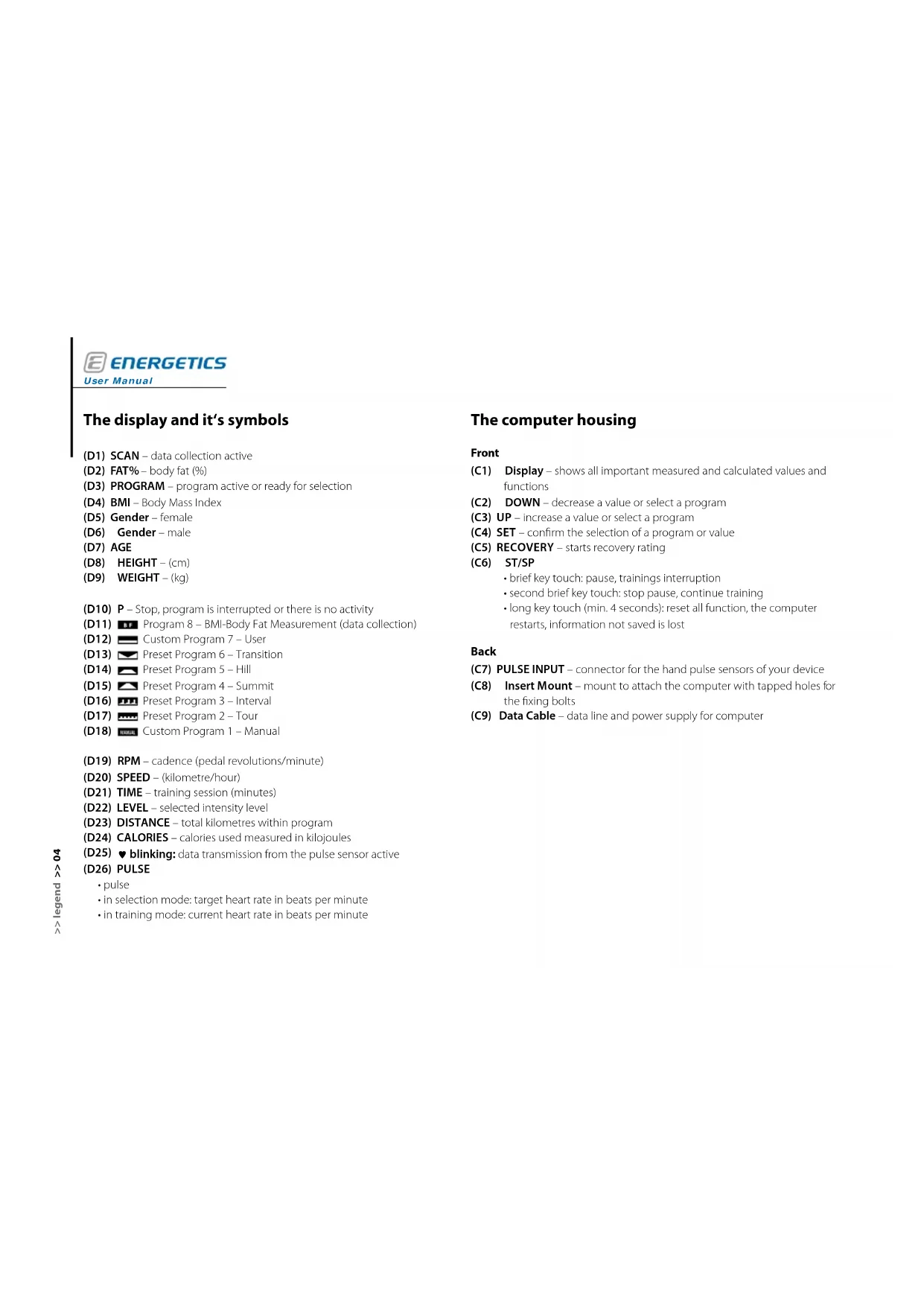
The display and it's symbols
(D26)PULSE
(D1) SCAN - data collection active
(D2) FAT% - body fat (%)
(D3) PROGRAM - program active or ready for selection
(D4) BMI - Body Mass Index
(D5) Gender - female
(D6) Gender-male
(D7) AGE
(D8)HEIGHT - (cm)
(D9) WEIGHT-(kg)
(D10) P - Stop, program is interrupted or there is no activity
(D11) Program 8 - BMI-Body Fat Measurement (data collection)
(D12) Custom Program 7 - User
(D13) Preset Program 6-Transition
(D14) Preset Program 5-Hill
(D15) Preset Program 4 - Summit
(D16) Preset Program 3-Interval
(D17) Preset Program 2 - Tour
(D18) Custom Program 1 - Manual
(D19) RPM - cadence (pedal revolutions/minute)
(D20) SPEED - (kilometre/hour)
(D21) TIME - training session (minutes)
(D22) LEVEL - selected intensity level
(D23) DISTANCE - total kilometres within program
(D24) CALORIES - calories used measured in kilojoules
(D25) blinking: data transmission from the pulse sensor active
·pulse
in selection mode: target heart rate in beats per minute
- in training mode: current heart rate in beats per minute
The computer housing
Front
(C1) Display - shows all important measured and calculated values and functions
(C2) DOWN - decrease a value or select a program
(C3) UP - increase a value or select a program
(C4) SET - confirm the selection of a program or value
(C5) RECOVERY - starts recovery rating
(C6) ST/SP
- brief key touch: pause, trainings interruption
- second brief key touch: stop pause, continue training
- long key touch (min. 4 seconds): reset all function, the computer restarts, information not saved is lost
Back
(C7) PULSE INPUT - connector for the hand pulse sensors of your device
(C8) Insert Mount - mount to attach the computer with tapped holes for the fixing bolts
(C9) Data Cable - data line and power supply for computer
Assembly and activation
Connecting the computer
Data cable: Connect the data cable coming from the equipment with the one coming from the computer [1].
Mounting: Attach the computer to the mount on the equipment. Carefully slide the insert sleeve on the back of the computer over the mount on the centre post [2].
Pay attention not do damage the data cable when sliding the computer housing over the mount.
Then you fasten the four fixing bolts [3].
Hand pulse sensors: Plug the hand pulse cable into the connector on the back of the computer [4].
Power supply: The computer gets its power supplied through the data cable of your equipment. Note: the equipment has to be plugged in and turned on.
Computer activation
The computer can be activated by pressing any key or when the user starts to pedal.


Start, control and signals

Press the function key ST/SP. The computer will sound a beep tone and start with the preset values for program 1 (Manual Program).
Sleep mode
Should the E-203 not receive a signal for more than 4 minutes it changes into the sleep mode. The display turns dark. To start again press any key or start to pedal.
Input program settings are deleted.
If the computer does not receive a signal for more then 4 minutes the sleep mode is activated.
Quick start
Press the function key ST/SP. The computer will sound a beep tone and start with the preset values for program 1 (Manual Program).

Start to pedal. The display shows the current SPEED, cadence (RPM) alternating with workout time (TIME), the workout distance (DISTANCE), calories used (CALORIES) and while holding the hand pulse sensor your current heart rate (PULSE).
The resistance can be adjusted by pressing the UP/DOWN keys (Level 1 - 8).
Start the workout, select a program, input individual settings
To start you proper training and input your individual settings, end this program by pressing the function key ST/SP twice. Carefully read this manual and select the desired program.
Reset all settings - RESET
To return the computer to its original position, press the function key ST/SP for 4 seconds until you hear the peep tone and the original values are displayed.
Basic values and settings
| Explanation Adjustable in programs | |||
| Workout time (TIME) | Setting/shows workout time in minutes. yes P 1 - 8 | ||
| Workout distance (DISTANCE) | Setting/shows workout distance in kilometres. yes P 1 - 8 | ||
| Calories used (CALORIES) | Setting/shows calories used in kilojoules during the workout session. yes P 1 - 8 | ||
| Target heart rate (PULSE) | Setting/shows target heart rate for your workout in beats per minute. yes P 1 - 8 | ||
| Heart rate (PULSE) | Shows heart rate in beats per minute. no Read out | ||
| Age (AGE) | Setting/shows age. yes Only BMI | ||
| Body Mass Index (BMI) | Value for the classification of body weight. The BMI shows if a person in normal, over or under weight. no Is calculated | ||
| Body fat (FAT%) | Calculation/shows body fat (in %). no Is calculated | ||
| Cadence (RPM) | Shows cadence in revolution per minute (RPM). The cadence is alternately displayed with current speed (kph). | no Read out | |
| Speed (SPEED) | Read out of the current speed in kilometres per hour (kph). The speed is alternately displayed with the cadence (RPM). | no Read out |

ENERGETICS
User Manual
Programs - functions and settings
What is a program?
The E-203 has 5 preset programs. They are based on sport specific conditions as well as knowledge from general sport's science. They are:
Tour (P 2)
Interval (P 3)
Summit(P4)
Hill (P 5)
Transition (P 6)
These programs assist you in your work out planning, to maximize the effectiveness of your training session, no matter if you are a novice or an exercise pro.
Also there are 2 custom programs available with these you can design a completely individualized work out routine:
Manual Program (P 1)
User Program (P 7)
The term program might in this manual be ambiguous at times. Unless otherwise noted the term program in this manual always refers to a program of the computer, which primarily adjust the resistance in reference to the parameters set and assists with your training.
In general sport's science the term "program" is also used to define the sequence of specific trainings content and trainings sessions over a longer period of time.
Individual settings/training parameters
All essential parameters can, subject to the program selected, be individually adjusted.
They are:Workout time (TIME),workout distance (DISTANCE),calories used (CAL),heart rate (PULSE).
! Setting values for workout time (TIME), workout distance (DISTANCE), calories used (CAL) and heart rate (PULSE) is not absolutely necessary. If no value is to be set just skip the function by pressing on the selection button. All not preset functions will count up from the base value.
- The parameters workout time and workout distance can only be set in relation either/or. Is a workout time entered then the computer will skip the parameter workout distance. If the value for workout time is left at 00:00 a workout distance can be selected.
Has one of the preset parameter (workout time, workout distance, calories used) reached the value of 00 a beep tone will be heard and the program ends. If you wish to continue briefly press the ST/SP key.
TIME
time
A workout time between 5 and 99 minutes can be selected. The time can be entered in increments of one minute.
An exception is the Manual Program (P1). In this program you can select a workout time as low as one minute.
If a value for time is entered, the time will count down to 0. A beep tone signals when 0:00 is reached.
If the value of the setting is left at 0:00, the time counts up and the current value is displayed.
The workout time is adjustable for all programs.

DISTANCE
t distance
A workout distance can be selected between 0,5 km to 99.5 km. The distance can be entered in increments of 0,5 km.
If a value for distance is entered the kilometres travelled count down. A beep tone signals when 00:00 is reached.
If the value of the setting is left at 00:00, the distance counts up and the current value is displayed.
The distance is adjustable in all programs.

CALORIES
used
Shows the approximate value of kilojoules used. The kilojoules to be burned during the work out can be selected between 10 and 9990 and entered in increments of 10.
If a value is entered the kilojoules used count down. A beep tone signals when 0.0 value is reached.
If the value of the setting is left at 0:0, the kilojoules used counts up and the current value is displayed.
The value of kilojoules used during training is adjustable in all programs.

The computer uses kilojoules as unit to measure energy used. Calories and kilojoules are terms that are sometimes confused or wrongly interpreted.
Conversion:
1 kilojoule = 0,239 kilocalories
1 kilocalorie = 4,189 kilojoules
PULSE
quenz
The heart rate is displayed in beats per minute. The heart rate for the workout can be preselected between 40 and 240 beats per minute.
The computer sends a warning if the preset value is exceeded. The display starts blinking.
The value for maximum heart rate is adjustable for all programs.


Measurement via hand pulse sensors: Sensors to record heart rate from the palms are located on the handlebars. For recording to take place both palms have to be in contact with the sensors simultaneously [1].

User Manual
ENERGETICS

Important information to determine your correct and optimal heart rate as well as the heart rates proper application during the work out can be found in the training guide on the ENERGETICS CD "Personal Training Instruction".

Hand pulse sensors record the variation in resistance which is created by the pulsation of the blood flowing through the palms. Movement on the hand grips, friction, moisture perspiration will influence the transmission. There are among the appreciable physiological differences in the characteristics of the resistance change. For some people the resistance is to be even be measured. In this case the computer will show a rate.
All these factors influence the measurement, which makes it imprecise and it should only be used for orientation.
If the hands are dry at the beginning of the workout the hand pulse sensors might not pick up a signal at all or register a faulty one. Usually it is sufficient to moisten the palms to correct this.
The values that are measured and calculated here are not based on medically valid measuring methods. The values therefore might not be accurate. Please contact your physician for a medically valid measurement.
The heart rate measurement using the hand pulse sensors is not fit for medical purposes!
Application of the programs
The 5 different preset programs (P 2-6) are meant to assist you in finding and controlling a sensible effort suitable for you.
The two custom programs Manual Program (P 1) and User Program (P 7) offer you the possibility to train using your own standards or creating your own custom program respectively.
The BMI-Body Fat Measurement (P 8) is not a trainings program. It calculates BMI and body fat (FAT %) based on the values entered.
Your exercise goals are the deciding factor when choosing a program.

ual Program (P 1)
The Manual Program has no set load profile. The effort level can be adjusted at any time during the program and be customized to your needs.


(P2)
Easy effort and recovery
The Tour Program is designed as easy effort and recovery program with easy cycles without significant peaks. The effort starts in the lower levels of resistance, increases and afterward decreases one resistance level between the segments.


rval (P 3)
Quick effort and recovery
This program emphasises the continuous change between effort and recovery. The resistance is increased and decreased periodically. These cycles are repeated three 3 times. The goal here is to speed up recovery after periods of effort.


mit (P 4)
Gradually increasing, leading to a short period of high effort ending in recovery period
The Summit Program starts at a very low effort level, with a gradual increase of effort that is held for two time increments. Toward the end of the program the effort is decreased to the same level as at the beginning.


Gradually increasing medium effort with recovery period at the end
This program starts on a very low effort level, has a gradual increase of effort until a medium effort level is reached and held for 4 time increments. Toward the end of the program the effort is returned to the same low level as at the start.


ENERGETICS
User Manual

Trad
osition (P 6)
Medium effort and recovery
It starts with relatively high effort that decreases continually until about the middle of the workout session and then again increases toward the end. The effort for the last portion is equal to the effort in the beginning but does not last as long.


U5g
Program (P 7)
This program allows the user to create and store a custom workout program. Each one of the 10 time/resistance columns can be selected separately. With this the resistance for each increment of time can be defined.
You can select the resistance value (LEVEL) separately for each of the 10 time increments available, and define the resistance.


The E-203 always saves the latest User Program created even if the computer is turned off after completion of the workout session.

-Body Fat Measurement (P 8)
This is not a trainings program
The calculations of the values in the BMI-Body Fat Measurement assist in judging your body and its capability, as well as help to find the right program and the right workout extent.
Using the input values (age, gender, weight and height) the computer calculates individual values.

BMI (Body Mass Index)
Body fat (FAT %)

The computer does not use medically valid measurement methods to calculate these values. Therefore the values do not necessarily have to be accurate. Please contact your physician for an exact medical measurement.
Recovery Program
The Recovery Program determines the rate at which you recover after a work out. The recovery rating is a value with which personal fitness can be judged. The recovery rating is calculated using the difference between the heart rate at the end of the workout and the one after 60 seconds of recovery. What applies: The higher the difference between the two values, the higher your recovery rating also meaning the greater your fitness level. As a basic principle, for a conditioned person the heart rate will decrease quicker as for the unconditioned person.
By choosing the Recovery Program at the end of the work out the fitness ranking will be received after 60 seconds.


Recovery
The read out (PULSE) on the display will show the current heart rate. The time counts down from 60 seconds to 0:00.
When 0:00 is reached three beep tones will sound. This signals the end of the Recovery Program. The readout on the control panel shows the fitness ranking.
The fitness ranking
F1-excellent fitness
F2 - good fitness
F3 - satisfactory fitness
F4-minimal fitness
F5 - fitness needs improvement
F6 - fitness needs major improvement
! For the accurate evaluation of your fitness ranking it is imperative that you hold the hand pulse sensors firmly, so that the heart rate can be measured correctly.
General information about the programs
- Countdown or upward count of workout time, workout distance and calories used
If no values are set prior to your workout, one or more values remain at 0, the values are recorded starting at 0 and the current value is displayed. You can choose to input values for workout time, workout distance or calories used. When a value is entered the program will count down during your training until 0 is reached.
It will rarely be the case that two or more input values will reach 0 simultaneously. If one value reaches 0 a beep tone sounds and the display changes from the active mode to the pause mode. By briefly pressing the function key ST/SP, the workout can be continued. The program will start where you left off. The setting that has reached 0 will now count up. All others continue to be counted down. New settings can be input by pressing the SET-key.
Setting/adjusting the resistance (LEVEL) for programs using load profiles
The resistance (LEVEL) can be adjusted during the workout session for all programs. The computer offers 8 resistance levels (LEVEL), which can be selected using the UP and DOWN key.
- The resistance can be reduced so that the lowest resistance setting in the program reaches level 1.
The resistance can be increased so that highest resistance setting within the program reaches 16.
Display features during the program
Main display
The large window of the main display scans the values of cadence (RPM), SPEED, workout time (TIME), workout distance (DISTANCE), calories used (CALORIES) and current hear rate (PULSE).
Additionally the single values rotate in the specific display windows for cadence and speed.
Level
In the display window workout time, the load level is displayed when a setting is changed using the UP-/DOWN-keys. After 2 seconds the display changes back to show the workout time.
Function keys UP and DOWN
With a single touch of these keys the settings are altered by one each time. If the keys are held the readout starts scrolling through. Use this function if a setting like workout time or distance has to be changed by a larger number.
Selection and setting of programs
Custom programs
The custom programs are used if you would like to set your own custom standards for your work out.
The Manual Program does not use a load profile. You can alter the level of effort at any time.
The User Program allows you to create and save your own load profile.
MInitial Program (P 1)
Features of this program
The manual program allows for complete freedom in the design of your work out session.
- You enter the workout time or workout distance as well as calories to be used and the target heart rate for the workout.
- Monitor your current heart rate during the workout and adjust the level of effort accordingly.
The effort can be adjusted by changing the resistance or cadence during the workout.

Selection
Press the UP- or DOWN-function key until the icon for the Manual Program blinks in the program selection bar. To confirm the setting press the SET-key.
Settings
Workout time (TIME)/workout distance (DISTANCE): After selecting the Manual Program (P 1), TIME will blink. You can then choose to either set the workout time or distance (DISTANCE). The computer will skip distance if a time was entered. If no time is chosen the distance setting is activated.
- Press the UP-key until the desired workout time is displayed. To confirm the setting press the SET-key.
CALORIES: After setting the workout time or distance, CALORIES will blink on the display.
- Press the UP-key until the desired amount of calories to be burned is displayed. To confirm the setting press the SET-key.
Target heart rate (PULSE): After selecting the calories to be burned, target heart rate (PULSE) will blink on the display.
- Press the UP-key until the desired heart rate is displayed. To confirm the setting press the SET-key.
Begin your workout
When all settings are complete the icon for the Manual Program will again blink. Start the workout by pressing the function key ST/SP.
The program will start with a resistance level of 1 for all time increments. You can increase the resistance by up to 7 levels.
Settings during the workout
The resistance can be adjusted during the workout. The selected resistance level is briefly displayed.
Control your heart rate by adjusting the cadence or resistance.

ENERGETICS
User Manual


rogram (P 7)
Features of this program
- The User Program allows you to design and store you own custom program including load profile. Each one of the 10 time increments can be selected and a load level set.
- You pre select the workout time, distance as well as the amount of calories to be used and the target heart rate for your workout.
- Monitor the current heart rate during the workout and adjust the load accordingly.
The load can be controlled by adjusting the cadence or resistance.

Selection
Press the UP- or DOWN-function key until the icon for the User Program blinks in the program selection bar. To confirm the setting press the SET-key.
Settings
Workout time (TIME)/workout distance (DISTANCE): After selecting the User Program (P 7), TIME will blink. You can then choose to either set the workout time or distance (DISTANCE). The computer will skip distance if a time was entered. If no time is chosen the distance setting is activated.
- Press the UP-key until the desired workout time is displayed. To confirm the setting press the SET-key.
CALORIES: After setting the workout time or distance, CALORIES will blink on the display.
- Press the UP-key until the desired amount of calories to be burned is displayed. To confirm the setting press the SET-key.
Target heart rate (PULSE): After selecting the amount of calories, target heart rate (PULSE) will blink on the display.
- Press the UP-key until the desired heart rate is displayed. To confirm the setting press the SET-key.
Load profile - time/resistance columns 1-10 (LEVEL): After choosing the target heart rate the display will move to the panel LEVEL. The set value for the first one of the 10 time increments will blink.
- Press the UP/DOWN keys until the desired load level appears. To confirm the setting press the SET-key.
The display changes into the second time increment. Repeat the procedure above until all 10 time increments are preset.
Begin your workout
When all settings are complete the icon for the User Program will again blink. Start the workout by pressing the function key ST/SP.
The program will start with the resistance level for the first time increment preset by the user.
The resistance can be adjusted during the workout. It can be reduced subject to the lowest preset level of an individual time increment, or increased subject to the highest preset level of an individual time increment. The user preset time/resistance profile remains intact.
Settings during the workout
The resistance can be adjusted during the workout. The selected resistance level is briefly displayed.
Control your heart rate by adjusting the cadence or resistance.

ENERGETICS
User Manual


Preset programs (P 2-6)
Load profiles
- The preset programs with their load profiles offer you a multitude of possibilities to adjust your training depending on your goals.
The workouts are varied which keeps motivation high even if your spirits are sagging. - You get the most out of your workouts, taking into consideration your general fitness level.
The settings to be completed for the 5 preset programs with load profiles are in principle the same for all programs.
- Program 2: To
- Program 3: Intenal
- Program 4: Summit
- Program 5 :
-
Program 6: Transition
-
You select the workout time or workout distance as well as the calories to be used and the target heart rate for the workout.
- Monitor your current heart rate during the workout and adjust the load accordingly.
The load is regulated by adjusting the resistance or cadence.
Selection
Press the UP- or DOWN-function key until the icon for program 2, 3, 4, 5 or 6 blinks in the program selection bar. To confirm the setting press the SET-key.
Settings
Workout time (TIME)/workout distance (DISTANCE): After selecting the desired program, TIME will blink. You can then choose to either set the workout time or distance (DISTANCE). The computer will skip distance if a time was entered. If no time is chosen the distance setting is activated.
- Press the UP-key until the desired workout time is displayed. To confirm the setting press the SET-key.
CALORIES: After setting the workout time or distance, CALORIES will blink on the display.
- Press the UP-key until the desired amount of calories to be burned is displayed. To confirm the setting press the SET-key.
Target heart rate (PULSE): After selecting the amount of calories, target heart rate (PULSE) will blink on the display.
- Press the UP-key until the desired heart rate is displayed. To confirm the setting press the SET-key.
Begin your workout
When all settings are complete the icon for the selected program will again blink. Start the workout by pressing the function key ST/SP.
Settings during the workout
The resistance can be adjusted during the workout. The selected resistance level is briefly displayed. The program's underling time/resistance profile remains intact.
Control your heart rate by altering the cadence or resistance.

ENERGETICS
User Manual


P 2)
This program starts with a resistance level of 2 for the first time increment. You can decrease the resistance by one level during the workout or increase it by up to 5. The program's underling time/resistance profile remains intact.


al (P 3)
This program begins with a resistance level of 2 for the first time increment. You can decrease the resistance by one level during the workout or increase it by up to 3. The program's underling time/resistance profile remains intact.


it (P 4)
This program begins with a resistance level of 2 for the first time increment. You can decrease the resistance by one level during the workout or increase it by up to 2. The program's underling time/resistance profile remains intact.

HMM(F5)
This program begins with a resistance level of 2 for the first time increment. You can decrease the resistance by one level during the workout or increase it by up to 3. The program's underlying time/resistance profile remains intact


tion (P 6)
This program begins with a resistance level of 6 for the first time increment column.

You can decrease the resistance by one level during the workout or increase it by up to 2. The program's underlying time/resistance profile remains intact.
BM Body Fat Measurement (P 8)
Features of this program
The computer calculates BMI, as well as body fat in % (FAT % ), based on the values entered.
There is no further action required.


Selection
Press the UP- or DOWN-function key until the icon for the BMI-Body Fat Measurement blinks in the program selection bar. To confirm the setting press the SET-key.
Settings
Gender: After choosing BMI-Body Fat Measurement, gender will blink on the display.
- Press the UP/DOWN keys until the male or female symbol appears on the display. To confirm the setting press the SET-key.


ENERGETICS
User Manual
Age: After entering the gender, AGE will blink on the display.
- Press the UP/DOWN keys until your correct age is displayed. To confirm the setting press the SET-key.
Height: After entering your age, HEIGHT will blink on the display.
- Press the UP/DOWN keys until your correct height is displayed. To confirm the setting press the SET-key.
Weight: After entering your height, WEIGHT will blink on the display.
- Press the UP/DOWN keys until your correct weight is displayed. To confirm the setting press the SET-key.
The calculation starts
After having entered all values the icon for the BMI-Body Fat Measurement will blink. Start the calculation by pressing the function key ST/SP.
The calculation requires approximately 15 seconds. The display shows the time remaining. When finished the readouts for BMI and body fat percent are alternating on the display.
Attention: The hands have to be placed on the hand pulse sensors immediately after pressing the ST/SP-key and remain there until the values for BMI, and your body fat percent appear on the display.
If the hand pulse sensors can not accurately pick up a signal you might receive the error message ("ERR"). Moisten your hands lightly and start the program over. You will get the error message also if you do not keep your hands on the sensors during the calculation.
1


2


3


4


5


BMI, FAT%
BMI
The Body Mass Index (BMI) is a result of
Weight (kg) / Height (m)^2
This value indicates if a person is normal-, over- or under weight. Your BMI can be calculated based on the values in the charts below.
Normal BMI-values for age groups
| Age group Normal | BMI |
| 19 - 24 years 19 - 24 | |
| 25 - 34 years 20 - 25 | |
| 35 - 44 years 21 - 26 | |
| 45 - 54 years 22 - 27 | |
| 55 - 64 years 28 - 28 | |
| over 64 years 24 - 29 |
BMI-categories which differ from normal values (based on the age group 19-24)
| Category BMI | |
| severely underweight < 15 | |
| underweight < 17,5 | |
| borderline < 19 | |
| normal 19-24 | |
| overweight 25-29 | |
| severely overweight 30-39 | |
| obese 40> |
Body fat in %
The body fat in % (FAT % ) is a value that determines the proportion of fat in relation to muscle.
Reference values for a good to average body fat proportion in reference to the age and gender can be found in the chart below.
| Good to average body fat proportion for age groups in % | ||
| Age group Male Female | ||
| 19 – 24 years | 13 – 20% 21 – 25% | |
| 25 – 34 years | 15 – 22% 21 – 26% | |
| 35 – 44 years | 18 – 24% 23 – 29% | |
| 45 – 54 years | 20 – 26% 26 – 33% | |
| 55 and above | 22 – 27% 29 – 34% | |
You can also use this value to check your nutrition and possibly adjust it.

ENERGETICS
User Manual
Recovery Program
Features of the program
The Recovery Program calculates the ability to recover after the workout and with this the fitness level.
The program starts automatically after pressing the RECOVERY-key. It lasts 60 seconds.
The program can be interrupted by pressing RESET.
Selection
At the end of the workout session press the RECOVERY-key. The display will show the time remaining in the program.
The program will start when the RECOVERY-key is pressed. You do not need to confirm the selection by pressing the selection button.
Settings during the program
There are no further settings that can be made. The program lasts 60 seconds. After the beep tone the recovery rating (F1 - F6) appears on the control panel.
Ending/interrupting the program
The program cannot be interrupted, but can be stopped using the "end" function of the RESET-key (keeping the ST/SP-key depressed).
The recovery program is not able to take a measurement of your heart rate is below 72 beats per minute at the beginning of the program.
Once the Recovery Program is started the previously selected program stops. Should you decide to continue working out, choose any program.
Pause/interrupt exercise and reset
The programs can be interrupted at any time. Simply press the function key ST/SP. The program is stopped immediately. To restart press the ST/SP-key again. The program starts where you left off.
If the program is interrupted for more than 4 minutes, the computer enters the sleep mode.
All Values are reset.
Reset all settings - RESET
To reset the computer to its original position, press the function key ST/SP for a minimum of 4 seconds until the beep tone sounds and the original values are displayed.
Safety
Our recommendation: Get a physician's advice before you start your training.
- Train regularly and over an extended period of time.
Wear comfortable, breathable clothing. - Wear non sliding sneakers. Never train bare footed, this could result in injury, especially to your toes.
- Do not consume a heavy meal within one hour prior or after your workout.
Drink plenty of fluids.
Frequently asked questions
How are the computer settings reset?
- Reset: Keep the ST/SP-key depressed for a minimum of 4 seconds. All functions are reset and information not saved is lost.
- Power supply: If the unit is disconnected from the power supply and then reconnected all functions are reset. Information not saved is lost.
Is it possible to interrupt the workout/program?
If the workout is to be interrupted and later resumed, press ST/SP-key. All data is saved.
After 4 minutes the display will go dark. The computer enters the sleep mode. To continue the workout session, press the ST/SP-key again.
If you stop the workout without pressing the ST/SP-key all data is deleted after 4 minutes have passed and all functions are reset.
What is the correct training program for me?
Should you, after reading this manual, still require further information about the programs here described you can use the ENERGETICS CD. "Personal
Training Instruction" for additional detailed training guidelines.
Additionally you might check with your physician to provide health specific suggestion to help you develop your ideal exercise program.
Heart rate monitoring - can chest strap and hand pulse sensors be used at the same time?
The E-203 has no receiver for a chest strap signal.
How are personal values entered?
The input of personal values is necessary for the BMI-Body Fat Measurement (P 8) only. Choose this program and enter the personal values.
Service
Troubleshooting
Error message
ERR: The computer receives no signal during the Recovery Program or
the computer receives no signal during the BMI-Body Fat Measurement test mode.
E1: The computer receives no signal from the motor or the signal is interrupted.
ERR2: There is no connection between the power board and the computer or the power board is defective.
Solution: see "The computer display is not working".
The computer display is not working
The computer might not be getting power. Check all connections and cables.
If all connections are in order and you still have no read out on the display please contact your local ENERGETICS-dealer.
Heart rate (PULSE) shows no or incorrect read out
- Check if your palms have proper contact with the sensors. Both palms have to be in contact with the sensors simultaneously. The display may be on a slight delay.
- Check all cable connections.
Try moistening your hands if they are dry.
The computer has shut down
In rare cases the computer might shut down, mainly because of sudden changes in the electrical current or static discharge. Normally the E-203 restarts on its own.
Should this not occur restart the computer by pulling the power plug, wait a few seconds then reinsert it.
Care
Take care that to avoid any moisture penetration. Clean the computer with a lightly dampened cloth. Do not use abrasive cleaning solutions.
Maintenance
There is no need for special maintenance. Regularly check that all bolts and connections have a tight fit. Exchange any defective parts immediately. For assistance contact your local ENERGETICS-dealer.
CommencerVoteentrainment
Programme 2:
Programme 3: Intervalville
Programme 4: 5mmet
Programme 5:
Programme 6: Transition
User/Anvandar-Program (P7) 15
Forinstalda program (P 2-6) 17
Tour (P 2) 18
Interval (P 3) 18
Summit (P 4) 18
Hill (P 5) 19
Transition (P 6) 19
BMI-Body Fat Measurement/Kroppsfett % (P 8) 19
Aterhamtningsprogram 22
Program 2 (forvalt) - Tour

Program 4 (forvalt) - Summit

Program 5 (forvalt) - Hill

Program 6 (forvalt) - Transition

Program 7 (individual) - User

Program 8-BMI-Body Fat Measurement

Upp

Down/ned

Recovery/Aterhamtning

Start/Stop

Set/Valja-bekrfa installingar

Pulshandtag (greppa stadigt med báda händerna)


Tour (P2)
Interval (P 3)
Summit (P 4)
Hill (P 5)
Transition (P 6)
MANUAL Manual Program (P 1)
User Program (P 7)
MANUGRAMa manual (P 1)
\section*{Characteristicas del programa}
"Personal Training Instruction".
MANUGRAMMA manuale (P 1)
Tour (P 2)
Interval (P 3)
Top (P 4)
Heuvel (P S)
Dal (P 6)
De computer is vastgelopen
Manuelt program (P 1) 15
Brukerens program (P 7) 17
Forhandsinstitteprogrammer(P2-6) 19
Ringrute (P 2) 20
Intervallrate (P 3) 20
Pass (P 4) 21
As (P 5) 21
Overfart (P 6) 21
Program 1 (individual) - Manuelt

Program 2 (forhandsinnstilt) - Ringrute

Program 3 (forhandsinstilt) - Intervallrute

Program 4 (forhandsinnstilt) - Pass

Program 5 (forhandsinnstilt) - As

Program 6 (forhandsinnstilt) - Overfart

Program 7 (individual) - Brukerens program

(D12) individuelt program 7 - Brukerens program
(D13) forhandssinnstill program 6-Overfart
(D14) forhandsinnstilt program 5 - As
(D15) forhandssinnstilt program 4-Pass
(D16) forhandssinnstilt program 3 - Intervallrute
(D17) forhandsinnstilt program 2 - Ringrute
(D18) individual program 1-Manuel
(D19) RPM -trakkefrekvens (pedalomdreininger iminittet)
(D20) SPEED - hastiget (kilometer i timen)
(D21) TIME -treningsid (minutter)
(D22) LEVEL -innstilt belastningsnivá
(D23) DISTANCE - antall kilometer syklet i treningsprogrammet
(D24) CALORIES - kalorifbrukikilojoule
(D25) blinker: overfaring av data til handpulsensorene er aktiv
(D26)PULSE
-hjertefrekvens
iinnstillingsmodusen:malhjertefrekvensi slagiminitutet
-i treningsmodusen: aktuell hjertefrekvens i slag i minuttet
Boks
Forside
MANUEL program (P1)
Brukerens program (P 7)
kerens program (P 7)
Innstilling under programmet
Det er ici mulig a utfere noen andre innstlinger. Programmet varer i 60 sekunder. När programmet er avsuttet, fär du hare en signaltone og det vises karakter på din kondisjon i kontrollfeltet. (F1 - F6).
Manuelt program (P 1) 15
Brugerprogram (P 7) 17
Forindstillede programmer (P 2-6) 19
Omkreds (P 2) 20
Interval (P 3) 20
Pass (P 4) 21
Bakke (P 5) 21
Overkorsel (P 6) 21
BMI-maling af kropsfeldt (P 8) 21
Regeneringsprogram 24
Pause/traeningsafborydelse og Reset 24
Sikkerhed 24
Ofte stillesporgsmal 25
Service 26
Fejlsøgning 26
Pleje 26
Vedligeholdelse 26
Indledning
Karekunde,
(C5) RECOVERY - start for malling of regenerationsvardi
(C6) ST/SP
MANUEL program (P1)
Brugerprogram (P7)
Indstillinger I lobet at traening
I lobet af traening kan modstanden forhoojes eller sanken. Modstandsniveau fremvises kort pa displayet under indstillingen.
| Aldersgruppe Alm | Indelige BMI-tal |
| 19-24 Mr 19-24 | |
| 25-34 Mr 20-25 | |
| 35-44 Mr 21-26 | |
| 45-54 Mr 22-27 | |
| 55-64 Mr 23-28 | |
| over 64 Mr 24-29 |
Oc6eHHOCnN3o6paXeHnHaJNCnpee BO Bpemr TpeHnpOBKn...14
Bb6op n HacptpoKa nporpaMm 15
PepcoHaJIbHbIe nporpaMMbl 15
MaHyanbHa nporpaMa (P1) 15
NepcoHaBHa nporpamMa noIb3oBaTea(P7) 17
IporpamMbIc3aHaHbIMCxemAmHarpy3Kn(P2-6).19
Pporyka (P 2) 20
HnTepBaJIbI (P 3) 20
Tophny npeba (P 4) 20
XoJIM (P 5) 21
IpeceHHa MeCTHOCTb (P 6) 21
PaueT HneKcoB (P 8) 21
PporpaMaOueHKN CnoptuBHOI NOIROTOBKn 24
Ipepeb/Nay3aB TpeHnpOBKe,cbpoc BceX nokaateJe 24
Ppavna 6e3oNaChocn 25
Yacto 3aabaemble Bopocb 26
CepBnChoe 6cbnyKbHaHne 27
YcTpaHHeHnE HnOJaOK 27
yoxn 27
Texnueckoe 6cbnyxnbHne 27

ENERGETICS
Hnctpykunno 3Kcnnyataaun KOMnbioTepa
BVeDeHne
YbKaemblnokynaTeB!
No3dpabnemBac coknykno cnpTbHoro o60pyoBaHaN 3HEPDKETVKC. Hau KOMIbTope npednae TaM MHOKeCTBO BO3MOXHOCTe OprAHIOBaTb TpeHpOBKn paUHOHaNbHO INHTepcCHO B COOTBeTCTBN C NOCEJHMn HayhblmIOCTKHeHN B OBlaactn mueckckO KyblTypbIn cIOpta.
TpeHnpoBOHyIe IporpaMm6ydyBaaMIMNOMOHNKAMHeToNbKO HENOCpeDCTBeHHO BbPemBaINONHeHnYynpaxHeHnHOH npaPa6oTe PnHa TpeHnpOBOK, NOMOTIOCTMbMaKcMaJIbHOJΦΦEKNBHOCTNO 3AHrTn CnOpTom.
3aAHHbIe IporpAMMbMOXHO HINDBNAYaNBHO HACTpOHTNo MHOrHMnapaMeTpaM Nn COCTaBtCBIOI NEPCOHANbHYo TpeHNPBOUHyIO pOprpAMMy. KpOmeTORo, KOMNbIePpaccHTaET BaunHdEKC MaCCbTeJa (BM) n npouehTHOE cOepKaHHe XnPa B opraHn3Me.
TpeHpycB perynHIO, Bby nyuWnte CBOIO cnoptmbHyIO fOpmy nCMoxKeTe HENOCpeCTBeHHIO N3MePHTb 3TO C NOMOUIPO paCHETa CKOPoCTN BOCCTAHOB- neHMA CN.
JaHHa HnCTpyKUHb6bHa TuaTeBHo pa3pa6OtaHa CneuMaNCTaMn I co-depXHT DOONHITeBHO K ONcAHIO YHCTO TexHmecKHX acNEKTO B6JIbwoe KOINHECTBO COBETOB N yKa3AHNI NO npOBedeHNI TOpeHIpOBOK. POnkanyIcta, o6paTHe BnHMaHHe Ha To, YoTo HA NaEM KOMNaKT-DnCKe „Personal Training Instruction" Bb HaJdEte O6hnpHyIO HfOpMaUIO O npabInbHom npoBeHnN IN nHaHIpOBaHnN TpeHIpOBok.
IpoKanyiNCTa, npexJe cHem Haatb TpeHnPOBky, BHIMATEbHO npOHTaTe HHTpyKUIO NO 3KcJIyatauM KOMNbIOTepa.
MByKenaem Bam ycnpexOB xopoewo Hactpoehn np3aHHTN Cnoptom Ha Tpehaeepax 3HEPDKETIKC.
CybaXeHnEM KOnIeKTHB 3HepeKTeHKca
06bAChHeHne3HaKOB u CnMBOJOB

IporpamMa1(inepecoHaBHa) -MaHyaBHaar nporpaMa

Pporpamma2(3aHa)-Pporyina

Iporpamma3(3aadaHHa)-HHTepanb

Iporpamma4(3aannn)-Tognhnepeban

IporpamMa5(3aHaH)-XoM

PporpmaM63aadHnA-HepeceeHHaMeTHoctb

Iporpam7 (nepcohanbha) - Iepcohanbha nporpamnaonb30bataena

Iporpma8(pacetHa)-PacetHnEkoB(BMI npoehTHoro coepxahnaJnpaBopraH3me)

KHONKa BBepx

KHONIKA BHN3

HaKMTe Ha KONky OueHK CNOpTINBHOI NOIROToaKN

Hakmte Ha KHonky CTAP/TON

HaxmTe Ha KhoNky BbOpa

Bo3bMntecb pyKaMa 3a ceHcOpb nyIbca
ENERGETICS INCHPTKUNO NO EKCNNYATAUHN KOMNBIOTepa
Ducnnei n 3o6paXeHna HcM
(D1) SCAN - npou3bOuNTc 3aMeep nok3aTeen
(D2) FAT% -npoueHT copejxHnXnpaB oprahn3me (%)
(D3) PROGRAM - nporpammaakTNBHa nI npednaeTcIy Bb6opa
(D4) BMI- INHDEK MacCbI Tena
(D5)non-JXeHCKN
(D6) non-MYKCKOJ
(D7) AGE - BO3p8CT
(D8)HEIGHT - poct (cm)
(D9) WEIGHT - sec (Kr)
(D10) P-CTON, nporpamma npepaHa Hn Tpehaek B 63dneCTBn
(D11) nporpamma 8-Pacet INHeKCOB
(D12) nepcoHaJIbHaI nporpAMMa 7- IepcoHaJIbHaI nporpaMMa Nnbl3OBaTeNa
(D13) 3aagHHaH nporpma6 -pepeceehHa MeCTHO
(D14) 3aHaHHnIporpaMa5-XoIM
(D15) 3aHaHnI npGpMa4-TophNnepeBa
(D16) 3aHaHHa npcprpma 3 -HHTepBanbl
(D17) 3aHaHHn nporpamMa 2- Iporynka
(D18) npcohaibha nporpamma 1-Mahyabha nporpamma
(D19) RPM - INTEHCABHOCTb BpaueHnIpeaJIe (O6oPOT neaJIe/MnH)
(D20) SPEED - CKOPoCTb (KM/4)
(D21)TIME-BpemTpeHnpOBKmH
(D22) LEVEL-3aHaHHbI yPoBeHb Harpy3Kn
(D23) DISTANCE - npoJenAHHbI KINOMeTpax B DaHHO TpeHnpOBOH nporpaMMe
(D24) CALORIES - paXoI KaIOpn B KJx
(D25) MuraT: IOCTyNaKr DaHbIe CceHCopoB IynbCa
(D26)PULSE
- yactota nylbca
BMOyCE BBOda:paCHTHaeueleBaHaCTORA yNbCa(yD/MnH)
BMOyCE TpeHPOKn:DeYCTBNTeNBHa YACTOTa NynbCa (yN/MNH)
Kopnyc kOmnbioTepa
Ipeepnra ctopona
(C1) nucnnen - oTo6paKaET BCE BaXHbIe 3aMepeHHbIe n paCCHTaHHbIe NOKa3aTeNn npapMeTpbl
(C2) DOWN - yMeHbWeHHe NOKa3aTeTn nn Bb6Op nporpaMMbl
(C3)UP-yeBENHNE NOKAaTeIaNN Bb6Op npOgpaMMbl
(C4) SET -noTBepeKHeHne BbIcpa nporpaMmbi/noka3aTeJIa
(C5) RECOVERY - OueHka CIOPTINBHOI IOIOTOBKN
(C6) ST/SP
-KopoTKe HaxaTHe: nay3a, npepbHaHne TpeHHpOBKn
-NOBTOHoe KopoTKoe HaxaTne: KOHeu, Nay3bl, npOdoJKeHnE TPOHOOBK
-Динтелhoe Hakatme (MHHMmY 4cekyHb) c6poc BcexФyHKUnepe3arpz3ka KOMnbIePepa, HeCOxpaHHeHbE daHHbE 6dyT yTePnHb
3aHnA CTOPoHa
(C7)PULSE INPUT -rhe3do nIa NpokkoueHn Ka6ena cehcopo8 nybca
(C8) na3bI KpennenHn -CnyKaT Dn yCtAHOBKn KOMNBoTepa Ha TpeHaKepe, IMeHTcR pe36oBbE OTBepTIN Dn KpENKbIX WypynOB
(C9) coeHHTenbHbI Ka6eb DaHHbIX -pepea daHHbIX nAnekTpo-NTaHHe KOMNbHOtepa
C6opka N BBOB D 3Kcnnyatauio
IopKnIOueHne KOMnbIOTepa
Ka6eNb DaHbIX: CoeINHITe Ka6eNb IpepaH N daHHbx TpeHaKepa c Ka6eNEM KOMNbIOTepa [1].
YctahOBka: YcTaHOBITE KOMMbIOTep Ha NoCTabKe TpeHaxKepa.ДЯ STOrO cTOpOXHo HAcEhBe KOMMbIOTep NaaAMN KpeTIeHN Ha NODCTABKy Ha pyIeBOnope TpeHaxKepa [2].
CneIte 3a TeM,HTo6bI He NoBpeNt b Ka6eIb NpePaeHn DaHHbx npu HaBnraHm Kopnyca KOMNbIeTepa Ha noCTaBky pyNeBOI onOpbl! BcneI 3a ATMM BBINTte 4 Wpyna [3].
CencopbI npnbca:Bctabte uTekep Ka6eRa cHcopo8 nynbaB rHe3do KOMTbIOTepa [4].
3NeKtpoHnTAHHe: KOMNbIOTep NIOKNIOHcK CNTeMe 3NeKTPoHnTAHn TpeHaJepa YpeE3 KaebI nepeDaun DaHHbx. YOCTOBepbTeCb, UTO TpeHaJep NIOKNIOUeH K 3NEKTPocETn BKNIOUeH.
BkIouehne komnbioTepa
KOMNBIOTep BKNIOUaETcH HAKaTHeM PPOU3BOJbHOI KHONKIN NIN NOBcPOTOM neDanei.


CTapT, npOBepKa, 3ByKOBoi cnrHan

Pn3aRpy3ke KOMNbIOTepa pa3daTcR KOPOTKM 3BvKOBON CINHAn N AKTNBHyIOCT cTaHApTHbe HAcTpoKu. Ha DnCnnee NOKa3bBaETcN porpamma 1 (MahyanbHa n porpamma).
TenepbBbMOKeTeHaHaTb BBOJ daHHbIX.
ModyocxndaHna
Ecnn 60nee 4-x MNHyr BaW KOMNbIOpE E-203 He noLyuAeT HnKaKoro CnHa, OH ABTomaTuYeCKn nepexOJNT B MOyC OxJaHn. DcNnei noracHe. Jna ero AKTINBaUHN HAKMITE NIO6yIO KNOKy Wm NOBepHInTe neaII. Bce npOn3BeEHHe NaCTPOKN ydaJIOTcN.
!PnOTCYTBN CMHana 6oJee 4-x MInHyT KOMMbIOTep aBTOMaTHueCKN NepexOHTB MOyC OXuHaHA.

ENERGETICS
Hnctpykunno 3Kcnnyataaun KOMnbioTepa
BbICTpbIcTapr
Haxmnte KhONky ST/SP. BbycNbIHTe 3ByKOBO CnHAn. KombIOTep ABTomATHeckn 3aynCkae nporpammy 1 cnpBOHaHbHbIM HAcTpoKAMn nponBDoNTe (MahyaNbHyIO nporpammy).

HaunhaTe Bpaatb neaHn. Ha dncnne nokaaBbaetcckopocb(SPEED) nInntehncBHOCTb BpaenHn neaene (RPM),BpeMa TpeHnpOBKn (TIME), Knoometpax (DISTANCE), pacxon kanoepn (CALORIES) n,ecnn Bbl depkntecb pykam 3a cencopbynbc, Bau npbc BdaHHb Moemr BpeHen (PULSE). HarpyaK aperynpyetca KHONkamn UP/DOWN (ypoBeh 1-8).
Haatb TpeHnpBky, Bb6paTb TpeHnpOBOHyo nporpAMMy, BBecn HnHhie napametpbI
Ecnn BixoTne cpay Hauatb HactoIyIO TpeHnpOBky INBceCTN CBOIN NnHbIe npaMeTpbl, 3abePunTe KcyuOIO nporpammy Haxab 2 p3a KHOrky ST/SP. BHIMATEBNO IpOHTne daHHyo INCTpyKmIO DO KOHca IN BbiEepnTe DnCe6r TpeHnpOBouHyIO nporpammy.
C6poc nokaataenei-RESET
Ecnn Bbl XOTNTe BepHyb KOMNBIOTep B nepBOHaayabHoe coCTOHNHe, HAXMnTE Ha KHONKY ST/SP u yepxmbaTe eB Tcehene 4-x ceKyHn, NOKa He pa3dAcTc 3ByKOBo CnHn Ha DnCnIe He NOBATc NEpBOHaayabHbIe NaCTPOnIK PnO3BODInTeJI.
OchOBhble nokaatae nn npaMeTpbl
CpeHnHaHappyka COTbIXOM
BbHaHnHaTe TpeHnpBky Ha OHocnteBHO Bbcokom ypOBHe Harpy3Kn, KOTOPaKcePeINHE 3aHHTN NOCTeENHO NOnHxAeTc, YTO6bI NOKHeu 3aHRTN CHOBA NOBcITbC. Harpy3Ka NOcEhero 3TaNa TaKaJ Xe BbcOKa, KaN B HAue TpeHnpBky, dNtCRA ODAHAKO He TAk DOJFO.


cohaibnna porpamma noIb3oBateTn (P 7)
IepcoHaBnHpOprpAmmaNoIb3oBaTeMa daET Bam Bo3MOxHOCTb COCTaBHTb
dna 3aHATNI CBOIO INIINIBuYaNbHyIO CXemy Harpz3Kn.
BmOKeTe 3aTaTb 3aHuHHeNc Harpz3Kn (LEVEL) nra KaKdoN 10 1kAn BpeMeHN/Harpz3Kn N TcM CaMbIM OnpedEnTb Harpz3Ky KaKdoN pOMeKyTKa
BpeMeHN.


KoMnBHOep E-203 coxpaHReT nocneHIOU 3aHaHHy BAMN PepcoHaJIbHyIO npOrpAmMy NOIb3OBeTEn. DaHna npOrpAmMa OCTaETCBAmTIN KOMNbHOtePa HnOCneero BByIKIOUeHNIA.

HETMHNEKCOB(P8)
JaHHaI npOpaMa He ABnEeTc TpeHnpoBouHo
PacqT npednaraembIX nok3aTeen NmOKeBam npabInbHO onpeeHntb coCToHHe BaWero oprAHn3Ma n ypOBeHb BaW e Hn3uecko NpDROBKn Ha daHHb MOMeHT, a TaKke NoOp6paTb NoXoJaTu TpeHnpOBuHyI nporpamMy COnTImaJIbHO Harpy3Koi.
Ha ochobAHn Baunx napameTPOB (BO3pact, non, BEc n poCT) KOMNbIoTeP paccHTaET cIeIyKUne IOKa3aTeH:

BMIMINDEKMaccbTeNa
- pnoeHTHoe coepkaHne knpa B opraHn3me (FAT %)

AInropMT KOMNBIOTepa npn paueTe NOKAsateen He OCHOBbIaebcHa MeuHINCKNX CnOco6ax. NoTomy paccunTaHhble BENUHbI HeToHy I MORYT OTNUaTbcr O TJeCTBtEnbHbIX. Dnra ToCHoro MeuHINCKORo paueTe o6paNTtecb, NOKanyIcTa, K CBOeMy leaIeMy BpaY.
Pporpamma oceHKn cnoptNBHO NOADROTOBKN
JaHHa nporpamma onpeeHnet 6bctpoTy BocCTaHOBHeHn CnI. Ckopoctb, C KOTopoPiPOCXoNDt BOCCTaHOBHeHne CnI Nocie FmNueCeKoH Harpy3KN, ABHTcra NOKa3atelem ypOBBaWei cnoptNBHO NOPTOBOKn.
JaHHbIOKa3aTeIb paCCHTbBaETcKa KaP a3Hnla cactoTb nylbca cpa3y nocLe 3aBepWeHr TpeHnpOBKn NactOTo b NybaC no nCTeueHN 60 cekynd OTdbxa.
PpABINIOIgACnITyEM60JIbIe pa3Hnla,Em 6bIcTpee IponCxOJNT OTbIX,TeM nyuHSe CNOPTIBHAH NOITOTOBKa.
IybcnIOeJ,3aHMaioxxCnOPTOMpernyapHO,BOcCTaHaBnBaETCnocTpeHHPOBk6bCTpee,YHeHCnOPTNBbIX.
EcnBb3aKaHnBaTe CBOIO TpeHnPOBky npOrpAMMO onPeDeneHnCKopoCTN BOCCTAHOBHeHnCIN,TO Uepe3 60 cekyHn KOMNbIeP nokAkeT OeHky BaewcnpTMBHOf oopMb.


OTabix
Papametp (PULSE) nokasbbaeHa dncnnee yactoty Baewero npnbca Ha daHHbI MOMENT.
PpO3B0DNTcOBpaTHHOTCHTBpeMeHN,OT6cKHydo0:00.
PiNCTeEHMNMyTb pa3DaCTc3BkyKOBo CNHaJI.PpOrpAMMa 3aBepeH eHa.B KOHTpONbHOM OKHe DnCnner Bbl Bnnte ouEhky Baew cnoptNBHO nOdrotobKn.
OueHka cnpTUBHOI NOIROTOBKN
F1-OTINHARCNOPTINBHARΦOPMa
F2-xopoua cnoptnBha opma
F3-yoBnTeBOPntbHaa CnpTbHna noIrotOBka
F4-cna6a cnoptnBha noTobka
F5-Tpe6yeTcnyuueHne cnpTuHohfOpMb
F6-Tpe6yeTc npouHoe ynyuHHe cnopTnBHO pOpMb
I pyaceta ouehkn cnoptnbHOn nOroTOBKn Heo6xOIMO npaBnBHO dep xataCB pykam3a ceHCOPb nyIbca, yTo6bl MoXHo 6bln npou3BOIDtB 3aMepby qactOtbl nyIbca.

ENERGETICS
pykunno 3KcnnyatauN KOMnbTepa
06uaHnfoMaun o nporpaMmax
OTcT BpeMeH TpEHNPOBKN, KINOMeTpaxa NpacXoJa KaOpn B npMOM N o6paTHOM nopAKe
EcN Bn He BbOdnte 3aHueHHe OHOro, HeckonbKnx HnB CEx NapameTpoB, T.e. octabnreTe 0, To 3n NokaTaenn CHTaIOTe No HapactaoJe. Y Bac cTb Bo3MoKHOCTB B IIObO nporpaMme 3aIaTb onpepeHHe Bpem pacctoHne nn pacxoJ KAnOpn. Ecn Bn BBeJeTe B KOMbIbTeP 3aHueHoe OHO, HeckoBKnx HnB CEx NapameTpoB,OTcET BO BpEM TpeHApOBKn Ppon3BODNTCB OBpaTHOM NOPdKe do 0.
EcN Bb 3aapan Heckonbko napametpoB, BepoTHocTb TOrO,TO OH Bce OHOaPemHNO DocnHy Hny, HebbcoKa. KOnDa OIN H3 napametpoB DOCTnHET 3aueHnO, P3aDactc 3ByKOBo CnHAn I nporpma NapeIET N3 AKTNBHOR MOnyCa B naccuBhIn. Ecn Bb JxenaTe npoONkntb BInONHeHne nporpAmMb, DoCTaTOHNO KopoTKoro HaxaTnHa KNONky ST/SP, IporpAMMa npoONKITcC TTO CamrO MeCTa, Ha KOtOpOM OHa OCTaHOBnAcb. OChET npametpa, KOTopbyjE DoCTnr 3aueHnO K 3OTomy MOMHTy, Bydert pOncxOndtb No Hapactaioue. OtchET Bcex octaJIbHbx npametpoB npoONkaetcB o6paTHOM NOPaKe. DnHOBOH HAcTpOKn npametpoB HAKMTe HA KHONKY SET.
BbI6Op/IM3MeHHeHne yOpOBHaHRpy3KN (LEVEL) B TpeHnpOBOuHbIX nporpaAMmax c3aDaHHoC xEmoH Harpy3Kn
YpOBeHb Harpy3Kn (LEVEL) perynipyeTc BO BceX TpeHnpoBOHybIX npOrpAMMax, erO MoXHO NImeHTb IN BO BpeM TpeHnpOBKn. B KOMNbIOTepnpeDc-MOTpeNo 8 ypoAHeH Harpy3Kn (LEVEL), KOtOphe perynpiTyC KOnkAmu UP N DOWN.
Harpy3ky moXHO yMeHbTaB Do Tex nop, noka kana C nokaTeenem Harpy3K B daHHo TpeHnPOBOOH nporpAMHe He DOCTNHTet 3aueHn1.
Harpy3KMOxHO yBENuBaTdoTexnop,NOKAIkaC NOKa3aTeNEM HarpzBDAHHo TpeHnpOBOuHO nporpamMe He doCTnHET 3auehen8.
Oco6eHHocTn n3o6paXeHn Ha dncnnee BO BpeMa TpeHnpOBKn
OCHOBHOE OKHO
Ha 6oBbIOM none ochoBHO OKa HnOoopeHNO nokaBaiOTc npaMeTpblnteHCNBHOCTb BpaueHnneJaen (RPM),ckopocTB (SPEED),BpemaTpeHnpoAKn (TIME),Kanometpax (DISTANCE),pacxon,kanopn(CALORIES)uactota IIybcBaBdHHbIMoment(PULSE).
IIOJIHTENBHO BCTeUaJIbHbIX OKHX OTObpaKaJOTcI NOOpeEIN NOKa3A TELI HHTHCMBOCTN BPAuHnNEpAnE INCKOPoCTN.
YpoBHeHb Harpy3KN
YpOBeHb HarpyKn OTo6paKaAeTcHa MeTe NOKa3a BpeMeHn TpeHnpOBKn,
ecN Bb N3MeHnEte ero KhoNkAMn UP-/DOWN. Ypees 2 cekyHdb nokaaTeIb
BHOBB NOMeHReTcHa BpeMa TpeHnpOBKn.
Khonkn UP n DOWN
KopOTKM HaxaTMcH Ma Oy H3 KHOJOK NOKa3TeNb yBENHTCA/YMeHBIITC H A Oy paCCHTHy eHNHcy.
Pn ydepkaHn KONKn npocxOHT 6bCTpoe yBENueHHe/YMeHBWeHne nok3aTeN. Bocnonb3yTecb 3Toi oynKIOHOHaBHO oc06EHOCbTO,ecnn Bam HyHXHO HAMHOro N3MeHNb 3HaHeHne napaMeTpA, HApnpMep npn Ha- cTPOKe BpeMeHn TpeHIpOBKn UNN KNOMeTpKa.
Bb6op nHaCTpOka nporppaMM
NepcoHaJIbHbIe nporpaMMbl
PnIb3yIeBc npcoHaNbHbIMn nporpaMMaM,ecn Bbl JeaTe BCE Kpntepnn TpeHnpOBKn ONpeJeNTb CaMOCToTEnbHO.
MahyanbHa nporpamma He 6nanaet onpeenHcXeMOHarp3K,HO BmOKeTe H3MeHTb Harpy3Ky BIO60MOMENT.
IepcoHaJIbHnIiporpammaIOJIb3OBATeIINpeIOCTaBnIeR Bam BO3MOXHOCTb COCTaBNTb CBOIO NHyIO CXEmy HarpyKNI.
MMBA
aIbHa nporpamma (P 1)
XapakTepcntka nporpamMbI
MaHyaIbHaI nporpamma nppeoctabnaet Bam BcIO cbo6Ody deiCTbn npnnpoBeHN TpeHINPOBKN.
BbMoKeTe 3aTaB BpMa Nn KINOMeTpKa TpeHIpOBK, a TaKke KOINueTBO KaOpN, KOtOpBe Bx XoTeN 6bl n3paXoObaT b 3a BpMa 3aHaTn, INeEByIO cactOry IyIbCa, C KOTOpB Bu XoTeN 6bl TpeHIpOBaTbCn.
CBePnTe DaHHn IokaTaTeNb CaKtYaNbHO JaCTOToB BaWero nynBaN COOTBeTcBEHNO MeHnTe Harpzky.
CBoIOHarpy3kyBbMOKeTepeynpoBaTDBOAKo:NOBbuaa/NoHnKaIypoBeHbArpy3KN TpeHaKepaNINN3MeHraINTeHCNBHOCTB BpaueHHneJedanei.

Bb6op nporpaMMbl
HaKMMTe Ha KhoNkU UP- mDOWN noka B CTPOKe Bb6opa nporpamMb He 3aMiraet 3hauok MahyalbHar npoPamMa.
HaxaHem KhoNk SET noTBePnTe CBOB Bb6op.
Hactpomkn
BpeHnpOBKn (TIME)/KINOMetpax (DISTANCE): Nocne Bb6opa MahyaIbHO nporpaMMb (P 1) Ha kpaHe Miraet noka3aTe bBpeMeHN TpeHnpOBKn (TIME). BmyoKeTe 3aTaB IIO6 apemr TpeHnpOBKn, NIO6 KINOMetpax (DISTANCE). Ecn 3a4aT npametp BpeM, To npn daNbeHsem BBOde daHHbIX KOIMbIcETe npOITyCTNT npametp KINOMetpax. Ecn He BBDInTB 3HaueHHe BpeMeHN, KOMbIOteP AKTNBIPyET BOD npamETpa KINOMetpax.
Haxmte cToIbko pa3 Ha KhoNky UP, noka noka3aTeB BpeMeH TpeHPOBKn He DoCTnHTet KeNaeMoB BeINuHHb. IOnTBePdnte CBOB BbOp HaxaTneKhoNk SET.
Pacxod kalopni (CALORIES): Nocne HactpoKu BpeMeH TpeHnpOBu nn KINOMETpaxKa HaHHT MIRaTb NOKa3TeB paXoDa kalopni (CALORIES).
Haxmte cToIbKO pa3 Ha KhoNky UP, noka noka3aTeB kaOpn He doctnHET ToBENHHBI, KOtopyIO BbXOTNE u3pacxOoBaTb 3a BpeMa 3aHTNA. IoTBePdnte CBOB bB6Op HaxkTNEM KhoNk SET.
Lcnebaa cactota nynba (PULSE):Iocne hacptponk pacxoja kanaopn HauHET MmraTb nok3aTeB lycebeo yactotb nybca (PULSE).
HaxMNTe cTOnbKO pa3 Ha KhoNkU UP, noka nokaataenb He dcTnHET BENuHHb, C KOToPoi Bb XOTne TpeHnpoBaTbc. IodTBepnTe cBoB b6Op HaxaTne KhoNkn SET.
CTapT nporpaMMbi
Iocne HactpoKn BceX npametpoB HaHHT MmTaB 3HaOH KHaYAnbHa nporpMa.Дг ST/SP nHaHHaTe 3aHATNE CNOPTOM.
Bo Bpemr cTnpta TpeHnpOBouHOI nporpaMMb BCE uKa/bl BpemeH/Harpy3- KINBbCTABHeHbHa 1-bypoBeHb.
BbMOKeTe NIOBcNtH HArpy3KHa 7 ypoBHei.

ENERGETICS
Hnctpykunno 3Kcnnyataaun KOMnbioTepa
U3MeHeHHe HAcTpoE K Bo BpeMa TpeHnpOBKn
BbMOKeTe yMeHbWHTb NIM yBeINuHTb HApPy3Ky BO BpEmr TpeHIpOBKn.
YpOBeHb TpeHnPOBKn BnDHe Hn DnCnIe Bo BpEma Ero NaCTpoKn.
Perynpy INTEHCNBHOCbBpaaehnnaepanenHarpy3ky,BMOKTe npd
depxnbTaB TaCTOy Nylbca Ha XeNaEMOM ypOBHe.
1


MANUAL

2


2


3


4


5


HepcoHaJIbHa nporpaMa nOlb3OBaTeTn (P 7)
XapakTepeuCTnKa nporpamMbI
- NepcoHbHa nporpma NoIb3oBate npeOCTaBnre Ta Bm 03MOx-HocTb coctabntc CBOIO NHyIO TpeHPOBOHyIO nporpammy C INDINyAalbHO cxemOHarpy3Kn KaKaJraN 10-Tn IkaKan BpeMeHN/Harpy3Kn BbVpaerCaOTdEhHO HHe Hee 3aJaTeC JenaEmbl ypoBeHbHarpy3Kn.
Bb moke 3aabtp BpemnnnnnnnnpompaK TpeHnpOBKn, a taKne paacxod KaIopn n ceNebyu cactOry npynbca, c KOTopoB Bu xoTeenn bbl TpeHnpOBaTbCBA.
CBepaTNe daHHbI NOkAsTeNb CaKTyaHbHOaCToToB Bawero nYnbCaN COOTBeTCTBEHHO MeHrTe Harpz3ky.
CBOIO Harpy3ky BbMOKeTe perynpoBaT bOBAKO: NOBbIaIa/NOHmKAr ypoBeHb Harpy3kn TpeHaKaepa NIN N3MeHra INTEHCINBHOCTb BpaueHHa neDanei.

Bb6op nporpammbi
HaxMMTe Ha KONkU P- mIN DOWN, noka B CTPOKe BB6opa He 3aMnraet 3HaQK IepcoHaJIbHaN pOgPamMa nIb3OBaTeN. HaxKaTMe KONKn SET noDTBepdnte cBo b6Op.
Hactpoju
Bpemr TpeHnpOBk (TIME)/KnIOMetpaX (DISTANCE): Nocne Bb6opa nepcohaBHO nporpaMMbl NOJb3ObaTea (P 7) Ha ekpaHe Mmraet Iokaatae bBpemn TpeHnpOBk (TIME). Bbl MoKeTe 3a4aTb NIOb Bpemr TpeHnpOBk, NIOb KINOMetpaX (DISTANCE). Ecn3a4aTb napamET bpemr, To npn daJIbHeIeM BBOe DaHHBX KOMNbIOTep npOnyCTNT npaMaETp KINOMetpaX. Ecn He BGOITb 3HaueHne Bpemn, KOMNbIOTep aKTUBIpyeT BBOJ npaMaET pa KINOMetpaX.
HaMMTE cToIbKO pa3 Ha KOnKy UP, noka nokaaTeiB BpeMeHn TpeHNPOBKn He IOCTINHT JKeJaEMoB BeNHyHb. NODTBePAnTe CBoi BbOp HAKaTneM KHONK SET.
Pacxod Kanopni (CALORIES): Nocne HaCTpOKn BpeMeH TpeHnpOBKn nn KINOMeTpaKa HauHET MnaTb NOKa3TeNb paCxOda KanOpni (CALORIES).
Haxmte cToIbko pa3 Ha KhoNky UP, noka noka3aTeB kAnOpn He DocTnHET ToB BeINuHbKOTopyo Bxxtne 3pacxoObaTb 3a BpeMa 3aHATNA. IIOITBePdnte CBOB b6Op HaxatMeM KhoNk SET.
UeBaa cactota nynbca (PULSE): Nocne HactpoKn pacxoda KaOpn NaHHT Mntab nok3aTeIb ueBoi uactoTb nybca (PULSE).
HaKMITE cToIbKO pa3 Ha KOnKy UP, noka noka3aTeNb He dcTnHET BeINuHNb, C KOTOpO BxOITe TpeHnpoBaTbc. IodTBepNTe CBOB Bb6Op HAKATiEM KOnKn SET.
HacpoKa cxembl Harpz3Kn -kakb BpeMeHN/Harpz3Kn 1-10
(LEVEL): Nocne HactpoKn cuneBcHAcTbNpyTc KOHTponbHOe OKHO WkAN BPemEH/Harpy3Kn. HauHET MmraT nepBaA wkana.
HakatneM KhoNOK UP/DOWN Bb6epnte XeNaemBiy ypoBeHb Hapy3Kn dAHHoro npomexyTKa BpeMeHn. PoTbePnte CBOB Bb6op HaxaTne KhoNk SET.
Tenepb Miraet Btopa shkana 3peMeH/Harpy3Kn. BblonHte nporpaMMPOBaHHe, ONcaHHoe BbIe, dna KaKdo shkAnbNo DecaTyIO BkIOHTeBHO.
Ctap nporpammbi
Nocne HactpOknBcexnapaMetpoH aHHT Mrratb 3HaOH KepcoHaBnH nporpamma NoIb3OBateJ.Дla cTpa TnporpaMbI HaxMITE KhoNky ST/SP n HaHHaTe 3aHtne Cnoptom.
TpeHIOBOOHAHnpoIpaMHaHnHaETc HarpyK, KOTopyK Bbl 3aJann nepBoi kaibl.

ENERGETICS
Hnctpykunno 3Kcnnyataaun KOMnbioTepa
BoBpMaTpeHnpoBKn BbMOKeTe yMeHbHaTb Harpy3ky, noka uKaJa C HAIMHeBWeHARpy3KOHe DOCTNHT MHNHMaJIbHO BO3MOXHOrO 3Haehn1.Bt Takke MoKTe ee NOBuHaTb, NOka uKaJa C HAn6oJIweHarpy3Koi He DOCTNHT MaKcMmAbHo BO3MOxHOrO 3Haehn8.O6uaJKe ZanporpaMMPOBaHHa CXema CoXpaHReTcR.
U3MeHeHHe HAcTpoE K BO BpEm TpeHnPoBKn
BMyoKeTe yMeHbHtB WnYaeHHHTb Harp3Ky BO BpeMa TpeHnpOBKn.
YpOBeH TpeHnpOBKn BnEe Ha DcNPee BO BpeMa Ero HAcTpoKN.
Perynpy HntteCnBHOCTb BpaueHmne npaene Harp3Ky, Bby MoKeTe noDepKNaBaTb HacToTy NylbaCa Ha Kenaemom ypOBHe.


Pporpammbic3aadaHHbIMN CXeMaMn Harpy3KN (P2-6)
Cxembl Harpy3KN
- PporpamMbC 3aHaHbIM CXeMaMn Harpy3Kn No3BcNHO BAmNoO6paTb TpeHnp8ky,OTBeauoIyo NOCTaBHeHbIM Lc7A.
TpHnPOBKn npoxoJr pa3HoO6pa3Ho, rTO noJepeKNT Bauy MoTBAuNIO 8 TAKeIbe BpeMeHa.
TpneHPOBKNIPOXOATCMAKCMAMALBHOHeΦeKTHBHOCTbIO NTBeaHOT BaUMNNDUByaJIbHBMn3NueCKMnOKa3TeJAM.
HactpoKn, KOTOpbIe Bbl MoKeTe CpeNaTb, OINHaKOBbl Ia BCex S-Tn TpeHIpOBOuHbIX nporpamm C3aHaHHo CXemOH Harpy3Kn:
·nporpamma2:
- nporpamma 3: repBanbl
- nporpamma 4: FopHbI nepeBaI
·nporpam5:
- nporpamma 6: peceehna MeCTHOCTb
Bb moke TaaTaB BpMa Nn KInoMeTpAa TpeHnpOBKn,paXoKanOpn a TaKke ueBkyo ChaToTy NyIbCa, C KOtopoB Bn XOTeN 6b TpeHnpOBA tcb.
CBePnTe daHHbI NOKa3aTeJIb cAkyaIbHOH YAcTToI Bauero nyIbCa I COOTBcETBHeHIO MeHrTe Harpy3Ky.
CBoIO Harpy3Ky Bb MoKTepeRynPiPoBaT bDOrAko: NOBbuaa/NoHnKa ypoBeHbHarpy3Kn TpeHaKepaNnN3MeHra NHTeHCNBocTb BpaueHHa nepaJIe.
Bb6op nporpaMMbi
Hakmte Ha KHONky UP- nIN DOWN, noka B CTPOke BB6opa He 3amiraet 3HaOK nporpamMb2,3,4,5 nIN 6.
HakatneM KhoIKN SET noITBepDnTE CBOB BbOp.
Hactpoikn
BpeHnpOBKn (TIME)/KINOMeTpax (DISTANCE): Nocne Bb6opa nporpammHa 3kpaHe Mnaet NOKa3ateBpeMeHN TpeHnpOBKn (TIME). BbMOKeTe 3a4ab NIO6o BpeM TpeHnpOBKn, NIO6o KINOMeTpax (DISTANCE). Ecnn 3a4aTb NapaMeTp BpeM TO npn DaJIbHeIWEM BBODe DAHHbIX KOMNBoTe PnpOyCTNT NapaMeTp KINOMeTpax. Ecn He BBOJITb 3NaueHne BpeMeHN, KOMNBoTe AKTNIBpyET BBOd NapaMeTp KINOMeTpax.
HaMMTE cTolbKO pa3 Ha KONky UP, noka nokaataleB BpeMeHn TpeHNPO8Kn He IOCTINHT JEAEMO BENYHb. NODBepNTe CBOB B6Op HAKATNEKONKN SET.
Pacxod kanoepn (CALORIES): Noche HactpoKu BpeMeH TpeHPOBKn nn KINOMeTpaKa HauHET MmTaB NOkAsTeB paXoDa KaOpnn (CALORIES).
Haxmte cToIbko pa3 Ha KhoNky UP, noka noka3aTeNb KaOpn He DocTnHET ToB BeINuHBi, KOtopyo Bbl XOTNe 3pacxOObABy 3a BpeMa 3aHTn. IqDtbepnte CboB b6Op Haxktnem KhoNk SET.
UeBaa TcTota nYbca (PULSE): Nocne HactpoK paXoJa KaOpn HauHET MURATb NOKa3TeB cJeBoi TaCTObI yNbca (PULSE).
HaxMNTe cToIbKO pa3 Ha KhoNkU UP, noka noka3aTeNB He DCtINrHET BEnuHb, C KOTOpO BxOHTe TpeHnpoBaTbc. IOnTBepnTe CBOB BB6Op HaxKaTmE KHONK SET.
Capter nporpammbi
Iocne HactpOien BCex npametpoB HaHHT MrrAtb 3HaouK Bb6paHHoiporpAmMb.Дг ST/SP nHaunHaeT3aHHTe CnOPTOM.
U3meHeHHe HAcTpoE K Bo BpeM TpeHIpOBKn
BbMOKeTe yMeHbIITb NIMyBeHINHTb HArpy3KcBO BpEmr TpeHnPOBKn. YpoBHeTpeHnPOBKn BIneH Ha JInCIIeE Bo BpEmr Eero HactpoKn. AkyanblHbYPOBeH HArpy3Kn NOKa3BaETcRaHa 3kPaHe. O6uAarnpammmPoBaHHa

ENERGETICS
Hnctpykunno 3Kcnnyataaun KOMnbioTepa
cxema coxpaHaeTc. Perynpy HHTeHCBHocb BpaueHn IepaIe HHaRpy3ky, BmyoKte npdepeKINBaTb Ha cybaHa Jenaemom ypoBHe.


IIka (P 2)
Pn crapre nporpaMbl nepaa Wkana mMeet 2-oypoBeH harpy3Kn. BoBpMa TpeHnpoAa Bb MoKeTe Ha 1ypoBeH noHn3ntb Harpy3kynn

Ha5ypoBHeHIOBbICNTb e.06a#
3anporpAMMPOBaHHa CXema
coxpaHHeTcA.

Banbl (P 3)
Pn cTape nporpammbi nepba Wkana IMeet 2-oy ypoBeH harpy3Kn. Bo Bpem TpeHnpoBKn Bb MoKete Ha 1 ypoBHe noHN3ntb Harpy3Ky mHa 3 ypOBHna nobbcitb eE.Obuaa 3anporpammpoBaHHa cxema coxpaHaeTcA.


Innepeban (P 4)

PnCTapTePiporpaMbIpeBaaKanMeET2-oypoBeHbarpzKn.Bo BpMaTpeHmPOBKn BmMokete Ha
1yOBeHbNoH3ntbHaFpy3ky HnHa 2 yOoBnHIOBmCtB e.06ua3anporpammmpoBaHHa cxema coxpaHHeTcA.

(P5)
PnCtApTe IporpamH NepBaan Kana NMeet 2-oyypoBeH Harpzkn. Bo Bpema TpeHHPOBKn Bbl MoKte Ha 1 ypoBeH NoHN3ntb Harpz3Ky nn Ha 3 ypoBH NOBcInbEe.Obuaa 3anporpammmPoBaHHa cxema coxpaHaretc.


TeueHHa MeCTHOcTb (P 6)
PnCtApTe nporpaMmBn nepBaIikana IMMeT 6-oyypoBeHbHarpy3Kn. Bo BpMa TpeHINPOBKn BblMOKTe Ha 1 ypoBeHb noHN3ntb Harpz3Ky nnHa 2 ypoBH NOBicuTb ee.OcbAa 3anporpaMMNPOBAHHa CXema coxpaHaeTcR.

BaeHc
TnHneKcoB (P 8)
XapakTepeHCTnKa nporpaMMbl
HaOCHOBAHIN Baunx DaHHbIX KOMNbOTep paccHTaET nIy Bac BMia TaKke codepkaHHe KIPA BOPAHNMe BnpoueHTax (FAT%).
- BbInonHeHnE TpeHnOBoKn dIa paCHTOB He 083aTeNbHO.


BbI6Op nporpaMMbl
Haxmte Ha KhoNky UP- mDOWN, noka B cTPOKe bioopa He 3amiraet 3HaOH nporpaMMb PaCye INHeKCOB.
HakatneM KhoNk SET noTbepeDnE CBO Bb6p.
Hactpokn
Non: Tocie Bb6opa nporpaMM PaCet HHeKOB MHaTep napaMetp non.
HaKMTHe Ha KONky UP- nIN DOWN, noka Ha ekpahe He noaBNTc CMMBOI "MyKunH" INN KeHnHa".PiTBePnte CBoi BbOp Haxatne MKHNTK SET.

ENERGETICS
Hnctpykunno 3Kcnnyataaun KOMnbioTepa
Bo3pact (AGE):Посне Вьбopa наа НачпET MИгТь NOКАЗТЕВ Bo3pacta (AGE).
Hakmte Ha KhoNky UP- mIN DOWN, noka noka3aTeIb He 6ydt paBEN Baew My Bo3pacty. NqTBePnte CBoi Bb6op HkaTne KhoNk SET.
PoCT (HEIGHT): Nocne HactpOIMK B03pActa HaHET MIRaTb NOKa3aTeB poCTa (HEIGHT).
Haxmte Ha KOnky UP- mDOWN, noKa nOka3aTeIb He 6ydt pabeB Baaemy poCy. IoTBePnte CBoi Bb6Op Hxatne KOnk SET.
Bec (WEIGHT):Поссе Насторь рoctа Начет Могать пokазать BEca (WEIGHT).
Haxmte Ha KhoKny UP- mDOWN, noka noka3aTeB He 6ydt paBeH Bawemy BcY. IIOIbepnTe CBOI bIbOp HaxaTMe KhoKNI SET.
Ctap nporpaMMbl
Iocne HacTPOK Bcex NapaMeTPOB HaHHT MIRAtb 3HaOH KnpoPAMMB PaCET INeKCoB. DnA cTApTa nporpAMMb HAKMTe KHONKy ST/SP -KOMNIO- Tep BBINONHIT paCET NOKa3aTeNei.
Pacet nokataeien 15 ckyH. Poin3bodntcT OTCET BpeMeHN B o6pathom npAke.
Ha 3kpahe no Ohepei nokabbaotc Baun nHdeKc BMn npoehthoe coepkahme knpa bopraHsMe.
BHHMaHHe: Cpa3y nocne HauKaTHa KhoNk ST/SP Heo6xOJMo B3rTaC pyKaMn 3a ceHCOpB nyIbCa n depKatb pyKn Ha ceHCopax Do Tex nop, noka Ha ekpaHe He noBHTc pacCHHTAHHe nokBaTeHN BMn FAT %.
B HeKoTOpbix cnyaX, KOrTa ceHcOpbI nyIbCa He cmOrnI npOm3BeCTn ToUHbI 3aMep, Ha Ducnnee NoRbITcCoO6eHne O6 oWn6Ke (ERR"YbnaXhNte NaOnHpyk n CrtpTyIe npOrpaMMy CHOba.
Coo6eHHe 06 own6ke TaKke Noka3bIaBcTc, eCIN BO Bpem 3aMepa Bbl He depkaJncb o6eIMn pykAm 3a ceHCopbi nylba.
1


2


3


5


6


BMI, FAT%
HndekMaccbTea
HndekmcaccbTea(BodyMassIndex,BMI)paccuntbBaetcnofoopmye:
Bec nonb3oBaTeTn (Kr) / poCt nonb3oBaTeTn2 (M)
OH nONb3yETcT JnTORO, YTObI ONpeJIeNTb, ObnJaTe Nm Bbl HOpMaHbHbM, IN6bIToCHbIM INN HeOCTaTOHbM BecOM. C nomouBIO nocneIyoxxDByx TabuN Bu MoKeTe y3HaTb, KaK ToNkoBaTb BaW BM.
HopmaIbHbI noka3aTeB BMIDnpa3hIx BO3paCTbIX rpynn
| Возаразимя trpvtna | Hорmansьк BMI |
| 19 - 24 roda 19 - 24 | |
| 25 - 34 roda 20 - 25 | |
| 35 - 41 roda 21 - 26 | |
| 45 - 54 roda 22 - 27 | |
| 55 - 64 roda 23 - 28 | |
| 60cc 64 net 24 - 29 |
HInTrepeptaa nokazatena BMI (dya Bozpahtno rpynnb1 19-24 roda)
PaccunHbIe NOKa3aTeIN NOMOryT Bam npOBepuB IN npn HADo-6HOCTN NOKOppeKtIPoBaTB CBOE NTAHne.

ENERGETICS
Hnctpykunno 3Kcnnyataaun KOMnbioTepa
Pporpamma oueHKn cnoptNBHO NOADROTOBKN
XapakTepuCTnKa npoPpAMMBi
Pporpamma OueHKn CnoptNBHO NOIOTOBKN ONpeJeNt CKopocTB BOCCTaHOBHeHc HHa eOCHOBHN DaET OueHky Bauee CnpTbHOH foMe.
-ПлоррамmaЗауckaetcaнжатиьмHaКногу RECOVERY nДиNTc860 CEkyH.
-ⅡporpammaOCTaHABJIMBaEeTcRTOJIbKOfYHKUnei.
Bb6op nporpaMMbi
B KOHJIe TpeHINPOBKN HAKMMTE Ha KHONKY RECOVERY. B o6paTHOM npapKeOTcHTbBAHOCT8 60 cekyHJ.
PpOpaMaM OueHKn CnoptmbHNO nodrotOBKn CTAPyET HENOCpeCTBeHHo nocHe HauKaTna Ha KhoNky RECOVERY. NodTbePckdaB e Bb6Op HauKaTneKhoNk SET He Tpebyetc.
HacpoiKBOBpMa pa6oTbI nporpaMMbl
HactpoKy npametpo npo3B0OHTb HeIb3. PpOrpaMMA dNITc8 60 cekyH.
No e3abepeHmnpo3ByuHT 3BykoBo CnHa H Ha ekpaHe 6yTe noka3aHa
oueKKa BaewcnpTtBHO fOpMb (F1-F6).
3aBepWeHne/npebbBaHne nporpaMMbl
IpepaBn pnpammy HeIb3a,MOXHO ToIbKO 3aBePunTb FyHKnei c6poc a nok3aTeNei RESET (dntteHbOe Haxatne Ha KhoNk SY/SP).
1YTO6bIpaCtBb6blnBepHbIMu,yaCTotaBaWero npNbcaHa MoMENTcTApTa nporpAMMbdoJnxHa 6bITb6bnue,yem72ydmH.
!Pn CTAPr nporpaMMbOueHKn CnpTINBHOf oopMbABTOMaTtueckN3abepeaaetcTeKyuAa TpeHnPOBOHAA nporpaMMa.Ecn Bby Jeenaete npoJOnkntb TpeHnPOBky, Bbl6epTe IIO6yIO TpeHnPOBOHyIO nporpaMMy.
IpepebIB/nay3a B TpeHnpOBKe, c6poc BCex noka3aTeNei
KoneHIO JKe, Bb MoXeTe cEnaTb nepepbB BO BpMa TpeHnpOBKn.
JnA 3TOrO HaxMITE Ha KHNKy ST/SP. BbInOnHeHne IporpaMMb6ydt NpePbaHO. JnA 3aBePeHHeN Na3b bHOBb HxMITE Ha KHNky ST/SP. IporpaMMa npoJONIKHTC C TOrO CaMOrO MecTa, HA KOtOpOM 6bna npeBaHa.
Ecn nporpammb6bna npepbaha 6oone 4-x MNHyT, KOMnbiotepe aBTOMaTHecKn nepeiDc B MOyC OXmHaHn.
Bce BbeDienbIe daHIIbIe ydaIaIOTa.
C6poc noka3aTeNei-RESET
Ecnn Bbl XOTNTBepHybKOMNBIOTep B nepBOHauNbHoe coCTOHA HAXMITE Ha KhoNky ST/SP u yedePknBaIte ee B TeueHne 4-x cekyndnoka He pa3dactc 3BykoBOn CnHaHn Ha DnCnJe He NOABATCA NEpBOHauNbHbe NaCTPOKN Ipn03BODInTeA.
PpaBnJa 6e3oNaChOCTN
Mb peKOMeHnyem Bam npOKoHcyIbTnpOBaTbCn CBOIM neaMM BpaOM Do HauHa TpeHnPOBok.
3aHmaiTeCb Cnoptom peryIapHO.
-ⅡIra TpeHnIpOBK BbIbePte yIO6HyO, "BbIIaUuO" cOpTINbHyO OJekny.
HocntcnpTnBHyO6yBcHeckoB3KoIpooiBo.HN B KOem clyae He TpeHpyTeCb 6ocNKOM! OueHb Beiika BeporTHocTh TpaBM, npexJe Bcero nIabueB Ht.
-Bo3epxntecb0tebl3aacnoynacnncIpeHnPOBKN.
-BoBpMaTpeHnPoBKnneTeMHOroKIOKcTN.

ENERGETICS
Hnctpykunno 3Kcnnyataaun KOMnbioTepa
Yacto 3aadaBaemble BonpocbI
Kak ydaanntb daHHbe?
1.C6poc Bcex noka3aTeJe:HaKmITE Ha KHOnKy ST/SP u yepxmbaTe eE 6oee 4-x cekyH, Bce noka3aTeEN 6dyT c6poWeHb Ha HOB. Bce hecoxpaHHeHbIe DaHHbIe 6dyT yTePraHbI.
2. OTKIOUeHne OT 3NEKTPocTeN: ECn Bbl OTKIOUHTe KOMNBIOTep OT 3NEKTPocTeN, a 3aTEM CHOBA BKIOUHTe, IponBOIeT c6poc nOKa3aTeNe Ha HONb. BCE HecoxpanHHbIe daHHIe 6dyT yTePABHbIe.
Moxho nn npepbatb TpeHnpobky/nporpammy?
EcmBxOTnHeKaKoe-To BpMaIpeBaTb TpeHnpOBouHyIOporpaMMy, 106bi NtOM CHOBa PPOJONKITb e, HaxMTe Ha KHONKY ST/SP. DaHHBe 6byTcOxCpaHeHb.
Yepe3 4 MInHyTb6e3eCTBnA DnCnne OTKIOHTc. KOMNBIOTep nepeIET B MOyuc OKJDAHIN.
PpOJOnKInb TpeHnPoBky BblcMOxKeTe, noBtOpHo Haxab Ha KhONKy ST/SP.
PpOKoHcyIbTyIpyIteCb TaKxg CcBOm IeauaIIM BpaHOM, KOTOpBn IIMOKeT Bam CoCTaBtB HNDINBvIyIaIbHyIO CXEMy 3aHrTm CyIEToM MeduHcknx acNeKTOB.
U3MepeHne qactoTbI npIbca: MoKHO IIOgHOBpeMeHHO npOn3BO-DnTb 3aMepceHcOpamNpybca HArpydHbIM KApDnOdaTqNKOM?
KoMnbiotep E-203 He IMeET npIeMHoro ycToPcTBA dJa pa6OBy c HarpynHbIM KApDIOaTCHKOM.
KaMHe BBecTN B KOMNBIOTep CBOI daHbIe?
Baunn nnhhe npametpy Hxkhbl nnporpaMMb Pauchet nHdeKcoB (P 8). Bbepnte 3ty nporpammy u, cneyn ykaaahm KOMNbiTepe, BBeNTe CBOI daHIIbe.
I NpepbBaHHe TpeHnPoBKn 6e3 HaKaTmHa KhoNkY ST/SP BeetK TOMy,TO CNYCT4 MInHyTbI 6e3JeCTBnBce DaHHbIe ydaJIaOTcN I NOKa3aTeEN C6paCbBaIOTa HnHOJ.
Kak bIbpaTb npabHbHyTO TpeHnpoBouHyIO nporpaMMy?
EcnI I TpeHnpOBKn BaH He DoctatoHNO 3IOKeHHoro 3dEcB OnncaHn nporpamK KombIoTepa, BocNoJIb3yIteCb 6oWpHOn HOpMaueH e npOBeHeHm TpeHnpOBok, KOtopyo IppeNaeraBaiWemy BHaMaHIO HaII KOMNkT Dnck,Personal Training Instruction".
CepBnchoe 06cnyxmbaHne
YcTpaHHe HEnoJaOK
Coo6eHHn o6 om6ke
ERR: He nocTynaeT cunHan BO Bpemr BbnoHHeHH nporpaMMbOueHa cnoptnBHOH NOIROBKN
M
He noctynaet cinnan BO Bpema paaceta npoceHTHO rO codepkaHn XnpaBopraHn3Me.
E1: Komnbiotep He nonyaet cunHan ot motopa Tpehakepa nn cunHan 6bn npebaH.
ERR2:OTcyTCTByET coeHHeHne MeKny KOMNbIOTepom n IaToI TpeHaJepa nnI nnata BbiUa N3 CTPOA.
Nomoub:cm.Hnke pa3dJeT OTCyTCTByET N3o6paXeHHe Ha nCnIee"
OTcyTCTByETn3o6paKeHHeHaDnCnPee
-5bIIO npepaHO 3neKtpoHa6keHHe. IpOBepbTe Bce pa3bEmn COeHNHeHn.
- Ecnn noKIOUeHne npaBnBHOe, a n3O6paJaeHHe Ha 3KpaHe no-npeKHeMy OTCyTCTByET, o6paTNTecb K HauMe TY.
YacToa nynbca (PULSE) He noka3bBaeTc nn Own60uHa
Bo3MOXHO,OTCYCTBYET KOHTAKT MEKJy JIAOHOAM pyK INCEHCOPAM NynbCa. OBe pyKn DOnIKHbOJNOHBpeMeHHo HAXODITbCn HAceHCopax NylbCa.N306paxeHHe Ha 3kpaHe MOKe TPOKA3bIbTaBc C He3HaHTeNBHO 3aepKKoN.
PpOBepeTe coeHHe He Ka6eNe.
Bo3MOxHo, Baun naOHO CINKOM cyxH. HemHOro yBlaJxHnTe ux.
PpO3oIIO npO3BOJbHOe BbIKIOueHe NcOMNbIbTePa
BpeKnx cnyaX, npemMyIeCTBeHNO BO BpeMa nepenada HapnpxeHnB 3JNEKTPOCETN ININ pN CTaNueckOM pa3Pae, MOKeT pOn3OITN pOn3BOJIb HOE BbIKIOeHne KOMNbIOTepa. KaN pApBINO, 3ATEm CNeyE TcMoCtOrTeJIb Haa NpeeaRpy3ka KOMNbIOTepa E-203.
EcnKOMIbKTepe He Iepe3arpy3nICam, BIKOHTe ero MaHyalbHO.
PepBaPntBHO BbHbTe WTEKeP IN p03ETKN 3NeKTPONTAHNA, NODOXmTE
HEckOBKOceHyN BCTaBbTe WTEKeP KaEBN CHOB p03ETky.
yxo
CneIte 3a TEM,HTObHa KOMNBIOTep He nonaDana JINKIOCTb.IPopeTeB Kopnyc KOMNBIOTepa MOXHO CnerKa yBnaXHHbIM NOCKYTOm TKAHN. Ho HcNoJIb3yIte eKnx NCTAUX CpeCDTB.
Texnueckoe o6cnyKmbaHne
KommboTepe He HykdaTc B CnueaIbHOM TexHneckOM 6cbnyKaBaHNI. Perynapno npoBepaTe BoNTb N coeHNHeHHN cpa3y Kc 3ameHnTe deEeKTHbe Detan. 3aNaChBe Detan Bbl MoXeTe npNoOpeCTu HaWero ToproBoro areHTa.

Spis tresci
Wpwadzenie 02
Program manualy (P 1) 15
gratuljemy zakupu ENERGETICS Fitness Equipments.
Program 1(individually) - Ručný

Program 2 (nastaveny) - Okruh

Program 3 (nastaveny) - Interval

Program 4 (nastaveny) - Priesmyk

Program 5 (nastaveny) - Kopec

Program 6 (nastaveny) - Prejazd

Program 7 (individualy) - Pouzivatel

Program 8 (funkcia merania) - BMI-telesnytuk

Ruchy program (P1)
Program pouzivatefa (P 7)
-Program2:
- Program 3: Int'l.
Program 4: Priynyk
- Program 5: Kqes
- Program 6: Prejzd
Iinnnn Ta 3o6paKeHH Ha Hbomy .04
Kopnyc komn'tepa 04
MoTAtk i BBeDHeB Eeknnyatauio 05
PikKIOeHHa KOMI'OTepa 05
YbIMKHeHHa KOMn'ioTepa 05
CTapT,nepeBipKa,38yKOBn ciHn .05
Pexm oukyBaHHa. .05
UWBIDKIN CTAPT 06
Ochobhi noka3Hnki npaMeTp. 07
Tpehybblhi nporpamn -fynkui Ta napameTpni .08
Ttke TpeHyBaIbHa nporpama? 08
Hactpouka ocobuctnx npametpiB tpehybaHH 08
3aHrr 3a TpeHyBaIbHOIO nporpaMOIO 10
3araIbHn onnc nporpaM 14
OcobnBOCTI 36paXeHHa nucnnei niuac TpeHyBaHHa.14
Bn6ip iHaIarOxKeHH nporpaM 15
Oco6ncti nporpaMn 15
MaHyaJIbHa nporpama (P 1) 15
OcoBnCTa nporpaMa KopncTyBaHa (P 7). 17
PpOpaMn 3aHaHMM CXeMaMn HaaHtAkeHH (P2-6) .19
IporyHka (P 2) 20
IHTepBann (P 3) 20
Ipcbki nepeBaP (P 4) 21
Narop6 (P 5) 21
Iepetra micuebi (P 6) 21
Po3paxyHok noka3nKIB (P 8) 21
PppaMa OuiHK CnoptNBHOI iIIOROBKn 24
IpepeBa y TpeHyBaHHi,CKnuaHHBcix noka3HnKIB 24
Ppabna 6e3neKn 25
Iitahnra Ta Bijnobidi 26
Cepiche o6cnyrobyaHH 27
UcyHeHHa HeoJIikB 27
Iorran 27
Texiue 6cnyro8yBaHH 27

ENERGETICS
Ihctpykui 3 ekcnnyatau kOmN'otepa
Bctyn
WahOBHn nokyneu!
Mn BiTaEMo Bac 3 npuD6aHHm CnpTINBHOrO 06NaHHaHH EHEPJXETIKC.
HaKOMNIOTeP Haae Bam BeiNKy KInbKiTb MoKNBocTeOpraH3yBaTN TpeHyBaHH Lkabo NpaiohA hO, BINOBHO Do octAHnix HayKOBNX DOCARHeH B Oblacti fizuHoi KyIbTyPi I cnopty. TpeHyBaHbHI nporpam6dyTB BaAMM NOMUHKAMn He Jnue 6Be3IOcepeHbNo iD Yac BVKOHaHH BnPaB, anE y po3oPoJI nnay TpeHyBaHH, DonOMOxyTb DOcARTn MaKcMaJbHOI eFeKTbHBOCT Bi CNOPTNBHX 3aHrTb.
3aadi nporpam MoKHa npnacyBaTIN HmBIDyAaBHO 3a GaraTbMa npametpamn abo cKnactn CBOIO OcO6NCTy TpeHyBaIbHy nporpaMy.
KpimTORo,Komnteppo3paxyBaaiinHexcBarnTina(BMI)IBMCTJnpyB opraHbmyBicOTkax.
KuO Bu ByTe TpeHyBaTHc peryIaHPO, Bu noninWite CBOIO cnoptINBHy
fOpmy 3mOKeTe BImipAITn Ue, po3paxyBaun uBnkiCt bDHBnEHH CN.
Lg IHCTpykua Byna petenbHo pO3poBHe h axibUAMn MiCTNb y cobi, OKpIM
ONCy TexHnHex acneKtIB, BeNky KInbKiCt Nbnapd I BkazIBOK 3 npOBedeHH
TpeHyBaHH. 3BePTaEMo Bauiy yaar Hy Ta, 10 Ha HauOMy KomnKT-DnCKy
"Personal Training Instruction" e pi3HomAHHTHa InhOpMaun ndo nnhyBaHH i npabInbHoro npoBeDEHH TpeHyBaHb.
BylbnaKa,do noaTky cnpTbHnx 3aHTb yBaXHO npOHnTaTe IHCTpyKuio 3 eknnnyataui KOM'IOTEpa.
Mn baxacMo Bam ycnixi raphoro Hactpoio nIc hac 3aHTTcnoptom Ha o6naHannEHEPIXETIKC.
3 noBaroIO KOJIeKTHB EHepeKTeIKca
PoncheHHaikibcmbolib
MANUAL
Iporpama1 (oc06ncta) - MahyanbHa nporpama

Pporpama2(3aHa)-PporytnKa

PpOpaMa 3 (3aHa) -IHTepaHn

Iporpama4(3aDHa)-IpcbKnnepeBa

IporpamaS(3aHa)-Narop6

Pporpama 6 (3aHa) - Pepetra MiccEicbTb

Iporpama/(ocobncta)-Ocobncta nporpama KOpncTyBaHa

Iporpama8 (po3paxyHKoBA)-P03paxyHOK noka3nKIB (INDEKC BM) Ta BmCT Xmpy B OprahImy BiDcotkax)

Khonka Binbue

KHORIKA MEHWE

HaHCHITb Ka HONky OuiHKn CnpTnBHOi niroToBKN

HaHCHITb Ka KHONky CTAP/CTON

HaTnHtB Ha KHONKy BV6opy

Bibmitbcnypkaam3aceHcnpnynbcy

ENERGETICS
Ihctpykui3 ekcnnyatauii KOnn'torepa
Dncnnei Ta 3o6paXeHHa Hbomy
(D1) SCAN -BUNKOHYETBCBA BIMIPKOBAHHHNOKa3HNKIB
(D2) FAT% - BIDCOTOK BMCTY KINPY BO PRAH3MI (%)
(D3) PROGRAM -nporpa ma AKTNbHa a6o nponHyTeBcdo BVbOpy
(D4) BMI - iHneKc Barn Tina
(D5) cTaTb-XiH0Ha
(D6) CTaTb-4ONOBHua
(D7) AGE-BIK
(D8)HEIGHT-3pict(cm)
(D9) WEIGHT - Bara (Kr)
(D10) P-cton, nporpamy 3ynnHeHO a6o Ha TpeHaxKei 3apa3 He 3aMakotbC
(D11) po3paxyHKoBA nporpama 8 - Po3paxyHOK iHekci
(D12) 0co6ncta nporpa7-0co6ncta nporpaKa npocntyBaay
(D13) 3adaHa nporpama 6- IpepeTAta MicueBictb
(D14) 3aHa nporpaMa 5 -Narop6
(D15) 3aHa nporpaMa 4 -IpcbKn nepeBaN
(D16) 3aHaHnporpama3-HTepBaan
(D17) 3aHa nporpaMa 2-1pOpynHaKa
(D18) 0c06ncta nporpama 1-MaHyaIbHa nporpama
(D19)RPM-iHTeHcNbHicb o6epTaHHn neaen (o6/xB)
(D20) SPEED - WBNKICTB (KWTOI)
(D21) TIME -Yac TpeHyBaHHX (XB)
(D22)LEVEL-6paHnpiBHeHBHaBaHTaeHHA
(D23) DISTANCE - KINOMetpax daHOI TpeHyBaIbHOI nporpaAM
(D24) CALORIES -BnTpata Kanopiy kJx
(D25) 6nmae: HaxoBt baiH BiD ceHcOp8 nybcy
(D26)PULSE
- yactota nylbcy
-yMOyci HanaorOkeHHa:po3paxoBaHa CInbOba YacrToa nIbcy (yD/xB)
-yMoDycI TpeHyBaHHa:diHcHa TaCToTa NynbCy Ha daHn Hac (yD/xa)
Kopnyc kom'toTepa
Ipeednctopona
(C1) Dcnnne - BiO6paKaE BCI BaKnBt 3aMipnH i po3paxoBaHi OKa3HnK Ta npamETpu
(C2) DOWN -3MeHHeHHa NOKa3HnKa a6o BnBip nporpaM
(C3)UP-36inbweHHnOKa3HnKa a6o Bn6ip nporpaM
(C4) SET -ПДТБЕРДЖЕНСВИБОРУ ПОЛРАМИ/ПОКАЗнКA
(C5) RECOVERY - ouiHa cnpotBHOi niroTOBKn
(C6) ST/SP
KopoTKe HATNCHeHHa: Nay3a, nepePbA y TpeHyBaHHI
- NOBTOPHe KOpOTke HaTNCHeHHa: KiHeu b Nay3n, npOdo8KeHHa TpeHyBaHHa
-tpnbaene HATNCHEHNN (MIHIMy4cekyuH)CKNaHH BCix yHKui, nepe3abaHTaxeHHN KOMNIOTepa, He3bepexeHi daHI 6ydyb 3Hnuehi
3aHnCTopoHa
(C7)PULSE INPUT-rH3do nikKIOeHHa Ka6enio ceHcOpB nyIbcy
(C8) kpinnbhi rapn - npnHaueHJ nBCTaHOBHeHHA KOMNIOTepa Ha TpeHaxepi, E HAp3HI OTbIPn DnKpinnbHnx TBnHTIB
(C9) cnonyuHn Ka6eB daHnx - nepaJdaHnx Ta enektpoKbHeHH KOMTIOTepa
MONTAX I BVEDEHNA B EKCNyataciIO
PikKIOueHH KOMn'tepa
Ka6enb daHnx: 3'eHaTe Ka6enb nepeaui daHnx TpeHaKepa a Ka6enem KOMn'tepa [1].
YctahOBHeHRA: YcTaHOaITb KOMN'OTep Ha nIiCTabUIt TpeHaxepa. DnA zuBoro o6epeXHO HAcHyBte KOMN'OTep KpINuHBHMn rapAMn Ha nIiCTabKy OOnOpn KepMa TpeHaxepa [2].
Cnkyte 3a TMM, u6 He noKoHn KabeN nepaui daHnx nIac HacyBaHHa Kopnyc y KomIoTepa Ha niCTaKy onOpu KePMA! Iotim yKpyTb 4BHTn [3].
Cencopnynbcy:BCTaBte uTekep KaBenIO cencopia nybcy BnHIO KOMN'ioTepa [4].
EneKtpoxnBneHn:KOMn'IOTeP nIKNIOueHn Do CnCTeMn EneKtpoxNBnEHHaTpeHaxepa KaBenem NpepaDahx. NepekoHaTecA, IIO TpeHaxepnkiouehn do eektpomepexi yBMkhytn.
YbimKHeHH KOm'ioTepa
KOMn'OTep BKNIOHAcTbCA HATNCHEHHAM 6yNb-RAKOI KHONKn A6O o6ePTom nepeJe.


CTapT, nepebipka, 3BykoBni cnrhan

Iicra 3abaHTaxeHHa KOMNIOTePA LyHaC KopoTKn 3ByKOBn CnHn I aKTHyBcTaHapTHi HAcTpoKn. Ha dncneI 3'ABnEbCa nporpama1 (MaHyBaHa nporpama).
Tenep Bn MaTe MoXnBicb Tb po3noaT BBeJeHHA daHIX.
Pekim OuyiKyBaHHa
Kxio 6bnbe 4-x xBnHn Baa KOMnIotep E-203 He oTpmye HiaKoro CnHany, BIn ABToMaTHNO npexoNTb y pexmOuykBaHH. Dncnei norace. IIO6 AKTByBatn NorO, HaNTCHtB Ha 6yD-NKY KHONKy a6o o6epHtB neaI. Y cboMy BnAnady Bi6yBaCTbCKnDaHH Bcix nokaHnKIB.
!KIO CnHAI BIDCyTHI 6INB HIX 4 XBNINH, KOMNIOTEP aBTOMaTHO nepeJe y pexm OkiybaHH.

ENERGETICS
Inctpykui3 ekcnnyatauii kOmniTopepa
WBndkn CTapT
HaTnCHiB Ha KhoNkY ST/SP. PpOlyHae 3ByKObM CNrHan. Kom'OTep ABOMatuHO 3aNyCkAe nporpaMy 1 3 NoaTKOBMM HAcTpOaKAMN Bnpo6HnKa (MaHyaNbHy nporpaMy).

IohHt b oepatn neani. Ha ekpani BiOobpaKaETbCA WbUkKCTb (SPEED) yI HteHCNBHcTb oepTaHHa neaney (RPM) no cep3i, hac TpeHyBaHHa (TIME), KINometpax (DISTANCE), BHTpata Kanopii (CALORIES) 1, Akiio Bu Tpmaacte pykaHa ceHcapox npbycB, BaN npNybc H a daHH MomeH (PULSE). HabaHtackHeHHa perynIOEbCA KHONKAMM UP/DOWN (pibehb 1-8).
Jk po3noaTu TpeHyBaHH, 6paTu TpeHyBaIbHy nporpamy, BBeCTn ooc6nti napameTp
Akiu Bn baxacte 3pazy noaTn cnpaBxHc TpehyBaHHy yBeCTn c0o- biCTi npametpi, 3aepitb notouHy nporpamy. Dna cyoro dniHaHTNCITb Ha KhoNkY ST/SP, YBaXHO npOHTaIte zu HcTpyKUIO do KINua Ta o6epitb dna ce6e tpehyBaHbHy nporpamy.

CkuaHnnoKa3nKiv-BRESET
Kaio Bn 6gaTe NOBepHyT KOMNIOTe p NouATKOBn CTAH, HATNCHTb HA KHONKY ST/SP nYTPMmYte II Ha npOTra 4-X cekyH, DOKH He npOlyHae 3ByKOBn CnHAn I Ha dncnneI He 3'ABAITbcn NoaTkoH NaTPOKN Bnpo6Hnka.
OchOBHI noka3HnKn npaMeTpN
| OTN 3MHNH E y nporpaMI | |||
| Час trpenувань (TIME) | ВереннA/покAZчasy trpenuвань y xanuHax. ТAK P 1 - 8 | ||
| Kilometраз (DISTANCE) | ВереннA/покAZ bivkonaioi bIDSTAIy klinovetpax. ТAK P 1 - 8 | ||
| Витрара калор (CALORIES) | ВереннA/покAZ кльбостi калор, як Bv bittparalni πiДчс trpenuвань y klnodkoynax. | ТAK | P 1 - 8 |
| цльboaчastota пуньу (PULSE) | ВереннA/покAZцльбosti чastotn руньу对于我们 Trpenuвань в удрах захиу. ТAK P 1 - 8 | ||
| Часда пуньу (PULSE) | ПокAZчastotn руньу на ддд мочь в удрах захиу. И зобрахени hy ekpanii | ||
| Bik (AGE) | ВереннA/покAZ bIKY koprnstuybaч. ТAK рдд рд BAI | ||
| Иndeks barm tila (BMI) | ПоказнК ошлк barm корstувач. Идес BMI рокazус, яи aiДнobiДac Bara HOPM, bniua abo HmKhyЗа hel. | HI poaraxobycbry | Идздуално |
| Вмicit киру ворогизimi (FAT %) | Розраунok/покAZ bIMCTU kripy a opratniMi y bIDcotkax. Hi pozpaoxobycbry | Идздуално | |
| Итэнсвистby обердану песаду в озber taxа xanuHny (RPM). Итэнсвистby обердану песаду вidobpaixaETb no Chepa i ZbvnkiCTO pyxu (KM/rod). | ПокAZчastotn обетану песаду в озber taxа xanuHny (RPM). Итэнсвистby обердану песаду вidobpaixaETb no Chepa i ZbvnkiCTO pyxu (KM/rod). | HI obspakhenny hy ekpani | |
| Швдкстby (SPEED) | ПокAZшвдкOSTI pyxu y klinovetpax за ratiy. Shwdkstby pyxu bIDobpaixaETb no Chepa i INtchcnBhCtIO obseptanHny песаду (RPM). | HI obspakhenny hy ekpani |

ENERGETICS
Ihctpykui 3 ekcnnyatau kOmN'otepa
TpehyBaIbHi nporpamu - yHKuii napaMeTpN
Tate TpeHyBaBHa nporpama?
KomiTep E-203 nponohye Bam Ha Bn6ip 5 nporpam i3 zadaHMM cxemaHHaHaTaXeHHa. Li TpehyBaIbHI nporpam BpaxoByIOh HauHOiHi DOcHHeHH Teopii I npakTNKn cnpTy. CioN BiHocATBc nporpam:
IpoIpynHka(P2)
INTepBann (P-3)
TipcBkn nepeBaan (P 4)
Narop6 (P 5)
IpepTaMICueBicTb(P6)
TpeHyBaBnI nporpam nnomoxytb ontmm3ybaTn nAaTpeHyBaHna, I Baaii 3aHTTA 6byTB npoxoNTN 3 MaKcunMaNbHO eEeKTHBHCIO HeaJeXHO BID TORO, noatkibeBn Hn npocecioHan.
DdaTkoBo do nepelueHnx nporpaenepedbaeHcO 2ocobCTi, B AKNX Bn MaTe MoKnBicThb po3p0bHTn cBOIO BNACHy, HINBIDyAynbHY cxemy 3aHTTA.
Ue
MaHyaIbHa npoIpaMa (P1)
Oco6ncta nporpama KOpncTyBaHa (P7)
!NoHTT TpeHyBaIbHa npOrpMa"MOKe 3aTaNcH HeoHnO3NaHMM. 阿KIO BIDcyTHIOOC6NBI BkAzIBKN, NID cIM NOHTT M y daHINCTpyKU3aBXmMaETbCnA yBa3i KOMNIOTePHa npOrpMa,RAa 3a4ae noneped ycboro pibEh HabaHTaxeHHB 3aJIexHoCTBiD 3aDaHnx napametpi I Tm CAMM cnpne Baum 3aHHTTM Cnoptom.Y cnoptTI noHTT TpeHyBaIbHa npOrpMa"03Hauac TaKox NocJIOBnICTb BIKOHaHH NEBHX TpeHyBaIbHNx pyxIB I BnpAB Ha npOTaTI TPBAIoro Yacy.
Hactpoika oco6nctnx napaMeTpib TpeHyBaHHA
Y3aENXHOCTiBID6paHOITpEHyBaHbHOI pporpAMn BCI HauBaXmaii npametpr3a4aIOTBcIHINBDyAHLHO.
IIO HIX BIIHOCATbC: YAC TpeHyBaHHA (TIME), KINOMETpaX (DISTANCE), BHTpaT a KaIopi (CALORIES) i cInboba yactota nynbcy (PULSE).

BBeHnTAKINKo3NkIB,AKac(TIME),KINometpax (DISTANCE),BHTpata KANopi(CALORIES)iinbobaaactota nybcy(PULSE)He e o6ob'zKOBm.Keio Bu He 6kaeTE BBOHITU nI NOKA3NHKn, nponyctTBix HATNCHEHHAM Ha KHONKY Bn6opy SET.BidniknapaMeTpib,aki He 6yni 3aadihi,6yde BNKOHyBaTHCnB iD ix 6a3OBnx BeiunuH.
Taki napametpn, kac TpeHyBaHHia KIOMeTpax, MoXHa 3aDaBAti TInbKn y BIDHOwenHia a6o-a6o. RaKo Bn BBeJeTe cac TpeHyBaHH, To KOMN'IoTe HadaI npOnyCTHTb napametp KINOMeTpax. 3aMWeTe 3NaueHHa cacy 0:00 i Bn 3MOKeTe BBecTu 6xKaHy BiDcTahb TpeHyBaHHa.
KoN OOnH i3 3adaHnX BAMn npaMeTpB (vac/kINometpax, BNtpaTa KAnopi) DoCfHe nDac 3aHTTb Hyn, Ha NcNneI 3'ABNTcbO 00, npolyaE 3BykOBm CnHai I KomN'OTep 3aKiHNb IpOrpaMy. RaQo Bu 6BaKaTe npodBxNtBuKoHaHH nporpaMn, DocTaTHbo KopoTko HATNCHyTN Ha KHONky ST/SP.
TIME
HyBaHHa
YacTrepehyBaHHaTaepbChydiIaIa3OHiBID5do99XbHnH3iHTepBanOM B OHy XbHnHy.
BnHrOK cTahOBHTb MaHyanbHa nporpama (P1).Yui nporpami Bm moKete 3aDAtNac TpeHyBaHH, NOuHaIOUH 3 OHiC XBNHNH.
IICB BBeEHN NOK3HNA KAcY BiDyBaETBCnHO 3BOPOTHNI BINIK.3ByKO BNI CNHAN CNOBCTNTb nO To,IOu HAC MNHYa I OOCARHYTO 3NaeHHN 0:00.
3aannnbcn0ka3Hk 0:00 He3miHHM, BiNik yacy 6yde BiD6ybaTNC aoc
Yac TpeHyBaHHM MoKHa 3aDaBAtn Bycix TpeHyBaBbHm nporpaMax.

DISTANCE
jsstrecker
BaxaHIN KINOMETpAX TpeHyBaHHa 3aAcTbCa y dianaoHi BID O,5do 99,5 KM 3 HTepaanom B,5 KINometp.
Iicra BBeHnna NOKa3Hnka BiDCTani BiDyBaCTbca Ioro 3BopoTHn BiNik.
38yKOBm CnHAN CNOBICTNb npo Te, 00 BiCTaH npoiJeHo i DocrHyTo 3HaueHH 0.00.
3aannnncnokn0.00 He3miHm, BiNik BiCTaHI 6yde BiDyBaTNC 3poCTaOHi.
Kinometpax MoxHa 3aabaBn Bycix TpeHybaBnHn nporpaMax.

CALORIES
overbrauch
Ha ekpani bIDobpaKaTbC np6n3Ha kIbKCTb BITpaeHnx KAnopi y KIOJKOyIaX. Bm MaTe MoJIINBcTb 3aIaTI KInbKCTb KIOJKOyIe, KI tpe6a BHTpATNTBa TpeHyBaHH, BiD 10 do 9990 3 iIHTepBANOM 10 Kx.
PiBBAeHnNOKa3HnKa BntpanKanopi Bi6yBaetbnoIoro 3BOPOTnBbiNik.3BykOBn CnHnCnObictnb npTo,uoDCrHyTO 3Naehn0.0
3aannbncnokn0.0He3mHnM, BnIK Bnpatn KaOpip 6yde Bi6yBaTNC3BPOCTAOH.
KInbKicTb BnTpaeHnx Kanopi MoxHa 3aDaBAtn Bycix TpeHyBaIbHnx npoRpamax.


KomnteppaxyeBttpaueHy eheprB K iNIOxOyIaX. NohTt Kanopit Ta kOyni yacto nnytaotb a6o HeBipHO TnMaatb.
Nepenik:
1 kinojxoyb = 0,239 kinokaIopit
1 klnokanopia = 4,189 klnodjoxyn
PULSE
LInboba yactoTa nylbcy
Yactota npIbcy paxyetbcn B ydapaX 3a XbnnHy. Bu Maete MoKnBictb 3aataH Yactoty npIbcy, 3 kkoB Bu bKaete BkOHyBaTn TpeHyBaHH, y dianaoHi BiD 40do240 yd/xb.
KoMnIOTeP nonepeNTB Bac, kAIO cAToTa nIbCy nepeBNIb 3aDAny, 36paKeHHHaJNCJIeI NOHe 6HMaTn.
LInboby aactory nybcy moHa 3aabaBn Bycix tpeHyBaBnHx nporpaMax.


ENERGETICS
Ihctpykui3 ekcnnyatauii KOnn'torepa

Inhopmaio 10doToro, kBn3HaHTn dna Ce6e BiPHy/onTMaJIbHy hactOry nIbCy, a TaKoX Jk KOpNCTyBaTnca UIM NOKa3HnKOM NiJ cac TpeHyBaHHa, Bn 3HaJdTe Ha HauOMy KOMnKT-DncKy „Personal Training Instruction".

NerKe HaaBHTaxKeHHH i p03BaHTaxKeHHH
Ppnpama PporynHaKa Mae cxemy nepemHHoro HabaHTaKeHH I pO3BaHTaKeHH 3 HeBENKMM NepenadaAMn 6e3 YTKOR nika HabaHTaKeHH. HabaHTaKeHH NOHnHaETbCR 3 MIIHmABHoro pIBHr UIeI nporpaMn I KOKHM BIDTHOK acy 3bluetybcr a60 MeHuybcr Ha cINH pBeHb.


1 Tlpebn (P 3)
Ubka 3mHa piHa HabaiTaXeHHA
L nporpama Bipi3nctbca pibHomHm HeprybaHHaHaHTaxeHHI BIDnoHNky. HabaTaxeHHN nepioDnHO 3poCTAc I WbNDko Nadae. 3poCTaHHH HabaTaxeHHN BIDyBaETCB Tpuu 3a cac 3aHTTT. Meta TpeHyBaHHA LjEO CXEMOIO -WBIDKE BIDHOBHeHH CNI NICHA HaBAHTaxeHHI


Tpebkn nepeBn (P 4)
PIBHOMIPHO 3POCTAQUE HABaHTaKeHHa 3 KOpOTKIM NIKOM i BiDIOUHNKOM Hanpykui
HabaHTaxeHHy nporpami Ppcbkn nepebaon noHaetcb3 dyke Hn3bKORo pIBH i piHOMiPHO 36IbUeTcB cdo cepenH nporpam. NIK HabaHTaxeHHa BntpmyEbC2 BIDTNKN uacy, nicra yoro Bin6yBaetcb pIBHomiphe 3MeHH HeHH. Hanpkiu nporpam HabaTaxeHHa NoepTaETcb do novatkoBOro pIBH.


Napop6 (P 5)
Pihomipho 3pocTaOHe HaaHataKeHH 3 BldnoHHKOM HanpkiHui
HabaTaKeHHBui nporpami NOHaebc3 dyke Hn3bKo pibH i noCTyno 36bnyETbc DO cepedhoro, kNBI BNTPMyETcb HA npotra 4-x BiDTHKB uacy, nicra yoro bIDbyaetbcnoCTynobe 3MeHweHH. HanpkiHpi nporpam HabaTaKeHH NoBepTaebc Do noaTkoBOro pihr.


ENERGETICS
Ihctpykui 3 ekcnnyatau kOmN'otepa

etra micuebictb (P 6)
CepaHHe HaaBHaTKeHHa 3 BIDIOHKKOM
Bn nouHaete TpeHyBaHHa Ha BiHocHO BnCOKOMy pIbHI HabaHTaeHHa,Ke y nepui nolOBHHI 3aHTTnIOCTynoBO 3MeHwYeTBcA,IO6 NtIM 3HOBy 3poCTN.HabaHTaeHHa HoctAHbOMy eTAnOBI take K BnCOke,AKI Ha NoaTkY TpeHyBaHHa,ane TPBAe He TaK DOBro.


6nTa nporpama KopncyBaay (P 7)
OcboCTa nporpama KopncTybaH Hadae Bam MOKINBICTb cKnactn CBOIO IIuDyIbNy CXemy HabaHTaeHH.
BIMOKTe BBeCTn 3HAeHHKoKHOI 3 10 IKAHcY/HaHTaKeHHI TaKHM HINOM BUN3HaunTn HAbaHTaKeHHI (LEVEL) KOxHOrO BiNTNHky cacy.


KOMNIOTEP E-203 3aam'HOBye ocTahHb BBeDeHy Bamn Oco6nCTy nporpamy KopncTyBaay. Lpnppama 36epiraAcTBcy naM'ATI KOMNIOTEpa HabiB niNo Ioro BMMKHeHHA.

paxyHOK noka3HnKIB (P 8)
Ha nidaai Baaix npamaTepiB (ctaB, Bik, spict i Bara) Komn'tep po3paxye Hactyni NOKa3HkN:

BMI (iHneK B aRn Tina)
BIMCTXHPYBOpRAH3MYYBIDcotKAX (FAT%)

AnropTM KOMN'OTepa Dnna po3paxyBaHH NOKa3HKnB He 6a3yETbCn Ha HaykoBO-MeDnUHnx MeToJax. Tomy po3paXOBaHI NOKa3HKn pnp6n3Hi I MoxyTB BiDpIbHnTcR BID dInChnx. Dnna ToCHoro MeDnUHoro po3paxyHky 3BepHITbcra, 6byNaCa,do CBOrO NiKapA.
HaKHNky UP CTINbKn pa3iB, DOKN NOKa3HnK He DoCnHe 6aXaHO ro 3NaueHH. HATNCHeHHAM Ha KOnKy SET nTBePdIt cBnBnip.

ENERGETICS
Ihctpykui 3 ekcnnyatau kOmN'otepa
CTapT nporpaM
Iicra BBeHnB Cix npametpiB noue 6nnmatno3HaKa MahyaJIbHOI nporpam. Dna cTAPty nporpam HATNCHTb Ha KHONky ST/SP i nooHnAte cnoptNBHe 3aHHTA.
Ha noaTy TpeHyBaIbHOi nporpAMn Bci IkaN HAcy/HabaHTaXeHHMaIOB 1- n piacb.
BIMoKeTe 36iInbUnTu HaaHatakeHHa 10 pibH.
3MInHOBaHHnnapaMeTpB nID qac TpeHyBaHH
IiHac BnKoHaHH TpeHyBaHbHOI npOrpAm Bu MoKeTe 3MeHUnTH a60 36InbHTn HabaHTaKeHH. PBeHb HabaHTaKeHH BIObpaKaCTbCa Ha ekpaHi iNd Yoro HanaRoJKeHH.
3MHHHn HabaHTaKeHHA 60 ITeHCNBHCTb 6eptHaHHe neanen, Bn 3MOKe-Te nItpmByaTn cactoty npbcy Ha 6kaHomy pBHi.


IcTa Iporpama KopncTsybaua (P 7)
XapakTepehctmka nporpaMn
OcoBnCTa nporpama KopnctyBaHa Hadae Bam MoKnBicIb cKnactn CBOIOOCoBnCTy TpeHyBaNbHy nporpamy 3 IHINIBdyAaIbHOIO CXEMIo HAbaHTaKeHH. KoxHa 3 10-Tu IIKan Yacy/HaBaHTaKeHHa kTbYcBc Ra OKpEmo i DnHe3daeTbc SaKaHn pibeHb HaBaHTaKeHHa
Bn MaTe MoXJIbICt Bn3HaHTN Yac a6o KINOMeTpaX TpeHyBaHHa, a TaKoK BntpAty Kanopin i ciNbOBy YactOTy NylCy.
- NopBIOIe AkyanbHcy HactOy Baworo nIbCy 3inboBOIO i BiNobIDHO 3MIHOITe HabaHTaxEHHA.
-CBOC HABaHTaKeHHB MIOKeTe peryiOBaT N DbOMA cNooc6AMN 36InbUyIOH/3MeHUYIOHN pIEHeHB HABaHTaKeHH TpeHKepa a6o 3MIHOQU INTEcHnB-HICTb O6ePTAHH NEJANE.

Bn6ip nporpamn
HaTnCHiB Ha KNonky UP a6o DOWN CTInbKn pa3ib,doK bHfOpmauiHc HCTPi He NoUHe 6bnMaTHnO3HaKa OocbiTo nporpam KopctyBaHa. HaTnChenHm Ha KNonky SET niTBePipb CbI Bn6ip.
HaaropdkeHH nporpaMn
Hac TpeHyBaHHa (TIME)/ Kinometpax (DISTANCE): Nicra Bn60py Oocnbctoi nporpaam KopncTybau (P 7) Ha ekpani 6nmae noka3nK acy TpeHyBaHHa (TIME).Bn moKeTe 3adatn abo cac TpeHyBaHHa, abo KIOMetpax (DISTANCE).Rkso Bn 3adae napamtp cac TpeHyBaHHa, to Hadai KOMn'otep nponcynttbnapamtp KINometpax. Rkso He BbodnTn Noka3nK acy, KOMn'tepak AKNByE BBeDeHHa napamtpa KINometpax.
- Hatncihb Ha KhoNky UP crinbpa3iB,doKn noknAaHKe He oocHe 6aKaHo ro 3haeHHHa HtncHeHHMa Ka KhoNky SET niTBeepitb CbiBm6ip.
Bntpata kanoipi (CALORIES): nCnB BBeHHe Hcy TpeHyBaHH Abo KinoMetpaKa IouHe 6JIMaTH NOKA3Hk BntpTaN Kanoip (CALORIES).
HaKONky UP CTIbKn pa3iB, DOKN NOKa3HnK He DoCAHHe 6aKaHO- ro 3NaueHH. HaNTcHHeHHAM Ha KONky SET nITBepeDIt CBIN Bn6ip.
Ljnboba yactota nynbcy (PULSE):nicra BBeDHeHHBntpn Kanopim nohe 6JIMATN NOKA3HMK Ljnboboi yactotn nybcy (PULSE).
Ha KONky UP cTb pa3i, dOKn nok3HHe 6aHaHO ro 3haeHH. HATNCHEHHAM Ha KONky SET niTbpDItcBn6ip.
BBeHeHH cxEMn HabaHTaKeHH- -KkaN yacy/HabaHTaKeHH
1-10 (LEVEL): Nicra BBeHHe ZInbOBoI cAToTn NynbCy AKTNBycBcKoHTpOJIbHe BIKHO uKan yacy/HaBaHTaxKeHHaLEVEL. NouHe 6NImaTu nepuHaKana.
HaTnCHeHHa Ha KHONKu UP/DOWN Bn6epiB 6axaHm piBeHb HabaHTa-KeHHdI npeporo BiTnHKy hcy. HATNCHeHHa Ha KOnky SET nIDtBep-dItb cbiBn6ip.
Tenepe 6nMaC npyra Wkana hcy/HaBaHTaKeHH.BKHOaTe nporpamByH HnI KoxHoI WkAHI NO Decrty BKNIOHO.
Cnpt nporpamn
PnporpAMN KOPCTyBaHa. Ia CTApTy nporpAMn HATNCHTb Ha KHONKy ST/SP i noHnHaTe CNOPTBHe 3AHATT.
TpEnyBaIbHa nporpaMa nouHaetbc3 HabaHTaKeHH,Ke Bn 3aJann nepwoi wkann.
PiIac TpeHyBaHHB Mu MoKTe 3MeHbYBaTHaHaHTaKeHH, JOKn Wkana 3MiHImalbHM NOKa3HVKOM HabaHTaKeHH He DoCAHHe 3HaueHH1.Bu TaKoK MoKTe 3bIbSyBaTH NiOro, DOKn WkAna 3MaKcMuaNbHM NOKa3HKNOM HabaHTaKeHH He DoCAHHe 3HaueHH8.3araJIbHa 3anporpamOBaHa CXema TpeHyBaHH 36epiraetbcra.


ENERGETICS
Ihctpykui 3 ekcnnyatauik Komn'topepa
3mHOBaHHnnapaMeTpB nID qacTpeHyBaHH
Iiuc BnKoHaHH TpeHyBaHbHOI nporpam Bu moKeTe 3MeHun a60 3inbHn HabaHTaKeHH, PBeH HabaHTaKeHH BiO6paKaetbCa Ha ekpaHi niuc noro HanarodKeHH.
3MHOUH HabaHTaKeHHA a6o ITeHCnBHCtB o6epTaHHa neaene, Bu 3MoKeTe nIITpIMyBaTn yactOty nybcy Ha bKaHOMy pIBHi.


ПPORpAMN 3ЗаданMu CXeMaMn HaBaHTaXeHHe (P2-6)
XapakTepeNCTuKa nporpa
- Pporpam 33aHaHMM CXeMaMn HabaHTaxeHHN DOHMOxKyTb 3HaHTn TaKNI cnocio TpeHyBaHH, knn HaIKpaum MHNOM BIDNOBidae Baui Meti.
TpeHyBaHn npoxoAtpi3HOaHHTHO,IO niptnpmae Bac yBaKky roAnHy.
TpEnyBaHHN npoxOaTb 3 MaKcMmAlbHIO eefKeTINBHCtK i BiJIOBiaKoTB BaHm IHnBiDyAanHbHM pIiYHMM IOKa3HkAm.
HaaropkeHHOHaKOBe IBAIX 5-Tn TpeHyBaIbHIN nporpam 3 3aHaHMM CXemaMn HabaHTaxKeHH:
·nporpama 2: TpynHaKa
·nporpama3: 1ppBann
·nporpama4: knepeban
- nporpama5: p6
- nporpama 6: T Ta MicBicTb
Bn MaTe MoKInBicTB B3HaHTN ac a6o KINOMeTpax TpeHyBaHHa, a TaKoK BntpaTy Kanopi i Uinboby YactOTy NylbCy.
- NopBIOHeAkyIbHyyactOryBaWOrOnyIbCy3inboBOIOiBIDNOBIOHO 3MIHOteHabaHTaxEHHa.
CBOc HabaTaXeHHB MoKeTe peryiOBoTn Dboma cnocoAMn 36InbUyIOH/3MeHJyIOH pBeHb HabaTaXeHH TpeHaxepa a60 3MHIOUH INTEHCNBHiCt b o6eTpAHN neJaen.
Bn6ip nporpamn
HaHCHiB Ha KhoNky UP a6o DOWN CTinbKn pa3iB,doK B IHphiMauiH iCTPiCi He NoHHe 6nIMaTn No3HaUKa nporpaMn 2,3,4,5 6.
HaTnCHeHnMa HkONky SET nIDTBepdITcBnBbip.
Hanaorxdkenn nporpaMn
Yac TpeHyBaHn (TIME)/ Kinometpax (DISTANCE):nicra BnObopy Oocnbctoi nporpamk Kopnctybaa (P 7) Ha ekpani 6nnmae nokaznK acy TpeHyBaHHr (TIME).Bn MoKeTe 3aatn a6o cac TpeHyBaHH, a6o KINometpax (DISTANCE).Rko Bo 3aacte npaMeTp cac TpeHyBaHH, To Hadani KOMNIOTEP npOnyCTNB npaMeTp KINometpax. Rko He BBODNTN NOKaHHK acy, KOMNIOTEp AKTINBE BBeDEHH naPamETpa KINometpax.
Ha KONky UP cTbK pa3iB,doKn nokA3HKe He oocHe 6aXHO TO 3NaueHH. HATNCHEHHAM Ha KONky SET niTbpDitb CbiBn6ip.
Bntpata Kanopii (CALORIES): Nicra BBeHnH aCy TpeHyBaHH a6o KInoMeTpaka noHHe 6JIIMATN nOKa3HNK BNTpTu Kanopii (CALORIES).
HaKHNkyUP CTINbKn pa3iB,DOKNIOKAaHKn He DoocarHe 6aKaHo- ro 3aueHH. HaNTcHHeHHa KaONky SET nTBePdIt cBiBnBip.
LjnbOa cactota nynbcy (PULSE): Iicna BBeDeHHBnpatn KaIopi NoHc 6nnmtn nok3nK qinbooictocnnybcy (PULSE).
HaKONyUP CTINbKn pa3iB,DOKN NOKa3HKe He DoCarrHe 6aXHO- ro 3haeHH. HATNCHEHHAM HA KONky SET nTBePdIb cBn Bn6ip.
Crtpt nporpamn
N BBeHnB Cix npametpiB noHcE 6nnMaTn no3HaKa nporpaMn 2, 3,4,5 n6. DnA cTApTy npoPAMn HATNCHTb Ha KHONKy ST/SP i noHHaTe cnoptnbHE 3aHHTT.
3MHHOBHnnapaMeTpBnildacTppeHyBaHH
Piuc BnKoHaHH TpeHyBaHbHOI nporpaMn Bm MoKeTe 3MeHHTN a60 3iBnHTn HabaHTaKeHH. PBeHb HabaHTaKeHH BiOpaKaETbcn Ha ekpaHi n.iac no HanaRoJKeHH.
3MInIOOuHabAHTaeHHa 06IHTeHCnBHCt b 6eptHaHHe neJane, Bn 3MOKe-Te nITpmyBaTHaCTOTy NbCy Ha 6aKaHOMy p8Hi.


ENERGETICS
Ihctpykui3 ekcnnyatauii KOnn'torepa


YnHka (P 2)
Ha noatky nporpamn nepua kana Mae 2-n pibeHb HabaHTaKeHH.
Piuc TpeHyBaHH Bn MoXeTe Ha 1 pibeHb 3MeHunn HabaHTaKeHH a6o
Ha 5 pibH 36iNbunn Noro, 3araIbHa 3anporpamOBaHa CXema TpeHyBaHH
36epiraTbcra.


Banu (P 3)
Ha noaTy nporpamn nepwa shkaMaac 2-ni pibHb HabaHTaeHHaPiHac TpeHybaHHB MoKTe Ha 1 pibHb 3MeHHTn HabaHTaeHHa 6o Ha 3 pIBH 36InbHTn HorO. 3araIbHa 3anporpaMoBaHa cxema TpeHybaHH 3eepiraTbcra.


Kni nepeBaP (P 4)
Ha noatky nporpamn nepa kana Mae 2-ni pibeHb HabaHTaKeHHaPiNac TpeHyBaHH Bm MoKTe Ha 1 pibeHb 3MeHunn HabaHTaKeHH a60 Ha 2 pibHi 36IbHn Noro. 3araBn 3anporpaMoBaHa cxema TpeHyBaHH 36epiractbcA.


6 (P 5)
Ha noatky nporpamn nepwa shka Mae 2-ni pibeh HabaHTaxEHn.
Piac TpehybaHH Bm MoKeTe Ha 1 pibeh 3MeHHTn HabaHTaxEHn a6o
Ha 3 pbiH 36IbHTn HorO. 3araBn 3anporpaMoBaHa cxema TpehybaHH
36epiraCTbca.


Ta MicceBicTB (P 6)
Ha noatky nporpamn nepwa kkanamae 6- m pibeHb HabaHTaKeHHaPiuc TpeHyBaHH BMOKTe Ha 1 pibeHb 3MeHWTn HabaHTaKeHH a60 Ha 2 pbiHbI 36InbWNTn Ioro.3arabHa 3anporpamOBaH cxema TpeHyBaHH 36epiraTbcA.


xyHOK noka3HnKIB (P 8)
XapakTepeKnKa nporpaMn
Ha nctabi oocmbntx daHnx komnloep po3paxycnBac hndekc barrina (BM) I BMCT Kpy B oprahiMiy BiDCOTkax (FAT %).
BnKohyBaTn TpeHyBaHHa,pa03paxyHKy NOKa3HmKIB He 06o8'3KOBO.


ENERGETICS
Ihctpykui 3 ekcnnyatau kOmN'otepa
Bn6ip nporpamn
HaHCHiB Ha KhoNky UP a60 DOWN cTbKn pa3iB,doK b iHphiMauiH H CTpUci He NoOHe 6IIMaTI N03Na Ka nporpaMn Po3paxyHOK nKa3HKnIB. HATNCHEHHAM Ha KhoNky SET niTBePdltcbiBv6ip.
Hanarodxhen nporpamn
CtB:Piicn Bn6bopy nporpaMn Po3paxyHox nokaHnikB (P 8)Ha ekpani 6nnmae napametp CstB.
HaTHCHeHHAM HA KHONKN UP/DOWN Bn6epiB no3HaKa "HoiOaik" a6o KInka".HaTCHITb Ha perynapo-KhONky, uo6 niTBepepn cai Bn6ip.
Bik (AGE):Пиявбурсати noHne 6JIIMaTn noka3Hn BIKy (AGE).
- HatncHeHHa Ha KhoNk UP/DOWN 3aJaTe BaH BIK. HcHcHHa H KhoNky SET nTBePeDItb cbH b6ip.
3pict (HEIGHT):Пись Вбденнь BiKу ПОчHe 6ИМати nOKa3HnK 3pocty (HEIGHT).
HaHtncHeHHa Ha KHONK UP/DOWN 3aaaiTe Baai 3piCT. HAtncHeHHa KaHONKY SET niTaeepiB cbiu B6ip.
Bara (WEIGHT):Пия BBeHЯ 3poCTy NOue He 6nMaTn NOKa3Nk Baru (WEIGHT).
HaHCHENHHa HKHONKUPDOWN3aaidteBauyBary.HaHCHENHHa KHONKY SET niTaeepiibcbinBn6ip.
Ctap nporpaM
P03paxyHOK nOKa3HnKIB.ДЯ CTAPTY nporpamHaTCHITb Ha KHONky ST/SP -KOMI'OTep po3paxye Bawi nOKa3HnKn.
P03paxyBaHH nokaznki8 TpuBae 15 cekyH. BiD6yBaetbcn BiNik acy y 3BOPOTOMy IopAky.
Pcna 3abepeHnHa nporpaHn Ha ekpaHn no cep3i BiO6paKaIbCn BaW iNdek BMl iBMCTKpy B OpraH3Miy BicOTkax.
Ybara:Bippa3yJNiclaHaTnChenHnKhoNkST/SP Tpe6aB3rtnc pykami 3a ceHCopn nybcny TpmaTNpyKaHa CEHCopaXdoTnxnip, noKn Ha ekpani He 3'8nBtcbpo3paxoBAHI NOKa3nKi BMlI FAT%
YdeKnX BnnaKaX, KOJIceHcOpNyIbCy He 6yJI INPOMOxHi BnKOHaTI ToUHM BmIP, Ha DnCnPei 3'ABNTBCa NOBIDOMNeHHA npo nomnky (ERR). 3BOnoxTe dOnOHi pyk i 3HOby 3anyctitb nporpaMy.
NobidommeHH npo NOMIKy 3'ABnEeTbca TAKOX ToDi, KOH NiD ac BmipKOBaHH Bu He TpMaINc3a CeHCOPn Nybcy O6oma pyKaM.
1


2


3


4

5

6

BMI, FAT%
IndekBarinina
Indek Bara Tina (Body Mass Index, BMI) po3paxobycbca 3a φopmyio: Bara Kopucrybaya (kr) / 3piCT Kopucrybaya2 (m)
Ha Ioro nIcTaBi poBtbcn BnCHOBOK, MaTe Bn HOpMaJIbHy, HaIMipHy cHIOCTaTHBO Bary. HAcTynHI DBI tabNIci IOnOMOxyTB Bam BiHO TnyMaHTN Baw BMl.

P03paxOBaHnI NOkA3HnIK DaIOb Bam HArOy nepeBipuTn y pa3i notpe6n 3mInTu CBOE xap4yBaHH.
| Hopmaibnno poka#nK Bmi d#p pi#o#o biky | |
| Bik Hopmaibn# | BMI |
| 19 - 24 po#n 19 - 24 | |
| 25 - 34 po#n 20 - 25 | |
| 35 - 44 po#n 21 - 26 | |
| 45 - 54 po#n 22 - 27 | |
| 55 - 64 po#n 23 - 28 | |
| 6#b#e 64 po#k# 24 - 29 | |
3MHOBaHHnapaMeTpB nIi Yac TpeHyBaHH
HaIarOJxBAtn npaMeTpH He MoKJNBo. IprpamaT pNbAe 60 cekyH. Pnic
ii 3abepeHH npolyHc 3bYkoBn CnHan i Ha ekpani 3'nbTbc ouiHka
Baoi cnpTNBHOf oopMn (F1-F6).
PpnnnHeHH a6o nepepbay nporpami
IpepebaTn BIKOHaHHI pIporpamH He MoXHa,MOxHa IInue npinnHHTI 3a donomorok o fyHKui CkuaHn Noka3HnKIB RESET (TpBaIe HATNCHeHH Ha KhoNky ST/SP).
I IO6 pe3ynbTaT 6By npAaBnHUM, qacToTa BaWoro nybcSy ha MOMENT CTApTy nporpamN NOBHHa 6ytN 6iJbHa, HIX 72 yd/xB.
3I CTapTOM nporpam OuiHKN CnOpTNBHO' fOpMN ABOTMaTHNO npINHReTbca NOTOnHa TpeHyBaIbHa nporpama. KaIO Bu 6aXaeTe TpeHyBaTcNc DaI, Bn6epITb Ondy 3 TpeHyBaIbHNx nporpam.
IpepeBa y TpeHyBaHHi,CKnDaHnB Bcix noka3HnKIB
3BICHO, BMOKTe 3pObHTn nepepy nIq Hac TpeHyBaHH.
Dnla CBOrHaTNCiHb HA KONky ST/SP.BuKoHaHH nporpaMn 6yde 3ynHeHO.
106 ckiHHTn nepepy, 3HOBy HaNTCHt b Ha KONky ST/SP. IporpaMa npo-
doBxNtBCa 3 TORo Camoro Micu, De BOHa 3yHNHnaCra.
HKIO nepepa Tpmbana 6Inbue 4-x XaUNH, KOMn'OTep ABTOMATUHO nepei-
De y pekm OOHcyBAHH.Yci NOKaBHKn 3HKNHyTB.
!CKnDaHHNoKa3HnKIB-RESET
AkuoBn6aKaTe NOBepHyTu KOMN'OTep y NoaTKOBu CTAH, HATNCiTb Ha KNOpKy ST/SP uYTPmUyTe II Ha npTo3i 4-X cekyH, DOKn He npOlyHaE 3ByKObM CuTHa I Ha dncPiEi He 3'AblraTbcn NaatKobI HAcTpoKn BnPo6Hnka.
Ppabuna 6e3neKn
Ipeep TMMK p03IOUATM 3aHHTT CIOPTOM, MM paIMMO Bam 3BepHyTNC 3a KOHCyIbTaJIeO DO CBORI KApA.
3aMmaTeCnoptomperynapHO.
Ha TpeHyBaHHa OraIae 3pyHn CnoptNBn Oqar 3TKaHH, Rki cnpnaIb Ta3006MHy, nixaoTb.
CnoptNBHe B3yTTMa 6yTN 3 HeCNN3bKOIO nIOUBO. Y KOHOMY BNAPKy He 3aImaItec rnoptom 6coHIX! BiporIHicTB TpaBM dyXe BICOKa, noneped ycboro naibui Hr.
Heixte 6aTaTo roDHy do i roDHy niCn TpeHybaHHA.
Piuc TpeHyBaHHH NnTe 6aTaO pDHN.

ENERGETICS
Ihctpykui 3 ekcnnyatau kOmN'otepa
ПианнэТа BiД nobiDi
KCKHyTNIOKA3HNKU?
1.CkuaHnBcix noka3HnKIB:HaNTCHtBaKHONky ST/SPyTpyMnyTe Ⅱ6bIbwe 3-xcekyH. Yci noka3HnKByNyTB cKNHyTi Ha HyIb.Yci He3aNAm'TOBai DaHI 3HNKHyTb.
2. BIDKIOUeHHB iEneKTPomepexi: RIO Bu BIDKIOUHTe KOMTIOTep BID eIeKTPomepexi, a nOITIM 3HOBy 8KIOUHTe IORo, BID6yTeCBsCKNJAHNHAOK3HNIIB HA Hynb.Yci He3anam'ATOBaHI dAI 3HNKHyTb.
Moxha 3po6ntn nepepbby y TpehybaHHi/nporpami?
Rkio Bu xoye Ha jekn qac 3ynHHT nporpamy, noTIm 3HOby npoobknti, HATNCHTb HA KHONKY ST/SP, Kom'otep 3ana'mrae nOKa3HNK.
Yepe3 4xbnnn6be3iinbHocT iucnneBipKIOHTbc. KOMNIOTeP nepeyepKIM OUYkBaHH.
Bn 3MOKeTe npoOaXHT TpeHyBaHHRA, AIO O HOBy HAHCHETe Ha KHONky ST/SP.
IpeepBa TpeHyBaHHa 6e3 HATUCHEHnHa KHNky ST/SP npu3Bede do toro,io uepe3 4 XBNHn H 6e3dianbHOCTi Bci dahi 3HNKHYt, NOKa3HNK CTaHTy HylboBIMn.
Ko6paTn dIa Ce6e TpeHyBaIbHy nporpamy?
KJIOIINBIO6pnynporpaMnBAM He DoCTaTHbO nepenHIX TyIHCPTpyKU,3BEPHITcBdo Hauoro KOMnAkr-dNcky,Personal Training Instruction",IKNI ponoHyE IO BAIoi IyBarn YncJeHHy IHOpMaioIooI npoBeHnRAtpenyBaHb.
Takok 3BepHtbc 3a KOHCyIbTaIeIO do CBOro nikpa.BIN DoniomOKe BaCkactnIHDbjdyalHy CXEmy 3aHerb 3 ypaxyBaHHM MeNCHHX acNeKTIb.
Bumipobanha qactOnn nIbcy -m moXHa BoDHOac pO6HTN Bmip ceHcopamn npbcy Ta HarpYdHM KapdoaTukom?
KoMn'IOTeP E-203 He MaC npuMaHa dJa po6Otn 3 HarpyDnHm KapIIODaTHNKOM.
K MeH BBeCTB KOMn'IOTep CBOInapaMeTp?
Bawoi ocobncti napamertnp notpi6hi dny nporpmm Po3paxyHOK noka3HNKIB (P 8). Bbeepitb zu nporpamy Baeditb cbof noka3HNKn 3a Bka3IBkAMN KOMNIOTepa.
Cepbiche 06cnyrobyBaHHa
UcyhenHa Heoikib
NobidomneneH npo nOmny
ERR: Bicnythi ciHn niac po6oT nporpaM OuiHKn cnpTbHOI niroTOBKn
oder
BiccyTHi ciHAn iD ac po60Tu nporpamn Po3paxyHK nokaHkIB.
E1: Komnioptep He otpymyc cnHan Bi, MoTopa Tpehaxepa abo cnHan 6yno nepebaHO.
ERR2: BiCyTHI 3B'3OK MIX KOMNIOTEPOM I NnAToO TpeHaepe a6o nnaTa BmUlna 3 naLy.
Donomora:HMB.HMKype po3dIn_BiDcyTHe 3o6paKeHHa HnCnIeT.
BiccyTHe 306paXeHHHa dncnnei
-Пошкогген3B'83OK 3eNEKtpomepekego.Ipepeipte Bci 3eHHaHHA.
-RAKIO 3'cHAAHH He NooKoJKeHo, a 3O6paKeHH Ha ekpaHI bIDcyTHe, kI paHIe, 3BepHITbCn DO Hauoro TOproBoro areHTa.
YacToTa nynbcy (PULSE) He BiO6paKaεTbcra a6o Xn6Ha
Moxinbo,biCyTHIOKHTAKMIIXDOIOHmpyiCEHCOPAMIyibcy.OBnDIBI pyKNIOBHHIOHOHouaCHO3HAOXOHTNCHa CEHCOPAXyibcy.3o6paKeHNHaekpaHIMOKE3'BAITNc3HE3HAHOHO3aTPMNKOHO.
-NepeBipTe 3'cHaHHKa6eJIb.
-MoKnBa, BaaI donohi 30bcim cyxi. TpOxN 3bOJoxTe ix.
Tpannocdobinbhe BmKHeHHa KOMn'tOtepa
Dyke piko, nepeaakho niaac nepenady Hanpyn B enektpomepexi abo npn ctaTnHomy po3paDi, moke bi6byncna doBilhe BMNKaHHa KOMn'IOtepa. Ik npabilo, nicra boro kOMN'IOtep E-203 camoctiHno nepe3aBAHTakyETcbA. Kaio kOmi'OTep He nepe3aBaHTaxnBCa Cam, BkIoult noro BPuyHy. NonepeaHbO BVITHbIeKep 3 po3eKn enektpoxnBHeHHa 3auekaite deKinbKa cekynd i BCTabTe wTEKeP 3HOBy y po3eKy.
Dorna
Cnikkyte 3a Tm, uo6 Ha KOMNIOTEp He notpanna piiHa. Ipotnpatn Kopnyc KOMNIOTEpa MOXHa 3BOIOKeHMM mMaTKOM TKaHHN. Ane He BIKOPCTOByTe iKnx 3ac06iB dnnuCTKn.
Texhiue o6cnyrobyBaHHa
KoMn'IOTe Hne Ntpe6ye CneiJIaIbHorO TexHHO 06CnyroBvAHHa. PerynnHo nepeBipriTe nporOnHH Ta 3'EDHaHH I BIDpa3y 3amHIOte nowkdoXeni detani. 3aNachi detani Bu MoXeTe npid6aTu y HaWoTo TOpROBO areHTa.

Navodila za uporabo E-203
Vsebina
Spremna beseda. 02
Legendada. 03
Zaslon in symboli na zaslunu 04
Ohijsraucunalnika 04
Ročni program = Manual Program (P 1) 15
Uporabniiski program User Program (P 7). 17
Vgrajeni programi (P 2-6) 19
Tura = Tour (P 2) 20
Intervalni program = Interval(P3) 20
Vrh = Summit (P 4) 20
Hrib = Hill (P 5) 21
Prehod = Transition (P 6). 21
Program za dolocanje vrednosti BMI-Body Fat (P 8) 21
Program za okrevanje = Recovery Program. 24
Premor, pavza/prekinitev vadbe in resetiranje 25
Varnost 25
Tura=Tour(P2)
Intervali program = Interval (P3)
Vrh = Summit(P 4)
Hrib = Hill (P 5)
Prehod = Transition (P6)
m = 311 ;
MANUAL program = Manual Program (P 1)
Funkcije programa
alni program = Interval (P 3)
d = Transition (P 6)
Program se začne z nivojem upora (moč) 6 za prvo ācasovno kolono.
Moč delovanja naprave laho ked vadbo zmanjsate za njveć 1 nivo ali ga povećate za do njveć 2 nivoja. Osnovni profil ostaja ves Ācas nespremenjen.

Bprogram za dolocanje vrednosti BMI-Body Fat (P 8)
Funkcije tegaprograma
Racunalnik bo izraçunal BMI (indeks telesne mase) in koliçino telesne maščobe v odstotkih (FAT %).
- Nadaljine dolovite niso potrebne.


Izbira
Pritiskajte gumb UP- ali DOWN-toliko casa, dokler na predelu za izbiro programov ne bo začela utripati ikona za meritve BMI-Body Fat Measurement. Izbiro potrìdite s pritiskom na gumb SET.
Namestitve
Spol (Gender): Zatem, ko boste izbrali merizve BMI-Body Fat Measurement, bo na zailonu zael utripati zapis «gender«.
- Pritisnite gumb UP/DOWN in izberite symbol za moški (male) aliŽenski (female) spol.lzbiro potdrite spritiskom na gumb SET.


ENERGETICS
Navodila za uporabo
Starost (AGE): Zatem, ko boste vnesli spo, bo na zaslonu začel utripati zapis za starost (AGE).
- Pritisnite gumb UP/DOWN in vnesite vašo starost, Izbiro potrdite s pritiskom na gumb SET.
Hôp qiuéva npoypaμata (P 2-6) 19
Tupoc (P 2) 20
△iασημa(P3) 20
Xapδpa (P 4) 21
Aocpoc (P 5) 21
Iepaa (P 6) 21
BMI-eppon oomega (P 8) 21
Ppoypaua avakntnnc 24
i / i aoni npoovnonkaiReset 25
Aoopaia 25
Luyvccepwtnieic 26
27
Avixveuaa 27
Φpovriδa 27
Sigma npn 27

Odyiec xpioeos
Eiogaywyn
Ayanttoi nelaTeC,
ac ovayalopouyia tvnyayopa tnc evkataaonc fitnes ENERGETICS. O unoloyiatn, ac npoeppei meyao apiou duvatoTuv ia tv anoteAeapatki npoovnon kai tvnakpbetaoi ond biopwan nnc npoovnan aac, naVTote oukpwa peic aogunkec kai tic enotnuokc ywoie Ta npoypapata npoovnonca oao uioBonnoouv otic pvadec npoovnonkaowk cai stov npoypaupatiquo th npoovnonctet wate va npopeete va ppoeyidete tn myiota anodotikoteta.
Ta non puoiueva npoypaumata npoovnnc npopele va ta biopowete mvoi oac oe diapopa onuela n npopele va eiyete to Sikoc atojko npoypauma.
Metae o uoioyioi njcpea to dko aac BM, kai tv naoyia tou owatikou ac linoc. Me tov unoiyoiau tow tiow avakntnnc mopoeite aneueia v npakooute te n y baltwn thc quakic oc kataota n oia 0 anaevae, eovov 0 nponovote ouotnauka.
H npouoa odnyia ouvrayonke peovrtida, kai wc uumnnpwa ota texvika hepata xnpoewc, npiexei apketec oumuac, kai onyic yia tv npontovnoc aoc, tto onpeio auto tha theque va oac emanavouie, niuc yia dacc aeotoupeic nnpooppiecxetikae ty npontovnon kai tnnpopaaupatouev npontovn tha ppeite oto CD ENERGETICS "Personal Training Instruction".
PnV TnV EvapEn TnC npoovnnc npoaekntia diaaote tic oyniecxphanc Tou uioayoiotn.
Sac euxopaate apketiaokedaaon kai emtuixka kata n diapkeia tnc npoivnnc me TnV Eykatotaon fitnes ENERGETICS.
H oμαδaσα ENERGETICS
Eπεηγησισμβóλων
MANUAL
Ppyppa1(aotuiko)-XεipokivnTo

Piote to nAiktpo Set

TOnoBETnOte ta xepia oToV aoDthnpa naMw tv xepiu
H Oθóvn kal oI eVδεiEic tnc
(D1) SCAN - ηλειτουργία μέτηρης εἰναι ευργί
(D2) FAT% -avaayia oawapikou mnouc(%)
(D3) PROGRAM - to npoypa pa npoivonnc elav evpyu n unapexn duvaroteta enioyns
(D4) BMI - eikntc, ,M z,
(D5)Φuλo-yuvakα
(D6) o - a p
(D7) AGE -ηλικία

ENERGETICS
O8nyiec xpioeos
(D8)HEIGHT - c (cm)
(D9)WEIGHT - c (kg)
(D10) P-stop, to npdpappaexi diaokonl n 6ev ktealekapla 8paoaopniotnTa
(D11) npoypma 8-BMI- metpnon tou ouaatikou Ainouc (Aetoupya metpnonC
(D12) atopiko npoypaqa 7 - XpnoTnc
(D13) puμioévo npóypaμ6 -Pepa
(D14) puθμιομενο πρόγραμιδ5-Aφρος
(D15) puθμιομένο πρόγαμμα 4 -Xapδρα
(D16) puouievo npoypaua 3 -iaotna
(D17) puθμενo npóypaμa 2 -Tupoc
(D18) 0406 poypaμa 1-Xepokivnto
(D19) RPM - ouxovotna pa tny onoia natare ta netaia (nepiotpoxn) netaio/AAENTO
(D20) SPEED - Taxutnta (xiaouetpo/opa)
(D21) TIME -xpvikodiaotnpaonovnonc (min)
(D22) LEVEL - puθμian tou επηδou επβαρυνος
(D23) DISTANCE - oapiouc xiaopetpv nou exouv diauvtei oto npoypauna npoovnong
(D24) CALORIES - katavawon thepufow o kilojoule
(D25) aαβοβηνει: η ετάδοση τής καρδίακης αυνότητας εἰναι ευργη
(D26)PULSE
Kapdiakn ouyvotnta
-otny kataotaon eaywync,debouevww: teikn kapdiakn ouxvotnta, ekopacetal OE tunouc avAento
- atny kataaon nponovnnc: enikapn kapdiakn ouxvotnta, ekopaetai oytunouc ava letro
Onkn
Euipoia nεupa
(C1) Oboyn -epaivei tic diapopoe, onpavikec, uOAnoyiopevec, kai eetprquee, tuec, kai aeoupyie
(C2) DOWN - eiowon tww taw w n emoyn npoypaatoc
(C3) UP - auGnon tow tiWv n eniOyT tou npoypauaTOC
(C4) SET -επβεαιωι του επλεγμεύνοι προγρματος/τιπό
(C5) RECOVERY - evapen μετρησις πιών αὐκτησις.
(C6) ST/SP
-2Tpyia pion naiKtpou: aeitoupia diaalemuatoc, diakom npo-vnong
-EnavalnoyntnyialacpiancnKpou:Teepaioocdiakomnc, kavoupia evapen npoovnnc
Piote to nAiktpo napatetaeva (touxio yia 4 6eutepoAenra) oAc oAi eitoupyie Ta puoiotov anTyn apx, Ta yivei enavekki von Tou uOLOyioTn, Ta unapEa anwAia Tuv un aOnKeuEvw npapopoiow on mun
Piow mEuupa
ENERGETICS Odyiecs xpnoewc
EmBeBaiWate tvn eioyn meCovtac to mKtoo SET.
Pouian
Korisnicki program (P 7) 17
Unaprijed postavljeni programi (P 2-6) 19
Tura (P 2) 20
Interval (P 3) 20
Uspon (P 4) 20
Brijeg (P 5) 21
Prijelaz (P 6) 21
Tura (P 2)
Interval (P 3)
Uspon (P 4)
Brijeg (P 5)
Prijelaz (P 6)
Programi vjezbanja Vam poma zu kod planiranja treninga kako biste vjezbalimaksimalno efikasno bez obzira jesti lopecnik il ste vec utrenirani. Osim toga, postoje i 2 osobno kontrilana programa vjezbanja sa kojima mozte sainiti program vjezbanja sacinjen po Vasoj zejlj:
Rucni program (P1)
Korisnicki program (P 7)
snicki program (P 7)
Korisnick program Vam daje mogucnost sastavlanja osobnog, Vama prilago-denog programa vjezbanja.
Za svaku od 10 vremenskig cjelina treninga mozete posebno odredivati razinu opterecenja (LEVEL) i takofini rati otpor trenazera.


Korishnicki program (P 7)
Osobine programa
Krug (P 2)
Interval (P 3)
Prolaz (P 4)
Uzbrdica (P 5)
Prijelaz (P 6)
Programi treninga sluzi kao pomoc prilikom planiranja treninga takdo od Vaseg treninga mozete dobiti maksimalnu efektivnost. Nije bitno da li ste poctnik ili napredni.
Dalje Vam nudimo 2 individualna programa, sa njima mozete sastaviti sasvim
osobni, poseban trening:
Ruechni program (P 1)
Program korsnika (P 7)
Pojam program treninga se na nekim mestrema mora shvačati dvojezićno. Ukolko se na isti ne upozorava posebno, misli se u ovom uputstvu za upotrebu uvijek programu računaru kojim se s obzirom na unesene parametre namješa prije svega otpor gazenja te koji Vam je pomoć prilikom treniranja.
U opcoj teoriji treninga se pojam „program treninga" koristi i kao definirani niz nekih zadataaka treninga te jedinica treninga u duzem vremenskom intervalu.
MANUAL program (P 1)
Karakteristike programa
- Ručni program Vam prilikom sastavljanja Vašeg treninga ostavlja potpunu slobodu.
- Odredite vrijeme treninga ili trasu treninga i i sto takro broj kalorija i ciljnu srcanu frekvenciju na kojobiste zejlesti trenirati.
- U toku treninga kontrolirajte Vašu aktualnu srčanu frekvenciju i mistrijte optereçenje.
Opterecenje se regulira takda se u toku treninga povecava/smanjuje otpor gazenja ili mijenjate frekvenciju gazenja.

Biranje
Korisnicki program (P 7) 17
Fabrički programi (P 2-6) 19
Tura (P 2) 20
Interval (P 3) 20
Vrh prevoja (P 4) 20
Breg (P 5) 21
Prelaz (P 6) 21
Program BMI i merenje telesne masnoce (P 8) 21
Program za oporavak 24
Pauza/prekid treningairesetovanje 24
Bezbednost 24
Cesto postavljena pitanja 25
Servis 26
Greške 26
Nega 26
Održavanje 26
Uvod
Postovani,
Cestitamo VAm sto ste kupili ENERGETICS opremu za fitnes.
Racunar Vam nudi raznovrsne mogucnosti organizovanja efikasnoq i raznovsng treninga baziranog na saznanjima iz oblasti sportske medicine. Razliciti programmi treniranja Vam pomazu prilikom organizovanja razlicitih tipova treninga, ali prilikom planiranja rasporeda treniranja, kako biste izvul maksimalnu korist od vezbanja.
Imate mogucnost da umnogome menjate fabrički poděsene programi i prilagodavate ih sopstvenim potrebama ili da odredite sopstveni program treniranja.
Uz to ra'unar izra'cnuna Va's BMI-indeks i procenat telesne masnoce.
Merenjem vremena koje Vam je potrebno da se oporavite od vezbanja mozte da merite poboljsanje Vase kondicije, sto ce se desiti ako budete redovno vezbali.
Ovaj priučnik je pažljivo sastavljen i sadrži, pored Čisto tehnickih opisa upotrebe, i mnoge savete te napomene o treniranju. Želeli bismo Vam još napomenuti da na ENERGETICS CD-u „Personal Training Instruction" možete naci dodatne informacije o treniranju i planiranju treninga.
Pre ngasto počnete da trenirate,pažljivo pročitajte uputstvo za upotrebu računara.
Pritsnutl taster SET"

Uhvatiti se za senzore pulsa ruku

ENERGETICS
Uputstvo za upotrebu
Ekran i oznake na ekranu
(D1) SCAN - aktivirana funkcija merenja
(D2) FAT% - procenat masti u telu (%)
(D3) PROGRAM - program treniranja aktiviran ili povratak na izbor
(D4) BMI -indeks telesne mase
(D5) Pol- zenski
(D6) Pol-muski
(D7) AGE-godine
(D8)HEIGHT - visina (cm)
(D9) WEIGHT - tezina (kg)
(D10) P-stop,program je prekinut ilinema aktivnosti
(D11) Program 8 -merejen BMI i procenta masti u telu (funkcija merenja)
(D12) Induualno kontrolisani program 7-Korisniicki program
(D13) FabriciK program 6-Prelaz
(D14) FabriciK program 5-Breg
(D15) FabriciK program 4-Vrh prevoja
(D16) FabriciK program 3-Interval
(D17) Fabrički program 2 - Tura
(D18) Induualno kontrisani program 1-Program ru'ne kontrle
(D19) RPM - u'estalost obraja (broj obraja pedale u minutu)
(D20) SPEED - brzina (kilometara na sat)
(D21) TIME - trajanje treninga (u minutima)
(D22) LEVEL - podeseni nivo opterecenja
(D23) DISTANCE - predeni kilometri tokom programa treniranja
(D24) CALORIES - potrošene kalorije u kilodžulima
(D25) trepce: aktiviran prenos podataka preko senzora pulsa
(D26)PULSE
-
Sri cani puls
-
U modu unosa: Željeni puli u otkuajima u minutu
- U modu treninga: trenutni puls u otkucajima u minutu
Kuciste
Prednja strana
Korosnički program (P 7)
Korisnick program Vam omogucava da sacinite sopstveni individuo prilogodeni program treniranja. Mozete da podesavate nivo otpora (LEVEL) za svaki od 10 vremenskih intervala treninga od kojih se svaki program treniranja sastroji.


Vrednosti koje racunar izračuna nisu rezultat medicinskih ispitivanja. Stoga se prave vrednosti mogu razlikovati od dobijenih. AkoŽelite precizno medicinski merenje, obratite se svome lekaru.
E-203 pamti poslednji korisnički program koji ste sastavili Āk i ako nakon zavrsetka treniranja iskljucite racunar.
Program za oporavak
Program za oporavak Vam daje podatak o sposobnosti Vaşeg tela da se oporavi nakon napora. Sposobnost oporavka je vrednost koja je povezana sa kondicijom.
Ta vrednost se dobija taksto ste uporedi puls na kraju treninga sa pulsom nakan 60 sekundi oporavka nakan zavrisetka treninga.
Vazi pravilo:Sto je veca razlka to je bolji oporavaki samim tim bolja kondicija. U osnovi kod osoba koje su utrenirane pulsce se brze spustiti neko kod osoba koje nemaju kondiciju.
Ako program treniranja zavrsite programom za oporavak nakon 60 sekundi cete dobiti ocenu Vaše kondicije.


Oporavak
Na ekranu je na mestu gde se prikazuje puls (PULSE) prikazan Vaš trenutni puls.
Vreme odebrojava od 0:60 do 0:00 sekundi.
Kada vreme dode do 0:00 oglasice se signalni ton. Program za oporavak je zavrşen, a na ekranu je prikazana ocena Vase kondicje.
Ocena kondicije
Korishnicki program (P 7)
Karakteristike programa
Korisnicki program Vam omogucava da sastavite sopstveni profil opterecenja i takao safinite sopstveni program treniranja. Svaki od 10 vremenskih intervala jegn treninga se moze posebno odabrati za njega postaviti posban nivo opterecenja.
- Pre treninga mozete da unesete vrednosti za trajanje treninga ili za deonicu koju zelite da predete kao i količinu kalorija i Željeni puls do kojeg zelite da trenirate.
- Tokom treninga kontrolište svoj puls i prema tome prilagodite i opterecenje.
Opterecenje tokom treninga regulise tako sto povecavate ili smanjujete otpor ili menjate brizin kojom vezbate.

Izbor
Pritisnite tastere UP ilI DOWN dok na ekranu ne poche da trepce simbol za korisnici program. Potvrdite izbor pritiskom na taster SET.
Podesavanja
Trajanje treninga (TIME)/deonica (DISTANCE): Kada ste odabrali korisnički program (P 7), na ekranu trepće opcjia za trajanje treninga (TIME). Možete uneti ili trajanje treninga ili deonicu (DISTANCE). Ako unesete trajanje treninga, računar automatski preskace unosjenje deonice. Ako ne unesete vrednost za trajanje treninga onda jeunos deonice i dalje aktivan.
- Pritiskajte taster UP swe dok na ekranu.nije prikazano vreme koje ste zeleli da podesite. Potvrditeunos pritiskom na taster SET.
Kalorije (CALORIES): Kada ste uneli vrednosti ili za vreme ili za deonicu trepce opcija za kalorije (CALORIES).
- Pritiskajte taster UP sve dok ne dodete do broja kalorija koje zeilite da potrošite. Potvrdite uno pritiskom na taster SET.
Zeljeni puls (PULSE): Kada ste podesili kalorije trepce opcija za zejeni puls (PULSE).
- Pritiskajte taster UP swe dok ne dostignete vrednost za puls do kojeg ze lite da trenirate. Potvrditeunospritiskom na taster SET.
OCHOBHn CToHOCTn N OCHOBHn HAcTpoiKn 07
TpeHPOBbHn nporpaMn -fynKcIMn HactpoKn 08
KakBo e TpeHnpoBbHa nporpama 08
HINBnDnyanHn HactpokN/napaMeTpHa TpeHnpoKaTa 08
N3non3BaHe Ha TpeHnpoBbHnTe nporpaMn 10
O6ua HOpMaun KbM nporpaMTe 14
Oc6eHocTH Ha NOKa3aTeJIte Bbpxy DNcNpe No Bpeme Ha
TpeHIpOBkata 14
I36op n HacptpoKa Ha nporpaMITE 15
HnDnBnuanH nporpaM 15
Pb4Ha nporpama (P 1) 15
Iporpama Ha noTpe6ntena (P 7) 17
PpeBaepTeHn HactpoEn nporpamn (P 2-6) 19
OboKoIka(P2) 20
HHTepBan (P 3) 21
Ppoxo (P 4) 21
XbIM(P5) 21
PpeMHaaHe (P 6) 21
BMI-n3MepeBaHe Ha TeNecHata Ma3HHa (P 8) 22
Iporpama pereneepaunna 25
NouBkA/npEkbCbaHe Ha TpeHnPoBkata N Reset. 26
Be3onachocct 26
YeCTnBbnpocn 27
CepBn3 28
OTkpBnBaHe Ha noBpei 28
Fpnn 28
PoiipbXka 28

ENERGETICS
YnTbaHe 3a ynotpe6a
yBOD
YbaxaemKImeHTn,
da Bn e cteTn a nokynkata Ha anthec cbopbkeHneTo ENERGETICS. KomnoTbpbBn npednara MHoro Bb3moxHoCTn 3a ceenehacoueHa n pa3ho6pa3Ha TpaHcphiMaHa H BaWtata TpeHnpOBKa cbrNaHO HauHO Bnte CnpTHn HauHHn no3HaHHa. TpeHnpOBbUHTne Iporpamn lue Bn nomarat npn TpeHnpOBbUHTne EHNHn, a cbto Ta Ka n npn IIaHnpAHeTo HA TpeHnpOBKIne, 3 da NoCTTHTe MAcHMajHa eEeKTKBHOCT.
PpeBapnHnHaCtpoeHNTe TpeHnpOBbHHNporpAMMOraT da ce TpaHcOpMnPaT HmDnBuYaNHO Ha MHORo MecTa NIMMOKeTe Da BBeDeTe cO6CTBaH TaPeHnpOBbHa NPOrpaMa.
OcBeH TOBA KOMNIOBpbT Iue H3Ucnn BAaeto BMI nDna HA TeeneChata Ma3HNHa.CnMepBaHTo Ha cToHocTTa Ha pereHepaun Moxete DnpeKTHo Da CneInte Noo6pbaHTo Ha Baata KOHmua, KoEt O He HAcTbN, aKO TpeHnpate peoOBHO.
HactoIHTe yntbTaHnra Ca BHHMaTeHIO H3rOBeHN, a KaTO cHcTo TexHnuecko OncaHHe Ha yonTpEbaTcBpaKt MHOro CbBETN HAcOKn 3a BaWata TpeHnpOka. Tyk NCKame Da nocOuHM, Ye DoNbHInTeHa NoDpO6Ha INfOpMaHua 3a TpeHnpOkaTaN 3a NnHpaHEno Ha TpeHnpOkaTmOKeTe da HamePte HA CD ENERGETICS ,Personal Training Instruction".
Ipea3aONoBaHe Ha TpeHnPOBkata BHHMaTeHo npOHTe yTbTaHTo 3a H3No13BaHe Ha KOMNIObpa.
IopKeNaBame Bn yDobonctBne H ycNex npu TpeHnpoKaTe C BaWeto fHTHeCbOpbXeHne ENERGETICS.
BawnTUM ENERGETICS
06acheHneHa3haunTe

PpOgPama1(HnDnBnDyanaHa)-PbHa

Iporpama 2 (Hacrpoeha) -06KoJika

Iporpama 3 (HacTpoeHa)- HTepean

Pporpama4(HactpoeHa)-Ppoxo

Iporpama5(hactpoeh)-XbIM

Iporpama6 (HactpoeHa)-IpemHaBaHa

Iporpama7(HnDnBnDyanHa)-Notpe6nten

Iporpama 8 (fynKnHa Ha n3mepBaHe) - BMI-Telecha Ma3HHa

ByTOH 3a yBENuBaHaHe HcToHocHTe

ByTOH3aHaMaJIIBaHE Ha CTOnHOCTnTe

HaTnCHeTe 6yToHa Ha pereHepaunata

HaTncheTe 6yToHa Start-Stop

HaTnCHeTe 6yToHa Set

Cnojete puee Te Bpyx DaunuTe 3a puchnnyc
Дичпели HEROBTe noka3aTeJIu
(D1)SCAN -ФункштЕнТеHaИЗМергаНTo caakTINBHH
(D2) FAT% -Дан Ha TeNecHaTa Ma3HnHa (%)
(D3) PROGRAM -TpeHnpoBbHata npoPpama e aKTHBHa mN Bb3MOXHOCT 3a n360p
(D4) BMI - Body Mass Index
(D5)Non-XeHCKN
(D6) NOn-MbXKN
(D7) AGE-Bb3paCT

ENERGETICS
YnTBAHe 3a ynotpe6a
(D8)HEIGHT-TeNECHA BUNCOYHnC (CM)
(D9) WEIGHT -Tenecho Tero (Kr)
(D10) P-CTON, nporpamata e npekbchata nHHe CE u3BbpBa HnKaKBA DeHHOCT
(D11) nporpama 8-BMI-n3mepbaHe Ha TelechHaMa3HHa (fHKiHa Ha n3mepbaHe)
(D12) INHINIBUYaYHa nporpama7-Notpe6bnten
(D13) HactpoeHa nporpama6-IpemnHabaHe
(D14) HactpoHa nporpama 5-XbIM
(D15) Hactpoeha nporpama 4- Ppoxo
(D16) HactpoeHa nporpama 3 -HHTepBan
(D17) HactpoeHa nporpama2-06koJa
(D18) HINHINHuaHa nporpama1-PbHa
(D19) RPM - uectota Ha BbptreHa nepaIne (o6opot Ha nepaIa/MnHyta)
(D20) SPEED - CKOPoCt (KINIOMeTbp/uaC)
(D21)TIME-BPemETpaeHeHa TpeHINPOBkata(MNHyTN)
(D22) LEVEL - HaCtpoeha CTeneH Ha HAtOBapBaHeTo
(D23) DISTANCE - 6poi Ha KINOMETPN H3MMHATn B paMKITE Ha TpeHHPOBbHaTn pOgpaMa
(D24) CALORIES -Изразховаян He KaIopnITe B KINIOJkaYJI.
(D25) cBETn C npeKbcBAHn: npeHOcBT Ha daHHN KbM DaTmKa Ha nnca
(D26)PULSE
- CbpyeHa yecToA
BpeKIM Ha BbBexJaHe: CenEa CbPcHn YecToTa B nyncObe 3a MNHyTa
BpeKMMHa TpeHnPoBKa:akTyanHa CbpeHnHa YecToTa BnyncOBe 3a MNHyTa
Kyttna
IpeHa cTpaHa
(C1) Ducnnne - n36pa3aBA BCNU BaxHN N3MepeHN N3NcNEH CTouHOCTn OyHKUN
(C2) DOWN - HamaJaBaHe HA CTOnHocCTTa INN IN36Op Ha nporpaMa
(C3) UP - yBenHaaBe Ha CTOnHocTtA HnN 36Op Ha npOrpama
(C4) SET -NOTBbpxkdaabeHaN36paHATA nporpama/ctOIOCT
(C5) RECOVERY -nyckaHe 3a N3MepaaHe Ha cToHocCTTa Ha perehepauTata
(C6) ST/SP
-KpaTko HATNCKaHe Ha 6yToHa: yHKUIN NOuVBKa, npeKbCBAHe Ha TpeHIOBkata.
IIOBTOPOHO KpaTko HAaCKaHe Ha ByToHa; npekpTaBaHe Ha NoYbKaTa, OTHOBO 3aONoBaHe Ha TpeHnPoBkata.
- PpOdbJIKHeIHO HATNCKAe Ha ByToHa (MHN.4 cekyHn): BCuHKI ΦyHKUIN Ce HAcTPOB3aT Ha HauJHbA CTOHOCCT, KOMNIOTbPbT CE BKNIOUBA OTHOB, INHOpMaUNrA, KOrTO He e 3aNaMeTeHa B NaMeTTa, Iue Ce n3ry6n.
3aHaCTpHa
(C7)PULSEINPUT-OTBOP3aC8bp3BaHeHaJatHnIte3aPbHHnIpyncOT
(C8) ΠbxaCa ce pBkKa -Дрькka 3a 3akpenBaHe Ha KOMIOIbpa KbM OHTHEc-ypeda C NOMOuTa Ha OTBOpn C pe36a INHITObe 3aФKcnpaHe
(C9) Cbpb3baaKa6eN 3a npehoc Ha daHH -JHNN 3a daHH N 3TOH NK 3a 3axpaHbHe Ha KOMIOCTbpa
MOnTaXn nyckaHe
Cbbp3BaHe Ha KOMnIOToBpa
Ka6e3a daHHn: cbbpxte Ka6ena 3a daHHn Ha FOHTHeC-ypeJa KbM KOMIO-Tbpa [1].
Dpbkka: knpaTe KOMIObpa Ha dpbkKaHa HnTHec-ypea. BmatoHnBxaKe TbXauTa Ce npbkBaBpxy Dpbkkata Ha pameHa KaKOPMnOTo [2].
BnMabaiTe npi nIbXaHTo Ha cAMN KOMNIOTp bBpXy dpBXKaTa Ha pAmHaTa Ha KOpMINoTO Da He ce NOBpeDN Ka6eBt 3a NpeHoc Ha daHH! CneT TOBA zABnHTeTe 4 BnHTa [3].
Datnunu 3a puchny nuc: KOHEKTOPHe Ha Kaebena Ha daTnunTe Ha pbHnnr npnc Tp86Ba Da ce bXnat B OTbOpne Ha KOMNIOBpa [4].
N3TOUHnK Ha 3axpaHaHe: KOMIIOBpbT NOnyaba Heo6xOIMATA eNEKTPnueCKa eHepnC n NOMouTa Ha Ka6e 3a IpeHoc Ha daHHN Of pHTec-ypeda.06pbuAte BHMnAHne FHTHEc-ypebT Da bJe CBBp3aH KbM N3TOUHnKa Ha 3axpaHaHe H da 6bJe BKIOChE.
BkIOUcbHe Ha KOMNIObpa
BkIOHcTe KOMNIObpa Upe3 HATnCKaHe Ha KOITOn n da e 6yTOHnn HA nea-nITE.


CTapT, KOHTpon, cnHnHaN3npaau TOH

KOMTbPbCTeNcKa C KpaTBk CNHININ3npaTTOH CTaHapTHa HAcTpOJa.
136p3AbaCe Iporpama 1 (pbHa nporpama).
MoXeTe Da N3BbPiBaTe HAcTpOJa.
PexmHaNOKo
Ako Baunr E-203 He nonyu HnKaBc CunHan 3a nepno, no-npoBnKTehen OT 4 MNHyT, Toa ABToMaTuHc Ce npEeKnIOUba B pexMM Ha nOKo. Incnner TbMeH. OTHOB TO BKNIOHTe C HATNCKaHETo Ha ByTOH NnHa neanlne. Ot Bac n3BpweHata HAcTPOKa Ha nporpaMATA ce Bpbua B INXoDHO non XeHHe.
AkoKOMNIObPbT He NOJUHy HNUKaKBcCnHAn 3a NepNO, No-PIoOJbNXHTeJeHOT 4 MNHyTN, TOn aBtOMaTuHO Ce IpeBkIIOuBa B pexmHa nOKo.
bþp30 nyckahe
HaHCHETe FyHKUHOAHHH6byoTH ST/SP.06aJda ce cunHANBnpuaTOn. KomIObptABATOMaTHO CTApTnpa C npedBaPntHo HAcTpoEHte CTaHocTN B Iporpama 1 (PbHa nporpama).

3aonHHe Ta Bbptnte neanite. Bbpxu nncnne noceboateHo ce 136pa3Ba Baata ckopocr (SPEED) u cteToT a Ha Bbpthe Ha neanite (RPM),BpeMeTpaeHTo Ha TpeHnpOBkata (TIME),TpeHnpOBbHOTo Tpace (DISTANCE),paxOHa KaOpInTe (CALORIES)doKoHete daHHTe 3a pbHHnrync,Na Baata MOMeHTaHa cbpeHna cheToTa (PULSE). Upe3 HATnCKaHe Ha BytoHtE UP/DOWN moKeTe da perynnapate cbnpotnBHeHTo Ha BbptHe Ha neanite (cteneH 1-8).
3anouheTe cTpeHnPOBkata, n3BnKaIe TpeHnpOBbHaTa nporpama, n3BbPseTe INDnBnDyAnHa HAcTpoiKa
Korato nCKate da 3anoHete c npaBnHa tpeHnpOBKa n da n3bBpWnte Baasa HnDnBnDyAnHa HAcTPOKa, npNKIOUeTe C npporpaMaTa ype3 DBOHO HatncKaHe Ha fynKIOHOHn6byTOH ST/SP. BnMATEINO npoHETe HactOnOTo yIbTBaHe n 36epete TpeHnpOBbHa nporpama.
!BpueaneHaBCuKNHacTpoKnHaTbPBOHaaHHTe CTOnHOCT-RESET
Korato nckate da hactponite KOMNtBpa B HerOBOT ppBOHa
aHnHO cbCTOAHne, HATNCKaIte B NpOdbNxHHe Ha 4 ckyHd
6yToHA ST/SP, DokaTo He yyeTe CmHaHn3npaun ToH IN Bbpxy
DcINner ce N3o6pa3BaT N3XOHNHTe CTOnHOCTn.
OCHOBHn CTouHOCTm OCHOBHn HaCTPOJIKu
| Раимен�е Бъろховск. | Настойкata | В поррамп. | |
| В缩水ураены Ha Тренировыka(TIME) | Hастрика/покASTЕн Ha вретмразецTo Ha trpeировkaTo MInHyTu. Дa P1-8 | ||
| Тренировычно Trpace (DISTANCE) | Hастрика/покASTЕн Ha trспспьогьното Trace B KINOMSTPN. Дa P1-8 | ||
| Разхod Ha kalopim (CALORIES) | Hастрика/покASTЕн Ha kalopimte B KINODKayu, КОТTO сa ИЗразхODвИ ПО Врмс Ha trспь- ровкATA. | Дa P1-8 | |
| Челева съресна Чecтota (PULSE) | Hастрика/покASTЕн Ha селевая съресна ChecToTа KM Trрениковыд. Na BrpvETO 3a MInHyTu. | Дa P1-8 | |
| Сьресна ChecToTа (PULSE) | ПокASTЕн Ha MOMENTALHATA СьресNVATA ChecToTа B pIcNoBc 3a MInHyTu. He ПокASTЕN | ||
| Вьрз act (AGE) | Hастрика/покASTЕн Ha рьрасТа. Дa сamO BMI | ||
| Body Mass Index (BMI) | Инфоматically 3a оценин Ha telerechTo TefIO Ha OBeKa. BMII IOcoUBA dani YOBek Ima HOpMaIIHO TeTIO, дani CTpDA ot 3a IIbCTBaHe NIM dani IMa HEDoCTAByHo TefIO. | He ИЗспьав ce | |
| Телесна МASTHINA (FAT %) | Изучлесни/покASTЕн Ha дун Ha TELCSCHATA МASTHINA (Б позcent). He ИЗспьав ce | ||
| Чecтota Ha вър themselves Ha педалITE (RPM) | ПокASTЕн Ha ChecToTATA Ha bTvPte He nPealanite obsoportite 3a MInHyTu. ChecToTATA Ha bTvPte Ha pealanite ce ИЗбразяЯ npomelniIBO cIb CkpocSTTa Ha KapaiHTo (KM/H). | He ПокASTeTl | |
| Сьрост (SPEED) | ПокASTЕн Ha SchopostTBA KINOMETRn B hac (KM/H), CkpocSTTa ce ИЗбразяЯ npomelniIBO c Hecto- tata Ha bTvBHe Na pealanite (RPM). | He ПокASTeTl |

ENERGETICS
YnTBAHe 3a ynotpe6a
TpeHnpOBbUH nporpamn -fynHKunn HacrpoKn
BtpoTO-3a TpeHnPOBkNTe NOHHTeTo "TpeHnPOBbHa IpoRpama"Ce N3N0BBA N KATO DePHNHPaHa NocNEOBATEINHOCT Ha ONpeDeneHOTcBdPbKaHHe Ha TpeHnPOBkATA NaCTte Ha TpeHnPOBkATA B No-DbIbI rnePiOn O T BPeme.
HnDnBnDyaJHn HAcTpoKn/napaMeTpN Ha TpeHnpOBkata
BCNUOCHOBHnnapaMeTPOB3ABNCIMOCOTN36paHaTATpeHIpOBbHa nporpamaMOratNaCEHACrPoBbATNHMBUNyAJIHO.
Te ca cnEHNrte:BpeMeTpaeHe Ha TpeHnpOBkata (TIME), TpeHnpOBbHNo Tpace (DISTANCE), pa3xoJHa KaIopn (CAL), MoUHOCT (WATT) n cbPdHu HeCTota (PULSE).
!HactpoBbAeTo Ha cToHocHTHe Ha BpeMeTpaeheto Ha TpeHINPOBkata (TIME), TpeHINPOBbHOTo Tpace (DISTANCE), paXOHa HA KAnOpn (CALORIES) n CzeBepaTa CbpDeyHa YecToTA (PULSE) He e 3aDbJxNtENo. Korato He NcKaTe Da BbBExKeTe HnKaBn CTOnHoCTn, MoKTe npocTo Da npOnyChTe yHKuHTa, KaTo HA tncHeTe KpbFteTo 3a 36Op. BcUKN FyHKmN, KOTo He ca
- NapaMetPnTE BpeMeTpaEHeTo Ha TpeHInPOBkATA N TpeBHNPOBbHNOTo Tpace MoKTe Da HAcTpoBBaTe caMo B OTHoWeHneNIII/IN. KOrato HAcTpoNTe BpeMeTpaEHeTo Ha TpeHInPOBkATA, KOMIObTpBPnOlycKa npaMeTbPa Ha TpeHInPOBbHNoTo Tpace. Korato npn BpeMeTpaEHeTo Ha TpeHInPOBkATA OCTaBNTe CTOnHOCTTa 0:00, MoKTe Da BBExkDaTe pa3ctoHNHeTo 3a TpeHInPOBkATA.
Korato ce otuHTa eINOT napaMeTpne HacTpoEHn OT Bac (BpeMeTpaeHe Ha TpeHnpOBkata, TpeHnpOBbHNo Tpace, pa3XoH Na KaOpun), 06aJda CE cnHaJIIMN3paIauHrT OH KOMIIIObPbT npNKIOUBA c nporpAmata BeHara, cne KaTo e NOCTIHATA CTOnHOCTTA 00. Korato nCKate da npOdbJIxBaTe B nporpamata, DOCTaBUnHO e 3a KpaTko Da CE HAtnc He 6yToHbT ST/SP.
TIME
BpeMeTpaeHe Ha TpeHnpOBkata
BpeMeTpaEHeTo Ha TpeHnpOkaTa MoKe Ja Ce HAcTpo B IpaHnCte O1 5 MInHyTn Do 99 MInHyTn. BpeMeTo MoKe Ja Ce A bBExJa B INTEpBaII N o EHa MInHyTA.
I3KIOueHHe e PbHaTa npOrpMa(P1).B Ta3n npOrpMa MoKe Da ce onpeDeN BpemEtpaHeTo Ha TpeHnpOBKaTAt OeHd MmHyTa.
Korato BBbdeTe CTouHocTTa OT BpeMeTo, BpeMeTo ue ce otTuTa (n3BaXjJa).
CnHnnnnpaunrTOH Bn npdynpenKorato doctnHete cTNOHOCTa 0.00,BpeMeIO ue ce n3o6pa3Ba KaTo HauNcBbHa (np6abHa) cTNOHOCT.
Korato octaBITE CTOHOCCTHa HAcTPOKaTa 0:00, BpEmTo 0e Ce I3o6pa3Ba KaTO HaHcNcRaHa (PnIbAraHa) CTOHCT.
BpeMeTpaeheto Ha TpeHnpoKaTa MoKe Da Ce HAcTpoBa non BCnKn TpeHIpOBoBHH nporpam.

DISTANCE
BBUHOtpace
TpeHnpOBbHOTo Tpace 3a N3MnHaBaHe MoKe Ja Ce HAcTpOuBa B rpaHnUInTe OT 0,5 KM 99,5 KM. TpeHnpOBbHOTo Tpace MoKe Ja Ce BBExJa B INHTepBaanOT 0,5 KM.
Korato BbBeTe pa3cTOnHHe, 3MnHaTne KINOMETpn Ie ce otHTaT (N3BaKaD). CnHnI3pauAaT TOH Ie Bn npEynpeu, Korato DOCTNRHeTe CTOnIOCTTa 0.00.
Korato octabite cTNIHOCTTA Ha HAcTPOHKATA 0.00, INMHHATTE KNIOMETPNe CE n3o6pa3RbAT KATO HAuNCJIbBAHa (nPb6aBHa) cTNIHOCT.
TpeHnpOBbHOTo Tpace MoKe Da Ce HacTpON BbB BCnKn TpeHnpOBbHIN pporpaM.

CALORIES
overbrauch
I3o6pa3aBaCe npHbIMnHTeHTo KOJIueCTBO I3pa3xoDAHN KINIOJKAyN. KINIOJKAAYNTe, KOINTOPra6BaJa 6bDat IN3pa3XODAHN NO Bpeme Ha TpeHPOKaT, MORAT Da 6bDat BBBeHeH N INHTepaAN No 10 ot 10 do 9990 KINIOJXAyn.
Korato BBBeTe CTOHOCCTTA, IN3pa3XoDBAHNTe KINIOJXayN Ie Ce OTHTAT (IN3BaJxnat).CIRHAN3nPaIaMnT ToH Ie BN npEnpypeN, Korato IOCTnHETe CTOHOCCTTA 0.0.
Korato octabnIE cTouHOCTHa HAcTPOKaTa 0.0, n3pa3XoDaHnTe KInIOJkaVynIe Ce N3O6pa3RBaT KaTO HaHCnRABa (Pn6aBHa) CToHOCT.
KoNHeCTBOTO KAnOpuN, KOVTo NCKaTe Da N3paXOaBaTe B TeueHne Ha TpeHIpOBkata, MoTAt Da Ce HAcTPOr BBB BCNUKn TpeHnpOBuHn PporpAm.

KOMNIObPTnOKa3Ba pa3XoHa ha eHepnB B KINNOxayn. KaONPnTE nDxaynTc Ca NOHnA, KOINTO yecTo ce 3aMeHr Tnn Ce INHTepnpetnpat NorpeuHO.
Ppen3uCnBaHe:
1Knloqxayn=0,239KnokaoLopm
1knokanopn4,189knnoaayna
PULSE
Ha YecToTa
CbpduHATA cheTota ce 306pa3Ba B ydpn 3a MNHyTa. Baata CbpdeHa cheTota, npi KOnTo NCKate da TpeHnpate, moKe da Ce HactpoBb B rpaHnTe ot 40 do 220 nyncA/MHyTA.
AkoHaxBpnte npEbaPntenHo HAcTpoeHaTa CTOnHOCT, KOMKIObpbT 11e

ENERGETICS
BnO6bPHe BHMaHHe, NOKa3aTeHATIe NOpHe Da CBeTc N PpeKbCBAHn.
CTOHOCHTHa MaKCMaHATA CbPeHuHa YecToTa MoKe Da Ce HAcTpoBa BBB BCHN TpeHInoPBvHn IporpAMn.

I3mepBaHc nnomoTa Ha daTnUIne 3a
pbHnN ync: DaTHnUIne 3a OTHnTaHe Ha npCa ot
IIaHnTe ce HAMnP aHa pameHa Ta KOpMNIOto.3a
Ia IIpOTnHa OTHnTAHeto, TPOBA N DBete IaHnJa
ce cnoKt eHOBpeMeHHO Bbpx DAthuNTe [1].
DaTnHTe 3a pbHnna NmMepBaT NmMeHeHneTo Ha CbnpOTNBHeHNETo, KbM KOeTO Ce CTnra Ype3 NpCnpaHe Ha Pnca BnAhnTe. DnKHeHNeTO NO pBkoXBaKTne, TpneHETo, BlaxHoCTTa/NTTA BmIaRbBpxy npEhaCnHTo. Ppi Cb3daBaHe Ha NImMeHHeHTo HA CbnpOTNBHeHNeTO pNp OTDeHNrte Xopa ce CTnra CbIo DO ACHN OfniNoIOnuH NoOcynObEH pa3NIKN. Ppi HAKON Xopa NImMeHHeHTo 3a NmEpBaHTo MOKe Da 6bJe npeKaJIeHO MaIKo. B TaKBb Cnyau KOMNIObPbT He MoKe da N3O6pa3Ba Nynca. BcunKn NocouHn FakTopn BmIaRbBpyx NImepBaHTo Taka, Che CbIoTO e OTHOCnteHn HO HeTuHNO MOnKe Da CnyXn CaMo KaTO opMeHTnPOBbUHa CTOnHOCT.
Korato B haanyo Ha TpeHnOBkata NMaTe cyx npue, daTnuIte 3a pbHnna Nync NoHrkora He N3BbPbBaT N3MepBaHTo NN3MepBaT NorpeuHo. YecTo e DoCTaBHy MAnKO da HAMOKpnte dNaHnte.
CTOHOCTNE I3MEpeH N I3YcIeH ON KOMNIObpa He ce OCHOBaBt Ha MediuINHCKITE MeTOOn 3a I3MePBAHe.3aTOBa TE3N CT0HOCTN MOrAT Da CE pa3NIuBAt OT DeIcNTBnTEHNITE CT0HOCTN, 3a TOHN MeDINHCKN I3MEpBAHnCe o6bPhETe KbM JInHHn Bn nekap.
I3mepbaheTo h cbpduhata yectota c nomouta Ha daTnue Te 3a pbuHn nync He en oppeJeHe 3a MedunHckn ceH!
Baxn ynbTbHn3a onpeJeHnHe na cbpdeHaTa YecToTa, KOrTO e npabHnHa/onTMaHnHa 3a BaC, a cbso n 3a H3No13Ba- HeTo Ha cToHocHTne Ha cbpdeHaTa YecToTa npn TpeHnPobKaTa, Ie HamePte B ynTbHaHnTa 3a TpeHnpOBKa Ha CD ENERGETICS „Personal Training Instruction".
I3noJ3BaHe Ha TpeHnpOBbUHnTe nporpamn
5 npedabapntenHO HAcTpoEH TpHnnpbHn nporpaMn (P 2-6) ca Bn cpeCTBO npdIN BCNCKO 3a TOBA, da Hameptte uelecbo6pa3HO, ot Bac npncnocobEO HAToBaBHe N CbIoTO Da KOHTPOIpnPate.
DBeTe HnBnBnDyAaHn npOrpAmn, PbHata npOrpama (P 1) nIporpaMaHa nNotpe6nte (P7) npednarat B3MoxHoc3 Ta TpeHnpOBka 6e3 BBExdahe, pecn. camn Mokete da Hacptone Baasa LInHa TpeHnpOBbHa npOrpama. Iporpamata BMl-Im3mepBaHe Ha Tenechata MaHNHa (P8) He e TpeHnpOBbHa nporpama, a N3HCnBA, B3OcHOba Ha BbBeDeHte CToHocTn, Baunr BMn JnHa Hane Chata MaHNHa (FAT %).
PeWaaa, paKtOp 3a n3bOp Ha IIporpamata e cIeTTHa BaaTAppeHIpOBKa.
MANOLHa nporpama (P 1)
PbHATA npoPpama nO BpeMe HA tpeHnpOBkata He Bn OIpeEIN npOwna Ha HATOBAPBaHTo. CTeNEHTA Ha HATOBAPBaHe IIO BpeMe HA TpeHnpOBkata BHNAMOKE Da yBENuABate NIM HAMANBAte, da n peylnpate cblnaCHO BaWNTe INNDNBIyALHHyKdN.


-000000000000000000000000000000000000000000
IeKO HATOBAPaHE INOTnyckaHe
Iporpamata O6nKoJa e HAcTpoHa KaTo nporpaMa 3a HaTOBapBaHe IOTnyckAe C KpaTkH He3NCKaTeHNu ZIKM 6e3 roEe BbpxOe Ha HATOBaBAHeTo. HATOBaPAHETo 3aONyBa B DOJNHm DnAna3OH Ha CbnpOTNBHeMeTo HA BbPTeHTo Ha NdaNTte, B OTJeHInTe cDnHnUc NT BpeMeTpaeHTo Ha TpeHnpOAKaTc E yBENuHabN a Cna DA BNHar n C edHa CTeneH Ha CbnpOTNBHeHne.


HaTropkaHa nporpamata npedapntenho Dnanaon Ha nHnDnBnyanHata HcTropka
Lepban (P 3)
Bb30 HatoBapBaHe NOTyckaHe
Ta3n nporpama akcHtnpa paBHomepHO npemHHabaHe mexy HatoBapBaHoTo n perehepaunra. CbptnmbneHno Ha bpeHTo Ho n eanite nepoDnH0 ce yBeNvaba n Hamana. Lknte Ha HatoBapBaHe ce noTApT prn nbTu. Lenta ha nHTepBaHaTa TpeHnpBa e noCTnA He h6bp3a perehepaIur cnei HatoBapBaHoTo.


PaeoxoD (P 4)
PaHOMepHO yBENHABAO ce, KpaKoTpaHIO BnCOKO HAtOBapBaHe C f3aHa pereHepauB KpA
Iporpamata Ipxoxa 3anoyba Ha MHoro HnCKa CTeneH Ha HATOBapBaHe c paBHOmePHO yBeJIuHaBAHe Ha HATOBAPBaHTo, KOeTO Nocie IpoDbNkAba 2 eINHUs OT BpeMeTo. KbM kpa HA TpeHIpOBKaTa HATOBAPaHTo OTHOBo ce Bpbua do nbpBOHaAHHaTcTeNEH.


ENERGETICS
YnbTbaHe 3a ynotpe6a

XMM(P5)
PabHOMePHO yBEnuBaAio ce, cpeHn HatoaapBaHe C a3a Ha pereHepaHa Ka
TaHn nporpama 3anOyBa HA MHO rno HnCKa CTenEH Ha HatoBapBaHe C paBHOMepHO yBnHnabAe Hb HAOBapBAHeTo YAc Do cpeHO HAOBapBaHe, KOeTOnocLe TpaE BnpDnKHeHne Ha 4 eHNuOn OT BpeMe. KbM KpaH Ta TpeHnpoKaTa HAOBapBAHeTo OTHOBc Ce BpBuJa DO NpBPOHaJHa CTenEH.


DpemnHaBaHe (P 6)
CpeHn HATOBaHe c 43aHa pereHepaun
3anOuBaTe npn BucOKo HATOBaHe, KOeTo Do nOLOBnHa Ha TpeHnpOBKaTa
paBHOmePHO HAMALRA N KbM KpA OTHOBc CE yBENUaBa. HATOBaPaHEto
Ipe3 NocEhHata NaCT OTHOBO e TOJKOBA rONMO, KOJKOTO B Haayano To HA
TpeHnpOBKaTA, He npOblkabaa Obae ToKOBa MHOrO speme.


PpnpamaHa noTpe6nten (P7)
TaaniporpamaDabaBb3MOXHOCTaHaHCTPOKaHaBaaaCo6CTBeHa,HNINBnDaJIHAtpeHINPOKaKATO TpeHINPOBcHaIporpama.
PnBcKa oT 10-Te eHInuO T BpeMe MoKTe HINMBUyAnHO Ja HAcTpoB Bate cToHocHTe Ha cbnpOTMBHeHE (LEVEL) n cToBa da onpeJeIte CbnpOTMBHeHHeHa BbTpHe Ha neJaIte,


03B namETBA BbBExda BnHArn NocJeHNO HAcTpoEHa TnpomHa NoTpe6nteMaKap Ye cne npKnIOuBaHe Ha BaataHINPOBcHa eDHHUca N3KIOUHTe KOMIObTa.

-43MepBaHe Ha TenechaTa Ma3HnHa (P 8)
Ta3 nporpama He tpeHnpo8bHa nporpama
N3HcJIeHHeTo HA cTOnHocHTe B nporpamata BMI-N3MepBaHe Ha TeneChata Ma3HHa Bn nomara npn KnaCnPKaUHa BaWeto TaIO N NOCTHXeHNaTa CbIo HAMpaHcTe Ha nPaBnIHa TpeHnPOBbHn pnorpama C npabnHO CbDbpxKaHHe Ha TpeHnPOBkata.
Bb3 ochBa Ha daHHITE, BbaeHmOT Bac (Bb3pact, non, Tenecha BucOHHa NTEcHo terIO), KOMIKTbpbT H3HCJIaBA BaWHTe JINHn CTOHCTN:

BMI (Body Mass Index)
TeneChMa3HnHa (FAT%)

CTOHOCTNTe, N3UHNCNEHN Ha KOMNHTbpa, He ce oCHOBaB aT Ha MeUNHcK MToDn Ha N3MEpBaHe. 3aTOBA Te3N CTOHOCTM MoT a Da ce pa3NJuHbAaT OT DeICTBNTENHTE CTOHOCTN. 3a TOHNO MeUNHcKO N3MEpBaHe Ce 06bpHete KbM Baun Hekap.
Поррама рeredерця
Iporpamata Pereneepaui Ocnrypba Bb3MOXHOCT 3a Bb3ctAHOBBAHe. Bb3MOXHOCTTa 3a Bb3CTaHOBBAHe e CTOHOCCT, C KORTO MOKKeTe Da yCTaHOBNTe cbCTOHNTo Ha Baunata KOHNUIA.
TcyeCTaHOBBAOTpaNkATAMeJyCpEHaTaYeCTOtHaKpaHa TpeHIpOBKaTAncpeHHTaYeCTo cIe60-ceKHyHa pereHepaun npn npNKIOuBaHTo Ha TpeHIpOBKaTA.
Baxn: KOANKOTNO-ROJAMA e pa3NIkata, TOLKOBa NO-dO6po e cbCToHneTo Ha Baaata KOHNiua.
Pn TpeHnpaHnTe Xopa nyncT cne TpeHnpoBka ce ycNOKOBa no-6bp30, OKKnOTo npn HtepeHnpaHnTe.
Ako npknIOHTe Baaata TpeHnpoBbHa eINHua c nporpaMaTpeHepa- 1, Cne60 cekyHnIe nOlyHnTe OueHKa Ha CBOrTa KOHNu.


Perenepaun
Bbpynncnn B KOONKATA cbpeHHa YecToA (PULSE) ce n3o6pa3Ba Baataa ktyaHb cpeHHa YecToA.
Bpemeto ce OTHTa ot 60 ckyHnKbM 0:00.
CneKaToBpeMeToeN3MnHaNo Do 0:00,ce ouaJna CnHn3npaTOn.
Iporpamata perehepaun npnknouBa. Ioka3aTeT Bbpx Dmcnnner nocovba oueKata Ha Baata KOHnua.
Ouenka Ha KOHNiunraTa
F1-MHOrO IO6pa KOHNiCn
F2-06pa KOnHnua
F3-DocTaTbUHa KOHdUH
F4-cna6aKoHduiu
F5-Heo6xOaIMo e noo6paBaHa KaHOniunrTa
F6-CnHa Heo6xOaMocCT O T NOo6pBaHe KaOHmuaIaTa

3a n3MepBaHHeTo/IN3YnCleHHeTe HcTOnHoCTTa HA KOHNuTAt a eabcOJItoHO Heo6XoDmIO npaBUNHTo XBaUaHe Ha daTuNka 3a pbuHnnync, 3a da MoKe Da ceOTYe Baunrnt nync.

ENERGETICS
YnbTbaHe 3a ynotpe6a
06uHnHOpMaun3a nporpaMnte
N3BaXJaHe Nn np6aBHe Ha BpeMeTpaeHTo Ha TpeHnpOBKaTa, TpeHnpOBbHOTo Tpace n 3pa3xOdBAHTE KALOpM
Korato KbM TpeHIpOBKaTa He HApBnTe HnKaBn BbBexDaHn,TOBa O3HaYaBa,Ye OCTaBte eHa, HAKONKO NIM BCNkN CTOHOCTn Ha 0, BCNkNTe CTOnHOCTn No BpMe Ha TpeHIpOBKaTa Iue Ce HauCnBaT (Pn6BaT).
IMate cIto Ta Ka B3MOHcK KbMaBata TpeHnPOBaJa BbBeJdaote onpe- deneHO Bpemetpahe Ha TpeHnPOBkata, TpeHnPOBHyo Tpace nn paXOHa KaIopnn. Korato BbEdete eHa, HAKONKO Nm BCNUKN CTOn HOCTN, nporpaMaTa TE3N CTOnHOCTN OTHNTA Upe3 INBAAKDAHe DO CTOnHOCT 0.
AKO CTE BBBENI CTOHOCHTNE, PAKCO CE CNYBA, YE BCNUK HACTPOKN DOCTNAT CTOHOC 0 B EDIN N CBUIM MR. KORA TO EDHA O NT HACTPOKNITE DOCTNHE CTOHOCTTA 0, OBAXDA CE CINHAN3NPAUHN TOH IN PORPAMATA INPEMNABAO TAKINBEH PEXKMB PEXKMM HA NOUBKA. KORA TO NCKATE DA INPOBNNKTBE TPERHPOBKATA, HATNCHE 3A KPAKTO FHKUNOHNA6 BYTOH ST/SP. INPORPAMATA ⅢPONBIXABA TOHO OT MCTOTO, KBDETO 6 NE PKEBCHTA. HAcTPOKATA, PPIN KOATO E NOCTHRATA CTOHOC7A 0, OT TOBA BPEME 3AnOVA da CE HAHNCBA (PNi6aB), BCNUKIOCTAHNIH HACTPOKN INPOBIXABAT Da CE HAMPAT B PEXKMM HA OTUHTAHE (u3BaXdaHe). KORA TO HATNCHE 6yTOHa SET, MOXETE Da N3BbPwBATE HOB NACTPOKN.
HactpoKa/perynipaHe hcbnpotmbneHneto Ha BbPteHe Ha neJaTe (LEVEL) npu TpeHnpobBvHnTe nporpaMn c npoФnHa HtOBapBaHTo
CbnpnBHeHMeTo Ha BpTeHHe HneJaHte (LEVEL) npn BcNKn TpeHpoBbHN npOrpaMn MoKe Ja ce perynpa NIO BpeMe Ha TpeHnpOBKaTa. B KOMNtBpa IMa 8 CteHn Ha cbnpoTbIeHne (LEVEL), KOITO MokTe da ynpabNaBaTe 4pe3 6ytoHite UP nDOWN.
-
CbnpOTMBIEHNETo Ha BbptHe Ha neJaIaNTe MOKe JaCe HAmaJIbRa,IOkATO HAI HNCATA CTOHOCHa CbnpOTMBIEHNETo Ipn TpeHnpoBbHata Iporpa Ma He CTINrHE CTENHTA 1.
-
CbnpotnBHeHrno Ha BbptHe Ha nJaInte MoKe Ja ce yBemuaba, JOKaTo Hau BnCokata CTOnHOCT Ha CbnpotnBHeHrto Ipn TpeHnpoBbHata Iporpama He CTnHrCe CTenHrta 8.
Oco6eNoCTn Ha noka3aTeIte Bbpx Dncnpe No BpeMe Ha TpeHnpOBkata
OchOBHO n3o6pa3aBaHe
B rOJMAtA KOJHKA OT OCHOBHO TO N3o6pa3BaHe NOCTeNE Hc Ce N3o6pa3BaBAT CToHIOCTNe HA cTeOtTa HA BbPteHETo HA neJaNTe (RPM),CKOpocTtA(SPEED),BpeMeTPaeheto Ha TpeHIpOBKaTa (TIME), TpeHIpOBbYHOTo Tpace(DISTANCE),N3pa3XoJBAHnTE KaOpnni (CALORIES) IN MOMENTAHa CTbpJeHa YecToTA (PULSE).
OTdenHNTe cToHOCn OCBeH TOBa DObIHTenHO nOCTeneHHo Ce 306pa3Bat B CneuaHNI KONOHKN Ha NOKa3aTeHtE Ha YecTotaHa BbPTHeTO Ha neDaHNTe N CKOPoCTTa.
Ctreneh
Korato INBbpuBaTe HAcTPOka C NOMOaTa Ha 6yToHnTe UP-/DOWN, toraba BnHaRn B KOLOHKAta Ha BPemETpaeHETo HA TpeHnpOBKaTa ce I3o6pa3Ba CTeneHTa Ha HAtOBapBaHTo. Cne2 cekyHn NOKa3aTeIaT PpemHaba OTHO BO HA BPemETpaeHe Ha TpeHnpOBKaTa.
I36op n HactpoHa Ka Ha nporpaMITE
HnBnyanH nporpaMn
Korato NCKaTe Da BBExDaTe BCNUK CTOnHocTn 3a BaAuta TpeHnpOBKa cAMN, INON3BaIte ININBUNyAnHInTe nporpAM.
B PbHATA nporpama He onpdenen HpoqnnbT Ha HatoaapBaHe,CTeneHTa Ha HatoBapBaHa MoKeTe Ja HactpoBate No BCAKO BpeMe.
PpOpaMaTa Ha NIOpe6HnEa Bn IpeIOCTBa Bb3MOXHOCT 3a Cb3DaBaHe Ha BaWnIuHepoFmHa HATOBapBaHe.
MATUAH
nporpama (P 1)
XapakTepeNtKn Ha nporpamata
PbHATA nporpama Bn npedocabra npn Cb3daBaHe Ha Baata TpeHnpobKa nblHa cbo60da.
OpeneIe BpeMeTpaehETo Ha TpeHnpOBkata Nn TpeHnpOBuHOTo Tpace, a cIIO Taka 6po8 Ha KaIopnTe NcIeBbTa CbpneHa YecToTA, npN KOATo 6xte nckann da TpeHnPate.
- No Bpeme Ha TpeHnipokata KOHTpoJnPate Baata aKtyaHa cbpeHa YecToTa n perynPate HATOBapBaHTo.
HaTobapbaHTo ce perynpa TaKa, He No Bpeme Ha TpeHIpOBKaTa yBe- nHaBaTe/HaMaJIbAte CbInpTuBHeMeTo Ha BbPTeHe Ha NeJaIte IIN IIpOMeHrte YecIcTota Ha BbPTeHrTo Ha NepaJIte.

U360p
HaTnCHETe yHKUHOHnHn6yTOH UP nIN DOWN,doKATO B KOHOHkTa3a H3bOp Ha nporpaMHe He CBETn C ppeKbCBAHn 3HaKbT Ha PbHATA nporpama.
136opa NotBbpTe Yepe3 HA tckAHe Ha 6yToHa SET.
Hactpoika
Bpeme Ha TpeHnpOBkata (TIME)/TpeHnpOBbHuO tpace (DISTANCE):
Korato CTe N36paN PbHATA nporpama (P 1), CBeTc n ppeKcbHnna NOKa3aTeIaT3a BpemETpaHETO HA TpeHnpOBkATA (TIME). MoKeTe Da yctAHOBITE INBpemETpaHETO HA TpeHnpOBkATA INN TpeHnpOBbHOTo Tpace (DISTANCE). AKO BBBeTe BpemETpaHETO HA TpeHnpOBkATA, KOMHtbpT npeCKaHa BBBeXdAHO HA TpeHnpOBbHOTo Tpace. Korato BpemETpaHETO Ha TpeHnpOBkATA He BBBeTe, AKTNbIPA Ce BBBeXdAHO HA TpeHnpOBbHOTo Tpace.
HaTnCHHe6yToHaUP,IOkatoBbpyxIMcNneHHeceIN3o6pa3n INsckBaHO BpemTaepaHe Ha TpeHnpokKaTa.BbbexKaHeTo nOtBpTe C HAtnCKaHe Ha 6yToHa SET.
Kanopn (CALORIES): Korato NaCTPONXTE BPEMeTPaeheto Ha TpeHnpOBkata INI TpeHNPOBbHOTOPace, CBeTNC PpeKbcBHaNIOKA3aTeJrHa KaOpn (CALORIES).
HATNCHE6yTOHaUP,IOKATO Bbpyu DCNIIe He ce 306pa3n3NCKBAHN4 6poi Ha KAIOPINTE, KOIto NCKATE Da 13pa3xOdBate. BbbexkaHTo nOTBbp- dTe c HATNCKAHe Ha 6yToHa SET.
UeBbCpDeyHa YecToTA (PULSE):Korato Cte HacTPOUNI KAnOpNITE, CBETCN ppeKBCaHn NOKa3aTeNt HA UeBbA TcBpDeyHa YecToTA (PULSE).
- Hatnche6ytoha UP,doKATO Bbpxu dncnneH He ce n3o6pa3n 3nckbaHaTa ueleBa cbpeuHa YecToA. BbbexKaHTo nOttBpDeTe C HATNCKaHe Ha 6ytoHa SET.

ENERGETICS
YnTBAHe 3a ynotpe6a
IyckaHe Ha TpeHnPOBkTa
Ako CTe N3BbPmN BcNkN HAcTPOK,OTHOBO CBeTN C npeKcbHn 3Ha KbT Ha PbHATA nporpama.Cera Upez HA tncKaHe Na yHKuOHaHn86yTOH ST/SP cTAPnPaTe TpeHnpOBbHata nporpama n3aONHTe C TpeHNPoBkata. TpeHnpOBbHata nporpama 3aONBa cbc CTeNEHa Ha cbnpOTNBHeMe 1 BB BCNKn EINHHU ON BTpeMe.CbnpOTNBHeMeTo MOXeTe Da yBENNHte Cbc 7 CTeneHN.
Hactpoika no BpeMe Ha TpeHnpOBkata
No Bpeme Ha TpeHnPOBkATA CbnpOTnBnEHeMeTo MokTe Da yBeNnAbaTe Nn HAmABaTe. CteENTHa CbnpOTnBnEHeNe No Bpeme Ha HAcTpOKnAta 3a KpaTKo Ie Bn Ce n36pa3Ba BbOxy DnCnnea.
C NOMOHTA Ha YecToTATA Ha BbPTeHe Ha NEaJIte Hn HA CbnpOTBNEHmETo HbPTeHe Ha NEaJIte KOHTpOINpaIte BaWata cbpdeHa YecToTA.

Погама на потpeбунта (P 7)
XapakTepeNtMnHa nporpaMaTa
-ПрогамаHaNotpe6nteIaDabaBb3MOxHcOCT3aCbctAaHeHaBaata co6ctBeHa,ININBnDyalHaTpeHnpOBKaC npoHnHaHaHtobapBaHe.MoKe Da ce N6bnpaBCaOT 10-Te eHNuHa BpemetpaeHe Ha TpeHnpokKaTa n Da CE HAcTpoBbCAteHtHa HAtobapBaHTo.
- Onpedene Bpemetpaeheto Ha TpeHnpOBkata NIN TpeHnpOBbHOTo Tpace, a cIto taka 6por HA kalopnnte n celebeata CbpueHa YecToTA, npN KOHTO 6xTe NcKAn Da TpeHnPaTe.
-No 3peMe Ha TpeHnpOBKaTa KOHTpOIpaIe BaWata AkTyAnHa cbPdeHa YecToTA HpyrIpaIe HAToBapBaHeto.
HaTobapaaHTo ce perynpa Taka,Ye no Bpeme Ha TpeHnpOBkata yBeIynaBaTe/HaamalBaTe cbnpTuBHeHTo Ha BbptHe Ha neJaIte IIN npOMeHTe YecCTOATA Ha BbPTHe Ha neJaIte.

U36op
HaTnCHETe FyHKUHOHnHn6 ByTOH UP nIN DOWN, noKaTo HnHfOpMaTbHN pe 3a N36Op Ha nporpamTe He CBeTn CnpKcbAHn 3HaKbT Ha NporpamTa HA Notpe6nten. N36op a NoBbpTe c HATnCKaHe Ha 6byoHa SET.
Hactpoika
Bpeme Ha TpeHnpOBkata (TIME)/TpeHnpOBbUHO Tpace (DISTANCE):
Korato CTe N36panni Iporpamata Ha Notpe6nten (P 7), cBETn C npkebcbannn nokaaTeTnHa BpemetpaHcTo H Ta TpeHnpOBkata (TIME).Moxete Da ycta-HOBtne nn BpemetpaHcTo Ha TpeHnpOBkata nn TpeHnpOBbHOTo Tpace (DISTANCE).Ako BBBeTeE BpemetpaHcTo Ha TpeHnpOBkata, KOMIObtpbI npceKaHa BBeXdaHcTo Ha TpeHnpOBbHOTo Tpace. Korato BpemetpaHcTo
Ha TpeHnpOBKaTa He BbBcJeTe, AKTINBnPa Ce BbBexJaHTo Ha TpeHnpOBbHOTO Tpace.
- Hatnche 6ytoHa UP,doKATO Bbpyx nnCnIe He ce n3o6pa3n 3nCKBaHOTBpeMeTpaHe Ha TpeHnpokata. BbBexKaHTo NotBbPdTe C HATNCaHe Ha 6ytoHa SET.
Kanopn (CALORIES): KoraTo HaCTponTe 3peMeTpaeHTo Ha TpeHnpOBkata INI TpeHnpOBbHOTo Tpace, CBtnc IIpeKbCbaHn Ioka3aTeJIr H KaIopn (CALORIES).
HaTnCHte 6yToHa UP,IOkato Bbpyx INcnnne He ce I3o6pa3N INcKbaHnT 6poi Ha KANOpInTe, KOIto NCKaTe Da IN3paXOdbate. BbBexKaHeTo NotBpDeTe C HAtNcKaHe Ha 6yToHa SET.
UeBbCpDeyHa YecToTA (PULSE):Korato HAcTponTe KaIopmTe,CBETn CnpkcbHn NOKa3aTeNt Ha ceneBa Ta CbppeHa YecToTA (PULSE).
- Hatnche6ytoHa UP,doKatoBbpyxDinCnpeH He ce 13o6paN NsckbaHaTa ceneBa CbpdeuHa YecToA. BbbexkaHTo nOtBbPdTe C HATNCKaHe Ha 6ytoHa SET.
IpoHnHa HATOBaBHeTo-KoONKn Ha BpeMeTo/KOJOnKn Ha CbnpoTbnHeNo 1-10 (LEVEL): Korato HacptponTe Baata ueeBa cbpyHaYeCTota, n3obpa3BaHeto npemHaba B KOJOnHKata LEVE.LCBetnc ppeKcbHnHa HAcTpoEHaTcToHocT KbM NpBpTaOT 10-Te eHNu OT BpeMeTpaHeTo Ha TpeHnPoBkata.
HaTnCHTe 6yToHa UP/DOWN,doKaTo He HAcTPOIne N3NCKBaHATA CTeNeH HaHATOBAPaHe. BbBexdAHeTo NotBbPdTe C HAtnCKaHe Ha 6yToHa SET.
-ⅢO6pa3aBaHETo IpemHaba KbM BTOpata eDINHua Ha BpeMeTpaEHeTo Ha TpeHnPOBkATA; npoTpaMnPAHeTo NOBtOpTe, DOKATO He Ca HAcTpoEHN BCNU EHNHUN HA BpeMeTpaEHa TpeHnPOBkATA.
NyckaHe Ha TpeHnPOBkTa
Korato n3BbpiHTe BCnHn HAcTPOKn, OTHOB CBeTn C npeKbCBAHn 3HaKbT Na Iporpamata Ha Notpe6ntela. Cera ype3 HaNTCKaHe Ha fHKIOHAHIn

ENERGETICS
YnbTbaHe 3a ynotpe6a
6ytoh ST/SP cTAPnpaTe TpeHnpobbHata nporpama n 3anoHete C tpeHPOBkata.
TpneHnpoBbHaTnpOrpama 3aNoOba CbC teneH Ha cbnpotnbneHHe HbP Bata eHNHua O T BPemETpaehTo Ha TpeHNPoBkata, KOTo HAnpOrpamipaxTe. No BPeme HA TpeHNPoBkata CbnpOTNBnHHeTo, KoTo e OT Bac HApnporpaMmpaHO HA Hau Hncka CTeneH, MOKeTe Ja HAmalBaBe B OTdEnHtte EHNuO NT BPemETpaehe Ha TpeHNPoBkata, a KoTo e OT Bac HApnpormpaHO HA Hau BnCOKA CTeneH B OTdEnHtte EHNuO NT BPemETpaehe Ha TpeHNPoBkata MOKete Da yBENHabe. PpOPhNt ha BPemTo/npOphNt Ha cbnpotnbHe Hneto, KOnTo e HAnpOrpamipAHOT Bac, octaba 3ana3eH.
Hactpoika no BpeMe Ha TpeHnpobkata
No Bpeme Ha TpeHnpoBkata CbnpoTINBneHneMoKe Ja yBEnuBaTe nn HAmanBaTe. CteNHTa Ha cbnpoTINBneHne no Bpeme Ha HAcTpoKata 3a KpaTko Ie Bu ce NIO6pa3raBbBpxy DnCnnen.
C nomousta Ha yecToTa Ha BbpteneHo Ha neaIne Hn Ha cbnpotnbneHHe To Ha bpteneHa nepaIte KOHTponpaIte Baaata cbpeHa yecToA.


PpeBapntenHo hactpoeH nporpamn (P 2-6)
Ppoqnn HaHaToBapBaHe
-Ппебарпгелно HabtoeHITpeHINPOBHyн nporpamn C npoФин ha HATOBAPBAHe npednarat ronm 6poi BbMoxHocn 3a peYnnpaHc H TpeHINPOBkata CblrACHO onpeDeneHITe CEJI.
Bauata TpeHnpobKa e nbcTpa, Bauata MOTINBAUIN PPObNkABa N.8 TpyHNTE MOMENTN".
-OT TpeHnpOBkata ue npio6niete MaKcMym B3abNCMOCT ot Baunite TeneCHN B3MOXHOCTN.
HactpoBbAHTa, KOTo e Heo6xOIMO da ce n3BpUbaT 5 PnpBaPntHo HAcTpoEH TpeHnPOOBuHn npOrpaMn C npOoHn Ha HtOBapBaHe, No cbuHocCTTa ca 3a BCuKN npOrpaMn eHN Hcui:
TpeHIOBbHATA nporpama 3anoohBa Btbpbata eHHua OT BpeMeTpae He Ha TpeHIOBkata Cbc CTeneH Ha cbnpoTnBHeHne 2.
No Bpeme Ha TpeHnPOBkAra CbnpoTnBnEHeMeTo MOKeTe cEHa CTeneH da HAmanITE nC 5CTeEH Da rO yBeHNuHTe. PpoHnBT Ha BpemeTo/npOphiNtBa Hc npoTnBnEHeMeTO, KOIto E B OCHOBaTa Ha nporpaMaTa, OCTaBa 3ana3eH.

UHrepBan (P 3)
TpeHnpoBbHata npOgPama 3aIOoBa B IIpbBaTa eDINHua O T BpeMeTpaeHe Ha TpeHnpoBkata Cbc CTeHn Ha CbnpTnBnEHe 2.
No Bpeme Ha TpeHnpoBkata CbnpotnBneHneTo MoxKeTe cedHa cteneHa HAMaJIte Nc 3 CTeneHn Da yBeNnHTe. PpOunbTa Ha BpeMeTo/npoPmTb Ha cbnpotnBneHneTo, KOITo E B OCHOBaTa Ha nporpaMaTa, OCTaBa 3ana3eH.

Ppoxo (P 4)
TpeHnpoBbHata nporgama 3anoa B mbpBata edHHua oT BpemTePaHe Ha TpeHnpoBkata cbc CTeneHa cbnpoNBHeHne 2.
IbBpemeHa TpeHnPOBkAra CbIpOtnBnEHeMoXeTe cEaCteNeh Da HamaJIne Ic 2 CTeNeHn Da yBeInuHTe. IpOoNtBt Ha BpeMeTo/npoNtBt Ha cbIpOtnBnEHeMTo, KOIToe E B OCHOBaTa Ha npOrpamata, OCTaba 3ana3EH.

Xbnn (P 5)
TpeHnpoBbHATA npOgPama 3aIOoBa B IIbPbTa eDINHua O T BpeMeTpaeHe Ha TpeHnpoBkata Cbc CTeNEHa CbInpOTNBeHne 2.
No Bpeme Ha TpeHnPobkata CbnpotNBneHMeTo MokTe cEaHa CteEnHa HAmalnte n 3 CteNeHn Da yBeneHNTe. PpObnTb HA BpeMeTo/npoPnblt Ha cbnpotNBneHMeTO, KOITo E B OCHOBaTa Ha npOrpaMaTa, OCTBa 3aNa3eH.

Празимпаванe(P6)
TpeHnpoBbHATA nporpama 3aONOa B mbpBaTa eDINHua oT BpeMeTpaeHe Ha TpeHnpoBkata cbc CTeneHa cbnpoTnBHeHne 6.
IbBpeMeHa TpeHnPOBkAra CbIpOtnBHeHMeTo MoKeTe cEaHcTeneH da HamaNITE nC 2CTeNeHn Da yBeHnUHTe. IpOPhNTBa HA BpeMeTo/npoPhntBa H cbIpOtnBHeHMeTO, KOITo E B OCHOBATA Ha npOrpamata, OCTaBA aHaabeH.


ENERGETICS
YnbTbaHe 3a ynotpe6a
BM-1 B.F.
3MepBaHe Ha TeNeChHaTa Ma3HnHa (P 8)
XapaktpnctnHa npporpaMaTa
KOMNIObpbNTn3HNCNA Bb3 OCHOBA Ha BBBepeHHeTc OT Bac daHHBaWBA BMI, a cbio Taka n daHa TelechTaMa3HnHa B% (FAT %).
He e Heo6xOJMoJa N3BbPbBaTe HnKaKbTa TpeHnpOBbHa JeHocT.


V360p
HaTnCHETe FyHKUHOHANH6yTOH UP INN DOWN,doKaTo HA HINFOMaTINBHNpe3a N3bOp HA IporpAMTE He CBeTN C PteKbCBAHNA 3HaKbT HaIporpAMATA BMI-N3MepBaHe Ha TeneChata Ma3HHa.
13bOpa notBbpTe c HATnCKaHe Ha 6yToHa SET.
Hactpoika
Non: Korato n36epete Iporpamata BMl-3mepbahe Ha Telechata Ma3HnHa (P8),CBETN CnpekcbAHNA NOKa3aTeJIAT Ha nOJa.
- Hatnche6ytoHa UP/DOWN,doKato Bbpxu dncnner He ce 3o6pa3n nokaTea 3a Mbke,pecn.KeHN.36opa notBbpeTe c Hatackae Ha 6ytoHa SET.
Bb3pact (AGE): KoroTo HAcTpOte noJa, CBETn C npeKbcBaHnna Noka3aTeJrHa Bb3pactTtA (AGE).
HaTnCHTe 6yToHa UP/DOWN,doKaTo BbPxy DcCnner He ce H3o6pa3n Baata Bb3pact. N3bopa notBbPdTe c HaTnCKaHe Ha 6yToHa SET.
Tenecha BncounHa (HEIGHT):Korato HactponTe Bb3paCTTa,CBETNC npeKcbBaHnI NOKa3aTeJrHa Tenecha BncounHa (HEIGHT).
HaTnCHete 6yToHa UP/DOWN,doKaTo Bbpxy dncnnen He ce n3o6paBaaTaTeleCha BnOuHa.136opa notBbpdtc H aHTnCKaHe Ha 6yToHa SET.
Tenecho Terno (WEIGHT): Korato Hactponite Baawata Tenecha BvcoHnHa, CBeTN C npekbcBnHn Noka3aTeNt Ha Tenecho Tero (WEIGHT).
HaTnCHTe 6yToHa UP/DOWN,doKaTo BbPxy DnCnnner He ce n3oBpaN BaWeto Tenecho Tero. N36opa NotBbPdete C HATnCKaHe Ha 6yToHa SET.
IyckaHe Ha n3MepBaHe
Korato n3BbpiHTe BCnHn HAcTPOKn,OTHOBO CBeTN C npeKcbHn 3HaKbT Ha Iporpamata BMl-n3MepBaHe Ha TeNEchATA Ma3HnHa. Cera qpe3 HATNCKaHe Ha fynknoHaHH6yToH ST/SP CTApTIpaTe Iporpamata 3a n3MepBaHe -Nycka Ce n3HcneHneto.
3a n3MepBaHHeTo ca HeoXoDmM 15 cekyHn. Bbpxy dncnnen ce n3o6pa3nBa CTOnHOCTTA OT BPMe, KOrTO CE OTHa Ype3 N3BaJdaHe.
CleT TOBA npomeHnBc ce n3o6pa3Ba BaHnT BMI nJbT Ha TeneChata Ma3HNHa.
Baxho:BeHara cneHaTnCKaHe Ha 6yToHa ST/SP e Heo6xOIMMo xaXbaHete DaTHNHTe 3a pbHHnIpyIC. DpJbTe dAHTuNTe 3a pbHHnIpyIC JO TOraba, DOKATO Bbpx dycnIHe He ce H3O6paMn N3HcNEHaTc TOnHOCT Ha BMIn TEENCHATA Ma3HNHa.
Korato DaTunuIte 3a pBHyN ync He Morat da MePrt npAunHno, B6oJIuHnCTBOTo OT cnyaHTe e N3nCaHO Cbo6ueHne 3a rpeKa (ERR"). Hamokpete dAnHtE cn n ycHete nporpamata oTHOBO. Cbo6uHHeTO 3a rpeKkata ue nonuHTe IN Cbuyan, Ye daTuHtE 3a pBHyN no BVPeme Ha N3MepBaHeto He DbpXHTe.
1


2


3


4


5


6


BMI, FAT%

ENERGETICS
BMI
Body Mass Index (BMI) ce n34n7Ba oT: Ternoto (kr) / BncounHata (m)
ToI noka3Ba dann HOBEK mHa HopMaHIO terNO, daH CTpaDA OT 3aTbCTBaHe UIN TERRNO To e no HOPMaTa. Bb3 OCHOBa HA CTOHOCHTe B DaTe TaBnCi MoXeTe Da NcNtE BaMBAI
| Hopmañn CTOHOCTNa BMI no Bb3pactOBn rpynn | |
| Bb3pactoBA rpyna | Hopmañen Bmi |
| 19 - 24 rodiñn 19 - 24 | |
| 25 - 34 rodiñn 20 - 25 | |
| 35 - 44 rodiñn 21 - 26 | |
| 45 - 54 rodiñn 22 - 27 | |
| 55 - 64 rodiñn 23 - 28 | |
| nochee o 64 rodiñn 24 - 29 | |
| KateropnBu BMI cbc ctohocnt, KOtTO ce OTNOHOBAT OT HOPMAN-HITE ctohOCN (OTHACSI CE DO Bb3pactoBa rpyna 19 - 24 royni) | |
| KateropnBu BMI | |
| cmlno niochopmeho teta < 15 | |
| noiupmeho tempo < 17,5 | |
| rpanuHa ctohOCT < 19 | |
| obHKOBHeA ctohOCT 19 - 24 | |
| nauOpMeHO ctofo 25 - 29 | |
| cbpxteIIO 30 - 39 | |
| 6dTeSHIEC CbctOnlVE HAI cBpxTeIIO | 40> |
Tepeha Ma3HnHa B%
TbTeNcHMa3HHaB%FAT%eCtOHoCT,KoTOIOOcUHaHa Ma3HHaBBBaWToTnIOOTHOWeHHeHaMcyTNHaTaMaca, PepeENTHTE CTHOCTn3aPabHnHDoCpeHnDaHaTeNcHMa3HN HCoRNeHbBbPaCTTaNnOJaCaNOCueHnBTabnUta.
| Празвileн до среeding на Телесна за Мэзнина за Вьзрастовпгруни в % | ||
| Вьзрастов грува Мьхе | Жени | |
| 19 - 24 rodihi | 13 - 20% 21 - 25% | |
| 25 - 34 rodihi | 15 - 22% 21 - 26% | |
| 35 - 44 rodihi | 18 - 24% 23 - 29% | |
| 45 - 54 rodihi | 20 - 26% 26 - 33% | |
| 55 rodihi и поочe | 22 - 27% 29 - 34% | |
IIN3BAAITE TE3N CT0HOCTN 3a EBEHTyAJIEN KOHTpon N IpOMHa Ha BaWnHa Hn Ha XpaHe.
Pporpama Perehepaunia
XapaKTepeNCTMnHa npporpaMaTa
Upe3 nporpamata Perehepaun MoKTe Da yctaHOBnTE BaWATA cnOco6HOCT 3Ba Bb3CTaHOBBaHe H NO TO3H HauHH HHBOTo Ha BaWATA KOHNUII.
-Поррама ce nycka abTomatuHочpe3HaTnckaHe Ha 6yToHa RECOVERY. Ta Tpae 60 cekyHn.
-Пограма може да се в�кочи самос сутона RESET.
V36op
Ha kpa Ha Baata TpeHnpoBbHa eHNHua HATNChe 6yToHa RECOVERY. Bpxy dncner ce OTHaTape3 hBaJdaHe BpeMeTo B npOdbKeHne Ha 60 cekyn, KOeTo e Heo6xOnmmo 3a nMepBaHeto.
Pporpamata Perehepaun 3aOnuBa BeHa rA cneHa HAtnckHa Ha ByToHa RECOVERY.He e Heo6xOIMo Da a NotBbPjDaBate C KpbHrTe To 3a N36op.
Hactpoikn no BpeMe ha nporpamata
He morat da ca nBbpiBt HnKaBn Dpyr HacTpoKn. IporpaMaTa Tpae 60 cekyHn.Cne npckaHTo Ha CnHaJIbIpaun Toh B KOHTpOHOto none ce noBa oueHKata Ha BaWATA KOHNu (F1-F6).
Iporpamata He moke da 6bde npekcbhata, Moke oabe da 6bde npknloeHa c nmoaTa Ha fyuHnRESET (no-npoabnKntHo HATnckae Ha 6ytoHa ST/SP).
I om nyche Te nporpaMa Terehepaun, AToMaTuHNo npKIOuBate Baata HactpoeHa TpeHnpOBbHu nporpaMa. Ako nckate da npodblxnte da TpeHnpaTe, NcHete KOaTO u Da e TpeHnpOBbHu nporpaMa.
3a da MoXe IpoTpaMaTa PereHepaun Da n3BbPbBa n3MepBaHe, Baata CbpeuHa YecToA B hauano Ha n3MepBaHeto Tp6Ba da 6bde no-BcOka ot 72 npca B MmHyta.

ENERGETICS
YnTbaHe 3a ynotpe6a
NoVBKa/npekcbaHe Ha TpeHnpoBkata N Reset
TpneHnpOBkata eectBeHO MoKe Jda 6bJe n PpeKcbHata.
3a ceta HATNCHE ΦyHKUHOHJIH 6yTOH ST/SP. Iporpamata BeHara ce npkecbva.C HOBO HATNCKAHe Ha 6yTOHa ST/SP IpeKcbate NoHbKaT.AIporpamata OTHOBO PNOBILJXABAOTMRCTO, KBeTeO e 6nna CnpraHa.
Ako nporpaMaTa e npekbChata 3a nepiOn, no-DbIbT oT 4 MNHyTN, KOMNIOBpT aTOMaTHHO Ce npEKBKIOUyBa B pEXMM Ha NOKOJ.
CtoHocHTte Ce BpbuaT B nbpBOHaaHnHte HactpoKn.

BpueaneHa BcNcHn HactpoKn Ha nbpBOHaJIHaTa cToHocT -RESET
Ako nckate Ha hactpoNTe KOMIObTaHa N3XoHDo c6ToaHHe, HataNcKaTe B npOdbJxKeHHe Ha 4 cekyHn6yToHa ST/SP,doKaTo He yyeTe CnHnHn3uPaun ToH N BbPxy DnCnIe Ce N3o6pa3at N3XoHNHe CTOnHOCTn.
Be3onachOCT
Haun npenopbkn: npedn 3aonohaeTo Ha TpeHnpOBknte ce KOHCyItpaIte C BaaHn nekap n rno nomone t a cbBt.
TpeHnpaItepeoBHOINbIroCPOuHO.
-ПИТРЕнровКITEи3NON3BAIteу ydo6Hc,cnopTHOobneKno.
-Ⅲπολ3baIte CnOPTHNI 6yBKN, npeIoTbpaTbAaN IOxNb3BaHETo. HkOra He TpeHapaiTe 6e3 6yBKn. Nma pnc OT hapaHbAhe Hai-Bee Ha npbcTnte.
-EdHHac npei TpeHPOBkata m EHN HAC cIe TpeHPOBkata He JXTE HnKAkBn TeKKn ACTN/ROEmN NOPIN.
- IIO BpeMe Ha TpeHnpOBkata NnTe DoCTaTbHNO KOJIINueCTBO TeHOCtM.
Yectu Bbnpocn
KaHactpoiKaTaHaKOMNIOTpbaJaCeBbPHe KbMaHaJanoTo?
- Reset: 3aipbxte 6ytoHa ST/SP HATnCHAT B npDblxkeHne NOBue ot 4 cekyHIN. Bcukn fynkui Cte HAcTPOuBaT Ha NpBHOaHAnHInTe CTOnHocTN. HOpMaunrata, KOATO He e 3aIanMeTa H NametTa, Ie 6bJe n3ryBeHa.
- EneKtpnuecka Mpeka: N3KnIOUeTe ypeDa 3a KpaTbK nepNOOT BpMe OTENEKTPnueckata MPeka n CIEI TOBA OTHOBO TO CBpbXeTe. BCNUK CTOnHocTNCe HAcTpoBaTHa NbpBOHaayAHInTE CTOnHOCTH.NHΦOpMaunrTa, KOATO He e3AnameTeHa B NaMeTTA, Ie 6bDe N3ryBeHa.
MoKe I# TpeHnpOBkata/nporpaMaTa Da ce npeKbcBa?
Ako nckate da npkbcheTe tpeHnpoBkata nocne oTHOBa 3anouHeTe C He,HaTCHete 6yToHA ST/SP.BcNKn DaHHn ce 3ana3BaT B naMeTTa.
CnEiN3TuHaHe Ha 4 MInHyT DnCnIeAe Tce N3KnIOyBa. KOMNIOTbPbT npemHnBa B pexkM Ha nokoi.
Hpe3 HATNCKAHe Ha 6yToHa ST/SP OTHOBOMoKTe Da 3aOnVHeTe C npeKbChaTata TpeHnPOBA.
Korato npekbchete TpeHnpOBkata 6e3 HaTnCKaHe Ha 6yToHa ST/SP, BcNKn BBBeDeHN DaHHn CneI N3TuHaHTo Ha 4 MmHyTu Ce m3TpBAt n yHKJMaTa ce HAcTpoBa Ha HauNaTo.
KortpenpoBbUHa nporpama e npabuHa?
Ako INΦOPMaIaTbIaBbIte 3a TpeHINPOBbHInTe nporpaMn He Bn e DocTaTbUHa, IINoIaBaIte NoPpObHIne HcTpyKuHa CD ENERGETICS „Personal Training Instruction".
Cbto Taka nocbetbaite ce c Baunn nekap, KoTo npc cbctabHTo Ha Baata TpeHHPOBbHa nporpama MoKe da Bn dae BaXn CbETn, OTHaA Hce do 3npabeTo.
N3mepBaHe Ha cbpdeHata YecToTa - MoKe Ia da ce n3non3BaTe dnoBpeMeHHo rpbDen noCn DaTuu 3a pbHnnync?
E-203 Hama nIrepepeepnra/npneemnK(npneemnna) 3a n3non3bahe Ha rpBnHn NOc.
KaMora Da BbBeDa CBOnte NmHn DaHHn?
BbBExKaHeTo Ha NmHnTe DaHHIn e Heo6xOIMo cAmo 3a nporpaMaTa BMn3MepBaHe Ha TeNeChATA MaHHHa (P 8). IV36epete nporpaMaTa n Bbaedete BaHTe daHHn.

ENERGETICS
YnbTbaHe 3a ynoTppe6a
CepBn3
OTkpmbaHe Ha nobpeH
CnHann3aunHa noBpeDte
ERR: KomnoTbpt T HMa CnHAn B nporpaMa perehepaua
KOMITbptHMA CNHaBpeXMa Ha TectBaHe Ha TeneChata Ma3HHa.
E1: KomnioTbpbT Hama cHnAn OT ynpabnaBaAata eHNu nn CnHaBt e npekbchat.
ERR2:HMaBp3KaMeJyOCHOBHaTaNbCKaN KOMnIObpaNN OCHOBHaTaNbCKa NMA NOBpeJa.
NMOU: BIXIIOJyKOMIOITbPbT He 306pa3raBa Hnio
KOMHIObPbT He 306pa3raHa Hnio
- PpeKbchaTo e 3axpaHbHaHeTo. IpOBepeTe BCuKn Bp3Kn n Ka6eNn
-AKOTPOBEPINBCUKNBPb3NKINKOMNIOTpbpT BCE OUEHEI3O6pa3Ba Hnio,OBpHETe Ce KbMaBaaPiPOaBAu HA ENERGETICS.
Cbpehata yectota (PULSE) He ce n3o6pa3raBa nn Ce n3o6pa3raBa norpeuho
-Поберете Контака на рьката с датчпиц.Дбerte рьсу трбда bбдат cLOжен Вьрху Датчипente eEDHOBpeMeHNo.ИЗБраэнBaHETO ce nOKa3Ba c MaNKO 3aKbCHEHne.
-ПоверетеKa6eHnHaTApb3ka.
Korato Bn ca cyx npbute, HAMOKpeTe cn dnaHte.
KomnoTbpbT npctana da pa6oTu
PraKo, Hau-Beue npaHn pOmaHa Ha HAppeKeHneTo nnn CTaTHHO HanpeKeHHe, KOMIOIbpbT Moke Da IpeTaHe da pa6oTu. E-105 oBnKOBHeO ce nyCKa OTHBO Cam.
AKOMNIOBbTHe CE NcHcE OTHOBcAM,N3BbPWepe pectApT.N3BaTeUeCEaOT MPekata,INaKaIte HKOJIko CeKHyHnN OTHOBO TO IIxHETe BOKTAKTa.
Tpnxu
BHHMaaBte 3a TOBA B KOMNIObpa Da He npOHnKHe HnKaBA TeHOCr.
POnCTBaTe KOMNIObpa C BnAxeH napcAn. He n3NoJ3BaTe a6pa3nBHN
nooHCTBaU npenapTu.
Poaepbxxka
KOMNIOBpBT He N3NCKBa CnEuaHn NoDpBxKa. PeoBHO KOHTPOIpaIte 3IpaBOTO FIKCnpaHc HbINTOBeT IN BpB3KITe. He3a6abHO cMeHeTe nobpe- deHnTe qactn. O6bpHeTe ce KbM dCTpybToTaHa ENERGETICS.
Instruktiuni de utiliser E-203
Cuprins
Introducere 02
Explicatia semnelor 03
Afsajul si indicatori acestua 04
Carcasa .04
Montajul si pornirea 05
Program manual (P 1) 15
Programutilizator(P7) 17
Programe setate in prealabil (P 2-6) 19
Circuit (P 2) 20
Interval (P 3) 20
Defileu (P 4) 21
Deal (P 5) 21
Traversare (P 6) 21
BMI-masurarea grasimii corporale (P 8) 21
Program de regenerare 24
Pauza/interupere antrenament si Reset 24
Securitate 24
Intrebari freventa 25
Servise 26
Cautare defece 26
Ingrijire 26
Intretinere 26
Introducere
Stimate client,
Circuit (P 2)
Interval (P 3)
Defleu (P 4)
Deal (P 5)
Traversare (P 6)
Programele de antrenament servesc a si ajutor in timpul planificarii antrenamentalui astfel, incat saexploatai antrenamentul Dumneavoastr la maxim, si anume indifferent daca sunteti incepator Sau avansat.
Mai departe Va oferim 2 programe individuale din care puteti crea un antrenament personal, special:
Program manual (P 1)
Programutilizator(P7)
MAIQA gram manual (P 1)
Characteristic program
Programsetate in prealabil (P 2-6)
Profile de sarcina
Characteristic program
Characteristic program
Manuel program (P 1) 15
Kullanic programi (P 7) 17
Onceden ayarll programlar (P 2-6) 19
Tur (P 2) 20
Interval (P 3) 20
Geit (P 4) 21
Yoku (P 5) 21
Geis (P 6) 21
BMI-vucut yag orani olcum (P 8) 21
Rejenerasyon programi 24
Antrenman esnasinda ara/durdurma ve Reset 24
Güvenlik 24
Sikca sorulan sorlar 25
Servis 26
Aniza arama 26
Kullanim 26
Bakim 26
Basilangic
Sayin musterimiz,
ENERGETICS fitness cihazin satin aldiginiz icin Sizi tebrik ederiz.
Tur (P 2)
Interval (P 3)
Gecit (P 4)
Yokus (P 5)
Gecis (P 6)
MANUEL Manuel program (P 1)
Kullanic program (P 7)
Hand pulse sensors): 4
前日:国:国:国:国:国:国:国:国:国:国:国:国:国:国:国:国:国:国:国:国:国:国:国:国:国:国:国:国:国:国:国:国:国:国:国:国:国:国:国:国:国:国:国:国:国:国:国:国:国:国:
事,,

1 kIyJ = 0,239 kIyJ kIyJ
1 klokloklo=4,189 kloklo
PULSE
量
默默默默默默默默默默默默默默默默默默默默默默默默默默默默默默默默默默默默默默默默默默默默默默默默默默默默默默默默默默默默默默默默默默默默默默默默默默默默默默默默默默默默默默默默默默默默默默默默默默默默
AneNeTrkDCPersonalTrainingInstruction"E#

藏藥士,森的,造,造,造,造,造,造,造,造,造,造,造,造,造,造,造,造,造,造,造,造,造,造,造,造,造,造,造,造,造,造,造,造,造,造,造,造,造,造,造,造,造,造,造,造,造,造,造,造,造,造,
运通,自
5.的F1R1E F1R2-6)是者反部策到的,H1R1R1R1R1R1R1R1R1R1R1R1R1R1R1R1R1R1R1R1R1R1R1R1R1R1R1R1R1R1R1R1R1R1R1R1R1R1R1R1R1R1R1R1R1R1R1R1R1R1R1
GrAeF-10(LEVEL):K#E3KbS##K 10(LEVEL)
龍華國樂樂樂樂樂樂樂樂樂樂樂樂樂樂樂樂樂樂樂樂樂樂樂樂樂樂樂樂樂樂樂樂樂樂樂樂樂樂樂樂樂樂樂樂樂樂樂樂樂樂樂樂樂樂樂樂樂樂樂樂樂樂樂樂樂樂樂樂樂樂樂樂樂樂樂樂樂樂樂樂樂樂樂樂樂樂樂樂樂樂樂樂樂樂樂樂樂樂樂樂
s#
- 8,
-
26.
-
1
- 0
- 1
- 1
- 1
- (P 1)
- (P 7) puiuuiuui guai
- (P 2-6) laaabgabgd gals
- (P 2) atgJl
- (P 3)
- (P 4)
- (P 5)
- (P 6) Jusy
- (P 8) pJJI JI JI JI JI BMI pJIJI IJI JI JI
- all 15g yjy j
24.
#
joeillu
aaii i aaii 100
pugg jie, aolj ggl 1s pil cui wai aaii ciio 10 ayu yjia jy
Suy bgsb jol 1aabg a
(《Personal Training Instruction》
a 1
pluxuilyolgibl eluaiylgclilul giai
aolal aai dai 1s
yj 1
a
sucio

jui-2Ldo

jaiyihao


Jauo-Jauo Eelua

pksj jzj jzssj jzss

gdy-(yaa)
MANUAL
a1 = 2,a2 = - 4

gjllolal-(laa bga)3olj

aJ1-(loaa bga)4

jull(laio bga)5aol

JaiyI-(Lao bua)6aui

plouiu1 = (yaiao)7

jw jol gai jaiy -PROGRAM (D3)
pnnn aee no - BM1 (D4)
-(D5)
53-8g01 (D6)
AGE (D7)
()U-HEIGHT(D8)
(20 (品 S) 1-WEIGHT(D9)
Jaiy - Jaaa bga 6 gaiy (D13)
J1-1a2bga5gol
aai - laa a 4
(D16)
a goll - lae aeg aeg 2 agy (D17)
ggy-aaa 100 (D18)
(a/αgU|0g)E[a]RPM(D19)
(aL/ps) aR-SPEED (D20)
()-TIME(D21)
dokl dall gse -LEVEL (D22)
SOLUJI JUBI CULIOLOLOLOLOLOLOLOLOLOLOLOLOLOLOLOLOLOLOLOLOLOLOLOLOLOLOLO
CALORIES (D24)
ba jai jai jai jai jai jai jai jai jai jai
PULSE (D26)
aagai 1
a a a b c d e f g h i j k l m n o p q r s t
Jauuuiu g uuaui
JlJgSswg

loao abgab g aaiy aaoa jaaajgagwog ST/SP aaggl piao ge b
( 5g - 20) = 0
0gswj
0y 1u. g aal lalglg gssllg 4 j 5y oJl 6E-20315
1
yol yol
jguoSul
j0eJ111111111111111111111111111 1
aal 100000000000000000000000000000000000000000000
[2] j561 g0g0 3 d0d01 0000
3.6d61 jdo 3gj gssS1 jSs3 gjj iie Ulll lI5 4a
[3] a2yjy jy
jolal jolgih jll jaj lgl oogj p: jai jai jai jai jai jai
[4]
jgssU b.
afo xu. cuiu uulj 15 jue 83g6b1 4jue jyuaaSll Jaa
Laoa aabaaal yaa aaiy jay gagw ST/SP daa gl tao ge bdo
( 5g + 20u) 1 > 20u

jog ggl (RPM) ggy (SPEED) aall aeall
( CALORIES) aouuauu (DISTANCE) uuuu (TIME)
(PULSE) 100000000000000000000000000000000000000
.8-1 (gaiu)UP/DOWN 5tlae jbckai jyj aaglab Jyui j
a 1
a 1
golb golal 1000
RESET-0s1s2y1a5Jaa
2.152 2.36 ST/SP Zabgill pala (la daal) jaoa
aal 1 aai y jg xaoi gao
| الترجمة الحرفية | الترجمة الحرفية | الترجمة الحرفية |
| P1-8 | مboa | مboa/ مboa/ مboa/ مboa/ مboa/ مboa/ مboa/ مboa/ مboa/ مboa/ مboa/ مboa/ مboa/ مboa/ مboa/ مboa/ مboa/ مboa/ مboa/ مboa/ مboa/ مboa/ مboa/ مboa/ مboa/ مboa/ مboa/ مboa/ مboa/ مboa/ مboa/ مboa/ مboa/ مboa/ مdba/ مdba/ مdba/ مdba/ مdba/ مdba/ مdba/ مdba/ مdba/ مdba/ مdba/ مdba/ مdba/ مdba/ مdba/ مdba/ مdba/ مdba/ مdba/ مdba/ مdba/ مdba/ مdba/ مdba/ مdba/ مdba/ مdba/ مdba/ مdba/ مdba/ مdba/ مdba/ مdba/ مdba / مdba / مdba / مdba / مdba / مdba / مdba / مdba / مdba / مdba / مdba / مdba / مdba / مdba / مdba / مdba / مdba / مdba / مdba / مdba / مdba / مdba / مdba / مdba / مdba / مdba / مdba / مdba / مdba / مdba / مdba / مdba / مdba / مdba / mdba / mdba / mdba / mdba / mdba / mdba / mdba / mdba / mdba / mdba / mdba / mdba / mdba / mdba / mdba / mdba / mdba / mdba / mdba / mdba / mdba / mdba / mdba / mdba / mdba / mdba / mdba / mdba / mdba / mdba / mdba / mdba / mdba / moba / moba / moba / moba / moba / moba / moba / moba / moba / moba / moba / moba / moba / moba / moba / moba / moba / moba / moba / moba / moba / moba / moba / moba / moba / moba / moba / moba / moba / moba / moba / moba / moba / moba/ moba / moba / moba / moba / moba / moba / moba / moba / moba / moba / moba / moba / moba / moba / moba / moba / moba / moba / moba / moba / moba / moba / moba / moba / moba / moba / moba / moba / moba / moba / moba / moba / moba /moba / moba / moba / moba / moba / moba / moba / moba / moba / moba / moba / moba / moba / moba / moba / moba / moba / moba / moba / moba / moba / moba / moba / moba / moba / moba / moba / moba / moba / moba / moba / moba / moba / momba / momba / momba / momba / momba / momba / momba / momba / momba / momba / momba / momba / momba / momba / momba / momba / momba / momba / momba / momba / momba / momba / momba / momba / momba / momba / momba / momba / momba / momba / momba / momba / momba / momba/ momba / momba / momba / momba / momba / momba / momba / momba / momba / momba / momba / momba / momba / momba / momba / momba / momba / momba / momba / momba / momba / momba / momba / momba / momba / momba / momba / momba / momba / momba / momba / momba / momba /momba / momba / momba / momba / momba / momba / momba / momba / momba / momba / momba / momba / momba / momba / momba / momba / momba / momba / momba / momba / momba / momba / momba / momba / momba / momba / momba / momba / momba / momba / momba / momba / momba / moba / moba / moba / moba / moba / moba / moba / moba / moba / moba / moba / moba / moba / moba / moba / moba / moba / moba / moba / moba / moba / moba / moba / moba / moba / moba / moba / moba / moba / moba / moba / moba / moba / ملاويت ملاويت ملاويت ملاويت ملاويت ملاويت ملاويت ملاويت ملاويت ملاويت ملاويت ملاويت ملاويت ملاويت ملاويت ملاويت ملاويت ملاويت مlea / مdba / مdba / مdba / مdba / مdba / مdba / مdba / مdba / مdba / مdba / مdba / مdba / مdba / مdba / مdba / مdba / مdba / مdba / مdba / مdba / مdba / مdba / مdba / مdba / مdba / مdba / مdba / مdba / مdba / مdba / مdba / مdba / مdba/ mdba / mdba / mdba / mdba / mdba / mdba / mdba / mdba / mdba / mdba / mdba / mdba / mdba / mdba / mdba / mdba / mdba / mdba / mdba / mdba / mdba / mdba / mdba / mdba / mdba / mdba / mdba / mdba / mdba / mdba / mdba / mdba / mdba / nba/ nba/ nba/ nba/ nba/ nba/ nba/ nba/ nba/ nba/ nba/ nba/ nba/ nba/ nba/ nba/ nba/ nba/ nba/ nba/ nba/ nba/ nba/ nba/ nba/ nba/ nba/ nba/ nba/ nba/ nba/ nba/ nba/ nba/ mba/ mba/ mba/ mba/ mba/ mba/ mba/ mba/ mba/ mba/ mba/ mba/ mba/ mba/ mba/ mba/ mba/ mba/ mba/ mba/ mba/ mba/ mba/ mba/ mba/ mba/ mba/ mba/ mba/ mba/ mba/ mba/ mba/ mBA/ mBA/ mBA/ mBA/ mBA/ mBA/ mBA/ mBA/ mBA/ mBA/ mBA/ mBA/ mBA/ mBA/ mBA/ mBA/ mBA/ mBA/ mBA/ mBA/ mBA/ mBA/ mBA/ mBA/ mBA/ mBA/ mBA/ mBA/ mBA/ mBA/ mBA/ mBA/ mBA/ mBA/ ملاويت ملاويت مlea / مdba / مdba / مdba / مdba / مdba / مdba / مdba / مdba / مdba / مdba / مdba / مdba / مdba / مdba / مdba / مdba / مdba / مdba / mba/ nba/ nba/ nba/ nba/ nba/ nba/ nba/ nba/ nba/ nba/ nba/ nba/ nba/ nba/ nba/ nba/ nba/ nba/ nba/ nba/ nba/ nba/ nba/ nba/ nba/ nba/ nba/ nba/ nba/ nba/ nba/ nba/ nBA/ nBA/ nBA/ nBA/ nBA/ nBA/ nBA/ nBA/ nBA/ nBA/ nBA/ nBA/ nBA/ nBA/ nBA/ nBA/ nBA/ nBA/ nBA/ nBA/ nBA/ nBA/ nBA/ nBA/ nBA/ nBA/ nBA/ nBA/ nBA/ nBA/ nBA/ nBA/ nBA/ nBA/ ملاويت ملاويت مlea / مdba / مdba / مdba / مdba / مdba / مdba / مdba / مdba / مdba / مdba / مdba / مdba / مdba / مdba / مdba / mba/ nba/ nba/ nba/ nba/ nba/ nba/ nba/ nba/ nba/ nba/ nba/ nba/ nba/ nba/ nba/ nba/ nba/ ملاويت ملاويت مlea / مdba / مdba / مdba / مdba / مdba / مdba / مdba / مdba / مdba / mba/ nba/ nba/ nba/ nba/ nba/ nba/ nba/ nba/ nba/ nba/ nba/ nba/ nba/ nba/ nba/ nba/ nba/ nba/ nba/ nba/ nba/ nba/ nba/ ملاويت مlea / مdba / مdba / مdba / مdba / مdba / مdba / مdba / مdba / مdba / mba/ nba/ nba/ nba/ nba/ nba/ nba/ nba/ nba/ nba/ nba/ nba/ nba/ nba/ nba/ nba/ nba/ nba/ nba/ nba/ nba/ nba/ mba/ mba/ mba/ mba/ mba/ mba/ mba/ mba/ mba/ mba/ mba/ mBA ملاويت مlea / مdba / مdba / مdba / مdba / مdba / مdba / مdba / مdba / مdba / مdba / mba/ nba/ nba/ nba/ nba/ nba/ nba/ nba/ nba/ nba/ nba/ nba/ nba/ nba/ nba/ nba/ nba/ nba/ nba/ nba/ nba/ nba/ nba/ ملاويت مlea / مdba / مdba / مdba / مdba / مdba / مdba / مdba / مdba / mba/ nba/ nba/ nba/ nba/ nba/ nba/ nba/ nba/ nba/ nba/ nba/ nba/ nba/ nba/ nba/ nba/ nba/ nba/ nba/ nba/ nba/ nba/ nba/ nba/ ملاويت مlea / مdba / مdba / مdba / مdba / مdba / مdba / مdba / mba/ nba/ nba/ nba/ nba/ nba/ nba/ nba/ nba/ nba/ nba/ nba/ nba/ nba/ nba/ nba/ nba/ nba/ nba/ nba/ nba/ nba/ nba/ nba/ nba/ nba/ ملاويت مlea / مdba / مdba / مdba / مdba / مdba / مdba / mba/ nba/ nba/ nba/ nba/ nba/ nba/ nba/ nba/ nba/ nba/ nba/ nba/ nba/ nba/ nba/ ملاويت مlea / مdba / مdba / مdba / مdba / مdba / mba/ nba/ nba/ nba/ nba/ nba/ nba/ nba/ nba/ nba/ ملاويت مlea / مdba / مdba / مdba / مdba / mba/ nba/ nba/ nba/ nba/ nba/ nba/ nba/ ملاويت مlea / مdba / مdba / مdba / مdba / mba/ nba/ nba/ nba/ nba/ nba/ nba/ ملاويت مlea / مdba / مdba / مdba / مdba / mba/ nba/ nba/ nba/ nba/ nba/ nba/ ملاويت مlea / مdba / مdba / مdba / مdba / mba/ nba/ nba/ nba/ nba/ nba/ ملاويت مlea / مdba / مdba / مdba / mba/ nba/ nba/ nba/ nba/ ملاويت مlea / مdba / مdba / مdba / mba/ nba/ nba/ nba/ nba/ ملاويت مlea / مdba / مdba / مdba / mba/ nba/ nba/ nba/ nba/ ملاويت مlea / مdba / مdba / مdba / mba/ nba/ nBA ملاويت مlea / مdba / مdba / مdba / mba/ nba/ nBA ملاويت مlea / مdba / مdba / مdba / mba/ nBA ملاويت مlea / مdba / مdba / مdba / mba/ nBA ملاويت مlea / مdba / مdba / مdba / mba/ nBA ملاويت مlea / مdba / مdba / مdba / mba/ nBA ملاويت مlea / مdba / مdba / مdba / mba/ nBA ملاويت مlea/ mdba/ mdba/ mdba/ mba/ nBA ملاويت مlea/ mdba/ mdba/ mdba/ mba/ nBA ملاويت مlea/ mdba/ mdba/ mdba/ mba/ nBA ملاويت مlea/ mdba/ mdba/ mdba/ mba/ nBA ملاويت مlea/ mdba/ mdba/ mdba/ mba/ nBA ملاويت مdea/ mdea/ mdea/ mdea/ mdea/ mdea ملاويت مdea/ mdea/ mdea/ mdea/ mdea ملاويت مdea/ mdea/ mdea/ mdea ملاويت مdea/ mdea/ mdea ملاويت مdea/ mdea/ mdea ملاويت مdea/ mdea/ mdea ملاويت مdea/ mdea/ mdea ملاويت مdea/ mdea/ mdea ملاويت مdea/ mdea/ mdea ملاويت مdea/ mdea/ mdea ملاويت مdea/ mdea/ mdea mلاويت مdea/ mdea/ mdea mلاويت مdea/ mdea/ mdea mلاويت مdea/ mdea/ mdea mلاويت مdea/ mdea/ mdea mلاويت مdea/ mdea/ mdea mلاويت مdea/ mdea/ mdea mلاويت مdea/ mdea/ mdea mلاويت مdea/ mdea mلا inflammations ملاويت مdea/ mdea ملاويت مdea/ mdea ملاويت مdea/ mdea ملا inflammations ملاويت مdea/ mdea ملا inflammations mdea ملا inflammations mdea mdea mdea mdea mdea mdea mdea mdea mdea mdea mdea mdea mdea mdea mdea mdea mdea mdea mdea mdea mdea mdea mdea mdea mdea mdea mdea mdea mdea mdea mdea mdea mdea mdea |

ENERGETICS
puiuuiui
y
y/
galngalaggsJswaaalllcogg Js
aolaoaol alololololololololololololololololololololololololololololololololololololololololololololololololololololololololololololololololololololololololololololololololol
jLwLL (DISTANCE) wlll aluag (TIME) wlll jai bai.
y (PULSE) dill y no Jusag (CAL) zdoaal aylall
yy de bala ayb jiaabg lbaa baaall baio p 151 .dblbll
aall y buclai laoao abqawkl x ilsbll gaoe oog .jolil
aull
23xally laayd paaa aalwag wajll jao clddoa jsc 23xally jao gssll gaoi jao jolj o1g / lo] .00:00 00:00 00:00 00:00
yjll aIus gl yjll jolao abgabcldoaal do ll goggl g 1
gagx qall dai gaa 00 aai (doucill ayolll cewll g
ST/SP elao de sng oai kaiy jaynll g jci ci 51 golyl
j
TIME
aa 1995
Jolalbily jorj dss cals.(P)gul golgl
Jgogj puy lae yall aai gawg 0 J! wjit jajll aagw jajll aa3 J6s1 qis
colol go lo
15g.00000000000000000000000000000000000000000000000000000
aag aolal olalyy pke jg l
(P2)Jg
(P3) jolal
(P4)
(P5).
(P6)JaaYI
L 1
jolj jn jll dJoo 0
la 213 154 155
(P1)
(P7)pa#uab-
ylogjz jas lalbJdI1 3golj glluus
jglg jgsaI gali jdll Ie gali Jellao Lds u
dujdt delng odoos oogag aogtla Uplpl
Ujua Jgauo Jmalui uclil gai jgellao pdoa doel aolj agle
jayjj jgbl oje ge daa yj cldug
ayjydl ci jswllg aodzmbdl alll yolz g jglsl jgssll piaa. 1bls jscn gllogal bll aybclknae g jglslg
山
0.239=Jggls1
4.189 = gJygJy
aai aai iiaai 1i


a a a a a a a a a a a a a a a a a a a a a a a a a a a a a a a a a a a a a a a a a a a a a a a a
aalaaal 00:00 3y y aai 51

w
DISTANCE
Personal Training Instruction


pui jai dai ydiaglki jui jai jai
gblgdlgl gll glaag a 5jgog gglg
a 1
alil 1sio j3.0j joo aai daglal, oolai jao annuily aoglati
aill 1y jao 0gssj
baaiaaxiujieuggao xiaolao lau yuaall jolgall jssj
.
- iia gaaat yll (y) uabj yds la 8sles atb5 bla Jaua s j3bly
jxj x jz jz jz jz jz jz jz jz jz jz jz jz jz jz jz jz jz jz jz jz jz jz jz jz jz jz jz jz jz jz jz jz jz jz jz
Lb paasw wla JcJ 1s cuaa JLaaiy yjz aee ly
j 100
!
(P4)

aaiy 1 jll aaii 0 0 0 0 0 0 0 0 0 0 0 0 0 0 0 0 0 0 0 0 0 0 0 0 0 0 0 0 0 0 0
(P2)

jolj011g 1
-
-
-
-
-
-
-
-
-
-
-
-
-
-
-
-
-
-
-
-
-
-
-
-
-
-
-
-
-
-
-
-
-
- 2
-
-
-
-
-
-
-
-
-
-
-
-
-
-
-
-
-
-
-
-
-
-
-
-
-
-
-
-
-
-
-
-


(P5)

algl 13 102513 26 80 10000000000000000000000000000
a 60 ay aaiy aaii y aaiy aaiy aaiy aaiy aaiy aaiy aaiy aaiy aaiy


JUJIJI JIJI JIJI JIJI JIJI JIJI JIJI JIJI JIJI JIJI JIJI JIJI JIJI JIJI JIJI JIJI JIJI JIJI JIJI JIJI JIJI JIJI JIJI JIJI JIJI JIJI JIJI JIJI JIJI JIJI JIJI JIJI JIJI JIJI JIWI 00:00JJ460
JUJIJI JIJI JIJI JIJI JIJI JIJI JIJI JIJI JIJI JIJI JIJI JIJI JIJI JIJI JIJI JIJI JIJI JIJI JIJI JIJI JIJI JIJI JIJI JIJI JIJI JIJI JIJI JIJI JIJI JIJI JIJI JIJI JIINI
aaii
0j1aa aui 29u-F1
F2
afoaωω-F3
aJdJdJdJF4
JUWJIauiuaiuuiu-u-F5
yJ 1

ENERGETICS
puiiuiu1 uoi
DOWNUPaBgl
1 1 1 1 1 1 1 1 1 1 1 1 1 1 1 1 1 1 1 1 1 1 1 1 1 1 1 1 1 1 1 1 1 1 1 1
olll oale ologso
a 1
111 111 111 111 111 111 111 111 111 111 111 111
aall aal 0u
laagaoa aaiyajllg yjwgl g jwgl jg jd jld
01Jgogol 000000000000000000000000000000000000000
Joulll lalol plusuoy (LEVEL) aogla Jauw / sle!
8jusuuiuyagolnyuul uuaa (LEVEL) aoglabi juiy
DOWN g UP yiai pi auiy i jg jg (LEVEL) aglaai U
.1gauuol gaiy j 3jdy agalbi slu! Juy cay agalbl jz# jS
16 gsiunall golnl jbi jdoaaglabla lalj Lai aogabla oju j
Golulalai
zui jiu
jg (SPEED) aRg (RPM) eL y aas Jaaa aai aai
JUeog(CALORIES) aiea (DISTANCE) aag (TIME)
.PULSE)
aag aaii iiaai aiai iai gaiy
s
yolal pluully uus yusus us Jauo gua oocn joua aai
UP-DOWN
1
(P1) golal (DISTANCE) jdl (TIME) jj (TIME) j (TIME)
a
le baiol alayy ydl. gllaloll joi geip piae lai
SET -p kiao
aogj g w w wsl aLg j oj b uo: (CALORIES) aJy
aallgl aolllcalories
15d.43 10000000000000000000000000000000000000000000000
-SET -gian dai baooluiy
(PULSE)
aall lgl aalll 100 (PULSE)
biol,lsyI sU,glalbll lJoo joo uoUP -gla bbi
SET giliou
w
02gogjol 1aogglg (gssy jgsy yssy 1s
aaglabglgalylyjuyy, ybjcduydyu
aaoa 0ol
aaii aaiiaai iaaai 10000000000000000000000000000000
Gg 1 aaggl gaaa aeg aal 10
aololl JauoJololl clalbng slly pssnbl golj eW qnn
(P1)
MANUAL
golulld
a 1000000000000000000000000000000000000000000000
calories) calories) alalal alalal alalal alalal alalal alalal alalal alalal alalal alalal alalal alalal alalal alalal alalal alalal alalal alalal alalal alalal alalal alalal alalal alalal alalal alalal alalal alalal alalal

ENERGETICS
puiuuiui


calal aag gaaa aal alal alal alal alal alal alal
G (CALORIES)
aalall 1dall lall 10 (PULSE)
biol. ullyl uyl, yllal lall luyjoo joo joo up - jie
SET -glue yle
w
y 1
ST/SP abgall bdo
y
Lal 129.0g 0j 1 aoggl 5g 0g 0g 0g 0g 0g
LwJUJUJUaIaJIaJI/
dagabglglaayyUyoofoocufo
(P2-6) laa abgabol
Joo
JyIyIyIyIyIyIyIyIyIyIyIyIyIyIyIyIyIyIyIyIyIyIyIyIyIyIyIyIyIyIyIyIyIyIyIyIyIyIyIyIyIy
dolalglolal
aaii 1
aaii aii i 1gaae jiae y d 100 100
Joo Joo Joo Joo Joo Joo Joo Joo Joo Joo Joo
gaiy
2
3
4
5
6
Jusg paoauiy gaiy aaylll ayewu yuyu uoyu
Ldall 100
Egll gI DogalJus Jy jL aai
J
6g15g43g2punuajagjDOWN gUP-aaabgl ptaa
SET-1
101
(DISTANCE)(TIME)
2.25 100
Jbolal JyIgBolal jyEgP-ctao Jbeo
.5ET-2Lauo

ENERGETICS
puiiui 1
(P 2)

1g 5 gaaagaoaiaol aai 2 ao 5 gaae gaaal lla

(P3)

aaij aolj 1g2 aoglan ginae gaoi jiu
Lw wol jolal dojgal / jolil

(P4) a

aaij aol! Jg2 aogla sgaag galiy his liu 112g.2 lJay jauag golj g yjwl olg sgma gale agalb jolal esge .

(P8)
BF
Jnll 112


(P5)

1g gaaagaoial 2 aol 2 aga gaa gai lla

(P6)

pI 1000000000000000000000000000000000000000000000000000000000000000000000
1
g 100000000000000000000000000000000000000000000000000000
aaij aolol gao J6 agla sgaag caiyllus 1u 2J0J Lai jLai jLai gai jgi jgi jgi agla jai diS


ENERGETICS
puiiuiu! uoi


BMI, %FAT
AaALI (AGE) jzll jzg y g 10001 (AGE) jzll
b201.1uyl u201.1uill u201.1uill u201.1uill u201.1uill u201.1uill u201.1uill u201.1uill u201.1uill u201.1uill u201.1uill u201.1uill u201.1uill u201.1uill u20
LI (HEIGHT) jglbl ggsjg 1s!: (HEIGHT) jglbl
jzol, sylu w. gauwll ugb jas up/DOWN . SET -gao
.
- pall g jnssal w - BM1 pall ats aagai agai jaaal gau 150
ST/SP abgll tao jae bai al yjw
J 11. qali ggl oagil sie .gaii cill jyj 15111111111111111111
ST/SP 120000000000000000000000000000000000000000000000000000000000
[ERR] [a] aLw jbs 0jL Jai jzauu oJg 1 aBds 13] Sjol jao gaiu uug jdy dUd
aalst lalaaull oge Jde duu Jb 13] Luy Uall Aulw q
% 25113
1 1 1 1 1 1 1 1 1 1 1 1 1 1 1 1 1 1 1 1 1 1 1 1 1 1 1 1 1 1 1 1 1 1 1 1 1 1
aaii aai iagaaiaagaaaiyai yaiyaiyaiyaiyaiyaiyaiyaiyaiyaiyaiyaiyaiyaiyaiyaiyaiyaiyaiyaiyaiyaiyaiyaiyaiyaiyaiyaiyaiyaiyaiyaiyaiyaiyaiyaiyaiyaiyaiyaiyaiyaiyaiyaiyaiyaiyaiyaiyaiyaiyai
1
92ol/1j0000000000000000
Paaiaag ST/SP -pao 1a bai 0y 8g aaiuog yjll g
.
gSll g g g ll lgl g g g 1
.5yjfoST/SP-2lae de baoi, yjwll aolp alol6
y 1
15g 100000000000000000000000000000000000000
y 1
100 100
yPersonal Training Instruction" y
aalal aolal
j 1
yolol yllb1 yjzai

ENERGETICS
puiiuiu! uoi
40
#
puiy y. yie 1100 jai aebj gssll ihi .gbl jgl golal
#
aassuogggl ggl ggl glalbly sb. aob algy aoy ydo elcu cunl
JL#
EERR
a 1000000000000000000000000000000000000000000000000000000000000000000000000
JU 1
Jy jgssll
ySg 10000000000000000000000000000000000000000000000000000
aee 0e jj g PULSE) lal
JU 15 JI JI JIJI JIJI JIJI JIJI JIJI JIJI JIJI JIJI JIJI JIJI JIJI JIJI JIJI JIJI JIJI JIJI JIJI JIJI JIJI JIJI JIJI JIJI JIJI JIJI JIJI JIJI JIJI JIJI JIJI JIJI JIJI JIJI JIJI JIJI
Jaaaill jae ggi gssSJI
g 1324 1324