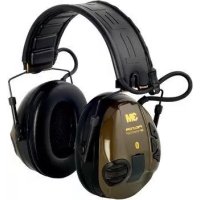
Peltor SportTac MT16H21FWS5L584 GN - Noise-cancelling headphones 3M - Free user manual and instructions
Find the device manual for free Peltor SportTac MT16H21FWS5L584 GN 3M in PDF.


| Product type | Electronic noise-canceling headset with sound modulation and Bluetooth |
| Brand | 3M |
| Model | Peltor SportTac MT16H21FWS5L584 GN |
| Power supply | 2 AAA batteries (rechargeable NiMH included or alkaline) |
| Battery life (NiMH batteries) | Surround + Bluetooth >12h, Surround only >80h |
| Battery life (alkaline batteries) | Surround + Bluetooth >12h, Surround only >30h |
| Bluetooth | Version 2.1, profiles A2DP, HFP, HSP, AVRCP |
| Audio input | 3.5 mm stereo jack (AUX) and J22 connector |
| Operating temperature | -20 °C to +55 °C |
| Max. charging temperature | +40 °C |
| Attenuation | Compliant with EN 352 (detailed values in the manual) |
| Maximum output level | 82 dB(A) average over 8 h |
| Care and cleaning | Clean with soap and warm water, do not immerse. Replace sealing rings every 6 months |
| Spare parts | Hygiene kit HY68 SV, cables FL6CE/FL6H/FL6M/FL6N, boom microphone MT53/1, headband cushion HY400 |
| Rechargeable batteries | 2x AAA NiMH (included), mains charger included (8 h charge) |
| Safety | Do not charge alkaline batteries. Use only the original charger. |
| General information | CE certified (notified body 0403). Manufactured by 3M. |
Frequently Asked Questions - Peltor SportTac MT16H21FWS5L584 GN 3M
User questions about Peltor SportTac MT16H21FWS5L584 GN 3M
0 question about this device. Answer the ones you know or ask your own.
Ask a new question about this device
Download the instructions for your Noise-cancelling headphones in PDF format for free! Find your manual Peltor SportTac MT16H21FWS5L584 GN - 3M and take your electronic device back in hand. On this page are published all the documents necessary for the use of your device. Peltor SportTac MT16H21FWS5L584 GN by 3M.
USER MANUAL Peltor SportTac MT16H21FWS5L584 GN 3M
WS SportTac, WS5, WS Workstyle
A
A:18
A:19
A:20
B

C
C:1
C:2 C:3 C:4
C:5
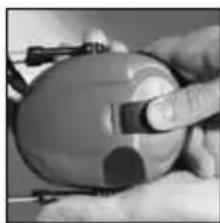
C:6
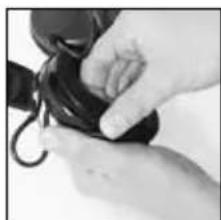
C:7
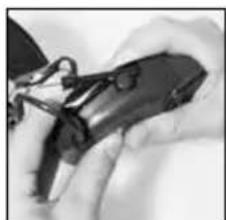
C:8
D
Attenuation values, SNR
MT16H21FWS5*-****
| Frequency (Hz)2) 63 125 250 500 1000 2000 4000 8000 | |||||||||
| Mean attenuation (dB)3) 15.1 11.1 18.2 27.0 23.8 33.4 37.7 38.8 | |||||||||
| Std deviation (dB)4) 3.8 2.6 2.3 2.2 2.1 3.6 2.2 3.3 | |||||||||
| Assumed Protection Value (dB)5) 11.4 8.5 15.9 24.8 21.7 29.8 35.5 35.5 |
D
Attenuation values, SNR
MT16H21PWS5*-*
| Frequency (Hz) 2) 63 125 250 500 1000 2000 4000 8000 | ||||||||||
| Mean attenuation (dB) 3) 11.1 11.6 16.2 20.0 24.3 29.7 34.8 33.6 | ||||||||||
| Std deviation (dB) 4) 5.0 4.6 3.7 3.1 1.8 3.3 2.6 6.0 | ||||||||||
| Assumed Protection Value (dB) 5) 6.1 7.5 12.5 16.8 22.5 24.4 32.2 27.6 |
1) Weight 345g
SNR=23 db H=27 db M=20 db L=14 db
E
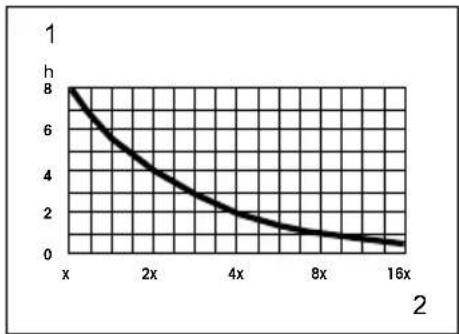
Input signal / usage time
G
| Criterion Levels | |
| MT16H21FWS5*-***** | H= 103 dB(A) |
| MT16H21PWS5*-***** | M= 96 dB(A) |
| L= 93 dB(A) | |
F
Max AUX input signal level = 1,5V_rms
AUX input signal level: 52mV_rms = 82dB
H
1
J
K
| Helmet Brand Model | P3** | Adapter | MT16H21P3EWS5*-****Size |
| 3M (Peltor) | G2000 | K,E | S ML |
| 3M (Peltor) | G22 | E | S ML |
| 3M (Peltor) | G3000 | E | S ML |
| Auboueix | Brennus | F | S ML |
| Auboueix | Fondelec | F | S ML |
| Auboueix | Iris | E | ML |
| Auboueix | Iris 2 | E | ML |
| Berendsen Safety | Balance HD | N | S ML |
| Centurion | 1100/ARCO type 2 | H | S ML |
| Centurion | 1125/ARCO plus | H | S ML |
| Centurion | 1540/ARCO | A | ML |
| Evert Larsson | Robust | E | S ML |
| Evert Larsson | Balance | E | ML |
| Evert Larsson | Balance AC/3M 1465 | E | ML |
| Kemira | Top Cap | A | S ML |
| LAS | LP2002 | E | S ML |
| LAS | LP2006 | E | S ML |
| MSA | Super V-Gard II E | S ML | |
| MSA | V-Gard | E | S ML |
| Petzl | Vertex | E | S ML |
| Protector | Style 300 | E | S ML |
| Protector | Style 600 | G | S ML |
| Protector | Tuffmaster II | E, G | ML |
| Römer | Bravo 2 Nomaz B | S ML | |
| Römer | Marcus Top 2 Atlas Nomaz | B | S ML |
| Römer | N2 Atlas Nomaz | BB | S ML |
| Römer | Profi Expo | E | S ML |
| Römer | Profi Nomaz | E | S ML |
| Römer | Top Expo Atlas | B | S ML |
| Schubert | BEN | BB | S ML |
| Schubert | BER S | E | S ML |
| Schubert | BER80/WPC80 EA | S ML | |
| Schubert | BOP R | B | S ML |
| Schubert | PIONIER | B | S ML |
| Schubert | SH 91/WPL 91 | EB | S ML |
| Schubert | SW1 | EB | ML |
| Sofop Taliaplast | Oceanic | E | ML |
| Sofop Taliaplast | Opus | E | ML |
| UVEX Airwing E S M L | |||
| Voss Inap 88 E S M L | |||
| Voss Inap Master E M L | |||
| Voss Inap PCG G M L | |||
| Voss Inap Star E M L | |||
Size ranges: S = small, M = medium, L = large
WS SportTac, WS5, WS Workstyle
EN 2-8
BG 9-16
CS 17-23
DA 24-30
DE 31-38
EL 39-46
ES 47-54
ET 55-61
FI 62-68
FR 69-76
HR 77-83
HU 84-90
IS 91-97
IT 98-104
LT 105-111
LV 112-119
NL 120-126
NO 127-134
PL 135-141
PT 142-148
RO 149-156
RU 157-163
SK 164-170
SL 171-177
SV 178-184
TR 185-191
EN
(1) What is What?
(2) Fitting and Adjustment
(3) Usage/Functions
3:1 Inserting the batteries
3:2 Charging your headset
3:3 Switching the headset on and off
3:4 Bluetooth™ pairing
3:5 Managing phone calls
3:6 Adjusting surround-sound volume
3:7 Adjusting call volume
3:8 Adjusting streamed-music volume
3:9 Changing settings in the configure menu
3:10 Connecting external equipment by cord
(4) Other Functions
(5) Important User Information
(6) Technical Data
6:1 Attenuation values
6:2 Input signal level/usage time for audio input J22 (A:12)
6:3 Sound exposure when using audio input J22 (A:12)
6:4 Sound exposure when using the 3.5mm audio input (A:11)
6:5 Criterion levels
6:6 Battery type
6:7 Battery life
6:8 BluetoothTM
(7) Storage
(8) Maintenance/Cleaning
9:1 Cleaning
9:2 Removing/Replacing the outer shell
9:3 Removing/Replacing the ear cushions
(9) Spare parts/Accessories
WS SportTac, WS5, WS Workstyle
The product(s) described in this user instruction is in conformity with the provisions set out in the Personal protective equipment (PPS) directive 89/686/EEC and the Radio equipment and Telecommunications terminal equipment directive (R&TTE 1999/5/EC. Thereby it fulfils the requirements for CE marking.
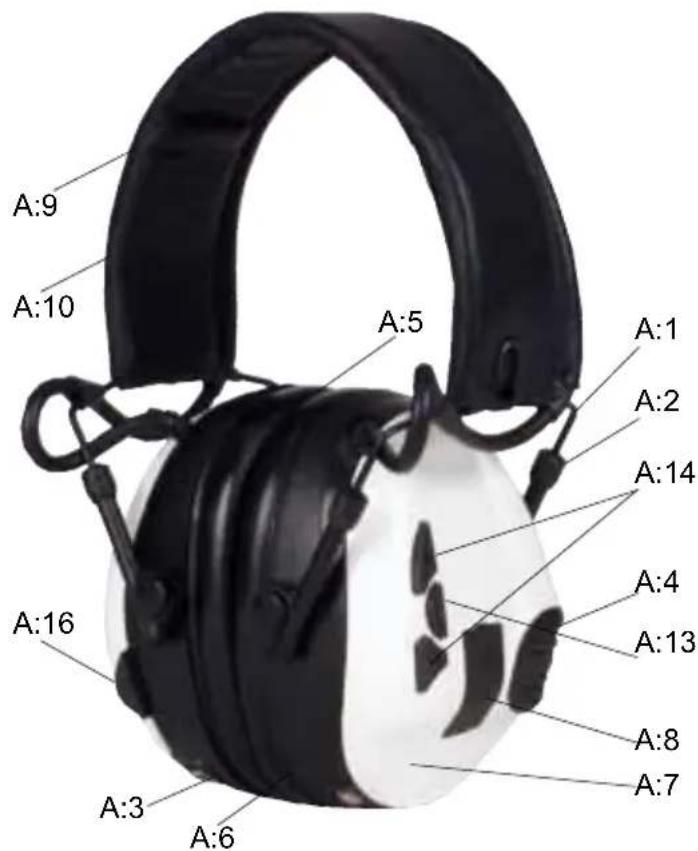
1. WHAT IS WHAT
(A:1). Headband wire (stainless steel)
(A:2) Two-point fastener (headband wire)
(A:3) Ear cushion (PVC foil and Polyester foam)
(A:4) Microphone for surround sound
(A:5) Attenuation cushion (Polyester foam)
(A:6) Inner shell
(A:7) Outer shell
(A:8) Clamp
(A:9) Headband (sheet metal)
A:10). Headband padding (Thermoplastic Elastomer or Leather)
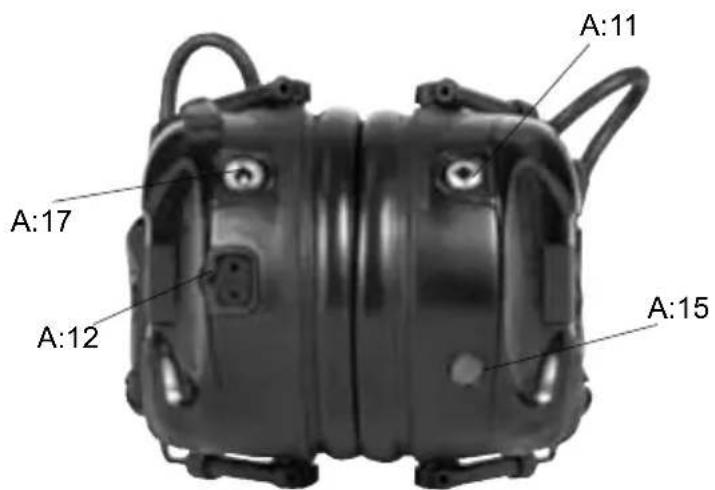
(A:11) AUX audio input, 3.5mm stereo
(A:12) Audio input, J22
(A:13) On/Off/Mode
(A:14) VOL+, VOL -
(A:15) Speech microphone
(A:16) Bluetooth button
(A:17) Charger Jack
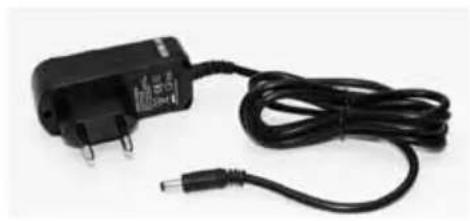
(A:18) Charger
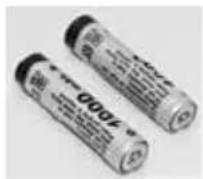
(A:19) Rechargeable AAA NiMH batteries
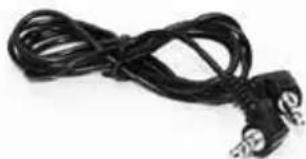
(A:20) Stereo cable 3,5mm. FL6CE
2. FITTING AND ADJUSTMENT
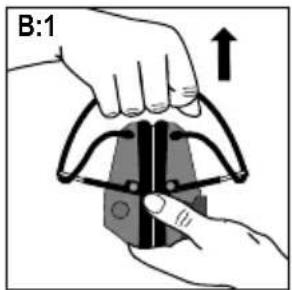
(B:1) Open the headband.
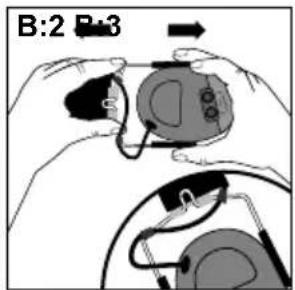
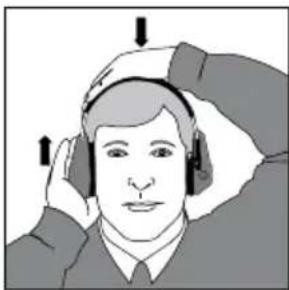
(B:2) Slide out the shells. Tilt the upper part of the shell outwards to ensure the wires are positioned away from the headband.
(B:3) Adjust the height of the shells by sliding them up or down whilst holding the headband in place.
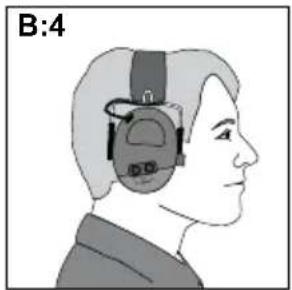
(B:4) The headband should be positioned across the top of the head.
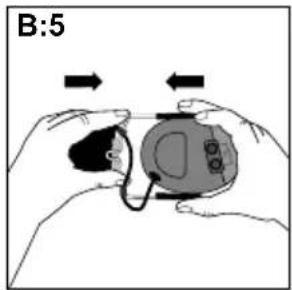
(B:5) Before folding the hearing protector, press the shells together. Leave about 4mm of the headband wire visible.
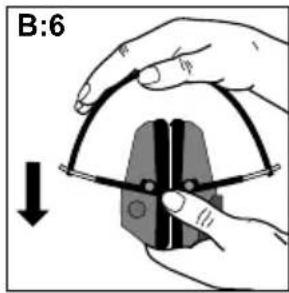
(B:6) Fold the headband as shown. Ensure that the ear cushions are not creased and that they lie flat against each other. Note: Be sure to remove the cord from the audio input (A:11) before folding the headband.
Adjusting the helmet attachment
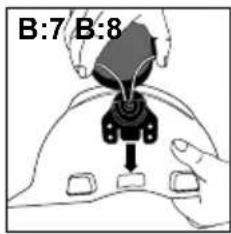
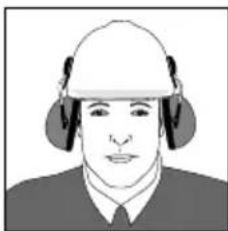
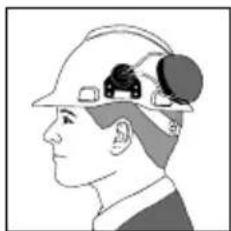
(B:7) Snap the helmet attachment into the slot on the helmet. To switch the unit from ventilation to working position, press the headband wires inwards until you hear a click on both sides. Ensure that the shell and the headband wires in working mode do not bump or snag on anything so that noise leakage can occur.
Note: The shells can be set in three positions: (B:8) working position, (B:9) ventilation position and (B:10) parking position.
3. USAGE/FUNCTIONS
3:1 Inserting the batteries
Remove the left outer shell.
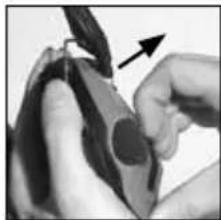
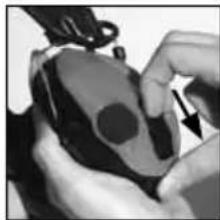
(C:1) Insert a blunt tool or finger under the edge of the clamp and pull outwards 3-4 mm.
(C:2) Press/slide the clamp down. Remove the shell.
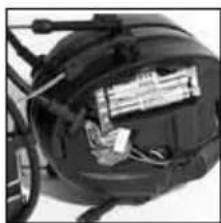
Insert the rechargeable AAA NiMH batteries included with the product. Ensure that the poles are correctly aligned.
The headset can also operate on alkaline batteries.
Warning! Do NOT charge alkaline batteries as this may damage the headset.
EN
Replace the outer shell:
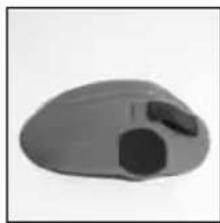
(C:3) Ensure that the clamp is fully pressed down.
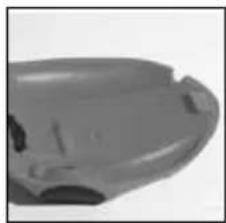
Position the shell from the top down, ensuring that the hook on the top of the shell (C:4) fits in the hole on the inner shell (C:5).
(C:6) Press/slide the clamp up once the shell is in place.
3:2 Charging your headset
Connect the charger to the charger jack on the headset (A:17).
Charge the headset for 8 hours to achieve the maximum battery capacity.
Warning: Use only original charger. Use of another charger can damage the headset.
Warning: Do NOT charge alkaline batteries as this may damage the headset.
Max charging temperature: +40^
3:3 Switching the headset on and off
Press and hold the On/Off/Mode button (A:13) for two seconds to switch the headset on or off.
3:4 Bluetooth pairing
The headset can be paired with and connected to Bluetooth units that support A2DP, HFP and HSP profiles.
NOTE that you can only stream stereo sound/music from a unit (mobile phone, computer, etc.) that supports the A2DP Bluetooth profile.
- Ensure that the headset is charged and switched off.
- Press and hold the On/Off/Mode button (A:13) for five seconds. This puts the headset into pairing mode, which is confirmed by repeated voice message: "Bluetooth pairing mode".
Activate your telephone's Bluetooth function and search for new units. After a few seconds "Peltor WS5" will appear on the screen. - Select "Peltor WS5".
If the phone asks you for a password, enter: 0000 - Pairing is confirmed when you hear the voice message: "pairing complete".
Once the Bluetooth pairing function is activated it will automatically establish connection with the headset next time it is used with a confirmation voice message "connecting Bluetooth", and then: "connected" when the units are connected. You can pair and store up to 4 units. The headset will automatically try to connect to the most recently connected unit first.
3:5 Managing phone calls
To manage phone calls, the headset must be paired with and connected to a mobile phone with Bluetooth capability, see Bluetooth pairing.
Answering calls
Incoming phone calls are indicated with a ring tone in the headset. Answer by pressing briefly on the Bluetooth button (A:16).
Rejecting a call
Reject a call by pressing and holding the Bluetooth button (A:16).
Voice dial
Press briefly on the Bluetooth button (A:16).
Redial
Press and hold the Bluetooth button for 2 seconds (A:16).
3:6 Adjusting surround-sound volume
Increase volume. Press the (upper) + button (A:14).
Decrease volume. Press the (lower) - button (A:14).
3:7 Adjusting call volume
You can adjust volume during a call by pressing the (+) or (-) buttons. Press the On/Off/Mode button (A:13) and then (+) or (-) to adjust the surround-sound volume during a call.
3:8 Adjusting streamed-music volume
You can adjust volume while streaming music by pressing the (+) or (-) buttons. Press briefly on the On/Off/Mode button (A:13) and then (+) or (-) to adjust the surround-sound volume during music streaming.
3:9 Changing settings in the Configure menu
The headset has a Configure menu where you can adjust settings.
To access the menu, press and hold the (-) and (+) buttons for 2 seconds (with the headset switched on).
Access to the Configure menu is confirmed by a voice saying: "menu". To change the settings, use the (-) and (+) buttons. To move on through the Configure menu, press briefly on the On/Off/Mode button (A:13).
See quick guide for information on how the menu is set up and where the functions are located.
Bass Boost
Bass Boost gives a fuller bass sound to streamed stereo music.
Music Limiter Mode
There are two settings for limiting the sound level when streaming music/audio with Bluetooth
ON
The limiter will reduce the volume level to 82 dB(A) Leq over 8 hours
OFF limits the total sound exposure over 8 hours to 82dB(A) Leq If the volume is set above 82 dB (A) it will be reduced to a very low volume, once the daily dose is reached.
This is confirmed by a voice saying: "daily dose reached". The dosimeter will reset every 24 hours.
Warning: Daily dose could be exceeded if batteries are removed and replaced, or if factory default is activated.
Balance
Changes the left-right balance of the surround sound.
Equalizer
Changes the frequency character of the surround sound.
Low
Normal
High
Extra High
External Input (only applies to audio input J22-A:12)
OFF - use this mode when the J22 audio input is not in use
ON - use this mode if a cord is plugged into the J22 audio input
- Microphone - use this mode if a boom microphone is plugged into the J22 audio input
Side tone volume (applies only to Hands Free Bluetooth sound)
OFF
LOW
NORMAL
HIGH
Side tone nouse reduction
ON
OFF
Reset to Factory Default
Resets all functions to the factory settings.
3:10 Connecting external equipment via a cord
External equipment can be connected via the J22 audio input (A:12) or the 3.5 mm jack (A:11). For information on various cords, see Spare Parts/Accessories (I).
EN
4. OTHER FUNCTIONS
The last settings are stored when the headset is switched off.
- Automatic power-off after two hours of no active functions. Automatic power-off is indicated by a voice message: "automatic power off".
- Low battery level is indicated by a voice message. "low battery".
5. IMPORTANT USER INFORMATION
The hearing protector must be worn, adjusted, cleaned and maintained in accordance with this manual.
- The hearing protector features active volume. Check that this feature works before using the unit. If distortion or flaws are discovered, consult the manufacturer's instructions for maintenance and battery replacement.
Always wear the hearing protector at all times during exposure to hazardous noise
Certain chemical substances may damage this product. Contact the manufacturer for more information. - This earmuff is provided with electrical audio input. The wearer should check correct operation before use. If distortion is detected, the wearer should refer to the manufacturers advice.
WARNING - The output of the electrical audio circuit of this hearing protector may exceed the daily limit sound level. - If sound distortion increases or the volume becomes too weak, it is time to charge or replace the batteries. Never replace or insert batteries with the unit switched on. Ensure that the batteries are correctly aligned before using the product.
- Store product without the batteries.
Under extremely cold conditions, warm the hearing protector before using.
The wearer should ensure that the ear-muffs are regularly inspected for serviceability. - The fitting of hygiene covers to the cushions may affect the acoustic performance of the ear-muffs.
The audibility of warning signals at a specific workplace may be impaired while using the entertainment facility.
The performance may deteriorate with battery usage.
These earmuffs should be fitted to, and used only with, the following industrial safety helmets: (K)
Note: If these recommendations are not followed, attenuation may be adversely affected which could lead to hearing impairment.
WARNING!
The sound from the active-volume circuit on the hearing protector may exceed the external sound level.
IMPORTANT! For the best protection, brush aside hair around the ears so the ear cushions fit snugly against the head. Spectacle frames should be as thin as possible and fit close to the head to minimise acoustic leakage.
Operating temperature: -20 °C to +55 °
6. TECHNICAL DATA
6:1 Attenuation values, SNR (D)
The attenuation values and noise levels for the headset are tested and approved according to EN 352-3: 2002, EN 352-4: 2001, EN 352-6: 2002, EN 352-8 2008 and applicable parts of EN 352-1:2002. Certificate issued by FIOH, Finnich Institute of Occupational Health, Topeliuksenkatu 41a A, FI-00250 Helsinki, Finland (notified body no. 0403).
Explanation of the attenuation data tables:
- Weight
- Frequency (Hz)
- Average attenuation (dB)
- Standard deviation (dB)
- Expected attenuation (dB)
6:2 Input signal level/usage time for audio input J22 (E)
Maximum permitted audio signal in relation to usage time.
To prevent harmful effects on hearing, the input signal should not exceed the specified values (average speech sound level). The long-term average value of the earphone volume is
measured at a level corresponding to no more than 82 dB(A) sound level.
- Hours/day
- Average level/electric signal X = 20 mV
6:3 Sound exposure when using audio input J22 (F)
6:4 Sound exposure when using the 3.5mm audio input
The earphone level for music is measured at no more than 82 dB(A) equivalent sound level.
Max input level 1,5 Vrms.
6:5 Criterion levels (G)
A criterion level is the amount of noise (measured as A-weighted sound pressure) outside the hearing protector that gives 85 dB(A) inside. The noise level depends on the type of noise. H is high-frequency dominated noise, M is noise that is not dominated by any given frequency, and L is low-frequency dominated noise.
6:6 Battery type
All types of AAA 1.2-1.5V batteries can be used (NiMH, NiCd, Alkaline, Lithium, Manganese, etc), but only NiMH and NiCd batteries can be recharged.
6:7 Battery life
The expected battery life may vary depending on the brand of batteries and the temperature in which the product is used. Low battery level is indicated by a voice saying: "low battery".
The headset functions will not work optimally if the battery is low.
2*AAA NiMH
| Mode Life time | |
| Surround + Bluetooth (active) >12h | |
| Surround only + Bluetooth Off >80h | |
2*AAA Alkaline
| Mode Life time | |
| Surround + Bluetooth (active) >12h | |
| Surround only + Bluetooth Off >80h | |
6:8 Bluetooth
2.1
A2DP 1.2
HSP 1.2
HFP 1.5
AVRCP 1.0
The headset is designed for Bluetooth standard V.2.1 (headset and handsfree profiles + A2DP) and is tested in accordance with: EN 300 328-17 (radio test), EN 301 489-1/-17 (EMC test),
EN 60 950-1 (electric safety), FCC part 15.247 (US radio test) and I.C. (Canadian radio test).
7. STORAGE
Do not store the hearing protector at temperatures exceeding +55^ , for example on a dashboard or windowsill. Do not store the hearing protector at temperatures below -55^ .
NOTE: Ensure the cord is removed from the audio input before folding the headband.
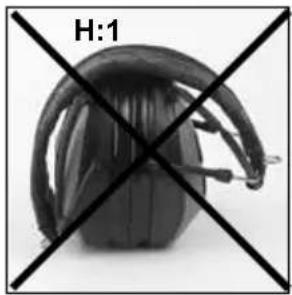
(H:1) WRONG. All headband wires must be tucked-in fully before the headband is folded.
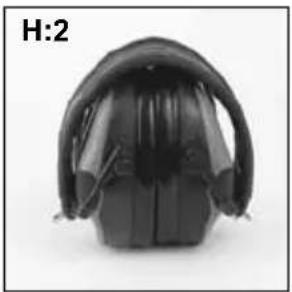
(H:2) RIGHT. The ear cushions should lie flat against each other.
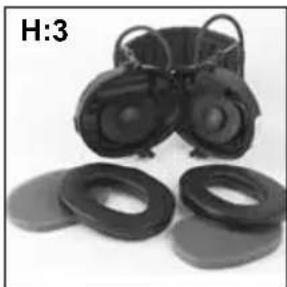
(H:3) WHEN DAMP. Turn the shells outwards. Remove the ear cushions so that the attenuation cushions can dry. Reinstall them. See Maintenance/Cleaning section for further details.
Remove the batteries when storing the hearing protector for a long time. Check the functioning of the unit after replacing the batteries.
8. MAINTENANCE/CLEANING
This product is covered by the WEEE directive 2002/96/EC and is recyclable. Disposethe product in accordance with national regulation. Use local recycling system forelectronic products.
8:1 CLEANING
Clean/disinfect the shells, headband and ear cushions regularly with soap and warm water.
EN
Note: Do not immerse in water!
8:2 REMOVING/ REPLACING OUTER SHELLS
See 3:1
8:3 REMOVING/REPLACING EAR CUSHIONS
(C:7) Slide your fingers under the edge of the ear cushion and pull straight out.
(C:8) Insert a new ear cushion by pressing until it snaps into place.
9. SPARE PARTS/ACCESSORIES
HY68 SV Hygiene kit
Easy to replace hygiene kit consisting of two attenuation cushions and snap-in ear cushions. Replace at least twice a year to ensure constant attenuation, hygiene and comfort, or if any of the parts of the hygiene kit are defective. The headset and particularly the ear cushions can deteriorate over time and should be inspected regularly to ensure that there are no cracks and sound leakage. If an ear cushion is damaged, it must be replaced. See Maintenance/Cleaning section.
Cords for audio inputs (receiving only)
FL6H J22 to 3.5mm mono contact
FL6M J22 to 2.5 mm mono contact
FL6N J22 to 3.5 mm stereo contact
FL6CE 3.5 mm to 3.5 mm stereo
Audio cord for two-way communication (Type ICOM)
TAMT06 Cord with push-to-talk button (PTT) and microphone, J22 contact
Other spare parts/accessories
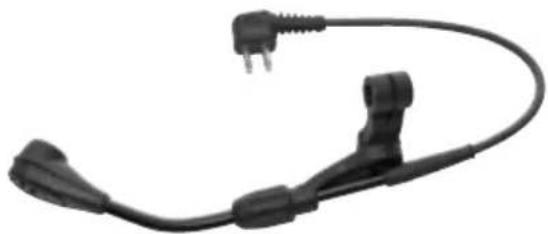
MT53/1** Boom microphone (l:1) for communication in extremely noisy environments
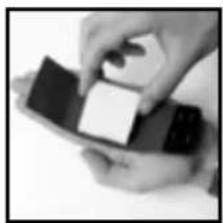
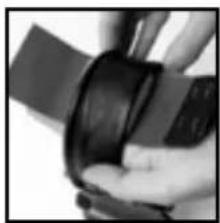
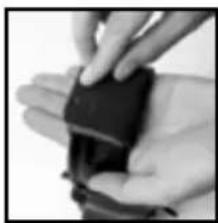
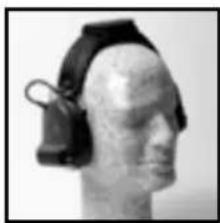
HY400 Headband padding. For an optimal fit on a smaller head, use HY400 headband padding. The padding is easy to attach to the standard padding.
See the installation instructions (J).
The Bluetooth® word mark and logos are registered trademarks owned by Bluetooth SIG, Inc. and any use of such marks by 3M is under license. Other trademarks and trade names are those of their respective owners.
3M does not accept liability of any kind, be it direct or consequential (including, but not limited to, loss of profits, business and/or goodwill) arising from reliance upon any information herein provided by 3M. The user is responsible for determining the suitability of the products for their intended use. Nothing in this statement will be deemed to exclude or restrict 3M's liability for death or personal injury arising from its negligence.
BG
(1) Koe KaKBo e?
(2) MoHTaX n HaCTpoBaHc
(3) YnoTpe6a/Функци
3:1 NocTabrHe Ha 6atePnte
3:2 3apekdahe Ha cnyuJaIKeTe
3:3 BknoBaHe n 3KIOUbaHe Ha cnUyAnKe
3:4 Cbbp3BaHe c BluetoothTM
3:5 YnpabneHne Ha TeJepeoHH oBaXdAHn
3:6 HactpoBbAHe Ha cnlaTa Ha cbpayHd 3Byka
3:7 HactpoiBaHe Ha cunata Ha 3Byka npn obaxdahe
3:8 HactpoBaHe Ha Cnata Ha 3Byka npi CnyuHahe Ha My3nKa
3:9ПоменянеHaHacTpOиКTeBMeHIOTo3aKOHФурupaHe
3:10 Cbbp3BaHe Ha BbHnHO6OpyDbaHe c Ka6eI
(4)ДугнФунки.
(5) Baxha nHΦopMaζη 3a noTpεbntελ
(6)TexHnueckn DaHHN
6:1 CToHocTn Ha 3aIywaBaHe
6:2 HnBO Ha BxoJaI CnHnI/BpeMe Ha yIOTpe6a 3a ayDIO BxoJ J22 (A:12)
6:3 Bb3dienCTBHe Ha 3Byka npn ynoTpe6a Ha ayDnO BXoJ J22 (A:12)
6:4 Bb3dienctBne Ha 3Byka npn ynoTpe6a Ha aydo Bxod 3,5 mm (A:11)
6:5 HnBa Ha KpnTepn
6:6 Bua 6aTeepn
6:7 PepnoHa ekcnloaataaHa 6aTepeHnTe
6:8 BluetoothTM
(7) CbXpaHeHne
WS SportTac, WS5, WS Workstyle
OncanHTeBTOBA pkoBDCTBOHaNoTpe6nten npdyKT(ue B CbOTBeCTBnE C yCNOBnTA, NOCOeHN BInpeKtNBaTa 3a JNCHINpeDnA3Hn CpeDCTBa (IIPC) 89/686/EINO n DnpeKtNBaTa 3a paNIO obopydBaHe n TeNeKOMyHKaUNOH TepMNHaHNo obopydBaHe (R&TTE) 1999/5/EO.
CneIOBaTeJIHO TOTROBApHa N3NCKBaHnTa 3a CE MapKIpObKa.
1. KOE KAKBO E
(A:1). Cbpb3Ba7a TeI (HepbKa7aema CTomHa)
(A:2)Дытукова зakончалka(Ha CBbp3Baauata TeI)
(A:3) PoiioKnn 3a yu (PVC oIIO n noJIneCTepHa IyHa)
(A:4) MmKpOΦoH 3a cBpaayHd 3ByK
(A:5) Iopnoxxka 3a 3arnywaBaHe (nonneTepeHa nHa)
(A:6) BbTppeWeH HayuHHK
(A:7) BbHwEH HayuHK
(A:8) Cko6a
(A:9) Cbbp3Baua JnHTa (NtCTOB MetaJI)
(A:10).ПоДлоЖкаHa CBbp3BaцаТа ЛeHTa (TePMonlaCTnueH eJaCTOMep nIи кoKa)
(A:11) AUX aydno BxoD, 3.5 mm ctepeo
(A:12) Ayno BxoJ, J22
(A:13) BKN./N3Kn./PeXMM
(A:14) NobuwaBaHe/NoHnKabaHe Ha CunTa Ha 3Byka
(A:15) Minkpoohon 3a roBop
(A:16) BytoH 3a Bluetooth
(A:17)Ka3a3apAHOyCTpOCTBO
(A:18) 3apAINDHOyCTpOoiCTBO
(A:19) Празаши се батерни AAA NiMH
(A:20) Ctepeo ka6en 3,5 mm. FL6CE
2. MOHTAXИ HACTPOIBAHE
(B:1) OTBopete cBbp3Baata JnHTa.
(B:2)ПиьзHETe HayuHnUte HABbH. HAKnoHete rOpHaTa YacT HaHayuHnKa HABbH, 3a Da ce yBepnte, Ye Ka6eJIInTe ca pa3nIOxKeHN N3BBH Cbbp3BaUaTa NaHTa.
(B:3) HactpoTe BnCOunHa Ta Ha HayuHnUte KaTo Tn PnB3HeTe HArope NnnaHADony, KATO 3aDpKtaTe Cbbp3BaUaTa Ta HeHTa B HEnoDbXHO NOIOKeHne.
(B:4) Cbpb3baaata naHTa ce pa3nonara Bbpxy rophata qact OT rnaBata.
(B:5)Ппедида прънелсуховя прд�аNTe,прпснсе Нayшниerte edIN KBm dpyr. Octabete okono 4 mm ot CBbp3Baauata TeJ BnDima.
(B:6) IperbHete cBp3BaAata NaHTa KaKTo e nokaHaO. YBepTe ce, ye NOIOKKnTe 3a yUn He ca HApbUkaHN uCe Ca HAcOeHN npabUNHO eHa KBM dpyra. 3a6enekKa: He 3a6paBnTe da OTcTpaHnTe Ka6ena o ayDnO BXoDa (A:11), npedn da nperebHete cBp3BaAata NaHTa.
3. YNOTPEBA/ФУHKUIN
3:1 NocTaBHe Ha 6aTePnIte
OTCTpaHETeJIeBnBbHWeHayUHmK.
(C:1) NocTaBeTe TBn INHCTpyMeHT UIN PpBCT NOI p6a Ha CkO6aTa I 6yTHHeT HABbH 3-4 mm.
(C:2)HaTnchTe/nnb3HeTe cKo6aTa HaOJy. OTCpaHete HayuHnka.
IocTabeTe npe3apeKdaunTe ce 6atepn AAA NiMH, BKIOueHn B npOyKa. YBepTe ce, ye nonHcnte ca noCTaBeHn npabunHo.
Cnyuajnkte MoKe da pa6oTn c aKanHn 6aTePN.
Ipeynpexdene! HE 3apeKdaTe aikalHn 6aTePN, TbN KaTO TOBa MoKe Da noBpeu CnywauKnte.
OCTpaHeTe BbHnHa HayuHnK.
(C:3) Ybepete ce, ye cko6aTa e n34JIO HATnchata HaDony.
Noctabete HayuHnka OT dony Harope, kato ce ybepnte, ye KyuKaTa B rOpHaTa.
yact Ha HayuHnka (C:4) nacBa B OTbopa Ha BbTpewHnry HayuHnK (C:5).
(C:6) HaTnchete/nIb3HeTe ckObaTa Harope, cIeKaTo HayuHKnBt e
3actonopeH.
3:2 3apekdahe Ha cnyuanknte
Cbpxte 3apnHOTO yCTPOINCTBO KbM Jka 3a 3apnHOTo Ha CbP3BaAata NaHTa (A:17).
3aepxdaTe cnyaalknte 8 yaca, 3a da noCTnHHeTe MaKcImaJIeH KanaunTeHa 6aTepeuNTe.
IpeynpexdHne: N3noJ3BaTe cAmO opnHaHO 3apJHOTO yCTPOICTBO.
YnotpebaTHa npyro 3aprAno yctpoiCTBO moKe da nobpeu cnywaJknTe.
IpeynpeKdene: HE 3apeKaTe aJIkaJIH 6aTePn, TbN KaTO TOBa MoKe Da noBpeNi CnyuAJIKNTE.
3:3 BkIIOUBaHe nN3KJIIOUBaHe Ha cnyuankte
HaTnchHeTe 3aIpbXkTe 6yToHa On/Off/Mode (BKn./N3Kn./Pexm) (A:13) 3a DBe cKynHn, 3a Da BKNIOHTe INN N3KNIOHTe CnywaJIKNTE.
3:4 Cbbp3BaHe c Bluetooth
CnyuajnKeMoKe Da ce CbBp3BaT KbM Bluetooth ycTpoiCTBa, KOnTo noDbpxaT A2DP, HFP nHSP npoqnn.
OBbPHETEBHIMAHHE, ye moKeTe da cnywate Ctepeo 3Byk/My3nKa eINHCTBeHO OT yCtpoiCTBO (MO6uIeH TeneΦOH, KOMNHTbp n Ip.), KOeTo noDbpka A2DP Bluetooth npoФn.
- YBepete ce, ye cnyuanknte ca 3apehen n n3knquenH.
HaTnCHeTe 3aDpBxKTe 6yToHa On/Off/Mode (BKn./N3Kn./PeXm) (A:13) 3a neT cekyn.
Toba nocTabra cnyuwaiknTe B peXIM cBbp3BaHe, KOeTo ce nOTBbpxkDaBa
ype3 noBtaprao Ce rnaCobO cbO6ueHne: ,BluTeoth pairing mode" (PekmHa cBbp3BaHe c Bluetooth).
- AkTbBpaTe ΦyHKunra Ta Bluetooth Ha TeJefoHa cn n TbpceTe HOBuycTpoiCTBa.CneHЯKoIko cekyHn „Peltor WS5" ue ce noRbHa ekpaHa.
- N36epete „Peltor WS5".
Ako TelefohBt Bn nonka napoJa, BbBeTe: 0000 - Cbbp3BaHToCe NOTBbPjDABA KOrATo yyeTe INaCobTo cbo6ueHHe: ,pairing complete" (Cbbp3BaHTo 3aBbPseHo).
CneI KATO CbBp3BaUaTAtyHKUgiau Bluetooth ce aKTHBnPa, TAYABOMATNHO ue yCTaHOBn Bp3Ka CbC CnyuAankTe CneDAuua NbT, KOraTO 6bDe H3NOJ3BaHa, C NOTBbpXdAbaO Cbo6ueHne „connecting Bluetooth" (CBbp3BaHe c Bluetooth), n CneT ToBa: „connected" (CBbp3aHo/), KOrYcTPOIcTBaTce CBbpKat. MoKeTe Da CbBp3BaTe N3ana3BaTe INHΦOpMaUN 3a Do 4 YcTPOINCTBa. CnyuAankTe ABTomATNUHO ue ONNTaT da CE CBbpXaT NbpBO KbM Hau-NocNeIDHO CBbp3AHOTo yCTPOINCTBO.
3:5 YnpabneHne Ha TeJepeOHn o6aKaHaHn
3a ynpablenHe Ha TeIefoHHn 06aJdHnra, CnyuapanKe Tp6Ba da ce CBpb3AHN C MObJIeH TeIefoH Upe3 cyHKunrTa Bluetooth, BIXTe CBpb3BaHe c Bluetooth.
PnneMaHeHaobaxdAnH
BxOJaIe TeNepeOHn 06aKaDaHnCe yKa3BaT cbc CnHn 3a 3BbHeHe B cnUaJIKe. IpnMeTe Upe3 6bp3o HATnCKaHe Ha 6yToHa Bluetooth (A:16).
OxBbPnHe Ha o6aJaHe
OTXBpneTe o6aKaDaHe KaTo HaTnChHe n 3aDbpxKeTe 6yToHa Bluetooth (A:16).
Гласовибпанe
Бьрзо НатисHTe 6уTOHa Bluetooth (A:16).
BG
NobtopHoHa6pahe
HaTnchTe n 3aDpBxTe 6yToHa Bluetooth 3a 2 cekyniA (A:16).
3:6 HactpoBbHe Ha cnJaTa Ha cbpayHd 3ByKa
YBeHnueTe cnlaTa Ha 3Byka. HaTnCHeTe 6yToHa + (ropHn) (A:14).
NoHHKeTe CnNaTa Ha 3ByKa. HATnCHeTe 6yToHa-(DOnHnA) (A:14).
3:7 HactpoBaHe Ha cnIaTa Ha 3Byka npn o6axdaHe
MoKeTe Da HAcTpoBate CnIaTa Ha 3ByKa No BpeMe Ha oBaKdAHe KaTo HATNCKATE 6yToHIne (-) n (+). HATnCHete 6yToHa On/Off/Mode (BKn./N3Kn./
Pekm) (A:13), a nocne (+) nnn (-), 3a da hactponTe cnlaTa Ha cbpayHd 3Byka no BpeMe Ha obaKaDaHe.
3:8 HactpoBaHe Ha cnJaTa Ha 3ByKa npn CnyuHa He Ma My3Nka
MoKeTe Da HAcTpoBate CInaTa Ha 3ByKa DoKAto CInyWaTe My3Nka KaTo HATnCKaTe 6yToHIne (+) n (-). HATnCHete 6bp30 6yToHa On/Off/Mode (BKn./
N3Kn./Pekm) (A:13), a nocne (+) nnn (-), 3a da hactponTe cnnaTa Ha cbpayHd 3Byka dOKaTO cnywate My3nka.
3:9 PpomHa Ha HAcTpOaKnte B MeHIOTo Confuge (KoHcHpypupaHe)
CnywaanKnTe mMaT MeHIO 3a KOHOpNpyPnpaHe, KbDeTo MoXeTe da peryNpaTe HacptpoKnTe. 3a da DOCTnHrTe Do MEHOTo, HAChcHete n 3aDpBxKTe 6yTOHnTe (-) n (+) 3a 2 cekyn (doKaTO CnywaanKnTe ca BkInoueHn).
Доctьпт ДО мEHЮTO Configure (KoHФИгуррае) ce NOTвьрждава OT rIacOBc bOБшЕнe: ,menu" (MeHIO). 3a DA npOMeHITe HAcTpoiKHTe, nIOn3BaIte 6bToHITe (-) n (+). 3a DA npEMnHETe HAppeB M MeHOTO Configure (KoHФИгуррае),HaTnCHeTe 6bP3O 6bToHa On/Off/Mode (BKn./ N3Kn./Pexm) (A:13).
BnKTe KpaTkoTo pBkoBOdCTBO 3a INΦopMaun OTHoCHO HAcTpoBaHcTo Ha MeHIO To pa3IIOJoxEHHeTO Ha yHKUNITE.
YcunBaHe Ha 6acnte
ФункцятВass Boost daBa no-nbIeH 6acOB 3ByK Ha cnyuHaHaTa cTepeo My3nka.
Pekm 3a orpaHnuaBaHe Ha My3nKaTa
CbueCTByBaT DBe HAcToPmK 3a OrpaHnUaBaHe Ha HNBOTo Ha 3ByKa npn CnyuHa He Ha My3nKa/ayDnO c Bluetooth.
ON(BkJ.)
OrpaHnHTeTtIe noHxN HnBTo Ha cnNaTa Ha 3Byka Do 82 dB(A) L eq 3a 8 yaca.
OFF orpaHnUaBa 6oTO Bb3eInCTBne Ha 3Byka 3a 8 yaca do 82 dB(A) Leq Ako cnlaTa Ha 3Byka e HactpoeHa nad 82 dB(A), Ta ue ce noHnxn do MHOro HnCKO HnBO pnp DoCTnraHe Ha DHeBHata rpaHnca.
Toba ce notbpbkdaBa ot rnaocBO cbo6eHne: "daily dose reached" (dOCTnraHe Ha dHeBHaTa rpaHua).
I3mepBaTeHnIypeI ce pectapTnpa Hb BceKn 24 yaca.
IpeynpekdeHne: B cnyaaye 6aTeHNTE 6bDaT n3BaDeHn n CMeHeHn nn aKO ce aKTHBnPaT fapnHnTe HAcTPOKn, e Bb3MOxHO dHeBHaTa Do3a Da 6bDe npebuWeHa.
BanaHc
PpomeHa6aHcA JIABO-DAcHO Ha CbpaHy3Byka.
Ekbaan3ep
PpomeHЯ yecToTHnTe nokaTeJn Ha cbpayHd 3Byka.
- Low (Hücko)
Normal (Hopmanho)
High (Bucoko) - Extra High (Ekctpa Bucoko)
BbHueh BXoI (npunara ce eDnHCTBeHO 3a ayDIO BXoJ22-A:12)
OFF (N3Kn.) - n3noJ3BaIe To3n peKIM, KOrato aydno BxoDbT J22 He ce n3NoJ3Ba.
ON (BKn.) - n3noJ3BaIe To3n peKIM, aKO Ka6eI e BKnIOueH B ayINO BXOJa J22.
- Microphone (MnKpofoH) - 3noI3BaIe To3n peXIM, aKO MmKpofoH Ha cToiKa e CbP3aH KbM ayDIO BXOJa J22.
Cnla Ha cTpaHnUHHa 3Byk (npunara ce camo 3a Hands Free Bluetooth 3Byk)
OFF (M3Kn.)
LOW (Hncko)
NORMAL (HopmaJIHo)
HIGH (Bucko)
NoHHKeHHe Ha Wyma OTo CTpaHnUHn ToHOBe
ON
OFF
Bpbuahe Ha fa6pnHnTe HacTpoKn
Bpbuahe Ha BCNUKn FyHKUN KbM pa6pnHnTe HacTPOKn.
3:10 Cbpb3BaHe Ha BbHnHO obOpyDbaHe ype3 ka6eI
BbHnHO o6OpyDbaHe moKe da ce CbPke ype3 aydno BxOJ J22 (A:12) nIi XaK 3,5 mm (A:11). 3a HΦopMaun OTHOCHO pa3NJuHN Ka6eN, BIXTe Pe3epBn Yactn/Akcecoapn (l).
4.ДРУГИФУHKUIN
- NocneHnTe HactpoKn Ce cxbpAHaBaT, KOraTo CnyuJaIKeTc Ce n3KnIOUaT.
- ABTomatNUHO n3KJIIOUBAHe cIeI Dba Yaca, aKO He CE n3NOJ3BaT HnKaBn Функи. ABTomATuHTo n3KIIIOUBAHe ce yka3Ba OT rnaCObO CbO6IeHne: automatic power off (ABTomATuHNo n3KJIIOUBAHe).
- HnCKoTo HnBO Ha 6aTePunTe ce yka3Ba OT rIacOBo CbO6eHne: flow battery" (HnCKo HnBO Ha 6aTePunTe).
5. BAXHA INHΦOPMAÇUÑA 3A NOTPEBNTÉNJ
CnyxOBnT npedna3nteI Tp6Ba Da ce Hocn, HactpoBb, nouchTaN IOndbPka CbIaCHO TOBa pbKOBOcTBO.
CnyxOBnI npedna3nteBkHouBa AKTHBHa Cnla Ha 3Byka.IpoBepTe daN Ta3n cyHKunpaBOTn, npdN da N3NOJ3BaTe yCTPOINCTBOTo. Ako 6bDat OTkpTN n3KpNBraHn nn DepeKTn, Hapabete cnpaBka C INHCTpyKUnTE Ha npON3BOJNTeTn 3a NOIDpbXkNcMraHa 6aTePInTe.
Bunharu Hocete cnyxobn npednaNTeI NO BcRAKO Bpeme DOKaTO ce n3JaraTe Ha onaceH wym.
Hakon XmMueckn BeueCTBa MoKe Da nobpeT To3n npOyKT. CbpxKeTe ce c npOn3BOuNTeNa NOBee HOpMaun.
Te3n 3arnyuHTeN Ce npednarat C eEnktpueckn ayDNO BXoJ. NTope6nteTAPr6Ba Da npOBepraBnPpABINHOTo cyHKcnoHnpaHe npEyn yNoTp6Ba.B clyuaHa NoBpeDa, HocceunTpr6Ba da ce obbphe 3a cbdeNCTBne KbM npOn3BOUNTeN.
- PPEДУПЕЖDEHNE - ИЗОДна та щелктучесka aydno БерURA ha cnIyOBnI npOTeKTop MOnke Да НдХБьрЯ ДHEBHNЯ JIMNT 3a HINBO Ha 3Byka.
CnyxobnT npedna3nte e cna6dene C eJeKtpueckn ayno BXoJ. PpOBepTe daH Ta3n FyHKuNpa6To, npEdu n3No3BaTe yCTpoiCTBOTo. Ako 6bDat OTkpNTn N3KpNBraHn IIn DepeKTn, HAnpaBete cnPaBka c nHCTpykUnTE Ha pOn3BOUnteIa.
Ako n3KpNBraBaHeTo Ha 3Byka ce yBeJIuNnIu CnIaTa Ha 3Byka ce noHnxn npekomepHo, e BpeMe da CmeHnte 6atepuInTe. Hnkora He cmeHnTe n He noCTabraTe 6atepn,doKATO yCTpoNCTBOTo e BKIOUeHO. YBepTe ce,ye 6atepuInTe ca npabunHNOocTabeHNnpedn Da n3NoJ3BaTe npOdykTa.
CbxpnaHbAte npOyKta 6e3 6aTePnnte.
- PnEKCtpeMHO CtyeHn ycIOBn, 3aTOnJIeTe CnyXOBn npedna3nten npden ynoTpe6a.
-ПолзВаTeЯТ TряБа Да ce yBepи,Чe HayшИцпт ec nHcneKtupaT peDobHo 3a roDHOCT.
- NocTabaHrTo Ha XnIeHnHn NOKpTnHa NoIIOXKnTe MoKe Da IIOBnRe Ha akCyTHuHaTa 0yHKUHOHaJIHOCT Ha HayuHNuTe.
BG
Te3n 3aRnyuHnteN Tp86Ba Da ce MOHTnpa N3NOJ3Ba cMo C ONUcaHNT npomuJIeHN Obe3onacHTeH N KACK: (K)
3a6eJekka: Ako Te3n INHcTpkyuHn He 6bTa cna3eHn, MoKe da ce CTurHe Do He6laoropnraTHo NOBnRABaHe Bbpxy 3aRnyuHaBeTo, KoETo da DoBeDe Do yBpeKdaHe Ha cnlyxa.
PNEyPEXKDEHNE!
3BykBT OT Bepurata Ha akTnBHaTa Cnla Ha 3Byka Bbpxy CnyxOBn npeDna3nteI MOKe Da HaDbuHbHhHOTo HnBO Ha 3Byka.
BAKHO! 3a Na-Do6pa 3aunTa, OTrpBnHeTe Ha3ad Kocata OKoNo yuHtE, Taka Ye NIOJOKNTE 3a uu NaCHAT TOUHO OKO NO rnaBata. PAMKNTe 3a OuHa Tp8Ba Da bDaT Bb3MOxHO Hau-TbHKn I da NaCBat NtBTHO KbM rnaBata, 3a Da ce CBeDe DO MHNmym AkyCTnHOTo N3nycKaHe.
6. TEXHnueCKn DAHHN
6:1 CToHocTu Ha 3aIryuwaBaHe, CnHaJI KbM Wym (D)
CToHocHTte Ha 3aIpyuBaHe n HnBaTa Ha 7yMa 3a yctPoYcTBOTo ca
n3PpO6BaHn n Oo6peHn B cBoTBcTcBHe C EN 352-3: 2002, EN 352-4: 2001,
EN 352-6: 2002, EN 352-8: 2008 n BaIIndHnte YacTn OT EN 352-1: 2002.
CepTnФнkaTbTe n3daHEn OT ΦHnHaDcKn IHCHTuT no npOpeCnoHaJIHO 3dpabe (Finnish Institute of Occupational Health - FIOH), Topeliuksenkatu 41a A, FI-00250 XeJ3nHKn, ΦHnHaHdNra (cepTnФnUpaaOpraH No 0403).
O6aHHeHa Ta6nnte C daHH 3a 3arNybaHe:
- Terno
- Yecrota (Hz)
3.CpeNo 3aŋnuəbaVe (dB)
4.CtahapTHOOTKIOHHe(dB)
5.OuKaBaHo 3aIyUbaHae (dB)
6:2 HnBO Ha BxOJaC nRHaJI/BpeMe Ha ynoTpe6a Ha ayNo BxoJ J22 (E)
MaKcImaJIHO dOnyCTM ayDIO CnHAn BbB Bpb3Ka C BpeMeTO Ha yNoTpe6a. 3a da ce npedOTbpaTAT BpeHN eFekTN 3a Cnyxa, BXOJaIaNrT CnHaN He 6nBa Da HAdBnAba ONpeDeIeHInTe CTOnHOCTN (CpeDHO TOBOPHO 3ByKOBO HnBO). DblrToPAHaTa CpeHa CTOnHOCT Ha CnIaTA Ha 3ByKa Ha CnyIaIKnTe e n3MepeHa npn HnBO, CbOTBeTCTBaIoo Ha 3ByKOBO HnBO OT He IIOBEue OT 82 dB(A).
- YacobE/DHn
- CpeHNO HnBO/eJIeKtpuYeckn ciHaJ X = 20 mV
6:3 Bb3dienCTBnE Ha 3Byka npn ynoTpe6a Ha aydo BXoJ22 (F)
6:4 Bb3deiCTBnE Ha 3Byka npn ynotpe6a Ha aydno BXoD 3,5 mm
HnBOTO Ha cnUwajnknte 3a My3nka e n3MepeHO npn 3ByKOBO HnBO OT He noBeue ot 82 dB(A).MakcmaIHO BXoJrIO HnBO 1,5 Vrms.
6:5 HnBa Ha KpnTepn (G)
HnBO Ha Kpntepnn E KOJIueCTBOTO Wm (n3MepeHO KaTO A-npTeTIIeHO 3ByKOBO HAnraHe) n3BbH cIyXOBn IpeDna3ntEn, KoETo daba 85 dB(A) OTBbTpE. HnBOTO Ha Wym 3aBnCn OT BnDa Wym. He BnCOKoEcTOTHO DomHHpan Wym, Me Wym, KOITOn He e DomHHpan OT KaKBaTO n Da 6nNo ONpeDeNeHa YecToTA, a L NnCKOecTOTHO DomHHpan Wym.
6:6 Bnδ baTeρn
Mоже да ce n3noJ3BaT BCnUKN BnOBe 6aTePnN AAA 1,2-1,5 V (NiMH, NiCd, ankaJIHn, JIITneBn, MaIHe3nEeN nДр.), HO cAmO 6aTePnN NiMH n NiCd moжe da ce npEapExkDaT.
6:7 NepnoHa eKcnIooataaHa Ha 6aTepeHnTe
OuKaBaHnT Iepnoi Ha EKcIIOaTaun Ha 6atepna MoKe Da Bapnpa B 3aBNCMocT OT Mapkata 6atepnN IN TempepaTypata, B KOrTO npOyKTbT Ce n3NoJ3Ba. HnCKOTo HnBO Ha 6atepnte Ce yka3Ba OT rJaCobO Cbo6ueHne. low battery" (HnCKO HnBO Ha 6atepnte). FynKcIInTe Ha cnUaAnKtNe Hma da
pa60TOnTImaJIHo, aKO HnBOTo Ha 6aTePunTe e HnCKo.
2 × AAA NiMH
WS SportTac, WS5, WS Workstyle
WS SportTac, WS5, WS Workstyle
WS SportTac, WS5, WS Workstyle
WS SportTac, WS5, WS Workstyle
To n ta TpoioovTa Tou NepiypapovTai Otn Napouoeos nyiecs xpnons oumuoppwovTai Me ts biataeic ts odnyia89/686/EOK ia Ta Meoa Atoikns Poootaoias (PPE) kai ts odnyiaocxetikau To paioeotlaoo kai TOV tNAEtIKOivwviak oepatikok eotllaoo (R&TTE) 1999/5/EK. Kat' autov TOV TpOTo, EkTAnpwoei(Ouv) tic aattnoeis ia tn anavon CE.
1. EEAPTHMATA
Euvouaogoc Ee Bluetooth.
Atavtnon knaeewv
Eioepxoevec knoeic avayyovtai e Koudouviota oTo eKepaiou.
Aattnte Tieovtac uvtota to koupti Bluetooth (A:16).
Antoppiyn kAnonc
Atoppiye (apvneite va atavtnoet) iia kAnon TIEcovtac Kai Kpatwvtac Tatnuevo to koupiu Bluetooth (A:16).
Etnioyn qwnns
Piéoté ouvtoa to koupti Bluetooth (A:16).
ETTavαλειηn Επλογης
EL
Piote kai kpatnoe patnnevo to koupii Bluetooth yia 2 eutepeaenra (A:16).
Evraon Panyiou (Eapouo Tov Tou Hands Free Bluetooth)
OFF
XAMH/AA
KANONIKA
- YψHΛA
Meiwan 0opBou Paeupikou Tovou
ON
OFF
Anokataaotaan Ppoenloyw Epyoataoiu
ATIOKAtOa OAE TIC AEIToupyiec OTIC puBmuEIG EpyoataoiU.
WS SportTac, WS5, WS Workstyle
WS SportTac, WS5, WS Workstyle
WS SportTac, WS5, WS Workstyle
WS SportTac, WS5, WS Workstyle
Bass Boost (Renforcement des basses)
9. PIEÇES DE RECHANGES/ACCESSORIES
WS SportTac, WS5, WS Workstyle
Proizvodi opisani u ovim uputama za korisnike sukladni su odredbama directiveste za osobnu zašitnu opremu (PPE) 89/686/EEZ i direktve za radio i telekomunikacijski opremu (R&TTE) 1999/5/EZ. Prema tome, ona ispunjava zahtjeve za dobivanje oznake CE.
1. UGRADBENI DIJELOVI
(A:1) Žičani obruč za glavu (nehrdajucičelik)
(A:2) Spona za pričvršćivanje u dvije točke (naŽicanom obruču za glavu)
(A:3) Jastučić za uši (PVC folija i poliesterska pjena)
(A:4) Mikrofon za okolni zvuk
(A:5) Prigušni jastučić (poliesterska pjena)
(A:6) Unutarnja školjka
(A:7) Vanjska skoljka
(A:8) Spona
(A:9) Obruc za glavu (limena oplata)
A:10) Postava obruča za glavu (termoplastici elastomer ili koža)
(A:11) AUX audio ulaz, 3,5 mm stereo
(A:12) Audio ulaz, J22
(A:13) Uklj./isklj./načini rada
(A:14) Glasnoća (VOL)+, VOL-
(A:15) Mikrofon za govor
(A:16) Gumb za Bluetooth
(A:17) Priklučak za punjac
(A:18) Punjač
(A:19) Punjive AAA NiMH baterije
(A:20) Stereo kabel 3,5 mm. FL6CE
2. UGRADNJA I PODESAVANJE
(B:1) Otvorite obruc za glavu.
(B:2) Izvucite školjke. Nagnite gornji dio školjke prema van kako bisteŽice odmaknuli od obruča za glavu.
(B:3) Podesite visinu školji pomicanjem gore dolje pridržavajuć pritom obruc za glavu da ostane na mjectu.
(B:4) Obruc za glavu potrebno je smestiti tocno okolo vrha glave.
(B:5) Spojite školjke prije sklapanja šitnika za uši. Ostavite neka se vidi oko 4 mmŽice obruča za glavu.
(B:6) Sklopite obruc za glavu prema prikazu na slici. Pobrinite se da jastuci za uši ne budu presavijeni te da su ravno postavljeni jakan prema drugom.
Napomena: Provjeriteenvilleuklonilikabelizaudio ulaza(A:11)prije nego stoklopipeobruczaglavu.
3. UPOTREBA/FUNKCIJE
3:1 Umetanje baterija
WS SportTac, WS5, WS Workstyle
WS SportTac, WS5, WS Workstyle
Bass Boost (Bassastyrking)
Bass Boost bassastyrking eykur viō bassann i viðoma tónlistarstraumi.
Tönlistarstyrkstillir
WS SportTac, WS5, WS Workstyle
WS SportTac, WS5, WS Workstyle
Sajai lietoanas instrukcija aprakstitais (-ie) izstradajums (-i) atbilst Direktivai 89/686/EEK par individuallajiem aizsardzibas lidzekliem (IAL) un Direktivai 1999/5/EK par radioiekartam un telekomunikaciju gala iekartam (R&TTE). Tadejadi ir nodrosinata atbilstiba CE markejuma prasibam.
1. SASTAVDALU SKAIDROJUMS
(A:1) Galvas siksniñas stieple (nerūsejosais terauds)
(A:2) Divupunktutipstripinajums (galvas siksninas stieplei)
(A:3) Austi ng spilventini (PVC pleve un poliesterautas)
(A:4) Apkartējās skanas mikrofons
(A:5) Vajināsanas spilventini (oliesterautas)
(A:6) leksjais apvalks
(A:7) Ārejais apvalks
(A:8) Skava
(A:9) Galvas siksnina (metala sloksne)
A:10) Galvas siksninas polsterejums (termoplastisks elastomers vai ada)
(A:11) AUX audio izvade, 3,5 mm stereo
(A:12) Audio ieeja J22
(A:13) leslegt/izslegt/rezims
(A:14) Skalums+, skalums -
(A:15) Runāsanas mikrofons
(A:16) Bluetooth poga
(A:17) Lādēsanas ligzda
(A:18) Ladetajs
(A:19) Uzladajamas AAA NiMH baterijas
(A:20) Stereo vads, 3,5 mm FL6CE
2. UZSTÄDISHANA UN REGULEŠANA
(B:1) Atlociet galvas siksniu.
(B:2) Izbidiet apvalkus. Izgrieziet apvalka augsejo daju uz aru, lai stieplies butu novietotas talak no galvas siksninas.
(B:3) Bidot apvalkus augsup un lejup, reguljet to augstumu, vienlaikus cieiti turot galvas siksniu.
(B:4) Galvas siksninai jabut novietotal pari galvas augspusei.
(B:5) Lai salocitu dzirdes aizsargierici, vispirms saspiediet kopapvalkus. Atstajiet redzamus aptuveni 4 mm no galvas siksninas stiepes.
(B:6) Salokiet galvas siksniu, kā noradits. Raugieties, lái austinu spilventini nebutu sakrunkoti un lidzeni piegulētu cits citam. Piezime. Pirms galvas siksninas salocīsanas no audio ieejas (A:11) jāiznem vads.
3. LIETOSANA/FUNKCIJAS
Equalizer (stabilizers)
Mainaapkartjas skanas frekvencu vibraciju raksturu.
Low (zems)
Normal (parasts)
High (augsts)
Extra High (Joti augsts)
External Input (areja ieeja) (attiecas tikai uz audio ieeju J22 (A:12))
OFF (izsl.) - so rezimu lietojiet tad, ja netiek izmantota J22 audio ieeja
- ON (iesl.) - Šo režīmu lietojiet tad, ja J22 audio ieejai ir pievienots vads
- Microphone (mikrofons) - šo režimu lietojiet tad, ja J22 audio ieejai ir pievienots mikrofons ar katu
Side tone volume (sānu tona skalums) (attiecas tikai uz brivroku Bluetooth skanu)
OFF (izsl.)
LOW (zems)
NORMAL (parasts)
- HIGH (augsts)
WS SportTac, WS5, WS Workstyle
Reset to Factory Default
WS SportTac, WS5, WS Workstyle
Voice dial (talestyring)
Trykk kort pa Bluetooth-knappen (A:16).
Gjenoppringing
Trykk og holdinne Bluetooth-knappen i 2 sekunder (A:16).
3:6 Justere volumet pa omgivelseslyden
Øke volumet: Trykk på (+)-knappen (øvre) (A:14).
Senke volumet: Trykk pa (-)-knappen (nedre) (A:14).
3:7 Justere samtalevolumet
Du kan justere volumet under en samtale ved a trykke pa knappene (+) eller (-). Trykk pa Pa/Av/Modus-knappen (A:13) og deretter pa (+) eller (-) for a justere volumet pa omgivelsesslyden under en samtale.
8. VEDLIKEHOLD/RENGJØRING
WS SportTac, WS5, WS Workstyle
WS SportTac, WS5, WS Workstyle
WS SportTac, WS5, WS Workstyle
(8)O6cnyKuBaHne/ouncTka
8:1 OuInCTka
8:2 YdaJIeHHe/3aMeHa HApyKbIx YaWeK
8:3 YdaJIeHHe/3aMeHa 3ByKoN3OJInpyUOuIX BaJIiKOB
(9) 3anachbte yactn/akceccyapbl
WS SportTac, WS5, WS Workstyle
HactoJee n3dJIeYyOBnETBOPaTe Tpe6OBAHNm DnpeKtNBbIO CpeIcTBax INHnBnDyaJIbHO 3aunTbI (PPE) 89/686/EEC n DnpeKtNBbIO CpeIcTBax paNOCBraN I TeNeKOMMyHnKaUHOHOM OKOHeuHOM ObOpyDoBaHN (R&TTE) 1999/5/EC, YTO O3Haayet erO COOTBeTCTBne Tpe6OBAHNM, PpeIbYBJIeMbIM K n3dJIInm c MapKnpoBko CE.
1. 4TO ECTb 4TO
(A:1) Ka6eIb roIOBHOI CTJIKN (HePkaBeIOuaI cTaJIb)
(A:2)ДБУХПОЗИЦИОнHоЕКрЕпЕнe(Ka6eЛь roJIOBHOI CTЯЖи)
(A:3) 3BykounoIpyuOuI BaIIK (nnEHa nI PBX u noIInaΦnRbI niopoIOH)
(A:4) MmKpOΦoHДЯобьмHorO 3Byka
(A:5)ПоушемаЗвкonoэдьнг(Полифирьл поюн)
(A:6) BHyTpEnHnyaUka
(A:7) HapyxHna yauka
(A:8)Φικατορ
(A:9) TOnOBHnA CTJXKa (TOHKOJIInCTOBoM MeTJIIN)
(A:10) Ha6nBOHbI MaTePnaI rOIOBHO CTaXKn (3NaCToTePMOnlaCT Nnn KOka)
(A:11) 3BykoBoB BxoD AUX, Ctepeo 3,5 MM
(A:12) 3BykoBoB BxOJ, J22
(A:13) KhoIIka On/Off/Mode
(A:14) KhoNKn VOL+, VOL -
(A:15) PeueboMnKpOfoH
(A:16) Khoinka Bluetooth
(A:17) Pa3bEmДЯЗapяdkn
(A:18) 3apJdHoe ycTpoiCTBO
(A:19) AkkymyjTophie 6aTapeA AAA NiMH
(A:20) Ctepeokaenb 3,5 MM. FL6CE
2. CBOPKA IN HACTPOIKA
(B:1) OTKpoTe roJIOBHyO cTAAKy.
(B:2) Pa3dBnHbTe YaIkn. HKnONHTe BepXHIOU YacTb YaIkn HApyKu TAKM O6pa3OM, YTO6bl Ka6eJI NOKa3aJIncB BHe IpeDeIIOB rOIOBHOI CTJKN.
(B:3) OtperynpyTe BBICOTy qaWeK cDHNHyB INx BBepx INN BNH3, pRn 3TOM ydepXnBa rTOIOBHyO CTkKy Ha ODNOM ypOBHe.
(B:4) TOnOBHa CTaKKa DoJIxHa 6bItb paCnOIOKeHa B CaMOBepXHeuactN TOnOBbl.
(B:5) Перд Tem КСLOЖNTь пOTиBOUWMHье HayшнкnpKmTe YAшКДpyг К ДPyry.ОCTавыт ExOKOу 4 MM Kaбеля roJOBHо TЯжkn B npdeJaxBnIMOCtN.
(B:6) CorHnTe rOIOBHyO CTaKky, KaK NOKa3aHO Ha pncyHke. Y6eIITecb B TOM, yTo 3BykON3oNpyUoJne BaNkn He CmJIncb n pacNoIoxKeHb IOBHO npaIIeNbHO dpyr dpyry. PnpMeaHne: Ipeed cKnadbIbAHHeM CTaKKn Y6eIITecb, yTo n3 ayDnOBxOda (A:11) n3BneueH shHyp.
3.ИСПОЛьЗОВАHNE/ФУнКЦИN
3:1 YctahOBka aKKMyJITOPOB
CHIMITE NeByIO HApyKHyIO YauIky.
(C:1)Поденье Край Фиксатopa TупьIM ПpeДмETOM ИИ ПальсEM NOTTHIeФиксатOP Ha 3-4 MM.
(C:2) Haxmnte Ha qnkcatop n cBnHbte ero Bn3. Chmnte yaiky.
YcTaHOBnTe akKymyIaTOpbl AAA NiMH, npunaraIOuueceK n3dennio.
Y6eIntecb, yTo yCTaHabJnBaete 6atapen B COOTBeTCTBnn C yKa3aHHoN NOJrPHOCTbHO.
HayunmoryTakkepaotatbOTueNohix6atapeek.
BHHMaHHe! HE 3APJKAAYTE ⅢeNoUHbIe 6aTapeKn, TaK KaK 3TO MoKeT npNBecTN K NOBpeKdEHNIO yCTpoNCTBa.
3aMeHa HapxHOn YaXKn
(C:3) Y6eDnTeCb, yTO φnKcaTop nNoTHo 3aKnpeHn.
IpeBepHnTe yauKy TaK, yTo6bI KpOyOK B BepxHeu Actn uauKn(C:4) BOUen
RU
B n3 BHyTpeneHHe yawKn(C:5).
(C:6) Haxmnte Ha φnKcaTop n CdBnHbTe erO BBepx, KaK ToIbKO YaIIka pa3MeCTITcR B HnWe.
3:2 3apäнka HayshnkoB
IopKnHnHTe 3apAIDHOe yCTPOINCTBO K CnEuaJIbHOMy pa3beMy HayuHnKOB (A:17).
IINHnH3apAikymyIaTopaNotpe6yetc8acob.
IpeynpexdeHne: IOnb3yTecb TOnbKO 3apAaHBIM yCTpoNCTBOM, npnaraembIM B KOMnIeKTe. IVcNoJIb3ObaHne dpyrOo 3apAHO rOyCTPOINCTBa MOKeT pInBeCTN K IOBpeXdHIO HayuHKnOB.
IpeynpekenHe:HE 3APKAITE 6eNoHbIe 6aTapeKn, TAK KAK 30 MoKeT npBecTN K NOBpeKdEHNIO yCTpoNCTBa.
3:3 BkIIOueHne N BbIKIOueHne HayshNKOB
YTo6bI BKNIOHTb HIN BBIKIOHTb HayHNI, HAXMITE u ydePKBaTe KHOKky On/Off/Mode (A:13) B TeueHne DByx cekyHd.
3:4 Bluetooth™-coeünHeHne
HayuHnKMOrT HaxoHTb NpOKnIOuATbcg K yCTpoNcTBaM c Bluetooth, NoepKnaUoIIM npoIIN A2DP, HFP n HSP.
PIMMEUHNE Bb MoKeTe npocnyuBaT My3bky u pyrue aydno3aunCn TOJIbKO C yCTPOcTB (MOBnIbHbIX TeJefoHOB, KOMnbOTepoB n T.I.), NOdEprKnBaIOxN pOoHnbl Bluetooth A2DP.
- Y6eIITecb,HTO HayuHnK3apJKeHbN BblKnHouHebl.
HaKmTe u ydepXnBaTKe KhONkY On/Off/Mode (A:13) B TeueHne nTn ceKyHd.
Hayunke npeydt B pekim Bluetooth-coeHHeHn, noce yero Bbl ycblnte roocoboe coo6eHne: "Bluetooth pairing mode" (pekm Bluetooth-coeHHeHn).
BknHnTe fynKuio Bluetooth TelefoHa n 3anyCTne NOCK HObIX yCTPOINCTB. Upe3 HeckoIbKO cekyHd Ha 3kpaHe noBNTcYCTPOINCTBO "Peltor WS5".
- Bыберпerte "Pelter WS5".
- Ecni TeIepon 3aIpocnT npOJIb, BVeIuTe: 0000
Korda coeHHeHne yCTaHOBNTcRA, BbY cJIbIuNTe rIoOCBOe COo6ueHHe: "pairing complete" (coeHHeHne yCTaHOBNeHo).
Iocne nepBoi akTnBaCm CoeDInHeHne Bluetooth, OHO 6yDeT aBTOMaTnueckn OcyuaceTBnTbCnPn NocNeDuOxN BKnUoHeHnx HauHnKOB B pexnme Bluetooth, noTBePxxdA DeNCTBnE rOncobim COo6eHem "connecting Bluetooth" (noKnIOueHne Bluetooth) n "connected" (noKnIOueHo), KOrda yCTpOuiCTBa NOkKnOuOaTCs Dpyr K Dpyry. TaKIM o6pa30M MoXHO yCTaHOBnTB CBraB IN XpaHnTB B NaMaTn NOkKnOuOeHnR K 4 yCTpOoiCTBaM. HayuHnKn 6yDt B nepByIO oupeDb aBTOMaTnueCKN NOkKnIOuaTbcR K NocNeDiHemy N3 IcNoJIb3OBAHHbix BamN yCTpOUICTB.
3:5 YnpaBHeHne TeJefoHHbIMN 3BOHKAMN
IynpabHeHnTeJeOHHbIM 3BOHKAMn CNeDyET yCTaHOBtB C MOHJIbHbIM TeJeOHOM COeINHeHne Bluetooth. CM. pa3dJe "Bluetooth-coeINHeHne".
OTBet Ha Bbl3OBbl
PnBxOJaem BbIOBe B HayuHnKax pa3dactc CnHaJI TeNefoHHoro 3BOHka.
YTo6bI OTBETnTb Ha Bbl0B, HaxMnte Ha KHonKy Bluetooth (A:16).
C6poc Bbl30Ba
YTo6bI c6pocntb BXOJaU Bbl3OB, HaxMnte KhONky Bluetooth (A:16) uyepeXnBaIte ee.
TOnocobonHa6op
HaKMTe Ha KHonky Bluetooth (A:16).
NobToPbIy H6Op Homepa
Haxmnte Ha KhoNky Bluetooth (A:16) n ydepxmbaTe ee B TeueHne 2 cekyHd.
3:6 Hactpoika rpoMkoCTn 06bemHoro 3Byka
YBeHnueHne rPOMKocTn. HaxMnte Ha KhoNky yBeHnueHnraPOMKOcTn + (A:14).
YMeHbWeHne rPOMKOcTn. HaxMnte Ha KhoNky yMeHbWeHnraPOMKOcTn - (A:14).
3:7 HactpoKa rpoMKoCTn TelefoHHoro pa3roBopa
Bo Bpemr TepeonHoro pa3roBopa moxho perylnpoBaTb rpomkoCTb npn pmoun KHOIOK (+) n (-). HaxmTe KHOIky On/Off/Mode (A:13), 3aTe m HaxmuaTe (+) nnn (-) dJa HAcToPkn rpoMkOCTn obemHoro 3Byka BO Bpemr TepeonHoro pa3roBopa.
3:8 Hactpoika rpoMkOCTn npnpocJywnBaHH My3bIKN
Pn npocnyuBAHm My3bIK MoXHO perynpoBaT rpmKocT npn nOmoU KhoNOK (+) n (-) . HaxMnte KhoNky On/Off/Mode (A:13), 3aTe m HaxMaIte (+) n (-) dJaHacTpOKn rpmKocTn 06bemHoro 3Byka BO BpEm npocnyuBHaHn My3bIK.
3:9 N3meHeHne npaMeTpOB B MeHIO KOHpIpyauuN
Y HayuHIOB UMeTcMa HeIO KOHpyaun,napaMeTpbl KoTopoRO MOxHO MeHb. IIN BxOda B MeHIO HaxMnte u yepKnBaTe KOnKn (-) n (+) B TeueHne 2 cekyHd (pN BuKIOUeHHbIX HayuHkax).
При ВхODE в MEню кОнфигурази, Bbl yCnblIWIte rOLOCOBOe COO6JIeHne: "menu"(MeHIO).ДЯ n3MeHeHЯ napaMeTpOB BOCNoJIb3yTEcB KHOKAMN (-) n (+).Дя пepeДВИЖЕня NO MEню KOHФигурази НaxIMaJIte KHOKNky On/ Off/Mode (A:13).
HOpMaun O ctpyKType MeHIO npacnoJIOXeHNn FyHKm IOCTyHa B KpaTkOM pyKOBOcTBe NOb3OBaTeJI.
Bass Boost
Функль Bass Boost nomoraet ycnilnb Hn3Kne qactotbl npn npocnyuBaHm My3bIK nCTepeo.
Pekm orpaHueHn npocnyuBaHHa
Moxho orpaHnHTb rpoMKoCTb 3Byka npn NOMOuN DByx napametpoB npn npocnyuBaHm My3bIKn I dpyrnx ayDnOphiAIOB nocpeDcTBom Bluetooth-coeHNHeHn
ON
IpeenrpoMKocTn3Byka orpaHnHTcnoKa3aTeMe82d5(A)Leq nocne 8yacOB BOCnpoN3BeHeHH
OFF 06uee orpaHueHne Bocnpou3BeHeHn 3Byka 8 yacamc MaKcImaJIbHOI rPOMKOCTbIO 82 d(A) Leq
Ecn yctahOBHeHHa rpoMKocTb 3Byka npebbiHaet 82 dA), oHa 6yJeT yMeHbSeHa NO nCTeueHN DHeBHOH HOpMbI IpocnyuBaHn B rpoMKOM pexime.
Pn 3OM Bbl yCbIuNTe rOIOcBOe COo6ueHHe: "DHeBHa HOpMa npBeBbIeHa"
CyeTnK npe3anyckaetcKaXdbie 24 yaca.
PpeynpexdHHe: HEBHAp MoKet 6bItb npeBbIeHa TaKe npu ydaJIeHNn nn 3aMeHe 6aTapeu nn npu AKTNBaCuN 3aBOcKnx YcTaHOBOK.
BanaHc
I3MeHHeH6aJaHc0ObbEmHO 3ByaHnHayuHKnOB.
3KbanaJ3ep
I3MeHeHne XapaKTeepnCTnKn Yactotbl obbemHO 3Byka.
- Hn3ka
CTaHapTha
RU
- BbICOKa
CbepxBbICOKa
BHeuHm BxOa (npImeHmToJbKO K 3ByKOBomy BXOy J22-A:12)
OFF -akTNBpyuIte 3ToT peKIM, KOrda 3ByKOBoB BXoD J22 He nCnoJb3yeTcR
ON-aKTHBpyTe 3TOT pexm,ecn Ka6eIb noDKIOueH K 3ByKOBOMy BxOy J22
- Microphone (MnKpOoH) - AKTNBUPyTe 3TOT pEXIM, ecIN MnkpoOH NOkJIIOueH K 3ByKObOMy BXOy J22
PomKocTb(OTHOCHTCToJIbKO K 3ByKy MmKpOPOHa raphHTypbl Bluetooth)
OFF(BblKJI)
- LOW (HIN3KA)
NORMAL (CTAHДAPTHA)
- HIGH (BbICOKA)
IodabHeHne BHeuHnx WymOB
- ON (BKJI.)
- OFF (BblkJ.)
BocctaHOBHeHne 3aBOdcknx yctAHOBOK
BocTaHOBJIeHHe 3aBOdCKnX ycTaHOBOK BcEx cyHKI.
3:10 PpOBoDnHoe nOdkJIIOUeHne BHeuHNx yCtpoNCTB
BHeuHne yctpoNCTBa MoKHO NOkIIOHTb npn IOMOUs 3ByKOBOrO BxOda J22 (A:12) nnn pa3bema 3,5 MM (A:11). NpObohna HOpMaun O pa3nUHbIX Bnax Ka6eJeEcTb B pa3dJe "3aIacHbIe Yactn/Akceccyapbl" (I).
4.ДPyгпЕФУHKUIN
- PnBbIKHueHH HayuHKOB COxpaHaeTcNocHeHna HAcToPAka.
- ABTomatnueckoe OTKIOUeyHne yCTpoNCTBa: AKTNBpyETcR, ecIN B TeeyHne DByx YacOB He NcNOb3OBAIaCb HN OJHa cyHKun. Ipn aBTOMATnueckom OTKIOUeyHnn Bbl ycJIbIuNTe TOnOCBOe COo6JeHne: "automatic power off" (ABTomatnueckoe OTKIOUeyHne).
- Pn pa3p4ke akKymyIaTopa Bbl yCbIuTe roIocOBe coo6ueHne: "low battery" (akKymyIaTop pa3p4KeH).
5.BAXHHA INHOPMAUJN IIOJIb3OBATEJIa
3KcπnyatauH,HaCTpoNky,YnCTky nTexHnueCKoe 06CnyKnBaHne yctpoiCTBa CNeIyET BbINOJHrTb B COOTBeTCTBUN C DaHHbIM PYKOBOIDCTBOM.
- YcTpoNCTBO OCSaIeHo cyHKUnei AKTNBHO rPOMKocTn. Ipeep INCNoJIb3OBAHHeM ycTPOJCTBa y6eDiNTecB, yTO 3Ta cyKKUna pa6oTaeT. PIn o6HapyKeHn NOMEx nIIu KaKx-JI6o DeΦeKTOB pPOKHCyJIbTtPyuTECb C npINlaraEMbIMn IHCTpyKUmaN NO o6cNyKbAHnIO yCTpoNCTBa n 3aMeHe 6batapei.
BcerdaHaedeBaITe npOTnBOwymHbIe HayuHNKn npn HaxoXdHmB 3OHe onaCHO Wyma - HekoTOpbIe XmMueckne BeIeCTBa MOryT NOBpeNTb N3dJIne.ДлЯ NOLUyeHnI DOnOJIHInTeJbHO INΦOpMaUN CBxKInTeCb C pON3BOJInTeJEM.
- PpOTHBOWUMHbIe HayUHNKIOChaueHb 3JIeKTPuYeCKM 3ByKObIM BXODOM.
PpeI INcONb3OBaHnEM yCTPOJCTBa y6eINTEcb, YTO 3Ta cyHKunpa6oTaET
HaNLeXaUIM o6pa3OM. PpN O6hApYKeHH NOMex pOKOHcyNbTInpyITecB C
PpNJraEaMbIM INHCTpyKUyAMN.
BHIMAHHE! 3Byk n3 DNHaMnKOB yCTpoiCtBa MoKeT IMeTb INHTehCNBHOCTb, npedctabJIaIOU ONaCHOCTb IINr OprAHOB Cnyxa pRn DInTeJbHOM BO3DeIcTBHN. - PpOtnBOUHmHbI HayuHnKIO OCHaUeHbI 3JIeKtpueeCKM 3ByKOBBIM BXODOM. Pepe IcNoB3oBaHHeM yCTpoiCTBa y6eDInTEcb, YTO 3Ta fYKKUpa60taet. PpOOBAPyKeHHN NOMEx HIN KAKNX-NIN6o DepeKToB npOKOHcyIbTnpuyTeCb C pPnJaaraEMbIMn IHCTpyKUmaMn.
-
Pn yBEnuHn npOBHn NOMex nIN 3NaHTeJIbHOM CHNXeHNrPOMKoCTn CneIyET 3aMeHnTB 6aTapeN. IpeE 3aMeHO n YcTaHOBKO 6aTapeN O6ra3aTeJIbHO BbIKIOHNTe YcTPOJCTBO. Bo BpEmr YcTaHOBKn 6aTapeN CNeIte 3a IN NOJRAPHOCTbIO.
-
Ecni Bbl He co6bnpaTeecb nCNoJIb3OBAt b ycTpoIcTBo B TeueHne DOJIrOTo nepnoDa BpeMeHH, n3BJIeKInTe 6aTapeN.
- Ppeed 3Kcnnyataune npn oueh Hn3KoTemnpaType Okpykaioe CpeDbHayuHnKnCneDyET npeBapntelbHO BbldepKaTb B TEPNIOM MecTe.
- Perynayno npoBepaTe yCTpoCTBO Ha npiroDHOctb K 3KcNpyaTaun.
Ha akycntuweckne xapaKTepeNCTnKN HayuHnKOB MOrTy BnIaTb TnHneHnueckne YexNbI, HaneBaemble Ha 3Bykon3OJnpyUoJe BaJInK. - YcTpoIcTB OIOJXHO IcIOnb3OBaTbcra TOnbKO cpa6OuMn KaCKaMn Tuna (K).
PnmeHne: Pn HecO6JIoDeHH DaHHbIX IHCTpyKcN WymOn3OJcN MoKeT 6bIb HapUWeHa, YTO MOKeT pNBecT N K hapUWeHIO Cnyxa.
BHIMAHHE!
3Byk B peKIMe aKTINBHOI rPOMKOCTN MOXET npeBOCXOJNTb yPOBEHb rPOMKOCTN BHeuHero 3Byka.
BAKHO! Dnnyuwe 3auntb y6epnte BOIOcb 3a ywn, YTObI 3BykON3OInpyUoUne BaNKn NnOTHO npnneran K rOIOBE. DyKKn OOKOB dONKhbl 6bTb KaK MoXHO ToHbWe n NnOTHO npnEratb K rOIOBE.
6. TEXHNUECKNE XAPAKTEPNCIKN
6:1 NapaMeTpbl 3BykonorloueHn, C/ll (D)
Iapametpb3bYkonorloeHnI yPOBeHb Wyma HayuHNKOB 6blnn npOTecTnpoBaHb I COOTBeTCTByOT HOpMa CtaHApTOB EN 352-3:2002,EN 352-4:2001,EN 352-6:2002,EN 352-8:2008 n COOTBeTCTByUx qAcTeEN 352-1:2002.CepTnΦnucPobAoHO ΦHcKmM INcHTyTom TmneHbI Tpyda (FIOH),pacnoJoxeHHbIM no aDpccy Topeliuksenatu 41a A,Fl-00250 Helsinki, Finland (peRcTpaunOHbI Homep 0403).
06bxcHHe Ta6nCbI npaMeTpoB nOrnoeHHN:
- Bec
- Yactota (T)
3.CpeHHee 3ByKoONIOUSeHne (B)
4.CtahapthoeOTKNOHHeHne(B) - PaCheTHoe 3ByKoNOrnIoueHne (B)
6:2 YpOBeHb CnHaJa Ha BXOe/BpeMnCnONb3OBaHn 3ByKOBOrO BXOda J22 (A:12)
MaKcImaJIbHO pa3peWeHHb yPOBeHb BXOJHOro cInHaJa B 3aBcImocTn OT cPoka nCNoJIb3OBAHn. Bo n36ExKaHHe 3ΦΦeKTOB, npINBoJxN K NOtepe Cnyxa, BXOJUHn CnIHn He dONKeH npeBOxCoDnTB yka3aHHbIX npeDeIIOB (cpeHn yPOBeHb rPOMKoCTn peu). CpeHn NOKa3aTeJIb yPOBn rPOMKoCTn TeEphOHoro pa3roBopa B TceHne DInTeJIbHO rEPNOda BpemeHn BBICHTbIbAeTcR IcxOJa n3 yPOBn rPOMKoCTn, He npeBOxCoDJaero 82 dB(A)
- Yacob B DeHb
- CpeHnI yPoBeHb/3JIeKtpUeckn ciHaN X = 20 mB
6:3 Bo3dienCTBne 3Byka npn nCnoIb3OBAHnn 3BykoBOro BxoJa J22 (F)
6:4 Bo3eIcTBnE 3Byka npn nCnoJIb3OBAHnN 3ByKOBOrO BXoJa 3,5 MM
YpOBeHb 3Byka B HayuHKax ppi npocJyUHBAHH My3bIKn ppi 3KbUbaJIeHTHom ypOBHe rpoMKoCTn, He npebocXoJaIeM 82 dB(A). MaKcImaJIbHbI ypOBeHb BXOJa 1,5 B aΦΦ.
6:5 NoporobbIe ypoBn (G)
Iporobb ypoBeHb -3to ypoBeHb yMa (no 1kane A 3BykoBoro daBHeHn)
chapyx n HayuHnKOB, npn KOTOpom ypoBeHb BHyTp n Hnx coCTaBnReT 85 n6(A).
YpOBeH b BHeHero yMa 3aBnCnT or ero Tnna: H - c pneobnaaHnem
BbICOKnx Yactot, M - c paBhim pa3IOXeHnem no rpynnam YactOT n L - c
npoeobnaaHnem Hn3Knx YactOT.
6:6 TnT akKymyIaTOPbIX 6aTapei
MOxH0 NcNoB3OBA Tb Bce Tnbl aKKyMnyTophbx 6aTapeA AAA 1,2-1,5 B (NKeJIb-MeTaJIr-rIaPnIbHe (NiMH), HKeJIb-KaDMnEeBle (NiCd), IeIoUHbIe, JNTneBbIe, MapraHcEeBIE n T.I.), Ondako ToJIbKO 6aTapeu Tnna NiMH n NiCd MOxHO 3apJXaTb.
RU
6:7 Cpok cnjxkbblakymyIaTOPA
Cpok cnjx6bI aKKymJrTopa MoKET BapbnpoBaTbC8B 3aBNCMOCn OT MapKn 6batapeH N TeMnepaTpbl NcNoJIb3OBAHnY yCTpoiCTBa. PpN pa3PdKe aKKymJrTopa Bbl YcJIbIuNTe rIoCoBOe CoO6UHe: "low battery" (aKKymJrTop pa3prJKeH). PpN Hn3KOM 3apJe aKKymJrTopa yHKuHn HayuHKnOB MOrTy paBoTaTb HnPaBnIbHo.
2*AAA NiMH
AynokabEnbIyBcytOpOHHe CB3n (TIN ICOM)
TAMT06 Ka6enb c KhoNkoi "HaxaTb dIpa3roBopa" (PTT) u MnkpofoH, KOHTaKT J22
Dpyrhe 3anaachbIe yactn/akceccyapbl
MT53/1**IopDBeCHoMnKpOΦoH (I:1)ДЯOBSeHryB MaKcImaJIbHO WymHo o6ctaHOBKe
HY400 Ha6NBka roJOBHOI CTJKK.ДЯ ONTUMaJIbHOI NOCAJKN DЯ rOJOBbl MeHbIeRo pa3Mepa nCNoB3yIte Ha6NBky rOJOBHOI CTJKKN HY400.Ha6NBky JERKO npICoEHNHTb K CTAHdAPTHOi HA6NBKe.CM.IHCTpyKUnn No yCTaHOBKe (J).
TobapHbI 3HaK n IoroTnbli Bluetooth * ABJHOCTc 3apeHcTpnpoBaHHoToproBm MapKo Bluetooth SIG, Inc.. NcnoJIb3ObaHne JIO60r u3 3HaKOBdoJXHO OcyUeCTBnTbCra TOnbKO npn HauNCH CNEuaJIbHO JInCeH3uN 3M.DpyrHe TopROBbIe 3HaKn n TopROBbIe MapKn ABJHOCTc CO6CTBeHHOCtBu IO XBnaDeIbueB.
3M He HeceT OTBETCTBEHHOCTN 3a IIO6bIe IpRMBie ININ KOCBEHHbIE NOTEpN (BKNIOUyA y6bITK, 6aHKPOTCBO N NOTEpIO peNYtauIN φnpMb), NOHeCEHHbIE No npnHne NCNOJB3OBAHN INΦOpMaun, INpeOCTaBNeHHoN 3M. NOnb3OBaTeNb Hecet OTBETCTBEHHOCTb 3a Bbl6op YcTPOJCTBa DnRA NCNoJIb3OBAHN erO B JInhBix ZeJIax. DaHHOe YTBepXDeHne NCKJIIOuaET N ORpaHnYBaET O6ra3aTeJIbCTBa 3M B OTHoWEHn JnU, NOrN6uNX ININ NOlyuNBUnx TpaBMbl B pe3yIbTaTe XanATHOCTN.
SK
(1) Popis sučastí
(2) Nasadenie a upravy
WS SportTac, WS5, WS Workstyle
WS SportTac, WS5, WS Workstyle
WS SportTac, WS5, WS Workstyle
WS SportTac, WS5, WS Workstyle
- ON (AÇİK)
OFF (KAPALI)
Fabrika varsayilanlarina sifirla
Pty Limited950 Pacific Highway,
Pymble,N.S.W.2073
+61 1800 024 464
Austria
"BRIDGE Plaza" 4th floor,
12 Bakikhanov streetBaku AZ 1065
+994 12 404 5050
Belarus
3M Belarus Representation Office
Mogilevskaya str 18, office 422007
Minsk
+375 172 22 97 90
Belgium
3M Belgium N.V./S.A.
Hermeslaan 71831 Diegem
+32 2 722 53 10
Bulgaria
33M Bulgaria Representation Office
1715 Sofia, Mladost 4Business Park, sgrada 4
+359 2 960 19 11
Croatia
3M Croatia Representation Office
Predstavnistvo, Zitnjak bbHRA 10000
Zagreb
+38512499750
Czech Republic
3M Cesko, spol. s r.o.BB Centrum,
Vyskoviola 1140 00 Praha 4
+420 261 380 111
Denmark
3Ma/s
Fabriksparken 15DK-2600
Glostrup
+45 43480100
Egypt
3M Egypt Trading Ltd
Sofitel Tower, 19th Floor,
Corniche el-Nil St.Maadi, Cairo
+202 525 9007
Estonia
3M Eesti filial
Mustamäe tee 410621 Tallinn
+3726115900
Finland
Suomen 3M Oy PL 90,
Lars Sonckin kaari 602601
Espoo
+358952521
France
3M France
Bd de I'Oise95006 Cergy Pontoise
Cedex
+33130316596
Germany
3M Deutschland GmbH
PLC3M Centre, Cain Road Bracknell,
RG12 8HT
+448706080060
Greece
3M Hellas Limited
Knpioc 20151 25 Mapouoi,
Aθήνa-Mapóuα
+30 210 68 85 300
Hungary
3M Hungária
Kft.Vaci ut 140H-1138 Budapest
+3612707777
Ireland
3M Ireland3M House,
Adelphi Centre,
Upper Georges StreetDun Loaghaire,
Co. Dublin
+3531800320500
Israel
Tnnp np 3M y1
2042.19 91
461201490 956 9 972+
Italy
3M Italia S.p.A.
Via San Bovio 3,
Loc. San Felice20090 Segrate (MI)
+39270351
Kazakhstan
3M Kazakhstan Representation Office
3M MoroccoLa Colline II,N°33, Rdc, Residence
GlenfieldAuckland, NZ
+64800364357
Norway
3M Norge A/S,
Avd. Verneprodukter, Postboks 100,
Hvamveien 6,
2026 Skjetten
+4763847500
Pakistan
3M Pakistan (PVT) Ltd.
Islamic Chamber of Commerce Building ST-2/A,
Block 9, KDA Scheme 5,
Clifton-Karachi 75600
+9221111225536
Poland
3M Poland Sp.
z o.o.Aleja Katowicka 117
Bucharest Business Park,
Krylatsky Hills Business Park,
Krylatskaya st., 17, bldg. 3121614,
Moscow
+74957847474
Serbia
3M Representation Office
Beograd Milutina Milankovica 2311070
Novi Beograd
+381 11 3018459
Slovakia
3M Slovakia Representation Office
3rd floor, Kyiv, 03680,
+380444905777
United Arab Emirates
3M Gulf Ltd
P.O.Box 20191 Building 11,
Third Floor, Dubai Internet City,
Deira
+97143670777