
GOF 2000 CE - Milling machine BOSCH - Free user manual and instructions
Find the device manual for free GOF 2000 CE BOSCH in PDF.
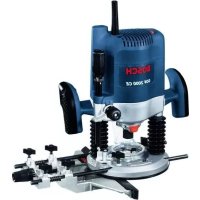



| Product type | Professional plunge router |
| Brand | Bosch |
| Model | GOF 2000 CE |
| Rated power input | 2000 W |
| No-load speed | 8000 – 21000 rpm |
| Speed preselection | Yes (6-position rotary knob) with Constant-Electronic |
| Tool holder (collet chuck) | 8 – 12.7 mm (1/2 inch) |
| Plunge stroke | 65 mm |
| Weight (according to EPTA 01/2003) | 6.0 kg |
| Protection class | II (double insulation) |
| Dust extraction connection | Yes (35 mm diameter) |
| Workable materials | Wood, plastics, lightweight construction materials, non-ferrous metals (with reduced speed) |
| Main functions | Grooving, edge profiling, copying, circle cutting with trammel, guide rail routing |
| Safety | Spindle lock, on/off switch with lock, adjustable depth stop |
| Maintenance and cleaning | Clean ventilation slots regularly; when working intensively on metals, blow out the inside |
| Spare parts and repairability | Spare parts available through Bosch Service; 10-digit article number on the rating plate |
| General information | Instruction manual available in multiple languages; optional accessories: parallel guide, trammel point, guide rail, copying sleeves |
Frequently Asked Questions - GOF 2000 CE BOSCH
User questions about GOF 2000 CE BOSCH
0 question about this device. Answer the ones you know or ask your own.
Ask a new question about this device
Download the instructions for your Milling machine in PDF format for free! Find your manual GOF 2000 CE - BOSCH and take your electronic device back in hand. On this page are published all the documents necessary for the use of your device. GOF 2000 CE by BOSCH.
USER MANUAL GOF 2000 CE BOSCH
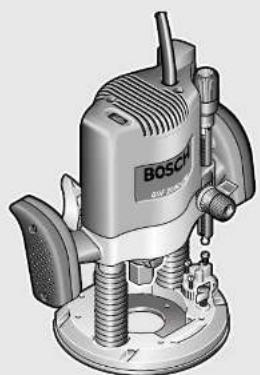
Robert Bosch GmbH
GOF 2000 CE Professional

BOSCH
Dr. Egbert Schneider Senior Vice President Engineering
Dr. Eckerhard Strötgen Head of Product Certification
ppa. 1000 i.v. nuOycu
Robert Bosch GmbH, Power Tools Division D-70745 Leinfelden-Echterdingen 21.07.2008

Deutsch | 11
Assembly
General Power Tool Safety Warnings
WARNING
Read all safety warnings and all instructions. Failure to follow
the warnings and instructions may result in electric shock, fire and/or serious injury.
Save all warnings and instructions for future reference.
The term "power tool" in the warnings refers to your mains-operated (corded) power tool or battery-operated (cordless) power tool.
1) Work area safety
a) Keep work area clean and well lit. Cluttered or dark areas invite accidents. b) Do not operate power tools in explosive atmospheres, such as in the presence of flammable liquids, gases or dust. Power tools create sparks which may ignite the dust or fumes. c) Keep children and bystanders away while operating a power tool. Distractions can cause you to lose control.
2) Electrical safety
a) Power tool plugs must match the outlet. Never modify the plug in any way. Do not use any adapter plugs with earthed (grounded) power tools. Unmodified plugs and matching outlets will reduce risk of electric shock. b) Avoid body contact with earthed or grounded surfaces, such as pipes, radiators, ranges and refrigerators. There is an increased risk of electric shock if your body is earthed or grounded. c) Do not expose power tools to rain or wet conditions. Water entering a power tool will increase the risk of electric shock. d) Do not abuse the cord. Never use the cord for carrying, pulling or unplugging the power tool. Keep cord away from heat, oil, sharp edges and moving parts. Damaged or entangled cords increase the risk of electric shock.
e) When operating a power tool outdoors, use an extension cord suitable for outdoor use. Use of a cord suitable for outdoor use reduces the risk of electric shock. f) If operating a power tool in a damp location is unavoidable, use a residual current device (RCD) protected supply. Use of an RCD reduces the risk of electric shock.
3) Personal safety
a) Stay alert, watch what you are doing and use common sense when operating a power tool. Do not use a power tool while you are tired or under the influence of drugs, alcohol or medication. A moment of inattention while operating power tools may result in serious personal injury. b) Use personal protective equipment. Always wear eye protection. Protective equipment such as dust mask, non-skid safety shoes, hard hat, or hearing protection used for appropriate conditions will reduce personal injuries. c) Prevent unintentional starting. Ensure the switch is in the off-position before connecting to power source and/or battery pack, picking up or carrying the tool. Carrying power tools with your finger on the switch or energising power tools that have the switch on invites accidents. d) Remove any adjusting key or wrench before turning the power tool on. A wrench or a key left attached to a rotating part of the power tool may result in personal injury. e) Do not overreach. Keep proper footing and balance at all times. This enables better control of the power tool in unexpected situations. f) Dress properly. Do not wear loose clothing or jewellery. Keep your hair, clothing and gloves away from moving parts. Loose clothes, jewellery or long hair can be caught in moving parts.
g) If devices are provided for the connection of dust extraction and collection facilities, ensure these are connected and properly used. Use of dust collection can reduce dust-related hazards.
4) Power tool use and care
a) Do not force the power tool. Use the correct power tool for your application. The correct power tool will do the job better and safer at the rate for which it was designed. b) Do not use the power tool if the switch does not turn it on and off. Any power tool that cannot be controlled with the switch is dangerous and must be repaired. c) Disconnect the plug from the power source and/or the battery pack from the power tool before making any adjustments, changing accessories, or storing power tools. Such preventive safety measures reduce the risk of starting the power tool accidentally. d) Store idle power tools out of the reach of children and do not allow persons unfamiliar with the power tool or these instructions to operate the power tool. Power tools are dangerous in the hands of untrained users. e) Maintain power tools. Check for misalignment or binding of moving parts, breakage of parts and any other condition that may affect the power tool's operation. If damaged, have the power tool repaired before use. Many accidents are caused by poorly maintained power tools. f) Keep cutting tools sharp and clean. Properly maintained cutting tools with sharp cutting edges are less likely to bind and are easier to control. g) Use the power tool, accessories and tool bits etc. in accordance with these instructions, taking into account the working conditions and the work to be performed. Use of the power tool for operations different from those intended could result in a hazardous situation.
5) Service
a) Have your power tool serviced by a qualified repair person using only identical replacement parts. This will ensure that the safety of the power tool is maintained.
Safety Warnings for Routers
The allowable speed of the router bit must be at least as high as the maximum speed listed on the power tool. Accessories that rotate faster than permitted can be destroyed. - Router bits or other accessories must fit exactly in the tool holder (collet) of your machine. Routing bits that do not fit precisely in the tool holder of the machine rotate irregularly, vibrate heavily and can lead to loss of control. Apply the machine to the workpiece only when switched on. Otherwise there is danger of kickback when the cutting tool jams in the workpiece. - Keep your hands away from the cutting area and the cutting disc. Hold the auxiliary handle with your second hand. When both hands hold the machine, they cannot be injured by the cutting disc. - Never cut over metal objects, nails or screws. The router bit can become damaged and lead to increased vibrations. Hold the power tool only by the insulated gripping surfaces when performing an operation where the cutting tool may contact hidden wiring or its own cord. Contact with a "live" wire will also make exposed metal parts of the power tool "live" and shock the operator. Use appropriate detectors to determine if utility lines are hidden in the work area or call the local utility company for assistance. Contact with electric lines can lead to fire and electric shock. Damaging a gas line can lead to explosion. Penetrating a water line causes property damage or may cause an electric shock.

Do not use blunt or damaged router bits. Blunt or damaged router bits cause increased friction, can become jammed and lead to imbalance. When working with the machine, always hold it firmly with both hands and provide for a secure stance. The power tool is guided more secure with both hands. - Secure the workpiece. A workpiece clamped with clamping devices or in a vice is held more secure than by hand. - Keep your workplace clean. Blends of materials are particularly dangerous. Dust from light alloys can burn or explode. Always wait until the machine has come to a complete stop before placing it down. The tool insert can jam and lead to loss of control over the power tool. - Never use the machine with a damaged cable. Do not touch the damaged cable and pull the mains plug when the cable is damaged while working. Damaged cables increase the risk of an electric shock.
Functional Description

Read all safety warnings and all instructions. Failure to follow the warnings and instructions may result in electric shock, fire and/or serious injury.
While reading the operating instructions, unfold the graphics page for the machine and leave it open.
Intended Use
The machine is intended for routing grooves, edges, profiles and elongated holes as well as for copy routing in wood, plastic and light building materials, while resting firmly on the workpiece.
With reduced speed and with appropriate routing bits, non-ferrous alloys can also be machined.
Product Features
The numbering of the product features refers to the illustration of the machine on the graphics page.
1 Adjustment knob for depth-of-cut fine adjustment 2 Scale for depth-of-cut fine adjustment 3 Right handle 4 Depth stop 5 Clamping lever for depth-of-cut coarse adjustment 6 Scale for coarse adjustment of depth-of-cut 7 Adjustment knob for coarse adjustment of depth-of-cut 8 Step buffer 9 Spindle lock button
10 Wing bolt for guide rods of parallel guide (2x)*
11 Tightening nut with collet 12 Guide plate 13 Dust boot 14 Base plate 15 Left handle 16 Release lever 17 Thumbwheel for speed preselection 18 Lock-on button for On/Off switch 19 On/Off switch 20 Lock for release lever 21 Open-end spanner, size 24 mm* 22 Router bit 23 Extraction hose (Ø 35 mm)* 24 Extraction adapter 25 Wing bolt for extraction adapter (2x)* 26 Parallel guide 27 Guide rod for parallel guide (2x)* 28 Wing bolt for fine adjustment of parallel guide (2x)* 29 Wing bolt for coarse adjustment of parallel guide (2x)* 30 Fine-adjustment knob for parallel guide 31 Edge guide for parallel guide 32 Extraction adapter for parallel guide
33 Router compass/guide-rail adapter* 34 Router compass handle 35 Wing bolt for coarse adjustment of router compass (2x)* 36 Wing bolt for fine adjustment of router compass (1x) 37 Fine-adjustment knob for router compass 38 Centring screw 39 Base spacer (included in the "router compass" set) 40 Guide rail 41 Guide bushing adapter 42 Fastening screw for guide bushing adapter (2x) 43 Release lever for guide bushing adapter 44 Guide bushing 45 Fastening screw for guide plate (4x) 46 Centring pin The accessories illustrated or described are not included as standard delivery.
Technical Data
| Plunge router GOF 2000 CE | ||
| Professional | ||
| Article number | 3 601 F49 ... | |
| Rated power input | W 2000 | |
| No-load speed | min-1 | 8000 - 21000 |
| Speed preselection | ||
| Constant electronic control | ||
| Connection for dust extraction | ||
| Tool holder | mm inch | |
| Plunge depth | mm 65 | |
| Weight according to EPTA-Procedure 01/2003 | kg 6.0 | |
Protection class
II
The values given are valid for nominal voltages [U] of 230/240 V. For lower voltage and models for specific countries, these values can vary.
Please observe the article number on the type plate of your machine. The trade names of the individual machines may vary.
Noise/Vibration Information
Measured values determined according to EN 60745 (chip board).
Typically the A-weighted noise levels of the product are: Sound pressure level 89 dB(A); Sound power level 100 dB(A). Uncertainty K = 3 dB.
Wear hearing protection!
Vibration total values (triax vector sum) determined according to EN 60745: Vibration emission value a_h = 5.0 m/s², Uncertainty K = 1.5 m/s².
The vibration emission level given in this information sheet has been measured in accordance with a standardised test given in EN 60745 and may be used to compare one tool with another. It may be used for a preliminary assessment of exposure.

The declared vibration emission level represents the main applications of the tool. However if the tool is used for different applications, with different accessories or poorly maintained, the vibration emission may differ. This may significantly increase the exposure level over the total working period.
An estimation of the level of exposure to vibration should also take into account the times when the tool is switched off or when it is running but not actually doing the job. This may significantly reduce the exposure level over the total working period.
Identify additional safety measures to protect the operator from the effects of vibration such as: maintain the tool and the accessories, keep the hands warm, organisation of work patterns.
Declaration of Conformity C
We declare under our sole responsibility that the product described under "Technical Data" is in conformity with the following standards or standardization documents: EN 60745 according to the provisions of the directives 2004/108/EC, 98/37/EC (until 28 Dec 2009), 2006/42/EC (from 29 Dec 2009).
Technical file at: Robert Bosch GmbH, PT/ESC, D-70745 Leinfelden-Echterdingen
Dr. Egbert Schneider Dr. Eckerhard Strötgen Senior Vice President Head of Product Engineering Certification
Robert Bosch GmbH, Power Tools Division D-70745 Leinfelden-Echterdingen 21.07.2008
Assembly
Inserting a Router Bit (see figure A)
Before any work on the machine itself, pull the mains plug. It is recommended to wear protective gloves when inserting or replacing router bits.
Depending on the application, router bits are available in the most different designs and qualities.
Router bits made of high speed steel (HSS) are suitable for the machining of soft materials, e.g. softwood and plastic.
Carbide tipped router bits (HM) are particularly suitable for hard and abrasive materials, e.g. hardwood and aluminium.
Original router bits from the extensive Bosch accessories program are available at your specialist shop.
Only use clean router bits that are in perfect condition.
- Press and hold the spindle lock button 9 (0). If required, turn the spindle by hand until the lock engages. Actuate the spindle lock button 9 only when at a standstill.
- Loosen the tightening nut 11 with the open-end spanner 21 (size 24 mm) by turning in anticlockwise direction (②).
- Insert the router bit into the collet. The shank of the router bit must be immersed at least 20 mm into the collet.
- Tighten the tightening nut 11 with the open-end spanner 21 (size 24 mm) by turning in clockwise direction. Release the spindle lock button 9. Do not insert a router bit with a diameter larger than 50 mm when the guide bushing is not mounted. Such router bits do not fit through the base plate. Do not tighten the tightening nut of the collet without a router bit inserted. Otherwise the collet can be damaged.


Dust/Chip Extraction (see figure B)
Dusts from materials such as lead-containing coatings, some wood types, minerals and metal can be harmful to one's health. Touching or breathing-in the dusts can cause allergic reactions and/or lead to respiratory infections of the user or bystanders.
Certain dusts, such as oak or beech dust, are considered as carcinogenic, especially in connection with wood-treatment additives (chromate, wood preservative). Materials containing asbestos may only be worked by specialists.
- Use dust extraction whenever possible.
- Provide for good ventilation of the working place.
- It is recommended to wear a P2 filter-class respirator.
Observe the relevant regulations in your country for the materials to be worked.
Mounting the Extraction Adapter
Before mounting the extraction adapter 24, bring the machine to the upper starting position by actuating the release lever 16.
Insert the extraction adapter 24, turn it clockwise to the stop until it can be felt to engage (bayonet catch), and fasten it with wing bolt 25.
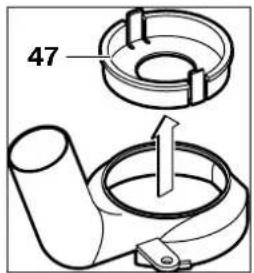
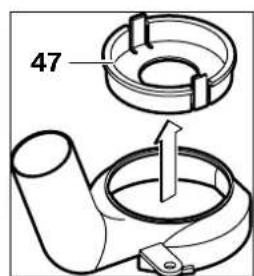
Note: For router bit diameters larger than 30 mm, the insert 47 must be removed from the extraction adapter 24 by pressing on the clamping shackles.
Connecting the Dust Extraction
Insert an extraction hose (35 mm diameter) 23 (accessory) into the mounted extraction adapter. Connect the extraction hose 23 to a vacuum cleaner (accessory).
The machine can be plugged directly into the receptacle of a Bosch all-purpose vacuum cleaner with remote starting control. The vacuum cleaner starts automatically when the machine is switched on.
The vacuum cleaner must be suitable for the material being worked.
When vacuuming dry dust that is especially detrimental to health or carcinogenic, use a special vacuum cleaner.
Operation
Starting Operation
Observe correct mains voltage! The voltage of the power source must agree with the voltage specified on the nameplate of the machine. Power tools marked with 230 V can also be operated with 220 V.
Preselecting the Speed
The required speed can be preselected with the thumbwheel 17 (also while running).
1-2 low speed
3-4 medium speed
5-6 high speed
The values shown in the chart are standard values. The necessary speed depends on the material and the operating conditions, and can be determined by practical testing.

24 | English
| Material Router bit di-ameter (mm) | Thumb-wheel 17 | |
| Hardwood (Beech) | 4-10 | 5-6 |
| 12-20 | 3-4 | |
| 22-40 | 1-2 | |
| Softwood (Pine) | 4-10 | 5-6 |
| 12-20 | 3-6 | |
| 22-40 | 1-3 | |
| Particle Board 4-10 | 3-6 | |
| 12-20 | 2-4 | |
| 22-40 | 1-3 | |
| Plastics | 4-15 | 2-3 |
| 16-40 | 1-2 | |
| Aluminium | 4-15 | 1-2 |
| 16-40 | 1 | |
After longer periods of working at low speed, allow the machine to cool down by running it for approx. 3 minutes at maximum speed with no load.
Switching On and Off
Adjust the depth-of-cut before switching on or off; see Section "Adjusting the Depth-of-cut".
To start the machine, press the On/Off switch 19 and keep it pressed.
To lock the pressed On/Off switch 19, press the lock-on button 18.
To switch off the machine, release the On/Off switch 19 or when it is locked with the lock-on button 18, briefly press the On/Off switch 19 and then release it.
Constant Electronic Control
Constant electronic control holds the speed constant at no-load and under load, and ensures uniform working performance.
Adjusting the Depth-of-cut
The adjustment of the depth-of-cut may only be carried out when the router is switched off. For coarse adjustment of the depth-of-cut, proceed as follows: - Place the machine with the router bit mounted on the workpiece to be machined. - Set the scale for fine adjustment 2 to "0". - Set the step buffer 8 to the lowest position; the step buffer engages noticeably. - Loosen the clamping lever for depth-of-cut coarse adjustment 5 by turning in counterclockwise direction so that the depth stop 4 can move freely and faces against the step buffer 8. - Push the release lever 16 downward and slowly lower the plunge router until the router bit 22 touches the surface of the workpiece. Let go of the release lever 16 again to lock this plunging depth. - Set the scale for coarse adjustment of the depth-of-cut 6 to "0". - Adjust the required depth-of-cut by turning the adjustment knob for coarse adjustment 7 and reading the scale 6. Pay attention not to readjust the rotatable scale 6. Lock the clamping lever for depth-of-cut coarse adjustment 5 by turning in clockwise direction and slide the router upward.
For deep cuts, it is recommended to carry out several cuts, each with little material removal. By using the step buffer 8, the cutting process can be divided into several steps. For this, adjust the desired depth-of-cut with the lowest step of the step buffer and select the higher steps first for the initial cuts. The clearance of the steps can be changed by screwing the adjusting screws further in or out.
After a trial cut, the depth-of-cut can be set exactly to the desired measure by turning the adjustment knob 1; turn in clockwise direction to increase the cutting depth and in anticlockwise direction to decrease the cutting depth. The scale 2 can be used for guidance. One full turn corresponds with a setting range of 2.0 mm; a graduation mark on the top edge of the scale 2
corresponds with a 0.1 mm change of the setting range. The maximum setting range is ±8 mm.
Example: The desired depth-of-cut is to be 10.0 mm; the trial cut resulted in a cutting depth of 9.6 mm.
- Lift up the router and place e.g. a piece of scrap wood under the guide plate 12 so that the router bit 22 cannot touch the workpiece when lowering it. Push the release lever 16 down and slowly lower the plunge router until the depth stop 4 faces on the step buffer 8. Turn scale 2 to "0" and release the clamping lever for depth-of-cut coarse adjustment 5 by turning anticlockwise. Turn the adjustment knob for coarse adjustment of depth-of-cut 7 by 0.4 mm / 4 scale marks (difference from nominal to actual value) in clockwise direction and lock the clamping lever for depth-of-cut coarse adjustment 5 also by turning in clockwise direction.
- Check the selected depth-of-cut by carrying out another trial cut.
Working Advice
Protect router bits against shock and impact.
Direction of Feed and Routing Process (see figure C)
The routing process must always be carried out against the rotation direction of the router bit 22 (up-cutting motion). When routing in the direction with the rotation of the router (down-cutting), the machine can break loose, eliminating control by the user. - Adjust the required depth-of-cut; see Section "Adjusting the Depth-of-cut". - Place the machine with the router bit mounted on the workpiece to be machined and switch the power tool on. - Push the release lever 16 down and slowly lower the plunge router until the adjusted depth-of-cut is reached. Let go of the release lever 16 again to lock this cutting depth. - Carry out the routing process applying uniform feed.
- After finishing the cutting process, guide the plunge router upward again to the uppermost position.
- Switch the power tool off.
Routing with Auxiliary Guide (see figure D)
For working large workpieces, e.g. when routing grooves, a board or wood strip can be fastened to the workpiece as an auxiliary guide alongside which the router can be guided. Guide the router with the flattened side of the guide plate along the auxiliary guide.
Shaping or Molding Applications
For shaping or molding applications without the use of a parallel guide, the router bit must be equipped with a pilot or a ball bearing.
- Guide the switched on power tool from the side toward the workpiece until the pilot or the ball bearing of the router bit faces against the workpiece edge to be machined.
- Guide the power tool alongside the workpiece edge with both hands, paying attention that the router is positioned rectangular. Too much pressure can damage the edge of the workpiece.
Routing with Parallel Guide (see figure E)
Slide the parallel guide 26 with the guide rods 27 into the base plate 14 and tighten as required with the wing bolts 10. Additionally, the parallel guide can be adjusted lengthwise with the wing bolts 28 and 29.
Fine adjustment of the length is possible with the fine-adjustment knob 30 after loosening both wing bolts 28. One revolution corresponds with a setting range of 2.0mm . One graduation mark on the fine-adjustment knob 30 changes the setting range by 0.1mm .
The effective contact surface of the parallel guide can be adjusted with the edge guide 31. Guide the switched on power tool with uniform feed and lateral pressure on the parallel guide alongside the workpiece edge.

When routing with the parallel guide 26, the dust/chip extraction should take place via the special extraction adapter for the parallel guide 32. The extraction adapter 24 can remain mounted.
Routing with the Router Compass (see figure F)
The router compass/guide-rail adapter 33 can be used for circular routing jobs. Mount the router compass as shown in the figure.
Screw the centring screw 38 into the thread on the router compass. Insert the point of the centring screw into the centre of the circular arc to be routed, paying attention that point of the screw engages into the workpiece surface.
Coarsely adjust the required radius by moving the router compass and tighten the wing bolts 35 and 36.
The length can be fine adjusted with the fine-adjustment knob 37 after loosening the wing bolt 36. One revolution corresponds with a setting range of 2.0mm . One graduation mark on the fine-adjustment knob 37 changes the setting range by 0.1mm .
Guide the switched on power tool over the workpiece with the right handle 1 and the router compass handle 34.
Routing with Guide Rail (see figure G)
Straight routing cuts can be carried out with help of the guide rail 40.
The base spacer 39 must be mounted in order to compensate the height difference.
Mount the router compass/guide-rail adapter 33 as shown in the figure.
Fasten the guide rail 40 to the workpiece with suitable clamping devices, e.g. screw clamps. Place the machine with the guide-rail adapter 33 mounted onto the guide rail.
Routing with Guide Bushing (see figures H-L)
The guide bushing 44 enables template and pattern routing on workpieces.
In order to use the guide bushing 44, the guide bushing adapter 41 must be inserted into the guide plate 12 first.
Place the guide bushing adapter 41 from above onto the guide plate 12 and tighten it firmly with the 2 fastening screws 42. Pay attention that the release lever for the guide bushing adapter 43 is freely movable.
Choose a suitable guide bushing, depending on the thickness of the template or the pattern. Because of the projecting height of the guide bushing, the template must have a minimum thickness of 8 mm.
Actuate the release lever 43 and insert the guide bushing 44 from below into the guide bushing adapter 41. Ensure that the encoding keys clearly engage in the grooves of the guide bushing.
- Select a router bit with a diameter smaller than the interior diameter of the guide bushing.
To ensure that the distance from router bit centre and guide bushing edge is uniform, the guide bushing and the guide plate can be adjusted to each other, if required.
- Push the release lever 16 down and guide the router to the stop in the direction of the base plate 14. Let go of the release lever 16 again, in order to lock this plunging depth.
- Loosen the fastening screws 45 by approx. 2 - 3 turns so that the guide plate 12 can be moved freely.
- Insert the centring pin 46 into the tool holder as shown in the figure. Hand-tighten the tightening nut so that the centring pin can still be moved freely. Align the centring pin 46 and the guide bushing 44 to each other by slightly moving the guide plate 12.
- Tighten the fastening screws 45.
- Remove the centring pin 46 from the tool holder.
- Push the release lever 16 and guide the plunge router to the uppermost position.
For routing with the guide bushing 44 proceed as follows:
- Guide the switched on power tool with the guide bushing toward the template.




Push the release lever 16 down and slowly lower the plunge router until the adjusted depth-of-cut is reached. Let go of the release lever 16 again to lock this cutting depth. - Guide the switched on power tool with the protruding guide bushing alongside the template applying lateral pressure.
Operation with Router Table (Accessory)
The GOF 2000 CE is compatible with several router tables available on the accessories market. To ensure safe mounting and usage as intended for the GOF 2000 CE with a router table, it is absolutely necessary that you:
make sure that the selected router table is compatible with the GOF 2000 CE (please observe the information of the router table manufacturer) follow the mounting and operating instructions of the router table manufacturer follow the safety warnings of the router table manufacturer and all safety warnings of the GOF 2000 CE in these operating instructions.
Bosch shall not assume any liability whatsoever for injuries and damage that can occur caused by use of the GOF 2000 CE with a router table other than intended for.
Maintenance and Service
Maintenance and Cleaning
Before any work on the machine itself, pull the mains plug. For safe and proper working, always keep the machine and ventilation slots clean. In extreme working conditions, conductive dust can accumulate in the interior of the machine when working with metal. The protective insulation of the machine can be degraded. The use of a stationary extraction system is recommended in such cases as well as frequently blowing out the ventilation slots and installing a residual current device (RCD).
If the machine should fail despite the care taken in manufacturing and testing procedures, repair should be carried out by an after-sales service centre for Bosch power tools.
In all correspondence and spare parts order, please always include the 10-digit article number given on the type plate of the machine.
WARNING! Important instructions for connecting a new 3-pin plug to the 2-wire cable.
The wires in the cable are coloured according to the following code:

Do not connect the blue or brown wire to the earth terminal of the plug.
Important: If for any reason the moulded plug is removed from the cable of this power tool, it must be disposed of safely.
After-sales Service and Customer Assistance
Our after-sales service responds to your questions concerning maintenance and repair of your product as well as spare parts. Exploded views and information on spare parts can also be found under:
www.bosch-pt.com
Our customer consultants answer your questions concerning best buy, application and adjustment of products and accessories.
Great Britain
Robert Bosch Ltd. (B.S.C.)
P.O.Box 98
Broadwater Park
North Orbital Road
Denham
Uxbridge
UB95HJ
Tel. Service: +44 (0844) 736 0109
Fax: +44 (0844) 736 0146
Australia, New Zealand and Pacific Islands
Robert Bosch Australia Pty. Ltd.
Power Tools
Locked Bag 66
Clayton South VIC 3169
Customer Contact Center
Inside Australia:
Phone: +61 (01300) 307 044
Fax: +61 (01300) 307 045
Inside New Zealand:
Phone: +64 (0800) 543 353
Fax: +64 (0800) 428570
Outside AU and NZ:
Phone: +61 (03) 9541 5555
www.bosch.com.au
Disposal
The machine, accessories and packaging should be sorted for environmental-friendly recycling.
Only for EC countries:
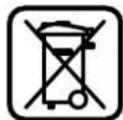
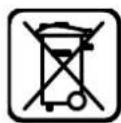
Do not dispose of power tools into household waste!
According to the European Guideline 2002/96/EC for Waste Electrical
and Electronic Equipment and its implementation into national
right, power tools that are no longer usable must be collected separately and disposed of in an environmentally correct manner.
Subject to change without notice.
Dr. Egbert Schneider Dr. Eckerhard Strötgen Senior Vice President Head of Product Engineering Certification

Robert Bosch GmbH, Power Tools Division D-70745 Leinfelden-Echterdingen 21.07.2008
Assembly
Subject to change without notice.
Senior Vice President
Engineering
Dr. Eckerhard Strötgen
Head of Product
Certification
Robert Bosch GmbH, Power Tools Division
D-70745 Leinfelden-Echterdingen
21.07.2008





Assembly
Senior Vice President
Head of Product
Engineering
Certification

Robert Bosch GmbH, Power Tools Division D-70745 Leinfelden-Echterdingen 21.07.2008
58 | Portuguese
Assembly
Dr. Egbert Schneider Dr. Eckerhard Strotgen Senior Vice President Head of Product Engineering Certification

Robert Bosch GmbH, Power Tools Division D-70745 Leinfelden-Echterdingen 21.07.2008
70 Italian
Assembly
Dr. Egbert Schneider Senior Vice President Engineering
Dr. Eckerhard Strötgen
Head of Product
Certification
Paa.
Robert Bosch GmbH, Power Tools Division
D-70745 Leinfelden-Echterdingen
21.07.2008
82 | Netherlands
Assembly
Mounting the extraction adapter
d) If the power tool is used outdoors, only an extension cord suitable for outdoor use may be used. Using an extension cord suitable for outdoor use reduces the risk of electric shock. e) If the power tool cannot be avoided being used in damp surroundings, an HFI relay must be used. Using an HFI relay reduces the risk of electric shock.
Dr. Egbert Schneider Dr. Eckerhard Strotgen Senior Vice President Head of Product Engineering Certification
Robert Bosch GmbH, Power Tools Division D-70745 Leinfelden-Echterdingen 21.07.2008
Assembly
Bosch Service Center
Telegrafvej 3
2750 Ballerup
Tel. Service Center: +45 (4489) 8855
Fax:+45(4489)8755
E-Mail: vaerktoej@dk.bosch.com
Disposal
Dr. Egbert Schneider Senior Vice President Engineering
Dr. Eckerhard Strötgen Head of Product Certification
Robert Bosch GmbH, Power Tools Division D-70745 Leinfelden-Echterdingen 21.07.2008
Assembly
Bosch Service Center
Telegrafvej 3
2750 Ballerup
Denmark
Tel.: +46 (020) 41 44 55
Fax: +46 (011) 187691
Waste disposal
Dr. Egbert Schneider Senior Vice President Engineering
Dr. Eckerhard Strötgen Head of Product Certification
Robert Bosch GmbH, Power Tools Division D-70745 Leinfelden-Echterdingen 21.07.2008
Assembly
Dr. Egbert Schneider Dr. Eckerhard Strötgen Senior Vice President Head of Product Engineering Certification
Robert Bosch GmbH, Power Tools Division D-70745 Leinfelden-Echterdingen 21.07.2008
Assembly
Dr. Egbert Schneider Dr. Eckerhard Strötgen Senior Vice President Head of Product Engineering Certification

Robert Bosch GmbH, Power Tools Division D-70745 Leinfelden-Echterdingen 21.07.2008
Assembly
Inserting the tool (see figure A)
Pull the plug out of the socket before carrying out any work on the power tool. We recommend that you read the safety instructions carefully when inserting or changing the tool.
Tools for different versions and qualities are available, depending on the application.
Tools made of high-speed steel are suitable for processing soft materials, e.g. soft wood and plastics.
Tools with carbide tips are especially suitable for processing hard materials, e.g. hard wood and aluminum.
The original power tool can be identified from the type plate on the power tool. You can obtain the type plate from the address for your country.
Use protective gloves and safety glasses.
Adjusting and operating instructions (see figure C)
The router must always be checked with a rotation direction opposite to the rotation direction of the router bit 22 (counterclockwise rotation). If the router rotates in the same direction (clockwise rotation), it can slip out of your hands. - Set the routing depth, see chapter "Setting the routing depth". - Switch on the power tool with the router bit mounted on the workpiece and let the power tool run. - Press the unlocking lever 16 downwards and guide the router downwards until the desired routing depth is reached. Release the unlocking lever 16 to lock this depth. - Perform the routing with uniform feed. - After finishing the routing, turn the router off and wait until it stops. - Switch off the power tool.
Dr. Egbert Schneider Senior Vice President Engineering
Dr. Eckerhard Strotgen Head of Product Certification
Robert Bosch GmbH, Power Tools Division D-70745 Leinfelden-Echterdingen 21.07.2008
Assembly
Mounting the router bit (see figure A)
Bosch San. ve Tic. A.S.
Ahi Evran Cad. No:1 Kat:22
Polaris Plaza
80670 Maslak/Istanbul
Customer advisor: +90 (0212) 335 06 66
Customer service hotline: +90 (0212) 335 07 52
Liquidation
Dr. Egbert Schneider Dr. Eckerhard Strotgen Senior Vice President Head of Product Engineering Certification
ppa. 1
Robert Bosch GmbH, Power Tools Division D-70745 Leinfelden-Echterdingen 21.07.2008
Assembly
System Constant Electronic
Robert Bosch Sp. z o.o.
Dr. Egbert Schneider Dr. Eckerhard Strotgen Senior Vice President Head of Product Engineering Certification
Paa /nau
Robert Bosch GmbH, Power Tools Division D-70745 Leinfelden-Echterdingen 21.07.2008
Assembly
Bosch Service Center PT
K Vapence 1621/16
692 01 Mikulov
Dr. Egbert Schneider Dr. Eckerhard Strotgen Senior Vice President Head of Product Engineering Certification

Assembly
Dr. Egbert Schneider Senior Vice President Engineering
Dr. Eckerhard Strötgen
Head of Product
Certification


Robert Bosch GmbH, Power Tools Division
D-70745 Leinfelden-Echterdingen
21.07.2008
Assembly
The accessories shown or described are not included in the standard delivery scope.
Technical data
Vibration emission value a = 5.0 m/s², uncertainty K = 1.5 m/s².
The vibration levels specified in these instructions are measured according to the EN 60745 standardized measurement method and can be used for comparison of tools. They are also suitable for a preliminary assessment of vibration exposure.
The stated vibration levels represent the main applications of the power tool.
If the power tool is used for other work with interchangeable tools not provided for in the instructions, the technical service will not be responsible for the consequences. The vibration level may deviate. This can significantly increase the vibration load over the entire working period. For an accurate assessment of the vibration load, the periods of time when the power tool is switched off or is running but not actually performing work must also be taken into account. This can significantly reduce the vibration load over the total working time.
Take appropriate safety measures to protect the operator from the effects of vibration, for example: maintenance of the power tool and working tools, keeping hands warm, and organization of work processes.






Declaration of Conformity
We declare under our sole responsibility that the product described under “Technical Data” complies with the following standards or normative documents: EN60745 in accordance with the provisions of Directives 2004/108/EC, 98/37/EC (until 28.12.2009), 2006/42/EC (from 29.12.2009).
Technical file at: Robert Bosch GmbH, PT/ESC, D-70745 Leinfelden-Echterdingen
Dr. Egbert Schneider Dr. Eckerhard Strotgen Senior Vice President Head of Product Engineering Certification
Robert Bosch GmbH, Power Tools Division D-70745 Leinfelden-Echterdingen 21.07.2008
Assembly
Mounting the cutter (see figure A)
Before any work on the power tool, disconnect the plug from the power supply. For mounting the cutter, it is recommended to wear protective gloves.
Depending on the application, different cutter versions and cutting qualities are available.
Cutters made of high-speed steel are intended for processing soft materials such as soft wood and plastics.
Cutters with carbide tips are intended for hard and abrasive materials, for example, hard wood and aluminum.
The name of the universal program for Bosch tools. You will find it at your specialized dealer.
Use only undamaged and clean saw blades.
Press the spindle lock button (O) and hold it. If necessary, turn the spindle by hand until the lock engages. Press the spindle lock button only when the spindle is at a standstill. Release the pressed button. Turn the clamping nut with the two-pin wrench 24 mm 21 counterclockwise ( ) and insert the saw blade into the clamping flange. The shank of the saw blade must enter the clamping flange at least 20 mm. Tighten the clamping nut with the two-pin wrench 24 mm 21, turning it clockwise. Release the spindle lock button. Do not install any saw blades with a diameter larger than 50 mm without a corresponding base. These blades will not fit through the base opening. Never tighten the clamping nut of the clamping flange without a saw blade. Otherwise, the clamping flange may be damaged.
Dust and chip extraction (see figure B)
Dust from materials such as lead-containing paint, some types of wood, minerals, and metal can be harmful to health. Contact with or inhalation of dust can cause allergic reactions and/or respiratory diseases of the operator or persons in the vicinity. Certain types of dust, such as oak and beech dust, are considered carcinogenic, especially in combination with additives for wood treatment. Materials containing asbestos may only be processed by specialists.
- If possible, use a dust extraction system. - Ensure good ventilation. - It is recommended to wear a respirator with filter class P2.
Observe the regulations applicable in your country for the materials to be processed.
Installing the extraction adapter
Before mounting the extraction adapter 24, check the release lever 16 and set the power tool to the initial position.
Insert the extraction adapter 24, turn the extraction adapter 24 clockwise until it stops (bayonet lock), and secure it with the wing screw 25.
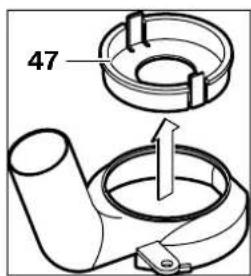
Note: For saw blades with a diameter larger than 30 mm, the insert 47 must be removed from the extraction adapter 24 before adjustment.
Connecting the dust extractor
Slide the extraction hose (35 mm) 23 (accessory) onto the installed extraction adapter. Connect the extraction hose 23 to the dust extractor (accessory).
The power tool can be connected directly to the socket of a Bosch universal dust extractor with remote start control. The dust extractor starts automatically when the power tool is switched on.
The dust extractor must be suitable for the material being processed.
WARNING! Wall-mounted grinders are intended for grinding only. They are not suitable for cutting or other operations.
Working with the tool
Switching on the power tool
Pay attention to the mains voltage! The voltage of the power source must match the data on the rating plate of the power tool. Tools rated for 230 V can also operate at 220 V.
Setting the speed
Using the setting wheel 17, you can set the required number of revolutions, also during operation.
1-2 Low speed 3-4 Medium speed 5-6 High speed
The values given in the table are guide values. The required number of revolutions depends on the material and the working conditions and can be determined by practical testing.
To switch on the power tool, press the switch 19 and keep it pressed.
To lock the switch 19 in the on position, press the lock button 18.
To switch off the power tool, release the switch 19, or if it was locked with the lock button 18, press and release the switch 19.
Electronic constant speed control
The electronic control system keeps the number of revolutions at no load and under load almost constant and ensures uniform working performance.
Setting the grinding depth
The setting of the grinding depth may only be carried out when the power tool is switched on.
Adjust the milling depth as follows:
- Install the power tool with the mounted milling cutter on the workpiece. - Set the fine adjustment scale 2 to 0. - Set the turret stop 8 to the lowest step; the turret stop clicks automatically. Release the clamping lever for coarse adjustment of the milling depth, turning it to the left so that the depth stop 4 can freely lower onto the turret stop 8. Press the unlocking lever 16 down and slowly guide the milling machine down until the milling cutter 22 does not touch the workpiece surface. Release the unlocking lever 16 to lock this plunge depth.
- Set the coarse adjustment scale 6 to 0
- Set the desired milling depth with the coarse adjustment handwheel for milling depth. Check the adjustment on scale 6. Do not change the adjustment of scale 6. - Lock the clamping lever for coarse adjustment of the milling depth by turning it to the right for this purpose, then move the power tool upward.
For greater milling depths, several work passes with a smaller material removal thickness should be performed. With the turret stop 8, the milling process can be divided into several steps. For this, set the desired milling depth with the lowest step of the turret stop and select the first work passes at the higher steps. The distance between the steps can be changed by turning the adjusting screws.
After a test pass, you can set the milling depth to the desired dimension by turning the rotary knob 1; to increase the depth, turn the knob counterclockwise, to decrease it, turn it clockwise. The scale 2 serves as a guide. One full turn corresponds to a travel of 2.0 mm, one division on the upper edge of scale 2 corresponds to a change in travel of 0.1 mm. The maximum travel of the adjustment is ±8 mm.
Example: The desired milling depth should be 10.0 mm, the test pass was made at a depth of 9.6 mm.
- Lower the milling machine. Place a support under the milling machine, for example, wooden offcuts 12, so that the milling cutter 22 does not touch the workpiece when lowering. Press the unlocking lever 16 down and slowly guide the milling machine down until the depth stop 4 rests on the turret stop 8. - Set scale 2 to "0" and release the clamping lever for coarse adjustment of the milling depth by turning it to the left.



Turn the knob by 0.4 mm/4 divisions (difference between the set and actual value) clockwise and tighten the knurled screw. - Check the set depth with a further test pass.
Application instructions
Protect the cutter from impacts and shocks.
Milling direction: The milling process (see Fig. C)
The milling process must always be carried out in the opposite direction to the rotation of the milling cutter 22. When milling in the same direction, the milling machine can be pulled out of the operator's hands.
Set the depth of the cutter according to the section "Setting the cutter depth". Install the electric tool with the installed cutter. For processing the part, turn on the electric tool. Press the release lever 16 down and lower the router slowly until the set cutter depth is reached. Release the release lever 16 to lock this immersion depth. Perform the routing with uniform feed. After the routing process, move the router to the upper position. Turn off the electric tool.
Routing with an auxiliary stop (see Fig. D)
For processing large workpieces, for example, for routing grooves, you can attach a board or rail to the workpiece as an auxiliary stop and route along this stop. Guide the router with the straight side of the sole plate along the auxiliary stop.
Routing edges or profile routing
For edge routing or profile cutting, the router must be equipped with a guide fence or a ball-bearing guide.
Guide the switched-on electric tool from the side of the part so that the guide fence or ball-bearing guide of the cutter rests against the edge of the part. Guide the electric tool with both hands along the edge of the part. Make the cut with a rectangular guide. Excessive force can damage the edge of the part.
Routing with a parallel stop (see Fig. E)
Insert the parallel stop 26 together with the guide rods 27 into the base plate 14 and secure it with the clamping screws 10 according to the required size. With the clamping screws 28 and 29, you can additionally adjust the parallel stop in length.
By turning the adjusting wheel, you can make fine adjustments to the length by loosening the clamping screws 28. One turn corresponds to a setting change of 2.0 mm, and one scale division on the adjusting wheel corresponds to a setting change of 0.1 mm.
With the auxiliary rail 31, you can change the effective working width of the parallel stop.
Guide the switched-on electric tool with uniform feed and lateral pressure in the direction of the parallel stop along the edge of the part.
When routing with the parallel stop 26, the chip suction must be carried out through the side adapter 32.
The chip suction adapter 24 can be left on the machine.







202 | Russian
Routing with a circle (see Fig. F)
Set the router for circular milling according to the figure.
Insert the centering screw 38 into the milling spindle. Place the sharp point of the screw in the center of the hole to be milled and tighten it so that the sharp point enters the surface of the material.
Set the rough radius by moving the router and tighten the thumbscrews 35 and 36.
Rotate the spindle 37, loosen the thumbscrew 36, and perform fine adjustment. One full turn of the spindle corresponds to a setting of 2 mm; one division on the rotating spindle 37 corresponds to a setting of 0.1 mm.
Guide the power tool with both hands along the router guide 34 as shown.
Milling with the guide rail (see Fig. G)
With the guide rail 40 you can perform straight cuts.
To adjust the cutting depth, set the depth stop 39.
Set the router guide adapter according to the figure 33.
Secure the guide rail 40 with suitable clamping devices, for example, clamps on the workpiece. Place the power tool with the router guide adapter 33 installed on the guide rail.
Milling with the copying sleeve (see Fig. H-L)
With the copying sleeve 44 you can transfer contours from templates or patterns onto the workpiece.
The copying sleeve 44 must be installed with the adapter for copying sleeve 41 in the base plate 12.
Insert the adapter for copying sleeve 41 from above into the base plate 12 and secure it with two screws 42. Ensure that the release ring of the adapter for copying sleeve 43 rotates freely.
Select the appropriate copying sleeve according to the thickness of the template. Due to the protruding height of the copying sleeve, the template thickness must be at least 8 mm.
Insert the router bit 43 into the collet 44 from below into the collet nut 41. When doing so, the bit must be clamped with slight force in the collet.
The diameter of the cutter must be smaller than the inner diameter of the copy ring.
After installing the copy ring, the center of the cutter can be adjusted relative to the copy ring if necessary.
Press the unlocking button 16 and move the plunge cutter to the base plate 14. Press the unlocking button 16 to lock this plunge depth. Loosen the clamping screws 45 by 2-3 turns so that the base plate 12 moves freely. - Insert the centering pin 46 into the chuck of the power tool. Tighten the hand lever so that the centering pin still rotates. Select the centering pin 46 and the copy ring 44 with a slight offset of the base plate 12 relative to the copy ring. - Tighten the clamping screws 45. - Remove the centering pin 46 from the chuck of the power tool.



Press the unlocking button 16 and move the plunge cutter to the upper position.
Milling with the copy ring 44 is carried out as follows:
- Switch on the power tool with the copy ring and guide it to the template. Press the unlocking button 16 and guide the plunge cutter slowly down to the set milling depth. Press the unlocking button 16 to lock this plunge depth. - Guide the power tool with the protruding copy ring along the template.
Working with the milling table (accessories)
The GOF 2000 CE machine is compatible with many milling tables available on the market. For reliable mounting of the GOF 2000 CE machine on a milling table and for use as intended, it is absolutely necessary to:
- Ensure the compatibility of the selected milling table with the GOF 2000 CE machine (consider the data from the milling table manufacturer) - Follow the assembly and maintenance instructions of the milling table manufacturer - Follow all safety instructions from the milling table manufacturer and all safety instructions from this operating manual for the GOF 2000 CE.
Bosch is not liable for damage or property damage that may occur when the GOF 2000 CE is used incorrectly with a milling table.
Maintenance and service
Maintenance and cleaning
Before any maintenance work on the power tool, remove the mains plug from the socket. To ensure good and safe operation, always keep the power tool and the ventilation slots clean. Under extreme operating conditions, when processing metals, conductive dust may accumulate inside the power tool. This can significantly affect the protective insulation of the power tool. In such cases, it is recommended to use a stationary extraction system, frequently blow out the ventilation slots, and connect a residual current device (RCD) upstream of the power tool.
Despite careful manufacturing and testing methods, the power tool may fail. Repairs should only be carried out by an authorized Bosch power tool service center.
Please always quote the 10-digit product number from the type plate of the power tool in all correspondence and spare parts orders.
After-sales service and customer advice
The service department will answer all your questions regarding repair and maintenance of your product as well as spare parts. Exploded views and information on spare parts can also be found at: www.bosch-pt.ru
The Bosch consulting team will be happy to help you with any questions regarding our products and their accessories.

204 | Russian
Russia
Robert Bosch LLC
Service center for power tools
Power tools
ul. Akademika Koroleva 13, building 5
129515, Moscow
Tel.: +7 (495) 935 88 06
Fax: +7 (495) 935 88 07
E-Mail: rbru_ct_asa_mk@ru.bosch.com
Robert Bosch LLC
Service Center for Power Tools
41 Shvevtsova St.
198095, St. Petersburg
Tel.: +7 (812) 449-97-11
Fax: +7 (812) 449-97-11
E-Mail: rbru_rt_asa_spb@ru.bosch.com
Robert Bosch LLC
Service Center for Power Tools
53 Gorsky Microdistrict
630032, Novosibirsk
Tel.: +7 (383) 359-94-40
Fax: +7 (383) 359-94-65
Tel.: +7 (383) 359-94-40
Fax: +7 (383) 3599465
E-Mail: rbru.pt_asa_nob@ru.bosch.com
OOO "Robert Bosch"
Service center for power tools
Electrical tools
ul. Fonotovykh brigad, 14
620017, Yekaterinburg
Tel.: +7 (343) 365 86 74
Tel.: +7 (343) 378 77 56
Fax: +7 (343) 378 79 28
Belarus
LLC "Robert Bosch"
220035, Minsk
ul. Timiryazeva, 65A-020
Tel.: +375 (17) 254 78 71
Tel.: +375 (17) 254 79 15
Tel: +375 (17) 2547916
Fax: +375 (17) 2547875
E-Mail: bsc@by.bosch.com
YTHAN3aun
Outdated electrical tools, accessories and packaging should be handed in for environmentally friendly recycling.
Only for EC countries:
Do not dispose of electrical tools in household waste! According to the European Directive 2002/96/EC on old electrical and electronic tools and appliances, and
also in accordance with the national law implementing this Directive, outdated electrical tools must be collected separately and handed in for environmentally friendly recycling.
Subject to change.
ME77
Safety instructions
General power tool safety warnings
WARNINGS
Read all safety warnings and instructions.
Failure to follow the warnings and instructions may result in electric shock, fire and/or serious injury.
Always keep the device away from oil and other flammable liquids.
When using the term "power tool" in its definitions, it refers to a power tool that is either mains-operated (with a power cord) or battery-operated (without a power cord).
1) Work area safety
a) Keep your work area clean and well lit. Cluttered or dark areas can lead to accidents. b) Do not operate power tools in explosive atmospheres, such as in the presence of flammable liquids, gases, or dust. Power tools can create sparks that may ignite dust or fumes. c) While working with a power tool, do not allow children or other people near the work area. Distractions can cause you to lose control of the tool.
2) Electrical safety
a) The power tool plug must match the outlet. Never modify the plug in any way. For tools with grounding, do not use adapter plugs. Using the original plug and a suitable outlet reduces the risk of electric shock.
b) Avoid body contact with grounded surfaces, such as pipes, radiators, stoves, and refrigerators. If your body is grounded, there is an increased risk of electric shock. c) Protect the device from rain and moisture. Water entering a power tool increases the risk of electric shock. d) Do not misuse the power tool's cord. Never carry the tool by its cord or pull the plug from the outlet by the cord. Keep the cord away from heat, oil, sharp edges, and moving parts. Damaged or tangled cords increase the risk of electric shock. e) For outdoor work, use only extension cords rated for outdoor use. Using cords designed for outdoor use reduces the risk of electric shock. f) If operating a power tool in a damp environment is unavoidable, use a residual current device (RCD). Using an RCD reduces the risk of electric shock.
3) Personal safety
a) Stay alert, watch what you are doing, and use common sense when operating a power tool. Do not use a power tool while you are tired or under the influence of drugs, alcohol, or medication. A moment of inattention while operating a power tool may result in serious personal injury. b) Wear personal protective equipment and always wear safety glasses. Wearing protective equipment such as a dust mask, non-slip safety shoes, hard hat, or hearing protection, depending on the type of work, reduces the risk of injury.

B) Avoid unintentional starting. Ensure the switch is in the off-position before connecting to the power source and/or battery pack, picking up or carrying the tool. Carrying power tools with your finger on the switch or energising power tools that have the switch on invites accidents. C) Remove any adjusting key or wrench before turning the power tool on. A wrench or a key left attached to a rotating part of the power tool may result in personal injury. D) Do not overreach. Keep proper footing and balance at all times. This enables better control of the power tool in unexpected situations. E) Dress properly. Do not wear loose clothing or jewellery. Keep your hair, clothing and gloves away from moving parts. Loose clothes, jewellery or long hair can be caught in moving parts. F) If devices are provided for the connection of dust extraction and collection facilities, ensure these are connected and properly used. Use of dust collection can reduce dust-related hazards. Proper use and care of power tools a) Do not force the power tool. Use the correct power tool for your application. The correct power tool will do the job better and safer at the rate for which it was designed.
b) Do not use the power tool if the switch does not turn it on and off. Any power tool that cannot be controlled with the switch is dangerous and must be repaired. C) Disconnect the plug from the power source and/or the battery pack from the power tool before making any adjustments, changing accessories, or storing power tools. Such preventive safety measures reduce the risk of starting the power tool accidentally. D) Store idle power tools out of the reach of children and do not allow persons unfamiliar with the power tool or these instructions to operate the power tool. Power tools are dangerous in the hands of untrained users. E) Maintain power tools. Check for misalignment or binding of moving parts, breakage of parts and any other condition that may affect the power tool's operation. If damaged, have the power tool repaired before use. Many accidents are caused by poorly maintained power tools. F) Keep cutting tools sharp and clean. Properly maintained cutting tools with sharp cutting edges are less likely to bind and are easier to control. G) Use the power tool, accessories and tool bits etc. in accordance with these instructions, taking into account the working conditions and the work to be performed. Use of the power tool for operations different from those intended could result in a hazardous situation.


5) Service
a) Have your power tool serviced by a qualified repair person using only identical replacement parts.
This will ensure that the safety of the power tool is maintained.
Safety instructions for bench grinders
The rotation speed of the working tool must be at least the maximum speed specified by the electric drive. A device that rotates slower than the permissible speed may be damaged. The tool must not rotate faster than the working tool's rated speed (in rpm) specified by the electric drive.
A working tool that does not rotate exactly at the rated speed of the tool may cause loss of control of the device.
The electric drive of the processed part must be switched off. When the electric drive is jammed in the processed part, there is a risk of kickback. Do not place your hands in the milling zone or near the cutter. Keep both hands on the auxiliary handle. If both hands are near the cutter, they cannot be injured by the cutter. Never mill on metal objects, nails, or screws. This can damage the cutter and cause increased vibration. During work, when the working tool may come into contact with hidden wiring or its own power cord, hold the electric drive by the insulated handles.
Contact with live wires may energize exposed metal parts of the electric drive and lead to electric shock.
When laying pipes and wires, use suitable detectors or consult the local electricity, gas, and water utility. Contact with a live wire
may lead to fire and electric shock. Contact with a gas pipe may lead to an explosion. Contact with a water pipe may cause damage to property.
Do not use blunt or damaged cutters. Blunt or damaged cutters can cause overheating, jam, and lead to loss of control. Hold the electric drive firmly with both hands and keep a stable stance. With both hands you can better control the electric drive. Secure the workpiece. With the help of a clamping device or a vice, the workpiece is held more securely than when holding it by hand. Keep the work area clean. Pay special attention to dust and debris. Some materials may ignite or explode. Before starting the electric drive, make sure it is not obstructed. Even a working tool can become jammed due to unexpected obstacles, leading to loss of control of the electric drive. Do not use the electric drive with a damaged power cord. If the power cord is damaged, do not touch it and unplug it from the outlet. A damaged power cord increases the risk of electric shock.
Intended use

Read all safety warnings. Failure to follow the safety warnings may lead to electric shock, fire, and/or serious injury.
Keep all warnings and instructions for future reference.
208|Ukrainian
Intended use
The device is intended for milling grooves, edges, and profiles in wood, plastic, and light building materials, as well as for milling with a copying guide.
With appropriate cutters, it can also be used for milling soft metals.
Illustrated components
Image of the components of the device on the image of the electric drill on page 3 with a small icon.
1. Knob for fine adjustment of the drilling depth stop 2. Scale for fine adjustment of the drilling depth stop 3. Handle 4. Depth stop lock 5. Locking lever for coarse adjustment of the drilling depth stop 6. Scale for coarse adjustment of the drilling depth stop 7. Knob for coarse adjustment of the drilling depth stop 8. Stepped chuck 9. Fixator of the chuck 10. Tension bar for parallel stop (2 pcs.) 11. Cover of the locking screw 12. Parallel stop guide 13. Clamp of the parallel stop 14. Support plate 15. Handle 16. Locking lever 17. Key for adjusting the chuck 18. Lock button for the switch 19. Switch 20. Fixator for blocking the spindle 21. Spanner for chuck with size 24 mm* 22. Cutter*
23. Depth stop (Ø 35 mm) 24. Depth stop adjustment 25. Tension bar for depth stop (2 pcs.)* 26. Parallel stop 27. Tension bar for parallel stop (2 pcs.)* 28. Tension bar for fine adjustment of the parallel stop (2 pcs.)* 29. Tension bar for coarse adjustment of the parallel stop (2 pcs.)* 30. Knob for fine adjustment of the parallel stop* 31. Support plate for the parallel stop* 32. Depth stop for the parallel stop 33. Milling circle adapter for the guide 34. Handle of the milling circle 35. Tension bar for coarse adjustment of the milling circle (2 pcs.) 36. Tension bar for fine adjustment of the milling circle (1 pc.) 37. Knob for fine adjustment of the milling circle 38. Centering bolt* 39. Guide rod (attach to the kit «Milling circle»)* 40. Cartridge 41. Cartridge for the copying sleeve 42. Screw for the copying sleeve (2 pcs.) 43. Locking lever for the copying sleeve 44. Copying sleeve 45. Screw for the guide (4 pcs.) 46. Centering mandrel* *Shown or described in the manual, not included in the standard delivery.
Technical data
The results of the tests are determined in accordance with EN 60745 (woodworking tool).
The estimated noise level from the tool, as a rule, is: sound pressure 89 dB(A); sound power 100 dB(A). Error K = 3 dB.
Dear users!
The total vibration value (vector sum of three directions), determined in accordance with EN 60745: vibration a_h = 5.0 m/s², error K = 1.5 m/s².
The vibration values given in these instructions were measured in accordance with the procedure specified in EN 60745; they can be used for comparison with other tools. The declared vibration value can also be used for a preliminary assessment of vibration load.
The declared vibration value applies to the main types of work for which the power tool is used. However, when using the power tool for other types of work, with accessories or with insufficient technical maintenance, the vibration level may be different. The vibration load may increase significantly over the entire period of use of the tool.
For an accurate assessment of the vibration load, it is necessary to take into account the time intervals when the tool is switched off or, although switched on, but not actually working. This can significantly reduce the vibration load over the entire period of use of the tool.
Before starting any work on the power tool, read the safety instructions and the instruction manual. Keep the power tool and its accessories away from children and untrained persons. Ensure proper ventilation and use personal protective equipment.
Declaration of Conformity
C
We declare under our sole responsibility that the product described in the Technical Data complies with the following standards or normative documents: EN 60745 in accordance with the provisions of Directives 2004/108/EC, 98/37/EC (until 28.12.2009), 2006/42/EC (after 29.12.2009).
Technical documentation:
Robert Bosch GmbH, PT/ESC,
D-70745 Leinfelden-Echterdingen
Dr. Egbert Schneider Senior Vice President Engineering
Dr. Eckerhard Strötgen Head of Product
Certification

Robert Bosch GmbH, Power Tools Division D-70745 Leinfelden-Echterdingen 21.07.2008
210 | Ukrainian
Assembly
Installing the router bit (see figure A)
Before any work on the power tool, pull the plug out of the socket. To install the router bit, loosen the clamping nut and insert the bit.
Blade types for various models and materials.
Blades made of high-alloy high-speed steel are intended for processing soft materials, e.g., soft wood and plastics.
Blades with a hardened cutting edge
Specifically intended for hard and abrasive materials, e.g., for hard wood, hard plastics, and aluminum.
Original blades from the large Bosch range can be obtained at a specialized store.
Use only sharp and undamaged blades.
Press the spindle lock (0) and hold it pressed. If necessary, turn the spindle by hand until the lock engages. Before pressing the spindle lock, make sure the spindle has stopped. Release the clamping nut 11 by turning it counterclockwise (size for wrench 24 mm). Insert the blade into the clamping sleeve. The blade shank must fit into the clamping sleeve to a depth of at least 20 mm. Tighten the clamping nut 11 by turning it clockwise (size 24 mm). Release the spindle lock. Do not insert blades with a diameter larger than 50 mm. These blades are intended for the support flange.
Never tighten the clamping sleeve with a wrench, otherwise the blade may be damaged. Otherwise, the clamping sleeve may be damaged.
Dust/chip extraction (see figures A, B, C, D)
Dust from materials such as lead-containing paint, some types of wood, minerals, and metal can be hazardous to health. Touching or inhaling dust can cause allergic reactions and/or respiratory diseases.
Dust from materials such as oak or beech wood is considered carcinogenic, especially in combination with additives for wood treatment (chromate, wood preservatives). Material containing asbestos may only be processed by specialists. - Ensure good ventilation of the workplace. - It is recommended to wear a respirator mask with filter class P2.
Follow the regulations for the materials to be processed in your country.
Mounting the dust extraction hood
Before mounting, remove the dust extraction hood 24. To do this, press the release button 16.
Insert the dust extraction hood 24, turn the dust extraction hood 24 to the right until it audibly locks into place, and close the cover with the locking lever 25.
If the diameter of the cutters is more than 30 mm, it is necessary to insert the insert. The adjusted length is 24, the inscription is on the plate.
Explanation of the dust extraction system
Insert the dust extraction hose (35 mm) 23 (figure) into the mounting hole. Connect the dust extraction hose 23 to the vacuum cleaner (figure).
The electric planer can be connected directly to the universal socket of a Bosch vacuum cleaner with a remote start device. It switches off automatically when the electric planer is switched on.
The dust extraction must be suitable for working with the material being processed.
For dust extraction when working with materials containing lead or dry wood, a special dust extractor is required.
Operation
Starting operation
Pay attention to the mains voltage! The mains voltage must match the value specified on the rating plate of the electric planer. The electric planer, designed for 230 V, can also operate at 220 V.
Setting the number of revolutions
With the help of the knob for setting the number of revolutions 17, the number of revolutions can be set during operation.
1-2 low speed 3-4 medium speed 5-6 high speed
The values given in the table are reference values. The required number of revolutions depends on the material and working conditions, and can be determined by practical means.
| Матерг 德里希 Ф��artz (MM) | Послжени Колцатka 17 |
| Тьерда | 4 - 10 |
| Деревина | 12 - 20 |
| (6ук) | 22 - 40 |
| M'яka | 4 - 10 |
| Деревина | 12 - 20 |
| (cосяа) | 22 - 40 |
| ДеревOSTРУЖ | 4 - 10 |
| KOBİ ПАNTH | 12 - 20 |
| 22 - 40 | |
| Пл actмаси | 4 - 15 |
| 16 - 40 | |
| Алиоміній | 4 - 15 |
| 16 - 40 |
When working with a low number of revolutions, it is necessary to let the tool cool down (run at idle for approx. 3 minutes at maximum speed).
Switching on/off
To set the milling depth table, D. V. Rozda «Setting the milling depth table»
To turn on the electric drive, press and hold button 19 until it is pressed.
To fix the pressed button 19, press the locking button 18.
To turn off the electric drive, press button 19 or, if it is fixed with lock 18, briefly press button 19 and then press it again.
Electronic speed control
Electronic speed control ensures a constant number of revolutions when idling and under load; this ensures uniform productivity.
212 | Ukrainian
Setting the milling depth table
The milling depth table can only be set when the electric drive is switched off.
Rough setting of the milling depth table is done in the following way:
- The electric drive is installed on the processed material. Check the exact setting 2 on the scale of the depth stop 8; the depth stop must be fully engaged. - Turn the handle to loosen the clamping screw for rough setting of the milling depth table 5, so that the depth stop can move freely and be adjusted to the depth stop 8. - Press the depth stop 16 downwards and slowly lower the milling spindle downwards until the milling cutter 22 does not touch the surface of the processed material. Press the depth stop 16 again to fix it to the table for immersion. Check the rough setting on the scale - turn the handle for rough setting of the milling depth table 7 to set the desired milling depth. Make sure that the handle 6 is not turned further. - Turn the handle to fix the clamping screw for rough setting of the milling depth table 5 and turn the electric drive on again.
Fine setting of the milling depth table is recommended to be done by processing a test piece in several steps, removing a little material each time. With the help of the depth stop 8 you can divide the milling operation into several stages. For this purpose, set the depth stop
Set the desired depth
Milling depth is set and the first processing operation is performed at the set depth. The distance between the depths can be changed by turning the depth stop.
Turn the handle to set the milling depth exactly to the desired level; to increase the milling depth, turn the handle in the direction of the arrow, to decrease the milling depth, turn the handle against the direction of the arrow. Scale 2 serves for orientation. For one full turn, the milling depth changes by 2.0 mm, each division on the upper edge of scale 2 corresponds to 0.1 mm. The maximum depth adjustment is ±8 mm.
The depth of the groove for groove milling is set to 10.0 mm, and for test groove milling the depth of the groove is set to 9.6 mm.
Set the milling head to the upper position. When the cutter touches the wood, lower the depth stop 16 and slowly lower the milling head until the depth of the groove reaches the stop at the lower limit. Turn the adjusting knob 2 to set the depth of the groove. Turn the adjusting knob 7 by 0.4 mm per turn (between the rear and front stops) and turn the right adjusting knob to lock the depth stop for the groove milling depth. - Select the desired groove milling depth, then perform the groove milling.
Operating instructions
Hold the router with both hands.
Groove milling and edge milling (Fig. M, A, C)
Edge milling must be performed against the direction of rotation of the cutter 22 (climb milling). When milling with the direction of rotation (conventional milling), the router may be pulled out of your hands. Set the groove milling depth, see section "Setting the groove milling depth". - Place the router on the workpiece and switch on the router. Lower the depth stop 16 and slowly lower the milling head until the set groove depth is reached. Release the depth stop 16 again to lock the groove depth. - Perform the milling with a uniform feed. - After the milling operation, set the milling head back to the highest position. - Switch off the router.
Milling with an auxiliary stop (A and B, Fig. M, D)
For processing large workpieces, e.g., when milling grooves, you can attach a guide rail to the workpiece as an auxiliary stop and guide the milling head along the auxiliary stop. Guide the milling head with the flat side along the auxiliary stop.
Edge or profile milling
For edge or profile milling without a parallel stop, the router must be guided with a guide rail or a copying ring.
- Switch on the router and guide it from the side to the workpiece so that the guide rail or copying ring of the cutter touches the edge of the workpiece. - Guide the router with both hands along the edge of the workpiece. Make sure that the router is not tilted, as this could damage the edge of the workpiece.
Milling with a parallel stop (A and B, Fig. M, E)
Insert the parallel stop 26 with the guide rods 27 into the base plate 14 and secure it with the locking screws 10. With the adjusting screws 28 and 29 you can finely adjust the length of the parallel stop.
With the adjusting knob 30 you can, after loosening the locking screw 28, finely adjust the length. When you turn the adjusting knob, the length changes by 2.0 mm, each turn of the adjusting knob 30 corresponds to 0.1 mm.
With the adjusting rail 31 you can adjust the effective stop surface of the parallel stop.
Both edges of the workpiece are machined with an electric router to a uniform, smooth finish.
When routing with parallel stops 26, use the T-slot guide for the fence 32. The fence 24 can be left in place.
Routing with a router (A and B, Fig. A, F)
For arc routing, you can use the router/trimming attachment 33. Mount the router as shown in the figure.
214 | Ukrainian
Turn the centering bolt 38 into the router base. Insert the cutter into the center of the hole, and before routing, make sure the cutter is properly seated in the machined surface.
Press the router, roughly set the radius, and tighten the knobs 35 and 36.
Using the rotary handle 37, you can, after loosening the knob 36, precisely adjust the depth. Each full turn of the handle changes the depth by 2.0 mm, and each graduation on the rotary handle 37 corresponds to 0.1 mm.
Take the right handle 1 and the handle for the router 34, and switch on the electric router to machine the workpiece.
Routing with a straight guide (A and B, Fig. A, G)
Using the straight guide 40, you can perform straight cuts.
To compensate for differences in height, you must mount the intermediate plate 39.
Mount the router/trimming attachment 33 as shown in the figure.
Secure the straight guide 40 with the clamping screws, e.g., clamps, to the workpiece.
Attach the electric router to the mounting plate with the straight guide 33 to the straight guide.
Adjusting with a copy sleeve (A and B, M and A. H - L)
With the copy sleeve 44, you can transfer the contour of the workpiece to the template.
Before using the copy sleeve 44, you must first install the copy sleeve 41 into the base plate 12.
Install the copy sleeve 41 on the upper side of the base plate 12 and secure it with the two screws 42. Make sure that the deburring cutter 43 moves freely.
Install the copy sleeve according to the thickness of the workpiece or template. Due to the adjustable height of the copy sleeve, the minimum workpiece thickness must be 8 mm.
Press the deburring cutter 43 and install the copy sleeve 44 into the copy sleeve 41. The clamping jaws must be clearly visible in the opening.
The cutter diameter must be smaller than the inner diameter of the copy sleeve.
The distance from the center of the cutter to the edge of the copy sleeve must always be the same. If necessary, the copy sleeve and the base plate can be centered relative to each other.
Press the deburring cutter 16 down and lower the router until it reaches the workpiece surface 14. Press the deburring cutter 16 again to fix the depth of cut. Loosen the clamping screws 45 by 2-3 turns so that the base plate 12 can be moved. Install the centering aid 46, as shown in the figure, into the collet of the router. Tighten the collet nut by hand so that the centering aid cannot move freely. Align the centering aid 46 and the copy sleeve 44 one to one, slightly moving the base plate 12. - Tighten the clamping screws 45. Remove the centering aid 46 from the collet of the router. Press the deburring cutter 16 and lower the router to the lowest position.
Routing with the copy sleeve 44 is carried out as follows:
- Guide the router with the copy sleeve along the template.

Ukrainian
- Press the deburring cutter 16 down and slowly lower the router until the set routing depth is reached. Press the deburring cutter 16 again to fix the depth of cut. - Guide the router with the copy sleeve along the template, pressing from the side.
Working with the router table (accessory)
The GOF 2000 CE is suitable for use with the router table, which is available as an accessory. To ensure safe installation and correct use of the GOF 2000 CE with the router table, you must:
Follow the operating instructions for the milling machine and the safety regulations for the GOF 2000 CE (refer to the instructions of the milling table manufacturer). Follow the installation and operating instructions of the milling table manufacturer. Follow all safety regulations for the milling table and all safety regulations in the operating instructions for the GOF 2000 CE.
Bosch does not assume any liability for damage or injury to material assets that may arise from improper use of the GOF 2000 CE with the milling table.
Maintenance and service
Maintenance and cleaning
Before any work on the power tool, pull the plug out of the socket. Keep the power tool and the ventilation slots clean.
Under extreme working conditions, when processing metals, conductive dust can accumulate inside the power tool. This can impair the protective insulation of the power tool. In such cases, it is recommended to use a stationary extraction system, blow out the ventilation slots frequently, and use a residual current device (RCD).
Despite careful manufacturing and testing procedures, if the tool should nevertheless fail, repairs should only be carried out by an authorized service center for Bosch power tools.
For all inquiries and spare parts orders, please always quote the 10-digit article number found on the type plate of the power tool.
Customer service and advice
In the service center, you will receive a competent answer to your questions regarding repair and maintenance of your product. You can find detailed information and spare parts at the address:
www.bosch-pt.com
Bosch consultants will be happy to help you with any questions regarding purchase, use, and setting of products and accessories.
Ukraine
Bosch Service Center for power tools. vul. Kraykiv, 1, 02660, Kyiv-60
Tel.: +38 (044) 5120375
Tel: +38(044)5120446
Tel.: +38(044)5120591
Fax: +38 (044) 512 0446
E-Mail: service@bosch.com.ua
The list of authorized warranty service centers is given in the warranty certificate.
Disposal
Electrical appliances must be handed over for recycling in an environmentally friendly manner.
EU countries only:
Do not dispose of electrical appliances in household waste!
In accordance with the European Directive 2002/96/EC on waste electrical and electronic equipment and its implementation in national legislation, electrical appliances that are no longer usable must be collected separately and disposed of in an environmentally friendly manner.
Subject to change
Possible changes
Romania | 217
Dr. Egbert Schneider Senior Vice President Engineering
Dr. Eckerhard Strotgen Head of Product Certification

Robert Bosch GmbH, Power Tools Division D-70745 Leinfelden-Echterdingen 21.07.2008
222 Romana
Montare
Bosch Service Center
Str. Horia Macelariu Nr. 30-34, 013937 Bucuresti
Tel. Service scule electrice: +40 (021) 4057540 Fax: +40 (021) 4057566
E-Mail: infoBSC@ro.bosch.com
Tel. Consultanţă tehnica: +40 (021) 4 05 75 39
Fax: +40 (021) 405 75 66
E-Mail: infoBSC@ro.bosch.com
www.bosch-romania.ro
Eliminare
Sculele electrice, accesoriile si ambalajele trebuie directionate careto statie de revalorificare ecologica.
6. Rubber ring for adjusting the pressure
7. Return handle for adjusting the pressure and the pressure
8. Pressure gauge
9. Button for blocking the valve
10. Bolt with a conical head for the adjustment of the pressure (2x)*
11. Conical head as a spare
12. Anti-friction washer
13. Protective cap
14. Base plate
15. Two handles
16. Deblocking post
17. Potentiometer for preliminary selection of the rotation speed
18. Locking button for start/stop
19. Start/stop switch
20. Frequency setting for deblocking
21 Facing cutter 24 mm
22 Milling cutter*
23 Marking for the guide (0 35 mm)*
24 Adapter for dust extraction*
25 Screw with countersunk head for the guide adapter (2x)*
26 Device for parallel routing*
27 Guide for the parallel routing device (2x)*

232 | Bulgarian
28 Screw with countersunk head for fine adjustment of the parallel routing device (2x) 29 Screw with countersunk head for coarse adjustment of the parallel routing device (2x) 30 Bolt for fine adjustment of the parallel routing device* 31 Base plate for the parallel routing device 32 Adapter for the guide for the parallel routing device 33 Device for routing along a circular arc/Adapter for the guide rail 34 Handle of the device for routing along a circular arc 35 Screw with countersunk head for coarse adjustment of the device for routing along a circular arc (2x) 36 Screw with countersunk head for fine adjustment of the device for routing along a circular arc (1x) 37 Turning handle for fine adjustment of the device for routing along a circular arc 38 Centering screw 39 Distance plate (included in the scope of delivery of the device for routing along a circular arc) 40 Guide rail 41 Adapter for the copy ring 42 Locking screw for the adapter for the copy ring (2x) 43 Release pin for the adapter for the copy ring 44 Copy ring 45 Locking screw for the anti-friction plate (4x) 46 Centering pin *The illustrations of the devices and accessories are not included in the scope of delivery.
Technical data
| Оьерфresses GOF 2000 CE | |
| Professional | |
| Каталожен Homep | 3 601 F49 ... |
| Номиналика KOнсуmpрана MOшноct | W 2000 |
| Скорост на Вьртени На паазен/XOD | min-1 8000 - 21000 |
| Рergyларе на схорочта на Вьртени | ● |
| Модау за Посдьрке на Постоянna схорost На Вьртени | ● |
| Вьзможист за ВКалочаны астороча спстema ● | ● |
| Гнебу за равOTEN Инстумент | mm 8-12,7 HHOBE 1/4-1/2 |
| Хд На Фразоваши Глава | mm 65 |
| Маса сблесно EPTA-Procedure 01/2003 | kg 6,0 |
| Клac на зашипа | ☐/II |
| ПриваDEнITE ДAnHи ce OTHaCrt за HOMINAлно напгекени Na зхранваша明白 Мржca[U] 230/240 V. При понскниннапгекени, Камто и по Спесчdicуни Изпынн�ma за НAKОД STРANI TE MOrat Аа ce разлuchовat. | ● |
| Мога, обрhoe ВИнмане Na кATALOжнЯ Homeр на Вашя лeaktrponнстумент, Натисан Ha tabeikakata My. Тьproвснite НAMMeNoBаня Na НAKON eaktrponnHCTprymeHTN MoRAT DA 6bDat Псрмehни. | ● |

Information on noise and vibration
The values are determined according to EN 60745 (vibration).
The noise level of the machine is typically: sound pressure level 89 dB(A); sound power level 100 dB(A). Uncertainty K = 3 dB.
Dr. Egbert Schneider Dr. Eckerhard Strötgen Senior Vice President Head of Product Engineering Certification

Robert Bosch GmbH, Power Tools Division D-70745 Leinfelden-Echterdingen 21.07.2008
Mounting the tool (see Fig. A)
Before any work on the power tool (e.g., maintenance, tool change, etc.), remove the battery from the power tool. The power tool should only be used with the battery inserted for work with the tool.
Depending on the intended use, you can use router bits with different shank diameters and different quality.
Router bits made of high-speed steel (HSS) are suitable for processing soft materials, e.g., softwood and plastics.
Router bits with carbide tips are specially designed for hard and abrasive materials, such as hardwood and aluminum.
Original router bits from the comprehensive accessory range of your power tool can be found at your dealer.

234 | Bulgarian
Use only sharp, undamaged router bits.
Press the spindle lock button 9. If necessary, turn the spindle by hand until the lock engages. Press the spindle lock button 9 only when the spindle is at a standstill. Turn the collet nut 11 with the open-end wrench 21 (size 24 mm) in the direction of the arrow (2) to loosen it. Insert the router bit. The shank of the router bit must be inserted at least 20 mm into the collet. Tighten the collet nut 11 with the open-end wrench 21 (size 24 mm) in the direction of the arrow (clockwise). Release the spindle lock button 9. Do not use router bits with a diameter larger than 50 mm without a pilot bearing. Such bits cannot cut the base material. Do not tighten the collet nut while the router bit is not mounted. Otherwise, the collet may be damaged.
Dust extraction (see Fig. B)
Dust from materials such as lead-containing paint, some wood types, minerals, and metals can be harmful to health. Contact with or inhalation of these dusts can trigger allergic reactions and/or respiratory diseases in the user or persons in the vicinity. Certain dusts, e.g., from beech or oak, are considered carcinogenic, especially in combination with wood treatment additives (chromate, wood preservatives). Only allow professionals to work on asbestos-containing materials.
If possible, use a dust extraction system. Ensure good ventilation of the workplace. It is recommended to wear a breathing mask with filter class P2.
Observe the relevant regulations in your country for the materials to be processed.
Mounting the dust extraction adapter
Place the dust extraction adapter 24 onto the power tool in the initial position by pressing the release button 16. Place the dust extraction adapter 24, turn the dust extraction adapter 24 until it clicks into place (mechanical lock) and then secure it with the screw with the cross head 25.
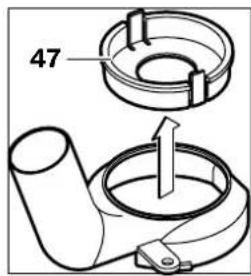
To adjust the cutting depth, set it to 30 mm, you must remove the cover 47 from the dust extraction adapter 24 by pressing the locking tabs.
Connecting the extraction system
Connect the extraction hose/ dust extractor (Ø 35 mm) 23
(Additional extraction) to the mounted adapter. Connect the hose 23 with the dust extractor (additional extraction).
The power tool can be connected directly to the universal dust extractor socket of a vacuum cleaner with a remote start module. When the power tool is started, the dust extractor automatically starts working.
The dust extractor must be suitable for the material being worked on. If dry dust that is harmful to health or carcinogenic is produced, use a special dust extractor.






Working with the power tool
1-2 low speed 3-4 medium speed 5-6 high speed
The values in the table are approximate. The required speed depends on the material being processed and the specific working conditions and can be determined through practical testing.
Switching on and off
Before switching on, set the cutting depth (see section "Adjusting the cutting depth"). To switch on the power tool, press and hold the switch lock 19. To lock the pressed switch 19, press the button 18. To switch off the power tool, release the switch lock 19, or if it is locked with button 18, first press it briefly and then release the switch lock 19.
Electronic constant speed control
The electronic module maintains the speed under no load and under load, practically constant, which ensures uniform productivity.
Adjusting the milling depth
The adjustment is made so that the milling depth is performed only when the power tool is switched off.
Rough adjustment of the milling depth is carried out as follows:
-Place the power tool with the mounted router bit onto the workpiece. Tighten the clamping lever for fine adjustment 2 up to the stop. The stop is used for fine adjustment. - Release the locking screw for rough adjustment of the milling depth 5 by turning it to the left, so that the depth stop can be turned freely up to the depth stop 8.

236 |Български
Press the release lever 16 and slowly lower the router until the router bit touches the workpiece. Release the release lever again to lock the milling depth. -Tighten the clamping lever for rough adjustment 6 up to the stop. -Set the depth stop for the milling depth by turning the handle for rough adjustment 7 while reading the scale. Be careful not to change the setting and the scale. -Lock the stop for rough adjustment of the milling depth 5 by turning it clockwise and switch on the power tool.
For large milling depths, you should perform several passes with a smaller milling depth. With the help of the depth stop 8, you can divide the milling into several stages. For precise setting of the milling depth, use the fine adjustment of the depth stop and follow the first passes. Choose higher stages for the first passes. The size of the stage can be adjusted with the scale.
After a test milling, you can adjust the milling depth precisely using the handle 1; turning it clockwise increases the milling depth, turning it counterclockwise decreases the milling depth. When adjusting, you can use the scale 2. One full turn of the handle corresponds to a change of 2.0 mm, one division on the scale 2 corresponds to a change of the milling depth of 0.1 mm. The maximum change of the milling depth is ±8 mm.
Example: The desired milling depth is 10.0 mm, the measured depth after the test milling is 9.6 mm.
-For plunge cuts, place the anti-slip plate 12 on the workpiece, so that the router bit 22 does not touch the workpiece. Press the release lever 16 and slowly lower the router until the depth stop touches the depth stop 8. Tighten the clamping lever 2 up to the stop. Release the locking screw for rough adjustment of the milling depth 5 by turning it to the left. Turn the handle 7 by 0.4 mm/4 divisions (difference between the desired and the measured depth) in the direction of the arrow. Lock the stop for rough adjustment of the milling depth 5 by turning it clockwise. -Check the new depth with a repeated test milling.
Working instructions
- Protect the router from impacts and sharp loading.
Direction of milling and milling (see Fig. C)
Before starting the router, the depth of cut must be set. When routing with the depth stop, high reaction forces (kickback) can occur, and there is a risk of the power tool being torn from your hands. - Set the depth stop to the desired depth of cut; see the section "Adjusting the depth stop". - Place the power tool with the mounted router bit on the workpiece and switch it on. Press the unlocking lever and slowly lower the router until the set depth of cut is reached. Then release the unlocking lever to lock the depth of cut.






- Guide the router with constant feed. - Follow the routing process and lift the router out of the workpiece. - Switch off the power tool.
Routing with the guide rail (see figure D)
For machining large workpieces, e.g., when routing grooves, you can clamp the workpiece to the workbench or use the guide rail to guide the router along it. Guide the router with the guide rail, pressing the slanted side of the anti-slip surface against the workpiece.
Routing with the guide rail / Routing with the template guide
When routing with the guide rail or template guide without the dust extraction hood, the router must have a guide bush or a copying ring.
Switch on the power tool and guide it sideways against the workpiece until the guide bush or copying ring of the router touches the workpiece. Then guide the power tool along the workpiece edge. When doing so, ensure that you do not change the angle of the router bit. The spindle lock can damage the workpiece edge.
Routing with the dust extraction hood (see figure E)
Insert the dust extraction hood 26 into the guide rails 27 in the base plate 14 and tighten it with the screws with knurled heads. With screws 28 and 29, you can additionally adjust the position of the dust extraction hood in length.
With the adjusting lever 30, you can set the length of the dust extraction hood by turning the screw 28. One full turn corresponds to a length change of 2.0 mm, while turning the adjusting lever 30 by one notch corresponds to a length change of 0.1 mm.
With the help of the stop 31, you can change the working support surface of the dust extraction hood.
Switch on the power tool and guide it evenly and sideways with slight pressure against the workpiece edge.
When routing with the dust extraction hood 26, the extraction must be carried out with a suitable vacuum cleaner 32. The vacuum cleaner 24 can remain mounted.
Routing with the template guide for routing circles (see figure F)
When routing along the edge of a circle, you can use the template guide for routing circles 33. Mount the template guide for routing circles as shown in the figure.
Turn the centering screw 38 into the adapter. The sharp point of the screw must be centered on the tailstock quill, while ensuring that the point engages the surface of the quill. Install the guide bushing for measuring the adapter and then tighten screws 35 and 36 with the tailstock quill.
Using the handle 37, after loosening screw 36, you can adjust the quill stroke. Each full turn corresponds to a feed of 2.0 mm, while each notch on the handle 37 corresponds to 0.1 mm.
Switch on the power tool, holding it by the auxiliary handle 1 and the handle 34 of the adapter for circular cutting.

Routing with the guide rail (see figure G)
With the guide rail 40 you can route along straight lines.
To adjust the cutting depth, you must mount the depth stop 39.
Mount the adapter for circular cutting/guide rail 33 as shown in the figure.
Lock the guide rail 40 to the workpiece along the desired line, e.g., with screw clamps. Place the power tool with the adapter 33 already mounted on the guide rail.
Routing with the copying sleeve (see figures H-L)
With the copying sleeve 44 you can transfer contours of templates or workpieces onto the workpiece.
To use the copying sleeve 44 in the anti-splinter guard 12, an adapter for the copying sleeve 41 must be installed first.
Insert the adapter for the copying sleeve 41 from the top side of the anti-splinter guard 12 and then tighten the locking screw 42. Ensure that the locking ring for the adapter for the copying sleeve 43 can move freely.
Select the copying pin depending on the size of the template or workpiece. The outer diameter of the copying sleeve must be at least 8 mm larger than the template.
Press the release button 43 and pull the copying sleeve 44 out from the front side of the adapter 41. When doing so, the copying pins must engage in the pre-drilled holes in the copying sleeve, requiring slight rotation.
The external diameter of the collet is the internal diameter of the collet chuck.
In order to keep the distance between the center of the cutter and the workpiece constant, if necessary, the collet chuck and the anti-rotation plate can be centered relative to each other.
- Press the release button 16 down and lower the cutter head along the base plate 14. Release the release button 16 to lock the lowering depth. Loosen the locking screws 45 by 2-3 turns so that the anti-rotation plate 12 can be moved freely. -Place the centering pin 46 in the hole, as shown in the figure. Tighten the clamping lever of the pin so that the centering pin can still be moved. Align the centering pin 46 with the collet chuck 44 by slightly moving the base plate 12.
- Tighten the locking screws 45. Remove the centering pin 46 from the hole. -Press the release button 16 and raise the cutter head to the upper position.
Milling with the collet chuck 44 is carried out as follows:
-Insert the power tool with the collet chuck into the guide. Press the release button 16 down and lower the cutter head until the set milling depth is reached. Release the release button 16 to lock the lowering depth. -The power tool is guided along the guide with the collet chuck, with a slight pressure.
Working with a milling template (accessory)
The power tool GOF 2000 CE is compatible with various templates available in the specialized trade. To ensure safe installation and use of the GOF 2000 CE with a milling template, it is necessary







-to select a template compatible with GOF 2000 CE (for this, refer to the data of the template manufacturer) -to follow the manufacturer's instructions for mounting and adjusting the template -to follow all safety instructions of the template manufacturer, as well as all safety instructions for the operation of the GOF 2000 CE.
No liability is accepted for damage or injury resulting from improper handling when working with the GOF 2000 CE mounted in a template.
Maintenance and service
Maintenance and cleaning
Before any work on the power tool, remove the plug from the mains socket. For safe and proper operation, keep the power tool and the ventilation slots clean. In extreme working conditions when cutting metal, conductive dust may deposit on the inner surfaces of the housing. This can impair the protective insulation of the power tool. In such cases, it is recommended to use a stationary extraction system, to blow out the ventilation slots frequently, and to connect the power tool via a residual current device (RCD).
If, despite careful manufacturing and testing, the power tool should become damaged, it must be sent for repair to an authorized service center for power tools.
Questions and answers about the device, including the immediate use of the 10-meter cable, the device's table of contents for the power tool.
Service and consultation
Service and consultation on questions regarding repair and maintenance of your product, as well as spare parts. You can find information about spare parts at
www.bosch-pt.com
The consultation team at your disposal will help you with questions regarding purchase, application, and adjustment of various products from the manufacturer of your device and its accessories.
Robert Bosch EOOD - Bulgaria
Bosch Service Center, repair and maintenance, 3-9 Srebarna Str.
1907 Sofia
Tel.: +359 (02) 9625302 Tel.: +359 (02) 9625427 Tel.: +359 (02) 9625295 Fax: +359 (02) 624649
Disposal
The power tool, accessories, and packaging must be sorted for environmentally friendly recycling.
Only for EU countries:
Do not dispose of power tools in household waste! According to the European Directive 2002/96/EC on waste electrical and electronic equipment and its implementation
as national law, power tools that are no longer usable must be collected separately and disposed of in an environmentally correct manner.
Subject to change without notice.
240 | Serbian
Safety Instructions
General Power Tool Safety Warnings
A WARNING
Read all safety warnings and instructions. Failure to
Senior Vice President
Engineering
Dr. Eckerhard Strötgen
Head of Product
Certification
Paa
Robert Bosch GmbH, Power Tools Division
D-70745 Leinfelden-Echterdingen
21.07.2008
Assembly
Mounting the milling tool (see figure A)
Pull the mains plug out of the socket before carrying out any work on the power tool. ▸ When mounting and changing the milling tool, we recommend wearing protective gloves.
Depending on the intended use, milling tools are available in various designs and qualities.
Milling tools made of high-quality high-speed steel are suitable for machining soft materials such as soft wood and plastic.
Milling tools with carbide-tipped blades are especially suitable for hard and abrasive materials such as hardwood and aluminum.
You can obtain original milling tools from the extensive Bosch accessory program at your specialized dealer.
Only use flawless and clean milling tools.
- Press the spindle lock button 9 (0) and hold it firmly. If necessary, turn the spindle by hand until the lock engages. Activate the spindle lock button 9 only when the tool is at a standstill.
- Unscrew the tightening nut 11 with the open-end wrench 21 (wrench size 24 mm) by turning it counterclockwise (e). - Push the milling tool into the collet. The shank of the milling tool must be inserted at least 20 mm into the collet.
- Firmly tighten the tightening nut 11 with the open-end wrench 21 (wrench size 24 mm) by turning it clockwise. Release the spindle lock button 9. Do not insert milling tools with a shank diameter larger than 50 mm without a mounted collet. These milling tools do not fit through the base plate. Never tighten the collet with the tightening nut unless a milling tool is mounted. Otherwise, the collet can be damaged.
Dust/chip extraction (see figure B)
Dust from materials such as lead-containing paint, some types of wood, minerals, and metal can be harmful to health. Contact with or inhalation of dust can cause allergic reactions and/or respiratory diseases in the operator or persons in the vicinity.
Some dusts, such as those from oak and beech, are considered carcinogenic, especially in combination with additional wood treatment substances (chromates, wood preservatives). Material containing asbestos may only be worked on by specialists.
Use a dust extractor if possible. - Ensure good ventilation of the workplace. - It is recommended to wear a breathing mask with filter class P2.
Observe the regulations for the materials to be processed in your country.
Mounting the dust extraction adapter
Before mounting the dust extraction adapter 24, bring the power tool into the upper starting position by activating the unlocking lever 16.
Insert the dust extraction adapter 24, turn it to the right until it stops (bayonet connection), and secure it with the wing screw 25.
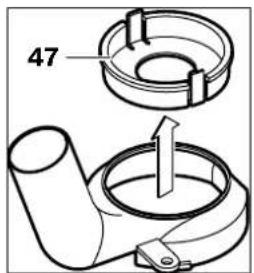
Note: For milling cuts larger than 30 mm, you must remove the insert 47 by pressing the tension coupling from the dust extraction adapter 24.
Assembly
Assembly
General safety instructions
TAHELEPANU
All safety instructions and guidelines must be read carefully.
Dr. Egbert Schneider Senior Vice President Engineering
Dr. Eckerhard Strötgen Head of Product Certification


Robert Bosch GmbH, Power Tools Division D-70745 Leinfelden-Echterdingen 21.07.2008
Assembly
Installing the router bit (see figure A)
Before performing any work on the power tool, pull the plug out of the socket. When installing and replacing router bits, it is recommended to wear protective gloves.
Router bits of suitable quality are available for every application.
1-2 low revolutions 3-4 medium revolutions 5-6 high revolutions
Dr. Egbert Schneider Senior Vice President Engineering
Dr. Eckerhard Strötgen Head of Product Certification

i.v. Moju:
Robert Bosch GmbH, Power Tools Division
D-70745 Leinfelden-Echterdingen 21.07.2008






Inserting
Inserting the milling tool (see figure A)
Before carrying out any work on the power tool, pull the mains plug out of the socket. When inserting and changing milling tools, it is recommended to wear protective gloves.
Milling tools of various qualities and designs can be purchased from retailers.
Milling tools made of high-speed steel are suitable for processing soft materials, such as soft wood and plastics.
Milling tools with carbide cutting edges are especially designed for processing hard and abrasive materials, such as hardwood and aluminium.
Original Bosch milling tools from the extensive accessory range can be purchased from specialist retailers.
Only insert undamaged and clean milling cutters.
Press the spindle lock button 9 (0) and hold it down. If necessary, turn the spindle by hand until it locks. Only press the spindle lock button 9 when the power tool is not in operation. - Unscrew the collet nut 11 with the open-ended spanner 21 (spanner size 24 mm), turning it in the counter-clockwise direction (Θ). - Insert the milling tool into the collet. The shank of the milling cutter must be inserted at least 20 mm deep into the collet. - Tighten the collet nut 11 firmly with the open-ended spanner 21 (spanner size 24 mm), turning it in the clockwise direction. Then release the spindle lock button 9.
If the parallel guide is not fitted, do not insert milling tools with a diameter exceeding 50 mm. Such tools will not pass through the base plate. Do not tighten the collet nut if the shank of the tool is not inserted in the collet. Doing so may damage the collet.
Dust and chip extraction (see figure B)
Dust from materials such as lead-containing paint, some wood types, minerals and metals can be harmful to health. Contact with or inhalation of such dust can cause allergic reactions or respiratory diseases in the user or persons near the workplace. Dust from certain materials, such as oak or beech wood dust, can cause cancer, especially when the wood has been previously treated with chemicals (e.g. chromate or wood preservatives). Materials containing asbestos may only be processed by persons with specialist professional skills.
Dr. Egbert Schneider Senior Vice President Engineering
Dr. Eckerhard Strötgen Head of Product Certification
Robert Bosch GmbH, Power Tools Division D-70745 Leinfelden-Echterdingen 21.07.2008
Mounting the tool
Inserting the milling tool (see figure A)
Before carrying out any adjustment or maintenance work on the power tool, pull the plug out of the socket. When inserting or changing milling tools, it is recommended to wear protective gloves.


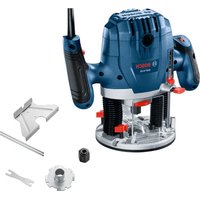
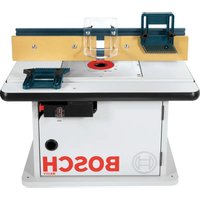
- GOF 2000 CE PROFESSIONAL
- BOSCH
- ASSEMBLY
- GENERAL POWER TOOL SAFETY WARNINGS
- WARNING
- SAVE ALL WARNINGS AND INSTRUCTIONS FOR FUTURE REFERENCE
- WORK AREA SAFETY
- ELECTRICAL SAFETY
- PERSONAL SAFETY
- POWER TOOL USE AND CARE
- SERVICE
- SAFETY WARNINGS FOR ROUTERS
- FUNCTIONAL DESCRIPTION
- INTENDED USE
- PRODUCT FEATURES
- NOISE/VIBRATION INFORMATION
- WEAR HEARING PROTECTION
- DECLARATION OF CONFORMITY C
- INSERTING A ROUTER BIT (SEE FIGURE A)
- DUST/CHIP EXTRACTION (SEE FIGURE B)
- MOUNTING THE EXTRACTION ADAPTER
- CONNECTING THE DUST EXTRACTION
- OPERATION
- STARTING OPERATION
- PRESELECTING THE SPEED
- SWITCHING ON AND OFF
- CONSTANT ELECTRONIC CONTROL
- ADJUSTING THE DEPTH-OF-CUT
- WORKING ADVICE
- DIRECTION OF FEED AND ROUTING PROCESS (SEE FIGURE C)
- ROUTING WITH AUXILIARY GUIDE (SEE FIGURE D)
- SHAPING OR MOLDING APPLICATIONS
- ROUTING WITH PARALLEL GUIDE (SEE FIGURE E)
- ROUTING WITH THE ROUTER COMPASS (SEE FIGURE F)
- ROUTING WITH GUIDE RAIL (SEE FIGURE G)
- ROUTING WITH GUIDE BUSHING (SEE FIGURES H-L)
- OPERATION WITH ROUTER TABLE (ACCESSORY)
- MAINTENANCE AND SERVICE
- MAINTENANCE AND CLEANING
- WARNING! IMPORTANT INSTRUCTIONS FOR CONNECTING A NEW 3-PIN PLUG TO THE 2-WIRE CABLE
- AFTER-SALES SERVICE AND CUSTOMER ASSISTANCE
- WWW.BOSCH-PT.COM
- GREAT BRITAIN
- AUSTRALIA, NEW ZEALAND AND PACIFIC ISLANDS
- DISPOSAL
- ONLY FOR EC COUNTRIES
- PORTUGUESE
- NETHERLANDS
- WASTE DISPOSAL
- INSERTING THE TOOL (SEE FIGURE A)
- ADJUSTING AND OPERATING INSTRUCTIONS (SEE FIGURE C)
- MOUNTING THE ROUTER BIT (SEE FIGURE A)
- LIQUIDATION
- SYSTEM CONSTANT ELECTRONIC
- DECLARATION OF CONFORMITY
- MOUNTING THE CUTTER (SEE FIGURE A)
- DUST AND CHIP EXTRACTION (SEE FIGURE B)
- INSTALLING THE EXTRACTION ADAPTER
- CONNECTING THE DUST EXTRACTOR
- WORKING WITH THE TOOL
- SWITCHING ON THE POWER TOOL
- SETTING THE SPEED
- ELECTRONIC CONSTANT SPEED CONTROL
- SETTING THE GRINDING DEPTH
- APPLICATION INSTRUCTIONS
- MILLING DIRECTION: THE MILLING PROCESS (SEE FIG. C)
- ROUTING WITH AN AUXILIARY STOP (SEE FIG. D)
- ROUTING EDGES OR PROFILE ROUTING
- ROUTING WITH A PARALLEL STOP (SEE FIG. E)
- RUSSIAN
- ROUTING WITH A CIRCLE (SEE FIG. F)
- MILLING WITH THE GUIDE RAIL (SEE FIG. G)
- MILLING WITH THE COPYING SLEEVE (SEE FIG. H-L)
- WORKING WITH THE MILLING TABLE (ACCESSORIES)
- AFTER-SALES SERVICE AND CUSTOMER ADVICE
- RUSSIA
- BELARUS
- YTHAN3AUN
- SUBJECT TO CHANGE
- SAFETY INSTRUCTIONS
- WARNINGS
- ALWAYS KEEP THE DEVICE AWAY FROM OIL AND OTHER FLAMMABLE LIQUIDS
- SAFETY INSTRUCTIONS FOR BENCH GRINDERS
- UKRAINIAN
- ILLUSTRATED COMPONENTS
- DEAR USERS
- C
- INSTALLING THE ROUTER BIT (SEE FIGURE A)
- BLADES WITH A HARDENED CUTTING EDGE
- DUST/CHIP EXTRACTION (SEE FIGURES A, B, C, D)
- MOUNTING THE DUST EXTRACTION HOOD
- EXPLANATION OF THE DUST EXTRACTION SYSTEM
- SETTING THE NUMBER OF REVOLUTIONS
- SWITCHING ON/OFF
- ELECTRONIC SPEED CONTROL
- SETTING THE MILLING DEPTH TABLE
- OPERATING INSTRUCTIONS
- GROOVE MILLING AND EDGE MILLING (FIG. M, A, C)
- MILLING WITH AN AUXILIARY STOP (A AND B, FIG. M, D)
- EDGE OR PROFILE MILLING
- MILLING WITH A PARALLEL STOP (A AND B, FIG. M, E)
- ROUTING WITH A ROUTER (A AND B, FIG. A, F)
- ROUTING WITH A STRAIGHT GUIDE (A AND B, FIG. A, G)
- ADJUSTING WITH A COPY SLEEVE (A AND B, M AND A. H - L)
- THE CUTTER DIAMETER MUST BE SMALLER THAN THE INNER DIAMETER OF THE COPY SLEEVE
- WORKING WITH THE ROUTER TABLE (ACCESSORY)
- CUSTOMER SERVICE AND ADVICE
- UKRAINE
- EU COUNTRIES ONLY
- MONTARE
- ELIMINARE
- BULGARIAN
- INFORMATION ON NOISE AND VIBRATION
- MOUNTING THE TOOL (SEE FIG. A)
- DUST EXTRACTION (SEE FIG. B)
- MOUNTING THE DUST EXTRACTION ADAPTER
- CONNECTING THE EXTRACTION SYSTEM
- WORKING WITH THE POWER TOOL
- ADJUSTING THE MILLING DEPTH
- БЪЛГАРСКИ
- WORKING INSTRUCTIONS
- ROUTING WITH THE GUIDE RAIL (SEE FIGURE D)
- ROUTING WITH THE GUIDE RAIL / ROUTING WITH THE TEMPLATE GUIDE
- ROUTING WITH THE DUST EXTRACTION HOOD (SEE FIGURE E)
- ROUTING WITH THE TEMPLATE GUIDE FOR ROUTING CIRCLES (SEE FIGURE F)
- ROUTING WITH THE GUIDE RAIL (SEE FIGURE G)
- ROUTING WITH THE COPYING SLEEVE (SEE FIGURES H-L)
- WORKING WITH A MILLING TEMPLATE (ACCESSORY)
- SERVICE AND CONSULTATION
- ROBERT BOSCH EOOD - BULGARIA
- ONLY FOR EU COUNTRIES
- A WARNING
- MOUNTING THE MILLING TOOL (SEE FIGURE A)
- GENERAL SAFETY INSTRUCTIONS
- TAHELEPANU
- INSERTING
- INSERTING THE MILLING TOOL (SEE FIGURE A)
- MOUNTING THE TOOL
Brand : BOSCH
Model : GOF 2000 CE
Category : Milling machine