
GLL 3-80 G Professional - Laser pointer BOSCH - Free user manual and instructions
Find the device manual for free GLL 3-80 G Professional BOSCH in PDF.

 FR
FR
 BG
BG
 CS
CS
 DA
DA
 DE
DE
 EL
EL
 EN
EN
 ES
ES
 ET
ET
 FI
FI
 HR
HR
 HU
HU
 IT
IT
 KA
KA
 KK
KK
 LT
LT
 LV
LV
 MK
MK
 NL
NL
 NO
NO
 PL
PL
 PT
PT
 RO
RO
 RU
RU
 SK
SK
 SL
SL
 SV
SV
 TR
TR
 UK
UK
| Product type | Line laser pointer |
| Brand | Bosch |
| Model | GLL 3-80 G Professional |
| Dimensions (L × W × H) | 144 × 89 × 139 mm |
| Weight (without battery) | 0.93 kg |
| Power supply | Lithium-ion battery 3.7 V or 4 AA batteries (via adapter) |
| Operating time (3 lines) | 5 h (with battery or batteries) |
| Laser class | Class 2 |
| Laser power | < 10 mW, 500-540 nm |
| Working range | 30 m |
| Working range with receiver | 5-80 m |
| Leveling accuracy | ±0.3 mm/m |
| Self-leveling range | ±4° |
| Leveling time | < 4 s |
| Operating modes | Horizontal line and 2 vertical lines, tilt mode |
| Special features | Power saving mode, adjustable auto-off, tilt function |
| Operating temperature | -10 °C to +40 °C |
| Protection class | IP65 |
| Maintenance and cleaning | Clean with a soft, damp cloth; no solvents; store in the case |
| Safety | Do not look into the beam; avoid eye contact; follow laser safety instructions |
| Spare parts and repairability | Bosch after-sales service; spare parts available via product reference |
Frequently Asked Questions - GLL 3-80 G Professional BOSCH
User questions about GLL 3-80 G Professional BOSCH
0 question about this device. Answer the ones you know or ask your own.
Ask a new question about this device
Download the instructions for your Laser pointer in PDF format for free! Find your manual GLL 3-80 G Professional - BOSCH and take your electronic device back in hand. On this page are published all the documents necessary for the use of your device. GLL 3-80 G Professional by BOSCH.
USER MANUAL GLL 3-80 G Professional BOSCH
GLL 80-33 G Professional
Robert Bosch Power Tools GmbH
70538 Stuttgart
GERMANY
www.bosch-pt.com
1609 92A 9B3 (2024.05) T/540

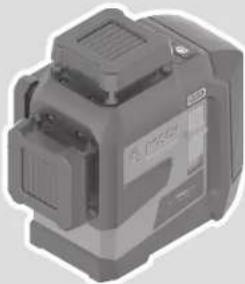
natural_image
3D rendered mechanical device with no visible text or symbols1 609 92A 9B3 | (08.05.2024) Bosch Power Tools
Bosch Power Tools 1 609 92A 9B3 | (08.05.2024)
1 609 92A 9B3 | (08.05.2024) Bosch Power Tools
Bosch Power Tools 1 609 92A 9B3 | (08.05.2024)
8
natural_image
3D wireframe diagram of a room with walls, cubes, and a small robot figure (no text or symbols)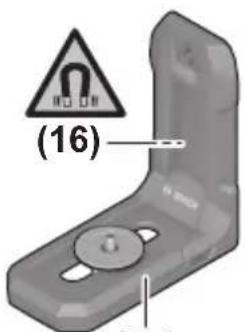
(15)
LB 10
natural_image
3D rendering of a mechanical device with mounting flanges and a central shaft (no text or symbols visible)(19)
DK 20
1 608 M00 C4C
(20)
BM 1
0 601 015 A01
(21)

(22)
1 608 M00 05J
(23)
LR 7
0 601 069 J00
BT 150 0 601 096 B00
natural_image
Technical line drawings of mechanical components including a gear, shaft, and lever (no text or symbols)(25) — BT 350 0 601 015 B00
natural_image
Gray plastic electronic component with a small square hole and rectangular body (no text or symbols visible)(8)
natural_image
3D rendering of a gray rectangular electronic component with a small metallic clip and a small hole, shown without any text or symbols.(9)
BA 3.7V 3.0Ah XL
1 600 A03 1FZ
natural_image
Coiled USB cable with two connectors (no text or symbols visible)(26)
natural_image
Simple line drawing of a rectangular device with a label on the top (no text or symbols present)(27)
natural_image
Isometric line drawing of a Bosch connector (no text or symbols on the component itself)(28)
Deutsch
Sicherheitshinweise

www.bosch-pt.com/serviceaddresses
Transport
All instructions must be read and observed in order for the measuring tool to function safely. The safeguards integrated into the measuring tool may be compromised if the measuring tool is not used in accordance with these instructions. Never make warning signs on the measuring tool unrecognisable. SAVE THESE IN-
STRUCTIONS FOR FUTURE REFERENCE AND INCLUDE THEM WITH THE MEASURING TOOL WHEN TRANSFERRING IT TO A THIRD PARTY.
▶ Warning! If operating or adjustment devices other than those specified here are used or other procedures are carried out, this can lead to dangerous exposure to radiation.
The measuring tool is delivered with a laser warning sign (marked in the illustration of the measuring tool on the graphics page).
If the text of the laser warning label is not in your national language, stick the provided warning label in your national language over it before operating for the first time.

Do not direct the laser beam at persons or animals and do not stare into the direct or reflected laser beam yourself. You could blind somebody, cause accidents or damage your eyes.
▶ If laser radiation hits your eye, you must close your eyes and immediately turn your head away from the beam.
▶ Do not make any modifications to the laser equipment.
28 | English
▶ Do not use the laser goggles (accessory) as protective goggles. The laser goggles make the laser beam easier to see; they do not protect you against laser radiation.
▶ Do not use the laser goggles (accessory) as sunglasses or while driving. The laser goggles do not provide full UV protection and impair your ability to see colours.
▶ Have the measuring tool serviced only by a qualified specialist using only original replacement parts. This will ensure that the safety of the measuring tool is maintained.
▶ Do not let children use the laser measuring tool unsupervised. They could unintentionally blind themselves or other persons.
▶ Do not use the measuring tool in explosive atmospheres which contain flammable liquids, gases or dust. Sparks may be produced inside the measuring tool, which can ignite dust or fumes.
▶ Do not modify or open the battery. There is a risk of short-circuiting.
In case of damage and improper use of the battery, vapours may be emitted. The battery can set alight or explode. Ensure the area is well ventilated and seek medical attention should you experience any adverse effects. The vapours may irritate the respiratory system.
If used incorrectly or if the battery is damaged, flammable liquid may be ejected from the battery. Contact with this liquid should be avoided. If contact accidentally occurs, rinse off with water. If the liquid comes into contact with your eyes, seek additional medical attention. Liquid ejected from the battery may cause irritation or burns.
The battery can be damaged by pointed objects such as nails or screwdrivers or by force applied externally. An internal short circuit may occur, causing the battery to burn, smoke, explode or overheat.
When the battery is not in use, keep it away from paper clips, coins, keys, nails, screws or other small metal objects that could make a connection from one terminal to another. A short circuit between the battery terminals may cause burns or a fire.
▶ Only use the battery with products from the manufacturer. This is the only way in which you can protect the battery against dangerous overload.
▶ Only charge the batteries using chargers recommended by the manufacturer. A charger that is suitable for one type of battery may pose a fire risk when used with a different battery.


Protect the battery against heat, e.g. against continuous intense sunlight, fire, dirt, water and moisture. There is a risk of explosion and short-circuiting.

Keep the magnetic accessories away from implants and other medical devices, e.g. pacemakers or insulin pumps. The magnets in the accessories generate a field that can impair the function of implants and medical devices.
- Keep the magnetic accessories away from magnetic data storage media and magnetically-sensitive devices. The effect of the magnets in the accessories can lead to irreversible data loss.
Product Description and Specifications
Please observe the illustrations at the beginning of this operating manual.
Intended Use
The measuring tool is intended for determining and checking horizontal and vertical lines.
The measuring tool is suitable for indoor and outdoor use.
This product is a consumer laser product in accordance with EN 50689.
Product Features
The numbering of the product features shown refers to the illustration of the measuring tool on the graphic page.
(1) Button for laser operating mode
(2) Button for energy saving mode
(3) Charge-control indicator rechargeable batteries/non-rechargeable batteries
(4) On/off switch
(5) Laser beam outlet aperture
(6) Laser warning label
(7) Screw cap of the lithium-ion battery pack/batterie adapter
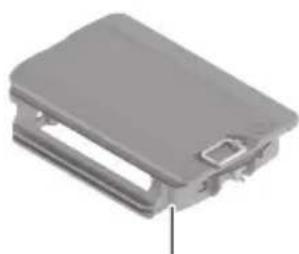
(8) Battery adapter
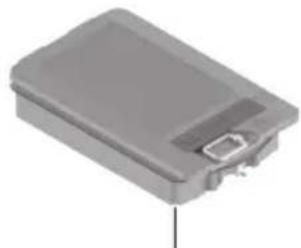
(9) Lithium-ion battery pack ^4
30 | English
(10) Charge indicator of the lithium-ion battery pack ^a)
(11) USB Type-C ^® port ^a)b)
(12) Serial number
(13) 1/4" tripod mount
(14) 5/8" tripod mount
(15) Holder (LB 10) ^a)
(16) Magnet ^a)
(17) Holder 1/4" screw ^a)
(18) Holder screw hole ^a)
(19) Ceiling clip (DK 20) ^a)
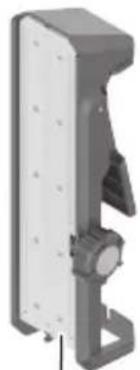
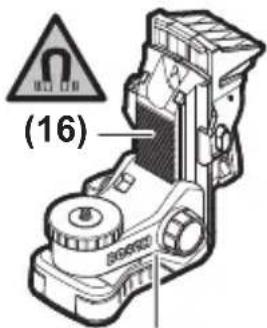
(20) Universal holder ^a)
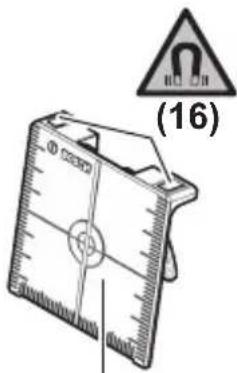
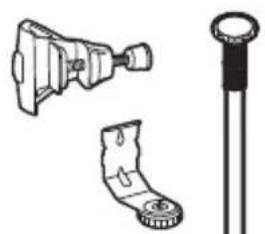
(21) Laser target plate ^a)
(22) Laser viewing glasses ^a)
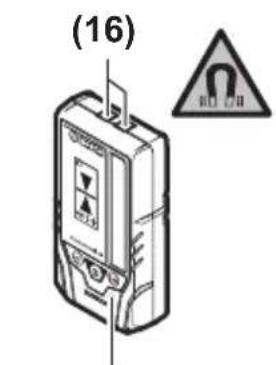
(23) Laser receiver ^a)
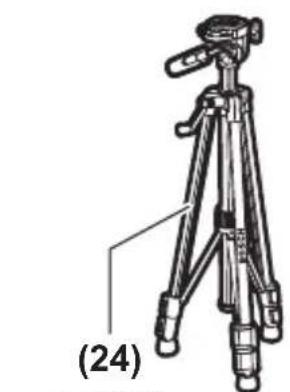
(24) Tripod ^a)
(25) Telescopic rod ^a)
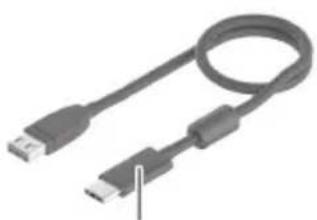
(26) USB cable ^a)
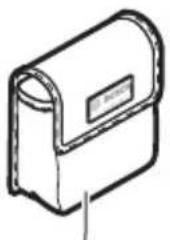
(27) Protective bag ^a)
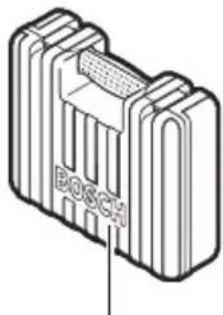
(28) Case ^a)
a) This accessory is not part of the standard scope of delivery.
b) USB Type-C® and USB-C® are trademarks of USB Implementers Forum.
Technical Data
| Line laser GLL 80-33 G | |
| Article number | 3 601 K65 5.. |
| Working range (radius) ^A) | |
| - Standard 30 m | |
| - With laser receiver 5–80 m | |
| Levelling accuracy ^B)C)D) | ±0.3 mm/m |
| Self-levelling range ±4° | |
| Levelling time < 4 s | |
1 609 92A 9B3 | (08.05.2024) Bosch Power Tools
English | 31
Line laser GLL 80-33 G
| Operating temperature -10 °C to +40 °C | |
| Storage temperature (without lithium-ion battery pack) -20 °C to +70 °C | |
| Max. altitude 2000 m | |
| Relative air humidity max. 90% | |
| Pollution degree according to IEC 61010-1 2 | E) |
| Laser class 2 | |
| Laser type < 10 mW, 500–540 nm | |
| C_6 10 | |
| Divergence 50 × 10 mrad (full angle) | |
| Shortest pulse duration 1/10000 s | |
| Pulse frequency 10 kHz | |
| Compatible laser receiver LR 7 | |
| Tripod mount 1/4", 5/8" | |
| Energy supply | |
| – Lithium-ion battery pack 3.7 V | |
| – Alkaline manganese non-rechargeable batteries (with battery adapter) | 4 × 1.5 V LR6 (AA) |
| Operating time with 3 laser lines | |
| – With lithium-ion battery pack 5 h | |
| – With alkaline manganese batteries | 5 h |
| WeightF) | 0.93 kg |
| Dimensions (length × width × height) | 144 × 89 × 139 mm |
| Protection rating | IP65 |
| Lithium-ion battery pack (accessory) | BA 3.7V 3.0Ah XL |
| Article number | 1 600 A03 1FZ |
| Charging connection | USB Type-C® |
| Recommended USB Type-C® cable | 1 600 A03 4XE |
| Rated voltage 3.7 V | — |
| Capacity | 3.0 Ah |
32 | English
Line laser GLL 80-33 G
Recommended ambient temperature during charging +10 °C to +35 °C
Permitted ambient temperature during storage -10 °C to +45 °C
Power supply
Output voltage 5.0 V
Minimum output current 2 A
A) The working range may be reduced by unfavourable environmental conditions (e.g. direct sunlight).
B) Applies to the four horizontal intersection points
C) The values stated presuppose normal to favourable environmental conditions (e.g. no vibration, no fog, no smoke, no direct sunlight). Extreme fluctuations in temperature can cause deviations in accuracy.
D) An additional deviation of ±0.1 mm/m must be taken into account when at maximum self-leveling range.
E) Only non-conductive deposits occur, whereby occasional temporary conductivity caused by condensation is expected.
F) Weight without lithium-ion battery pack/battery adapter/batteries
The serial number (12) on the type plate is used to clearly identify your measuring tool.
Measuring Tool Power Supply
The measuring tool can be operated either with a Bosch lithium-ion battery pack (9) or with conventional non-rechargeable batteries in the battery adapter (8).
Note: Never store the measuring tool without an inserted lithium-ion battery pack (9) or battery adapter (8), particularly in dusty or humid environments.
Operation with Non-Rechargeable Batteries (accessory)
It is recommended that you use alkaline manganese batteries to operate the measuring tool.
Put the non-rechargeable batteries into the battery adapter (8). When inserting the non-rechargeable batteries, ensure that the polarity is correct according to the illustration on the inside of the battery adapter.
Always replace all the batteries at the same time. Only use batteries from the same manufacturer and which have the same capacity.
Put the battery adapter (8) in the measuring tool and turn the rotary lock (7) so that you can push down the square eyelet on the battery adapter.
To remove the battery adapter (8), pull up the square eyelet on the rotary lock (7) and turn it by 90°. Take the battery adapter out of the measuring tool.
▶ Take the batteries out of the measuring tool when you are not using it for a prolonged period of time. The batteries can corrode during prolonged storage in the measuring tool.
Operation with Lithium-Ion Battery Pack
Inserting/Replacing a Lithium-Ion Battery Pack
Put the lithium-ion battery pack (9) in the measuring tool and turn the rotary lock (7) so that you can push down the square eyelet on the lithium-ion battery pack.
To remove the lithium-ion battery pack (9), pull up the square eyelet on the rotary lock (7) and turn it by 90^ . Take the lithium-ion battery pack out of the measuring tool.
Charging a Lithium-Ion Battery Pack
For charging, use only a USB power supply unit whose output voltage and minimum output current comply with the requirements in the "Technical Data" section. Observe the operating manual of the USB power supply unit.
▶ Pay attention to the mains voltage. The voltage of the power source must match the voltage specified on the type plate of the power supply.
▶ Only use the USB connection to charge the battery at an ambient temperature of between +10 °C and +35 °C. Charging outside of this temperature range can damage the battery and increase the risk of fire.
Note: Lithium-ion rechargeable batteries are supplied partially charged according to international transport regulations. To ensure full rechargeable battery capacity, fully charge the rechargeable battery before using your tool for the first time.
Open the flap for the USB Type-C® port (11). Connect the USB port to a USB power supply unit using the USB cable (26). Connect the USB power supply unit to the mains supply.
Colour of charge indicator (10) Meaning
Yellow Lithium-ion battery pack is being charged.
Green Lithium-ion battery pack is fully charged.
Red Charging voltage or charging current is unsuitable.
Remove the USB cable (26) after completing the charging process. Close the flap for the USB Type-C® port (11) to protect it from dust and splashes.
34 | English
Energy Saving Mode
To save energy, you can reduce the brightness of the laser lines. For this, press the button for energy saving mode (2). The energy saving mode is indicated by the button for energy saving mode lighting up. To end energy saving mode, press the button for energy saving mode (2) again so that it goes out.
Battery Charge Indicator
The battery charge indicator (3) shows the current state of charge of the lithium-ion battery pack/non-rechargeable batteries when the measuring tool is switched on.
If the lithium-ion battery pack or non-rechargeable batteries are running low, the laser lines will gradually become dimmer.
If the lithium-ion battery pack/non-rechargeable batteries are almost empty, the battery charge indicator (3) will flash continuously. The laser lines will flash for 5 seconds every 5 minutes.
If the lithium-ion battery pack/non-rechargeable batteries are empty, the laser lines and the battery charge indicator (3) will flash one last time before the measuring tool switches off.
Operation
Starting Operation
▶ Protect the measuring tool from moisture and direct sunlight.
▶ Do not expose the measuring tool to any extreme temperatures or fluctuations in temperature. For example, do not leave it in a car for extended periods of time. If it has been subjected to significant fluctuations in temperature, first allow the measuring tool to adjust to the ambient temperature and then always carry out an accuracy check before continuing work (see "Accuracy Check of the Measuring Tool", page 36).
The precision of the measuring tool may be compromised if exposed to extreme temperatures or fluctuations in temperature.
- Avoid substantial knocks to the measuring tool and avoid dropping it. Always carry out an accuracy check before continuing work if the measuring tool has been subjected to severe external influences (see "Accuracy Check of the Measuring Tool", page 36).
▶ Switch the measuring tool off when transporting it. The pendulum unit is locked when the tool is switched off, as it can otherwise be damaged by big movements.
Switching On/Off
To switch on the measuring tool, slide the on/off switch (4) to the ON position. Immediately after switching on, the measuring tool sends a laser line out of the outlet aperture (5).
▶ Do not direct the laser beam at persons or animals and do not stare into the laser beam yourself (even from a distance).
To switch off the measuring tool, slide the on/off switch (4) to the OFF position. The pendulum unit is locked when the tool is switched off.
▶ Never leave the measuring tool unattended when switched on, and ensure the measuring tool is switched off after use. Others may be blinded by the laser beam.
If the temperature of the measuring tool is approaching the maximum permissible operating temperature, the laser lines will gradually become dimmer.
If the maximum permitted operating temperature is exceeded, the laser lines will flash rapidly before the measuring tool switches off. Once it has cooled down, the measuring tool is operational again and can be switched back on.
Deactivating the Automatic Shut-Off Function
If no button on the measuring tool is pressed for approx. 120 min, the measuring tool will automatically switch itself off to preserve battery life.
To switch the measuring tool back on after it has been automatically switched off, you can either slide the on/off switch (4) to the OFF position first and then switch the measuring tool back on, or press one of the laser mode buttons (1).
To deactivate the automatic shut-off function, hold down one of the laser mode buttons (1) for at least 3 s (with the measuring tool switched on). If the automatic shut-off function is deactivated, the laser beams will flash briefly as confirmation.
To activate the automatic shut-off function, switch the measuring tool off and on again.
Operating Modes
The measuring tool can generate one horizontal and two vertical laser lines.
Once the measuring tool is switched on, the horizontal laser line is switched on.
You can switch each of the laser lines on and off independently of one another. To do this, press the laser operating mode button (1) that corresponds to the relevant laser line.
All operating modes can be used with both automatic levelling and the incline function.
All operating modes are suitable for operation with the laser receiver (23).
36 | English
Automatic Levelling
The measuring tool monitors the position at all times during operation. It works with automatic levelling during set-up within the self-levelling range of ±4^ . Outside of the self-levelling range, it will automatically switch to the incline function.
Working with Automatic Levelling
Position the measuring tool on a level, firm surface or attach it to the holder (15) or the tripod (24).
The automatic levelling function automatically compensates irregularities within the self-levelling range of ±4^ . Once the laser beam is permanently lit, the measuring tool has levelled in.
If automatic levelling is not possible, e.g. because the surface on which the measuring tool stands deviates by more than 4^ from the horizontal plane, the laser lines will initially flash quickly for 2 seconds, then quickly flash every 5 seconds several times. The measuring tool is in the incline function.
For additional work with automatic levelling, set up the measuring tool so that it is horizontal and wait for the self-levelling procedure to complete. As soon as the measuring tool is within the self-levelling range of ±4^ , the laser beams will light up continuously.
In case of ground vibrations or position changes during operation, the measuring tool is automatically levelled again. Upon levelling, check the position of the laser beams with regard to the reference points to avoid errors arising from a change in the measuring tool's position.
Working with the Incline Function
Place the measuring tool on an inclined surface. When working with the incline function, the laser lines will initially flash quickly for 2 seconds, then quickly flash every 5 seconds several times.
In the incline function, the laser lines are no longer levelled and no longer necessarily run perpendicular to one another.
Accuracy Check of the Measuring Tool
Influences on Accuracy
The largest influence is exerted by the ambient temperature. In particular, temperature differences that occur from the ground upwards can refract the laser beam.
In order to minimise thermal influences resulting from heat rising from the floor, it is recommended that you use the measuring tool on a tripod. In addition, position the measuring tool in the centre of the work surface, wherever this is possible.
In addition to external influences, device-specific influences (e.g. falls or heavy impacts) can also lead to deviations. For this reason, check the levelling accuracy each time before beginning work.
First check the levelling accuracy of the horizontal laser line, then the levelling accuracy of the vertical laser lines.
Should the measuring tool exceed the maximum deviation during one of the tests, please have it repaired by a Bosch after-sales service.
Checking the Horizontal Levelling Accuracy of the Transverse Axis
For this check, you will need a free measuring distance of 5 m on firm ground between two walls (designated A and B).
- Mount the measuring tool close to wall A on a tripod, or place it on a firm, flat surface. Switch on the measuring tool. Switch on the horizontal laser line and the vertical laser line at the front of the measuring tool.
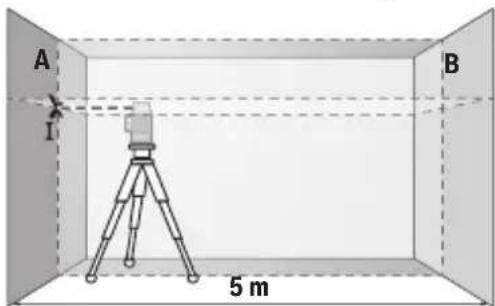
- Aim the laser at the closer wall A and allow the measuring tool to level in. Mark the middle of the point at which the laser lines cross on the wall (point I).
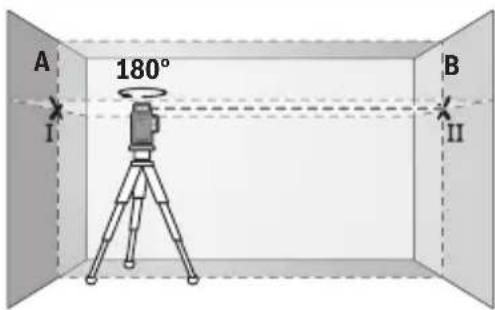
- Turn the measuring tool 180^ , allow it to level in and mark the point where the laser lines cross on the opposite wall B (point II).
- Position the measuring tool – without rotating it – close to wall B, switch it on and allow it to level in.
38 | English
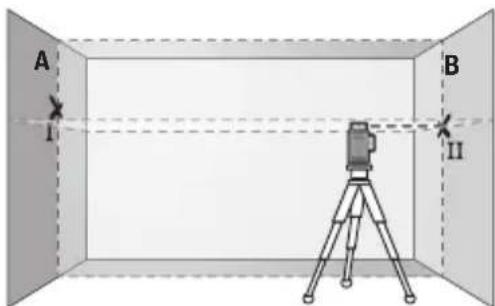
- Align the height of the measuring tool (using the tripod or by placing objects underneath as required) so that the point where the laser lines cross exactly hits the previously marked point II on wall B.
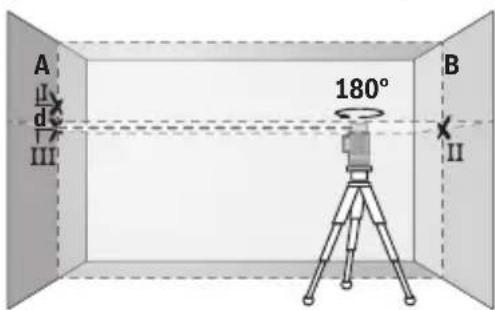
- Turn the measuring tool 180^ without adjusting the height. Aim it at wall A such that the vertical laser line runs through the already marked point I. Allow the measuring tool to level in and mark the point where the laser lines cross on wall A (point III).
- The discrepancy d between the two marked points I and III on wall A reveals the actual height deviation of the measuring tool.
The maximum permitted deviation on the measuring distance of 2 × 5 m = 10 m is as follows:
10 m × ±0.3 mm/m = ±3 mm. The discrepancy d between points I and III must therefore amount to no more than 3 mm.
Checking the Levelling Accuracy of the Vertical Lines
For this check, you will need a door opening (on solid ground) which has at least 2.5 m of space either side of the door.
- Place the measuring tool 2.5 ~m away from the door opening on a firm, flat surface (not on a tripod). Switch on the measuring tool and the vertical laser line at the front of the measuring tool. Aim the laser line at the door opening and allow the measuring tool to level in.
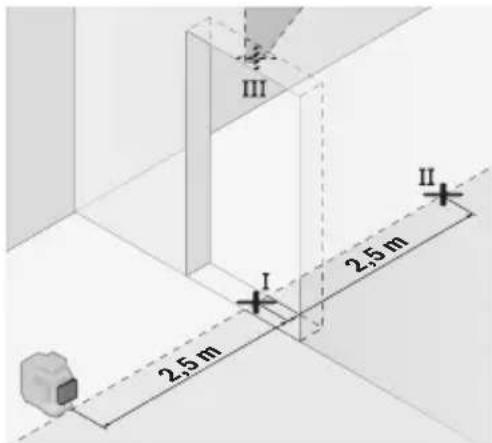
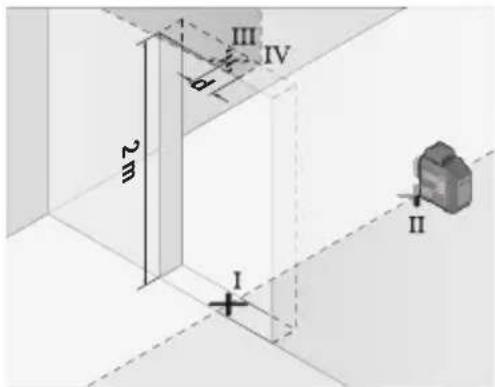
- Mark the centre of the vertical laser line on the floor of the door opening (point I), 5 m away on the other side of the door opening (point II) and on the upper edge of the door opening (point III).
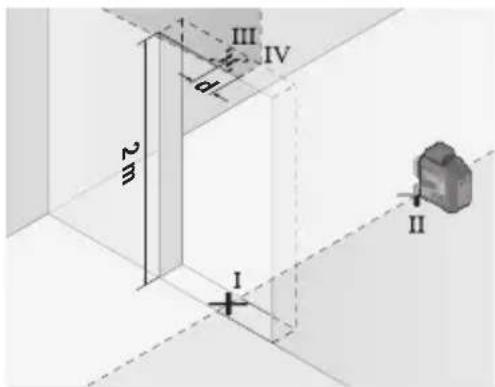
- Rotate the measuring tool 180^ and position it on the other side of the door opening, directly behind point II. Allow the measuring tool to level in and align the vertical laser line in such a way that its centre passes through points I and II exactly.
- Mark the centre of the laser line on the upper edge of the door opening as point IV.
- The discrepancy d between the two marked points III and IV reveals the actual vertical deviation of the measuring tool.
- Measure the height of the door opening.
Repeat the measuring procedure for the second vertical laser line. To do this, switch on the vertical laser line on the side of the measuring tool and turn the measuring tool 90° before beginning the measurement.
You can calculate the maximum permitted deviation as follows:
Doubled height of the door opening × 0.3 mm/m
Example: At a door opening height of 2 m, the maximum deviation amounts to
2 × 2 m × ± 0.3 mm/m = ± 1.2 mm . The points III and IV must therefore be no further than 1.2 mm from each other.
Working Advice
▶ Only the centre of the laser line must be used for marking. The width of the laser line changes depending on the distance.
40 | English
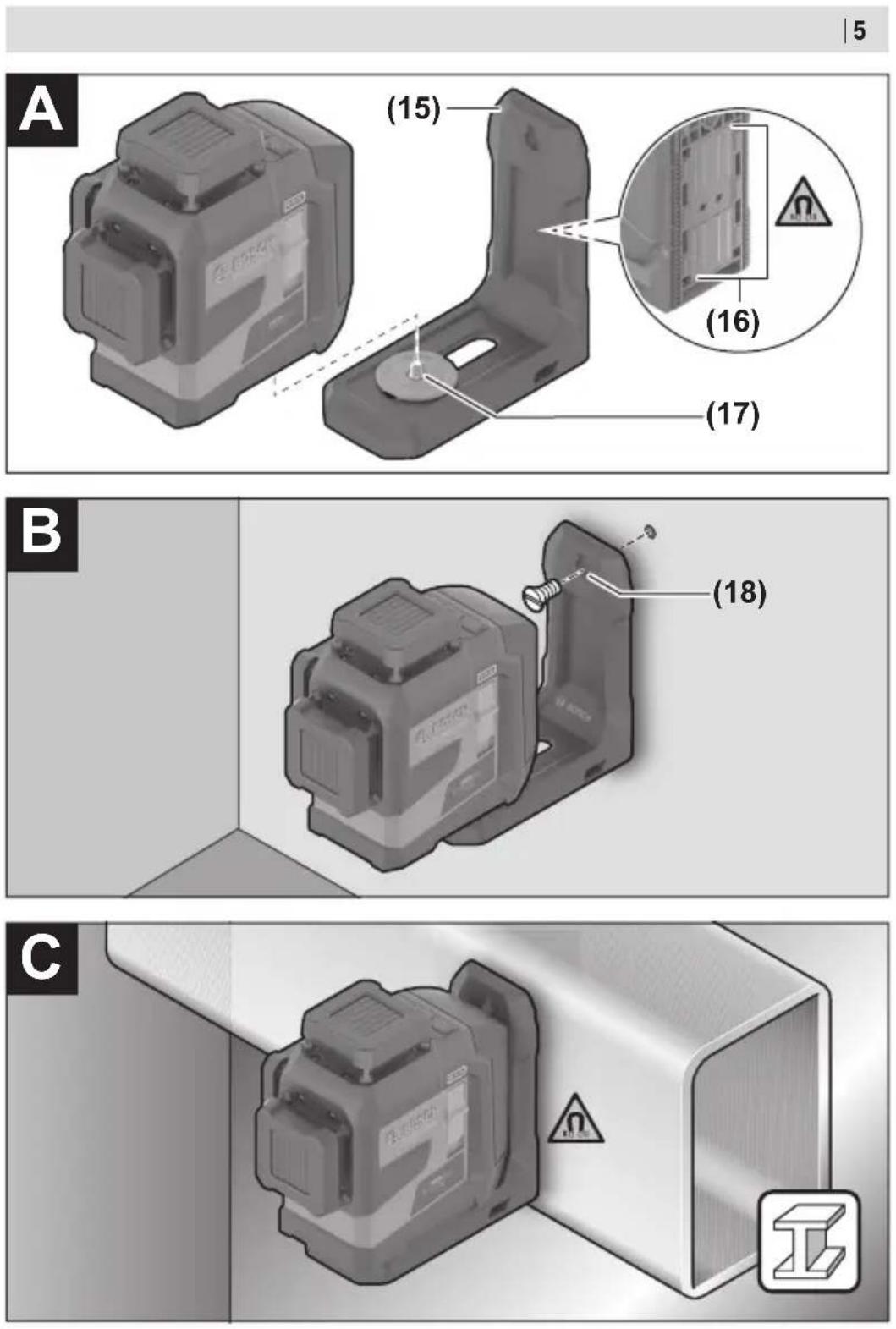
Working with the Holder LB 10 (accessory) (see figures A–D)
You can secure the measuring tool on vertical surfaces or magnetisable materials using the holder (15). In conjunction with the ceiling clip (19), the measuring tool can also be aligned vertically.
Place the measuring tool with the 1/4" tripod mount (13) on the 1/4" screw (17) of the holder and screw it tight.
Attachment options for the holder (15):
- Using a commercially available fastening screw, it can be attached via the screw hole (18) to wood (see figure B)
- Using the magnets (16), it can be attached to magnetisable materials (see figure C)
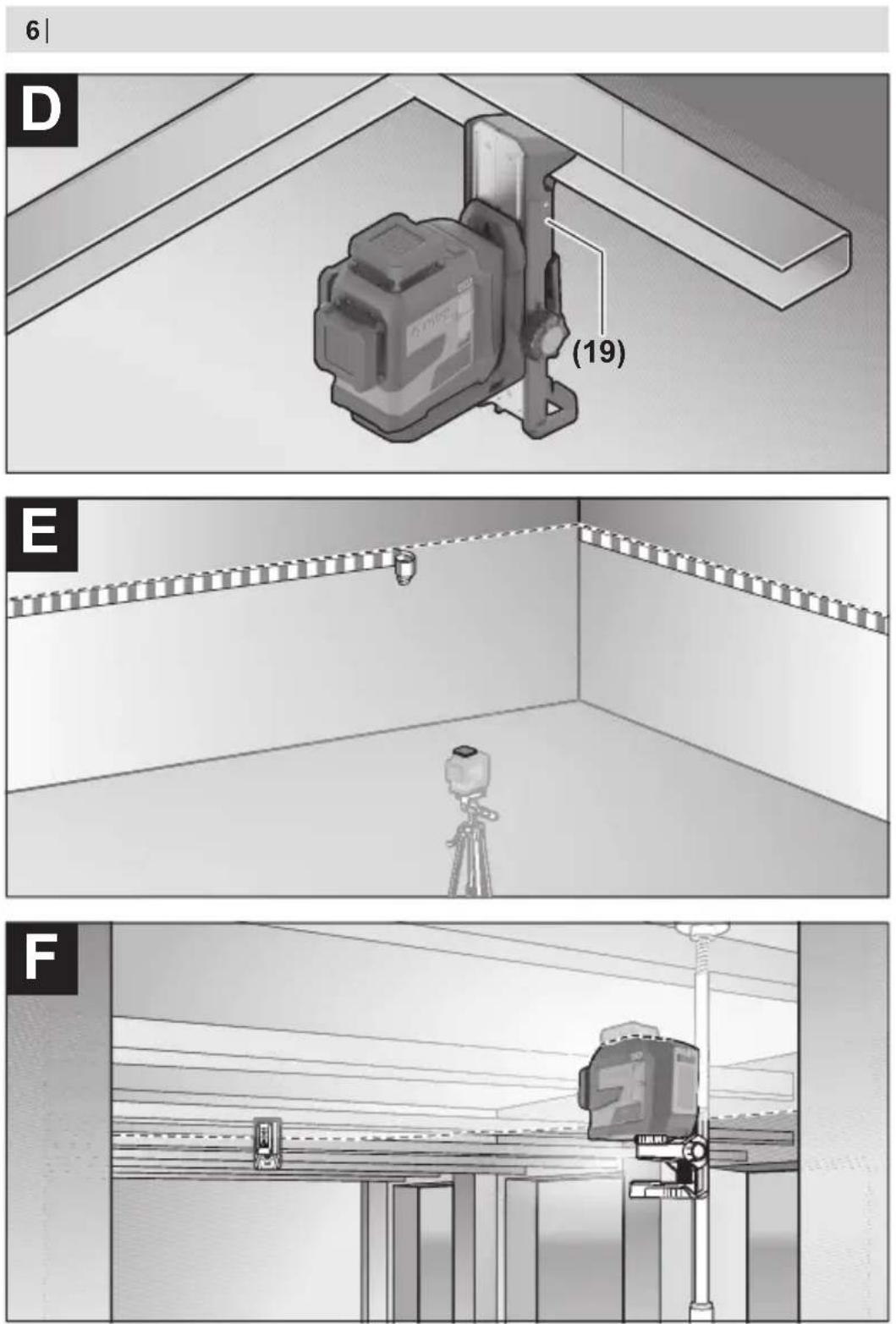
- Using the ceiling clip (19), it can be attached to crown mouldings (see figure D).
- Keep your fingers away from the rear side of the magnetic accessory while attaching the accessory to surfaces. The strong pulling force of the magnets may jam your fingers.
Roughly align the holder (15) before switching on the measuring tool.
Working with the Laser Target Plate (accessory)
The laser target plate (21) improves visibility of the laser beam in unfavourable conditions and at greater distances.
The reflective surface of the laser target plate (21) improves visibility of the laser line. The transparent surface enables the laser line to be seen from behind the laser target plate.
Working with the Tripod (accessory)
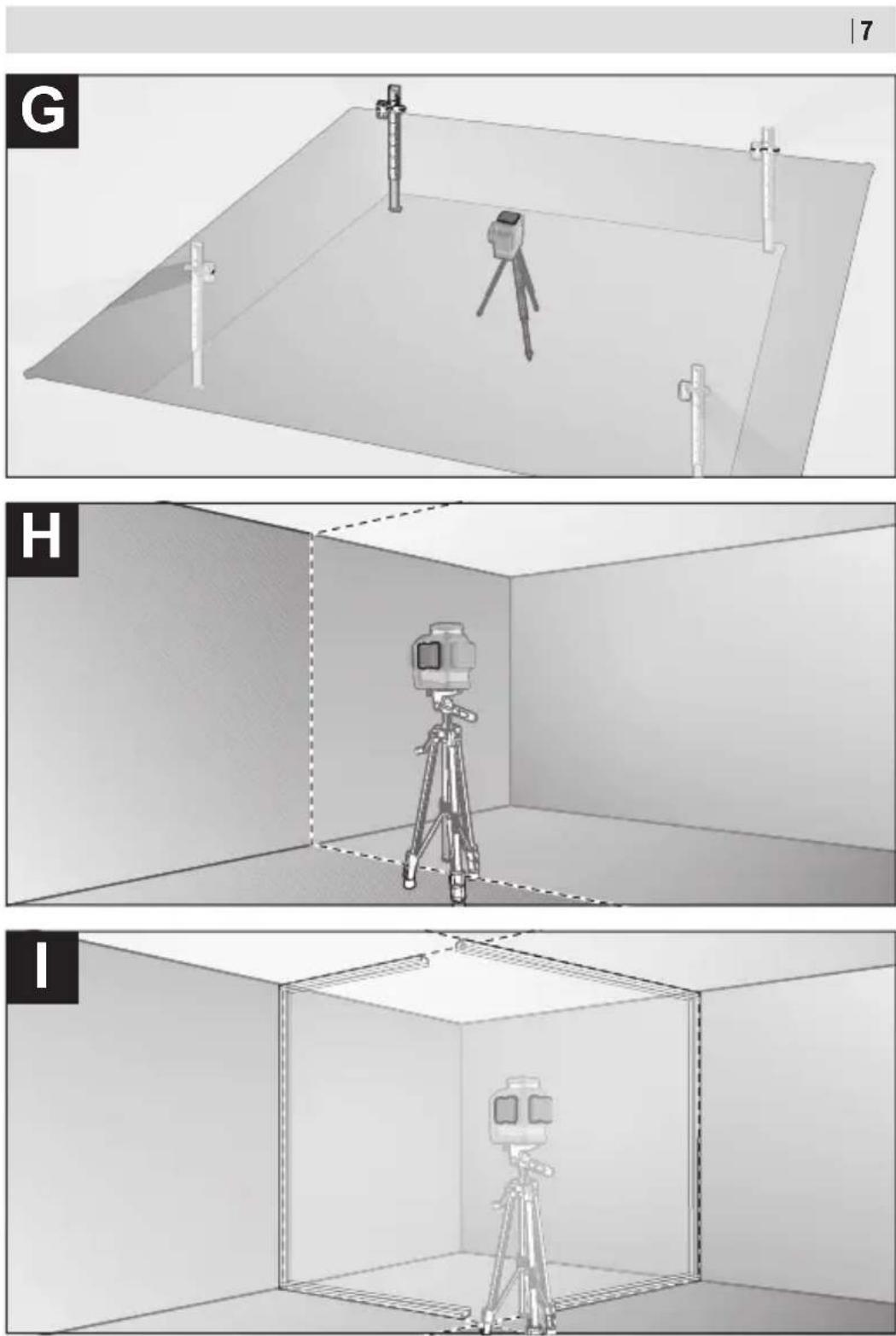
A tripod offers a stable, height-adjustable support surface for measuring. Place the measuring tool with the 1/4" tripod mount (13) on the thread of the tripod (24) or a conventional camera tripod. Use the 5/8" tripod mount (14) to secure the measuring tool on a conventional building tripod. Tighten the measuring tool using the locking screw of the tripod.
Roughly align the tripod before switching on the measuring tool.
Securing with the Universal Holder (accessory) (see figure F)
You can secure the measuring tool, for example, on vertical surfaces or magnetisable materials using the universal holder (20). The universal holder is also suitable for use as a floor stand and facilitates the height adjustment of the measuring tool.
- Keep your fingers away from the rear side of the magnetic accessory while attaching the accessory to surfaces. The strong pulling force of the magnets may jam your fingers.
Roughly align the universal holder (20) before switching on the measuring tool.
Working with the Laser Receiver (accessory) (see figure F)
Use the laser receiver (23) to improve detection of the laser lines in adverse lighting conditions (bright environment, direct sunlight) and over greater distances.
All operating modes are suitable for operation with the laser receiver (23).
Laser Viewing Glasses (accessory)
The laser goggles filter out ambient light. This makes the light of the laser appear brighter to the eye.
▶ Do not use the laser goggles (accessory) as protective goggles. The laser goggles make the laser beam easier to see; they do not protect you against laser radiation.
▶ Do not use the laser goggles (accessory) as sunglasses or while driving. The laser goggles do not provide full UV protection and impair your ability to see colours.
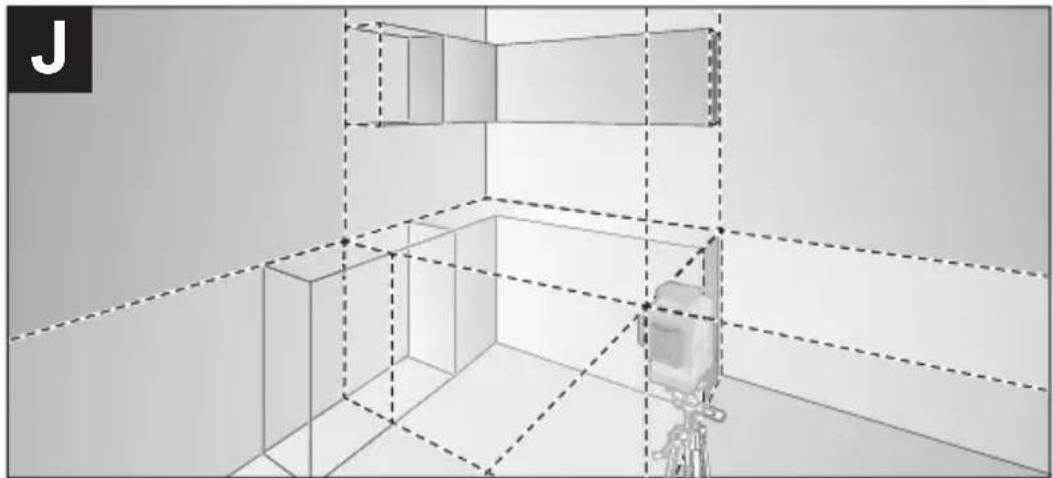
Example applications (see figures E-J)
Examples of possible applications for the measuring tool can be found on the graphics pages.
Maintenance and Service
Maintenance and Cleaning
Keep the measuring tool clean at all times.
Never immerse the measuring tool in water or other liquids.
Wipe off any dirt using a damp, soft cloth. Do not use any detergents or solvents.
The areas around the outlet aperture of the laser in particular should be cleaned on a regular basis. Make sure to check for lint when doing this.
Only store and transport the measuring tool in the protective bag (27) or the case (28).
If the measuring tool needs to be repaired, send it off in the protective bag (27) or the case (28).
After-Sales Service and Application Service
Our after-sales service responds to your questions concerning maintenance and repair of your product as well as spare parts. You can find explosion drawings and information on spare parts at: www.bosch-pt.com
The Bosch product use advice team will be happy to help you with any questions about our products and their accessories.
In all correspondence and spare parts orders, please always include the 10-digit article number given on the nameplate of the product.
42 | English
Great Britain
Robert Bosch Ltd. (B.S.C.)
P.O. Box 98
Broadwater Park
North Orbital Road
Denham Uxbridge
UB 9 5HJ
At www.bosch-pt.co.uk you can order spare parts or arrange the collection of a product in need of servicing or repair.
Tel. Service: (0344) 7360109
E-Mail: boschservicecentre@bosch.com
You can find further service addresses at:
www.bosch-pt.com/serviceaddresses
Transport
The recommended lithium-ion batteries are subject to legislation on the transport of dangerous goods. The user can transport the batteries by road without further requirements.
When the batteries are shipped by third parties (e.g. air transport or forwarding agency), special requirements on packaging and labelling (e.g. ADR regulations) must be met. A dangerous goods expert must be consulted when preparing the items for shipping.
Dispatch battery packs only when the housing is undamaged. Tape or mask off open contacts and pack up the battery in such a manner that it cannot move around in the packaging. Please also observe the possibility of more detailed national regulations.
Disposal

Measuring tools, rechargeable/non-rechargeable batteries, accessories and packaging should be sorted for environmental-friendly recycling.

Do not dispose of the measuring tools or battery packs/batteries with household waste.
Only for EU countries:
According to the Directive 2012/19/EU on waste electrical and electronic equipment and its transposition into national law, measuring tools that are no longer usable, and, according to the Directive 2006/66/EC, defective or drained batteries must be collected separately and disposed of in an environmentally correct manner.
If disposed incorrectly, waste electrical and electronic equipment may have harmful effects on the environment and human health, due to the potential presence of hazardous substances.
Only for United Kingdom:
According to The Waste Electrical and Electronic Equipment Regulations 2013 (SI 2013/3113) (as amended) and the Waste Batteries and Accumulators Regulations 2009 (SI 2009/890) (as amended), products that are no longer usable must be collected separately and disposed of in an environmentally friendly manner.
Battery packs/batteries:
Li-ion:
Please observe the notes in the section on transport (see "Transport", page 42).
Français
Robert Bosch (France) S.A.S.
www.bosch-pt.com/serviceaddresses
Transport
natural_image
Abstract icon of a person moving with arrows, enclosed in a circle (no text or symbols)FR
Calle Robert Bosch No. 405
www.bosch-pt.com/serviceaddresses
Transporte
www.bosch-pt.com/serviceaddresses
Transporte
Livella laser a linee GLL 80-33 G
www.bosch-pt.com/serviceaddresses
Trasporto
www.bosch-pt.com/serviceaddresses
Vervoer
Bosch Service Center
Telegrafvej 3
2750 Ballerup
På www.bosch-pt.dk kan der online bestilles reservedele eller oprettes en reparations ordre.
Tlf. Service Center: 44898855
Fax: 44898755
E-Mail: vaerktoej@dk.bosch.com
www.bosch-pt.com/serviceaddresses
Transport
Bosch Service Center
Telegrafvej 3
2750 Ballerup
Danmark
Tel.: (08) 7501820 (inom Sverige)
Fax: (011) 187691
www.bosch-pt.com/serviceaddresses
Transport
www.bosch-pt.com/serviceaddresses
Transport
www.bosch-pt.com/serviceaddresses
Kuljetus
www.bosch-pt.com/serviceaddresses
Μεταφορά
www.bosch-pt.com/serviceaddresses
Nakliye
Robert Bosch Sp. z o.o.
www.bosch-pt.com/serviceaddresses
Transport
Bosch Service Center PT
K Vápence 1621/16
692 01 Mikulov
www.bosch-pt.com/serviceaddresses
Přeprava
www.bosch-pt.com/serviceaddresses
Transport
www.bosch-pt.com/serviceaddresses
Szállítás
www.bosch-pt.com/serviceaddresses
Транспортировка
www.bosch-pt.com/serviceaddresses
Транспортування
www.bosch-pt.com/serviceaddresses
340 | Казак
Тасымалдау
www.bosch-pt.com/serviceaddresses
Service scule electrice
Strada Horia Măcelariu Nr. 30–34, sector 1
013937 Bucureşti
www.bosch-pt.com/serviceaddresses
Transport
Service scule electrice
Strada Horia Măcelariu Nr. 30–34, sector 1
013937 Bucureşti, România
www.bosch-pt.com/bg/bg/
www.bosch-pt.com/serviceaddresses
Транспортиране
www.bosch-pt.com/serviceaddresses
Транспорт
– Označite sredinu vertikalne laserske linije na podu otvora za vrata (tačka I), na razdaljini od 5 m od druge strane otvora za vrata (tačka II) kao i na gornjoj ivici otvora za vrata (tačka III).
422 | Srpski
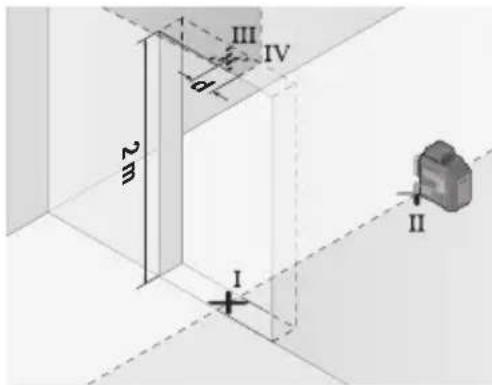
- Okrenite merni alat za 180° i stavite ga na drugu stranu otvora za vrata direktno iza tačke II. Pustite merni alat da se niveliše i vertikalnu lasersku liniju usmerite tako da njena sredina tačno kroz tačke I i II.
www.bosch-pt.com/serviceaddresses
Transport
Preporučeni litijum-jonski akumulatori podležu zahtevima propisa o opasnim materijama. Korisnik može bez dodatnih uslova transportovati akumulatore na drumu. Kod slanja preko trećih lica (na primer vazdušnim transportom ili špedicijom) mora se obratiti pažnja na posebne zahteve u pogledu pakovanja i označavanja. Tada se kod pripreme paketa za slanje mora pozvati stručnjak za opasne materije.
Akumulatorske baterije šaljite samo ako kućište nije oštećeno. Odlepite otvorene kontakte i upakujte akumulatorsku bateriju tako, da se ne pokreće u paketu. Molimo da obratite pažnju na eventualne dalje nationalne propise.
Uklanjanje dubreta

Merne alate, akumulatore/baterije, pribor i pakovanja treba predati na reciklažu koja je u skladu sa zaštitom životne sredine.
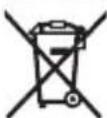
Merne alate i akumulatorske baterije/baterije nemojte bacati u kućni otpad!
Samo za EU-zemlje:
Prema evropskoj direktivi 2012/19/EU o starim električnim i elektronskim uređajima i njenoj primeni u nacionalnom pravu, merni alati koji se više ne mogu koristiti, a prema evropskoj direktivi 2006/66/EC akumulatori/baterije koje su u kvaru ili istrošene moraju se odvojeno sakupljati i uključiti u reciklažu koja ispunjava ekološke uslove.
www.bosch-pt.com/serviceaddresses
Transport
– Označite sredinu okomite linije lasera na dnu otvora vrata (točka I), na udaljenosti 5 m na drugoj strani otvora vrata (točka II) kao i na gornjem rubu otvora vrata (točka III).
www.bosch-pt.com/serviceaddresses
Transport
www.bosch-pt.com/serviceaddresses
Transport
www.bosch-pt.com/serviceaddresses
Transportešana
www.bosch-pt.com/serviceaddresses
Transportavimas
IOI I I I I I I I I I I I I I I I I I I I I I I I I I I I I I I I I I I I I
النقطة IV.
Robert Bosch Morocco SARL
www.bosch-pt.com/serviceaddresses
النقل
(b. هستند USB Implen
مشخصات فنى
نطه IV علامتگذاری-
کنید.
www.bosch-pt.com/serviceaddresses
جمل دستگاه
Copyright © 2009-2019 Arm Limited. All rights reserved.
Licensed under the Apache License, Version 2.0 (the "License"); you may not use this file except in compliance with the License.
You may obtain a copy of the License at http://www.apache.org/licenses/LICENSE-2.0
Unless required by applicable law or agreed to in writing, software distributed under the License is distributed on an "AS IS" BASIS, WITHOUT WARRANTIES OR CONDITIONS OF ANY KIND, either express or implied. See the License for the specific language governing permissions and limitations under the License.
STM32CubeG0, v1.5.1
Apache-2.0
Copyright © 2018-2021 STMicroelectronics.
Licensed under the Apache License, Version 2.0 (the "License"); you may not use this file except in compliance with the License.
You may obtain a copy of the License at http://www.apache.org/licenses/LICENSE-2.0
Unless required by applicable law or agreed to in writing, software distributed under the License is distributed on an "AS IS" BASIS, WITHOUT WARRANTIES OR CONDITIONS OF ANY KIND, either express or implied.
See the License for the specific language governing permissions and limitations under the License.
SIMPLELINK-CC13XX-CC26XX-SDK, 6.20.00.29
Copyright © 2015, Texas Instruments Incorporated
All rights reserved not granted herein. Limited License.
Texas Instruments Incorporated grants a world-wide, royalty-free, non-exclusive license under copyrights and patents it now or hereafter owns or controls to make, have made, use, import, offer to sell and sell ("Utilize") this software subject to the terms herein. With respect to the foregoing patent license, such license is granted solely to the extent that any such patent is necessary to Utilize the software alone. The patent license shall not apply to any combinations which include this software, other than combinations with devices manufactured by or for TI ("TI Devices"). No hardware patent is licensed hereunder.
Redistributions must preserve existing copyright notices and reproduce this license (including the above copyright notice and the disclaimer and (if applicable) source code license limitations below) in the documentation and/or other materials provided with the distribution.
Redistribution and use in binary form, without modification, are permitted provided that the following conditions are met:
- No reverse engineering, decompilation, or disassembly of this software is permitted with respect to any software provided in binary form.
– Any redistribution and use are licensed by TI for use only with TI Devices.
- Nothing shall obligate TI to provide you with source code for the software licensed and provided to you in object code.
If software source code is provided to you, modification and redistribution of the source code are permitted provided that the following conditions are met:
– Any redistribution and use of the source code, including any resulting derivative works, are licensed by TI for use only with TI Devices.
– Any redistribution and use of any object code compiled from the source code and any resulting derivative works, are licensed by TI for use only with TI Devices.
- Neither the name of Texas Instruments Incorporated nor the names of its suppliers may be used to endorse or promote products derived from this software without specific prior written permission.
DISCLAIMER.
THIS SOFTWARE IS PROVIDED BY TI AND TI'S LICENSORS "AS IS" AND ANY EXPRESS OR IMPLIED WARRANTIES, INCLUDING, BUT NOT LIMITED TO, THE IMPLIED WARRANTIES OF MERCHANTABILITY AND FITNESS FOR A PARTICULAR PURPOSE ARE DISCLAIMED. IN NO EVENT SHALL TI AND TI'S LICENSORS BE LIABLE FOR ANY DIRECT, INDIRECT, INCIDENTAL, SPECIAL, EXEMPLARY, OR CONSEQUENTIAL DAMAGES (INCLUDING, BUT NOT LIMITED TO, PROCUREMENT OF SUBSTITUTE GOODS OR SERVICES; LOSS OF USE, DATA, OR PROFITS; OR BUSINESS INTERRUPTION) HOWEVER CAUSED AND ON ANY THEORY OF LIABILITY, WHETHER IN CONTRACT, STRICT LIABILITY, OR TORT (INCLUDING NEGLIGENCE OR OTHERWISE) ARISING IN ANY WAY OUT OF THE USE OF THIS SOFTWARE, EVEN IF ADVISED OF THE POSSIBILITY OF SUCH DAMAGE.
Copyright 2010 - 2015 Texas Instruments Incorporated. All rights reserved.
Copyright © 2016 Texas Instruments Incorporated – http://www.ti.com/
All rights reserved not granted herein. Limited License.
Texas Instruments Incorporated grants a world-wide, royalty-free, non-exclusive license under copyrights and patents it now or hereafter owns or controls to make, have made, use, import, offer to sell and sell ("Utilize") this software subject to the terms herein. With respect to the foregoing patent license, such license is granted solely to the extent that any such patent is necessary to Utilize the software alone. The patent license shall not apply to any combinations which include this software, other than combinations with devices manufactured by or for TI ("TI Devices"). No hardware patent is licensed hereunder. Redistributions must preserve existing copyright notices and reproduce this license (including the above copyright notice and the disclaimer and (if applicable) source code license limitations below) in the documentation and/or other materials provided with the distribution.
Redistribution and use in binary form, without modification, are permitted provided that the following conditions are met:
- No reverse engineering, decompilation, or disassembly of this software is permitted with respect to any software provided in binary form.
– Any redistribution and use are licensed by TI for use only with TI Devices.
- Nothing shall obligate TI to provide you with source code for the software licensed and provided to you in object code.
If software source code is provided to you, modification and redistribution of the source code are permitted provided that the following conditions are met:
– Any redistribution and use of the source code, including any resulting derivative works, are licensed by TI for use only with TI Devices.
– Any redistribution and use of any object code compiled from the source code and any resulting derivative works, are licensed by TI for use only with TI Devices.
- Neither the name of Texas Instruments Incorporated nor the names of its suppliers may be used to endorse or promote products derived from this software without specific prior written permission.
538 | Licenses
DISCLAIMER.
THIS SOFTWARE IS PROVIDED BY TI AND TI'S LICENSORS "AS IS" AND ANY EXPRESS OR IMPLIED WARRANTIES, INCLUDING, BUT NOT LIMITED TO, THE IMPLIED WARRANTIES OF MERCHANTABILITY AND FITNESS FOR A PARTICULAR PURPOSE ARE DISCLAIMED. IN NO EVENT SHALL TI AND TI'S LICENSORS BE LIABLE FOR ANY DIRECT, INDIRECT, INCIDENTAL, SPECIAL, EXEMPLARY, OR CONSEQUENTIAL DAMAGES (INCLUDING, BUT NOT LIMITED TO, PROCUREMENT OF SUBSTITUTE GOODS OR SERVICES; LOSS OF USE, DATA, OR PROFITS; OR BUSINESS INTERRUPTION) HOWEVER CAUSED AND ON ANY THEORY OF LIABILITY, WHETHER IN CONTRACT, STRICT LIABILITY, OR TORT (INCLUDING NEGLIGENCE OR OTHERWISE) ARISING IN ANY WAY OUT OF THE USE OF THIS SOFTWARE, EVEN IF ADVISED OF THE POSSIBILITY OF SUCH DAMAGE.
Generic License Text
Apache License 2.0
Apache License Version 2.0, January 2004
http://www.apache.org/licenses/
TERMS AND CONDITIONS FOR USE, REPRODUCTION, AND DISTRIBUTION
Definitions.
"License" shall mean the terms and conditions for use, reproduction, and distribution as defined by Sections 1 through 9 of this document.
"Licensor" shall mean the copyright owner or entity authorized by the copyright owner that is granting the License.
"Legal Entity" shall mean the union of the acting entity and all other entities that control, are controlled by, or are under common control with that entity. For the purposes of this definition, "control" means (i) the power, direct or indirect, to cause the direction or management of such entity, whether by contract or otherwise, or (ii) ownership of fifty percent (50%) or more of the outstanding shares, or (iii) beneficial ownership of such entity.
"You" (or "Your") shall mean an individual or Legal Entity exercising permissions granted by this License.
"Source" form shall mean the preferred form for making modifications, including but not limited to software source code, documentation source, and configuration files.
"Object" form shall mean any form resulting from mechanical transformation or translation of a Source form, including but not limited to compiled object code, generated documentation, and conversions to other media types.
"Work" shall mean the work of authorship, whether in Source or Object form, made available under the License, as indicated by a copyright notice that is included in or attached to the work (an example is provided in the Appendix below).
"Derivative Works" shall mean any work, whether in Source or Object form, that is based on (or derived from) the Work and for which the editorial revisions, annotations, elaborations, or other modifications represent, as a whole, an original work of authorship. For the purposes of this License, Derivative Works shall not include works that remain separable from, or merely link (or bind by name) to the interfaces of, the Work and Derivative Works thereof.
"Contribution" shall mean any work of authorship, including the original version of the Work and any modifications or additions to that Work or Derivative Works thereof, that is intentionally submitted to Licensor for inclusion in the Work by the copyright owner or by an individual or Legal Entity authorized to submit on behalf of the copyright owner. For the purposes of this definition, "submitted" means any form of electronic, verbal, or written communication sent to the Licensor or its representatives, including but not limited to communication on electronic mailing lists, source code control systems, and issue tracking
systems that are managed by, or on behalf of, the Licensor for the purpose of discussing and improving the Work, but excluding communication that is conspicuously marked or otherwise designated in writing by the copyright owner as "Not a Contribution."
"Contributor" shall mean Licensor and any individual or Legal Entity on behalf of whom a Contribution has been received by Licensor and subsequently incorporated within the Work.
Grant of Copyright License. Subject to the terms and conditions of this License, each Contributor hereby grants to You a perpetual, worldwide, non-exclusive, no-charge, royalty-free, irrevocable copyright license to reproduce, prepare Derivative Works of, publicly display, publicly perform, sublicense, and distribute the Work and such Derivative Works in Source or Object form.
Grant of Patent License. Subject to the terms and conditions of this License, each Contributor hereby grants to You a perpetual, worldwide, non-exclusive, no-charge, royalty-free, irrevocable (except as stated in this section) patent license to make, have made, use, offer to sell, sell, import, and otherwise transfer the Work, where such license applies only to those patent claims licensable by such Contributor that are necessarily infringed by their Contribution(s) alone or by combination of their Contribution(s) with the Work to which such Contribution(s) was submitted. If You institute patent litigation against any entity (including a cross-claim or counterclaim in a lawsuit) alleging that the Work or a Contribution incorporated within the Work constitutes direct or contributory patent infringement, then any patent licenses granted to You under this License for that Work shall terminate as of the date such litigation is filed.
Redistribution. You may reproduce and distribute copies of the Work or Derivative Works thereof in any medium, with or without modifications, and in Source or Object form, provided that You meet the following conditions:
(a) You must give any other recipients of the Work or Derivative Works a copy of this License; and
(b) You must cause any modified files to carry prominent notices stating that You changed the files; and
(c) You must retain, in the Source form of any Derivative Works that You distribute, all copyright, patent, trademark, and attribution notices from the Source form of the Work, excluding those notices that do not pertain to any part of the Derivative Works; and
(d) If the Work includes a "NOTICE" text file as part of its distribution, then any Derivative Works that You distribute must include a readable copy of the attribution notices contained within such NOTICE file, excluding those notices that do not pertain to any part of the Derivative Works, in at least one of the following places: within a NOTICE text file distributed as part of the Derivative Works; within the Source form or documentation, if provided along with the Derivative Works; or, within a display generated by the Derivative Works, if and wherever such third-party notices normally appear. The contents of the NOTICE file are for informational purposes only and do not modify the License. You may add Your own attribution notices within Derivative Works that You distribute, alongside or as an addendum to the NOTICE text from the Work, provided that such additional attribution notices cannot be construed as modifying the License.
You may add Your own copyright statement to Your modifications and may provide additional or different license terms and conditions for use, reproduction, or distribution of Your modifications, or for any such Derivative Works as a whole, provided Your use, reproduction, and distribution of the Work otherwise complies with the conditions stated in this License.
Submission of Contributions. Unless You explicitly state otherwise, any Contribution intentionally submitted for inclusion in the Work by You to the Licensor shall be under the terms and conditions of this License, without any additional terms or conditions. Notwithstanding the above, nothing herein shall supersede or modify the terms of any separate license agreement you may have executed with Licensor regarding such Contributions.
540 | Licenses
Trademarks. This License does not grant permission to use the trade names, trademarks, service marks, or product names of the Licensor, except as required for reasonable and customary use in describing the origin of the Work and reproducing the content of the NOTICE file.
Disclaimer of Warranty. Unless required by applicable law or agreed to in writing, Licensor provides the Work (and each Contributor provides its Contributions) on an "AS IS" BASIS, WITHOUT WARRANTIES OR CONDITIONS OF ANY KIND, either express or implied, including, without limitation, any warranties or conditions of TITLE, NON-INFRINGEMENT, MERCHANTABILITY, or FITNESS FOR A PARTICULAR PURPOSE. You are solely responsible for determining the appropriateness of using or redistributing the Work and assume any risks associated with Your exercise of permissions under this License.
Limitation of Liability. In no event and under no legal theory, whether in tort (including negligence), contract, or otherwise, unless required by applicable law (such as deliberate and grossly negligent acts) or agreed to in writing, shall any Contributor be liable to You for damages, including any direct, indirect, special, incidental, or consequential damages of any character arising as a result of this License or out of the use or inability to use the Work (including but not limited to damages for loss of goodwill, work stoppage, computer failure or malfunction, or any and all other commercial damages or losses), even if such Contributor has been advised of the possibility of such damages.
Accepting Warranty or Additional Liability. While redistributing the Work or Derivative Works thereof, You may choose to offer, and charge a fee for, acceptance of support, warranty, indemnity, or other liability obligations and/or rights consistent with this License. However, in accepting such obligations, You may act only on Your own behalf and on Your sole responsibility, not on behalf of any other Contributor, and only if You agree to indemnify, defend, and hold each Contributor harmless for any liability incurred by, or claims asserted against, such Contributor by reason of your accepting any such warranty or additional liability.
END OF TERMS AND CONDITIONS
Warranty Disclaimer
This product contains Open Source Software components which underly Open Source Software Licenses. Please note that Open Source Licenses contain disclaimer clauses. The text of the Open Source Licenses that apply are included in this manual under "Licenses".
- GLL 80-33 G Professional
- Deutsch
- Sicherheitshinweise
- Transport
- | English
- Product Description and Specifications
- Intended Use
- Product Features
- | English
- | English
- Line laser GLL 80-33 G
- Power supply
- Measuring Tool Power Supply
- Operation with Non-Rechargeable Batteries (accessory)
- Operation with Lithium-Ion Battery Pack
- Inserting/Replacing a Lithium-Ion Battery Pack
- Charging a Lithium-Ion Battery Pack
- | English
- Energy Saving Mode
- Battery Charge Indicator
- Operation
- Starting Operation
- Switching On/Off
- Deactivating the Automatic Shut-Off Function
- Operating Modes
- | English
- Automatic Levelling
- Working with Automatic Levelling
- Working with the Incline Function
- Accuracy Check of the Measuring Tool
- Influences on Accuracy
- Checking the Horizontal Levelling Accuracy of the Transverse Axis
- | English
- Checking the Levelling Accuracy of the Vertical Lines
- Working Advice
- | English
- Working with the Holder LB 10 (accessory) (see figures A–D)
- Working with the Laser Target Plate (accessory)
- Working with the Tripod (accessory)
- Securing with the Universal Holder (accessory) (see figure F)
- Working with the Laser Receiver (accessory) (see figure F)
- Laser Viewing Glasses (accessory)
- Example applications (see figures E-J)
- Maintenance and Service
- Maintenance and Cleaning
- After-Sales Service and Application Service
- | English
- Great Britain
- You can find further service addresses at:
- Disposal
- Only for EU countries:
- Only for United Kingdom:
- Battery packs/batteries:
- Français
- FR
- Transporte
- Trasporto
- Vervoer
- Kuljetus
- Μεταφορά
- Nakliye
- Přeprava
- Szállítás
- Транспортировка
- Транспортування
- | Казак
- Тасымалдау
- Транспортиране
- Транспорт
- | Srpski
- Uklanjanje dubreta
- Samo za EU-zemlje:
- Transportešana
- Transportavimas
- جمل دستگاه
- STM32CubeG0, v1.5.1
- SIMPLELINK-CC13XX-CC26XX-SDK, 6.20.00.29
- DISCLAIMER.
- | Licenses
- Generic License Text
- Apache License 2.0
- Definitions.
- | Licenses
- Warranty Disclaimer
Brand : BOSCH
Model : GLL 3-80 G Professional
Category : Laser pointer