
FreeLace - Smartwatch HUAWEI - Free user manual and instructions
Find the device manual for free FreeLace HUAWEI in PDF.


| Product Type | Wireless Earphones |
| Brand | HUAWEI |
| Model | FreeLace |
| Bluetooth Version | 5.0 |
| Wireless Connectivity | Bluetooth |
| Wired Connectivity | USB Type-C |
| Hall Effect Magnetic Switch | Automatic connect/disconnect when earbuds are separated/attached |
| Voice Assistant Support | Yes, via long press of Function button |
| Quick Pairing via USB-C | Supported on Huawei phones with EMUI 9.1 or later |
| Charging Method | USB Type-A to Type-C charger or reverse charging via phone |
| Operating Temperature | 0°C to 35°C |
| Storage Temperature | -20°C to 45°C |
| Material | Silicone, plastic, metal |
| Power Button | Power on/off (1s), Bluetooth pairing (4s), factory reset (10s) |
| Function Button | Answer/end call, play/pause, reject call (2s), skip next (2x), previous (3x), voice assistant (2s) |
| Factory Reset | Press and hold Power button for at least 10 seconds until red flash |
| Safety Distances | Keep at least 15 cm from implantable medical devices |
| Certifications | CE, FCC, IC |
| Compliance | EU REACH, RoHS |
Frequently Asked Questions - FreeLace HUAWEI
User questions about FreeLace HUAWEI
0 question about this device. Answer the ones you know or ask your own.
Ask a new question about this device
Download the instructions for your Smartwatch in PDF format for free! Find your manual FreeLace - HUAWEI and take your electronic device back in hand. On this page are published all the documents necessary for the use of your device. FreeLace by HUAWEI.
USER MANUAL FreeLace HUAWEI
Hall effect magnetic switch
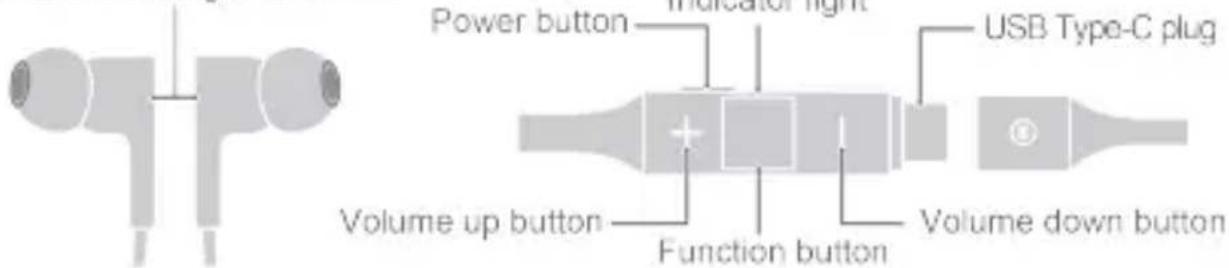
Usage scenarios
| Power-on/off | Press and hold the Power button for approximately 1 second to power on/off. |
| Pairing | Bluetooth pairing: When your earphones are powered on, press and hold the Power button for 4 seconds. The indicator light will flash white, which indicates that your earphones have entered Pairing mode. Enable Bluetooth on your phone, and select the device "HUAWEI FreeLace" for Bluetooth pairing.Physical connection: Connect your earphones to your phone's USB Type-C port. Follow the onscreen instructions on your phone to pair your phone with your earphones. (This connection mode is only applicable to Huawei phones running EMUI 9.1 or later.)i Hall effect magnetic switch: When your earphones' earbuds are attached to each other, the Bluetooth connection will automatically disconnect. Once the earbuds are separated, the Bluetooth connection will reconnect automatically. |
| Voice call and music playback | Press the Function button to answer or end a call, or play or pause music.Press and hold the Function button for 2 seconds to reject an incoming call.Press the Function button twice consecutively to skip to the next song.Press the Function button three times consecutively to return to the previous song. |
| Voice | During music playback or in Standby mode, press and hold the |
| assistant | Function button for 2 seconds to wake up the voice assistant on your phone. |
| Charging | Charging via a charger: Use the USB Type-A to Type-C charger to charge your earphones.Charging via a phone: Connect your earphones to your phone's USB Type-C port to charge your earphones using your phone (your phone must support reverse charging). |
| Factory settings restoration | Press and hold the Power button for at least 10 seconds until the indicator light flashes red to restore your earphones to factory settings. |
Safety information
Before using and operating this device, read the following precautions to ensure optimal device performance and avoid dangers or unauthorized operations.
Operation and safety precautions
- To prevent hearing damage, avoid using the device at a high volume for long periods of time.
- Some wireless devices may interfere with implantable medical devices and other medical equipment, such as pacemakers, cochlear implants, and hearing aids. Consult the manufacturer of your medical device for more information.
- When using this device, keep it at least 15 cm away from medical devices.
- Use this device at temperatures between 0°C and +35°C and store this device and its accessories at temperatures between -20°C and +45°C. Extreme heat or cold may damage this device. When the temperature is lower than 5°C, the battery performance may be affected.
- When charging this device, ensure that the charger is plugged into a nearby power socket that is easy to reach. Disconnect the charger from this device and unplug the charger from the power socket once this device is fully charged.
- Do not expose this device and its accessories to rain or moisture, as this is a potential fire hazard and may cause you to experience an electric shock.
- Avoid placing this device or its accessories in environments that are too hot (for example, near heat sources or open flame) or cold as this may cause device malfunctions or even explosions.
- Do not disassemble or modify this device, insert foreign objects into it, or
submerge it in water or other liquids as this may cause this device to leak, overheat, catch on fire, and even explode.
- Avoid applying external pressure to this device as this may cause its electronic circuitry to short or overheat.
- Avoid disassembling or modifying the device and its accessories. Unauthorized disassembly and modifications may result in voiding of the factory warranty. If your device is faulty, visit an authorized Customer Service Center for assistance.
- Do not dispose this device and its accessories as ordinary household waste.
- Respect local laws on the disposal of this device and its accessories and support recycling efforts.
- Some people are allergic to silicone, plastic, metals, and other materials. If you feel uncomfortable after prolonged use of this device, stop using it and consult a doctor.
Disposal and recycling information
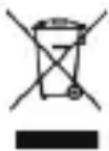
The crossed-out wheeled-bin symbol on your product, battery, literature or packaging reminds you that all electronic products and batteries must be taken to separate waste collection points at the end of their working lives; they must not be disposed of in the normal waste stream with household garbage. It is the responsibility of the user to dispose of the equipment using a designated collection point or service for separate recycling of waste electrical and electronic equipment (WEEE) and batteries according to local laws.
Proper collection and recycling of your equipment helps ensure electrical and electronic equipment (EEE) waste is recycled in a manner that conserves valuable materials and protects human health and the environment, improper handling, accidental breakage, damage, and/or improper recycling at the end of its life may be harmful for health and environment. For more information about where and how to drop off your EEE waste, please contact your local authorities, retailer or household waste disposal service or visit the website http://consumer.huawei.com/en/.
Reduction of hazardous substances
This device and any electrical accessories are compliant with local applicable rules on the restriction of the use of certain hazardous substances in electrical and electronic equipment, such as EU REACH, RoHS and Batteries (where included) regulations, etc. For declarations of conformity about REACH and RoHS, please visit our web site http://consumer.huawei.com/certification.
EU regulatory conformance
RF Exposure
Your device is a low-power radio transmitter and receiver. As recommended by international guidelines, the device is designed not to exceed the limits established by the European Commission for exposure to radio waves.
Statement
Hereby, Huawei Technologies Co., Ltd. declares that this device CM70-C is in compliance with the essential requirements and other relevant provisions of Directive 2014/53/EU.
The most recent and valid version of the DoC (Declaration of Conformity) can be viewed at http://consumer.huawei.com/certification.
This device may be operated in all member states of the EU.
Observe national and local regulations where the device is used.
This device may be restricted for use, depending on the local network.
Frequency Bands and Power
(a) Frequency bands in which the radio equipment operates: Some bands may not be available in all countries or all areas. Please contact the local carrier for more details.
(b) Maximum radio-frequency power transmitted in the frequency bands in which the radio equipment operates: The maximum power for all bands is less than the highest limit value specified in the related Harmonized Standard.
The frequency bands and transmitting power (radiated and/or conducted) nominal limits applicable to this radio equipment are as follows:
| CM70-C | Bluetooth: 2402 MHz-2480 MHz: 11 dBm |
Accessories and Software Information
Some accessories are optional in certain countries or regions. Optional accessories can be purchased from a licensed vendor as required. The following accessories are recommended:
Batteries: HUA01, AHB380942TPO, AHB380942TPO-01
The product software version is V1.0.0.100. Software updates will be released by the manufacturer to fix bugs or enhance functions after the product has been released.
All software versions released by the manufacturer have been verified and are still compliant with the related rules.
All RF parameters (for example, frequency range and output power) are not accessible to the user, and cannot be changed by the user.
For the most recent information about accessories and software, please see the DoC (Declaration of Conformity) at http://consumer.huawei.com/certification.
FCC Regulatory Compliance
RF Exposure
Your device is a low-power radio transmitter and receiver. As recommended by international guidelines, the device is designed not to exceed the limits established by the Federal Communications Commission for exposure to radio waves.
FCC statement
This equipment has been tested and found to comply with the limits for a Class B digital device, pursuant to Part 15 of the FCC Rules. These limits are designed to provide reasonable protection against harmful interference in a residential installation. This equipment generates, uses and can radiate radio frequency energy and, if not installed and used in accordance with the instructions, may cause harmful interference to radio communications. However, there is no guarantee that interference will not occur in a particular installation. If this equipment does cause harmful interference to radio or television reception, which can be determined by turning the equipment off and on, the user is encouraged to try to correct the interference by one or more of the following measures:
--Reorient or relocate the receiving antenna.
--Increase the separation between the equipment and receiver.
--Connect the equipment into an outlet on a circuit different from that to which the receiver is connected.
--Consult the dealer or an experienced radio/TV technician for help.
This device complies with Part 15 of the FCC Rules. Operation is subject to the following two conditions: (1) this device may not cause harmful interference, and (2) this device must accept any interference received, including interference that may cause undesired operation.
Caution: Any changes or modifications to this device not expressly approved by Huawei Technologies Co., Ltd. for compliance could void the user's authority to operate the equipment.
Responsible Party - Contact for FCC Information only
Huawei Device USA Inc.
5700 Tennyson Parkway, Suite 500
Plano, TX 75024
Main: 214-919-6800
Industry Canada compliance
Certification information (SAR)
The highest SAR value reported to the IC for this device type when using it in portable exposure conditions is
| CM70-C | 0.08 W/kg |
IC Statement
This device complies with CAN ICES-3 (B)/NMB-3(B).
This device complies with Industry Canada licence-exempt RSS standard(s). Operation is subject to the following two conditions: (1) this device may not cause interference, and (2) this device must accept any interference, including interference that may cause undesired operation of the device.
Legal statement
Copyright © Huawei Technologies Co., Ltd. 2019. All rights reserved.
This document is for reference only. Nothing in this guide constitutes a warranty of any kind, express or implied.
All pictures and illustrations in this document are for reference only, the actual product may differ from images on the packaging (including but not limited to colors, shape and screen display).
Please visit http://consumer.huawei.com/us/support/index.htm for recent updated hotline and email address in your country or region.
The Bluetooth® word mark and logos are registered trademarks owned by Bluetooth SIG, Inc. and any use of such marks by Huawei Technologies Co., Ltd. is under license.
User Software License Agreement
Please read the software license agreement carefully before using the product. By using the product, you indicate that you agree to be bound by the license agreement. For agreement content, please visit: https://consumer.huawei.com/en/legal/eula/.
Privacy protection
To understand how we protect your personal information, please visit http://consumer.huawei.com/privacy-policy and read our privacy policy. For United States warranty card information, visit http://consumer.huawei.com/us/support/warranty-policy/index.htm.
Open Source Software Notice
For details about the Open Source Software Notice, please visit: https://consumer.huawei.com/en/opensource/.
https://consumer.huawei.com/en/legal/eula/.
Защита на данните
natural_image
Pure electrical circuit lines without any symbols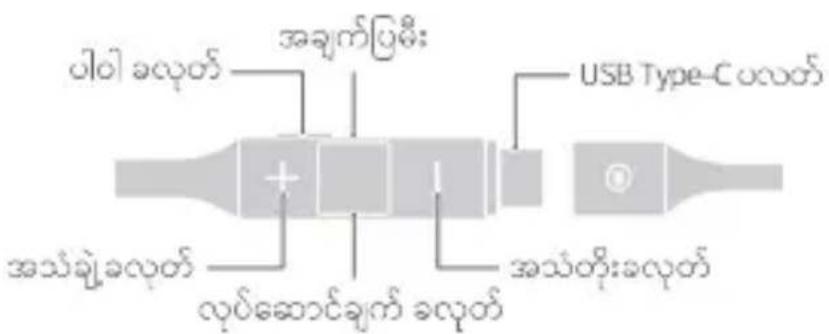
ඉංක් ගාවියේශය:
 | |
| ### | |
| ### | |
| ### |
| ୰୰୰୰୰୰୰୰୰୰୰୰୰୰୰୰୰୰୰୰୰୰୰୰୰୰୰୰୰୰୰୰୰୰ |
© Huawei Technologies Co., Ltd. 2019 © Huawei Technologies Co., Ltd. 2019 © Huawei Technologies Co., Ltd. 2019 © Huawei Technologies Co., Ltd. 2019 © Huawei Technologies Co., Ltd. 2019 © Huawei Technologies Co., Ltd. 2019 © Huawei Technologies Co., Ltd. 2019 © Huawei Technologies Co., Ltd. 2019 © Huawei Technologies Co., Ltd. 2019 © Huawei Technologies Co, Ltd. 2019 © Huawei Technologies Co, Ltd. 2019 © Huawei Technologies Co, Ltd. 2019 © Huawei Technologies Co, Ltd. 2019 © Huawei Technologies Co, Ltd. 2019 © Huawei Technologies Co, Ltd. 2019 © Huawei Technologies Co, Ltd. 2019 © Huawei Technologies Co, Ltd. 2019 © Huawei Technologies Co, Ltd. 3
https://consumer.huawei.com/en/legal/eula/.
natural_image
Pure diagram of two identical mechanical components with no text or symbols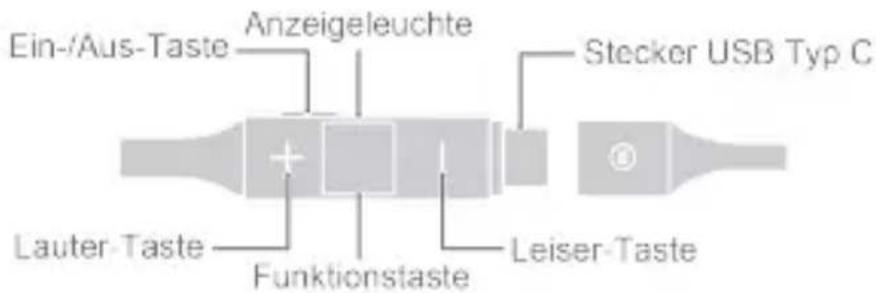
https://consumer.huawei.com/en/legal/eula/.
Προστασία απορρήτου
Copyright © Huawei Technologies Co., Ltd. 2019. All rights reserved.
Copyright © Huawei Technologies Co., Ltd. 2019. All rights reserved.
https://consumer.huawei.com/en/opensource/를 참조하십시오.

상호명 : Huawei Technologies Co., Ltd.
https://consumer.huawei.com/en/legal/eula/.
Opis proizvoda
Scenariji korišćenja
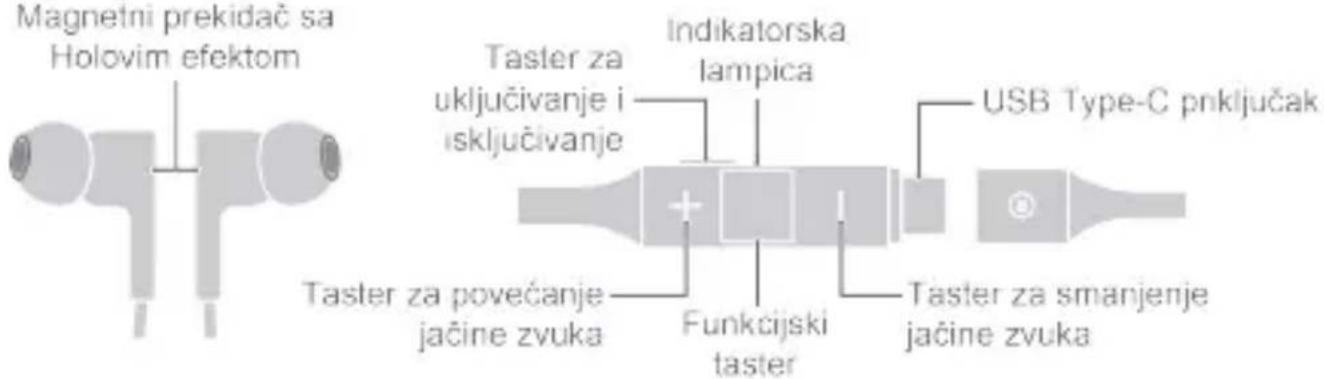
| Uključivanje/Isključivanje napajanja | Pritisnite i držite taster za uključivanje i isključivanje oko 1 sekunde da biste uključili/isključili napajanje. |
| Uparivanje | Bluetooth uparivanje: kada su slušalice uključene, pritisnite i držite taster za uključivanje i isključivanje 4 sekunde. Indikatorska lampica će treperiti belom svetlošću, što pokazuje da su slušalice ušle u Režim uparivanja. Omogućite Bluetooth na telefonu i izaberite uređaj „HUAWEI FreeLace“ za Bluetooth uparivanje.Fizičko povezivanje: povežite slušalice na USB Type-C priključak telefona. Pratite uputstva na ekranu telefona za uparivanje telefona sa slušalicama. (Ovaj režim povezivanja je primenjiv samo na Huawei telefone sa instaliranom verzijom EMUI 9.1 ili novijim verzijama.)Magnetni prekidač sa Holovim efektom: kada su bubice slušalica međusobno pričvršćene, Bluetooth veza se automatski prekida. Kada se bubice razdvoje, Bluetooth veza se automatski ponovo uspostavlja. |
| Glasovni poziv i reprodukcija muzike | Pritisnite funkcijski taster da biste odgovorili na ili prekinuli poziv ili da biste reprodukovali ili pauzirali muziku.Pritisnite i držite funkcijski taster 2 sekunde da biste odbili dolazni poziv.Dvaput uzastopno pritisnite funkcijski taster da biste preskočili na sledeću pesmu.Trip ut uzastopno pritisnite funkcijski taster da biste se vratili na prethodnu pesmu. |
| Glasovni pomoćnik | Tokom reprodukcije muzike ili u režimu Pripravnost, pritisnite i držite funkcijski taster 2 sekunde da biste aktivirali glasovnog pomoćnika na telefonu. |
| Punjenje | Punjenje preko punjača: za punjenje slušalica koristite USB Type-A na Type-C punjač.Punjenje preko telefona: povežite slušalice na USB Type-C priključak telefona da biste punili slušalice pomoću telefona (telefon mora da podržava povratno punjenje). |
| Obnavljanje fabričkih podešavanja | Da biste vratili fabrička podešavanja slušalica, pritisnite i držite taster za uključivanje i isključivanje najmanje 10 sekundi dok indikatorska lampica ne počne da treperi crvenom svetlošću. |
https://consumer.huawei.com/en/legal/eula/.
Varstvo zasebnosti
https://consumer.huawei.com/en/legal/eula/.
Gizlilik koruması
Bantian, Longgang District Shenzhen 518129, P.R. China
Web: www.huawei.com/tr/
E-posta: mobile.tr@huawei.com
https://consumer.huawei.com/en/legal/eula/.

- Safety information
- Operation and safety precautions
- Disposal and recycling information
- Reduction of hazardous substances
- EU regulatory conformance
- RF Exposure
- Statement
- Frequency Bands and Power
- Accessories and Software Information
- FCC Regulatory Compliance
- FCC statement
- Industry Canada compliance
- Certification information (SAR)
- IC Statement
- Legal statement
- User Software License Agreement
- Privacy protection
- Open Source Software Notice
- Защита на данните
- ඉංක් ගාවියේශය:
- Προστασία απορρήτου
- Varstvo zasebnosti
- Gizlilik koruması
Brand : HUAWEI
Model : FreeLace
Category : Smartwatch