CELSIO II Bluetooth - Barbecue Enders - Free user manual and instructions
Find the device manual for free CELSIO II Bluetooth Enders in PDF.


User questions about CELSIO II Bluetooth Enders
0 question about this device. Answer the ones you know or ask your own.
Ask a new question about this device
Download the instructions for your Barbecue in PDF format for free! Find your manual CELSIO II Bluetooth - Enders and take your electronic device back in hand. On this page are published all the documents necessary for the use of your device. CELSIO II Bluetooth by Enders.
USER MANUAL CELSIO II Bluetooth Enders
WITH 2 WIRELESS PROBES
text_image
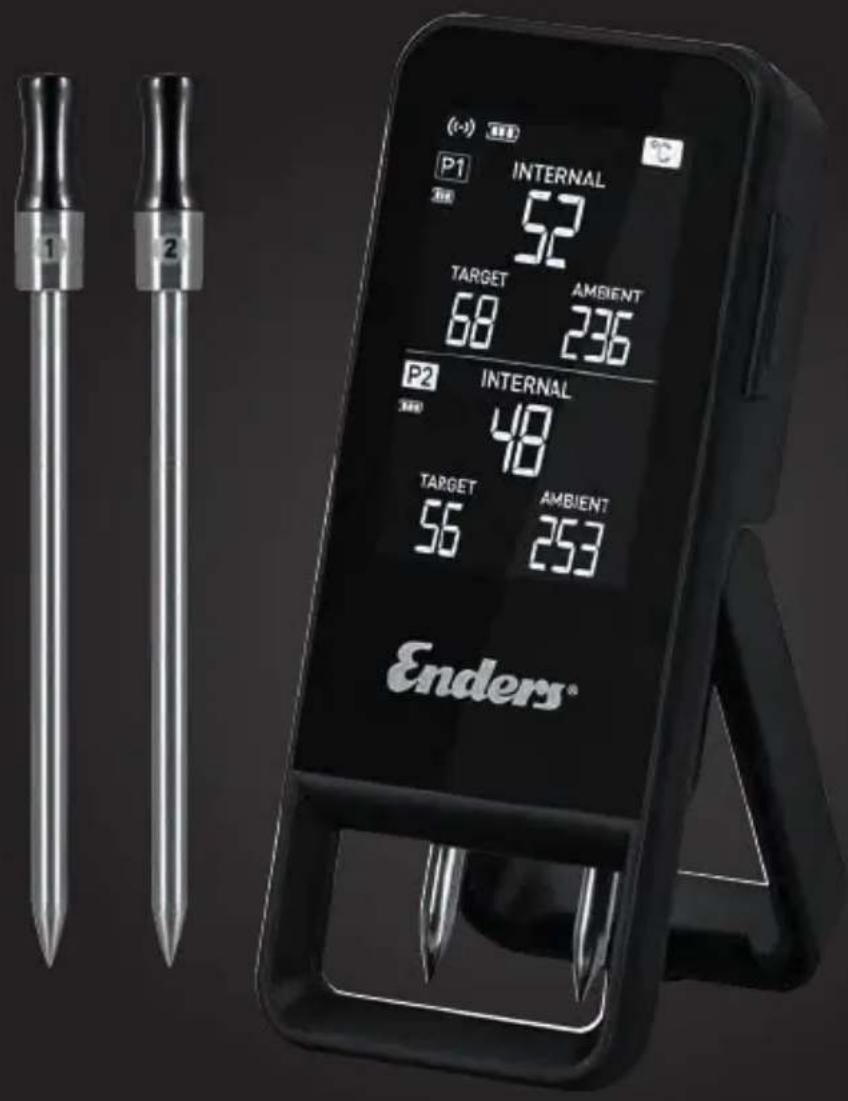
P1 INTERNAL 52 TARGET AMBIENT 68 236 P2 INTERNAL 48 TARGET AMBIENT 56 253 Enders®bg
text_image
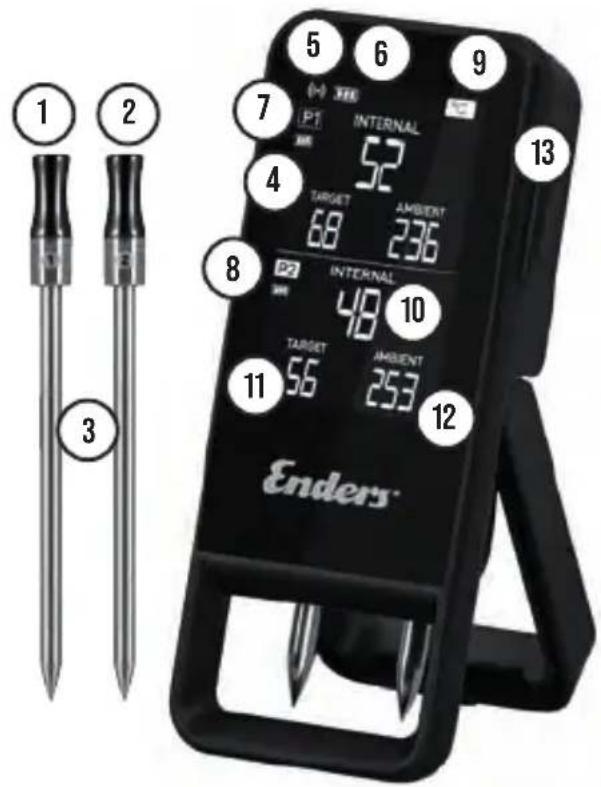
1 2 3 5 6 7 INTERNAL P1 52 4 TARGET 68 236 8 INTERNAL 48 10 TARGET 56 253 11 Ambient Enders® 12 13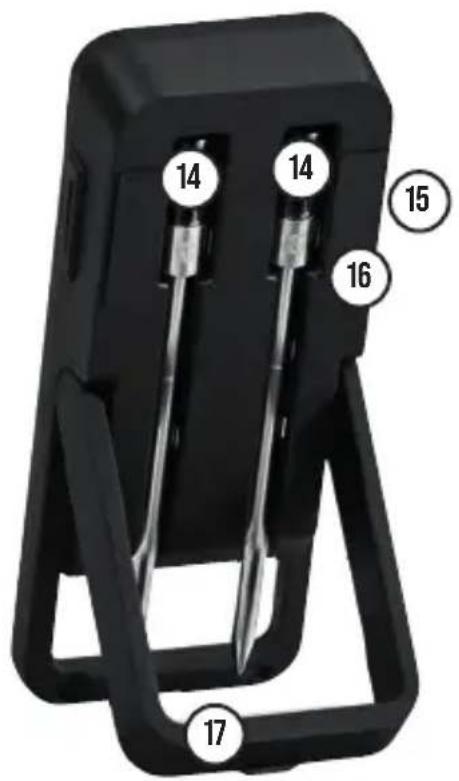
text_image
14 14 15 16 17


text_image
Enderstext_image
QR code image containing encoded data, no visible human-readable textThe Bluetooth word mark and logos are trademarks owned by the Bluetooth SIG, Inc. and any use of such marks by [license name] is under license. Other trademarks and trade names are those of their respective owners.

text_image
QR code image containing encoded data, no visible human-readable textThe Bluetooth word mark and logos are trademarks owned by the Bluetooth SIG, Inc. and any use of such marks by [license name] is under license. Other trademarks and trade names are those of their respective owners.

text_image
QR code image containing encoded data, no visible human-readable textScan QR-koden for mere information om produktet
BESKRIVELSE
The Bluetooth word mark and logos are trademarks owned by the Bluetooth SIG, Inc. and any use of such marks by [license name] is under license. Other trademarks and trade names are those of their respective owners.

text_image
QR code image containing encoded data, no visible human-readable textThe Bluetooth word mark and logos are trademarks owned by the Bluetooth SIG, Inc. and any use of such marks by [license name] is under license. Other trademarks and trade names are those of their respective owners.

Bluetooth® THERMOMETER
text_image
QR code image containing encoded data, no visible human-readable textThe Bluetooth word mark and logos are trademarks owned by the Bluetooth SIG, Inc. and any use of such marks by [license name] is under license. Other trademarks and trade names are those of their respective owners.

Scan the QR code and download the app
text_image
QR code image containing encoded data, no visible human-readable textScan QR code for more information about the product
DESCRIPTION
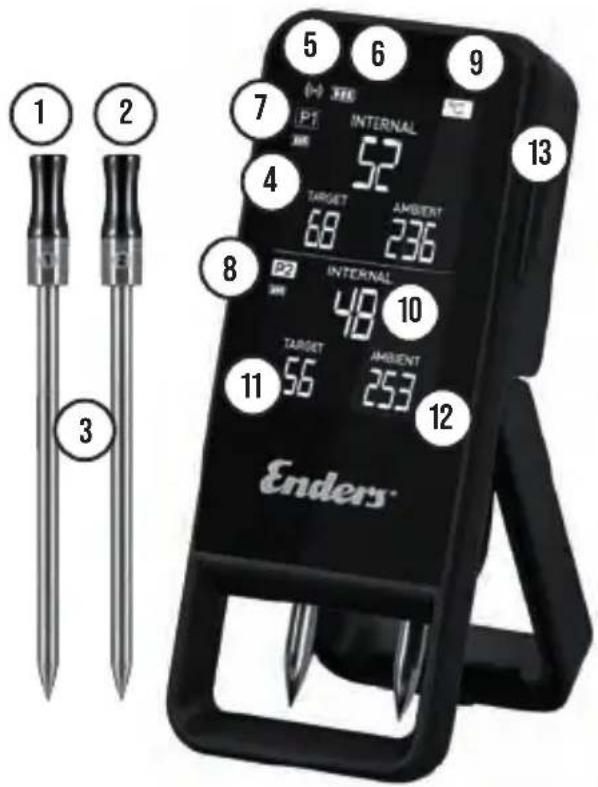
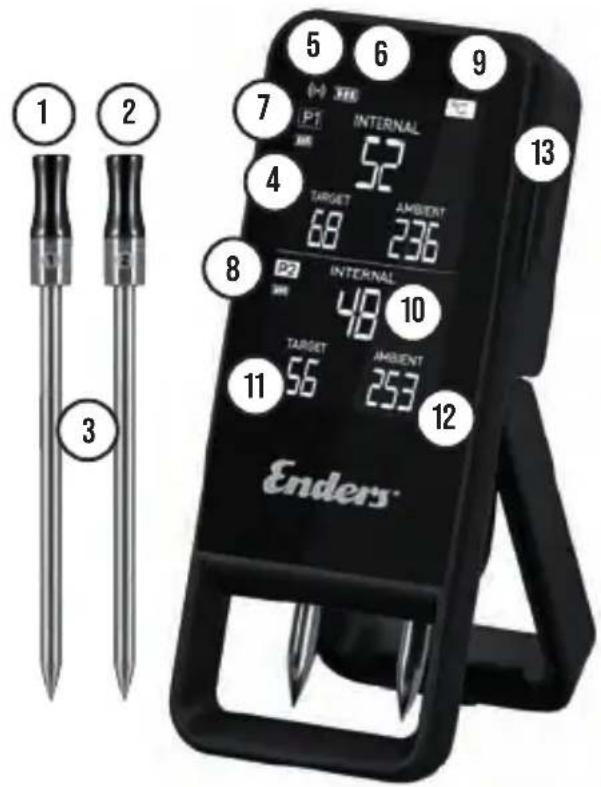
1 & 2. battery-operated, cordless stainless steel probes with ceramic end cap and 2 measuring sensors
3. insertion limit, for optimal temperature measurements up to the cavity in food.
4. always-on LCD display for displaying temperature measurements and the target core temperature set in the app. Bright illumination when button is pressed, then dimmer backlighting.
5. connection symbol, appears when thermometer and app are connected
6. battery indicator, shows the battery charge level of the thermometer
7. upper half of the display, displays for stainless steel sensor 1
8. lower half of the display, displays for stainless steel sensor 2
9. temperature unit °C or °F
10. core temperature, measured number of degrees inside the food
11. target core temperature, target core temperature for food selected via the app
12. ambient temperature, measured number of degrees in the vicinity of the stainless steel probe
13. on/off button
14. charging device and storage space for wireless stainless steel probe
15. USB-C connection, charging with the supplied cable
16. reset button
17. mounting bracket
CHARACTERS IN THESE INSTRUCTIONS

This symbol warns you of possible injury or material damage as well as damage to the appliance.

Declaration of conformity
Products marked with this symbol comply with all applicable Community regulations of the European Economic Area.
The EU Declaration of Conformity can be requested from the address given on the reverse.
The Bluetooth word mark and logos are trademarks owned by the Bluetooth SIG, Inc. and any use of such marks by [license name] is under license. Other trademarks and trade names are those of their respective owners.

Protection class III device
Device operated with safety extra-low voltage, which itself does not generate higher voltages.
WEEE-labeled appliances may not be disposed of with household waste and must be collected separately.

Read the instructions carefully and keep the operating instructions. If the product is passed on to someone else, also pass on these operating instructions.

Products marked with the Tested Safety symbol comply with the requirements of the German Product Safety Act (ProdSG).
Bluetooth® THERMOMETER
- Read and observe these operating instructions before using the Bluetooth® thermometer. The thermometer can be operated by children older than 8 years and by persons with reduced physical, sensory or mental capabilities or lack of experience or knowledge if they have been given instruction concerning use of the appliance or if they are supervised. Children must not play with the thermometer. Cleaning and maintenance may only be carried out by children under supervision.
We wish you much pleasure with your Enders product.
GOOD TO KNOW
■ Measuring range of the sensor for the food core temperature: 0 °C - 100 °C
■ Measuring range of the sensor for the ambient temperature: 50 °C - 300 °C
■Radiated maximum transmission power: 7 dBm
■Transmission frequency: 2400MHz \~ 2483.5MHz
■ Input: 5V = max 1.0A
■Battery: Li-Ion 1.000 mAh
■ Protection class Thermometer: IP00
No protection against contact and foreign bodies, and no protection against water.
■ Protection class Stainless steel sensor: IP55 Protection against dust inside and complete protection against contact and protection against water jets.
■ Range stainless steel sensor - thermometer: max. 90 meters
■ Range thermometer - app (on mobile device): max. 80 meters
■Bluetooth®version used: Bluetooth 5.4
USING THE Bluetooth® THERMOMETER
This appliance is only suitable for use with grills, smokers and ovens. Always use it as described in the operating instructions. The appliance is intended for domestic use. Not suitable for continuous commercial use. The manufacturer accepts no liability for damage to objects or persons caused by non-compliance.
■ Only use the device within the specified power and temperature ranges.
■ Not suitable for measuring from and within liquids.
■ Only ever insert the stainless steel probe into food up to the insertion limit.
■ Always wear heat-resistant gloves when touching a stainless steel sensor during or shortly after use. Do not touch it with bare hands as there is a risk of burns.
- Keep a stainless steel probe and especially the thermometer away from direct flame or heat, as this can cause irreparable damage.
■ Do not expose the thermometer to heat (above 50 °C) and/or cold (below 0 °C). In particular, placing it on the side table of a grill with a closed hood can generate temperatures > 50 °C and irreparably damage the appliance.
■ The lower part of a stainless steel probe with the tip is heat-resistant up to 100 °C (212 °F) up to the puncture limit, the upper part above the puncture limit is heat-resistant up to 300 °C (572 °F).
■ Protect the device and all components from moisture.
■ Do not immerse any components under water.
■ Defective appliances or defective individual parts of the appliance may only be repaired and replaced by authorized persons.
■ A stainless steel sensor must cool down completely before cleaning.
■ Caution! The tip of a stainless steel sensor is very sharp.
■ The alarm sounds used in the app come from notificationsounds.com
SAFETY INSTRUCTIONS

■ The thermometer must be placed on a level surface.
■ Always keep the thermometer out of the reach of children.
■ The heat resistance of the various parts of a cordless stainless steel probe varies. Never hold it directly in the flame.
■ Only place the stainless steel probe in the charging device on the back of the thermometer when it is clean to avoid a short circuit.
■ Do not use the thermometer to measure human body temperature.
■ The stainless steel probe tips are very sharp and should be placed in the holder on the back of the thermometer when not in use and the clip closed to minimize the risk of accidental contact with the tips.
DOWNLOAD APP
■ Search for the search term "Enders Heat Me Zone" in the Apple App Store or Google Play Store or scan the QR code in these instructions with your mobile device.
■ Installation of the app is free of charge.
■ Make sure that your mobile device meets the following requirements:
- iOS devices with version 12.0 or higher
- Android devices with version 5.0 or higher
- Bluetooth® 4.0 or higher
COMMISSIONING
■ To switch on the thermometer, remove a stainless steel probe from the charger.
■ Open the app on your mobile device and follow the instructions there to pair your thermometer with your mobile device and add it to the app.
■ Place the stainless steel probe back in the charger to start pairing the stainless steel probe with the thermometer.
start. As soon as an acoustic signal is emitted, the pairing was successful, the stainless steel sensors can be removed and the thermometer is ready for use.
SWITCHING ON/OFF/ APPLICATION
■ To switch on the thermometer, remove a stainless steel probe from the charger.
■Alternatively, the thermometer can be switched on using the on/off button if a stainless steel probe has been removed beforehand, otherwise the thermometer will switch off again immediately.
■ Make sure that Bluetooth ^® is activated on your mobile device.
■Open the Enders ^® "Heat Me" app on your mobile device.
■ If the thermometer is paired with the app and the stainless steel sensors are paired with the thermometer, the product is ready for use.
■After the first connection, the thermometer will automatically pair again when it is switched on and your mobile device is nearby.
CHARGING BATTERIES
■ Avoid dropping the components. The internal battery could be damaged and catch fire.
■ Check the charging cable for damage before charging. Do not use a defective charging cable!
■ Connect the enclosed charging cable to the USB-C port of your thermometer. The charging process is indicated by a flashing battery (6).
■ Use a power adapter with a USB port to connect the cable to the mains.
A battery symbol on the thermometer's LCD display shows the current charging status, 3 bars inside the battery indicate a full battery.
■ To carry out a software update for the thermometer, it must be at least 50% charged.
- Charge the stainless steel probes by inserting them into the charger on the back of the thermometer. They are correctly seated in their position when the thermometer switches itself off immediately after insertion.
CLEANING/STORAGE
■ Individual components may have sharp edges. Please pay attention to this when cleaning and wear cut-resistant gloves if possible to avoid cuts.
■ Clean the stainless steel sensors thoroughly after each use once they have cooled down.
■ Use hot water and a mild detergent to clean the stainless steel sensors with a cloth. Then dry them with a tea towel.
■ For stubborn stains, you can apply a mixture of baking soda and white vinegar to a cloth and wipe the affected areas with it.
■ The thermometer and the stainless steel probes are not waterproof and are not dishwasher-safe. Do not immerse either in water and only clean the thermometer with a damp cloth.
TROUBLESHOOTING
■ Thermometer cannot be switched on: Connect it to the mains and charge it for at least 5 minutes before trying again.
■ Unable to pair a stainless steel sensor with the thermometer: The battery charge level of the stainless steel sensor is low. Place it in the charging station. Please wait at least 1 minute and try again.
■ No data is transferred to the mobile device: Check whether the thermometer is switched on. Check whether at least one stainless steel probe has been removed from the thermometer. Check the app authorizations. Check whether Blue-
tooth® is activated in the settings of your mobile device.
■ Stainless steel probe does not work: Clean it and try charging it first before testing the function again.
If the thermometer does not respond, it can be reset using the reset button on the back. To do this, use a pointed object to press the lower button for several seconds. After resetting, you may need to perform the pairing process for the stainless steel sensors and/or the smartphone again.
APP USE

Display with existing connection between thermometer and app

Battery level thermometer

Battery status Stainless steel sensor

Access to the cooking level library

Select food (e.g. beef). In further steps, select the piece of meat and the desired cooking level

Core temperature currently measured by the stainless steel probe (e.g. 27 °C). The target core temperature can be set manually by selecting it. The temperature curve can be called up by selecting 27 °C while the grilling process is running

Selected target core temperature (e.g. 60 °C). If the target core temperature was selected manually (and not via the cooking level library), it can be changed by selecting 60 °C
Duration of the ongoing grilling process

Settings

Ambient temperature currently measured by the stainless steel sensor (only displayed from 50 °C). If a temperature of 50 °C is reached, a temperature range for the ambient temperature sensor to be monitored can be set manually
en
75°C
The ambient temperature currently measured by the stainless steel sensor comes into focus in this function (e.g. 75 °C); the temperature curve can be called up by selecting 75 °C while the grilling process is running
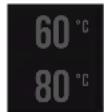
Selected ambient temperature range (e.g. 60 °C - 80 °C). If the ambient temperature range was selected manually (and not via the cooking level library), it can be changed by selecting 60 °C/80 °C
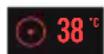
When monitoring an ambient temperature range, the measured core food temperature (e.g. 35 °C) is displayed in reduced form

Overview of completed grilling processes, including the individual temperature curves
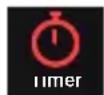
Set timer
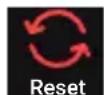
Reset stainless steel sensor setting
TEMPERATURE WARNING
In the app settings, you can select whether the app should issue no warning or a warning 2, 5 or 10 degrees before the set target core temperature is reached
WASTE DISPOSAL
This product contains recyclable materials. Do not dispose of it in your household waste, but contact your local waste disposal company for environmentally friendly disposal.
WARRANTY
We guarantee this item for 2 years. Proper handling and official proof of the date of purchase are prerequisites for the guarantee. No liability is accepted for damage caused by the following:
■ to improper use
■unsuitable, improper or negligent handling
■ for non-compliance with these operating instructions
Hereby, Enders Colsman AG declares that the 8805 Bluetooth® Thermometer is in compliance with Directive 2014/53/EU. The EU Declaration of Conformity can be downloaded from the homepage https://www.enders-germany.com/Celsio-II-Bluetooth-Thermometer/.
SERVICE:
http://www.enders-germany.com
MANUFACTURER:
Enders Colsman AG
Brauck 1, D-58791 Werdohl
Germany
text_image
1 2 3 5 6 7 INTERNAL P1 52 4 TARGET 68 236 8 INTERNAL 48 10 TARGET 56 253 11 Ambient Enders® 12 13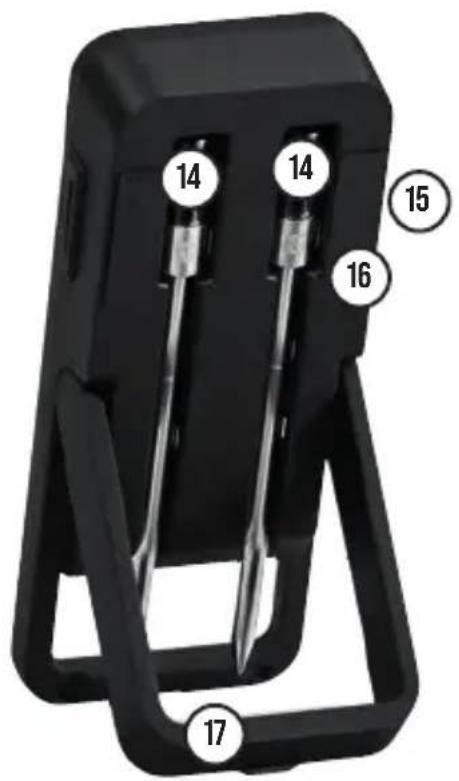
text_image
14 14 15 16 17


text_image
Enderstext_image
QR code image containing encoded data, no visible human-readable textThe Bluetooth word mark and logos are trademarks owned by the Bluetooth SIG, Inc. and any use of such marks by [license name] is under license. Other trademarks and trade names are those of their respective owners.

text_image
QR code image containing encoded data, no visible human-readable textThe Bluetooth word mark and logos are trademarks owned by the Bluetooth SIG, Inc. and any use of such marks by [license name] is under license. Other trademarks and trade names are those of their respective owners.

text_image
QR code image containing encoded data, no visible human-readable textThe Bluetooth word mark and logos are trademarks owned by the Bluetooth SIG, Inc. and any use of such marks by [license name] is under license. Other trademarks and trade names are those of their respective owners.

text_image
QR code image containing encoded data, no visible human-readable textThe Bluetooth word mark and logos are trademarks owned by the Bluetooth SIG, Inc. and any use of such marks by [license name] is under license. Other trademarks and trade names are those of their respective owners.

MISE EN MARCHE/ARRÊT/ APPLICATION
text_image
QR code image containing encoded data, no visible human-readable textSkenirajte QR kod za više informacija o proizvodu.
OPIS
The Bluetooth word mark and logos are trademarks owned by the Bluetooth SIG, Inc. and any use of such marks by [license name] is under license. Other trademarks and trade names are those of their respective owners.

Uređaj zaštitne klase III
Uređaj koji radi na sigurnosnom izuzetno niskom naponu i sam po sebi ne stvara više napone.
Uređaji označeni simbolom WEEE ne smiju se odlagati u kućni otpad i moraju se odvojeno prikupljati.

Pažljivo pročitajte upute i sačuvajte priručnik za uporabu. Ako predmel predale nekome drugome, dajte mu i ovaj priručnik za uporabu.

Proizvodi označeni simbolom Provjerena sigurnost udovoljavaju zahtjevima Zakona o sigurnosti proizvoda (ProdSG).
Bluetooth® TERMOMETAR
text_image
QR code image containing encoded data, no visible human-readable textThe Bluetooth word mark and logos are trademarks owned by the Bluetooth SIG, Inc. and any use of such marks by [license name] is under license. Other trademarks and trade names are those of their respective owners.

text_image
QR code image containing encoded data, no visible human-readable textTÁKN Í PESSARI HANDBÓK

The Bluetooth word mark and logos are trademarks owned by the Bluetooth SIG, Inc. and any use of such marks by [license name] is under license. Other trademarks and trade names are those of their respective owners.

text_image
QR code image containing encoded data, no visible human-readable textThe Bluetooth word mark and logos are trademarks owned by the Bluetooth SIG, Inc. and any use of such marks by [license name] is under license. Other trademarks and trade names are those of their respective owners.

Enders Colsman AG Brauck 1, D-58791 Werdohl Germany
lt
text_image
1 2 3 5 6 7 INTERNAL P1 INTERS 52 4 TARGET 68 AMBIENT 236 8 INTERNAL 48 10 TARGET 56 AMBIENT 253 11 Enders® 12 13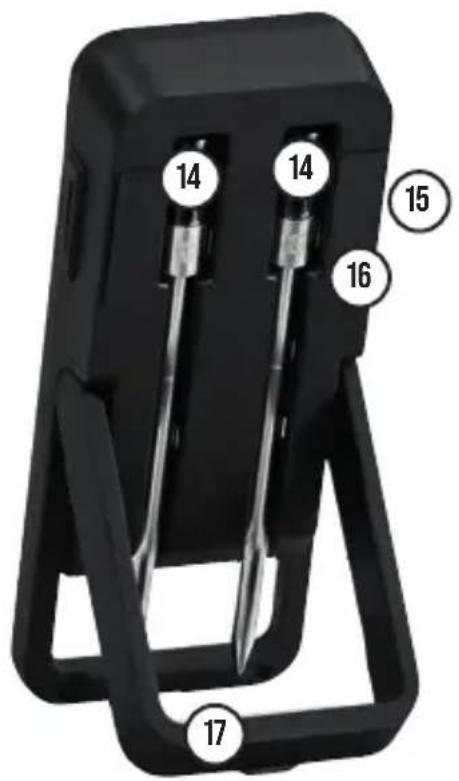
text_image
14 14 15 16 17


text_image
Enderstext_image
QR code image containing encoded data, no visible human-readable textThe Bluetooth word mark and logos are trademarks owned by the Bluetooth SIG, Inc. and any use of such marks by [license name] is under license. Other trademarks and trade names are those of their respective owners.

text_image
QR code image containing encoded data, no visible human-readable textThe Bluetooth word mark and logos are trademarks owned by the Bluetooth SIG, Inc. and any use of such marks by [license name] is under license. Other trademarks and trade names are those of their respective owners.

text_image
QR code image containing encoded data, no visible human-readable textSkann QR-koden for mer informasjon om produktet
BESKRIVELSE
The Bluetooth word mark and logos are trademarks owned by the Bluetooth SIG, Inc. and any use of such marks by [license name] is under license. Other trademarks and trade names are those of their respective owners.

text_image
QR code image containing encoded data, no visible human-readable textThe Bluetooth word mark and logos are trademarks owned by the Bluetooth SIG, Inc. and any use of such marks by [license name] is under license. Other trademarks and trade names are those of their respective owners.

Bluetooth® THERMOMETER
text_image
QR code image containing encoded data, no visible human-readable textThe Bluetooth word mark and logos are trademarks owned by the Bluetooth SIG, Inc. and any use of such marks by [license name] is under license. Other trademarks and trade names are those of their respective owners.

Bluetooth® THERMOMETER
text_image
QR code image containing encoded data, no visible human-readable textThe Bluetooth word mark and logos are trademarks owned by the Bluetooth SIG, Inc. and any use of such marks by [license name] is under license. Other trademarks and trade names are those of their respective owners.

text_image
QR code image containing encoded data, no visible human-readable textThe Bluetooth word mark and logos are trademarks owned by the Bluetooth SIG, Inc. and any use of such marks by [license name] is under license. Other trademarks and trade names are those of their respective owners.

text_image
QR code image containing encoded data, no visible human-readable textThe Bluetooth word mark and logos are trademarks owned by the Bluetooth SIG, Inc. and any use of such marks by [license name] is under license. Other trademarks and trade names are those of their respective owners.

Zariadenie triedy ochrany III
text_image
QR code image containing encoded data, no visible human-readable textThe Bluetooth word mark and logos are trademarks owned by the Bluetooth SIG, Inc. and any use of such marks by [license name] is under license. Other trademarks and trade names are those of their respective owners.

UPORABA Bluetooth®-TERMOMETRA
text_image
QR code image containing encoded data, no visible human-readable textTECKEN I DENNA MANUAL

The Bluetooth word mark and logos are trademarks owned by the Bluetooth SIG, Inc. and any use of such marks by [license name] is under license. Other trademarks and trade names are those of their respective owners.

Bluetooth® THERMOMETER
SLÅ PÅ/SLÅ AV/APPLIKATION
text_image
QR code image containing encoded data, no visible human-readable textThe Bluetooth word mark and logos are trademarks owned by the Bluetooth SIG, Inc. and any use of such marks by [license name] is under license. Other trademarks and trade names are those of their respective owners.

D-58791 Werdohl, Germany