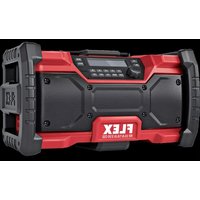
RD 10.8/18.0/230 - Radio Flex - Free user manual and instructions
Find the device manual for free RD 10.8/18.0/230 Flex in PDF.


| Product type | Radio |
| Brand | Flex |
| Model | RD 10.8/18.0/230 |
| Dimensions (L x H x D) | 365 x 210 x 200 mm |
| Weight (without battery) | 3700 g |
| Output power | 20 W |
| Compatible battery types | AP18.0/2.5, AP18.0/5.0, AP10.8/2.5, AP10.8/4.0, AP10.8/6.0 |
| Operating temperature | 0-40 °C |
| Bluetooth connectivity | Version 5.0, range up to 10 m |
| AUX input | 3.5 mm (input/output) |
| USB port (charging) | 5 V, max 2.1 A |
| Radio reception | FM 87.5-108 MHz, DAB 174.928-239.2 MHz |
| Antenna | Swivel FM |
| Operating modes | DAB, FM, Bluetooth, AUX |
| Built-in speaker | Yes |
| Backlit display | Yes |
| LED lighting | Yes (music rhythm or fixed color) |
| Preset buttons | 5 for DAB, 5 for FM |
| Special functions | Bass boost, mute, clock, standby |
| Power supply | AC/DC mains adapter included or battery |
| Usage | Indoor only |
| Cleaning | Dry cloth, no solvents |
| Repairs | Authorized center only |
| Recycling | Compliant with WEEE and battery directives |
Frequently Asked Questions - RD 10.8/18.0/230 Flex
User questions about RD 10.8/18.0/230 Flex
0 question about this device. Answer the ones you know or ask your own.
Ask a new question about this device
Download the instructions for your Radio in PDF format for free! Find your manual RD 10.8/18.0/230 - Flex and take your electronic device back in hand. On this page are published all the documents necessary for the use of your device. RD 10.8/18.0/230 by Flex.
USER MANUAL RD 10.8/18.0/230 Flex
natural_image
Line drawing of a Flex 3D device with antenna, control panel, and warning symbols (no text labels)de Originalbetriebsanleitung 8
en Original operating instructions 14
fr Notice d'instructions d'origine 20
it Istruzioni per l'uso originali 27
es Instrucciones de funcionamiento originales ..... 33
pt Instruções de serviço originais 39
nl Originele gebruiksaanwijzing 45
da Originale driftsvejledning 51
no Originale driftsanvisningen 57
sv Originalbruksanvisning 63
fi Alkuperäinen käyttöohjekirja 69
el Auθεντικές οδηγίες χειρισμού 75
tr Orijinal işletme kılavuzu 81
pl Instrukcja oryginalna 87
hu Eredeti üzemeltetési útmutató 93
cs Originální návod k obsluze 99
sk Originálny návod na obsluhu 105
hr Originalna uputa za rad 111
sl Izvirno navodilo za obratovanje 117
ro Instructiuni de functionare originale 123
bg Оригинално упътване за експлоатация ..... 129
ru Оригинальная инструкция по эксплуатации ..... 136
et Originaalkasutusjuhend 143
It Originali naudojimo instrukcija 149
Iv Lietošanas pamācības oriģināls 155
ar 161 ترجمة لارشادات التشفيل الأصلية
A
E

flowchart
graph LR
    A["BassD"] --> B["WELCOME FLEX"]
    B --> C["Power Button"]
    C --> A
flowchart
graph LR
    A["WELCOME FLEX"] --> B["13:24 01-08-2019"]
    B --> C["BassDataM"]
flowchart
graph LR
    A["S W R 3\n13 24 0 1 08 20 1 9"] --> B["÷"]
    B --> C["BassDABF"]
    C --> D["÷"]
    D --> E["BassDABF"]
    C --> F["÷"]
    F --> G["BassDABF"]
flowchart
graph LR
    A["DAB FM AUX Bass"] -->|BASS| B["DAB FM AUX Bass"]
    B -->|BASS| C["DAB FM AUX Bass"]
    A -->|SWR3 13 24 0 1 08 20 19| A
    B -->|SWR3 13:24 01-08-20 19| B
    C -->|SWR3 13:24 01-08-20 19| C
I
flowchart
graph TD
    A["SWR3\n13 24 0 1 08 2019"] -->|MODE| B["89.7 MHz\n13 24 01 08 2019"]
    C["DAB FM\nAUX\n13 24 01 08 20 19"] -->|MODE| D["BT Searching\n13 24 01 08 20 19"]
J

flowchart
graph TD
    A["MODE"] --> B["DAB FM AUX Bass 89.7 MHz 13:24 01-08 20 19"]
    B --> C["DAB FM AUX Bass We will rock you 13:24 01-08 -20 19"]
    C --> D["DAB FM AUX Bass BT Connected 13:24 01-08-2019"]
    D --> E["DAB FM AUX Bass"]
natural_image
Technical line drawing of a mechanical assembly with no visible text or symbols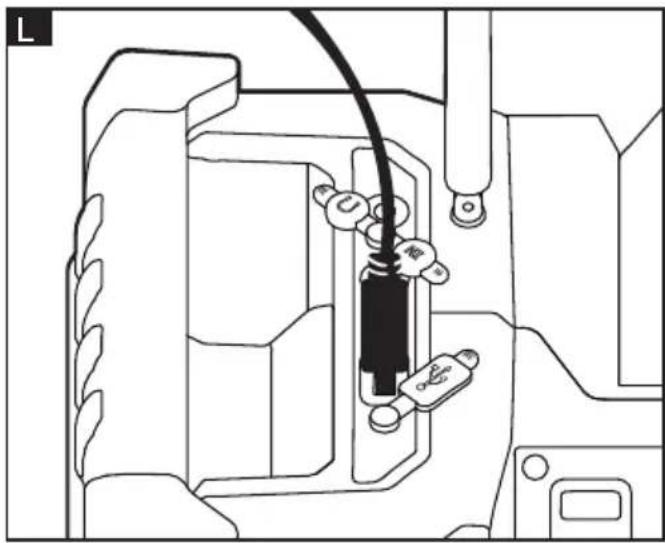
natural_image
Technical line drawing of a mechanical component with no visible text or symbolsM

N
O

flowchart
graph TD
    A["NO BACK LIGHT"] --> B["13:24 01-08-2019"]
    B --> C["LONG PRESS 2S"]
    C --> D["WELCOME FLEX"]
    D --> E["13:24 FM 01-08-2019 89.70 MHz"]
    E --> F["00:01 01-08-2019"]
    F --> G["SYSTEM FACTORY RESET"]
    G --> H["FACTORY RESET? NO (YES)"]
    H --> I["OFF"]
    I --> J["NO BACK LIGHT"]
    J --> K["13:24 01-08-2019"]
    K --> L["LONG PRESS 10S"]
    L --> M["BACK LIGHT ON 18 STAY"]
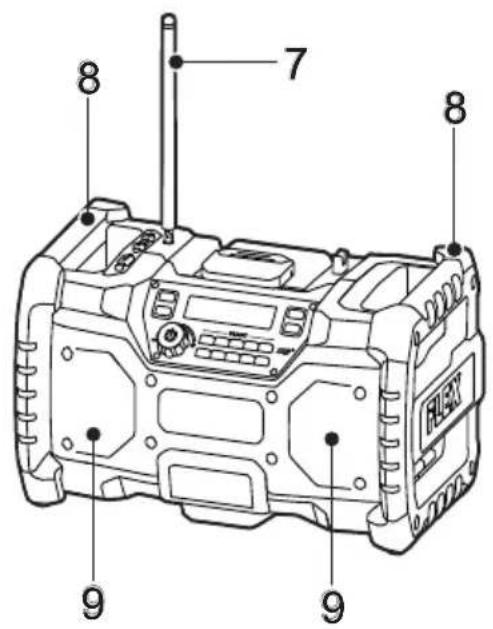
Übersicht (ABB A)
Eckhard Rühle
Manager Research & Development (R & D)
Klaus Peter Weinper
Head of Quality
Department (QD)
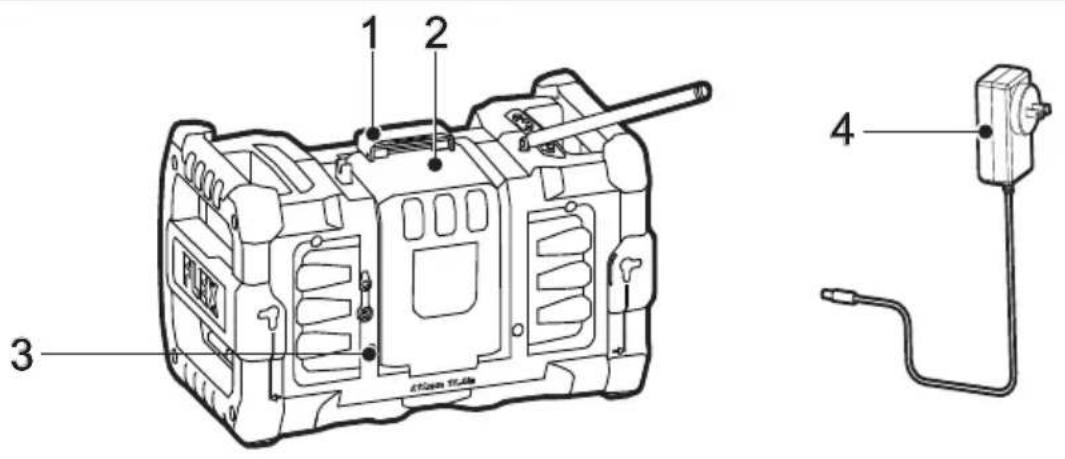
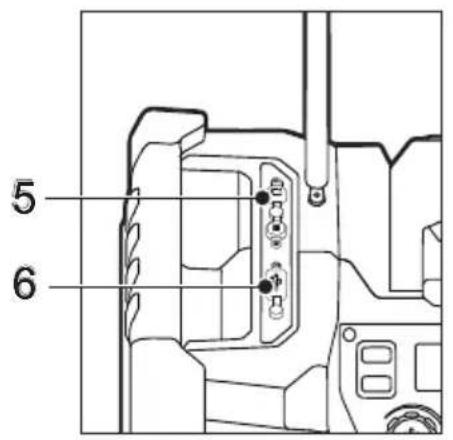
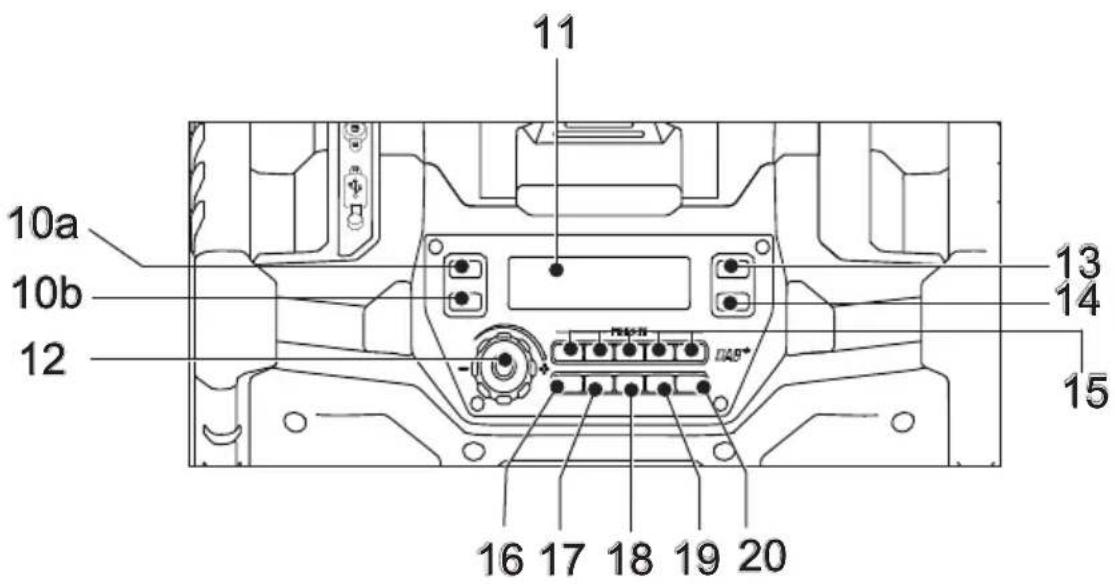
| 1 Battery compartment locker | 11 Display |
| 2 Battery compartment | 12 On/Off/Volume knob |
| 3 AC/DC socket | 13 Play /Pause |
| 4 AC power adaptor | 14 Mode |
| 5 AUX connector (in/out) | 15 Preset buttons |
| 6 USB port | 16 LED |
| 7 FM aerial (swiveling) | 17 Bass |
| 8 Handle | 18 Bluetooth |
| 9 Speaker | 19 Mute |
| 10 Button for track selection /station search | 20 Clock |
| a) down | |
| b) up |
Technical data
| Battery types | AP18.0/2.5 | AP18.0/5.0 | AP10.8/2.5 | AP10.8/4.0 | AP10.8/6.0 | |
| Operating temperature °C 0-40° | ||||||
| Weight (without battery) g 3700 | ||||||
| W X H X D mm 365x210x200 | ||||||
| AUX connector mm 3.5 | ||||||
| Bluetooth® standard V5.0 | ||||||
| Bluetooth® range (approx.) m 10 | ||||||
| USB port V/A 5V, Max. 2.1A | ||||||
| FM MHz 87.5MHz-108MHz | ||||||
| DAB MHz 174.928MHz-239.2MHz | ||||||
| Output power | W | 20 | ||||
Symbols used in this manual

WARNING!
Denotes impending danger. Non-observance of this warning may result in death or extremely severe injuries.

CAUTION!
Denotes a possibly dangerous situation. Non-observance of this warning may result in slight injury or damage to property.

NOTE
Denotes application tips and important information.
Symbols on the device

Read the operating manual.

Only for indoor use.

Bluetooth
DAB: The name "DAB" in this manual indicates "Digital Radio".
Important safety information

WARNING!
Read all safety instructions and general instructions. Failure to comply with the safety instructions and general instructions may result in electric shock, fire and/or serious injuries. Keep all safety instructions and general instructions in a safe place for future reference.
Before using the product, please read the following and act accordingly:
- these operating instructions, - the currently valid site rules and the regulations for the prevention of accidents.
This product is state of the art and has been constructed in accordance with the acknowledged safety regulations.
Nevertheless, when in use, the radio may be a danger to life and limb of the user or a third party, or the product or other property may be damaged.
The product may be operated only
– for its intended use,
– in perfect working order.
Faults which compromise safety must be repaired immediately.
Intended use
The speaker is intended
- for commercial use in industry and trade,
- for playback of music sources connected by cable (AUX) or without cable (Bluetooth®) with the device (refer to operating instructions of the connected devices),
– for reception and playback of FM radio stations, - for use in interior spaces (building sites, workshops or similar),
- for use with FLEX batteries of types AP 18.0/2.5; AP 18.0/5.0; AP 10.8/2.5; AP 10.8/4.0 and AP 10.8/6.0 (refer to operating instructions of the batteries).
Bluetooth ^® is a registered word and figurative trademark of Bluetooth SIG. Inc.
Safety instructions for Bluetooth® speaker
■This device is not intended for use by children or by persons with physical, sensory or mental limitations or with inadequate experience and knowledge.
■Before all work on the device (e.g. disassembly, maintenance etc.) and during transportation or storage, remove the battery from the device.
■Use the device only in dry conditions. Protect the device from moisture and splash water.
■If the device is brought from a very cold to a warmer environment or vice versa, you should allow the device to acclimatise before using it. This will prevent condensation inside the device.
■When using the Bluetooth ^® speaker in combination with external devices, it is essential to observe the safety information and instructions in the operating instructions of the external devices.
■Keep the device clean. Through contamination there is a risk of electric shock.
■Keep your work area clean and well lit.
Cluttered or dark work areas invite accidents.
Safety instructions for handling batteries
■Do not open the battery. Short-circuiting hazard!
■Protect the battery against heat, including prolonged sunshine, fire, water and moisture. Explosion hazard!
■A damaged or incorrectly used battery may result in the emission of fumes. Ensure a supply of fresh air and consult a doctor if you feel unwell. The fumes may irritate the respiratory tracts.
Liquid may leak out of the battery if the battery is incorrectly used. Avoid contact with such liquid. If contact accidentally occurs, rinse affected area with water. If liquid contacts eyes, seek medical attention. Liquid discharged from the battery may cause irritation or burns.
■Recharge batteries only with chargers recommended by the manufacturer. A charger that is suitable for one type of battery may create a fire hazard when used with another battery.
■The battery may be damaged by pointed objects such as e.g. nails or screwdrivers or by external application of force. This may give rise to an internal short circuit, causing the battery to burn, smoke, explode or overheat.
i NOTE
Follow the instructions for charging the battery set out in the charger operating manual.
Important information
Please observe the regulations in the country of use regarding the payment of radio licence fees.
Before initial operation
Unpack the device and check that there are no missing or damaged parts.
Installing or removing battery cartridge
CAUTION!
Always switch off the radio before removing the battery cartridge.
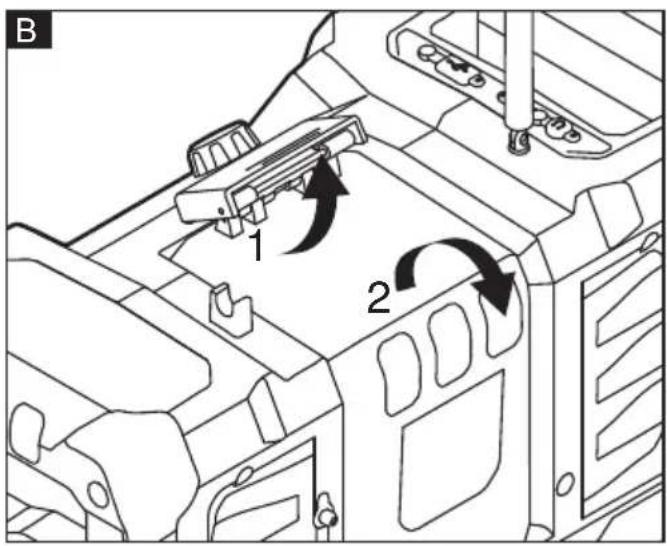
To open the battery compartment ②, lift up the battery compartment locker ① first, then open
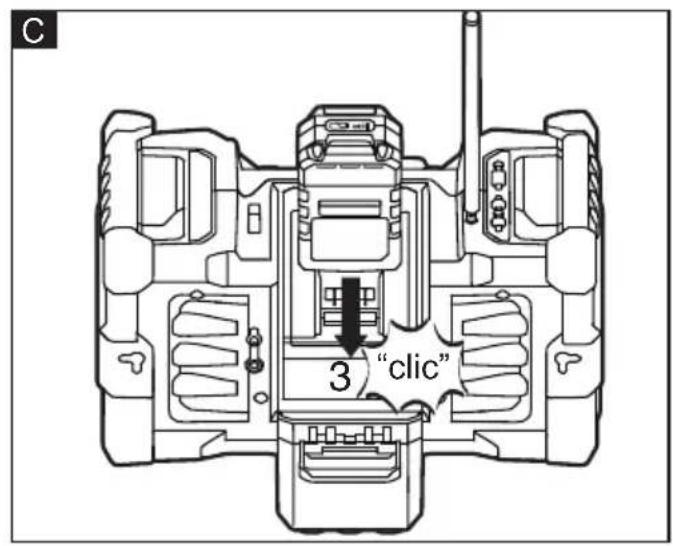
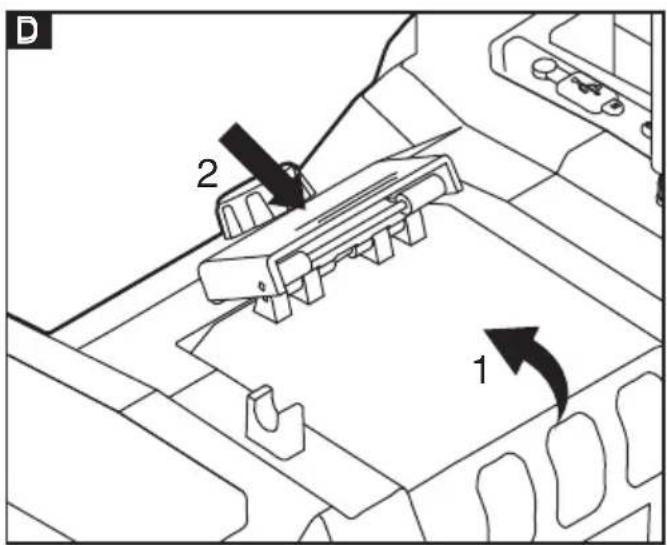
the battery compartment as shown in FIG. B. For installing battery cartridge, align the tongue on the battery cartridge with the groove in the housing and slip it into place. Always insert it all the way until it locks in place with a little "click". Do not use force when installing the battery cartridge. If the cartridge does not slide in easily, it is not been inserted correctly (FIG. C). To remove the battery cartridge, open the battery compartment as described in FIG. B., push the battery release button. To close the battery compartment, close battery compartment cover and hold it, then press the battery compartment locker as shown in FIG. D
Using supplied AC power adaptor (4)
Insert the AC power adaptor plug into the AC/DC socket (3) on the back side of the radio. Plug the adaptor into a standard mains socket outlet. Whenever the adaptor is used, the battery pack is automatically disconnected. The AC adaptor should be disconnected from the main supply when not in use.
i NOTE
The battery cartridge is not charged by using the power adaptor.
Switching the device on and off
Switching on (FIG. E):
Press the On/Off button (12) and hold for 2 seconds. The device switches on. The background illumination of the display (11) lights up.
Switching off:
Press the On/Off button and hold for 2 seconds. The device switches off.
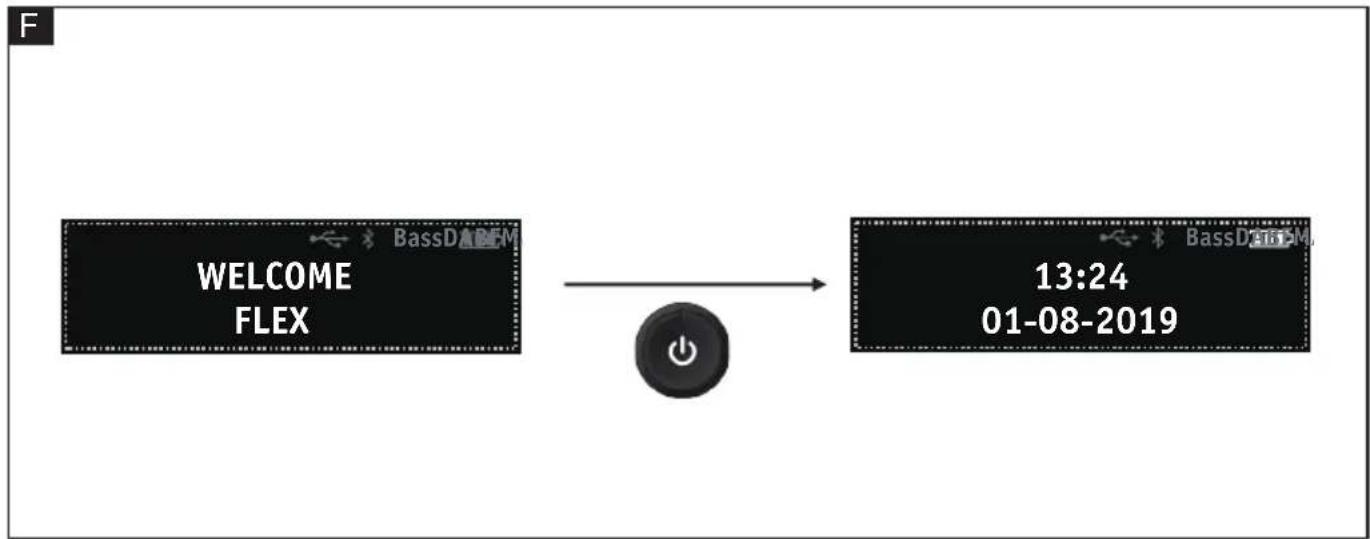
Standby mode (FIG. F)
When the device is switched on, briefly press On/Off button, the device switches to standby mode and back light disappears. During standby mode, briefly press On/Off button to switch on the device. During standby mode any function is unavailable.
Setting the time
During any mode, press the CLOCK button (20) for setting the time. The numbers blink in this order: hour> minute> date> month> year. Press the ◀ or ▶ button (10a or 10b) to set each value. Press the Play /Pause button (13) to switch to the next setting.
To save the time settings press the Clock button again. If you don't press it again and don't press any other button for 10 seconds, the procedure is interrupted and the changes you made are discarded.
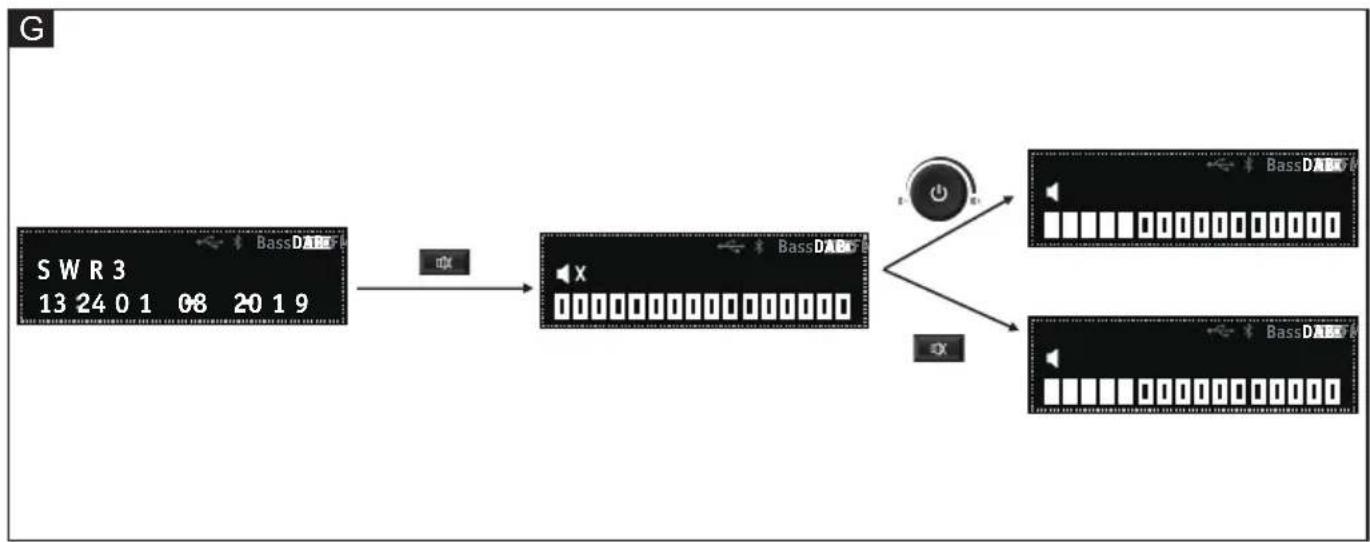
Setting the volume (FIG. G)
To increase volume rotate the volume knob (12) clockwise. To reduce it, turn the 🔊 knob to the left.
Briefly press button (19) to set the mute ON. Briefly press mute button again or rotate the volume button (12) to set the mute OFF.
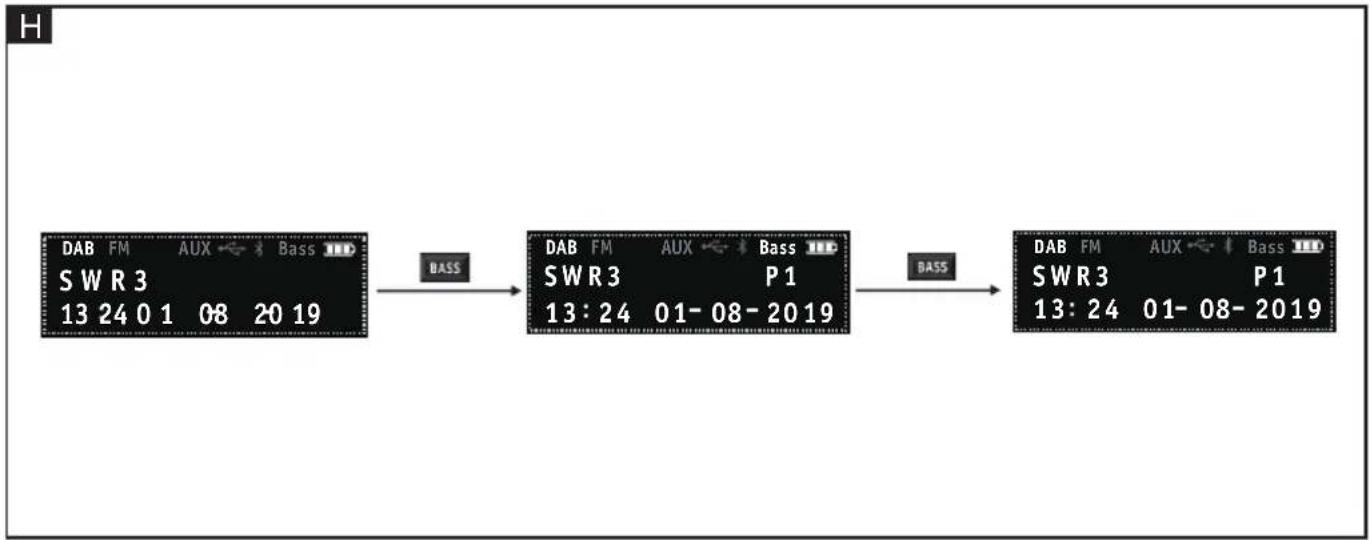
Sound adjustment (FIG. H)
To switch the bass playback on or off: Briefly press the BASS button (17). When the function is on, the BASS symbol lights up.
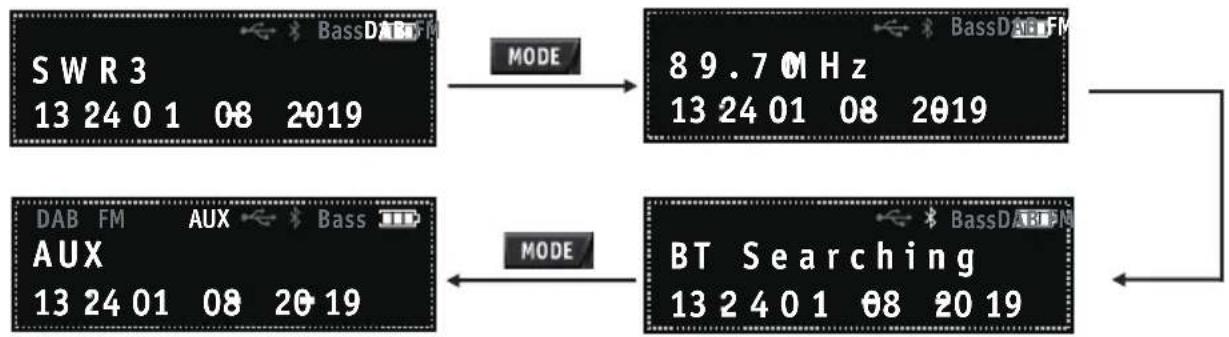
Selecting the operating mode (FIG. I)
Briefly press the MODE button for selecting the operating mode until the desired mode is displayed.
The following operating modes are available:
- Radio reception DAB
- Radio reception FM
- Playback of music sources connected via Bluetooth®
– Playback of music sources connected via AUX cable
The selection is shown by means of the corresponding symbol on the top of the display.
Bluetooth operating mode (FIG. J)
Set the Bluetooth ^® operating mode with the MODE button for selecting the operating mode or press Bluetooth button (18).
Activate the Bluetooth function of the device to be connected (mobile phone or similar) and select "RD10.8/18.0/230" as the target of the Bluetooth connection. For this purpose, follow the instructions in the operating manual of the paired device (smartphone or similar).
Single press ◀ or ▶ button to change to previous or next song.
Press ▶ button to pause or play.
i NOTE
To separate the Bluetooth connection after successful pairing, press the ✧ button and hold for 3 seconds. The connection is separated.
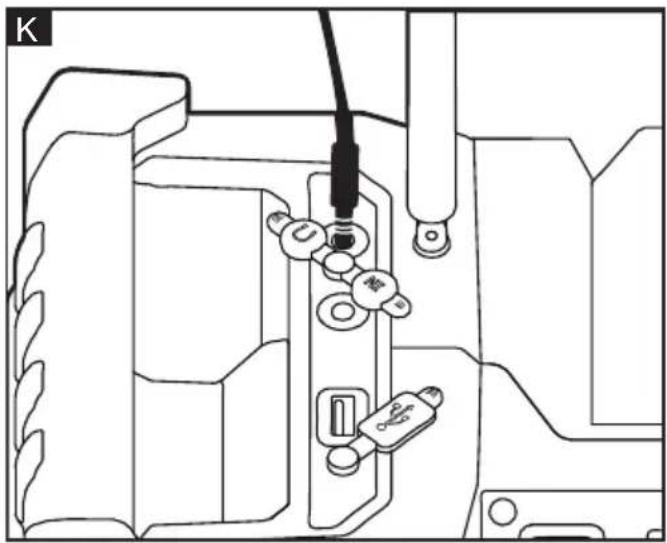
AUX operating mode: IN/OUT (FIG. K)
Set the AUX operating mode with the MODE button for selecting the operating mode. Release the AUX IN connector from the soft cover and connect with the external music source (MP3 player or similar). Switch on the external music source and start the playback. Set the volume with the regulator for the external music source or the volume regulators of the Radio.
Release the AUX OUT connector from the holder and connect with the external speaker or headset. Switch on the device and audio will be output to the external speaker or headset.
i NOTE
- Batteries of the connected devices cannot be charged via the AUX connection.
- When the Radio is switched off, connected devices are not switched off.
- After using AUX or USB connectors put on the soft covers to protect them against dust, dirt or moisture.
Charging external devices via the USB connection (FIG.L)
Insert the USB plug of the device to be connected into the USB port of the Radio. The USB power output port (6) is a connection port for powering low power devices such as mobile phones, CD and MP3 players. Immediately separate the USB connection if no longer required.
i NOTE
No music playing available via USB connection.
LED light
When the Radio is on: press the LED button (16), LED lights on with color change. The rhythm of the flashing LED light is consistent with the played music. Press the LED button again, LED lights on with fixed color. Press the LED button again, LED lights off.
Tuning (DAB)
When the device is first switched on in DAB mode, the radio will auto scan to find broadcast stations in the local area.
Briefly press the or button (10a or 10b) to scroll through the stations. Press button to select.
Finding new stations (DAB) (FIG. M)
From time to time, new DAB radio stations may become available. Or you may have moved to a different part of the country. In this case you may need to activate your radio to scan for new stations. press the button. Your radio will perform a full scan of the DAB frequencies. As new stations are found, the station counter on the left side in the display will increase and stations will be added to the list.
Manual tuning(FM): Briefly press the or button to set the desired frequency. Each press will increase or decrease 0.05MHZ. The frequency is shown in the display.
Scan Tuning (FM): Press the or button and hold for 3 seconds, the tuner frequency will increase to seek the first radio station with acceptable clarity and stop at that station. The frequency is shown in the display. The right arrow button may be pressed again to continue seeking a radio station at higher frequencies. The left arrow button may be pressed to seek radio stations at lower frequencies. The search function is only available in FM mode.
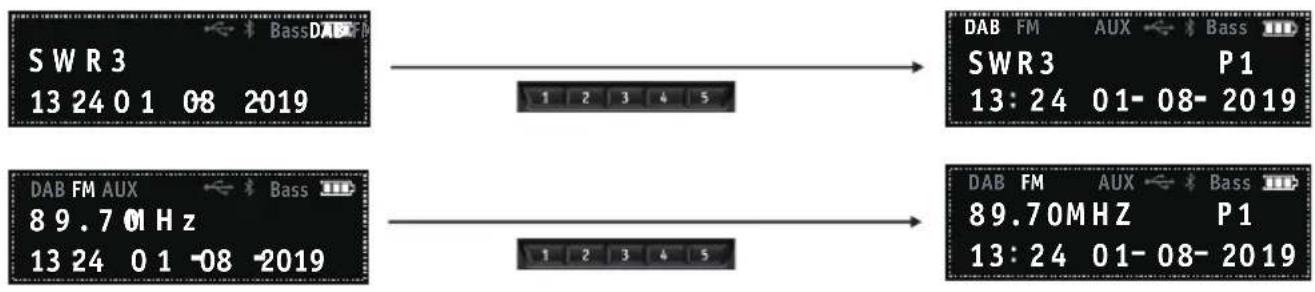
Storing stations in preset memories (DAB and FM) (FIG. N)
There are 5 memory presets for each waveband.
Press and hold the desired Preset button (15) until the preset number is shown on the display. The station is then stored in the selected Preset button. Repeat this procedure for the remaining presets. Stations stored in the preset memories can be overwritten by following the procedures described above.
To recall stations from the preset memories, briefly press the desired Preset button while device is in radio mode. The preset number and station frequency will appear in the display.
System reset (FIG. O)
Press the Clock button and hold on for 10 seconds, press button to enter into the factory reset function interface. Then press button to select 'Yes' and press button to start the reset process. All stored data in the device will be cleared and restored to the original settings.
Maintenance and care
WARNING!
Before carrying out work of any kind (cleaning, transport, storage), remove the battery from the device.
CAUTION!
Never clean plastic parts with solvents or other aggressive fluids. This could damage the device.
Cleaning
Clean the device with a dry cloth or brush.
Repairs
Repairs must be carried out by an authorized customer service centre only.
Spare parts and accessories
Other accessories can be found in the manufacturer's catalogues. You can find exploded drawings and spare part lists on our homepage:
www.flex-tools.com/Disposal Information EU countries only
Do not throw electric power tools into the household waste! In accordance with the European Directive 2012/19/EU on Waste Electrical and Electronic Equipment and transposition into national law used electric power tools must be collected separately and recycled in an environmentally friendly manner.
Raw material recovery instead of waste disposal.
Device, accessories and packaging should be recycled in an environmentally friendly manner. Plastic parts are identified for recycling according to material type.

WARNING!
Do not throw batteries into the household waste, fire or water. Do not open used batteries.
EU countries only:
In accordance with Directive 2006/66/EC defective or used batteries must be recycled.

NOTE
Please ask your dealer about disposal options!
CE -Declaration of Conformity
We declare on our sole responsibility that the product described under "Technical data" conforms to the following standards or normative documents:
2009/125/EC, 2011/65/EU, 2014/53/EU
Furthermore all standards which we meet should be listed:
EN 62368, EN 301489-1, EN 300328,
EN 62479, EN 303345, EN 55032,
EN 55035, EN 61000-3-2, EN 61000-3-3
Responsible for technical documents:
Exemption from liability
The manufacturer and his representative are not liable for any damage and lost profit due to interruption in business caused by the product or by an unusable product. The manufacturer and his representative are not liable for any damage which was caused by improper use of the device or by use of the device with products from other manufacturers.
www.flex-tools.com/Disposal Information

Eckhard Rühle Manager Research & Development (R & D)
Klaus Peter Weinper Head of Quality Department (QD)
www.flex-tools.com/Disposal Information

Eckhard Rühle Manager Research & Development (R & D)
Klaus Peter Weinper Head of Quality Department (QD)
www.flex-tools.com/Disposal Information

Klaus Peter Weinper Head of Quality Department (QD)
Eckhard Rühle
Manager Research &
Development (R & D)
Klaus Peter Weinper
Head of Quality
Department (QD)
Eckhard Rühle
Manager Research &
Development (R & D)
Klaus Peter Weinper
Head of Quality
Department (QD)
Eckhard Rühle
Manager Research &
Development (R & D)
Klaus Peter Weinper
Head of Quality
Department (QD)
Eckhard Rühle
Manager Research & Development (R & D)
Klaus Peter Weinper
Head of Quality Department (QD)
Klaus Peter Weinper Head of Quality Department (QD)
Eckhard Rühle
Manager Research &
Development (R & D)
Klaus Peter Weinper
Head of Quality
Department (QD)
Eckhard Rühle Manager Research & Development (R & D)
Klaus Peter Weinper Head of Quality Department (QD)
Eckhard Rühle Manager Research & Development (R & D)
Klaus Peter Weinper Head of Quality Department (QD)
Eckhard Rühle
Manager Research &
Development (R & D)
Klaus Peter Weinper
Head of Quality
Department (QD)
Eckhard Rühle
Manager Research &
Development (R & D)
Klaus Peter Weinper
Head of Quality
Department (QD)
www.flex-tools.com/Disposal Information

Samo za države EU Nemojte bacati električne alate zajedno s običnim kućanskim otpadom! U skladu s Europskom direktivom 2012/19/EU o otpadnoj električnoj i elektroničkoj opremi i prenošenju u nacionalnom pravu, korišteni električni alati moraju se odvojeno prikupljati i reciklirati na ekološki prihvatljiv način.

Eckhard Rühle
Manager Research &
Development (R & D)
Klaus Peter Weinper
Head of Quality
Department (QD)
www.flex-tools.com/Disposal Information

Eckhard Rühle
Manager Research &
Development (R & D)
Klaus Peter Weinper
Head of Quality
Department (QD)
www.flex-tools.com/Disposal Information

Eckhard Rühle
Manager Research &
Development (R & D)
Klaus Peter Weinper
Head of Quality
Department (QD)
www.flex-tools.com/Disposal Information

Eckhard Rühle
Manager Research &
Development (R & D)
Klaus Peter Weinper
Head of Quality
Department (QD)
Eckhard Rühle Manager Research & Development (R & D)
Klaus Peter Weinper Head of Quality Department (QD)
Eckhard Rühle
Manager Research &
Development (R & D)
Klaus Peter Weinper
Head of Quality
Department (QD)
;AP 10.8/2.5 ;AP 18.0/5.0 ;AP18.0/2.5
Eckhard Rühle Manager Research & Development (R & D)
Klaus Peter Weinper Head of Quality Department (QD)