00040070 - Remote control HAMA - Free user manual and instructions
Find the device manual for free 00040070 HAMA in PDF.


| Brand | Hama |
| Model | 00040070 |
| Product type | Universal remote control |
| Power supply | 2 AAA batteries (LR03/Micro) |
| Compatible devices | TVs and set-top boxes (STB) |
| Range | Infrared, directional (approx. 10 m depending on conditions) |
| Main features | On/Off, menu navigation, volume, mute, streaming access, brand code search, direct code entry, learning function, backlight |
| Control modes | TV mode and STB (set-top box) mode |
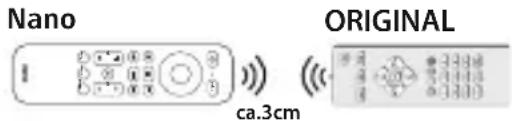
| Learning function | Yes, transfer functions from the original remote (distance 3 cm, face-to-face) |
| Backlight | Yes, can be activated/deactivated (Power + Mute) |
| Low battery indicator | LED blinks 2 times after a press |
| Automatic shutdown | Yes, if a key is held >15 s (energy saving) |
| Dimensions (approx.) | Approximately 20 cm x 5 cm x 2 cm (estimate) |
| Weight (approx.) | Approximately 100 g (estimate with batteries) |
| Maintenance and cleaning | Soft dry cloth, avoid abrasive products |
| Safety instructions | Protect from moisture, heat, shocks; use recommended batteries; observe polarity |
| Package contents | Remote control, code list, instruction manual, 2 AAA batteries |
| Repairability | Not user-repairable; refer to a qualified technician |
Frequently Asked Questions - 00040070 HAMA
User questions about 00040070 HAMA
0 question about this device. Answer the ones you know or ask your own.
Ask a new question about this device
Download the instructions for your Remote control in PDF format for free! Find your manual 00040070 - HAMA and take your electronic device back in hand. On this page are published all the documents necessary for the use of your device. 00040070 by HAMA.
USER MANUAL 00040070 HAMA
86652Monheim/Germany
Service&Support
www.hama.com
+499091502-0
D | GB
CE

RaccoltaCarta
All listed brands are trademark of the corresponding companies. Errors and mission excepted, and subject to technical changes. Our general terms of delivery and payment are applied.
"Nano"Str
OperatingInstructions
Bedienungsanleitung
Moded'emploi
Instruccionesdeuso
Gebruiksaanwijzing
Istruzioniperl'uso
Instrukcjaobsługi
Használatiútmutató
Manualdeutilizare
Návodkpoužití
Návodnapoužitie
Manualdeinstruções
Bruksanvisning
natural_image
Diagram showing two mechanical components with arrows indicating assembly or movement, no text or symbols present©
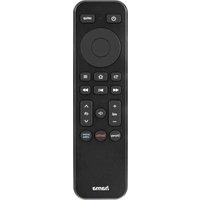
Overviewofthefunctionkeys
| A:Remotecontrol | ||
| 1 | PowerOn/Off | |
| 2 | Controlmenuselection | |
| 3 | OKbutton/Confirmmenuselection | |
| 4 | MenuBack/Levelup | |
| 5 | Moviecontrol◀◀ Previousscene▶▶ Start/Pause▶▶ Nextscene | |
| 6 | Volume+/- | |
| 7 | Mute | |
| 8 | Directaccesstostreamingservices(ifsupportedbythedevice) | |
| 9 | Programmeselection+/- | |
| 10 | Home | |
| 11 | Menu | |
| 12 | Setup/Learningfunction/ModeselectionTV/STB | |
| 13 | LED | |
ThankyouforchoosingaHamaproduct.
Takeyourtimeandreadthefollowinginstructionsand informationcompletely.Pleasekeeptheseinstructionsina safeplaceforfuturereference.Ifyousellthedevice,please pastheseoperatinginstructionsontothenewowner.
1. Explanationofwarningsymbolsandnotes
Warning

This symbol is used to indicate safety instructions to draw your attention to specific hazards and risks.
Note

This symbol is used to indicate additional information or important notes.
2.Packagecontents
• Universalremotecontrol
- Listofcodes
• Theseoperatinginstructions
- 2xAAAbatteries
3. Safetyinstructions
- Donotusetheuniversalremotecontrolindamp environmentsandavoidcontactwithsplashingwater.
- Keeptheuniversalremotecontrolawayfromheatsources anddonotexposeittodirectsunlight.
- Aswithallelectricalproducts, theuniversalremotecontrol shouldbekeptoutofthereachofchildren.
- Thisproductisintendedforprivate,non-commercial useonly.
- Usetheproductonlyfortheintendedpurpose.
- Protect the product from dirt, moisture and overheating and use it indry room only.
- Donotusetheproductinareasinwhichelectronic productsarenotpermitted.
- Donotdropheproductanddonotexposeittoany majorshocks.
- Donotmodifytheproductinanyway.Doingsovoids thewarranty.
- Keepthepackagingmaterialoutofthereachofchildren duetotheriskofsuffocation.
- Disposeofpackagingmaterialimmediatelyinaccordance withthelocallyapplicableregulations.
- Donotoperatetheproductoutsidethepowerlimitsgiven inthespecifications.
- Donotopenthedeviceorcontinuetooperateitifit becomesdamaged.
- Donotattempttoserviceorrepairtheproductyourself. Leaveanyandallserviceworktoqualifiedexperts.
- Onlyusethearticleundermoderateclimaticconditions.
Warning-Batteries

- Wheninsertingbatteries, notethecorrectpolarity(+ and-markings)andinsertthebatteriesaccordingly. Failuretodosocouldresultinthebatteriesleaking orexploding.
- Onlyusebatteries(orrechargeablebatteries)thatmatch thespecifiedtype.
- Beforeyouinsertthebatteries,cleanthebattery contactsandthepolaritycontacts.
- Donotallowchildrentochangebatterieswithout supervision.
- Donotmixoldandnewbatteries,orbatteriesof differenttypesorfromdifferentmanufacturers.
- Removethebatteriesfromproductsthatarenotbeing usedforanextendedperiod(unlessthesarebeing keptreadyforanemergency).
- Donotshort-circuitbatteries.
- Donotchargebatteries.
- Donotburnbatteries.
- Keepbatteriesoutofthereachofchildren.
- Neveropen, damageorswallowbatteriesorallow themtoentertheenvironment. Theycancontaintoxic, environmentallyharmfulheavymetals.
- Removespentbatteriesfromtheproductanddisposeof themwithoutdelay.
- Avoidstoring, charging and using in extreme temperatures and at extremely low atmospheric pressures (such as at high altitudes).
4. Firststeps-Insertingthebatteries

Note
- Alkalinebatteriesarerecommended. Usetwobatteries ofthetype "AAA" (LR03/Micro).
- Removethebatterycoveronthebackoftheuniversal remotecontrol(A).
- Insertthebatteries, observingthe" +/-"marksfor polarity(B).
• Closethebatterycompartment(C).
Note: Codememory

• Eachprogrammedcodeortaught-inbuttonisretained evenduringbatteryreplacement.

Note: Energysavingfunction
- Theremotecontrolswitchesitselfoffautomaticallyif abuttonispressedforlongerthan15seconds.This prolongsthelifeofthebatteriesiftheremotecontrol isstuckinaplacewherethebuttonsarepressed permanently,e.g.betweensofacushions.

Note: Lowbatterydisplay
- Thisremotecontrol indicates when the batteries are getting low.
- If the status LED flashes 2 times after a button is pressed, the batteries are weak and should be replaced promptly.
5.Setup

Note
- Forproperinfra-redtransmission, always hold the remote control in the approximated direction of the device to be operated.
- You cannot operate a device with the universal remote control while it is in Setup mode. Exit Setup mode and select the device to be operated using the device selection buttons.
- Plesenotethattheremotecontrolemitsinfra-red signals. These are not visible to the human eye.
Theremotecontrolcancontrol2differenttypesofdevices, TVandSTB.Toswitchbetweendevicetypes, presstheSetup buttonbriefly(<3seconds).
- TVmode:YoucanselectthegreenorredLEDcolourfor theTVmode.IfyouhavedefinedtheTVmodewithoneof thetwocolours,thestatusLEDlightsupinthisLEDcolour everytimeyoupressthebuttonagain.
- STBmode: You can us therespective other LED colour for STBmode. If you activate the STBmode, the status LED lights up in this LED colour every time you press the button again.
5.1 Brand-specificcodesearch
Withthebrand-specificcodesearch,youcanreducethe searchtothecodesforthebrandofyourdevice.The followingoverviewshowsyouwhichbrandisrepresented bywhichbutton.
ForTVsets
| ButtonBrand | |
| BACKPanasonic,TV | |
| HOMESony,TV | |
| MENUGrundig,TV | |
| REWToshiba,TV | |
| PLAY/PAUSEHisense,TV | |
| FFTelefunken,TV | |
| VOL+TCL,TV | |
| CH+Samsung,TV | |
| VOL-LG,TV | |
| CH-Philips,TV | |
| DISNEY+(AllTVbrands) |
ForSetTopBoxes(STB)
ButtonBrand
PRIMEVIDEO(AllSTBbrands)
- Switch the device you wish to operate on.
- PressandholdtheSetupbuttonforapprox.3seconds untiltheLEDlightsup.
- PressthePowerbuttononce.Thenpressthebutton thatstandsforthebrandofyourterminal(e.g.BACKfor Panasonic).
- Pointtheremotecontrolatthedeviceyouwishtocontrol.
- Theremotecontrolnowsendsanewcommandtoyour deviceevery2seconds.TheLEDflashesonceforeach commandandthenlightsuppermanentlyagain.
- As soon as your devices switches off, press the OK button to save the decode. The LED goes out.
- Thentesttheremotecontrolandcheckwhetherthe desiredfunctionscanbecontrolled.Itispossiblethatthe firstcodefoundisnotthemostsuitable,andpossiblynot allfunctionsareavailable.Inthiscase,repeatsteps2–6.
Note
- Ifyouwanttoswitchtoanotherbrandduringthe search,simplypressthekeyassignedtothatbrand (e.g.>llforSony).Thecodesearchwillthencontinue forthisbrand.
- After all codes assigned to abrand have been searched, the LED flashes 6 times and Setup mode is terminated. If nosuitable code has been found for your device, start the codesearch for all brands.
- Ifnobuttonispressedfor35secondsinSetupmode, theLEDflashes6timesandgoesout.Theremote controlexitsSetupmodewithoutchangingtheprevious settings.
- PresstheSetupbuttonontoexitSetupmode.

5.2 Directcodeentry
Acodelistisincludedintheuniversalremotecontrol's extentofdelivery.Thecodelistcontainsfour-digitcodesfor settingtheremotecontrolltoworkwithmostAVequipment manufacturers.
Foreasyorientation, thecodesaresortedfirstbytype ofdevice(TV, STB, etc.) and withinthetypeofdevice alphabetically bybrandname.

Note
Thisremotecontroldoesnothaveaseparatenumeric keypad,sothenumbersareassignedtothefollowing keys.(SeeFig.2)
- Switch the device you wish to operate on.
- PressandholdtheSetupbuttonforapprox.3 seconds until the LED lightsuptostartSetupmode.
- Enteroneofthe5-digitcodesfromtheenclosedcodelist. TheLEDflashesbrieflyaseachnumberisentered.
- If a valid code is entered, the LED goes out after the 5th number is entered and the code is automatically saved.
- Thentesttheremotecontrolandcheckwhetherthe desiredfunctionscanbecontrolled.Itispossiblethatthe firstcodefoundisnotthemostsuitable,andpossiblynot allfunctionsareavailable.Inthiscase,repeatsteps2-5.

Note
- Ifaninvalidcodeisentered, theLEDflashes6times and thenlightsuppermanentlyagain. In this case, repeatenteringthecode(Step3).
- Ifnobuttonispressedfor35secondsinSetupmode, theLEDflashes6timesandgoesout.Theremote controlexitsSetupmodewithoutchangingtheprevious settings.
- Setupmodecanbeendedatanytimebypassingthe Setupbutton.
6. Control of different devices
With this remote control you can control not only TV sets but also STB devices (Set Top Boxes - e.g. SAT receivers). In the factory setting, theremote control is preset to control TV sets. Totoggle between the various devices, proceeds as follows:
- BrieflypresstheSetupbutton.TheLEDflashesonce.
- Theremote control is now in control mode for STB devices. Each time the button is pressed, the LED flashes once.
ReturntoTVmode:
- BrieflypresstheSetupbutton.TheLEDflashes2x.
- Theremote control is now in control mode for TV devices. Each time the button is pressed, the LED flashes once.
7. Learningfunction
This remote controlise equipped with a learning function. This allows you to transfer functions from your original remote control to this universal remote control.
7.1 Before you start the learning function
- Makesurethatallbatteriesusedinbothremotecontrols areinperfectcondition. Changethemifnecessary.
- Placeyouroriginalremotecontrolandtheuniversal remotecontrolnexttoeachothersothattheinfrared diodesoftheremotecontrolsaredirectlyoppositeeach other.
- If necessary, correct the height of both remote control to achieve optimal alignment.
- Thedistancebetweenthetworemotecontrolsshouldbe approx.3cm.
Note
- Donotmovetheremotecontrolsduringthelearning process.
- Makesurethattheroomlightingisnotfluorescent tubesorenergy-savinglamps, asthesecouldcause interferenceandthushinderthelearningprocess.
- Thedistancebetweenthetworemotecontrolsandthe nearestlightsourceshouldbeatleast1 metre.
- Inlearningmode, eachbuttoncanonlybeassigned onefunction.Anewfunctionoverwritesthefunction previouslytaughtonthisbutton.
- PresstheSetupbuttonontoendthelearningfunction.
- ExceptfortheSetupbutton, allbuttoncanbeassigned ataught-infunction.
7.2 Activating the learning function / transferring the button function
- PressandholdtheSetupbuttonforapprox.3seconds untiltheLEDlightsuptostartSetupmode.
- ToteachacommandinTVmode, enterthecode98000or98001forSTBmode.
- PressthekeyoftheNANOFBtowhichyouwanttoteach anewfunction.TheLEDflashes2xandthenlightsup permanently.Ifnobuttonispressedwithin15seconds, theLEDflashes6timesandthelearningfunctionis terminated.
- Now pressthe button on the original remote control whose function you want to transfer.
If the LED goes out briefly and then lights up again permanently, the function has been successfully taught. If the LED flashes 6 times quickly, the transfer has failed. Check the position of the two remote controls and make sure the batteries are full. If no command is received within 35 seconds, the LED flashes 6 times and the learning function is terminated.
-
Toteachmorebuttons, repeatsteps3 and 4.
-
After you have transferred all the desired functions, press the SETUP button to save all the taught-in functions and exit Learning mode.
Note
When changing the batteries of the universal remote control, the function of thetaught-in buttons are retained.

7.3 Deletingtaughtfunctions
7.3.1 Deletingataughtfunction
- PressandholdtheSetupbuttonforapprox.3seconds untiltheLEDlightsuppermanentlytostartSetupmode.
2.Enterthecode98100forTVmodeor98101forSTB mode.TheLEDflashesonce. - PressthebuttonoftheNANOFBwhosetaught-in functionistobedeleted.
- The LED flashes once, thetaught-infunction is deleted and has been replaced by the function of the factory setting.
- Todeletemorebuttons, repeatstep3.
6.Toexitthemenu, presstheSetupbutton.
7.3.2 Deleting alltaught functions
- PressandholdtheSetupbuttonforapprox.3seconds untiltheLEDlightsuppermanentlytostartSetupmode.
2.Enterthecode98200todeletealltaught-inbuttonsin TVmodeor98201todeletealltaught-inbuttonsinSTB mode. - The LED flashes 2x, all taught-in functions are deleted and are replaced by the function of the factory setting.
8.Restoringfactorysettings
- PressandholdtheSetupbuttonforapprox.3seconds untiltheLEDlightsuppermanentlytostartSetupmode.
2.Enterthenumber99999. - Allsettingsandtaught-infunctionsaredeletedandare replacedbythefunctionsofthefactorysetting.

9. Switching illumination on/off
- PressthePowerandMutebuttonssimultaneously.
- If the LED flashes green once, the illumination of the remote control is switched on.
- IftheLEDflashesredonce, theilluminationisswitchedoff.
- Whentheilluminationisswitchedon, itgoesouteach timethebuttonispressedandlightsupagainforapprox. 3secondsassoonasthebuttonisreleased.
10. Maintenance
- Neveruseoldandnewbatteriesintheuniversalremote controlatthesametime,asoldbatteriestendtoleakand canleadtoalossofperformance.
- Nevercleantheuniversalremotecontrolwithscouring agentsorharshcleaningagents.
- Keep the universal remote control free of dust by cleaning it with adry soft cloth.
11.Troubleshooting
Q.Myuniversalremotecontroldoesnotwork!
A. ChecktheAVdevice. If themainswitchonthedevice isoff, the universal remote control cannot operate the device.
A. Check that the batteries are inserted correctly and that the polarity has been observed.
A. Check that you have pressed the appropriate device button for the device.
A. Replacethebatteriesifthebatterylevelislow.
Q. If there are multiple device codes listed for the brand of my AV device, how do select the correct device code?
A. TodeterminethecorrectdevicecodefortheAVdevice, testthecodesoneaftertheotheruntilmostofthebuttons workproperly.
Q.MyAVdeviceonlyrespondstosomebuttoncommands.
A. Tryothercodesuntilmostofthebuttonsworkproperly.
Q. The brand of my AV device is not mentioned in the decode list.
A. Inthiscase, usethecodesearchforallbrands (Section 5.1)
Q. IhavetriedalltheavailableecodesforthebrandofmyAV devicefromthecodelist,butnoneofthecodesmentioned work.
A. In this case, usethe codesearch for all brands (Section 5.1)
12.Warrantydisclaimer
HamaGmbH&CoKGassumesnoliabilityandprovidesno warrantyfordamageresultingfromimproperinstallation/mounting,improperuseoftheproductorfromfailureto observetheoperatinginstructionsand/orsafetynotes.
PRIMEVIDEO(AllSTBbrands)
Remarque: Mémoiredescodes

PRIMEVIDEO(AllSTBbrands)
PRIMEVIDEO(AllSTBbrands)
PRIMEVIDEO(AllSTBbrands)
Information: Kodminne