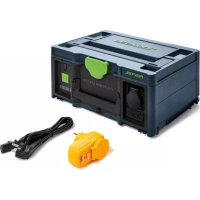
SYSPST 1500 Li HP - Battery charger FESTOOL - Free user manual and instructions
Find the device manual for free SYSPST 1500 Li HP FESTOOL in PDF.



User questions about SYSPST 1500 Li HP FESTOOL
0 question about this device. Answer the ones you know or ask your own.
Ask a new question about this device
Download the instructions for your Battery charger in PDF format for free! Find your manual SYSPST 1500 Li HP - FESTOOL and take your electronic device back in hand. On this page are published all the documents necessary for the use of your device. SYSPST 1500 Li HP by FESTOOL.
USER MANUAL SYSPST 1500 Li HP FESTOOL
natural_image
Black and green electronic device with a green accent, no visible text or symbolsFestool GmbH
Wertstraße 20
73240 Wendlingen
Germany
+49 (0)70 24/804-0
www.festool.com 10425578_D / 2022-05-17


1A
text_image
1-2 1-31-41-51-61-7 SYS POWER STATION 1-1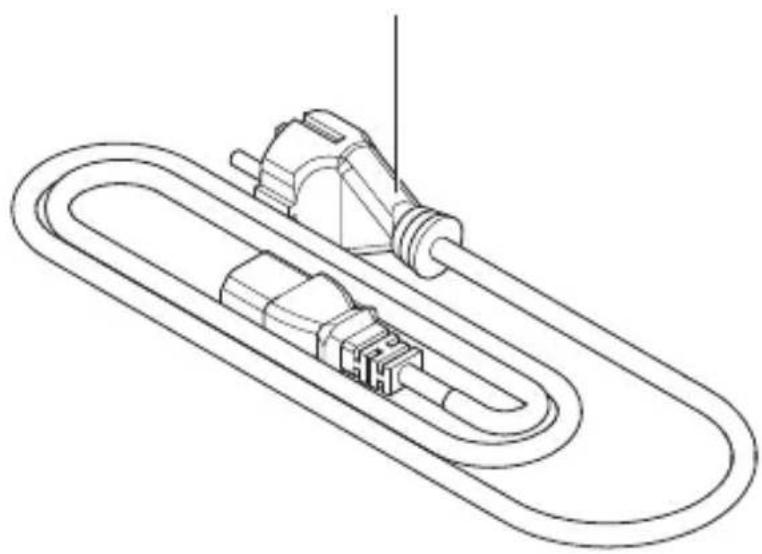
natural_image
Technical line drawing of a mechanical component with a looped shaft and connector (no text or symbols)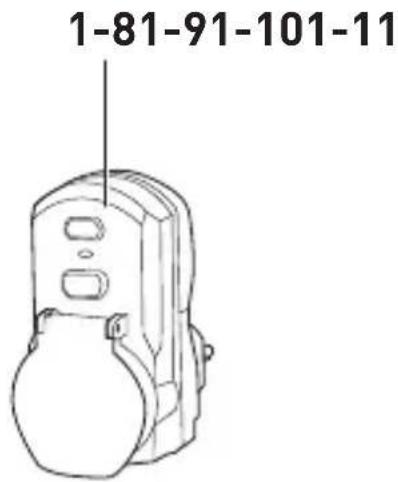
text_image
1-81-91-101-111B
text_image
1-12 1-13Declaration of Conformity
We as the manufacturer Festool GmbH, Wertstraße 20, 73240 Wendlingen, Germany declare under our sole responsibility that the product[s]:
Designation: Battery power supply
Designation of Type[s]: SYS-PST 1500 Li HP
Serial number[s] ^1 : 10425557
fulfills all the relevant provisions of the following UK Regulations:
• S.I. 2016/1101 Electrical equipment [Safety] Regulations 2016
• S.I. 2016/1091 Electromagnetic Compatibility Regulations 2016
• S.I. 2012/3032 Restriction of the Use of Certain Hazardous Substances in Electrical and Electronic Equipment Regulations 2012
and are manufactured in accordance with the following designated standards:
• BS EN 60529: 1992+A2:2013
• BS EN 62368-1:2014 + AC:2015
• BS EN IEC 61000-3-2:2019
• BS EN 61000-3-3:2013 + A1:2019
• BS EN IEC 61000-6-2:2019
• BS EN IEC 61000-6-4:2019
• BS EN 62321-1:2013
• BS EN IEC 63000:2018

Place and date of declaration: Wendlingen, 18.03.2021
Signed on behalf of and in name of Festool GmbH
Markus Stark
Head of Productdevelopment
iA.Q@arch
Ralf Brandt
Head of Productconformity
Power Station
(Batterie zur
Stromversorgung)
(Battery power supply)
en EU Declaration of Conformity. We declare under sole responsibility that this product complies with all the relevant requirements in the following EU Directives, and following standards or normative documents were applied:
Signed on behalf of and in name of/
Head of Product Development
Jörg Wilde
Head of Technology and Component Development
(Battery power supply)
Signed on behalf of and in name of/
Head of Product Development
Jörg Wilde
Head of Technology and Component Development
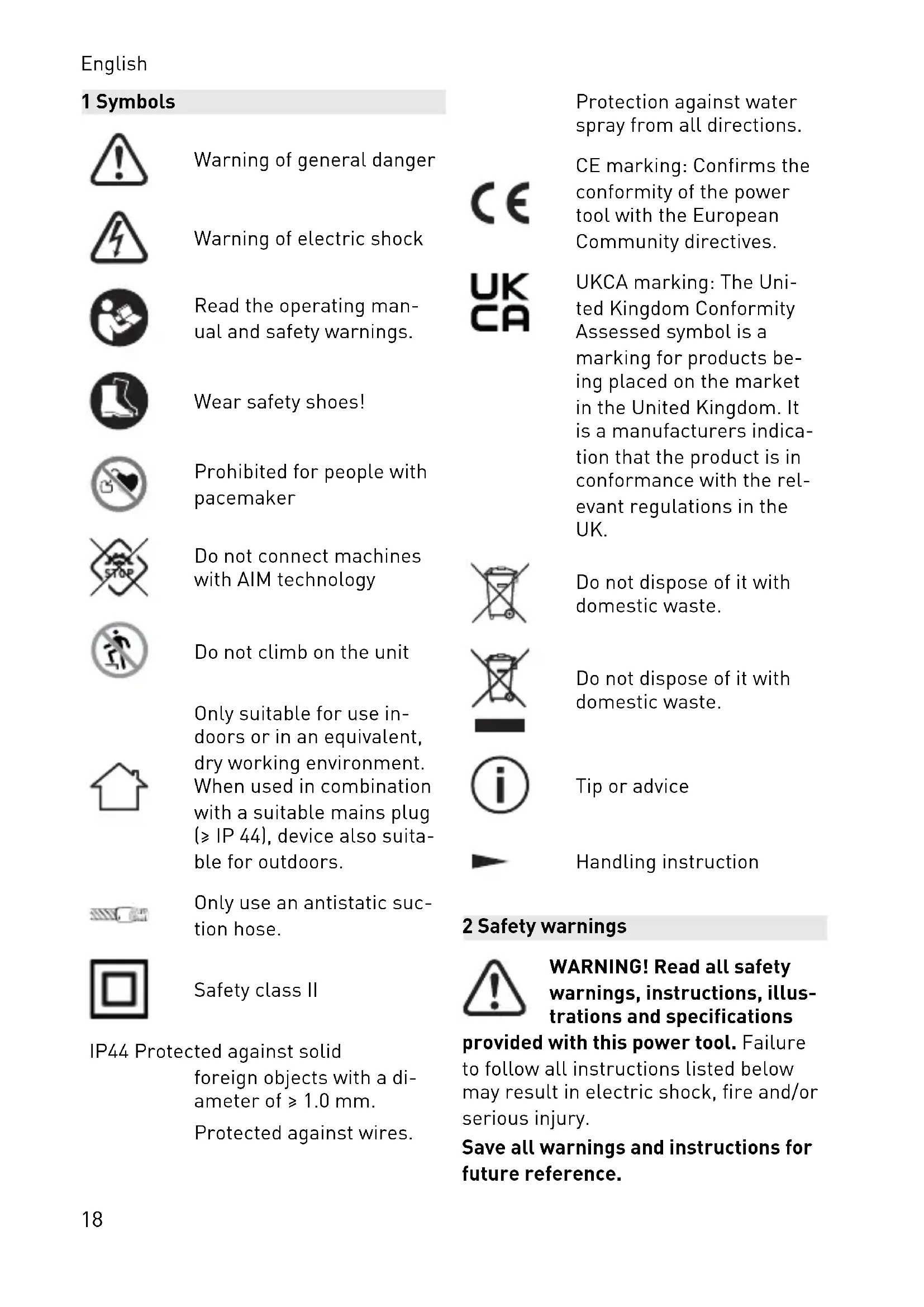
Warning of general danger

Warning of electric shock

Read the operating manual and safety warnings.

Wear safety shoes!

Prohibited for people with pacemaker

Do not connect machines with AIM technology

Do not climb on the unit

Only suitable for use indoors or in an equivalent, dry working environment. When used in combination with a suitable mains plug ( ≥ IP 44), device also suitable for outdoors.
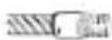
Only use an antistatic suction hose.

Safety class II
IP44 Protected against solid foreign objects with a diameter of ≥ 1.0 mm. Protected against wires.
Protection against water spray from all directions.

CE marking: Confirms the conformity of the power tool with the European Community directives.

UKCA marking: The United Kingdom Conformity Assessed symbol is a marking for products being placed on the market in the United Kingdom. It is a manufacturers indication that the product is in conformance with the relevant regulations in the UK.
Do not dispose of it with domestic waste.
Do not dispose of it with domestic waste.

Tip or advice

Handling instruction
2 Safety warnings

WARNING! Read all safety warnings, instructions, illustrations and specifications
provided with this power tool. Failure to follow all instructions listed below may result in electric shock, fire and/or serious injury.
Save all warnings and instructions for future reference.
2.1 Safe handling of the machine
Cells in lithium-ion batteries are sealed so as to be gas-tight and are non-hazardous provided they are used and handled in accordance with the manufacturer's instructions.

Wear suitable personal protective equipment: Safety shoes.
- Only operate the machine within the operating limits specified in the technical data (see section 4).
- Charge the machine at regular intervals to prevent hazards posed by a deeply discharged battery.
- Do not tamper with the machine.
- Do not short-circuit the AC charging input [1-1], AC output [1-3] and DC output compatible with USB-C™ [1-6].
- Do not touch the AC charging input [1-1].
- Do not touch connections and electrical contacts with fingers, jewellery or other metal objects.
- Do not store or set up in potentially explosive environments.
- Do not set up in standing water.
- Keep the protective cap on the AC output [1-2] closed during charging.
- Keep the Systainer lid [1-5] closed during operation and storage.
- Avoid storage at high temperatures (max. 45 °C). Keep the machine away from external heat sources (e.g. prolonged sunlight, fire).
- Do not clean with liquids (in particular, do not use a pressure washer).
-
Do not use chemicals, fuels and lubricants (e.g. for cleaning).
-
This machine must not be used by people who might have a particularly adverse reaction to an electric shock (e.g. people with cardiac pacemakers), because the possibility of the machine and the connected consumer building up a static charge cannot be excluded.
- People with disabilities or impairments, as well as children, must not operate this machine without supervision.
- Do not operate at altitudes exceeding 2000 m above sea level.
- Do not use as a step or ladder.
- Do not use as a support or make-shift workbench.
- Do not hang from a crane.
- Do not dispose of the device or battery in a fire or hot oven, and do not crush or cut them mechanically; this may cause an explosion. For correct disposal, see chapter 11.
2.2 Avoiding damage
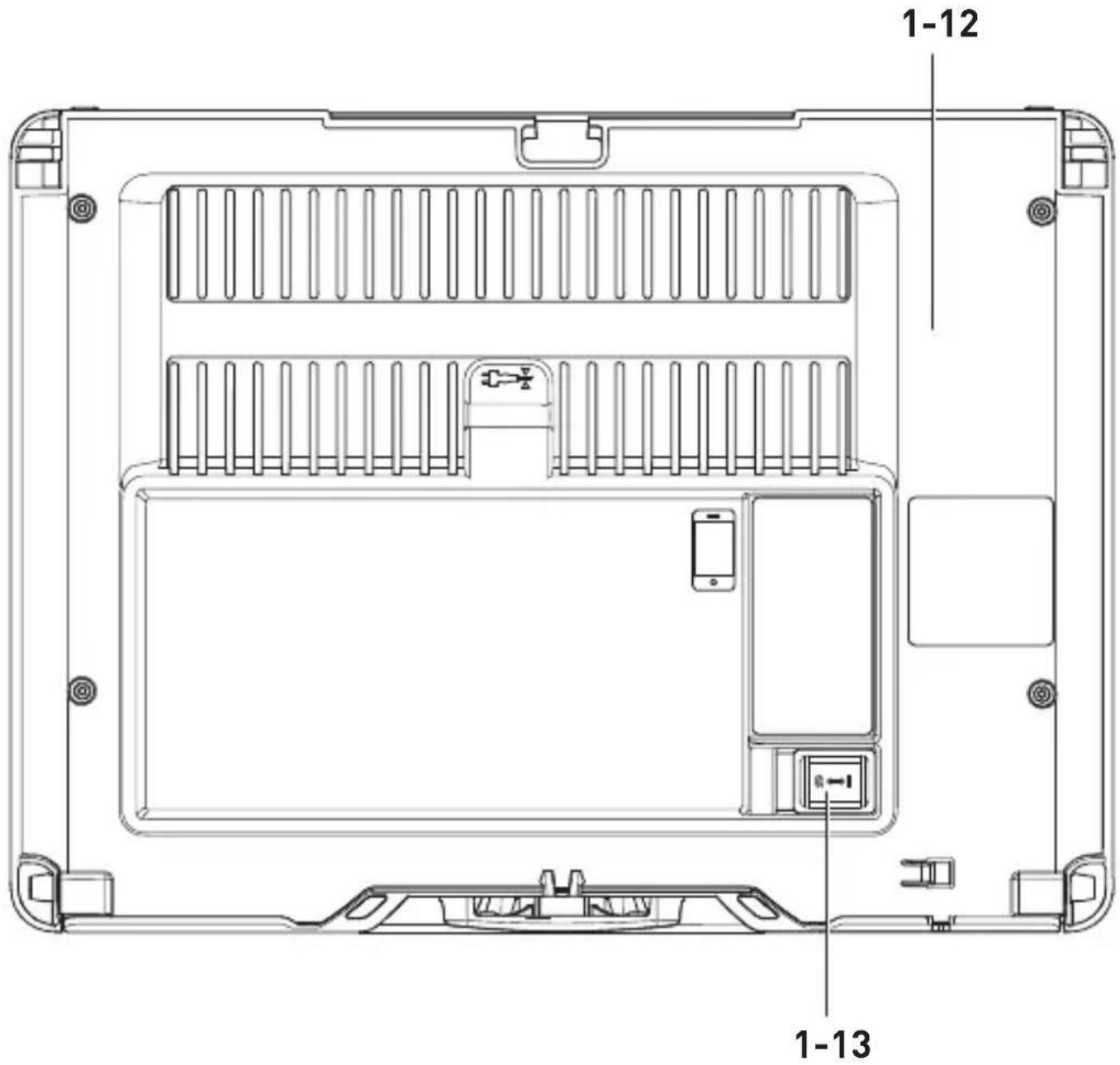
- Do not open incorrectly. In particular, the guard [1-12] must not be opened (unscrewed). Maintenance and repair must only be performed by trained specialists.
- Prevent damage due to falling. Ensure stable footing on an anti-slip surface and avoid the edges protruding over the surface. Secure against falling. The machine must always be checked after falling to see whether any parts are damaged. If external damage is present, do not continue using the machine. For fall heights of 1.0 m or more, transport mode must be activated: Set the transport switch [1-13] to "0". Additionally, contact customer service (see section 10).
English
- Avoid damage caused by objects accidentally falling on the machine or the shipping container (incl. machine). A check must always be performed after this kind of incident to see whether any parts are damaged. If external damage is present or the machine is malfunctioning, do not continue using the machine.
2.3 If the machine has been damaged
- Liquid may leak from defective batteries. In this case, do not use the machine and dispose of it correctly.
- In the event of a battery fire, extinguish the fire with water. If possible, completely cover the machine with water. Call the fire service and inform them that the fire involves lithium-ion batteries.
- There is a risk of vapours being released if the battery is damaged or not used correctly. The vapours may irritate your airways. Seek fresh air and consult a doctor if you feel unwell.
- Fluid may leak out of the battery if it is used incorrectly. Avoid contact with the fluid. Rinse with water any areas which accidentally come into contact with the fluid. If fluid gets into the eyes, also consult a doctor. Leaking battery fluid can cause skin irritation or burns.
2.4 Connecting consumers
- Do not connect a consumer with AIM technology (e.g. TKS 80 EBS with SawStop AIM technology). AIM technology only works with a protective earth connection and an earthed power source.
- Do not use to operate medical life support machines.
- Do not connect any power generation systems.
- For serial or parallel coupling (e.g. with a mobile dust extractor), every additional consumer must be connected using a PRCD protective adapter [1-8] and secured (see section 6.3).
- Use an antistatic suction hose when connecting a mobile dust extractor.
- Comply with local regulations for safe operation of electrical consumers at all times, especially for operation of mobile power generators.
- Use a consumer with restart protection if possible.
- Do not use faulty consumers. Consumers, including the mains power cable, must be in flawless technical condition.
- During operation with connected consumers, ensure stable footing (ensure good access to the connected consumer and sufficiently long cable; do not place the charging cable and mains power cable under tension).
- Before connecting consumers, ensure that the consumers are switched off.
- Always switch off connected consumers after use.
2.5 Information on charging the machine
- Only use the provided charging cable [1-11] for charging.
- Charge using low-voltage networks (120-240 V / 50 Hz).
3 Intended use
SYS-PST 1500 Li HP is intended for charging and operating mobile end devices and power tools/consumers.
SYS-PST 1500 Li HP is only suitable for use indoors or in an equivalent, dry working environment.

The user is liable for improper or non-intended use.
4 Technical data
| Battery | |
| Continuous power EU 3680 W (16 A) | |
| GB 2990 W (13 A) | |
| Peak power (>500 sec.) 5400 W (24 A) | |
| Peak power (>100 sec.) 7200 W (32 A) | |
| Peak power (>25 sec.) 9000 W (40 A) | |
| Peak power 18,000 W (80 A) | |
| Nominal energy content 18 x 86.4 Wh | |
| Charging duration (depending on cell temperature) | Approx. 3 hours at 230 V |
| If the battery is fully charged, it remains operational when switched off: | >2 years |
| Connections | ||
| AC output | EU (with- | 230 V 50 Hz 16 A |
| pure sine | out DK) | |
| DK 230 V 50 Hz 16 A | ||
| CH 230 V 50 Hz 16 A | ||
| GB 230 V 50 Hz 13 A | ||
| AC charging input 120–240 V 50–60 Hz 4 A | ||
| DC output compatible with USB-C ^TM | 5–20 V 3 A | |
| General | |
| Required charging power ≥ 900 W | |
| Operating temperature -20 °C | to 65 °C |
| Charging temperature 0 °C to 45 °C | |
| IP protection class (with closed protective covers or in combination with a mains plug with the same or a higher IP rating) | IP44 |
| Systainer3 dimensions SYS3 M 187 (W x H x D) | 396 x 296 x 187 mm |
| Weight 16.4 kg | |
| PRCD protective adapter |
| Nominal frequency 50–60 Hz |
| Switching capacity 3 500 W |
| Current rating 16 A |
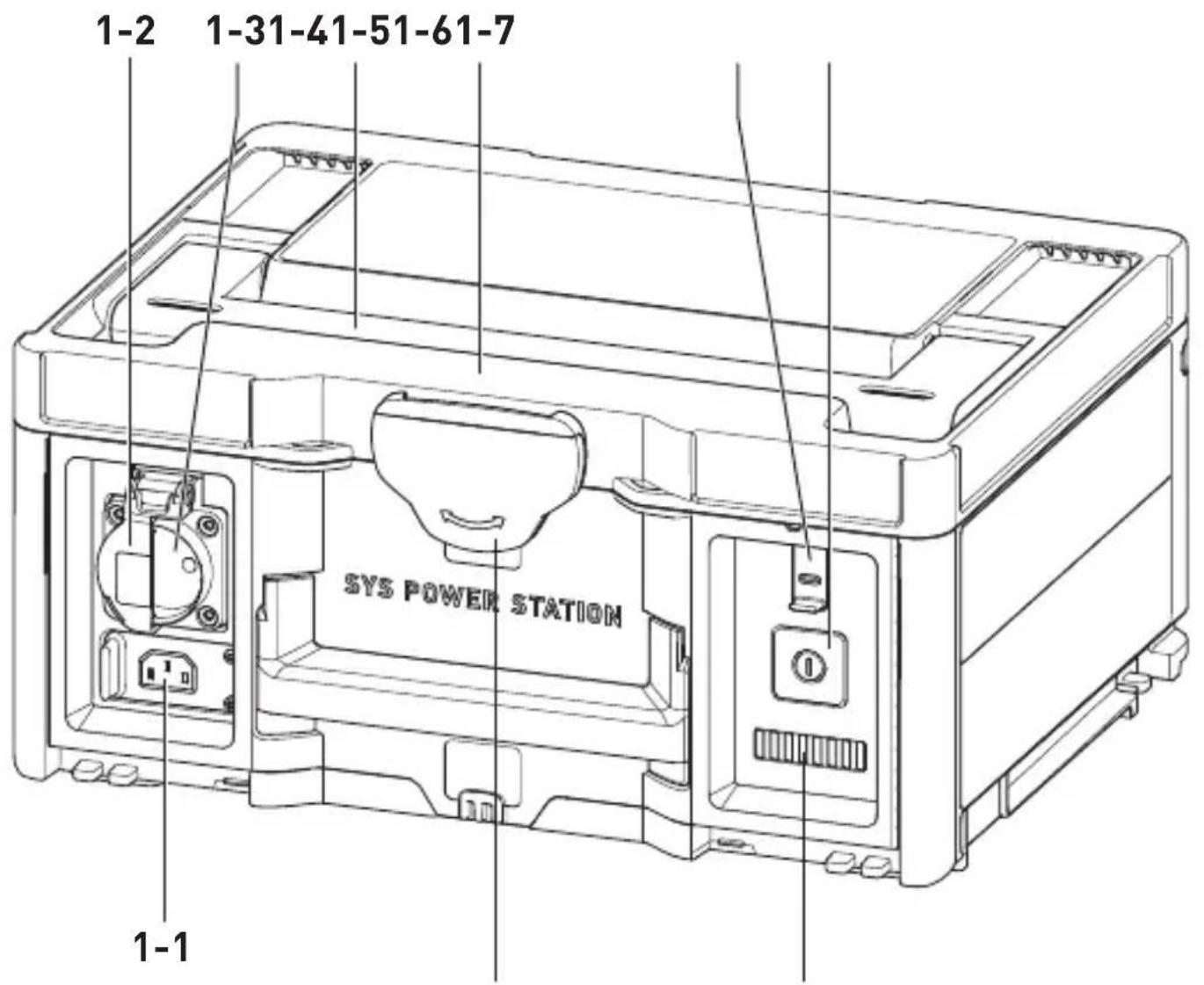
5 Parts of the device
[1-1] AC charging input (with protective cap)
[1-2] AC output protective cap
[1-3] AC output
[1-4] Carrying handle
[1-5] Systainer lid with T-Loc
[1-6] DC output compatible with USB-C ^TM (with protective cap)
[1-7] On/off switch
[1-8] PRCD protective adapter
[1-9] LED indicator
[1-10] T-Loc
[1-11] Charging cable
[1-12] Protective cover
[1-13] Transport switch
The specified illustrations appear at the beginning of the Operating Instructions.
6 Commissioning
6.1 State of charge at commissioning
SYS-PST 1500 Li HP is only slightly charged when delivered.
▶ Check the state of charge (see section 7.1).
▶ Charging (see section 7.2).
6.2 Connecting consumers
▶ Open the Systainer lid with the T-Loc [1-5].
▶ Deactivate transport mode: Set the transport switch [1-13] to "I".
▶ Close the Systainer lid with the T-Loc [1-5].
- Connect the mains power cable of the consumer to the AC output [1-3].
6.3 Applications of the PRCD protective adapter
| Combination with one con-sumer: | No PRCD protective adapter nec-essary. | 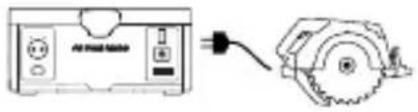 |
| Combination with a mobile dust extractor and another con-sumer: | PRCD protective adapter [1-8] necessary. | 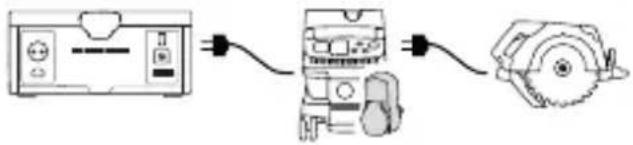 |
| Combination with a multiple socket and one consumer: | No PRCD protective adapter nec-essary. |  |
| Combination with a multiple socket and several consumers: | PRCD protective adapter [1-8] re-quired for the second and each additional con-sumer. | 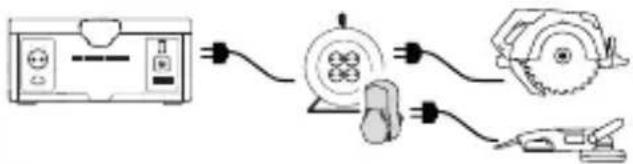 |
7 Operation
7.1 Checking the state of charge
▶ Open the Systainer lid with the T-Loc [1-5].
▶ Deactivate transport mode: Set the transport switch [1-13] to "I".
▶ Switch on (see section 7.3).
▶ Watch the LED indicator [1-9] (see section 7.4).
7.2 Charging
Only use the supplied charging cable [1-11] for charging.

While the SYS-PST 1500 Li HP is charging, it cannot also be operated using the AC output [1-3].
If the charging cable is connected during operation, the AC output [1-3] is deactivated.
i Observe the minimum required charging power (see section 4).
▶ Open the Systainer lid with the T-Loc [1-5].
▶ Deactivate transport mode: Set the transport switch [1-13] to "I".
▶ Close the Systainer lid with the T-Loc [1-5].
▶ Connect the charging cable [1-11] to the AC charging input [1-1] and mains outlet.
Charging process: LEDs light up green in sequence from left to right.
Charged: LEDs off.
7.3 Switching on/off
Switching off
▶ Press the on/off switch [1-7].
Switching on
▶ Press the on/off switch [1-7]. SYS-PST 1500 Li HP powers up or starts and the LEDs [1-9] light up in the start sequence.
7.4 LED indicator
| LEDs off SYS-PST 1500 | Li HP switched offorcompletely dischargedorcompletely charged with plugged in charging cable [1-11]. | |
| LEDs light up in starting sequence | SYS-PST 1500 Li HP powers up or starts. | |
| LED 1 flashes green Re | ady for operationSYS-PST 1500 Li HP almost completely discharged.► Charging (see section 7.2). | |
| 1 > LED < 8 light up green | Ready for operationNumber of continuously lit green LEDs corresponds to state of charge. | |
| All LEDs continuously light up green | Ready for operationSYS-PST 1500 Li HP is charged. | |
| 1 > LED < 8 light up greenRemaining LEDs light up green in sequence from left to right | Not ready for operation, charging modeSYS-PST 1500 Li HP charging.Number of lit green LEDs corresponds to state of charge. |
7.5 Troubleshooting
| 1 > LED < 8 light up yellow | OvercurrentAC output [1-3] has been deactivated.► Switch off (see section 7.3).▸ Wait for ten seconds.▸ Switch on (see section 7.3). | |
| III!→(1) | 1 > LED < 8 flash yellow | Overheating in operating modeAC output [1-3] has been deactivated.▸ Switch off (see section 7.3).▸ Wait until SYS-PST 1500 Li HP has cooled down.▸ Switch on (see section 7.3).▸ If LEDs continue to flash yellow, switch off again (see section 7.3) and leave to cool down further. |
| 1 > LED < 8 light up greenand the next LED flashes yellow(Number of lit green LEDs corresponds to the current state of charge) | Temperature fault in charging modeSYS-PST 1500 Li HP does not charge at temperatures < 0 °C or > 45 °C.▸ If necessary, open the Systainer lid with the T-Loc [1-5].The charging process begins again automatically at a temperature range between 0 °C and 45 °C. | |
| 1 > LED < 8 flash red | System error▸ Switch off (see section 7.3).▸ Unplug the consumer.▸ Remove the charging cable [1-11] and store it.SYS-PST 1500 Li HP Restart:▸ Switch on (see section 7.3).If the LEDs light up in the starting sequence, the system fault has been rectified.If the LEDs continue to flash red:▸ Switch off (see section 7.3).▸ Activate transport mode: Set the transport switch [1-13] to "0".▸ Contact the manufacturer or service workshop (see section 10). | |
| No fault indicator and consumer cannot be operated▸ Ensure that transport mode is deactivated: Set the transport switch [1-13] to "I". | ||
English
▶ Ensure that the on/off switch [1-7] is switched on (see section 7.3) and the LED indicator [1-9] lights up green.
If LED 1 flashes green, SYS-PST 1500 Li HP is almost completely discharged
▶ Charge SYS-PST 1500 Li HP (see section 7.2).
▶ Try to operate SYS-PST 1500 Li HP again.
▶ If no consumer can be operated, contact the manufacturer or service workshop (see section 10).
SYS-PST 1500 Li HP Does not charge
▶ Ensure that transport mode is deactivated: Set the transport switch [1-13] to "I".
- Connect the charging cable [1-11] to the AC charging input [1-1] and mains outlet.
If SYS-PST 1500 Li HP still does not charge, contact the manufacturer or service workshop (see section 10).
8 Storage
▶ Unplug the consumer.
▶ Remove the charging cable [1-11] and store it in SYS-PST 1500 Li HP.
▶ Activate transport mode: Set the transport switch [1-13] to "0".
▶ Close the Systainer lid with the T-Loc [1-5].
▶ Close the protective cap for the AC charging input [1-1], the AC output [1-2] and the DC output compatible with USB-C™ [1-6].
▶ Do not store in a discharged state for long periods of time. This can lead to deep discharge and require recommissioning by the manufacturer.
▶ Check the state of charge at least every three months and charge if necessary.
▶ Store in an environment with low humidity and at a temperature between 0 °C and 23 °C.
9 Transportation
The Li-ion batteries included are subject to the requirements of the legislation on hazardous goods. The user must familiarise themselves with the local regulations prior to transport. Special requirements apply to shipping via third parties (e.g. air transport or haulage) and these must be observed. When preparing the item to be sent, a hazardous goods expert must be consulted. Only dispatch the machine if the battery is undamaged. Observe local regulations when shipping. Observe any further national regulations.
▶ Unplug the consumer.
▶ Remove the charging cable [1-11] .
▶ Open the Systainer lid with the T-Loc [1-5].
▶ Activate transport mode: Set the transport switch [1-13] to "0".
Modules are electrically separated from each other.
▶ Store the charging cable [1-11] in SYS-PST 1500 Li HP.
▶ Close the Systainer lid with the T-Loc [1-5].
▶ Only transport SYS-PST 1500 Li HP using the carrying handle [1-4].
The SYS-PST 1500 Li HP can be transported on the road without additional supports.
10 Service and maintenance

WARNING
Risk of injury, electric shock
▶ Always pull the charging cable from the socket and remove the consumer before performing any servicing and maintenance work!
▶ All maintenance and repair work which requires the housing to be opened should always be carried out by an authorised service workshop.

Customer service and repairs must only be carried out by the manufacturer or service workshops. Find the nearest address
at: www.festool.co.uk/service
Always use original Festool spare parts. Order no. at: www.festool.co.uk/service
▶ Vacuum and wipe the inside and outside of the SYS-PST 1500 Li HP with a dry cloth to clean it.
11 Environment
Before disposal
Qualified specialist only: Remove the integrated battery from the machine. To do so, unscrew the different housing components and remove the battery.
Do not dispose of the device in the household waste! Recycle devices, accessories and packaging. Observe applicable national regulations.
EU only: In accordance with EU directives on waste electrical and electronic equipment and batteries and accumulators and their implementation in national law, faulty or used electrical equipment, batteries and battery packs must be collected separately and recycled in an environmentally friendly manner.
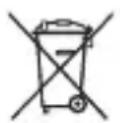

This machine is labelled with the symbol for the separate collection of waste
electrical and electronic equipment (WEEE). This means that this machine must be recycled or dismantled in accordance with European Directive 2012/19/EU to reduce the environmental impact. Another option is to return this machine to authorised collection points or a dealer when purchasing new electrical or electronic equipment.
Used or defective batteries must only be returned to collection points if discharged, secured against short-circuiting (e.g. by insulating the terminals with adhesive tape) and removed from the old device. The applicable regulations must be observed.
Batteries will then be recycled.
Information on REACH:
www.festool.com/reach
12 General information
Imported into the UK by
Festool UK Ltd
English
1 Anglo Saxon Way
Bury St Edmunds
IP30 9XH
Great Britain
1 Symboles

www.festool.ro/service