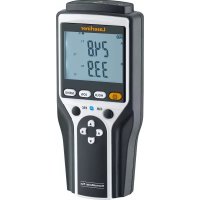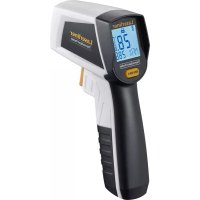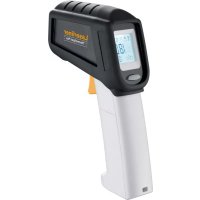
ThermoSpot Plus - Thermometer Laserliner - Free user manual and instructions
Find the device manual for free ThermoSpot Plus Laserliner in PDF.


| Product type | Non-contact infrared thermometer |
| Brand | Laserliner |
| Model | ThermoSpot Plus |
| Measuring range | -38°C to 600°C |
| Accuracy | ±2°C (0°C to 600°C) or ±2% (whichever is greater); ±2°C + 0.05°C/°C (-38°C to 0°C) |
| Resolution | 0.1°C |
| Optics (distance/spot ratio) | 12:1 |
| Emissivity | Adjustable from 0.01 to 1.00 |
| Aiming laser | Class 2, < 1 mW, 650 nm |
| Maximum value display | Yes (MAX) |
| Continuous measurement | Yes, by keeping the trigger pressed |
| Hold function | Yes, holds the last measured value |
| Display backlight | Yes |
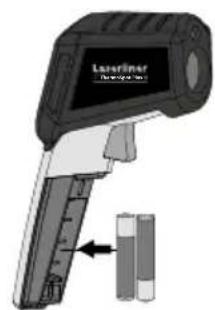
| Power supply | 2 AAA (LR03) 1.5 V batteries |
| Dimensions (L × H × D) | 46 × 158 × 125 mm |
| Weight (with batteries) | 210 g |
| Working conditions | 0°C to 50°C, max. relative humidity 20-85% (non-condensing) |
| Storage conditions | -10°C to 60°C, max. relative humidity 80% |
| Maintenance and cleaning | Clean with a slightly damp cloth; do not use solvents or abrasive products; remove batteries for extended storage |
| Recommended calibration | Once a year |
| Laser safety | Do not look into the beam; do not point at people; use optical instruments |
| Approvals | CE, UKCA |
| Warranty | See conditions on the manufacturer's website |
Frequently Asked Questions - ThermoSpot Plus Laserliner
User questions about ThermoSpot Plus Laserliner
0 question about this device. Answer the ones you know or ask your own.
Ask a new question about this device
Download the instructions for your Thermometer in PDF format for free! Find your manual ThermoSpot Plus - Laserliner and take your electronic device back in hand. On this page are published all the documents necessary for the use of your device. ThermoSpot Plus by Laserliner.
USER MANUAL ThermoSpot Plus Laserliner
natural_image
Technical line drawing of a handheld device with sensor and antenna components (no text or symbols)Laserliner
!
text_image
Warning sign with sunburst symbol inside triangle, indicating hazard or cautionThe image is too blurry to recognize any text content.
text_image
Laserfiner DescriptionThe image is too blurry to recognize any text content.
text_image
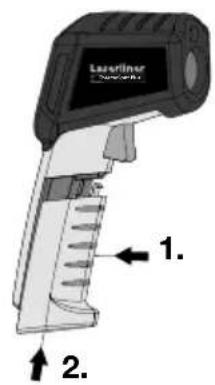
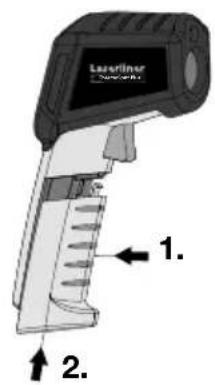
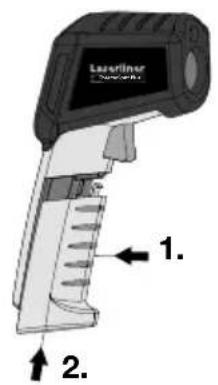
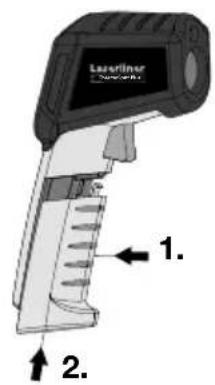
Laserliner 1. 2.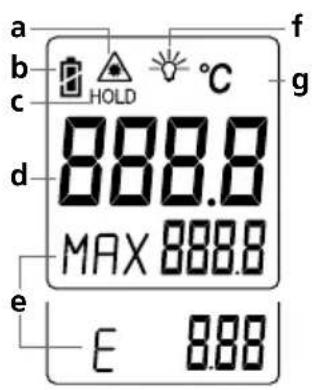
text_image
a b c HOLD °C d 888.8 MAX 888.8 e E 8.88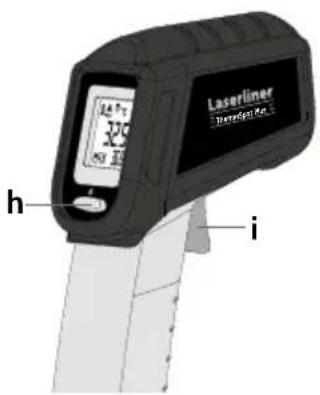
text_image
Laserliner Tremmel R.5 325 h inatural_image
Diagram showing a handheld device projecting a target with a circular target, alongside a black checkmark (no text or symbols)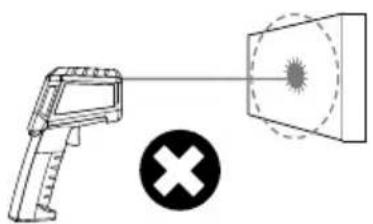
natural_image
Diagram showing a handheld device emitting a radiation beam to a target, with a cross symbol below (no text or labels)Laseraustritt
text_image
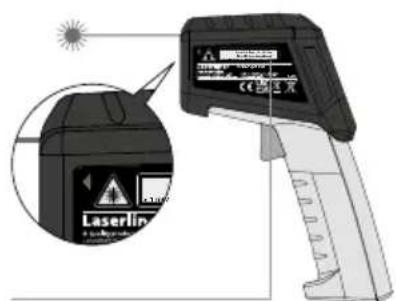
Diagram of a laser testing device with warning label and magnified view showing warning symbol and textLaserwarnhinweis
5 MAX-Anzeige
text_image
HOLD 27.7 MAX 32.7 1xCompletely read through the operating instructions, the "Warranty and Additional Information" booklet as well as the latest information under the internet link at the end of these instructions. Follow the instructions they contain. This document must be kept in a safe place and if the laser device is passed on, this document must be passed on with it.
Function / Application
The ThermoSpot Plus is an infrared thermometer with an adjustable emission coefficient that can be used for measuring the temperature of a wide range of surfaces without having to make contact with them. The instrument measures how much electromagnetic energy is emitted in the infrared wavelength range and uses this information to calculate the surface temperature.
General safety instructions
- The device must only be used in accordance with its intended purpose and within the scope of the specifications.
- The measuring tools and accessories are not toys. Keep out of reach of children.
- Modifications or changes to the device are not permitted, this will otherwise invalidate the approval and safety specifications.
- Do not expose the device to mechanical stress, extreme temperatures, moisture or significant vibration.
- The device must no longer be used if one or more of its functions fail or the battery charge is weak.
- Please ensure compliance with the safety regulations set out by local and national authorities with regard to the correct and proper use of the device.
Safety instructions
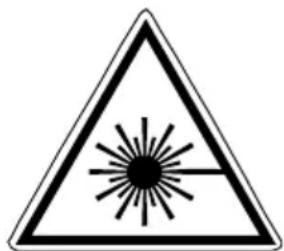
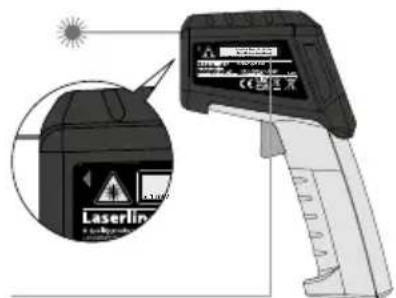
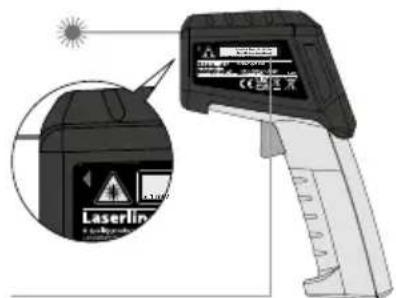
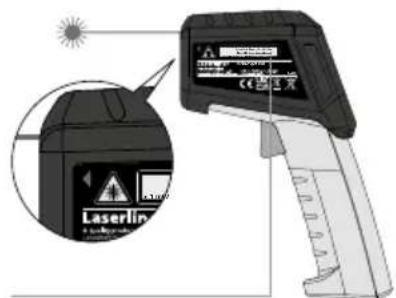
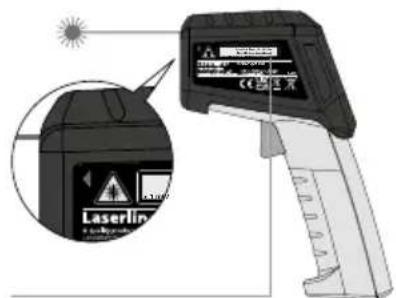
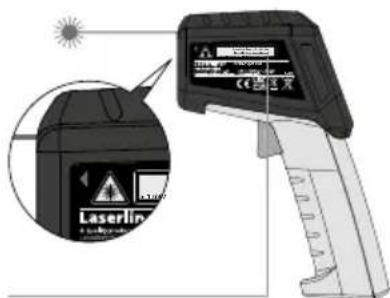
Using class 2 lasers
text_image
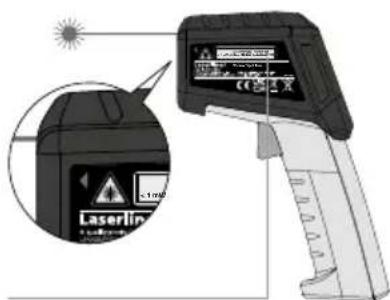
Warning sign with sunburst symbol inside triangle, indicating caution or hazardLaser radiation!
Do not stare into the beam!
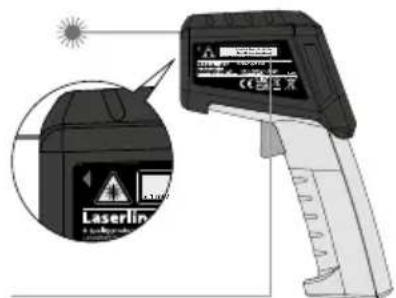
Class 2 laser
< 1 mW · 650 nm
EN 60825-1:2014/AC:2017
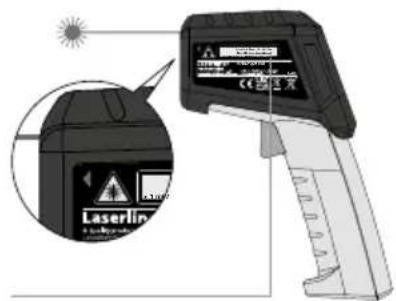
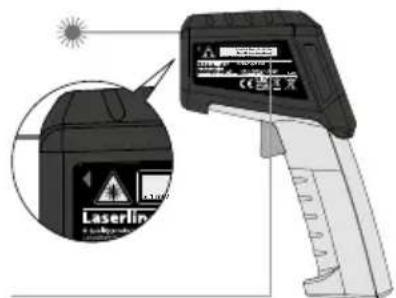
- Attention: Do not look into the direct or reflected beam.
- Do not point the laser beam towards persons.
-
If a person's eyes are exposed to class 2 laser radiation, they should shut their eyes and immediately move away from the beam.
-
Under no circumstances should optical instruments (magnifying glass, microscope, binoculars)
- Do not use the laser at eye level (1.40...1.90 m).
- Tampering with (making changes to) the laser device is not permitted.
Safety instructions
Dealing with electromagnetic radiation
- The measuring device complies with electromagnetic compatibility regulations and limit values in accordance with EMC-Directive 2014/30/EU.
- Local operating restrictions – for example, in hospitals, aircraft, petrol stations or in the vicinity of people with pacemakers – may apply. Electronic devices can potentially cause hazards or interference or be subject to hazards or interference.
- The measuring accuracy may be affected when working close to high voltages or high electromagnetic alternating fields.
Laserliner
1
text_image
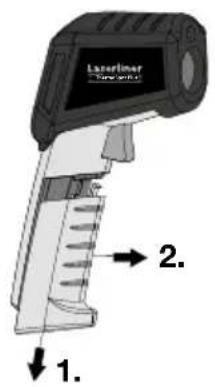
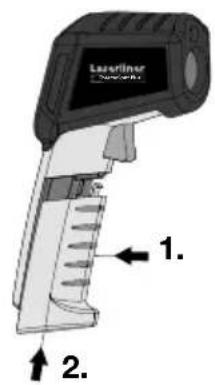
Laserline 1. 2.The image is too blurry to recognize any text content.
text_image
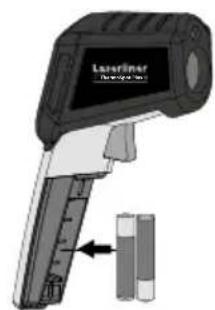
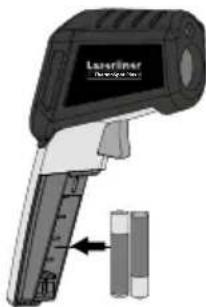
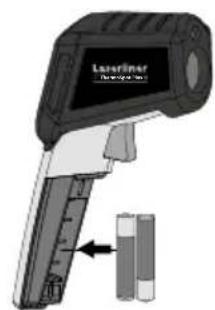
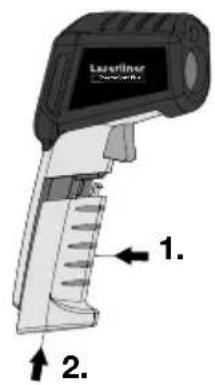
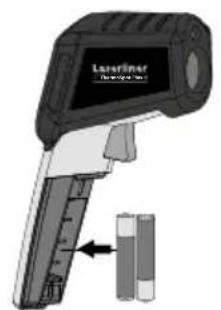
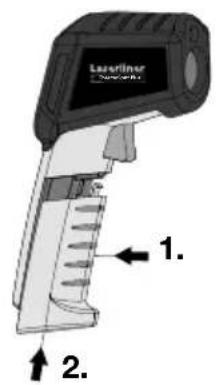
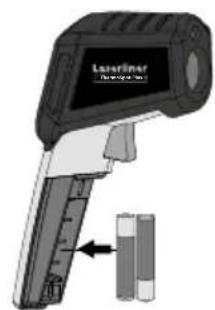
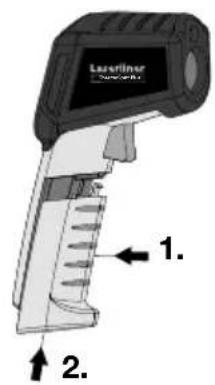
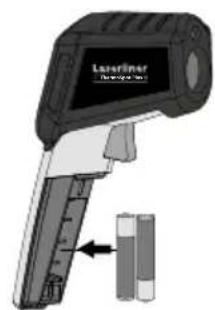
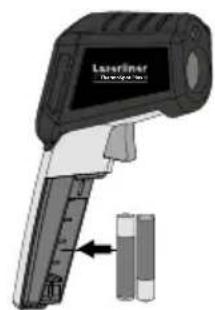
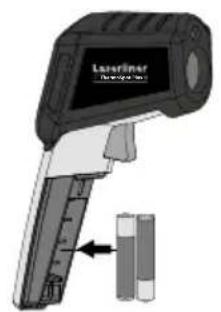
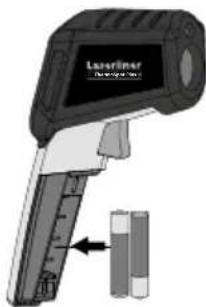
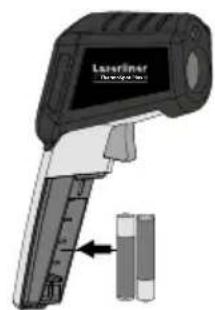
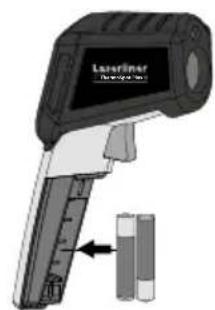
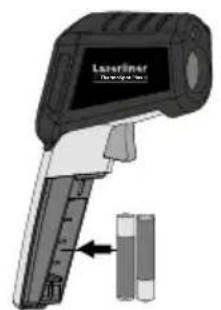
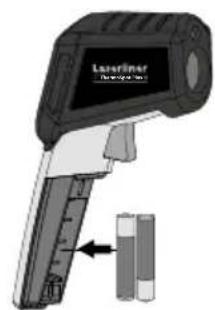
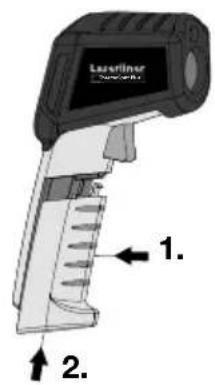
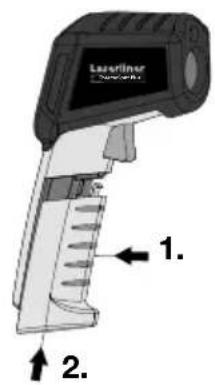
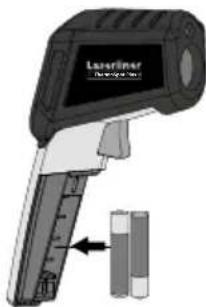
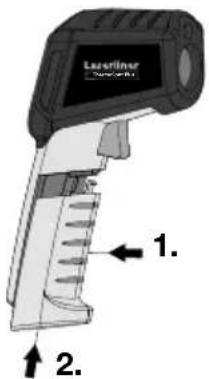
Laserfiner DescriptionBe sure to pay attention to polarity.
The image is too blurry to recognize any text content.
text_image
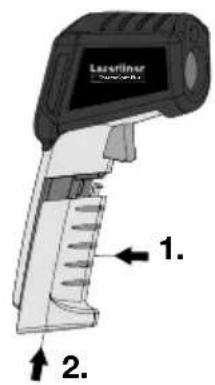
Laserliner 1. 2.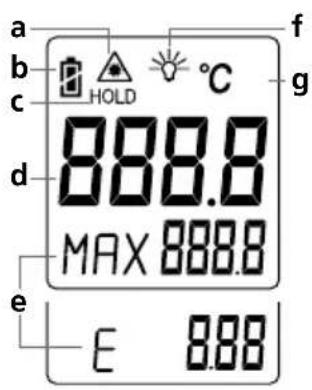
text_image
a b c d e 888.8 MAX 888.8 E 8.88 f g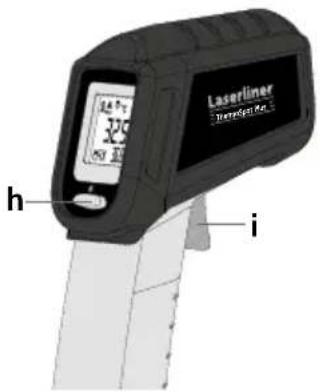
text_image
Laserliner Temperature 5.0 h ia Laser beam switched on
b Battery charge
c Hold function
d Measured value display
e Max. value during the measurement / Emission coefficient
f Display lighting
g Unit of measurement °C
h Set emission coefficient
i ON / Measure
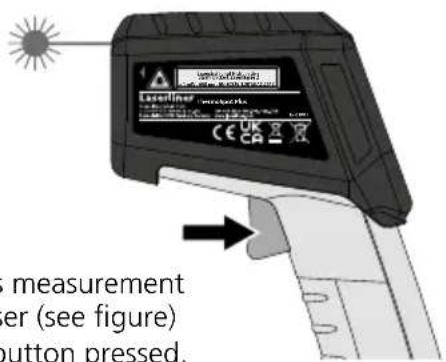
4 Continuous measurement / Hold
text_image
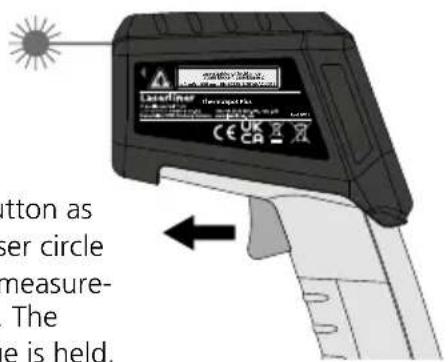
Measurement er (see figure) button pressed.Release the button as soon as the laser circle pinpoints the measurement location. The measured value is held.
text_image
Button as user circle measure- . The e is held.For continuous measurement activate the laser (see figure) and keep the button pressed.
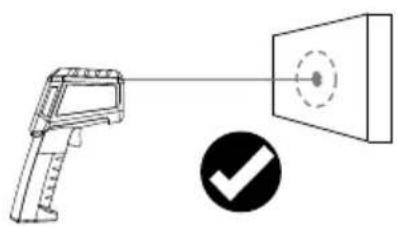
Laser circle
The laser circle is a targeting aid to sight the location for the infrared measurement. Temperature measurement is only performed on the surface within the laser circle. Please ensure that the space between the instrument and surface to be measured is free of disturbances (steam, gas, contamination, glass).
natural_image
Diagram showing a handheld device projecting a target with a circular target, alongside a black checkmark (no text or symbols)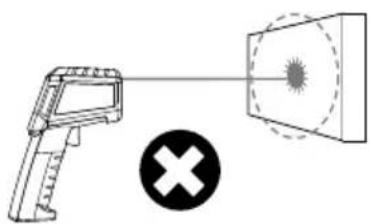
natural_image
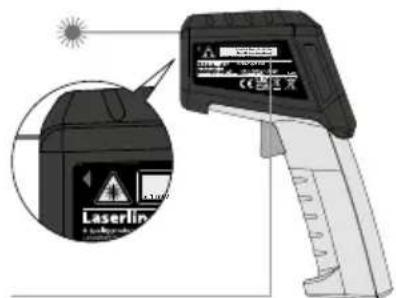
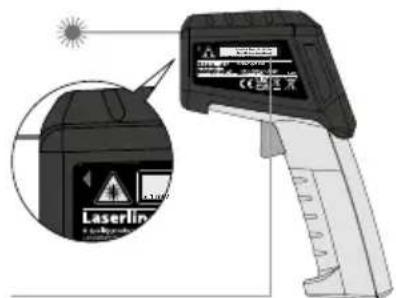
Diagram showing a handheld device emitting a radiation beam to a target, with a cross symbol below (no text or labels)Laser output
text_image
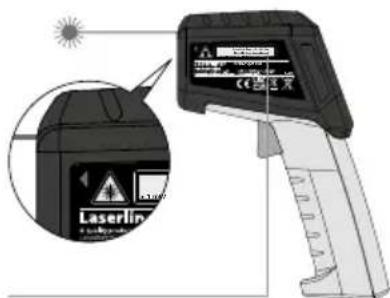
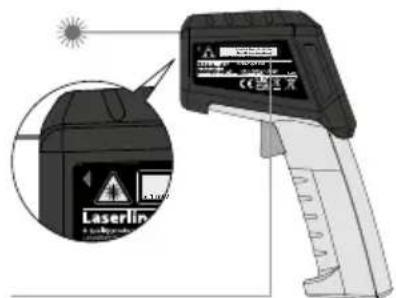
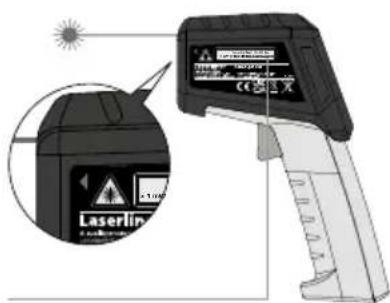
Diagram of a Laserin device with warning labels and a magnified view showing its warning symbol and warning label.Laser warning message
5 MAX display
The MAX display determines the maximum measured value within the context of a continuous measurement (keep trigger button pressed). As soon as you release the trigger button and press it again to start a new measurement, the MAX value will be reset and the instrument will start the process of recording the maximum measured value all over again.
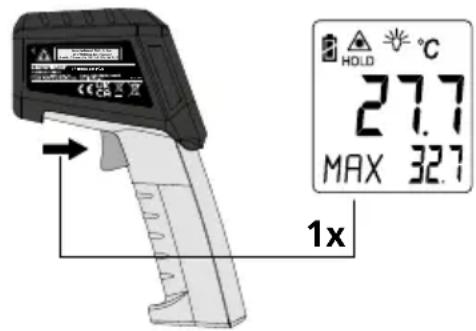
text_image
HOLD °C 27.7 MAX 32.7 1x6 Setting the emission coefficient
A built-in sensor head detects the material/surface-specific infrared rays emitted by every object. The level of these emissions is determined by the material's emission coefficient (0.01 to 1.00). After switching on for the first time, the device is preset to an emissivity coefficient of 0.95, which is suitable for most organic materials as well as plastics, ceramics, wood, rubber and stone. For materials with different emissivity coefficients, please refer to the table under point 6.
Unknown emission coefficient:
Apply masking tape or black matt paint to the surface of the area whose temperature you wish to measure. Wait until the tape/paint has heated up. The temperature of the surface can then be measured with an emission coefficient of 0.95.
text_image
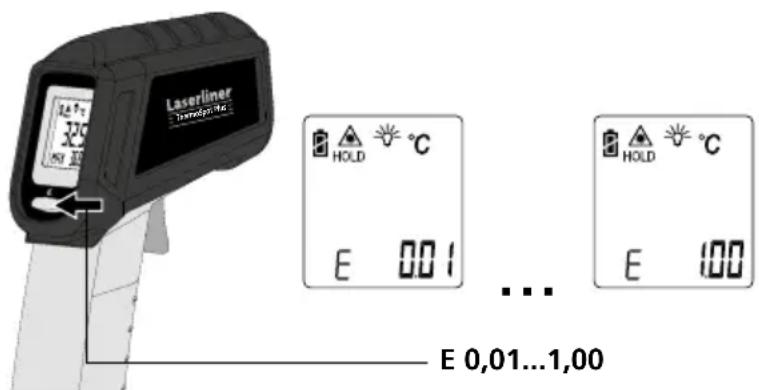
Laserliner Tendering 320 HOLD °C E 0.01 ... ... E 0,01...1,00 HOLD °C E 100Button pressed briefly: Value +0.01
Keep button pressed:
Value runs through 0.01 ... 1.00
The emissivity coefficient last selected is set after the device is switched on. Check the emissivity coefficient setting before each measurement.
7 Table of emission coefficients
Metals
| Alloy A3003 | Iron | Steel | |||
| Oxidised | 0.20 | Oxidised | 0.75 | Alloy (8% nickel, 18% chromium) | 0.35 |
| Roughened | 0.20 | With rust | 0.60 | Galvanised | 0.28 |
| Aluminium | Iron, cast | Oxidised | 0.80 | ||
| Oxidised | 0.30 | Non-oxidised | 0.20 | Heavily oxidised | 0.88 |
| Polished | 0.05 | Molten mass | 0.25 | Freshly rolled | 0.24 |
| Brass | Iron, forged | Rough, flat surface | 0.96 | ||
| Polished | 0.30 | Matt | 0.90 | Rusty, red | 0.69 |
| Oxidised | 0.50 | Lead | Sheet, nickel plated | 0.11 | |
| Chromium oxide 0.81 | Rough | 0.40 | Sheet, rolled | 0.56 | |
| Copper | Platinum | Stainless steel | 0.45 | ||
| Oxidised | 0.72 | Black | 0.90 | Zinc | |
| Copperoxide | 0.78 | Steel | Oxidised | 0.10 | |
| Inconel | Cold rolled | 0.80 | |||
| Oxidised | 0.83 | Ground plate | 0.50 | ||
| Electropolished | 0.15 | Polished plate | 0.10 |
Nonmetals
| Asbestos 0.93 | Gravel | 0.95 | PaperAll colours | 0.96 | |
| Asphalt 0.95 | Grit | 0.95 | |||
| Basalt 0.70 | Gypsum | 0.88 | PlasticTranslucentPE, P, PVC | 0.950.94 | |
| Brick, red 0.93 | Gypsum cardboard | 0.95 | |||
| Carborundum 0.90 | Heat sinkBlack, anodized | 0.98 | Quartz glass | 0.93 | |
| Cement 0.95 | Human skin | 0.98 | RubberHardSoft, grey | 0.940.89 | |
| Ceramics 0.95 | IceClearWith heavy frost | 0.97 | |||
| ChinaBrilliant white With glaze | 0.730.92 | Laminate | 0.90 | Sand | 0.95 |
| Clay 0.95 | Lime | 0.35 | Screed | 0.93 | |
| CoalNon-oxidised | 0.85 | Lime malm brick | 0.95 | Snow | 0.80 |
| Concrete, plaster, mortar | 0.93 | Limestone | 0.98 | Soil | 0.94 |
| Cotton 0.77 | MarbleBlack, dull finishGreyish, polished | 0.94 | Tar | 0.82 | |
| Earthenware, matt 0.93 | Masonry | 0.93 | Tar paper 0.92 | ||
| Fabric 0.95 | PaintBlack, mattHeat-resistantWhite | 0.970.920.90 | Transformer paint | 0.94 | |
| Glass 0.90 | Wallpaper, light-coloured | 0.89 | |||
| Glass wool | 0.95 | Water | 0.93 | ||
| Graphite | 0.75 | WoodUntreatedBeech, planed | 0.880.94 |
Information on maintenance and care
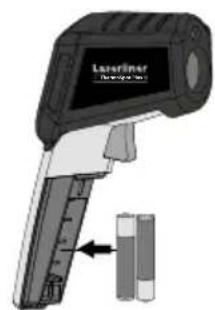
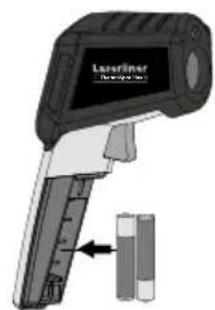
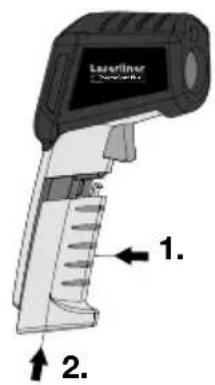
Clean all components with a damp cloth and do not use cleaning agents, scouring agents and solvents. Remove the battery(ies) before storing for longer periods. Store the device in a clean and dry place.
Calibration
The meter needs to be calibrated and tested on a regular basis to ensure it produces accurate measurement results. We recommend carrying out calibration once a year.
| Technical data Technical revisions reserved. 21W11 | |
| Measurement range -38°C ... 600°C | |
| Accuracy | ± 2°C + 0,05°C / degree (-38°C ... 0°C)± 2°C (0°C ... 600°C) or± 2% whichever value is greater |
| Optic 12:1 (distance : measured spot) | |
| Resolution 0.1°C | |
| Emission coefficient 0.01 ... 1.00 | |
| Laser wavelength 650 nm | |
| Laser class 2 / < 1 mW (EN 60825-1:2014/AC:2017) | |
| Operating conditions | 0°C ... 50°C, max. humidity 20 ... 85% rH, no condensation,max. working altitude 4000 m above sea level |
| Storage conditions -10°C ... 60°C, max. humidity 80% rH | |
| Power supply 2 x 1,5V LR03 (AAA) | |
| Dimensions (W x H x D) 46 x 158 x 125 mm | |
| Weight 210 g (incl. batteries) | |
EU directives and disposal
This device complies with all necessary standards for the free movement of goods within the EU.
This product is an electric device and must be collected separately for disposal according to the European Directive on waste electrical and electronic equipment.
Further safety and supplementary notices at:
http://laserliner.com/info?an=AFZ

!
text_image
Warning sign with sunburst symbol inside triangle, indicating hazard or cautionLaserstraling!
The image is too blurry to recognize any text content.
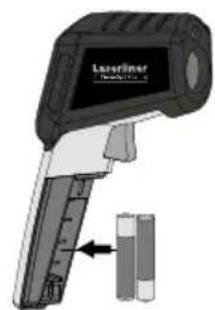
natural_image
Illustration of a Laseraser device with a cylindrical component inserted (no text or symbols visible)The image is too blurry to recognize any text content.
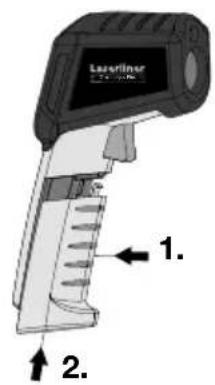
text_image
Laserliner 1. 2.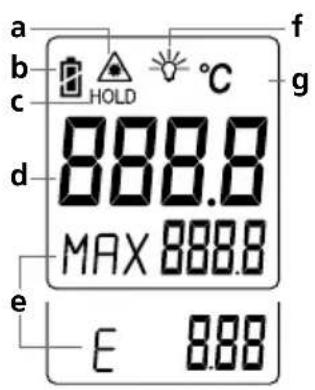
text_image
a b c d e 888.8 MAX 888.8 E 8.88 f g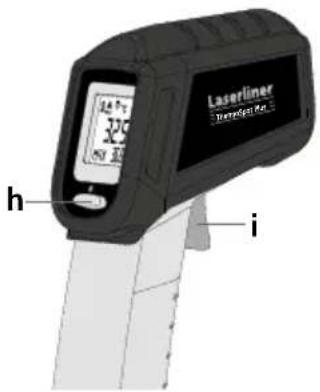
text_image
Laserliner Temperature 10.5 h inatural_image
Diagram showing a handheld device projecting a target onto a screen, with a black checkmark indicating a confirmation (no text or symbols present)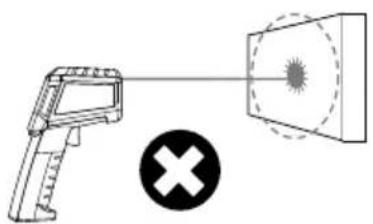
natural_image
Diagram showing a handheld device emitting a radiation beam with a cross symbol (no text or labels)Laseruitlaat
text_image
Diagram of a Laserin testing device with warning labels and a magnified view showing its warning symbol.Laserwaarschuwing
Laserliner
5 MAX-weergave
text_image
HOLD 27.7 MAX 32.7 1xtext_image
Warning sign with triangular shape containing a central sunburst symbolLaserstråling!
The image is too blurry to recognize any text content.
text_image
Laserfilter (Advanced)The image is too blurry to recognize any text content.
text_image
Laserliner 1. 2.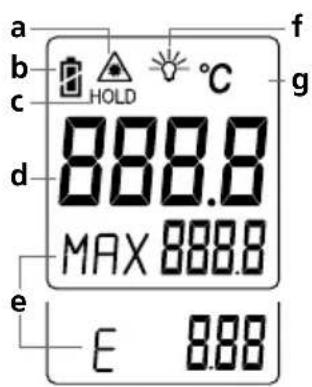
text_image
a b c HOLD °C d 888.8 MAX 888.8 e E 8.88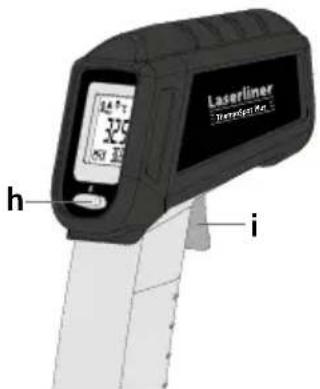
text_image
Laserliner Temperature 1.5 h inatural_image
Diagram showing a handheld device and a screen with a circular target, alongside a checkmark (no text or symbols)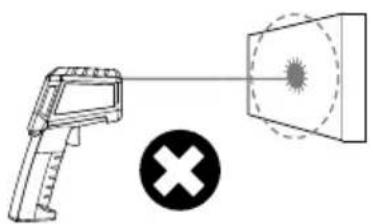
natural_image
Diagram showing a handheld device emitting a radiation beam to a target with a cross symbol (no text or labels)Laserudgang
text_image
Diagram of a laser testing device with warning labels and a magnified view showing its warning symbol.Laseradvarsel
5 MAX-indikator
text_image
HOLD 27.7 MAX 32.7 1xtext_image
Warning sign with sunburst symbol inside triangle, indicating hazard or cautionRayonnement laser!
The image is too blurry to recognize any text content.
text_image
Laserfiner DescriptionThe image is too blurry to recognize any text content.
text_image
Laserliner 1. 2.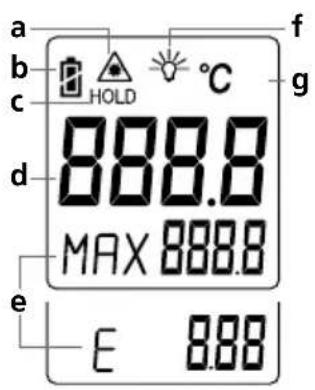
text_image
a b c d e 888.8 MAX 888.8 E 8.88 f g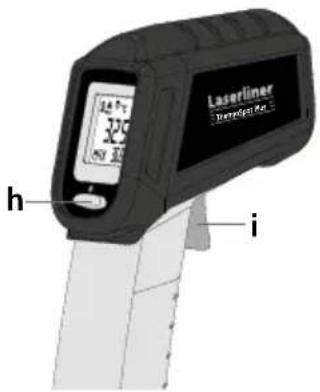
text_image
Laserliner Temperature 10.5 h inatural_image
Diagram showing a handheld device and a target with a circular target, alongside a checkmark (no text or symbols present)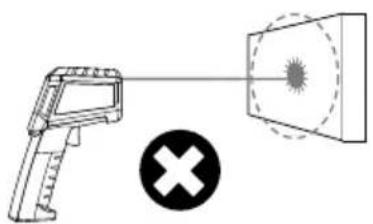
natural_image
Diagram showing a handheld device emitting a radiation beam with a cross symbol (no text or labels)Sortie du laser
text_image
Diagram of a Laserin testing device with warning labels and a magnified inset showing its warning symbol.text_image
HOLD 27.7 MAX 32.7 1xtext_image
Warning sign with sunburst symbol inside triangle, indicating caution or hazardRayo láser!
The image is too blurry to recognize any text content.
text_image
Laserfiner Device 10The image is too blurry to recognize any text content.
text_image
Laserliner 1. 2.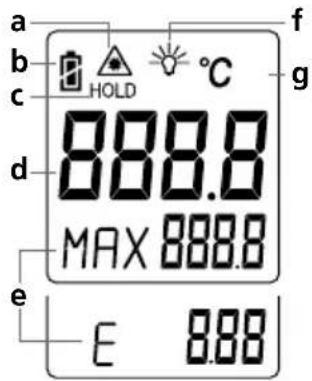
text_image
a b c d e E 8.88 888.8 MAX 888.8 f g HOLD °C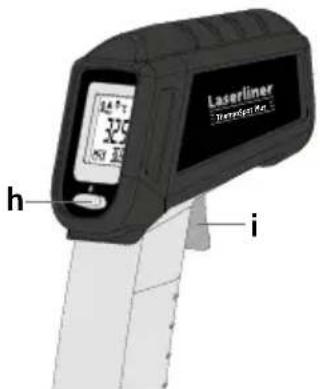
text_image
Laserliner Temperature Sensor h inatural_image
Diagram showing a handheld device and a screen with a circular target, alongside a black checkmark (no text or symbols)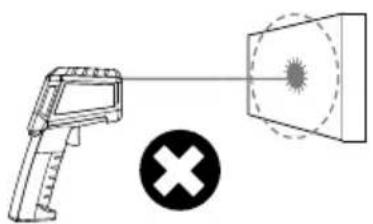
natural_image
Diagram showing a handheld device projecting a target with a cross symbol (no text or labels)Salida del láser
text_image
Diagram of a laser testing device with warning labels and a magnified view showing its warning symbol.text_image
HOLD 27.7 MAX 32.7 1xtext_image
Warning sign with sunburst symbol inside triangle, indicating hazard or cautionThe image is too blurry to recognize any text content.
text_image
Laserfiner DescriptionThe image is too blurry to recognize any text content.
text_image
Laserliner 1. 2.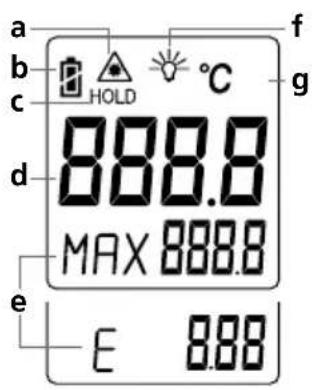
text_image
a b c d e 888.8 MAX 888.8 E 8.88 f g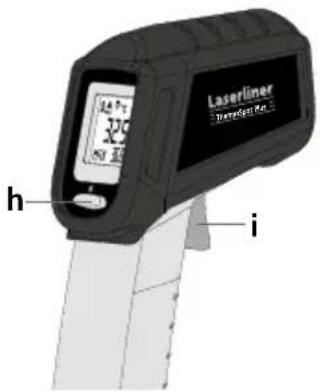
text_image
Laserliner Temperature 10.5 h inatural_image
Diagram showing a handheld device projecting a circular target onto a screen, with a black checkmark indicating the detection or confirmation (no text or symbols present)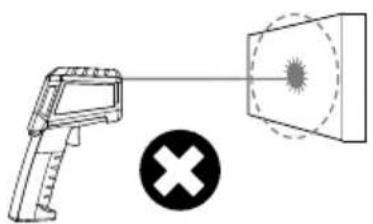
natural_image
Diagram showing a handheld device emitting a radiation beam with a cross symbol (no text or labels)text_image
Diagram of a Laserin testing device with warning labels and a magnified view showing its warning symbol.Avvertimento laser
Laserliner
text_image
HOLD 27.7 MAX 32.7 1xtext_image
Warning sign with triangular shape containing a central sunburst symbolI am a day 10 o the bus Bus #5 from Washington IT APP STYLE PREAD SET BARRS
< 100%
text_image
HOLD 27.7 MAX 32.7 1xtext_image
Warning sign with sunburst symbol inside triangle, indicating radiation hazard or warningLasersäteilyä!
The image is too blurry to recognize any text content.
text_image
Laseraser Dissipation KitThe image is too blurry to recognize any text content.
text_image
Laserliner 1. 2.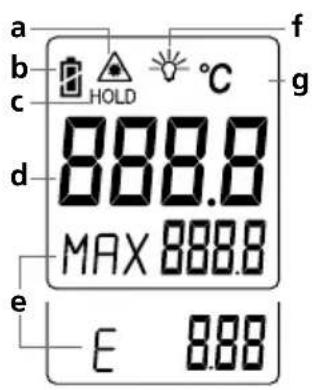
text_image
a b c d e 888.8 MAX 888.8 E 8.88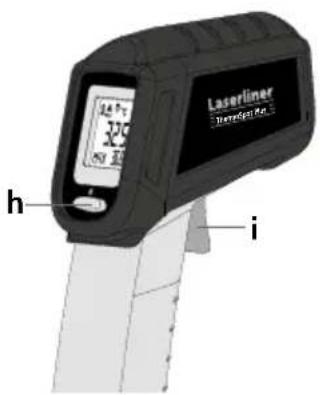
text_image
Laserliner Tremelker h itext_image
Latelliner werteilinen CE UK CA A B C D E F G H I J K L M N O P Q R S T U V W X Y Z A B C D E F G H I J K L M N O P Q R S T U V W Xnatural_image
Diagram showing a handheld device projecting a target onto a screen, with a black checkmark indicating the detection or confirmation (no text or symbols present)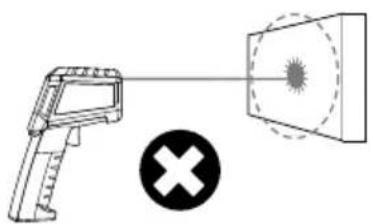
natural_image
Diagram showing a handheld device emitting a radiation beam to a target, with a cross symbol below (no text or labels)Laseraukko
text_image
Diagram of a Laserin testing device with warning labels and a magnified inset showing its warning symbol.text_image
HOLD 27.7 MAX 32.7 1x6 Emissioarvon asetus
text_image
Warning sign with sunburst symbol inside triangle, indicating caution or hazardRadiação laser!
The image is too blurry to recognize any text content.
text_image
Laserfiner Device 10The image is too blurry to recognize any text content.
text_image
Laserliner 1. 2.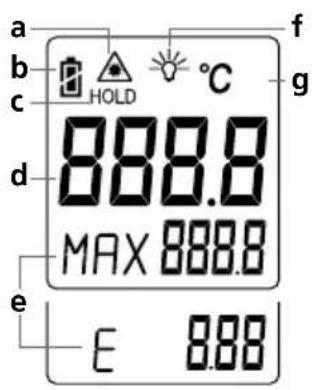
text_image
a b c HOLD °C d 888.0 MAX 888.0 e E 8.88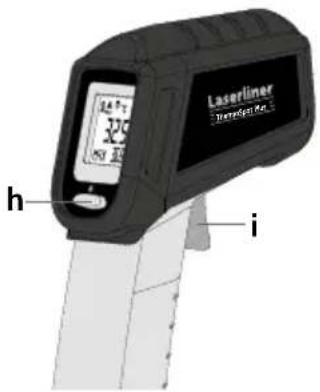
text_image
325 h i Laserliner Transport No. 1text_image
Warning Localizer software CE UK CA X Y Z X X X X X X X X X X X X X X X X X X X X X X X X X X X X X X X X X X X X X X X X X X X X X X X X X X Y Y Y Y Y Y Y Y Y Y Y Y Y Y Y Y Y Y Y Y Y Y Y Y Y Y Y Y Y Y Y Y Y Y Y Y Y Y Y Y Y Ynatural_image
Diagram showing a handheld device projecting a target screen with a checkmark (no text or symbols present)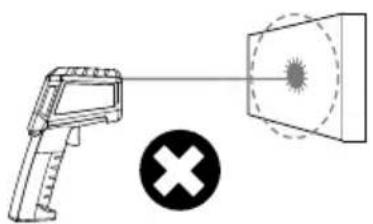
natural_image
Diagram showing a handheld device emitting a radiation beam with a cross symbol (no text or labels)Saída de laser
text_image
Diagram of a laser testing device with warning labels and a magnified view showing its warning symbol.Aviso de laser
5 Indicação MAX
text_image
HOLD 27.7 MAX 32.7 1xtext_image
Warning sign with sunburst symbol inside triangle, indicating hazard or cautionLaserstrålning! Titta aldrig direkt in i laserstrålen! Laser klass 2 < 1 mW · 650 nm EN 60825-1:2014/AC:2017
The image is too blurry to recognize any text content.
text_image
Laserfiner DescriptionThe image is too blurry to recognize any text content.
text_image
Laserliner 1. 2.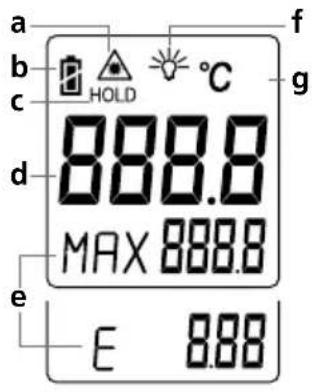
text_image
a b c d e 888.8 MAX 888.8 E 8.88 f g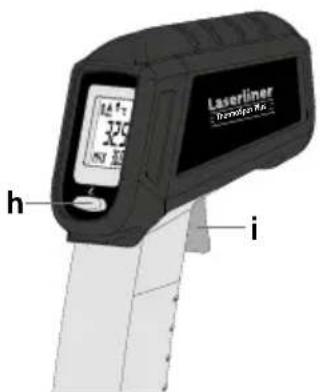
text_image
Laserliner Protopix Rx h inatural_image
Diagram showing a handheld device and a screen with a circular target, alongside a checkmark (no text or symbols present)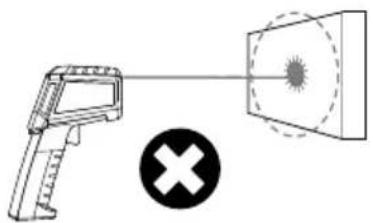
natural_image
Diagram showing a handheld device projecting a target with a cross symbol (no text or labels)Laserutlopp
text_image
Diagram of a laser testing device with warning labels and a magnified view showing its warning symbol.Laserarmsanvisning
Laserliner
5 Maxvisning
text_image
HOLD 27.7 MAX 32.7 1x6 Emissionsgradstabell
text_image
Warning sign with triangular shape containing a central sunburst symbolLaserstråling!
The image is too blurry to recognize any text content.
text_image
Laserfiner Device 10The image is too blurry to recognize any text content.
text_image
Laserliner 1. 2.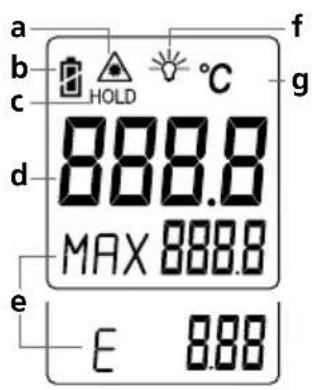
text_image
a b c d e 888.8 MAX 888.8 E 8.88 f g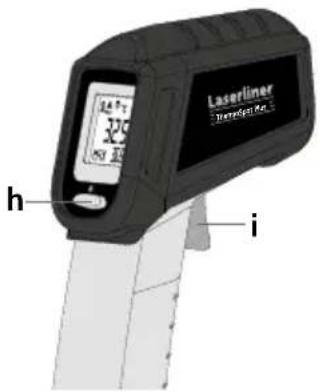
text_image
325 h i Laserliner Transport No. 1natural_image
Diagram showing a handheld device projecting a target onto a screen, with a black checkmark indicating the detection or confirmation (no text or symbols present)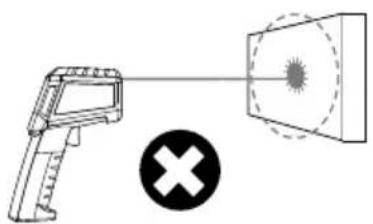
natural_image
Diagram showing a handheld device projecting a target with a cross symbol (no text or labels)Laserutgang
text_image
Diagram of a laser testing device with warning labels and a magnified inset showing its warning symbol.Laser adversel
5 MAKS-indikering
text_image
HOLD 27.7 MAX 32.7 1xtext_image
Warning sign with sunburst symbol inside triangle, indicating hazard or cautionThe image is too blurry to recognize any text content.
text_image
Laseraser Dissipation KitThe image is too blurry to recognize any text content.
text_image
Laserliner 1. 2.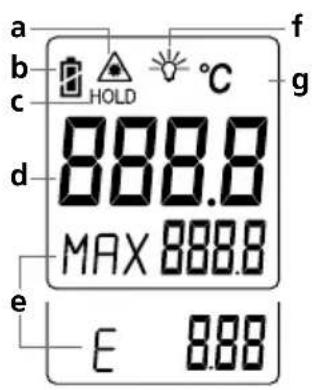
text_image
a b c d e 888.8 MAX 888.8 E 8.88 f g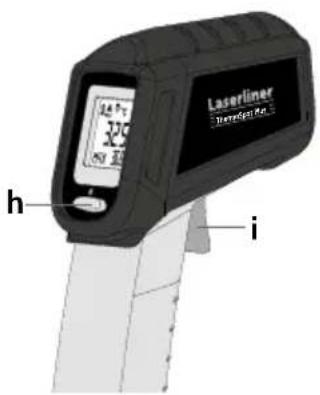
text_image
Laserliner Tremmel Rz 325°C h inatural_image
Diagram showing a handheld device projecting a target onto a screen, with a black checkmark indicating the correct detection (no text or symbols present)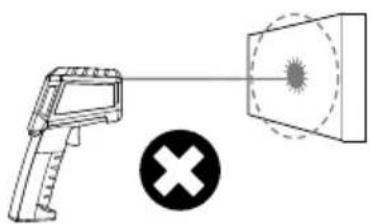
natural_image
Diagram showing a handheld device emitting a radiation beam to a target, with a cross symbol below (no text or labels)Lazer çıkışı
text_image
Diagram of a Laserin testing device with warning labels and a magnified view showing its warning symbol.text_image
HOLD 27.7 MAX 32.7 1xtext_image
Warning sign with triangular shape containing a central sunburst symbol and horizontal lineЛазерное излучение!
Избегайте попадания
луча в глаза!
Класс лазера 2
< 1 мВт · 650 нм
EN 60825-1:2014/AC:2017
The image is too blurry to recognize any text content.
text_image
Laserfilter (Advanced)The image is too blurry to recognize any text content.
text_image
Laserliner 1. 2.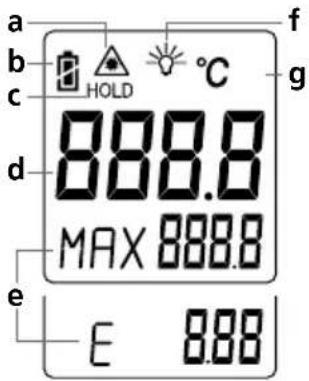
text_image
a b c d e E 888.0 MAX 888.0 f g HOLD °C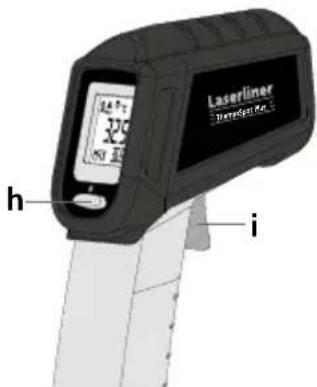
text_image
Laserliner 325°F h inatural_image
Diagram showing a handheld device and a screen with a target, alongside a checkmark (no text or symbols present)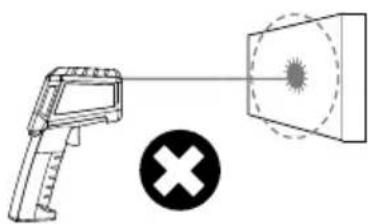
natural_image
Diagram showing a handheld device emitting a radiation beam with a cross symbol (no text or labels)Лазерное излучение
text_image
Diagram of a laser testing device with warning labels and a magnified inset showing its warning symbol.text_image
HOLD 27.7 MAX 32.7 1xtext_image
Warning sign with sunburst symbol inside triangle, indicating hazard or cautionThe image is too blurry to recognize any text content.
text_image
Laserfiner DewertelThe image is too blurry to recognize any text content.
text_image
Laserliner 1. 2.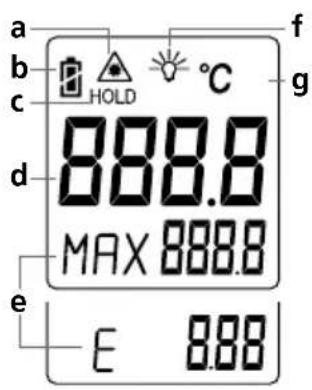
text_image
a b c d e 888.8 MAX 888.8 E 8.88 f g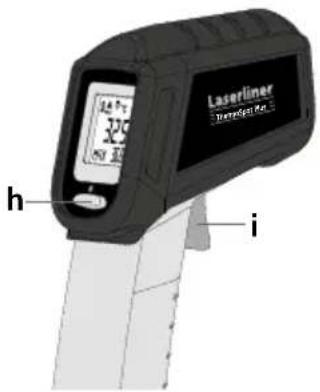
text_image
Laserliner Temperature 10.5 h inatural_image
Diagram showing a handheld device projecting a target with a circular target, alongside a checkmark icon (no text or symbols present)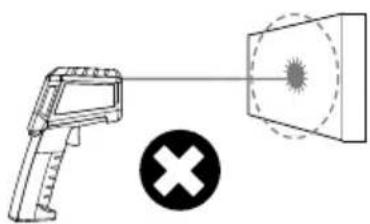
natural_image
Diagram showing a handheld device emitting a radiation beam with a cross symbol (no text or labels)text_image
Diagram of a laser testing device with warning labels and a magnified inset showing its components.text_image
HOLD 27.7 MAX 32.7 1xtext_image
Warning sign with sunburst symbol inside triangle, indicating hazard or cautionLaserové záření!
The image is too blurry to recognize any text content.
text_image
Laserfiner Device 10The image is too blurry to recognize any text content.
text_image
Laserliner 1. 2.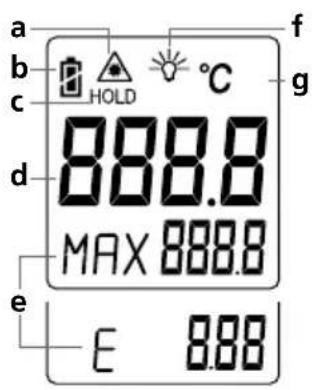
text_image
a b c d e 888.8 MAX 888.8 E 8.88 f g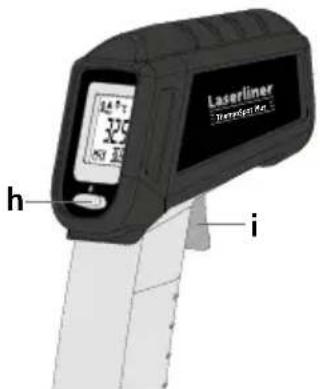
text_image
Laserliner Temperature 1.5 h inatural_image
Diagram showing a handheld device projecting a target screen with a circular target, alongside a black checkmark (no text or symbols present)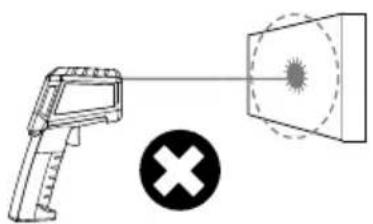
natural_image
Diagram showing a handheld device emitting a radiation beam to a target with a cross symbol (no text or labels)Výstup laseru
text_image
Diagram of a laser testing device with warning labels and a magnified view showing its warning symbol.text_image
HOLD °C 27.7 MAX 32.7 1xtext_image
Warning sign with sunburst symbol inside triangle, indicating hazard or cautionLaserkiirgus! Mitte vaadata laserikiirt! Laseriklass 2 < 1 mW · 650 nm EN 60825-1:2014/AC:2017
The image is too blurry to recognize any text content.
text_image
Laseraser Dissipation KitJälgige korrektset polaarsust.
The image is too blurry to recognize any text content.
text_image
Laserliner 1. 2.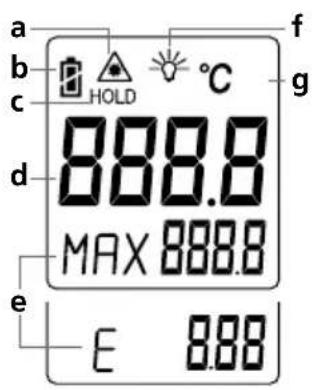
text_image
a b c d e 888.8 MAX 888.8 E 8.88 f g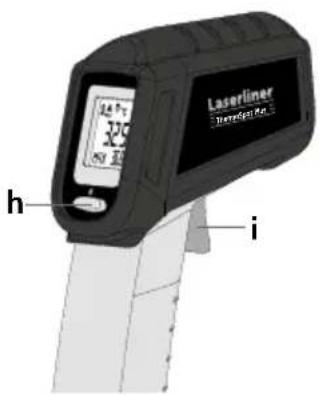
text_image
Laserliner Tremelker h inatural_image
Diagram showing a handheld device projecting a target onto a screen, with a black checkmark indicating approval (no text or symbols present)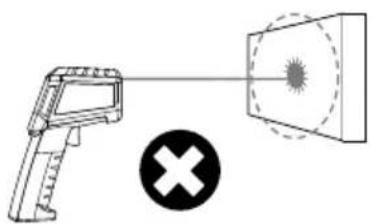
natural_image
Diagram showing a handheld device emitting a radiation beam to a target, with a cross symbol below (no text or labels)Laseri väljumiskoht
text_image
Diagram of a Laserin testing device with warning labels and a magnified inset showing its warning symbol.Laseri hoiatusjuhis
Laserliner
5 MAX näit
text_image
HOLD 27.7 MAX 32.7 1x6 Emissionikraadi seadistamine
text_image
Warning sign with sunburst symbol inside triangle, indicating caution or hazardRaze laser!
The image is too blurry to recognize any text content.
text_image
Laserfiner Device 10The image is too blurry to recognize any text content.
text_image
Laserliner 1. 2.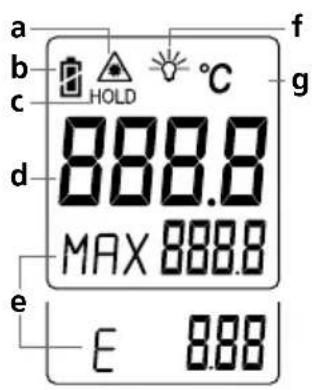
text_image
a b c HOLD °C d 888.0 MAX 888.0 e E 8.88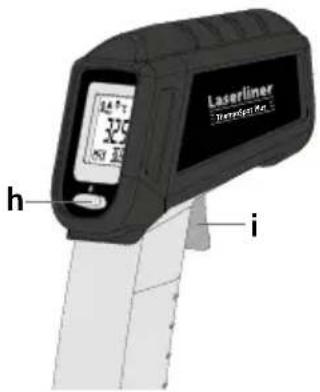
text_image
325 h i Laserliner Transport No. 1natural_image
Diagram showing a handheld device and a screen with a circular target, alongside a checkmark (no text or symbols present)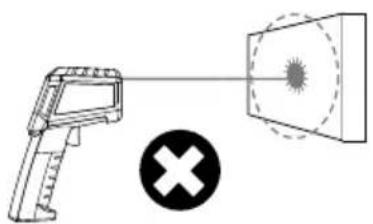
natural_image
Diagram showing a handheld device emitting a radiation beam to a target with a cross symbol (no text or labels)leşire laser
text_image
Diagram of a Laserin testing device with warning labels and a magnified view showing its warning symbol.text_image
HOLD 27.7 MAX 32.7 1xtext_image
Warning sign with triangular shape containing a central sunburst symboltext_image
Laserfiner DescriptionThe image is too blurry to recognize any text content.
text_image
Laserliner 1. 2.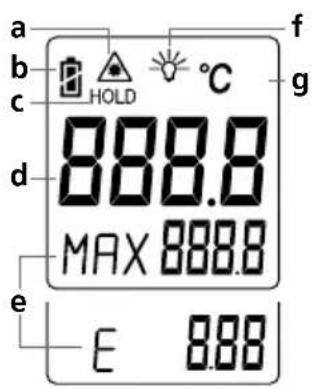
text_image
a b c d e 888.8 MAX 888.8 E 8.88 f g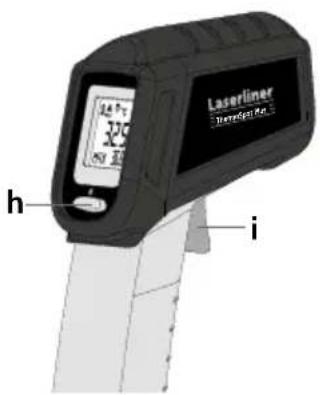
text_image
Laserliner Tremelker h inatural_image
Diagram showing a handheld device with a target and a circular target on a screen, alongside a black checkmark (no text or symbols)
natural_image
Diagram showing a firearm and a target with a cross symbol (no text or labels)Изход на лазера
text_image
Diagram of a laser gun with warning labels and a magnified inset showing a hazard symbol and 'Laserlin' label.text_image
HOLD 27.7 MAX 32.7 1xtext_image
Warning sign with sunburst symbol inside triangle, indicating hazard or cautionThe image is too blurry to recognize any text content.
text_image
Laserfilter (Advanced)The image is too blurry to recognize any text content.
text_image
Laserliner 1. 2.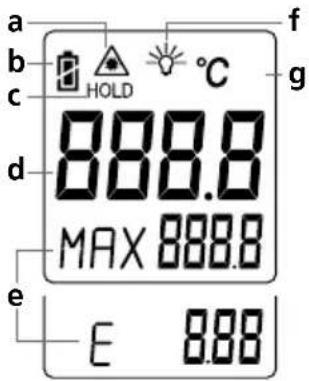
text_image
a b c HOLD °C 888.0 d MAX 888.0 e E 8.88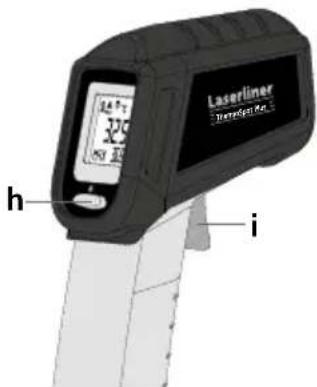
text_image
Laserliner 325°F h inatural_image
Diagram showing a handheld device and a screen with a circular target, alongside a checkmark (no text or symbols)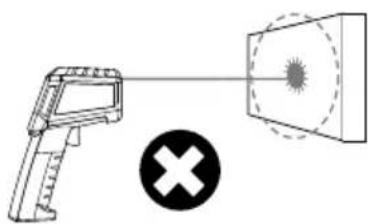
natural_image
Diagram showing a handheld device emitting a radiation beam with a cross symbol (no text or labels)'Εξοδος λέιζερ