
KM 7540 W Bp - Vacuum Cleaner Kärcher - Free user manual and instructions
Find the device manual for free KM 7540 W Bp Kärcher in PDF.
 FR
FR
 BG
BG
 CS
CS
 DA
DA
 DE
DE
 EL
EL
 EN
EN
 ES
ES
 ET
ET
 FI
FI
 HU
HU
 IT
IT
 JA
JA
 KK
KK
 LT
LT
 LV
LV
 NL
NL
 NO
NO
 PL
PL
 PT
PT
 RO
RO
 RU
RU
 SK
SK
 SL
SL
 SV
SV
 TR
TR
 UK
UK
 ZH
ZH
| Product Type | Battery-powered electric sweeper |
| Brand | Kärcher |
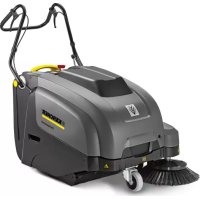
| Model | KM 7540 W Bp (KM 75/40 W Bp) |
| Dimensions (L x W x H) | With handle raised: 1430 x 750 x 1190 mm |
| Weight | Without batteries: 79 kg / With batteries: 125 kg |
| Power Supply | 2 batteries 12 V – 60 Ah (lead GIV) |
| Runtime | Approximately 1.5 to 2 hours |
| Charging Time | Approximately 12 hours |
| Charger | 230 V~, output 24 V – 10 A |
| Dust Bin Capacity | 40 liters (max. load 40 kg) |
| Working Width | 550 mm (without side brushes) / 750 mm (with side brushes) |
| Sweeping Speed | 4.5 km/h |
| Max. Slope | 12% |
| Filter Surface Area | 1.8 m² (class L) |
| Nominal Vacuum | 5 mbar |
| Nominal Air Flow | 45 l/s |
| Noise Level | Sound pressure LpA: 71 dB(A) / Sound power LwA: 88 dB(A) |
| Hand-arm Vibration | 3.7 m/s² |
| Protection | IPX3 (protection against water jets) |
| Suitable Surfaces | Asphalt, concrete, industrial flooring, screed, paving |
| Main Functions | Projection sweeping, suction with filter, removable bin, large debris flap, adjustable side brushes |
| Filter Cleaning | Integrated filter cleaner (pull the handle) |
| Safety | Cut-out switch on hood, key main switch, parking brake |
| Maintenance | Emptying bin, filter cleaning, brush and belt check, adjusting sweeping track |
| Recommended Accessories | Soft side brushes (6.905-626.0), hard/antistatic rotary brushes |
Frequently Asked Questions - KM 7540 W Bp Kärcher
User questions about KM 7540 W Bp Kärcher
0 question about this device. Answer the ones you know or ask your own.
Ask a new question about this device
Download the instructions for your Vacuum Cleaner in PDF format for free! Find your manual KM 7540 W Bp - Kärcher and take your electronic device back in hand. On this page are published all the documents necessary for the use of your device. KM 7540 W Bp by Kärcher.
USER MANUAL KM 7540 W Bp Kärcher
Czech 162
Slovenian 172
Polish 182
Romanian 193
Slovak 204
Croatian 214
Serbian 224
Bulgarian 234
Estonian 245
Latvian 255
Lithuanian 265
Ukrainian 275
Kazakh 286
Chinese 297
Japanese 306
Note
Chairman of the Board of Management
S. Reiser
Director Regulatory Affairs & Certification
71364 Winnenden (Germany)
Tel.: +49 7195 14-0
Fax: +49 7195 14-2212
Winnenden, 2021/02/01
Help with malfunctions
Please read and comply with these original instructions prior to the initial operation of your appliance and store them for later use or subsequent owners.
Proper use.....EN 1
Function.....EN 1
General notes ..... EN 1
Safety instructions....EN 2
Operating and Functional Elements
EN 3
Before Startup ..... EN 4
Start up....EN 5
Operation.....EN 5
Shutdown.....EN 6
Care and maintenance ..... EN 6
Accessories....EN 8
EU Declaration of Conformity . EN 9
Declaration of Conformity .... EN 9
Troubleshooting.....EN 10
Technical specifications.....EN 11
Proper use
Use this appliance only as directed in these operating instructions.
- This sweeper has been designed to sweep dirt and debris from indoor as well as outdoor surfaces.
- This device is suitable for commercial use in hotels, schools, hospitals, factories, shops, offices, and rental companies.
- The machine with working equipment must be checked to ensure that it is in proper working order and is operating safely prior to use. Otherwise, the appliance must not be used.
– The machine is not suitable for vacuuming dust which endangers health.
– The machine may not be modified.
- The machine is only suitable for use on the types of surfaces specified in the operating instructions.
– The machine may only be operated on the surfaces approved by the company or its authorised representatives.
- The following applies in general: Keep highly-flammable substances away from the appliance (danger of explosion/fire).
Foreseeable misuse
- Never vacuum up explosive liquids, combustible gases or undiluted acids and solvents. This includes petrol, paint thinner or heating oil which can generate explosive fumes or mixtures upon contact with the suction air. Acetone, undiluted acids and solvents must also be avoided as they can harm the materials on the machine.
- Never sweep/vacuum up reactive metal dusts (e.g. aluminium, magnesium, zinc), as they form explosive gases when they come in contact with highly alkaline or acidic detergents.
- Do not sweep/vacuum up any burning or glowing objects.
– The machine may not be used or stored in hazardous areas. It is not allowed to use the appliance in hazardous locations.
Suitable surfaces
- Asphalt
- Industrial floor
- Screed
- Concrete
- Paving stones
Function
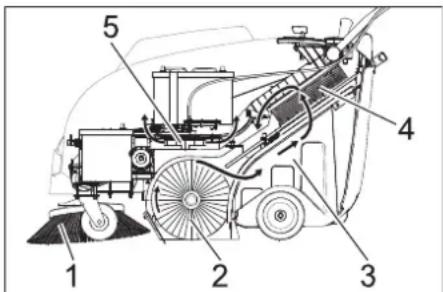
The sweeper operates using the overthrow principle.
- The side brushes (1) clean the corners and edges of the surface and move dirt and debris into the path of the roller brush.
- The rotating roller brush (2) moves the dirt and debris directly into the waste container (3).
- The dust raised in the container is separated by the dust filter (4) and the filtered clean air is drawn off by the suction fan (5).
General notes
Your sales outlet should be informed about any transit damage noted when unpacking the product.
- Read and adhere to the operating instructions and safety notes of the attachments affixed to the appliance.
- Warning and information plates on the machine provide important directions for safe operation. – In addition to the information contained in the operating instructions, all statutory safety and accident prevention regulations must be observed.
Accessories and Spare Parts
△DANGER
To avoid risks, all repairs and replacement of spare parts may only be carried out by authorized customer service personnel.
- Only use accessories and spare parts which have been approved by the manufacturer. The exclusive use of original accessories and original spare parts ensures that the appliance can be operated safely and trouble free.
- For additional information about spare parts, please go to the Service section at www.kaercher.com.
Environmental protection

The packaging material can be recycled. Please do not throw the packaging material into household waste; please send it for recycling.
Old appliances contain valuable materials that can be recycled; these should be sent for recycling. Batteries, oil, and similar substances must not enter the environment. Please dispose of your old appliances using appropriate collection systems.
Notes about the ingredients (REACH)
You will find current information about the ingredients at:
www.kaercher.com/REACH
Warranty
The warranty terms published by our competent sales company are applicable in each country. We will repair potential failures of your accessory within the warranty period free of charge, provided that such failure is caused by faulty material or defects in fabrication. In the event of a warranty claim please contact your dealer or the nearest authorized Customer Service center. Please submit the proof of purchase.
Symbols in the operating instructions
△DANGER
Immediate danger that can cause severe injury or even death.
△WARNING
Possible hazardous situation that could lead to severe injury or even death.
CAUTION
Possible hazardous situation that could lead to mild injury to persons or damage to property.
Symbols on the device

Do not sweep away burning substances such as cigarettes, match sticks, or similar objects.

Risk of being squeezed or hurt at the belts, side brushes, containers, and pushing handle.

Danger of burns. Avoid touching these surfaces during operation and when hot.
Safety instructions
Safety instructions concerning operation
- The machine with working equipment must be checked to ensure that it is in proper working order and operating safely prior to use. Otherwise, the appliance must not be used.
- If the appliance is used in hazardous areas (e.g., filling stations), the corresponding safety provisions must be observed. It is not allowed to use the appliance in hazardous locations.
- The operator must use the appliance properly. The person must consider local conditions and pay attention to third parties, in particular children, when working with the appliance.
- Prior to starting work, the operator must ensure that all protective devices are properly installed and function correctly.
- The operator of the appliance is liable for accidents involving other individuals or their property.
- Ensure that the operator wears tight-fitting clothes. Wear sturdy shoes and avoid wearing loose-fitting clothes.
- Check the immediate vicinity prior to starting (e.g., for children). Ensure sufficient visibility!
- Please remove the key, when not in use, to avoid unauthorized use of the appliance.
- When leaving, secure the device against unintentional movement.
- The appliance may only be used by persons who have been instructed in handling the appliance or have proven qualification and expertise in operating the appliance or have been explicitly assigned the task of handling the appliance.
- This device must not be used by any persons (including children) with restricted physical, sensory or mental abilities or those lacking in experience and knowledge.
- Children should be supervised to prevent them from playing with the appliance.
Safety information concerning the driving operation
⚠️ Danger
Risk of injury!
Danger of tipping if gradient is too high.
- The falling and rising gradients in the direction of travel may not exceed 12%. Danger of tipping on unstable ground.
- Only use the machine on sound surfaces. Danger of tipping with excessive sideways tilt. – The gradient perpendicular to the direction of travel should not exceed 12%. The travel speed must be adapted to the existing conditions.
Safety information concerning the transport of the appliance
- Mind the weight of the appliance during transport.
- Disconnect the battery and securely fasten the device for transport.
Safety instructions for battery-operated devices
Note: Warranty claims will be entertained only if you use batteries and chargers recommended by Kärcher.
- Always follow the instructions of the battery manufacturer and the charger manufacturer. Please follow the statutory requirements for handling and disposing batteries.
- Never leave the batteries in a discharged state; recharge them as soon as possible.
- Always keep the batteries clean and dry to avoid creep currents. Protect the batteries and avoid contact with impurities such as metal dust.
- Do not place tools or similar items on the battery. Risk of short-circuit and explosion.
- Always use 2 batteries of the same type!
- Do not work with open flames, generate sparks or smoke in the vicinity of a battery or a battery charging room. Danger of explosion.
- Only use batteries with terminal cover. Restore terminal cover in the event of loss.
- Do not touch hot parts of the machine such as the drive motor (risk of burns).
- Be careful while handling battery acid. Follow the respective safety instructions!
- Used batteries are to be disposed according to the EC guideline 91/157 EWG in an environment-friendly manner.
Safety information concerning maintenance and care
- Switch off the appliance and remove the ignition key prior to performing any cleaning or maintenance tasks on the appliance, replacing parts or switching over to another function.
- Always disconnect the battery when working on the electrics.
- Do not clean the appliance with a water hose or high-pressure water jet (danger of short circuits or other damage).
- Maintenance work may only be carried out by approved customer service outlets or experts in this field who are familiar with the respective safety regulations.
- Please observe the local safety regulations regarding portable commercially used appliances.
- Always use appropriate gloves while working on the device.
Safety devices
Cover
The device is equipped with a cover contact switch that switches off the motor as soon as the device cover is opened.
DANGER
Risk of injury due to defective cover contact switch!
If the motor does not switch off when the device cover is opened, the cover contact switch is faulty. Do not operate or repair the device.
Main switch
In case of dangerous situations or in order to quickly switch off the device's main switch, turn the main switch to position "0/OFF". To prevent unintentional start-up, turn the main switch to the "0/OFF" position and remove the key.
Operating and Functional Elements
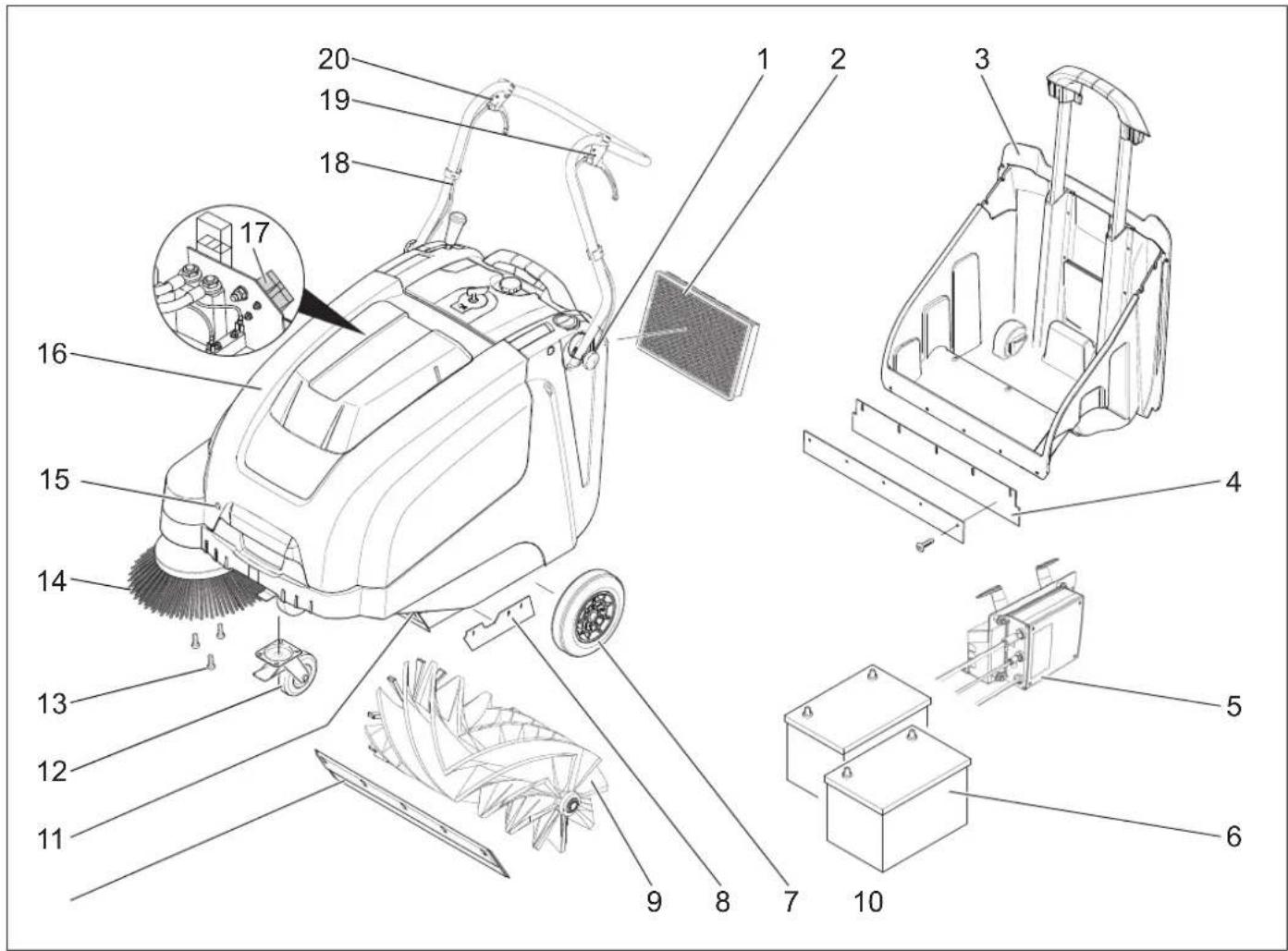
1 Screw for fastening the push handle (2x) 2 Dust filter 3 Waste container 4 Rear sealing strip (at the waste container) 5 Charger (KM 75/40 W Bp Pack only) 6 Batteries (KM 75/40 W Bp Pack only) 7 Drive wheels 8 Side sealing strip 9 Roller brush 10 Front sealing strip 11 Bulk waste flap 12 Steering roller with fixed position brake 13 Fastener of the side brush 14 Side brushes 15 Cover lock 16 Cover 17 Battery charge plug (KM 75/40 W Bp only) 18 Push handle 19 Lever for forward drive 20 Lever to raise and lower the bulk waste flap
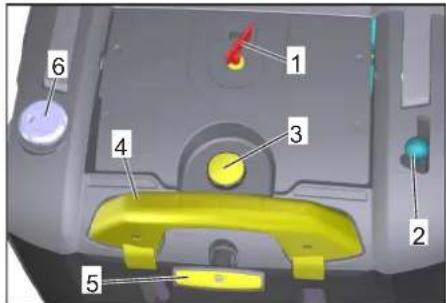
Operating field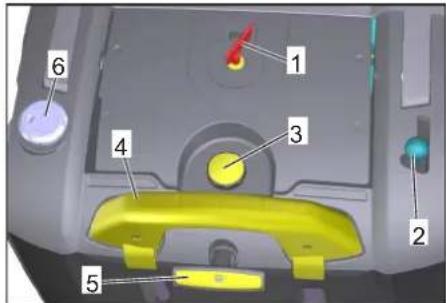
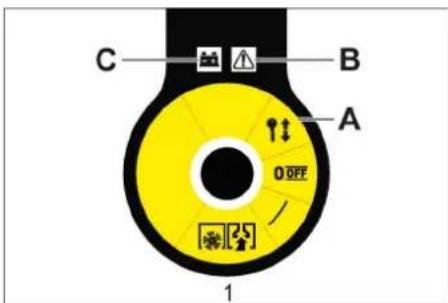
1 Main switch 2 Lever for lowering and raising the side-brush 3 Locking screw of the dust filter cover 4 Locking bow of the waste container 5 Filter cleaning for dust filter 6 Wet/dry flap
Main switch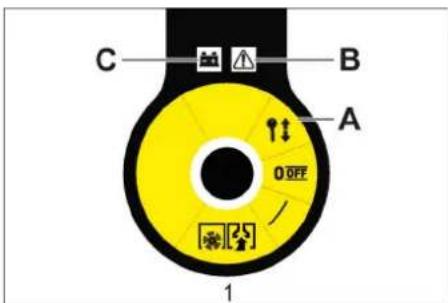
| 0/OFF Motor off |
| 1 Motor on |
| A Remove the key |
| B Fault indication |
| C Battery display |
Remove the key
Turn the main switch to the "0" position and pull it out.
Open the device hood.
Note
The cover is unlocked with the key of the main switch.
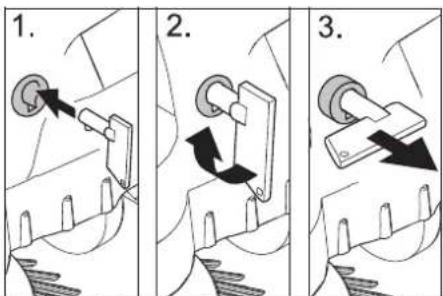
Insert the key for the main switch into the hood lock and rotate it clockwise by 90°. Pull the hood lock out by the key. Open the device hood.
Close device hood
Close the appliance cover; the cover lock will lock automatically.
Before Startup
Unloading tips
DANGER
Risk of injury, risk of damage! Observe the weight of the appliance when you load it!
| Net weight (transport weight) | |
| KM 75/40 W Bp 79 kg | |
| KM 75/40 W Bp Pack 125 kg | |
| Permissible overall weight | |
| KM 75/40 W Bp 205 kg | |
| KM 75/40 W Bp Pack 205 kg | |
Unloading
Remove the cardboard. Remove the wooden blocks that secure the wheels and raise the device from the palette by hand. Release parking brake.
Installing the pushing handle
→ Loosen the screws. → Align the pushing handle. → Tighten the screws.
Install side brush
Note: Remove the waste container and move the pushing handle to the front prior to tilting the appliance. Do not rest the appliance on the pushing handle. → Clip side brush on to driver and screw on.
Batteries
Safety notes regarding the batteries
Please observe the following warning notes when handling batteries:
 | Observe the directions on the battery, in the instructions for use and in the vehicle operating instructions! |
 | Wear an eye shield! |
 | Keep away children from acid and batteries! |
 | Risk of explosion! |
 | Fire, sparks, open light, and smoking not allowed! |
 | Danger of causticization! |
 | First aid! |
 | Warning note! |
 | Disposal! |
 | Do not throw the battery in the dustbin! |
Danger
Risk of explosion! Do not put tools or similar on the battery, i.e. on the terminal poles and cell connectors.
⚠ Danger
Risk of injury! Ensure that wounds never come into contact with lead. Always clean your hands after having worked with batteries.
△ DANGER
Risk of fire and explosion!
- Smoking and naked flames are strictly prohibited.
- Rooms where batteries are charged must have good ventilation because highly explosive gas is emitted during charging.
Danger
Danger of causticization!
- Rinse thoroughly with lots of clear water if acid gets into the eye or comes in contact with the skin.
- Then consult a doctor immediately.
- Wash off the acid if it comes in contact with the clothes.
Recommended batteries
| Order No. | Volume Air | stream | |
| 60 Ah,Maintenance-free | 6.654-226.0* | 1,65** 0,6 | 6*** |
* Appliance requires 2 batteries
** in m³
*** in m³/h
Maximum battery dimensions
| Length Width | Height | |
| 267 mm | 177 mm | 190 mm |
Recommended chargers
| Order No. | |
| Charger | 6.654-225.0 |
Installing and connecting the batteries
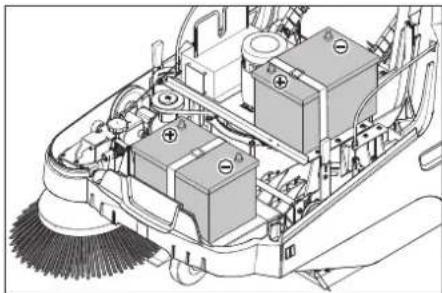
Note
With the KM 75/40 W Bp Pack the battery and the charger are already built in.
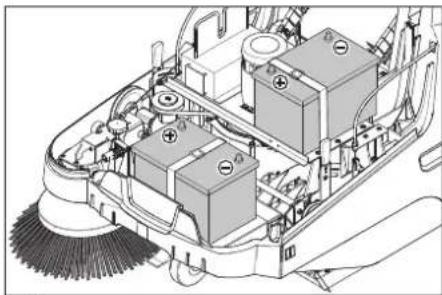
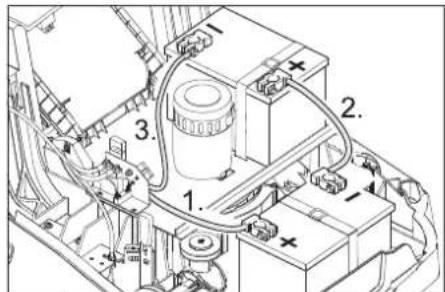
→ Open the device hood. → Set the batteries on to the motor carrier. → Secure the batteries with the holding strap.
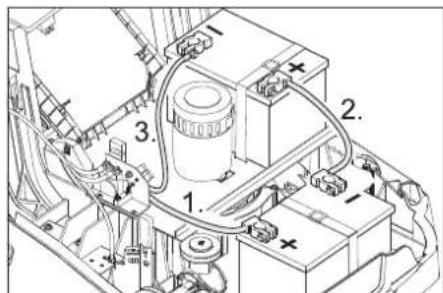
Connect the pole terminal (red cable) to the positive pole (+). Fit the connection wires to the batteries. Connect the pole terminal to the negative pole (-).
Note: Check that the battery pole and pole terminals are adequately protected with pole grease.
Only use batteries with terminal cover. Restore the terminal cover in the event of loss.
CAUTION
Charge the batteries before commissioning the machine.
Charge the batteries
⚠ Danger
Risk of injury! The charger should be used only if the mains cable is in an undamaged state. Get the manufacturer, the customer service agent, or a qualified person to immediately replace a damaged mains cable.
DANGER
Risk of electric shock. Observe supply network and fuse protection. Only use the charger in dry rooms with sufficient ventilation.
Note: The charging time for an empty battery is approx. 12 hours.
⚠ Danger
Risk of injury! Comply with safety regulations on the handling of batteries. Observe the directions provided by the manufacturer of the charger.
Charging process - KM 75/40 W Bp Pack
Caution: Batteries may only be charged at room temperature!
Note: Normally, the device is equipped with maintenance-free batteries.
→ Open the cover. → Insert the mains plug of the charger into the socket.
Note: The charger is electronically controlled and ends the charging process automatically. All functions of the device are automatically interrupted during the charging process.
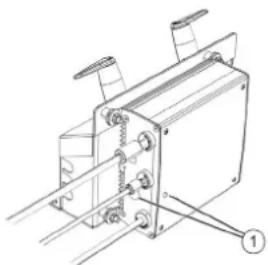
1 Battery status display
The battery status display shows the progress of the charging process when the mains plug is inserted:
| Batteries are being charged | flashes green |
| Batteries are charged lights | up green |
| Fault on the charger lights | up red |
| Error n from error table is present | flashes red n times with pause |
Error table:
| 1 Battery not connected |
| 2 Battery polarity reversed |
| 3 Battery deep discharged |
| 4 Problem with charging characteristic |
| 5 Power supply too hot |
| 6 Hardware fault |
| 7 Communication error (power supply mode) |
To ensure a long battery life, the battery should always be fully charged.
Charging process - KM 75/40 W Bp
→ Open the device hood. → Insert the charging cable of the charger in the charger box of the sweeper → Plug in mains connector and switch on charger.
After charging
■ KM 75/40 W Bp Pack → Disconnect the mains plug. → Wrap the mains cord around the cable holder of the charger. → Close cover. ■ KM 75/40 W Bp → Switch off the charger and remove the plug from the socket. → Hang out the charging cable out of the machine. → Close cover.
Remove the battery
→ Open the device hood. → Disconnect pole terminal to negative pole (-). → Unscrew the connection wires from the batteries. → Disconnect pole terminal to positive pole (+). → Losen the holding strap. → Remove the battery. → Dispose of the used battery according to the local provisions.
Start up
General notes
DANGER
Risk of injury! Switch off the appliance prior to removing the waste container.
Note: Start the appliance only when the hood is closed.
→ Park the sweeper on an even surface. → Switch off engine. → Lock parking brake.
Inspection and maintenance work
→ Check charging status of battery. → Check side brush. → Check roller brush. → Shake off dust filter. → Empty waste container.
Note: For description, see section on Care and maintenance.
Operation
⚠ Danger
Long hours of using the appliance can cause circulation problems in the hands on account of vibrations.
It is not possible to specify a generally valid operation time, since this depends on several factors:
– Proneness to blood circulation deficiencies (cold, numb fingers). – Low ambient temperature. Wear warm gloves to protect hands. – A firm grip impedes blood circulation. - Continuous operation is worse than an operation interrupted by pauses.
In case of regular, long-term operation of the device and in case of repeated occurrence of the symptoms (e.g. cold, numb fingers) please consult a physician.
Starting the machine
→ Release parking brake. Start the motor. → Turn the main switch to position "1". Note: The roller brush and the side brush will rotate.
Drive the machine
Drive forward
Pull the lever for forward drive.
Note: The drive speed for forward drive can be adjusted steplessly depending on the position of the lever.
Dry run
Release the lever for forward drive. The device comes to a halt.
Driving over obstacles
Driving over fixed obstacles which are 30 mm high or less:
Raise the bulk waste flap. Drive forwards slowly and carefully. Driving over fixed obstacles which are more than 30 mm high: Only drive over these obstacles using a suitable ramp.
Sweeping mode
DANGER
Risk of injury! If the bulk waste flap is open, stones or gravel may be flung forwards by the roller brush. Make sure that this does not endanger persons, animals or objects.
CAUTION
Do not sweep up packing strips, wire or similar objects as this may damage the sweeping mechanism.
Note: To achieve an optimum cleaning result, the driving speed should be adjusted to take specific situations into account.
Sweeping with bulk waste flap raised
Note: To sweep up larger items up to a height of 50 mm, e.g. cigarette packs, the bulk waste flap must be raised briefly.
Raising bulk waste flap:
→ Pull the lever for raising the bulk waste flap.
Lowering the bulk waste flap:
→ Release the lever for raising the bulk waste flap.
Note: An optimum cleaning result can only be achieved if the bulk waste flap has been lowered completely.
Sweeping with side brushes

→ Move the lever to lower the side brush to the front. The side brush will be lowered.
Sweeping dry floors
Note: During operation, the waste container should be emptied at regular intervals.
Note: During operation, the dust filter should be shaken off and cleaned at regular intervals.

→ Close wet/dry flap
Sweeping damp or wet floors
→ Open wet/dry flap.
Note: This protects the filter from moisture.
Battery display
The battery display shows the charging status of the batteries during operation:

| full glows green | |
| 30% capacity remaining | glows yellow |
| 10% capacity remaining | blinks red |
| Protection against total discharge; the appliance is switched off | glows red |
Fault display
The fault indicator shows whether there is a fault with the device:

Motor control fault flashes red
Cleaning the dust filter
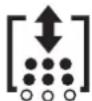
Pull the handle of the filter clean-off out several times and reinsert it.
Emptying waste container
DANGER
Risk of injury! Switch off the appliance prior to removing the waste container.
Note: Make sure the seal strip is not damaged while emptying the waste container.
Note: The max. load of the waste container is 40 kg.
Shake off dust filter. Pull lock bow of the waste container upward. Pull out the waste container. Empty waste container. Push in the waste container. Push lock bow of the waste container downward.
Turn off the appliance
Switch off engine.
Turn the main switch to position "0".

The side-brushes lift up. Lock parking brake. Turn the main switch to position "0" and pull it out.
Transport
DANGER
Risk of injury and damage! Observe the weight of the appliance when you transport it.
Switch off engine. Turn the main switch to position "0" and pull it out. Lock parking brake. Secure the wheels of the machine with wheel chocks. Secure the machine with tensioning straps or cables. When transporting in vehicles, secure the appliance according to the guidelines from slipping and tipping over.
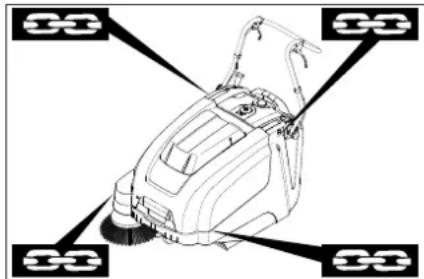
1 Fastening area above the pushing handle
2 Fastening area under the device hood Note: Observe markings for fixing points on base frame (chain symbols).
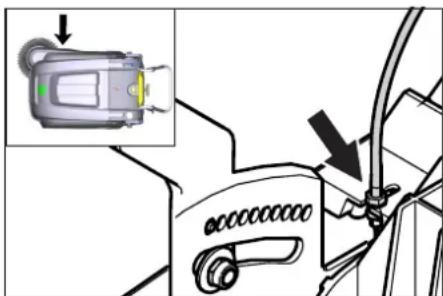
Note: Do not kink the bowden or sheathed cables.
Storage
DANGER
Risk of injury and damage! Note the weight of the appliance in case of storage.
Shutdown
If the sweeper is going to be out of service for a longer time period, observe the following points:
→ Park the sweeper on an even surface. → Switch off the engine. → Turn the main switch to the "0" position and pull it out. → Lock the parking brake. → Secure the sweeper to prevent it from rolling. → Raise the roller brush by engaging both adjustment levers in the top hole. → The side brushes will lift up. → Clean the inside and outside of the sweeper.
→ Park the machine in a safe and dry place. → Disconnect the batteries. → Charge the batteries and recharge approximately every 2 months.
Care and maintenance
General notes
– Maintenance work may only be carried out by approved customer service outlets or experts in this field who are familiar with the respective safety regulations. – Mobile appliances used for commercial purposes are subject to safety inspections according to VDE 0701.
Cleaning
CAUTION
Risk of damage! Do not clean the appliance with a water hose or high-pressure water jet (danger of short circuits or other damage).
ATTENTION
Pull the mains plug out of the socket prior to cleaning.
Disconnect the plus terminal of the battery prior to cleaning.
Cleaning the inside of the machine
⚠ Danger
Risk of injury! Wear a dust mask and protective goggles.
→ Open the device hood. → Clean the machine with a cloth. → Blow through the machine with compressed air. → Close the cover.
External cleaning of the appliance
Clean the machine with a damp cloth that has been soaked in mild detergent.
Note: Do not use aggressive cleaning agents.
Maintenance intervals
Maintenance by the customer
Daily maintenance:
Check the sweeping roller and the side brush for wear and wrapped belts. Check the function of all operator control elements. Check the functioning of all indicator lamps. Weekly maintenance:
Check the tension, wear and tear, and functioning of the drive belts.
Check for smooth running of the Bowden cables and the moveable parts.
Check the sealing strips in the sweeping area for position and wear.
Check the sweeping track of the sweeping roller.
Clean the dust filter.
Note: For description, see section on Maintenance work.
Note: Where maintenance is carried out by the customer, all service and maintenance work must be undertaken by a qualified specialist. If required, a specialised Kärcher dealer may be contacted at any time.
Maintenance by Customer Service
Maintenance after the first month or 5 operating hours:
→ Carry out initial inspection.
Maintenance to be carried out every 50 operating hours
Maintenance to be carried out every 100 operating hours or every six months. Maintenance to be carried out every 300 operating hours
Maintenance to be carried out every 500 operating hours or annually
Note: In order to safeguard warranty claims, all service and maintenance work during the warranty period must be carried out by the authorised Kärcher Customer Service in accordance with the maintenance booklet.
Maintenance Works
Preparation:
→ Park the sweeper on an even surface. → Turn the main switch to the "0" position and pull it out. → Lock the parking brake.
General notes on safety
△DANGER
Risk of injury!
The engine requires approx. 3-4 seconds to come to a standstill once it has been switched off. During this time, stay well clear of the working area.
⚠ WARNING
Allow the machine sufficient time to cool down before carrying out any maintenance and repair work.
Do not touch any hot parts, such as the drive motor.
ATTENTION
Pull the mains plug out of the socket prior to any maintenance work.
Disconnect the plus terminal of the battery prior to any maintenance work.
ATTENTION
Remove batteries and waste container, and swing the push handle forward prior to tilting the device. Do not park the device on the push handle.
Switch off the appliance prior to cleaning and performing any maintenance tasks or replacing parts.
Adjust the Bowden cable of the acceleration drive
This must be adjusted if the drive performance of the appliance becomes insufficient when driving uphill.
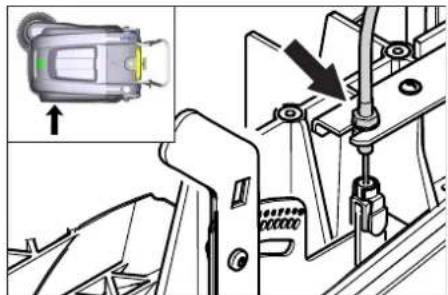
→ Open the device hood. → Loosen counter-nut. → Adjust the adjustment screw.
→ Tighten the counter-nut.
Checking roller brush
→ Lock parking brake. → Remove the waste container. → Remove belts or cords from roller brush.
Replacing roller brush
Replacement is due if a visible deterioration in sweeping performance caused by bristle wear is evident.
ATTENTION
Remove the batteries prior to tilting the device.
Do not park the device on the push handle.
→ Lock parking brake. → Remove the waste container. → Remove the batteries. → Tilt the appliance rearward.
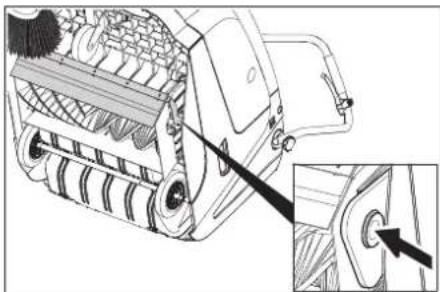
→ Lift the waste flap, press in the bearing cap and swivel the roller brush toward the front. → Pull out roller brush. → Attach the new roller brush to the drive pin (left). → Engage the bearing cup into the boring of the roller brush swinging arm on the opposite side.
CAUTION
Risk of damage! Make sure that no bristles are jammed into the boring of the roller brush swinging arm.
Note: Once the new roller brush has been installed, the sweeping track must be readjusted.
Check and adjust roller brush sweeping track
→ Raise the sweeper from the front and drive it on to a smooth, even surface covered with a visible layer of dust or chalk. → Lock parking brake. → Let the sweeping roller rotate for approx. 15-30 seconds. → Raise the sweeper at the front and drive it towards the side.
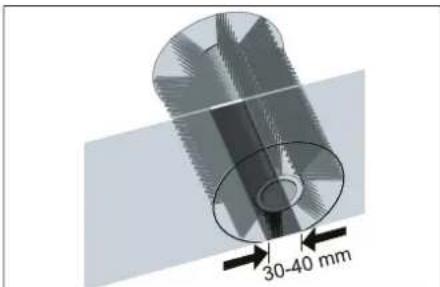
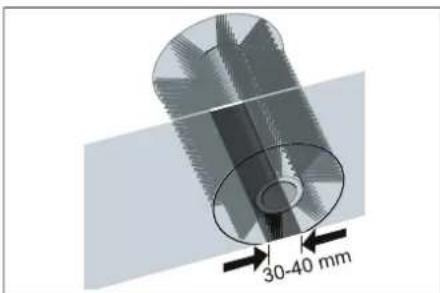
The sweeping track should have an even rectangular shape which is between 30 and 40 mm wide.
| Setting range (-) 1...10 (+) | |
| Minimum sweeping track 1 | |
| Maximum sweeping track 10 | |
| New roller brush | 1...3 |
Adjust sweeping track:
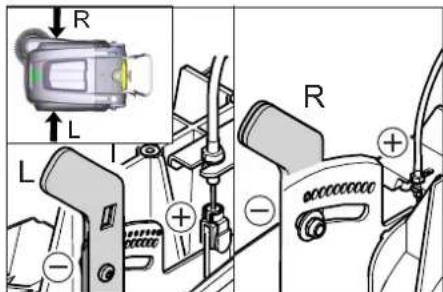
→ Open the device hood. → Adjust the left and right adjustment levers and engage into the same boring.
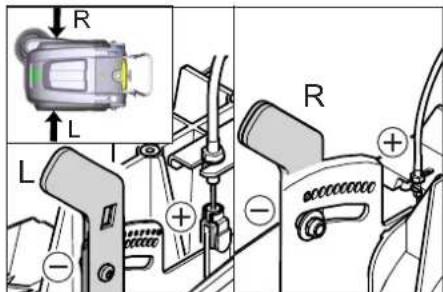
- Engage adjustment lever into the lower boring (+): Sweeping track becomes bigger
- Engage the adjustment lever into the upper boring (-): Sweeping track becomes smaller → Check sweeping mirror.
Replacing side brush
Replacement is due if a visible deterioration in sweeping performance caused by bristle wear is evident.
Note: Remove the waste container and move the pushing handle to the front prior to tilting the appliance. Do not rest the appliance on the pushing handle.
→ Unscrew 3 screws from the underside of the side brush. → Remove the wiper blade. → Clip new side brushes on to driver and screw on.
Adjust side-brush lowering
Adjustment is necessary if a visible deterioration in sweeping performance caused by side-brush is evident.
→ Open the device hood. → Release the wing nut.
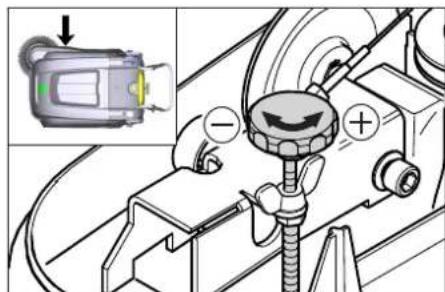
→ Adjust the adjustment screw. → Tighten the wing nut.
Adjust the raising of the bulk waste flap
- Adjustment is necessary if the bulk waste flap cannot be raised wide enough.
- The Bowden cable needs to be released a little if the sweeper results become poorer, for e.g. due to the wearing of the front lip.
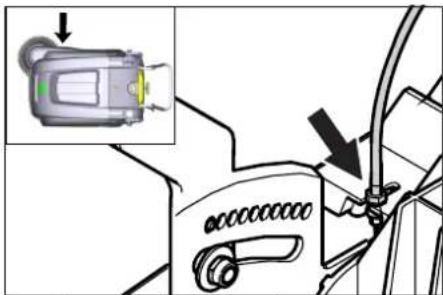
→ Open the device hood. → Loosen counter-nut. → Adjust the adjustment screw. → Tighten the counter-nut.
Adjusting and replacing sealing strips
Note: Remove the waste container and move the pushing handle to the front prior to tilting the appliance. Do not rest the appliance on the pushing handle.
■ Front sealing strip → Loosen the fastening screws of the sealing strip. → Adjust or replace sealing strip.
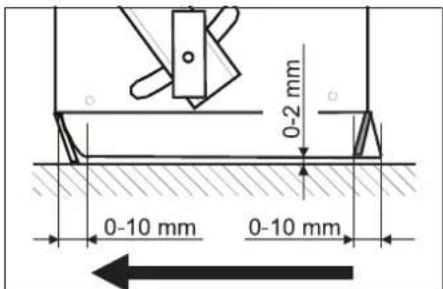
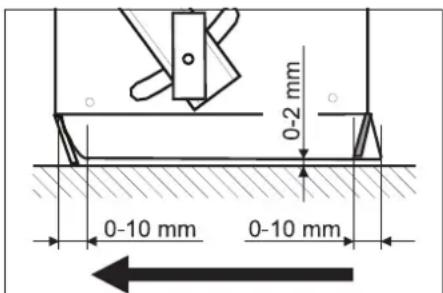
→ Set the distance between the sealing strip and the floor so that the bottom edge trails behind at a distance of between 0-10 mm. → Adjust sealing strip. → Tighten the fastening of the sealing strip. ■ Rear sealing strip → Remove the waste container. → Loosen the fastening screws of the sealing strip. → Adjust or replace sealing strip. Set the distance between the sealing strip and the floor so that the bottom edge trails behind at a distance of between 0-10 mm. → Tighten the fastening of the sealing strip. ■ Side sealing strips → Loosen the fastening screws of the sealing strip. → Adjust or replace sealing strip. → To set the floor clearance, insert a sheet with a thickness of max. 2 mm under the sealing strip. → Adjust sealing strip. → Tighten the fastening of the sealing strip.
Replacing dust filter
⚠ WARNING
Empty waste container before replacing dust filter. Wear a dust mask when working around the dust filter. Observe safety regulations on the handling of fine particulate material.
CAUTION
Risk of damage!
→ Do not rinse out the dust filter. → Lok parking brake. → Shake off dust filter.
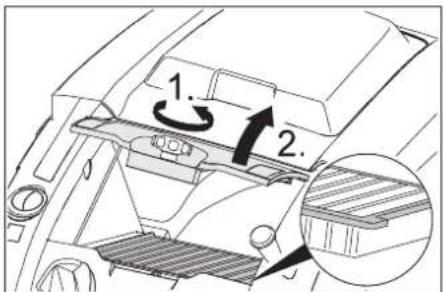
→ Open the locking screw of the dust filter cover in an anticlockwise direction. → Lift the dust filter cover. → Replace dust filter Make sure the dust filter is inserted correctly (see figure). → Screw in the locking screw all the way.
CAUTION
If the locking screw is not tightened all the way, there may be damages.
Note: Make sure when installing the new filter that the fins are not damaged.
Replace fuse/relay
■ KM 75/40 W Bp
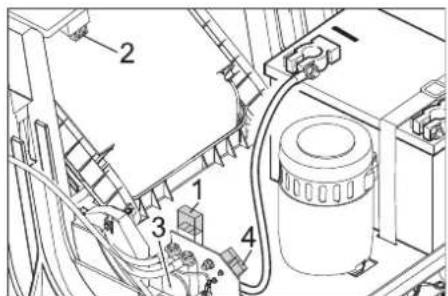
1 Fuse F1 (50 A) 2 Fuse F2 (2 A) 3 Relay 4 Battery charge plug
→ Open the cover. → Replace defective fuse or relay. ■ KM 75/40 W Bp Pack The fuse is located on the battery terminal.
Accessories
| Side-brushes, soft 6.905-626.0 | |
| For fine dust on inside surfaces; wetness resistant. | |
| Roller-brush, soft 6.906-886.0 | |
| With natural bristles: especially for sweeping fine dust on smooth floors indoors.Not resistant to wetness; do not use on abrasive surfaces! | |
| Roller-brush, hard 6.906-885.0 | |
| For removing stubborn dirt in the external area; resistant to moisture. | |
| Roller brush, antistatic | 6.906-950.0 |
| For statically chargeable surfaces such as carpet or artificial turf | |
| Carpet sweeping unit | 2.641-571.0 |
| Includes: Lint trap, antistatic roller brush, triple steering roller | |
EU Declaration of Conformity
We hereby declare that the machine described below complies with the relevant basic safety and health requirements of the EU Directives, both in its basic design and construction as well as in the version put into circulation by us. This declaration shall cease to be valid if the machine is modified without our prior approval.
Product: Vacuum sweeper
Type: 1.049-xxx
Relevant EU Directives
2006/42/EC (+2009/127/EC)
2014/30/EU
2000/14/EC
Applied harmonized standards
EN 55012: 2007 + A1: 2009
EN 60335-1
EN 60335-2-72
EN 61000-6-2: 2005
EN 62233: 2008
EN IEC 63000: 2018
Applied national standards
Applied conformity evaluation method
2000/14/EC: Appendix V
Sound power level dB(A)
Measured: 86
Guaranteed: 88
The signatories act on behalf of and with the authority of the company management.
H. Jenner
Chairman of the Board of Management
S. Reiser
Director Regulatory Affairs & Certification
Documentation supervisor:
S. Reiser
Alfred Kärcher SE & Co. KG
71364 Winnenden (Germany)
Tel.: +49 7195 14-0
Fax: +49 7195 14-2212
Winnenden, 2021/02/01
Declaration of Conformity
We hereby declare that the product described below complies with the relevant provisions of the following UK Regulations, both in its basic design and construction as well as in the version put into circulation by us. This declaration shall cease to be valid if the product is modified without our prior approval.
Product: Vacuum sweeper
Type: 1.049-xxx
Currently applicable UK Regulations
S.I. 2008/1597 (as amended)
2004/108/EC
S.I. 2001/1701 (as amended)
S.I. 2012/3032 (as amended)
Designated standards used
EN 55012: 2007 + A1: 2009
EN 60335-1
EN 60335-2-72
EN 61000-6-2: 2005
EN 62233: 2008
EN IEC 63000: 2018
National standards used
Applied conformity assessment procedure
S.I. 2001/1701 (as amended): Schedule 8
Sound power level dB(A)
Measured: 86
Guaranteed: 88
The signatories act on behalf of and with the authority of the company management.
Chairman of the Board of Management
S. Reiser
Director Regulatory Affairs & Certification
Documentation supervisor:
S. Reiser
Alfred Kärcher SE & Co. KG
71364 Winnenden (Germany)
Tel.: +49 7195 14-0
Fax: +49 7195 14-2212
Winnenden, 2021/02/01
Troubleshooting
| Fault Remedy | |
| Appliance cannot be started | The cover contact switch has switched off the device. Closing the cover |
| Charge the batteries | |
| Check overload fuse | |
| Inform Kärcher Customer Service. | |
| Engine is running but machine is not moving | Adjust the Bowden cable of the acceleration drive |
| Checking the V-Belt | |
| Inform Kärcher Customer Service. | |
| Device comes to halt while climbing a slope | Drive over a path with lesser slope |
| Check overload fuse | |
| Adjust the Bowden cable of the acceleration drive | |
| Checking the V-Belt | |
| Inform Kärcher Customer Service. | |
| The brush roller stops, fault display illuminates red | Turn the main switch to "OFF", check brush for obstructing objects. If applicable, use on a less inclined surface. Turn on the main switch. After repeating this process four times, the control will initiate a forced break of 2 minutes to cool off. During this period the appliance cannot be started. |
| Machine is not sweeping properly | Check roller brush and side brushes for wear, replace if necessary. |
| Check function of bulk waste flap | |
| Release the Bowden cable of the bulk waste flap (adjustment screw) | |
| Check belts for tension and functioning; replace, if required | |
| Adjust roller mirror | |
| Replacing roller brush | |
| Inform Kärcher Customer Service. | |
| Dust gathers in the machine Check | function of bulk waste flap |
| Release the Bowden cable of the bulk waste flap (adjustment screw) | |
| Check dust filter, clean or replaceDo not rinse out the dust filter. | |
| Empty waste container | |
| Replace sealing profile at the waste container | |
| Check the seal on the dust filter | |
| Check sealing strips for wear, adjust or replace as required | |
| Poor cleaning performance at edges | Adjust side-brush lowering |
| Replace side brush | |
| Lower the side brushes | |
| Check the drive belt of the side brush | |
| Inform Kärcher Customer Service. | |
| Side-brush raising does not function | Check Bowden cable of the side-brush raising |
| Inform Kärcher Customer Service. | |
| The new roller brush brushes against the waste container | Correct the setting of the sweep track; for this, engage both adjustment levers into the upper boring (1...3) |
Technical specifications
| KM 75/40 W Bp KM 75/40 W Bp Pack | |||
| Machine data | |||
| Length x width x height (pushing handle unfolded) mm 1430 x 750 x 1190 | 1430 x 750 x | 1190 | |
| Length x width x height (pushing handle folded in) mm 1160 x 750 x 930 | 1160 x 750 x | 930 | |
| Weight (without batteries) kg 79 79 | |||
| Weight (with batteries) kg 125 125 | |||
| Permissible overall weight kg 205 205 | |||
| Driving and sweeping speed km/h 4,5 4,5 | |||
| Climbing capability (max.) % 12 12 | |||
| Roller brush diameter | mm 265 265 | ||
| Side brush diameter | mm 410 410 | ||
| Surface area, max. | m3/h | 3400 | 3400 |
| Working width without side brushes | mm 550 550 | ||
| Working width with side-brush | mm 750 750 | ||
| Volume of waste container | I | 40 40 | |
| Protection type, drip-proof | -- | IPX 3 | IPX 3 |
| Engine | |||
| Type | -- | DC permanent solenoid motorDirection of rotation, right | |
| Voltage | V | 24 24 | |
| Rated current | A | 22 22 | |
| Rated power | W | 400 400 | |
| Speed | 1/min | 2750 | 2750 |
| Type of protection | -- | IP 20 | IP 20 |
| Battery | |||
| Type | -- | -- | 2x 12 V GiV |
| Capacity | Ah | -- | 60 (5h) |
| Weight | kg | ||
| Charging time for fully discharged battery | h | -- | 12 |
| Operating time after frequent charging | h | -- | ca. 1,5-2 |
| Charger | |||
| Mains voltage | V~ | -- | 230 |
| Output voltage | V | -- | 24 |
| Charging current | A | -- | 10 |
| Mains frequency | Hz | -- | 50/60 |
| Electrical fuses | |||
| Central | A | 50 50 | |
| Fuse for controls | A | 2 | -- |
| Protection against total discharge | -- | via relay | via relay |
| Charger | --- | T4A / 250 V AC | |
| Filter and vacuum system | |||
| Filter surface area, fine dust filter | m2 | 1,8 1,8 | |
| Category of use - filter for non-hazardous dust | -- | L | L |
| Nominal vacuum, suction system | mbar | 5 | 5 |
| Nominal volume flow, suction system | l/s | 45 | 45 |
| Working conditions | |||
| Operating temperature | °C | -5 and +40 | -5 and +40 |
| Charging temperature | --- | Room temperature | |
| Air humidity, non-condensing | % | 0 - 90 | 0 - 90 |
| Values determined as per EN 60335-2-72 | |||
| Sound pressure level LpA | dB(A) | 71 71 | |
| Uncertainty KpA | dB(A) | 3 | 3 |
| Sound power level LwA + Uncertainty KwA | dB(A) | 88 88 | |
| Uncertainty KwA | 2 | 2 | |
| Hand-arm vibration value | m/s2 | 3,7 3,7 | |
| Uncertainty K | m/s2 | 0,2 0,2 | |
Subject to technical changes.
www.kaercher.com/REACH
Warranty
Note
Rotary brush, soft 6.906-886.0
2006/42/EC (+2009/127/EC)
2014/30/EU
2000/14/EC
Chairman of the Board of Management
S. Reiser
Director Regulatory Affairs & Certification
71364 Winnenden (Germany)
Tel.: +49 7195 14-0
Fax: +49 7195 14-2212
Winnenden, 2021/02/01
www.kaercher.com/REACH
Warranty
Note
2006/42/EC (+2009/127/EC)
2014/30/EU
2000/14/EC
Chairman of the Board of Management
S. Reiser Director Regulatory Affairs & Certification
71364 Winnenden (Germany)
Tel.: +49 7195 14-0
Fax: +49 7195 14-2212
Winnenden, 2021/02/01
www.kaercher.com/REACH
Warranty
Tip
1 Battery status display
→ Open the device cover. → Loosen the counter nut. → Adjust the adjusting screw. → Tighten the counter nut.
Check the squeegee roller
→ Open the device cover. → Loosen the counter nut. → Adjust the adjusting screw. → Tighten the counter nut.
1 Fuse F1 (50 A) 2 Fuse F2 (2 A) 3 Relay 4 Battery charging connector
→ Open the device cover. → Replace the defective fuse or relay. ■ KM 75/40 W Bp Pack
Chairman of the Board of Management
S. Reiser
Director Regulatory Affairs & Certification
71364 Winnenden (Germany)
Tel.: +49 7195 14-0
Fax: +49 7195 14-2212
Winnenden, 2021/02/01
Troubleshooting
www.kaercher.com/REACH
Warranty
Main switch
Main switch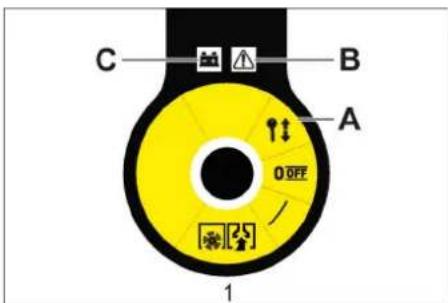
Note
1 Fuse F1 (50 A)
2 Fuse F2 (2 A)
3 Relé
2006/42/CE (+2009/127/CE)
2014/30/UE
2000/14/CE
Chairman of the Board of Management
S. Reiser
Director Regulatory Affairs & Certification
71364 Winnenden (Germany)
Tel.: +49 7195 14-0
Fax: +49 7195 14-2212
Winnenden, 2021/02/01
www.kaercher.com/REACH
Warranty
Main switch
Main switch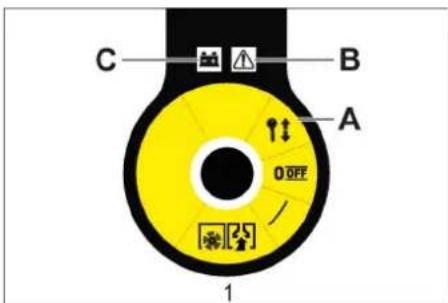
Mount and connect the batteries
Warning
Charge the batteries
⚠ Danger
→ Adjust the adjusting screw.
1 Fuse F1 (50 A)
2 Fuse F2 (2 A)
3 Relay
2006/42/EC (+2009/127/EC)
2014/30/EU
2000/14/EC
71364 Winnenden (Germany)
Tel.: +49 7195 14-0
Fax: +49 7195 14-2212
Winnenden, 2021/02/01
www.kaercher.com/REACH
Warranty
OBS
1 Battery status display
→ Open the appliance cover. → Loosen the counter nut. → Adjust the adjusting screw. → Tighten the counter nut.
Checking the sweeping roller
→ Open the appliance cover. → Loosen the counter nut. → Adjust the adjusting screw. → Tighten the counter nut.
1 Fuse F1 (50 A) 2 Fuse F2 (2 A) 3 Relay 4 Battery charging plug
→ Open the machine hood. → Replace defective fuse or relay. ■ KM 75/40 W Bp Pack
2006/42/EC (+2009/127/EC)
2014/30/EU
2000/14/EC
Chairman of the Board of Management
S. Reiser Director Regulatory Affairs & Certification
71364 Winnenden (Germany)
Tel.: +49 7195 14-0
Fax: +49 7195 14-2212
Winnenden, 2021/02/01
Help in case of faults
www.kaercher.com/REACH
Warranty
Note
1 Battery status indicator
The battery status indicator shows the progress of charging when the mains plug is inserted:
→ Open the cover on the machine. → Loosen the counter nut. → Adjust the adjusting screw. → Tighten the counter nut.
Check the sweeping roller
→ Lift the coarse dirt flap, push in the bearing cup and swing the sweeping roller forward. → Remove the sweeping roller. → Insert the new sweeping roller onto the drive pin (left). → On the opposite side, let the bearing cup lock into the hole on the sweeping roller swing arm.
CAUTION
→ Adjust the adjusting screw. → Tighten the wing nut.
→ Open the cover on the machine. → Loosen the counter nut. → Adjust the adjusting screw. → Tighten the counter nut. → Open the cover on the machine. → Loosen the counter nut. → Adjust the adjusting screw. → Tighten the counter nut.
1 Fuse F1 (50 A)
2 Fuse F2 (2 A) 3 Relay 4 Battery charger connector
→ Open the device cover. → Replace the defective fuse or relay. ■ KM 75/40 W Bp Pack
2006/42/EC (+2009/127/EC)
2014/30/EU
2000/14/EC
2000/14/EC: Annex V
Sound power level dB(A)
Measured: 86
Guaranteed: 88
71364 Winnenden (Germany)
Tel.: +49 7195 14-0
Fax: +49 7195 14-2212
Winnenden, 2021/02/01
Troubleshooting
www.kaercher.com/REACH
Warranty
Reference
1 Battery status indicator
→ Open the unit cover. → Loosen the counter nut. → Adjust the adjusting screw. → Tighten the counter nut.
Inspect the sweeping roller
→ Lift the coarse dirt flap, press in the la-
→ Open the unit cover. → Loosen the counter nut. → Adjust the adjusting screw. → Tighten the counter nut.
1 Fuse F1 (50 A)
2 Fuse F2 (2 A)
3 Relay
4 Connection for battery charger
Chairman of the Board of Management
S. Reiser Director Regulatory Affairs & Certification
71364 Winnenden (Germany)
Tel.: +49 7195 14-0
Fax: +49 7195 14-2212
Winnenden, 2021/02/01
www.kaercher.com/REACH
Warranty
Note
1 Battery compartment display
1 Fuse F1 (50 A) 2 Fuse F2 (2 A) 3 Relay 4 Battery charging socket
→ Open the device guard.
→ Replace the defective fuse or relay.
■ KM 75/40 W Bp Pack
Chairman of the Board of Management
S. Reiser
Director Regulatory Affairs & Certification
71364 Winnenden (Germany)
Tel.: +49 7195 14-0
Fax: +49 7195 14-2212
Winnenden, 2021/02/01
Troubleshooting
www.kaercher.com/REACH
Warranty
Note
Chairman of the Board of Management
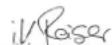
S. Reiser
Director Regulatory Affairs & Certification
71364 Winnenden (Germany)
Tel.: +49 7195 14-0
Fax: +49 7195 14-2212
Winnenden, 2021/02/01
Fault Remedy
www.kaercher.com/REACH
Warranty
1 Fuse F1 (50 A) 2 Fuse F2 (2 A) 3 Relay 4 Battery charging socket
Chairman of the Board of Management
S. Reiser Director Regulatory Affairs & Certification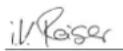
71364 Winnenden (Germany)
Tel.: +49 7195 14-0
Fax: +49 7195 14-2212
Winnenden, 2021/02/01
Help in case of malfunctions
www.kaercher.com/REACH
Warranty
Note
Director Regulatory Affairs & Certification
71364 Winnenden (Germany)
Tel.: +49 7195 14-0
Fax: +49 7195 14-2212
Winnenden, 2021/02/01
www.kaercher.com/REACH
Warranty
Note
71364 Winnenden (Germany)
Tel.: +49 7195 14-0
Fax: +49 7195 14-2212
Winnenden, 2021/02/01
www.kaercher.com/REACH
Warranty
Note
1 Battery status indicator
1 Fuse F1 (50 A) 2 Fuse F2 (2 A) 3 Relay
2006/42/EC (+2009/127/EC)
2014/30/EU
2000/14/EC
71364 Winnenden (Germany)
Tel.: +49 7195 14-0
Fax: +49 7195 14-2212
Winnenden, 2021/02/01
Troubleshooting
The sweeping machine operates on the principle of sweeping.
– The side broom (1) cleans corners and edges of the sweeping surface and pushes dirt into the path of the sweeping roller. – The rotating sweeping roller (2) pushes dirt directly into the dirt container (3). – Dust rising in the container is separated via the dust filter (4), and the filtered clean air is drawn in through the suction fan (5).
General instructions
www.kaercher.com/REACH
Warranty
Note
→ Connect the fully charged clamp (red cable) to the positive terminal (+). → Screw the connecting cable onto the batteries. → Connect the fully charged clamp to the negative terminal (-).
1 Battery status indicator
→ Open the housing cover. → Unscrew the lock nut. → Adjust the adjusting screw. → Tighten the lock nut.
Checking the sweeping roller
→ Lock the parking brake. → Remove the dirt container. → Remove strips or strings from the sweeping roller.
Replacing the sweeping roller
→ Adjust the adjusting screw. → Tighten the wing nut.
→ Open the housing cover. → Unscrew the lock nut.
→ Adjust the adjusting screw. → Tighten the lock nut.
1 Fuse F1 (50 A) 2 Fuse F2 (2 A) 3 Relay 4 Battery charging plug
→ Open the device cover. → Replace the defective fuse or relay.
■ KM 75/40 W Bp Pack
The fuse is located on the battery terminal.
Accessories
2006/42/EC (+2009/127/EC)
2014/30/EU
2000/14/ES
71364 Winnenden (Germany)
Tel.: +49 7195 14-0
Fax: +49 7195 14-2212
Winnenden, 2021/02/01
Assistance with malfunctions
www.kaercher.com/REACH
Warranty
Recommended batteries
Note
2006/42/EC (+2009/127/EC)
2014/30/EU
2000/14/EC
Chairman of the Board of Management
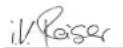
S. Reiser
Director Regulatory Affairs & Certification
71364 Winnenden (Germany)
Tel.: +49 7195 14-0
Fax: +49 7195 14-2212
Winnenden, 2021/02/01
Troubleshooting
www.kaercher.com/REACH
Warranty
Indication
Battery indicator
1 Grip area on the handle 2 Grip area under the device cover
1 Fuse F1 (50 A)
2 Fuse F2 (2 A)
3 Relay
Applicable EU directives:
2006/42/EC (+2009/127/EC)
2014/30/EU
2000/14/EC
Harmonized standards used:
EN 55012: 2007 + A1: 2009
EN 60335-1
EN 60335-2-72
EN 61000-6-2: 2005
EN 62233: 2008
EN IEC 63000: 2018
Chairman of the Board of Management
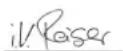
S. Reiser
Director Regulatory Affairs & Certifi
71364 Winnenden (Germany)
Tel.: +49 7195 14-0
Fax: +49 7195 14-2212
Winnenden, 2021/02/01
1 Screw for securing the push handle (2x) 2 Dust filter 3 Dirt tank 4 Rear sealing strip (on the dirt tank) 5 Charger (Only KM 75/40 W Bp Pack) 6 Batteries (Only KM 75/40 W Bp Pack) 7 Drive wheels 8 Side sealing strip 9 Sweeping roller 10 Front sealing strip 11 Coarse dirt flap 12 Swivel caster with hand brake 13 Side brush mounting 14 Side brush 15 Cover lock 16 Device cover 17 Battery charging plug (Only KM 75/40 W Bp) 18 Push handle 19 Forward drive lever 20 Lever for raising and lowering the coarse dirt flap
Control panel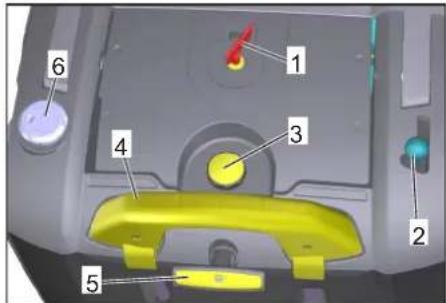
Warning
1 Battery status display
The battery status display shows the charging progress when the mains plug is inserted:
| Batérie sa nabíjajú | bliká nazeleno |
| Batérie sú nabité | svieti nazeleno |
| Porucha nabíjačky | svieti načerve-no |
| Nastala chyba n z tabuľky chýb | bliká načerve-no n-krát s prerušením |
Error table:
→ Open the cover (hood) of the machine. → Loosen the lock nut. → Adjust the adjusting screw. → Tighten the lock nut firmly.
Checking the sweeping roller
→ Raise the coarse dirt flap, press the bearing cup and fold the sweeping roller forward. → Remove the sweeping roller. → Fit a new sweeping roller onto the drive pin (left). → On the opposite side, insert the bearing cup into the slot of the sweeping roller linkage.
WARNING
Risk of damage! Make sure that the brush bristles do not get caught in the opening of the sweeping roller linkage.
→ Adjust the adjusting screw. → Tighten the wing nuts.
Adjusting the lift of the coarse dirt flap
→ Open the cover (hood) of the machine. → Loosen the lock nut. → Adjust the adjusting screw. → Tighten the lock nut firmly.
1 Fuse F1 (50 A) 2 Fuse F2 (2 A) 3 Relay 4 Battery charging plug
2006/42/EC (+2009/127/EC)
2014/30/EU
2000/14/EC
Harmonized standards applied:
EN 55012: 2007 + A1: 2009
EN 60335-1
EN 60335-2-72
EN 61000-6-2: 2005
EN 62233: 2008
EN IEC 63000: 2018
Chairman of the Board of Management
Director Regulatory Affairs & Certification
71364 Winnenden (Germany)
Tel.: +49 7195 14-0
Fax: +49 7195 14-2212
Winnenden, 2021/02/01
Troubleshooting
www.kaercher.com/REACH
Warranty
1 Screw for attaching the push handle (2x) 2 Dust filter 3 Dirt collection container 4 Rear sealing strip (on the dirt collection container) 5 Charger (only KM 75/40 W Bp Pack) 6 Batteries (only KM 75/40 W Bp Pack) 7 Drive wheels 8 Side sealing strip 9 Sweeping roller 10 Front sealing strip 11 Coarse dirt flap 12 Caster with parking brake 13 Side brush holder 14 Side brush 15 Cover lock 16 Device cover 17 Battery charging plug (only KM 75/40 W Bp) 18 Push handle 19 Forward drive lever 20 Lever for raising and lowering the coarse dirt flap
Control panel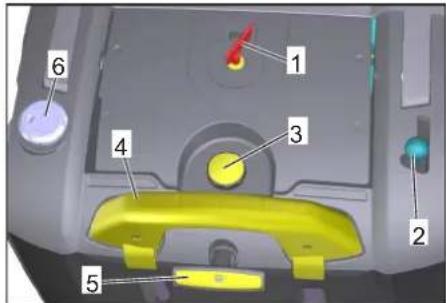
1 Main switch 2 Lever for raising and lowering the side brush 3 Locking screw of the dust filter cover 4 Locking hook of the dirt collection container 5 Dust filter cleaning 6 Wet/dry vacuuming flap
Main switch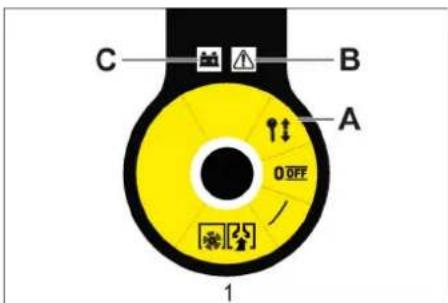
| 0/OFF Motor isključen | |
| 1 Motor uključen | |
| A | V a denje ključa |
| B Prikaz smetnje | |
| C Pokazivač napunjenosti akumulatora | |
Removing the key
Note
→ Connect the clamp (red cable) to the positive terminal (+). → Attach the connecting cable to the batteries. → Connect the other clamp to the negative terminal (-).
1 Battery status indicator
The battery status indicator shows the progress of the charging process when the power plug is inserted:
| Akumulatori se pune treperi zeleno | |
| Akumulatori su napunjeni svijetli zeleno | |
| Smetnja punjača svijetli crveno | |
| Radi se o greški n iz tablice grešaka | treperi crveno n puta sa stankom |
Error table:
| 1 Akumulator nije priključen |
| 2 Obrnuti polaritet akumulatora |
| 3 Akumulator je potpuno ispražnjen |
| 4 Problem s karakteristikom punjenja |
| 5 Mrežni utikač je prevruć |
| 6 Hardverska pogreška |
| 7 Greška u komunikaciji (način rada mrežnog utikača) |
→ Open the device cover. → Loosen the lock nut. → Adjust the adjusting screw. → Tighten the lock nut.
→ Lift the coarse dirt flap, press in the bearing pad, and rotate the sweeping roller forward. → Remove the sweeping roller. → Fit the new sweeping roller onto the drive attachment (left). → On the opposite side, insert the bearing pad into the hole of the sweeping roller suspension.
CAUTION
– Inserting the adjustment lever into the lower hole (+) increases the sweeping profile – Inserting the adjustment lever into the upper hole (-) reduces the sweeping profile → Check the sweeping profile.
Replacing the side brush
→ Adjust the adjusting screw. → Tighten the wing nut.
Adjusting the lifting part of the coarse dirt flap
– Adjustment is necessary if the coarse dirt flap cannot be lifted high enough. – When the sweeping result becomes worse, for example due to wear of the front rubber strip, the Bowden cable should be slightly loosened.
→ Open the device cover. → Loosen the lock nut. → Adjust the adjusting screw. → Tighten the lock nut.
Adjusting and replacing the sealing strips
1 Fuse F1 (50 A)
2 Fuse F2 (2 A)
3 Relay
4 Charger plug for the battery
→ Open the device cover. → Replace the faulty fuse or relay with a new one. ■ KM 75/40 W Bp Pack
The fuse is located on the battery terminal.
Accessories
Soft side broom 6.905-626.0
2006/42/EC (+2009/127/EC)
2014/30/EU
2000/14/EC
Chairman of the Board of Management
S. Reiser
Director Regulatory Affairs & Certification
71364 Winnenden (Germany)
Tel.: +49 7195 14-0
Fax: +49 7195 14-2212
Winnenden, 2021/02/01
Troubleshooting
www.kaercher.com/REACH
Warranty
In each country, the warranty conditions issued by our responsible distribution organization apply. We will rectify any faults on the accessory free of charge during the warranty period, provided that the cause is a material or manufacturing defect. In the event of a warranty claim, please contact your dealer or the nearest authorized service center with your proof of purchase.
Symbols in the operating instructions
DANGER
Indicates an imminent threat of danger that leads to serious bodily injury or death.
WARNING
Indicates a potentially dangerous situation that could lead to serious bodily injury or death.
CAUTION
Indicates a potentially dangerous situation that could lead to minor bodily injury or cause material damage.
Symbols on the device

Do not sweep up burning or smoldering objects, such as cigarettes, matches, or similar.

Risk of injury from crushing and cuts on belts, side brushes, tanks, and push handles.

Risk of burns. Avoid contact with these surfaces during operation and when they are hot.
Safety notes
Safety notes regarding handling
- Before use, check that the device and its working components are in proper condition and safe to operate. If the condition is not impeccable, it must not be used.
- When using the device in hazardous areas (e.g., at gas stations), observe the relevant safety regulations. Operation is prohibited in rooms where there is a risk of explosion.
- The operator must use the device in accordance with its intended purpose. He must take local conditions into account, and while working with the device, attention must be paid to other people, especially children.
- Before starting work, the operator must ensure that all protective devices are properly installed and in working order.
- The operator of the device is responsible for any accidents affecting other people or their property.
- The operator must wear close-fitting clothing. Wear sturdy footwear and avoid loose clothing.
- Before starting the device, check the surroundings (e.g., for children). Ensure good visibility!
- Unauthorized use of the device should be prevented by removing the key.
- When leaving the device, secure it against unintentional movement.
- The device may only be used by persons who are instructed in its operation and who can demonstrate the ability to operate it and are authorized to use it.
- This device must not be used by persons (including children) with reduced physical, sensory, or mental capabilities, or lack of experience and knowledge. Children must be supervised to prevent them from playing with the device.
Safety notes regarding driving
△Danger
Danger of injury!
Danger of tipping over on excessively steep slopes.
1 Screw for attaching the push handle (2x) 2 Dust filter 3 Container for collected dirt 4 Rear sealing strip (on the dirt container) 5 Charger (only KM 75/40 W Bp Pack) 6 Batteries (only KM 75/40 W Bp Pack) 7 Drive wheels 8 Side sealing strip 9 Sweeping roller 10 Front sealing strip 11 Flap for coarse dirt 12 Caster with parking brake 13 Side broom fastener 14 Side broom 15 Cover lock 16 Device cover 17 Battery charging plug (only KM 75/40 W Bp) 18 Push handle 19 Lever for forward drive 20 Lever for raising and lowering the coarse dirt flap
Control panel
1 Main switch 2 Lever for raising and lowering the side broom 3 Locking screw for the dust filter cover 4 Locking hook for the dirt container 5 Dust filter cleaning 6 Wet/dry vacuuming cover
Main switch
| 0/OFF Motor je isključen | |
| 1 Motor je uključen | |
| A | V a denje ključa |
| B Prikaz smetnje | |
| C Prikaz napunjenosti akumulatora | |
Removing the key
Note
→ Connect the clamp (red cable) to the positive terminal (+). → Attach the connecting cable to the batteries. → Connect the other clamp to the negative terminal (-).
Note: Check that the battery terminals and clamps are sufficiently protected with grease.
Use only batteries with caps. If you lose a cap, obtain a new one.
CAUTION
Charge the batteries before putting the device into operation.
Charging the batteries
⚠️ Danger
Risk of injury! The charger may only be used if the power cable is not damaged. A damaged power cable must be replaced immediately by the manufacturer, its service department, or another qualified person.
DANGER
Danger of electric shock. Pay attention to electrical wires and safety measures. Use the charger only in dry and sufficiently ventilated rooms.
Note: Charging time for an empty battery is approximately 12 hours.
⚠️ Danger
Danger of injury! Follow the safety regulations for working with the battery. Follow the operating instructions issued by the charger manufacturer.
Charging procedure - KM 75/40 W Bp package
Caution: Batteries may only be charged at room temperature!
1 Battery status indicator
→ Open the device cover. → Loosen the counter nut. → Adjust the adjusting screw. → Tighten the counter nut.
Checking the sweeping roller
→ Apply the parking brake. → Remove the dirt container. → Remove threads or loops from the sweeping roller.
Replacing the sweeping roller
→ Lift the coarse dirt flap, press the bearing holder, and swing the sweeping roller forward. → Remove the sweeping roller. → Slide the new sweeping roller onto the drive fitting (left). → On the opposite side, engage the bearing holder into the recess of the sweeping roller support.
CAUTION
Danger of damage! Make sure the bristles do not get caught in the recess of the sweeping roller support.
Note: After installing a new sweeping roller, the sweeping profile must be readjusted.
Checking and adjusting the sweeping profile of the sweeping roller
→ Raise the sweeping device forward and drive it to a flat, smooth surface that is visibly covered with dust or crushed chalk. → Engage the parking brake. → Let the sweeping roller rotate for about 15-30 seconds. → Tilt the sweeping device forward and drive it to the side.
The swept area should have the shape of a regular rectangle with a width between 30-40 mm.
| Raspon podešavanja (-) 1... | 10 (+) |
| Minimalni profil metenja | 1 |
| Maksimalni profil metenja | 10 |
| Novi valjak za metenje | 1...3 |
Subsequent adjustment of the sweeping profile:
→ Open the device cover. → Adjust the left and right adjusting levers and engage them in the same hole.
→ Adjust the adjusting screw. → Tighten the wing nut.
Adjusting the lifting part of the coarse dirt flap
→ Open the device cover. → Loosen the counter nut. → Adjust the adjusting screw. → Tighten the counter nut.
Adjusting and replacing the sealing strips
Note: Before tilting the device, remove the container with collected dirt and turn the push handle forward. Do not switch off the device using the push handle.
■ Front sealing strip → Loosen the sealing strip fastener. → Adjust or replace the sealing strip.
→ Adjust the distance of the sealing strip from the floor so that it tilts backward with a stop travel of 0-10 mm. → Align the sealing strip. → Tighten the sealing strip fastener. ■ Rear sealing strip → Remove the dirt container. → Loosen the sealing strip fastener. → Adjust or replace the sealing strip. → Adjust the distance of the sealing strip from the floor so that it tilts backward with a stop travel of 0-10 mm. → Tighten the sealing strip fastener. ■ Side sealing strips → Loosen the sealing strip fastener. → Adjust or replace the sealing strip. → To adjust the distance from the floor, place a shim of maximum 2 mm thickness underneath. → Align the sealing strip. → Tighten the sealing strip fastener.
Replacing the dust filter
⚠WARNING
Before starting to replace the dust filter, empty the container with accumulated dirt. When working on the filter assembly, wear a dust mask. Follow the safety regulations for working with fine dust.
CAUTION
Danger of damage!
→ The dust filter must not be washed in water. → Engage the parking brake. → Clean the dust filter.
→ Turn the locking screw of the dust filter cover counterclockwise. → Lift the dust filter cover. → Replace the dust filter. Pay attention to the correct installation position of the dust filter (see figure). → Screw the locking screw up to the stop.
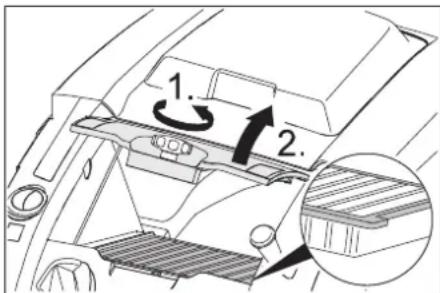
CAUTION
If the locking screw is not screwed up to the stop, damage may occur.
Note: When installing a new filter, ensure that the slats remain undamaged.
Replacing fuses/relays
■ KM 75/40 W Bp
1 Fuse F1 (50 A) 2 Fuse F2 (2 A) 3 Relay 4 Battery charging plug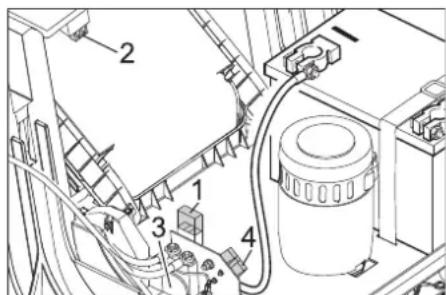
→ Open the device cover. → Replace the defective fuse or relay. ■ KM 75/40 W Bp Pack
The fuse is located on the battery connection.
Accessories
Device
Soft side broom 6.905-626.0
For fine dust on interior surfaces, water-resistant.
Soft sweeping roller 6.906-886.0
With natural bristles: specially for sweeping fine dust on smooth floors indoors.
Not water-resistant, so do not use it on abrasive surfaces!
Hard sweeping roller 6.906-885.0
For removing stubborn dirt on exterior surfaces, water-resistant.
| Antistatični valjak za metenje | 6.906-950.0 |
| Za elektrostaticki osetljive površine kao što su tepisi ili veštačka trava | |
| Jedinica za čišćenje tepiha | 2.641-571.0 |
| Sadrži: mrežicu za sakupljanje vlakana, antistatički valjak za čišćenje, trostruki upravljač | |
EU Declaration of Conformity
We hereby declare that the machine described herein, by its design and construction, and in all models we have placed on the market, complies with the essential requirements of the following European Community regulations on safety and health protection. This declaration becomes invalid if any changes are made to the machine without our consent.
Product: Sweeping machine with suction
Type: 1.049-xxx
2006/42/EC (+2009/127/EC)
2014/30/EU
2000/14/EC
Applied harmonized standards:
EN 55012: 2007 + A1: 2009
EN 60335-1
EN 60335-2-72
EN 61000-6-2: 2005
EN 62233: 2008
EN IEC 63000: 2018
Applied national standards: ---
H. Jenner Chairman of the Board of Management
S. Reiser Director Regulatory Affairs & Certification
71364 Winnenden (Germany)
Tel.: +49 7195 14-0
Fax: +49 7195 14-2212
Winnenden, 2021/02/01
Troubleshooting
| Smetnja Otklanjanje | |
| Uređaj se ne može pokrenuti | Kontaktni prekidač poklopca je isključio uređaj. Zatvaranje poklopca uređaja |
| Napunite akumulatore. | |
| Provera preopteretnog osigurača | |
| Obavestite Kärcher servisnu službu. | |
| Motor radi, ali se uređaj ne kreće | Podesite Bowden poteznu žicu voznog pogona. |
| Proverite klinasto remenje. | |
| Obavestite Kärcher servisnu službu. | |
| Uređaj se zaustavlja pri savladavanju uspona. | Vozite putem sa manjim usponom. |
| Provera preopteretnog osigurača | |
| Podesite Bowden poteznu žicu voznog pogona. | |
| Proverite klinasto remenje. | |
| Obavestite Kärcher servisnu službu. | |
| Valjak za metenje stoji, prikaz smetnje svetli crveno | Glavni prekidač okrenite na "OFF", proverite da li na četki ima zaglavljenih predmeta. Po potrebi vozite manjim usponom. Ponovo uključite glavni prekidač. Posle četvorostrukog ponavljanja ovog postupka upravljačka jedinica pravi pauzu u trajanju od 2 minuta kako bi se ohladila. Tokom tog vremena se uređaj ne može pokrenuti. |
| Uređaj ne mete kako treba | Proverite pohabanost valjka za metenje i bočnih metli pa ih po potrebi zamenite |
| Proverite ispravnost zaklopke za grubu prljavštinu. | |
| Popustite Bowden poteznu žicu zaklopke za grubu prljavštinu (zavrtanj za podešavanje). | |
| Proverite zategnutost i ispravnost remena, po potrebi ga zamenite. | |
| Naknadno podesite profil metenja. | |
| Zamenite valjak za metenje. | |
| Obavestite Kärcher servisnu službu. | |
| Uređaj diže prašinu | Proverite ispravnost zaklopke za grubu prljavštinu. |
| Popustite Bowden poteznu žicu zaklopke za grubu prljavštinu (zavrtanj za podešavanje). | |
| Proverite, očistite ili zamenite filter za prašinu. Filter za prašinu ne sme da se pere u vodi. | |
| Ispraznite posudu za nakupljenu prljavštinu | |
| Zamenite zaptivni profil na posudi za prljavštinu. | |
| Proverite zaptivku na filteru za prašinu. | |
| Proverite pohabanost zaptivnih letvica, po potrebi ih podesite ili zamenite. | |
| Loše metenje po ivicama | Podesite deo za spuštanje bočne metle. |
| Zamenite bočnu metlu | |
| Spustite bočnu metlu. | |
| Proverite pogonski remen bočne metle. | |
| Obavestite Kärcher servisnu službu. | |
| Deo za podizanje bočne metle ne radi. | Proverite Bowden poteznu žicu za podizanje bočne metle. |
| Obavestite Kärcher servisnu službu. | |
| Novi valjak za metenje se tare o posudu za prljavštinu. | Iznova podesite profil metenja. U tu svrhu uglavite o be poluge za podešavanje u odgovarajuću višu rupu (1...3). |
Technical data
| KM 75/40 W Bp KM 75/40 W Bp Pack | |||
| Podaci uređaja | |||
| Dužina x širina x visina (potisna ručka rasklopljena) | mm | 1430 x 750 x 1190 | 1430 x 750 x 1190 |
| Dužina x širina x visina (potisna ručka sklopljena) | mm | 1160 x 750 x 930 | 1160 x 750 x 930 |
| Težina (bez akumulatora) kg 79 79 | |||
| Težina (s akumulatorima) kg 125 125 | |||
| Dozvoljena ukupna težina kg 205 205 | |||
| Brzina vožnje i metenja km/h 4,5 4,5 | |||
| Savladavanje uspona (maks.) | % | 12 12 | |
| Prečnik valjka za metenje mm 265 265 | |||
| Prečnik bočnih metli | mm | 410 | 410 |
| Maks. površinski učinak | m3/h | 3400 | 3400 |
| Radna širina bez bočne metle | mm | 550 | 550 |
| Radna širina sa bočnom metlom | mm | 750 | 750 |
| Zapremina posude za prljavštinu | l | 40 40 | |
| Stepen zaštite, zaštićeno od kapajuće vode | -- | IPX 3 | IPX 3 |
| Motor | |||
| Tip | -- | Motor jednosmerne struje sa permanentnim magnetomSmer okretanja udesno | |
| Napon | V | 24 24 | |
| Nominalna jačina struje | A | 22 | 22 |
| Nominalna snaga | W | 400 400 | |
| Broj obrtaja | 1/min | 2750 | 2750 |
| Stepen zaštite | -- | IP 20 | IP 20 |
| Akumulator | |||
| Tip | -- | -- | 2x 12 V GiV |
| Kapacitet | Ah | -- | 60 (5h) |
| Težina | kg -- | 23 | |
| Trajanje punjenja potpuno ispražnjenog akumulatora h -- | 12 | ||
| Trajanje rada nakon višekratnog punjenja | h | -- | ca. 1,5-2 |
| Punjač | |||
| Napon el. mreže | V~ | -- | 230 |
| Izlazni napon | V | -- | 24 |
| Struja punjenja | A | -- | 10 |
| Frekvencija mreže | Hz | -- | 50/60 |
| Električna zaštita | |||
| Centralna | A | 50 50 | |
| Osigurač upravljačke jedinice | A | 2 | -- |
| Zaštita od potpunog pražnjenja akumulatora | -- | preko releja | preko releja |
| Punjač | --- | T4A / 250 V AC | |
| Filterski i usisni sistem | |||
| Površina filtera za finu prašinu | m2 | 1,8 1,8 | |
| Kategorija primene filtra za prašinu koja ne škodi zdravlju | -- | L | L |
| Nominalni podpritisak usisnog sistema | mbar | 5 | 5 |
| Nominalni zapreminski protok usisnog sistema | l/s | 45 45 | |
| Okolni uslovi | |||
| Radna temperatura | °C | -5 do +40 | -5 do +40 |
| Temperatura punjenja | --- | Temperatura prostorije | |
| Vlažnost vazduha, bez stvaranja kondenzata | % | 0 - 90 | 0 - 90 |
| Izračunate vrednosti prema EN 60335-2-72 | |||
| Nivo zvučnog pritiska LpA | dB(A) | 71 71 | |
| Nepouzdanost KpA | dB(A) | 3 | 3 |
| Nivo zvučne snage LwA + nepouzdanost KwA | dB(A) | 88 88 | |
| Nepouzdanost KwA | 2 | 2 | |
| Vrednost vibracije na ruci | m/s2 | 3,7 3,7 | |
| Nepouzdanost K | m/s2 | 0,2 0,2 | |
Subject to technical changes.

www.kaercher.com/REACH
Warranty
Note
Chairman of the Board of Management
Director Regulatory Affairs & Certification
71364 Winnenden (Germany)
Tel.: +49 7195 14-0
Fax: +49 7195 14-2212
Winnenden, 2021/02/01
www.kaercher.com/REACH
Warranty
Note
For KM 75/40 W Bp Pack, the batteries and charger are already integrated.
→ Open the device cover. → Place the batteries on the motor base. → Secure the batteries with the corresponding holder straps.
1 Aku oleku näidik
→ Avage seadme kate. → Vabastage kontramutter. → Reguleerige seadekruvi. → Keerake kontramutter kinni.
→ Avage seadme kate. → Vabastage kontramutter.
→ Reguleerige seadekruvi. → Keerake kontramutter kinni.
1 Kaitse F1 (50 A) 2 Kaitse F2 (2 A) 3 Relee 4 Akulaadija pistik
H. Jenner Chairman of the Board of Management
S. Reiser Director Regulatory Affairs & Certification
71364 Winnenden (Germany)
Tel.: +49 7195 14-0
Fax: +49 7195 14-2212
Winnenden, 2021/02/01
Abi häirete korral
www.kaercher.com/REACH
Garantija
Norāde
1 Battery status indicator
Chairman of the Board of Management
S. Reiser
Director Regulatory Affairs & Certification
71364 Winnenden (Germany)
Tel.: +49 7195 14-0
Fax: +49 7195 14-2212
Winnenden, 2021/02/01
www.kaercher.com/REACH
Warranty
Note
1 Fuse F1 (50 A) 2 Fuse F2 (2 A) 3 Relay 4 Battery charger plug
Chairman of the Board of Management
S. Reiser
Director Regulatory Affairs & Certification
71364 Winnenden (Germany)
Tel.: +49 7195 14-0
Fax: +49 7195 14-2212
Winnenden, 2021/02/01
www.kaercher.com/REACH
Warranty
Note
H. Jenner Chairman of the Board of Management
S. Reiser Director Regulatory Affairs & Certification
71364 Winnenden (Germany)
Tel.: +49 7195 14-0
Fax: +49 7195 14-2212
Winnenden, 2021/02/01
Note
Chairman of the Board of Management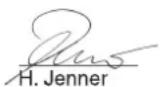
S. Reiser
Director Regulatory Affairs & Certification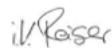
Note
1 Battery status indicator
→ Adjust the adjusting screw. → Tighten the wing nut.
Adjusting the raising height of the coarse dirt flap
Chairman of the Board of Management
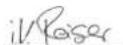
S. Reiser
Director Regulatory Affairs & Certification
Authorized representative for documentation:
S. Reiser
Alfred Kärcher SE & Co. KG
Winnenden, 2021/02/01
Troubleshooting help
Note
1 Battery charge indicator
1 Fixing point on the upper part of the handle
2 Fixing point under the housing cover
1 Fuse F1 (50 A)
2 Fuse F2 (2 A)
3 Relay
4 Battery charging plug
→ Open the housing cover.
Chairman of the Board of Management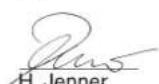
S. Reiser Director Regulatory Affairs & Certification
Document authorized by:
S. Reiser
Alfred Kärcher SE & Co. KG
71364 Winnenden (Germany)
Phone: +49 7195 14-0
Fax: +49 7195 14-2212
Winnenden, February 1, 2021
Support in case of malfunctions
Adjust the adjusting screw.
Open the device cover.
Open the device cover.
1 Battery status indicator
Note
Main switch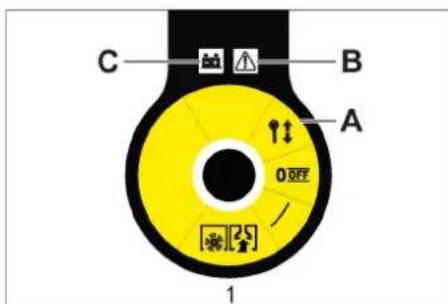
1 Main switch
www.kaercher.com/REACH



www.kaercher.com/dealersearch
Alfred Kärcher SE & Co. KG
Alfred-Kärcher-Str. 28-40
71364 Winnenden (Germany)
Tel.: +49 7195 14-0
Fax: +49 7195 14-2212


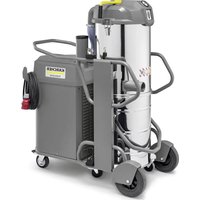
- NOTE
- PROPER USE
- FORESEEABLE MISUSE
- SUITABLE SURFACES
- FUNCTION
- GENERAL NOTES
- ACCESSORIES AND SPARE PARTS
- △DANGER
- ENVIRONMENTAL PROTECTION
- NOTES ABOUT THE INGREDIENTS (REACH)
- WWW.KAERCHER.COM/REACH
- WARRANTY
- SYMBOLS IN THE OPERATING INSTRUCTIONS
- △WARNING
- CAUTION
- SYMBOLS ON THE DEVICE
- SAFETY INSTRUCTIONS
- SAFETY INSTRUCTIONS CONCERNING OPERATION
- SAFETY INFORMATION CONCERNING THE DRIVING OPERATION
- ⚠️ DANGER
- SAFETY INFORMATION CONCERNING THE TRANSPORT OF THE APPLIANCE
- SAFETY INSTRUCTIONS FOR BATTERY-OPERATED DEVICES
- SAFETY INFORMATION CONCERNING MAINTENANCE AND CARE
- SAFETY DEVICES
- COVER
- DANGER
- MAIN SWITCH
- OPERATING AND FUNCTIONAL ELEMENTS
- REMOVE THE KEY
- OPEN THE DEVICE HOOD
- CLOSE DEVICE HOOD
- BEFORE STARTUP
- UNLOADING TIPS
- UNLOADING
- INSTALLING THE PUSHING HANDLE
- INSTALL SIDE BRUSH
- BATTERIES
- SAFETY NOTES REGARDING THE BATTERIES
- ⚠ DANGER
- △ DANGER
- CHARGE THE BATTERIES
- CHARGING PROCESS - KM 75/40 W BP PACK
- BATTERY STATUS DISPLAY
- CHARGING PROCESS - KM 75/40 W BP
- AFTER CHARGING
- REMOVE THE BATTERY
- START UP
- INSPECTION AND MAINTENANCE WORK
- OPERATION
- STARTING THE MACHINE
- DRIVE THE MACHINE
- DRIVE FORWARD
- DRY RUN
- DRIVING OVER OBSTACLES
- SWEEPING MODE
- SWEEPING WITH BULK WASTE FLAP RAISED
- SWEEPING WITH SIDE BRUSHES
- SWEEPING DRY FLOORS
- SWEEPING DAMP OR WET FLOORS
- BATTERY DISPLAY
- FAULT DISPLAY
- CLEANING THE DUST FILTER
- EMPTYING WASTE CONTAINER
- TURN OFF THE APPLIANCE
- TRANSPORT
- STORAGE
- SHUTDOWN
- CARE AND MAINTENANCE
- CLEANING
- ATTENTION
- CLEANING THE INSIDE OF THE MACHINE
- EXTERNAL CLEANING OF THE APPLIANCE
- MAINTENANCE INTERVALS
- MAINTENANCE BY THE CUSTOMER
- MAINTENANCE BY CUSTOMER SERVICE
- MAINTENANCE WORKS
- GENERAL NOTES ON SAFETY
- ⚠ WARNING
- ADJUST THE BOWDEN CABLE OF THE ACCELERATION DRIVE
- CHECKING ROLLER BRUSH
- REPLACING ROLLER BRUSH
- CHECK AND ADJUST ROLLER BRUSH SWEEPING TRACK
- REPLACING SIDE BRUSH
- ADJUST SIDE-BRUSH LOWERING
- ADJUST THE RAISING OF THE BULK WASTE FLAP
- ADJUSTING AND REPLACING SEALING STRIPS
- REPLACING DUST FILTER
- REPLACE FUSE/RELAY
- EU DECLARATION OF CONFORMITY
- RELEVANT EU DIRECTIVES
- APPLIED HARMONIZED STANDARDS
- APPLIED NATIONAL STANDARDS
- APPLIED CONFORMITY EVALUATION METHOD
- SOUND POWER LEVEL DB(A)
- DOCUMENTATION SUPERVISOR
- DECLARATION OF CONFORMITY
- CURRENTLY APPLICABLE UK REGULATIONS
- S.I. 2008/1597 (AS AMENDED)
- DESIGNATED STANDARDS USED
- NATIONAL STANDARDS USED
- APPLIED CONFORMITY ASSESSMENT PROCEDURE
- TIP
- CHECK THE SQUEEGEE ROLLER
- WARNING
- OBS
- CHECKING THE SWEEPING ROLLER
- BATTERY STATUS INDICATOR
- CHECK THE SWEEPING ROLLER
- REFERENCE
- INSPECT THE SWEEPING ROLLER
- BATTERY COMPARTMENT DISPLAY
- GENERAL INSTRUCTIONS
- REPLACING THE SWEEPING ROLLER
- KM 75/40 W BP PACK
- BATTERY INDICATOR
- ADJUSTING THE LIFT OF THE COARSE DIRT FLAP
- HARMONIZED STANDARDS APPLIED
- REMOVING THE KEY
- REPLACING THE SIDE BRUSH
- ADJUSTING THE LIFTING PART OF THE COARSE DIRT FLAP
- ADJUSTING AND REPLACING THE SEALING STRIPS
- ACCESSORIES
- SOFT SIDE BROOM
- SAFETY NOTES
- SAFETY NOTES REGARDING HANDLING
- SAFETY NOTES REGARDING DRIVING
- CONTROL PANEL
- CHARGING THE BATTERIES
- CHARGING PROCEDURE - KM 75/40 W BP PACKAGE
- CHECKING AND ADJUSTING THE SWEEPING PROFILE OF THE SWEEPING ROLLER
- REPLACING THE DUST FILTER
- ⚠WARNING
- DANGER OF DAMAGE
- IF THE LOCKING SCREW IS NOT SCREWED UP TO THE STOP, DAMAGE MAY OCCUR
- KM 75/40 W BP
- DEVICE
- SOFT SWEEPING ROLLER
- HARD SWEEPING ROLLER
- AKU OLEKU NÄIDIK
- GARANTIJA
- NORĀDE
- ADJUSTING THE RAISING HEIGHT OF THE COARSE DIRT FLAP
- AUTHORIZED REPRESENTATIVE FOR DOCUMENTATION
- BATTERY CHARGE INDICATOR
Brand : Kärcher
Model : KM 7540 W Bp
Category : Vacuum Cleaner