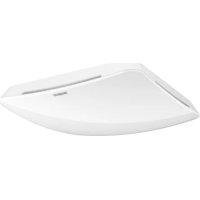
Multisensor Air KNX - Motion detector STEINEL - Free user manual and instructions
Find the device manual for free Multisensor Air KNX STEINEL in PDF.



| Product type | KNX multifunction motion detector |
| Brand | Steinel |
| Model | Multisensor Air KNX |
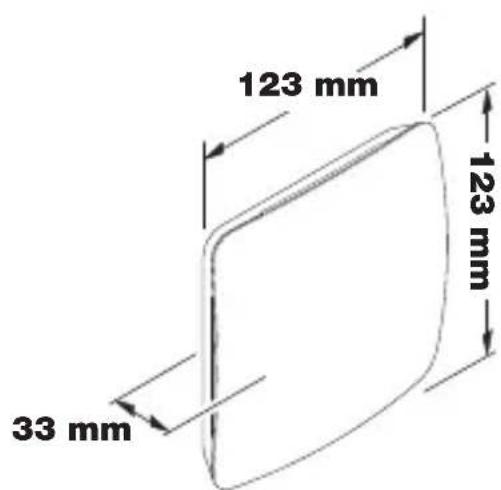
| Dimensions (flush-mounted) | 123 × 123 × 33 mm |
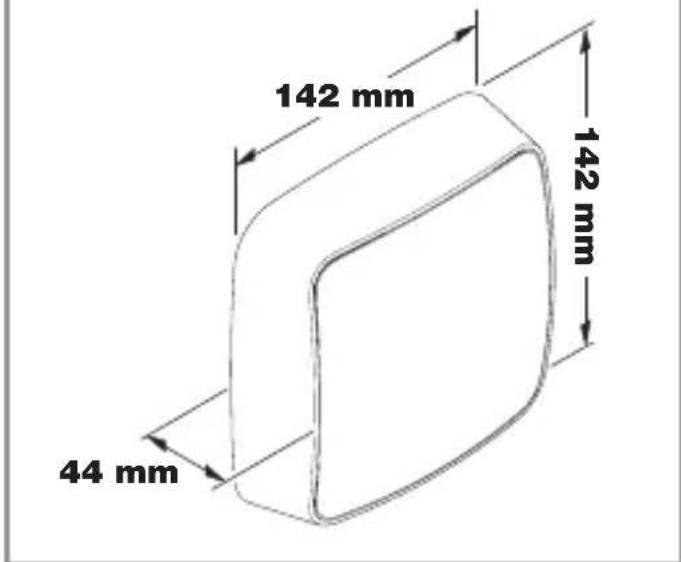
| Dimensions (surface-mounted) | 142 × 142 × 44 mm |
| Power supply | KNX bus voltage 21–30 V |
| Current consumption | 15 mA |
| Installation height | 2 to 12 m |
| Detection zone | 360° |
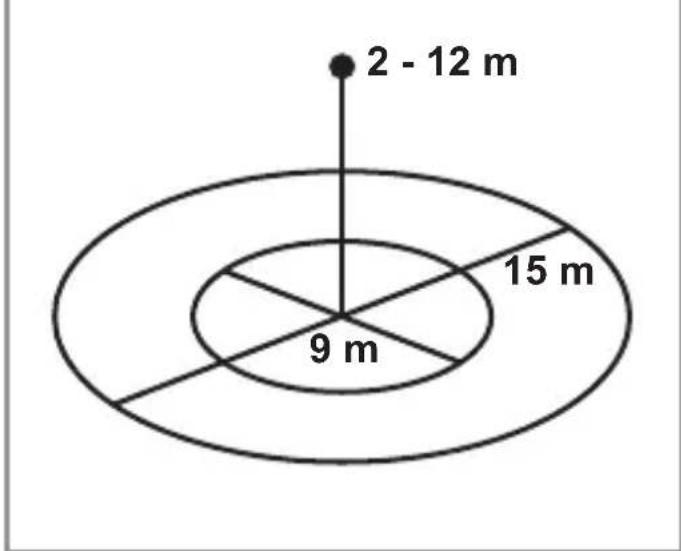
| True Presence range | ∅ 9 m (max height 4 m) |
| Presence range | ∅ 15 m |
| Motion range | ∅ 15 m (adjustable in cm) |
| Integrated sensors | Presence, brightness, temperature, humidity, atmospheric pressure, CO2, VOC |
| True Presence technology | Detection of vital micromovements (7.2 GHz) |
| Settings | Via ETS software (version 4.0 and above) and Smart Remote app (Bluetooth) |
| Delay time | 30 s to 18 h 12 min 15 s, IQ mode |
| Trigger threshold | 0 to 2500 lx |
| Temperature range | 0 °C to +40 °C |
| Protection rating | IP 20 |
| Bluetooth frequency | 2.4 – 2.48 GHz |
| Bluetooth transmission power | 5 dBm / 3 mW |
| Maintenance | Clean with a damp cloth, without detergent |
| Manufacturer warranty | 5 years |
Frequently Asked Questions - Multisensor Air KNX STEINEL
User questions about Multisensor Air KNX STEINEL
0 question about this device. Answer the ones you know or ask your own.
Ask a new question about this device
Download the instructions for your Motion detector in PDF format for free! Find your manual Multisensor Air KNX - STEINEL and take your electronic device back in hand. On this page are published all the documents necessary for the use of your device. Multisensor Air KNX by STEINEL.
USER MANUAL Multisensor Air KNX STEINEL
natural_image
White plastic kitchen appliance with a curved handle and a small logo on the side (no text or symbols visible)
GB....13 Follow written instructions!
natural_image
Line drawing of a door frame with mounting bracket (no text or symbols)3.2
natural_image
Technical line drawing of an open electrical enclosure with internal compartments and mounting holes (no text or symbols)3.3
3.4
3.5
4.1
5.1
natural_image
Simple line drawing of a mechanical setup with a block and curved base (no text or symbols)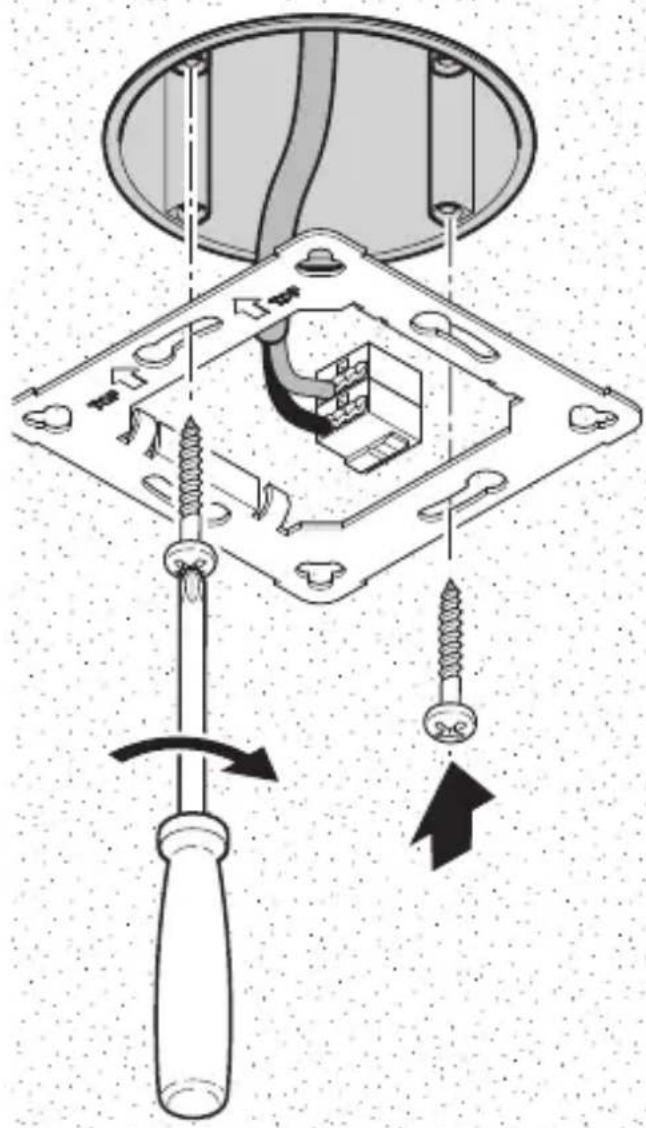
5.2
natural_image
Diagram showing a cable inserted into a device housing with an arrow indicating the cable's direction (no text or symbols present)5.4

natural_image
Pure technical diagram showing a mechanical component inserted into a curved base (no text or symbols)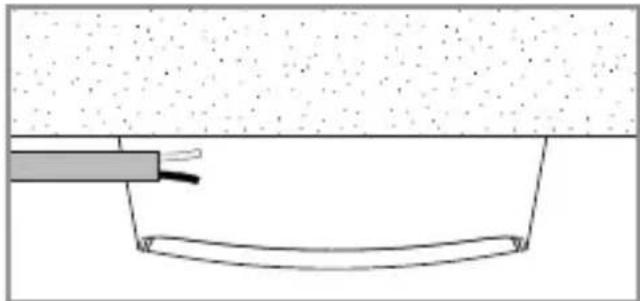
natural_image
Simple line drawing of a cable inserted into a curved pipe (no text or symbols)5.3
natural_image
Diagram of a device panel with directional arrows and a black arrow symbol, no readable text or labels present.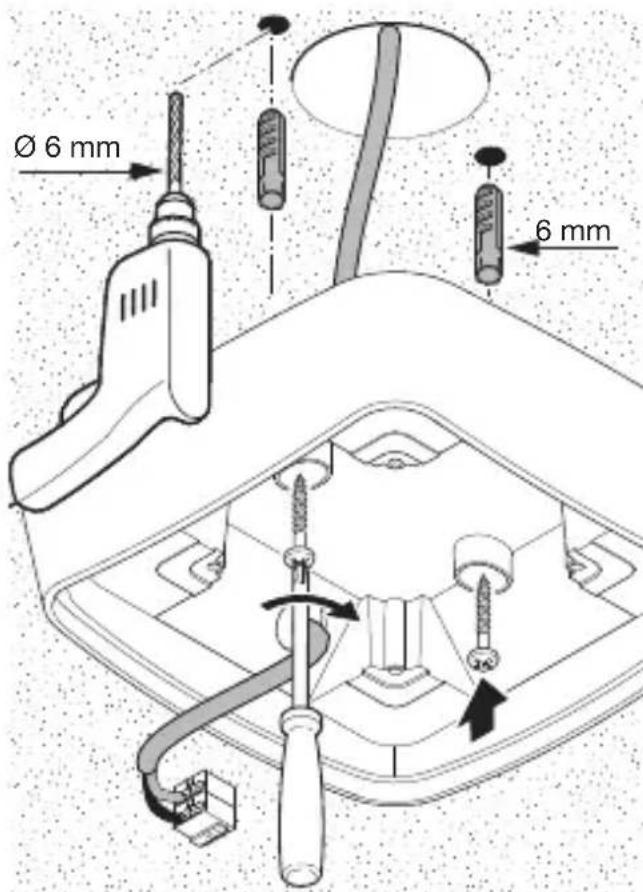
natural_image
Technical line drawing of a mechanical component with a black arrow indicating a specific feature (no text or symbols present)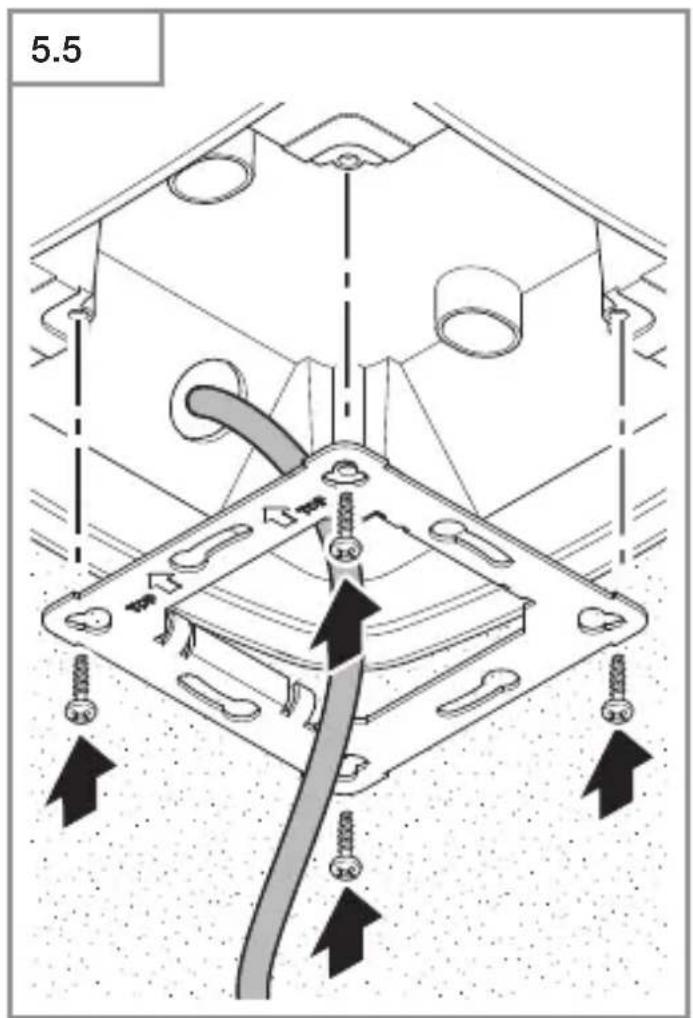
DE
iOS

LED-Funktion
- Please read carefully and keep in a safe place.
- Under copyright.
Reproduction either in whole or in part only with our consent.
– Subject to change in the interest of technical progress.
Symbols

Hazard warning!

Reference to other information in the document.
2. General safety precautions
Disconnect the power supply before attempting any work on the sensor.
- This product must only be installed by a qualified electrician in accordance with national wiring regulations as defined in VDE 08 29 (DIN EN 5000 90).
- Fitted improperly, low-voltage installations can cause extremely serious personal injury or damage to property.
- This product must never be connected to a 230 V AC power supply as it is intended for connection to an extra-low voltage power supply.
- Only use genuine replacement parts.
- Repairs may only be made by specialist workshops.
3. True Presence® Multisensor KNX / Multisensor AIR KNX
Proper use
– Multisensor for indoor ceiling mounting for connecting to the KNX bus system
The True Presence® Multisensor KNX and Multisensor AIR KNX are the "eyes and ears" in modern, intelligent buildings. Presence of persons, brightness, room temperature, humidity, air pressure, CO₂ and volatile organic compounds (VOCs) are captured as sensor variables.
Note:
Presence can only be detected in conjunction with True Presence®.
The True Presence® Multisensor KNX is also equipped with "True Presence®" technology, which detects the presence of persons. Thus, True Presence® and absence is recognisable. The detection zone of the multisensor can be precisely limited via the range setting.
This makes it ideal for use in offices and schools
For specific applications, such as cruise ships or hotels, please contact us directly so we can work together on defining the best way to integrate the sensors.
All function settings are made via the Engineering Tool Software (ETS) from version ETS4.0 and higher.
The Smart Remote app displays the sensor variables and enables activation of the programming mode.
Product components Installation (Fig. 3.1)
- Sensor
- Mounting frame
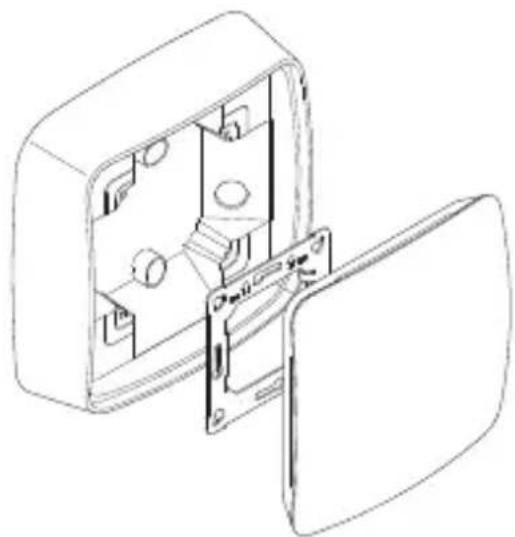
Product components Installation (Fig. 3.2)
- Sensor
- Mounting frame
- Surface-mounting adapter
Product dimensions, concealed installation (Fig. 3.3)
Product dimensions, surface-mounted installation (Fig. 3.4)
Detection zone (Fig. 3.5)
Note:
The CO2 sensor used in the multisensor comes with an auto-calibration function. For this to work properly and ensure correct measurement by the CO2 sensor, the multisensor must be permanently connected to the power supply.
Furthermore, the first seven days after switching on the power supply may show major variations in the levels measured. The sensor must also be exposed to fresh air for at least an hour a day.
4. Installation
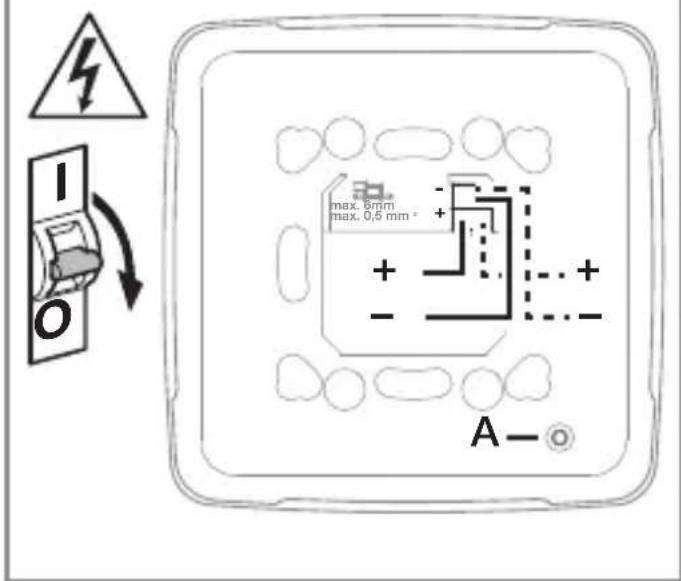
Wiring diagram (Fig. 4.1)
5. Mounting
- Check all components for damage.
- Do not use the product if it is damaged.
- Select an appropriate mounting location, taking the reach and presence detection into consideration.
- Switch OFF power supply (Fig. 4.1)
Mounting procedure, concealed installation
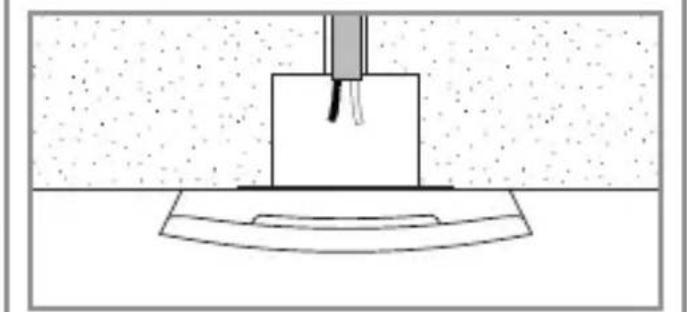
- Firmly screw the mounting frame onto the mounting box (Fig 5.1)
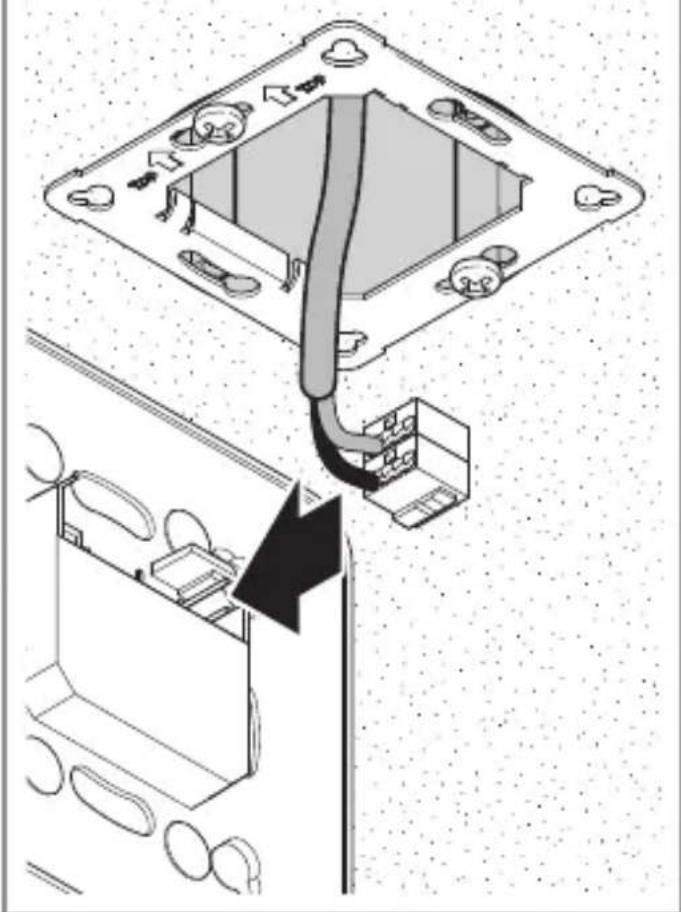
- Make plug connection (Fig. 5.2)
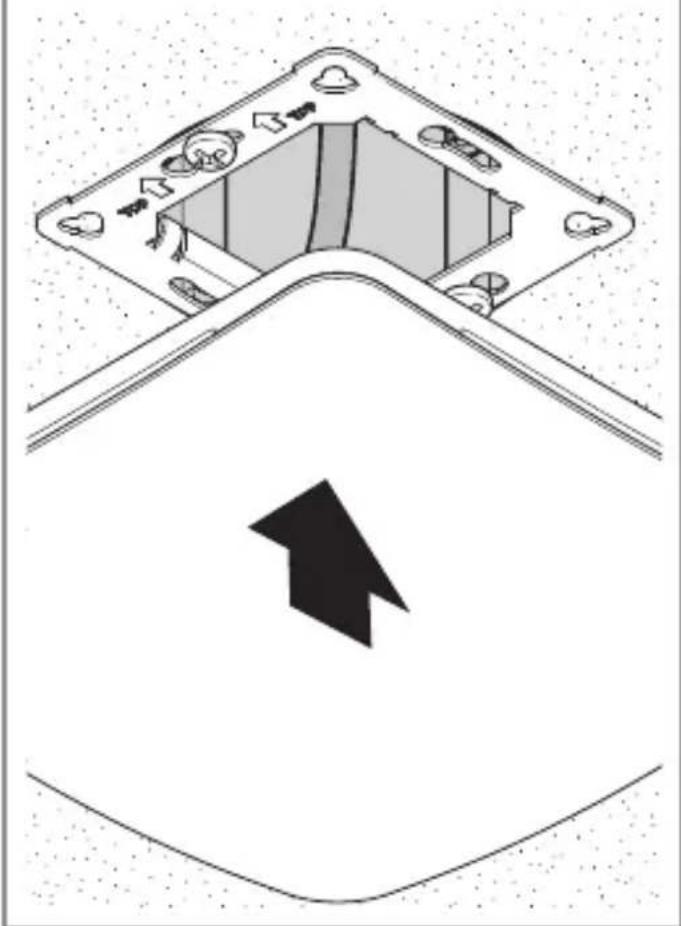
- Position sensor on the mounting frame (Fig. 5.3)
- The sensor is held on the frame by magnetic force.
Mounting procedure, surface-mounted installation
- Drill holes and screw on surface-mounting adapter (Fig. 5.4)
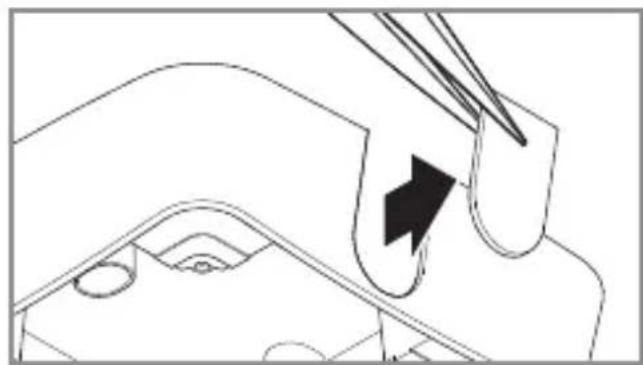
When mounting with exposed cable, break out the mounting tab (Fig. 5.4)
- Firmly screw the mounting frame onto the surface-mounting adapter (Fig 5.5)
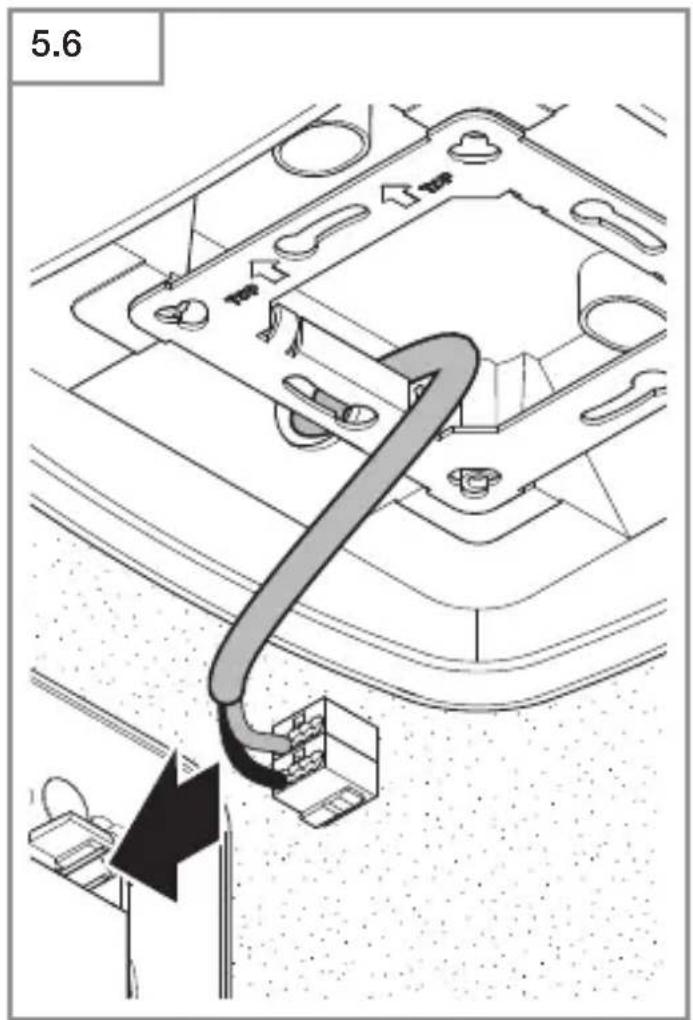
- Make plug connection (Fig. 5.6)
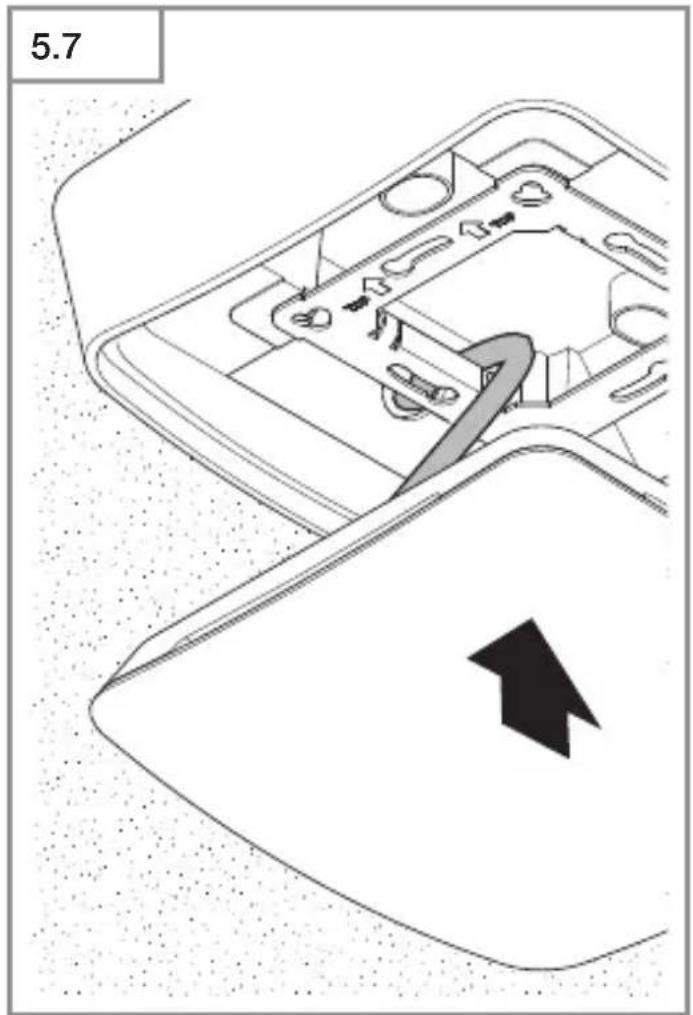
- Position sensor on the mounting frame (Fig. 5.7)
- The sensor is held on the frame by magnetic force.
Note:
When setting the reach, the mounting height needs to be specified via the ETS
Note:
Surface-mounted installation has influences on the sensor variables measured. For this reason, correction factors are implemented in the software which take effect by activating the "surface mounting" type of installation in the ETS.
6. Function and settings
Factory settings
- See KNX application description
Startup
During initial commissioning, the presence detector creates a room image. The room must be free of movement for 2 to 2.5 minutes for this.
Note:
An image of the room is also created if reach or mounting height is changed. The ETS can adjust the sensitivity of the True Presence® Multisensor from 1 (= low) to 9 (= high).
The functions to be used (activated) are set in the "General Settings" parameter window using the ETS.
Note:
You will find an application description at knx.steinel.de.
- Issue physical address and generate application program in the ETS.
- Load the physical address and application program into the multisensor. When you are prompted, press the programming button A (Fig. 4.1).
Smart Remote app
To read off and activating the programming mode of the multisensor via smartphone or tablet, you must download the STEINEL Smart Remote app from your app store. You will need a Bluetooth-capable smartphone or tablet.
Android

iOS

LED function
Initialisation: LED white Normal mode: LED OFF Bluetooth connection active: LED blue Error: LED red Programming mode: LED green Application not configured or wrong: LED lights up orange
7. Accessories
Surface-mounting adapter (EAN: 4007841 063870)
8. Maintenance / care
The product requires no maintenance. The multisensor can be cleaned with a damp cloth (without detergents) if dirty.
9. Disposal
Electrical and electronic equipment, accessories and packaging must be recycled in an environmentally compatible manner.

Do not dispose of electrical and electronic equipment as domestic waste.
EU countries only
Under the current European Directive on Waste Electrical and Electronic Equipment and its implementation in national law, electrical and electronic equipment no longer suitable for use must be collected separately and recycled in an environmentally compatible manner.
10. Conformity
Hereby, STEINEL GmbH declares that the radio equipment type True Presence® Multisensor KNX / Multisensor AIR KNX is in compliance with Directive 2014/53/EU. The full text of the EU declaration of conformity is available at the following internet address:
www.steinel.de
11. Manufacturer's Warranty
Manufacturer's warranty of STEINEL GmbH, Diesel strasse 80-84, DE-33442 Herzebrock-Clarholz, Germany All STEINEL products meet the highest quality standards. For this reason, we, the manufacturer, are pleased to provide you, the customer, with a warranty under the following terms and conditions:
The warranty covers the absence of deficiencies which are proven to be the result of a material defect or fault in manufacturing and which are reported to
us immediately after detection and within the warranty period. The warranty shall cover all STEINEL Professional products sold and used in Germany.
Our warranty cover for consumers
The provisions below apply to consumers. A consumer is any natural person who, on entering into the purchase transaction, neither acts in exercising their commercial nor their self-employed activity.
You can opt for warranty cover in the form of repair or replacement which will be provided free of charge (if applicable, in the form of a successor model of the same or higher quality) or in the form of a credit note.
In the case of sensors, floodlights, outdoor and indoor lights, the warranty period for the STEINEL Professional product you have purchased is 5 years in each case from the date on which the product was purchased.
We shall bear the shipping costs but not the transport risks involved in return shipment.
Our warranty cover for entrepreneurs
The provisions below apply to entrepreneurs. Entrepreneur is a natural or legal person or partnership with legal personality who or which, on entering into the purchase transaction, acts in exercising their or its commercial or self-employed activity.
We have the option of providing warranty cover by rectifying deficiencies free of charge, replacing a product free of charge (if applicable, in the form of a successor model of the same or higher quality) or by issuing a credit note. In the case of sensors, floodlights, outdoor and indoor lights, the warranty period for the STEINEL Professional product you have purchased is 5 years in each case from the date on which the
product was purchased.
Within the scope of warranty cover, we shall not bear your expenses accruing from subsequent fulfillment nor shall we bear your expenses for removing the defective product and installing a replacement product.
Statutory rights accruing from defects, gratuitousness
The warranty cover described here shall be applicable in addition to the statutory rights of warranty – including special consumer protection provisions – and shall not restrict or replace them. Exercising your statutory rights in the event of defects is gratuitous.
Exemptions from the warranty
All replaceable lamps are expressly excluded from this warranty.
In addition to this, the warranty shall not cover:
any wear resulting from use or any other natural wear of product parts or any deficiencies in the STEINEL
Professional product that are attributable to wear caused by use or other natural wear,
any improper or non-intended use of the product or any failure to observe the operating instructions,
any unauthorised additions, alterations or other modifications to the product or any deficiencies attributable to the use of accessory,
supplementary or replacement parts which are not genuine STEINEL parts, any maintenance or care of products that is not carried out in accordance with the operating instructions,
any attachment or installation that is not in accordance with STEINEL's installation instructions,
any damage or loss occurring in transit.
Application of German law
The warranty shall be governed by German law excluding the United Nations Convention concerning the International Sale of Goods (CISG).
Making claims
If you wish to make a warranty claim, please send your product complete and carriage paid with the original receipt of purchase, which must show the date of purchase and product designation, either to your retailer or directly to us at STEI-NEL (UK) Ltd. – 25 Manasty Road, Axis Park, Orton Southgate, GB- Peterborough Cambs PE2 6UP United Kingdom. For this reason, we recommend that you keep your receipt of purchase in a safe place until the warranty period expires.
- Technical specifications
| Dimensions(W × H × D in mm) | Concealed installation: 123 × 123 × 33Surface-mounted installation: 142 × 142 × 44 |
| Current consumption True Presence ^® Multisensor KNX: 40 mAMultisensor AIR KNX: 15 mA | |
| Power supply KNX bus voltage 21 – 30 V | |
| Mounting height 2 – 12 m | |
| Detection zone 360° | |
| Reach ∅ 9 m True Presence ^® (mounted up to a height of 4 m)∅ 15 m presence∅ 15 m movement(can be set to within one centimetre) | |
| Sensor values True Presence ^® (only True Presence ^® Multisensor KNX)Light measurementTemperature: 0 – 40 °CAir pressure: 300 – 1,200 hPaRelative humidity: 0 – 100 %VOC: 0 – 60,000 ppbCO2: 400 – 10,000 ppm | |
| True Presence ^® MultisensorKNX outputs | 4× light output (ON / OFF, dimming level, scene)Dimming level with effect light2× constant-lighting control with basic light levelHVAC, presence, CO2, VOC, temperature, relative humidity, dew point, logic gate, anti-presence, air pressure, comfort |
| Time setting | 30 seconds to 18:12:15 hours (hh:mm:ss), IQ mode |
| Multisensor AIR KNX outputs | HVAC, VOC, temperature, relative humidity, dew point, logic gate, air pressure, comfort, CO2 |
| Twilight setting | 0 – 2,500 lux |
| Temperature range | 0 °C to +40 °C |
| IP rating | IP 20 |
| True Presence ^® frequency | 7.2 GHz (responds to micro-movements resulting from the vital functions) |
| UWB transmitter power | ≤ -41 dBm / MHz |
| Bluetooth frequency | 2.4 – 2.48 GHz |
| Bluetooth transmitter power | 5 dBm / 3 mW |
13. Troubleshooting
Malfunction Cause Remedy
| Light does not switch ON | ■ No supply voltage■ Switching threshold light level set too low■ No movement detection | ■ Check supply voltage■ Slowly increase switching threshold light level until light switches ON■ Ensure unobstructed sensor vision■ Check detection zone |
| Lights do not switch OFF | ■ Switching threshold light level too high | ■ Reduce switching threshold light level |
| Sensor switches OFF despite persons being present | ■ Wrong scenario selected■ Reach set too low■ Switching threshold light level too low | ■ Select scenario with True Presence■ Change reach■ Change switching threshold light level |
| Sensor does not switch OFF quickly enough | ■ Stay-ON time too long | ■ Reduce stay-ON time |
| Sensor does not switch ON when persons are present despite it being dark | ■ Switching threshold light level set too low■ Semi-automatic mode activated | ■ Increase switching threshold light level■ Activate fully automatic mode or switch light ON at button |
| Sensor switches ON despite no persons being present | ■ Movement within adjacent rooms and floor levels | ■ Change reach■ Select scenario with lower sensitivity |
| Wrong temperature indicated | ■ Different layers of air | ■ Enter correction factor into the ETS |
FR
Application Smart Remote
iOS

Fonctions de la LED
iOS

Led-functie
Initialiseren: led brandt wit
Storing: led brandt rood
Programmeermodus: led brandt groen
iOS

Funzione LED
iOS

Funciones LED
iOS

iOS

LED-funktion
Initialisering: LED lyser vitt
iOS

LED-funktion
Initialisering: LED lyser hvidt
iOS

LED-toiminto
iOS

LED-funksjon
Initialisering: LED lyser hvitt
iOS

Λειτουργία LED
iOS

LED fonksiyonu
iOS

LED funkció
iOS

Funkce LED
iOS

Funkcia LED
Inicializácia: LED svieti na bielo
iOS

Funkcja LED
iOS

Functie LED
iOS

Delovanje LED
Inicializacija: LED sveti belo
iOS

LED funkcija
iOS

LED-funktsioon
True Presence® Multisensor KNX /
iOS

Šviesos diodu funkcija
iOS

LED funkcija
3. True Presence® Multisensor KNX / Multisensor AIR KNX
Употреба по предназначение
iOS

LED-функция
iOS

LED-功能
初始化:LED 亮为白色
正常模式:LED 关
激活蓝牙连接:LED 亮为蓝色
故障:LED 亮为红色
编程模式:LED 亮为绿色
应用未参数化或错误:LED 灯亮为橙色
7. 配件
明装适配器 (EAN: 4007841 063870)
8. 保养和维护
产品免维护。
iOS

Функция СИД
natural_image
World map silhouette in grayscale, showing continents and oceans without any text or labelsContact
www.steinel.de/contact

- DE
- LED-Funktion
- Symbols
- Hazard warning!
- Reference to other information in the document.
- General safety precautions
- Disconnect the power supply before attempting any work on the sensor.
- True Presence® Multisensor KNX / Multisensor AIR KNX
- Proper use
- Note:
- Product components Installation (Fig. 3.1)
- Product components Installation (Fig. 3.2)
- Product dimensions, concealed installation (Fig. 3.3)
- Product dimensions, surface-mounted installation (Fig. 3.4)
- Detection zone (Fig. 3.5)
- Installation
- Wiring diagram (Fig. 4.1)
- Mounting
- Mounting procedure, concealed installation
- Mounting procedure, surface-mounted installation
- Function and settings
- Factory settings
- Startup
- Smart Remote app
- LED function
- Accessories
- Maintenance / care
- Disposal
- EU countries only
- Conformity
- Manufacturer's Warranty
- Our warranty cover for consumers
- Our warranty cover for entrepreneurs
- Statutory rights accruing from defects, gratuitousness
- Exemptions from the warranty
- Application of German law
- Making claims
- Troubleshooting
- FR
- Application Smart Remote
- Fonctions de la LED
- Led-functie
- Funzione LED
- Funciones LED
- LED-toiminto
- LED-funksjon
- Λειτουργία LED
- LED fonksiyonu
- LED funkció
- Funkce LED
- Funkcia LED
- Funkcja LED
- Functie LED
- Delovanje LED
- LED funkcija
- LED-funktsioon
- Šviesos diodu funkcija
- Употреба по предназначение
- LED-функция
- LED-功能
- 配件
- 保养和维护
- Функция СИД
- Contact
Brand : STEINEL
Model : Multisensor Air KNX
Category : Motion detector