
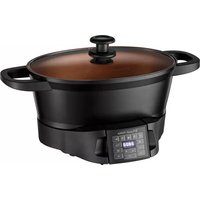
2827056 - Multi-cooker RUSSELL HOBBS - Free user manual and instructions
Find the device manual for free 2827056 RUSSELL HOBBS in PDF.
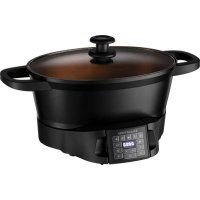



| Product Type | Multi-cooker |
| Brand | Russell Hobbs |
| Model | 2827056 |
| Capacity | Approximately 4.5 litres |
| Power | 1200 W (estimated) |
| Supply Voltage | 220-240 V ~ 50/60 Hz |
| Cooking Functions | Sear, Roast, Sous vide, Low and high slow cook, Steam, Rice, Boil, Keep warm |
| Temperature Range | 38 °C to 215 °C depending on modes |
| Timer | Up to 20 hours |
| Bowl Material | Dishwasher safe stainless steel |
| Included Accessories | Steaming rack, roasting rack, glass lid |
| Control Panel | Removable, do not immerse |
| Care | Bowl and glass lid dishwasher safe; panel wiped with a damp cloth |
| Safety | Auto shut-off after 4 hours of keep warm, hot surfaces, overheat protection |
| Use | Household use only |
Frequently Asked Questions - 2827056 RUSSELL HOBBS
User questions about 2827056 RUSSELL HOBBS
0 question about this device. Answer the ones you know or ask your own.
Ask a new question about this device
Download the instructions for your Multi-cooker in PDF format for free! Find your manual 2827056 - RUSSELL HOBBS and take your electronic device back in hand. On this page are published all the documents necessary for the use of your device. 2827056 by RUSSELL HOBBS.
USER MANUAL 2827056 RUSSELL HOBBS
Follow basic safety precautions, including:
This appliance can be used by children aged 8 years and above and persons with reduced physical, sensory or mental capabilities or lack of experience and knowledge if they have been supervised/instructed and understand the hazards involved. Children shall not play with the appliance. Cleaning and user maintenance shall not be done by children unless they are older than 8 and supervised. Keep the appliance and cable out of reach of children under 8 years.
If the cable is damaged, it must be replaced by the manufacturer, its service agent, or someone similarly qualified, to avoid hazard.
Don't immerse the appliance in liquid.
The surfaces of the appliance will get hot.
The control panel must be removed before washing the cooking pot. Dry the cooking pot thoroughly before using the appliance again.
Do not use this appliance near bathtubs, showers, basins or other vessels containing water. - Leave a space of at least 50 mm all round the appliance. - Use extreme caution when moving the appliance when it contains hot food or hot liquids. - Use oven gloves or similar protection when removing the lid. Beware of escaping steam when removing the lid. - Do not use this appliance outdoors. - Don't cover the appliance or put anything on top of it. - Unplug the appliance when not in use, before moving and before cleaning. - Don't use accessories or attachments other than those we supply. - Don't use the appliance for any purpose other than those described in these instructions. - Don't operate the appliance if it's damaged or malfunctions. - Don't place the cooking pot on any surface affected by heat. Always place the pot onto a trivet or heat-proof mat. The base of the cooking pot has a rough surface and can leave scratches or other marks on delicate or polished surfaces. Always place protective padding under the cooking pot to protect these types of surface.
HOUSEHOLD USE ONLY
PARTS
- Glass lid
- Handles
- Steaming rack
- Cooking pot
- Control panel
- Roasting rack
BEFORE USING FOR THE FIRST TIME
Remove any packaging material and labels. Wash the removable parts in warm soapy water, rinse well, drain, and air dry.
CONTROLS
The following table gives a brief description of the control panel functions.
| m | Keep Warm Selects the keep warm mode. Roast Selects the roast mode. | ||
| Steam Selects the steamer mode. | Sous Vide Selects the sous vide mode. | ||
| Rice Selects the rice cooking mode. | Temperature Used to select temperature values for adjustment. | ||
| Boil Selects the boil mode. | Time Used to select time values for adjustment. | ||
| Sear Selects the sear mode. | ▲▼ | Used to increase/decrease temperature or time values. | |
| Slow Cook High Used to select the slow cooker high setting mode. | I/O Used to start or stop the appliance. | ||
| Slow Cook Low Used to select the slow cooker low setting mode. | |||
C
Place the bag onto a flat surface and, using your hand, carefully push out as much of the air from the bag as you can. Be careful not to squash or damage the ingredients when you do this. Then, close the seal on the bag.
- Water Immersion Method (fig. E)
Fill a container big enough to hold the zip bag and ingredients with cold water. Put the ingredients into the bag and close the seal almost all of the way, just leaving a small opening at one corner. Slowly push the bag into the water, leaving the unsealed corner sticking up out of the water. When you do this, make sure that no water accidentally enters the bag. As you immerse the bag, the water will push almost all of the remaining air out. Finally, seal the corner and remove the bag from the container.
For Silicon bags:
Follow the instructions provided by the manufacturer of the bag.
For vacuum pack machines:
A purpose-made vacuum sealer suitable for food use is perfect for sous vide cooking. Use the correct bags as recommended by the manufacturer, and follow the instructions that come with the machine.
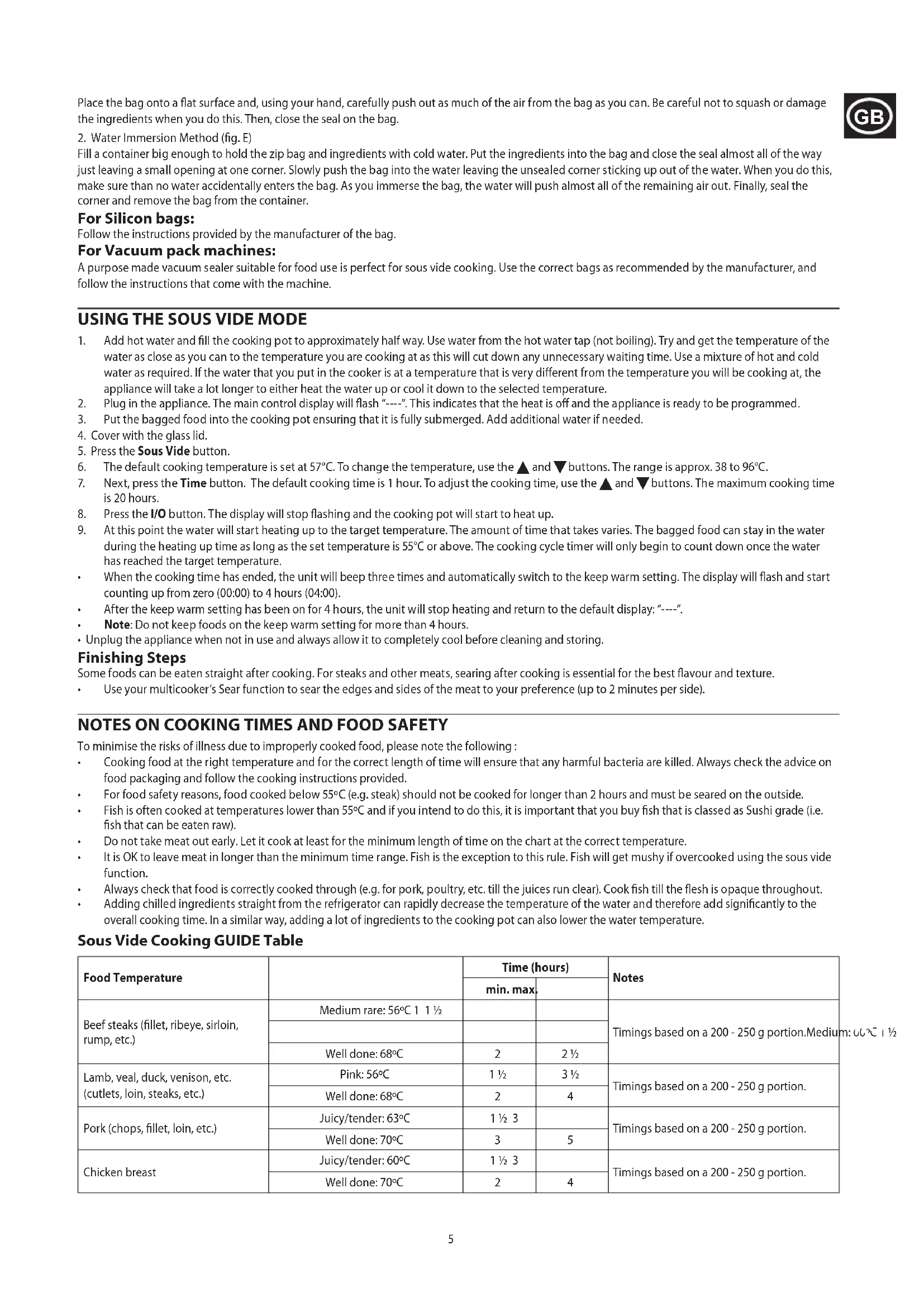
USING THE SOUS VIDE MODE
- Add hot water and fill the cooking pot to approximately halfway. Use water from the hot water tap (not boiling). Try to get the temperature of the water as close as you can to the temperature you are cooking at, as this will cut down any unnecessary waiting time. Use a mixture of hot and cold water as required. If the water that you put in the cooker is at a temperature that is very different from the temperature you will be cooking at, the appliance will take a lot longer to either heat the water up or cool it down to the selected temperature.
- Plug in the appliance. The main control display will flash "----". This indicates that the heat is off and the appliance is ready to be programmed.
- Put the bagged food into the cooking pot, ensuring that it is fully submerged. Add additional water if needed.
- Cover with the glass lid.
- Press the Sous Vide button.
- The default cooking temperature is set at 57°C. To change the temperature, use the ▲ and ▼ buttons. The range is approx. 38 to 96°C.
- Next, press the Time button. The default cooking time is 1 hour. To adjust the cooking time, use the ▲ and ▼ buttons. The maximum cooking time is 20 hours.
- Press the I/O button. The display will stop flashing and the cooking pot will start to heat up.
- At this point the water will start heating up to the target temperature. The amount of time that takes varies. The bagged food can stay in the water during the heating up time as long as the set temperature is 55°C or above. The cooking cycle timer will only begin to count down once the water has reached the target temperature.
- When the cooking time has ended, the unit will beep three times and automatically switch to the keep warm setting. The display will flash and start counting up from zero (00:00) to 4 hours (04:00). After the keep warm setting has been on for 4 hours, the unit will stop heating and return to the default display: "----". Note: Do not keep foods on the keep warm setting for more than 4 hours.
- Unplug the appliance when not in use and always allow it to completely cool before cleaning and storing.
Finishing Steps
Some foods can be eaten straight after cooking. For steaks and other meats, searing after cooking is essential for the best flavour and texture.
Use your multicooker's Sear function to sear the edges and sides of the meat to your preference (up to 2 minutes per side).
NOTES ON COOKING TIMES AND FOOD SAFETY
To minimise the risks of illness due to improperly cooked food, please note the following:
Cooking food at the right temperature and for the correct length of time will ensure that any harmful bacteria are killed. Always check the advice on food packaging and follow the cooking instructions provided. For food safety reasons, food cooked below 55°C (e.g. steak) should not be cooked for longer than 2 hours and must be seared on the outside. Fish is often cooked at temperatures lower than 55°C and if you intend to do this, it is important that you buy fish that is classed as Sushi grade (i.e. fish that can be eaten raw). Do not take meat out early. Let it cook at least for the minimum length of time on the chart at the correct temperature. It is OK to leave meat in longer than the minimum time range. Fish is the exception to this rule. Fish will get mushy if overcooked using the sous vide function. Always check that food is correctly cooked through (e.g. for pork, poultry, etc. till the juices run clear). Cook fish till the flesh is opaque throughout. Adding chilled ingredients straight from the refrigerator can rapidly decrease the temperature of the water and therefore add significantly to the overall cooking time. In a similar way, adding a lot of ingredients to the cooking pot can also lower the water temperature.
Sous Vide Cooking Guide Table
| Food Temperature | Time (hours) | Notes | ||
| min. max. | ||||
| Beef steaks (fillet, ribeye, sirloin, rump, etc.) | Medium rare: 56°C 1 1 1/2 | Timings based on a 200 - 250 g portion.Medium | ||
| Well done: 68°C | 2 | 2 1/2 | ||
| Lamb, veal, duck, venison, etc. (cutlets, loin, steaks, etc.) | Pink: 56°C | 1 1/2 | 3 1/2 | Timings based on a 200 - 250 g portion. |
| Well done: 68°C | 2 | 4 | ||
| Pork (chops, fillet, loin, etc.) | Juicy/tender: 63°C | 1 1/2 3 | Timings based on a 200 - 250 g portion. | |
| Well done: 70°C | 3 | 5 | ||
| Chicken breast | Juicy/tender: 60°C | 1 1/2 3 | Timings based on a 200 - 250 g portion. | |
| Well done: 70°C | 2 | 4 | ||
| Chicken leg, wing, thigh | Juicy/tender: 63°C 3 1/2 5 1/2 | |||
| Well done: 72°C 4 1/2 6 1/2 | ||||
| Fish, (salmon, cod, etc.) | Soft, flaky 55°C 1 2 | Timings based on a 150 - 200 g portion. | ||
| Firm, well cooked 65°C 1 1/2 2 1/2 | ||||
| Root vegetables (carrots, swede, celeriac, etc.) | 80°C 4 6 Cut into even | sized pieces, | 15-20 mm in size. | |
SLOW COOKING
THE BENEFITS OF SLOW COOKING
Health: The gentle cooking action reduces damage to vitamins and retains more of the nutrients and flavours. Economy: Long, slow cooking can tenderise the cheaper, tougher cuts of meat, and uses about a quarter of the power of the small ring on the average hob. Convenience: Prepare the ingredients the night before, put them in the slow cooker before you leave, and have a delicious meal waiting for you when you get home.
USING THE SLOW COOKING MODE
- Add the ingredients to the cooking pot and cover with the glass lid.
- Plug in the appliance. The main control display will flash "----". This indicates that the heat is off and the appliance is ready to be programmed.
- Press the Slow Cook High or Slow Cook Low button as desired.
- The display will show a flashing default time. For the low setting, the default cooking time is 8 hours and for the high setting the default time is 4 hours. To adjust the cooking time, use the ▲ and ▼ buttons. The maximum cooking time is 20 hours.
- Press the I/O button to begin cooking. The display will stop flashing and the "::" between the numbers will flash, indicating the unit is cooking.
- When the cooking time has ended, the unit will beep three times and automatically switch to the keep warm setting. The display will flash and start counting up from zero (00:00) to 4 hours (04:00). After the keep warm setting has been on for 4 hours, the unit will stop heating and return to the default display: "----". Note: Do not keep foods on the keep warm setting for more than 4 hours. Unplug the appliance when not in use and always allow it to completely cool before cleaning and storing.
Making Adjustments During Cooking
You may adjust the time during the cooking cycle by pressing the and buttons. After 3 seconds of no buttons being pressed, the numbers will stop flashing and the new time for cooking will begin.
GENERAL TIPS
- Keep in mind that ingredients used straight from the fridge can increase the cooking time. Try not to open the lid unnecessarily during cooking. A lot of heat can escape when you do this and it can take your multi cooker a long time to recover.
- When testing a dish to see if it's cooked, don't forget that root vegetables usually take longer to cook. Thaw frozen food completely before adding it to the cooking pot. Pre-browning meat beforehand is not strictly necessary but can help seal in the moisture and add depth to the flavour. Use your multi cooker's sear function to brown meat.
- Store ingredients prepared beforehand (e.g. the night before) in containers in the fridge. Don't put the multi cooker or the cooking pot into the fridge.
- When cooking with rice, use at least 150ml ( 1/4 pt) of cooking liquid for each 100g (4 oz) of rice.
- Pasta isn't suitable for slow cooking, it becomes too soft. If your recipe requires pasta, it should be pre-cooked and then stirred in 30-40 minutes before the end of the cooking time. After all the ingredients are put into the cooking pot, it shouldn't be more than about three quarters full. If you overfill, it may spit hot liquid or overflow during use. If the finished dish is too liquid, it can be thickened using a little cornflour, arrowroot, etc. For each 250 - 300ml of liquid, mix together 2 tbsp of cornflour with enough water to form a thin paste. Add the paste to the dish approx. 30-45 minutes before the end of cooking. Alternatively, stir in ready-made gravy granules following the manufacturer's instructions.
COOKING GUIDELINES
Vegetables
Slow cooking is ideal for vegetables. There's little evaporation, so all the juices and flavours are retained.
Root vegetables like potato, carrot, turnip, and swede, need more slow cooking than meat. Cut them into bite-size pieces and immerse in the cooking liquid. Place the vegetables as close to the bottom of the pot as possible.
Quickly cooked vegetables, like peas and sweetcorn, should be added half an hour before the end of cooking.
Pulses (Beans, Peas and Lentils)
Some dried pulses (lentils, peas, etc.) may need soaking before use. Always check any recommendations on the packaging before using.
WARNING: dried beans (e.g., red kidney beans, cannellini, etc.) should be soaked for a minimum of 8 hours and boiled for at least 10 minutes before adding to the slow cooker. They are poisonous if eaten raw or undercooked.
Meat and Poultry
Slow cooking tenderises cheaper cuts, and reduces shrinkage and evaporation, retaining flavour and nutritional value. The leanest cuts of meat are best for slow cooking. - Trim excess fat from the meat because this can add to the liquid during cooking in the form of fat. - Where possible, use chicken without skin. - Cut the meat into evenly sized cubes (approx. 2.5 cm) for casseroles and stews.
CONVERTING RECIPES FROM A TRADITIONAL OVEN
These times are approximate and can vary depending on the ingredients and quantities. Always check that the food is thoroughly cooked before serving.
| Oven cooking time (minutes) | Time on low (hours) | Time on high (hours) |
| 15-30 4-6 1-2 | ||
| 30-60 6-8 2-4 | ||
| 60-180 8-12 4-7 |
STEAM
- Fill the cooking pot with water to a depth of approx. 2 - 2.5 cm. This will give you approx. 30 minutes of steaming. Don't add too much water otherwise the ingredients will be submerged.
- Place the steaming rack into the cooking pot (fig. C). Add ingredients such as fresh vegetables cut to a uniform size to the cooking pot and cover with glass lid.
- Plug in the appliance. The main control display will flash "----". This indicates that the heat is off and the appliance is ready to be programmed.
- Press the Steam button.
- The display will flash and show a default time of 30 minutes. To adjust the cooking time, use the triangle and inverted triangle buttons. The maximum cooking time is 2 hours.
- Press the I/O button. The display will stop flashing and the cooking pot will start to heat up.
- When the temperature of the unit reaches 100°C the time will begin to count down.
- When the cooking time has ended, the unit will stop heating and return to the default display: "----".
Tip
- Keep an eye on fresh vegetables and don't overcook. Aim for brightly colored and slightly softened but not limp. Refer to your recipe for precise times.
Suggested Steaming Times
These foods are best cooked using your steamer from cold.
| Food (fresh) Notes | Time (minutes) | |
| Broccoli | Cut into 1-2 cm florets/pieces | 13-15 |
| Green Beans | Lay flat on the steaming rack | 13-15 |
| Carrots | Sliced approx. 1 cm thick | 17-19 |
| Cabbage (savoy) | Shred or cut into pieces | 11-13 |
| Asparagus | Lay flat on the steaming rack | 11-13 |
| Courgettes | Sliced approx. 1 cm thick | 9-11 |
| Sprouts | Whole (approx. 2 cm in diameter) | 13-15 |
| Cauliflower | Cut into 1-2 cm florets/pieces | 15-17 |
| Sweetcorn | Whole, on the cob | 17-21 |
| Potatoes | New potatoes or potatoes cut into 1-2 cm pieces | 21-23 |
| Boiled egg | Soft / Medium / Hard / Well done | 5-6/7-8/9-10/11-12 |
| Poached egg | Place in a ramekin or small dish | 5-6 |
| Chicken breast | Butterfly or dice into 1-2cm pieces | 12-14 |
| Salmon/round fish | Cod, Haddock, etc. | 7-9 |
| Flat white fish | Plaice, Sole, Basa, etc. | 3-4 |
| Steak fish | Tuna, Swordfish, etc. | 7-9 |
| Kale/cavolo nero | Cut into pieces | 9-11 |
| King prawns | Remove shells. Steam for 2-3 minutes or until the prawns have cooked all the way through. Stir half way through cooking. | |
RICE
- Plug in the appliance. The main control display will flash "----". This indicates that the heat is off and the appliance is ready to be programmed.
- Add the rice according to the table and fit the glass lid.
- Press the Rice button. The display will show "----".
- Press the I/O button. The unit will beep once. The display will cycle through dashes. This will continue to run through the entire cooking cycle. Keep the lid closed throughout the cooking cycle to ensure that the rice is cooked correctly.
- The rice is cooked when the temperature reaches approx. 105°C, the liquid in the pot has been absorbed by the rice, and the excess has boiled off. When cooking has ended, the unit will automatically switch to the keep warm setting. The display will flash and start counting up from zero (00:00) to 4 hours (04:00). After the keep warm setting has been on for 4 hours, the unit will stop heating and return to the default display: "----". Note: Do not keep foods on the keep warm setting for more than 4 hours.
- Unplug the appliance when not in use and always allow it to completely cool before cleaning and storing.
- When finished, press the I/O button.
- Unplug the appliance when not in use and always allow it to completely cool before cleaning and storing.
Tip
- Allow rice to rest on the keep warm settings for at least 15 minutes before serving.
Rice Cooking Chart
| Rice (grams) Water (ml) Approx. number of servings | ||
| FOR WHITE RICE | ||
| 100 240 1-2 | ||
| 200 480 2-4 | ||
| 300 720 | 3-5 | |
| FOR BROWN RICE | ||
| 100 320 | 1-2 | |
| 200 640 2-4 | ||
| 300 960 3-5 | ||
- For other types of rice not listed in the cooking chart or when in doubt, follow the package directions.
BOIL
- Add water and ingredients and fit the glass lid.
- Plug in the appliance. The main control display will flash "----". This indicates that the heat is off and the appliance is ready to be programmed.
- Press the Boil button.
- The default cooking time is 30 minutes. To adjust the cooking time, use the and buttons. The maximum cooking time is 2 hours.
- Press the I/O button. The display will stop flashing and the cooking pot will start to heat up.
- When the temperature of the unit reaches 100°C , it will beep twice and the time will begin to count down.
- When the cooking time has ended, the unit will stop heating and return to the default display: "----". IMPORTANT: If you are making pasta, make sure that the water is boiling before adding the pasta.
KEEP WARM
- IMPORTANT: Do not use the Keep Warm setting to cook. Only use it to keep warm cooked food that is already hot.
- Start with already cooked and hot ingredients in the cooking pot, covered with the glass lid.
- Press the Keep Warm button.
- Press the I/O button. The display will start counting up from zero (00:00) to 4 hours (04:00). After the keep warm setting has been on for 4 hours, the unit will stop heating and return to the default display: "----". Note: Do not keep foods on the keep warm setting for more than 4 hours.
- Unplug the appliance when not in use and always allow it to completely cool before cleaning and storing.
SERVING FOOD
Once the food is cooked, you can serve it directly from the cooking pot.
- Switch off (I/O) and unplug your multicooker.
- Slide out the control panel from the cooking pot.
- Use the handles to carry the cooking pot and its contents to the table and serve.
Take great care when carrying the cooking pot as it, and the ingredients will be HOT! Always use the carrying handles and oven gloves if necessary.
Make sure that the surface on which you place the cooking pot will not be damaged by heat. Prepare the serving area by putting down a heat resistant pad or suitable trivet before you place the cooking pot down.
CARE AND MAINTENANCE
- Unplug the appliance and let it cool down before cleaning or storing away.
- Remove the control panel and wipe it with a damp cloth. DO NOT immerse the control panel in water or any other liquid.
- The cooking pot and glass lid can be cleaned in the dishwasher, or handwashed in warm soapy water.
- Allow to dry thoroughly before storing or using again.
- Don't use harsh or abrasive cleaners, solvents, scourers, wire wool, or soap pads.
RECYCLING
To avoid environmental and health problems due to hazardous substances, appliances and rechargeable and non-rechargeable batteries marked with one of these symbols must not be disposed of with unsorted municipal waste. Always dispose of electrical and electronic products and, where applicable, rechargeable and non-rechargeable batteries, at an appropriate official recycling/collecting point.
These times are approximate and can vary depending on the ingredients and quantities. Always check that the food is thoroughly cooked before serving.
FOR HOUSEHOLD USE ONLY
PARTS
- Glass lid
- Handles
- Roasting rack
- Cooking pot
- Control panel
- Steam cooking rack
BEFORE USING FOR THE FIRST TIME
LONG-TERM COOKING
THE ADVANTAGES OF LONG-TERM COOKING
CONVERTING TRADITIONAL OVEN RECIPES
THE ADVANTAGES OF SLOW COOKING
CARE AND MAINTENANCE
Steam: for steaming vegetables, fish, etc. using the steam rack included in the set.
Rice: automatic rice cooking.
Boiling: use for boiling ingredients, soups, pasta, etc.
Keep warm: allows you to keep cooked food warm until serving.
- Plug in the appliance to the power supply. On the control panel, the display will show "----". This means that heating is off and the appliance is ready for programming.
- Press the SEAR button. 3. The display will start flashing and show the default time of 30 minutes.
- To increase the cooking time, use the ▲ and ▼ buttons. The maximum cooking time is 1 hour.
- Press the I/O button. The display will stop flashing and the pan will start heating.
- When the appliance temperature reaches approximately 220°C, the countdown will start.
- Add butter or vegetable oil and place the ingredients in the pan and use it like a regular frying pan. 8. When finished cooking, press the I/O button.
- If the appliance is not in use, unplug it from the power outlet. Be sure to wait until the appliance has completely cooled down before cleaning it or moving it to a storage place.
- Do not use the lid when using the SEAR function.
1. Place the food in the pan and add the ingredients (fig. B). 2. Plug in the appliance to the power supply. On the control panel, the display will show "----". This means that heating is off and the appliance is ready for programming. 3. Press the SEAR button. 4. The display will show the default temperature of 204°C. To change the temperature, use the ▲ and ▼ buttons. The temperature range is approximately 65 to 215°C. 5. Then press the TIME button. The default cooking time is 1 hour 30 minutes. To change the cooking time, use the ▲ and ▼ buttons. The maximum cooking time is 20 hours. 6. After setting the temperature and time, press the I/O button. The display will stop flashing and cooking will begin. When the cooking time is up, the appliance will beep three times and automatically switch to keep-warm mode. The display will show the keep-warm time and start counting from 00:00 up to 4 hours (04:00). After 4 hours in keep-warm mode, the appliance will stop operating and the display will show the standby indicator "----" again. Note: Do not keep food inside the appliance in keep-warm mode for more than 4 hours. If the appliance is not in use, unplug it from the power outlet. Be sure to wait until the appliance has completely cooled down before cleaning it or moving it to a storage place.
TIPS
- The maximum capacity of the frying pan is approximately 1.8-2.2 kg of chicken or 1.3-1.8 kg of meat for frying. If you prefer a more intense flavor of fried meat, use the SEAR function before frying to brown the meat. Always cook with the lid closed. Open the lid as little as possible to ensure even cooking and prevent heat loss. Using a meat thermometer can significantly improve the final result and make it more precise.

COOKING IN VACUUM
For vacuum cooking, you will need a vacuum bag or container in which the ingredients are placed. After that, remove as much air as possible from it, and then seal it hermetically.
PREPARATION
Place the sachets in the selected package. Use one sachet per serving. Try to make the portions approximately equal. Squeeze as much air as possible out of the sachet and seal it tightly.
For sachets with a zip lock:
1. Flat method (Fig. D)
Place the sachet on a flat surface and with one hand carefully squeeze out as much air as possible. Be careful not to crush or damage the food blocks. Then seal the sachet tightly.
2. Water displacement method (Fig. E)
Fill a container with cold water, placing the sachet with the zip lock and the food block. Place the food block in the sachet and close it almost completely, leaving a small opening at one of the corners. Slowly lower the sachet into the water so that the opening corner is above the water. While doing this, make sure that water does not accidentally enter the sachet. As the sachet is lowered, the water will push out almost all the remaining air. Now close the sachet completely and remove it from the container.
For vacuum-sealed sachets:
Follow the manufacturer's instructions for the sachet.
Vacuum sealing machine:
Vacuum packing is ideally done with a special vacuum sealing machine compatible with food products. Use reliable sachets recommended by the manufacturer and follow the operating instructions for the machine.
USING THE COOKING MODE IN VACUUM
- Fill the pot with water up to about the middle. Use filtered or bottled water (not boiling). Ideally, the water temperature should be as close as possible to the cooking temperature. This will save you time in heating/cooling. If necessary, use hot water diluted with cold. If the water temperature in the pot is significantly different from the cooking temperature, the appliance will need significantly more time to heat/cool the water to the desired temperature.
- Connect the appliance to the electrical outlet. On the main control panel, the indicator (<---) will light up. This means that heating is off and the appliance is ready for programming.
- Place the packaged food blocks in the pot so that the sachet is completely submerged. Add water if necessary. If you need to prepare several servings at once, place the sachets in the compartments provided (included in the kit). 4. Close the pot with the glass lid.
- Press the COOK button to start cooking in vacuum.
- The default cooking temperature is 57°C. To change the temperature, use the ▲ and ▼ buttons. The temperature range will be approximately from 38 to 96°C.
- Then press the TIME button. The default cooking time is 1 hour. To change the cooking time, use the ▲ and ▼ buttons. The maximum cooking time is 20 hours.
- Press the I/O button. The display will turn off, and the pot will start heating.
- At this moment, the water will begin to heat to the set temperature. The time required for this may vary. Sealed ingredients can remain in the water during heating, once the temperature is set to 55°C or above. The timer will start counting down only after the water reaches the set temperature. Upon completion of the cooking time, the device will emit a sound signal and automatically switch to the keep-warm mode. The display will then start counting from zero (00:00) up to 4 hours (04:00). After 4 hours in keep-warm mode, the device will stop working, and the display will show the standby indicator: "----". Note: Do not keep food in the appliance for more than 4 hours in keep-warm mode. If the appliance is not in use, unplug it from the wall outlet. Always wait until the device has completely cooled down before cleaning or moving it to a storage place.
END OF PROCESSING
Some dishes can be eaten immediately after cooking. For steaks and other meat dishes, resting after cooking is necessary to achieve the best flavor and texture.
Use the sauté function of the multicooker to sear the edges and sides of the meat to your liking (up to 2 minutes per side).
NOTE REGARDING COOKING TIMES AND FOOD SAFETY
To avoid the risk of illness from improperly cooked food, pay attention to the following points.
Properly setting the temperature and cooking time will eliminate all harmful bacteria. It is essential to read the food packaging instructions and follow them accordingly. For safety reasons, dishes that are cooked at temperatures below 55°C (e.g., steaks) should not be processed for more than 2 hours. They should be seared. Fish should not be cooked at temperatures below 55°C. In this case, buy fish that is classified as sushi-grade or safe for raw consumption (i.e., fish that can be eaten raw). Do not remove meat dishes from the appliance too early. They must cook for at least the minimum recommended time indicated in the table, at the appropriate temperature. - It is permissible to process meat for additional time beyond the minimum. Fish is an exception to this rule.
Exceeding the processing time for a fish dish using the vacuum cooking function will result in the final product having an overly soft texture.
- Make sure the food is ready inside (for example, pork juice, poultry, etc. must be clear).
Check with a food thermometer to ensure it is no longer pink.
GUIDE FOR PREPARING VACUUM FOOD
FOOD PREPARATION GUIDE
Vegetables
WASH AND CUT VEGETABLES
Wash and peel vegetables and fruits, cut them into appropriate pieces, and let them dry in the air.
COOKING TABLE
The following table shows a summary of the functions of the control panel.
- Keep an eye on fresh vegetables and don't overcook. Aim for brightly colored and slightly softened but not limp. Refer to your recipe for precise times.
Recommended cooking times in the steamer
These foods cook faster with cold water in the steamer.
A LASSU FOZES ELONYEI
Do not use the appliance near bathtubs, showers, washbasins, or other containers holding water.
Place the appliance on a flat, stable surface. Be careful when moving the appliance if it contains hot food or hot liquid. Use oven mitts or similar protective gear. Do not place on or near hot surfaces. Unplug the appliance when not in use, before cleaning or maintenance. The appliance cannot operate at external temperatures or with a remote control system. Do not use the appliance if it is damaged or malfunctioning. Do not place the pot on a surface that may be damaged by heat. Always place the pot on the trivet or the heat-resistant base.
INTENDED FOR HOME USE
INSTRUCTIONS
- Sloped roof
- Cartridge
- Figure 4. Control panel
- Grid for preparing steam
- Grid for ironing
BEFORE FIRST USE
Remove all packaging materials and labels. Read all instructions carefully. Wash the parts with warm water, then rinse, wipe the parts and dry them in the air.
CONTROL ELEMENTS
The table below provides a brief description of the functions of the control buttons.
Fig. Automatic preparation of the ironing surface.
Knead: Use the ingredients, prepare the filling, macaroni products.
Temperature maintenance: Allow to keep the cooked dish warm before serving.
BROWNING
1. Plug the device into a power outlet. The main display will show «----». This means that the device is ready for programming. 2. Press the ON/OFF button. 3. The display will show the default time of 30 minutes. 4. To set the cooking time, use the ▲ and ▼ buttons. The maximum cooking time is 1 hour. 5. Press the I/O button. After that, the display will show the countdown. 6. When the temperature of the device reaches approximately 220°C, the countdown will begin. 7. Add oil, then place the food in the pan and use it in the same way as a conventional pan. 8. To finish cooking, press the I/O button. 9. Unplug the device from the power outlet when it is not in use, and be sure to let it cool completely before cleaning and storing. Do not use the lid when using the browning function.
ROASTING
- Place the rack for roasting the pan and add the ingredients (fig. B). 2. Plug the device into a power outlet. The main display will show «----». This means that the device is ready for programming.
- Press the Roast button.
- The display will show the default temperature of 204°C. To change the temperature, use the ▲ and ▼ buttons. The temperature range is approximately 65 to 215°C.
- Press the ▲ button. The default cooking time is 1 hour 30 minutes. To change the cooking time, use the ▲ and ▼ buttons. The maximum cooking time is 20 hours.
- Set the temperature and time, then press the I/O button. The display will show the countdown. When the cooking time is up, the device will emit three beeps and automatically switch to temperature maintenance mode. The display will show the elapsed time from 00:00 up to 4 hours (04:00). The temperature maintenance mode will remain on for 4 hours, then the device will beep and return to the default display: — —.
- Note: Do not leave the device in temperature maintenance mode for more than 4 hours.
Advice
The maximum volume for roasting is approximately 1.8-2.2 kg of chicken or 1.3-1.8 kg of meat. If you want to get more juicy roasted meat, use the browning function first to seal the meat. Be sure to close the lid during roasting. Open the lid as little as possible to ensure even cooking and to prevent heat loss. Using a meat thermometer can significantly improve the final result.

SOUS VIDE
For cooking in the sous vide mode, place the food in a vacuum bag or a bag in which the ingredients are placed. After that, remove as much air as possible from the bag, then seal it hermetically.
PREPARATION
Place the ingredients in the cooking pot or multicooker. Use one packet per serving. Stir so that the portions are uniform. Remove the packet from the pot and close it.
Changing the cooking time during preparation
You can change the cooking cycle by pressing the buttons. A few seconds after the last button press, the appliance will start a new cooking cycle.
GENERAL TIPS
- Remember that adding ingredients from the refrigerator may increase the cooking time. Try not to open the lid unnecessarily during cooking. If you open the lid, a lot of steam may escape, and the appliance may need more time to resume cooking.
- To test readiness, remember that root vegetables usually require more time to cook. Thoroughly defrost frozen products before adding them to the pot. Preheating is not absolutely necessary, but it can help maintain the temperature and achieve better results. Use the multicooker function for cooking meat. Store ingredients prepared in advance (e.g., in the evening) in containers in the refrigerator. Do not place the multicooker or pot in the refrigerator.

When cooking rice dishes, use a ratio of 150 ml (5 oz) of water per 100 g (4 oz) of rice. Pasta is not suitable for slow cooking; it becomes too soft. If your recipe includes pasta, cook it separately and add it to the dish 30-40 minutes before the end of cooking. After adding all ingredients to the pot, it should be filled no more than three quarters full. If the pot is overfilled, hot liquid may splash out or it may overflow during use. If the dish is too thin, you can thicken it by adding a little cornstarch mixed with water. For every 250-300 ml of liquid, mix 2 tablespoons of cornstarch with enough water to make a thin paste. Add this paste to the dish about 30-45 minutes before the end of cooking. Or add ready-made sauce according to the manufacturer's instructions.
COOKING INSTRUCTIONS
Vegetables
Slow cooking is ideal for vegetables. The lid should not be opened, so all juices and aromas are preserved.
Root vegetables such as potatoes, carrots, turnips, and rutabagas require longer cooking times. Cut them into small pieces and immerse them in boiling water. Place vegetables as close to the bottom of the pot as possible.
Vegetables that cook quickly, such as peas and sweet corn, should be added shortly before the end of cooking.
Legumes (beans, peas, lentils)
Some dried legumes (lentils, peas, etc.) need to be soaked before use. Always check the package recommendations before use.
TIP: To use the steamer (basket, first basket, second basket), set the timer to 8 minutes and the temperature to 10 minutes, before adding them to the multicooker. If they are not cooked or are undercooked, they will be raw.
Meat weight
Properly prepared meat dishes and stews retain their taste and nutritional value. The best way to prepare meat dishes is to use meat with a reduced fat content. - Choose lean meat, as it can be added to the dish during cooking in the form of a dish. If possible, cook without oil. - Wash and dry the meat. Cut the meat into cubes of the same size (approximately 2.5 cm).
ADDITIONAL INFORMATION FOR USING THE STEAMER
The indicated values are approximate and may vary depending on the ingredients and their quantity. Check before cooking to ensure the dish is fully cooked.
| Час rotуваимь в духовци (хвлини) | Час за НИЗБКОТУЕВАННИ (rogenи) | Час за ВИСOKОТУЕВАнНИ (rogenи) |
| 15-30 4-6 1-2 | ||
| 30-60 6-8 2-4 | ||
| 60-180 8-12 4-7 |
STEAM
- Fill the pot with water to a depth of approximately 2-2.5 cm. This ensures about 30 minutes of steaming. Do not add too much water, otherwise the ingredients will be submerged.
- Place the steamer basket for steaming in the pot (Fig. C). Add ingredients, such as fresh vegetables, cut into pieces of the same size, into the pot and cover it with the lid.
- The device will beep when the set time has elapsed. The display will show «----». This indicates that the heating element is off and the device is ready for programming.
4. Press the Steam button.
- The display will show the default time of 30 minutes. To change the cooking time, use the buttons. The maximum cooking time is 2 hours.
- After setting the temperature, press the I/O button. The display will start blinking, and cooking will begin.
- When the device temperature reaches 100 °C, the countdown will start.
- After the cooking time has finished, the device will beep and switch to heating mode, as indicated on the display: «-»
Advice
- Do not translate these texts. Try to keep the waves soft and not too strong. The cooking time is indicated in the recipe.
Recommended cooking time for steam
These products are best cooked in a steamer, starting from a cold state.
0
"Jiai jiai" 10
(DJss) 1
aill llll 1111111111111111111111111111111
∴ SΔOBC = 1/2 · CO · BC = 1/2 × CD × 5
(EJSS) 2
a 1
j 1
J 1
∴ 在 Rt ABD 中:
:ssalln 4g gail
aai aai ai
15 15
g 1
AaSL
1g 1
cllll jyj yj (gllll gaiy) jalll lll gaiy i jaii aill gaiy i jaii aill
a aal aal alal aal aal gaaal gaaal gaaal gaaal gaaal gaaal
j 1
aal aal alal
"..." 2
jai jil jil jil selal gai jai jai yae jai slal gai gai gai gai gai gai gai gai
aal aal alal aal alal alal alal alal alal alal alal alal alal alal alal alal alal alal alal alal alal alal alal alal alal alal alal alal alal alal alal alal alal alal alal alal alal
aeg
J 1
(04:00) 4 (00:00)
a a a a a a a a a a a a a a a a a a a a
aall
aill aal lal aln j klll lal bll y
a
1
14
20 1
5
.04:00) 4 (00:00)
()
a 1
10 8 8 8
y
1
2
- HOUSEHOLD USE ONLY
- PARTS
- BEFORE USING FOR THE FIRST TIME
- CONTROLS
- FOR SILICON BAGS
- FOR VACUUM PACK MACHINES
- USING THE SOUS VIDE MODE
- FINISHING STEPS
- NOTES ON COOKING TIMES AND FOOD SAFETY
- SLOW COOKING
- THE BENEFITS OF SLOW COOKING
- USING THE SLOW COOKING MODE
- MAKING ADJUSTMENTS DURING COOKING
- GENERAL TIPS
- COOKING GUIDELINES
- VEGETABLES
- PULSES (BEANS, PEAS AND LENTILS)
- MEAT AND POULTRY
- CONVERTING RECIPES FROM A TRADITIONAL OVEN
- STEAM
- TIP
- SUGGESTED STEAMING TIMES
- RICE
- BOIL
- KEEP WARM
- SERVING FOOD
- CARE AND MAINTENANCE
- RECYCLING
- FOR HOUSEHOLD USE ONLY
- LONG-TERM COOKING
- THE ADVANTAGES OF LONG-TERM COOKING
- CONVERTING TRADITIONAL OVEN RECIPES
- THE ADVANTAGES OF SLOW COOKING
- TIPS
- COOKING IN VACUUM
- PREPARATION
- FOR SACHETS WITH A ZIP LOCK
- FLAT METHOD (FIG. D)
- WATER DISPLACEMENT METHOD (FIG. E)
- FOR VACUUM-SEALED SACHETS
- VACUUM SEALING MACHINE
- USING THE COOKING MODE IN VACUUM
- END OF PROCESSING
- NOTE REGARDING COOKING TIMES AND FOOD SAFETY
- FOOD PREPARATION GUIDE
- WASH AND CUT VEGETABLES
- COOKING TABLE
- RECOMMENDED COOKING TIMES IN THE STEAMER
- A LASSU FOZES ELONYEI
- INTENDED FOR HOME USE
- INSTRUCTIONS
- BEFORE FIRST USE
- CONTROL ELEMENTS
- BROWNING
- ROASTING
- ADVICE
- SOUS VIDE
- CHANGING THE COOKING TIME DURING PREPARATION
- COOKING INSTRUCTIONS
- LEGUMES (BEANS, PEAS, LENTILS)
- MEAT WEIGHT
- ADDITIONAL INFORMATION FOR USING THE STEAMER
- PRESS THE STEAM BUTTON
- RECOMMENDED COOKING TIME FOR STEAM
- G
Brand : RUSSELL HOBBS
Model : 2827056
Category : Multi-cooker