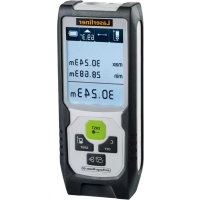
LaserRangeMaster Gi5 - Rangefinder Laserliner - Free user manual and instructions
Find the device manual for free LaserRangeMaster Gi5 Laserliner in PDF.

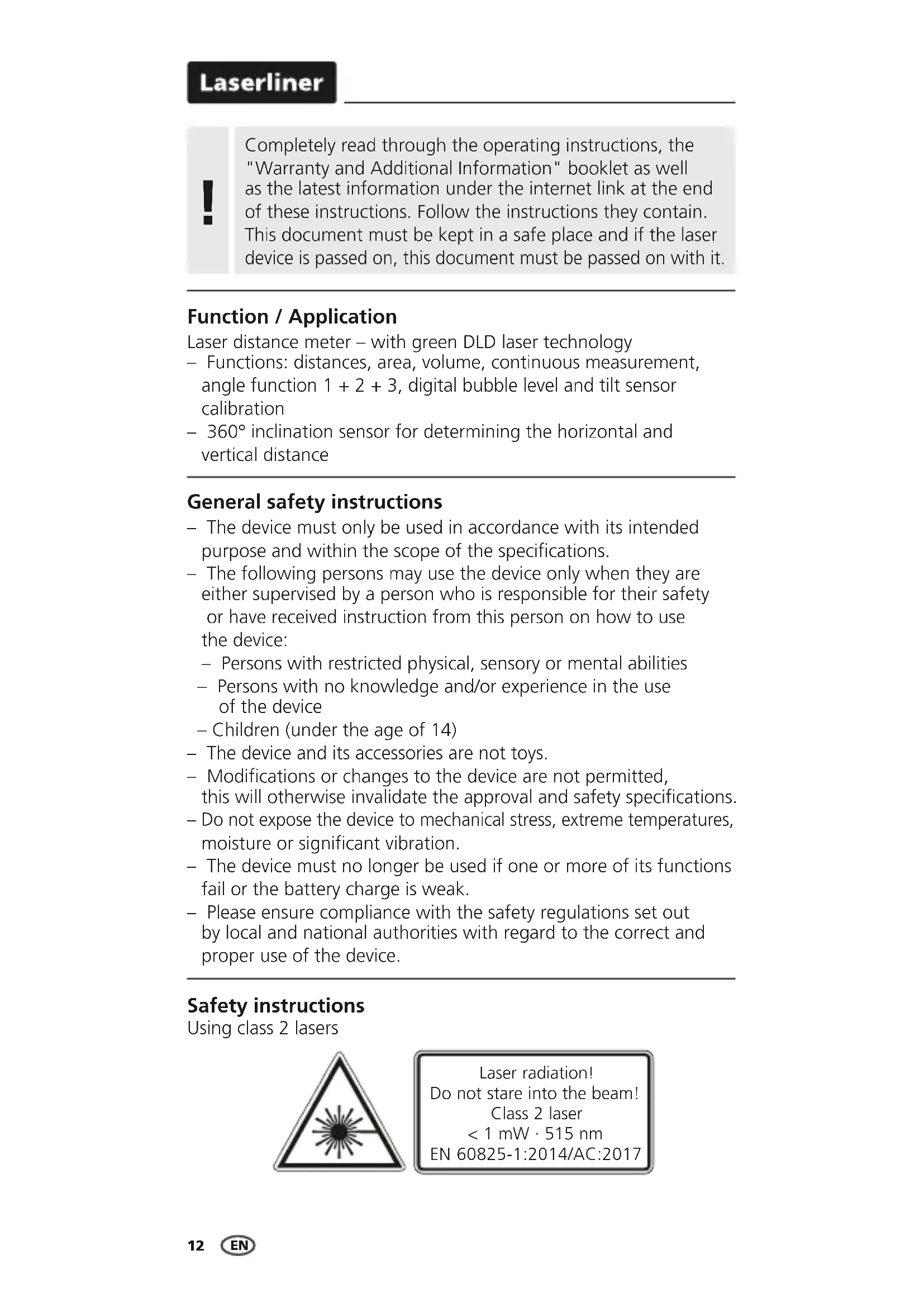


| Product type | Laser distance meter with green laser technology |
| Brand | Laserliner |
| Model | LaserRangeMaster Gi5 |
| Dimensions (L x H x D) | 50 x 122 x 27 mm |
| Weight (with batteries) | 140 g |
| Power supply | 2 AA 1.5 V batteries |
| Laser class | 2 (power < 1 mW) |
| Laser wavelength | 515 nm (green) |
| Measuring range (indoor) | 0.05 m - 50 m |
| Measurement accuracy (typical) | ± 2 mm |
| Angle measurement range | ± 90° |
| Angle resolution | 0.1° |
| Angle accuracy | 0.1° |
| Main functions | Distance, area, volume measurement, continuous measurement, angle functions 1+2+3, digital bubble, tilt sensor calibration, memory (50 slots) |
| Working conditions | -10 °C to 40 °C, max. relative humidity 20–85 % RH (non-condensing) |
| Storage conditions | -20 °C to 70 °C, max. relative humidity 80 % RH |
| Automatic shut-off | Laser after 30 seconds, device after 3 minutes |
| Care and cleaning | Clean with a soft cloth; avoid water entering the housing |
| Safety | Class 2 laser radiation – do not look into the beam; do not point at people; do not use optical instruments to view the beam |
| Spare parts and repairability | Replaceable batteries; no specific spare parts provided; unauthorized modifications |
| General information | Compliant with EMC Directive 2014/30/EU and WEEE; complete manual available at laserliner.com |
Frequently Asked Questions - LaserRangeMaster Gi5 Laserliner
User questions about LaserRangeMaster Gi5 Laserliner
0 question about this device. Answer the ones you know or ask your own.
Ask a new question about this device
Download the instructions for your Rangefinder in PDF format for free! Find your manual LaserRangeMaster Gi5 - Laserliner and take your electronic device back in hand. On this page are published all the documents necessary for the use of your device. LaserRangeMaster Gi5 by Laserliner.
USER MANUAL LaserRangeMaster Gi5 Laserliner
LaserRange-Master Gi5

Laser 515 nm
| DE | 04 |
| EN | 12 |
| NL | 20 |
| DA | 28 |
| FR | 36 |
| ES | 44 |
| IT | 52 |
| PL | 60 |
| FI | 68 |
| PT | 76 |
| SV | 84 |
| NO | 92 |
| TR | 100 |
| RU | 108 |
| UK | 116 |
| CS | 124 |
| ET | 132 |
| RO | 140 |
| BG | 148 |
| EL | 156 |
Laserliner
Laserliner
!
Completely read through the operating instructions, the "Warranty and Additional Information" booklet as well as the latest information under the internet link at the end of these instructions. Follow the instructions they contain. This document must be kept in a safe place and if the laser device is passed on, this document must be passed on with it.
Function / Application
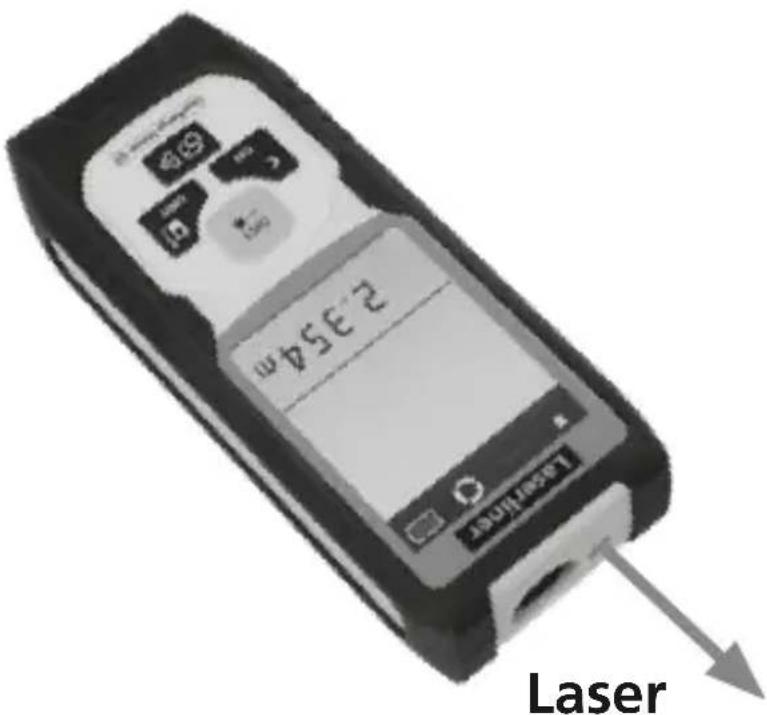
Laser distance meter - with green DLD laser technology
- Functions: distances, area, volume, continuous measurement, angle function 1 + 2 + 3 , digital bubble level and tilt sensor calibration
- 360^ inclination sensor for determining the horizontal and vertical distance
General safety instructions
- The device must only be used in accordance with its intended purpose and within the scope of the specifications.
- The following persons may use the device only when they are either supervised by a person who is responsible for their safety or have received instruction from this person on how to use the device:
- Persons with restricted physical, sensory or mental abilities
Persons with no knowledge and/or experience in the use of the device
Children (under the age of 14) - The device and its accessories are not toys.
- Modifications or changes to the device are not permitted, this will otherwise invalidate the approval and safety specifications.
- Do not expose the device to mechanical stress, extreme temperatures, moisture or significant vibration.
- The device must no longer be used if one or more of its functions fail or the battery charge is weak.
- Please ensure compliance with the safety regulations set out by local and national authorities with regard to the correct and proper use of the device.
Safety instructions
Using class 2 lasers

Laser radiation!
Do not stare into the beam!
Class 2 laser
<1 mW·515 nm
EN 60825-1:2014/AC:2017
- Attention: Do not look into the direct or reflected beam.
- Do not point the laser beam towards persons.
- If a person's eyes are exposed to class 2 laser radiation, they should shut their eyes and immediately move away from the beam.
- Tampering with (making changes to) the laser device is not permitted.
- Under no circumstances should optical instruments (magnifying glass, microscope, binoculars)
Safety instructions
Dealing with electromagnetic radiation
- The measuring device complies with electromagnetic compatibility regulations and limit values in accordance with EMC-Directive 2014/30/EU.
- Local operating restrictions – for example, in hospitals, aircraft, petrol stations or in the vicinity of people with pacemakers – may apply. Electronic devices can potentially cause hazards or interference or be subject to hazards or interference.
- The measuring accuracy may be affected when working close to high voltages or high electromagnetic alternating fields.
Green laser technology

Laser modules in DLD design stand for high line quality as well as a clean and clear and therefore easily visible line image. Unlike previous generations they are more temperature-stable and energy efficient.
Furthermore, the human eye has a higher sensitivity to the wave range of the green laser than the red laser, for example. This makes the green laser diode appear much brighter than the red one.
Green lasers, especially in the DLD design, thus offer advantages with regards to how visible the laser line is under unfavourable conditions.

6 times brighter than a typical 630 - 660 nm laser
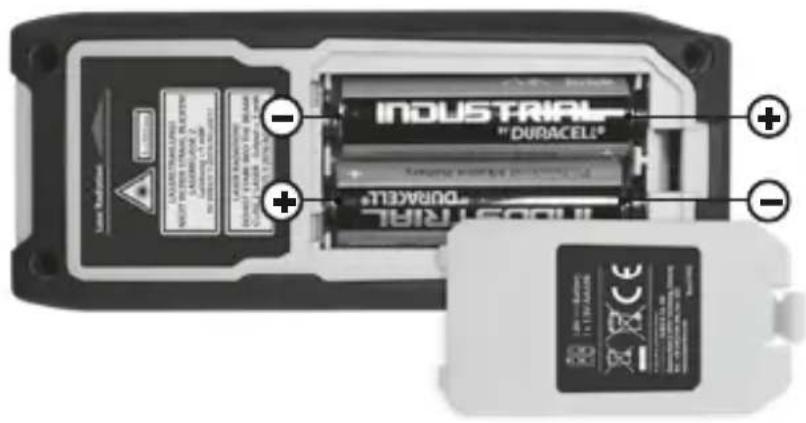
1 Inserting batteries
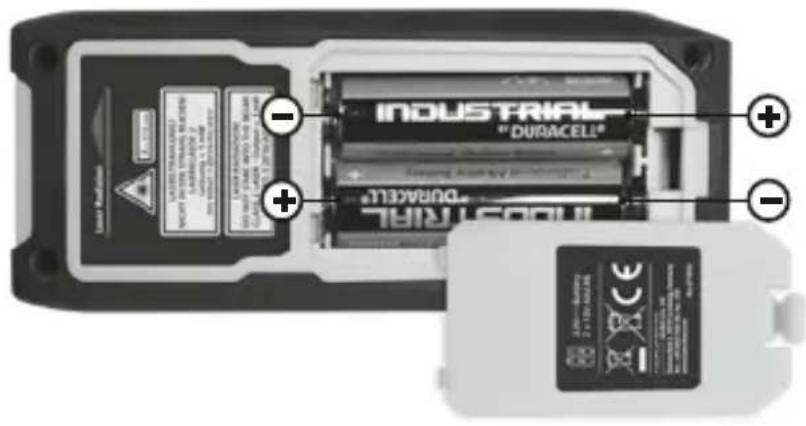
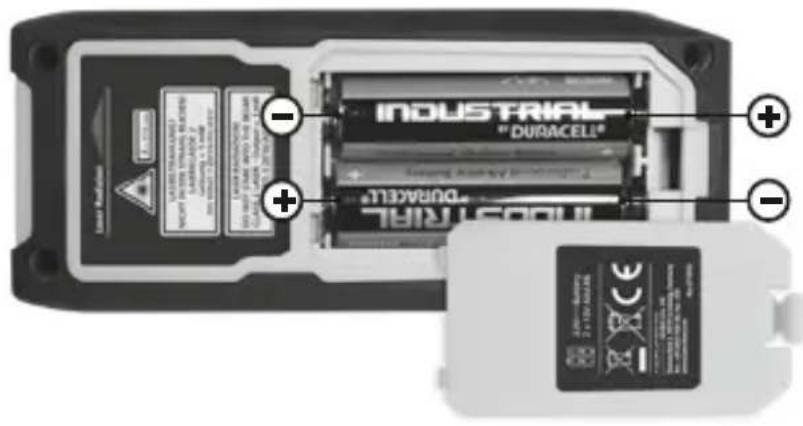
Open the battery compartment and insert batteries (2 x typ AA) according to the symbols. Be sure to pay attention to polarity.
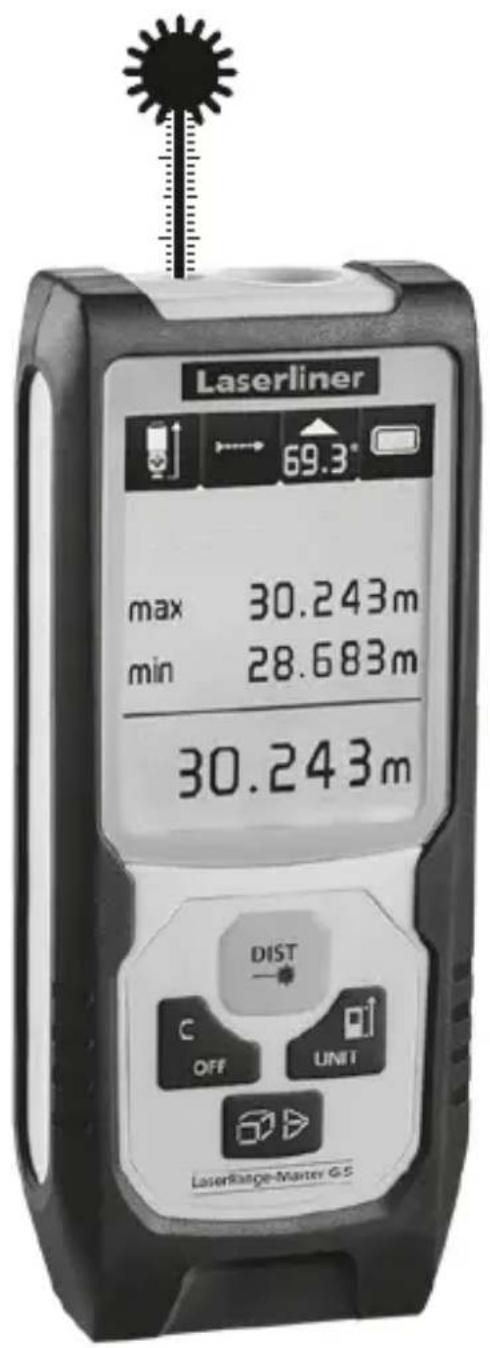
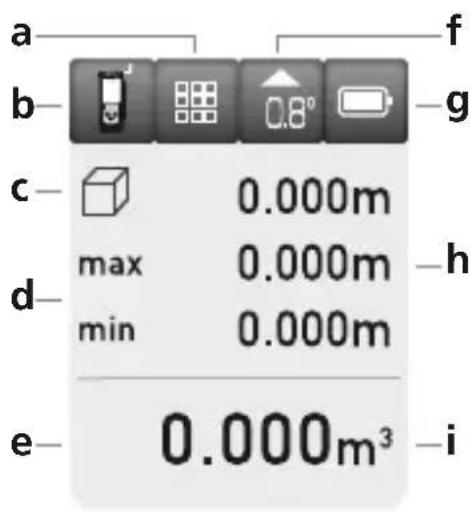
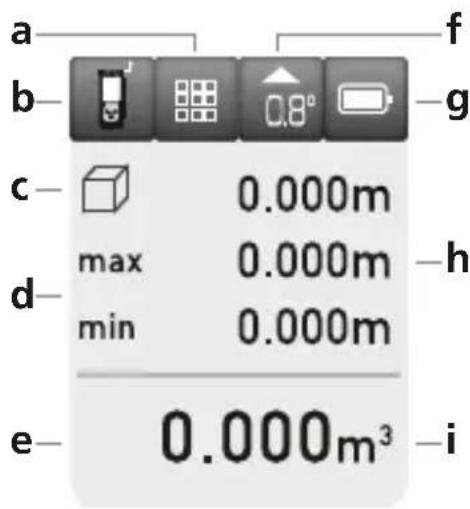
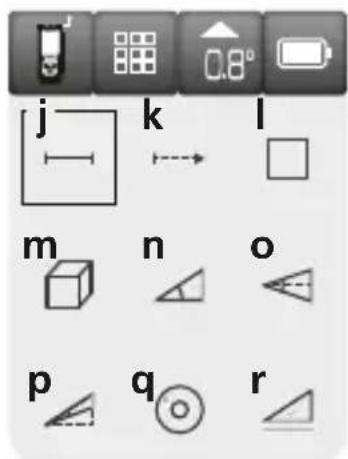
DISPLAY:
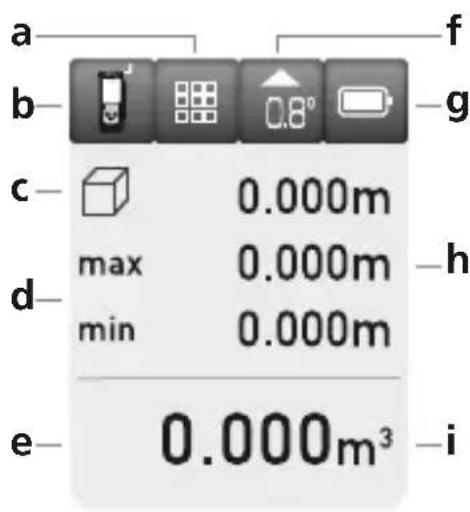
a Function display
b Measurement point (reference) rear / front
c Display min./max. continuous measurement / area / volume / angle function 1 + 2 + 3
d Min/max continuous measurement
e Measurement values / measurement results / malfunction / service required
f Slope angle device
g Battery symbol
h Intermediate values / min/max values
i Unit m / inch / ft
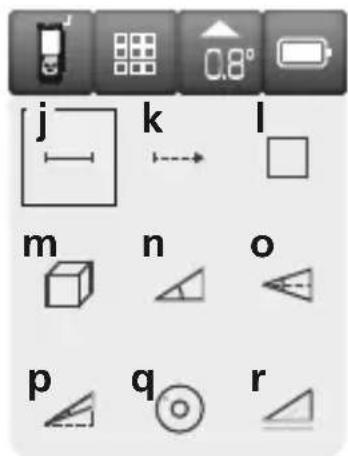
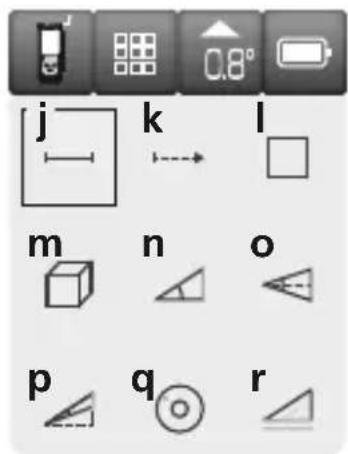
j Length measurement
k Min/max continuous measurement
Area measurement
m Volume measurement
n Angle function 1
o Angle function 2
p Angle function 3
q Digital bubble level
r Tilt sensor calibration
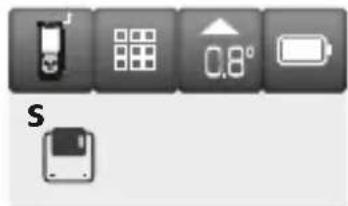
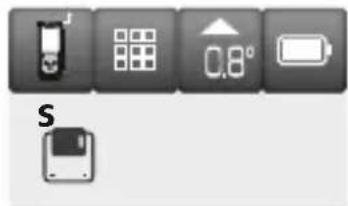
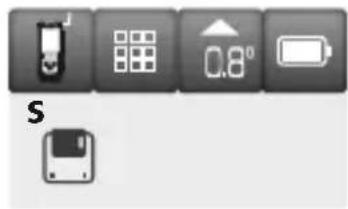
s Memory

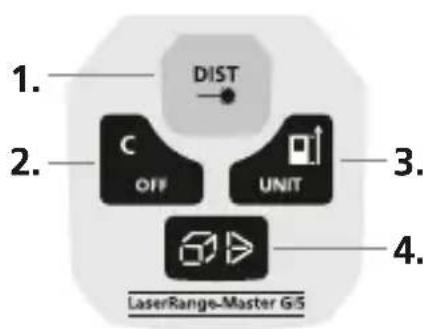
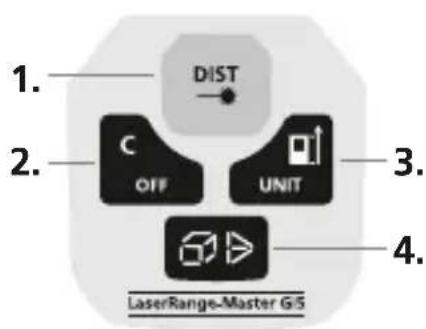
KEYPAD:
- ON / measure
- Delete last measurement values / OFF
- Measurement point (reference) rear / front / unit m / inch / ft
- Length / min/max continuous measurement / area / volume / angle function 1 + 2 + 3 digital bubble level / tilt sensor calibration / memory
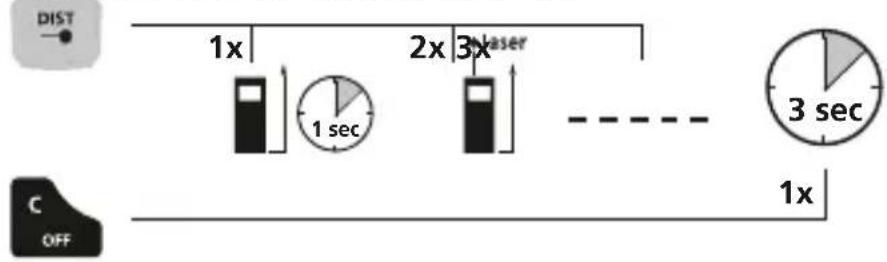
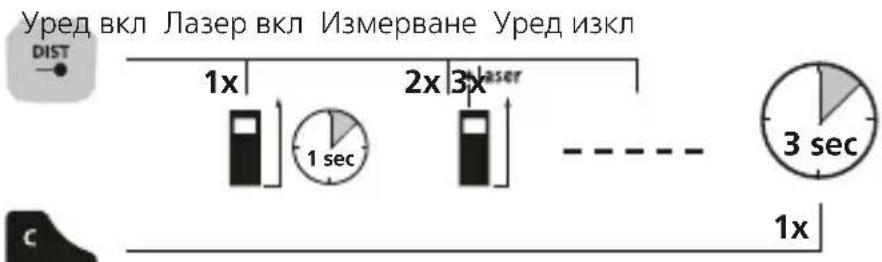
Switch on, measure and switch off:
Device on Laser on Measure Device off
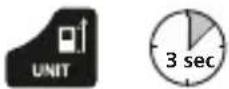
Change unit of measure: m / inch / ft
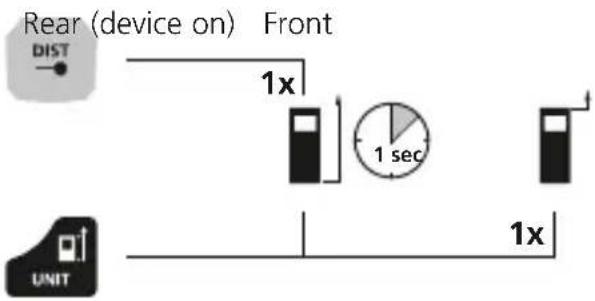
Delete the last measured value:

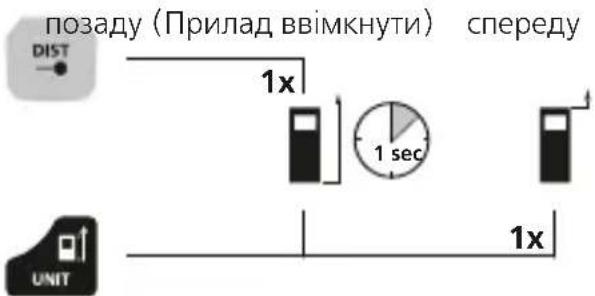
Change measurement point (reference):
Laserliner
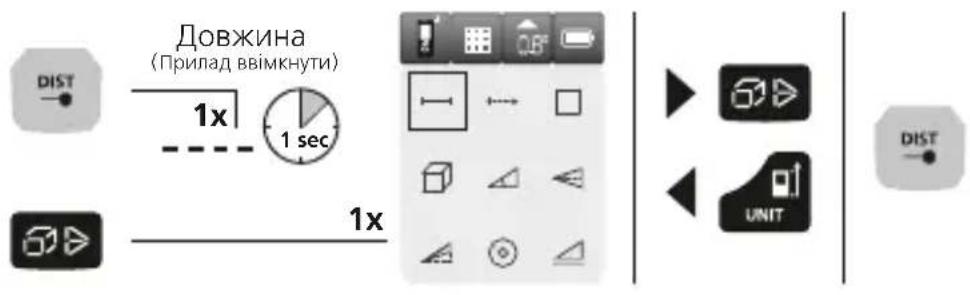
To select functions:
Length / min/max continuous measurement / area / volume / angle function 1 + 2 + 3 / digital bubble level / tilt sensor calibration / memory
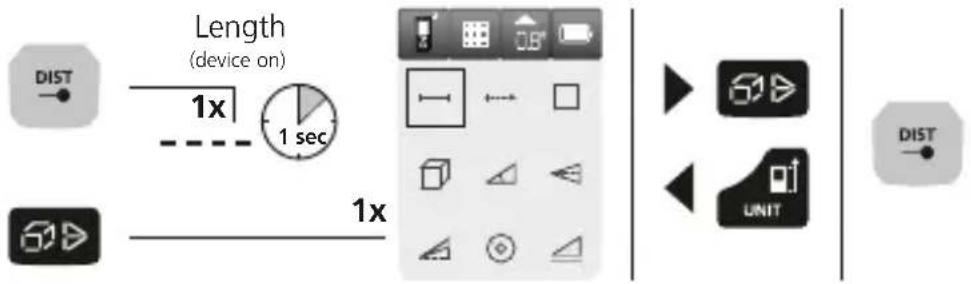
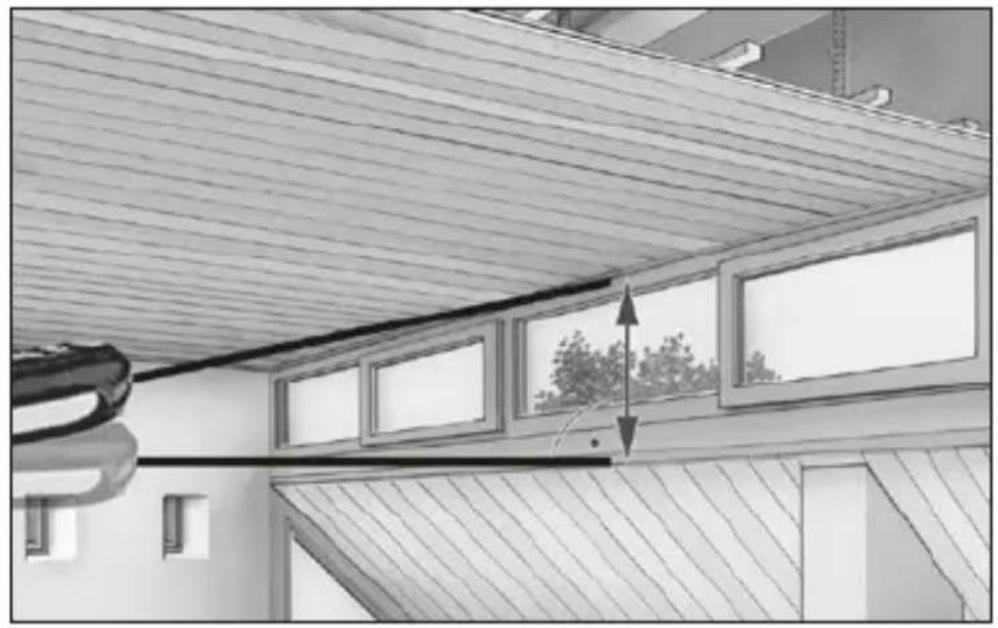
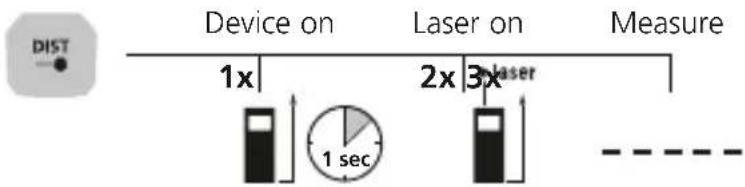
Length measurement:
Min/max continuous measurement:
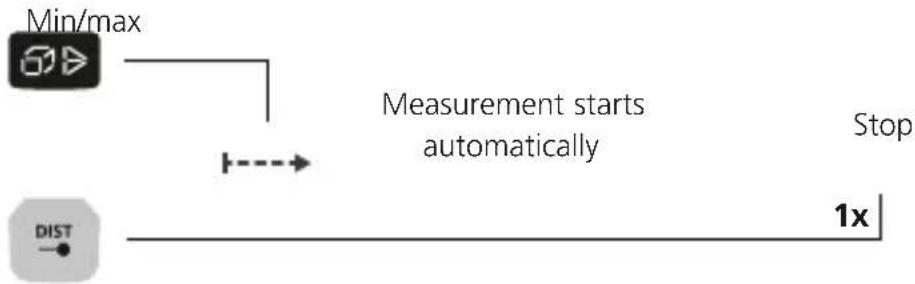
The LC display shows the max value, the min value and the current value.
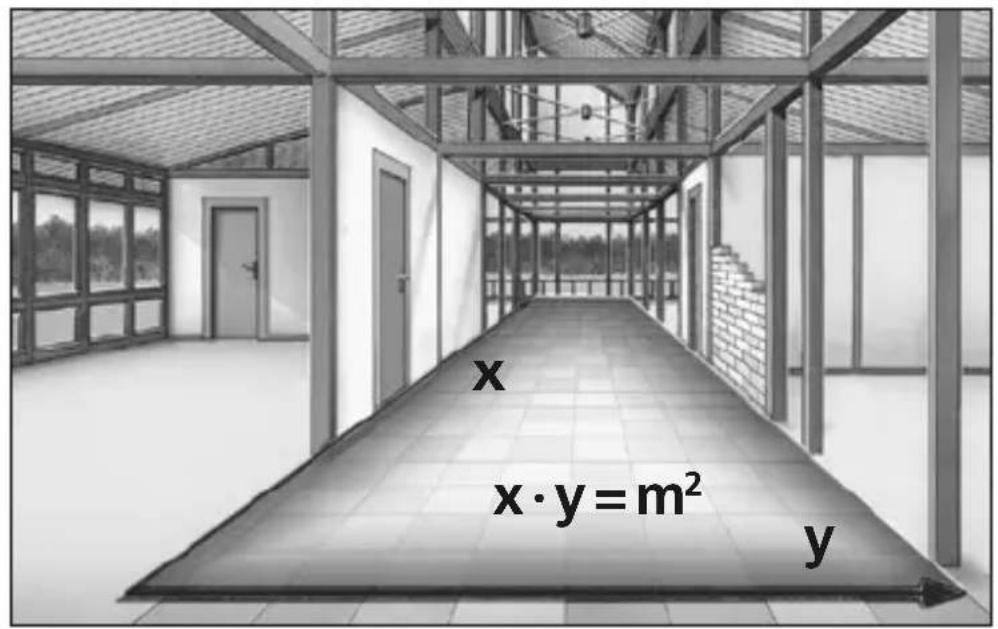
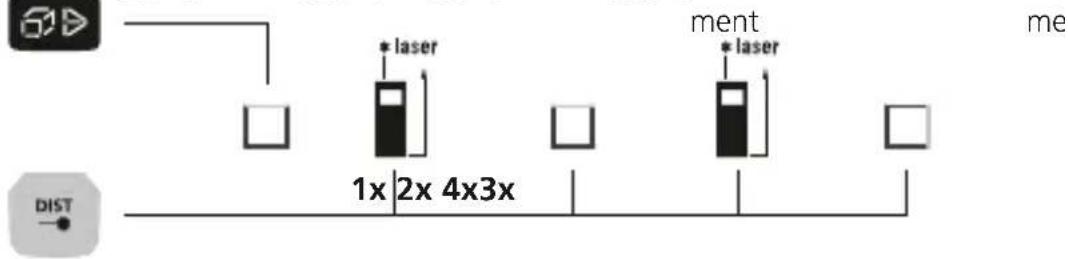
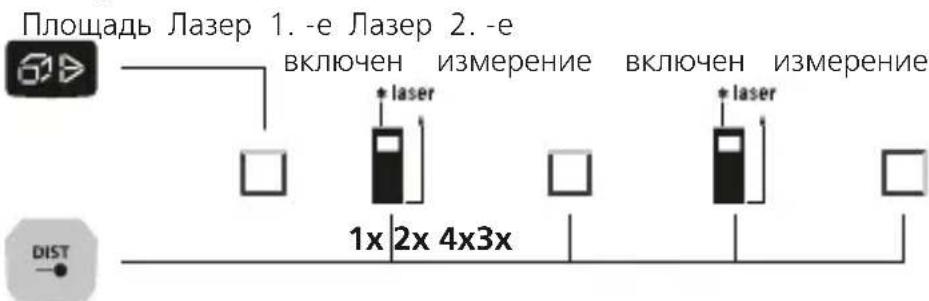
Area measurement:
Area Laser on 1. measure- Laser on 2. measure
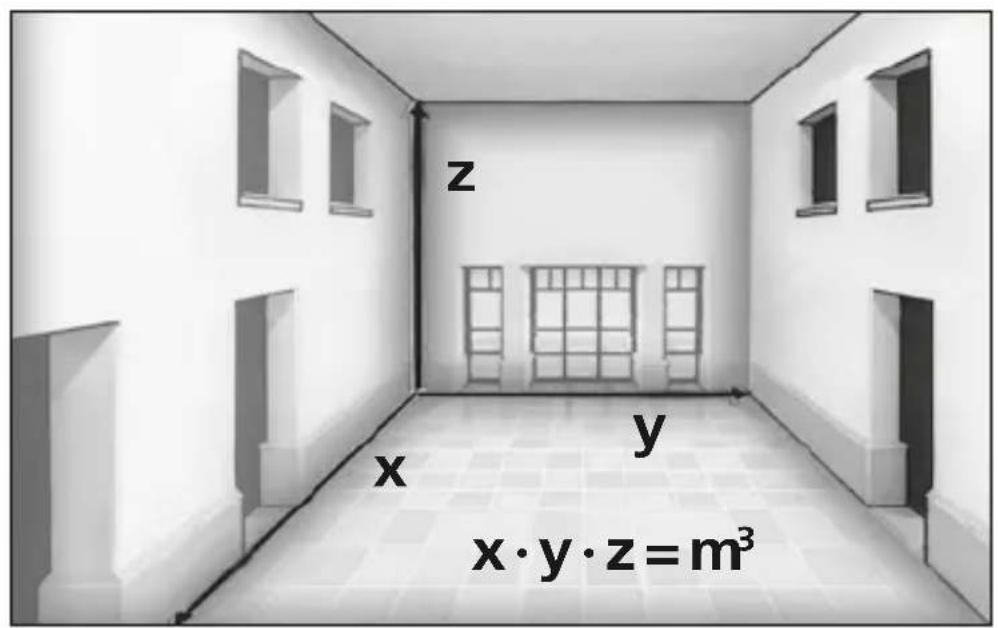
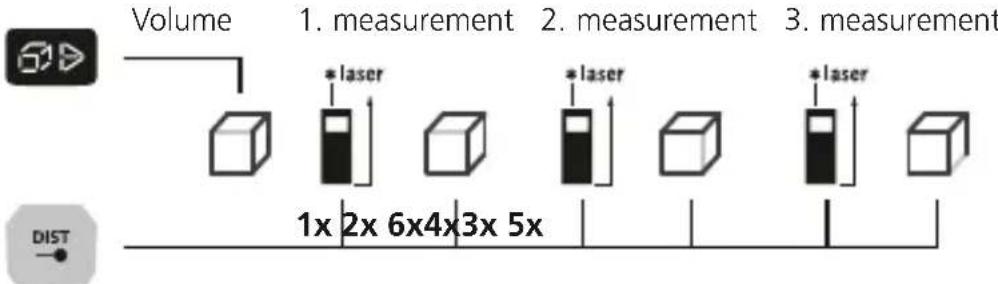
Volume measurement:
Angle function 1:
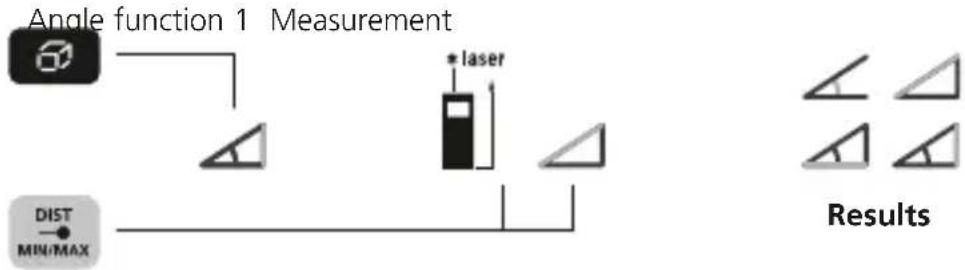
The measurement results are determined automatically by the 360^ inclination sensor.

The back of the device can be used as a reference surface for measuring angles.
Angle function 2:
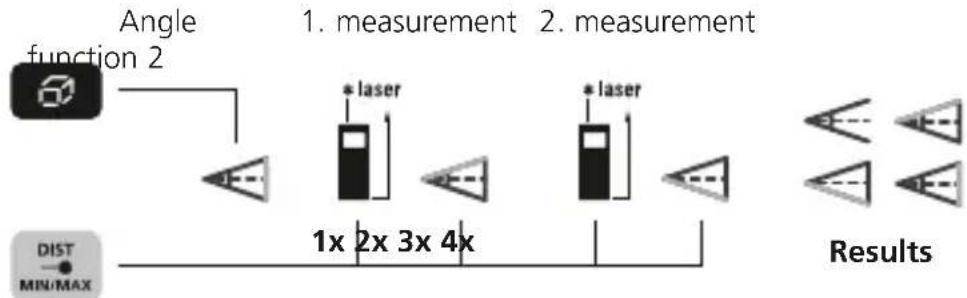
The measurement results are determined automatically by the 360^ inclination sensor.

The back of the device can be used as a reference surface for measuring angles.
Angle function 3:
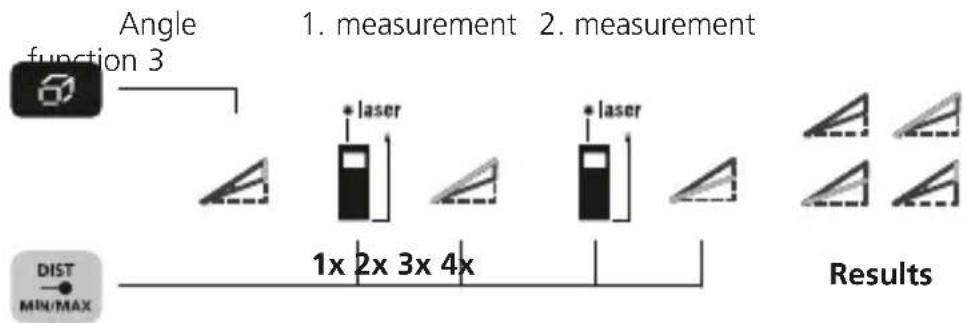
The measurement results are determined automatically by the 360^ inclination sensor.

The back of the device can be used as a reference surface for measuring angles.
Laserliner
Digital bubble level:
The digital bubble level is used to horizontally align the measuring device.

Tilt sensor calibration:
To calibrate the tilt sensor follow the instructions on the display.

Memory function:
The device has 50 storage locations.

Important notices
- The laser points to the location that will be measured.
No objects may get into the laser's line of measurement. - The device compensates the measurement for different room temperatures. Therefore allow the device a brief adaptation period when changing locations with large temperature differences.
- The device is only conditionally useable in outdoor areas and cannot be used in strong sunlight.
- The measurement results of outdoor measurements may be influenced or falsified by rain, fog and snow.
- In unfavourable conditions, e.g. with poorly reflecting surfaces, the maximum deviation may be greater than 3mm .
- Carpenting, upholstery or curtains will not reflect the laser optimally. Measure to flat surfaces.
- Measurements made through glass (window panes) can falsify measurement results.
- An energy-saving function switches the device off automatically.
- Clean with a soft cloth. Water may not be allowed to penetrate the housing.
Error codes:
Err10: Replace the battery
Err11: Data transfer error
Err14: Calculation error
Err15: Outside the measuring range
Err16: Received signal too weak
Err18: Tilt sensor calibration error
| Technical Data (Subject to technical changes without notice. 21W08) | |
| Distance measurement | |
| Inside measurement range 0.05 | m - 50 m |
| Precision (typical)* ± 2 mm | |
| Angle measurement | |
| Measuring range ± 90° | |
| Resolution 0.1° | |
| Precision 0.1° | |
| Laser class 2 < 1 mW | |
| Laser wavelength 515 nm | |
| Operating conditions | -10°C ... 40°C, max. humidity 20 ... 85% rH, no condensation, max. working altitude 2000 m above sea level |
| Storage conditions | -20°C ... 70°C, max. humidity 80% rH |
| Automatic switch-off 30 sec laser / 3 min device | |
| Power supply 2 x AA 1.5 volt batteries | |
| Dimensions (W x H x D) 50 x 12 | 2 x 27 mm |
| Weight (incl. batteries) 140 g | |
- measuring distance up to 10 m with strongly reflective target surface and at room temperature. The measurement deviation may increase by ± 0.2 mm/m for greater distances and under unfavourable measuring conditions such as strong sunlight or weakly reflective target surfaces.
EU directives and disposal
This device complies with all necessary standards for the free movement of goods within the EU.
This product is an electric device and must be collected separately for disposal according to the European Directive on waste electrical and electronic equipment.
Further safety and supplementary notices at: http://laserliner.com/info?an=lrmgi5

Laserliner
!
b Maleplan (reference) bag / foran
HaXnIckpncTaNJIHueCKOM IINCJIeE NOBJIeTc HAn6OJIbJee 3NaHeHne (MaKc.), HaIMeHbJee (MIn.) IN TeKyUe e 3NaYeHne.
I3MepeHne pIoouaAn:
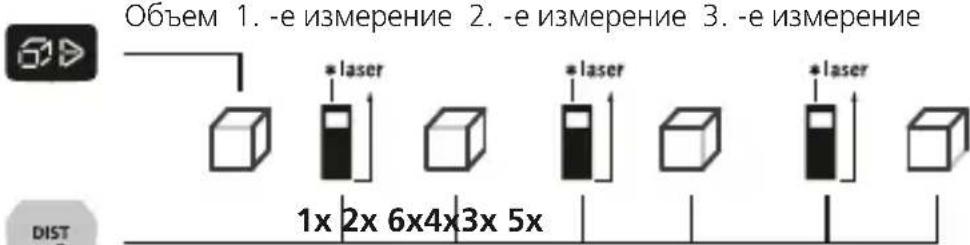
Измeperенье объema:
Функция onpeidelenna yrgna 1:
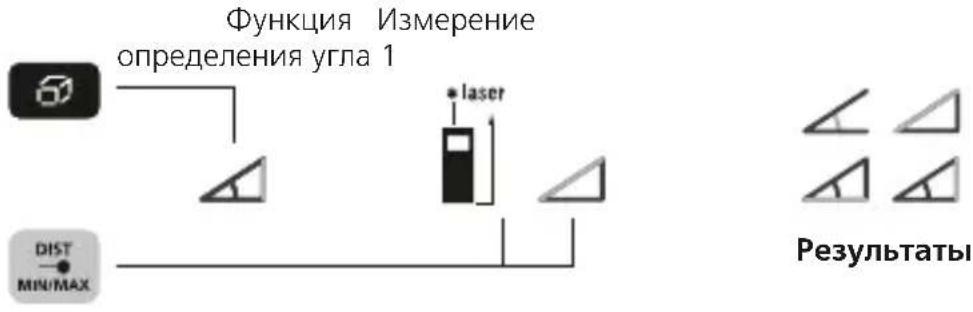
Pe3yIbTaTbI n3MepeHn ONpeJeJIOTc ABTOMaTHUeCKN C NOMOuBIO DaTHNka HaKJHOHa C dHaNa3oHOM 360°.

IobepxHoctbIO hauana oTcyeTa npn n3MepeHnn yrgnoB cnyKNT 6bpaTHa cTOpHa npnbopa.
Функця onpeidenenya yrna 2:
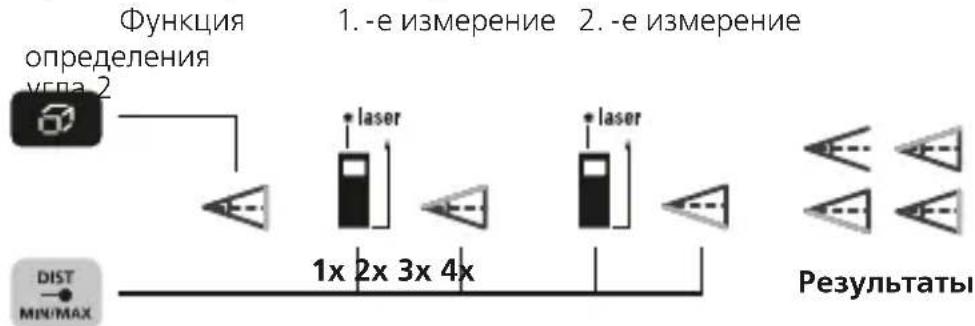
Pe3yIbTaTbI n3MepeHn ONpeJeJIOTcA BTOMaTHUeCKN C NOMOuBIO DaTuKHaKaJHOHa C dHaNa3oHOM 360°.

IobepxHocTbIO Haayana OTCyeta npn N3MepeHH yrgOB Cnyknt 6paTHa CTOpHa npnbopa.
1 BcTaHOBHTn aKymyJIaTOpN
Bickpntn Bicik dJa 6atapeoK i BknaCTn 6atapeyn (2 x TnAA) 3rIO 3 CmBolamn. CniKyBaTN 3a noJrpHcTIO.
ДИСПЛЕн:
a Biio6paXeHHBn6bOpy cyHKuii
bПошинавIMipiB(nokaxnK) no3aIy / cpepy
c Noka3:Min./MaKc.6e3nepepBHe mipIOBaHHa /nloua/06'Em/ TpuHOHMeTpNaΦyHKia 1+2+3
d Min./MaKc.6e3nepepBHe MIpOBAHHa
e BeHHnHa Bmipib / pe3yIbTaT / HecnpaBHictb/ Notpi6He 6cnyroByBaHHa
f IHHkaia Kyta Haxny npncpi
g 3HaKaMyJyTOpHoI GaTapei
h PpomixHe 3HaueHHa / MIH./MaKC. 3HaueHHa
Bmipib OHHNua M/ΦyT/DIOHM
j BmMipIOBaHHJIOBXINH
kMiH./MaKc.6e3nepepBHe MIpOBAHHa
Bumip nloozi
m BnMip o6'Emy
n TpnoHOHometpnuHaФyHKciA 1
TpnoHOMetpnHaФyHKzir2
TpnoHOMetpnHaФyHKzj3
q EneKtpoHHn piBeHb
r KaJIi6pyBaHHaTHy HaxNy
5 Nam'YtB
KJIABIATYPA:
1.Пилад yBIMKHeHo / BIMipIOBaHHa
2.BuJaJIeHHaOCTaHHIX NOKa3HnKIB Bmipy / npuaD BMKHyTu
3.Плошина ВИМіріВ (нokахчк)позаду / спени /ODINHиц ВИМіріM/ФуТ/DIOИМ
4.ДOBЖИHA/MH./MaKc. 6e3nepepbHe NMIPIOBaHHa / nloua/06'EM/ TpIroHOMeTpnuHaФyHKciA 1 + 2 + 3 /eNeKtpoHHn pIBeHb/KaJIbpyBaHHaDaTCHKy HaxNy/nam'YtB
BbIMKHyTN, 3amiprtn, BmMKHyTN:
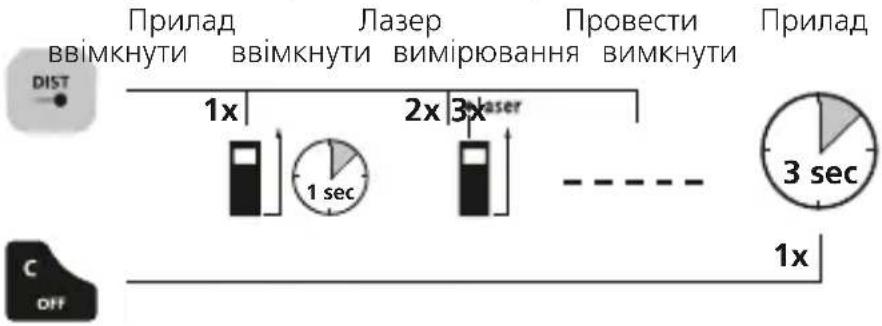
NepemKHyT OAnHnIbMipy: M / ΦyT / IIOIM
BudaleHnOCTaHHboi BmipraHOI BeNnuHn:

IpeemKHyTn pIounHy Bmipib (noKaXyK):
IpeemKaHna yHKci:
IobxHa /MiH./MaKc.6e3nepePBHe NMIPIOBaHH/ nloua /o6'EM/ TpuroHOmeTpnuHa yHKz 1 + 2 + 3 /eNeKTpoHHn pBeHb/ KaIbpyBaHH DaTuKy HaxNy / naM'rTb
BumipioBaHHIOBxHn:
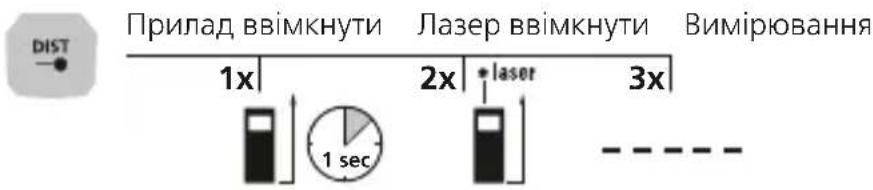
MiH./MaKc.6e3nepepbHe BmMipIOBaHHa:
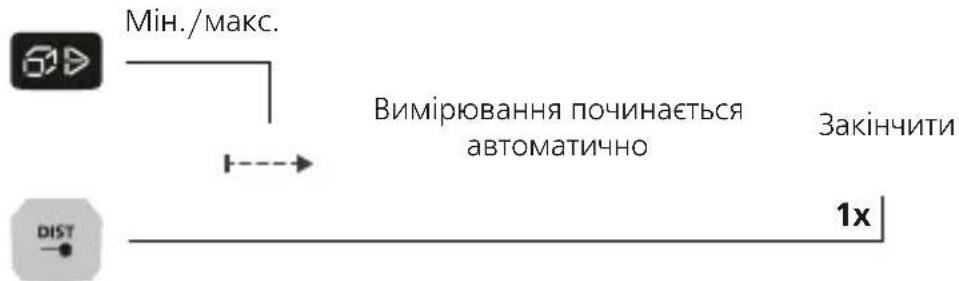
PK-dncnne noka3yecnaibbwe 3haeHHra(max),HaMeHwe 3haeHHra (min)iΦakTnue 3haeHHra.
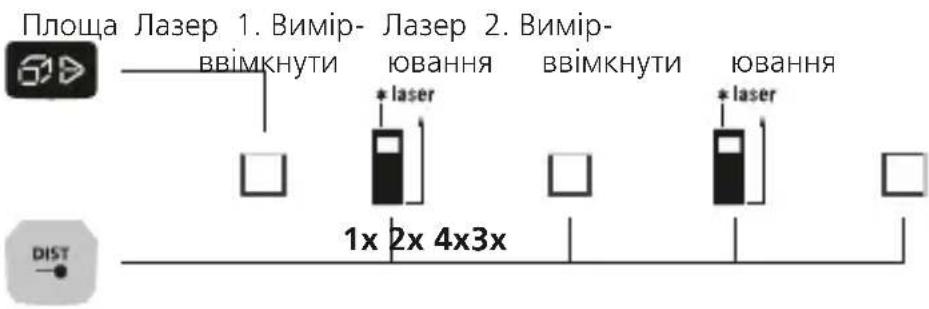
Bvmp npoi:
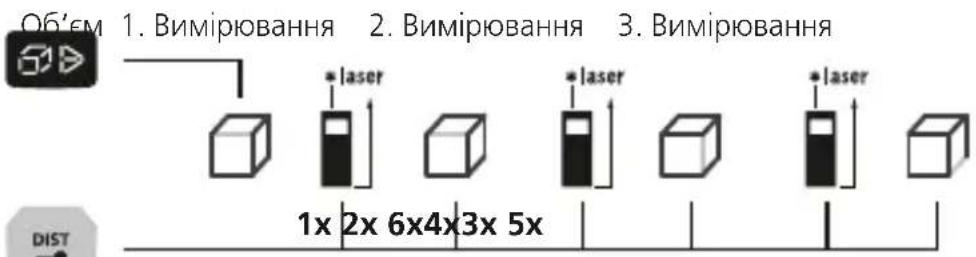
BnMip o6'Emy:
TpuroHometpnuHa yHKciia 1:
TpuroHOMeTpnuHa BmIpIOBaHHa 1

Pe3yIbTaT BmipIOBaHHBn3HaaETbcra DaTHNKOM KyTa HaxNy 3 dianaoHOM peryIOBaHH 360°.

3aHnHa npntpoB uKOpncOBycB RaocTi onopHOI NOBepxHi dR BmipioBaHH KytB.
TpuroHometpnuHa yHKciA 2:
TpuroHometpnuHa 1.BumipioBaHHa 2.BmipioBaHHa
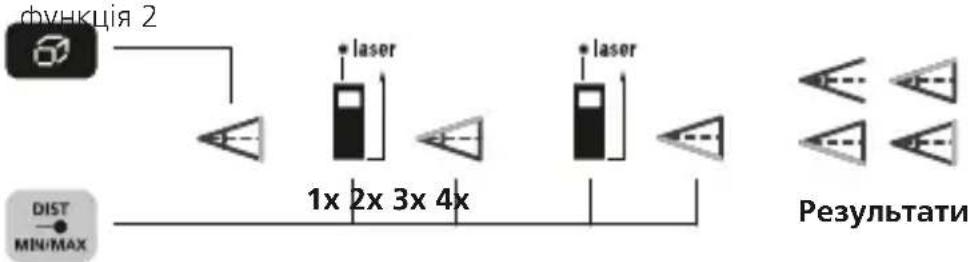
Pe3yIbTaT BmipIOBaHHBn3HaaETbcra DaTHNKOM KyTa HaxNJIy 3 dIana3OHom peryIIOBaHHr 360°.

3aHЯ qactHa npictpoIO BnKOpNCTOByETbCBA KoCTi ONOPHOI NOBepxHi IJRA BmIpioBaHHr KyTIB.
TpuroHometpnuHa yHKci3:
TpuroHometpnuHa 1.BumipioBaHH 2.BumipioBaHHa

Pe3yIbTaT BmipIOBaHHBn3HaaETbcra DaTHNKOM KyTa Haxny 3 dian3oHOM peryIIOBaHH 360°.

3aHnHa npcToIO BkOpncTOBycB RaKoCTi ONOPHOI NOBepxHi IJI BmIpOBAHH KytIB.
Laserliner
EneKtpoHn pBeHb:
EneKtpoHHn pBeHb np3HaueHn dJa rOpN3OHTaIbHOrO IOCTyBaHHBmIpIOBaIbHOrO npnaNy.

Kani6pyBaHHaTChkU HaxnIy:
IIO6 Biikani6pyBaTn DaTnK Haxny (Tilt), Heo6xioHO DoTPmMyBaTnciHCTpykui Ha DnCnnei.

Uldised ohutusjuhised
Ja3epeH nIcTaHcHOMEtbp CbC 3eJeHa Ja3epHa TexHOJOrnA
-Функця:ДьлжиHa,ПLOU/obem,HenpeKbCHaTO, bIIOBaФункця1+2+3,uNΦpoBaЛибelaИKaJIb6pnpaHcEHN3Opa3aHaKJIoH
-360°ceH3Op 3aHaKNoHa 3a onpeJeIHe HaXOpN3OHTaHaTa nBepTnKaJHa DnCTaHcIy
06uHCTpyKuN 3a 6e3oNaCHOCT
- N3noJ3BaIte ypeDa eHCTBeHO CbIaCHO npedHa3HaueHneTo 3a ynotpe6a B paMKITE Ha cNeuΦnKaunTe.
- CneHnTe Nua MoT Da H3NoI3BaT ypeDa cMo aKO ca Ha6IIOaBAHn OT Nuce, KOeTO OTROBapr 3a 6e3oNaChOCTTa, INN Ca NOJyHnYka3AHn OT TOBa Nuce KaK Ce H3NoI3Ba UpeDbT:
JIuca C orpaHnueHn fN3nueckn, ceH3OpHn nn yMCTBeHn cNoC6HOCTN
-
nUca,Ha KOnTO nM JInCBaT 3HaHnI N/Unn ONIT 3a N3NoJ3BaHe Ha ypeJa -Neua (no14 roDnHN).
-
YpeIbT HrOBrTe npHaIeXHocTn He ca IeTcKa IrgpaKa.
- He ce donyckat MoiNphiKaunn n 3MeHnna Ha ypea. Toba ue IOBede do HeBaJIuNDHOCT Ha pa3peuNTeJHOTo n CneuNphiKaunraTa 3a 6e3OanCHOCT.
He n3naTe ypeHa MexaHnUHO HATOBapBaHe,ekCTpeMHN TemepaTyPi, Bnara NnI npKeKaJeHO BnCOKn Bn6paun. - YpeIbT He Tp8Ba Da Ce n3No13Ba NOBeYe, aKO eHa HnHRAKoJIKO ΦyHKcNt OKaKaT NnN aKO 3apJbT Ha 6aTePnnte HnCbK.
- MonnbpkaTe ce KbM MepKnte 3a 6e3onacHocT Ha MeCTHnHaunOHnOpraHn 3a npabNHOTo n3noJ3BaHe Ha yctpoIcTBOTO.
Hnctpykun 3a 6e3onacnoCT
Pa6ota c na3epn ot kna 2
1 NoctabrHe Ha 6aTeepn
OTbopeTe rHe3dTo 3a 6aTePNu N noCTaBeTe 6aTePNuTE (2 x TnA A) cNopeN INCTaJauHnHnTe CmBOJN. Pn TOBa CneJeTe 3a npabUNHa nOJrPHoCT.
ДИСПЛЕЙ:
a INHdkatop n360p Ha φyHKnra
b N3mepBaTeJHa paBHHa (OTnpaBHa) OT3aD/OTnpeD
c INHdkaun MmH/MaKc HnpeKbchato /nlou/o6em/ brnoBa yHKua 1+2+3
d MuH/MaKc HenpeKbCHaTo
e N3MepBaHn CToHocTn / pe3yIaTn OT n3MepBaHeTo / He npaBnHNo fYHKUOHnpaHe / Heo6xOIM e cepBn3
f HdkkaunBaBnHaHaKIOHa
g CnmboJ 3a 6aTepejra
h MeknHHn CToHocTN/ MNH/MaKc CToHocTN
i EunHua M / inch / ft
j I3mepBaHe Ha nblxHa
k MuH/MaKc HenpeKbChHaTO
I N3MePbAHe Ha nloUc
m V3MepBaHe Ha o6em
nbrnoBaΦyHKU1a 1
brnoBa yHKU2
pbrnoBa yHKu3
q LufpoBa IIn6ena
r KaIb6pnpaHe Ha ceH3opa 3a HAKIOH
5 Namet
KJIABNATYPA:
1.BKJI/n3MepBaHe
2.ИЗТРИВаHe Ha nOcJIeДнITE ИЗМерЕн CTоHOCtN /ИЗКЛ
3.ИзмерВаTeнha paBинha (OTnpaBHa) OT3aД / OTпрED / I3МерВaTeJHa eDINHnUca M/inch/ft
4.ДьнЖиHa/MnH/MaKc HENpeKbCHato/ПLOU/O6eM/ bINoBaФункцЯ1+2+3/ LInΦpOBAJI6eNa/ KaINbPnpaHeHaceH3opa 3aHaKIOH/naMet
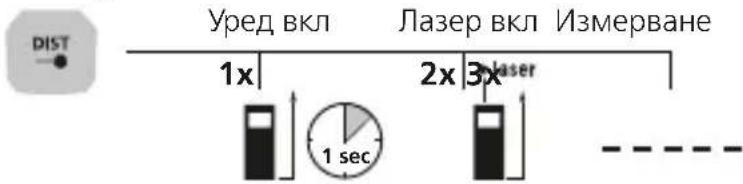
BkIIOUbaHe, n3MepBaHe n N3KlIOUbaHe:
IpeBkIIOUcBaHe Ha MepHa eINHua: M / inch / ft
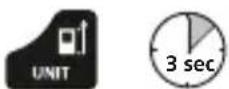
N3tpnBaHe Ha nocJeHaTa N3MepeHa cToHOCt:

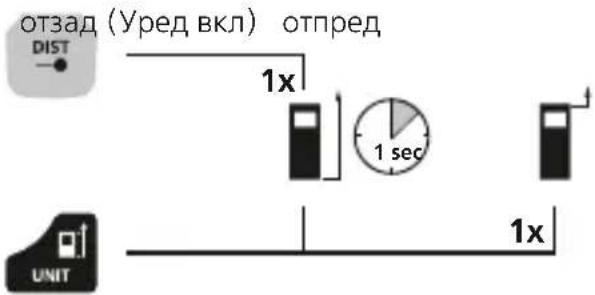
PpeBknIOuBaHe Ha n3MepeTHeHaTa paBHnHa (OTnpaBHa):
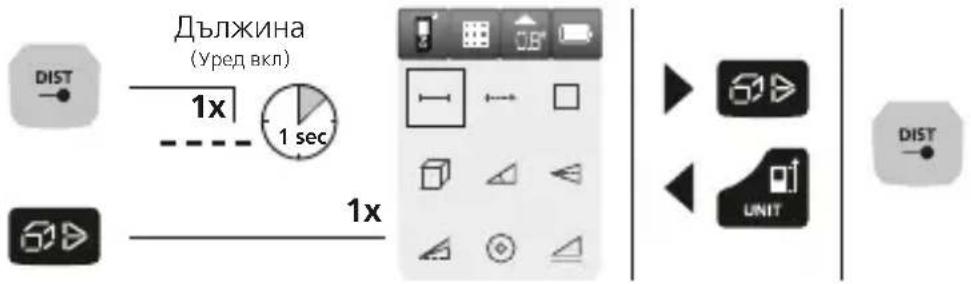
IpeBKnIOUbaHe Ha cyHKcUNTe:
Дылхина / МИH/Мakc Heпркьсано / ПLOU / OБeM / bIIOBa ФунКця 1+2+3/LuФpoBa ly6ena / kaIbprpaHe Na ceH3opa 3a HaKNoH / NaMeT
I3MepBaHe Ha IblxHa:
MNH/MaKc HeIpeKbChaTo n3MepBaHe:
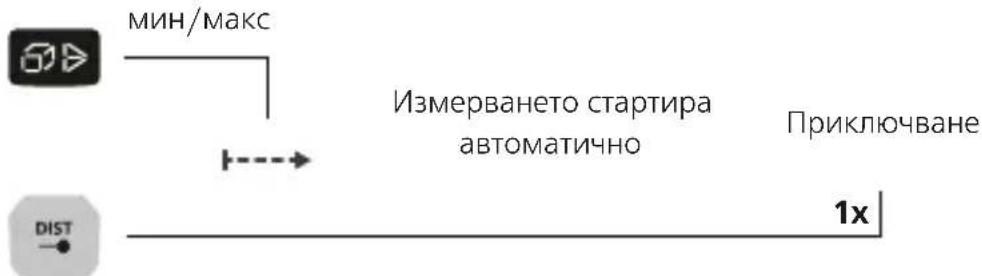
LC-dncnneT noka3Ba Hau-rotmaTa CToHocT (MaKc), Ha-MAkata CToHocT (MnH) IN TeKyUaTa CToHocT.
I3mepBaHe Ha nloos:
3aHaTa CtpaHa Ha ypeHa CnyKn KaTo pepepeHTHa NOBbpxHOCT 3a N3MepBaHeTo Ha bTNI.
brnoBaФункця1:
brnoBa 1. N3MepBaHe 2. N3MepBaHe
vHKn2
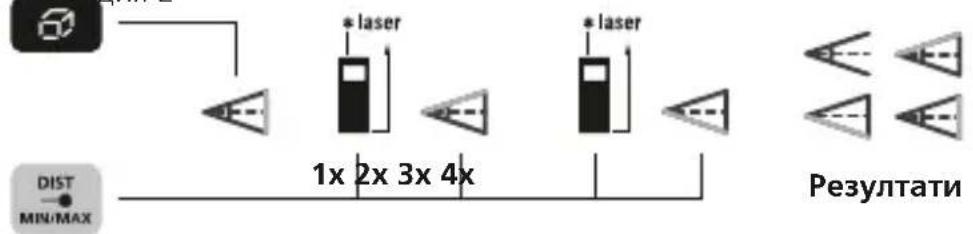
Pe3yIaTbT OT n3MepBaHe ce onpeJeIaBtOMaTHUHO ype3 ceH3Opa 3a HaKIOH 360^

3aHaTa CtpaHa Ha ypeDa CnyKn KaTo pepepeHTHa NOBbpxHOCT 3a n3MepBaHTo Ha bTNI.
brnoBa yHKnna 1:
brnoBa 1. N3MepBaHe 2. N3MepBaHe
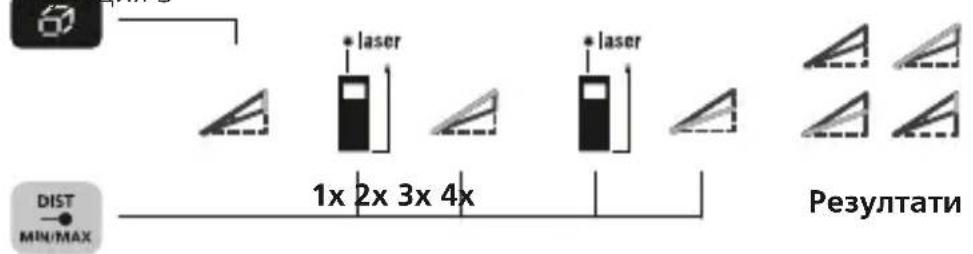
Pe3yIaTbT OT n3MepBaHe ce onpeJeIaBToMaTuHNo ype3 ceH3Opa 3a HaKIOH 360^

3aHaTa CtpaHa Ha ypeHa CnyxN KaTo pepepeHTHa NOBbpxHOCT 3a N3MepBaHeTo Ha bTNI.
Laserliner
UnpoBa In6eNa:
Lcnpobata nibena cnyxna 3a xopn3oHTaHNO HNBepnpaHa n3MepBaTeHHypei.

Kann6pnpaHe Ha ceH3opa 3a HaKIOH:
3a KaJIi6pnpaHTo Ha ceH3Opa 3a HAKIoHa (Tilt) cIeIBaIte yKa3aHnraTa Ha IINcPJIe.

Функция заразуBaHe:
YpeIbT pa3noJIara c 50 MeCTa 3a 3anaMeTЯBaHe.

Baxknyka3aHn
Ja3epbT coyn Tookata Ha n3MepBaHe,do KOaTO ue Ce MEPn. Ha nbTa Ha Ja3epHnna lyu He Tp6Ba da HnKaBn o6eKn.
- Pn n3MepBaHe np6OpbT n3BbPwBa TeMnepaTyPha KOMneHcaZnna
- Pn pa3JnUHn TempePaTyB nOmeUeHneTo. Korato n3BbPwBaTe
- N3MepBaHc Ha MeCTa C TOnJaMa pa3Nka B TempePaTyPte, npeBnDeTe
- KpaTKo BpeMe 3a aAnTnpaHe Ha np6opa.
- YpeIbT MoKe Ia Ce n3nOJI3Ba Ha OTKpIto cAmo OrpaHNeHO H He MoKe Da Ce n3nOJI3Ba Pnp CNJHo CJIbHNeBO JbYeHne.
-ПрииИзМерВаньпаНаОТКрпTOЯВлeняKaToДьЖД,MbГЛaИСHЯМожЕДА
-ПОВЛЯТВbpxуpe3yIITaTITeOTИзМерВаHetoCbOTB.Да ГИпeнHaHT.
- Pn He6JraOpnpyTHN yCNoBn, KaTO HApPmep CInHO OTPa3BaUH IOBbpxHOCTN, MaKcImaJIHOTO OTKIOHeHHe MOKe Da Bb3JIN3a Ha NOBeYe OT 3 MM.
KnlIMn, Taunepnn nnn nepaeta He Otpa3BaT Ja3epa no Hau do6pna Haun. N3noJ3BaTe rnaKn NOBbpxHOCTN.
- Pn n3MepBaHnI npe3 CTbKIO (npo3opeuHn CTbKna) pe3yIaTne OT n3MepBaHeTo MOKe Da He 6bDaT IOCTOBepHn.
-Функцяза пестенье Ha eHepгЯ abTomatичHo ИЗКлочВа уpeДa.
-Почистваши с мека Тьkan.В Корпуca He Трябвда поникв Вда.
KoHa rpeuKa:
Err10: CmeHeTe 6aTepeuInTe
Err11: TpeuKa npn npexBpJHe Ha daHHnte
Err14: TpeuKa npn n3uCneHneTo
Err15: N3BbH dHaana3OHa Ha n3MepBaHe
Err16: Tbpe cna6 npneT cnrhan
Err18: TpeuKa npKaIIb6pnpaHTo Ha CeH3opa 3a HaKJIOH
TexHnueckxapaKTepeNCTnKn
(3ana3Ba ce npaBTo 3a TexHnueckn npomeHH. 21W08)
I3mepBaHe Ha dNCTaHcna
| Диапазон на Измервае Вътpe | 0,05 m - 50 m |
| Точность (Тушино)* ± 2 mm | |
| Измерване на涞ли | |
| Измерваtenен диапазон ± 90° | |
| Раразшаваши способ�数 0,1° | 1° |
| Точность 0,1° | |
| Лазер клас 2 < 1 mW | |
| Дьлжина на Вьлната на пазера | 515 nm |
| Условая за съхра themselves | -10°C ... 40°C, OTHOCITEЛнha влajхhoeCT на Вьздуна макс. 20 ... 85% rH, Бeз наличес на konдан, paбOTнha Висоюнa макс. 2000 m на морското разнице |
| АВТOMATИНО ИЗКЛЮЧBAнe | -20°C ... 70°C, OTHOCITEЛнha влajхhoeCT на Вьздуна макс. 80% rH |
| АВТOMATИthro ИЗКЛЮЧBAнe | след 30 ceкунди пазерыт / след 3 минутii |
| Зхралвае 2 бateрши AA, 1,5 V | 5 V |
| Разера (Ш × В × Д) 50 × 12 | 2 × 27 mm |
| Тergл (Вкл. бateрши) 140 g | |
* Do 10 m pa3ctoHne Ha n3MepBaHe npn do6pe oTpa3raBaua
ceIeBa NOBbpxHOCT n TemnepaTypa Ha NOMEuEHNTo. PnN OTOJEMN
INCTaHcUNn HEBlaRaONpTaTHn YCNOBNA Ha n3MepBaHe, KaTO HApNMeP
CINHO CInbHueBO IbYeHne INn Cna6o peFNeKTnpaUncuEnBeN IOBbPxHOCTN,
OTKLOHeHNETo B n3MepBaHeTo MoKe Da HapacHe c ± 0,2mm / m
EC-pa3npoe6n n n3xBpbIne
YpeBbTn3nBnHra BcNCHHeo6xOaIMM cTaHapTN 3a CBO6oHO DnXKeHne Ha CTOKN B paMKnte Ha EC.
To3n npOdyKT e eNeKtpnueckn ypei n Tp6Ba da ce cB6npa n 13XbBpIa CbIpaHO eBponeckata dInpeKTHBa OTHOCHO OTnaDbuIte OT eNeKtpnuEcko n eNeKtpoHNO o6OpyDbaHe (OEEO).
OuHCTpyKcN3a6e3oNaChOCTnDOnbJIHNTeHHyKa3aHnIe HaMePnte Ha aDpec:
http://laserliner.com/info?an=Irmgi5

Laserliner
!
Aiaaote npoektikac oyniec xponc, to ouvnmuevo teuxoc "Eyyunon kai npoothec unodieic" kaowc kai tic pexouoe c nnpopopiec kai unodieic otov ouvdeo oiaiktuou oto taoctawv onnyiw. Tnpite TC avapepoEvc, onnyiec. Autec oio nyiec th a npenei va qulaosovtai kai va napadiodovta uci me tn ovokeun lecpotov enoEvoxno.

- LaserRange-Master Gi5
- Laserliner
- Function / Application
- General safety instructions
- Safety instructions
- Green laser technology
- Inserting batteries
- DISPLAY:
- KEYPAD:
- Switch on, measure and switch off:
- Change measurement point (reference):
- To select functions:
- Length measurement:
- Min/max continuous measurement:
- Area measurement:
- Volume measurement:
- Angle function 1:
- Angle function 2:
- Angle function 3:
- Digital bubble level:
- Tilt sensor calibration:
- Memory function:
- Important notices
- Error codes:
- EU directives and disposal
- I3MepeHne pIoouaAn:
- Измeperенье объema:
- Функция onpeidelenna yrgna 1:
- Функця onpeidenenya yrna 2:
- BcTaHOBHTn aKymyJIaTOpN
- ДИСПЛЕн:
- KJIABIATYPA:
- BbIMKHyTN, 3amiprtn, BmMKHyTN:
- NepemKHyT OAnHnIbMipy: M / ΦyT / IIOIM
- BudaleHnOCTaHHboi BmipraHOI BeNnuHn:
- IpeemKHyTn pIounHy Bmipib (noKaXyK):
- IpeemKaHna yHKci:
- BumipioBaHHIOBxHn:
- MiH./MaKc.6e3nepepbHe BmMipIOBaHHa:
- Bvmp npoi:
- BnMip o6'Emy:
- TpuroHometpnuHa yHKciia 1:
- TpuroHometpnuHa yHKciA 2:
- TpuroHometpnuHa yHKci3:
- EneKtpoHn pBeHb:
- Kani6pyBaHHaTChkU HaxnIy:
- Uldised ohutusjuhised
- 06uHCTpyKuN 3a 6e3oNaCHOCT
- Hnctpykun 3a 6e3onacnoCT
- NoctabrHe Ha 6aTeepn
- ДИСПЛЕЙ:
- KJIABNATYPA:
- BkIIOUbaHe, n3MepBaHe n N3KlIOUbaHe:
- IpeBkIIOUcBaHe Ha MepHa eINHua: M / inch / ft
- N3tpnBaHe Ha nocJeHaTa N3MepeHa cToHOCt:
- PpeBknIOuBaHe Ha n3MepeTHeHaTa paBHnHa (OTnpaBHa):
- IpeBKnIOUbaHe Ha cyHKcUNTe:
- I3MepBaHe Ha IblxHa:
- MNH/MaKc HeIpeKbChaTo n3MepBaHe:
- I3mepBaHe Ha nloos:
- brnoBaФункця1:
- brnoBa yHKnna 1:
- UnpoBa In6eNa:
- Kann6pnpaHe Ha ceH3opa 3a HaKIOH:
- Функция заразуBaHe:
- Baxknyka3aHn
- KoHa rpeuKa:
- TexHnueckxapaKTepeNCTnKn
- EC-pa3npoe6n n n3xBpbIne
Brand : Laserliner
Model : LaserRangeMaster Gi5
Category : Rangefinder