
DistanceMaster Compact - Rangefinder Laserliner - Free user manual and instructions
Find the device manual for free DistanceMaster Compact Laserliner in PDF.


| Product type | Laser rangefinder |
| Brand | Laserliner |
| Model | DistanceMaster Compact |
| Dimensions (L x W x H) | 120 x 55 x 30 mm |
| Weight | 150 g |
| Power supply | 2 AAA batteries (1.5 V) |
| Maximum range | 30 m |
| Accuracy | ± 2 mm |
| Laser class | 2 (visible, < 1 mW) |
| Laser wavelength | 635 nm |
| Measurement functions | Distance, area, volume, indirect measurement (Pythagorean) |
| Display | Backlit, 4 lines |
| Memory | Last 20 measurements |
| Built-in bubble level | Yes |
| Waterproof rating | IP54 (splash-proof) |
| Operating temperature | -10°C to 50°C |
| Care and cleaning | Clean the lens with a soft, dry cloth. Do not use solvents. |
| Safety | Do not look directly into the laser beam. Keep out of reach of children. |
| Spare parts | Not available individually. Contact after-sales service. |
| Repairability | Repair by Laserliner authorized center only. |
| General information | Manual freely downloadable at notice-facile.com |
Frequently Asked Questions - DistanceMaster Compact Laserliner
User questions about DistanceMaster Compact Laserliner
0 question about this device. Answer the ones you know or ask your own.
Ask a new question about this device
Download the instructions for your Rangefinder in PDF format for free! Find your manual DistanceMaster Compact - Laserliner and take your electronic device back in hand. On this page are published all the documents necessary for the use of your device. DistanceMaster Compact by Laserliner.
USER MANUAL DistanceMaster Compact Laserliner
DistanceMaster Compact


Laser
650 nm


Laserliner
| DE | 04 |
| EN | 09 |
| NL | 14 |
| DA | 19 |
| FR | 24 |
| ES | 29 |
| IT | 34 |
| PL | 39 |
| FI | 44 |
| PT | 49 |
| SV | 54 |
| NO | 59 |
| TR | 64 |
| RU | |
| UK | |
| CS | |
| ET | |
| RO | |
| BG | |
| EL | |
| SL | |
| HU | |
| SK | |
| HR |
Laserliner

A

DistanceMaster Compact
Laserliner
!
m / ft / inch / _' _"


Completely read through the operating instructions, the „Warranty and Additional Information“ booklet as well as the latest information under the internet link at the end of these instructions. Follow the instructions they contain. This document must be kept in a safe place and if the laser device is passed on, this document must be passed on with it.
Function / Application
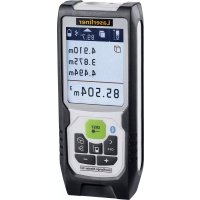
Laser distance meter with colour display
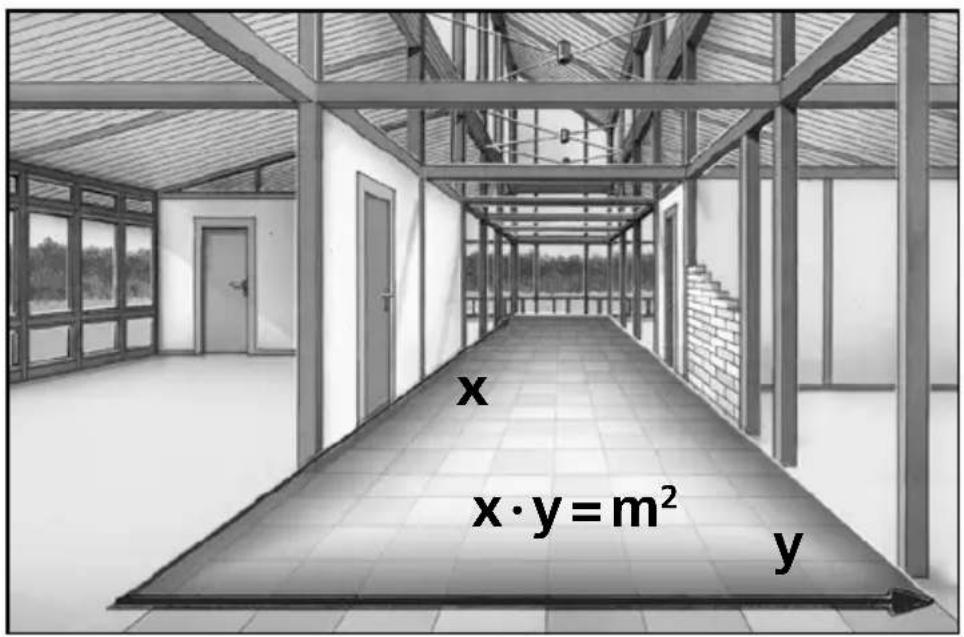
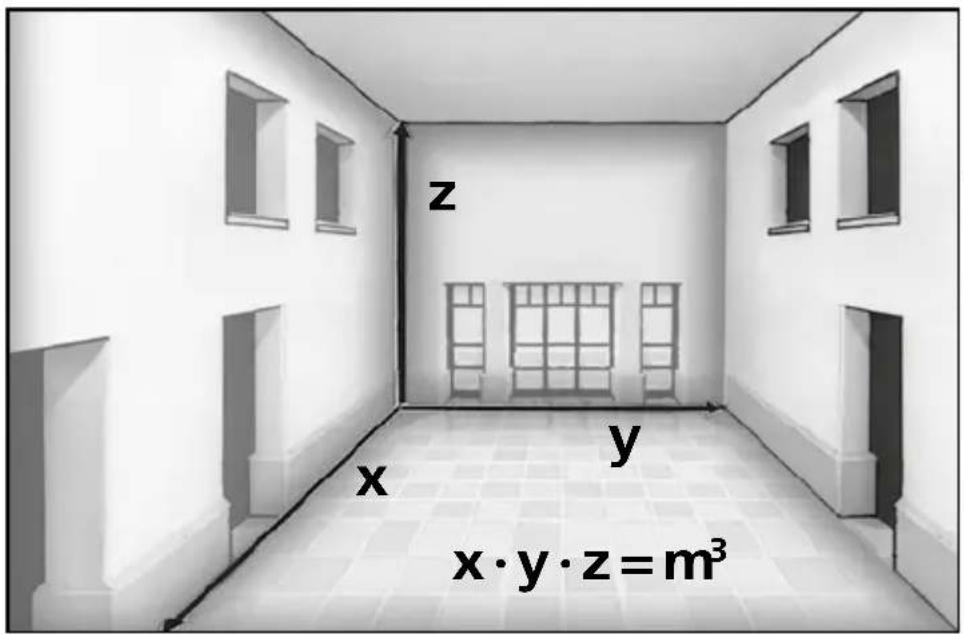
- For measuring length, area and volume
- Min/Max function for determining diagonals, verticals and horizontals
General safety instructions
- The device must only be used in accordance with its intended purpose and within the scope of the specifications.
- The measuring tools and accessories are not toys. Keep out of reach of children.
- Modifications or changes to the device are not permitted, this will otherwise invalidate the approval and safety specifications.
- Do not expose the device to mechanical stress, extreme temperatures, moisture or significant vibration.
- The device must no longer be used if one or more of its functions fail or the battery charge is weak.
- When using the device outdoors, make sure that the weather conditions are appropriate and/or that suitable protection measures are taken.
- Please ensure compliance with the safety regulations set out by local and national authorities with regard to the correct and proper use of the device.
Safety instructions
Using class 2 lasers

Laser radiation!
Do not stare into the beam!
Class 2 laser
< 1 mW · 650 nm
EN 60825-1:2014/AC:2017
- Attention: Do not look into the direct or reflected beam.
- Do not point the laser beam towards persons.
- If a person's eyes are exposed to class 2 laser radiation, they should shut their eyes and immediately move away from the beam.
- Tampering with (making changes to) the laser device is not permitted.
- Under no circumstances should optical instruments (magnifying glass, microscope, binoculars)
Safety instructions
Dealing with electromagnetic radiation
- The measuring device complies with electromagnetic compatibility regulations and limits in accordance with the EMC Directive 2014/30/EU.
- Local operating restrictions – for example, in hospitals, aircraft, petrol stations or in the vicinity of people with pacemakers – may apply. Electronic devices can potentially cause hazards or interference or be subject to hazards or interference.
- The measuring accuracy may be affected when working close to high voltages or high electromagnetic alternating fields.
Laserliner
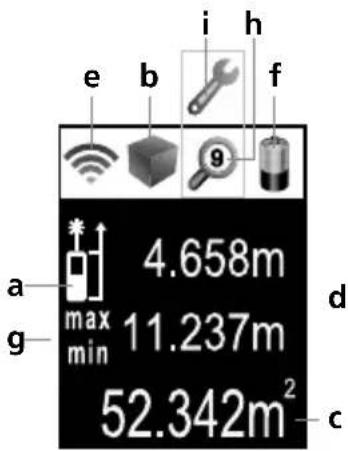

DISPLAY:
a Measurement point (reference) rear / front
b Display length / area / volume
c Measurement values / Measurement results Unit m / ft / inch / _' _"
d Intermediate values / min/max values
e The bar diagram shows how well suited the reflection surface is for measurement. This is particularly useful for measuring over long distances, dark surfaces or bright ambient light.
f Battery symbol
g Min/max continuous measurement
h Memory
i Malfunction / service required
KEYPAD:
- ON / Measure / min/max continuous measurement
- Length, area, volume / Memory
- Measurement point (reference) rear / front / Unit of measure m / ft / inch / _'_"
- OFF / delete last measurement values
Inserting batteries (see Fig. A)
Open the battery compartment and insert batteries according to the symbols. Be sure to pay attention to polarity.
Switch on, measure and switch off:

Change unit of measure:
m /ft / inch / _ ' _ "


Delete the last measured value:

DistanceMaster Compact
Change measurement point (reference):

Change measurement function:
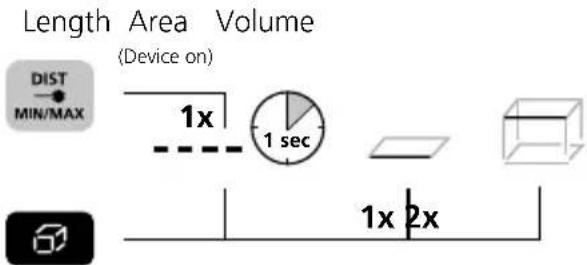
Length measurement:
![graph LR A["Device on"] --> B["1x"] B --> C["1 sec"] C --> D["Laser on"] D --> E["2x"] E --> F["3x"] F --> G["Measure"]](/content/2026/06/1285697/images/8974bf3d5ec5fa66b66d36475e3732f474ac3cefdd0086ae95c192c5328baf51.jpg)
Area measurement:

Volume measurement:

Laserliner
Min/max continuous measurement:
Device on Press for 3 seconds Stop then release button

The LC display shows the max value, the min value and the current value.
Memory function:


Error codes:
Err101: Replace the battery
Err104: Calculation error
Err152: Temperature is too high: >40°C
Err153: Temperature is too low: < 0°C
Err154: Outside the measuring range
Err155: Received signal too weak
Err156: Received signal too strong
Err157: Incorrect measurement or background is too bright
Err160: The device is moving too much to measure.
Important notices
- The laser points to the location that will be measured.
No objects may get into the laser's line of measurement. - The device compensates the measurement for different room temperatures. Therefore allow the device a brief adaptation period when changing locations with large temperature differences.
- The device is only conditionally useable in outdoor areas and cannot be used in strong sunlight.
- The measurement results of outdoor measurements may be influenced or falsified by rain, fog and snow.
- In unfavourable conditions, e.g. with poorly reflecting surfaces, the maximum deviation may be greater than 3 mm.
- Carpeting, upholstery or curtains will not reflect the laser optimally. Measure to flat surfaces.
- Measurements made through glass (window panes) can falsify measurement results.
- An energy-saving function switches the device off automatically.
- Clean with a soft cloth. Water may not be allowed to penetrate the housing.
Information on maintenance and care
Clean all components with a damp cloth and do not use cleaning agents, scouring agents and solvents. Remove the battery(ies) before storing for longer periods. Store the device in a clean and dry place.
Calibration
The meter needs to be calibrated and tested on a regular basis to ensure it produces accurate measurement results. We recommend carrying out calibration once a year.
Technical Data (Subject to technical changes without notice. Rev21W31)
| Precision (typical)* ± 2 mm | |
| Measurement range (inside)** | 0,1 m - 25 m |
| Laser class 2 / < 1 mW (EN 60825-1:2014/AC:2017) | |
| Laser wavelength 650 nm | |
| Operating conditions | -10°C ... 40°C, max. humidity 80% rH, no condensation, max. working altitude 2000 m above sea level |
| Storage conditions -20°C ... | 70°C, max. humidity 80% rH |
| Automatic switch-off 30 sec | laser / 3 min device |
| Power supply 2 x 1,5V LR03 | (AAA) |
| Dimensions (W x H x D) 27 x | 110 x 43 mm |
| Weight 100 g (incl. batteries) | |
* measuring distance up to 10 m with strongly reflective target surface and at room temperature. The measurement deviation may increase by +/-0.2 mm/m for weakly reflective target surfaces.
** at max. 5000 lux
EU directives and disposal
This device complies with all necessary standards for the free movement of goods within the EU.
This product is an electric device and must be collected separately for disposal according to the European Directive on waste electrical and electronic equipment.
Further safety and supplementary notices at: http://laserliner.com/info?an=ACF

Laserliner
!
Laserstråling!
Arrière (Instrument Avant

Rayo láser!
Misura del volume:

Misura permanente min/max:
Radiação laser!
Err101: Trocar as pilhas
Laserstrålning! Titta aldrig direkt in i laserstrålen! Laser klass 2 < 1 mW · 650 nm EN 60825-1:2014/AC:2017
Laserstråling!
LC-displayet viser den høyeste verdien (maks.), den laveste verdien (min.) og den aktuelle verdien.
Minnefunksjon:




Se på lagrede verdiereller
Feilkode:
Err101: Skift ut batteriene
Err104: Beregningsfeil
Err155: Mottatt signal for svakt
Err156: Mottatt signal for sterkt
Hata kodu:
SERVICE


Umarex GmbH & Co. KG
-Laserliner-

- DISTANCEMASTER COMPACT
- LASERLINER
- FUNCTION / APPLICATION
- GENERAL SAFETY INSTRUCTIONS
- SAFETY INSTRUCTIONS
- DISPLAY
- KEYPAD
- INSERTING BATTERIES (SEE FIG. A)
- SWITCH ON, MEASURE AND SWITCH OFF
- CHANGE UNIT OF MEASURE
- DELETE THE LAST MEASURED VALUE
- MIN/MAX CONTINUOUS MEASUREMENT
- MEMORY FUNCTION
- ERROR CODES
- IMPORTANT NOTICES
- INFORMATION ON MAINTENANCE AND CARE
- CALIBRATION
- EU DIRECTIVES AND DISPOSAL
- MISURA DEL VOLUME
- MISURA PERMANENTE MIN/MAX
- MINNEFUNKSJON
- FEILKODE
- HATA KODU
- UMAREX GMBH & CO. KG
Brand : Laserliner
Model : DistanceMaster Compact
Category : Rangefinder