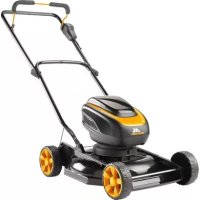
Li5826 M46M - Lawn mower MCCULLOCH - Free user manual and instructions
Find the device manual for free Li5826 M46M MCCULLOCH in PDF.



| Product Type | Cordless Electric Lawn Mower |
| Brand | McCulloch |
| Model | Li5826 M46M |
| Power Source | 58V lithium-ion battery (model 590923806) |
| Cutting Width | 46 cm |
| Adjustable Cutting Height | 30-80 mm, 7 positions |
| Grass Catcher Capacity | 50 L |
| Motor Type | BLDC (brushless) 58 V |
| Motor Speed (ECO mode) | 2,300 rpm |
| Motor Speed (Auto mode) | 2,500-2,800 rpm |
| Motor Speed (Boost mode) | 2,800 rpm |
| Maximum Power | 1.5 kW |
| Continuous Power | 0.9 kW |
| Weight (without battery) | 23.5 kg |
| Guaranteed Sound Power Level | 87 dB(A) |
| Sound Pressure Level | < 80 dB(A) |
| Vibrations (handle) | 0.65 m/s² |
| Cutting Modes | Auto, Boost, ECO |
| Cutting System | Rotary blade (bagging, mulching, discharge) |
| Safety | Safety key, presence bar, rear cover |
| Maintenance | Regular cleaning, blade sharpening and replacement, battery check |
| Protection Rating | Do not use in rain or humid environments |
| Included Accessories | Battery, charger, grass catcher, mulching plug |
Frequently Asked Questions - Li5826 M46M MCCULLOCH
User questions about Li5826 M46M MCCULLOCH
0 question about this device. Answer the ones you know or ask your own.
Ask a new question about this device
Download the instructions for your Lawn mower in PDF format for free! Find your manual Li5826 M46M - MCCULLOCH and take your electronic device back in hand. On this page are published all the documents necessary for the use of your device. Li5826 M46M by MCCULLOCH.
USER MANUAL Li5826 M46M MCCULLOCH
Li58-26 M40, Li58-52 M40, Li58-26 M46, Li58-52 M46, Li58-52 M46R

EN Operator's manual 6-16
BG PbkoBoDCTBO 3a ekcnnoataun 17-29
CS Navod k použiti 30-41
DA Brugsanvisning 42-52
The initial language of this operator's manual is English. Operator's manuals in other languages are translations from English.
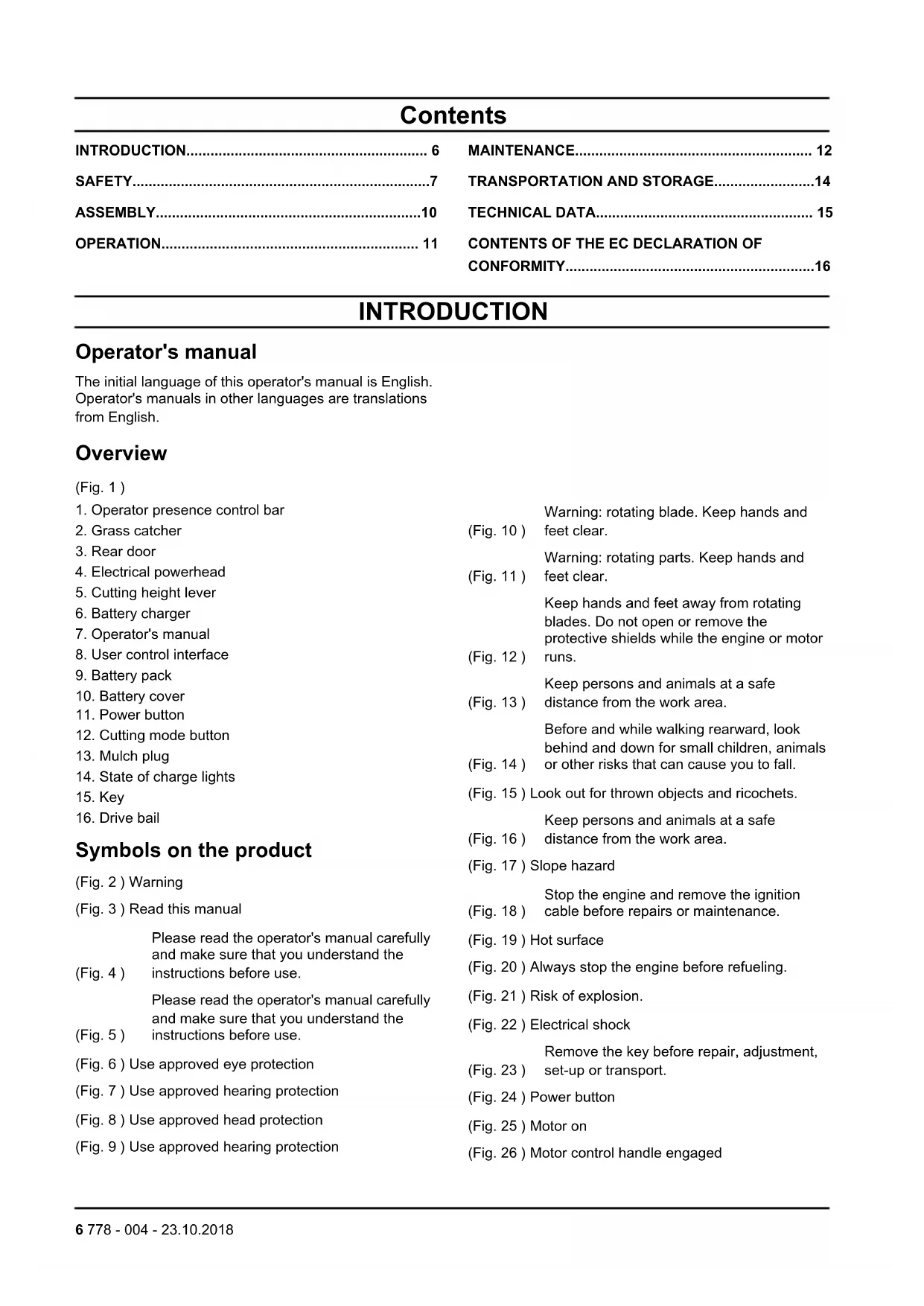
Overview
(Fig. 1)
- Operator presence control bar
- Grass catcher
- Rear door
- Electrical powerhead
- Cutting height lever
- Battery charger
- Operator's manual
- User control interface
- Battery pack
- Battery cover
- Power button
- Cutting mode button
- Mulch plug
- State of charge lights
- Key
- Drive bail
Symbols on the product
(Fig. 2) Warning
(Fig. 3) Read this manual
Please read the operator's manual carefully and make sure that you understand the
(Fig. 4) instructions before use.
Please read the operator's manual carefully and make sure that you understand the
(Fig. 5) instructions before use.
(Fig. 6) Use approved eye protection
(Fig. 7) Use approved hearing protection
(Fig. 8) Use approved head protection
(Fig. 9) Use approved hearing protection
Warning: rotating blade. Keep hands and
(Fig. 10) feet clear.
Warning: rotating parts. Keep hands and
(Fig. 11) feet clear.
- Keep hands and feet away from rotating blades. Do not open or remove the protective shields while the engine or motor
(Fig. 12) runs.
Keep persons and animals at a safe
(Fig. 13) distance from the work area.
Before and while walking rearward, look behind and down for small children, animals
(Fig. 14) or other risks that can cause you to fall.
(Fig. 15) Look out for thrown objects and ricochets.
Keep persons and animals at a safe
(Fig. 16) distance from the work area.
(Fig. 17) Slope hazard
Stop the engine and remove the ignition.
(Fig. 18) cable before repairs or maintenance.
(Fig. 19) Hot surface
(Fig. 20) Always stop the engine before refueling.
(Fig. 21) Risk of explosion.
(Fig. 22) Electrical shock
Remove the key before repair, adjustment,
(Fig. 23) set-up or transport.
(Fig. 24) Power button
(Fig. 25) Motor on
(Fig. 26) Motor control handle engaged
(Fig. 27) Motor off
(Fig. 28) Motor control handle disengaged
The exhaust fumes from the engine contain carbon monoxide, an odourless, poisonous and very dangerous gas. Do not run the
(Fig. 29) product indoors or in closed spaces.
The exhaust fumes from the engine contain carbon monoxide, an odourless, poisonous and very dangerous gas. Do not run the
(Fig. 30) product indoors or in closed spaces.
The product or packaging cannot be handled as domestic waste. The product and packaging must be submitted to an appropriate recycling station for the recovery
(Fig. 31) of electrical and electronic equipment.
Do not leave, store or use in the rain or in
(Fig. 32) wet conditions.
(Fig. 33) Recycle
(Fig. 34) Sound power level
The product agrees with the applicable EC
(Fig. 35) Directives
This product agrees with the applicable EAC.
(Fig. 36) directives
This product agrees with the applicable
(Fig. 37) Ukraine directives
Product liability
As referred to in the product liability laws, we are not liable for damages that our product causes if:
- the product is incorrectly repaired.
- the product is repaired with parts that are not from the manufacturer or not approved by the manufacturer.
- the product has an accessory that is not from the manufacturer or not approved by the manufacturer.
- the product is not repaired at an approved service center or by an approved authority.
SAFETY
Safety definitions
The definitions below give the level of severity for each signal word.

WARNING: Injury to persons.

CAUTION: Damage to the product.
Note: This information makes the product easier to use.
General safety instructions
- Use the product correctly. Injury or death is a possible result of incorrect use. Only use the product for the tasks found in this manual. Do not use the product for other tasks.
- Read, understand and obey the instructions in this manual. Obey the safety symbols and the safety instructions. If the operator does not obey the instructions and the symbols, injury, damage or death is a possible result.
- Do not discard this manual. Use the instructions to assemble, to operate and to keep your product in good condition. Use the instructions for correct installation of attachments and accessories. Only use approved attachments and accessories.
- Do not use a damaged product. Obey the maintenance schedule. Only do the maintenance
work that you find an instruction about in this manual. An approved service center must do all other maintenance work.
- This manual cannot include all situations that can occur when you use the product. Be careful and use common sense. Do not operate the product or do maintenance on the product if you are not sure about the situation. Speak to a product expert, your dealer, service agent or approved service center for information.
- Do not use the product if it is changed from its initial specification. Do not change a part of the product without approval from the manufacturer. Only use parts that are approved by the manufacturer. Injury or death is a possible result of incorrect maintenance.
- This product makes an electromagnetic field during operation. The electromagnetic field can cause damage to medical implants. Speak to your physician and medical implant manufacturer before you operate the product.
- Do not let a child operate the product.
- Do not let a person, without knowledge of the instructions, operate the product.
- Always monitor a person, with decreased physical capacity or mental capacity, that uses the product. A responsible adult must always be there.
- Lock the product in an area that children and not approved persons cannot access.
-
The product can eject objects and cause injuries. Obey the safety instructions to decrease the risk of injury or death.
-
Do not go away from the product while it is on. Stop the product before you go.
- Before and while walking rearward, look behind and down for small children, animals or other risks that can cause you to fall.
- The operator of the product is responsible if an accident occurs.
- Make sure that parts are not damaged before you use the product.
- Refer to national or local laws. They can prevent or decrease the operation of the product in some conditions.
Safety instructions for operation
- Know the controls and the correct operation of the product before use.
- Do not let children or persons without knowledge of these instructions use the product.
- Do not operate the product while persons, especially children, or animals are near.
- Keep children away from the area to be cut and monitored by an adult.
- Stop the product if children enter the work area.
- Fully examine the area where the product is to be used. Remove all objects which can be ejected by the product during operation.
- Examine the blade, blade bolt, blade assembly and motor base before use for wear and damage.
- Operate the product only in daylight or in good artificial light.
- Do not operate the product in wet grass.
- Be careful near corners, bushes, trees or other objects that can prevent your view.
- Use very high caution when you reverse or pull the product in your direction.
- Do not put hands or feet near or below rotating parts. Always keep clear of the discharge openings.
- Stop the blade when you go across gravel surfaces.
- Stop the motor, remove the battery pack and wait until the blade stops fully before you clean the product, remove the grass catcher or remove material from the discharge chute.
- Do not operate the product when you are tired, ill or under the influence of alcohol or other drugs.
- If the product has unusual vibration, stop the motor, remove the battery pack and check immediately for the cause. Vibration is usually a warning of damage.
- Do not point ejected material in the direction of others. Do not eject material against a wall or blockage. Material may ricochet back in the direction of the operator.
- Do not operate the product without the correct guards, plates, grass catcher or other safety protective devices in position.
Work area safety
- Remove branches, twigs, stones and other objects from the lawn before you start to cut.
- Keep persons, including children, and animals at a safe distance from the work area.
- Objects that hit against the cutting equipment can be ejected and cause damage to persons and objects.
- Do not use the product in bad weather, including fog, rain, moist or wet locations, strong winds, intense cold and risk of lightning. Doing work in bad weather can cause fatigue and dangerous conditions, such as slippery surfaces.
- Examine your work area to make sure that your control of the product cannot be prevented.
- Be careful of roots, stones, twigs, pits and ditches. High grass can conceal obstacles.
- Be careful when you go near hidden corners and objects that can prevent your view.
Safety instructions for slopes
- Be careful when you cut on a slope. Slopes can be dangerous. A fall on a slope can cause injury.
- Cut across the face of slopes. Do not cut up and down.
- Be careful when you change direction on a slope.
- Be careful of hidden objects or holes in the lawn. Rough terrain can cause you to fall.
- Do not cut near a steep slope, drop-off, ditch or embankment. You can fall.
- Do not cut on wet grass. You can fall.
- Do not cut on terrain with more than a 15 degree slope.
Personal protective equipment
Always use the correct personal protective equipment when you operate the product. This includes, at minimum, sturdy footwear, eye protection and hearing protection. Personal protective equipment does not erase the risk of injury but may decrease the grade of injury if an accident occurs.
- Always wear safety glasses or eye protection while you operate the product or do maintenance or repairs.
- Do not operate the product with bare feet or with open shoes. Always use heavy-duty slip-resistant boots with good ankle support while you operate the product.
- Wear heavy, long pants. Do not wear shorts, sandals or go bare foot.
- Use approved protective gloves, if necessary. For example, when attaching, examining or cleaning the blade.
- Always use approved ear protection while you operate the product. Noise for a long period can cause noise-induced hearing loss.
Protective devices on the product
-
Make sure that you regularly do the maintenance to the product.
-
The life of the product increases.
- The risk of accidents decreases.
Let an approved dealer or an approved service center regularly examine the product to do adjustments or repairs.
- Do not use a product with damaged protective equipment. If the product is damaged, speak to an approved service center.
Motor control handle
The motor control handle stops the motor. Make sure that the motor stops when the motor control handle is released.
- Start the motor and then release the control handle. The motor then stops.
Note: If the motor control handle does not stop the motor, press the power button to stop it. Remove the battery pack and speak to an approved service center.
Rear door
The rear door decreases the risk of objects being ejected from behind the product into the operator's mow position.
- Make sure the rear door is not damaged and that no defects are in view, such as cracks or broken springs. Defects cause the door to close with force. Replace the door or springs if damaged.
Safety instructions for maintenance

WARNING: Only do the maintenance work written in this operator's manual. More extensive work must be done by an approved service agent.
Do the maintenance work correctly to increase the lifetime of the product and decrease the risk of accidents. An approved service agent can do professional repairs. Speak to your nearest service agent for more information.

WARNING: To prevent accidental start during transport, maintenance or repair work, remove the battery pack and wait at minimum 5 seconds to replace it.

WARNING: Wear heavy duty gloves when you use the cutting equipment. The blade is very sharp and cuts can easily occur.
- Keep cutting edges sharp and clean for the best and safest performance.
- Let your service agent regularly examine the product and make necessary adjustments and repairs.
- Replace damaged, worn or broken parts.
- Obey instructions for changing accessories. Only use accessories from the manufacturer.

WARNING: When not in operation, keep the product, battery pack and battery charger separately in a dry, indoor and lockable area away from children and not approved persons.
Battery safety
Only use battery packs from the manufacturer and only charge them in a battery charger from the manufacturer.
The rechargeable battery packs are only used as a power supply for related cordless products. To prevent injury, the battery pack must not be used as a power source for other devices.
- Do not disassemble, open or shred battery pack.
- Do not keep battery packs in open sunlight or heat. Keep battery packs away from fire.
- Regularly examine the battery pack charger and the battery pack for damage. Damaged or changed battery packs can cause a fire, explosion or risk of injury. Do not repair or open damaged battery packs.
- Do not use a battery pack or product that is defective, changed or damaged.
- Do not change or repair products or the battery pack. Only let your approved dealer do repairs.
- Do not short circuit a cell or battery pack. Do not save battery packs in a box or drawer where they can be short circuited by other metal objects.
- Do not remove a battery pack from its initial package until necessary for operation.
- Do not mechanically shock battery packs.
- If there is a battery leak, do not let the liquid touch the skin or eyes. If you have touched the liquid, clean the area with a large quantity of water and get medical aid.
- Do not use a battery charger other than what is specified for operation with the battery pack.
- Look at the plus (+) and minus (-) marks on the battery pack and product to make sure of correct operation.
- Do not use a battery pack not made for operation with the product.
- Do not mix battery packs of a different voltage or manufacturer in a device.
- Keep battery packs away from children.
- Always purchase the correct battery packs for the product.
- Keep batteries clean and dry.
-
Clean the battery pack terminals with a clean dry cloth if they become dirty.
-
Secondary battery packs must be charged before use. Always use the correct battery charger and refer to the manual for correct charging instructions.
- Do not keep a battery pack on continuous charge when not in operation.
- Save the manual to refer to it in the future.
-
Only use the battery pack for its necessary operation.
-
Remove the battery pack from the product when not in operation.
- Keep the battery pack away from paper clips, keys, nails, screws, or other small metal objects while in operation. This can make a connection between terminals. Shorting the battery pack terminals together can cause burns or a fire.
ASSEMBLY

WARNING: Read the safety chapter before you assemble the product.
To remove the product from the carton
- Remove loose parts included with the product.
- Cut down the two end corners of the carton and put the end panel down flat.
- Remove all package materials.
- Remove the product from the carton and make sure no loose parts are left in the carton.
To set the product in operation position
- Put the pins at the bottom of the lower handle through the holes. Align the holes and attach the carriage bolt, washers, and knobs. Tighten the knobs fully. (Fig. 38)
- Align the holes in the handlebar with the holes in the lower handle and attach the carriage bolt, washers and knobs.(Fig. 39)
- Use the clip to attach the cables to the handle.
To set the product in transport position
- Loosen the two handle knobs on the upper handle. Let the handle fold down to the rear.
- Remove the carriage bolts and nuts that attach the lower handles to the handle brackets. (Fig. 40)
- Pivot the full handle assembly forward and let it become stable on the handle brackets.
To assemble the grass catcher
- Attach the top part of the grass catcher to the lower part of the grass catcher. (Fig. 41)
- Lift the rear cover.
- Attach the hooks on the grass catcher to the top edge of the chassis.(Fig. 42)
- Put the lower part of the grass catcher into the grass discharge channel.
To change the product to bagging mode
Rear bagging mode collects grass clippings in the grass catcher.

CAUTION: Do not operate the product without the rear door closed or the approved grass catcher in position. Do not try to operate the product with the rear door removed or open.
- Lift the rear door and put the grass catcher frame hooks on the rear door pivot. (Fig. 43)
- Release the rear door and put it on top of the grass bag frame.
To change the product to mulching mode (if equipped)
The mulching mode of the product makes grass clippings smaller. The grass clippings then fall onto the lawn and across the grass. Mulched grass biodegrades quickly to give nutrients for the lawn.
- Lift the rear cover and remove the grass catcher. (Fig. 44)
- Put the mulch plug into the discharge channel. (Fig. 45)
- Tightly close the rear door against the product.
To change the product to discharge mode
- Remove the mulch plug or grass catcher. (Fig. 46)
- Tightly close the rear door against the product.
To set the cutting height

CAUTION: Do not set the cutting height too low. The blades can hit the ground if the surface of the lawn is not level.
Note: Set the same height on all cutting height controls.
- Move the cutting height lever rearward to increase the cutting height.
OPERATION

WARNING: Read and understand the safety chapter before you operate the product.
Basic cutting technique
- Always cut with a sharp blade for the best results. A blade that is not sharp cuts unevenly and lets the grass become yellow on the surface of the cut.
- Do not cut more than 1/3 of the length of the grass. This specially applies during dry periods. Cut first with the cutting height set high. Then examine the result and lower to an applicable height. If the grass is too long, operate slowly and cut two times if necessary.
- For very heavy cutting, decrease the width of the cut by making an overlap of the cut path and cutting slowly.
- Cut in different directions each time to prevent stripes in the lawn.
Before you start the mower
- Keep persons and animals away from the work area.
- Do daily maintenance. See MAINTENANCE on page 12
To start the product
- Put in the battery pack until you hear a click. Make sure the battery pack is correctly installed. (Fig. 48)
- Put the key into the pocket below the battery lid. Make sure the key is correctly installed. (Fig. 49)
Note: The key can only be put in one direction.
- Press the power button one time. The button illuminates fully. (Fig. 50)
- Pull the motor control handle in the direction of the handlebar. The power button starts to flash. (Fig. 51)
- Press the flashing power button. The product then starts. (Fig. 52)
To stop the product
- Release the motor control handle on the product, or press the power button one time. (Fig. 53)
To use the drive on the wheels (if equipped)
(Fig. 54)
- Pull the drive bail in the direction of the handlebar.
- Before you pull the product rearward, disengage the drive and push the product forward approximately 10 cm.
- Release the drive bail to disengage the drive, for example when you go near an obstacle.
To empty the grass catcher
- Lift the grass catcher with the frame handle.
- Remove grass clippings from the grass catcher from below the handle.
- Empty grass clippings from the bag with the frame handle and the bag handle.

CAUTION: Do not drag the bag when you empty the grass catcher to prevent wear.
To change the cutting mode
The product can be changed to one of three different cutting modes while in operation by pressing the cutting mode button.
- Auto mode - The product automatically adjusts the cutting speed of the product in response to the quantity of grass being cut.
Note: The product is set to Auto mode by default while in operation.
-
Boost mode - The product operates at high speed regardless of the quantity of grass being cut.
-
While the product is in operation, press the cutting mode button one time to change from Auto mode to Boost mode. The cutting mode button then illuminates.
-
ECO mode - The product operates at low speed regardless of the quantity of grass being cut.
-
While the product is in operation, press the cutting mode button one time to change from Boost mode to ECO mode. The cutting mode button then illuminates and flashes.
- To go back to the default Auto mode, press the cutting mode button one time while the product is in operation. The cutting mode button then stops flashing.
Note: If the motor control handle is released during operation, the product stays in the current cutting mode. If the product automatically stops, or the operator presses the power button, the cutting mode used before is erased from memory and the product starts in Auto mode when started again.
Battery status indication during operation
The display on the user control interface shows the battery capacity and if there are problems with the battery pack. The battery capacity is shown while the machine is in operation.
| LED lights Battery status | |
| All Green LEDs come on | Fully Charged (100% - 76%) |
| LED 1, 2 and 3 come on | The battery pack is 75% - 51% charged. |
| LED 1 and 2 come on | The battery pack is 50% - 26% charged. |
| LED lights Battery status | |
| LED 1 comes on | The battery pack is 25% - 6% charged. |
| LED 1 flashes Tbe battery pack is 5% - 0% charged. | |
If there is an error with the battery pack during operation, all four green LEDs of the battery state of charge display flash. Remove the battery pack from the machine and press the indicator button on the battery pack to show the error code for the error. The LED's on the battery pack illuminate and show an error code if an error has occurred. Consult the battery manual for a list of error codes and solutions to the errors.
MAINTENANCE

WARNING: Read and understand the safety chapter before you clean, repair or do maintenance on the product.
General recommendations for maintenance
The warranty on this product does not include incorrect or not careful operation of the product by the operator. To receive full value from the warranty, the operator must do maintenance on the product as written in the instructions of this manual. Different adjustments must be made at different intervals to keep your product in correct work condition.
- Examine the blade for wear each year.
To examine the tires
- Keep the tires free of unwanted material and chemicals to prevent damage to the rubber.
- Keep the tires away from stumps, stones, ruts, sharp objects and other objects which can cause damage to the tires.
To do a general inspection
- Check that nuts and screws are tight.
- Make sure no cables are pinched.
Maintenance schedule
Use the maintenance schedule to see the necessary maintenance requirements of your product, and when the maintenance must occur. The intervals are calculated on average use of the product and may be different because of how frequently you use it.
- Tighten bolts and nuts before each use and before storage.
- Clean and examine the grass catcher, if installed, before and after each use, and before storage.
-
Examine the tires before each use.
-
Clean the product after each use and before storage. Use a scraper to clean below the deck.
- Examine the blade for damage and cracks in 25 hour intervals. Replace blades more frequently if you cut in sandy soil.
- Lubricate the product in 25 hour intervals.
- Clean and fully charge the battery pack after use and after storage. Charge the battery pack for max. 24 hours before storage.
- Do not keep the battery pack on the battery charger during storage. Charge the battery pack for a maximum of 24 hours.
- Examine the drive belt and pulleys in 25 hour intervals (if equipped).
To clean the product
- Use a brush to remove unwanted material and grass on the product.
- Keep unwanted material off finished surfaces and wheels.
- Use a scraper below the product to remove the buildup of grass and waste.
- Do not use a high pressure washer to clean the product.
- Do not flush water directly on the electrical powerhead or battery contacts.
- When you clean below the product, remove the battery pack and put the product on its side with the user control interface pointing up.

CAUTION: Do not clean the product with water, cleaning fluids or solvents. Remove unwanted material external to the product with a soft brush or dry cloth that does not contain metal.
To clean the grass catcher
- Pores in cloth grass catchers can become filled with dirt and dust during operation. This causes the grass catcher to collect less grass. To prevent this,
regularly hose the grass catcher off with water and let dry before using.
- Examine the grass catcher frequently for wear or deterioration. Replace if necessary.
To examine the rear door
The rear door is attached between the rear wheels of the product. The door decreases the risk of objects that may be ejected in the direction of the mow position of the operator.
- Make sure that the rear door is not damaged.
- Examine the rear door for defects that push the door to close, including cracks or broken springs.
- Replace the rear door or the springs if they are damaged.
To sharpen and balance the blade
For best results, keep the blade sharp. Replace a bent or damaged blade.

CAUTION: Use gloves, and/or wind the blade with a heavy cloth, to prevent damage to your hands.
- Sharpen the blade with a file or on a grinding wheel. Do not sharpen the blade when it is installed on the product.

CAUTION: We do not recommend that you sharpen the blade. If you do, make sure that the blade is balanced. A blade that is not balanced can cause damage to the product or motor.
- Put a straight nail in a piece of wood or a wall. Make sure you can see 2-3 cm of the nail.
Error codes
The error codes help you do troubleshootinging on the product and/or the battery pack while in operation.
- Put the center hole of the blade on the head of the nail. If the blade is balanced, it must stay in a horizontal position. If one of the two ends of the blade moves down, sharpen the heavy end until the blade is balanced.
To replace the blade
- Lock the blade with a block of wood.(Fig. 55)
- Remove the blade bolt.
- Remove the blade.
- Examine the blade support and blade bolt to see if there are damages.
- Examine the motor shaft to make sure that it is not bent.
- When you attach the new blade, point the angled ends of the blade in the direction of the cutting cover. (Fig. 56)
- Make sure that the blade is aligned with the center of the motor shaft.
- Lock the blade with a block of wood. Attach the spring washer and tighten the bolt and washer with a torque of Nm.(Fig. 57)
- Pull the blade around by hand and make sure that it turns freely.

WARNING: Use heavy duty gloves. The blade is very sharp and cuts can easily occur.
- Start the product to do a test of the blade. If the blade is not correctly attached, there is vibration in the product or the cutting result is unsatisfactory.
| LED screen Possible faults Possible steps | ||
| No LEDs come on after pressing the power button on the user control interface, battery pack does not function in product | Battery pack not fully put into product or internal fuse is blown | Push the battery pack fully into the powerhead until a click is heard. If the LEDs do not illuminate after the battery pack has been fully put in and the power button has been pressed on the user control interface, speak to an approved service center. |
| All four battery capacity LEDs flash, no other LEDs come on after pressing the power button | Battery pack not fully put into product or the internal temperature of the battery pack is too hot or too cold. | Push the battery pack fully into the powerhead until a click is heard. If the LEDs continue to flash, the internal temperature of the battery pack may be too low or too high. Allow the battery pack to warm up or cool. To increase the cooling process, the battery pack can be inserted into the battery charger to actively cool the battery pack. |
| All four battery capacity and power LEDs flash, no other LEDs come on after pressing the power button | Motor control handle held down when the power button is pressed for the first time or internal motor control handle switch failure | Release the motor control handle. If the motor control handle is not held down and the LEDs continue to flash, speak to an approved service center. |
| Product stops operating and all four battery capacity LED's flash, no other LEDs come on. | Battery pack is loose in the powerhead and no longer makes good contact, battery pack is too warm, or cold or other internal battery error | 1. Stop the product. 2. Remove battery pack from product and press the indicator button on the battery pack to show the error code. The LED's on the battery pack come on and show an error code. 3. Read the included battery manual for a list of related LED error codes for possible faults and procedures. If the battery pack does not show an error after pressing the indicator button on the battery pack and only displays the state of charge, the battery pack may have come loose in the powerhead during operation. Install the battery pack correctly into the powerhead until a click is heard. |
| Product stops operating and the power button flashes while the battery capacity LED's continue to show the current state of charge | Cutting chamber is clogged with grass, motor controller is too warm, or motor fault | 1. Stop the product. 2. Remove the battery pack and turn the product on its side with the user control interface pointing up. 3. Examine the blade, blade bolt, blade assembly, motor and motor base for damage. Clear all grass from the bottom of the machine and examine for clogs. 4. Install the battery pack and follow the starting procedure to start the machine. If the error continues to show, let the product cool down. The motor controller may be too warm for operation. If the error continues to show, speak to an approved service center. |
TRANSPORTATION AND STORAGE
- Keep equipment safe during transportation to prevent damage and accidents.
- For storage, keep equipment in a locked area away from children and persons that are not approved.
- For storage, keep the product and equipment in a dry and frost-proof area.
- When loading or moving the product, do not go more than the maximum recommended operation angle of 15 degrees.
-
Clean the product. For more information, see To clean the product on page 12.
-
Lubricate the product.
- Tighten bolts and nuts.
- Replace or repair damaged components.
- Touch up all rusted or damaged paint surfaces. Sand lightly before painting.
- Use the correct protective cover on the product that does not keep moisture. Do not use plastic because it cannot breathe, lets condensation collect and causes corrosion on the product.
- Always remove the battery pack prior to transportation or storage.
TECHNICAL DATA
| unit Li58 | -26 M40(58VBKPR40C) | Li58-52 M40(58VBKPR40C) | Li58-26 M46(58VBKPR46C) | Li58-52 M46(58VBKPR46C) | Li58-52 M46R(58VBKPR46CR) | |
| Cutting motor | ||||||
| Motor type - BLDC (brush-) | less) 58V | BLDC (brush-less) 58V | BLDC (brush-less) 58V | BLDC (brush-less) 58V | BLDC (brush-less) 58V | |
| Motor speed - ECO mode | rpm 2300 | 2300 2300 2300 | 2300 | |||
| Motor speed - Auto mode | rpm 2500 | RPM until current is greater than 12A for 3 seconds RPM increases to 2800 RPM until current is less than 18A for 10 seconds. | 2500 RPM until current is greater than 12A for 3 seconds RPM increases to 2800 RPM until current is less than 18A for 10 seconds. | 2500 RPM until current is greater than 12A for 3 seconds RPM increases to 2800 RPM until current is less than 18A for 10 seconds. | 2500 RPM until current is greater than 12A for 3 seconds RPM increases to 2800 RPM until current is less than 18A for 10 seconds. | 2500 RPM until current is greater than 12A for 3 seconds RPM increases to 2800 RPM until current is less than 18A for 10 seconds. |
| Motor speed - Boost mode | rpm 2800 | 2800 2800 2800 | 2800 | |||
| Motor output - Max kW | 1.5 1.5 | 1.5 1.5 1.5 | ||||
| Motor output - Max Continuous | kW 0.9 | 0.9 0.9 0.9 0.9 | ||||
| Motor output - Rated kW | 0.9 0.9 | 0.9 0.9 0.9 | ||||
| Overcurrent limit (Max Current) | A (amps) | 25 25 | 25 | 25 25 | ||
| Weight | ||||||
| Weight (without battery) | kg | 20 20 | 23.5 | 23.5 24.5 | ||
| Battery | ||||||
| Type of battery | — | 590923806 | 590923803 | 590923806 | 590923803 | 590923803 |
| Battery runtime | ||||||
| Battery runtime | m2 | Up to 500 | Up to 1000 | Up to 600 | Up to 1200 | Up to 1000 |
| Noise emissions1 | ||||||
| Sound power level, measured | dB (A) | 92 92 | 87 | 87 87 | ||
| Sound power level, guaranteed LWA | dB (A) | 93 93 | 87 | 87 87 | ||
| Sound levels2 | ||||||
| Sound pressure level at the operator's ear | dB (A) | < 80 | < 80 | < 80 | < 80 | < 80 |
| unit Li5 | 8-26 M40(58VBKPR40C) | Li58-52 M40(58VBKPR40C) | Li58-26 M46(58VBKPR46C) | Li58-52 M46(58VBKPR46C) | Li58-52 M46R(58VBKPR46CR) | |
| \(Vibration levels^3\) | ||||||
| Handle m/s | 2 | 0.38 0.38 0.65 | 0.65 | 0.65 | ||
| Cutting | ||||||
| Cutting height mm 20-7 | 5 20-75 | 30-80 30-80 30-80 | ||||
| Cutting width cm 40 40 | 46 46 46 | |||||
| Blade, collect | — | 587159010 | 587159010 | 581188910 | 581188910 | 581188910 |
| Blade, mulch | — | 587159010 | 587159010 | 581188910 | 581188910 | 581188910 |
| Bagger capacity | liters | 50 50 50 50 50 | ||||
CONTENTS OF THE EC DECLARATION OF CONFORMITY
We, Husqvarna AB, SE 561 82 Huskvarna, SWEDEN, declare under our sole responsibility that the represented product:
| Description | Electric Rotary Lawn-mower |
| Brand | McCulloch |
| Platform / Type / Model Platform 58VBKPR40C (representing models Li58-26 M40 and Li58-52 M40), platform 58VBKPR46C (representing models Li58-26 M46 and Li58-52 M46), platform 58VBKPR46CR (representing model Li58-52 M46R). | |
| Batch | Serial number dating 2018 and onwards |
complies fully with the following EU directives and regulations:
| Directive/Regulation | Description |
| 2006/42/EC | “relating to machinery” |
| 2014/30/EU | “relating to electromagnet-ic compatibility” |
| 2000/14/EC | “relating to outdoor noise” |
| Directive/Regulation | Description |
| 2011/65/EU | “relating to hazardous substances” |
Harmonized standards and/or technical specifications applied are as follows: EN60335-1, EN60335-2-77, EN50366, EN55014-1, EN55014-2, EN61000-3-2, EN61000-3-3
In accordance with directive 2000/14/EC, Annex V, the declared sound values are stated in the technical data section of this manual and in the signed EU Declaration of Conformity.
Intertek has carried out a voluntary examination on behalf of Husqvarna AB, providing a Certificate of conformity to EC Council directive 2006/42/ EC for machinery.
The certificate, as provided on the signed EC Declaration of Conformity, is applicable to all manufacturing locations and Countries of Origin, as stated on the product.
The supplied electric rotary lawnmower conforms to the example that underwent examination.
Copepknne
BbBEHNE 17
BE3ONACHOCT 18
MOHTAK 22
PABOTA. 23
TEXHNUECKO OBCJYXBAHE. 24
TPAHCIOPTI CbXPAHEHNE 27
TEXHUNeCKXAPAKTEPNCTIKN 27
CbDbPXAHNE HA DEKJIAPAUNYTA 3A
CbotBetCTBNE HA EC. 29
BbBEHNE
HctpyKzna 3a ekcnloataza
OpnHaHaTaBepnHaHactoMaTa INHcTpKU3a eknloataeHa aHnnncn e3nk. HcTpKuNTe 3a
Pperne
(ФИ.1)
1. PbkoxBaTka 3a ynpabHeHne Ha npncbCTBnETo Ha onepaTopa
2. Kow 3a TpeBa
3. 3aHa Bpata
4. EneKtpuecka cunoba rnaBa
5. loct 3a BncounHa Ta Ha p3aHe
6. 3apdno yctpoNCTBO 3a akymyIaTOP
7.ИHCTpyKmna3aeknnoataua
8. Iotpe6nteJcN uHTepceE 3a ynpabJeHne
9. KomnneK 6aTeepu
10. Kanak ha akymylaTopa
11. ByToH 3a BkHIOUcBaHe
12. ByToH 3a peXmHa KocHe
13. Ппставka за мулчиранe
14. CBeTmHn 3a cbCToHnne Ha 3apexKaHe
15. Knou
16.Дрьжka 3a 3aДВЖBaHe
CnmboN Bbpxy MaunHaTa
(Фиг.2)Прдупждени.
(Фиг.3)ПpoуeTeTeTOBa pБКOBOДСТВО
PpoTeTe BnMaTeHNo pBkoBOcTBOTa onepaTopa nCe yBepeTe, ye pa3bnpaTe HNCTpyKuNTe, npEn Da n3non3BaTe
(Фг.4) Maшинна.
Ppoetete BnmaTeJHO pBkoBOdCTBOTO 3a onepatopa nCe yBepTe, ye pa3bnpate HNCTpyKuNTe, npden Da n3noJ3BaTe
(ФИ.5) Maшинна.
I3no3BaTe Oo6peHn 3aunTHn CpeCTBa
(ФИ.6) 3aOHTe
(Фиг.7)ИЗнолзBAйТе OДбрEHn aHTNФОHn
eKcNlloatauHaIpyn e3uCa npBeDeHn OT aHJIINCKN.
(Фиг.8)ИзнолзвайтEOODбрнаЗацHTa3aflaba
(ΦnΓ.9) IV3noI3BaIte OIO6peHH aHTNOH
IpeynpeKdHHe: BbptaCe HOX.
Ocnypete npoctpaHCTBO OKJOp pbute n
(Фг.10) KpaKaTa cn.
PpeynpexdHne:BbptaCe cactn.
Ocnypete npoctpaHCTBO OKoIPObueTe N
(Фг.11) Кракata с.
ДрькTe pьцTeи КраКаТС сдалeч OT BьрТЯЦte ce HOЖОBE. He OTВаряNTe n He npemaxBaTte NpeДпа3HNTe UHTOBE, DOKaTO
(ФИ.12) DBNraTeJIaT NII MOTOpbT pa6oTn.
ДрьжTe XopaTa И кИВOTHHTe Ha 6e3ONaCHO
(Фиг.13) pa3ctoHne ot pa6oTHaTa 3OHa.
IpeNi Da TpbHHeTe NdoKaTo BbPbNTe Ha3a, Ce ornEJaTe Ha3aN HaOny 3a MaKN Deca, XINBOTNI INI DpyrN ONaCHOCTu, KOINTO MORAT Da Ca npuHaHa Da
(ФИ.14) nadHete.
PaeTe ce ot otckaauu npedMeTu
(Фиг.15) pikuwoetn.
ДрбжTe xopaTaNKIBOTHnTe Ha 6e3oNaCHO
(Фг.16) pa3ctOraHne ot pa6oTHaTa 3OHa.
(Фиг.17)ОпасноТ пи Движени noHaKIOH
CnpeteBniratena nOTcpanheTe
3anaNTenHna Ka6e nped pemOHn nn
(ФИ.18) TeXHnuecko 06CnyxBaHe.
(Фиг.19)Fopeuza noBbpxHocT
Binharn n3kIIOUbaIte DbIraTeJI npEiN
He octabraIte, He cbxpaHraBaIte n He n3noJ3BaIte B yCIOBnHa dJxD JIN
(Фur.32) Bnara.
(Фиг.33)Рeцкпранe
(Фиг.34) Hиво Ha силаТа Ha 3Byka
PpOdykTbTe BcBOTBeTCTBnE C
(Фиг.35) npnnoxumte dupekTuBa ha EO
PpOdyKTBt E BcBOTBeTCTBnE C
(Фг.36) npnnoKmnte dupeKTbH Ha EAC
PpOdyKTBt E BcbOTBeTCTBnE C
(ФИ.37) npnIOxIMnTe dupeKTHuHa YkpaiHa
OTROBOPHOCT 3a BpeN, npnHHeH OT CTOKN
KaTTo e nocOyeHO 3aKOHnTe 3a OTROBOPHOC T3a BpeN, pInuHHeH NT CTOKN, Hne He HOCm OTROBOPHOCT 3a UeTN, pInuHHeH NT HaUNI npOdyKT, aKO:
- npOdykTBt e HnnpaBnHOp emOHtnpaH.
- pOdykTbTepeMOHTnpaH C YaCTN, KONTo He ca OT npOn3BOOnTeJI NII He ca OOn6peHn OT npOn3BOOnTeJI.
- npOdykTbT mMa npHnAdnEJXHOCT, KOaTO He e OT npOn3BOOnTeJI nIe He e ODoBpeHa ot npOn3BOOnTeJI.
- npOdykTbT He e peMoHTnpaH B Odo6peh cepBn3EH cHTbp INIOT Odo6peh opraH.
БЕЗПАСНСТ
DeΦHnIu 3a 6e3oNaChOCT
DeHHnHcHnTe No-DoNY npEIOCTaBrt HNBOTo Ha cepno3HOCT 3a BCaKa eHa npEynpeIteJIHa dMa.

| Сbvетонон ekран Вьзможни | Немправност. | Вьзтохни сълки |
| Ако след наат на 6утона 3a Захсановашие на потб на 3a ураз на 3a ураз на 3a ураз 3a ураз 3a ураз 3a ураз 3a ураз 3a ураз 3a ураз 3a ураз 3a ураз 3a ураз 3a ураз 3a ураз 3a ураз 3a ураз 3a ураз 3a ураз 3a ураз 3a �ч 3a �ч 3a �ч 3a �ч 3a �ч 3a �ч 3a �ч 3a �ч 3a �ч 3a �ч 3a �ч 3a �ч 3a �ч 3a �ч 3a �ч 3a �ч 3a �ч 3a �ч 3a �ч 3a �ч 3a �ч 3a �ч 3a �ч 3a �ч 3a �ч 3a �ч 3a �ч 3a �ч 3a �ч 3a �ч 3a �ч 3a �ч 3a �ч 3a �ч � � � � � � � � � � � � � � � � � � � � � � � � � � � � � � � � � � � � � � � � � � � � � � � � � � � � � � � � � � � � � � � � � � � � � � � � � � � � � � � � � � � � � � � � � � � � � � � � � � � � � � � � � � � � � � � � � � � � � � � � � � � � � � � � � � � � � � � � � � � � � � � � � � � � � � � � � � � � � � � � � � � � � � � � � � � � � � � � � � � � � � � � � � � � � � � � � � � � � � � � � � � � � � � � � � � � � � � � � � � � � � � � � � � � � � � � � � � � � � � � � � � � � � � � � � � � � � � � � � � � � � � � � � � � � � � � � � � � � � � � � � � � � � � � � � � � � � � � � � Кот --- --- --- --- --- --- --- --- --- --- --- --- --- --- --- --- --- --- --- --- --- --- --- --- --- --- --- --- --- --- --- --- --- --- --- --- --- --- --- --- --- --- --- --- --- --- --- --- --- --- --- � � � � � � � � � � � � � � � � � � � � � � � � � � � � � � � � � � � � � � � � � � � � � � � � � � � � � � � � � � � � � � � � � � � � � � � � � � � � � � � � � � � � � � � � � � � � � � � � � � � 3a Бот --- --- --- --- --- --- --- --- --- --- --- --- --- --- --- --- --- --- --- --- --- --- --- --- --- --- --- --- --- --- --- --- --- --- --- --- --- --- --- --- --- --- --- --- --- --- --- --- --- � � � � � � � � � � � � � � � � � � � � � � � � � � � � � � � � � � � � � � � � � � � � � � � � � � � � � � � � � � � � � � � � � � � � � � � � � � � � � � � � � � � � � � � � � � � � � � � � � � � ] Вот --- --- --- --- --- --- --- --- --- --- --- --- --- --- --- --- --- --- --- --- --- --- --- --- --- --- --- --- --- --- --- --- --- --- --- --- --- --- --- --- --- --- --- --- --- --- --- --- --- --- --- --- --- --- --- --- --- --- --- --- --- --- --- --- --- --- --- --- --- --- --- --- --- --- --- --- --- --- --- --- --- --- --- --- --- --- --- --- --- --- --- --- --- --- --- --- --- --- --- � � � � � � � � � � � � � � � � � � � � � � � � � � � � � � � � � � � � � � � � � � � � � � � � � � � � � � � � � � � � � � � � � � � � � � � � � � � � � � � � � � � � � � � � � � � � � � � � � � � � � � � � � � � � � � � � � � � � � � � � � � � � � � � � � � � � � � � � � � � � � � � � � � � � � � � � � � � � � � � � � � � � � � � � � � � � � � � � � � � � � � � � � � � � � � � � � � � � Вот --- --- --- --- --- --- --- --- --- --- --- --- --- --- --- --- --- --- --- --- --- --- --- --- --- --- --- --- --- --- --- --- --- --- --- --- --- --- --- --- --- --- --- --- --- --- --- --- — � � � � � � � � � � � � � � � � � � � � � � � � � � � � � � � � � � � � � � � � � � � � � � � � � � � � � � � � � � � � � � � � � � � � � � � � � � � � � � � � � � � � � � � � � � � � � � � � � � � � � � � � � � � � � � � � � � � � � � � � � � � � � � � � � � � � � � � � � � � � � � � � � � � � � � � � � � � � � � � � � � � � � � � � � � � � � � � � � � � � � � � � � � � � � � � � � � � � � � � � � � � � � � � � � � � � � � � � � � � � � � � � � � � � � � � � � � � � � � � � � � � � � � � � � � � � � � � � � � � � � � � � � � � � � � � � � � � � � � � � � � � � � � � � � � � � � � � � � � � � � � � � � � � � � � � � � � � � � � � � � � � � � � � � � � � � � � � � � � � � � � � � � � � � � � � � � � � � � � � � � � � � � � � � � � � � � � � � � � � � � � � � � � � � � � � � � � � � � � � � � � � � � � � � � � � � � � � � � � � � � � � � � � � � � � � � � � � � � � � � � � � � � � � � � � � � � � � � � � � � � � � � � � � � � � � � � � � � � � � � � � � � � � � � � � � � � � � � � � � � � � � � � � � � � � � � � � � � � � � � � � � � � � � � � � � � � � � � � � � � � � � � � � � � � � � � � � � � � � � � � � � � � � � � � � � � � � � � � � � � � � � � � � � � � � � � � � � � � � � � � � � � � � � � � � � � � � � � � � � � � � � � � � � � � � � � � � � � � � � � � � � � � � � � � � � � � � � � � � � � � � � � � � � � � � � � � � � � � � � � � � � � � � � � � � � � � � � � � � � � � � � � � � � � � � � � � � � � � � � � � � � � � � � � � � � � � � � � � � � � � � � � � � � � � � � � � � � � � � � � � � � � � � � � � � � � � � � � � � � � � � � � � � � � � � � � � � ] Свету --- --- --- --- --- --- --- --- --- --- --- --- --- --- --- --- --- --- --- --- --- --- --- --- --- --- --- --- --- --- --- --- --- --- --- --- --- --- --- --- --- --- --- --- --- --- --- --- --- --- --- --- --- --- --- --- --- --- --- --- --- --- --- --- --- --- --- --- --- --- --- --- --- --- --- --- --- --- --- --- --- --- --- --- --- --- --- --- --- --- --- --- --- --- --- --- --- --- --- --- ] Вот --- --- --- --- --- --- --- --- --- --- --- --- --- --- --- --- --- --- --- --- --- --- --- --- --- --- --- --- --- --- --- --- --- --- --- --- --- --- --- --- --- --- --- --- --- --- --- --- --- Свету --- --- --- --- --- --- --- --- --- --- --- --- --- --- --- --- --- --- --- --- --- --- --- --- --- --- --- --- --- --- --- --- --- --- --- --- --- --- --- --- --- --- --- --- --- --- --- Вот --- --- --- --- --- --- --- --- --- --- --- --- --- --- --- --- --- --- --- --- --- --- --- --- --- --- --- --- --- --- --- --- --- --- --- --- --- --- --- --- --- --- --- --- --- --- --- --- Свтор --- --- --- --- --- --- --- --- --- --- --- --- --- --- --- --- --- --- --- --- --- --- --- --- --- --- --- --- --- --- --- --- --- --- --- --- --- --- --- --- --- --- --- --- --- --- --- --- --- --- Вот --- --- --- --- --- --- --- --- --- --- --- --- --- --- --- --- --- --- --- --- --- --- --- --- --- --- --- --- --- --- --- --- --- --- --- --- --- --- --- --- --- --- --- --- --- --- --- --- --- --- --- Свтор --- --- --- --- --- --- --- --- --- --- --- --- --- --- --- --- --- --- --- --- --- --- --- --- --- --- --- --- --- --- --- --- --- --- --- --- --- --- --- --- --- --- --- --- --- --- --- --- --- --- ] Свтор --- --- --- --- --- --- --- --- --- --- --- --- --- --- --- --- --- --- --- --- --- --- --- --- --- --- --- --- --- --- --- --- --- --- --- --- --- --- --- --- --- --- --- --- --- --- --- ] Вот --- --- --- --- --- --- --- --- --- --- --- --- --- --- --- --- --- --- --- --- --- --- --- --- --- --- --- --- --- --- --- --- --- --- --- --- --- --- --- --- --- --- --- --- --- --- --- --- Сь --- --- --- --- --- --- --- --- --- --- --- --- --- --- --- --- --- --- --- --- --- --- --- --- --- --- --- --- --- --- --- --- --- --- --- --- --- --- --- --- --- --- --- --- --- --- --- --- --- --- Вот --- --- --- --- --- --- --- --- --- --- --- --- --- --- --- --- --- --- --- --- --- --- --- --- --- --- --- --- --- --- --- --- --- --- --- --- --- --- --- --- --- --- --- --- --- --- --- --- ] | ||
| Сbvетоноthen ekpan Вьзможни | Немправно then | Вьзможни съknki |
| Пюдунов т сира на работи и Буточт 3а 3харваима, ДOKATO Сbvетонод've 3a Калачтete на ватерияа Проблжават д покараз Тек上诉свсгсяне на Заржданe | Решения камера e Задрстени c Трева, perулatable на Двигален e Тьрде Точи пли有很大 Немправноct в Двигален | 1. Спреве песукта. 2. Извашие песукта ватерий и положeteves пюдунота настара на takа, чe пOTребштеленяпИтерфейс 3а упавлени да сочи наgope. 3. Пюberе песуka, р内的ьралья бOLT на Ноковete, мodyuya на поховete, Двигалени Осныват на повroduи. Почипесе Трувашие о.Tолна стуна на Машината и песворе te 3а зашивουnia. 4. Монтейких komп Lewабоги и следыte песцedyра на остриpane, за да статурахшината. Ако решка т песлwxи да сизbewда, octabete песукты да с oxлади. Perулatable на Нади ratеля може ду Тьр ded Точил за разота. Ако решка т песлwxи да сизbewда, свьржete с с одобpen сервизен цentьр. |
TPAHCIOPT IN CbXPAHEHNE
- O6e3oNaCeTe obOpyDbaHHeTo npi TpaHcNopT, 3a da npeDoTbPaTnTe NOBpeDa u HnUdEHTn.
- CbxpahraBaTe o6OpyDbaHeTo 3akJIOyeHO daJeHOTeua n OT Iuca, KOInTO He ca yynbHOMOueHn.
- CbxaHЯBaIte npOdykTa n OobopydBaHHeTo Ha cyxo 3aUHTeHO OT CKpeK MRCTO.
- Пиюваре Ип па3TOВаBE He Na рpoДуКТа He превшавай Te ррелорьчаня МAKСИМален bгьл на pa6ota ot 15 града.
-
发布日期:2017年1月19日,星期六。
-ПоунсTe npOукTa.3a noBeeиHΦopMaця BnKTe 3a NOuNCTBaHe Ha npOуkTa Ha CTpaHnua 25.
Cma3BaIte npoDyKta. -
3aterheTe 6oJIToBete IraKInTe.
CmeheTe nIpeMOHTnpaIte IOBpeDeHNTe KOMIOHEHTN.
-ПопраВеTe BCnUKN pБЖДЯСАИ ИИ NOВpeДЕН 6ОЯДиСан IOБьPxHOCtI.ИЗшКурete Л ekO пpeДИ 6OЯДиСbaHe. - 3n0n3BaIte npabunHna npedna3eH Kanak Bbpxy npodykTa, KOTo He 3aIbpxa Blara. He n3no13BaIte HauNoH, TbN KaTO ToH He npOnycKa Bb3dyx, O6pa3yBa KOHeH3aunr N npuHnRa Kopo3nHa npOdykTa.
Bunaru n3BaJdaIte KOMnJIeKta 6aTePnn npEtn TpaHcnpTnpaHe nn CbXpaHeHne.
TEXHnueCKXAPAKTEPNCNUK
| eшини ца | Li58-26 M40 (58VBKPR40C) | Li58-52 M40 (58VBKPR40C) | Li58-26 M46 (58VBKPR46C) | Li58-52 M46 (58VBKPR46C) | Li58-52 M46R (58VBKPR46CR) | |
| Двигател за ряазане | ||||||
| Тип двигател - BLDC | (бeзчetakов) 58V | BLDC (бeзчetakов) 58V | BLDC (бeзчetakов) 58V | BLDC (бeзчetakов) 58V | BLDC (бeзчetakов) 58V | |
| Оьогotи на двигател - Ржим ECO | об/мен | 2300 2300 2300 2300 | 0 2300 | |||
| eändица | Li58-26 M40(58VBKPR40C) | Li58-52 M40(58VBKPR40C) | Li58-26 M46(58VBKPR46C) | Li58-52 M46(58VBKPR46C) | Li58-52 M46R(58VBKPR46CR) | |
| Оворота наДвигателя - Астоматчesen реким | ob/мен | 2500 ob/мен, дokato takbt e над 12 A за 3 секундо ob/мен нараз cambат до 2800 ob/мен, дokato takbt e под 18 A за 10 секунд. | 2500 ob/мен, дokato takbt e над 12 A за 3 секундо ob/мен нараз cambат до 2800 ob/мен, дokato takbt e под 18 A за 10 секунд. | 2500 ob/мен, дokato takbt e над 12 A за 3 секундо ob/меннарambat до 2800 ob/мен, дokato takbt e под 18 A за 10 секунд. | 2500 ob/мен, дokato takbt e над 12 A за 3 секундо ob/мен нараз cambат до 2800 ob/мен, дokato takbt e под 18 A за 10 секунд. | 1500 ob/мен, дokato takbt e над 12 A за 3 секундо ob/мен нараз cambат до 2800 ob/мен, дokato takbt e под 18 A за 10 секунд. |
| Оворота наДвигателя - Рекима макимална мочност | ob/мен | 2800 2800 2800 2800 | 00 2800 | |||
| ИзхODа мошност наДвигателя - макс. | kW 1,5 | 1,5 1,5 1,5 1,5 | ||||
| ИзхODа мошност наДвигателя - макс. несякъдана | kW 0,9 | 0,9 0,9 0,9 0,9 | ||||
| ИзхODа мошност наДвигателя - макимална | kW 0,9 | 0,9 0,9 0,9 0,9 | ||||
| Гразица на с蜱хток (макс. ток) | A(ампэр) | 25 25 25 25 25 | ||||
| Терло | ||||||
| Терло (бe3батята) | kg 20 20 | 23,5 23,5 24,5 | ||||
| Акymалatorна раветия | ||||||
| Тиь батяп | - | 590923806 | 590923803 | 590923806 | 590923803 | 590923803 |
| Враеме на павotas на паветята | ||||||
| Враеме на павotas на паветята | m² | До 500 | До 1000 | До 600 До 1200 | До 1000 | |
| Шу mobи emиси4 | ||||||
| Н Ibво на звковatinga мошност, Измерени | dB (A) | 92 92 87 87 87 | ||||
| Н Ibво на звковatinga мошност, rapанtripano LWA | dB (A) | 93 93 87 87 87 | ||||
| Н Ibва на звуka5 | ||||||
| Н Ibво на звковOTO на лягане поухто на оретаюра | dB (A) | < 80 | < 80 | < 80 | < 80 | < 80 |
| Н Ibва на вибашиte6 | ||||||
4 4 LIMBOB EMMCIN B OKONHATA Cpea, N3MEpeHH KATO 3BykoBa MOUHOCT (LWA) cbrnaCHO EO dIpuKeTnBa 2000/14/EO.
5 OTyTeHHTe DaHHN 3a HNBOTO Ha 3ByKOBOTo HAJRAHe IMAT TUNUHa CTaTnCTnuecka DnCnepcna (CTaHdapTHO OTKJOHEHne)OT 1,2 dB (A).
6 OTyTeHInTe DaHHn 3a paBHnIeTo Ha Bn6paunmAt TnnuHa CTaTnCTnuecka DnCnepcn (CTaHdapTHO OTKnOHeHne)OT 0,2 m/s². CtaHdapt 3a Bn6paunn EN 60335-2-77:2017 rnaBa 20.105.
| eцини ца | Li58-26 M40 (58VBKPR40C) | Li58-52 M40 (58VBKPR40C) | Li58-26 M46 (58VBKPR46C) | Li58-52 M46 (58VBKPR46C) | Li58-52 M46R (58VBKPR46CR) | |
| Ръкoxьатka m/s | 2 | 0,38 0,38 0,65 | 0,65 | 0,65 | ||
| Косене | ||||||
| Височ. на ряазане мм | 20-75 20-75 30-80 30-80 | |||||
| РавOTнаширунca sym 40 | 40 46 46 46 | |||||
| Нож, събиранe | - | 587159010 | 587159010 | 581188910 | 581188910 | 581188910 |
| Нож, мунчиранe | - | 587159010 | 587159010 | 581188910 | 581188910 | 581188910 |
| Калачтет на багра | питра | 50 50 50 50 50 | ||||
Съдьржане HA ДЕКЛAPAUЦЯТA 3A СъOTBETCTBNE HA EC
Hne, Husqvarna AB, SE 561 82 Huskvarna, UBEU, DeKnapnPame Ha cBOr co6CTBeHa OTROBOPHOCT, Ye npEcdTaBeHNrT pOdyKT:
Sādan afterses bagklappen
Evikcs oyniec aovaaiaac
Xpnoiopoioiote owoTa to Tpoiov.Aoyw Tns eopaaevnc xpnoC mTopei va Tpokntheipaupatiooc n thavato. Xpnoiopoioiote to Tpoiov muvo yia TIC epyaici cTou avapepovtai OTO paoV
EyxepioBIO. Mny xnpoiopoTIOeITE To TPOiov yia aAee
epyaoc
Naiaaote, va katavoroe tai vatnpite Tc odnyie tsou npexovtai e auto to yxepidio. Tnpite ta ouBoLa aqaaiaac kai tis odnyie caqaaiaic. Eav oxipoiTc dev tnpei Tc odnyie cai ta ouboLa, mtopei va pokntheipaupatiooc, Znmu n ataroc.
Mny aToppieTe auto To eYxepidio. XpnoiopoToIne TIC odnyies yia tn auvapuoLoynAn, tn xpnAn kai TNI biatnpnAn Tou PtoivTOc OE kaNkataaOn. XpnoiopoToInate TIG odnyies yia tn oWtN EykataaTaan TwV EApntmuATWv KAI TWV TAPeAkkOeWv. Na xpnoiopoToIEte MVO EyKekipEv A EApntmuata Ka TAPeAkkOeVA.
Na unx npoiopoioite TPOIOVTA TOU TAPouaiacouv Znui. Na TnpieTe TO TPOpypaua auvtnpnnc. Na EKTEAEITE MVO TIG EPyaoies OuvtnpnoNc Tous avapoeovta OE oyies Tou TAPovTOg EYXepiOiu. OAc oU UTOAOITcE PPyaoies OUVtnpnoNc TpeTtva EKTEAOuVTa aTo EvA EYKEKPIevo KEvTPO ePbIc.
To npov Exyepioo dev nepiaaabei oae ts kataotaceic Tou mtopei va Tpokuovkata tn xpnon Tou pioovc. Na eote pooeekikoi ka va
Xpnoiopoioite Tnv KOIVn loyIKn. Mny XpnoiopoIOeIe To TPOiov KAI mNv EKTEeIe EPyaicc ouvtnpoan, evd Ev iote oiyoupoi yia Tnv kataaon. Ateuovthe eEvav EIOKO ia To TPOiov, Tov avTIPoosO aC, Tov avTIPoosO ePbic n eva EykekpiEvo Kevtpo ePbic yia PnpoopieC.
MnV xpnoiopoioite To TPOIOv EAV TPOITOTIOINe i aTTO TIC apxikc Tou TPOIDAYPAeC. Mny aAAaEETe eva EApTnau Tou TPOIOVTOG Xwpi EYKpion aTTO VKAATAKEUAATN. XpnoiopoTOnATE MOVO EApTnata Tou Exouv EYKPIe i aTO VKAATAKEUAaT. Aoyw TNS eepaAevns OuvtnpOng mTOpEi va TPOkAne I Tpaumaioos n OavatoC.
AutoToTPOIOvOgMIoupyeI NAEKTPoayVNTIKo TEOkataTn LEIToupyia Tou.To NAEKTPoayVNTIKo TEOIOuTOpei va PpOKaLcEi Znmu Ota IATPIKA EμPuteuPATA. IpOTou XpOoiOioAoeTe To TPOIOv, OUβouLeUeITE TO YIATPO OAC n TOV KATAOKEuaOTn Tou IATPIKO EμPUTEuAtoc.
Mny EITIpeyete e TAIaVa Xpnoiopoioouv To TPOIOV.
Mny eTITpeyete aToaTou deV exouv diaaoei Tc odnyiev xaonaiuotoinoouv to pioiv.
Av to Tpoiov xpnoiouoieiai afo eva atofo u EeiwEvn oomegaikn n diavontikn ikavotnta, 0a TpETTEI AVTA VA TO ETIIAEETE. PpETIE VA TapeupiokeTAI AVTA EVAC UTEUuvoc EvlAICac.
Aopaiotto pioiov 6nueio oTo oToio 6ev exouv PpOaon Taiia kai n EyekpiEv aToja.
To pioov mtopei va ekivaceavitejueva kai va TpoknOuv tpaumatmoi. Tnpite tic onyiecs aopaiaac yia va meiwotov kivduo tpaumatou n thavatou.
Mny aTouakpuveote anTo Tpoiov otav eivai evepyoToinmuEvo. dAikoyTe n Aeioupyia Tou TpoiovTO piv aTouakpuvtheta.
OTAV 0EAEVA KIVNEITE PPOCTA TITOW, PPIV AALKAI KAOT' OAN TNI DIAPKEIA TNG KIVNOS OAC VA KOITAGETTIOW KAI KATW YIA VA BEBAIWEOTE OTI DEV UTTAPXOUVMIKpA TAIIDIA ZWA n OTIDHNTOTE AALO TNOU MTOPEI VA TTPOKALESEIK VDUVO TINOWG.
O xeiipotnTOU pioovTOc Eiva UTEuBuvoc e TEPiTTwAn atuxnatoC.
Bepaiwtheta otna eapntmuata dev exouv uTootei Znmu Tpiv xnpoiotoine To ploiov.
AvatpeTe OTnv E0vikn n TOTIKN vOoOeia. MTopei va eTIOBaei n va E woei n aeitoupyia tou TpoivTOc OE opiaevc TEPITWoeiC.
O8nyiec aocaaiaac yia tn laitoupyia
Piv aTn xpən, npEe va yywpiεTe ta xeipiatnpia kai tn owtn Aetoupyia tou Tpoiovtoc.
MnV apnve va xpnoiHoiouv to Tpoiv taia n atoua Tou dEv yywpizouv autc ts odnyie.
Myn xnpoiotoiite to Tpoiov, ev osikn aotsigmaun utapxouv atoua, iiaitepa taiia, n cwa.
Ta Taaiai npetie va atouakpuovovta aTTOV TEPIOXn KOTINc kai va EITIaETTovta aTTOKAATOIOv Evnlaika.
Σαμαποτε Ση λειουργία του προίνόντος, εὰν κάτοιο παιδι μπει στο χύρο εργασιας.
Egtae TnV TpOxN OTOU TPOKeiT a XpnoiOnIOInOei TO TPOiov. ATOpaKpuVE 0aTa avTkeiEvA TOU MToPOuV VA EKTIVaXoUV aTO TPOiov KATA TNI ApKEIA TNS AEIToupyiaC.
EeTaTe Tn Aa, Tn BiBa Tns AaTic, To ouyKpOtnu a Tns AaTicac Kai Tn BaoTou Kivtnnpa Yia TuXov Othetac Kai Znue c PIV aTO XpOn.
XpnaioTIOIaTe To TPOIOv MOvo ME TO Qwoc TnC nHepac n ME EITAPKn TExVNTO FOWTIO.
Mynxnpoipotoeite To pioov o vwto ypaiaI.
Na eioe TPOaekIKoi KovT aE ywivc, auvouc, devpa n aaavtkieeva Tou EIToOizouv to OTTIKO aoc TEOIO.
Na iate TIOAU TTPOAeKTIKOI OTAV KIVEiote TTPOC Ta TIAW n TpaBATE TO TPOIov TTPOCS NTV KAteuOuvan oac.
Mny nlaicetata xepia n ta nodia aoc kovta n katw ato KIOUVEVAe np. dIATnpeite naVt aotsigmaa oopaaleiac atro ta avoiymuata Esoou.
Σταμαποτε Σηλεπδα σταν διασχιζε Σεπιρανειες Σεπιστρωμενες με χαλίκι.
Piiv KaatapiaeTe To Tpoiov, aBnote ToV KIVNTnpa, aPaipeote TnV MTTATApia KAI TEPiEvete EwS otou n AETIIDA akivntotointhei PnpwC. Etianc, aPaipeote TO ouAektn xoptou n attouakpuveTe to uAIKO aTTO 0 wAnva EkToEuaOnc.
Na unx npnoiouoie TE TO TPOIOv eav EIOE Koupaoevoi, appwoToI n UTTO IV ETTnpeia aAkoOa I aaawv apmuakw.
Eav to pioov exi aouvntipa, aqaipeote tyn utapia kai eEy5te aoeos yia va evtoniae tey ainia. OI kpdaosoi anotelouv, ouvn0w, Tpoedoinon yia znua.
Mny OtpeE Toxov EKtivaoOoeva UIAkA TpOc AALa atoua. Mny EKtivaoTe UIAkA TavwOe Toixouc n EITIOia.To UAIKO MtOpei va EGOATPAKIOTei TpOc To XeIPIOTn.
Myn xnpoiotoiite to npoiov, evd ev piokovtai otn theouc ta katalnnaa npoateutiká, o i takcs, ouuukntns xoptou n aee s pootateutikcs biataeic aqaaiaac.
AoAeia oTo Xwpo Epyaioac
- Ipotou EekivnOe Tnv KOTn, aopaipoeTa aikpa KaI kAia, TIC NTpeC KA OTOIAHNTOTE aAa avTkeiEvAtoTo ypaoiDl.
- DiatnpnoTe avpwnouc, iwioc piaiia, kai cwa oe aotsigmaan aqaaieic ao tvnepiox npyaiaic.
Ta avtkeiEv a Tnou xTuTouv nAvw oToV EToTIAuO KOITNC mTOpe i va EkTivaxoov kai va TpokaAeouv Tpaumatioo n Znui.
Myn xpnoiioite to TPOIOv otav EITIKpatouv duoeic kaipkec ouvKeCs, ia npadEiyma oe ouixn, otn bpoxn, oe vtonuéva n uypa aneia, otav TTVEOUV IOXUPOI AVEoI, otav TO Kpuo eivai EvTOvo kai otav UTPApXi KIVDuvoc TTWanC KepauwV. H epyaia oE dupeic Kaipkec ouvNkcs MTOpei va
Tpokaleoikwnkai va oac ekoeoi e ETTIKIVDUEc ouvthkec,OTTOSAOIaOHPeEETIAPVEIEc.
TEKNISET TIEDOT. 112
EU:N VAATIMUSTENMUKAISUUSVAKUUTUS.....113
JOHDANTE
Käytöohjekirja
(Fig. 15) Attention: projections et ricochets.
INNHOLDET I EF-SAMSVARSERKLÄERINGEN
Vi, Husqvarna AB, SE 561 82 Huskvarna, SVERIGE, erklærer under eneansvar at dette produitet:
| Beskrivelse | Elektrisk roterende gressklipper |
| Merke | McCulloch |
| Plattform/type/modell | Plattform 58VBKPR40C (representer modellene Li58-26 M40 og Li58-52 M40), plattform 58VBKPR46C (representer modellene Li58-26 M46 og Li58-52 M46), plattform 58VBKPR46CR (representer modellen Li58-52 M46R). |
| Parti | Serienummer datert 2018 og senere |
(Rys. 10) rak ani stop.
(Rys. 11) rak ani stop.
Examinar a porta traseira
TEXHUNECKNE DAHHbIE. 258
CODEPKAHNE DEKJIAPAUINIO
COOTBETCTBUN EC. 259
BBEDEHNE
PykoBoDCTBO no 3KcPnyaTauuN
IcxOdbHbTeKCT DaHHoro pyKOBOdCTBa no pa6oTe coCTaBHeHa aHrnnckOM a3bike. PyKOBOdCTBa no
063op
(Pnc.1)
1. Pbyar KOHTPONI npCytCTBnO npepaTopa
2. TpaBoc6OpHnK
3.3aHnYdBepua
4. Θnéktpručecka cnOBa rONoBka
5.PbIurperyIINPOBKN BbICOTbCTpIXKKn
6.3apdHoe yctpoiCTBO
7. RykoBoDCTBO NO 3KcNlyatauIN
8.Польбоватьский Иntерфец упразвашия
9.БнokakkymyЯTopoB
10. Kpbiuka akkymyTopa
11. Khoika BknoyeHna
12. Khonka pekma ctpnkkn
13.Прбka ДЯ Мульчироваян.
14. CBeTobBie INHdNkAToPbI yPoBn 3apJa
15. Knou
16.ПeТЯ npИВОда
YcIOBhIe 06O3HaueHnHa n3dJIu
(Pnc.2)Ппeдунрждениe
PpoTHTe daHoe pyKOBOCTBO no (Pnc.3) 3KcNpyataun
Ipeepnauonpa60tbBnMaTeNbHO npouHTaTe pyKOBoDCTBO NO 3KcNpyatauIN y6eNTecb,TO noHMAeTe npNBedeHHbIe 3decb nHCTpykun.
Ipeed HauaJom pa6OtbI BHMaTeJIbHO npouHTaIe pyKOBOdCTBO nO 3KcNpyatauIN y6eIntecb, YTO NOHMaTe pInBeDeHHbIe
(Pnc.5) 3decb nHctpyKuIN.
( Pnc.6) 3aunTbI rna3
pa6ote Ha npyux y3bikax YBnHOTc nepeboaMn c aHnnckoro.
IcnoJb3yIte Odo6peHHbIe cpeIcTBA (Pnc.7) 3aunIbI opraHOB cnyuXa
PoiJb3yITeCb npOBepeHHbIM 3aUHTbIM (Pnc.8) UJIeMOM
IcnoJb3yIte oOobpeHHbIe cpeIcTBA (Pnc.9) 3aunTbI opraHOB cnyxa
BHHMaHHe:BpaaHouuNcHOK.ДepKHTe (Pnc.10) pyKn Hn Ha 6e3oNaChom pacCTOHaHN.
IpeDynpexKdHHe: BpaauoUneecy qactn. Depxnte pykn HOrn Ha 6e3onacHom
(Pnc.11) pacctOraHHN.
He np6nkaTe pyKn HnHn K Bpaauoumcnoxam. He oKpbBaIte n He cHMaTe 3aunTHbIe uNTkn np np pa60taUoem dBnraTeJe nI
(Pnc.12) 3neKtpoDburatene.
CneIte 3a TeM, YTO6bIB 3OHe npoBeDeHnpa60r He 6bIO NOCTOpOHnX IIODei nnPc.13) XNBOThbIX.
IpeepHaayanOM DnBxkeHn 3aHnM XoDm IBO Bpemr Hero BHMaTeJIbHO CMOTpuTe Ha3aN BN3, YTO6bl 3aMeTtB DeTei, XINBOTbIX NII pPeDMeTbI, N3-3a KOTOpbIX
(PnC.14) MoXHo yNaCTb.
BepereITecbOTcKaKnBaIOuIXnpeMToBn (Pnc.15) pkooteB.
CJeIeIte 3a TeM, YTo6bI B 3OHe InpoBeHnpa60T He 6blIO NOCTOpOHnX JIODei nn
(Pnc.16) XNBOTbIX.
(Pnc.17)Onachoctb onpOKnDbIBaHnOCTaHOBNTe DBrIraTeJIb n OTcoEduHInTe
(Pnc.18) Ka6eIb 3aXnIraHna, npexKe Yem
PpncTyNaTb KpeMOHTy INN
Texo6cnyknaHnIO.
(Pnc.19) Toprya noBepxHocTb
Ipeeddo3anpaBkoO6ra3aTeBHo
(Puc. 20) octaHOBnte DburaTeJIb.
(Pnc.21)OnachocTbB3pbBa
(Pnc.22) Ydap ToKOM
Ipeed npoBeJeHem pemoHTa, perynipOBko, Hactpoikoi
(Pnc.23) TpaHcnpTnpOBKo n3BnEKeNTe KJIou.
(Pnc.24)KhoNka BkNoueHnna
(Pnc.25)ДВИгаTeиьВКЛ.
PykoTka ynpabNeHnI DBnraTeJem
(Pnc.26) BKNIOUeHa
(Pnc.27)ДиагаTeNb BblKn.
PykoTka ynpabLeHnI DnBraTeJIeM
(Pnc.28) BbIKJIIOyeHa
BbIXnonHbIe ra3bI n3 dBnraTeIa CoepKata OKncb yrIepOda He IMeIoUm 3aIaxa, TOKcNHyb I upe3BbUaHIO NaChbI ra3.
3anpeaetc 3KcnnyatnpoBaTbN3dJeN B NOMeHNN NIN B 3AMKHyTbIX
(Pnc.29) npoctpaHCTbax.
BbIXlonHbIe Ra3bI n3 DnRaTeIaCoepKata OKcB yrglepoa He NMeOuN 3aIaxa, TOKcNHybI upe3BbUaHIO NaChbI ra3.
3anpeaaetc 3KcnnyatnpoBaTbN3dJeNBe NOMeHnN INB 3aMKHyTbIX
(Pnc.30) npocTpaHCTbax.
DahHoe n3dJIeNn eIIN yNAKOBy HeIb3r
(Pnc.31) yTUNNIPOBaTB KaueCTBe 6bITOBbIX
OTXoOB. N3dJIne n yynakOBky Heo6xoDnMo nepeJaB B COOTBETCTByUOuI NyHK Tnna nepepa60TK 3NEKtpnueckoro n 3JIeKtpOHHO 6OpydoBaHnI.
He octabnIte, He xpaHnTe n He nCNOJb3yUte daHHoe n3dennne nOd DOxKDEM
(Pnc.32) IIN BO BnAaXhBx YcNoBnAx.
(Pnc.33)Ipepepa6oTka
(Pnc.34) YpOBeHb MOUHOCn 3Byka
I3dJIeNc COOTBETCTBYeT DeIcTBYIOUIM
(Pnc.35) DnpeKTHBaM EC
I3dJIeNc COOTBETCTBYeT DeIcTBYIOUIM
(Pnc.36) DnpeKtBamEAC
I3dJIeNc COOTBETCTBYeT DeIcTBYIOUIM
(Pnc.37) DnpeKTHBAM YKpaanHbI
OTBetCTBeHHOCTb N3ROTOBNTeJIa
B COOTBETCTBUN C 3aKOHAMN O6 OTBETCTBEHHOCTN 13ROTOBNTEN MBI HE HECEM OTBETCTBEHHOCTN 3a yuepe6, BbI3BaHHbI 3KcPnPyTaUneHauJero n3dJIINBA pe3yIbTate:
-HeHaIeJaIero pemOnTa n3JeJIyra
- nCNoJIb3OBAHnI dIpypeMOHTa I3dEJIy HeOpnIHNaJIbHbIX DeTaleN IIN DeTaleN, HeoO6peHHbIX pOnI3BODInTeIeM;
- IcnoJb3OBAHnI HeOpuHnHaNbHbIX DoONHnHTeNbHbIX npHaJaTeXHoCTe nnHeoDo6peHHbIX npOn3BODnTeJIem;
- peMOHTa I3dJIINBA HeaBTOpI3OBAHHOM cepBnCHOM cHTpe INI HeKBaIIuΦuIpOBAHHbIM CneuaJIInCTOM.
MEPbI E3OПАСHОCTN
BHIMAHNE: He nCnoB3yIte n3dJIne, ecn 3aDnRA DBePca He 3akpyTa nn He yCTaHOBJIeH CepTnФmUPOBaHHbI TpaBOc6OpHK. Hn B Koem cnyae He nCnoB3yIte n3dJIne, ecn 3aDnRA DBePca OTKpbITa NN CHrTa.
1.ПонHMnTe 3aHIOU DBepy u yctaHOBnTe KpOKn pAmbl TpaBOc6OpHNka Ha KPOHHTeINbI 3aDHei DBepCbI.(Pnc.43)
2. Otnyctte 3aHIO IO DBepu y daIte eJ neyb Ha BepxHIO Yo acTb paMbI TpaBOc6OpHnka.
IpeochaeHne n3dennn da erO nCNoJIb3OBaHnBpeXnMe MyJbUnpoBaHn (pni HaJIuHn)
B pexnme MybupoBaHna n3dne n3MeIbuaeT TpaBy Ha 6onee MeKne 06pe3Kn. 06pe3Kn TpaBbl 3aTeM naiaot Ha ra3OH npacnpoctpaHraTcNo TpaBe. NImbueHHa Tpaba 6bictpee pa3naraetc, o6ecneuHBra ra3OH nITaTeJIbHbIM BeueCTBaMn.
1.ПонHMNTe 3aHIOKpbIiKy n CHMNTe TpaBoc6OpHNk.(Pnc.44)
2.BctaBbTe npo6ky IyIMyIbYIupOBaHnB KaHaJI dIy Bbl6pOca TpaBbl. (Pnc.45)
3.ПлOTH0ЗakpoIte3aIHIIOДверу,чTOБыОнapnIpnerajaКИЗдELNIO.
IpeocheHne n3dennn ernoNcNoB3OBaHHn B pexnme Bb6poca
- Chmnte npo6ky JIJI MyJbUnpOBaHnI nn TpaBoc6OpHNK. (Pnc. 46)
2.Пnotho 3akpoite 3aHIO IO DBepuy,уTO6bI OHa npnnerana K n3dennio.
PerynpoBka BbICOTbl CtpnxKKn

BHIMAHNE: He yctaHaBnBaIte BbICOTy cTpNkKcNlSiKOM Hn3ko.HoXn MOryt ydaPraTbcra 0 3eMnO,ecnn NOBepxHocTb ra30Ha HepOBHa.
PnmeHne: YcTaHOBtE BCE peYrJrTOpbl BbICOTbl CTpnKHa OOnHaKOByo BbICOTy.
- NpebeTe pbyar perynnpOBKn BbICOTb CTpnKn Ha3aI, YTO6bl yBeNnHtB BbICOTy CTpnKn.
- NpebeBnte pblur perylnpoBKn BlicOtbl CTpnKKn Bneped, yTo6bl yMeHbwnTb BlicOty CTpnKKn. (Pnc. 47)
3KcPJIyATAUЯ

NPEyPExEHNe:peepnayanom 3KcIpyatauHn3dEnnBHHMaTeNbHO n3yuInTe pa3denTexnKn 6e3oNaChocTn.
Ba3OBaTexHnKa CtpnKKn
-ДяdoctnxkeHnOHTMmaJIbHbIXpe3yIbTaTOB CneDyET Bcerda ICNoJIb3OBAbT OCTPO 3aTOeHHbI HOK.3aTyINBwIcRHOK6yDet CTpNHy HEPOBHO, IN B MeCe Cpe3a TpaBa 6yDet XeJIeTeB.
He cpeaute 6onee 1/3 Bcei dHbI TpaBbl. To KacaetcB, B nepByo Ouepeb, 3acyuNIBORO BpemEn rOda. BbINOHNte nepByo CtpnKky Ha 6oJbWe Blicote. 3aTeM npOBepbTe pezylbTaT n CKocnte TpaBy Do Heo6xOUMoro ypOBH. Ecnn TpaBA CNIUKOM BbICOKa, MeDneHHee nepEdBURAite N3dEJIne I npn Heo6xOUMOCTN BblONHnre CTpnKKy B DBA NOxOJa.
-Пи Кошени Кран He BbICOKx OБьeMOВ TpaBly MEmHbIuTe UINpNHy CTpnKn, YacTNUHO pOxoJa N3deJIeM no paHee CKOWeHHOMy yAcTKy TpaBbl, N BblONHЯrTe CTpnKkMy MeДлeHHee.
- Ecnn Bbl XOTnTe n36eKaTb o6pa3oBaHnna noIoc H BaIeM r3OHe, CNeIyEt kaxDbI pa3 CTpNv b erO B pa3hIx HanpaBnEHHx.
Ipeed 3aynycOM ra3oHOKocnIKN
-03a6oTbTeCb, YTO6bI B pa6oey 3OHe He HAXODINNCb IIOIDN JXNBOTHbIe.
BbInonHnTe exKeIHeBHOe 6cIyKuBAHne. Cm. pa3JeT E X H U ECKOE O5CJIYXUBAHNE Ha cTp. 254.
3anyck n3dennia
1.BCTaBbTe 6Iok aKKymJrTOPOB Do ueJIyka. Y6eHNTecb B npabnblHOCTn yCTaHOBKn 6IOKa aKKymJrTOPOB.(Pnc.48)
2.ПомecTte KJIIOUВ KapMaH NOJ KpbIuKoI aKKymyIaTopa.Y6eIInTeCbB npabunbHOCTn yctaHObKn KJIIOUa.(Pnc.49)
PnmeuHne: KIOU MOKeT 6bITb BCTaBHeN TOIbKO B OJHOM HApapBHeHn.
- Haxmnte oINH pa3 KhoNky BkIIOueHn. KhonKa noJIHOCTbIO 3arOpNTc.(Pnc.50)
- Notaryte pykOaTKy ynpabJeHnaBnraTeIeM B HappaBneHnpykOaTKn n3deJnna. KhoNka BKIOUcHHe HaChET MuraTb. (Pnc. 51)
- Haxmnte MIRaIOUyIO KHOJky BKNIOueHn. Nocne 3Toro n3dJIeNze 3anyctntcra. (Pnc. 52)
OctaHOBka 3dEJIINr
- Otnyctnte pykoTky ynpaBneHn DBuRaTeIeM n Odn pa3 haxmnte KhoNky BKnIOueHn. (Pnc. 53)
IcnoJb3OBaHne npNbOda kOlec (npnHaJIuyn)
(Pnc.54)
-NotaHTe nTIO npBODa B HnpaBneHn pyKoRTK.
-П配电дуем notянть n3deJine Ha3aД,OTKIOHHTe npINBOd n TOLKNITE n3deJine BnpeD npIMepHO Ha 10 cm.
OTnyctnte nTeTIO npNBOda, YTO6bI OTKHOHTB npNBOd, HAnpMep, pN np6nHexHn K npenrTCTBIO.
OnopoxHeHne TpaBoc6OpHnka
1.ПонHMnTe TpaBoc6bpHnK c nomOuIbIpyuI paMbI.
2. YdaIte o6pe3kn TpaBbI n3 TpaBoc6opHnka cHn3y pyuKn.
3. YdaIte o6pe3kn TpaBb I3 c6OpHnKa, nCNoIb3yra pyKy paMbI n pyKy c6OpHnKa.

BHIMAHNE: He BOJIoUHTe c6OpHnK npN onOpOxHeHn TpaBoc6OpHnKa BO n36exKaHne n3HOca.
N3MeHeHne pexKMa cTpNXKn
Bo Bpempa60TbI n3JeJIMn MOxHNO nepeKIOUaTbcMexdy TpeMa pa3JIuHbIMn peXIMAMN CTpnKKn NytEmHaKaTn KHOKN peXIMa CTPNKn.
- ABTomatnueckm pexm - N3dJIne aBtOMaTnueckn peRyInpyET CKOpOCTb CTpIXKn H3dJIIN B 3aBcHMOCTN OT KOJIuYeCTBa cKaUINBaEMoTpaBbl.
- PpimmeaHne: ABToMaTnueckn peKIM JBJIeTcpa6OuMpeKIMOMno yMOJUaHIO.
- YcunHeHbI pexm - I3dene pa6oTaet Ha BbICOKO CKOPoCTn He3aBNCMO OT KOJIYeCTBa CkaUHBAeMoT TpaBbl.
- Bo Bpemra pa6oTb i3dEInna OINH pa3 HaxMnte KhoNky peXIMa cTpNXKn DnI nepeKnHouEnHa C aBTOMaTHueCKoro peXIMa Ha ycNJeHHbI pexim. Khonka peXIMa cTpNXk 3arOpNTc.
- Pexim ECO -Издени pa60ает Ha Hn3KoI CKOpOCTn He3aBnCmO OT KOJIuYeCTBa CkaUHbAeMoI TpaBbl.
BoBpempa60tbiN3deJnnaOINpa3HaXmTe KhoNkypeKIMa cTpnKnDnInepeKnHoueHnC ycInHeHHoro peKIMa Ha pexM ECO.KhOnka peKIMa cTpnKn 3aRopNTc n HaHT MuraTb.
-Дя BO3Bpata K abTomatueckomy pexmy BO BpeMpa60bI n3deJIna OIN pa3 HaKMnTe KhoNky peXmAm cTpNXKn. KhoNka peXmAm cTpNXKn nepeCTaHET MraTb.
PnmeHne: Ecnny pkoTka ynpabHeHna DnraTelem 6bna OTnyuSha BO BpeMa pa6oTb, To Ha n3deNn OCTaHETcB KJIIOUeHHbIM TeKyuI pexm CTpIXKn. B Cnyue aBTOMaTHueCKO OCTaHOBKN I3DeJINu HauTaNr OepaTOPOM KHONK BKNIOUeHn, MCNOb3OBaWNIc paHee peXm CTpIXKn YdaJIeTcN I3 NaMRTN IN Pn CNeDyUoEe M BKNIOUeHIn N3DeJIe 3AnyckaTcB A ABTOMaTHueCKOM peXmE.
Hdkaun3apyaakymyTopa BO BpeMa 3KcnpyaTaun
HnCnneHa noJb3OBAteJIbckOM nHTeppeIce
ynpabHeHHN OTO6paKaet EMKocTb aKKymyIaTOPa N
HaHnue HeNCnPabHOCTe B 6Noke aKKymyIaTOPoB.
EMKocTb aKKymyIaTOPa OTO6paKaETcBO Bpem
pa60tbln3dEINr.
| Сbvетонод ы инданковы | Соspectration akкуларoga |
| 3агорaitс ВCE зелени Сbvетоноды | Посportью за缝隙и (100% - 76%) |
| 3агорaitс Сbvетоноды 1, 2 и 3 | Зэрд блoka akкуларoga — 75- 51%. |
| 3агорaitс Сbvетоноды 1 и 2 | Зэрд блoka akкуларoga — 50- 26%. |
| 3агорael Сbvетонод 1 | Зэрд блoka akкуларoga — 25- 6%. |
| Сbvетонод 1 Mнгаet | Зэрд блoka akкуларoga — 5- 0%. |
B cnlyae BO3HnKHOBEHn Ou6Kn B 6Noke
aKKymJrTOPOB BO BpeMaPbToHaunHaOT MmraTb
Bce YeTbIpe 3eJeHbIX CBeTOdNOb DaCnPnE yPOBn
3apJa. N3BNeKInTe 6NoK aKKymJrTOPOB n3 N3DeNn I
haxMnTe KOnkU NHnKaTopa Ha 6Noke aKKymJrTOPOB
DnOTo6paxEHn KOa OUn6Kn. B cnlyae
BO3HnKHOBEHn OUs6Kn CBeTOdNObHa 6Noke
aKKymJrTOPOB 3aropaoTcR n OTo6paXaHT KoD
OUn6Kn. Cnncok KOJOB OUn6OK n cnoc6bl yctpaHeHn
OUn6Ok CM. B pyKoBOdCTBe No 3KcnnyatauIN
aKKymJrTOpa.
TEXHnueCKOE OBCJyXnBAHne

NPEyPExEHN:peed ouHcTko, peMOHTOM INIaTexHnueckm 06CnyKbAHnEM N3deJnBnMaTeJIbHO n3yUHe pa3dEn TexHnKn 6e3OnacHOCTn.
Obuine pekomendaun no Texnueckomy obcnykBaHIO
TapaHTnHa DaHHoe N3dEJIne He pacnpocTpahreTCa Ha NOBpeXDeHn, Bbl3BaHHbIe He6peXHOCTbIO INn HEnpaBnIbHOJ 3KcNlyaTaUeH N3dEJIna OepaTopOM. UTo6bl IOnHOCbIO BOCNoIb3OBAtbcra rapaHTnei, OepaTop DoJIKeH BblONHrTb TEXHueCKoe 06cIyXnBaHHe N3dEJIIn CTpORO B COOTBeTCTBnC
HnCTpyKUIMM B DaHHOM pyKOBOcTBe. Pa3NnHbI HacTPOkN DoJXHbI BbINOnHrTbcr Ype3 pa3HbI INHTepBaJIbI BpeMeHn, YTO6bl NOdEprKuBaTb pa60tocnoc6HoCTb BaWero n3dennr.
- EkeoDHO npOBepaTe HOX Ha HAnuHne n3HocA.
PpOBepka HnH
- He onyckaiTe nonaHa Ha uHbI noctopoHero MaTePnAna n XmMueeCKnx BeueCTB, T.K. OHN MOryt NOBpeDntb pe3nHy.
He onyckaIte Hae3da uHH Ha nH, KaMHn, pbITBnHbI, OcTpbl e Npyrne npedMeTbI, KOtOpblc MOryt NOBpeNTb uHHbl.
BnKOpncToByIe BiIDNoBiHi 3acO6n 3axncty
(Man.6) ouen
BnKOpncToByTe BiDnObiHi 3ac06n 3axncty
(Man.7) cnyxy
BukopncToByte BiIIObiHi 3acO6n 3axncty roJIOBn
(MaI.9) cyxy
BukopncToByTe BiinobiDiHi 3ac06n 3axncty
Ybara: o6eptalbHe Jezo. He naJnkaTe
(MaI.10)doHbOro pyKn Ta HOrn.
Ybara: o6eptalbhi yactuHn. He
(Ma1. 11) H6nkaTe Do HbOro pyKn Ta Horn.
TpmaTe pyKn Hn Ha 6e3neuHi BIdTaHb iD Je3, 0o o6epTaOtbcra. He BiDKpNBaTe N He 3HimaTe 3axnchi nTkn
(Ma1. 12) niD yac po6oTu DnBuIyHa.
CTopoHHi oco6n Ta TBapuHn NOBHHI nepe6ybaTu Ha 6e3neuHni BiDctaHi BiD
(MaI.13)po6o0i30HN.
Ipeep TmK nouHaTn pyx Ha3aD i nid yac pyxy Ha3aD cIId DnBHTncr Ha3aD Ta BHN3, 06 He nepeueeNTncr Yeep3 ManeHbKnX
(MaI.14) dTei, TBapHn Tooio He Bnactn.
OcTepiraTecpa nkoWey u 6'ekTIB,aki
(MaI.15) MoKyTb BnItaTu 3-niBnPo6y.
CTopoHHi oc6n Ta TBapuHn NOBHHI nepe6ybaTu Ha 6e3neuHi BiDctahi BiD
(MaI.16) po6ooyi 30Hn.
(MaI.17) He6e3neka nД yapac po6oTu ha cxuJax
IpeepnpoBeeHnempeMOHTnxpo6it a60 6ocnyrobyBaHHHeo6xIDHO3ynHHTu
(Man.18) DnHy Ta BnTgHytn npoBid 3anaIOBaHHa
(MaI.19)Tapya noBepxHa
Ipeed3anpaBkoIO paIbHmO6OB'3KOBO
(Ma1.20) 3ynnHitbDnHyN.
(Man. 21) He6e3neka Bn6yxy.
(Man. 22) YpaxeHHe enektpnHm ctpymom
IpeepemOHToM,HaanuTyBaHHaM, yCTaHOBHeHHaM uTpaHcNoptyBaHHaM
(MaJ.23) BnMaTe KInou.
(MaI.24) KhoNka XnBneHHra
(MaJ.25)ДВИгунуВIMКHEHo
(Man. 26)PyKoTky KepyBaHnI DnBuryHom aKTUBOBAHO
(MaJ.27)ДВИRGYBIMKHeHO
PyKoTky KepyBaHHa DBnHyHOM
(MaI.28) DeakTUBOBAHO
BnxnonHi ra3n 3 dBnryHa miCTaTb MOHooKcNd ByrIeHIO, OtpyHnTu Da Nyke He6e3neuHn ra3 6e3 3anaxy. He 3aBObTe Bpi6 y npMiuEHHi N B 3aMKHeHOMy
(Man. 29) npoctopi.
BnxnonHi ra3n 3 DbNryHa mictyMoHooKcND ByrIeHIO, OTPuHm Ta dyKe He6e3neuHn ra3 6e3 3aIaxy. He 3aBObTe Bpi6 y npMiuEHHi YN B 3aMKHeHOMy
(Man. 30) npoctopi.
Bnpi i ynaKOBky He moKHa ytni3yBaTu R K no6yToBI BIXOAn. Ytni3aio Bnp6y n ynaKOBKn CnD 3diChIOBaTu Ha cneiaI3OBAHOMy niDpncMCTBi 3 nepepo6Kn BiXoDiEneKtpuHoro N
(Man. 31) eJektpoHHoro o6naHaHHa.
He 3aIiwaIte, He 36epiraTe n He BIKOPnCTOByIte Bpi6 niDdoUemiy
(Man. 32) BOJoromy cepeOboNi.
(MaJ.33)Ytunizui
(MaI. 34) PiBHeB 3BykoBoi noTyXHocti
Bupi6 BiINOBiJae HaJIeXHIM BImorAm
(MaI.35) DnpeKTHB EC
Bupi6 BiINOBiDae BmOram 3actocobnX
(MaI.36) DnapeKtB EAC
Bupi6 BiINOBiDae BmOram 3actocobnX
(Man.37)ДиректвУкраин
BidnoBidaIbHicTb 3a Jkictb npodykui
BidnoBIDHO do 3aKOHIB npo BiNobiDaNbHicTB 3a kICTb npOdykui Mn He HecEMo BiNOBiDAIbHocTi 3a 6yDb-aki NOsKOJxehH, cnpuHHeHi po6ToH hAnx Bnpo6iB, Ako:
Bnpi6 6yB HnepaBnIbHO BiDpeMOHTOBaHn;
Bnpi6 6yB BiDpemOHTOBaHm i3 BNKOpNCtAHHM DeTaJe, BnroTOBHeHX He Bnpo6HnKOM a6o He 3aTBePdKeHX Hm;
Bnpi6o5naHaHnAkcecyapOM,BNROTOBHeHM He Bnpo6HNKOM a6o He 3aTBePdxKeHm Hm;
Bnpi6 6yB BiDpeMOHTOBaHm y HeaBTOp3ObaHomy cepBichOMy ceHTpi a6o HeaBTOp3ObaHOIO KOMNaHIEIO;
БЕЗПЕKA
Bn3haeHna 0do 6e3neKn
Bn3HaehH, HabeJeHi HxKue, noaCHIOb pBeHb cepo3HOCTi KoxHoro CnHaJIbHoro CnoBa.

IIOPEJXEHH: He6e3neKa TpaBMn dny IIOHNH.

YBAG: He6e3neka nouKoJKeHHa Bnpo6y.
3Bephitb yBar: Lia hOpmaiz cnpouye BnKOpnstAHN BnPo6y.
3araJIbHI npaBnla texHikn 6e3neKn
BnKOpncToByTe Bpi6 npaBnIbHo. HenpaBnIbHe BnKOpncTaHHa MoKe npu3BeCTn Do TpaBM a6o Cmepti. BnKOpncToByTe Bpi6 JnIe dnn 3aBdaHb,
nepeniiyeHnx y cIbOMy nociBHKy. 3a60pOHHeTbcra BKNOPNCTOByBaTN npOdyKT IIN HwNx 3aBdaHb.
- YBaJHo npOHTaIte iHCTpyKci,HaBeJeHi B cIbOMy noci6nky,iDToPmMyTecraix.DToPmMyTecra IHCTpyKci,3a3NaueHnx Ha nonepdKyBaIbHnx 3HaKaX TaB npabInax TexHikn 6e3neKn. HeDoTPMaHHonepaTopom iHCTpyKci,3a3NaueHnx Ha nonepdKyBaIbHnx 3HaKaX Ta B npabInax TexHikn 6e3neKn,MOKe npu3BecTu Do TpaBM, noUkoJKeHb a6o cMepti.
- He BUKndaTe cei nocihK. KopucTyTeciaHCTpykizmM dna MOHTaKy, ekcnnyataci taPiIITPMKN Bnpo6y B 3aOBIbHOMy cTaHi.KopucTyTecia HCTpykizmN dna npabunbHorOBCTAHOBNeHH HaCAdOK Ta npuJa. BHKOPNCTOByTe Iwse cepTnphiKobani HacadKn Ta npuJa.
He KopnctyTeecr noikokxeHm Bnpobom. DotpmyTeecr rpaqika texhichoro 6cnyroByBaHH. BkOHyTe Jnwe Te 6cnyroByBaHH,ДЯяKOrHaBeDeHi iHCTpyKciB Ucbomy nociHky. Bce iHwe 6cnyroByBaHH
NOBHHe BIKOHyBaTHcB aBTOpN3OBAHOMCy cepBICHOMy LcHTpi.
- LcH nocihHK He BkHouaC Bci CHTyaui, 10 MoKytb CTATNCn iD yac BnKOpncTahnnBnpo6y. BybTe o6epexhni IOTpmyIeCn npabn 3DopOBoro rny3dy. He ekcnnyatynte Bnpi i He BnKOHynte texhiue OcbnyroByBaHH, kIO Bu H He MOKeTe po3i6paTncB nOToCHn CHTyaui. DeTaJIbHiwy IHcpmaio MOnKa Hdi3HaTncB EKCnepeTa 3 npodykuii, BaWoRo DNHepa, 2eHTpi 6cbNyroByBaHH a6o B aBTOpnsOBAHOmy cepBicHOMy ceHTpi.
He BnKOpNCToBnyTe Bnpi6 y pa3i 3MiHN noRo nOuaTkoBnx TexhiHnx xapaKTepnCTNK. He 3aMHHte DeTani Bnpo6y 6e3 Do3BOy Bnpo6HnKa. BnKOpNCToBnyTe Nnue ceptNphiKobAHi Bnpo6HnKOM DeTani. HnppaBnIbHe TexhiNe 6cCnyROByBaHHa MoKe npu3BeCTn Do TpaBM a6o Cmepti.
-Пд ус рботи цboro виpo6у утворoETься eн ektpomarHIThe none. EneKtpomarHIThe none moKe noшкODHTи MeDnUHi IMnlaHTaTn.пepш hIX npauObATN 3 qIM npuJaOM, pOKOHcYbTyIteC3 likapem i вирobHikOM MeDnUHOro imnlaHTaTy. - He daBaIte BnKOpncTOBbATn npuJaD itrM.
- He daBaIte BnKOpncToBvBaTn npuJaO oO6aM, 0He O3HaNoMnJIncr 3 IHcTpkyiAIMN.
3aBxHn HaIJaIaTe 3a oc6amn 3 oMeJehmN m i3uHmN u npOyMObHM MoKJIbOcTMy, 0o BnKOpNCToByOt bUpi6. BInr Bnp6y, 10 npauoe, Mae 3aBxDn 3HaXoDntnc BIDNoBIdaIbHa dopocna oc6a.
3aunHnTe Bnpi5 y Micci, Kyd n He 3MoKyTb OTPmAtu DoCTyn DiIT Ta Oco6n 6e3 HaneXhoI niDROTOBKn.
3ПД ВИРОБМоКуТВИКДаTиСЯпeДмETN,IIOMOKEпиЗВecTiДоТраВМ.ДЯЗMeH脊EHЯ рИЗИKуТраВM abO Cmepti DoTpIMyTeCЯ павиТexHikn6e3neKn. - He bixoIbTe daIeKO BiI npauOohoro Bnpo6y. NepH hIX bIXxOaHTu daIeKO, BmKHiTb Bnpi6.
-Перед ТИМ РК NOЧИНТУ рух ИЗад i пд час руху ИЗад слд ДИВИNTСА НAZД ТА ВИЗ, lo6 He nepeчЕнITСА Урета МALEHБКИX DiTeи, TBAPIN Toци He BnactN. - Y paazi Heuac Horo BnnaKy BiinobiJaIbHicTb Hece onepaTop.
-Перд ВИКОпСТаHHМВИРБу NepeKоHAITecя,инордтл He MaHTb NOIrkOДжЕHb.
-ДOTPIMyItecAdepKaBHO Ta MicueBO3aKoHOaBCTBa.HOpMn 3aKoHOaBCTBa MoKyTb3a6OpOHAn a6o 6mExkyBaTN BnKOpNCtAHN BnPo6yB DeaKnx yMOBax.
Pyka kepyBaHHn DnHyHa
Pyka KepyBaHHa DnBryHa 3ynHne DnBnyH. Ppi BiDnyckAHHi ciEi pyKn DnBryH Mae 3ynHHTNCra.
3anyctitb Dnuryh, a notim BiDnyctitb pyky KepyBaHHa. DnuryH Mae 3ynHHTNCr.
3BepHb yBary: kUpo pyka KepyBaHHa DnRhyHa He 3ynHae DBnHy, HATNCiTb KHONky KINBHeHHa, Uo6 BmKHyTu nO. BInMItb akymyIaTOPnH 6Iok i 3BepHbCra do ABTopn3OBaHO r cepBicHO ceHTpy.
3aDihiDBepuTa
3aDi HBepuTa 3MeHsuIb pn3NK nOTpaJIHHB OnepaTopa npedMeTIB, 0o BiKnDaHTbcra 33aNy Bnp6y.
-ПepekoHaItecЯ,ио 3aДи ДевцЯТа He noшКоЖеи He MaIOb BnIMnx DeФeKtIB Ha KUtaNT TpiuH a6o po3ipBaHnnpyKHN. DeΦeKTN pN3BODaTb Do 3akpTTa DBePzI t3 NaMIpHO O CnIoO. 3a Notpe6n 3amHiTb DBePZrTa a6o npyKHH.
IpaBnla texhikn 6e3neKn iD yac o6cnyroByBaHHa

NONEPEJXEHH: BnKohyIe JnIe Te TexHicHe 06cnyroByBaHH, 1o HabeJeB CuBomy nociHky KopncTyBaHa. BiIbU cepNo3Hi po60Tu NOBHHI BnKohyBaTnCn npaizBnKaMn cepTnΦikOBaHnx ceHTpiB 06cnyroByBaHH.
BnKohyIe TexHcHe 06CnyroByBaHH npaBnblHo, aJxke ue DonOMOKe 36iNbWHTn TepMin ekCnpyatauBnpo6y Ta 3MeHunTb He6e3Neky BnHnKHeHHaEsacnHex BnPaAdkIB. DopyaTe npopeciHm peMOHT cneiaJIicTam ABTopn3OBaHOrO ceHTpy 06CnyroByBaHHa. BiNb dTeaIbHy iHOpMauiIO MoXHa Di3HaTncB HaN6nKChOmy eHTpi 06CnyroByBaHHa.

NONEPEDXEHH: 3o6 3ano6irtn BnnaKOBOMy 3anucy niD yac TpaHCNOPTyBaHH,TexHiHoro 06cnyroBvBaHHaY peMOHTHX po6iT, BnMItb akymyIaTOPHNI 6NoK i 3aueKaIte 5OHaHMeHwe 5ceHyd, nepu HiX ycTaHOBJIIOBAtn HOrO Ha3ad.

IONEPEJXEHH:PiJ qacpo60n3 pi3aJIbHM 6bnHaHHm 3aBXd nHaJaRaTe MiCi pykabuCi. Jezo dYke roCTpe, HIM MoKHa IerKO npi3aTncr.
-Дян haikpauoi npodykTNBHOCTi 6e3neKn cnid πIDTPMMyBaTn pi3aJIbHi KpOMKn rOcTpMn Ta YNCTUMN.
- Perynpho BiDaaBaiTe Bnp6 y ceHtp 06cnyroByBaHHa, de Noro 6ydyb nepeBiprtn, po6ntn Heo6xidi HanaWtBuHHa a6o peMOHT.
- 3amHIOte noKoJKeHi, 3HOWeHi a60 3nAmHi detani.
- DToPmMyTeCg IHCTpyKcij 10oO 3aMiHN akceCyapIB. KopnctyTeCg akceCyapAM Nlwe BiD Bnpo6nka o6laHaHHra.

NONEPEDXEHH:KuO Bpi6 He BVKNOPNCTOBBycBcra,TPMaIte Noro, aKymyJIaTOpHn 6Iok i 3apdHn npncTpi OkpemOB cyxomy 3akpntomy npmiueHHi noDani BiD dTe Ta ocio6e3 HaJeKHOi niDrTOBKn.
3axoDi 6e3neKn iD yac po6OTn 3 akymyIaTOpamn
BnKOpNCToByIe NIIe aKymyIaTOpHi 6JOKN BiD BnPo6HnKa i3apJxKaIte ix IINe B 3apRdHOMy npICTpOi BiD BnPo6HnKa.
AkymynTOpHi 6IOKn, kI MOxHa nepe3apJkaTu, BIKOPnCTOByTObCЯK DkepeNo XINBHeHn TInbKn dJa BIDnoBIDnX aKymnTOpHnx npunctpoIB. Uo6 yNkHytn TpaBMvBaHHa, 3a6OpoHeNo BIKOPnCTOByBaTH aKymnTOpHn 6Iok A K DkepeNo XINBHeHn dJa IHnX npunctpoIB.
- 3a6opohn8cpo3bpaTn, BiDkPnBaTn yu po3piatn akymyIaTOpHi 6Iokn.
- He TpmaTe akmyIaTOpHi 6nokn iN prmMmU coHyaHmnpomeHmN uN bIra dKepeI tenna. TpmaTe ix noaJI BiD BorHIO.
PeryIaRHO nepeBipRte 3apdHn npicpti Ta akymyIaTOpHn 6Lok Ha HaraBHicTb noWKoDKeHb. IooKoJKeHi a60 3mHehi akymyIaTOpHi 6Lokn MoKyTB npu3BeCTn Do noKeXki, Bv6yHy ttpaBMyBaHHra IIOeH. He pemOHTuTe Ta He BiDKpNBaTe noWKoDKeHi akymyIaTOpHi 6LokN.
He BUKOPNCTOByTe DeΦeKTHN, 3MiHEnHn Qn noWKoDxKeHn aKymyIaTOpHn 6Lok a6o Bnpi6.
He 3miHouTe Ta He peMoHTyIe BpuO6n I akymyIaTOpHi 6NoKn. PeMOHT MaE BnKOHyBaTu JInuWe aBTOpN3OBaHN dUneP.
He 3amkaTe KOHTaKn eJeMeHa XnBHeHna a6o akymyIaTOpHoro 6noka. He 3eepiraTe akymyIaTOpHi 6nOKn B Kopo6u iN rAunky, de ix MOxyTB 3amKHyTu INu MetaneBi npeDmetu.
BnMaTe akyMnyTOpHn 6NoK 3 opuHaJIbHOyNAKOvIe 6e3nocepEHNbO nepeD BnKOpNCTaHHaM.
- He donyckaTe mexaHicuHx ydApiB no akymyIaTOpHx 6nokax.
- Y pa3i BNTIKAHHI piINH 3 akymyIaTopa cnIDkyIte, IIO6 BOHa He notpannHa Ha wkipy Ch B Oci. RaKIO piINHa NotpannHa Ha wkipy, npOMnTe BpaXeHy DiJHKy BENIKO KINbKICTO BOu Ta 3BepHiTbcra 3a MeDInuHO DOnOMoROU.
Bukopntobyte 3apnHn npctpiJ nIe 3a npn3HaueHHm.
- 3a6e3neuHT npabnIbHy po6Oty, BCTAHOBIOte akymyIaTOpHNI 6NOK BiINOBiDHO do I03HaQK «PJIoc» (+) i «MiHyc» (-) Ha akymyIaTOpHOMy 6Noci N Bnpo6i.
BukopncToByte IInse akymIaTOpHn 6nok, npn3HaueHn dJa KOHKpeTHOrO Bnpo6y.
- He 3actocobyTe B ODNHY npncTpoi akymyIaTOPHi 6loKn pi3Hoi HAnpyr Nn BiD pi3Hnx BInpO6HnKIB.
- TpmaTe akymnyTopHi 6IOKn noaJI bID iTei.
3aBxyn KynyTe nixoJaui akymyIaTOpHi 6nokn DnBvpo6y.
CπiDkyTe,uO6akymyIaTOpn6ynuNcTmN cyxMn.
- KaHIO KOHTaKTn aKymyIaTOpHOro 6NoKa 3a6pydHnJIncra, npOTpiTb ix cyXHO uNCTOHO TKAHNHOIO.
- Y pa3i 3amHn HOBI akymyIaTOpHi 6nOKn CnID 3apAHTn Ipeep BnKOpNCTaHHM. 3abXdN BnKOpNCTOBYte npaBnBHN 3apAHN pncTpii; INB. BiNobiHy IHcTyKciIO UOo 3apAxDKaHHB Noci6HNY KOpNCtByBaHa.
He donyckaIte 6e3nepepbHoro 3apJxKaHHaKMyJIaTOPHoro 6Joka, kN He BkOpNCTOByc.
36epexitb noci6nK, 0o6 3BepTaTncrdo Hboro 3roDOM.
BukopncToByte akymyTopn6nok nIuwe Toi, konn Bin noTpi6eH.
BnMaTe akyMnyaTOpHni 6nok i3 Bnpo6y, KOnn BiH He BNKOpNCTOByETbcra.
Пд ус ecknnyatau trmaite akymyantopnhi 6nok noDani BiD ckpinok,Knouib,ubxib, rBnHTiB iHuxdp6hnx Metanebux npedmetiB. HeNKoHaHHa cboI npabIIa MOKe np3BecTn Do 3AMKaHHa KOHTaKtIb. 3AMKaHHa KOHTaKtIB aKymyJrTOpHOro 6loka MoKe cnpuHHHTn onIKn abo np3BeCTn do noXeKi.
3БИPAHHЯ

NONEPEDKEHH: Npe36npaHnM Bnpo6y npouHTaTe po3dIn npo npabnna Texhki 6e3neK.
BnMaHnBaBpO6y 3 KapToHHOI yNaKOBKn
1.ПиберітБ okремi DeTani, lo mydyb y komnneKti 3 Bnpo6oM.
2. Po3piKTe KapToHHy ynaKOBky y DBOX npOtnJnEKNX KyTax i nokJaIdt b KInCeBy naHeIb.
3. Budanitb Cbi nakybalhmi Matepiann.
4. BnMItbBpi6 i3 KapToHHOi yNakOBKn Ta nepeKoHaItecB TOMy, 10 OkpemI deTaJI He 3aIIuINNCB yNakOBci.
BcTaHOBHeHnBnPo6y B nOJoxeHHnEkCnIyaTauii
- BctaBte 3Hn3y HxhHbO pyKu B OTbOpn. BnpiBnTe OTbOpn uYcTaHOBIb 60JIT i3 KBaIpaTHoIO NiIroJIOBkoIO, Wai6N n fIKCyBaJIbHi roJIOBKn. HaIiHo 3aTgHIb fIKCyBaJIbHi rOJIbKn. (Man. 38)
- BupBnIe OTBOpBpykoTci BiIDNoiDHO do OTBopIB y HIXHNI pyuCi yCTaHOBiTB 6OJT i3 KBaIpaTHIO nIroJIOBKOIO, Wai6n N φikCyBaJIbHi roJIOBKn.(Man. 39)
- CkopucTaTecs 3aTnCKaem dJa KpinnneHn Ka6eJIb Do pyKoRTKn.
BcTaHOBJIeHHa Bnpo6y B noJoxeHHa TpaHCnOpTyBaHHa
- Nocna6Te Dbi roNoBKn Ha BepxHi pyKoTci. DaIte pyKoTci CKnactncsHa3aI.
- BnMItb6oTn3KbaDpaTHmniPiRoiOBkAmn IraKn, kI 3aKpInnIOHTb HnxHi pyKOaTKn Ha KpInnIbHnx ckO6ax. (Man. 40)
- Поверпь рукову в 3бори впешед i сабишу Te II Na Кронштейнax.
MONTAX TpaB036ipHnka
1.3'EnHaIe BepxHIO uactHy TpaBO36ipHnka 3 HxHbOIO uactHNO TpaBO36ipHnka.(Man.41)
2.Пдимитьзднюкшky.
3.ПiД'Ен haIte rakn TpaBO36ipHnka Do BepXhBoi KpOMKn paMn.(MaI.42)
4. BctaHOBiTb HxKHe YactHy TpaBO36ipHnKa B KaHaB BKNuDaHHa TpaBu.
IpehehanaTsyBaHnB Bnpo6y B peKm 36npaHHa
Pexim3aHbOro 36npHHra 3a6e3neue noTpannHHo6p3kIB TpaBv B TpaBO36ipHnK.

YBAGA:3a6opohreTbc8ekcnnyatybaNT Bnpi6be3 3akpnTnx 3adHix DBePrt a6o 6e3 ycTaHOBHeHoro ceTpNΦIKOBaHoro TpaBo36ipHnka.He Hamaarntecn BHKOPNCTOByBaTN Bpi6 3i 3HrTmN qn BiDKpNTMn 3aHIMn DBePzrtamn.
1.ПдимитьздндеверцетаустановыraкpenpaKntpaBo36ipHnkaHaIIkpinnenHn.(Man.43)
2. BiDnyctitb 3aHni DBepuTa, TAK uo6 BOHn OINHHNcra 3Bepxu paMKi Mioka dIy TpaBn.
HaJauTyBaHnB BnpO6y BpeXm MyIbUyBaHH (y pa3i HaABHOCTi)
Pekm MybUyBaHH po6ntb o6pi3Kn TpaBN MeHsMM. Iicna 0b0rO o6pi3Kn NotpannHa ra3OH i MIX cTe6Jamn TpaBN. 3amylbUObaHa Tpaba Po3KlaadaeTbcn JXNBtB rA3OH.
1.Пдимить 3аднг Кршkyи Виимить Траво3бipнИК. (Man.44)
2.BCTABTe 3aJnykU dIy MyIbUyBaHHB KaHAn BUKnDaHH. (MaI.45)
3. Μιήν ΘΟ πρητιςθίβελαπόν έλευμεγατοῦ ὅς Ανύροδγ.
IpehenaTbAHnBnpo6y BpeXIM BnKndaHH
1.3HIMITb 3aIyUkny dny MyJbUyBaHHa6o TpaBo36ipHnK.(Man.46)
2. ⅡiNbHo npTnCHiB 3aHi DBePcyaTdo Bnpo6y.
HanaHTyBaHHB BNCOTn pi3aHH

YBAGA: He BCTaHOBJIIOHe 3aHaJTo Hn3bKy BnCOTy pisaHH. JeaMoKyTb 3aYeNTn 3eMNo, RaIIO NOBepxHra3OHy 6yDe HepiBHOIO.
3BepHtby:YCTaHOBIb OndaKOBy BnCOTy IJI BAIX enementi perynIOBaHHN BnCOTn pi3aHH.
1.Дя36iNbWeHnBVCOTPi3aHHNotarHITbBaXiNb perynIOBaHHNBCOTPi3aHHHa3aI.
2.ДЯЗMEHWEHHBAHCOTPi3aHHNNotrHiB BaxiNb perynIOBaHHBAHCOTPi3aHHBnepe.(Man.47)
EKCJIyATAUIA

NONEPEDKEHH:peepBnKOpNCtAHHm Bnpo6y yBaXHo npOuHTaTe po3diI npo npaBnla Texhki 6e3neKn.
Ochobhi metoPi3aHHa
3aBKn BnKOpncToByTe roctpe ne3o, 06 OtpMaTu Naekpaui pe3yNbTaTu. Tyni ne3a CkOuYIOb TpaBy HepiBHomipHo npu3BoJrTb Do II NOXOBtINHHa NoBepxHi 3pi3y.
He ckouyte 6iNbwe 1/3 doBxHnTpaBn.Le oco6nbo Baxnbo B cyxi nepioDn.CnoaTky Tpe6a BnKohyBaTu CKOuYBaHHa 3 BeNkoTO BnCOTO piaHHa. Notim nepeBipTe pe3yNbTaTu 3MeHHTe ii Do notpi6Horo 3NaueHHa. JaKTo Tpaba 3aOBro, nepecyBaIte ra3OHOKocApKy nobIbHO a Heo6xidHocTi BkOHaIte CKOUyBaHHaDbii.
-JaKIO TpaBa 3aKOpOTKa, 3MeHwTe WupnHy piaHHa, 3axoJauN KocapKOIO Ha BKe CkOweHi DiJraHNK, a TaKoX npocyBaItecra NobiNbHiWe.
KociTb 0pa3y B pi3Hnx HapPmKax, 06 Ha ra3oHi He 6yIcMyr.
Ipeed noaTkom po6OTn 3 KocapkoJ
- CtopoHHi oco6n TbapHn nobHHI nepe6yBaTu Ha 6e3neuHi BiDCTaHI BiD po6oyoi 30HN.
3dInchHouTe 0oDeHHn TexHCHN orIaD. DnB. TEXHlHrOeOBYBAHHHa ctopiui 313.
3anyck Bnpo6y
1.BCTaBTe aKymyIaTOPnH 6nOK Do KnaCaHHa. IpekoHaIteC,IO aKymyIaTOPnH 6nOK npabuNbHO BcTaHOBJIeHo.(MaI.48)
2.ПoknaDiTb KInOu y KInSeHIO nId KpNtKoIO aKymyIaTopa.IpekoHaITeCra,Io KInOu ycTaHOBNeHO npaBnIbHo.(MaI.49)
3BepHItb ybary:Knou MOKe IOBepTaTnCra NlUe B ODHOMy HAnpymky.
- HatnciTb Ha KhoNky XnBHeHHa OIN pa3. KhoNka noBHicTIO nIDCBiTbCra. (MaI. 50)
- NotarHITb pyky KepyBaHHa DBuRyHa B HapymKy pykoTkn. KhoNka XuBHeHHa NOHe 6nMaTu. (Man. 51)
- Hatuchitb KhoNky KxNBHeHH, 0o 6nmae. Picra 2b0rO Bpi6 3anyctntbcra. (MaI. 52)
3y\Pi\HeHHa Bnpo6y
BiyncytbypykykepyBaHHaBHyHomBupo6y a0HaTnCHItbOOnHpaKaHONkyKuBHeHHa.(Man.53)
- Ⅲo6 3ano6iTn noWKoDKeHHIO rymn, He donyckaIte notpanJHnHa uHHn He6aXaHnx MaTepiAnib i xiMiYHnx peObHn.
- TpmaTe uHHHa BiD TaHI BiNIB,KaMHnY, pIByakIB,ROCTPnx PpeMeTIB Ta IHuNX o6'KtIB, kIX MOkyTB CnpuHHTn NOWKoJKeHHa uHH.
PpoeDypa 3araIbHoi i nepeBipKn
- PepekoHaITeC, 10 raiKn i rBHTn HaDiHHO 3aTMyTi.
- PepekoHaIteCra, 100 KoOeH Ka6eJIb He 3aTnCHyTNI.
Tpaqik texhiHoro o6cnyroByBaHHa
BbMOrn do TexHiHoro 6cIyROByBaHHaWoRo BInpo6y, a TAKoK iTHepBaHm mix BiIDNoBiDHMn OepaizrMa HabeDeHO B rpaqiKy TexHiHoro 6cbNyROByBaHH. iTHepBaHn po3paxOByIObCra Ha oCHOBi BnKOpNCTaHH BInpo6y N MoKyTb Pi3HHTuCra 3aIexHo BiD YactOTn BnKOpNCTaHH.
-ПepeД кохнIM BИКОРиСТаHHМ i 3бeрiRaHHМ Heo6xioH0 3aTЯRyBaTu 6OToN raiKn.
- Penei KoxHnM BnKOpNCTaHHm, nicn HbOro nepei 36epiraHHm Heo6xioH OcTtTu Ta ornaTn TpaBo36ipHnK.
- Pered KOKHIM BUKOPcTaHHaM Heo6xIDHO OrJaDaTNIUHN.
Bupi6 Heo6xidno uctntn nicra Koxhoro BkopncTahnn nepe36epirAHm. Ina yuueHH na DEKOBUKOpncTOByTe Wkpe6ok.
OrnaTe ne3o Ha haBHCtB noKdoXeHb i TpiuH nicra Koxhux 25 roDn p60Tu. Raio Bn npaOeTe Ha niuaHomy rpyHTi, ne3a Heo6xidHO 3amHrTu qactiwe.
3MauyTe Bnpi6 nicna Koxhnx 25 roDn po6oTn.
Пися ВИКОРИСТАнHA 36ePIAHH OUYUH Te Ta NOBHCtTO 3aPdXaIte AkyMylTOpHn 6nOK.пepED 36ePIAHHa M aKMyJYaTOpHn 6nOK He MOxHa 3aPdXkATN DOBWE HIX IpOTrOm 24 rOuH.
-Плдчac36epiraHн He Trpmaite akymyIaTOpHn 6JOK Ha 3apdHOMy npucTpoi.3apdJaTe akymyIaTOpHn 6JOK He DoBwe HIX IpOTaROM 24 rOHN.
OrnaaTe npBODHn nac i KIBn nicra KOxHnx 25 roHH pO60Tu (Akuo BOH BCTAHOBNeHi).
UHnueHHBnpo6y
-ПибираиTe HeбахаHi MaTePiaJi N TpaBy 3 Bnpo6y 3a DonomoroTo UjTkn.
-Тримашиліповаги поверхни косяс в чicitоті.
Budanayte HakoynueHHa TpaBn CmTTra 3-niD Bnp6y 3a donomoroio uKpe6ka.
-Дячишнг Виpo6у He BnKOpNCTOByTe MNoChy anapat BnCOKOrTO TnCKy.
- He donyckaia Te notpannaHHa Boi 6e3nocepHbO Ha eNeKtpuHn po6oHn 6nok a6o KOHTaKTn akymyIaTopa.
Пд ус сишени виpo6у 3н3у виmaite ekymларpopиблok i CTaBte bpi6 ha 6ik, zu6 intepeickepybaHHK KopncTyBaaya 6yB HanpaBneHn yropy.

YBARA: 3a6opohreTbcq uHCTHTBupi6 BOIO, pINHAMn dIry OUNHeHHpO3HHKAMN. BuaJIyTe He6aKaHmMATEpiA133OBHI BINOby M'koO uITKOIO a6o cyXIO TKAHNHO, kI He MiCTaMbET MeTaly.
OuHHeHHaTpaBo36ipHnka
IpeBipka 3aHix DBepuT
3aHhi DBepTa BCTaHOBNeHi MIX 3aHix KOnic Bnpo6y.
DBePra 3MeHsuOt bpNk NOTpannn Hn B OnepaTopa npedmeti, 0o BiKnDaOtbcra Bi nPo6y.
- Ipebeipte 3aHni DBepcaTa Ha HaeBHicTb noWKoJKeHb.
2.OrnHbTe 3aHi DBePcTa Ha HaeBhict DepeKtib, IIO npN3BOdAeTb Do IX 3akpNBaHHB, BKNHOaOHu TpiuHN a6o po3ipBaHI npJxHn. - Y paazi noWKoJKeHb 3aMiHiTb DBePcIa a6o npyKHH.
3aroctpenny 6aIahcyBaHHn Je3a
IЯнкраиx pe3ynbtaTIB po60Tu nIDtpmmyTe ne3o 3arocptepHIM. NOrHyTI uN noUKoJKeHi ne3a Heo6xioHO 3amIHOBaTN.

YBAΓA:BnKOpNCtOByTe pyKaBnCi /a6o 0eepHITbJe3oUynKOToTKaHnHO,IO6 He nOwkoDHTnpyKn.
- 3arocptpoite ne3o 3a donomoroo Hanuika a6o Ha uhiybaHOMy koi. 3a6opohreTbcra 3arocptpoBAtn ne3o, KOIN BOHO BCTaHOBneHe Ha Bnpo6i.

YBAGA:He pekomeHdyctbcraorctpOBAtn ne3o BnachOpuy. Ka0Bn BnBnIuN 3po6bntu ce BnachOpuy,pekehauTeC,uo ne3o3banaHCOBaHe.He3banaHcOBaHe ne30MOKe noKoNTn Bnip6 uDnBryH.
- B6nIte pIBHn IbBx y IImaT DepeBa qN CTIny. 2-3 cm IbBxa Mae 3aJIINuNTnc Ha3OBHi.
- HadihheJe3o ceHtpaBnM OTbOpom Ha cBx. RaJIo Je3o 36aHaHCObaHe, BOHO 3aIiunTbcR B roPi3oHTaIbHomy noJoxeHHi. RaJIO oINH i3 KpaIB Je3a cxNITbcra DOHN3y, Ioro notpi6Ho HarocTpntu, Uo6 36aHaHCyBaTu Je3o.
3amHa Hoxa
1.3aΦikcyIe neo DepeB'Anm 6pycom.(MaI.55)
2.BnMItb6oJITJe3a.
3. 3HimiTb Je30.
4.Перевіріе onopy le3a ta 6oNT ha npeДмет noшкόджь.
5. NpepeBipTe BaI DnBuryHa Ha npEpmTe 3rHaHaHb.
6.ПдчacВCTaHOBJIeHHЯHOBOrONe3aHanpaBJnTe po3MiUeHi NiД KytOM KInci B HAnpMyKoKyxa Ne3a. (Man.56)
7. NepekoHaTecra, 0o ne3o 3haxOuNTbcra Ha Odnomy pIBHi 3 ceHTpOM Bana DnBnuHa.
8. 3aφikcyuTe ne3o depeB'AHM 6pycom. BcTaHOBIb npyXHHy wa6y Ta 3aTARHITb 6oNT i wa6y 3 MOMeHTOM H.M.(Man.57)
9. Ppokpyitb Je3o pykoTo Ta nepeKoHaTecra, 10 BOHO BInbHO o6epTaetbcra.

NONEPEDXEHH: BnKOpNCToByIteMiHi pOboQi pykabuNi. Ie3o dyke roCTpe, Hm MoxHa JERKO nopizatncr.
- 3aynctitb Bnpi6, 9o6 nepeBipu npo6Ty ne3a. Y pa3i HnnpabunbHoro BCTaHOBneHHra ne3a y Bnpo6i 6yde cnoctepiratncr B6paqira a6o pe3yIbTaT CKoUyBaHHa 6yde He3aOBoInbHn.
KoДи nOMnJok
KoN NOMINOK DOONOMARAOHTb 3hAXOINTN uYCyBATN HeCnpabHocTi Bnpo6y n / a6o akymyIaTOPHO 6noka niJ vac ekcnnyatauii.
| Свитlandoднй ekpan Можлби вescравостп можлби сною усуненя | ||
| Пись натуckань коньк ЖИВLENHЯ на Inteprфец Керуваимь Користувача не ВМИКAZOTьС CBITLOДIOДH iHDNKATOPRi, akymлалтоги 6лok He npaц�е | Акмлалтоги 6лok Вставлесno He nobhicTю або 3rogов BBytrpiliHni Залобіжнik | Вставы Akмлалтоги 6лok nobhicTю В рobочь Akмлалтоги 6лok ДOK ДОУЕТSC Klaцань. Як soo CBITLOДIOДH iHDNKATOP He BMKAeTSC, пселя того я Akмлалтоги 6лok БУО nobhicTю Bставлесno, a Ha Inteprфец i Keувань Користувача 6луо Hatисны конькЖИВLEнь, Зернілься Do ABTOPIN3OBAHORO cepBICHORO цentry. |
| Пись натуckань коньк ЖИВLENHЯ BCIЧOTири CBITLOДIOДH iHDNKATOPRi залшково озарду akymлалтopa 6лIMаюь, ane ЖODни iHni iHDNKATOPRi He BMIAKAZOTьС | Акмлалтоги 6лok He nobhicTю Bставлесno y Bvirib abo myoro BBytrpiliHn Tempepatura 3abVCoka ch Занььka. | Вставы Akmлалтоги 6лok nobhicTю B рobочь 6лok, ДOKи He NOUYETSC Klaцань. Як soo CBITLOДIOДH iHDNKATOPи prodobЖуOTь БIMIMATи, BBytrpiliHn Tempepatura akymлалтоги 6лokу моKE 6UTN 3aHn3bKOU abo 3abVCOKOu. Дайte akymлалтогиOMy 6lOk ПрогIRCЯч oxolohny. UOБ пискорNTs proces oxolodженny, akymлалтоги 6лok Можна Bстави T B zarднii рисри, zuob biN oxolodжувавCSakTNIBHIIse. |
| Пись натуckань коньк ЖИВLENHЯ BCIчOTири CBITLOДIOДH iHDNKATOPRi залшково озарду akymлалтopa iЖИВLEнь 6лIMaIOТь, aneЖODни iHni iHDNKATOPRi He BMIAKAZOTьС | Пич ч пошо натскань коньк ЖИВLENHЯ уtrpIMyBaIacS руka kepyBaHnA DBVHyha abo stanacry HecnpabHicTb BBytrpiliHBO перемпача ручkn kepyBaHnA DBVHya | Вidпунstіть руку керувань DBVHyн.Як soo ручka kepyBaHnA DBVHyн He BTPIMyBaIacS, a CBITLOДIOДH prodobЖуOTь CBIMATи,Зернілься do ABTOpIN3OBAHORO cepBICHOROцentry. |
| Вирипerveхгпрацьоти ус чOTири CBITLOДIOДH iHDNKATOPRi Залшково озарду akymлалтopa 6лIMaIOТь, iHni CBITLOДIOДH iHDNKATOPRi He BMIAKAZOTьС. | Акмлалтоги 6лok погано Bставлесno B рobочь 6лok i Hanexkhn Кontakt BiDcTyHni, akymлалтоги 6лok надто ragayч abo xOlanDhni, abo x BvHnKna iHnsa BBytrpiliHn NOMILka akymлалтoga | 1. 3ушипь Вириб. 2. Вишичь Akмлалтоги 6лok iЗ ВиROSу Натинitsь Na Hbomy i HDNKATOPHy KONOK, ДОБ BIDobpa3NTn Kod nomILnK. CBITLOДIOДH iHDNKATOPи AkymлалтогиOMy 6lOci ВВIMKHytbcry M IDobpa3rTb Kod nomILnK. 3. OзнajOMTeesC B noCisbHKy 3 ekspnayaataüüi akymлалтoga 3i СпNickom BID nobIDHnx Kodiz nomINOK MOK NIKINBIX He cncpabHocTei inopeDypamix iX ucyhenny. Як soo Akymлалтоги 6лok He BIDobpaJax nomILky niciя Na tinsckanHn iHDNKATOHO KONKN Ha akymлалтогиOMy 6lOci, a BIDobpaJax e liшe ctan zapary, akymлалтоги 6лok mir BID'EDHATMCE BID robochro 6lOk niz du pobotni BIVO6y. CBSTANBE Tse Akymлалтоги 6лok y poBoxy 6лok NaLejHnM CInHom, DOKn He nochyete Klaцань. |