
DRIVER - Rotary tool DREMEL - Free user manual and instructions
Find the device manual for free DRIVER DREMEL in PDF.



| Product type | Cordless Screwdriver |
| Brand | DREMEL |
| Model | DRIVER (ref. 1120) |
| Rated voltage | 7.2 V |
| No-load speed | 0 - 300 rpm |
| Bit holder | Hexagonal 1/4 in (6 mm) magnetic |
| Torque (low) | 5.50 Nm |
| Torque (high) | 8.24 Nm |
| Max screw size | 6 mm (1/4 in) |
| Charger | Model 866, 230 V, 50 Hz |
| Charge time | 5 hours |
| Battery type | Lithium-ion |
| Charge indicator | Green (on = charging, off = complete) |
| Anti-stall protection | Yes, automatic motor stop |
| Brake | Yes, quick chuck stop |
| Trigger lock | Yes, by central lever |
| Direction of rotation | Forward/reverse selectable |
| Bit storage compartment | Yes, up to 12 bits |
| Sound pressure level | 58 dB(A) |
| Sound power level | 69 dB(A) |
| Vibration (hand-arm) | 0.2 m/s² |
| Cleaning | Compressed dry air, safety glasses |
| Spare parts | Contact a DREMEL technical center |
| Warranty | Compliant with national regulations |
Frequently Asked Questions - DRIVER DREMEL
User questions about DRIVER DREMEL
0 question about this device. Answer the ones you know or ask your own.
Ask a new question about this device
Download the instructions for your Rotary tool in PDF format for free! Find your manual DRIVER - DREMEL and take your electronic device back in hand. On this page are published all the documents necessary for the use of your device. DRIVER by DREMEL.
USER MANUAL DRIVER DREMEL
Dremel European Sales Office The Netherlands
GB
CE DECLARATION OF CONFORMITY We declare under our sole responsibility that this product is in conformity with the following standards or standardized documents: EN 60 745, EN 55 014, in accordance with the provisions of the directives 2006/95/EC, 2004/108/EC, 98/37/EC (until Dec. 28, 2009), 2006/42/EC (from Dec. 29, 2009 on).
NOISE/VIBRATION Measured in accordance with EN 60 745 the sound pressure level of this tool is 58dB(A) and the sound power level 69dB(A) (standard deviation: 3dB ), and the vibration 0.2m / s^2 (hand-arm method).
Technical file at: SKIL Europe BV (PT-SEU/PJE), 4825 BD Breda, NL.
D
GENERAL SAFETY INSTRUCTIONS
Before using the Dremel Driver, make sure you read and understand this manual completely.

A WARNING
READ ALL INSTRUCTIONS.
Failure to follow all instructions
listed below may result in electric shock, fire and/or serious injury. The term "power tool" in all of the warnings listed below refers to your mains-operated (corded) power tool or battery-operated (cordless) power tool.
SAVE THESE INSTRUCTIONS
WORK AREA
a. Keep your work area clean and well lit. Cluttered and dark areas increase the risk of accidents.
b. Do not operate power tools in explosive atmospheres, such as in the presence of flammable liquids, gases or dust. Power tools create sparks which may ignite the dust or fumes.
c. Keep children and bystanders away while operating the tool. Distractions can cause you to lose control.
ELECTRICAL SAFETY
a. Power tool plugs must match the outlet. Never modify the plug in any way. Do not use any adapter plugs with earthed (grounded) power tools. Unmodified plugs and matching outlets will reduce risk of electric shock.
b. Avoid body contact with earthed or grounded surfaces such as pipes, radiators, ranges and refrigerators. There is an increased risk of electric shock if your body is earthed.
c. Do not expose power tools to rain or wet conditions. Water entering a power tool will increase the risk of electric shock.
d. Do not abuse the cord. Never use the cord for carrying, pulling or unplugging the power tool. Keep the cord away from heat, oil, sharp edges or moving parts. Damaged or entangled cords increase the risk of electric shock.
e. When operating a power tool outdoors, use an extension cord suitable for outdoor use. Use of a cord suitable for outdoor use reduces the risk of electric shock.
f. Do not use the charger when the cord or plug are damaged; the cord or plug should be replaced immediately at a certified Dremel Service Centre.
PERSONAL SAFETY
a. Stay alert, watch what you are doing and use common sense when operating the tool. Do not use the tool while you are tired or under the influence of drugs, alcohol or medication. A moment of inattention while operating tools may result in serious personal injury.
b.

Use safety equipment. Always wear eye protection. Safety equipment such as a dust mask, non-skid safety shoes, a hard hat, or hearing protection used for appropriate conditions will reduce personal injuries.
c. Avoid accidental starting. Ensure the switch is in the off position before plugging in. Carrying power tools with your finger on the switch or plugging in power tools that have the switch on invites accidents.
d. Remove any adjusting key or wrench before switching on the power tool. A wrench or a key left attached to a rotating part of the power tool may result in personal injury.
e. Do not overreach. Keep proper footing and balance at all times. This enables better control of the tool in unexpected situations.
f. Dress properly. Do not wear loose clothing or jewelry. Keep your hair, clothing and gloves away from moving parts. Loose clothes, jewelry or long hair can be caught in moving parts.
g. If devices are provided for the connection of dust extraction and collection facilities, ensure these are connected and properly used. Use of these devices can reduce dust-related hazards.
h. Do not work materials containing asbestos (asbestos is considered carcinogenic).
i. Take protective measures when during work dust can develop that is harmful to one's health, combustible or explosive (some dusts are considered carcinogenic); wear a dust mask and work with dust/ chip extraction when connectable.
POWER TOOL USE AND CARE
a. Do not force the power tool. Use the correct power tool for your application. The correct power tool will do the job better and safer at the rate for which it was designed.
b. Do not use the power tool if the on-/off-switch does not work. Any power tool that cannot be controlled by the switch is dangerous and must be repaired.
c. Disconnect the plug from the power source before making any adjustments, changing accessories, or storing power tools. Such preventive safety measures reduce the risk of starting the power tool accidentally.
d. Store idle power tools out of the reach of children and do not allow persons unfamiliar with the power tool or these instructions to operate the power tool. Power tools are dangerous in the hands of untrained users.
e. Maintain power tools. Check for misalignment or binding of moving parts, breakage of parts and any other condition that may affect operation of the power tool. If damaged, have the power tool repaired before use. Many accidents are caused by poorly maintained power tools.
f. Keep cutting tools sharp and clean. Properly maintained cutting tools with sharp cutting edges are less likely to bind and easier to control.
g. Use the power tool, accessories and tool bits etc., in accordance with these instructions and in the manner intended for the particular type of power tool, taking into account the working conditions and the work to be performed. Use of the power tool for operations other than those intended could result in a hazardous situation.
h. Ensure the switch is in the off position before making any adjustments, changing accessories, or storing power tools. Such preventive safety measures reduce the risk of starting the power tool accidentally.
BATTERY TOOL USE AND CARE
a. Recharge only with the charger specified by the manufacturer. A charger that is suitable for one type of battery pack may create a risk of fire when used with another battery pack.
b. Use power tools only with specifically designated battery packs. Use of any other battery packs may create a risk of injury and fire.
c. When battery pack is not in use, keep it away from other metal objects, like paper clips, coins, keys, nails, screws or other small metal objects, that can make a connection from one terminal to another. Shorting the battery terminals together may cause burns or a fire.
d. Under abusive conditions, liquid may be ejected from the battery; avoid contact. If contact accidentally occurs, flush with water. If liquid contacts eyes, additionally seek medical help. Liquid ejected from the battery may cause irritation or burns.
SERVICE
Have your power tool serviced by a qualified repair person using only identical replacement parts. This will ensure that the safety of the tool is maintained.
SAFETY INSTRUCTIONS FOR CORDLESS SCREWDRIVERS
a. Always check that the supply voltage is the same as the voltage indicated on the nameplate of the charger (chargers with a rating of 230V or 240V can also be connected to a 220V supply).
b. Avoid damage that can be caused by screws, nails and other elements in your workpiece; remove them before you start working.
c. In case of electrical or mechanical malfunction, immediately switch off the power tool or unplug the charger from the power source.
d. Dremel can assure flawless functioning of the tool only when original accessories are used.
e. This tool should not be used by people under the age of 16.
f. Be careful not to drive into areas where electrical wires may be contacted.
g. Ensure that the trigger lock is in the middle position before making any adjustments or changing accessories as well as when carrying or storing the tool.
CHARGING BATTERIES
a. Charge battery only with the charger that is supplied with the tool.
b. Do not expose the tool/charger to rain.
c. Never charge the battery outdoors.
d. Store tool/charger in locations where temperature will not exceed 40^ or drop below 0^ .
e. Batteries will explode in fire, so do not burn batteries for any reason.
f. When damaged, and under extreme usage and temperature conditions, batteries may start to leak.
If liquid comes into contact with the skin, wash quickly with soap and water, then with lemon juice or vinegar.
If liquid gets into the eyes, flush eyes with clean water for a minimum of 10 minutes and immediately seek medical attention.
g. Do not use the charger when the cord or plug are damaged; the cord or plug should be replaced immediately at a certified Dremel Service Centre.
h. Do not disassemble the charger or tool.
ENVIRONMENT
DISPOSAL
The tool, accessories and packaging should be sorted for environmentally-friendly recycling.
Do not dispose of electric tools, batteries, accessories and packaging together with household waste material (only for EU countries).
In observance of European Directive 2002/96/EC on waste of electric and electronic equipment and its implementation in accordance with national law, electric tools that have reached the end of their life must be collected separately and returned to an environmentally compatible recycling facility.
- The symbol will remind you of this when the need for disposal occurs.
BATTERY DISPOSAL
A WARNING
DO NOT ATTEMPT TO DISASSEMBLE THE BATTERY OR REMOVE ANY COMPONENT
PROJECTING FROM THE BATTERY TERMINALS. FIRE OR INJURY MAY RESULT. PRIOR TO DISPOSAL, PROTECT EXPOSED TERMINALS.
SPECIFICATIONS
GENERAL SPECIFICATIONS
Cordless Driver
Model number 1120
Voltage rating. 7.2 V
No-load speed no 0-300/min
Bit holder 1/4" Hex/shank
Maximum screw size .1/4" (6 mm)
Soft torque 5.50 Nm
Hard torque 8.24Nm
Charger
Model number 866
Voltage rating 230 V
Charge time 5 Hrs.

WARNING
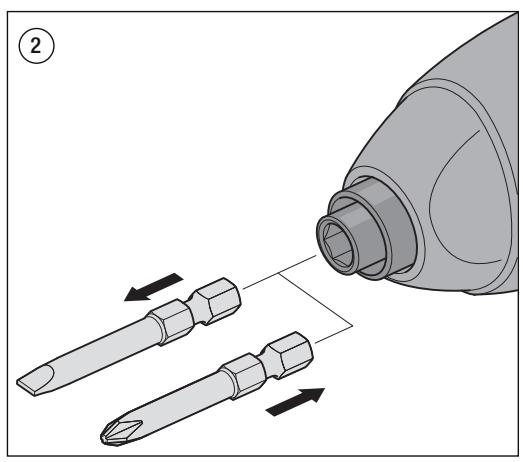
ALWAYS SWITCH OFF THE TOOL BEFORE ATTACHING OR REMOVING A BIT.
GENERAL
The Dremel Cordless Screwdriver has a magnetic bit holder that accepts any 1/4'' hex bit. The low RPM capability of this model is not a deficiency. On the contrary, low speed means high torque and high torque is beneficial for efficient driving. The low speed also provides more control to prevent strip-out of the screw and damage to the work surface.
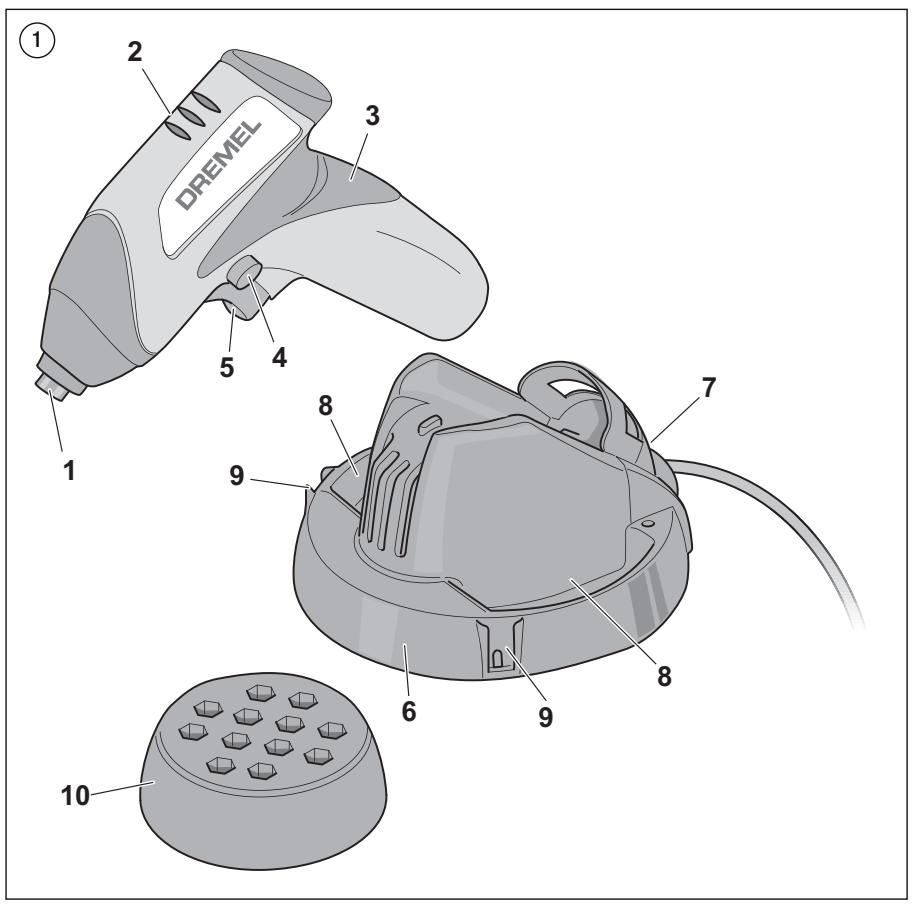
FIGURE 1
- Magnetic bit holder
- Ventilation openings
- Soft grip
- Forward/reverse lever and trigger lock
- Variable-speed trigger switch
- Charger
- Charge indicator light
- Extra storage space
- Slot for attaching bit storage compartment
- Bit storage compartment (optional)
GETTING STARTED
INSERTING BITS
Your power tool is equipped with a magnetic bit holder. Simply push the shank of the bit into the bit holder as far as it will go (Figure 2).
BIT STORAGE COMPARTMENT (optional)
Your power tool is equipped with a removable bit storage compartment that can be attached to the charger and that will allow you to store 12 of your favourite bits (Figure 1).
VARIABLE-SPEED TRIGGER SWITCH
Your power tool is equipped with a variable-speed trigger switch. The power tool can be switched "ON" or "OFF" by squeezing or releasing the trigger. The speed can be adjusted from the minimum to maximum RPM by the pressure you apply to the trigger. Apply more pressure to increase the speed and release pressure to decrease speed.
BRAKE
When the trigger switch is released it activates the brake to stop the chuck quickly. This is especially useful in the repetitive driving and removal of screws.
AUTOLOCK
Your power tool is equipped with an automatic locking system. This feature will lock the bit holder in one position when the
trigger switch is released. This will allow you to tighten or loosen a nut or screw by rotating the tool by hand with the switch off. This is convenient when higher turning torque is needed.
FORWARD/REVERSE LEVER AND TRIGGER LOCK
A WARNING
AFTER TOOL USE, LOCK THE TRIGGER IN THE "OFF" POSITION TO HELP PREVENT
ACCIDENTAL STARTS AND ACCIDENTAL DISCHARGE.
Your power tool is equipped with a forward/reverse lever and trigger lock located above the trigger (Figure 1). This lever is designed for changing the rotation of the bit and for locking the trigger in an "OFF" position.
For forward rotation, (with the chuck pointed away from you) move the lever to the far left. For reverse rotation move the lever to the far right. To activate the trigger lock move the lever to the centre "OFF" position.
STALL PROTECTION
This tool has a built-in stall protection feature to protect the motor and battery in the event of a stall. If you stall the tool for too long, or bind the bit in a work piece, especially at high speeds, it will automatically switch itself off. Just remove the tool from the material, switch it off for 3 seconds, then switch it on again. When the battery is nearly discharged, the tool may shut down automatically more frequently than normal. If this happens, it is time to recharge the battery.
CHARGING THE TOOL
Your Dremel Driver is not completely charged at the factory. Be sure to charge the tool prior to initial use.
To charge the tool:
- Switch the tool off.
- Place the tool in the charger as shown in figure 1.
- Plug the charger into a power source.
Green light ON = charging.
Green light OFF = charging completed.
The charger will automatically stop charging the battery when charging is completed. It is OK to leave the tool on the charger continuously.
- The charger will require approximately 5 hours to charge a completely discharged battery.
Important charging notes
This tool was designed with a lithium-ion battery and charger for the following benefits:
- The lithium-ion battery will hold its charge while in storage for up to 2 years. Therefore, it is always ready when you need it.
- You can place the tool on the charger and recharge it at any time without reducing the original charge capacity.
- The charger was designed to use as a place to store your tool while you are working on your projects. Simply place the tool in the charger when you are not using it on your project, and it will continually recharge the battery so it will run longer for you.
- The charger is also designed to be your permanent storage device for your tool. Keep it on your workbench or
countertop, charged and ready for when you need it for your next project.
- The charger was designed to fast charge the battery only when the battery temperature is between +4^ and +41^ .
- A substantial drop in operating time per charge may mean that the battery pack is nearing the end of its life and should be replaced.
- If the battery does not charge properly:
a. Check for voltage at the outlet by plugging in some other electrical device.
b. Check to see if the outlet is connected to a light switch that switches power "OFF" when the lights are switched off.
c. Check the charger terminals for dirt. Clean with a cotton swab and alcohol if necessary.
d. Check to see if the tool is properly placed in the charger.
e. If you still do not get proper charging, send the tool and charger to your Dremel Service Centre.
Note: Use of chargers or battery packs not sold by Dremel may void the warranty.
MAINTENANCE
CLEANING

WARNING
TO AVOID ACCIDENTS, ALWAYS
DISCONNECT THE TOOL AND/OR CHARGER
FROM THE POWER SUPPLY BEFORE CLEANING. The tool can be cleaned most effectively with compressed dry air. Always wear safety goggles when cleaning tools with compressed air.
Ventilation openings and switch levers must be kept clean and free of foreign matter. Do not attempt to clean the tool by inserting pointed objects through an opening.

WARNING
CERTAIN CLEANING AGENTS AND SOLVENTS DAMAGE PLASTIC PARTS.
Some of these are: gasoline, carbon tetrachloride, chlorinated cleaning solvents, ammonia and household detergents that contain ammonia.
SERVICE AND WARRANTY

WARNING
NO USER SERVICEABLE PARTS INSIDE. Preventive maintenance performed by
unauthorized personnel may result in incorrect connection of internal wires and components which could cause serious hazard. We recommend that all tool service be performed by a Dremel Service Centre. SERVICEMEN: Disconnect the tool and/or charger from the power source before servicing.
This DREMEL product is guaranteed in accordance with statutory/country specific regulations; damage due to normal wear and tear, overload or improper handling are excluded from the warranty.
In case of a complaint, send the undismantled tool or charger and proof of purchase to your dealer.
CONTACT DREMEL
For more information on the Dremel product range, support and hotline, go to www.dremel.com.
Dremel Europe, P.O. Box 3267, 4800 DG Breda, The Netherlands
VEILIGHEIDSVOORSCHRIFTEN VOOR ACCUSCHROEFMACHINES
Nominate spanning. 230 V
Oplaadtijd 5 aur
MONTAGE
A LET OP
SCHAKEL ALTIJD HET GEREEDSCHAP UIT VOORDAT U EEN BIT BEVESTIGT OF
VERWIJDERT.
ALGEMEEN
BESCHERMING BIJ VASTLOPEN
ALLMÄNNSA KÄSERHETSFÖRESKRIFTER
Lasigenomochsittattduforstardenharrbruksanvisningen heltinnanduborjaranvandaDremelDriver.


WARNING
LAS ALLA ANVISNINGAR.
MeyioeEvEoosBia 1/4" (6xI.
Xaunl potn. 5.50 Nm
YyNn npnn 8.24 Nm
Φopriotnc
Apiou 866
Ovopaatikn Taon Aetoupyia...230 V
XpovocΦoprians. 5 wpe
SYNAPMOANOTHZH

\PPOEIAOIOIHSH
NA ANEPETONOIEITE NANTA TO EPTAAEIO INPOTIOnoETHE T
AΦAIPEΣETEMIA MYTH.
TENIKA
To aupato katoaabi Dremel Driver diathei evaayntiko opea yia utec, o toioic dexetai otoiaobnote eagwvnmu 1/4". Oi xanlnc otpoqec avaleitro autou tou movteauo dev atoteolou vieovektnja. Aviteta, n ikpn tautntna oniaivei uunn potn, kui unu npotn eivai onavtkio tleovektnua otav to thejia epxetai sto atotaleaatki biowma. H ikpn taxutnta dievi erionpneipsoepeyxo, etoi wote va atopoeuyetai to "yaiotpnja" nis bida cai oi nniue sntv etihpaiveia epyaiaic.
EIKONA 1
TIA NA ANOΦYΓΕTE TYXON
ATYXHMATA, NA ANOESYNDEETE IANTA
GENEL TEKNIK ÖZELLLIKLER
Kablosuz Tornavida
Model numarasi 1120
Voltaj derecelendirmesi. . . . 7,2 V
Yüksüz hiz no 0-300/dak
Uc tutucu 1/4" Altigcn/civata
Maksimum vida boyutu . . . 1/4" (6 mm)
Yumusak tork 5,50 Nm
Sert fork. 8,24 Nm
Sarj cihazi
Model numarasi 866
PRECTETESI VSECHNY POKNY.
CEPBNU3HOOBCJNYXBAHE
Ocnypte CepBn3HO 6cbnykbahe Ha Baishra MexaHn3pah INCTyPmENT O KBAINΦuINPAH TExHK, KOTo N3No3Ba cAmo NDHTNHy peBChn Tua. Oe zapAHmupe, Ze bezonachocmtHa u Hcmpymema ue ce 3ana3u.
HCTPYKUIM 3A BE3OJNACHOCT IPNI PABOTA CAKMYJIATOPHNOTBEPKN
a. BnHaH npOBePbAite DaIIN 3aXpaHBaUTo HappeKeHne CbNJaD a C6o3hauHcHOTo BbPyx IeHTNfKauHOHHATA TaBEnka Ha 3aepAnHOTo yCTpoiCTBO (3apRdHte YCTpoiCTBa CHomHaJIHO HappeKeHne 230 Vnn 240 V morat da ce CBpXnat IN KbM nTOuHmKn HA 220 V).
b. He donyckaite pa60THnT DetaiJa 6bJe noBpeHEn OT BnHTOBe, TBO3Den ININ DpyTN eENeMHTN, HAMIPAuN CE B Hero;OTCTpaHete rnpdIn da 3anoHHepe pa60Ta.
c. B cnuyaH na H enpabunH o fyHKIOHnepa H oe t eKtpueckn IIN MEXAHUeH XapakTep, BeDHaRa N3KnIyOte MEXAHN3nPAHn INCHTPyMeHT NIN N3KnIyOte 3apJNDOT OYCTPOJCTBO OT 3axpaHbAto HnapeKeHne.
d. Dremel MozeJa rapaTnpa 6e3npo6mHNO FyHKUHOHPaHe Ha IHCTpyMeHTa cAmO npN I3NoI3BaHe Ha opINHaJIHn Akcecoapn.
e. To3n INHcTpymENT He Tp86Ba Da ce H3noI3Ba OT NIIca IoD 16 roDHH.
f. BHHMaaIte da He pa6oTInTe B 30Hn, B KOInTO MoKe da Ce nOlyu KONTAKT C eNeKTPnueckn npoBOdHnU.
g.Ппсдддддддддддддддддддддддддддддддддддддддддддддддддддддддддддддддддддддддддддддддддддддддддддддддддддд徴аунговянговянговянговянговянговянговянговянговянговянговянговянговянговянговянговянговянговянговянговянговянговянговянговянговянговЯнговянговянговянговянговянговянговянговянговянговянговянговянговянговянговянговянговянговянговянговянговянговянговянговянгov
3APEXDAHE HABATEPNTE
a. 3apejdaite 6atepna camo cbc 3apnHO TO yctpoCTBO, npedocTabeHO 3aeHDo C nHCTpymEnTA.
b. He n3laarate HnctpyMeHt/aapndHOTo ycTpoCTBO Ha nbXJd.
c. HnKora He 3apeXdaIte 6aTepyraHa OTKpntO.
d. CbxaHraBaTe HNCTpymenta/3apJNDHOy yCtpoiCTBOHa MeCTa, KbJeTo TEMpepatypata He npBmuaBa 40° C n He naDa noD 0^ C.
e.Ako6bdat noctabehn B orh, 6atepntte ue ekcnnoipat, 3am08a b Hukaeb cnyau He zu u3zapraime.
f. Pn noBpea, npn npOdbNknteHNO 3nON3BaHe n npn EKCTPemHn Temnepatypn 6aTeepnte Morat da npotekat.
Ako TeuHCTTa BHe3e B KOHTaK T C KOKaTa, N3MnTe 6bp30 McTOTO CbC cany H BOa, a CneI TOBa ro HAmakete C JIMMOHOB COK INI OcET.
Ako TeuHocTt Naonadne B OOnte Bn, H3PiakHe Tn C YnCTa BOda B PnoDbIjKeHne Ha He No-MaIKo OT 10 MNHyTN I NOTbpcTe BeDnHa RmednHcKa nOMOu.
g. He n3n0n3BaIte 3ap4nHTo yctpoCTBO, Ako Ka6eIbT nII INI ueCenIe T neOBpeH; Te TpRbBa da 6bDat 3aMeHEHn He3a6abHO B eINH OT oOpMuaHIO peNCTPnpAHTE cepBn3n HA Dremel.
h. He pa3rIIO6BaIte 3a4IHOTo yCTpoICTBO u INHCTpyMeHTA.
ОТАЗВАЕ HA OKОЛHATA CРЕДА
YHNIJOXABAHE
INCTpymuHbT, npHaIaJIeKHOCTnE n OAnoKBKaTa TpRbBa da 6bDat cOPTnpAHI C ZEN EKONOrMnHO peuKKnPnApe. He u3XbBpImaIe IeKmpUeCKu YpeD, Bamepu, npHaIaJIeKHOChmU e OAnoKBu 3aeHo C DomakUckume omnaBtu (cAmO 3a CmPAHume oEm EponeuecknC bIO3).
CbIaNoEbpOeckataDnpeKtnBa2002/96/EC3a OtnaBpHneOT enEeKtpnECKoN eEeKtpnHO 6OpOyDaHe N HeHOTo INbPHeHNE B CbOTBcTCTME C HauOHaHnHTe 3aKoHOaTeJCTBa, EeKtpnECKMeI HcTpyMeHTN, KOtTO CaIOCTnHAnI Do Kpaar h cPoKa cn Ha ecKnloaTaun, Tp8Ba Da bDat cb6npaHOn OTdEnHO n PpeBaHn Ha opranHaZmte 3a ekONOrMHyPeuKKnPaHe.

CIMBONbT 贝BNHANOMHN3aTOBA,KORATODOIDe Bpeme3aN3XBbpJnHe.
YHNUOXKABAHE HABATEPNA
BHIMAHME
HE CE OINTBAITE DA PA3TIOBBAITE BATEPINA IIN DA N3BAJDATE
KOMNHOENTN, KONTO CE PNOABAT OT N3BOIDNEI. TOBA MOKE DA IPINUHNI POXAP JIN HAPAHABAHE. INPEINI N3XBbPJIANE 3AUHTETE OTOLEHNTE N3BOIDI NO IOXODIaHACHN.
XAPAKTEPNUCTUKN
OBUH XAPAKTEPNCIKN
AkymunatopnHa oTbepka
Homep ha moedena. 1120
HomHaJIHo HanpeXeHne 7,2V
CkopocT ha npaeh xoD 0-300 o6/MnH.
IbpxaHa hakpaHnun 1/4" wecctocTeHH/c onaoka
MakcimmaJIeH pa3mep Ha OTBepKInTe. 1 / 4" (6 MM)
Mek Bbptra Momet. 5,50 Nm
TbBpD Bbptau MOMENT. 8,24 Nm
3apdno yctpoictBO
HomepHaMoDena. 866
HomHaHnHaHpeXeHne 230V
Bpeme 3a 3apekdahe 54.

BHIMAHME
BINHAN N3KJIIOUBAIHTE
B I N O I O X E H N E "OFF" (I3KJI.), 3A DA I P E J O T B P A T I T E HEBOJHIO I N C K A H E B I E N C T B N E I P A 3 P E X J D A H A B ATEP N I T A.
BaanrM mexAHn3npaH INhCTpymEn t e oobpydban c NoctYe 3a DInxHeHne HAnpeD/Ha3ad, CnyXeO u Kato npeDn3ntel Ha NcKOBn MExAHn3bM, pa3noIooKeHO HAd NcKOBn npBkNIOoBATEEL (fNpya1).TobaNoCTye CnyXu 3a npomHa Ha NocOKaTa Ha BpTHe He NaKpaHnKa 3a 6NoKOpae Ha NcKOBn pBeKNIOoBATEEL B NoIooXeHne "OFF"(N3Kl.). 3a BpTHe HApEOnaAoka HnKpaHnKa, HacOeHa cpeu Bac) npDnBHXeTe NoCTeTO B KpaHNO JIABO NoIooXeHne. 3a DnBXeHne B ObaTHa NocOKa PnpDnBXeTe NoCTeTO B KpaHNO dAO HO NOLOXeHne. 3a 3aDeiCTBaH e bNoKipAheTo Ha NcKOBn MEXAHn3bM pNDnBHXeTe NoCTeTO B cpeHNO TIOLOXeHne "OFF"(N3Kl.).
3AUNTA OT PNETOBAPBAHE
To3n HNCTpymENT mMa BrpaedHa 3aunita O npTeOBapBaHe, KOaT0
3aunTaba MOTOPa n BatepyrTa B cnyau Ha 3aBbXbaHe Ha
MOTOPa npadn npTeOBapBaHe. Ako npTeOBAPte IHCTpymEnta
3a NO-bIIO BPEMe N MOTOpB T 3anoHne Da 3aIIbXba IIN
3akNeuTIe NakuaiHmka B pAOthnHa DetAin, OC6eHO pIn
BVCOKA CKOcT, INCTpyMeHT bO Ce hKNIHObA ABOMATNUHO.
IOctaTbHuO e Na 3BaADnTe OT MaTePnAana, B KOITpoBABOTNE, da
ro hKLIChUOHe 3 a 3eKHyDn, Cnel TOBa d a RKnIOHTe OTHOBO
MOkete Da npOdbLnxite Da rno 3nON3BaTe. Korato GATEpyrTa
e ONTn M3TOUeHa, e Bb3MOKHO INCTpyMeHT Da 3anoHne
da Ce hKNIHObBA ABOMATNUHO no-HECTo OT HopMaHnHO. Toba
O3NaHauBa, Ye e BpeMe Da 3apeDnTE BatepyrTa.
3APEXDAHE HA NHCTPYMEHTA
Bauata otBepka Dremel He ce doctabra 3apeena DoKpaI pa6pnuH0. Tpr6ba Da 3apeiTe HnCTpyMeHa npEi PbPbToM My nIOn3BaHe.
3a da 3apeDnTe INCTpyMeNTA:
- N3KnHouTe ro.
2.Пoctabete ro BЗарянOTO yctpoIcTBO,kaKTo e nokazHoHaФигура 1. - BkIIOUeTe 3apJHOTO yCTPOiCtBO KbM 3axpaHbaU n3ToUHHK.
BkIIOUeH3eJIe HCBTeOuHmDnKaTOp =3apeKdaHe.
I3KJIIOUH 3eJIeN CBeToIHnIKaTOp= 3apeXJaHeTo e npNKIIOuHIO.
Pnp npknIOUbaHe Ha 3apeKdAHeTO 3aprHNO To yCTPOINCTBO
Ie cnpe AOTOMATuHO da 3apeXda 6ateprrta. MoKTe
da OCTabTe HnCTpyMEna HENPeKbCHATO CBp3AH KbM
3aprHNO ToyCTPOINCTBO.
- Ha 3a 3p8dno To yctpoiCTBO ca Heo6xOJIMn Pn6bI3NtEInHO 5 Yaca 3a 3apexdane Ha HapblHo pa3epeHa 6atePna.
BaxHu 3a6eIeKku, c8bP3auH cbc 3apeKdaHemo
To3n INCHTpymEnT e KOHCTpyuPAn C IJIITNeBO-IOHNa 6aTePnI n 3apJrHO yCtpoiCTBO, KOnTO My OCNHyprBaT cIeHNITE npEnMyUcECTBA:
1.ЛintneBo-OhnHaTa 6aTePna3aNa3Ba 3apJa c n npCbXpaHeHne B npOdbJnxHeNe Ha 2 roDInH.CneOpBaTeHnHnCTpyMeHTbT 6Je 6bDe roToB 3a pa60ta BnHaR, KOrato BVnOTp8Ba.
2. Moxete Da BkIIOHTe INHCTpyMEnTa KbM 3apJHOTo yctpoIcTBO I Da Ira3apeIITe BBB BCEKN MOMENT 6e3 TOBa da HamaJIH NaaJIHMy 3apJDen KanaIHTet.
3. 3apndHOTO yctpoIcTBo e npoeKtnpaHO kato MRCTO aCbxpaHHeHne Ha BauHHnHCTpyMENT, DOKATO pabOTNE nnpoeKNTNE cN. IpocTo NoCTABeTe IHCTpymHeTb A zapdHOTOpYctpoIcTBQ, KORato HE rO hNtON3BaTe, N TO ue npOdbJKN da3apeXda 6atePnra, Taka Ye IHCTpymeHTbT da MoKe Ta ce N30N3BA NO-dBnTO BpeMe.
4. 3apdHnTO yCTpoIcTBo e pOeKTHnpaHO n KaTo MRCTO 3a NOCTOARHHO CbXpaHEHne Ha BaWnIHCTpyMHT.
CbxpaHraBaiTe ro ha paObTHata cMaca NIN Te3rX, 3apehen H roTOB 3a paObTa, KOrato Bn Notp8Ba 3a CneBa7uN Bn npoekt.
- 3apndno yctpoiCTBO e npedna3hauho 3a bpb3o 3apejdahe Ha 6abepeyra, KORATO TEMepatypata m e mekdy +4^ n +41^
-
3HaunTeHnOTo HamaIaBaHe Ha BpeMeTo 3a 3apeXdaHe O3NaHbA, Ye akymyIaNtopHata 6aTepeHra HabIiKbAba KpaHa EeknloataaOnHnna Cn Cpok N Tpr6Ba Da 6bJe NoDMeHa.
-
Ako 6atepeyTa He ce 3apejda npaBnIHO:
a.Поверете HanpexehenTo Ha KOHTAKTa,КATO BKHIOUHTe B Heropyr eNekTpneckn ypeI.
b.Побовете Дами Контайт БпЕ e СБьрзан Кьм
усторостBO за ИЗКЛЮЧаBEHa eNEKТРУСЕСКУ TOK,
КоТЕ ИЗКЛЮЧВАЗхаранBEToПрИЗИЗКЛЮЧВАн
OCBETNENHETO.
c.Поверетадали ИЗВODИТЕ на заряното усточьп He ca 3ambyрсEH.Nko e Heo6xOДМО,poHCTe Tn C namyeh tamnoH n CnPT.
d.Поверете дами Инструментъе постavenправлиноВЗардноустpoшгво.
e.AKO Bbnpke Toba 6aTepyra He ce 3apejda npabnHo, n3npate HNCTpyMeHTa 3aprHOTO yctpoiCTBO B cepBn3nna CEHTbP Ha Dremel.
3A6EJEXKA:ИЗпОЗБанetoHaЗарДиУстpoIcTbaЯakymЛaTOpHn 6aTePmN,КоТNo He ca 3aKуПeHn OT Dremel,mOжeДа anHyIpa rapaHuaIyTa.
IOPDIPbJXKA
IIOYNCCTBAHE
BHIMAHHE
3A JI PEPJOTBPATNTE Bb3HNIKBAHE HA INHLIJEHTN, IPEINIPOHCTBAHE
BHAHIN3KJIIOUBAIHTE INCHTPMENTA IIMIN 3APJHOTO YCTPOICTBO. IHcmpymemtbm ce noucmba hai-dobpe cbc cyx csbcmeh b3doyx. Pn TAKOB NOUCTBHe BHAHn Hocete npednahi Oyna.
BentnauonHnTe OTbOp nIOCTeTa 3a npEbnOuBaHe TpaBda Ce noDbpKAT uCtN n 63 hAnuHne Ha yUkTeHa He ce onNTBaIte da NouchTBe tHe NCTpymEna Ype3 noctabHe Ha yUkPi peDmetn B OTbOpTe My.
BHIMAHHE
HAKONIPOCHCTBAUINIPENAPATNI PA3TBOPINIINOBPEKJDAT
ПЛACTMACOBITE YACTN. Мених ca:бeнИ, Вглорodeн.TetraXnOpIa, NOUcHbuai paaTbOpHTeIa, KOUTO CbIbPjxat XnOP,AMOHK IN DOMAKINCHK NOuCtBaun npenapATN, KOUTO CbIbPjxat AMOHK.
TEXHINCHECKO OBCJIYXBAHEI TAPAHZIY
BHIMAHHE
INHCTPYMEHTbT HE CbIbPJA YACTN, KONTO IN3NCKBAT OBCJYKBAHE OT
IOTPEBNTEJI. IpeBaHTINBATA NOIDpbjKka, n3BpWBaHa OT HeynbIHOMOuHepcoHAn, MOKe Da npEn3BnKa pa3MeCTBaHe Ha BtpeuHNTe Ka6eNl N KOMIOHErN, KOeTo da DOBeDE do Bb3NHkBAHe aepNo3Ha ONaCHOCT. PpenOpBuAme 8u da u3eBpuBaame yanomo ocbcnyBaHe na UChmpyEmha cepu3Hua ceHmbp Ha Dremel.3A CEPBUHNTE TEXHUN: IpeDu b3eBpuBaHe na OcbcnyBaHe u3KlnoHeme UChmpyEmha u/Unu 3apdHOrmo ycmpoUcmeo on 3axpaHaeuua U3mouHuk.
30n npoduk ha DREML ce npednara c rapaunna, CbOTBETCBAua Ha 3aKOHOBO ONpeDeleHNE/KoHKpETNa 3a cTpaHaTa pAnopeE6m; nobpei, npuHneHn OT HopMaIHO n3oHcBaHe n3x6BaBe, npetOBaPbAe Hn HnepaBnHa Eeknnoataun He ce KKnOvBat B rapauneta.
B cnuyai na peknaamaunna 3npaTe Ta npoDaaba HnCTpymenta n/nn 3aparHNOy UcPOCTBO 8 Hepa32no6eH 8uD 3aeHNO C DOKa3aTEnCTBO 3a NOKynkata.
3A BPb3KA C DREML
3a noBee HnFopmaIy OTHOCHO acOTmHTe, noIdpbJkKaTa I ropeuata NINHra Ha Dremel nocetete www.dremel.com.
Dremel Europe, P.O. Box 3267, 4800 DG Breda, The Netherlands
H ALTALANOS BIZTONSAGI ELOIRASOK
CITITI TOATE INSTRUCTIUNILE.
Incarcarea sculei electric:
- Opriti scula electrica.
- Introduci scula electrica in incarcator, precum se arata in figura 1.
- Racordati incarcatorul la o sursa de curent.
OBIJIIE INPABINIA TEXHNIK B2OIIACHOCTN
IpeedicIOJIb3OBAHmEOTBepTKDMreIe Heo6xOIMOnIOJIHOCTbIO pOHTaTBnHOHTb HAcTcUe pyKOBODCTBO.


BHIMAHNE
COXPAHNTE DAHHOE PYKOBOIDCTBO
PA6OCHA OBJACTb
a. Pa6ooye MeTo DoJIKHO 6bITb YIcTbIM IxOPOU OCEuEHNbIM.Pa6oma B Hey6paHOM UUN MemHom MeCm NOBbIaem eepoMaHOCMb HeCyaCmHbIX cIyuae8.
b. 3Jektpueckme HNCTpyMeTb HeIb3aH NcNOIb30BaTb BO B3pbIOOpaCHOA TMOCFpe, B TOM YCmE B pncyCTBnB BOcPiMaHEMQUxCKX JIKKoTei, raOB ININ bInIN. Ppu paObe 3Jekmpueckum UHCmpyeMHom 6O3HkaOM uCKpbl, KOMOpBe MOZym 8ocNIaMeHMb nbInu npabl.
c. Pn np 60e T C HCTpyMeHTo pRdOM He DOnKHBi HaxOInTc TaTe N NoctopOHHe Nua. Hanuue OmeNekaoux PhakmopoM oKeem eb3aamb HeBumamelbHocmb u nomepokoHmpoJHaD UHCmpyMeHMom.
3JEKTPUeCKA B3OJACHOCTb
a. BnIkn 3neKtpnuecknx IHNCTpyMeHOB DoJNXbI NoXOJNTb Kpo3eTkAM.BnIkn 3neKtpnuecknx IHNCTpyMeHOB HeJIb3M MoINiPcUPOBaTB HNKAKMM O6b3OM.C 3a3eMIHeHHbIMN 3neKTPnueckmH INCTpyMeHAMn HeJIb3r NcIIOB3oBaTa aanItepb.IcNOIb3oAHue HEMoOduFiuPouBaHHbIX eUNOK C cooemcmeyouuUM im po3eMkAm yEmhbaem eepoarnHocmb nopaxehua mokom.
b.Heo6xodmIO n36eRaTb cOpnKOCHOBHeHc 3a3EmHeHHbIMn NOBepXHOCTMn, HApNMeP, Tpy6Am, pAdnToPam, nPTAMn I XONoDInbHnKAMn. Ecnu meNo 3a3EmHo, eepoAHOcMb npoAKeHneM oKOM yEupuueaemC.
c. 3NeKtpUeCKne INHCTpyMeHTb HEnb3a NOBBepratb Bo3dEChTBIO BnAIN NmDooJy. Ppu nonadauu 6o8bl 3NeKmpuecku uHcmpyMeHm noBuaemc eepoMnocmb npaozHeu mokom.
d. C npoBODm Heo6xOIMMo 6paatacb aKkypaTHO. He cneyet nCnolb3oBaTb npoBDI pna nepeHocKn, nepetackNBAHIN mOn OTKNIOeHn iP03ETk 3NeKTPrueckoro INCTpyMeHa. I npoBD Heo6xOIMDoepKaTaB BDAIn O NtOCHNkoB TENII, MCA, OCTpBx npdeMeTOB mIN DBeKyuXsCuaTeh. NoepexDeHue uu 3anyMbAhaue KaBEn yBEnUuBaem eeporMHOCmb nopaeHua mKOM.
e. Pnncnbo3oabHm 3neKtpmecknx HnctpyMeHTOB ha yniue nCnObl3yIte yIINNHITbIhN bHyp, noXdoaIuI dIra nCnObl3oABHa Ha yniue. NcCnObl3oAue 3neKmpueckco2o shypa, noXdoaIeoo de nCnObl3oABHa Ha yniue, MAcSCumalbHO Chuxjaem eeporHHocmb npaxenHou mOKOM.
f. Ecni Ka6eIb IIN BnBIA KOBpeXJeHb, 3apJHOe YCTPOIcTB OcNIOB3OBA Tb HeJIb3r. B 3tOM Cnyae Ka6eIb IIN BnBky Heo6xOIMMo HEmdIeHNO 3aMeHIn Tb OΦuIuaIbHo 3apeINCTpUPOBaHHom cepBnCHOn cHTpe Dremel.
JIUNHAR BE3OINACHOCTb
a.Пи npabote c nHcTpymeHtOM 6ydtbe 6dntelbhl, cneIte3a BblonnHaBMIM DeiTBmM IN OnpaTecb Ha COoBpaXeHnna 3dpABORO Cmblcna.He paobtaTe C nHCTpyMeHToM B COCTOHN yCTanoCTN INB COCTOHN AnKOrO bHOr HApKOTuHECKTO ONbAHeHnA, a TAK Xe B CNYae npHEMA onpeJeHHbIX NKAPCTBeHHbIX npenapatOB. Iomep8 6DumEnbHocMu daxe Ha KopomKoe epMa Moxem npuebcmu K NOUYEHIO cep63hX mpAeM.
b.

UcnoIb3yIe cpeDCTBa ININIBNduaIbHO 3aunbl. Bcerda naDeBaIte 3aunHtble OCKn. IpaueBIO uCNOIb3yEmBe cpeOcmba unDuoyalbHO 3auumbl, e MOM Ucne npomueoIbIeoeu nepucnapop, 3auumhIbe 6omunku C Heckonbl3auej nodooew, 3auumHbI uImen lu np cpeOcmba 3auumbl opaanoh Cnyxa cokpaaom Bepornnocmb nonyuhenia mpa8M.
c. IVsberaIte cnuyauHoro 3anycKa. Y6eIntecb, yTO BbIKIOHTe b HaxODITcB b BkIOHOHOM NIOXeHIM, IpeKJe HEM IOKIOHTaB hNCTpyMeT K CETn. Bo U36EkaHue HeCuaChMbIX CNYaee, He nepEHOCume 3JekmpUeCKue UHcmpyEmbl, depeJa naHeu Ha BkIOHuaMeNe, u He EKIOUaume 8 cemb 3JekmpUeCKue UHCmpyEmbl, y KOMOpBX EKIOUe BbIKIOHAmelb.
d. Pered BkIouHHeM 3eKtpnueckOTo HcTpymEnTa Heo6xOIMMo yUanHbBcepeyIrpNOboHbIkeKnOu. EcnU ocMaBum KIOH npCuOeDuHHbIM KepauaOoiEcaUmTu eKeMpueckOzo UChpymMeHa, mo 3mo Meom pueecMeu T kmae
e. Ipn pa6oTe He6xOIMo aEkeBtHO ouHINBaTb CBOI CNbl. Bceada 3aHimaite ycmoiHuoe noNoKeHue u depKumpe pa8hoEcue. 3mo no3oBnem lyuwe KOHmpOnuOpaeamb pa6omy C 3eKmpouHcmpymem 8 Hnpe6duhNbx cumyaux.
f. PioBpaIe npxOyU OeJy. He naebaiTe Cbo6oHyO oExyI INn KyaupaeHnA. CneIaTe 3a Tm, YTObI BOLOcI, OeJda I nepuATkn HaxoDInCb Ha cPcTOrHn OT DBKyuXxCsA qteh. Ce6oDbHa oExoDA, ykaPawHn Unu dUnHbIE BOLOcBI Moym zacmpIb E obkuyuxxq cuaMx.
g. EcnI nIy IIOJIIOHEnI cpeCTb C6Opa Ibln IIN cNOIb3ayOTcI cnIaIIbHbI yCtPOBCTBA, OHnIOJIbKbI 6blb IOJIbIOUeHbI y DoXHbI NcIOJIbOBAbITPpAIBNlHO.NcIOJIb3OaeAHue maKlux cpeCMeI no30Iunm CHUImIbn OAnOHOCMIu, C83HbHBe c IIbIbI.
h. He 6pa6a7b1a8te MaTePnaJIbI cOepeJxHHeM ac6eCT (ac6eCT CHTaETcK KaHeporeHOM).
i. IpnMMTe Mepb3aunbI,ecnB0BpeMpa6oTbI BO3MOXHO B03HMKHOBeHne BpeHOn DnA 3doOpOBbI, roPoueH NBI B3pIBOONaOHcNoBII (HeKOTOpBie BVdI PbIN CHTaOTcK AkanEpeOReHHbIMN) ;NJIb3yIteCb IpOTIOBVnIEBbIMpeCnPiATOpOM iPmpeHNeOTcOC nbln/CTpykKn pni HAnuHm BO3MOXHOCTn PnpcoEnHeHN.
3KCIJIYATAUINOBCLJYKUBAHNE 3JIKETPNUECKOIOHCHTPMENTHA
a. K 3neKtpUeCKOMy INHCTpyMeHTy He cIeYeT npIMMeHrB cnHy. Heo6xoHMo IcNpIb3ObAt bIeKTPUeCKn IINCTpyMHT, NOxOxOJIuI dN BbIOnHEnHe NocTAbENHOI 3aDaHn. IooXoOJIuI 3NeKmpUeCKu UHcmpymH nO3eONum 6blonHmB pa6omy Iyue u 6bezOnachee co ckopocmbIO, komopar dN He2o npedycmOppeHa.
b. He nCnoNlb3yIte 3eKtpnueckm HnCTpyMeH, ecn erO bblkIouateIbe he pa6oTaet. IIOob 3eKnIpnuecku u Uhcmpymem, kOMOpbIM HeIb3a YnpaIaImb c NOnoubIb eBknUayamra, J8nEerma onaChbIM u DOnxen 6bIb m OpmemohmuOboAH.
C. OTKNIIOHTe WTeKep OT NCTOCHNIA NITAHNA, INPEKJDE YEM BHOCHTb IIOBbIe N3MEHENHMA, MEHbTb AKECCyAPbI bIN NOMeHaTa HxaPehene 3NeKTpyHeckmE INHcTpymEnbI. TaKue MEPbI npedocmoPoxHcOsM yEmbHaBmE eepoRmHcOc CnyaHHO2O BkNoHUY 3NeKmpUyeCKO2O UHCmpYHMHa.
d. HeicnoIb3yEmbIe 3nKtpUeCKne IHCTpyMeHtbl Heo6xOJIMo XpaHntB BHe DCsRHaemocTb OT dTei. JIOJHM, He3AOKbIM C 3nKtpUeCKM INCHpyMeHtOM IIN DaHHbIMN INCHpyKUJIaMM, H cIeJyET pa3peWAtb pa0ToTaB c3nKtpUeCKM INCHpyMeHtOM. B pykax Heo6yehHBIX NOnb3o6aMeIe 3nKmpUeCKe UHCmpyMeHbI Mo2ym 6bMb OnaChbI.
e. 3NeKtpUeCKHe INHCTpyMeHbI cIeYET NOIDepKbBaTb X opooWem COcTOrHn. Heo6XoDIMO npObePraB TB DVBKyUneCeAuctHa n PpEIMet CmEouHnA,3aCtpeBaHHN ININ NIOONMKi, a TAKKe Ha HAIuHne IIObIX pyRnx HEncPpaBHOcteM, Moryuix NobnPaTb Ha pa60Tu 3NeKtpUeCKOrIO INHCTpyMeHTa. B Cnyae nobPexdHnE 3NeKtpUeCKOrIO INHCTpyMeTHa erO heo6XoDIMO OTePOMeHTPOBaTb nePeI cNcNoIb3ObaHNEM. MHOue HeecAcMbIe cNyauu bBbIbIAoMCh HENpaBbHBm yxodom 3a 3NeKpmUeCKUMu UcHcPymEHMaMu.
f. 3Jektpueckn INHCTpymeHT, akcccyapbl n HacaKn K Hemy He6xOdIMO NcNOIb3ObaTb B COOTBETCBN C HACTOJIIMM INHCTpykuaMM CNOCoBM, npedHa3aHHeBHm DnA DAHNORO Tnna 3Jektpueckoro INHCTpymeHTa, C yETOM YCLOBn PA60tby N bInIOJIHEMO paBOtbl. 3Jekmpuecku INHcmpyMeH nEh53uNCNoB6aMb dnn BbInOnHeHua Dpyaux p6om, kPome x, dnn KOMOpBix OH npedHa3aHuE, nockOnbky 3mo Mokem npueecmu K Eo3HukHOBeHIO OAnCHOU cumyaquu.
g. PnexJeHm HacTpaBt 3eKtpueckn HNCTpyMeHT, MeHrBb AkeCCCyapbl NINu y6upatb HNCTpyMeHT dIy XpAHenH, Heo6XoIMO y6EiNbTcB, YTO erO bblKnOuayTeB bblKnUoyeH. TaekpeMpIpeOCTOPOXHcOTY mEHbShaIoT BEPOTHct CnyauHOrO BkUOChEN 3eKTPnuHcKO rHCTpyMeHTa
h. Pexyue INHCTpyMeHTb IOnJXbIb6bITocptbIMN UCHTBIM. PtnpabINbHom yXOe oCtpbie pexyue INHCTpyMeHTb IMeOT MeHbUo BepaTHOCt bIOHyTcR NMMIeY npabJIaTb.
3KCIJIYATAUINOBCLJUXNBAHNE HCHTPMEHTAHABATAPERX
a.ДЯпегетаяддИнстурм entOBиСОЛьзуTeToLьko 3apdHoe yCTPOIcTBO,уka3AHoe nPOM3BODITeNEM. 3apdHoe ycmpoUcMbO, noDxOguae dny odnoe muna 6amapei,mokem zaoOpembcr npu ucNoIb3OeaHnBu6amapeu dpyoo muna.
b. IcnoIb3yTe 3JIeKTPnueCKHe INHCTpyMeHTbToIbKO C npEHa3NaHuEHbIM DnI HIX KOMPNeKTAMn AkiKyMnTIpOBo. IcnoIb3oaeHue IIObIx dp2yux AkiKyMnTIpOBo Mokem npueecmTu mpaemam Utu E03HukHoeeHuo noXapa.
c. KOrda aKkyMnyTOpbl He nCnOJIb3yHTcR, Nx HcE6xoJIMo depKataB BdIaN OT dpyrHx MeTaNIIeHeCKNX 06BeKTOB, HanPIMeP, 6ymaxhblix CkpeNOK, MOET, KNoUeH, rBO3dEi, BnTHOB IN dpyrHx He6OJIbXmMeTaNIIeCKNX 06BeKTOB, KOtPOBIE MOYr COeINHITb KNEMMbI. Ppu 3aMbIkaHHu KNEMM AKKyMnyTIpMA O83MOXHO NOUYHeue Oxo2O8 ULI 603HUKHO6BEHue NoXapa.
d. Pn HnpabnblHom NcNoJIb3ObaHmN 36atapen MoKet BbIeU KJIOKcTb; KOtAKTa C KOtOp0 nCJeDyET n3GeraTb. Pn CnyaHOM KOtAKTe Heo6XoDMIO pOmbiTb Mcto KOtAKTa BOOJ. Ecnn XJIOKcTb nonaTe B rna3a, Heo6XoDMIO o6patnBcR bPauy. XJIOKcMb, bEmkaOuaa u3 6amapeu, MOKem bIe3aamb pa3dpaoKeHue unu oxoaeu.
OBCJLYKUBAHNE
Ia o6cnybAHnna 3eKtpnckoro HnCTpyMeHT a CneyET
Obaaatbca TOnbKO K KBaINHnHPOBAHbHM CneuaJIACTAM
no pemOTy, hONb3yUqIMOpuRHaHbHbE 3aJvactn.3mo
noBaeonum coxpanhmb Heo6XooMbI ypoeHb 6eOnacHocm npu
paObome cUncmpyMeHMOM.
Интукцип NOБЕЗОПАСHОCTNДЛЯ BECSПОВODньIX OTBEPTOK
a. Heo6xodmo npOBeepr COOTBETCTBne HapraJHnI nITAHnCeTN yKa3AHOMy Ha TabJIuHKe Ha 3apJHOM yCTpoiCTBe (3apJHbIe yCTpoiCTBa IIN CTeN 230 INN 240 B TaKKe MoXHO IOkKnIOUaTb K CeN 220 B).
b. Heo6xOIMO CTapaTbca H36eTaTb NOpeXeHmOT BHTOB, rBO3dE IN dpyrTH pa6OuHX DeTaneI. Pepe HauAnOM pa60tBuNX cLeDyET y6paTb.
C.ПиВОЗнИКHOBEHIMENECNpABHOCTN3NEKTPnueCKHINIMEXAHmUECKHXCNCTEMHeO6XoIMMOHEMeIJIeHNOBbIKIOHTb3NEKTPnueCKHINCHTpymEtNITONOTKIOHTb3apJHOyeCTpoICTBOOTNCTOUYHKA\PITaHIN.
d. Kompania Dremel rapahtnpyet 6e3yokpn3HnHy npaboHTy INCTpymEnta TOnbko npn NcNoIb3ObaHNOpnInHaNbHbIX DeTanei.
e. INHCTpymENT 3anpeuecho HcnoIb3ObaT JInzam Do 16 JeT.
f. OTeBPKtHy HeIb3y IcN0Ib3ObaTb B MeCTax, rDe BO3MOxHO COnpIKoKoCHOBeHne C 3JIeKTPrUeCKmM NPOBOdAMn.
g. PpEke Yem MeHb HAcTpoNn Nn AKeCCcyapbl Nn npeHocNt Nn y6nPaTb INCTpyMeHT, Heo6XoNDmo 8yeDnTcR, TTO peEknIOvATEB haoDNTcB a CpeHem nonOxehENn.
3APJKA BATAPEI
a. Baatarén MOKHO 3apKaTaB ToJIbKO C NOMOuIb 3apJdHOrO yctpoCTBa, npINarAeMoro K INCTpyMeNTy.
b.Интур金融机构348dHoe yctpoCTBO HeIb3rnoBepraTb DeCTBnIO DoJZIa.
c. BaTapen HeIb3a3apKaTb Ha yIIne.
d.Интур金融机构 з заюноу ectpoctBoун��ь В мостax,гд Temпера typa He noДиmaetcBblse 40^ n He onyckaetca Hnke 0^
e. BOrHe 6atapen B3pB1BaIOTcra, no3momy ux Hu e Koem cnyae HeJIb3ry KeYb.
f. PnIOOBpeXJDeHm INI B 3KCTpeMaJIbHbIX yCNOBIAx IcNoIb3OBAHnI INI B 3KCTpeMaJIbHbIX TeMnepaTyphIX ycNOBIAx 6atape MoYr Naayt bnpoteKaTb.
- EcnJnKuDKoCTb NnonaTeH KaQy, HeOxOJIMO 6bICTPO CmblTbeMblOMNBOOa,a3aTEM JIMMOHHbIM COKOM mIYKcYCOM.
EcnJnKIOCTbIponaTeB rna3a,IX Heo6XoIMOpomBaTb YICTOBODOB TeueHHe MeHoe 10MnHT,a 3aTEM HEmeDIIENHO ObaTbC K BpaUy.
g. Ecnn Ka6en I n Bn Nk OnpEckEnbI, 3apdHoe yctpoiCTBO nCOnB30abT HeNb3R. B 3tOM cynyae Ka6en I nBnKy Hne6xOIMO HeMeDnEHO 3aMeHInB 8 oOcuiAho 3aerntCProBaHHom CepBChom CEHTpe Dremel.
h. 3apraHoe yctpoiCTBO INI INHCTpyMeHT HeJIb3a pa36npaTb.
BONPOcbl 3AUHTbI OKPYXIAOUI CPEIbl
YTNIN3AUIN
Ihnctpyment,ero akceccyapbln ynaokBka doJIxHb6blTb ytnIm3nPOBAHB b COOTBETCTBN C DeJeCTByHOIMM HOPMaMn no 3aunite OkpykaJIoUeI cpebl.
3nekmpueeckue uncmpyMeHmb, bamaepu, akccecyaBUp ynaok6ky hEnb38 ebpbacbAmbemcme c bimobbIMUomxodamu (monko dny cmpan EC).
B COOTBeTcBnC dIpeKTHBOE EC 2002/96/EC o6 OTXOdax 3eKTPnuCeCKOro n 3eKTPoHnHO o6OpyDobAHn N OCHOBAHbIMN Ha NeH NaIOHOaJIbMbIM 3aOKHAM, NO OKOHaHm CpKa cIpyKbI 3eKTPnuCeCKne INCTpyMeHTbl Heo6XoIMNo XpaHNT b OTdJIbHo N yTuINImPPOBaTb Ha CneuJaIbHOM 3KoIOnrueckn 6e3OanChom YTuINImaONHOM npednpraTn.

- CnmboI
coo67aet O Heo6xOJIMoCTn yTIN3aun.
YTNJIIN3AUZIIBATAPEN

BHHIMAHHE
3ANPEUAAETCRA3BIPATb BATAPEIO UYADJIyTJIIOBbIE KOMTOHEHTbl
KOHTAKTOB BATAPEN. 3TO MOKET PINBECTN K IOXAPY IJI IIOJIYUEHNI TOPABMbI. IPEPED YTNII3AUVEI HEOBXODIMO 3AKPbITb KOHTAKTBI BATAPEN.
TEXHUNECKNE XAPAKTEPNUCTNKN
OBUHE TEXHNUECKNE XAPAKTEPNCNTKNI
BecnpoDnaJ OeBepTka
Homep moedien: 1120
HomHaJIbHoe HanpIeKeHne .7,2B
Ckopoocb6e3HaRpy3Kn. 0-300/MnH
IPEKJIIOUATEJIb HANPABJEHN BPAUENI INBbIKJIOUATEJIb

PONJI NCIPOJIb3OBAHIN INHCTPYMEHTA HEOBXOJIMO
3AΦIKCNIOBATb KHOIky B BbIKJIOUeyHOM IIOJOXEHNI, UTObI INPEIDOTBPATNTb CJIyAHbI 3AIPYCK IN PA3PRAKy BATAPEI.
3NeKtpnueckm IHCTpymeHOTobopyoBaHnepeKnIOuatelem HnapabHeHHBpaueHHN bblKnIOUcATElem, paacNOIOXeHHbIM NaHKnOki (pncyHOK 1). OH npedHaNaHcEN dIa N3MeHHa HnapabHeHHBpaueHHN n DJI KcCaUN KNkN B BblKnIOeHHOM NOIOJKeHHM.
Для врашени no усанов CTpenke Heo6xodmno nepemecntnbepeeklnouateB KpaaiHee Jleoe Bo noloxkHeMe.Для врашени npotimв санов CTpenken Heo6xodmno nepemecntbpeeklnouateB KpaaiHee npaoboe noloxkHeMe.Для bIoKIpovbknKhoNkNo Heo6xodmno nepemecntbpeeklnouateB CpeJeene noLooXeHne.
3AHTA OT PABOTbI BXOJIOCTYIO
B INCHTPMENT BCTPOEHa CNTeMa 3aunTbOT pa60tby BXOIOCTyHO, 3aunIaOuzaMOTOp N 6atapeo npn XOIOCTOM xOJe. Ecn INCHTPMENT pa60taet BXOIOCTyo CINUKOM DOnIro, INN ecIn
HacaKa 3aCtprAhet Ha MeCTe,OCo6eHHo Ha BbICOKO CKOpocTn, HcNTPyMeHT aBOMaTHUeCKn BblKlIOuHTcR.ДЯ daJIbHeIWeIero NcONIOs3OBaHnE Heo6xOdIMo INBNeueh bHcTPyMeHT n3 pa6OeH o6NaTrn, BblKlIOuHTb ERo HA 3 cKeYHdbI, n CHOBA BkIOuHTb. KorDa bSaTaer 6bET NoTm p4rJKeHa, HcTpyMeHT 6bET bBlKIOuHTcR CaUae, Yem 6bIHyO. B 3ToM cnlyaee bSataeHO Heo6XoDMo nepe3apdntb.
3APДКАИНСТРУМЕNTA
OTBepTka Dremel noctabIeTc 3 aBaOa c He noIIOHocTbIO 3apKeHHbIM akKMyIyIaTOpOM. IpeE npBbIM nCnOJIb3OBaHmEM HNCTpyMeNT Heo6XoDIMO 3apJntb.
Kak zapdntb nhtyment:
- BbIKHIOHTb INCTpyMeNT.
- NOMECTINb INCTPymeHT B 3apJHoe yCTpoIcTBO, KAK nOKa3aHO Ha pncyHke 1.
- PnDknOHTb 3aprHoe yctroICTBO K mTOCHNYIITAHN. 3eNeBh IHmIKatop BkIOUOHE = nET noD3aepKa. 3eNeBh IHmIKatop BbIKIOUOHE = np3aepKa 3aebpeHa.
3apnHoe yctpoeCTBO ABTOMATNHeckn PpekpaTHT
no3aepky, KORda 6atapaere 6ydet nOJHOCTbO 3apxkeHa.
VHcTpymENT MOKHO OCTaBt ha 3apdHOM yctpoeCTBe Ha
doIPOE BpEMr.
BOI36EKAHNEHECFACTHBIX CUYAEB INCHPTMEHT I 3APJIDHOE
YCTPOICTBO HEO6XODIMO OTKJIIOUATb OT INCTOHHKA NITAHIN PEPEI ONUCTKOH. Hau0nnee 3ΦΦeKMueHo UHcmpyemHm MOJHO OUCMnC nOMoUsbK CxamzoC cyxO20 Bo3dyxa. Ppr ONUCTKe INCTPymENTB C nOMoUsbC xatORO B03dyxa HEO6XODIMO BCERda ICNOJb3OBaTb 3aunTHbIE OHK.
BentnlaonHbte OTBepTnI nepeKIOUateN dOJXhbl 6bIb NCTbIMn Ie coDePaxb TocToPOHNHe MATEpnaIb.I He nbTaIeTc bOHTb INCHPTMENT, BCTABnIg OCTpbIE OBeKTbI uepe3 OTBepTne.

BHIMAHHE
HEKOTOPbIE YHCTYIe CPEIDCTBA I PACTBOPHTENMOYTIOBPEIDITb
ПЛACTMACCOBbie ACTN. B ИХ YUCNo BXOДТ: 6eH3nH, TeTpaXnpIy urpeoJa, pactOBpITeIN Ha OCHObe Xnopa, HauaTaBpHbN CmPT n 6bItOBbIe MOUxue cpeDCTBa, coDEpxaUme HauaTaBpHbN CmPT.
OBCJNYXUBAHNEI TAPAHTNIA

BHIMAHNE
BHTPNOTCYTCTBYOTETAJN KOTOPBEMOYTOBCJUYKINBATCB
ÜLDISED OHUTUSJUHISED
ELEKRITcNA SIGURNOST
a. Utikaci snaznog alata moraju odgovarati uticnici. Nikad nemoje vr siti nikakve preinake na utikaçu. Nemoje koristiti nikakve meduutikaşa uzemljenim snznim alatom. Utikci na kojima nisi vrsene preinake i odgovarajuće uticnice smanjit ce rizik od elektricnog šoka.
b. Izbegajve tjelesni kontakt s uzemjenim povrsinama kao sto su cijevi, radijatori, stednjaci i hladnjaci. Postoji povecan rizik od elektricnog soka ako je vaše tjelo uzemljeno.
c. Nemojte izlagati snăžni alat kisi ili vlažnim uvjetima. Voda koja dostijee u snăžni alat povećat ce rizik od elektrčnog šoka.
d. Nemojte ošteiti kabel. Nikad ne koristite kabel za nosenje, vuču ili isklučivanje snžnog alata. Držite kabel daleko od izvora toplin, ulja, oštrih rubova ili pokretnih dijelova. Oštecen ili zamršen kabel povecava rizik od elektriconog šoka.
e. Kad koristite snažni alat vani, koristite produkti kabel koji je prikladan za vanjsku uporabu. Uporaba kabela koji je prikladan za vanjsku uporabu smanjue rizik od elektricnog šoka.
f. Nemojte koristiti punjač kad su kabel ili utikač oštećeni; kabel ili utikač treba odmah zamijeniti novim u jegnom od sluzbeno registriranih Dremel servisa.
OSOBNA SIGURNOST
DEMOHTPATE BATEPNJU JIN DA
OДСТРУБЕТЕ KOMПОHEHTE HA KOHTAKTIMA BATEPЛЕ.
MOXE DA IOIe IIO POJABE IOXAPA NIN O3JIEDA. IPE
OДЛАГАБАЗАЛТИNTITEИЗЮKEHA MECTA KOHTAKTA.
CNEUΦUKALNJE
ONITE CNEUΦIKALNJE
Driver obnajc63 ka67a
Bpoj moDena 1120
Bontaka 7,2V
Bp3nHa npa3Hor xoJa 0-300/min
Држан 6ита... 1/4"шесюграон/HОСОНа
MaKcImaHa BEnuHa 3aBpTbA .1/4" (6 MM)
06pTHMOMeHAT NoCTeHOr CTapTa . 5,50 Nm
6bTHMOMeHaHarIOrCTapTa.8,24Nm
Nyba
Bpoj moeena 866
Bontaxa 230V
Bpeme npheha 5 catn
MOHTAXA

YTO3OPEBHe
YBEK NCKJbUyHTE AJAT IPE
JOIDABAHa IJIN OJCTPAHIBAHbA
BNTA.
ONWTE
Dremel 0cbnjuca63 ka6na Ima MaHHeTHn DpXau KaJem OOrObap 6nlo Kojn WectOyraOHn 6nT od 1/4".Mann 6poj 6Prtaja y MMHTy KoD OBOR MOeIena He npedCTABBa HEDoCTaTak. HanpoTb, Mala 6p3Ha 3NaHn BeJIHK Nc6PTH NMOMeHAT, a BeJIHK 6PrtB NMOMeHAT jaCHO 3NaHn npedHocst 3a efNkacah pad.Mala 6p3Ha Takohe 6be36ehyje BefHy KOHTpony npi cnpehabTu troeHeBa 3aBtHa n oWteHeBa Ha padHOJ noBpMHIN.
CJNKA1
PRECIJATE SI VSETKY POKNY.
Dremel European Sales Office The Netherlands
- Dremel European Sales Office The Netherlands
- GB
- D
- GENERAL SAFETY INSTRUCTIONS
- A WARNING
- READ ALL INSTRUCTIONS.
- SAVE THESE INSTRUCTIONS
- WORK AREA
- ELECTRICAL SAFETY
- PERSONAL SAFETY
- POWER TOOL USE AND CARE
- BATTERY TOOL USE AND CARE
- SERVICE
- SAFETY INSTRUCTIONS FOR CORDLESS SCREWDRIVERS
- CHARGING BATTERIES
- ENVIRONMENT
- DISPOSAL
- BATTERY DISPOSAL
- SPECIFICATIONS
- GENERAL SPECIFICATIONS
- WARNING
- GENERAL
- FIGURE 1
- GETTING STARTED
- INSERTING BITS
- BIT STORAGE COMPARTMENT (optional)
- VARIABLE-SPEED TRIGGER SWITCH
- BRAKE
- AUTOLOCK
- FORWARD/REVERSE LEVER AND TRIGGER LOCK
- ACCIDENTAL STARTS AND ACCIDENTAL DISCHARGE.
- STALL PROTECTION
- CHARGING THE TOOL
- To charge the tool:
- Important charging notes
- MAINTENANCE
- CLEANING
- SERVICE AND WARRANTY
- CONTACT DREMEL
- VEILIGHEIDSVOORSCHRIFTEN VOOR ACCUSCHROEFMACHINES
- MONTAGE
- A LET OP
- ALGEMEEN
- BESCHERMING BIJ VASTLOPEN
- ALLMÄNNSA KÄSERHETSFÖRESKRIFTER
- LAS ALLA ANVISNINGAR.
- SYNAPMOANOTHZH
- \PPOEIAOIOIHSH
- TENIKA
- EIKONA 1
- GENEL TEKNIK ÖZELLLIKLER
- CEPBNU3HOOBCJNYXBAHE
- HCTPYKUIM 3A BE3OJNACHOCT IPNI PABOTA CAKMYJIATOPHNOTBEPKN
- 3APEXDAHE HABATEPNTE
- ОТАЗВАЕ HA OKОЛHATA CРЕДА
- YHNIJOXABAHE
- YHNUOXKABAHE HABATEPNA
- BHIMAHME
- XAPAKTEPNUCTUKN
- OBUH XAPAKTEPNCIKN
- 3AUNTA OT PNETOBAPBAHE
- 3APEXDAHE HA NHCTPYMEHTA
- BaxHu 3a6eIeKku, c8bP3auH cbc 3apeKdaHemo
- IOPDIPbJXKA
- IIOYNCCTBAHE
- BHIMAHHE
- TEXHINCHECKO OBCJIYXBAHEI TAPAHZIY
- 3A BPb3KA C DREML
- H ALTALANOS BIZTONSAGI ELOIRASOK
- CITITI TOATE INSTRUCTIUNILE.
- OBIJIIE INPABINIA TEXHNIK B2OIIACHOCTN
- BHIMAHNE
- COXPAHNTE DAHHOE PYKOBOIDCTBO
- PA6OCHA OBJACTb
- 3JEKTPUeCKA B3OJACHOCTb
- JIUNHAR BE3OINACHOCTb
- 3KCIJIYATAUINOBCLJYKUBAHNE 3JIKETPNUECKOIOHCHTPMENTHA
- 3KCIJIYATAUINOBCLJUXNBAHNE HCHTPMEHTAHABATAPERX
- OBCJLYKUBAHNE
- Интукцип NOБЕЗОПАСHОCTNДЛЯ BECSПОВODньIX OTBEPTOK
- 3APJKA BATAPEI
- BONPOcbl 3AUHTbI OKPYXIAOUI CPEIbl
- YTNIN3AUIN
- YTNJIIN3AUZIIBATAPEN
- BHHIMAHHE
- TEXHUNECKNE XAPAKTEPNUCTNKN
- OBUHE TEXHNUECKNE XAPAKTEPNCNTKNI
- IPEKJIIOUATEJIb HANPABJEHN BPAUENI INBbIKJIOUATEJIb
- 3AHTA OT PABOTbI BXOJIOCTYIO
- 3APДКАИНСТРУМЕNTA
- Kak zapdntb nhtyment:
- OBCJNYXUBAHNEI TAPAHTNIA
- ÜLDISED OHUTUSJUHISED
- ELEKRITcNA SIGURNOST
- OSOBNA SIGURNOST
- CNEUΦUKALNJE
- ONITE CNEUΦIKALNJE
- MOHTAXA
- ONWTE
- CJNKA1
- PRECIJATE SI VSETKY POKNY.
Brand : DREMEL
Model : DRIVER
Category : Rotary tool