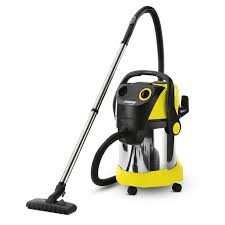
WD 5600 MP - Wet and dry vacuum cleaner KARCHER - Free user manual and instructions
Find the device manual for free WD 5600 MP KARCHER in PDF.



User questions about WD 5600 MP KARCHER
0 question about this device. Answer the ones you know or ask your own.
Ask a new question about this device
Download the instructions for your Wet and dry vacuum cleaner in PDF format for free! Find your manual WD 5600 MP - KARCHER and take your electronic device back in hand. On this page are published all the documents necessary for the use of your device. WD 5600 MP by KARCHER.
USER MANUAL WD 5600 MP KARCHER
natural_image
Line drawing of a vacuum cleaner with control panel and air vent (no text or symbols)Deutsch 7
English 14
Français 21
Italiano 28
Nederlands 35
Español 42
Português 49
Dansk 56
Norsk 63
Svenska 69
Suomi 76
Ελληνικά 83
Türkçe 91
Русский 98
Magyar 106
Čeština 113
Slovenščina 120
Polski 127
Românește 135
Slovenčina 142
Hrvatski 149
Srpski 156
Български 163
Eesti 171
Latviešu 178
Lietuviškai 185
Українська 192
العربية 207
Register and win! www.karcher.com
text_image
Technical diagram of a vacuum cleaner with numbered parts for identification16 17 17 | 18 | 19 | 20 , ,  | 22 | 23 | 25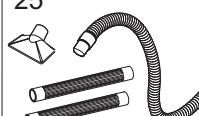 | |||
| WD 5.2xx M | ● | ● | ● | ● | ○ | ● | ○ | ○ | ○ |
| WD 5.2xx MP | ● | ● | ● | ● | ○ | ● | ● | ○ | ○ |
| WD 5.3xx | ● | ● | ● | ○ | ● | ● | ○ | ○ | ○ |
| WD 5.3xx M | ● | ● | ● | ○ | ● | ● | ○ | ○ | ● |
| WD 5.4xx | ● | ● | ● | ○ | ● | ● | ○ | ○ | ○ |
| WD 5.5xx M | ● | ● | ● | ○ | ● | ● | ○ | ○ | ○ |
| WD 5.6xx MP | ● | ● | ● | ○ | ● | ● | ● | ● | ● |
A 1
text_image
4. "CLICK" 5.A 2
text_image
1.
text_image
2. 1.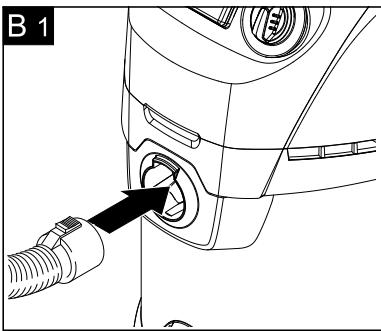
natural_image
Line drawing of a mechanical device with a black arrow pointing to a component (no text or symbols)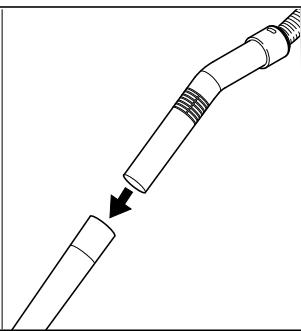
natural_image
Diagram of a mechanical component being inserted into a cylindrical part, showing a force direction (no text or symbols)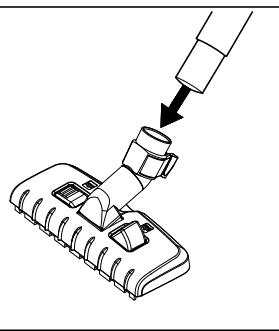
natural_image
Diagram of a mechanical assembly with a tool inserted into a component, showing a downward arrow indicating process (no text or symbols present)B 2
natural_image
Illustration of a hand holding a switch next to an electrical outlet with a magnified view (no text or symbols)B 3
text_image
0 OFF 1ON- 0 OFF
text_image
MAX MIN MAX MIN +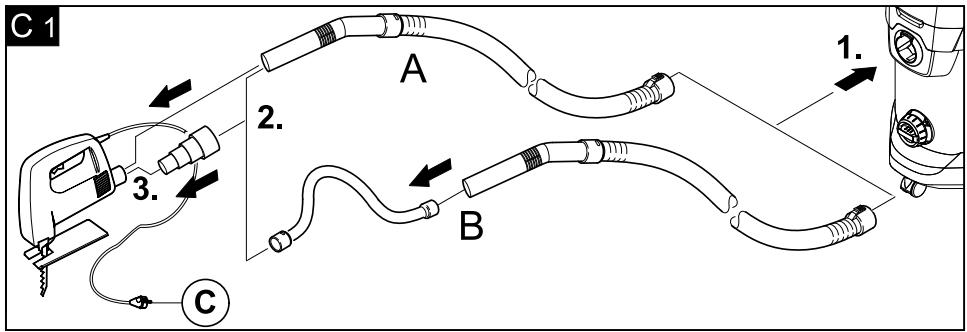
text_image
C 1 2. 3. A B 1. C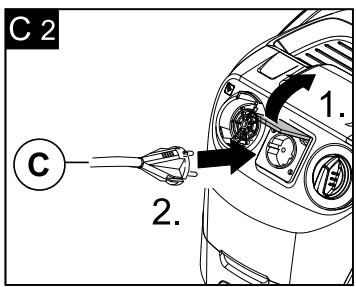
text_image
C 2 C 1. 2.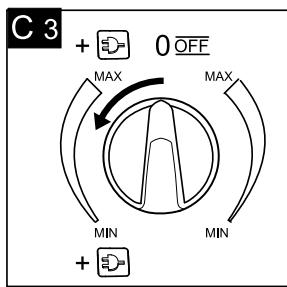
text_image
C 3 + OFF MAX MAX MIN MIN +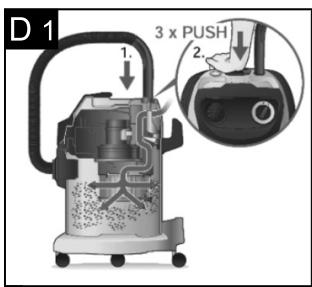
text_image
D 1 1. 2. 3 x PUSH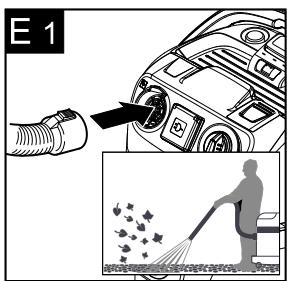
text_image
E 1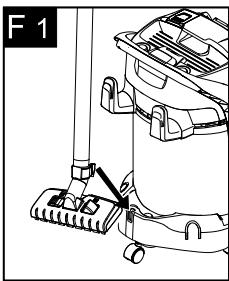
natural_image
Line drawing of a cleaning or cleaning device with a lever and handle (no text or symbols)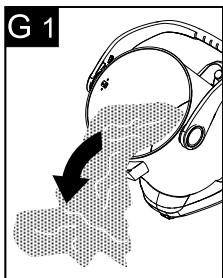
text_image
G 1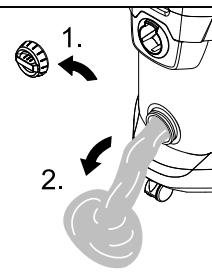
text_image
1. 2.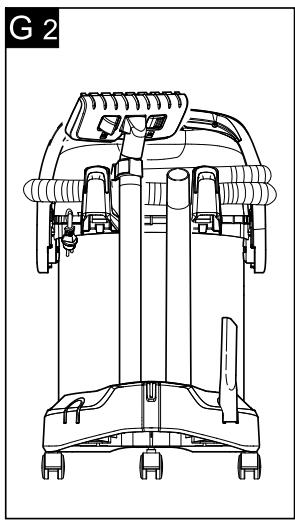
natural_image
Technical line drawing of a vacuum cleaner device (no text or symbols visible)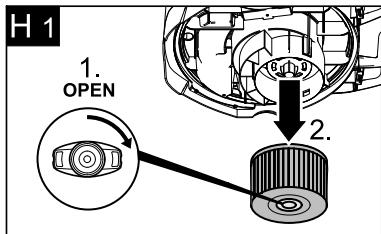
text_image
H 1 1. OPEN 2.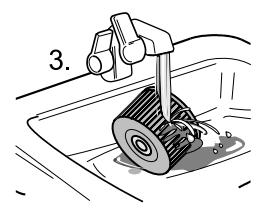
natural_image
Illustration of a mechanical device with a hand operating it, no visible text or symbols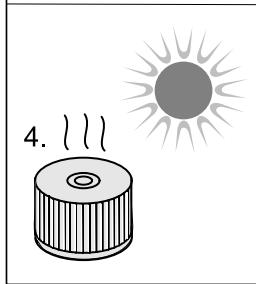
text_image
4.
text_image
6. Close 5.| WD 5.2xx MWD 5.2xx MP | WD 5.3xxWD 5.3xx M | WD 5.4xx | WD 5.5xx MWD 5.6xx MP | |
 | 220 - 240 V / 1~50, 60 Hz | |||
 | 1400 W | 1600 W | ||
 | 1600 W | 1800 W | ||
 | EU: 2100 WGB: 1800 WCH: 900 W | EU: 1800 WGB: 1400 WCH: 700 W | ||
 | EU: 10 A / CH: 10 A / GB: 13 AMP- versions: EU: 16 A / CH: 10 A / GB: 13 A | |||
 | 25 I | 30 I | ||
 | 15 I | 19 I | ||
 | 13 I | 15 I | ||
 | H 05VV-F2x1MP- versions: H 05VV-F3G1,5 | |||
 | 73 dB(A) | 73 dB(A) | 73 dB(A) | 73 dB(A) |
 | M 8,1 kgMP 8,4 kg | 7,9 kgM 8,4 kg | 8,7 kg | M 9,0 kgMP 9,3 kg |
Inhaltsverzeichnis
Please read and comply with these original instructions prior to the initial operation of your appliance and store them for later use or subsequent owners.
Proper use
The appliance is intended for use as a Multi-Purpose Vac corresponding to the descriptions given in these operating instructions and the safety notes.
This appliance has been designed for use in private households and is not intended for commercial use.
- Protect the unit from rain. Do not store outside.
- This device may not be used to suck in ash and soot.
Use the Multi-Purpose Vac only with:
- Original filter bag.
- Original spare parts, accessories and special accessories.
The manufacturer is not responsible for any damages that may occur on account of improper use or wrong operations.
Environmental protection

The packaging material can be recycled. Please do not place the package to the ordinary refuse for disposal, but ge for the proper recycling.

Old appliances contain valuable materials that can be recycled. Please arrange for the proper recycling of old
appliances. Please dispose your old appliances using appropriate collection systems.
Disposing the filters and filter bags
Filters and filter bags are made from environment-friendly materials.
They can therefore be disposed off through the normal household garbage provided you have not sucked in substances that are not permitted to be thrown into household garbage.
Notes about the ingredients (REACH)
You will find current information about the ingredients at:
www.kaercher.com/REACH
(See address on the reverse)
Customer Service
Our KÄRCHER branch will be pleased to help you further in the case of questions or faults.
(See address on the reverse)
Ordering spare parts and special attachments
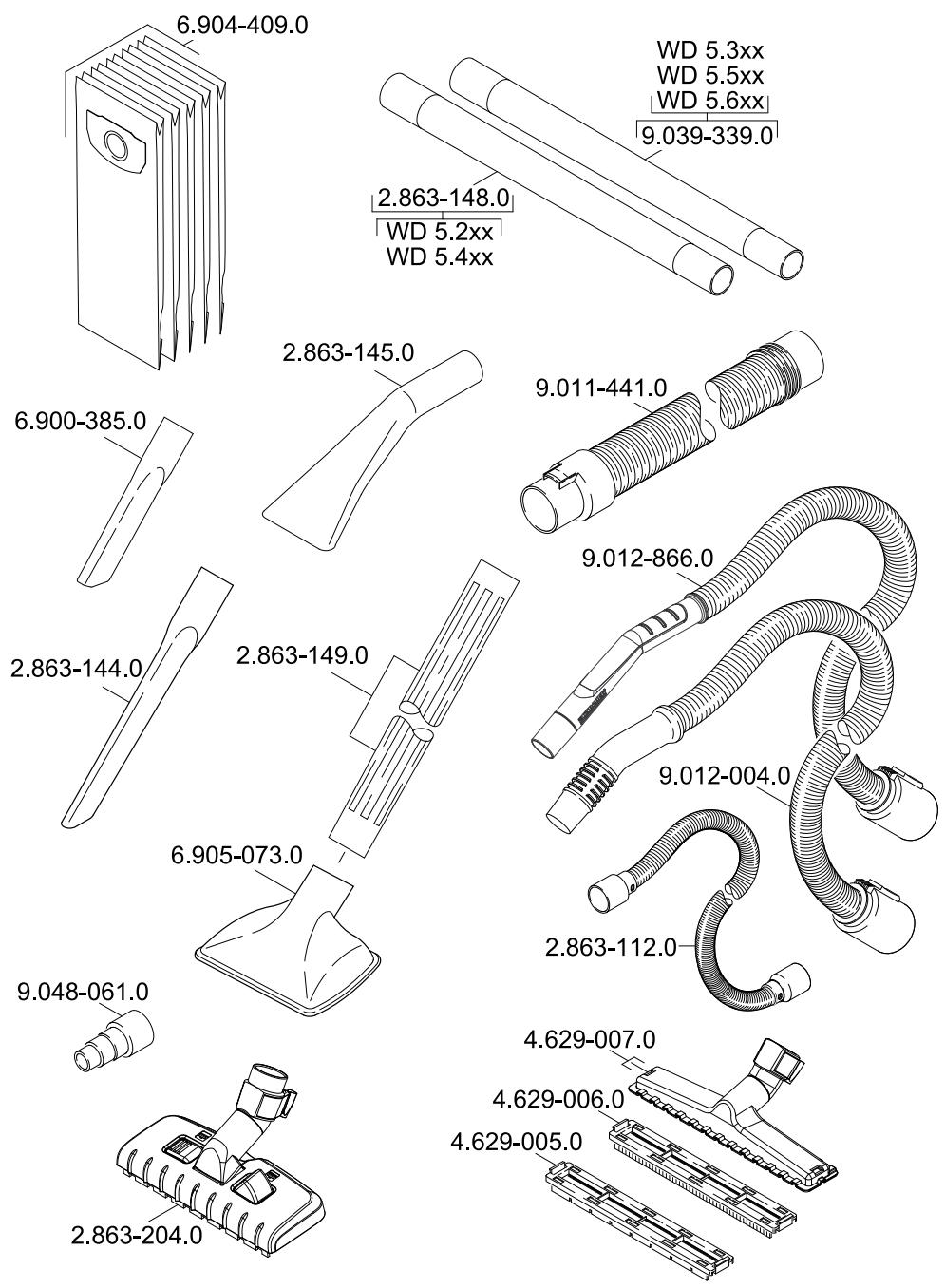
At the end of the operating instructions you will find a selected list of spare parts that are often required.
You can procure the spare parts and the attachments from your dealer or your KÄRCHER branch office.
(See address on the reverse)
Warranty
The terms of the guarantee applicable in each country have been published by our respective national distributors. We will repair possible faults on your unit free of charge within the warranty period, insofar as the faults are caused by material defects or defective workmanship. Guarantee claims should be addressed to your dealer or the nearest authorized customer service centre, and supported by documentary evidence of purchase.
Safety instructions
- This appliance is not intended for use by persons with limited physical, sensoric or mental capacities or lack of experience and/or skills, unless such persons are accompanied and supervised by a person in charge of their safety or if they received precise instructions on the use of this appliance.
- Children must only use this appliance if they are older than 8 and if they are supervised by a person responsible for their safety or if they are instructed on the use of the appliance by such person.
- Keep packaging film away from children - risk of suffocation!
- Switch the appliance off after every use and prior to every cleaning/maintenance procedure.
- Risk of fire. Do not vacuum up any burning or glowing objects.
- The appliance may not be used in areas where a risk of explosion is present.
Electrical connection
The appliance may only be connected to alternating current. The voltage must correspond with the type plate on the appliance.
⚠️ Risk of electric shock
Never touch the mains plug and the socket with wet hands.
Do not pull the plug from the socket by pulling on the connecting cable.
Check the power cord with mains plug for damage before every use. If the power cord is damaged, please arrange immediately for the exchange by an authorized customer service or a skilled electrician.
To avoid accidents due to electrical faults we recommend the use of sockets with a line-side current-limiting circuit breaker (max. 30 mA nominal tripping current).
⚠️ Danger
Certain materials may produce explosive vapours or mixtures when agitated by the suction air!
Never vacuum up the following materials:
- Explosive or combustible gases, liquids and dust particles (reactive dust particles)
- Reactive metal dust particles (such as aluminium, magnesium, zinc) in combination with highly alkaline or acidic detergents
– Undiluted, strong acids and alkalies - Organic solvents (such as petrol, paint thinners, acetone, heating oil).
In addition, these substances may cause the appliance materials to corrode.
Description of the Appliance
Illustrations on fold-out pages!

■ These operating instructions describe the basic models of the Multi-Purpose Vacs shown on the front cover.
■ Depending on the model, there are differences in equipment and supplied accessories.
When unpacking the product, make sure that no accessories are missing and that none of the package contents have been damaged. If you detect any transport damages please contact your dealer.
● included in the scope of delivery
○ possible accessories
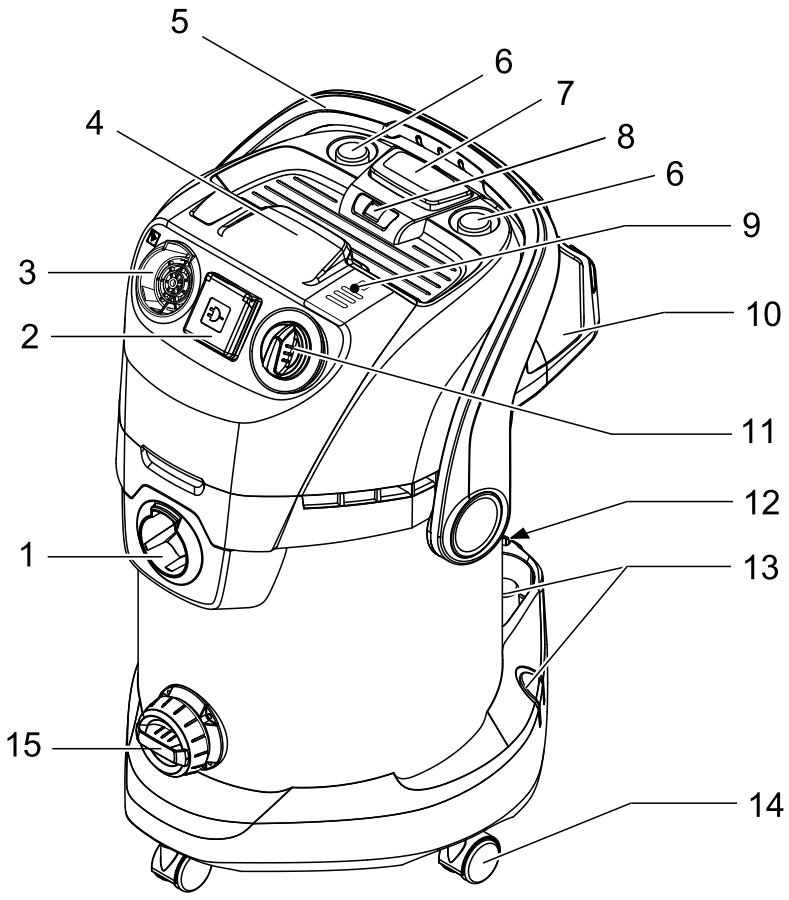
1 Suction hose connection
→ To connect the suction hose during vacuuming.
(see description / illustration B1)
2 Machine socket
Note: Observe the maximum connected power (see Chapter "Specifications").
→ To connect an electric tool. (see description / illustration C2)
3 Blowing connection
→ Connect the suction hose to the blower connection, this will activate the blower function.
(see description / illustration E1)
4 Recessed grip
→ After unlocking it, grab the appliance head by the handle recess and remove it.
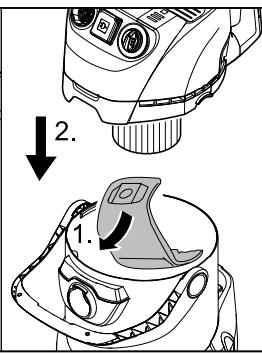
5 Carry handle
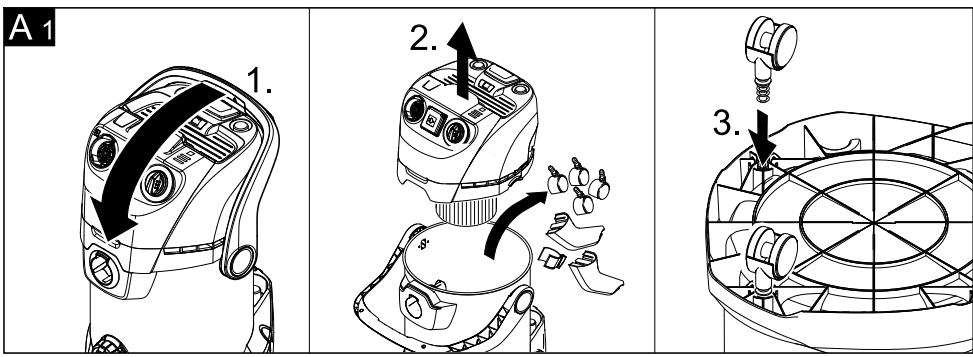
→ The carrying handle is also used to lock the appliance head and the container. To unlock, push the bow all the way forward until you clear the lock. (see description / illustration A1)
→ Grab the appliance head by the handle recess and remove it.
→ In the carrying position, the bow is pointing up, during work with the appliance, swivel the bow toward the back until the operating controls on the appliance are accessible.
6 Accessory compartment, appliance head
→ This accessory compartment allows the storage of suction nozzles on the appliance. Note: This accessory compartment is required to use the efficient filter cleaning function. (see description / illustration D1)
7 Switch for Efficient Filter Cleaning
→ To clean the built-in cartridge filter. Note: Do not activate the switch with a wet cartridge filter. (see description / illustration D1)
8 Filter cleaning display
→ If the filter cleaning indicator is red, activate the switch for efficient filter cleaning. (see description / illustration D1)
9 Key for mains cable retraction
→ Press the key for the mains cable retraction. The cable will pull itself automatically into the appliance.
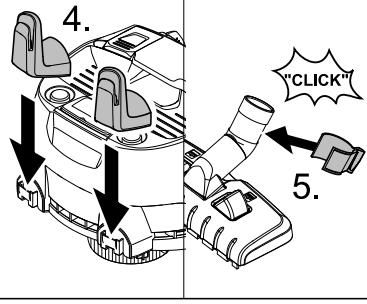
10 Accessory compartment, hook
→ This accessory compartment allows the storage of the suction hose, the mains cable and the suction nozzles. (see description / illustration ©2)
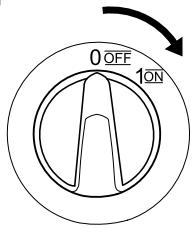
11 Rotary switch (ON/OFF) (without built-in socket)
→ Position I: Suction or blowing Position 0: Appliance is switched off (see description / illustration B3)
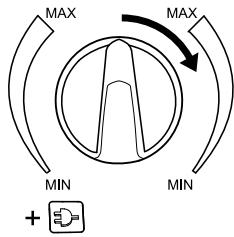
11 Rotary switch (ON/OFF) (with built-in socket)
→ Position MAX: Suction or blowing.
→ Position +☐ MAX: Vacuuming with connected electric tool
→ Performance regulation: Reduce the suction if necessary during vacuuming, blowing or when working with an electric tool.
→ Position 0: The appliance is switched off. Electric tool is supplied with voltage. (see description / illustration B3 C8)
12 Parking position
→ To rest the floor nozzle during work interruptions. (see description / illustration F1)
13 Accessory storage container
→ This accessory compartment allows the storage of the suction pipes or other accessories.
(see description / illustration G2)
14 Steering roller
→ The steering rollers are located in the compartment when the appliance is delivered. These must be attached prior to starting up the appliance.
(see description / illustration A1)
15 Drain screw
→ The drain screw is used to quickly and comfortably empty wastewater in the container. Tilt the container forward for easier emptying.
(see description / illustration G1)
16 Filter bag
Note: Do not use a filter bag for wet vacuuming!
→ Recommendations for appliances without efficient filter cleaning:
To vacuum fine dust, use the filter bag. (see description / illustration A2)
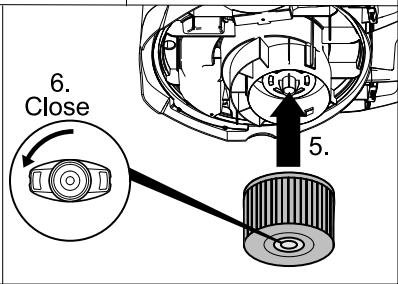
17 Cartridge filter
(already installed in the appliance)
→ The cartridge filter must always be installed - with wet and dry vacuuming.
Note: Let the wet cartridge filter dry prior to using it for dry vacuuming.
(see description / illustration H1)
18 Suction hose with handle
→ Slide the suction hose into the connection, it will lock into place. (see description / illustration B1)
Note: In order to disconnect it, push down with your thumb and pull the suction hose out.
19 Suction tubes 2 x 0.5 m
→ Connect both suction pipes and connect them to the suction hose.
(see description / illustration B1)
20 Floor nozzle (with inserts)
→ Use the appropriate insert for vacuuming on hard surfaces and carpets.
Hard surfaces, wet vacuuming: Use the insert with 2 rubber lips.
Hard surfaces, dry vacuuming: Use the insert with 2 bristles.
Carpets, wet and dry vacuuming: Work without an insert.
21 Floor nozzle (with switching lever)
→ For vacuuming dust from hard surfaces and carpets:
Lever on symbol 📁 for carpets
Lever on symbol 📁 for hard surfaces
22 Crevice nozzle
→ For edges, joints, heaters and hard to reach locations.
23 Adapter
→ To connect the suction hose with an electric tool.
(see description / illustration C1)
→ Adapt the adapter to the connection diameter of the electric tool using a knife if necessary.
24 Flexible tool hose
→ For more flexibility when working with electric tools.
Note: Can also be used with an adapter. (see description / illustration C1)
25 Coarse dirt set
→ Extensive vacuum set for coarse dirt of all kinds.
Operation
△ Always work with an inserted cartridge filter - during wet as well as dry vacuum cleaning!
Before Startup
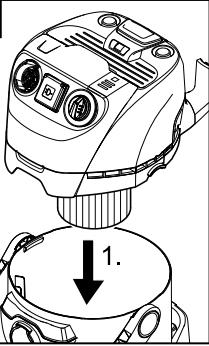
→ Illustration A 1
Mount loose parts delivered with appli-
ance prior to start-up.
→ Illustration A 2
Recommendations for appliances without efficient filter cleaning: To vacuum fine dust, use the filter bag.
Start up
→ Illustration B 1
Connect accessories.
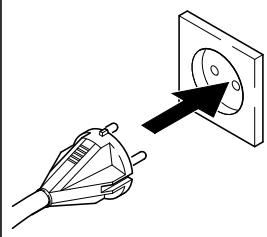
→ Illustration B 2
Plug in the main plug.
→ Illustration B 3
Turn on the machine.
Dry vacuum cleaning
⚠️ Work only with a dry cartridge filter!
→ Caution: Always use a pre-separator while vacuuming ashes and soot (order no. 2.863-139).
Recommendations for appliances without efficient filter cleaning: To vacuum fine dust, use the filter bag.
(see description / illustration A2)
→ The filling level of the filter bag depends on the dirt that is sucked in.
Clogged filter bags can burst - therefore make sure to replace the filter bag in a timely manner!
The filter bag needs to be replaced more frequently while sucking in fine dust, sand, etc.
For appliances with efficient filter cleaning: When vacuuming without a filter bag, the filter cleaning indicator lights up red if the cartridge filter needs to be cleaned.
→ Use efficient filter cleaning. (see description / illustration D1)
Wet vacuum cleaning
→ Attach the accessories to vacuum moisture or wetness to the suction pipes or directly to the handle.
Caution:
Do not use a filter bag!
Immediately switch the appliance off if foam forms or liquids escape!
Note: If the container is full a float closes the suction opening and the appliance works at a higher speed. Switch off the appliance immediately and empty the container.
Working with electrical power tools
→ Adapt the adapter to the connection diameter of the electric tool using a knife if necessary.
→ Illustration C1
A) Plug the enclosed adapter onto the handle of the suction hose and connect the electric tool with the connection.
→or
B) Use the flexible tool hose to gain more flexibility in your work. Connect this hose to the suction hose and to the adapter and then to the connection of the electric tool.
→ Illustration C2
For appliances with built-in socket:
Connect the mains plug of the electric power tool to the vacuum cleaner.
→ Illustration C 3
Switch the appliance on (move the rotary switch to the left to position + MAX) and start working.
Note: The suction turbine starts with a delay of 0.5 seconds after the electric tool has been switched on. After the electric tool has been switched off, the suction turbine will continue to run for approx. 5 seconds to suck in the remaining dirt from the suction hose.
Efficient filter cleaning
If the filter cleaning indicator is red, initiate the filter cleaning.
→ Illustration D1
Insert the suction hose with the handle into the accessory compartment on the appliance head. Press the efficient filter cleaning key 3 x times with the appliance switched on; wait 4 seconds between the individual presses.
Note: If the filter cleaning display is illuminated permanently or after the filter cleaning switch has been activated several times, check the reservoir for its fill volume. Otherwise, the dirt might escape when the container is opened.
Blowing function
Cleaning hard to reach locations or, where vacuuming is not possible, like leaves from a gravel bed.
→ Illustration E1
Connect the suction hose to the blower connection, this will activate the blower function.
Interrupting operation
→ Turn off the appliance.
→ Illustration F1
Hook the floor nozzle into the parking position.
Finish operation
→ Turn off the appliance and disconnect the mains plug.
Empty the container
→ Illustration G1
Remove the appliance head and empty the reservoir filled with wet or dry dirt.
For appliances with drain screw:
Empty the dry dirt over the container.
Use the drain screw to empty liquids.
Storing the appliance
→ Illustration G 2
Stow away the mains cable and accessory at the machine. Store the appliance in a dry room.
Maintenance and care
⚠️ Danger
Turn off the appliance and remove the mains plug prior to any care and maintenance work.
Repair works may only be performed by the authorized customer service.
Caution
Do not use abrasives, glass or universal cleaners! Never immerse the appliance in water.
→ Clean the appliance and accessory parts made of plastic with a commercial plastic cleaner.
→ If required, rinse the container and accessories with water properly and dry them before reuse.
→ Illustration H1
Only clean the cartridge filter under running water; do not wipe or brush. Let it dry completely prior to installation.
Troubleshooting
Mains cable retraction does not function
→ The mains cable is probably dirty, clean the mains cable.
Decreasing cleaning power
If the cleaning power of the appliance deteriorates please check the following:
→ Accessories, suction hose or suction tubes are clogged, please remove the obstruction using a stick.
→ Cartridge filter is dirty:
For appliances without efficient filter cleaning: Knock the dirt off the cartridge filter, clean it under running water if necessary.
(see description / illustration H1)
For appliances with efficient filter cleaning: Use the filter cleaning.
(see description / illustration D1)
Clean the cartridge filter under running water if necessary.
(see description / illustration H1)
→ Replace damaged cartridge filter.
→ Filter bag is full, install new filter bag.
(see description / illustration A2)
Technical specifications
The specifications are listed on the flaps. In the following, you will find the explanation of the symbols used.

Voltage

Output P_nom

Output P_max

Max. connection output of appli- ance socket

Mains fuse (slow-blow)

Container capacity

Water intake with handle

Water intake with floor nozzle

Power cord

Sound pressure level (EN 60704-2-1)

Weight (without accessories)
Subject to technical modifications!
Table des matières
www.kaercher.com/REACH
(Adresse au dos)
Service après-vente
www.kaercher.com/REACH
www.kaercher.com/REACH
www.kaercher.com/REACH
www.kaercher.com/REACH
www.kaercher.com/REACH
(Se adressen på bagsiden)
Kundeservice
www.kaercher.com/REACH
www.kaercher.com/REACH
www.kaercher.com/REACH
www.kaercher.com/REACH
www.kaercher.com/REACH
www.kaercher.com/REACH
www.kaercher.com/REACH
www.kaercher.com/REACH
www.kaercher.com/REACH
www.kaercher.com/REACH
Mult stimate client,

www.kaercher.com/REACH
www.kaercher.com/REACH
www.kaercher.com/REACH
www.kaercher.com/REACH
www.kaercher.com/REACH
www.kaercher.com/REACH
(Aadressi vt tagaküljelt)
Klienditeenindus
Küsimuste ja rikete korral aitab teid KÄRC-HER'i filiaal.
(Aadressi vt tagaküljelt)
www.kaercher.com/REACH
www.kaercher.com/REACH
www.kaercher.com/REACH
text_image
WD 5.200 M 9.084-249.0 EU WD 5.3xx 9.084-267.0 CH WD 5.4xx 9.084-268.0 GB 9.084-271.0 AU 9.084-252.0 EU 9.084-269.0 CH 9.084-270.0 GB 9.084-272.0 AU 9.037-731.0 6.414-960.0 A WD 5.300 9.037-721.0 WD 5.4xx 9.036-479.0 9.036-479.0 9.037-720.0 9.037-721.0 WD 5.2xx 9.001-756.0 WD 5.2xx 9.036-479.0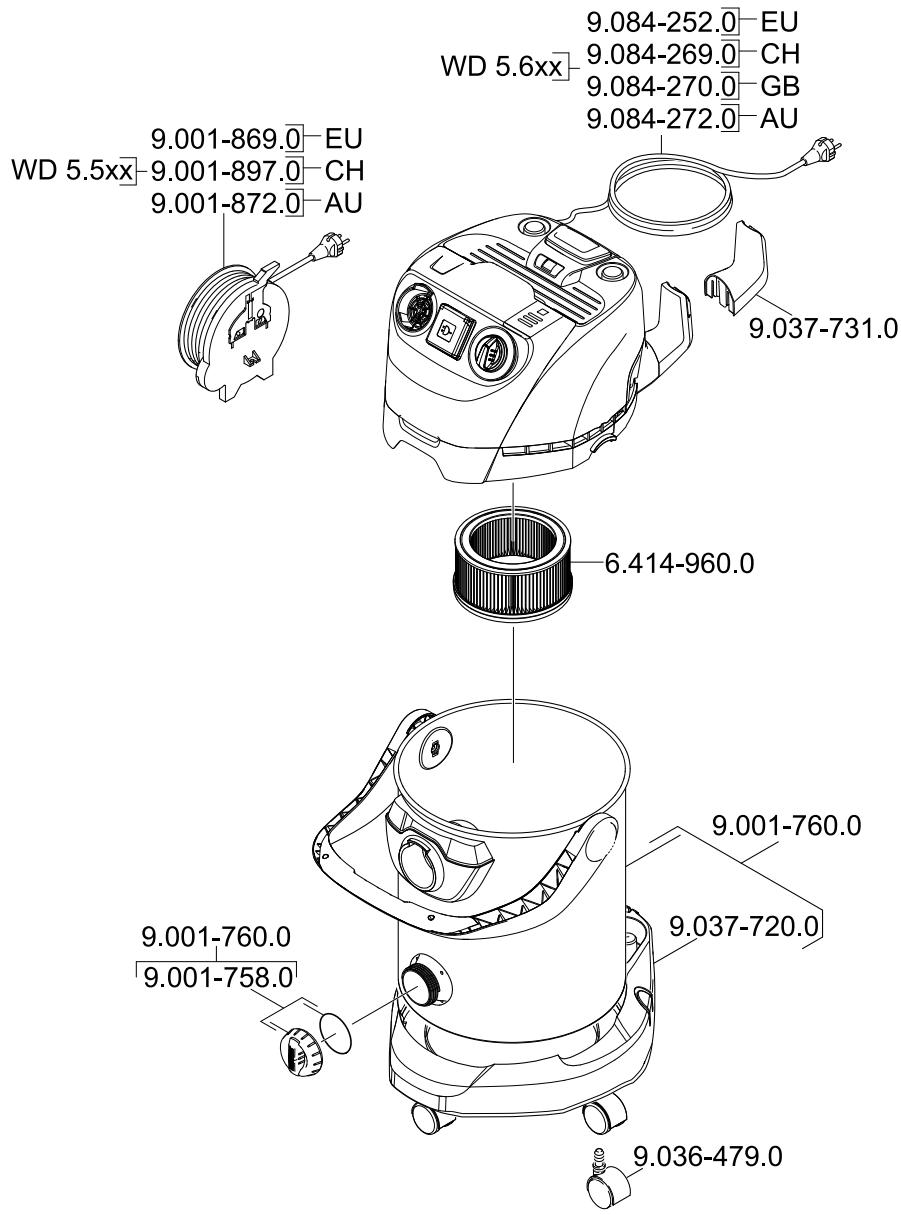
text_image
9.001-869.0-EU WD 5.5xx-9.001-897.0-CH 9.001-872.0-AU 9.084-252.0-EU 9.084-269.0-CH 9.084-270.0-GB 9.084-272.0-AU 9.037-731.0 6.414-960.0 9.001-760.0 9.001-760.0 9.001-758.0 9.037-720.0 9.036-479.0