
GAM 220 MF Professional - Multimeter BOSCH - Free user manual and instructions
Find the device manual for free GAM 220 MF Professional BOSCH in PDF.

 FR
FR
 BG
BG
 CS
CS
 DA
DA
 DE
DE
 EL
EL
 EN
EN
 ES
ES
 ET
ET
 FI
FI
 HU
HU
 ID
ID
 IT
IT
 JA
JA
 KK
KK
 KO
KO
 LT
LT
 LV
LV
 MK
MK
 NL
NL
 NO
NO
 PL
PL
 PT
PT
 RO
RO
 RU
RU
 SK
SK
 SL
SL
 SV
SV
 TH
TH
 TR
TR
 UK
UK
 VI
VI
 ZH
ZH
| Product type | Digital angle finder |
| Brand | Bosch |
| Model | GAM 220 MF Professional |
| Measuring range | 0° – 220° |
| Measuring accuracy | ± 0.1° |
| Smallest display unit | 0.1° |
| Special functions | Hold, display illumination, display rotation, single and double miter mode (GAM 220 MF) |
| Power supply | 4 x 1.5 V LR6 (AA) batteries or 1.2 V HR6 (AA) rechargeable batteries |
| Battery life | Approx. 80 h (alkaline batteries) |
| Automatic shut-off | After approx. 30 min |
| Dimensions (L × W × H) | 447 × 52 × 60 mm |
| Weight | 1.2 kg (GAM 220 MF) |
| Branch length | 400 mm |
| Protection | IP 54 (dust and splash water protection) |
| Operating temperature | -10°C to +50°C |
| Storage temperature | -20°C to +70°C |
| Max. operating altitude | 2000 m |
| Max. relative humidity | 90% |
| Degree of pollution | 2 (according to IEC 61010-1) |
| Spirit levels | For horizontal and vertical leveling |
| Included accessories | Branch extension (GAM 220 MF), protective case |
| Maintenance and cleaning | Clean with a soft, damp cloth; no detergents or solvents |
| Repairability | Repairs by a professional using original Bosch parts |
| After-sales service | Available via Bosch Power Tools, hotline, and online spare parts |
| Warranty | Statutory warranty, see terms and conditions |
Frequently Asked Questions - GAM 220 MF Professional BOSCH
User questions about GAM 220 MF Professional BOSCH
0 question about this device. Answer the ones you know or ask your own.
Ask a new question about this device
Download the instructions for your Multimeter in PDF format for free! Find your manual GAM 220 MF Professional - BOSCH and take your electronic device back in hand. On this page are published all the documents necessary for the use of your device. GAM 220 MF Professional by BOSCH.
USER MANUAL GAM 220 MF Professional BOSCH
natural_image
Two identical mechanical device assemblies with transparent casings and circular components, no visible text or symbols.

natural_image
Architectural diagram of a multi-story building with circular windows and a metal beam, no text or symbols present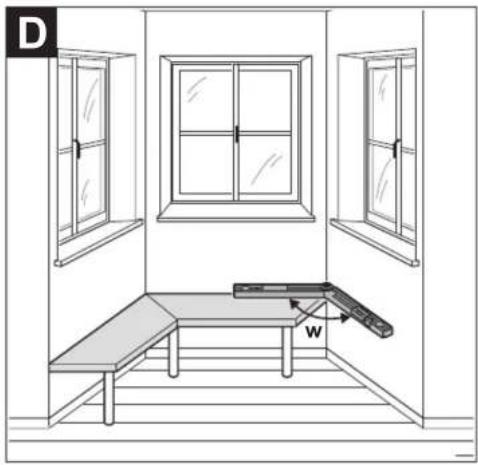
natural_image
Interior view of a room with windows, a table, and a window frame (no text or symbols)1 609 92A 58K | (18.11.2019) Bosch Power Tools
5
6|

Deutsch
Sicherheitshinweise

All instructions must be read and observed. The safeguards integrated into the measuring tool may be compromised if the measuring tool is not used in accordance with these instructions. STORE THESE INSTRUCTIONS IN A SAFE PLACE.
▶ Have the measuring tool serviced only by a qualified specialist using only original replacement parts. This will ensure that the safety of the measuring tool is maintained.
▶ Do not use the measuring tool in explosive atmospheres which contain flammable liquids, gases or dust. Sparks may be produced inside the measuring tool, which can ignite dust or fumes.
When sawing workpieces for which you have determined the angle using this measuring tool, always strictly follow the safety instructions and working advice for the saws in use (including instructions on positioning and clamping the workpiece). When the required angles cannot be set on a certain saw or saw type, alternative sawing methods will need to be applied. Extremely acute (sharp) angles can be cut using a taper jig with a table saw or a circular saw.
Product Description and Specifications
Please observe the illustrations at the beginning of this operating manual.
Intended Use
GAM 220
The measuring tool is intended for measuring and transferring angles (horizontal and vertical), e.g. for customisations in interior finishing work, in staircase construction or on exterior panelling.
The measuring tool is suitable for indoor and outdoor use.
GAM 220 MF
The measuring tool is intended for measuring and transferring angles and for calculating simple and compound mitre/bevel angles.
The measuring tool is suitable for indoor and outdoor use.
Product Features
The numbering of the product features shown refers to the illustration of the measuring tool on the graphic page.
(1) Fold-out leg
(2) Viewing window for display
(3) Locking wheel
(4) Base leg
(5) Battery compartment cover
(6) Battery compartment cover locking mechanism
(7) Display
(8) Level for horizontal alignment
(9) Level for vertical alignment
(10) Serial number
(11) Button Hold
(12) On/off button
(13) Button for rotating the display
(14) Button MTR1 for simple mitre (GAM 220 MF)
14 | English
(15) Button MTR2 for compound mitre (GAM 220 MF)
(16) Leg extension (GAM 220 MF)
(17) Protective bag
Display Elements
(a) Indicator H for saved value Hold
(b) Battery indicator
(c) Measured value
(d) Bevel angle indicator BVL (GAM 220 MF)
(e) Mitre angle indicator MTR (GAM 220 MF)
(f) Corner angle indicator CNR (GAM 220 MF)
(g) Spring angle indicator SPR (GAM 220 MF)
Technical Data
| Digital angle measuring device | GAM 220 GAM 220 MF | |
| Article number | 3 601 K76 5.. 3 601 K76 6.. | |
| Hold function | ● | ● |
| Display illumination ● ● | ||
| "Simple mitre" operating mode | - | ● |
| "Compound mitre" operating mode | - | ● |
| Measuring range 0–220° 0–220° | ||
| Measuring accuracy of angles ±0.1° ±0.1° | ||
| Smallest display unit 0.1° 0.1° | ||
| Operating temperature -10 °C to +50 °C -10 °C to +50 °C | ||
| Storage temperature -20 °C to +70 °C -20 °C to +70 °C | ||
| Max. altitude 2000 m 2000 m | ||
| Relative air humidity max. | 90% | 90% |
| Pollution degree according to IEC 61010-1 | 2^Al | 2^Al |
| Batteries | 4 × 1.5 V LR6 (AA) | 4 × 1.5 V LR6 (AA) |
| Rechargeable batteries | 4 × 1.2 V HR6 (AA) | 4 × 1.2 V HR6 (AA) |
| Operating lifetime (alkali-manganese batteries) approx. | 80 h | 80 h |
| Automatic switch-off after approx. | 30 min | 30 min |
| Leg length | 400 mm | 400 mm |
| Weight according to EPTA-Procedure 01:2014 | 1.3 kg | 1.2 kg |
| Dimensions (length × width × height) | 447 × 52 × 60 mm | 447 × 52 × 60 mm |
| IP 54 (dust and splash proof) | ● ● | |
A) Only non-conductive deposits occur, whereby occasional temporary conductivity caused by condensation is expected.
The serial number (10) on the type plate is used to clearly identify your measuring tool.
Assembly
Inserting/Replacing Batteries (see figure A)
It is recommended that you use alkaline manganese batteries to operate the measuring tool.
To open the battery compartment cover (5), press the locking mechanism (6) and fold the battery compartment cover up. Insert the batteries/rechargeable batteries.
When doing so, ensure that the polarity is correct and corresponds to the diagram on the battery compartment cover.
Battery Indicator
The battery indicator (b) always indicates the current battery status:
| Indicator | Capacity |
| 90-100% | |
| 60-90% | |
| 30-60% | |
| 10-30% |

0-10%
The empty battery indicator flashes. You can measure for approximately another 15–20 min from when the flashing begins until the tool shuts down.
Always replace all the batteries at the same time. Only use batteries from the same manufacturer and which have the same capacity.
▶ Take the batteries out of the measuring tool when you are not using it for a prolonged period of time. The batteries can corrode and self-discharge during prolonged storage in the measuring tool.
Mounting the Leg Extension
Slide the leg extension (16) from the front onto the fold-out leg (1). Slide the leg extension as far as possible over the joint of the measuring tool.
Operation
Starting Operation
▶ Protect the measuring tool from moisture and direct sunlight.
▶ Do not expose the measuring tool to any extreme temperatures or variations in temperature. For example, do not leave it in a car for extended periods of time. In case of large variations in temperature, allow the measuring tool to adjust to the ambient temperature before putting it into operation. The precision of the measuring tool may be compromised if exposed to extreme temperatures or variations in temperature.
▶ Keep the supporting surfaces and contact edges of the measuring tool clean. Protect the measuring tool against shock and impact. Dirt particles or deformations can lead to faulty measurements.
Switching On and Off
To switch on the measuring tool, press the on/off button (12). If the indicator H (a) lights up, a value from the last measurement is still saved. This value can be deleted by briefly pressing the on/off button (12). To switch off the measuring tool, press the on/off button (12). When no activity is performed on the measuring tool for approx. 30 min, the measuring tool automatically switches off to save the batteries.
Aligning with the Spirit Levels
The measuring tool can be aligned horizontally with spirit level (8) and vertically with spirit level (9). The measuring tool can also be used as a carpenter's spirit level for checking vertical and horizontal lines. For this, place or hold the measuring tool against the surface subject to checking.
Rotating the Display
To make the displayed value easier to read, press the button (13) to rotate the display.
"Normal measuring" Operating Mode
After switching on, the measuring tool is always in "normal measuring" operating mode. In "normal measuring" operating mode, angle measurement is carried out.
Measuring Angles (see figures C-D)
Place the fold-out leg (1) and the base leg (4) flat on the surfaces adjacent to the angle. The displayed measured value (c) corresponds with the interior angle w between the base leg and the fold-out leg. This measured value is shown on the display (7) until you change the angle between fold-out leg (1) and base leg (4).
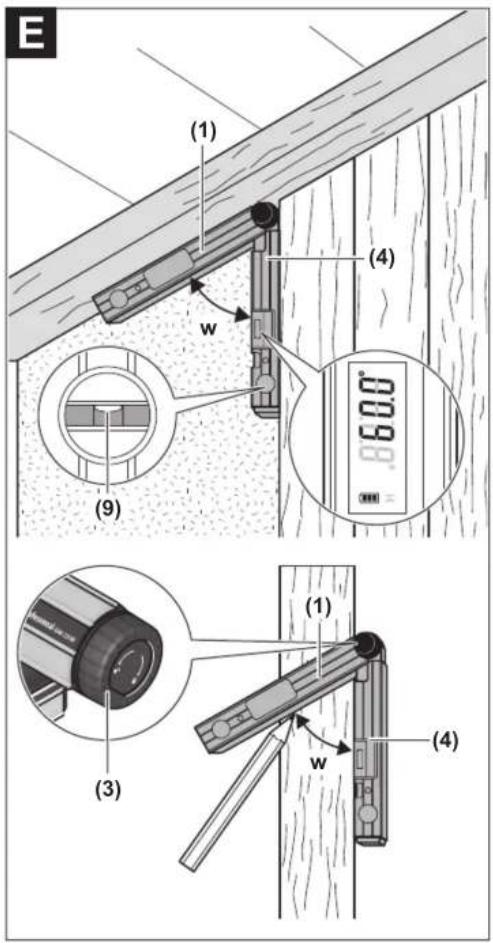
Transferring Angles (see figure E)
Measure the angle to be transferred by placing the fold-out leg and base leg on the target angle. The position of the legs can be locked mechanically by tightening the locking wheel (3). The displayed value is not saved. Place the measuring tool in the required position against the workpiece. Use the legs as a straight edge to transfer the angle.
Storing the Measured Value
Press the Hold (11) button to store (H) the current measured value (c). The indicator (a) flashes in the display for confirmation. The currently displayed value is frozen and will not change even when the leg is moved. If you press the memory button Hold again, the indicator (a) will be shown permanently on the display. The displayed value will change depending on the leg movement. The previously frozen value is now saved in the background. If the memory button Hold (11) is pressed again, the previously saved value is displayed and the indicator (a) flashes. To delete the contents of the memory, briefly press the on/off button (12). To be able to save a new value, a previously saved value has to be deleted. Saved values cannot be overwritten. The held value is saved even when the measuring tool is switched off (manually or automatically). However, it is deleted when changing batteries or when the batteries are empty.
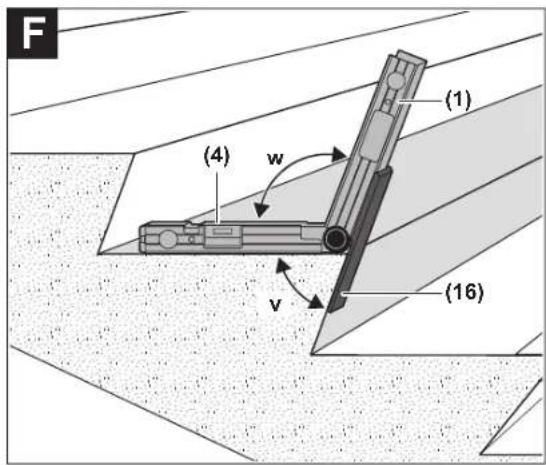
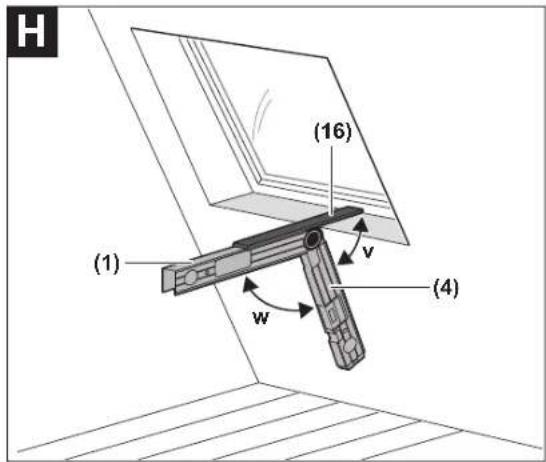
Measuring with Leg Extension (see figures F-H)
The leg extension (16) makes it possible to measure angles when the contact surface is shorter than the fold-out leg (1). Place the base leg (4) and the leg extension flat on the surfaces to be measured.
16 | English
The measured value of the angle w between the base leg and fold-out leg is indicated in the display. The required angle v between the base leg and leg extension is calculated as follows:
v = 180^ - w

GAM 220 MF: "Simple Mitre" Operating Mode
The "Simple mitre" measurement is used to calculate the cutting angle MTR when two workpieces with the same mitre have to form any outer angle x^ smaller than 180^ (e.g. for skirting boards, banister columns or picture frames).
The "simple mitre" operating mode is activated by pressing the button MTR1 (14). The displayed value is always used for the calculation of the MTR. If a saved value is being displayed (indicator (a) flashes), the calculation will be performed with the saved value regardless of the position of the legs.

When workpieces are to be fitted into a corner (e.g. for skirting boards), measure the corner angle x^ by positioning the fold-out leg and the base leg. For given angles (e.g. picture frames), open the fold-out leg and the base leg until the required angle is indicated in the display.
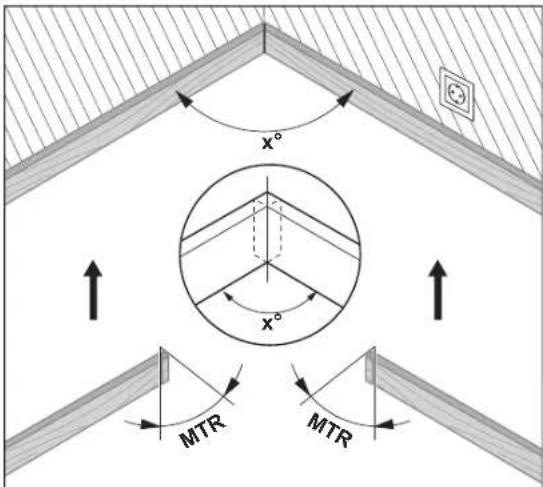
The mitre angle MTR, by which the two workpieces are to be shortened, is calculated. For these mitre/bevel cuts, the saw blade is perpendicular to the workpiece (the bevel angle is 0^ ).

Press the button MTR1 (14). The calculated horizontal mitre angle MTR, which has to be set on the chop and mitre saw, and the indicator MTR will be shown on the display.
Press the button MTR1 (14) to return from the "simple mitre" operating mode to the "standard measurement" operating mode.
Briefly pressing the on/off button (12) will also take you back to the "standard measurement" operating mode. However, any saved Hold value will be deleted when doing so.
Note: The calculated mitre angle MTR can only be transferred for mitre saws, for which the setting for vertical cuts is 0^ . When the setting for vertical cuts is 90^ , the angle for the saw must be calculated as follows: 90^ – displayed angle MTR = angle to be set for the saw.
GAM 220 MF: "Compound Mitre" Operating Mode
The "Compound mitre" ("Compound MTR") measurement is used to calculate mitre and bevel angles when two workpieces with multiple angles (e.g. crown mouldings) have to join precisely.
The "compound mitre" operating mode is activated by pressing the button MTR2 (15). The displayed value of the leg positions is always used for the calculation of the angles. Any saved Hold value will be deleted when the "compound mitre" operating mode is ended.
Carry out the worksteps exactly in the given sequence.
1. SPR: Storing the spring angle

The spring angle can be saved as follows:
- Open the fold-out leg and base leg until the required spring angle is shown on the display.
- Measure the spring angle if it is unknown. For this, place the workpiece to be measured between the fold-out leg and the base leg. When measuring particularly narrow or small workpieces with the measuring tool is not possible, use auxiliary equipment such as a bevel angle or mitre rule, and then adjust the angle on the measuring tool.
Press the MTR2 (15) button to store the measured spring angle for the compound mitre. SPR and the current angle will appear on the display. When the angle is greater than 90^ yet less than 180^ when pressing the button MTR2 (15), the slope angle SPR is automatically converted as follows: SPR = 180^ - measured or set angle.
2. CNR: Storing the corner angle

To measure the corner angle, place the fold-out and base legs flat against the walls or set a known corner angle on the measuring tool.
Press the MTR2 (15) button again to store the measured corner angle for the compound mitre. CNR and the current angle will appear on the display.
3. MTR: Calculating the mitre angle

Press the MTR2 (15) button again. MTR and the calculated mitre angle for the mitre saw are indicated on the display. The mitre angle is used to define the rotation of the saw table (MTR).
18 | English
4. BVL: Calculating the bevel angle
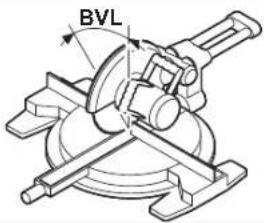
Press the MTR2 (15) button again. BVL and the calculated bevel angle for the mitre saw are indicated on the display.
The bevel angle is used to define the incline of the saw blade (BVL). If necessary, the mitre and bevel angle can be retrieved again, but only if the on/off button (12) has not been pressed to change the operating mode. Press the button MTR2 (15) to retrieve the angle. In the display, MTR and the calculated mitre angle appear; upon pressing the button MTR2 (15) again, BVL and the bevel angle appear.
Press the button MTR1 (14) for less than one second to switch back from the "compound mitre" operating mode to the "standard measurement" operating mode.
Notes on "Compound Mitre" Operating Mode
The calculated mitre angle MTR can only be transferred for mitre saws, for which the setting for vertical cuts is 0^ . When the setting for vertical cuts is 90^ , the angle for the saw must be calculated as follows: 90^ – displayed angle MTR = angle to be set for the saw.
Maintenance and Service
Maintenance and Cleaning
Keep the measuring tool clean at all times. Never immerse the measuring tool in water or other liquids. Wipe off any dirt using a damp, soft cloth. Do not use any detergents or solvents. When the measuring tool is exposed to rain for an extended period, its function may be impaired. However, after completely drying off, the measuring tool is ready for operation. No calibration is required. Only store and transport the measuring tool in the protective bag (17). If the measuring tool needs to be repaired, send it off in the protective bag (17).
After-Sales Service and Application Service
Our after-sales service responds to your questions concerning maintenance and repair of your product as well as spare parts. You can find explosion drawings and information on spare parts at: www.bosch-pt.com The Bosch product use advice team will be happy to help you with any questions about our products and their accessories. In all correspondence and spare parts orders, please always include the 10-digit article number given on the nameplate of the product.
Cambodia
Robert Bosch (Cambodia) Co., Ltd Unit 8BC, GT Tower, 08th Floor, Street 169, Czechoslovakia Blvd, Sangkat Veal Vong Khan 7 Makara, Phnom Penh VAT TIN: 100 169 511 Tel.: +855 23 900 685 Tel.: +855 23 900 660 www.bosch.com.kh
People's Republic of China
China Mainland
Bosch Power Tool (China) Co. Ltd. Bosch Service Center 567, Bin Kang Road Bin Kang District Hangzhou, Zhejiang Province China 310052 Tel.: (0571) 8887 5566 / 5588 Fax: (0571) 8887 6688 x 5566# / 5588# E-Mail: bsc.hz@cn.bosch.com www.bosch-pt.com.cn
HK and Macau Special Administrative Regions
Robert Bosch Co. Ltd. Flat B, 2/F, Yeung Yiu Chung No. 6 Industrial Building, 19 Cheung Shun Street Cheung Sha Wan Kowloon, Hong Kong Customer Service Hotline: +852 2101 0235 Fax: +852 2590 9762
E-Mail: info@hk.bosch.com
www.bosch-pt.com.hk
India
Bosch Service Center
69, Habibullah Road, (Next to PSBB School), T. Nagar
Chennai-600077
Phone: (044) 64561816
Bosch Service Center
18, Community Center
Phase 1. Mayapuri
New Delhi-110064
Phone: (011) 43166190
Indonesia
PT Robert Bosch
Palma Tower 10th Floor
Jalan RA Kartini II-S Kaveling 6
Pondok Pinang, Kebayoran Lama
Robert Bosch Middle East FZE - Pakistan Liaison Office
2nd Floor Plaza # 10, CCA Block, DHA Phase 5
Lahore, 54810
Phone: +92(303)4444311
Email: Faisal.Khan@bosch.com
Philippines
Robert Bosch, Inc.
28th Floor Fort Legend Towers,
3rd Avenue corner 31st Street,
Fort Bonifacio, Global City,
1634 Taguig City
Tel.: (632) 8703871
Fax: (632) 8703870
www.bosch-pt.com.ph
Singapore
Powerwell Service Centre Ptd Ltd
Bosch Authorised Service Centre (Power Tools)
4012 Ang Mo Kio Ave 10, #01-02 TECHplace
Singapore 569628
Tel.: 6452 1770
Fax: 6452 1760
E-Mail: ask@powerwellsc.com
www.powerwellsc.com
www.bosch-pt.com.sg
Thailand
Robert Bosch Ltd.
FYI Center Tower 1, 5th Floor,
2525 Rama IV Road, Klongtoei,
Bangkok 10110
Tel.: 02 0128888
Fax:02 0645802
www.bosch.co.th
Bosch Service – Training Centre
La Salle Tower Ground Floor Unit No.2
10/11 La Salle Moo 16
Srinakharin Road
Bangkaew, Bang Plee
Samutprakarn 10540
Tel.: 02 7587555
Fax: 02 7587525
Vietnam
Branch of Bosch Vietnam Co., Ltd in HCMC
14th floor, Deutsches Haus, 33 Le Duan
Ben Nghe Ward, District 1, Ho Chi Minh City
Tel.: (028) 6258 3690
Fax: (028) 6258 3692 - 6258 3694
Hotline: (028) 6250 8555
Email: tuvankhachhang-pt@vn.bosch.com
www.bosch-pt.com.vn
20 | English
Bahrain
EA Juffali and Brothers for Technical Equipment Company.
Kingdom of Bahrain, Al Aker - Block 0624 - Road 2403 - Building 0055D
Phone: +97317704537
Fax: +973177045257
Email: h.berjas@eajb.com.sa
Egypt
RBEG-LLC
22 Kamal Eldin Hussein
Sheraton Heliopolis
11799 Cairo
E-mail: boschegypt.powertools@eg.bosch.com
Iran
Robert Bosch Iran
3rd Floor, No 3, Maadiran Building
Aftab St., Khodami St., Vanak Sq.
Tehran 1994834571
Phone: +9821-86092057
Iraq
Sahba Technology Group
Al Muthana airport road
Baghdad
Phone Bagdad: +964 (0) 7 901 930366
Phone Dubai: +971 (0) 4 422 1898
Email: duraid@sahbatechnology.com
Jordan
Roots Arabia - Jordan
Al-Hurriyah Street, Al-Muqabalein
Amman 11623, Jordan
P.O.Box:110068
Tel.: +962 6 4398990
E-mail: bosch@rootsjordan.com
Kuwait
Shuwaikh Industrial Area, Block 1, Plot 16, Street 3rd
P.O. Box 164 - Safat 13002
Phone: +965-2496 88 88
Fax: +965 - 2481 08 79
E-mail: josephkr@aaalmutawa.com
Lebanon
Tehini Hana & Co, S.A.R.L.
P.O. Box 90-449
Jdeideh 1202 2040
Dora-Beirut
Phone: +9611255211
Email: service-pt@tehini-hana.com
Libya
El Naser for Workshop Tools
Swanee Road, Alfalah Area
Tripoli
Phone: +218 21 4811184
Oman
Malatan Trading & Contracting LLC
P.O. Box 131, Ruwi, Muscat
Postal Code: 112, Sultanate of Oman
Phone: +968 2479 4035/4089/4901
Mob: +968-91315465
Fax: +968 2479 4058
E-Mail: sudhirkumar@malatan.net
Qatar
International Construction Solutions W L L
P.O.Box 51.Doha
Phone: +974 40065458
Fax: +974 4453 8585
Email: csd@icsdoha.com
Saudi Arabia
Juffali Technical Equipment Co. (JTECO)
P.O.Box: 1049 - Jeddah 21431 - KSA
Jeddah: 00966 (0) 12 692 0770 - Ext 433
Riyadh: 00966 (0) 11 409 3976 - Ext-30/34/39
Dammam: 00966 (0) 13 833 9565
E-mail: M.Zreik@eajb.com.sa
Syria
Dallal Establishment for Power Tools
Damascus. Baramkeh street - Ibn Amer street,
Phone: +963112241006 or 009631122414009
Mobile: 00963991141005
Email: rita.dallal@hotmail.com
United Arab Emirates
Central Motors & Equipment,
P.O. Box 26255, Dubai
Dubai: 00971 (0) 4 3090920/3090930
Abu Dhabi: 00971 (0) 2 4017745
Sharjah: 00971 (0) 6 5932777
Al Ain: 00971 (0) 3 7157419
E-Mail: Mallappa.Madari@centralmotors.ae
Yemen
Abu Alrejal Trading Corporation
P.O. Box: 17024, Zubeiry St.
Sana'a, Yemen
Tel: +967-1-20 20 10
Fax: +967-1-47 19 17
E-mail: tech-tools@abualrejal.com/yahya@abualrejal.com
Ethiopia
Forever plc
Kebele 2,754, BP 4806.
Addis Ababa
Phone: +251 111 560 600
Email: foreverplc@ethionet.et
Ghana
Robert Bosch Ghana Limited
21 Kofi Annan Road Airport Residential Area Accra
Tel. +233 (0)3027 94616
Kenya
Robert Bosch East Africa Ltd
Mpaka Road P.O. Box 856
00606 Nairobi
Nigeria
Robert Bosch Nigeria Ltd.
52-54 Isaac John Street P.O. Box
GRA Ikeja - Lagos
Tanzania
Diesel & Autoelectric Service Ltd.
117 Nyerere Rd., P.O. Box 70839
Vingunguti 12109, Dar Es Salaam
Phone: +255 222 861 793/794
Australia, New Zealand and Pacific Islands
Robert Bosch Australia Pty. Ltd.
Power Tools
Locked Bag 66
Clayton South VIC 3169
Customer Contact Center
Inside Australia:
Phone: (01300) 307044
Fax: (01300) 307045
Inside New Zealand:
Phone: (0800) 543353
Fax: (0800) 428570
Outside AU and NZ:
Phone: +61 3 95415555
www.bosch-pt.com.au
www.bosch-pt.co.nz
Great Britain
Robert Bosch Ltd. (B.S.C.)
P.O.Box 98
Broadwater Park
North Orbital Road
Denham Uxbridge
UB 9 5HJ
At www.bosch-pt.co.uk you can order spare parts or arrange the collection
of a product in need of servicing or repair.
Tel. Service: (0344) 7360109
E-Mail: boschservicecentre@bosch.com
Ireland
Origo Ltd.
Unit 23 Magna Drive
Magna Business Park
City West
Dublin 24
Tel. Service: (01) 4666700
Fax: (01) 4666888
Republic of South Africa
Customer service
Hotline: (011) 6519600
Gauteng - BSC Service Centre
35 Roper Street, New Centre
Johannesburg
Tel.: (011) 4939375
Fax: (011) 4930126
E-Mail:bsctools@icon.co.za
22 | Français
KZN - BSC Service Centre
Unit E, Almar Centre
143 Crompton Street
Pinetown
Tel.: (031) 7012120
Fax:(031)7012446
E-Mail: bsc.dur@za.bosch.com
Western Cape - BSC Service Centre
Democracy Way, Prosperity Park
Milnerton
Tel.: (021) 5512577
Fax: (021) 5513223
E-Mail: bsc@zsd.co.za
Bosch Headquarters
Midrand, Gauteng
Tel.: (011) 6519600
Fax: (011) 6519880
E-Mail: rbsa-hq.pts@za.bosch.com
Armenia, Azerbaijan, Georgia
Robert Bosch Ltd.
David Agmashenebeli ave. 61
0102 Tbilisi, Georgia
Tel.+995322510073
www.bosch.com
Kyrgyzstan, Mongolia, Tajikistan, Turkmenistan, Uzbekistan
TOO "Robert Bosch" Power Tools, After Sales Service
Muratbaev Ave., 180
050012, Almaty, Kazakhstan
Service Email: service.pt.ka@bosch.com
Official Website: www.bosch.com, www.bosch-pt.com
Disposal
Measuring tools, battery packs/batteries, accessories and packaging should be sorted for environmentally friendly recycling.

Do not dispose of the measuring tools or rechargeable/non-rechargeable batteries with household waste.
Only for EU countries:
According to the Directive 2012/19/EU, measuring tools that are no longer usable, and according to the Directive 2006/66/EC, defective or used battery packs/batteries, must be collected separately and disposed of in an environmentally correct manner.
Français
Robert Bosch Morocco SARL
53, Rue Lieutenant Mahroud Mohamed
20300 Casablanca
Tel.: +212 5 29 31 43 27
E-Mail:sav.outillage@ma.bosch.com
Tunisie
Robert Bosch Tunisie SARL
Robert Bosch (France) S.A.S.
natural_image
Technical diagram of a mechanical bracket with angular measurement (x°) indicated, no text or symbols presentRobert Bosch Argentina Industrial S.A.
Calle Blanco Encalada 250 - San Isidro
B1642AMQ
Calle Robert Bosch No. 405
Bosch Service Center
Telegrafvej 3
2750 Ballerup
På www.bosch-pt.dk kan der online bestilles reservedele eller oprettes en reparations ordre.
Tlf. Service Center: 44898855
Fax: 44898755
E-Mail: vaerktoej@dk.bosch.com
Bortskaffelse
Bosch Service Center
Telegrafvej 3
2750 Ballerup
Danmark
Tel.: (08) 7501820 (inom Sverige)
Fax: (011) 187691
Avfallshantering
natural_image
Technical diagram of a mechanical bracket with angular dimension labeled (x°), no text or symbols present.natural_image
Technical diagram of a mechanical bracket with angular dimension labeled (x°), no readable text or symbols present.Robert Bosch Sp. z o.o.
natural_image
Technical diagram of a mechanical assembly with angular displacement labeled (x°), no text or symbols present.Bosch Service Center PT
K Väpence 1621/16
692 01 Mikulov
Service scule electrice
Strada Horia Mäcelariu Nr. 30-34, sector 1
013937 Bucureşti
Service scule electrice
Strada Horia Măcelariu Nr. 30-34, sector 1
013937 Bucureşti, România
www.bosch-pt.com/bg/bg/
Бракуване
natural_image
Technical diagram of a mechanical bracket with angular measurement (x°) indicated, no text or symbols presentIzračunava se horizontalni kut kosog rezanja MTR („Miter Angle“: horizontalni kut kosog rezanja) za koji treba skratiti dva izratka. Kod ovih kutova kosog rezanja list pile nalazi se okomito na izradak (vertikalni kut kosog rezanja iznosi 0°).

natural_image
Technical diagram of a mechanical assembly with angular measurement (x°) indicated, no text or symbols present.natural_image
Technical diagram of a mechanical bracket with angular measurement (x°) and hatched background, no text or symbols present.natural_image
Technical diagram of a mechanical bracket with angular measurement (x°) and hatched background, no text or symbols present.Palma Tower 10th Floor
Jalan RA Kartini II-S Kaveling 6
Pondok Pinang, Kebayoran Lama
Sahba Technology Group
شارع مطار المثنى
بездاد
Robert Bosch Morocco SARL

- Deutsch
- Sicherheitshinweise
- Product Description and Specifications
- Intended Use
- GAM 220
- GAM 220 MF
- Product Features
- | English
- Display Elements
- Assembly
- Inserting/Replacing Batteries (see figure A)
- Battery Indicator
- Mounting the Leg Extension
- Operation
- Starting Operation
- Switching On and Off
- Aligning with the Spirit Levels
- Rotating the Display
- "Normal measuring" Operating Mode
- Measuring Angles (see figures C-D)
- Transferring Angles (see figure E)
- Storing the Measured Value
- Measuring with Leg Extension (see figures F-H)
- | English
- GAM 220 MF: "Simple Mitre" Operating Mode
- GAM 220 MF: "Compound Mitre" Operating Mode
- SPR: Storing the spring angle
- CNR: Storing the corner angle
- MTR: Calculating the mitre angle
- BVL: Calculating the bevel angle
- Notes on "Compound Mitre" Operating Mode
- Maintenance and Service
- Maintenance and Cleaning
- After-Sales Service and Application Service
- Cambodia
- People's Republic of China
- China Mainland
- HK and Macau Special Administrative Regions
- India
- Indonesia
- Philippines
- Singapore
- Thailand
- Vietnam
- | English
- Bahrain
- Egypt
- Iran
- Iraq
- Jordan
- Kuwait
- Lebanon
- Libya
- Oman
- Qatar
- Saudi Arabia
- Syria
- United Arab Emirates
- Yemen
- Ethiopia
- Ghana
- Kenya
- Nigeria
- Tanzania
- Australia, New Zealand and Pacific Islands
- Great Britain
- Ireland
- Republic of South Africa
- Gauteng - BSC Service Centre
- | Français
- KZN - BSC Service Centre
- Western Cape - BSC Service Centre
- Bosch Headquarters
- Armenia, Azerbaijan, Georgia
- Kyrgyzstan, Mongolia, Tajikistan, Turkmenistan, Uzbekistan
- Disposal
- Only for EU countries:
- Français
- Tunisie
- Bortskaffelse
- Avfallshantering
- Бракуване
Brand : BOSCH
Model : GAM 220 MF Professional
Category : Multimeter