BOSCH GWM 40 Professional - Multimeter

GWM 40 Professional - Multimeter BOSCH - Free user manual and instructions

Find the device manual for free GWM 40 Professional BOSCH in PDF.

📄 3 pages English EN Download 💬 AI Question 10 questions ⚙️ Specs
Notice BOSCH GWM 40 Professional - page 1
Pick your language and provide your email: we'll send you a specifically translated version.
Product Type Digital Multimeter
Model GWM 40 Professional
Brand Bosch
Display Digital LCD with backlight
Dimensions (H x W x D) 180 x 80 x 45 mm
Weight 0.3 kg (including batteries)
Power Supply 2 x AA batteries (1.5V)
AC Voltage Range 0.1 mV to 600 V
DC Voltage Range 0.1 mV to 600 V
Resistance Range 0.1 Ω to 40 MΩ
Continuity Test Yes, with audible buzzer
Diode Test Yes
Safety Rating CAT III 600V
Auto Power Off Yes, after 15 minutes
Overload Protection Yes
Operating Temperature 0°C to 40°C
Storage Temperature -20°C to 60°C
Included Accessories Test leads, protective holster, batteries, manual
Maintenance Keep dry, clean with damp cloth, replace batteries when low battery indicator appears

Frequently Asked Questions - GWM 40 Professional BOSCH

How do I measure AC voltage with the Bosch GWM 40 Professional?
Turn the dial to the AC voltage range (V~). Insert the black lead into COM and the red lead into VΩ. Touch the probes to the circuit and read the display. Ensure the circuit is de-energized before connecting.
What type of batteries does the GWM 40 use and how do I replace them?
The multimeter uses two AA batteries (1.5V). To replace, remove the protective holster, unscrew the battery compartment cover, replace the batteries with correct polarity, and secure the cover.
What is the maximum voltage the GWM 40 can measure?
The maximum AC/DC voltage is 600V. Do not exceed this rating to avoid damage or injury. The meter is rated CAT III 600V.
How do I perform a continuity test?
Set the dial to the continuity symbol (usually a sound wave). Connect the leads: black to COM, red to VΩ. Touch the probes together first to verify the beep. Then test the circuit; a beep indicates continuity (resistance below about 50Ω).
Why does my multimeter auto-power off?
The auto power off feature turns off the meter after 15 minutes of inactivity to save battery. To wake it, press any button or turn the dial. You can disable this feature by holding the function button while turning on (refer to manual).
Can I measure current with this multimeter?
The GWM 40 Professional does not have a separate current measurement function. It measures voltage, resistance, continuity, and diode test. For current, use a clamp meter or a multimeter with current capability.
What does the 'OL' reading mean?
'OL' stands for Over Limit. It indicates the measured value exceeds the selected range. Switch to a higher range. If on the highest range, the input may be too high or the circuit open.
How do I clean and maintain the multimeter?
Turn off and remove batteries. Wipe the housing with a damp cloth; do not use solvents. Keep the test leads clean. Store in a dry place. Replace batteries when the low battery symbol appears.
Is the multimeter safe for use on household electrical systems?
Yes, with a CAT III 600V rating, it is suitable for household circuits (e.g., outlets, panels). Always follow safety rules: use proper leads, do not exceed ratings, and work on de-energized circuits when possible.
What does the protective holster do?
The included protective holster provides shock resistance and protects the meter from drops. It also has a tilt stand for easy viewing. It is recommended to keep the holster on during use.

User questions about GWM 40 Professional BOSCH

0 question about this device. Answer the ones you know or ask your own.

Ask a new question about this device

The email remains private: it is only used to notify you if someone responds to your question.

No questions yet. Be the first to ask one.

Download the instructions for your Multimeter in PDF format for free! Find your manual GWM 40 Professional - BOSCH and take your electronic device back in hand. On this page are published all the documents necessary for the use of your device. GWM 40 Professional by BOSCH.

USER MANUAL GWM 40 Professional BOSCH

OBJ_BUCH-2085-004.book. Page 1 Friday, May 13, 2016 10:47 AM

BOSCH GWM 40 Professional - 1

natural_image Illustration of a manual handwheel with a cylindrical handle and wheels (no text or symbols)

Robert Bosch Power Tools GmbH

70538 Stuttgart

Germany

www.bosch-pt.com

1 609 92A 1XY (2014.03) T/4 EURO

BOSCH GWM 40 Professional - 2

1 609 92A 1XY

GWM Professional

32|40

BOSCH GWM 40 Professional - GWM Professional - 1

BOSCH

OBJ BUCH-2085-004.book Page 2 Friday, May 13, 2016 10:44 AM

BOSCH GWM 40 Professional - BOSCH - 1

BOSCH GWM 40 Professional - BOSCH - 2

BOSCH GWM 40 Professional - BOSCH - 3

2

GWM 32 GWM 40
3 601 K74 0.. 3 601 K74 1..
BOSCH GWM 40 Professional - BOSCH - 4318,5 mm 389,1 mm
BOSCH GWM 40 Professional - BOSCH - 51 m 1,22 m
BOSCH GWM 40 Professional - BOSCH - 6±1 dm/100 m ±5 cm/100 m
BOSCH GWM 40 Professional - BOSCH - 79999,9 m 9999,99 m
BOSCH GWM 40 Professional - BOSCH - 81,4 kg 3,3 kg

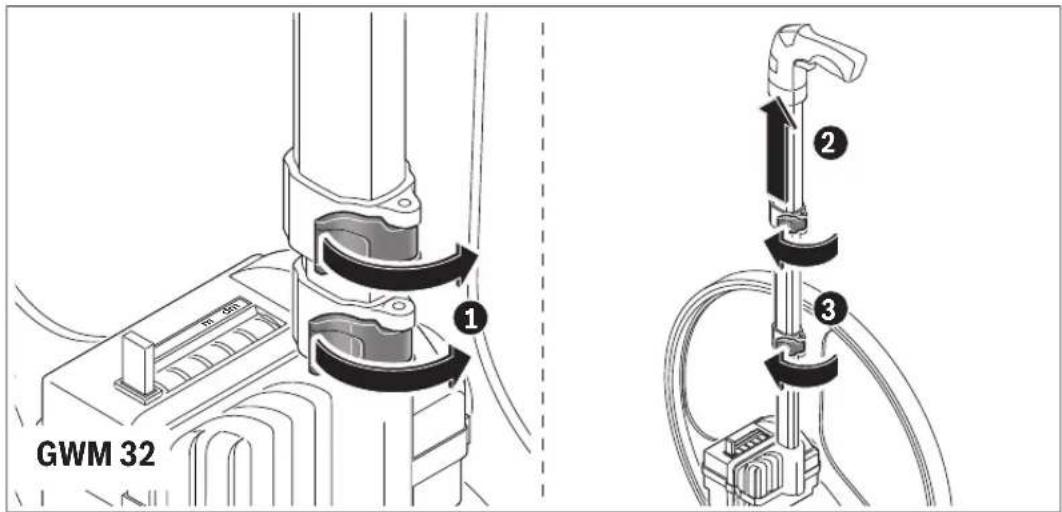
GWM 32 ① ② ③

GWM 32 2 6 0 0

1 609 92A 1XY | (13.5.16) Bosch Power Tools

BOSCH GWM 40 Professional - BOSCH - 11

BOSCH GWM 40 Professional - BOSCH - 12

BOSCH GWM 40 Professional - BOSCH - 13

BOSCH GWM 40 Professional - BOSCH - 14

BOSCH GWM 40 Professional - BOSCH - 15

BOSCH GWM 40 Professional - BOSCH - 16

BOSCH GWM 40 Professional - BOSCH - 17

BOSCH GWM 40 Professional - BOSCH - 18

BOSCH GWM 40 Professional - BOSCH - 19

|3
GWM 40

0 0 5 2 25 ↓ 0 0 0 0 65 GWM 40

GWM 40 ① ②

BOSCH GWM 40 Professional - BOSCH - 23

BOSCH GWM 40 Professional - BOSCH - 24

BOSCH GWM 40 Professional - BOSCH - 25

BOSCH GWM 40 Professional - BOSCH - 26

BOSCH GWM 40 Professional - BOSCH - 27

Table of contents Click a title to access it
Manual assistant
Powered by Anthropic
Waiting for your message
Product information

Brand : BOSCH

Model : GWM 40 Professional

Category : Multimeter