CoolAir RTX 2000 - Air Conditioning DOMETIC - Free user manual and instructions
Find the device manual for free CoolAir RTX 2000 DOMETIC in PDF.


| Product type | Truck auxiliary air conditioner |
| Brand | Dometic |
| Model | CoolAir RTX 2000 |
| Category | Air conditioning |
| Dimensions (L x W x H) | 645 x 860 x 308 mm |
| Weight | Approx. 32 kg |
| Power supply | 12 V= or 24 V= |
| Cooling capacity | 2000 W (24 V) / 1700 W (12 V) |
| Power consumption | 5–29 A (24 V) / 10–58 A (12 V) |
| Refrigerant | R-134a, 850 g |
| Global warming potential (GWP) | 1430 |
| Operating temperature range | +5 °C to +52 °C |
| Sound level | < 70 dB(A) |
| Operating modes | Auto, Eco, Boost, Manual |
| Adjustable thermostat | 17 °C to 30 °C |
| Timer | 10 to 120 min (24 V) or 10 to 600 min (12 V) |
| Battery protection | Yes, automatic shutdown in case of low voltage |
| Remote control | Yes, infrared |
| Usage | At standstill or while driving (max 130 km/h) |
| Maintenance | Clean with a damp cloth; do not obstruct the grilles |
| Safety | Detailed instructions: risk of electrocution, do not use by unsupervised children |
| Warranty | Legal; contact the dealer or Dometic |
| Repairability | Must be carried out by qualified personnel; use original Dometic parts |
Frequently Asked Questions - CoolAir RTX 2000 DOMETIC
User questions about CoolAir RTX 2000 DOMETIC
0 question about this device. Answer the ones you know or ask your own.
Ask a new question about this device
Download the instructions for your Air Conditioning in PDF format for free! Find your manual CoolAir RTX 2000 - DOMETIC and take your electronic device back in hand. On this page are published all the documents necessary for the use of your device. CoolAir RTX 2000 by DOMETIC.
USER MANUAL CoolAir RTX 2000 DOMETIC
© 2023 Dometic Group. The visual appearance of the contents of this manual is protected by copyright and design law. The underlying technical design and the products contained herein may be protected by design, patent or pending patent. The trademarks mentioned in this manual belong to Dometic Sweden AB. All rights are reserved.
RTX1000/2000, SPX1200TC
1
SPX1200IC
Original instructions
Please read these instructions carefully and follow all instructions, guidelines, and warnings included in this product manual in order to ensure that you install, use, and maintain the product properly at all times. These instructions MUST stay with this product.
By using the product, you hereby confirm that you have read all instructions, guidelines, and warnings carefully and that you understand and agree to abide by the terms and conditions as set forth herein. You agree to use this product only for the intended purpose and application and in accordance with the instructions, guidelines, and warnings as set forth in this product manual as well as in accordance with all applicable laws and regulations. A failure to read and follow the instructions and warnings set forth herein may result in an injury to yourself and others, damage to your product or damage to other property in the vicinity. This product manual, including the instructions, guidelines, and warnings, and related documentation, may be subject to changes and updates. For up-to-date product information, please visit documents.dometic.com.
Contents
1 Explanation of symbols. 6
2 Safety instructions 7
3 Target group 9
4 Intended use 9
5 Technical description 10
6Operation 11
7 Using the parking cooler 13
8 Display messages 21
9 Cleaning and care. 24
10 Warranty 25
11 Disposal. 25
12 Technical data 26
1 Explanation of symbols

WARNING!
Safety instruction: Indicates a hazardous situation that, if not avoided, could result in death or serious injury.

CAUTION!
Safety instruction: Indicates a hazardous situation that, if not avoided, could result in minor or moderate injury.

NOTICE!
Indicates a situation that, if not avoided, can result in property damage.

NOTE
Supplementary information for operating the product.
2 Safety instructions

WARNING! Failure to obey these warnings could result in death or serious injury
Electrocution hazard
- Plug the device to sockets that ensure proper connection especially when the device needs to be grounded.
- Disconnect all power supply lines when working on the parking cooler (cleaning, maintenance, etc).
Health hazard
- Installation and repairs to the parking cooler may only be carried out by qualified personnel who are familiar with the risks involved and the relevant regulations. Inadequate repairs may cause serious hazards. For repair service, please contact the service center in your country (see back page).
- People (including children) whose physical, sensory or mental capacities or whose lack of experience or knowledge prevent them from using this product safely should not use it without the supervision or instruction of a responsible person.
- Electrical devices are not toys.
Always keep and use the product out of the reach of children.
- Children must be supervised to ensure that they do not play with the product.
- Do not undo the upper cover of the parking cooler in the event of a fire. Use approved extinguishing agents instead. Do not use water to extinguish fires.

CAUTION! Failure to obey these cautions could result in minor or moderate injury.
Health hazard
- Only use the parking cooler for the purpose specified by the manufacturer and do not make any alterations or structural changes to the device.
- If the supply cord is damaged, it must be replaced by the manufacturer, its service agent or similarly qualified persons in order to avoid a hazard.
- Do not use the parking cooler if it is visibly damaged.
- Make sure no combustible objects are stored or installed near the air outlet. A distance of at least 50~cm must be maintained.
- Do not reach into air grilles or ventilation nozzles or insert any foreign objects in the system.

NOTICE!
Damage hazard
- The freedom of movement of semi-trailers (of the outer edges of the semi-trailer when turning or jackknifing) and other vehicle attachments must not be restricted.
- The parking cooler is not suitable for use in agricultural or construction vehicles.
- Vehicles with attached parking coolers may only be cleaned in automatic car washes where the top brush can be manually deactivated.
- Switch off the parking cooler before using automatic washing equipment (automatic car washes etc.) to clean the vehicle.
- Do not operate the parking cooler if the ambient temperature is below 0^ or above 52^ .
- Please inform your vehicle manufacturer if the height entered in your vehicle documents needs to be altered due to the installation of the parking cooler.
- Do not insert foreign objects into the system.

NOTE
- Observe the safety instructions in the installation manual for the parking cooler.
3 Target group
The information contained is aimed at the user of the parking cooler.
4 Intended use
The parking cooler is used to supply the interior of the driver's cab with cool and dehumidified air.
The parking cooler is designed for stationary use. It can be used while driving.
The parking cooler is not suitable for use in agricultural or construction vehicles.
The parking cooler is suitable for ambient temperatures of 5^ to 52^ .
RTX1000/2000 only: The maximum travel speed permitted is 130km / h , as noise or damage could occur depending on the vehicle design or installation position.

NOTE
As the parking cooler uses R134a as refrigerant with a GWP >150 , there may be national restrictions for installation the parking cooler on certain vehicles (i.e. the EU MAC directive 2006/40/EC). Check upfront the national requirements or contact your Domatic representative, if it is allowed to install the parking cooler on your vehicle.
This product is only suitable for the intended purpose and application in accordance with these instructions.
This manual provides information that is necessary for proper installation and/or operation of the product. Poor installation and/or improper operating or maintenance will result in unsatisfactory performance and a possible failure.
The manufacturer accepts no liability for any injury or damage to the product resulting from:
- Incorrect installation, assembly or connection, including excess voltage
- Incorrect maintenance or use of spare parts other than original spare parts provided by the manufacturer
- Alterations to the product without express permission from the manufacturer
- Use for purposes other than those described in this manual
Domatic reserves the right to change product appearance and product specifications.
5 Technical description
The parking cooler can be used for conditioning inside the vehicle. The air in the interior is guided into the system through the intake grille, cooled, dried and conveyed back into the interior through the blower nozzles.
In BOOST mode, the parking cooler cools the vehicle interior for not more than 20 min at maximum power and then switches to AUTO mode. When the set temperature is reached, the parking cooler switches to AUTO mode before the 20 min is reached.
In AUTO mode, the fan and compressor speed are controlled automatically.
In ECO mode the fan and compressor speed are controlled automatically. The compressor power is limited in ECO mode electronically.
The system is controlled using the control panel or the remote control.

NOTE
The parking cooler can lower the temperature within the vehicle to a certain level. The temperature depends on the type of vehicle, the ambient temperature and the cooling capacity of your parking cooler. For the cooling capacity of your parking cooler, chapter "Technical data" on page 26.
The system is fitted with a battery monitor. If the system is operated when the vehicle ignition is switched off, the system switches off automatically as soon as the supply voltage falls below a set level.

NOTE
This set level can be changed. For this, please contact the specialized company that installed the system.
6 O p e r a t i o n
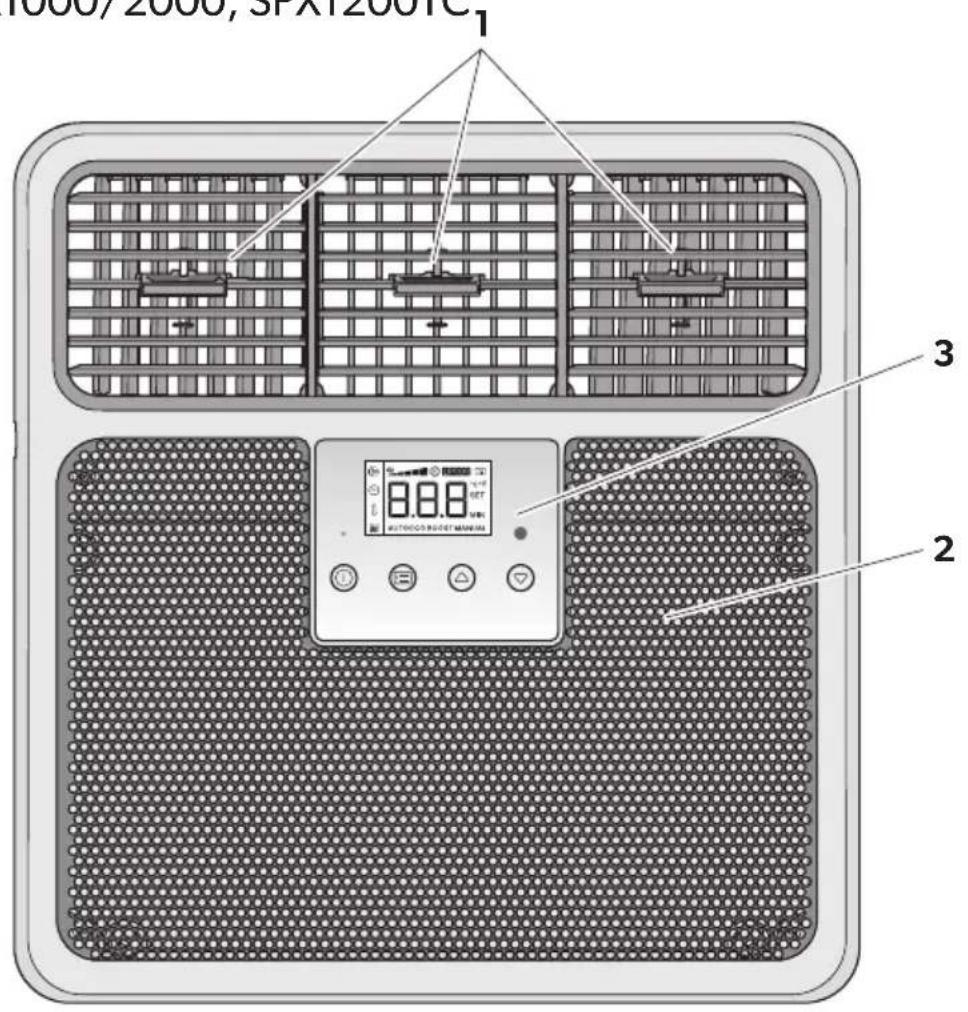
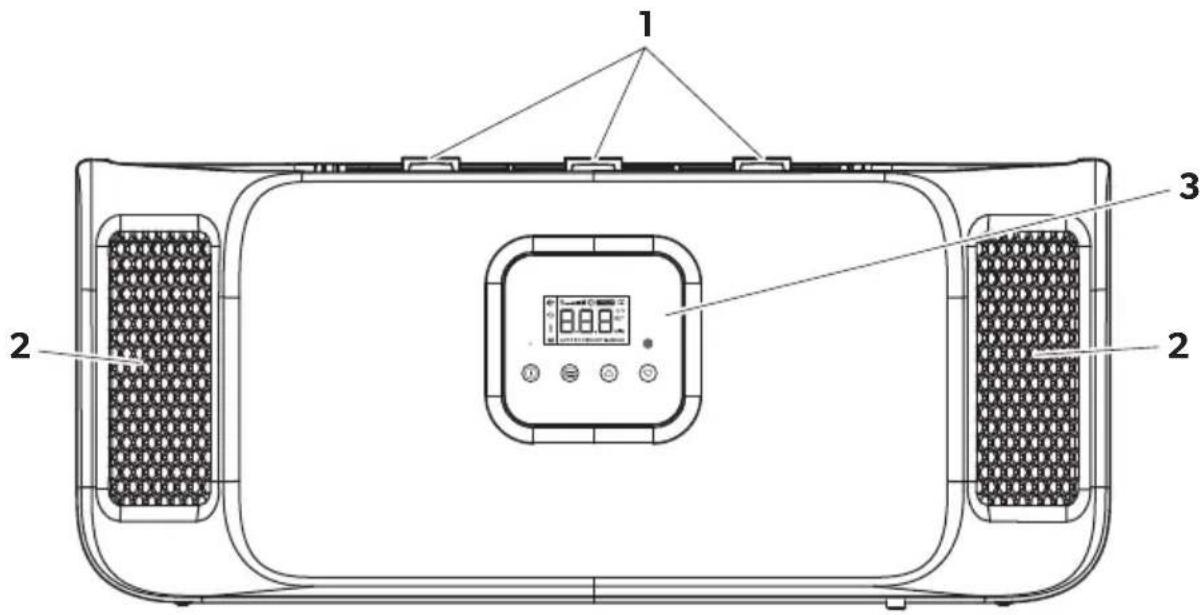
6.1 Device elements
The parking cooler has the following device elements:
| No. in fig. 1, page 3 | Explanation |
| 1 Blower nozzles | |
| 2 Intake grille | |
| 3 Control panel |
6.2 Control panel
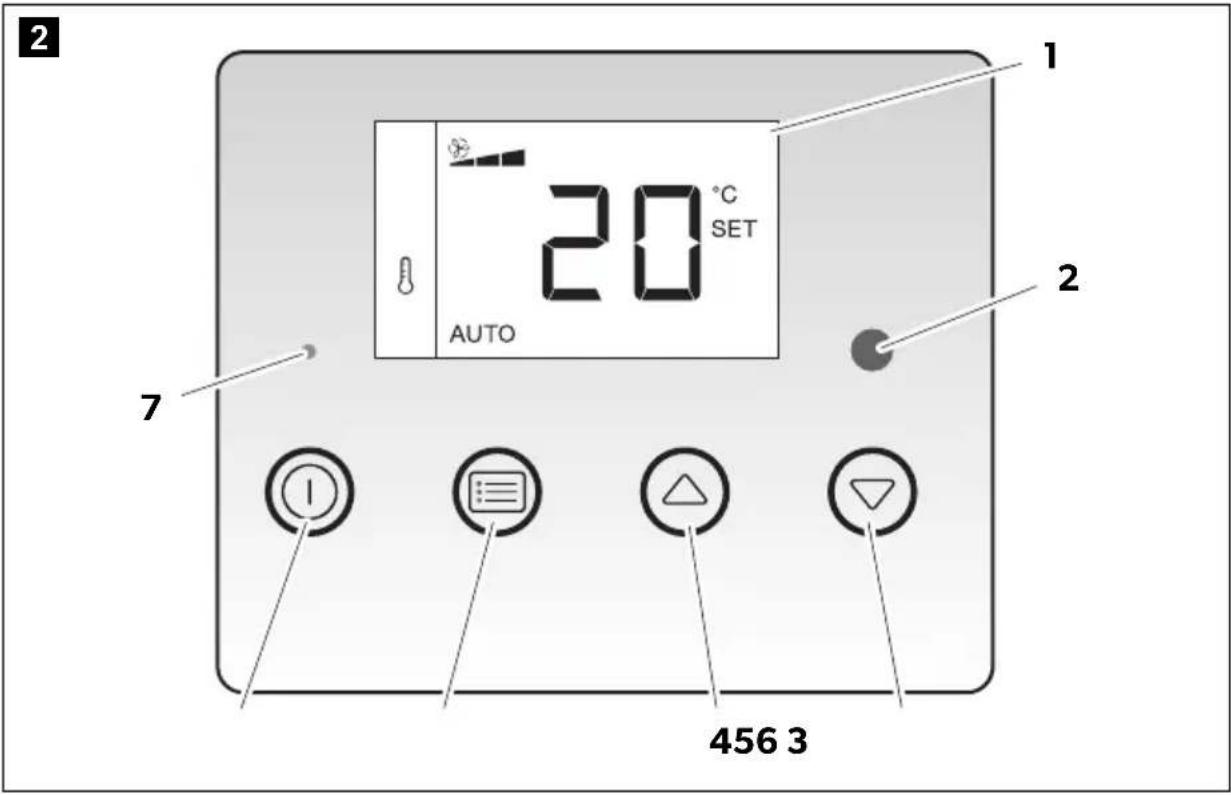
The system's control panel contains the following operating and display elements:
| No. in fig. 2, page 4 | Symbol Description |
| 1 Display (see chapter "Display" on page 12) | |
| 2 Infrared receiver (for the remote control) | |
| 3 Opens the sub-menus for setting or decreases the value of the selected parameter once a menu has been opened. | |
| 4 Opens the sub-menus for setting or increases the value of the selected parameter once a menu has been opened. | |
| 5 Scrolls through the menu items. | |
| 6 Switches the parking cooler: • On • Off (press button longer than 3 s) • To standby mode (press button briefly) | |
| 7 LED Power (blue): Only lights up when the system is switched on or in standby. | |
6.3 Remote control
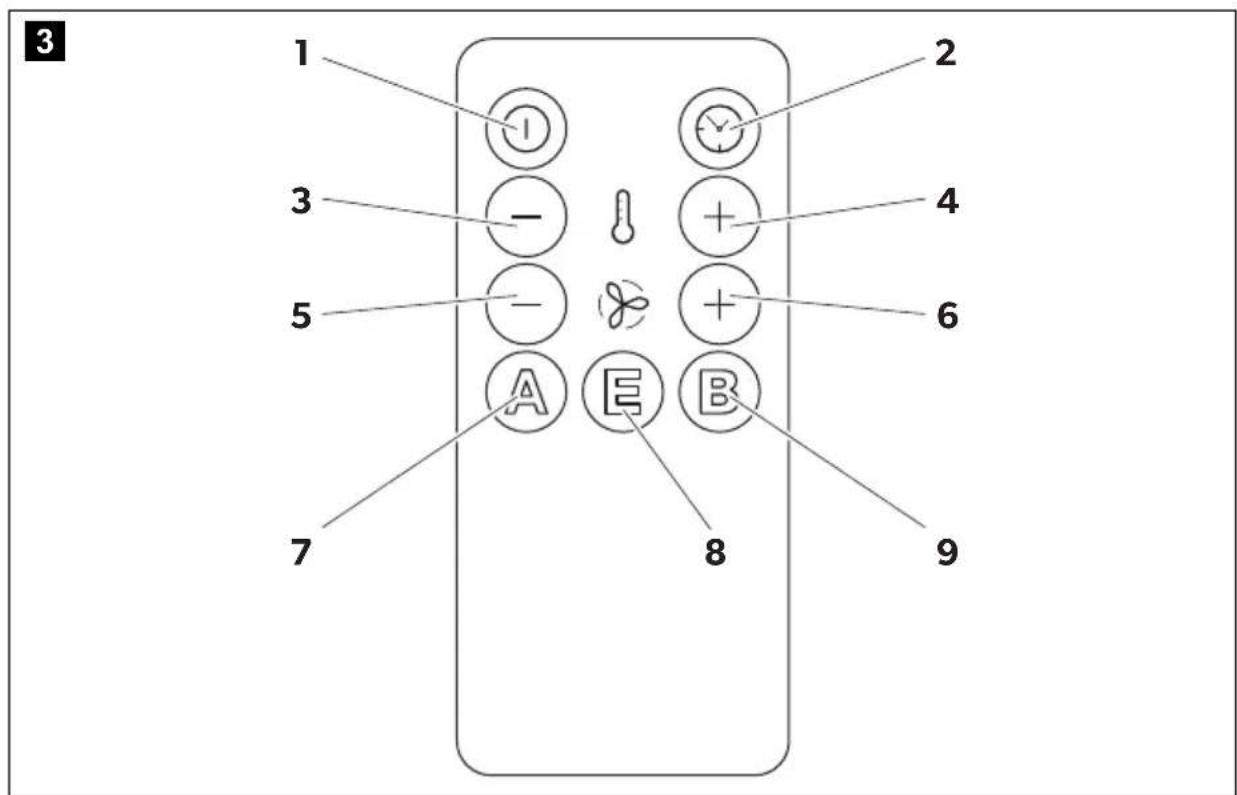
The remote control contains the following operating elements:
| No. in fig. 3, page 4 | Symbol Description |
| 1 | Press button briefly: Switches the parking cooler to standby mode or on again, if it is in standby mode Press button longer than 3 s: Switches the parking cooler off The parking cooler only can be switched on at the control panel. |
| 2 Increases the timer running time by 10 min. | |
| 3 | Reduces the set point by 1 °C/2 °F. |
| 4 | Increases the set point by 1 °C/2 °F. |
| 5 | Switches the parking cooler to MANUAL mode and reduces the speed of the fan. |
| 6 | Switches the parking cooler to MANUAL mode and increases the speed of the fan. |
| 7 Switches the parking cooler to AUTO mode. | |
| 8 Switches the parking cooler to ECO mode. | |
| 9 Switches the parking cooler to BOOST mode. | |
6.4 Display
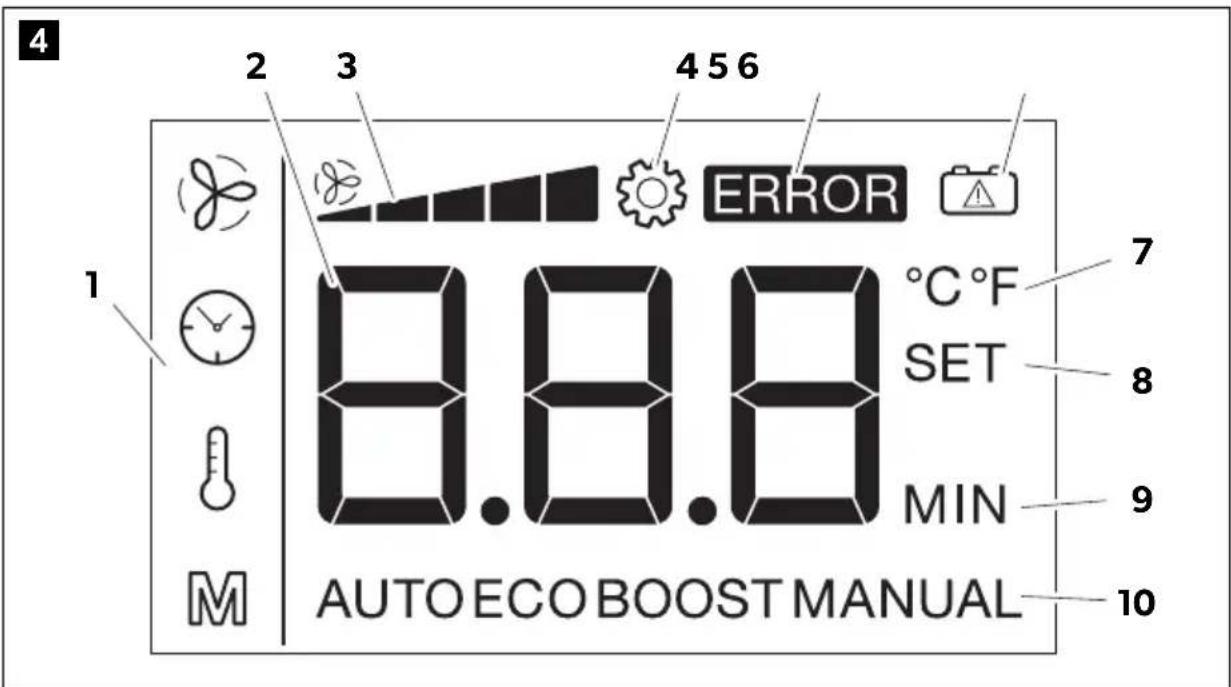
The display has the following indicators:
| No. in fig. 4, page 5 | Description |
| 1 The symbol shows the current menu selected (see chapter “Using menus” on page 16). | |
| 2 Depending on the current menu, shows: • The required temperature • The current fan speed • The remaining running time of the timer | |
| 3 Shows the current fan speed. | |
| 4 | Setting: Lights up when the setting menu has been activated. |
| 5 | ERROR: Lights up when the supply voltage falls below a set value. Additionally the display flashes. |
| 6 | Battery: Displays problems with the supply voltage. |
| 7 °C: Lights up when the temperature is shown in °C. °C: Lights up when the temperature is shown in °F. | |
| 8 SET: Indicates that the set temperature is being shown. | |
| 9 MIN: Lights up when the timer has been set. | |
| 10 Shows the current mode (see chapter “Menu mode” on page 17) | |

NOTE
You can find full details of the display messages in the chapter "Display messages" on page 21.
7 Using the parking cooler

NOTICE! Damage hazard
- The manufacturer assumes no liability for non-observation of this operating manual, in particular for any consequential damage, especially consequential damage caused by failure of the parking cooler.
- Do not insert foreign objects into the system.

NOTE
In EX/III and FL vehicles, the parking cooler must be shut off via a battery master switch in case of emergency.
7.1 Tip for improved use

NOTE
The CoolAir parking coolers are designed as air conditioners for relaxing rest periods. They can be used while driving, however they do not replace the engine-powered vehicle air conditioning system.
Observe the following instructions to ensure your CoolAir parking cooler is used efficiently.
It is recommended that you
- Park your vehicle in the shade when possible.
- Shade your vehicle when possible.
- If you do not have a vehicle air conditioning system, air out your vehicle well before using the parking cooler.
- You should always cool down the vehicle interior before a rest period using the vehicle air conditioning system.
- Keep doors and windows closed.
- Avoid any heat sources in the vehicle.
- Reduce the power consumed by other products to ensure the maximum possible operating time of the parking cooler.
- Select a suitable temperature and operating mode.
- Make sure the blower nozzles (fig. 1 1, page 3) and intake grille (fig. 1 2, page 3) are not covered by cloths, paper or other objects.
- The best cooling capacity is achieved when the blower nozzles (fig. 1, page 3) are not directed towards the intake grille (fig. 2, page 3).
Always observe the following
- If you would like the parking cooler to match the color of your vehicle, only paint the upper shell casing of the parking cooler.
Only paint this when it has been removed. Use light colors when possible.
- Wash your vehicle regularly, as dirty driver's cabs heat up more quickly.
- Make sure that the performance of the parking cooler is not affected by other sources of heat (e.g. waste heat from cold machines).
7.2 Switching on the parking cooler

NOTICE! Damage hazard
Never close all of the air nozzles of the parking cooler simultaneously. The system would ice up inside.

NOTE
The first time the parking cooler is used, there may be a slight smell. This odor is caused by a design feature and ends after the system has been running for a short time.
With the system switched off, press the ① button.
The fan starts.
The Power LED (fig. 2 7, page 4) lights up.
The digital display (fig. 2 1, page 4) shows the current status of the parking cooler (see chapter "Display" on page 12).

NOTE
Depending on the system status, the system compressor is switched on with a delay of up to 180 s.
7.3 Switching the parking cooler to standby mode
Press the button briefly to switch the parking cooler to standby mode.
The parking cooler saves the current settings.
The Power LED (fig. 2 7, page 4) continues to light up.

NOTE
- When the parking cooler is in BOOST mode and switched to standby mode, it will start the next time in AUTO mode.
- A running timer is set to 0 by switching the parking cooler in standby mode.
- The parking cooler switches off completely after 12 hours in standby mode to save power.
- SPX1200T, SPX1200C only: When the parking cooler is switched to standby mode via remote control, an automatic pump cycle of 8 s is started.
7.4 Switching off the parking cooler
Press the ① button for at least 3 s to switch off parking cooler.
The parking cooler saves the current settings.
The Power LED (fig. 2 7, page 4) goes out.

NOTE
- When the parking cooler is in BOOST mode and switched off, it will start the next time in AUTO mode.
- A running timer is set to 0 by switching off the parking cooler.
- If the parking cooler is switched off while the compressor is still operating, the fan will continue to run for 20 s to dry the evaporator, among other things.
- SPX1200T, SPX1200C only: When the parking cooler is switched off, an automatic pump cycle of 8 s is started.
7.5 Using menus
You can set the parking cooler to suit your requirements using the menus:
- Press the button to browse through the menus.
- Press the or button to navigate to the appropriate sub-menu or to change the selected value.
- Press the button to reduce the selected value.
- Press the button to increase the selected value.

NOTE
If you don't press any button for more than 5 s, the display switches back to the menu mode.
You can select the following menus:
| Menu Description | Change in value | |
| Setting the temperature (17 °C to 30 °C/62 °F to 86 °F) | 1 °C/2 °F | |
| M | Setting the mode (see chapter “Menu mode” on page 17) - | |
| MANUAL mode: Set the fan speed manually (level 1 – 5) | 1 | |
| Set the running time of the timer | 10 min | |
| RTX1000 24 V/RTX2000 24 V, SPX1200TC, SPX1200IC: 10 – 120 min | ||
| RTX1000 12 V/RTX2000 12 V: 10 – 600 min | ||
Menu mode
In menu mode, you can select the following sub-menus:
| Sub-menu Purpose |
| AUTO AUTO mode: The fan and the compressor are controlled automatically. |
| ECO Energy-saving mode: The fan and the compressor are controlled automatically. The speed of the compressor is limited electronically. |
| BOOST BOOST mode: The system runs at once at full-power. The system switches to automatic mode after 20 min or once the set temperature has been reached. |
| MANUAL MANUAL mode: You can set the fan speed manually. The compressor is controlled automatically. |
7.6 Using the air conditioner
- Set the required temperature (chapter "Setting the temperature" on page 18).
- Set the required mode (chapter "Setting the mode" on page 18).

NOTE
If the required temperature is not reached in the energy-saving mode or at a low fan speed, increase the fan speed or switch to BOOST mode or to AUTO mode.
- Set the timer (chapter "Setting the timer" on page 19), if you want the parking cooler to switch off automatically after the required time.
7.7 Setting the temperature

NOTE
Depending on the set unit for the temperature, the temperature is changed in steps of either 1^ C or 2^ F .
Control panel
- Press the button until the symbol is displayed.
- Press the or button to set the desired temperature.
- Press the button to save the value.
Remote control
- Press the + button to increase the temperature.
- Press the button to decrease the temperature.
- To save the value don't press any button for more than 5 s.
7.8 Setting the mode
Control panel
- Press the button until the symbol is displayed.
- Press the or button to set the AUTO, ECO or BOOST mode.
- To set the MANUAL mode see below.
- Press the button to start the selected mode.
If you like to set the fan speed manually (MANUAL mode):
- Press the button until the symbol is displayed.
- Press the or button to set the desired fan speed. At the same time the MANUAL mode is started.
- Press the button to save the value.
If you want to leave the MANUAL mode:
- Press the button until the symbol is displayed.
- Press the button to leave the MANUAL mode.
The BOOST mode is started.
3. Press the button
- one more time to set the ECO mode
- two more times to set the AUTO mode
Remote control
- Press the button to set the AUTO mode.
- Press the button to set the ECO mode.
- Press the button to set the BOOST mode.
- Press the + button to increase the fan speed manually and to start the MANUAL mode.
- Press the button to decrease the fan speed manually and to start the MANUAL mode.
- To to start the selected mode don't press any button for more than 5 s.
7.9 Setting the timer
The parking cooler is fitted with a timer. Once the set time has elapsed in the timer, the parking cooler automatically switches off.
If the timer is activated, the display alternates between the set temperature and the duration.
Control panel
- Press the button until the symbol appears.
- Press the or button to set the required running time of the timer in 10 minute intervals.
- Press the button to save the value.
Remote control
- Press the button to increase the required running time of the timer in 10 min intervals.
RTX1000 24 V/RTX2000 24 V, SPX1200TC, SPX1200IC: The maximum running time is 120 min.
RTX1000 12 V/RTX2000 12 V: The maximum running time is 600min
- To save the value don't press any button for more than 5 s.
To reset the timer to 0 min, proceed as follows:
- RTX1000 24 V/RTX2000 24 V, SPX1200TC, SPX1200IC: Press the button until the timer shows 120 min.
- RTX1000 12 V/RTX2000 12 V: Press the button until the timer shows 600 min.
- Press the button again.
- To save the value don't press any button for more than 5 s.
7.10 Draining the condensate (SPX1200T, SPX1200C only)
The condensation water which accumulates due to the way the system works is automatically extracted at intervals during operation. You can pump out the condensation water manually when necessary.

NOTE
Before winter, extract the condensation water from the system to avoid damage caused by freezing water.
- Press the ① button on the control unit briefly to switch the parking cooler into standby.
- Press and hold the button and the button for more than 3 s.
The display shows a timer that counts down 60 s.
- Keep the button and the button pressed as long as you want to drain the condensation water but stop immediately when the pump noise is getting louder. This indicates that the pump is running dry and can get damaged.
- To switch off the parking cooler press the ① button for more than 3 s.
7.11 Tilting the cab
Before tilting the cab for maintenance, proceed as follows:
RTX1000, RTX2000
- Switch off the parking cooler.
SPX1200T, SPX1200C only
- Drain the condensate (see chapter "Draining the condensate (SPX1200T, SPX1200C only)" on page 20).
- Switch off the parking cooler.
8 Display messages

NOTE
When you start the vehicle or switch on several consumers at once, the display text "LO" may briefly appear.
8.1 Control panel warnings
The system control unit has various functions for protecting the device and the battery. If one of these protective functions has been triggered, this is shown by the following codes on the display.
| Display indication | Description Cause Remedy | |||
| LO | A | The battery monitor has detected low voltage. | Connection voltage is too low. The battery capacity is not sufficient to operate the system. | Charge your vehicle battery. If the fault occurs again, contact an authorized workshop. |
| LO °C | The system has detected that the ambient temperature is too low for operation. | The ambient temperature is below 5 °C. | Wait until the ambient temperature has risen above 5 °C before switching on the system. | |
| HI | A | The system has detected a brief or constant over-voltage. | A brief over-voltage may occur when large electrical consumers are switched off. Constant over-voltage is the result of an incorrect con- nection voltage. | Brief over-voltage: No action required. If the display message "HI" remains visible for a longer period: Have the vehicle electronics checked. Make sure the connection voltage is less than 30 V. |
| - | - | The system has detected a too big inclination. The compressor is switched off. 10 min later, the entire system will be switched off. | The compressor (driver's cab) is tilted too far. | Once the compressor has been returned to its normal position, the system can be switched on again. |
| A | When operating for the first time, the symbol flashes twice briefly every 5 s: The system reports an incorrect connection of the battery sensor cable. | The system cannot measure the battery voltage. | Consult an authorized workshop and have the battery connection checked. | |
| A | The symbol flashes while operating: The system reports that the battery voltage will soon no longer be sufficient to operate the system. | The battery voltage is only a little higher than the set shut-down value. | Recharge your vehicle battery. | |
8.2 Control panel fault messages
The "ERROR" symbol (fig. 4 5, page 5) lights up if there is a fault with the parking cooler. The type of error is shown on the display by the following error codes:
| Display text | Description Cause Remedy | ||
| F01 | The compressor does not work. | Error in compressor sensor electrical supply (open circuit). | Switch off the system. Switch it on again after 30 min. If the fault occurs again, contact an authorized workshop. |
| F02 | Error in compressor sensor electrical supply (short circuit). | ||
| F03 | Compressor overload | ||
| F04 | The condenser fan 1 does not work. | No response from the fan. | |
| F05 | The condenser fan 1 is overloaded. | Faulty fan speed | |
| F06 | The condenser fan 2 does not work. | No response from the fan. | |
| F07 | The condenser fan 2 is overloaded. | Faulty fan speed | |
| F08 | The evaporator fan does not work. | No response from the fan. | |
| F09 | The evaporator fan is overloaded. | Faulty fan speed | |
| F10 | The condensation water that has formed is not being discharged. | The condensation water that has formed is not being discharged. | |
| F11 | The system cannot determine the internal temperature. | Error in temperature sensor electrical supply (open circuit). | |
| F12 | Error in temperature sensor electrical supply (short circuit). | ||
| F13 | The system cannot determine the external temperature. | Error in temperature sensor electrical supply (open circuit). | Switch off the system. Switch it on again after 30 min. If the fault occurs again, contact an authorized workshop. |
| F14 | Error in temperature sensor electrical supply (short circuit). | ||
| F15 | The system cannot determine the compressor temperature. | Error in temperature sensor electrical supply (open circuit). | |
| F16 | Error in temperature sensor electrical supply (short circuit). | ||
| F17 | The compressor temperature is too high. | Compressor thermal overload | |
| F18 | - | - | |
| F19 | - | - | |
| F20 | The system reports a (temporary) electrical overload. | The system's current power requirement is too high. | |
| F21 | The control PCB is not working. | Control PCB communication error | |
| F22 | The display board is not working. | Display board communication error (fault in the connecting cable between the display and control board) |
9 Cleaning and care
Please observe the following tips for the cleaning and care of your parking cooler.

NOTICE! Damage hazard
Do not use abrasive cleaning agents or hard objects or inflammable agents during cleaning as these can damage the appliance.

NOTICE!
The parking cooler must not be cleaned with a high-pressure cleaner.
Clean the housing of the parking cooler and the outlet panel occasionally with a damp cloth.
Remove leaves and other dirt from the ventilation grilles of the parking cooler occasionally. Make sure you do not damage the system in the process.
Check regularly that all the elements for the air conditioning unit are fastened.
Check regularly that the connection lines are undamaged and secure.
10 Warranty
The statutory warranty period applies. If the product is defective, please contact your retailer or the manufacturer's branch in your country (see dometic.com/dealer).
For repair and warranty processing, please include the following documents when you send in the product:
- A copy of the receipt with purchasing date
- A reason for the claim or description of the fault
Note that self-repair or non-professional repair can have safety consequences and might void the warranty.
11 Disposal
Recycling products with batteries, rechargeable batteries, and light sources

Remove any batteries, rechargeable batteries, and light sources before recyc- cling the product.
Return defective or used batteries to your retailer or dispose of them at collection points.
Do not dispose of any batteries, rechargeable batteries, and light sources with general household waste.
If you wish to finally dispose of the product, ask your local recycling center or specialist dealer for details about how to do this in accordance with the applicable disposal regulations.
The product can be disposed free of charge.
Recycling packaging material

Place the packaging material in the appropriate recycling waste bins wherever possible.
12 Technical data
This product contains fluorinated greenhouse gases.
The cooling unit of RTX1000 and RTX2000 is hermetically sealed.
| RTX1000 24 V RTX2000 24 V | ||
| Cooling capacity 1200 W 2000 W | ||
| Voltage | 24 V= (20 V=-30 V=) | |
| Current consumption | 5-25 A | 5-29 A |
| Operating temperature range +5 to +52 °C | ||
| Refrigerant R-134a | ||
| Refrigerant quantity 350 g 850 g | ||
| CO2equivalent | 0.5005 t | 1.21 t |
| Global warming potential (GWP) | 1430 | |
| Noise emission | <70 dB(A) | |
| Dimensions (L×W×H) | 645×860×308 mm | |
| Weight | Approx. 23 kg | Approx. 32 kg |
| RTX1000 12 V | RTX2000 12 V | |
| Cooling capacity | 1100 W | 1700 W |
| Voltage | 12 V---(10 V--- - 15 V---) | |
| Current consumption | 10 - 50 A | 10 - 58 A |
| Operating temperature range +5 to +52 °C | ||
| Refrigerant R-134a | ||
| Refrigerant quantity 350 g 850 g | ||
| CO2 equivalent | 0.5005 t | 1.21 t |
| Global warming potential (GWP) | 1430 | |
| Noise emission | < 70 dB(A) | |
| Dimensions (L x W x H) | 645 x 860 x 308 mm | |
| Weight | Approx. 23 kg | Approx. 32 kg |
| SPX1200TC SPX1200IC | ||
| Cooling capacity 1200 W | ||
| Voltage | 24 V= (20 V=-30 V=) | |
| Current consumption 5-25 A | ||
| Operating temperature range +5 to +52 °C | ||
| Refrigerant R-134a | ||
| Refrigerant quantity 350 g 350 g | ||
| CO2equivalent 0.5005 t 0.5005 t | ||
| Global warming potential (GWP) 1430 | ||
| Noise emission < 70 dB(A) | ||
| Dimensions (L x W x H) | 778 x 577 x 182 mm | 648 x 144 x 278 mm |
| Weight | Approx. 33 kg | Approx. 27 kg |
5 Description technique
7.7 Indstilling at temperatures

BEMAERK
7.7 Stalla in temperature

ANVISNING
Beroende på angiven temperaturenhet kan du äandra temperaturen i steg om 1^ respektive 2^ .
Kontrollpanel
MANUAL Modul MANUAL:
Ioka3Ba CNTyaunia KOaTO, aKO He 6bde n36eHaTa, ue DOBeDe Do uetn no NMyuectBOTO.

YKA3AHNE
CToIaT KnMaTk He e IooXoJa3a pa6Ota B cenCKocToHaHcN i CtponTeHN MaunHn.
CToIaT KInMaTnK e nOxOJa3a OKoJIHn Tempepatypn ot 5^ do 52^
Camo 3a RTX1000/2000: MaKcImMaJIHaTa pa3peSeHa ckOpocTe 130 km/h, TbI KaTO Moxe Da Bb3HnKHe Shum INI NIOBpeDa B 3aBNCIMOCT OT KOHCTpyKUra TIN MAcTOTO Ha MOHTax Ha IpeBO3HOTOCpeDCTBO.

YKA3AHNE
TbKATO B CTOAUNI KNIIMATIK Ce I3PON3Ba XnAINHe aReHT R134a c PIG3 >150, MoKe Da NMa HauNoHaHnO OrpaHnueHn 3a MOHTnpaHTo Ha CTOAUNI KNIIMATIK Ha OnPeDeneHn PpeBO3Hn CpeCTBa (t.e. DInpeKTNbata 2006/40/EO Ha EC OTHOcNO IOBnXnHte KNIIMATNCHn CnCTemn). PpOBepTe PpeDbapnteHn HauNoHaHnTe N3NCKBaHn Enn Ce CBbpXeTe C Baunr PpeCTabNTen Ha Dometic daH e pa3peSeHo da MoHTnpaTe CTOAUNI KNIIMATIK Ha BaWeTo PpeBO3Ho CpeCTBO.
To3n npOdyKT e NOxOaIcMo 3a npEdbHeHaTa ceI n npINOxHne cBfnaCHO hacto- ynte HNCTpyKuIN.
ToBa pbKOBOCTBO npedocTbA INHOpMaun, Heo6xOIMa 3a npabINHaTa HnCTaNa- n/nnn ekCnnoataun Ha npodukta. NooNnHCTanipaHe n/nnn HnnpaBnHa ynoTpe6a n PndpbXka ige doBeDaT Do He3aDOBOnTeHnHa pa6ota n eBentyaHNO Do nobpeDn.
IpOIN3BODNTeTHe HOCN OTROBOPHOCT 3a HapaHЯBaHnI NO NpOdyKTA,
PpUHNHeNOT:
- HenpaBnneH MOHTax N Cbbp3BaHe, BKNIOuHTeINHO npeKaIeHO BnCOKO HnpeXeHne
- HenpaBnHa noDpBxKa nIe I3NoI3BaHe Ha pe3epBHy qactN, pa3nnuHn OT opINHaHNTE, npedocTbAHN OT pON3BOaNTeJI
- I3mehenHa npOdykTa 6e3 n3pnuHo pa3peSeHne OT pON3BOInteTae
- ɪnʒɒnʒBaHé 3a ǚeŋn, paʒŋuŋHn OT ONncaHnTe B TOba pþkoBOdCTBO
Dometic cn 3ana3Ba npaBoto da npomeHЯ BbHsHnY BnД n CpeuKauNTe Ha npOdykTa.
5 Texnuecko onncahne
CTOJIINK KINMaTIK MOKe Da Ce H3NoJ3Ba 3a KINMaTIN3IpaHe Ha BbTpEshOCTTa Ha IpeBO3HOTo CpeIcTB. Bb3dYxbT Ha BbTpEshOTo NOMEseHne Ce NODaBa Ipe3 BCMyKaTeHNaTa peWeTKa KbM CNCTeMaTa, OXnaJaCe, IN3Cy7aBa Ce n Ce OTBeJda O6paTHO KbM BbTpEshOTo NOMEseHne Upe3 peaKTtBn DIO3N.
B pexim BOOST (HHTeH3nBHa pa6oTa), cToaIyT KInMaTIK OxnaJda INTeepnoHa Na IpeBO3HOTcpeDCTBO 3a He NoBuee ot 20 MInHyTn npN MaKcImaHaMoIHOCT N Cnei TOBa IpeBKnIOUBy B pexim AUTO (ABTomaTuHo). Korato 3aJaDeHaTa TempepaTypa e DOCTINHaT, cToaIyT KInMaTIK ppeBKnIOUBy Ha pexim AUTO (ABTomaTuHe), npeDi Da H3MnHaT 20 MInHyTn.
B pexim AUTO (A B T O M a T N u e H) c k o p o c t T a h a B e H T I n a T o p a i K o m n p e c o p a c e y n p a-B I R A b a B T O M a T N U H O.
B pexim ECO (IkoHOMnueH) ckopocTtHa BeHTnATopa N KOMnpecopa ce ynpaBnBa aBTOMaTHNo. MoHocTtHa KOMnpecopa e OrpaHnueHa nO eNeKTpOHeN nbT Bpexim ECO (IkoHOMnueH).
CnCTemata ce ynpabnBa upe3 nane 3a ynpabneHne nn dNCTaHcNOHOTO ynpabHe. Hne.

YKA3AHNE
CTOJIINK KIMATIK MOXE DA NOHIXI TEMNEPATypaT B INpeBO3HOTOCpeCTBO DO ONpeDeNeHO HNO. Tempepatpata, KOrTO Tpr6Ba Da ce DocTnHE Pn OXnaJaHe 3aBnCn OT TnPa Ha INpeBO3HOTOCpeCTBO, Tempepatpata Ha 3ao6nKaJauTa CpeDa N KaNaUnTeHa OXnaJaHe Ha CTOJIINK. 3a NoBeue INΦopMaunr OTHoCHo KaNaUnTeHa OXnaJaHe Ha CTOJIINK KIMATIK BNXTe I.I. "TexHnueCKn DaHHN" Ha ctp. 462.
CnCTemata pa3nonara c KOHTpon Ha akymynaTopa. Ako cnCTemata pa6OTn npn 13KJIIOyeHO 3anaIbAHe Ha npeBO3HOTo CpeDCTBO, Tc Ce N3KJIIOyBa aBTOMaTNUHO KOrato 3axpaHbAIoTO HAnpexEHe cnaHne IOd ONpeDeJeHa CTOnHOCT.

YKA3AHNE
ToBa 3aIaIeHOBNBOMOXe Da6bIe IpOMeHcO.3aTa3nUeI,MOJI,CBbpXeTe Ce CbC CneuNIN3IpaHaT aΦnpMa,KoITO e INHCTaIIpaIa CNCTeMaT a.
6 P a 6 o T a
6.1 Elenements Ha ypeda
CToIaT KInMaTnK pa3NoIa TcB CneHnTe eNemEnTI:
7.9 Taineri seadmine
aillll (b) 1gll sL Jell lal bbl 1dol ybi aL
()
aall bll
y 1 y
·juaia juii
aal 1
(3) = 1
a aal 1d g aagall agll aaii iaiiiae aaiiie aaiiie aaiie aaiie
20.
AATO) (ECO)
a
aai 1 aai i 1i 1i 1i 1i 1i 1i 1i 1i 1i 1i 1i 1i 1i 1i 1i 1i 1i 1i 1i 1i 1i 1i 1i 1i 1i 1i 1i 1i 1i 1i 1i 1i 1i 1i

i 1
a

6
6.1
jll jll lglie 1e 1g 50
| الشام | الشام |
| 1 | |
| 2 | |
| 3 |
6.2
iill llll 1
ailll jlll jlll jlll jlll
CoolAir aill c gll lal s p

J 1
laiaa
.1
.2
.3
.4
.5
.6
.7
.8
.9
. 1
2 1
3 1
4
5
6
7
8
9
10
Laiie 1
aol yolll lalil 1y jn o gall 5o n o gull
J 1
aaii i 111 111 111 111 111 111 111 111 111 111 111 1
7.2
aill jbi!
y

aaii i 100 . aiai i 1 1 1 1 1 1 1 1 1 1 1 1 1 1 1 1 1 1 1 1 1 1 1 1 1 1 1

gai plll yLioe ①
jllbc
√.
.4 7 2
21 × 21 × 21
12 12
ailll 1
SPX1200C:SPX1200T
8 8
.
7.4
gill 1 gll 3 0
√
.4 7 2
a
Jooell 1y y w g aiee BOOST g g
.AUTO
10 0 0
J 1
20 20
Lggaagglgllgellkssyloic:SPX1200C-SPX1200T
- 1

ai gai piai
7.5
i#
.1
.2
.3
. 4
a
aalll 5n jy

i
Aa a a a a a a a a a a a a a a a a a a a a a a a a a a a a a a a a a a a a a a a
1
Jaiyagaae g jg 1n m
10
aaii aiee e g a jzj j 1 1 1 1 1 1 1 1 1 1 1 1 1 1 1 1
dometic.c
:
Jell
a
11j
1 1 1 1 1 1 1 1 1 1 1 1 1 1 1 1 1 1 1 1 1 1 1 1 1 1 1 1 1 1 1 1 1 1 1

dometic.com/sales-offices