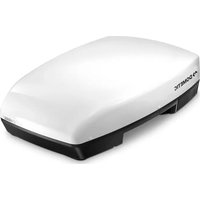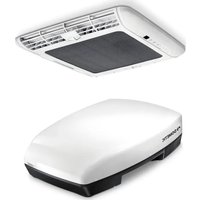
FreshJet 2700 - Air Conditioning DOMETIC - Free user manual and instructions
Find the device manual for free FreshJet 2700 DOMETIC in PDF.


| Product type | Roof air conditioning for motorhomes, caravans and camper vans |
| Brand | Dometic |
| Model | FreshJet 2700 |
| Installed height | 225 mm (estimated based on FreshJet 1700/2000/2200 models) |
| Power supply | 230 V~, 50 Hz (DC kit optional for 12 V battery operation) |
| Air conditioning modes | Automatic, Cooling, Heating (depending on model), Air circulation, Dehumidification |
| Additional functions | Timer (programmed on/off), Sleep (gradual temperature adjustment), I feel (remote temperature sensor), Winter mode (maintains 7-10°C) |
| Ventilation speed | 4 manual levels + automatic mode |
| Set temperature range | 16 °C to 31 °C |
| Integrated lighting | Adjustable LED lamps (intensity 20%-100%) on some models |
| Remote control | Infrared with display, AAA batteries (2x) |
| Cleaning | Clean the housing with a damp cloth; regularly clean the filter of the air outlet unit with a soapy solution |
| Maintenance | Check condensation drains, clean filter, replace activated carbon filter once a year, inspect seals and heat exchangers by a professional |
| Safety | Automatic shutdown in case of overvoltage (>265 V); frost protection; do not block ventilation openings; maintenance to be carried out by qualified personnel |
| Spare parts and repairability | Filters, remote control, DC kit; repairs by a Dometic approved workshop |
| General information | 89-page user manual, available in several languages; legal warranty |
Frequently Asked Questions - FreshJet 2700 DOMETIC
User questions about FreshJet 2700 DOMETIC
0 question about this device. Answer the ones you know or ask your own.
Ask a new question about this device
Download the instructions for your Air Conditioning in PDF format for free! Find your manual FreshJet 2700 - DOMETIC and take your electronic device back in hand. On this page are published all the documents necessary for the use of your device. FreshJet 2700 by DOMETIC.
USER MANUAL FreshJet 2700 DOMETIC
natural_image
Two white electronic devices with black buttons and ventilation grilles, shown from different angles (no visible text or symbols)FJ 1700, FJ 2000, FJ 2200, FJ 3200
EN Air conditioning roof unit Operating manual....15
© 2023 Dometic Group. The visual appearance of the contents of this manual is protected by copyright and design law. The underlying technical design and the products contained herein may be protected by design, patent or be patent pending. The trademarks mentioned in this manual belong to Dometic Sweden AB. All rights are reserved.
1
FreshJet 1700, 2000, 2200
FreshJet 3200
2
Chillout ADB
ADB
3
4
Chillout ADB
ADB
5
natural_image
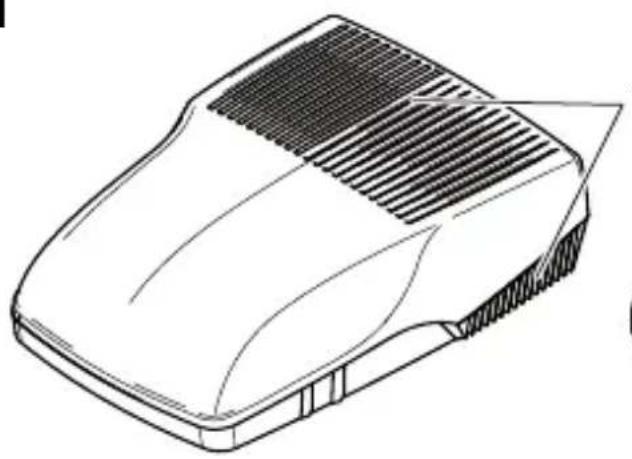
Line drawing of a car hood with grille and side panel (no text or symbols)FreshJet 1700, 2000, 2200
natural_image
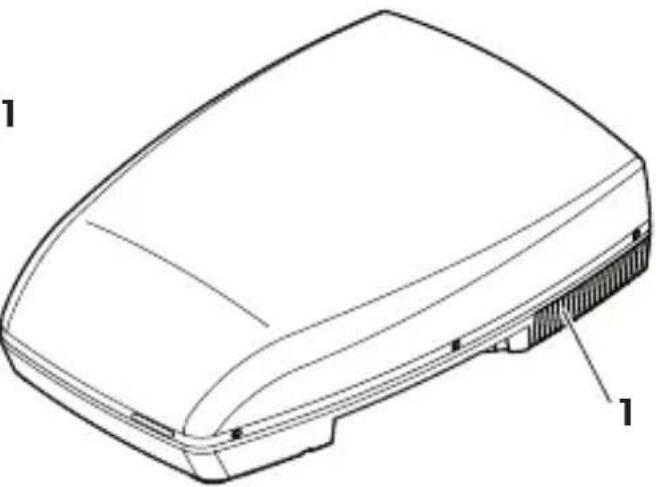
Technical line drawing of a device casing with labeled parts (no text or symbols present)FreshJet 3200
6
natural_image
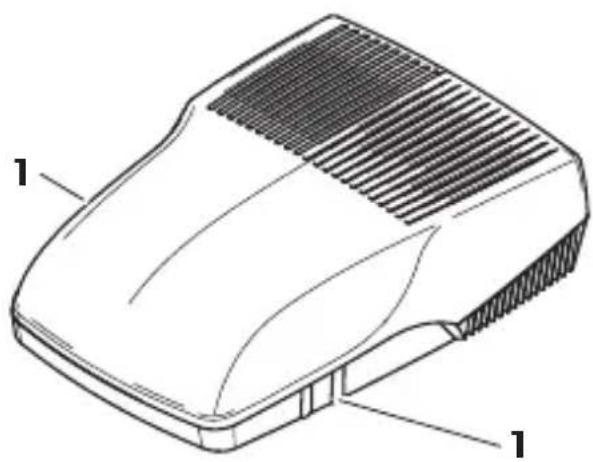
Technical line drawing of a mechanical component with labeled parts (no text or symbols present)FreshJet 1700, 2000, 2200
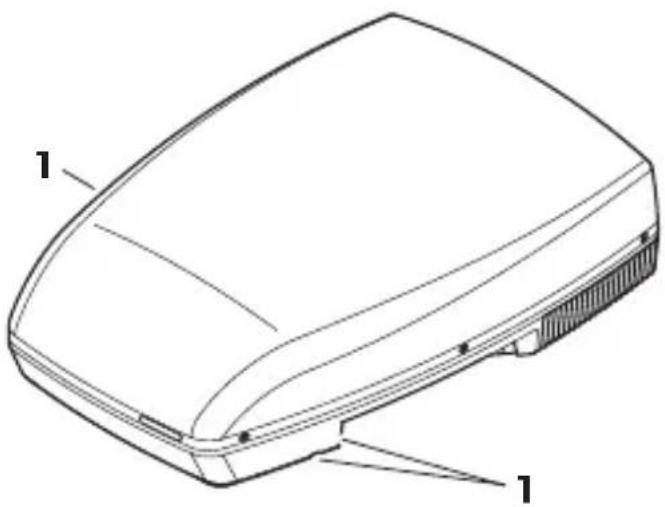
FreshJet 3200
7
Chillout ADB
A
B
A
natural_image
Diagram of hands holding a tray with a grid pattern and a downward arrow, no text or symbols presentB
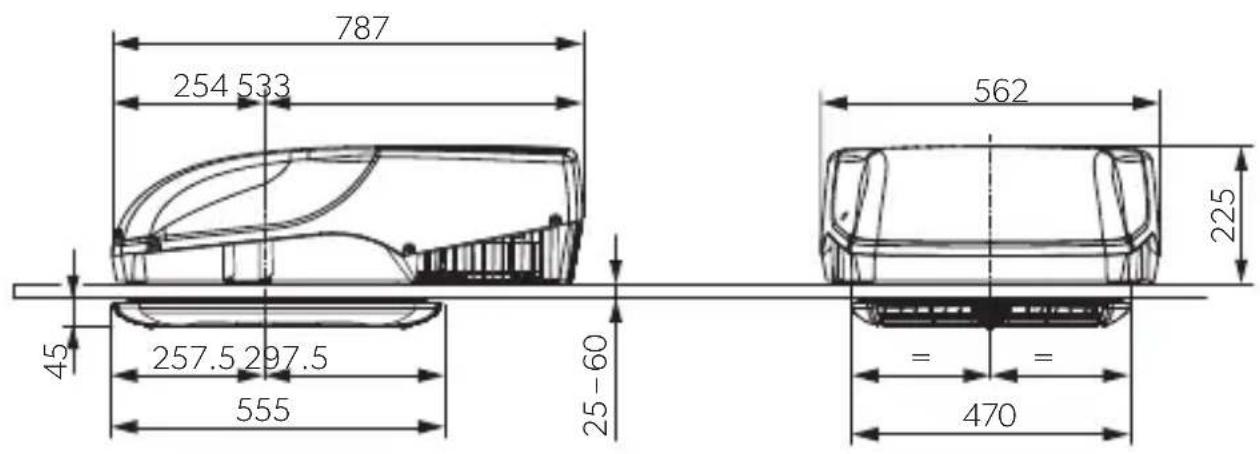
8
FreshJet 1700, 2000, 2200 + Chillout ADB
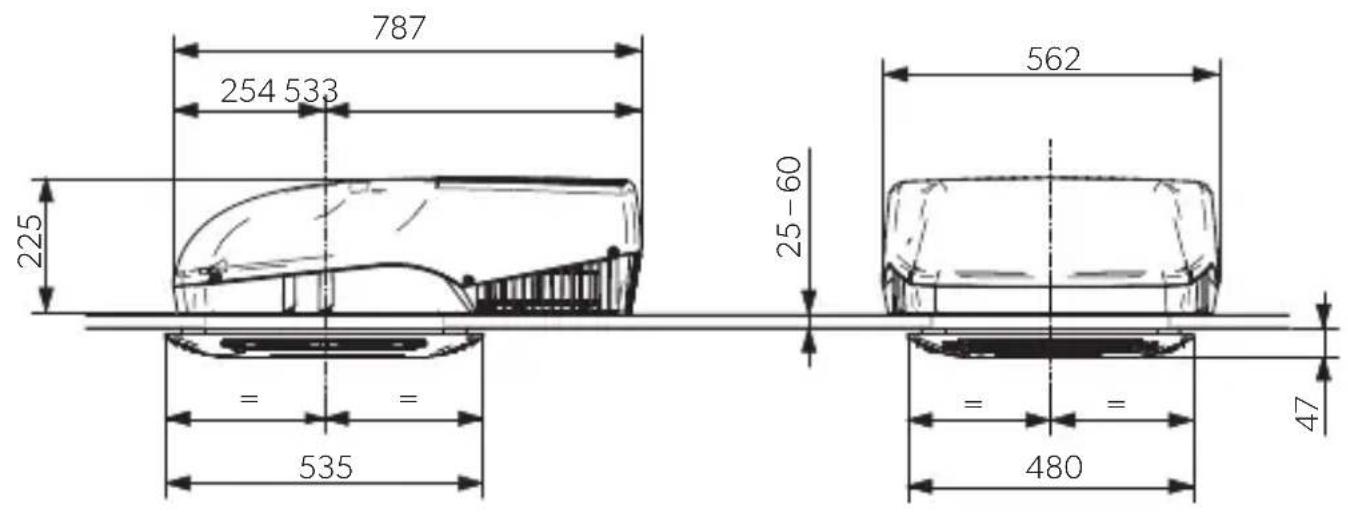
FreshJet 1700, 2000, 2200 + ADB
9
FreshJet 3200 + Chillout ADB
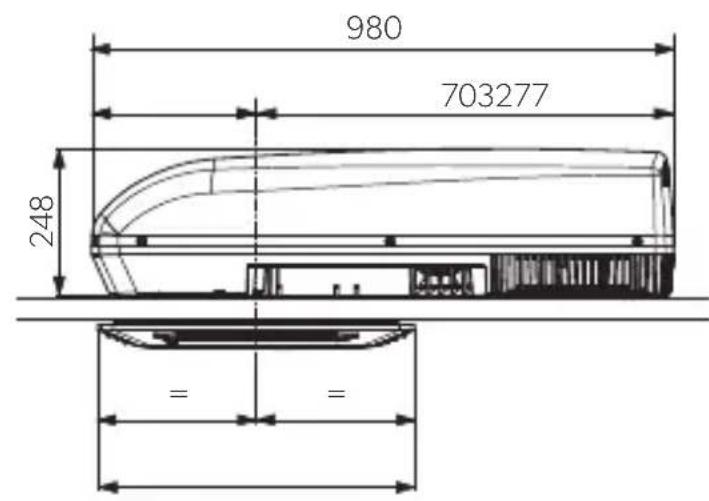
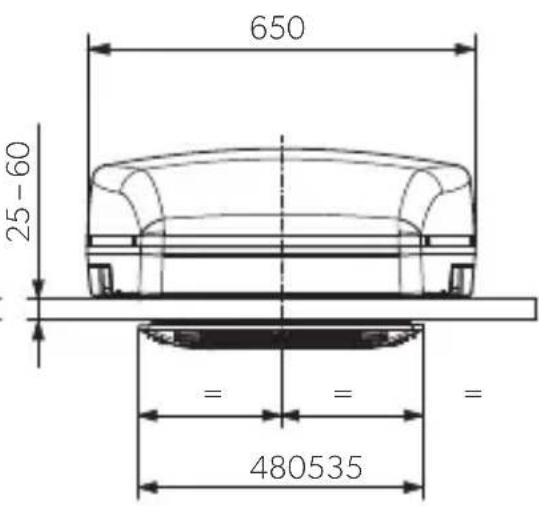
FreshJet 3200 + ADB
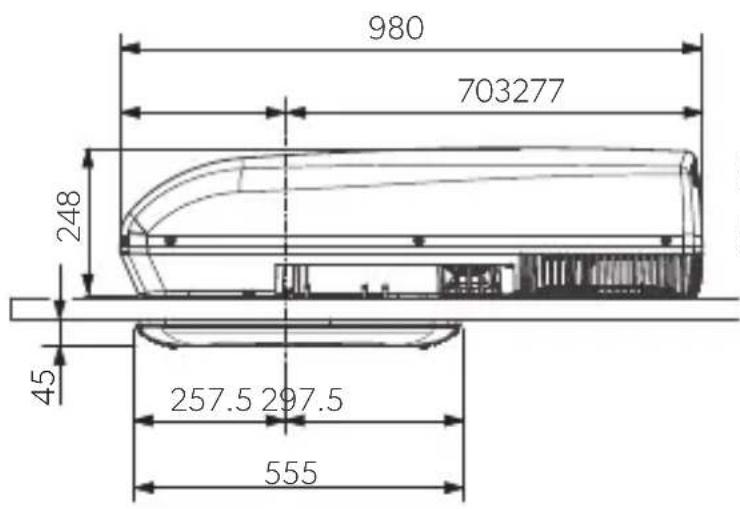
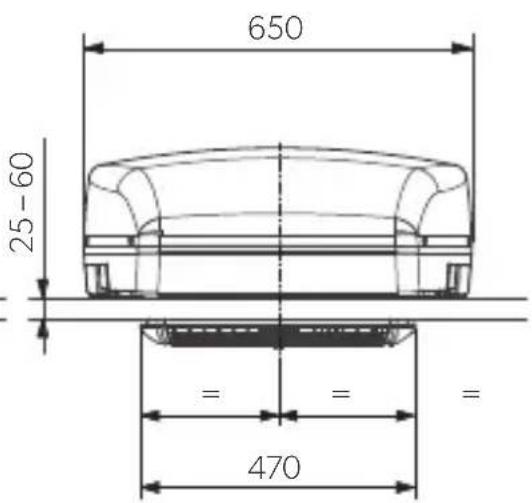
10
natural_image
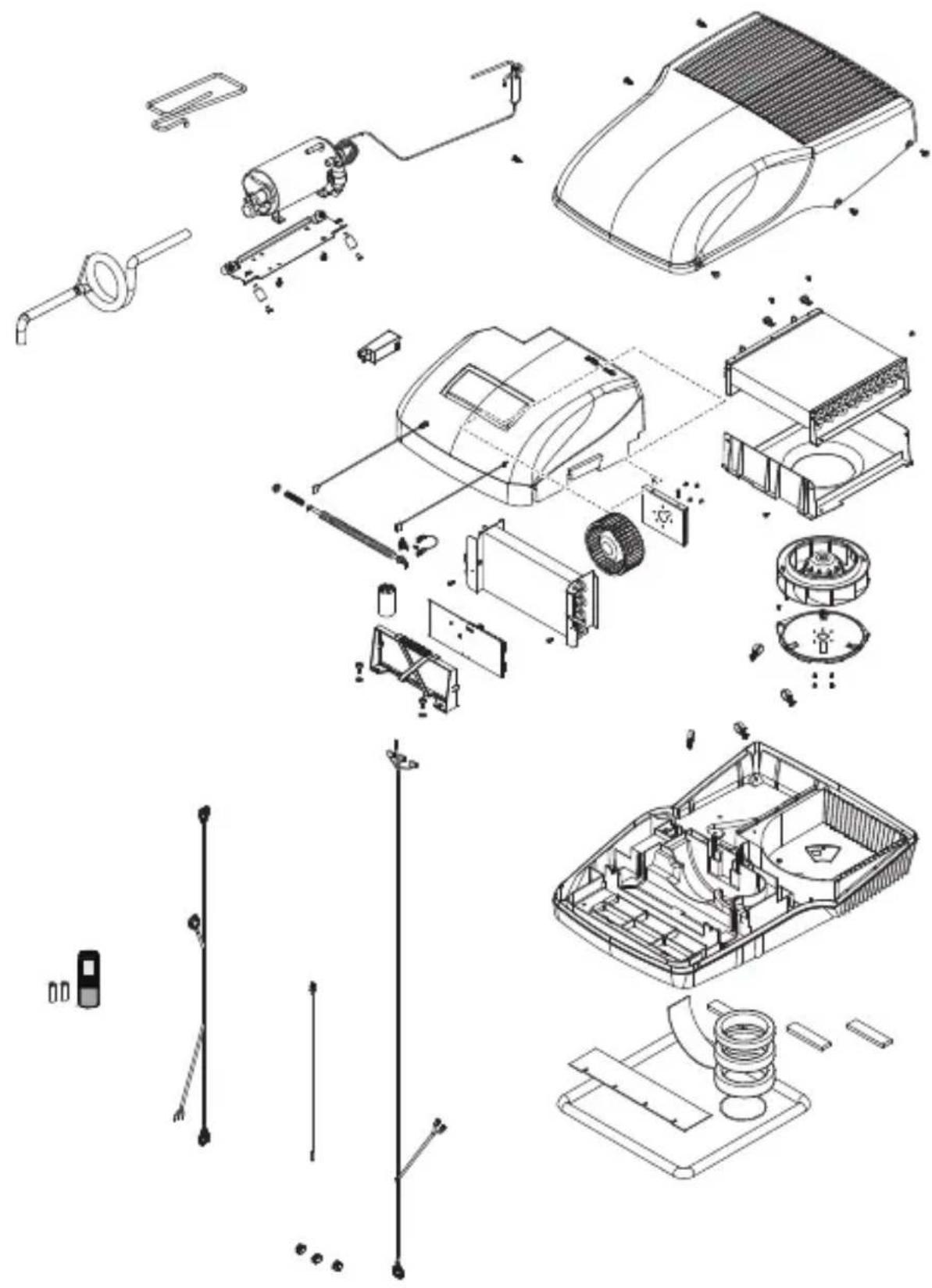
Exploded view diagram of a car's internal components and parts, showing exploded and assembled parts without any text or labels.FreshJet 1700
11
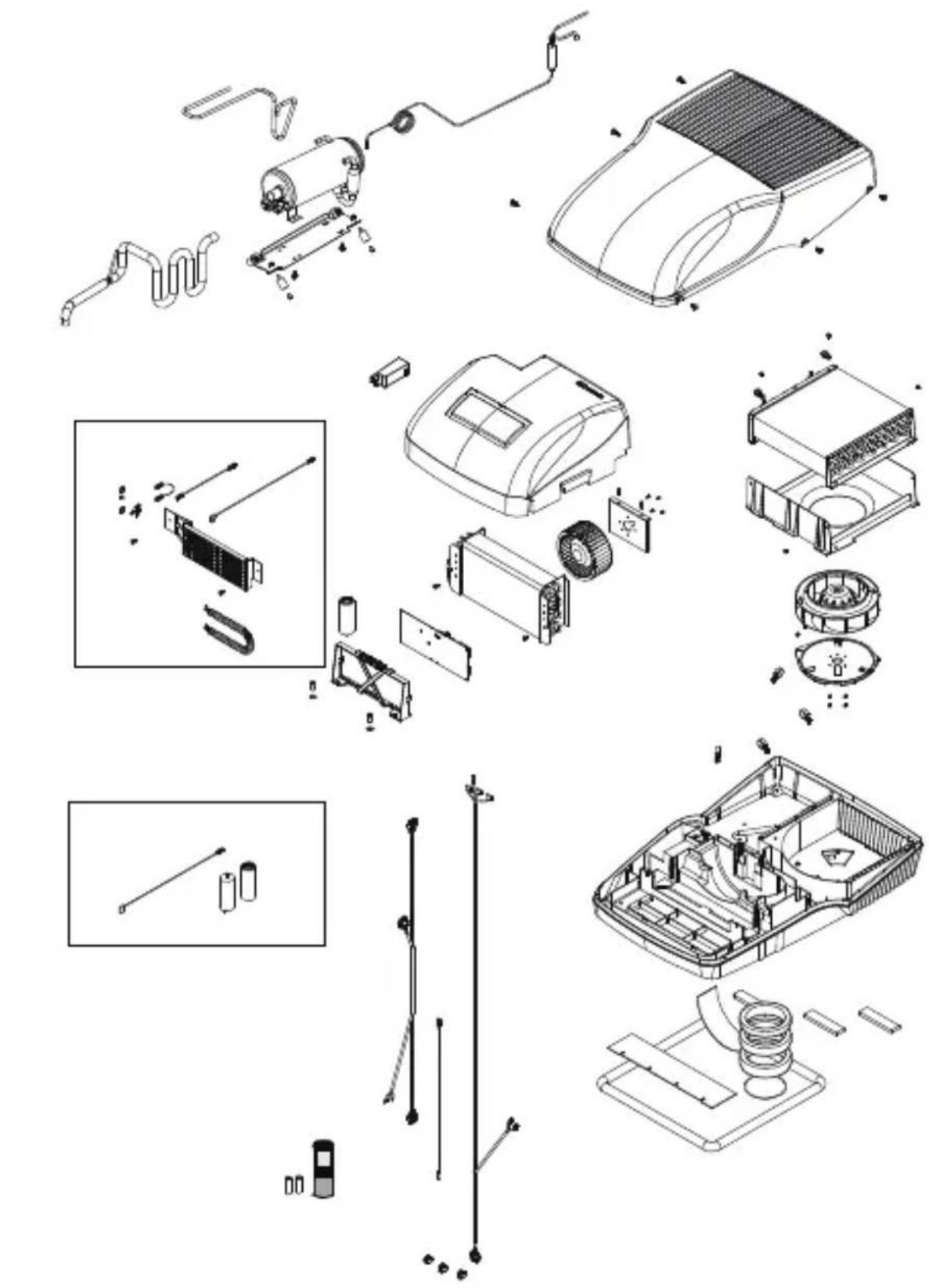
natural_image
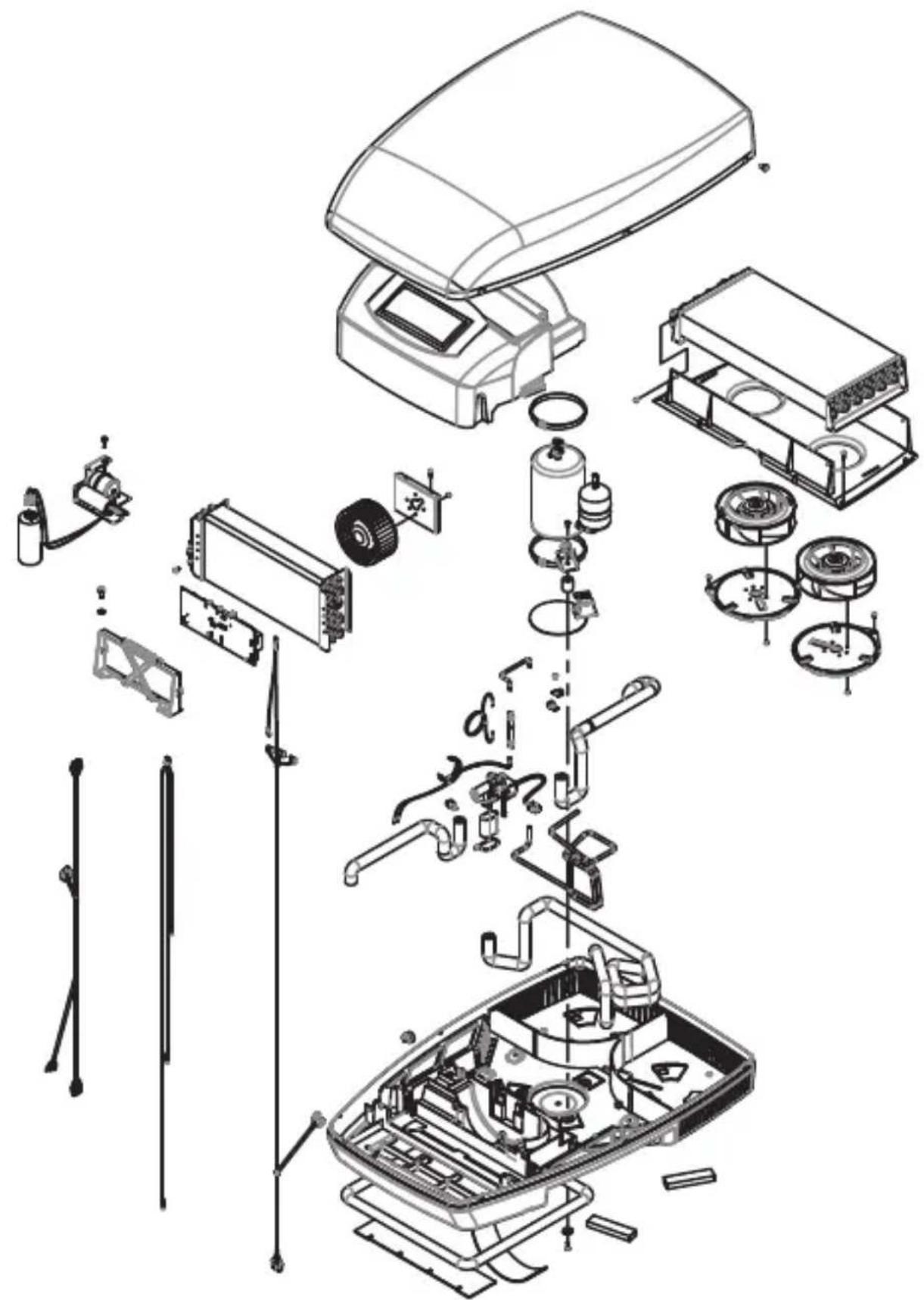
Exploded view diagram of a household appliance showing internal components and assembly (no text or labels)FreshJet 2000, 2200
12
natural_image
Exploded view diagram of a smart home appliance showing internal components like air purifier, fan, and control panel (no text or labels)FreshJet 3200
13
Chillout ADB
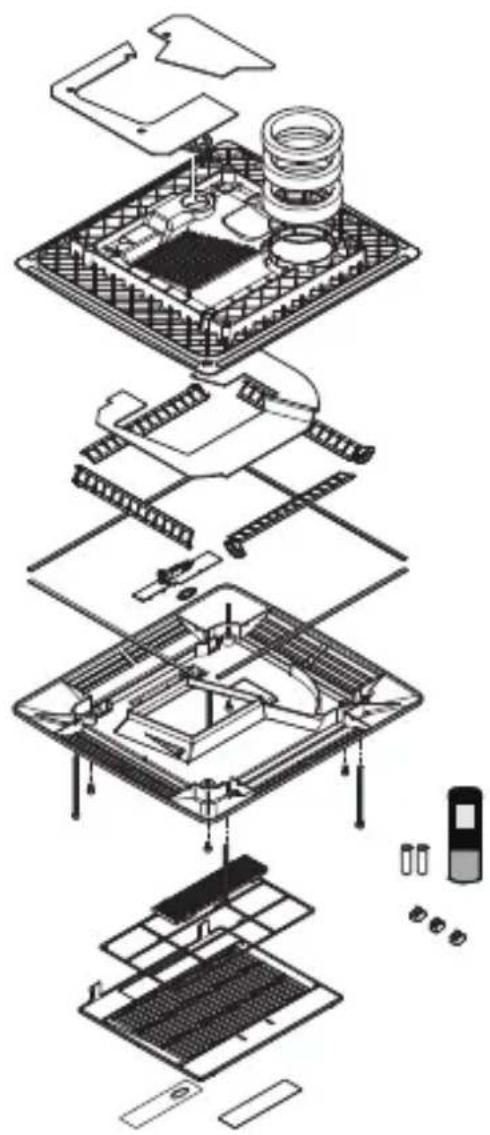
natural_image
Exploded view diagram of a multi-layered electronic device with internal components and battery pack (no text or labels)14
ADB
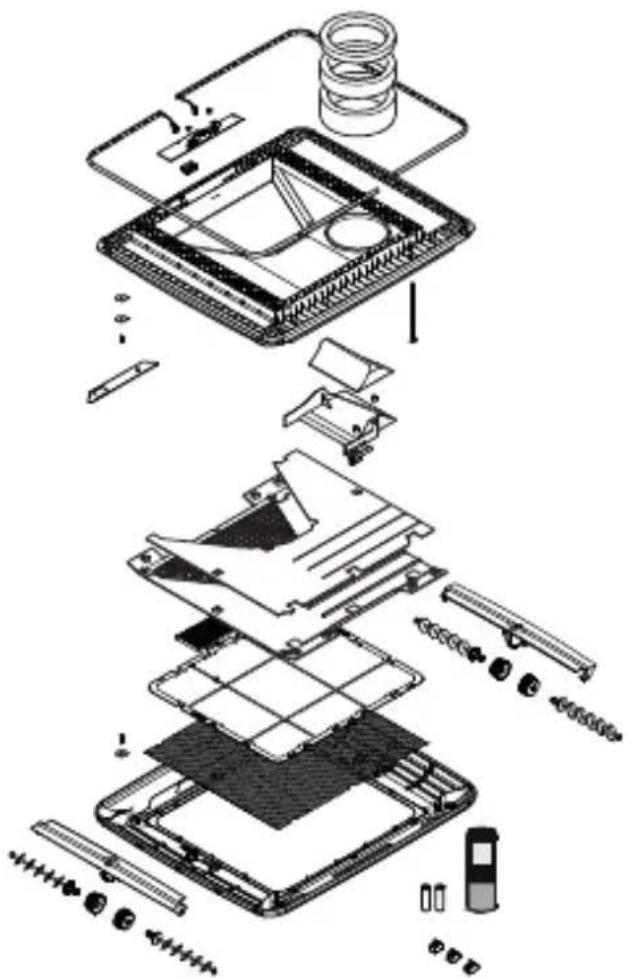
natural_image
Exploded view diagram of a device showing internal components like battery, circuit board, and accessories (no text or labels)Original instructions
Please read these instructions carefully and follow all instructions, guidelines, and warnings included in this product manual in order to ensure that you install, use, and maintain the product properly at all times. These instructions MUST stay with this product.
By using the product, you hereby confirm that you have read all instructions, guidelines, and warnings carefully and that you understand and agree to abide by the terms and conditions as set forth herein. You agree to use this product only for the intended purpose and application and in accordance with the instructions, guidelines, and warnings as set forth in this product manual as well as in accordance with all applicable laws and regulations. A failure to read and follow the instructions and warnings set forth herein may result in an injury to yourself and others, damage to your product or damage to other property in the vicinity. This product manual, including the instructions, guidelines, and warnings, and related documentation, may be subject to changes and updates. For up-to-date product information, please visit documents.dometic.com.
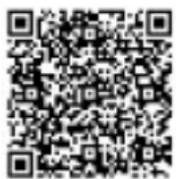
You find the installation manual online at:
https://documents.dometic.com/?object_id=73226
The instructions in the installation manual are intended for qualified
personnel in workshops who are familiar with the guidelines and
safety precautions to be applied.
Table of contents
1 Explanation of symbols....15
2 Safety instructions....16
3 Target group for this manual 17
4 Scope of delivery 17
5 Accessories....17
6 Intended use....18
7 Technical description....18
8 Before initial use 22
9 Operating the roof air conditioner....23
10 Cleaning the roof air conditioner....29
11 Maintenance of the roof air conditioner 29
12 Troubleshooting....30
13 Warranty 31
14 Disposal....31
1 Explanation of symbols

WARNING!
Safety instruction: Indicates a hazardous situation that, if not avoided, could result in death or serious injury.
CAUTION!
Safety instruction: Indicates a hazardous situation that, if not avoided, could result in minor or moderate injury.

NOTICE!
Indicates a situation that, if not avoided, can result in property damage.

NOTE
Supplementary information for operating the product.
2 Safety instructions
In particular, the manufacturer will not be liable for any consequential damage, especially consequential damage caused by failure of the roof air conditioner.
WARNING! Failure to obey these warnings could result in death or serious injury.
Electrocution hazard
- Do not operate the device if it is visibly damaged.
• Always disconnect the power supply when working on the device. - Operate the device only if you are certain that the housing and the cables are undamaged.
Health hazard
- This device can be used by children aged from 8 years and above and persons with reduced physical, sensory or mental capabilities or lack of experience and knowledge if they have been given supervision or instruction concerning use of the device in a safe way and understand the hazards involved.
• Children shall not play with the device. - Installation, maintenance and repairs of the roof air conditioner may only be carried out by qualified personnel who are familiar with the risks involved when handling refrigerant and air conditioning systems as well as the relevant regulations. Inadequate repairs may cause serious hazards. For repair service, please contact the service centre in your country.
Fire hazard / Flammable materials
- Keep the ventilation openings free of obstructions.
- Do not damage the refrigerant circuit.
- Do not use the roof air conditioner near flammable fluids or in closed rooms.
- Make sure no combustible objects are stored or installed near the air outlet. A distance of at least 50 cm must be kept.
- Do not undo the upper cover of the roof air conditioner in the event of a fire. Use approved extinguishing agents instead. Do not use water to extinguish fires.
-
Do not use means to accelerate the defrosting process or to clean, other than those recommended by the manufacturer.
-
The device shall be stored in a room without continuously operating ignition sources (for example: open flames, an operating gas appliance or an operating electric heater).
- Do not pierce or burn the device.
- Be aware that refrigerants may not contain an odour.

CAUTION! Failure to obey these cautions could result in minor or moderate injury.
Health hazard
- Only use the device as intended.
- Do not make any alterations or conversions to the device.
- Do not reach into air outlets or insert any foreign objects in the roof air conditioner.
- If faults occur in the roof air conditioner's refrigerant circuit, the roof air conditioner must be checked by a specialist company and properly repaired. The refrigerant must never be released into the air.

NOTICE! Damage hazard
- Never drive through automatic car washes when the roof air conditioner is mounted.
- Please ask your vehicle manufacturer if a technical inspection is required after fitting an air conditioner and whether the height entered in your vehicle documents needs to be altered:
– FreshJet1700, 2000, 2200: increased height 225 mm
– FreshJet3200: increased height 248 mm
3 Target group for this manual
This operating manual is for the user of the roof air conditioner.
4 S c o p e o f d e l
- Roof air conditioner
• Air outlet unit (Chillout ADB or ADB)
5 Accessories
Available as accessories (not included in scope of delivery):
Designation Reference no. FJ1700 FJ2000 FJ2200 FJ3200
| DC Kit PP12 9100300003 | - | - | - | - | |
| DC Kit DSP-T 12 9600007286 | • | • | • | • | |
| DC Kit DSP-T 24 | 9600007287 | • | • | • | • |

NOTE
The DC extension kit (accessory) allows the Dometic FreshJet roof air conditioner to be used while in motion.
6 Intended use
The Dometic FreshJet roof air conditioner is designed for use in motorcaravans, caravans and other vehicles with habitation compartments only. It is not suitable for houses and apartments.
The roof air conditioner is not suitable for installation in construction machines, agricultural machines or similar equipment. It will not work properly if exposed to strong vibrations.
The function of the roof air conditioner is guaranteed for an operating temperature range (see leaflet technical data).
This product is only suitable for the intended purpose and application in accordance with these instructions.
This manual provides information that is necessary for proper installation and/or operation of the product. Poor installation and/or improper operating or maintenance will result in unsatisfactory performance and a possible failure.
The manufacturer accepts no liability for any injury or damage to the product resulting from:
- Incorrect assembly or connection, including excess voltage
- Incorrect maintenance or use of spare parts other than original spare parts provided by the manufacturer
• Alterations to the product without express permission from the manufacturer - Use for purposes other than those described in this manual
Dometic reserves the right to change product appearance and product specifications.
7 Technical description
The roof air conditioner supplies the interior with cool dehumidified air without dust and dirt.
Dimmable LED lamps integrated in the air outlet unit provide pleasant lighting (LED lights are available only on specific model).
The roof air conditioner is operated with the remote control.

NOTE
The roof air conditioner can lower the temperature within the vehicle to a certain level. The temperature depends on the type of vehicle, the ambient temperature and the cooling capacity of your roof air conditioner.
Below an outer temperature of 16 °C the roof air conditioner doesn't cool anymore. In this case only use the air conditioning mode "Circulating air" (✗)
The roof air conditioner is protected against over-voltage. When the supply voltage is above 265 V, the roof air conditioner stops working. It resumes normal service when the supply voltage is within the allowed range.
7.1 Components
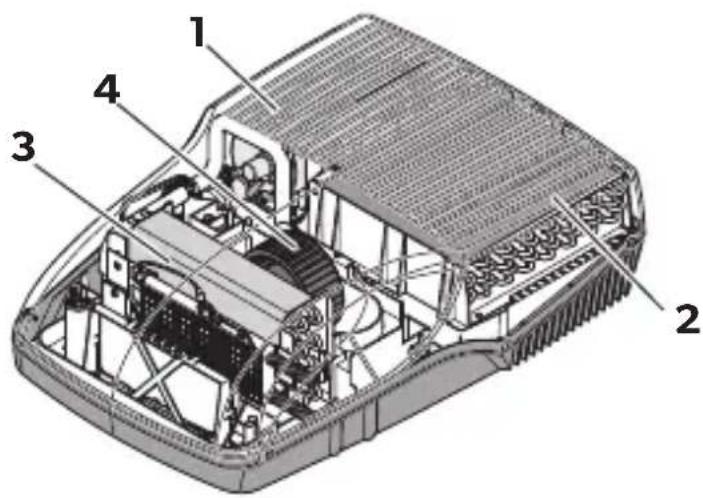
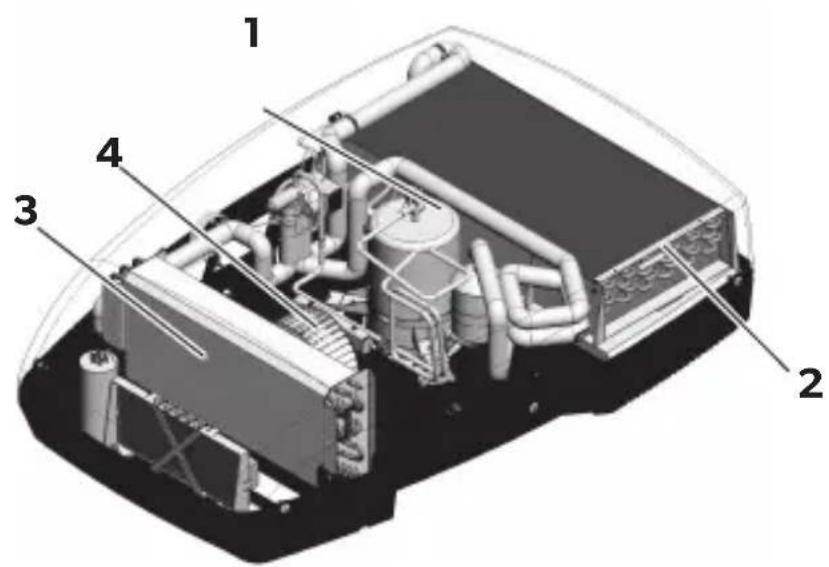
The refrigerant circuit of the roof air conditioner consists of the following main components (fig. 1, page 3):
- Compressor (1)
The compressor draws in the refrigerant used and compresses it. This raises the pressure and therefore the temperature of the refrigerant.
- Condenser (2)
The built-in liquefier works like a cooler or heat exchanger. The air flowing past absorbs the heat and the hot refrigerant gas cools down and becomes liquid.
- Evaporator (3)
The evaporators cool down and dehumidify the air flowing past them. The refrigerant absorbs the heat and vaporises.
- Blower (4)
A blower distributes the cooled air within the vehicle through an air outlet unit.
Overview of all parts:
• FreshJet1700: fig. 10, page 11
- FreshJet2000, 2200 (available for models with heating and soft start): fig. 11, page 12
- FreshJet3200: fig. 12, page 13
• Air outlet unit Chillout ADB: fig. 13, page 14
• Air outlet unit ADB: fig. 14, page 14
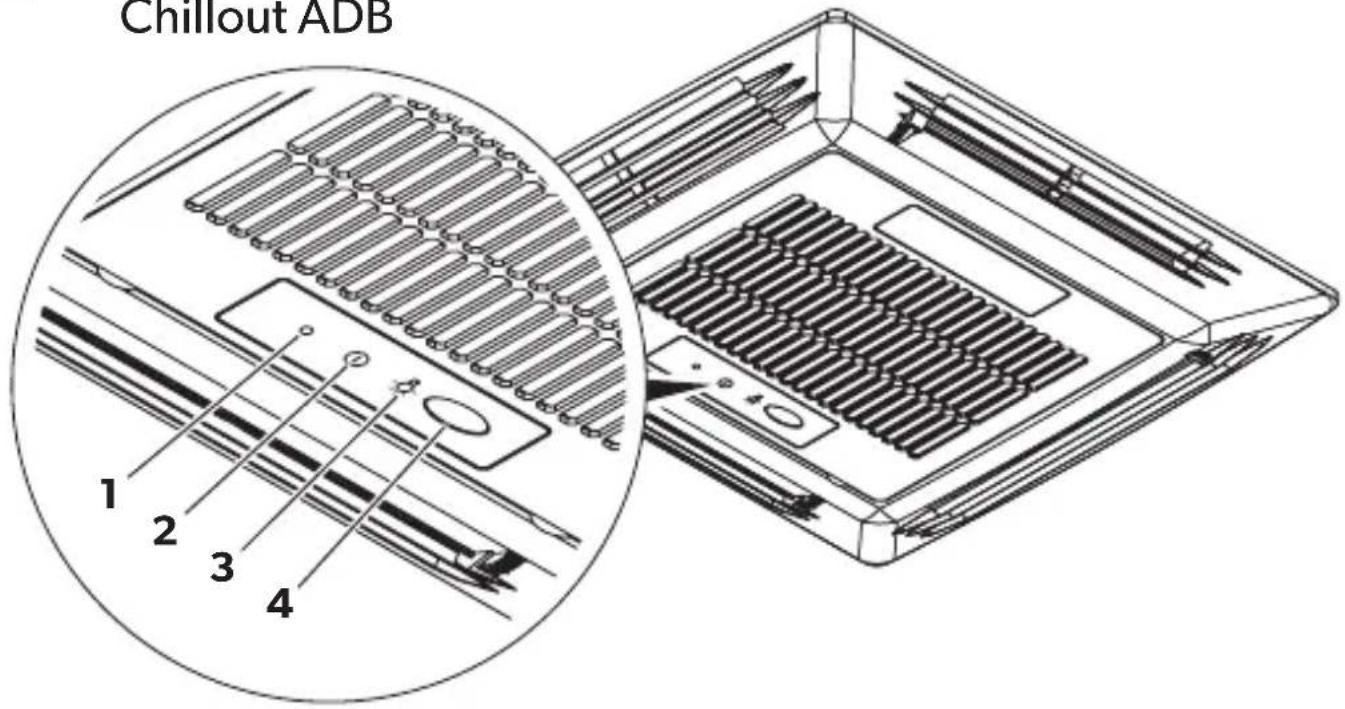
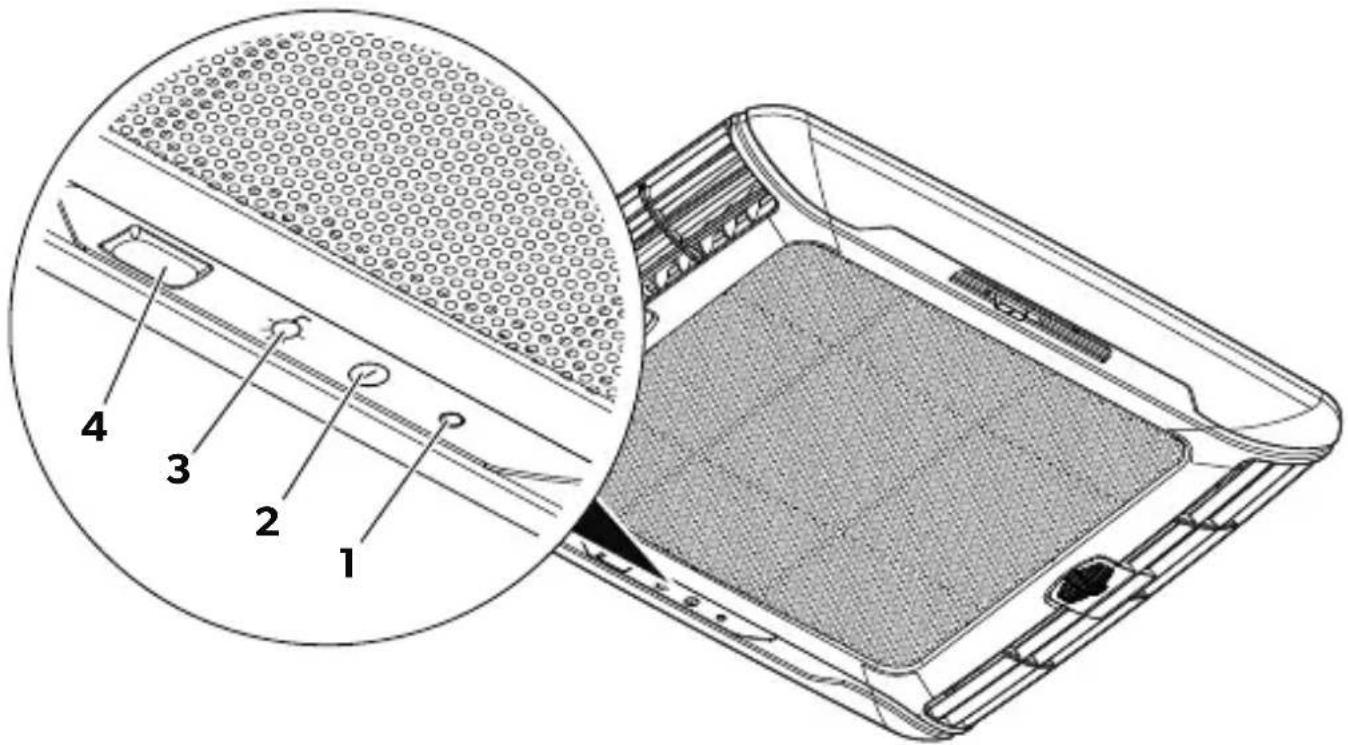
7.2 Control panel
The control panel is at the air outlet unit of the roof air conditioner (fig. 2, page 4).
It contains the following control and display elements:
No. Explanation
| 1 | Status LED | |
| No light: The roof air conditioner is switched off. | ||
| Orange light: The roof air conditioner is in stand-by mode. | ||
| Green light: The roof air conditioner is switched on. | ||
| Flashing green lightFor models with heat pump onlyThe roof air conditioning is preparing for heat mode or defrost is active. | ||
| Flashing green/orange: The roof air conditioner is in winter mode. | ||
| Red light: | Only if the system is connected to 12 V---: the supply voltage of 230 V~ is not available. | |
| Continuously flashing red light-over-voltage-): | The roof air conditioner resumes normal service when the supply voltage is within the allowed range. | |
| Slowly flashing red light (---): | Malfunction in interior temperature sensor E1 | |
| Medium quickly flashing red light (-----): | Malfunction in exterior temperature sensor E2 | |
| 2 | 1 button | Switches the roof air conditioner on, off or to stand-by modePressing the button longer engages the automatic mode. |
| 3 | button | Switches the light on or off or dims it.Only active when the roof air conditioner is switched on or on stand-by. |
| 4 | Infrared (IR) receiver for the remote control | |
7.3 Remote control
All settings of the device (e.g. temperature settings, timer programming) are transmitted to the roof air conditioner by remote control.
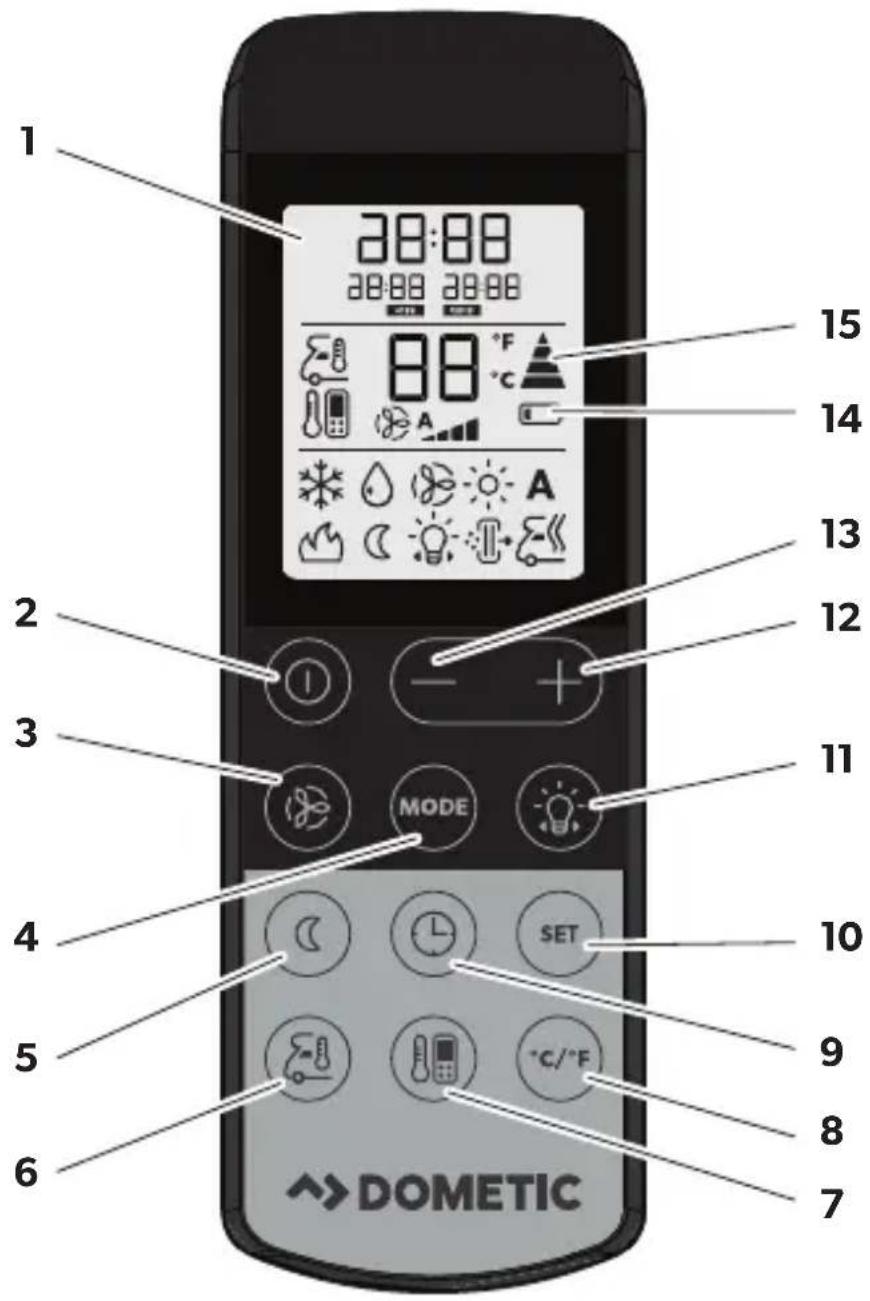
The following control and display elements are available on the remote control (fig. 3, page 5):
No. Explanation
| 1 | Display:Displays the following:TimeSelected room temperature (target value) in °C or °FActual room temperatureAir conditioning modeBlower levelSymbols for active additional functionsBattery status |
| 2 | buttonSwitches the air conditioner and remote control on or to stand-by mode |
| 3 | buttonSelects the blower setting |
| 4 | MODE button:Selects the air conditioning mode |
| 5 | buttonActivates the sleep function. The sleep function automatically modifies the target value to provide a pleasant sleeping temperature. |
| 6 | buttonPress once: Displays the current interior temperature (symbol is displayed).Press again: Displays the set temperature. |
| 7 | buttonActivates the “I feel” function. Every 10 minutes, the “I feel” function adjusts the target temperature to the temperature measured by the remote control. |
| 8 | °C/°F button:Switches between temperature units Celsius (°C) and Fahrenheit (°F) |
| 9 | buttonSets the timer and the clock |
| 10 | SET button:Confirms and saves settings |
| 11 | button:Switches the light of the air conditioner on or off and activates the dimming function.The button remains functional even when the remote control is switched off. |
| 12 | + button:Increases the value |
| 13 | - button:Reduces the value |
No. Explanation
14 Symbol (batteries empty)
Is displayed when the batteries in the remote control are empty. If this happens, replace the batteries, see chapter "Replacing the remote control batteries" on page 28.
15 Symbol (transmitting values)
Is displayed briefly when the remote control is transmitting values to the air conditioner.
7.4 Air conditioning modes
The roof air conditioner has the following air conditioning modes:
| Air conditioning mode | Display mes-sage | Explanation |
| Automatic You specify the temperature and the air conditioner | ||
 | brings the interior to this temperature by heating (available for models with heating only) or cooling and by controlling the necessary blower output.The button is deactivated in this mode. | |
| Cooling You specify the temperature and blower settings, and | ||
 | the air conditioner cools the interior to this temperature. | |
| Heating Available for models with heating only | ||
 | You specify the temperature and blower settings, and the air conditioner heats the interior to this temperature. | |
| Circulating air You specify the blower and the air conditioner | ||
 | blows air into the interior. | |
| Dehumidification You specify the temperature, and the air conditioner | ||
 | cools the interior to this temperature and controls the necessary blower output and dehumidifies the interior (Circulating air mode).The button is deactivated in this mode. | |
7.5 Additional functions
The roof air conditioner has the following additional functions:
| Additional function | Display mes-sage | Explanation |
| Timer The air conditioner is switched on at the specified time. | ||
| ON | ||
| 20:00 OFF | The air conditioner is switched off at the specified time. | |
| 8:00 ON 20:00 OFF | The air conditioner is switched on and off at the specified times. | |
| Sleep The set temperature is modified by 1 °C after one hour | and by 2 °C after two hours to generate a pleasant tem-perature for sleeping. | |
| I feel The remote control measures the room temperature | and transmits this measurement to the air conditioner every 10 minutes. The air conditioner adapts the target value to this measurement. | |
| Winter mode The winter mode is displayed by green/orange flashing of the LED. | ||
8 Before initial use
Inspection before starting up
Before you switch on the roof air conditioner, observe the following:
▶ Check whether the supply voltage and frequency correspond to the values specified in the technical data, see leaflet.
▶ Ensure both the air intake opening and the air nozzles are free. All ventilation grilles must always be kept free to ensure that the roof air conditioner is able to operate at maximum capacity.
CAUTION! Beware of injury
Do not insert your fingers or objects into the air nozzles or the intake grille.
Setting the time
▶ Set the current time: see chapter "Setting the time" on page 28.
Set the remote control
▶ Insert the batteries (see chapter "Replacing the remote control batteries" on page 28).
√ The display shows all symbols for 5 seconds.
▶ Press simultaneously the 📁 button and the 🌐 button during this 5 seconds.
√ The display shows the default model number.
▶ Press simultaneously + and - button within 3 seconds to select the model number:
- FreshWell3000: 02
- FreshJet: 07
- FreshLight: 11
√ The display shows all symbols for 5 seconds.
√ The remote control is ready for operation.
9 Operating the roof air conditioner
9.1 Basic notes on operation
The roof air conditioner has four operating modes:
Operating mode Features
| Off The roof air conditioner is switched off.The remote control is inactive. | |
| Stand-by | The roof air conditioning is ready for operation and can be switched on with the remote control. The lights are available. |
| On The roof air conditioner is conditioning the air in the interior. | |
| Winter mode The roof air conditioner operates in a special heating mode that starts at a temperature of 7 °C and stops when the temperature rises above 10 °C. | |
You can use the control panel to
- switch the roof air conditioner on, off, to stand-by mode or to winter mode
- switch the light on and off or dim it
You can use the remote control to
- switch the roof air conditioner to and from stand-by mode.
- switch the light on and off or dim it
- make the settings
- select additional functions
9.2 Using the remote control
The remote control must be pointed at the IR receiver (fig. 2 4, page 4) on the control panel during operation.
▶ Press a button.
√ The value is transmitted directly to the roof air conditioner.
√ The roof air conditioner confirms the receipt of data with a high note.
If data transmission failed, point the remote control to the IR receiver on the control panel and press the SET button. This transmits the data to the roof air conditioner. The roof air conditioner confirms the receipt of data with a high note.
Switching only the remote control to or from stand-by
In stand-by mode, the remote control display shows only the time.
If the remote control is not pointing to the IR receiver (fig. 2 4, page 4) on the control panel, you can activate the remote control or switch it to stand-by independently from the roof air conditioner:
▶ Press the button.
9.3 Hint for improved use
The following hints will optimise the performance of your roof air conditioner:
- Improve the heat insulation of your vehicle by sealing gaps and hanging reflective blinds or curtains on your windows.
- If the vehicle has been subjected to direct sunlight for a long time: Operate the roof air conditioner in the "Circulating air" (✗) mode with the windows open for a while before switching on the "Cooling" (✗) air conditioning mode.
- Avoid opening doors and windows as far as possible in the "Cooling" () mode.
- Align the air nozzles sensibly.
• Make sure the air nozzles and intake grille are not covered by cloths, paper or other objects.
9.4 Switching the roof air conditioner on and off

NOTE
When it is switched on, it begins to condition the air to the values that were set most recently.
With the control panel
The figure shows how to use the control panel to switch the roof air conditioner on, off or to stand-by. Press the ① button as shown in the illustration:
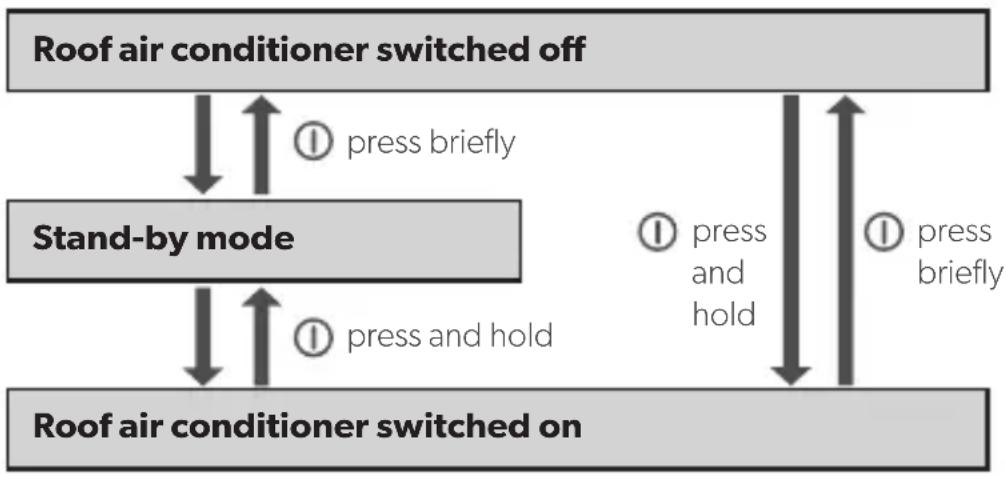
flowchart
graph TD
    A["Roof air conditioner switched off"] --> B["Stand-by mode"]
    B --> C["Roof air conditioner switched on"]
    C --> D["Press briefly"]
    C --> E["Press and hold"]
    D --> F["Press briefly"]
    E --> G["Press and hold"]
Example: The roof air conditioner is in stand-by mode. You want to switch it off.
▶ Briefly press their button.
√ The roof air conditioner is switched off.
With the remote control

NOTE
- The roof air conditioner can only be operated by the remote control when it is switched on or in stand-by mode.
- You can use the remote control to switch the roof air conditioner to and from standby mode. Press the button.
- Available for models with heating only: If you switch of the roof air conditioner from the "Heating" (mode) mode using the remote control the blower continues working for a few minutes to avoid an overheating of the device. The LED flashes orange. Press the button of the control panel to completely switch off the roof air conditioner.
9.5 Selecting the air conditioning mode
▶ Select the air conditioning mode of your choice using the MODE key, see chapter "Air conditioning modes" on page 21.
√ The roof air conditioner confirms the receipt of the values with a high note.
√ The roof air conditioner is switched to the selected air conditioning mode.
9.6 Selecting the blower setting manually
The blower controls the strength of the air supply.
In the "Cooling" (*) and "Circulating air" (☒) modes, the blower levels can be selected manually. In the other air conditioning modes, the roof air conditioner controls the blower level automatically.
Display message Explanation
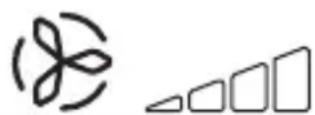
Four blower levels (Lowest blower level not available in the "Heating" (○) mode)
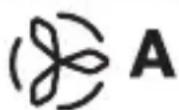
Automatic mode, only available in the "Cooling" (*), "Heating" (◦) and "Dehumidifying" (○) modes.
▶ Use the button to select the desired blower level.
√ The roof air conditioner confirms the receipt of the values with a high note.
√ The new blower level has been set.
9.7 Setting the temperature
Cooling Mode
In the "Automatic" (A), "Cooling" (*), and "Dehumidifying" (◇) modes, you can specify a temperature between 16 °C and 31 °C via the remote control.
▶ Use the + or - button to select the desired temperature.
√ The roof air conditioner confirms the receipt of the values with a high note.
√ The temperature is set on the roof air conditioner.
Heating Mode (available for models with heating only)
In the "Automatic" (A) and "Heating" (☀️) modes, you can specify a temperature between 16 °C and 31 °C via the remote control.
▶ Use the + or - button to select the desired temperature.
√ The roof air conditioner confirms the receipt of the values with a high note.
√ The temperature is set on the roof air conditioner.
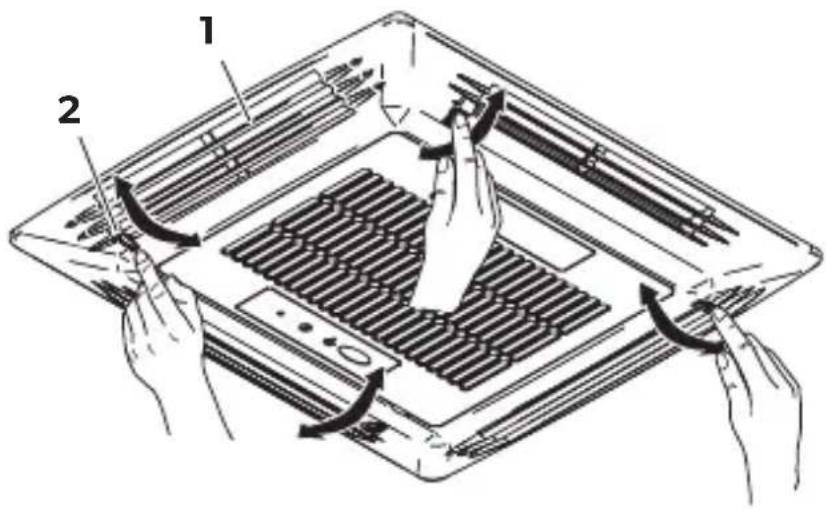
9.8 Adjusting the air nozzles
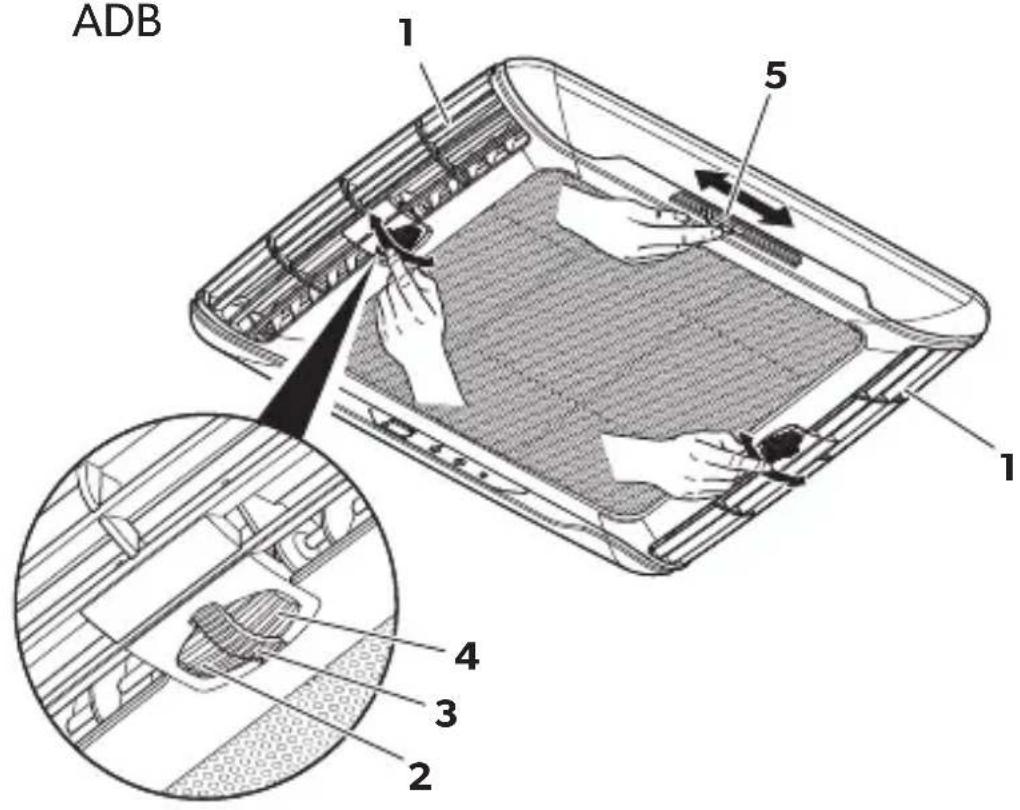
The air supply within the vehicle can be regulated by setting the air nozzles (fig. 4, page 6).
▶ Chillout ADB: Turn the slats (1) in the air nozzles in the required direction using the thumb wheel (2).
▶ ADB: Turn the slats (1) in the air nozzles independently in the required directions using the thumb wheels (2, 3, 4). The air flow can be adjusted to the right and left, as well as to the ceiling or the floor.
Move the central slide (3) to direct the air flow to the front or back.
9.9 Setting the timer
The timer function allows you to set a specific time period for air conditioning. You can specify the switch-on time, the switch-off time or both values.

NOTE
The remote control returns to its initial mode if no button is pressed on the remote control for 15 seconds while programming the timer.
Before programming the timer, select the air conditioning mode and all required values (e.g. temperature).
Setting the switch-on time
▶ Press the button once.
√ The ON symbol (☐) flashes on the display of the remote control.
▶ Use the + or - button to set the time when the roof air conditioner is to switch on.
▶ Press the SET button to transmit the value to the roof air conditioner.
√ The switch-on time is set on the roof air conditioner.
The roof air conditioner is switched on with the selected air conditioning mode at the specified time.
▶ Switch the roof air conditioner to stand-by.
Setting the switch-off time
▶ Press the button twice.
√ The OFF symbol (100) flashes on the display of the remote control.
▶ Use the + or - button to set the time when the roof air conditioner is to switch off.
▶ Press the SET button to transmit the value to the roof air conditioner.
√ The switch-off time is set on the roof air conditioner.
The roof air conditioner runs in the selected air conditioning mode until the specified time.
Setting the switch-on and switch-off times
▶ Press the button three times.
√ The ON symbol (f) flashes on the display of the remote control.
The OFF symbol ( ) is displayed.
▶ Use the + or - button to set the time when the roof air conditioner is to switch on.
▶ Press the button again.
√ The OFF symbol (m) flashes on the display of the remote control.
▶ Use the + or - button to set the time when the roof air conditioner is to switch off.
▶ Press the SET button to transmit the value to the roof air conditioner.
√ The switch-on and switch-off times are set on the roof air conditioner.
The roof air conditioner starts in the selected air conditioning mode at the specified time and runs until the second specified time.
▶ Switch the roof air conditioner to stand-by.
Cancelling timer settings
If you have set the timer, you can cancel these settings as follows:
▶ Press the button four times.
√ The timer symbol disappears.
√ The setting has been cancelled.
9.10 Activating the sleep function

NOTE
The sleep function is deactivated in "Circulating air" (mode.
When the sleep function is activated, the set temperature is modified by 1 °C after one hour and by 2 °C after two hours to ensure a pleasant temperature for sleeping.
▶ Set the required temperature (see chapter "Setting the temperature" on page 25).
▶ Press the button.
√ The symbol appears in the display.
The sleep function is activated.
▶ To deactivate the sleep function press the button again.

NOTE
The sleep function is deactivated if the MODE button is pressed.
9.11 Activating the "I feel" function
When this function is active, the remote control measures the room temperature and transmits this measurement to the roof air conditioner every 10 minutes. The roof air conditioner adapts the target value to this measurement. The "I feel" function is only active when the temperature range is between +18 °C and +29 °C.
▶ Press the button.
√ The symbol appears in the display.
The "I feel" function is activated.
▶ Position the remote control so that it points at the IR receiver (fig. 2 4, page 4) on the control panel. Otherwise, the values cannot be transmitted to the roof air conditioner.

NOTE
The remote control should not be kept in a part of the room that is considerably warmer or colder than the average room temperature. It may not, for example, be left in the sun or in front of the roof air conditioner.
When the temperature rises above +29 °C or falls below +18 °C, the "I feel" function is deactivated.
√ The symbol flashes three times in the display and then turns off.
9.12 Operating the lights (depending on the models)
The lights on the roof air conditioner can be dimmed. When switched on, they revert to the most recently specified brightness.

NOTE
The button on the remote control is activate even if the remote control is turned off.
Switching the light on/off with the control panel
▶ Briefly press the button to switch the lamps on or off.
Dimming the light with the control panel
▶ Press and hold the ⚙ button until the lights have been dimmed to the required brightness.
Switching the light on/off with the remote control
▶ Press the button to switch the lamps on or off.
√ The ⚙ symbol appears in the display when the lights are turned on.
Dimming the light with the remote control
▶ Press the button for 2 s.
√ The symbol flashes in the display.
▶ Press and hold the – button or the + button until the lights have been dimmed to the required brightness. You can dim the lights to 20%, 40%, 60%, 80% and 100%.
▶ Press the button again to disable the dimming function.
√ The symbol is lit constantly.
9.13 Replacing the remote control batteries
Replace the batteries if you see the symbol on the display.
The battery compartment is on the back of the remote control.
▶ Gently push down the lid of the battery compartment and slide it open in the direction of the arrow.
▶ Insert the new batteries (2x type AAA) in the remote control as indicated in the battery compartment.
▶ Close the cover of the battery compartment.
Protect the environment!
Do not dispose of batteries with general household waste.
Return any used batteries to your retailer or take them to a collection point.
9.14 Setting the time
The remote control needs the current time in order to program the timer. The time is indicated on the display of the remote control.
Perform the following steps to set the time:

NOTE
The remote control returns to its initial mode and saves the current setting, if no key is pressed on the remote control for 15 seconds while setting the time.
▶ Press and hold the button for 2 s.
√ The time flashes on the display of the remote control.
▶ Use the + or - button to set the current time.
Press the + or - button longer than 2 s to increase or decrease the time quicker
▶ Press the SET button to confirm the time.
9.15 Setting the winter mode (for models with heating mode only)
The winter mode is a special heating mode that starts at a temperature of 7 °C and stops when the temperature rises above 10 °C which helps avoid icing inside the vehicle during the storage.
▶ Press both buttons on the control panel board for 5 s to activate the winter mode.
√ The LED flashes green/yellow.
√ All other functions are deactivated.
▶ To deactivate the winter mode press the ⏻ button on the control panel to turn off the air conditioner.
10 Cleaning the roof air conditioner

NOTICE! Damage hazard
- Do not clean the roof air conditioner with a high-pressure cleaner. Exposure to water can damage the air conditioner.
- Do not use sharp or hard objects or cleaning agents for cleaning as these may damage the roof air conditioner.
- To clean the roof air conditioner, use water with a gentle cleaning agent. Never use petrol, diesel or solvents.
▶ Clean the housing of the roof air conditioner and the air outlet unit occasionally with a damp cloth.
▶ Regularly remove leaves and other dirt from the ventilation grilles (fig. 5 1, page 7) of the roof air conditioner. Make sure you do not damage the grilles in the process.
▶ Clean the remote control with a slightly damp cloth from time to time. We recommend using a cleaning cloth for glasses to clean the display.
11 Maintenance of the roof air conditioner
WARNING! Health hazard
Any other maintenance work to that which is described here may only be carried out by qualified personnel who are familiar with the risks involved when handling refrigerant and air conditioning systems as well as the relevant regulations.
Interval Inspection/maintenance
Regularly Check the condensation water drainage:
▶ Check whether the condensation water drainage channels (fig. 6 1, page 7) at the sides of the roof air conditioner are clear and the condensation water is able to escape.
Regularly
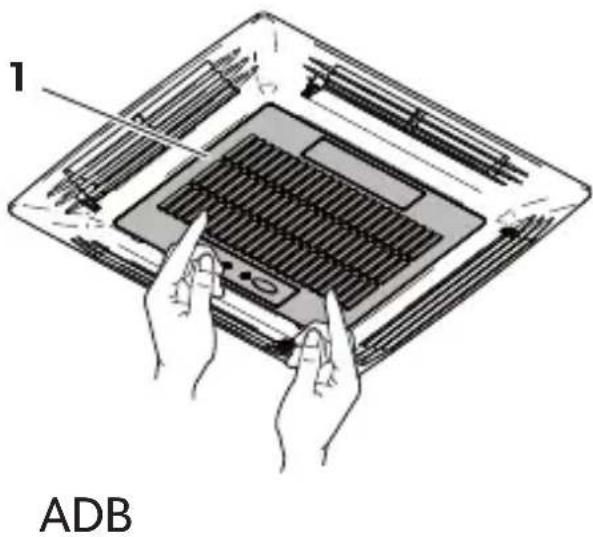
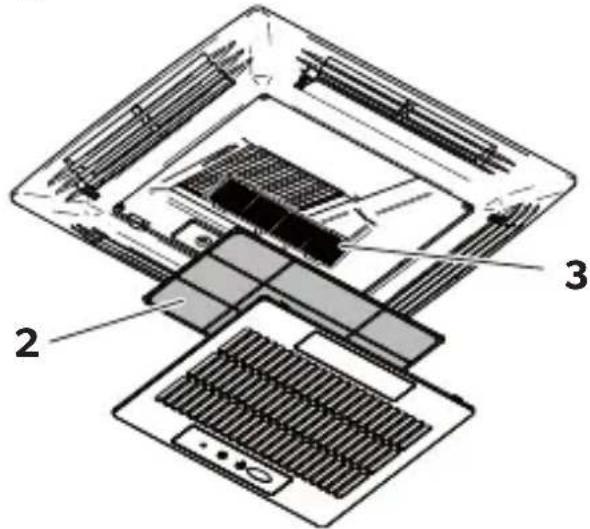
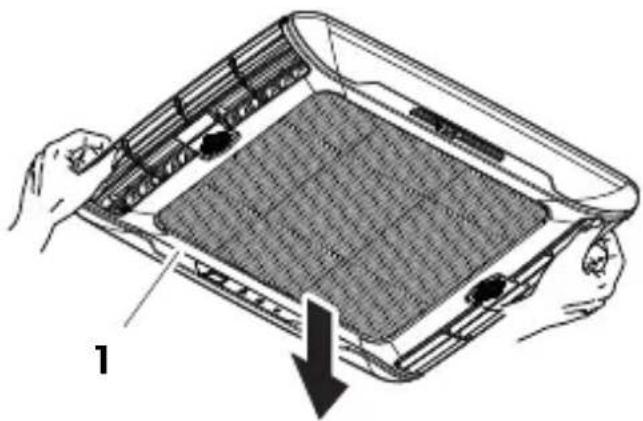
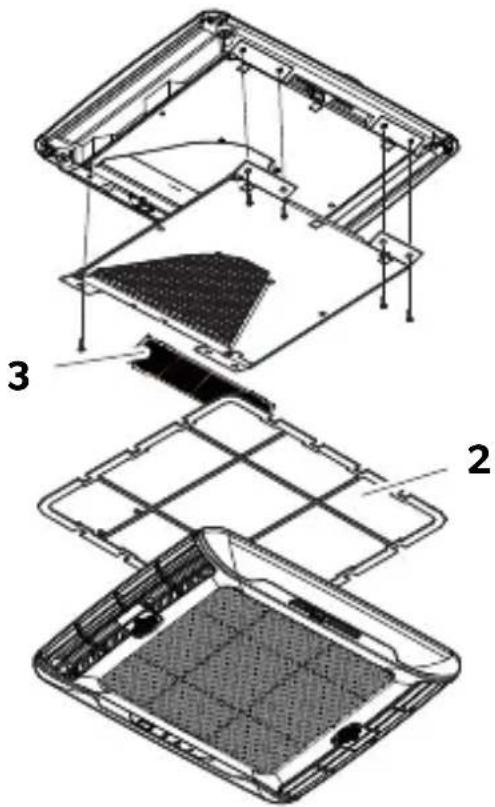
Clean the filter of the air discharge unit (fig. 7, page 8):
▶ Manually take off the filter cover (1).
▶ Remove the filter (2).
▶ Clean the filter (2) with a detergent solution and let it dry.
▶ Put the dry filter (2) back in.
▶ Put the cover (1) back on.
| Interval | Inspection/maintenance |
| Once per year Check the profile seals:▶ Check the seal between the roof air conditioner and the roof of the vehicle for cracks and other damage. | |
| Once per year Have the heat exchanger serviced:▶ Have the heat exchanger of the roof air conditioner serviced by specialist work-shop. | |
| Once per year | Replace the carbon filter (fig. 7, page 8):▶ Manually take off the filter cover (1).▶ Remove the filter (2).▶ Remove the carbon filter (3).▶ Clean the filter (2) with a detergent solution and let it dry.▶ Put a new carbon filter in.▶ Put the dry filter (2) back in.▶ Put the cover (1) back on. |
12 Troubleshooting
| Problem Cause Remedy | ||
| Roof air conditioner constantly switches itself off. | Icing sensor has tripped. Outer temperature is too low or all air nozzles are closed. | |
| No cooling capacity The roof air conditioner is not set to cooling. | ▶ Set the roof air conditioner to cooling. | |
| The ambient temperature is above 52 °C. | ||
| The temperature set is higher than the room temperature. | ||
| The ambient temperature is below 16 °C. | ||
| One of the temperature sensors is defective. | ||
| The vaporiser fan is damaged. | ||
| The condenser fan is damaged. | ||
| Low air output | The air intake section is clogged up. | ▶ Remove any leaves and other dirt from the ventilation grilles of the roof air conditioner. |
| The blower is defective. | ▶ Contact an authorised workshop. | |
| Water enters the vehicle The condensation water drainage openings are clogged up. | ▶ Clean the drainage openings for condensation water. | |
| The seals are damaged. ▶ Contact an authorised workshop. | ||
Problem Cause Remedy
| Roof air conditioner does not switch on. | No supply voltage (230 V~) connected. | ▶ Check the power supply. |
| The voltage is too low (under 200 V~). | ▶ Contact an authorised workshop. | |
| The voltage converter is defective. | ||
| One of the temperature sensors is defective. | ||
| The electrical fuse of the power supply is too low. | ▶ Check the electrical fuse of the power supply. | |
| Roof air conditioner does not switch off. | One of the temperature sensors is defective. | ▶ Contact an authorised workshop. |
| The electrical fuse of the power supply is too low. | ▶ Check the electrical fuse of the power supply. |
13 Warranty
The statutory warranty period applies. If the product is defective, please contact the service partner in your country. Our experts will be happy to help you and will discuss the warranty process with you in more detail.
14 Disposal
Regulations for environmental safety and correct disposal
All organisations must apply a set of procedures to identify, evaluate and control the influence that their activities (manufacturing, products, services, etc.) have on the environment.
The procedures to be followed to identify significant environmental impact must take the following factors into account:
- use of raw materials and natural resources
• atmospheric emissions - discharge of liquids
- waste management and recycling
• contamination of the soil
In order to minimise environmental impact, the manufacturer provides a series of indications here below that should be taken into account by all those who, for whatever reason, interact with the appliance during its working life.
- All packing components must be disposed of (preferably recycled) in compliance with statutory legislation in the country in which disposal takes place.
- All product components must be disposed of (preferably recycled) in compliance with statutory legislation in the country in which disposal takes place.
- For correct disposal, the appliance must be consigned to an authorised waste disposal company to ensure that all recyclable components are reused and the remaining materials are processed properly.
- During installation ensure the room has adequate ventilation to prevent the build-up of stale air that might be harmful to the health of the operators.
- During operation and maintenance ensure that any waste pollutant products (oil, grease, etc.) are disposed of correctly.
- Keep noise levels down to reduce noise pollution.
For more information on correct dismantling of our products please refer to the recycling handbooks at dometic.com.
▶ Place the packaging material in the appropriate recycling waste bins wherever possible.
When in operation or undergoing repairs and maintenance work, make sure that the refrigerant circuit is not damaged and refrigerant cannot escape. It acts as a greenhouse gas and should not be allowed into the environment.
If you wish to finally dispose of the product, ask your local recycling centre or specialist dealer for details about how to do this in accordance with the applicable disposal regulations.
▶ Dispose of the product at an official waste disposal facility in accordance with the applicable recycling or disposal guidelines.
Recycling packaging material

▶ Place the packaging material in the appropriate recycling waste bins wherever possible.
https://documents.dometic.com/?object_id=73226
https://documents.dometic.com/?object_id=73226.
| DC Kit PP12 9100300003 | - | - | - | - |
| DC Kit DSP-T 12 9600007286 | ● | ● | ● | ● |
| DC Kit DSP-T 24 9600007287 | ● | ● | ● | ● |

REMARQUE
7 Description technique
https://documents.dometic.com/?object_id=73226.