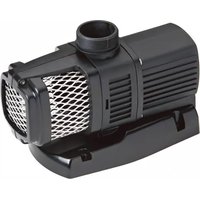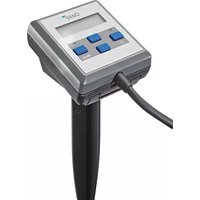
Eco Control - Water pump OASE - Free user manual and instructions
Find the device manual for free Eco Control OASE in PDF.


| Product type | Pump controller for OASE EGC pumps |
| Brand | Oase |
| Model | Eco Control |
| Display | Two-line backlit display |
| Power supply | Via pump through EGC connection (no separate power supply) |
| Main functions | Pump control (on/off, speed), SFC/DFC activation, status and fault display |
| Compatibility | OASE pumps with EGC connection (AquaMax Eco Expert, Aquarius Eco Expert, etc.) |
| Frost resistance | Down to -20 °C |
| Max. water temperature | +35 °C |
| Wear parts | EGC female connector seal |
| Maintenance | Clean the pump, check and replace EGC seals (every 2 years if disconnected) |
| Safety | Disconnect immersed devices before entering water; do not use if cable is damaged |
| Installation | Attach to pump (clip) or floor (stake) or wall (bracket) |
| Connector protection | EGC connector with rubber seal and fixing screws (max. torque 2 Nm) |
| LED indicators | On/Off (green/off), Mode (green for SFC/DFC active, red flashing for fault) |
| Recycling | Do not dispose of with household waste; contact local waste treatment company |
Frequently Asked Questions - Eco Control OASE
User questions about Eco Control OASE
0 question about this device. Answer the ones you know or ask your own.
Ask a new question about this device
Download the instructions for your Water pump in PDF format for free! Find your manual Eco Control - OASE and take your electronic device back in hand. On this page are published all the documents necessary for the use of your device. Eco Control by OASE.
USER MANUAL Eco Control OASE
natural_image
Close-up of a handheld electronic device with a black stand and control panel (no visible text or symbols)Eco Control
EN Operating instructions
FR Notice d'emploi
Original manual. This manual belongs with the unit and must always be passed on together with the unit.
WARNING
▶ Disconnect all electrical devices in the water from the power supply before reaching into the water. Otherwise there is a risk of severe injuries or death by electrocution.
This unit can be used by children aged 8 and above and by persons with reduced physical, sensory or mental capabilities or lack of experience and knowledge if they are supervised or have been instructed on how to use the unit in a safe way and they understand the hazards involved. Do not allow children to play with the unit. Only allow children to carry out cleaning and user maintenance under supervision.
Safety information
Electrical connection
- Special regulations apply for electrical installation in outdoor spaces. Only a qualified electrician may perform the electrical installation.
- The qualified electrician has the necessary professional training, knowledge and experience to perform electrical installation in outdoor spaces. The electrician can detect potential dangers and knows how to adhere to regional and national standards, regulations and directives.
- For your own safety, please consult a qualified electrician.
- Only connect the unit if the electrical data of the unit and the power supply match.
- Protect the plug connection from moisture.
Safe operation
- Never operate the unit if an electrical cable is defective!
- The supply cord cannot be replaced. If the cord is damaged, the appliance should be scrapped.
- Do not carry or pull the unit by its power cable.
- Route lines in such a way that they are protected from damage and do not present a tripping hazard.
- Never operate the unit if the housing is defective!
- Only open the unit housing or its attendant components if this is explicitly specified in the operating instructions.
- Only carry out work on the unit that is described in this manual.
- Never carry out technical changes to the unit.
- Only use original spare parts and accessories.
Intended use
Only use the product described in this manual as follows:
- Connection to OASE pumps with EGC connection, that are suitable for control via this device.
- While adhering to the technical specifications.
Product Description
Overview
| ☐ A | Description |
| 1 | Eco Control |
| 2 | Retaining frame for fastening the device to the wall, or for fitting it to the ground stake or holding clip |
| 3 | Ground stake |
| 4 | Holding clip for fastening the device to the pump handle |
| 5 | Operating instructions Eco Control |
Properties
Eco Control can be used to control EGC-capable OASE pumps.
Features:
- Connection to the EGC socket of the pump.
- Illuminated display.
- Does not require a separate power supply.
- Control of the pump capacity, switching the Seasonal Function Control (SFC) and Dynamic Function Control (DFC) on or off, selection of programmes.
- Allows display of the pump status and malfunctions.
Installation and connection
Fastening the device to the pump
How to proceed:
□ B
- Fit the holding clip onto the pump handle.
- Slide the device onto the holding clip.
- Align the device.
Installing the device with the ground stake
How to proceed:
□ C
- Fully insert the ground stake into the ground.
- Slide the device onto the ground stake.
- Check its stability.
Fastening the device to the wall
How to proceed:
□D
- Remove the retaining frame and fasten it to the wall using suitable screws.
- Fit the device into the retaining frame.
- Ensure that the device is properly engaged in the retaining frame.
Connect the unit
NOTE
The unit will be damaged, if water enters the plug connector.
▶ Connect the plug connector or place the protective cap on it.
▶ Ensure that the rubber seal is clean and fits exactly.
▶ If the rubber seal is damaged, it must be replaced. When the plug connector is disconnected, the rubber seal must be replaced if it is older than 2 years.
▶ Always secure the plug connector or the protective cap with the two screws.
How to proceed:
□ E
- Remove the protection cap from the unit.
- Fit the plug connector and secure with the two screws (max. 2.0 Nm (max. 18 lb-in)).
- Ensure that the rubber seal is clean and fits exactly.
- Replace the rubber seal if damaged.
- Only connect the plug to the left-hand EGC socket.
Operation
Control system overview
EN
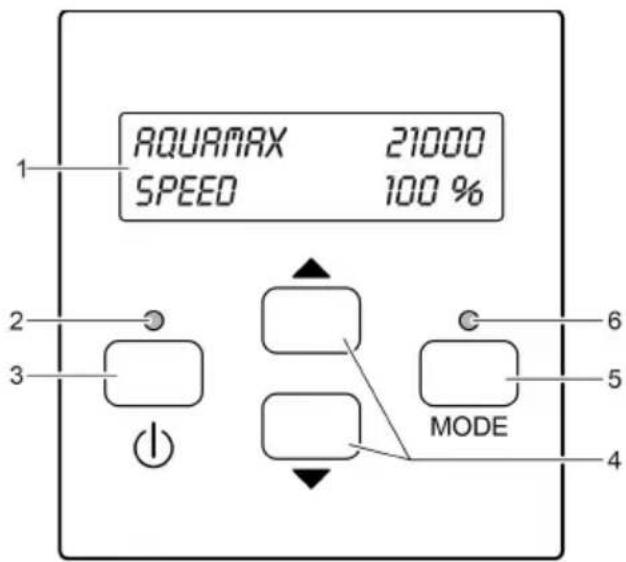
AMX0033
Description
1 Two-line display with backlighting
2 LED ON/OFF
3 ON/OFF button
4 Arrow keys
5 Mode button
6 LED MODE
Function
Indicates whether the pump is switched on or off.
For switching the pump on or off.
For changing values in the menus or selecting other lines in the menu.
For selecting the next menu in the display.
The selection is continuous. It continues from the last menu to the first menu.
Indicates the pump status.
Status displays
The LEDs signal the following statuses:
| LED | Status | Description |
| LED ON/OFF | Green | The pump is switched on. |
| Off | The pump is switched off. | |
| LED MODE | Green | Seasonal Function Control (SFC) and/or Dynamic Function Control (DFC) is activated |
| Red flashing | Malfunction ( Error messages) | |
| Off | SFC and/or DFC is deactivated |
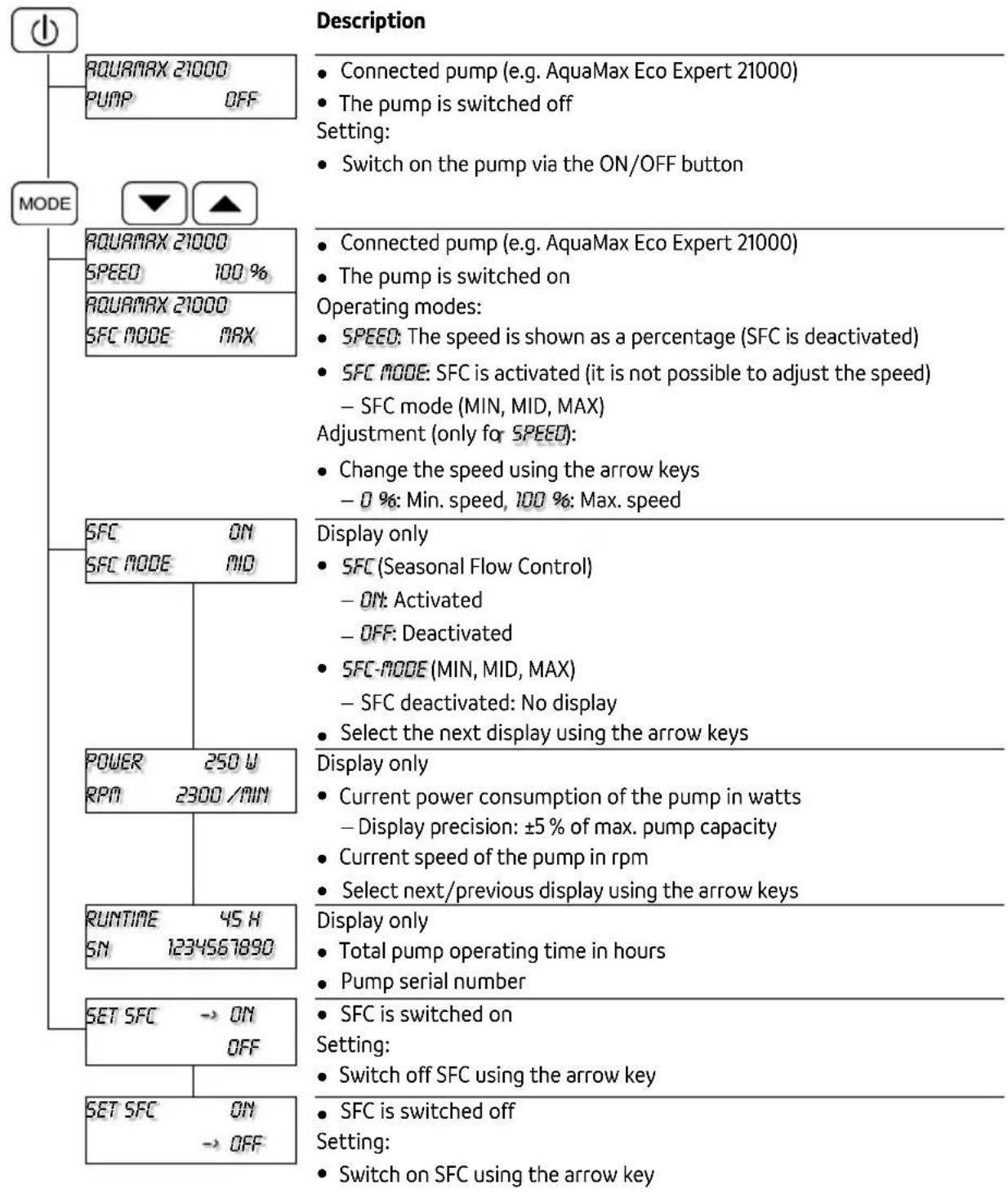
Menu: AquaMax Eco Expert / AquaMax Eco Titanium pump
Menus and setting options when connecting a pump AquaMax Eco Expert.
Menu: Aquarius Eco Expert pump
Menus and setting options when connecting a pump Aquarius Eco Expert.
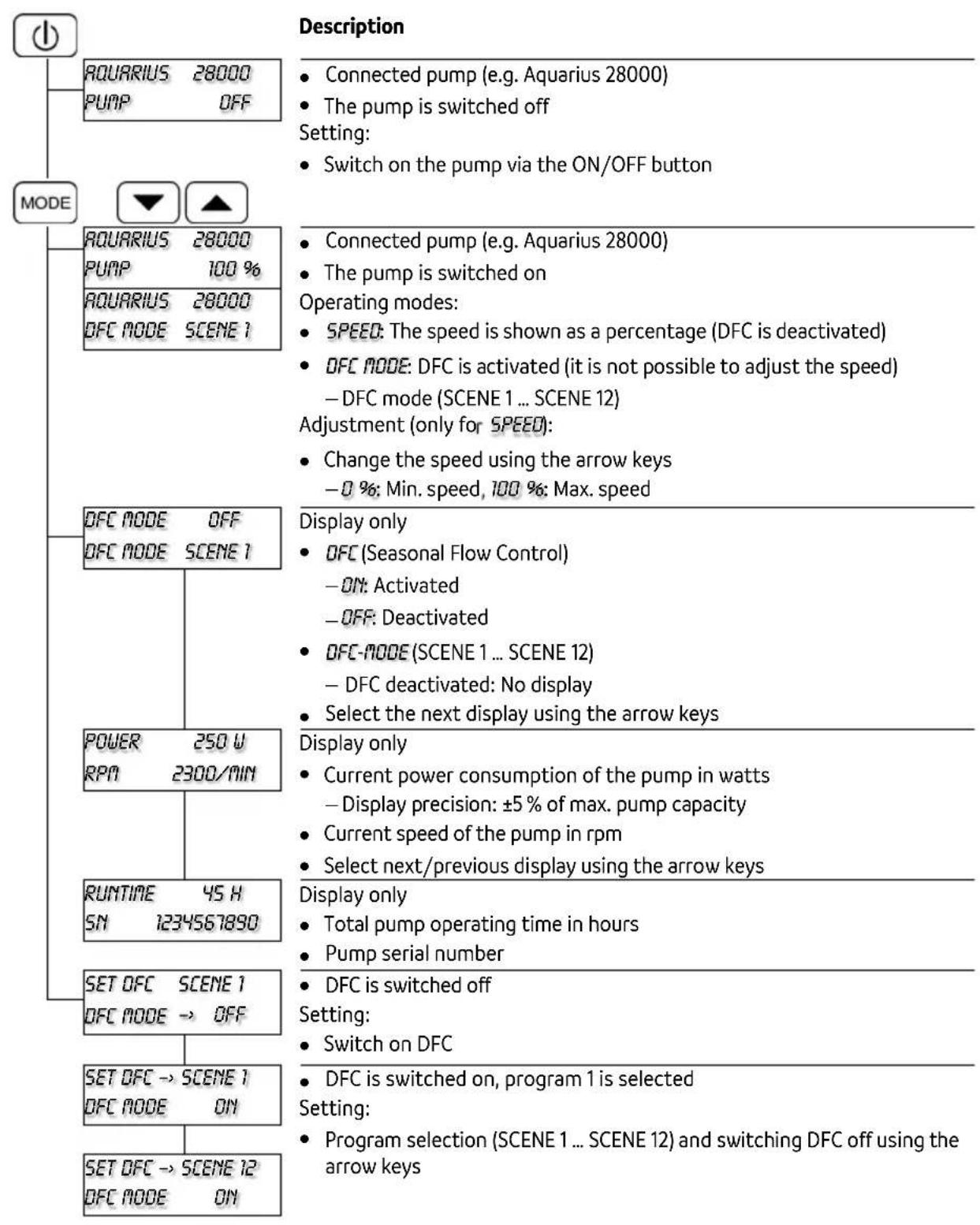
flowchart
graph TD
    A["MODE"] --> B["AQUARIUS 28000 PUMP OFF"]
    A --> C["AQUARIUS 28000 PUMP 100%"]
    A --> D["AQUARIUS 28000 DFC MODE SCENE 1"]
    A --> E["DFC MODE OFF"]
    A --> F["DFC MODE SCENE 1"]
    A --> G["POWER 250 W RPM 2300/MIN"]
    A --> H["RUNTIME 45 H SN 1234567890"]
    A --> I["SET OFC SCENE 1 OFC MODE → OFF"]
    A --> J["SET OFC → SCENE 1 OFC MODE ON"]
    A --> K["SET OFC → SCENE 12 OFC MODE ON"]

    L["Description"] --> M["Connected pump (e.g. Aquarius 28000)<br>The pump is switched off<br>Setting:<br>Switch on the pump via the ON/OFF button"]
    N["Connected pump (e.g. Aquarius 28000)<br>The pump is switched on<br>Operating modes:<br>SPEED: The speed is shown as a percentage (DFC is deactivated)<br>DFC MODE: DFC is activated (it is not possible to adjust the speed)<br>- DFC mode (SCENE 1 ... SCENE 12)<br>Adjustment (only for SPEED):<br>Change the speed using the arrow keys<br>-0 %: Min. speed, 100 %: Max. speed"]
    O["Display only"]
    P["Display only"]
    Q["Display only"]
    R["Display only"]
    S["Display only"]

    T["Power 250 W RPM 2300/MIN"]
    U["RUNTIME 45 H SN 1234567890"]
    V["SET OFC SCENE 1 OFC MODE → OFF"]
    W["SET OFC → SCENE 1 OFC MODE ON"]
EN
Storage/winter protection
The unit is frost-proof to -20^ . If lower temperatures are expected, remove the unit and place it in storage.
- Protect the EGC plug from moisture and dirt.
Error messages
Once a malfunction has been corrected, the error message automatically disappears.
| Error message | Cause | Remedy |
| WARNINGNO WATER | The pump has run dry (dry runprotection has tripped). | Flood the pump.Fully submerge the pump for operation in a pond.Vent the supply line.Remove any blockage from the supply line. |
| Filter housing clogged (dry run protection has tripped). | Clean pump | |
| WARNINGMOTOR BLOCKED | Impeller unit is blocked (dry run protection has tripped). | Disconnect the power supply and remove obstacle. Then switch the pump on again. |
| WARNINGHIGH TEMPERATURE | Ambient temperature for dry installation is too high. | Avoid exposure to direct sunlight.Note maximum water temperature of +35°C. |
| Water temperature too high. | Note maximum water temperature of +35°C. | |
| WARNINGHIGH POWER | Current consumption too highImpeller unit running sluggishlyExcessively soiled water | Clean the pump. |
Wear parts
- EGC plug seal
Disposal
NOTE
Do not dispose of this unit with household waste.
▶ Dispose of the unit by using the return system provided for this purpose.
▶ Should you have questions, please contact your local disposal company. They will give you information on how to correctly dispose of the unit.
▶ Render the unit unusable by cutting the cables.
Viser pumpens status
Statusvisninger
6 "MODUS"-LED Indikerer pumpestatus
Statusindikeringer
AMX0028