StreamMax Pump Controller - Water pump OASE - Free user manual and instructions
Find the device manual for free StreamMax Pump Controller OASE in PDF.


| Product Type | Pump Controller |
| Brand | Oase |
| Model | StreamMax Pump Controller |
| Dimensions (L x W x H) | 195 x 122 x 60 mm |
| Weight | 0.32 kg |
| Power supply | 100-240 V AC, 50-60 Hz |
| Output voltage | 24 V DC |
| Max output current | 2.5 A |
| Max power consumption | 1.5 W |
| Max output power per pump | 30 VA |
| Number of controllable pumps | 2 |
| Operating modes | OFF, FEE (feeding), ALL, P1, P2, SCE (circulation profiles) |
| Predefined circulation profiles | 18 profiles |
| Feeding | Stop or rotation at 10% for 3 minutes |
| Easy Aquarium Control (EAC) integration | Yes, via data cable and EAC Aquarium Controller |
| Maintenance | Clean with a damp cloth |
| Safety | 30 mA differential protection, class III, indoor use |
| Spare parts | Original spare parts available at www.oase-livingwater.com |
| Manufacturer warranty | 36 months |
| Intended use | Indoor, private aquatics, with StreamMax Premium pumps |
Frequently Asked Questions - StreamMax Pump Controller OASE
User questions about StreamMax Pump Controller OASE
0 question about this device. Answer the ones you know or ask your own.
Ask a new question about this device
Download the instructions for your Water pump in PDF format for free! Find your manual StreamMax Pump Controller - OASE and take your electronic device back in hand. On this page are published all the documents necessary for the use of your device. StreamMax Pump Controller by OASE.
USER MANUAL StreamMax Pump Controller OASE
natural_image
Black-and-white underwater photo of a sea surface with spherical structures and textured seabed (no visible text or symbols)StreamMax Pump Controller
EN Operating instructions
FR Notice d'emploi
natural_image
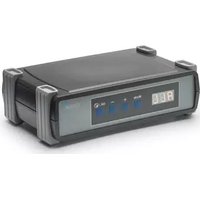
Black Oase brand electronic device with digital display and control buttons (no readable text or symbols beyond branding)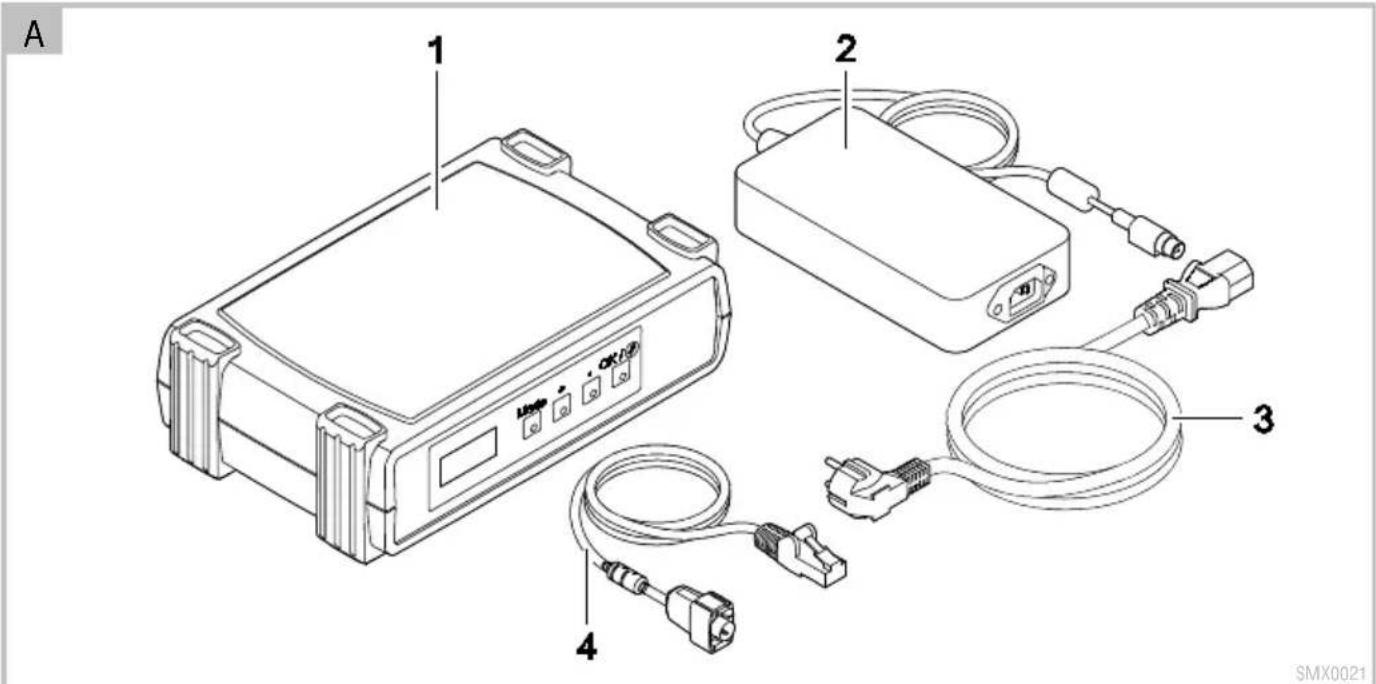
flowchart
graph TD
    A["StreamMax Premium"] --> B["StreamMax Pump Controller"]
    B --> C["EAC 1-5 EAC Aquarium Controller"]
    C --> D["24 V DC"]
    D --> E["EAC Transformer"]
    E --> F["120 - 240 V AC"]
    G["StreamMax Pump Controller Data Cable"] --> C
    H["12 V AC"] --> B
    I["24 V DC"] --> E
    J["24 V DC"] --> K["24 V DC"]
    L["120 - 240 V AC"] --> F
    M["SMX0018"]
natural_image
Technical line drawing of an electric motor with a close-up inset showing internal components (no text or symbols)Translation of the original Operating Instructions
WARNING
- This unit can be used by children aged 8 and above and by persons with reduced physical, sensory or mental capabilities or lack of experience and knowledge if they are supervised or have been instructed on how to use the unit in a safe way and they understand the hazards involved.
- Do not allow children to play with the unit.
- Only allow children to carry out cleaning and user maintenance under supervision.
- Ensure that the unit is fused for a rated fault current of max. 30 mA by means of a fault current protection device.
- Switch off all units in the aquarium or disconnect the power plugs of all units before reaching into the water.
- Do not use the unit if electrical cables or housings are damaged.
- A damaged connection cable cannot be replaced. Dispose of the unit.
- Disconnect the power plug before carrying out any work on the unit.
SAFETY INFORMATION
- Only connect the unit if the electrical data of the unit and the power supply correspond. The unit data is to be found on the unit type plate, on the packaging or in this manual.
- Never carry or pull the unit by the electrical cable.
- Route cables such that they are protected from damage and do not present a tripping hazard.
- Only carry out work on the unit that is described in this manual. If problems cannot be overcome, please contact an authorised customer service point or, if in doubt, the manufacturer.
- Never carry out technical changes to the unit.
- Only use original spare parts and accessories for the unit.
- Protect the plug connection from moisture.
- Only connect the unit to a correctly fitted socket.
Warnings used in these instructions
The warning information is categorised by signal words, which indicate the extent of the hazard.
WARNING
Indicates a possibly dangerous situation, which could lead to death or severe injuries, if not avoided.
NOTE
Indicates a possibly dangerous situation, which could lead to damage to property or the environment, if not avoided.
Cross-references used in these instructions
5 A reference to a figure, e.g. figure A.
→ Reference to another section.
PRODUCT DESCRIPTION
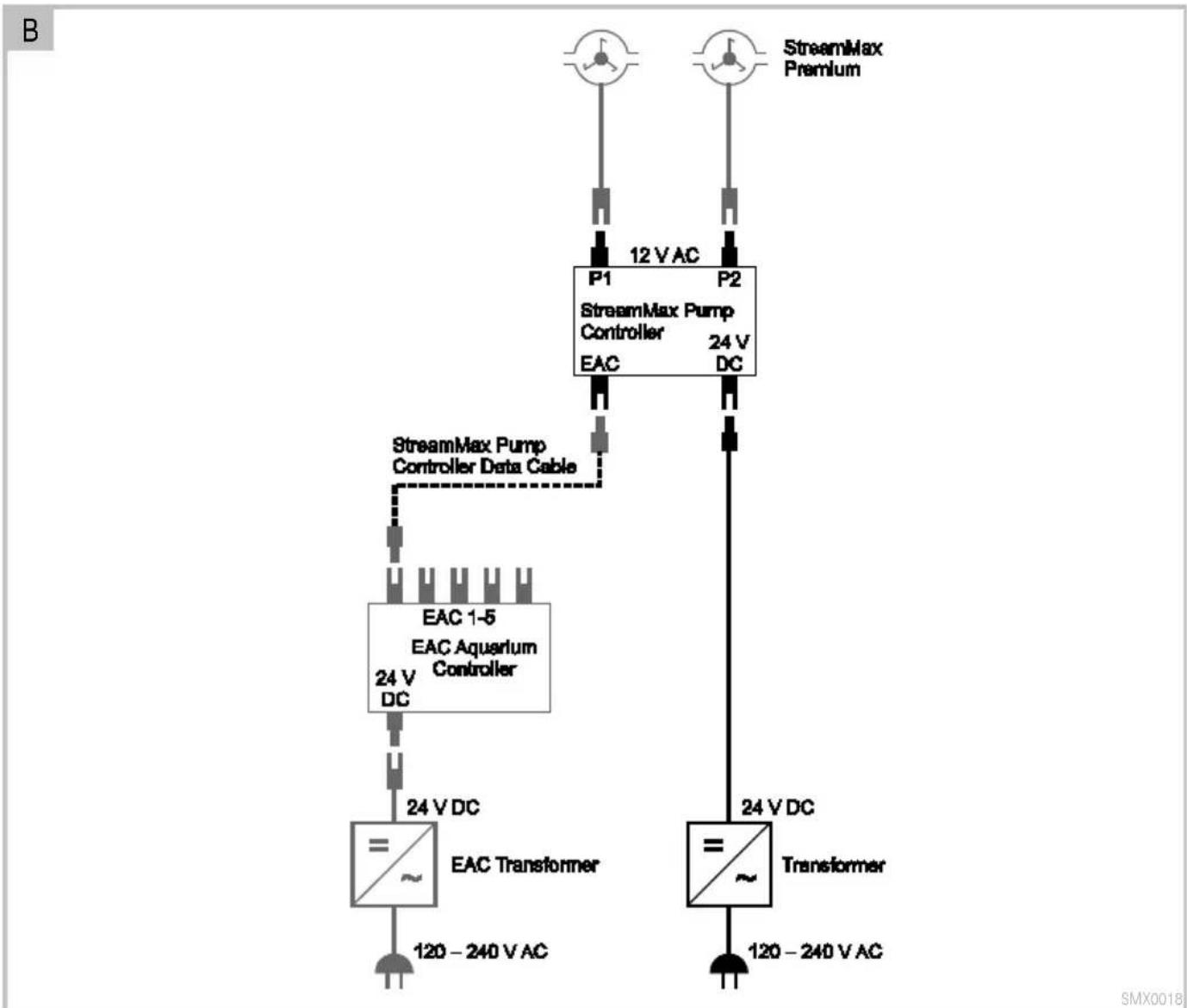
Max. two StreamMax Premium flow pumps can be connected to the StreamMax Pump Controller. The unit controls the speed of the connected flow pumps. The EAC Aquarium Controller is used to integrate the StreamMax Pump Controller into the Easy Aquarium Control-System (EAC).
Easy Aquarium Control System (EAC)
This product can communicate with the Easy Aquarium Control-System (EAC). EAC allows convenient control via smartphone or tablet, and ensures maximum convenience and reliability. For information on EAC and the possibilities it offers, visit: www.oase-livingwater.com/eac-start
Unit layout and scope of delivery
| 5 A | StreamMax Pump Controller |
| 1 | StreamMax Pump Controller |
| 2 | Power pack |
| 3 | Power cable |
| 4 | Data cable, for connecting the StreamMax Pump Controller to the EAC Aquarium Controller |
Intended use
StreamMax Pump Controller, referred to as "unit", may only be used as specified in the following:
- For controlling StreamMax Premium pumps.
- Operate in accordance with instructions. ( Technical data)
- Only operate with the original power pack.
- Only use indoors and for aquaristic purposes in the home (not for commercial use).
Accessories
- StreamMax Premium flow pump 2000 (33948) / 4000 (33949) / 5000 (33955).
• EAC Aquarium Controller (33885).
CONNECTION
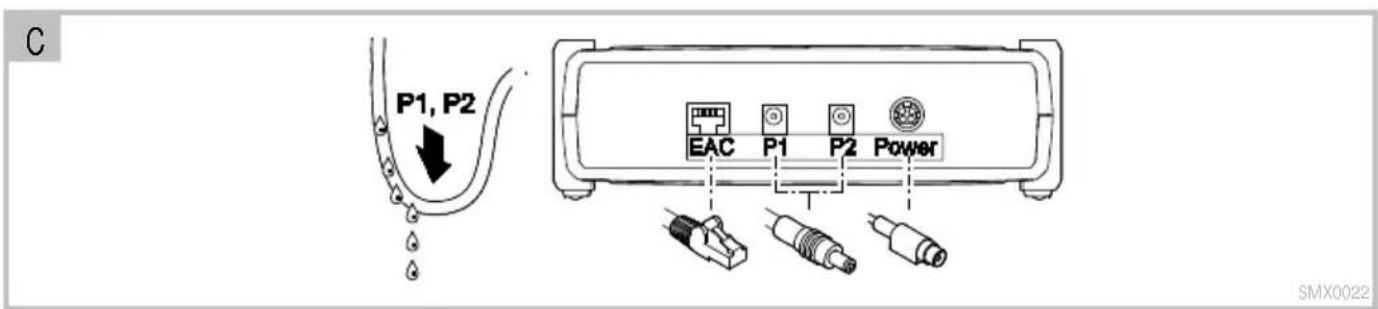
5 B, C
- P1/P2: Insert the plugs of the flow pump into the socket on the StreamMax Pump Controller.
- Route the connecting line with a loop, so that dripping water cannot enter the socket.
- Power: Insert the plugs of the power pack into the socket on the StreamMax Pump Controller.
- Push hard until the plug locks in place.
- EAC: Connect StreamMax Pump Controller and EAC Aquarium Controller with the data cable (optional).
- Ensure that the lug of the RJ-45 plug locks in place.
COMMISSIONING/ START-UP
Proceed as follows for initial start-up:
- Switch on StreamMax Pump Controller. (→ Switching the unit on/off)
- Configure the connected flow pumps, so that they can be controlled. (→ Configuring connections P1 and P2)
- Configure the flow pumps for the "Feeding" mode. (→ Configuring the "feeding" mode)
- Activate the desired speed control mode. (→ Operating mode and configuration mode)
Switching the unit on/off
- Switching on: Connect the unit to the mains. The unit switches on immediately.
- Switching off: Disconnect the unit from the mains.
OPERATION
Display and keys
| The display flashes for approx. 10 s after confirmation of a speed or a flow profile.After approx. 40 s without any operating actions, the display will be switched off.- The dot signals that the unit is operating.- Press any key to switch the display on again. | |
| Mode | To previous level |
| + | Scroll forward, increase value |
| - | Scroll backward, decrease value |
| OK/∅ | Change to the input level.Confirm selection or value.- Values are applied immediately.Activate feeding mode: Press and hod the button for approx. 3 s. |
Operating mode and configuration mode
| Operating mode | ||
| OFF | Switch off both flow pumps. After switching on the unit, this mode is automatically activated. | |
| FEE | Feeding. The speed of both flow pumps changes to 0 or 10 % for 3 minutes. (→ Configuring the “feeding” mode) | |
| ALL | Specify speed in % for the flow pumps on P1 and P2.0-100 Increment: 10 %. | |
| P1 | Specify speed in % for the flow pumps on P1.0-100 Increment: 10 %. | |
| P2 | Specify speed in % for the flow pumps on P2.0-100 Increment: 10 %. | |
| SCE | Specify pre-defined flow profile. | |
| Configuration mode | ||
| CON | P1-P2- | Determine flow pump on P1 and P2.No No flow pumpSt2 StreamMax Premium 2000St4 StreamMax Premium 4000St5 StreamMax Premium 5000 |
| FEH | Speed of the two flow pumps during feeding.NO Speed 0d IN Speed 10 % | |
| rSt | Reset error message. | |
| DEF | Restore factory settings. | |
Specifying the speed
A constant speed is set for the flow pumps in the operating modes ALL, P1, P2. In the operating mode SCE, one of 18 pre-defined flow profiles with variable speeds can be selected.
- Flow profile overview
How to proceed:
-
Select the desired operating mode and confirm with "OK".
-
Select the desired speed value or flow profile and confirm with "OK".
– The display will flash for approx. 10 s.
Configuring connections P1 and P2
For operation, the connections P1 and P2 must be adapted to the flow pump in use. Operation is only possible, if the setting is correct.
How to proceed:
- Select the configuration mode and confirm with "OK".
- Select P1- or P2- and confirm with "OK".
- Select the respective setting for the connected flow pump and confirm with "OK".
- If necessary, configure the second connection.
Configuring the "feeding" mode
The flow pumps are switched off for 3 minutes or run at minimum speed.
How to proceed:
- Select the configuration mode and confirm with "OK".
- Select FSH and confirm with "OK".
- Select the desired speed and confirm with "OK".
MAINTENANCE AND CLEANING
Cleaning the device
- Wipe the device with a damp cloth.
Reset error
In the event of a malfunction, the unit switches off the pumps. The display alternates between Err and the error number, e.g. 001. ( Error messages)
How to proceed:
- Press the "OK" button.
-
The error message has been reset.
-
Eliminate malfunction.
Restoring the factory default settings
Restoring the factory settings deletes all individual settings.
How to proceed:
- Select the configuration mode and confirm with "OK".
- Select def and confirm with "OK".
- The factory setting has been restored.
- The unit changes to operating mode OFF.
REMEDY OF FAULTS
Error messages
The 6-character error message is displayed in two alternating parts. First part: Err, second part: 3-digit error number.
| Display | Malfunction | Possible cause | Remedy | |
| Err 001 | Excess current on P1 | Impeller unit of the flow pump is blocked | Remove blockage | |
| Impeller unit soiled | Regularly clean the impeller unit | |||
| Impeller unit worn | Replace the impeller unit. | |||
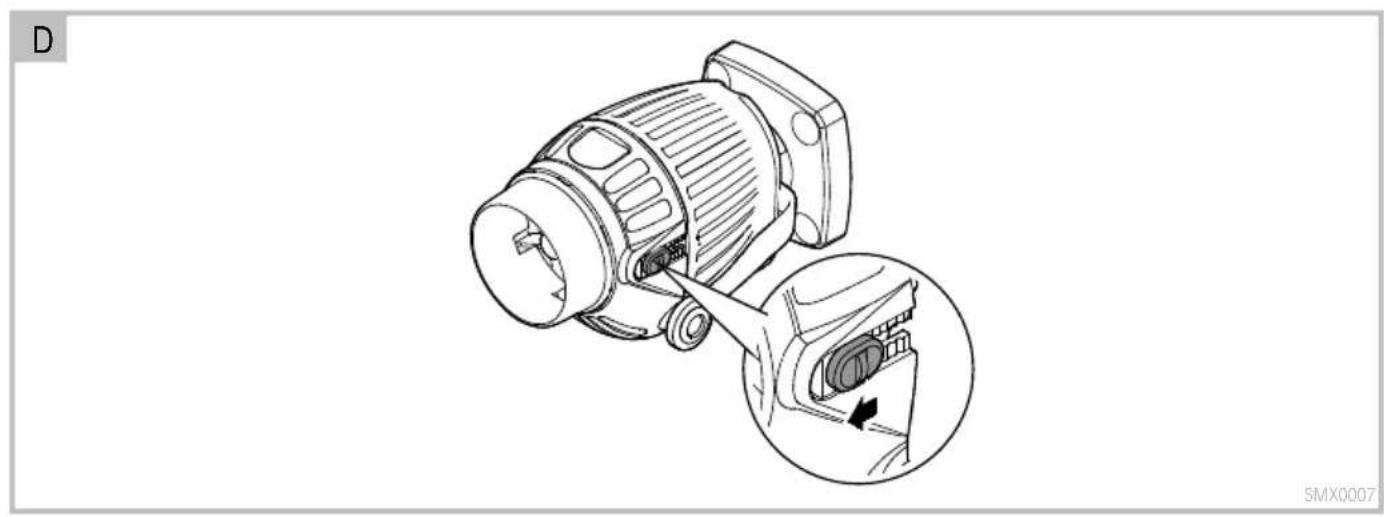
| Incorrect flow controller setting | Push the flow controller in the outlet direction up to the stop (5 D) | |||
| 002 | No output current on P1 | Flow pump defective | ||
| StreamMax Pump Controller defective | ||||
| Plug in socket P1 is not positioned correctly | ||||
| No flow pump connected | ||||
| 003 | Excess current on P2 | Impeller unit of the flow pump is blocked | ||
| Impeller unit soiled | ||||
| Impeller unit worn | ||||
| Incorrect flow controller setting | ||||
| 004 | No output current on P2 | Flow pump defective | ||
| StreamMax Pump Controller defective | ||||
| Plug in socket P2 is not positioned correctly | ||||
| No flow pump connected | ||||
| 005 | Excess temperature | StreamMax Pump Controller heats up excessively | ||
| Ambient temperature too high | ||||
| 006 | Insufficient voltage | Power pack defectiveIncorrect power pack connected | ||
| 007 | Excess voltage | |||
Possible malfunctions
| Malfunction | Cause | Remedy |
| The unit does not switch on | No supply voltage | Connect the unit to the mains |
| StreamMax Premium flow pump does not switch on | Flow pump not connected | Insert plug of the flow pump in socket P1 or P2 |
| StreamMax Pump Controller not configured | Configure StreamMax Pump Controller |
TECHNICAL DATA
| Power pack | Mains connection voltage | V AC | 100 - 240 | |
| Mains frequency | Hz | 50 - 60 | ||
| Max. current consumption | A | 1.5 | ||
| Output voltage | V DC | 24 | ||
| Max. output current | A | 2.5 | ||
| Length of power connection cable | mm | 1400 | ||
| Length of connection cable StreamMax Pump Controller | mm | 1200 | ||
| Dimensions | Length | mm | 108 | |
| Width | mm | 60 | ||
| Height | mm | 30 | ||
| Weight | kg | 0.24 | ||
| StreamMax Pump Controller | Mains voltage | V DC | 24 | |
| Max. power consumption | W | 1.5 | ||
| Output voltage | V AC | 12 | ||
| Max. power output | P1 | VA | 30 | |
| P2 | VA | 30 | ||
| Dimensions | Length | mm | 195 | |
| Width | mm | 122 | ||
| Height | mm | 60 | ||
| Weight | kg | 0.32 | ||
SYMBOLS ON THE UNIT
| For use indoors. | |
| Do not dispose of with household waste. | |
| Read and adhere to the instructions for use. | |
| Protection class II, protection through extra-low voltage |
SPARE PARTS
The use of original parts from OASE ensures continued safe and reliable operation of the unit.
Please visit our website for spare parts drawings and spare parts.

www.oase-livingwater.com/spareparts-ia
DISPOSAL

NOTE
This unit contains electronic components - do not dispose of this unit with domestic waste.
- Render the unit unusable by cutting off the cables.
- Dispose of the unit by using the return system provided for this purpose.
GUARANTEE
For this OASE unit purchased by you, OASE GmbH assumes a 36 month manufacturer's guarantee in accordance with the guarantee conditions laid down in the following. The guarantee period starts with the first purchase from an OASE specialist dealer. In other words, in the event of a resale, the guarantee period will not start again. If services are provided under the terms of this guarantee, this does not lead to extension or renewal of the guarantee period. Your legal rights as a purchaser, especially those ensuing from the warranty, persist. They are not restricted by this guarantee.
Guarantee conditions
OASE GmbH guarantees impeccable, purpose-related properties and workmanship, expert assembly and proper functionality. Subject to our discretion, the guarantee refers to free-of-charge repair or free-of-charge supply of spare parts or of a replacement unit respectively. Should the unit type concerned no longer be manufactured, we reserve the right, at our discretion, to supply a replacement unit from our range that is closest to the type subject to complaint. Claims, the origin of which can be traced back to installation and operating faults as well as lack of care, e.g. the use of unsuitable cleaning materials or negligent maintenance, use other than that intended, damage due to accidents, falls, impact, effect of frost, cutting plugs, shortening cables, calcium deposits or improper attempts to repair the unit, are not covered by our guarantee. We hereby refer to the proper use as specified in the instructions of use that form an integral part of the guarantee. Wear parts such as bulbs etc. are exempted from the guarantee.
The refund of costs for removal and installation, checks, claims for lost profit and damages are exempted from the guarantee together with further reaching claims for damages and loss of whatever nature caused by the unit or its use.
The guarantee is only valid in the country in which the unit was purchased from an OASE dealer. This guarantee is governed by German law under the exclusion of the agreement of the United Nations covering contracts governing the international sale of goods (CISG) regulations.
Guarantee claims can only be brought forward by presenting the sales receipt to us, OASE GmbH, Tecklenburger Straße 161 in D-48477 Hörstel, Germany by returning to us the unit or part of the unit subject to complaint, freight free, at your own risk, accompanied by a copy of the original purchase receipt from the OASE specialist dealer, this guarantee document and written information of the fault encountered.
www.oase-livingwater.com/onderdelen-ia
AFVOER VAN HET AFGEDANKTE APPA- RAAT

OPMERKING
Configurar as conexões P1 e P2
SYMBOLER PÅ APPARATET
SYMBOLER PÅ APPARATET
www.oase-livingwater.com/nahradnidily-ia
LIKVIDACE