
HSE 5000 DD - Generator Herkules - Free user manual and instructions
Find the device manual for free HSE 5000 DD Herkules in PDF.
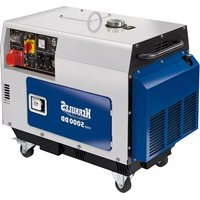


| Product type | Diesel generator |
| Brand | Herkules |
| Model | HSE 5000 DD |
| Rated voltage | 2 x 230 V~ / 1 x 400 V 3~ / 1 x 12 V DC |
| Continuous power (S1) 230 V | 3000 W |
| Continuous power (S1) 400 V | 4200 W |
| Maximum power (S2 5 min) 230 V | 3300 W |
| Maximum power (S2 5 min) 400 V | 5000 W |
| Rated current 230 V | 13 A |
| Rated current 400 V | 6.1 A |
| Frequency | 50 Hz |
| Protection type | IP23M |
| Engine displacement | 418 cm³ |
| Engine power | 6.3 kW (8.6 hp) |
| Fuel | Diesel |
| Tank capacity | 16 L |
| Engine oil capacity | 1.65 L |
| Recommended oil | 15W40 |
| Weight | 136 kg |
| Sound level (LpA) | 75 dB(A) |
| Sound level (LWA) | 96 dB(A) |
| Power outlets | 2 x 230 V~, 1 x 400 V 3~, 1 x 12 V DC |
| Starting | Electric with key and decompression |
| Grounding | Grounding connection |
Frequently Asked Questions - HSE 5000 DD Herkules
User questions about HSE 5000 DD Herkules
0 question about this device. Answer the ones you know or ask your own.
Ask a new question about this device
Download the instructions for your Generator in PDF format for free! Find your manual HSE 5000 DD - Herkules and take your electronic device back in hand. On this page are published all the documents necessary for the use of your device. HSE 5000 DD by Herkules.
USER MANUAL HSE 5000 DD Herkules
GB Original operating instructions Diesel Power Generator
2
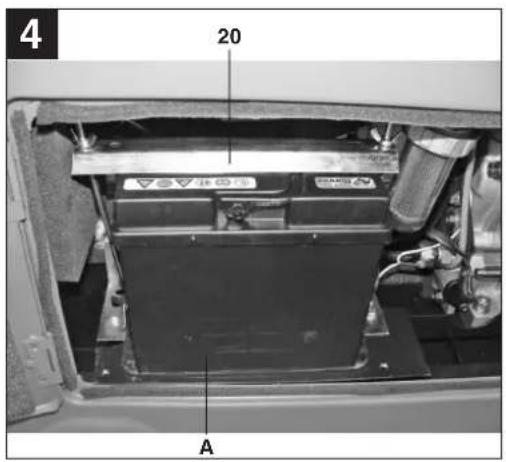
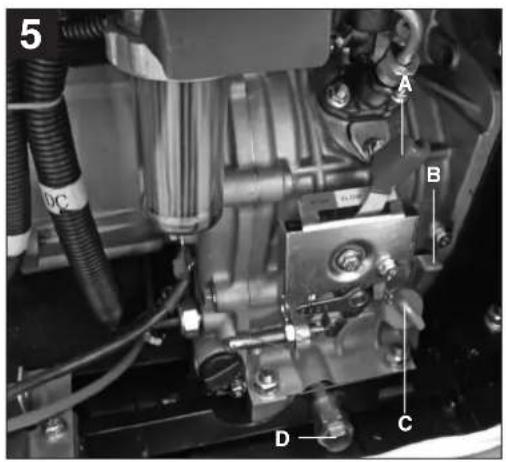
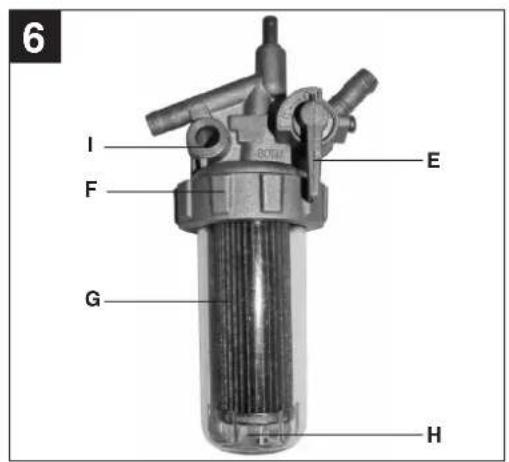
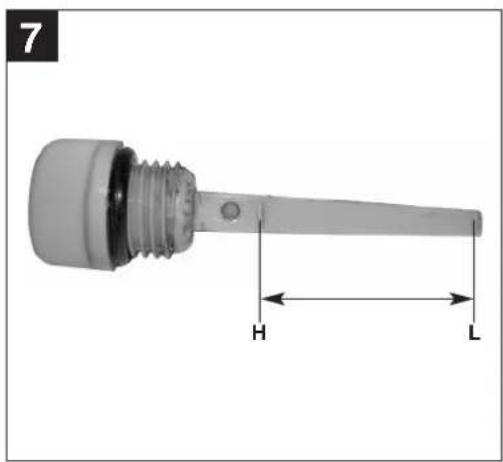
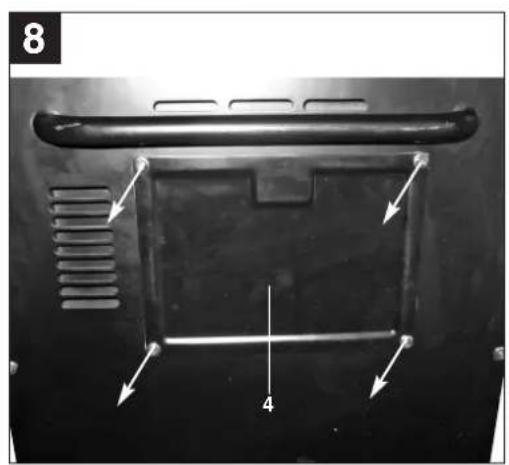
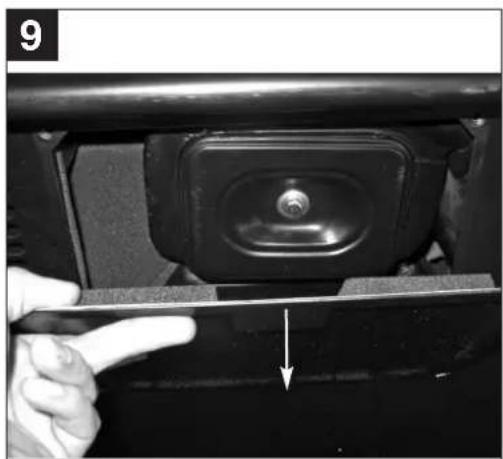
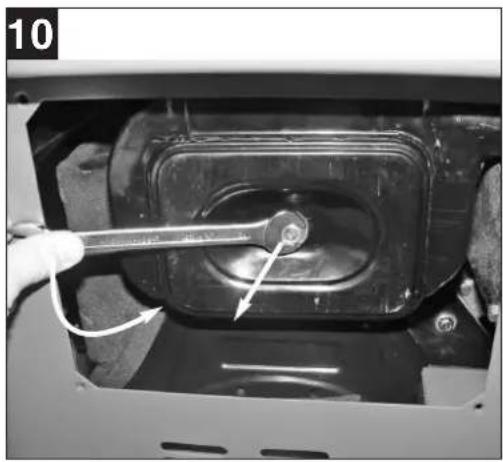
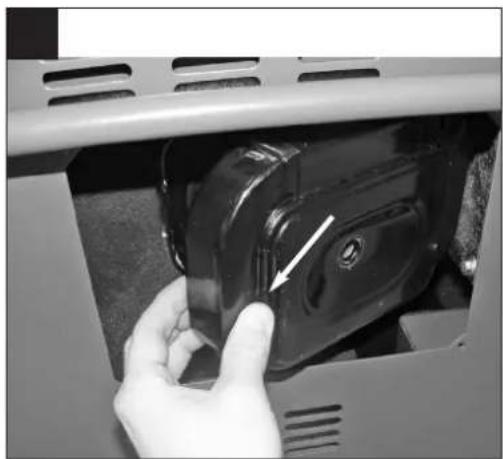
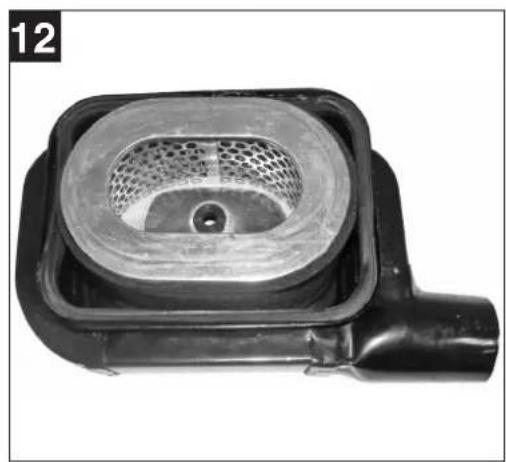
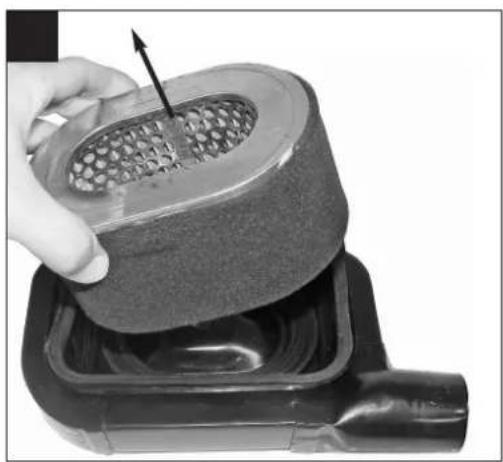
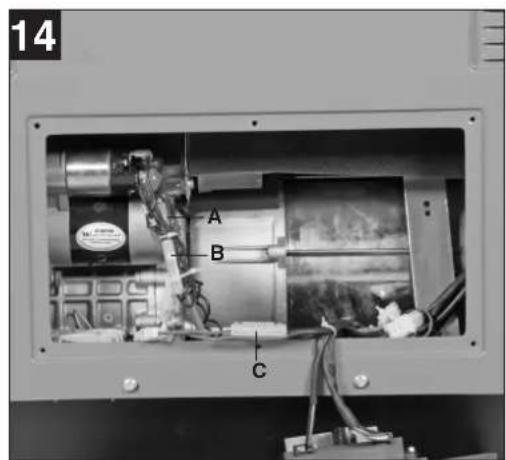
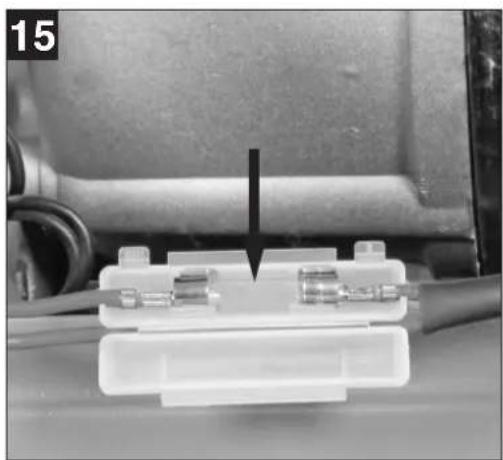
Table of contents
- Safety regulations
- Layout
- Items supplied
- Intended use
- Technical data
- Before starting the equipment
- Operation
- Maintenance
- Winter operation
- Ordering spare parts
- Disposal and recycling
- Troubleshooting guide
⚠️ Important!
When using the equipment, a few safety precautions must be observed to avoid injuries and damage. Please read the complete operating instructions and safety regulations with due care. Keep this manual in a safe place, so that the information is available at all times. If you give the equipment to any other person, hand over these operating instructions and safety regulations as well. We cannot accept any liability for damage or accidents which arise due to a failure to follow these instructions and the safety instructions.
1. Safety regulations
The corresponding safety information can be found in the enclosed booklet.
CAUTION!
Read all safety regulations and instructions. Any errors made in following the safety regulations and instructions may result in an electric shock, fire and/or serious injury. Keep all safety regulations and instructions in a safe place for future use.
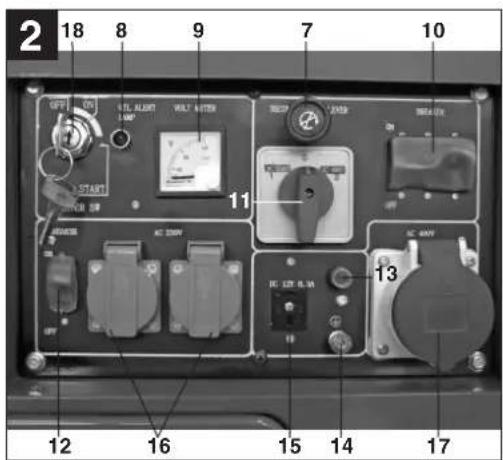
2. Layout (Fig. 1/2/8)
- Tank indicator
- Tank cover
- Push bar
- Air filter cover
- Servicing cover
- Castors
- Decompression cable
- Warning light for oil pressure
- Voltmeter
- Safety trip 400V 3~
- Selector switch for 230V~/400V 3~
- Safety trip 230V~
- 1x 12V DC safety trip
- Earthing connection
- 1x 12V DC connector
- 2x 230V sockets
- 1x 400V 3~ socket
- Ignition lock
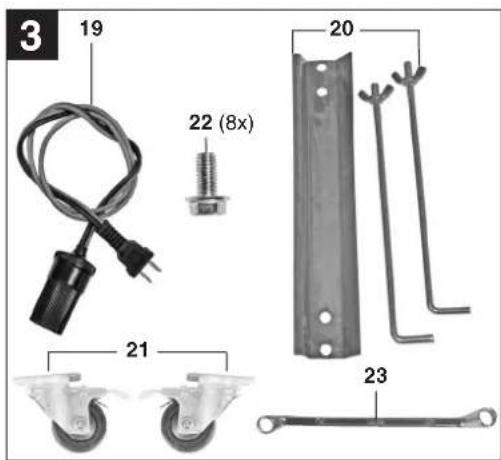
- 12V adapter cable
- Battery mounting kit
- Guide roller (2x)
- Screw (8x)
- Ring wrench
3. Items supplied (Fig. 1-3)
Generator ● 12V adapter cable (Fig. 3/Item 19) ● Battery mounting kit (Fig. 3/Item 20) - Ring wrench • Guide roller (2x) - Screw (8x)
4. Proper use
The device is designed for all applications that require a 230V/400V alternating voltage or 12V direct voltage supply. Be sure to observe the restrictions in the additional safety instructions. The generator is intended to provide electric tools and light sources with electricity. When using the device with household appliances, please check their suitability in accordance with the relevant manufacturer's instructions. In case of doubt, ask an authorized dealer.
The machine is to be used only for its prescribed purpose. Any other use is deemed to be a case of misuse. The user / operator and not the manufacturer will be liable for any damage or injuries of any kind caused as a result of this.
Please note that our equipment has not been designed for use in commercial, trade or industrial applications. Our warranty will be voided if the machine is used in commercial, trade or industrial businesses or for equivalent purposes.
GB
5. Technical data
| Generator | Synchronous |
| Protection type | IP 23M |
| Continuous power S1 4200 W/400 V; 3000 W/230 V | |
| Maximum power S2 (max. 5 min) | |
| 5000W/400 V; 3300 W/230 V | |
| Continuous power S1 (12 V d.c.) | 100 W |
| Rated voltage | 2x 230V~/1x 400V~/1x 12V d. c. |
| Rated current | 13 A (230V~) / 6.1 A (400V 3~) |
| Frequency | 50Hz |
| Displacement | 418 ccm |
| Motor rating | 6.3 kW / (8.6 hp) |
| Fuel | Diesel |
| Tank capacity | 16 liters |
| Engine oil: | 1.65 l (15W40) |
| Weight | 136 kg |
| Sound pressure level LpA : | 75 dB(A) |
| Sound power level LWA : | 96 dB (A) |
| K uncertainty | 1 dB |
| Power factor cos φ: | 1 |
| Power class: | G1 |
| Max. altitude (above mean sea level): | 1000 m |
Operating mode S1 (continuous operation)
The machine can be continuously operated with the quoted power output.
Operating mode S2 (temporary operation)
The machine may be temporarily operated with the quoted power output. Afterwards the machine must be stopped for a while to prevent it from overheating.
Warning!
The specified vibration value was established in accordance with a standardized testing method. It may change according to how the electric equipment is used and may exceed the specified value in exceptional circumstances.
The specified vibration value can be used to compare the equipment with other electric power tools.
The specified vibration value can be used for initial assessment of a harmful effect.
6. Before starting the equipment
Important. The equipment must be filled with engine oil and diesel fuel before it is started.
● Prepare and connect the battery (Important. The battery is not included.) Secure the battery (Fig. 4/Item A) in the unit using the battery mounting kit (Fig. 3/Item 20). First connect the red cable (+) and then the black cable (-) to the battery. - Check the diesel fuel level and top it up if necessary. ● Make sure that the device has sufficient ventilation. - Inspect the immediate vicinity of the generator. - Disconnect any electrical equipment which may already be connected to the generator.
Fitting the guide rollers
Caution! The equipment must stand securely on the pallet. Make sure that the pallet was not damaged during transport.
- Fasten the two guide rollers (Fig. 1/Item 21) by first fitting the 4 screws (Item 22) which are accessible from the outside.
- Use suitable handling equipment to lift the generator from the pallet and place it on a firm and level surface.
- Fit the 4 screws which are accessible from the inside.
6.1 Electrical safety:
● Electric supply cables and connected equipment must be in perfect condition. ● The generator is to be operated only with equipment whose voltage specifications conform with the generator's output voltage. ● Never connect the generator to the power supply (socket-outlet). - Keep the cable length to the consumer as short as possible.
6.2 Environmental protection
- Dispose of soiled maintenance material and operating materials at the appropriate collection point. ● Recycle packaging material, metal and plastics.
6.3 Connecting to earth
The housing is allowed to be connected to earth in order to discharge static electricity. To do this, connect one end of a cable to the earth connection on the generator (Fig. 2/Item 14) and the other end to an external earth (for example an earthing rod).
GB
7. Operation
7.1 Starting the engine
- Check whether the mechanical switch (Fig. 5/Item A) is set to "RUN".
- Open the fuel cock (Fig. 6/Item E).
- Set the ON/OFF switch (Fig. 2/Item 18) to the "ON" position using the key.
- Pull the decompression cable (Fig. 2/Item 7) and turn the ON/OFF switch to "Start" using the key. Release the decompression switch after approx. 5 seconds and the engine will start.
- When the engine is running, turn the ON/OFF switch to "ON".
- If the engine does not start straight away (particularly if the tank was previously empty or after you have replaced the diesel filter), repeat the starting procedure by pulling the decompression cable again.
7.2 Connecting consumers to the generator
- Set the selector switch (Fig. 2/Item 11) to the left to use 230V~ sockets. Important: Even though the continuous power (S1) of 3000 W is equally divided to the 2 sockets in this position, each individual socket may also be loaded with 3000 W. The total load of the two sockets may temporarily (S2) reach a maximum of 3300 W for 5 min.
- Set the selector switch (Fig. 2/Item 11) to the right to activate the 400V 3~ socket. Important: This socket may be exposed to a continuous (S1) load of 4200W and temporarily (S2) for a maximum of 5 minutes to a load of 5000W. ● The generator is suitable for alternating voltage appliances for 230 V~ and 400 V 3~. ● The generator may also be exposed to a continuous load of 12 V DC 100 W (Fig. 2/Item 15).
- Do not connect the generator to the household mains system as this may result in damage to the generator itself or to other electrical appliances in your home.
Note: Some electrical appliances (power jigsaws, drills, etc.) may have a higher level of power consumption when used in difficult conditions
Some electrical appliances (for example televisions, computers, etc.) should not be powered by a generator. If in doubt, consult the manufacturer of your appliance.
7.3 Overload cut-out
The generator is fitted with an overload cut-out. This isolates the relevant sockets if an overload occurs.
Important. If this happens, reduce the electric power you are taking from the generator or remove any defective connected appliances.
Important. Defective overload cut-outs must be replaced only by overload cut-outs of identical design and with the same performance data. If repairs are necessary, please contact your customer service center.
12V DC connector
If an overload occurs, the 12V DC connector (Fig. 2/Item 15) will be isolated from the supply. The 12V DC connector can be reconnected by pressing the overload switch (Fig. 2/Item 13).
230V~ sockets
If an overload occurs, the 230V~ sockets (Fig. 2/Item 16) will be isolated from the supply. You can restart the 230V~ sockets by pressing the overload switch (Fig. 2/Item 12).
400V 3~ socket
If an overload occurs, the 400V 3~ socket (Fig. 2/Item 17) will be isolated from the supply. You can restart the 400V 3~ sockets by pressing the overload switch (Fig. 2/Item 10).
7.4 Switching off the engine
- Before you switch off the generator, allow it to run briefly with no consumers so that it can "cool down".
- Move the ON/OFF switch (Fig. 2/Item 18) to position "OFF" using the key.
- Close the fuel cock.
Note: The engine can also be stopped by pressing the mechanical switch (Fig. 5/Item B). Before it is restarted in this case, the lever (Fig. 5/Item A) must be moved back to the right until it engages.
7.5 Changing defective fuses
To change the fuses, remove the cover from the rear of the generator. The fuses are installed in the fuse holders (Fig. 14 / Item A, B, C) in the positions illustrated. Open the corresponding fuse holder and replace the defective fuse (Fig. 15) with a new fuse.
Important! Use only fuses of the same type previously installed in the respective fuse holder. Pay attention in particular to the maximum current strength (engraved in the fuse).
If you have any doubt, please contact our Customer Service or a qualified electrician.
8. Maintenance
Shut down the engine before doing any cleaning and maintenance work on the unit.
Remove dust and dirt from the machine at regular intervals. Cleaning is best carried out with a fine brush or a cloth.
● Never use caustic agents to clean plastic parts. ● Take the diesel mixture out of the generator if you do not intend to use it for a lengthy period of time.
Important: Switch off the machine immediately and contact your service station:
● In the event of unusual vibrations or noise. - If the engine appears to be overloaded or runs unevenly.
8.1 Changing the oil and checking the oil level (before using the machine)
The engine oil should be changed for the first time when the engine is warm after approx. 20 hours of service. After this the engine oil must be changed every 150 hours of service when the engine is warm.
● Use only engine oil (15W40) - Place the generator unit on a suitable flat surface - Undo the oil filler screw (Fig. 5/Item C) - Undo the oil drain screw (Fig. 5/Item D) and drain the warm engine oil through the drain channel into a container. ● After all the oil has drained out, tighten the oil drain screw and clean the drain channel with a cloth. - Add engine oil up to the top mark on the oil dipstick.
Important: Do not screw the dipstick in to check the oil level, simply insert it up to the thread.
● Dispose of the waste oil properly.
8.2 Cleaning the air filter (see Fig. 8-13)
- Check the air filter before every use, clean or replace it if necessary.
- Do not use abrasive cleaning agents or petrol to clean the elements. ● Clean the elements by tapping them on a flat surface.
8.3 Cleaning the diesel filter (Fig. 6)
The diesel filter (Fig. 6/Item G) must be cleaned if impurities can be seen in the inspection window (Fig. 6/Item H). To clean the diesel filter you will need a funnel connected to a petrol/diesel-resistant fuel hose, petrol/diesel-resistant gloves and an empty diesel fuel canister (IMPORTANT: never mix petrol and diesel).
- Close the fuel cock (Fig. 6/Item E). ● Loosen the knurled nut (Fig. 6/Item F).
- Insert the fuel hose connected to the funnel into the diesel canister and hold the funnel under the inspection window (Fig. 6/Item H).
- Undo the knurled nut (Fig. 6/Item F) completely and drain the clean residual quantity of diesel from the inspection window into the funnel. ● Mop up the contaminated residual quantity of diesel using cleaning paper. Clean the inspection window.
- Pull the diesel filter downwards off the diesel filter holder, remove the remains of the dirt on the diesel filter with the cleaning paper using a little diesel fuel if necessary, or if it is damaged replace the diesel filter. Dispose of the cleaning paper. ● Assemble in reverse order.
8.4 Draining the tank
● To drain the tank, proceed initially as if you were cleaning the diesel filter. ● After removing the diesel filter, position the funnel under the diesel filter holder (Fig. 6/Item I) and open the fuel cock (Fig. 6/Item E). - Drain the diesel fuel out of the tank through the funnel and into the diesel canister. (IMPORTANT: Ensure that the diesel canister is large enough to hold all the fuel left in the tank!). - If necessary the draining process can be stopped by closing the fuel cock. ● After the draining process has been completed, re-assemble the device as described in point 8.3.
9. Winter operation
Since the generator is powered by a diesel engine, special precautions must be taken for using it in the winter.
Use "winter diesel" to operate the diesel generator in outdoor temperatures between -3°C to -10°C . The change to winter diesel takes place at different times depending on the country concerned, it is general around the end of October. You can ask at your filling station when this change should be made.
- If you use the diesel generator regularly, you do not need to take any precautions since the change to winter diesel takes place automatically.
- If you do not use the generator for a lengthy period during autumn, but then wish to use it again in winter, we recommend that you keep the tank almost empty or drain it as described in point 8.4.
- Ask at your filling station when you should change to winter diesel and fill the tank with winter diesel before the onset of outdoor temperatures of between -3°C and -10°C.
- If the diesel fuel still freezes, you must move the diesel generator to a place where the temperature is approximately +10°C for a period of approximately 12 hours.
- If the tank is between halfway and full with normal diesel fuel, this should then be drained as described in point 8.4.
- Then fill the tank with winter diesel.
- If the tank is between empty and half-full, simply fill it up with winter diesel.
11. Disposal and recycling
The unit is supplied in packaging to prevent its being damaged in transit. This packaging is raw material and can therefore be reused or can be returned to the raw material system.
The unit and its accessories are made of various types of material, such as metal and plastic. Defective components must be disposed of as special waste. Ask your dealer or your local council.
10. Ordering replacement parts
Please quote the following data when ordering replacement parts:
- Type of machine • Article number of the machine • Identification number of the machine • Replacement part number of the part required. For our latest prices and information please go to www.isc-gmbh.info
- Troubleshooting
| Fault Cause Remedy | ||
| Engine does not start - Oil pressure | ure switch tripped (red LED (Fig. 2/Item 8))- No diesel fuel- Mechanical switch (Fig. 5/Item A) set to “STOP”- Diesel filter blocked- Air filter dirty- Diesel filter frozen due to low out door temperature- The fuse is defective | - Check oil level, top up with engine oil- Top up with diesel fuel- Set mechanical switch to “RUN”- Clean or replace the diesel filter- Clean or replace the air filter- Proceed as described in the point entitled “Winter operation”- Change the defective fuse as described in point 7.5 |
| Generator has too little or no voltage | - Controller or capacitor defective- Overcurrent circuit-breaker has tripped- Carbon brushes in generator worn | - Contact authorized after-sales service outlet- Press the switch and reduce the consumers- Contact authorized after-sales service outlet |
| The battery does not charge up | - The fuse is defective - Change the defective fuse as described in point 7.5 | |
Table of Contents
7.3 Overload protection
2006/42/EC □ Annex IV Notified Body: Notified Body No.: Reg. No.:
2000/14/EC_2005/88/EC
Annex V
x Annex VI
Noise: measured LWA = 95.33 dB (A); guaranteed LWA = 96 dB (A) P = 6.3 kW; L/∅ = cm Notified Body: Intertek Testing & Certification Ltd. (0359)
2004/26/EC
Emission No.:
Standard references: EN 12601; EN 55012; EN 61000-6-1
First CE: 16
Art.-No.: 41.523.96 I.-No.: 11016
Subject to change without notice
Archive-File/Record: NAPR014991
Documents registrar: Markus Jehl
Wiesenweg 22, D-94405 Landau/Isar
DE
The reprinting or reproduction by any other means, in whole or in part, of documentation and papers accompanying products is permitted only with the express consent of ISC GmbH.
FR

© For EU countries only
For EU countries only
Never place any electric tools in your household refuse.
To comply with European Directive 2012/19/EC concerning old electric and electronic equipment and its implementation in national laws, old electric tools have to be separated from other waste and disposed of in an environment-friendly fashion, e.g. by taking to a recycling depot.
Recycling alternative to the demand to return electrical devices:
As an alternative to returning the electrical device, the owner is obliged to cooperate in ensuring that the device is properly recycled if ownership is relinquished. This can also be done by handing over the used device to a returns center, which will dispose of it in accordance with national commercial and industrial waste management legislation. This does not apply to the accessories and auxiliary equipment without any electrical components which are included with the used device.
All of our products undergo strict quality checks to ensure that they reach you in perfect condition. In the unlikely event that your device develops a fault, please contact our service department at the address shown on this guarantee card or the sales outlet from where you bought the device. Please note the following terms under which guarantee claims can be made:
- These warranty terms regulate additional warranty services, which the manufacturer mentioned below promises to buyers of its new products in addition to their statutory rights of guarantee. Your statutory guarantee claims are not affected by this guarantee. Our guarantee is free of charge to you.
- The warranty services cover only defects due to material or manufacturing faults on a product which you have bought from the manufacturer mentioned below and are limited to either the rectification of said defects on the product or the replacement of the product, whichever we prefer. Please note that our devices are not designed for use in commercial, trade or professional applications. A guarantee contract will not be created if the device has been used by commercial, trade or industrial business or has been exposed to similar stresses during the guarantee period.
- The following are not covered by our guarantee:
- Damage to the device caused by a failure to follow the assembly instructions or due to incorrect installation, a failure to follow the operating instructions (for example connecting it to an incorrect mains voltage or current type) or a failure to follow the maintenance and safety instructions or by exposing the device to abnormal environmental conditions or by lack of care and maintenance.
- Damage to the device caused by abuse or incorrect use (for example overloading the device or the use of unapproved tools or accessories), ingress of foreign bodies into the device (such as sand, stones or dust, transport damage), the use of force or damage caused by external forces (for example by dropping it).
- Damage to the device or parts of the device caused by normal or natural wear or tear or by normal use of the device.
- The guarantee is valid for a period of 60 months starting from the purchase date of the device. Guarantee claims should be submitted before the end of the guarantee period within two weeks of the defect being noticed. No guarantee claims will be accepted after the end of the guarantee period. The original guarantee period remains applicable to the device even if repairs are carried out or parts are replaced. In such cases, the work performed or parts fitted will not result in an extension of the guarantee period, and no new guarantee will become active for the work performed or parts fitted. This also applies if an on-site service is used.
- Please report the defective device on the following internet address to register your guarantee claim: www.isc-gmbh.info. If the defect is covered by our guarantee, then the item in question will either be repaired immediately and returned to you or we will send you a new replacement device.
Also refer to the restrictions of this warranty concerning wear parts, consumables and missing parts as set out in the service information in these operating instructions.


- TABLE OF CONTENTS
- ⚠️ IMPORTANT
- SAFETY REGULATIONS
- CAUTION
- LAYOUT (FIG. 1/2/8)
- ITEMS SUPPLIED (FIG. 1-3)
- PROPER USE
- GB
- TECHNICAL DATA
- OPERATING MODE S1 (CONTINUOUS OPERATION)
- OPERATING MODE S2 (TEMPORARY OPERATION)
- WARNING
- BEFORE STARTING THE EQUIPMENT
- FITTING THE GUIDE ROLLERS
- ELECTRICAL SAFETY
- ENVIRONMENTAL PROTECTION
- CONNECTING TO EARTH
- OPERATION
- STARTING THE ENGINE
- CONNECTING CONSUMERS TO THE GENERATOR
- OVERLOAD CUT-OUT
- V DC CONNECTOR
- V~ SOCKETS
- V 3~ SOCKET
- SWITCHING OFF THE ENGINE
- CHANGING DEFECTIVE FUSES
- MAINTENANCE
- IMPORTANT: SWITCH OFF THE MACHINE IMMEDIATELY AND CONTACT YOUR SERVICE STATION
- CHANGING THE OIL AND CHECKING THE OIL LEVEL (BEFORE USING THE MACHINE)
- IMPORTANT: DO NOT SCREW THE DIPSTICK IN TO CHECK THE OIL LEVEL, SIMPLY INSERT IT UP TO THE THREAD
- CLEANING THE AIR FILTER (SEE FIG. 8-13)
- CLEANING THE DIESEL FILTER (FIG. 6)
- DRAINING THE TANK
- WINTER OPERATION
- DISPOSAL AND RECYCLING
- ORDERING REPLACEMENT PARTS
- OVERLOAD PROTECTION
- EC_2005/88/EC
- EC
- STANDARD REFERENCES: EN 12601; EN 55012; EN
- DE
- FR
Brand : Herkules
Model : HSE 5000 DD
Category : Generator