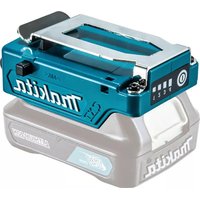
TD00000110 - Battery charger MAKITA - Free user manual and instructions
Find the device manual for free TD00000110 MAKITA in PDF.
 FR
FR
 BG
BG
 CS
CS
 DA
DA
 DE
DE
 EL
EL
 EN
EN
 ES
ES
 ET
ET
 FI
FI
 HU
HU
 ID
ID
 IT
IT
 KK
KK
 KO
KO
 LT
LT
 LV
LV
 MK
MK
 NL
NL
 PL
PL
 PT
PT
 RO
RO
 RU
RU
 SK
SK
 SL
SL
 SQ
SQ
 SR
SR
 SV
SV
 TR
TR
 UK
UK
 VI
VI
 ZH
ZH
| Product Type | Battery holder with USB charging function |
| Brand | Makita |
| Model | TD00000110 |
| Intended Use | Power Makita ventilated/heated clothing and charge USB devices |
| Compatible Battery Types | Makita Li-ion and Ni-MH batteries specified in the manual (e.g., DFJ206, DFV210) |
| USB Output | USB port for charging low-voltage devices |
| Power Level Indicator | Yes, displays power level (4 levels depending on connected product) |
| Power Button | Yes, to turn on/off and change levels |
| Belt Attachment | Yes, with belt loop and anti-drop unlock button |
| Anti-Drop Function | Yes, unlock button for safe removal |
| Adapter Cable for Ventilated Jacket | Optional accessory |
| Adapter Cable for Heated Clothing | Optional accessory |
| Recommended Charging Temperature | 10°C to 40°C |
| Storage | Avoid extreme temperatures, humidity, and dust |
| Maintenance | Clean with a dry or slightly damp cloth; do not use solvents |
| Safety | Use only with Makita batteries; do not short-circuit; follow safety instructions |
| Compliance | CE, WEEE and battery directives |
| Included Accessories | None, adapter cables are optional |
Frequently Asked Questions - TD00000110 MAKITA
User questions about TD00000110 MAKITA
0 question about this device. Answer the ones you know or ask your own.
Ask a new question about this device
Download the instructions for your Battery charger in PDF format for free! Find your manual TD00000110 - MAKITA and take your electronic device back in hand. On this page are published all the documents necessary for the use of your device. TD00000110 by MAKITA.
USER MANUAL TD00000110 MAKITA
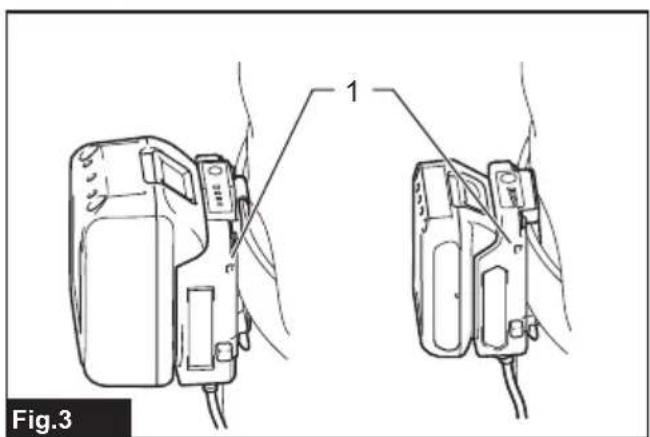
natural_image
Technical line drawing of two electronic devices with wires, labeled 'Fig.3' (no text or symbols on the devices themselves)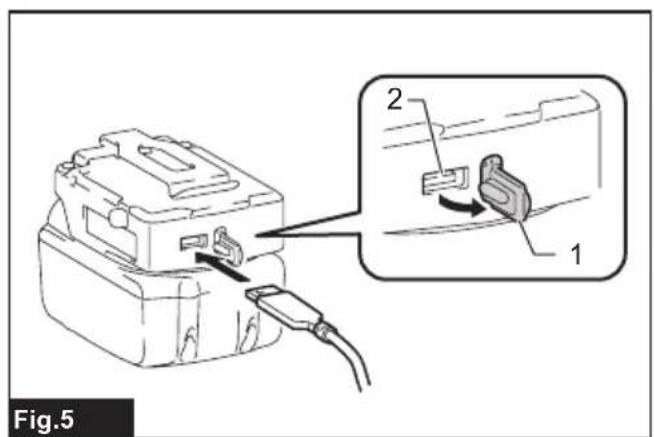
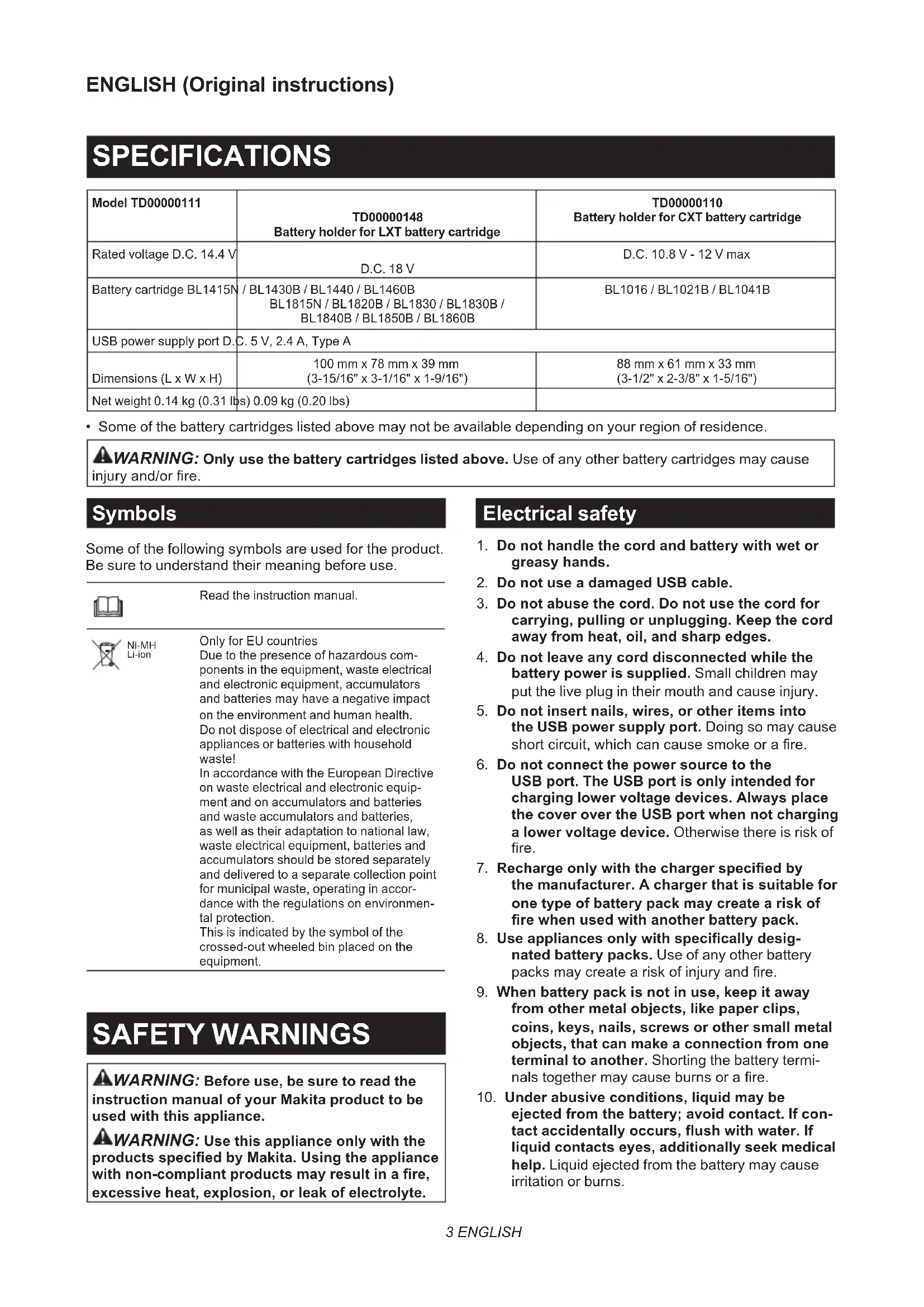
SPECIFICATIONS
| Model TD00000111 | TD00000148Battery holder for LXT battery cartridge | TD00000110Battery holder for CXT battery cartridge |
| Rated voltage D.C. 14.4 V | D.C. 18 V | D.C. 10.8 V - 12 V max |
| Battery cartridge BL1415N | / BL1430B / BL1440 / BL1460BBL1815N / BL1820B / BL1830 / BL1830B /BL1840B / BL1850B / BL1860B | BL1016 / BL1021B / BL1041B |
| USB power supply port D.C. 5 V, 2.4 A, Type A | ||
| Dimensions (L x W x H) | 100 mm x 78 mm x 39 mm(3-15/16" x 3-1/16" x 1-9/16") | 88 mm x 61 mm x 33 mm(3-1/2" x 2-3/8" x 1-5/16") |
| Net weight 0.14 kg (0.31 lbs) | 0.09 kg (0.20 lbs) | |
- Some of the battery cartridges listed above may not be available depending on your region of residence.
WARNING: Only use the battery cartridges listed above. Use of any other battery cartridges may cause injury and/or fire.
Symbols
Some of the following symbols are used for the product. Be sure to understand their meaning before use.

Read the instruction manual.

Ni-MH Li-ion
Only for EU countries
Due to the presence of hazardous components in the equipment, waste electrical and electronic equipment, accumulators and batteries may have a negative impact on the environment and human health. Do not dispose of electrical and electronic appliances or batteries with household waste!
In accordance with the European Directive on waste electrical and electronic equipment and on accumulators and batteries and waste accumulators and batteries, as well as their adaptation to national law, waste electrical equipment, batteries and accumulators should be stored separately and delivered to a separate collection point for municipal waste, operating in accordance with the regulations on environmental protection.
This is indicated by the symbol of the crossed-out wheeled bin placed on the equipment.
SAFETY WARNINGS
⚠ WARNING: Before use, be sure to read the instruction manual of your Makita product to be used with this appliance.
⚠ WARNING: Use this appliance only with the products specified by Makita. Using the appliance with non-compliant products may result in a fire, excessive heat, explosion, or leak of electrolyte.
Electrical safety
- Do not handle the cord and battery with wet or greasy hands.
- Do not use a damaged USB cable.
- Do not abuse the cord. Do not use the cord for carrying, pulling or unplugging. Keep the cord away from heat, oil, and sharp edges.
- Do not leave any cord disconnected while the battery power is supplied. Small children may put the live plug in their mouth and cause injury.
-
Do not insert nails, wires, or other items into the USB power supply port. Doing so may cause short circuit, which can cause smoke or a fire.
-
Do not connect the power source to the USB port. The USB port is only intended for charging lower voltage devices. Always place the cover over the USB port when not charging a lower voltage device. Otherwise there is risk of fire.
-
Recharge only with the charger specified by the manufacturer. A charger that is suitable for one type of battery pack may create a risk of fire when used with another battery pack.
-
Use appliances only with specifically designated battery packs. Use of any other battery packs may create a risk of injury and fire.
-
When battery pack is not in use, keep it away from other metal objects, like paper clips, coins, keys, nails, screws or other small metal objects, that can make a connection from one terminal to another. Shorting the battery terminals together may cause burns or a fire.
-
Under abusive conditions, liquid may be ejected from the battery; avoid contact. If contact accidentally occurs, flush with water. If liquid contacts eyes, additionally seek medical help. Liquid ejected from the battery may cause irritation or burns.
-
Do not use a battery or the appliance to be used with the battery if they are damaged or modified. Damaged or modified battery or appliance may exhibit unpredictable behaviour resulting in fire, explosion or risk of injury.
- Do not expose a battery pack to fire or excessive temperature. Exposure to fire or temperature above 130 °C may cause explosion.
- Follow all charging instructions and do not charge the battery pack outside the temperature range specified in the instructions. Charging improperly or at temperatures outside the specified range may damage the battery and increase the risk of fire.
- Have servicing performed by a qualified repair person using only identical replacement parts. This will ensure that the safety of the product is maintained.
- Do not modify or attempt to repair the appliance or the battery pack except as indicated in the instructions for use and care.
Important safety instructions for battery cartridge
- Before using battery cartridge, read all instructions and cautionary markings on (1) battery charger, (2) battery, and (3) product using battery.
- Do not disassemble or tamper with the battery cartridge. It may result in a fire, excessive heat, or explosion.
- If operating time has become excessively shorter, stop operating immediately. It may result in a risk of overheating, possible burns and even an explosion.
-
If electrolyte gets into your eyes, rinse them out with clear water and seek medical attention right away. It may result in loss of your eyesight.
-
Do not short the battery cartridge:
(1) Do not touch the terminals with any conductive material.
(2) Avoid storing battery cartridge in a container with other metal objects such as nails, coins, etc.
(3) Do not expose battery cartridge to water or rain.
A battery short can cause a large current flow, overheating, possible burns and even a breakdown.
- Do not store and use the tool and battery cartridge in locations where the temperature may reach or exceed 50 °C (122 °F).
- Do not incinerate the battery cartridge even if it is severely damaged or is completely worn out. The battery cartridge can explode in a fire.
- Do not nail, cut, crush, throw, drop the battery cartridge, or hit against a hard object to the battery cartridge. Such conduct may result in a fire, excessive heat, or explosion.
-
Do not use a damaged battery.
-
The contained lithium-ion batteries are subject to the Dangerous Goods Legislation requirements.
For commercial transports e.g. by third parties, forwarding agents, special requirement on packaging and labeling must be observed.
For preparation of the item being shipped, consulting an expert for hazardous material is required. Please also observe possibly more detailed national regulations.
Tape or mask off open contacts and pack up the battery in such a manner that it cannot move around in the packaging. -
When disposing the battery cartridge, remove it from the tool and dispose of it in a safe place. Follow your local regulations relating to disposal of battery.
-
Use the batteries only with the products specified by Makita. Installing the batteries to non-compliant products may result in a fire, excessive heat, explosion, or leak of electrolyte.
-
If the tool is not used for a long period of time, the battery must be removed from the tool.
-
During and after use, the battery cartridge may take on heat which can cause burns or low temperature burns. Pay attention to the handling of hot battery cartridges.
-
Do not touch the terminal of the tool immediately after use as it may get hot enough to cause burns.
-
Do not allow chips, dust, or soil stuck into the terminals, holes, and grooves of the battery cartridge. It may cause heating, catching fire, burst and malfunction of the tool or battery cartridge, resulting in burns or personal injury.
-
Unless the tool supports the use near high-voltage electrical power lines, do not use the battery cartridge near high-voltage electrical power lines. It may result in a malfunction or breakdown of the tool or battery cartridge.
-
Keep the battery away from children.
SAVE THESE INSTRUCTIONS.
CAUTION: Only use genuine Makita batteries. Use of non-genuine Makita batteries, or batteries that have been altered, may result in the battery bursting causing fires, personal injury and damage. It will also void the Makita warranty for the Makita tool and charger.
Tips for maintaining maximum battery life
- Charge the battery cartridge before completely discharged. Always stop tool operation and charge the battery cartridge when you notice less tool power.
- Never recharge a fully charged battery cartridge. Overcharging shortens the battery service life.
-
Charge the battery cartridge with room temperature at 10 °C - 40 °C ( 50 °F - 104 °F ). Let a hot battery cartridge cool down before charging it.
-
When not using the battery cartridge, remove it from the tool or the charger.
- Charge the battery cartridge if you do not use it for a long period (more than six months).
PARTS DESCRIPTION
This holder can be used for following Makita products.
▶ Fig.1
| Group Product name Model | ||
| A Fan | jacket DFJ206 / DFJ207 / DFJ210 /DFJ211 / DFJ212 / DFJ213 /DFJ214 / DFJ216 / DFJ304 /DFJ305 / DFJ310 / DFJ311 /DFJ405 / DFJ407 / DFJ410 /DFJ411 / DFJ416 | |
| Fan vest DFV210 | ||
| Heated jacket CJ105D / CJ106D /DCJ205 / DCJ206 | ||
| Heated vest CV102D / DCV202 | ||
| Heated blanket CB100D / DCB200 | ||
| B Fan | jacket DFJ212A / DFJ213A /DFJ214A / DFJ216A /DFJ312A / DFJ416A | |
| Fan vest DFV210A / DFV214A /DFV215A | ||
| Heated base layer shirt | DCX200 / DCX201 | |
1. Power level indicator
When using a fan jacket/vest, the power level is displayed.
NOTE: If you use the fan jackets/vests in group A listed above, the power level indicator 4 will not lights up because their fan units employ 3-step control.
NOTE: If you use the heated clothing, only the power level indicator 4 will lights up.
2. Power button
To turn on, insert the battery cartridge and then press and hold the power button until the power level indicator lights up.
To change the power level of the fan jacket/vest, press the power button briefly when the power is turned on. To turn off, press and hold the power button until the power level indicator turns off.
NOTE: To change the warmth of the heated clothing, press the button on the heated clothing when it is powered.
3. Power socket
Connect the cable from the products or the adapter cable.
4. Adapter cable for fan jacket/vest (optional accessory)
Use adapter cable when using the products in group A listed above.
5. Adapter cable for heated clothing (optional accessory)
Use adapter cable when using the products in group A listed above.
6. Power cord of the products
For the products in group A listed above, connect the suitable adapter cable for the fan jacket/vest or heated clothing.
For the products in group B listed above, connect to the power socket of the battery holder.
NOTE: The shape and location of the socket vary depending on your products.
7. Battery cartridge (optional accessory)
Insert the battery cartridge to the holder all the way until it locks in place with a small click.
FUNCTIONAL DESCRIPTION
Installing or removing the battery cartridge
CAUTION: Hold the battery holder and the battery cartridge firmly when installing or removing the battery cartridge. Failure to hold the battery holder and the battery cartridge firmly may cause them to slip out of your hands and result in damage to the battery holder and battery cartridge and/or a personal injury.
CAUTION: Always switch off the device before removing the battery cartridge.
▶ Fig.2: 1. Red indicator 2. Button 3. Battery cartridge 4. Battery holder
To install the battery cartridge, align the tongue on the battery cartridge with the groove in the housing and slip it into place. Insert the battery cartridge all the way until it locks in place with a small click. If you can see the red indicator on the upper side of the button, it is not locked completely.
To remove the battery cartridge, slide it from the battery holder while pressing the button on the front of the cartridge.
CAUTION: Always install the battery cartridge fully until the red indicator cannot be seen. Otherwise the battery cartridge may accidentally fall out of the battery holder, causing injury to you or someone around you.
⚠️ CAUTION: Do not forcibly install the battery cartridge. If the battery cartridge does not slide in easily, it is not being inserted correctly.
Attaching the battery holder
You can hang the battery holder on your waist belt. To prevent the battery holder from dropping accidentally, attach a strap using the strap hole and secure it.
▶ Fig.3: 1. Strap hole
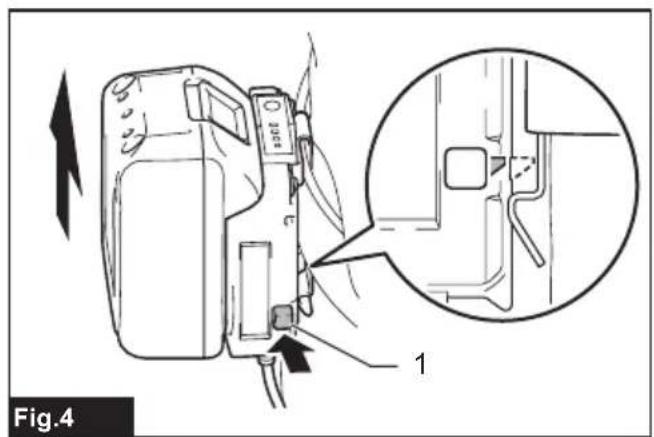
The battery holder has an anti-drop function. When removing the battery holder from the belt, pull up the battery holder while pressing the unlock button.
▶ Fig.4: 1. Unlock button
Connecting USB devices
⚠️CAUTION: Connect only devices that are compatible with the USB power supply port. Not doing so may cause a malfunction of the battery holder.
NOTICE: Before connecting a USB device to the battery holder (with the battery), always back up the data on the USB device. Not doing so may cause a loss of your data.
NOTICE: The battery holder may not supply power to some USB devices.
NOTICE: When not in use or after charging, remove the USB cable and close the cover.
The battery holder (with the battery cartridge) can work as an external power supply for USB devices.
Open the cover and connect a USB cable (not included) to the USB port of the battery holder. Then connect the other end of the cable to the device. To start charging, press and hold the power button until the power level indicator lights up. To stop charging, press and hold the power button until the power level indicator turns off.
▶ Fig.5: 1. Cover 2. USB port
NOTE: The actual output current varies depending on the USB device to be connected.
NOTE: Battery power is consumed while the power button is turned on. Always turn off the switch when not in use.
NOTE: When charging multiple USB devices in succession, wait about 10 seconds after charging of the previous device has completed before beginning to charge the next device.
MAINTENANCE
NOTICE: Never use gasoline, benzine, thinner, alcohol or the like. Discoloration, deformation or cracks may result.
NOTICE: Do not wash the battery holder with water.
— Wipe off dirt, dust, oil, grease, .etc on the housing with clean dry cloth or one dipped in soapy water and tightly wrung out.
— Keep the appliance in a place where it will not be extremely hot, cold or humid.
To maintain product SAFETY and RELIABILITY, repairs, any other maintenance or adjustment should be performed by Makita Authorized or Factory Service Centers, always using Makita replacement parts.
ESPECIFICAÇÕES
| Modelo TD00000111 | TD00000148Porta-bateria para bateria LXT | TD00000110Porta-bateria para bateria CXT |
| Tensão nominal C.C. 14,4 V | C.C. 18 V | C.C. 10.8 V - 12 V máx.: |
| Bateria BL1415N / BL1430B | / BL1440 / BL1460BBL1815N / BL1820B / BL1830 / BL1830B /BL1840B / BL1850B / BL1860B | BL1016 / BL1021B / BL1041B |
| Porta USB de alimentação C.C. 5 V, 2,4 A, tipo A | ||
| Dimensões (C x L x A) 100 mm x 78 mm x 39 mm 88 mm x 61 mm x 33 mm | ||
| Peso líquido 0,14 kg 0,09 kg | ||
▶ Fig.5: 1. Couvercle 2. Port USB
VEILIGHEIDSWAAR- SCHUWINGEN
▶ Fig.5: 1. Lock 2. USB-port
▶ Joon.3: 1. Rihmaauk
▶ Joon.5: 1. Kate 2. USB-port
TYTO POKYNY USCHOVEJTE.


- Symbols
- SAFETY WARNINGS
- Electrical safety
- Important safety instructions for battery cartridge
- SAVE THESE INSTRUCTIONS.
- Tips for maintaining maximum battery life
- PARTS DESCRIPTION
- Power level indicator
- Power button
- Power socket
- Adapter cable for fan jacket/vest (optional accessory)
- Adapter cable for heated clothing (optional accessory)
- Power cord of the products
- Battery cartridge (optional accessory)
- FUNCTIONAL DESCRIPTION
- Installing or removing the battery cartridge
- Attaching the battery holder
- Connecting USB devices
- MAINTENANCE
- VEILIGHEIDSWAAR- SCHUWINGEN
- TYTO POKYNY USCHOVEJTE.
Brand : MAKITA
Model : TD00000110
Category : Battery charger