DC18WC - Battery charger MAKITA - Free user manual and instructions
Find the device manual for free DC18WC MAKITA in PDF.

View the manual :
 FR
FR
 BG
BG
 CS
CS
 DA
DA
 DE
DE
 EL
EL
 EN
EN
 ES
ES
 ET
ET
 FI
FI
 HU
HU
 IT
IT
 KK
KK
 LT
LT
 LV
LV
 MK
MK
 NL
NL
 NO
NO
 PL
PL
 PT
PT
 RO
RO
 RU
RU
 SK
SK
 SL
SL
 SQ
SQ
 SR
SR
 SV
SV
 TR
TR
 UK
UK
 ZH
ZH
FR
BG
CS
DA
DE
EL
EN
ES
ET
FI
HU
IT
KK
LT
LV
MK
NL
NO
PL
PT
RO
RU
SK
SL
SQ
SR
SV
TR
UK
ZH
Pick your language and provide your email: we'll send you a specifically translated version.
| Product type | Battery charger |
| Brand | Makita |
| Model | DC18WC |
| Input voltage | 100-240 V AC, 50/60 Hz |
| Output voltage | 18 V DC |
| Output current | 3 A |
| Compatible battery type | Makita 18 V Li-ion series |
| Charging time (3 Ah battery) | Approx. 30 minutes |
| LED indicators | Yes (charge status) |
| Cooling system | Built-in fan |
| Weight | 0.6 kg |
| Dimensions (L x W x H) | 175 x 95 x 70 mm |
| Power supply | Mains |
| Power consumption | 100 W |
| Protection functions | Overload, overheat, short-circuit |
| Recommended use | Indoor only |
| Housing material | ABS plastic |
| Certifications | CE, EAC |
| Warranty | 2 years |
| Maintenance | Clean with a dry cloth, disconnect before cleaning |
Frequently Asked Questions - DC18WC MAKITA
What type of battery can I charge with the Makita DC18WC?
This charger is compatible with all 18 V Li-ion batteries from the Makita series, including models BL1815, BL1830, BL1840, BL1850, etc.
How long does it take to charge a Makita 3 Ah battery?
The charging time for a 3 Ah battery is approximately 30 minutes. Higher capacity batteries may take up to 1 hour.
What do the LED indicators on the charger mean?
Flashing green light indicates the battery is charging. Solid green light means charging is complete. A red or orange light may indicate an error or abnormal temperature.
Does the DC18WC charger have a cooling system?
Yes, it has a built-in fan that activates to cool the battery during charging, preventing overheating.
Can I leave the battery on the charger after full charge?
Yes, the charger switches to trickle charge mode to avoid overcharging and preserve the battery. You can leave it connected safely.
Does the charger work with other brand batteries?
No, the Makita DC18WC is specifically designed for Makita 18 V Li-ion batteries. Using other brands may damage the charger or battery.
How to clean the Makita DC18WC charger?
Unplug the charger and wipe the housing with a soft, dry cloth. Do not use chemical or abrasive cleaners. Do not allow dust to accumulate in the ventilation slots.
What are the dimensions and weight of the DC18WC charger?
The charger measures approximately 175 x 95 x 70 mm and weighs 0.6 kg, making it compact and easy to carry.
Does the charger protect the battery from overheating?
Yes, it features thermal protection that reduces or stops the charging current if the battery temperature exceeds a safe threshold.
Can I use the DC18WC outdoors?
No, this charger is designed for indoor use only. It must be protected from moisture, rain, and extreme temperatures.
User questions about DC18WC MAKITA
0 question about this device. Answer the ones you know or ask your own.
Ask a new question about this device
No questions yet. Be the first to ask one.
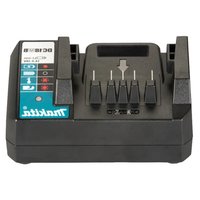
Download the instructions for your Battery charger in PDF format for free! Find your manual DC18WC - MAKITA and take your electronic device back in hand. On this page are published all the documents necessary for the use of your device. DC18WC by MAKITA.
USER MANUAL DC18WC MAKITA


Manual assistant
Powered by Anthropic
Waiting for your message
Product information
Brand : MAKITA
Model : DC18WC
Category : Battery charger