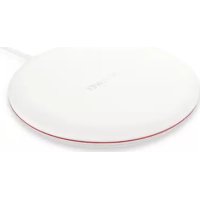
Wireless Charger - Battery charger HUAWEI - Free user manual and instructions
Find the device manual for free Wireless Charger HUAWEI in PDF.


| Product Type | Wireless Charger |
| Brand | Huawei |
| Model | Wireless Charger (CP60) |
| Dimensions (approx.) | 100 mm x 100 mm x 20 mm |
| Weight (approx.) | 150 g |
| Power Supply | Via USB Type-C port; recommended power adapter: HW100400E00, HW100400B00, HW100400U00, HW-100400A00 |
| Charging Standard | Qi |
| Main Functions | Fast wireless charging for compatible smartphones; built-in safety protection (overcharge, overheat, short circuit) |
| Indicator Light | White: off (no power or removed), flashes once (connected), steady (charging or charged), fast flashing (error) |
| Operating Temperature | -10 °C to +45 °C |
| Storage Temperature | -40 °C to +70 °C |
| Operating Frequency | 111-148 kHz |
| Maximum Output Power | 29.90 dBμA/m at 10 m |
| Software Version | FW-88.66.2.10 |
| Included Accessories | USB Type-C cable, quick start guide |
| Care and Cleaning | Keep dry; avoid dust, moisture, dirt; do not immerse; use a soft dry cloth |
| Safety | Maintain a distance of 30 cm from medical devices; do not use if damaged; do not place metal objects on the charger |
| Spare Parts and Repairability | Not user-serviceable; use only Huawei approved accessories |
| Regulatory Compliance | EU (Directive 2014/53/EU), FCC (Part 15) |
| Warranty | See Huawei website for warranty terms |
Frequently Asked Questions - Wireless Charger HUAWEI
User questions about Wireless Charger HUAWEI
0 question about this device. Answer the ones you know or ask your own.
Ask a new question about this device
Download the instructions for your Battery charger in PDF format for free! Find your manual Wireless Charger - HUAWEI and take your electronic device back in hand. On this page are published all the documents necessary for the use of your device. Wireless Charger by HUAWEI.
USER MANUAL Wireless Charger HUAWEI
HUAWEI Wireless Charger
Quick Start Guide
Кратко ръководство
HUAWEI Wireless Charger x 1
USB Type-C data cable x 1
Quick start guide x 1
Charging Your Wireless Phone
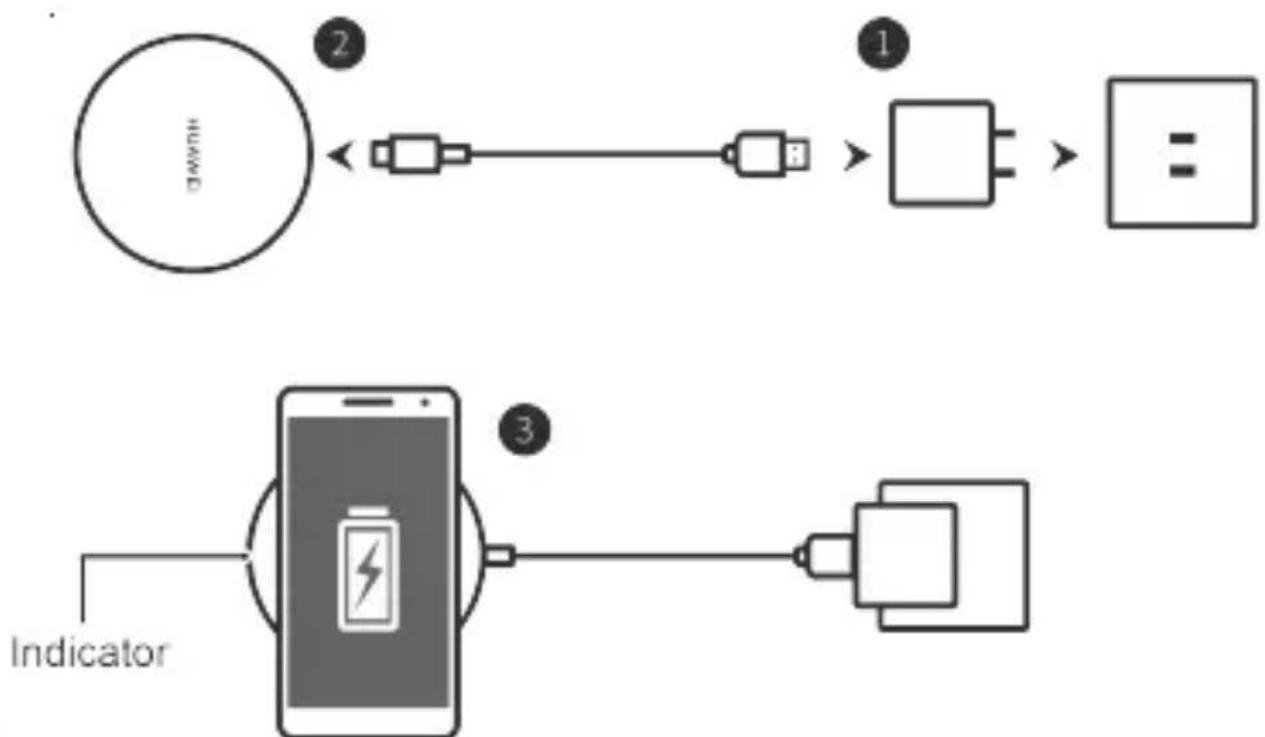
- Connect the charging adapter to a power outlet and the data cable.
- Connect the data cable to the wireless charger through the USB Type-C port.
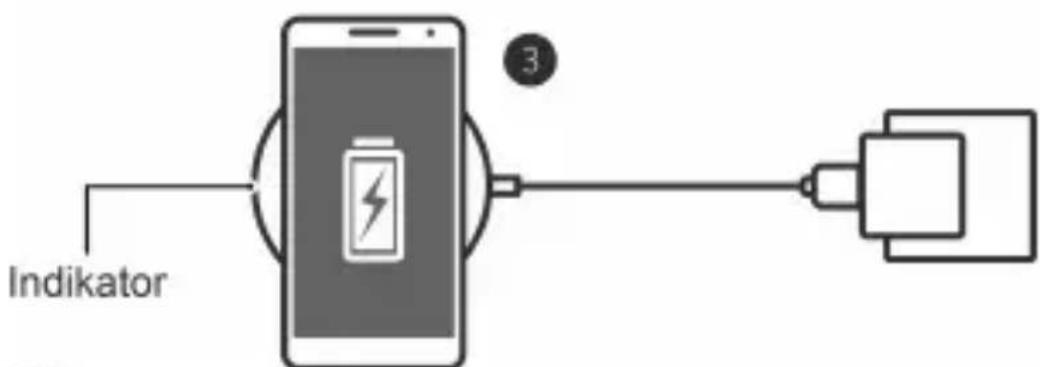
- Place the rechargeable area of the phone onto the center surface of the wireless charger. Charging will begin on contact. (To locate the rechargeable area of the phone, please refer to the phone's user manual)
flowchart
graph LR
    A["HUWEI"] -->|2| B["Device"]
    B --> C["Switch"]
    C --> D["Device"]
    D --> E["Block"]
    E --> F["Block"]
    F --> G["Block"]
    G --> H["Indicator"]

- When charging, please position the wireless charger with the logo facing upwards.
- The wireless charger comes equipped with multiple security protection features. If you encounter an error during charging, check and fix any issues that your phone may be experiencing, and then place your phone back on the wireless charger.
- For best charging performance, it is recommended that you use a Huawei-approved charger.
Fast Wireless Charging
To begin charging, place your Huawei phone that supports fast wireless charging onto the wireless charger.
For more details, please refer to the phone's user manual.

- Make sure the center of the phone is aligned over the center of the wireless charger. If the phone is not correctly placed, it may not charge properly.
- If the phone uses a protective case, remove the case and place the phone correctly onto the wireless charger, as protective cases or metal contents contained in protective cases may cause the phone to not charge properly or induce additional heat.
- To keep the wireless charger in good condition, avoid using it inside a vehicle.
- Avoid placing your phone with bank cards or transportation cards while charging, as the card chips may affect the charging mechanism.
Indicator Descriptions
| Color | Description |
| The indicator is off. | The wireless charger is not connected to a power supply or the phone has been removed from the wireless charger. |
| The indicator blinks white once. | The wireless charger is connected to a power supply. |
| The indicator stays | The phone is being charged or is fully charged. |
| steady white. | |
| The indicator blinks white quickly. | An error has occurred. |
Safety Information
Before you use the device, read the following precautions carefully to ensure optimal product performance and to avoid danger or violation of laws and regulations.
- In clinics and hospitals where the use of wireless devices is prohibited, please comply with the regulations and power off your device.
- Some wireless devices may interfere with implantable medical devices and other medical equipment, such as pacemakers, cochlear implants, and hearing aids. Consult the manufacturer of your medical equipment for more information.
- When using the device, keep it at least 30 cm away from medical devices.
- Keep the device dry. Avoid using the device in dusty, damp, or dirty environments, as such environments may damage the internal circuitry.
- Do not use the device during thunderstorms, as thunderstorms may cause equipment malfunction or a shock hazard.
- Please only use the device within its approved operating range of -10^ to +45^ , and only allow it to be exposed to temperatures within its approved storage range of -40^ to +70^ . Extreme heat or cold may damage the device.
- If the charging adapter needs to be replaced, the output of the adapter must match the specifications of the wireless charger, and must meet the requirements of Clause 2.5 in GB4943.1.
- If the device needs to be connected to a USB port, ensure that the USB port is USB-IF certified, and that it complies with the USB-IF standards.
- Keep the device away from excessive heat sources and direct sunlight. Do not place it on or in heating devices, such as microwave ovens, stoves, or radiators.
- Do not attempt to disassemble or remanufacture the device, insert foreign objects into it, or immerse or expose it to water or other liquids. Doing so may lead to fire, or other hazards.
- Dispose of the device in accordance with local regulations. Do not
dispose of the device in normal household waste. Please respect local laws on the disposal of electronic products and their accessories and support recycling efforts.
- To prevent accidental swallowing and choking, keep the device out of reach of children and pets.
- The device and its accessories may contain small components. Keep the device and its accessories out of the reach of children. Otherwise, children may damage the device and its accessories by mistake, or swallow the small components, which may result in hazards such as choking.
- Do not drop, squeeze, or pierce the device to avoid short-circuiting and overheating.
- Connecting the device to non-approved or incompatible power supplies, chargers, or batteries is not advised as this may cause fires.
- Do not wirelessly charge a device that does not meet the Qi standard, and avoid placing metal objects onto the surface of the wireless charger, as they may induce heat and cause equipment malfunction.
- To maintain good use, avoid using the data cable that came with the product for other devices.
Disposal and Recycling Information
The crossed-out wheeled-bin symbol on your product, battery, literature or packaging reminds you that all electronic products and batteries must be taken to separate waste collection points at the end of their working lives; they must not be disposed of in the normal waste stream with household garbage. It is the responsibility of the user to dispose of the equipment using a designated collection point or service for separate recycling of waste electrical and electronic equipment (WEEE) and batteries according to local laws.
Proper collection and recycling of your equipment helps ensure electrical and electronic equipment (EEE) waste is recycled in a manner that conserves valuable materials and protects human health and the environment, improper handling, accidental breakage, damage, and/or improper recycling at the end of its life may be harmful for health and environment. For more information about where and how to drop off your EEE waste, please contact your local
authorities, retailer or household waste disposal service or visit the website http://consumer.huawei.com/en/.
Reduction of Hazardous Substances
This device and any electrical accessories are compliant with local applicable rules on the restriction of the use of certain hazardous substances in electrical and electronic equipment, such as EU REACH, RoHS and Batteries (where included) regulations, etc. For declarations of conformity about REACH and RoHS, please visit our web site http://consumer.huawei.com/certification.
EU Regulatory Conformance
Body Worn Operation
This device has been tested and meets applicable limits for radio frequency (RF) exposure.
The highest value reported to this device type when using in transportable exposure conditions is 0.331 T at 15 cm.
Statement
Hereby, Huawei Technologies Co., Ltd. declares that this device CP60 is in compliance with the essential requirements and other relevant provisions of Directive 2014/53/EU. The most recent and valid version of the DoC (Declaration of Conformity) can be viewed at http://consumer.huawei.com/certification. This device may be operated in all member states of the EU. Observe national and local regulations where the device is used. This device may be restricted for use, depending on the local network.
Frequency Bands and Power
(a) Frequency bands 111-148 kHz.
(b) Maximum radio-frequency power transmitted in the frequency bands in which the radio equipment operates: The maximum power for all bands is less than the highest
limit value specified in the related Harmonized Standard.
The frequency bands and transmitting power (radiated and/or conducted) nominal limits applicable to this radio equipment are as follows: 29.90 dB A/m at 3 m.
Accessories and Software Information
It is recommended that the following accessories should be used:
Adapters: HW100400E00, HW100400B00, HW100400U00, HW-100400A00 The product software version is FW-88.66.2.10. Software updates will be released by the manufacturer to fix bugs or enhance functions after the product has been released. All software versions released by the manufacturer have been verified and are still compliant with the related rules.
All RF parameters (for example, frequency range and output power) are not accessible to the user, and cannot be changed by the user.
For the most recent information about accessories and software, please see the DoC (Declaration of Conformity) at
http://consumer.huawei.com/certification.
FCC statement
This equipment has been tested and found to comply with the limits for a Class B digital device, pursuant to Part 15 of the FCC Rules. These limits are designed to provide reasonable protection against harmful interference in a residential installation. This equipment generates, uses and can radiate radio frequency energy and, if not installed and used in accordance with the instructions, may cause harmful interference to radio communications.
However, there is no guarantee that interference will not occur in a particular installation. If this equipment does cause harmful interference to radio or television reception, which can be determined by turning the equipment off and on, the user is encouraged to try to correct the interference by one or more of the following measures:
--Reorient or relocate the receiving antenna.
--Increase the separation between the equipment and receiver.
--Connect the equipment into an outlet on a circuit different from that to which the receiver is connected.
--Consult the dealer or an experienced radio/TV technician for help.
This device complies with Part 15 of the FCC Rules. Operation is subject to the following two conditions: (1) this device may not cause harmful interference, and (2) this device must accept any interference received, including interference that may cause undesired operation.
Caution: Any changes or modifications to this device not expressly approved
by Huawei Technologies Co., Ltd. for compliance could void the user's authority to operate the equipment.
Legal statement
Copyright © Huawei Technologies Co., Ltd. 2018. All rights reserved.
This document is for reference only. Nothing in this guide constitutes a warranty of any kind, express or implied.
All pictures and illustrations in this guide, including but not limited to the product color, size, and display content, are for your reference only. The actual product may vary. Nothing in this guide constitutes a warranty of any kind, express or implied.
Please visit http://consumer.huawei.com/us/support/index.htm for recent updated hotline and email address in your country or region.
Privacy Protection
To understand how we protect your personal information, please visit http://consumer.huawei.com/privacy-policy and read our privacy policy.
For United States warranty card information, visit
http://consumer.huawei.com/us/support/warranty-policy/index.htm.
http://consumer.huawei.com/us/support/warranty-policy/index.htm.
http://consumer.huawei.com/us/support/warranty-policy/index.htm.
A csomag tartalma
flowchart
graph LR
    A["Hybrid"] --> B["Switch"]
    B --> C["Switch"]
    C --> D["Battery"]
    E["Jelzőfény"] --> F["Smartphone with Battery"]
    F --> G["Smartphone with Battery"]

http://consumer.huawei.com/us/support/warranty-policy/index.htm.
http://consumer.huawei.com/us/support/warranty-policy/index.htm.
Zawartość zestawu
flowchart
graph LR
    A["Wskaznik"] --> B["Smartphone with battery icon"]
    B --> C["Device with plug"]
    C --> D["Ground"]

Adaptery: HW100400E00, HW100400B00, HW100400U00, HW-100400A00
(Huawei Technologies Company Limited, Administration Building, Huawei Technologies Company Limited, Bantian, Longgang District, Shenzhen, 518129, Китай)
Тел.: +86-755-28780808
http://consumer.huawei.com/us/support/warranty-policy/index.htm.
http://consumer.huawei.com/us/support/warranty-policy/index.htm.
Paket İçeriği
flowchart
graph LR
    A["Device with 'HUMA'"] --> B["Switch"]
    B --> C["Cell with an icon"]
    C --> D["Block with three units"]
    D --> E["Output: Text block with three units"]

http://consumer.huawei.com/us/support/warranty-policy/index.htm adresini ziyaret edin.
Вміст упаковки
flowchart
graph LR
    A["Device with 'H' label"] --> B["Switch"]
    B --> C["Cell with resistor"]
    C --> D["Output: [="]]
    E["Pokazivač"] --> F["Smartphone with battery icon"]
    F --> G["Cell with resistor"]

- Prilikom punjenja postavite bežični punjač s logotipom okrenutim prema gore.
- Bežični punjač opremljen je brojnim sigurnosnim i zaštitnim
http://consumer.huawei.com/us/support/warranty-policy/index.htm.
Pakken indeholder
Adaptere: HW100400E00, HW100400B00, HW100400U00, HW-100400A00
http://consumer.huawei.com/us/support/warranty-policy/index.htm.
lepakojuma saturs
http://consumer.huawei.com/us/support/warranty-policy/index.htm.
Pakuotės turinys
flowchart
graph LR
    A["Device with sensor H"] --> B["Switch"]
    B --> C["Cell with resistor R"]
    C --> D["Cell with resistor"]
    D --> E["Battery symbol"]

Adaptere: HW100400E00, HW100400B00, HW100400U00, HW-100400A00
Produktets programvareversjonen er FW-88.66.2.10.
flowchart
graph LR
    A["NUMO"] --> B["Processing Block 1"]
    B --> C["Processing Block 2"]
    C --> D["Output Box"]
flowchart
graph LR
    A["Indikator"] --> B((Battery symbol))
    B --> C["Output"]
    style B fill:#f9f,stroke:#333
    note right of B: 3

.http://consumer.huawei.com/us/support/warranty-policy/index.htm
HW100400E00, HW100400B00, HW100400U00, HW-100400A00
المحولات:
HUAWEI Wireless Charger
دليل التشفيل السريع
Model: CP60
6020762_01

HUAWEI
- HUAWEI Wireless Charger
- Charging Your Wireless Phone
- Fast Wireless Charging
- Safety Information
- Disposal and Recycling Information
- Reduction of Hazardous Substances
- EU Regulatory Conformance
- Body Worn Operation
- Statement
- Frequency Bands and Power
- Accessories and Software Information
- FCC statement
- Legal statement
- Privacy Protection
- A csomag tartalma
- Zawartość zestawu
- Paket İçeriği
- Вміст упаковки
- Pakken indeholder
- lepakojuma saturs
- Pakuotės turinys
Brand : HUAWEI
Model : Wireless Charger
Category : Battery charger