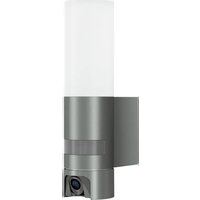
XSolar LS - Lamp STEINEL - Free user manual and instructions
Find the device manual for free XSolar LS STEINEL in PDF.



| Product type | Solar motion sensor lamp |
| Brand | Steinel |
| Model | XSolar LS |
| Dimensions (W x H x D) | 189 x 298 x 186.5 mm |
| Weight | Approx. 1.2 kg |
| Power supply | Solar panel + rechargeable LiFePO4 battery 3,000 mAh |
| LED power | 6 LEDs, max. 1.2 W |
| Luminous flux | max. 150 lumens |
| Luminous efficiency | 124 lm/W |
| Color temperature | 3,000 K (warm white) |
| Detection angle | 140° |
| Detection range | max. 8.0 m (at installation height 1.8 m) |
| Surface illumination | 30 m² |
| Trigger level | 2 lux |
| Timer | 10 to 30 seconds (adaptive software) |
| Marking light | 3% of maximum power |
| Orientation angle (solar panel) | +180°/-150° horizontal, 55° tilt |
| Orientation angle (LED panel) | +/-60° horizontal, 55° tilt |
| Protection rating | IP44 |
| Electrical class | III (extra-low voltage) |
| Temperature range | -20 °C to +40 °C |
| Battery capacity | 3,000 mAh (LiFePO4) |
| Max runtime (without recharging) | 60 days at 20 cycles per night |
| Manual charging | Micro-USB 5V, max. 1A |
| Mounting | Outdoor wall mounting, possibility of separate panel mounting |
| Manufacturer warranty | 3 years (excluding wear parts) |
Frequently Asked Questions - XSolar LS STEINEL
User questions about XSolar LS STEINEL
0 question about this device. Answer the ones you know or ask your own.
Ask a new question about this device
Download the instructions for your Lamp in PDF format for free! Find your manual XSolar LS - STEINEL and take your electronic device back in hand. On this page are published all the documents necessary for the use of your device. XSolar LS by STEINEL.
USER MANUAL XSolar LS STEINEL
natural_image
Exterior view of a modern LED display stand with solar panel array (no text or symbols visible)XSolar L-S

GB ..... 10 Follow written instructions!
natural_image
Technical illustration of a mechanical assembly with exploded view and component details (no text or symbols)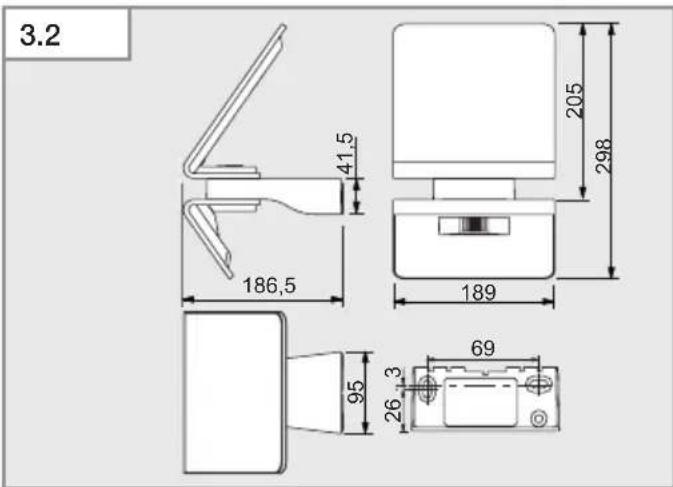
natural_image
Technical line drawing of a mechanical device with an open lid and a separate bracket component (no text or symbols)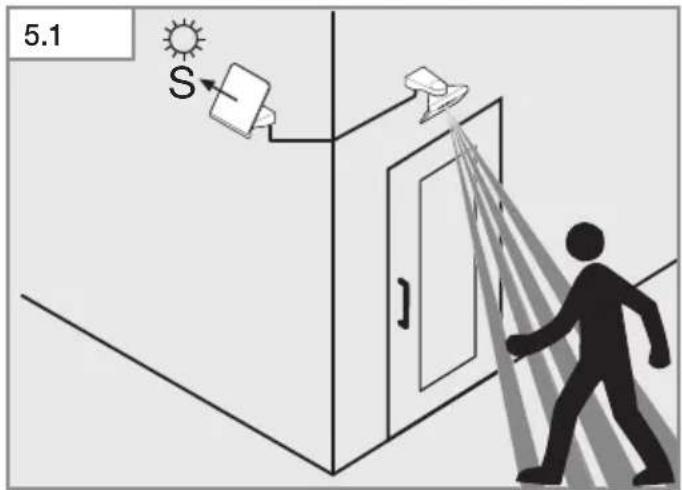
natural_image
Technical line drawing of a mechanical assembly with an open lid and a separate bracket component (no text or symbols)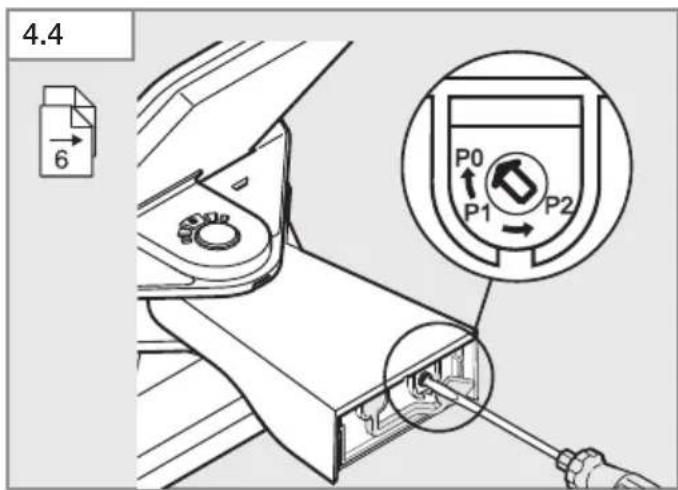
natural_image
Diagram of a device with an open lid and internal components, showing directional arrows (no text or symbols)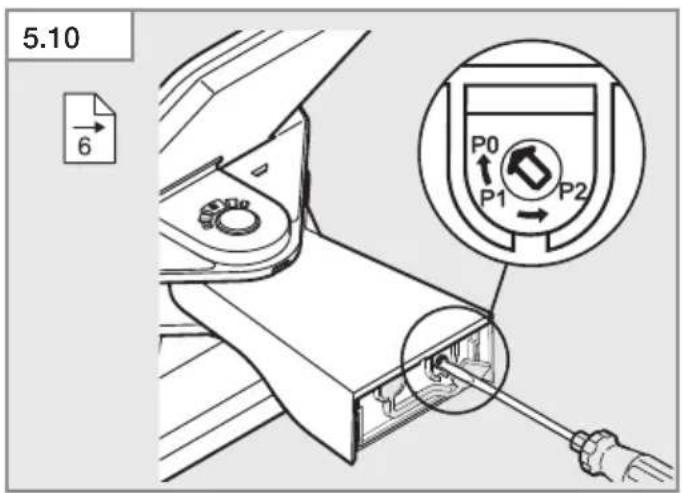
natural_image
Technical line drawing of a mechanical device with attached housing and cable (no text or symbols)DE
Please read carefully and keep in a safe place.
– Under copyright. Reproduction either in whole or in part only with our consent.
– Subject to change in the interest of technical progress.
Symbols

Hazard warning!

Reference to other information in the document.
2. General safety precautions

Hazard from vapours or electrolyte fluid!
Vapours or electrolyte fluid may escape if the rechargeable battery is damaged or used improperly. Coming into contact with them may result in severe injury (e.g. loss of sight, acid burns).
- Never open the rechargeable battery enclosure or the rechargeable battery itself.
- Do not allow vapours or electrolyte fluid to come into contact with your eyes. In the event of contact with eyes:
- Do not rub your eyes.
– Immediately rinse eyes with plenty of clean water (such as tap water). - Seek medical advice.
- Do not touch any electrolyte fluid that has escaped.
- Immediately move product away from naked flamed or sources of heat.
- Immediately remove contaminated clothing.

Hazard from LED light!
Looking directly into the LED light when it is ON could damage your retina.
- Never look into the LED light at short range or for any prolonged period (> 5 minutes).
- The light must not be installed in explosive atmospheres.
- For trouble-free operation, choose an installation site that is not exposed to vibration or shock.
- Protect the solar panel from mechanical strain (e.g, tree branches).
– The product must not be modified or altered in any way.
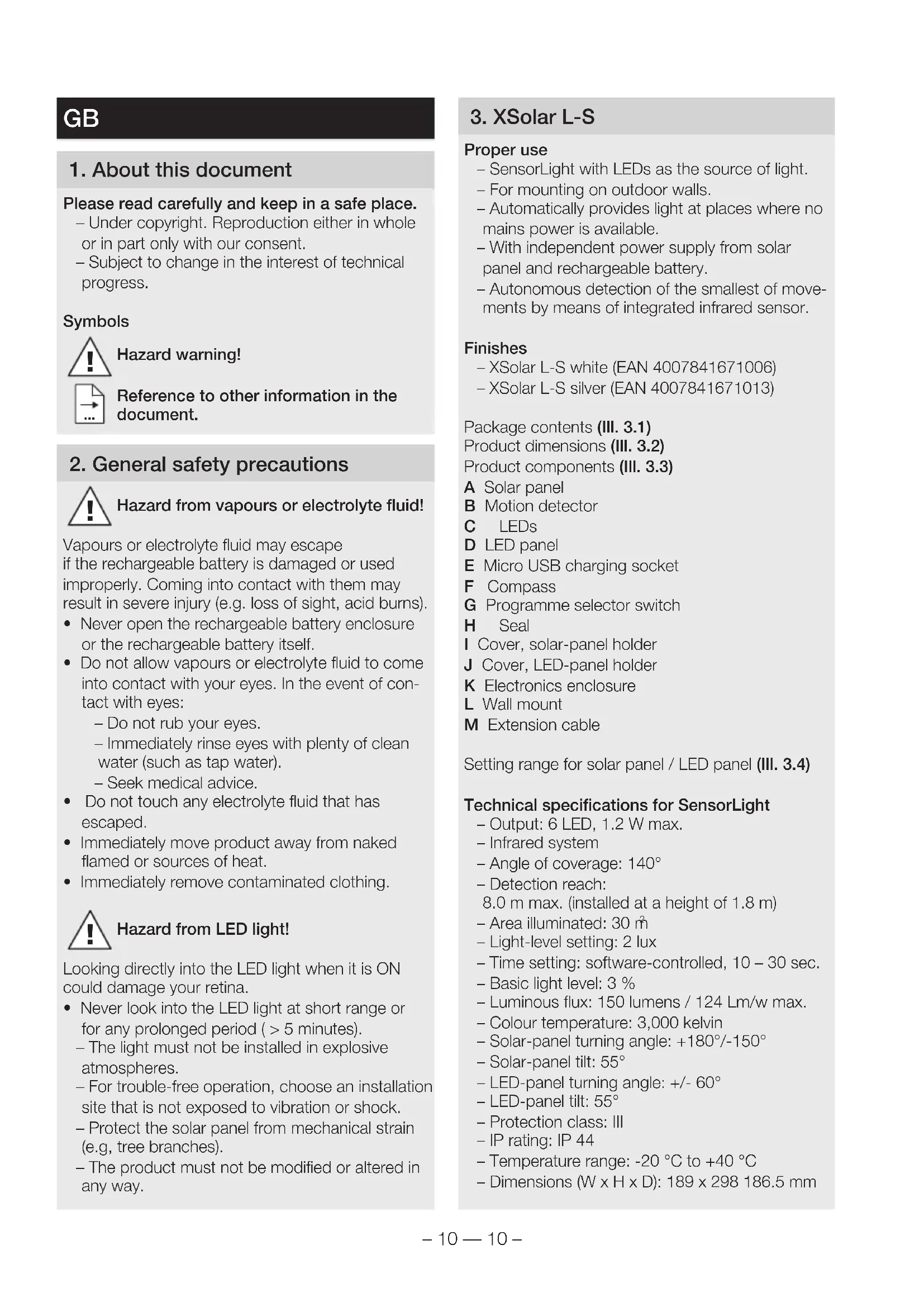
3. XSolar L-S
Proper use
- SensorLight with LEDs as the source of light.
- For mounting on outdoor walls.
- Automatically provides light at places where no mains power is available.
- With independent power supply from solar panel and rechargeable battery.
– Autonomous detection of the smallest of movements by means of integrated infrared sensor.
Finishes
- XSolar L-S white (EAN 4007841671006)
- XSolar L-S silver (EAN 4007841671013)
Package contents (III. 3.1)
Product dimensions (III. 3.2)
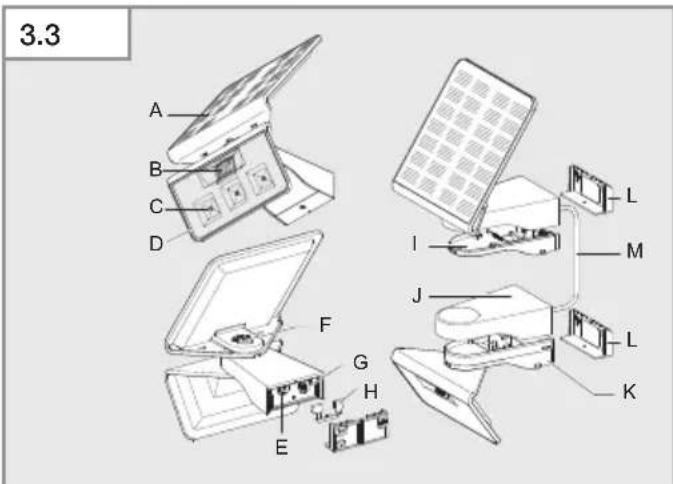
Product components (III. 3.3)
A Solar panel
B Motion detector
C LEDs
D LED panel
E Micro USB charging socket
F Compass
G Programme selector switch
H Seal
I Cover, solar-panel holder
J Cover, LED-panel holder
K Electronics enclosure
L Wall mount
M Extension cable
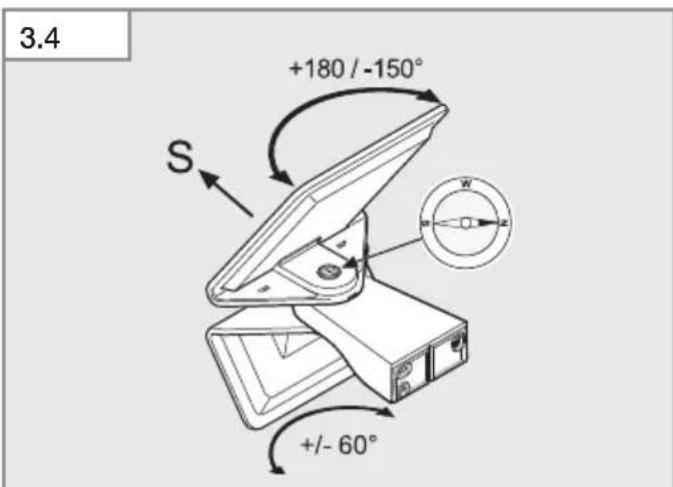
Setting range for solar panel / LED panel (III. 3.4)
Technical specifications for SensorLight
- Output: 6 LED, 1.2 W max.
- Infrared system
- Angle of coverage: 140^
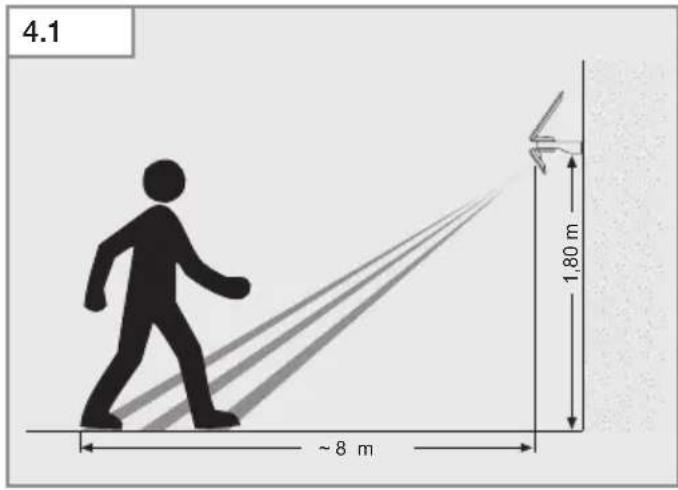
- Detection reach:
8.0 m max. (installed at a height of 1.8 m)
– Area illuminated: 30 m ^2
– Light-level setting: 2 lux
– Time setting: software-controlled, 10 – 30 sec.
– Basic light level: 3 %
– Luminous flux: 150 lumens / 124 Lm/w max.
– Colour temperature: 3,000 kelvin
– Solar-panel turning angle: +180°/-150°
– Solar-panel tilt: 55° - LED-panel turning angle: +/- 60°
- LED-panel tilt: 55°
- Protection class: III
- IP rating: IP 44
- Temperature range: -20 °C to +40 °C
- Dimensions (W x H x D): 189 x 298 186.5 mm
Technical specifications for rechargeable battery
– High Power LiFePO Lithium-Ferrum-Phosphor battery.
- Can be recharged at any time without shortening battery lifespan.
- Automatic recharging by highly efficient solar panel.
- Can be replaced by the manufacturer or qualified electricians.
- Rechargeable battery capacity: 3,000 mAh
–Maximum lighting duration with one battery charge without recharging: 60 days at 20 switching operations a night.
- Micro USB charging socket: 5 V, 1 A max., can be used in all three programmes.
Recharging time depends on the site of installation (direct sunlight). Expect charging to take many times longer in winter or on rainy days.
Accessories
- Replacement 6 m extension cable for XSolar EAN / UPC code 4007841006518
4. Installation
- Check all components for damage.
- Do not use the product if the solar panel or LED panel is damaged.
Operating reliability will be limited if the product is used in adverse conditions (e.g. installed in shade or behind glass, solar panel not facing the right direction)
- Choose an appropriate site with plenty of sunlight for installing the solar panel (facing south).
- Avoid shade from porches, overhanging roofs or trees.
- Pay attention to detection reach (III. 4.1).
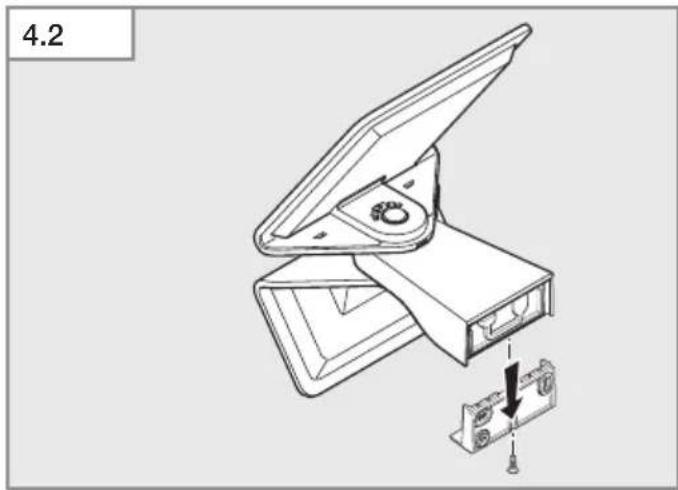
- Remove wall mount (III. 4.2).
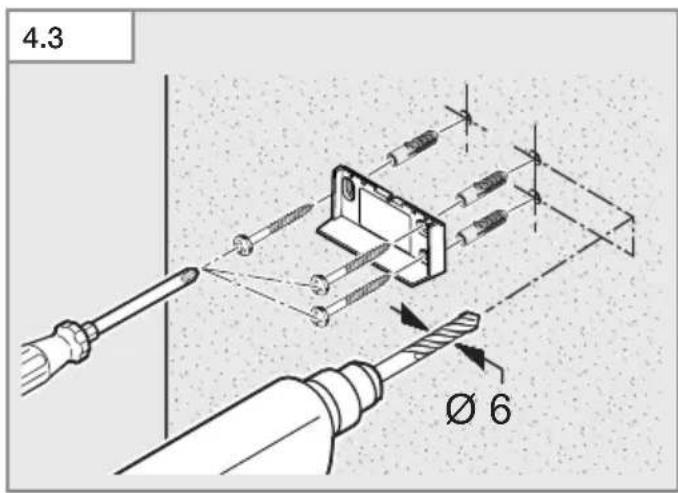
- Drill holes and fit rawl plugs (III. 4.3).
- Screw-fasten wall mount to the wall (III. 4.3).
- Make settings (III. 4.4). →"6. Operation"
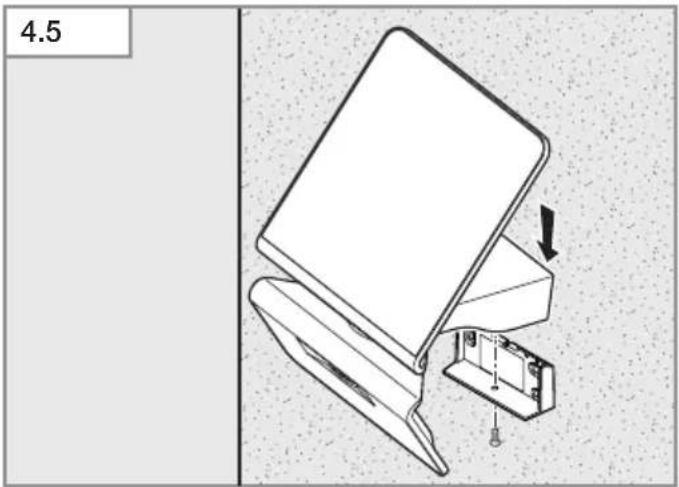
- Screw SensorLight to wall mount (III. 4.5).
- Aim LED panel with motion detector in the right direction (III. 3.4).
- Aim solar panel to get the strongest sunlight for the longest time possible (III. 3.4).
- Check compass (for south-facing position) (III. 3.4).
5. Optional
Install LED and solar panel separately
To optimise conditions at the point of use, the solar panel and LED panel can be mounted separately (III. 5.1).
- LED panel: light where it's needed.
- Solar panel: exposed to a high level of direct sunlight.
Risk of damage to property
Pulling on the cable can cause irreparable damage to the product.
- Route the cable out of children's reach.
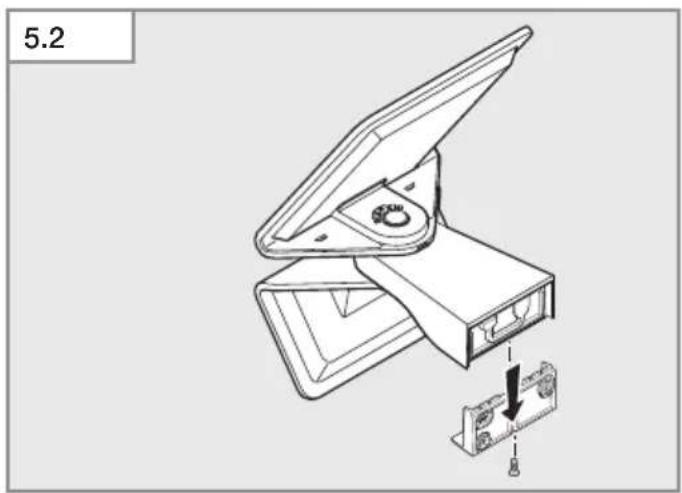
- Remove wall mount (III. 5.2).
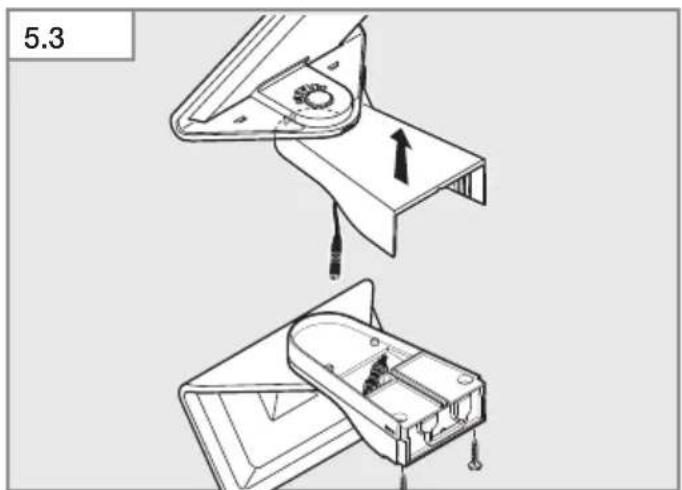
- Separate solar panel from LED panel (III. 5.3).
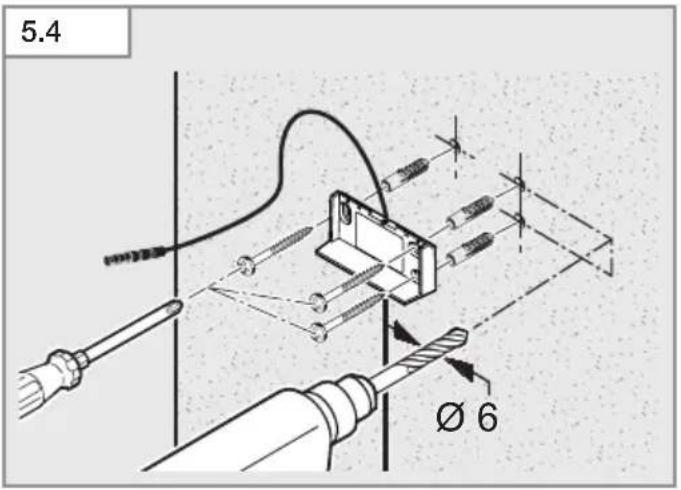
- Drill holes and fit rawl plugs (III. 5.4).
- Route extension cable behind wall mount (III. 5.4).
- Screw-fasten wall mount to the wall (III. 5.4).
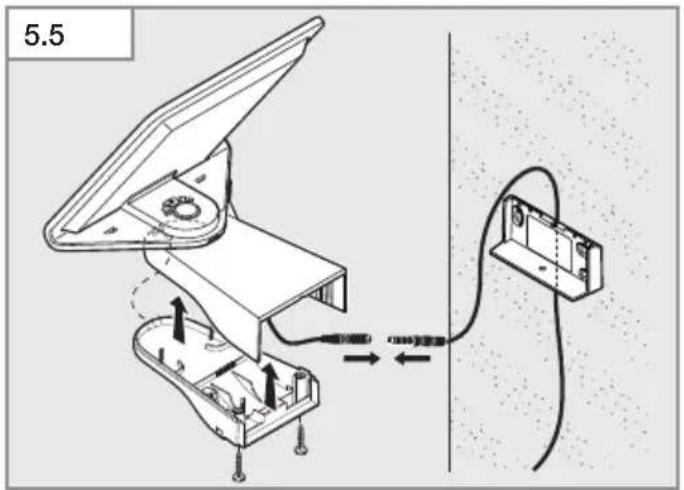
- Connect extension cable to solar panel (III. 5.5).
• Fit solar panel holder to solar panel (III. 5.5).
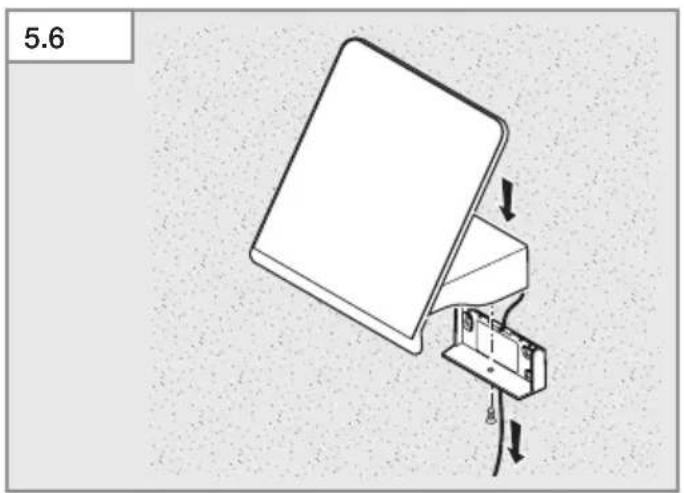
- Screw solar-panel to wall mount (III. 5.6).
- Pull extension cable downwards (III. 5.6).
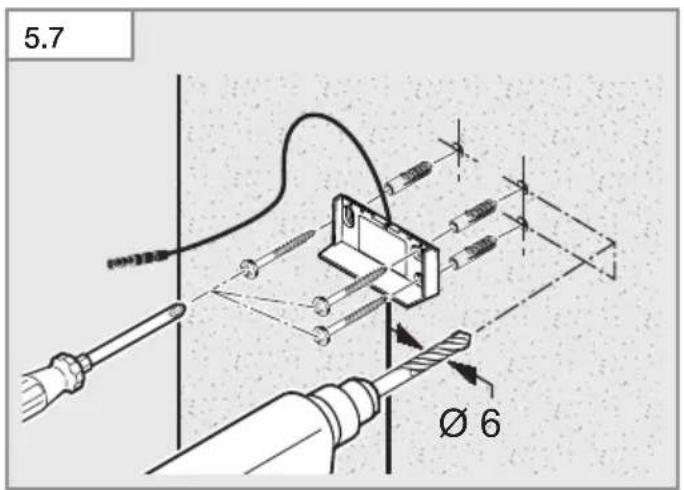
- Drill holes and fit rawl plugs (III. 5.7).
- Route extension cable behind wall mount (III. 5.7).
- Screw-fasten wall mount to the wall (III. 5.7).
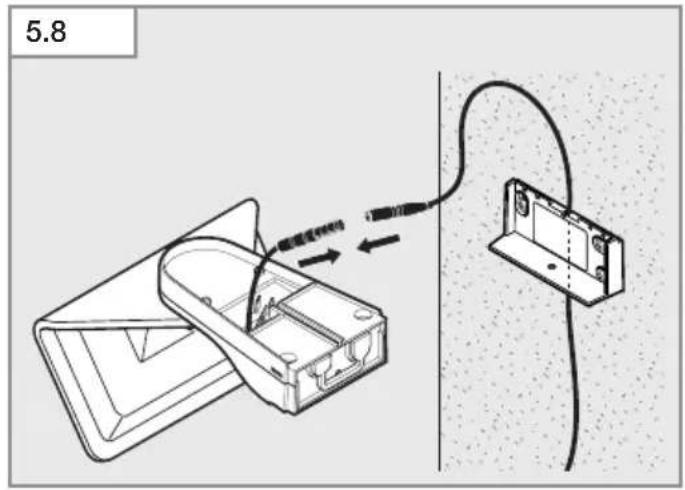
- Connect extension cable to LED panel (III. 5.8).
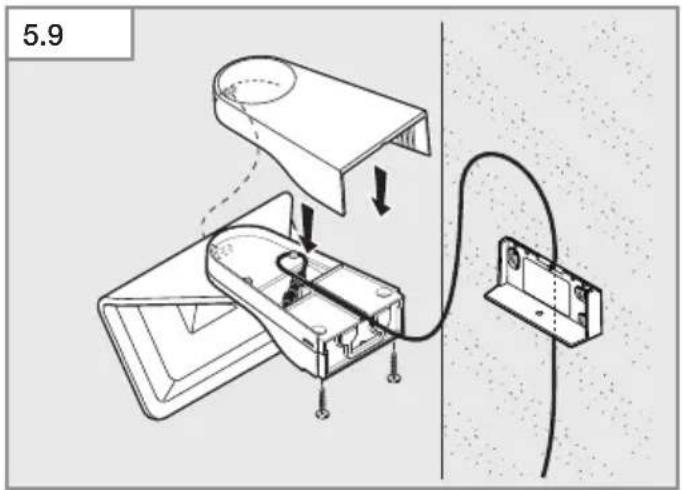
• Fit LED-panel holder cover to LED panel (III. 5.9).
• Make settings (III. 5.10).
→"6. Operation"
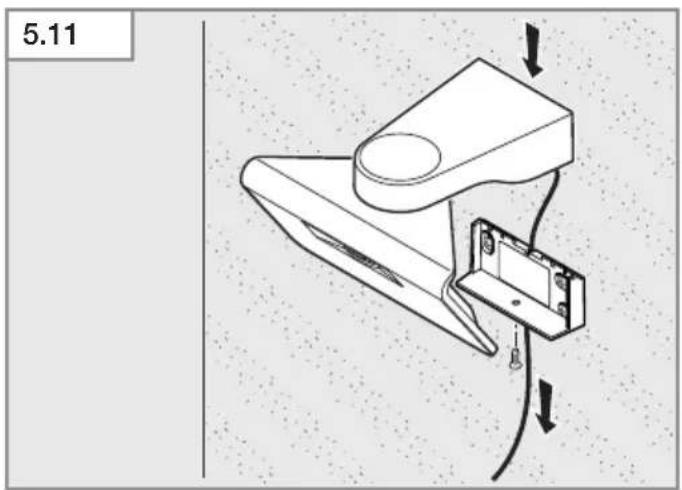
- Screw LED panel to wall mount (III. 5.11).
• Pull extension cable downwards (III. 5.11).
- Aim LED panel with motion detector in the right direction (III. 3.4).
- Aim solar panel to get the strongest sunlight for the longest time possible (III. 3.4).
- Check compass (for south-facing position) (III. 3.4).
6. Operation
Before using for the first time
- Activate light by setting the programme selector switch to P2.
The light stays in test mode for one minute before it starts to work in programme P2.
Test mode
During the test sequence the light works in daytime mode.
On detecting movement, the light switches ON for 1 minute with a stay-ON time of 10 sec. irrespectively of light-level setting. The programme is automatically activated after this time elapses. The red LED stays ON all the time in test mode.
Setting the chosen operating mode by programme selector switch
- P0: OFF (factory setting).
Loads (LED panel and sensor) are deactivated.
- P1: Sensor mode.
Light only switches ON after receiving a signal from the motion detector.
– P2: Sensor mode with basic light level.
Light switches ON after receiving a signal from the motion detector.
Light permanently ON in the morning and evening hours at reduced basic light level.
Stay-ON time and brightness
- Stay-ON time is determined when the light is used for the first time.
– During the first night, basic lighting is switched OFF in the morning in programme 2.
- Stay-ON time and brightness can be automatically matched to ambient conditions, e.g. stay-ON time is longer in summer than it is in winter.
– Basic lighting level provides night-time illumination at approx. 3 % light output. Light is switched to maximum output when movement is identified in the detection zone. The light then returns to basic lighting level (approx. 3 %).
- The period basic lighting is provided for is matched to ambient conditions. Using basic lighting reduces light availability. If it is not needed, it is recommended to switch it OFF (P1) to ensure lighting availability in less sunny periods.
Charging the battery manually
The red LED in the motion detector flashes if battery capacity is too low (e.g. in poor weather). The battery can be recharged with a standard micro USB charging adapter (not included). Battery recharging can take up to 6 hours.
Risk of damage to property from penetrating moisture
When open, the micro USB charging socket (E) is not protected from the ingress of water.
- Only recharge batteries in a dry room.
- Connect micro USB charging adapter.
- Red LED flashes: charging in progress The LED may take up to 10 minutes to start flashing if the battery has run down to very low level.
- Red LED shows: battery is fully charged.
- Remove micro USB charging adapter.
- Red LED goes out.
Risk of damage to property when light is not in use
If the light is not used for a prolonged period (e.g. in storage), the battery may suffer irreparable damage from exhaustive discharge.
- Set programme selector switch to P0.
- The battery must be on full charge before taking the light out of service.
- Regularly charge the battery while the light is not in use.
7. Malfunctions
Red LED flashing in motion detector
– Battery capacity too low.
- Charge battery with micro USB charging adapter (not included).
Light does not switch ON
– Battery capacity too low.
- Charge battery with micro USB charging adapter (not included).
- Open or short circuit.
- Check connections.
- Programme selector switch set to P0.
- Set programme selector switch to P1 or P2.
– Detection zone not correctly adjusted.
- Check detection zone.
Light does not switch OFF
- Continued movement within the detection zone.
- Check detection zone.
Light switches ON when it should not
– Uncontrolled movement in the detection zone:
– Wind is moving trees and bushes.
– Cars in the street being detected.
- Sudden temperature changes due to weather (wind, rain, snow) or air expelled from fans, open windows.
- Check detection zone.
– Light is swaying (moving) due to gusts of wind or heavy rain.
- Mount light on a firm surface.
Battery not charging
- Solar panel dirty.
- Clean solar panel with a soft cloth and mild detergent.
– Solar panel not installed in the best place.
- Check site of installation (as much direct sunlight as possible).
- It may no longer be possible to recharge the battery after many years of use.
- Get rechargeable battery changed (replacement XSolar battery, 3.3 V 2.5 AH, EAN 007841006488).
- Please send the product well-packed to your nearest service station. The rechargeable battery must only be replaced by the manufacturer or qualified electricians.
8. Cleaning and Maintenance
The product requires no maintenance.
Regularly checking the product for damage can prolong its lifespan. Removing dirt can help to make the product work longer.
Risk of damage to property
Using the wrong detergent can damage the light.
• Make sure detergent does not harm the surface.
- Clean light with a soft cloth and mild detergent.
If solar panel is dirty or weather has left deposits on it:
- Clean solar panel with a soft cloth and mild detergent.
9. Disposal
Electrical and electronic equipment, accessories and packaging must be recycled in an environmentally compatible manner.

Do not dispose of electrical and electronic equipment as domestic waste.
EU countries only:
Under the current European Directive on Waste Electrical and Electronic Equipment and its implementation in national law, electrical and electronic equipment no longer suitable for use must be collected separately and recycled in an environmentally compatible manner.

Do not throw devices, rechargeable batteries / batteries into household waste, fire or water at the end of their useful life.
Rechargeable batteries / batteries should be collected, recycled or disposed of in an environmentally friendly manner.
EU countries only:
In accordance with Directive 2006/66/EC, defective or spent rechargeable batteries / batteries must be recycled. Waste rechargeable batteries / batteries can be returned to the point of purchase or to a collection facility for hazardous substances.
10. Manufacturer's Warranty
Manufacturer's warranty of STEINEL GmbH, Dieselstrasse 80-84, DE-33442 Herzebrock-Clarholz, Germany
All STEINEL products meet the highest quality standards. For this reason, we, the manufacturer, are pleased to provide you, the consumer, with a warranty under the following terms and conditions:
The warranty covers the absence of deficiencies which are proven to be the result of a material defect or fault in manufacturing and which are reported to us immediately after detection and within the warranty period. The warranty shall apply to all STEINEL products sold and used in Germany - excluding STEINEL Professional products.
You can opt for warranty cover in the form of repair or replacement which will be provided free of charge (if applicable, in the form of a successor model of the same or higher quality) or in the form of a credit note.
The warranty period for the STEINEL product you have purchased is 3 years (5 years for products from the XLED home range) in each case from the date on which the product was purchased.
We shall bear the shipping costs but not the transport risks involved in return shipment.
Statutory rights accruing from defects, gratuitousness
The warranty cover described here shall be applicable in addition to the statutory rights of warranty – including special consumer protection provisions – and shall not restrict or replace them. Exercising your statutory rights in the event of defects is gratuitous.
Exemptions from the warranty
All replaceable lamps are expressly excluded from this warranty. In addition to this, the warranty shall not cover:
-any wear resulting from use or any other natural wear of product parts or any deficiencies in the STEINEL product that are attributable to wear caused by use or other natural wear,
-any improper or non-intended use of the product or any failure to observe the operating instructions,
–any unauthorised additions, alterations or other modifications to the product or any deficiencies attributable to the use of accessory,
–supplementary or replacement parts which are not genuine STEINEL parts,
–any maintenance or care of products that is not carried out in accordance with the operating instructions,
–any attachment or installation that is not in accordance with STEINEL's installation instructions,
– any damage or loss occurring in transit.
Application of German law
The warranty shall be governed by German law excluding the United Nations Convention concerning the International Sale of Goods (CISG).
Making claims
If you wish to make a warranty claim, please send your product complete and carriage paid with the original receipt of purchase, which must show the date of purchase and product designation, either to your retailer or directly to us at STEINEL (UK) Ltd. – 25 Manasty Road, Axis Park, Orton Southgate, GB- Peterborough Cambs PE2 6UP United Kingdom. For this reason, we recommend that you keep your receipt of purchase in a safe place until the warranty period expires.
FR
• Retirez le support mural (III. 5.2).
- Fazer os furos e colocar as buchas (Fig. 5.4).
- Fazer os furos e colocar as buchas (Fig. 5.7).
natural_image
World map silhouette in grayscale, showing continents and oceans without any text or labelsContact
www.steinel.de/contact