L 625 CAM SC - Lamp STEINEL - Free user manual and instructions
Find the device manual for free L 625 CAM SC STEINEL in PDF.


User questions about L 625 CAM SC STEINEL
0 question about this device. Answer the ones you know or ask your own.
Ask a new question about this device
Download the instructions for your Lamp in PDF format for free! Find your manual L 625 CAM SC - STEINEL and take your electronic device back in hand. On this page are published all the documents necessary for the use of your device. L 625 CAM SC by STEINEL.
USER MANUAL L 625 CAM SC STEINEL
natural_image
Exterior view of a modern office building (no signage)L 625 CAM SC

GB ..... 16 Follow written instructions!
3.2
3.3
3.4
radar
| Angle | Value | |-------|-------| | 0° | 0 | | 30° | 0 | | 60° | 0 | | 90° | 0 | | 120° | 0 | | 150° | 0 | | 180° | 0 |4.1
5.1
5.2
5.3
natural_image
Technical line drawing of a mechanical device with screw and pin components (no text or symbols)5.4
5.6
natural_image
Mechanical assembly diagram showing a valve inserted into a housing with pipes and shafts (no text or labels)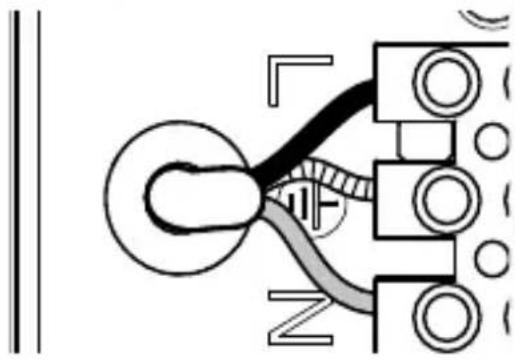
natural_image
Pure electrical circuit lines without any symbols5.5
5.7
DE
iOS

Kamerafunktion
Please read carefully and keep in a safe place.
– Under copyright. Reproduction either in whole or in part only with our consent.
– Subject to change in the interest of technical progress.
Symbols

Hazard warning!

Reference to other information in the document.
2. General safety precautions

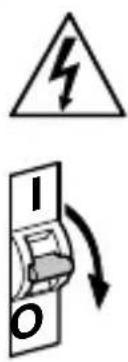
Disconnect the power supply before performing any work on the unit.
- During installation, the electric power cable being connected must not be live. Therefore, switch off the power first and use a voltage tester to make sure the wiring is off-circuit.
- Installing the camera light involves work on the mains voltage supply. This work must therefore be carried out professionally in accordance with national wiring regulations and electrical operating conditions. (e.g. DE- VDE 0100, AT- ÖVE / ÖNORM E8001-1, CH- SEV 1000)
- Only use genuine replacement parts.
- Repairs may only be made by specialist workshops.
3. L 625 CAM SC
Proper use
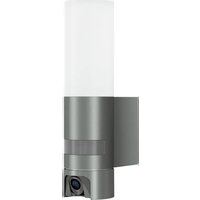
– Sensor-switched light with integrated camera and intercom system for installing on outdoor walls
The L 625 CAM SC features a camera with memory card and intercom system. Both functions can also be controlled via an app.
A passive motion detector is integrated in the L 625 CAM SC. The integrated high-performance infrared sensor detects the invisible heat radiated from moving objects (people, animals, etc.). The heat detected in this way is converted electronically into a signal that switches the light ON automatically. Heat is not detected through obstacles, such as walls or panes of glass. Heat radiation of this type will, therefore, not trigger the sensor.
Important:
The most reliable way of detecting motion is to install the camera light with the sensor aimed across the direction in which a person would walk and by ensuring that no obstacles (such as trees and walls, for example) obstruct the line of sensor vision. Reach is limited when walking directly towards the light.
Package contents (Fig. 3.1)
- Camera light
- Four screws
- Four wall plugs
- Reset pin
- Torx spanner
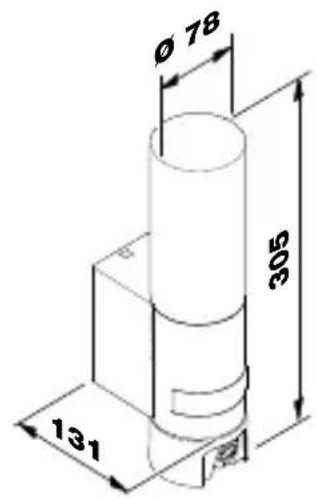
Product dimensions (Fig. 3.2)
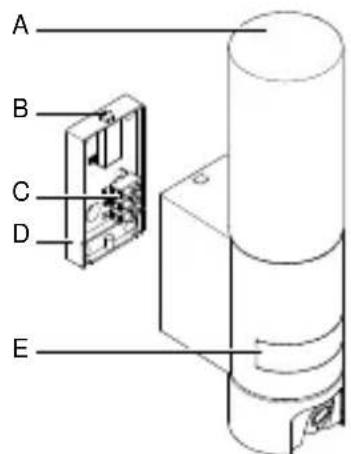
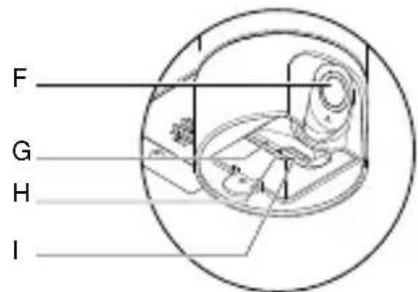
Product components (Fig. 3.3)
A Camera light
B Lock
C Connecting terminal
D Wall mount
E Sensor unit
F Camera
G Reset button
H Status LED
I Slot for memory card
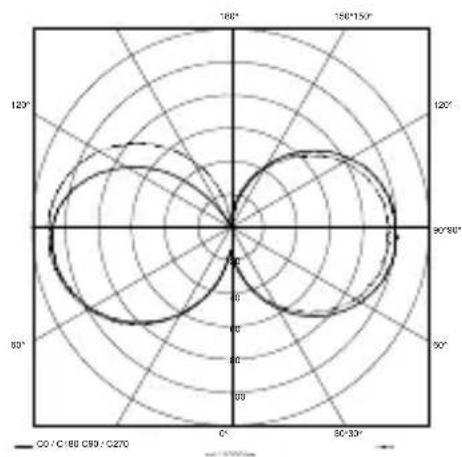
Luminous intensity distribution (Fig. 3.4)
4. Electrical connection
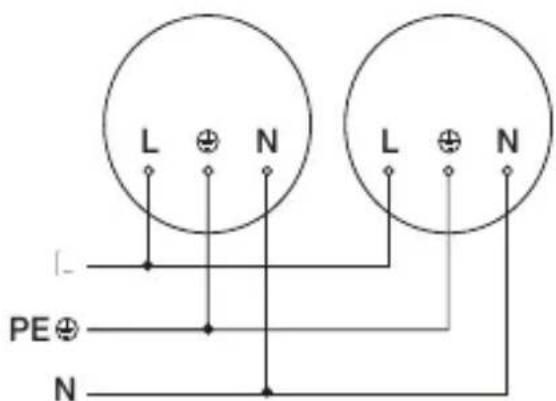
- Switch OFF power supply (Fig. 4.1)
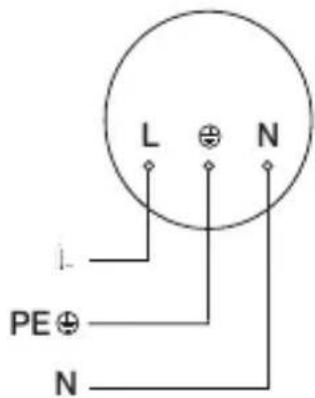
Wiring diagram (Fig. 4.1)
The supply lead consist of three wires:
L = phase conductor (usually black, brown or grey)
N = Neutral conductor ( usually blue )

=protective-earthconductor (green / yellow)
If you are in any doubt, identify the conductors using a voltage tester; then disconnect from the power supply again. Connect phase, neutral and protective-earth conductor to the terminal.
Important: Incorrectly wired connections will produce a short circuit later on in the product or your fuse box. In this case, you must identify the individual conductors once again and reconnect them. A mains power switch for turning the unit ON and OFF may of course be installed in the mains supply lead.
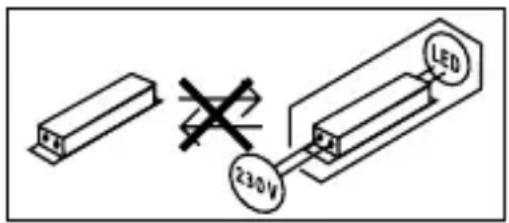
The light source of this luminaire cannot be changed. If the light source needs to be replaced (e.g. at the end of its service life), the complete luminaire must be replaced.
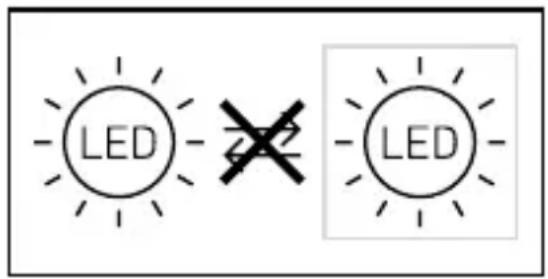
Connection to a dimmer will result in damage to the camera light.
5. Mounting
- Check all components for damage.
- Do not use the product if it is damaged.
- When installing the camera light, make sure the installation site is not exposed to vibration.
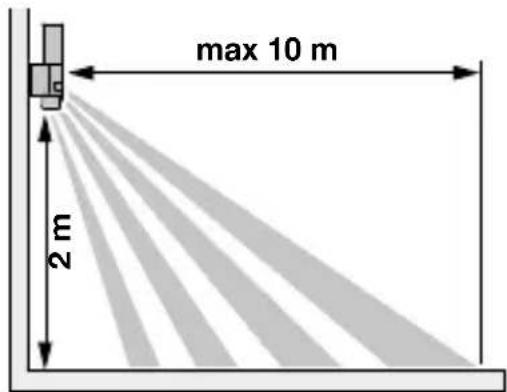
- Select an appropriate mounting location, taking the reach and motion detection into consideration. (Fig. 5.1)
- Select an appropriate mounting location, taking the WLAN speed into consideration. A minimum of 2 Mbps must be available for operation.
Mounting procedure
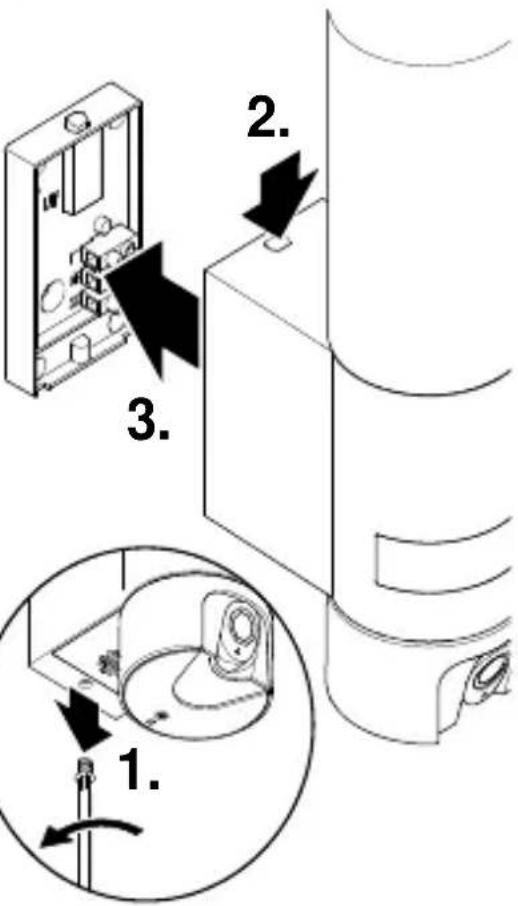
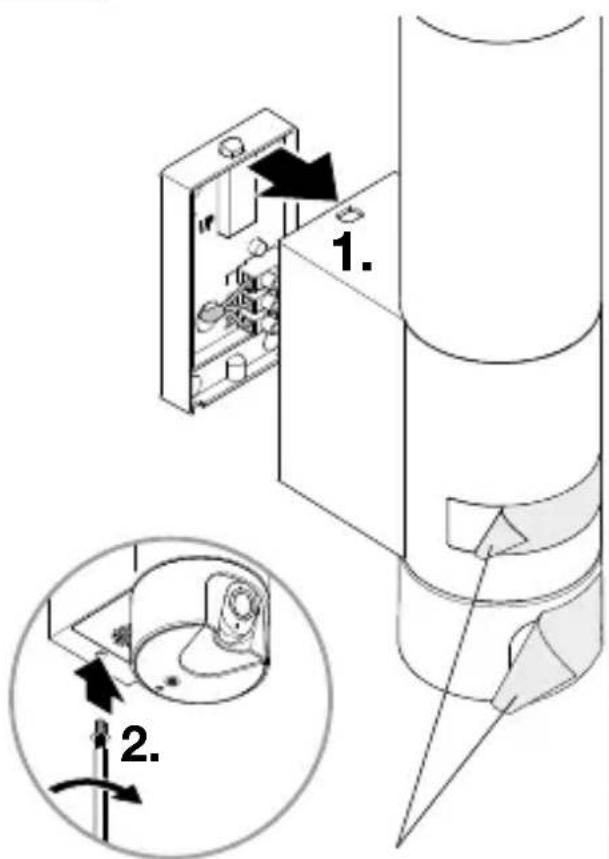
- Undo retaining screw, detach camera light from wall mount. To do this, press lock (Fig. 5.2)
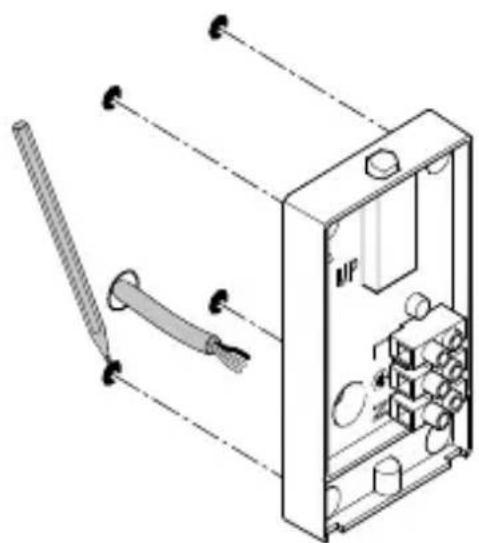
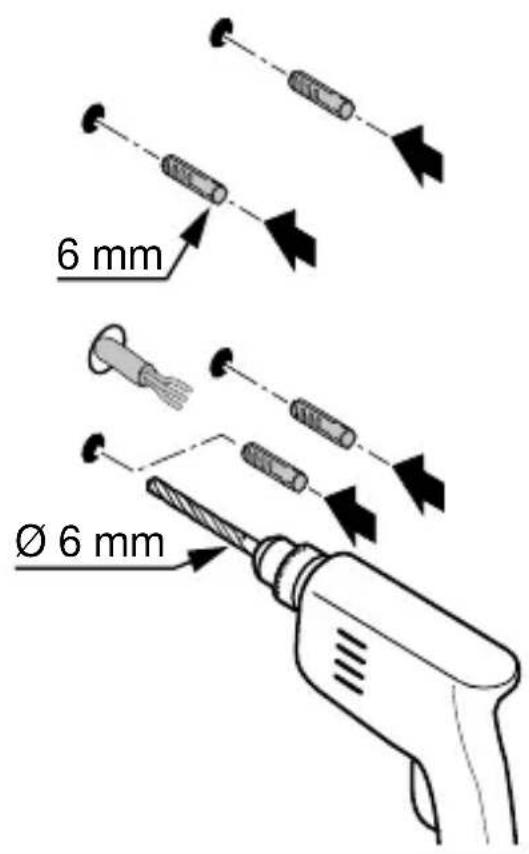
• Mark drill holes (Fig. 5.3) - Drill holes and insert wall plugs (Fig. 5.4)
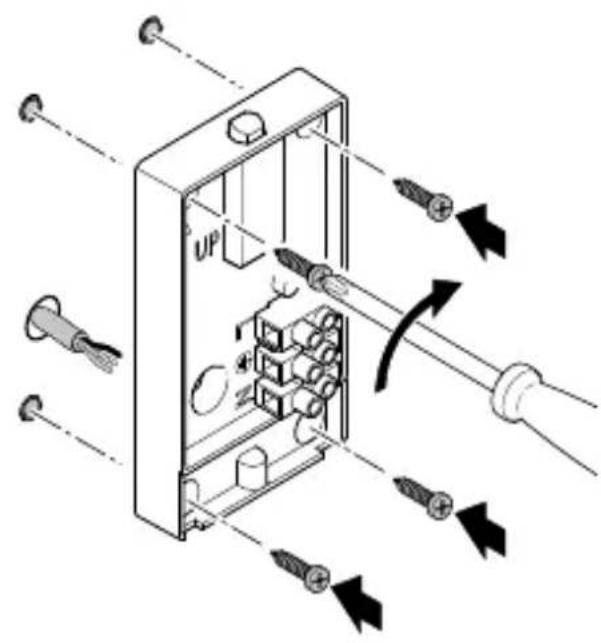
- Screw down wall mount (Fig. 5.5)
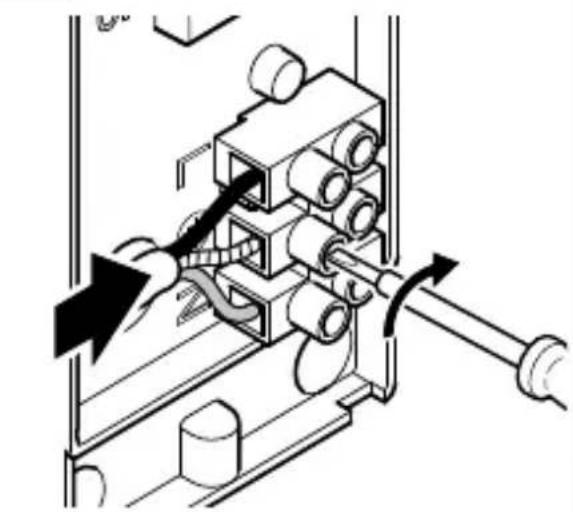
- Connect conductors (Fig. 5.6)
- Fit camera light on wall mount and tighten retaining screw (Fig. 5.7)
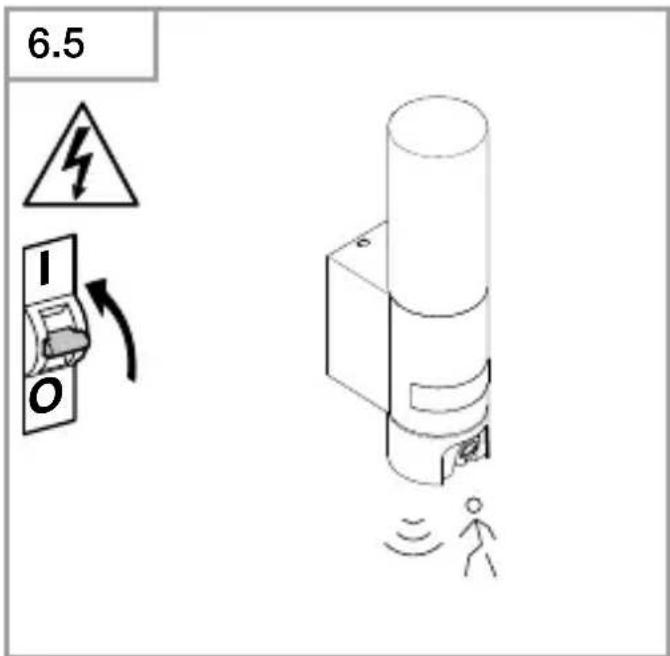
- Switch ON power supply (Fig. 5.7)
- Remove stickers from sensor and camera (Fig. 5.7)
- Make settings "6. Function"
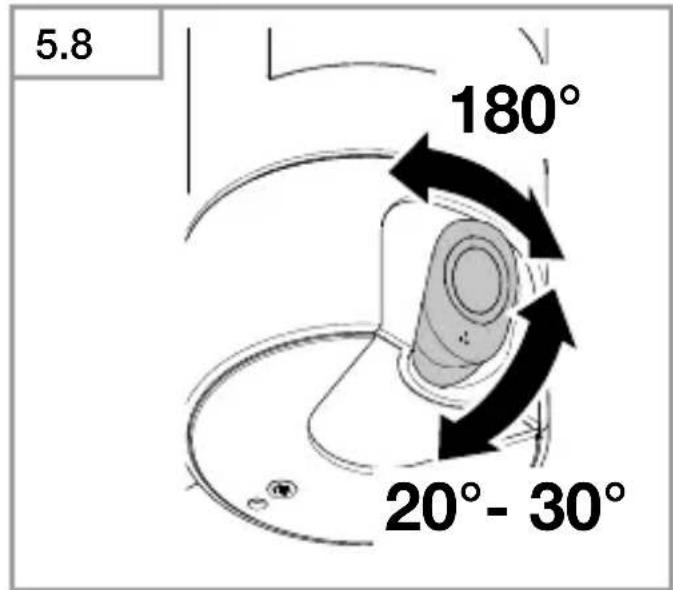
- The camera can be aligned by hand. (Fig. 5.8)
6. Commissioning
System requirements:
–During the installation process, remove Wi-Fi repeaters from network; they can be re-activated later on
- Make sure camera light has sufficient bandwidth at place of installation. A sign must be posted indicating that filming is taking place.
- Make sure Steinel cam app 2 on smartphone has all necessary authorisations (in particular location sharing (needed by camera light to detect Wi-Fi network, we do not record any of our customers' locations)).
—The camera must be set up so that it only films your own property.
Network settings
Ensure that UDP and TCP port 3478 are included in the list of ports that the camera and client need to access.
This is necessary for establishing a connection to the TURN service through the firewall.
Configuring device:
Power supply connected:
- Device boots up.
- Status LED lights up red.
After booting:
- Acoustic signal every 4 seconds.
- Status LED flashes red.
- Open Steinel CAM app.
- Enter Wi-Fi router's network name and network key into Steinel CAM app.
While unit and Wi-Fi router are connecting:
- Acoustic signal every second.
- Status LED flashes green in rapid succession.
Once the smartphone or tablet is connected with the device:
- Signal stops sounding.
- Status LED slowly flashes green.
- Configure unit via Steinel CAM app. Now enter the network name and password of the Wi-Fi router into your app.
7. Function
Factory settings
Twilight level: 10,000 lux
Time setting: 1 minute
Basic light level: 40 %
STEINEL CAM App 2
Android

iOS

Note:
The camera light needs a stable Wi-Fi connection. The smartphone or tablet used must have access to the Internet and be connected to the same Wi-Fi network as the camera light for the installation process.
Installation
- Min. 2 Mbit/s Software version Android 5.0 / iOS 11.0 or newer.
- Download app.
- The camera light is ready for configuration as soon as the power supply is switched ON. A signal sounds every 4 seconds during configuration.
- The signal sounds once a second while the camera light is being connected to the smartphone or tablet.
- Now enter the network name and password of the Wi-Fi router into your app.
Camera function
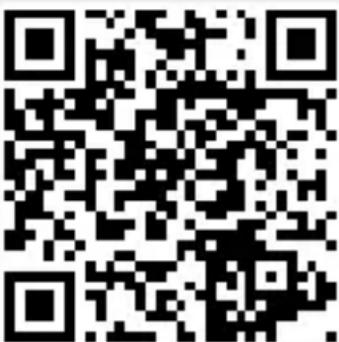
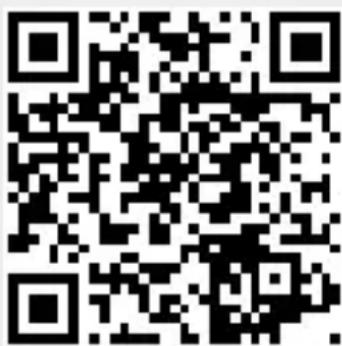
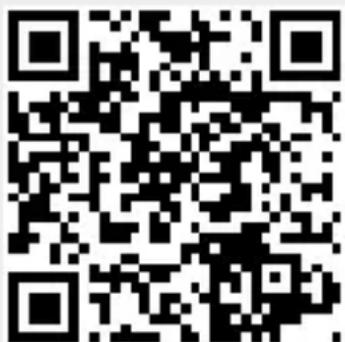
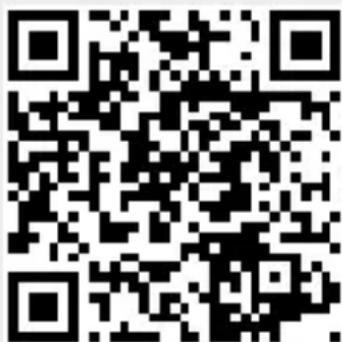
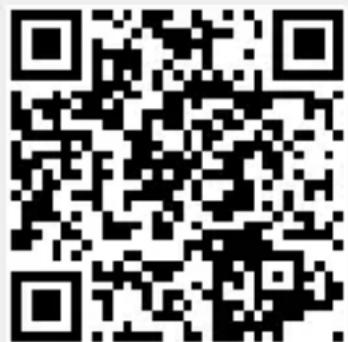
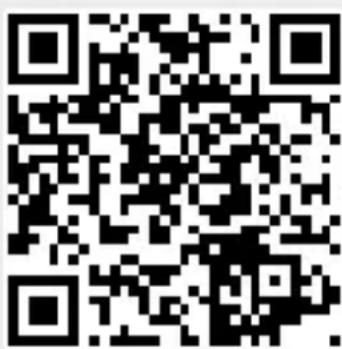
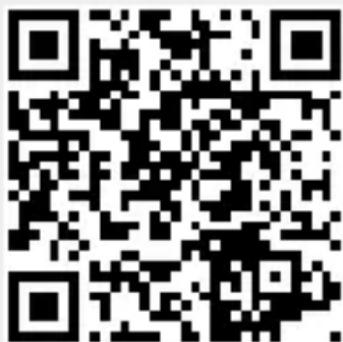
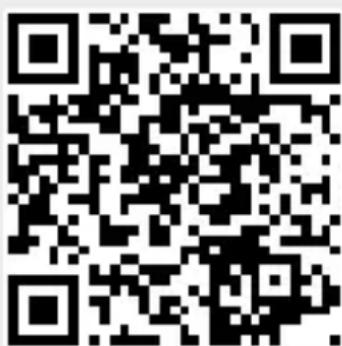
- As soon as the camera has been set up from a smartphone or tablet, it can only be shared with other devices from that device via QR code / serial number.
- Once the sensor has triggered, you will receive a push notification via the app.
- Open the app. You can now use the image display and intercom system.
- The camera films a sequence when the sensor has been triggered. The filmed sequence is saved on the memory card and can be retrieved at any time. The recorded data is only saved on the camera light's memory card.
Note:
You will find further information on the functions and setting options in the app.
Twilight setting
The chosen response threshold can be infinitely varied from 10 to 10,000 lux.
Time setting
The time you wish light to stay ON for can be set to 1 minute, 3 minutes, 10 minutes or 15 minutes. Any movement detected before this time elapses will restart the timer.
Basic light level
The basic light level function provides illumination at approx. 10 % to 40 % light output when light level falls below the light-level setting.
Changing the memory card
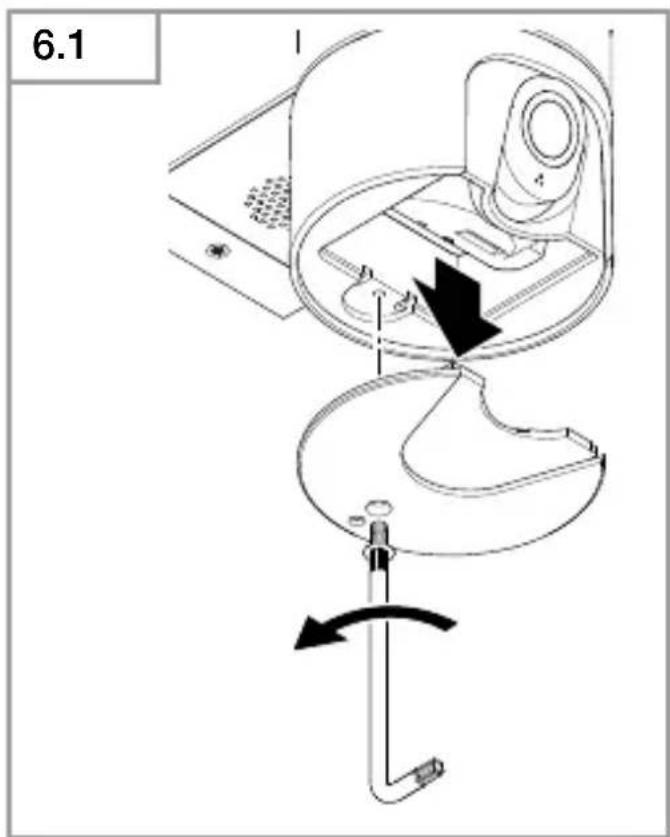
- Undo retaining screw and remove cover (Fig. 6.1, optional)
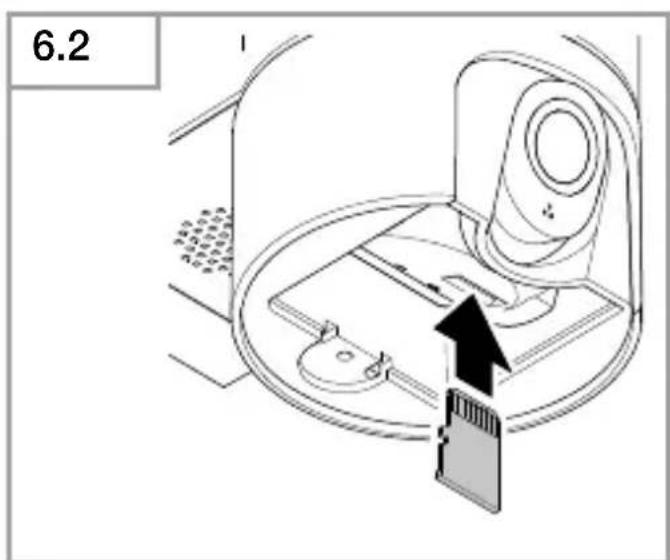
- Changing memory card - 128 GB recommended, max. 256 GB (16 GB memory card included) (Fig. 6.2, optional)
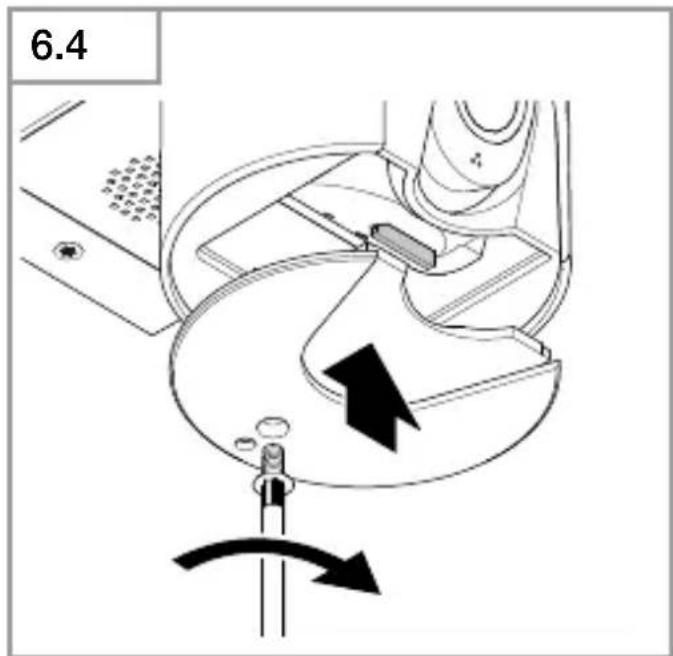
- Fit cover and tighten retaining screw (Fig. 6.4, optional)
Restoring factory settings
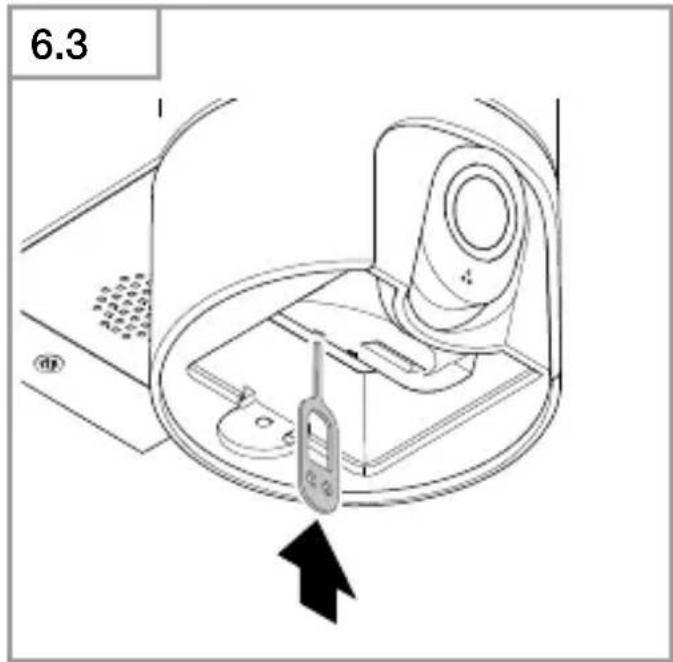
- Press the reset button for approx. 7 seconds (Fig. 6.3, optional)
Note:
Pressing the reset button with the pin will return the camera light to factory settings.
Once the light has been reset, an acoustic signal will sound every 4 seconds.
- Fit cover and tighten retaining screw (Fig. 6.4, optional)
8. Maintenance and care
The camera light requires no maintenance.
Weather conditions may affect the way the camera light functions. Strong gusts of wind, snow, rain or hail may cause the light to come ON when it is not wanted because the sensor is unable to distinguish sudden changes of temperature from sources of heat. Detector lens and camera lens may be cleaned with a damp cloth if they get dirty (do not use cleaning agents).
Important note: the control gear cannot be replaced.
9. Disposal
Electrical and electronic equipment, accessories and packaging must be recycled in an environmentally compatible manner.
Do not dispose of electrical and electronic equipment as domestic waste.
EU countries only:
Under the current European Directive on Waste Electrical and Electronic Equipment and its implementation in national law, electrical and electronic equipment no longer suitable for use must be collected separately and recycled in an environmentally compatible manner.
10. Declaration of Conformity
Hereby, STEINEL GmbH declares that the radio equipment type L 625 CAM SC is in compliance with Directive 2014/53/EU. The full text of the EU declaration of conformity is available at the following internet address: www.steinel.de
11. Manufacturer's warranty
Manufacturer's warranty of STEINEL GmbH, Dieselstrasse 80-84, DE-33442 Herzebrock-Clarholz, Germany All STEINEL products meet the highest quality standards. For this reason, we, the manufacturer, are pleased to provide you, the consumer, with a warranty under the following terms and conditions: The warranty covers the absence of deficiencies which are proven to be the result of a material defect or fault in ma- nufacturing and which are reported to us immediately after detection and within the warranty period. The warranty shall apply to all STEINEL products sold and used in Germany - excluding STEINEL Professional products.
You can opt for warranty cover in the form of repair or replacement which will be provided free of charge (if applicable, in the form of a successor model of the same or higher quality) or in the form of a credit note.
The warranty period for the STEINEL product you have purchased is 3 years (5 years for products from the XLED home range) in each case from the date on which the product was purchased.
We shall bear the shipping costs but not the transport risks involved in return shipment.
Statutory rights accruing from defects, gratuitousness
The warranty cover described here shall be applicable in addition to the statutory rights of warranty – including special consumer protection provisions – and shall not restrict or replace them. Exercising your statutory rights in the event of defects is gratuitous.
Exemptions from the warranty
All replaceable lamps are expressly excluded from this warranty. In addition to this, the warranty shall not cover:
–any wear resulting from use or any other natural wear of product parts or any deficiencies in the STEINEL product that are attributable to wear caused by use or other natural wear,
–any improper or non-intended use of the product or any failure to observe the operating instructions,
-any unauthorised additions, alterations or other modifications to the product or any deficiencies attributable to the use of accessory,
-supplementary or replacement parts which are not genuine STEINEL parts,
–any maintenance or care of products that is not carried out in accordance with the operating instructions,
–any attachment or installation that is not in accordance with STEINEL's installation instructions,
-any damage or loss occurring in transit.
Application of German law
The warranty shall be governed by German law excluding the United Nations Convention concerning the International Sale of Goods (CISG).
Making claims
If you wish to make a warranty claim, please send your product complete and carriage paid with the original receipt of purchase, which must show the date of purchase and product designation, either to your retailer or directly to us at STEINEL (UK) Ltd. – 25 Manasty Road, Axis Park, Orton Southgate, GB- Peterborough Cambs PE2 6UP United Kingdom. For this reason, we recommend that you keep your receipt of purchase in a safe place until the warranty period expires.
3 YEAR MANUFACTURER'S WARRANTY
12. Legal Notes
Privacy
The L 625 CAM SC has been developed for outdoor use. Laws in your country may restrict the observation of areas outside your home or property. Please familiarise yourself with local legislation. To protect the privacy of others, install the camera so that it is unable to film public places, roads or your neighbour's property. We also recommend that you inform relatives, visitors and household employees about the L 625 CAM SC and its function.
Safety
Please note that the app will not automatically inform you if the L 625 CAM SC is activated in emergencies or, for instance, in the event of burglaries. If necessary, you must always make an emergency call. STEI-NEL GmbH will not accept any liability for lacking or incorrect notification or film sequences.
13. Technical specifications
GB
Dimensions (H × W × D) 305 × 77 × 131 mm
Power supply 220–240 V, 50/60 Hz
Power consumption ( P_on ) 14 W
Sensor on standby ( P_sb ) 0.50 W
Standby network ( P_net ) 0.50 W
Luminous flux (360°) 925 lm
Efficiency 66 lm/W
Colour temperature 3,000 K (warm white)
Colour rendering index R _a=80
Average rated life expectancy 36,000 hours ( L70B50 at 25 °C )
Colour consistency SDCM Starting value: 3
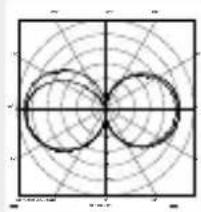
Luminous intensity distribution
natural_image
Geometric diagram with two overlapping circles on a grid background (no text or symbols)| Communication | Wi-Fi 2.4 GHz;/5 GHz |
| Transmitter power | < 100 mW |
| Sensor technology | Passive infrared |
| Angle of coverage | 180° with 45° angle of aperture |
| Mounting height | 1.8–2 m |
| Detection reach | 10 m tangential |
| Light-level setting | 10–10,000 lux |
| Basic light level | 10–40 % |
| Time setting | 1 min, 3 min, 10 min, 15 min |
| Temperature range | -10 °C to 40 °C |
| IP rating: | IP44 |
| Protection class | I |
| Energy efficiency class | This product contains an energy efficiency class "E" light source. |
| Camera |
| Resolution 1,920 x 1,080 px, dazzle guard |
| Angle of aperture 110° horizontally / 90° vertically |
| Setting angle 90° horizontally to either side / 20° to 30° vertically |
| Memory card. 128 GB recommended, Max. 256 GB(16 GB memory card is included) |
| Power consumption 2.7 W |
14. Troubleshooting
GB
Malfunction Cause Remedy
| Camera light without power | ■ Fuse has tripped, not switched ON, break in wiring ■ Short circuit in mains power supply lead ■ Mains switch OFF | ■ Activate, change fuse, turn ON power switch, check wiring with voltage tester ■ Check connections ■ Switch on mains switch |
| Camera light not switching ON | ■ Incorrect twilight setting selected ■ Mains switch OFF ■ Fuse has tripped | ■ Readjust ■ Switch ON ■ Activate, change fuse, check connection if necessary |
| Camera light not switching OFF | ■ Continued movement within the detection zone | ■ Check detection zone |
| Camera light switches ON without obvious movement | ■ Camera light not mounted for detecting movement reliably ■ Movement occurred, but not identified by the observer (movement behind wall, movement of a small object in immediate lamp vicinity etc.) | ■ Securely mount enclosure ■ Check detection zone |
| Camera light not switching ON despite movement | ■ Rapid movements are suppressed to minimise malfunctioning or detection zone set too small ■ Incorrect twilight setting selected | ■ Check detection zone ■ Readjust |
| No access to camera light via app | ■ Wi-Fi router is too far from the camera light or building elements, such as walls, are obstructing transmission | ■ Use repeater |
| Smartphone / tablet cannot be connected to camera light | ■ A terminal device is already connected | ■ Press reset button or scan QR code from connected terminal device |
| No live image transmission | ■ Temperature too high | ■ If necessary, deactivate manual override and let cool down |
FR
iOS

Dimensions (H × I × P) 305 × 77 × 131 mm
natural_image
Geometric diagram showing two overlapping circles on a grid background (no text or labels)iOS

natural_image
Pure geometric diagram with concentric circles and grid lines, no text or symbols presentCommunicatie Wi-Fi 2.4 GHz;/5 GHz
Zendvermogen < 100 mW
iOS
natural_image
Symmetrical geometric pattern with two overlapping circles on a grid background (no text or symbols)iOS
Nota:
natural_image
Pure geometric diagram with concentric circles and radial lines, no text or symbols presentiOS

natural_image
Geometric diagram with concentric circles and radial lines, no text or symbols presentiOS

Anmärkning:
natural_image
Pure geometric diagram with concentric circles and radial lines, no text or symbols presentKommunikation Wi-Fi 2.4 GHz;/5 GHz
Sändeffekt < 100 mW
Sensorteknik Passiv-infraröd
iOS
Bemærk:
natural_image
Pure geometric diagram with concentric circles and radial lines, no text or symbols presentKommunikation Wi-Fi 2.4 GHz;/5 GHz
Sendeeffekt < 100 mW
Sensorteknik Passiv infrarød
iOS

Huomautus:
natural_image
Geometric diagram with two overlapping circles inside a square grid (no text or symbols)Kommunikaatio Wi-Fi 2.4 GHz;/5 GHz
iOS

natural_image
Geometric diagram with two overlapping circles on a grid background (no text or symbols)| Kommunikasjon | Wi-Fi 2.4 GHz;/5 GHz |
| Sendeeffekt | < 100 mW |
| Sensorteknologi | Passiv-infrarød |
| Dekningsvinkel 180° med 45° åpningsvinkel | |
| Monteringshøyde | 1,8–2 m |
| Registreringsrekkevidde | 10 m tangentialt |
| Skumringsinnstilling | 10–10.000 lux |
| Grunnlys 10–40 % | |
| Tidsinnstilling | 1 min, 3 min, 10 min, |
| Temperaturområde | -10 °C til +40 °C |
| Kapslingsgrad | IP44 |
| Kapslingsklasse | I |
| Energieffektivitetsklasse | Dette produktet inneho energieffektivitetsklass |
| Kamera |
| Oppløsning 1.920 x 1.080 px, refleksbeskyttelse |
| Åpningsvinkel horisontal 110° / vertikal 90° |
| Innstillingsvinkel horisontalt 90° til hver side / vertikalt 20° til 30° |
| Minnekort 128 GB anbefalt, maks. 256 GB (16 GB-minnekort inkludert i leveringsomfanget) |
| Inngangseffekt 2,7 W |
14. Driftsfeil
iOS

Υπόδειξη:
natural_image
Geometric diagram with two overlapping circles on a grid background (no text or symbols)iOS

Not:
natural_image
Pure geometric diagram with concentric circles and grid lines, no text or symbols presentiOS

Megjegyzés:
natural_image
Symmetrical geometric pattern with two overlapping circles on a grid background (no text or symbols)iOS

Upozornění:
natural_image
Geometric diagram with two overlapping circles on a grid background (no text or symbols)iOS
Upozornenie:
natural_image
Pure geometric diagram with concentric circles and radial lines, no text or symbols presentKomunikácia Wi-Fi 2.4 GHz;/5 GHz
iOS

Wskazówka:
natural_image
Pure geometric diagram with intersecting circles and grid lines, no text or symbols presentiOS

Indicatie:
natural_image
Geometric diagram with intersecting circles and grid lines, no text or symbols presentiOS
Napotek:
natural_image
Pure geometric diagram with concentric circles and grid lines, no text or symbols presentiOS
Napomena: Za svjetiljku s kamerom potrebna je stabilna WLAN veza.
natural_image
Geometric diagram with two overlapping circles on a grid background (no text or symbols)| Komunikacija | Wi-Fi 2.4 GHz;/5 GHz |
| Snaga emitiranja < 100 mW | |
| Senzorska tehnika | pasivna infracrvena |
| Kut detekcije | 180° sa 45° kuta otvora |
| Visina montaže | 1,8–2 m |
| Domet detekcije | 10 m tangencijalno |
| Podešavanje svjetlosnog praga | 10–10.000 luksa |
| Osnovno svjetlo | 10–40 % |
| Podešavanje vremena | 1 min, 3 min, 10 min, 15 min |
| Temperaturno područje | -10 °C do +40 °C |
| Vrsta zaštite | IP44 |
| Klasa zaštite | I |
| Klasa energetske učinkovitosti | Ovaj proizvod sadrži izvor svjetlosti klase energetske učinkovitosti „E“. |
HR
| Kamera |
| Rezolucija 1.920 x 1.080 px, zaštita od blještanja |
| Kut otvora vodoravno 110° / okomito 90° |
| Kut podešavanja vodoravno 90° na svaku stranu / okomito20° do 30° |
| Memorijska kartica Preporučuje se 128 GB, maks. 256 GB(16 GB memorijska kartica dobiva se u isporuci) |
| Potrošnja snage 2,7 W |
14. Smetnje u radu
Smetnja Uzrok Pomoć
iOS

natural_image
Pure geometric diagram with concentric circles and grid lines, no text or symbols presentSide Wi-Fi 2.4 GHz;/5 GHz
iOS

natural_image
Geometric diagram with two overlapping circles on a grid background (no text or symbols)iOS
natural_image
Symmetrical geometric pattern with two overlapping circles on a grid background (no text or symbols)iOS
Сведение:
iOS

natural_image
Pure geometric diagram with concentric circles and radial lines, no text or symbols present通信 Wi-Fi 2,4 GHz;/5 GHz
发射功率 < 100 mW
传感器技术 被动红外线
iOS
natural_image
Pure geometric diagram with concentric circles and radial lines, no text or symbols presentnatural_image
World map silhouette in grayscale, showing continents and oceans without any text or labelsContact
www.steinel.de/contact