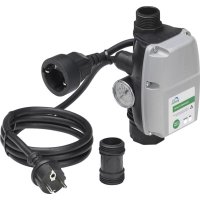
PondoSwitch - Switch Pontec - Free user manual and instructions
Find the device manual for free PondoSwitch Pontec in PDF.



| Product Type | Pump switch with dry-run protection |
| Brand | Pontec |
| Model | PondoSwitch |
| Rated voltage | 230 V AC |
| Mains frequency | 50 Hz |
| Max rated current | 12 A |
| Protection rating | IPX4 (protected against splash water) |
| Inlet connection (female thread) | G1 |
| Outlet connection (male thread) | G1 |
| Max operating pressure | 10 bar |
| Switch-on pressure (preset) | 1.5 bar (adjustable from 1.0 to 3.5 bar) |
| Pumped water temperature | 2 °C to 35 °C |
| Dry-run protection | Yes (built-in sensor) |
| Dimensions (L x W x H) | 100 x 100 x 195 mm |
| Weight | 0.75 kg |
| Power cable length | 1.5 m |
| Pump connection cable length | 0.3 m |
| Main functions | Automatic on/off switching, dry-run protection, switch-on pressure adjustment, built-in manometer, indicator lights (green on, red error) |
| Maintenance and cleaning | Clean exterior with a damp cloth; do not use aggressive cleaning agents |
| Storage / winter | Not frost-resistant; disassemble and store dry and frost-free |
| Warranty | 2 years (parts and labor) |
Frequently Asked Questions - PondoSwitch Pontec
User questions about PondoSwitch Pontec
0 question about this device. Answer the ones you know or ask your own.
Ask a new question about this device
Download the instructions for your Switch in PDF format for free! Find your manual PondoSwitch - Pontec and take your electronic device back in hand. On this page are published all the documents necessary for the use of your device. PondoSwitch by Pontec.
USER MANUAL PondoSwitch Pontec
natural_image
Line drawing of a pressure sensor device with attached tubing and two terminal connectors (no text or symbols)
A
text_image
Labeled diagram of a mechanical device with numbered parts for identificationPOX0045
B
text_image
max. 15 mPOX0048
text_image
C 1. 2. 3. POX0046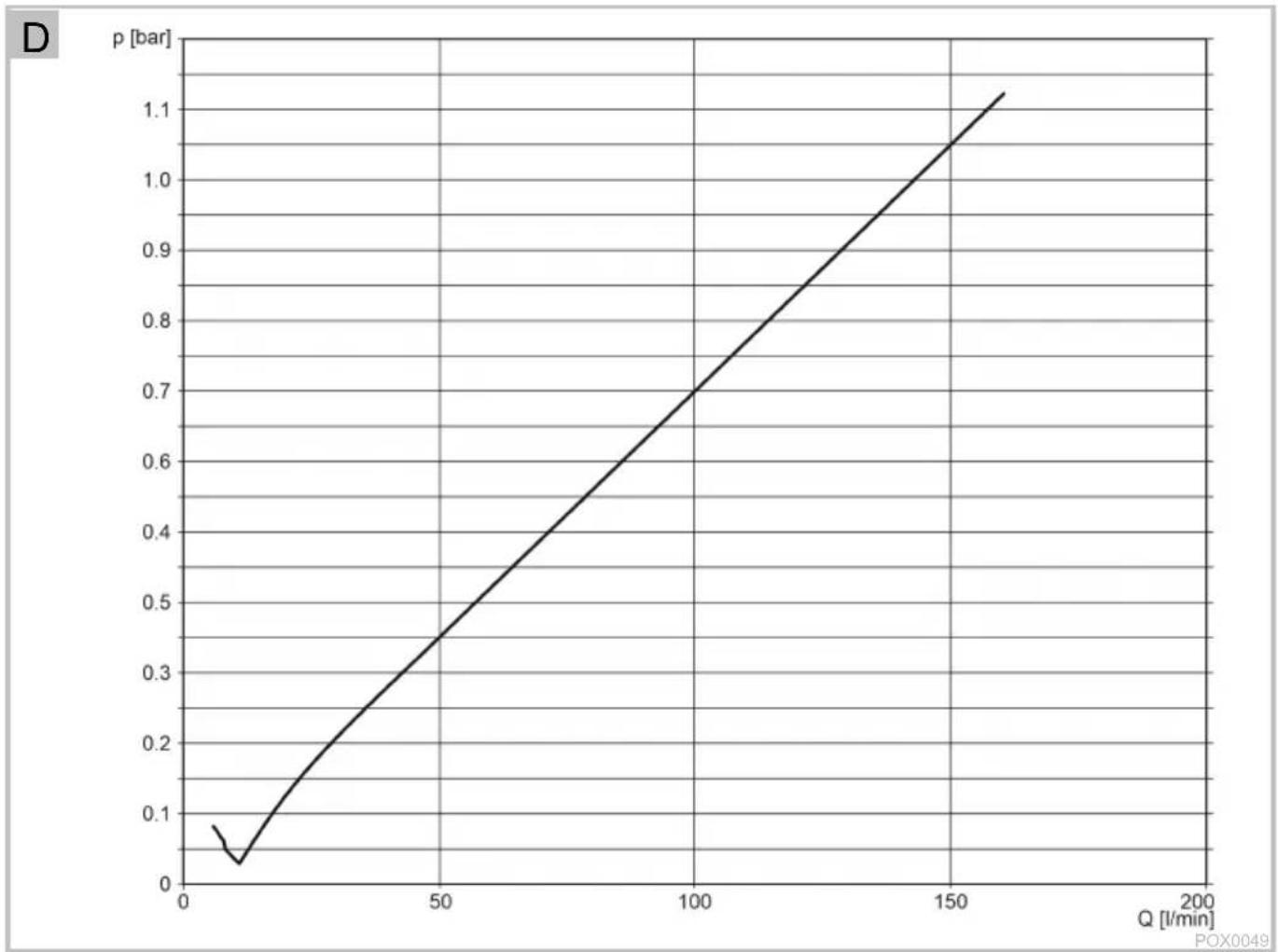
line
| Q [l/min] | p [bar] | | --------- | ------- | | 0 | 0.08 | | 10 | 0.03 | | 50 | 0.45 | | 100 | 0.70 | | 150 | 1.05 | | 200 | 1.15 |
E
text_image
Technical diagram of a mechanical device with labeled components and directional arrows indicating motion or assembly.POX0047
Original operating manual. This operating manual belongs with the unit and must always be handed over together with the unit.
WARNING
▶ If a power cable is damaged, have it replaced immediately by the authorized customer service or a qualified electrician to prevent electric shock.
This unit can be used by children aged 8 and above and by persons with reduced physical, sensory or mental capabilities or lack of experience and knowledge if they are supervised or have been instructed on how to use the unit in a safe way and they understand the hazards involved. Do not allow children to play with the unit. Only allow children to carry out cleaning and user maintenance under supervision.
Safety information
Electrical connection
- Special regulations apply to electrical installation in outdoor areas. Only allow a qualified electrician to perform the electrical installation.
- The qualified electrician has the required professional training, knowledge and skills to perform electrical installations in outdoor areas. The qualified electrician can detect potential risks and adheres to regional and national standards, regulations and directives.
- For your own safety, please consult a qualified electrician.
- Only connect the unit if the electrical data of the unit and the power supply match.
- Only plug the unit into a correctly installed outlet. Ensure that the unit is fused for a rated fault current of max. 30 mA by means of a fault current protection device.
- Extension cables and power distributors (e.g. outlet strips) must be suitable for outdoor use (splash-proof).
- Protect the plug connections from moisture.
- Only plug the unit into a correctly installed outlet. Ensure that the unit is fused for a rated fault current of max. 30 mA by means of a fault current protection device.
Safe operation
- Never operate the unit if the casing is defective!
- Never operate the unit if an electrical cable is defective!
- Do not carry or pull the unit by its power cable.
- Route lines so that they are protected from damage and nobody can trip over them.
• Always pull the power plug before working on the unit. - Never make technical modifications to the unit.
- Only carry out work on the unit that is described in this manual.
- Only use original spare parts and accessories.
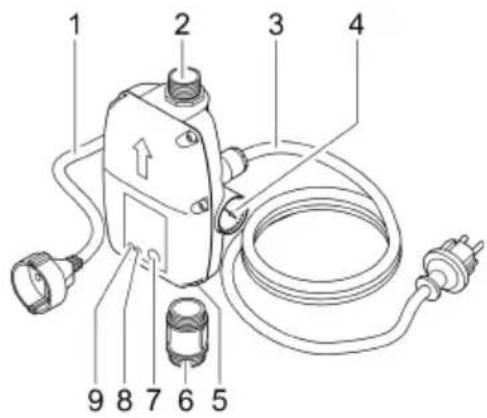
Product description
| ☐ A | PondoSwitch |
| 1 | Power supply for the pump |
| 2 | Outlet AG |
| 3 | Power connection cable |
| 4 | Pressure gage |
| 5 | Inlet (can be rotated) |
| 6 | Adapter |
| 7 | START PUMP button |
| 8 | Dry run indicator lamp, red |
| 9 | Operating indicator lamp, green |
Intended use
Only use the product described in this manual as follows:
- Automatic activation and deactivation of a water pump (pressure pump) when water is taken by a connected appliance.
- Operate the product in compliance with the technical data. (→ Technical data)
Possible incorrect use
The following restrictions apply to the unit:
- Not suitable for pumps with an integrated automatic control system.
- Do not connect to the drinking water supply.
- Not suitable for drinking water.
- Do not use for commercial or industrial purposes.
- Do not use in conjunction with chemicals, foodstuff, easily flammable or explosive substances.
Installation and connection
NOTE
Excessive water pressure in the system will damage the unit.
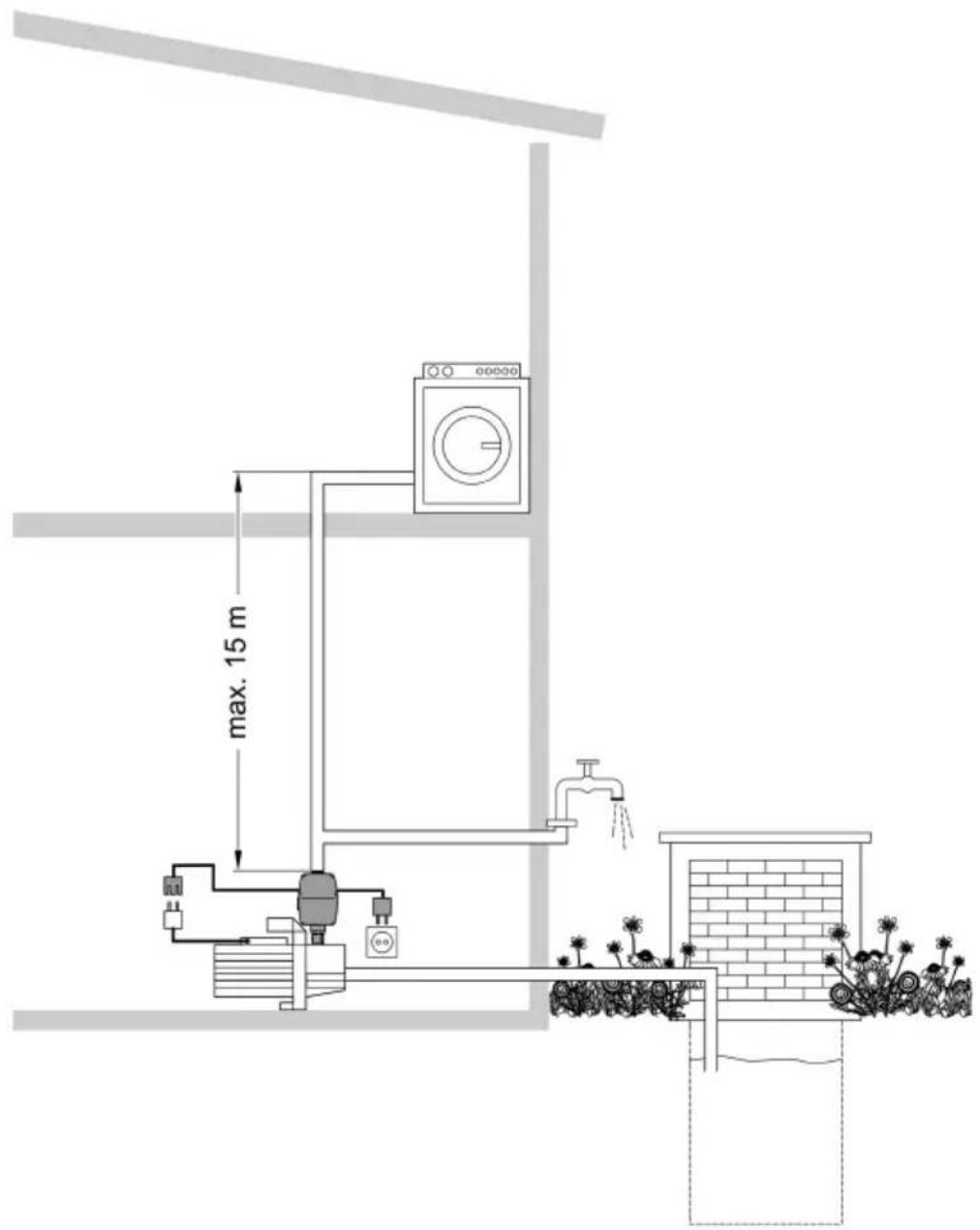
▶ Ensure that the distance from the highest water withdrawal point does not exceed 49 ft.
▶ Ensure that the system pressure does not exceed 10 bar.
▶ Adhere to the maximum permissible pump pressure. It may be less than 10 bar.
NOTE
Ensure that all connection lines are completely leak-tight, as leaking lines can impair the function of the system and lead to damage.
▶ Use a suitable sealant to seal the threads of the lines and the connection to the pump.
▶ Overtightening of plastic screw connections can lead to damage. Do not apply excessive force.
□ B
The unit can be connected horizontally or vertically at any point between the pressure connection of a garden pump, deep well pump or submersible pressure pump and the first water withdrawal point (e.g. washing machine).
- Recommendation: Fit directly to the pressure connection of the pump. Use an adapter.
How to proceed:
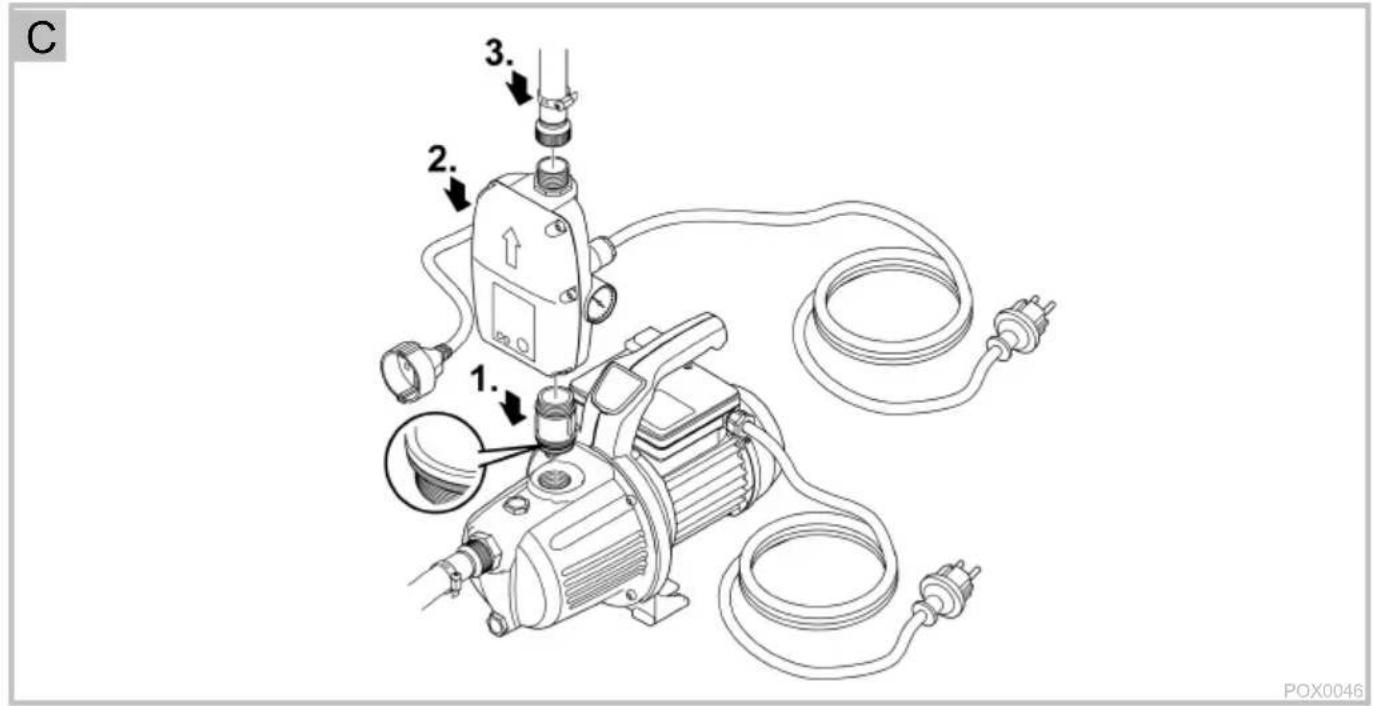
□ C
- Screw the adapter onto the pump.
- Ensure that the O-ring is correctly positioned.
- Screw the unit onto the adapter.
- During installation, ensure that the arrow on the cover and the outlet of the unit point in the direction of the water flow.
- Connect the unit to the downstream line.
Operation
Starting up the unit
WARNING
Serious injury or death from electric shock is possible.
▶ Disconnect the pump and PondoSwitch from the power grid before working on the unit.
It is necessary to fill the pump and expel the air from the suction line prior to use. It can take several minutes to expel air from the suction line.
How to proceed:
- Completely fill the pump and suction line. ( Pump operating manual)
-
Connect the power plug of the pump to the outlet of the PondoSwitch.
-
Plug the power plug of the PondoSwitch into the outlet.
- The indicator lamp ON lights up green.
- The unit is now operational.
- Switch on the pump and press the START PUMP button on the PondoSwitch.
- The PondoSwitch activates the pump for approx. 15 seconds.
- Once the pump switches off automatically, open the highest water withdrawal point.
- The PondoSwitch switches the pump on again.
- Close the water withdrawal point once water emerges steadily.
- Start-up is complete.
If no water is pumped:
- Let the pump run for longer than the time determined by PondoSwitch. To do so, hold the START PUMP button until the pump priming process is complete and water is pumped.
- If no water is pumped even after approximately one minute: Disconnect PondoSwitch from the power grid and repeat the start-up process.
Interrupting operation and restarting
If the pump runs dry or there is insufficient water,
- the PondoSwitch will switch off the pump,
- the indicator lamp ERROR lights up red,
• automatic activation of the pump will be prevented.
To restart operation:
- Eliminate the cause of the shut-down.
- Press the START PUMP button.
Shutting down the unit
CAUTION
The lines are pressurized. Risk of injury caused by the water jet spurting out. Damage to the unit due to leaking water.
▶ Prior to starting work: Open the water withdrawal point to depressurize the system.
▶ Step after completing the work: (→ Starting up the unit)
How to proceed:
-
Pull the power plug of the PondoSwitch.
-
Pull the power plug of the pump.
-
Depressurize the pressure line by opening a withdrawal point.
-
Also open any non-return valves fitted in the suction line.
- When the pump is switched off, residual water in the hose may flow back and out of the pump intake.
If you wish to completely remove the pump:
Proceed according to the pump operating manual!
Changing the activation pressure
WARNING
Serious injury or death from electric shock is possible.
▶ This work may only be performed by a qualified electrician.
▶ Disconnect the pump and PondoSwitch from the power grid before working on the unit.
▶ Step after completing the work: (→ Starting up the unit)
How to proceed:
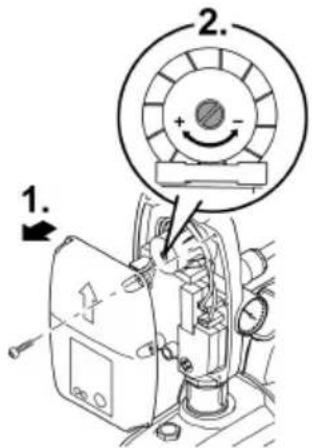
D, E
- Observe the characteristic curve when adjusting the activation pressure.
- Unscrew the casing and remove the cover.
- Change the pressure setting by turning the adjusting screw with a screwdriver Observe the characteristic curve for pressure.
- Refit the casing cover and start up the unit again.
- Check the pressure on the pressure gage and correct the pressure setting again if necessary.
The deactivation pressure is not adjustable and depends on the pump used.
Maintenance and cleaning
NOTE
Do not use aggressive cleaning agents or chemical solutions. These agents can damage the housing, impair the function of the device and harm animals, plants and the environment.
▶ Only clean the unit from the outside with a damp cloth.
Storage/overwintering
The unit is not frost-proof and has to be removed and put into storage if freezing temperatures are expected.
How to correctly store the unit:
- Thoroughly clean the unit and replace damaged components.
- Store the unit in a dry and frost-free place.
- Protect open plug connections from moisture and dirt.
• Empty hoses and connections as much as possible
Troubleshooting
i Please note the instructions for malfunction repair in the operating manual of the pump used.
| Malfunction | Cause | Remedy |
| Pump does not start | The unit is switched off | Switch on the unit |
| The pump is switched off | Switch on pump | |
| Power supply interrupted | Check the electrical plug connections | |
| The fault current protection device has tripped | Switch off the unit and pump and pull the power plug. Then contact the Pontec customer service: service@pontec.com | |
| The unit is defective | ||
| The unit has switched off the pump due to lack of water. The dry run indicator lamp is lit red. | Eliminate the cause of the lack of water (e.g. pump malfunction). Then press the Start button on the unit to restart the pump. | |
| Permissible height difference of 49 ft between the unit and the water withdrawal point is exceeded | Correct the height difference. | |
| The pump is not delivering, or the delivered quantity is insufficient. | Incorrect pressure setting in the unit | Correct the pressure setting in the unit |
| The unit is installed against the water flow direction | Install the unit correctly |
Technical data
| PondoSwitch | |||
| Rated voltage | V AC | 230 | |
| Rated frequency | Hz | 50 | |
| Rated current | maximum | A | 12 |
| Protection type | IPX4 | ||
| Inlet connection, internal thread | G1 | ||
| Outlet connection, external thread | G1 | ||
| Operating pressure | maximum | bar | 10 |
| Activation pressure | pre-set | bar | 1.5 |
| Activation pressure | Setting range | bar | 1.0 ... 3.5 |
| Temperature of the pumped water | min | °F | 35.5 |
| Temperature of the pumped water | max | °F | 95 |
| Switching on/switching off | Button | • | |
| Dry run protection | Sensor | • | |
| Size of solid particles in the pumped water | max | inch | 0.08 |
| Power connection cable | Length | ft | 4.92 |
| Pump connection cable | Length | ft | 0.98 |
| Dimensions | Length | inch | 3.93 |
| Width | inch | 3.93 | |
| Height | inch | 7.67 | |
| Weight | lbs | 1.65 | |
Symbols on the unit
 | The unit is protected against the ingress of splash water. | |
 | Use the device indoors only. | |
 | Do not dispose of the unit with normal household waste. | |
 | Read the operating instructions. | |
Disposal
NOTE

Do not dispose of this unit with domestic waste.
▶ Dispose of the unit by using the return system provided for this purpose.
▶ Disable the unit by cutting off the cables.
Warranty conditions
PfG grants a 2 year warranty from the date of sale on verifiable material and manufacturing defects. Wear parts such as bulbs etc. are exempt from the warranty. The prerequisite for our warranty is the presentation of the purchase receipt. Our warranty will become null and void if the unit is misused, electrically or mechanically damaged by inappropriate use or improperly repaired by non-authorised workshops. Repairs may only be performed by PfG or workshops authorised by PfG. In the case of warranty claims, please return the defective unit or part freight paid to PfG together with a description of the fault and the purchase receipt. PfG reserves the right to invoice repair costs. PfG is not liable for transport damage. Any damage must be claimed against the carrier. Further claims of whatever type, especially consequential damage, are excluded. This warranty does not affect the final customer's claims against the dealer.
i Ako nema protoka vode:
- Pustite pumpu da duže radi, od PondoSwitch navedenog vremena. Za to držite pritisnutu tipku START PUMP dok se ne završi postupak usisavanja na pumpi i započne protok vode.
- Ako nakon otprilike jedne minute još nije nastupio protok vode: Odvojite pumpu PondoSwitch sa strujne mreže i ponovite puštanje u pogon.