LOGITECH Zone Wireless Plus - Headphones

Zone Wireless Plus - Headphones LOGITECH - Free user manual and instructions

Find the device manual for free Zone Wireless Plus LOGITECH in PDF.
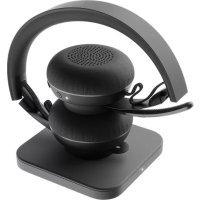
📄 292 pages English EN Download 💬 AI Question
Notice LOGITECH Zone Wireless Plus - page 3
Pick your language and provide your email: we'll send you a specifically translated version.

User questions about Zone Wireless Plus LOGITECH

0 question about this device. Answer the ones you know or ask your own.

Ask a new question about this device

The email remains private: it is only used to notify you if someone responds to your question.

No questions yet. Be the first to ask one.

Download the instructions for your Headphones in PDF format for free! Find your manual Zone Wireless Plus - LOGITECH and take your electronic device back in hand. On this page are published all the documents necessary for the use of your device. Zone Wireless Plus by LOGITECH.

USER MANUAL Zone Wireless Plus LOGITECH

LOGITECH ZONE WIRELESS PLUS

Setup Guide Guide d'installation
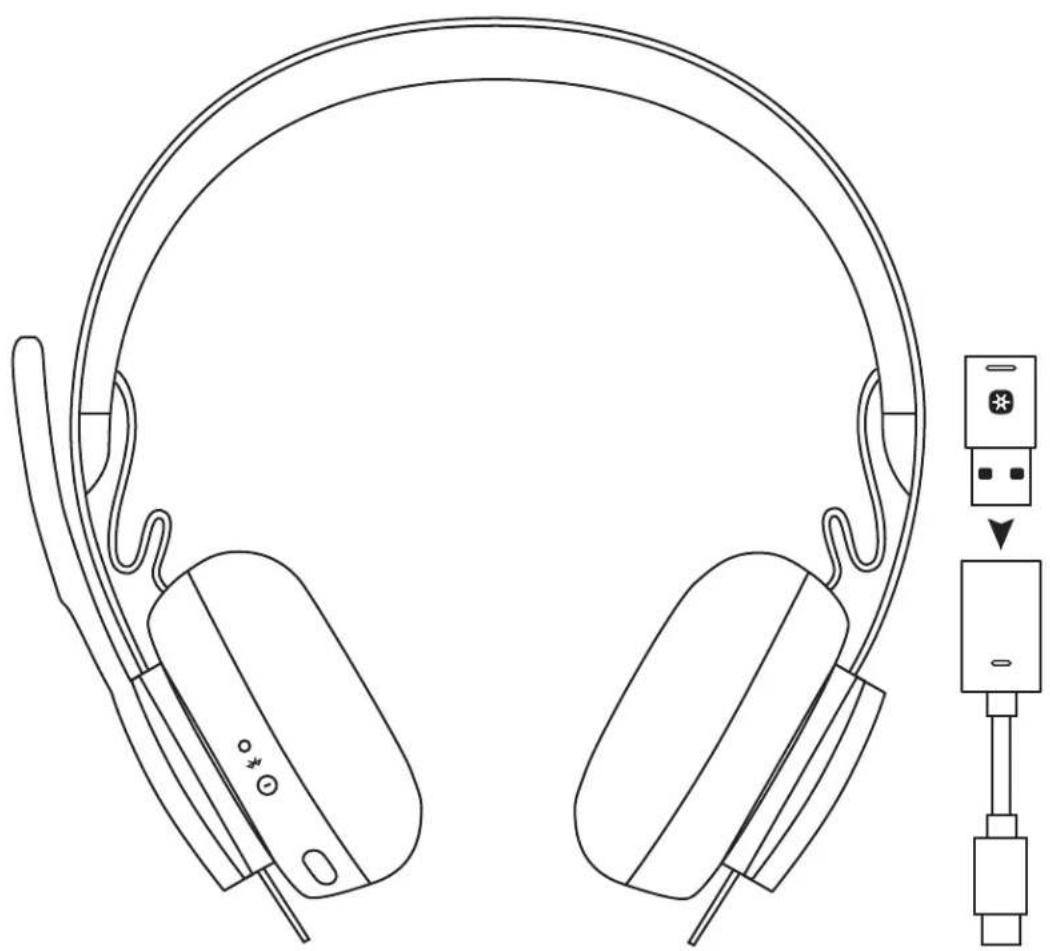
LOGITECH Zone Wireless Plus - LOGITECH ZONE WIRELESS PLUS - 1

natural_image Line drawing of a headboard with earphones and connector pin, showing audio input cable (no text or symbols)

CONTENTS

English 3

Deutsch 13

Français 23

Italiano....33

Español ..... 43

Português ..... 53

Nederlands 63

Svenska. 73

Dansk. 83

Norsk....93

Suomi....103

Ελληνικά. . . . . . . . . . . . . . . . . . 113

По-русски. . . . . . . . . . . . . . . . . . . . . . . 123

Po polsku .....133

Magyar ..... 143

Česká verze. . . . . . . . . . . . . . . . 153

Slovenčina .....163

Українська. 173

Eesti .183

Latviski .....193

Lietuvių ..... 203

Български....213

Hrvatski 223

Srpski 233

Slovenščina. 243

Română 253

Türkçe 263

  1. العربية

283.

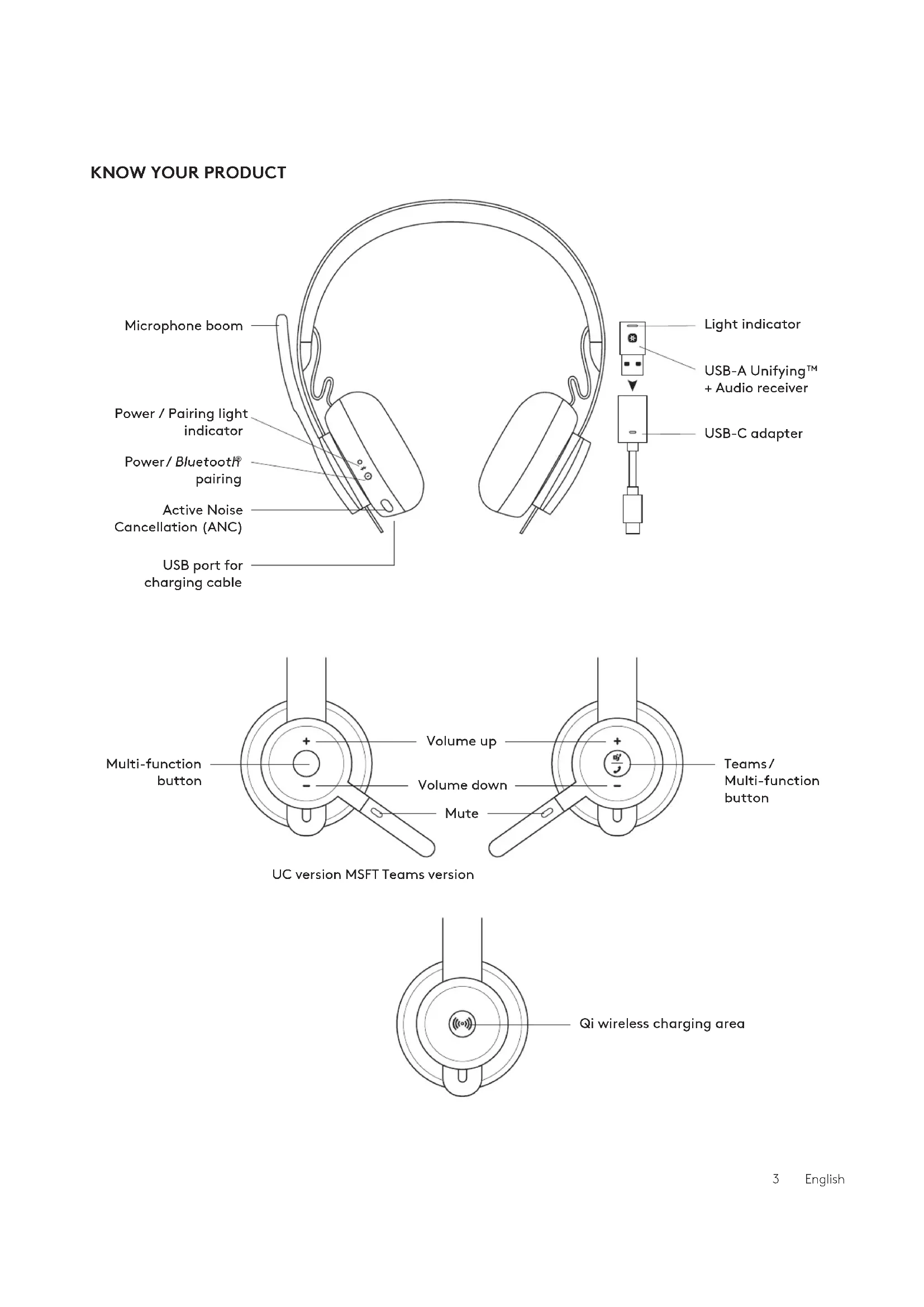
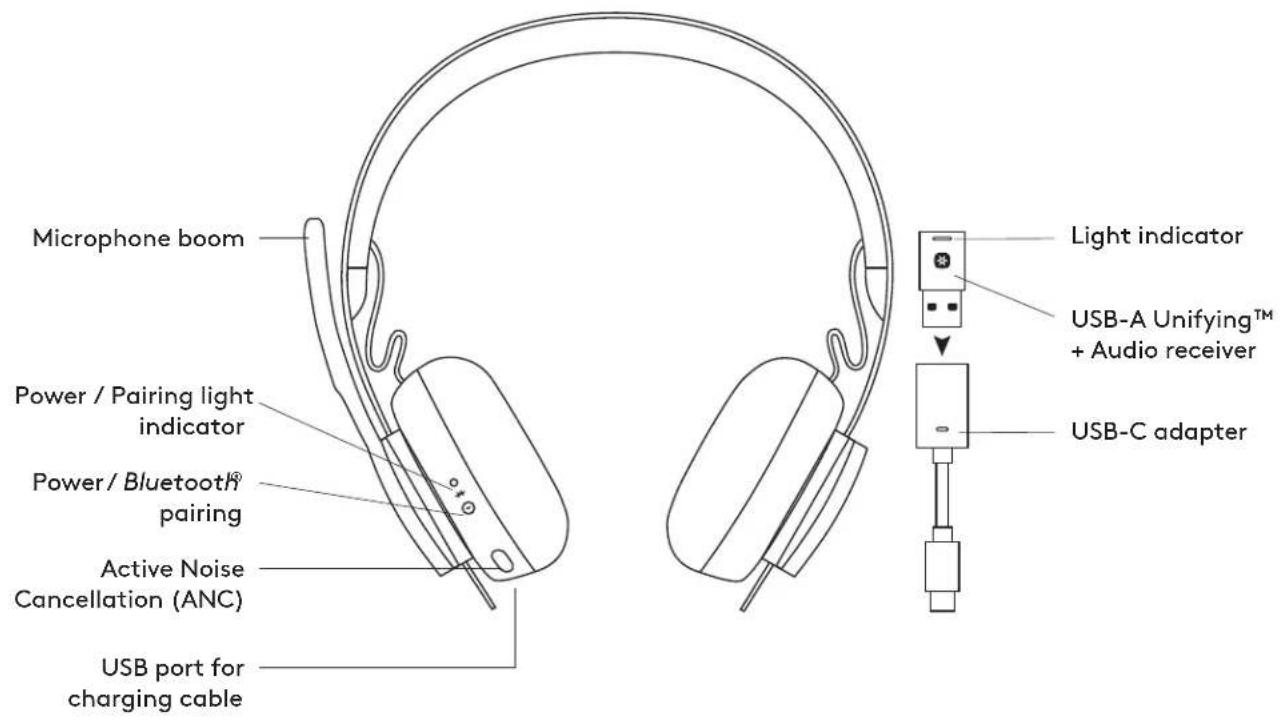
KNOW YOUR PRODUCT
LOGITECH Zone Wireless Plus - CONTENTS - 1

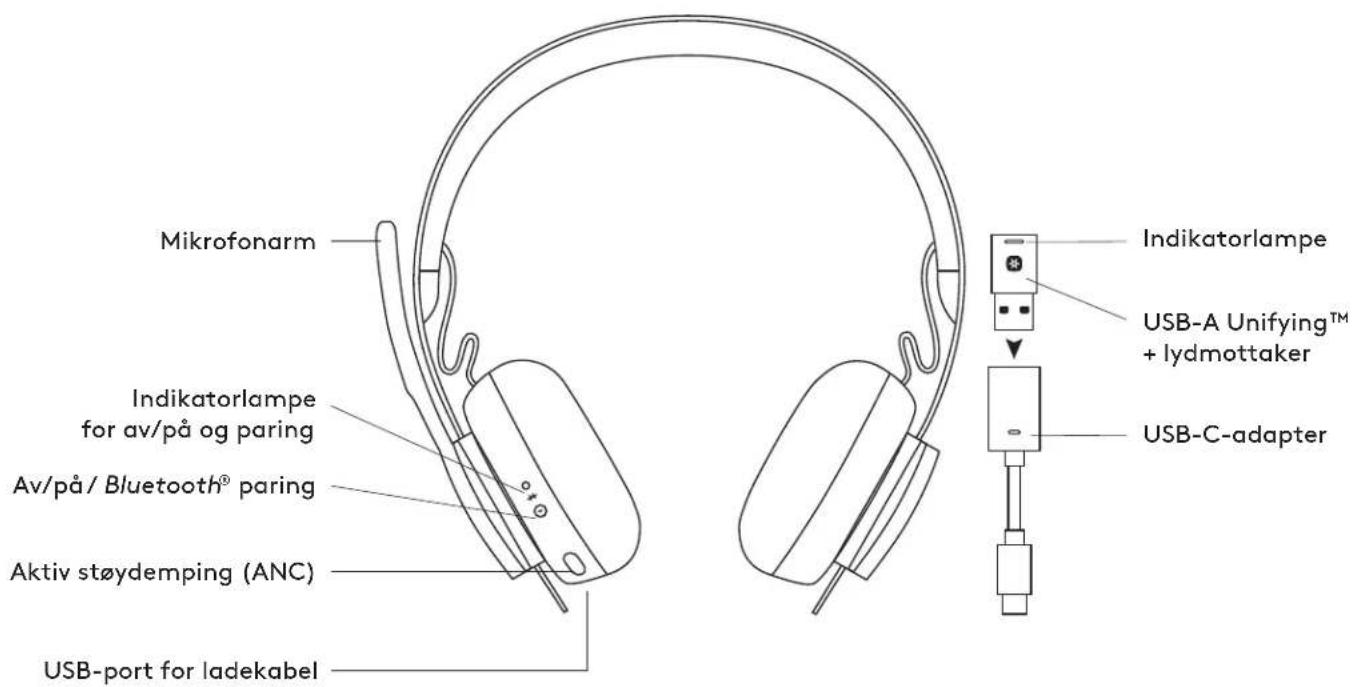
text_image Microphone boom Power / Pairing light indicator Power / Bluetooth® pairing Active Noise Cancellation (ANC) USB port for charging cable Light indicator USB-A Unifying™ + Audio receiver USB-C adapter

LOGITECH Zone Wireless Plus - CONTENTS - 2

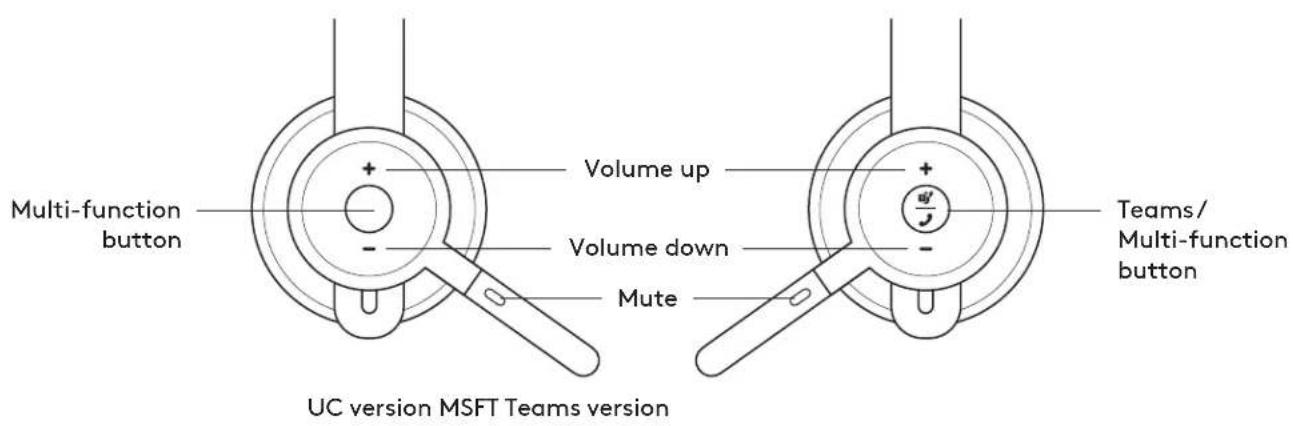
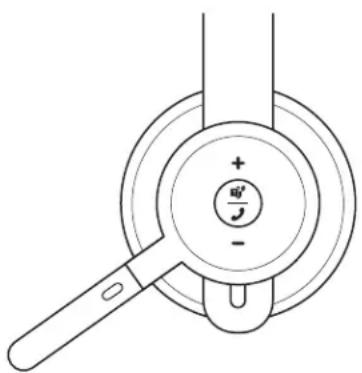
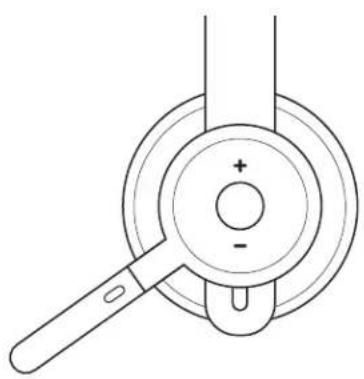
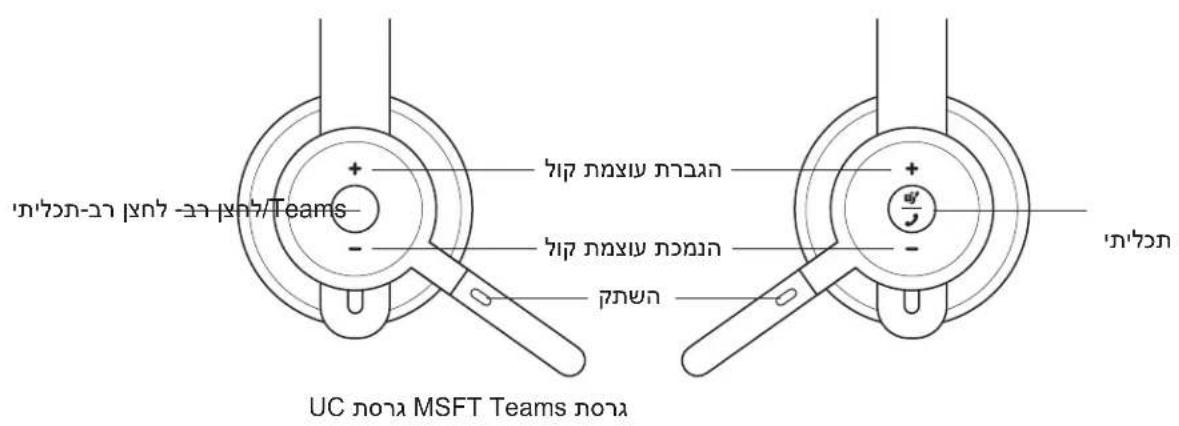
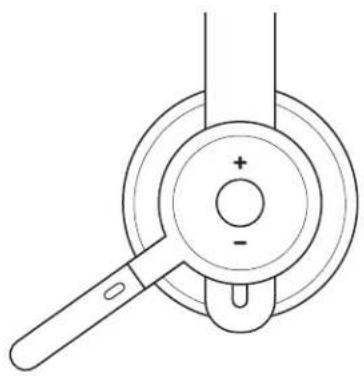
text_image Multi-function button Volume up Volume down Mute Teams/ Multi-function button UC version MSFT Teams version

LOGITECH Zone Wireless Plus - CONTENTS - 3

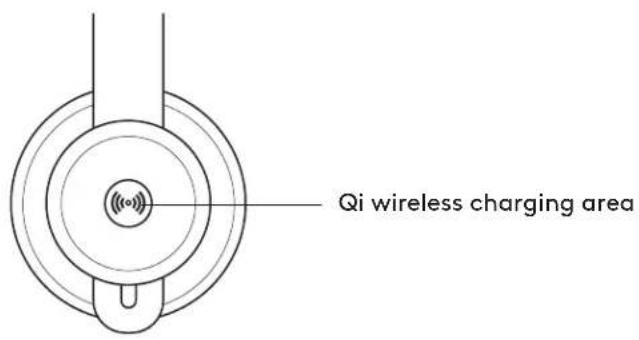
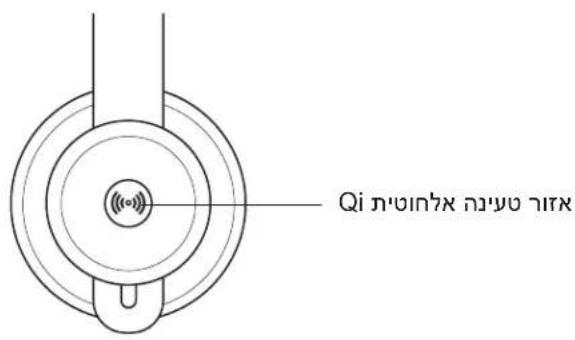
text_image Qi wireless charging area

WHAT'S IN THE BOX

  1. Headset
  2. USB-A Unifying™ + audio receiver
  3. USB-C to A adapter
  4. USB-A to C charging cable
  5. Travel bag
  6. User documentation

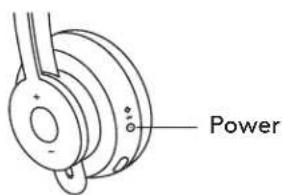
POWER ON/OFF

  1. Press power button for 1 second.
  2. Once powered on, light indicator turns white. If no device is connected, it will flash white slowly.

PAIRING VIA BLUETOOTH®

  1. Press power button for 2 seconds. Light indicator will flash white rapidly.
  2. Open Bluetooth ^® settings on your device.
  3. Select Zone Wireless Plus in discoverable devices.
  4. Once successfully paired, light indicator will turn solid white.

LOGITECH Zone Wireless Plus - PAIRING VIA BLUETOOTH® - 1

text_image USB-A USB-C ADAPTER USB-A | USB-C

LOGITECH Zone Wireless Plus - PAIRING VIA BLUETOOTH® - 2

text_image Power

LOGITECH Zone Wireless Plus - PAIRING VIA BLUETOOTH® - 3

flowchart
graph LR
    A["User with Bluetooth icon"] --> B["2 sec."]
    B --> C["Zone Wireless"]
    C --> D["Screen-based access icon"]

PAIRING HEADSET, KEYBOARD AND MICE VIA USB RECEIVER

LOGITECH Zone Wireless Plus - PAIRING HEADSET, KEYBOARD AND MICE VIA USB RECEIVER - 1

flowchart
graph LR
    A["www.logitech.com/support/unifying"] --> B["USB-A"]
    B --> C["..."]
    C --> D["User Device"]
    D --> E["Advanced Next"]
    E --> F["OFF/ON"]
    F --> G["User Device"]
    G --> H["User Device"]
    H --> I["User Device"]
    I --> J["User Device"]
    J --> K["User Device"]
    K --> L["User Device"]
    L --> M["User Device"]
    M --> N["User Device"]
    N --> O["User Device"]
    O --> P["User Device"]
    P --> Q["User Device"]
    Q --> R["User Device"]
    R --> S["User Device"]
    S --> T["User Device"]
    T --> U["User Device"]
    U --> V["User Device"]
    V --> W["User Device"]
    W --> X["User Device"]
    X --> Y["User Device"]
    Y --> Z["User Device"]
    Z --> AA["User Device"]
    AA --> AB["User Device"]
    AB --> AC["User Device"]
    AC --> AD["User Device"]
    AD --> AE["User Device"]
    AE --> AF["User Device"]
    AF --> AG["User Device"]
    AG --> AH["User Device"]
    AH --> AI["User Device"]
    AI --> AJ["User Device"]
    AJ --> AK["User Device"]
    AK --> AL["User Device"]
    AL --> AM["User Device"]
    AM --> AN["User Device"]
    AN --> AO["User Device"]
    AO --> AP["User Device"]
    AP --> AQ["User Device"]
    AQ --> AR["User Device"]
    AR --> AS["User Device"]
    AS --> AT["User Device"]
    AT --> AU["User Device"]
    AU --> AV["User Device"]
    AV --> AW["User Device"]
    AW --> AX["User Device"]
    AX --> AY["User Device"]
  1. Download Logitech® Unifying Software at www.logitech.com/support/unifying.
  2. USB-A

Insert the Zone Wireless Plus receiver into the computer USB-A port.

USB-C

Insert the USB-A receiver into the USB-C adapter. Then insert the adapter into the computer USB-C port.

  1. Zone Wireless Plus headset is already paired to the receiver it ships with. Just power on the headset.

Once successfully paired, the light indicator on the receiver will remain solid white. Light indicator on the headset will turn solid white.

  1. To pair mice and keyboard,

a. Open the software and continue clicking "Next" on the bottom right corner. If you already have other unifying receivers (with ✕go), please unplug them.
b. Locate the OFF-ON slider on your mice and keyboard. Turn each device off and back on to restart your devices and finish pairing.

  • If paired, please follow the on-screen prompt and test it out to confirm successful pairing.
  • If pairing failed, please retry or refer to our support page www.logitech.com/support/zonewirelesspluspairing.

NOTE: you can pair up to 6 Logitech Unifying peripherals.

ADJUSTING HEADSET

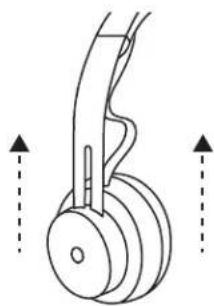
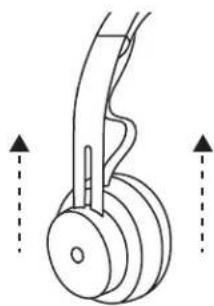
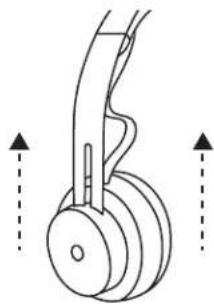
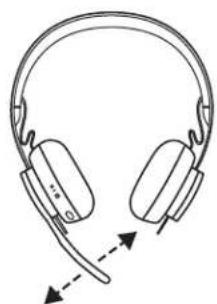
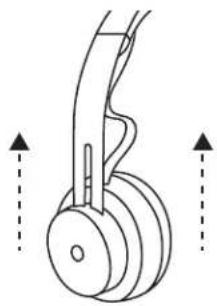
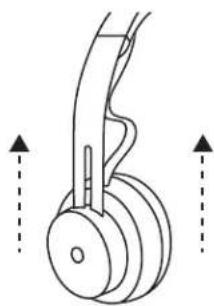
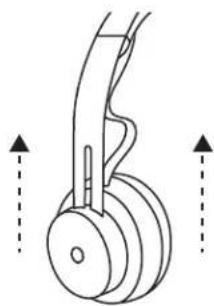
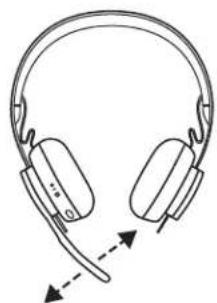
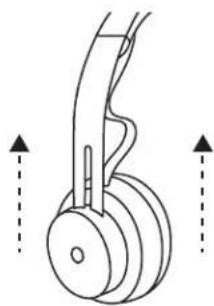
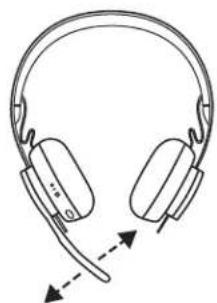
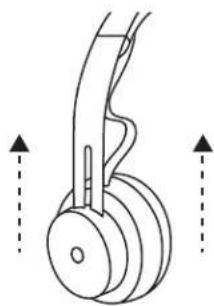
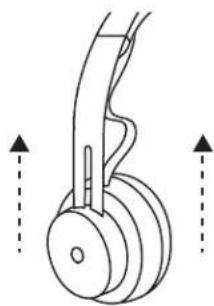
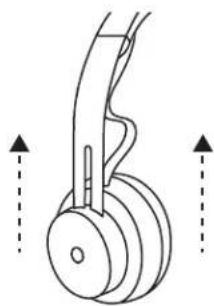
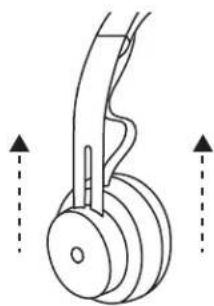
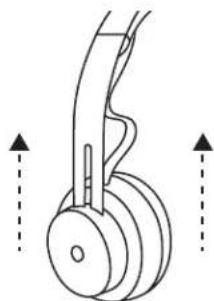
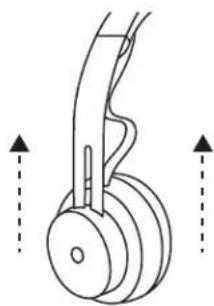
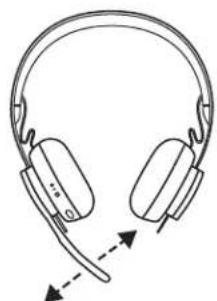
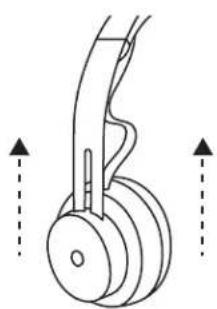
  1. Adjust headset by sliding earcups up and down the headband.
  2. It may be easier to adjust the headset on your head. Move the earcups up and down the headband until they sit comfortably on your ears.
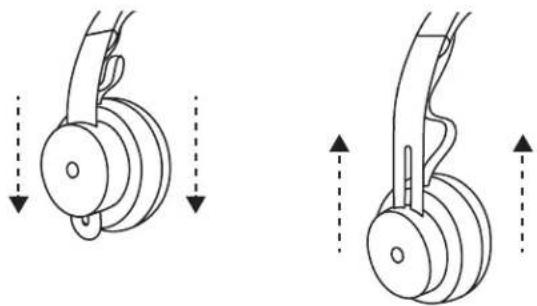
LOGITECH Zone Wireless Plus - ADJUSTING HEADSET - 1

natural_image Diagram showing two mechanical components with downward arrows indicating motion or force direction (no text or symbols)
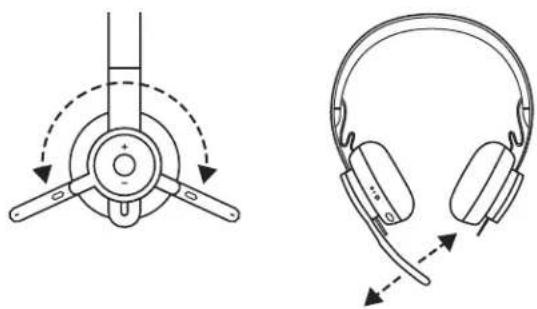
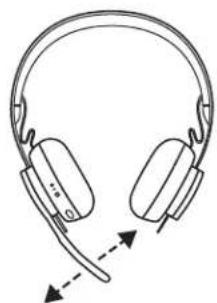
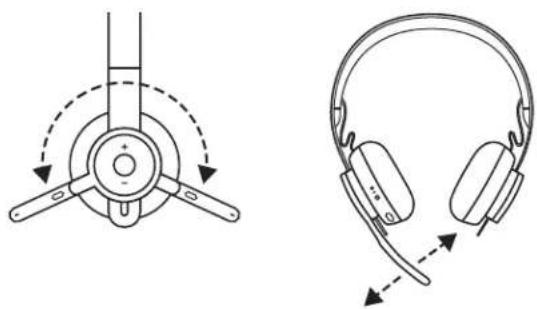
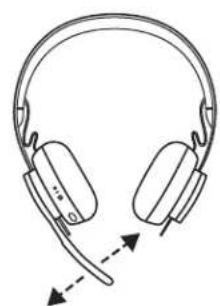
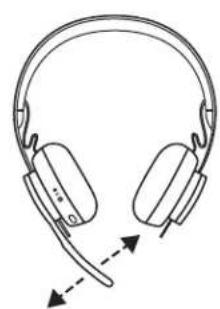
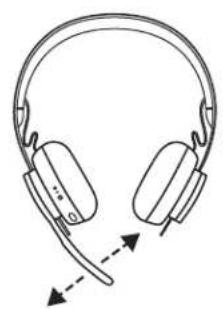
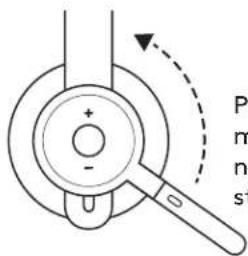
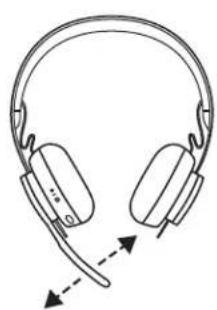
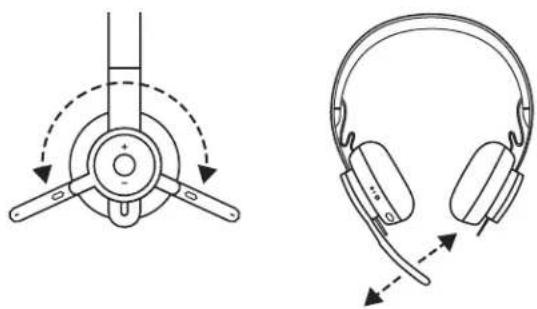
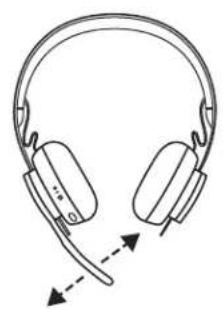
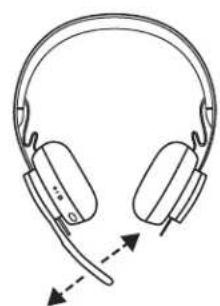
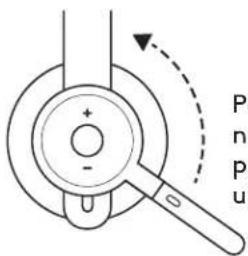
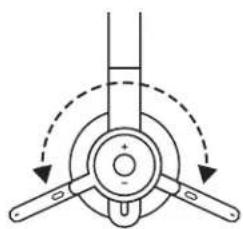
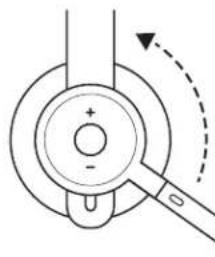
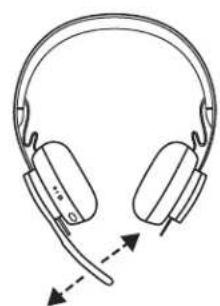
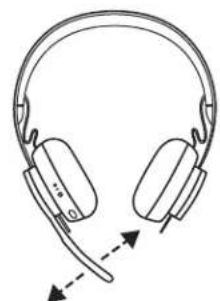
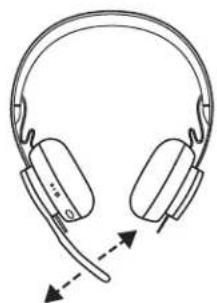
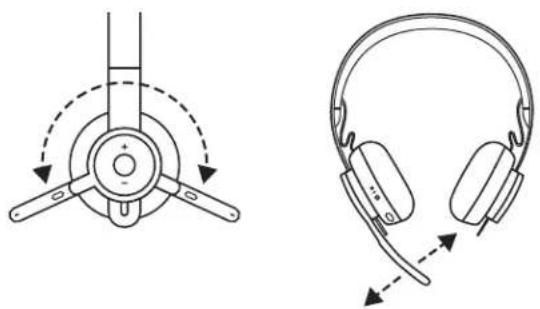
  1. Microphone boom rotates 270 degrees. Wear it on either left or right side. Audio channel will switch automatically, depending on the direction you are wearing the microphone.
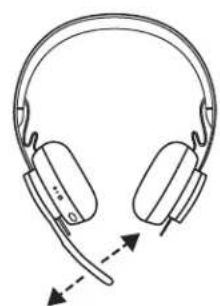
  2. Flexible microphone boom — adjust boom location to capture voice better.

LOGITECH Zone Wireless Plus - ADJUSTING HEADSET - 2

natural_image Technical line drawings of two types of headphones, one with circular head and arrow indicating rotation, the other with ear cap and belt (no text or symbols)

HEADSET CONTROLS

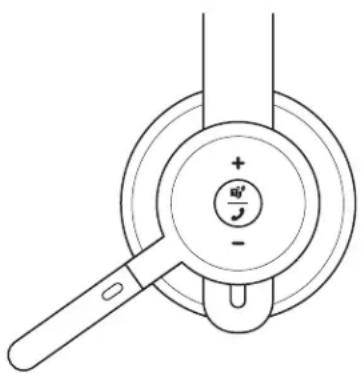
TEAMS version
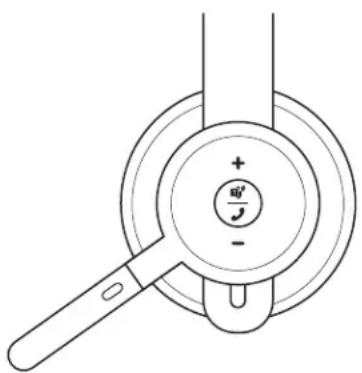
Usage Button Action
Call controlsAnswer / End callMulti-functionShort press
Reject call 2 second press
Resume call Short
Transfer active call to other deviceShort press
Teams activitiesCheck connection to teamsShort press
Quick access to Teams
Respond to Teams notificationsShort press
Trigger Teams voice skills (Cortana)2 second press
Media controlsPlay / Pause Multi-function Double press
Track forwardMulti-function and “+”Short press
Track backwardMulti-function and “-”Short press
VolumeVolume up“+”Short press
Volume down“-”Short press
Headset connection and battery statusCheck connectivity and battery life“+” and “-”Short press

LOGITECH Zone Wireless Plus - ADJUSTING HEADSET - 3

natural_image Diagram of a hand holding a magnifying glass over a circular component with a plus/minus and minus signs (no text or symbols beyond basic labels)

MSFT Teams version

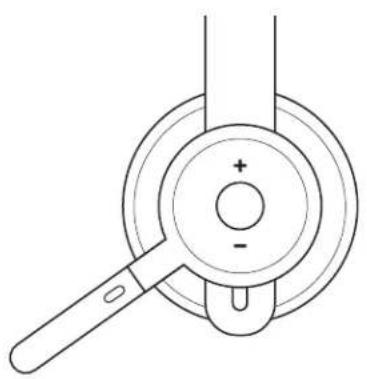
UC version
Usage Button Action
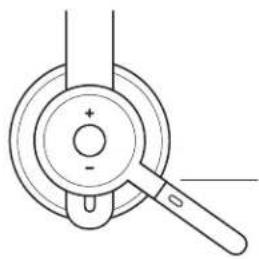
Call controlsAnswer / End callMulti-functionShort press
Reject call 2 second press
Voice assistant Multi-function2 second press
Media controlsPlay / Pause Multi-function Double press
Track forwardMulti-function and "+"Short press
Track backwardMulti-function and "-"Short press
VolumeVolume up"+"Short press
Volume down"-"Short press
Headset statusCheck connectivity and battery life"+" and "-"Short press

LOGITECH Zone Wireless Plus - ADJUSTING HEADSET - 4

natural_image Technical line drawing of a mechanical component with a handle and circular base (no text or symbols)

UC version

Note:

  • Teams activities are only functional when Teams is running on an unlocked computer.
  • Media control functionality depends on type of application.
  • Call activities are always the first priority. When two devices are connected, the Bluetooth® connection will be prioritized over receiver. When two Bluetooth® devices are connected, the last active device will override the other.

Tip: Button customizations and Music EQ controls available on Logi Tune app.

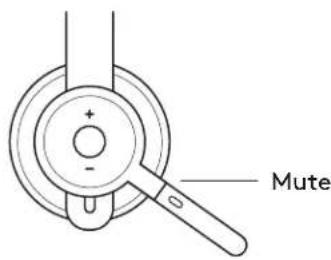
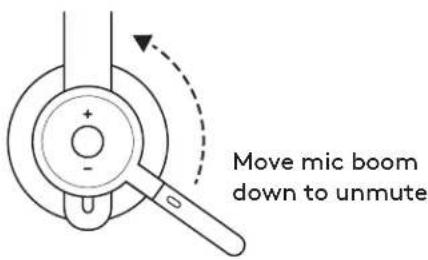
MUTE
LOGITECH Zone Wireless Plus - Note: - 1

text_image + - Mute

Move mic boom up to mute
LOGITECH Zone Wireless Plus - Note: - 2

text_image Move mic boom down to unmute

Voice notifications indicate when the microphone is on/off mute
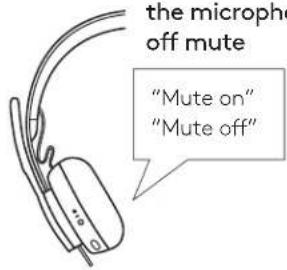
LOGITECH Zone Wireless Plus - Note: - 3

text_image the microphone off mute "Mute on" "Mute off"

ACTIVE NOISE CANCELLATION (ANC)

ANC blocks out the noise around you to help you concentrate on the task at hand.

  1. Press the ANC button on the side of the earcup.
  2. There will be voice notifications when turning ANC on and off. These can be turned off in the Logi Tune app.
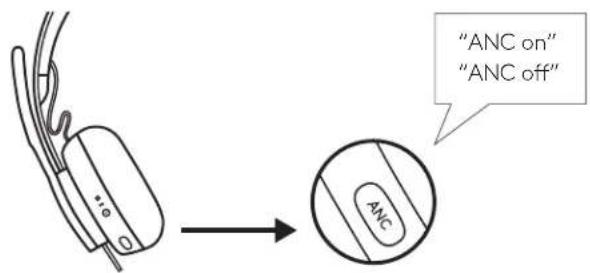
LOGITECH Zone Wireless Plus - ACTIVE NOISE CANCELLATION (ANC) - 1

text_image "ANC on" "ANC off"

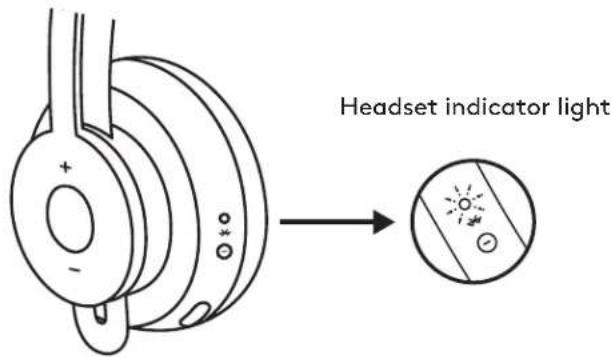
HEADSET LIGHT INDICATOR

Light Status
WhiteSolid Powered on or fully charged
Breathing Battery charging
Fast pulsing Bluetooth ^® pairing mode
Slow pulsing No paired device
RedSolid Low battery
Fast pulsing Bluetooth ^® pairing mode while low battery
Slow pulsing No paired device while low battery

LOGITECH Zone Wireless Plus - ACTIVE NOISE CANCELLATION (ANC) - 2

flowchart
graph LR
    A["Electric motor with +/- terminal"] --> B["Electric motor with 200Ω battery"]
    B --> C["Powered on or fully charged"]
    B --> D["Battery charging"]
    B --> E["Bluetooth® pairing mode"]
    B --> F["No paired device"]
    B --> G["Low battery"]
    B --> H["Bluetooth® pairing mode while low battery"]
    B --> I["No paired device while low battery"]

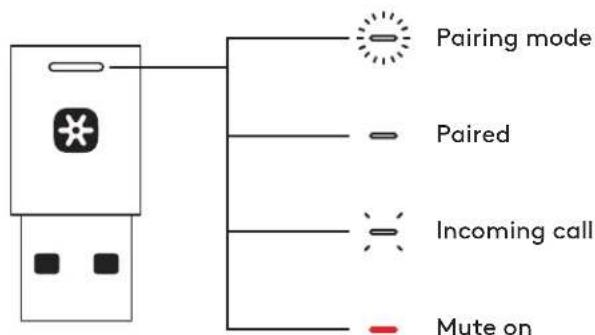
RECEIVER INDICATOR LIGHT

TEAMS version
Light Status
WhiteFast flashing Pairing mode
Solid Paired
Repeat flashing on and offIncoming call
PurplePulsingConnecting to Teams / Teams notifications
Flashing for 10 seconds and offFailed connection to Teams
Flashing 3 times and offNot connected to Teams
SolidConnected to Teams
Red SolidMute on

LOGITECH Zone Wireless Plus - ACTIVE NOISE CANCELLATION (ANC) - 3

flowchart
graph TD
    A["USB Device"] --> B["Pairing mode"]
    A --> C["Paired"]
    A --> D["Incoming call"]
    A --> E["Connecting to Teams/Teams notifications"]
    A --> F["Failed connection to Teams"]
    A --> G["x3"]
    A --> H["Not connected to Teams"]
    A --> I["Connected to Teams"]
    A --> J["Mute on"]
UC version
Light Status
WhiteFast flashing Pairing mode
Solid Paired
Repeat flashing on and offIncoming call
Red Solid Mute on

LOGITECH Zone Wireless Plus - ACTIVE NOISE CANCELLATION (ANC) - 4

text_image Pairing mode Paired Incoming call Mute on

Note:
Receiver light indicates headset status only.

CHARGING

Headset automatically powers off when left idle.

Sleep timer can be changed in the Logi Tune App.

Headset indicator light will turn RED when battery is low.

Charging via USB cable

  1. Plug the USB-C cable end into the USB-C port on the bottom of the earcup.
  2. Plug the USB-A end into the USB-A charging port on your computer or AC adapter.
  3. Indicator light will be a breathing white light for charging.
  4. Indicator light will be solid white when fully charged.

- 2 hours will fully charge the battery.

- 5 minutes will give you 1 hour of talk time.

  1. Headset can be used with receiver and Bluetooth ^® paired while charging.

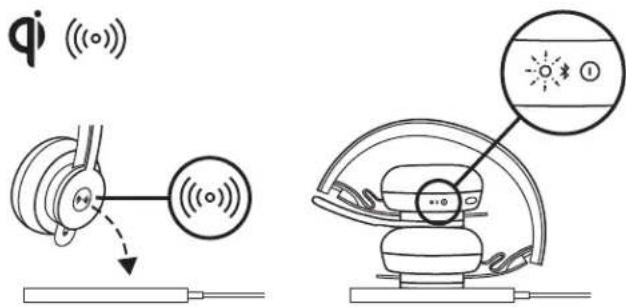
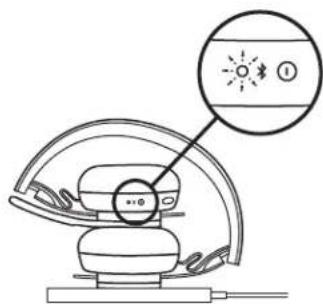
Charging via Qi wireless charger

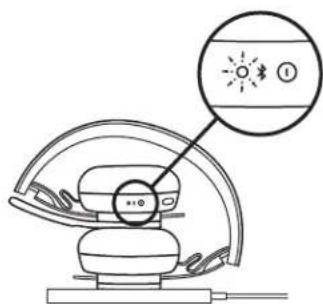
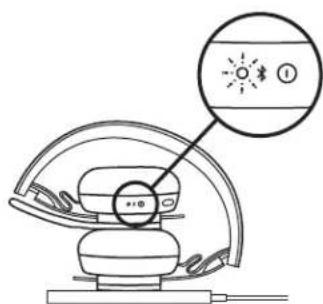
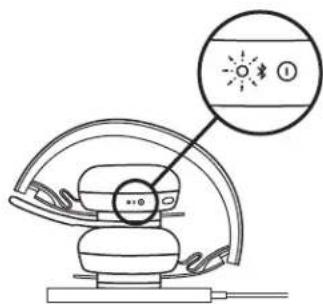
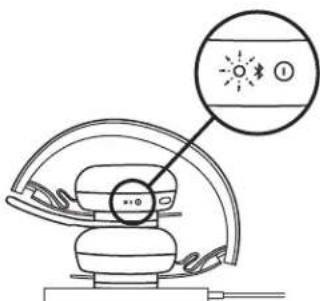
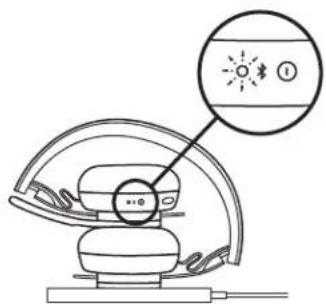
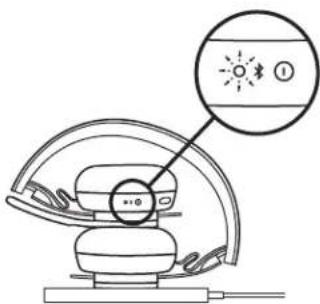
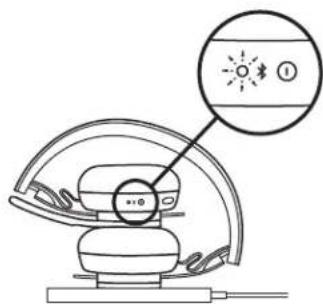
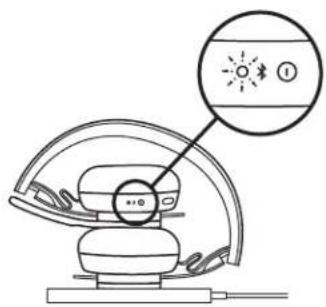
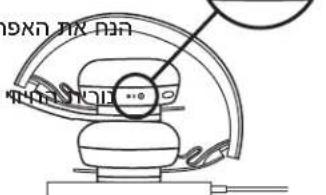
  1. Fold headset with the wireless charging icon on the earcup to the outside.
  2. Place earcup with wireless charging icon on top of any Qi wireless charging base.*
  3. Indicator light will be a breathing, white light when charging.
  4. Indicator light will be solid white when fully charged. -2 hours of charging fully charges the battery.

* Qi wireless charging base is not included.
LOGITECH Zone Wireless Plus - Charging via Qi wireless charger - 1

text_image Headset indicator light

LOGITECH Zone Wireless Plus - Charging via Qi wireless charger - 2

text_image qi (○) ↓ ● ● ● ● ● ● ● ● ● ● ● ● ● ● ● ● ● ● ● ● ● ● ● ● ● ● ● ● ● ● ● ● ● ● ● ● ● ● ● ● ● ● ● ● ● ● ● ● ● ● ○

LOGI TUNE APP

Install application

  1. Download Logi Tune Desktop from www.logitech.com/tune
  2. Download the Logi Tune mobile app from the Apple App Store® or Google Play™ stores by searching for "Logi Tune".

LOGITECH Zone Wireless Plus - Install application - 1

Download on the

App Store

LOGITECH Zone Wireless Plus - Install application - 2

www.logitech.com/tune

LOGITECH Zone Wireless Plus - Install application - 3

GET IT ON

Google Play

ADJUSTING SIDETONE

Sidetone lets you hear your own voice during conversations so you are aware of how loud you are talking. In the Logi Tune app, select the sidetone feature, and adjust the dial accordingly.

  • A higher number means you hear more external sound.
  • A lower number means you hear less external sound.

AUTO SLEEP TIMER

By default, your headset will automatically power off when not in use for one hour. Adjust the sleep timer in the Logi Tune App.

UPDATE YOUR HEADSET

It is recommended to update both your headset and receiver. To do so, download the Logi Tune Desktop from www.logitech.com/tune

RESET YOUR HEADSET

To reset your headset back to its original state, power headset on, press and hold the ANC button and volume '-' button for 5 seconds. The headset is successfully reset when it powers off and indicator light turns off.

DIMENSIONS

HEADSET:

Height x Width x Depth: 174.7 x 176.7 x 70.7 mm

WEIGHT:

0.1808Kg

EARPADS:

Height x Width x Depth: 70.7 x 70.7 x 16.4 mm

RECEIVER:

Height x Width x Depth: 35.5 x 16.2 x 5.3 mm

ADAPTER:

Height x Width x Depth: 106.7 x 17.5 x 10.1 mm

SYSTEM REQUIREMENTS

Works with common calling applications across almost all platforms and operating systems.

Works with Windows, Mac, or Chrome ^™ based computer via USB-C, USB-A, Bluetooth ^® and iOS or Android Bluetooth ^® enabled devices.

TECHNICAL SPECIFICATIONS

Microphone Type: Omni-directional dual MEMS mic array

Frequency response (Headset): 30\~13kHz @ -10dB (music mode), 100\~8kHz (talk mode)

Frequency response (Microphone): 85\~20kHz @-3dB

Battery type: Built-in battery (Lithium ion)

Battery life (talk time): 14 hrs (ANC on), 15 hrs (ANC off)

Battery life (listening time): 14 hrs (ANC on), 16 hrs (ANC off)

Bluetooth ^® version: 5.0

Wireless range: Up to 30m /100 ft (open field line of sight)

Qi Wireless charging enabled

USB-A to C charging cable: 4.25 ft (130 cm)

www.logitech.com/support/zonewirelessplus

PRODUKT AUF EINEN BLICK
LOGITECH Zone Wireless Plus - TECHNICAL SPECIFICATIONS - 1

flowchart
graph LR
    A["User with Bluetooth Signal"] --> B["2 Sek."]
    B --> C["Zone Wireless"]
    C --> D["User with Bluetooth Signal"]

PAIRING VON HEADSET, TASTATUR UND MÄUSEN ÜBER DEN USB-EMPFÄNGER

LOGITECH Zone Wireless Plus - PAIRING VON HEADSET, TASTATUR UND MÄUSEN ÜBER DEN USB-EMPFÄNGER - 1

flowchart
graph LR
    A["www.logitech.com/support/unifying"] --> B["USB-A"]
    B --> C["..."]
    C --> D["User Device"]
    D --> E["Advanced Next"]
    E --> F["OFF/ON"]
    F --> G["User Interface"]
    G --> H["User Interface User"]
    style A fill:#f9f,stroke:#333
    style F fill:#ccf,stroke:#333
natural_image Four technical line drawings of headsets and ear components with directional arrows indicating motion (no text or symbols)

BEDIENELEMENTE AM HEADSET

natural_image Pure diagram of a mechanical component with no text or symbols

MSFT Teams-Version

natural_image Pure mechanical diagram showing a lever and circular components with no text or symbols

UC-Version

Hinweis:

text_image qi (○) ↓ ● ● ● ● ● ● ● ● ● ● ● ● ● ● ● ● ● ● ● ● ● ● ● ● ● ● ● ● ● ● ● ● ● ● ● ● ● ● ● ● ● ● ● ● ● ● ● ● ● ● ○

LOGI TUNE APP

www.logitech.com/tune

LOGITECH Zone Wireless Plus - LOGI TUNE APP - 1

GET IT ON

Google Play

ANPASSEN VON SIDETONE

text_image Alimentation

LOGITECH Zone Wireless Plus - ANPASSEN VON SIDETONE - 1

flowchart
graph LR
    A["User with Bluetooth icon"] --> B["2 sec."]
    B --> C["Zone Wireless Interface"]
    C --> D["User with sunburst icon"]

COUPLER LE CASQUE, LE CLAVIER ET LES SOURIS VIA UN RÉCEPTEUR USB

LOGITECH Zone Wireless Plus - COUPLER LE CASQUE, LE CLAVIER ET LES SOURIS VIA UN RÉCEPTEUR USB - 1

flowchart
graph LR
    A["www.logitech.com/support/unifying"] --> B["USB-A"]
    B --> C["..."]
    C --> D["User Device"]
    D --> E["Advanced Next"]
    E --> F["OFF/ON"]
    F --> G["User Device"]
    G --> H["User Device"]
    H --> I["User Device"]
    I --> J["User Device"]
    J --> K["User Device"]
    K --> L["User Device"]
    L --> M["User Device"]
    M --> N["User Device"]
    N --> O["User Device"]
    O --> P["User Device"]
    P --> Q["User Device"]
    Q --> R["User Device"]
    R --> S["User Device"]
    S --> T["User Device"]
    T --> U["User Device"]
    U --> V["User Device"]
    V --> W["User Device"]
    W --> X["User Device"]
    X --> Y["User Device"]
    Y --> Z["User Device"]
    Z --> AA["User Device"]
    AA --> AB["User Device"]
    AB --> AC["User Device"]
    AC --> AD["User Device"]
    AD --> AE["User Device"]
    AE --> AF["User Device"]
    AF --> AG["User Device"]
    AG --> AH["User Device"]
    AH --> AI["User Device"]
    AI --> AJ["User Device"]
    AJ --> AK["User Device"]
    AK --> AL["User Device"]
    AL --> AM["User Device"]
    AM --> AN["User Device"]
    AN --> AO["User Device"]
    AO --> AP["User Device"]
    AP --> AQ["User Device"]
    AQ --> AR["User Device"]
    AR --> AS["User Device"]
    AS --> AT["User Device"]
    AT --> AU["User Device"]
    AU --> AV["User Device"]
    AV --> AW["User Device"]
    AW --> AX["User Device"]
    AX --> AY["User Device"]
natural_image Diagram of a mechanical component with two downward arrows indicating direction (no text or symbols)

LOGITECH Zone Wireless Plus - COUPLER LE CASQUE, LE CLAVIER ET LES SOURIS VIA UN RÉCEPTEUR USB - 2

natural_image Diagram of a mechanical device with curved and straight ends, showing motion direction arrows (no text or symbols)

AJUSTEMENT DE LA TIGE DU MICRO

natural_image Pure mechanical diagram showing a rotating component with two blades and a central hub, no text or symbols present.

LOGITECH Zone Wireless Plus - AJUSTEMENT DE LA TIGE DU MICRO - 1

natural_image Line drawing of a pair of headphones with headband and earplugs, showing motion arrows (no text or symbols)

COMMANDES DU CASQUE

natural_image Diagram of a hand holding a magnifying glass over a circular component with a plus/minus and minus signs (no text or symbols present)

Version MSFT Teams

natural_image Pure mechanical diagram showing a lever and circular components with no text or symbols

Version UC

Remarque:

natural_image Simple line drawing of a mechanical component with a handle and circular base (no text or symbols)

Sourdine

text_image Diagram showing a mechanical or electrical component with labeled terminals and directional arrow, including symbols like +, -, -, D, d, P.

Download on the App Store

LOGITECH Zone Wireless Plus - Remarque: - 1

www.logitech.com/tune

LOGITECH Zone Wireless Plus - Remarque: - 2

GET IT ON Google Play

RÉGLAGE DE LA TONALITÉ

flowchart
graph LR
    A["User with Bluetooth icon"] --> B["2 sec."]
    B --> C["Zone Wireless Interface"]
    C --> D["User with sunburst icon"]

ASSOCIAZIONE DI CUFFIA CON MICROFONO, TASTIERA E MOUSE TRAMITE RICEVITORE USB

LOGITECH Zone Wireless Plus - ASSOCIAZIONE DI CUFFIA CON MICROFONO, TASTIERA E MOUSE TRAMITE RICEVITORE USB - 1

flowchart
graph LR
    A["www.logitech.com/support/unifying"] --> B["USB-A"]
    A --> C["USB-C"]
    B --> D["..."]
    C --> D
    D --> E["User Interface"]
    E --> F["Advanced Next"]
    F --> G["OFF/ON"]
    G --> H["User Interface"]
    H --> I["OK"]
    style A fill:#fff,stroke:#000
    style F fill:#f9f,stroke:#333
    style G fill:#ccf,stroke:#333
  1. Scarica Logitech® Unifying Software all'indirizzo www.logitech.com/support/unifying.
  2. USB-A
natural_image Diagram showing two mechanical components with downward arrows indicating motion or force direction (no text or symbols)

LOGITECH Zone Wireless Plus - ASSOCIAZIONE DI CUFFIA CON MICROFONO, TASTIERA E MOUSE TRAMITE RICEVITORE USB - 2

natural_image Technical line drawings of two types of headphones, one with circular head and arrow indicating rotation, the other with ear cap and belt (no text or symbols)

CONTROLLI DELLA CUFFIA CON MICROFONO

natural_image Diagram of a hand holding a magnifying glass over a circular dial with a plus/minus button (no text or symbols)

Versione MS Teams

natural_image Pure mechanical diagram showing a lever and circular components with no text or symbols

Versione UC

Nota:

natural_image Simple line drawing of a mechanical component with a handle and circular base (no text or symbols)
text_image Sp d ve P
text_image "ANC on" "ANC off"

INDICATORE LUMINOSO DEL LIVELLO DI CARICA DELLA CUFFIA

text_image qi (○) ↓ (○) (○) (○) (○) (○) (○) (○) (○)

APP LOGI TUNE

Download on the App Store

LOGITECH Zone Wireless Plus - APP LOGI TUNE - 1

www.logitech.com/tune

LOGITECH Zone Wireless Plus - APP LOGI TUNE - 2

GET IT ON Google Play

Versione Bluetooth®: 5,0

flowchart
graph LR
    A["www.logitech.com/support/unifying"] --> B["USB-A"]
    B --> C["..."]
    C --> D["User Interface"]
    D --> E["Advanced Next"]
    E --> F["OFF/ON"]
    F --> G["OK"]
    B --> H["USB-C"]
    H --> I["User Interface"]
    I --> J["User Interface"]
    J --> K["User Interface"]
    K --> L["User Interface"]
    L --> M["User Interface"]
    M --> N["User Interface"]
  1. Descargue el software Logitech® Unifying desdewww.logitech.com/support/unifying.
  2. USB-A
natural_image Diagram showing two mechanical components with downward arrows indicating motion, no text or symbols present

AJUSTAR LA VARILLA DEL MICRÓFONO

natural_image Technical line drawings of two types of headphones, one with a circular head and arrow indicating rotation, the other with a flathead (no text or symbols)
natural_image Diagram of a hand holding a magnifying glass over a circular dial with a plus/minus icon (no text or symbols)

Versión MSFT Teams

natural_image Pure mechanical diagram showing a lever and circular components with no text or symbols

Versión UC

Nota:

text_image "ANC activada" "ANC desactivada"

INDICADOR LUMINOSO DE AURICULARES

text_image qi (○) ↓ ● ● ● ● ● ● ● ● ● ● ● ● ● ● ● ● ● ● ● ● ● ● ● ● ● ● ● ● ● ● ● ● ● ● ● ● ● ● ● ● ● ● ● ● ● ● ● ● ● ● ○

www.logitech.com/tune

LOGITECH Zone Wireless Plus - Nota: - 1

GET IT ON

Google Play

AJUSTAR EL TONO LATERAL

flowchart
graph LR
    A["User with Bluetooth icon"] --> B["2 seg."]
    B --> C["Zone Wireless Device Icon"]
    C --> D["User with sunburst icon"]

EMPARELHAR AUSCULTADORES, TECLADO E RATOS ATRAVÉS DO RECEPTOR USB
LOGITECH Zone Wireless Plus - AJUSTAR EL TONO LATERAL - 1

flowchart
graph LR
    A["www.logitech.com/support/unifying"] --> B["USB-A"]
    B --> C["..."]
    C --> D["User Device"]
    D --> E["Advanced Next"]
    E --> F["OFF/ON"]
    F --> G["User Device"]
    G --> H["User Device"]
    H --> I["User Device"]
    I --> J["User Device"]
    J --> K["User Device"]
    K --> L["User Device"]
    L --> M["User Device"]
    M --> N["User Device"]
    N --> O["User Device"]
    O --> P["User Device"]
    P --> Q["User Device"]
    Q --> R["User Device"]
    R --> S["User Device"]
    S --> T["User Device"]
    T --> U["User Device"]
    U --> V["User Device"]
    V --> W["User Device"]
    W --> X["User Device"]
    X --> Y["User Device"]
    Y --> Z["User Device"]
    Z --> AA["User Device"]
    AA --> AB["User Device"]
    AB --> AC["User Device"]
    AC --> AD["User Device"]
    AD --> AE["User Device"]
    AE --> AF["User Device"]
    AF --> AG["User Device"]
    AG --> AH["User Device"]
    AH --> AI["User Device"]
    AI --> AJ["User Device"]
    AJ --> AK["User Device"]
    AK --> AL["User Device"]
    AL --> AM["User Device"]
    AM --> AN["User Device"]
    AN --> AO["User Device"]
    AO --> AP["User Device"]
    AP --> AQ["User Device"]
    AQ --> AR["User Device"]
    AR --> AS["User Device"]
    AS --> AT["User Device"]
    AT --> AU["User Device"]
    AU --> AV["User Device"]
    AV --> AW["User Device"]
    AW --> AX["User Device"]
    AX --> AY["User Device"]
  1. Transfira o Logitech® Unifying Software em www.logitech.com/support/unifying.
  2. USB-A
natural_image Diagram showing two mechanical components with downward arrows indicating motion or force direction (no text or symbols)

AJUSTAR A HASTE DO MICROFONE

natural_image Technical line drawings of two types of headphones, one with a circular head and arrow indicating rotation, the other with a wide-angle earband (no text or symbols)
natural_image Diagram of a hand holding a magnifying glass over a circular dial with a plus/minus icon (no text or symbols)

Versão MSFT Teams

natural_image Technical line drawing of a mechanical component with a handle and circular base (no text or symbols)

Versão UC

Nota:

natural_image Simple line drawing of a mechanical component with a handle and circular base (no text or symbols)

Sem som

Download on the App Store

LOGITECH Zone Wireless Plus - Nota: - 1

www.logitech.com/tune

LOGITECH Zone Wireless Plus - Nota: - 2

GET IT ON Google Play

AJUSTAR O RETORNO DE VOZ

flowchart
graph LR
    A["User with Bluetooth icon"] --> B["2 sec."]
    B --> C["Zone Wireless Interface"]
    C --> D["User with sunburst icon"]

HEADSET, TOETSENBORD EN MUIS VIA USB-ONTVANGER KOPPELEN

LOGITECH Zone Wireless Plus - HEADSET, TOETSENBORD EN MUIS VIA USB-ONTVANGER KOPPELEN - 1

flowchart
graph LR
    A["www.logitech.com/support/unifying"] --> B["USB-A"]
    B --> C["..."]
    C --> D["User Device"]
    D --> E["Advanced Next"]
    E --> F["OFF/ON"]
    F --> G["User Device"]
    G --> H["User Device"]
    H --> I["User Device"]
    I --> J["User Device"]
    J --> K["User Device"]
    K --> L["User Device"]
    L --> M["User Device"]
    M --> N["User Device"]
    N --> O["User Device"]
    O --> P["User Device"]
    P --> Q["User Device"]
    Q --> R["User Device"]
    R --> S["User Device"]
    S --> T["User Device"]
    T --> U["User Device"]
    U --> V["User Device"]
    V --> W["User Device"]
    W --> X["User Device"]
    X --> Y["User Device"]
    Y --> Z["User Device"]
    Z --> AA["User Device"]
    AA --> AB["User Device"]
    AB --> AC["User Device"]
    AC --> AD["User Device"]
    AD --> AE["User Device"]
    AE --> AF["User Device"]
    AF --> AG["User Device"]
    AG --> AH["User Device"]
    AH --> AI["User Device"]
    AI --> AJ["User Device"]
    AJ --> AK["User Device"]
    AK --> AL["User Device"]
    AL --> AM["User Device"]
    AM --> AN["User Device"]
    AN --> AO["User Device"]
    AO --> AP["User Device"]
    AP --> AQ["User Device"]
    AQ --> AR["User Device"]
    AR --> AS["User Device"]
    AS --> AT["User Device"]
    AT --> AU["User Device"]
    AU --> AV["User Device"]
    AV --> AW["User Device"]
    AW --> AX["User Device"]
    AX --> AY["User Device"]
  1. Download Logitech® Unifying Software vanaf www.logitech.com/support/unifying.
  2. USB-A
natural_image Diagram of a mechanical component with two downward arrows indicating direction (no text or symbols)

LOGITECH Zone Wireless Plus - HEADSET, TOETSENBORD EN MUIS VIA USB-ONTVANGER KOPPELEN - 2

natural_image Diagram of a mechanical device with curved and straight ends, showing directional arrows (no text or symbols)

DE MICROFOONARM BIJSTELLEN

natural_image Pure mechanical diagram showing a rotating component with two blades and a central hub, no text or symbols present.

LOGITECH Zone Wireless Plus - DE MICROFOONARM BIJSTELLEN - 1

natural_image Line drawing of a pair of headphones with headband and earplugs, showing sound waves (no text or symbols)

HEADSETKNOPPEN

natural_image Pure diagram of a mechanical component with no text or symbols

MSFT Teams-versie

natural_image Pure mechanical diagram showing a lever and circular components with no text or symbols

UC-versie

Opmerking:

natural_image Simple line drawing of a mechanical component with a handle and circular base (no text or symbols)

Dempen

text_image qi ((o)) ↓ (○) (○) (○) (○) (○) (○)

LOGI TUNE-APP

App installeren

www.logitech.com/tune

LOGITECH Zone Wireless Plus - App installeren - 1

GET IT ON

Google Play

SIDETONE AANPASSEN

flowchart
graph LR
    A["User with Bluetooth icon"] --> B["2 sekunder"]
    B --> C["Zone Wireless"]
    C --> D["User with sunburst icon"]

PARKOPPLA HEADSET, TANGENTBORD OCH MUS VIA USB-MOTTAGAREN

LOGITECH Zone Wireless Plus - PARKOPPLA HEADSET, TANGENTBORD OCH MUS VIA USB-MOTTAGAREN - 1

flowchart
graph LR
    A["www.logitech.com/support/unifying"] --> B["USB-A"]
    B --> C["..."]
    C --> D["User Interface"]
    D --> E["Advanced Next"]
    E --> F["OFF/ON"]
    F --> G["User Interface"]
    G --> H["OK"]
    style A fill:#fff,stroke:#000
    style B fill:#fff,stroke:#000
    style C fill:#fff,stroke:#000
    style D fill:#fff,stroke:#000
    style E fill:#fff,stroke:#000
    style F fill:#fff,stroke:#000
    style G fill:#fff,stroke:#000
    style H fill:#fff,stroke:#000
  1. Ladda ner Logitech ©Unifying-programvara på www.logitech.com/support/unifying.
  2. USB-A
natural_image Diagram showing two mechanical components with downward arrows indicating motion or force direction (no text or symbols)

JUSTERA MIKROFONARMEN

natural_image Technical line drawings of two types of headphones, one with a circular head and arrow indicating rotation, the other with a wide-angle earband (no text or symbols)

HEADSET-REGLAGE

natural_image Diagram of a hand holding a magnifying glass over a circular component with a plus/minus and minus signs (no text or symbols beyond basic labels)

MSFT Teams-version

natural_image Pure mechanical diagram showing a lever and circular components with no text or symbols

UC-version

Obs!

text_image Diagram showing a sensor connected to a device with signal waves, indicating sound or signal transmission.

LOGITECH Zone Wireless Plus - Obs! - 1

text_image Diagram of a car steering wheel with sun icon and warning label, showing gear shift and warning symbol

LOGI TUNE-APPEN

Installera applikationen

Download on the App Store

LOGITECH Zone Wireless Plus - Installera applikationen - 1

www.logitech.com/tune

LOGITECH Zone Wireless Plus - Installera applikationen - 2

GET IT ON Google Play

JUSTERA BILJUD

DET INDEHOLDER KASSEN

flowchart
graph LR
    A["User with Bluetooth icon"] --> B["2 sek."]
    B --> C["Zone Wireless Device Icon"]
    C --> D["User with sunburst icon"]

PARRING AF HEADSET, TASTATUR OG MUS VIA USB-MODTAGER

LOGITECH Zone Wireless Plus - PARRING AF HEADSET, TASTATUR OG MUS VIA USB-MODTAGER - 1

flowchart
graph LR
    A["www.logitech.com/support/unifying"] --> B["USB-A"]
    B --> C["..."]
    C --> D["User Device"]
    D --> E["Advanced Next"]
    E --> F["OFF/ON"]
    F --> G["User Device"]
    G --> H["User Device"]
    H --> I["User Device"]
    I --> J["User Device"]
    J --> K["User Device"]
    K --> L["User Device"]
    L --> M["User Device"]
    M --> N["User Device"]
    N --> O["User Device"]
    O --> P["User Device"]
    P --> Q["User Device"]
    Q --> R["User Device"]
    R --> S["User Device"]
    S --> T["User Device"]
    T --> U["User Device"]
    U --> V["User Device"]
    V --> W["User Device"]
    W --> X["User Device"]
    X --> Y["User Device"]
    Y --> Z["User Device"]
    Z --> AA["User Device"]
    AA --> AB["User Device"]
    AB --> AC["User Device"]
    AC --> AD["User Device"]
    AD --> AE["User Device"]
    AE --> AF["User Device"]
    AF --> AG["User Device"]
    AG --> AH["User Device"]
    AH --> AI["User Device"]
    AI --> AJ["User Device"]
    AJ --> AK["User Device"]
    AK --> AL["User Device"]
    AL --> AM["User Device"]
    AM --> AN["User Device"]
    AN --> AO["User Device"]
    AO --> AP["User Device"]
    AP --> AQ["User Device"]
    AQ --> AR["User Device"]
    AR --> AS["User Device"]
    AS --> AT["User Device"]
    AT --> AU["User Device"]
    AU --> AV["User Device"]
    AV --> AW["User Device"]
    AW --> AX["User Device"]
    AX --> AY["User Device"]
  1. Download Logitech® Unifying Software på www.logitech.com/support/unifying.
  2. USB-A

Sæt Zone Wireless Plus-modtageren i computerens USB-A-port.

USB-C

natural_image Diagram showing two mechanical components with downward arrows indicating motion or force direction (no text or symbols)

TILPASNING AF MIKROFONARMEN

natural_image Technical line drawings of two types of headphones, one with circular head and arrow indicating rotation, the other with ear cap and belt (no text or symbols)

KONTROLKNAPPER PÅ HEADSET

text_image Diagram of a dial indicator with labeled terminals and directional arrow, showing '+' and '-' symbols

MSFT Teams-version

natural_image Pure mechanical diagram showing a lever and circular components without any text or symbols

UC-version

Bemcærk:

text_image "ANC on" "ANC off"

BATTERIINDIKATOR

text_image qi (○) ↓ (○) (○) (○) (○) (○) (○)

LOGI TUNE-APP

Installer app

Download on the App Store

LOGITECH Zone Wireless Plus - Installer app - 1

www.logitech.com/tune

LOGITECH Zone Wireless Plus - Installer app - 2

GET IT ON Google Play

JUSTERING AF MEDH∅R

BLI KJENT MED PRODUKTET
LOGITECH Zone Wireless Plus - JUSTERING AF MEDH∅R - 1

text_image Mikrofonarm Indikatorlampe for av/på og paring Av/på/ Bluetooth® paring Aktiv støydemping (ANC) USB-port for ladekabel Indikatorlampe USB-A Unifying™ + lydmottaker USB-C-adapter

LOGITECH Zone Wireless Plus - JUSTERING AF MEDH∅R - 2

flowchart
graph LR
    A["User with Bluetooth icon"] --> B["2 sek."]
    B --> C["Zone Wireless Device Icon"]
    C --> D["User with sunburst icon"]

PARE HODESETT, TASTATUR OG MUS VIA USB-MOTTAKER

LOGITECH Zone Wireless Plus - PARE HODESETT, TASTATUR OG MUS VIA USB-MOTTAKER - 1

flowchart
graph LR
    A["www.logitech.com/support/unifying"] --> B["USB-A"]
    B --> C["..."]
    C --> D["User Interface"]
    D --> E["Advanced Next"]
    E --> F["OFF/ON"]
    F --> G["User Interface"]
    G --> H["OFF/ON"]
    H --> I["User Interface"]
    I --> J["OFF/ON"]
    J --> K["User Interface"]
    K --> L["OFF/ON"]
    L --> M["User Interface"]
    M --> N["OFF/ON"]
    N --> O["User Interface"]
    O --> P["OFF/ON"]
    P --> Q["User Interface"]
    Q --> R["OFF/ON"]
    R --> S["User Interface"]
    S --> T["OFF/ON"]
    T --> U["User Interface"]
    U --> V["OFF/ON"]
    V --> W["User Interface"]
    W --> X["OFF/ON"]
    X --> Y["User Interface"]
    Y --> Z["OFF/ON"]
  1. Last ned Logitech® Unifying Software fra www.logitech.com/support/unifying.
  2. USB-A

Sett inn Zone Wireless Plus-mottakeren i datamaskinens USB-A-port.

USB-C

Sett inn USB-A-mottakeren i USB-C-adapteren. Deretter setter du inn adapteren i datamaskinens USB-C-port.

natural_image Diagram showing two mechanical components with downward arrows indicating motion or force direction (no text or symbols)

JUSTERE MIKROFONARMEN

natural_image Technical line drawings of two types of headphones, one with a circular head and arrow indicating rotation, the other with a wide-angle earband (no text or symbols)

HODESETTKONTROLLERE

natural_image Pure diagram of a mechanical component with no text or symbols

MSFT Teams-versjon

natural_image Pure mechanical diagram showing a lever and circular components without any text or symbols

UC-versjon

Merk:

AKTIV ST∅YDEMPING (ANC)

text_image qi (○) ↓ ● ● ● ● ● ● ● ● ● ● ● ● ● ● ● ● ● ● ● ● ● ● ● ● ● ● ● ● ● ● ● ● ● ● ● ● ● ● ● ● ● ● ● ● ● ● ● ● ● ● ○

LOGI TUNE-APP

Installer app

Download on the App Store

LOGITECH Zone Wireless Plus - Installer app - 1

www.logitech.com/tune

LOGITECH Zone Wireless Plus - Installer app - 2

GET IT ON Google Play

JUSTERE SIDETONE
flowchart
graph LR
    A["www.logitech.com/support/unifying"] --> B["USB-A"]
    A --> C["USB-C"]
    B --> D["User Interface"]
    C --> E["User Interface"]
    D --> F["User Interface"]
    E --> G["User Interface"]
    F --> H["Laptop with 'unifying' Advanced Next"]
    G --> H
    H --> I["OFF/ON"]
    I --> J["User Interface"]
    J --> K["OK"]
natural_image Diagram showing two mechanical components with downward arrows indicating motion or force direction (no text or symbols)

LOGITECH Zone Wireless Plus - JUSTERE SIDETONE - 1

natural_image Technical line drawings of two types of headphones, one with a circular head and arrow indicating rotation, the other with a wide-angle earband (no text or symbols)

KUULOKEMIKROFONIN SÄÄTIMET

natural_image Pure diagram of a mechanical component with no text or symbols

MSFT Teams -versio

natural_image Pure diagram of a mechanical component with no text or symbols

UC-versio

Huomaa:

natural_image Simple line drawing of a mechanical component with a handle and circular base (no text or symbols)

Mykistys

text_image K m P P m
text_image qi (○) ↓ (○) (○) (○) (○) (○) (○) (○) (○) (○) (○) (○) (○) (○) (○) (○) (○) (○) (○) (○) (○) (○) (○) (○) (○) (○) (○) (○) (○) (○) (○) (○) (○) (○) (○) -

LOGI TUNE -SOVELLUS

www.logitech.com/tune

LOGITECH Zone Wireless Plus - LOGI TUNE -SOVELLUS - 1

GET IT ON

Google Play

SIVUÄÄNEN SÄÄTÄMINEN
flowchart
graph LR
    A["User with Bluetooth icon"] --> B["2 dB UET."]
    B --> C["Zone Wireless Interface"]
    C --> D["User with sunburst icon"]
natural_image Diagram of a mechanical component with two dashed arrows indicating direction (no text or symbols)

LOGITECH Zone Wireless Plus - SIVUÄÄNEN SÄÄTÄMINEN - 1

natural_image Diagram of a mechanical device with two upward arrows indicating motion or force direction (no text or symbols)
natural_image Pure mechanical diagram showing a rotating component with two blades and a central hub, no text or symbols present.

LOGITECH Zone Wireless Plus - SIVUÄÄNEN SÄÄTÄMINEN - 2

natural_image Line drawing of a pair of headphones with headband and earplugs, showing sound waves (no text or symbols)
natural_image Diagram of a hand holding a magnifying glass over a circular dial with a plus/minus icon (no text or symbols)

'Εκδοση MSFT Teams

natural_image Pure mechanical diagram showing a lever and circular components with no text or symbols

'Εκδοση UC

Σημείωση:

text_image Diagram showing a sensor connected to a device with signal waves, indicating sound or signal transmission.

LOGITECH Zone Wireless Plus - Σημείωση: - 1

text_image Diagram of a car steering wheel with an icon and warning symbol, showing light and alarm icons.

ΕΦΑΡΜΟΓΗ LOGI TUNE

Download on the App Store

LOGITECH Zone Wireless Plus - ΕΦΑΡΜΟΓΗ LOGI TUNE - 1

www.logitech.com/tune

LOGITECH Zone Wireless Plus - ΕΦΑΡΜΟΓΗ LOGI TUNE - 2

GET IT ON Google Play

flowchart
graph LR
    A["Mobile Device with Bluetooth icon"] --> B["2c"]
    B --> C["Wireless Zone Wireless Interface"]
    C --> D["Mobile Device with wireless signal icon"]
flowchart
graph LR
    A["www.logitech.com/support/unifying"] --> B["USB-A"]
    B --> C["..."]
    C --> D["User Device"]
    D --> E["Advanced Next"]
    E --> F["OFF/ON"]
    F --> G["User Device"]
    G --> H["User Device"]
    H --> I["User Device"]
    I --> J["User Device"]
    J --> K["User Device"]
    K --> L["User Device"]
    L --> M["User Device"]
    M --> N["User Device"]
    N --> O["User Device"]
    O --> P["User Device"]
    P --> Q["User Device"]
    Q --> R["User Device"]
    R --> S["User Device"]
    S --> T["User Device"]
    T --> U["User Device"]
    U --> V["User Device"]
    V --> W["User Device"]
    W --> X["User Device"]
    X --> Y["User Device"]
    Y --> Z["User Device"]
    Z --> AA["User Device"]
    AA --> AB["User Device"]
    AB --> AC["User Device"]
    AC --> AD["User Device"]
    AD --> AE["User Device"]
    AE --> AF["User Device"]
    AF --> AG["User Device"]
    AG --> AH["User Device"]
    AH --> AI["User Device"]
    AI --> AJ["User Device"]
    AJ --> AK["User Device"]
    AK --> AL["User Device"]
    AL --> AM["User Device"]
    AM --> AN["User Device"]
    AN --> AO["User Device"]
    AO --> AP["User Device"]
    AP --> AQ["User Device"]
    AQ --> AR["User Device"]
    AR --> AS["User Device"]
    AS --> AT["User Device"]
    AT --> AU["User Device"]
    AU --> AV["User Device"]
    AV --> AW["User Device"]
    AW --> AX["User Device"]
    AX --> AY["User Device"]
  1. Загрузите ПО Logitech* Unifying на странице www.logitech.com/support/unifying.
  2. USB-A
natural_image Diagram of a hand holding a magnifying glass over a circular dial with a plus/minus button (no text or symbols)
natural_image Pure mechanical diagram showing a lever and circular components with no text or symbols
natural_image Simple line drawing of a mechanical component with a handle and circular base (no text or symbols)

Отключение звука

text_image Diagram showing a sensor emitting signals from a mechanical component, with an arrow indicating signal direction.

LOGITECH Zone Wireless Plus - ΕΦΑΡΜΟΓΗ LOGI TUNE - 3

text_image Diagram of a device with an icon and label, showing a sun icon and a circled button labeled ①.

Download on the App Store

LOGITECH Zone Wireless Plus - ΕΦΑΡΜΟΓΗ LOGI TUNE - 4

www.logitech.com/tune

LOGITECH Zone Wireless Plus - ΕΦΑΡΜΟΓΗ LOGI TUNE - 5

GET IT ON Google Play

flowchart
graph LR
    A["www.logitech.com/support/unifying"] --> B["USB-A"]
    B --> C["..."]
    C --> D["User Device"]
    D --> E["Advanced Next"]
    E --> F["OFF/ON"]
    F --> G["User Interface"]
    G --> H["User Hand"]
    H --> I["User Button"]
    I --> J["User OK"]
    J --> K["User Cancel"]
  1. Pobierz oprogramowanie Logitech® Unifying ze strony www.logitech.com/support/unifying.
  2. USB-A
natural_image Diagram showing two mechanical components with downward arrows indicating motion or force direction (no text or symbols)

REGULOWANIE WYSIĘGNIKA MIKROFONU

natural_image Technical line drawings of two types of headphones, one with three blades and one with a headband, showing mechanical components without any text or symbols.

STEROWANIE ZESTAWEM SŁUCHAWKOWYM

natural_image Diagram of a hand holding a magnifying glass over a circular component with a plus/minus and minus signs (no text or symbols present)

Wersja MSFT TEAMS

natural_image Pure mechanical diagram showing a lever and circular components with no text or symbols

Wersja UC

Uwaga:

natural_image Simple line drawing of a mechanical component with a handle and circular base (no text or symbols)

Wyciszenie

text_image Diagram showing a sensor connected to a device with signal waves, indicating sound or vibration monitoring.

LOGITECH Zone Wireless Plus - Uwaga: - 1

text_image Diagram of a car steering wheel with sun icon and warning label, showing gear shift and warning symbol

APLIKACJA LOGI TUNE

Download on the App Store

LOGITECH Zone Wireless Plus - APLIKACJA LOGI TUNE - 1

www.logitech.com/tune

LOGITECH Zone Wireless Plus - APLIKACJA LOGI TUNE - 2

GET IT ON Google Play

REGULOWANIE TONU BOCZNEGO

natural_image Diagram of a mechanical component with curved and straight lines indicating motion, no text or symbols present

LOGITECH Zone Wireless Plus - REGULOWANIE TONU BOCZNEGO - 1

natural_image Diagram of a mechanical device with curved and straight ends, showing directional arrows (no text or symbols)
natural_image Pure mechanical diagram showing a rotating component with two blades and a central hub, no text or symbols present.

LOGITECH Zone Wireless Plus - REGULOWANIE TONU BOCZNEGO - 2

natural_image Line drawing of a pair of headphones with headband and earplugs, showing motion arrows (no text or symbols)

A MIKROFONOS FEJHALLGATÓBA ÉPÍTETT KEZELŐSZERVEK

natural_image Diagram of a hand holding a magnifying glass over a circular dial with a plus/minus icon (no text or symbols)

MSFT Teams-verzió

natural_image Pure mechanical diagram showing a lever and circular components with no text or symbols
natural_image Simple line drawing of a mechanical component with a handle and circular base (no text or symbols)

Némítás

text_image Diagram showing a mechanical device emitting sound waves, with an arrow indicating direction of motion or signal flow.

LOGITECH Zone Wireless Plus - REGULOWANIE TONU BOCZNEGO - 3

text_image Diagram of a device with an icon and warning label, showing a sensor or sensor device with a sun icon and a circled warning symbol.

LOGI TUNE ALKALMAZÁS

Download on the App Store

LOGITECH Zone Wireless Plus - LOGI TUNE ALKALMAZÁS - 1

www.logitech.com/tune

LOGITECH Zone Wireless Plus - LOGI TUNE ALKALMAZÁS - 2

GET IT ON Google Play

ÖNHANG BEÁLLÍTÁSA

flowchart
graph LR
    A["User with Bluetooth icon"] --> B["2 sek."]
    B --> C["Interface: Zone Wireless Interface"]
    C --> D["User with wireless signal icon"]

PÁROVÁNÍ NÁHLAVNÍ SOUPRAVY, KLÁVESNICE A MYŠI PROSTŘEDNICTVÍM PŘIJÍMAČE USB

LOGITECH Zone Wireless Plus - PÁROVÁNÍ NÁHLAVNÍ SOUPRAVY, KLÁVESNICE A MYŠI PROSTŘEDNICTVÍM PŘIJÍMAČE USB - 1

flowchart
graph LR
    A["www.logitech.com/support/unifying"] --> B["USB-A"]
    B --> C["..."]
    C --> D["User Device"]
    D --> E["Advanced Next"]
    E --> F["OFF/ON"]
    F --> G["User Interface"]
    G --> H["User Interface User"]
    style A fill:#f9f,stroke:#333
    style F fill:#ccf,stroke:#333
natural_image Diagram of a mechanical component with two downward arrows indicating direction (no text or symbols)

LOGITECH Zone Wireless Plus - PÁROVÁNÍ NÁHLAVNÍ SOUPRAVY, KLÁVESNICE A MYŠI PROSTŘEDNICTVÍM PŘIJÍMAČE USB - 2

natural_image Diagram of a mechanical device with curved and straight ends, showing directional arrows (no text or symbols)

NASTAVENÍ DRŽÁKU MIKROFONU

natural_image Pure mechanical diagram showing a rotating component with two blades and a central hub, no text or symbols present.

LOGITECH Zone Wireless Plus - NASTAVENÍ DRŽÁKU MIKROFONU - 1

natural_image Line drawing of a pair of headphones with headband and earplugs, showing motion arrows (no text or symbols)

OVLÁDÁNÍ NÁHLAVNÍ SOUPRAVY

natural_image Diagram of a hand holding a magnifying glass over a circular component with a plus/minus and minus signs (no text or symbols present)

Verze MSFT Teams

natural_image Pure mechanical diagram showing a lever and circular components without any text or symbols

Verze UC

Poznámka:

natural_image Simple line drawing of a mechanical component with a handle and circular base (no text or symbols)

Ztlumení

text_image "ANC zapnuto" "ANC vypnuto"

INDIKÁTOR NÁHLAVNÍ SOUPRAVY

Download on the App Store

LOGITECH Zone Wireless Plus - Poznámka: - 1

www.logitech.com/tune

LOGITECH Zone Wireless Plus - Poznámka: - 2

GET IT ON Google Play

NASTAVENÍ ODPOSLECHU

flowchart
graph LR
    A["www.logitech.com/support/unifying"] --> B["USB-A"]
    A --> C["USB-C"]
    B --> D["User Interface"]
    C --> E["User Interface"]
    D --> F["User Interface"]
    E --> G["User Interface"]
    F --> H["User Interface"]
    G --> I["User Interface"]
    H --> J["User Interface"]
    I --> K["User Interface"]
    J --> L["User Interface"]
    K --> M["User Interface"]
    L --> N["User Interface"]
    M --> O["User Interface"]
    N --> P["User Interface"]
    O --> Q["User Interface"]
    P --> R["User Interface"]
    Q --> S["User Interface"]
    R --> T["User Interface"]
    S --> U["User Interface"]
    T --> V["User Interface"]
    U --> W["User Interface"]
    V --> X["User Interface"]
    W --> Y["User Interface"]
    X --> Z["User Interface"]
    Y --> AA["User Interface"]
    Z --> AB["User Interface"]
  1. Prevezmite si Logitech® Unifying Software zo stránky www.logitech.com/support/unifying.
  2. USB-A
natural_image Four technical line drawings of headphones with headset and ear components, showing mechanical joint movements (no text or symbols)

OVLÁDANIE NÁHLAVNEJ SÚPRAVY

natural_image Diagram of a hand holding a magnifying glass over a circular component with plus and minus signs (no text or symbols present)

Verzia MSFT Teams

natural_image Pure mechanical diagram showing a lever and circular components with no text or symbols

Verzia UC

Poznámka:

natural_image Simple line drawing of a mechanical component with a handle and circular base (no text or symbols)

Stlmenie

Posuňte držiak mikrofónu nahor na stlmenie
LOGITECH Zone Wireless Plus - Poznámka: - 1

text_image P m n st

Download on the App Store

LOGITECH Zone Wireless Plus - Poznámka: - 2

www.logitech.com/tune

LOGITECH Zone Wireless Plus - Poznámka: - 3

GET IT ON Google Play

NASTAVENIE ODPOČÚVANIA

flowchart
graph LR
    A["Mobile Device with Bluetooth icon"] --> B["2c"]
    B --> C["Zone Wireless Interface"]
    C --> D["Mobile Device with wireless signal icon"]
flowchart
graph LR
    A["www.logitech.com/support/unifying"] --> B["USB-A"]
    B --> C["..."]
    C --> D["User Interface"]
    D --> E["Advanced Next"]
    E --> F["OFF/ON"]
    F --> G["User Interface"]
    G --> H["OFF/ON"]
    H --> I["User Interface"]
    I --> J["OFF/ON"]
    J --> K["User Interface"]
    K --> L["OFF/ON"]
    L --> M["User Interface"]
    M --> N["OFF/ON"]
    N --> O["User Interface"]
    O --> P["OFF/ON"]
    P --> Q["User Interface"]
    Q --> R["OFF/ON"]
    R --> S["User Interface"]
    S --> T["OFF/ON"]
    T --> U["User Interface"]
    U --> V["OFF/ON"]
    V --> W["User Interface"]
    W --> X["OFF/ON"]
    X --> Y["User Interface"]
    Y --> Z["OFF/ON"]
natural_image Diagram of a mechanical component with two downward arrows indicating direction (no text or symbols)

LOGITECH Zone Wireless Plus - NASTAVENIE ODPOČÚVANIA - 1

natural_image Diagram of a mechanical device with curved and straight ends, showing directional arrows (no text or symbols)
natural_image Pure mechanical diagram showing a rotating component with two blades and a central hub, no text or symbols present.

LOGITECH Zone Wireless Plus - NASTAVENIE ODPOČÚVANIA - 2

natural_image Line drawing of a pair of headphones with headband and earplugs, showing signal propagation (no text or symbols)
natural_image Diagram of a hand holding a magnifying glass over a circular component with a plus/minus and minus signs (no text or symbols present)
natural_image Pure mechanical diagram showing a lever and circular components with no text or symbols
natural_image Simple line drawing of a mechanical component with a handle and circular base (no text or symbols)

Вимкнення звуку

text_image Diagram of a medical or surgical device with an annotation box and sun icon, likely indicating a warning or alert.

ПРОГРАМА LOGI TUNE

Інсталяція програми

Download on the App Store

LOGITECH Zone Wireless Plus - Інсталяція програми - 1

www.logitech.com/tune

LOGITECH Zone Wireless Plus - Інсталяція програми - 2

GET IT ON Google Play

flowchart
graph LR
    A["User with Bluetooth icon"] --> B["2 sekundit"]
    B --> C["Zone Wireless"]
    C --> D["Sensor placement"]

PEAKOMPLEKTI, KLAVIATUURI JA HIIRE SIDUMINE USB-VASTUVÕTJA KAUDU
LOGITECH Zone Wireless Plus - Інсталяція програми - 3

flowchart
graph LR
    A["www.logitech.com/support/unifying"] --> B["USB-A"]
    B --> C["..."]
    C --> D["User Interface"]
    D --> E["Advanced Next"]
    E --> F["OFF/ON"]
    F --> G["User Interface"]
    G --> H["User Interface"]
    H --> I["User Interface"]
    I --> J["User Interface"]
    J --> K["User Interface"]
    K --> L["User Interface"]
    L --> M["User Interface"]
    M --> N["User Interface"]
    N --> O["User Interface"]
    O --> P["User Interface"]
    P --> Q["User Interface"]
    Q --> R["User Interface"]
    R --> S["User Interface"]
    S --> T["User Interface"]
    T --> U["User Interface"]
    U --> V["User Interface"]
    V --> W["User Interface"]
    W --> X["User Interface"]
    X --> Y["User Interface"]
    Y --> Z["User Interface"]
    Z --> AA["User Interface"]
    AA --> AB["User Interface"]
    AB --> AC["User Interface"]
    AC --> AD["User Interface"]
    AD --> AE["User Interface"]
    AE --> AF["User Interface"]
    AF --> AG["User Interface"]
    AG --> AH["User Interface"]
    AH --> AI["User Interface"]
    AI --> AJ["User Interface"]
    AJ --> AK["User Interface"]
    AK --> AL["User Interface"]
    AL --> AM["User Interface"]
    AM --> AN["User Interface"]
    AN --> AO["User Interface"]
    AO --> AP["User Interface"]
    AP --> AQ["User Interface"]
    AQ --> AR["User Interface"]
    AR --> AS["User Interface"]
    AS --> AT["User Interface"]
    AT --> AU["User Interface"]
    AU --> AV["User Interface"]
    AV --> AW["User Interface"]
    AW --> AX["User Interface"]
    AX --> AY["User Interface"]
  1. Laadige alla Logitech® Unifying Software aadressilt www.logitech.com/support/unifying.
  2. USB-A
natural_image Diagram of a mechanical component with two dashed arrows indicating direction (no text or symbols)

LOGITECH Zone Wireless Plus - Інсталяція програми - 4

natural_image Diagram of a mechanical device with curved and straight ends, showing motion direction arrows (no text or symbols)

MIKROFONIVARRE KOHANDAMINE

natural_image Pure mechanical diagram showing a rotating component with two blades and a central hub, no text or symbols present.

LOGITECH Zone Wireless Plus - MIKROFONIVARRE KOHANDAMINE - 1

natural_image Line drawing of a pair of headphones with headband and earplugs, showing motion arrows (no text or symbols)

PEAKOMPLEKTI JUHTNUPUD

natural_image Pure diagram of a hand holding a magnifying glass over a circular component with no text or symbols
natural_image Technical line drawing of a mechanical component with a handle and circular base (no text or symbols)

UC-version

Märkus.

natural_image Simple line drawing of a mechanical component with a handle and circular base (no text or symbols)

Vaigistus

natural_image Pure mechanical diagram showing a lever mechanism with no text or symbols
text_image Diagram showing a sensor connected to a device with signal waves, indicating sound or signal transmission.

LOGITECH Zone Wireless Plus - Märkus. - 1

text_image Diagram of a car steering wheel with sun icon and magnified view highlighting the component

RAKENDUS LOGI TUNE

Rakenduse instalimine

Download on the App Store

LOGITECH Zone Wireless Plus - Rakenduse instalimine - 1

www.logitech.com/tune

LOGITECH Zone Wireless Plus - Rakenduse instalimine - 2

GET IT ON Google Play

OMA HÄÄLE TAGASISIDE KOHANDAMINE

flowchart
graph LR
    A["Device with Bluetooth icon"] -->|2 s| B["Touch screen"]
    B --> C["Zone Wireless"]
    C --> D["Device with sunburst icon"]

AUSTINU, TASTATURAS UN PELES SAVIENOŠANA PARI, IZMANTOJOT USB UZTVEREU

LOGITECH Zone Wireless Plus - AUSTINU, TASTATURAS UN PELES SAVIENOŠANA PARI, IZMANTOJOT USB UZTVEREU - 1

flowchart
graph LR
    A["www.logitech.com/support/unifying"] --> B["USB-A"]
    B --> C["..."]
    C --> D["User Interface"]
    D --> E["Advanced Next"]
    E --> F["OFF/ON"]
    F --> G["User Interface"]
    G --> H["OK"]
    style A fill:#fff,stroke:#000
    style B fill:#fff,stroke:#000
    style C fill:#fff,stroke:#000
    style D fill:#fff,stroke:#000
    style E fill:#fff,stroke:#000
    style F fill:#fff,stroke:#000
    style G fill:#fff,stroke:#000
    style H fill:#fff,stroke:#000
  1. Lejupielādējiet "Logitech® Unifying" programmatūru vietnē www.logitech.com/support/unifying.
  2. USB-A
natural_image Diagram showing two mechanical components with downward arrows indicating motion or force direction (no text or symbols)

LOGITECH Zone Wireless Plus - AUSTINU, TASTATURAS UN PELES SAVIENOŠANA PARI, IZMANTOJOT USB UZTVEREU - 2

natural_image Technical line drawings of two types of headphones, one with circular head and arrow indicating rotation, the other with ear cap and belt (no text or symbols)

AUSTINU VADIKLAS

natural_image Diagram of a hand holding a magnifying glass over a circular component with a plus/minus and minus signs (no text or symbols beyond basic labels)

"MSFT Teams" versija

natural_image Pure mechanical diagram showing a lever and circular components with no text or symbols

UC versija

Piezīme.

natural_image Simple line drawing of a mechanical component with a handle and circular base (no text or symbols)

lzslēgt mikrofonu

text_image P m k l o m

Download on the App Store

LOGITECH Zone Wireless Plus - Piezīme. - 1

www.logitech.com/tune

LOGITECH Zone Wireless Plus - Piezīme. - 2

GET IT ON Google Play

SAVAS BALSS DZIRDAMĪBAS PIELĀGOŠANA

SUSIPAŽINKITE SU SAVO PRODUKTU
LOGITECH Zone Wireless Plus - SAVAS BALSS DZIRDAMĪBAS PIELĀGOŠANA - 1

flowchart
graph LR
    A["www.logitech.com/support/unifying"] --> B["USB-A"]
    A --> C["USB-C"]
    B --> D["User Interface"]
    C --> E["User Interface"]
    D --> F["User Interface"]
    E --> G["User Interface"]
    F --> H["Advanced Next"]
    G --> H
    H --> I["OFF/ON"]
    I --> J["User Interface"]
natural_image Diagram of a mechanical component with two downward arrows indicating direction (no text or symbols)

LOGITECH Zone Wireless Plus - SAVAS BALSS DZIRDAMĪBAS PIELĀGOŠANA - 2

natural_image Diagram of a mechanical device with curved and straight ends, showing directional arrows (no text or symbols)

MIKROFONO STIEBO REGULIAVIMAS

natural_image Pure mechanical diagram showing a rotating component with two blades and a central hub, no text or symbols present.

LOGITECH Zone Wireless Plus - MIKROFONO STIEBO REGULIAVIMAS - 1

natural_image Line drawing of a pair of headphones with headband and earplugs, showing motion arrows (no text or symbols)

AUSINIŲ VALDIKLIAI

natural_image Diagram of a hand holding a magnifying glass over a circular component with a plus/minus and minus signs (no text or symbols present)

„MSFT Teams“ versija

natural_image Pure mechanical diagram showing a lever and circular components with no text or symbols

UC versija

Pastaba:

„Teams“ veiklos veikia tik tuomet, kai „Teams“ naudojama atrakintame kompiuteryje.

natural_image Simple line drawing of a mechanical component with a handle and circular base (no text or symbols)

Nutildymas

text_image Diagram showing a mechanical device connected to a sensor with signal waves, and a cable below.

LOGITECH Zone Wireless Plus - Pastaba: - 1

text_image Diagram of a device with a magnified view showing a light source and warning symbol

„LOGI TUNE“ PROGRAMÉLÈ

Programélès ïdiegimas

Download on the App Store

LOGITECH Zone Wireless Plus - Programélès ïdiegimas - 1

www.logitech.com/tune

LOGITECH Zone Wireless Plus - Programélès ïdiegimas - 2

GET IT ON Google Play

BALSO GARSUMO REGULIAVIMAS

flowchart
graph LR
    A["www.logitech.com/support/unifying"] --> B["USB-A"]
    B --> C["..."]
    C --> D["User Interface"]
    D --> E["Advanced Next"]
    E --> F["OFF/ON"]
    F --> G["User Interface"]
    G --> H["User Interface"]
    H --> I["User Interface"]
    I --> J["User Interface"]
    J --> K["User Interface"]
    K --> L["User Interface"]
    L --> M["User Interface"]
    M --> N["User Interface"]
    N --> O["User Interface"]
    O --> P["User Interface"]
    P --> Q["User Interface"]
    Q --> R["User Interface"]
    R --> S["User Interface"]
    S --> T["User Interface"]
    T --> U["User Interface"]
    U --> V["User Interface"]
    V --> W["User Interface"]
    W --> X["User Interface"]
    X --> Y["User Interface"]
    Y --> Z["User Interface"]
    Z --> AA["User Interface"]
    AA --> AB["User Interface"]
    AB --> AC["User Interface"]
    AC --> AD["User Interface"]
    AD --> AE["User Interface"]
    AE --> AF["User Interface"]
    AF --> AG["User Interface"]
    AG --> AH["User Interface"]
    AH --> AI["User Interface"]
    AI --> AJ["User Interface"]
    AJ --> AK["User Interface"]
    AK --> AL["User Interface"]
    AL --> AM["User Interface"]
    AM --> AN["User Interface"]
    AN --> AO["User Interface"]
    AO --> AP["User Interface"]
    AP --> AQ["User Interface"]
    AQ --> AR["User Interface"]
    AR --> AS["User Interface"]
    AS --> AT["User Interface"]
    AT --> AU["User Interface"]
    AU --> AV["User Interface"]
    AV --> AW["User Interface"]
    AW --> AX["User Interface"]
    AX --> AY["User Interface"]
  1. Изтеглете софтуера Logitech® Unifying Software на адрес www.logitech.com/support/unifying.
  2. USB-A
natural_image Diagram of a mechanical component with two downward arrows indicating direction (no text or symbols)

LOGITECH Zone Wireless Plus - BALSO GARSUMO REGULIAVIMAS - 1

natural_image Diagram of a mechanical device with curved and straight ends, showing directional arrows (no text or symbols)
natural_image Pure mechanical diagram showing a rotating component with two blades and a central hub, no text or symbols present.

LOGITECH Zone Wireless Plus - BALSO GARSUMO REGULIAVIMAS - 2

natural_image Line drawing of a pair of headphones with headband and earplugs, showing signal propagation (no text or symbols)
natural_image Pure mechanical diagram showing a lever and circular components with no text or symbols

Версия на UC

Забележка:

natural_image Simple line drawing of a mechanical component with a handle and circular base (no text or symbols)

Изключване на звука

text_image q̅ (○) ↓ (○) (○) (○) (○) (○) (○)

www.logitech.com/tune

LOGITECH Zone Wireless Plus - Забележка: - 1

GET IT ON

Google Play

  1. Preuzmite softver Logitech® Unifying na www.logitech.com/support/unifying.
  2. USB-A
natural_image Diagram of a mechanical component with two downward arrows indicating direction (no text or symbols)

LOGITECH Zone Wireless Plus - Забележка: - 2

natural_image Diagram of a mechanical device with curved and straight ends, showing motion direction arrows (no text or symbols)

NAMJEŠTANJE NOSAČA MIKROFONA

natural_image Pure mechanical diagram showing a rotating component with two blades and a central hub, no text or symbols present.

LOGITECH Zone Wireless Plus - NAMJEŠTANJE NOSAČA MIKROFONA - 1

natural_image Line drawing of a pair of headphones with headband and earplugs, showing motion arrows (no text or symbols)

KONTROLE NA SLUŠALICAMA

TEAMS verzija
Upotreba GumbRadnja
Kontrole pozivaJavljanje/Kraj pozivaVišefunkcijski Kratki pritisakKratki pritisak
Odbijanje pozivaPritisak od dvije sekunde
Nastavak poziva Kratki pritisak
Prijenos aktivnog poziva na drugi uređajKratki pritisak
Teams aktivnostiProvjerite vezu s Teams
Brzi pristup na Teams Kratki pritisak
Odgovor na obavijesti TeamsKratki pritisak
Pokrenite Teams glasovne mogućnosti (Cortana)Pritisak od dvije sekunde
Kontrole medijskih sadržajaReproduciranje/pauziranjeVišefunkcijski Dvostruki pritisak
Kretanje prema naprijedVišefunkcijski i „+”Kratki pritisak
Kretanje unatragVišefunkcijski i „-”Kratki pritisak
GlasnoćaPojačavanje zvuka„+”Kratki pritisak
Stišavanje zvuka„-”Kratki pritisak
Povezivanje slušalica i stanje baterijeProvjera mogućnosti povezivanja i vijek trajanja baterije„+“ i „-”Kratki pritisak

LOGITECH Zone Wireless Plus - NAMJEŠTANJE NOSAČA MIKROFONA - 2

natural_image Diagram of a hand holding a magnifying glass over a circular component with a plus/minus and minus signs (no text or symbols beyond basic labels)

MSFT Teams verzija

natural_image Technical line drawing of a mechanical component with a handle and circular base (no text or symbols)

UC verzija

Napomena:

  • Teams aktivnosti rade samo koda je Teams aktivan na otključanom računalu.
  • Funkcija upravljanja medijima ovisi o vrsti aplikacije.
  • Aktivnosti poziva uvijek imaju najviši prioritet. Kada su dva uređaja povezana, povezivanje putem Bluetooth ^8 veze imat će prednost u odnosu na prijemnik. Kada su dva Bluetooth ^8 uređaja povezana, zadnji aktivni uređaj nadjačat će drugoga.

Savjet: Prilagodba gumba i kontrole za Music EQ dostupne u aplikaciji Logi Tune.

ISKLJUČIVANJE ZVUKA
LOGITECH Zone Wireless Plus - Napomena: - 1

natural_image Simple line drawing of a mechanical component with a handle and circular base (no text or symbols)

lsključivanje zvuka

Pomaknite nosač mikrofona gore za utišavanje
LOGITECH Zone Wireless Plus - Napomena: - 2

text_image P n P u
text_image q̅ (○) ↓ (○) (○) (○) (○) (○) (○)

APLIKACIJA LOGI TUNE

www.logitech.com/tune

LOGITECH Zone Wireless Plus - APLIKACIJA LOGI TUNE - 1

GET IT ON

Google Play

NAMJEŠTANJE POPRATNOG TONA

flowchart
graph LR
    A["Device with Bluetooth icon"] -->|2 s| B["Touch screen"]
    B --> C["Zone Wireless"]
    C --> D["Device with sunburst icon"]

UPARIVANJE SLUŠALICA, TASTATURE I MIŠA PUTEM USB PRIJEMNIKA

LOGITECH Zone Wireless Plus - UPARIVANJE SLUŠALICA, TASTATURE I MIŠA PUTEM USB PRIJEMNIKA - 1

flowchart
graph LR
    A["www.logitech.com/support/unifying"] --> B["USB-A"]
    B --> C["..."]
    C --> D["User Interface"]
    D --> E["Advanced Next"]
    E --> F["OFF/ON"]
    F --> G["User Interface"]
    G --> H["User Interface"]
    H --> I["User Interface"]
    I --> J["User Interface"]
    J --> K["User Interface"]
    K --> L["User Interface"]
    L --> M["User Interface"]
    M --> N["User Interface"]
    N --> O["User Interface"]
    O --> P["User Interface"]
    P --> Q["User Interface"]
    Q --> R["User Interface"]
    R --> S["User Interface"]
    S --> T["User Interface"]
    T --> U["User Interface"]
    U --> V["User Interface"]
    V --> W["User Interface"]
    W --> X["User Interface"]
    X --> Y["User Interface"]
    Y --> Z["User Interface"]
  1. Preuzmite softver Logitech® Unifying sa stranice www.logitech.com/support/unifying.
  2. USB-A
natural_image Diagram of a mechanical component with two dashed arrows indicating direction (no text or symbols)

LOGITECH Zone Wireless Plus - UPARIVANJE SLUŠALICA, TASTATURE I MIŠA PUTEM USB PRIJEMNIKA - 2

natural_image Diagram of a mechanical device with curved and straight ends, showing directional arrows (no text or symbols)

PRILAGOĐAVANJE DRŽAČA MIKROFONA

  1. Držač mikrofona se rotira za 270 stepeni. Nosite ga bilo na levoj ili desnoj strani. Audio kanal će se automatski promeniti, u zavisnosti od pravca u kom nosite mikrofon.
  2. Fleksibilni držač mikrofona – prilagodite lokaciju držača da biste bolje preneli glas.

LOGITECH Zone Wireless Plus - PRILAGOĐAVANJE DRŽAČA MIKROFONA - 1

natural_image Pure mechanical diagram showing a rotating component with two blades and a central hub, no text or symbols present.

LOGITECH Zone Wireless Plus - PRILAGOĐAVANJE DRŽAČA MIKROFONA - 2

natural_image Line drawing of a pair of headphones with headband and earplugs, showing motion arrows (no text or symbols)

KONTROLE SLUŠALICA

TEAMS verzija
Korišćenje DugmeRadnja
Kontrole pozivaJavljanje/ prekidanje pozivaMultifunkcionalnoKratak pritisak
Odbijanje pozivaPritisak od 2 sekunde
Nastavljanje poziva Kratak pritisak
Prebacivanje aktivnog poziva na drugi uređajKratak pritisak
Teams aktivnostiProverite vezu sa uslugom TeamsKratak pritisak
Brz pristup usluzi TeamsKratak pritisak
Odgovaranje na obaveštenja usluge TeamsKratak pritisak
Aktiviranje glasovnih sposobnosti usluge Teams (Cortana)Pritisak od 2 sekunde
Medijske komandeReprodukcija/ pauzaMultifunkcionalno Dvostruki pritisak
Kretanje unapredMultifunkcionalno i „+“Kratak pritisak
Kretanje unazadMultifunkcionalno i „-“Kratak pritisak
Jačina zvukaPojačavanje zvuka„+“Kratak pritisak
Utišavanje zvuka„-“Kratak pritisak
Veza slušalica i status baterijeProvera veze i trajanja baterije„+“ i „-“Kratak pritisak

LOGITECH Zone Wireless Plus - PRILAGOĐAVANJE DRŽAČA MIKROFONA - 3

natural_image Diagram of a hand holding a magnifying glass over a circular component with a plus/minus and minus signs (no text or symbols beyond basic labels)

MSFT Teams verzija

UC verzija
Korišćenje Dugme Radnja
Kontrole pozivaJavljanje/ prekidanje pozivaMultifunkcionalnoKratak pritisak
Odbijanje pozivaPritisak od 2 sekunde
Glasovni pomoćnik MultifunkcionalnoPritisak od 2 sekunde
Medijske komandeReprodukcija/ pauzaMultifunkcionalno Dvostruki pritisak
Kretanje unapredMultifunkcionalno i „+“Kratak pritisak
Kretanje unazadMultifunkcionalno i „-“Kratak pritisak
Jačina zvukaPajačavanje zvuka„+“Kratak pritisak
Utišavanje zvuka„-“Kratak pritisak
Status slušalicaProvera veze i trajanja baterije„+“ i „-“Kratak pritisak

LOGITECH Zone Wireless Plus - PRILAGOĐAVANJE DRŽAČA MIKROFONA - 4

natural_image Pure mechanical diagram showing a lever and circular components with no text or symbols

UC verzija

Napomena:

natural_image Simple line drawing of a mechanical component with a handle and circular base (no text or symbols)

lsključivanje zvuka

Pomerite držač mikrofona nagore da biste isključili zvuk

LOGITECH Zone Wireless Plus - Pomerite držač mikrofona nagore da biste isključili zvuk - 1

natural_image Pure mechanical diagram showing a lever and pivot point without any text or symbols
text_image qi (○) ↓ ● ● ● ● ● ● ● ● ● ● ● ● ● ● ● ● ● ● ● ● ● ● ● ● ● ● ● ● ● ● ● ● ● ● ● ● ● ● ● ● ● ● ● ● ● ● ● ● ● ● ○

LOGI TUNE APLIKACIJA

Download on the App Store

LOGITECH Zone Wireless Plus - LOGI TUNE APLIKACIJA - 1

www.logitech.com/tune

LOGITECH Zone Wireless Plus - LOGI TUNE APLIKACIJA - 2

GET IT ON Google Play

PRILAGOĐAVANJE POVRATNOG TONA

Povratni ton vam omogućava da čujete sopstveni glas tokom razgovora tako da imate uvid u to koliko glasno govorite. U Logi Tune aplikaciji odaberite funkcije povratnog tona i prilagodite birač u skladu sa tim.

  • Viši broj znači da ćete čuti više eksternih zvukova.
  • Niži broj znači da ćete čuti manje eksternih zvukova.

TAJMER ZA REŽIM AUTOMATSKOG SPAVANJA

flowchart
graph LR
    A["User with Bluetooth icon"] --> B["2 sek."]
    B --> C["Interface: Zone Wireless"]
    C --> D["User with wireless interface icon"]

SEZNANJANJE SLUŠALK Z MIKROFONOM, TIPKOVNICE IN MIŠKE PREK SPREJEMNIKA USB.

LOGITECH Zone Wireless Plus - SEZNANJANJE SLUŠALK Z MIKROFONOM, TIPKOVNICE IN MIŠKE PREK SPREJEMNIKA USB. - 1

flowchart
graph LR
    A["www.logitech.com/support/unifying"] --> B["USB-A"]
    B --> C["..."]
    C --> D["User Device"]
    D --> E["Advanced Next"]
    E --> F["OFF/ON"]
    F --> G["User Device"]
    G --> H["User Device"]
    H --> I["User Device"]
    I --> J["User Device"]
    J --> K["User Device"]
    K --> L["User Device"]
    L --> M["User Device"]
    M --> N["User Device"]
    N --> O["User Device"]
    O --> P["User Device"]
    P --> Q["User Device"]
    Q --> R["User Device"]
    R --> S["User Device"]
    S --> T["User Device"]
    T --> U["User Device"]
    U --> V["User Device"]
    V --> W["User Device"]
    W --> X["User Device"]
    X --> Y["User Device"]
    Y --> Z["User Device"]
    Z --> AA["User Device"]
    AA --> AB["User Device"]
    AB --> AC["User Device"]
    AC --> AD["User Device"]
    AD --> AE["User Device"]
    AE --> AF["User Device"]
    AF --> AG["User Device"]
    AG --> AH["User Device"]
    AH --> AI["User Device"]
    AI --> AJ["User Device"]
    AJ --> AK["User Device"]
    AK --> AL["User Device"]
    AL --> AM["User Device"]
    AM --> AN["User Device"]
    AN --> AO["User Device"]
    AO --> AP["User Device"]
    AP --> AQ["User Device"]
    AQ --> AR["User Device"]
    AR --> AS["User Device"]
    AS --> AT["User Device"]
    AT --> AU["User Device"]
    AU --> AV["User Device"]
    AV --> AW["User Device"]
    AW --> AX["User Device"]
    AX --> AY["User Device"]
  1. Programsko opremo Logitech® Unifying lahko prenesete z naslova www.logitech.com/support/unifying.
  2. USB-A

Vstavite sprejemnik Zone Wireless Plus v vrata USB-A na računalniku.

USB-C

Vstavite sprejemnik USB-A v adapter USB-C. Nato vstavite adapter v vhod USB-C na računalniku.

natural_image Diagram of a mechanical component with two downward arrows indicating direction (no text or symbols)

LOGITECH Zone Wireless Plus - USB-C - 1

natural_image Diagram of a mechanical device with curved and straight ends, showing directional arrows (no text or symbols)

PRILAGODITEV DRŽALA MIKROFONA

natural_image Pure mechanical diagram showing a rotating component with two blades and a central hub, no text or symbols present.

LOGITECH Zone Wireless Plus - PRILAGODITEV DRŽALA MIKROFONA - 1

natural_image Line drawing of a pair of headphones with headband and earplugs, showing motion arrows (no text or symbols)

KONTROLNIKI NA SLUŠALKAH

natural_image Diagram of a hand holding a magnifying glass over a circular component with a plus/minus and minus signs (no text or symbols beyond basic labels)

Različica MSFT Teams

natural_image Pure mechanical diagram showing a lever and circular components with no text or symbols

Različica UC

Opomba:

text_image Diagram showing a sensor connected to a device with signal waves, indicating sound or signal transmission.

LOGITECH Zone Wireless Plus - Opomba: - 1

text_image Diagram of a car steering wheel with sun icon and warning label, showing gear shift and warning symbol

APLIKACIJA LOGI TUNE

www.logitech.com/tune

LOGITECH Zone Wireless Plus - APLIKACIJA LOGI TUNE - 1

GET IT ON

Google Play

PRILAGODITEV FUNKCIJE SIDETONE

Funkcija Sidetone vam omogoča, da med pogovori slišite svoj glas, tako da se zavedate, kako glasno govorite. V aplikaciji Logi Tune izberite funkcijo sidetone in ustrezno prilagodite številko.

flowchart
graph LR
    A["User with Bluetooth icon"] --> B["2 sec."]
    B --> C["Zone Wireless Interface"]
    C --> D["User with sunburst icon"]

ASOCIEREA CĂSTILOR, TASTATURII ȘI A MOUSE-URILOR PRIN RECEPTORUL USB
LOGITECH Zone Wireless Plus - PRILAGODITEV FUNKCIJE SIDETONE - 1

flowchart
graph LR
    A["www.logitech.com/support/unifying"] --> B["USB-A"]
    B --> C["..."]
    C --> D["User Interface"]
    D --> E["Advanced Next"]
    E --> F["OFF/ON"]
    F --> G["User Interface"]
    G --> H["User Interface"]
    H --> I["User Interface"]
    I --> J["User Interface"]
    J --> K["User Interface"]
    K --> L["User Interface"]
    L --> M["User Interface"]
    M --> N["User Interface"]
    N --> O["User Interface"]
    O --> P["User Interface"]
    P --> Q["User Interface"]
    Q --> R["User Interface"]
    R --> S["User Interface"]
    S --> T["User Interface"]
    T --> U["User Interface"]
    U --> V["User Interface"]
    V --> W["User Interface"]
    W --> X["User Interface"]
    X --> Y["User Interface"]
    Y --> Z["User Interface"]
  1. Descărcați software-ul Unifying de la Logitech® de la adresa: www.logitech.com/support/unifying.
  2. USB-A
natural_image Diagram showing two mechanical components with downward arrows indicating motion or force direction (no text or symbols)

AJUSTAREA BRATULUI MICROFONULUI

natural_image Technical line drawings of a mechanical device and its corresponding headhead assembly (no text or symbols)

COMENZILE CĂŞTILOR

natural_image Diagram of a hand holding a magnifying glass over a circular component with a plus/minus and minus signs (no text or symbols beyond basic labels)
natural_image Technical line drawing of a mechanical component with a handle and circular base (no text or symbols)

Versiunea UC

Notă:

natural_image Simple line drawing of a mechanical component with a handle and circular base (no text or symbols)

Dezactivare sunset

text_image qi (○) ↓ (○)

APLICAȚIA LOGI TUNE

Download on the App Store

LOGITECH Zone Wireless Plus - APLICAȚIA LOGI TUNE - 1

www.logitech.com/tune

LOGITECH Zone Wireless Plus - APLICAȚIA LOGI TUNE - 2

GET IT ON Google Play

AJUSTAREA DIAFONIEI

flowchart
graph LR
    A["www.logitech.com/support/unifying"] --> B["USB-A"]
    B --> C["..."]
    C --> D["User Device"]
    D --> E["Advanced Next"]
    E --> F["OFF/ON"]
    F --> G["User Interface"]
    G --> H["User Interface User"]
    style A fill:#f9f,stroke:#333
    style F fill:#ccf,stroke:#333
  1. www.logitech.com/support/unifying adresinden Logitech® Unifying Yazılımı'ni indirin.
  2. USB-A
natural_image Diagram of a mechanical component with two dashed arrows indicating direction (no text or symbols)

LOGITECH Zone Wireless Plus - AJUSTAREA DIAFONIEI - 1

natural_image Diagram of a mechanical device with two upward arrows indicating motion or force direction (no text or symbols)

MİKROFON KOLUNU AYARLAMA

natural_image Pure mechanical diagram showing a rotating component with two blades and a central hub, no text or symbols present.

LOGITECH Zone Wireless Plus - MİKROFON KOLUNU AYARLAMA - 1

natural_image Line drawing of a pair of headphones with headband and earplugs, showing signal propagation (no text or symbols)

KULAKLIK KONTROLLERİ

natural_image Diagram of a hand holding a magnifying glass over a circular component with a plus/minus and minus signs (no text or symbols beyond basic labels)

MSFT Teams sürümü

natural_image Pure mechanical diagram showing a lever and circular components without any text or symbols

UC sürümü

Not:

text_image Diagram showing a sensor emitting sound waves into a microphone, with an arrow indicating signal direction.

LOGITECH Zone Wireless Plus - Not: - 1

text_image Diagram of a device with a magnified view showing light and warning symbols, likely illustrating an optical or diagnostic setup.

LOGI TUNE UYGULAMASI

Uygulamayı yükleme

Download on the App Store

LOGITECH Zone Wireless Plus - Uygulamayı yükleme - 1

www.logitech.com/tune

LOGITECH Zone Wireless Plus - Uygulamayı yükleme - 2

GET IT ON Google Play

YAN SESİ AYARLAMA

flowchart
graph LR
    A["Device Input"] --> B["Access Indicator"]
    B --> C["Phone Icon with Bluetooth symbol"]
    C --> D["Phone Icon with Wireless icon"]
    D --> E["Phone Icon with Wireless icon"]
    E --> F["Access Indicator"]
natural_image Diagram of a mechanical component with two dashed arrows indicating direction (no text or symbols)

LOGITECH Zone Wireless Plus - YAN SESİ AYARLAMA - 1

natural_image Diagram of a mechanical device with two arrows indicating upward motion (no text or symbols)

ضبط حامل الميكروفون

natural_image Pure mechanical diagram showing a rotating component with two blades and a central hub, no text or symbols present.

LOGITECH Zone Wireless Plus - YAN SESİ AYARLAMA - 2

natural_image Line drawing of a pair of headphones with headband and earplugs, showing motion arrows (no text or symbols)
text_image Diagram of a dial indicator with labeled terminals and directional arrow, showing '+' and '-' symbols

MSFT Teams إصدار

natural_image Technical line drawing of a mechanical component with a handle and circular base (no text or symbols)

UC إصدار

ملاحظة:

text_image Diagram showing a mechanical component with labeled parts and directional arrow, likely illustrating a motion or rotation process.

www.logitech.com/tune

Apple App Store® للجوال من Logi Tune 2. Google F

www.logitech.com/tune

LOGITECH Zone Wireless Plus - YAN SESİ AYARLAMA - 3

GETITON

Google Play

ضبط النغمة الثانوية

text_image USB-A Unifying™ USB-C (ANC) Bluetooth®/USB USB

LOGITECH Zone Wireless Plus - YAN SESİ AYARLAMA - 4

text_image UC MSFT Teams + - + - - - - - - - - - - - - - - - - - - - - - - - - - - - - - - - - - - - - - - - - - - - - - - - - - - - - - - - - - - - - - - - - - - - - - - - - - - - - - -

LOGITECH Zone Wireless Plus - YAN SESİ AYARLAMA - 5

text_image 1. USB-A 2. USB-A ∪ + USB-A ∪ ∪ ∪ 3. USB-A ∪ ∪ ∪ ∪ 4. USB-A ∪ ∪ ∪ ∪ ∪ ∪ 5. USB-A ∪ ∪ ∪ ∪ ∪ ∪ 6. USB-A ∪ ∪ ∪ ∪ ∪ ∪

הכלה/הכלה

.www.logitech.com/support/unifying Logitech® Unifying.

2 .USB-A

.USB-A-7 Zone Wireless Plus

USB-C

text_image Diagram showing two mechanical device configurations with directional arrows indicating motion or force directions.
natural_image Pure mechanical diagram showing a rotating component with two blades and a central hub, no text or symbols present.

LOGITECH Zone Wireless Plus - הכלה/הכלה - 1

natural_image Line drawing of a pair of headphones with headband and earplugs, showing motion arrows (no text or symbols)

תְרָהִיָהִיָה

natural_image Diagram of a hand holding a magnifying glass over a circular component with a plus/minus and minus signs (no text or symbols present)

MSFT Teams

UC no#
###
######-######/######
###/######
###-###-######
####-####-########-########
###"+"-1 ###-######-########
###"-1 ###-######-########
###+"#####-#########
###"-"#####-#########
###"-"-1 "+"#####-#########

LOGITECH Zone Wireless Plus - הכלה/הכלה - 2

natural_image Pure mechanical diagram showing a lever and circular components with no text or symbols

UC nata

תְרָה

text_image "ANC "ANC\nANC

תְרָה בַלְשִׁעֹם

text_image Ctrl Ctrl+ Ctrl- Ctrl+ Ctrl+

:

text_image Diagram illustrating a mechanical or electrical system with labeled components and signal flow direction

LOGITECH Zone Wireless Plus - הכלה/הכלה - 3

www.logitech.com/tune

Google Android Apple App Store®-n Logi Tune 12.2

."Logi Tune" אַתְרָה אַתְרָה,Play™

LOGITECH Zone Wireless Plus - הכלה/הכלה - 4

LOGITECH Zone Wireless Plus - הכלה/הכלה - 5

LOGITECH Zone Wireless Plus - הכלה/הכלה - 6

Table of contents Click a title to access it
Manual assistant
Powered by Anthropic
Waiting for your message
Product information

Brand : LOGITECH

Model : Zone Wireless Plus

Category : Headphones