
G PRO X 2 Lightspeed - Headphones LOGITECH - Free user manual and instructions
Find the device manual for free G PRO X 2 Lightspeed LOGITECH in PDF.



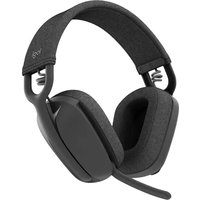
| Product Type | Wireless Gaming Headset |
| Brand | Logitech |
| Model | G PRO X 2 Lightspeed |
| Connectivity | LIGHTSPEED wireless, Bluetooth, 3.5 mm wired |
| Power Source | Rechargeable battery via USB-C |
| Battery Life | Up to 50 hours (estimated) |
| Charging Port | USB-C (charging and firmware update only) |
| Microphone | Detachable with foam filter, Blue VO!CE compatible |
| Controls | Volume wheel, microphone mute button, power switch, Bluetooth/LIGHTSPEED toggle button |
| LED Indicator | Green (battery >10%), red (battery <10%), blue (Bluetooth), cyan (LIGHTSPEED) |
| Auto Off | After 30 minutes of inactivity (configurable via G HUB) |
| Customization Software | Logitech G HUB (free download) |
| Weight | Approximately 345 g (estimated) |
| Dimensions | Not provided |
| Color | Black |
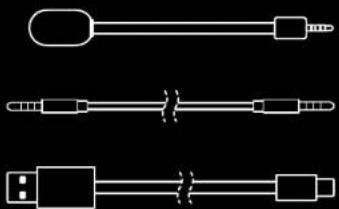
| Box Contents | Headset, LIGHTSPEED wireless adapter, USB-A to USB-C cable, 3.5 mm audio cable, detachable microphone, documentation |
| Care Instructions | Clean with a soft, dry cloth. Do not use abrasive products. |
Frequently Asked Questions - G PRO X 2 Lightspeed LOGITECH
User questions about G PRO X 2 Lightspeed LOGITECH
0 question about this device. Answer the ones you know or ask your own.
Ask a new question about this device
Download the instructions for your Headphones in PDF format for free! Find your manual G PRO X 2 Lightspeed - LOGITECH and take your electronic device back in hand. On this page are published all the documents necessary for the use of your device. G PRO X 2 Lightspeed by LOGITECH.
USER MANUAL G PRO X 2 Lightspeed LOGITECH
natural_image
White headboard with earbuds and microphone against black background (no text or symbols)
natural_image
Front view of a black headboard with earphones and microphone against black background (no text or symbols)logitech

natural_image
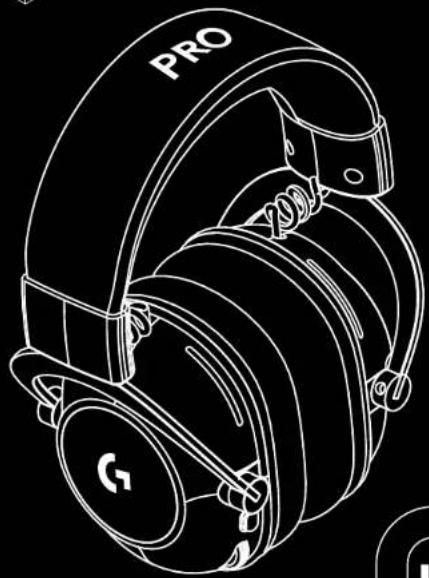
Line drawing of a G8 headphones with 'PRO' label on head (no additional text or symbols)

natural_image
Abstract black square icon with white geometric shapes (no text or symbols)

natural_image
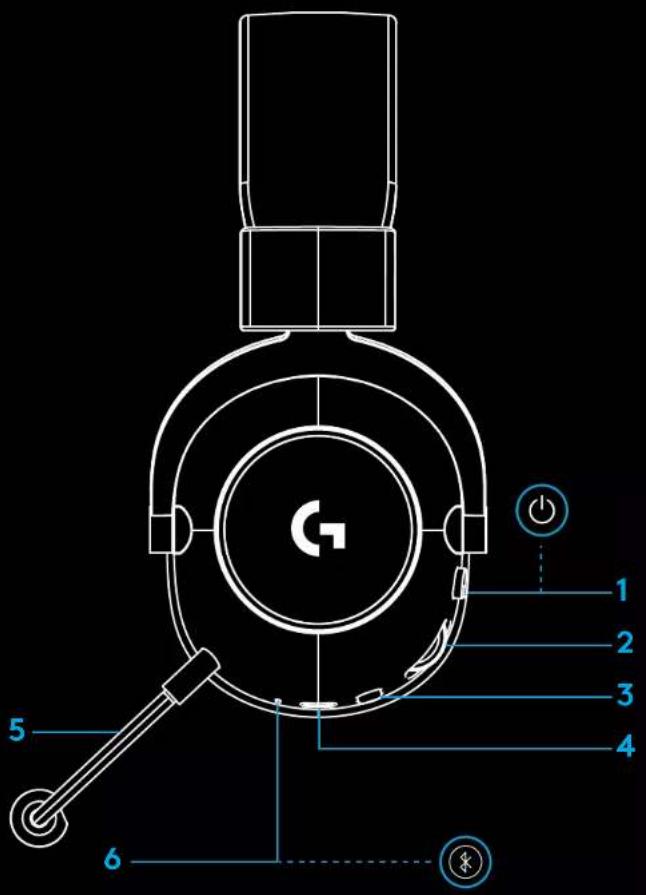
Pure electrical circuit lines without any symbols1 Power switch
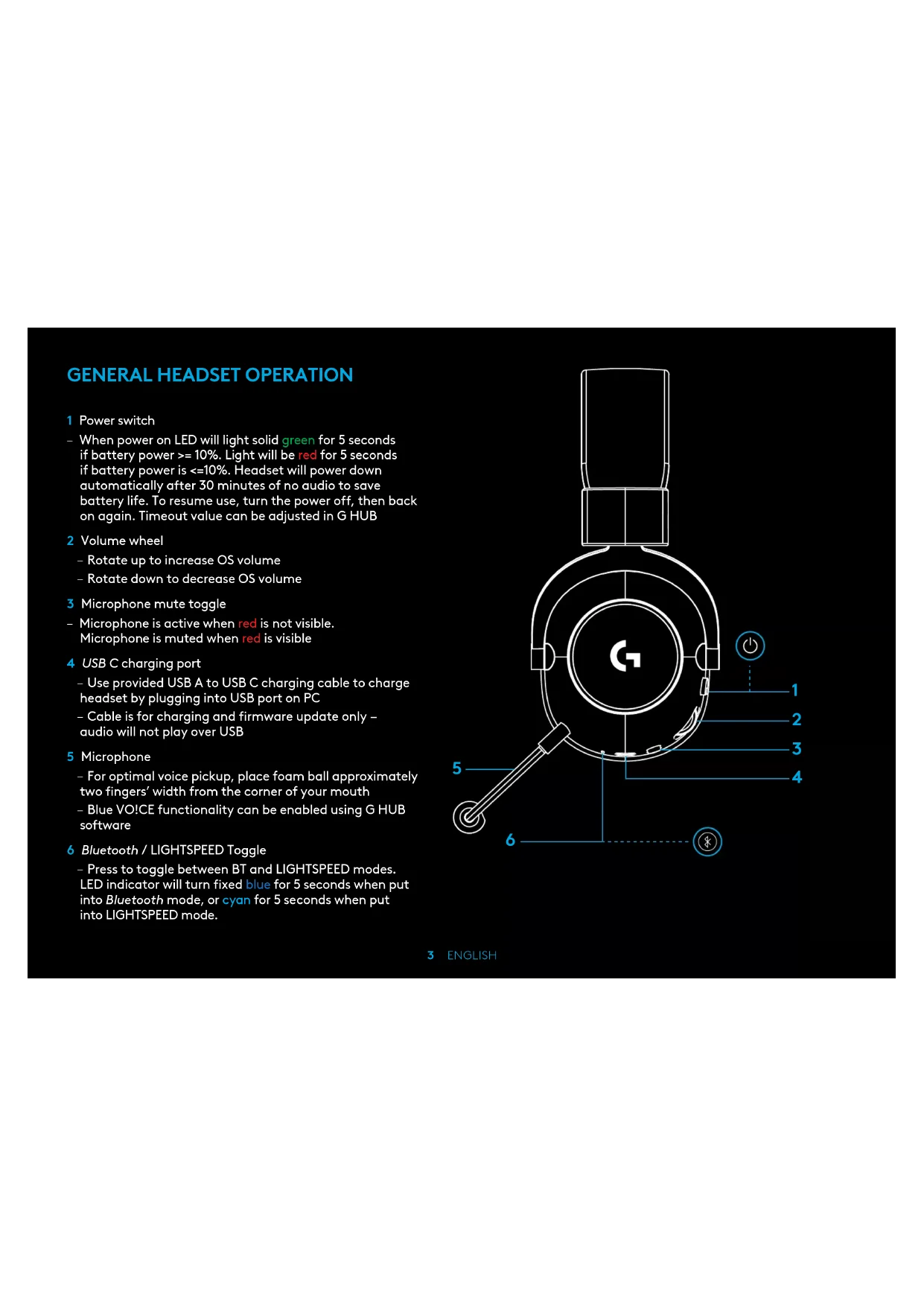
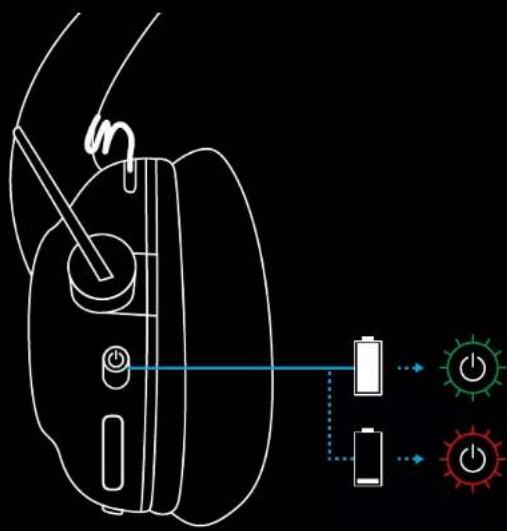
- When power on LED will light solid green for 5 seconds if battery power >= 10%. Light will be red for 5 seconds if battery power is <=10%. Headset will power down automatically after 30 minutes of no audio to save battery life. To resume use, turn the power off, then back on again. Timeout value can be adjusted in G HUB
2 Volume wheel
- Rotate up to increase OS volume
- Rotate down to decrease OS volume
3 Microphone mute toggle
-
Microphone is active when red is not visible. Microphone is muted when red is visible
4 USB C charging port -
Use provided USB A to USB C charging cable to charge headset by plugging into USB port on PC
- Cable is for charging and firmware update only – audio will not play over USB
5 Microphone
- For optimal voice pickup, place foam ball approximately two fingers' width from the corner of your mouth
- Blue VO!CE functionality can be enabled using G HUB software
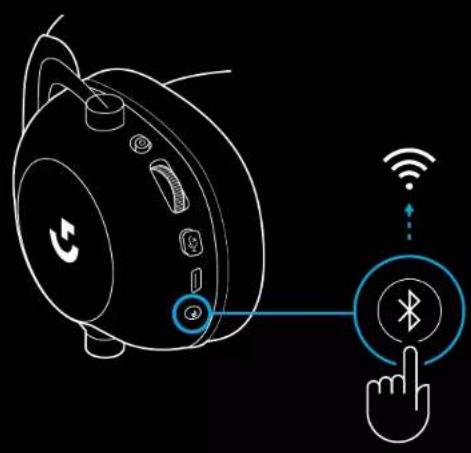
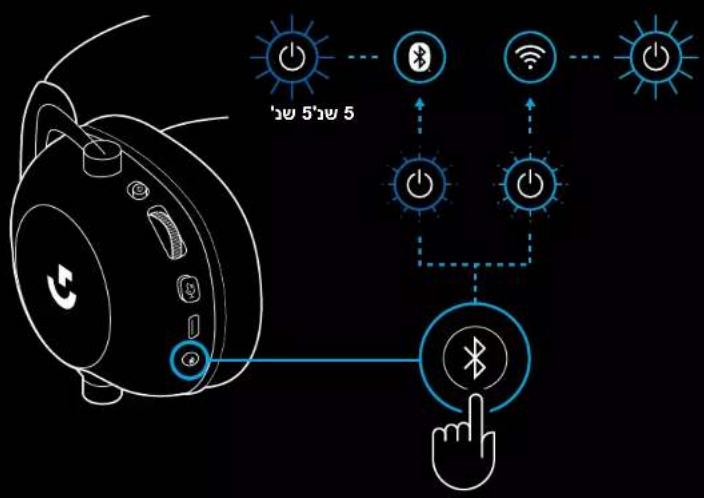
6 Bluetooth / LIGHTSPEED Toggle
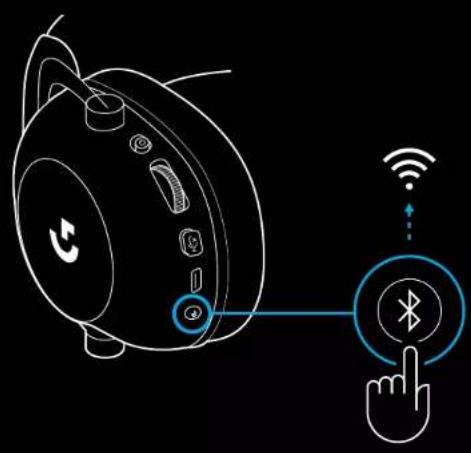
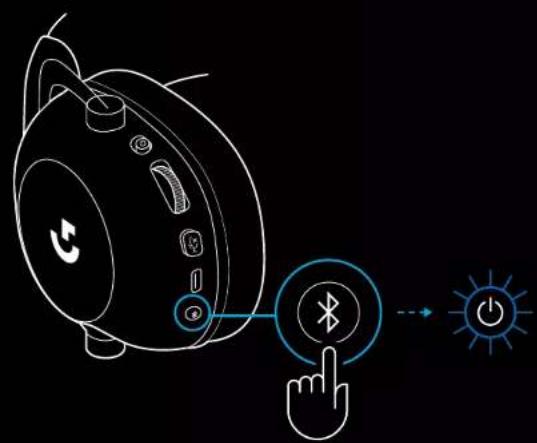
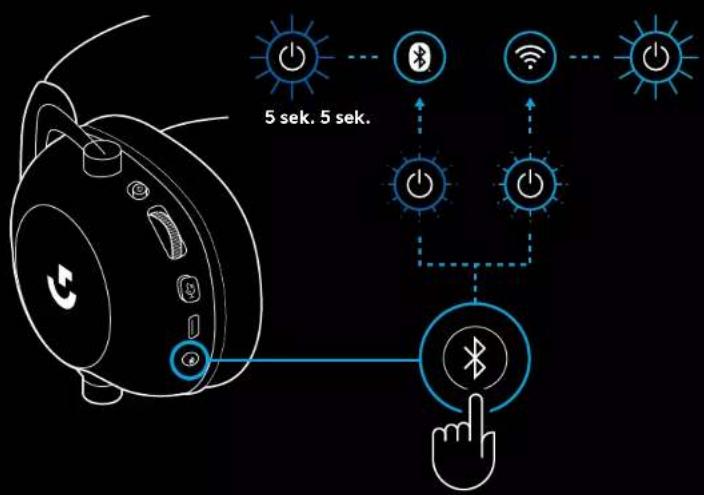
- Press to toggle between BT and LIGHTSPEED modes. LED indicator will turn fixed blue for 5 seconds when put into Bluetooth mode, or cyan for 5 seconds when put into LIGHTSPEED mode.
PC SETUP INSTRUCTIONS
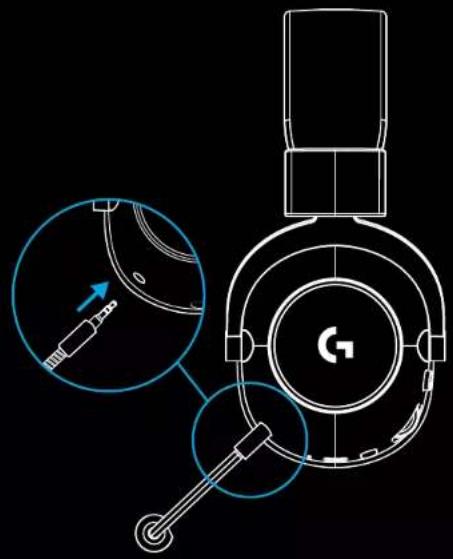
1 Insert the mic boom completely into headset
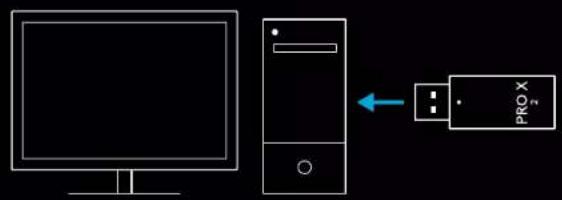
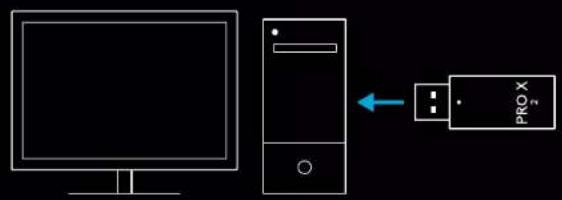
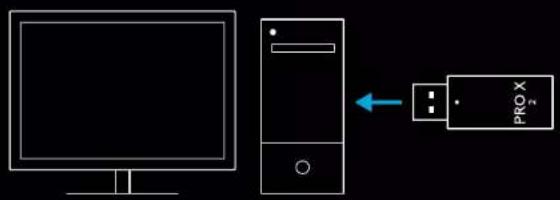
2 Insert LIGHTSPEED wireless adapter into USB port of your PC
natural_image
Technical line drawing of a mechanical component with cross-sectional view and tool path (no text or symbols)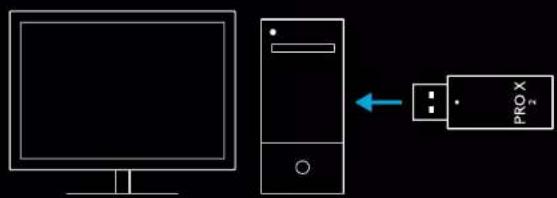
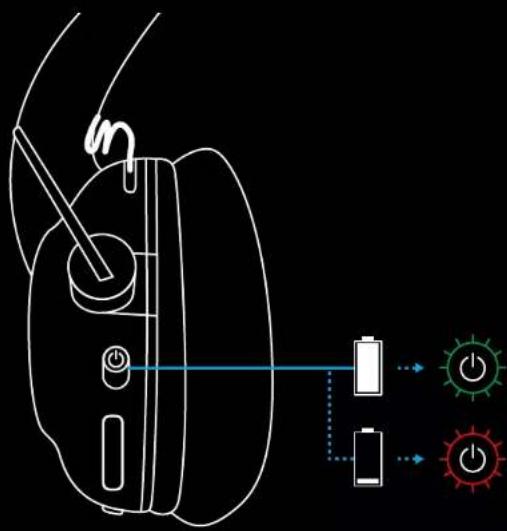
3 Toggle headset power switch on (green light will appear when first powered on when battery is at or above 10% - LED will turn red if battery below 10%)
5 ENGLISH
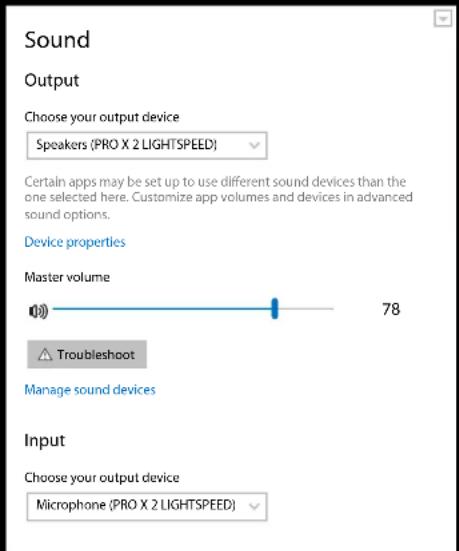
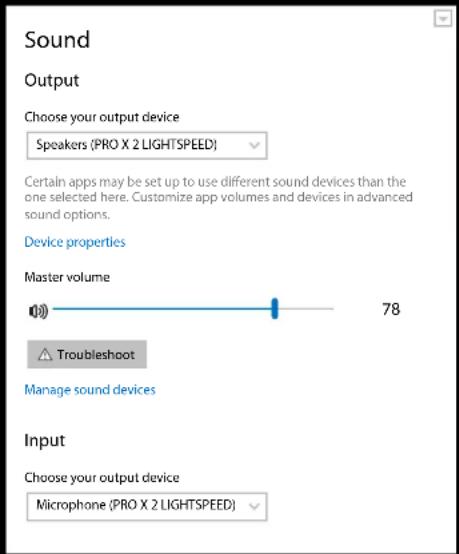
4 Open Windows sound settings and confirm that the headset is set as default Output and Input device
5 (Optional) Download Logitech G HUB software to access advanced features. Download at logitechG.com/ghub
natural_image
Computer monitor icon with a download symbol inside the circle (no text or numbers)logitechG.com/ghub logitechG.com/support/pro-x-2
PAIRING HEADSET WITH LIGHTSPEED WIRELESS ADAPTER
1 Plug in LIGHTSPEED Wireless Adapter (if already plugged in, un-plug and re-plug in)

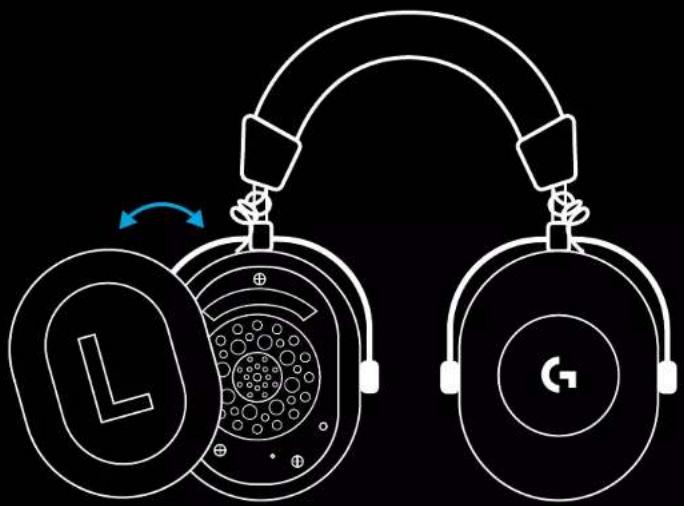
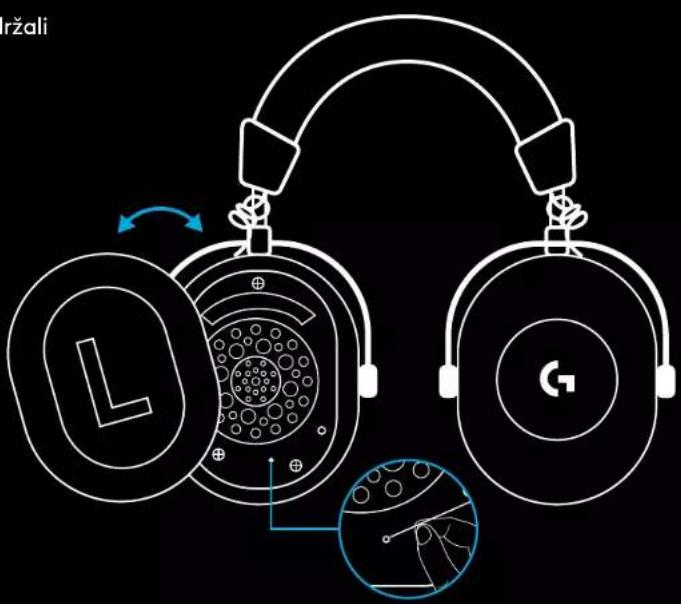
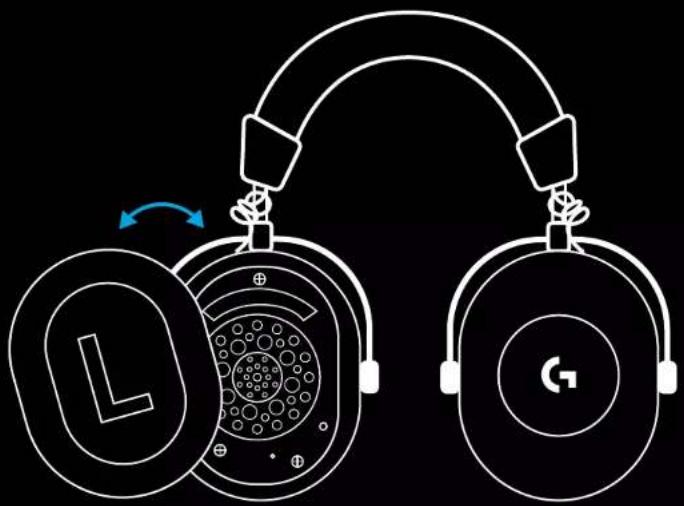
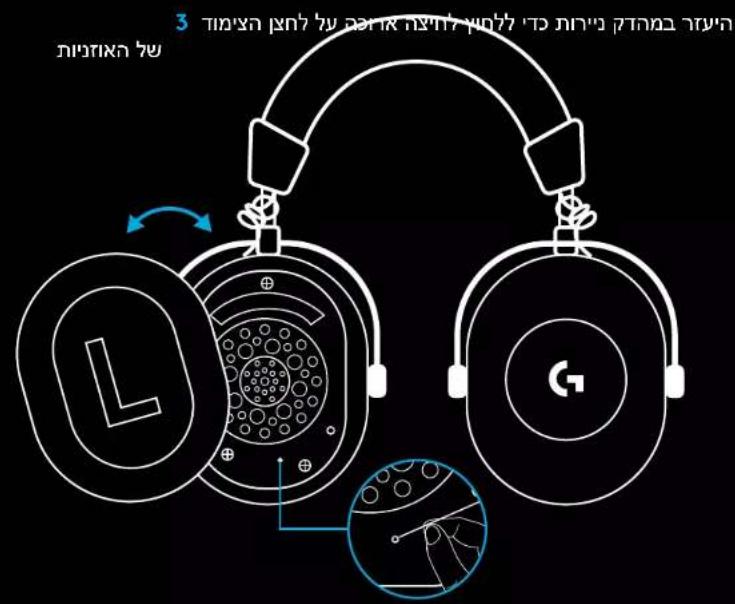
2 Remove the left earpad cushion
7 ENGLISH
3 Use a paperclip to long press the headset pairing button
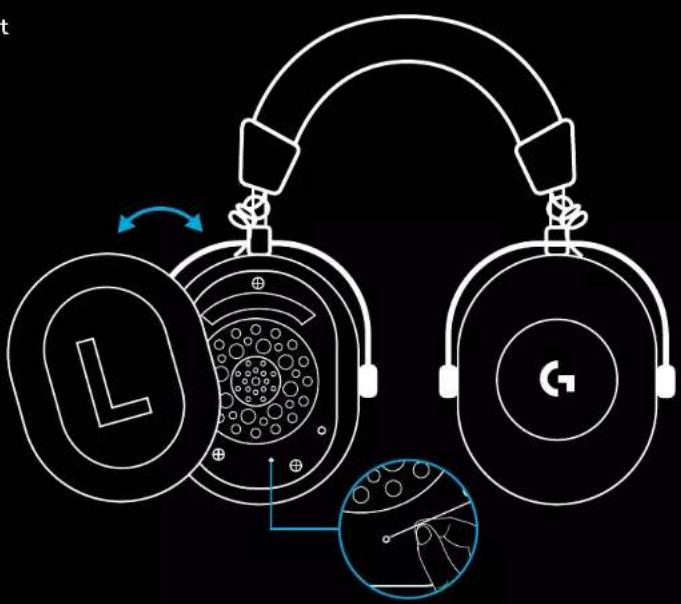
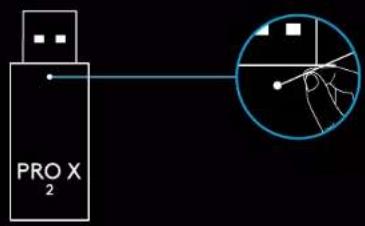
4 Use a paperclip to press the LIGHTSPEED wireless adapter pairing button
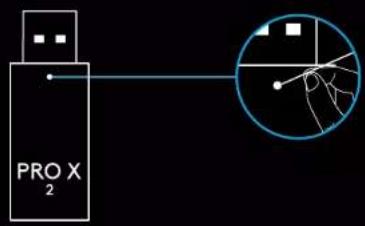
8 ENGLISH
BLUETOOTH PAIRING
1 Turn on headset by sliding power switch
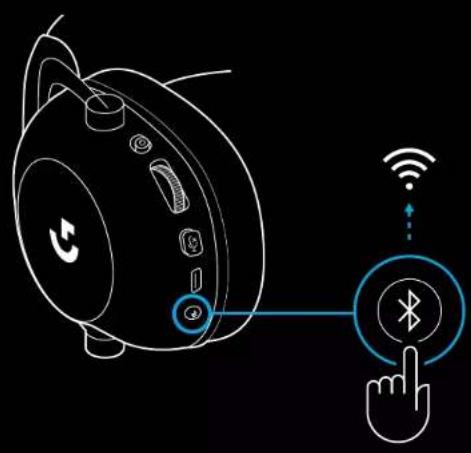
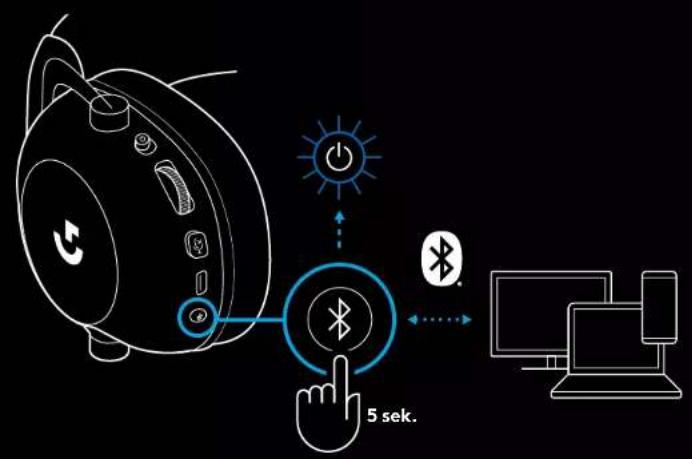
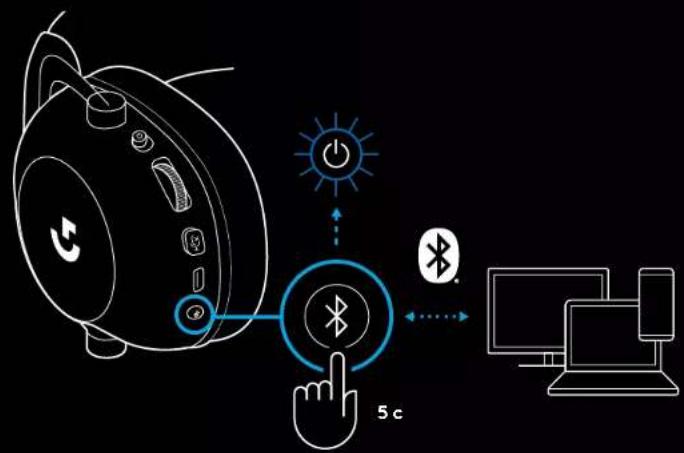
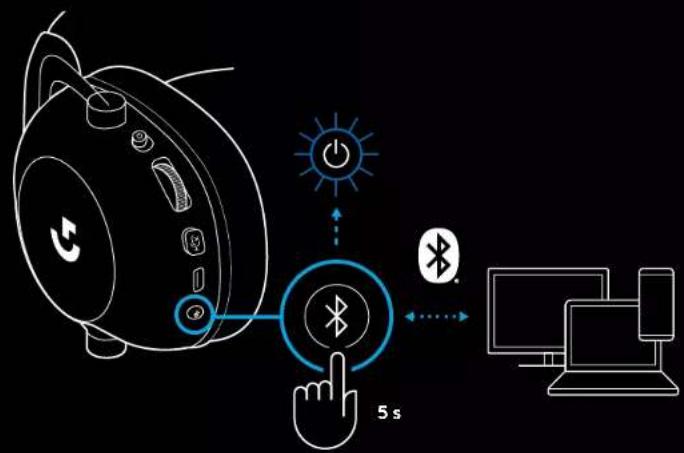
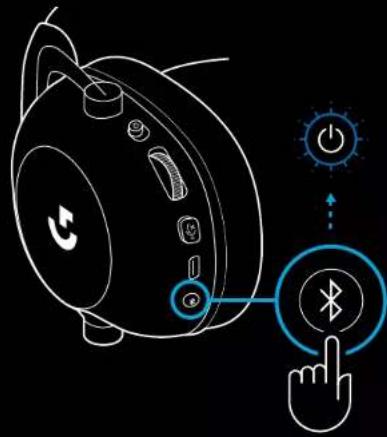
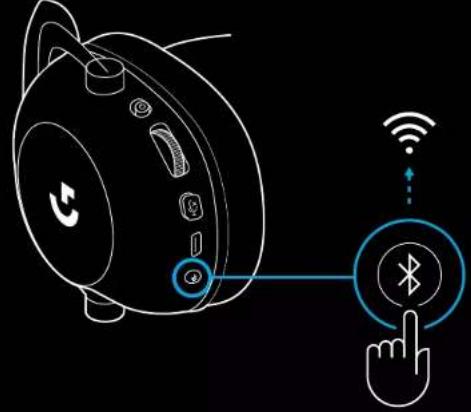
2 Press BT / LIGHTSPEED toggle button. Power light will turn blue to indicate BT mode
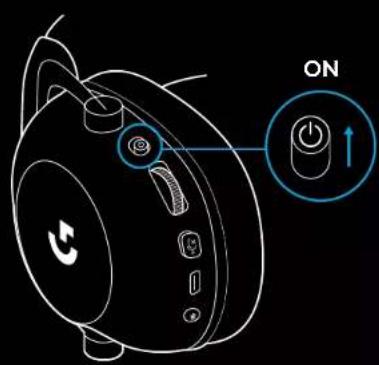
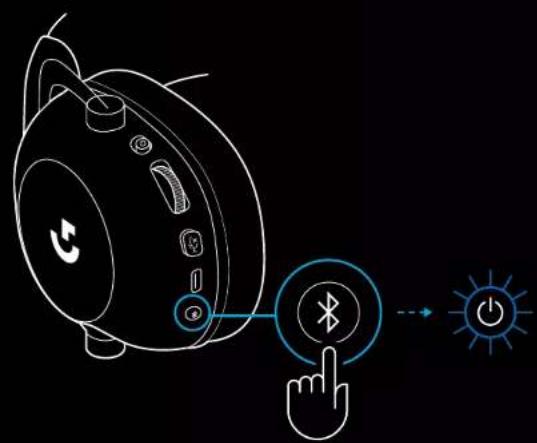
3 Press and hold BT / LIGHTSPEED button
- Headset LED will quickly blink blue
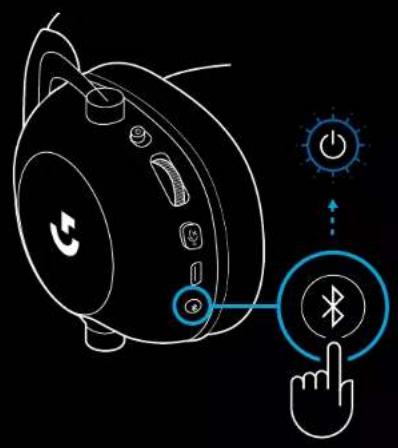
4 Follow Bluetooth connection steps for your device
- LED will turn solid blue for 5 seconds when pair is complete
natural_image
Line drawing of a smart speaker with a hand cursor clicking a Bluetooth button, no text or symbols present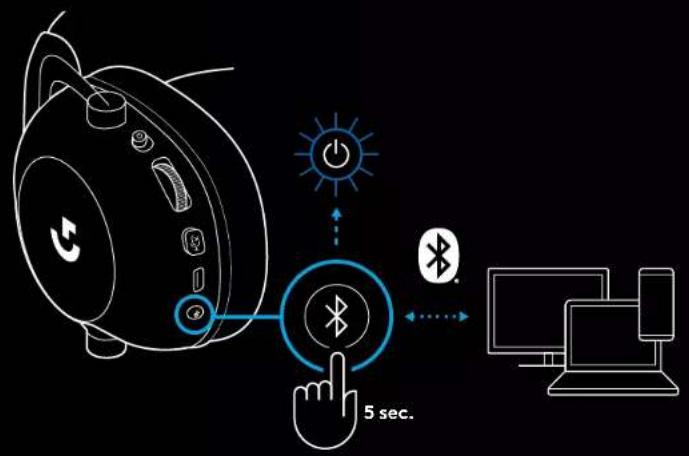
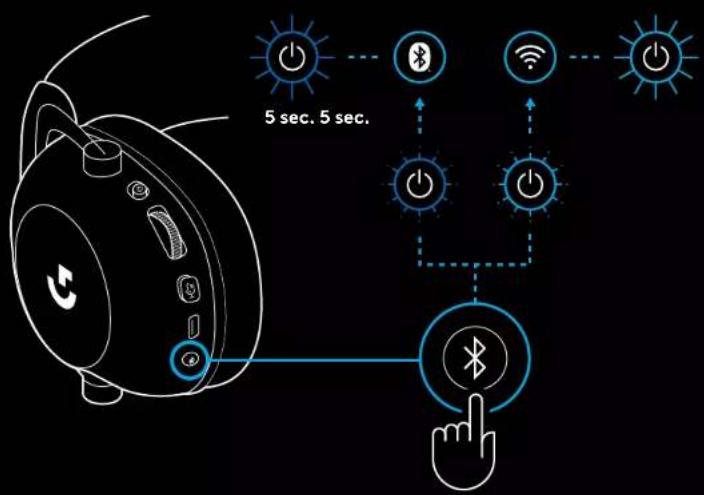
SWITCHING BETWEEN BLUETOOTH AND LIGHTSPEED
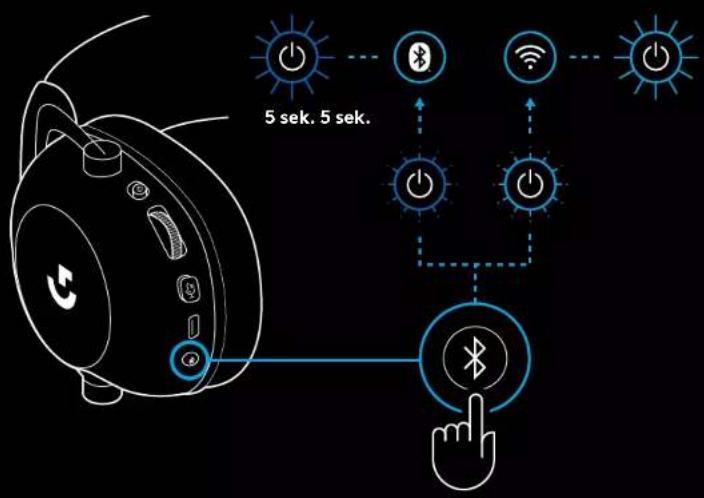
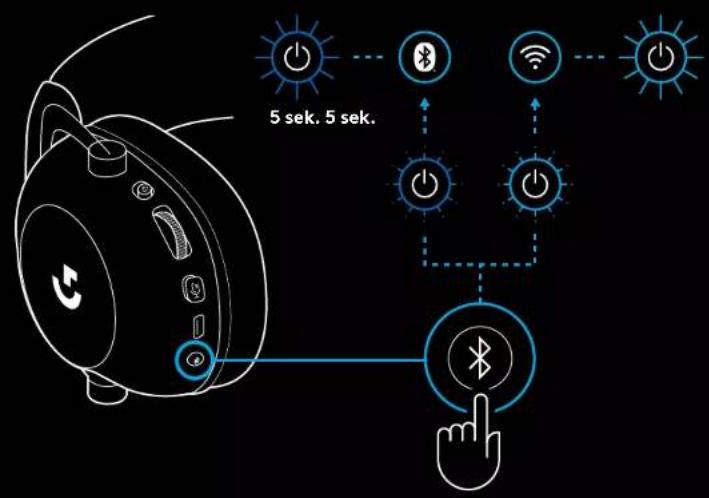
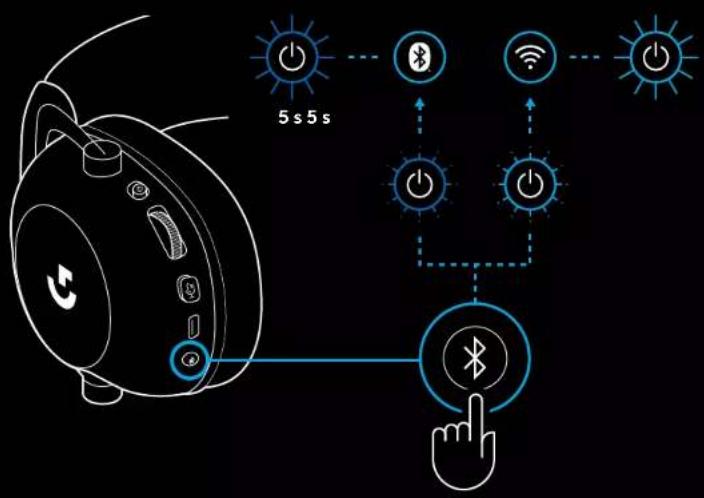
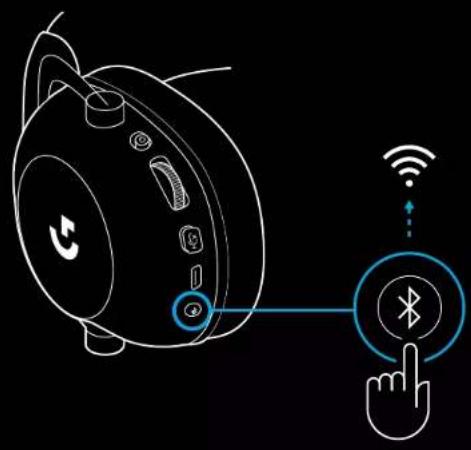
Short press the Bluetooth / LIGHTSPEED toggle button
- LED indicator will turn fixed blue for 5 seconds when put into Bluetooth mode, or cyan for 5 seconds when put into LIGHTSPEED mode
flowchart
graph TD
    A["Smartphone with ear icon"] --> B{5 sec. 5 sec.}
    B --> C["Bluetooth"]
    B --> D["WiFi"]
    B --> E["Power Icon"]
    C --> F["Hand icon pointing to Bluetooth"]
    D --> F
    E --> F
USING THE HEADSET IN WIRED MODE
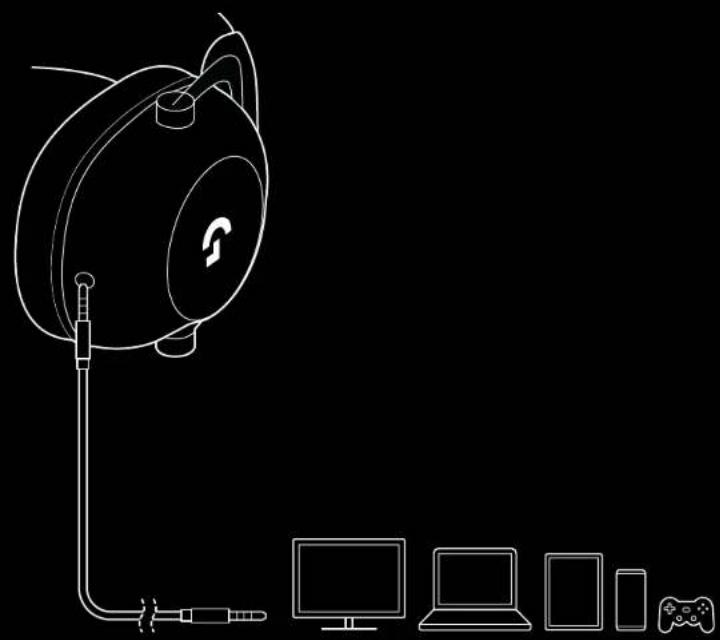
1 Power off headset
- Headset must be powered off to operate in wired mode
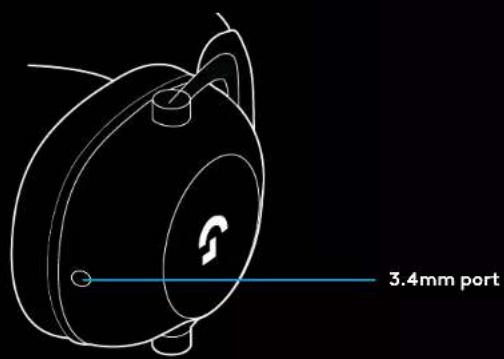
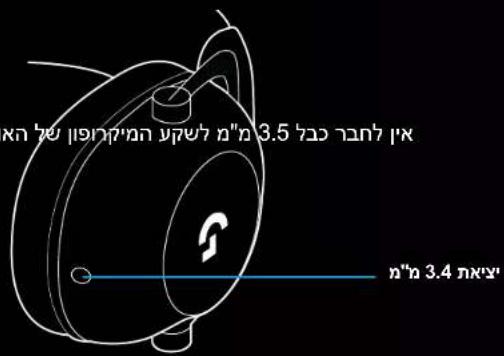
2 Plug the included 3.5mm cable into the 3.5mm jack on the headset
NOTE:
- Do not plug 3.5mm cable into the headset microphone jack.

3 Plug the other end of the included 3.5mm cable into the 3.5mm jack on the audio source device
natural_image
Line drawing of a device setup with a speaker, cable, and connected devices (no text or symbols)HOW TO MUX IN AN AUX SOURCE
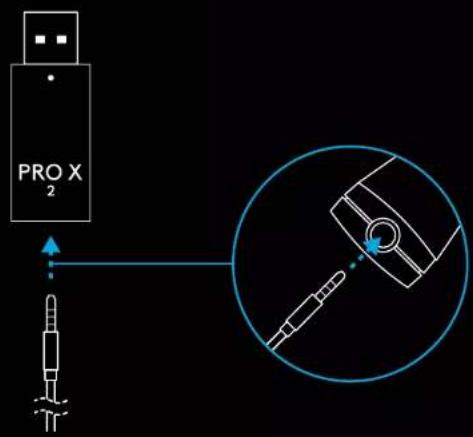
1 Headset must be setup in LIGHTSPEED mode
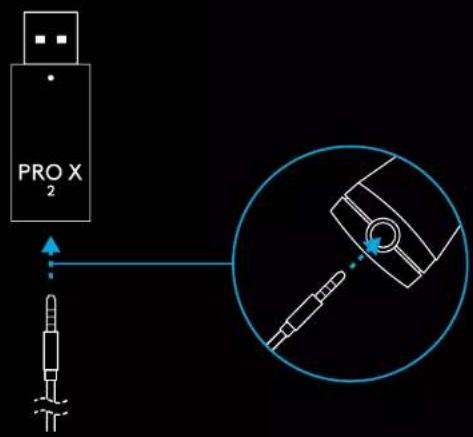
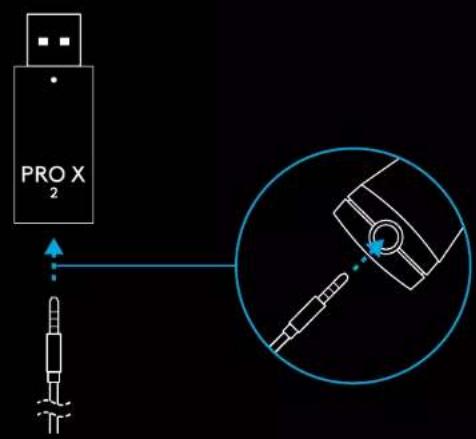
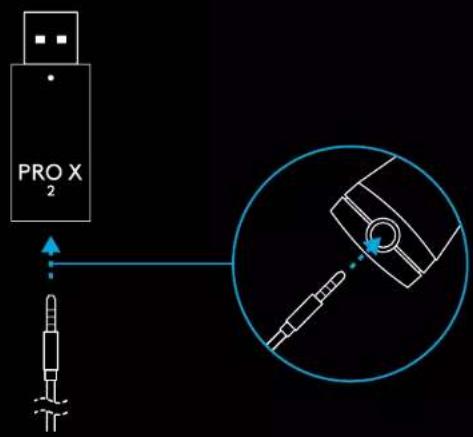
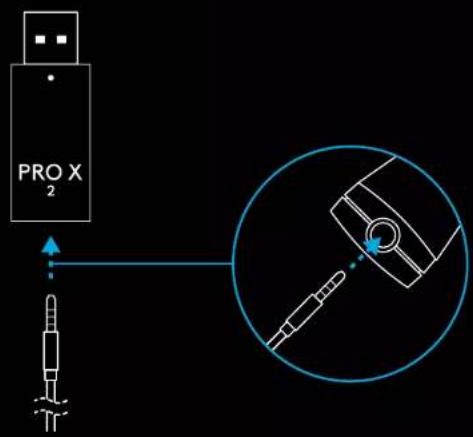
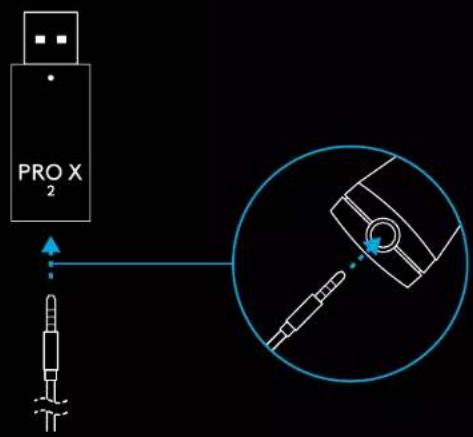
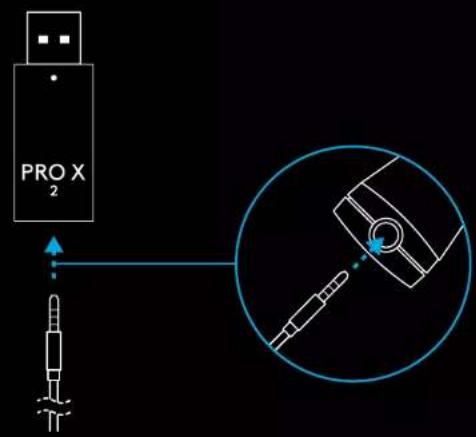
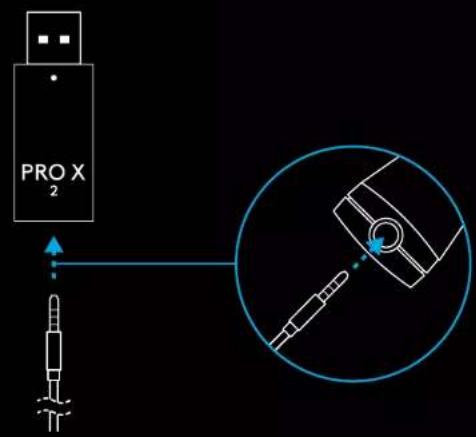
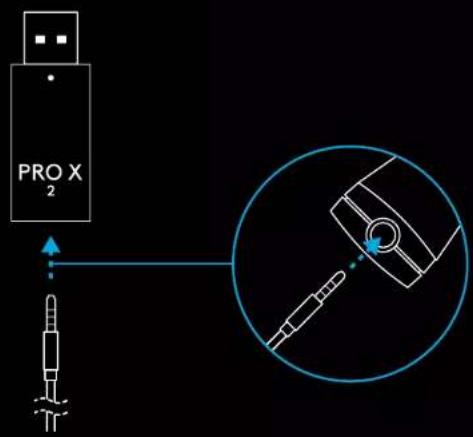
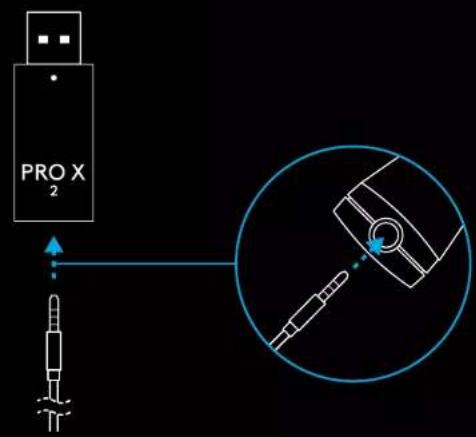
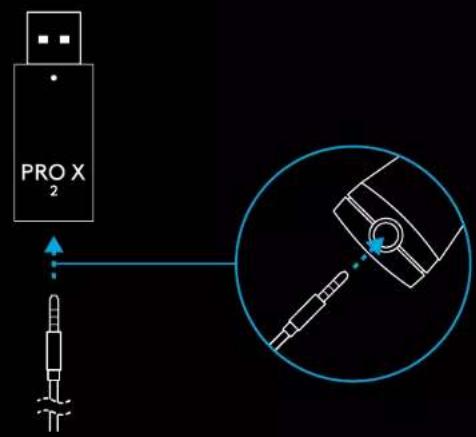
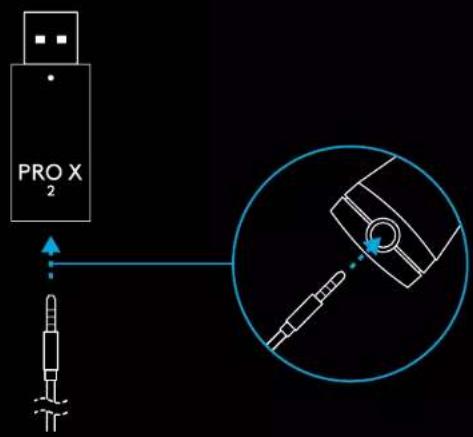
2 Plug one end of the included 3.5mm cable into the 3.5mm port of the LIGHTSPEED wireless adapter
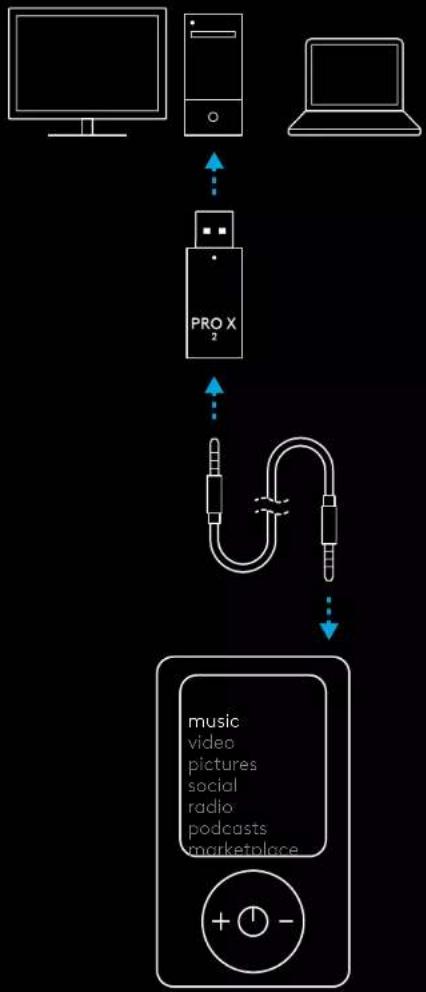
3 Plug the other end of the included 3.5mm cable into the 3.5mm port of the audio source you'd like to MUX into the wireless signal.
The MUXed source will stay at a constant volume, whereas the wireless signal can be volume adjusted with the volume wheel.
flowchart
graph TD
    A["Monitor"] --> B["PRO X"]
    C["Laptop"] --> B
    B --> D["music\nvideo\npictures\nsocial\nradio\npodcasts\nmarketplace"]
natural_image
Technical line drawing of a mechanical component with cross-sectional view and tool path (no text or symbols)natural_image
Line drawing of a computer monitor with a download icon (no text or symbols)logitechG.com/ghub logitechG.com/support/pro-x-2
PAIRING DES HEADSETS MIT DEM KABELLOSEN LIGHTSPEED ADAPTER
natural_image
Line drawing of a smart speaker with wireless earphones and a Bluetooth button, no text or symbols present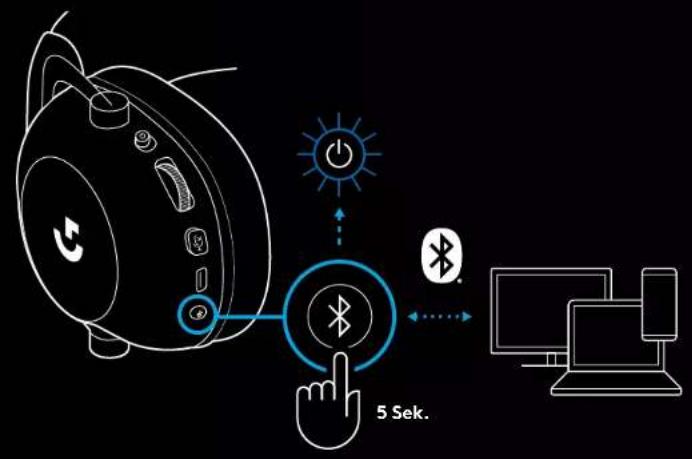
WECHSELN ZWISCHEN BLUETOOTH UND LIGHTSPEED
natural_image
Line drawing of a device setup with a speaker, cable, and connected devices (no text or symbols)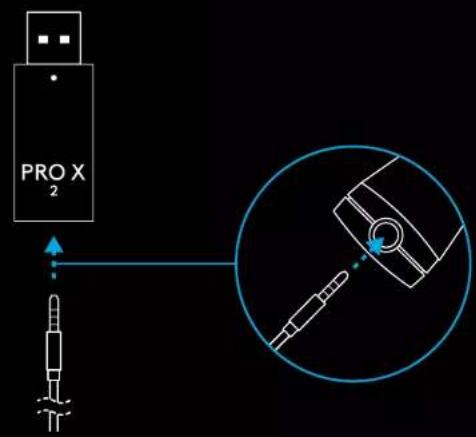
flowchart
graph TD
    A["Desktop"] --> B["PROX"]
    C["Desktop"] --> B
    B --> D["music\nvideo\npictures\nsocial\nradio\npodcasts\nmarketplace"]
FONCTIONNEMENT GÉNÉRAL DU CASQUE
natural_image
Technical line drawing of a mechanical component with cross-sectional view and tool path (no text or symbols)natural_image
Line drawing of a computer monitor with a download icon (no text or symbols)logitechG.com/ghub logitechG.com/support/pro-x-2
COUPLAGE DU CASQUE AVEC L'ADAPTATEUR SANS FIL LIGHTSPEED
3 Maintenez enfoncé le bouton Bluetooth/LIGHTSPEED
natural_image
Line drawing of a portable electronic device with a hand cursor clicking a Bluetooth button (no text or symbols)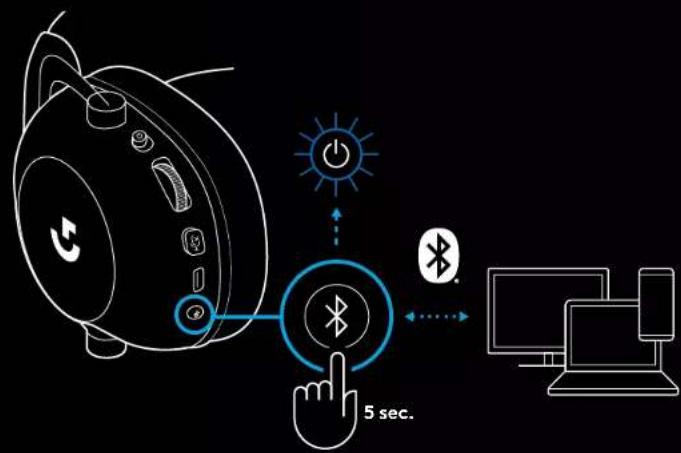
BASCULER ENTRE LES MODES BLUETOOTH ET LIGHTSPEED
flowchart
graph TD
    A["Smartphone with ear icon"] --> B{5 sec. 5 sec.}
    B --> C["Power icon: sun, Bluetooth, WiFi"]
    C --> D["Power icon: wireless, wireless icon"]
    D --> E["Power icon: wireless, wireless icon"]
    E --> F["Power icon: wireless, wireless icon"]
    F --> G["Power icon: wireless, wireless icon"]
    G --> H["Power icon: wireless, wireless icon"]
    H --> I["Power icon: wireless, wireless icon"]
    I --> J["Power icon: wireless, wireless icon"]
    J --> K["Power icon: wireless, wireless icon"]
UTILISATION DU CASQUE EN MODE FILAIRE
natural_image
Line drawing of a device setup with a speaker, cable, and connected devices (no text or symbols)COMMENT EFFECTUER UN MULTIPLEXAGE AVEC UNE SOURCE AUXILIAIRE
natural_image
Technical line drawing of a mechanical component with cross-sectional views and a central G symbol (no text or labels)natural_image
Computer monitor icon with a download symbol inside the circle (no text or labels)logitechG.com/ghub logitechG.com/support/pro-x-2
ASSOCIAZIONE CUFFIA E ADATTATORE LIGHTSPEED WIRELESS
natural_image
Line drawing of a smart speaker with a hand cursor clicking a Bluetooth button, no text or symbols present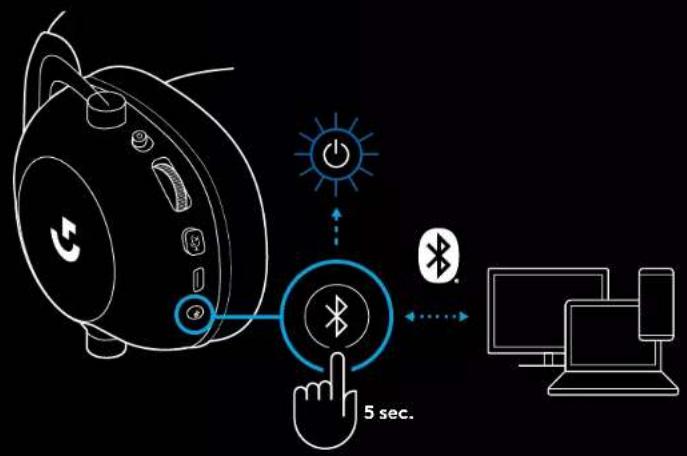
PASSAGGIO DA BLUETOOTH A LIGHTSPEED
natural_image
Line drawing of a device setup with a speaker, cable, and connected devices (no text or symbols)COME EFFETTUARE UNA TRASMISSIONE MUX IN UNA SORGENTE AUX
natural_image
Technical line drawing of a mechanical component with cross-sectional view and tool path (no text or symbols)
natural_image
Computer monitor icon with a download symbol inside the circle (no text or labels)logitechG.com/ghub logitechG.com/support/pro-x-2
EMPAREJAMIENTO DE LOS AURICULARES CON EL ADAPTADOR INALÁMBRICO LIGHTSPEED
natural_image
Line drawing of a smart speaker with a Bluetooth button and control buttons, no text or symbols present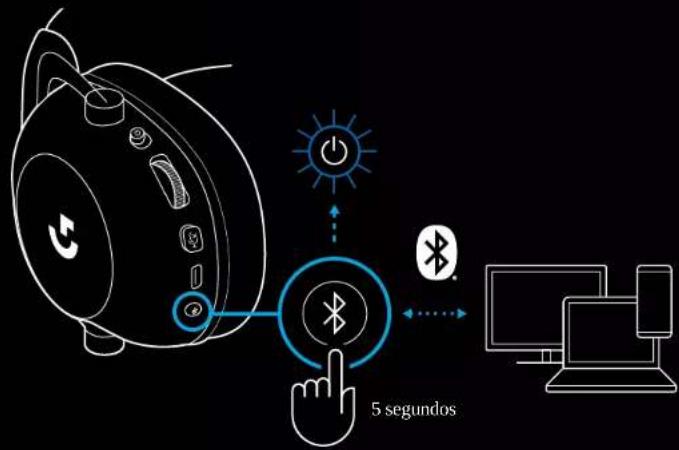
ALTERNAR ENTRE BLUETOOTH Y LIGHTSPEED
natural_image
Line drawing of a device setup with a speaker, cable, and connected devices (no text or symbols)CÓMO MULTIPLEXAR UNA FUENTE AUX
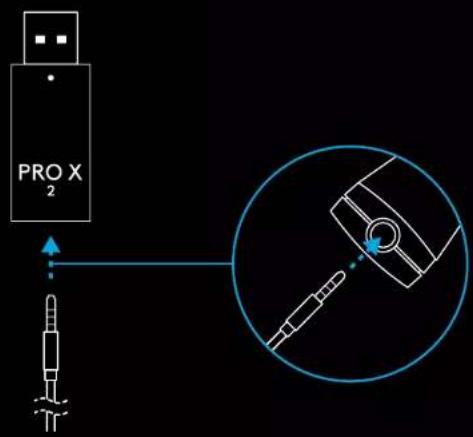
flowchart
graph TD
    A["Desktop"] --> B["PROX"]
    C["Desktop"] --> B
    B --> D["music\nvideo\npictures\nsocial\nradio\npodcasts\nmarketplace"]
natural_image
Technical line drawing of a mechanical component with cross-sectional view and tool path (no text or symbols)natural_image
Computer monitor icon with a download symbol inside the circle (no text or labels)logitechG.com/ghub logitechG.com/support/pro-x-2
71 PORTUGUÊS
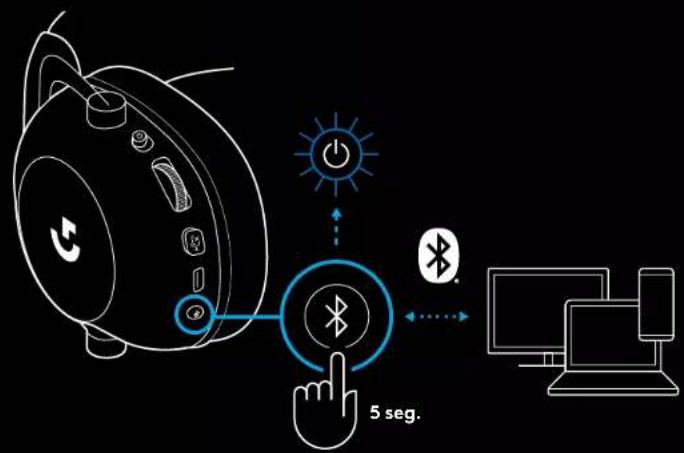
ALTERNAR ENTRE BLUETOOTH E LIGHTSPEED
natural_image
Line drawing of a device setup with a speaker, cable, and connected devices (no text or symbols)COMO USAR O MUX NUMA FONTE AUX
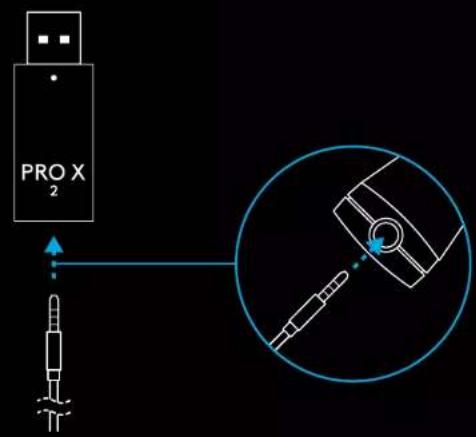
79 PORTUGUÊS
flowchart
graph TD
    A["Monitor"] --> B["PRO X 3"]
    B --> C["music\nvideo\npictures\nsocial\nradio\npodcasts\nmarketplace"]
ALGEMENE HEADSETBEDIENING
natural_image
Technical line drawing of a smart speaker head with labeled sensor and antenna (no text or symbols)2 Steek de draadloze LIGHTSPEED-adapter in de USB-poort van uw pc.
natural_image
Computer monitor icon with a download symbol inside the circle (no text or numbers)logitechG.com/ghub logitechG.com/support/pro-x-2
DE HEADSET KOPPELEN MET DE DRAADLOZE LIGHTSPEED-ADAPTER
natural_image
Line drawing of a smart speaker with wireless earphones and a Bluetooth button, no text or symbols present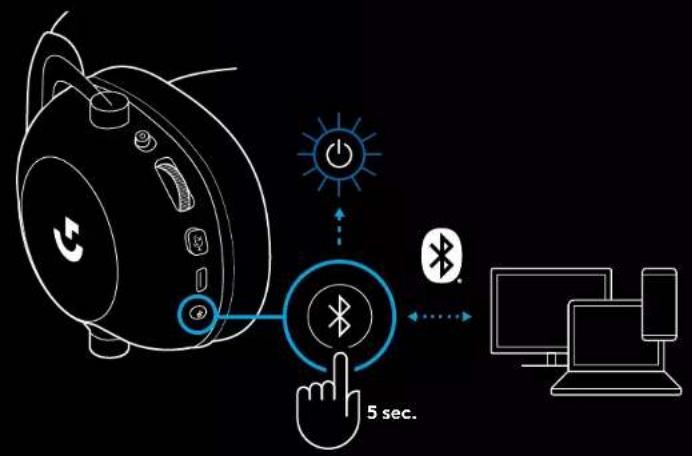
SCHAKELEN TUSSEN BLUETOOTH EN LIGHTSPEED
natural_image
Line drawing of a portable audio device connected to multiple devices including a laptop, smartphone, and game controller (no text or symbols)91 NEDERLANDS
MUX IN EEN AUX-BRON
1 De headset moet in de LIGHTSPEED-modus staan.
natural_image
Technical line drawing of a mechanical component with cross-sectional view and tool path (no text or symbols)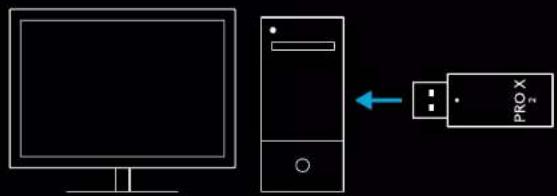
natural_image
Computer monitor icon with a download symbol inside the circle (no text or labels)logitechG.com/ghub logitechG.com/support/pro-x-2
PARKOPPLA HEADSET MED TRÅDLÖS LIGHTSPEED-ADAPTER
natural_image
Diagram of two headsets with a circular component and a logo, connected by curved wires (no text or symbols)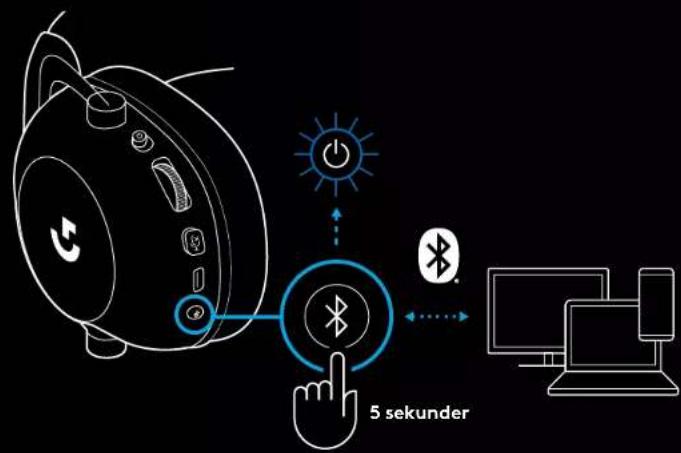
VÄXLA MELLAN BLUETOOTH OCH LIGHTSPEED
Kort tryck på knappen Bluetooth/LIGHTSPEED
natural_image
Line drawing of a device setup with a speaker, cable, and connected devices (no text or symbols)SÅ HÄR FUNGERAR MULTIPLEXER I EN AUX-KÄLLA
flowchart
graph TD
    A["Desktop"] --> B["PROX"]
    C["Desktop"] --> B
    B --> D["music\nvideo\npictures\nsocial\nradio\npodcasts\nmarketplace"]
BETJENING AF HEADSETTET
natural_image
Technical line drawing of a mechanical component with cross-sectional view and tool path (no text or symbols)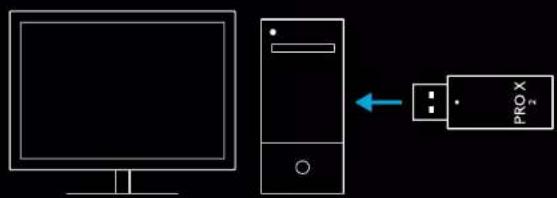
5 (Valgfrit) Download Logitech G HUB-software for at få adgang til avancerede funktioner. Download på logitechG.com/GHUB

natural_image
Line drawing of a computer monitor with a download icon (no text or symbols)logitechG.com/ghub logitechG.com/support/pro-x-2
TILSLUTNING AF HEADSET MED TRÅDL∅S LIGHTSPEED-ADAPTER
111 DANSK
3 Tryk på knappen BT/LIGHTSPEED og hold den nede
- Headsettets lampe blinker hurtigt blåt
natural_image
Line drawing of a smart speaker with a hand cursor clicking a Bluetooth button, no text or symbols present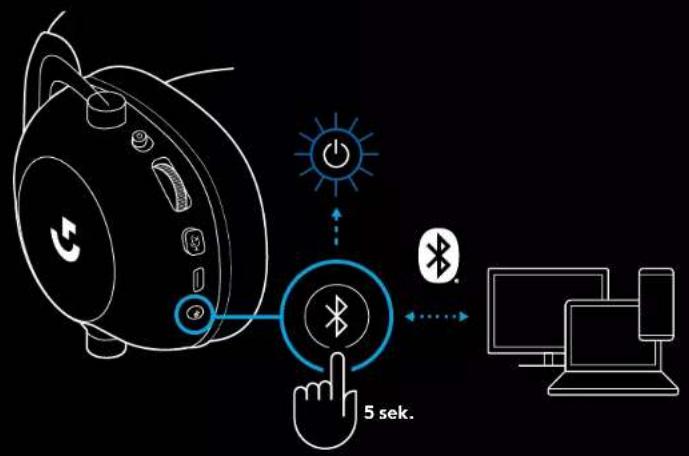
SKIFT MELLEM BLUETOOTH OG LIGHTSPEED
Tryk kort på Bluetooth/LIGHTSPEED-knappen
natural_image
Line drawing of a portable audio device connected to multiple devices including a laptop, smartphone, and game controller (no text or symbols)SÅDAN MUX'ER DU EN AUX-KILDE IND
natural_image
Technical line drawing of a mechanical component with cross-sectional view and tool path (no text or symbols)121 NORSK
122 NORSK
natural_image
Line drawing of a computer monitor with a download icon (no text or symbols)logitechG.com/ghub logitechG.com/support/pro-x-2
PARE HODESETT MED LIGHTSPEED TRÅDL∅S TEKNOLOGI ADAPTER
BYTTE MELLOM BLUETOOTH OG LIGHTSPEED
natural_image
Line drawing of a portable audio device connected to multiple devices including a laptop, smartphone, and game controller (no text or symbols)HVORDAN MUX I EN AUX-KILDE
1 Hodesettet må konfigureres i LIGHTSPEED-modus
2 Koble en ende av den medfølgende 3,5 mm-kabelen i porten til LIGHTSPEED trådløs teknologi adapter
131 NORSK
KUULOKEMIKROFONIN YLEINEN KÄYTTÖ
1 Virtakytkin
natural_image
Technical line drawing of a mechanical component with cross-sectional views and a central G symbol (no text or labels)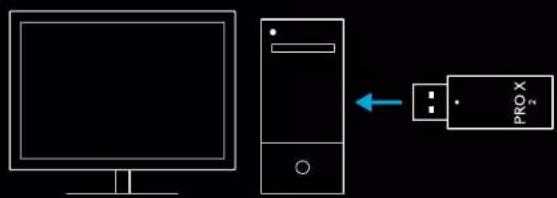
natural_image
Computer monitor icon with a download symbol inside the circle (no text or numbers)logitechG.com/ghub logitechG.com/support/pro-x-2
KUULOKEMIKROFONIN PARILIITTÄMINEN LANGATTOMAAN LIGHTSPEED-VASTAANOTTIMEEN
natural_image
Line drawing of a smart speaker with a Bluetooth button and control buttons, no text or symbols present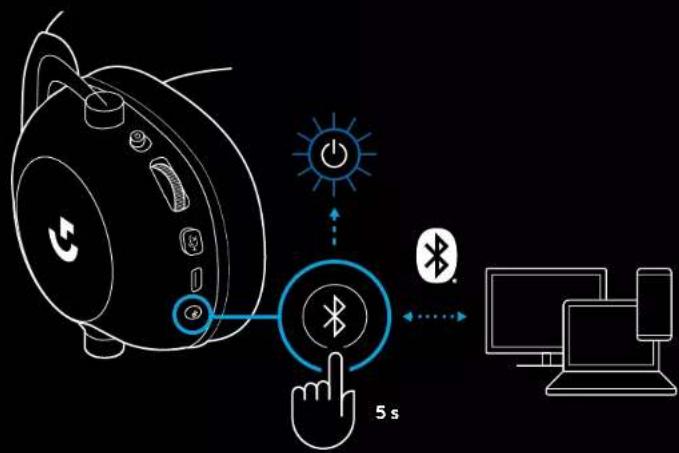
BLUETOOTHIN JA LIGHTSPEEDIN VÄLILLÄ VAIHTAMINEN
Paina lyhyesti Bluetooth/LIGHTSPEED-kytkinpainiketta
natural_image
Line drawing of a portable audio device connected to multiple devices including a laptop, smartphone, and game controller (no text or symbols)MULTIPLEKSERIN KÄYTTÖ AUX-LÄHTEESSÄ
natural_image
Technical line drawing of a smart speaker head with labeled sensor and antenna (no text or symbols)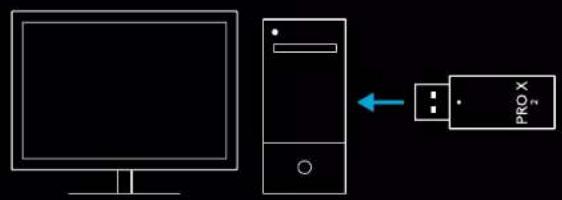
natural_image
Computer monitor icon with a download symbol inside the circle (no text or labels)logitechG.com/ghub logitechG.com/support/pro-x-2
3 Плесте паратетаме́ва то кουμπί BT/LIGHTSPEED
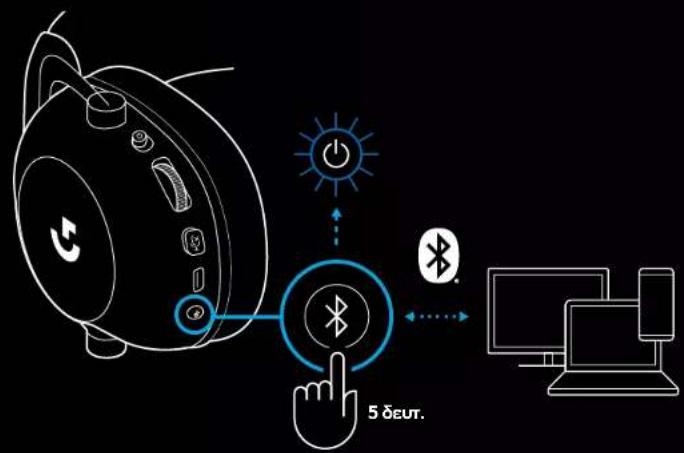
ΕΝΑΛΛΑΓΗ ΜΕΤΑΞΥ BLUETOOTH ΚΑΙ LIGHTSPEED
natural_image
Line drawing of a device setup with a speaker, cable, and connected devices (no text or symbols)flowchart
graph TD
    A["Desktop"] --> B["PROX"]
    C["Desktop"] --> B
    B --> D["music\nvideo\npictures\nsocial\nradio\npodcasts\nmarketplace"]
natural_image
Technical line drawing of a mechanical component with cross-sectional views and a central G symbol (no text or labels)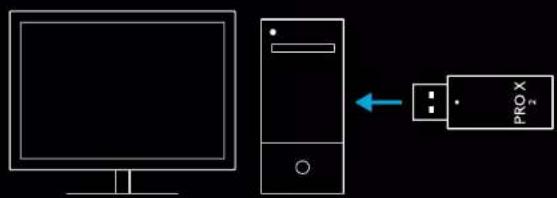
natural_image
Line drawing of a computer monitor with a download icon (no text or symbols)logitechG.com/ghub logitechG.com/support/pro-x-2
natural_image
Line drawing of a device with a blue circular button labeled 'Bluetooth' and a hand cursor pointing at it, against a black background (no text or symbols)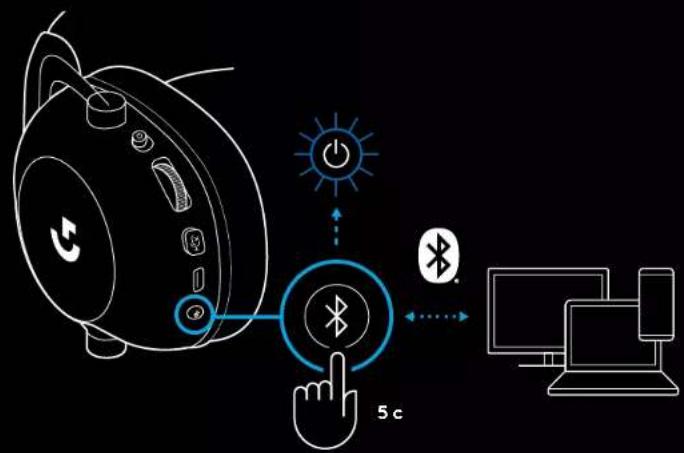
natural_image
Line drawing of a device setup with a speaker, cable, and connected devices (no text or symbols)flowchart
graph TD
    A["Monitor"] --> B["PRO X 3"]
    B --> C["music\nvideo\npictures\nsocial\nradio\npodcasts\nmarketplace"]
    C --> D["+/-"]
OGÓLNE ZASADY OBSŁUGI ZESTAWU SŁUCHAWKOWEGO
natural_image
Technical line drawing of a mechanical component with cross-sectional view and tool path (no text or symbols)natural_image
Computer monitor icon with a download symbol inside the circle (no text or labels)logitechG.com/ghub logitechG.com/support/pro-x-2
PAROWANIE ZESTAWU SŁUCHAWKOWEGO Z ADAPTEREM BEZPRZEWODOWYM LIGHTSPEED
1
2
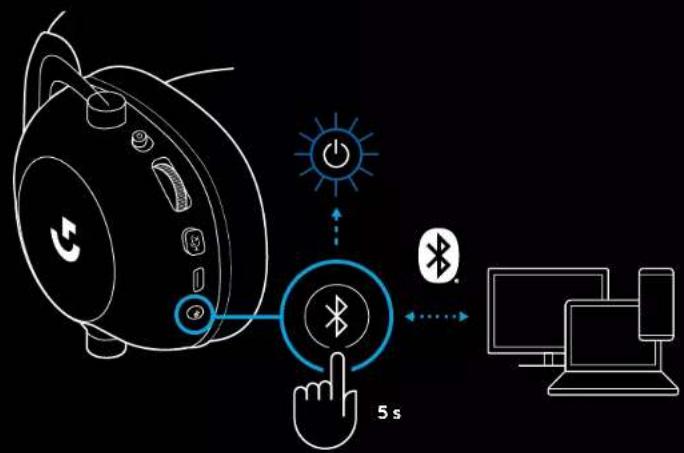
PRZEŁĄCZANIE MIĘDZY BLUETOOTH A LIGHTSPEED
niebieski
turkusowy
KORZYSTANIE Z ZESTAWU SŁUCHAWKOWEGO W TRYBIE PRZEWODOWYM
natural_image
Line drawing of a device setup with a speaker, cable, and connected devices (no text or symbols)JAK UZYSKAĆ MUX W ŻRÓDLE AUX
natural_image
Technical line drawing of a mechanical component with cross-sectional views and a central G symbol (no text or labels)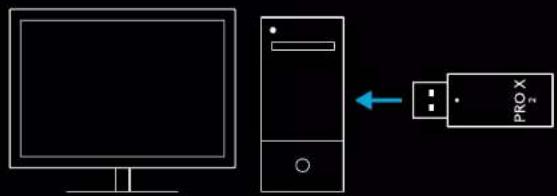
natural_image
Line drawing of a computer monitor with a download icon (no text or symbols)logitechG.com/ghub logitechG.com/support/pro-x-2
A MIKROFONOS FEJHALLGATÓ PÁROSÍTÁSA A LIGHTSPEED VEZETÉK NÉLKÜLI ADAPTERREL
3 Nyomja le hosszan a BT / LIGHTSPEED gombot
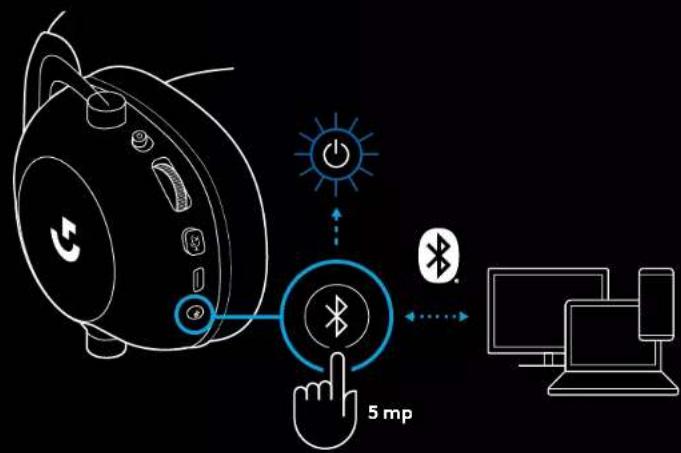
A BLUETOOTH ÉS LIGHTSPEED KÖZTI VÁLTÁS
natural_image
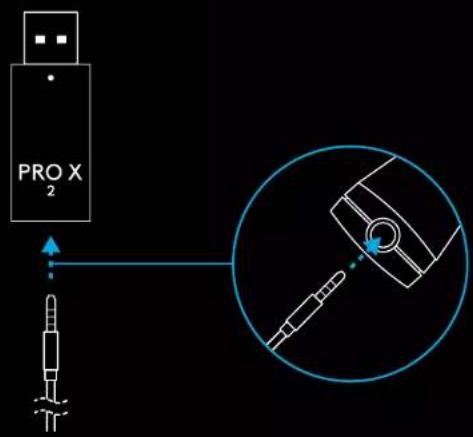
Line drawing of a device setup with a speaker, cable, and connected devices (no text or symbols)AUX FORRÁS KEVERÉSE
natural_image
Technical line drawing of a mechanical component with cross-sectional view and tool path (no text or symbols)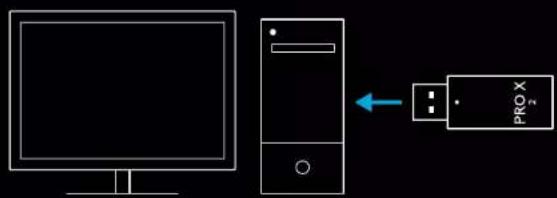
natural_image
Line drawing of a computer monitor with a download icon (no text or symbols)logitechG.com/ghub logitechG.com/support/pro-x-2
PÁROVÁNÍ NÁHLAVNÍ SOUPRAVY S BEZDRÁTOVÝM ADAPTÉREM LIGHTSPEED
natural_image
Line drawing of a smart speaker with a hand cursor clicking a Bluetooth button (no text or symbols)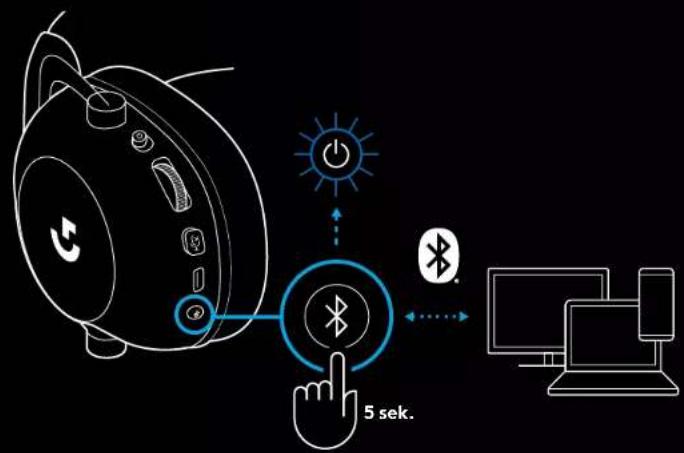
PŘEPÍNÁNÍ MEZI BLUETOOTH A LIGHTSPEED
natural_image
Line drawing of a portable audio device connected to multiple devices including a laptop, smartphone, and game controller (no text or symbols)POSTUP SMĚŠOVÁNÍ ZDROJE AUX
natural_image
Technical line drawing of a mechanical component with cross-sectional views and a G symbol (no text or labels)2 Zapojte prijimač bezdrôtového pripojenia LIGHTSPEED do portu USB na svojom PC
natural_image
Computer monitor icon with a download symbol inside the circle (no text or numbers)logitechG.com/ghub logitechG.com/support/pre-x-2
PÁROVANIE NÁHLAVNEJ SÚPRAVY S BEZDRÓTOVÝM ADAPTÉROM LIGHTSPEED
3 Stlačte a podržte tlačidlo BT/LIGHTSPEED
natural_image
Line drawing of a device with a blue circular button labeled 'Bluetooth' and a hand cursor pointing at it, against a black background (no text or symbols)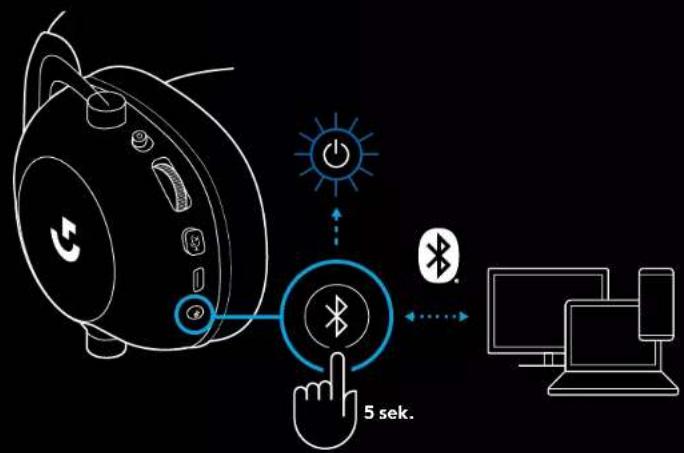
PREPÍNANIE MEDZI BLUETOOTH A LIGHTSPEED
Krátko stlačte tlačidlo prepínania Bluetooth/LIGHTSPEED
- Indikátor LED sa po prepnutí do režimu Bluetooth rozsvieti na modro na 5 sekúnd, alebo na modrozeleno na 5 sekúnd po prepnutí do režimu LIGHTSPEED
POUŽITIE NÁHLAVNEJ SÚPRAVY V REŽIME KÁBLOVÉHO PRIPOJENIA
natural_image
Line drawing of a portable audio jack connected to a laptop and game controller, with no text or symbols present.POSTUP ZMIEŠAVANIA ZDROJA AUX
natural_image
Technical line drawing of a mechanical component with cross-sectional view and tool path (no text or symbols)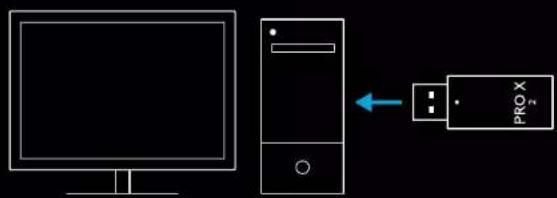
natural_image
Line drawing of a computer monitor with a download icon (no text or symbols)logitechG.com/ghub logitechG.com/support/pro-x-2
natural_image
Line drawing of a device setup with a speaker, cable, and connected devices (no text or symbols)natural_image
Technical line drawing of a mechanical component with cross-sectional view and tool path (no text or symbols)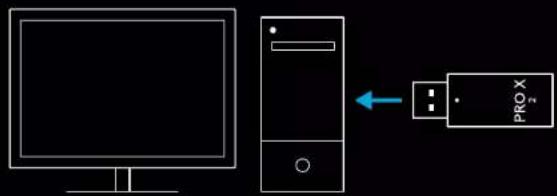
flowchart
graph LR
    A["Desktop monitor"] --> B["Server"]
    B --> C["PROX"]
natural_image
Line drawing of a computer monitor with a download icon (no text or symbols)logitechG.com/ghub logitechG.com/support/pro-x-2
PEAKOMPLEKTI SIDUMINE JUHTMEVABA ADAPTERIGA LIGHTSPEED
3 Vajutage pikalt nuppu BT / LIGHTSPEED.
BLUETOOTHI JA LIGHTSPEEDI VAHEL LÜLITUMINE
Vajutage korraks Bluetoothi / LIGHTSPEEDI lülitit.
natural_image
Line drawing of a portable audio device connected to multiple devices including a laptop, smartphone, and game controller (no text or symbols)KUIDAS AUX-ALLIKAT SISSE MUXIDA
1 Peakomplekt peab olema režiimis LIGHTSPEED.
natural_image
Line drawing of a computer monitor with a download icon (no text or symbols)logitechG.com/ghub logitechG.com/support/pro-x-2
AUSTINU SAVIENOŠANA PĀRĪ AR "LIGHTSPEED" BEZVADU ADAPTERU
1 Pievienojiet "LIGHTSPEED" bezvadu adapteru (ja tas jau ir pievienots, atvienojiet un atkal pievienojiet).

3 Nospiediet un turiet nospiestu pogu "BT/LIGHTSPEED".

PĀRSLĒGŠANĀS STARP "BLUETOOTH" UN "LIGHTSPEED" REŽĪMIEM
natural_image
Line drawing of a portable audio jack connected to a laptop and game controller, with no text or symbols present.MUX IZMANTOŠANA AR AUX AVOTU
natural_image
Line drawing of a smart home with a hand interacting with a wireless signal icon (no text or symbols)flowchart
graph TD
    A["Desktop"] --> B["PROX"]
    C["Desktop"] --> B
    B --> D["music\nvideo\npictures\nsocial\nradio\npodcasts\nmarketplace"]
BENDRASIS AUSINIŲ NAUDOJIMAS
natural_image
Line drawing of a computer monitor with a download icon (no text or symbols)logitechG.com/ghub logitechG.com/support/pro-x-2
AUSINIŲ IR „LIGHTSPEED“ BELAIDŽIO ADAPTERIO SUSIEJIMAS
1 Prijunkite LIGHTSPEED belaidi adapteri (jei jau prijungtas, atjunkite ir vėl prijunkite).

natural_image
Line drawing of a smart speaker with a Bluetooth button and power icon, no text or symbols present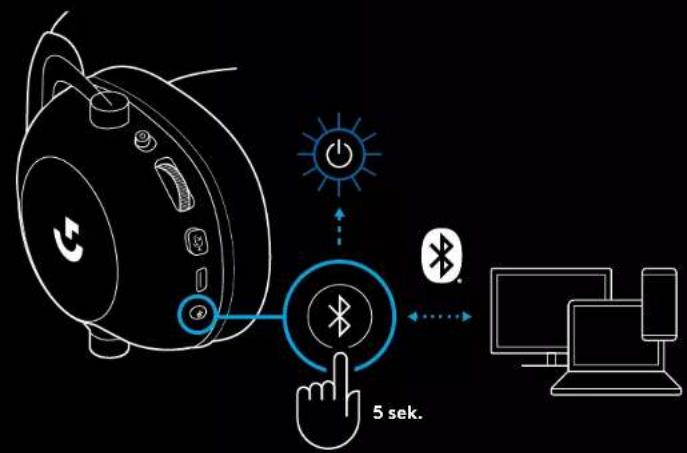
„BLUETOOTH“ IR „LIGHTSPEED“ PERJUNGIMAS
Trumpai paspauskite „Bluetooth“ / LIGHTSPEED perjungimo mygtukq.
- LED indikatorius švies fiksuota mělyna spalva 5 sekundes, kai bus jjungtas „Bluetooth“ režimas, arba žalsvai mělyna spalva 5 sekundes, kai bus jjungtas LIGHTSPEED režimas.
AUSINIŲ NAUDOJIMAS SU LAIDU
1 Išjunkite ausines.
natural_image
Line drawing of a device setup with a speaker, connected to devices including a laptop, a smartphone, and a game controller (no text or symbols)KAIP |TRAUKTI | MUX AUX ŠALTINYJE
274 LIETUVIŲ
flowchart
graph TD
    A["Desktop"] --> B["PROX"]
    C["Desktop"] --> B
    B --> D["music\nvideo\npictures\nsocial\nradio\npodcasts\nmarketplace"]
natural_image
Technical line drawing of a mechanical component with a close-up inset showing a tool interacting with a bracket (no text or symbols)natural_image
Computer monitor icon with a download symbol inside the circle (no text or labels)logitechG.com/ghub logitechG.com/support/pro-x-2
СДВОЯВАНЕ НА СЛУШАЛКИТЕ С БЕЗЖИЧЕН АДАПТЕР LIGHTSPEED
natural_image
Line drawing of a smart speaker with a Bluetooth button and control buttons, no text or symbols present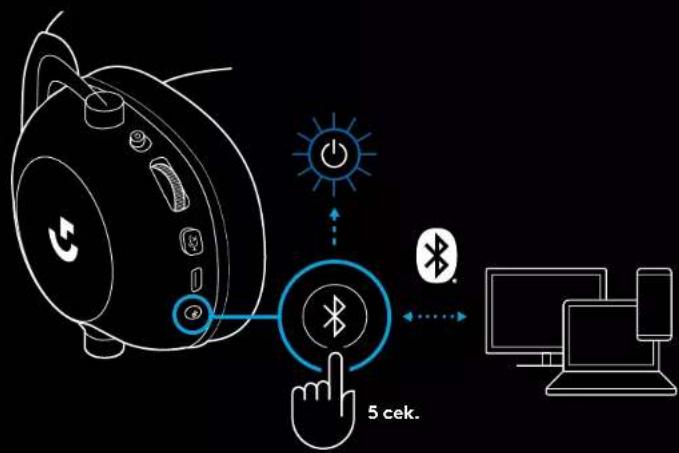
ПРЕВКЛЮЧВАНЕ МЕЖДУ BLUETOOTH И LIGHTSPEED
natural_image
Line drawing of a device setup with a speaker, cable, and connected devices (no text or symbols)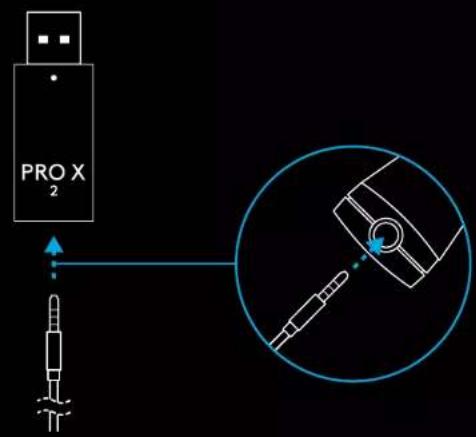
natural_image
Technical line drawing of a mechanical component with a close-up inset showing a tool interacting with a bracket (no text or symbols present)4 Otvorite Windows postavke za zvuk i potvrdite da su slušalice postavljene kao zadani izlazni i ulazni uređaj
5 (Opcija) Preuzmite Logitech G HUB softver za pristup naprednim značajkama. Preuzmite na adresi logitechG.com/ghub
natural_image
Computer monitor icon with a download symbol inside the circle (no text or numbers)logitechG.com/ghub logitechG.com/support/pro-x-2
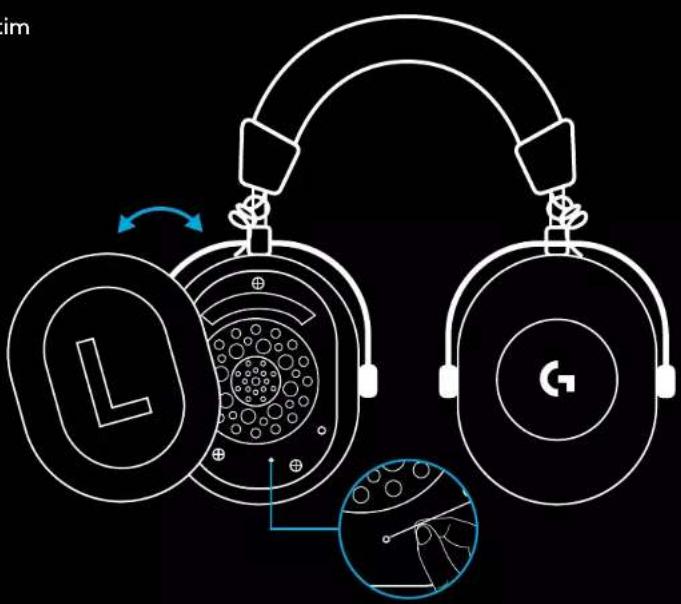
UPARIVANJE SLUŠALICA S BEŽIČNI ADAPTEROM LIGHTSPEED
1 Utaknite bežični adapter LIGHTSPEED (ako je već utaknut, iskopčajte ga i opet utaknite)

3 Spajalicom za papir držite dugo pritisnutim gumb za uparivanje
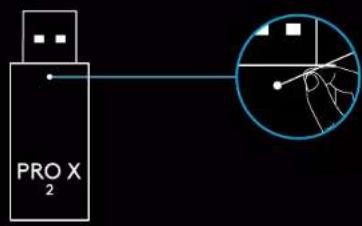
4 Spajalicom za papir pritisnite gumb za uparivanje bežičnog adaptera LIGHTSPEED
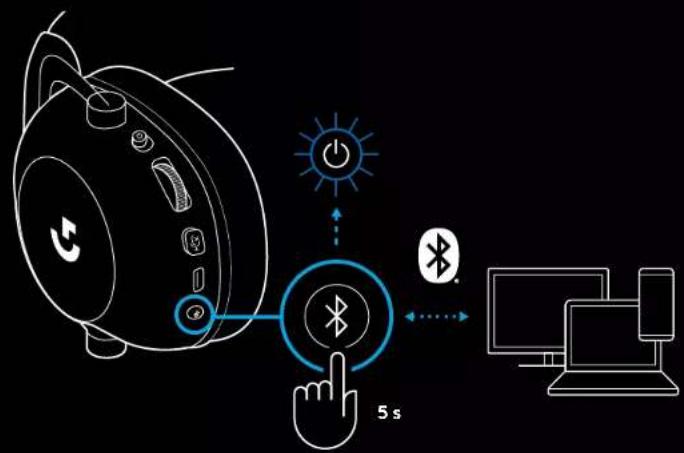
UPARIVANJE PREKO BLUETOOTH VEZE
1 Uključite slušalice povlačenjem sklopke
3 Pritisnite i držite gumb BT/LIGHTSPEED
- LED na slušalicama brzo će treptati plavo
PROMJENA IZMEĐU BLUETOOTH I LIGHTSPEED
Nakratko pritisnite gumb za promjenu Bluetooth / LIGHTSPEED
natural_image
Line drawing of a device setup with a speaker, cable, and connected devices (no text or symbols)KAKO NA MUX ULAZ SPOJITI AUX IZVOR
1 Slušalice se moraju podesiti u načinu rada LIGHTSPEED
2 Jedan kraj isporučenog kabela s utikačem od 3,5 mm ukopčajte u priključak od 3,5 mm na bežičnom adapteru LIGHTSPEED
flowchart
graph TD
    A["Desktop"] --> B["PROX"]
    C["Desktop"] --> B
    B --> D["music\nvideo\npictures\nsocial\nradio\npodcasts\nmarketplace"]
OPŠTE INFORMACIJE O RADU SLUŠALICA
1 Prekidač za napajanje
- Kada je napajanje uključeno, LED indikator će svetliti stalnim zelenim svetlom 5 sekundi ako je napunjenost baterije >= 10%. Svetlo će biti crveno 5 sekundi ako je napunjenost baterije <= 10%. Slušalice će se automatski isključiti nakon 30 minuta bez zvuka, kako bi se produžilo trajanje baterije. Da biste nastavili korišćenje, isključite napajanje, a zatim ga ponovo uključite. Vrednost vremenskog ograničenja se može podesiti u softveru G HUB
2 Točkić za jačinu zvuka
- Okrenite nagore za pojačanje zvuka OS-a
- Okrenite nadole za smanjenje zvuka OS-a
natural_image
Technical line drawing of a mechanical component with cross-sectional view and tool path (no text or symbols)2 Umetnite LIGHTSPEED bežični adapter u USB port PC računara
3 Uključite slušalice pomoću prekidača za napajanje (prilikom prvog uključivanja pojaviće se zeleno svetlo ako je napunjenost baterije jednaka ili veća od 10% – LED indikator će postati crven ako je napunjenost baterije ispod 10%)
5 (Opciono) Preuzmite softver Logitech G HUB da biste pristupili naprednim funkcijama. Preuzmite na logitechG.com/ghub
natural_image
Computer monitor icon with a download symbol inside the circle (no text or numbers)logitechG.com/ghub logitechG.com/support/pro-x-2
UPARIVANJE SLUŠALICA SA LIGHTSPEED BEŽIČNIM ADAPTEROM
3 Koristite spajalicu da biste pritisnuli i zadržali dugme za uparivanje slušalica
4 Koristite spajalicu da biste pritisnuli dugme za uparivanje LIGHTSPEED bežičnog adaptera
BLUETOOTH UPARIVANJE
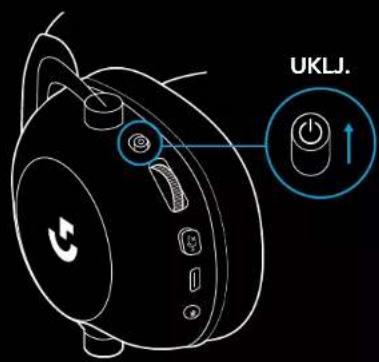
1 Uključite slušalice povlačenjem prekidača za napajanje
2 Pritisnite preklopno dugme za BT/LIGHTSPEED. Svetlo za napajanje postaće plavo i tako ukazati na režim BT
natural_image
Line drawing of a smart speaker with a Bluetooth button and control buttons, no text or symbols present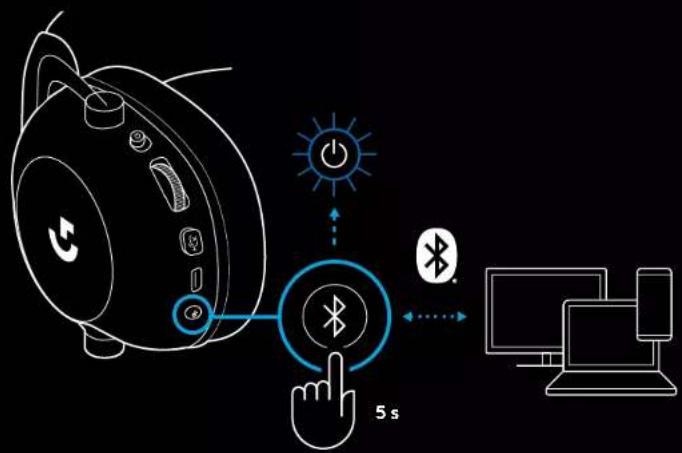
PRELAZAK IZ REŽIMA BLUETOOTH U REŽIM LIGHTSPEED I OBRNUTO
Kratko pritisnite preklopno dugme za Bluetooth/LIGHTSPEED
- LED indikator će zasvetliti stalnim plavim svetlom na 5 sekundi prilikom postavljanja u režim Bluetooth, odnosno stalnim cijan svetlom na 5 sekundi prilikom postavljanja u režim LIGHTSPEED
flowchart
graph TD
    A["Smartphone with 5s"] --> B["Touch Button"]
    B --> C["Light Bulb"]
    C --> D["Bluetooth Signal"]
    D --> E["Light Bulb"]
    E --> F["Light Bulb"]
    F --> G["Light Bulb"]
    G --> H["Light Bulb"]
    H --> I["Light Bulb"]
    I --> J["Light Bulb"]
    J --> K["Light Bulb"]
    K --> L["Light Bulb"]
    L --> M["Light Bulb"]
    M --> N["Light Bulb"]
    N --> O["Light Bulb"]
    O --> P["Light Bulb"]
    P --> Q["Light Bulb"]
    Q --> R["Light Bulb"]
    R --> S["Light Bulb"]
    S --> T["Light Bulb"]
    T --> U["Light Bulb"]
    U --> V["Light Bulb"]
    V --> W["Light Bulb"]
    W --> X["Light Bulb"]
    X --> Y["Light Bulb"]
    Y --> Z["Light Bulb"]
    Z --> AA["Light Bulb"]
KORIŠĆENJE SLUŠALICA U ŽIČNOM REŽIMU
natural_image
Line drawing of a portable audio device connected to multiple devices including a laptop, smartphone, and game controller (no text or symbols)KAKO SE VRŠI MULTIPLEKSIRANJE ZA AUX IZVOR
1 Slušalice se moraju postaviti u režim LIGHTSPEED
2 Umetnite jedan kraj isporučenog kabla od 3,5 mm u port od 3,5 mm LIGHTSPEED bežičnog adaptera
3 Umetnite drugi kraj isporučenog kabla od 3,5 mm u port od 3,5 mm izvora zvuka koji želite da multipleksirate u bežični signal.
natural_image
Technical line drawing of a smart speaker head with labeled sensor and antenna (no text or symbols)2 Brezžični adapter LIGHTSPEED vstavite v vrata USB na vašem računalniku

zeleno
rdeče
Sound
Output
Choose your output device
Speakers (PRO X 2 LIGHTSPEED)
Certain apps may be set up to use different sound devices than the one selected here. Customize app volumes and devices in advanced sound options.
Device properties
Master volume
78
Troubleshoot
Manage sound devices
Input
Choose your output device
Microphone (PRO X 2 LIGHTSPEED)
logitechG.com/ghub
logitechG.com/support/pro-x-2
SEZNANJANJE SLUŠALK Z MIKROFONOM Z BREZŽIČNIM ADAPTERJEM LIGHTSPEED
1 Priklopite brezžični adapter LIGHTSPEED (če je že priklopljen, ga odklopite in znova priklopite)

2 Odstranite levo ušesno blazinico
3 Pritisnite in držite gumb BT / LIGHTSPEED
- LED lučka slušalk z mikrofonom bo hitro utripala modro
4 Sledite korakom za povezavo Bluetooth na vaši napravi
natural_image
Line drawing of a device with a blue circular button labeled 'Bluetooth' and a hand cursor pointing at it, against a black background (no text or symbols)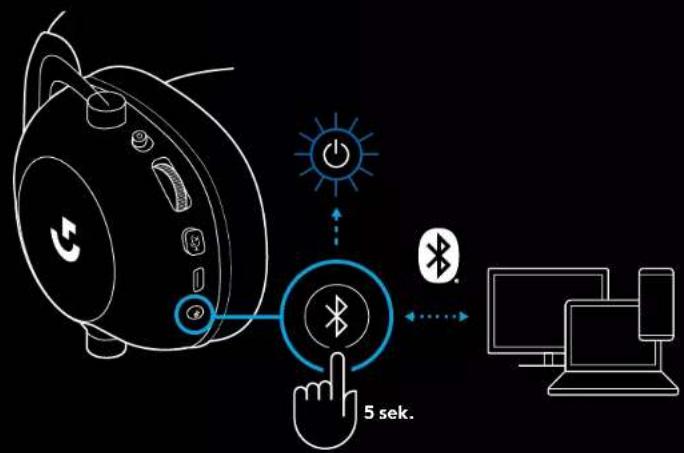
PREKLAPLJANJE MED BLUETOOTH IN LIGHTSPEED
Kratko pritisnite gumb za preklop med Bluetooth / LIGHTSPEED
- LED lučka bo 5 sekund neprekinjeno svetila modro, ko preklopite v način Bluetooth, ali 5 sekund sinje modro, ko preklopite v način LIGHTSPEED
UPORABA SLUŠALK Z MIKROFONOM (ŽIČNE)
1 Izklopite slušalke z mikrofonom
natural_image
Line drawing of a portable audio device connected to multiple devices including a laptop, smartphone, and game controller (no text or symbols)KAKO USTVARITI MULTIPLEKSIRANO NAPRAVO MUX V VIRU AUX
natural_image
Technical line drawing of a mechanical component with a close-up inset showing a tool interacting with a bracket (no text or symbols)natural_image
Computer monitor icon with a download symbol inside the circle (no text or numbers)logitechG.com/ghub logitechG.com/support/pro-x-2
ASOCIEREA CĂȘTILOR CU ADAPTORUL WIRELESS LIGHTSPEED
natural_image
Line drawing of a smart speaker with a Bluetooth button and control buttons, no text or symbols present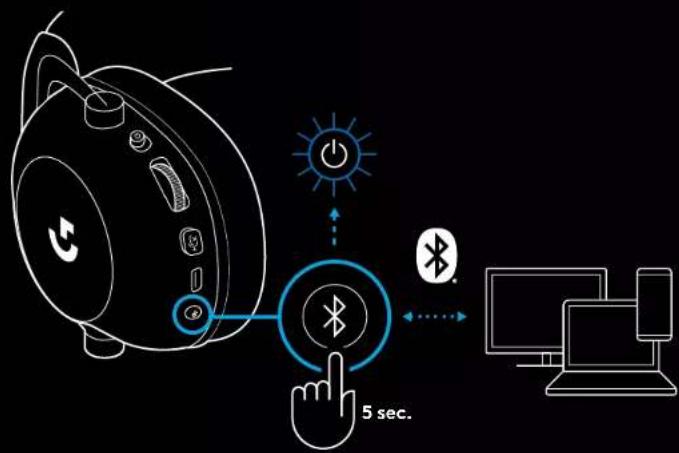
COMUTAREA ÎNTRE BLUETOOTH ŞI LIGHTSPEED
flowchart
graph TD
    A["Smartphone with ear icon"] --> B{5 sec. 5 sec.}
    B --> C["Bluetooth"]
    B --> D["WiFi"]
    B --> E["Power Icon"]
    C --> F["Hand icon pointing to Bluetooth"]
    D --> G["Power icon pointing to Bluetooth"]
    E --> H["Power icon pointing to Bluetooth"]
UTILIZAREA CĂȘTILOR ÎN MODUL CU FIR
natural_image
Line drawing of a device setup with a speaker, cable, and connected devices (no text or symbols)CUM SĂ CONECTAȚI UN MULTIPLEXOR LA SURSA AUX
flowchart
graph TD
    A["Desktop Monitor"] --> B["PROX Device"]
    B --> C["music video pictures social radio podcasts marketplace"]
GENEL KULAKLIK KULLANIMI
1 Güç düğmesi
natural_image
Technical line drawing of a mechanical component with cross-sectional view and tool path (no text or symbols)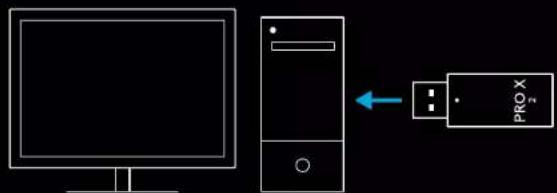
natural_image
Computer monitor icon with a download symbol inside the circle (no text or numbers)logitechG.com/ghub logitechG.com/support/pro-x-2
KULAKLIĞI LIGHTSPEED KABLOSUZ ADAPTÖRÜYLE EŞLEŞTİRME
natural_image
Line drawing of a smart speaker with a Bluetooth button and control buttons, no text or symbols present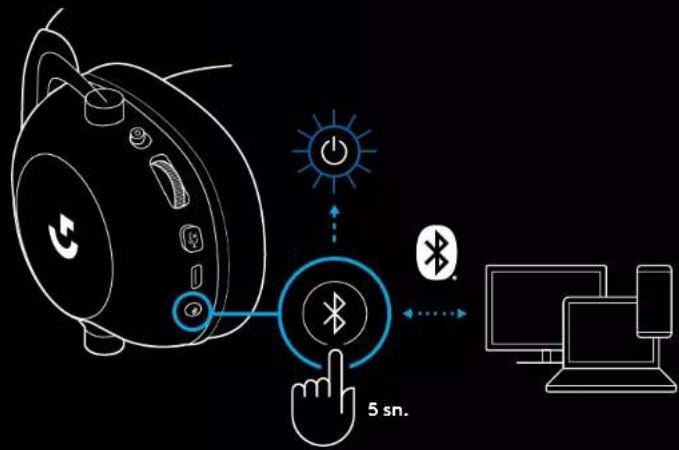
BLUETOOTH İLE LIGHTSPEED ARASINDA GEÇİŞ
natural_image
Line drawing of a device setup with a speaker, cable, and connected devices (no text or symbols)BİR AUX KAYNAĞINA NASIL MUX YAPILIR
natural_image
Line drawing of a smart home with a hand interacting with a wireless signal icon (no text or symbols)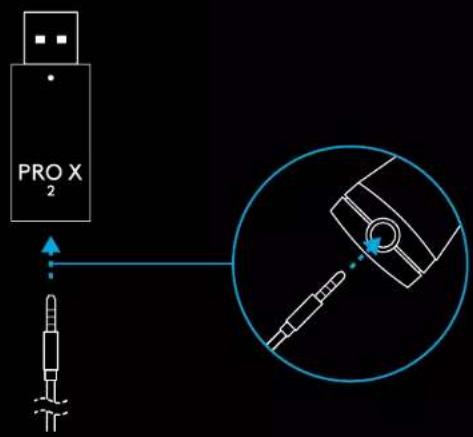
352 TÜRKÇE
flowchart
graph TD
    A["Desktop"] --> B["PROX"]
    C["Desktop"] --> B
    B --> D["music\nvideo\npictures\nsocial\nradio\npodcasts\nmarketplace"]
natural_image
Technical line drawing of a mechanical component with circular inset showing internal components (no text or symbols)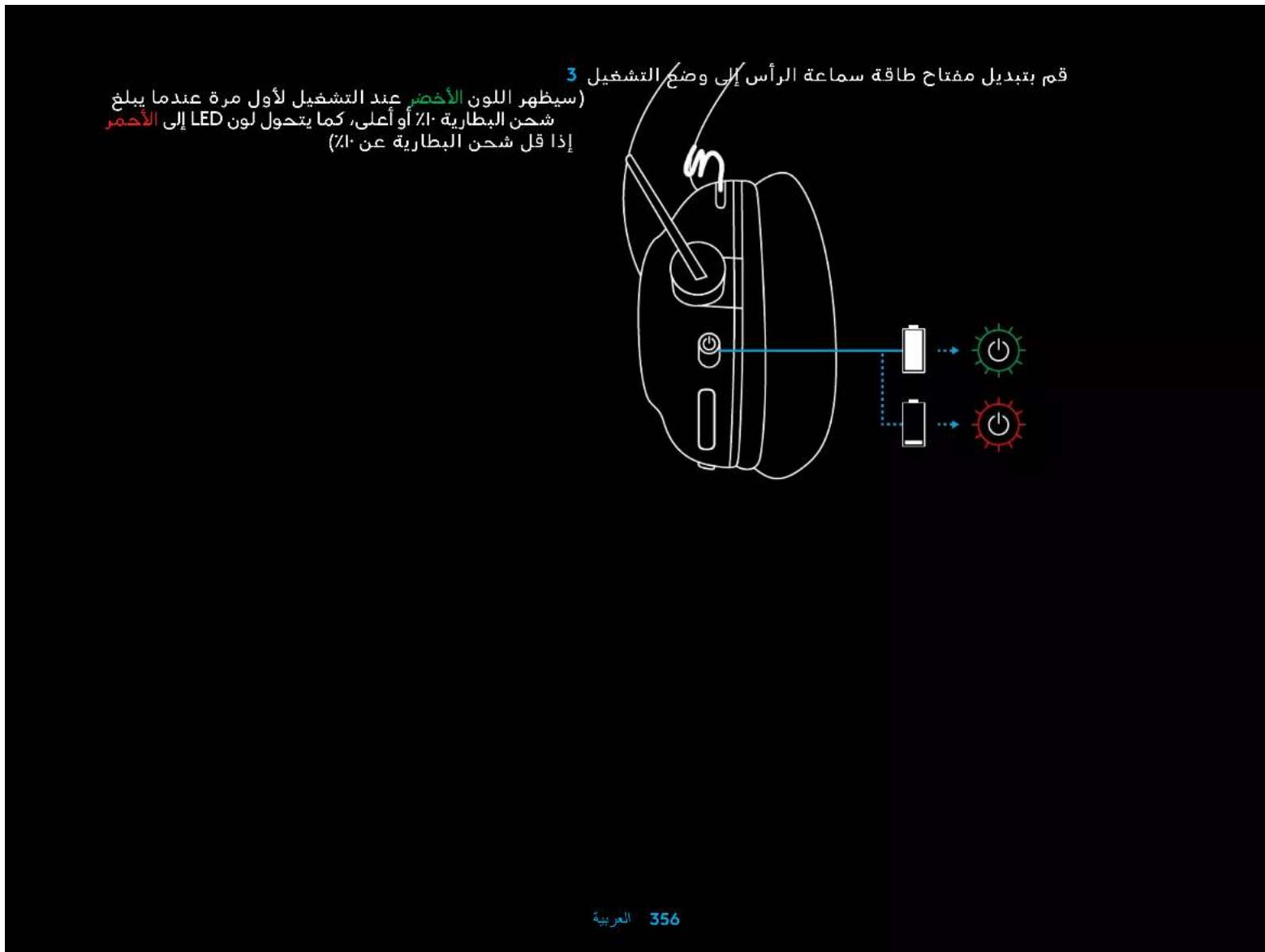
natural_image
Line drawing of a computer monitor with a download icon (no text or symbols)logitechG.com/ghub P-logitechG.com/support/pro-x
natural_image
Line drawing of a device setup with a speaker, audio jack, and connected devices (no text or symbols)natural_image
Line drawing of a smart speaker with wireless signal icon and Bluetooth button (no text or symbols)logitech G HUB (הכלה) 5 logitechG.com/ghub.
natural_image
Computer monitor icon with a download symbol inside the circle (no text or labels)logitechG.com/ghub logitechG.com/support/pro-x-2
LIGHTSPEED
BT/LIGHTSPEED 3
-
natural_image
Line drawing of a smart speaker with a Bluetooth button and control buttons, no text or symbols presentLIGHTSPEED-7 BLUETOOTH
LIGHTSPEED-7 Bluetooth 5 Windows 5 Windows 5, Bluetooth 5
הכלה 3.5הע"הע"הע"הע"הע"הע"הע"הע"הע"הע"הע"הע"הע"הע"הע"הע"הע"הע"הע"הע"הע"הע"הע"הע"הע"הע"הע"הע"הע"הע"הע"הע"הע"הע"
:
-הכלה 3.5
natural_image
Line drawing of a device setup with a speaker, cable, and connected devices (no text or symbols)AUX MUX-
1 LIGHTSPEED

logitech
©2023 Logitech. Logitech, Logitech G. Logi and their respective logos are trademarks or registered trademarks of Logitech Europe S.A. and/or its affiliates in the U.S. and other countries. All other trademarks are the property of their respective owners.
WEB-621-002312 003


- PC SETUP INSTRUCTIONS
- PAIRING HEADSET WITH LIGHTSPEED WIRELESS ADAPTER
- BLUETOOTH PAIRING
- SWITCHING BETWEEN BLUETOOTH AND LIGHTSPEED
- USING THE HEADSET IN WIRED MODE
- HOW TO MUX IN AN AUX SOURCE
- PAIRING DES HEADSETS MIT DEM KABELLOSEN LIGHTSPEED ADAPTER
- WECHSELN ZWISCHEN BLUETOOTH UND LIGHTSPEED
- FONCTIONNEMENT GÉNÉRAL DU CASQUE
- COUPLAGE DU CASQUE AVEC L'ADAPTATEUR SANS FIL LIGHTSPEED
- BASCULER ENTRE LES MODES BLUETOOTH ET LIGHTSPEED
- UTILISATION DU CASQUE EN MODE FILAIRE
- COMMENT EFFECTUER UN MULTIPLEXAGE AVEC UNE SOURCE AUXILIAIRE
- ASSOCIAZIONE CUFFIA E ADATTATORE LIGHTSPEED WIRELESS
- PASSAGGIO DA BLUETOOTH A LIGHTSPEED
- COME EFFETTUARE UNA TRASMISSIONE MUX IN UNA SORGENTE AUX
- EMPAREJAMIENTO DE LOS AURICULARES CON EL ADAPTADOR INALÁMBRICO LIGHTSPEED
- ALTERNAR ENTRE BLUETOOTH Y LIGHTSPEED
- CÓMO MULTIPLEXAR UNA FUENTE AUX
- ALTERNAR ENTRE BLUETOOTH E LIGHTSPEED
- COMO USAR O MUX NUMA FONTE AUX
- ALGEMENE HEADSETBEDIENING
- DE HEADSET KOPPELEN MET DE DRAADLOZE LIGHTSPEED-ADAPTER
- SCHAKELEN TUSSEN BLUETOOTH EN LIGHTSPEED
- MUX IN EEN AUX-BRON
- PARKOPPLA HEADSET MED TRÅDLÖS LIGHTSPEED-ADAPTER
- VÄXLA MELLAN BLUETOOTH OCH LIGHTSPEED
- SÅ HÄR FUNGERAR MULTIPLEXER I EN AUX-KÄLLA
- BETJENING AF HEADSETTET
- TILSLUTNING AF HEADSET MED TRÅDL∅S LIGHTSPEED-ADAPTER
- SKIFT MELLEM BLUETOOTH OG LIGHTSPEED
- SÅDAN MUX'ER DU EN AUX-KILDE IND
- PARE HODESETT MED LIGHTSPEED TRÅDL∅S TEKNOLOGI ADAPTER
- BYTTE MELLOM BLUETOOTH OG LIGHTSPEED
- HVORDAN MUX I EN AUX-KILDE
- KUULOKEMIKROFONIN YLEINEN KÄYTTÖ
- Virtakytkin
- KUULOKEMIKROFONIN PARILIITTÄMINEN LANGATTOMAAN LIGHTSPEED-VASTAANOTTIMEEN
- BLUETOOTHIN JA LIGHTSPEEDIN VÄLILLÄ VAIHTAMINEN
- MULTIPLEKSERIN KÄYTTÖ AUX-LÄHTEESSÄ
- ΕΝΑΛΛΑΓΗ ΜΕΤΑΞΥ BLUETOOTH ΚΑΙ LIGHTSPEED
- OGÓLNE ZASADY OBSŁUGI ZESTAWU SŁUCHAWKOWEGO
- PAROWANIE ZESTAWU SŁUCHAWKOWEGO Z ADAPTEREM BEZPRZEWODOWYM LIGHTSPEED
- PRZEŁĄCZANIE MIĘDZY BLUETOOTH A LIGHTSPEED
- KORZYSTANIE Z ZESTAWU SŁUCHAWKOWEGO W TRYBIE PRZEWODOWYM
- JAK UZYSKAĆ MUX W ŻRÓDLE AUX
- A MIKROFONOS FEJHALLGATÓ PÁROSÍTÁSA A LIGHTSPEED VEZETÉK NÉLKÜLI ADAPTERREL
- A BLUETOOTH ÉS LIGHTSPEED KÖZTI VÁLTÁS
- AUX FORRÁS KEVERÉSE
- PÁROVÁNÍ NÁHLAVNÍ SOUPRAVY S BEZDRÁTOVÝM ADAPTÉREM LIGHTSPEED
- PŘEPÍNÁNÍ MEZI BLUETOOTH A LIGHTSPEED
- POSTUP SMĚŠOVÁNÍ ZDROJE AUX
- PÁROVANIE NÁHLAVNEJ SÚPRAVY S BEZDRÓTOVÝM ADAPTÉROM LIGHTSPEED
- PREPÍNANIE MEDZI BLUETOOTH A LIGHTSPEED
- POUŽITIE NÁHLAVNEJ SÚPRAVY V REŽIME KÁBLOVÉHO PRIPOJENIA
- POSTUP ZMIEŠAVANIA ZDROJA AUX
- PEAKOMPLEKTI SIDUMINE JUHTMEVABA ADAPTERIGA LIGHTSPEED
- BLUETOOTHI JA LIGHTSPEEDI VAHEL LÜLITUMINE
- KUIDAS AUX-ALLIKAT SISSE MUXIDA
- AUSTINU SAVIENOŠANA PĀRĪ AR "LIGHTSPEED" BEZVADU ADAPTERU
- PĀRSLĒGŠANĀS STARP "BLUETOOTH" UN "LIGHTSPEED" REŽĪMIEM
- MUX IZMANTOŠANA AR AUX AVOTU
- BENDRASIS AUSINIŲ NAUDOJIMAS
- AUSINIŲ IR „LIGHTSPEED“ BELAIDŽIO ADAPTERIO SUSIEJIMAS
- „BLUETOOTH“ IR „LIGHTSPEED“ PERJUNGIMAS
- AUSINIŲ NAUDOJIMAS SU LAIDU
- KAIP |TRAUKTI | MUX AUX ŠALTINYJE
- СДВОЯВАНЕ НА СЛУШАЛКИТЕ С БЕЗЖИЧЕН АДАПТЕР LIGHTSPEED
- ПРЕВКЛЮЧВАНЕ МЕЖДУ BLUETOOTH И LIGHTSPEED
- UPARIVANJE SLUŠALICA S BEŽIČNI ADAPTEROM LIGHTSPEED
- UPARIVANJE PREKO BLUETOOTH VEZE
- PROMJENA IZMEĐU BLUETOOTH I LIGHTSPEED
- KAKO NA MUX ULAZ SPOJITI AUX IZVOR
- OPŠTE INFORMACIJE O RADU SLUŠALICA
- UPARIVANJE SLUŠALICA SA LIGHTSPEED BEŽIČNIM ADAPTEROM
- BLUETOOTH UPARIVANJE
- PRELAZAK IZ REŽIMA BLUETOOTH U REŽIM LIGHTSPEED I OBRNUTO
- KORIŠĆENJE SLUŠALICA U ŽIČNOM REŽIMU
- KAKO SE VRŠI MULTIPLEKSIRANJE ZA AUX IZVOR
- Sound
- SEZNANJANJE SLUŠALK Z MIKROFONOM Z BREZŽIČNIM ADAPTERJEM LIGHTSPEED
- PREKLAPLJANJE MED BLUETOOTH IN LIGHTSPEED
- UPORABA SLUŠALK Z MIKROFONOM (ŽIČNE)
- KAKO USTVARITI MULTIPLEKSIRANO NAPRAVO MUX V VIRU AUX
- ASOCIEREA CĂȘTILOR CU ADAPTORUL WIRELESS LIGHTSPEED
- COMUTAREA ÎNTRE BLUETOOTH ŞI LIGHTSPEED
- UTILIZAREA CĂȘTILOR ÎN MODUL CU FIR
- CUM SĂ CONECTAȚI UN MULTIPLEXOR LA SURSA AUX
- GENEL KULAKLIK KULLANIMI
- KULAKLIĞI LIGHTSPEED KABLOSUZ ADAPTÖRÜYLE EŞLEŞTİRME
- BLUETOOTH İLE LIGHTSPEED ARASINDA GEÇİŞ
- BİR AUX KAYNAĞINA NASIL MUX YAPILIR
- LIGHTSPEED
- LIGHTSPEED-7 BLUETOOTH
- AUX MUX-
Brand : LOGITECH
Model : G PRO X 2 Lightspeed
Category : Headphones