G733 Lightspeed - Headphones LOGITECH - Free user manual and instructions
Find the device manual for free G733 Lightspeed LOGITECH in PDF.


| Product Type | Wireless Gaming Headset |
| Brand | Logitech |
| Model | G733 Lightspeed |
| Connectivity | LIGHTSPEED Wireless (2.4 GHz via USB-A receiver) |
| Driver Size | 40 mm |
| Frequency Response | 20 Hz - 20 kHz |
| Impedance | 32 Ohms |
| Microphone Type | Detachable boom mic with flip-to-mute |
| Battery Life | Up to 29 hours (with RGB off) |
| Charging | Micro-USB, 2.5 hours to full |
| Weight | 278 g |
| Dimensions (H x W x D) | 155 x 188 x 73 mm |
| RGB Lighting | Customizable LIGHTSYNC RGB (1 zone, 16.8M colors) |
| Materials | Plastic, memory foam ear pads, fabric headband |
| Compatibility | PC, PlayStation 4/5, Nintendo Switch (docked) |
| Software | Logitech G HUB |
| Repairability | Ear pads replaceable, battery not user-replaceable |
| Spare Parts Available | Ear pads, headband, USB receiver |
| Cleaning Instructions | Wipe with dry cloth; remove ear pads for deep clean |
| Safety Warnings | Avoid high volume for extended periods; keep away from liquids |
Frequently Asked Questions - G733 Lightspeed LOGITECH
User questions about G733 Lightspeed LOGITECH
0 question about this device. Answer the ones you know or ask your own.
Ask a new question about this device
Download the instructions for your Headphones in PDF format for free! Find your manual G733 Lightspeed - LOGITECH and take your electronic device back in hand. On this page are published all the documents necessary for the use of your device. G733 Lightspeed by LOGITECH.
USER MANUAL G733 Lightspeed LOGITECH
natural_image
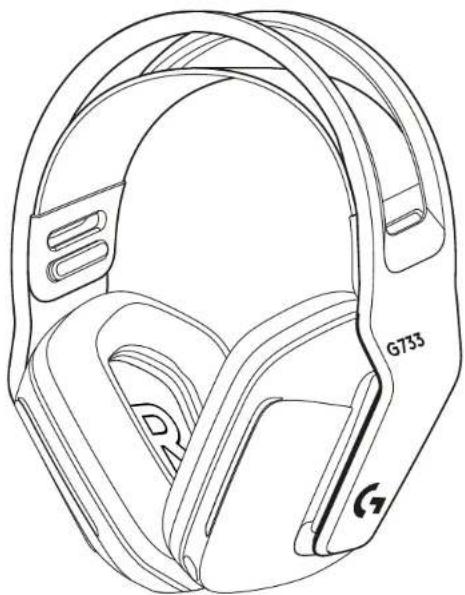
Black and white Log 733 headframe headset with colorful visor design (no text or symbols visible)logitech

natural_image
Line drawing of a helmet with labeled components (G733, G) and no readable text or symbols beyond labels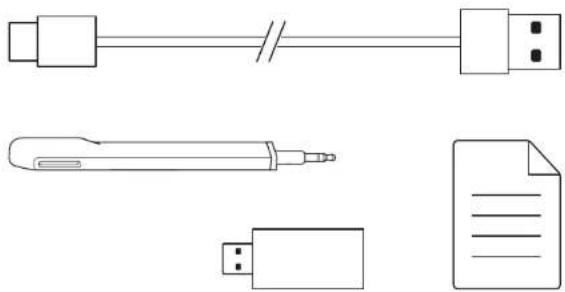
natural_image
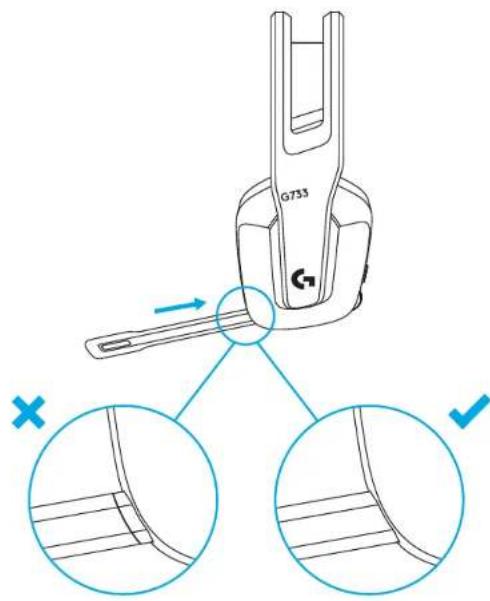
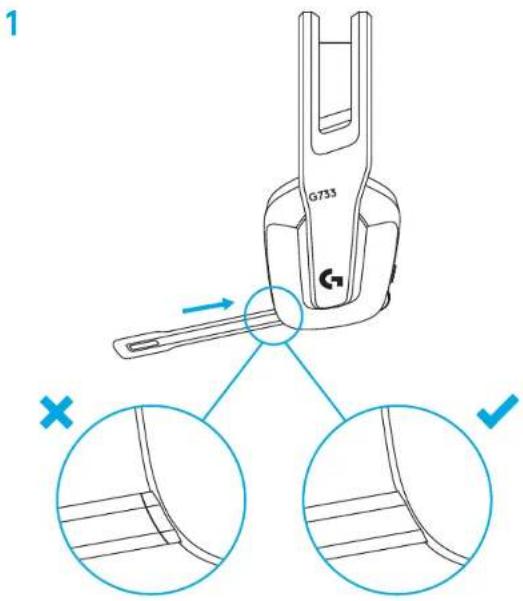
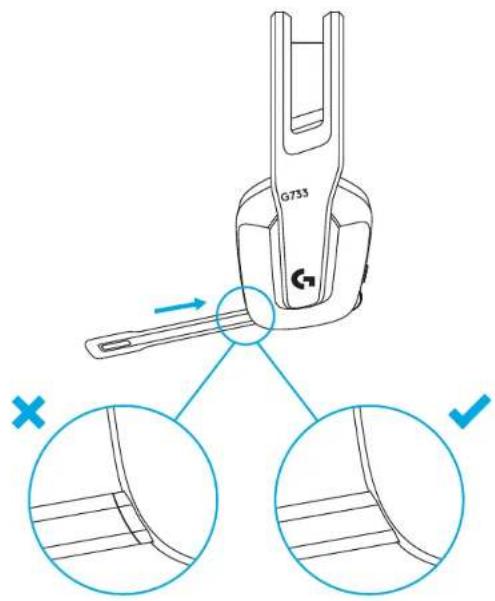
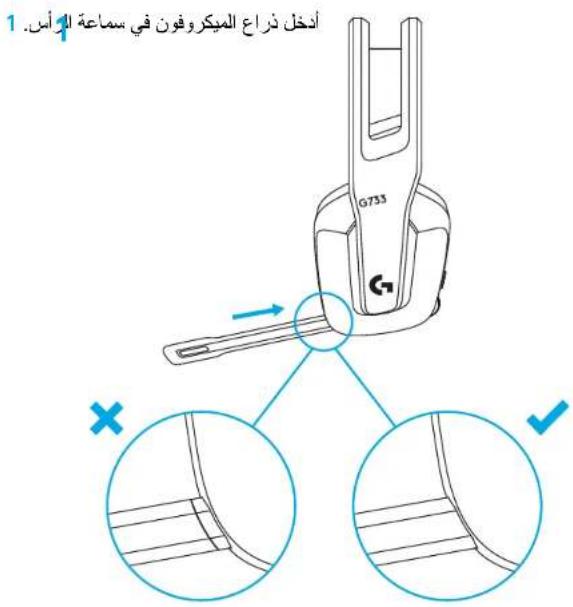
Pure electrical circuit lines without any symbols1 Insert the mic boom completely into the headset.
1
3 ENGLISH
2 Insert receiver into the USB port of your PC.
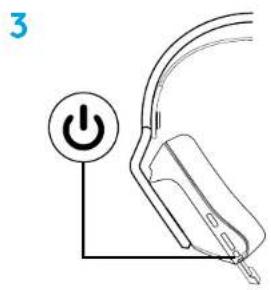
3 Short press to turn ON.
4 (Optional) Download Logitech G HUB software to access advanced features. Download at logitechG.com/ghub
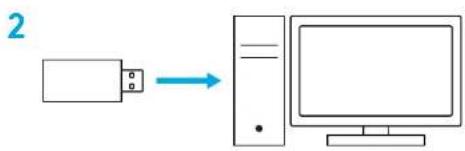
flowchart
graph LR
    A["Input"] --> B["Device"]
    B --> C["Computer"]

4 ENGLISH
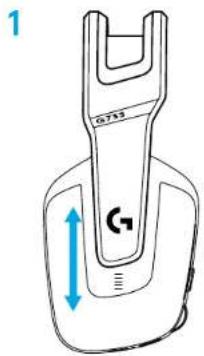
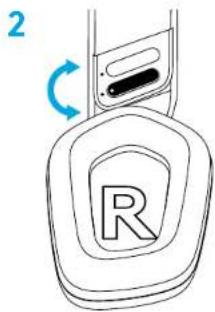
SIZE ADJUSTMENT
1 The earcups can be adjusted up and down.
2 The length of the headband can be adjusted.
5 ENGLISH
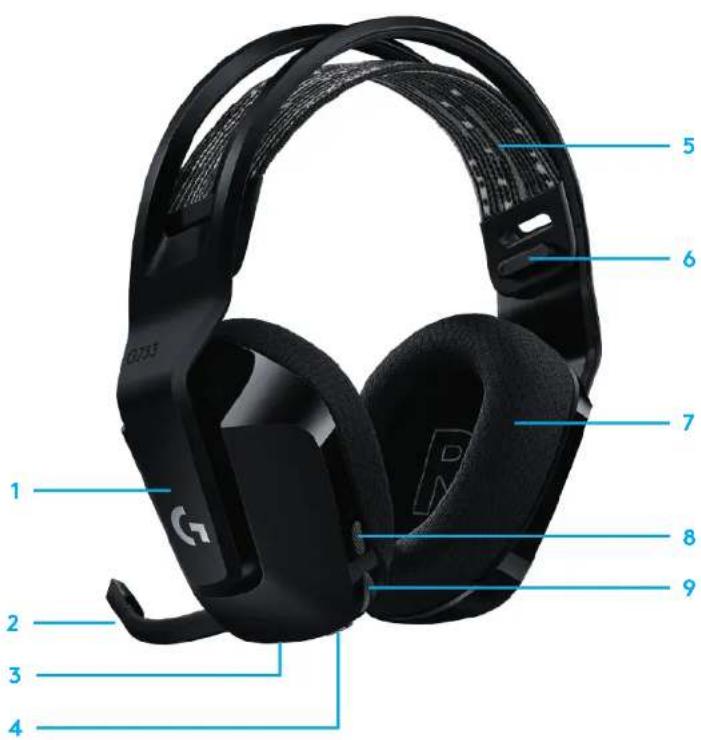
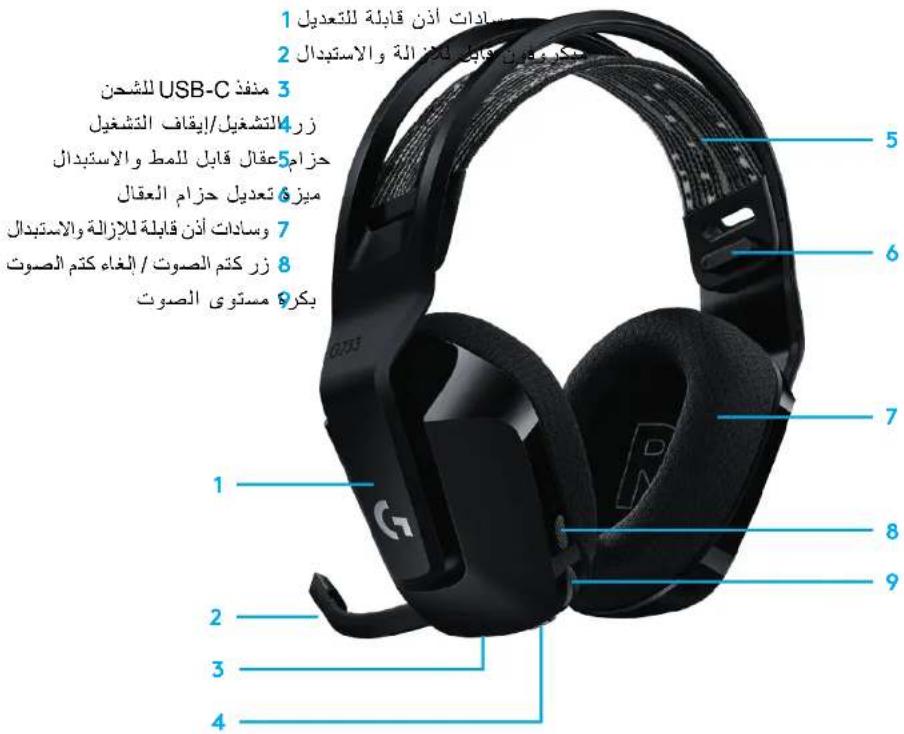
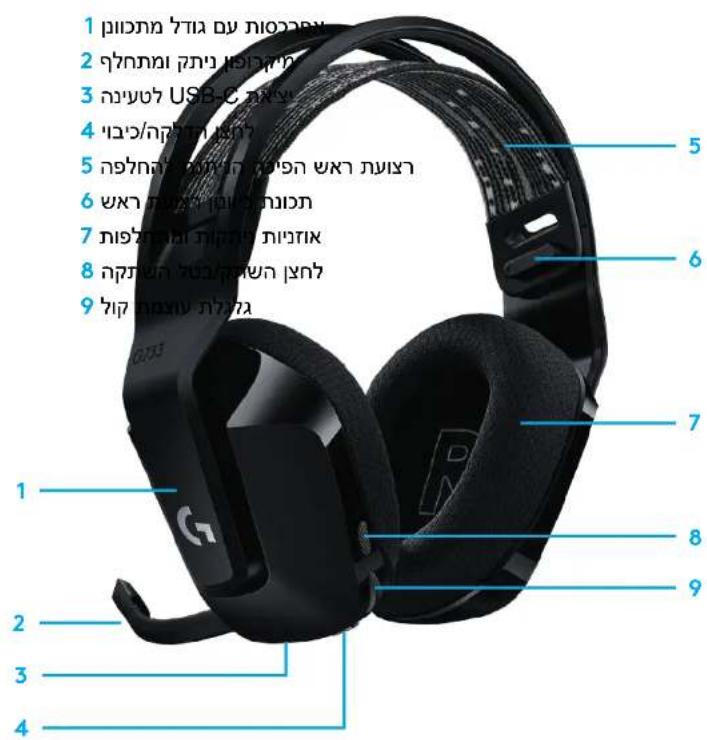
FEATURES
1 Size-adjustable earcups
2 Removable and replaceable mic
3 USB-C port for charging
4 ON/OFF button
5 Reversible and replaceable headband strap
6 Headband strap adjusting feature
7 Removable and replaceable earpads
8 Mute/unmute button
9 Volume roller
6 ENGLISH
UNDERSTAND
1 When battery life is below 10%, the audio will beep every 15 min.
2 When battery life is below 2%, the lights will flash red and the audio will beep every 15 min.
3 When plugging the charging cable, the lights will breath green 5 times and revert to its previous state.
4 When muting the mic, the lights will flash red and the audio will beep twice.
5 When unmuting the mic, the lights will flash green and the audio will beep three times.
6 When using G HUB software, pressing the ON/OFF button once when the headset is ON will let you know the battery life remaining.
SPARE PARTS
You can find replacement parts at logitechG.com in selected regions, including:
Headband strap
- Earpads
Mic
Cable
- Receiver
LOGITECH G HUB SOFTWARE
(Optional) Download Logitech G HUB software to access advanced features. Download at logitechG.com/GHUB. Logitech G HUB software lets you customize many features, including:
- Enable/disable DTS Headset:X 2.0 Surround Sound
- Enable/disable Blue VO!CE mic enhancement
- Adjust EQ settings
- Sidetone
- Lighting
- Mute button assignment
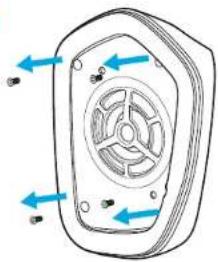
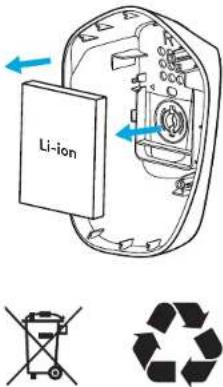
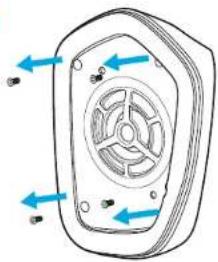
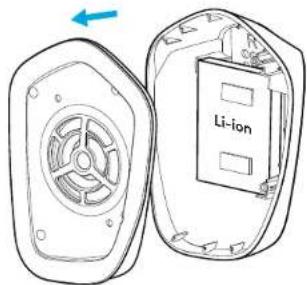
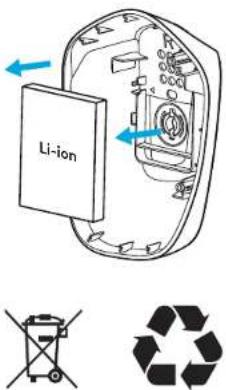
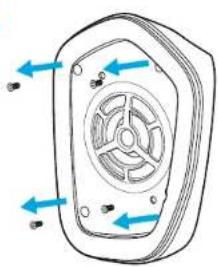
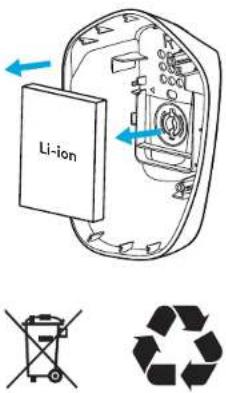
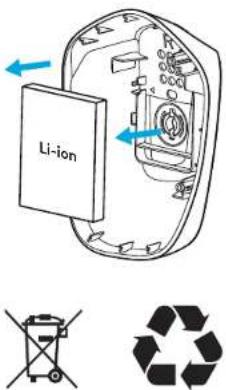
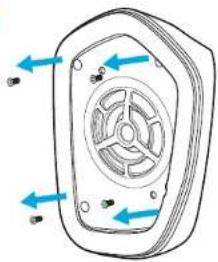
RECYCLING
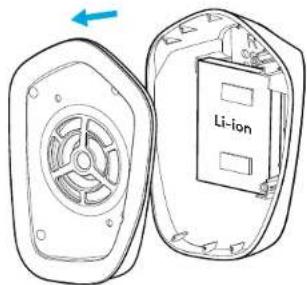
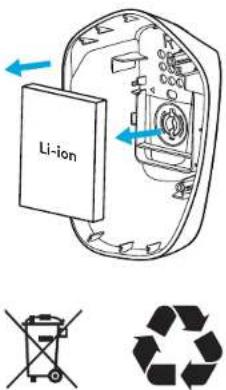
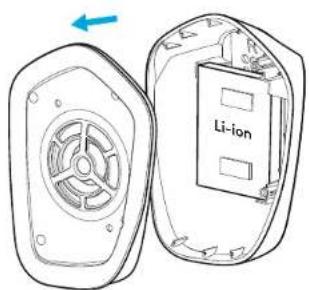
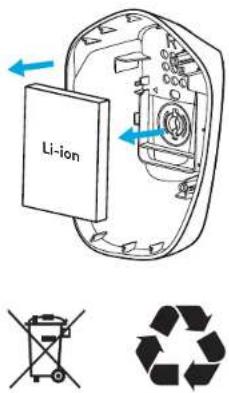
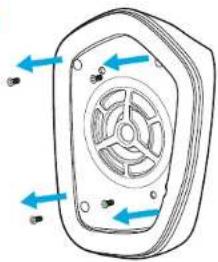
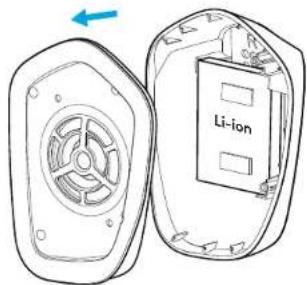
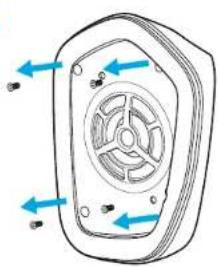
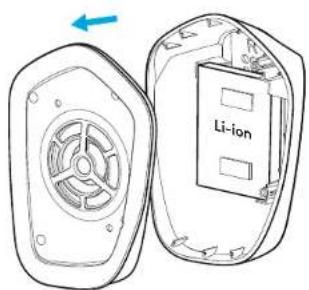
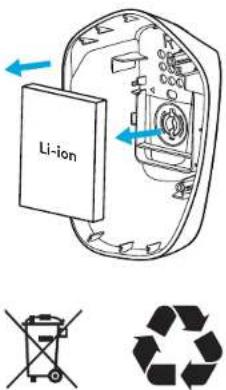
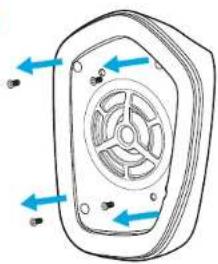
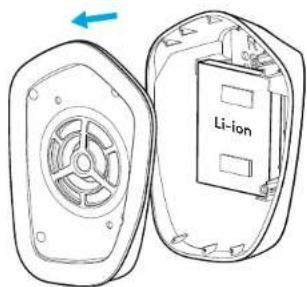
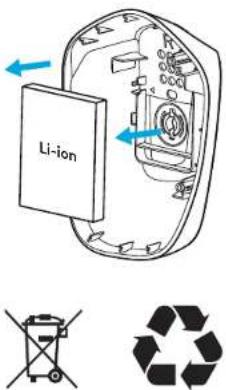
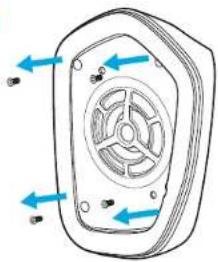
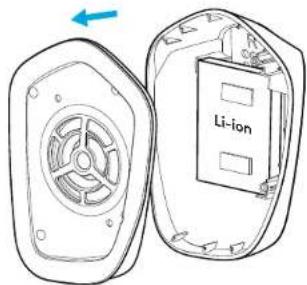
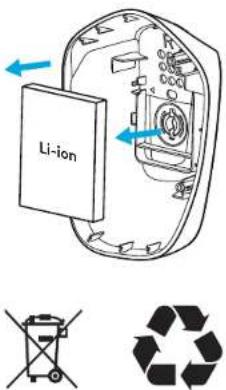
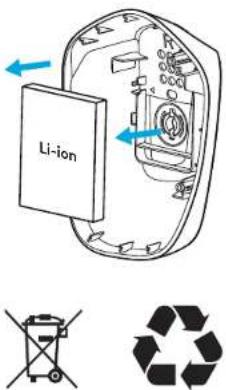
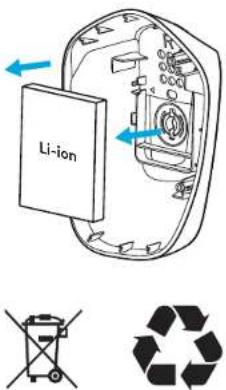
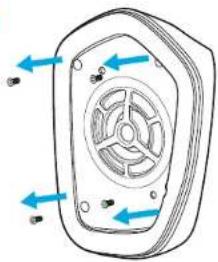
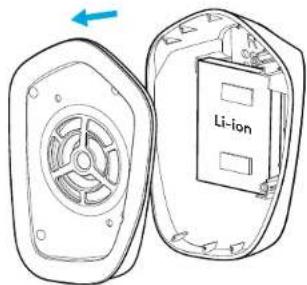
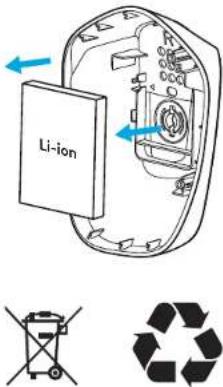
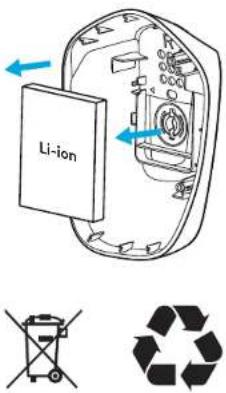
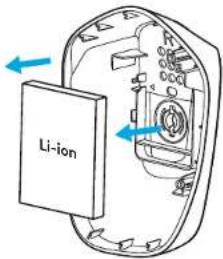
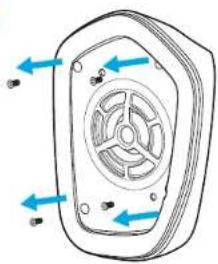
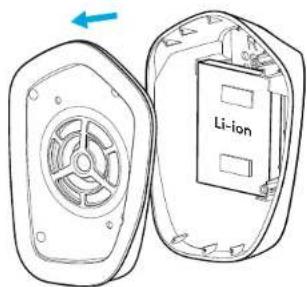
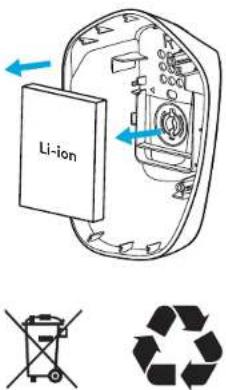
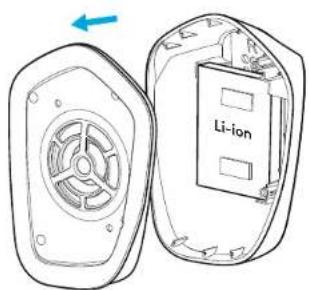
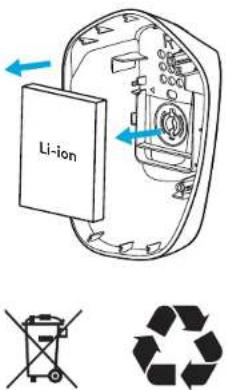
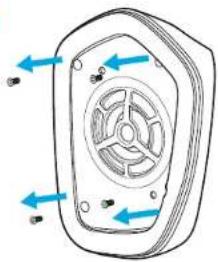
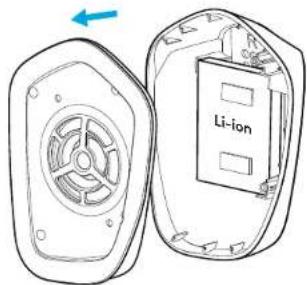
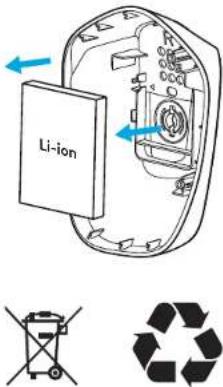
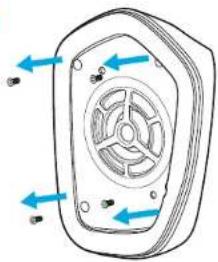
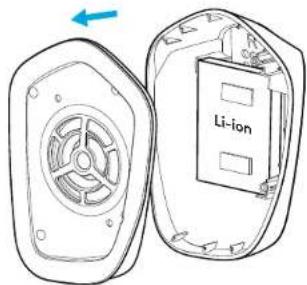
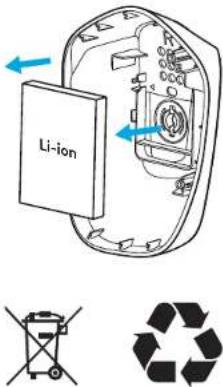
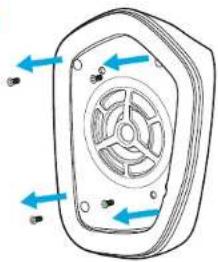
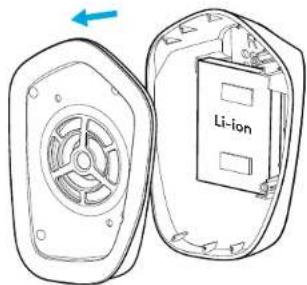
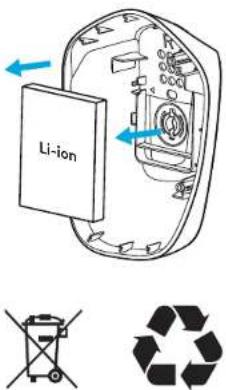
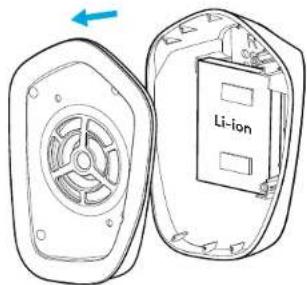
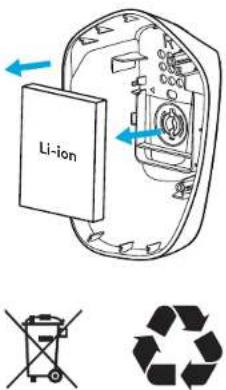
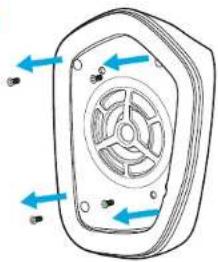
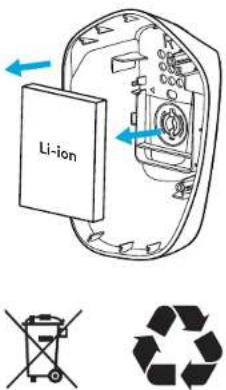
We encourage you to resell or donate working products. Otherwise, batteries, electronic and electrical equipment should not be disposed of with household waste. Wherever possible, they should be segregated and brought to an appropriate collection point to enable recycling and avoid potential impacts on the environment and human health. For more information, contact your local authorities or place of purchase, or visit www.logitech.com/recycling
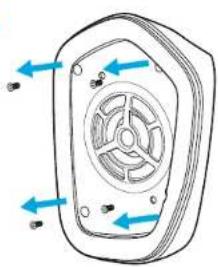
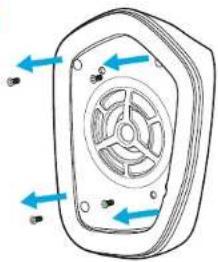
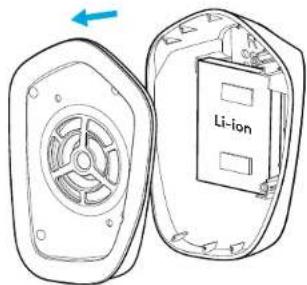
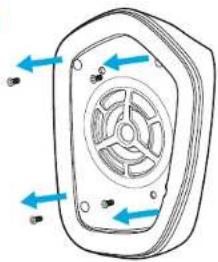
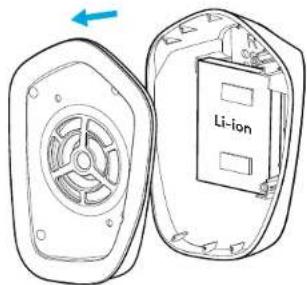
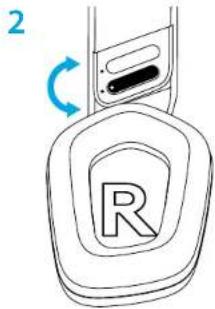
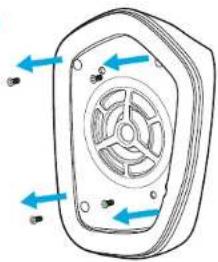
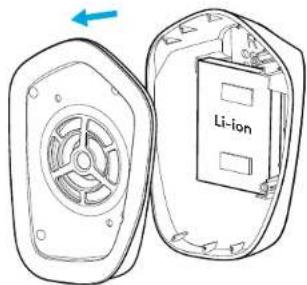
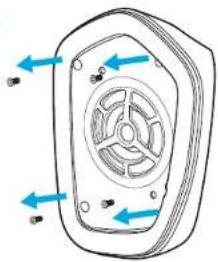
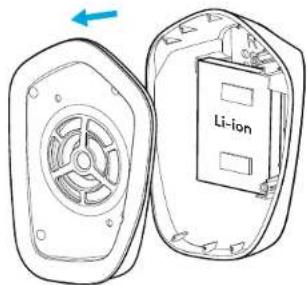
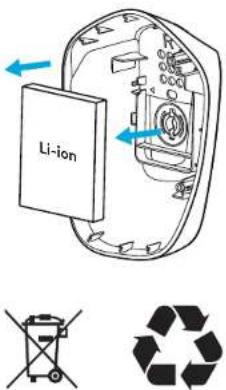
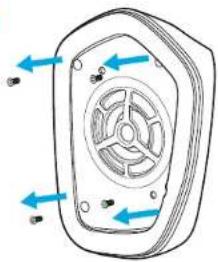
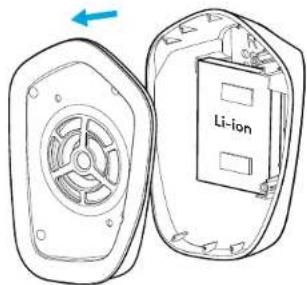
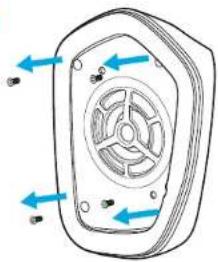
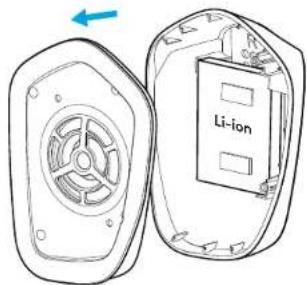
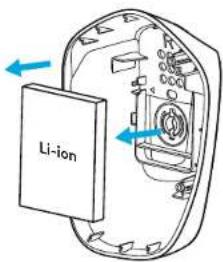
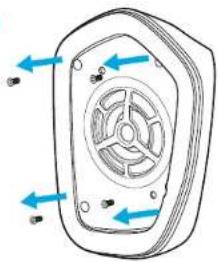
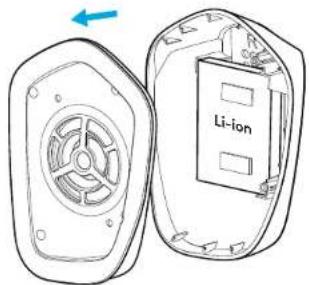
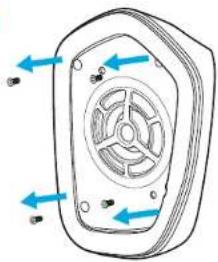
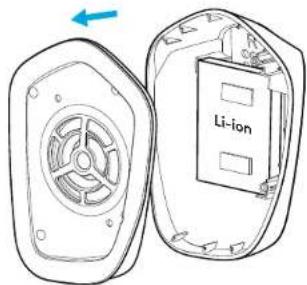
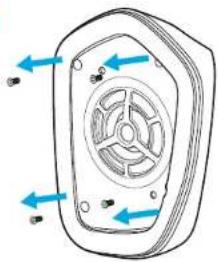
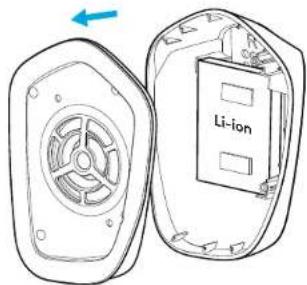
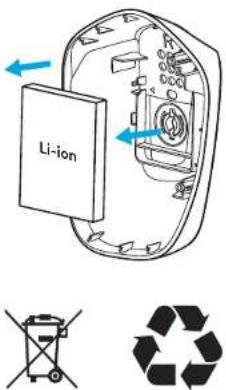
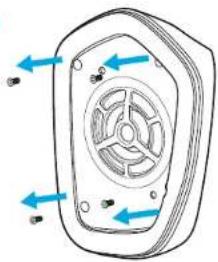
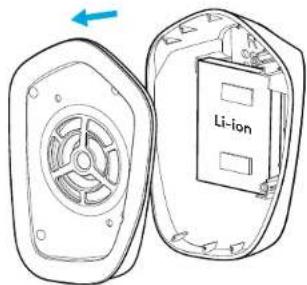
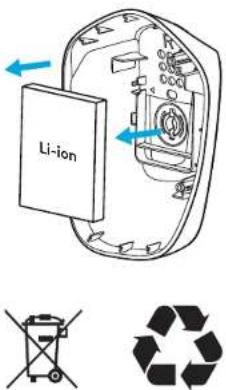
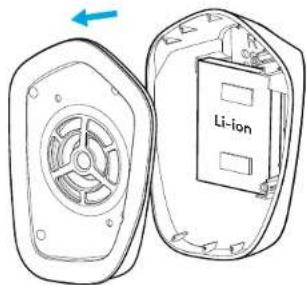
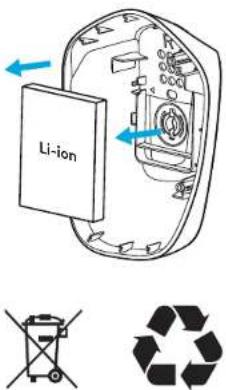
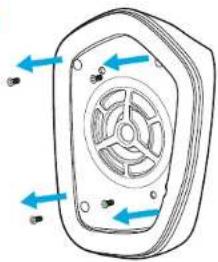
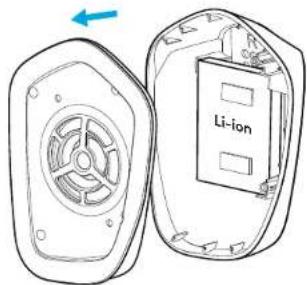
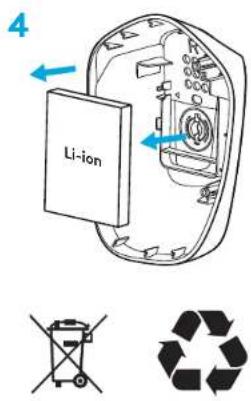
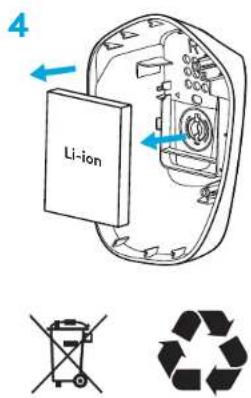
BATTERY REMOVAL FOR RECYCLING
1
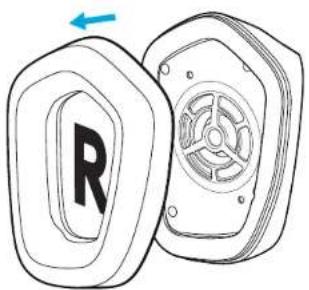
natural_image
Technical line drawing of a mechanical component with a labeled 'R' and a blue arrow indicating rotation (no text or symbols beyond the label)2
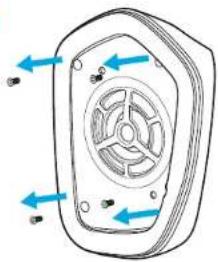
natural_image
Diagram of a device casing with internal fan and directional arrows indicating rotation (no text or symbols)3
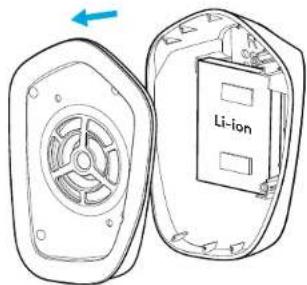
4
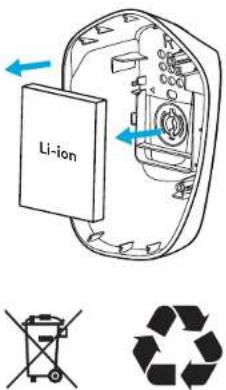
QUESTIONS?
logitechG.com/support/g733
www.logitech.com/recycling
SETUP-ANWEISUNGEN
9 DEUTSCH
natural_image
Technical line drawing of a mechanical component with a labeled 'R' and a blue arrow indicating rotation (no text or symbols beyond the label)2
natural_image
Diagram of a device casing with internal fan and directional arrows indicating rotation (no text or symbols)3
4
ES GIBT FRAGEN?
logitechG.com/support/g733
www.logitech.com/recycling
INSTRUCTIONS D'INSTALLATION
natural_image
Technical line drawing of a mechanical component with a labeled 'R' and a blue arrow indicating rotation (no text or symbols beyond the label)2
natural_image
Technical line drawing of a mechanical component with blue directional arrows indicating flow or movement (no text or symbols)3
4
DES QUESTIONS?
logitechG.com/support/g733
www.logitech.com/recycling
21 ITALIANO
natural_image
Technical line drawing of a mechanical component with a labeled 'R' and a blue arrow indicating rotation (no text or symbols beyond the label)2
natural_image
Diagram of a device casing with internal fan and directional arrows indicating rotation (no text or symbols)3
4
HAI DOMANDE?
logitechG.com/support/g733
www.logitech.com/recycling
natural_image
Technical line drawing of a mechanical component with a labeled 'R' and a blue arrow indicating rotation (no text or symbols beyond the label)2
natural_image
Technical line drawing of a mechanical component with blue directional arrows indicating flow or movement (no text or symbols)3
4
¿PREGUNTAS?
logitechG.com/support/g733
www.logitech.com/recycling
natural_image
Technical line drawing of a mechanical component with a labeled 'R' and a blue arrow indicating rotation (no text or symbols beyond the label)2
natural_image
Diagram of a mechanical component with blue arrows indicating direction, no text or symbols present3
4
PERGUNTAS?
logitechG.com/support/g733
www.logitech.com/recycling
INSTALLATIE-INSTRUCTIES
1 Steek de microfoonarm volledig in de headset.
39 NEDERLANDS
natural_image
Technical line drawing of a mechanical component with a labeled 'R' and a blue arrow indicating rotation (no text or symbols beyond the label)2
natural_image
Diagram of a device casing with internal fan and directional arrows indicating rotation (no text or symbols)3
4
VRAGEN?
logitechG.com/support/g733
www.logitech.com/recycling
INSTALLATIONSANVISNINGAR
45 SVENSKA
LOGITECH G HUB-PROGRAMVARA
natural_image
Technical line drawing of a mechanical component with a labeled part 'R' and a fan-like structure (no text or symbols beyond the label)2
natural_image
Diagram of a device casing with internal fan and directional arrows indicating rotation (no text or symbols)3
4
FRÅGOR?
logitechG.com/support/g733
www.logitech.com/recycling
INSTALLATIONSVEJLEDNING
51 DANSK
natural_image
Technical line drawing of a mechanical component with a labeled 'R' and a blue arrow indicating rotation (no text or symbols beyond the label)2
natural_image
Diagram of a device casing with internal fan and directional arrows indicating rotation (no text or symbols)3
4
HAR DU SP∅RGSMÅL?
logitechG.com/support/g733
www.logitech.com/recycling
KONFIGURERINGSVEILEDNING
57 NORSK
natural_image
Technical line drawing of a mechanical component with a labeled 'R' and a blue arrow indicating rotation (no text or symbols beyond the label)2
natural_image
Diagram of a device casing with internal fan and directional arrows indicating rotation (no text or symbols)3
4
HAR DU SP∅RSMÅL?
logitechG.com/support/g733
www.logitech.com/recycling
ASENNUSOHJEET
natural_image
Technical line drawing of a mechanical component with a labeled 'R' and a blue arrow indicating rotation (no text or symbols beyond the label)2
natural_image
Diagram of a device casing with internal fan and directional arrows indicating rotation (no text or symbols)3
4
KYSYTTÄVÄÄ?
logitechG.com/support/g733
www.logitech.com/recycling
ΟΔΗΠΕΣ ΕΓΚΑΤΑΣΤΑΣΗΣ
71 FAAHNIKA
ΧΑΡΑΚΤΗΡΙΣΤΙΚΑ
natural_image
Technical line drawing of a mechanical component with a labeled 'R' and a blue arrow indicating rotation (no text or symbols beyond the label)2
natural_image
Diagram of a device casing with internal fan and directional arrows indicating rotation (no text or symbols)3
4
EXETE EPΩTHΣΕΙΣ;
logitechG.com/support/g733
www.logitech.com/recycling
ПОДГОТОВКА К РАБОТЕ
natural_image
Technical line drawing of a mechanical component with a labeled 'R' and a blue arrow indicating rotation (no text or symbols beyond the label)2
natural_image
Diagram of a device casing with internal fan and directional arrows indicating rotation (no text or symbols)3
4
ВОЗНИКЛИ ВОПРОСЫ?
logitechG.com/support/g733
www.logitech.com/recycling
PRZYGOTOWANIE
natural_image
Technical line drawing of a mechanical component with a labeled 'R' and a blue arrow indicating rotation (no text or symbols beyond the label)2
natural_image
Diagram of a device casing with internal fan and directional arrows indicating rotation (no text or symbols)3
4


MASZ PYTANIA?
logitechG.com/support/g733
www.logitech.com/recycling
ÜZEMBE HELYEZÉSI ÚTMUTATÓ
natural_image
Technical line drawing of a mechanical component with a labeled 'R' and a blue arrow indicating rotation (no text or symbols beyond the label)2
natural_image
Diagram of a mechanical component with blue arrows indicating direction, no text or symbols present3
4
KÉRDÉSEI VANNAK?
logitechG.com/support/g733
www.logitech.com/recycling
POKYNY PRO NASTAVENÍ
natural_image
Technical line drawing of a mechanical component with a labeled 'R' and a blue arrow indicating rotation (no text or symbols beyond the label)2
natural_image
Technical line drawing of a mechanical component with blue directional arrows indicating flow or movement (no text or symbols)3
4
MÁTE OTÁZKY?
logitechG.com/support/g733
www.logitech.com/recycling
POKYNY NA NASTAVENIE
natural_image
Technical line drawing of a mechanical component with a labeled 'R' and a blue arrow indicating rotation (no text or symbols beyond the label)2
natural_image
Diagram of a device casing with internal fan and directional arrows indicating motion (no text or symbols)3
4


MÁTE OTÁZKY?
logitechG.com/support/g733
www.logitech.com/recycling
natural_image
Technical line drawing of a mechanical component with a labeled 'R' and a blue arrow indicating rotation (no text or symbols beyond the label)2
natural_image
Diagram of a device casing with internal fan and directional arrows indicating flow or movement (no text or symbols)3
4
МАЄТЕ ЗАПИТАННЯ?
logitechG.com/support/g733
www.logitech.com/recycling
SEADISTAMISE JUHISED
natural_image
Technical line drawing of a mechanical component with a labeled 'R' and a blue arrow indicating rotation (no text or symbols beyond the label)2
natural_image
Diagram of a device casing with internal fan and directional arrows indicating rotation (no text or symbols)3
4
KUI TEIL ON KÜSIMUSI
logitechG.com/support/g733
www.logitech.com/recycling
SAGATAVOŠANA DARBAM
"LOGITECH G HUB" PROGRAMMATÜRA
natural_image
Technical line drawing of a mechanical component with a labeled 'R' and a blue arrow indicating rotation (no text or symbols beyond the label)2
natural_image
Diagram of a device casing with internal fan and directional arrows indicating rotation (no text or symbols)3
4
JAUTĀJUMI?
logitechG.com/support/g733
www.logitech.com/recycling
SARANKOS INSTRUKCIJOS
123 LIETUVIŲ
natural_image
Technical line drawing of a mechanical component with a labeled 'R' and a blue arrow indicating rotation (no text or symbols beyond the label)2
natural_image
Diagram of a device casing with internal fan and directional arrows indicating rotation (no text or symbols)3
4
TURITE KLAUSIMU?
logitechG.com/support/g733
www.logitech.com/recycling
ИНСТРУКЦИИ ЗА ИНСТАЛИРАНЕ
natural_image
Diagram of a car door handle with a circular logo and blue arrow indicating rotation (no text or symbols)131 БЪЛГАРСКИ
ФУНКЦИИ
natural_image
Technical line drawing of a mechanical component with a labeled 'R' and a blue arrow indicating rotation (no text or symbols beyond the label)2
natural_image
Diagram of a device casing with internal fan and directional arrows indicating rotation (no text or symbols)3
4
ВЪПРОСИ?
logitechG.com/support/g733
www.logitech.com/recycling
UPUTE ZA POSTAVLJANJE
1 Utaknite nosač mikrofona u slušalice do kraja.
1
natural_image
Technical line drawing of a mechanical component with a labeled 'R' and a blue arrow indicating rotation (no text or symbols beyond the label)2
natural_image
Diagram of a device casing with internal fan and directional arrows indicating rotation (no text or symbols)3
4
PITANJA?
logitechG.com/support/g733
www.logitech.com/recycling
UPUTSTVA ZA PODEŠAVANJE
natural_image
Technical line drawing of a mechanical component with a labeled 'R' and a blue arrow indicating rotation (no text or symbols beyond the label)2
natural_image
Diagram of a device casing with internal fan and directional arrows indicating rotation (no text or symbols)3
4
IMATE PITANJA?
logitechG.com/support/g733
www.logitech.com/recycling
NAVODILA ZA NAMESTITEV
PROGRAMSKA OPREMA LOGITECH G HUB
(Izbirno) Prenesite programsko opremo Logitech G HUB za dostop do naprednih funkcij. Prenesite z naslova logitechG.com/ GHUB.
natural_image
Technical line drawing of a mechanical component with a labeled 'R' and a blue arrow indicating rotation (no text or symbols beyond the label)2
natural_image
Diagram of a device casing with internal fan and directional arrows indicating rotation (no text or symbols)3
4
VPRAŠANJA?
logitechG.com/support/g733
www.logitech.com/recycling
INSTRUCTIUNI DE CONFIGURARE
natural_image
Technical line drawing of a mechanical component with a labeled 'R' and a blue arrow indicating rotation (no text or symbols beyond the label)2
natural_image
Diagram of a device casing with internal fan and directional arrows indicating motion (no text or symbols)3
4
ÎNTREBĂRI?
logitechG.com/support/g733
www.logitech.com/recycling
KURULUM YÖNERGELERİ
natural_image
Technical line drawing of a mechanical component with a labeled 'R' and a blue arrow indicating rotation (no text or symbols beyond the label)2
natural_image
Diagram of a device casing with internal fan and directional arrows indicating rotation (no text or symbols)3
4
SORUNUZ MU VAR?
logitechG.com/support/g733
www.logitech.com/recycling
إرشادات الإعداد
زات ١٠٠ مه ي
natural_image
Technical line drawing of a mechanical component with a labeled 'R' and internal fan-like structure (no text or symbols beyond the label)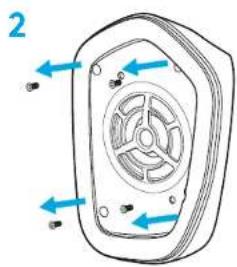
natural_image
Diagram of a fan or vent device with blue arrows indicating direction, no text or symbols present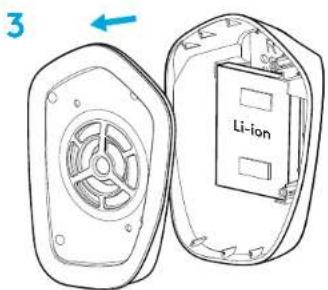
هل لديك لستفسرک؟
logitechG.com/support/g733
www.logitech.com/recycling
תְקַרָה בְאָרִי
תְבָרִי
www.logitech.com/recycling
natural_image
Diagram of a mechanical component with a labeled part 'R' and a side view showing internal structure (no text or symbols beyond the label)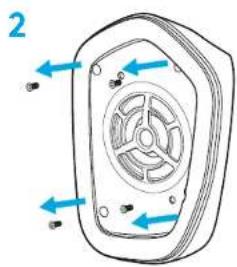
natural_image
Diagram of a fan or vent device with blue arrows indicating direction, no text or symbols present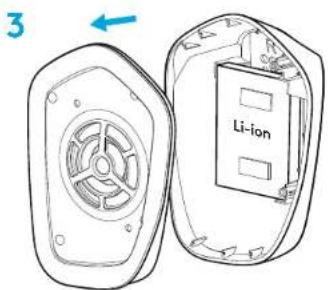
?תָאַע
logitechG.com/support/g733
www.logitech.com/recycling

logitech™
©2020 Logitech. Logitech, Logitech G. Logi and their respective logos are trademarks or registered trademarks of Logitech Europe S.A. and/or its affiliates in the U.S. and other countries. All other trademarks are the property of their respective owners. Logitech assumes no responsibility for any errors that may appear in this manual. Information contained herein is subject to change without notice.
WEB-621-001665.002