40B330X - Battery HUSQVARNA - Free user manual and instructions
Find the device manual for free 40B330X HUSQVARNA in PDF.

 FR
FR
 BG
BG
 CS
CS
 DA
DA
 DE
DE
 EL
EL
 EN
EN
 ES
ES
 ET
ET
 FI
FI
 HU
HU
 IT
IT
 JA
JA
 KO
KO
 LT
LT
 LV
LV
 NL
NL
 PL
PL
 PT
PT
 RO
RO
 RU
RU
 SK
SK
 SL
SL
 SV
SV
 TR
TR
 UK
UK
 VI
VI
 ZH
ZH
| Product type | Rechargeable lithium-ion battery |
| Brand | Husqvarna |
| Model | 40B330X |
| Nominal voltage | 36 V |
| Weight | Approx. 1.4 kg |
| Operating temperature | -10 °C to 40 °C |
| Charging temperature | 5 °C to 40 °C |
| LED indicators | Charge level (4 LEDs), error, temperature |
| Wireless connectivity | Bluetooth® built-in (model dependent) |
| Mobile app | Husqvarna Connect, Husqvarna Fleet Services |
| Firmware update | Automatic via Bluetooth® |
| Approved chargers | QC330, QC500, 40-C500X, 40-C750X, 40-C1000X4 |
| Protection | Splash-proof, electronic protection |
| Long-term storage | 5-25 °C, charge between 30% and 50% |
| Repairability | Repairs exclusively by an authorized dealer |
| Standards | CE, UKCA |
| Maintenance | Clean terminals with a dry cloth |
| Product symbols | Do not dispose of in household waste, WEEE recycling |
Frequently Asked Questions - 40B330X HUSQVARNA
User questions about 40B330X HUSQVARNA
0 question about this device. Answer the ones you know or ask your own.
Ask a new question about this device
Download the instructions for your Battery in PDF format for free! Find your manual 40B330X - HUSQVARNA and take your electronic device back in hand. On this page are published all the documents necessary for the use of your device. 40B330X by HUSQVARNA.
USER MANUAL 40B330X HUSQVARNA
EN Operator's manual 2-10
BG PkoBOCTBO 3a eKcIIOaTua11-20
CS Navod k pouziti 21-29
DA Brugsanvisning 30-38
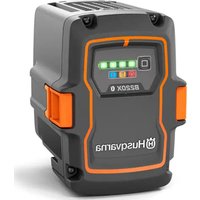
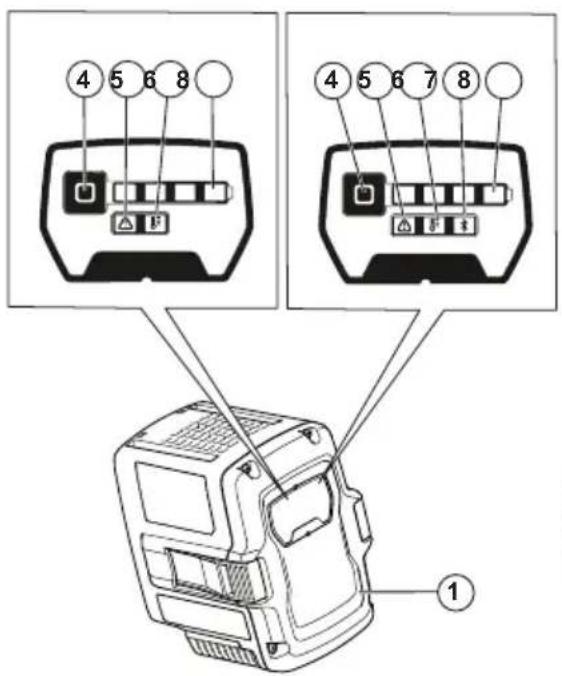
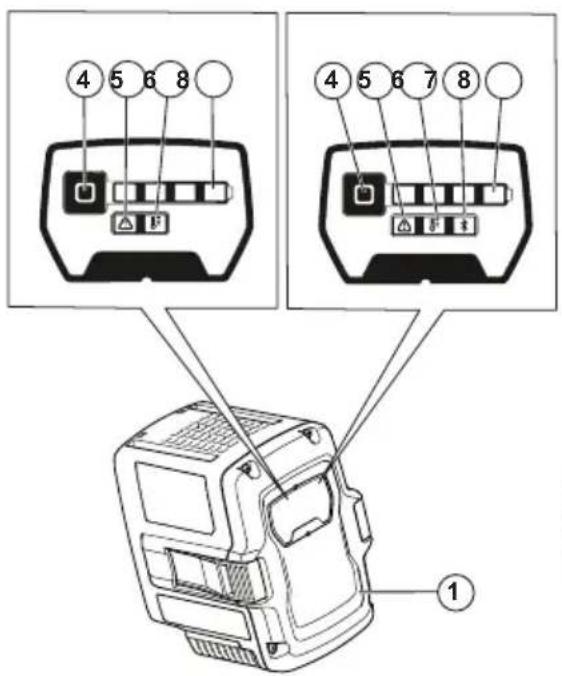
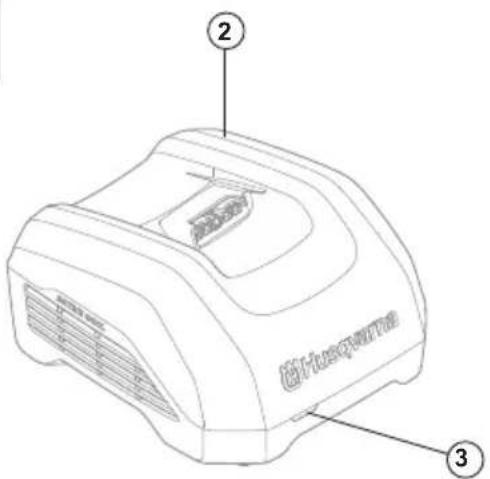
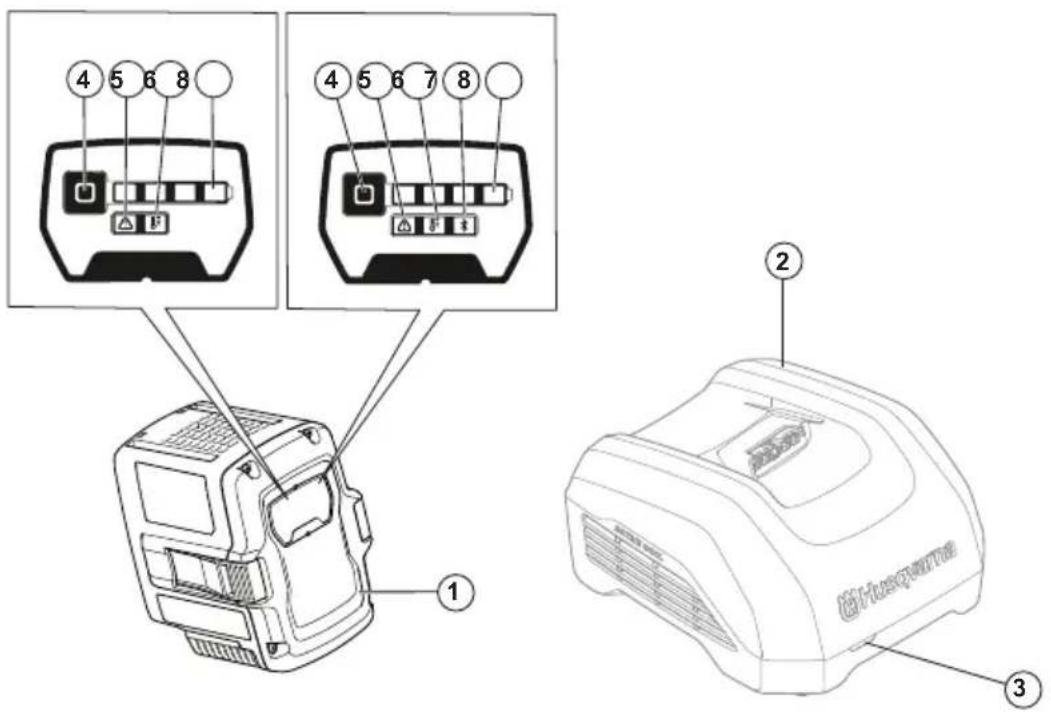
- Battery
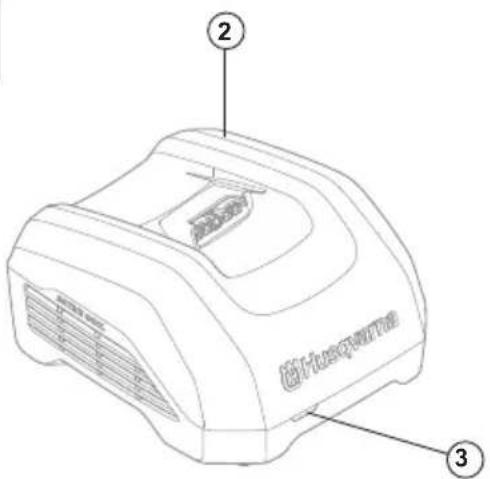
- Battery charger (accessory)
- Charging and error indicator on charger
- Battery indicator button
- Error indicator on battery
- Battery temperature indicator
- Bluetooth indicator (if applicable)
- Charging indicators for the state of charge
Symbols on the product

Be careful and use the product correctly. This product can cause serious injury or death to the operator or others.

Read the operator's manual carefully and make sure that you understand the instructions before you use this product.

Protected against splashing water.

The product agrees with the applicable EC directives.

This product conforms to the applicable UK regulations.

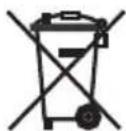
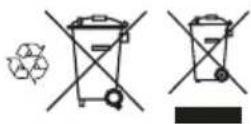
Recycle the product at an applicable disposal location for electrical and electronic equipment.
The product or package of the product is not domestic waste.

Do not submerge the battery in water.

If the product features Bluetooth® wireless technology. The Bluetooth® symbol will be marked on the product name label. Refer to Bluetooth® wireless technology on page 5.
Note: Other symbols/decals on the product refer to certification requirements for some commercial areas.
Safety definitions
Warnings, cautions and notes are used to point out specially important parts of the manual.

WARNING: Used if there is a risk of injury or death for the operator or bystanders if the instructions in the manual are not obeyed.

CAUTION: Used if there is a risk of damage to the product, other materials or the adjacent area if the instructions in the manual are not obeyed.
Note: Used to give more information that is necessary in a given situation.
Important safety instructions

WARNING: Read all safety warnings and all instructions. Failure to obey the warnings and instructions may result in electrical shock, fire and/or serious injury.
Note: Save all warnings and instructions.
-
Only use Husqvarna approved battery chargers to charge Husqvarna original batteries. The batteries are software encrypted.
-
Use Husqvarna approved batteries that are rechargeable as a power supply for the related Husqvarna products only. To prevent injury, do not use the battery as a power supply for other devices.
- Do not try to disassemble or repair the battery. All repairs is to be done by an approved dealer only.
- Keep the battery away from sunlight, heat or open flame. The battery can cause burns and/or chemical burns.
- Do not use a defective or damaged battery or battery charger.
- Do not cause mechanical shock to the battery.
- Keep the battery away from children.
- Keep the battery clean and dry.
- Clean the battery terminals with a clean dry cloth if they become dirty.
- Do not keep the battery in the battery charger when it is fully charged.
- Remove the battery from the product when you do not use it and during transportation.
- Keep batteries in storage away from metal objects such as nails, screws or jewelry.
Operation
- Push the battery indicator button to start the battery before use.
- The battery must be charged before you use it for the first time. Always use a Husqvarna approved battery charger. Refer to Approved battery chargers on page 9.
- Use the battery only when the ambient temperature is between -10^ ( 14^ ) and 40^ ( 104^ ).
- Decrease the workload and/or speed when the battery temperature indicator is flashing.
Note: Heavy workload when the battery temperature is less than 0^ (32^) can cause a temporary battery error.
- Use the battery charger only when the ambient temperature is between 5^ (41^) and 40^ (104^) .
- The battery will not charge if the battery temperature is more than 50^ (122^) .
- Push the battery indicator button to get information of the state of charge of the battery.
Husqvarna Connect
Husqvarna Connect is a free app for your mobile device. The Husqvarna Connect app gives extended functions for your Husqvarna product.
- Extended product information.
- Information about, and help with, product parts and servicing.
For more information about Husqvarna Connect, refer to www.husqvarna.com.
Note: Husqvarna Connect app is not available for download in all markets. Speak to your servicing dealer for more information.
To start to use Husqvarna Connect
- Download the Husqvarna Connect app on your mobile device.
- Register in the Husqvarna Connect app.
- Follow the instruction steps in the Husqvarna Connect app to connect and register the product.
Note: Husqvarna Connect app is not available for download in all markets. Speak to your servicing dealer for more information.
Husqvarna Fleet Services
Husqvarna Fleet Services™ is a cloud solution that gives the commercial fleet manager an overview of all products. Husqvarna Fleet Services™ is available as a web service and as an app. For more information about Husqvarna Fleet Services™, refer to www.husqvarna.com.
Note: Husqvarna Fleet Services™ cloud solution is not available in all markets.
To connect to the product with Husqvarna Fleet Services™
- Download the Husqvarna Fleet Services ^TM app to your mobile device.
- Log on to the Husqvarna Fleet Services ^a app.
- Follow the instructions about how to pair the product with Husqvarna Fleet ServicesTM.
Bluetooth® wireless technology
Products with built-in Bluetooth® wireless technology can connect to mobile devices and enables additional functions.
The symbol for Bluetooth® wireless technology comes on when your mobile device is connected to the product.
Update firmware over the air (for batteries with built-in Bluetooth®)
Batteries with Bluetooth® download and install new firmware automatically.
- The download starts when new firmware is available and the battery is connected to Husqvarna Connect or Husqvarna Fleet Services™.
- The Bluetooth indicator shows when the battery is connected while the battery display is active.
- Firmware download takes 10-15 minutes. If the download stops or fails, the battery will try to download the firmware again.
- Firmware installation starts when the download is complete and the battery is not in use or charging.
The LED indicators for state of charge pulse during the firmware installation. Firmware installation takes 10-15 seconds.
To charge the battery
Charge the battery before the first time of operation. A new battery is charged 30% . Push the battery indicator button to get information of the state of charge of the battery.

CAUTION: Only charge the battery when the ambient temperature is between 5^ (41^) and 40^ (114^) .

CAUTION: Use the battery only when the ambient temperature is between -10^ (14^) and 40^ (104^) .
Note: The battery will not charge if the battery temperature is more than 50^ (122°F).
- Put the battery in the battery charger. When the charging indicator on the battery charger comes on, the battery is connected correctly to the battery charger.
- The battery is fully charged when all the charging indicators on the battery are on.
- Remove the battery from the battery charger.
Battery charging status
A Husqvarna Li-ion battery can be charged or used at all charging levels.
| Charging indicators Battery status (state of charge) | |
| 4 charging indicators are on The battery | ery is 76% - 100% charged. |
| 3 charging indicators are on The battery | ery is 51% - 75% charged. |
| 2 charging indicators are on The battery | ery is 26% - 50% charged. |
| 1 charging indicator is on The battery | is 11% - 25% charged. |
| 1 charging indicator flashes The battery | ery is 0% - 10% charged. |
Troubleshooting
| Symptoms Cause Action | ||
| The battery error indicator flashes. The battery is empty. | Charge the battery. | |
| Heavy workload in combination with very low battery temperature. | Make the battery warm. For example, move it indoors or operate at low speed until the battery is warm. | |
| The battery does not operate. The operating range of the battery is at its limit. | Remove the battery from the product. Wait 5 minutes. Push the battery indicator button. | |
| The battery temperature indicator is ON. | The battery is too cold or too hot to use. | Keep the battery in an ambient temperature between -10°C (14°F) and 40°C (104°F). When the battery has the correct temperature, it can be used again. |
| The battery temperature indicator flashes. | The battery is near its temperature limits. | Decrease the speed and/or workload. Keep the battery in the preferred temperature between +10°C (50°F) and +30°C (86°F) for optimal performance. |
| The battery temperature indicator is ON while the battery is in the charger. | Temperature deviation, the battery is too cold or too hot to charge. | Let the battery cool down or move it indoors to warm it up. When the battery has the correct temperature, it can be charged again. Make sure to use the charger where the ambient temperature is between 5°C (41°F) and 40°C (104°F). Keep the charger away from sunlight. If the problem continues, speak to your dealer. |
| The battery error indicator comes on. The battery has a critical error. Speak to your Husqvarna servicing dealer. | ||
Transport and storage
- The supplied Li-ion batteries obey the Dangerous Goods Legislation requirements.
- Obey the special requirement on package and labels for commercial transportations, also those from third parties and forwarding agents.
- Speak to a person with special training in dangerous material before you send the product. Obey all applicable national regulations.
- Use tape on the contacts when you put the battery in a package. Put the battery in the package tightly to prevent damage and accidents.
- Do not keep the battery in an area where static electricity can occur. Do not keep the battery in a metal box.
- Put the battery in a dry, frost free and clean space with correct temperature.
- Put the battery in storage where the temperature is between 5^ (41 F) and 25^ (77 F). Keep the battery away from sunlight.
- Charge the battery 30% to 50% before you put it in storage for long periods.
- Clean the battery before you put it in storage.
Disposal
The symbol means that the product is not domestic waste. Recycle it through your local collection system for electrical and electronic equipment.
This contributes to proper end of life waste management. Contact local authorities, domestic waste services, your dealer or retailer for information. Incorrect disposal may have potential negative effects on the environment and human health, due to the potential presence of hazardous substances.
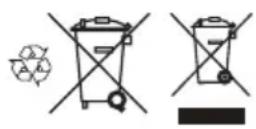
Note: The symbol shows on the product or package of the product.
Registered trademarks
The Bluetooth® word mark and logos are registered trademarks owned by and any use of such marks by Husqvarna is under license.
Technical data
For technical data, refer to the rating plate on the battery.
Approved battery chargers
Table 1: Approved battery chargers for 40-B140X, 40-B220X, 40-B330X
| Battery charger QC330 | QC500 40-C500X 40-C7 | 50X 40-C1000X4 | |||
| Output voltage, V 36 36 | 36 36 36 | ||||
| Input voltage, V 100-24 | 100-240 100-240 100- | 240 100-240 | |||
| Frequency, Hz 50-60 50 | 50-60 50-60 50-60 50-60 | ||||
| Power, W 330 500 500 | 500 750 1000 | 1 |
Table 2: Approved battery chargers for 40-B540X
| Battery charger 40-C500X 40-C750X 40-C1000X4 | |||
| Output voltage, V | 36 | 36 | 36 |
| Input voltage, V | 100-240 | 100-240 | 100-240 |
| Frequency, Hz | 50-60 | 50-60 | 50-60 |
The maximum power when charging only one battery is 600W .
| Battery charger 40-C500X 40-C750X 40-C1000X4 | |||
| Power, W 500 750 1000 | 2 |
The maximum power when charging only one battery is 600W .
O6u npereJeHa npodykTa
1.Akymyatapopha6aTepeirna
2.3apAHO yCTPOIcTBO 3a akyMnATOpHn 6aTePn (npHaIeJXHOCT)
3.ИндикатopзаЗapекданeигршkaHaЗарДНOTOуCTpoICTBO
4. BytoH 3a INDkaTopa Ha akymyIaTOpHaTa 6aTepeRn
5. INHdkatop 3a rpeuKa Ha akyMnaTophata 6aTepy
6. INHdkaTOp 3a TempepaTpata Ha akymyatopHata 6atepn
7. INHdkaTop 3a Bluetooth (ako e npnoxmo)
8. INHINKaTOpn 3a 3apeJxJaHe 3a cbCToRHeTo Ha 3apeJxJaHe
CnmboJIbIpy npOdykTa

BHHMABaIe Nn3nON3BaIe npOyKta npabINHO.ToN npOyKT MoKe Da npuHnCepNo3HO HapaHbAHe mN CmbpT Ha onepaTopa nDpyrXopa.

PpoTeTe BHHMaTeJIHO pKBOIOCTBTO 3a Onepatopa nCe yBepeTe,Ye pa36npaTe NHCtpyKunTe, npEn Da n3NoI3BaTe TO3n IpOdyKT.

Cbc 3aunTa cpeuByoDn npbckn.

IpoDyKTbTeBCbOTBeTcTBnC npNIOXIMNTe DnpeKTHBnHaEO.

To3n npOdyKT cB0TBcTBA Ha npINIOKIMTe peIaMeHTn Ha O6eINHeHOTo KpAnCTBO.

PeunipnTne npdykTa B noDxOJaI nyHKT 3a nXbPnHe 3e neKtpnuecko I eKeKtpoHHO o6OpyDahe.
PpOdykTbT mNOnaKOBkata Ha npOdykTa He e 6ntOB OTnAdbK.

He notaan Te akymnaTophata 6aTepeBbB Oda.

Ako npodykTb paanona c 6e3xuHa texhonorRa Bluetooth®. CmB0JIbT Bluetooth® ue 6bIe MapKpauH Bbypxy etnkeTa c nme Ha npodykTa. HanpaBeTe cnpaBaKa C Bluetooth® 6e3xuHa texhonorRa ha ctpaHya 15.
3a6eJekka: OcTaHaJIte CnMbON/CTNKePN Ha npOdyKTA ce OTHACrI Do NmCKBaHnNo OTHOWeHne Ha cepTnCnKaTn 3a HkON TbPROBKn PLOU.
DeΦnHnζn 3a 6e3oNaCHOCT
IpeDynpexdHnna3aun3aBHHMaHne n6eJeknCe n3no3BaT 3a yka3BaHe Ha oOc6eHo BaxKn Yactn Ha HnCTpyKmTa.

I PEPDyPEXKDEHME: 3nnon3Ba ce,ako
IMaOnaCHOCTOTHapaHbAHeMNcMbPT3aonepaTopa INN3aOKONHNTe,AKOHECEcnaaBAtNHCTpyKUnTeB pkoBOCDTBOTO.

BHIMAHNE: I3noI3Ba ce, aKo Ima onaCHOCT
OT NOBPEKDAHe Ha MaUHnHaT, DpyrN MaTePMAHn NnCbCeDnHaTa 3OHa, aKO He ce Cna3BaT HnCTpykUnITE BpbKOBODCTBOTO.
3a6eJexKa: N3noI3Ba ce 3a npedocTabaHe Ha nobue HnHcOpMaun, KoTTo e Heo6xoDmAb DaDaHa CHTyaun.
BaxHn HnCTpyKznn 3a 6e30napocT

ПЕДУПЕХДECHNE:почетe
BHNMaTeHNO BCNUKn PnpeDnyPpeKdEHHa 3a Be3oNaChOCTTa nHcTpyKuNTe. Hecna3BaHeTo Ha npEynpeKdEHHa Ta nHcTpyKuNTe Moke Da IOBeDe e O enkTpuYeckn yUpap, Noxkap W/nn Cepno3Ho HapaHaBaHe.
3a6eJekka: 3anaTe BCnKn npedynpejckdneHn nHcTpykun.
I3n03BaIe cmo Oo6peHn 3apAHN yCtpoiCTBa 3a akymyIaNTOPHN 6atepHn HUsqvarna 3a 3apeKDaHe Ha opfHnHaHn akymyIaNTOPHN 6atepHn HUsqvarna. AkymyIaNTOPHN 6atepHn ca uHΦpOBaHn coΦTyepHo.
ИзлбайтakymnatopнБаери,odobpeHHOTHusqvarna, KOITcAпгэарждам,在КATOИЗTOCHHKHa3axpaHBaHe caMO 3a CBpb3AHTE npOdykTNHUsqvarna.3aДа npeDToBpATNE HapaHbAHe, HeИЗПОЛБaHTeakymnatOPHATAбapertnKaTOИЗTOHKNHa 3axpaHbAHe 3aДугYNyCTpoiNCTBA.
He ce onnBaTte da pa3rno6Bate nnn nonpaBATE akymnatopHata 6aTepe. Bcukn nonpABKn Tpr6Ba da ce mBbPwBAT cmo OT oOobpen dIuIbP.
CbxpaaBaiTe akyMnyatopHata 6atepynaeoy ot cnbheBa CBETnHa, TOnnHa HIN OTKPNT ORbH. AkyMnyatopHata 6atepyma MoKe Da npuHHN u3rapHn N/Inxmmueckn n3rapHn.
- He n3non3BaIte depeKTHn IIN NOBpeHn akMyIaTOPH6aTePn INI 3apAHy yCTpOHTBA.
- He n3naraite akymynatophata 6atepyra ha MexaHueydap.
-ДрькTe akMynaTopHata 6aTepe nO T deua.
-Подьржай Te akymу latopнata 6atepyu ncta n cyxa.
-ПочntВаiteКлемпeHaakymyNatopHata6aTePnCчNTaN cyxa Kbpna,aKo ce 3ambpcrt.
He npkTe akymnatoPnata 6aTePnB 3apnHOTo yCTpoNCTBO 3a 6aTePnN, Korato e Hnblno 3apeDeHa.
-ИЗвадиTe akymnatopHATA 6atePry O TpoDyKTA, KOrato He ro
ИЗнOL3BaTe I NO BpeMe Ha TpaHCnOptuPaHe.
CbxaHbAte akymynatophata 6aTepe nJaNeOT MeTnHn npedmetN, KATO r03dE, BHTOBe HIN6kkyTA.
Eknnoataua
HaTnchTe 6yToHa Ha HnDnKaTopa Ha akymnaTophata 6aTepe,3a da CTaptnpaTe akymnaTophata 6aTepe npedynotpe6a.
AkyMnataOpHata 6aTepeRna Tpa6ba da 6be 3apeHa, npedn da na n3no3BaTe 3a nbPBn bT. BnHaru n3no3BaIte 3apraHo yctpoNCTBO 3a akymnatopHbTeepn, oObopeHo ot Husqvarna. Hanpabete cnpabKa C Oo6peHn 3apraHn yctpoNCTBa 3a akymnatopHb6aTeepn Ha cTpaHnla 19.
-Излбайе akумларогнаьатя батерma само кога темпетараза
н оклнота срда EMжд -10°C (14°F) и 40°C (104°F).
HamaTe HatoBapBaHETO/INNCKOPoCTTA, KOraTo INnKAtOpbT 3a TempepaTpa Ha akymyataopHATA Batepna Mira.
3a6eKka: TOnJAMOTHOHATOBAPBaHe, KORATO TEMNEpatyata Ha akymylatopHata 6atePnE eo0C (32^) , MoKe Da npuHHBpeMeHHa TpeWka Ha akymylatopHata 6atePn.
- ⅢnON3BaIte 3apJHTo yCtpoNCTBO 3a akymyIaTOPHb6aTePNcAMO KOrato OKoJIHATA TempepaType a MeKdy 5^ (41°F) u 40^ (104°F).
- AkymylaTopnata 6aTeprna Hma da ce 3apekda, ako HeHaTa Tempepatya e Na50°C (122°F).
HaHnchete6yToHa HnHnKAtopa Bbpxy akymnatopnata 6aTepeRna,3a da nOpyHe INHOpMaun 3a cbCToHneto Ha 3apeXdaHe.
Husqvarna Connect
Husqvarna Connect e 6e3nntno npnloKeHe 3a BaWeTo MObInHO yctpoCTBO. PnploKeHeTo Husqvarna Connect ocNpyPba pa3wnpeHn fynkun 3a Bawn npOyKT ha Husqvarna.
- Pa3zmpena npoodykTOba INHΦopMaζη.
- INHOpMaIgN NOMOu 3a YactHTe Ha npOdykTa N cepBn3HOTo 06CnykBaHe.
3a noBuee HnDopMaun oTHocHo Husqvarna Connect HanpaBeTe cnpabKa C www.husqvarna.com.
3a6eJekka: PnIIOxKeHHeTo Husqvarna Connect He e HauNHO 3a n3TefJIHe Na BCNU na3apn. TOBOpTe c Baunr cepBn3eH dInbP 3a noBeue INHFOpMaunr.
3a da 3anoHete da n3noJbate Husqvarna Connect
- N3terne Te npIIOxKeHnTo Husqvarna Connect Ha BaJeTo Mo6nHno yctpoiCTBO.
- Perictpaate Ce B npioKeHMeTo Husqvarna Connect.
3.CneDbaiTe Ctbknte C nHctpyKuB INpnoKeHHeTo Husqvarna Connect, 3a da cBbpxte u pernctpnpate npoDyka.
3a6eKka: PnnoKeHHeTo Husqvarna Connect He e HauNHO 3a nTERJHe Ha BCmKn nAsapri. CbpxTe ce c dncTpnpbyTop no o6cnykBaHTo 3a nobYe INΦopMaunr.
Husqvarna Fleet Services
Husqvarna Fleet Services™ e peeweHne B oblauHa cpeHa, Koeto ocunpyBa npernied Ha MeHHdKbpa Ha TexHOJorNCHnI napK bByx BCnKn npOyTn. Husqvarna Fleet Services™ ce pnpnara kaTo yeBcyNuRa n KaTo npInnoXeHne. 3a noBeue HnΦopMaunr OTHocHo Husqvarna Fleet Services™ HanpabeTe cnpaBAc w www.husqvarna.com
3a6eJekka: PeSeHneTo B obJaKa Ha Husqvarna Fleet ServicesTM He e HauNHy Ho BaCUnKn Ia3apn.
3a da ce cBbpxTe c npOyKa Ype3 Husqvarna Fleet ServicesTM
1.ИЗternete npinoxeHnTo Husqvarna Fleet Services TM Ha BaWeto MO6NINHO yCTpOJcTBO.
2. Bne3e B npnIOKeHHeTo Husqvarna Fleet Services TM
3. CnEaBaiTe INCTpyKuNTe KaK Da cDBOHTe npOyKTa c Husqvarna Fleet ServicesTM.
Bluetooth® 6e3xuHa TExHONor
IpoodyKTne C Brpaedena 6e3KnHn TexHoNOrn BluteothoMorat Da ce CBp3BaT KbM MoBnHn yCTpOInCTBa n daBaT Bb3MOXHOCT 3a DonbHnTeHN HfYHKmN.
CmBOnbT 3a 6e3KnHua TexHoNOrn Bluteoth Ce noRaBA, KoraTo BaWeto MoBnHO yCTpOCTBO e CBpbAHO KbM npOdykTA.

AkymaIaTOPHne 6aTeepn C Bluetooth® n3TeTn INHCTannpaT HOBn Φbpmyep aTOMaTHNO.
- ⅢternnaHTo cTAptnpa, koraTo e haImueH HOB phbpyep u akymyataOpHATA 6aTepe n e CbP3aHa KbM Husqvarna Connect nn Husqvarna Fleet ServicesTM.
-
INДиКаTObt 3a Bluetooth® nOKa3Ba KOra AkymyNaTOpHaTa 6aTePnEr e CbBp3aHa, DOKaTO DNcNJIeT Ha AkymyNaTOpHaTa 6aTePnEr e AKTNBeH.
-
I3TeTnIeHTo Ha Φbpmyepa OTHema 10 - 15 MmHyTN. Ako n3TeTnIeHTo cnpe nn He e ycneuHo, aKymyNaTopHaTa 6aTePnIe ce oOnTa da n3TeTnIeΦbpmyepa OTHOBO.
-Инстанные нафырмашира, korato n3TeHЯпуTo npNKIOUn AnkyMnaTOpHATA 6aTePnI He ce N3NoJ3Ba IIN 3apeXJa.
CBeToIOIOHnTE INIINKaTOpn 3a CbCToHnETo HA IMNynCaHa 3apeXdahe No BpeMe Ha INCTaIIpaHeto Ha pMyepa. IHCTaIIpaHeto Ha pMyepaOTHEMA10-15cekydN.
3a 3apekdahe Ha akymylaTopHaTa 6aTepe
Ppei nbpbaata paobtoHa onepaunna 3apeTe akyMnyatopnata 6atepyra. Hobata akymnatopha 6atepye 3apeHena Ha 30% .HaTnche 6yToHa Ha HnDnKaTopa Bbpxy akymnatopnata 6atepyra, 3a da nonyUHTe INHOpmaua 3a CcbctoHHeTo Ha 3apeKdahe.

BHIMAHNE: 3apekdaTe akyMylaTOpHaTa 6aTepe na cmo KoraTo TEMnepaTypaTa Ha OKONHaTa cpe da e MeKdy 5^ (41^) u 40^ (114^)

BHIMAHHE: ɪənərəBaiTe akymyaTOpHaTa
6aTepe na Camo KoraTo TEMpepaTypTa Ha OKonHaTa cpea e
MeXdy -10°C (14°F) n 40°C (104°F).
3a6eJekka: AkymlyaTopHaTa 6aTePnHa HMa da ce 3apeKda, ako HeHata Tempepatya e HaD 50^ (122^)
- NocTabete akymlyaTophata 6aTepeBn B 3apJHOTO yCTpoiCTBO. Korato INdikatopbT 3a 3apeKdahe Ha 3apJHOTo yCTpoiCTBO 3a akymlyaTopn 6aTepeN CBtHe, akymlyaTophata 6aTepeN e Cbpb3Ha npabINHO KbM 3apJHOTo yCTpoiCTBO 3a akymlyaTopn 6aTepeN.
2.AkymyNatopHata 6aTepeR e HantbIHO 3apeDeHa, KORATO BCNUKINHHDKaTOp 3a 3apeJdaHe Ha akymyNatopHata 6aTepeR cBETT.
3. OCTpahete akymylaTophata 6atepyo 3apraHNOTO yctpoiCTBO.
CbctoHne Ha 3apeXdaHe Ha akymylaTopHaTa 6aTePn
JIITHeBOMOHHATA akymyIaTOPHa 6aTePnH Husqvarna MoKe Da ce 3apeKda HIN N3NON3BA BbB BCNKN HNA Ha 3apraDa.
| Индikatopи за заразждане Сьстори | Е на akумлаторнасытегя (сьстори на заразжда--he) |
| 4 Иndikatopа за заразждане сбет-rt | Актулаторнасытегя в不一样的е дени на 76% - 100%. |
MaHHaTa MoHocT np3apeKdaHe Ha cAmo eHa akymaTopha 6aTepye 600 W.
Popis výrobku
- Baterie
- Nabiječka (príslušenstvi)
- Kontrolka nabijeni a chyby na nabijece
- Tlačítko ukazatele stavu baterie
- Chybova kontrlka na baterii
- Kontrolka teploty baterie
- Ukazatel Bluetooth (je-li k dispozici)
- Ukazatele urovnabiti
Symboly na vyrobku

聖明書士,國國國國國國國國國國國國國國國國國國國國國國國國國國國國國國國國國國國國國國國國國國國國國國國國國國國國國國國國國國國國國國國國國國國國國國國國國國國國國國國國國國國國國國國國國國國國國國國國國國國國国

忠卫:信明街的吉社人将者在中,

| 증상원신조지 | ||
| arraerl오류 emirikin 이 썸부일명.arraerl 죽름이 륐 | 合法다.arraerl를 출전하심시오. | |
| arraerl운가 때 기을 펋트로드가 히어심지. . arraerl가 썸고oke라에 펋트로드가 히어심지. arraerl가 썸고oke라에 펋트로드가 히어심지. arraerl가 썸고oke라에 펋트로드가 히어심지. arraerl가 썸고oke라에 펋트로드가 히어심지. arraerl가 썸고oke라에 펋트로드가 히어심于. arraerl가 썸고oke라에 펋트로드가 히어심于. arraerl가 썸고oke라에 펋트로드가 히어심于. arraerl가 썸고oke라에 펋트로드가 히어심于. arraerl가 썸고oke라에 펋트로드가 히어심之. arraerl가 썸고oke라에 펋트로드가 히어심之. arraerl가 썸고oke라에 펋트로드가 히어심之. arraerl가 썸고oke라에 펋트로드가 히어심之. arraerl가 썸고oke라에 펋트로드가 히어심于. arraerl가 썸고oke라에 펋트로드가 히어심于. arraerl가 썸고oke라에 펋트로드가 히어심于. arraerl가 썸고oke라에 펋트로드가 히어심 arraerl가 썸고oke라에 펋트로드가 히어심 arraerl가 썸고oke라에 펋트로드가 히 arraerl가 썸고oke라에 펋트로드가 히 arraerl가 썸고oke라에 펋트로드가 히 arraerl가 썸고oke라에 펋트로드가 히 arraerl가 썸고oke라에 펋트로드가 히 arraerl가 썸고oke라 on the 10th day of the 10th day of the 10th day of the 10th day of the 10th day of the 10th day of the 10th day of the 10th day of the 10th day of the 10th day of the 10th day of the 10th day of the 10th day of the 10th day of the 10th day of the arraerl가 썸고oke라 on the 10th day of the 10th day of the 10th day of the 10th day of the 10th day of the 10th day of the 10th day of the 10th day of the 10th day of the 10th day of the 10th day of the 10th day of the 1 arraerl가 썸고oke라 on the 10th day of the 10th day of the 10th day of the 10th day of the 10th day of the 10th day of the 10th day of the 10th day of the 10th day of the 10th day of the 10th day of the 10th day of the 1 | arraerl가 썸고oke라 on the 10th day of the 10th day of the 10th day of the 10th day of the 10th day of the 10th day of the 10th day of the 10th day of the 10th day of the 10th day of the 10th day of the 10th day of the 10 arraerl가 썸고oke라 on the 10th day of the 10th day of the 10th day of the 10th day of the 10th day of the 10th day of the 10th day of the 10th day of the 10th day of the 10th day of the 10th day of the 10th day of the 1 | |
| arraerl가 썸고oke라 on the 10th day of the 10th day of the 10th day of the 10th day of the 10th day of the 10th day of the 10th day of the 10th day of the 10th day of the 10th day of the 10th day of the 10th day of the 1 arrerl가 썸고oke라 on the 10th day of the 10th day of the 10th day of the 10th day of the 10th day of the 10th day of the 10th day of the 10th day of the 10th day of the 10th day of the 10th day of the 10th day of the 10th arraerl가 썸고oke라 on the 10th day of the 10th day of the 10th day of the 10th day of the 10th day of the 10th day of the 10th arraerl가 썸고oke라 on the 10th day of the 10th day of the 10th day of the 10th day of the 10th day of the 10th arraerl가 썸고oke라 on the 10th day of the 10th day of the 10th day of the 10th day of the 10th arraerl가 썸고oke라 on the 10th day of the 10th day of the 10th day of the 10th arraerl가 썸고oke라 on the 10th day of the 10th day of the 10th day of the 10th arraerl가 썸고oke라 on the 10th day of the 10th day of the 10th arraerl가 썸고oke라 on the 10th day of the 10th day of the 10th arraerl가 썸고oke라 on the 10th day of the 10th day of the 10th arraerl가 썸고oke라 on the 10th day arraerl가 썸고oke라 on the 10th day arraerl가 썸고oke라 on the 10th day arraerl가 썸고oke라 on the 10th day arraerl가 썸고oke라 on the 10th day arraerl가 썸고oke라 on the 10th day arraerl가 썸고ake라 on the 10th day arraerl가 썸고ake라 on the 10th day arraerl가 썸고ake라 on the 10th day arraerl가 썸고ake라 on the 10th day arraerl가 썸고ake라 on the 10th day arraerl가 썸고ake라 on the 10th day aliae aliae aliae aliae aliae aliae aliae aliae aliae aliae aliae aliae aliae aliae aliae aliae aliae aliae aliae aliae aliae aliae aliae aliae aliae aliae aliae aliae aliae aliae aliae aliae aliae aliae | arraerl가 썸고oke라 on the 10th day of the 10th day of the 10th arraerl가 썸고oke라 on the 10th day of the 10th arraerl가 썸고oke라 on the 10th day of the 10th arraerl가 썸고oke라 on the 10th day of the 10th arraerl가 썸고oke라 on the 10th day of the 10th arraerl가 썸고oke라 on the 1 arraerl가 썸고oke라 on the 1 arraerl가 썸고oke라 on the 1 arraerl가 썸고oke라 on the 1 arraerl가 썸고oke라 on the 1 arraerl가 썸고oke라 on the 1 arraerl가 썸고oke라 on the 1 arraerl가 썸고ake라 on the 1 arraerl가 썸고ake라 on the 1 arraerl가 썸고ake라 on the 1 arraerl가 썸고ake라 on the 1 arraerl가 썸고ake라 on the 1 arraerl가 썸고ake라 on the 1 arraerl가 썸고ake라 on the 1 arraerl; arraerl; arraerl; arraerl; arraerl; arraerl; arraerl; arraerl; arraerl; arraerl; arraerl; arraerl; arraerl; arraerl; arraerl; arraerl; arraerl; arraerl; arraerl; arraerl; arraerl; arraerl; arraerl; arraerl; arraerl; arraerl arraerl arraerl arraerl arraerl arraerl arraerl arraerl arraerl arraerl arraerl arraerl arraerl arraerl arraerl arraerl arraerl arraerl arraerl arraerl arraerl arraerl arraerl arraerl arraerl arraerl |
i
WAARSCHUWING: Lees alle
He norpykaTe akKymyIaTOp B BodY.

Ecnn n3dene noepknaeT texhonorri 6ecnpoBDHO CBaN BLuTooth,Ha 3nKETe C ha3BaHHeM n3dennb 6ydt CmBON BluTooth. CM. paen BecnpoDhaTexhonorra BluTooth Ha ctp. 217.
PpMeeHne: OctaIbHbIe CmBcIbI/HakNeiKn Ha n3dJIIN OTBeauHO Tpe6oBaHnM, PpeIbIaIeMbIM K cepTnIkauN B dpynx KOMMepeCkX 30Hax.
IHCTpyKznn no TexHnke 6e3oNaCHOCTN
IpeDynpexJeHn, npoeocTepeKeHn n npimeaHn nCNoJIb3yIOCTdIe BbldeHn oOc0BaxhhBx nyHKTOB pyKOBOCTBa.

ПЕДУПЕЖDEHМЕ:Испогл bayeТс.
Korda HecobJeHHe IHCTpykUny pyKOBOOCTBA MOKeT npBecTN K TpaBMam Nn CMePTn OepaTopa Nn HaxoJxXcPraDM NOCTOPOHNX LI.

BHIMAHNE: Ncnonbayetca, korga
HecobJIOeHHe IHCTpyKuI pyKOBoDCTBa MOKeT pINBecTn K IOBpeKJDeHIO I3JeNIA, DpyNX MaTePnaIOB INI npInneraIOoE TeppntOpnn.
PnmeaHne: Ucnonbayetcnd npedoctaBeneH
DONOHHTeBbIX CBeDeHmO KOHKpeTHoCtTyaUNM
BaxHbIe HnCTpyKcIIN IO TexHnKe 6e3OpacHOCTN

PPEyPExEHEHNE: BHIMATEbHo
IpoHTaTe Bce PpeDynpEeJHn INHΦOpMaIIO O
mepax 6eONaHocTn. HecObIouHeNpeDynpEeJHn IN
HCTpyKuIy IO TexNIke 6eONaHocTn MoKeT npVBecTu K
IopAeHnIO 3JIeKTPnueCKnM TOKOM, NOxApy N/INI TAnKeJIbIM
TpaBMam.
PpImeuaHHe: CoXpaHnTe Bce npdUnpexJeHn HnHcTpKuHn.
- IcnoIb3yIte TOnBko ODo6peHHbIe 3apAIIbIe yctpoiCTBa Husqvarna. dIra 3aepKnOpHnHaJIbHbIX aKKymJrTOpOB Husqvarna. Ira aKKymJrTOpOB IcNoJIb3yETcN pOrpaMMHO eOecneHHe c KpnITorpaΦuuecko 3aunToI.
IcnoNb3yIte oO6peHbIe nepe3apKaemIbe AkkymnTOpbl Husqvama TOnbKO c TemN 3aEJIaMn HUsqva, dN KOTopbIX OH npedHa3aHeBb.Bo n36bAehme TpaBM 3anpeuaeTcN cNoNt30BaTb AKKymnTOp B KaueCTBe NcTOHka NITAHIN Dn Dpyrnx yctpoCTb. - He nbItaiTecb pa36npaTb nI npemOHnpoBaTb akkmyJITop. IIO6be Bnbl pmoHTa MOrTy npOn3BOuNTbc TOnbKO aBTOpN3OBAHHbIM DInepom.
- AkkymyIaTOp He DoJKeH NoDBePaTbC B03DeIcTBIO COJIHeUHO CBeta, TENII NIN OTKpbITOrO PnAmEH. AkkymyIaTOp MOKeT CtaTb npuHHoN OXkOrOB, B TOM YNCne XmMuecknx.
3aIpeaaTeCnOJIb30BaTbHeINCPaBHBie NIN NOBpeKDeHHbIE aKKMyJrTOp INI 3apAHOe yCTPOIcTB. - He noDBepraTe aKKMyTApToM mexaHnueckm ydapaM.
-XpaHInTe aKKyMnyTOp B HeIOCTynHom dIa TeMeCTe.
XpaHnTe aKkyMnyTOp nCtBm I cyXM.
B cnyuae 3arpra3HeHnKJIeMM aKKyMnyIaTopa npoTpne nX uNCTOICyXoT KaHbIO.
He octabTne akkyMnyTop B 3aprHOM yctpoNCTBE, KOrda OH nonHOCTbIO 3apxKeH.
U3BnEkaTe AkkyMnyTOp N3 N3dEtna, KOrda OHO He NcNoIb3yETca, a TaKke Ha Bpemr TpaHcnpOpTuPoBKn.
XpaHnTe aKKyMnyTOpbI bdaJIn OT MeTaJIInuYeCKNX npEdMeTOB, TaKnx KaK rBO3Dn, BnHTbI NJIU IOBeJIuPbIe N3dJIeJIa.
Pa6ota
-ПеладиноьбовимснхимпгКонкИнДИКAZIMaKKMyJЯТОа,TO6bI BKHOUHTb aKKMyJYrTOP.
IpeepnepbIM nCnoB3OBAHnEM aKkyMnyTOp Heo6xOJmO 3apAHTb. IcnoB3yTe TOnbKO OdopeHHoe 3apAnHOe yCTPOCTBO Husqvarna. CM.pa3dE OdopeHHie 3apAnHbe yCTPOCTBa Ha cTp.221.
- NcnoIb3yIte aKkyMnyIaTOp TOnbko npu TemnepaType OkpykaHoue CpeBbI B dnaHa3OHe -10-40 ^ C
- YMeHbIe pa6oyu Harpy3ky u/nnckopocb, ecn mraet INdikatop TempePaTpybl akkMyIaTopa.
PnmeaHne: AkymyIaTOp He 6ydt 3apKaTbCra, ecIn ero Tempepa TpbeBlaaet 50^ (122 F).
1.BCTaBbTe aKKyMJIaTOp B3apJHoe yCTpoiCTBO.KOrda INHdkaTOp Ha 3apJHOM yCTpoiCTBe 3aropaETc,3To Yka3bIbaet Ha npabNlbHOe NOkJIIOUeHHe aKKyMJIaTOpA K 3apJHOMy yCTpoiCTBy.
2.AKKMyJnTOp NOJHOCTbIO 3apJKeH, KOrJa TOpR T Bce HnDnKaTOpbl 3apJKn Ha aKKMyJnTope.
3.ИЗБЕКЛТЕ АKKМУЛТОР ИЗ заюу ectpoICTBa.
YpOBeHb 3aPraJa aKKymyIaTopa
IITNIHNOHHbAkkyMnyTOp Husqvarna MoXHO 3apXKaTb NcNtB3ObaTb npn IIO6om ypOBHe 3apJa.
Tescilli ticari markalar
UcyHeHH HeCnpaBHOCTe
| Ознаки Пrinчина Дíя | ||
| Блимae iNsikatop nomilnkn akymylatopra. AkymynlaryTop roposprádkjehen. 3aprádǐt b akymylnatop. | ||
| Вelenke poBoxe habaHTaJSEHЯ B noeDHaHHi 3 du-cke Hn3bkoI yempepaTpyo k akymylnatop. | Harpiǐte akymylnatop. HanpriknlaD, zaheciīb ŽoroB primiúSeHЯ abo nonpaIouTe ha n3bki yWBid-kocti, dokn akymylnatop He harpieTbcry. | |
| Akymylnatop He npaIoo. PoBoxu diAnaazOn aky-MylnatopRa Na mexKi. | BvniMItb akymylnatop i3 BINO6y. 3aueKaite 5 xBNiHN. HatncHITb KhoNkY iNsikatopa akymylnatopa. | |
| Сытпься iNsikatop tempepatуri akymylnatopra. Akymylnatop naTo xOIoDnHi a6o naTo rapiuynДяЯВИКористаня. | 3sepiraIte akymylnatop 3a Tempepatуri BiD-10°C (14°F) do 40°C (104°F). Koni Tempepa-typa akymylnatopa doceRHe prinnaHTmX 3NaueHb, Ibero moKHa 6bye 3HOBy BIVKOpNCTOByBaTI. | |
| Ознakи Плични Дія | ||
| IIndikatop Tempeapotyp akymylatopa 6limmae. | Akymnyatop Maіxe doceг Mexi TemnepaTyprn. | Зменше чвдкіст та/abo робоче habаHTackен. Я.Ду заведения опимальною рожукпв- noctі akumyларopa 3беріраіte яlorо за temnepa- typу вid +10 °C (50 °F)do +30 °C (86 °F). |
| Колу akumyларot BCTableno B зарадный prni- стри, CBITITbCSI Indikatop Tempeapotyp akymu- латopa. | Akymnyatop é nahto xolodnimi abo nahto rap- ЧИМ ду zaradЖанн. | Даіte akumyларopy oxolonytú abo bIDnecitь no- ro в prizmiцelenny, убіпідіріті. Колу Temnepa- typa akumyларopa doceг He pri\'нгТиХ 3naчehь, и�о можна bayde zhoBy zaporіstoc- Byte zaradні pricntriй liше за temnepaTyprn Вid 5 °C (41 °F)do 40 °C (104 °F). He zaлишaite zaradні pricntri'll na coNTi.Якso усун'tи рpo- Бlemу He vdaCTbCS, 3berpHITbCS do dinepa. |
| Вмікіаftся iIndikatop nomilki akymylatopa. Крі | TinuHa nomilka akymylatopa. 3berpHITbCS do dinepa | З обліуговванн Husqvarna. |
TpaHcnpTyBaHHraTa 36epirAHn
Ha nii-niHnki akymyIaTOpn noWnpiuOITbcn npabunu uoNo He6e3neHoro BAHTaKy.
- y pa3i nepeBe3eHnnaCaxKnpcbkM i BaHTaXHMM TpaHCnOpTOM DoTPmMyTeCn CneiaJIbHnx BmOR YOdo YNAKOKN MapkyBaHHa (ue npabNIO TAKOX CTOCyETcB TpeTix Oci6 Ta EKcnEInTopiB).
- Pepw hix biinpaBnTn Bpi6, npokocnybTyTeC8 3 oco6o, zo npoua cneiaIbHy nIdrotOBky Ido NOBdoKeHH 3 Hebe3neHMM mATEpianam. DToPmYteC8 BCix 3actOCOBHX HaioHbHX HOPm i npabn.
- NpeD nakyBaHHm akMyIaTopa iOIOHne KOHTaKTH. 3aΦikCyTe akyMnyaTOp B ynaKobU, IO6 3ano6iTr NOro noIKoKeHHo.
-3aboponeho 36epiratn akmyjTOp yMiCi,Je MoKyTB yTbOpOBaTnCtataHni 3aprAn. He 36epiraiTe akmyjTOp y MetaneBti Kopo6ci.
36epiraTe akymyIaTOp y cyxomy, 3axuIeHOMy BiD MOpO3y NICTOMy npMIIeHHI 3 BiNobIDHO TEMpepatypoIO.
36epiraTe akymyIaTOp Imue 3a TeMnepaTyPi Bid 5^ (41^) do 25^ (77^) . He 3aJIuwaTe akymyIaTOp Ha coHci.
-Пелед ДовrostPBALIM 36ePIraHHaM akymyIaTOp Heo6xIDHO 3apAHTN Ha 30-50%.
- Pēpei 36epirānHm ānepeKaHaiTeC, ξι ὅkymyTOp Κιctni.
Ytulizia
LcH CmBON 03Haue, 10e Bnp6 He MoXHa yTnI3yBaTn pa3oM i nobytOBHMn BiDxOaAMn. YTNi3yTe NOro yepe3 MiceBn nyHKT 360py
eNEKTPnHOrO n eNkTPOHOrO oBnHaHn. Lc cnpnE npabInbHomMy npaBnHHIO BIXoDAm. 3BepHITcB DO MICeBnx opraHIB BnAa, cnYk6n 360py noyTOBnX BIXoDIB, BaWoro Dnepa a6o pO3pi6HOro npoAbu da IOn OTPMaHH HOpmaui. OckInbKn BnPi6 MoKe MiCTNT HeBe3neHi peUohn, Iro HnpeBaunbHa yTnI3aui MoKe HaWKoDn T DOBkINnIO I 3doPobIO nHOde.
3BepHItb yBary: CnMBoN HaHeceHn Ha Bnpi6 Yn yNaKOBky BnpOby.
Ceptnoikobani 3apnntpoi
Ta6n.
| Зарадий писстри QC330 QC500 40-C500X 40-C750X 40-C1000X4 | |||
| Вухин Наруг, B 36 36 | 36 36 36 | ||
| Вухин Наруг, B 100-240 100-240 100-240 100-240 | |||
| ЧASTOTа, Гц 50-60 50-60 50-60 50-60 50-60 |
3apeectpoBaHi TOBapHi 3HaKn
CnoBo I norotn Bluteoth 3apeecpTaobHMM ToBapHMN 3HaKaMn, Oo HaneKaTb KOMNaHii i BnKOpNCToByOTbcra KOMNaHieO Husqvarna BnKnIOuHO 3a NiueH3ieO.
TexhiHi xapaKTepeNCTnKn
Texhi daHai HabeHcO B nacnOpTHi TaBnUa kAymyIaTopa.
| Зарадий писстри QC330 QC500 40-C500X 40-C750X 40-C1000X4 | ||||
| ПOTУЖИсть,ВТ 330 500 500 750 1000 | 57 |
Ta6n.
MaKcHmAlbHa NoTyXHiCTb nIac 3apAaKaHH JnWe OdHOro akMyJrToPa cTaHOBt600BT.
MaKcHmAlbHa nOryXhIcTb nIac 3apJxKaHHn IInIe OndHO aKymyIaTopa cTahOBHTb 600 BT.
Tongquanveesanpham
- Pin
- Bô sac pin (phu kien)
- Chi bao sac và lòi trén bó sac
- Nut chi bao pin
- Chi bao Ioi trn pin
- Chí bǎo nhiet do pin
- Chi bao Bluetooth (néu ép dung)
- Chi bao dang sac cho trang thai sac
Original instructions
OpnHaJIHn INCTpyKcN
PūvodniPokyny