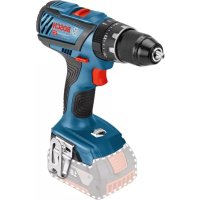
USER MANUAL GSB 18V28 Professional BOSCH
Robert Bosch Power Tools GmbH
70538 Stuttgart
GERMANY
www.bosch-pt.com
160992A3XU 2017.08)PS/272

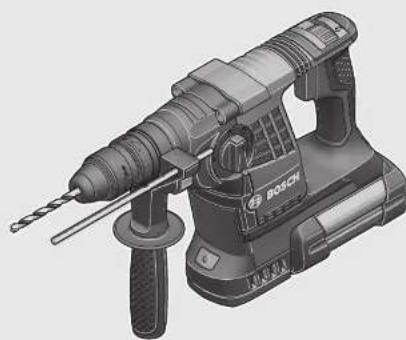
GBH Professional
36V-LIPlus|36VF-LIPlus

BOSCH
Original instructions
Sv Bruksanvisning i original
no Original driftsinstruks
fi Käyttöohjeet
el Πρωτότυπες οδηγίες χρήσης
tr Orijinal işletme talimatı
pl Instrukcja oryginalna
cs Původní návod k použití
SKYVHYHAVOHNPOUZHE
Wu CuiZhou Hua Zhi You Liang
P
UK OoHnHaHcHcKuHs3
EKCNYATAH
kk NanaaHy HcyaybFLH
TYHHYCKBC
16 Instruction
bgOpHAFHnHcHcyK|V
mk OpnHnHaHOynantTa a pabora
sr Originalno upstvo 2a rad
sizvira na vodila
FRONGRAMEUPCOTZARAC
Internal Instability
1
b

2
Deutsch. 6
English
Francais .Page 22
Espanol. Pagina 31
Portugues . Pagina 40
Italiano 49
Nederlands.. 58
Dansk . 66
Svenska Sida 74
Norsk. Side 81
Finnish. Page 88
Turkish. Page 104
Polish. Page 113
Czech. Page 122
Slovak. Page 129
Hungarian. Page 137
Russian. Page 146
Ukrainian. Page 156
Kazakh. Page 165
Romanian. Page 174
Bulgarian. Page 183
Macedonian. Page 192
Serbian. Page 201
Slovenian. Page 209

WARNING
Read all safety warnings and all instructions. Failure to follow the warnings and
instructions may result in electric shock, fire and/or serious injury.
Save all warnings and instructions for future reference.
The term "power tool" in the warnings refers to your mains-operated (corded) power tool or battery-operated (cordless) power tool.
Work area safety
- Keep work area clean and well lit. Cluttered or dark areas invite accidents. Do not operate power tools in explosive atmospheres, such as in the presence of flammable liquids, gases or dust. Power tools create sparks which may ignite the dust or fumes.
- Keep children and bystanders away while operating a power tool. Distractions can cause you to lose control.
Electrical safety
Power tool plugs must match the outlet. Never modify the plug in any way. Do not use any adapter plugs with earthed (grounded) power tools. Unmodified plugs and matching outlets will reduce risk of electric shock. Avoid body contact with earthed or grounded surfaces, such as pipes, radiators, ranges and refrigerators.
There is an increased risk of electric shock if your body is earthed or grounded.
Do not expose power tools to rain or wet conditions. Water entering a power tool will increase the risk of electric shock.
Do not abuse the cord. Never use the cord for carrying, pulling or unplugging the power tool. Keep cord away from heat, oil, sharp edges and moving parts. Damaged or entangled cords increase the risk of electric shock. When operating a power tool outdoors, use an extension cord suitable for outdoor use. Use of a cord suitable for outdoor use reduces the risk of electric shock. If operating a power tool in a damp location is unavoidable, use a residual current device (RCD) protected supply. Use of an RCD reduces the risk of electric shock.
Personal safety
Stay alert, watch what you are doing and use common sense when operating a power tool. Do not use a power tool while you are tired or under the influence of drugs, alcohol or medication. A moment of inattention while operating power tools may result in serious personal injury. Use personal protective equipment. Always wear eye protection. Protective equipment such as dust mask, non-skid safety shoes, hard hat, or hearing protection used for appropriate conditions will reduce personal injuries. Prevent unintentional starting. Ensure the switch is in the off-position before connecting to power source and/or battery pack, picking up or carrying the tool.
Carrying power tools with your finger on the switch or energising power tools that have the switch on invites accidents.
Remove any adjusting key or wrench before turning the power tool on. A wrench or a key left attached to a rotating part of the power tool may result in personal injury. Do not overreach. Keep proper footing and balance at all times. This enables better control of the power tool in unexpected situations. Dress properly. Do not wear loose clothing or jewellery. Keep your hair, clothing and gloves away from moving parts. Loose clothes, jewellery or long hair can be caught in moving parts. If devices are provided for the connection of dust extraction and collection facilities, ensure these are connected and properly used. Use of dust collection can reduce dust-related hazards.
Do not force the power tool. Use the correct power tool for your application. The correct power tool will do the job better and safer at the rate for which it was designed. Do not use the power tool if the switch does not turn it on and off. Any power tool that cannot be controlled with the switch is dangerous and must be repaired. Disconnect the plug from the power source and/or the battery pack from the power tool before making any adjustments, changing accessories, or storing power tools. Such preventive safety measures reduce the risk of starting the power tool accidentally. Store idle power tools out of the reach of children and do not allow persons unfamiliar with the power tool or
these instructions to operate the power tool. Power tools are dangerous in the hands of untrained users.
- Maintain power tools. Check for misalignment or binding of moving parts, breakage of parts and any other condition that may affect the power tool's operation. If damaged, have the power tool repaired before use.
Many accidents are caused by poorly maintained power tools.
- Keep cutting tools sharp and clean. Properly maintained cutting tools with sharp cutting edges are less likely to bind and are easier to control.
- Use the power tool, accessories and tool bits, etc., in accordance with these instructions, taking into account the working conditions and the work to be performed. Use of the power tool for operations different from those intended could result in a hazardous situation.
- Recharge only with the charger specified by the manufacturer. A charger that is suitable for one type of battery pack may create a risk of fire when used with another battery pack. Use power tools only with specifically designated battery packs. Use of any other battery packs may create a risk of injury and fire. When battery pack is not in use, keep it away from other metal objects, like paper clips, coins, keys, nails, screws or other small metal objects, that can make a connection from one terminal to another. Shorting the battery terminals together may cause burns or a fire. Under abusive conditions, liquid may be ejected from the battery; avoid contact. If contact accidentally occurs, flush with water. If liquid contacts eyes, additionally seek medical help. Liquid ejected from the battery may cause irritation or burns.
Service
Have your power tool serviced by a qualified repair person using only identical replacement parts. This will ensure that the safety of the power tool is maintained.
Hammer Safety Warnings
Wear ear protectors. Exposure to noise can cause hearing loss. Use auxiliary handle(s), if supplied with the tool. Loss of control can cause personal injury. Hold power tool by insulated gripping surfaces when performing an operation where the cutting accessory may contact hidden wiring. Cutting accessory contacting a "live" wire may make exposed metal parts of the power tool "live" and could give the operator an electric shock. Use appropriate detectors to determine if utility lines are hidden in the work area or call the local utility company for assistance. Contact with electric lines can lead to fire and electric shock. Damaging a gas line can lead to explosion. Penetrating a water line causes property damage.
When working with the machine, always hold it firmly with both hands and provide for a secure stance. The power tool is guided more secure with both hands. Secure the workpiece. A workpiece clamped with clamping devices or in a vice is held more secure than by hand. Always wait until the machine has come to a complete stop before placing it down. The tool insert can jam and lead to loss of control over the power tool. Do not open the battery. Danger of short-circuiting.

Protect the battery against heat, e.g., against continuous intense sunlight, fire, water, and moisture. Danger of explosion.
In case of damage and improper use of the battery, vapours may be emitted. Ventilate the area and seek medical help in case of complaints. The vapours can irritate the respiratory system. Use the battery only in conjunction with your Bosch power tool. This measure alone protects the battery against dangerous overload. The battery can be damaged by pointed objects such as nails or screwdrivers or by force applied externally. An internal short circuit can occur and the battery can burn, smoke, explode or overheat.
Product Description and Specifications

Read all safety warnings and all instructions. Failure to follow the warnings and instructions may result in electric shock, fire and/or serious injury.
While reading the operating instructions, unfold the graphics page for the machine and leave it open.
Intended Use
The machine is intended for hammer drilling in concrete, brick and stone, as well as for light chiselling work. It is also suitable for drilling without impact in wood, metal, ceramic and plastic. Machines with electronic control and right/left rotation are also suitable for screwdriving.
Product Features
The numbering of the product features refers to the illustration of the machine on the graphics page.
1 Quick change keyless chuck (GBH 36 VF-LI Plus) 2 SDS-plus quick change chuck (GBH 36 VF-LI Plus) 3 SDS-plus tool holder 4 Dust protection cap 5 Locking sleeve 6 Lock ring for rapid-change chuck (GBH 36 VF-LI Plus) 7 Vibration damper 8 Rotational direction switch 9 Handle (insulated gripping surface)
10 On/Off switch 11 Battery pack 12 Release button for mode selector switch 13 Mode selector switch 14 Worklight 15 Button for depth stop adjustment 16 Auxiliary handle (insulated gripping surface) 17 Depth stop 18 Battery unlocking button 19 Temperature control indicator 20 Battery charge-control indicator 21 Button for charge-control indicator 22 Securing screw for key type drill chuck (GBH 36 VF-LI Plus) 23 Key type drill chuck (GBH 36 VF-LI Plus) 24 SDS-plus adapter shank for drill chuck (GBH 36 VF-LI Plus) 25 Drill chuck mounting (GBH 36 VF-LI Plus) 26 Identification grooves 27 Chuck key (GBH 36 VF-LI Plus) 28 Front sleeve of the quick change keyless chuck (GBH 36 VF-LI Plus) 29 Retaining ring of the quick change keyless chuck (GBH 36 VF-LI Plus) 30 EPC switch (Electronic Precision Control) 31 Universal bit holder with SDS-plus shank*
*Accessories shown or described are not part of the standard delivery scope of the product. A complete overview of accessories can be found in our accessories program.
Sound emission values determined according to EN 60745-2-6.
Typically the A-weighted noise levels of the product are: Sound pressure level 90 dB(A); sound power level 101 dB(A). Uncertainty K = 3 dB
Wear hearing protection!
Vibration total values ah (triax vector sum) and uncertainty K determined according to EN 60745-2-6:
Hammer drilling into concrete: a1 = 14.5 m/s, K = 1.5 m/s2 Chiselling: ab = 9.5 m/s2, K = 1.5 m/s2
Drilling into metal: ah < 2.5m / s2 K = 1.5m / s2 Screwdriving without impact: ah < 2.5m / s2 K = 1.5m / s2
The vibration level given in this information sheet has been measured in accordance with a standardised test given in EN 60745 and may be used to compare one tool with another. It may be used for a preliminary assessment of exposure. The declared vibration emission level represents the main applications of the tool. However if the tool is used for different applications, with different accessories or insertion tools or is poorly maintained, the vibration emission may differ. This may significantly increase the exposure level over the total working period.
An estimation of the level of exposure to vibration should also take into account the times when the tool is switched off or

when it is running but not actually doing the job. This may significantly reduce the exposure level over the total working period.
Identify additional safety measures to protect the operator from the effects of vibration such as: maintain the tool and the accessories, keep the hands warm, organisation of work patterns.
Technical Data
| Rotary Hammer GBH 36 V-LI Plus GBH 36 VF-LI Plus |
| Article number | | 3611 J06 0.. 3611 J07 0.. |
| Speed control | | ● | ● |
| Stop rotation | | ● | ● |
| Right/left rotation | | ● | ● |
| Quick change chuck | | - ● |
| Rated voltage | V= 36 36 |
| Rated power input | W 600 600 |
| Impact rate | min-1 | 0-4200 | 0-4200 |
| Impact energy per stroke according to EPTA-Procedure 05/2009 J 3 | min-1 | 0-940 | 0-940 |
| - Left rotation | min-1 | 0-930 | 0-930 |
| Tool holder | | SDS-plus | SDS-plus |
| Spindle collar diameter | mm 50 50 |
| Drilling diameter, max.: | | | |
| Concrete | mm | 28 | 28 |
| Brickwork (with core bit) | mm | 82 | 82 |
| Steel | mm | 13 | 13 |
| Wood | mm | 30 | 30 |
| Weight according to EPTA-Procedure 01:2014 | kg | 4.0/4.51) | 4.1/4.61) |
| Permitted ambient temperature | | | |
| during charging | °C | 0...+45 | 0...+45 |
| during operation2) and during storage | °C | -20...+50 | -20...+50 |
| Recommended batteries | | GBA 36V ... | GBA 36V ... |
| Recommended chargers | | AL36.. | AL36.. |
| | GAL 36.. | GAL 36.. |
1) depending on the battery pack being used 2) limited performance at temperatures < 0°C
Technical data determined with battery from delivery scope.
Assembly
Use only the battery chargers listed on the accessories page. Only these battery chargers are matched to the lithium-ion battery of your power tool.
Note: The battery supplied is partially charged. To ensure full capacity of the battery, completely charge the battery in the battery charger before using your power tool for the first time.
The lithium-ion battery can be charged at any time without reducing its service life. Interrupting the charging procedure does not damage the battery.
The lithium-ion battery is protected against deep discharging by the "Electronic Cell Protection (ECP)". When the battery is empty, the machine is switched off by means of a protective circuit: The inserted tool no longer rotates.
Do not continue to press the On/Off switch after the machine has been automatically switched off. The battery can be damaged.
Removing the battery
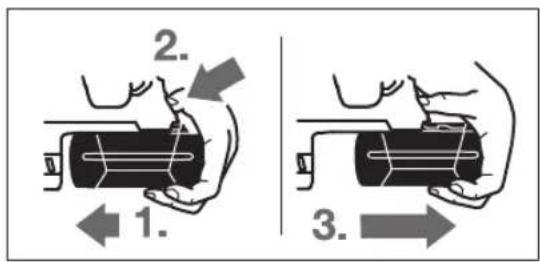
The battery 11 is equipped with two locking levels that should prevent the battery from falling out when pushing the battery unlocking button 18 unintentionally. As long as the battery is inserted in the power tool, it is held in position by means of a spring.
18|English
To remove the battery 11:
- Push the battery against the base of the power tool (1.) and at the same time press the battery unlocking button 18 (2.).
- Pull the battery out of the power tool until a red stripe becomes visible (3.).
- Press the battery unlocking button 18 again and pull out the battery completely.
Battery Charge-control Indication
The three green LEDs of the battery charge-control indicator 20 indicate the charge condition of the battery 11. For safety reasons, it is only possible to check the status of the charge condition when the machine is at a standstill.
- Push button 21 to indicate the charge condition (also possible when the battery is removed). The battery charge-control indicator automatically goes out after approx. 5 seconds.
LED Capacity
Continuous lighting 3 x green ≥ 2 / 3
Continuous lighting 2 x green ≥ 1/3
Continuous lighting 1 x green < 1/3
Flashing light 1 x green Reserve
When no LED lights up after pushing button 21, then the battery is defective and must be replaced.
During the charging procedure, the three green LEDs light up one after the other and briefly go out. The battery is fully charged when the three green LEDs light up continuously. The three LEDs go out again approx. 5 minutes after the battery has been fully charged.
Auxiliary Handle
Operate your machine only with the auxiliary handle 16.
The auxiliary handle 16 can be set to any position for a secure and low-fatigue working posture.
Turn the bottom part of the auxiliary handle 16 in counterclockwise direction and swivel the auxiliary handle 16 to the desired position. Then retighten the bottom part of the auxiliary handle 16 by turning in clockwise direction.
Pay attention that the clamping band of the auxiliary handle is positioned in the groove on the housing as intended for.
For hammer drilling and chiselling, SDS-plus tools are required that are inserted in the SDS-plus drill chuck.
For drilling without impact in wood, metal, ceramic and plastic as well as for screwdriving, tools without SDS-plus are used (e.g., drill bits with cylindrical shank). For these tools, a keyless chuck or a key type drill chuck are required.
Inserting/Removing the Key Type Drill Chuck (GBH 36 VF-LI Plus)
To work with tools without SDS-plus (e.g., drills with cylindrical shank), a suitable drill chuck must be mounted (key type drill chuck or keyless chuck, accessories).
- Screw the SDS-plus adapter shank 24 into a key type drill chuck 23. Secure the key type drill chuck 23 with the securing screw 22. Please observe that the securing screw has a left-hand thread.
- Clean the shank end of the adapter shank and apply a light coat of grease.
- Insert the key type drill chuck with the adapter shank into the tool holder with a turning motion until it automatically locks.
- Check the locking effect by pulling the key type drill chuck.
Removing the Key Type Drill Chuck
Push the locking sleeve 5 toward the rear and pull out the key type drill chuck 23.
Removing/Inserting the Quick Change Chuck (GBH 36 VF-LI Plus)
The SDS-plus quick change chuck 2 can easily be replaced against the quick change keyless chuck 1 provided.
Pull the lock ring for the quick change chuck 6 toward the rear, hold it in this position and pull off the SDS-plus quick change chuck 2 or the quick change keyless chuck 1 toward the front. - After removing, protect the replacement chuck against contamination.
- Use only model-specific original equipment and pay attention to the number of identification grooves 26. Only quick-change chucks with two or three identification grooves are permitted. When an unsuitable quick-change chuck is used, the application tool could fall out during operation.
- Before inserting, clean the quick change chuck and apply a light coat of grease to the shank end.
- Grasp the SDS-plus quick change chuck 2 or the quick change keyless chuck 1 completely with your hand. Slide the quick change chuck with a turning motion onto the drill chuck mounting 25 until a distinct latching noise is heard.
- The quick change chuck is automatically locked. Check the locking effect by pulling the quick change chuck.
The dust protection cap 4 largely prevents the entry of drilling dust into the tool holder during operation. When inserting the tool, take care that the dust protection cap 4 is not damaged.
A damaged dust protection cap should be changed immediately. We recommend having this carried out by an after-sales service.
The SDS-plus drill chuck allows for simple and convenient changing of drilling tools without the use of additional tools.
- GBH 36 VF-LI Plus: Insert the SDS-plus quick change chuck 2.
- Clean and lightly grease the shank end of the tool.
- Insert the tool in a twisting manner into the tool holder until it latches itself.
- Check the latching by pulling the tool.
As a requirement of the system, the SDS-plus drilling tool can move freely. This causes a certain radial run-out at no-load, which has no effect on the accuracy of the drill hole, as the drill bit centres itself upon drilling.
- Push back the locking sleeve 5 and remove the tool.
Note: Do not use tools without SDS-plus for hammer drilling or chiselling! Tools without SDS-plus and their drill chucks are damaged by hammer drilling or chiselling.
- Insert a key type drill chuck 23 (see "Inserting/Removing the Key Type Drill Chuck", page 18).
- Open the key type drill chuck 23 by turning until the tool can be inserted. Insert the tool.
- Insert the chuck key into the corresponding holes of the key type drill chuck 23 and clamp the tool uniformly.
- Turn the mode selector switch 13 to the "drilling" position.
- Turn the sleeve of the key type drill chuck 23 with the drill chuck key in anticlockwise direction until the drilling tool can be removed.
Note: Do not use tools without SDS-plus for hammer drilling or chiselling! Tools without SDS-plus and their drill chucks are damaged by hammer drilling or chiselling.
- Insert the quick change keyless chuck 1.
- Firmly hold the retaining ring 29 of the quick change chuck. Open the tool holder by turning the front sleeve 28 until the tool can be inserted. Tightly hold the retaining ring 29 and firmly turn the front sleeve 28 in the direction of the arrow until a distinct latching noise can be heard.
- Check the tight seating by pulling the tool.
Note: If the tool holder was opened to the stop, then the latching noise possibly may be heard while closing the tool holder and the tool holder will not close.
In this case, turn the front sleeve 28 once in the opposite direction of the arrow. Afterwards, the tool holder can be closed (tightened) again.
- Turn the mode selector switch 13 to the "drilling" position.
- Firmly hold the retaining ring 29 of the quick change chuck. Open the tool holder by turning the front sleeve 28 in the direction of the arrow until the tool can be removed.
Dust from materials such as lead-containing coatings, some wood types, minerals and metal can be harmful to one's health. Touching or breathing-in the dust can cause allergic reactions and/or lead to respiratory infections of the user or bystanders.
Certain dust, such as oak or beech dust, is considered carcinogenic, especially in connection with wood-treatment additives (chromate, wood preservative). Materials containing asbestos may only be worked by specialists.
- As far as possible, use a dust extraction system suitable for the material. - Provide for good ventilation of the working place. - It is recommended to wear a P2 filter-class respirator. Observe the relevant regulations in your country for the materials to be worked.
Prevent dust accumulation at the workplace. Dust can easily ignite.
A GDE 16 Plus (accessory) is required for dust extraction. The vacuum cleaner must be suitable for the material being worked.
When vacuuming dry dust that is especially detrimental to health or carcinogenic, use a special vacuum cleaner.
Operation
Starting Operation
Inserting the battery
- Set the rotational direction switch 8 to the centre position to protect the power tool against accidental starting.
- Insert the charged battery pack 11 from the rear into the base of the power tool. Press the battery pack completely into the base until the red stripe can no longer be seen and the battery pack is securely locked.
Setting the operating mode
The operating mode of the power tool is selected with the mode selector switch 13.
Note: Change the operating mode only when the machine is switched off! Otherwise, the machine can be damaged.
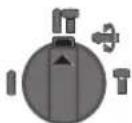
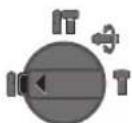
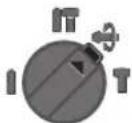
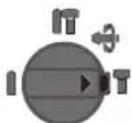
- To change the operating mode, push the release button 12 and turn the mode selector switch 13 to the requested position until it can be heard to latch.

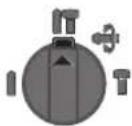
Position for hammer drilling in concrete or stone
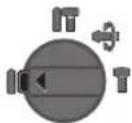
Position for drilling without impact in wood, metal, ceramic and plastic as well as for screwdriving
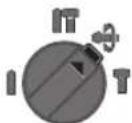
Vario-Lock position for adjustment of the chiselling position
The mode selector switch 13 does not latch in this position.
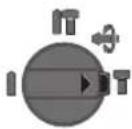
Position for chiselling
Reversing the rotational direction
The rotational direction switch 8 is used to reverse the rotational direction of the machine. However, this is not possible with the On/Off switch 10 actuated.
Right rotation: Move the rotational direction switch 8 all the way to position
Left rotation: Move the rotational direction switch 8 all the way to position
Set the direction of rotation for hammer drilling, drilling and chiselling always to right rotation.
Switching On and Off
To save energy, only switch the power tool on when using it.
To start the machine, press the On/Off switch 10.
When starting the machine for the first time, a starting delay is possible, as the electronic system of the power tool has to configure itself first.
- To switch off the machine, release the On/Off switch 10.
Setting the Speed/Impact Rate
The speed/impact rate of the switched on power tool can be variably adjusted, depending on how far the On/Off switch 10 is pressed.
Light pressure on the On/Off switch 10 results in low speed/impact rate. Further pressure on the switch increases the speed/impact rate.
EPC assists you when working with impact in sensitive materials by ensuring slow start-up and reduced operating speed.
- Slide the EPC switch 30 to the desired position.

Position for maximum operating speed

Position for slow start-up and reduced operating speed
Overload Clutch
If the tool insert becomes caught or jammed, the drive to the drill spindle is interrupted. Because of the forces that occur, always hold the power tool firmly with both hands and provide for a secure stance. If the power tool jams, switch the machine off and loosen the tool insert. When switching the machine on with the drilling tool jammed, high reaction torques can occur.
Rapid Shut-off (Kickback Control)
The rapid shut-off feature (KickBack Control) provides better control over the power tool. The power tool will switch off if it suddenly and unforeseeably rotates around the drilling axis.
- To restart the machine, release the On/Off switch and then actuate again.
Rapid shut-off is indicated by flashing of the worklight 14 on the power tool.
Rapid shut-off can trigger only when the power tool is running at maximum operating speed and can rotate freely around the drilling axis.
Temperature Control Indicator
The red LED of the temperature control indicator 19 signals that the battery or the electronics of the power tool (when the battery is inserted) are not within the optimum temperature range. In this case, the power tool will not operate at full capacity.
Temperature control of the battery: - The red LED 19 lights up continuously after inserting the battery into the charger: The battery is not within the charging temperature range between 0°C and 45°C and cannot be charged. - The red LED 19 flashes when you press the 21 button or the On/Off switch 10 (with battery inserted): The battery is outside of the permitted operating temperature range. - For battery temperatures over 70°C, the power tool switches off until the battery is in the optimal temperature range again. Temperature control of the power tool electronics: - The red LED 19 lights up continuously when pressing the On/Off switch 10: The temperature of the machine's electronics is below 5°C or above 75°C. - At a temperature above 90°C, the electronics of the power tool switch off until the temperature is within the allowable temperature range again.
Working Advice
The required drilling depth X can be set with the depth stop 17.
- Press the button for the depth stop adjustment 15 and insert the depth stop into the auxiliary handle 16.

The knurled surface of the depth stop 17 must face downward.
- Insert the SDS-plus drilling tool to the stop into the SDS-plus tool holder 3. Otherwise, the movability of the SDS-plus drilling tool can lead to incorrect adjustment of the drilling depth.
- Pull out the depth stop until the distance between the tip of the drill bit and the tip of the depth stop corresponds with the desired drilling depth X.
Changing the Chiselling Position (Vario-Lock)
The chisel can be locked in 36 positions. In this manner, the optimum working position can be set for each application.
- Insert the chisel into the tool holder.
- Turn the mode selector switch 13 to the "Vario-Lock" position (see "Setting the operating mode", page 19).
- Turn the tool holder to the desired chiselling position.
- Turn the mode selector switch 13 to the "chiselling" position. The tool holder is now locked.
- For chiselling, set the rotation direction to right rotation.
Apply the power tool to the screw/nut only when it is switched off. Rotating tool inserts can slip off.
To work with screwdriver bits, a universal bit holder 31 with SDS-plus shank (accessory) is required.
- Clean the shank end of the adapter shank and apply a light coat of grease.
- Insert the universal bit holder with a turning motion into the tool holder until it automatically locks.
- Check the locking effect by pulling the universal bit holder.
- Insert a screwdriver bit into the universal bit holder. Use only screwdriver bits that match the screw head.
- To remove the universal bit holder, pull the locking sleeve 5 toward the rear and remove the universal bit holder 31 out of the tool holder.
Vibration Damper
Vibration
The integrated vibration damper reduces occurring vibrations.
The soft grip handle increases the safety against slipping off and thus provides for a better grip and handling of the power tool.
Recommendations for Optimal Handling of the Battery
Protect the battery against moisture and water.
Store the battery only within a temperature range between -20°C and 50°C. As an example, do not leave the battery in the car in summer.
Occasionally clean the venting slots of the battery using a soft, clean and dry brush.
A significantly reduced working period after charging indicates that the battery is used and must be replaced.
Observe the notes for disposal.
Maintenance and Service
Maintenance and Cleaning
Before any work on the machine itself (e.g. maintenance, tool change, etc.) as well as during transport and storage, remove the battery from the power tool. There is danger of injury when unintentionally actuating the On/Off switch. For safe and proper working, always keep the machine and ventilation slots clean. A damaged dust protection cap should be changed immediately. We recommend having this carried out by an after-sales service. - Clean the tool holder 3 each time after using.
After-sales Service and Application Service
Our after-sales service responds to your questions concerning maintenance and repair of your product as well as spare parts. Exploded views and information on spare parts can also be found under:
Bosch's application service team will gladly answer questions concerning our products and their accessories.
In all correspondence and spare parts orders, please always include the 10-digit article number given on the nameplate of the product.
Great Britain
Robert Bosch Ltd. (B.S.C.)
P.O.Box 98
Broadwater Park
North Orbital Road
Denham
Uxbridge
UB95HJ
At www.bosch-pt.co.uk you can order spare parts or arrange the collection of a product in need of servicing or repair.
Tel. Service: (0344) 7360109
E-Mail: boschservicecentre@bosch.com
Ireland
Origo Ltd.
Unit 23 Magna Drive
Magna Business Park
City West
Dublin 24
Tel. Service: (01) 4666700
Fax: (01) 4666888
Australia, New Zealand and Pacific Islands
Robert Bosch Australia Pty. Ltd.
Power Tools
Locked Bag 66
Clayton South VIC 3169
Customer Contact Center
Inside Australia:
Phone: (01300) 307044
Fax: (01300) 307045

Inside New Zealand:
Phone: (0800) 543353
Fax: (0800) 428570
Outside AU and NZ:
Phone: +61 395415555
www.bosch-pt.com.au
www.bosch-pt.co.nz
Republic of South Africa
Customer service
Hotline: (011) 6519600
Gauteng - BSC Service Centre
35 Roper Street, New Centre
Johannesburg
Tel.: (011) 4939375
Fax: (011) 4930126
E-Mail: bsctools@icon.co.za
KZN - BSC Service Centre
Unit E, Almar Centre
143 Crompton Street
Pinetown
Tel.: (031) 7012120
Fax: (031) 7012446
E-Mail: bsc.dur@za.bosch.com
Western Cape - BSC Service Centre
Democracy Way, Prosperity Park
Milnerton
Tel.: (021) 5512577
Fax: (021) 5513223
E-Mail: bsc@zsd.co.za
Bosch Headquarters
Midrand, Gauteng
Tel.: (011) 6519600
Fax: (011) 6519880
E-Mail: rbsa-hq.pts@za.bosch.com
Transport
The contained lithium-ion batteries are subject to the Dangerous Goods Legislation requirements. The user can transport the batteries by road without further requirements.
When being transported by third parties (e.g.: air transport or forwarding agency), special requirements on packaging and labelling must be observed. For preparation of the item being shipped, consulting an expert for hazardous material is required.
Dispatch batteries only when the housing is undamaged. Tape or mask off open contacts and pack up the battery in such a manner that it cannot move around in the packaging. Please also observe possibly more detailed national regulations.
Disposal

The machine, rechargeable batteries, accessories and packaging should be sorted for environmental-friendly recycling.

Do not dispose of power tools and batteries/re-chargeable batteries into household waste!
Only for EC countries:
According to the European Guideline 2012/19/EU, power tools that are no longer usable, and according to the European Guideline 2006/66/EC, defective or used battery packs/batteries, must be collected separately and disposed of in an environmentally correct manner.
Batteries no longer suitable for use can be directly returned at:
Great Britain
Robert Bosch Ltd. (B.S.C.)
P.O.Box 98
Broadwater Park
North Orbital Road
Denham
Uxbridge
UB95HJ
At www.bosch-pt.co.uk you can order spare parts or arrange the collection of a product in need of servicing or repair.
Tel. Service: (0344) 7360109
E-Mail: boschservicecentre@bosch.com
Battery packs/batteries:
Li-ion:
Please observe the instructions in section "Transport", page 22.
Subject to change without notice.
Screw: ah < 2.5 m/s2, K = 1.5 m/s2
Bosch Service Center
Telegrafvej 3
2750 Ballerup
At www.bosch-pt.dk you can order spare parts online and create a repair order.
Tel. Service Center: 44898855
Fax: 44898755
E-Mail: vaerktoej@dk.bosch.com
Transport
Bosch Service Center
Telegrafvej 3
2750 Ballerup
Denmark
Tel.: (08) 7501820 (within Sweden)
Fax: (011) 187691
Transport
The lithium-ion batteries included are subject to the requirements for dangerous goods. The user can transport the batteries on public roads without further obligations.
Inserting the tool (see figure E)
Use only accessories that are suitable for the respective purpose, and pay attention to the number of the identification marks 26. Only accessories with two or three identification marks are permitted. If you insert an unsuitable accessory into the power tool, the power tool may, during operation, be thrown out. - Clean the tool before inserting it and lightly grease the tool shank. - Insert the tool into the tool holder SDSplus 2, turning it until it engages. Release the tool by turning it against the direction of the tool holder 25, then pull it out. - The tool locks automatically. Check the lock by pulling the tool.
Greek 101
Replacing the tool
The protective cap from dust 4 prevents dust from penetrating into the tool holder during operation. When inserting the tool, be careful not to damage the protective cap from dust 4.
Replace the protective cap from dust if it is damaged. To do this, remove the tool and pull the protective cap from dust over the tool holder. Then insert the tool again.
Replacing the tool (SDS-plus)
Inserting the SDS-plus tool (see figure F)
With the SDS-plus tool, you can insert the tool directly and remove it without using any tools.
- GBH 36 VF-LI Plus: Insert the SDS-plus 2 tool. Clean and lightly grease the tool shank. Insert the tool into the tool holder, turning it until it locks. Pull the tool to check the lock.
The SDS-plus tool is freely movable. This means that during rotation without load, the drill may not rotate concentrically. This, however, does not affect the accuracy of the drilling, as the drill centers itself.
Removing the SDS-plus tool (see figure G)
Removal of the tool (see figure I)
Turn the tool with the key until the chuck opening is at the top, until you can remove the tool.
Replacing the tool (without SDS-plus) (GBH 36 VF-LIplus)
Inserting the tools (see figure J)
Note: Never use tools without SDS-plus for drilling and chiseling! Tools without
SDS-plus and the corresponding tools are inserted when drilling and chiseling.
- Inserting the quick chuck 1.
- Hold the retaining ring 29 firmly. Open the tool holder by turning the front sleeve 28 until the tool can be inserted. Hold the retaining ring 29 firmly and turn the front sleeve 28 as shown by the arrow until you hear a clear click of engagement. Check the locking by pulling the tool.
Note: If the tool holder is open, then when turning the tool holder to close, the locking click should be heard, without the tool holder closing.
Turn the tool holder 28 in the opposite direction as shown by the arrow. Then you must close the tool holder. -Turn the impact stop/rotation stop switch 13 to the "Drilling" position.
Removal of the tool (see figure K)
Hold the retaining ring 29 of the quick chuck firmly. Open the tool holder by turning the front sleeve 28 in the direction shown by the arrow, until the tool can be removed.
Dust extraction with the GDE 16 Plus (special accessory)
Dust from materials, such as lead-containing paint, can be harmful to health. Contact with or inhalation of dust can cause allergic reactions and/or respiratory diseases of the user or bystanders.
Certain dusts, e.g. oak or beech dust, are considered carcinogenic, especially in combination with wood treatment additives (chromate, wood preservatives). The processing of asbestos-containing materials is permitted only in specially trained personnel.
Do not use it as much as possible for each material. Follow the correct disposal instructions. - Ensure good ventilation of the work area. - Use only respiratory protective equipment with filter class P2.
Follow the regulations in force in your country regarding the disposal of waste materials.
Avoid creating dust clouds in the air while working. Dust can ignite easily.
Dispose of the dust using a GDE 16 Plus (accessory).
The dust extractor must be suitable for the material being processed.
For particularly hazardous, carcinogenic, or toxic dust, use special dust extractors.

102|Greek
Operation
Starting
Inserting the battery
To protect the power tool from unintentional starting, turn the rotational direction switch to the center position before inserting the battery. Insert the charged battery into the battery slot from the front until the red indicator is visible and the battery is securely seated.
Setting the operating mode
Use the operating mode switch to select the operating mode of the power tool.
Note: Set the operating mode switch to the correct position only when the power tool is switched off! Otherwise, the power tool may be damaged.
To change the operating mode, press the release button and turn the operating mode switch to the desired position until you hear it click.
Use the tool only with the bit inserted.
Use the tool only with the correct bit, the appropriate accessories, and the safety equipment.
Use the Vario-Lock for adjusting the position of the tool.
The tool is intended for drilling and screwdriving without impact.
Use the tool for drilling.
Safety Warnings
If the tool is used with a bit that is jammed or stuck, the reaction torque can cause the tool to jerk. Due to the high forces, hold the power tool firmly with both hands and keep your body in a stable position. When the power tool is switched off and the bit is still rotating, the tool may kick back. When using the power tool with a jammed bit, strong reaction forces (kickback) can occur.
Quick Stop Function (Kickback Control)
The Kickback Control provides better control of the power tool. In case of sudden and unexpected rotation of the power tool around the drill axis, the power tool is switched off.
- To restart, release the ON/OFF switch and then press it again.
The Kickback Control is activated by pressing the button on the power tool.
Greek 103
The Kickback Control must be activated when the power tool is operated with the maximum number of accessories and when there is a risk of free rotation around the drill axis.
Instructions for Use with Extension Cable
The red LED on the extension cable indicates that the battery or the electrical system of the power tool (if the battery is installed) is not in the working area. In this case, the power tool either does not work at all or works with reduced power.
Red battery indicator: The red LED lights up continuously when the battery is almost discharged. The battery is outside the operating temperature range between 0 and 45 °C and therefore cannot be charged. The red LED (LED) indicates the state of charge of the battery or the On/Off switch 10 (in case of a charged battery): The battery is within the operating temperature range. - When the temperature exceeds 70 °C, the power tool switches off automatically and the function of the machine part will resume only after returning to the normal temperature range. Temperature monitoring of the electronic system of the power tool: - The red LED lights up continuously when the ON/OFF switch 10 is pressed: The temperature of the electronic system of the power tool is below 5 °C or above 75 °C. - When the temperature exceeds 90 °C, the electronic system of the power tool switches off automatically until the temperature returns to the approved operating temperature range.
Working instructions
Adjusting the cutting depth (see figure M)
With the adjusting lever 17 you can adjust the cutting depth steplessly.
Maintenance and Service
Maintenance and cleaning
Remove the battery from the power tool before carrying out any work on the power tool (e.g. maintenance, changing tools, etc.) as well as when transporting and storing it.
Continuous light 1 x green <1/3
Flashing light 1 x green Reserve
Robert Bosch Sp. z o.o.
BSC
Ul. Szyszkowa 35/37
02-285 Warszawa
Bosch Service Center PT
K Vapence 1621/16
692 01 Mikulov
Slovensky | 129
The instructions and information in this manual apply to electric power tools powered from the mains (with power cord) and to battery-operated electric power tools (without power cord).
Workplace safety
Keep your work area clean and well lit. Cluttered or dark areas can lead to accidents. Do not operate power tools in explosive atmospheres, such as in the presence of flammable liquids, gases, or dust. Power tools create sparks, which may ignite the dust or fumes. Keep children and bystanders away while operating a power tool. Distractions can cause you to lose control of the tool.
Electrical safety
Power tool plugs must match the outlet. Never modify the plug in any way. Do not use any adapter plugs with earthed (grounded) power tools. Unmodified plugs and matching outlets will reduce risk of electric shock. Avoid body contact with earthed or grounded surfaces, such as pipes, radiators, ranges, and refrigerators. There is an increased risk of electric shock if your body is earthed or grounded. Protect power tools from rain or wet conditions. Water entering a power tool will increase the risk of electric shock. Do not abuse the cord. Never use the cord for carrying, pulling, or unplugging the power tool. Keep cord away from heat, oil, sharp edges, or moving parts. Damaged or entangled cords increase the risk of electric shock. When operating a power tool outdoors, use an extension cord suitable for outdoor use. Use of a cord suitable for outdoor use reduces the risk of electric shock.
If operating a power tool in a damp location is unavoidable, use a residual current device (RCD) protected supply. Use of an RCD reduces the risk of electric shock.
Personal safety
Personal safety
By all means, be careful that you are doing, thoughtfully start working with the power tool. Do not use the power tool while tired or under the influence of drugs, alcohol, or medication. One moment of inattention while working with the power tool can lead to serious injuries. Use personal protective equipment. Always wear protective goggles. Use of personal protective equipment, such as a dust mask, non-slip safety shoes, safety helmet, or hearing protection, depending on the type of work with the power tool, reduces the risk of injury. Prevent unintentional starting. Before connecting the power tool to the power supply and/or battery pack, make sure the power tool is in the off position. Holding the switch on the power tool during transport or connecting it to the power supply with the power tool switched on can lead to accidents. Remove the adjusting key or wrench before switching on the power tool. A wrench or key left attached to a rotating part of the power tool can lead to injuries. Do not adopt an unnatural body posture. Always maintain a stable stance and balance. This allows you to better control the power tool in unexpected situations. Wear suitable work clothing. Do not wear loose clothing or jewelry. Keep hair, clothing, and gloves away from moving parts. Loose clothing, jewelry, or long hair can be caught in moving parts. If dust extraction and collection equipment can be installed, check that it is connected and used correctly. Use of dust extraction can reduce dust-related hazards. WARNING! In case of interruptions in the operation of the power tool due to a complete or partial power failure or damage to the power supply, set the switch to the off position, making sure it is not locked (if present). Disconnect the plug from the socket.
the battery. This prevents uncontrolled restart.
Use of the power tool and handling it
Never modify the power tool. Use the power tool only for its intended purpose. You will work better and safer in the specified power range. Do not use the power tool if the switch is defective. A power tool that cannot be switched on or off is dangerous and must be repaired. Before adjusting the power tool, changing accessories, or stopping work, disconnect the plug from the socket or remove the battery. This preventive measure prevents unintentional starting of the power tool. Store the power tool out of the reach of children. Do not allow persons who are not familiar with it or who have not read these instructions to use the power tool. The power tool is dangerous in the hands of inexperienced users. Take good care of the power tool. Check the perfect function of the moving parts of the power tool for any jamming or damage that could affect the function of the power tool. Damaged parts must be repaired before using the power tool. Poor maintenance of power tools is the cause of many accidents. Keep the cutting tool sharp and clean. Properly maintained cutting tools with sharp cutting edges are less likely to jam and are easier to control. Use the power tool, accessories, working tools, etc. in accordance with these instructions. Consider the working conditions and the work to be performed. Using the power tool for operations other than those intended could result in hazardous situations.
Use and care of the cordless tool
Charge the batteries only in chargers recommended by the manufacturer. A charger designed for a specific type of battery may create a fire hazard when used with other batteries. Use only the batteries provided for this power tool. Using other batteries may result in injury and fire hazard. Protect the unused battery from paper clips, coins, keys, nails, screws, or other small metal objects that
could short-circuit the contacts. Short-circuiting the battery contacts may cause burns or fire.
If used incorrectly, liquid may leak from the battery. Avoid contact with it. In case of accidental contact, rinse with water. If the liquid gets into the eyes, seek medical help immediately. Leaking battery fluid may cause skin irritation or burns.
Service
Have your power tool serviced only by qualified personnel and only with original spare parts. This ensures the safety of the power tool.
Safety instructions for operators
Hearing protection. Noise exposure can lead to hearing loss. Use the additional handles included in the delivery scope of the power tool. Loss of control can lead to personal injury. When performing work where the power tool may come into contact with hidden electrical wiring, hold the power tool by the insulated gripping surfaces. Contact with a live wire can energize metal parts of the power tool and result in an electric shock. Use appropriate metal detectors to locate hidden electrical, gas, or water lines, or consult your local utility company. Contact with an electrical wire can lead to fire and electric shock. Damaging a gas line can lead to an explosion. Damaging a water line leads to property damage. Always hold the power tool with both hands during work, after first securing a stable position. Using both hands provides more reliable control of the power tool. Secure the workpiece. A workpiece secured in a clamping device or in a vise is held more securely than in your hand. Wait for the power tool to come to a complete stop before setting it down. The power tool may jam, which can lead to loss of control. Do not open the battery. There is a risk of short circuit.

Protect the battery from heat, e.g., from prolonged exposure to sunlight, fire, water, and moisture. There is a risk of explosion.
Russian | 149
If the battery is damaged or used improperly, vapors may be emitted. Ensure fresh air supply and consult a doctor if discomfort occurs. Vapors may irritate the respiratory tract. Use the battery only with your power tool and the Bosch charger. Only this battery is protected against dangerous overload. Sharp objects, e.g., nails or screwdrivers, or external force can damage the battery. This can lead to internal short circuit, ignition with smoke, explosion, or overheating of the battery.
Product description and services

Read all safety instructions and instructions. Failure to follow the safety instructions and instructions may result in electric shock, fire, and/or serious injury.
Open the page with the illustrations of the power tool and keep it open while you read the operating instructions.
Intended use
The power tool is intended for impact drilling of holes in concrete, brick, and natural stone, as well as for light chiseling work. It is also suitable for drilling holes without impact in wood, metal, ceramic, and synthetic materials. Power tools with electronic speed control and reverse rotation are also suitable for screwdriving.
Illustrated components
The numbering of the illustrated components refers to the illustration on the page with the illustrations.
1 Quick-change drill chuck (GBH 36 VF-LI Plus) 2 SDS-plus chuck (GBH 36 VF-LI Plus) 3 SDS-plus chuck 4 Dust protection cap 5 Locking screw 6 Release collar of the quick-change chuck (GBH 36 VF-LI Plus) 7 Direction of rotation selector 8 Rotation direction switch 9 Handle (with insulated gripping surface) 10 On/off switch 11 Battery* 12 Battery unlock button 13 Impact/hammer drilling selector switch
14 Work light 15 Depth stop button 16 Auxiliary handle (with insulated gripping surface) 17 Depth stop 18 Battery release button 19 Temperature control indicator 20 Battery charge indicator 21 Charge indicator button 22 Retaining screw of the drill chuck with gear ring (GBH 36 VF-LI Plus) 23 Drill chuck with gear ring (GBH 36 VF-LI Plus) 24 SDS-plus shank of the drill chuck (GBH 36 VF-LI Plus)* 25 Chuck seat of the drill chuck (GBH 36 VF-LI Plus) 26 Identification grooves 27 Key for the drill chuck (GBH 36 VF-LI Plus) 28 Quick-change drill chuck retaining ring (GBH 36 VF-LI Plus) 29 Quick-change drill chuck stop ring (GBH 36 VF-LI Plus) 30 EPC (Electronic Precision Control) selector 31 Universal adapter with SDS-plus shank* *Accessories shown or described are not included in the standard delivery. The complete range of accessories can be found in our accessories program.
Noise and vibration data
Noise emission values determined according to EN 60745-2-6.
Typically the A-weighted noise levels of the power tool are: sound pressure level 90 dB(A); sound power level 101 dB(A). Uncertainty K=3 dB.
Wear hearing protection!
Vibration total value (tri-axial vector sum) and uncertainty K determined according to EN 60745-2-6:
Hammer drilling into concrete: a = 14.5 m/s², K = 1.5 m/s²; chiseling: a = 9.5 m/s², K = 1.5 m/s²
Drilling into metal: a < 2.5 m/s², K = 1.5 m/s²
Screwdriving: a < 2.5 m/s², K = 1.5 m/s²
The vibration level specified in these instructions was measured in accordance with the standardized measuring method described in EN 60745 and can be used for comparing power tools. It is also suitable for a preliminary assessment of vibration exposure.
The vibration level is specified for the main applications of the power tool. However, if the power tool is used for other applications, with different
150|Russian
accessories, with different insert tools, or if maintenance is not carried out as prescribed, the vibration level may differ. This can significantly increase the vibration exposure over the entire working period.
For an accurate assessment of vibration exposure during a defined working period, the times when the tool is switched off or when it is running but not actually being used must also be taken into account.
If the power tool is not working, this may significantly reduce the load from vibration. Choose the tool for full working time.
Provide additional safety measures to protect the operator from the effects of vibration, for example: technical maintenance of the power tool and tools, measures to keep hands warm, organization of technological processes.
Technical data
After automatic shutdown of the power tool, do not press the switch again.
The battery may be damaged.
Russian|151
Removing the battery
The battery 11 is equipped with two locking levels, designed to prevent the battery from falling out when the unlock button 18 is accidentally pressed. While the battery is in the power tool, the spring holds it in the appropriate position.
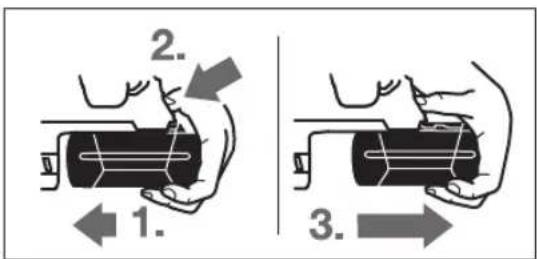
To remove the battery 11:
- Press the battery against the power tool (1.) and simultaneously press the lock button 18 (2.). - Pull the battery out of the power tool until the red stripe is visible (3.). Press the lock button 18 again and pull the battery completely out of the tool.
Battery charge indicator
The three LEDs of the charge indicator 20 show the state of charge of the battery 11. For safety reasons, checking the charge level is only possible when the power tool is at a standstill.
To check the charge level (also possible with the battery removed), press the button 21. After 5 seconds, the charge indicator LEDs automatically go out.
Capacity
Continuous illumination of green LEDs ≥ 2/3
The green light indicator ≥1/3
The green light indicator <1/3
The green light indicator is off
If after pressing button 21 the indicators do not light up, the battery is defective and must be replaced. During the charging process, the green indicators light up and go out for a short time. The battery is fully charged when the green indicators stay on constantly. Approximately 5 minutes after the end of charging, the green indicators go out.
Auxiliary handle
Use the power tool only with the auxiliary handle 16.
Turn the auxiliary handle (see fig. B)
The auxiliary handle 16 can be turned to any position to ensure safe and comfortable work with the tool.
- Turn the lower part of the handle of the auxiliary handle 16 counterclockwise and set the auxiliary handle 16 to the desired position. Then turn the lower part of the handle of the auxiliary handle 16 clockwise.
Make sure that the clamping band of the auxiliary handle is in the intended groove of the housing.
Selecting the drill chuck of the tool
For drilling and impact drilling, tools with SDS-plus shanks are required, which are clamped in the SDS-plus drill chuck.
For drilling without impact in metal, ceramics, and synthetic materials, as well as for screwdriving, use tools without SDS-plus (e.g., drills with cylindrical shanks). For these tools, a keyed or keyless chuck is required.
Installing/removing the toothed-key drill chuck (GBH 36 VF-LI Plus)
When working with the tool without SDS-plus (e.g., drills with cylindrical shanks), you must install a suitable drill chuck (e.g., a keyed chuck or a keyless chuck, accessories).
Screw the SDS-plus drill chuck 23 onto the drill chuck with toothed ring. Secure the drill chuck with toothed ring 23 using the locking screw 22. Note that the locking screw has a left-hand thread.
Clean and lightly grease the insertion shank. Insert the drill chuck with toothed ring with rotation into the tool holder until it locks automatically. Check the locking by pulling the drill chuck with toothed ring.
Removing the chuck with toothed ring
Unscrew the locking screw 22 and remove the drill chuck with toothed ring 23.
Removing and installing the interchangeable drill chuck (GBH 36 VF-LI Plus)
The interchangeable SDS-plus drill chuck 2 can be easily replaced with the supplied quick-change drill chuck 1.
Removing the interchangeable drill chuck (see Fig. D)
Press the release ring of the interchangeable chuck base, hold it in this position and pull the interchangeable SDS-plus drill chuck 2 or the quick-change drill chuck 1 forward out of the tool holder. Protect the interchangeable drill chuck from dirt after removal.
Installing the interchangeable drill chuck (see Fig. E)
Use only original equipment intended for the corresponding tool and pay attention to the number of detectable grooves 26. Only interchangeable drill chucks with two or more grooves are permitted. Using an unsuitable interchangeable drill chuck with this power tool can lead to the tool being ejected during operation. Before installation, clean the interchangeable drill chuck and lightly grease the insertion shank. - Grasp the SDS-plus drill chuck 2 or the quick-change drill chuck 1 with your whole hand and insert it into the tool holder 25 until it clicks into place. - The interchangeable chuck locks automatically. Check the locking by pulling the tool.
Changing the tool
The protective cap 4 largely prevents dust from penetrating the chuck during operation. When changing the tool, ensure that the cap 4 is not damaged.
Never replace the protective cap. This is recommended to be done by a service workshop.
Replacing the tool (SDS-plus)
Installing the SDS-plus tool (see Fig. F)
With the SDS-plus chuck you can easily and conveniently change the tool without using additional tools.
- GBH 36 VF-LI Plus: Install the SDS-plus chuck. Clean and lightly grease the insertion end of the tool. Insert the tool into the chuck while turning it until it locks automatically.
- Check the locking by pulling the tool.
The SDS-plus tool has a free play, which is caused by the system. As a result, there is a radial runout at idle. This does not affect
the accuracy of the drilling, as the drill centers itself automatically.
Removing the SDS-plus tool (see Fig. G)
Pull back the locking sleeve and remove the tool from the chuck.
Replacing the tool (without SDS-plus) (GBH 36 VF-LI Plus)
Installing the tool (see Fig. H)
Note: Do not use tools without SDS-plus for hammer drilling or chiseling. Tools without SDS-plus and the drill chuck will be damaged by hammer drilling or chiseling.
- Install the toothed ring chuck (see "Installing/Removing the toothed ring drill chuck", page 151). Check the toothed ring chuck 23 so that the tool can be inserted. Insert the tool. Insert the chuck key into the corresponding holes of the toothed ring chuck 23 and clamp the tool evenly. Turn the mode selector switch to the "Drilling" position.
Removing the tool from the chuck (see Fig. I)
Turn the drill chuck with the toothed ring 23 using the key until it is open enough to insert the tool.
Replacing the tool (without SDS-plus) (GBH 36 VF-LI Plus)
Installing the tool (see figure J)
Note: Do not use tools without SDS-plus for drilling or chiseling! Tools without SDS-plus and the drill chuck will be damaged by drilling or chiseling.
- Install the quick-change drill chuck. Firmly hold the locking ring of the quick-change chuck 29. Turn the front sleeve 28 to open the tool holder and insert the tool. Firmly holding the locking ring 29, turn the front sleeve 28 with force in the direction of the arrow until an audible click is heard. Check the secure fit of the tool by pulling it out of the chuck.
Note: If the tool holder was opened unintentionally, when closing the holder a click may be heard but the holder does not close.
In this case, turn the front sleeve 28 against the direction of the arrow. After this, the tool holder can be closed.
- If possible, use a dust extraction system for the material. Ventilate the work area well.
- It is recommended to wear a respirator with a P2 filter.
Comply with the regulations in your country for the materials to be processed.
Avoid dust accumulation at the work area. Dust can easily ignite.
For dust extraction, the GDE 16 Plus (accessory) is required.
The vacuum cleaner must be suitable for the material being processed.
Use a special vacuum cleaner for removing asbestos or other hazardous dust - carcinogenic or dry dust.
Working with the tool
Cordless power tool
Battery installation
Set the direction switch to the middle position to prevent the power tool from being switched on accidentally. Insert the charged battery 11 into the handle of the power tool. Push the battery fully into the handle until the red stripe is no longer visible and the battery is securely locked.
Setting the operating mode
Use the mode selector switch 13 to select the operating mode of the power tool.
Note: Change the operating mode only when the power tool is switched off! Otherwise, the power tool may be damaged.
To change the operating mode, press the lock button and turn the selector switch to the desired position, where it engages.
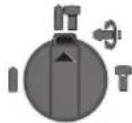
Position for impact drilling in concrete or natural stone
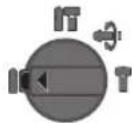
Position for drilling without impact in wood, metal, ceramics, and synthetic materials, as well as for screwdriving
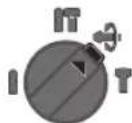
Vario-Lock position for changing the chisel position. In this position, the mode selector switch is not locked.
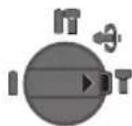
Position for chiseling
Setting the direction of rotation
The direction of rotation of the chuck can be changed using the direction switch. When the switch is pressed, however, it is not possible.
Clockwise rotation: Press the direction switch up to the stop position
Counterclockwise rotation: Press the direction switch down to the stop position
Always set the correct direction of rotation.
Temperature control indicator
The red temperature control indicator lamp 19 signals that the battery temperature is outside the optimal range. In this case, the power tool does not work or works with reduced power.
Battery temperature control:
The red lamp 19 lights up continuously after inserting the battery into the charging device: The battery temperature is outside the charging range of 0 °C to 45 °C, the battery cannot be charged. The red lamp flashes when pressing the on/off switch 21 or the switch 10 (with the battery inserted): The battery is outside the permissible temperature range. - At battery temperatures above 70 °C, the power tool switches off until the battery temperature returns to the normal range.
Temperature controls for the electronics/power tool:
The red lamp 19 lights up continuously when the switch 10 is pressed: The temperature of the electronics/power tool is below 5 °C or above 75 °C. - At temperatures above 90 °C, the electronics switch off the power tool until the permissible operating temperature range is reached.
Instructions for use
Setting the drilling depth (see figure M)
With the depth stop 17 you can set the desired drilling depth X.
Press the setting button for the depth stop 15 and insert the depth stop into the auxiliary handle 16. The scale on the depth stop 17 must face upward. Insert the SDS-plus tool into the SDS-plus holder 3 up to the stop. If the SDS-plus tool is inserted incorrectly, the drilling depth may be set incorrectly. Pull the depth stop out until the distance from the tip of the drill to the tip of the depth stop corresponds to the desired drilling depth X.
Changing the chisel position (Vario-Lock)
You can lock the chisel in 36 positions. This way you can set the optimal working position for each application.
Insert the chisel into the tool holder. Turn the mode selector switch 13 to the "Vario-Lock" position (see "Setting the operating mode", page 153). Turn the tool holder to the desired chisel position. Turn the mode selector switch 13 to the "Drilling" position. This locks the tool holder. - Always set the correct direction of rotation.
Setting the chisels (see figure N)
Install the power tool on the bit only when it is switched off. Rotating power tools can slip.
To use the bit holder, a universal bit holder with a hexagon shank is required (accessory).
Clean and lightly grease the insertion end of the hexagon shank. Insert the power tool with rotation into the chuck until it locks automatically. - Check the locking by pulling the holder. Insert the bit into the universal holder. Use only bits with the correct head size. - To remove the universal holder, pull the locking sleeve forward and pull the universal holder out of the chuck.
Selecting the vibration
Vibration
The built-in damper reduces the vibration that occurs.
The soft grip handle reduces the risk of slipping and allows for a secure grip and control of the power tool.
Instructions for optimal use of the accumulator
Protect the accumulator from moisture.
Store the accumulator only in the temperature range of -20°C to 50°C. Do not leave the accumulator in the car.
Periodically clean the ventilation slots of the accumulator with a soft, dry brush.
A significant reduction in operating time after charging indicates that the accumulator is old and indicates the need for replacement.
Follow the disposal instructions.
Maintenance and service
Maintenance and cleaning
Before maintenance, changing tools, etc., as well as during transport and storage, remove the battery from the power tool. There is a risk of injury if the power tool is switched on unintentionally. To ensure safe operation, keep the ventilation slots of the power tool clean at all times. Replace a damaged protective cap immediately. This is recommended to be done by a service workshop. Clean the chuck every time after use.
Service and consulting on product use
The service workshop will answer all your questions regarding repair and maintenance of your product and spare parts. Exploded views and information on spare parts can also be found at:
The Bosch team of consultants will be happy to answer all your questions regarding our products and their accessories.
Please always quote the 10-digit article number from the product nameplate for all inquiries and spare parts orders.
ул. Тимирязева, 65А-020
220035, г. Минск
Tel.: +375 (17) 254 78 71
Tel.: +375 (17) 254 79 16
Fax: +375 (17) 254 78 75
E-Mail: pt-service.by@bosch.com
Official website: www.bosch-pt.by
Kazakhstan
Armenia, Azerbaijan, Georgia, Kyrgyzstan, Mongolia, Tajikistan, Turkmenistan, Uzbekistan
Do not dispose of electric tools, rechargeable batteries, or batteries with household waste!
Only for EU member states:
In accordance with European Directive 2012/19/EU, electric tools that have reached the end of their service life, and in accordance with European Directive 2006/66/EC, damaged or used-up rechargeable batteries/batteries must be collected separately and handed over to an environmentally compatible recycling facility.
Rechargeable batteries, batteries:
Li-Ion:
Please observe the instructions in the 'Transport' section, page 156.
Subject to change.
Ukrainian
Safety instructions
General power tool safety warnings

WARNINGS
Read all safety warnings and instructions. Failure to follow the warnings and instructions may result in electric shock, fire and/or serious injury.
D6pe 36epiraTe Ha MaH6yThe ci nonepeJxehnH i BkA3iBKN.
IiD noHATTAM «eNeKtpponpnaI» B cux 3aCtepeXeHHx MaTbca Ha yBa3i eNeKtpponpnaI, IIO npauoe BiMpeXei (3 eNeKtpoka6enem) a60 biAkymnyatrophoBatapei (6e3 eNeKtpoka6enio).
Be3neka ha po604my micui
TpHMaIe CBOE pO6Oe MlCe B U HCToTI 3a6E3neTe Do6pe OCBITNeHHPO6OOrO Micr. Be3nAdoBnoraHe OCBITNEHH Ha pO6OyMoMl MoKt b Pn3BecTH Do HeuacHNX BNJaKIB. He npaoute 3 enektponpnaanom y cepedobnui, de ichye He6e3neka Bb6yx Bhaenidok npncythocti roipuix pidiH, ra3iB ao nny. EneKtponpnaI MOkyTb npoJkyBaTH ickpn, BiJ RkNx MoKe 3aMmTaHcnn nn abo napn. Pipac npaizi eNektponpnaIOM He nIpyckaIte pObooyoro Micza Dite Ta IHnx HIOe. Bm moKete BTPaHTNI KOHTpOJIb HAD IIpHnAOM, RaIcO BaIaYyBaIa Bye BiDBepHyTa.
EeKtpnHa 6e3neka
WtencenbeeneKtpponnady noBHeH nixOaHTndo p03eKn. He 03BOJraTbcaMinrTa B wTeNCeni. Dna po6oTH 3 eEeKtpponpnaadmH, 10 Maotb 3axnche 3aemneHH, He BHKOPHCOTByte aanTepn. BkOpNCTAHPOrHahBHO rTcena Ta HanekHOI po3eTKn 3MeHye pH3NK ypaKeHH eneKTPuHMM CTpyMOM. YHnKaIe KOHTaKry qACTHn TIn 3a3eMneHHM NOBepXHMn, kHnP., Tpy6amH, 6aTapeMn ONaJIeHHN, INHTAMn Ta XOLOHbHKAMn. KOn BaIe TINO 3a3emHe, icHy e 36inbWeHa He6e3neKa ypaKeHHr eNEKTPuHMMCTpyMOM. 3axuatae npnad BiDouyIBONr. NonadaHbBOBn BeneKtponpnaIad 36inbWye pN3k ypaKeHH eNEKtpnHIM CTpyMOM. He BnKOpHCTOByIe Ka6enb IINNEpeHecEHNA ENEKTPponpnaady, ndiBiyBaHH aBO BHTaryBaHH WTeNCEN3 P03eTK. 3axHuaIte Ka6enb BiD Tenna, oni, roctpx KpaIB Ta detaneepnnaady, pO pyXaIObCn. PoNKOJKeHN abo 3akpyeHn Ka6enb 3biBlycPn3NK ypaKa6eHH eNEKTPnHMM CTpyMOM. Длгзвишхpo6itob6OB'3KOBOBHKOpHCTOByTe nIe TaKn noDObKyBaU,Io npHaTTHnДлг 30bhiushxpo6it.BNKOpHCTaHHNoDObKyBaU,IO
YkpaHcbKa1 157
po3paxOBaHH Ha 3OBHIIH iopo60TH,3MeHwye pH3NK ypaKeHHn enEeKtpuHm CTpyMOM. Akuo He MoxHa 3ano6irn BkOpHcTaHHO eneKtpponpnaIy y Bonoromy cepeOboNsi, BkOpHcTObByte npncptpi 3axnCHOro BmKHeHHBnKOpCTaHHnpctpoIO 3axnCHOro BmKHeHH 3MeHwpe pnsIKypaxeHHnEneKtpnHm CTpyMOM.
Be3neKaIIOeI
Bybte ybaXHHMn, cnikynte 3a Tm, 10 Bu po6nte, ta po3cydHBO NOOBtce nI qac po6oTH 3 enktpponlndom. He KopncTytecnaeponpnnadom, kUo Bu cTOMnei a6o 3haxOHTecn iN diEHO HAPKOTHKIB, CnHPTHNX HANOIB a6o NIKB. MItb HeyBaXHOCTi npKOpNCtYBaHHI enktpponpnaDOM MOKe pN3BeCTH DO cepNo3HX TpaBM. BdraTe oc6ncte 3axnche cnopdxkeHH Ta 06ob'3KOBO BdraTe 3axnchi OKynpH. BdaHnn OC6nCTo 3axnCHOrO cnopdxkeHH, kHa np., -B 3aJexHOCTi BiD BVdy po6t -3axnHOI Mackn, cneuB3yTTA, IO He KOB3AETCB, KACKn Ta HabyuHKnIB, 3MeHwE pN3NK TpaBM. YHnKaIe BnnaKOBOr BMnKaHH. Nepu HIX BBIMKHyTH eNekTpponlad B eNekTpomepexy a6o NiEaHaTHaKMyNHTOPHy 6aTapeO,6paTHnoBpyKn a6o NepeHOCHTN, BNEBHITbcraB TOMy, 0eNekTpponlnd BmKHyTH. TpMaHnHa NaIbua Ha BmHKaui NiD ac nepeHeceHHraNekTpponlady a6o NiKIOueHHBa PO3eTKy yBMKHytoro npnAdy MoKe nPH3BeCTn Do TpaBM. IpepeTMMKBMKHATNEEKETPONPnnaD,np6epitb HanaorOxyBaBnH IHCTpyMeHT Ta raIKOBN Klnou. Ipe6yBaHHHaIarOxyBaBnHO IHCTpyMeHTa a60 KIOUa B uactnHi npnaDy, 1o o6eptaeTcR, MoKe np3BecnDo TpaBM. YHnKaIe HEnpnpOHoro NOJoxEHN Tina.36epiraTe ctKe NOJoxEHN Ta 3aBXm 36epiraTe pIBOVary. UeIO3BOInb Bam Kpaue 36epirAt KOHTpolb NaeEkeTPOpPnAdom y HecnOpDIBaHnx CNTyaIax. BdraTe npuaTn OJr. He BdaTaTe npocToPnOaT Ta npKpCh. He ndTabIe BOncs, oJr Ta pykabNci do detane npnaNy, 0o pyxaOtbc. IpoCTOpHoi OJr, DOBRE BOncs Ta npKpCh MoKyTb NOTpanNTu Bdetani, 0o pyxaOtbc. AkiocmyoMOKTHBCTbMOHTyBaTHNIOBIcMOKTyBaIbHI60nnoyOBIOUOi npctpoi,pekoHaTeC,oo6BOH6yHNO6peNiEhAHITa npabNbHO BHKOPNCTOBYBaHc. BHKOPNCTAHNIO-BIDCMOKTyBaIbHOro pNCTPOIO MOKe 3MeHINTHe6e3neK,3yMOBHeHNIOM.
PpabHbHe NOBdoXeHHaT KOpNCTyBaHHn eKETponpnaamn
He nepebaTakyIte npnIad. BkOpncTobuyTe Takn npnIad, 0cneiaIbHO np3haeHm IraB iDnOBiHOI po6oTH. 3 npdaTHMnpnaIaOM Bn 3 MeHUM pN3KOM oTPmaTe KpaI pe3yIbTaTHpo6OT, RaIO 6yJeTe npauOBaTH B3a3HaeyHomy dianaoHoi notyXhoCTI.
If the power tool cannot be switched on or off, it is dangerous and must be repaired. Before adjusting the tool, changing accessories, or storing the tool, disconnect the plug from the power source and/or remove the battery pack. These preventive safety measures reduce the risk of accidental starting of the tool. Store idle power tools out of the reach of children. Do not allow persons unfamiliar with the power tool or these instructions to operate the power tool. Power tools are dangerous in the hands of untrained users. Maintain power tools. Check for misalignment or binding of moving parts, breakage of parts and any other condition that may affect the power tool's operation. If damaged, have the power tool repaired before use. Many accidents are caused by poorly maintained power tools. Keep cutting tools sharp and clean. Properly maintained cutting tools with sharp cutting edges are less likely to bind and are easier to control. Use the power tool, accessories and tool bits, etc., in accordance with these instructions, taking into account the working conditions and the work to be performed. Use of the power tool for operations different from those intended could result in a hazardous situation.
Proper handling and use of battery-powered tools
Recharge the battery packs only with the chargers specified by the manufacturer. A charger that is suitable for one type of battery pack may create a risk of fire when used with another battery pack. Use the power tools only with specifically designated battery packs. Use of any other battery packs may create a risk of injury and fire. When the battery pack is not in use, keep it away from other metal objects, like paper clips, coins, keys, nails, screws or other small metal objects, that can make a connection from one terminal to another. Shorting the battery terminals together may cause burns or a fire. Under abusive conditions, liquid may be ejected from the battery; avoid contact. If contact accidentally occurs, flush with water. If liquid contacts eyes,
158|Ukrainian
additionally seek medical help. Liquid ejected from the battery may cause irritation or burns.
Service
Have your power tool serviced by a qualified repair person using only identical replacement parts. This will ensure that the safety of the power tool is maintained.
Safety instructions for hammers
Hold the power tool by insulated gripping surfaces, because the cutter may contact hidden wiring. If the cutter contacts a "live" wire, exposed metal parts of the power tool may become "live" and could give the operator an electric shock. Use the auxiliary handle or grip the tool with both hands to maintain control. If the tool slips, you could lose control and be injured. Before drilling into walls, floors, or ceilings, check for hidden pipes and wires. Use a metal detector or consult the local utility company. Contact with a "live" wire can cause fire and electric shock. Contact with a gas pipe can cause an explosion. Contact with a water pipe can cause property damage. Keep your hands away from the cutting area. Never reach under the workpiece. Do not use dull or damaged accessories. They can break and cause injury. Do not open the battery pack. There is a risk of short circuit.

Protect the battery pack from heat, e.g., from direct sunlight, fire, water, and moisture. There is a risk of explosion.
If the battery pack is damaged or not used properly, it may leak. If liquid comes into contact with your skin, rinse immediately with water and seek medical advice. Use the battery pack only with your power tool. Under these conditions, the battery pack will be protected from dangerous overload. The battery pack can be damaged by sharp objects, such as nails or screwdrivers, or by external force.
Internal short circuit, overheating, chemical burns, explosion, or fire may occur.
Components shown
The numbering of the components shown refers to the representation of the power tool on the graphics page.
1 Keyless chuck (GBH 36 VF-LI Plus) 2 Keyed chuck SDS-plus (GBH 36 VF-LI Plus) 3 SDS-plus adapter 4 Dust extraction hood 5 Extraction hose 6 Extraction hose for keyed chuck (GBH 36 VF-LI Plus) 7 Damper 8 Switch for changing the direction of rotation 9 Handle (insulated gripping surface) 10 Screw 11 Battery pack 12 Unlocking button for the impact/drill mode switch 13 Switch for changing the mode (impact drilling/drilling) 14 Work light 15 Button for adjusting the depth stop 16 Auxiliary handle (insulated gripping surface) 17 Depth stop 18 Unlocking button for the battery pack 19 Temperature control indicator 20 Battery charge indicator 21 Button for the battery charge indicator 22 Locking sleeve for the keyed chuck (GBH 36 VF-LI Plus) 23 Keyed chuck (GBH 36 VF-LI Plus)
Ukrainian 1 159
24 SDS-plus shank for drill chuck (GBH 36 VF-LI Plus)* 25 Drill chuck (GBH 36 VF-LI Plus) 26 Depth stop 27 Key for drill chuck (GBH 36 VF-LI Plus) 28 Sleeve for the quick-change drill chuck (GBH 36 VF-LI Plus)
29 Ring for the quick-change drill chuck (GBH 36 VF-LI Plus) 30 EPC switch (Electronic Precision Control) 31 Universal holder with SDS-plus shank* Accessories shown or described are not included in the standard delivery. The complete range of accessories can be found in our accessories program.
Technical data
| Перфоратop | | GBH 36 V-LI Plus | GBH 36 VF-LI Plus |
| Товарни homер | | 3611 J06 0.. 3611 J07 0.. |
| Perugлобань кльбостi обертib | | ● | ● |
| Вимкеня обертыня | | ● | ● |
| Оberразни правору/повору | | ● | ● |
| Зminни сев dinьни патон | | - ● | |
| Hom. наруga | B= | 3 | 6 |
| Hom. сproжваши потужнистb | Вт 600 600 | | |
| КльбICTь удariв | xВил. -1 | 0-4200 | 0-4200 |
| Сида оданоч然是 удару вдановIDs do EPTA-Procedure 05/2009 | Дж | 3,2 | 3,2 |
| Homina KBKICTb obertib | | | |
| - ОBERTANNA правору | xВил. -1 | 0-940 | 0-940 |
| - ОBERTANNA повору | xВил. -1 | 0-930 | 0-930 |
| Патрон | | SDS-plus | SDS-plus |
| Дiametriшнишни дени | MM | 50 | 50 |
| Дiametр розсевадюваль otherwise | MM | 28 | 28 |
| - Бетон | MM | 82 | 82 |
| - Камяна Кадka (севадиьни лоронka) | MM | 13 | 13 |
| - Стал | MM | 30 | 30 |
| - Деревиha | MM | 4,0/4,51) | 4,1/4,61) |
| Bara вдано do EPTA-Procedure 01:2014 | Кг |
| Дорустima Tempepatура habковишиныесяа | | | |
| - пи зарджани | °C | 0...+45 | 0...+45 |
| - пи ekspл�атуцii2 i пи збериганни | °C | -20...+50 | -20...+50 |
| Рекомendobani akumлaitори | | GBA 36V ... | GBA 36V ... |
| Рекомendobani зардни пистои | | AL36.. | AL36.. |
| | GAL 36.. | GAL 36.. |
1) Depending on the battery pack used 2) Measured at temperatures <0°C Technical data determined with the battery pack included in the delivery.
Information on noise/vibration
Noise emission values determined according to EN60745-2-6.
The A-weighted noise level of the power tool is typically: Sound pressure level 90 dB(A); Sound power level 101 dB(A). Uncertainty K=3 dB.
Wear hearing protection!
Total vibration (vector sum of three directions) and uncertainty K determined according to EN 60745-2-6: Hammer drilling into concrete: a_h = 14.5 m/s², K = 1.5 m/s²; Chiseling: a_h = 9.5 m/s², K = 1.5 m/s²
Drilling in metal: a_h < 2.5 m/s², K = 1.5 m/s²
Screwdriving: a_h < 2.5 m/s², K = 1.5 m/s²
The vibration level given in these instructions has been measured in accordance with the procedure specified in EN 60745 and can be used for comparison of power tools. It is also suitable for a preliminary assessment of vibration exposure.
The stated vibration level applies to the main applications of the power tool. However, if the power tool is used for other applications, with different accessories or with insufficient maintenance, the vibration level may differ.
Repeated vibration loads can significantly increase the vibration load over the entire operating interval. Therefore, when assessing vibration loads, it is necessary to take into account also the time intervals when the device is switched off or, although switched on, but not actually in operation. This can significantly change the vibration load over the entire operating interval of the device. Determine appropriate safety measures to protect the vibrating device, e.g.: technical maintenance of the electric tool and working tools, heating of hands, organization of work processes.
ASSEMBLY
Charging the battery (see figure A)
Use the charging device specified on the device page. The device is powered by a lithium-ion battery that is used with the device.
Note: The battery is supplied partially charged. To ensure that the battery reaches its full capacity, before first use with the device, the battery must be fully charged in the charging device.
The lithium-ion battery can be charged at any time without shortening its service life. Interrupting the charging process does not damage the battery.
The lithium-ion battery is protected against deep discharge by the "Electronic Cell Protection (ECP)" system. When the battery is discharged, the protective circuit switches off the device. The working tool no longer moves.
After the electronic protection has automatically switched off, do not press the switch any further. This can damage the battery.
Battery removal
The battery 11 is equipped with two locking levels, which prevent the battery from falling out when the unlocking button is pressed unintentionally. The battery integrated in the electric tool is held in position by a spring.
To remove the battery 11: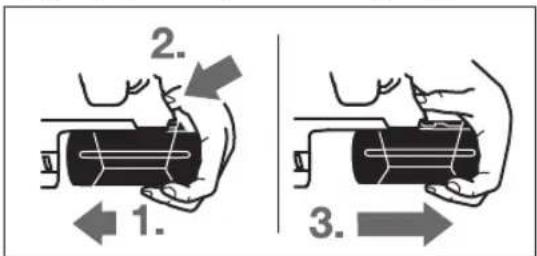
- Press the battery against the electric tool (1) and simultaneously press the unlocking button 18 (2).
Pull the battery out of the electric tool until the red stripe appears (3). - Then press the unlocking button 18 again and completely pull out the battery.
Battery charge indicator
The three LEDs of the battery charge indicator 20 show the charge level of the battery 11. For safety reasons, the charge level can only be checked when the electric tool is switched off. Press the button 21 to check the charge level (this is also possible when the battery is removed). After about 5 seconds, the battery charge indicator goes out automatically.
| Свittлodeи | СмнICTь |
| Свічени 3-x зelenени | ≥2/3 |
| Свічени 2-x зelenени | ≥1/3 |
| Свічени 1-ro зelenноу <1/3 | |
| Міганney 1-ro зelenноу pezeрь | |
Kkuo nicna HataNcKaHHa KhoNky 21 Hi oDnH CbitnoioJ He 3aTropaeBcAkyMnyTop BmWOB 3 nay i noR Tpe6a NOMIHATN.
Iiuc3apJkaHHWBnKO3aTOpHOTbC0INH3aOHNMI notIM rachyTptn3enehiCBITNOIOJN.AkymyIaTOpHa 6batape NOBHCIO3apJxHeA,AKo6e3nepePBO CBITATBCr Tpn3enehi CBITNOIOJN.Pn6bn.uepe5XBnIHnicraToro, AakymyIaTOpHa 6batape 6yDe nobHcTIO 3apJxHeA,TPN 3enehiCBITNOIOINHOBYrachytb.
DdaTkoBa pyKoTka
KopHcyItecN pHnAOM nHwe 3doaTkoBOIO pyKoRKOIO 16.
NobepaHHHdoataKOBOpy KoRTKn (nB.MaB.B)
IodatKOby pyKoTky 16 MoKHa NOBepTaTH B 6yNb-Ke neOxHn, IIO 3aBe3neUe 3pyuHy poBtgy 6e3 BTOMHeHHpyk.
- POBepHitb pykydoaTkoBOI pyKOATK16 npoTHCTpIKN roHHnKa i BCTaHObitb doaTKOby pyKOATy 16B Heo6xIDne noLoKeHHa. Picna boro3HOby Tyro 3aTARHITb pykydoaTkoBIpyKOATK16 NOBepTaHHaMa CTpIKOHO roHHnKa.
CniDkyIte 3a THM, uO6 3aTHCKHn NOcOK IOaTKOBoi pykoAHTK 3hAxoHbCBA BpepeBaehomy dna Ibo r naHa Kopnyci.
Bn6ip cBepdnnbHoro natpOHa i po6oynx ihcTpymEnTiB
IJIpepopauii iIOB6aHHa Bam notpi6hi po6oHi IHCPTyMeHTN 3 SDS-plus,AKI MOKHa BCTPOMHTN CBepnInbHn natpoH 3 SDS-plus.
ДлгСВЕРДЕНH6e3уdapyВДЕРБИHи,МETani,КЕРAMi i nlaTMaci,aTAKOx3akpyuBaHnYTBHNTIB BHKOPNCTOBYHTbCpo6ouiIHCTpymEnTH6eSDS-plus (Hanp.,CBepda3UINIHDPuHNMXBOCTOBKOM).ДлгТaKHX po6ouhIXHcTpymEnTIBNOTpiHmWbDko3aTuCKHn
YkpaHcbka|161
CBePnHbHn natoH a6o 3y6uactn CBePnHbHn natoH.
BcTaHOBHeHHa3HimaHHa 3y6actoro CBepnIbHoro natoHa (GBH 36 VF-LI Plus)
I0paOBOATn 3poOUMInHCTpyMeHTAMn 6e3 SDS-plus (HaNP., i3 CBePnOM 3 uINIHpNHyHM XBOCTOBKOM), Tpe6a MOHTyBaTH nPnDAthm CBePnINbHn NaTPOH (3y6aactn a6o WBNkO3aTHckHN CBePnINbHn NaTPOH, npnnaJ).
Mounting the SDS-plus drill chuck (see figure C)
Screw the SDS-plus drill chuck 24 onto the threaded spindle 23. Secure the SDS-plus drill chuck 23 with the locking screw 22. Note that the locking screw has a left-hand thread.
Removing the SDS-plus drill chuck (see figure C)
Turn the locking screw out completely. Turn the SDS-plus drill chuck by the chuck body until it releases from the thread. - Check the locking screw, tighten it if necessary.
Removing the SDS-plus drill chuck
Pull back the locking sleeve 5 and remove the SDS-plus drill chuck 23.
Removing the quick-change drill chuck (GBH 36 VF-LI Plus)
The SDS-plus drill chuck 2 can be replaced with the quick-change drill chuck 1.
Removing the quick-change drill chuck (see figure D)
Pull back the locking ring 6 of the quick-change drill chuck, hold it in this position, pull forward, and remove the SDS-plus drill chuck 2 or the quick-change drill chuck 1. Be careful not to pull the quick-change drill chuck out of the tool.
Mounting the quick-change drill chuck (see figure E)
Use only original accessories. Pay attention to the number of identification grooves 26. Do not use quick-change drill chucks with more grooves. When using a quick-change drill chuck with a power tool, the tool may vibrate during operation. - Before mounting, clean the quick-change drill chuck and lightly grease the mounting shaft.
- Insert the SDS-plus drill chuck 2 or the quick-change drill chuck 1 fully into the tool holder 25, turning it until the locking mechanism engages. - The quick-change drill chuck locks automatically. Pull on the quick-change drill chuck to check that it is locked.
Changing the tool
The dust protection cap 43 prevents dust from entering the tool holder during operation. When inserting the tool, make sure that the dust protection cap 4 is not damaged. Replace a damaged dust protection cap immediately. It is recommended to have this done by a qualified specialist.
Inserting the tool (SDS-plus)
Inserting the SDS-plus tool (see figure F)
The SDS-plus drill chuck allows for simple and easy tool change without using additional tools.
- GBH 36 VF-LI Plus: Insert the interchangeable SDS-plus drill chuck 2. - Clean the end of the tool that will be inserted into the chuck and lightly grease it. Turn the tool into the chuck until it locks automatically. - Pull the tool to check that it is locked.
The SDS-plus tool is designed to move freely. This causes radial runout at no load. This does not affect the accuracy of the drilled hole, as the drill bit centers itself during drilling.
Removing the SDS-plus tool (see figure G)
Pull back the locking sleeve 5 and remove the tool.
Inserting the tool (without SDS-plus) (GBH 36 VF-LI Plus)
Inserting the tool (see figure H)
Note: Do not use tools without SDS-plus for drilling or impact drilling! Tools without SDS-plus must not be used with the drill chuck for impact drilling.
Insert the toothed drill chuck 23 (see "Installing/Removing the toothed drill chuck", page 161). - Turn the toothed drill chuck 23 open until the tool can be inserted. Insert the tool.
162|Ukrainian
Insert the chuck key into the corresponding holes in the toothed drill chuck 23 and tighten the tool evenly. Turn the mode selector switch 13 to the "Drilling" position.
Removing the tool (see figure I)
- Using the chuck key, turn the toothed drill chuck 23 counterclockwise to loosen it so that the tool can be removed.
3aima p0600r0 iHctpymenta (6e3 SDS-plus) (GBH 36 VF-LIPlus)
BcTpOMnHn po6oOto IHcTpMeHTa (DUB. Man. J)
BkaibKa:He BnKOpncTObyTe pOboi IHcTpymEnTH 6e3 SDSplus neppopaui iDob6aHH!Poboi iHcTpymEnTH 6e3SDS-plus iix CBeplNbHnn NaPOH NnKOdKyIObca npineppopaui iDob6aHHi.
BCTPOMITbWBNDKo3aTNCKNH3MIHHN CBepdINHBHn NaTPOH1. IIO6pe TpHMaTe fikcyuOe KInbue WbNdko3aTHCKHO 3MIHHOR CBePnINbHOro NaTPOHa 29. NObepTaHHAM nepeDhBoI BtynK 28 BiKpnIte 3aTNCaay po6oHOr IHCTpyMeHTA HAcTlBKn, Uo6 MoKHa 6yNo BCTPOMTN p6ooun IHCTpyMeT. IPrTpHMaTe fikcyuOe KInbue 29 i 3 CNIO NOBepTaTe nepeDnHO BtynKy 28 B HAnpMky, NOKa3aHOMy CTpiKIO, NOKn He NouyETbcBdUYTHE KNaauHHa. IOTARHyBUN3a pO6oHnIHCTpyMeH,nepebiTeMiuHITb nocadKn.
BkaibKa:Kkpo natpon BiikpnTno do npny, npn 3akpyuBaHHi natpOHa MoKe yTuNCaHnI natpon He 6yde 3akpNaBATncr.
B Takomy BnnaKy nobepHItb nepeHIO Btyn Ky 28 Odn pa3 npToH HaprMky, noka3aHOrO cTpiKOHO. Picra zbo ratoH moXHa 6yde 3akpTH.
- NObepHITb nepeMnka pexmmy yapib/OeptaHHA 13B NOIOXeHHA CBepeHHA.
BcTpOMnHnHa akymyIaTOPHo6aTapei
BcTaHOBIb nepeMnKaHnpaMky o6ePaHH8 BcepeHneNoJoxEHn, 063aNo6irn HeHaBMnCHOMy BMnKaHHIO eNekTPOnpnAyn. BCTPOMITb 3apJxKeHn akymyIaTOp 11 33aNy B hixky eEnKtpoIHCTpyMeHTy. PInTHcHITb akymyIaTOpHy 6aTaapeIO, uO6 BOHa NOBHcTIO 3aIIuA y Hixky, To6To uO6 ueBOHOy CMyKkHe 6yNo BnHO i 06aKymyIaTOpHa 6aTapeIdo6pe 3aΦiKcyBaIacr.
BctahOBHeHHpeKmmypo60TH
3a donomoro npemnka pexmy ynapi/boeptaHH 13 B6epitb pekm po60tn eneKtpponnay. BkaibKa:MiHrtepeKIMpo60nIINHeHaBMKHytomy eNeKTponpnni!BInwOmypa3ieneKTponpnnlAdMoKe NOWKODNTNC. - 3miHHT peKHM pO60TH, HATNCHTb KHONky po3bKOyBaHHa 12 i NOBepHt b nepeMnKaU peKmMy CBepdienHH/IOB6aHHa 13 B6aKaHe NIOJKeHHa, IO6 BIn BIDuyTHo 3aIwOBy 3aueNHe.
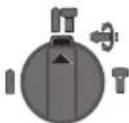
PonokenHnI npopauB 6eOHi a60 KaMeHi
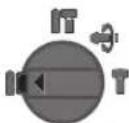
IonoKeHHnIcBepDneHH63yapaby DepeBHHi, Metani, Kepami i nnaTmaci, a TAKOXII 3aKpyuBaHHr TBHITIB
YkpaHcbKa | 163
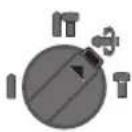
PonoxeHHVario-Lock peryuobHHn nooxeHHpo6ofoIhctpymehTa npn do6bHH
The cutting tool rotation speed / feed rate adjustment is not risky.
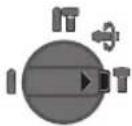
Rotation speed setting
Setting the rotation speed
Using the rotation speed adjustment, you can change the rotation speed of the tool. However, this is not possible if switch 10 is pressed.
Rotation speed adjustment: turn the rotation speed adjustment knob to the stop in the position
Rotation speed adjustment: turn the rotation speed adjustment knob to the stop in the position
Before drilling, set the correct rotation speed.
Switch on/off
Disconnect the power supply. Turn off the power tool when you are not going to use it.
To turn off the power tool, press the switch.
When turning on the power tool, there may be a start delay, as the electronics of the tool need to initialize.
- To turn off the power tool, release switch 10.
Adjusting the number of strokes / number of impacts
The number of strokes of the power tool can be smoothly adjusted by pressing switch 10 more or less.
With a light press on switch 10, the number of strokes / number of impacts is small. With increased pressure, the number of strokes / number of impacts increases.
Electronic Precision Control (EPC) (see M. L)
The EPC function ensures smooth starting and adjustment of the working speed when working with impact in brittle materials.
The EPC pre-set is not required.

Position of maximum working speed

Position for smooth start and adjustment of working speed
Protective clutch
If the electronic switch is triggered, the power tool switches off. The reaction torque that occurs when this happens can be controlled by holding the power tool firmly with both hands and keeping it in a stable position.
If the power tool gets stuck, switch it off immediately. When the electronic switch is triggered and the power tool gets stuck, high reaction torques occur.
Emergency switch-off (Kickback Control)
Kickback Control function
Provides better control over the power tool.
If the power tool is unexpectedly tilted around the drill axis, the power tool switches off.
- To switch on again, release the switch and press it again. The switch-on is indicated by a flashing LED on the power tool. The switch-on is only possible when the power tool is running at maximum speed and can rotate freely around the drill axis.
Temperature control indicator
The red LED of the temperature control indicator signals that the battery or the electronics of the power tool (with integrated battery) are outside the optimal temperature range. In this case, the power tool does not work or does not work at full power.
Battery temperature monitoring:
- The device is continuously monitoring the battery temperature during charging. The battery is located within the permissible temperature range of 0°C to 45°C, and it must not be charged outside this range.
- The device signals an error by pressing button 21 or via the display 10 (when the battery pack is installed): the battery temperature is outside the permissible range.
- If the battery temperature drops below 0°C, the device automatically switches off until the battery temperature returns to the optimal range.
Monitoring the temperature of the electronics:
- The device continuously monitors the temperature via the display 10: the temperature of the electronics must not exceed 75°C.
- If the temperature rises above 90°C, the electronics switch off until the operating temperature returns to the permissible range.
Operating instructions
Setting the drilling depth (see figure M)
With the depth stop 17 you can
set the required drilling depth X.
Press the depth stop adjustment button 15 and insert the depth stop into the auxiliary handle 16. The depth stop must be pushed down. Insert the SDS-plus tool into the SDS-plus chuck. Incorrect handling of the SDS-plus tool may lead to incorrect setting of the drilling depth. Adjust the depth stop so that the distance between the drill tip and the depth stop tip corresponds to the desired drilling depth X.
Changing the working position (Vario-Lock)
You can lock the tool in 36 positions. This allows you to work in the optimal position for the task.
Insert the battery into the tool. Turn the mode selector switch to the “Vario-Lock” position (see “Setting the operating mode”, page 162). Turn the tool holder to the required position. Turn the mode selector switch to the “Drilling” position. The chuck is now locked. For drilling, the direction of rotation must be set to clockwise.
Insert the tool (see figure N).
Place the power tool on the screw only when it is switched off. Rotating tool inserts can slip off.
For drilling, use a universal bit holder with SDS-plus shank (accessory).
- Clean the shank end of the bit holder and lightly grease it. Insert the universal bit holder into the chuck, turning it until it engages.
- Check the locking by pulling the universal bit holder. Insert the bit into the universal bit holder. Use only bits with a cylindrical shank. To remove the universal bit holder, pull the locking sleeve back and pull the universal bit holder out of the chuck.
Dust extractor
Integrated dust extractor for low-dust work.
The soft grip provides a secure hold and better control of the tool, increasing comfort.
Instructions for optimal handling of the battery
Protect the battery against moisture and water.
Store the battery only at temperatures between -20°C and 50°C. As an example, do not leave the battery in a car in summer.
Clean the ventilation slots of the battery regularly with a soft, clean and dry brush.
A significantly shorter operating time after charging indicates that the battery is worn out and must be replaced.
Follow the instructions for disposal.
Technical service and repair
Technical service and evaluation
Before using the power tool (e.g., for maintenance, changing tools, etc.), as well as during transport and storage, remove the battery from the power tool. There is a risk of injury if the power tool is switched on unintentionally. To ensure the power tool operates correctly and reliably, keep the tool and ventilation slots clean. If the battery is damaged or used improperly, vapors may be emitted. Provide fresh air and seek medical help if you feel unwell. The vapors may irritate the respiratory tract. Have the power tool serviced by qualified personnel only using identical replacement parts. This will ensure that the safety of the power tool is maintained.
Service and customer advice
The service center will answer your questions regarding repair and maintenance of your product. You can find detailed information and spare parts at:
The Bosch team will be happy to answer your questions regarding the use of our products and accessories.
For all questions and orders for spare parts, please quote the 10-digit order number found on the product nameplate.
Warranty and repair of power tools are carried out in accordance with the manufacturer's requirements and the legislation of all countries where the product is sold, either by the manufacturer or by authorized service centers (Robert Bosch). Warning! Use of counterfeit products is dangerous and may lead to injury and negative health effects. The manufacturer and distributor of counterfeit products will be prosecuted under administrative and criminal law.
Kazakhstan 165
Ukraine
Bosch Service Center for power tools
Kraina St., 1
02660 Kyiv
Tel.: +380 44 490 2407
Fax: +380445120591
E-Mail: pt-service@ua.bosch.com
www.bosch-professional.com/ua/uk
The list of authorized service centers is specified in the national warranty card.
Transport
The contained lithium-ion batteries are subject to the Dangerous Goods Legislation requirements. The batteries can be transported by the user by road without further requirements. When shipping by third parties (e.g.: air transport or forwarding agency), compliance with special requirements for packaging and labelling is required. In this case, when preparing the item for shipping, consulting a dangerous goods expert is required.
Dispatch the battery only if the housing is undamaged. Tape or mask off open contacts and pack up the battery in such a manner that it cannot move around in the packaging.
Please also observe possibly more detailed national regulations.
Disposal

Power tools, rechargeable batteries, accessories and packaging should be sorted for environmental-friendly recycling.

Do not dispose of power tools and rechargeable batteries/batteries into household waste!
For EU countries only:
According to the European Directive 2012/19/EU and the European Directive 2006/66/EC, power tools that are no longer usable, defective rechargeable batteries/batteries or rechargeable batteries/batteries that are worn out must be collected separately and disposed of in an environmentally correct manner.
Rechargeable battery packs/batteries:
Li-ion:
Bybnacka,3BaKaJaTe Ha BkazIBKn Bpo3dini «TpaHcnpTyBaHHa», cToP. 165.
Moxnbi3min.
Kazakwa
HdyinH eHm yHkapactbipraH naDanaHy KkaTapbHbKpaMbHa naDanaHy XeHHeiOCbl HcaybIK,cohmeH bipre KocbMwapap da bony MyMKH. CKeKTi pactay KaNbI aKnapat KocmbWada 6ap. OHidEHPRE MMeNEKETypaBbaknapat EHMHH KopnycbHda KHe KocmbWada KepctinreH.
EHpy Mep3iH yckaynbKbTH COHfBt BtIHne Kepcetinre. IMnptTayuifa KaTbCTb 6aHaHbC MJIIMeTI KANTaMa da 6epireh.
Ohimdi nai danany Mep3imi
ΘHIMHIN Kb3MET ety MEP3iM 7 kbln ΘHdipinreH Mep3imHe6 bactan (eHdpy KyH 3aybit TaTaaHacbHa Jaa3bnFaH)ICTeNe 5 kbln cKaTaFAHHaOH, eHIMDi TEKcepyi (cepBnCTIK TeKcepy) naDalaHy YcbIbImaHbl.
Kb3METKeHemece naDanahyubihk kateniktepi MeiTeH WbyFy ce6entephiH ti3imi
TytKacbIMeH Kopnycbl6y3bnFaH 60nca,ehimdi naHaanhaHbI3 - eHIM KOpnycbiHaH TiKeNeI TyTIn WbIKCa, naJaIaN6aHb3 TOKcMb6y3bIFAHHEMeceOKwaynaycb360Jca, naDanaH6aHb3 -kayBH-waabHKe3iHc6biptTa(daIa) naIanaHaBb3 Kopnyc iuihe cy Kipce KypbnFbHbKocybl60nMaHb3 K Θn yWKBH WbIKca, naJaIaHa6BaHb3 KaTbI Dipin KeiHne naHaHaHa6aHbI3
Uekriky6enrinepi
- TOK, CblmbHbH TO3ybl HeMece 3aKbIMdAHybl
- EHIM KOpNcBbHbH 3aKbMdaNybl
Kb3MeT Kepcety Typi MeH xiniriri
OpaandaanhydAncoHemimTa3anayycbHbnaBb.
CaKray
- Check the cable for damage before each use.
- Check the cable for damage before each use.
- Do not use if damaged.
- For operating conditions, see GOST 15150 (Part 1).
Unpacking
After unpacking, before using the device, check for mechanical damage. Do not allow machines to be used if the packaging is damaged. Read the unpacking instructions in GOST 15150 (Part 5).
In Kazakh
Safety instructions
Electrical safety instructions
Read all safety instructions and warnings. Technical
Keep safety instructions and warnings in a safe place for future reference.
For work, keep safety instructions and warnings.
The safety instructions apply to electrical devices powered by mains (with a plug) and battery-powered devices (with a plug).
Workplace safety
Keep the workplace clean and well-lit. Cluttered or dark work areas can lead to accidents. Do not operate power tools in explosive atmospheres, such as in the presence of flammable liquids, gases, or dust. Power tools create sparks that may ignite dust or fumes. Keep children and bystanders away while operating a power tool. Distractions can cause you to lose control.
3nekt Kayinciadi
3NeKtp Kypan wTenceninH aiBpbl po3eTkaFa cbHobi KaKet. Aibpbl eWKaHdai Θ3reTpY MmKIn Emec. Kepre Kocynbl 3NeKtp KypanapMehen eWKaHdaa anTepnik Aibpbl naDanaHaHbI. Θ3reptimere H aiBip JxHe kapaMbl po3eTkapanbpbl naDanaHy 3NeKtp TOK COFy KayinH TeMeHTeTEJI. Ky6bip, XblnbTbH Xa6bIK, NnHTaXHe cyblkbiw CnKbI Xepre Kocynbl Kypanap cbiptbHa TmHei3. ErepeneHiz Kepre Kocynbl 60nca, 3neKtp ToBihh Cofy Kayni aptabl. 3NeKtp Kypanapbih bInFaHnah, cbi3aH caKaTbH3. 3NeKtp KypanbHbIH iHHe cy Kipce, on 3NeKtp TofbHbH CORY Kayin HApTTbIpaBbl. 3Nekp Kypanbl anbln kpy, acbl KOIO hemece aiblpbH po3eTkadaan bIbFapy ywiH Ka6enbli naDanaHbI3. Ka6enbli bIcTBtAH, maJdAn, eTKip weTTepeH Hemece KypanblH XbIINXbIMa 6OneKTEpHeH anbc XepDe YCTaHbI3. 3aKbIMdaIfAH Hemece WneeneHicKeH Ka6enbl3NeKtp TOFBHbIH cOFy KayinapTTbpaBbl. 3NeKtp KypaBImeauBik Kepde Kymbic icTeceHi3, TEK cbiptTn naDanaHyf aphanFaH y3apTKbIHTbI naDanaHbIbI3. CbPTTa naDanaHyf aphanFaH y3apTKbIHTbI naDanaHy 3NeKTP TOfBIHc,coFy KayniH TEmeHdTeJI. 3NeKtp KypanbH bInFaNdbKopwayda naa danany KaKeT 6oNca,ABOTMaTbI caKaTaHdbIPbIaXbipAaKbIbHnnaDanaHbIbI. ABOTMaTbI
CaKaTaNDbipFbIaXbIpaTKblTbI NaDaIaHy TOKcoFy KayniH TEmHeTei.
Aamap Kayinci3diri
The crane is designed for lifting and moving loads. The electric crane operation modes are set at the factory. The crane operator can adjust the settings depending on the operating conditions. It is forbidden to use the crane for purposes not specified in the operating manual. The electric crane is designed for operation in temperate and cold climates. The crane must not be used in explosive or aggressive environments. When connecting the electric crane to the power supply, follow the instructions in the manual. When the crane is in operation, keep hands away from moving parts. Do not touch the crane with wet hands. Before starting work, check the condition of the crane and its components. Do not operate the crane if any defects are found. Do not use the crane in rain or snow. Do not leave the crane unattended while it is connected to the power supply. If the crane is not working properly, disconnect it from the power supply. Do not attempt to repair the crane yourself. Contact a qualified technician. Do not use the crane for lifting people. Do not exceed the maximum load capacity. When working with the crane, follow all safety instructions. Before starting work, make sure that the work area is clear of obstacles. WARNING! If the crane is used in an explosive atmosphere, it must be disconnected from the power supply before any maintenance work. Do not touch the crane with wet hands. Do not pull the plug out of the socket by the cord. Always disconnect the crane from the power supply before cleaning or maintenance. Do not use the crane if the power cord or plug is damaged.
We have prepared the installation. We have installed the necessary equipment for the installation. The necessary equipment for the installation is installed according to the installation instructions.
Kazakhstan
Electrical safety instructions. Before using the electrical crane, it must be properly grounded. Do not touch the electrical crane with wet hands or when standing on wet surfaces. Do not use the crane if the power cord or plug is damaged, or if the socket is loose. This safety measure prevents electric shock. Do not use the crane near flammable liquids or gases. Do not allow children or untrained persons to operate this crane. Keep the electrical crane away from rain and moisture. Do not use the crane with damaged or frayed cords. If the cord is damaged, unplug it immediately. Do not use the crane if the plug is damaged. Store the crane in a dry place, out of reach of children. Do not use the crane for purposes other than its intended use. Always follow the manufacturer's instructions.
Battery charging and maintenance
Charge the battery only with the charger provided with the crane. The charger is designed for a specific type of battery; do not use it to charge other batteries. Do not charge batteries that are not intended for the electrical crane. Charging the battery may generate heat. Do not charge a damaged battery. Keep the battery away from fire, sparks, open flames, and other heat sources. Do not expose the battery to direct sunlight or high temperatures. If the battery is damaged, do not use it. Dispose of it properly. Do not touch the battery terminals with bare hands. If the battery leaks, avoid contact with the liquid. If contact occurs, rinse with water and seek medical attention.
Battery disposal must be done in accordance with local regulations.
Operation
Operate the electrical crane only with the provided remote control. This ensures safe operation of the crane.
Safety instructions for lifting loads
Before using the power tool, read all safety warnings and all instructions. Failure to follow the warnings and instructions may result in electric shock, fire and/or serious injury. Save all warnings and instructions for future reference. The term "power tool" in the warnings refers to your mains-operated (corded) power tool or battery-operated (cordless) power tool. Work area safety: Keep work area clean and well lit. Cluttered or dark areas invite accidents. Do not operate power tools in explosive atmospheres, such as in the presence of flammable liquids, gases or dust. Power tools create sparks which may ignite the dust or fumes. Keep children and bystanders away while operating a power tool. Distractions can cause you to lose control. Electrical safety: Power tool plugs must match the outlet. Never modify the plug in any way. Do not use any adapter plugs with earthed (grounded) power tools. Unmodified plugs and matching outlets will reduce risk of electric shock. Avoid body contact with earthed or grounded surfaces, such as pipes, radiators, ranges and refrigerators. There is an increased risk of electric shock if your body is earthed or grounded. Do not expose power tools to rain or wet conditions. Water entering a power tool will increase the risk of electric shock. Do not abuse the cord. Never use the cord for carrying, pulling or unplugging the power tool. Keep cord away from heat, oil, sharp edges or moving parts. Damaged or entangled cords increase the risk of electric shock. When operating a power tool outdoors, use an extension cord suitable for outdoor use. Use of a cord suitable for outdoor use reduces the risk of electric shock. If operating a power tool in a damp location is unavoidable, use a residual current device (RCD) protected supply. Use of an RCD reduces the risk of electric shock. Personal safety: Stay alert, watch what you are doing and use common sense when operating a power tool. Do not use a power tool while you are tired or under the influence of drugs, alcohol or medication. A moment of inattention while operating power tools may result in serious personal injury. Use personal protective equipment. Always wear eye protection. Protective equipment such as dust mask, non-skid safety shoes, hard hat, or hearing protection used for appropriate conditions will reduce personal injuries. Prevent unintentional starting. Ensure the switch is in the off-position before connecting to power source and/or battery pack, picking up or carrying the tool. Carrying power tools with your finger on the switch or energising power tools that have the switch on invites accidents. Remove any adjusting key or wrench before turning the power tool on. A wrench or a key left attached to a rotating part of the power tool may result in personal injury. Do not overreach. Keep proper footing and balance at all times. This enables better control of the power tool in unexpected situations. Dress properly. Do not wear loose clothing or jewellery. Keep your hair, clothing and gloves away from moving parts. Loose clothes, jewellery or long hair can be caught in moving parts. If devices are provided for the connection of dust extraction and collection facilities, ensure these are connected and properly used. Use of dust collection can reduce dust-related hazards. Power tool use and care: Do not force the power tool. Use the correct power tool for your application. The correct power tool will do the job better and safer at the rate for which it was designed. Do not use the power tool if the switch does not turn it on and off. Any power tool that cannot be controlled with the switch is dangerous and must be repaired. Disconnect the plug from the power source and/or the battery pack from the power tool before making any adjustments, changing accessories, or storing power tools. Such preventive safety measures reduce the risk of starting the power tool accidentally. Store idle power tools out of the reach of children and do not allow persons unfamiliar with the power tool or these instructions to operate the power tool. Power tools are dangerous in the hands of untrained users. Maintain power tools. Check for misalignment or binding of moving parts, breakage of parts and any other condition that may affect the power tool's operation. If damaged, have the power tool repaired before use. Many accidents are caused by poorly maintained power tools. Keep cutting tools sharp and clean. Properly maintained cutting tools with sharp cutting edges are less likely to bind and are easier to control. Use the power tool, accessories and tool bits etc. in accordance with these instructions, taking into account the working conditions and the work to be performed. Use of the power tool for operations different from those intended could result in a hazardous situation. Battery tool use and care: Recharge only with the charger specified by the manufacturer. A charger that is suitable for one type of battery pack may create a risk of fire when used with another battery pack. Use power tools only with specifically designated battery packs. Use of any other battery packs may create a risk of injury and fire. When battery pack is not in use, keep it away from other metal objects, like paper clips, coins, keys, nails, screws or other small metal objects, that can make a connection from one terminal to another. Shorting the battery terminals together may cause burns or a fire. Under abusive conditions, liquid may be ejected from the battery; avoid contact. If contact accidentally occurs, flush with water. If liquid contacts eyes, additionally seek medical help. Liquid ejected from the battery may cause irritation or burns. Service: Have your power tool serviced by a qualified repair person using only identical replacement parts. This will ensure that the safety of the power tool is maintained.

If the battery pack is damaged, do not use it. Dispose of it properly. Do not expose the battery pack to fire or excessive temperature. Exposure to fire or temperature above 130°C may cause explosion. Do not open or disassemble the battery pack. Do not short-circuit the battery pack. If the battery pack is damaged, replace it with a new one from the manufacturer. Do not use a damaged battery pack.
Do not dispose of the battery pack in household waste or by burning. If the battery pack is damaged, contact a qualified service person. Do not attempt to repair the battery pack. Do not expose the battery pack to water or moisture. Do not use the battery pack with other power tools. Do not store the battery pack in a place where it can be short-circuited by metal objects. Do not expose the battery pack to direct sunlight or high temperature. Do not use the battery pack if it is damaged or shows signs of leakage. If the battery pack leaks, avoid contact with the liquid. If contact occurs, flush with water and seek medical attention.
Safety and Operating Instructions

Read all safety warnings and all instructions. Failure to follow the warnings and instructions may result in electric shock, fire and/or serious injury. Save all warnings and instructions for future reference.
Before using the power tool, read the operating instructions carefully and keep them for future reference.
168|Kazakhstan
General Power Tool Safety Warnings
The power tool is intended for drilling in wood, metal, ceramics and plastic. It is also suitable for driving screws. The power tool is not intended for use in wet conditions or in explosive atmospheres.
Product Features
The numbering of the product features refers to the illustration of the power tool on the graphics page.
1 Keyless chuck (GBH 36 VF-LI Plus) 2 SDS-plus chuck (GBH 36 VF-LI Plus) 3 SDS-plus tool holder 4 Depth stop 5 Release button 6 Chuck key (GBH 36 VF-LI Plus) 7 Auxiliary handle 8 Dust protection cap 9 Sleeve (for dust protection) 10 Cap/cover 11 Battery pack 12 Battery release button
13 SDS-plus drill chuck 14 Dust protection cap 15 Overload clutch adjustment ring 16 Chuck (not shown) 17 Overload clutch 18 Battery charge indicator 19 Temperature indicator 20 Battery charge indicator 21 Battery charge indicator button 22 Impact drill chuck (GBH 36 VF-LI Plus) 23 Quick-change impact drill chuck (GBH 36 VF-LI Plus) 24 SDS-plus drill chuck for impact drilling (GBH 36 VF-LI Plus)* 25 Drill chuck key (GBH 36 VF-LI Plus) 26 Optional accessories 27 SDS-plus drill chuck (GBH 36 VF-LI Plus) 28 Quick-change drill chuck with depth stop (GBH 36 VF-LI Plus) 29 Quick-change drill chuck with depth stop (GBH 36 VF-LI Plus) 30 EPC switch (Electronic Precision Control) 31 SDS-plus chuck with keyless adjustment *The accessories shown or described are not included in the standard delivery. Use only original accessories.
Technical data
| Перфоратop | | GBH 36 V-LI Plus | GBH 36 VF-LI Plus |
| Өнгийсяпí | | 3611J060..3611J070.. |
| Айhalыдамр санын баckару | | ● | ● |
| Айhalуды токару | | ● | ● |
| Онfas/салfa aihaу | | ● | ● |
| Альстырмалы bурfyi патоны | | -● | |
| Жуmbic керneyi | В= | 3 | 6 |
| Кесимді куаты пайдалиу | Вт 600 600 | | |
| Кагулар саны | MH-1 | 0-4200 | 0-4200 |
| Бир kafу куаты 05/2009 EPTA поцедурасы boйыша | J | 3 | , |
| Номналды aihaлыm саны | | | |
| - Онfas aihaу | MH-1 | 0-940 | 0-940 |
| - Салfa aihaу | MH-1 | 0-930 | 0-930 |
| Асан паhtроны | | SDS-plus | SDS-plus |
| Шиндань моидаметри | MM | 50 | 50 |
| Мakсималды bурflyау даметri: | | | |
| - Бetoн | MM | 28 | 28 |
| - Курлыс (шенирлік bурflyау коронкасы) | MM | 82 | 82 |
| - балat | MM | 13 | 13 |
| - оаш | MM | 30 | 30 |
| EPTA-Procedure 01:2014 kужатына сай салмогу | Кг | 4,0/4,51) | 4,1/4,61) |
1) Charging the battery 2) Operation at temperatures below 0°C
Technical data are based on operation with the supplied battery.
Kazakh 169
| Перфоратop | GBH 36 V-LI Plus | GBH 36 VF-LI Plus |
| РукSat etilgen Korшay Tempepa typacbl | | |
| - зарядайда | °C | 0...+45 0...+45 |
| - пайдан менистайда | °C | -20...+50 -20...+50 |
| Чьынblлган akкуmarларпелр | GBA 36V ... GBA 36V ... |
| Чьынblлалын зарядай куралары | AL36.. | AL36.. |
| GAL 36.. | GAL 36.. |
1) Charging the battery 2) Operation at temperatures below 0°C
Technical data are based on operation with the supplied battery.
Noise/vibration information
The noise and vibration values have been determined in accordance with EN 60745-2-6.
The A-weighted sound pressure level is typically: sound pressure level 90 dB(A); sound power level 101 dB(A). Measurement uncertainty K = 3 dB.
Wear ear protection!
Vibration total value (triaxial vector sum) and uncertainty K determined according to EN 60745-2-6:
Drilling in concrete with hammer drill: a_h = 14.5 m/s², K = 1.5 m/s²
Chiseling: a_p = 9.5 m/s², K = 1.5 m/s²
Drilling in metal: a_h < 2.5 m/s², K = 1.5 m/s²
BypaHdaap:ah<2,5M/c²,K=1,5M/c²
The device is designed for use in accordance with EN 60745. The instructions must be followed to avoid serious injury. The device must be used only for its intended purpose.
The device is intended for use with electric tools. If the electric tool is used for purposes other than those intended, the device may be damaged. This will void the warranty.
To ensure safe operation, the device must be checked for damage before each use. If the device is damaged, it must not be used.
To avoid injury, the following safety precautions must be observed: keep electric tools and small parts away from children, store tools in a dry place, and keep the device clean.
Charging
Battery charging (see figure)
Check the battery charger and charging cable for damage before use. Do not use the charger if it is damaged. Connect the charger to the battery only as described.
Note: The battery must be charged before first use. Only charge the battery with the supplied charger.
Before charging, remove the battery from the tool. Charge the battery with the charger provided.
New batteries can be charged at any time. The charging process will stop automatically when the battery is fully charged.
The battery is protected against deep discharge by the "Electronic Cell Protection (ECP)" system. When the battery is discharged, the protection circuit switches off the tool: the tool will not operate.
The tool switches off automatically when the battery is discharged. The battery can then be recharged.
Battery disposal
The battery contains 11 cells. The battery can be removed and disposed of after its service life. If the battery is defective, it must be disposed of properly.
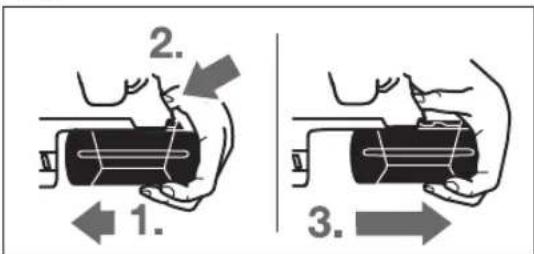
Accumulator 11 dbfapy:
Accumulators: To charge the battery, connect the charger (1.) to the battery (2.). The accumulator is fully charged when the indicator lights up (3.). Connect the charger to the battery only for charging.
Battery charge indicator
The battery charge indicator shows the battery charge level for 20 hours. The charger can only be used with the correct electrical current.
- 21. Connect the charger to the battery (if the battery is discharged). The charge indicator will light up after 5 seconds.
170|Kazakhstan
Before maintenance, read the user manual carefully.
In case of storm, store the device (see arrow N).
Only use the device in dry conditions and keep it clean. It is possible to use it in light rain.
For storm protection, an anchor kit (optional) is required. Use the anchor kit with SDS-plus attachment.
To install the anchor, proceed as follows: First, install the anchor kit. - Insert the anchor kit into the ground. - Secure the anchor with screws. - Check that the anchor is firmly seated. - To remove the anchor, pull it out and store it in the anchor kit storage.
Vibration control
Vibration Control
The vibration control reduces vibrations. The soft grip reduces the vibration of the electrical tool, dust, and noise.
Store the battery in a dry place. Keep the battery away from moisture and heat.
Accumulators TeK-20°C...50°C Temperature of the liquid. Accumulators must not be stored in the cold.
To test the accumulators, keep them clean and dry. Clean them with a dry cloth.
Shortening the service life of the accumulators indicates that they need to be replaced and disposed of.
Do not dispose of them with household waste.
Technical maintenance and service
Service and cleaning
Before starting work with the accumulator, remove any dirt (dust, debris, etc.) from the contacts. Then, during operation, protect the contacts from contamination and moisture. There is a risk of electric shock. Clean the contacts with a dry cloth. Keep the accumulator away from moisture. It is recommended to have the accumulator serviced by a qualified specialist. Clean the accumulator after each use.
Service and maintenance schedule
The service specialist will answer questions about the product and its maintenance, as well as about spare parts. For questions about spare parts and accessories, contact:
The Bosch service team will be happy to answer your questions about the product and its spare parts.
If you have questions about spare parts, please contact the service center within 10 days of the purchase date.
In all countries, the maintenance and repair of the accumulator must be carried out only by "Robert Bosch" authorized service centers or by authorized service organizations.
EXPERT! Do not attempt to repair the accumulator yourself. Any work on the accumulator must be carried out in accordance with safety and technical regulations.


174 Romana
Kazakhstan
Tubnubar kenes beru sheberlik qabyldau ortalığı:
"Robert Bosch" KLC
Almaty,
Republic of Kazakhstan
050012
Muratbayev St., 180
"Termes" 50, 7 Kabat
Tel.: +7 (727) 331 31 00
Fax: +7 (727) 233 07 87
E-Mail: ptka@bosch.com
For service centers and charging points, please visit our website: www.bosch-professional.kz
Disposal
Power tools, accessories and packaging should be sorted for environmentally friendly recycling. Do not dispose of power tools into household waste!
Only for EU countries: According to the European Directive 2012/19/EU, power tools that are no longer usable must be collected separately and disposed of in an environmentally correct manner.
Batteries must be disposed of in accordance with local regulations. Do not dispose of batteries in household waste. Contact your local waste management authority for proper disposal instructions.
Battery disposal

Electrical tools, batteries, accessories, and packaging materials must be sorted for environmentally friendly disposal.

Do not dispose of electrical tools and batteries/rechargeable batteries in household waste!
Only for EU countries:
According to European Directive 2012/19/EU, electrical tools that are no longer usable must be collected separately and recycled. According to European Directive 2006/66/EC, defective or used batteries/rechargeable batteries must be disposed of separately.
Batteries/rechargeable batteries:
Lithium-ion:
Please follow the instructions in section 1746 regarding "disposal".
Technical changes reserved.
Româna
Service scule electrice
Strada Horia Macelariu Nr. 30-34, sector 1
013937 Bucuresti
Do not open the battery. There is a risk of acid leakage.

Do not expose the battery to high temperatures, e.g. as a result of prolonged exposure to direct sunlight or fire. There is a risk of explosion.
Also avoid water and moisture. There is a risk of explosion.
If the battery is damaged or incorrectly used, it may emit vapors. Ventilate the area and, if you feel unwell, seek medical help. The vapors may irritate the respiratory tract. Use the battery only with the power tool for which it is intended. This will protect against dangerous overloading. Sharp objects, e.g. nails or screwdrivers, or strong mechanical forces may damage the battery. This could cause an internal short circuit, and the battery may catch fire, explode, leak, or overheat.
Product description and specifications

Read all safety warnings carefully. Failure to follow the warnings and instructions may result in electric shock, fire, and/or serious injury.
Keep the operating instructions for future reference, and keep them with the power tool.
Intended use of the power tool
The power tool is intended for impact drilling in concrete, brick, and stone, as well as for light chiseling. It is also suitable for drilling without impact in wood, metal, ceramic, and plastic. The power tool is equipped with electronic control and is suitable for both forward and reverse rotation.
Illustrated components
The numbering of the components of the power tool refers to the illustrations on the graphics pages.
1 Quick-change chuck (GBH 36 VF-LI Plus) 2 Interchangeable SDS-plus chuck (GBH 36 VF-LI Plus) 3 SDS-plus chuck 4 Dust protection cap 5 Locking sleeve 6 Locking of the interchangeable chuck (GBH 36 VF-LI Plus) 7 Vibration damping system 8 Rotation direction switch 9 Handle (insulated gripping surface)
10 Rechargeable battery 11 Air vent 12 Release button for the battery 13 Battery unlocking button 14 Work light 15 Adjustment button for the impact stop 16 Auxiliary handle (insulated gripping surface) 17 Impact stop 18 Battery release button 19 Temperature control indicator 20 Battery charge indicator 21 Button for displaying the charge level of the battery 22 Service screw for the chuck with gear ring (GBH 36 VF-LI Plus) 23 Gear ring (GBH 36 VF-LI Plus) 24 SDS-plus chuck (GBH 36 VF-LI Plus)* 25 Chuck guard (GBH 36 VF-LI Plus) 26 Marking line 27 Chuck key (GBH 36 VF-LI Plus) 28 Front sleeve of the quick-release chuck (GBH 36 VF-LI Plus) 29 Rear sleeve of the quick-release chuck (GBH 36 VF-LI Plus) 30 Adjustment lever for the EPC system (Electronic Precision Control) 31 Universal bit holder with SDS-plus* *The accessories shown or described are not included in the standard delivery. A complete range of accessories can be found in our accessories catalog.
186|Bulgarian
Technical data
| Пларфоратop | GBH 36 V-LI Plus | GBH 36 VF-LI Plus |
| Каталожен Home | 3611 J06 0.. 3611 J07 0.. |
| Рergулиpane на скорocта на вьртени | ● | ● |
| Спиране на вьртени | ● | ● |
| Вьртени на скорoctega/наляво | ● | ● |
| Смени патонник | - ● |
| Номинално нашиpenенье | V=3636 | |
| Номинална консуmp irreно мошноct | W 600 600 | |
| Чеб耗费 на удariце | min-1 | 0-4200 0-4200 |
| Енера по сокорст на вьртени | J | 3,2 |
| Номинална скорost на вьртени | min-1 | 0-940 0-940 |
| - Вьртени наскогло | min-1 | 0-930 0-930 |
| Гнед do заразовени Истру金融市场 | | SDS-plus SDS-plus |
| Диаметер нашикatingа на вала | mm 50 50 | |
| Мakс. Диаметер на п探测овени OTВор.: | | 28 82 13 30 |
| - Бетон | mm |
| - Зидаши (с куха борковая) | mm |
| - Стomanа | mm |
| - Дьравесни мateriated | mm |
| Маса сьлално EPTA-Procedure 01:2014 | kg | 4,0/4,51) 4,1/4,61) |
| Долустima Tempeратура на okолна т creда | °C | 0...+45 0...+45 |
| - пи зарочданe | °C | -20...+50 -20...+50 |
| - по врeme на скота2) и за склади rupevi | °C | GBA 36V ... GBA 36V ... |
| пренихителни akumylatordniбateурni | | AL36... AL36... |
| пенихителни за干嘛и устroduства | | GAL 36... GAL 36... |
1)Interchangeable with the rechargeable battery 2)Limited performance at temperatures below 0°C
The technical parameters are defined with the rechargeable battery included in the delivery.
Information on noise and vibration
The noise values are determined according to EN 60745-2-6.
The typical A-weighted noise level of the power tool is: sound pressure level 90 dB(A); sound power level 101 dB(A). Uncertainty K = 3 dB.
Wear hearing protection!
The total vibration value (vector sum of three directions) and uncertainty are determined according to EN 60745-2-6:
Hammer drilling in concrete: a_h = 14.5 m/s², K = 1.5 m/s² Chiseling: a_h = 9.5 m/s², K = 1.5 m/s²
Drilling in metal: a_h < 2.5 m/s², K = 1.5 m/s² Screwdriving: a_h < 2.5 m/s², K = 1.5 m/s²
The vibration emission level given in this information sheet has been measured in accordance with the standardised test given in EN 60745 and may be used to compare one tool with another. It may also be used for a preliminary assessment of exposure.
The declared vibration emission value represents the main applications of the power tool. However, if the power tool is used for different applications, with different accessories or poorly maintained, the vibration emission may differ. This may significantly increase the exposure level over the total working period.
An accurate estimation of the vibration level should also take into account the times when the tool is switched off or when it is running but not actually doing the job. This may significantly reduce the exposure level over the total working period.
The vibration load on the tool depends on the period in which the power tool is switched on, but not in use. This can significantly reduce the total vibration load.
The prescribed protective measures against the effects of vibration on the power tool, for example: technical service of the power tool and working tools, sharpening of the cutting tools, proper organization of the work process.
Bulgarian187
Assembly
Charging the battery (see figure A)
Use only the chargers listed on the page with the accessories. Only these chargers are suitable for the lithium-ion battery used in your power tool.
Note: The battery is delivered partially charged. To ensure full battery capacity, charge the battery completely with the charger before first use.
The lithium-ion battery can be charged at any time without shortening its service life. Interrupting the charging process does not damage the lithium-ion battery. The lithium-ion battery is protected against deep discharge by the "Electronic Cell Protection (ECP)". When the battery is discharged, the power tool switches off via a protective circuit: The working tool comes to a standstill.
Do not continue to press the On/Off switch after the automatic switch-off of the power tool. The battery can be damaged.
Removing the battery
The battery 11 is equipped with a locking mechanism that must prevent falling out when pressing the battery release button 18 unintentionally. When the battery is inserted in the power tool, it is locked in position by the locking mechanism.
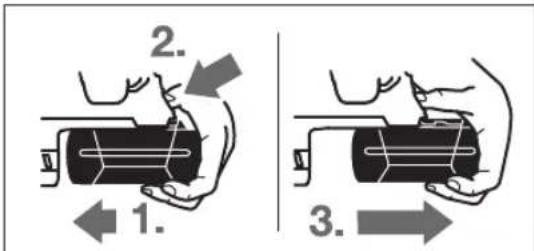
To remove the battery 11:
Press the battery 11 against the power tool (1.) and simultaneously press the release button 18 (2.). Pull the battery out of the power tool until the red marking becomes visible (3.). Press the release button 18 again and pull out the battery completely.
Battery charge indicator
The three green LEDs 20 indicate the charge level of the battery 11. For safety reasons, the charge level check can only be performed when the power tool is at rest.
The charging time is approximately 21 hours. The battery must be charged before first use (possible exception: if the battery was charged at the factory). The light indicator turns off automatically after approximately 5 seconds.
| Сbvетонд Каццтет |
| Henpeкьсато CBteテе 3х зelenу | ≥2/3 |
| Henpeкьсато CBteテе 2х зelenу | ≥1/3 |
| Henpeкьсато CBteテе 1х зelenу | <1/3 |
| Могаши CBvetлиna 1х зelenу | peзерва |
If the indicator light on the battery does not light up or goes out, the battery is defective and must be replaced.
The charging process takes about 3 hours. The indicator light lights up sequentially and then goes out. When the three indicator lights start to flash, the battery is charged. Approximately 5 minutes later, the battery is fully charged and the three indicator lights go out.
Auxiliary handle
Use the power tool only with the mounted auxiliary handle 16.
Adjusting the auxiliary handle (see figure B)
You can place the auxiliary handle 16 in almost any position to achieve a comfortable working position.
Turn the lower handle of the auxiliary handle 16 in the direction of the arrow or tilt the auxiliary handle 16 to the desired position. Then tighten the lower handle of the auxiliary handle 16 by turning it in the direction of the arrow.
Make sure that the clamping of the auxiliary handle does not get caught in the recess for the switch in the housing.
Selection of drill bits and tools
For impact drilling and chiseling, use tools with SDS-plus shank, which are inserted into the SDS-plus chuck.
For drilling without impact in wood, metal, ceramic, and plastic, as well as for screwdriving, use tools without SDS-plus shank (e.g., drill bits with cylindrical shank). For these tools, you need a keyless chuck or a toothed chuck.
Mounting/dismounting the toothed chuck (GBH 36 VF-LI Plus)
To work with tools without SDS-plus shank (e.g., drill bits with cylindrical shank), you must mount a suitable chuck (toothed chuck or keyless chuck, not included in the scope of delivery).
Mounting the tool holder with toothed ring (see figure C)
Push the SDS-plus 2 tool holder into the tool holder with toothed ring 23 until it engages. Turn the tool holder with toothed ring 23 by hand until it locks. Note: the locking is with a left-hand thread.
Mounting the tool holder with toothed ring (see figure C)
- Press the release ring of the tool holder and pull it off. - Insert the tool holder with toothed ring with the release ring installed into the opening until it engages automatically. Make sure that the tool holder with toothed ring is engaged correctly by pulling on it.
Removing the tool holder with toothed ring
Turn the locking sleeve 5 to release the tool holder with toothed ring 23.
Removing/mounting the interchangeable chuck (GBH 36 VF-LI Plus)
The SDS-plus 2 tool holder can be easily replaced with the interchangeable chuck for quick change 1 included in the scope of delivery.
Removing the interchangeable chuck (see figure D)
Pull the locking sleeve of the interchangeable chuck back, hold it in this position, and pull out the SDS-plus 2 tool holder, respectively the quick-change chuck 1, forward. After removal, place the interchangeable chuck in a clean area.
Mounting the interchangeable chuck (see figure E)
Use only accessories that are intended for your power tool and pay attention to the markings on the tool. It is permissible to use interchangeable chucks with one or three locking lugs. If the power tool is used with an unsuitable chuck, the tool may be damaged during operation. Before mounting the interchangeable chuck, clean the chuck and its seat. - Engage the SDS-plus 2 tool holder, respectively the quick-change chuck 1, with the front sleeve. Insert the interchangeable chuck with the front sleeve into the opening 25 until it locks audibly. The interchangeable chuck locks automatically. Make sure that the chuck is engaged correctly by pulling on it.
Dust protection cap
The dust protection cap 4 limits the penetration of dust into the tool holder. When inserting the tool, make sure that the dust protection cap 4 is not damaged.
A damaged dust protection cap must be replaced immediately. It is recommended that this be done by an authorized after-sales service center for power tools.
Changing the tool (SDS-plus)
Inserting the tool with SDS-plus shank (see figure F)
With the SDS-plus chuck, you can replace the tool easily without using additional tools.
- GBH 36 VF-LI Plus: Insert the SDS-plus chuck 2.
- Turn the tool shank and push it in lightly. Insert the tool into the chuck with a turning motion until it engages automatically.
- Check that the tool is seated correctly by pulling on it.
According to the principle of operation, the tool with SDS-plus shank is free to move. This causes radial runout at idle. However, this does not affect the accuracy of the drilled hole, as the drill bit centers itself during drilling.
Removing the tool with SDS-plus shank (see figure G)
Pull back the locking sleeve 5 and remove the tool.
Changing the tool (without SDS-plus) (GBH 36 VF-LI Plus)
Inserting the tool (see figure H)
Note: Do not use tools without SDS-plus shank for hammer drilling or chiseling! When hammer drilling or chiseling, tools without SDS-plus shank and the chuck can be damaged.
- Insert the keyed chuck 23 (see "Mounting/Removing the Keyed Chuck", page 187).
- By turning the keyed chuck 23 to the right, open it until the tool can be inserted. Insert the tool into the chuck in the designated opening for the keyed chuck 23, then tighten the tool evenly using all three holes. Turn the locking sleeve for hammer drilling/chiseling to the "drilling" position.
Removing the tool (see
Turn the sleeve on the chuck in the direction opposite to the arrow using the special key until the tool can be removed.
Bulgarian | 189
Removing the tool (without SDS-plus) (GBH 36 VF-LI Plus)
Inserting the tool (see figure).
Note: Do not use tools without SDS-plus for impact drilling or chiseling! During impact drilling or chiseling, tools without SDS-plus and the chuck can be damaged.
- Inserting the chuck for quick clamping 1. Grasp the sleeve 29 of the chuck for quick clamping. Open the chuck by turning the front sleeve 28 until the tool can be inserted. Tighten the sleeve 29 and turn the front sleeve 28 in the direction indicated by the arrow until you feel resistance. Make sure the tools are gripped correctly, otherwise they may slip out.
Note: If the chuck was opened too far, it may close with resistance when tightening, without the tool being locked.
In such a case, turn the front sleeve 28 once in the direction indicated by the arrow. Then the chuck can be closed again.
Turn the selector switch for impact drilling/drilling to the "drilling" position.
Removing the tool (see figure).
Grasp the sleeve 29 of the chuck for quick clamping. Open the chuck by turning the front sleeve 28 in the direction indicated by the arrow until the tool can be removed.
Dust extraction with GDE 16 Plus (accessory)
Dust from materials such as lead-containing paint, some types of wood, minerals, and metals can be hazardous to health. Contact with or inhalation of dust can cause allergic reactions and/or respiratory diseases in the user or bystanders. Certain types of dust, such as oak or beech dust, are carcinogenic, especially when combined with wood treatment additives (chromate, wood preservatives). Only allow dust extraction of asbestos-containing materials to be carried out by qualified personnel.
- Use a dust extraction system suitable for the material being processed whenever possible. - Ensure good ventilation of the workplace. - It is recommended to use a dust extractor of class P2.
Place the dust extractor on the side of the workpiece opposite to the direction of rotation, when processing the corresponding materials.
The tool is designed for operation on the workbench.
The dust can be harmful to health.
For dust extraction, the GDE 16 Plus must be used (not included in the scope of delivery).
The dust extractor used must be suitable for the material being processed.
If during work particularly harmful dust is released, use a specially designed dust extractor.
Working with the power tool
Starting operation
Charging the battery
Set the switch for the direction of rotation to the middle position to prevent the power tool from switching on accidentally. Insert the charged battery 11 from the rear into the power tool housing. Press the battery until it clicks into place and is securely locked.
Setting the speed for smooth starting and limited speed
Protective switch
If the power tool jams, the torque on the power tool shaft increases. The resulting reaction torque can cause the power tool to jerk. Hold the power tool firmly with both hands and place it in a stable position.
If the power tool jams, switch off the power tool and free the power tool. When switching on the power tool while the power tool is jammed, a high reaction torque occurs.
Kickback Control
The Kickback Control system provides improved control of the power tool. In the event of a sudden and unexpected rotation of the power tool around the drill axis, the power tool switches off automatically.
The electronic tool switches off automatically when the trigger is released.
The operating mode is set by pressing the operating mode switch 14 on the electronic tool.
The automatic shut-off is activated only if the electronic tool is operating at maximum speed and the tool can rotate freely around the drill axis.
Temperature control
The red temperature control indicator shows that the battery pack of the electronic tool (supplied battery pack) is not within the optimal temperature range. In such a case, the electronic tool does not work at all or works with reduced power.
Temperature control of the battery pack:
- When placing the battery pack in the charging device, the red indicator light flashes quickly to indicate: The temperature of the battery pack is outside the permissible range of 0°C to 45°C and the battery pack cannot be charged.
The red indicator light flashes when pressing the trigger 21 or the switch for reversing the direction of rotation 10 (with supplied battery pack): The temperature of the battery pack is outside the permissible working range. - When the temperature of the battery pack is above 70°C, the electronic tool switches off until the temperature of the battery pack is back within the optimal range.
Temperature control of the electronic control of the electronic tool:
- When the switch for reversing the direction of rotation 10 is pressed, the red indicator light flashes to indicate: The temperature of the electronic control is below 5°C or above 75°C - When the temperature reaches 90°C, the electronic control of the electronic tool switches off until the temperature drops to the permissible range.
Working instructions
Setting the drilling depth (see figure)
With the depth stop 17, the drilling depth X can be preset. Press the button for the depth stop 15, place the depth stop 17 in the auxiliary handle 16.
The marked surface of the depth stop 17 must face upwards.
Insert the working tool with SDS-plus shank into the SDS-plus tool holder until it stops. In case of misuse, the working tool with SDS-plus shank may cause incorrect adjustment of the depth stop. The depth stop must be adjusted so that the distance between the upper edge of the depth stop and the tip of the drill bit is equal to the desired drilling depth.
Instructions for optimal use of the battery
Protect the battery from moisture and water.
Store the battery only within the temperature range of -20°C to 50°C. For example, do not leave
the battery in a car in summer.
Periodically clean the ventilation slots of the battery with a soft, dry brush.
A significantly reduced operating time after charging indicates that the battery is worn out and must be replaced.
Follow the instructions for disposal.
Maintenance and service
Maintenance and cleaning
Before carrying out any work on the power tool (e.g. maintenance, changing the tool, etc.), as well as when transporting and storing it, remove the battery from the power tool. There is a risk of injury if the start switch is accidentally actuated. For safe and proper working, keep the power tool and the ventilation slots clean. A damaged protective guard must be replaced. It is recommended to have the power tool serviced by an authorized service center.
Clean the tool holder before each use.
Service and technical advice
You can obtain answers to questions regarding the repair and maintenance of your product from our service department. You can find information about spare parts at the address:
Executive Board for Technical Advice, Annex to the Contract for Satisfaction of Questions Regarding the Products of the Power Tools Accessories.
When asking questions and when ordering spare parts, please quote the 10-digit catalog number printed on the type plate.
Bulgaria
Robert Bosch SRL
Service sculelectric
Strada Horia Macelariu Nr. 30-34, sector 1
013937 Bucuresti, Romania
Tel.: +359(0)700 13667 (Bulgarian)
Fax: +40212331313
Email: BoschServiceCenterBG@ro.bosch.com
www.bosch-pt.com/bg/bg/
Transport
The included rechargeable batteries comply with the requirements of the dangerous goods regulations. The batteries can be transported by the user on the road without further restrictions.
When transporting by third parties (e.g. by air

192|Macedonian
Transporting, storing, or shipping the battery pack in a way that is not in accordance with the instructions may cause damage. Consult the service department in the relevant area. Charge the battery pack or the battery as described, without damaging it. Follow the instructions for the battery pack and the battery so that they cannot be damaged during transport.
The battery pack and the power tools are subject to the regulations.
Recycling

Power tools, battery packs, and accessories must be disposed of separately for recycling.

Do not dispose of power tools and battery packs in household waste!
For EU countries only:
According to European Directive 2012/19/EC on waste electrical and electronic equipment and according to European Directive 2006/66/EC on batteries and accumulators, products that can no longer be used must be collected separately and must be subjected to appropriate recycling and recovery.
Battery packs / batteries:
Li-Ion:
Please observe the instructions in the "Transport" section, page 191.
Subject to change without notice.
Macedonian
Safety instructions
General safety instructions for power tools

WARNING Read all safety warnings and all
WARNING. Read all safety warnings and all instructions. Failure to follow the warnings and instructions may result in electric shock, fire and/or serious injury.
Save all safety warnings and instructions for future reference.
The term "power tool" in the warnings refers to your mains-operated (corded) power tool or battery-operated (cordless) power tool.
Work area safety
Keep work area clean and well lit. Cluttered or dark areas invite accidents. Do not operate power tools in explosive atmospheres, such as in the presence of flammable liquids, gases or dust. Power tools create sparks which may ignite the dust or fumes. Keep children and bystanders away while operating a power tool. Distractions can cause you to lose control.
Electrical safety
Power tool plugs must match the outlet. Never modify the plug in any way. Do not use any adapter plugs with earthed (grounded) power tools. Unmodified plugs and matching outlets will reduce risk of electric shock. Avoid body contact with earthed or grounded surfaces, such as pipes, radiators, ranges and refrigerators. There is an increased risk of electric shock if your body is earthed or grounded. Do not expose power tools to rain or wet conditions. Water entering a power tool will increase the risk of electric shock. Do not abuse the cord. Never use the cord for carrying, pulling or unplugging the power tool. Keep cord away from heat, oil, sharp edges or moving parts. Damaged or entangled cords increase the risk of electric shock. When operating a power tool outdoors, use an extension cord suitable for outdoor use. Use of a cord suitable for outdoor use reduces the risk of electric shock. If operating a power tool in a damp location is unavoidable, use a residual current device (RCD) protected supply. Use of an RCD reduces the risk of electric shock.
Personal safety
Stay alert, watch what you are doing and use common sense when operating a power tool. Do not use a power tool while you are tired or under the influence of drugs, alcohol or medication. A moment of inattention while operating power tools may result in serious personal injury. Use personal protective equipment. Always wear eye protection. Protective equipment such as dust mask, non-skid safety shoes, hard hat, or hearing protection used for appropriate conditions will reduce personal injuries.
Macedonian | 193
Use of the power tool reduces the risk of injury.
Avoid accidental starting. Make sure the switch is in the off position before plugging in the appliance to a power source and/or battery pack, before picking up or carrying the appliance. Carrying the appliance with your finger on the switch or energizing the appliance with the switch on invites accidents. Remove the adjusting key or wrench before turning the appliance on. A wrench or key left attached to a rotating part of the appliance may result in personal injury. Do not overreach. Keep proper footing and balance at all times. This enables better control of the appliance in unexpected situations. Dress properly. Do not wear loose clothing or jewelry. Keep your hair, clothing, and gloves away from moving parts. Loose clothes, jewelry, or long hair can be caught in moving parts. If devices are provided for the connection of dust extraction and collection facilities, ensure these are connected and properly used. Use of dust collection can reduce dust-related hazards.
Use and care of the power tool
Do not force the appliance. Use the correct power tool for your application. The correct power tool will do the job better and safer at the rate for which it was designed. Do not use the power tool if the switch does not turn it on and off. Any tool that cannot be controlled with the switch is dangerous and must be repaired. Disconnect the plug from the power source and/or remove the battery pack before making any adjustments, changing accessories, or storing the appliance. Such preventive safety measures reduce the risk of starting the appliance accidentally. Store idle appliances out of the reach of children and do not allow persons unfamiliar with the appliance or these instructions to operate the appliance. Power tools are dangerous in the hands of untrained users. Maintain power tools. Check for misalignment or binding of moving parts, breakage of parts, and any other condition that may affect the operation of the power tool. If damaged, have the power tool repaired before use. Many accidents are caused by poorly maintained tools.
Keep cutting tools sharp and clean. Properly maintained cutting tools with sharp cutting edges are less likely to bind and are easier to control.
Use the power tool, accessories and tool bits etc., in accordance with these instructions, taking into account the working conditions and the work to be performed. Use of the power tool for operations different from those intended could result in a hazardous situation.
Use and care of the battery tool
The appliance is intended exclusively for use by the manufacturer. If the battery is used with a different battery, there is a risk of fire. Therefore, use only the battery provided with the appliance. Using the wrong battery may cause damage and risk of fire.
The battery must be kept away from paper clips, coins, keys, nails, screws, and other small metal objects that could bridge the contacts. A short circuit between the battery contacts may cause burns or fire. If the battery leaks, the liquid may cause skin irritation. Avoid contact with the liquid. If accidental contact occurs, rinse with water. If the liquid comes into contact with the eyes, seek medical help. The leaked liquid from the battery may cause skin irritation or burns.
Service
Repairs to your electrical appliance should only be carried out by qualified personnel and only with original spare parts. This will ensure the safety of the electrical appliance.
Safety warnings for hearing
Hearing protection. Exposure to loud noise can damage your hearing. Use additional hearing protection while the appliance is operating. The control unit may cause injury. Keep the insulated surfaces of the handles dry, clean, and free of oil and grease. The appliance that is plugged in may come into contact with hidden electrical wiring. Contact with a live wire may put metal parts of the appliance under voltage and cause an electric shock.
194|Macedonian
Use the recommended accessories to avoid hidden electrical wires and consult local regulations for electrical energy use. Contact with electrical wires can cause fire or electric shock. Damaging the gas pipe can cause an explosion. Drilling into water pipes can cause damage. While working, hold the electrical appliance firmly with both hands and ensure a stable position. You will have better control if you hold the appliance with both hands. Secure the workpiece before working. If you secure it with a clamping device or a vise, the workpiece will be held securely with both hands. Wait until the electrical appliance has completely stopped before putting it down. The plug must be pulled before making any adjustments. The appliance that is plugged in can be blocked and cause loss of control or injury. Do not open the battery. There is a risk of short circuit.

Protect the battery from heat, e.g., from continuous sunlight, fire, water, and moisture. There is a risk of explosion.
If the battery is not used correctly, it may leak. Insert the battery correctly and if it is damaged, consult a doctor. The battery may cause irritation or burns. Use batteries that match your Bosch electric tool. Only in this way will the battery be protected from dangerous overloading. The battery may be damaged by sharp objects such as nails or screwdrivers or by external impact. This can cause an internal short circuit and the battery may catch fire, explode, or overheat.
Description of performance

Read all safety warnings and instructions. Failure to follow the safety warnings and instructions may result in electric shock, fire, and/or serious injury.
Please open the fold-out page with the illustration of the electric tool, and keep it open while reading the operating instructions.
Intended use
The electric tool is intended for impact drilling in concrete, brick, and stone, as well as for drilling without impact in wood, metal, ceramic, and plastic. Electric tools with
electronic speed control are also suitable for screwdriving.
Component illustration
The numbering of the components shown refers to the illustration of the electric tool on the graphic page.
1 Quick-change drill chuck (GBH 36 VF-LI Plus)
2 SDS-plus quick-change drill chuck (GBH 36 VF-LI Plus)
3 SDS-plus adapter shank
4 Dust protection cap
5 Locking sleeve
6 Locking ring for quick-change drill chuck (GBH 36 VF-LI Plus)
7 Vibration damping
8 Rotary direction switch
9 Trigger (variable speed)
10 On/off switch
11 Battery*
12 Unlocking button for rotary direction switch and impact/drill mode selector
13 Mode selector switch for impact drilling/drilling
14 Work light
15 Depth stop adjustment button
16 Auxiliary handle (insulated gripping surface)
17 Depth stop
18 Battery unlocking button
19 Temperature control indicator
20 Battery charge indicator
21 Battery charge indicator button
22 Safety screw for replacement drill chuck (GBH 36 VF-LI Plus)
23 Replacement drill chuck (GBH 36 VF-LI Plus)
24 SDS-plus adapter for drill chuck (GBH 36 VF-LI Plus)*
25 Drill chuck (GBH 36 VF-LI Plus)
26 Ventilation slots
27 Key for drill chuck (GBH 36 VF-LI Plus)
28 Quick-change drill chuck release ring (GBH 36 VF-LI Plus)
29 Quick-change drill chuck locking ring (GBH 36 VF-LI Plus)
30 EPC switch (Electronic Precision Control)
31 Universal SDS-plus adapter
*The accessories shown in the illustrations are not included in the standard scope of delivery. The complete accessories can be found in our accessories program.
Macedonian | 195
Technical data
Transmission 1x gear <1/3
Impact drilling 1x gear <1/3
When the battery is almost empty, the 21 LED lights up, the battery is defective and must be replaced.
During charging, the three green LED lights flash alternately and go out briefly. The battery is fully charged when the three green LED lights are constantly lit. About 5 minutes after the battery is fully charged, the three green LED lights go out again.
Additional handle
Use your power tool only with the additional handle 16.
Screw the additional handle (see figure B)
The additional handle 16 can be swiveled to enable a safe, fatigue-free working posture.
Turn the lower part of the additional handle 16 in the direction of the arrow until the additional handle 16 is in the desired position. Then tighten the lower part of the additional handle 16 in the direction of the arrow.
Note: Do not turn the additional handle out of the machine.
Drill and screwdriver heads
For impact drilling and screwdriving, SDS-plus drill bits are required, which are inserted into the SDS-plus drill chuck.
For drilling without impact in wood, metal, ceramic, and plastic as well as for screwdriving, use bits without SDS-plus (e.g., drill bits with cylindrical shank). For these bits, a quick-change drill chuck is required. Insert the drill chuck.
Inserting/Replacing the drill chuck (GBH 36 VF-LI Plus)
To be able to work with bits without SDS-plus (e.g., with drill bits with cylindrical shank), a suitable drill chuck (accessory) must be mounted.
Mounting the drill chuck (see figure C)
- Screw the SDS-plus shank 24 into the drill chuck 23. Secure the drill chuck 23 with the locking screw 22. Note that the locking screw has a left-hand thread.
Inserting the interchangeable drilling head (see figure C)
Check that the locking sleeve for the interchangeable drilling head is in place.
Macedonian | 197
The interchangeable drilling head with the locking sleeve for the drilling head is locked when the head is inserted into the drilling head holder. Check that the head is locked by pulling on the interchangeable drilling head.
Removing the interchangeable drilling head
Turn the locking sleeve for the drilling head 5 in the direction of the arrow to release the interchangeable drilling head 23.
Removing/replacing the interchangeable drilling head (GBH 36 VF-LI Plus)
The SDS-plus interchangeable drilling head 2 can be easily replaced with the quick-change interchangeable drilling head 1.
Removing the interchangeable drilling head (see figure D)
Pull the locking sleeve for the interchangeable drilling head 6 back, hold it in this position, and pull the SDS-plus interchangeable drilling head 2 or the quick-change interchangeable drilling head 1 forward. After removal, protect the interchangeable drilling head from dirt.
Inserting the interchangeable drilling head (see figure E)
Use only original accessories depending on the application. Pay attention to the number of recesses 26. Only interchangeable drilling heads with two or three recesses are permitted. If the appropriate interchangeable drilling head is not used for this power tool, the drilling head may fail during operation. Check that the interchangeable drilling head is clean before inserting it and push it lightly into the locking sleeve. - Insert the SDS-plus interchangeable drilling head 2 or the quick-change interchangeable drilling head 1 with the groove into the drilling head holder 25 until it locks. - The interchangeable drilling head locks automatically. Check that it is locked by pulling on the interchangeable drilling head.
Replacing the tool
The dust protection cap 4 prevents drilling dust from entering the tool holder. Therefore, when using the tool, check that the dust protection cap 4 is not damaged.
Replace the damaged dust protection cap. It is recommended that this be carried out by the service department.
Replacing the tool (SDS-plus)
Inserting the SDS-max tool (see figure F)
With the SDS-plus tool, you can easily insert it without additional tools. To replace the tool, insert it.
- GBH 36 VF-LI Plus: Insert the SDS-plus replacement head for drilling 2. Pull the tool holder back and insert the tool. Insert the tool into the appropriate holder until it locks.
- Check the lock by pulling on the tool.
With the SDS-plus tool, you can freely maneuver it, depending on the system. Thus, when drilling, there is a slight play from the chuck. This has no influence on the precision of the drilling function, as the drill bit centers itself during drilling.
Remove the SDS-max tool for insertion (see figure G)
The locking sleeve for the drill head 5. Pull back the locking sleeve and insert the drill head.
Replacing the tool (without SDS-plus) (GBH 36 VF-LI Plus)
Inserting the tool for insertion (see figure H)
Note: Do not use tools without SDS-plus for impact drilling or chiseling! Tools without SDS-plus and the drill head you use will wear out during impact drilling or chiseling.
Insert the replacement head for drilling 23 (see "Inserting/Removing the Replacement Head" page 196). Turn the locking sleeve for the drill head 2 counterclockwise until it opens. Insert the tool. Place the locking sleeve for the drill head into the corresponding opening of the replacement head 23 and insert the tool. Turn the locking sleeve for impact/rotation 13 into the drilling position.
Inserting the tool for insertion (see figure I)
Turn the locking sleeve for the drill head 23 with the help of the locking sleeve for the drill head in the opposite direction of the arrow, until the tool for insertion is removed.
Replacing the tool (without SDS-plus) (GBH 36 VF-LI Plus)
Handle the batteries optimally.
Tel./fax: 02/2467610
Mobile: 070595888
Transport
Lithium-ion batteries are subject to the requirements of the Dangerous Substances Act. The battery may be transported only by the user, without the need for additional qualification.
When transporting the device by a third party (e.g., by air or transport company), special attention must be paid to the instructions and markings. In such a case, when sending the package, a dangerous goods expert must be consulted.
Transport the batteries only when the device is turned off. Protect the open contacts and handle the batteries in such a way that they cannot move in the packaging.
Always pay attention to the visible additional instructions.
Disposal

Electrical appliances, batteries, accessories, and packaging must be disposed of in an environmentally friendly manner.

Do not throw electrical appliances and batteries into household waste!
Only for countries within the EU
According to European Regulation 2012/19/EU, electrical appliances that are no longer in use, and defective or used batteries according to Regulation 2006/66/EC, must be collected separately and recycled for reuse.
Batteries:
Be careful and follow the instructions in the chapter "Transport", page 200.
The right to exchange is reserved.
Serbian
Safety instructions
General power tool safety warnings

WARNING
Read all safety warnings and instructions.
Failure to follow the warnings
Changing the tool (without SDS-plus) (GBH 36 VF-LI Plus)
Inserting the tool for use (see figure H)
Note: Do not use tools without SDS-plus for hammer drilling or chiseling! Tools without SDS-plus and your chuck can be damaged during hammer drilling or chiseling.
206 | Serbian
Insert the toothed chuck 23 (see "Inserting/removing the drill chuck with toothed ring", page 205). - Open the toothed chuck 23 by turning it until the tool can be inserted. Insert the tool. - Insert the chuck key into the corresponding holes of the toothed chuck 23 and tighten the tool firmly and evenly. - Turn the impact drill/stop switch 13 to the "drilling" position.
Removing the used tool (see figure I)
- Loosen the toothed chuck 23 using the chuck key counterclockwise until the tool in use can be removed.
Tool change (without SDS-plus) (GBH 36 VF-LIPlus)
Inserting the tool for use (see figure J)
Tool change (without SDS-plus) (GBH 36 VF-LI Plus)
General safety instructions
ATTENTION
All safety warnings and instructions must be read. Failure to follow the safety warnings and
Malatan Trading & Contracting LLC
+968 99886794:
malatanpowertools@malatan.net:gjzJ
International Construction Solutions W L L
+97440065458:
+974 4453 8585:
csd@icsdoha.com:
Central Motors & Equipment LLC
1984:
LullUo-0dglgEJlu
aJlWl
+97165932777:
+97165332269:
powertools@centralmotors.ae:
jJl
Jw
julal aclial alabioil
06000 aL
+213(0)982400991/2:
+213(0)34201569:UuS
sav@siestal-dz.com: 一 jjSj|JJJ
J
aaiiJUeauuI JuaIpa
jduaia 1
+966126971777-311:
+973 17704257:UwS L
h.berjas@eajb.com.sa:gjSJy
J
LJdJI jJ20a
joo-0dyd|jolal-|g2g
+20222476091-95/+20222478072-73:
+20222478075:UuS
adelzaki@unimaregyp.com: gJ
+9647901906953:
+97143973851:(U)U
bosch@sahbatechnology.com:JgjSxJI
Roots Arabia-Jordan
+96265545778:
bosch@rootsjordan.com:gJgJSLJI JI
J 1
13002 - 164:JU
+96624810844:
+96624810879:UuSLa
josephkr@aaalmutawa.com:g
U
Tehini Hana & Co. S.A.R.L.
499-90:
+961 1255211:cljlm
service-pt@tehini-hana.com:gJg
.0JU J0JU
-bao9pssui1.
__SUPPIMER__
Vibration
Control
-20°C
- 50°C
SDS-plus and SDS-plus
(Vario-Lock)
__SUPPIMER__
.05JU
13 1gJ/2gJ 1
(Kgajglj) jwlo
29 a b c d e f g h i j k l m n o p q r s t u v w x y z
GDE 16 Plus jIJI pIaewu baw (gJUJ)
g jll g jllg g jg jg jg jg jg jg jg jg jg jg jg jg jg jg jg jg jg jg jg jg jg jg jg jg jg jg jg jg jg jg jg jg jg jg jg jg jg jg jg jg jg jg jg jg jg jg jg jg jg jg j
Lc 15giv Ls
μ
- UlOyI Jg OJU .
P2 wJl aaiu uagg g liq Jy bai - 1golJ auiu yssu e auuU pKdJI
LgJyJUo Ugjoll
juw jguy. jgsy jksy jpsj qj
.ugw0u2]
GDE 16 Plus jLJI pI aI aI baw clllJI.(LJIJI)
SDS-plus 2 LdU Uaall Jg Lc g aq - Jdaagb1 dUu Uu Uu Uauall Jg JnlaLc Uc Uu Uu Uu Uu Uu Uu Uu Uu Uu Uu Uu Uu Uu Uu Uu Uu Uu Uu Uu Uu Uu Uu Uu Uu Uu Uu Uu Uu Uu Uu Uu Uu Uu Uu Uu Uu Uu Uu Uu Uu Uu Uu Uu Uu Uu Uu Uu Uu Uu Uu Uuu
aai dai j no Jll laiai Ijao - 1iJlaiai Jb w Jlai
.1jllao sdo jfo qo no ooi yuag
(SDS-plus)
(F oJgall) SDS-plus JdSd Sd pI dSd 1SDS-plus aall fabawlg elkay .ahol sssw l Iaag gggw Ls .SDS-plus 2 1Lbll aall fspg:GBH36VF-LIPlus - .alaag uol syypaaolil fup Lgll 10000000000000000000000000000000000000000000000000000000000000000000000000000000000000000000000000000
(Gjglj)SDS-plus JJJ 5JgJ
(SDS-plus ) 1111 (GBH 36 VF-LI Plus)
(Hgjglj)
gJgSSDS-plus ggsdssu 2:abdo gSDS-plus ggsdsall clll gglg jgblsicg gjgall gaii lqusaoaol yaiol
/μg"gj)23 gglj jwlll jatoll fjg - .(253 aall, "gglj jwlll faltoall fjg 1d iJ 23 gglj jwlll jatoll fjg 1d .0aill k. oaii 1o jkwi 1y! 4jbjjai lalll fglj wlll fjg aldo jcl 1gwlj 23 gglj jwlll jatoll jjall 13 ujj /gjl /gjl jai jai jai jai jai
SDS-plus 12 SDS-plus 12 SDS-plus 12 SDS-plus 12 SDS-plus 12 SDS-plus 12 SDS-plus 12 SDS-plus 12 SDS-plus 12 SDS-plus 12 SDS-plus 12 SDS-plus 12 SDS-plus 12 SDS-plus 12 SDS-plus 12 SDS-plus 12 SDS-plus 12 SDS-plus 0
gBbJnssuBlaaIbIg/(GBH36VF-LIPlus)
1g 1000000000000000000000000000000000000000000000000000000000000000000000000
(Cgjgl) ggl 24SDS-plus gw p1 23ggl 23
(Cgjglj) gbl juall lall jp
-1u1g lqawg
. aaij laji jao dlloj iui jui liig goo sdo joi
-laJl
.(gbljiuall
gbljuiuJylaaiJgjj
1aiai 5 15 aai jg 23 gai
JUJIJI JIJI (GBH 36 VF-LI Plus)
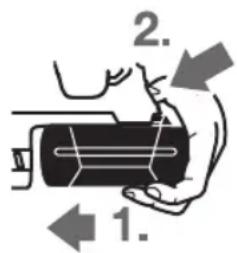
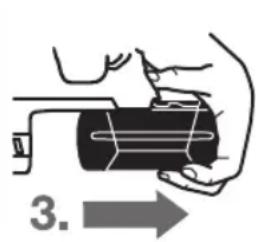
EN60745-2-6 specifies the safety requirements for hand-held electric tools. The following symbols are used: (A) for rated voltage, (A) for rated current, (A) for frequency, and (A) for power input.
The tool complies with EN 60745-2-6 and is marked with the CE symbol.
Rated voltage: 230 V, rated frequency: 50 Hz.
Rated current: 1.5 A, power input: 350 W.
Rated speed: 1.5 m/s, maximum speed: 2.5 m/s.
Rated voltage: 1.5 V, maximum voltage: 2.5 V.
(GBH 36 VF-LI Plus)
(SDS-plus (GBH 36 VF-LI Plus)
SDS-plus
(GBH 36VF-LIPlus)UJU JJI JJI JJI
jlljimai 7
Ugololglgagla 8
(gjoojaiabaw)5gdyjao 9
labzgljwulgiao 10
*aJ11
jll/ijgjj 12
jgJ/(jbll lao 13
JssJg 14
sucj.0sag aabbi gboaI ssc laIgla
a liu lai jui jil oJg bll gjbl
JUSSWgJUSSWJL
logu cdj- jclj. taalll o m u. g
__SUPPIMER__
(Vario-Lock = p1g jS Jaa) p1g cuagj
calao 36 JJ wj jolgloaw Jlcu jy g uji J .Sis Gg Ss
Jg Cog j 13 gj/ajpabui JSL ogj"du gjEgj) d yJJg"(Vario-Lock)" pJ U S .260 daa, "JL Egi Jaii pJyolgsuogjI JJJgA. aio .sia jy s pJyCueoog j 13 gj/ajpabui JSL Jao oos jJJjJJJJJJJJJg
gbsdss Jus Jus Jus Jus
.10
jla lgl 8 ju jui sLs:Jswl
Jla Js LgU 8 aas
.
g g jg w g
puii iuiuui uaiy auiuua (gij pia) 15
.
a 100
(1alao)GDE 16 Plus L JLe g sJ S
.
4.2
.0s o1oo1 (jS a2b9) 0slo
L
-1sIg0d g9j1la.
.0s oLwP2
LabJggsjusooJJg gjjgdd
aagj g jg j
(GDE16Plus)
.
.
(SDS-plus) (GBH 36 VF-LI Plus)
The SDS-plus tool holder allows quick and easy tool changes without additional tools. The SDS-plus system provides high drilling performance and hammer drilling. (See figure).
1 12uogj Uglogil pblc -
Jgss JIgolgl 29 o sis Jgdo aal - o Jo JIgai ly I jyj1 .sJgSj psoo Jgws dio JIgui dS i Ss L 28 gla gil Soo J 29 o sis Jgao daa .sJg Jn Jlal uagc jy ssoo jgb1 28 gog yds gog jgb1 uJnLiig1 ly gl do Jgajgdi . gwi
JW u gj Jg Lpdu d w jw 100 (D ggi a gw egj)
a 6 g w u g ju pai w o s iS J aal a dw g yjg j kao cui jau jj, uuy dw lg SDS-plus ay joo 2 g w u g ju Lg pai . uuy gl ay 1 g w u g ju Lg slogil pai
| 28 | 28 | mm | - √ √ √ √ √ √ √ √ √ √ √ √ √ √ √ √ √ √ √ √ √ √ √ √ √ √ √ √ √ √ √ √ √ √ √ √ √ √ √ √ √ √ √ √ √ √ √ √ √ √ ∇ √ √ √ √ √ √ √ √ √ √ √ √ √ √ √ √ √ √ √ √ √ √ √ √ √ √ √ √ √ √ √ √ √ √ √ √ √ √ √ √ √ √ √ √ √ √ √ √ √ ∶ √ √ √ √ √ √ √ √ √ √ √ √ √ √ √ √ √ √ √ √ √ √ √ √ √ √ √ √ √ √ √ √ √ √ √ √ √ √ √ √ √ √ √ √ √ √ √ √ √ ∙ √ √ √ √ √ √ √ √ √ √ √ √ √ √ √ √ √ √ √ √ √ √ √ √ √ √ √ √ √ √ √ √ √ √ √ √ √ √ √ √ √ √ √ √ √ √ √ √ √ ∗ √ √ √ √ √ √ √ √ √ √ √ √ √ √ √ √ √ √ √ √ √ √ √ √ √ √ √ √ √ √ √ √ √ √ √ √ √ √ √ √ √ √ √ √ √ √ √ √ √ ∘ √ √ √ √ √ √ √ √ √ √ √ √ √ √ √ √ √ √ √ √ √ √ √ √ √ √ √ √ √ √ √ √ √ √ √ √ √ √ √ √ √ √ √ √ √ √ √ √ √ ∞ √ √ √ √ √ √ √ √ √ √ √ √ √ √ √ √ √ √ √ √ √ √ √ √ √ √ √ √ √ √ √ √ √ √ √ √ √ √ √ √ √ √ √ √ √ √ √ √ √ ∫ ∫ ∫ ∫ ∫ ∫ ∫ ∫ ∫ ∫ ∫ ∫ ∫ ∫ ∫ ∫ ∫ ∫ ∫ ∫ ∫ ∫ ∫ ∫ ∫ ∫ ∫ ∫ ∫ ∫ ∫ ∫ ∫ ∫ ∫ ∫ ∫ ∫ ∫ ∫ ∫ ∫ ∫ ∫ ∫ ∫ ∫ ∫ ∫ ∫ ∅ ∅ ∅ ∅ ∅ ∅ ∅ ∅ ∅ ∅ ∅ ∅ ∅ ∅ ∅ ∅ ∅ ∅ ∅ ∅ ∅ ∅ ∅ ∅ ∅ ∅ ∅ ∅ ∅ ∅ ∅ ∅ ∅ ∅ ∅ ∅ ∅ ∅ ∅ ∅ ∅ ∅ ∅ ∅ ∅ ∅ ∅ ∅ ∅ ∅ ∆ ∅ ∅ ∅ ∅ ∅ ∅ ∅ ∅ ∅ ∅ ∅ ∅ ∅ ∅ ∅ ∅ ∅ ∅ ∅ ∅ ∅ ∅ ∅ ∅ ∅ ∅ ∅ ∅ ∅ ∅ ∅ ∅ ∅ ∅ ∅ ∅ ∅ ∅ ∅ ∅ ∅ ∅ ∅ ∅ ∅ ∅ ∅ ∅ ∅ ∈ ∅ ∅ ∅ ∅ ∅ ∅ ∅ ∅ ∅ ∅ ∅ ∅ ∅ ∅ ∅ ∅ ∅ ∅ ∅ ∅ ∅ ∅ ∅ ∅ ∅ ∅ ∅ ∅ ∅ ∅ ∅ ∅ ∅ ∅ ∅ ∅ ∅ ∅ ∅ ∅ ∅ ∅ ∅ ∅ ∅ ∅ ∅ ∅ ∅ ∲ ∅ ∅ ∅ ∅ ∅ ∅ ∅ ∅ ∅ ∅ ∅ ∅ ∅ ∅ ∅ ∅ ∅ ∅ ∅ ∅ ∅ ∅ ∅ ∅ ∅ ∅ ∅ ∅ ∅ ∅ ∅ ∅ ∅ ∅ ∅ ∅ ∅ ∅ ∅ ∅ ∅ ∅ ∅ ∅ ∅ ∅ ∅ ∅ ∅ ∼ ∅ ∅ ∅ ∅ ∅ ∅ ∅ ∅ ∅ ∅ ∅ ∅ ∅ ∅ ∅ ∅ ∅ ∅ ∅ ∅ ∅ ∅ ∅ ∅ ∅ ∅ ∅ ∅ ∅ ∅ ∅ ∅ ∅ ∅ ∅ ∅ ∅ ∅ ∅ ∅ ∅ ∅ ∅ ∅ ∅ ∅ ∅ ∅ ∅ ∬ ∅ ∅ ∅ ∅ ∅ ∅ ∅ ∅ ∅ ∅ ∅ ∅ ∅ ∅ ∅ ∅ ∅ ∅ ∅ ∅ ∅ ∅ ∅ ∅ ∅ ∅ ∅ ∅ ∅ ∅ ∅ ∅ ∅ ∅ ∅ ∅ ∅ ∅ ∅ ∅ ∅ ∅ ∅ ∅ ∅ ∅ ∅ ∅ ∅ ∍ ∅ ∅ ∅ ∅ ∅ ∅ ∅ ∅ ∅ ∅ ∅ ∅ ∅ ∅ ∅ ∅ ∅ ∅ ∅ ∅ ∅ ∅ ∅ ∅ ∅ ∅ ∅ ∅ ∅ ∅ ∅ ∅ ∅ ∅ ∅ ∅ ∅ ∅ ∅ ∅ ∅ ∅ ∅ ∅ ∅ ∅ ∅ ∅ ∅ ∱ ∅ ∅ ∅ ∅ ∅ ∅ ∅ ∅ ∅ ∅ ∅ ∅ ∅ ∅ ∅ ∅ ∅ ∅ ∅ ∅ ∅ ∅ ∅ ∅ ∅ ∅ ∅ ∅ ∅ ∅ ∅ ∅ ∅ ∅ ∅ ∅ ∅ ∅ ∅ ∅ ∅ ∅ ∅ ∅ ∅ ∅ ∅ ∅ ∅ ∽ ∅ ∅ ∅ ∅ ∅ ∅ ∅ ∅ ∅ ∅ ∅ ∅ ∅ ∅ ∅ ∅ ∅ ∅ ∅ ∅ ∅ ∅ ∅ ∅ ∅ ∅ ∅ ∅ ∅ ∅ ∅ ∅ ∅ ∅ ∅ ∅ ∅ ∅ ∅ ∅ ∅ ∅ ∅ ∅ ∅ ∅ ∅ ∅ ∅ ∫ ∅ ∅ ∅ ∅ ∅ ∅ ∅ ∅ ∅ ∅ ∅ ∅ ∅ ∅ ∅ ∅ ∅ ∅ ∅ ∅ ∅ ∅ ∅ ∅ ∅ ∅ ∅ ∅ ∅ ∅ ∅ ∅ ∅ ∅ ∅ ∅ ∅ ∅ ∅ ∅ ∅ ∅ ∅ ∅ ∅ ∅ ∅ ∅ ∈ ∈ ∅ ∅ ∅ ∅ ∅ ∅ ∅ ∅ ∅ ∅ ∅ ∅ ∅ ∅ ∅ ∅ ∅ ∅ ∅ ∅ ∅ ∅ ∅ ∅ ∅ ∅ ∅ ∅ ∅ ∅ ∅ ∅ ∅ ∅ ∅ ∅ ∅ ∅ ∅ ∅ ∅ ∅ ∅ ∅ ∅ ∅ ∅ ∅ ∈ ∧ ∅ ∅ ∅ ∅ ∅ ∅ ∅ ∅ ∅ ∅ ∅ ∅ ∅ ∅ ∅ ∅ ∅ ∅ ∅ ∅ ∅ ∅ ∅ ∅ ∅ ∅ ∅ ∅ ∅ ∅ ∅ ∅ ∅ ∅ ∅ ∅ ∅ ∅ ∅ ∅ ∅ ∅ ∅ ∅ ∅ ∅ ∅ ∅ ∅ ∇ ∅ ∅ ∅ ∅ ∅ ∅ ∅ ∅ ∅ ∅ ∅ ∅ ∅ ∅ ∅ ∅ ∅ ∅ ∅ ∅ ∅ ∅ ∅ ∅ ∅ ∅ ∅ ∅ ∅ ∅ ∅ ∅ ∅ ∅ ∅ ∅ ∅ ∅ ∅ ∅ ∅ ∅ ∅ ∅ ∅ ∅ ∅ ∅ ∅ ∿ ∅ ∅ ∅ ∅ ∅ ∅ ∅ ∅ ∅ ∅ ∅ ∅ ∅ ∅ ∅ ∅ ∅ ∅ ∅ ∅ ∅ ∅ ∅ ∅ ∅ ∅ ∅ ∅ ∅ ∅ ∅ ∅ ∅ ∅ ∅ ∅ ∅ ∅ ∅ ∅ ∅ ∅ ∅ ∅ ∅ ∅ ∅ ∅ ∅ ∪ ∅ ∅ ∅ ∅ ∅ ∅ ∅ ∅ ∅ ∅ ∅ ∅ ∅ ∅ ∅ ∅ ∅ ∅ ∅ ∅ ∅ ∅ ∅ ∅ ∅ ∅ ∅ ∅ ∅ ∅ ∅ ∅ ∅ ∅ ∅ ∅ ∅ ∅ ∅ ∅ ∅ ∅ ∅ ∅ ∅ ∅ ∅ ∅ ∅ ∴ (∂ ⊿ 0 . 0 0 0 0 0 0 0 0 0 0 0 0 0 0 0 0 0 0 0 0 0 0 0 0 0 0 0 0 0 0 0 0 0 0 0 0 0 0 0 0 0 0 0 0 0 0 0 0 0 0 1) | | |
| 4,1/4,61) | 4,0/4,51) | kg | EPTA-Procedure 01:2014 gjnjnjnjnjnjnjnjnjnjnjnjnjnjnjnjnjnjnjnjnjnjnjnjnjnjnjnjnjnjnjnjnjnjnjnjnjnjnjnjnjnjnjnjnjnjnjnjnjnjnjnjnjnjnjnjnjnjnjnjnjnjnjnjnjnjnjnjnjnjnjnjnjnjnjnjnjnjnjnjnjnjnjnjnjnjnjnjnjnjnjnjnjnjnjnjnjnjnjnjnjNJJNJJNJJNJJNJJNJJNJJNJJNJJNJJNJJNJJNJJNJJNJJNJJNJJNJJNJJNJJNJJNJJNJJNJJNJJNJJNJJNJJNJJNJJNJJNJJNJJNJJNJJNJJNJJNJJNJJNJJNJJNJJNJJNJJNJJNJJNJJNJJNJJNJJNJNJJNJJNJJNJJNJJNJJNJJNJJNJJNJJNJJNJJNJJNJJNJJNJJNJJNJJNJJNJJNJJNJJNJJNJJNJJNJJNJJNJJNJJNJJNJJNJJNJJNJJNJJNJJNJJNJJNJJNJJNJJNJJNJJNJJNJJNJJNJJNJJNJJNJ JNJJNJJNJJNJJNJJNJJNJJNJJNJJNJJNJJNJJNJJNJJNJJNJJNJJNJJNJJNJJNJJNJJNJJNJJNJJNJJNJJNJJNJJNJJNJJNJJNJJNJJNJJNJJNJJNJJNJJNJJNJJNJJNJJNJJNJJNJJNJJNJJNJJNJJPJJPJPJPJPJPJPJPJPJPJPJPJPJPJPJPJPJPJPJPJPJPJPJPJPJPJPJPJPJPJPJPJPJPJPJPJPJPJPJPJPJPJPJPJPJPJPJPJPJPJPJPJPJPJPJPJPJPJPJPJPJPJPJPJPJPJPJPJPJPJPJPJPJPJPJPJPJPJPJPJPJPJPJPJPJPJPJPJPJPJPJPJPJPJPJPJPJPJPJPJP JPJPJPJPJPJPJPJPJPJPJPJPJPJPJPJPJPJPJPJPJPJPJPJPJPJPJPJPJPJPJPJPJPJPJPJPJPJPJPJPJPJPJPJPJPJPJPJPJPJPJPJPJPJPJPJPJPJPJPJPJPJPJPJPJPJPJPJPJPJPJPJPJPJPJPJPJPJPJPJPJPJPJPJPJPJPJPJPJPJPJPJPJPJPJPJPJPJPJPJPjpJPjpjpjpjpjpjpjpjpjpjpjpjpjpjpjpjpjpjpjpjpjpjpjpjpjpjpjpjpjpjpjpjpjpjpjpjpjpjpjpjpjpjpjpjpjpjpjpjpjpjpjpjpjpjpjpjpjpjpjpjpjpjpjpjpjpjpjpjpjpjpjpjpjpjpjpjpjpjpjpjpjpjpjpjpjpjpjpjpjpjpjpjpjpjpjpjpjpjpjpjp JPJPJPJPJPJPJPJPJPJPJPJPJPJPJPJPJPJPJPJPJPJPJPJPJPJPJPJPJPJPJPJPJPJPJPJPJPJPJPJPJPJPJPJPJPJPJPJPJPJPJPJPJPJPJPJPJPJPJPJPJPJPJPJPJPJPJPJPJPJPJPJPJPJPJPJPJPJPJPJPJPJPJPJPJPJPJPJPJPJPJPJPJPJPJPJPJPJPJP JP JP JP JP JP JP JP JP JP JP JP JP JP JP JP JP JP JP JP JP JP JP JP JP JP JP JP JP JP JP JP JP JP JP JP JP JP JP JP JP JP JP JP JP JP JP JP JP JP JP JP JP JP JP JP JP JP JP JP JP JP JP JP JP JP JP JP JP JP JP JP JP JP JP JP JP JP JP JP JP JP JP JP JP JP JP JP JP JP JP JP JP JP JP JP JP JP JP JP JP J J J J J J J J J J J J J J J J J J J J J J J J J J J J J J J J J J J J J J J J J J J J J J J J J J J J J J J J J J J J J J J J J J J J J J J J J J J J J J J J J J J J J J J J J J J J J J J J J J J JJ J J J J J J J J J J J J J J J J J J J J J J J J J J J J J J J J J J J J J J J J J J J J J J J J J J J J J J J J J J J J J J J J J J J J J J J J J J J J J J J J J J J J J J J J J J J J J J J J J J J |
EN60745-2-6
Measured sound values determined according to EN60745-2-6: Sound pressure level LpA = 90 dB(A); Sound power level LwA = 101 dB(A); Uncertainty K = 3 dB.
The vibration values (vector sum for three directions) determined according to EN60745-2-6:
For cutting: K = 1.5 m/s², ah = 14.5 m/s²
For grinding: K = 1.5 m/s², ah = 9.5 m/s²
For sanding: K = 1.5 m/s², ah < 2.5 m/s²
For polishing: K = 1.5 m/s², ah < 2.5 m/s²
The vibration emission level given in this information sheet has been measured in accordance with a standardised test given in EN60745-2-6 and may be used to compare one tool with another. It may be used for a preliminary assessment of exposure. The declared vibration emission value may increase during actual use of the power tool. The vibration emission value may be used to compare one tool with another. It may be used for a preliminary assessment of exposure. Warning: The vibration emission value during actual use of the power tool can differ from the declared value depending on the ways in which the tool is used. The need to identify safety measures to protect the operator that are based on an estimation of exposure in the actual conditions of use (taking account of all parts of the operating cycle such as the times when the tool is switched off and when it is running idle in addition to the trigger time).
(GBH 36 VF-LI Plus)
(GBH 36 VF-LI Plus)
(GBH 36 VF-LI Plus)