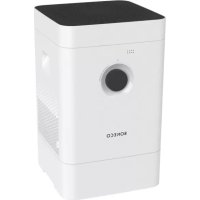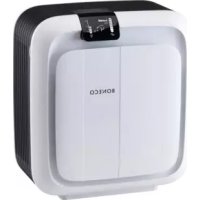
H680 - Humidifier BONECO - Free user manual and instructions
Find the device manual for free H680 BONECO in PDF.


Frequently Asked Questions - H680 BONECO
User questions about H680 BONECO
0 question about this device. Answer the ones you know or ask your own.
Ask a new question about this device
Download the instructions for your Humidifier in PDF format for free! Find your manual H680 - BONECO and take your electronic device back in hand. On this page are published all the documents necessary for the use of your device. H680 by BONECO.
USER MANUAL H680 BONECO
READ AND SAVE THESE INSTRUCTIONS
DE Gebrauchsanweisung 3
EN Instructions for use 35
FR Instructions d'utilisation 67
IT Istruzioni per l'uso 99
NL Gebruiksaanwijzing 131
ES Instrucciones de uso 163
HU Hasznalati utmutato 195
PL Instrukcja obshugi 227
SE Bruksanvising 259
FI Kayttoohje 291
DK Brugsanvising 323
NO Bruksanvising 355
LV Lietosanas instrukcija 387
LT Naudojimo instrukcija 419
EE Kasutusjuhend 451
CZ Navod k pouziti 483
SI Navodila za uporabo 515
RU Hnctpykunno no 3Kcnnyataaenn 547
CN 使用说明书 579
3
de
GEBRAUCHSANWEISUNG
BONECO H680
INHALTSVERZEICHNIS
Technische Daten 6
Ionic Silver Stick 33
Zubehor Ionic Silver Stick
A7017,HYBRID Filter
EINLEITUNG
GESCHÄTZTER KUNDE
| Introduction | 39 |
| Relief from allergies 39 | |
| Valuable information about humidity 39 | |
| Items included 39 |
Overview and part names 40
| Start-up | 42 |
| Safety instructions 42 | |
| First cleaning 42 | |
| First water change 42 |
Indicators on the display 46
| Keypad and remote control 47 |
| Two types of operation 47 |
| The "Hybrid" operating mode (air humidification and air purification) 48 | |
| Operating mode at initial start-up 48 | |
| Using the "Hybrid" operating mode | 48 |
| Air quality indicator | 48 |
| Basic settings | 48 |
| Only air humidification / Only air purification | 49 |
| "Air humidification" operating mode | 49 |
| "Air purification" operating mode | 49 |
| Selecting the various comfort modes | 50 |
| Comfort modes | 50 |
| Switching the comfort mode | 50 |
| “AUTO” comfort mode | 50 |
| "SLEEP" comfort mode | 50 |
| "BABY" comfort mode | 50 |
| Manually regulating humidity and fan level | 51 |
| Perfect humidity | 51 |
| Controlling humidity 51 | |
| Maximum humidification | 51 |
| Regulating the fan level | 51 |
| Power mode (P) | 51 |
| Timer function | 52 |
| Setting the OFF timer | 52 |
| Setting the ON timer | 52 |
| Display lock | 53 |
| Activating the display lock | 53 |
| Deactivating the display lock | 53 |
| Using fragrances | 54 |
| Using fragrances | 54 |
| Adding fragrances | 54 |
| Descaling | 56 |
| Preparing for first use | 56 |
| Descaling | 57 |
| Cleaning the interior parts | 57 |
| Changing the descaling time | 57 |
| Cleaning the interior parts | 58 |
| Important notes | 58 |
| Water tank | 58 |
| Water base | 58 |
Drum 59
Evaporator mat (handwashing) 59
General cleaning 60
Cover 60
Pre-filter 60
HYBRID filter 60
Filter holder 61
Fanblade61
Housing 61
Particle sensor 62
Assembling the appliance 62
Replacing the HYBRID filter 64
Replacing the HYBRID filter 64
Replacing the ionic Silver Stick 65
Replacing the ionic Silver Stick 65
Malfunctions and troubleshooting 66
TECHNICAL DATA
Type designation BONECO H680
Mains voltage 100 - 240V 50 / 60Hz
Power consumption 30 W
Humidity output 1000g / h^* (6.340 gal/day)
Air purification performance 190m
3/h (112 CFM) (CADR)
For rooms up to 100m
2 (1080 sq ft)
Water capacity 10 l (2.64 US gal)
Dimensions L 347 × W 435 × H 490 mm (13.6" × 17.1" × 19.3")
Operating noise level 27-51 dB(A)
Weight (empty) 10.4kg (22.3 lbs)
Accessories Ionic Silver Stick
^© A7017, HYBRID filter
- For operation without HYBRID filter depending on temperature and humidity
INTRODUCTION
DEAR CUSTOMER.
Congratulations on your purchase of the BONECO H680. Its hybrid design cleans and humidifies room air in one step. Its smart control system keeps operating noise level to a minimum, even allowing you to use the BONECO H680 in a bedroom or baby's room.
The BONECO H680 is designed for convenient, fully automated operation. However, you can adjust all of its features according to your preferences and requirements. This manual shows you how you can create your own comfortable climate.
RELIEF FROM ALLERGIES
The BONECO H680 is equipped with a triple filter system that rids the air of odors as well as dust, pollen and contaminants. The HYBRID filter also effectively alleviates many forms of discomfort caused by allergies, such as hay fever or allergic reactions to dust mites and household dust.
VALUABLE INFORMATION ABOUT HUMIDITY
The right humidity is very important for our health. Dry room air in winter leads to skin that cracks and itches. It makes your eyes and throat feel dry while significantly affecting physical comfort. Not only does this affect adults, it is especially true for babies, small children and even pets. Dry mucous membranes in winter also make us more prone to colds and other infections.
The BONECO H680 makes these problems a distant memory. Its intelligent automatic controls always keep the air clean and the humidity at the ideal level, even in large rooms with an area of up to 100 square meters (1080 square feet).
Regardless of whether it is summer or winter: You will not want to give up your newly gained comfort.
ITEMS INCLUDED
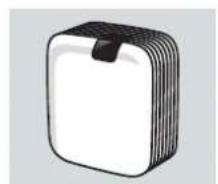
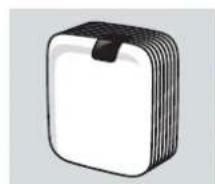
BONECO H680 with HYBRID filter
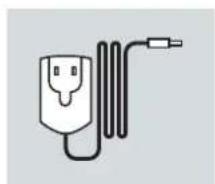
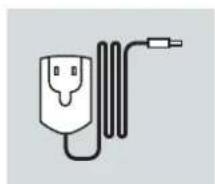
Power supply unit with country-specific adapter
"CalcOff" cleaning and descaling powder A7417
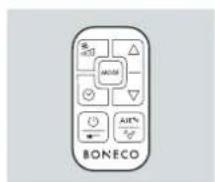
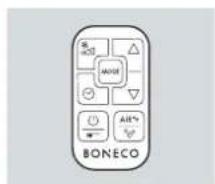
Remote control including CR 2025 battery
en
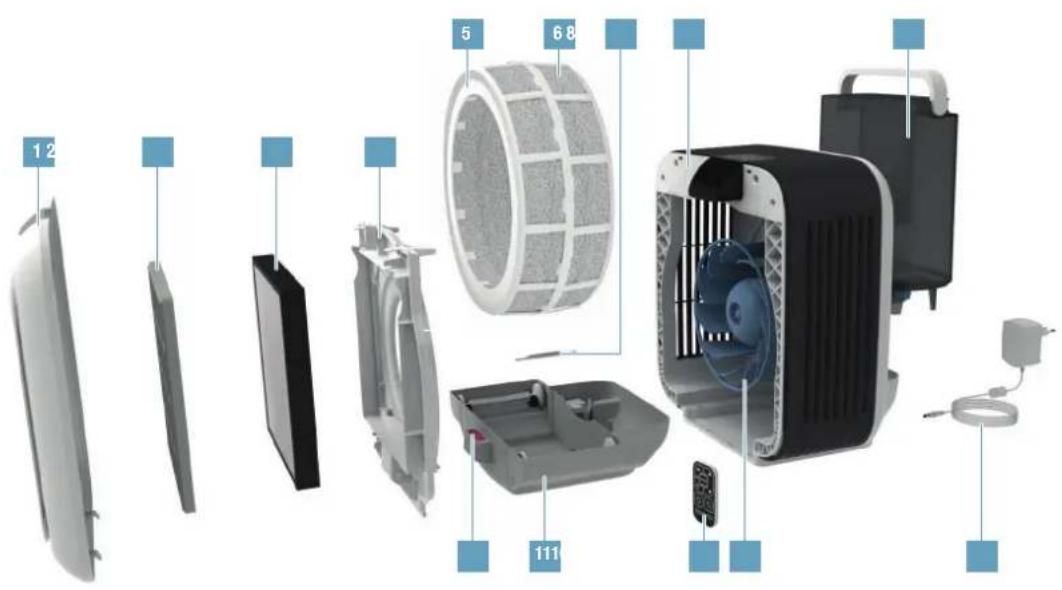
OVERVIEW AND PART NAMES
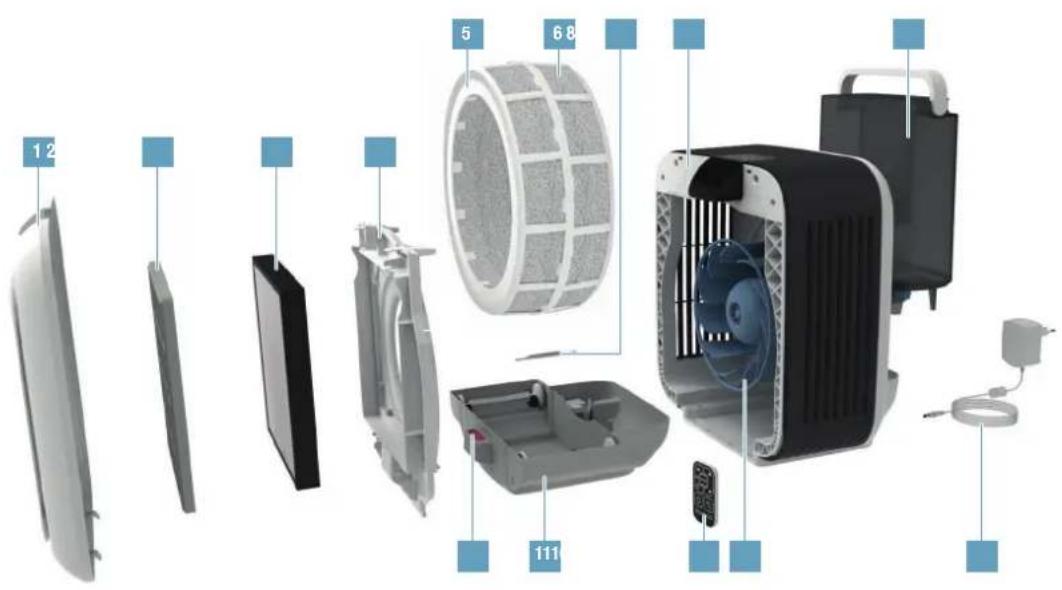
1 Front cover
2 Pre-filter
3 HYBRID filter
4 Filter holder
5 Drum
6 Evaporator mat
7 Ionic Silver Stick
B BONECO H680
9 Water tank
10 Fragrance container
11 Water base
12 Remote control
13 Fan blade
14 Power supply
en
START-UP AND USE
START-UP
SAFETY INSTRUCTIONS
Before using the device, carefully read through the enclosed safety notes and operating manual and keep them for later use.
FIRST CLEANING
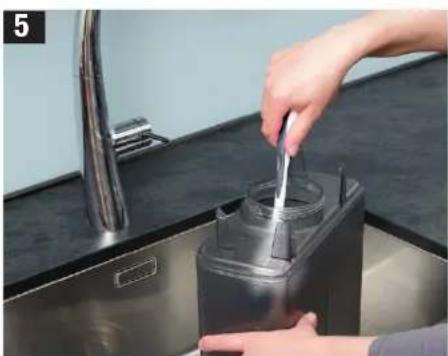
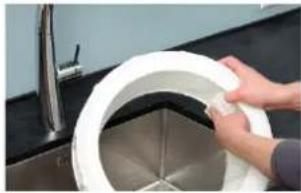
Production-related residue on the water tray and water tank may lead to foaming, and thereby to water escaping. For this reason, before the first use, both elements must be cleaned with warm water and dishwashing detergent (see Figure 5 on the right side). Thoroughly rinse the parts under running water.
FIRST WATER CHANGE
24 hours after the first use, the "Water change" symbol will illuminate:

Change the water in the water tank and in the water base.
The "Water change" symbol will automatically go out as soon as the water has been replaced.
START-UP (CONTINUED)
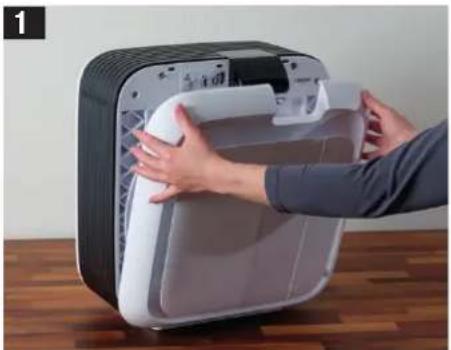
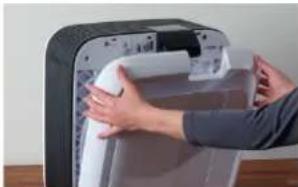
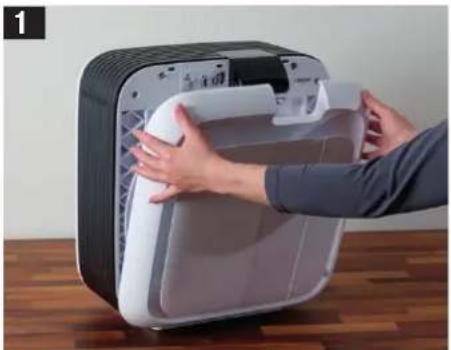
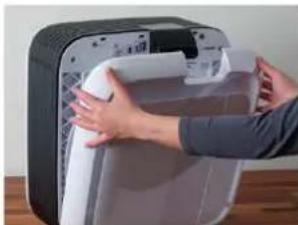
Remove the front cover.
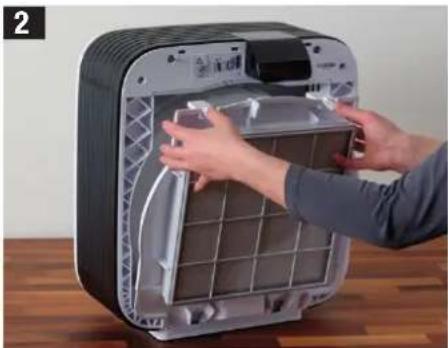
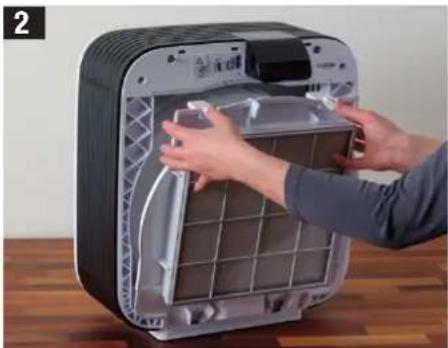
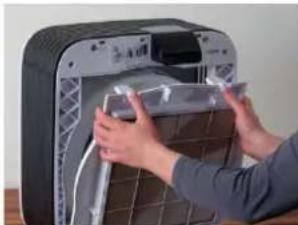
Take off the filter holder along with the filters.
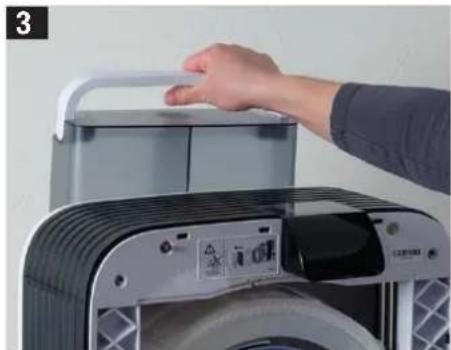
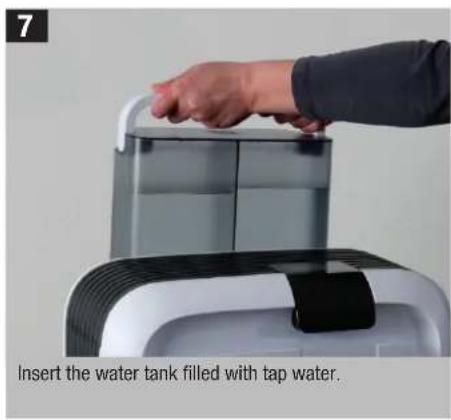
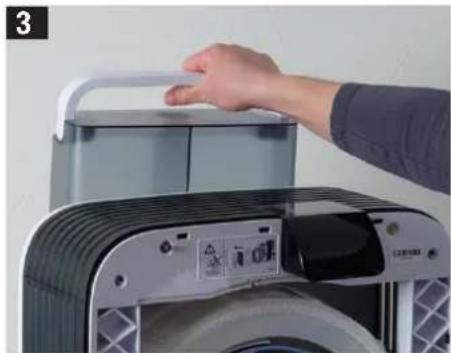
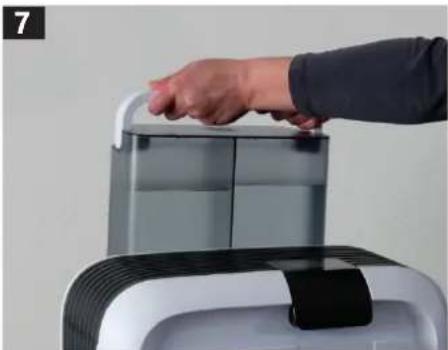
Remove the water tank.
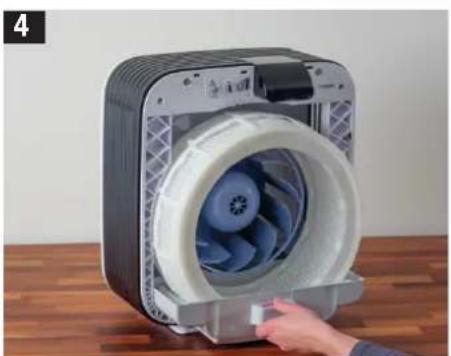
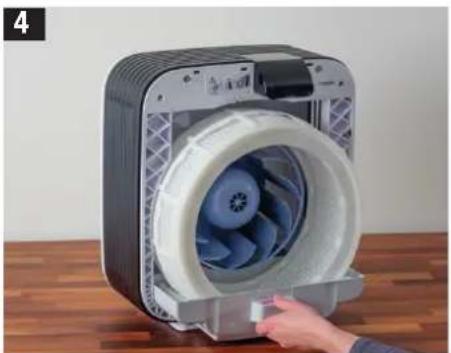
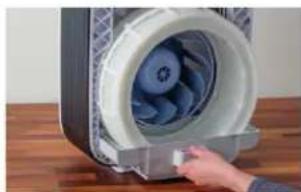
Pull out the water tray along with the drum.
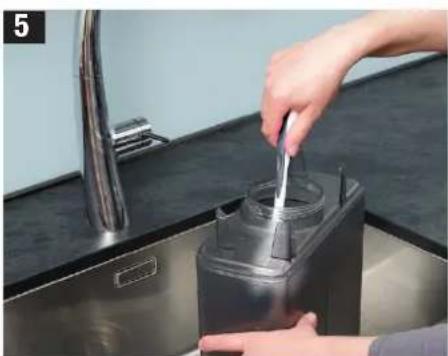
Clean the water tank and water tray.
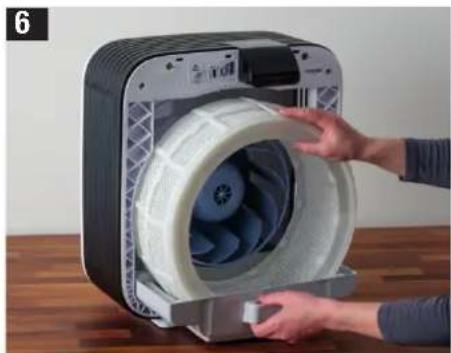
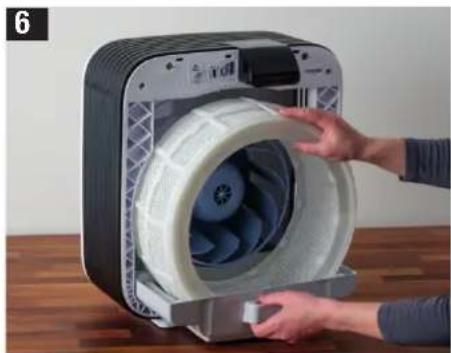
Insert the water tray with the drum into the appliance.
START-UP (CONTINUED)
START-UP (CONTINUED)
Reattach the front cover.
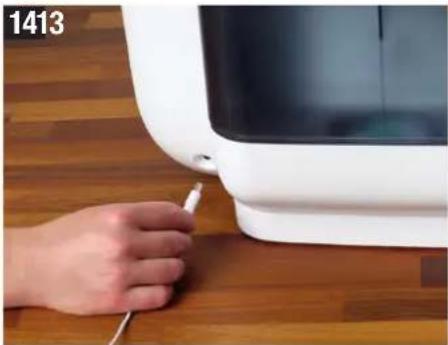
Connect the power supply to the BONECO H680 first and then to the power outlet.
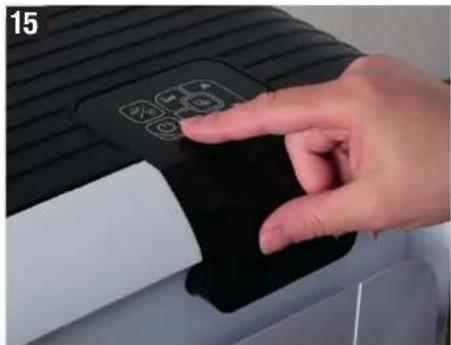
Switch the appliance on with the button.
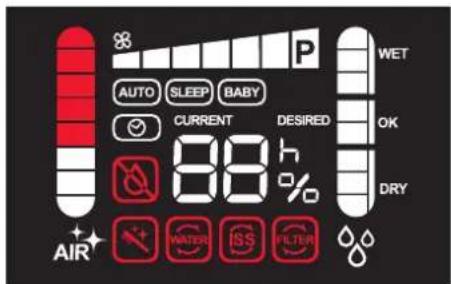
INDICATORS ON THE DISPLAY
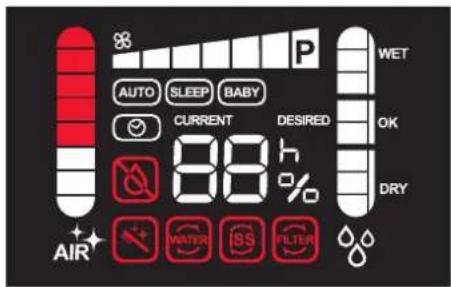
Overview of all indicators on the display
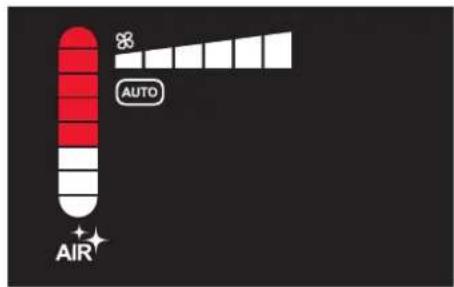
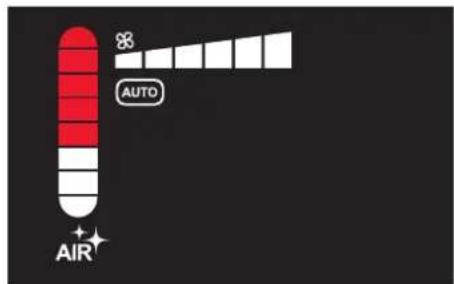
Indicators for air purity (left) and fan level (top)
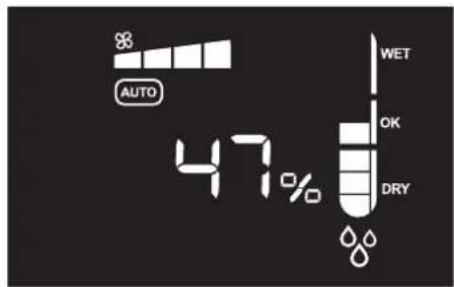
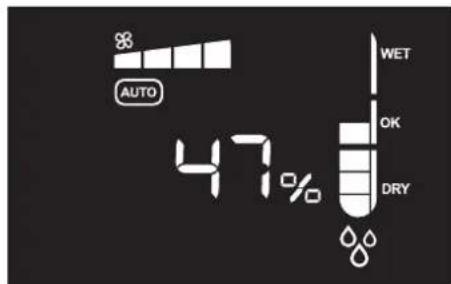
Indicator for humidity (right, middle) and fan level (top)
| Indicator Meaning | |
| 47% | Current or desired humidity 51 |
| AUTO | Fully automated operation 50 |
| SLEEP | Low-noise nighttime mode 50 |
| BABY | Perfect for use in a nursery or baby's room 50 |
| Timer function 52 | |
| CURRENT | Value shows the current humidity 51 |
| DESIRED | Value shows the desired humidity 51 |
| LC | Display lock has been activated 53 |
| Indica-tor | Required action | 1 |
| Refill the water 43 | ||
| Change the water in the appliance 42 | ||
| Replacing the Ionic Silver Stick®* 65 | ||
| HYBRID filter used up, replace* | 64 | |
| HYBRID filter missing, insert | 49 | |
| Cleaning required* | 56 |
The symbols for the actions marked with an * can be turned off manually if you simultaneously press and hold the and buttons on the appliance for 5 seconds.
KEYPAD AND REMOTE CONTROL
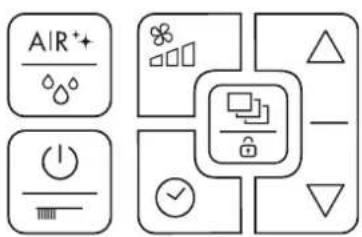
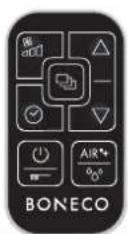
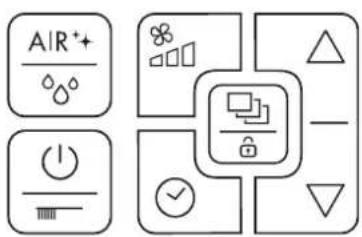
Remote controlKeypad on the appliance
The BONECO H680 can be controlled using the integrated keypad or the included remote control. Operation remains the same in both cases.
图
Indicator Function
| Regulating the fan level 51 | |
| Toggling between modes (on the remote control) 50 | |
| Toggling between modes (on the appliance) 50 | |
| Activating the “Display lock” 53 | |
| Calling up the timer function 52 | |
| Changing air humidity / timer / fan levels 51, 52 | |
| Switch the appliance on and off / start cleaning 56 | |
| Toggling between operating modes 49 |
THE "HYBRID" OPERATING MODE (AIR HUMIDIFICATION AND AIR PURIFICATION)
The BONECO H680 uses the "Hybrid" operating mode when being switched on for the first time: This operating mode cleans the air while humidifying it at the same time. The humidity can be regulated at will (see page 51).
Air purification works automatically and without user interaction.
The fan level is controlled by the electronics and adapts to the environment to ensure the most efficient cleaning and/or humidification possible.
Fan noise may be clearly audible at first; it will decrease after a few minutes, however, once the humidity gets closer to the desired value.
USING THE "HYBRID" OPERATING MODE
- Switch the appliance on by tapping the button once.
The particle sensor automatically begins measuring the amount of dirt in the air. The appliance starts the humidifying process automatically if humidity is below 50% .
AIR QUALITY INDICATOR
After being switched on, the BONECO H680 carries out an initial air measurement and the AIR symbol flashes. After measuring the air, the display shows the current air quality (see figure below).
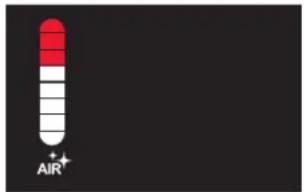
The cleaner the air is, the more segments are shown in white.
BASIC SETTINGS
The BONECO H680 saves all of the settings if you switch off the appliance using the button.
The basic settings described here ("Hybrid" operating mode, "AUTO" comfort mode, etc.) can be restored at any time. Disconnect the appliance from the power outlet for about 10 seconds by unplugging the power cord from the power outlet.
ONLY AIR HUMIDIFICATION / ONLY AIR PURIFICATION
"AIR HUMIDIFICATION" OPERATING MODE
Use of the HYBRID filter is optional in the "Air humidification" operating mode.
- Press the button until just the indicator for humidity and the fan level are shown.
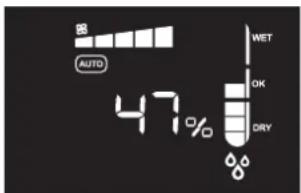
- To switch back to the "Hybrid" operating mode, press the button until the air purifier and humidifier are both shown as active at the same time.
The BONECO H680 can also be used without a HYBRID filter in the "Air humidification" operating mode. When switching to the "Hybrid" or "Air purification" operating mode, the following symbol flashes on the display if a HYBRID filter is not inserted:

"AIR PURIFICATION" OPERATING MODE
The air is not humidified in the "Air purification" operating mode.
- Press the button until just the indicator for air quality and the fan level are shown.
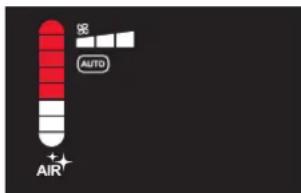
- To switch back to the "Hybrid" operating mode, press the button until the air purifier and humidifier are both shown as active at the same time.
The BONECO H680 can also be used without water in the "Air purification" operating mode. When switching to the "Hybrid" or "Air humidification" operating mode, the following symbol flashes on the display if the water tank is empty:

SELECTING THE VARIOUS COMFORT MODES
COMFORT MODES
There are three different comfort modes available in each of the three "Hybrid", "Air purification" and "Air humidification" operating modes: AUTONETREE BABY
SWITCHING THE COMFORT M
- Switch between the AUTO and COMTOR modes by either:
- Pressing the button on the remote control repeatedly
- Pressing the button on the keypad on the appliance repeatedly
"AUTO" COMFORT MODE
In comfort mode, the BONECO H680 uses all of the fan levels between 1 and 6. The preset humidity is 50% .
"SLEEP" COMFORT MODE
In comfort mode, the BONECO H680 can even be used in a bedroom at night. The appliance automatically operates at the lowest fan level of 1 to keep operating noise level to a minimum. The preset humidity is 45% .
MANUALLY REGULATING HUMIDITY AND FAN LEVEL
PERFECT HUMIDITY
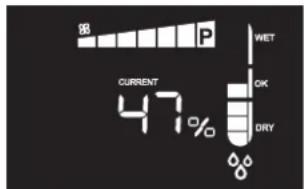
The recommended humidity level is between 40% and 60% . The default setting is 50% . The indicator for current humidity should ideally be within the "OK" range:
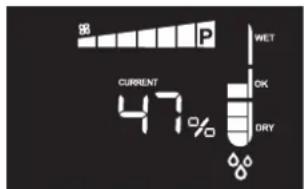
The humidity you set then stays saved if you switch off the appliance.
- Press the and buttons to set the humidity as desired.
The notice DisSsROn on the display. Once you stop pressing the arrow keys, the notice switches to CURRENT after a few seconds. Now the display now shows the current humidity again.
Press the button until the notice "Co" (for "Continuous") is displayed. Now the humidifier operates independently of the measured humidity.
REGULATING THE FAN LEVEL
-
Press the button once. The indicator for the fan level flashes.
-
Press the and buttons to adjust the fan level.
-
To switch back to the comfort mode, press the button on the appliance until the notice is shown on the display. Alternatively, you can also use the button on the remote control.


POWER MODE (P)
The maximum power mode (P) can only be selected manually. We recommend using it when room air has to be cleaned and/or humidified in the shortest possible time. To activate the maximum power level, press the button repeatedly until the fan level "P" is shown in the indicator (see figure in the left column).
TIMER FUNCTION
The timer function can be used in every operating mode together with every comfort mode. The timer function lets you determine how long the BONECO H680 should run before it switches off automatically (OFF timer).
Alternatively, you can specify a time for when the appliance should switch on automatically (ON timer). Use this function, for example, to activate the BONECO H680 before you return home, so that you have the perfect living climate waiting for you.
SETTING THE OFF TIMER
- Switch on the BONECO H680 using the button.
- Select the desired operating setting and the desired comfort mode.
- Press the button once.
- Use the and buttons to set how long the appliance operates (1 to 12 hours).
The appliance then runs for the specified period and then switches itself off.
- To deactivate the OFF timer early, press the button again and select Alternatively, you can switch off the BONECO H680 using the button.
SETTING THE ON TIMER
- Select the desired operating setting and the desired comfort mode.
- Switch off the BONECO H680 using the Dton.
- Press the button once.
- Use the and buttons to set the start preselection time (1 to 12 hours).
The BONECO H680 switches on after the defined time and operates with the selected program.
5. To deactivate the ON timer early, press the button again and select Alternatively, you can switch on the BONECO H680 using the button.
DISPLAY LOCK
The BONECO H680 display can be set up to prevent accidental entries. Use this function to prevent unintentional entries, such as those from children playing near the appliance.
ACTIVATING THE DISPLAY LOCK
- Press the button until you hear the indicator tone.
The display shows an "LC" (LOCK) notice for a few seconds and then returns to the original displayed content. The "LC" notice is displayed for a few seconds each time the controls are pressed.

DEACTIVATING THE DISPLAY LOCK
- Press the button until you hear the indicator tone.
The display is now unlocked. Changes can be made to the settings once again.
en
USING FRAGRANCES
USING FRAGRANCES
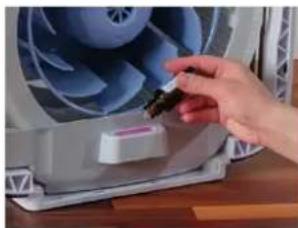
Inside the BONECO H680 there is a fragrance container for adding fragrances in the form of essential oils.

This fragrance container is made of a special material. Never add essential oils and other fragrances directly into the water tank or water base. It only takes a small amount to damage the appliance irreparably. Such damage is not covered by the warranty.
ADDING FRAGRANCES
- Remove the front cover.
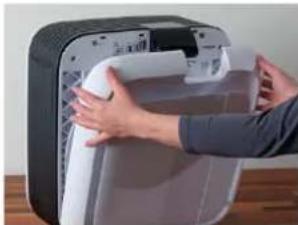
- Remove the filter holder along with the filter.
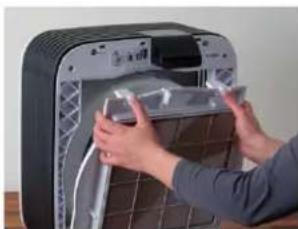
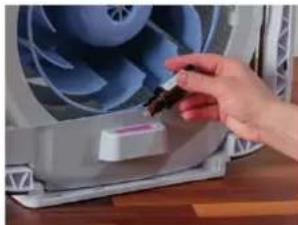
- Insert the fragrance into the fragrance container provided for this.
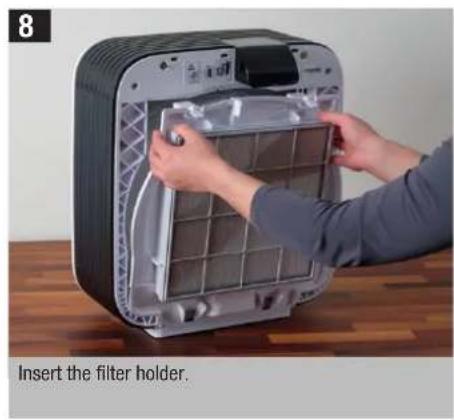
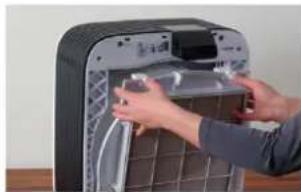
- Insert the filter holder and front cover.
en
DESCALING AND CLEANING
DESCALING
For hygienic reasons, the BONECO H680 has to be cleaned and descaled at regular intervals. An upcoming need for cleaning is indicated on the display with this symbol:

! Be sure to remove the ionic Silver Stick ^ * before the.
descaling process.
PREPARING FOR FIRST USE
-
Remove the front cover and the water tank on the rear side.
-
Remove the filter holder together with the filter.
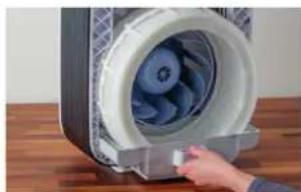
- Pull the water base out and remove the drum with the evaporator mat.
- Empty the water base and water tank and remove the ionic Silver Stick
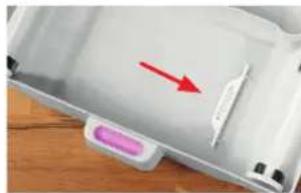
- Set the drum back into the water base and put the appliance back together by following the steps in reverse order.
DESCALING (CONTINUED)
DESCALING
- Fill the tank halfway with hot tap water and add two packets of CalcOff.
- Start descending mode by pressing the button on the BONECO H680 keypad for 5 seconds. Change the duration of descending as needed using the and buttons.
The appliance then descapes itself automatically.
After descending has finished, the cleaning symbol on the display goes away automatically.
Then a flashing symbol indicates that the water in the appliance has to be replaced:
CLEANING THE INTERIOR PARTS
After each descending, it is absolutely necessary to clean the interior parts (see the next page).
CHANGING THE DESCALING TIME
The default setting for the descending time is 4 hours. To intensify or shorten the descending, adjust the duration of descending using the and buttons.
- Shorten the duration of descending if the BONECO H680 is only slightly dirty.
Lengthen the duration of descending if the BONECO H680 is very dirty. The maximum duration of descending is 12 hours.

CLEANING THE INTERIOR PARTS
IMPORTANT NOTES
Use a cleaning brush and a damp cloth for cleaning. Always add a small amount of dishwashing detergent to the hot water.
Always unplug the BONECO H680 from the power outlet before you start cleaning or doing maintenance! Failure to do so can result in electric shock and fatal injury!
Mold inside your BONECO H680 can add impurities to the air and may adversely affect your health. Be sure to remove any you find for this reason.
Do not use alcohol or corrosive cleaning agents for cleaning.
Do not clean the BONECO H680 in a dishwasher. High temperatures can deform the parts and make them unusable. This damage is not covered by the warranty.
WATER TANK
- Fill the water tank halfway with hot water and add a small amount of dishwashing detergent.
- Thoroughly clean the inside of the water tank by hand or with a suitable cleaning brush.
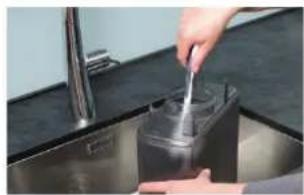
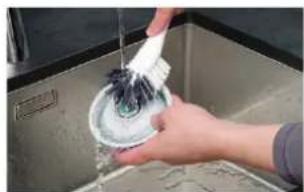
3. Also clean the cover.
WATER BASE
- Pull the water base out of the BONECO H680.
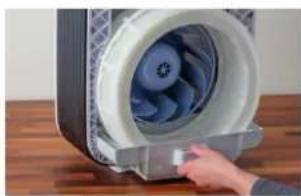
- Remove the drum with the evaporator mat.
- Take the ionic Silver Stick 出 of the water base.
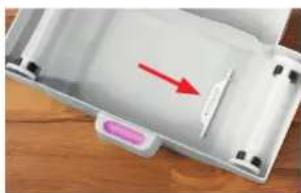
- Clean the water base and all of the parts inside. These can be removed for cleaning.
CLEANING THE INTERIOR PARTS (CONTINUED)
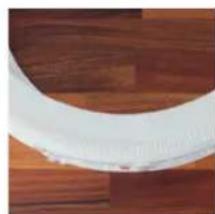
DRUM
- Take the evaporator mat out of the drum.
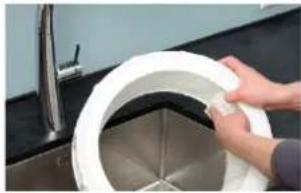
- Wash the drum with detergent and a cleaning brush.

- Thoroughly rinse the drum with hot water.
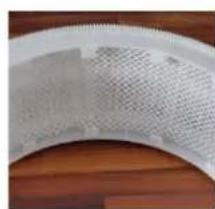
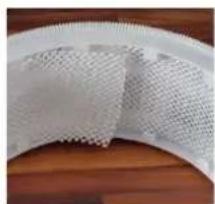
EVAPORATOR MAT (HANDWASHING)
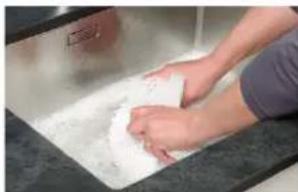
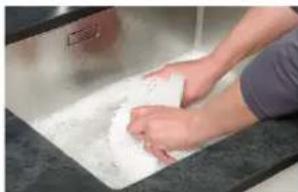
- Thoroughly wash and tumble the evaporator mat with hot water and dishwashing detergent.
-
Continue to rinse out the evaporator mat in clean hot water until foam no longer forms.
-
Right after the washing cycle, insert the washed evaporator mat into the cleaned drum.
The evaporator mat cannot be cleaned in the washing machine!
Do not dry the evaporator mat in the clothes dryer.
en
GENERAL CLEANING
COVER
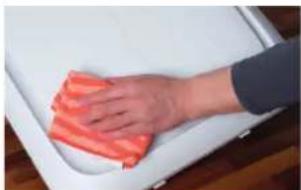
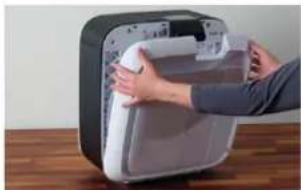
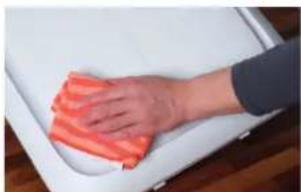
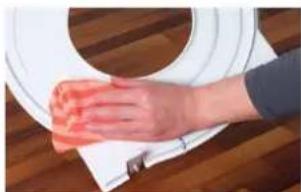
- Remove the cover.
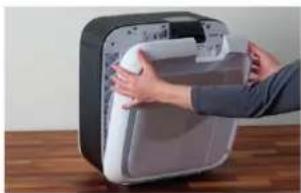
- Clean the cover with a damp cloth.
PRE-FILTER
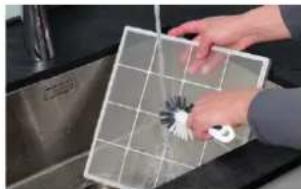
- Wash the pre-filter under running water using a cleaning brush.
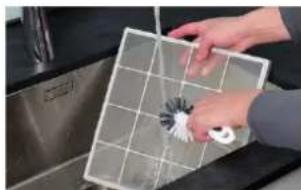
Do not put the pre-filter back in until it is dry. Humidity can have an adverse effect on the quality of the adjacent HYBRID filter.
HYBRID FILTER
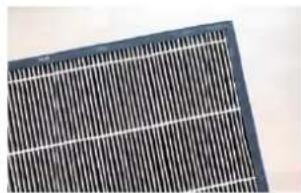
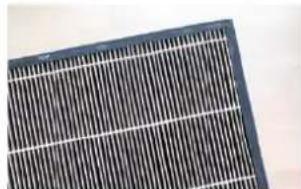
The HYBRID filter cannot be cleaned. Dirt is normal and shows that the filter is working.
GENERAL CLEANING (CONTINUED)
FILTER HOLDER
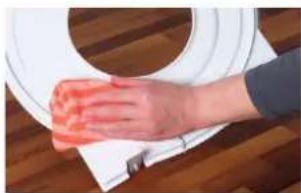
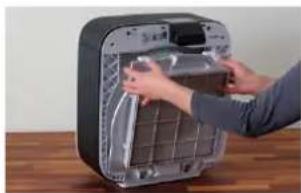
- Remove the filter holder.
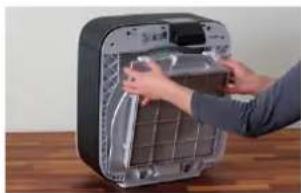
- Clean the filter holder with a damp cloth.
FAN BLADE
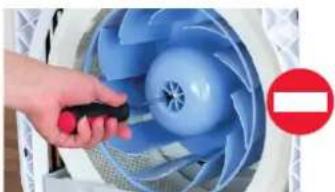
Never remove the retaining screw in order to take off the fan blade! A weight imbalance during reassembly could cause excessive noise or could even damage the motor.
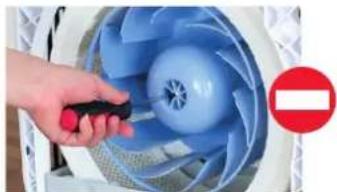
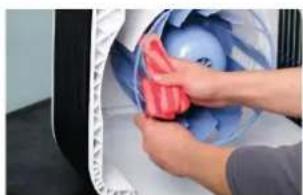
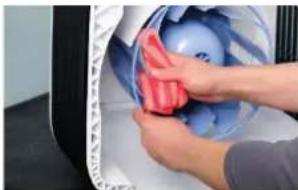
- Clean the fan blades with a damp cloth.
HOUSING
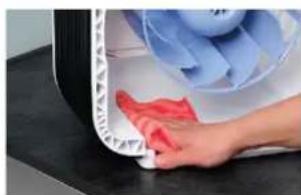
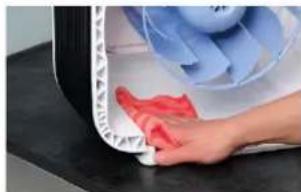
- Clean the inside of the housing with a damp cloth, hot water and dishwashing detergent.
GENERAL CLEANING (CONTINUED)
PARTICLE SENSOR
The particle sensor detects the amount of dirt in the air in the room by analyzing a passing air flow. Over time, dirt can accumulate and affect measuring accuracy.
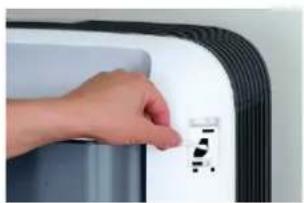
The flap over the particle sensor has to be closed during operation to ensure the measurement is correct. It should only be opened to clean the sensor.
- Clean the sensor lens using a damp cotton swab.
- Dry the sensor with a dry cotton swab.




en
MAINTENANCE AND TROUBLESHOOTING
REPLACING THE HYBRID FILTER
The HYBRID filter has to be changed after about one year to ensure that dirt and pollen continue to be filtered from the air.
The display indicates an upcoming need to replace the HYBRID filter with the following symbol:

The HYBRID filter is replaced according to Figures 2 to 7 on pages 42 and 43.
REPLACING THE HYBRID FILTER
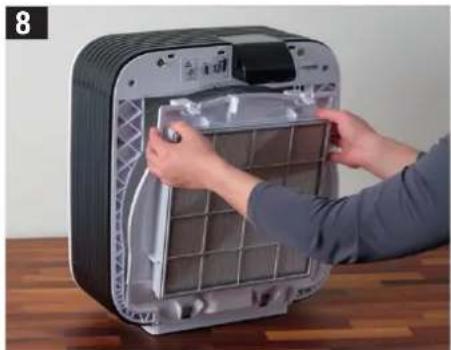
- Remove the front cover of the BONECO H680.
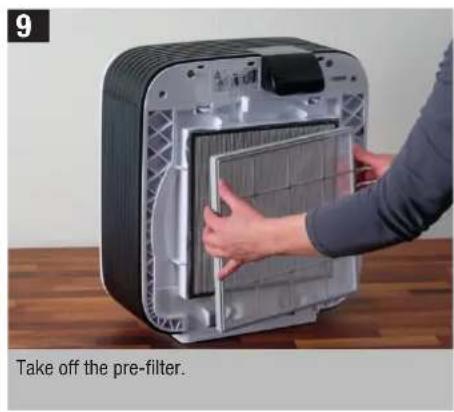
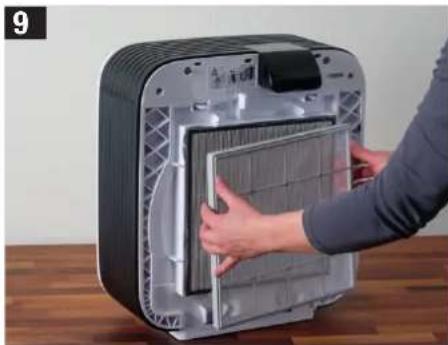
- Take off the pre-filter.
- Remove the used HYBRID filter and dispose of it with your regular household waste.
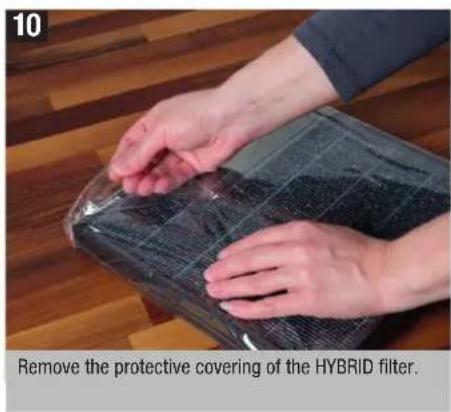
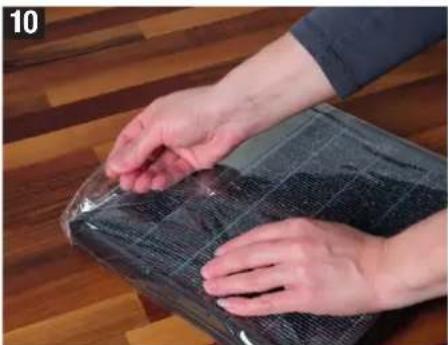
- Remove the protective foil from the new HYBRID filter.
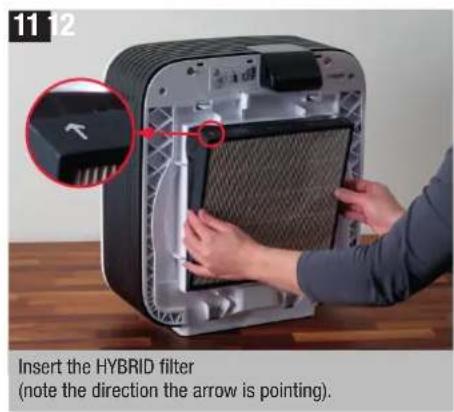
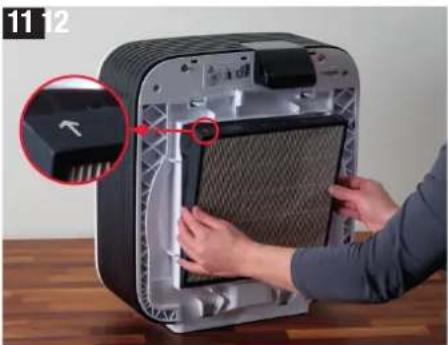
- Insert the HYBRID filter into the holder as shown on the label.
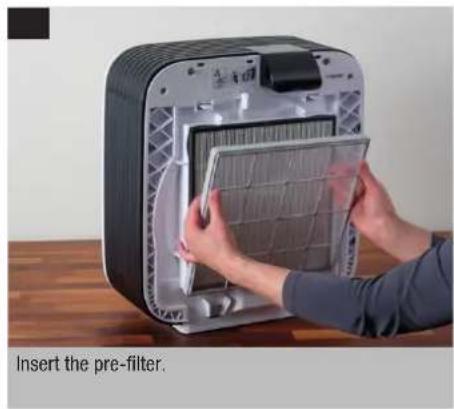
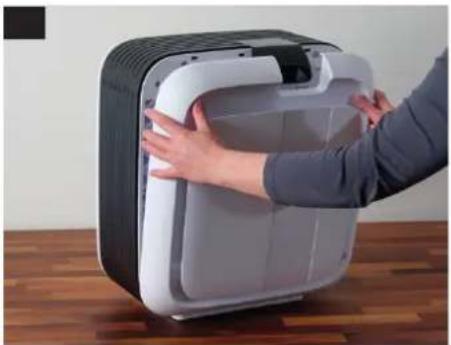
- Reinsert the pre-filter and the front cover.
- Simultaneously press the and buttons on the appliance for 5 seconds to hide the filter change symbol.
REPLACING THE IONIC SILVER STICK
The ionic Silver Stick prevents the growth of bacteria in water, making a vital contribution to health and cleanliness. The ionic Silver Stick is also subject to wear and has to be replaced regularly.
The display indicates an upcoming need to replace the ionic Silver Stick with the following symbol:

You can obtain an Ionic Silver Stick from your BONECO specialist dealer or the BONECO online store at:
www.shop.boneco.com
REPLACING THE IONIC SILVER STICK
- Take off the front cover.
- Remove the water tank on the rear side.
- Remove the filter holder.
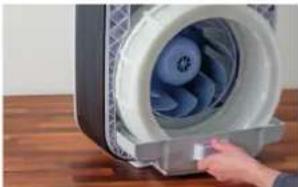
- Pull the water base out and remove the drum.
- Remove the used ionic Silver Stick ^ 念 and dispose of it with your regular household waste.
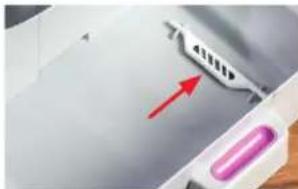
- Insert the new Ionic Silver Stick
- Put the parts back together by following the steps in reverse order.
- Simultaneously press the and buttons on the appliance for 5 seconds to hide the symbol.
MALFUNCTIONS AND TROUBLESHOOTING
Problem Possible cause Action
| Air has an unpleasant odor | Stagnant water in the tank and water base | Empty and thoroughly clean the appliance |
| No Improvement in air qualityParticle sensor is dirty Clean the particle sensor | ||
| Open windows or doors Close windows and doors | ||
| Display shows Error E2 | Fan blade blocked or motor is defective | Unplug the appliance, check that the fan blade can turn freely, plug the appliance back in; contact a service center if the problem persists |
| Display shows Error E3 | Drum blocked or motor is defective | Unplug the appliance, check that the drum can turn freely, plug the appliance back in; contact a service center if the problem persists |

INSTRUCTIONS D'UTILISATION BONECO H680

SOMMAIRE
Puisance absorbee 30 W
Accessoires Ionic Silver Stick
A7017, filtre HYBRID
A KÜLÖNBÖZÖ MODYK KIVÁLASZTÁSA
AMODOK
DISPLAY-LOCK KIKAPCSOLÅSA
KORZYSTANIE Z TRYBU PRACY "HYBRID"
AKTIVERA DISPLAYLASET
- Tryck på knappen fills signaltonen ljuder.
AVKALKNING OCH RENGÖRING
SE
AVKALKNING
Lisavarusteel Ionic Silver Stick
^© A7017, HYBRID-suodatin
Tilbehor Ionic Silver Stick A7017, HYBRID filter
OPTIMAL LUFTFUGTIGHED
AFKALKNING OG RENGØRING
dk
AFKALKING
AFKALKNING (FORTSAT)
AFKALKNING
INDIKASJONER I DISPLAYET
AVKALKNING (FORTSETTALSE)
AVKALKNING
- Fyll tanken halveis opp med varmt springvann og tilsett to poser CalcOff.
- Start avkalkningsmodusen ved Å holde innate tasten i betjeningsfeltet på BONECO H680 i 5 sekunder. Endre om nodvendig avkalkningsvarigheten med tastene og
Tarvikud Ionic Silver Stick
^© A7017, HUBRILDfilter
NUPUSTIK JA KAUGJUHTIMISPULT
AKTIVACE ZÁMKU DISPLEJE
DEAKTIVACE ZÁMKU DISPLEJE
3aMeHaHTb6aKTepeHnBHOcepe6pHOrOcTePcknIonic Silver Stick 577
HenoJaKn uYcTpaHHeH HeNCnpaBHoCTe 578
TEXHNUECKNEXAPAKTEPNCUK
Hannemohobanne moen BONECO H680
HapxhenCe 100-240B\~50/60T
Notpe6nemmaouhoctb30BT
Pon3BogntbHocbYbJaKHeHn1000r/4
PpOu3BODHTeNbHOCTb OvHCTKN B03Dyxa 190 M 3/4(CADR)
Ja nomeeenn pa3mepom 100 M
Emkocb pe3epbyapa 10n
Pa3MepbI 347×I1435×B490MM
YpOBeHb yMa BO BpEma pabo27-51A(A)
Macca B noopxHem COCTORHM 10,4 K
Donohntelbhe npnaedexhoctn AHTN6akTepehnaBHy cpe6pHb icEeKHeI lonic Silver Stick
A7017,ФиьтHyBRID
BBEDEHNE
YBAXAEMbI NOKYNATEJIb!
Mbno3dpabnem Bac c npno6peTeHem np60paBONECO H680.5naorapar KOMbHnpoBaHHoKHOCTpykUOn npom3BOHT ONDOBpeMeHHO OHCTKY yBvIaXHeHne BO3Dyxa B NOMEueHHN.Ero COBepWeHHA CHCTema YnpabHeHHObecNEHBAET CHIXKeHneYPOBHJ WMya BO BPMePA60tBdoMHmAbHoYOPOBHJ,TO NO3BOHT Bam nCNOB3ObaT BONECO H680 DaJke B CnAebHn Hn DetCKo
Pn60b BONECO H68o paccnHa 3KcNnyatauHIOB ABtOMaTueckOM peKIMe. Ondako BCE erO xapaKTePNCTKMOKHO 13MeHHTB 3ABNCMooCTN OT BaHX npednoTHeH N TpeBOAHN. B daHHOH nHCTpykUM COepXHTCn HHOpMaun, KOTOPa NOMOXET CO3dA tB DnBac MaKcMaMbHO KOMΦopTHBKnHMAT.
CMYEHNE CMMITOMOB ANIEPTHN
Pnp6op BONECO H680 ochaen TpoHON CnCTemOH PnIbTaPun, KOTOPA OHMaet BO3dy He ToIbKO O 3anaxo, HO TaKoe OT NbIM, NbIbTu Nactu 3aqr3-HeN. KpOme TOR, HAMnE PnIbTPa HYBRID no3BOJare 3ΦFKeTnBHO MmMm3nPoBaTb TAKne MHROnCHeHBe nponBHeN anepnR, KaK anepnueckn PnHNT IN AnepnreCheekne peakum HA DOMaunIO NBIN NPOyKTb Xm3HeJeTeNbHOCTN KNEU.
IIOJE3HAHINHOPMAUNOBIAKHOCTNBO3DyXA
OnnmaJIbHra BlaJXHOCTb BO3dyxa IMeET 60JbIooe
3HaueHne I nHaewero 3doPobBc. CyxO B3dyxB
NOMeUeHHM Bbl3bIbaePa3dpaXeHne uJeLyuHHe
KoKn. NOBaHTcR OUYuHHe CYXoCTn B rAa3ax N B
ROPJI, CYoUeCTBeHHO yXyUaet CamOHyCBTBE.
3TOOTHCIOrCe HToIbKO B3pocnIM, HO TaKKe K JeTAM N DaKe K DOMaHUM XINBOTbIM.CyXa CnImctar
6OboNoQCA 3BmHe BPEMA NobIbIaer TnpedpacnoLo
XEHOCTb K IpOCTyDhIM IN DpyfIM INHΦeKUHOHbIM
3a6OJIeBAHmM.
Pn60BONECO H880 NOMORAETpeWHTb 3TN npo-6IeMb.IE OCOBPeHHeHAB ATOmatKna NOIDepXnBaET NOCTOHHYIO YNCTOTU N OTTMajbHyIO BNAxHOCTb BO3-dyxa - DaJce B 60JIbHX NOMeEHnx PNOaAdbIo 100 KB.M.
Hnetom, H 3mMoB: Bb60bnwe He cmoKTe OTKa-3atbcr O HeoobuaynHO OuyueHH KOMΦopta.
KOMNIJEKT NOCTABKN
BONECO H680 cΦnblbTpOM HYBRID
PoppoJOK DnA OYCTKm UyaJIaHEM N3BECTKOBO R HAeta «CalOf» A7417
CetbeoB6nok NtHAna C nepeXOAnHKOb B3aBcNMOCTOn 0KCNOPTHORO cNONoHEHNe
PnblT NCTaHIOHORO npaBauHEnC cBaTaTeKoR CR 2025
OB3OP HANMEHOBAHNE DETALEI
1 Peredna Kpuiuka
2ФmbltpnpedBapntelbHO OHCTKN
3ФиьтphYBRID
4KpennneHneФmltpa
5 BapadaH
6Ybnaxnoumphi
7 AntnoakTepnabHb cpepepbny ctepeKBI Silver Stick
8 BONECO H680
9 PezeepByap dny B0db
10 EMKOCbIaH apomath3npyIOUIMX BEIeCTB
11 PddoH
12 NynbIy
13 Ionactn BENTNArTopa
14 Pobod3neKtpnntanH
CHIMMTE nepeHIOI KpbIky.
N3BNEKNTe KpENJIeHHe FmNbTpa BMeCTe C FmNB-TPaMn.
CHIMITEpeepByapIINBODJI.
N3BNEKNTe KIOBETy IIN BODBI BMEcTe C 6apabaHOM.
PpOMoIe pe3epByap nBBoI N KIOBety IIN BOI.
BcTaBbTe KIOBETy DnRA BODbIC 6apabHOM B npN-60p.
NIOIROTOBKA K PABOTE (NPOOJIXEHNE)
YCTAHOBHTE 3aONHHeHHb BOOpPOBHOHO BDOI pe3epByap nra BObl.
BctabTe kpenenne Hnntpa.
CHIMMTEFnIbTpPpeBapnteJbHoOuCTKn
CHMNITe 3aunTHyO oboonky C pfNbTpa HYBRID.
YcTaHOBnTeΦmNbTpHYBRID(B HAnpAbHeHH, yKa-3aHHOM CTpeIkoJ).
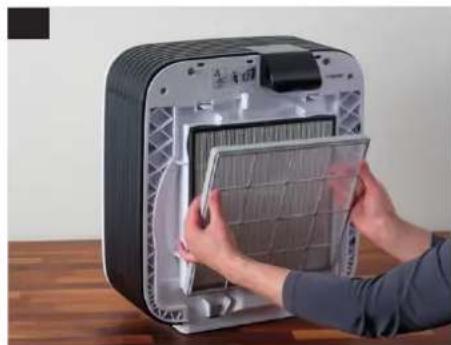
YcTaHOBHTeФnIbTp npEaBaPnteIbHoN OmCTKn.
NIOIROTOBKA K PABOTE (NPOOJIXEHNE)
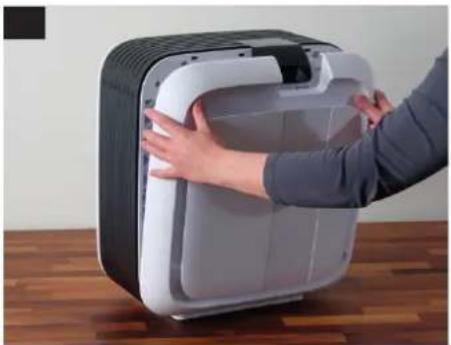
YcTaHOBuTe NpeDnIO KpbIky.
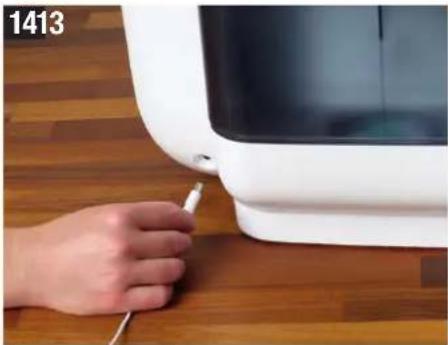
PpOBoD 3JekTponHtAn Hcayana NoCoeMHnTe K np6bpy BONECO H680, a3aTeM BKIOHHTe B pO3eTKy.
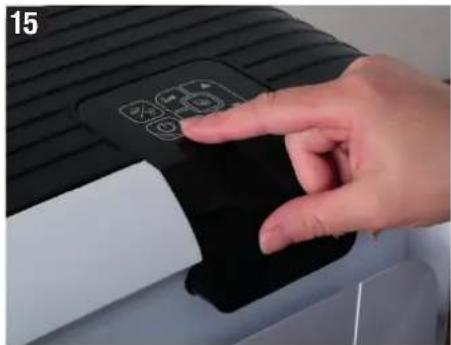
BKnHouHTe npHb6p KnHKnO
HNDKATOPbl HA DnCJIeE
0630p BCEx INHdkatopOB Ha dncnlee INHdkatopbl CTeneHH OCHTKB03dyxa (CJIeBa) n CKOPoCTu BEHTNJrTopa(BBepxy)
HnMkKatopBnaKHOCTNBO3dyxa(Cnpaba,Nocepe- nHe)NCKOPoCTNBEHTnIaTopa(BBepxy)
Hdukatop 3aueHne
DBA CNOOBA YNPABNEHNA
Ynpablenne np60pOM BONECO H680 BO3MOxHOpe3 BCTpoEHNO KHOHNOHY NaHEnb NIN BXOJIMB KOMNKeT NoCTaBn Nynb T DY. Ynpablenne B OboNXcnyax OOnHaKOBoe.
日
Hdukatop FyHKua
NEPEKJIIOUeyHNE NOPEXIMOB
- IpeekIIOUeHne NOpEeXIMOB AUTO, LEEP IN BABY npo- n3BODnTcN CLEyIOUIMM CNOCO6AMN:
MHOROKpathbIM HaxkATHEKHOHKn HnyIbTe D
MHOROKpaTHbIM HaxaTNEM KHOIKN HKHONOQUHONaHeJIN np6opa
ПОДPEЖИМ «AUTO»
B noDpeXnme H680 nCnoNb3yET BCE cKo-POCTN BEHTINJTopa OT 1 Do 6.3aDaHna BnaKHOCTb BO3dyxa CoCTaJIaTet 50%
IIOAPEXKIM «SLEEP»
B NOpeKHe MBONECO H680 MOKHO OCTaBnTb BKNIOHbIM DaKe HooBIO.PnIObOP paOToaET aBTOMaTNUeCKN CMMHmAbHOI CKOpCtBO BEHTNlAToPA1, YTO oBeCneuBaet ChnIXeHMe yPOBHa 乌Ma BO BPem PAoBtBJ.3aDaHHaB NlaXHoCTb BO3Dyxa CoCTaBNeT 45%
ПОДPEХКМ «BABY»
B noDpeXnme (BABY npN6Op BKJIOUaET CKOPOCTn BEHTnIyTopo ot 1 do 4 nOBbIaewt BIAJXHOCTb BO3dYxa do 60% .DaHbIy NOKa3aTeB JBIJIeTcN IeAJIbHbIM DnIeTCKO, NOCKoJIbKY B NOMeUeHHx, rHe HAXOJTCrpyHbIe mMANIOJETHMe dETn, peKOMeHdyETcN NOIdepKMBaTb BoOEe BBICOKyIO BIAJXHOCTb BO3dYxa. BehTNlATop paOtaet HAcToIbKO TnxO, YTO paADIOHnH HepearnpyET Ha Hero.
PYHAR PEGYINPOBKA BIAJXHOCTN BO3DyXA N CKOPOCTN BEHTNJATOPA
ONTMALbHAR BIAKHOCTb BO3DyX
PekomeHdyemar BnaJXHOCTb BO3yxa CoCTaJIeT 40 -60%.3aOIOckA HAcTPOKa NIOIePJKMaBt ypoBeHB BnaJXHOCTn BO3yxa B50%.B Ieane INIMKA-tOp qKmecKoBnaJXHOCTn BO3yxa HAXOITcB npeJeNaX 30HbI OK:
3aAHHB BAMN BnaxHOctu Bo3dyxa coXpAHETc DaKe B Tom Cnyae,ecm Bbl BbIKIOUaete np6op.
PERYINPOBKA BIAJXHOCTN BO3DyXA
- Haxkumar Khojkn ,VcTaHOBtE HyxHyo BnaJXHOCTb BO3dyxa.
Ha dncnnee OTO6pa3ntcCMBON DESREH Ha).Yepe3 HeckoBko CekyHIO NCNE OKOHANBCex yctahOBOK HA DCNnee NOBNTc CMBON CURRENT (ΦakTnecka).Tenepb dncnne CHOBA NOKa3bBaET ΦakTneckyo BlaxHoCTb BO3dyxa.
MAKCMMAJIbHOE YBJIAXHEHNE
HaxmnaTe KhoNky DoTexnop, noka He noBnTcCnmboCo(CokpaueHneOT(Continuous)。TenepyBnaXnHntelbbyedpabotatbHe3aBNCMOOTnMepeHHoBnaXnHO B03dyxa.
PEYUNPOBKA CKOPOCTN BEHTNJIATOPA
1.HaxMITE OINH pa3 KhoNky. Hukatopc ckopoCTn BEHTIANTOPa HAunHaet MuraTb.
2.ДЯусТанOBКСКОРOCТВЕНТИТOPAHAKIMMaTeKHONKN
3.ДпяпесдаьпдржимнмaiteКннky
Ha npmbopoe Do tex np, noka Ha nCnnee He no-
RbTcR CmBON KauceTbe aIbTePHTaNBbl
MOKHO HcNoJb3ObTa bKOnKy Ha nyIbTe Dv.
MAKCMMAJIbHAKCKOPOCTb(P)
MaKcImaIbHnA ChOpocT (P) MoKET 6bITb 3aHaTaTOIbKO BpyHyO. OHa peKOMeHJyETC npH Heo6xOnMOCTH yBLaXkHeHn H/IN ONUCTKN BO3dyxA B NOMEuHN 3a MmHImaJIbHOE BPEm. IINr 3TOr HOaKIMaTe KhoNkY DoTexnop, NOKA Ha INdNKatope He NoR-BNTcK ChOpocTb BEHTnJIraTopa ^ (CM.pncyHK cJIeBA).
TAIMEP
TaimepMOXHOHCIOB30BaTBBOCEpxeJmaxNNOpeJmaxpaObI.PnnooTuTaIMepaBmOKeTeonpeJeNTbBpMaPbOToB BONECOH680doABTomATueCKTOBbIKIOUeHn(TaimepBbIKIOUeHn)
BbMoKeTe TaKke 3aTaB BpMe,pee3 KOTOpoe npH60bpDOnJxEN ABToMaTueCckn BKIOUHTbcra (TaImeP BKIOUeHn).DaHHyO fynKuINo MOKHO nCNOJIb3OBaTb, HanPImep, pIaN BKnIOUeHn BONECO H680 nepeBaUMBOSBpaUeHmE, YTO6bI K BaUeMy npXOy Doma 6blONNTMajLbHo KOMΦOpTHbIKNIMAT.
HACTPOKKA TAIMEPA BbIKIOUeyHn
1.BKIOHHTBE BONECO H680 KHOHKO
2. Bb6epute Hyyhble HaCtpoKm npexm paOtoB.
3. HaxMMte oINH pa3 KhoNky .
4.ДЯнсгposипрдогжнгеньнгспрабты(OT1do12acOB)NcnoIb3yIeKhONK
Pn6op 6ydt paobTaB TeueHne 3aHaHoro BpeMeHN 3aTEM BbIKIOHTCJ.
5.ДЯ DeakTNB3aUN TaMepa Do nCTeYEnH 3aDaHHOro BpemeHn CHOba Haxmnte KHOkky BbI6peNTe pnp6Op BONECO H680 MoXHO TaKKe BbIKIOuHTb KHOIko
HACTPOIKA TAIIMEPA BKJIIOYEHNIA
- BbIbepuTe HuyKhIe HAcTpoKm npexMpa60tbl.
2.BbIKHOHTBE NBOECHOHOKO - Haxmte oDIn pa3 KOnky
4.ДЯн�сгдпьВрсиму,并e3KOTOPeДOLJXHOnpO30IuB BKIOUeHNe (OT 1do 12 YacOB),NcNoJIb-3yTe KHOKN
Pnp60BONECOH680 BkIouHTcyepe3 onpeJeHHOE BPemn 6ydt paOtaB CooTBeCTBm C Bbl-6paHHn nporpammo.
5.ДЯ DeakTnBn3aun TaHmepa Do NCTeueHn 3a- DaaHHoro BpeMeHN CHOba HaxMMTe KHOKNy Bbl6epnte Pnp6op BONECO H680 MoXHO TaKKe BKJIOHTb KHONKO
БLOKIPOBKAДИСПЕЯ
HcnnneBONECOH680MOxHO3aunmTbOTcnyH Horo BBOdaaHHbIX.3Ty cyHKUHO MOxHO MCnOlb3oBaTb,HanpIMep,IIra npdynpeKdHMeBBOdaHrpaoU MMN DeTbM.
BKJIOUeyHNE BLOKPOBKN DNCNIEA
- Haxmaite KhoNky 3bYkoBOrO Curnhana
Ha HeckoIbKO cekyHd Ha ducnnee noBnTcN HndkaaIg
BbIKIIOUeyHME BLOKPOBKN DNCIIIE
- HaximmaTe KhoNkY 3bKOBOrO CnHana.
Дисплел pa36лкюрован.Изменине настор с choныoctуно.

HcnoJb3OBAHNE APOMATn3NpyUoX BELECTB
NCN0JIb3OBAHME APOMATn3MPYIOUX BE- UECTB
B np6ope BONECO H680 mmeTc EMKoCTb nIApomAtn3pynouix BeueCTb BΦOpMe 3chPnhix Macen.
EMKOCbIa apomatn3HpyoUnx BeuecTB n3roTOBNEHa 3O Oco6oMaTePnAHa. HkOrda He D6abnTbe 3pnpHbte MaCna Ipyrme apomatm3Hpyouune BeueCTBa HenocepCTBEHNO B pe3epByap Ira BoBI NIN B NOIOH. DaKe He6oJIbWORO KOIuHECTBa 3TNx BeueCTB DOCTaTOHOIINHeONpaBnMOro NobpeJXDeHn np60pa. DeiCTBME rapaHTn Ha NopeJXDeHn noO6HOroPOda He paNpOcTpaHReTcR.
DOABJIEHNE APOMATN3NPYIOUX BEECTB
- CHMmTe nepeHIOKpbIky.
- M3BneKNTe KpeIJIeHHe FmIbTpA BMeCTe C FmIb-TPOM.
- 3aIeApomAtnHpyuOeeBuecCTBO B npedHa3HaHeHHyIOIINTOE MKOctb.
4.YCTAHOBNTHe HA MecTo KpenJIeHne FmIbTpA INpepHIOKpblkY.
YDAJIEHNE N3BECTKOBORO
HAJIETA N OQUNCTKA
YDAJEHNE N3BECTKOBOTO HAJETA
Ira noepkHnHa HnEkaeero ypOBn rHneHb BONECO H680 cJeDyET perynpo OuMaTa b uDanrB n3BeCtKobbl Hanet. 0 Heo6xOIMOCTN IpOBedeHHN OHCTKN CBnTeBcTByET CJeDyUOnn CMBOJ, NOBnIOINCA Ha dncnnee:

Ipepe ydaJIeHHeM N3BecTKOBOro Haneta Oba3aTeNbHO N3BLeKte aHTNbAKeTepnaIbHbI Cepe6pRbHbI CTePxeHb Ionic Silver Stick
IIOAFOTOBKA
1.CHMMITE nepeedHOIO KpbIshky np3epByap dna BObIC 6oBpaTHO CTOpObI np60pa.
3.BbBnBHeIpoIaHmN3BnKeHTe6apabcHcyBaJHKHOUIMΦHbTpOM.
- OnopoknHe noDIOH, a TAKKe pe3epByap nIbBoI m3BNeKHTe aHTN6aKTePnaIbHbI cepe6pHbI cTePkeHb Ionic Silver Stick
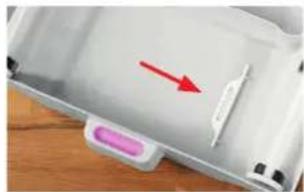
5.BCTabBe 6apabAn 0bpaTH B noDOn H cO6epNTe np6opB 0bpaTHo nocJeDoBATEnbHOCTn.
YDAJIHNE N3BECTKOBOFO HAIETA (PPOIOJXEHNE)
YDAJIENHE N3BECTKOBORO HAIETA
- 3anonHnTe pe3epByap HanonobHy TeTnoBdo npoBDOHO BDOH IO6abBe 2 naketka CalcOff.
2.3anyTepeKIMyadienHnBecTKOBOrHOHaneta, HaxaBnyepkmba5cekyHKnONkyHaHaehmynpaBHeHHBONECOH680.Pnp HeoXoDMocTn N3MeHIne npOdoNkTeIbHoCTb ydaenHn3BcT-KOBOrHOHanTaPn NOMOuKNHONoK
HaHHTcABTOMaTHueckoe ydaneHne n3 npb6opa n3BecTKOBOrHOHanTa.
IIO OKOHaHH ydaJIeHn I3BcTKOBOrHO HAIeta CmBOJ ONUCTKn HA DCJIeE ABTOMaTHUeCKn RaCHeT.
Miraoum CMBOJ yka3bIbae Ta Heo6xOIMOCt b 3a-MeHb BOBbl npnbope:

OYNCTKA BHYTPEHHMX NOBEPXHOCTE
Kazdu pa3 nocye yanaehn H3BecTKOB0 Hana Ta 683aTeIbHo CneJyET npOn3BOuNTb OOHTKy BHyTpeH Hnx NOBepxHOCTe (cm. CneDyUOyO CTpaHny).
N3MEHEHNE IPODOJXKNTELbHOCTYNDAJIENH N3BECTKOBOFO HAJETA
Ba3OBa HAcTPOKa IpoOJXKNTeBHOCTu ydaENHn 13BECTKOBOrHOHaTeCoCTabJIeT4cA.ДЯ60nee HHTECMBHO rNb6IcTPOrO ydaENHn 13BECTKOBOrHO HaTe erO npOJXKNTeBHOCTb MOxHO N3MeHnTb npn NOMOUn KHOJOK △
- YMeHbWnte npoJOnKxtenBHoCTb ydaJIeHnN 3BcTeKOBOrHaJIeTa npn He6Oblwom 3aRpa3HeHnBONECO H680.
- YBeInuBte npOOnJXnTeNbHOCTb ydaJIeHn I3BeCTKOBOr HAIETa npN 3HaUHTeHbHom 3aPra3HeHnBONECO H680. MaKcImaJIbHra npOOnJXnTeNbHOCTb ydaJIeHn I3BeCTKOBOr HOJIETa COCTaBJIeT 12acob.
图
OuNCTKA BHYTPEHHNX NOBEPXHOCTE
BAXKbIe YKA3AHN
NcnoB3yIe DnO OCHKTK NCTOOKY IN BnAnxHyoCaIpFeyk. Bcerda IobabJIe T EINJyHO BOy HEMHOrO CpeCTBa DnMbITbNoCybl.

IpeaHaJOM OCHCTKN NIN TEXHnueckoro 06 CnykBaHmB BcERda OTOeHNHnTe BONECO H680 OT 3NeKtpocETn! HecobNoHeHne DaHnHO npaBnla MoKet PnBecT K yApdy 3NeKtpueckm TOKOM INpEctabnEr Yrpo3y DnNKn3n!

PnecHe, 06pa3oBabwaaer BHytpn BONECO H680, MoKET bIb3aTb 3arp3HHeNe BO3dyxa n HaheCTn Bpe 3dOpOBbIO. PToTMy eE o6raTeJIbHO CneJeY yJaJIbTb.

He nCnoB3yIe IaI OUcTKn CnIPT N arpeccNB HbI YeCTraIe CpeCTBa.

He npn3BODnTe NCTky BONECO H680 B nocydoMoeyHm MaWnHE. NOB Bo3dEeCTBnEM BbICOKXTEMnepaTpy DetanMoryT DeOpmpMOBaTbcn npnTN B HerOHOctb. DeNCTBnE rapaHTm He pacnpocTpaHReTcHa NooObHle NobpeKdHnA.
PE3EPBYAP DIA B0DbI
1.3aONHHTpeepByapIINB0bI HAnoOBHyTeTnOIOB0I IO6abteHEMHO MOUoero CpeCTBa.
- TuaTeNbHO ONUCTNE BHTpeHHIO NOBepxHocTb pe3epByapa DnB BOIb BPyHyIO NIN NOxOJaue KNCTOUKOJN ONUCTKN.
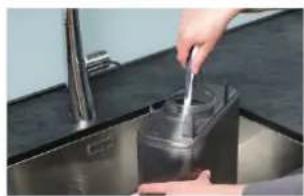
- OHHCTNTe TaKke KpbIikKy.
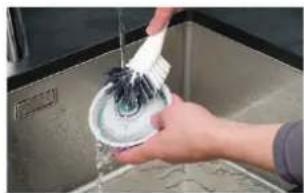
noaoh

- BbBnHbTe noDnH n3 BONECO H680.
2.ИЗБЛЕКТЕбабабанСУВАХКHAJOUМФДЛьТРМ - 3BbKeKIne H3 noDOna aHTNb6aTePmaJIbHbI cepe-6pRbHc stEpeXeH blonic Silver Stick
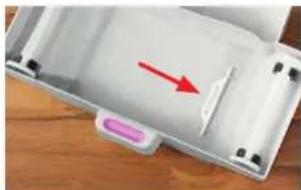
- ONUCTNE NOIOH N BCE ERO DETAII. INO ONUCTKN IX MOXHO H3BNEyN I NOIOHA.
OuNCTKA BHYTPEHHNX NOBEPXHOCTEIN (PPOIOJIXEHNE)
BAPABAH
- CHMNTe yBnaXnHnOuIoum nΦnIbTp c 6apab6aHa.
- OuCTMTE 6apaban npn NOMOUM KNTOUYI ONUCTKN C NCOJb3OBAHmE MOUeero CpeCTBA.

- TuaTeJIbHO npOMoIe 6apabH noD cTpyEi TENIOB0bl.
YBIAKHHIOUH HINbTP (PYHAR CTNPKA)
- TuaTeJIbHo npOMoIte yBlaJxHIOU cPmIbTp B TeTNILO BOe,OTKIMMAE 10CNCIOJIb3OBAHMe CpeI
CTBaJnMbITbIPOCyDbl.
2.Помьиerte yBlaKHHOuMФЛbTp B TEnnoYICTO B0e Do TEX nop, NOKA OH He nepeCTaHET NeHHTbCra.
3.Cpa3yJxnoCnE CTmPK yCTaHOBnTe YcHbYyIaXHHoUHmФHbTp B YcHbTb6ap6aH.
YBnaJXHnOUIIcHJIbTp HeJIb3a CTnPaTb B CTnPaJIbHOI MaUNHe!
He cyuHTe yBnaXnHouu#n #nIbTp B cyuNKe dnn 6enba.

OBUA OYNCTKA
KPbIiUKA
1.CHIMMTe KpbIiKy.
- IpOtpnte KpbIuKy BnaXKn oCaJFeTko
ΦHJIbTP INPEBAPHTIELbHOUCTKN
- PpOmoIte pHnBtp npEpaBapntelbHO OH OCHKTNOCTpyE BObl pN NOMOu KNCTOQKN DIA OCHKTNI.

BCTABNITeФnIbTpnpedBaPntenBHOOnCNTK TOJIbKO nOcNE erO BbcixAHNA.Bna rMoXET CHM3HTb KaHecTBO HAXoJreroC3a HMMФnIbTp a HYBRID.
ΦHJIbTP HYBRID
HHyBRID He Tpe6yeT uCTKn. Hauuue 3arp3-HeHH RABTcHOPMOI NOITBepKdaET 4FekTUBHOCTb Hnltpa.
OBUA OYNCTKA (PPODOJXEHNE)
KPENJIENHEMΦNIBTPA
- CHMnTe KpennneHne pInbtpa.
- IpoTpIe KpeJIeHHe ФИЛТРа BlnaXHn CanPeT-KoN.
JIONACTN BEHTNIAITOPA
HnKOrJa He BbIkyuBaIe KpeJxHbBnHT dIa CHrTn IOnacteBcHTnIaTOpA!Pm NOBtOPOHyoCTAHOBKe Dc6baIacMoKet npMBecTu K Bo3HKnHOBeHNOUyMBoNIM DaKe K nobpeXeHIO 3JIeK- TPOdBnRaTeN.
- IpotpuTe nonactu BEHTnIaTopa BnaXHO canpETKOH.
KOPNYC
- PpOtpnTe BHTpeHHIO NOBepXHOCTb KOpnyCa can- pKo, CMOeHHOB TEnIO BOe C DoabneHMe CpeCTBa DnMbTb Nocdybl
Obua OYnCTKA (PPOdoJXeHne)
DATYK MEXAHUeCKNX PIMMECEI
MEXAHUeCKHX NPMeCEpaNo3HaET 3arp3- HNE BO3DyxA B NOMeEHN NOpeCTBOM aHAnI3a npOdoJero MMo Hero BO3dyuHoro notoKa Co BpemeHem OH MoKet 3arpaHHTbC, YTO pPnBeEe K CHXKeHIO TOHOCTHN3MepeHNI.
Длд дoctobepbixpe3ynbTaTOB uMpeHnKpbHka HAD DaTCHKOM MEXAHmecKIN npIMeCeo BO BpEma pa60tbynp6o4paonkha 6bIb 3akpbla.OTkpblBaTbe CNEdyET TOnbKO dNnOChTK daTCHKa.
- OYHCTHTe BnAaXHOI BaTHOIN ANOyKOIN JINH3Y DaT-

- BbITnTe DaTnK cyXoB BaTHO naiOyKn.
C60PKA IPII6OPA
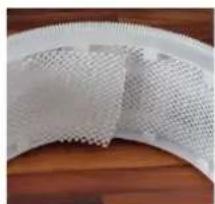
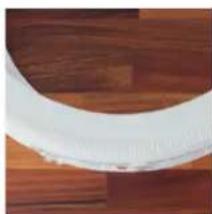
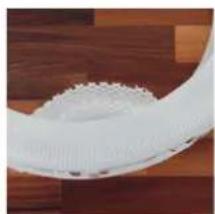
No OKOHaHH OHCTKN BONECO H680 MOXHO pncTy naTb K erO c6OpKe. Pn 3tOM o6paTte BHMaHHe Ha noDROHKy fOpMbY yBnaKHHoero fNbTpA.




TEXHNUECKOE OBCJLYXKMBAHNE N YCTPAHEHME HENCPABHOCTEIN
3AMEHAΦNJIbTPAHYBRID
IIN NOIDepKAAHNA BILCOKORA KAACTBA OYNCKNB03- DyaO 3aRpa3HEHNIbIbIbIe Heo6xOIMNO np6bnntelhO uepe3 rok kcnnyataun npon3BouNTb 3ameHynbpHYBRID.
O Heo6xOaMIOCTn 3aMeHb fHbTpa HYBRID CBNTeBbCTBye TcJeIyoUm CNMBOn Ha dncnnee:

NocneObaTeNbHOCb 3aMeHb fHbTpHa HYBRID coOTBETCTBye pncyHKam 2-7 Ha c.554 m555.
3AMEHAФЛьТРAHYBRID
- CHINMITE nepeDHIIO KpbIshky npu6opa BONECO H680.
2.CHIMMITEΦmIbTpnpedBapntelhOuNCTK。 - ⅢBbneknte OTCnykmbnn FmnbTp HYBRID u ytnn-3npyte eroc6bHbIMn 6bTOBBmN OTXoamn.
- CHMMITE 3aunTHyO nnEHKy C HOBORO pHJIbTp a HYBRID.
5.BctabBeTe HYBRID B KpEnIeHne B COOTBETCTBn C MapKnpoBkoJ.
6.YcTaHOBnTe Ha MeCTo QnIbTp PneBaPnteJbHOB OYNCTK N nepeDHHO KpbIuKy. - OJHOBpeMeHNO HAXMMTe Ha npn6ope n ydepKnBaIte 5 cekyHKnHONKn , P06bl CmMBoN 3aMeHbI pJIbItpa norac.
3AMEHA AHTMBAKTEPNAbHOrO CEPEBpHOrO CTEPxHr IONIC SILVER STICK
ANTbakTeepaBbHcpe6pHbCtePckHeIonic Silver Stick npeynpexJaet p3mHOKeHne 6akTeprn B BOe NTem CaBIM cNOcO6CTByET B 3HaHTenBHO CTENH CObIOJeHHIO rHnEHI XoPOWeMy CaMOyBCTNIO. CtePckHeI ONic Silver Stick TAKKne npNXoDITB HerodHOCTb N Tpe6byert peryapHoi 3ameHbI.
0 Heo6xOaMOCn 3aMeHb aHTnbakTePnaIbHoro cepepHoro ctepkn Ionic Silver Stick CbndetbCTbyET cJeDyUOu CMBOJ HA DCNJIe:

AntnbKapTepnabHbI cepepbHbI cTepeXeH bIonice Silver Stick *MOxHO npNoopbCTn y dInepa BONECO nB HHTepHcT-Mara3He BONECO no aDpccy:
www.shop.boneco.com.
3AMEHA ANTHBAKTEPHAJIbHORO CEPEBPRHOCTEPXHHIONIC SILVER STICK
1.CHIMnTe npeaHIO KpbIuKy.
2.CHMMITEpe3epByapIINBAODIC6paTHOHTOPoHb npn60pa.
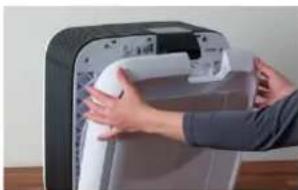
- CHMnTe KpeJIeHMe FmIbTaP
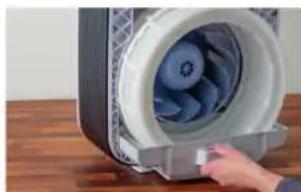
4.BbIbINbTeNoDOnHCHMnTe6apabah.
- 13BnKeTe OTCnyKbMn anHTb6aKtePmaNbHbI cepe6pmbn cTepeXeHb Ionic Silver Stick uYtnn-3npyTne erO Bmecte CobuHBMn 6bITOBIMn OTxo-dAMN.
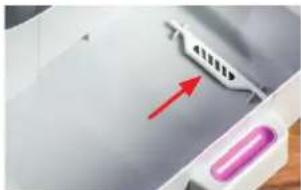
- BCTaBbTe HObbl aHTNbAKeTpMaJIbHbI CEpe6pHbI CTepXeHb Ionic Silver Stick 89.
- Copepte DetanB IObpaTHoN oocneobatoBHOCTM.
- OndOBpeMeHHo HaxMMte Ha npHbope n yepKnBaIe 5 cekyHKnONKn , YO6bl CmB0nnorac.
HENOJIaDKN UYCTPAHEHNE HENCINPABHOCTE
Pp6Jema Bo3MOXHn pMmHa CnOc6 yctpaHn
m = 311
运行故障和故障排除
问题可能的原因措施
- For Austria, Czech Republic, France, Germany, Italy, Poland, Switzerland and United Kingdom.
** For phone support in other countries, please contact your local dealer: www.boneco.com/partner