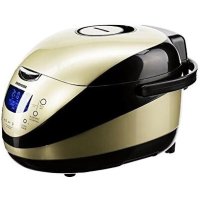
RMCM150E - Multi-cooker Redmond - Free user manual and instructions
Find the device manual for free RMCM150E Redmond in PDF.


| Product type | Multi-cooker (multicooker) |
| Brand | Redmond |
| Model | RMCM150E |
| Power | 860 W |
| Supply voltage | 220-240 V ~ 50 Hz |
| Bowl capacity | 5 L |
| Bowl coating | Anato® ceramic non-stick |
| Display | LED |
| Number of automatic programs | 16 (including MULTICOOK, STEW/CHILLI, BAKE, RICE/GRAIN, PASTA, STEAM, SLOW COOK, FRY, PILAF, SOUP, PORRIDGE, YOGURT, VACUUM, BREAD, COOK, EXPRESS) |
| Keep warm function | Up to 24 hours (automatic or reheating) |
| Delayed start function | Up to 24 hours |
| MASTERCHIEF function | Time/temperature modification and saving custom programs |
| Voice assistant | Yes (can be activated/deactivated) |
| Non-volatile memory | Settings saved for 2 hours in case of power cut |
| Included accessories | Bowl, steam basket, frying basket, measuring cup, ladle, spatula, support, tongs, manual, recipe book, service booklet |
| Dimensions (approx) | Approx. 30 x 30 x 30 cm |
| Weight (approx) | Approx. 5.5 kg |
| Maintenance and cleaning | Bowl dishwasher-safe; removable inner lid; detachable steam valve; wipe body with damp cloth; do not immerse |
| Safety | Overheat protection; auto shut-off; locked lid; steam valve; use on stable surface |
| Spare parts and repairability | Repairs by authorized center; spare parts available via after-sales service |
| General information | 2-year warranty; 5-year lifespan; household use only |
Frequently Asked Questions - RMCM150E Redmond
User questions about RMCM150E Redmond
0 question about this device. Answer the ones you know or ask your own.
Ask a new question about this device
Download the instructions for your Multi-cooker in PDF format for free! Find your manual RMCM150E - Redmond and take your electronic device back in hand. On this page are published all the documents necessary for the use of your device. RMCM150E by Redmond.
USER MANUAL RMCM150E Redmond
A1
A2
REDMOND

Carefully read all instructions before operating the unit and save them for future reference. By carefully following these instructions you can considerably prolong the service life of your appliance.
Important Safeguards
- The manufacturer is not responsible for any failures arising from the use of this product in a manner inconsistent with the technical or safety standards.
- This appliance is intended to be used in household and similar applications such as:
- staff kitchen areas in shops, offices and other working environments;
- farm houses;
– by clients in hotels, motels and other residential type environments; - bed and breakfast type environments.
- An industrial use of the device or any use of the device that is not mentioned in the manual is classified as a violation of the terms of the proper use of the product. In this case, the manufacturer is not responsible for any damages.
- Before installing the appliance, ensure that
the device voltage corresponds with the supply voltage in your home (refer to the specifications on the appliance rating plate or technical data).
- While using the extension cord, ensure that its voltage is the same as specified on the appliance. Using different voltage may result in a fire or other accident, causing device damage or short circuit.
- The appliance must be grounded. Ensure that it is connected to a properly grounded power outlet. Failing to do so may result in electric shock. Use only grounded extension cords.

CAUTION! During use the appliance becomes hot! Care should be taken to avoid touching the housing, bowl, or any other metal parts while operating. Make sure your hands are protected before handling the device. To avoid possible burns, do not lean above the open appliance.
- Always unplug the device after use, before cleaning or moving. Never handle the plug
with wet hands. Do not pull the power cord to disconnect from the outlet; instead, grasp the plug and pull to disconnect.
- Keep the power cord away from hot surfaces or sharp edges. Do not let cord hang over edge of table or counter. Do not bend, twist, stretch, or bind the power cord by force.
STOP Remember: damaging the cord may lead to a failure that will not be covered by the warranty. If the cable is damaged or requires replacing, contact an authorized service centre only to avoid all risks.
- Never operate the appliance on soft surfaces. Cooking appliances should be positioned in a stable situation with the handles (if any) positioned to avoid spillage of the hot liquids. Do not cover the unit with any cloth or tissue during operation. Failure to do so may result in overheating or malfunction.
- Do not operate the appliance outdoors, to prevent damages that could be caused by
foreign liquids or bodies. Failure to do so may cause appliance failure or malfunction.
- Always unplug the device and let it cool down before cleaning. Follow the cleaning and general maintenance guidelines when cleaning the unit.
STOP DO NOT immerse the device in water and never wash it under running water!
- This appliance can be used by persons with reduced physical, sensory or mental capabilities or lack of experience and knowledge if they have been given supervision or instruction concerning the use of the appliance in a safe way and understand the hazards involved. This appliance can be used by children aged from 8 years and if they have been given supervision or instruction concerning use of the appliance in a safe way and if they understand the hazards involved. Children shall not play with the appliance.
- Keep the appliance and its cord out of reach
REDMOND
of children aged less than 8 years. This appliance shall not be used by children from 0 year to 8 years. Cleaning and user maintenance shall not be made by children unless they are older than 8 and supervised.
- Any modifications or adjustments to the product are not allowed. The appliance is not intended to be operated by means of an external timer or a separate remote-control system. All the repair works should be carried out by an authorized service centre. Failure to do so may result in device and property damage or injury.
- The surfaces can become very hot during operation.
- Risk of injury.
- The channels in the pressure regulator, by the escape of steam must be checked regularly to be sure that they are not clogged.
- Do not warm the food for a long time
CAUTION: Hot steam burns.
Technical Specifications
| Model | RMC M150F |
| Power | 860 W |
| Voltage | 220-240 V, 50 Hz |
| Bowl capacity | .5 L |
| Bowl coating | non-stick ceramic by Anato® (Korea) |
| Display | LED |
| 3D heating | yes |
| Number of programmes | 46 (16 automatic, 50 with manual control) |
| Steam valve | renewable |
| Deactivation of audible signal | yes |
Programmes
| 1. MULTICOOK | 7. SLOW COOK | 13. VACUUM |
| 2. STEW/CHILLI | 8. PRY | 14. BREAD |
| 3. BAKE | 9. PILAF | 15. COOK |
| 4. RICE/GRAIN | 10. SCUP | 16. EXPRESS |
| 5. PASTA | 11. PORRIDGE | |
| 6. STEAM | 12. YOGURT |
Functions
| Keep Warm function....yes, up to 24 hours | |
| Preliminary deactivation of Keep Warm....yes | |
| Rcoat function....yes, up to 24 hours | |
| Time Delay function....yes, up to 24 hours | |
| "MASTERCHIEF" function• enables to adjust time and temperature during cooking cycle• enables to create and save cooking programmes | |
| "Voice Guide" function....yes |
Packaging Arrangement
| Multicooker | 1 pc |
| RB-C502 inner bowl | 1 pc |
| Steaming container | 1 pc |
| RAM-FB1 deep fry basket | 1 pc |
| Measuring cup | 1 pc |
| Serving spoon | 1 pc |
| Stirring paddle | 1 pc |
| Spoon/paddle holder | 1 pc |
| User manual | 1 pc |
| Cookbook "100 Recipes" | 1 pc |
| Service booklet | 1 pc |
| Power cord | 1 pc |
| Bowl removal tongs | 1 pc |
In accordance with the policy of continuous improvement, the manufacturer reserves the right to make any modifications to design, packaging arrangement, or technical specifications of the product without prior notice.
Multicooker RMC-M150E A1
| 1. Main lid | 6. Housing | 11. Measuring cup |
| 2. Removable inner lid | 7. Carrying handle | 12. Steaming container |
| 3. Inner bowl | 8. Removable steam valve | 13. Deep fry basket |
| 4. Lid release button | 9. Stirring paddle | 14. Spoon and paddle holder |
| 5. Control panel with display | 10. Serving spoon | 15. Bowl removal tongs |
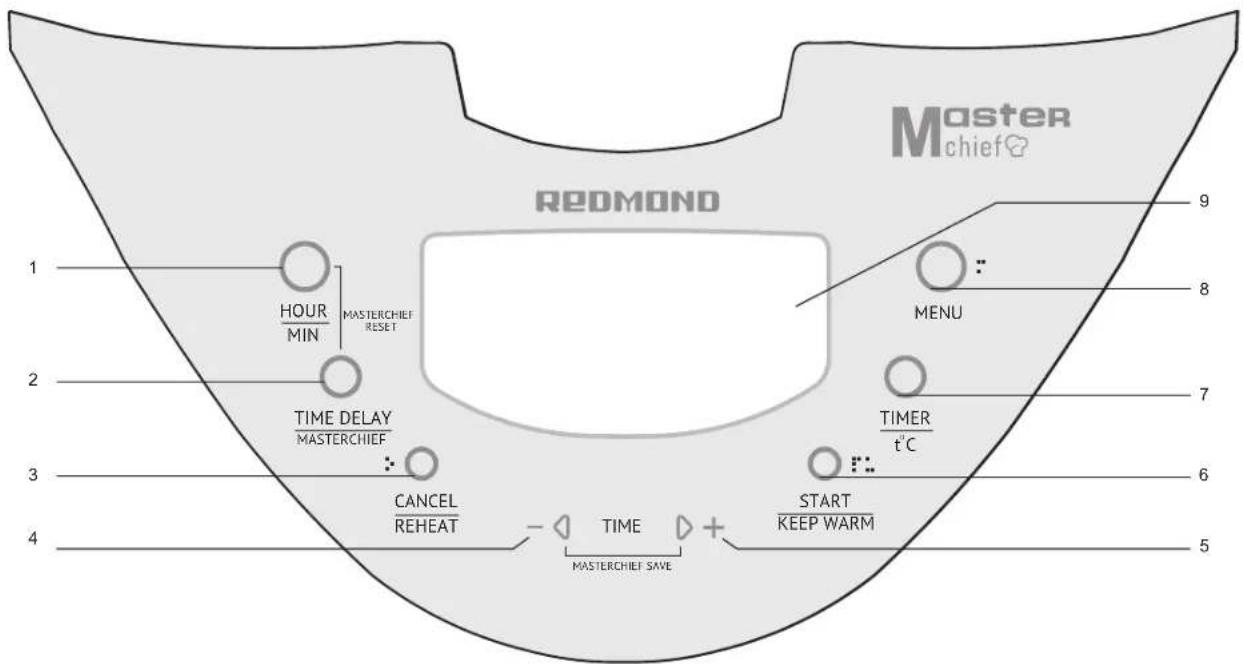
Control Panel A2
- The "Hour/Min" button is used to select appropriate hour and minute values for the cooking time and the Time Delay adjustment modes: to enable/disable audible signals (Voice Guide).
- The "Time Delay" button is used to enter the Time Delay adjustment mode; to enable the "MASTERCHIEF" function.
- The "Cancel/Reheat" button is used to enable/disable the Reheat function; to stop the cooking cycle; to clear current settings. The button is designed to accommodate the visually impaired users.
- The "-" button is used to reduce hour and minute values in the time adjustment mode; to select an automatic cooking programme; to reduce the temperature in the temperature adjustment mode.
- The "*" button is used to increase hour and minute values in the time adjustment mode; to select an automatic
cooking programme; to increase the temperature in the temperature adjustment mode.
-
The "Start / Keep Warm" button is used to activate the selected cooking programme; to disable Keep Warm in advance. The button is designed to accommodate the visually impaired users.
-
The 'Timer/t°C' button is used to enter cooking time adjustment mode; to select between time and temperature adjustment modes (in programme "MULTICOOK").
-
The "Menu" button is used to select automatic cooking programme.
-
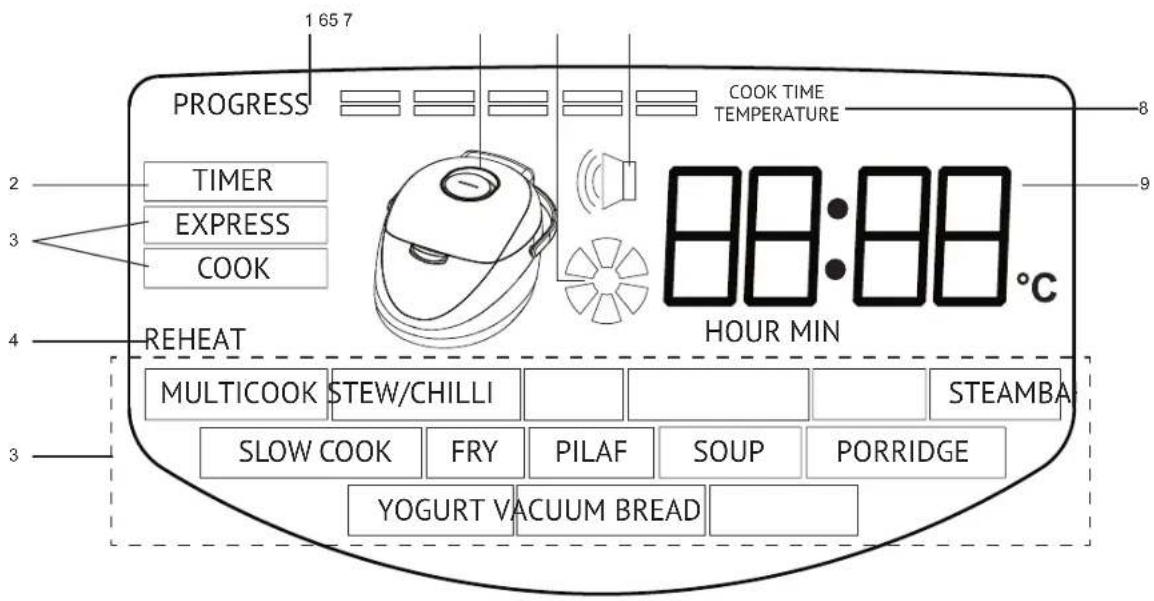
Display
Display AS
- Cooking progress indicator.
- Cooking time adjustment mode indicator.
- Selected cooking programme indicator.
- Reheat/Keep Warm in progress indicator
- Power On indicator.
- Cooking in progress indicator.
- Voice Guide enabled indicator.
- Timer value indicator (time, temperature).
- Timer.
I. PRIOR TO THE FIRST USE
Carefully remove the multicooker and its accessories from the packaging. Dispose all packaging materials.
Keep all warning labels, including the serial number identification label to - cated on the housing. The absence of the serial number will deprive you of your warranty benefits!
Wipe the housing of the appliance with a soft, damp cloth and let it dry. Clean the appliance following "General Maintenance Guidelines" to prevent extraneous colours during the first use.

After transportation or storage at low temperature allow the appliance to stay at room temperature for at least 2 hours before use.
Place the appliance on a flat, stable, and hard surface away from wallpaper, decorative coatings, or any other objects or cabinets that could be damaged by steam, humidity, or high temperatures.
Before operating, make sure that the outer and inner parts of the multicooker have no dents, cracks or any other visible damages. There should not be any obstructions between the heating element and the bowl.

Fill the removable bowl with food first and then position it inside the multi-cooker, to prevent contamination of the cooking chamber. Never operate the unit without the removable bowl in place. Doing so may cause overheating and lead to malfunction.
Never operate the unit without food or liquid inside the removable bowl, to prevent overheating that may cause damage to the non-stick coating.

Do not operate the unit in case of any malfunctions.
Voice Guide
The REDMOND RMC-M150E multicoker is equipped with a Voice Guide function, which talks you through the entire cooking process, providing with detailed information about current settings and adjustments. The function automatically activates after the device is plugged in. Press and hold down the "Hour/Min" button in the standby mode to disable the function if necessary. Repress and hold the button down to reactivate the function.
To Adjust Cooking Time
- Select the programme. Press the "Timer/t"C" button repeatedly to enter the cooking time adjustment mode (the "Timer" Indicator on the display
lights up, the default cooking time is displayed, the minute indicator is blinking).
- Use the "Hour/Min" button to select the time value (selected value is blinking). Press "4" button to increase and "-" to reduce the time value. Press and hold the corresponding button down to scroll through the digits.
- When the cooking time is adjusted (display keeps blinking) proceed to the next step. To clear the settings press the "Cancel/Reheat" button and start adjusting from the beginning.
Note! When adjusting the cooking time remember that each cooking programme has its own adjustment range and interval. The cooking time of some programmes starts to count down after the appliance reaches its required operating temperature.
Time Delay Function
The function allows programming the appliance to start cooking at specific time. The cooking programme can be delayed from 5 minutes up to 24 hours in 5 minute intervals.
1. Select and adjust the programme. Press the "Time Delay" button (display shows blinking minute value).
2. Use the "Hour/Min" button to switch between the hour and minute adjustment modes (selected value is blinking). Press "+" button to increase and "-" to reduce the time value, Press and hold the button down to scroll through the digits.
3. Press and hold down the "Start / Keep Warm" button. The Time Delay function starts operating (the timer stops blinking, the time remaining before the beginning of selected programme starts to count down).
4. To cancel the adjustments press the "Cancel/Richout" button and start from the beginning.
Cautious Avoid using the Time Delay function for dairy and other perishable foods (eggs, fresh milk, cheese, etc.).
Keep Warm Function
The function activates automatically at the end of the cooking cycle and keeps the dish warm at 70-80°C for up to 24 hours. The "Cancel/Reheat" button indicator is lit, the timer counts up the Keep Warm time. Press and hold down the "Cancel/Reheat" button to disable the function if necessary.
Preliminary Deactivation of Keep Warm Function
To disable the function in the beginning or during the cooking cycle press and hold down the "Start / Keep Warm" button, until the "Cancel/Reheat" button indicator goes off. To enable the function repress and hold down the "Start / Keep Warm" (The "Cancel/Reheat" button indicator lights up).
Reheat Function
The REDMOND RMC-M150E multicooker allows reheating cold dishes. To reheat:
- Fill the bowl with cooked food.
- Close the lid and plug in the unit
- Press and hold down the "Cancel/Reheat" button until audible signal is heard. The "Reheat" indicator on the display and the button indicator light up. The timer starts to count up the Reheat time. The appliance warms the food up to 70-80°C, and maintains the temperature for up to 24 hours. To stop the reheating, press and hold down the "Cancel/Reheat" button until the corresponding indicators go off.
Non-volatile Memory
The REDMOND RMC-M150E multicooker is a non-volatile memory unit. In case of a power cut-off the device stores current settings (including the Time Delay and Voice Guide functions) for a period of time up to 2 hours. If the power supply resumes during this time period, the multicooker continues its operation without any memory loss.
"MASTERCHIEF" Function
The REDMOND RMC-M150E multicooker is equipped with a versatile function
"MASTERCHIEF", which makes the cooking options nearly endless. The function allows you to make up to 10 time and temperature adjustments during one cooking cycle (except the "EXPRESS" and "YOGURT" programmes). Within 3 minutes after the cooking cycle is comprised the entire sequence of the time and temperature adjustments can be saved to the appliance memory. Use the "MASTERCHIEF" function to create your own cooking programmes with unique temperature modes.
The cooking time of any programme can be adjusted between 1 minute and 15 hours in 1 minute intervals. When the cooking time is set to 00 hours 00 minutes, the appliance enters either standby or Keep Warm mode, depending on earlier settings. The cooking temperature can be adjusted between 35 and 180^ in 5^ intervals.
To Adjust Cooking Time and Temperature (create a new programme)
- Press the "Menu" button repeatedly to select the cooking programme (except "EXPRESS" and "YOGURT"). Press and hold down the "Start / Keep Warm" button. The "Start / Keep Warm" and the "Cancel/Reheat" button indicators light up. The cooking cycle begins.
- To disable Keep Warm in advance, press and hold down the "Start / Keep Warm" button (the "Cancel/Reheat" button indicator goes off). Rpress "Start / Keep Warm" to enable the function if necessary.
- To adjust the cooking time and the temperature during the cooking cycle press and hold down the "Time Delay" button until audible signal is heard.
- The display shows blinking value of the remaining cooking cycle time. Use "-" button (to reduce) and "+" button (to increase) the time value. To switch between minutes and hours press the "Hour/Min" button (see the "To Adjust Cooking Time" chapter).
- To enter the temperature adjustment mode press the "Timer/t°C" button. The display shows the temperature value of the next cooking stage. The default cooking temperature of "MULTICOOK" is the previously entered temperature value; the default temperature of other cooking programmes is 100°C. Use "-" button to reduce and "+" button to increase the temperature value.
- To save the adjustments do not press any button for 10 seconds. The cooking cycle resumes with adjusted settings. The digits on the display stop blinking.
- To make new time and temperature adjustments repeat steps 3-6. The programme can be adjusted up to 10 times during one cooking cycle. To Save the Adjusted Programme
The appliance can save your adjustments, replacing the old programme with the new one. After the cooking cycle is complete an audible signal is heard, if during the cooking cycle the programme has been adjusted, the timer starts to count down from 3 minutes (in 1-second increments). Press and hold down the
“+” and “-” buttons simultaneously before the countdown is completed. If you do not want the device to save your adjustments, press "Cancel/Reheat".
After the programme is saved, depending on current settings the appliance enters either the Keep Warm (the "Cancel/Reheat" button indicator lights up, the timer counts up the Keep Warm time) or the standby mode.
The Keep Warm function in the adjusted programme will be enabled/disabled depending on whether it was enabled/disabled in the end of the cooking cycle. If the temperature in the end of the cooking cycle is below 75°C, the Keep Warm function will be automatically disabled next time you run the programme.
To Run the Saved Programme
-
Use the "Menu" button to select the programme that was previously adjusted and saved. Instead of the default cooking time display shows x--→ sign.
-
Delay the programme if necessary.
- Press and hold down the "Start / Keep Warm" button. The "Start / Keep Warm" and the "Cancel/Renear" button indicators light up. The total cooking time is displayed, the cooking cycle begins, and the timer starts to count down the cooking time of the programme.
- Press and hold down the "Start / Keep Warm" button to disable Keep Warm
REDMOND
(the "Cancel/Reheat" button indicator goes off). Repress "Start / Keep Warm" to enable the function if necessary.
- During the cooking cycle the device displays remaining cooking time and selected temperature. When a new cooking stage (temperature mode) begins, an audible signal is heard.
To Restore to the Factory Settings
To delete the programme and restore to the factory settings, select the programme by pressing the "Menu" button repeatedly. Press and hold down the "Hour/Min" and the "Time Delay" buttons simultaneously until an audible signal is heard.
To restore all programmes back to their factory settings, simultaneously press and hold down the "Hour/Min" and the "Time Delay" buttons in standby mode until an audible signal is heard.
Standard Operating Procedure for Automatic Programmes
- Prepare (measure) the ingredients according to the recipe. Ensure that all ingredients including liquids are below the maximum fill mark on the inside wall of the bowl.
- Position the bowl inside the appliance. The bowl must make full contact with the heating element.
- Close the lid until it clicks into place. Plug in the appliance.
- Press the "Menu" button repeatedly to select the required cooking programme (the corresponding indicator is blinking on the display). Use "+" and "-" buttons to move through the items in the menu.
- Press the "Timer/t°C" button to set the cooking time. The display shows the default cooking time of the programme, which can be adjusted.
- Delay the programme if necessary.
- Press and hold down the "Start / Keep Warm" button. The "Start / Keep Warm" and the "Cancel/Reheat" button indicators light up. The cooking cycle begins; the timer starts to count down the cooking time of the programme.
B. After the cooking cycle is complete an audible signal is heard. Depending on your settings the device enters either Keep Warm mode (the timer starts to count up Keep Warm time) or the standby mode. Press and hold down the 'Start / Keep Warm' button to disable the function in advance (the 'Cancel/Reheat' button indicator goes off). Repress 'Start / Keep Warm' to reactivate the function if necessary. - To stop the cooking cycle, to cancel the programme, or to disable the Keep Warm press and hold down the "Cancel/Reheat" button.
"MULTICOOK" Programme
The programme can be used to cook any dish with your own time and temperature settings. The cooking temperature can be adjusted between 35 and 180^ in 5^ intervals. The cooking time can be adjusted between 2 minutes and 15 hours in 1 minute intervals (for a period of time from 2 minutes up to 1 hour) and 5 minute intervals (for a period of time from 1 up to 15 hours). The default time of the programme is 30 minutes.
Follow steps 1-4 of "Standard Operating Procedure for Automatic Programmes". Press the "Timer/t°C" button to enter the temperature adjustment mode. The default temperature is displayed (100°C). Use '+' and '-' buttons to adjust the temperature. After the temperature is adjusted follow steps 5-9 of "Standard Operating Procedure for Automatic Programmes".
Note! The device automatically disables the Keep Warm function, if the operating temperature of the programme is below 75°C. If the cooking temperature is above 140°C, the cooking time of the programme should not exceed 2 hours.
"STEW/CHILLI" Programme
The programme is recommended for stewing meat, poultry, vegetables, and seafood. The default cooking time is 1 hour. The cooking time of the programme can be adjusted between 10 minutes and 12 hours in 5 minute intervals.
"BAKE" Programme
The programme is recommended for baking cakes, puddings, yeast and puff
pastry dough. The default cooking time is 50 minutes. The cooking time of the programme can be adjusted between 10 minutes and 8 hours in 5 minute intervals.
Measure the ingredients according to the recipe and place them into the bowl. Do not fill multicooker past the 12 mark on the inside of the bowl. Follow steps 2-9 of "Standard Operating Procedure for Automatic Programmes".
"RICE/GRAIN" Programme
The programme is recommended for cooking different types of grain. The default cooking time is 30 minutes. The cooking time can be adjusted between 5 minutes and 4 hours in 1 minute intervals (for a period of time from 5 minutes up to 1 hour) and 5 minute intervals (for a period of time from 1 up to 4 hours).
"PASTA" Programme
The programme is recommended for cooking pasta, sausages, eggs, etc. The default cooking time is 8 minutes. The cooking time of the programme can be adjusted between 2 minutes and 1 hour in 1 minute intervals. Before using the programme ensure that the audible signal is activated (the audible signal indicator on the display is lit).
The cooking time of the programme starts to count down after water comes to a full boil. Time Delay function is not applicable for the program.
Fill the bowl with water. Do not fill above the maximum fill mark on the Inside wall of the bowl. Follow steps 2-5, then 7 of "Standard Operating Procedure for Automatic Programs". When water comes to a boil, an audible signal is heard. Carefully open the lid, add the Ingredients into boiling water, and close the lid until it clicks into place. Press "Start / Keep Warm" button. The cooking cycle begins; the timer starts to count down the cooking time. Follow steps 8-9 of "Standard Operating Procedure for Automatic Programmes".
⚠️ Note! When cooking foods that can foam, open the lid a few minutes after you add the ingredients into water to prevent foam from boiling over.
"STEAM" Programme
The programme is recommended for steaming vegetables, fish, meat, and baby food. The default cooking time is 20 minutes. The cooking time of the programme can be adjusted between 5 minutes and 2 hours in 5 minute intervals. The cooking time of the programme starts to count down after water comes to a full boil.
To steam food:
- Fill the bowl with 600-1000 ml of water. Place the steaming container inside the bowl.
• Measure the ingredients according to the recipe, and evenly distribute them inside the container. - Follow steps 2-9 of "Standard Operating Procedure for Automatic Programmes".
"SLOW COOK" Programme
The programme is recommended for making slow cooked dishes. The default cooking time is 3 hours. The cooking time of the programme can be adjusted between 30 minutes and 12 hours in 10 minute intervals. The Keep Warm function is not applicable for the programme.
"FRY" Programme
The programme is recommended for frying meat, poultry, fish, and vegetables. The default cooking time is 15 minutes. The cooking time of the programme can be adjusted between 5 minutes and 2 hours in 1 minute intervals. Frying with an open lid is allowed.
The "Time Delay" function is not applicable for the programme.
"PILAF" Programme
The programme is recommended for cooking different types of rice pilafs. The default cooking time is 1 hour. The cooking time of the programme can be adjusted between 10 minutes and 2 hours in 5 minute intervals.
"SOUP" Programme
The programme is recommended for cooking different types of soups and drinks. The default cooking time is 1 hour. The cooking time of the programme can be adjusted between 10 minutes and 8 hours in 5 minute intervals.
"PORRIDGE" Programme
The programme is recommended for cooking different porridges with milk. The default cooking time is 25 minutes. The cooking time can be adjusted between 5 minutes and 4 hours in 1 minute intervals (for a period of time from 5 minutes up to 1 hour) and 5 minute intervals (for a period of time from 1 up to 4 hours). Use pasteurized low fat milk to cook porridges. For the best results and in order to prevent milk from boiling away, we recommend you to do the following:
- rinse grain (rice, millet, etc.) thoroughly until water runs clear; - grease the sides of the bowl with butter;
- follow the proportions suggested in the recipe book, increase or reduce the amount of ingredients proportionately;
If you failed to achieve the desired result, use versatile programme "MULTICOOK" to cook porridges. Optimal temperature setting is 95°C.
"YOGURT" Programme
The programme allows making healthy and delicious yogurt at home. The default cooking time is 8 hours. The cooking time of the programme can be adjusted between 10 minutes and 12 hours in 5 minute intervals. The Keep Warm function is not applicable for the programme.
Measure the ingredients according to the recipe and place them inside the bowl. Do not fill over the 1/2 mark on the inside wall of the bowl. Follow steps 2-9 of "Standard Operating Procedure for Automatic Programmes".
"VACUUM" Programme
The programme is recommended for cooking vacuum sealed food. Default cooking time of the programme is 2 hours and 30 minutes. The time can be adjusted between 10 minutes and 12 hours in 5 minute interval. The Keep Warm function is not applicable for the programme.
"BREAD" Programme
The programme is recommended for baking white and wheat-rye breads. The default cooking time is 2 hours (includes 2 cycles - 1 hour of proofing and 1 hour of baking). The cooking time of the programme can be adjusted between 10 minutes and 6 hours in 5 minute intervals.
Knead dough, following recipe recommendations. Place the dough inside the bowl. Do not fill over the 12 mark on the inside wall of the bowl. Position the bowl inside the device. Follow steps 2-9 of "Standard Operating Procedure for Automatic Programmes". Do not open the lid until both cycles are complete. Do not use the "Time Delay" function because it may affect the quality of baked food.
"COOK" Programme
The programme is recommended for cooking vegetables and legumes. The default cooking time is 40 minutes. The cooking time of the programme can be adjusted between 5 minutes and 8 hours in 5 minute intervals.
"EXPRESS" Programme
The programme is recommended for quick cooking of rice and other types of grains. The default cooking time is 15 minutes. The cooking time of the programme cannot be adjusted, "Time Delay" function is not applicable. Follow steps 1-4 of "Standard Operating Procedure for Automatic Programmes", then steps 7-9 (skipping steps 5, 6).
III. ADDITIONAL FEATURES
- Proofs dough
- Makes fondue
- Deep Thes
- Make cottage cheese
- Makes cottage
- Makes cheese
- Sterilizes
- Pasteurizes
• Reheats baby food
IV. ADDITIONAL ACCESSORIES
Additional accessories for the REDMOND RMC-M150E multicooker can be purchased separately. The information on the assortment, pricing, and compatible accessories is available through WWW.MULTICOOKER.COM and our authorized dealers.
V. GENERAL MAINTENANCE GUIDELINES
Before cleaning the device, ensure that it is unplugged from the outlet and has cooled down. Use soft cloth and mild soap to clean. It is recommended to clean the appliance after each use.

Do not use a sponge with hard or abrasive surface; solvent and abrasive cleaning methods are not allowed. Do not immerse the device in water or wash it under running water.
Prior to the first use or in order to remove the odour, steam half a lemon for 15 minutes using the "STEAM" programme.
Clean the bowl, the inner aluminum lid, and the steam valve after each use. The bowl is dishwasher safe. By the end of the cleaning wipe the outer surface of the bowl dry.
To clean the inner aluminum lid:
- Open the main lid and push up the plastic holder located on the top of its inner side.
- Pull the inner aluminum lid up to disconnect from the main lid. Wipe the surfaces of both lids with a damp cloth; wash the removable lid with water and mild soap if necessary.
Slide the inner lid into lower grooves aligning it with the main lid. Gently push the upper side of the inner lid until it clicks into place. The lid must fit tightly. To clean the steam valve:
- Pull the cover of the steam valve up to remove. Firmly turn the holder located on the inner side of the removed cover clockwise to remove. - Remove the rubber insert from the holder; thoroughly rinse the steam valve, holder, and the cover. Let the valve dry and reassemble in reverse order of disassembly. Place the steam valve back into the place.

Condensation may accumulate in the special cavity around the bowl during cooking. Use cloth or tissue to remove the condensate.
VI. COOKING TIPS
Possible Causes for the Problems Arising and Ways of Solving Them
This chapter familiarizes you with the practical tips and solutions to some common problems you may experience when using the multicooker. THE DISH IS UNDERCOOKED
| Possible Causes Solving the Problem | |
| The lid of the device was either open or was not closed properly. | Try to avoid opening the lid while cooking. Close the lid until it clicks into plate. Have sure that the rubber sealing ring located or the inner side of the lid is not defoated or damaged in any way. |
| The cooking temperature was not observed because the bend and the heating element did not fit slightly. | There should be no foreign objects between the lid and the housing of the device, remove it if any. Awards make sure that the heating element is clean and fits lightly eat the stool before cooking. |
Possible Causes Solving the Problem
| Wrong Ingredients or settings were chosen.General proportions were not observed, the amount of the ingredients was too high.Wrong time settings.The chosen recipe is not appropriate for the recipe. | We recommend using recipes adapted for the recipe.Choose proven recipes only.Set the time and cooking programme, choose ingredients, proportions, and their size according to the recipe. | |
| Steaming: the amount of water in the bowl is too little to provide enough steam. | Use the amount of water recommended. If In dough, check the water level while screening. | |
| Frying | Too much oil was added. | Frying ingredients add an amount of oil enough just to cover the bottom of the bowl.Follow the recommendations given in the recipe while deep frying. |
| Too mathematical mixture inside the bowl. | Do not lose the lid of the device while frying unless specified in the recipe. Using frozen ingredients delast and dralin before frying. | |
| Cooking: the broth boiled away during preparation of foods with high density. | Certain products need to be processed before cooking, washes, browned, etc., follow recommendations given in the recipe | |
| Baking dough did not take through | Frasted dough he must feed the inner lid and converted the steam valve. | Use a smaller amount of dough. |
| Too much dough in the bowl. | Take the baked produce out of the unit, turn it even and pace bake. Bake until ready. The next time use smaller amount of dough. | |
| Wrong Ingredients, wrong size of ingredients, wrong time servings. | We recommend using the recipes adapted for your model. Choose grown recipes only. Set the time and the cooking programme, choose the ingredients, the proportions, and the size of ingredients according to the recipe. |
| The dish remained in the unit with the "Keep Worm" on for too long after it's been cooked. | We recommend using the "Keep Worm" function moderately. If your device features the function or dissolving the "Keep Worm" mode in advance, use it to avoid the problem. |
LIQUID BOILS AWAY DURING COOKING
| Milk balls away. | Depending on the quality of milk used, it may ball away. To avoid this, we recommend using only ultra pasteurized milk with the fat content of 2.5% or less. Dilute milk with water if needed. |
| The ingredients were not processed properly (washes, peony, etc).Wrong general proportions in ingredients. | We recommend using the recipes adapted for the device. Try choosing proven recipes only. Get the time and the cooking mode, choose the ingredients, the proportions, and the size of ingeliters according to the recipe. Whole grains, meat, fish, and seafood need to be rinsed thoroughly before cooking. |
THE DISH IS BURNT
| The bowl was not properly washed after last use.The non-stick coating is damaged. | Make sure that the bowl is clean and has no cooling defects before cooking. |
| General amount of ingredients is less than recommended. | Use proven recipes, adapted for the device. |
| The cooking time was too long. | Replace the cooking time or follow the recommendations given in the recipe adapted for your model. |
| Frying oil was not added; the ingredients have not been stained or turned over. | Flying products and an amount of oil through just to cover the bowl of the bowl. But the ingredients thoroughly while trying or turn over as required. |
| Stewing not enough liquid. | Add more liquid. Avoid opening the lid while stirring. |
| Cooking, not enough liquid (proportions were not observed). | Follow the recommended ratio of liquids to solids while cooking. |
| Baking; the bowl was not greased before holding. | Grease the bottom and sides of the bowl with butter or oil before baking (do not pour oil inside). |
INGREDIENTS LOOSE THEIR SHAPE WHEN COOKED
| Ingredients have been over stirred. | Prying foods, do not stir the ingredients more often than every 5-7 minutes. |
| The cooking time was too long. | Reduce the cooking time or follow the recommendations given in the recipe adapted for the device. |
BAKED GOODS ARE OVERLY MOIST
| Impaper ingredients causing excess moisture have been used (patty fruits or vegetables, frozen berries, sour cream, etc.) | Use ingredients according to the recipe. Try to avoid using Ingredients causing excess moisture or use them in smaller amounts. |
| Baked product has been left in the arm with the lid closed for too long. | We recommend taking baked product out of the unit right after the baking cycle finishes or leaving it on the Keep Warm' mode for a short period of time only. |
BAKED GOODS DO NOT RISE
| Eggs and sugar extra poorly whipped. | Use proven recipes adapted for the device. Choosing, measuring, and processing ingredients to- low the recommendations given in the recipe |
| The dough stayed for too long before being branded | |
| The flour wasn't sifted or the dough was poorly uncooked. | |
| Wrong ingredients | |
| Wrong recipe. |
Certain REDMOND multicookers feature an overheat protection in the "STEW/CHILLI" and the "SOUP" programmes. In case there is no liquid in the bowl, the device automatically interrupts the programme and switches to the "Keep Wara" mode.
Recommended Steaming Time Values for Different Foods
| No | Type of food weight, g/pca Water, ml | Cooking time, min | |||
| 1 | Fork/foot fillet (cut into 1.5 x 1.5 cm cubed) | 500 100 | 20:50 | ||
| 2 | Mutter fillet (cut into 1.5 x 1.5 cm cubed) 500 | 300-31 | |||
| 3 | Chicken fillet (cut into 1.5 x 1.5 cm cubed) | 500 500-55 | |||
| 4 | Meatballs/suities | 100 (6 pcs)/150 (8 pcs) | 500 10/-1 |
REDMOND
| No. | Type of food Weight, g/pcr Water, ml | Cooking time, min | |||
| 1 | Fish (lillet) 500 100 10 | ||||
| 6 | Shrimps (cooked, peeled, frozen) 500 500 5 | ||||
| 7 | Potatoes (cut into 1.5 x 1.3 cm cubes) 500 300 13 | ||||
| 8 | Carrots (cut into 1.5 x 1.3 cm cubes) 100 1000 35 | ||||
| 9 | Beef (cut into 1.5 x 1.3 cm cubes) | 500 1000 70 | |||
| 10 | Vegetables (frozen) | 500 500 10 | |||
| 11 | Rogls | 5 pcs. 100 | 10 |
Please note that these are only approximate guidelines. Steaming time values may vary depending on the quality of the food used and on your personal preferences.
Recommended Cooking Temperatures in "MULTICOOK"
| No | Operating temperature | Recommendations for use (also refer to the recipe book included) |
| 1 | 35°C Proof dough and make vinegar | |
| 2 | 40°C Make yogurt | |
| 3 | 45°C Leaversing | |
| 4 | 50°C Fermentation | |
| 5 | 55°C Make londact | |
| 6 | 60°C Make green tea and baby food | |
| 7 | 65°C Cook vacuum tested meat | |
| 8 | 70°C Make punch | |
| 9 | 75°C Pasteurize and make white tea | |
| 10 | 80°C Make mulled wine | |
| 11 | 85°C Make cottage cheese and other dishes, requiring long cooking times | |
| 12 | 90°C Make red tea | |
| 13 | 95°C Make partridges with milk | |
| 14 | 100°C Make pears and meringues | |
| 15 | 105°C Make meat jelly | |
| 16 | 110°C Sterilize | |
| 17 | 115°C Make sugar syrup | |
| 18 | 120°C Make meat basket | |
| 19 | 125°C Make meat slews | |
| 20 | 130°C Make puddings | |
| 21 | 135°C Brown rolled foods | |
| 22 | 140°C Smear flasks | |
| 23 | 145°C Bake fish and vegetables (in foil) | |
| 24 | 150°C Bake meat (in foil) |
| No | Operating temperature | Recommendations for use (also refer to the recipe book included) |
| 23 | 200°C | Bake yeast purp pastry |
| 26 | 200°C | Fry poultry |
| 27 | 150°C | Try steaks |
| 28 | 170°C | Fry in butter |
| 30 | 175°C | Deep fry nuggets |
| 30 | 200°C | Deep fry French fries |
Table of Default Settings
| Programme | Recommendations for use | Default cooking time | Time adjustment range/standardise | Time Delay | Prevent time | Keep Warm |
| MULTICOCK | Adjust the cooking time and temperature to your needs to cook any dish | 30 min | 1 min - 1 hour / 1 min1 hour - 15 hours / 5 min | - - | - | - |
| STEWCHILLI | Snow, meat, fish, and vegetables | 1 hour | 10 min - 17 hours / 5 min | - - | - | - |
| BAKF | Boke cakes, puddles, peed and puff pretty cough | 20 min | 20 min - 8 hours / 5 min | - - | - | - |
| RICE/GRAIN | Cook different types of grains | 30 min | 1 min - 1 hour / 1 min1 hour - 4 hours / 5 min | - - | - | - |
| PASTA | Cook pasta, sausages, dumplings, and other conveilence foods | 8 min | 1 min - 1 hour / 1 min | - + | - | - |
| STEAM | Steam meat, fish, and vegetable dishes | 20 min | 1 min - 2 hours / 5 min | - | + | - |
| SLOW COOK | Make slow颠led dishes | 3 hours | 30 min - 12 hours / 10 min | - - | - | - |
| FRY | Fry meat, fish, poultry, and vegetable dishes | 13 min | 1 min - 2 hours / 1 min | - | - | - |
| PILAF | Make different types of the planks (heat, yogurt, seafood) | 1 hour | 10 min - 2 hours / 5 min | - | - | - |
| SOUP | Cook steak, braids and different types of soups | 1 hour | 10 min - 8 hours / 5 min | - - | - | - |
| PORRIDGE | Cook porridges with milk | 23 min | 1 min - 1 hour / 1 min1 hour - 4 hours / 5 min | - - | - | - |
| Programme | Recommendations for use | Default timing time | Time adjustment range/ intervals | Time Delay | Preheat time | Keep Warm |
| YOGURT | Make yogurts | 8 hours | 10 min - 12 hours / 5 min | + - | - | |
| VACUUM | Cook vacuum seated food | 2.5 hours | 10 min - 12 hours / 5 min | + - | - | |
| BREAD | Bake white and rye breads (with proofing cycle) | 3 hours | 10 min - 6 hours / 5 min | + - | + | |
| COOK | Cook vegetables and legumes | 40 min | 5 min - 8 hours / 5 min | + - | + | |
| LXPRESS | Cook quick cooking grains | 15 min | - | - | - | + |
VII. BEFORE CONTACTING SERVICE CENTRE
| Error code | Error description | Error handling |
| H1-b3 | System error. Possible control board or temperature sensor failure. | Urplug the appliance and let it cool down. Close the tie. If this does not eliminate the error, contact an authorized service centre. |
| Problem | Possible Cause | Solving the problem |
| The unit does not switch or. | Voltage supply failure. Check the voltage supply. | |
| The meal is taking bed long to cook. | Voltage supply interruption. | Check the voltage supply. |
| The bowl is installed with a distortion. | Install the bowl properly. | |
| There is a foreign object between the band and the heating element. | Remove the foreign object. | |
| The heating element is dirty. | Unpicking the device and let it cool down. Clean the heating element. | |
VIII. PRODUCT WARRANTY
We warrant this product to be free from defects for a period of 2 years from the date of purchase. If the appliance fails to operate properly within the warranty period and is found to be defective in material or workmanship, we will repair or replace it free of charge. This warranty comes into force only in case an original warranty service coupon with a serial article number and an accurate impress of the company of the seller proves the purchase date. This limited warranty does not cover damage caused by the failure to use this product for its normal purpose or in accordance with the instructions on the proper use
and maintenance of the product or any kind of repair works. Do not try to disassemble the device and keep all package contents. This warranty does not cover normal wear of the device and its parts (filters, bulbs, ceramic and Teflon coating, gaskets etc.).
The service life and the applicable product warranty period start on the date of purchase or the date of manufacture (if the purchase date cannot be established).
You can determine the manufacture date by the serial number, located on the identification label on the housing of the device. The serial number consists of 13 digits. 6th and 7th digits of the serial number identify the month, 8th digit the year of manufacture.
The service life of the product established by the manufacturer is 5 years from the date of purchase, provided that the unit is used and maintained in accordance with the user manual and applicable technical standards.
The packaging, user manual, and the device itself may not be treated as household waste. Instead, it shall be taken to the applicable collection point for the recycling of electrical and electronic equipment.

Environmentally friendly disposal (WEEE)
Old appliances must not be disposed with other household waste but must be collected separately. Municipal disposal of recyclable wastes is free of charge. The owners of old appliances are required to bring it to a waste facility centre. With this little extra effort, you can help to ensure that valuable raw materials are recycled
and pollutants are treated as appropriate.
This instruction is also available on website www.redmond.company. Manufacturer: DSM ENTERPRISE LTD. Building 2, No.6, Keji 10 Road, Xingtan, Shunde, Guangdong, China.
REDMOND

In fact, we have not yet done with our activities in the country, situation, and
PRODUCT IS OVERGEKOOKT
Programma "STEW/CHILLI"
Programma "SLOW COOK"
Programma "PORRIDGE"
Programa "STEW/CHILLI"
Programa "SLOW COOK"
PRODUKTET HAR KOGT FOR MEGET
V. RENGÖRING OCH FÖRVARING AV APPARATEN
BAKELSEN HAR INTE LYFT UPP
A SÜTEMÉNY NEM EMELKEDET FEL
Program "STEW/CHILLI"
Program "STEW/CHILLI" se preporučuje za pirjanje povrča, mesa, peradi, plodova mora. Podrazumevano vrijeme kuhanja u ovom programu je 1 sat. Omogućeno nučno podešavanje vrijemena kuhanja u rasponu od 10 minuta do 12 sati, korak je 5 minuta.
Program "BAKE"
Program "BAKE" se preporučuje za počenje biskvita, musako, kolača od dizanog i lisnatog tijesta. Podrazumevano vrijeme kuhanja u ovom programu je 50 minuta. Omogučeno ručno podešavanje vrijemena kuhanja u rasponu od 10 minuta do 8 sati, korak je 5 minuta.
Odmjerite proizvode na recept, stavite ih u zdjelu. Uvjerite se da sve sastojke ne prelaze oznaku 1/2 na unutrašnjoj površini zdjele. Zatim slijedite tačke 2-9 odeljka "Opći postupak koristenja automatskih programa".
Program "RICE/GRAIN"
Program "RICE/GRAIN" se preporučuje za kuhanje mrvljivih kaša od raznih prekrupe, raznih garnirunga. Podrazumevano vrijeme kuhanja u ovom programu je 30 minuta. Raspon podešavanja vrijemena: od 5 minuta do 4 sati, korak je 1 minut (za razmak od 5 minuta do 1 sata) ili 5 minuta (za razmak od 1 sata do 4 sati).
Program "PASTA"
Program "PASTA" se preporućuje za kuhanje tijestenine, kobasica, jaja, itd. Podrazumevano vrijeme kuhanja u ovom programu je 8 minuta. Omogučeno ručno podešavanje vrijemena kuhanja u rasponu od 2 minuta do 1 sata, korak je 1 minut. Prije početka rada programa, uvijerite se da zvučni signal je uključen (na displeju će se svijettiti indikator zvučnog signala).
Odbrojavanje vrijemena rada programa kuhanja će pačeti nakon kljućanja vede. Funktija "Time Delay" u ovom programu pnemaqučena.
Sijajite vodu u zijatelju. Objetire se da voda ne prelazi maksimalnu oznaku na unustrašinj površini zijele. Slijedite tačke 2-5, 7 odeljka "Opći postupak koristenja automatskih programa". Nakon ključanja vorie, će biti zvučni signal. Pazljiva otvorite poklopac i stavite proizvode u kipuću vodu, zatovitte poklopac do Skljocanja. Pritisnite dugme "Start / Keep Warm". Počele rađ podesenog programa i odrojavanje vrijemena kuhanja. Zatim slijedite tačke 8-9 odeljka "Opći postupak koristenja automatskih programa".
Pažnja! U slučaju kahanja nekih proizvoda, može se formirati pjeno. Da ob ste spriječili curenje pjene iz zajele, otvorite poklopac nekoilka minuta nakon stavljenja proizvoda a kipuću vodu.
Program "STEAM"
Program "STEAM" se preporučuje za parenje povrča, ribe, mesa, dijetatnih i vegetarijanskih jela, dečije hrane. Podrazumevano vrijeme kuhanja u ovom programu je 20 minuta. Omogučeno ručno podešavanje vrijemena kuhanja u rasponu od 5 minuta do 2 sata, korak je 5 minuta. U ovom programu kuhanja,
Program "STEW/CHILLI"
Programa \_SLOW COOK"
KEETMISEL KEEB TOODE VÄLJA
| Pilimakudra keemlalai keep pinn valga. | Plima vistneta je aonidsed tvokil sitlada seile toetikna kohjer je hinginusest. Sootivare kaututada valt 2,7% pat. vinkovca vena. Vinkovca neentadjut paera. Vystinatel veis pinnar viesl veenga laryandaca. |
| Eene keemlait jäld toluidahedömlate väve sti tõiutatä valt iätviit prasud jaut. Läntigild korosltintete vankreda veil elvi valesti valitud tovetanje taup. | Sootivat en kaututada kontrolitud plimetutid seadme mucie-Ifiga ochstet al avreun. Kostinertse valtis, merke valte-Ifia. Tijärne omihiru valtis kollapant testenär nende posultuske. |
| Tälservillo pilla, kina je meremnle tües alali heulikato lahti posta, kani valt jäls paltuks. |
TOIT KÖRBEB PÖHJA
Üretici: DSM Enterprises LTD. Bina 2, No 6, Kadzhi Road, Xingtan, Shunde, Guangdong, Çin.
- Anxiess, what was a quest on the rear (the reheat) and the (the reheat) of the (the reheat) of the rear (the reheat).
الصفرات
الdae رهة التي تم ت laws بالطاقة إِن عَلَّدْرَة الْمُجْعِ مُسْتَدَّدُ الْمُجْعِمِ الْمُجْعِمِ الْمُجْعِمِ الْمُجْعِمِ الْمُجْعِمِ الْمُجْعِمِ الْمُجْعِمِ الْمُجْعِمِ الْمُجْعِمِ الْمُجْعِمِ الْمُجْعِمٍ لَا يَكَى لَتَّيَّى بِلَّةً، وَحَذَا يَكَى REDMOND RMC-M150E بَيَا تَأَرَّةَ أَيْنَ لَا تَّيَّى بِلَّةً، وَحَذَا يَكَى العَمَّامِي بِلَّةً إِنْتَدَّدُ الْمُجْعِمِ الْمُجْعِمِ الْمُجْعِمِ الْمُجْعِمِ الْمُجْعِمِ الْمُجْعِمِ الْمُجْعِمِ الْمُجْعِمِ الْمُجْعِمِ ال ^2 سَاعَجِينَ لَا إِنْتَدَّدُ الْمُجْعِمِ الْمُجْعِمِ الْمُجْعِمِ الْمُجْعِمِ الْمُجْعِمِ الْمُجْعِمِ الْمُجْعِمِ الْمُجْعِمِ الْمُجْعِmِ الْمُجْعِمِ الْمُجْعِمِ الْمُجْعِمِ الْمُجْعِمِ الْمُجْعِمِ الْمُجْعِمِ الْمُجْعِمِ الْمُجْعِمِ الْمُجْعِمِ الْمُجْعِmِ الْمُجْعِمٍ لَا يَكَى لَتَّيَّى بِلَّةً، وَحَذَا يَكَى لَتَّيَّى بِلَّةً، وَحَذَا يَكَى لَتَّيَّى بِلَّةً، وَحَذَا يَكَى لَتَّيَّى بِلَّةً، وَحَذَا يَكَى لَتَّيَّى вَحَذَا يُكَى لَتَّيَّى بِلَّةً، وَحَذَا يُكَى لَتَّيَّى بِلَّةً، وَحَذَا يُكَى لَتَّيَّى بِلَّةً، وَحَذَا يُكَى لَتَّيَّى بِلَّةً، وَحَذَا يُكَى لَتَّи
MASTERSCHIEF
M = 311
الجامعة الصيني
RMC-M150E العربية المُمْجَعِ مِنْفَّةِ لِكَّلَّهِ وَرَّجَّهِ الْمُسْتَّةِ الْمُسْتَّةِ الْمُسْتَّةِ الْمُسْتَّةِ الْمُسْتَّةِ الْمُسْتَّةِ الْمُسْتَّةِ الْمُسْتَّةِ الْمُسْتَّةِ الْمُسْتَّةٍ
تحديد رمن الت+:
1.1.1.2.1.2.2.3.1.3.2.3.3.4.3.5.4.5.6.7.8.9.10.11.12.13.14.15.16.17.18.19.20.21.22.23.24.25.26.27.28.29.30.31.32.33.34.35.36.37.38.39.40.41.42.43.44.45.46.47.48.49.50.51.52.53.54.55.56.57.58.59.60.61.62.63.64.65.66.67.68.69.70.71.72.73.74.75.76.77.78.79.80.81.82.83.84.85.86.87.88.89.90.91.92.93.94.95.96.97.98.99.100
البطلب لحستة نوالى
The following table is 1/2 days, and the following table includes a list of items that are available to the next page.
وَعْدُ الْمُرِيَّ تَمَ أَبْعُ لِلَّهُ بِنْ ١٩ مِنْ قَمْ وَالَإِجْرِكَةِ، الْمَاتِ لَتَسْتَمْمَ ١٢٠ إِجْرِكَةِ, لَتَيْ تَمْلَى الْمُرِيَّةِ.
.VACUUM.
The following table provides the results of the 10th percentile income distribution (QDII) for each quarter.
صو 5 دغاتو.
1.0.2.3.4.5.6.7.8.9.10.11.12.13.14.15.16.17.18.19.20.21.22.23.24.25.26.27.28.29.30.31.32.33.34.35.36.37.38.39.40.41.42.43.44.45.46.47.48.49.50.51.52.53.54.55.56.57.58.59.60.61.62.63.64.65.66.67.68.69.70.71.72.73.74.75.76.77.78.79.80.81.82.83.84.85.86.87.88.89.90.91.92.93.94.95.96.97.98.99.100
5 in 2017, on (in millions) 2, 10 in 2018, 1.6x, 4x, 3x, 2x, 1.5x, 1.3x
SOUP
© REDMOND. All rights reserved. 2014
Reproduction, transfer, distribution, translation or other reworking of this document or any part thereof without prior written permission of the legal owner is prohibited.
Produced by Redmond Industrial Group LLC One Commerce Plaza, 99 Washington Ave, Ste. 805A Albany, New York, 12210, United States www.redmond.company www.multicooker.com Made in China
RMC-M150E-UM-1