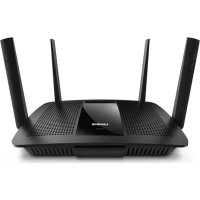
EA8500 - Router LINKSYS - Free user manual and instructions
Find the device manual for free EA8500 LINKSYS in PDF.



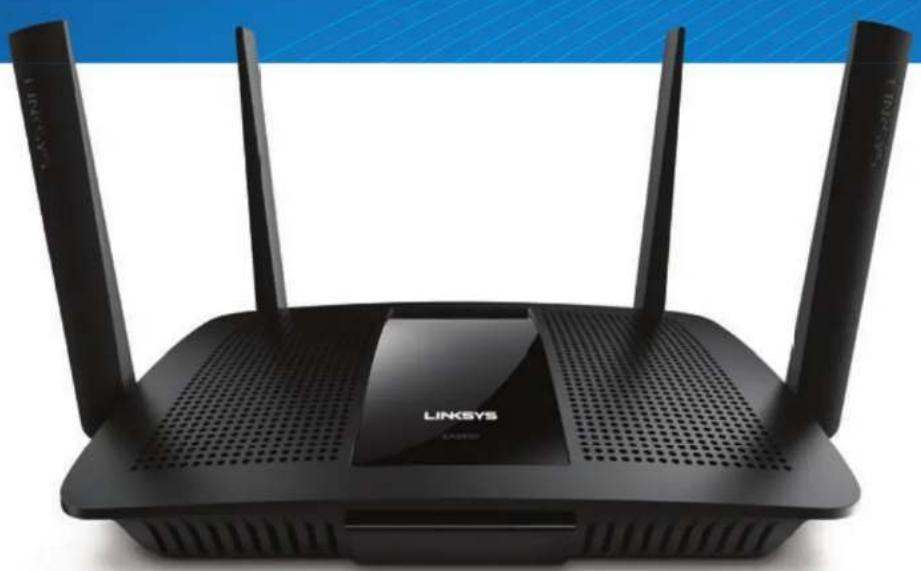
| Product Type | AC2600 Gigabit MU-MIMO Wi-Fi Router |
| Brand | Linksys |
| Model | EA8500 |
| Dimensions (L x W x H) | Approximately 25 x 15 x 4 cm |
| Weight | Approximately 500 g |
| Power Supply | 12 V DC, 2.5 A power adapter |
| Wi-Fi Standard | IEEE 802.11 a/b/g/n/ac |
| Maximum Wi-Fi Speed | Up to 2600 Mbps (800 + 1733 Mbps) |
| Frequency Bands | 2.4 GHz and 5 GHz |
| Network Ports | 4 Gigabit LAN ports, 1 Gigabit WAN port |
| USB Ports | 2 USB 3.0 ports |
| Wireless Technologies | MU-MIMO, Beamforming, QoS |
| Wireless Security | WEP, WPA, WPA2, RADIUS, SPI firewall |
| Encryption | Up to 128-bit |
| Antennas | 4 removable external antennas |
| Processor | Quad-core 1.4 GHz |
| Memory | 256 MB Flash, 512 MB RAM |
| Configuration and Management | Web interface, Linksys Smart Wi-Fi app |
| Maintenance and Cleaning | Unplug the device, clean with a soft dry cloth |
| Spare Parts and Repairability | Limited repairability, contact customer service for assistance |
| Release Year | 2015 |
Frequently Asked Questions - EA8500 LINKSYS
User questions about EA8500 LINKSYS
0 question about this device. Answer the ones you know or ask your own.
Ask a new question about this device
Download the instructions for your Router in PDF format for free! Find your manual EA8500 - LINKSYS and take your electronic device back in hand. On this page are published all the documents necessary for the use of your device. EA8500 by LINKSYS.
USER MANUAL EA8500 LINKSYS
- 7.......WindowsXPServicePack
- . . . . . (Jglll Jgssll j) Cannot access your router
令 | x - 1| = 1 ,故
- Linksys EA8500
e 100
1 EA8500
a_2 ≤ g10 ≤ 1.5c
- 3 4
4 Linksys Smart Wi-Fi 12.2.2
4 1
iiie 1c aole s
a aallll 4 4 4 4 4 4 4 4 4 4 4 4 4 4 4 4 4 4 4 4 4 4 4 4 4 4 4 4 4 4 4 4 4 4 4 4 4 4 4 4 4 4 4 4 4 4 4 4 4
m = 311
WIFI Protected SetupTM (WPS)
- 6.
Wi-Wi-Fi Protected SetupTM (WPS)
.Wi-Fi Protected Setup
gall 5le y aai 3ll gnnn nnnnne nnnnne nnnnne nnnnne nnnnne nnnnne nnnnne nnnnne nnnnne nnnnne nnnnne nnnnne nnnnne nnnnne nnnnne nnnnne nnnnne nnnnne nnnnne nnnnne nnnnne nnnnne nnnnne nnnnne nnnnne nnnnnee
a a a a a a a a a a a a a a a a a a a a a a a a a a a a a a a a a a a a a a a a a a a a a a a a a a a a a
Lalalall jol all jgal
LlNsys.com/support/EA8500
(y)
(Help linksysmartwifc.com) Linksys Smart Wi-Fi
()
216 × 216
()iilll laiie jie kai iiallljaiy jaiy jaiy jaiy jaiy jaiy jaiy jaiy jaiy
()
g j 1000 (2)Internet 1000
a 1
qall (gss sll l) Quick Start Guide 1
jL
21 × 2 = 5
aill (sll) Help jai aai Jg aalll 1jia
Ls Linksys Smart Wi-Fi
1 3 3 3 3 3 3 3 3 3 3 3 3 3 3 3 3 3 3 3
4galy 150
Jg 100000000000000000000000000000000000000000000000
345
dcky j 1jai jao jao jao jao jao jao jao jao jao jao jao jao jao jao jao jao jao jao jao jao jao jao jao jao jao jao jao jao jao jao jao jao jao jao jao jao jao jao jao jao jao jao jao jao jao jao jao jao jao jao jae - (aeay) Speed Test
JL JLLJSSLLI L - (j) jlll)External Storage FTP 10000000000000000000000000000000000000000000000000000000000
a a a a a a a a a a a a a a a a a a a a a a a a a a a a a a a a a a a a a a a a a a
Jn Jn Jn Jn Jn Jn Jn Jn Jn Jn Jn Jn Jn Jn Jn Jn Jn Jn Jn Jn Jn Jn Jn Jn Jn Jn Jn Jn Jn Jn Jn Jn Jn Jn Jn Jn Jn Jn Jn Jn Jn Jn Jn Jn Jn Jn Jn Jn Jn Jn Jn
ylll jdyd kgyagall ylll lll ykysy (y) Security
Cnnectivity
y
1g 1
Windows XP Service Pack
Linksys Smart Wi-Fi Windows XP alalal alalal alalal alalal alalal alalal alalal alalal alalal alalal alalal alalal alalal alalal alalal alalal alalal alalal alalal alalal alalal alalal alalal alalal alalal alalal alalal alalal alalal alalal alalal alalal alalal alalal
四
gaiyai jki k plsi iik 4i jia hll oai jia jia jia jia jia jia jia jia jia jia jia jia jia jia jia jia jia jia jia jia jia jia jia jia jia jia jia jia jia jia jia jia jia jia jia jia jia jia jia jia jia jia jia jia jia jia
:Service Pack 3
(.update.microsoft.com/windowsupdate) Microsoft Update
Mscf 12
Svice Pack 3 clssll
j j j j j j j j j j j j j j j j j j j j j j j j j j j j j j j j j j j j j j j j j j j j j j j j j j j j j j j j j j j j j j j j j j j j j j j j j j j j j j j j j j j j j j j j j j j j j j j j j j j
Cii:ii 1000
:Li lo a yj nkiy .Linksys Smart WI-Fl huc! paoe alu
1 1 1 1 1 1 1 1 1 1 1 1 1 1 1 1 1 1 1 1 1 1 1 1 1 1 1 1 1 1
1 1
Linksys EA8500
l2 = ( l1 + 2) - ( l_2 + 3)
1 1 ()ON
JSSI CABLE 1000000000000000000000000000000000000000000000000000000000
JusDSL 3, JusLd lal 1s d.DSL y d 1s 1s 1s 1s
.USB Jls Jusil USB jls qjne pogally jq n 1uie jgssll jls
j)Cannot access your router all
yLJy 1000000000000000000000000000000000000000000000000
:Windows 1
aLsllssgai jn aqj 1. Windows Jnnnnae

(8)View Available Wireless Networks 2
| Disable Status Repair |
| View Available Wireless Networks |
| Change Windows Firewall settings |
| Open Network Connections |
Juaio yie ci jyjll Jls allw
y My Internet cable is not plugged in" 1u
Internet 145gall gall lla bll 145g 145g 145g 145g 145g 145g 145g 145g 145g 145g 145g 145g 145g 145g 145g 145g 145g 145g 145g 145g 145

gall jbi jbi
yLLALL
DSL
:Mac 1
aai aai ai aai ai aai ai aai ai aai ai aai ai aai ai aai ai aai ai aai ai aai ai aai ai aai ai aai ai aai ai aai ai aai ai aai ai aai ai aai ai aai ai aai ai aai ai aai ai aai ai aai ai aai ai aai ai aai ai aai ai aai ai aai ai aai ai aai ai
JimsRouter 1gss JzKsLk 2000000000000000000000000000000000000000000000000000000000000000000000000
(25) Password 100000000000000000000000000000000000000000000000000000000000000000000000000000000000
(Wi-Fi (IEEE 802.11a/b/g/n/ac, CE, IC, FCC
Windows 7- Windows 8- DLNA
(40010)10432
jaiiiie jy
(60-20) 140-4
jia jia liie 8jai jai
80% 10
Jaaaill aie aagll
1
90% 15
1
Linksys EA8500
Linksys AC2600 MU-MIMO
EA8500 jz
()10/100/1000
j5j2.4
4 1
aJg
山
()Ethernet·()Internet,()Power
USB 3.0 USB 2.0 / eSATA combo (1-4)
W-Fi Protected Setup
(Internet,Power
Wi-Fi Protected Setup-Wi-Fi(4-1)(
WEP, WPA2, RADIUS
128
+HFS NTFSFAT
Firefox, Google Chrome
Internet Explorer3 (iPad3 Mac 5+5) Safari
Ethernet
UPnP
julii jiu
jzjjlllaleaai
git cloia i g Jusall linksys.com/support git jusall

LINKSYS
PbKOBOCTBO3ANOTPEBNTEJI
AC2600
MU-MIMO TINAGBNTOB PYTEP
Model#EA8500
CbDbpXaHne
06u npereJa Ha npoayKta
EA8500. 1
HactpoBbHe Ha pyTepa
Kbde nHaemepe Ooie nomou 3
Kak da nHCTaInpaTe pyTepa 3
Kak da ce cBbpxeTe kbM Linksys Smart Wi-Fi 4
Kak da npomehnTe hactpoiknTe ha pytepa 4
OTCTpaHBAhe
Bawnpytepehe hactpoeh ycnewho .7
Aktyaun3auncWindowsXPServicePack. .7
Cb6ueHue Your Internet cable is not plugged in (Bawum unmephem Ka6e He e Bknoye) . .8
Cb6ueHue Cannot access your router (He e b3moxno da ce ocbecmbu docmbn do pymepa). . . . . 8
Cneunfokaun
Linksys EA8500. 10
O6u npereJHa npodykTa
EA8500
U3rIeDOTnped
- INHdkaTop Ha3axpaHbAHeTo -IloroHa HauLkns CBtN noctOHHo, KORA tIMa IMHTepHb3ka.To MIRa IINyIynCnpa 6abHNO no BpeMe Ha cTAPtnaHe, CaMOTcBAHe NaHApRaxJaHe Na bPmyepa. MiRA 6bP30, KORA yK3Ba rpeuKn pIn CNBp3BaHeto.
U3rne oT3a
PerynpyemBbHnnAnHeaTo3nypeceOCTABcCteTnpu peryHpyemBbHnnAnHeH,KOTo Tpa6Ba 6b5d Cb8p3A HKnB He npoepn BkNoUcbHaTeMy.3a Da Cb8pKeTe AnHeHtne,3abHnTe n no Nocoka Ha YacOBHNKOBaCTpeNkBA K KOeHKToppa 3a AHTHeHa pyTepa.
3A6EJIEXKA
3aJa cn OcNTRPte BbAMOJOH HAI-Do6pn XapAKTePNKn, no3uONHOpaTcPAHNHHTe AHTeHnBepTKaIHO, KaKTo e NOKA3AO HA INIOCTPAQNTA.
USB3.0 npT-Cbpxte n cnoenete USB yctpoCTBO nn USB npHTep B Mpekata cn no NHTepHET.
USB2.0/eSATA KOM6HnHpaH npT-CBbPkeTe n CnoJeTe USB yctpoIcTBo NIM USB npHTEp B MPexkata cn nn no HHTepHET.
Linksys EA8500
06u npereIeHa npOyKta
- Ethernet noptoBe — CbpxTe Ethernet ka6enTe (HapuHaHn cbio MPekobn nnn INthepet Ka6en) KbM Te3n rna6ntoBn Ethernet (10/100/1000) nopTOBe Nkbm Ka6enHnTe yctpOCTBa BmpekaTcN.
HdkaTopn3a Ethernet deHocCT CBETB 3eneHo, KORATO mHa Ka6enHa Bpb3ka. Mrrat B kblto,doKato pytepbT n3npaa nn npema daHH. - INthepHert nopT —CbbpkTeEThernet Ka6eI KbM To3n NpO T N KbM MoJaMa.
HnHkAtOp 3a HHTepHET DeHocCT-CBET B 3eNEHO, KORATO mkaKa6enHa Bp3ka. Mrrat B XbITo, DOKaTO pyTePbT nPaua uN npHema daHH.
Wi-Fi 6ytoH-HaTnCHTe,3a Da aKTNBnPaTe/deakTNBnPaTe 6e3xuHaTa
IHHKATOp 3a Wi-Fi — CBetn B 3eneHo, KOrato 6e3KuHaTa φyHKUe aAKTNbpaHa.
BytoH WI-FI Protected SetupTM (WPS) -HaTnCHe, 3a Da KOnHfpynPpata HeCHO 3auNTATA Ha6eKHHaTA Bpb3ka 3a MpeKOBN yCTPOINCTBa c AKTINbPA Hi-PIA Protected Setup. 3a Nobeue HnFopMaJIN BnKTe, 3auNTA Ha6eKHHaTA MpeKa" HA CTPAHn64. - INHdKaTop 3a Wi-Fi Protected SetupTM (WPS) — CBeToDnOdbT MmTa 6abHo, KoraTo npEma Wi-Fi Protected Setup BpBzKn. CBTeDnOdbT MmTa 6bP30 npr rpeka B Wi-Fi Protected Setup.
Byton 3a Hynpahe -HATCHETe N 3aDpBxte,doKATO CBeTONHnKATOpNTe HbCNKn NOPTOBe 3aONHTa MMRat eNDOBpeMeHHO,3a Da HYNpaTe pyeta DO fa6bpnuHnte My HACTPOKN NO nopa36PnaHe.
3axpaHbAe-CbPKeTe KbM To3N NpOtp BKnIOueHnB KOMIIeKTa npOMEHINBOtOKOB 3xaPaHbAa aanTep - PpeBkIIOuBaTeH Ha 3axpaHbAHeTo -HaTnCHete| (BKn.), 3a da BkIIOUHTe pyTepa.
HactpoBbHe Ha pyTepa
Kbnde haHamepuTe oue nomou
- Linksys.com/support/EA8500 (ДOKуМЕТацИ, МATEпалл 3a 3ТерлЯн, 43B, texnuecka noДрьжka, chat B peanHo Врeme, Форуmin)
- Linksys Smart Wi-Fi (linksysmartwifi.com; KLNKHeTe Bbpxy Help (Pomou) B ropHata HaekpaHa)
3A6EJIEXKKA
Liuhenne H6eneknote OTHOCOcoTepaOTpeTnCTpaHn, n3o13BaHc TOni npDyKt, MoKTe Da BnuInTe Ha aDpec http:// supportlinksys.com/en-us/license. 3a Bnpocn nn 3a nckanra GPL oToBepen Koid, Mon, CbPkeTe ce c http://supportlinksys.com/en-us/ gplcodecenter.
Kak da nHcTaIpaTe pyTepa
3a6enexka:Ako 3aMeHrTe cbseCTByBaau pyTep, npbpo ro nKIOUcTe.
- Cbpykete aHTeHnTE (aKo Ca BKnIOueHN B KOMNKeTaN BKNIOyete pytepa KbM 3aXPAHbAaH N3OHTNH.K HatINcHete npBknIOVAteHa 3aXPAHBAHETO no nOJOKeHNE | (BKn.) 3a Da BKnIOUHTpe pyetap.(He BCNUKn pyTePn IMAT npBekNIOvBaTeHn Ha 3axpAHBaHTo.)
2.CbbpjteHnHTepHKeKa6eMaOTMOMeMaKbKMBJTHINHTepHNeIOPT 3aHaTaCTpaHa HpyePa.13aKaJaTe,DOKAToPpeBKnIOyBaTeNtHa 3axpaHbAeTO3aQNuVE DaCBTeC NOCTOHNH CEBTInHa. -
CbpxkTe KbM 3aunHeHa 6e3xHmH Mpxka, HnTo Hme e nocoyHo B PkoBODCTBOto 3a 6bp3o CTaptnpaHe, KoTo CTne NOnyHnn 3aedHO c pytepa. (No-KcbCHO MOXeTe Da CmEHNe Teu daHN.) N36pepe Ontnata 3a ABtOMaTHNO CbP3BaHe KbM Ta3n Mpxka B 6bdeJe. Hma Da nMaTe DOCTbN Do INTEpHT, DOKato HE npNKIOUHTe C hAcTPOKaTA Ha pytepa (BNKTe CTbnKa 4).
-
OTBOpTe ye6bpy3bp n cTAptnpaIte HNCTpyKuIInTe 3a npBPOHaJauHIO HnCTaIpaIe Ha SmartWi-Fi RouterHa Linsys.Ako He BnXdATE HNCTpyKUInTe, BBBeTe linksyssmartwifc.com B aDpeChataJeHTA.
B kpaHa hactpoikata CnEBAHTe yka3aHnTa Ha ekpHa, 3a Da HactponTe npoPmna cn 3a Linksys Smart Wi-Fi. N3non3BaTe Linksys Smart Wi-Fi, 3a da ynpablaBate HactpoKnte Ha pytepa, BkIOHTeHNO:
- CmHa Ha IMeTo n npoIa Ha pyTepa;
Cb3daBaHe Ha doctbn 3a roctn;
KoHΦnIpynpaHeHa poIOnTeNcKn KOHTpOJI;
Cbbp3BaHe Ha yctpoNCTBa KbMaTa MpeKa;
TectBaHe Ha CKOPoCTTa HA IVHTepHET Bp3KaTa.
3ABEJIEXKA
Kato qact n HactpoBaHeto Ha npoqin 3a LinkSs Smart Wi-Fi ue Bn 6bde mnpateh mEme 3a noTbbpxqHeine. He 3abpaaite a Otbopnte mEmeHa o T LinkSs, da kInkHete bPxpy neOctabeHata B hero Bp3ka n da Bne3e ot yctpoiCTBO, KOET e CEBP3AHO DNPEKTHO KbM pyTePA.
Kak da ce cBbpxKe KbM Linksys Smart Wi-Fi
- OToBopeTe ye6bpaay3bp nOTnDte Ha aDpec www.linksyssmartwifi.com.
- BbBeTe HAcTpoHnTopeiTOBa HmEIn aDpEc nnapoA, cneI Koeto KlnkHe T Bpxy Sign In (Bxo).
KaK da npomehTe hacptoiknte Ha pytepa
3ABEJIEXKA
3a DonbHnHTeHa NOMOu 3a BCaKO OT MeHIOTa KIMKbaTe Bbpxy Help (POMOu) B rOpHata YacHa eKpHa.
- OTBopete Linksys Smart Wi-Fi BnE3e B npoФиа cn
B MeHIO TO OTJRABO KNIKKHeTe Bbpxy HkoT OOnuNTe:
Network Map (KapTa Ha Mpekata) —ДаВа Вь ВьзМохнocTд А ВиДиЕ nурвавпate BCИЧИ Мpeхови устpoINCTBa, CBp3aHn KbMpyTepa. Мoxete DA BИДиTE yCtpoINCTBATA B rIJIbHATA сm Mpeka ИИ N B Ta3N 3a RoCTH, INI DA BИДиTE hHOFPOMAUZ BA CBAKO OT YCtpoINCTBaTBA.

Guest Access (Docbn 3a roctn) — Daba Bn Bb3MOXHOCT Da KOHpynpaTe n HabIIOBaaTe Mpeka, KOrTO ce NOL3Ba OT roCTnTE, 6e3 Te da IMAT DOCTbn DO BCNUK BAUN MPekOBN pecypcn.
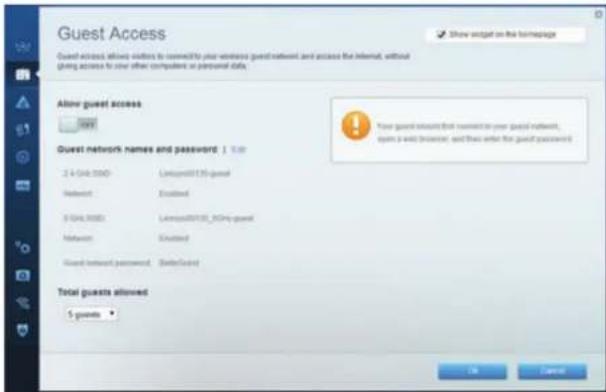
Parental Controls (Pountenckn KOHTpon) -AbaBbBb3MOxHOCT da6NOKuPAte DOCTbna do ye6 caTObE n da 3aDaBaTe YacObe 3a DOCTbN DO INTEpHET.
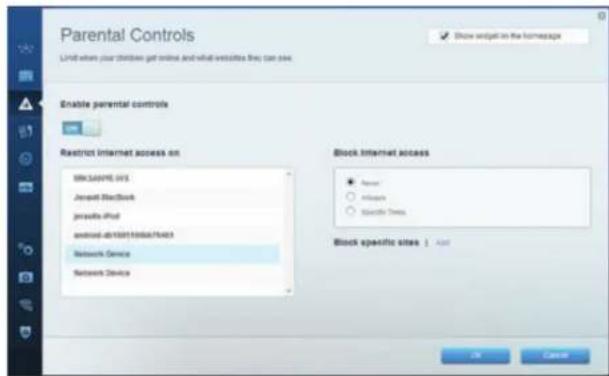
Media Prioritization (PpnpOpTn3npaHe Ha Meu) — Daba BbB3MOXHOCT Da 3adaTe yCTpoiCTBa N pnpOKeHn C Hn-BnCOK npOpNT B MPeKOBn TpaNk.
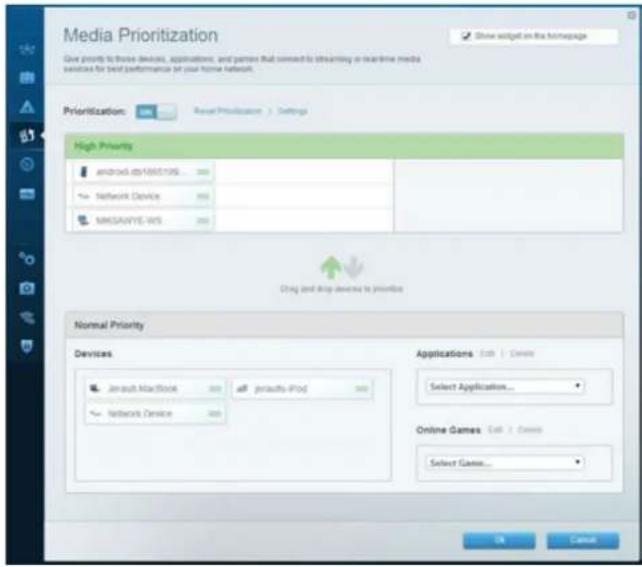
Speed Test (Tect Ha ckopocTa) —Даы Ви Бьзмохнocт Дa TecBaTe CkopoCTTa Ha ИntepHET BpвзкATA Ha МржСА.
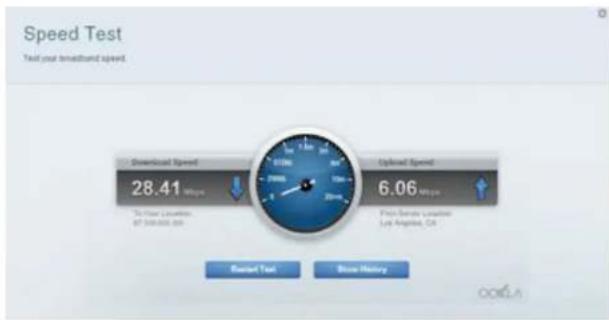
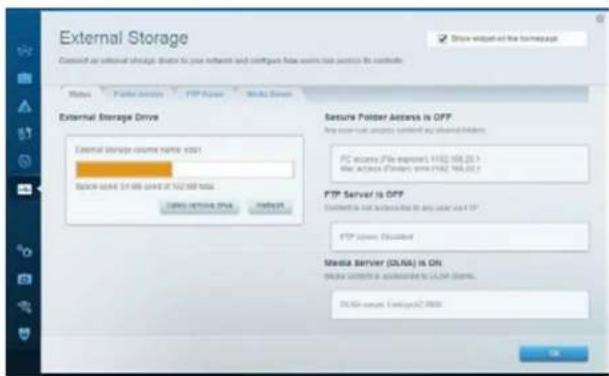
External Storage (3ana3BaHe BbB BbHNoHOyCTPOIcTB0) — Aba Bn Bb3MOKHOCT Na NONYHTe DOCTBn DO CbP3aHO USB yCTPOIcTB0 (He e BkIOHO E BO KOMNJIeTKA) n Da HAcTPOTE CnoJIoNEHo THa faiIOBE, MnyTImeNeH CBpBBn FTP OCTBn.
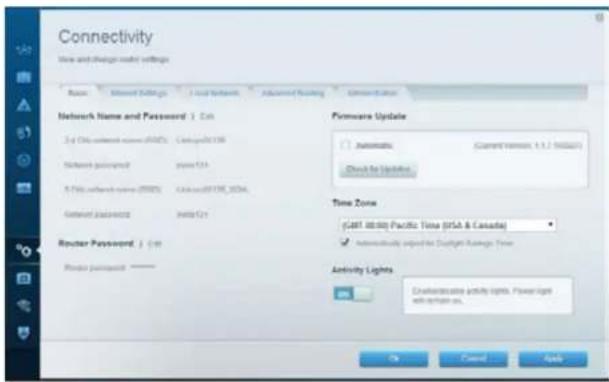
Connectivity (Cbbp3aHocT) —Дава ВьвБЗМохнocТа КОнФИгурпаTe OCHOBHIne n pa3шиpeHIne МржOBn HAcTpOKN.
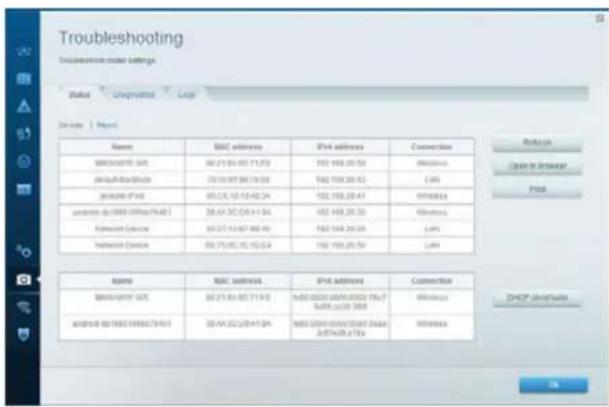
Troubleshooting (OTcpanraHBe HA HnE3npABHocTn) —Дaba Bn Вьзможностд паразидаэгхота Кнpoблс рутета и дпровьаге CBCTOHHMToHa Mpekata.
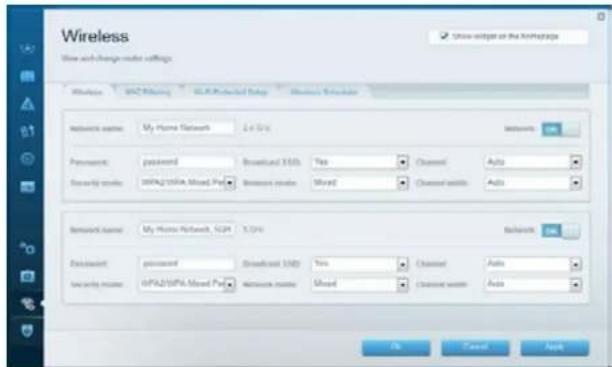
Wireless (Be3xMnHa MPeka) — Daba BN Bb3MOXHOCT Da KOHΦVpyPnPATE Be3xMnHaT Ma Peka Ha pyetap. Cpe HAc TPOKHTKE KOTIO MOKETe Ja POMEHATE, ca IMMeHoMa Pekpata (SSID), pekmBt 3a 3auNTa, npaoNATA, fniTPnPAHTo NO MAC aIpcn n CBpb3AHeTo HA yctpoCTBa Ype3 Wi-Fi Protected Setup.
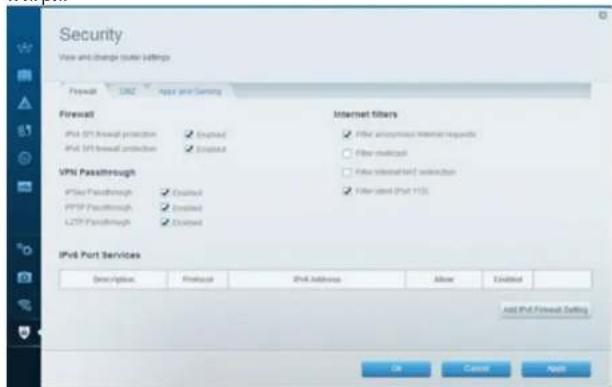
Security (3aunta) —Даы виьзмохнocтда конфурпate 6e3mчнata Chryprhoct Ha pytepa. Мохete Да Настпente 3aunTHATA CTHe, HacpoiKITE 3a VPN, kakto n da hapabute nepcohaninapuHn HacpoiKn 3a npinoKHeHn uRpn.
OTCTpaHЯBaHe Ha HeN3PpABHOCTN
Tasn rnaMoKe Da Bn NmOrrHe 3a OTCpaHbAHeTo Ha o6uN npo6IeMn npHAcTPOkATA n3 CbP3BaHE KbM INHTepHET. Oue nomou Moxete da noNyUte OT HauHr OTeJ3 a OcbnyBaHe Ha KInEHTn,OTnNuBaHc HarpaHn, Ha aDpec lncSyks.com/support.
Baunr pyTeP He e hactpoen ycneuho
Ako Linksys Smart WI-FI He 3aBbpuHnactpoHKata, MoKeTe Da onHTaTe CneHTo:
HaNtichete H3aPbKte 6yToHa Reset (HynpAne) Ha pyTepa c nOmoUta Ha KnaMep HnKapQa,doKaTc CBeTOIONbT aNOuHe da MIRa (OKOJIO 10 cekyHn), cIeN KOeTO hHCTANPAITE OTHOBpyTepa.
Ako Bce ooi He cTe Hactponn pyTepa, INCTaInpaIte ro OTHOBHa npyKOMNIOTbP.
Aktyaann3auncWindowsXPServicePack
ПИКOMПОТРи NOД Windows XP, Linksys Smart Wi-Fi n3iCKBa cepBn3EN naket Service Pack 3. Ако ИнтANPанг в мОмERTA серВиЗЕн nakET e no-стот о ВсрCBa, трабBAда nИЗТERЛNTe INИСТANPарse Service Pack 3.
3ABEJIEXKA
3aJa CeBpKTe BpeMeHOn CnHTepHET NnTERJIne Heo6XOpMIMn cepBnEh NaKeT, MoKeTe MIOeBaTEbATE Ethernet Ka6en 3a CbPb3BaHe Ha BAWNI KOMNIOTp bIapeKTHO KbM MOeMa.
3a da unctanpate Service Pack 3:
- Cbpxtece cye6 caTnA Microsoft Update (update.microsoft.com/windowsupdate).
2.CnBaaTe HNCTpyKunHe Haye caHt TaHnCe CbPkeTe c Microsoft, aKO mATE HyxJa OT DOrblHnTeHa NOMOJ. - CnE KATO N3TcrrnTe HnCTannpate Service Pack 3, nHCTannpaIte OTHOBO pyTepa.
CbO6ueHue Your Internet cable is not plugged in (Bauuym uHmephem Ka6en He e BkIouyen)
Ako nonyuHTe cbo6ueHHe Your Internet cable is not plugged in (BauHnHTepHET Ka6eH He BkHoueH),doKATO ce ONITBaTe da HacTpOte pyTepe, N3bIHeTcNeHNHTe CTbKN 3a OTCpaHbAbe Ha Hen3npaBHOCTTa.
YBepete ce, 4e Ethernet Ka6eBt (nnn Ka6en, nnoo6en Ha npedocabaHna3aedno c pytepa) e Cbpl3an CTabNHO KbM Kbltnn HHTepHET NOP T3aHaTc pTaHa h y Pytepa NkM Cb0TBTHnnpT ha Moema. To3n npT haMoema e O6knKHOepe HNetter.
I3rneO3aHa pyTepa
U3rneIOT3aHaKa6eHMeMOeM
I3rneIOT3aHaDSLmoEm
Ybepete Ce, Ye MoEmbT Bn e CbP3aH KbM 3axpaHbaHe N BkIOueH. Ako mHa KIOU 3a 3axpaHbaHTo, Ybepete Ce, Ye E B nonOKeHne ON (BKn.) nnI.
Ako nanoBate KaBen HHTepHET, npOBepete daa CABLE nopTbHa KaenHHMaOe cBbP3aH KbM KoAKCNAnHnKa6eI, npEOCTabeHOT OIOCTaBuHa Ha HHTepHET.
Nnako n3non3Bate nHTepHET ycyra upe3 DSL, ybepete ce, ye DSL TeneoHHATA nnHn e Cbpb3aHa KbM DSL npota Ha Moema.
AKO KOMNIOBpBT Bn npEne 6n Cbbp3aH KbM MoEm c USB Ka6en,OTKaueTe USB Ka6ena.
INCTaIpaIte pyTepe oTHOBO.
Cbo6ueHue Cannot access your router (He e 6b3moxHo da ce ocbuacembu docmbn do pymepa)
3a Da IMATE DOCTbN DOpyTepa,TPR6Ba DA 6bJeTe CBeBpaHn KbM Co6TBeHata cn MPexa. Ako B MOMENTA IMATE 6beKunH DoCTbN DO INTEpHET, PPO6nemBT MOSE 6h,eCe cUYaHNO CTe CE BpaHn Cduyra 6beKunHmpeXa.
3a da oTcpanHe npo6nema Ha KOMNIOBp c Windows:
- Ha pa60THH IIOH HAI Windows KINKHETe C DECHN BYTOB bPxy INKOHATA 3a 6EJKHnA Bp3Ka B CHTEMHa oBnLt. INKOHATA MOKe Da nIITNeJa PA3NIYHO B3ABCIMOCOT OBT BPCnTA HA Windows.
- KnKHeBbpy View Available Wireless Networks (PperneHa HauHHTe 6e3mHmpeKn).IPOBBA ce cncsbKa Ha HauHHTe MpeKn.
| Disable Status Repair |
| View Available Wireless Networks |
| Change Windows Firewall settings |
| Open Network Connections |
Linksys EA8500
OTCTpaHBAHe Ha HEn3npaBHOCTN
- KlnkHeTe Bpxy MmTo Ha Baauata 6e3xMHa Mpxa N CnTobA Bpxy Connect (CbpbBaHe).B Daehnno Dny npMep KOMNtbpT e CbP3aH c npya 6e3xMHa Mpxa C mMeTO JimsRouter. MeTo Ha Mpxata Ha Linksys EA8500 - BronzeEagle B To3n npMep - e noka3aHo kato n36paHO.
- Ako 6bnde nomoHn da BbeJeTe mpeXOB KIOU, BBeJeTe nponaTaN (KIOUa 3a 3auNTA) B nonetata Network key (MpeXOB KIOU) n Confirm network key (IOTBbPjDaBaHe Ha mpeXOBn KIOU).HaTcHcTeConnect (CbbpBaHe).
- Beue Tp86Ba da MoKeTe da nonyUHe DoCTbN do pyTepa.
3a da oTpaHHTe npo6nema Ha KOMNIOTp b Mac:
KlnkheTe Bbpyx Nkohata Wi-Fi B IeHTa C MeHIO B rohpTa qact Ha ekpHa.
PnBBA Ce cncbKa Ha haunHnte 63KmHmpeXn. Linksys Smart Wi-Fi e
3aan ABTomTuHNo MHe Ha BaWt a 63KmHmpeXa.
B daeHnno-dony npmep kOMMnTbPbTe cCBpb3aHc dpyra 6e3KuHa MPeka C mEmTo JimsRouter. UMeTo Ha MPekaTa Ha Linksys EA8500 - BronzeEagle B To3n npmep-e nok3aHo KaTo n36paho.
KlnkheTe Bbpxy HmTo Ha 6e3xuHata MpeXa Ha Linksys EA8500 (BronzeEagle B npumepa).
BbBeTe NapoIaHa 6e3KmHnA MpeKa (KnOu 3a CnpyHocT) B noneto Napona u pakHete Bpxy OK.
CpeunΦkauni
Linksys EA8500
ImeHaMoedelaLinksysAC2600MU-MIMOrra6nTOBpyTe
HomepHaMoEaEA8500
Ckopoct Ha
KOMyTnpyemma npT 10/100/1000 Mbps (Gigabit Ethernet)
PapnoecToTa 2,4 GHz n 5 GHz
BpOaHTeHn 4 BbHnHpepynpyeMaHTeHn
1BbtpewHa aHTeHa
IopToBe 3axpaHbAHe, uHTepHET, Ethernet (1-4),
USB 3.0, USB 2.0 / eSATA combo
BytoHn Reset (HympaHe), Wi-Fi Protected Setup, Wi-Fi, Power (3axpaHaBe)
CBeToDIOAn 3axpaHbAne, INTepeHET, Ethernet (1-4), Wi-Fi, Wi-Fi Protected Setup
UPnP noIbpxkace
Функлдза зациТа WEP, WPA2, RADIUS
BHTOBa HKaHoua 3a 3auNTa Do128-6HTOBO uHpObaHe
PoiipbxxkaHa paiinobu
CNCTEMM3aCbxpaHeHne
FAT,NTFSuHFS+
PoiapbXkaHa6pay3bpn
Hai-HOBITE Bepcnn Ha Google Chrome,
Firefox, Safari (3a Mac u iPad) n Internet
Explorer Bepcn 8 n no-HOBn
DaHHN 3a OKONHaTa CpeDa
Pa3mepn 10,09" x 2,21" x 7,22"
(256,3x56,2x183,5mm) 6e3 aHTeHnTe
TernoHa yctpoCTBOTo
20,67 yHcnn (586 g) 6e3 aHTehnTe
25,22 yHm (715 g) c aHTeHnTe
3axpaHbaHe
12V,3.5A
Ceptnnphkata
FCC, IC, CE, Wi-Fi (IEEE 802.11a/b/g/n/ac),
Windows 7, Windows 8, DLNA
Pa6oTHa TemnepaTpa
or 32 do 104^ (oT 0 do 40^ )
TemnepaTypa 3a cbxpaHeHne
ot-4do 140^ (ot-20do 60^)
Pa6OTha BnAaXHOCT
OT 10 do 80% OTHOCHTeHa BnAaXHOCT,
6e3 KOHdEHaUa
BnaxHoc3a c6xpaHeHne
0T5do90%6e3KoHdEh3aun
3a6eJexKn
3a HnΦopMaunr OTHOCHO HOPMATNBATA ypeD6a, rapaHmTnA t 6e20anacocCTTA, BNKe TOMnKaTnDCA, DCTabE h C Baunr pyTeP, nnNtNDte Ha aDpc Linksys.com/support.
CneuKauNTe noJnxkTa H npomHa 6e3 npen3BecTne.
*MaKcMmJIHnTe pa6OHTn NOKa3aTeN Ca n3BneEHN OT
cnueuHKnauNTHe cTaNdapt 802.11 Ha IEEE,JeCTBnENTeHnTe
pa6OHTn NOKa3aTeN MoKe Da ca pAaNHH, BKNIOUHTeHNO
NoHbck KanauNTe 3a pa6Ota B 63KuNHa MPeKa, IpONyCkATEHa
CnOCo6HOCT 3a daHHn, DnaNa3OH IN NOKPTNe.EΦeKTHBOCTTa
3aBnCt OT MHOrO fakTopn, YcNOBn IN PpOMeHnNB, BKIOUHTeHnHO
PpOCToHMeTO OToUcKaTA Ha DCtBn, O6ema HA MPeKOBn TPAfNK,
CTPONTeHnTE MaTePnnn IN KOHCTpyKuIraT, n3NOI3BaHaTnA
onePAuMoHnCACTMe, n3NOI3BaHn CMKNEKT pOnyKtn 3a
6e3KuHEn DoCTbN, CmUeHnTa IN dpyr HneBnOPnPNTHn YcNOBn
Iocete linksys.com/support 3a Bpb3ka C haanr OTei 3a o6cnyBaHe Ha KIneHTn,OTNuaBaH C hArpaDn
BELKIN,LINKSYSMHOROPMENAHPPOyKTINnorTmCa
Tbprockn Mapn HarpynrnapyexeBaBelkin ChonemaHnty
UPROCKMAPRAHPTPAICCAECCTIOCTHACLCTOHTATC
Punpatekaran 2016 Belkin International, Inc. Awwm Vionodeta
KoanaHHTA. CnauKn Fanaa 3naaseH
LINKSYS
UZIVATELSKÁ PřÍRUČKA
AC2600
MU-MIMO GIGABITOV ROUTER
Model#FA8500
Linksys EA8500
Obsah
Přehled produktu
EA8500. 1
Nastavení routeru
FCC, IC, CE, Wi-Fi (IEEE 802.11a/b/g/n/ac),
Windows 7, Windows 8, DLNA
Provozni tepota
0a240C(32a2104F)
Skladovaci teplota
Installation of routeren 3
Knapper Nulstil, Wi-Fi Protected Setup, Wi-Fi, strøm
Lamper Strøm, internet, Ethernet (1-4), Wi-Fi,
Wi-Fi Protected Setup
UPnP
Understottes
Certificeringer FCC, IC, CE, Wi-Fi (IEEE 802.11a/b/g/n/ac), Windows 7, Windows 8, DLNA
Tasten Reset, Wi-Fi Protected Setup, Wi-Fi, Ein/Aus
LEDs Betrieb, Internet, Ethernet (1-4), Wi-Fi, Wi-Fi Protected Setup
UPnP Unterstutz
Eykataotne EaV to router.
Koumu Enavaopac, Wi-Fi Protected Setup, Wi-Fi
Evpeyoinanc/Aepeyoinanc
LEDs Tpopo8ooia, Internet, Ethernet (1-4), Wi-Fi,
Wi-Fi Protected Setup
UPnP
YnoatnpCóvec
Aetoupyieacaaiae WEP, WPA2, RADIUS
BitKaiiouAoepaiaic
Kouptoypaon en cai 128 bit
Ynothpnch ouotnmatw
FAT,NTFS,KaHFS+
Ynoo npieN poypaMaTuw
TeLeutalec ekdooeic tou Google Chrome,
Nepunynonc
Safari (yia Mac kai iPad) kai tou Internet
Explorer ekdoon 8 kai votepec
10,09" x 2,21" x 7,22"
FCC, IC, CE, Wi-Fi (IEEE 802.11a/b/g/n/ac),
Windows 7, Windows 8, DLNA
Oepokpaoia aeitoupyiac
0 40^
Oepokpia aiohkeuanc
-20 60^
Yypaia Ieitoupyiac
10% éw80%, oxetikn ypaia,
xwpiocuumukvwoan
Yypoia anothekeuans
Where to find more help. 3
How to install your router 3
How to connect to Linksys Smart Wi-Fi 4
How to change router settings 4
Troubleshooting
Your router was not successfully set up .
Windows XP Service Pack update 7
Your Internet cable is not plugged in message 8
Cannot access your router message. 8
Specifications
Linksys EA8500. 10
Product overview
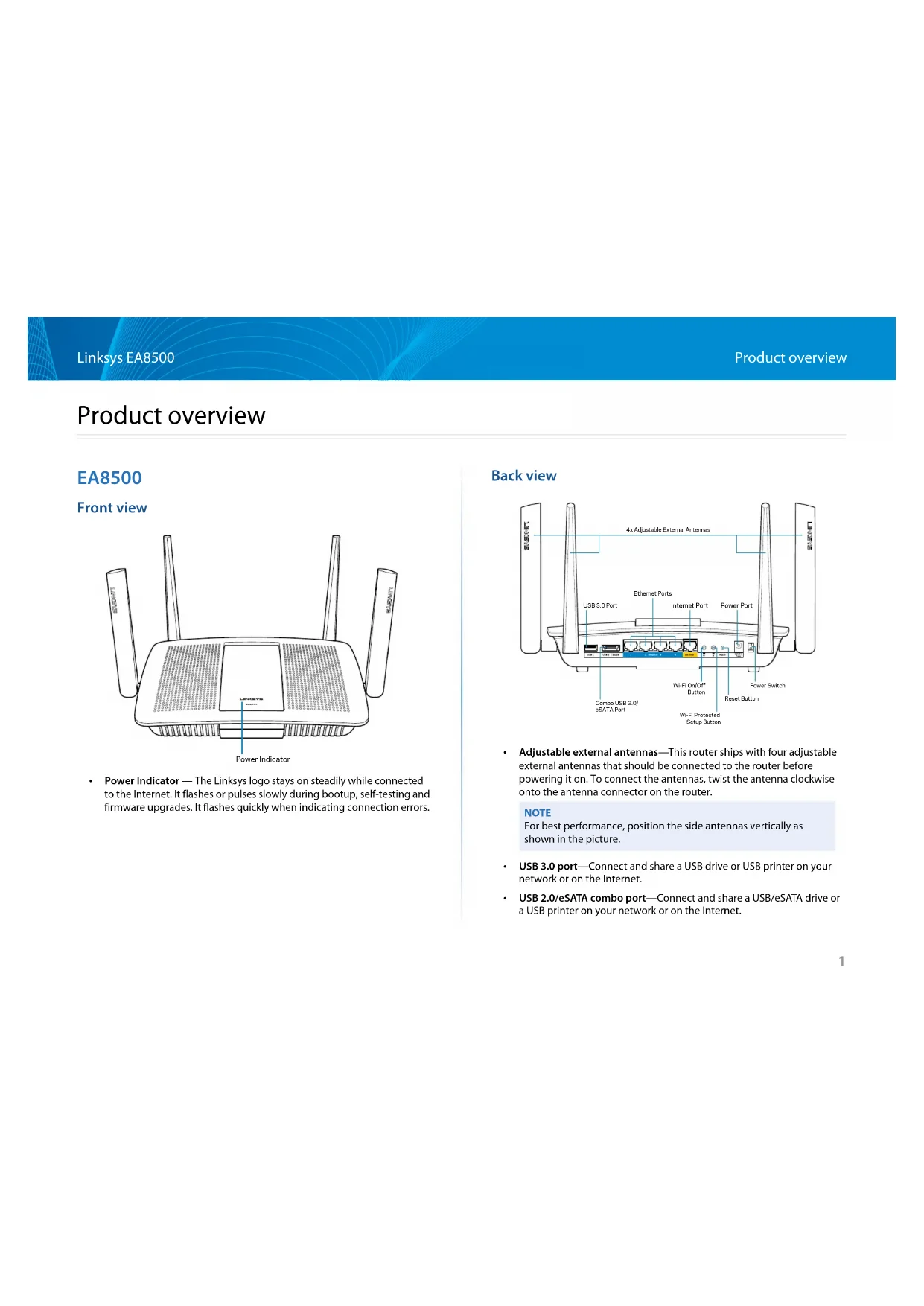
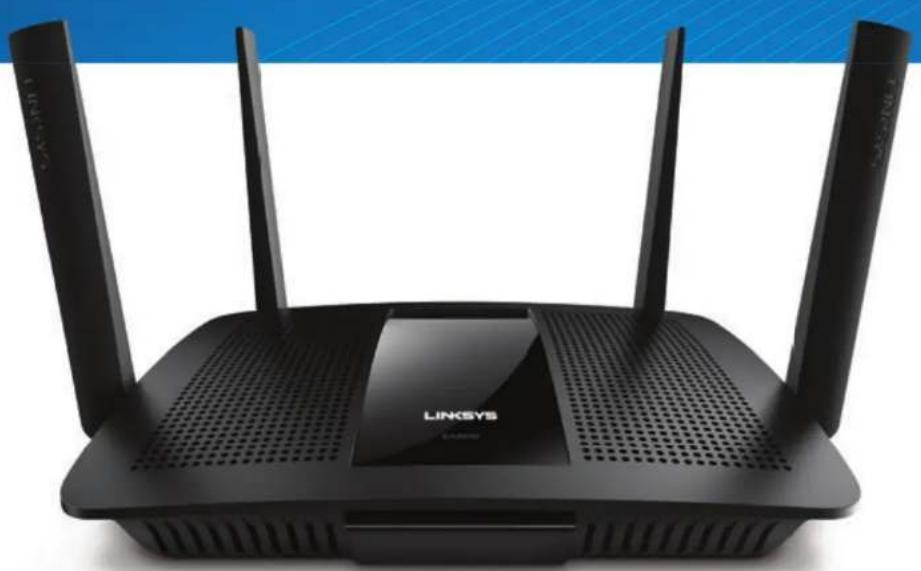
EA8500
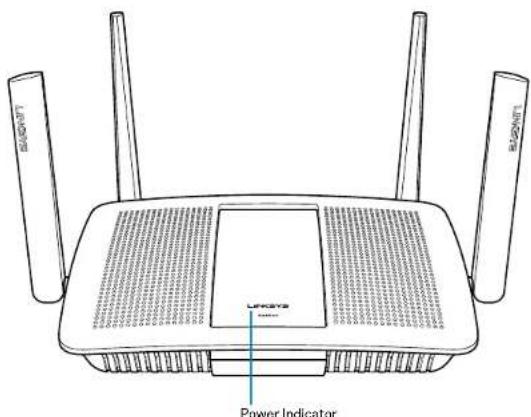
Front view
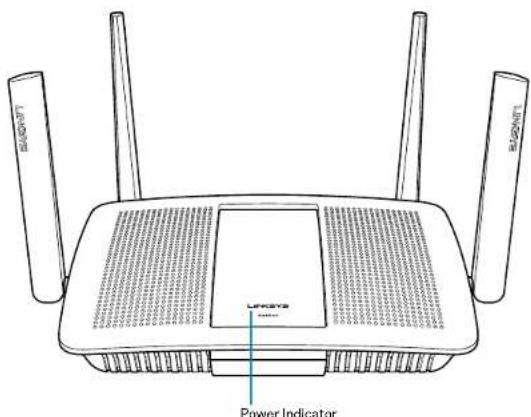
- Power Indicator — The Linksys logo stays on steadily while connected to the Internet. It flashes or pulses slowly during bootup, self-testing and firmware upgrades. It flashes quickly when indicating connection errors.
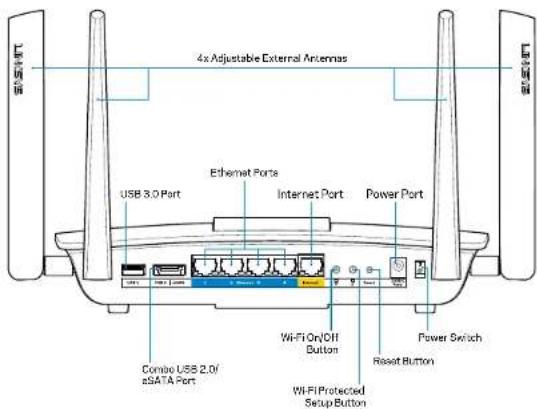
Back view
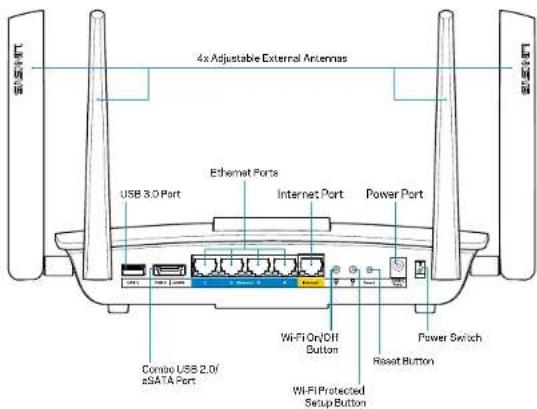
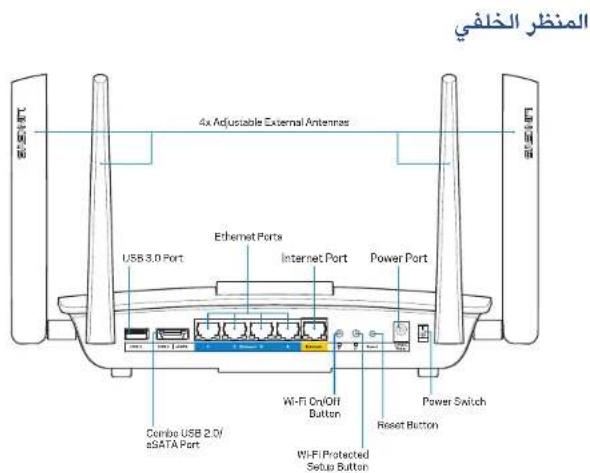
- Adjustable external antennas—This router ships with four adjustable external antennas that should be connected to the router before powering it on. To connect the antennas, twist the antenna clockwise onto the antenna connector on the router.
-
USB 3.0 port—Connect and share a USB drive or USB printer on your network or on the Internet.
-
USB 2.0/eSATA combo port—Connect and share a USB/eSATA drive or a USB printer on your network or on the Internet.
NOTE For best performance, position the side antennas vertically as shown in the picture.
- Ethernet ports—Connect Ethernet cables (also called network or Internet cables) to these Gigabit Ethernet (10/100/1000) ports and to other wired devices on your network.
- Ethernet activity indicators—Green light is on when there is a wired connection. Yellow light blinks while the router is sending or receiving data.
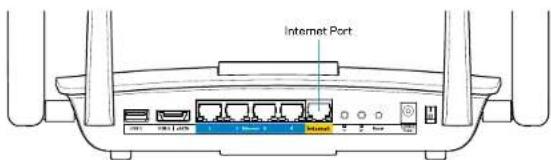
- Internet port—Connect an Ethernet cable to this port and to your modem.
- Internet activity Indicators—Green light is on when there is a wired connection. Yellow light blinks while the router is sending or receiving data.
Wi-Fi button—Press to enable/disable the wireless function.
Wi-Fi indicator—Lights up green when wireless function is on. - Wi-Fi Protected Setup™ (WPS) button—Press to easily configure wireless security on Wi-Fi Protected Setup-enabled network devices. For more information, see "Wireless Security" on page 6.
- Wi-Fi Protected Setup™ (WPS) indicator—LED blinks slowly while accepting Wi-Fi Protected Setup connections. LED blinks quickly when there is a Wi-Fi Protected Setup error.
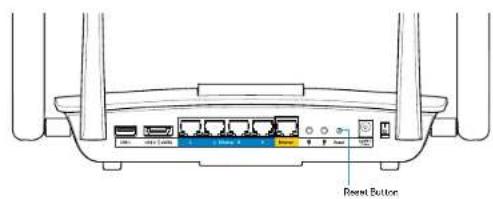
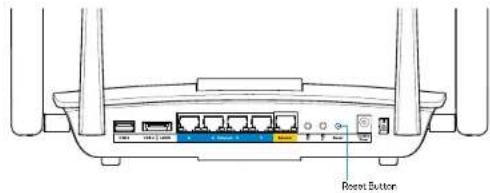
- Reset button—Press and hold until all port lights blink at the same time to reset the router to its factory defaults.
Power-Connect the included AC power adapter to this port.
Power switch—Press (on) to power on the router.
Setting Up Your Router
Where to find more help
Linksys.com/support/EA8500 (documentation, downloads, FAQs, technical support, live chat, forums)
- Linksys Smart Wi-Fi (linksyssmartwifi.com; click Help at the top of the screen)
NOTE
Licenses and notices for third party software used in this product may be viewed on http://supportlinksys.com/en-us/licenses. Please contact http://supportlinksys.com/en-us/gplcodecenter for questions or GPL source code requests.
How to install your router
Note: If replacing an existing router, disconnect that router first.
- Connect the antennas (if included) and plug in the router to a power source. Press power switch to | (on) to power on the router. (Not all routers have power switches.)
- Connect the Internet cable from your modem to the yellow Internet port on the back of your router. Wait until the power indicator on your router is solid.
- Connect to the secure wireless name shown in the Quick Start Guide that came with your router. (You can change these details later.) Select the option to automatically connect to this network in the future. You will not have Internet access until you complete router setup (see Step 4).
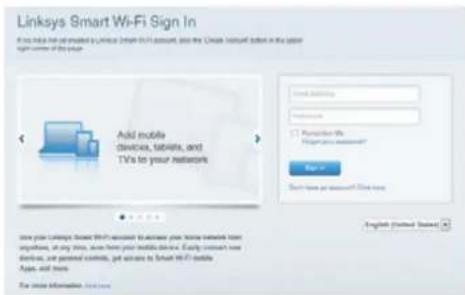
- Open a web browser to launch the Linksys Smart Wi-Fi Router setup instructions. If you don't see the instructions, type linksyssmartwifi.com in the address bar.
At the end of setup, follow the on-screen instructions to set up your Linksys Smart Wi-Fi account. Use Linksys Smart Wi-Fi to manage your router's settings, including:
- Change your router's name and password
- Set up guest access
- Configure parental controls
- Connect devices to your network
- Test your Internet connection speed
NOTE
As part of Linksys Smart Wi-Fi account setup, you will be sent a verification e-mail. Make sure that you open the e-mail from Linksys and click the provided link, and log in from a device connected directly to the router.
How to connect to Linksys Smart Wi-Fi
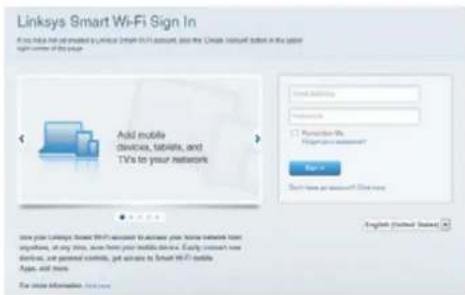
- Open a web browser and go to www.linkysmartwifi.com.
- Enter the e-mail address and password you set up earlier and click Sign in.
How to change router settings
NOTE
For additional help on any menu, click Help at the top of the screen.
- Open Linksys Smart Wi-Fi and log in to your account.
- In the menu on the left, click an option:
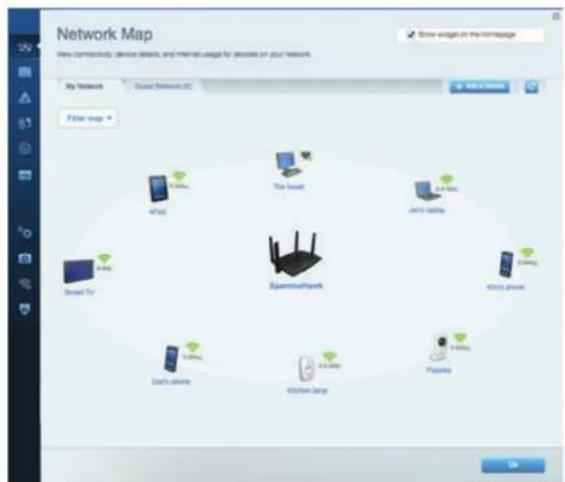
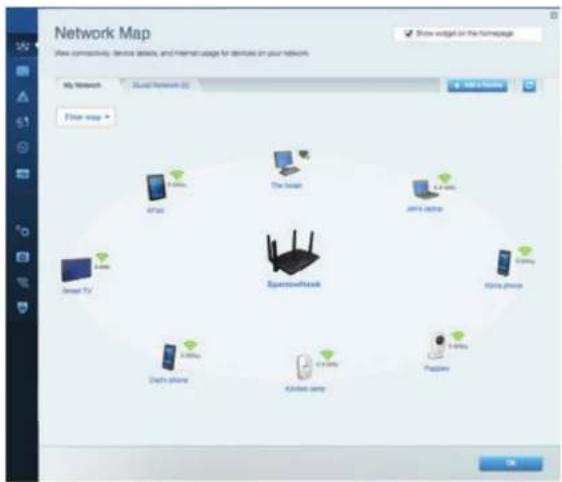
Network Map - Lets you display and manage all network devices connected to your router. You can view devices on your main network and your guest network, or display information about each device.
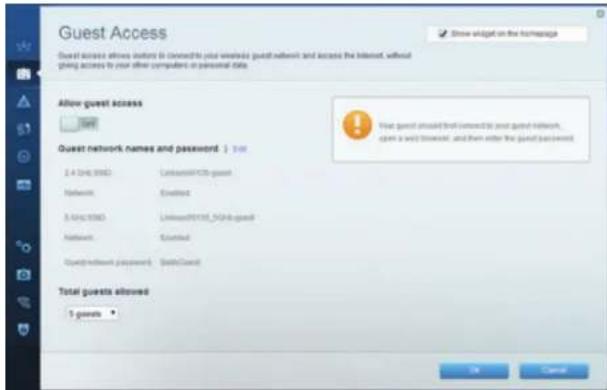
Guest Access - Lets you configure and monitor a network that guests can use without accessing all of your network resources.
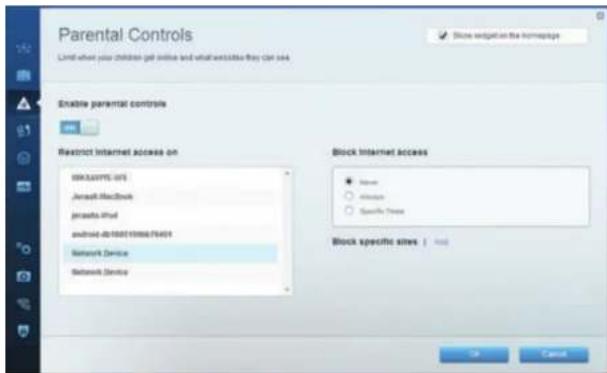
Parental Controls - Lets you block web sites and set Internet access times.
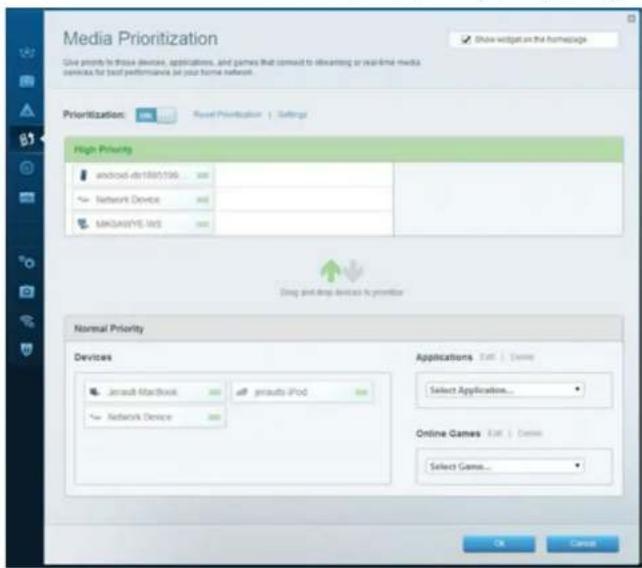
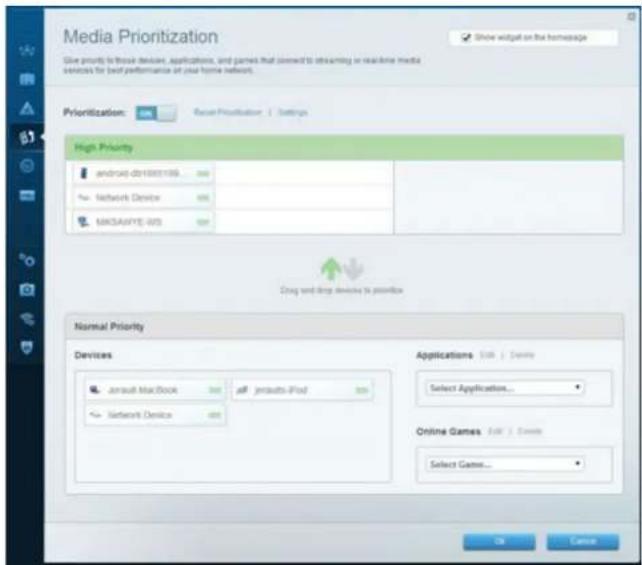
Media Prioritization - Lets you set which devices and applications have top priority for your network traffic.
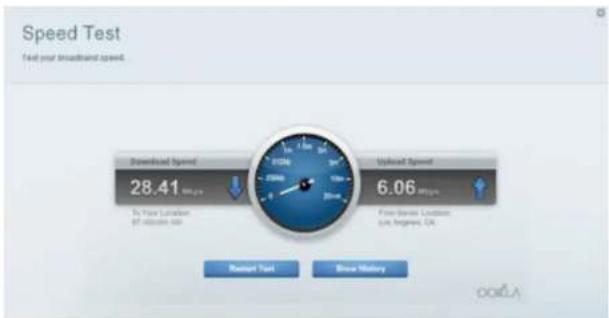
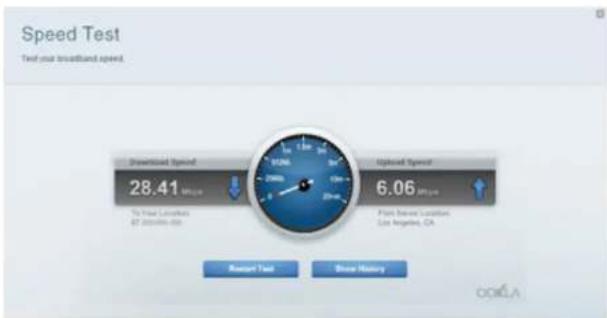
Speed Test - Lets you test your network's Internet connection speed.
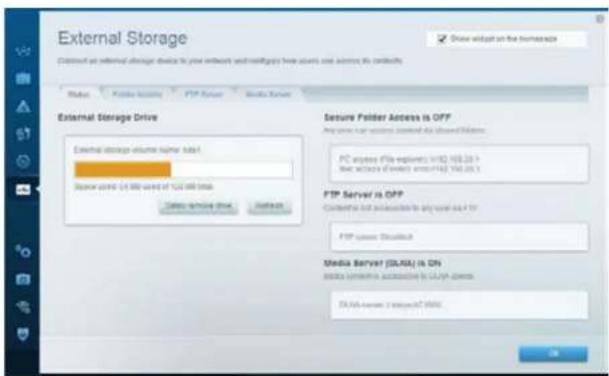
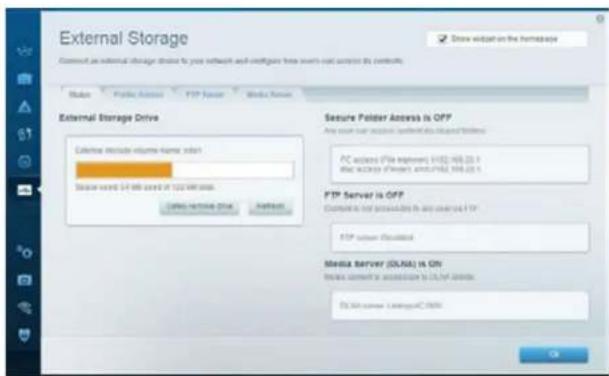
External Storage - Lets you access an attached USB drive (not included) and set up file sharing, a media server, and FTP access.
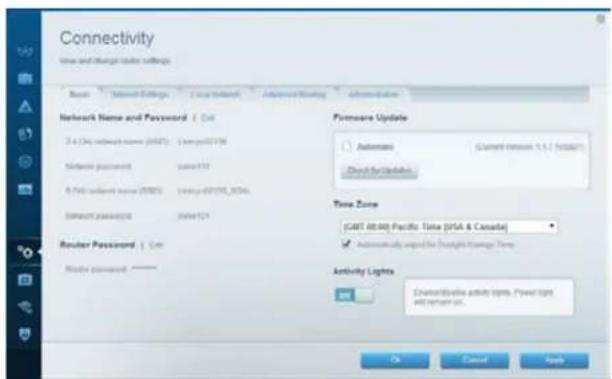
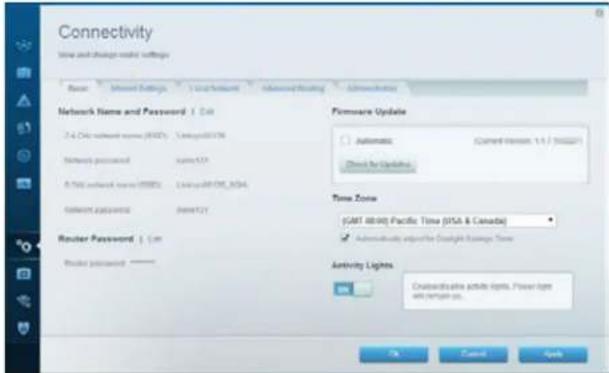
Connectivity - Lets you configure basic and advanced network settings.
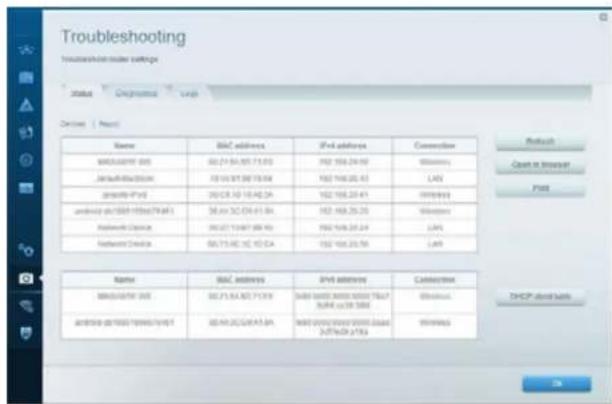
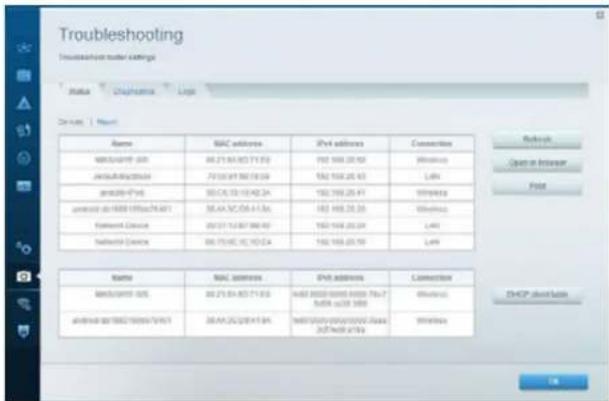
Troubleshooting - Lets you diagnose problems with your router and check the status of the network.
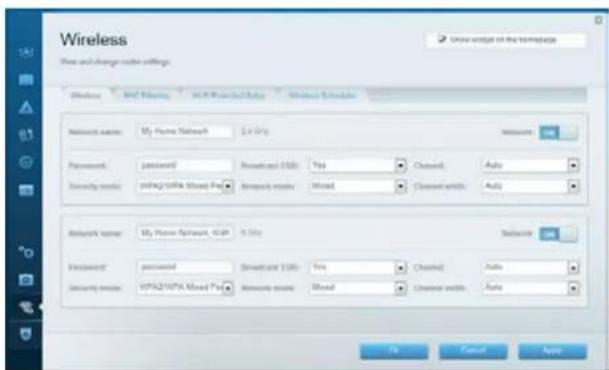
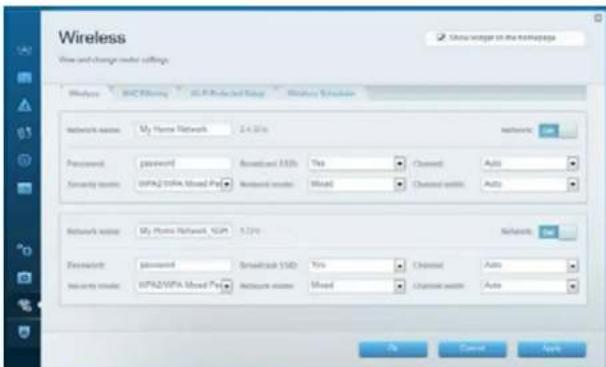
Wireless - Lets you configure your router's wireless network. Among the settings you may change are network name (SSID), security mode, password, MAC filtering, and connect devices using Wi-Fi Protected Setup.
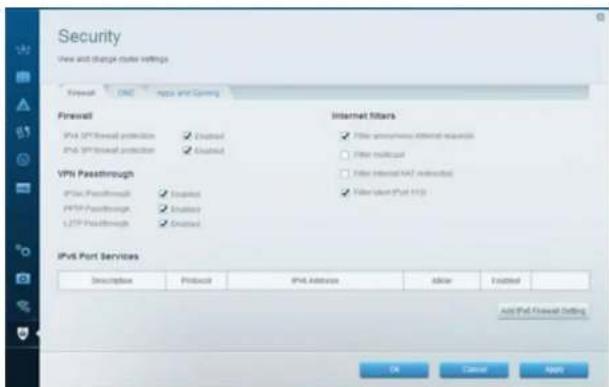
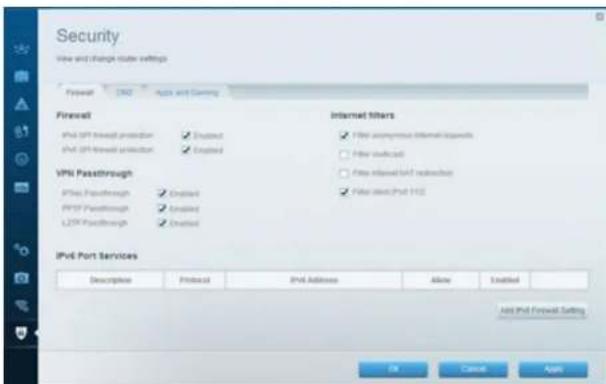
Security - Lets you configure your router's wireless security. You can set up the firewall, VPN settings, and make custom settings for applications and games.
Troubleshooting
This chapter can help you solve common setup issues and connect to the Internet. You can find more help from our award-winning customer support at linksys.com/support.
Your router was not successfully set up
If Linksys Smart Wi-Fi did not complete the setup, you can try the following:
Press and hold the Reset button on your router with a paperclip or pin until the LED starts flashing (about 10 seconds), then install the router again.
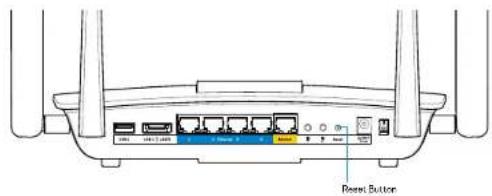
If you still haven't set up the router, find another computer, and use that computer to install the router again.
Windows XP Service Pack update
On Windows XP computers, Linksys Smart Wi-Fi requires Service Pack 3. If the currently installed Service Pack is older than version 3, you need to download and install Service Pack 3.
NOTE
To temporarily connect to the Internet and download the required Service Pack, you can use the included Ethernet cable to connect your computer directly to your modem.
To Install Service Pack 3:
- Connect to the Microsoft Update website (update.microsoft.com/windowsupdate).
- Follow the instructions on the website or contact Microsoft if you need further help.
- After downloading and installing Service Pack 3, install the router again.
Your Internet cable is not plugged in message
If you get a "Your Internet cable is not plugged in" message when trying to set up your router, follow these troubleshooting steps.
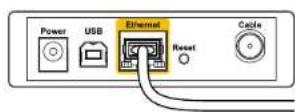
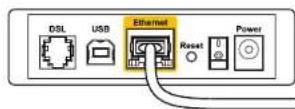
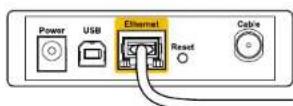
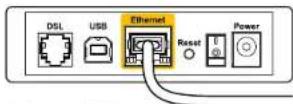
Make sure that an Ethernet cable (or a cable like the one supplied with your router) is securely connected to the yellow Internet port on the back of the router and to the appropriate port on your modem. This port on the modem is usually labeled Ethernet.
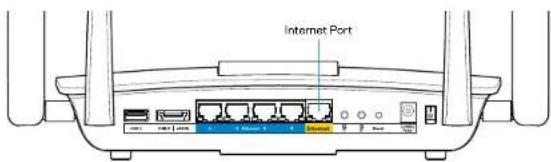
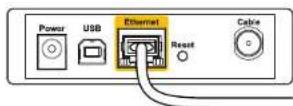
Back view of router
Back view of cable modem

Back view of DSL modem
Make sure that your modem is connected to power and is turned on. If it has a power switch, make sure that it is set to the ON or I position.
If your Internet service is cable, verify that the cable modem's CABLE port is connected to the coaxial cable provided by your ISP.
Or, if your Internet service is DSL, make sure that the DSL phone line is connected to the modem's DSL port.
If your computer was previously connected to your modem with a USB cable, disconnect the USB cable.
Install the router again.
Cannot access your router message
To access your router, you must be connected to your own network. If you have wireless Internet access, the problem may be that you have accidentally connected to a different wireless network.
To fix the problem on Windows computers:
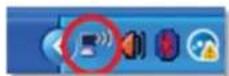
- On your Windows desktop, right-click the wireless icon in the system tray. The icon can differ depending on your version of Windows.

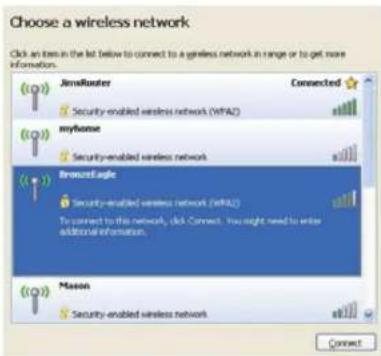
- Click View Available Wireless Networks. A list of available networks appears.
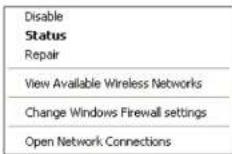
- Click your own network name, and click Connect. In the example below, the computer was connected to another wireless network named JimsRouter. The name of the Linksys EA8500 network, BronzeEagle in this example, is shown selected.
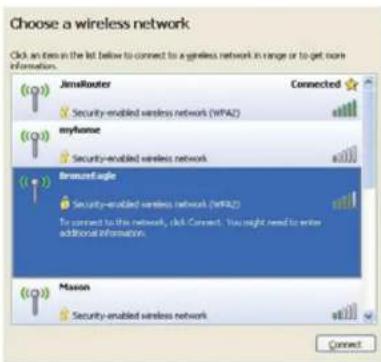
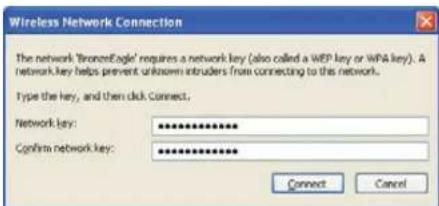
- If you are prompted to enter a network key, type your password (Security Key) into the Network key and Confirm network key fields. Click Connect.
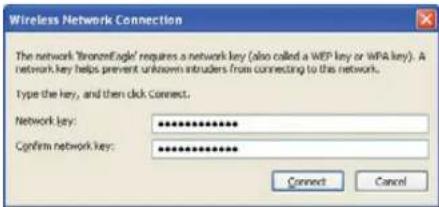
- You should be able to access the router.
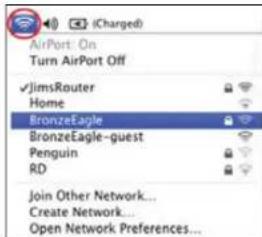
To fix the problem on Mac computers:
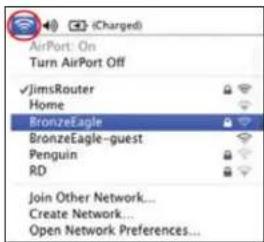
In the menu bar across the top of the screen, click the Wi-Fi icon. A list of wireless networks appears. Linksys Smart Wi-Fi has automatically assigned your network a name.
In the example below, the computer was connected to another wireless network named JimsRouter. The name of the Linksys EA8500 network, BronzeEagle in this example, is shown selected.
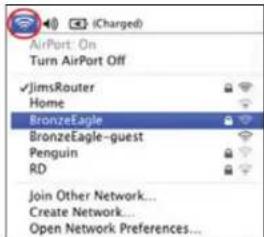
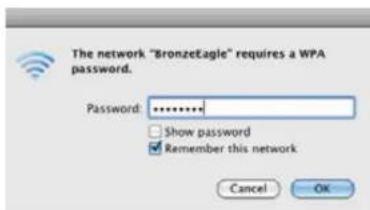
Click the wireless network name of your Linksys EA8500 (BronzeEagle in the example).
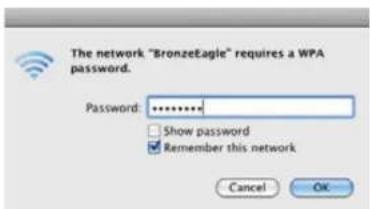
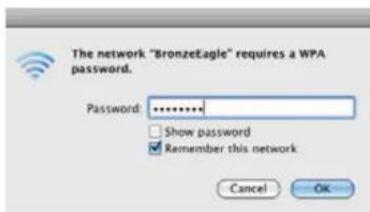
Type your wireless network password (Security Key) into the Password field, and click OK.
Specifications
Linksys EA8500
Model Name Linksys AC2600 MU-MIMO Gigabit Router
Model Number EA8500
Switch Port Speed 10/100/1000 Mbps (Gigabit Ethernet)
Radio Frequency 2.4 GHz and 5 GHz
of Antennas 4 external adjustable antennas, 1 internal antenna
Ports Power, Internet, Ethernet (1-4), USB 3.0, USB 2.0 / eSATA combo
Buttons Reset, Wi-Fi Protected Setup, Wi-Fi, Power
LEDs Power, Internet, Ethernet (1-4), Wi-Fi, Wi-Fi Protected Setup
UPnP Supported
Security Features WEP, WPA2, RADIUS
Security Key Bits Up to 128-bit encryption
Storage File Systems Support FAT, NTFS, and HFS+
Browser Support Latest versions of Google Chrome, Firefox, Safari (for Mac and iPad), and Internet Explorer versions 8 and newer
Environmental
Dimensions 10.09^ × 2.21^ × 7.22^
(256.3 x 56.2 x 183.5 mm) without antennas
Unit Weight 20.67 oz (586 g) without antennas
25.22 oz (715 g) with antennas
Power 12V,3.5A
Certifications FCC, IC, CE, Wi-Fi (IEEE 802.11a/b/g/n/ac), Windows 7, Windows 8, DLNA
Operating Temp.
Storage Temp.
Operating Humidity
Storage Humidity
32 to 104^ (0 to 40^ )
-4 to 140^ (-20 to 60^ )
10 to 80% relative humidity, non-condensing
5 to 90% non-condensing
Notes
For regulatory, warranty, and safety information, see the CD that came with your router or go to Linksys.com/support.
Specifications are subject to change without notice.
Maximum performance derived from IEEE Standard 802.11 specifications. Actual performance can vary, including lower wireless network capacity, data throughput rate, range and coverage. Performance depends on many factors, conditions and variables, including distance from the access point, volume of network traffic, building materials and construction, operating system used, mix of wireless products used, interference and other adverse conditions.
Visit linksys.com/support for award-winning technical support
BELKIN, LINKSYS and many product names and logos are trademarks of the Belkin group of companies. Third party trademarks mentioned are the property of their respective owners © 2016 Belkin International, Inc. and/or its affiliates. All rights reserved.
LINKSYS
GUIA DEL US UARIO
AC2600
ROUTER GIGABIT MU-MIMO
Wi-Fi Protected Setup
Compatible con UPnP
Para instalar Service Pack 3:
FCC, IC, CE, Wi-Fi (IEEE 802.11a/b/g/n/ac),
Windows 7, Windows 8, DLNA
FCC, IC, CE, Wi-Fi (IEEE 802.11a/b/g/n/ac),
Windows 7, Windows 8, DLNA
Kasutamister

- 令 | x - 1| = 1 ,故
- e 100
- a_2 ≤ g10 ≤ 1.5c
- iiie 1c aole s
- Lalalall jol all jgal
- 1g 1
- Windows XP Service Pack
- Cii:ii 1000
- Linksys EA8500
- j)Cannot access your router all
- Juaio yie ci jyjll Jls allw
- WEP, WPA2, RADIUS
- LINKSYS
- CbDbpXaHne
- 06u npereJa Ha npoayKta
- HactpoBbHe Ha pyTepa
- OTCTpaHBAhe
- Cneunfokaun
- O6u npereJHa npodykTa
- EA8500
- U3rIeDOTnped
- U3rne oT3a
- 3A6EJIEXKA
- 06u npereIeHa npOyKta
- Kbnde haHamepuTe oue nomou
- 3A6EJIEXKKA
- Kak da nHcTaIpaTe pyTepa
- 3ABEJIEXKA
- Kak da ce cBbpxKe KbM Linksys Smart Wi-Fi
- KaK da npomehTe hacptoiknte Ha pytepa
- OTCTpaHЯBaHe Ha HeN3PpABHOCTN
- Baunr pyTeP He e hactpoen ycneuho
- Aktyaann3auncWindowsXPServicePack
- CbO6ueHue Your Internet cable is not plugged in (Bauuym uHmephem Ka6en He e BkIouyen)
- Cbo6ueHue Cannot access your router (He e 6b3moxHo da ce ocbuacembu docmbn do pymepa)
- OTCTpaHBAHe Ha HEn3npaBHOCTN
- 3a da oTpaHHTe npo6nema Ha KOMNIOTp b Mac:
- CpeunΦkauni
- DaHHN 3a OKONHaTa CpeDa
- 3a6eJexKn
- Obsah
- Přehled produktu
- Nastavení routeru
- Troubleshooting
- Specifications
- Product overview
- Front view
- Back view
- Setting Up Your Router
- Where to find more help
- NOTE
- How to install your router
- How to connect to Linksys Smart Wi-Fi
- How to change router settings
- Your router was not successfully set up
- Windows XP Service Pack update
- To Install Service Pack 3:
- Your Internet cable is not plugged in message
- Cannot access your router message
- To fix the problem on Mac computers:
- Environmental
- Notes
Brand : LINKSYS
Model : EA8500
Category : Router