EasyManual
KDL42W706 - TV SONY - Free user manual and instructions
Find the device manual for free KDL42W706 SONY in PDF.



User questions about KDL42W706 SONY
0 question about this device. Answer the ones you know or ask your own.
Ask a new question about this device
Download the instructions for your TV in PDF format for free! Find your manual KDL42W706 - SONY and take your electronic device back in hand. On this page are published all the documents necessary for the use of your device. KDL42W706 by SONY.
USER MANUAL KDL42W706 SONY
Installing the TV to the Wall 7
Installing the Brackets on the wall 8
Preparing for the installation of the TV . . . 11
Installing the TV on the wall 12
Troubleshooting. 14
Troubles and Solutions 14
Specifications 15
Introduction
Thank you for choosing this Sony product.
Before operating the TV, please read this manual thoroughly and retain it for future reference.
Note
Before operating the TV, please read "Safety information" (page 3).
- Instructions about "Installing the TV to the wall" are included within this TV's instructions manual.
- Images and illustrations used in Quick Start Guide and this manual are for reference only and may differ from actual product appearance.
Location of the identification label
Labels for the TV Model No., Production Date (month/year) and Power Supply rating are located on the rear of the TV or package. Labels for mains adaptor Model No. and Serial No. are located on the bottom of mains adaptor.
WARNING
TO PREVENT THE SPREAD OF FIRE, KEEP CANDLES OR OTHER OPEN FLAMES AWAY FROM THIS PRODUCT AT ALL TIMES.

NOTICE FOR CUSTOMERS IN THE UNITED KINGDOM
A moulded plug complying with BS1363 is fitted to this equipment for your safety and convenience.
Should the fuse in the plug supplied need to be replaced with the same rating of fuse approved by ASTA or BSI to BS 1362 (i.e., marked with 心 ) must be used.
If the plug supplied with this equipment has a detachable fuse cover, be sure to attach the fuse cover after you change the fuse. Never use the plug without the fuse cover. If you should lose the fuse cover, please contact your nearest Sony service station.
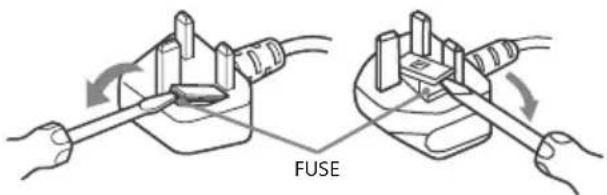
How to replace the fuse
Open the fuse compartment with a blade screwdriver, and replace the fuse.
Please refer to the illustration that actually equipped with the product.
IMPORTANT NOTICE
This product has been manufactured by or on behalf of Sony Corporation, 1-7-1 Konan Minato-ku Tokyo, 108-0075 Japan. Inquiries related to product compliance based on European Union legislation shall be addressed to the authorized representative, Sony Deutschland GmbH, Hedelfinger Strasse 61, 70327 Stuttgart, Germany. For any service or guarantee matters, please refer to the addresses provided in the separate service or guarantee documents.
Notice for Wireless Signal
Hereby, Sony Corporation declares that this unit is in compliance with the essential requirements and other relevant
provisions of Directive 1999/5/EC. For details, please access the following URL: http://www.compliance.sony.de/
Notice for customers: the following information is only applicable to equipment sold in countries applying EU directives.
TV wireless system may be operated in following countries:
AT, BE, HR, CY, CZ, DK, EE, FI, FR, DE, GR, HU, IE, IT, LV, LT, LU, MT, NL, PL, PT, SK, SI, ES, SE, GB, IS, LI, NO, CH, BG, RO, TR, AL, BA, MK, MD, RS, ME
This equipment can be operated in other non-European countries.
Safety information
WARNING
Batteries must not be exposed to excessive heat such as sunshine, fire or the like.
Installation/Set-up
Install and use the TV set in accordance with the instructions below in order to avoid any risk of fire, electrical shock or damage and/or injuries.
Installation
- The TV set should be installed near an easily accessible mains socket.
- Place the TV set on a stable, level surface to avoid it from falling down and cause personal injury or damage to the TV.
- Only qualified service personnel should carry out wall installations.
- For safety reasons, it is strongly recommended that you use Sony accessories, including:
- Wall-Mount Bracket
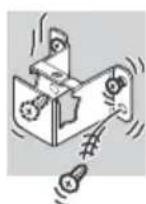
- Be sure to use the screws supplied with the Wall-Mount Bracket when attaching the Mounting Hooks (Stand) to the TV set. The supplied screws are designed as indicated by illustration when measured from the attaching surface of the Mounting Hook (Stand).
The diameter and length of the screws differ depending on the Wall-Mount Bracket model.
Use of screws other than those supplied may result in internal damage to the TV set or cause it to fall, etc.
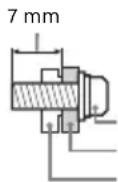
Screw (supplied with the Wall-Mount Bracket) Mounting Hook (Stand) Hook attachment on rear of TV set
Transporting
- Before transporting the TV set, disconnect all cables.
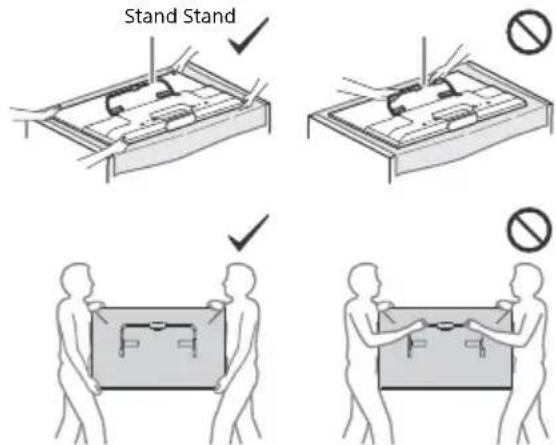
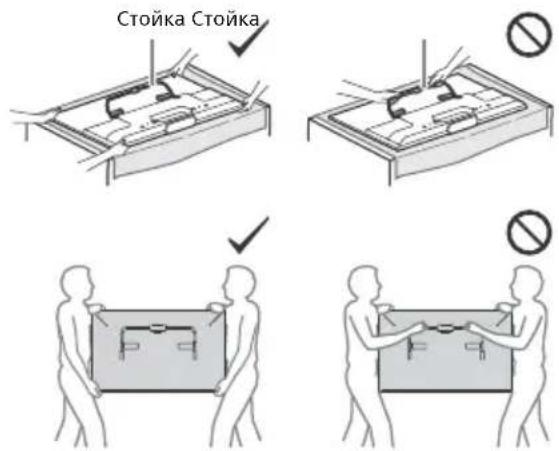
- Two or three people are needed to transport a large TV set.
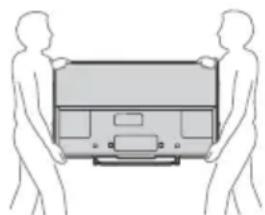
- When transporting the TV set by hand, hold it as shown below. Do not put stress on the LCD panel and the frame around the screen.
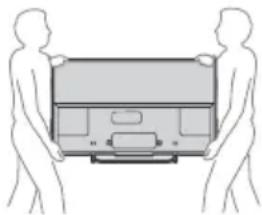
- When transporting the TV set, do not subject it to jolts or excessive vibration.
- When transporting the TV set for repairs or when moving, pack it using the original carton and packing material.
Topple prevention
- Before install the machine screw, lay the display face down on a stable work surface that is larger than the TV.
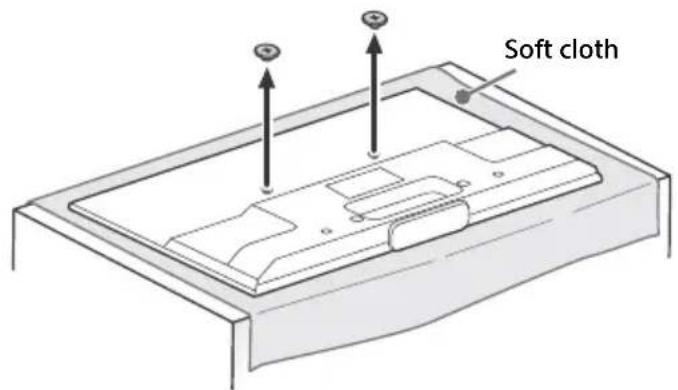
- To prevent damaging the surface of the LCD display, make sure to place a soft cloth on the work surface.
Ventilation
- Never cover the ventilation holes or insert anything in the cabinet.
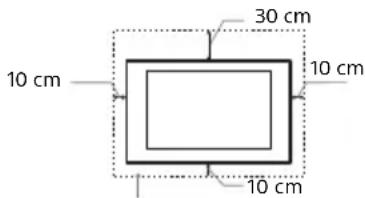
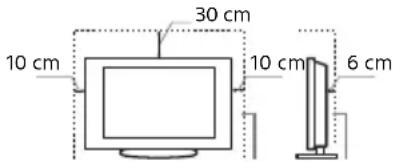
- Leave space around the TV set as shown below.
- It is strongly recommended that you use a Sony Wall-Mount Bracket in order to provide adequate air-circulation.
Installed on the wall
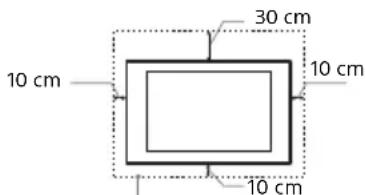
Leave at least this space around the set.
Installed with stand
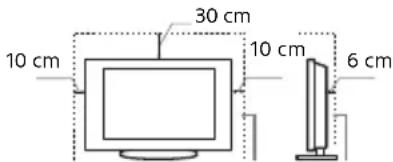
Leave at least this space around the set.
To ensure proper ventilation and prevent the collection of dirt or dust:
- Do not lay the TV set flat, install upside down, backwards, or sideways.
Do not place the TV set on a shelf, rug, bed or in a closet. - Do not cover the TV set with a cloth, such as curtains, or items
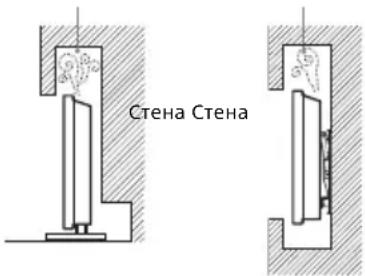
such as newspapers, etc. - Do not install the TV set as shown below.
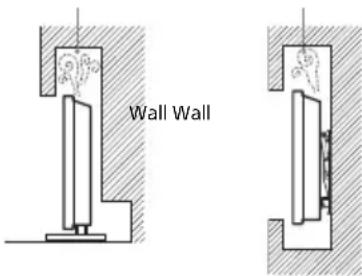
Air circulation is blocked.
Mains lead
Handle the mains lead and socket as follows in order to avoid any risk of fire, electrical shock or damage and/or injuries:
Use only mains leads supplied by Sony, not other suppliers.
- Insert the plug fully into the mains socket.
- Operate the TV set on a 220-240 V AC supply only.
- When wiring cables, be sure to unplug the mains lead for your safety and take care not to catch your feet on the cables.
- Disconnect the mains lead from the mains socket before working on or moving the TV set.
- Keep the mains lead away from heat sources.
Unplug the mains plug and clean it regularly. If the plug is covered with dust and it picks up moisture, its insulation may deteriorate, which could result in a fire.
Note
- Do not use the supplied mains lead on any other equipment.
- Do not pinch, bend, or twist the mains lead excessively. The core conductors may be exposed or broken.
- Do not modify the mains lead.
- Do not put anything heavy on the mains lead.
- Do not pull on the mains lead itself when disconnecting the mains lead.
- Do not connect too many appliances to the same mains socket.
- Do not use a poor fitting mains socket.
NOTE ON MAINS ADAPTOR
Warning
To reduce the risk of fire or electric shock, do not expose this apparatus to rain or moisture.
To prevent fire or shock hazard, do not place objects filled with liquids, such as vases, on the apparatus. Do not install this equipment in a confined space, such as a bookshelf or similar unit.
- Please ensure that the mains socket is installed near the equipment and shall be easily accessible.
- Be sure to use the supplied mains adaptor and mains lead.
- Do not use any other mains adaptor. It may cause a malfunction.
- Connect the mains adaptor to an easily accessible mains socket.
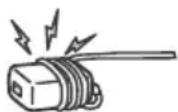
- Do not coil the mains lead around the mains adaptor. The core wire may be cut and/or it may cause a malfunction of the media receiver.
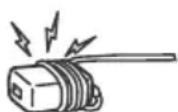
- Do not touch the mains adaptor with wet hands.
- If you notice an abnormality in the mains adaptor, disconnect it from the mains socket immediately.
- The set is not disconnected from the mains source as long as it is connected to the mains socket, even if the set itself has been turned off.
- As the mains adaptor will become warm when it is used for a long time, you may feel hot when touching it by hand.
Prohibited Usage
Do not install/use the TV set in locations, environments or situations such as those listed below, or the TV set may malfunction and cause a fire, electrical shock, damage and/or injuries.
Location:
- Outdoors (in direct sunlight), at the seashore, on a ship or other vessel, inside a vehicle, in medical institutions, unstable locations, near water, rain, moisture or smoke.
- If the TV is placed in the changing room of a public bath or hot spring, the TV may be damaged by airborne sulphur, etc.
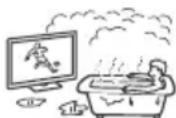
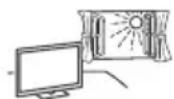
- For best picture quality, do not expose the screen to direct illumination or sunlight.
- Avoid moving the TV from a cold area to a warm area. Sudden room temperature changes may cause moisture condensation. This may cause the TV to show poor picture and/or poor colour. Should this occur, allow moisture to evaporate completely before powering the TV on.
Environment:
- Places that are hot, humid, or excessively dusty; where insects may enter; where it might be exposed to mechanical vibration, near flammable objects (candles, etc.). The TV set shall not be exposed to dripping or splashing and no objects filled with liquids, such as vases, shall be placed on the TV.
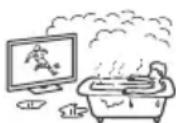
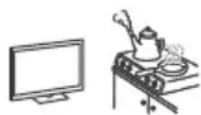
- Do not place the TV in a humid or dusty space, or in a room with oily smoke or steam (near cooking tables or humidifiers). Fire, electric shock, or warping may result.
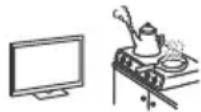
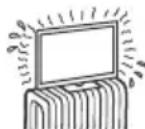
- Do not install the TV in places subject to extreme temperature such as in direct sunlight, near a radiator or a heating vent. The TV may overheat in such condition which can cause deformation of the enclosure and/or TV malfunction.
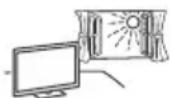
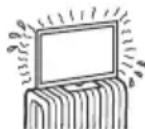
Situation:
- Do not use when your hands are wet, with the cabinet removed, or with attachments not recommended by the manufacturer. Disconnect the TV set from mains socket and aerial during lightning storms.
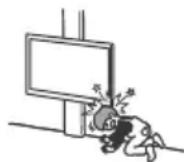
- Do not install the TV so that it sticks out into an open space. Injury or damage from a person or object bumping into the TV may result.
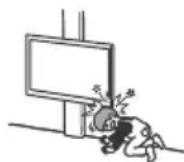
Broken pieces:
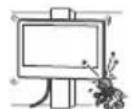
- Do not throw anything at the TV set. The screen glass may break by the impact and cause serious injury.
- If the surface of the TV set cracks, do not touch it until you have unplugged the mains lead. Otherwise electric shock may result.
When not in use
- If you will not be using the TV set for several days, the TV set should be disconnected from the mains for environmental and safety reasons.
- As the TV set is not disconnected from the mains when the TV set is just turned off, pull the plug from the mains to disconnect the TV set completely.
However, some TV sets may have features that require the TV set to be left in standby to work correctly.
For children
- Do not allow children to climb on the TV set.
- Keep small accessories out of the reach of children, so that they are not mistakenly swallowed.
If the following problems occur...
Turn off the TV set and unplug the mains lead immediately if any of the following problems occur.
Ask your dealer or Sony service centre to have it checked by qualified service personnel.
When:
- Mains lead is damaged.
Poor fitting of mains socket.
TV set is damaged by being dropped, hit or having something thrown at it.
Any liquid or solid object falls through openings in the cabinet.
About LCD Monitor Temperature
When the LCD Monitor is used for an extended period, the panel surrounds become warm. You may feel hot when touching there by the hand.
WALL-MOUNT BRACKET
Below information shows the correct handling of the Wall-Mount Bracket. Be sure to read this information thoroughly and use the Wall-Mount Bracket correctly.
To Customers:
Be sure to observe the following precautions for safety to prevent a serious injury through fire, electric shock, the product toppling over, or the product dropping.
- Be sure to subcontract the installation to licensed contractors and keep small children away during installation.
- Be sure to subcontract moving or dismounting of the TV to licensed contractors.
- Do not remove screws, etc., after mounting the TV.
- Do not make alterations to the parts of the Wall-Mount Bracket.
- Do not mount any equipment other than the specified product.
- Do not apply any load other than the TV on the Wall-Mount Bracket.
- Do not lean on or hang from the TV.
- Do not handle the TV with excessive force during cleaning or maintenance.
To Sony Dealers and Contractors:
The following instructions are for Sony dealers and contractors only. Be sure to read safety precautions described below and pay special attention to safety during the installation, maintenance and checking of this product.
- When handling or mounting the TV set, hold it on the sides. Do not lift the TV by the Stand.
- Do not install the Wall-Mount Bracket on wall surfaces where the corners or the sides of the TV are protruding away from the wall surface.
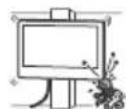
-
Do not install the TV over or under an air conditioner.
-
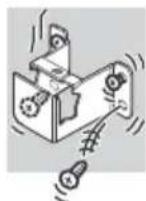
Be sure to install the Wall-Mount Bracket securely to the wall following the instructions in this instruction manual. If any of the screws are loose or fall out, the Wall-Mount Bracket may fall and cause injury or property damage.
-
Be sure to use the supplied screws and attachment parts properly following the instructions given in this instruction manual. If you use substitute items, the TV may fall and
cause bodily injury to someone or damage to the TV.
-
Be sure to assemble the bracket properly following the instructed procedure explained in this instruction manual.
-
Be sure to tighten the screws securely in the designated position.
-
Be careful not to subject the TV to shock during installation.
-
Be sure to install the TV on a wall that is both perpendicular and flat.
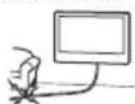
After proper installation of the TV, secure the cables properly
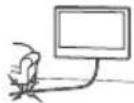
- Do not allow the mains lead or the connecting cables to be pinched as the internal conductors may become exposed and cause a short circuit or an electrical break.
Precautions
Viewing the TV
- Some people may experience discomfort (such as eye strain, fatigue, or nausea) while watching 3D video images or playing stereoscopic 3D games. Sony recommends that all viewers take regular breaks while watching 3D video images or playing stereoscopic 3D games. The length and frequency of necessary breaks will vary from person to person. You must decide what works best. If you experience any discomfort, you should stop watching the 3D video images or playing stereoscopic 3D games until the discomfort ends; consult a doctor if you believe necessary. You should also review (i) the instruction manual of any other device or media used with this television and (ii) our website (http://support.sony-europe.com/) for the latest information. The vision of young children (especially those under six years old) is still under development. Consult your doctor (such as a paediatrician or eye doctor) before allowing young children to watch 3D video images or play stereoscopic 3D games. Adults should supervise young children to ensure they follow the recommendations listed above.
- Do not use, store, or leave the 3D Glasses or battery near fire, or in places with a high temperature, e.g., in direct sunlight, or in sun-heated cars.
- When using the simulated 3D function, please note that the displayed image is modified from the original due to the conversion done by this television.
View the TV in moderate light, as viewing the TV in poor light or during long period of time, strains your eyes. - When using headphones, adjust the volume so as to avoid excessive levels, as hearing damage may result.
LCD Screen
- Although the LCD screen is made with high-precision technology and 99.99% or more of the pixels are effective, black dots may appear or bright points of light (red, blue, or green) may appear constantly on the LCD screen. This is a structural property of the LCD screen and is not a malfunction.
- Do not push or scratch the front filter, or place objects on top of this TV set. The image may be uneven or the LCD screen may be damaged.
- If this TV set is used in a cold place, a smear may occur in the picture or the picture may become dark. This does not indicate a failure. These phenomena disappear as the temperature rises.
- Ghosting may occur when still pictures are displayed continuously. It may disappear after a few moments.
The screen and cabinet get warm when this TV set is in use. This is not a malfunction. - The LCD screen contains a small amount of liquid crystal. Follow your local ordinances and regulations for disposal.
Handling and cleaning the screen surface/ cabinet of the TV set
Be sure to unplug the mains lead connected to the TV set from mains socket before cleaning.
To avoid material degradation or screen coating degradation, observe the following precautions.
- To remove dust from the screen surface/cabinet, wipe gently with a soft cloth. If dust is persistent, wipe with a soft cloth slightly moistened with a diluted mild detergent solution.
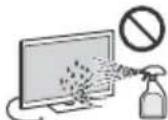
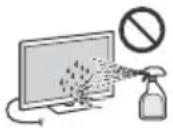
- Never spray water or detergent directly on the TV set. It may drip to the bottom of the screen or exterior parts and enter the TV set, and may cause damage to the TV set.
- Never use any type of abrasive pad, alkaline/acid cleaner, scouring powder, or volatile solvent, such as alcohol, benzene, thinner or insecticide. Using such materials or maintaining prolonged contact with rubber or vinyl materials may result in damage to the screen surface and cabinet material.
Periodic vacuuming of the ventilation openings is recommended to ensure proper ventilation.
- When adjusting the angle of the TV set, move it slowly so as to prevent the TV set from moving or slipping off from its table stand.
Optional Equipment
- Keep optional components or any equipment emitting electromagnetic radiation away from the TV set. Otherwise picture distortion and/or noisy sound may occur.
- This equipment has been tested and found to comply with the limits set out in the EMC Directive using a connection signal cable shorter than 3 meters.
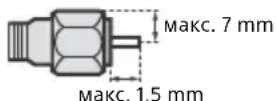
Recommendation of F-type plug
Projection of the inner wire from the connection part must be less than 1.5mm
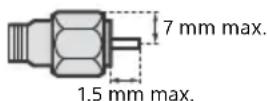
(Reference drawing of the F type plug)
Caution about handling the remote control
- Observe the correct polarity when inserting batteries.
- Do not use different types of batteries together or mix old and new batteries.
- Dispose of batteries in an environmentally friendly way. Certain regions may regulate the disposal of batteries. Please consult your local authority.
- Handle the remote control with care. Do not drop or step on it, or spill liquid of any kind onto it.
- Do not place the remote control in a location near a heat source, a place subject to direct sunlight, or a damp room.
Wireless Function of the unit
- Do not operate this unit near medical equipment (pacemaker, etc.), as malfunction of the medical equipment may result.
- Although this unit transmits/receives scrambled signals, be careful of unauthorised interception. We cannot be responsible for any trouble as a result.
WALL-MOUNT BRACKET
- If you use the TV installed on the Wall-Mount Bracket for a long time, the wall behind or above the TV may become discoloured or the wallpaper may come unglued, depending on the material of the wall.
- If the Wall-Mount Bracket is removed after installing it on the wall, the screw holes remain.
- Do not use the Wall-Mount Bracket in a place where it is subjected to mechanical vibration.
Disposal of the TV set

Disposal of Old Electrical & Electronic Equipment (Applicable in the European Union and other European countries with separate collection systems)
This symbol on the product or on its packaging indicates that this product shall not be treated as household waste. Instead it shall be handed over to the applicable collection point for the
recycling of electrical and electronic equipment. By ensuring this product is disposed of correctly, you will help prevent potential negative consequences for the environment and human health, which could otherwise be caused by inappropriate waste handling of this product. The recycling of materials will help to conserve natural resources. For more detailed information about recycling of this product, please contact your local Civic Office, your household waste disposal service or the shop where you purchased the product.
Disposal of waste batteries (applicable in the European Union and other European countries with separate collection systems)
This symbol on the battery or on the packaging indicates that the battery provided with this
product shall not be treated as household waste. On certain batteries this symbol might be used in combination with a chemical symbol. The chemical symbols for mercury (Hg) or lead (Pb) are added if the battery contains more than 0.0005% mercury or 0.004% lead. By ensuring these batteries are disposed of correctly, you will help prevent potentially negative consequences for the environment and human health which could otherwise be caused by inappropriate waste handling of the battery. The recycling of the materials will help to conserve natural resources. In case of products that for safety, performance or data integrity reasons require a permanent connection with an incorporated battery, this battery should be replaced by qualified service staff only. To ensure that the battery will be treated properly, hand over the product at end-of-life to the applicable collection point for the recycling of electrical and electronic equipment. For all other batteries, please view the section on how to remove the battery from the product safely. Hand the battery over to the applicable collection point for the recycling of waste batteries. For more detailed information about recycling of this product or battery, please contact your local Civic Office, your household waste disposal service or the shop where you purchased the product.
Installing the TV to the Wall
To Customers
Sufficient expertise is required for installing this product. Be sure to subcontract the installation to Sony dealers or licensed contractors and pay special attention to safety during the installation. Sony is not liable for any damages or injury caused by mishandling or improper installation, or installing any other than the specified product. Your Statutory Rights (if any) are not affected.
To Sony Dealers and Contractors
Sufficient expertise is required for installing this product. Be sure to read this instruction manual thoroughly to do the installation work safely. Sony is not liable for any damages or injury caused by mishandling or improper installation.
Your TV's Table-Top Stand will be used as a part of the Wall-Mount Bracket.
Note
See page 3 (Safety information) and page 5 (Precautions) on WALL-MOUNT BRACKET before carrying out Wall-Mount Bracket installation.
- If the Table-Top Stand is attached to the TV, detach the Table-Top Stand beforehand.
- Place the TV with its screen facing down on a flat and stable surface covered with a thick and soft cloth that is larger than the TV, when securing the Stand or when removing the Table-Top Stand from the TV to prevent damaging the surface of the LCD display.
- Once the Stand Necks are detached from the Stand, be sure to keep the Stand Necks and screws in a safe place.
- When attaching the Table-Top Stand again, be sure to fasten the screws (previously removed) to the original holes on the rear of the TV.
- Be sure the TV is on the vertical position before switching on. TV set must not powered on with LCD panel face down to avoid uneven picture uniformity.
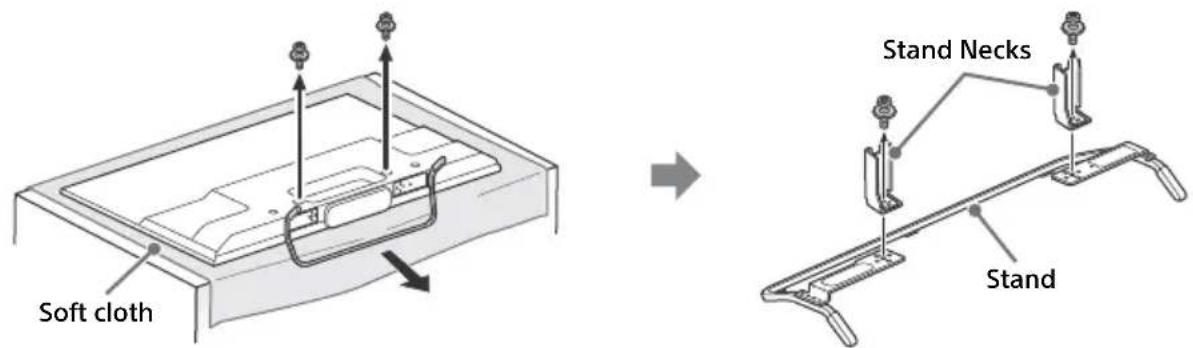
To detach the Table-Top Stand from the TV
Installing the Brackets on the wall
1 Prepare necessary items.
Wall-Mount Bracket accessories (supplied)
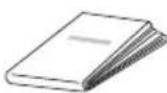
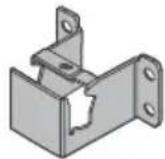
A Paper Template B Wall-Mount Base
KDL-50W82xB,
KDL-50W81xB
KDL-50W80xB
KDL-50W70xB (2)
KDL-42W82xB
KDL-42W81xB,
KDL-42W80xB
KDL-42/32W70xB1
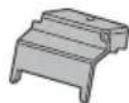
Stand Protector
KDL-50W82xB
KDL-50W81xB
KDL-50W80xB,
KDL-50W70xB (2)
KDL-42W82xB
KDL-42W81xB
KDL-42W80xB
KDL-42/32W70xB (1)
D
Screw (+PSW6× 12) (2)

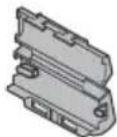
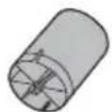
E Spacer (2) F Bracket Cap Plate
KDL-50W82xB
KDL-50W81xB
KDL-50W80xB
KDL-50W70xB (2)
KDL-42W82xB
KDL-42W81xB
KDL-42W80xB
KDL-42/32W70xB1
⑥ Screw (+PSW 4 × 10)
KDL-50W82xB
KDL-50W81xB
KDL-50W80xB,
KDL-50W70xB (2)
KDL-42W82xB
KDL-42W81xB
KDL-42W80xB
KDL-42/32W70xB (1)

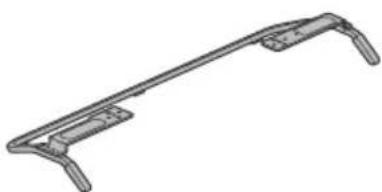
Stand (supplied)
H
Screws for Wall-Mount Base (8 mm in diameter, not supplied)
KDL-50W82xB
KDL-50W81xB
KDL-50W80xB,
KDL-50W70xB8)
KDL-42W82xB
KDL-42W81xB
KDL-42W80xB,
KDL-42/32W70xB (4)
2 Make sure that the wall has enough space and is capable of supporting a weight of at least four times that of the TV.
Refer to the following table on installing the TV to the wall. See page 15-17 (Specifications) for the TV's weight.
KDL-50W82xB, KDL-50W81xB, KDL-50W80xB, KDL-50W70xB
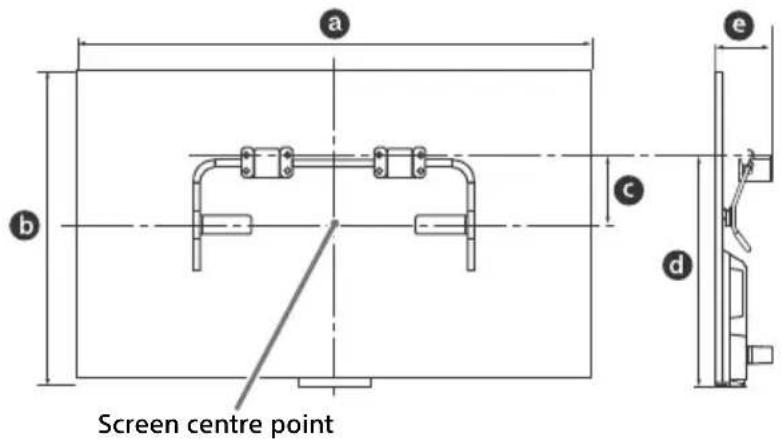
KDL-42W82xB, KDL-42W81xB, KDL-42W80xB, KDL-42/32W70xB
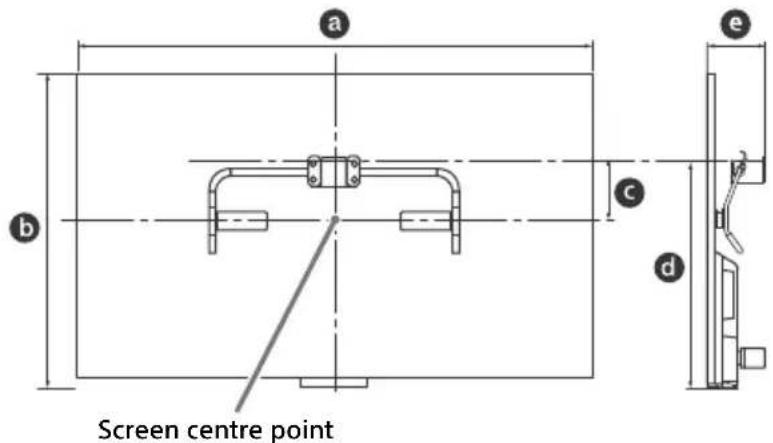
| Model Name KDL- | Display dimensions Screen centre dimension Length for mounting | ||||
| a | b | c | d | e | |
| 50W82xB/ | |||||
| 50W81xB/ | 111.6 | 65.6 | 13.0 | 46.9 | 11.8 |
| 50W80xB/ | |||||
| 50W70xB | |||||
| 42W82xB/ | |||||
| 42W81xB/ | 95.8 | 56.3 | 17.5 | 46.5 | 11.8 |
| 42W80xB/ | |||||
| 42W70xB | |||||
| 32W70xB | 72.9 | 43.3 | 18.8 | 41.3 | 11.3 |
Note
- Figures in the table may differ slightly depending on the installation.
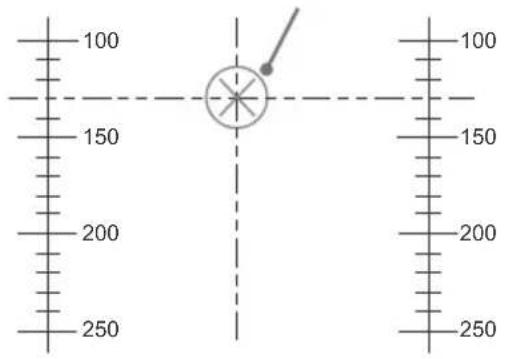
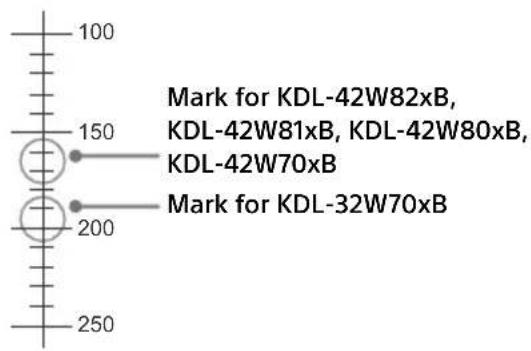
3 Make a mark on the Paper Template A that indicates the centre of the screen for your TV.
KDL-50W82xB,KDL-50W81xB, KDL-50W80xB,KDL-50W70xB
KDL-42W82xB,KDL-42W81xB, KDL-42W80xB,KDL-42/32W70xB
Scale on Paper Template A Mark for KDL-50W82xB, KDL-50W81xB, KDL-50W80xB, KDL-50W70xB
Scale on Paper Template A
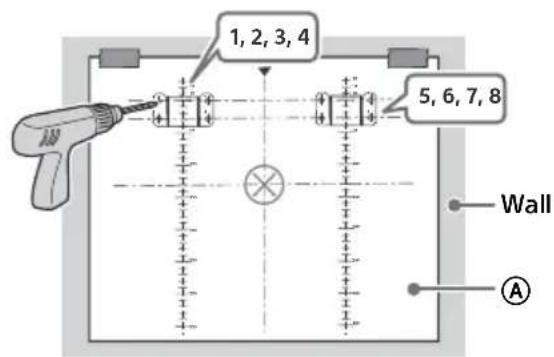
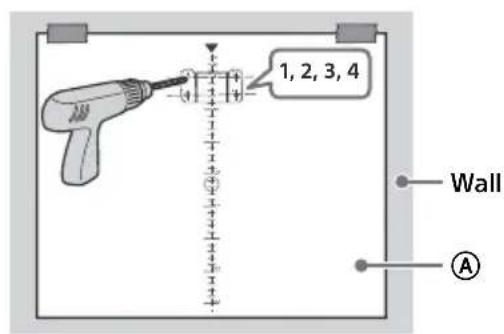
4 Tape the Paper Template A to the wall and drill holes according to the numbering on the Paper Template A using an electric drill.
KDL-50W82xB,KDL-50W81xB, KDL-50W80xB,KDL-50W70xB
KDL-42W82xB,KDL-42W81xB, KDL-42W80xB,KDL-42/32W70xB
5 Remove the Paper Template A off from the wall.
6 Attach the Wall-Mount Base to the wall correctly using the screws (8 mm in diameter, not supplied).
KDL-50W82xB,KDL-50W81xB, KDL-50W80xB,KDL-50W70xB
KDL-42W82xB,KDL-42W81xB, KDL-42W80xB,KDL-42/32W70xB
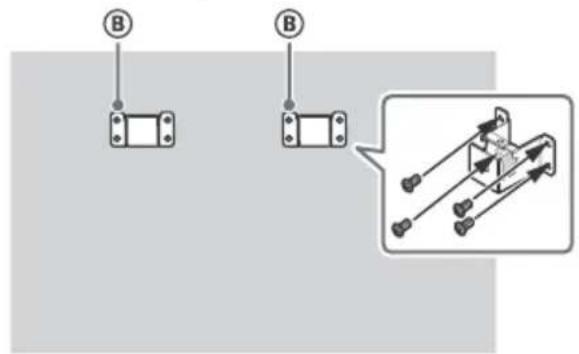
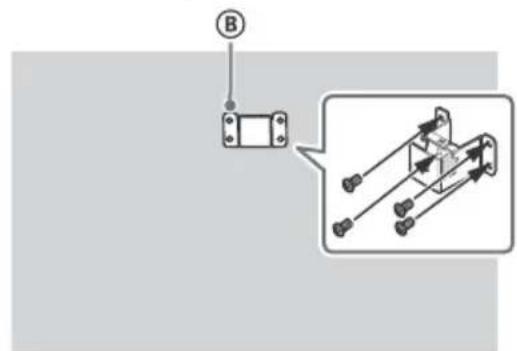
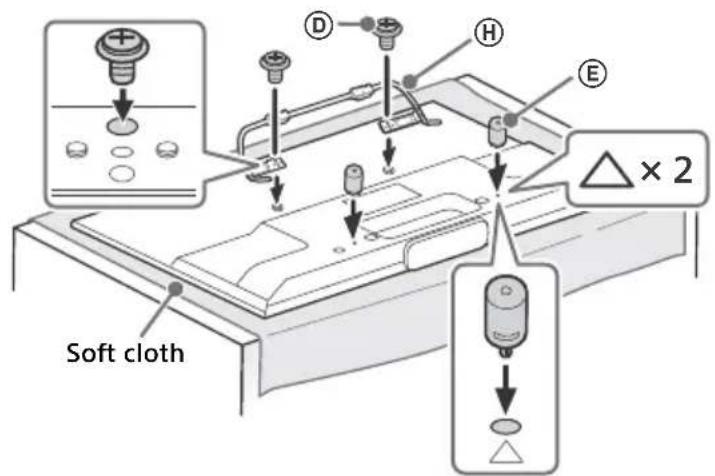
1 Remove screws from the rear of the TV. Be sure to store the removed screws in a safe place, keeping them away from children.
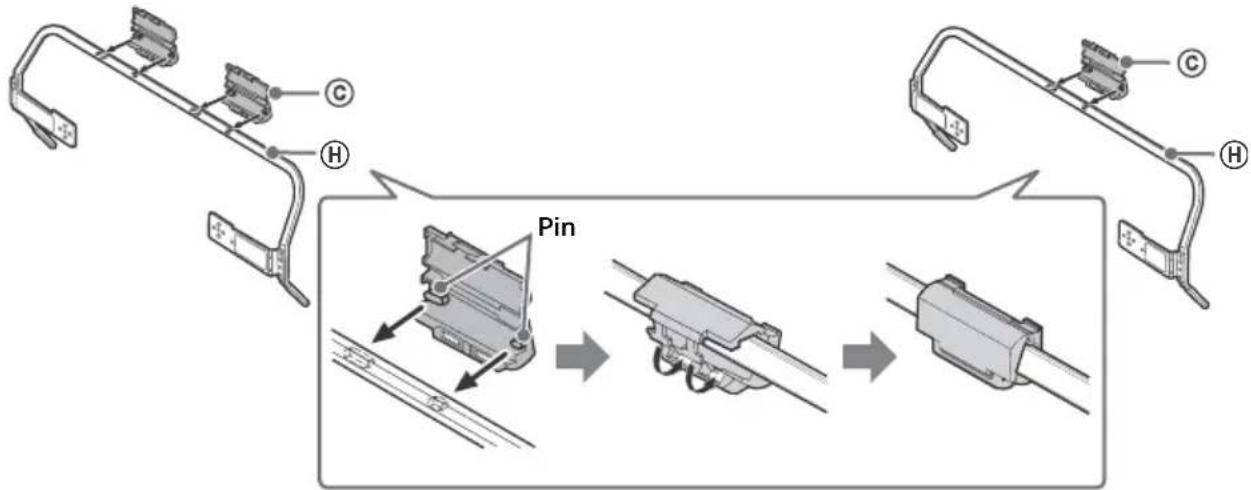
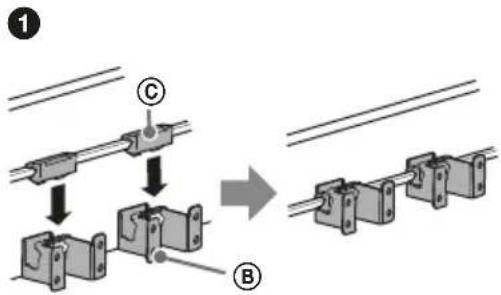
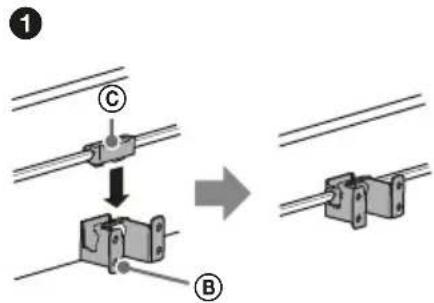
2 Insert the pin (on the Stand Protector ©) into the hole on the Stand H, then fold up the Stand Protector C. Confirm the Stand Protector C is firmly latched to the Stand H.
KDL-50W82xB,KDL-50W81xB, KDL-50W80xB,KDL-50W70xB
KDL-42W82xB, KDL-42W81xB, KDL-42W80xB, KDL-42/32W70xB
3 Attach the stand to the TV using the supplied screws. Attach the Spacers to the holes indicated by the triangle marks . KDL-50W82xB, KDL-50W81xB, KDL-50W80xB, KDL-50W70xB is used for illustration purpose.
Installing the TV on the wall
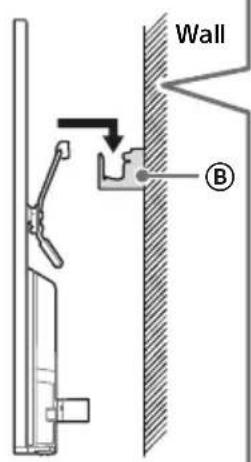
1 Make sure to connect and bundle the cables before installing the TV on the wall.
2 Install the TV on the wall. Then, confirm the Stand Protector is firmly latched into the Wall-Mount Base 巴 and the Spacers touch the wall. Attach the Bracket Cap Plate using the supplied screws .

KDL-50W82xB,KDL-50W81xB, KDL-50W80xB,KDL-50W70xB
KDL-42W82xB,KDL-42W81xB, KDL-42W80xB,KDL-42/32W70xB
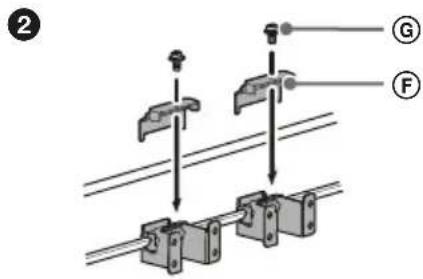
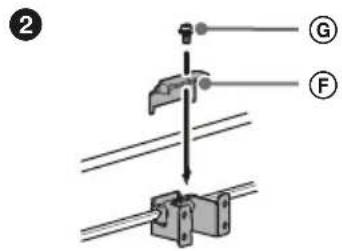
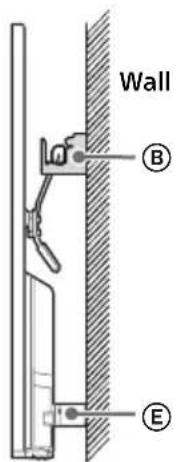
Dimensions of the hole positions on the wall
Provide the following information to the licensed contractors if necessary.
Use screws (8 mm in diameter, not supplied) to install the Wall-Mount Base ⑧ on the wall.
Be sure to use the supplied Paper Template that shows the actual position of Wall-Mount Base for easy installation.
KDL-50W82xB, KDL-50W81xB, KDL-50W80xB, KDL-50W70xB
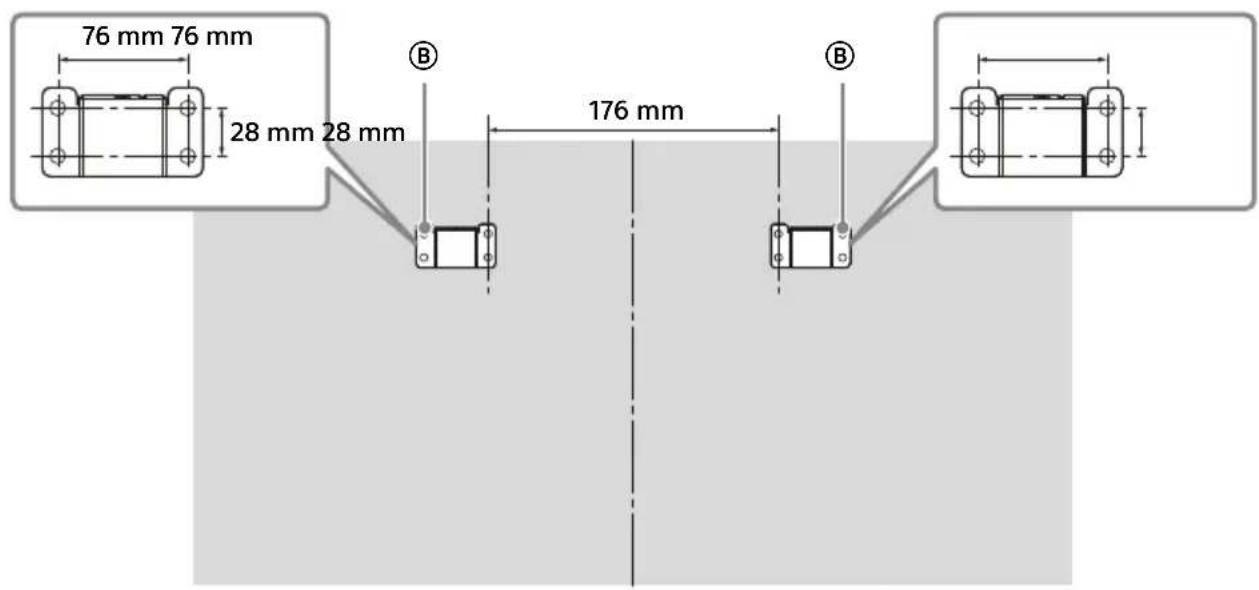
KDL-42W82xB, KDL-42W81xB, KDL-42W80xB, KDL-42/32W70xB
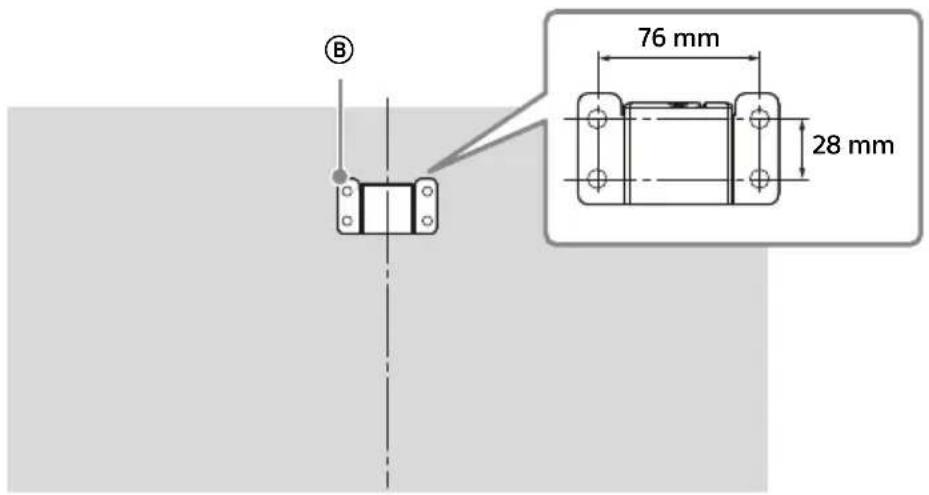

For instructions on Wall-Mount Bracket installation of your TV model, refer to the following website: www.sony.eu/tv/wall-mount-bracket-manual
Troubleshooting
When the illumination LED is flashing in red, count how many times it flashes (interval time is three seconds).
If the illumination LED flashes red, reset the TV by disconnecting the mains lead from the TV for two minutes, then turn on the TV.
If the problem persists, contact your dealer or Sony service centre with the number of times the Illumination LED flashes red (interval time is three seconds). Press I/O on the TV to turn it off, disconnect the mains lead, and inform your dealer or Sony service centre.
When the illumination LED is not flashing, check the items as follows.
You can also refer to [Troubleshooting] in the i-Manual or perform self-diagnosis by selecting? [Help] [Customer Support] [Self Diagnostics]. If the problem persists, have your TV serviced by qualified service personnel.
Troubles and Solutions
There is no picture (screen is dark) and no sound.
- Check the antenna (aerial)/cable connection.
- Connect the TV to AC power (mains), and press I/ on the TV or remote.
Some programmes cannot be tuned.
- Check the antenna (aerial) or dish.
- The satellite cable might be short-circuited or there might be connection problems of the cable. Check the cable connection and then turn the TV off with the Mains power On/Off switch, and turn it on again.
The frequency that you entered is out of range. Consult the received satellite broadcasting company.
There is no Cable TV services (programmes) found.
- Check the cable connection or tuning configuration.
- Attempt the [Digital Auto Tuning] by selecting [Antenna] instead of [Cable].
The remote does not function.
- Replace the batteries.
- Your TV may be in SYNC mode.
Press SYNC MENU, select [TV Control] and then select [Home (Menu)] or [Options] to control the TV.
The [Parental Lock] password has been forgotten.
- Enter 9999 for the PIN code. (PIN code 9999 is always accepted.)
The TV surrounds become warm. - When the TV is used for an extended period, the TV surrounds become warm.
You may feel hot when touching there by the hand.
Frozen audio or video, a blank screen, or the TV does not respond to TV or remote buttons.
- Perform a simple reset of the TV by unplugging the AC power cord for two minutes, then plug it in again.
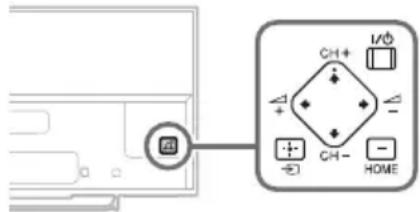
The 1 / 0 CH + / - , + / - , / / , , and HOME buttons cannot be located on the TV.
See below illustration for location of the buttons on the TV.
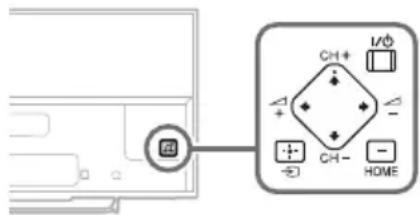
Rear of TV
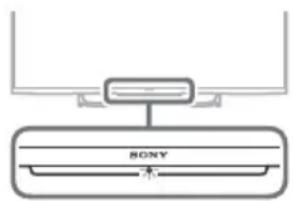
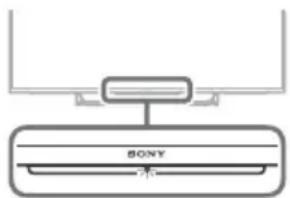
The illumination LED is turned on.
If you do not wish to light up the illumination LED, you can turn it off.
Press HOME, then select [Settings]
[System Settings] [General Set-up]
[Illumination LED] [Off]. You can also press
OPTIONS, then select [Illumination LED] [Off].
Cannot connect to a wireless router by WPS.
- If you use WEP security, select [Easy] [Wi-Fi] [Connect by scan list].
Then, select the network name (SSID) you want to connect.
Cannot find the required network name in network setup.
- Select [[Manual Entry]] and press to enter network name.
Specifications
System
Panel system
LCD (Liquid Crystal Display) Panel, LED Backlight
TV system
Analogue: Depending on your country/area
selection: B/G, D/K, L, I, M
Digital: DVB-T/DVB-C
DVB-T2
Satellite: DVB-S/DVB-S2
Colour/video system
Analogue: PAL, SECAM, NTSC3.58, NTSC4.43
Digital: Refer to the i-Manual.
Channel coverage
Analogue: UHF/VHF/Cable, Depending on your country/area selection.
Digital: UHF/VHF/Cable, Depending on your country/area selection.
Satellite: IF Frequency 950-2150 MHz
Sound output
8W + 8W (except KDL-32W70xB)
5 W + 5 W (KDL-32W70xB only)
Wireless technology
Protocol IEEE802.11a/b/g/n
Input/Output jacks
Antenna (aerial) cable
75 ohm external terminal for VHF/UHF
Satellite antenna
Female F-Type Connector IEC169-24, 75 ohm. DiSEqC 1.0, LNB 13 V/18 V & 22 kHz tone, Single Cable Distribution EN50494.
AV1
21-pin scart connector (CENELEC standard) including audio/video input, RGB input and TV audio/video output.

C
0
M
P
0
1
YPBPR (Component Video): 1080p (50, 60 Hz), 1080i (50, 60 Hz), 720p (50, 60 Hz), 576p, 576i, 480p, 480i
Audio input (phono jacks)
AV2
Video input (common phono pin with Y input)
HDMI IN 1, 2, 3, 4 (except KDL-50/42/32W70xB)
Video (2D): 1080p (30, 50, 60 Hz), 1080/24p, 1080i
(50, 60 Hz), 720p (30, 50, 60 Hz), 720/24p, 576p,
576i, 480p, 480i, PC Formats
Video (3D):
Frame Packing: 1080p (30 Hz), 1080/24p, 1080i (50, 60 Hz), 720p (30, 50, 60 Hz), 720/24p
Side-by-Side: 1080p (50, 60 Hz), 1080/24p, 1080i (50, 60 Hz), 720p (50, 60 Hz)
Over-Under: 1080p (30, 50, 60 Hz), 1080/24p,
1080i (50, 60 Hz), 720p (50, 60 Hz)
Audio: 5.1 channel linear PCM: 32, 44.1 and
48 kHz, 16, 20 and 24 bits, Dolby Digital
ARC (Audio Return Channel) (HDMI IN 2 only)
HDMI IN 1,2,3,4 (KDL-50/42/32W70xB only)
Video: 1080p (30, 50, 60 Hz), 1080/24p,
1080i (50, 60 Hz), 720p (30, 50, 60 Hz),
720/24p, 576p, 576i, 480p, 480i, PC Formats
Audio: 5.1 channel linear PCM: 32, 44.1 and
48 kHz, 16, 20 and 24 bits, Dolby Digital
ARC (Audio Return Channel) (HDMI IN 2 only)
MHL (common with HDMI IN 1)
(except KDL-50/42/32W70xB)
Video (2D): 1080p (30 Hz), 1080/24p,
1080i (50, 60 Hz), 720p (30, 50, 60 Hz),
720/24p, 576p, 576i, 480p, 480i
Video (3D):
Side-by-Side: 1080/24p, 1080i (50, 60 Hz), 720p (50, 60 Hz)
Over-Under: 1080p (30 Hz), 1080/24p,
1080i (50, 60 Hz), 720p (50, 60 Hz)
Audio: 5.1 channel linear PCM: 32, 44.1 and
48 kHz, 16, 20 and 24 bits, Dolby Digital
MHL (common with HDMI IN 1)
(KDL-50/42/32W70xB only)
Video: 1080p (30 Hz), 1080/24p, 1080i (50, 60 Hz),
720p (30, 50, 60 Hz), 720/24p, 576p, 576i, 480p, 480i
Audio: 5.1 channel linear PCM: 32, 44.1 and
48 kHz, 16, 20 and 24 bits, Dolby Digital
DIGITAL AUDIO OUT (OPTICAL)
Digital optical jack (Two channel linear PCM, Dolby Digital)
AUDIO OUT/
(supports Subwoofer out)
1 (HDD REC),
USB HDD device port (only), USB port

CAM (Conditional Access Module) slot

DC IN 19.5 V
AC adapter input
LAN
10BASE-T/100BASE-TX connector (Depending on the operating environment of the network, connection speed may differ. 10BASE-T/
100BASE-TX communication rate and communication quality are not guaranteed for this TV.)
Others
Optional accessories
Touchpad Remote Control: RMF-ED004
Camera and Microphone Unit: CMU-BR200/ CMU-BR100
Wireless subwoofer: SWF-BR100
MHL cable: DLC-MB10/DLC-MB20/DLC-MC10/DLC-MC20
Active 3D Glasses: TDG-BT500A (KDL-50W82xB, KDL-50W81xB, KDL-50W80xB only)
Passive 3D Glasses: TDG-500P (KDL-42W82xB, KDL-42W81xB, KDL-42W80xB only)
Operating temperature 0^ - 40^
Operating humidity 10% -80% RH (non-condensing)
Power and others
Power requirements
19.5 V DC with AC adapter
Rating: Input 220 V - 240 V AC, 50 Hz
Energy Efficiency Class
KDL-50W82xB, KDL-50W81xB, KDL-50W80xB, KDL-50W70xB: A++
KDL-42W82xB, KDL-42W81xB, KDL-42W80xB,
KDL-42W70xB:A+ KDL-32W70xB:A
Screen size (measured diagonally) (Approx.)
KDL-50W82xB,KDL-50W81xB,KDL-50W80xB
KDL-50W70xB: 50 inches / 125.7 cm
KDL-42W82xB, KDL-42W81xB, KDL-42W80xB,
KDL-42W70xB: 42 inches / 106.7 cm
KDL-32W70xB: 32 inches / 80.1 cm
Power consumption
in [Standard] mode
KDL-50W82xB, KDL-50W81xB, KDL-50W80xB, KDL-50W70xB: 51 W
KDL-42W82xB,KDL-42W81xB,KDL-42W80xB
KDL-42W70xB:50 W
KDL-32W70xB: 39 W
in [Vivid] mode
KDL-50W82xB, KDL-50W81xB, KDL-50W80xB, KDL-50W70xB: 100 W
KDL-42W82xB, KDL-42W81xB, KDL-42W80xB, KDL-42W70xB: 99 W
KDL-32W70xB:80 W
Average annual energy consumption1
KDL-50W82xB, KDL-50W81xB, KDL-50W80xB, KDL-50W70xB: 71 kWh
KDL-42W82xB, KDL-42W81xB, KDL-42W80xB, KDL-42W70xB: 69 kWh
KDL-32W70xB:54kWh
Standby power consumption*2
0.5 W (10 W in software/EPG update mode)
Display resolution
1,920 dots (horizontal) × 1,080 lines (vertical)
Dimensions (Approx.) (w× h× d)
with Table-Top Stand
KDL-50W82xB,KDL-50W81xB,KDL-50W80xB
KDL-50W70xB:111.6×69.3×17.9 cm
KDL-42W82xB,KDL-42W81xB,KDL-42W80xB
KDL-42W70xB: 95.8 × 60.0 × 17.0 cm
KDL-32W70xB: 72.9 × 46.5 × 14.1 cm
without Table-Top Stand
KDL-50W82xB,KDL-50W81xB,KDL-50W80xB
KDL-50W70xB: 111.6× 65.6× 6.4cm
KDL-42W82xB,KDL-42W81xB,KDL-42W80xB
KDL-42W70xB: 95.8 × 56.3 × 6.4 cm
KDL-32W70xB: 72.9 × 43.3 × 6.4 cm
Mass (Approx.)
with Table-Top Stand
KDL-50W82xB,KDL-50W81xB,KDL-50W80xB
*1 Energy consumption per year, based on the power consumption of the television operating 4 hours per day for 365 days. The actual energy consumption will depend on how the television is used.
*2 Specified standby power is reached after the TV finishes necessary internal processes.
Note
- The "x" that appears in the model name corresponds to a numeric digit, related to design, colour or TV system.
- Do not remove the dummy card from TV CAM (Conditional Access Module) slot other than to insert a smart card fitted in CAM.
- Optional accessories availability depends on countries/region/TV model/stock.
- Design and specifications are subject to change without notice.
- This TV set incorporates MHL 2.
Notes on Digital TV function
- Any functions related to Digital TV ( ) only work in countries or areas where DVB-T/DVB-T2 (MPEG-2 and H.264/MPEG-4 AVC) digital terrestrial signals are broadcast or where you have access to a compatible DVB-C (MPEG-2 and H.264/MPEG-4 AVC) cable service. Please confirm with your local dealer if you can receive a DVB-T/ DVB-T2 signal where you live or ask your cable provider if their DVB-C cable service is suitable for integrated operation with this TV.
- Your cable provider may charge a fee for their services, or require you to agree to its terms and conditions of business.
- This TV set complies with DVB-T/DVB-T2 and DVB-C specifications, but compatibility with future DVB-T/DVB-T2 digital terrestrial and DVB-C digital cable broadcasts are not guaranteed.
- Some Digital TV functions may not be available in some countries/areas and DVB-C cable may not operate correctly with some providers.
Trademark information
- The terms HDMI and HDMI High-Definition Multimedia Interface, and the HDMI Logo are trademarks or registered trademarks of HDMI Licensing LLC in the United States and other countries.
- DLNA®, the DLNA Logo and DLNA CERTIFIED® are trademarks, service marks, or certification marks of the Digital Living Network Alliance.
- Manufactured under license from Dolby Laboratories. Dolby and the double-D symbol are trademarks of Dolby Laboratories.
- "BRAVIA" and Bare Trademarks of Sony Corporation.
- TrackID is a trademark or registered trademark of Sony Mobile Communications AB.
-
Gracenote, Gracenote eyeQ, Gracenote VideoID, Gracenote Video Explore, Gracenote MusicID, the Gracenote logo and logotype, and the "Powered by Gracenote" logo are either registered trademarks or trademarks of Gracenote in the United States and/or other countries.
-
Opera® Devices SDK from Opera Software ASA. Copyright 1995-2014 Opera Software ASA. All rights reserved.
- Wi-Fi, Wi-Fi Direct and Miracast are trademarks or registered trademarks of Wi-Fi Alliance.
- "Sony Entertainment Network logo" and "Sony Entertainment Network" are trademarks of Sony Corporation.
- MHL, Mobile High-Definition Link and the MHL Logo are trademarks or registered trademarks of MHL Licensing, LLC.
- For DTS patents, see http://patents.dts.com. Manufactured under license from DTS Licensing Limited. DTS, the Symbol, & DTS and the Symbol together are registered trademarks, and DTS Digital Surround is a trademark of DTS, Inc. © DTS, Inc. All Rights Reserved.
- Designed with UEI Technology™ Under License from Universal Electronics Inc. Portions © UEI 2000 - 2013
- The Bluetooth® word mark and logos are owned by the Bluetooth SIG, Inc. and any use of such marks by Sony Corporation is under license. Other trademarks and trade names are those of their respective owners.
- DiSEqCTM is a trademark of EUTELSAT. This TV supports DiSEqC 1.0. This TV is not intended for controlling motorized antennas.
Table des matieres
AVIS IMPORTANT. 2
Analogue: PAL, SECAM, NTSC3.58, NTSC4.43
Numérique: Consultez I'i-Manual.
Canaux couverts
5 W + 5 W (KDL-32W70xB unquipment)
Technologie sans fil
Protocole IEEE802.11a/b/g/n
m = 311
T
YPBPR(Videcomposante) : 1080p (50, 60 Hz),
1080i (50, 60 Hz), 720p (50, 60 Hz), 576p, 576i,
480p, 480i
Entrée audio (prises phono)
AV2
DIGITAL AUDIO OUT (OPTICAL)
1080/24p, 1080i (50, 60 Hz), 720p (50, 60 Hz)
Encima-debajo: 1080p (30, 50, 60 Hz), 1080/
24p, 1080i (50, 60 Hz), 720p (50, 60 Hz)
Video (2D): 1080p (30 Hz), 1080/24p,
1080i (50, 60 Hz), 720p (30, 50, 60 Hz),
720/24p, 576p, 576i, 480p, 480i
Video (3D):
Lado a lado: 1080/24p, 1080i (50, 60 Hz), 720p (50, 60 Hz)
Encima-debajo: 1080p (30 Hz), 1080/24p,
1080i (50, 60 Hz), 720p (50, 60 Hz)
DIGITAL AUDIO OUT (OPTICAL)
Toma digital optica (PCM lineal de dos canales,
Dolby Digital)
AUDIO OUT/
Salida de audio (miniconector estereo)
Toma de auriculares
(admite salute de subwoofer)
1 (HDD REC),
10% - 80% RH (sin condensacion)
Video (2D): 1080p (30 Hz), 1080/24p,
1080i (50, 60 Hz), 720p (30, 50, 60 Hz),
720/24p, 576p, 576i, 480p, 480i
Video (3D):
Naast elkaar: 1080/24p, 1080i (50, 60 Hz),
720p (50, 60 Hz)
Boven elkaar: 1080p (30 Hz), 1080/24p,
1080i (50, 60 Hz), 720p (50, 60 Hz)
Audio: 5.1-kanaals lineair PCM: 32, 44,1 en
48 kHz, 16, 20 en 24 bits, Dolby Digital
DIGITAL AUDIO OUT (OPTICAL)
720/24p, 576p, 576i, 480p, 480i,
Computerformate
Video (2D): 1080p (30 Hz), 1080/24p,
1080i (50, 60 Hz), 720p (30, 50, 60 Hz),
720/24p, 576p, 576i, 480p, 480i
Video (3D):
Nebeneinander: 1080/24p, 1080i (50, 60 Hz), 720p (50, 60 Hz)
Untereinander: 1080p (30 Hz), 1080/24p, 1080i (50, 60 Hz), 720p (50, 60 Hz)
DIGITAL AUDIO OUT (OPTICAL)
Analogico: PAL, SECAM, NTSC3.58, NTSC4.43
Digital: Consulte o i-Manual.
Cobertura de canais
MHL (normal com HDMI IN 1)
(excto para KDL-50/42/32W70xB)
Video (2D): 1080p (30 Hz), 1080/24p, 1080i
(50, 60 Hz), 720p (30, 50, 60 Hz), 720/24p, 576p, 576i, 480p, 480i
Video (3D):
Lado-a-Iado: 1080/24p, 1080i (50, 60 Hz), 720p (50, 60 Hz)
Uma sobre a outra: 1080p (30 Hz), 1080/24p, 1080i (50, 60 Hz), 720p (50, 60 Hz)
Audio: PCM linear do canal 5.1: 32, 44,1 e 48 kHz, 16, 20 e 24 bits, Dolby Digital
MHL (normal com HDMI IN 1)
(aperas KDL-50/42/32W70xB)
Video: 1080p (30 Hz), 1080/24p, 1080i (50, 60 Hz),
720p (30, 50, 60 Hz), 720/24p, 576p, 576i, 480p, 480i
Audio: PCM linear do canal 5.1: 32, 44,1 e 48 kHz, 16, 20 e 24 bits, Dolby Digital
DIGITAL AUDIO OUT (OPTICAL)
Tomada digital otica (PCM linear deinous canais, Dolby Digital)
AUDIO OUT/
D Vite (+PSW 6 × 12) (2)
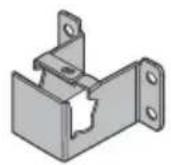
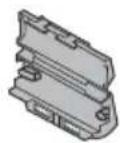

E Distanziale (2) F Piastra della staffa KDL-50W82xB, KDL-50W81xB, KDL-50W80xB, KDL-50W70xB (2) KDL-42W82xB, KDL-42W81xB, KDL-42W80xB, KDL-42/32W70xB
G Vite (+PSW4× 10) KDL-50W82xB, KDL-50W81xB, KDL-50W80xB, KDL-50W70xB (2) KDL-42W82xB, KDL-42W81xB, KDL-42W80xB, KDL-42/32W70xB (1)

Questo teilevisore include MHL 2.
Frame Packing: 1080p (30 Hz), 1080/24p,
1080i (50, 60 Hz), 720p (30, 50, 60 Hz), 720/24p
Sida-vid-sida: 1080p (50, 60 Hz), 1080/24p,
1080i (50, 60 Hz), 720p (50, 60 Hz)
Over-under: 1080p (30, 50, 60 Hz), 1080/24p,
1080i (50, 60 Hz), 720p (50, 60 Hz)
Video (2D): 1080p (30 Hz), 1080/24p,
1080i (50, 60 Hz), 720p (30, 50, 60 Hz),
720/24p, 576p, 576i, 480p, 480i
Video (3D):
Sida-vid-sida: 1080/24p, 1080i (50, 60 Hz),
720p (50, 60 Hz)
Over-under: 1080p (30 Hz), 1080/24p,
1080i (50, 60 Hz), 720p (50, 60 Hz)
DIGITAL AUDIO OUT (OPTICAL)
⑥ Skrue (+PSW 4 × 10)
KDL-50W82xB
KDL-50W81xB,
KDL-50W80xB,
KDL-50W70xB (2)
KDL-42W82xB
KDL-42W81xB
KDL-42W80xB
KDL-42/32W70xB1

Stativ (medfølger)
H
Analog: PAL, SECAM, NTSC3.58, NTSC4.43
Over-under: 1080p (30, 50, 60 Hz), 1080/24p,
1080i (50, 60 Hz), 720p (50, 60 Hz)
Lyd: 5.1-kanals linear PCM: 32, 44,1 og 48 kHz, 16
Video (2D): 1080p (30 Hz), 1080/24p,
1080i (50, 60 Hz), 720p (30, 50, 60 Hz), 720/24p,
576p, 576i, 480p, 480i
Video (3D):
Side om side: 1080/24p, 1080i (50, 60 Hz),
720p (50, 60 Hz)
Over-under: 1080p (30 Hz), 1080/24p,
1080i (50, 60 Hz), 720p (50, 60 Hz)
Lyd: 5.1-kanals linear PCM: 32, 44,1 og 48 kHz, 16
DIGITAL AUDIO OUT (OPTICAL)
Digitalt optisk stik (to-kanals lineer PCM, Dolby
Digital)

AUDIO OUT/

Lydudang(stereo-minijack-stik)
Stik til horetelefoner
(stotte for Subwoofer-ud)
1 (HDDREC),
USB HDD-enhedsport (kun), USB-port

CAM (Conditional Access Module)-holder

DC IN 19.5 V
Adapterindgang
LAN
10BASE-T/100BASE-TX-stik
Koukun kiinnike television takana
⑥ Ruuvi (+PSW 4 × 10)
KDL-50W82xB
KDL-50W81xB
KDL-50W80xB,
KDL-50W70xB (2)
KDL-42W82xB
KDL-42W81xB
KDL-42W80xB,
KDL-42/32W70xB (1)

television audio-/videolahdon.
C O M P O N E N
YP_BPR (komponenttivideo): 1080p (50, 60 Hz),
1080i (50, 60 Hz), 720p (50, 60 Hz), 576p, 576i,
480p, 480i
Video (2D): 1080p (30 Hz), 1080/24p,
1080i (50, 60 Hz), 720p (30, 50, 60 Hz),
720/24p, 576p, 576i, 480p, 480i
Video (3D):
Side-by-Side -tila: 1080/24p, 1080i (50, 60 Hz),
720p (50, 60 Hz)
Over-Under -tila: 1080p (30 Hz), 1080/24p,
1080i (50, 60 Hz), 720p (50, 60 Hz)
DIGITAL AUDIO OUT (OPTICAL)
Sony Corporation erklærer herved at
NL, PL, PT, SK, SI, ES, SE, GB, IS, LI, NO, CH, BG, RO, TR, AL, BA, MK
MD, RS, ME
Analog: PAL, SECAM, NTSC3.58, NTSC4.43
Lydinngang (phonoplugger)
AV2
Over-under: 1080p (30, 50, 60 Hz), 1080/24p,
1080i (50, 60 Hz), 720p (50, 60 Hz)
Lyd: 5.1 kanal lineer PCM: 32, 44,1 og 48 kHz, 16
Over-under: 1080p (30 Hz), 1080/24p,
1080i (50, 60 Hz), 720p (50, 60 Hz)
Lyd: 5.1 kanal lineer PCM: 32, 44, 1 og 48 kHz,
16, 20 og 24 bits, Dolby Digital
DIGITAL AUDIO OUT (OPTICAL)
Digital optisk kontakt (tokenals lineer PCM,
Dolby Digital)
AUDIO OUT/
Lydutgang (stereo miniplugg)
Hodetelefoner-kontakt
(stotter subwoofer-utgang)
T 1 (HDDNREC),
The Heights, Brooklands
Weybridge, Surrey, KT 13 0XW
United Kingdom.
Analogogy: PAL, SECAM, NTSC3.58, NTSC4.43
DIGITAL AUDIO OUT (OPTICAL)
Video (2D): 1080p (30 Hz), 1080/24p,
1080i (50, 60 Hz), 720p (30, 50, 60 Hz),
720/24p, 576p, 576i, 480p, 480i
Video (3D):
Vedle sebe: 1080/24p, 1080i (50, 60 Hz),
720p (50, 60 Hz)
Nad/pod: 1080p (30 Hz), 1080/24p,
1080i (50, 60 Hz), 720p (50, 60 Hz)
DIGITAL AUDIO OUT (OPTICAL)
Video (2D): 1080p (30 Hz), 1080/24p,
1080i (50, 60 Hz), 720p (30, 50, 60 Hz),
720/24p, 576p, 576i, 480p, 480i
Video (3D):
Vedfa seba: 1080/24p, 1080i (50, 60 Hz), 720p (50, 60 Hz)
Nad sebou: 1080p (30 Hz), 1080/24p,
1080i (50, 60 Hz), 720p (50, 60 Hz)
Audio: 5.1 kanálovy lineárny PCM: 32, 44,1 a
48 kHz, 16, 20 a 24 bitov, Dolby Digital
DIGITAL AUDIO OUT (OPTICAL)
Allvany (mellekelve)
H
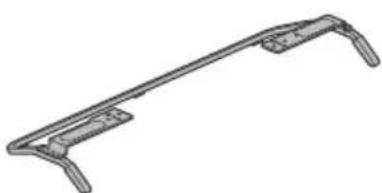
Analog: PAL, SECAM, NTSC3.58, NTSC4.43
Video (2D): 1080p (30 Hz), 1080/24p,
1080i (50, 60 Hz), 720p (30, 50, 60 Hz),
720/24p, 576p, 576i, 480p, 480i
Video (3D):
Egymas mellett: 1080/24p, 1080i (50, 60 Hz), 720p (50, 60 Hz)
Egymas follott: 1080p (30 Hz), 1080/24p, 1080i (50, 60 Hz), 720p (50, 60 Hz)
DIGITAL AUDIO OUT (OPTICAL)
D Surub (+PSW 6 × 12) (2)

E Distanjier (2) F Piesa superioara
def fixare a
dispositivului
KDL-50W82xB.
KDL-50W81xB
KDL-50W80xB
KDL-50W70xB (2)
KDL-42W82xB
KDL-42W81xB
KDL-42W80xB
KDL-42/32W70xB1
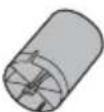
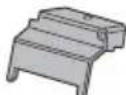
G Surub (+PSW4× 10)
KDL-50W82xB
KDL-50W81xB
KDL-50W80xB
KDL-50W70xB (2)
KDL-42W82xB,
KDL-42W81xB
KDL-42W80xB
KDL-42/32W70xB (1)
Suport (furnizat)
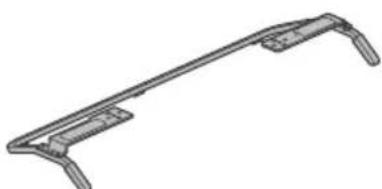
H
Sistem color/video
Analogic: PAL, SECAM, NTSC3.58, NTSC4.43
Digital: Consultați documentul i-Manual.
Acoperire canale
Analogic: UHF/VHF/Cablu, in functie de tara/ regiunea aleasa.
Digital: UHF/VHF/Cablu, in functie de tara/ regiunea aleasa.
Satelit: Frecventa IF 950 - 2150 MHz
lesire audio 8W + 8W (cu exceptia modelului KDL-32W70xB) 5W + 5W (numai pentru KDL-32W70xB)
Tecnologie wireless Protocol IEEE802.11a/b/g/n
Mufe intrare/iesire
Alaturate: 1080p (50, 60 Hz), 1080/24p,
1080i (50, 60 Hz), 720p (50, 60 Hz)
Suprapuse: 1080p (30, 50, 60 Hz), 1080/24p,
1080i (50, 60 Hz), 720p (50, 60 Hz)
Audio: PCM liniar 5.1 canale: 32, 44,1 s i 48 kHz, 16
20 sì 24 bitī, Dolby Digital
Video (2D): 1080p (30 Hz), 1080/24p,
1080i (50, 60 Hz), 720p (30, 50, 60 Hz),
720/24p,576p,576i,480p,480i
Video (3D):
Alaturate: 1080/24p, 1080i (50, 60 Hz),
720p (50, 60 Hz)
Suprapuse: 1080p (30 Hz), 1080/24p,
1080i (50, 60 Hz), 720p (50, 60 Hz)
Audio: PCM liniar 5.1 canale: 32, 44,1 s i 48 kHz, 16
20 sì 24 bitī, Dolby Digital
MHL (comun cu HDMI IN 1)
DIGITAL AUDIO OUT (OPTICAL)
Mufa optica digitala (PCM liniar pe doua canale,
Dolby Digital)
AUDIO OUT/
lesire audio (mini mufa stereo)
Mufacsti
(support subwoofer exterior)
1 (HDD REC),
Port dispositiv HDD USB (numai pentru),
port USB
Slot CAM (modul de acces conditionat)
DC IN 19.5 V
Intrare adaptor
LAN
in modul [Stralucitor]
KDL-50W82xB,KDL-50W81xB,KDL-50W80xB
KDL-50W70xB:100 W
KDL-42W82xB, KDL-42W81xB, KDL-42W80xB,
KDL-42W70xB:99 W
KDL-32W70xB:80 W
Consum mediu anual de energia*1
KDL-50W82xB,KDL-50W81xB,KDL-50W80xB
KDL-50W70xB: 71 kWh
KDL-42W82xB, KDL-42W81xB, KDL-42W80xB,
KDL-42W70xB:69kWh
KDL-32W70xB:54kWh
Consum de energia modul standby*2
0,5 W (10 W in modul software/actualizare program)
Rezolutie ecran
1.920 puncte (horizontal) × 1.080 linii (vertical)
Dimensiuni (cca.) (I× × a)
cu suport de masă
KDL-50W82xB,KDL-50W81xB,KDL-50W80xB
KDL-50W70xB:111,6×69,3×17,9 cm
KDL-42W82xB, KDL-42W81xB, KDL-42W80xB,
KDL-42W70xB:95,8×60,0×17,0 cm
KDL-32W70xB: 72,9× 46,5× 14,1cm
fara suport de masa
KDL-50W82xB,KDL-50W81xB,KDL-50W80xB
KDL-50W70xB:111,6×65,6×6,4cm
KDL-42W82xB, KDL-42W81xB, KDL-42W80xB,
KDL-42W70xB:95,8×56,3×6,4cm
KDL-32W70xB: 72,9× 43,3× 6,4cm
Masa (Cca.)
cu suport de masă
KDL-50W82xB,KDL-50W81xB,KDL-50W80xB
KDL-50W70xB:14,8kg
KDL-42W82xB, KDL-42W81xB, KDL-42W80xB,
KDL-42W70xB:11,7 kg
KDL-32W70xB:7,9kg
fara suport de masa
KDL-50W82xB,KDL-50W81xB,KDL-50W80xB
KDL-50W70xB:13,6kg
KDL-42W82xB, KDL-42W81xB, KDL-42W80xB,
KDL-42W70xB: 10,5 kg
KDL-32W70xB:6,9 kg
MoHTaX Ha TeJIeBn3opa Ha cTeHaTa 12
OToTpaHraBaHe Ha Hen3npaBHOCTn. 14
PpO6JIeMn npEweHnra 14
CneuΦkaun 15
BbBeHne
Blaroapm Bn 3a nokynkata Ha To3n npodyKT Ha Sony.
Ipein da 3anoHete pa6oTa C TeJeBn3Opa, npoTeTe
pbkoBDCTBOTo N3cJIo N ro 3ana3e Ta 6bdeuN cnpaBKn.
3a6eJexKka
-ПпсддраразOTe cTeJIeBUN3Opa,пpoуTeTe "ИнфОрmaця 3a6e3oNaCHOCT" (cTpaHua 3).
- INCTpykCm3a "MoHTnpAHe Ha TeLEBn3Opa Ha CTeHaTa"Ca BKNIOUeHN B pKOBODCTBOTO Ha TO3N TELEBn3Op.
- I3o6paXeHnTa n NIOCTpaunTe, IN3NoI3BaHN B KpaTkoTO pBKOBOCTBO N TOBA pBKOBOCTBO, Ca CAmO 3a CNPABKa NMOKe Da ce pa3JNuHaBaT OT DeIcTBnTeHnN Ha npOdyKtA.
MaToHa ndeHTnΦnKaaQNoHHn eTnKET
Tabenknte 3a Homepa Ha MoDena Ha TeBnOpa, DaTata Ha npoun3BOCTBO (MeceU/roDnHa) HOMHnHaNHTe CToHocTN Ha 3axpaHbAHeTo ca pa3noLoXeHN Ha 3aHaTa Yact Ha TeBnOpa IINu HOnaKOBKaTa.
EtkeTe 3a Homep Ha MoEJa N cepHn Homep Ha 3axpaHbAunna aanTep ca pa3noJoxeHN B DOnHaTa YacT Ha 3axpaHbAunna aanTep.
PPEyIPEXDEHNE 3AДA

IPEIOTBPATNTE
N36YXBAHHE HA IOXAP,
BINHAN DpBXKTE CBEUIN
NJIN DpyTN N3TOCHNU HA
OfBN DAJEY OT TO3N
IPOJyKT.
BAKHA 3A6EJIEXKA
To3n npOdyKT e npOn3BeDen OT nnn ot NMeTo Ha Sony Corporation, 1-7-1 Konan Minato-ku Tokyo, 108-0075 Raonoh. 3aNtBaHn 3a cbOTBeTcBne Ha npOdyKTnTe cbflacHo 3aKoHOdaTeCTBOTo Ha EBpOeNckn CbO3, cneDbA da ce OTnpabRT KbM YnbHOMoHEnn PpeCTaBnTeI Sony Deutschland GmbH, Hedelfinger Strasse 61, 70327 Stuttgart, TepMaHn. 3a Bbnpocn, Cbbp3Ann CbC cepBn3 n rapaHn, MoJn I3NoJ3BaYte aDpeCnTe, NOcoEHn B npnPdpykBaAunTe cepBn3Hn nIIN rapaHUnOHn DOKymENTn.
MoHTaxHa KyKa (CtoiKa)
PnKpenHHe Ha
MOHTaXHaTa KyKa KbM
Tbpa Ha TeJeBn3Op
Ppehahe
-ПпддмecTITeTeJIeBn3Opa,I3KJIIOUeTe BCNUKIN Ka6eIN OTHero.
IpeHacraHTo Ha rOJIaM TeNeBn3Op N3NcKBa DbMa nnN NOBeue dywn.
Korato MeCTIte TeteBn3opa Ha pbue, npbXTe ro, KaKTo e nokaaso no-dony. He hatickaTe LCD naHena n pamkata okono ekpaHa.
- Pn npenacane He n3laarate Te TeneBn3opa Ha cbTpceHnna nnpekane Hn6paun.
Korato npeHacTe TeneBn3Opa Pnp peMOHT IUNI npu cMnaHa Ha KJINUeTo, naKeTupaIte To, KaTO mN0JIBaTe oprInHaJIHaTa onaKOBKa I MaTePnAII 3a NaKeTupaHe.
Ppepa3BaHe oT ppeo6pbuahe
- PnEi Da NoCTaBnTE BnHTA, CNOXeTe DnCnNeRc NmUeTO HAnOJy HA CTaBnHb paBOTHa NOBbPxHOCT, KOrTo e No-ToJMaOT TeNEBn3Opa.
3a n36berheTne nobpeHa nobbpxHocTa Ha LCDnne, noCTabeMeKa Kbpna Bbpy paOthata nobbpxHOCT.
Bentla
HnKora He nokpmbaTe BeHTnlaOnHHte OTbOpn HBeBkapBaIte npedMeTn B Kopnyca.
OCTABETCBO60JHO MRCTO OKOJTOTeNEBUN3Opa KaKTo e NOKa3aHO NO-DOJY.
IpnopbHNTeH0e ana3nON3BaTe opurHAnHaT a KOH3OJa 3a MOHTnpaHe KbM cTeHa Ha Sony, 3a da ocUpyPte doCTaTb4Ha UPKyIaNHa Hb3Dyxa.
HCTaJaunHa CTeHa
OCTaBeTe HaM-MaJIKO TOJIKOBA MRCTO OKOJIO YCTPOICTBOTO.
HCTaIpaHe c nOMoTa Ha noCTabKa
OCTaBeTe HaM-MaJIKO TOJIKOBa MrcTo OKoJIO yCTpOoiCTBOTo.
3a da noctnHte npabnHa BeHTnlaucn 3a da npeoTbpaNTe C6bnpaHeTo Ha npax nn MPbcOTn:
He cnaTe TeIeBn3opa IerHaI, He ro MoHTnpaTe 06bphAT
C roPnHa KaHaoJy, HaoNaKu nn CTpaHnHo.
He cnaarTe TeneBn3opa Bbpxy pafoBe,KnIM,nerIO NIN B DpeuHk.
He npBnAte TeleBnOpa c napeta nata, kato nepdeta nnC npytn ppeMeTN, kato BcTnUu np.
He nHctaInpaTte TnelBn3opa, KaKTo e nokaHaHO no-dony.
LpKyaTHa HbB3dyx e 6IokpaHa.
3axpaHbau Ka6eI
3a da npedotbpatne pck OT noxap, TokOB ydp, nobpeia m/nnn HapaHbaHe, pa6oTeTc bC 3axpaHbaun Ka6en KaKTO cJeBa:
- 3nnoI3BaIte cmo opunHaleh 3axpaHbau Ka6eHa Sony. He n3noI3BaIte DpyrN MapKn.
BkapaTe 电eNa NbTHO n DOKpa B KOHTaKaTa.
BkIIOUBAIte TeIeBUN3opa cAmO KbM IpOMeHINBOtOKOB0 3axpaHbAHe ot 220-240 V.
Korato npokapbate Ka6eJn, 3a Ba7a 6e0nacnoct ce yBepete, He CTE n3KIOUHIN 3axpaHbauuKa6eJ; BHMabaTe Da He Ce CnBHeTe B Ka6eJnte. - N3KJIouyete 3axpaHbauu nka6en ot MPexKaTa oT 220 V, npe nn da pa6oNTte mnc MeCTne TeneBu3opa.
- Na3eTe 3axpaHbauuKa6eJ daJeU OT n3ToHnU Ha TOnnHa.
- ɪnəkʌŋʊyætæ 3axpaHbʌaɪŋ kæbɛnɪ rɒ noʊncTbaɪte peɪɒBHO. Ako 3axpaHbʌaɪŋ kæbɛnɪ eʒʌbɒpɛnɪ nɪn pɑʌpɛhenɪ nɒ hrɛo ce ɔːpəzʌyBa Bnʌra, ɪnɔləʌqɪrta My Mɔʊke da c e hapuʌnɪ Tɔba Mɔʊke da DɔBɒdɛe dɔ Nɔʊkɑp.
3a6eJekka
He n3non3BaTe npInoxeHn 3axpaHbau Ka6eI c npyro o6opuyBahe.
- He dnyche, He orbbaite n He yckbai Te pkekomepho 3axpaHbaua Ka6eJI. KnuIto Ha npoBoHNuTe MoKe da ce orOJI nn PpeKbcSe.
- He npenpabre 3axpaHbuaaKa6eJ.
He noctabraTe TeKk npedMeTn Bbpx 3axpaHbuaaKa6eJ.
He IbpaTe camn 3axpaHbau Ka6en, Korato ro nKIOUbaTe OT KOHTaTa.
He Cbbp3BaIe TBbpIe MHOrO yCTpoINCTBa KbM eINH IN CbIaIKoHTaKT.
He n3no3BaTe KOHTaKT, KOITo He 3axBaUa Cta6uJIHO uencela.
БЕЛEXΚA OTHOCHO 3AXPAHBAUЯ AДАПТОР
PpeynpeKdHne
3a daHAMAMITE ONACHOCTTA OT NOXAP NIN ENEKTPUHECKN ydap, He n3naraTe anapaTa HaNbKd NIN Bnara.
3a da npedToBpaTne nokap nIy npap, He noctabTe npedMeTu, nbHnC BOHa, HanpImep Ba3N, Bbpx anapaTa. He MOHTnpaTe TOBa o6OpyDBeHe B 3aTBopeHO npoctpaHCTBO, HanpImep 6n6LnOteKa nI npo6Ha Me6J.
- Mony, yBepete ce, ye enektpnuecknT KOHTaKT e MOHTupah 6bn3o do o60pyDbaHeTo n e necho DocTbneH.
- YBepTe Ce, Ye INIOn3BaTe DOCTaBeHnTe 3axpaHbAa aAnTOp n Ka6en.
He H3no3BaBte HnKaKbB Dpyr 3axpaHbaa aanTOp. Toba MoKe Da npuHHn Heu3npaBHOCT.
CbpxTe 3axpaHbuaa aanTOp KbM necho DocTbneH eKTPuueckn KOtAKT.
He HABINBaTe 3axpaHbAunKaBeI OKoIa 3axpaHbAunA aadantOp. BtpeHnIrpOboDnK MoKe Da npeKbcHe I TOBa Da npuHH HeN3npabHOCT Ha npneMHnKa.
- He DoKocBaIte 3axpaHbUaJnA daanTop c BnaJxHn pbue.
Ako3a6eJKeNTe N3MeHeHnB 3aXpaHbAunna aDaantOp, n3KnIOyTe FO tEJeKTPuyeckn KONTaKT He3a6abHO.
TeneBn3OpbT He nIpeKbChAT OT m3TOUHnKa Ha 3axpaHaBaHe, DOkato e CbByp3Ah KbEneKTpuYeCKn KoHTaKt, DOpn aKO camnT TeLEBn3Op e n3KnIOueH. - POnHeKe 3axpaHbAaT aDAnTeP ce 3aToNJa, aKo Ce n3NoJ3Ba npOdbJIIXeIHo, MoKe Ja NouyBCTBaTe TOnIIHaTa, KOraTo rdoKoCHeTc pbKa.
3a6paheHa ynoTppe6a
He nHCTanipaTe/N3NoJ3BaIte TeNeBn3Opa Ha CneIeHNTe MeCTa IIN B CHTaunITE, OINCAH NIO-DOY. B npOTIBeH CNYaI TeneBn3OpBT MOKe Da ce NOBpeDN Da pNCHN NOXAP, TKOK yUdp, NOBpeDa N/NI HApAHBaHE.
MectononoxeHne:
Ha OTkpnto (npraKa CbHueBa CBeTnHa), Ha MOpckn 6prr, Ha Kopaab nn Dpyr nIaBatehen CbD, BbB BbTpueHocCTTa H npBo3HO CpeCTBO, BMeuHcKn 3aBeDeHn, Ha HeCtAbnn Hn NOBbpXHOCn, 6bn30 Do BOda, N3IOxeh Ha IbXd, Blara nn nywek.
AkoTeBn3OpbTb6bIeNoCTaBeH B cb6keJahna Ha o6ceCTBaHa bHaNN MNHepaNaHa baHa, TeBn3OpbT MoKe da ce NOBpeNOT Cpata BBB Bb3DyXa NdP.
3a Hn-Do6po KaueCTBO Ha KapTnHaTa, He n3laTne ekpaHa Ha DnpeKTHO OCBETRABe HIN CbHYeBa CBETnHa.
-Ⅲ68BaIe TnpemecTbaHTo Ha TeLEBn3Opa OCTyEHO HA TonIO MRCTO. BHe3aHNHTe POMEHN B TEMNEPApyata Ha cTaYrMoRat Da npuHHT KOHeH3 Ha Blara. TOBA MoKe da e npuHnHa 3a NOKa3BaHe Na IOna KaPTNa H/INn IOni UBeTeOB. B TaKb CnyAa N3aKaHte BJarata Da ce n3napn HanbInHO, ppeDn Da BKIOUHTe TELEBn3Opa.
OkoJHa cpea:
- MecTa, konTo ca ropeu, BnaxHn nI npkeaIeHo npauHn; Tam, KbTeTo MoKe Da Bn3at HaceKomi; KbTeTo MoKe Da 6bJe n3Noxeh Ha MexaHnUHn Bn6paun, B 6bn30CT Do 3anaHmN npEdMeTn (Cbeun np..) TeJeBn3OpbT He Tpr6Ba da 6bDe 3aINBaH nn npckBaH; He NoctabTte B 6bn30CT Do TeJeBn3Opa npEdMeTn, NblHn C TeHuOCT, KaTO HApnPmep Ba3N.
He nocTabaIte TeIeBn3opa Ha BnaJHo UINI npaIHO MRCTo, INN B CTaC Ma3eH DmU INI npapa (6bn3o DO KxHHeHcKn IIOTOBE INObAknHTeni).MoKe da Bb3HNKHe NOXap, eEnkTpueckn Ydp An DEOpMaun.
He nocTabraTe TeneBn3opa Ha MeTa, n3NoKeHn Ha BnCOKn TeMnepaTpyn, HApNIMep DnpekTHa CbHueBa CBeTnHa, 6bn3o Do paNaTOp NIn OTOnnIeNTO TNO. B TakBa ycNoBn TeneBn3opbT MoKeJa da ppee, KoTo Da npuHH DeΦopMaunHa KopNyca NIn NOBpeDa Ha TeneBn3opa.
Cnryaunn:
He n3no13BaIte yCTpoiCCTBOTo, aKO cTe C MOKpn pBue, KORAto KaNakbT Ha YCTPOINCTBOTo e CBJAEH NnC AKCEcoApn, KOITo He ca npenOpbUaHH O nPon3BoDHTe. No Bpeme Ha rpBMOTEBUNH bypn 3KJIouBai TeNEBUN3opa oMpeXaTa o220 V, cbIo n3BAkDaIte aHTEHNIA KabEn.
He MoHTnpaIte TeNEBUN3Opa Taka, Ye Da cTbpyN B npocpTaHCTBOTo. MoKe Da Bb3HKnE HapaHbAne Nn NobpeDa OT C6NbCbK Ha YOBek Nn IpEeMeT B TeNEBUN3Opa.
CuyneHn napyeta:
He XbprIe HnIO KbM TeIeBn3opa.CtkbIoTo Ha ekpaHa MoKe da ce Cuyu N da eKcPiOnupa npu yapa n da npuHn cepno3Hn HapaHaBaHna.
Ako nobbpxhcTtHa nCnPnEe Ce nponyka, He JdoKocBaIte, DOkato He n3KnIOHTe 3axpaHbaunKaBeI. B npOtnBcH cnyaMoxe da NpOynte TOKOB yApd.
Korato He n3noJ3BaTe yCTpoNCTBOTO
IopapnnpuHn,Cbbp3aHn C6e3oNaChocTtA nOKoHaTa CpeDa,Bn npenOpb4BaMe Da n3KIOUBAte TeNEBn3opa OT Mpekata,Korato He nlaHnPape Da rO n3NoN3BaTe HRAKOJko Dn.
TeIeBn3OpbT He e N3KJIouChEOTMpexKaTa, KOraTo e N3KJIouChEOTKOnyTe.3a DaN3KJIouChTe HaNbJHo YCTpoiCTBOTo, N3KJIouChTe KaBeJaHa 3axpaHBAHeTo OT eNeKTpUYeCKaTa MDeXka.
HЯко TeJIeBUN3Opi npITexKaBAt ΦYHKUIN, KOnTO n3NCKBaT OCTaBHeTo Ha yCTPOIcTBOTOB Pekm IOTOBHOCT.
OTHOCHO deuata
- He no3B0JIaIbAaIe Ha da ce KaYBaT BbPxy TeNeBu3Opa.
- Na3eTe MaKInTe akcecoapn daJeu OT Deua, 3a Da He 6bDaT NOBnHaTu OT TReX N0 HEBHMaHHe.
Ako Bb3HnKHaT cneHnTe npo6IeMn...
He3abHNO n3KnIOyTe TeIeBn3Opa Nn3BaTe 3axpaHbAun Ka6en B cnuya, Ye B3HNKe HAKON O T CneDInTe npo6NeMn. KOncYntnpaTe Ce c Baunr SonyO DocTbUHK INN CynblHomooe cepBn3 Ha Sony dann e HanoXnTeJHo TeBn3OpbT da bDe npoBepeh ONKBAINnOuPAn cepBn3.
Korato:
3axpaHbauT Ka6e enoBpeH.
- He3doTo Ha KOHTaKaHe 3aXBaUa cTa6nH0 uenCeNa.
TeIeBn3OpbTe nOBpeH, noHKe e n3nyChaT, ydaep Hnn Heo e Xbplno No Hero.
TeuHnIIN TBbpN npeMeTn ca nonaHaHbN B OTBOpTe Ha Kopnyca.
OTHOCHO TEMNepaTpaHa LCD MOHITopa
Korato LCD MoHITOpbT ce n3non3Ba npOdbNkTeHbPeme, OKoHnIaNaHeI ce 3aToon. MoKe da ycetnte TOnnHaTa, aKO ro DOKoCHete.
KOH3OJI3A 3AKPENBAHE KbM CTEHA
HΦopMaunTa no-dony noka3Ba npabnHaTa paOaTc KOH3OJaTa 3a 3akpenBaHe KbM CTeHa. YBepete ce, Che Cte npoehn BnmaTeHo HΦopMaunTa n 3n03BaTe npabnHO KOH3OJaTa 3a 3akpenBaHe KbM CTeHa.
3a noTpe6nTeJIne:
Henpemehno cna3BaIte CneDnIte MepK 3a 6e3oNaCHOCT, 3a da npEIO TBpaTInTe cepNo3HN HapaHaBaHn OToBn, eNeKTpuueckn ydap, npoeobpbuane He nN u3nyckahe Ha npOdykTa.
- NObepTe MOHTaKa Ha JInueH3npaHn N3NbHnTeJn NdpkTe DeuTaHa HAcTpaHn No BpeMe Ha MOHTaKa.
YBepete ce,Ye CTe Bb3IOxNnI npMeCTBaHTo NnI nMoHTaxKa Ha TeLEBn3Opa Ha NlueH3npaHn N3PbHNTeH.
He cBaJIaIte BnHTOBe H npYr n eJIeMeHTn CJIeM OHTaKa Ha TeJIeBu3Opa.
He npomeHnTe Yactnte Ha KOH3oJata 3a 3aKpenBaHe KbM CTeHa.
He moHTnupaIte npyro Ha KOH3oJaTa o6OpyDbaHe,OCBeH To3n npOdyKT.
He noJnaraTe KOH3oJaTa 3a 3akpenBaHe KbM CTeHa Ha HNKaKbB Dpyr TOBap,OCBeH TeJIeBN3Opa.
He ce oBnraTe n He yBnCbaTe OT TeNeBu3Opa.
He TpeTnpaTe TeIeBn3opa C npEkanela cnla no BpeMe Ha NOUHCTBaHe Nnn NoDpBkka.
3a TbproBn n noDn3nbHnTeHa Sony:
CneHnTe HnCTpyKun ca camo 3a TbproBunte n
noHNtbnHnntEnite Ha Sony. YBepeTe ce, ye cTe npOeyNI
MePKnte 3a Be30nacNCHocT, onncaHn No-dony, n obpHeTe
cneJALHO BBNMaHne Ha Be30nacNCHocTnNo Bpeme HA MoHTaxa,
noDpBxKkata NnpOBepKaTa Ha npOdyKta.
Korato MoHTnape TIN6bOpAte CTeNEBn3opa,ApbXTe ro OCTpaHn. He NOBUNaTne TENeBn3opa 3a CTOnKaTa.
He MoHTnpaTe KOH3OJaTa 3a 3akpenBaHe KbM CTeHa HA CTeHHN NOBbpxHOCTn, KbJeTO bFlnte INIc TcpaHIne Ha TeLEBn3Opa Ca N3daEnH NaCTPAHn OT NobbpxHOCTra HA CTeHata.
He MoHTnpuaTe TeneBn3opa HAd NIN NOKJIIMMaTnK.
-MoHTnpaIte 3dpaBO KOH3OJaTa 3a 3aKpENBaHe KbM CTeHaKbM CTeHaT, KaTO cneBaTe YKa3aHnraTa B Teu HnCTpyKuIM 3a paOta.AKO HkOOnOT BnHTOBete e paxna6e Hnn N3NaDHe, KOH3OJaTa 3aKpENBaHe KbM CTeHa MoKe Da NaDHe N da PnunHn HapaHbAbe Nm MaTepnAnHn UeTN.
I3noJ3BaIte npedocBeHtE BnHTOBe mMOHTaXHH eMeHTN PpaBUNHO, KaTO CneDBeTa Yka3aHnraTb TE3n HnCTpyKuNN 3a paBoTa. Ako N3NoJ3BaTe 3aMeCTBaun eMeHTN, TeneBUNOpbT MoKe Da NaHe n Da npuHnHaapAHBaHn Ha Nua Nn NobpeDa Ha TeNEBu3Opa.
Crtno6te KOH30nata npabunho, kato cneBate npoueypata, onncahA B Te3n HcTpyKnn 3a pa6ota.
- YBepete ce, Ye 3aTgate 3dpabo BnHToBe T Byka3aHOTO NOLOXHeH.
BHHMABaTe Da He ydapnte TeIeBn3opa nO BpeMe Ha MOHTaxa.
- YBepete ce, Ye MOHTnape TeNeBn3opa Ha CTeha, KOrTo e nepneHnKnyIpaHa n paBaHa.
Cnep npabunHm MOHTaK Ha TeNeBUN3opa, oBe3onacete npabunHO Ka6enITE.
He no3B0JBAIte 3axpaHbAunT npoBDnK nIu Cbbp3BaUnTe Ka6eN Da 6dTa npTuNCaHN, Tb KATO BbTpEHNITE npoBOHNmuorat Da 6bDat N3IOKeHn da ce NoLYNu Kbco CbeINHeHne nn eJeKtpueeKn npO6n.
Ppepa3Hm MepKu
TneJaHe Ha TeLeBn3nA
HЯкоихopaMoratДаycetTHeydo6tBO(kaTo HanpraHa Ha OunTe,ymopa nnnradahe)DOKaTO rneDat 3DBuDeo N3O6paXeHnI INrpaTCTpeoocKOnuHn3Dirpn.Sony npenopbBAHaBCNUKN3PnTeINDaNpabTpeoOBnNouBKn KOrato rneDat3DBuDeoN3O6paXeHnI INrpaTHa CtepeocKOnuHn3Dirpn.PIOBnXnTeHHOCCTTaHcctOtaHa Heo6xOUMNTe NOUBKnEpaAUNHa3BaCeknUqOBk.Bne Tp8Ba Da peWnte KOe e Hau-Do6po 3a Bac.AKO IN3nITate HyaKaBO Heyo6tBO,TP8Ba Da cnpTe Da rneDat3DBuDeo N3O6paXeHnI INrpaTeCTpeoocKOnuHn3Dirpn.DOKaTO Heyo6tBO TOOTMnHE;KOCYNTpapte Ce CNekap,AKO cmTheTe 3a Heo6xOUMnO.CbIoTo TAp8Ba Da pnerPeNaTe (i)PBKOBOCTBOTo 3aYNotpeBa HA BcKO Dpyro UcPoIcTB0 INmMeDIn,N3NO3BaHN C To3N TeLEBnOsp (ii)HaaNNye6caTt (http://support.sony-europe.com/) 3a Hau-HOBata INΦOpMaun.3peHneto Ha MaNKITE Deua (ocobHo Ha Te3n NOJWeCTROUHb Bb3pact) BCE OSe ce pa3BnBa.O6bPheTe CE KbM Nekap (NeDAtpB INn OueHLekap),npedJa No3BOUNHe Ha MAnKe Deua rneDat 3DBuDeo N3O6paXeHnI INd INrpaT Ha CTpeoocKOnuHn3Dirpn.Bb3pactHTne Tp8Ba Da HABIOBADAT MaNKITE Deua,3a da rapaHTnpat,Ye Te Cna3BAT OnncAHTE No-rope npenopbKn.
He m3no3BaIte,cbxpaHbAaTe nnOCTaBnTe 3D ouNlata nn6BaTePnTa 630 Do orfB,nn HA MeCTa C BnCOKa TemnepaTpa, Hannpmep Ha npeKTHa CbHHeBa CBETnHa nn B Harpetn OT CbHceto ABOTMO6nn.
Korato n3non3BaTe fynkunra 3a cnmynpaHe Ha 3D,monaMMaTe npedBnU, ye NOKa3BAHOTo N3O6paXeHne e npOMeHcNpMaOp opurHaHnHO, KoTe Ce bJxN Ha KOHBepTnpaHeTo, N3BbpeHo OT TO3n TeJIeBn3Op.
- IneAaTe TeNeBn3N B CpeDIO OCBETeHa CTa, Tb KaTo IneAaHTo Ha TeNeBn3N B Cna6O OCBETeHa CTa HAToBapBa DOnblHInTeJHO Ouyte BN.
Korato n3noJIbATE cnUaJIKN, HAcTpoIte CnNaTa Ha 3Byka, 3a da npedOTbpaITe yBpeXdAHe Ha cnYxa.
LCD ekpaH
BbnpeknueLCDekpaanbte n3paboTeH NO BncoKo-npeuHa texHOIOIIN NOBeue OT 99,99% OT NIKCEIITE My ca eEeKTHBNH,Bbpxy LCD ekpaa Moxe TpaHNO da ce noaBt YepHN NcBETNI TOCKN (eepBeHN,CNH Nnn 3eNEHN).Toba e ctpyKtpyh oocbehoCT Ha LCD naheLa Hne pndTablaRa Heu3npabHOCT.
He HatnckaIte H He npackaIte npedHna FInltbp HneocTabeIte npedMeTN Bbpxy yctpoNCTBOTo. N3o6paXeHnTo moKe da e HepabHomepHo nn LCD naHeBt MoKe da ce nobpeu.
AkoN3NO3BaTe yCtpoiCTBOTo Ha CTyEHO MRCTO, KAPTuHaTa MoKe Da Ce 3AmBfNn Nn Da CTAHe NO-TbMHa. ToBa He e Hen3npaBHOCT.To3n FeHOMe H3Ye3Ba,KORATO TemnepaTpaTa ce NobuNn
KoraTo Ha ekpaHa IpoIbIKNKeIHO BpeMe ca Noka3aHHeNoDBNXHnIO6paXeHn, BB3MOxHO e Da ce NOBRTocTaBHyN o6pa3n. Te MoRaT da N3ye3HaT cneH HKOJIkoCEkyHn.
EkpaHbT N KopnycBt Ce 3aToTnIaT, Korato n3non3BaTe yCTpoiCTBO.ToBa He e HEn3npaBHocT.
LCDekpaHbTcbDbpXaMajkoKoJImHeCTBO TeuHKnPcIaII. CneBaHTe MeCTHnTe npaBnA n3aKOnH 3aN3xBpJrHe Ha noDo6hONOTnaDbU.
IopdpbKka n nouictBaHe Ha nobbpxHocTTa Ha ekpaHa/Kopnyca Ha TeleBn3opa
YBepeTe ce, ye cTe N3KJIOUHIN CCBp3aHnKbM TeJIeBu3opa 3axpaHbau Ka6en, npEi Da 3anOuHHe noHCTBaHe.
3a da npedotbpaTne NOBpeHa Na NOKpuTneTo Ha ekpaHa, cIeDbaiTe HNCTpyKUInTe, IN36poEHn No-DOy.
- 3aДа пpeMaxHeTe npaxa OT NOBbPxHocTtHa Ha ekpaHa/Kopnyca, noNCTBaIe Tc MeKo cyu Napcye npat. Ako noenHannrT npax He MoKe Da ce NoNCTn, NoNCTBaIe ekpHa C MeKo napYe nlat, NeKo HABNaXHeNo Cbc CnaB NoNCTBaU pa3TbOp.
HnKora He npbckaIte Boa IIN pa3TBoP dIpeKTHO Bbpxy TeneBn3opa. MoKe da ce 6pa3yBaT KaKN, KOITo Da NoTeKaT Do DbHOTo Ha ekpaHa NIN NO BbHUnHTe YacTN Da HABNe3HaT B TeJeBn3Opa IV da FO NobpeJr.
He n3noJ3BaIte rpanabn npaeta nlaT, nouchBaun npenapatn Ha ankaHa/KncenHna ochoba, nooNCTBaun npaxOBe nn pa3TbOpn, kato Hnpimep aKoxon, beH3o, napeDntEn nn HnceKtnuN. N3noJ3BaHeTo Ha TaKINBA BeuecTBn nn pOdbJnxTeHNHrKT C rMa nn BnHm MOKe da Nobpei NOBpXHOCTTa Ha ekpaHa nn NOBbpxHOCTTa HA KopnyCa Ha yCTpojCTBOTO. - PnpopbHa ce nepnoDmHNo nooNCTBaHe c npaxocMykaHa HTBOpnte 3a npobetpBaHe c zel oCnHyprBaHe Ha npabInHa BEHTNaIa.
Korato perynnpate bbrna Ha TeeneBn3opa, MeCteTe 6abHO yctpoCTBOTo, 3a Na npedOTbpaTne N3MeCTBaHe Ha TeeneBn3opa nn naHae O T Macata nn CToiKaTa.
DonblnHtEnHo 06OpyDbAHe
He npbxte 6n3o do TeleBn3opa DonblntenHnte KOMNOHEHTN NIN KAKBOTo N da e 6nIO o6opyDahe, N3lb4BaOeEKeTpOMarHnTH BbHN. B npTuBeH cnyaeh Bb3MOxHO KapTHHaTa N/NN 3BykBT da 6bDat cbc CMyueHna.
ToBaObOpUdBaHe e TecTBAHO n CbOTBETCTBa Ha M3NcKBaHnTaHa NdupeKtNbE EMC, KaTO H3NoI3Ba Cbbp3Bau cINHaJIeH Ka6eNo-KbC oT 3 Metpa.
Ipenopbkn 3a KOHeKTop TnF
BbtpueHnHT npoBOHNK Tp6Ba Da e n3daeH cnpmo Cbbp3BaAataaact HaMaIko 1,5 mm.
BbBeTe 9999 3a INH KOd. (INH KOdbT 9999 ce npneMa BnHaRn.)
Pamkata Ha TeleBn3opa ce 3aToTnIa.
Korato TeJIeBn3OpbT ce n3noI3Ba npOdbJxNtEnHO BpeMe, pAMKaTa My ce 3aToPnJa. MoKe da ycETNe ToPnHa, KOrato JdoKOChTe Cpka.
IpeKbchAo ayno nn 3ampb3HaIO Bndeo, npa3eH ekpaH nn TeJeBn3OpbT He pearnpa Ha KOMaHnO T6yToHnTe Ha TeJeBn3Opa nn dNCTaHcNoHHOTO ynpaBNeHne.
- HanpaBeTe obuKHOBeHo pectapTnpaHe Ha TeJIeBn3Opa, KaTo rO u3KJIIOUHTe OT npOMeHJIBOTOKOBOTO 3axpaHbAHe 3a 2 MInHyTu n CNeI TOBa rO BKJIIOUHTe OTHOBO.
He moxkeTe da hamepnte 6yToHnTe I/CH+/-, +/-, //+/*, HOME HaTeIeBn3opa.
BnKTe NIOCTpaunraTaN0-DOJy OTHOCHO MeToNOJIOXKeHneTo Ha 6yToHnTe Ha TeNeBu3Opa.
3aHa yacT Ha TeIeBn3Opa
LED oCBeTJIeHMeTo e BKJIIOyeHo.
- Ako He nckate LED ocBetneHneTo da cBteN, MOKeTe Da ro N3KJIouHnte.
HaTnchete HOME, nocJe n36peTe [HaCTpoiKn] [CnCTeMHn HaCTpoiKn] [O6uHn HaCTpoiKn] [LED ocBETIeHne] [N3KnI.]. MoXte TbIoo Da haTncheTe OPTIONS, nocJe da n36peTe [LED ocBETIeHne] [N3KnI.].
He MoKe Ia ce CbByKe c 6e3KnueH pyTep ue3 WPS.
- Ako n3noJ3BaTe WEP 3aUHTa, n36epeTe [JIecHO] [Wi-Fi] [N36op Ha MPexKa oT cncbK]. Nocne n36epeTe MPekOBOTnMe (SSID), KbM KOeTo nCKaTe Da ce CBpbXKeTe.
He moxe da Hamepn Heo6xOuMoto MpexkoBO nme B HaCTpoiKaTa Ha MpeKaTa.
- ɪЗбэретe [PbúHOBbBExkdaHe] nHaTnCHTe3aДa BbBeDEte MpeXOBOTO nMe.
CneuФикauи
CnCTema
CnCTemaHa naneJa LCD(TeuHOKpncTaleH ducnpe)naHeJ, LED noDCBETka
TeIeBn3NoHHa CnCTeMa
AHaJIorOBA:B 3aBncmocT OT Baunr n36Op Ha
Ibpxaba/pernoh:B/G,D/K,L,I,M
LcΦpOBa:DVB-T/DVB-C DVB-T2
CateNt:DVB-S/DVB-S2
CnCTema Ha zBeTOBte/BuJeO CnCTema
AnJoroba: PAL, SECAM, NTSC3.58, NTSC4.43
LNoPoBa:BxTe i-Manual.
Покпгпе на Каналпe Аналогова: UHF/VHF/ka6eN, B 3abncmocT OT Ваши n36op Ha nbpxkaBa/pernoH. Lфрова: UHF/VHF/ka6eN, B 3abncmocT OT Ваши n36op Ha nbpxkaBa/pernoH. CateлNT: IF checToTa 950-2150 MHz
3BvKOB n3XoJ 8W+8W(6e3KDL-32W70xB) 5W+5W (camo KDL-32W70xB)
БeЗкуна Текhoлогия IEEE802.11a/b/g/n npotoKoN
BxoHNo/IN3xOAnH JkaKOBe
AHTeHek75 oMa BbHueH TePmHaI 3a VHF/UHF
CateJIHTHa aHTeHa
KoneKTOp TnF, XeHcKn IEC169-24, 75 oMa.
DiSEqC1.0, LNB 13 V/18 V & 22 kHz ToH,
Pa3npedeJne no 1 ka6eJ EN50494.
AV1 21-nHOB Scart KOHeKTop (CENELEC cTaHdapT) BKIOUHTeJIHO ayDnO/BuJeO BxOJ, RGB BxOJ n TV ayDnO/BuJeO n3XoJ.
C O M P O N E N TYPBR(KomnoHHTHO BnJeO):1080p(50,60Hz),1080i(50,60Hz),720p(50,60Hz),576p,576i,480p,480iAydnoBxOa (foHO JkaKoBe)AV2BnDeoBxOa(ObU,foHO nIHcYBxoJa)
HDMI IN 1,2,3,4 (6e3 KDL-50/42/32W70xB)
Bndeo (2D): 1080p (30, 50, 60 Hz), 1080/24p,
1080i (50, 60 Hz), 720p (30, 50, 60 Hz), 720/24p,
576p, 576i, 480p, 480i, PC φopMaTn
BnDeo (3D):
Frame Packing: 1080p (30 Hz), 1080/24p,
1080i (50, 60 Hz), 720p (30, 50, 60 Hz), 720/24p
Enda do npya: 1080p (50, 60 Hz), 1080/24p,
1080i (50, 60 Hz), 720p (50, 60 Hz)
EHa HaI pyra: 1080p (30, 50, 60 Hz),
1080/24p, 1080i (50, 60 Hz), 720p (50, 60 Hz)
Aydno: 5.1-kaHaHa JInHeHa PCM: 32,44,1n
48 kHz, 16, 20 u 24 bits, Dolby Digital
ARC (Audio Return Channel) (camo HDMI IN 2)
HDMI IN 1,2,3,4 (camo KDL-50/42/32W70xB)
Bündeo: 1080p (30, 50, 60 Hz), 1080/24p,
1080i (50, 60 Hz), 720p (30, 50, 60 Hz),
720/24p, 576p, 576i, 480p, 480i, PC φορmaTη
Aydno: 5.1-kaHaHa JInHeHa PCM: 32, 44,1 n
48 kHz, 16, 20 n 24 bits, Dolby Digital
ARC (Audio Return Channel) (camo HDMI IN 2)
MHL (o6u c HDMI IN 1)
(6e3 KDL-50/42/32W70xB)
BnIeO (2D): 1080p (30 Hz), 1080/24p,
1080i (50, 60 Hz), 720p (30, 50, 60 Hz),
720/24p, 576p, 576i, 480p, 480i
Bndeo (3D):
EHa do npya: 1080/24p, 1080i (50, 60 Hz),
720p (50, 60 Hz)
EHaHaIpyra:1080p(30Hz),1080/24p,
1080i (50, 60 Hz), 720p (50, 60 Hz)
Aydno: 5.1-kaHaHa JInHeHa PCM: 32, 44,1 n
48 kHz, 16, 20 u 24 bits, Dolby Digital
MHL (o6u c HDMI IN 1)
(camo KDL-50/42/32W70xB)
Bündjeo: 1080p (30 Hz), 1080/24p,
1080i (50, 60 Hz), 720p (30, 50, 60 Hz),
720/24p, 576p, 576i, 480p, 480i
Aydno: 5.1-kaHaHa JInHeHa PCM: 32,44,1n
48 kHz, 16, 20 n 24 bits, Dolby Digital
DIGITAL AUDIO OUT (OPTICAL)
UΦOB ONTnueH JAK (Дыканглн Hee PCM,
Dolby Digital)
AUDIO OUT/Ω
Aynno n3xOo (ctepeo mHnXkaK)
Kak cnyuwaikn
(noDpBkaHa cbyep)
1 (HDD REC),
IopT3a USB HDD yCTpoNCTBO (cAmO
USB nopr
CAM (moyn 3a ycnoBEN doctbn) rhe3do
DC IN 19.5 V
BxoJ3a aanTOp

LAN
10BASE-T/100BASE-TX KOHeKTOp (B 3aBnCmOCT OT YcNoBnTa Ha pa6oTa Ha MpeKaTa, CkOpocTtHa IpeHOC Ha daHHnTe MOKe Da ce pa3nUaBa.
10BASE-T/100BASE-TX 3a To3n TeJIeBn3Op He rapaHTnpa CKOpOCT N KaYeCTBO Ha KOMyHnKaunraTa.)
Дугн
Akecoapn no u36op
TbynaIaNCTaHUnOHNo: RMF-ED004
Kamepa c Mnkpooh: CMU-BR200/CMU-BR100
Be3xuueh cy6yep: SWF-BR100
MHL kaeb: DLC-MB10/DLC-MB20/DLC-MC10/
DLC-MC20
AknBn3D ounila:TDG-BT500A (camo
KDL-50W82xB,KDL-50W81xB,KDL-50W80xB)
PacuBn 3D ouJla: TDG-500P (cAmo
KDL-42W82xB,KDL-42W81xB,KDL-42W80xB)
Pa60Tha TemnepaTypa
0^ - 40^
Pa60Tha BnaXnOCT
OTHOCINTeJIHa BnaxKHOCT 10% -80% (6e3
06pa3yBaHe Ha KOHdeH3)
3axpaHbHe n npyrgn
ИЗИСКВАнЯ 3a 3axpaHBAHe
19,5VDCc npomeHnIBOTOKOB aanTOp
HomHaJIHO BxOДH O HAnpeXeHne:
220V-240VAC,50Hz
EheprnienKnae
KDL-50W82xB,KDL-50W81xB,KDL-50W80xB
KDL-50W70xB:A++
KDL-42W82xB,KDL-42W81xB,KDL-42W80xB
KDL-42W70xB:A+
KDL-32W70xB:A
Pa3mep Ha ekpaha (n3mpehen no daarohana)
(πριδπ.)
KDL-50W82xB,KDL-50W81xB,KDL-50W80xB
KDL-50W70xB: 50 uHua / 125,7 cm
KDL-42W82xB,KDL-42W81xB,KDL-42W80xB
KDL-42W70xB:42nHua/106,7cm
KDL-32W70xB: 32 uHua / 80,1 cm
KohcymaunnaHa eheprnra
B [CtahapTeH]peXIM
KDL-50W82xB, KDL-50W81xB, KDL-50W80xB, KDL-50W70xB: 51 W
KDL-42W82xB, KDL-42W81xB, KDL-42W80xB,
KDL-42W70xB:50 W
KDL-32W70xB: 39 W
B [Rpbk] pekmM
KDL-50W82xB,KDL-50W81xB,KDL-50W80xB
KDL-50W70xB:100 W
KDL-42W82xB, KDL-42W81xB, KDL-42W80xB,
KDL-42W70xB:99 W
KDL-32W70xB:80 W
CpeDNo roDnUH NoTpe6JIeHne Ha eHeprn*1
KDL-50W82xB,KDL-50W81xB,KDL-50W80xB
KDL-50W70xB: 71 kWh
KDL-42W82xB, KDL-42W81xB, KDL-42W80xB,
KDL-42W70xB:69kWh
KDL-32W70xB:54kWh
KoHcymaunHa eHepnBpekmI GotOBHOCT 0,5 W (10 W B pekm Ha aKtyaun3aun Ha coTyeP/EPG)
Pe3oIouznaHaDncnpe
1920 tokni (no xopn3oHTana) × 1080 pea (no BepTnkaJa)
T6apntn (npn6n.) (w x B x d)
C NOCTaBKa 3a Maca
KDL-50W82xB,KDL-50W81xB,KDL-50W80xB
KDL-50W70xB:111,6×69,3×17,9cm
KDL-42W82xB, KDL-42W81xB, KDL-42W80xB,
KDL-42W70xB:95,8×60,0×17,0 cm
KDL-32W70xB: 72,9× 46,5× 14,1cm
6e3 nocTaBka 3a Maca
KDL-50W82xB,KDL-50W81xB,KDL-50W80xB
KDL-50W70xB:111,6×65,6×6,4 cm
KDL-42W82xB, KDL-42W81xB, KDL-42W80xB,
KDL-42W70xB:95,8×56,3×6,4cm
KDL-32W70xB: 72,9× 43,3× 6,4cm
Terno (npn6nl.)
C NOCTaBka 3a Maca
KDL-50W82xB,KDL-50W81xB,KDL-50W80xB
KDL-50W70xB:14,8kg
KDL-42W82xB, KDL-42W81xB, KDL-42W80xB,
KDL-42W70xB:11,7 kg
KDL-32W70xB:7,9kg
6e3 nocTaBka 3a Maca
KDL-50W82xB,KDL-50W81xB,KDL-50W80xB
KDL-50W70xB:13,6kg
KDL-42W82xB, KDL-42W81xB, KDL-42W80xB,
KDL-42W70xB:10,5kg
KDL-32W70xB:6,9kg
*1 KOHCymaunHa eHepnHa rOtnHa,6a3npaHo Ha KOHCymaunTa Ha TeJeBn3Op,KoITo pa6OTn 4 Yaca Ha DeH,365 dH.N. DeIcTBnTeJHaTa KOHCymaun Ha eHepn3aBnCn OT TOBA KaK Ce n3PON3Ba TeJeBn3Opa.
^*2 Yuka3aHaTa KOHCymaun Ha eHeprna B pexmI GotobHOCT ce DoCTura cJe, KaTo TeJeBnOpbT PnIKIOUH Heo6xoIDMNTe BbTpewHn Ipouecn.
3a6eJexKa
3HaKbT "X" B HmTeTo Ha MoJeJa CbOTBcTCTBa Ha YNCJIO, OTHacraUO Ce Do dN3aHa N cBeTa Ha TEJIeBu3Opa.
- He n3baxdaiTe mntaunohnata KapTa ot TV CAM (MOyI 3a yCIOBEN DOCTbn) CLOTa,OCBeH 3a da NoCTabNTe cMapT KapTa c CAM.
HaJIuHHeTo Ha OIcIOHaJIHn AkCeCoApn 3aBNCn OT IbpxAbata/perHOa/MoJeNa Ha TeJeBnOpa n HAIINuHocCTTa.
-ДиЗаньИ ссeциФикaциTe noДпжaТ ha npOMЯHa 6e3 npeDynpexKdEHne.
To3n TeIeBn3Op BkJIIOvBa MHL 2.
3a6eJekka 3a uΦpoBaTa ΦyHKunHa TeLeBn3opa
BcyaФyHKuIa,Cbbp3aHa C uNΦpoBaTa TeJeBn3n (Due pa6oTu cAmo B DbpxKaBnte n O6laCTnTe, B KOnTO ce npednarat DVB-T/DVB-T2 (MPEG-2 n H.264/MPEG-4AVC) uNΦpOu Ha3emHn CnHaJI, NJI TaM, KbDeTo NMa DoCTbN Do CbBMeCTnMa C DVB-C (MPEG-2 n H.264/ MPEG-4AVC) Ka6eHa ycLyra. PnpOBepTe npi Ba7nma MeTeH DoCTaBvNK DaJIi TaM, KbDeTo XnBeEte, MoXeTe Da npHeMaTe DVB-T/DVB-T2 CnHaJI nJIi noniTae Ba7nja DoCTaBvNK Ha Ka6eHa TeJeBn3n JaII TExHa T DVB-C Ka6eHa ycLyra e IODxOJa 3a CbBMeCTHa pa6oTa c To3n TeJeBn3Op.
Bb3MOxH0eBaunrKa6eJenDocTaBvNK Da BnNONCKa TaKca 3a CBOnte YcLyrN NnI Da NONCKa Da Ce Cbrlacnte C npabunata N yCIOBnraT, KOITo TOn HaIra.
BbnpeknYeTo3nTeJIeBn3OpOTROBapraHa DVB-T/DVB-T2 n DVB-C cneuKauNTte, CbbMeCTmOcTTa My C bJeu DVB-T/ DVB-T2 uΦpOBn Ha3emHn n DVB-C uΦpOBn Ka6eHNn N3JIbYBaHn He e rapaHTnpaHa.
Bb3MOxH0 e onpeJeHn cHpOBN yHKuH Na TeJIeBn3Opa Da He pa6OT B HAKo DbPxAu/N perNoHn N DVB-C Ka6eHaTa ycLyra MoKe Da He pa6OTn npaBUNHOc HAKo DOCTaBuNt.
HΦopMaζηa TbProBcKm MapKn
- TepmunHnte HDMI n HDMI High-Definition Multimedia Interface, KaKTo n IoroTo HDMI ca TbproBcKn MapKn nn 3ana3eHn TbproBcKn MapKn Ha HDMI Licensing LLC B CAU n npuRn Dbprkabn.
DLNA, Ioroto Ha DLNA n DLNACERTIFIED ca TBpROBcKn MapKn, MapKn 3aycnyn nn cepTnPhiuPaHn MapKn HaDigital Living Network Alliance. - Понзveдени no Лицен3 Ha Dolby Laboratories. Dolby И симвовлт Двонo "D" ca PerictpupaHn TbproBcKn Маркn Ha Dolby Laboratories.
"BRAVIA"иBdaAaBbCKaMapka Ha Sony Corporation. - TrackID e TBpRbCKa Mapka nI npereNCTpnpaHa TBpRbCKa Mapka Ha Sony Mobile Communications AB.
- Gracenote, Gracenote eyeQ, Gracenote VideoID, Gracenote Video Explore, Gracenote MusicID, Логото и логотиьт Gracenote, касу и логото "Powered by Gracenote" caperenstpupaMu TbproBckn Марки плп ТбproBCKn Марки на Gracenote B CAU n/nлдруг nbржави.
- Opera® Devices SDK from Opera Software ASA. Copyright 1995-2014 Opera Software ASA. All rights reserved.
Wi-Fi, Wi-Fi Direct and Miracast can TbproBckn MapKu nn 3aapaneHn TbproBckn MapKn Ha Wi-Fi Alliance. - Лoronto "Sony Entertainment Network" и "Sony Entertainment Network" съровский марки на Sony Corporation.
- MHL, Mobile High-Definition LinkилоготOMHL ca TbproBcKn Марки ппперисьпан ТбproBcKn Марки на MHLLicensing, LLC.
- 3a DTS nateHTn, BuxTe http://patents.dts.com. Поньдени по Лицен Ha DTS Licensing Limited. DTS, симвовт, & DTS и симвовлт зашино са ретистрипани Тьрювски Марки, a DTS Digital Surroundе Тьрювска Марka Ha DTS, Inc. © DTS, Inc. BCчkn права 3ana3eHn.
- Designed with U E I T e n c h o l o g y Under License from Universal Electronics Inc. Portions © UEl 2000 - 2013
3HaKbT Bluetooth® n Iorata ca co6CTBeHocT ha Bluetooth SIG, Inc. n n3NoJ3BaHeTo Ha Te3n 3Haun ot Sony Corporation e no JnueH3. OctaHaJInte TbpROBcN MapKn n TbpROBcN nMeHa npHaJdJeKaT Ha CbOTBeTHInTe NM co6CTBeHnU.
- DiSEqCTm e TbproBcKa Mapka Ha EUTELSAT. To3n TeIeBn3Op nOIIbpxKa DiSEqC 1.0. To3n TeIeBn3Op He e npedHa3NaueH 3a ynpabJIeHne Ha aHTeHc C MOTop.
περιεχόμενα
\SHMANTIKH\SHMEIΩΣH. 4
DIGITAL AUDIO OUT (OPTICAL)
Kare Paketleme: 1080p (30 Hz), 1080/24p,
1080i (50, 60 Hz), 720p (30, 50, 60 Hz), 720/24p
Yan Yana: 1080p (50, 60 Hz), 1080/24p,
1080i (50, 60 Hz), 720p (50, 60 Hz)
Alt Alta: 1080p (30, 50, 60 Hz), 1080/24p, 1080i
(50, 60 Hz), 720p (50, 60 Hz)
Ses: 5.1 kanalli dokrusal PCM: 32, 44,1 ve 48 kHz,
16, 20 ve 24 bit, Dolby Digital
ARC (Audio Return Channel) (sadece HDMI IN 2)
HDMI IN 1,2,3,4 (sadece KDL-50/42/32W70xB)
Video: 1080p (30, 50, 60 Hz), 1080/24p,
1080i (50, 60 Hz), 720p (30, 50, 60 Hz),
720/24p, 576p, 576i, 480p, 480i, PC Formatlari
Ses: 5.1 kanalli dogrusal PCM: 32, 44,1 ve 48 kHz,
16, 20 ve 24 bit, Dolby Digital
ARC (Audio Return Channel) (sadece HDMI IN 2)
Video (2D): 1080p (30 Hz), 1080/24p,
1080i (50, 60 Hz), 720p (30, 50, 60 Hz),
720/24p, 576p, 576i, 480p, 480i
Video (3D):
Yan Yana: 1080/24p, 1080i (50, 60 Hz),
720p (50, 60 Hz)
Alt Alta: 1080p (30 Hz), 1080/24p,
1080i (50, 60 Hz), 720p (50, 60 Hz)
Ses: 5.1 kanalli dogrusal PCM: 32, 44,1 ve 48 kHz,
16, 20 ve 24 bit, Dolby Digital
DIGITAL AUDIO OUT (OPTICAL)
Dijital optik jak (iki kanal dogrusal PCM, Dolby Digital)
AUDIO OUT/Ω
YCTaHOBka KPOHHTeHOB Ha CTehy .9
Ioirotobka K yctaHOBKe TeJeBn3opa .12
YctaHOBKa TeJIeBn3opa Ha cTeHe .13
Ponck HencnpaBHOCTe 15
Ponck uycpaheHne HncnpaBHOcte ... 15
Texnueckne xapaKTepcntu. 16
BVeDHeHne
Blaorapm Bac 3a To, YTO BbYb6paHn 3T0 TEleBn3Op Sony.
Ipeep NepBbIM BKJIOUeHNEm TELEBn3Op BAHMaTeJIbHO
O3HaKoMbTeCb C DaHHoN IHCTpyKuNei NO EKcNJaYatauN IN
coxpaHnte ee Ira KOHCyNbTaun B Bydyuem.
Приимechаиме
-Перед наалом pa6obtс TEleBn3Opom npouHTaTe pa3deN "CbeHnno 6eOanacHocTn" (cTp.3).
- INHCTpyKUIN "YCTAHOBKa TelenBn3Opa Ha CTeHy" COepkAaTcB DaHHo INHCTpyKUIN NO EKCNlyatauIN TelenBn3Opa.
Pucykn n 3o6paXeHn, nCnoB3yeMbIe B DokymHeTc KpatKoe pyKOBOCTBO" N B HactOraIeM pyKOBOCTBe, npEdctAIBHeHt oNbKO dIa CnpBaKN I MOrY OTNIuA TbCBr O T fakTtueCKORo N3dJIIN.
PacnoJIOKeHne IeHTnIu npUoJe
3TNKETK
3TnkeTkn C HOMepom MoedeN TeLEBn3Opa, DaToI erO npOn3BOCTBa (Mecu/roD) IN HOMHaJIbHOH MOUcHOCTbIO 3JKeTpOnITaHnA paCNOJIOKeHb Ha 3aDHe N aHeN TleEBn3Opa nIIN Ha yNaKOBKe.
3TnKekTu C HomepOM MoJeN N cepHbIM HomepOM ceTeBOrO aanTepe paacnoJooKeHb B HnKHe yAcTn ceTeBOrO aanTepe.
Data n3rTOBLeHn yKa3aHa Ha n3dEeHH m yNaKOBKe Ha 3TtKeTke co uTnx-KoDM B cneIyUoIeM fOpMaTe:MM.YYYY, rDe MM-Mecu, YYYYY-rod n3rTOBHeHn.
PPEyPExEHH
BO N3БЕЖAHNE BO3ГОРАня

DEPKNTECBEUINJIN NCTOCHNIOTKPBITOTO OTHRAJNOTN3JEINB TEUEHNE BCERO BPEMEHN ETOPABOTbl.
Дя nokynateneB Bénapcyn Poccn
YCTpoIcTbO KDL-50W828B, KDL-50W706B, KDL-50W705B, KDL-42W828B, KDL-42W706B, KDL-42W705B, KDL-32W706B, KDL-32W705B npedHa3HaueHoToIbKO IaNcNoJIb3oBaHIN B nomeueHHx.
HΦopmaζηДЯ nokynatelenB YkpanHe
YIOnHOMOCHENb npedctabntelb YKpaHne no BONPocAM COOTBcTcBn Tpe6oBAHNM TEXMHcCKN pERlAMEHTOB:
OOO "COnn YKpanHa", yI. CnaccKa 30, r.KneB, 04070, YKpanHa.
O6bpyoBaHHe oTBeaetpe6oBaHnA:
- Textupeckoro pernaHemaTbe 3eONaCHOCTN H3KOBJbTHORO 3JeKTPuueckoRO 6obpyoBaHnA (noctaHOBHeMne KMY ot 29.10.2009 N9 1149);
-Texnueckoro perJaMaHTeNo 3NeKTpMaHrHuTHoI COBmctnMoCTn obOpoyobHnna (noCTaHOBJIeHne KMYOT 29.07.2009 N° 785);
-TexHnueckoro pernaMeHTa orpaHneHn HcNoJIb3OBAHn HeKoTOpBx OAnChbX BeIeCtB BJKeKTPuYeCKOM 3JKeKToPOnHOM OobpyoBaHm (noCTaHOBHeHne KMY ot 03.12.2008 N° 1057)
Ipnun3Bovntelb CoHn KopnpoeWn 3Tm DeKnappyeT,TO TeLeBn3Opbl MoDenei KDL-50W828B,KDL-50W706B, KDL-50W705B,KDL-42W828B,KDL-42W706B,KDL-42W705B, KDL-32W706B,KDL-32W705B OTBeaHOT Tpe6oBaHnM n DpyrIm npimHeMbIM noLoXeHnM TexNueckoro perlaMeHaTa paAnoo6opyDoBaHnN n TeLeKOMMyHnKaUOnHO KoHeHOrO (TePmHnAhlborO) o6OpyDoBaHn. NpUynTbeKlapauio COoTBETCBn MOxHo n aDpccy OOO "CoHn YKpaHNa", yI. CnaccKa 30, r.KneB, O4070, YKpaHNa, e-mail info@sony.ua.

001
BAXHOE PIPMEUHNE CBeHnno 6e3onachoctn
Ha3BaHne npOdyKta: TeIeBn3Op
PpmeaHnB OTHoWeHH 6ecnpoBOHOH CB3N

HactoIyM Sony Corporation 3aBnreT,
TO daHHoe yCTpoiCTBO yIOBJeTBOPReT
OCHOBbM Tpe6OBaHNIM COOTBeTCTBYIOUIM NOIOXeHNAM
DipeKTHBiB1999/5/EC.
JnnoyueHnDonoHInTeIbHO INΦOpMaUN IOcETNe Be6-
cauN no cneHyouemy URL-aDpecy:
http://www.compliance.sony.de/
PpmeHne noknatee. Cnyoaa Hhopmaa npMeHMA TObKO IIOOBpyOBAHn, npdaiooeroB CTpaHax, rdeJeCTByOT DpeKtNBbl EC.
CnCTemyBecnpoBOHOTeJeBHeHMOXHO NcNoJb3ObaTb B CNeDyUoxx CTpaHax.
AT, BE, HR, CY, CZ, DK, EE, FI, FR, DE, GR, HU, IE, IT, LV, LT, LU, MT, NL, PL, PT, SK, SI, ES, SE, GB, IS, LI, NO, CH, BG, RO, TR, AL, BA, MK, MD, RS, ME
DAnHoeObOpyOBAHHeMOxHO NcNoJIb3oBaTbB Dpyrnx HeeBPoneKcx CTpaHax.
Ipon3BODInTeB: CoHn KopnpoeiH, 1-7-1 KOnaH, MnHaTo-Ky, Tokno, JnoHna, 108-0075. CcenaHO B CnoBakn m ManaJn3n CtpaHa npOn3BOCTBa yka3Ha Ha n3dJIeN n ypaKOBke.
EAC
MnnpTepeHa Teppntopnn CtpaH TaMoxeHHoro coo3a: 3AO
OprAHn3aHg,ynIOHMOHcHb npHHMaTb npTeH3N0T 1oTpe6BnteHnHa TeppnToPn Ka3axCTaHa 3AO «COnn 3NeKtpoHnKc》 PpndctabtnEbnCTBO a Ka3axCTaHe, 050059.AmAtbIy,ynuCa NbaHInNoBa,I.58
BHIMAHNE
BaTapeKn He DoJXHbI NOBBePraTbCry Qpe3MepHomy HArpeBy, HanpImep, BCNeDCTBnE BO3DeNCTBnA CONHeuHbIX NyeH, OrrH N T.I.
YctahOBka/NoDKIIOUeHne
Bo n36exaHne Bo3ropaHH, nopaxeHH 3NeKtpuecKMM TOKOM, NOBpExeHHaTe TeneBnOpa H/nn TpaBM BbINOJIHnTte YCTaHOBV K NkCNYATAUIO TeLEBnOpa B COOTBeTCTBUN C HIXKeCNEdyuONMn Yk3aHnMM.
YctaHOBka
TeBn3Op CneDyetyCtHaBnBaTb B6n3n NerKoOCTynHcTeBOI PO3ETKN.
Bo 36exhae onpokmibabHn nn NobpeJeHn TeBnOpa nOnyueHn TpaBmYcTaHOBnTe TeBn3Op Ha yCTouHBYIO pOBHyN NOBepXHOCTb.
HacTeHHaYcTaHOBKaTeIeBIM3OpaDoJIXHa BblIOJIHbTcB TaIbKO KBaIIINuIupoBAHbIMn CneuaIInCTAmn cepBICHOJ cIyKbI.
- No coobpaxeHnM Be3onachOCTn HactoTeNbHo peKomeHnyetcNcNoJIb3OaTb Akceccyapbl Sony, B TOM qncne: - KpoHHTeIN DnA HACTEHNO YCTAHOBKn
- O6raTeNbHo IcNoIb3yIte BnHTbI, npunaraemble K KoHHTeH INa HacteHHoYCTaHOBKN, KOrda 6yDeTe npKpenPbTb MoTHaXHbIe CKObI (NOCTaBA) K TeLEBIOpy. Ppunaraemble BnHTbIMeIoT KOHCTpyKUIO, KOToPAy YKa3aHa Ha pUCyHKe, npn N3MepeHNOT KOHTaKTHOINOBEPXHOCTM MOHTaXHOb CKObI (NOCTaBA).
DnAmEtP nДINHa BnHTOB pa3JNUHbI B 3aBcNMOCTN OT MoJeN KPOHHTeHa Jn HAcTeHHOY YcTaHOBKn. NcNoB3OBAHHe BnHTOB,OTJNUHbIX OT BXOJaUXX B KOMJIeKT NOCTaBm, MOKET npNBecT KN NOBpeKeHIO TeEbn3Opa Nn BB3BaTb EOr NaDeHne N T.D.
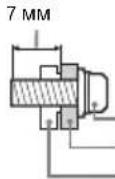
BnHT (noCTabJIaTeCB KOMnJIeKTE C KoHHTeHOM DnHaCTeHHoYcTaHOBKn) MoTaxKaHs KaO (NoCTabKa) 3JMeHT dN npuCoEduHeHn MOHTaXHO Kn6bHa Ha 3aHHe KpIiKe TeNeBn3opa
IepemeeHne
-пегд перемшеним телевизора отcoeMHNTe OT Hero Bce Ka6enn.
Длгп поноки телевизopa 60льшх pa3меров tpe6yotcды плtn ручеловka.
PnpneHocKe TeneBn3opa BpyHyIO depKInTe erO, KaK nokka3aHO Hnke. He npNKlaDbaiBeYte ycninK JKK-naneNp pamKe 3kpaHa.
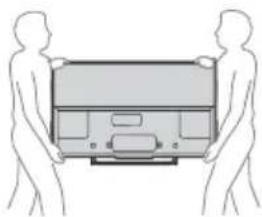
- PnpeB03ke 6epeRte TeIeBu3Op OYdApOB n CnIbHOB B6paun.
- Ecn Heo6xOIMo DOCTaBnTb TeneBn3Op B pemOHTHyIO MaCTepckyo nn nepeBeseTN B Dpyroe MeTO, yNAkyIte erO B KApToHHyIO KopobKy INyNAKOBOHyBI MaTePnaI, B KoTopbIX OH NOCTaBnCn IHaayAho.
3aunTa OT ONpOKnDbIbAHn
-Пистулая К установке Кренихого BИNTа, NOLOXКТЕ.TeBERN3Ор ЭкраHOM BHN3 Ha YCTOДИНБYIO WIPOKYO NOBEPXHOCTb.
Bo n36exaHne NOBpeXeHn NOBepxHOCTN KK-dncnnoNoIOXHTe Ha paOchyIO NOBepxHOCTb MmKyoTKaHb.
Bentnlaa
HnKOrda He nepeKePbIbAaTe BeHTnIaUHOHHbIe OTBepCTN a Hc BCTABJIaTBe HNX HnKaKne IpeDMtbl.
OctabJTe CBOOHOe npoctpaHCTBO BOKpyr TeJIeBN3opa, KaK Noka3aHO Ha pucyHKe Hnke.
-Дя obecneueHn HndeKaeun CpkyJauu Bo3dyxa HaCToTeBnHO peKOMeHcyTc INPOnb3OaBt CneuaJIbHbI KPOHwTeH nJaHcTeHHo YcTaHOBKn npOn3BOdCTBa KOMNaHn Sony.
HaTeHHa YcTaHOBka
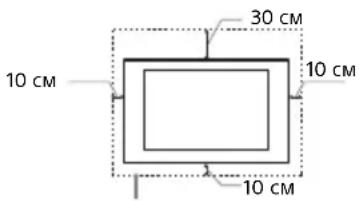
OeBbTe BOKpyr TeIeBn3opa pacCToHne He MeHbWe yKa3aHHoro.
YCTaHOBkaHaNoDCTaBKe
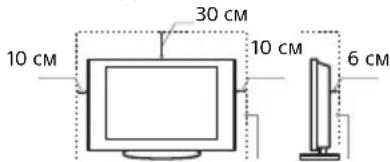
OeBbTe BOKpyr TeJeBn3opa pacCToHHe MeHbwe YkA3aHHoro.
-Дя обесоченьи Надлжашеь В entnlaци N
PpeoTbpaueHnckonJeHnrgp3n nblnn
-He KnaIte TeleBn3Op 3KpaHOM Bn3; He YcTaHaBJIbAaTe Te HeN3Op nepeBepHyTbIM HxHHe cTOPOHO BBepx, 3aOm HanepeD nnH Abok.
- He yctaHaBnBaIe TeIeBn3Op Ha NoJIke, KoBpe, KpoBaTN IIN B WkaΦV.
-HeHaKpbBaIeTeTJeBUN3OpTKaHbIO,HaNpIMep, 3aHaBeCKaMn,aTaKKe rA3eTAMN T.N.
- He yctaHaBnBaIe Te IeBn3Op TaK, KaK noka3aHo Ha pncyHKe HnXe.
Uπpknyla B03dyxa HapyuheHa.
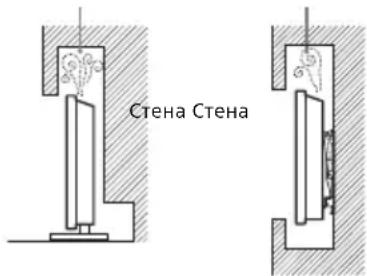
Ka6eJb nTaHn
Bo n36exaHHe Bo3rOpaHn, npaKeHn 3JleKtpnueckm TokOM, nobpejdeHn TeEnB3opaHn TpaBM o6paauaHTecb c KaBeJeM nTaNHaHn n CeTeBOI po3eTKoB COOTBeTCTBUN C HnHexcJeDyUQMM Yka3aHnMM:
-ИспοльзутTeToькоKaбели nHTaHЯ noctabKn Sony, He NOIb3yITecb Ka6eJMaN dpyrnx NoCTaBUnKOB.
BCTABNnTe BnKy Bpo3eKy Do KOHua.
-ИспοльзутЕДЯ NITAHЯТeLEВЗОРaTOЛБКоCEtB nepemehHOrOToKa HANpRKeHEm 220-240 B.
-ByinnoJHnA KaebbHbIe CoeHHEnHm MExdy UcTPOCTBAM, B cJeIax Be3oJNaCHOtn N3BLeKnte Kaebb NtAHnIuN3 CeTeBOI pO3ETKn 6yDBe octOPOXbH, YTObE He 3aHTyTBcO Kaebn
-NepeD BbInonHeHnem KacKx-Ni6o pa6oT cTeNeBn3Opom Nn erO nepeHocKo BbHtE BnKy Ka6eN nTuHaN O T cEtN.
-KabeJIb NITaHnI He DoJIkeH HaxOJNbCpIOM C NTOUYHKAMU TENla.
-Perynphno NCTNe BUNky Ka6eI NaTaN, npeBapntbHO BbHMa e ee pO3eTK. EcnHa BnKHe IMeETcN bN, B KToPoi cKaanBaeTcBnA, 3o MoKTe npNBecTcN To nobpeXKeHIO uO3oJMN, KAK CneCTBNE, K BO3rOpaHIO.
PpimechaHne
He nIcnoIb3yIte BxOJaunB KOMnIeK T NOCTaBKn Ka6JIb IITaHnC dpyrUm oOpyoDaHnEm.
He nepexmamte, He nepenmbaTe n He nepekpyuBaTe Ka6bI nHTAHn, npnaarag n3nnHnne ycnnB. B npOTNBOM cnYae MOryT OOrnltcBn nnpeLomntbCnByTpHnne Xnbl Ka6bIa
He n3MeHnTe KOHCTpyKuIO Ka6eIaNTAHIA.
He ctabte Hne KnaIte HnKaKne TjXeIbe npedMeTbHa Ka6eb nHTaHn.
BbHIMa Ka6eNb nHTAHn 13 po3ETKn, He TAHnTe 3a cam Ka6eNb.
He noKNoaIte CnUkOM MHOrO np6OpOB K OdHOn 3NeKtpop03eKe.
He noIb3yItec 3JIeKTpopo3eTko C nIOxIMM KOHTaTAM.
ПРИМЕЧАНО O CETEBOM AДANTEPE
PpeynpckdneH
TObbl He Donyctntb Bo3ropaHn INI NopaxHeN 3JIeKTPnuEcknM TokOM, He NoBepraTe aannapat Bo3dJeCTBIO DOxJa BnN BnA.
TtO6bI He OONyCTNtB Bo3RopAHHa NIN NopaxHeHH
3NeKTPnueckm TOKOM, He CTABbTe Ha annapatpyeMKoCTN C
KNkOcTBIO, HAnpIMep BAbl. He YcTaHaNBAuTE 3TO
0bOpyDoBaHHe B 3aMkyHTom OBeMe, HAnpIMep Ha KNHXHO
nonKe ININ NOo6Hom MecTe.
- Y6eIntecb, cyTo 3NeKtpnuecka po3eTka HaxoNTcpaIOM C yCTpOINCTBOM B JERKOIOCTYINHOM MecTe.
-ObraTeJbHO nCnOJb3yIe npunlaeraMbi cTeBOaanTep NkaebNHTAHIA.
He nCnOJb3yIe npyIe ceTeBle aanTepbl.3To moKet npBecTN K HncnpaBHOCTN.
- PioKIOUHTe ceTeBOI aanTep K IerKoOocTyHoi 3neKtpuecko po3eTke.
He 6MaTbIaIe Ka6eB nITaHnB BOKpyc cTeBTO aAnTepa.B npOTNBOM Cnyae MoKcET O6LOMNTbcN pOBoD C cepDeuHkOM, YTO npUBeTeK HeNCpPaBHocTN pOINrPbIbATEJ MyJIbTMMeJa.
He npkacaTecb K ceTeBOMy aanTepy BnaXhblm pyKaMn. E cn n Bbl 3aMeTtE, QTO cTeBOH aanTep pa60tae HnpaBnIbHo, HEmdNeHHO OKNIOUHTe erO OT 3JIeKTPuueck po3etKn.
- Ioka yctpoiCTBO BKNIOUeHO B 3JIeKTPnueCKyIO po3eTKy, Ha Hero no-npeXHemy NOaETcRA 3JIeKTPoNITAHne, daKe ecnn caMo yctpoiCTBO BbIKIOUeHO.
- PnDINTeBHom MCNoB3OBAHm CeTeBOa aanTep MoKet HArpeBaTcR, 3TO MOXHO NOyBCTBOBaTb, PNKOCHyBWCb K Hemy pyKoI.
3anpeueHHbIe TnblyctaHOBKn
BoI36ExaHne Bo3rOpAHn, IopaxHeNn 3JeKtpnCecknM TOKOM, NOBpeXeHnY TeLEB3Opa N/INn TpaBM He yCtHaBaJIbMaIte/He 3KcNlyaTnpyTe TeLEB3Op B TaKnx MecTx, NOMEueHnX IN CNYaunx, KOTOpBe NEpeuCJHebl HnXe.
Mecta pacnoJoxhen:
Ha OKpbITOM BO3dyxe (IOJnpBIMn COJIHHeHbIMn LyaAMn), Ha bepery MOpA, Ha KopaBne INN DPYROM CyDne, B ABTOMOBNE, BeMEnuINHCNX UyPExEKeHNX, B HeYCTOINMBONLOXeHN; BOIIN3BOJbl, INI TaM, IRe BO3MOXHO BO3DeIcTBNe HA Hero DOxJa, BAnr ININDbMa.
- Pn yctaHOBKe B pa3eBaJIke 6accHeHa Unnr ropueero nctOuHnka npCytCTByIOUne B BO3dyXe cepa N. T. MOryT BbI3BaT nobpeJdEHHa TeNeBUN3OpA.
Длобессенин Наиушero Качетва ИЗбраженин И поБергашие Крапан ВОзд ecTNIO РямORO OCBESECHENI NII CONHUYORO CBETA.
TeNEBn3Op HpeKoMeHnyeTcpeHocntb NxOLOHOROnomeEHHN B TENNoe.Pe3Ke IMMeHHnre TMnePaTybl NOMeUeHHM MOrYT BblBaHT KoHDeHCaUHO BlaFm.3To MoXeTnpNBecNT K CHNXeHHIO KaueCTBa N3ObpaXeHHnTe NEBn3OpaN/NNN NCKaXeHHIO CBeTob.B 3tOM cNyuae DoXJNTec NlHnHOUCnapEHnBnBnA, npXeJe Yem BKIOuATb TEEBn3Op.
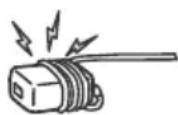
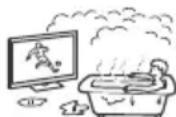
Pomeuheny:
B XapKx, BnaXhbx INn CnIkwOM 3aIbIeHHbx NOMeueHnx; B MeCTax, Ie MOrYt 6bITb HaceKOMbIe; B TaNX MecTAX, B KOTopbIX TeJeBn3Op MOxET 6bITb NOnBepKeH mexAHnueckOIN Bn6paun; B6N3n ORheONaChbIX OBeKToB (Cbeey n dp.). Ha TeneBn3Op He DoJKNbI NonaTaB KaKe-NIbO KaJIu INn 6bp3rN; HEnb3A CTABITb H Hero NpeMeTb, CoepKaune JIKKOCTN, HAnpIMep Ba3y C UBeTaM.
He yctahabnbaite TeleBn3Op BO Bnaxhblx nIN NblbHbIX NOMeueHnx INN B NOMeueHnx C MaCnHbIM DblMOM INN napOM (HeNoDaNEky OT KXYOHbIX CTONOB INN BYNaXKnHTen Bo3Dyxa). INhae MoXeT POnO3OITN BO3RopAHHe, Ydap 3NeKtpnueckm TOKOM INN DeΦOp
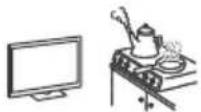
He yTaHaBnBaIe Te TeneBu3Op TaM, Ie Bo3MoXHO CnIbHoe NOBblIeHne TEmNepaTyPbI, HApnpMep NoI npMaIMn COJIeHbIMn LyuAMn, PAnOM COTOnITeNbHbIMn Pp6Opamn NnOobPeBaTeJMy. B TAKnx YcNoBxT eNeBu3Op MoKet nepepeTbc, Yo npuBeTe K DeΦopMaUN KopNyca N/NN NOBpeKeHIO TeEbn3Opa.
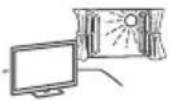
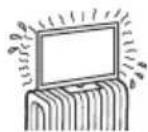
CnTuauu:
He kacaiTecbTeleBn30pa MOKpbIMPykAMn; He KcNPIyAITpyTe erO co CHrTbIM KOPNYCOM NnC DOnoJIHNTeBbIMn AKCCEcyapAMn, He peKOMeHDoBaHHbIMN n3roTOBbIeMn.Bo Bpemr rpo3bl OTKIOuayTe TeBn3Op oP 0peTKn 3neKTPONITAHN aHTeHbI.
He yctahabnBaTte TeneBn3Op TaK, TTObl OH BbIaBANC B OTKpblToe npocTaPcHCTBO. HNahe Bo3MoXhbl TpaBMbl nNoBpeJxHnO6OpyDobAHnO t ynapo TeneBn3Op.
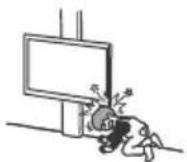
OckoJIkn:
He 6pocaIte HkaKne IpeMeTb IB TeJeBnOp. OT yDapa3kpaHHOe CTeKIO MoKeT pa36Ntbcr HaHeCTN cepbe3HyTOpaBMY.
- EcnHa NoBepxHocTn TeJeBn3Opa ObaPbAinCb TpeuNbI, nepei Tek KAp NpKoCHyTbc K Hemy,BbHbTe Kaebnb NtAHn Hn 03eTKn. B npOTNbHOM Cnyae Bbl MoKeTe nOnyHTb yap 3NEKTPNueckm TOKOM.
Ecn TeJeBn3Op He NcNoJb3yETc
- EcnB He cobupaetc b noB3oBaTcTe neBu3Opom B TeueHHe NcOJbKxN DnE, No COoBpaKeHN M 6e3oNaCHOCTn 3hepc6pekeHn er OcIeYer OTKnIOHTb Ot CETn 3neKTponNTAH.
Tak KaTeNebu3Op HEOTKIOUaETC T OCTn PnB BbIKIOUeHn H KOnkO,ДЯERO NANOHO TOKIOUeHn OTJKeTPOnTuHaHn BBInbTe BnkyKaBeNIMITAHnN 03POTKn.
CneJeTtB BNDY,TOHEKOTOpBe TeneBn3OpbO6naIOT cyHKUIMM,NJKOPpeKTHoPab0bTc KOTOpBX Tpe6yETcOCTaJIbTB TENEBn3OpB DkEyPHOM peXmIe.
MepblnpedoctopoXHOCTN BOTHOWeHn dete
-He no3B0nJaTe DeTAM B36upaTbCn Ha TeNeBu3Op.
XpaHnTe MeKne DeTann BHe DOcraMoCTn DeTei,TO6bI OHn He MoTn CNyauHNO pOrnotBx.
Ecnn mMeIOT MeTo CneDyUoune HenCnpaBHOCTn...
HemeHnHO BbIKIOHTe TeneBUN3Op N BbIHbTe BUNKy Ka6eJr
NtAHnA 3PO3eTKB CJeDyIOUx CNyuaX.
O6paNTcB K CBOemy DInepy INB CepBnchbl CEHp SONY dT
TOrO, YTO6K bKaINΦuNPoBAHHBe CneuaNtcb cepBnCHOn
Cny6bblNoHNnpOBepky TeneBUN3Opa.
Bcnyue,ecn:
- NOBpeKdeH Ka6eJIb NITaHnI.
-3neKtpop03eTKa IMeet NIOXNE KOHTaKTbl.
-TeIeBn3Op nOlyuynIOBpeKdEHHBa pe3yNbTaTe naDeHHa, yDapa nn nonanaHn6poWeHHbIM B Hero npedMetom.
-BHytbp Kopnyca TeleBnOpa Ypee3 OTBepCTna nonana KNDKoCTb Nn KaKo-Ni6o PpeDMet.
OTemnepaTypeKK-MoHtopa
PnDnnteHbHom nCnoJb3oBaHmN KK-MOHHTopa erO NOBepxHOCTn HarpeBaIOTc. OHn CTAHOBtCR TOpRyHMn Ha OuyNb.
KPOHHTEINHДЛHACTEHHOYCTAHOBKN
B npBedeHHo HNKe IHΦopMaun NOKa3aHo npaBnIbHoe 06paueHne C kpoHtEeHOM dHaHcteHHo YCTAHOBKn. 063aTeNb HO BHNMaTeHb NPOuTHe TpyHΦopMaunIO nCNOB3yIte KPOHtEeHd NJa HAcTeHHo YCTAHOBKnPaBnIbHO
K cbepeHIO nokynteJIe:
063aTeNbHo co6nJaTe cneIyoUme Mepbl npedoctopoxKHOCTn IJI OeceueHnB 6e3oNaChOCTn n npedeTbpaueHn CpeE3HbIX TpaBM B pe3yNbTaTe NoXapa, npopaeHn 3JKeTpuecknM TokOM, ONpOKNDbAHn NnnaPeHn N3dEN.
-063aTeBn 3aKnUaHe cy6NoDpHbIe OOrOBopbI NOyTaHOBKe CnUeHcNPOBaHbIM NoOpdYKamM H DeOnyCKaTMe MaNEbHKnx DetEe K MeCTyCtAHOBKn.
-Obra3aTeJIbHo 3aKJIouaIte cybNoPdIHbIe DOrOBOpbl no nepemEueHIO n DEMoHTaKy TeJeBnOpa C IInuEHNPOBaHHbIMN NOpRdUKNAMN.
- Heydajny Te BnHTbI NT. NOcne MoHTaxa TeNeBu3Opa.
He BHOCTeN3MeHEnB KOHCTpyKUIO DeTaeJe KPOHHTeHa DnA HAcTeHHoY CTAHOBKn.
- He yctaHabnBaIte npyroe o6opyoBaHne, Kpome yka3aHHoro n3dennr.
He npunarateK KPOHHTeHy DnA HAcTeHHO YCTaHOBKn Dpyro Harpy3KN, KpOME TeNeBu3Opa.
HeonnpaTecbHaTeLeBn3Op HBeBucTe HaHem.
He npnaraTe K TeJeBn3Opy Upe3MePbHx ycNn B O BpeMa YIcCTKn NIN TexHNueCKoro 06CnyKuBaHHa.
K cbeeneHIO dIepeOB n nooprauNkoB Sony:
CnEynuHnue HNCTpyKun OTHOCATc TOnbKO K Dnnepeam N noDprAnKaM Sony. O63ateBnHO npOyntaTe ONcaHHbe Hnke npAinaTexHKnBe0anacOCHCTu YdJIeTe OC0oe BHMaHHe 6e0anacHOCTu BO BEmr YCTaHOBN, TexHneckoro 06CNXHBAHnnpOBepKN DaHHORo nDEnnI.
- Pn npnepeMeHm Hm yCTaHOBKe TeneBnOpa depKnte er0 3a 6OKOBBe CTOpOHbI. He noHNMaTe TeneBnO3p 3a NOCTABKY.
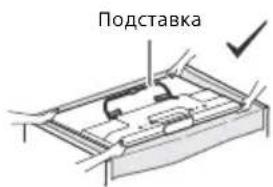
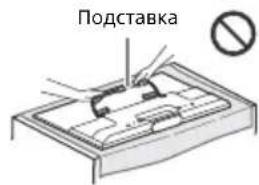
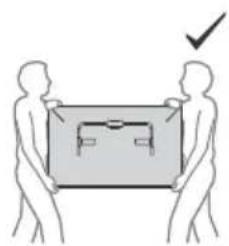
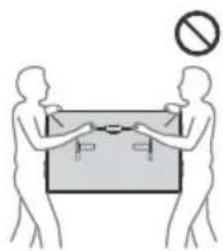
RU
He yctaHabnBaIte KPOHtTeH nla HacteHHoYCTaHOBKn Ha NOBepxHOCTx CTeH, fDe yTbI NnCTopoHb TeJIeBUN3OpA BbICTyNAt 3a npedeJIbIOBepxHOCTn CTHebl.
He yctahabnBaTte TeneBn3Op HAD NIN NOD KOHNIOHepom BO3dyxa.
- OБязател bHo HaDExHObYcTaHOBnTe KPOHwTeHHДЯ HAcTeHHOуCTaHOBKnHa CTeHy, CNEyI INCTpyKUmB B3TOM PYKOBOCTBE NOKcNPyatauIN. EcnN KaKoJn60 n3 BnHTOB ocNa6JIeH nII NByaI, KPOHwTeHHДЯ HAcTeHHOуCTaHOBKn MOKeTynactb I cTaTb npMnHOH TpaBM nII NOBpeXdHmIMyIecCTBa.
-ObraTeIbHO nCnOJIb3yIe npUlaEaMble BnHTbI nDeTaNnKpeNLeHnnaHeJXoIM O6paOM, CNEyINHCTpyKuHm, pNBeEHbIM BAHHOM pyKOBOcTBe NO 3KcnIyatauIN. EcIn npU yTaHOBKe 6blIn NCNoB3OBAHb INhIE KpeNExHbIe MaTePuaNbl, TeNeBn3Op MOKeT yNaCTb I nOnyHTb NOBpeXdHn Hn cTaTb npUHHo TpaBM.
- O63aTeIbHO BbIOJHnIe CbOpky KPOHHTeHa, TOUHO CneDy INCTpyKcIyM, INIOXKeHHbIM B HAcTOrIeM pyKOBoIDCTBe NO 3KcNpIyTaun.
- 063aTeJIbHO HaIeJXHO 3aTЯRnBaI Te BnHTbI B 3aJaHHbIX NoIOKeHnx.
CneIte 3a Tem, yTo6bI He noDBepraTb TeJeBn3Op yDapam npVCTaHOBKe.
-063aTeIbHcYCTaHaBnBaTe TeNeBu3Op Ha nepHeNkUyRPHoNnlockOu CteHe.
-Послп ра ВИБИСВОВКИ ТЕLEВИЗОРа НАДЕЖНЗАкpenITE Ka6eNi.
He donyckaTe 3aueMleHnKa6eN nTuHn Hn CoeHNHeBbIX Ka6eN, TaK KaK 3TO MoKeT HApUHbIb MOnLAuHO BHyTpEHHX npOBoB, YTO MoKe TcTaB NpuHnO KoPOTKO 3aMbKaHn Nn O6pbBa 3JIeKtpueeckO cenn.
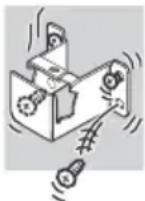
MepblnpedoctopoXHoctn
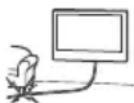
PpocmotpTeIeBn3opa
-
Pn npocmotpe Bundeon3o6paXeHn 3D nnn BO Bpemr Irp B ctepeocckonueckom fOpMaTe 3D HeKOTopbIe JIOOn MOryt NcbltbBaTb DnCKOMfOpT (HaPnMep, HAprrKeHne rna3, yCTaONCTB nnn ToUHOTy). KOMNaHn Sony PeKOMeHnyET, YTO6bE 3e pnten denn peryIaRpbHe nepepbIBb npn npocmTope Bundeon3o6paXeHn 3D nnn Bo BPemr Irp B ctepeocckonueckom fOpMaTe 3D. IpOdoJNKeTbeHoCTb n qactota nepepbBOB 3abncnt OT INDNuDyaNBbIX NOTpebocTe.HxKyHO Bb6PaTb HAnBoJe e NOxOJaAmp BapnAHT. B CNYae DNCKOMfOpTa Heo6xoJIMo PpekpatNTb npocmotp Bundeon3o6paXeHn 3D nnn IrpB b ctepeocckonueckom fOpMaTe 3D, NOKA DNCKOMfOpT He NCye3Het; Pn HBeoxOJIMocTn CneJeYt ObpaTntCB K BpaCy. Heo6xoJIMo TAKKe ObaTpaTbcra (i) KpyKOboCTBy no EKCNlNyataun IIO60 DorpyrO UcTPOJCTBa NIN HOcUNTeJI, MCNONb3yEMoro C TeLEBn3OpOM, n (ii) IaN NoLyehn NocJeHne INHOpMaun NocetNTb Haau Be-CAIT (http://support.sony-europe.com/). 3peHne MaIeHbKnx Detei (OC6eHHo B Bo3pacte Do ueTrn Je) Ese He CfOpMupOBaHO. PpeKxe dem Pa3pe7aTb DeTm CMOpTeB Bundeon3o6paXeHn 3D nnn IrpTaB b IrpB b Ctepeocckonueckom fOpMaTe 3D, ObaPatntecb K BpaCy (HaPnMep, NeDaTuPy n nn OfTAbnMOJory). DeTn DoJIoXhBi HaxOJNTCB NaOD KOHTponEm B3pcOblx DnI CO6IOJHNe BBIweyKa3AHbIX peKOMeHdaIcn.
He nCnObn3yWTe, He xpaHnTe n He octaBnIte 3D-ouKn nn 6BaTapeo B HEnocpeCTBeHHoN 6bImc0tN OT ORH Nnn B MeCTAX C BbICOK TeMnepaTpyoN, HApPIMeP, NOd npRMBIM CoNHeYbIMN LyyaAMN, a TaKKe B ABToMo6BnJx, npnnapKOBAHHbX Ha CoNHe. -
Pn nCnoB3OBaHm FyHKuHn HmTuTauH 3D-ΦΦeKta NOMHnTe, YTO OTo6paXaEMoe N3O6paXeHne MoDeIuPyETc DaHHbIM TeLeBn3Opom PyTem Ppeo6pa3OBaHnN CXoDHorO n3O6paXeHn.
CMOTpTe TeJIeBn3Op npu DOCTaTOOHOM OCEUeHIN;
PNCoMToP nIOIIOXOM OCBSeHEN H N B TceHHe Ype3MePHO
npoDOnJxNtEhBO HorO BPEmEHY TOMnIET rna3a. - PnI NOJIb3OBAHH NAYW HNKAMN He YCTaHAbINBaIte CNIuKOM 60JIb7UHO rPOMKoCTb, YTO6bl He NOBpeIHTb CNYX.
KK-3kpaH
XOTAK-3KpaHn3ROTOBHeH NO BbICOKOTOH IOHIOHNuNCNO 300EeKnBbIX ToeK DOCTNtAe99,99% N Bblue,Ha3KpaHE MOrTy NocToHHNo NOBnTbC HEPbIe NNNrPkneUcTBHe (KpaChBe,cHHe Nnn 3eJeHbe) TOCKN.3ToCTpykTyPhoe CBOINCTBO KK-3KpHa, KOtopoe He ABnTeTCnPNn3HAKOM HcNpPaBHOCTN.
He HaxmMaTe Ha 3aunTHbI ΦnIbTp, He IapanaTe erO n He CTaBbTe Ha TeNeBn3Op KaKHe-NiO npEmdTb. 3o MoKeT npuBeCTN K HepaBHomepHOCTn N3o6paXeHnN noBpeXeHnIO KK-3kpaHa.
- Ecnn TeBn3Op pa6oTaet B XoIoHOM MeTe, N3OpaKHeHne MOxET OKa3AtpCBpa3MbITbIM INIIN CInuHKom TEMHbIM. 3TO He RnBnEeTcnp3NtAHKom HncPiPAhBOCTn. 3TN RaJIeHnI NCye3HTC NOBbUHeHem TEMnepaTpbl.
- Pn np oJnxIeBHOJ dMOHCTpaUN HEnoDBNXHORu3O6paKeHHaMOYr NOBnTbCra OCTaTOHbE N3O6paKeHHa. Hepe3 HeckoJIbKO CeKyHd OHN MOYr NCye3Hyb.
BoBpempa6oTbTeJIeBN3OpaKpaHIOKpNycHarpeBaIOTc. 3To He IaIaeTcnpn3HaKOM HncnPaBHOCTN.
-KK-3Kpaan coepknt HeboJbwoe KoJnueCTBO KnuKnx KpncTaalno. Pnp yTnIm3aun Co6IouaTe COOTBeTCTByIOuNe MeCTHbIe NNOXKeHn INHCTpyKUn.
YxOД 3a NOBepXHOCbIO 3KpaHa, KOpnycom TelenBuN3Opa N IN X YnCTKa
IpeepuCTKoTeneBnOpaHINBUNKINKa6eYnNTaHnO TCOeHNHTe Ka6eNbOTcEN.
IЯ obecneueHn coxpaHHocTn KOHCTpyKUHOHBx MaTePnaJIOB n oKpbltna 3kpaHa TeJeBnOpa co6bIOnaIte CNeDyUOuMe Mpebl npedocTopoXHocTN.
-ДЯудаленяпьлс nobepxHocTN kpaHa/Kopnyca TeneBnOpa octopoxKHO npOTnpaIte erO MRAKoT KAnb. EcJIb NbHe ydaIaeTcNoHOCTBIO, npOTpNTe 3KaPAH MRAKOJ TKAHbCIEKACMOUeHHOB CnaBOM pactBOpe MRAKOrO MOIOUefo cpeCTBa.
- HnkordaHepa36pb3rnaBteBOynn
MOIOOee CpeIcTBO NpMaHO TaTeBn3Op.
CkONJIeHne XnIDKoCTN BnH3Y 3KpaHa nINn
Ha HApyKnbIX NOBepXHoCTx IN
PPOHnKHOBeHne BHyTpB TeBn3Opa
MOKeT PnIBeCTN K BblOy TbeBn3Opa N3
CTPO8.
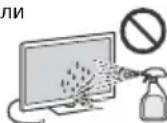
HnB KOem cnyae He nCNoIb3yIte HnKaKne a6pa3uHBIe MaTePnAJIbI, IeNoOHTbe/KNcNOTHBe OcHCTNTeJI, NcTtAunne InpoUkN t Nakte TEyHe pactBOpntEJI, Ka CnIpt, BeH3nH, pa3abntel Jnn INHceTne PACTBpntEJI, PnpMeHHeNE 3Tx BueecTB JIn DnIINETeHBI KHOATKT C n3dennmN3 pe3nHBI/BUNHNA MOrTy NOBpeDnTb NOKpbITNe KOPnyca JIn NIOBepXHOCTb EKpHa.
-Дя obecneueHnHaIeBHeHTNJIaunIpeKOMeHdyeTcR nepoIOuEeKnpoHuaTbBeHTNJIauOHHbIeOTBepCTnC nOMoUbIO pblneocca.
IpnpernynpobKeYrHaHaknoHaTeeBn3OpaN3MeHnTe ero nIOxKeHne MeDneHHO NOCToPOXHO BO N36ExaHHe COCKaJIb3bBAHNrTeeBn3Opa C NoCTaBKn.
DOnONHnTeIbHbIe yCTpoIcTba
-ДерхитЕ ДОПНИТБHьЕ KOMNOHEHTы ИИОБOPYOBAHNE,ИЗУЧАIOUIEE 3NEKTPOMARHINTHBE BOJHBI,Ha paCCTOHRIN OTTeLEBUN3Opa.B npOTUBHOM Cnyuae MOKeT IMeTb MeCTOnNCKAKGE Hn3O6pAXEHNAI N/IIIN 3Byka.
-Данhoe obopyoBaHne npoTeCnpoBaHO n npu3HaHO OTBeaUOIM Tpe6oBaHNM KnpdeIbHbIM 3HaHeHnM, YcTaHOBLeHHbIM BInpeKtNbe 3MC, npu NcNoIb3oBaHm COeINHTeBHorO CNrHaNbHorO KaEJIa DInHo MeHee 3 MeTPOB.
Pekomehdaaun no pa3bemy Tuna F
BHytpenHnJXnlaDOnxHa BbCTynatb n3 pa3bemaMeHee Yem Ha 1,5 MM.
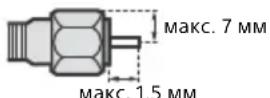
(CnpaBoUHbI pucyHok pa3bema Tuna F)
PpeynpeXdHne OTHOCHTeNbHO nCNoIb3OBAHnnyIbTa D
BCTABnB 6aTapeKn,co6nOdaTe noJrphocTB.
He nCnoB3yIte OndHOBpeMeHHo 6aTapeKn pa3nHybIX TINOB nIcTapbl EHOBBle 6aTapeKn.
- Pn ytnin3aun 6atapeek Bcerda co6noia Te npabina
oxpaHb okpyxauoie cpedb. B heKOTOpbx peruohax npabina
ytnin3aun 6atapeek Moryt 6bIb pernaMeHTnpoBaHb.
Pocsb6 obaaatcno TOMy NOBOy B MeCThble opraHb
Bnactn.
BepexHo 06paauTecb cnIyIbTom D. He 6pocaiTe erO, He CTaHOBntEc b Hrero n He JeIte Ha Hero HnKaKnx XnIKoCTe.
He octabJrTe NylbT Dy B6n3u NCTOCHKOB TeNna UINB MeCTe, NOBepXeHHOM PnRMOMY BO3deNCTBIO COJIHeHbIX Lyuei, INI BO BNaxHom NOMEeHNM.
BecnpoBOnHa yHKun yCTpoNCTBa
HcnoIb3yTeYCTpoIHCTBOB6N3nMeDmUINHCKOrO 6obpyoBaHnry(3JeKToPHOBHX CTMyNJTOpOB cepuaTnT.D.), NCKOJIbky30MOXETPnPBecNTKHENCnPABHOCTNNOcneIdHero.
- HecmOTpHaTo, YoDaHHe yCToIcTBo Nepeaet/NoLyuAeT 3aunPobAHbHe CnHbJIb, OCTeperaTcB HecaHKUHOHPOBaHOro NepExBaTa CnHaJa. Ml He Hecem OTBetCTBeHHOcHa 3a JIObYIO npObNeMy TaKOro poJa.
KPOHHTEINH DIA HACTEHON YCTAHOBKN
- EcnTeneBn3Op, yCTaHOBJIeHHbI Ha KPOHHTeIH nIa HAcTeHHoYcTAHOBKnCNoJIb3eYTC B TeYeHne IINTeJbHOrO BpeMeHIO, T0, B3aCIMOCNT O MATEpNaIa CTHeI, NOaIa Hrero NnHn HmM MOrTy BblCeCTN CTHeI NnOITCTab o6oN.
- Nocne demoHTaxka kpoHHTeHa dna HAcTeHHOY yCTaHOBKn B CteHe OCTaHTcOTBepCTnO T BNHTOB.
YeCTAHABNBAIte KPOHHTeH Dnla HAcTeHHo YCTaHOBKn B MeCTax, NOBepKeHHbIX BO3JeNTCBIO MExaHHueCKo Bn6paun.
Ytuln3aunrTeleBn3opa
YtlnnaaOn OTCnykBwero 3JeKtpnueckoro n 3JeKtpoHoro 0bOpydoBaHn (DnpeKtnBa npImeHaTcB CtpaHx EbpocO3a n dpynx ebponecknx cTpaHax, rde deIeCTBYOT CNTEmbl pa3dEnbHorO cbopa OTxoDoB)
YTNIN3aunnncOJIb30BaHHbIX 3JeMeHToB nHTaHn (npImeHReTcB CtpaHax EbpocoJ3a n dpyrnx ebponencknx ctpaHax, rde DeNCTBYOT CNTeMbI pa3dJIbHOrO c6opa OTXoIDOB)
YctahOBka TeJIeBu3opa Ha CTeHy
KcbedeHnIO KIneHTOB
IyctaHOKn DaHNO I3dEJIINr Tpe6yOTc CneuaJIbHbIe HABbIK. O6raTeJbHO o6paTntecb K dJIepy IINI NIneH3NIOBAnHOMy NOpRdUnky Sony, a TaKx Co6JIoJaTe Heo6XoDnMbIe Mepbl PpeOCTOpOXHocTN BO BVPem YCTaHOKN 3dEJIINr. KomnaHn r Sony He HeceT OTBeTCTBeHHOCtN 3a JIO60u YUep6 IINI TpaBMbl, Bbl3BaHHbIe HEnpaBUNbHbIM O6paUeHNEM IINI HeBepHOY cTaHOBKO, a TaKx EYCTaHOKBo KaKnx-JIb6O DpyrNX UcTPOJCTB, KpOME YKa3aHHOr. 3TO He BnIeT Ha 3aKOHbIe npBaBOBATEJ (ecnn TaKOBble nMeOTc).
K cbeHIO dInepoB n noDpyNKOB Sony
Дя yctaHOBKn DaHHORO n3deJIINr Tpe6yIOTc CneuJaHbIe HAbbIKN.ДЯ 6e3OnaCHO YCTaHOBKn YCTPOIcTBA O6ra3aTeJbHO BHNMaTeJbHO npOHTte HaCToIe pykoBOcTBo.Sony He Hecet OTBeTCTBeHHoTn B clyuae NOBpexKeHn IIn NOnUyeHn TpaBM B pe3yIbTaTe He npBaBnHoro O6paueHn IIn HeHaDLeKaIeYCTaHOBKN.
IoproTOBka K yCTaHOBKe TeJIeBN3Opa
1 BbIKpyTHe BnHTbI, paCnoJIOxEHHbIe Ha 3aHneI naHEn THeBn3Opa. O6aTeJbHO COxpaHInTe BbIKpyEHHbIe BnHTbIB HaJeXHOM MeCTe BHe DoCraEMocTn DeTei.
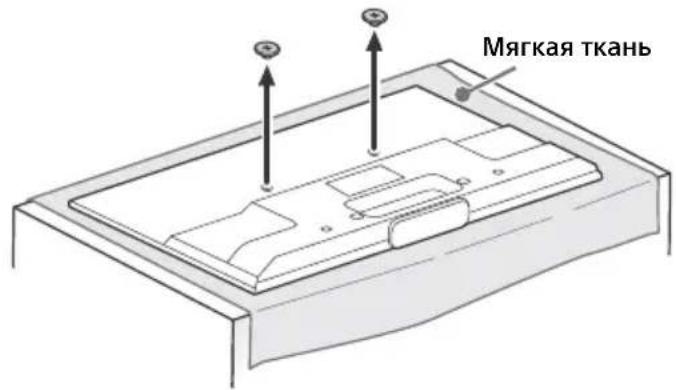
2 BCTaBbTe 7nT (Ha 3aunTHOM npncno6JeHnn IJRA NOCTaBKn C) B OTBepctne Ha NOCTaBKe H, 3aTeM CIOKHe 3aunTHoe npncno6JeHne IJRA NOCTaBKn C. Y6eINTecb, yTO 3aunTHoe npncno6JeHne IJRA NOCTaBKn C HAeXHO 3aΦNKcnpOBaHO Ha NOCTaBKe H.
KDL-50W82xB,KDL-50W81xB, KDL-50W80xB,KDL-50W70xB
KDL-42W82xB, KDL-42W81xB, KDL-42W80xB, KDL-42/32W70xB
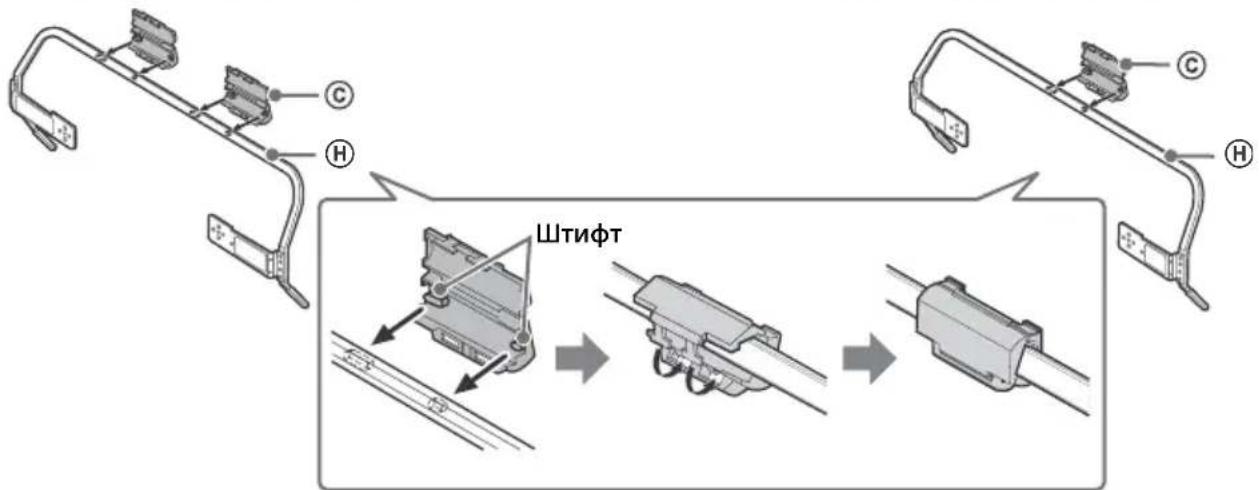
3 PnKpeHnTe nOCTaBky H K TeLeBn3Opy C NOMoUbIO npNlaRaEmbIX BnHTOB D. PnKpeHnTe npOKnaDK E K OTBepCTnM, yKa3aHHbIM TpeYroJIbHbIM MeTKaMn A. B KaueCTBe npImepa nCnoJIb3yETcma MoJeIb KDL-50W82xB, KDL-50W81xB, KDL-50W80xB, KDL-50W70xB.
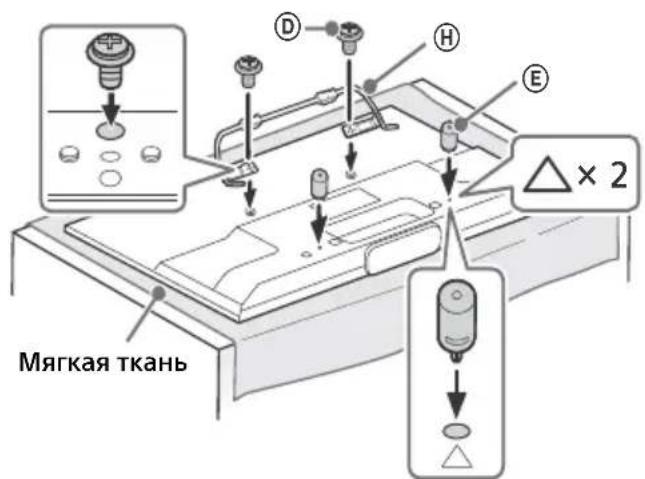
YctaHOBKa TeJIeBn30pa Ha CTHe
1 Ipeed yctahOBKO TeJeBn3Opa Ha CTeHy o6aTeJbHO NOKJIouHrE n CBxHrKe Ka6eI.
2 YctaHOBtTe TeIeBn3Op Ha CteHe. 3aTeM npOBepbTe, yTo 3aUHTHOe npncno6JIeHne IJn POCTaBKn CHaJeXHo 3aФNKcnpOBAHO B OCHOBAHm IJN KpeJIeHn Ha CTeHy B, a npOKlaIKn E KacaOTcra CteHbI. PpIKpeNTe PJIacTHHy KpbIshK KPOHSTeHn H c NOMOuBo npIIraEmbIX BNHTOB G.
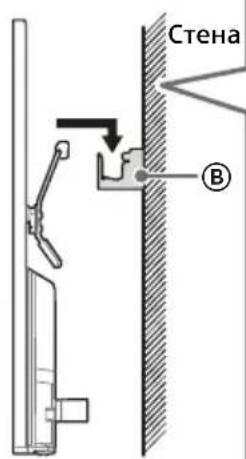
KDL-50W82xB,KDL-50W81xB, KDL-50W80xB,KDL-50W70xB
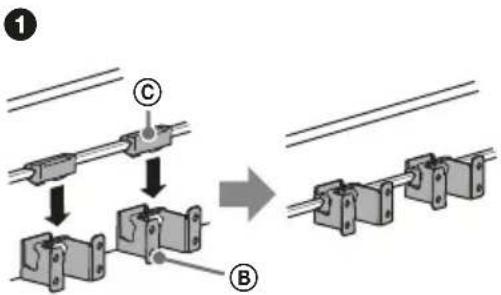
KDL-42W82xB, KDL-42W81xB, KDL-42W80xB, KDL-42/32W70xB
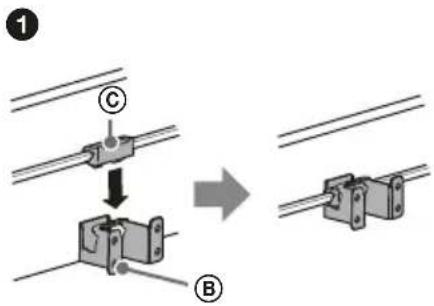
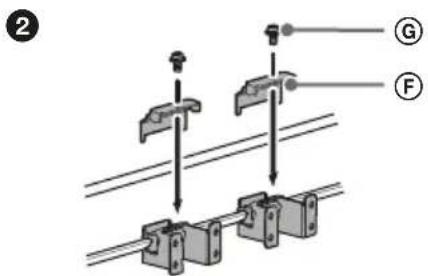
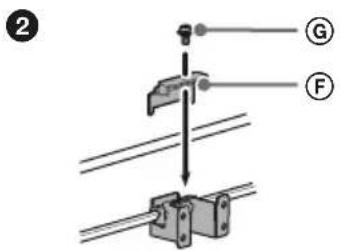
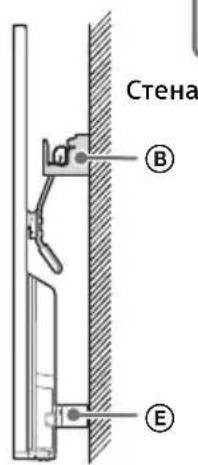
RU
Pa3MepbI Ira paCnoJoxKeHna OTBepCTn Ha CTHe
Ipn Heo6xOIOMOCTn IpeIOCTaBbTe CJeNyUOyU INHOpMauNIO JInCeH3NpOBaHHbIM NODPdYHKaM.
Jny UcTaHOBKn Ha CTeHe OCHOBaHNr DnKpeJIeHNr Ha CTeHy 8 nCNoJIb3yIte BnHTbl (DnaMeTpOM
8 MM, He npNJaraOTc).
Дя obJeHn yCTaHOBKn O6raTeNbHO nCNoJb3yIe npNJraEMyb 6ymKhB I W6JIoh A, Yka3bIbAUuN ΦakTNUeCKoe paCNOJIOKeHne OCHOBAHn DЯ KpeJIeHn.
KDL-50W82xB, KDL-50W81xB, KDL-50W80xB, KDL-50W70xB
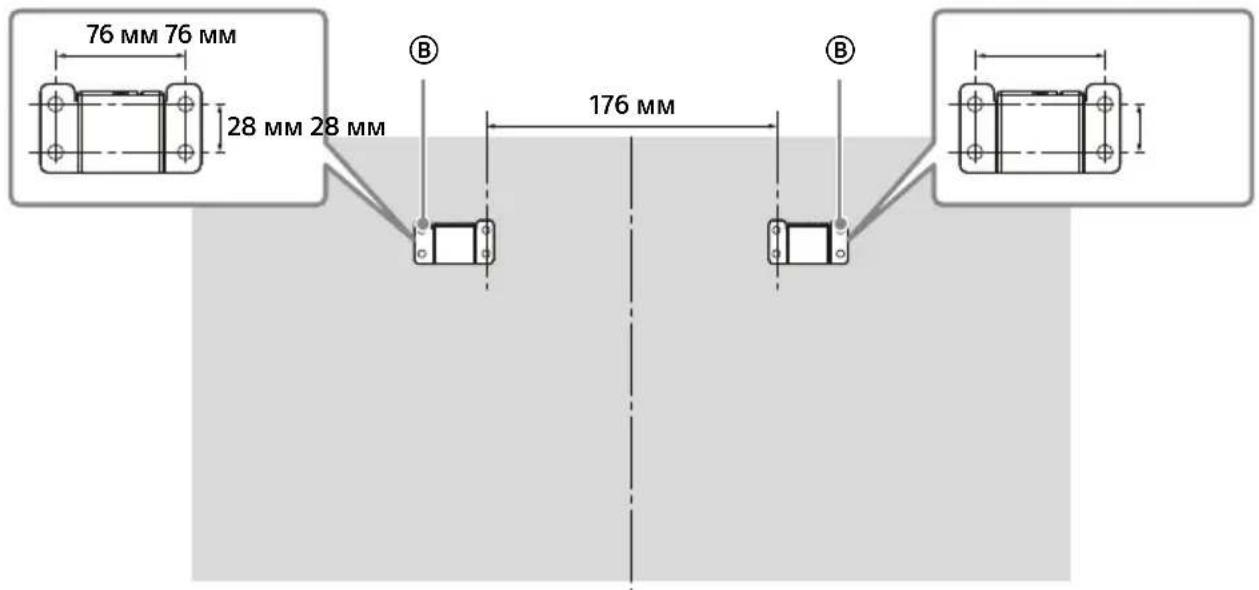
KDL-42W82xB, KDL-42W81xB, KDL-42W80xB, KDL-42/32W70xB
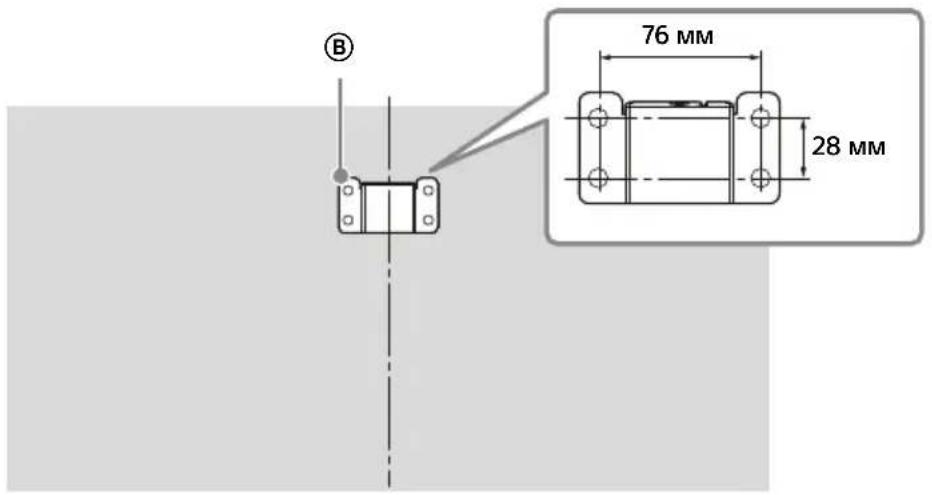

Для полуени Инструкции NO установке Кронштейна Ддя HabteHHоу Yстановки Baшеше модени TeleБиЗОпа CM. cnedyюць Be6-caNT: www.sony.eu/tv/wall-mount-bracket-manual
ПОИСК ИССРАВНОСТЕN
Ecn CBToHnOHa NoCBeTka Mnae T KpaChbIM UBeTom, NocHTaTe, cKoJIbKO pa3 OHa MnaeT (c INHePbaIOM B TpN ceKyHdbI).
EcnLED-noDCBETKa Muraet KpacHBIM, BbINOHNTE c6poc Hactpoek TeJeBN30pa, OTKJIIOUH NHTAHne TEJEBU30pa Ha DBe MNHyTb, 3aTeM CHOBa BKIOUHTe TEJEBU3Op. Ecn npobJemy He ydaIocb ycTaPAHtB, o6paNTecb K dInIepy nII IN B cepBnCHbI CEHTP Sony, yka3ab YncNo MURAHIN LED-noCBeTka KpacbIM (INTEPBaN MeKdy MmraHnMa COCTABJRE TPN CekYNb).HaXMMte KHOPIKY I/Ha TeJIeBn3Ope, YTO6bl BBIKIOUHTb eRO, OTKJIIOUHTe NITaHHe n YBeDOMITE DNJIepa nII cepBnCHbI ZcHTp Sony.
Ecnn CBeToDnOHDn HNAnKaTOp He MmraeT, npOBepbTe CneDyUoune 3JemeHTbl.
Kpome TOrO, CM. NyHKT [POnCK uYCTpaHHeHne Hencnp.] BpyKOBoDcTBe i-Manual nnn BblnoJHnTe aBTOdnaIarHOCTNky, Bbl6paB ?[CnpabKa] [KnHeHTcka noIepkKa] [CamoHaarHOCTNka]. Ecn npobJeMa He yCTpaHReTcA, o6paTntecb K KBaJIuΦnUnpOBaHHbIM CneuaJIncTaM NO 06cLyXKBaHnIO TeJIeBN3OpOB.
Ponck nyctpaHne HncnpaBHOtei
HET HN N3O6paXeHnA (TeMHbI 3KpaH), HN 3ByKa.
- PpOBepeTe NOdkIoueHne aHTeHHbI nnKabeJia.
-IOKJIIOUHTeTeJIeBUN3Op KJIEKTPoCETb HaxMNTe I/HaTeJIeBUN3ope nnIyNbTe DY.
HeKoTOpbIe KaHaJIbI He HacTppaBaIOrTa.
- PpOBepeTe NoKJIIOUeHne aHTeHHbI nNn CNYTHNKOBoTapeJKN.
Bo3MOxHNO KOpOTKoe 3aMbikAHne CnyTHNKOBOro Ka6eJI IN HEnOJaIK C NOkJIIOUeHNEM 3TOrO Ka6eJI. IpoBepbTe Ka6eJIb N CoeINHeHne, a 3aTeM BbIKJIOUHTe TeJIeBUN3Op C NOMOUBI rIaBHORO BbIKJIOUaTeJI NITaHNI BKn./BbIKN.I BKNIOHTe ERO CHOBA. - Yka3aHHa yactota HaxoDITcB HBe Dnana3OHa. O6paTntecb B KOMnaHIO, ObecneuBaIOyU npnem CnyTHNKOBOro BeuaHn.
He 06hApyKeHbI cnyK6bl (nporpaMMbl) Ka6eBbHoro TeJeBnDeHn.
- IpoBepbTe Ka6eIbHoe CoeINHeHne INN KOHnIpyaquIO HaCTpOKn.
-Nonpo6yIe BbINoHnHTB npOceDpy [ABTONONCK uΦp. cTAnuN], Bbl6paB 3HaueHne [3Φnp] BMecTo [Ka6JIb].
He pa6oTaet npIbT dY.
- 3aMeHnte 6aTapeuKn.
Bo3MOxH0,TeIeBn3Op HaxoIITcB pexnme SYNC. IynpabLeHna TeIeBn3Opom HaxMnte KhoNky SYNC MENU, BbI6epuTe [YnpabIeHne TB], a 3aTeM Bbl6epuTe [Dm (MeHIO)] nn [Onun].
3a6bIIN napoIb IJIa FyHKcIIIN [3amok ot IeTei].
BBeIte 9999 B KaueCTBe PIN-KoJa. (PIN-KoJa 9999 Bcerda npHnMaetcra.)
NobepxHoctn TeJeBn3opa HarpeBaIOTca.
- Pn DInTeJbHOM NcNoJb3OBAHN TeJeBu3Opaero NOBepXHOCTn HArpeBaIOTc. OHn CTAHOBJTcRrpaumHa Ouynb.
3aBncaHne npu Bocpon3BeDeHn aydno nIn Bndeo,nyctOJ 3KpaH,II60 TeJeBn3Op He pearpyet Ha HaxaTne KhONOK TeJeBn3opa nn nynbTa DY.
- BbINOHnTe npocTyIO nepe3arpy3ky TeJIeBn3opa, OTKIIOUHb UHyp NITaHnHa DBe MInHyTbI, a 3aTEM CHOBA BKJIIOUHb ERO.
He ydaetca haHtHa TeleBn3ope KhoNkn I/O,CH+/-,+/-,+/4/4/4/,-,uHOME.
PacnoIoxKeHne KHOJOK Ha TeJIeBn3ope NOKa3aHO Ha pUCyHKe BHN3y.
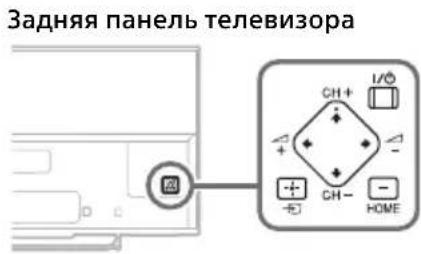
BkIoueHaLED-noCBeTka.
- Ecnn He Tpe6byetc 3axnraTb LED-noCbetky, ee MOxHO OTKnHouHTb.
HaKMTe KHOKNy HOME, 3aTeM BbI6epNTe [YcTaHOBKn] [CnCTeMHbIe HAcTpoNkn] [O6uNe HAcTpoKn] [LED-nOcCBetKa] [BbIKn.]. MoXHo TaXKe HxKaTb KHOKNy OPTIONS, 3aTeM BbI6paTb [LED-nOcCBetKa] [BbIKn.].
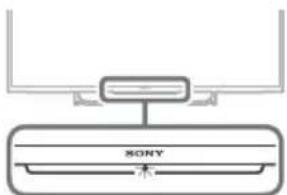
RU
He ydaetcnoKlouHTb K 6ecnpoBODHomy MapwpyTu3atopy c nOmoIbu WPS.
- Пи ИспОлььЗовани пpoToKoJa 6e3OanHocTn WEP BbI6epnte [PpocTo] [Wi-Fi] [ПоdkЛ. uepe3 cncok cKaHnp]. 3aTeM Bbl6epnte nMa ceTn (SSID)Дя NOДКЛIOUчЕнЯ.
He ydaetca HaHTn Tpe6yeMoe Hmra cTeN B NaCTpOaKax ceTu.
- Bb6epnte [[BBoD, BpyHyu]] n HaxMnTe 念 IJRA BBOda IMeHn CeTu.
TexHnueckne xapakTepncTNKn
Cnctema
CnCTema nane nn KKD (xukokpnctaanueckn ducnne), CBeToNDnHa nocBETka
CnCTema TeIeBeeHaHna
AHaIorOboBb: B 3aBucmocTn OT Bbl6paHHoI
cTpaHbI/perNoHa:B/G,D/K,L,I,M
UuΦpOBoB:DVB-T/DVB-C
DVB-T2
CnyTHNK:DVB-S/DVB-S2
CnCTema UBeTHOCTN/BUDeo
Analorobb: PAL, SECAM, NTSC3.58, NTSC4.43
LnfpoBoi: Cm. pykoBoDCTBo i-Manual.
ДианазонnpинимаembixKaHajIOB
AHaIorOBbI:UHF/VHF/Ka6eNb,B3abncmocTnOT BbIbpaHHoCtpaHb/periNoHa.
LcΦpOBoi:UHF/VHF/Ka6eNb,B3abncmocTnOT BbIbpaHHoCtpaHb/periNoHa.
CnyTHNK: npomexkytohnaCTota 950-2150 MfU
BbIXoI 3Byka 8BT+8BT(3aNCKIOUeHneM MoJeIe KDL-32W70xB) 5BT+5BT(ToJIbKO KDL-32W70xB)
BecnpoBoHaTexHoiTnI PtoKoI IEEE802.11a/b/g/n
TexhJorma Bluetooth Bluetooth 3.0
BxOДнble/BbIXOДнble pa3beMbl
AHTeHa Ka6eJb Pa3beM 75 Om dJa VHF/UHF
CnyTHNKOBa aHTeHHa THe3IOBov pa3bem Tnna F IEC169-24, 75 Om. DiSEqC 1.0, LNB 13 B/18 B, TOH 22 KTo, PpeJ. no OndHomy Ka6JIIO EN50494.
AV1
21-7bipkoBbI Scart-pa3bem (CTaHapT CENELEC), BknoyAaynO-/BnDeOBxO, BXoR RGB n TeBnOHHb aynO-/BnDeOBbxO.
C O M P O N E N YPBRKOMNHOENTHoeBnIeO):1080p(50,60T), 1080i(50,60T),720p(50,60T),576p,576i, 480p,480i AyIOBxOJ (rHe3da Tnna "TIOJIbNaH")
AV2 BndeobxoJ (o6uui uTekep Tnna "TIOJIbNaH" C BXOdom Y)
HDMI IN 1,2,3,4 (3a ncknuehenm moJeIe
KDL-50/42/32W70xB)
BnuJeo (2D): 1080p (30, 50, 60 T), 1080/24p, 1080i (50, 60 T), 720p (30, 50, 60 T), 720/24p, 576p, 576i, 480p, 480i, ΦopMaTbI PK
Bnpeo (3D):
ΦopMaT Frame Packing: 1080p (30 Γu), 1080/24p, 1080i (50, 60 Γu), 720p (30, 50, 60 Γu), 720/24p
Praom:1080p(50,60Γu),1080/24p, 1080i(50,60Γu),720p(50,60Γu)
Onda naid pyro: 1080p (30, 50, 60 Γu), 1080/24p, 1080i (50, 60 Γu), 720p (50, 60 Γu)
Ayuno: 5.1-kaHaJIbHbI JInHeHbI PCM: 32,44,1n
48 kTι, 16, 20 n 24 έιτ, Dolby Digital
ARC (Audio Return Channel) (ToIbko HDMI IN 2)
HDMI IN 1,2,3,4(Tolbko KDL-50/42/32W70xB)
Bndeo: 1080p (30, 50, 60 Γι), 1080/24p, 1080i (50, 60 Γι), 720p (30, 50, 60 Γι),
720/24p, 576p, 576i, 480p, 480i, ΦopMaTbI NK
Aydno:5.1-kaHaIbHbI JInHeHbI PCM:32,44,1n
48 kTι, 16, 20 n 24 6nt, Dolby Digital
ARC (Audio Return Channel) (ToIbko HDMI IN 2)
MHL (O6uN C BxOdom HDMIN1)
(3a ncknuehenm moJeIe
KDL-50/42/32W70xB)
BnuJeo (2D): 1080p (30 T), 1080/24p, 1080i (50, 60 T), 720p (30, 50, 60 T) 720/24p, 576p, 576i, 480p, 480i
BnIeO (3D):
Praom:1080/24p,1080i(50,60T),720p(50,60T)
Onda napi pyro: 1080p (30 ), 1080/24p, 1080i (50, 60 ), 720p (50, 60 )
Aydno: 5.1-kaHaJIbHbI JInHeHbI PCM: 32, 44,1 n 48 KU, 16, 20 n 24 6nt, Dolby Digital
MHL (O6uN C BxOdom HDMIN 1)
(ToIbKO KDL-50/42/32W70xB)
Bndeo: 1080p (30 _ ), 1080/24p, 1080i (50, 60 _ ), 720p (30, 50, 60 _ ),
720/24p, 576p, 576i, 480p, 480i
Aydno: 5.1-kaHaJIbHbI JInHeHbI PCM: 32, 44,1 n 48 KU, 16, 20 n 24 6nt, Dolby Digital
DIGITAL AUDIO OUT (OPTICAL)
LHΦpOBoI onTnueckn pa3bEm (DByXKaHaJIbHbI JInHeHbI PCM, Dolby Digital)
AUDIO OUT/
AynobbixoD (ctepeo MmHn-dkeK)
THe3doIpyoNkJIOUeHnHaYsHnKOB
BecnpoBoDnHc6BvΦep: SWF-BR100
MHL-ka6eIb: DLC-MB10/DLC-MB20/DLC-MC10/DLC-MC20
AKTNBHBie 3D-ouKn: TDG-BT500A (ToIbko
KDL-50W82xB,KDL-50W81xB,KDL-50W80xB)
PaccnBbIe 3D-ouKn:TDG-500P(ToIbko KDL-42W82xB,KDL-42W81xB,KDL-42W80xB)
YcnoBnaXpaHeHHa:
ToBapb coXpaHraHOT BynakOBaHHOM BnDe B TeMHbIX, CyNX, YnCTbIX, XopoIIO BeHTnJIpyeMbIXNOMEseHnIx, n3OJIpyoBAHHbIX OT MeCT XpaHeHn KNCLOT N IeJIoUeH.
Tempeatypxa xpaHnna*: oT -20 do +60°C.
OTHOCHTeBHa BnaKHOCTb XpaHeHnra: <80%
OTHCntbHaBnaxKHOCTb (6e3 KOHdEHaCuaH).
BctaHOBLeHHKpOHTeHnHa HcTiHi .8
PiIroTOBkaIO BCTaHOBJIeHHA
TeJIeBi3opa 11
BctaHOBHeHH TeNeBi3opa Ha ctiHi 12
YcyHeHH HeCnpaBHOcTei 14
HecnpabHocTi Ta cnoc6n ix ycyHeHHa .14
TexhiHxapaKTepeNCTnKn. 15
Bctyn
BÖΓHIO, TPNMAI NT E CBIYKNI
IINJI DIXEPEJIA
BIDIKPINTOBOHIO
IOnAJIIBIDZbOToBNPO6Y.

BAXJINBA IIPMMITKA
Ha3Ba Bnpo6y: TeIeBi3Op
Ppimitka 0do CnHaiB y 6e3dpoTOBnx Mepekax

Sony Corporation cTBePdJxUe, 10u cei
Bipio BiINOBiJaOc OCHOBHM BmORaT aIHJUM BaKJIbHM noJoxHeHnM DnpeKtBu 1999/5/EC.
Дokладу Иформαιю ДИ. На Habун BiB-стори http://www.compliance.sony.de/
Pnmitka nna NOKyniB: HactynHa iHOpmaia CTocyeTbCra TInbKn 0bnHaHHa, kpey KpaiaHax, de IIOt bIneKtnBn EC.
CnCTema 6e3DpoTOBOro TeIe6aueHHa MOXe BnKOpNCTOByBaTnCA B HAcTyNHnx KpaIHax:
AT, BE, HR, CY, CZ, DK, EE, FI, FR, DE, GR, HU, IE, IT, LV, LT, LU, MT, NL, PL, PT, SK, SI, ES, SE, GB, IS, LI, NO, CH, BG, RO, TR, AL, BA, MK, MD, RS, ME
LcO6nHaHnMoXe BkOpncToByBaTncB IHJnx KpaIhax 3a Mexamn Ebpnn.
Bupob6nK CoH KopnopeuH cIIM orOLOwye, 10eTeJIbMoJeN KDL-50W828B,KDL-50W706B,KDL-50W705B
KDL-42W828B,KDL-42W706B,KDL-42W705B,KDL-32W706B
KDL-32W705B Biinobiadaotb BmOram Ta iHsIm 3aCTOCOBHM noJoxeHHm TexhiHoro perAmenty paioo6naHaHHn i
TenekomyHikauHoro KInueBoro (TePmHaIbHoro) 6nHaHHa
OTPIMATN DEKnapaio BIDNOBIOHocTI MoXHa 3a aDpecoIO TOB
06laHaHHaBbIbObIaC BmOram:
-TexhiHoro pernAmeHTy 63neKn Hn3bKOBoBtHO r eektpuHoro 06naHaHHa (noCTaHOba KMY Bi29.10.2009 N°1149);
-TexHrHOro pernaMeHTy 3 eNeKTpOMaHITHOcymiOcti oBlaHaHHn (NoCTaHOBa KMY BiD29.07.2009 N° 785)
-TexhiHOro perMaHety OMeXeHHB BUKOpncTahnH Daeknx He63neuHxpeOuBH eEnKtpcHMyTo Ta enKtpoHHOMy 0bnaHnHHI (NoctaHBO KMY BID 03.12.2008 N° 1057).
Bupo6HMK: CoHi KopnopeuH, 1-7-1 KOHaH, MiHaTo-Ky, Tokio 108-0075, noHia.
BupobneHo ha nipnmeCTbax B CnoaunHi Ta MaIaN3II. KpaHa Bnpo6HnTb 33aHaeTbcra Ha BnpoI Ta Ioro NakyBaHHI. YNOBHOBAKeHN npedctabHKn B YKpaHI 3 NtAHb BiNObIHocTI BMORAM TEXHUYHX perJAmEHTI:
TOB «CoHi YkpaHa», ByI. CnacbKa 30, M.KnIB, 04070, YkpaHa.

001
BiDomocTi 36e3neKu
YBAGA!
BaTapeKn He NOBHHI 3a3HaBAtu II BVCOKx Tempeatyp, HApNKlaad 3HaxOHTncr niD npomeHMn COHua, no6m3y BorHIO TOIo.
BctaHOBHeHH/HaHaHTyBaHH
BCTaHOIBiTa BnKOpNtOByTe TeleB3op 3rIiNo 3 HxKHeHabeEHHM INCTpyKlIaMn 3 MeTOo 3aNo6irHaHH np3uKy BuHKeHHn NokeXj, ypaKeHH eNEkTpHm Ctpymom Ta/a60 TpaBM.
BCTaHOBJeHHr
TeBEBI3Op Ma6 ByTN BCTAHOBNeHn No6n3yJeKoOcTyNHOJ eNEKTPuHoi p03eKN.
- NocTaBTe TeneBi3Op Ha HadiiHi pIBHi nobEpxHI.
BCTAHOBENH TENEBI3Opa HcTHy NOBIMHe 3dIiCHOBaTN TILbK KBAJIΦIOKaBaHn PpaUBHnK ceHTpy cepBicHorO 06CNYROBYBaHH.
3 MIPkyBaHb 6e3neKn peKOMeHyTbcra BNKOpNCToByBaTN DOnomixHe yctaTKyBaHHB Bnpo6HNTBa SONY,30Kpema: - KPOHHTeH nla HactiHHoro KpInneHHA
- Pn EHyOu MoTakHr RaN (NiBic) Do TeNeBi3opa, BkOpNCtOByIe TBNHTI, 0o HAdaIObC B KOMNIeKTI 3 KPOHtEHom Ia HaCTIHORo KpINHeHH. Po3MIPn 3O6paXeHIX TBNHTI, 0o NoCTaHOTBC R KOMNIeKTI, HabeEHO 3a YMBO BNMIPOBAHH BID 3'EDHYBaJIbHOIT NOBepxHI MOHTAHO raka (NiBic).
IiAmEtp iIOBxNHa rBNHTIB BApHIObTcB3aJIexHO BID MoJeI KPOHHTeHa IINHACITHHORO KPINNEHH. BIKOpIcTaNH6yDbKnxIHUNX rBNHTIB, KPM KOMnNeKTTHNX, MOKe np3BcTn Do BYTpIuHbOro NOwKOJxEHn TeneBisOpa abo Noro naDHH ToIO.
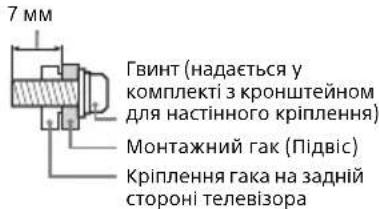
TpaHcnopTyBaHH
- Ipeep TpaHcnpTyBaHHaMe TeIeBi3opa BiD'EnaHte Bci ka6eni
-ДяТранспортувань Велнико Тelenbi3opa notpi6ho DBI a60 TPNOCO6N.
-ПиТранспорУВаHHI TeleБИЗОра ВPyЧу Трмале Ию,ЯК ноказано Ha MaJIOnHу. He HATnCKaIte Ha PK-naHelenb Ta pamky Довькona ekpaHa.
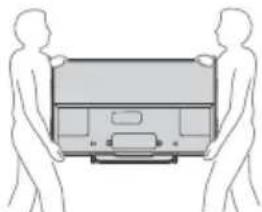
IpnnepeimieHnTeBbi3opa o6epiraTe Ioro BID nowtoxBiABo HAdmipHO Bi6paui.
Pnp TaHcnpTyBaHHI TeneBisOpa Do cepBicHO TcHpy a60 npn nepe3di 3anaKyte NOro B Kopo6ky, BnKOpncTOByuOn npn3Hauehi DnA HbOro NaKyBaHbHi MatepiAn.
3axnt TeIeBi3opa BiD nepeKeuHaHHa
Ipeed TUM KBYPuyBaTN BUNHT KPIINNeHHN, NOKJaITbTeNEB3Op EKPAHOM DOHNy Ha CTINKY NOBEPXHO, IO Ma6BinblpO3MIPn, HIX TeNEB3Op.
- Ⅲo6 He noIooKoIHT PK-ekpaH,3acteIb NOBepXHO WMaTKOM M'koT KKHINH.
Bentnlaia
Hikon He 3aKpBnBe BHTNJIuHi OTbOpn HiHoro HBCTabJrTe Y Kopnyc.
3aHbBn npocTip HABKOIO Tenebi3opa, kNOKa3Ho Hxue.
-PepeKoHaTeCc,TO TB BEHTINIOEbCra HAJIeXHM YHOM. TOpTio6HO,IO6BaKoNO TB 6yNo DOCTaTHBo BIbHO rO MICu, Kc ue 306paeho Ha IIOCTpauii.
BctaHOBHeHHHa cTIiH
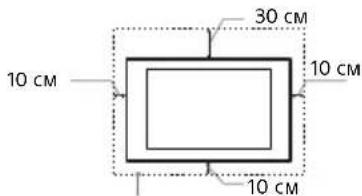
3aannte npHnMHI taknn npoctip BInbHM HABKOIO TEneBIsopa.
BctaHOBHeHHaDonomoro np
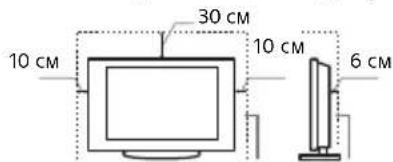
3aannTe npnHaMHi TaKm PpOCTip BInbHMM HABKOJIO TeneBizopa.
ДяЗбe3neueHHHaJexHoiBENTnlauiTa3anobirHnHaKoJIuEHnIO6pydyaboNny:
He KnaiTb TenebiOpyropn3oHTaJIbeNoJIOKeHH, He BCTaHOBnHOHe NOro HNKBHO CTOPHO DOROpN, 3aOM Haneped a60 b6ik.
-He cTabe TeneBizop Ha noJnH, KINIM, nocTInb a60 y wafy.
He hakpmbaTe TeneB3Op TKaHnHO, TaKIO K 3aHaBICKN, a6o IHmpeyamn, HapnKnad r3eTaMToIoo.
He BCTaHOBIOHOTe TeneBI3Op TA,K,IK NOKa3aHO HNXue.
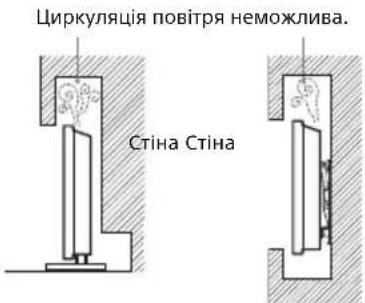
Ka6eJb XnBHeHna
Nobobtec3kabeneemXNBHeHHIpo3eKIOUy3aHaueHHN HnKcneCnOci6,uo3o3oBiHTn Pn3NKy BnHKnHEHHnoKei, ypaXeHHeEeKTPuHMMCTpyMOM a0bNOwKOJKeHH Ta/a0b TpaBM
BukopncToByTe Ka6eJbXnBHeHnHaDaHnTilbkn KOMNaHIEO Sonya He IHmMn NOCTaHbHnKaMn.
BctabnTe wTenceIb do eNeKtpuHoi pO3eTkn Do KINua.
-Плкюаite TeleBisop TINbKN Do Mepeksi 3MiHHoro CTpyMy 3 Hanpyro220-240 B.
-Пи пдкюechні кабиь заади влachоь бзени
ob8'экобо Вд'й'dмане Кабь киньнгь i сдкут, сб
He 3anluyatncn Horamny kabenx.
-Bi'eHaIte Ka6eIb XnBHeHn BiD po3eTKn nepeI peMOHTOM a6o nepemiuueHHm TeJIeBI3opa.
- TpmaTe Kaebb XnBneHn noanl BiD nxepen TeNa.
-Perynpho BmMaTe 8tenCeB i3 po3ekn Oounaante Noro. Raio 8tenCeB BkPNTNI NIOOM I Ha HbOro nOtpanIe BOIora, Nooro 10JouzMoKe 3iCyBaTcR, 0o MoKe npu3BecTn Do nooxekl.
Ppumitka
He BnKOpNCToBvTe HaaHn KaBeIb KMBneHHra 3 KOHNIM IHUNM ObnHaHHm.
He 3aueemJrTe, He 3rHnAte I He nepeKpyuYte Ka6eIb XJIENHHe HnTO CnLbHO, CTyPMOnpOBIiH JxINMOKYtB ORoIITNC ABO 3NaMAtnc.
He MoDnΦiKyIe KaBéIb KJNVBnEHnA.
He KnaIb BaxKpeuHa Ka6eJb XnBnHn.
He TargHtB Ka6eB JxNBeHHn Pn BiD'EnHaHHi NOro BiE neKtpuHoi pOeTKn.
- He niiKnouaTe HaTo 6arato npuaB Do ODiHcI po3eKn.
He BnKOpNCTOByIte eNeKtpNHy po3eKy, 10 He 3a6e3neYc HaleXHOrO npJraHn KaTakTiB Wtencen.
IPMIMTKA LIOO MEPEXEBORO ADANTEPA
PonpepekeHH
Ioo3Hn3HTn pN3NK 3aMmaHH ypaXeHH eJeKtpuHMM CTpyMOM, HePiDdAbaTne cei npuaad BnNBy douy cn BOLOr. Ioo6BnKJIouTHm MOxNNBICTb 3aTopoHHy ypaXeHHe EeKTPnuHM CTpyMOM, HeCTaTE Ha npuaad npeMeTN, HanaOBHeHBoIO, Hanpuknaad Ba3N. He BcTaHOblnoTe npuaad y 3aMKHeHOMy npocToPi, Hanpuknaad y KHKKKobii wafo TOIO.
- P03eTka Maé 3haxoDITnCra nO6Jn3y o6naHaHHaI 6ytu IerKo DOCTynHOIO.
BukopncTOByTe MepexeBn aanTep i Ka6enb XNBHeHH, 0o DoaIObCra.
He BnKOpNCToBMyIInHm MepExeBn aanTep. Lc MoKe cnPnUHNHT HeCnpaBnCTb.
-ПлкюаTe Мержеви aanTep Do Jerko Doctynhoi po3eKn. - He Hamotyte Kaebj KMBHeHHaHbKO MepeXeBOro aanTepa. Lc MoKe np3BeCTn Do noWkoJKeHHaKIN KaebIO Ta CnpuHHTn HecnpaBHICTb MediApnMaaya.
- He TopkaaTeCeA Do MepeXeBOro aanTepa BOnorM pyKaMn.
- NOMITUBUNI KICTB HENONAADK, HeraaHOBID'EDHaHTe MepexeBn aadantep BID po3ETKn.
HabibnBmKHeHH npnaad 3aHaTaBCa nIKNoeHIM Do eNeKtpuHoi MepeKi. BID'EnaHTe NOro BiD po3eKn.
-Пи ТрИВАОМУ ВИКОPGИСТАНHI МЕРЕЖБИДдАNTЕР HarpIbaeTbCЯ.ЧЕ моЖна BiДучTN,ДOTOPKHyBWHcьdo HbOTo pykoJO.
3a6opohene BnKOpncTaHHa
He BCTahOBHIOHTe/BNKOpNCOTByTe TeneBI3Op y HxKue3a3HaueHnx Mucx, OToeHHx i CnTyauix, OckinbKn ce MOKe npu3BecTn Do HeCnpaBHOcti TeNEbi3Opa, NoXeKi, ypaXeHHN eEkeTpnuHm CTpyMOM, NooKOJxehHr Ta/a6 TpaBM.
Miche:
HaBopi (PiN npRMm COHnHM npOMHHM), Ha MOpcbkomy y36pebckx, HA Kopabni a60 iHoumy Cydi, BCEpeDunHi TpaCnpTO HorO 3ac0y, Y MeuHnX 3akJaax, HectaJIbHex MICuaq, No7bni3y BiIkpInx BoOnM a6o JxpeJen BOni, BYMOBaX DoUy a60 dMy.
- Y pa3i BCTaHOBnEHn y B6npaIbHi ny6niHoi Ia3Hi nn KypOpTy 3 rapyHMn DkepeNaM MoKInBe noUkOxDKeHHn TebeB3opa CipKO, IO MICNTbCB NOBITpI, Tsoio.
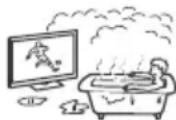
ДлдяdoянгьпайнгьпйякостибрахеннипбайтпpoTe,шб ekран He 6yB cnрmaBoHn Ha coHcpe NДжереништуHoroOCBITneHH.
He 3aHocbTe TeneBisOp i3 xOnody B TeNIIe npMiuEHHn. Pi3ka 3MiHa TeMnepatyn MoKe BVKNIkAaTN KOHeDcaUIO BONrI. Lc MoKe np3BeCTn Do noripweHHn AkoCTi 3o6paXeHHn i AkoCTi BiTbOpeHHn KOnbOpB. Y ToAKMy pa3i DaTe BO3oi NobHcTio BNapyBaTnc i Nnue Notim BMKauTe TeneBisOp.
OToueHHa:
「TAPyI,BOJorI aOHaMIpHO 3aHnIeHi McIa;MICzI,KyDN MOxYb NOTpAnNTKOMaxi;De TeneB3Op MOKe 3a3HaTN MexAHuOH Bo6paJIi, No6IIN3y 3aIMnCTnx peuei (CBiOK TOIO). 3axnauTe TeneB3Op BiK paneJIb i 6pn30k piDnH Ta He CTaBe Ha HbOro HAnOBHeHi PiDnHO npEdMeTI, HApnKnad Ba3N.
- He BCTaHOBIIIOIte TeneB13Op y BOIOrnx i nIINbHNIX MlCzA, a TaKox y npMIiueHnX,Je npCuTyHiM MaCLNHeHnI dIM a bO npa (npRd i3 KxOHnM cTOnOM qH 3BOJoxyBaem). Lc MoKe cIpnuNnYnNoKexy, eJIeKTPnuHn YdAp a6o DeΦopMaIio.
He BCTaHOBIOIe TeLeBbIOp y Micx, kI nepe6yBaIOb NiID DICIO BWCOKIX TemNepaTpy, HApNKnlaD, NID PRAMMM COOHNN IpomehnMn, No6n3y 6ataei onaneHHA 60 HarpiBaJIbHO-BeHTnJIuCIHoiCnCTEmN. IpeperPiBaHHa TeNeBIcOpa MoKe np3BecTu Do DeΦopMaII KOpNyCa i NOUKoJXeHHa Camoro npncTPOU.
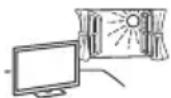
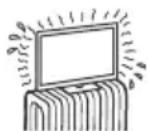
Cntyaui:
- He BnKOpNCTOByTe TeneB3Op, RaIoo y Bac MOKpi pyKn, RaIIO KOpNyc TeNeb3Opa 3HRTn, a TaKoX He BnKOpNCTOByTe NOrO 3YCTaTKyBaHH, He peKOMeHNIOBaHm BnPo6HnKoM. BiD'EnHyTete NtEbe3Op BiD pO3EtKN Ta aHTEH nIqac rpo3n.
He BCTaHOBIOHTe TeneBI3Op Tak, 0o6 BiH BVCTyNAB y OTOuyOuHn IpocTip. BiD ydAp y 6 TeNEBI3Op MOKyTB nOctpaXdATn IIOJn NooKOJNTnc iHsi npEpmTn.
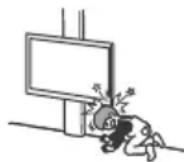
ПОЛOMKA KOMNOHEТВ:
He KnaTe HiOro B TeneB3Op. CkIo ekpaHa MoKe po36nTcR BiD yDapy Ta cnpuHHnTn cepNo3Hy TpaBMy.
KIOO KOpNc TeneBiaOpa TpiCHyB, He TopKaTecn Ioro, DOKN Bn He BiD'cHnAe TcNoBn UHyp BiD eNEKTpomepeXi. IHAKUe MOXe CTATNCY paxEHHN ENEKTPNHNM CTpyMOM.
Koln TeJIeBi3Op He BnKOpNCTOBycTbcra
KIO Bu He 6yTe BnOpCToBvBaTn TeneB3Op npotrrom KJIbKOx DHB, Ioro CnI BID EHaHTN BiEneKTpOmepeX13 MIPkyBaHb 6e3NeKu Ta 36epeXeHHa HABKoNNHbOro cepEOBnua.
Ockinbkn npocTe BmMkaHHa TebeBisopa He 03HaacE Ioro Bi'cHnHHa B1E eekTpomepexi,NotpioHO BVITRHyTN Wtncelb 3 eektpuHoi po3eTKU,IO6 BiKIOuHTN TebeBisOp nobHCIO.
- OДнak Дякі Telebi3opu MaIOb Taki Функл, Дяг HanexHoi po60tnyЯknx Telebi3opu MaIOb 3aJIuWataNc B pexmIo oukiyBaHH.
Udo ditei
- He Do3B0JaTe dIiTAM 3aIa3NTu Ha TeJIeBi3Op.
TpmaTe Mani Detani no3a DOCTYOM dTei, uO6 dITn ix BUNaKOBo HE npOKOBTHyI.
Y pa3i BHHKHeHn HnXueHaBeDeHnx npo6Iem...
Ypa3i BnHKnHeHH 6yDb-koI 3 HxKHeHaBepeHIN npObnem HeraiHo BmKHiB TebeI3op I Bi'€HaIte Ka6eIb XnBHeHH BID enekTpomepexi.
3BepHbC8aDcB0rnpoabua6o cepbcchoro cHTpy Sony 3 npoxaHHM, uob BaW TebeBizop nepeBipnB KbaniifikobAH npauiBHK.
Ko:
KaebjXnBnEnHnNoWkoDxKeHo.
- Wtencenb noraHO TpmaetbcB eeneKtpnHi p03eTuJ.
—TeneBisop nowkoJxeho ype3yIbTaTI naIHnY, ydpA a60 nOtpaJIHHNHy HbOrO JaKOrO-HeSyIbPpeDmTa. - Ype3 OTbOpn y Kopnyci BCEpeDmHy nOtpaIIa piHa a6o TBepnn ppeMTe.
Ipo TemnepaTy PK-dncnpe
Kkuo PK-tnnneB uKOpncTOByc npToTOM TpuBaIoro Yacy, TO 30Ha HABKOHOHbO HarpiaTc.Je MoXHa BIDuyTu Ha DOTNK.
KPOHHTEN HJIA HACTIHHO KPINJEHHA
HnKHe HabeNo IHOpMaIIO npHaLeXHe BkOpNCaHH KPOHTeHa nA HaCTIHHO KpINHeHH.YBaXHo npOHTaTe IHO HOpMaIIO npABuBbHO BkOpNCToByTe KpOHTeHn HactIHHoro KpINHeHH.
InfopmaiaIgI cnoXnBaIb:
DToPmMyTeCnHaCTynHnX npaBNTexHKn 6e3neKu,io6 YHNKHTn cepno3nX TpABM y pe3yNbTaTI NOxeki, eNEKTpuHoro Unyap, nepeKnadHaN u naiaHHBnOpy6.
- DObipnTe BnKOHyBaTN BCTaHOBnEHn NIIeH3OBaHM nIINpAHHKam I TpMaIte MaNx dIeN NOaJI niD qac BCTaHOBnEHn.
- DObiprnte BnKoHyBaTn TpaHCnOpTyBaHHi demoHTax TeBeB3opa liueH3OBAHM m iipraHnKaM.
He BnKpyuTe rBuHTn i T.i nicra MoTAXy TeNeBizopa.
He Hamaratrec3MInHTKOHCTpyKIO KPOHHTeHa nHa HactiHHoro KpInneHn.
He bctahOBHIOHTeIHwe 0bnaHaHH,OKpIM Bka3aHOro BnpOby.
He BCTaHOBnIOte Ha KPOHTeH nHa HAcTIHHOro KpinneHHn HnipeMEn Ha Doaay Do TeNeBi3opa. - He cnnpaTecr I He BiwauTeCra H TaTeBeBIOp.
He 3actocobyte HaMipHy cnny niD qac nueHHaTexHIOO6CNYROyBaHHaTeNeBi3opa.
InfopmaiaIraIaJIepiB i nipraHnKIB Sony:
Hactynhi hctpykui ctocyuTcra TlBkn DnIepiB i nipraHnKIB Sony. Oob'3koBo npouHTaTe HabeDeHI HxKue npabina texhki 6e3neKn Ta npDinAte oOcbNBy yBary 6e3neui ni dac BCTAHOBENHH, TexHCHoro 06CnyroByBaHH i nepeBipKn zuBorBOBipOy.
- Y npoceci nepemiehenn Hn 3akpinneHH TeneBisop TpmaTe Ioro 360kIB.He nHimaiTe TeneBisop 3a niDbc.
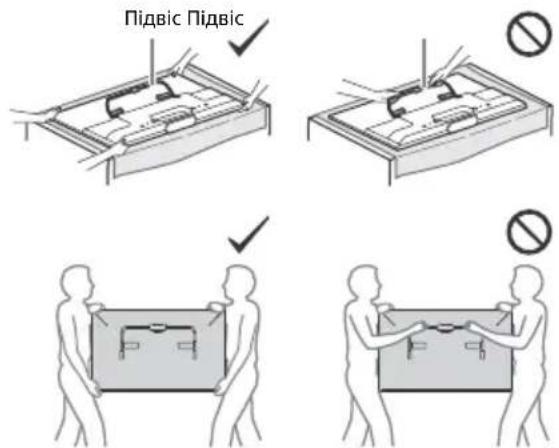
He BCTaHOBJIIOHTKPOHTeH DnHaCTiHHOro KpINNeHH TaKIM YNHom, 0O KYTN H6iHi NOBepxHI TeNEBI3OPa 6yDyTB BuCTynATn 3a PNOUHNy CTIN.
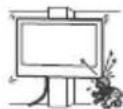
-HeBCTAHOBHIOHTeTeNEBIZOp nI a6oHaN KOHNIOJHOpOM.
HaIiHO BCTAHOBITb KPOHHTeHN dIa HACTIHNO KpInnHe Ha CTHI, DOTPMYIOUcHb IHCTpyKuIy UcbOMy Noci6HNY 3Ecknnyataui. RaXO uOVA OdINr TBnHT ocna6he Hn BNanpe, KPOHtEN dIa HACTIHNO KpInnHeHH MoKe Bnactn I 3abDaTn TpaBMn Hn NOxKOJNTM MaHo.
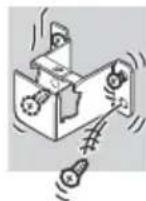
BukopncToByTe rBuHTn I KpInnblHi
eHemEnT3 KOMNekTy NOCTaHaHH
BiIOBIOHO do IHCTpyKcui y cBOMy Noci6HNky
3 ekCnNyatauii. Y pa3i BUKOpNCtAHH INx Hx eHemEtIB
TeLebiOp MoKe Bnactu i NowKOJNTnca a6o 3abDaTn fI3nHnx
TpABM.
HaJIeKHM YINOM CKNaIDITb KPOHHTeHH, DOTpMMyOuHcB IHCTpyKUJ yCbOMy Noci6HNky 3 EKCnPyataui.
HadiiHo 3aKpyuTe rBuHTy BiNObiDHX Micax.
- O6epiraTe TeneB3Op BID CTpyCIB NID YAC BCTaHOBJIeHHA.
- BCTaHOBNIouTe TeneB3Op Ha pIBHi, BEPTKaNbHi CTHI.
-Пиян haIeXHOrO BCTaHOBJIeHHa TeneBi3opa HaIiHo 3aikcyuTe Ka6eni.
- Y pa3i 3aIeMneHnKa6eIIO KINBHeHnYn 3'dihyBaHbNix Ka6eNIB BHYTIuHI XuJIN MoKyTB npopBaTn I3OJaIIO, CnpuYNHBuN KOpOTKe 3aMkaHH N p03IMKHeHn eJIeKTPnuHOro KoHTpy.
3aTepeKHi 3axOdi
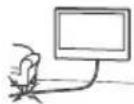
PeperrnTeneBizopa
-Дяклюд'mожутьВIDУВATNДИСКOMФОТ(HANpykeHHOey, BTOMa, HYDToTTOU), NepeRJaIauOn TpNBIMIPHI BIDEO3OBpaXeHnA BO rpaOuY CTEPEOCONiHi TpNBIMipHi IRpn. Sony peKOMeHnyE rnaDaam, Aki nepeRJaIaOTb TpNBIMipHI BIDEO3OBpaXeHnA BO rpaOTuB y CTEPEOCONiHi TpNBIMipHi IRpn, pOboNTu peryLaphi nepePBn. TpNBALiCTb Ta nepIOduNHiCTb nepePB 3aJeKHTb BID INDbIyAunhNx OCO6NBOcTeI rlaJaiv. Bu cami MaTe BV3HaUnTI nIra Cebe ONTMAbHn PEXm neperNaY. BiPyBwn DnCKOMΦoP, npINHITb NpeRJaI TpNBIMipHX BIDEO3OBpaXeHb aBO CTpeOeCKONiHnx TpNBIMipHX IPr, NOKn DO6pe CamonOuyTT He BIDHOBtCB; 3a NotpeBn 3BepHtBCrdoJIkApar. TaKoK cId (i) npOHTaNtIHCTpyKuII do BCIX npICPTPOIB aBO HocIB, 10 BIKOPNCTOBYOTBCr paOM iZm TeBeBIZOpM, i (ii) O3HaJOMtNC3 OCTaHBoIO IHΦOpMaJIeO Ha HAIoMy caTI B lInTpHeTI (http://support.sony-europe.com/). CnId nam'rTaTI, 10 opraHN 3OPY y MaJNX dITEEN (OC6BnBO y MOnoDux 3a WicTB pokIB) ue φopMyotbc. NepeD TM, AK DO3BOJNTN DIITM peERJaTaN TpNBIMPi BIDEO3OBpaXeHnA BO rpatN y CTpeOeCKONiHni TpNBIMipHI IRpn, pOKOHcyNbTyTecrC 3 Nlkapem (NeiaTpmo A ofo OΦtaIbMonorom). DOpocNI MaOtB HargJADTN 3a MAJIUMn DiTBMn, 3a6e3neYUOn DoTPMaHnH NITbMn peKOMeHdaI, 10 HabeDeH bIue.
3abopohraBcBnKopocTObByaTn,36epiratyn 3aIIuWATN OKyIpi3D 06bApateyKnO6JIyBorHIOy nY mICx3 BVCOKoTeMnepaTypoNo, Hanpknad, npnpmnnnnpomehmcoHcA aBO bABTOMObjn, 10cToITbHa coHci.
PnBukopctaHHIpeKIMa IMItaITpBmipHOro eEeKaT aamraite, uO ce TpBmIPhe BiDobpaXeHHMOdmpKyecbca daHMM TeBei3Opom WJlXOM nepetBopeHH BuxIDHO 306paXeHH.
ДиВитбяТeЛeВI3Op npn NOMiPOMy OCbITNeHHi, OCKINbKInpeRЯd TeLbeI3OpApnpn NorAHomy OCbITNeHHi a60 npOTaROMtpuBaNoRo Yacy npn3BODuTb Do HanpyKeHHaOeH.
BnKOpNCBOyUOHN HabyuHKn, BiDperynHOte rHyHcTB TaKUM yHOM, uO6 yHKnHYtn HaDMIPHX pIBHB, OCKINb B IHOWMY pa3i ue MOKe npN3BeCTn Do noripweHHaCNYX.
PK-ekpaH
He3BaXaOuHaTe,IO PK-ekpah BuroToBneHn i3 BUKOPNCTAHNM BNCOKOTUHOI TEXHOJIi 99,99% a60 bIbue NIKcEBIEeKETNBHO OHKUIOHYoTB,Ha ekpahi MoKyTb 3'BAITNC4 YOpHi TOCKn a60 RcKpABI TOKN CBITNa (cepBOHI, CUNI a60 3eJIeHI).Lc ctpkTyPha BlaactnbICTb PK-ekpaha,a He pe3yNbTaT moro HecnpabHOctl.
He wTobxaTeH He pIraaTe nepeDHI nIbTp I He KnaIITbe peHi Ha ceI TeJIeBIsOp. 3O6paXeHH MoKe CTaTI HepiBHomipHMn ABO PK-eKpAH MoKe 6yTu N0WkoJxHo.
- RaKUo TeJIeB3Op BUNKOpNCTOByEbCra y XOJIoNDomy npMIMIeHHI, 3O6paXeHHMoXe CTAtn PO3MtHmA bO To TMHm. Iue He E O3HaKOIO HecnpaBHOCTi. Taki RbUuia 3HnKaIOb Ppi NIDBUNeHHI TEMNepaTpyn.
- Pn TpBAnomy BiTBopeHHi HepyXOMnx 3o6paXeHb Ha HNX MoKe 3'RAIaTnca OpeoJ.
EkpaH i Kopnyc Harpiaotbca nid vac po6oTn TeIeB3opa. He HeHecnpaBHCTIO.
PK-ekpaH MicTb HeBENKy KJIbKICbTi piKOrO KpIcTana. DToPmUyTeCnMICueBux NoCTaHOi npabIN Udo OyTuJl3aui.
Dorla i nuuene Hn eKpaHa/kopnycy tenebi3opa
IpeepuHnHmOob'3KOBoBidcHaTeKa6bJXNBHeHHaTeNBei3opaBIDeKTPnuHoPi03eKn.
Uo 3ao6iTn NoripweHHIO kOciTi MaTepiAIB a6o nokpTTk ekpaHa, DToTpmyTEcA HxJyHeaBeDeHnx 3axoDiB 63neKn.
- ⅢBnAaNTn nI3 nobepxHie kcpHa/Kopnyc, opeeKHO npOtpTb M'koIO TKAHNHO. RkIo 3aJIneHHr CTiKe, IpOtpTb NOBepxHO M'koIO TKAHNHO, 3JrKa 3MoueHO Cla6KMPOzHOMMNIHORo 3ac0y.
He po36pn3kyuTe BDOy a6o MNUOuyn 3acic6e3nocepEnbHO Ha TeNebI3Op.PINHaMOKe NOTpaNTn Ha HNXHQUACTNHy ekpaHa Yn Ha 3OBHIshI DeTani, a NoTIM BCEpeHNHy npnAdy i noUKoJNTn TeNebI3Op.
Hikon He BnKOpncToBnyTe JxOHi JxOpctKi TKAHNH, LyXHl abo KNCIOThi po3uHN H N OPOwKn DnA uHeHn ABO IeTki po3uHNnKn, 30KpeMa CnIPT, 6eH3oN, po3piJyBaHi, IHcEKNuNDn ToIo. BnKOpncTaHH TaKnx peOvHN aBO TPbauNn KOtAKT i3 rymo aBO BiHInom MoKe npN3BeCTn Do noKoJXeHH NOBepXHi eKpaHa I MaTePiaNy, 3 RaKOrO 3pO6JIeHO KopNYC.
-ДязбетионнгньанжнВERTUNIJIPEKOMHnye mo nepiouHOnчNTnBEHTUNIciHiOTBOpN3aDOnOMORO nIIOOCa. - Perylnoohny Kyt nobopoty TeneBiaopa, noBepraTe Ioro NobiInbHo, 106 yHnKHyTu Ioro nepemIeHHa 6o 3cyBy 3i CBOE iNDCTABKN.
OdaTKObe 06laHaHHa
TpmaTe DoatKoBI KOMnoHeHTn a60 Byb-Ke 6bJaHaHH, BiJ kAoro IeEKEPOMaHITHE BINPOMIHOBAHN, NOaJI BiT TeLeBIsOpa. lAkaIe ce Moke cnpuHNt n CNOTBopeHH 3o6paxehnTa/a60 BinHKHeHH Wymy.
LcE 0bnaHaHnHaHanexKHM uHOM Bnnpo6yBaHe Ta Bn3HaTeTAKIM, 30a36e3neUy FHKUHOYBaHHra 3 O6mExEHnMn, Bn3HaueHnMn y DpuKeTnBi UOo ENEKTpMaHrHiTHoi CymiHocTi (EMC Directive) 3a BNkOpncTaHH CnHaJIbHnx KaBeIIB, KopoITxN 3a 3 Metpu.
PekomeHdaucia 0do wTekepa Tnny F
BHytpiHniDpiT NOBHe H BnCTynatn 3a 3'EDHyBaIbHy qactHy He 6Inbue, HIX Ha 1,5 MM.
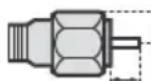
MaKc.7MM.
MAKc.1,5 MM
- LInφpy HabeHéni TaBnCi MoxyTb Deu Bo Bidpi3HrncBa 3aIexKHOCTi BiMoHTaxy.
3 N03HaTe Ha napeobomy 7a6Iohi A ceHtp ekpaHa TeIeBi3opa.
KDL-50W82xB,KDL-50W81xB, KDL-50W80xB,KDL-50W70xB
KDL-42W82xB,KDL-42W81xB, KDL-42W80xB,KDL-42/32W70xB
JiHikKa Ha nanepobomy wa6noHi A
JIinikKaHa nanepobomywa6noHi A
Uo6 OTPMAtn IHCTpyKuii 3i BCTaHOBHeHH KPOHtEeHa Dnla HAcTIHHOrO KpinneHHd nBaWoI Moeni TeJIbI3opa, BiDibaTe HabeEHn HNxue Be6-caNT:
www.sony.eu/tv/wall-mount-bracket-manual
UA
YcyHeHH HeCnpaBHOCTeH
Kkuo iHnKaTOp nicBiyBaHHa 6JImaC yepBOHM, npaxyTe KjIbKICTb 6JImaHb (iHTepBaI cKlaJaAe Tpu ceKyHn).
KUoLED-ocBtJIeHH6JIIMa€ YepBOHm,CKnHbTe HAcTpoiKu TeJIeBI3Opa.ДЯ zuBoRo HaDiXbIINH BiD'EnHaIte KaBeJb XNBHeHHaI TeJIeBI3Opa,a Notim 3HOBy yBIMKnITb TeJIeBI3Op.JaNo pO6JIeMa He 3HnKaε,3BepHiTcRa DoHaIb6JIxQOro Mara3InHy a6o cepBicHorOeHTpy Sony i NobIDomTe KInBkICTb 6ImaHbuePBOHoro LED-ocBtJIeHHa (IHTpeBaI - TprceKyn).HaTncHtB I/1 Ha TeJIeBI3opi,io6BIMKHyTN Ioro,BNTarHITb WTEKeP i3pO3eTKn i3BepHiTcBA Mra3InH a6o Do cepBicHoro ceHTpy Sony.
Ikuio iHdkaTop niDCbiyBaHH He 6nMae, nepeBipTe HactynHi MOxJNUBOCTi.
ДиВ.po3ДiI [YcUHeHHH HeCnpaBHOCTe] y
Noci6Hnky i-Manual a6o 3aNyctItb
camOdiarHOctNky, Bn6paBwn? [DobiJa] [PiTpIMKa KopncTyBaiv] [CamOdiarHocTnka].Якso npobJeMa He
3HnKa€, BiДaIte TeIeBizOp Ha
O6cIyROByBaHHKbJIΦIKOBaHOMy cneziAnicty.
Hecnpabhocti Ta cnoocn ix ycyhenha
BiDcyTHiI 3Byk i 3o6paXKeHHa (ekpah TEMHn).
- Ipepebipte aHTeHy ta Ka6eIbHe 3'EDHaHHa.
-ПлкluчтБТелевиЗОДоеЕКТрмepexkiНаTNCHITb KONKу I/Ha TELeBI3Opi a6o HnyIbTiДИСТAHUHOrOKepyBaHH.
He Bdaetbcn HacptoTn Okpemi KaHaJI.
- NepeBipTe aHTeHy a60 cynyTHnKoby TapiNky.
CynyTNKOBn Ka6eMb MoKe 6bTy 3aKOpOeHn a6oHa HbOMy MoKyTb 6bTu np6JIeMn 3i 3^ EHaHHa. NpeBipTe 3'EDHaHHa Ka6eIIO, a NOTIM BUMKHITb TeNeBi3Op KHONKOI nepemKaHHJ XINBJIeHHI i 3HOBy BBIMKHITb Ioro.
3aHaHa YacToTa BxOuNTb 3a MeKi Diana3oHy. 3BepHiTbcra Do KOMNaHii CynyTHnKOBoro Tele6aueHHa.
HeBdaIoc3NaItnKoIHOI nOcLyTn (KaHaNy) Ka6eIbHOro Tene6aueHHra.
- Ipepebipte niKluueHHa6eIIO i npametpn Hactpoikn.
Cnpobynte ckopncTaTnca fYHKciEIO [UuΦpOBe abTOHaCTpoIOBaHHa], Bb6paBwN [AHTeHa] 3aMICTb [Ka6eNb].
IyltnctaHioro KepyBaHH He npauoe.
3amHItb 6aTapeuKn.
- MoxIINBO, TeJIeBI3Op nepe6yBaε B peKmI SYNC. HatncHITb SYNC MENU, Bn6epiTB [KepyBaHHa TB], a Notim [Bdoma (MeHIO)] afo [Onuii], uo6 KepyBaTI nTeJIeBI3OpOM.
Bn 3a6yni napoIb Ina yHKuII [BaTbKIBcBKn 3axnCT].
BBeiITb PIN-koI 9999. (PIN-koI 9999 3aBxnn iε.)
3oha HABKOLO TeJIeBI3Opa HarpIbaETbcra.
- YKUO TeJIeBI3Op BUKOpNUCTOBYETbCn IPOTAROM TPNBaIoro Yacy, 3oHa HABKOJIO HbOro HarpiBaCTbcr. Lc moXHa BiDuyTu Ha DoTnK.
3o6paKeHHa 603ByK «3aBMnpa€》,nyctn ekpan,TeJIbI3Op He pearye Ha HATncHeHHa KHONOK Ha TeJIbI3opi a6o Ha npIbTi dNCTaHIOHorO KepyBaHHa.
- ΚιοδνικοhaTη npocTn nepe3anyck Telebi3opa, BiD'εdHaIte χHyp XnBJIeHHa BiD po3etN, a uepe3 2xbuInHn 3HOBy πιdklIoUcith Noro.
Bn He MoXeTe 3HaHTN KHOJKN I/CH+/-, CH+/-, +/-, +/4/4/4/4, i HOME Ha TeJIeBi3opi. - Po3taUyBaHHa KHONoK Ha TeNeBi3Opi DnB. Ha HabeDeHHi HnXy eIIOCTpauii.
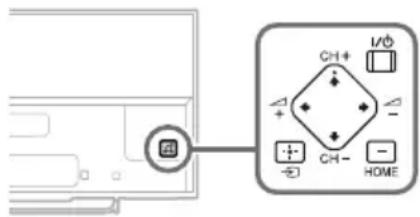
3aHnHaHeB TeleBi3opa
LED-ocBtIeHHyYbIMKHeHo.
LED-OCBITNeHHa MOxHa BmKHyTu HATnCHiB KHONKY HOME, BN6epiTb

[HaJauTByBaHHa] [HaJauTByBaHHa cnCTeMu] [3araJIbHe HaJauTByBaHHa] [LED-ocBITneHHa] [BIMKH].TaKoX Bn MoKeTe HaTnCHyTN OPTIONS i Bn6paTu [LED-ocBITneHHa] [BIMKH].
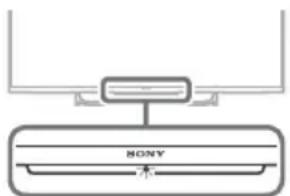
He BCTaHOBIOEbCnIKIIOUeHnA do 6e3dpoToboro MapwpyTu3aTopa 3a donomoroWPS.
- Y pa3i BnKOpncTaHn8 6e3neKn WEP Bn6epiTb [Pnoctn] [Wi-Fi] [Piδ'εd. 3aДои. cnNcky cKaHyB.].
Notim Bn6epiB im'mepeksi (SSID),do koi Tpe6a niiKJIHOHTNCJ.
He Bdaetbc3HaTm im' noTppi6Hoi Mepeksi B HanaTuBaHHx Mepeksi.
Bn6epiTb[[BBeDenHnBpyHy]]iHaTncHiTb 念 106 BBectn im' mepexki.
Texhihi xapaktepnkni
CnCTema
Cnctema naheJI
PK-naheJIb (PidkoKpncTalIyHn Ducnne),
CbitIOIOHne nIDcbiuyBaHH
TeJIeB3iHa cncTeMa
Analoroba: 3aIeKHO BID Bn6paHoi KpaIHn a6o
periohy: B/G, D/K, L, I, M
LunΦροBa:DVB-T/DVB-C
DVB-T2
Cynytnk: DVB-S/DVB-S2
CnCTema KojIbOpIB/BiJeO
Ahanoroba: PAL, SECAM, NTSC3.58, NTSC4.43
UΦoBa:ДИВ.Бi-Manual.
PokpTTKaHaJIb
AhaIoroba: UHF/VHF/ka6eIb, 3aJIeXHO BiD
Bn6paHoI kpaHn a6o perioHy.
UHFVHFKaBb,3aIeXHO BiD
Bb6paHoi KpaIHn a6o perioHy.
CynyTHNK: Ppomixkha yactota 950-2150 M
BnBeHn3BykY
8BT+8BT (kpim KDL-32W70xB)
TexHoloria Bluetooth
Bluetooth 3.0
Bxidi Ta BnxiHrHi3da
AHTeHHn Ka6ebIb
3OBHniHn po3'em i3 onopom 75 Om nIy VHF/UHF
CynyTHNKoBa aHTeHa
Tn3oBni po3'em TtuNy F (IEC169-24), 75 OM.
DiSEqC 1.0, LNB 13 B/18 B, 3ByK 22 KΓι, ΠepeДачοДнИМ kaБелЕМ EN50494.
AV1
21-шт neuropo3'EM Scart (ctaHndpT CENELEC), y TOMy unciayio/Bineobxid, Bxid RGB ta ayio/ bideobuxid Tenebi3opa.
0
P
D N
E
T I
YPBPR (KOMHOENTHNI BiJeOcNHaJ): 1080p (50, 60T), 1080i (50, 60T), 720p (50, 60T), 576p, 576i, 480p, 480i
AydioBxiD (po3'EMn RCA)
AV2
BiDeOBxid (3BvuaHn WTeKeR RCA i3 BxoDom Y)
HDMI IN 1,2,3,4 (Kpim KDL-50/42/32W70xB)
Biéo (2D): 1080p (30, 50, 60 Γι), 1080/24p, 1080i (50, 60 Γι), 720p (30, 50, 60 Γι), 720/24p, 576p, 576i, 480p, 480i, Komπ'οτερή φόρmaΤη Biéo (3D):
YnakobvBaHHKaDpiB:1080p(30Γu),1080/24p, 1080i(50,60Γu),720p(30,50,60Γu),720/24p
Nopyu: 1080p (50, 60 Γι), 1080/24p,
1080i (50, 60 Γu), 720p (50, 60 Γu)
OndnHaD oDnM:1080p(30,50,60Γu),
1080/24p, 1080i (50, 60 Γu), 720p (50, 60 Γu)
3Byk: liiHn PCM (5.1-kaHaIbHn): 32, 44,1 Ta
48 kTι, 16, 20 τα 24 6ιτι, Dolby Digital
ARC (3BopOTHI ayIOKaHAN) (TINbKn HDMI IN 2)
HDMI IN 1,2,3,4 (Tilbkn KDL-50/42/32W70xB)
Bideo: 1080p (30, 50, 60Γι), 1080/24p,
1080i (50, 60Γι), 720p (30, 50, 60Γι), 720/24p,
576p, 576i, 480p, 480i, Kom'IOTePHi φOpMaTI
3Byk: liHnH PCM (5.1-KaHaIbHn): 32, 44,1 Ta
48 KΓι, 16, 20 τα 24 διτι, Dolby Digital
ARC (3bopothi aydiokahan) (Tilbkn HDMI IN 2)
MHL (3BnuaHNO 3 HDMI IN 1)
(kpim KDL-50/42/32W70xB)
Biéo (2D): 1080p (30 Γι), 1080/24p,
1080i (50, 60 Γι), 720p (30, 50, 60 Γι), 720/24p,
576p, 576i, 480p, 480i
BiDeo (3D):
Поруч: 1080/24p, 1080i (50, 60 Г),
720p (50, 60 Φ)
OdHnHaD OndnM:1080p(30Tc),1080/24p,
1080i (50, 60 Γu), 720p (50, 60 Γu)
3Byk: liiHn PCM (5.1-kaHaIbHn): 32, 44, 1 Ta
48 kTι, 16, 20 Ta 24 6iιn, Dolby Digital
DIGITAL AUDIO OUT (OPTICAL)
ДоаTKOBи ΚИФОВи рОЗ'м (ДВОКАньHA liHInHa imnylbCHO-KOДОВa моулЯцi (Linea PCM), Dolby Digital)
AUDIO OUT/
AydioBuxiD (ctepeo mHiipo3'EM)
THi3D0IaHabyuHnKIB
10% - 80% (6e3 KOH.deHcaii).
KuBHeHHa Ta iHwe
CnoxnbHa NotyXHICTb
19,5 B noctiHoro ctpymy 3 aadantepom 3miHHoro ctpymy
HomHaBb BxIDNa NotyXHicTb: 220 B - 240 B
3mHOrO ctpymy,50
KnaeheprooekeTubHocti
KDL-50W82xB,KDL-50W81xB,KDL-50W80xB
KDL-50W70xB:A++
KDL-42W82xB,KDL-42W81xB,KDL-42W80xB,
KDL-42W70xB: A+
KDL-32W70xB:A
Po3mip ekpaHa (BumipHn no diaroHani) (Pp6n.)
KDL-50W82xB,KDL-50W81xB,KDL-50W80xB
KDL-50W70xB:50ДюиMIB/125,7cm
KDL-42W82xB, KDL-42W81xB, KDL-42W80xB,
KDL-42W70xB:42IIOIMIB/106,7cm
KDL-32W70xB: 32ДюМИВ / 80,1сM
CNOXnBaHH eNeKToeHepr
Ypexmi[CTaHdaptThe]
KDL-50W82xB,KDL-50W81xB,KDL-50W80xB
KDL-50W70xB:51BT
KDL-42W82xB, KDL-42W81xB, KDL-42W80xB,
KDL-42W70xB:50BT
KDL-32W70xB: 39 Bt
YpeXmIMi [RcKpaBn]
KDL-50W82xB,KDL-50W81xB,KDL-50W80xB
KDL-50W70xB:100BT
KDL-42W82xB, KDL-42W81xB, KDL-42W80xB,
KDL-42W70xB:99BT
KDL-32W70xB:80BT
CepenHbOpiHc nOxNBaHH eNeKtpoeHeprri*
KDL-50W82xB,KDL-50W81xB,KDL-50W80xB
KDL-50W70xB: 71 KBT-r
KDL-42W82xB, KDL-42W81xB, KDL-42W80xB,
KDL-42W70xB:69 KBT-r
KDL-32W70xB:54 KBT-
CnoKuBaHHeIeKtpoeHepriBpeKmIOuyiKyBaHH*2
0,5 Bt (10 Bt y pexmi OHOBJIeHH nporpamHoro 3a6e3neueHH/eneKtpoHHOI nporpamTeJenepeda)
Po3dijbHa 3aTHicTb, dncnneer
1920 took (no ropu3oHTa) × 1080 pRkiv (no BepTKaJI)
T6apnti po3mipn (Pnp6n3Ho) (× × )
3HaCTiBHOIO NiIINopoIO
KDL-50W82xB,KDL-50W81xB,KDL-50W80xB
KDL-50W70xB:111,6×69,3×17,9cm
KDL-42W82xB, KDL-42W81xB, KDL-42W80xB,
KDL-42W70xB:95,8×60,0×17,0 cm
KDL-32W70xB: 72,9×46,5×14,1 cm
Mobile High-Definition Link

Bluetooth

gracenote.
dt
Digital Surround
DiSEqC 1.0

For useful information about Sony products