
GOF 1300 CE Professional - Milling machine BOSCH - Free user manual and instructions
Find the device manual for free GOF 1300 CE Professional BOSCH in PDF.
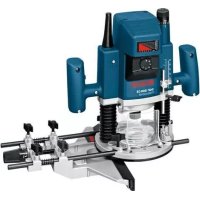



| Product type | Plunge router (router) |
| Brand | Bosch |
| Model | GOF 1300 CE Professional |
| Rated power | 1300 W |
| No-load speed | 12000 - 24000 rpm |
| Speed presetting | Yes (6-position dial) |
| Constant Electronic | Yes (maintains speed under load) |
| Tool holder (collet) | 6 - 12.7 mm |
| Plunge stroke | 58 mm |
| Weight (according to EPTA) | 4.8 kg |
| Protection class | II (double insulation) |
| Rated voltage | 230 V |
| Dust extraction connection | Yes (Ø 35 mm) |
| Soft start | Yes |
| Spindle lock | Yes (for bit change) |
| Parallel guide | Included, finely adjustable |
| Circle cutter | Optional accessory for circles |
| Copy ring | Accessory for copying templates |
| Included accessories | Chip deflector, depth stop, dust extraction adapter, 24 mm open-end wrench |
| Maintenance | Regular cleaning of ventilation slots, external extraction recommended |
| Repairability | Bosch after-sales service, spare parts available |
| Application areas | Wood, plastics, lightweight building materials, non-ferrous metals (with reduced speed) |
Frequently Asked Questions - GOF 1300 CE Professional BOSCH
User questions about GOF 1300 CE Professional BOSCH
0 question about this device. Answer the ones you know or ask your own.
Ask a new question about this device
Download the instructions for your Milling machine in PDF format for free! Find your manual GOF 1300 CE Professional - BOSCH and take your electronic device back in hand. On this page are published all the documents necessary for the use of your device. GOF 1300 CE Professional by BOSCH.
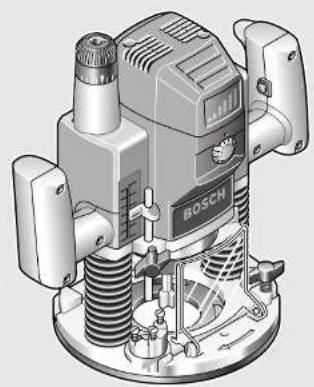
USER MANUAL GOF 1300 CE Professional BOSCH
Robert Bosch GmbH
Power Tools Division
Original instructions
Original instructions
Original instructions
Original instructions
Original instructions
1



N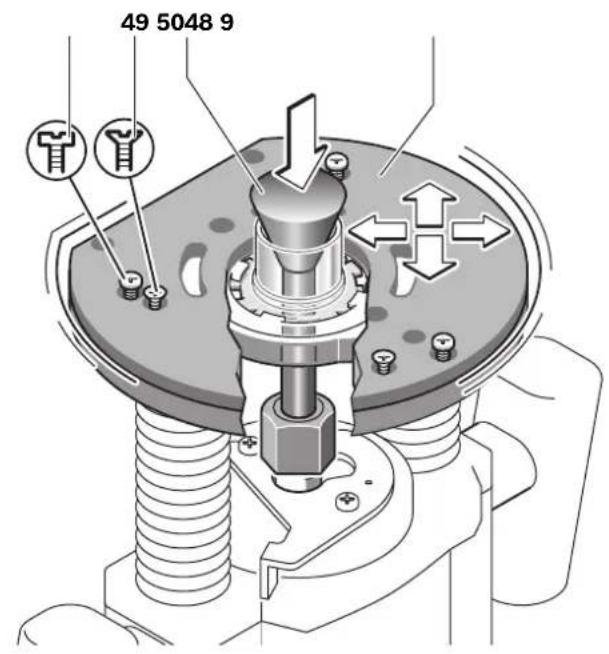
German 7
German
Safety instructions
Dr. Egbert Schneider Senior Vice President Engineering
Dr. Eckerhard Strötgen Engineering Director PT/ESI
Robert Bosch GmbH, Power Tools Division D-70745 Leinfelden-Echterdingen 26.10.2011
Assembly
General Power Tool Safety Warnings
WARNING
Read all safety warnings and all instructions. Failure to follow the warnings
and instructions may result in electric shock, fire and/or serious injury.
Save all warnings and instructions for future reference.
The term "power tool" in the warnings refers to your mains-operated (corded) power tool or battery-operated (cordless) power tool.
Work area safety
- Keep work area clean and well lit. Cluttered or dark areas invite accidents. Do not operate power tools in explosive atmospheres, such as in the presence of flammable liquids, gases or dust. Power tools create sparks which may ignite the dust or fumes.
- Keep children and bystanders away while operating a power tool. Distractions can cause you to lose control.
Electrical safety
Power tool plugs must match the outlet. Never modify the plug in any way. Do not use any adapter plugs with earthed (grounded) power tools. Unmodified plugs and matching outlets will reduce risk of electric shock. Avoid body contact with earthed or grounded surfaces, such as pipes, radiators, ranges and refrigerators.
There is an increased risk of electric shock if your body is earthed or grounded.
Do not expose power tools to rain or wet conditions. Water entering a power tool will increase the risk of electric shock. Do not abuse the cord. Never use the cord for carrying, pulling or unplugging the power tool. Keep cord away from heat, oil, sharp edges and moving parts. Damaged or entangled cords increase the risk of electric shock. When operating a power tool outdoors, use an extension cord suitable for outdoor use. Use of a cord suitable for outdoor use reduces the risk of electric shock. If operating a power tool in a damp location is unavoidable, use a residual current device (RCD) protected supply. Use of an RCD reduces the risk of electric shock.
Personal safety
Stay alert, watch what you are doing and use common sense when operating a power tool. Do not use a power tool while you are tired or under the influence of drugs, alcohol or medication. A moment of inattention while operating power tools may result in serious personal injury. Use personal protective equipment. Always wear eye protection. Protective equipment such as dust mask, non-skid safety shoes, hard hat, or hearing protection used for appropriate conditions will reduce personal injuries. Prevent unintentional starting. Ensure the switch is in the off-position before connecting to power source and/or battery pack, picking up or carrying the tool.
Carrying power tools with your finger on the switch or energising power tools that have the switch on invites accidents.
Remove any adjusting key or wrench before turning the power tool on. A wrench or a key left attached to a rotating part of the power tool may result in personal injury. Do not overreach. Keep proper footing and balance at all times. This enables better control of the power tool in unexpected situations.
Dress properly. Do not wear loose clothing or jewellery. Keep your hair, clothing and gloves away from moving parts. Loose clothes, jewellery or long hair can be caught in moving parts. If devices are provided for the connection of dust extraction and collection facilities, ensure these are connected and properly used. Use of dust collection can reduce dust-related hazards.
Power tool use and care
Do not force the power tool. Use the correct power tool for your application. The correct power tool will do the job better and safer at the rate for which it was designed. Do not use the power tool if the switch does not turn it on and off. Any power tool that cannot be controlled with the switch is dangerous and must be repaired. Disconnect the plug from the power source and/or the battery pack from the power tool before making any adjustments, changing accessories, or storing power tools. Such preventive safety measures reduce the risk of starting the power tool accidentally. Store idle power tools out of the reach of children and do not allow persons unfamiliar with the power tool or these instructions to operate the power tool. Power tools are dangerous in the hands of untrained users. Maintain power tools. Check for misalignment or binding of moving parts, breakage of parts and any other condition that may affect the power tool's operation. If damaged, have the power tool repaired before use. Many accidents are caused by poorly maintained power tools. Keep cutting tools sharp and clean. Properly maintained cutting tools with sharp cutting edges are less likely to bind and are easier to control. Use the power tool, accessories and tool bits etc. in accordance with these instructions, taking into account the working conditions and the work to be performed. Use of the power tool for operations different from those intended could result in a hazardous situation.
Service
Have your power tool serviced by a qualified repair person using only identical replacement parts. This will ensure that the safety of the power tool is maintained.
Safety Warnings for Routers
Hold power tool by insulated gripping surfaces, because the cutter may contact its own cord. Cutting a "live" wire may make exposed metal parts of the power tool "live" and shock the operator. Use clamps or another practical way to secure and support the workpiece to a stable platform. Holding the work by your hand or against the body leaves it unstable and may lead to loss of control. The allowable speed of the router bit must be at least as high as the maximum speed listed on the power tool. Accessories that rotate faster than permitted can be destroyed.
Router bits or other accessories must fit exactly in the tool holder (collet) of your machine. Routing bits that do not fit precisely in the tool holder of the machine rotate irregularly, vibrate heavily and can lead to loss of control. Apply the machine to the workpiece only when switched on. Otherwise there is danger of kickback when the cutting tool jams in the workpiece. - Keep your hands away from the routing area and the router bit. Hold the auxiliary handle or the motor housing with your second hand. When both hands hold the machine, they cannot be injured by the router bit. - Never cut over metal objects, nails or screws. The router bit can become damaged and lead to increased vibrations. Use suitable detectors to determine if utility lines are hidden in the work area or call the local utility company for assistance. Contact with electric lines can lead to fire and electric shock. Damaging a gas line can lead to explosion. Penetrating a water line causes property damage or may cause an electric shock. Do not use blunt or damaged router bits. Blunt or damaged router bits cause increased friction, can become jammed and lead to imbalance. - When working with the machine, always hold it firmly with both hands and provide for a secure stance. The power tool is guided more secure with both hands. Always wait until the machine has come to a complete stop before placing it down. The tool insert can jam and lead to loss of control over the power tool.
Products sold in GB only: Your product is fitted with an BS 1363/A approved electric plug with internal fuse (ASTA approved to BS 1362). If the plug is not suitable for your socket outlets, it should be cut off and an appropriate plug fitted in its place by an authorised customer service agent. The replacement plug should have the same fuse rating as the original plug. The severed plug must be disposed of to avoid a possible shock hazard and should never be inserted into a mains socket elsewhere.
Products sold in AUS and NZ only: Use a residual current device (RCD) with a rated residual current of 30 mA or less.
Product Description and Specifications

Read all safety warnings and all instructions. Failure to follow the warnings and instructions may result in electric shock, fire and/or serious injury.
While reading the operating instructions, unfold the graphics page for the machine and leave it open.
Intended Use
The machine is intended for routing grooves, edges, profiles and elongated holes as well as for copy routing in wood, plastic and light building materials, while resting firmly on the workpiece.
With reduced speed and with appropriate routing bits, nonferrous alloys can also be machined.
Product Features
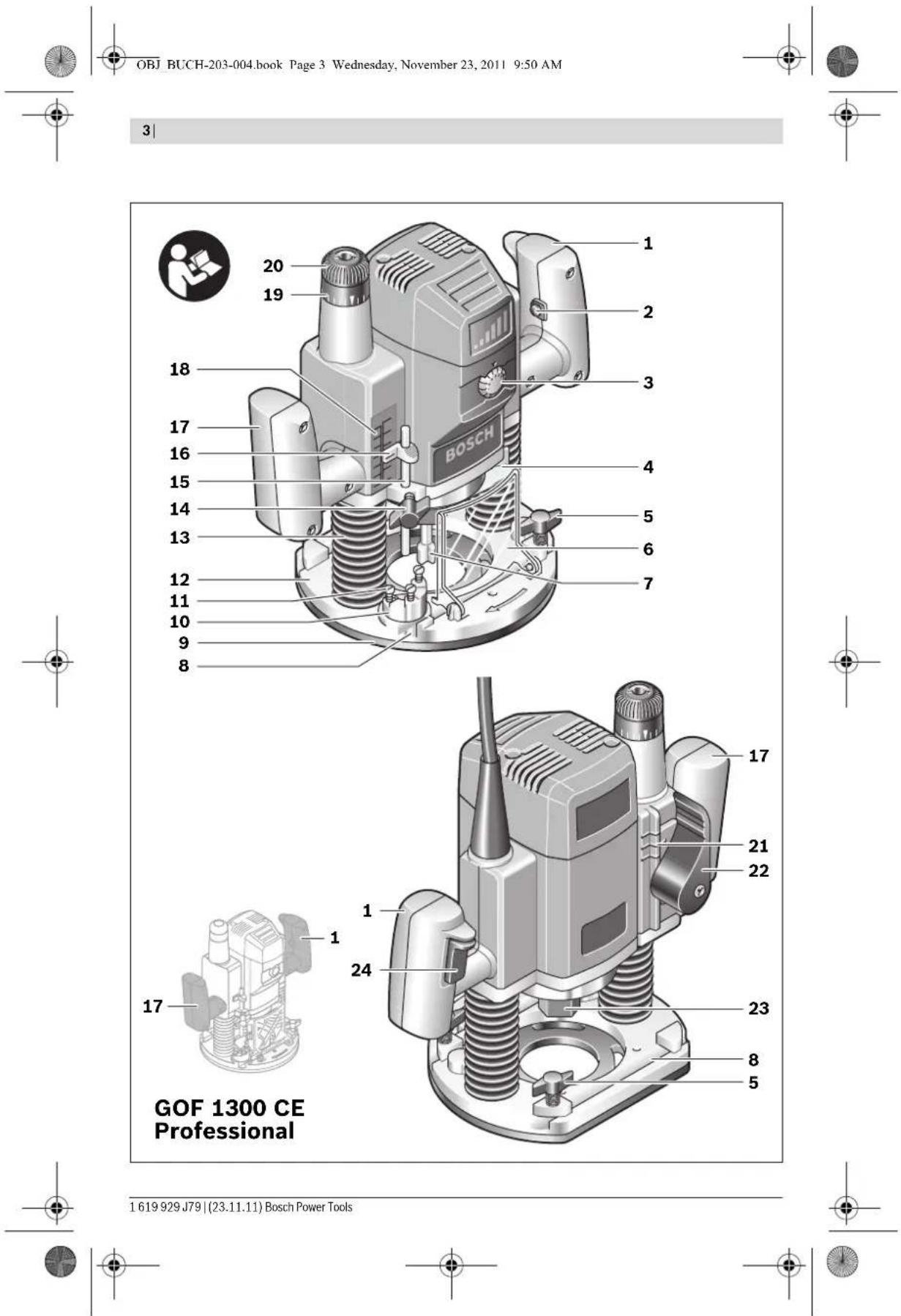
The numbering of the product features refers to the illustration of the machine on the graphics page.
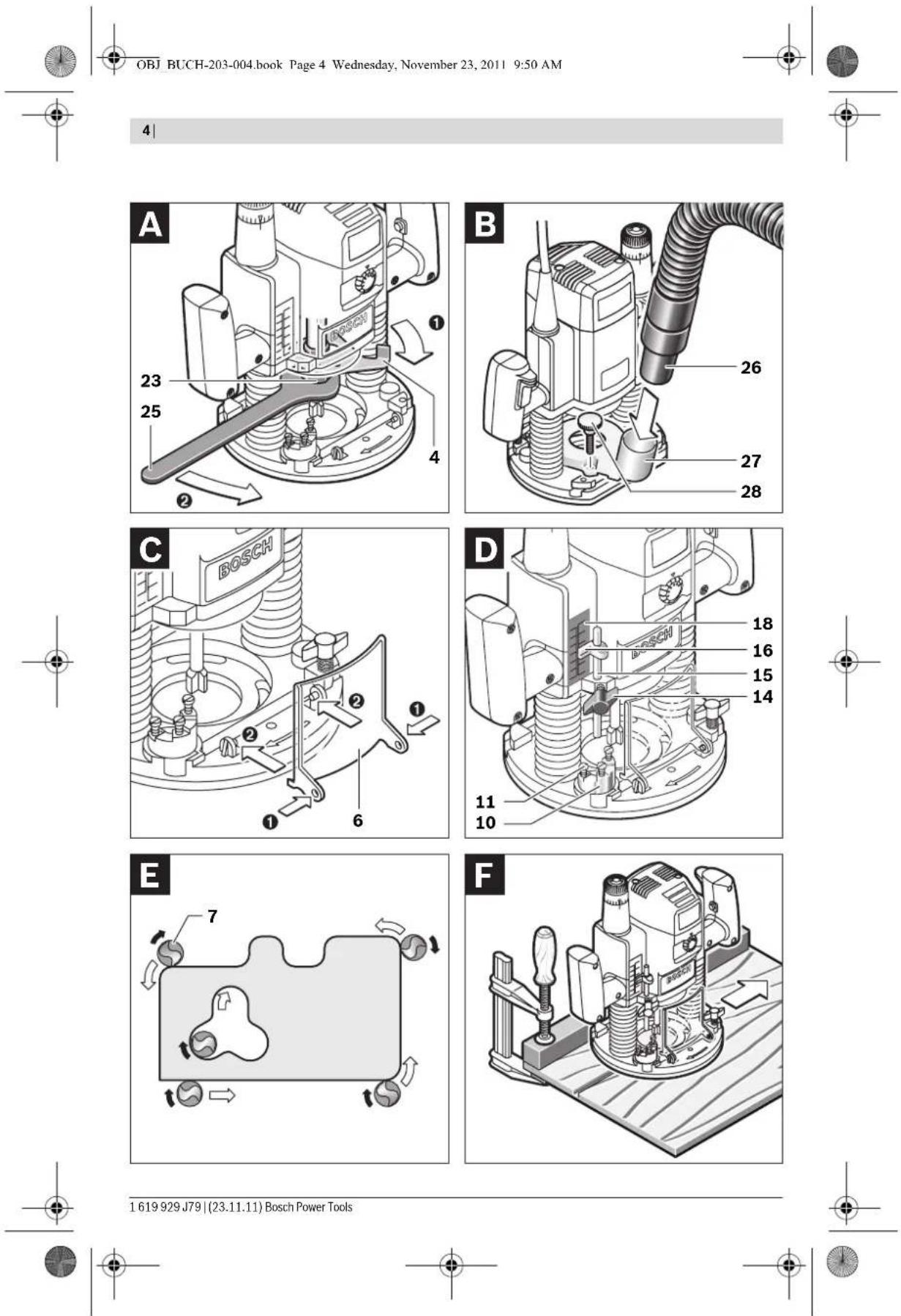
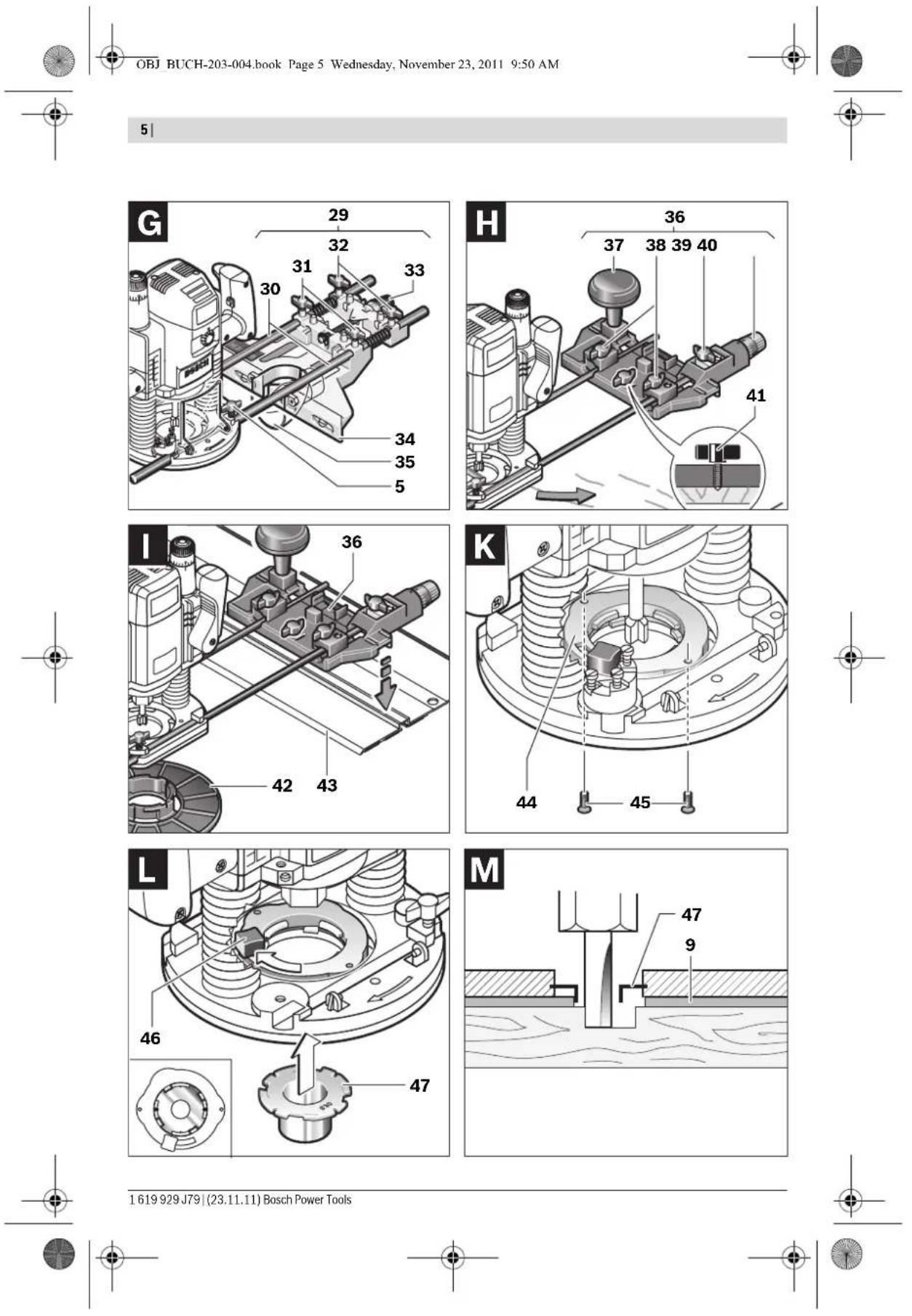
1 Right handle (insulated gripping surface) 2 Lock-on button for On/Off switch 3 Thumbwheel for speed preselection 4 Spindle lock lever 5 Wing bolt for guide rods of parallel guide (2x) 6 Chip shield 7 Router bit 8 Seat for parallel guide rods 9 Guide plate 10 Step buffer 11 Adjusting screws for step buffer 12 Base plate 13 Dust boot 14 Wing bolt for depth stop adjustment 15 Depth stop 16 Slide with index mark 17 Left handle (insulated gripping surface) 18 Scale for depth-of-cut 19 Scale for depth-of-cut fine adjustment 20 Adjustment knob for depth-of-cut fine adjustment 21 Mark for zeroing 22 Release lever 23 Tightening nut with collet
24 On/Off switch 25 Open-end spanner, size 24 mm 26 Extraction hose (0 35 mm) 27 Extraction adapter 28 Knurled screw for extraction adapter (2x) 29 Parallel guide 30 Guide rod for parallel guide (2x) 31 Wing bolt for fine adjustment of parallel guide (2x) 32 Wing bolt for coarse adjustment of parallel guide (2x) 33 Fine-adjustment knob for parallel guide 34 Adjustable edge guide for parallel guide 35 Extraction adapter for parallel guide 36 Router compass/guide-rail adapter 37 Router compass handle 38 Wing bolt for coarse adjustment of router compass (2x) 39 Wing bolt for fine adjustment of router compass (1x) 40 Fine-adjustment knob for router compass 41 Centring screw for compass stop 42 Base spacer (included in the "router compass" set) 43 Guide rail 44 SDS guide-bushing adapter 45 Fastening screw for guide bushing adapter (2x) 46 Release lever for guide bushing adapter 47 Guide bushing 48 Pan head screw for guide plate 49 Countersunk head screw for guide plate 50 Centring pin Accessories shown or described are not part of the standard delivery scope of the product. A complete overview of accessories can be found in our accessories program.
Technical Data
| Plunge router GOF 900 CE | |||
| Professional | GOF 1300 CE Professional | ||
| Article number 0 601 614 6.. 0 601 613 6.. | |||
| Rated power input | W | 9 | 0 |
| No-load speed | \( min^{-1} \) | 12000 - 24000 | 12000 - 24000 |
| Speed preselection | ● | ● | |
| Constant electronic control | ● | ● | |
| Connection for dust extraction | ● | ● | |
| Tool holder | mm | 6 - 8 | 6 - 12.7 |
| inch | 1/4 | 1/4 - 1/2 | |
| Plunge depth | mm 50 58 | ||
| Weight according to EPTA-Procedure 01/2003 | kg 3.5 4.8 | ||
| Protection class | ☐/II /II | ☐ | |
| The values given are valid for a nominal voltage [U] of 230 V. For different voltages and models for specific countries, these values can vary. Please observe the article number on the type plate of your machine. The trade names of the individual machines may vary. | |||
English|17
Noise/Vibration Information
Measured sound values determined according to EN 60745.
Typically the A-weighted noise levels of the product are: Sound pressure level 89 dB(A); Sound power level 100 dB(A). Uncertainty K = 3 dB.
Wear hearing protection!
Vibration total values a (triax vector sum) and uncertainty K determined according to EN 60745:
a_h = 5.5 m/s^2, K = 2.5 m/s^2
The vibration emission level given in this information sheet has been measured in accordance with a standardised test given in EN 60745 and may be used to compare one tool with another. It may be used for a preliminary assessment of exposure.
The declared vibration emission level represents the main applications of the tool. However if the tool is used for different applications, with different accessories or poorly maintained, the vibration emission may differ. This may significantly increase the exposure level over the total working period.
An estimation of the level of exposure to vibration should also take into account the times when the tool is switched off or when it is running but not actually doing the job. This may significantly reduce the exposure level over the total working period.
Identify additional safety measures to protect the operator from the effects of vibration such as: maintain the tool and the accessories, keep hands warm, organise work patterns.
Declaration of Conformity C
We declare under our sole responsibility that the product described under "Technical Data" is in conformity with the following standards or standardization documents: EN 60745 according to the provisions of the directives 2011/65/EU, 2004/108/EC, 2006/42/EC.
Technical file (2006/42/EC) at:
Robert Bosch GmbH, PT/ETM9
D-70745 Leinfelden-Echter
Dr. Egbert Schneider
Senior Vice President
Engineering
Dr. Eckerhard Strötgen
Engineering Director
PT/ESI

Robert Bosch GmbH, Power Tools Division
D-70745 Leinfelden-Echterdingen
26.10.2011
Assembly
Inserting a Router Bit (see figure A)
Before any work on the machine itself, pull the mains plug. It is recommended to wear protective gloves when inserting or replacing router bits.
Depending on the application, router bits are available in the most different designs and qualities.
Router bits made of high speed steel (HSS) are suitable for the machining of soft materials, e.g. softwood and plastic.
Carbide tipped router bits (HM) are particularly suitable for hard and abrasive materials, e.g. hardwood and aluminium.
Original router bits from the extensive Bosch accessories program are available at your specialist shop.
Only use clean router bits that are in perfect condition.
-Fold the chip shield 6 down.
Push the spindle lock lever 4 in clockwise direction and hold it in this position (O). If required, turn the motor spindle by hand until it is locked. -Loosen the tightening nut 23 with the open-end spanner 25 (size 24 mm) by turning in anticlockwise direction (●) - Insert the router bit into the collet. The shank of the router bit must be immersed at least 20 mm into the collet. - Tighten the tightening nut 23 with the open-end spanner 25 (size 24 mm) by turning in clockwise direction. Release the spindle lock lever 4. -Fold the chip shield 6 up again.
Do not insert a router bit with a diameter larger than 50 mm when the guide bushing is not mounted. Such router bits do not fit through the base plate. - Do not tighten the tightening nut of the collet without a router bit inserted. Otherwise the collet can be damaged.
Dust/Chip Extraction (see figure B)
Dusts from materials such as lead-containing coatings, some wood types, minerals and metal can be harmful to one's health. Touching or breathing-in the dusts can cause allergic reactions and/or lead to respiratory infections of the user or bystanders.
Certain dusts, such as oak or beech dust, are considered as carcinogenic, especially in connection with wood-treatment additives (chromate, wood preservative). Materials containing asbestos may only be worked by specialists.
- As far as possible, use a dust extraction system suitable for the material.
- Provide for good ventilation of the working place.
- It is recommended to wear a P2 filter-class respirator. Observe the relevant regulations in your country for the materials to be worked.
Prevent dust accumulation at the workplace. Dusts can easily ignite.
Mounting the Extraction Adapter
The extraction adapter 27 can be mounted with the hose connection to the front or to the rear. When the guide bushing adapter 44 is mounted, it is possible that the guide bushing adapter must be turned by 180° so that the extraction adapter 27 does not touch the release lever 46. When mounting with the hose connection in front, the chip shield 6 must be removed first. Fasten the extraction adapter 27 with the 2 knurled screws 28 to the base plate 12.
Connecting the Dust Extraction
Insert an extraction hose (Ø 35 mm) 26 (accessory) into the mounted extraction adapter. Connect the extraction hose 26 to a vacuum cleaner (accessory).
The machine can be plugged directly into the receptacle of a Bosch all-purpose vacuum cleaner with remote starting control. The vacuum cleaner starts automatically when the machine is switched on.
The vacuum cleaner must be suitable for the material being worked.
When vacuuming dry dust that is especially detrimental to health or carcinogenic, use a special vacuum cleaner.
Mounting the Chip Shield (see figure C)
Insert the chip shield 6 from the front into the guide in such a manner that it engages. To remove the chip shield, grasp it by the sides and pull it off toward the front.
Operation
Starting Operation
Observe correct mains voltage! The voltage of the power source must agree with the voltage specified on the nameplate of the machine. Power tools marked with 230 V can also be operated with 220 V.
Preselecting the Speed
The required speed can be preselected with the thumbwheel 3 (also while running).
1-2 low speed
3-4 medium speed
5-6 high speed
The values shown in the chart are standard values. The necessary speed depends on the material and the operating conditions, and can be determined by practical testing.
| Material Router bit | diameter (mm) | Thumb- wheel 3 |
| Hardwood (Beech) | 4 - 10 | 5 - 6 |
| 12 - 20 | 3 - 4 | |
| 22 - 40 | 1 - 2 | |
| Softwood (Pine) | 4 - 10 | 5 - 6 |
| 12 - 20 | 3 - 6 | |
| 22 - 40 | 1 - 3 | |
| Particle Board | 4 - 10 | 3 - 6 |
| 12 - 20 | 2 - 4 | |
| 22 - 40 | 1 - 3 | |
| Plastics 4 - 15 | 2 - 3 | |
| 16 - 40 | 1 - 2 | |
| Aluminium | 4 - 15 | 1 - 2 |
| 16 - 40 | 1 |
After longer periods of working at low speed, allow the machine to cool down by running it for approx. 3 minutes at maximum speed with no load.
Switching On and Off
Adjust the depth-of-cut before switching on or off; see Section "Adjusting the Depth-of-cut".
To start the machine, press the On/Off switch 24 and keep it pressed.
To lock the pressed On/Off switch 24, press the lock-on button 2.
To switch off the machine, release the On/Off switch 24 or when it is locked with the lock-on button 2, briefly press the On/Off switch 24 and then release it.
Constant Electronic Control
Constant electronic control holds the speed constant at no-load and under load, and ensures uniform working performance.
Soft Starting
The electronic soft starting feature limits the torque upon switching on and increases the working life of the motor.
Adjusting the Depth-of-cut (see figure D)
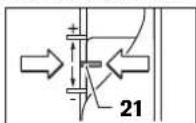
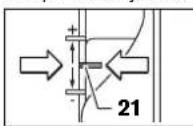
The adjustment of the depth-of-cut may only be carried out when the router is switched off. For coarse adjustment of the depth-of-cut, proceed as follows: - Place the machine with the router bit mounted on the workpiece to be machined. - Set the fine-adjustment path to the centre position with the adjustment knob 20. For this, turn the adjustment knob 20 until the marks 21 match as shown in the figure. Afterwards, set the scale 19 to "0".
- Set the step buffer 10 to the lowest position; the step buffer engages noticeably.
- Loosen the wing bolt for the depth stop 14 so that the depth stop 15 can be moved freely. Push the release lever 22 downward and slowly lower the plunge router until the router bit 7 touches the surface of the workpiece. Let go of the release lever 22 again to lock this plunging depth. Push the depth stop 15 downward until it rests on the step buffer 10. Set the slide with the index mark 16 to the "0" position on the scale for the depth-of-cut adjustment 18.
- Set the depth stop 15 to the required depth-of-cut and tighten the wing bolt for the depth stop 14. Pay attention not to misadjust the slide with the index mark 16 again. Push the release lever 22 and guide the plunge router to the uppermost position.
For deep cuts, it is recommended to carry out several cuts, each with little material removal. By using the step buffer 10, the cutting process can be divided into several steps. For this, adjust the desired depth-of-cut with the lowest step of the step buffer and select the higher steps first for the initial cuts. The clearance of the steps can be changed by screwing the adjusting screws 11 further in or out.
After a trial cut, the depth-of-cut can be set exactly to the desired measure by turning the adjustment knob 20: turn in clockwise direction to increase the cutting depth and in anticlockwise direction to decrease the cutting depth. The scale 19 can be used for guidance. One full turn corresponds with a
setting range of 2.0 mm; a graduation mark on the top edge of the scale 19 corresponds with a 0.1 mm change of the setting range. The maximum setting range is ± 8 mm.
Example: The desired depth-of-cut is to be 10.0 mm; the trial cut resulted in a cutting depth of 9.6 mm.
Lift up the router and place, for example, a piece of scrap wood under the guide plate 9 so that the router bit 7 cannot touch the workpiece when lowering it. Push the release lever 22 down and slowly lower the plunge router until the depth stop 15 faces the step buffer 10. Turn the scale 19 to "0" and loosen wing bolt 14. Turn the adjustment knob 20 by 0.4 mm / 4 graduation marks (difference from set to actual value) in clockwise direction and tighten the wing bolt 14. - Check the selected depth-of-cut by carrying out another trial cut.
After adjusting the depth-of-cut, do not change the position of the slide 16 on the depth stop 15 any more, so that the actual cutting depth can be read on the scale 18.
Working Advice
Protect router bits against shock and impact.
Direction of Feed and Routing Process (see figure E)
The routing process must always be carried out against the rotation direction of the router bit 7 (up-cutting motion). When routing in the direction with the rotation of the router (down-cutting), the machine can break loose, eliminating control by the user.
- Adjust the required depth-of-cut; see Section "Adjusting the Depth-of-cut".
- Place the machine with the router bit mounted on the workpiece to be machined and switch the power tool on. Push the release lever 22 down and slowly lower the plunge router until the adjusted depth-of-cut is reached. Let go of the release lever 22 again to lock this cutting depth.
- Carry out the routing process applying uniform feed.
- After finishing the cutting process, guide the plunge router upward again to the uppermost position.
- Switch the power tool off.
Routing with Auxiliary Guide (see figure F)
For working large workpieces, e.g. when routing grooves, a board or wood strip can be fastened to the workpiece as an auxiliary guide alongside which the router can be guided. Guide the router with the flattened side of the guide plate along the auxiliary guide.
Shaping or Molding Applications
For shaping or molding applications without the use of a parallel guide, the router bit must be equipped with a pilot or a ball bearing.
- Guide the switched on power tool from the side toward the workpiece until the pilot or the ball bearing of the router bit faces against the workpiece edge to be machined. Guide the power tool alongside the workpiece edge with both hands, paying attention that the router is positioned rectangular. Too much pressure can damage the edge of the workpiece.
Routing with Parallel Guide (see figure G)
Slide the parallel guide 29 with the guide rods 30 into the base plate 12 and tighten as required with the wing bolts 5. Additionally, the parallel guide can be adjusted lengthwise with the wing bolts 31 and 32.
Fine adjustment of the length is possible with the fine-adjustment knob 33 after loosening both wing bolts 31. One revolution corresponds with a setting range of 2.0 mm. One graduation mark on the fine-adjustment knob 33 changes the setting range by 0.1 mm.
The effective contact surface of the parallel guide can be adjusted with the edge guide 34.
Guide the switched on power tool with uniform feed and lateral pressure on the parallel guide alongside the workpiece edge.
When routing with the parallel guide 29, the dust/chip extraction should take place via the special extraction adapter for the parallel guide 35. The extraction adapter 27 can remain mounted.
Routing with the Router Compass (see figure H)
The router compass/guide-rail adapter 36 can be used for circular routing jobs. Mount the router compass as shown in the figure.
Screw the centring screw 41 into the thread on the router compass. Insert the point of the centring screw into the centre of the circular arc to be routed, paying attention that point of the screw engages into the workpiece surface. Coarsely adjust the required radius by moving the router compass and tighten the wing bolts 38 and 39. The length can be fine adjusted with the fine-adjustment knob 40 after loosening the wing bolt 39. One revolution corresponds with a setting range of 2.0 mm. One graduation mark on the fine-adjustment knob 40 changes the setting range by 0.1 mm. Guide the switched on power tool over the workpiece with the right handle 1 and the router compass handle 37.
Routing with Guide Rail (see figure 1)
Straight routing cuts can be carried out with help of the guide rail 43.
The base spacer 42 must be mounted in order to compensate the height difference.
Mount the router compass/guide-rail adapter 36 as shown in the figure.
Fasten the guide rail 43 to the workpiece with suitable clamping devices, e.g. screw clamps. Place the machine with the guide-rail adapter 36 mounted onto the guide rail.
Routing with Guide Bushing (see figures K-N)
The guide bushing 47 enables template and pattern routing on workpieces. In order to use the guide bushing 47, the guide bushing adapter 44 must be inserted into the guide plate 9 first. Place the guide bushing adapter 44 from above onto the guide plate 9 and tighten it firmly with the 2 fastening screws 45. Pay attention that the release lever for the guide bushing adapter 46 is freely movable.
Choose a suitable guide bushing, depending on the thickness of the template or the pattern. Because of the projecting height of the guide bushing, the template must have a minimum thickness of 8 mm.
Actuate the release lever 46 and insert the guide bushing 47 from below into the guide bushing adapter 44. Ensure that the encoding keys clearly engage in the grooves of the guide bushing.
Select a router bit with a diameter smaller than the interior diameter of the guide bushing.
To ensure that the distance from router bit centre and guide bushing edge is uniform, the guide bushing and the guide plate can be adjusted to each other, if required.
Push the release lever 22 down and guide the router to the stop in the direction of the base plate 12. Let go of the release lever 22 again, in order to lock this plunging depth. - Unscrew the countersunk head screws 49. Screw the pan head screws 48 into the holes intended for this purpose in such a manner that the guide plate 9 can be moved freely. - Insert the centring pin 50 into the tool holder as shown in the figure. Hand-tighten the tightening nut so that the centring pin can still be moved freely. Align the centring pin 50 and the guide bushing 47 to each other by slightly moving the guide plate 9. Tighten the pan head screws 48. - Remove the centring pin 50 from the tool holder. Push the release lever 22 and guide the plunge router to the uppermost position. For routing with the guide bushing 47 proceed as follows: - Guide the switched on power tool with the guide bushing toward the template. - Push the release lever 22 down and slowly lower the plunge router until the adjusted depth-of-cut is reached. Let go of the release lever 22 again to lock this cutting depth. - Guide the switched on power tool with the protruding guide bushing alongside the template applying lateral pressure.
Maintenance and Service
Maintenance and Cleaning
Before any work on the machine itself, pull the mains plug. For safe and proper working, always keep the machine and ventilation slots clean. In extreme conditions, always use dust extraction as far as possible. Blow out ventilation slots frequently and install a residual current device (RCD). When working metals, conductive dust can settle in the interior of the power tool. The total insulation of the power tool can be impaired.
If the replacement of the supply cord is necessary, this has to be done by Bosch or an authorized Bosch service agent in order to avoid a safety hazard.
If the machine should fail despite the care taken in manufacturing and testing procedures, repair should be carried out by an after-sales service centre for Bosch power tools. In all correspondence and spare parts orders, please always include the 10-digit article number given on the type plate of the machine.
After-sales Service and Customer Assistance
Our after-sales service responds to your questions concerning maintenance and repair of your product as well as spare parts. Exploded views and information on spare parts can also be found under:
www.bosch-pt.com
Our customer service representatives can answer your questions concerning possible applications and adjustment of products and accessories.
Great Britain
Robert Bosch Ltd. (B.S.C.)
P.O. Box 98
Broadwater Park
North Orbital Road
Denham
Uxbridge
UB9 5HJ
Tel. Service: +44 (0844) 736 0109
Fax: +44 (0844) 736 0146
E-Mail: boschservicecentre@bosch.com
Ireland
OrigO Ltd
Unit 23 Magna Drive
Magna Business Park
City West
Dublin 24
Tel. Service: +353 (01) 4666700
Fax: +353 (01) 4666888
Australia, New Zealand and Pacific Islands
Robert Bosch Australia Pty. Ltd.
Power Tools
Locked Bag 66
Clayton South VIC 3169
Customer Contact Center
Inside Australia:
Phone: +61 (01300) 307044
Fax: +61 (01300) 307045
Inside New Zealand:
Phone: +64 (0800) 543 353
Fax: +64 (0800) 428570
Outside AU and NZ
Phone: +61 (03) 9541 5555
www.bosch.com.au
Republic of South Africa
Customer service
Hotline: +27 (011) 6519600
Français|21
Gauteng - BSC Service Centre
35 Roper Street, New Centre
Johannesburg
Tel.: +27 (011) 493 93 75
Fax: +27 (011) 493 01 26
E-Mail: bsctools@icon.co.za
KZN - BSC Service Centre
Unit E, Almar Centre
143 Crompton Street
Pinetown
Tel.: +27 (031) 701 21 20
Fax: +27 (031) 701 24 46
E-Mail: bsc.dur@za.bosch.com
Western Cape - BSC Service Centre
Democracy Way, Prosperity Park
Milnerton
Tel.: +27 (021) 551 25 77
Fax: +27 (021) 551 3223
E-Mail: bsc@zsd.co.za
Bosch Headquarters
Midrand, Gauteng
Tel.: +27 (011) 651 9600
Fax: +27 (011) 651 9880
E-Mail: rbsa-hq.pts@za.bosch.com
Disposal
The machine, accessories and packaging should be sorted for environmental-friendly recycling.
Do not dispose of power tools into household waste!
Only for EC countries:
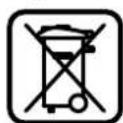
According to the European Guideline 2002/96/EC for Waste Electrical and Electronic Equipment and its implementation into national right, power tools that are no longer usable must be collected separately and disposed of in an environmentally correct manner.
Subject to change without notice.
Français
Dr. Egbert Schneider Senior Vice President Engineering
Dr. Eckerhard Strötgen Engineering Director PT/ESI
Robert Bosch GmbH, Power Tools Division D-70745 Leinfelden-Echterdingen 26.10.2011
Assembly
Robert Bosch (France) S.A.S
Dr. Egbert Schneider Senior Vice President Engineering
Dr. Eckerhard Strötgen Engineering Director PT/ESI
Robert Bosch GmbH, Power Tools Division D-70745 Leinfelden-Echterdingen 26.10.2011
Assembly
Senior Vice President
Engineering
Dr. Eckerhard Strötgen
Engineering Director
PT/ESI
Robert Bosch GmbH, Power Tools Division
D-70745 Leinfelden-Echterdingen
26.10.2011
Assembly
Senior Vice President
Engineering
Dr. Eckerhard Strötgen
Engineering Director
PT/ESI

Robert Bosch GmbH, Power Tools Division
D-70745 Leinfelden-Echterdingen
26.10.2011
Assembly
Senior Vice President
Engineering
Dr. Eckerhard Strötgen
Engineering Director
PT/ESI
Robert Bosch GmbH, Power Tools Division
D-70745 Leinfelden-Echterdingen
26.10.2011
Assembly
Senior Vice President
Engineering
Dr. Eckerhard Strötgen
Engineering Director
PT/ESI

Robert Bosch GmbH, Power Tools Division
D-70745 Leinfelden-Echterdingen
26.10.2011
Mounting
Bosch Service Center
Telegrafvej 3
2750 Ballerup
Tel. Service Center: +45 (4489) 8855
Fax: +45 (4489) 8755
E-Mail: vaerktoej@dk.bosch.com
Disposal
Power tools, accessories, and packaging should be recycled in an environmentally friendly manner.
27 Extraction adapter
Dr. Egbert Schneider Senior Vice President Engineering
Dr. Eckerhard Strötgen Engineering Director PT/ESI

Robert Bosch GmbH, Power Tools Division D-70745 Leinfelden Echterdingen 26.10.2011
Mounting
Bosch Service Center
Telegrafvej 3
2750 Ballerup
Denmark
Tel.: +46 (020) 41 44 55
Fax: +46 (011) 187691
Waste management
Dr. Egbert Schneider Senior Vice President Engineering
Dr. Eckerhard Strötgen Engineering Director PT/ESI
ppa. 1000 i.v. nuOycu
Robert Bosch GmbH, Power Tools Division D-70745 Leinfelden-Echterdingen 26.10.2011
Assembly
Senior Vice President
Engineering
Dr. Eckerhard Strötgen
Engineering Director
PT/ESI
Paa
Robert Bosch GmbH, Power Tools Division
D-70745 Leinfelden-Echterdingen
26.10.2011
Assembly
Instructions for use and safety
The vibration values were determined in accordance with EN60745.
The vibration emission value of the power tool is typically: Sound pressure level 89 dB(A). Sound power level 100 dB(A). Uncertainty K=3 dB.
Wear ear protectors!
The vibration total value (triaxial vector sum) determined in accordance with EN 60745:
ah = 5.5m / s2, K = 2.5m / s2
The vibration level given in these instructions has been measured in accordance with the standardised test procedure given in EN 60745 and may be used
to compare different power tools. It is also suitable for a preliminary assessment of exposure. The vibration level will vary with the actual use of the power tool, and may be higher than the stated value in normal use, depending on the way the power tool is used, especially with the type of workpiece. Be sure to take into account the vibration level for the actual working conditions, including the duration of the work and the condition of the power tool. This may significantly reduce the exposure over the total working period. To estimate the vibration exposure accurately, the periods when the tool is switched off or when it is running but not actually being used should also be taken into account. This may significantly reduce the

Greek
The machine is intended for cutting and grinding materials using abrasive tools.
Before starting the machine, appropriate safety measures must be defined to protect the operator: proper use of the power tool and accessories, according to the instructions, organization of the execution of the various works.
Declaration of Conformity
C
We declare under our sole responsibility that the product described in these instructions complies with the relevant standards: EN60745 in accordance with the provisions of Directives 2011/65/EU, 2004/108/EC, 2006/42/EC.
Technical file (2006/42/EC) at:
Robert Bosch GmbH, PT/ETM9,
D-70745 Leinfelden-Echterdingen
Dr. Egbert Schneider Senior Vice President Engineering
Dr. Eckerhard Strötgen
Engineering Director PT/ESI
Robert Bosch GmbH, Power Tools Division
D-70745 Leinfelden-Echterdingen
26.10.2011
Assembly
Read all safety warnings and all instructions (see Figure A).
Save all warnings and instructions for future reference. The term "power tool" in the warnings refers to your mains-operated (corded) power tool or battery-operated (cordless) power tool.
Work area safety: Keep work area clean and well lit. Cluttered or dark areas invite accidents.
Do not operate power tools in explosive atmospheres, such as in the presence of flammable liquids, gases, or dust. Power tools create sparks which may ignite the dust or fumes.
Keep children and bystanders away while operating a power tool. Distractions can cause you to lose control.
Electrical safety: Power tool plugs must match the outlet. Never modify the plug in any way. Do not use any adapter plugs with earthed (grounded) power tools. Unmodified plugs and matching outlets will reduce risk of electric shock.
Avoid body contact with earthed or grounded surfaces, such as pipes, radiators, ranges, and refrigerators. There is an increased risk of electric shock if your body is earthed or grounded.
Do not expose power tools to rain or wet conditions. Water entering a power tool will increase the risk of electric shock.
Do not abuse the cord. Never use the cord for carrying, pulling, or unplugging the power tool. Keep cord away from heat, oil, sharp edges, or moving parts. Damaged or entangled cords increase the risk of electric shock.
Turkish
Safety Instructions
General Power Tool Safety Warnings
WARNING
Dr. Egbert Schneider Senior Vice President Engineering
Dr. Eckerhard Strötgen Engineering Director PT/ESI
Robert Bosch GmbH, Power Tools Division
D-70745 Leinfelden-Echterdingen
26.10.2011
Assembly
Installing the router bit (see figure A)
Bosch San. ve Tic. A.S.
Ahi Evran Cad. No:1 Kat:22
Polaris Plaza
80670 Maslak/Istanbul
Bosch Expert Team +90 (0212) 367 18 88
Disposal
Dr. Egbert Schneider Senior Vice President Engineering
Dr. Eckerhard Strötgen Engineering Director PT/ESI


Robert Bosch GmbH, Power Tools Division D-70745 Leinfelden-Echterdingen 26.10.2011
Assembly
System Constant Electronic
Robert Bosch Sp. z o.o.
Dr. Egbert Schneider Senior Vice President Engineering
Dr. Eckerhard Strötgen Engineering Director PT/ESI

Robert Bosch GmbH, Power Tools Division D-70745 Leinfelden-Echterdingen 26.10.2011
Assembly
Bosch Service Center PT
K Vapence 1621/16
692 01 Mikulov
Senior Vice President
Engineering
Dr. Eckerhard Strötgen
Engineering Director
PT/ESI

Robert Bosch GmbH, Power Tools Division
D-70745 Leinfelden-Echterdingen
26.10.2011
Assembly
Dr. Egbert Schneider Senior Vice President Engineering
Dr. Eckerhard Strötgen Engineering Director PT/ESI
Robert Bosch GmbH, Power Tools Division
D-70745 Leinfelden-Echterdingen 26.10.2011
Assembly
Safety instructions
General safety instructions for power tools
WARNING
Read all safety warnings and
all instructions
Safety instructions for power tools. Failure to follow the instructions may result in electric shock, fire, and/or serious injury.
Keep these instructions and safety guidelines for future reference.
The term "power tool" used in these instructions and guidelines refers to a mains-operated (corded) power tool or a battery-operated (cordless) power tool.
Work area safety
Keep your work area clean and well lit. Cluttered or dark areas can lead to accidents. Do not operate power tools in explosive atmospheres, such as in the presence of flammable liquids, gases, or dust. Power tools create sparks, which may ignite the dust or fumes. While operating a power tool, keep children and bystanders away. Distractions can cause you to lose control of the tool.
Electrical safety
The power tool plug must match the outlet. Never modify the plug in any way. Do not use any adapter plugs with earthed (grounded) power tools.
Unmodified plugs and matching outlets will reduce the risk of electric shock. Avoid body contact with earthed surfaces, such as pipes, radiators, ranges, and refrigerators. There is an increased risk of electric shock if your body is earthed. Do not expose power tools to rain or wet conditions. Water entering a power tool will increase the risk of electric shock. Do not abuse the cord. Never use the cord for carrying, pulling, or unplugging the power tool. Keep the cord away from heat, oil, sharp edges, or moving parts. Damaged or entangled cords increase the risk of electric shock. When operating a power tool outdoors, use an extension cord suitable for outdoor use. Use of a cord suitable for outdoor use reduces the risk of electric shock. If operating a power tool in a damp location is unavoidable, use a residual current device (RCD) protected supply. Use of an RCD reduces the risk of electric shock.
Avoid contact with grounded surfaces, such as pipes, radiators, stoves, and refrigerators. If your body is grounded, the risk of electric shock increases. When using the power tool, keep it away from wet surfaces. Penetration of water into the power tool increases the risk of electric shock. Do not use the power cord for purposes other than its intended use, for example, to carry or hang the power tool, or to pull the plug out of the socket. Keep the power cord away from high temperatures, oil, sharp edges, and moving parts of the power tool. Damaged or tangled cords increase the risk of electric shock. When working with the power tool outdoors, use an extension cord suitable for outdoor use. Using a cord suitable for outdoor use reduces the risk of electric shock. If it is unavoidable to use the power tool in a damp location, plug it into a device with a residual current device (RCD). Using an RCD reduces the risk of electric shock.
Personal safety
BybteBHMMatBbHBM,CAeHTe3aTeM,TOBbI Aaete, HPOyMaHHo HAuHnHaTe pa60ty C3AekTPOHnCTPyrHOM. He TOb3yHTecb 3AekTPOHnCTpy-MENTOM BYCTaAM CoCTOHHN HAN ECAN Bbl HAXOANTECb COCTOHHN HAPKOTHeCKOHO HAN AAKORAaHBOr OTbRHeHHN HAN IOA BO3AEJCTBHEM AEkApCTB.OAHMOMEHT HEBBHMATeABHOCTHIPn PAoTEc 3AekTPOHnCTpy-MEMTOmKOT IPHBECTN K CepBe3HBM TpBaMam. TIPMHENHTE cpeACTBa HANBHBAYaBHO3aunHTbH BcERda 3aunTHbIe OUYK.NCTOAB30BaHHe cpeACTB HINBHNyAbyBHO3aunHTbI, Ka TO: 3auTHOH MACK, OByBN HA HECKoB3aJIIe IIOAOIBE, 3aunHTHO TILMAH Nn CpeACTB 3aunHTbOPrAHOB CAYxa, -B 3aBNCMOCTH OT BHa da pa6OTbC 3AEKTKPOHHCTpyMeHOM CHXKAeT PnCK IOAyuEHN TpaBM. PipeoTbpaaHte HnpeDnAmepeHHoe BkIOUeHHe 3AEKTPONHCTpyMeHTa. IpeE TIOKAIOUeHem 3AEKTPONHCTpyMeHTa K AIEKTPOTNTAHNO H/MAN KAKKY MYAHTOPY6BdANTECb BBIAKIOUeHHOM COCTOHHN 3AEKTPONHCTpyMeHTa.YdePKHaHE TAAbHa Ha BbIKAOyATEe PIP TPAHCTOPTHPOBKE AIEKTPONHCTpyMeHTa N IOKAIQHOHNE K CEMI TINTAHNA BkIOUeHHOrO 3AEKTPONHCTpyMeHTa YpeBaTO HecuACTHBIMCAYAARMM. Y6npaIte yCTaHOBOUHb MHCTpMEnT HAN raeHbIe KAOHn DO BKAIOUeHHN 3AEKTPoHNCTpMEnTa.

Pycckn | 129
HnCTpyMeHT HAN KIOU, HAXOaIINCRA BO BPAaIooIECAACTH 3AEKTPONHCTpyMeHTA, MOKET PnBbECTN K TpaBMam He npHHMAIte HeecCTBeHoe IIOOXeHne KOpTyca TEA.BcERda3aHHMaIte yTOHNBoe IOAOXeHne M coxpaHnIpe paHBoBeCe.5aIarOapr 3OMy Bb moKeTe Auyue KOHTPOAnPobAtb AEKtPOHNCTpymENTB HEOKJAdAHhBix CNTyauiX. HochtnepoXoArypo paOoyoOeXyHe hochtne HOPKyoOeJMy NKpaewHn. AepxNte BOACbI, OeJy NpykABuBBAaAMOT ABHXyUxxCraCTeH. 1pOKaR OeJda, yKpaewHn HAANHbBEBOLCbMOrYT 6bIt b3rHTBPAaouHMnCuaTAM. Pn HAANH NBO3MOXHOCTN yCTAHOBK nTBAeOTCacbIAOHN H TbAeC6OpHBx YCTPOBCT nPOBeprHE Xn PnchoaENHeH NTPaBnAbHo HNC0A3oBaHHe. PNIMHeHNE HnIAEOTCOCA MOXET CHINHTb ONACHOTc, CO3dABAAemyIO TbAio.
PpHmEHeHHe 3AektpOnHcTpymEnHa 06paueHne c HMM
Electrical tool. Use two hands for work intended for this power tool. Using the power tool, you will work more reliably in the specified operating range. Do not work with the power tool if the switch is defective. A power tool that cannot be turned on or off is dangerous and must be repaired. Before adjusting the power tool, changing accessories, or storing the tool, disconnect the plug from the socket or remove the battery. This precaution prevents unintentional starting of the power tool. Store power tools out of the reach of children. Do not allow persons who are not familiar with the power tool or who have not read these instructions to use the power tool. Power tools are dangerous in the hands of untrained users. Maintain power tools. Check for misalignment or binding of moving parts, breakage of parts, and any other condition that may affect the power tool's operation. If damaged, have the power tool repaired before use. Many accidents are caused by poorly maintained power tools. Keep cutting tools sharp and clean. Properly maintained cutting tools with sharp cutting edges are less likely to bind and are easier to control. Use the power tool, accessories, and tool bits, etc., in accordance with these instructions, taking into account the working conditions and the work to be performed. Use of the power tool for operations different from those intended could result in a hazardous situation.
Service
Have your power tool serviced by a qualified repair person using only identical replacement parts. This will ensure that the safety of the power tool is maintained.
Safety instructions for milling machines
Secure the workpiece with clamps or another method to a stable platform. If you hold the workpiece by hand or against your body, it will be unstable and may lead to loss of control. The permissible number of revolutions for the working tool must be at least the maximum number of revolutions indicated on the electric tool. Accessories rotating faster than their rated speed can break. Accessories and their accessories must fit the spindle of your electric tool. Working tools that do not match the spindle of the electric tool will run unbalanced, vibrate excessively, and may cause loss of control. Use the electric tool only in a dry condition. Otherwise, there is a risk of electric shock or damage to the working tool and the workpiece. Do not leave the tool unattended. The tool must be held firmly with both hands. If the tool is placed on a workbench, it must be secured against movement. Never cut into metal objects, screws, or wires. The blade can be damaged and cause injury. Use appropriate metal detectors to locate hidden pipes and wires or contact your local utility company. Contact with a live wire can cause fire and electric shock. Damage to a gas pipe can lead to an explosion. Damage to a water pipe can cause property damage or electric shock. Do not use dull or damaged blades. Dull or damaged blades create increased friction, may jam, and can lead to kickback.

130|Russian
Always hold the electric tool firmly during work, with both hands, in a stable position. You will work more reliably with the electric tool using both hands. Release the on/off switch only after the electric tool has come to a complete stop. The working tool may jam, which can lead to loss of control over the electric tool.
Product and service description

Read all instructions and safety warnings. Failure to follow the instructions and safety warnings may result in electric shock, fire, and/or serious injury.
Please open the illustrated page with the electric tool and keep it open while you read the operating instructions.
Intended use
This tool is intended for routing on solid wood, edges, grooves, and longitudinal holes in wood, plastics, and light building materials, as well as for copy routing.
With the appropriate number of revolutions and suitable cutters, non-ferrous metals can also be processed.
Illustrated components
The numbering of the illustrated components refers to the illustration on the graphics page.
1 Handle (insulated gripping surface) 2 On/Off switch
3 Adjustment wheel for speed preselection 4 Locking lever for switch 5 Thumbwheel for right-hand parallel guide adjustment 6 Chip guard
7 Milling cutter
8 Clamping screws for parallel guide rods (right-hand guide)
9 Base plate 10 Stepped guide 11 Adjustment screws for stepped guide 12 Extraction guard 13 Protective sleeve 14 Thumbwheel for adjusting the depth stop
15 Depth stop 16 Slide with index mark 17 Handle (left, insulated gripping surface) 18 Scale for milling depth 19 Scale for adjusting milling depth 20 Knurled screw for adjusting milling depth 21 Marking for aligning the zero point
22 Release lever 23 Locking lever for plunge function 24 On/Off switch 25 Hex key 24 mm 26 Extraction hose (35 mm) 27 Extraction adapter 28 Screws for extraction guard (2 pcs.) 29 Parallel guide 30 Parallel guide rod (right-hand guide) (2 pcs.) 31 Thumbwheel for parallel guide adjustment (2 pcs.) 32 Thumbwheel for parallel guide adjustment (2 pcs.) 33 Handle for parallel guide adjustment 34 Adjustable stop for parallel guide 35 Extraction adapter for parallel guide 36 Milling circle guide 37 Handle for milling circle guide 38 Thumbwheel for adjusting milling circle guide (2 pcs.) 39 Thumbwheel for adjusting milling circle guide (1 pc.) 40 Handle for adjusting milling circle guide 41 Centering pin for circle guide 42 Spacer plate (included in delivery of milling circle guide) 43 Guide rail 44 Adapter for copy base SDS 45 Clamping screw for copy base adapter (2 pcs.) 46 Release lever for copy base adapter 47 Copy base 48 Cylindrical screw for base plate 49 Screw for base plate 50 Centering mandrel for base plate. Accessories shown or described are not included in the standard delivery. The complete range of accessories can be found in our accessories program.

Russian | 131
Technical data
Technical documentation (2006/42/EC):
Robert Bosch GmbH, PT/ETM9
D-70745 Leinfelden-Echterdingen
Dr. Egbert Schneider
Dr. Eckerhard Strötgen
Senior Vice President
Engineering Director
Engineering
PT/ESI

Robert Bosch GmbH, Power Tools Division
D-70745 Leinfelden-Echterdingen
26.10.2011
Assembly
Installing the milling cutter (see figure A)
Before any work on the power tool, pull the plug out of the socket. To install the milling cutter, it is recommended to wear protective gloves.
Depending on the application, different milling cutter versions are available.
High-speed steel (HSS) milling cutters
are intended for machining
materials such as wood and plastics.
Solid carbide milling cutters are particularly suitable for hard and abrasive materials, e.g., hardwood and aluminum.





132|Russian
Original replacement blades for the Bosch planer can be purchased at a specialized store.
Use only uncoated blades.
- Turn the chip guard down - Turn the blade lock lever counterclockwise and hold it in this position (1). If necessary, turn the blade lock lever until it locks. - Release the clamping lever with the hex key 24 mm 25, turning it counterclockwise (2). Insert the blade into the clamping slot. The blade shank must fit into the clamping slot at least 20 mm. Tighten the clamping lever with the hex key 24 mm 25, turning it clockwise. Release the lock.
- Turn the chip guard up. Do not install blades with a diameter of more than 50 mm without a certified base. These blades do not pass through the protective guard. In no case should you tighten the clamping lever without a blade. The clamping lever may be damaged.
Dust and chip extraction (see Fig. B)
Some materials, such as lead-containing paints, some types of wood, minerals, and metals, can be harmful to health. Contact with or inhalation of dust can cause allergic reactions and/or respiratory diseases in the operator or bystanders. Certain types of dust, such as oak or beech dust, are considered carcinogenic, especially when combined with wood treatment additives (chromate, wood preservatives). Materials containing asbestos may only be processed by specialists.
- If possible, use a dust extraction system for the material. - Check the work area well. - It is recommended to use a respirator mask of class P2.
Observe the regulations in your country for the materials to be processed.
Avoid sparks at the work area. The blade can easily ignite.
Installing the dust extraction adapter
The dust extraction adapter 27 can be installed with the connection of the chip guard or without. When the adapter is installed, the control base 44 may need to be turned 180° so that the dust extraction adapter 27 does not touch the blade lock lever 46. When installing the chip guard connection, the protective screen 6 must first be removed. Secure the dust extraction adapter 27 with two screws with knurled nuts 28 on the base 12.
Connecting the dust extractor
Attach the dust extraction hose (35 mm) 26 (accessory) to the installed dust extraction adapter. Connect the dust extraction hose 26 to a dust extractor (accessory). The power tool can also be connected directly to the universal vacuum cleaner socket of a Bosch vacuum cleaner with a remote start feature. The vacuum cleaner starts automatically when the power tool is switched on. The vacuum cleaner must be suitable for the material being processed. Use a special vacuum cleaner for particularly harmful, carcinogenic, or dry dust.
Installing the chip guard (see Fig. C)
Turn the tool by the handle 6 so that it is under the load. To do this, take the handle 6 by the sides and lift it up.
Working with the tool
Switching on the power tool
Take the mains voltage into account. The voltage of the power source must correspond to the data on the rating plate of the power tool. Power tools with 230 V can also operate at 220 V.
Setting the number of revolutions
With the adjusting wheel 3 you can set the required number of revolutions even during operation.
1-2 Low number of revolutions
3-4 Medium number of revolutions
5-6 High number of revolutions
The values given are indicative values. The required number of revolutions depends on the material and the working conditions and can be determined by practical testing.
To switch on the power tool, press the switch-on button 24 and keep it pressed.
To lock the switch 24 in the on position, press the lock button 2.
To switch off the power tool, release the switch 24. If the switch 24 has been locked with the lock button 2, press the switch 24 briefly.
The electronic system for constant speed stabilizes the number of revolutions at idle and under load at an almost constant level and ensures uniform working performance.
Start-up
The electric motor limits the torque when switched on and increases this period from the engine's service life.
Setting the milling depth (see Fig. D)
Setting the milling depth is allowed only with the electric tool switched off.
The depth stop for milling depth is set as follows:
- Install the electric tool with a clamped milling cutter on the workpiece to be machined. - Set the depth stop to the middle position. To do this, turn the handle until the marks 21 are aligned with the indicator on the scale. Then turn the knob 19 to
- Set the stepped stop 10 to the lowest step; the stepped stop should audibly engage. Loosen the wing screw for the depth stop 14 so that the depth stop 15 can move freely. Press the unlocking lever 22 down and slowly lower the milling machine until the cutter 7 touches the workpiece surface. Release the unlocking lever 22 to lock this depth of plunge. Press the depth stop 15 down until it contacts the stepped stop 10. Set the slide with
the index mark 16 to the position of the depth stop for milling depth 18.
- Set the depth stop 15 to the desired value and tighten the wing screw for the depth stop 14. Do not move the slide with the index mark 16 anymore. Press the unlocking lever 22 and raise the milling machine to the upper position.
For a large milling depth, several working passes with a smaller material removal should be performed. With the help of the stepped stop 10, the milling process can be divided into several steps. For this, set the desired milling depth at the lowest step of the stepped stop 10 and select the higher steps for the first working passes. The distance between the steps can be changed by turning the adjusting screws 11.
After a trial cut, you can use the fine adjustment knob for milling depth 20 to precisely set the milling depth to the desired value; to increase the depth, turn the knob clockwise, to decrease it, turn counterclockwise. The scale 19 serves as an orientation aid. With the knob you can change the depth value
by 2.0 mm, and the maximum change of the upper edge of the scale 19 is 0.0 mm. The maximum change of the milling depth is ±8 mm.
Example: The milling depth is 10.0 mm, with a full milling depth the value is 9.6 mm.
Always ensure, for example, the first cuts, that the cutter 7 does not touch the workpiece when lowering. Press the unlocking lever 22 down and slowly lower the milling machine until the depth stop 15 contacts the stepped stop 10. - After this, set the scale 19 to "0" and loosen the wing screw 14. - Turn the handle 20 by 0.4 mm/4 divisions (difference between the set and actual value) clockwise, then tighten the wing screw 14. - Turn the adjusted depth again with the milling cutter.
The depth stop rods are pre-set and do not change the position of the depth stop slider 16 on the depth stop 15, so that you can always determine the current depth by scale 18.
Application instructions
Protect the cutter from impacts and shocks.
Adjusting the depth stop. The depth stop adjustment process (see Fig. E)
Milling must always be performed against the direction of rotation of the cutter 7. When climb milling, the power tool may pull out of your hands. -Set the milling depth, see section (Setting the milling depth).

134|English
-Leave the power tool with the cutter set to the workpiece to be machined. Switch on the power tool. -Press the unlocking lever 22 down and guide the power tool slowly down until the set milling depth is reached. Release the unlocking lever 22 to lock the plunge depth. -Perform the milling with uniform feed. -After completing the milling process, move the router back to the upper position. -Switch off the power tool.
Milling with the auxiliary stop (see Fig. F)
For machining workpieces, for example, when milling grooves, you can clamp a board or a batten to the workpiece as an auxiliary stop for the router. Move the vertical router with the auxiliary stop along the edge of the workpiece.
Milling edges or profile milling
When milling edges or profiles, the router must be equipped with a guide pin or a roller guide.
Guide the switched-on power tool from the side to the workpiece so that the guide pin or roller guide rests against the edge of the workpiece. Guide the power tool with both hands along the edge of the workpiece. When doing so, hold it by the rectangular handle. Excessive pressure may damage the edge of the workpiece.
Milling with the parallel stop (see Fig. G)
Insert the parallel stop 29 together with the guide rods 30 into the base plate 12 and secure it with the wing bolts 5 according to the required dimension. With the wing bolts 31 and 32 you can additionally adjust the parallel stop. By turning the handwheel 33, you can, after loosening the wing bolt 31, perform a fine adjustment. One turn of the handwheel corresponds to a setting of 2.0 mm, one division on the handwheel 33 corresponds to a setting of 0.1 mm.
The correct guide bushing for this cutter is installed through the wall bushing 35. The outlet bushing 27 can be left on the machine.
Milling with a guide pin (see fig. H)
To mill a circle, you can use the milling cutter with a guide pin or the parallel guide 36. Set the milling cutter with the guide pin according to the figure. Remove the centering screw 41 from the milling base. Install the screw with the point at the center of the circle to be milled, making sure that the point of the screw touches the surface of the material. Set the rough radius by moving the circle and tighten the clamping screws 38 and 39. Turn the handle 40, after loosening the clamping screw 39, to perform the fine adjustment. In this case, one full turn corresponds to a change in the value of the radius by 2.0 mm, and turning the handle 40 to the left changes the value by 0.1 mm. The guide pin of the tool holder is inserted into the guide bushing 37.
Milling with a parallel guide (see fig. I)
With the parallel guide 43, you can perform straight work operations. To set the desired height, you should install the spacer 42. Set the milling cutter with the guide bushing according to the figure 36. Attach the parallel guide 43 to the part using the appropriate clamping devices, e.g., clamps. Place the power tool with the installed guide bushing on the parallel guide 36.
Milling with a copying template (see fig. K-N)
With the copying template 47, you can transfer contours of workpieces or templates.
To use the copying template 47, first install the copying template adapter 44 into the base plate.
Insert the copying template adapter 44 from above into the base plate 9 and fasten it with the two clamping screws 45. Then make sure that the unlocking lever of the copying template adapter 46 moves freely.
Select the appropriate copying template according to the template thickness. The protruding height of the copying template must be at least 8 mm.
Press the unlocking lever 46 and insert the copying template 47 from below into the copying template adapter 44. Then press the copying template with light force until it locks in place.
The diameter of the milling cutter must not be smaller than the inner diameter of the copying template.
To achieve the same distance from the center of the milling cutter to the edge of the copying template, the templates must be centered relative to each other.


Press the unlocking lever 22 and guide the router machine in the direction of the arrow 12. When the unlocking lever 22 is released, this depth of routing can be locked. Check the stop rod 49. The adjusting screws 48 are provided for the holes of the stop rod to move freely. - Install the centering guide 50 in the working tool holder. Tighten the hand lever so that the centering guide is fixed. Turn the centering guide 50 and the copying pin with the sliding shoe to adjust the base plate 9 to the offset. - Tighten the adjusting screws 48. - Remove the centering guide 50 from the working tool holder. - Press the unlocking lever 22 and guide the router machine into the upper position.
Routing with the copying pin 47 is carried out as follows:
- Switch on the power tool and guide the copying pin along the template. Press the unlocking lever 22 down and guide the router machine slowly down until the set routing depth is reached. Release the unlocking lever 22 to lock this depth of routing. - Guide the power tool with the protruding copying pin along the template.
Maintenance and service
Maintenance and cleaning
Before any work on the power tool, pull the plug out of the socket. For safe and proper working, always keep the power tool and the ventilation slots clean. In extreme working conditions, always use a dust extraction device as far as possible. Blow out the ventilation slots regularly and connect a residual current device (RCD) upstream. When machining metals, conductive dust can deposit inside the power tool. This can adversely affect the insulation of the power tool.
If the power tool needs to be replaced, contact the Bosch service center or an authorized service workshop for power tools.
If the power tool, despite careful manufacturing and testing, should fail, repair should be carried out by an authorized service workshop for Bosch power tools. Therefore, in all inquiries and spare parts orders, always state the 10-digit article number on the type plate of the power tool.
Service and customer advice
The service department will answer your questions regarding repair and maintenance of your product, as well as spare parts. Exploded views and information on spare parts can also be found at:
www.bosch-pt.com
The Bosch product advice team will be happy to help you with questions regarding the purchase, use, and adjustment of products and accessories.
For Russia, Belarus, Kazakhstan
Warranty service and repair of power tools are carried out in accordance with the requirements and norms of the manufacturer in all countries only in authorized service centers.
WARNING! Use of non-genuine accessories can lead to damage to your health. The manufacture and distribution of non-genuine accessories are prosecuted in administrative and criminal proceedings.
Pocchra
OO《Po6epT BOW
CepBnchbl ueHTp IIO o6caykBaHHIO 3eKtpOHnHCTpyMeHTa yA. Akademika Koroeva, str. 13/5
129515, Moscow
Russia
Tel: +7 (800) 100 8007
E-Mail: pt-service.ru@bosch.com
For information on the distribution of service centers, you can obtain it by visiting www.bosch-pt.ru or by calling the Bosch information and service hotline at 8-800-100-8007 (toll-free call).
Belarus
IITPpO00
Service center for power tools, T. Mnirazeva, 65A-020
220035, Minsk
Belarus
Tel: +375 (17) 254 78 71
Tel: +375 (17) 254 79 15/16
Fax: +375(17)2547875
E-Mail: pt-service.by@bosch.com
Official website: www.bosch-pt.by
136|Ukraine
Kazakhstan
LLC "Rover"
Service center for power tools
Pr. Raibymbek / st. Kommunalnaya, 169/1
050050 Almaty
Kazakhstan
Tel.: +7(727)2323707
Fax: +7 (727) 2330787
E-Mail: pt-service.ka@bosch.com
Official website: www.bosch-pt.kz
YTHAN3aun
Waste electrical and electronic equipment must not be disposed of with household waste.
Do not dispose of electrical tools in household waste!
Only for EU member states:
In accordance with the European Directive 2002/96/EC on waste electrical and electronic equipment (WEEE) and its
implementation into national legislation,
electrical and electronic equipment
must be collected separately and recycled in an environmentally friendly manner.
Changes may occur.
Ukrainian
Safety instructions
General power tool safety warnings
WARNINGS
Read all safety warnings and instructions.
Failure to follow the warnings and instructions may result in electric shock, fire and/or serious injury.
Keep all warnings and instructions for future reference.
ELECTRICAL SAFETY. This power tool is intended for connection to a power source (with power cord) or to a battery pack (without power cord).
Workplace safety
Keep your work area clean and well lit. Cluttered or dark areas can lead to accidents. Do not operate power tools in explosive atmospheres, such as in the presence of flammable liquids, gases, or dust. Power tools can create sparks that may ignite dust or fumes.
When operating a power tool, keep children and bystanders away. Distractions can cause you to lose control of the tool.
Electrical safety
The power tool plug must match the outlet. Never modify the plug in any way. Do not use adapter plugs with earthed (grounded) power tools. Unmodified plugs and matching outlets will reduce the risk of electric shock. Avoid body contact with earthed or grounded surfaces, such as pipes, radiators, ranges, and refrigerators. There is an increased risk of electric shock if your body is earthed or grounded. Do not expose power tools to rain or wet conditions. Water entering a power tool will increase the risk of electric shock. Do not abuse the cord. Never use the cord for carrying, pulling, or unplugging the power tool. Keep cord away from heat, oil, sharp edges, or moving parts. Damaged or entangled cords increase the risk of electric shock. When operating a power tool outdoors, use an extension cord suitable for outdoor use. Use of a cord suitable for outdoor use reduces the risk of electric shock. If operating a power tool in a damp location is unavoidable, use a residual current device (RCD) protected supply. Use of an RCD reduces the risk of electric shock.
Personal safety
Stay alert, watch what you are doing, and use common sense when operating a power tool. Do not use a power tool while you are tired or under the influence of drugs, alcohol, or medication. A moment of inattention while operating power tools may result in serious personal injury. Use personal protective equipment. Always wear eye protection. Protective equipment such as dust mask, non-skid safety shoes, hard hat, or hearing protection used for appropriate conditions will reduce personal injuries. Prevent unintentional starting. Ensure the switch is in the off-position before connecting to power source, picking up, or carrying the tool. Carrying power tools with your finger on the switch or energizing power tools that have the switch on invites accidents.
Keep the power tool away from rain and moisture. Water entering the power tool increases the risk of electric shock. Do not abuse the cord. Never use the cord for carrying, pulling or unplugging the power tool. Keep cord away from heat, oil, sharp edges or moving parts. Damaged or entangled cords increase the risk of electric shock. When operating a power tool outdoors, use an extension cord suitable for outdoor use. Use of a cord suitable for outdoor use reduces the risk of electric shock. If operating the power tool in a damp location is unavoidable, use a residual current device (RCD) protected supply. Use of an RCD reduces the risk of electric shock.
Power tool use and care
Do not force the power tool. Use the correct power tool for your application. The correct power tool will do the job better and safer at the rate for which it was designed. Do not use the power tool if the switch does not turn it on and off. Any power tool that cannot be controlled with the switch is dangerous and must be repaired. Disconnect the plug from the power source and/or the battery pack from the power tool before making any adjustments, changing accessories, or storing power tools. Such preventive safety measures reduce the risk of starting the power tool accidentally. Store idle power tools out of the reach of children and do not allow persons unfamiliar with the power tool or these instructions to operate the power tool. Power tools are dangerous in the hands of untrained users. Maintain power tools. Check for misalignment or binding of moving parts, breakage of parts and any other condition that may affect the power tool's operation. If damaged, have the power tool repaired before use. Many accidents are caused by poorly maintained power tools. Keep cutting tools sharp and clean. Properly maintained cutting tools with sharp cutting edges are less likely to bind and are easier to control. Use the power tool, accessories and tool bits etc. in accordance with these instructions, taking into account the working conditions and the work to be performed.
Pay attention to the environment and the specifics of the work being performed. Using the power tool for operations for which it is not intended may result in hazardous situations.
Service
Have your power tool serviced by a qualified repair person using only identical replacement parts. This will ensure that the safety of the power tool is maintained.
Safety instructions for milling machines
Wear protective gloves when using the power tool, as the cutting tool may come into contact with hidden wiring. If the cutting tool comes into contact with a live wire, it may also electrify exposed metal parts of the power tool and cause an electric shock to the operator. Secure the workpiece with clamps or another suitable method. If you hold the workpiece by hand or against your body, it may lead to loss of control. The permissible speed of the power tool must be at least the maximum speed marked on the power tool. Accessories that rotate faster than their rated speed may break. Saw blades and other accessories must be suitable for the power tool's spindle (if applicable) and the power tool's speed. Any accessory that does not fit precisely on the power tool's spindle will run unevenly, vibrate excessively, and may cause loss of control. Hold the power tool by insulated gripping surfaces when performing an operation where the cutting tool may contact hidden wiring. Contact with a live wire will also make exposed metal parts of the power tool live and shock the operator. Do not use dull or damaged blades. Dull or damaged blades may cause the tool to bind, leading to loss of control. Use both hands to hold the power tool firmly. One hand should be on the auxiliary handle and the other on the main handle or body of the tool. If both hands are not holding the tool, it may be difficult to control during cutting. Never cut into metal objects, nails, or screws. This could damage the blade and cause the tool to kick back. To reduce the risk of electric shock, avoid body contact with grounded surfaces such as pipes, radiators, ranges, and refrigerators. If your body is grounded, the risk of electric shock increases. Do not expose the power tool to rain or wet conditions. Water entering the power tool will increase the risk of electric shock. Do not abuse the cord. Never use the cord for carrying, pulling, or unplugging the power tool. Keep the cord away from heat, oil, sharp edges, or moving parts. Damaged or entangled cords increase the risk of electric shock. When operating a power tool outdoors, use an extension cord suitable for outdoor use. Use of a cord suitable for outdoor use reduces the risk of electric shock. If operating the power tool in a damp location is unavoidable, use a residual current device (RCD) protected supply. Use of an RCD reduces the risk of electric shock.
138|Ukrainian
Do not use dull or damaged blades. Dull or damaged blades may cause the tool to bind, leading to loss of control. Always maintain a firm grip on the tool with both hands. With both hands you can control the power tool better. Before placing the power tool down, make sure the blade has stopped completely. A rotating blade may catch on the surface and cause loss of control.
Product description and specifications

Read all safety warnings and instructions. Failure to follow the warnings and instructions may result in electric shock, fire, and/or serious injury.
Unfold the page with the illustrations and keep it in front of you while reading the instructions.
Intended use
The tool is intended for cutting and trimming wood-based materials, plastics, gypsum boards, and similar materials using a reciprocating saw blade.
With appropriate saw blades, it can also be used for cutting soft metals.
Illustrated components
The numbering of the illustrated components refers to the illustration of the power tool on the fold-out page.
1 Adjustable handle (insulated gripping surface) 2 Lock button for the switch 3 Spindle for installing the saw blade 4 Fixing screw for the parallel guide 5 Wing bolt for parallel guide rods (2 pcs.) 6 Blade guard 7 Milling cutter 8 Guide rod for parallel guide 9 Base plate 10 Step of the parallel guide 11 Adjusting the step of the parallel guide 12 Support leg 13 Protective sleeve 14 Wing bolt for the parallel guide stop 15 Stop for the parallel guide 16 Lock for the parallel guide 17 Adjustable handle (insulated gripping surface) 18 Scale for adjusting the milling depth 19 Scale for adjusting the milling depth
20 Rotating handle for precise adjustment of the milling depth 21 Mark for balancing 22 Lock lever 23 Switch button 24 Ventilation slots 25 Switch lock button (for 24 mm) 26 Dust extraction adapter (35 mm) 27 Dust extraction hose 28 Screw with countersunk head for the dust extraction adapter (2 pcs.) 29 Parallel guide 30 Guide rods for the parallel guide (2 pcs.) 31 Wing bolt for precise adjustment of the parallel guide (2 pcs.) 32 Wing bolt for rough adjustment of the parallel guide (2 pcs.)* 33 Rotating handle for precise adjustment of the parallel guide+ 34 Adjustable stop plate of the parallel guide 35 Dust extraction adapter for the parallel guide 36 Milling cutter for the parallel guide 37 Handle of the milling cutter 38 Wing bolt for rough adjustment of the milling cutter (2 pcs.) 39 Wing bolt for precise adjustment of the milling cutter (1 pc.) 40 Rotating handle for precise adjustment of the milling cutter 41 Centering bolt of the parallel guide 42 Router bit (included in the "Milling cutter" set) 43 Guide pin 44 Adapter for the copy ring SDS 45 Screw for the copy ring adapter (2 pcs.) 46 Recess for the copy ring adapter 47 Copy ring 48 Screw with hex head for the base plate 49 Screw with hex head for the base plate 50 Centering mandrel. The accessories shown or described are not included in the standard delivery. You can find the complete range of accessories in our accessories program.
Ukrainian139
Technical data
| Φpezeрни ворстата ворхим розтуваим удиндал GOF 900 CE | |||
| Professional | GOF 1300 CE Professional | ||
| Товарни Homep | 06016146..06016136.. | ||
| Hom. сюжва на поушисть | Вт 900 1300 | ||
| КльбICTь оберты на:xоалостомухду | XBH.1 | 12000-24000 | 12000-24000 |
| ВстановLEMпя КльбOSTI оберты | ● | ● | |
| Константа[eaktrponika] | ● | ● | |
| Пд'эннда Дд плосоча | ● | ● | |
| Патрон | MM | 6-8 | 6-12,7 |
| ДIOМ | ½ | ½-½ | |
| Висотахду Ф畴ерно 6лoksa | MM 50 58 | ||
| Вага вдобади do EPTA-Procedure 01/2003 | кг 3,54,8 | ||
| Кас засуху | II/II | II | |
| Параметриз заданे Дд hominahoи На м�емпоги [U] 230 B. Рпс inhux Зavenения наpopуги, a takож у спесифIHOMу Дд краими ВИКОнни можави iшни рaramетri. | |||
| Бydд дска, захайся на Товарни Homep, заданे На заюськ таблици ВИшого[eaktrponmaу]. Toproveьна нараза Deiknx Trрмäд Вмoke розhirпспс. | |||
Information about noise and vibration
Noise level determined in accordance with European standard EN 60745.
Typically, the A-weighted noise level of the power tool is: sound pressure level 89 dB(A); sound power level 100 dB(A). Uncertainty K = 3 dB.
Wear hearing protection!
Total vibration value (vector sum of three directions) and uncertainty K determined in accordance with EN 60745: a1 = 5.5 m/s2, K = 2.5 m/s2
The vibration level specified in these instructions was measured in accordance with the procedure specified in EN 60745; it can be used for comparing power tools. It is also suitable for a preliminary assessment of vibration exposure. The specified vibration level is for the main applications of the power tool. However, if the power tool is used for other applications, with other tools, or is not properly maintained, the vibration level may differ. This can significantly increase the vibration exposure over the entire working period.
Vibration load. The vibration level must also be taken into account during the intervals when the device is switched off or, although switched on, is not actually in operation. This can significantly reduce the vibration load over the entire interval of using the device. Take protective measures to protect the operator from vibration, such as: servicing the electric tool and working tools, heating the hands, organization of work processes.
Declaration of Conformity
C
We declare under our sole responsibility that the product described in the "Technical Data" section complies with the following standards or normative documents: EN 60745 y
Complies with the provisions of Directives 2011/65/EC, 2004/108/EC, 2006/42/EC.
Technical documentation (2006/42/EC):
Robert Bosch GmbH, PT/ETM9
D-70745 Leinfelden-Echterdingen
Dr. Egbert Schneider Dr. Eckerhard Strötgen
Senior Vice President Engineering Director
Engineering PT/ESI

Robert Bosch GmbH, Power Tools Division
D-70745 Leinfelden-Echterdingen
26.10.2011
Assembly
To turn on the electric drive, press switch 24 and hold it pressed.
To turn off, press switch 24, change to contact "off".
To turn on the electric drive, press switch 24 or, if the machine is equipped with a foot pedal, briefly press switch 24 and then release it.
Electric drive
The electric drive ensures a small number of idle strokes and under load; this ensures uniform productivity.
Main switch
The electric system of the main switch provides a starting torque when switched on and increases the service life of the motor.
Adjusting the depth of milling (see Fig. D)
The depth of milling can be adjusted with the electric drive switched on.
Rough adjustment of the milling depth is carried out in the following way:
- Place the electric drive with the mounted cutter against the workpiece. Using the rotary knob 20, set the required depth interval. To do this, turn the rotary knob 20 until the mark 21 aligns with the indicator on the scale. After that, turn the clamp 19 to "O".
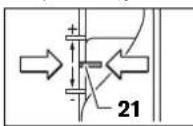
Set the depth stop 10 on the stop; the depth stop must be firmly engaged. Loosen the lock nut 14, adjust the lock nut 15 for the fine adjustment. - Press the lock lever 22, lower the milling head of the machine until the cutter 7 does not touch the workpiece surface. Tighten the lock lever 22 again, adjust the depth of cut. - Press the lock lever 15, adjust the fine adjustment. Set the pointer 16 to the desired position using the index. Set the lock nut 15 on the milling depth and tighten the lock nut 14. Slide the depth stop 10, move the pointer 16 to the desired position.
Press the lock lever 22 and lift the milling head of the machine to the upper position.
For deep milling, it is recommended to perform the treatment in several passes, removing each layer of material. With the help of the depth stop 10, you can divide the milling operation into several stages. To do this, set the depth stop 10 to the desired depth of the milling operation. The difference between the levels can be changed by turning the adjusting screw 11.
The depth of milling is set by turning the handle 20 clockwise; to increase the milling depth, turn the handle counterclockwise. The scale is graduated. For one full turn of the handle, the depth changes by 2.0 mm, and each mark on the upper edge corresponds to 0.1 mm. The maximum adjustment range is set.
± 8 mm
Example: Set the milling depth to 10.0 mm; for a trial milling, set the depth to 9.6 mm.
Turn the milling machine on, e.g., for wood, set the spindle speed to 106 rpm. When lowering the cutter into the material, lower it slowly. Adjust the required depth using the handle 22, then lower the milling machine until the depth scale 15 is not on the stop. Turn the handle 19 to the “0” position and tighten the knob 14. Check the handle rotation 20 for 0.4 mm per division (different values) and tighten the knob 14. Check the selected milling depth, and if necessary, perform the milling.
When setting the milling depth, the scale 16 is used to set the depth scale 15 so that you can read the scale 18 for the required milling depth.
Work instructions
Insert the cutter into the collet and tighten.
Milling direction (see Fig. E)
For milling, it is necessary to follow the direction of the cutter rotation (climb milling). When milling against the direction of rotation (conventional milling), the electric motor may be pulled out. Set the required milling depth, see section “Setting the milling depth”. - Bring the electric motor with the rotating cutter to the workpiece and turn on the electric motor. - Press the handle 22 down and slowly lower the milling machine until the required milling depth is reached. Then
142|Ukrainian
Press the handle 22 down and slowly lower the milling machine. - Perform the milling with a uniform feed. - After finishing the milling operation, set the milling machine back to the upper position. - Turn off the electric motor.
Milling with a parallel stop (see Fig. F)
For milling with a parallel stop, you can use the parallel stop or the guide rail. Attach the parallel stop to the milling machine and set the desired distance from the stop to the cutter.
Edge or profile milling
For edge or profile milling without a parallel stop, the cutter must be guided with a guide rail or a ball bearing guide.
Use the milling cutter to process the part. The part can be processed manually or with an electric spindle. Follow the instructions to maintain the cutting edge. Be careful not to press too hard on the milling cutter.
Milling with a parallel stop (see Fig. G)
Install the parallel stop 29 with the guide rods 30 into the holes 12 and tighten them with the clamping screws 5. With the clamping screws 31 and 32, you can adjust the height of the parallel stop.
With the rotary knob 33, you can adjust the height by loosening the clamping screw 31. The height adjustment range is 2.0 mm, and each turn of the rotary knob 33 corresponds to 0.1 mm.
With the auxiliary stop 34, you can create an effective stop surface for the parallel stop.
Insert the electric spindle into the milling cutter holder, press it against the parallel stop
For milling with the parallel stop 29, use the dust extraction adapter 35. The adapter 27 can remain installed.
Milling with the guide bearing (see Fig. I)
With the guide bearing 43, you can perform contour milling.
To compensate for height differences, you need to install the spacer 42.
Mount the guide bearing 36 as shown in the figure.
Close the guide bearing 43 with the locking screws, for example, with a screwdriver, on the workpiece. Place the electric spindle with the mounted guide bearing 36 against the workpiece.
Milling with the copying ring (see Fig. K-N)
With the copying ring 47, you can transfer the contours of templates and patterns to the workpiece.
To attach the copying ring 47, you need to install the adapter for the copying ring 44 into the opening.
Install the copy tool guide from above onto the copy holder and secure it with the clamping screws 45. Then make sure that the copy holder guide has moved clearly.
Install the copy tool guide in accordance with the sample. Adjust the height of the copy tool guide so that the copy holder is positioned correctly.
Press the foot switch 46 and insert the copy tool guide 47 into the copy tool holder 44. The clamping levers should be engaged in the slots.
The diameter of the cutter must be smaller than the inner diameter of the copy ring.
When installing the cutter from the inside to the edge of the copy ring, it must be uniform. If necessary, the cutter and the copy ring can be adjusted.
- Press the foot switch 22 down and lower the milling head until it touches the support point 12. Press the foot switch 22 again to lock the milling head in place. - Turn the handle to remove the spindle from the lower position 49. Turn the spindle with the cylindrical housing 48 in the opposite direction to its openings, so that the copy holder moves as required. Insert the centering sleeve 50, as shown in the figure, into the tool holder. Turn the handle by hand so that the centering sleeve can move freely. Align the centering sleeve 50 and the copy ring 47 so that they are aligned, slightly moving the copy holder. Tighten the screws with the cylindrical housing 48.

Romània | 143
Remove the centering sleeve 50 and the tool holder from the working spindle. Press the foot switch 22 and lower the milling head to the lowest position.
Milling with the copy ring 47 is carried out as follows:
- Turn on the electric drive of the copy ring 10. - Press the foot switch 22 and slowly lower the milling head until the desired milling depth is reached. Press the foot switch 22 again to lock the milling depth. - Turn off the electric drive of the copy ring 10 and the milling spindle.
Maintenance and service
Maintenance and service
Before cleaning or maintenance, disconnect the machine from the power supply. The electric drive works reliably and safely, but it is necessary to keep the ventilation openings clean. In extreme conditions of use, use a residual current device. Regularly clean the ventilation slots and the machine through the openings. When processing materials, the electric drive may heat up. This is normal and does not affect the operation of the electric drive.
For repairs, contact the manufacturer or an authorized service center for Bosch power tools. Do not attempt to repair the tool yourself.
This device is not intended for use by persons (including children) with reduced physical, sensory or mental capabilities, or lack of experience and knowledge, unless they have been given supervision or instruction concerning use of the appliance by a person responsible for their safety. Children should be supervised to ensure that they do not play with the device.
The spare parts, assembly drawings, and wiring diagrams for the product can be found in the spare parts list on the manufacturer's website.
Service and Maintenance
In the service center, you will receive answers to your questions about repairs and technical maintenance of your product. You can find detailed information about spare parts at: www.bosch-pt.com
Bosch consultants will be happy to assist you with any questions regarding your purchase, use, and adjustment of the product.
Warranty service and repair of power tools are carried out in accordance with the requirements and standards of the manufacturer's territory in all countries, either at official or authorized service centers of Robert Bosch.
WARNING! Using counterfeit products is unsafe and may have negative consequences for your health. The sale of counterfeit products is prohibited by law and entails administrative or criminal liability.
Ukraine
Robert Bosch LLC
Power Tools Service Center
Krang St., 1, 02660, Kyiv
Ukraine
Tel: +38 (044) 490-24-07 (multi-channel)
E-Mail: pt-service.ua@bosch.com
Official website: www.bosch-powertools.com.ua
The addresses of regional authorized service centers are listed in the national warranty card.
The device must be handed in for environmentally friendly recycling.
Do not dispose of power tools in household waste!
Disposal of the device:
In accordance with European Directive 2002/96/EC on waste electrical and electronic equipment (WEEE) and its transposition into national law, used power tools must be collected separately and handed in for environmentally friendly recycling.
Subject to change.
Româna
Instructions on safety and occupational health
Senior Vice President
Engineering
Dr. Eckerhard Strötgen
Engineering Director
PT/ESI
Robert Bosch GmbH, Power Tools Division
D-70745 Leinfelden-Echterdingen
26.10.2011
Mounting
Intended use of the power tool
The power tool is intended for routing with a fixed base on the edge of workpieces, for profiling, grooving, and copying in wood, plastic, and light building materials.
With the use of the appropriate router bits, it can also be used for working on light metals.
Illustrated components
The numbering of the components shown refers to the illustration on the graphics page.
1 Auxiliary handle (insulated gripping surface) 2 Lock-off button for the spindle lock 3 Speed preselection thumbwheel 4 Lock-off button for the on/off switch 5 Wing bolt for the parallel guide (2x) 6 Base plate 7 Router bit 8 Guide opening for the parallel guide 9 Anti-splinter guard 10 Depth stop 11 Adjustment screws for the depth stop
12 Base 13 Protective guard 14 Wing bolt for adjusting the routing depth 15 Depth stop 16 Marking for the routing depth 17 Auxiliary handle (insulated gripping surface) 18 Scale for adjusting the routing depth 19 Scale for fine adjustment of the routing depth 20 Rotating handle for fine adjustment of the routing depth 21 Marking for aligning the routing line 22 Chip deflector 23 Clamping nut 24 Lock-off button for the on/off switch 25 Hex key 24 mm 26 Marking for the parallel guide (0-35 mm) 27 Dust extraction adapter 28 Wing bolt for the parallel guide (2x) 29 Parallel guide 30 Guide for the parallel guide (2x) 31 Wing bolt for fine adjustment of the parallel guide (2x) 32 Wing bolt for coarse adjustment of the parallel guide (2x) 33 Button for fine adjustment of the parallel guide 34 Adjustable support foot for the parallel guide 35 Adapter for the parallel guide 36 Guide for the parallel guide 37 Handle for the parallel guide 38 Wing bolt for coarse adjustment of the parallel guide (2x) 39 Wing bolt for fine adjustment of the parallel guide (1x)* 40 Rotating handle for fine adjustment of the parallel guide 41 Centering screw for the parallel guide 42 Anti-splinter guard (included in the scope of delivery of the parallel guide) 43 Guide 1 44 SDS adapter for the dust extraction hose 45 Lock-off button for the adapter of the dust extraction hose (2x)

154|Bulgarian
46 Lock-off button for releasing the adapter of the dust extraction hose 47 Dust extraction hose 48 Screw with cylindrical head for the anti-splinter guard 49 Screw with countersunk head for the anti-splinter guard
50Centering pin
*The illustrations on the graphics page and the descriptions of the accessories are included in the standard scope of delivery of the tool. Accessories and additional equipment are available in the catalog or as accessories.
Technical data
| Оberprüche GOF 900 CE | |||
| Professional | GOF 1300 CE Professional | ||
| Кataхожен Homep | 0 601 614 6.. 0 601 613 6.. | ||
| HominnaHa KoncymrupaHa MoiHocT | W | 9 | 0 |
| Скорост Ha BbptHe Na ПраЗен XoA | min-1 | 12000 - 24000 | 12000 - 24000 |
| Пребарптелен ИЗБор Ha СкоростТа Ha BbptHe | ● | ● | |
| Мода за Тадьржale Ha Тостогнha Скорost Ha BbptHe | ● | ● | |
| Вьзмохноct 3a Вл�чыане Ha acntimaонна систema | ● | ● | |
| Гиздд за равOTEN ИНСТРУМЕТ | mm | 6 - 8 | 6 - 12,7 |
| Инчовe | ½ | ½ - ½ | |
| XoA Ha Фразозваша Тлава | mm 50 58 | ||
| Маса CBлаласно EPTA-Procedure 01/2003 | kg 3,5 4,8 | ||
| Клac Ha Заша | ☐/II /II | ☐ | |
Attention! This power tool is intended for operation on 230 V. When operating on other voltages, the tool may be damaged. Always check that the voltage matches the rating on the nameplate.
The tool is designed for use with the accessories listed in the manual. The trade names of the accessories may vary.
Information about vibration
The vibration values have been determined according to EN 60745.
The typical weighted vibration value for the tool is: sound pressure level 89 dB(A); sound power level
100 dB(A). Uncertainty K = 3 dB.
Wear ear protection!
The vibration emission value (vector sum of three directions) and the uncertainty have been determined according to EN 60745:
ah = 5.5 m/s2, K = 2.5 m/s2
The vibration emission value given in this instruction manual has been measured in accordance with the procedure described in EN 60745 and may be used for comparison with other power tools. It is also suitable for a preliminary assessment of vibration exposure.
The declared vibration emission value represents the main applications of the power tool. However, if the power tool is used for different applications, with different accessories, or is poorly maintained, the vibration emission may differ. This could significantly increase the vibration exposure over the total working period.
An accurate estimation of the vibration exposure should also take into account the periods when the tool is switched off or when it is running but not actually doing the job. This could significantly reduce the vibration exposure over the total working period.
The power tool is intended for professional use. The vibration exposure should be taken into account when assessing the risk to the operator.
Additional safety measures to protect the operator from the effects of vibration, such as: maintaining the power tool and accessories, keeping the hands warm, and organizing work patterns.
Declaration of conformity

We declare under our sole responsibility that the product complies with the standards or normative documents: EN 60745 according to the provisions of Directives 2011/65/EC, 2004/108/EC, 2006/42/EC.
Technical documentation (2006/42/EC) at: Robert Bosch GmbH, PT/ETM9.
D-70745 Leinfelden-Echterdingen
Dr. Egbert Schneider Dr. Eckerhard Strötgen
Senior Vice President Engineering Director Engineering PT/ESI
ppa. 1000 i.v. nuOycu
Robert Bosch GmbH, Power Tools Division D-70745 Leinfelden-Echterdingen
26.10.2011




Bulgarian|155
Mounting
Supply of the working tool (see fig. A)
Before any work on the power tool, pull the plug out of the socket. The supply of the working tool is recommended to work with protective gloves.
Depending on the specific application, the tool can be used with different quality.
Milling cutters from hard metal are suitable for machining soft materials, e.g. wood and plastic.
Milling cutters are available in special designs for hard abrasive materials such as hard wood and aluminum.
The saw blade guard can be adjusted for the required cutting depth. Tighten the clamping lever firmly.
Use only sharp saw blades in perfect condition.
Close the protective flap. Close the locking lever for the pendulum guard (0). If necessary, close the protective flap before switching on the motor. Loosen the wing nut 23 with the open-end wrench 25 (size 24 mm) and adjust the saw blade guard to the required cutting depth. The lower edge of the guard must be at least 20 mm above the workpiece. Then tighten the wing nut 23 with the open-end wrench 25 (size 24 mm) again. Remove the chip guard for the dust extraction system 4. Close the protective flap. Do not use saw blades with a diameter larger than 50 mm without the protective sleeve. Such blades cannot be used on the base unit. Do not tighten the wing nut on the guard if the saw blade is not mounted. In this case, the guard may be damaged.
Dust extraction system (see figure B)
Dust from materials such as lead-based paint, some wood types, and mineral materials can be hazardous to health. Contact with or inhalation of these dusts can cause allergic reactions and/or respiratory diseases in the operator or bystanders. Certain dusts, such as oak or beech dust, are carcinogenic, especially when combined with wood treatment additives (chromate, wood preservatives). Only allow
Processing of asbestos-containing materials should only be carried out by qualified personnel.
If possible, use a dust extraction system suitable for the material. Ensure adequate ventilation of the work area. -It is recommended to wear a dust mask with filter class P2.
Observe the relevant regulations in your country for the materials to be processed.
Avoid dust accumulation at the workplace. Dust can easily ignite.
Mounting the dust extraction adapter
The dust extraction adapter 27 can be mounted so that it points forward or backward. If you use the adapter with the protective sleeve 44, it can be rotated 180° so that the dust extraction adapter 27 does not obstruct the release lever 46. When mounting with the protective sleeve, the saw blade guard 6 must be mounted first. Secure the dust extraction adapter 27 to the base unit with the two screws 28 and the pressure plate 12.
Connecting the extraction system
Connect the extraction hose (Ø 35 mm) 26 (accessory) to the mounted adapter. Secure the hose 26 with the extraction hose clamp (accessory).
The power tool must not be connected directly to the universal vacuum cleaner without a remote start module. When starting the power tool, the vacuum cleaner must be switched on automatically. The vacuum cleaner must be suitable for the material being processed.
If the tool is used for a long time, take a break to protect your health from noise and carcinogenic dust. Use a dust extraction system.
Mounting the protective screen (see Fig. C)
Connect the dust extraction system to the tool before use, so that it can be connected to the vacuum cleaner. For demonstration, pull the two sides apart and remove the cover.
Working with the power tool
Starting operation
Attention: The voltage of the power source must match the data on the rating plate of the power tool. Devices marked with 230 V can also be operated with 220 V.
Presetting the rotation speed
You can preselect the rotation speed steplessly using the setting wheel, according to the specific work and the entire duration of work.
1-2 low rotation speed 3-4 medium rotation speed 5-6 high rotation speed
The required rotation speed depends on the material and the working conditions, and can be determined through practical testing.
| Матерпдаметр на | Фразер(a) (mm) | Позида на пotingу- metыра 3 |
| Тьрда дрвесни (бук) | 4-10 | 5-6 |
| 12-20 | 3-4 | |
| 22-40 | 1-2 | |
| Мека дрвесни (бор) | 4-10 | 5-6 |
| 12-20 | 3-6 | |
| 22-40 | 1-3 | |
| Шпэрпат | 4-10 | 3-6 |
| 12-20 | 2-4 | |
| 22-40 | 1-3 | |
| Пл actма ca | 4-15 | 2-3 |
| 16-40 | 1-2 | |
| Вальни | 4-15 | 1-2 |
| 16-40 | 1 |
For long work at low rotation speed, the power tool should be cooled by running it at maximum speed for about 3 minutes without load.
Switching on and off
Before switching on, set the oscillation frequency (see section "Setting the oscillation frequency")
To switch on the power tool, press the lock-off switch 24.
Press the trigger switch 2 to start the tool.
To switch off the tool, release the trigger switch 24. To lock the switch on, press the trigger switch 24, then press the lock-on button 2 and release the trigger switch 24.
Variable speed control
The electronic module supports variable speed control, which is continuously adjustable, ensuring optimal performance.
Soft start
The electronic control provides a soft start, which gradually increases the speed of the motor.
Adjusting the depth of cut (see Fig. D)
The depth of cut can only be adjusted when the electronic tool is switched off.
Rough adjustment of the depth of cut is done as follows:
- Place the electronic tool with the mounted router bit onto the workpiece. Position the router base so that the router bit is centered over the workpiece. Tighten the wing screw 20 to secure the base in place. Then, turn the depth stop 21 until it is positioned as shown in the figure. After this, turn the scale 19 to the "0" position.
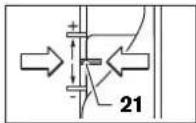
- Place the depth stop 15 on the depth stop rod 14, and tighten the wing screw 20 to secure it. - Turn the depth stop 15 so that the depth stop rod 14 can move freely. Press the release button 22 and lower the router until the router bit touches the workpiece. Release the release button 22 to lock the depth of cut. - Turn the depth stop 15 until it reaches the depth stop rod 14. Place the scale 16 on the "0" position on the scale 18 for the depth of cut. Turn the depth stop 15 to the desired depth of cut and tighten the wing screw 14. Do not change the position of the scale 16. - Press the release button 22 and lower the router to the second position.
The depth of cut should not be too deep for a single pass. With the depth stop 10, you can divide the cutting into several passes. For each setting of the desired depth of cut, turn the depth stop 10 and then for the first pass, select a higher setting. The size of the steps can be adjusted with the scale 11.
Fine adjustment of the depth of cut can be done by turning the scale 19; turning it clockwise increases the depth of cut, turning it counterclockwise decreases the depth of cut. During adjustment, you can use the scale 19. The scale 19 corresponds to a change in depth of cut of 0.1 mm.
The scale 19 corresponds to a change in depth of cut of 0.1 mm. The maximum change in depth of cut is ±8 mm.
The measured depth of cut is 10.0 mm, the measured depth of the test cut is 9.6 mm.
- Before cutting, place the tool under the anti-rotation device on the pipe so that the cutting tool does not get damaged. Press the release button 22 and turn the cutting tool until the depth stop 15 reaches the limit 10. - Close the clamp 19 to the zero position and turn the handle with the head 14. Turn the knob 20 until the arrow points to 0.4 mm/division (the difference between the desired and the actual depth of cut) and then tighten the head 14. - Check the new depth with a test cut.
Change the depth of cut by turning the adjusting ring 16 on the depth stop 15, so that you can adjust the depth of cut.
Operating instructions
Protect the cutter from impacts and shocks.
Plunge cutting (see figure E)
Plunge cutting must be done carefully, especially when cutting into the surface of the workpiece. When plunge cutting into the surface of the workpiece, there is a risk of kickback, which can cause the power tool to be pulled out of your hands. - Set the depth of cut (for this, turn the adjusting ring for the depth of cut). - Place the power tool with the mounted cutter on the workpiece surface. Press the release button 22 and turn the cutting tool until the depth stop 15 reaches the set depth of cut. Then release the release button 22 and turn the cutting tool to the cutting position. - Perform the plunge cut with constant feed. - After completing the plunge cut, turn the cutting tool back to the starting position. - Switch off the power tool.
Plunge cutting with a guide (see figure F)
For cutting along edges, e.g., plunge cutting into a workpiece, you can use the guide to support the tool. Place the guide against the workpiece and guide the tool along the guide.
Plunge cutting into the workpiece/plunge cutting with a guide
Do not use the power tool in wet conditions
Information for safe disposal:
According to European Directive 2002/96/EC on waste electrical and electronic equipment (WEEE) and its implementation in national law, power tools that are no longer usable must be collected separately and disposed of in an environmentally friendly manner.
The packaging is made of recyclable materials.
Subject to change without notice.
Serbian
Safety Instructions
General Power Tool Safety Warnings
A WARNING
Read all safety warnings and all instructions. Failure to follow
Senior Vice President
Engineering
Dr. Eckerhard Strötgen
Engineering Director
PT/ESI
Robert Bosch GmbH, Power Tools Division
D-70745 Leinfelden-Echterdingen
26.10.2011
Assembly
Mounting the milling tool (see figure A)
Pull the mains plug out of the socket before any work on the power tool. For mounting or changing the router bit, it is recommended to wear protective gloves.
Depending on the intended use, router bits are available in the most varied designs and qualities.
Router bits made of high-quality high-speed steel
are suitable for processing soft materials such as softwood and plastic.
Router bits with carbide-tipped blades are especially suitable for hard and abrasive materials, for example hardwood and aluminum.
Original router bits from the extensive Bosch accessory program are available from your specialized dealer. Use only flawless and clean router bits.
- Fold the chip guard 6 downwards.
- Press the spindle lock lever 4 in the direction of the arrow and hold it in this position (1). If necessary, turn the motor spindle by hand until it locks.
- Unscrew the collet nut 23 with the open-end wrench 25 (wrench size 24 mm) by turning it counterclockwise (2). - Insert the router bit into the collet. The shank of the router bit must be inserted at least 20 mm into the collet.
- Firmly tighten the collet nut 23 with the open-end wrench 25 (wrench size 24 mm) by turning it clockwise. Release the spindle lock lever 4.
- Fold the chip guard 6 upwards.
Do not use router bits with a diameter larger than 50 mm without a mounted copy sleeve. These router bits do not fit through the base plate. Do not tighten the clamping collet with the collet nut as long as no router bit is mounted. Otherwise, the clamping collet can be damaged.
Dust/chip extraction (see figure B)
- Dust from materials such as lead-containing paint, some types of wood, minerals, and metal can be harmful to health. Contact with or inhalation of dust can cause allergic reactions and/or respiratory diseases in the operator or persons in the vicinity.
Dr. Egbert Schneider Senior Vice President Engineering
Dr. Eckerhard Strötgen Engineering Director PT/ESI

Robert Bosch GmbH, Power Tools Division D-70745 Leinfelden-Echterdingen 26.10.2011





Slovensko|169
Montaža
Dr. Egbert Schneider Senior Vice President Engineering
Dr. Eckerhard Strötgen Engineering Director PT/ESI
Robert Bosch GmbH, Power Tools Division D-70745 Leinfelden-Echterdingen 26.10.2011
Montaža
General safety instructions
WARNING
All safety instructions and warnings must be read. Failure to follow the safety instructions and
Dr. Egbert Schneider Senior Vice President Engineering
Dr. Eckerhard Strötgen Engineering Director PT/ESI
Robert Bosch GmbH, Power Tools Division D-70745 Leinfelden-Echterdingen 26.10.2011
Montaža
1-2 low pores 3-4 medium pores 5-6 high pores
Dr. Egbert Schneider Senior Vice President Engineering
Dr. Eckerhard Strötgen Engineering Director PI/ESI

Robert Bosch GmbH, Power Tools Division D-70745 Leinfelden-Echterdingen 26.10.2011
Assembly
Installing the milling tool (figure A)
Before any work on the power tool, pull the mains plug out of the socket. When inserting or replacing milling tools, it is recommended to wear protective gloves.
Milling tools of various qualities and designs are available at retail outlets.
Milling tools with HSS cutting edges are suitable for processing soft materials, e.g., soft wood and plastics.
Milling tools with carbide
cutting edges are especially designed for processing hard and abrasive materials, e.g., hard wood and aluminium.
Original Bosch milling tools from the wide range of accessories can be obtained from specialist retailers.
Only insert undamaged and clean milling cutters.
Lower the chip guard 6. - Turn the spindle locking lever 4 in the direction of the arrow and hold it in this position (O). If necessary, turn the spindle by hand until it locks. - Unscrew the tightening nut 23 with the open-ended spanner 25 (spanner width 24mm ) turning counterclockwise () .
- Insert the shank of the milling tool into the collet. The shank must be inserted at least 20 mm deep into the collet. Screw the tightening nut 23 with the open-ended spanner 25 (spanner width 24mm ) turning clockwise. Release the spindle locking lever 4.
- Paceliet augsup skaidu aizsargu 6.
If the parallel guide is not installed, do not install router bits with a diameter exceeding 50 mm. Such bits will not pass through the base of the tool. Do not tighten the collet nut if the collet is not inserted into the bit shank. Doing so may damage the collet.
Dust and chip extraction (figure B)
Dust from materials such as lead-containing paints, some wood types, minerals, and metals can be harmful to health. Contact with or inhalation of such dust can cause allergic reactions or respiratory diseases in the user of the power tool or persons in the vicinity of the workplace.
Dust from certain materials, such as oak or beech wood dust, can cause cancer, especially if the wood has been chemically treated (with chromate or wood preservatives). Asbestos
containing materials may only be processed by persons with special professional skills.
- Use the most suitable dust extraction method for the material being processed. The workplace must be well ventilated. It is recommended to use a breathing mask with filter class P2 during work.
Observe the regulations in force in your country that apply to the material being processed.
Do not allow dust to accumulate in the workplace. Dust can easily ignite.
Installing the extraction adapter
The extraction adapter 27 can be installed as desired so that the hose connector points forward or backward. When installing the parallel guide adapter 44, it may be necessary to rotate it by 180° to ensure that
the extraction adapter 27 does not touch the clamping lever 46. If the extraction adapter is installed with the hose connector pointing forward, the chip guard 6 must be removed first. To install the extraction adapter 27, screw it with 2 slotted screws 28 to the base 12.
Engineering Director
PT/ESI

Robert Bosch GmbH, Power Tools Division
D-70745 Leinfelden-Echterdingen
26.10.2011
Assembly
Inserting the milling tool (see figure A)
Before carrying out any work on the power tool (e.g. maintenance, tool change, etc.), pull the plug out of the socket. When inserting or changing milling tools, it is recommended to wear protective gloves.
1 1
22 12 12
48 a 49 b 50 c d e f g h i j k l m n o p q r s t
9 21 24 25 26 27 28 29 30 31 32 33 34 35 36 37 38 39 40 41 42 43 44 45 46 47
1111 1111 1111 1111 1111 1111 1111 1111 1111 1111 1111 1111 11
a11g a11
i 1000000000000000000000000000000000000000000000000000
(F)
a 1
a 1
a 1000000000000000000000000000000000000000000000
(Gjgmal j) jdl
12
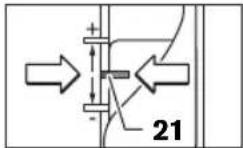
- 1.
J 1
44 45
j 180°
6 6
28 27
12
204|
43
50
SDS 44
1
(2x) 45
46
47
L
| GOF 1300 CE Professional | GOF 900 CE Professional | الإستعمال |
| 0 601 614 6..0 601 613 6.. | الإستعمال | |
| 9001 300 | الإستعمال | |
| 12 000-24 00012 000-24 000 | الإستعمال | |
| ● | ● | الإستعمال |
| ● | ● | الإستعمال |
| ● | ● | الإستعمال |
| 6-12,7 | 6-8 | \( ^{ \text{❸}} \) |
| \( \frac{1}{4}-\frac{1}{2} \) | \( \frac{1}{4} \) | \( ^{ \text{❹}} \) |
| 58 | 50 | \( ^{ \text{❺}} \) |
| 3,54,8 | EPTA-Procedure 01/2003\( ^{ \text{❺}} \) | |
| \( \square \) | \( \square \) | \( ^{ \text{❺}} \) |
Aa 1230 [U]
aill 1y
CC
aaii iie
EN60745:
.2006/42/EG.2004/108/EG.2011/65/EU
:2006/42/EG)
Robert Bosch GmbH, PT/ETM9,
D-70745 Leinfelden-Echterdingen
Dr. Egbert Schneider
Senior Vice President
Engineering
Dr. Eckerhard Strötgen
Engineering Director
PT/ESI
Robert Bosch GmbH, Power Tools Division
D-70745 Leinfelden-Echterdingen
26.10.2011

(Aa)j
e 1
.
jill jil llll 1
1jJg
EN60745
yall bna sio (A g) j
(Aij)j = 1,2,... ,n 100 all s.89
∴ b n + 1 = b n + 2bn
1
Kgll (Lalaiy Lg)ah jj
EN60745
- 2.5 / sqrt(2) = K, 5.5 / sqrt(2) = a_h
EN60745
J 1
a 1
jieell jae 100
jaii iis jia jai g. jil jaiy jai y jai 1
Therefore, area of triangle AOB = area of triangle COD + area of triangle BOC - area of triangle COD
1
Jauy 10000000000000000000000000000000
Jol 1
Jouell
:100 1
Jaae aee
a. g is positive
a a 1
a
(jg jaoaai (204
2
3
4
gai gai jia jia jia jia jia jia jia jia jia jia jia jia jia jia jia jia jia jia jia jia jia jia jia jia jia jia jia jia jia jia jia jia jia jia
aaii jiey
J 1
e 1
a=paallae
()a
y j 1
Juaauii jaiyjaiy jiaiaiaia
Therefore, the area of triangle OBC equals the area of triangle ABC plus the area of triangle ABO.
15 15
.5
48 48
47 15
- 220015
122 1
JL 1000000000000000000000000000000000000000
a 1
01
JLai aLing. gjis1 j! gj y gj L a 5gj 1 j
jL 10
aR (RCD) 100000000000000000000000000000000000000000000000000000000000000000000000000
a 1 a 1 1 1 1 1 1 1 1 1 1 1 1 1 1 1 1 1 1 1 1 1 1 1 1 1 1 1 1 1 1 1 1 1 1 1 1 1
208 L
4g(g)g1goglaoljLdAeog (G
30 Laiol y 29 gol glalol 12 5gol 5 ailg jg 12 5gol 32 g 31 gglg
31 33 32 32 33 32 32 32 32 32 32 32 32 32 32 32 32 32 32 32 32 32 32 32 32 32 32 32 32 32 32 32 32 32 32 32 32 32 32 32 32
g 29 gjgo slqol, h s L glsjg pLio 27 35 gogao oio gog aai j gia
(Hyjgai yogg) jzjLgJy JyJzj 36 Laiol, Jy JyJyJyJyJyJyJyJyJyJyJyJyJyJyJyJyJyJyJyJyJyJyJyJyJyJyJyJyJyJyJyJyJyJyJyJyJyJyJyJyJyJyJyJyJyJyJyJyJyJyJy
Therefore, a1 = 2, a2 = -4
Therefore, sin α = sin β (cos β = 1)
100
g
1 1
g i 1jLbW g jioJxw yds Jy
yogosoo oolsoo 1jdy slo
A
jieh cww jgco aifw 1. jbi jogm
aLs gGg 1JgJg JgJg
1gjgljg 100
jg jy jbi jie o 0s L a s g
gLgwsjwgs;ps.10Lo gJgJgJgJgJgJgJgJg
sLS JLoJoo

∴ a + b = 12
Jgaa 45, gjy jgbl gJxil jgmo Jgfoa
SjLgLojg,LoJalilwLg《giCulssogplo
EN60745:
.2006/42/EG, 2004/108/EG, 2011/65/EU
:12006/42/EG)
Robert Bosch GmbH, PT/ETM9,
D-70745 Leinfelden-Echterdingen
Dr. Egbert Schneider
Senior Vice President
Engineering
Dr. Eckerhard Strötgen
Engineering Director
PT/ESI
ppa.
Robert Bosch GmbH, Power Tools Division
D-70745 Leinfelden-Echterdingen
26.10.2011


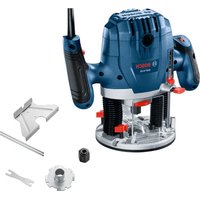
- GERMAN
- SAFETY INSTRUCTIONS
- ASSEMBLY
- GENERAL POWER TOOL SAFETY WARNINGS
- WARNING
- SAVE ALL WARNINGS AND INSTRUCTIONS FOR FUTURE REFERENCE
- WORK AREA SAFETY
- ELECTRICAL SAFETY
- PERSONAL SAFETY
- POWER TOOL USE AND CARE
- SERVICE
- SAFETY WARNINGS FOR ROUTERS
- PRODUCT DESCRIPTION AND SPECIFICATIONS
- INTENDED USE
- PRODUCT FEATURES
- NOISE/VIBRATION INFORMATION
- WEAR HEARING PROTECTION
- DECLARATION OF CONFORMITY C
- INSERTING A ROUTER BIT (SEE FIGURE A)
- DUST/CHIP EXTRACTION (SEE FIGURE B)
- MOUNTING THE EXTRACTION ADAPTER
- CONNECTING THE DUST EXTRACTION
- MOUNTING THE CHIP SHIELD (SEE FIGURE C)
- OPERATION
- STARTING OPERATION
- PRESELECTING THE SPEED
- SWITCHING ON AND OFF
- CONSTANT ELECTRONIC CONTROL
- SOFT STARTING
- ADJUSTING THE DEPTH-OF-CUT (SEE FIGURE D)
- WORKING ADVICE
- DIRECTION OF FEED AND ROUTING PROCESS (SEE FIGURE E)
- ROUTING WITH AUXILIARY GUIDE (SEE FIGURE F)
- SHAPING OR MOLDING APPLICATIONS
- ROUTING WITH PARALLEL GUIDE (SEE FIGURE G)
- ROUTING WITH THE ROUTER COMPASS (SEE FIGURE H)
- ROUTING WITH GUIDE RAIL (SEE FIGURE 1)
- ROUTING WITH GUIDE BUSHING (SEE FIGURES K-N)
- MAINTENANCE AND SERVICE
- MAINTENANCE AND CLEANING
- AFTER-SALES SERVICE AND CUSTOMER ASSISTANCE
- WWW.BOSCH-PT.COM
- GREAT BRITAIN
- IRELAND
- AUSTRALIA, NEW ZEALAND AND PACIFIC ISLANDS
- REPUBLIC OF SOUTH AFRICA
- CUSTOMER SERVICE
- GAUTENG - BSC SERVICE CENTRE
- KZN - BSC SERVICE CENTRE
- WESTERN CAPE - BSC SERVICE CENTRE
- BOSCH HEADQUARTERS
- DISPOSAL
- ONLY FOR EC COUNTRIES
- FRANÇAIS
- MOUNTING
- WASTE MANAGEMENT
- INSTRUCTIONS FOR USE AND SAFETY
- WEAR EAR PROTECTORS
- GREEK
- DECLARATION OF CONFORMITY
- C
- READ ALL SAFETY WARNINGS AND ALL INSTRUCTIONS (SEE FIGURE A)
- DO NOT OPERATE POWER TOOLS IN EXPLOSIVE ATMOSPHERES, SUCH AS IN THE PRESENCE OF FLAMMABLE LIQUIDS, GASES, OR DUST. POWER TOOLS CREATE SPARKS WHICH MAY IGNITE THE DUST OR FUMES
- TURKISH
- INSTALLING THE ROUTER BIT (SEE FIGURE A)
- SYSTEM CONSTANT ELECTRONIC
- GENERAL SAFETY INSTRUCTIONS FOR POWER TOOLS
- PPHMEHEHHE 3AEKTPONHCTPYMENHA 06PAUEHNE C HMM
- SAFETY INSTRUCTIONS FOR MILLING MACHINES
- RUSSIAN
- PRODUCT AND SERVICE DESCRIPTION
- ILLUSTRATED COMPONENTS
- INSTALLING THE MILLING CUTTER (SEE FIGURE A)
- HIGH-SPEED STEEL (HSS) MILLING CUTTERS
- DUST AND CHIP EXTRACTION (SEE FIG. B)
- INSTALLING THE DUST EXTRACTION ADAPTER
- CONNECTING THE DUST EXTRACTOR
- INSTALLING THE CHIP GUARD (SEE FIG. C)
- WORKING WITH THE TOOL
- SWITCHING ON THE POWER TOOL
- SETTING THE NUMBER OF REVOLUTIONS
- START-UP
- SETTING THE MILLING DEPTH (SEE FIG. D)
- APPLICATION INSTRUCTIONS
- ENGLISH
- MILLING WITH THE AUXILIARY STOP (SEE FIG. F)
- MILLING EDGES OR PROFILE MILLING
- MILLING WITH THE PARALLEL STOP (SEE FIG. G)
- MILLING WITH A GUIDE PIN (SEE FIG. H)
- MILLING WITH A PARALLEL GUIDE (SEE FIG. I)
- MILLING WITH A COPYING TEMPLATE (SEE FIG. K-N)
- THE DIAMETER OF THE MILLING CUTTER MUST NOT BE SMALLER THAN THE INNER DIAMETER OF THE COPYING TEMPLATE
- SERVICE AND CUSTOMER ADVICE
- FOR RUSSIA, BELARUS, KAZAKHSTAN
- POCCHRA
- BELARUS
- UKRAINE
- KAZAKHSTAN
- YTHAN3AUN
- ONLY FOR EU MEMBER STATES
- UKRAINIAN
- WARNINGS
- READ ALL SAFETY WARNINGS AND INSTRUCTIONS
- KEEP ALL WARNINGS AND INSTRUCTIONS FOR FUTURE REFERENCE
- WORKPLACE SAFETY
- INFORMATION ABOUT NOISE AND VIBRATION
- ELECTRIC DRIVE
- MAIN SWITCH
- ADJUSTING THE DEPTH OF MILLING (SEE FIG. D)
- WORK INSTRUCTIONS
- MILLING WITH A PARALLEL STOP (SEE FIG. F)
- EDGE OR PROFILE MILLING
- MILLING WITH A PARALLEL STOP (SEE FIG. G)
- MILLING WITH THE GUIDE BEARING (SEE FIG. I)
- MILLING WITH THE COPYING RING (SEE FIG. K-N)
- THE DIAMETER OF THE CUTTER MUST BE SMALLER THAN THE INNER DIAMETER OF THE COPY RING
- ROMÀNIA
- SERVICE AND MAINTENANCE
- DISPOSAL OF THE DEVICE
- ROMÂNA
- INSTRUCTIONS ON SAFETY AND OCCUPATIONAL HEALTH
- INTENDED USE OF THE POWER TOOL
- BULGARIAN
- TECHNICAL DATA
- INFORMATION ABOUT VIBRATION
- SUPPLY OF THE WORKING TOOL (SEE FIG. A)
- DUST EXTRACTION SYSTEM (SEE FIGURE B)
- MOUNTING THE DUST EXTRACTION ADAPTER
- CONNECTING THE EXTRACTION SYSTEM
- MOUNTING THE PROTECTIVE SCREEN (SEE FIG. C)
- WORKING WITH THE POWER TOOL
- PRESETTING THE ROTATION SPEED
- VARIABLE SPEED CONTROL
- SOFT START
- ADJUSTING THE DEPTH OF CUT (SEE FIG. D)
- OPERATING INSTRUCTIONS
- PLUNGE CUTTING WITH A GUIDE (SEE FIGURE F)
- PLUNGE CUTTING INTO THE WORKPIECE/PLUNGE CUTTING WITH A GUIDE
- INFORMATION FOR SAFE DISPOSAL
- SERBIAN
- A WARNING
- MOUNTING THE MILLING TOOL (SEE FIGURE A)
- ROUTER BITS MADE OF HIGH-QUALITY HIGH-SPEED STEEL
- MONTAŽA
- GENERAL SAFETY INSTRUCTIONS
- INSTALLING THE MILLING TOOL (FIGURE A)
- DUST AND CHIP EXTRACTION (FIGURE B)
- INSTALLING THE EXTRACTION ADAPTER
- INSERTING THE MILLING TOOL (SEE FIGURE A)
- A11G A
- CC
- JJG
- G IS POSITIVE
- A
- L
- ∴ A + B
- PPA
Brand : BOSCH
Model : GOF 1300 CE Professional
Category : Milling machine