
ProTac II - Earphones 3M - Free user manual and instructions
Find the device manual for free ProTac II 3M in PDF.


| Product type | Electronic hearing protector with communication |
| Brand | 3M |
| Model | ProTac II |
| Dimensions (approx.) | 15 x 10 x 8 cm |
| Weight (approx.) | 250 g |
| Power supply | 2 AAA batteries (LR03) |
| Battery life | Approximately 200 hours |
| Noise reduction | SNR 26 dB |
| Main functions | Active noise reduction, amplification of weak sounds, integrated radio communication |
| Maintenance and cleaning | Clean the exterior with a damp cloth and mild detergent. Replace the cushions regularly. |
| Safety | Compliant with standard EN 352-1/352-6 (hearing protector) |
| Spare parts and repairability | Cushions, noise filters, batteries, communication kit (optional) |
| Operating temperature | -20 °C to +55 °C |
| Warranty | 2 years |
| Country of origin | United States |
Frequently Asked Questions - ProTac II 3M
User questions about ProTac II 3M
0 question about this device. Answer the ones you know or ask your own.
Ask a new question about this device
Download the instructions for your Earphones in PDF format for free! Find your manual ProTac II - 3M and take your electronic device back in hand. On this page are published all the documents necessary for the use of your device. ProTac II by 3M.
USER MANUAL ProTac II 3M
natural_image
Black-and-white photo of Peltor ProTac Headsets on a perforated surface, no visible text or symbols on the devices themselves.


natural_image
Five types of black-and-white headsets and helmets, labeled 1b to 1f, shown without any text or symbols.B)
natural_image
Illustration of a person wearing headphones, hands adjusting the ear (no text or symbols)
natural_image
Side profile illustration of a person wearing headphones (no text or symbols)C)


natural_image
Illustration of a person wearing a hard hat and uniform (no text or symbols)
natural_image
Illustration of a person wearing a hard hat and uniform (no text or symbols)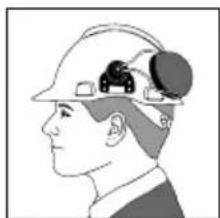
natural_image
Side profile illustration of a person wearing a hard hat with a gear-like device on the head (no text or symbols)D)

natural_image
Illustration of a person holding two small objects, labeled D:1 (no text or symbols on the objects)
natural_image
Illustration of a person with earphones and hands, no text or symbols present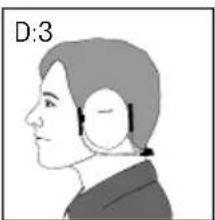
natural_image
Side profile illustration of a person wearing a headset (no text or symbols)E)

natural_image
Illustration of a person wearing headphones, no text or symbols present
natural_image
Side profile illustration of a person wearing earphones (no text or symbols)F)


natural_image
Illustration of a hand holding a curved object with a downward arrow, no text or symbols presentG)
natural_image
Close-up of a white hard hat with black earbuds, no visible text or symbols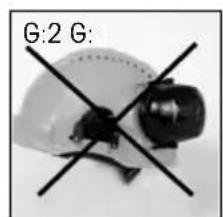
natural_image
Crossed black-and-white photo of a helmet with a visor, labeled G:2 G (no additional text or symbols)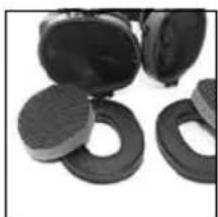
natural_image
Close-up of several black circular objects with textured surfaces, possibly mechanical or electronic components (no visible text or symbols)H)
| Model 125 250 | 5000 | 4000 | 8000 | H | M | L | SNR | ||||||
| MT15H7A2 | Mean att.^3 | 19.7 | 25.4 | 31.0 | 34.6 | 32.2 | 38.7 | 42.1 | |||||
| MT15H7B2 | Stand. dev. ^4 | 3.4 | 2.5 | 3.4 | 1.8 | 3.6 | 3.8 | 3.6 | 31 dB | 29 dB | 24 dB | 32dB | |
| MT15H7F2 | APV | 16.3 | 22.9 | 27.6 | 32.8 | 28.6 | 34.9 | 38.5 | |||||
| Model 125 250 560d000.2000 4000 8000 | H | M | L | SNR | ||||||||
| ProTacMT15H7P3*2 | Mean att.3 | 20.7 | 24.7 | 31 | 0 | 35.1 | 32.6 | 40.4 | 42.1 | |||
| Stand. dev.4 | 5.4 | 3.9 | 3.4 | 2.9 | 3.1 | 3.1 | 2.7 | 32 dB | 29 dB | |||
| APV | 15,3 | 20,8 | 27,6 | 6 | 32,2 | 29,5 | 37,3 | 39,4 | ||||
1)
Criterion levels H=125 dBA, M=107 dBA, L=95 dBA
Peltor ProTac II
EN 2-4
BG 5-7
CS 8-10
DA 11-13
DE 14-16
ES 17-19
ET 20-22
FI 23-25
FR 26-28
HU 29-31
IS 32-34
IT 35-37
LT 38-40
LV 41-43
NL 44-46
NO 47-49
PL 50-52
PT 53-55
RO 56-58
RU 59-61
SK 62-64
SL 65-67
SV 68-70
TR 71-73
EN
CONGRATULATIONS ON AN EXCELLENT CHOICE!
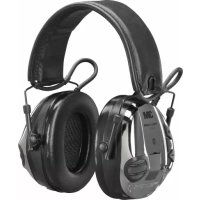
The Peltor ProTac is an active hearing protector that allows comfortable contact with your surroundings while effectively protecting you from harmful noise.
The Peltor ProTac has separate full stereo through double microphones for ambient noise, plus amplifiers and earphones in the shells. The electronic system allows you to listen to an external audio signal, such as a com radio, at the same time.
This hearing protector is tested and approved according to PPE directive 89/686/EEC and EMC directive 89/336/EEC, which means that it meets the demands for CE marking.
To ensure complete satisfaction with your new Peltor product, please read the entire instruction manual.
(A) WHAT IS WHAT?
1a. Extra broad headband (MT15H7A2) with soft padding for ideal comfort throughout the working day.
1b. Neckband (MT15H7B2) for use when a headband would be in the way.
1c. Helmet attachment (MT15H7P3*2) for all regular helmet types. Peltor's helmets, visor and rain protector fit this helmet attachment.
1d. Collapsible headband (MT15H7F) for easy, protected storage in a pocket or case.
1e. Headset (MT15H7A-072) for use with a PTT adapter.
1f. Flex headset (MT15H7A2-77) for interchangeable cords with different connectors.
2. Individually sprung headband wires of stainless steel provide an even distribution of pressure around the ears. They maintain their resilience better than regular plastic headbands through a wide range of temperatures.
3. Low, two-point fasteners and easy height adjustment with no protruding parts.
4. Soft, wide foam/fluid-filled ear cushions with built-in pressure-relief channels for low pressure, effective sealing and ideal comfort.
5. On/off button. A high tone confirms switching on. A low tone confirms switching off. The Peltor ProTac switches off automatically two hours after the last sound is registered. Two tones in close succession at ten-second intervals warn you that the unit will be switched off in one minute if you do not adjust the volume.
6. Volume control. Buttons for adjusting the volume level in the earphones. Press the upper button to increase the volume, and the lower button to decrease it. The last setting is stored when the unit is switched off.
7. The battery cover with locking screw makes battery replacement quick and easy.
8. Microphones for ambient noise, which is reproduced at no more than 82 dBA equivalent noise level in the earphones.
9. Audio input for connecting a communication radio, etc. The external sound input is limited to 82 dB.
10. The speech microphone (on some models only) allows two-way communication by com radio or telephone. An adapter or cord is needed.
INSTRUCTIONS FOR USE
Replacing the batteries
Unscrew the locking screw and open the battery cover. Use two 1.5-volt AA batteries (included). Make sure that the + and - poles of the batteries are in the correct position (see the figure in the cover).
WARNING! If you use rechargeable batteries, install them only according to the charger manual. Dry-cell batteries can explode if recharged.
Two high tones are emitted when the batteries have about 10 hours' life span left. The interval between the tones decreases as the batteries grow weaker. Note that the type of battery can affect the indicator function. Never replace batteries with the unit switched on.
Connecting a cord (for ProTac Flex headset models)
Step 1: Insert the connector on the cord by pressing it into the jack on the bottom of the left ear shell of the Flex Headset until you feel it snap into place.
Step 2: Adjust the volume on the communication radio to a comfortable level with the headset volume turned up all the way. Consult the radio manual for how to adjust the output volume.
(B) Adjusting the headband
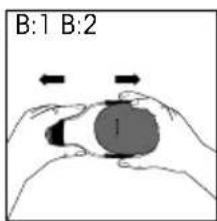
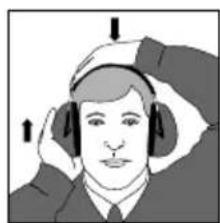
(B:1) Slide out the shells and place the headset over your ears so the ear cushions enclose the ears completely and fit snugly against the head.
(B:2) Adjust the height of the shells for a comfortable fit while holding the headband flat against your head.
(B:3) The headband should lie across the top of the head.
(C) Adjusting the helmet attachment
(C:1) Snap the helmet attachment into the slot on the helmet. To switch the unit from ventilation to working position, press the headband wires inwards until you hear a click on both sides. Ensure that the shell and the headband wires in working mode do not bump or snag
on anything so that noise leakage can occur.
Note: The shells can be set in three positions: (C:2) working position, (C:3) ventilation position and (C:4) parking position.
(D) Adjusting the neckband
(D:1) Adjust the shells so the ears are completely surrounded by the ear cushions.
(D:2) Adjust the height using the headband until you have a snug, comfortable fit.
(D:3) The headband should lie across the top of the head.
IMPORTANT! For the best protection, brush aside hair around the ears so the ear cushions fit snugly against the head. Spectacle frames should be as thin as possible and fit close to the head.
(E) Adjusting the collapsible headband
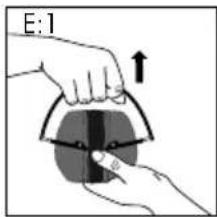
(E:1) Open the headband.
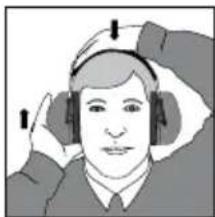
(E:2) Tilt the top of the shell out, as the wire must be placed on the outside of the headband. Slide out the shells and place the hearing protectors over your ears so the ear cushions enclose the ears completely and fit snugly against the head.
(E:3) Adjust the height of the shells for a comfortable fit while holding the headband flat against your head.
(E:4) The headband should lie across the top of the head.
IMPORTANT! For the best protection, brush aside hair around the ears so the ear cushions fit snugly against the head. Spectacle frames should be as thin as possible and fit close to the head.
(F) Collapsing the collapsible headband
(F:1) Press the shells in all the way.
(F:2) Collapse the headband. Check that the ear cushions are not creased and that they lie flat against one another.
(G) Storing when damp
During long hours of use, the attenuating foam in the shells can become damp, which may cause damage to the circuits.
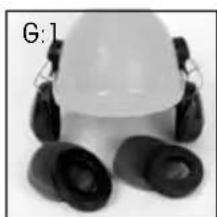
For the helmet attachment:
(G:1) Remove the hygiene kit and let the foam dry by placing the headset in a position that allows ventilation.
(G:2) Do not store the hearing protectors pressed against the helmet.
For the collapsible headband:
(G:2) Tilt the shells outwards to allow the attenuation cushions and electronics to dry.
IMPORTANT USER INFORMATION
The product must be put on, adjusted, cleaned and maintained in accordance with these instructions.
- Wear the hearing protector 100% of the time you spend in noisy environments for full protection.
100% use of a working hearing protector is the only sure protection from hearing loss. If you spend time in environments with more than 85 dB A-weighted noise, you need to protect your hearing, or the hearing receptors deep in your ears may be irreparably damaged. If you remove the protectors for even a tiny portion of the time you spend in noisy situations, you are in the danger zone. A comfortable hearing protector designed for the specific noise level in which it is used is the best guarantee that you will wear the hearing protector 100% of the time, thereby ensuring protection from permanent hearing loss.
- Clean the outside of the product regularly with soap and warm water.
Note: Do not immerse in fluids.
- Do not store the product in temperatures exceeding +55 °C, for example on a dashboard or windowsill.
- The hearing protector, particularly the ear cushions, can degenerate over time and should be inspected regularly to ensure that there are no cracks and sound leakage.
- Certain chemical substances may be harmful to this product. Contact Peltor for more information.
Note: If these instructions are not followed, attenuation and other functions can be impaired.
PRODUCT RANGE
| Standard Weight Headset | Weight Flex Headset Weight | |||||
| With headband | MT15H7A2 | 370 gr | MT15H7A2-07 | 390 gr | MT15H7A2-77 | 395 gr |
| With neckband | MT15H7B2 | 355 gr | MT15H7B2-07 | 375 gr | MT15H7B2-77 | 380 gr |
| With helmet attachment | MT15H7P3*2 | 405 gr | MT15H7P3*2-07 | 425 gr | MT15H7P3*2-77 | 430 gr |
| With collapsible headband | MT15H7F2 | 360 gr | MT15H7F2-07 | 380 gr | MT15H7F2-77 | 385 gr |
TECHNICAL DATA
The attenuation values and noise levels for the Peltor ProTac are tested and approved according to EN 352, 352-4 and 352-6.
(H) Attenuation values: The Peltor ProTac meets the requirements of EMC directive 89/336/EEC. The (H) tables show 1) frequency in Hz, 2) attenuation in dB (average), 3) standard deviation in dB. Tested according to ISO 4869-1. Certified by FIOH, Topeliuksenkatu 41, FI-00250 Helsinki, Finland. ID#0403.
(I). Criterion levels for the active-listening function.
At a signal of U = 248 mV, the earphone gives a sound pressure level corresponding to 82 dB weighted sound pressure in a diffuse field.
Battery type: 2 × 1.5 V AA (LR6) batteries
Operating time: About 1000 hours between battery replacements.
ACCESSORIES AND SPARE PARTS
Hygiene kit - HY79
Easy-to-replace hygiene kit consisting of two attenuation cushions and snap-in ear cushions. Replace at least twice a year to ensure constant attenuation, hygiene and comfort.
Clean – single-use protectors – HY100
Hygienic single-use protector that is easy to apply to the ear cushions.
Packages of 100 pairs.
CONNECTOR CORDS
FL6H 3.5 mm mono connector
FL6M 2.5 mm mono connector
FL6N 3.5 mm stereo connector for Micman com radio
Connector cords of cold and wear-resistant polyurethane for connection to a com radio etc. Length 110 cm.
Cord for the ProTac Flex headset - FL6U-\*\*
Available in several versions, for example the FL6U-32, which fits the Motorola GP340. The one for your particular radio is listed on the cord's package. Make sure you have chosen the right cord for your radio. If you are unsure which cord to choose, ask your Peltor dealer.
WIND PROTECTION - M60/2
Wind protection for the microphones. Packages of 1 pair.
BG
OLET TEHNYT HYVÄN VALINNAN!
Skiptipúðasett – HY79
Aearo Ltd, First Avenue, Poynton, Cheshire
England, SK12 1FJ
Tel. +44 (0)1625 878320,
Fax. +44 (0)1625 877348
Aearo, Italy
Aearo Srl
Walter Gyr AG, Switzerland
Bachstrasse 41, 8912 Obfelden, Switzerland
Tel. +41 (0)17 61 53 72,
Fax. +41 (0)17 61 97 15
Peltor Communications
546 Bryne Drive; Unit C
Barrie, Ontario, Canada
Phone: (705) 733-3404, Fax: (705) 733-3565
Aearo, USA
90 Mechanic Street, Southbridge, MA 01550
Phone: 1-800-225-9038


- Peltor ProTac II
- EN
- CONGRATULATIONS ON AN EXCELLENT CHOICE!
- WHAT IS WHAT?
- INSTRUCTIONS FOR USE
- Replacing the batteries
- Connecting a cord (for ProTac Flex headset models)
- Adjusting the headband
- Adjusting the helmet attachment
- Adjusting the neckband
- Adjusting the collapsible headband
- Collapsing the collapsible headband
- Storing when damp
- IMPORTANT USER INFORMATION
- PRODUCT RANGE
- TECHNICAL DATA
- ACCESSORIES AND SPARE PARTS
- Hygiene kit - HY79
- CONNECTOR CORDS
- Cord for the ProTac Flex headset - FL6U-\*\*
- WIND PROTECTION - M60/2
- BG
- OLET TEHNYT HYVÄN VALINNAN!
- Skiptipúðasett – HY79
- Aearo, Italy
- Walter Gyr AG, Switzerland
- Peltor Communications
- Aearo, USA
Brand : 3M
Model : ProTac II
Category : Earphones