
Peltor WS Alert XP - Earphones 3M - Free user manual and instructions
Find the device manual for free Peltor WS Alert XP 3M in PDF.


| Product type | Hearing protection headset with wireless communication |
| Brand | 3M |
| Model | Peltor WS Alert XP |
| Category | Noise reduction headset |
| Weight | Approximately 300 g |
| Power supply | 2 AAA batteries (LR03) |
| Battery life | Approximately 20 hours |
| Noise reduction | SNR 30 dB |
| Main functions | Hearing protection, Bluetooth for calls and music, amplification of ambient sounds (Alert), hands-free communication |
| Bluetooth profile | Bluetooth 4.2 |
| Bluetooth range | Up to 10 meters |
| Compatibility | Phones, two-way radios |
| Material | ABS plastic, memory foam cushions |
| Care and cleaning | Clean the cushions and headband with a damp cloth. Do not immerse. |
| Safety | Compliant with EN 352 standards |
| Spare parts and repairability | Replaceable cushions and foam, replaceable batteries |
| General information | Manual available in several languages, 191 pages |
Frequently Asked Questions - Peltor WS Alert XP 3M
User questions about Peltor WS Alert XP 3M
0 question about this device. Answer the ones you know or ask your own.
Ask a new question about this device
Download the instructions for your Earphones in PDF format for free! Find your manual Peltor WS Alert XP - 3M and take your electronic device back in hand. On this page are published all the documents necessary for the use of your device. Peltor WS Alert XP by 3M.
USER MANUAL Peltor WS Alert XP 3M
(C:1)(C:2)

natural_image
Close-up of hands adjusting a black electronic device component (no visible text or symbols)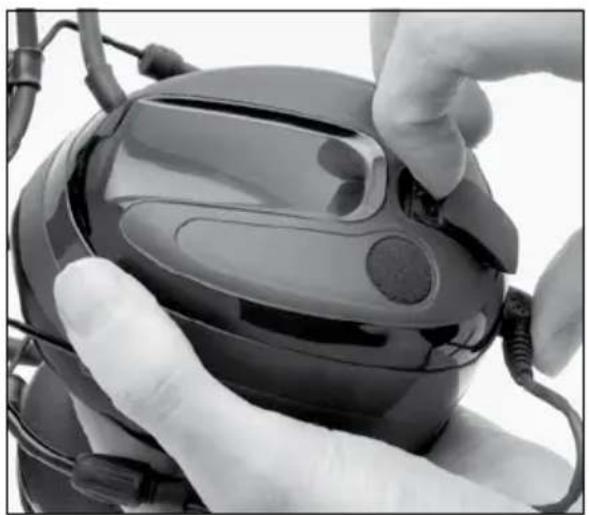
natural_image
Close-up of hands adjusting a black electronic device with a circular button, no visible text or symbolsG
| Criterion Levels | |
| MRX21*WS5 | H= 115 dB(A)M= 108 dB(A)L= 95 dB(A) |

natural_image
Two cylindrical batteries with visible internal markings, labeled (A:20) at bottom left (no text on battery body)
natural_image
Coiled black cable with two terminal connectors (no text or symbols visible)
| 1) Helmet Manufacturer | 2) Helmet Model | 3) Test Report | 4) Attachment | 5) Head size: S=small, N=medium, L=large |
| MRX21P3*WS5 | ||||
| Auboueix | Brennus | 95484T01 | F | SNL |
| Auboueix | Fondelec | 95484T01 | F | SNL |
| Auboueix | Iris | 95484T01 | E | NL |
| Auboueix Iris 2 26276T02 E N L | ||||
| Sofop Taliaplast | Oceanic | 95484T01 | E | NL |
| Sofop Taliaplast | Opus | 95484T01 | E | NL |
| Berendsen Safety, | Balance HD | 26103T0126104T0126105T0126106T01 | N | SNL |
| Centurion | 1125/ARCO plus | 95484T01 | H | SNL |
| Centurion | 1100/ARCO type 2 | 95484T01 | H | NL |
| Centurion | 1540/ARCO | 95484T01 | A | NL |
| Evert Larsson | Robust | 95484T01 | E | SNL |
| Evert Larsson | Balance | 95484T01 | E | NL |
| Evert Larsson | Balance AC/3M 1465 | 95484T01 | E | NL |
| Kemira | Top Cap | 95484T01 | A | SNL |
| LAS | LP2002 | 95484T01 | E | SNL |
| LAS | LP2006 | 95484T01 | E | SNL |
| MSA | Super V-Gard II | 95484T01 | E | SNL |
| MSA | V-Gard | 95484T01 | E | SNL |
| Peltor | G2000 | 95484T01 | K, E | SNL |
| Peltor | G22 (BASIC SET) | 95484T0122004T0121361T0121331T01 | E NL | |
| Peltor | G3000 | 26276T01 | E | SNL |
| Petzl | Vertex | 26099T0126100T0126101T0126102T01 | E | SNL |
| Protector | Style 300 | 21046T01 | E | SNL |
| Protector | Style 600 | 21046T01 | G | SNL |
| Protector | Tuffmaster II | 21046T01 | E, G | NL |
| Römer | Bravo 2 Nomaz | 95484T01 | B | SNL |
| Römer | Marcus Top 2 Atlas Nomaz | 95484T01 | B SNL | |
| Römer | N2 Atlas Nomaz | 95484T01 | BB | SNL |
| Römer | Profi Expo | 95484T01 | E | SNL |
| Römer | Profi Nomaz | 95484T01 | E | SNL |
| Römer | Top Expo Atlas | 95484T01 | B | SNL |
| Schuberth | BEN | 95484T01 | BB | SNL |
| Schuberth | BER80/WPC80 | 95484T01 | EA | SNL |
| Schuberth BER S 26276T02 E SNL | ||||
| Schuberth | BOP R | 95484T01 | B | SNL |
| Schuberth | PIONIER | 95484T01 | B | SNL |
| Schuberth | SH 91/WPL 91 | 95484T01 | EB | SNL |
| Schuberth | SW1 | 26099T01 | EB | NL |
| UVEX | Airwing | 95484T01 | E | SNL |
| Voss | Inap 88 | 95484T01 | E | SNL |
| Voss | Inap Master | 95484T01 | E | NL |
| Voss | Inap Star | 26276T01 | E | NL |
| Voss | Inap PCG | 95484T01 | G | NL |
(B)

natural_image
Illustration of hands holding a device with bidirectional arrows indicating movement (no text or symbols)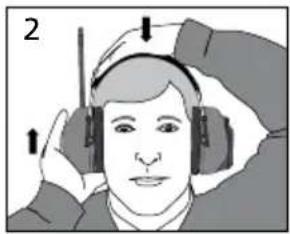
natural_image
Illustration of a person wearing headphones, with arrows indicating motion (no text or symbols)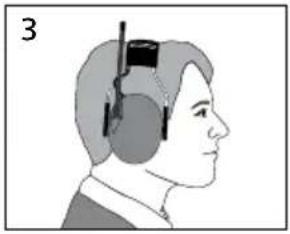
natural_image
Side profile illustration of a person wearing a headset with a black clip attached (no text or symbols)
natural_image
Illustration of a medical procedure on a patient's head, showing a hand holding a device with a magnified view (no text or symbols)
natural_image
Illustration of a person wearing a hard hat and headset (no text or symbols)
natural_image
Illustration of a person wearing a helmet and gear (no text or symbols)
natural_image
Side profile illustration of a person wearing a helmet and headgear (no text or symbols)(E)
natural_image
Illustration of a hand holding a small object, possibly a tool or device, with no visible text or symbols.
natural_image
Simple line drawing of three oval shapes with internal lines, no text or symbols present
natural_image
Illustration of a hand holding a small object with a pointed tip, no text or symbols present(D:1) MRX21AWS5
| Frequency (Hz)2) | 63 | 125 | 250 | 500 | 1000 | 2000 | 4000 | 8000 | |||||
| Mean attenuation (dB)3) | 17.0 | 15.5 | 19.2 | 28.0 | 29.6 | 35.1 | 34.4 | 37.1 | |||||
| Std deviation (dB)4) | 3.2 | 2.3 | 1.5 | 2.1 | 2.4 | 2.4 | 4.0 | 3.0 | |||||
| Assumed Protection Value (dB)5) | 13.8 | 13.2 | 17.7 | 25.9 | 27.2 | 32.7 | 34.4 | 34.1 | |||||
1) 430 g
SNR=29 db H=33 db M=26 db L=20 db
(D:2) MRX21P3EWS5
| Frequency (Hz)2) | 63 | 125 | 250 | 500 | 1000 | 2000 | 4000 | 8000 | ||||
| Mean attenuation (dB)3) | 15.2 | 15.1 | 19.8 | 27.1 | 28.9 | 34.3 | 38.7 | 37.8 | ||||
| Std deviation (dB)4) | 3.9 | 2.4 | 2.1 | 2.9 | 2.7 | 2.7 | 3.6 | 2.0 | ||||
| Assumed Protection Value (dB)5) | 11.2 | 12.7 | 17.7 | 24.2 | 26.2 | 31.5 | 35.0 | 35.8 | ||||
1) 455 g
SNR=29 db H=32 db M=26 db L=19 db
3M ^TM Peltor ^TM WS ^TM Alert XP
| GB, IE, ZA, AE | 2-7 |
| FR, CH, BE | 8-14 |
| DE, CH, AT | 15-21 |
| IT, CH | 22-28 |
| ES | 29-34 |
| NL, BE | 35-41 |
| SE | 42-47 |
| DK | 48-53 |
| NO | 54-59 |
| IS | 60-65 |
| FI | 66-71 |
| PT | 72-77 |
| GR | 79-85 |
| PL | 86-92 |
| HU | 93-99 |
| CZ | 100-105 |
| SK | 106-111 |
| SI | 112-117 |
| EE | 118-123 |
| LV | 124-129 |
| LT | 130-135 |
| RO | 136-141 |
| RU, BY, AZ | 142-148 |
| UA | 149-155 |
| HR | 156-161 |
| BG | 162-168 |
| TR | 169-174 |
| KZ | 175-181 |
3M ^TM Peltor ^TM WS ^TM Alert XP
This product has been tested and approved against the personal protection equipment (PPE) directive 89/686/EEC, and is also in compliance with the R&TTE directive 1999/5/EC for CE marking. Read these instructions carefully before use and save for future reference.
1. WHAT IS WHAT
(A:1) Headband wire (Stainless steel)
(A:2) Two-point fastener (Acetal)
(A:3) Ear cushion (PVC foil and Polyester foam)
(A:4) Microphone for surround sound
(A:5) Attenuation cushion (Polyurethane foam)
(A:6) Inner shell
(A:7) Outer shell
(A:8) Clamp
(A:9) Headband (PVC foil)
A:10) Headband padding
(A:11) AUX audio input, 3.5 mm stereo
(A:12) Speech mic input, J22
(A:13) Charger jack
(A:14) On/Off/Mode
(A:15) VOL+,
(A:16) VOL-
(A:17) Menu
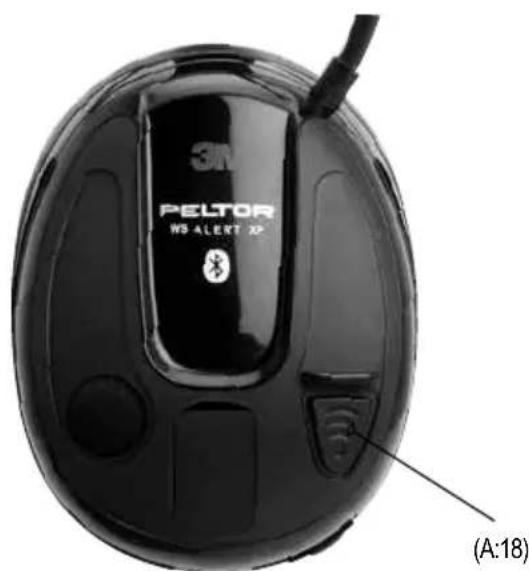
(A:18) Bluetooth/PTT
(A:19) Speech microphone
(A:20) Non rechargeable AA alkaline batteries
2. FITTING AND ADJUSTMENT
IMPORTANT! For the best protection, brush aside hair around the ears so the ear cushions fit snugly against the head. Spectacle frames should be as thin as possible and fit close to the head to minimise acoustic leakage.
Headband:
(B:1) Slide out the shells. Tilt the upper part of the shell outwards to ensure the wires are positioned away from the headband.
(B:2) Adjust the height of the shells by sliding them up or down whilst holding the headband in place.
(B:3) The headband should be positioned across the top of the head.
Helmet attachment:
(B:4) Insert the helmet attachment in the slot on the helmet and snap it into place. To switch the unit from ventilation to working mode, press the headband wires inwards until you hear a click on both sides. Ensure that the shell and the headband wires in working mode do not press on the edge of the helmet so that noise leakage can occur.
Note: The shells can be set in two positions: (B:5) working mode and (B:6) ventilation mode.
3. USAGE/FUNCTIONS
3:1 Inserting included batteries
Remove the left outer shell.
(C:1) Insert a blunt tool or finger under the edge of the clamp and pull outwards 3–4 mm.
(C:2) Press/slide the clamp down. Remove the shell.
Insert the non-rechargeable AA alkaline batteries included with the product.
Ensure that the poles are correctly aligned.
⚠ Warning! Do NOT try to charge the included alkaline batteries as this may damage the headset.
The headset can also operate on rechargeable NiMH batteries, see (3:2) Low battery level is indicated by a voice message: "low battery".
3:2 Using rechargeable batteries and charging your headset
NOTE: USB charger (FR09), USB wall adapter (FR08) and re chargeable batteries (LR6NM) have to be purchased separately
- Insert NiMH AA rechargeable batteries according to 3:1
- Connect the charger to the charger jack on the headset (A:13).
- Charge the headset for 10 hours to achieve the maximum battery capacity.
- Enter the configure menu and change battery type to "rechargeable", see 3:12:6

Warning: Use only original charger. Use of another charger can damage the headset.

Warning: Do NOT charge alkaline batteries as this may damage the headset.
Min / Max charging temperature: 0°C to +40 °C
3:3 Switching the headset on and off
Press and hold the On/Off/Mode button (A:14) for two seconds to switch the headset on or off.
NOTE: Automatic power-off after two hours of no active functions. Automatic power-off is indicated by
a voice message: "automatic power off".
3:4 Adjusting the FM radio volume
Adjust the volume with the + (A:15) and - (A:16) buttons
Press briefly on the On/Off/ button (A:14) and then (+) or (−) to adjust the surround-sound volume while listening to the FM radio.
3:5 Search for FM radio stations
Press briefly on the menu button (A:17) once
Search mode indicated by voice message: "search station"
Search for FM radio stations by using the + (A:15) and - (A:16) buttons
3:6 Store FM radio channels
To store a station, press briefly several times on the menu button (A:17) until reaching store mode, which is indicated by voice message; "store station"
Choose memory slot (1-4) by using the + button (A:15)
Store channel by pressing and holding the menu button (A:17) for 2 seconds
Stored station is indicated by voice message ; "Confirmed"
3:7 Listen to stored FM radio channels
Press briefly several times on the menu button (A:17) until reaching pre set station mode, which is indicated by voice message; "pre set station"
Choose which stored station to listen to by using the + button (A:15)
3:8 Adjusting surround sound volume
Press briefly on the On/Off button (A:14).
Then adjust the surround sound volume by using the + (A:15) and - (A:16) buttons
Press briefly on the On/Off button (A:14), jump between FM radio volume, or streamed music volume and surround sound volume.
3:9 Bluetooth pairing
The headset can be paired with and connected to Bluetooth units that support A2DP, HFP and HSP profiles. NOTE that you can only stream stereo sound/music from a unit (mobile phone, computer, etc.) that supports the A2DP Bluetooth profile.
- Ensure that the headset has sufficient battery power and is switched off.
- Press and hold the On/Off button (A:14) for 5 seconds. This puts the headset into pairing mode, which is confirmed by repeated voice message: "Bluetooth pairing mode".
- Activate your telephone's Bluetooth function and search for new units. After a few seconds "Peltor WS5" will appear on the screen.
- Select "Peltor WS5".
• If the phone asks you for a password, enter: 0000 - Pairing is confirmed when you hear the voice message: "Pairing complete".
Once the Bluetooth pairing function is activated it will automatically establish connection with the headset next time it is used with a confirmation voice message "Connecting Bluetooth", and then: "Connected" when the units are connected. You can pair and store up to 4 units. The headset will automatically try to connect to the most recently connected unit first.
3:10 Managing phone calls
To manage phone calls, the headset must be paired with and connected to a mobile phone with Bluetooth capability, see Bluetooth pairing.
Answering calls
Incoming phone calls are indicated with a ring tone in the headset. Answer by pressing briefly on the Bluetooth button (A:18).
Rejecting a call
Reject a call by pressing and holding the Bluetooth button (A:18).
Voice dial
Press briefly on the Bluetooth button (A:18).
Not all phones support voice dial. For information on how to activate and de-activate voice dial please refer to the user manual of your phone.
Redial
Press and hold the Bluetooth button for 2 seconds (A:18).
Adjusting call volume
You can adjust volume during a call by pressing the (+) or (−) buttons. Press the On/Off/Mode button (A:13) and then (+) or (−) to adjust the surround-sound volume during a call.
3:11 Adjusting streamed-music volume
You can adjust volume while streaming music by pressing the (+) or (−) buttons.
Press briefly on the On/Off button (A:14) and then (+) or (−) to adjust the surround-sound volume during music streaming.
3:12 Changing settings in the Configure menu
The headset has a Configure menu where you can adjust settings.
The last settings are stored when the headset is switched off.
To access the menu, press and hold the menu button (A:17) for 4 seconds (with the headset switched on). Access to the Configure menu is confirmed by a voice saying: "Menu". To change the settings, use the (-) and (+) buttons.
To move on through the Configure menu, press briefly on the menu button (A:17).
The configure menu will be automatically closed after 10 seconds of inactivity.
3:12:1 Bass Boost
Bass Boost gives a fuller bass sound to streamed stereo music.
3:12:2 Music Limiter Mode
There are two settings for limiting the sound level when streaming music/audio via Bluetooth, listening to the FM radio or connecting equipment to the external input
ON
The limiter will reduce the volume level to 82 dB(A)
OFF
limits the total sound exposure over 8 hours to 82 dB(A) Leq
This mode allows for a sound exposure which is higher than 82 dBA for a shorter period of time. However, when the daily dose of 82 dB(A) Leq is reached, the sound level is significantly reduced.
This is confirmed by a voice saying: "daily dose reached".
The dosimeter will reset every 24 hours.

Warning: Daily dose could be exceeded if batteries are removed and replaced, or if factory default is activated.
3:12:3 Balance
Changes the left-right balance of the surround sound.
3:12:4 Equalizer
Changes the frequency character of the surround sound.
- Low
- Normal
• High - Extra High
3:12:5 Side tone volume (applies only to Hands Free Bluetooth sound)
• OFF
- LOW
• NORMAL
• HIGH
3:12:6 Battery type
Choose: "rechargeable", if rechargeable batteries are used. Choose: "alkaline", if non rechargeable batteries are used.
3:13:7 Reset to Factory Default
Resets all functions to the factory settings.
3:13 Connecting external equipment via a cord
External equipment can be connected via the 3,5mm audio input (A:21)
4. IMPORTANT USER INFORMATION
• The ear-muffs must be fitted, worn, adjusted, cleaned and maintained in accordance with this manual.
• Always wear the ear-muffs at all times during exposure to hazardous noise
- The wearer should ensure that the ear-muffs are regularly inspected for serviceability.
• Clean/disinfect the shells, headband and ear cushions regularly with soap and warm water. Note: Do not immerse in water!
- This product may be adversely affected by certain chemical substances. Further information should be sought from the manufacturer.
- Ear muffs, and in particular cushions, may deteriorate with use and should be examined at frequent intervals for cracking and leakage, for example.
• The fitting of hygiene covers to the cushions may affect the acoustic performance of the ear-muffs
• Store product without the batteries. Under extremely cold conditions, warm the hearing protector before using.
- Do not store the hearing protector at temperatures exceeding +55°C, for example on a dashboard or windowsill. Do not store the hearing protector at temperatures below -20°C.
• These ear muffs should be fitted to, and used only with, the following industrial safety helmets: (Fig. H)
- This ear muff is provided with level dependent attenuation. The wearer should check correct operation before use. If distortion or failure is detected, the wearer should refer to the manufacturer's advice for maintenance and replacement of battery.
- Warning – performance may deteriorate with battery usage. The typical period of continuous use that can be expected from the ear muffs is around 23 hours.
- Warning – the output of the level dependent circuit of this hearing protector may exceed the external sound level.
- This ear-muff is provided with electric audio input. The wearer should check correct operation before use. If distortion or failure is detected, the wearer should refer to the manufacturer's advice
- Warning – the output of the electrical audio circuit of this hearing protector may exceed the daily limit sound level.
- If sound distortion increases or the volume becomes too weak, it is time to charge or replace the batteries. Never replace or insert batteries with the unit switched on. Ensure that the batteries are correctly aligned before the product.
- This ear muff is provided with an entertainment audio facility.
- This ear-muff is provided with audio signal sound pressure level limitation and the ear muff limits the entertainment audio signal to 82dB (A) effective to the ear.
- The limitation of the input signal is remained for levels not exceeding 108 mV
• The audibility of warning signals at a specific workplace may be impaired while using the entertainment facility
Note: If these recommendations are not followed, attenuation may be adversely affected leading to hearing impairment.
5. TECHNICAL DATA
5:1 Attenuation values, SNR
Headband (D:1)
Helmet attachment (D:2)
The attenuation values and noise levels for the headset are tested and approved according to EN 352-4: 2001, 2002, EN 352-8: 2008, EN 352-1: 2002 and EN 352-3: 2002. Certificate issued by CombiTech AB, SE-73281 Arboga, Sweden. Notified body: 2279
Explanation of the attenuation data tables:
- Weight
- Frequency (Hz)
- Average attenuation (dB)
- Standard deviation (dB)
- Expected attenuation (dB)
These ear muffs should be fitted to, and used only with, the industrial safety helmets listed in table H: Explanation of table H:)
- Helmet manufacturer
- Helmet model
- Test report
- Attachment
- Size ranges: S= Small, N= Medium, L= Large
5:2 Sound exposure when using the 3.5 mm audio input
The earphone level for music is measured at no more than 82 dB(A) equivalent sound level.
5:3 Criterion levels (G)
A criterion level is the amount of noise (measured as A-weighted sound pressure) outside the hearing protector that gives 85 dB(A) inside. The noise level depends on the type of noise. H is high-frequency dominated noise, M is noise that is not dominated by any given frequency, and L is low-frequency dominated noise.
5:4 Battery type
All types of AA 1.2–1.5V batteries can be used (NiMH, NiCd, Alkaline, Lithium, Manganese, etc), but only NiMH and NiCd batteries can be recharged.
5:5 Battery life
The expected battery life may vary depending on the brand of batteries and the temperature in which the product is used. Low battery level is indicated by a voice saying: "low battery". The headset functions will not work optimally if the battery is low.
2\*AA Alkaline
Surround +FM radio+ Bluetooth (standby) > 32 h
Surround + FM radio+ Bluetooth (active) > 23 h
5:6 Bluetooth
Version 2.1
A2DP 1.2
HSP 1.2
HFP 1.5
AVRCP 1.0
The headset is designed for Bluetooth standard V.2.1 (headset and handsfree profiles + A2DP) and is certified according to: EN 300 328 (radio test), EN 301 489-1/-17 (EMC test), EN 60 950 (electric safety, low voltage directive).
Do not store the hearing protector at temperatures exceeding +55°C, for example on a dashboard or windowsill. Do not store the hearing protector at temperatures below -20°C.
Operating temperature: -20 °C to +55 °
WHEN DAMP. Turn the shells outwards. Remove the ear cushions so that the attenuation cushions can dry.
Do not store helmet attached cups with the cushions resting on helmet surface (B:7)
Remove the batteries when storing the hearing protector for a long time. Check the functioning of the unit after replacing the batteries.
8 8. RECYCLING
This product is covered by the WEEE directive 2002/96/EC and is recyclable. Dispose the product in accordance with national regulation. Use local recycling system for electronic products.
8:1 CLEANING
Clean/disinfect the shells, headband and ear cushions regularly with soap and warm water. Note: Do not immerse in water!
8:2 REMOVING/REPLACING OUTER SHELLS
See 3:1
8:3 REMOVING/REPLACING EAR CUSHIONS
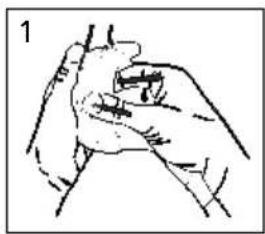
Slide your fingers under the edge of the ear cushion and pull straight out. (E:1)
Insert a new ear cushion by pressing until it snaps into place. (E:3)
9. SPARE PARTS/ACCESSORIES
HY81 Hygiene kit
Easy to replace hygiene kit consisting of two attenuation cushions and snap-in ear cushions. Replace at least twice a year to ensure constant attenuation, hygiene and comfort, or if any of the parts of the hygiene kit are defective. The headset and particularly the ear cushions can deteriorate over time and should be inspected regularly to ensure that there are no cracks and sound leakage. If an ear cushion is damaged, it must be replaced. See Maintenance/Cleaning section.
FL6CE 3.5 Listen only cable 3,5mm stereo
The Bluetooth® word mark and logos are registered trademarks owned by Bluetooth SIG, Inc. and any use of such marks by 3M is under license. Other trademarks and trade names are those of their respective owners.
3M does not accept liability of any kind, be it direct or consequential (including, but not limited to, loss of profits, business and/or goodwill) arising from reliance upon any information herein provided by 3M. The user is responsible for determining the suitability of the products for their intended use. Nothing in this statement will be deemed to exclude or restrict 3M's liability for death or personal injury arising from its negligence.
3M ^TM Peltor ^TM WS ^TM Alert XP
3:11 Adjusting streamed-music volume
Surround + radio FM + Bluetooth (stand-by) > 32 ore
- OFF (DESACTIVADO)
- LOW (BAJO)
• NORMAL
• HIGH (ALTO)
3:12:6 Battery type (tipo de pila)
Elegir: "rechargeable", si se usan pilas recargables.
Elegir: "alkaline", si se usan pilas alcalinas no recargables.
3:12:7 Reset to Factory Default (restablecer ajustes predeterminados de fábrica)
You can adjust volume during a call by pressing the (+) or (−) buttons. Press the On/Off/Mode button (A:13) and then (+) or (−) to adjust the surround-sound volume during a call.
2. PASSFORM OCH JUSTERING
9. AD FJARLÆGJA/SKIPTA UM YTRI SKÁLAR
Sjá 3:1.
10. AD FJARLÆGJA/SKIPTA UM EYRNAPÚĐA
Renndu fingrunum undir brún eymapúðans og kipptu honum beint út (E:1).
- OFF (VYPNUTO)
- LOW (NÍZKÁ)
• NORMAL (NORMÁLNÍ)
• HIGH (VYSOKÁ)
3:12:6 Battery Type (typ baterii)
Surround +FM radio+ Bluetooth (active) > 23 h
5:6 Bluetooth
Versiunea 2.1
A2DP 1.2
HSP 1.2
HFP 1.5
AVRCP 1.0
3M Australia Pty. Limited
Building A, 1 Rivett Road
North Ryde, N.S.W. 2113
+61 1800 024 464
Austria
3M Österreich GmbH
"BRIDGE Plaza" 4th floor,
12 Bakikhanov street Baku AZ 1065
+994 12 404 5050
Belarus
3M Belarus Representation Office
Mogilevskaya str 18, office 4220007
Minsk
+375 172 22 97 90
Belgium
3M Belgium N.V. / S.A.
Hermeslaan 7
1831 Diegem
+32 2 722 53 10
Bulgaria
3M Bulgaria Representation Office
1715 Sofia, Mladost 4 Business Park, sgrada 4
+359 2 960 19 11
China
41/F, Maxdo Centre, No.8 Xing Yi Rd.,
Hong Qiao Development Zone Shanghai,
200336 China
+86 021 22103047
Croatia
3M Croatia Representation Office
19th Floor, Maadi, Cairo
+2 02 2525 9007
Estonia
3M Eesti filial
Mustamäe tee 410621 Tallinn
+372 6 115 900
Finland
Suomen 3M Oy PL 90,
Lars Sonckin kaari 602601
Espoo
+358 9 52 521
France
3M France
Bd de l'Oise
PLC3M Centre, Cain Road Bracknell,
RG12 8HT
+44 870 60 800 60
Greece
3M Hellas Limited
Corporate Office, Concorde Block, UB City,
24 Vittal Mallya Road Bangalore - 560001
+91 80 665 95 759
Ireland
3M Ireland
3M House, Adelphi Centre,
Upper Georges Street Dun Loaghaire,
Co. Dublin
+353 1 800 320 500
Israel
הכלההוּרָהִיַעְבָהִיַעְבָהִיַעְבָהִיַעְבָהִיַעְבָהִיַעְבָהִיַעְבָהִיַעְבָהִיַעְבָה
הכלה 2042.7.91
Italy
3M Italia S.p.A.
Loc. San Felice-Via San Bovio 3
20090 Segrate (MI)
+39 800 802145
Kazakhstan
3M Kazakhstan Representation Office
3M Morocco La Colline II, N°33 Rdc,
Route de Nouasser, Sidi Maarouf
Casablanca
+212 22 977 977
Netherlands
3M Nederland B.V.
Industrieweg 24
2482 NW Zoeterwoude
+31 071 5 450 450
New Zealand
3M New Zealand Limited
94 Apollo Drive, Rosedale, AUCKLAND 0632
+64 (0)800 364 357
Norway
3M Norge A/S,
Avd. Verneprodukter, Postboks 100,
3M Pakistan (PVT) Ltd.
Islamic Chamber of Commerce Building ST-2/A,
Block 9, KDA Scheme 5,
Clifton-Karachi 75600
+ 92 21 111 2255 36
Poland
3M Poland Sp. z o.o.
Aleja Katowicka 117, 05-830 Nadarzyn
Bucharest Business Park,
Krylatsky Hills Business Park,
Krylatskaya st., 17, bldg. 3
121614 Moscow
+7 495 784 7474
Serbia
3M Representation Office
Beograd Milutina Milankovica 2311070
Novi Beograd
+381 11 3018459
Slovakia
3M Slovakia Representation Office
Obchodné zastupitel'stvo
Vajnorská 142, 831 04 Bratislava
+421 2 491 05 211
Slovenia
3M (East) AG
3M Singapore Pte Ltd
3M Technologies (Singapore) Pte Ltd
1 Yishun Avenue 7
Singapore 768923
(65) 6450 8888 (Yishun)
Sweden
3M Svenska AB
Bollstanäsvägen 3
191 89 Sollentuna
+46 8 92 21 00
Switzerland
3M (Schweiz) AG
Eggstrasse 93,
Postfach 8803 Rüschlikon
+41 1 724 92 21
Taiwan
3M Taiwan
6F, NO. 95, Dunhua S. Rd.,
Sec. 2 Taipei, Taiwan
886 2 27049011
Turkey
3M Sanayi ve Ticaret A.Ş
3rd floor, Kyiv, 03680,
+380 44 490 57 77
United Arab Emirates
3M Gulf Ltd
P.O. Box 20191 Building 11,
Third Floor, Dubai Internet City,
Deira
+ 971 4 367 0777
3M
3M Svenska AB
Box 2341
SE-331 02 Värnamo
Sweden
Phone: +46 (0) 370 65 65 65
Fax: +46 (0) 370 65 65 99
Email: peltorcommunications@mmm.com
Internet: www.3M.com/Peltorcomms
Please recycle. Printed in Sweden.
© 3M 2012. All rights reserved.
The Bluetooth® wordmark and logotype are the property of Bluetooth
SIG, Inc., and all use of them is subject to licensing agreements.


- 3M TM Peltor TM WS TM Alert XP
- WHAT IS WHAT
- FITTING AND ADJUSTMENT
- Headband:
- Helmet attachment:
- USAGE/FUNCTIONS
- 3:1 Inserting included batteries
- 3:2 Using rechargeable batteries and charging your headset
- 3:3 Switching the headset on and off
- 3:4 Adjusting the FM radio volume
- 3:5 Search for FM radio stations
- 3:6 Store FM radio channels
- 3:7 Listen to stored FM radio channels
- 3:8 Adjusting surround sound volume
- 3:9 Bluetooth pairing
- 3:10 Managing phone calls
- Answering calls
- Rejecting a call
- Voice dial
- Redial
- Adjusting call volume
- 3:11 Adjusting streamed-music volume
- 3:12 Changing settings in the Configure menu
- 3:12:1 Bass Boost
- 3:12:2 Music Limiter Mode
- ON
- OFF
- 3:12:3 Balance
- 3:12:4 Equalizer
- 3:12:5 Side tone volume (applies only to Hands Free Bluetooth sound)
- 3:12:6 Battery type
- 3:13:7 Reset to Factory Default
- 3:13 Connecting external equipment via a cord
- IMPORTANT USER INFORMATION
- TECHNICAL DATA
- 5:1 Attenuation values, SNR
- Headband (D:1)
- Helmet attachment (D:2)
- Explanation of the attenuation data tables:
- 5:2 Sound exposure when using the 3.5 mm audio input
- 5:3 Criterion levels (G)
- 5:4 Battery type
- 5:5 Battery life
- 2\*AA Alkaline
- 5:6 Bluetooth
- 8. RECYCLING
- 8:1 CLEANING
- 8:2 REMOVING/REPLACING OUTER SHELLS
- 8:3 REMOVING/REPLACING EAR CUSHIONS
- SPARE PARTS/ACCESSORIES
- HY81 Hygiene kit
- FL6CE 3.5 Listen only cable 3,5mm stereo
- 3:12:6 Battery type (tipo de pila)
- 3:12:7 Reset to Factory Default (restablecer ajustes predeterminados de fábrica)
- PASSFORM OCH JUSTERING
- AD FJARLÆGJA/SKIPTA UM YTRI SKÁLAR
- AD FJARLÆGJA/SKIPTA UM EYRNAPÚĐA
- 3:12:6 Battery Type (typ baterii)
- Austria
- Belarus
- Belgium
- Bulgaria
- China
- Croatia
- Estonia
- Finland
- France
- Greece
- Ireland
- Israel
- Italy
- Kazakhstan
- Netherlands
- New Zealand
- Norway
- Poland
- Serbia
- Slovakia
- Slovenia
- Sweden
- Switzerland
- Taiwan
- Turkey
- United Arab Emirates
- 3M
- 3M Svenska AB
Brand : 3M
Model : Peltor WS Alert XP
Category : Earphones