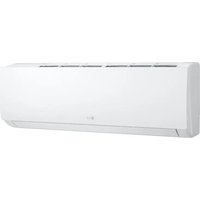
W09TI - Air Conditioning LG - Free user manual and instructions
Find the device manual for free W09TI LG in PDF.


| Brand | LG |
| Model | W09TI |
| Product type | Wall-mounted split air conditioner |
| Cooling power | 2.6 kW (9,000 BTU/h) |
| Heating power | 2.8 kW (9,600 BTU/h) |
| Refrigerant | R32 (flammable) |
| Operating modes | Cooling, Heating, Automatic, Drying, Fan |
| Special functions | Jet Mode, Energy Saving, Dual Detection, Auto Clean, On/Off Timer, Sleep, Ionizer |
| Remote control | Wireless, 2 LR03 AAA batteries (1.5 V) |
| Air filter | Washable, clean every 2 weeks |
| Maintenance | Heat exchanger cleaning, end-of-season maintenance |
| Safety | Automatic restart, emergency stop, thermal protection |
| Power supply | 220-240 V, 50 Hz |
| Mounting type | Wall-mounted |
| Operating temperature range | Cooling: indoor 16-31°C, outdoor 21-48°C; Heating: indoor 16-31°C, outdoor -7-24°C |
Frequently Asked Questions - W09TI LG
User questions about W09TI LG
0 question about this device. Answer the ones you know or ask your own.
Ask a new question about this device
Download the instructions for your Air Conditioning in PDF format for free! Find your manual W09TI - LG and take your electronic device back in hand. On this page are published all the documents necessary for the use of your device. W09TI by LG.
USER MANUAL W09TI LG
Read this owner's manual thoroughly before operating the appliance and keep it handy for reference at all times.
TYPE: WALL MOUNTED
Original instruction
EN ENGLISH
DE DEUTSCH
PL POLSKI
CZ ČEŠTINA
SK SLOVENČINA
GA GAEILGE
SQ SHQIP
IT ITALIANO
EL EΛΛΗΝΙΚΑ
HU MAGYAR
ET EESTI
SL SLOVENŠČINA
SR SRPSKI
BS BOSANSKI
ES ESPAÑOL
PT PORTUGUÊS
BG БЪЛГАРСКИ
MT MALTI
LV LATVIEŠU
МК МАКЕДОНСКИ
CA CATALÀ
FR FRANÇAIS
NL NEDERLANDS
HR HRVATSKI
RO ROMÂNĂ
LT LIETUVIŲ
※ When installed, enter the model name and send it to the customer.

Model Name
:____
- Read the QR Code.
- Enter the model name.
- Select the manual that you want to see.
www.lg.com
This manual may contain images or content different from the model you purchased.
This manual is subject to revision by the manufacturer.
SAFETY INSTRUCTIONS ....3
IMPORTANT SAFETY INSTRUCTIONS ....4
OPERATION 11
Notes for Operation....11
Indoor Unit....11
Outdoor Unit....11
Replacement of Batteries....12
Setting the Current Time....13
Emergency Function 13
Using Wireless Remote Control....14
INDOOR UNIT DISPLAY....15
Display 15
OPERATING INSTRUCTIONS ......16
Cooling Mode 16
Auto Mode (auto changeover / auto operation mode)....16
Dry Mode....17
Heating Mode 17
Fan Mode....18
Fan Speed 18
Light Off....19
Jet Mode 19
Swing Control....20
Energy Saving....21
Dual Sensing....21
Room Temp....22
Change Celsius to Fahrenheit °C\~°F 22
Setting the On/Off Timer 22
Using the Sleep Function....24
Using Special Function 24
PROTECTION....25
AUTO-RESTART FUNCTION 25
Auto-Restart Function 25
MAINTENANCE....26
Air Filters....26
Cleaning the Heat Exchanger 26
End of Season Maintenance....26
TROUBLESHOOTING....27
The following safety guidelines are intended to prevent unforeseen risks or damage from unsafe or incorrect operation of the appliance.
The guidelines are separated into ‘WARNING’ and ‘CAUTION’ as described below.

This symbol is displayed to indicate matters and operations that can cause risk. Read the part with this symbol carefully and follow the instructions in order to avoid risk.

WARNING
This indicates that the failure to follow the instructions can cause serious injury or death.

CAUTION
This indicates that the failure to follow the instructions can cause the minor injury or damage to the product.
The following symbols are displayed on indoor and outdoor units.

This symbol indicates that this appliance uses a flammable refrigerant. If the refrigerant is leaked and exposure to an external ignition source, there is a risk of fire.

This symbol indicates that the Operation Manual should be read carefully.

This symbol indicates that a service personnel should be handling this equipment with reference to the Installation Manual.

This symbol indicates that information is available such as the Operating Manual or Installation Manual.
IMPORTANT SAFETY INSTRUCTIONS

WARNING
To reduce the risk of explosion, fire, death, electric shock, injury or scalding to persons when using this product, follow basic precautions, including the following:
Children in the Household
This appliance is not intended for use by persons (including children) with reduced physical, sensory or mental capabilities, or lack of experience and knowledge, unless they have been given supervision or instruction concerning use of the appliance by a person responsible for their safety. Children should be supervised to ensure that they do not play with the appliance.
Installation
- Do not install the air conditioner on an unstable surface or in a place where there is danger of it falling.
- Contact an authorized service center when installing or relocating the air conditioner.
• Install the panel and the cover of the control box safely. - Do not install the air conditioner in a place where flammable liquids or gases such as gasoline, propane, paint thinner, etc., are stored.
- Make sure that the pipe and the power cable connecting the indoor and outdoor units are not pulled too tight when installing the air conditioner.
-
Use standard circuit breaker and fuse that conform to the rating of the air conditioner.
-
Do not input air or gas into the system except with the specific refrigerant.
- Use non-flammable gas (nitrogen) to check for leak and to purge air; using compressed air or flammable gas may cause fire or explosion.
- The indoor/outdoor wiring connections must be secured tightly, and the cable should be routed properly so that there is no force pulling the cable from the connection terminals. Improper or loose connections can cause heat generation or fire.
• Install dedicated electric outlet and circuit breaker before using the air conditioner. - Do not connect the ground wire to a gas pipe, a lightning rod, or a telephone ground wire.
- Keep any required ventilation openings clear of obstruction.
- Means for disconnection must be incorporated in the fixed wiring in accordance with the wiring rules.
- Do not install the unit in potentially explosive atmospheres.
Operation
- Be sure to use only those parts listed in the service parts list. Never attempt to modify the equipment.
• Make sure that children do not climb on or hit the outdoor unit. - Dispose of the batteries in a place where there is no danger of fire.
- Use only the refrigerant specified on the air conditioner label.
- Cut off the power supply if there is any noise, smell, or smoke coming from the air conditioner.
-
Do not leave flammable substances such as gasoline, benzene, or thinner near the air conditioner.
-
Contact an authorized service center when the air conditioner is submerged by flood waters.
- Do not use the air conditioner for an extended period of time in a small place without proper ventilation.
- In the event of a gas leak (such as Freon, propane gas, LP gas, etc.) ventilate sufficiently before using the air conditioner again.
- Be sure to ventilate sufficiently when the air conditioner and a heating appliance such as a heater are used simultaneously.
- Do not block the inlet or outlet of air flow.
- Do not insert hands or other objects through the air inlet or outlet while the air conditioner is operating.
- Make sure that the power cable is neither dirty, loose, nor broken.
- Never touch, operate, or repair the air conditioner with wet hands.
- Do not place any objects on the power cable.
- Do not place a heater or other heating appliances near the power cable.
- Do not modify or extend the power cable. Scratches or peeling insulation on the power cables may result in fire or electric shock, and should be replaced.
- Cut off the power supply immediately in the event of a blackout or a thunderstorm.
• Take care to ensure that power cable could not be pulled out or damaged during operation. - Do not touch refrigerant pipe, water pipe and any internal parts while the unit is operating or immediately after operation.
Maintenance
- Do not clean the appliance by spraying water directly onto the product.
- Before cleaning or performing maintenance, disconnect the power supply and wait until the fan stops.
Technical Safety
- Installation or repairs made by unauthorized persons can pose hazards to you and others.
- Any person who is involved with working on or breaking into a refrigerant circuit should hold a current valid certificate from an industry-accredited assessment authority, which authorizes their competence to handle refrigerants safely in accordance with an industry recognized assessment specification.
- Servicing shall only be performed as recommended by the equipment manufacturer. Maintenance and repair requiring the assistance of other skilled personnel shall be carried out under the supervision of the person competent in the use of flammable refrigerants.
- The information contained in the manual is intended for use by a qualified service technician who is familiar with the safety procedures and equipped with the proper tools and test instruments.
- Failure to read and follow all instructions in this manual can result in equipment malfunction, property damage, personal injury and/or death.
- The appliance shall be installed in accordance with national wiring regulations.
- When the power cord is to be replaced, the replacement work shall be performed by authorized personnel using only genuine replacement parts.
- This appliance must be properly grounded to minimize risk of electric shock.
- Do not cut or remove the grounding prong from the power plug.
-
Attaching the earth wire to the power outlet cover screw does not ground the appliance unless the cover screw is metal, uninsulated, and the power outlet is grounded through house wiring.
-
If you have any doubt whether the air conditioner is properly grounded, have the power outlet and circuit checked by a qualified electrician.
- The refrigerant and insulation blowing gas used in the appliance require special disposal procedures. Consult a service agent or a similarly qualified person before disposing of them.
- If the supply cord is damaged, it must be replaced by the manufacturer, its service agent or similarly qualified person in order to avoid a hazard.
- The appliance shall be stored in a well-ventilated area where the room size corresponds to the room area as specified for operation.
- The appliance shall be stored in a room without continuously operating open flames (for example an operating gas appliance) and ignition sources (for example an operating electric heater).
- The appliance shall be stored so as to prevent mechanical damage from occurring.

CAUTION
To reduce the risk of minor injury to persons, malfunction, or damage to the product or property when using this product, follow basic precautions, including the following:
Installation
- Do not install the air conditioner in an area where it is directly exposed to sea wind (salt spray).
-
Install the drain hose properly for the smooth drainage of water condensation.
-
Exercise caution when unpacking or installing the air conditioner.
- Do not touch the leaking refrigerant during installation or repair.
- Transport the air conditioner with two or more people or use a forklift.
- Install the outdoor unit such that it is protected from direct sunlight. Do not place the indoor unit in a place where it is directly exposed to sunlight via the windows.
- Safely dispose of packing materials such as screws, nails, plastic bag or batteries using proper packaging after installation or repair.
- Install the air conditioner in a place where the noise from the outdoor unit or the exhaust fumes will not inconvenience the neighbors. Failure to do so may result in conflict with the neighbors.
Operation
- Remove the batteries if the remote control is not to be used for an extended period of time.
- Make sure that the filter is installed before operating the air conditioner.
- Be sure to check if there is a refrigerant leak after installing or repairing the air conditioner.
- Do not place any object on the air conditioner.
- Never mix different types of batteries, or old and new batteries for the remote control.
- Do not let the air conditioner run for a long time when humidity is very high or when a door or a window has been left open.
-
Stop using the remote control if there is a fluid leak in the battery. If your clothes or skin are exposed to the leaking battery fluid, wash off with clean water.
-
Do not expose people, animals, or plants to the cold or hot wind from the air conditioner for extended periods of time.
- If the leaking battery fluid has been swallowed, rinse the inside of the mouth thoroughly and consult a doctor.
- Do not drink the water drained from the air conditioner.
- Do not use the product for special purposes, such as preserving foods, works of art, and etc. It is an air conditioner for consumer purposes, not a precision refrigeration system. There is risk of damage or loss of property.
- Do not recharge or disassemble the batteries.
- This appliance can be used by children aged from 8 years and above and persons with reduced physical, sensory or mental capabilities or lack of experience and knowledge if they have been given supervision or instruction concerning use of the appliance in a safe way and understand the hazards involved. Children shall not play with the appliance. Cleaning and user maintenance shall not be made by children without supervision.
Maintenance
- Never touch the metal parts of the air conditioner when removing the air filter.
- Use a sturdy stool or ladder when cleaning, maintaining, or repairing the air conditioner at a height.
- Never use strong cleaning agents or solvents when cleaning the air conditioner or spray water. Use a smooth cloth.
• To clean the interior, contact an authorized service center or dealer. Using harsh detergents may cause corrosion or damage to the unit.
Notes for Operation
Suggestion for Energy Saving
- Do not over-cool the space. This may be harmful for your health and may consume more electricity.
- Block sunlight with blinds or curtains while you are operating the air conditioner.
- Keep doors or windows closed tightly while you are operating the air conditioner.
- Adjust the direction of the air flow vertically or horizontally to circulate indoor air.
- Speed up the fan to cool or warm indoor air quickly, within a short period of time.
- Open windows regularly for ventilation. The indoor air quality may deteriorate if the air conditioner is used for long durations.
- Clean the air filter once every 2 weeks. Dust and impurities collected in the air filter may block the air flow or reduce the unit performance.
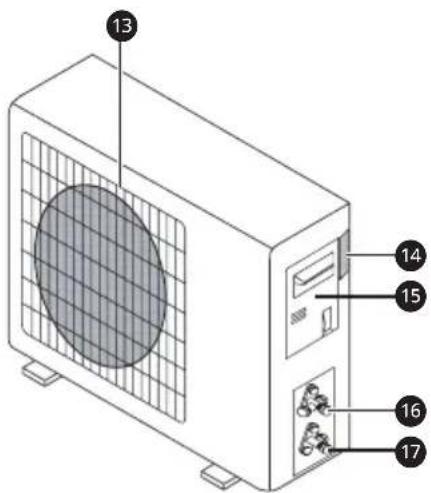
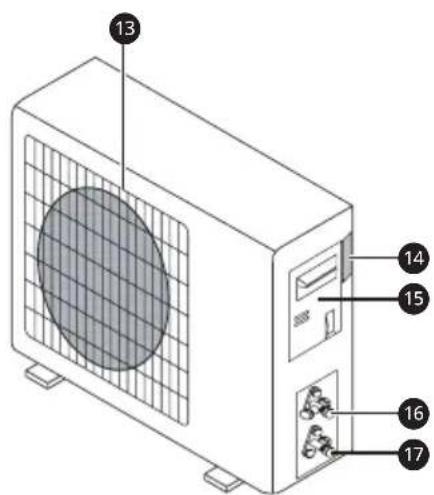
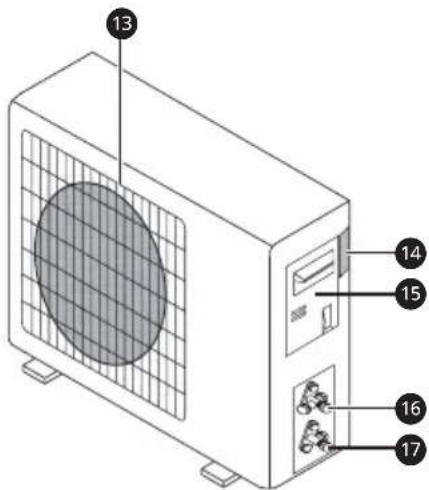
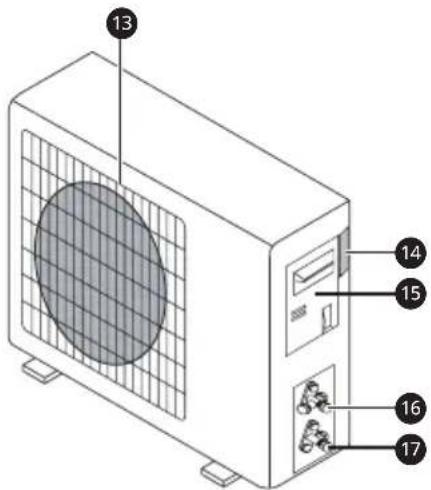
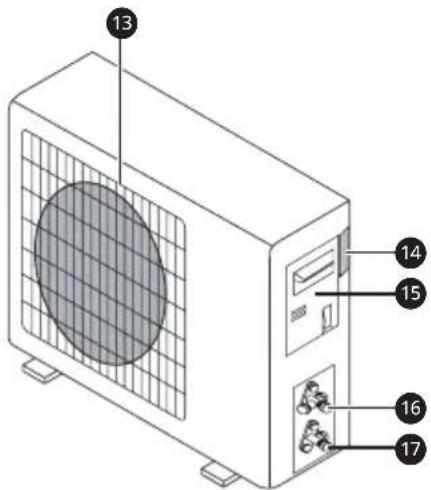
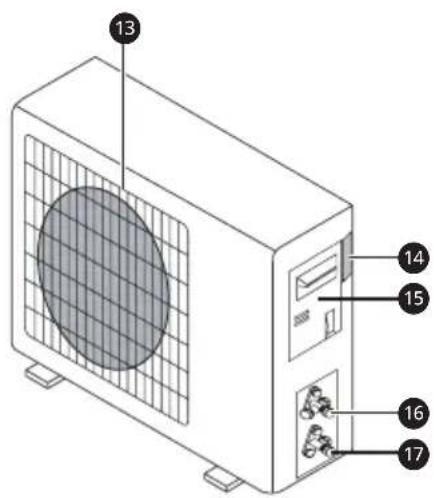
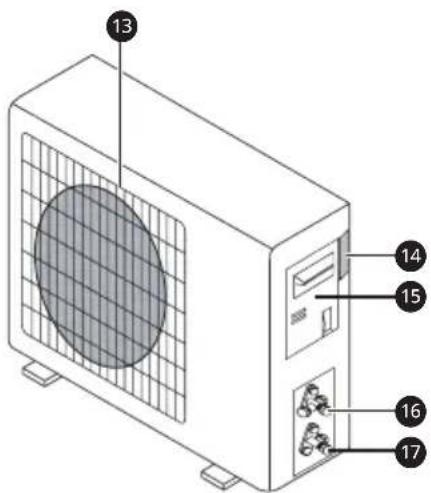
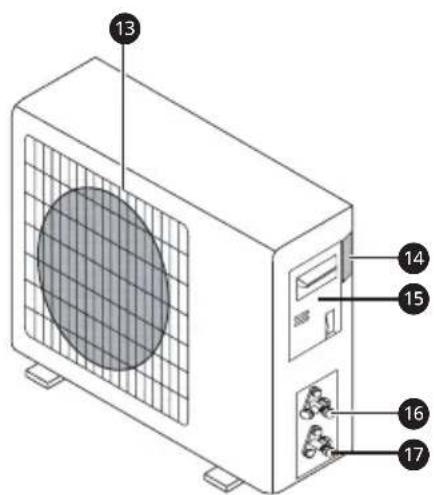
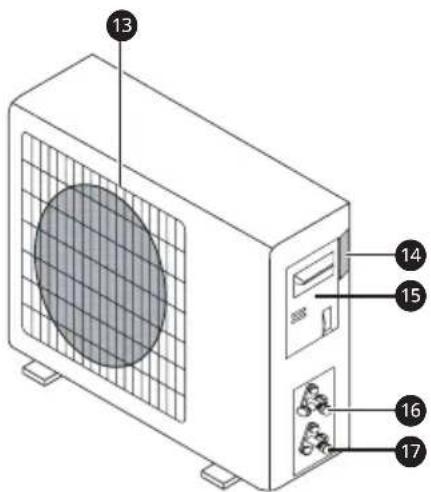
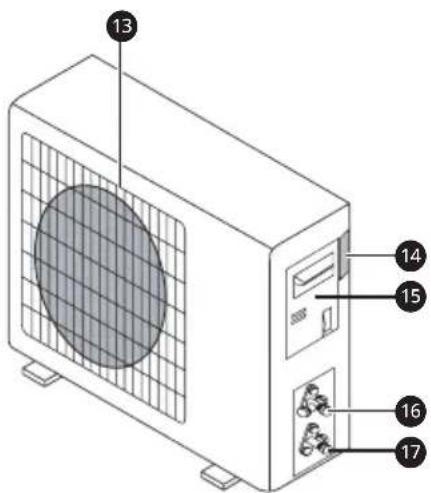
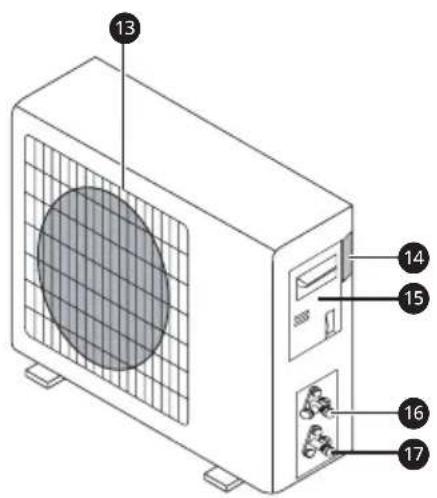
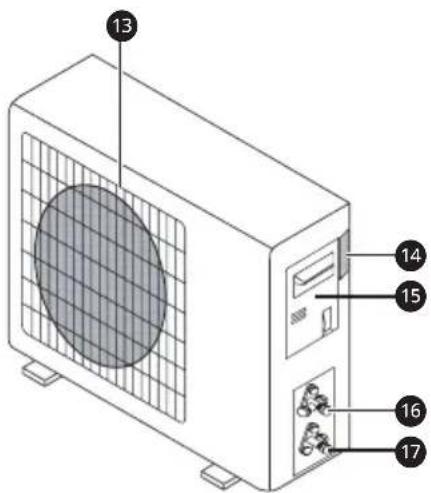
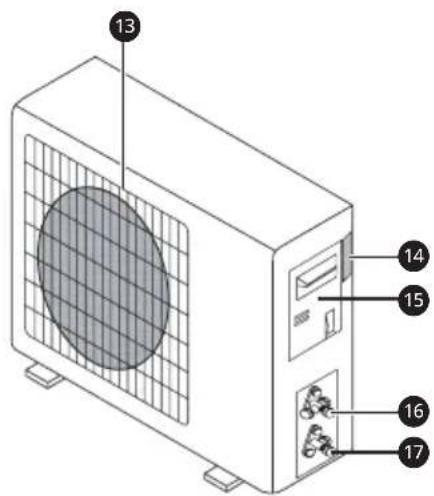
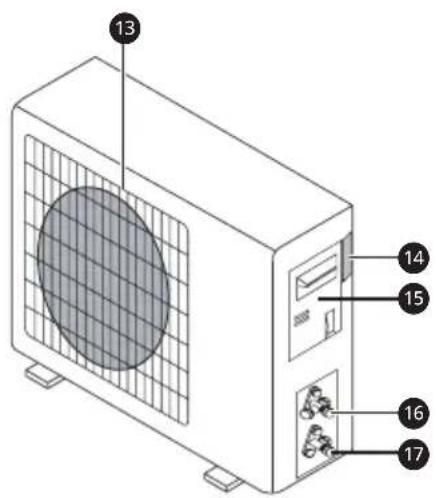
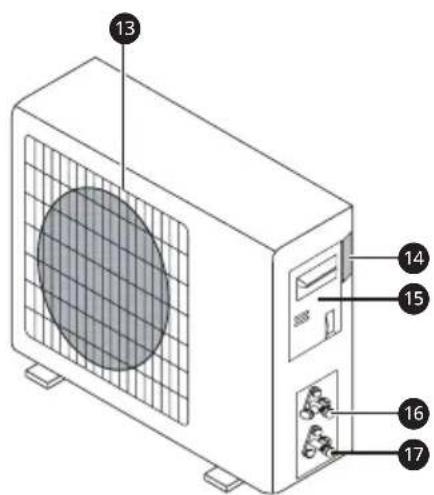
Indoor Unit Outdoor Unit
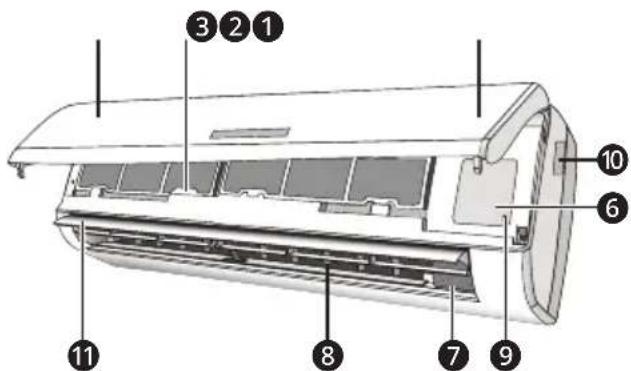
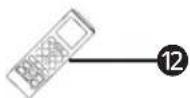
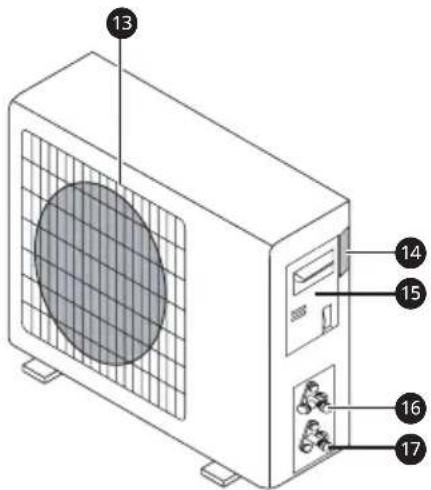
1 Front panel
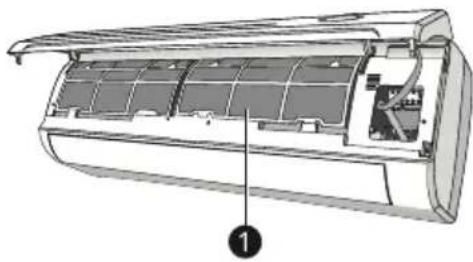
2 Air filter
3 Optional filter (if installed)
4 LED Display
5 Signal receiver
6 Terminal block cover
7 Ionizer generator (if installed)
8 Deflectors
9 Emergency button
10 Indoor unit rating label
11 Airflow direction louver
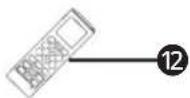
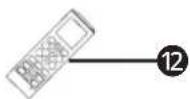
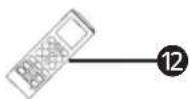
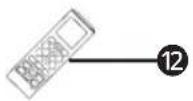
12 Remote controller
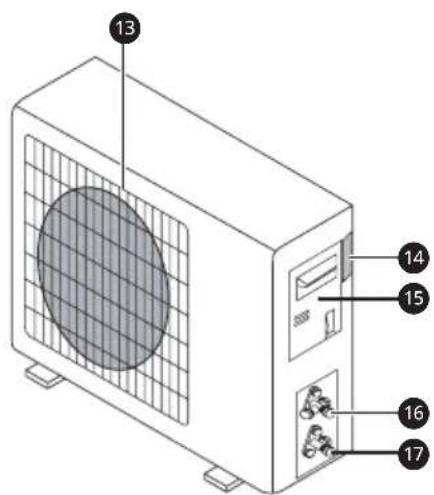
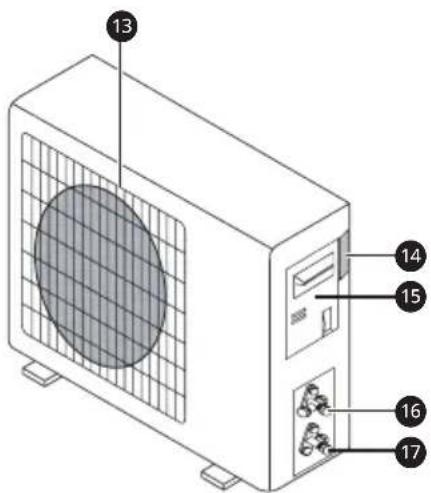
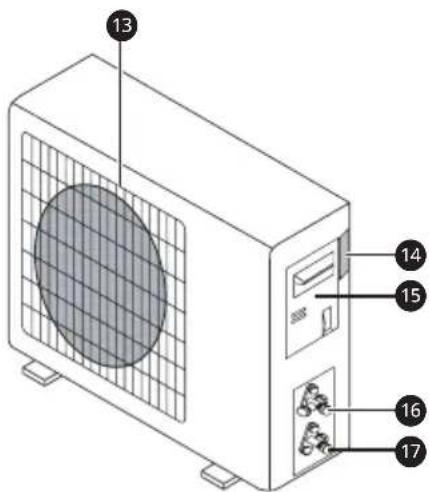
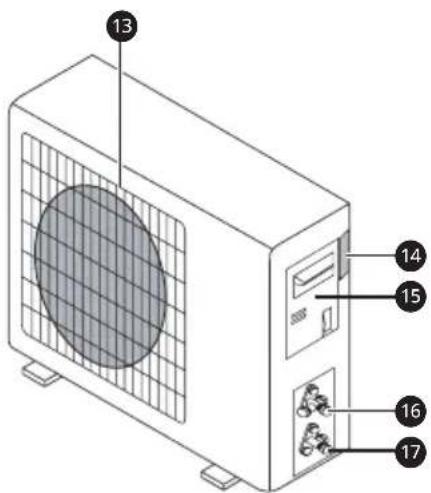
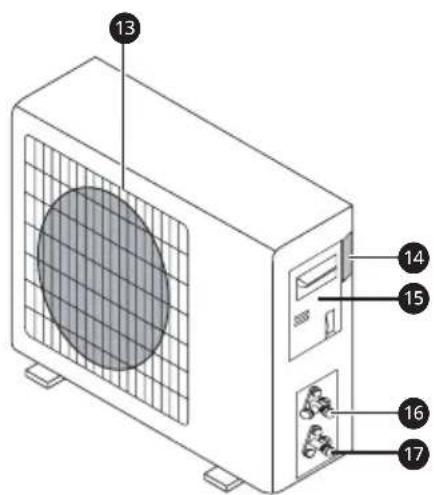
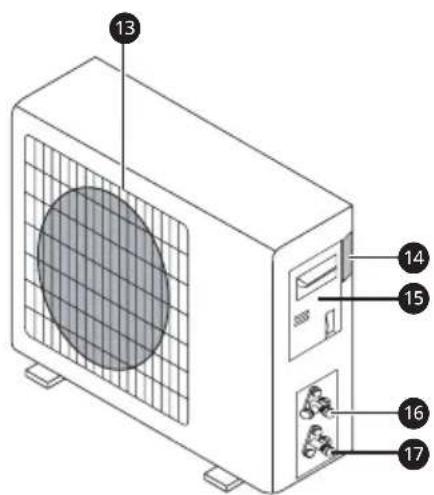
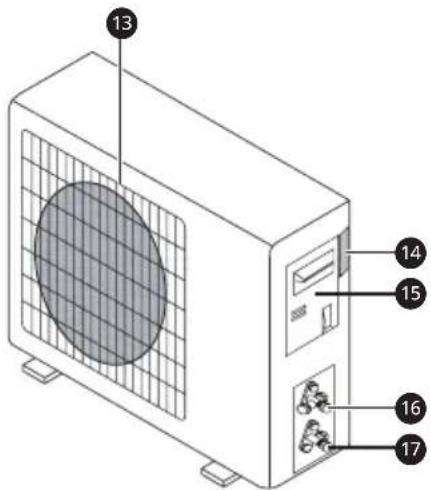
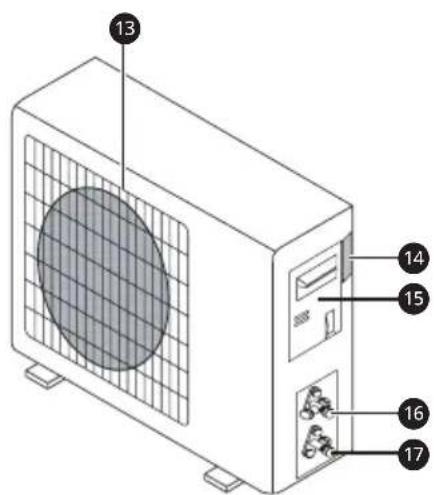
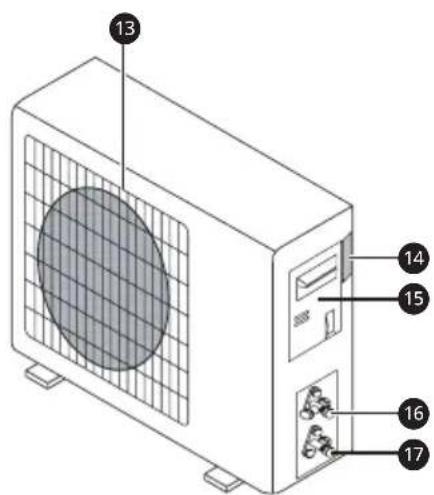
13 Air outlet grille
14 Outdoor unit rating label
15 Terminal block cover
16 Gas valve
17 Liquid valve
NOTE
- The number and location of operation lamps may vary according to the model of the air conditioner.
- The feature may be changed according to the type of model.
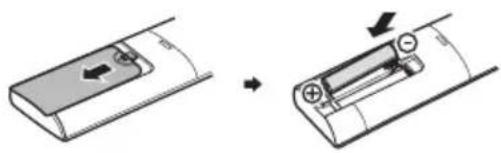
Replacement of Batteries
When : There is no confirmation beep heard from the indoor unit. The LCD doesn't act.
Remove the battery cover plate from the rear of the remote controller, by sliding it in the direction of the arrow.
Install the batteries according the direction (+ and -) shown on the Remote Controller.
Reinstall the battery cover by sliding it into place.
natural_image
Diagram showing two stages of battery charging process: one with left-side arrow indicating direction, the other with right-side arrows indicating charge movement (no text or symbols)
WARNING
- Use 2 LR03 AAA (1.5V) batteries. Do not use rechargeable batteries. Replace the old batteries with new ones of the same type when the display is no longer legible.
- Do not dispose batteries as unsorted municipal waste. Collection of such waste separately for special treatment is necessary.
NOTE
- Please remove batteries to avoid leakage damage when not using for a long time.
NOTE
- Direct the remote controller toward the air conditioner.
- Check that there are no objects between the remote control and the signal receptor in the indoor unit.
- Never leave the remote controller exposed to the rays of the sun.
- Keep the remote controller at a distance of at least 1 m from the television or other electrical appliances.
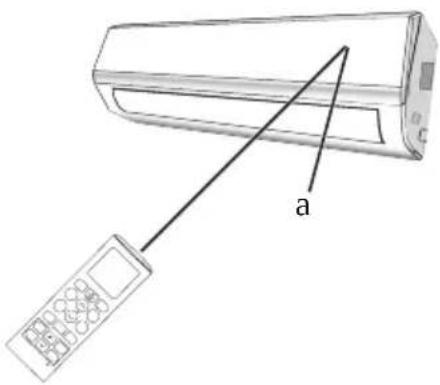

Signal receptor
Setting the Current Time
1 Insert batteries (reinsert a battery if already inserted/or use the reset button).
- The icon below blinks at the bottom of the display screen.

2 Press ▼ or ▲ button to select the time.
3 Press Set/Cancel button to finish.
NOTE
- The On/Off Timer is available after setting the current time.
Emergency Function
If the remote controller fails to work or maintenance necessary, proceed as follows:
Open and lift the front panel up to an angleto reach the emergency button.
1 One press of the emergency button (one beep) will lead to the forced COOLING operation.
2 Two press of the emergency button within 3 seconds (two beeps) will lead to the forced HEATING operation.
3 To switch off the unit, you just need to press the button again (a single long beep).
4 In forced operation, the air conditioner will automatically start working in 23 °C cooling/ Heating mode, auto fan speed.
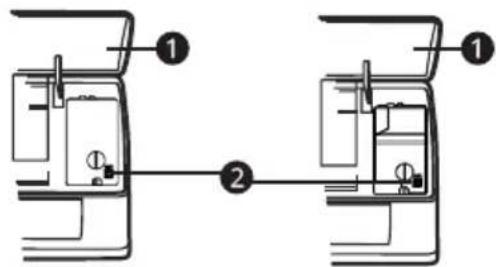
1 Front panel
2 Emergency button
WARNING
- The shape and position of the emergency button may be different according to the model, but their function is the same.
NOTE
- The external static pressure of heat pumps is 0 Pa for all models.
- The emergency button in some models could be on the right part of the unit under the front panel.
Using Wireless Remote Control
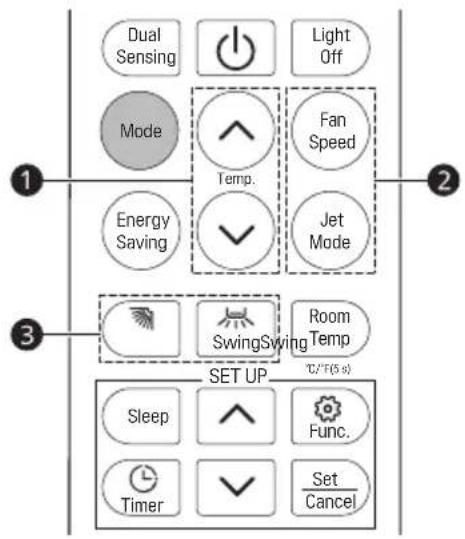
You can operate the air conditioner more conveniently with the remote control.
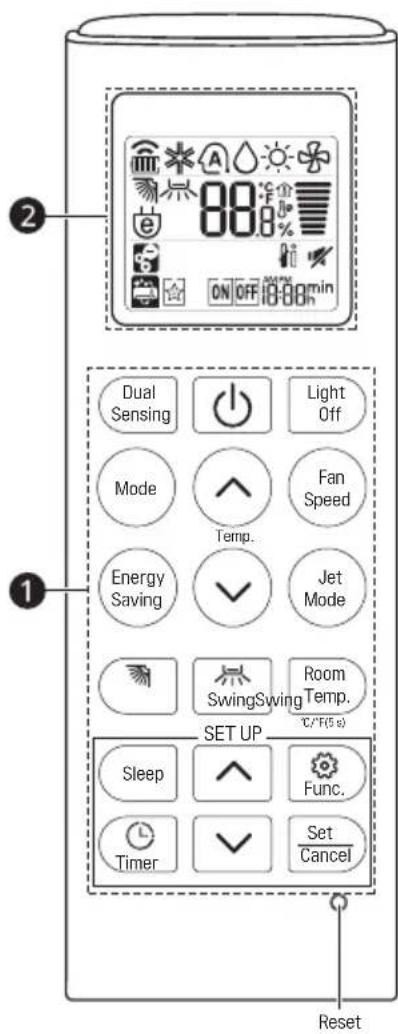
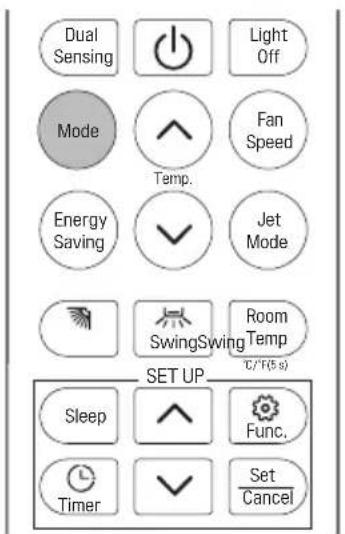
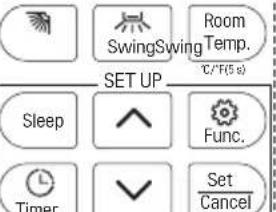
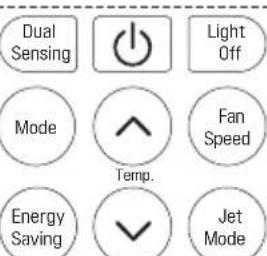
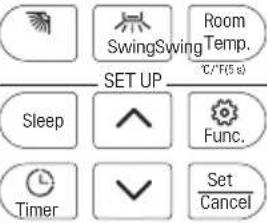
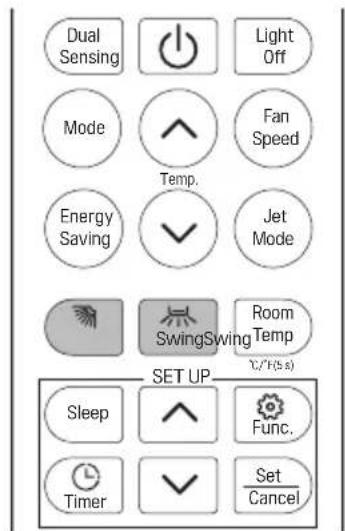
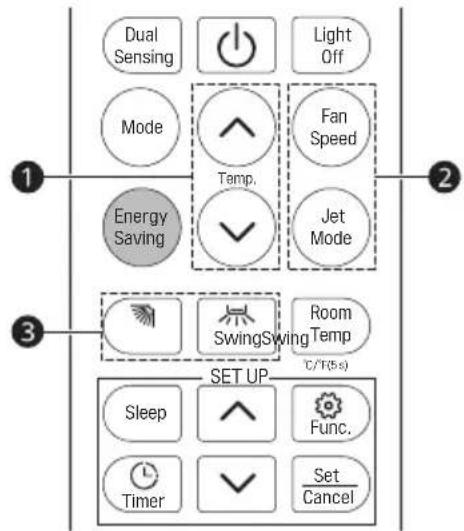
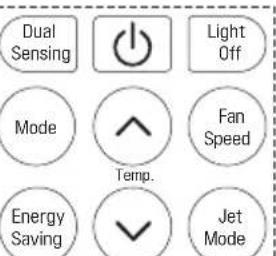
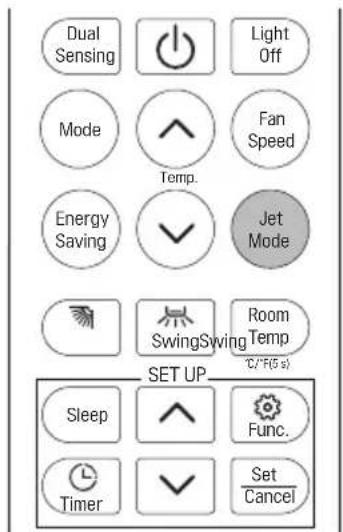
| 1 Button | 2 Display Screen | Description |
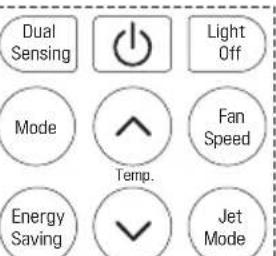
| Dual Sensing | (ZHWX) | To set or cancel dual sensing mode operation. |
| - | To turn On/Off the air conditioner. | |
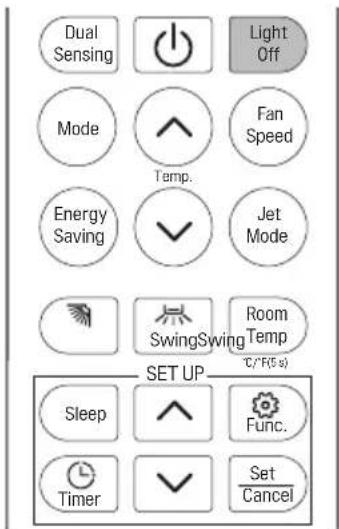
| Light Off | To turn On/Off the air conditioner indoor display. | |
| Mode | To select the cooling mode. | |
| To select the auto changeover/auto operation mode. | ||
| To select the dry mode. | ||
| To select the heating mode. | ||
| To select the fan mode. | ||
| Fan Speed | To adjust the fan speed. | |
| Energy Saving | To minimize power consumption. | |
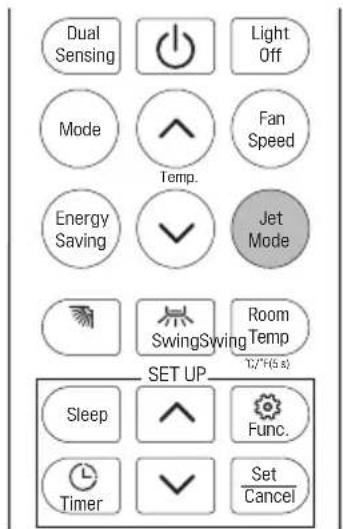
| Jet Mode | To change room temperature quickly. | |
| 88° | To adjust the desired room temperature in cooling, heating or auto mode. (16 °C ~ 31 °C) | |
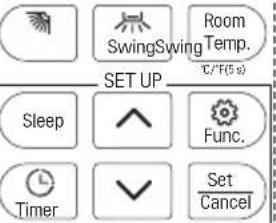
| Swing | To adjust the air flow direction vertically. | |
| Swing | To adjust the air flow direction horizontally. (Optional) | |
| Room Temp. | To display the room temperature. | |
| Sleep | To set the sleeping mode automatically. | |
| Func. | The lon generator uses millions of ions to help improve indoor air quality. (Optional) | |
| To remove moisture generated inside the indoor unit. | ||
| Timer | To turn on/off air conditioner automatically at desired time. | |
| Set/ Cancel | - | To set/cancel the special functions and timer. |
| - | To adjust time. | |
| °C/°F(5 s) | To change unit between °C and °F |
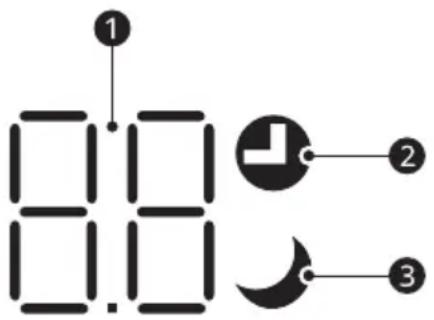
Display
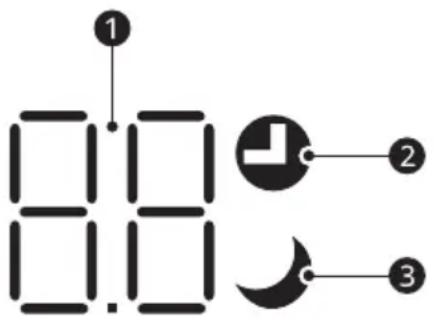
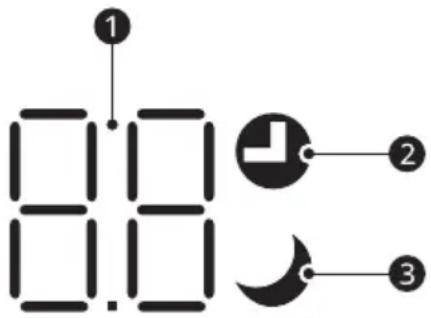
| No. LED Function | ||
 |  | Temperature display (if present)/Error code. |
 | [6ATT] | Lights up during Timer operation. |
 | [4D06] | SLEEP mode. |
NOTE
- The shape and position of switches and indicators may be different according to the model, but their function is the same.
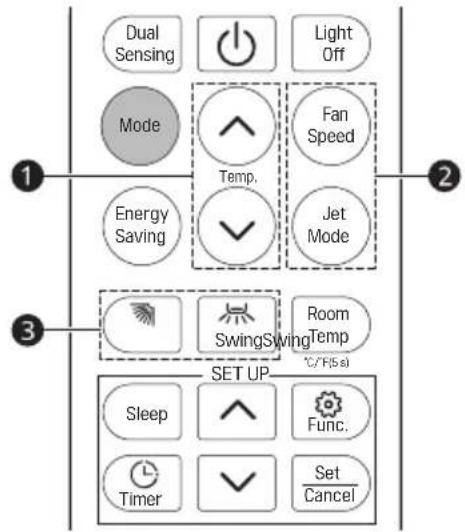
Cooling Mode
The cooling function allows the air conditioner to cool the room and at the same time reduces air humidity.
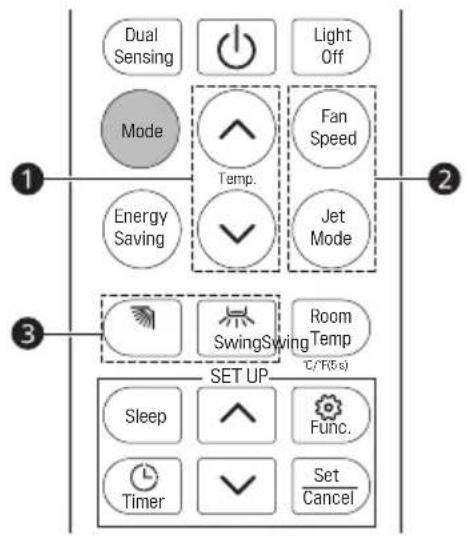
To activate the Cooling mode of operation, press the Mode button on the remote controller until the symbol ✦ appears on the display.
The cooling function is activated by setting the button ⚙ or ⚧ at a temperature lower than that of the room.
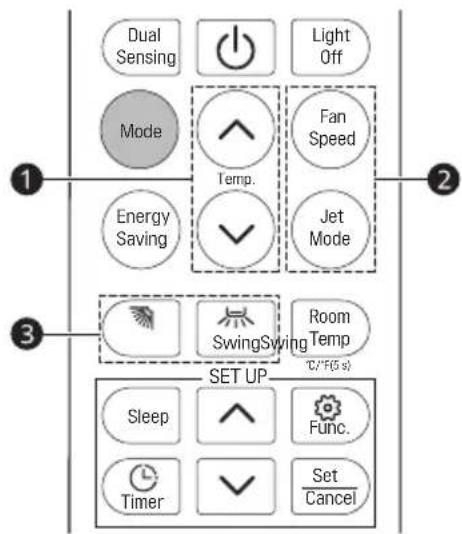
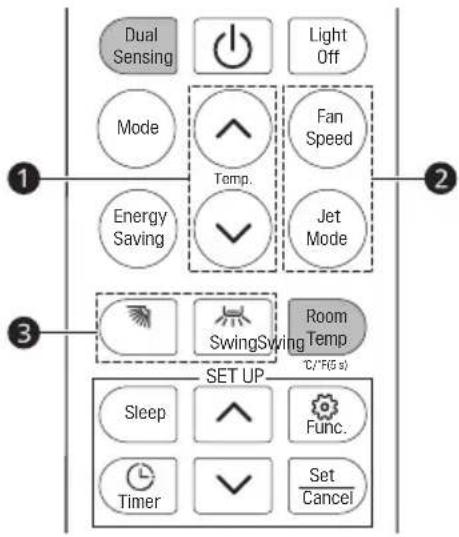
To optimize the function of the air conditioner, adjust the temperature ①, the speed ② and the direction of the air flow ③ by pressing the buttons indicated.
Auto Mode (auto changeover / auto operation mode)
In Auto mode, the air conditioner will run automatically according to the room temperature.
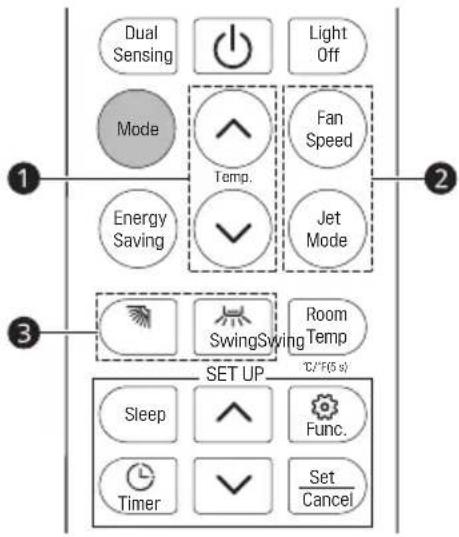
To activate the Auto mode of operation, press the Mode button on the remote controller until the symbol Ⓐ appears on the display.
To optimize the function of the air conditioner, adjust the temperature ①, the speed ② and the direction of the air flow ③ by pressing the buttons indicated.
Dry Mode
This function reduces the humidity of the air to make the room more comfortable.
To activate the Dry mode of operation, press the Mode button on the remote controller until the symbol △ appears in the display.
An automatic function of alternating cooling cycles and air fan is activated.
Heating Mode
The heating function allows the air conditioner to heat the room.
To activate the Heating mode of operation, press the Mode button on the remote controller until the symbol ⚙️ appears on the display.
With the button ⬤ or ⬇ set a temperature higher than that of the room.
To optimize the function of the air conditioner, adjust the temperature ①, the speed ② and the direction of the air flow ③ by pressing the buttons indicated.
Fan Mode
The air conditioner works in only ventilation.
To activate the Fan mode of operation, press the Mode button on the remote controller until the symbol ✝ appears in the display.
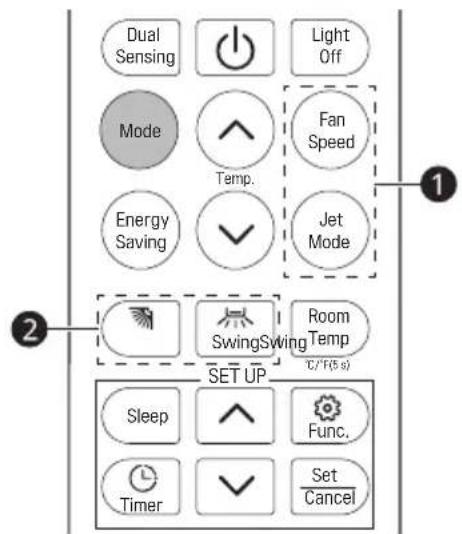
To optimize the function of the air conditioner, Adjust the speed ① and the direction of the air flow ② By pressing the buttons indicated.
Fan Speed
Adjusting the Fan Speed
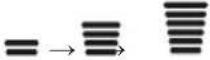
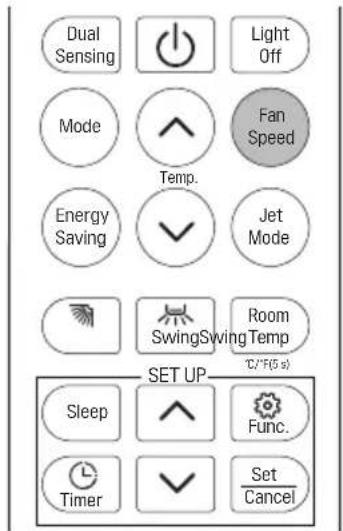
- Press Fan Speed button repeatedly to adjust the fan speed.
Fan speed indicator
| Display Screen Speed | |
 | Auto |
 | Jet |
 | High |
 | Mid-high |
 | Mid |
 | Low-mid |
 | Low |
 | Super Low |
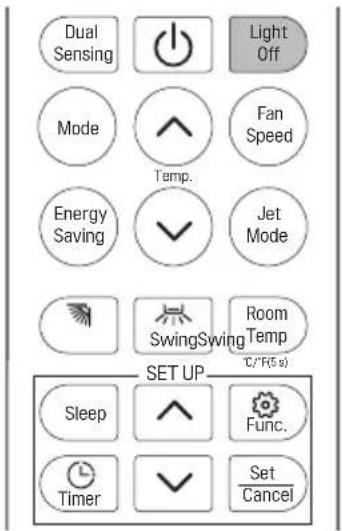
Light Off
Switch on/off the LED display on panel.
To turn off the panel display, press Light Off button.
To turn on the panel display again, press Light Off button.
If the indoor display is set to OFF, pressing a button on the remote control automatically turns the display on for 15 seconds.
Jet Mode
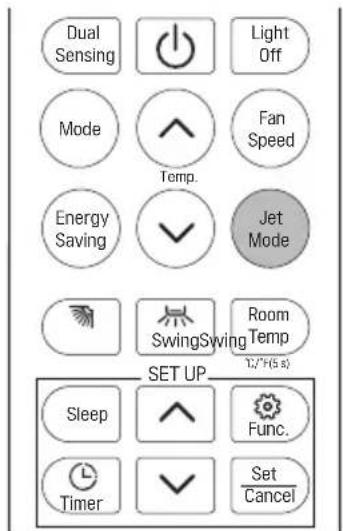
To activate Jet Mode function, pressing the button Jet Mode or pressing the button Fan Speed until Po appears on the display.
To cancel this function, pressing the Fan Speed to switch other fan speed or pressing the Jet Mode button again.
In Cooling / Auto / Heating / Fan mode, when you select Jet Mode feature, it will use the highest fan setting to blow strong airflow.
Swing Control
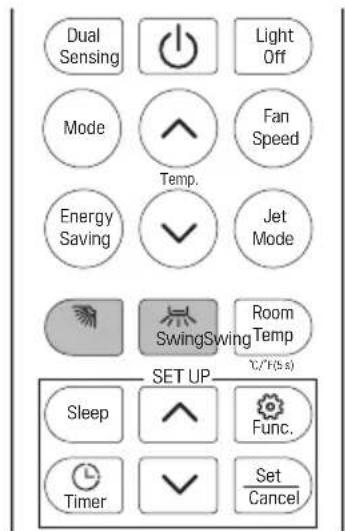
Vertically Swing
Press the button to activate the "Vertically Swing".
- If press time interval is in 2 seconds, the swing will cycle as below:

- If long press the button, the swing angle range will cycle as below:

Horizontally Swing
Press the button to activate the "Horizontally Swing".
- If press time interval is in 2 seconds, the swing will cycle as below:

- If long press the button, the swing angle range will cycle as below:

NOTE
- Adjusting the air flow direction horizontally may not be supported, depending on the model.
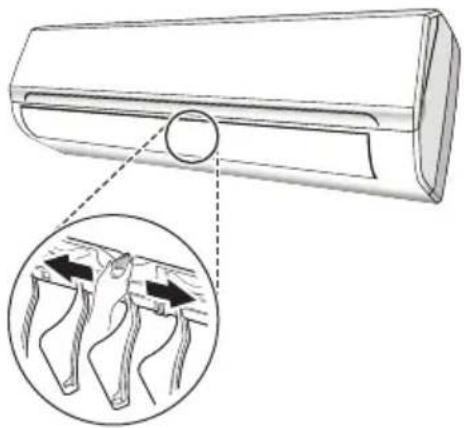
- Adjusting the air deflector arbitrarily may cause product failure.
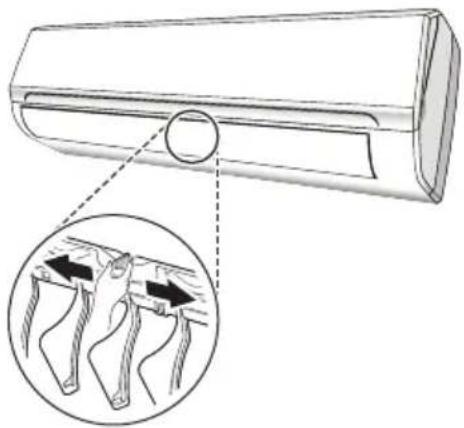
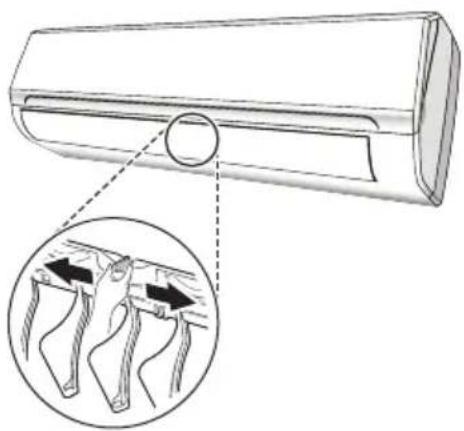
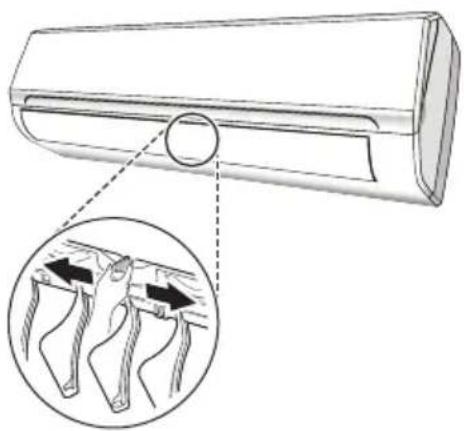
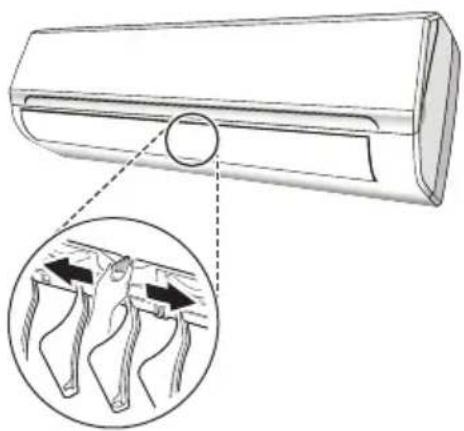
- Never position manually, the delicate mechanism might seriously damaged! (Models without Horizontally Swing can adjust manually.)
- Never poke fingers, sticks or other objects in the air inlet or outlet vents. Such accidental contact might cause unforeseeable damage or hurt.
- Adjusting the swing angle change may not be supported, depending on the model.
natural_image
Diagram of a car air duct with an inset showing two mechanical joints or brackets (no text or labels present)NOTE
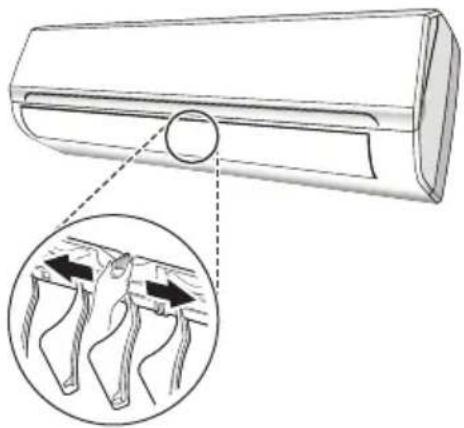
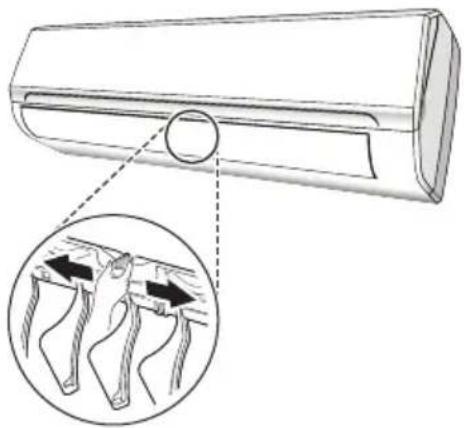
- Models without Horizontally Swing can adjust manually. Pull handle slightly when adjusting the swing angle.
- The shape and position of deflectors and handles may be different according to the model, but their function is the same.
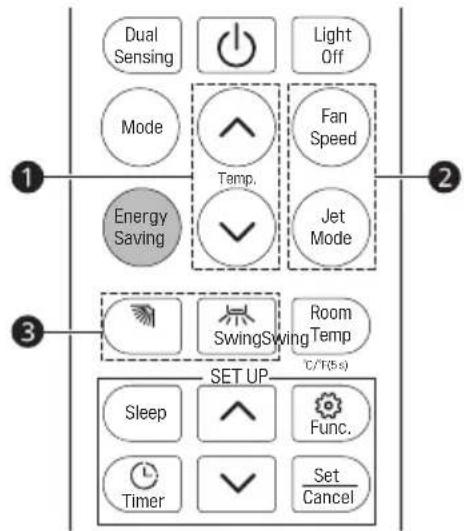
Energy Saving
In this mode the appliance automatically sets the operation to achieve energy savings.
1 Turn on the appliance and select a Cooling, Heating mode.
2 Press the "Energy Saving" button, the appliance will run in Energy Saving mode.
3 Pressing the "Energy Saving" button again will cancel the mode, symbol ⏻ will no longer be shown on the LCD screen.
In Energy Saving mode, the temperature ①, the speed ② and the direction of the air flow ③ can be adjusted by pressing the buttons indicated.
Dual Sensing
Press the "Dual Sensing" button, the appliance will run in Dual Sensing mode.
Pressing the "Dual Sensing" button again will cancel the mode, symbol will no longer be shown on the LCD screen.
This function enable the remote control to measure the temperature at its current location and send this signal 7 times in 2 hours to the air conditioner to enable the air conditioner to optimize the temperature around you and ensure maximum comfort.
It will automatically deactivate 2 hours later.
In Dual sensing mode, the temperature ①, the speed ② and the direction of the air flow ③ can be adjusted by pressing the buttons indicated.
Advice to put the remote controller in the place where the indoor unit receive signal easily.
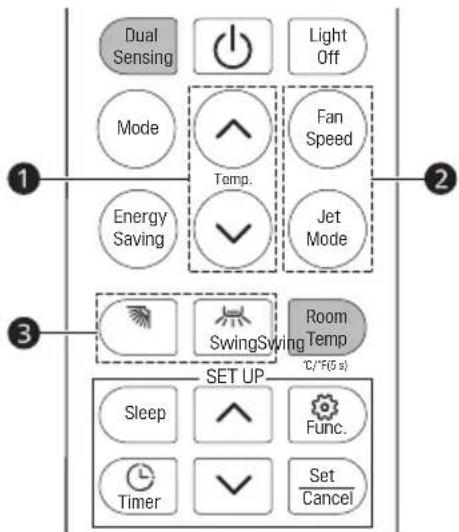
Room Temp
Room temperature is displayed about 5 seconds if you press Room Temp. button.
Change Celsius to Fahrenheit °C\~°F
Press Room Temp. button for 5 seconds.
- Repeat the same process to change again.
Setting the On/Off Timer
This function sets the air conditioner to turn on/off automatically at desired time.
Setting the On Timer
1 Press button.
- The icon below blinks at the bottom of the display screen.
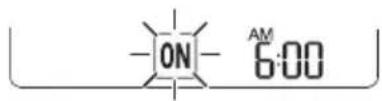
2 Press ▼ or ▲ button to select the minutes.
3 Press Set/Cancel button to finish.
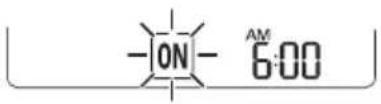
- After setting the timer, current time and ON icon are displayed on the display screen indicating that the desired time is set.
• After setting the On timer, the temperature ①, the speed ② and the direction of the air flow ③ can be adjusted by pressing the buttons indicated. - Pressing a button on the remote control automatically turns the remote control display on for 5 seconds.
Canceling the On Timer
1 Press button.
- The icon below blinks at the bottom of the display screen.
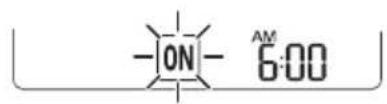
2 Press Set/Cancel button to finish.
Setting the Off Timer
1 Press button.
- The icon below blinks at the bottom of the display screen.
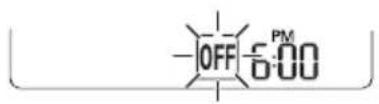
2 Press ▼ or ▲ button to select the minutes.
3 Press Set/Cancel button to finish.
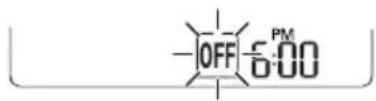
- After setting the timer, current time and OFF icon are displayed on the display screen indicating that the desired time is set.
Canceling the Off Timer
1 Press button.
- The icon below blinks at the bottom of the display screen.
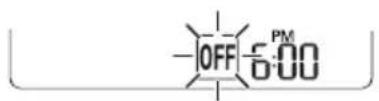
2 Press Set/Cancel button to finish.
NOTE
- On/Off Timer can not be set together.
- On Timer is available when the product is turned off.
- Off Timer is available when the product is turned on.
Using the Sleep Function
1 Turn the appliance on.
2 Press Sleep button.
- The icon below blinks at the bottom of the display screen.
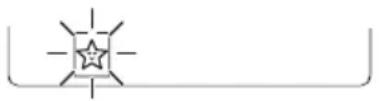
3 Do it again to deactivate this function.
- ☆ is displayed on the display screen.
NOTE
- After 10 hours running in sleep mode, the air conditioner will return to the previous setting mode.
Using Special Function
1 Turn the appliance on.
2 Press Func. button repeatedly to select the desired function.
3 Press Set/Cancel button to finish.
4 Do it again to deactivate this function.
| Display Screen | Description |
| [5262] | To remove moisture generated inside the indoor unit. |
 | The lon generator uses millions of ions to help improve indoor air quality. |
Auto Clean
In the Cooling and Dehumidification Mode, moisture is generated inside the indoor unit. This function removes such moisture.
This function enable the air conditioner still blow airflow about 15 minutes to dry the indoor inner parts to avoid mildew, when the air conditioner is off.
Air Purification (Optional)
These functions supply clean and fresh air by ion particles and the filter.
NOTE
- Some functions may not be supported, depending on the model.
- Some functions may operate differently from the remote control display.
The air conditioner is programmed for comfortable and suitable living conditions, if it is used in abnormal conditioner as below, certain safety protection features might come into effect.
| Temperature | MODE | |
| Cooling operating Heating operating | ||
| Room temperature 16 | °C ~ 31 °C | 16 °C ~ 31 °C |
| Outdoor temperature 21 | °C ~ 48 °C | -7 °C ~ 24 °C |

WARNING
- The unit does not operate immediately if it is turned on after being turned off or after changing the mode during operation. This is a normal self-protection action, you need wait for about 3 minutes.
- The capacity and efficiency are according to the test conducted at full-load operation.
- The highest speed of indoor fan motor and the maximum open angle of the flaps and deflectors are requested.
AUTO-RESTART FUNCTION
Auto-Restart Function
The appliance is preset auto-restart function by manufacturer. In case of a sudden power failure, the module memorizes the setting conditions before the power failure. When the power restores, the unit restarts automatically with all the previous settings preserved by the memory function.
Periodic maintenance is essential for keeping your air conditioner efficient.
Before carrying out any maintenance, disconnect the power supply by taking the plug out from the socket.
Air Filters
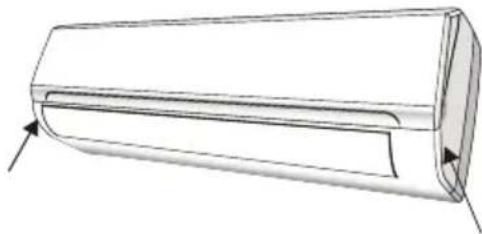
1 Open the front panel following the direction of the arrow.
natural_image
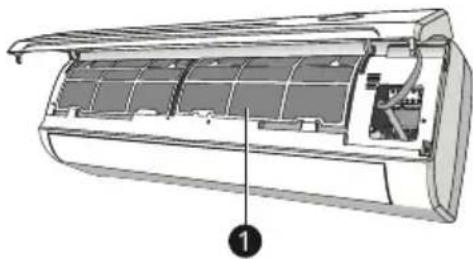
Technical line drawing of a cylindrical mechanical part with an arrow indicating direction (no text or symbols)2 Keeping the front panel raised with one hand, take out the air filter with the other hand.
natural_image
Cutaway diagram of an air conditioner showing internal panel structure (no text or labels)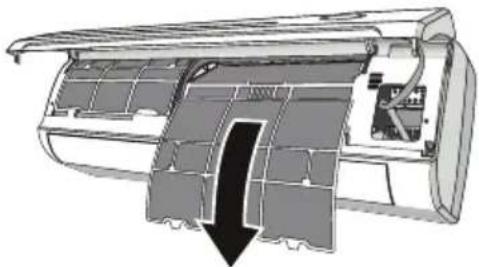
natural_image
Cross-sectional diagram of an air conditioner unit showing internal structure and airflow direction (no text or labels)1 Air filter
3 Clean the filter with water; if the filter is soiled with oil, it can be washed with warm water (not exceeding 45 °C). Leave to dry in a cool and dry place.
4 Keeping the front panel raised with one hand, insert the air filter with the other hand.
5 Close.
Cleaning the Heat Exchanger
1 Open the front panel of the unit and life it till its greatest stroke and then unhooking it from the hinges to make the cleaning easier.
2 Clean the indoor unit using a cloth with the water (not higher than 40 °C) and neutral soap. Never use aggressive solvents or detergents.
3 If the outdoor unit is clogged, remove the leaves and the waste and remove the dust with air jet or a bit of water.
End of Season Maintenance
1 Disconnect the automatic switch or the plug.
2 Clean and replace the filters.
3 On a sunny day let the conditioner work in ventilation for some hours, so that the inside of the unit can dry completely.
Please check the following before you contact the service center. If the problem persists, contact your local service center.
| Malfunction | Possible Causes |
| The appliance does not operate. | Power failure/plug pulled out. |
| Damaged indoor/outdoor unit fan motor. | |
| Faulty compressor thermomagnetic circuit breaker. | |
| Faulty protective device or fuses. | |
| Loose connections or plug pulled out. | |
| It sometimes stops operating to protect the appliance. | |
| Voltage higher or lower than the voltage range. | |
| Active TIMER-ON function. | |
| Damaged electronic control board. | |
| Strange odour. Air filter of | irty. |
| Noise of running water. | Back flow of liquid in the refrigerant circulation. |
| A fine mist comes from the air outlet. | This occurs when the air in the room becomes very cold, for example in the “COOLING” or “DRY” modes. |
| A strange noise can be heard. | This noise is made by the expansion or contraction of the front panel due to variations in temperature and does not indicate a problem. |
| Insufficient airflow, either hot or cold. | Inappropriate temperature setting. |
| Air inlet or outlet of indoor or outdoor unit has been blocked. | |
| Air filter is blocked. | |
| Fan speed set at minimum. | |
| Other sources of heat in the room. | |
| No refrigerant. | |
| The appliance does not respond to commands. | Remote control is not near enough to indoor unit. |
| Battery in remote controller may have been exhausted. | |
| Obstacles between remote control and signal receiver in indoor unit. | |
| The display is off. | Press “Light Off” button. |
| Power failure. |

WARNING
- Switch off the air conditioner immediately and cut off the power supply in the event of:
– Strange noises during operation.
– Faulty electronic control board.
– Faulty fuses or switches.
- Spraying water or objects inside the appliance.
- Overheated cables or plugs.
– Very strong smells coming from the appliance.
Error Signals on the Display
In case of error, the display on the indoor unit shown the following error codes:
| RUN lamp Description of the trouble | ||
| E1 | Flashes once | The fault of indoor temperature sensor. |
| E2 | Flashes twice | The fault of indoor pipe temperature sensor. |
| E6 | Flashes 6 times | Malfunction of indoor fan motor. |
| E4 | Display code | Refrigerant leakage. |
MANUALE D'USO
CLIMATIZZATORE

natural_image
Diagram showing two battery cell designs with arrows indicating process (no text or symbols)
AVVERTIMENTO

Luce spenta
natural_image
Diagram of a car air duct with an inset showing two hands holding the blade, illustrating the process (no text or symbols present)NOTA
Dual Sensing
Temp stanza
natural_image
Technical line drawing of a cylindrical mechanical component with an arrow indicating direction (no text or symbols)natural_image
Cross-sectional diagram of an air conditioner unit showing internal compartments and ventilation duct (no text or labels)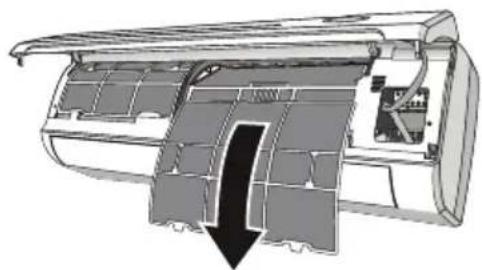
natural_image
Cross-sectional diagram of an air conditioner unit showing internal structure and airflow direction (no text or labels)1 Filtro dell'aria
natural_image
Diagram showing two stages of battery charging process: one with internal circuit switch, the other with motor and battery casing (no text or symbols)
ADVERTENCIA

Receptor de señales
Pantalla
Modo Calefacción
Modo Ventilación
Luz apagada
natural_image
Diagram of a car air duct with an inset showing two mechanical joints under compression (no text or labels)NOTA
Sensor dual
natural_image
Technical line drawing of a cylindrical air duct or duct component with directional arrows indicating flow or movement (no text or symbols)natural_image
Cross-sectional diagram of an air conditioner unit showing internal compartments and ventilation ducts (no text or labels)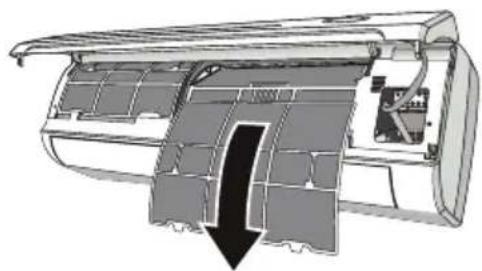
natural_image
Cross-sectional diagram of an air conditioner unit showing internal structure and airflow direction (no text or labels)1 Filtro de aire
natural_image
Diagram showing two stages of battery charging process: one with left vent and arrow, the other with a battery pack and load gauge (no text or symbols)AVERTISSEMENT
Mode séchage
Mode chauffage
Mode ventilateur
Éclairage éteint
natural_image
Diagram of a car air duct with a magnified inset showing internal components (no text or symbols)REMARQUE
natural_image
Simple line drawing of a star with radiating lines, no text or symbols presentnatural_image
Technical line drawing of a cylindrical mechanical component with an arrow indicating direction (no text or symbols)natural_image
Cross-sectional diagram of an air conditioner unit showing internal compartments and ventilation ducts (no text or labels)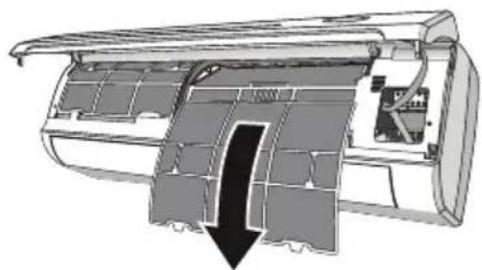
natural_image
Cross-sectional diagram of an air conditioner unit showing internal structure and airflow direction (no text or labels)1 Filtre à air
natural_image
Diagram showing two stages of battery charging process: one with internal circuit switch and arrow, the other with battery pack and load (no text or symbols)
WARNUNG

Signal-Empfänger
1 Frontplatte
2 Notfalltaste
WARNING
Trockenbetrieb
Heizbetrieb
Lüfterbetrieb
Schwenksteuerung
Vertikal schwenken
natural_image
Diagram of a car air duct with a magnified inset showing internal components (no text or symbols)HINWEIS
Doppelsensorik
natural_image
Technical line drawing of a cylindrical mechanical component with an arrow indicating direction (no text or symbols)natural_image
Cutaway diagram of an air conditioner showing internal panel structure (no text or labels)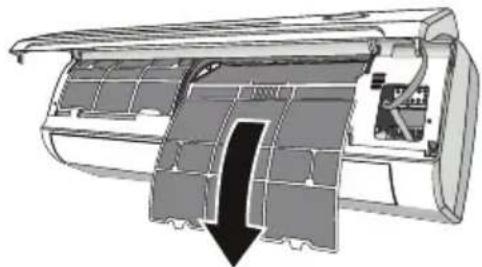
natural_image
Cross-sectional diagram of an air conditioner unit showing internal structure and airflow direction (no text or labels)1 Luftfilter
natural_image
Diagram showing two stages of battery charging process: one with left vent and arrow, the other with battery pack and load (no text or symbols)⚠️ ΠΡΟΕΙΔΟΠΟΙΗΣΗ
1 Δέκτης σήματος
1 Μπροστινό κάλυμμα
Σβηστό φως
Λειτουργία Jet
'Ελεγχος αιώρησης
Κάθετη αιώρηση
natural_image
Diagram of a car air duct with an inset showing two mechanical joints under compression (no text or labels)ΣΗΜΕΙΩΣΗ
Διπλή ανίχνευση
natural_image
Line drawing of a cylindrical object with a flat top and side profile, showing internal structure and directional arrows (no text or symbols)natural_image
Cutaway diagram of an air conditioner showing internal panel structure (no text or labels)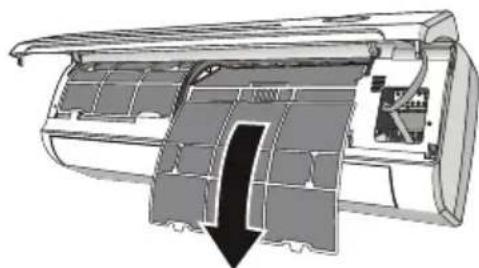
natural_image
Cross-sectional diagram of an air conditioner unit showing internal structure and airflow direction (no text or labels)1 Φίλτρο αέρα
Original instruction
natural_image
Diagram showing two stages of battery charging process: one with internal circuit switch, the other with motor and battery casing (no text or symbols)
ADVERTÊNCIA

Recetor de sinal
Modo de Secagem
Modo Aquecimento
Modo Ventilador
Luz Desligada
Ligar/desligar o ecrã LED do painel.
natural_image
Diagram of a mechanical component with an inset showing two views of a joint or bracket (no text or symbols present)OBSERVAÇÃO
Deteção Dupla
natural_image
Technical line drawing of a cylindrical air duct or duct component with an arrow indicating direction (no text or symbols present)natural_image
Cutaway diagram of an air conditioner showing internal panel structure (no text or labels)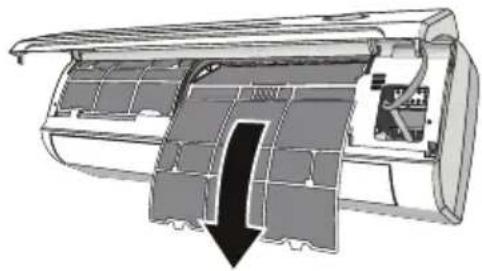
natural_image
Cross-sectional diagram of an aircraft fuselage showing internal compartments and structural details (no text or labels)1 Filtro de ar
DISPLAY BINNENUNIT....15
Weergave 15
BEDIENINGSINSTRUCTIES....16
Koelmodus....16
PROBLEEMOPLOSSING....27
natural_image
Diagram showing two stages of battery charging process: one with internal circuit switch, the other with motor and battery casing (no text or symbols)WAARSCHUWING
1 Signaalontvanger
De tijd instellen
Droogmodus
Verwarmingsmodus
Ventilatiemodus
Licht uit
Zwenkregeling
Verticaal zwenken
natural_image
Diagram of a car air duct with a magnified inset showing hand positioning and force application (no text or symbols)OPMERKING
Dubbele detectie
natural_image
Technical line drawing of a cylindrical mechanical component with an arrow indicating direction (no text or symbols)natural_image
Cutaway diagram of an air conditioner showing internal panel structure (no text or labels)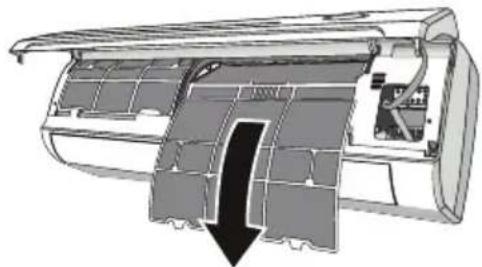
natural_image
Cross-sectional diagram of an air conditioner unit showing internal structure and airflow direction (no text or labels)1 Luchtfilter
natural_image
Diagram showing two stages of battery charging process: one with internal circuit switch, the other with motor and battery casing (no text or symbols)OSTRZEŻENIE
1 Odbiornik sygnału
Tryb suszenia
Tryb ogrzewania
Tryb wentylatora
Oświetlenie wył.
Tryb Jet
Kontrola obrotu
Obrót w pionie
natural_image
Diagram of a car air duct with a magnified inset showing internal components (no text or symbols)UWAGA
Temp. pokojowa
natural_image
Technical line drawing of a cylindrical air duct or duct component with an arrow indicating direction (no text or symbols present)natural_image
Cutaway diagram of an air conditioner showing internal panel structure (no text or labels)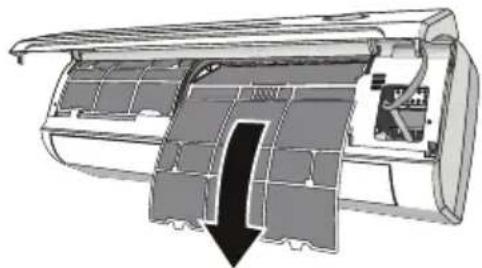
natural_image
Cross-sectional diagram of an aircraft fuselage showing internal components and airflow direction (no text or labels)1 Filtr powietrza
natural_image
Diagram showing two stages of battery charging process: one with internal circuit switch and arrow indicating direction, the other with battery pack and load (no text or symbols)
FIGYELMEZTETÉS

Jelfogadó
Szárítás mód
Fűtés üzemmód
Ventilátor üzemmód
Forgásvezérlés
Függőleges forgás
natural_image
Diagram of a car air duct with a magnified inset showing internal components (no text or symbols)MEGJEGYZÉS
natural_image
Technical line drawing of a cylindrical air duct or duct component with an arrow indicating direction (no text or symbols present)natural_image
Cross-sectional diagram of an air conditioner unit showing internal panel structure (no text or labels)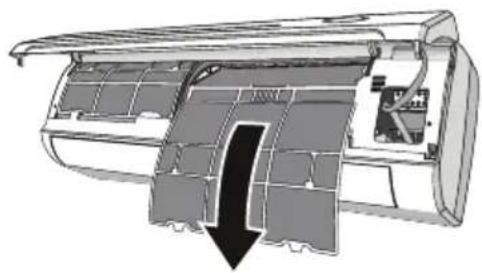
natural_image
Cross-sectional diagram of an air conditioner unit showing internal structure and airflow direction (no text or labels)1 Légszűrő
natural_image
Diagram showing two stages of battery charging process: one with internal circuit switch, the other with motor and battery casing (no text or symbols)ПРЕДУПРЕЖДЕНИЕ
1 Преден панел
2 Авариен бутон
ПРЕДУПРЕЖДЕНИЕ
Режим на сушене
Режим на отопление
natural_image
Diagram of a mechanical component with an inset showing a close-up view of a joint or fastener mechanism (no text or symbols present)ЗАБЕЛЕЖКА
natural_image
Simple line drawing of a star with radiating lines, no text or symbols presentnatural_image
Technical line drawing of a cylindrical air duct or duct component with directional arrows indicating flow or movement (no text or symbols)natural_image
Cross-sectional diagram of an air conditioner unit showing internal compartments and ventilation ducts (no text or labels)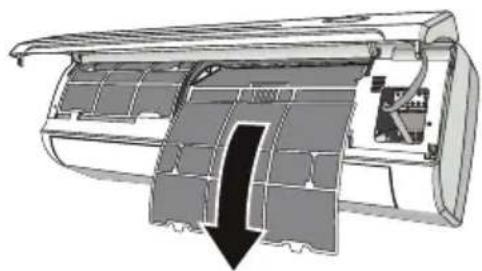
natural_image
Cross-sectional diagram of an air conditioner unit showing internal structure and airflow direction (no text or labels)1 Въздушен филтър
SIGURNOSNE UPUTE....3
VAŽNE SIGURNOSNE UPUTE....4
RAD....11
Napomene za rad....11
VAŽNE SIGURNOSNE UPUTE

UPOZORENJE
1 Prednja ploča
2 Filtar zraka
3 Dodatni filtar (ako je postavljen)
4 LED zaslon.
5 Prijamnik signala
6 Poklopac priključnog sklopa
7 Generator ionizatora (ako je ugrađen)
8 Deflektori zraka
9 Tipka za nuždu
natural_image
Diagram showing two stages of battery charging process: one with internal circuit switch, the other with motor and battery casing (no text or symbols)
UPOZORENJE
- Upotrijebite 2 baterije LR03 AAA (1,5 V). Ne koristite punjive baterije. Kada zaslon više nije čitljiv zamijenite stare baterije novima iste vrste.
- Nemojte odlagati baterije kao nerazvrstani komunalni otpad. Potrebno je odvojeno prikupljanje takvog otpada radi posebne obrade.
NAPOMENA

Prijemnik signala
Automatski način rada (automatsko prebacivanje / automatski način rada)
Način grijanja
Način rada ventilatora
Isključi svjetlo
Uključuje/isključuje LED zaslon na ploči.
Za isključivanje zaslona ploče pritisnite tipku Light Off.
Za ponovno uključivanje zaslona ploče pritisnite tipku Light Off.
Zaslon unutarnje jedinice postavljen je na ISKLJUČENO, pritisak tipke na daljinskom upravljaču automatski na 15 sekundi uključuje zaslon.
Način mlaza
Za aktiviranje funkcije načina mlaza pritišćite tipku Jet Mode ili tipku Fan Speed dok se na zaslonu ne pojavi Po.
Za obustavu ove funkciju pritišćite tipku Fan Speed radi promjene brzine ventilatora ili ponovno pritisnite tipku Jet Mode.
Kada u načinu hlađenja / automatskog načina rada / grijanja / načina rada ventilatora odaberete način mlaza on će koristiti najvišu postavku brzine ventilatora radi ispuhivanja jake struje zraka.
Upravljanje mahanjem
Okomito mahanje
Pritisnite tipku da biste aktivirali okomito mahanje.
natural_image
Diagram of a car air duct with an inset showing hand positioning and force application (no text or labels)NAPOMENA
- Modeli bez vodoravnog mahanja mogu se ručno podešavati. Kada podešavate kut mahanja lagano povucite ručkicu.
- Oblik i položaj deflektora i ručkica može se razlikovati ovisno o modelu, ali njihova je funkcija ista.
Ušteda energije
Dvosatno očitavanje i podešavanje temperature
Pritisnite tipku „Dual Sensing“, uređaj će pokrenuti način rada za dvosatno očitavanje i podešavanje temperature.
Ponovni pritisak tipke „Dual Sensing“ obustavit će taj način rada i na LCD zaslonu više se neće prikazivati simbol 🚗
natural_image
Simple line drawing of a star with radiating lines, no text or symbols presentnatural_image
Technical line drawing of a cylindrical air duct or duct component with directional arrows indicating flow or movement (no text or symbols)2 Jednom rukom držite prednju ploču podignutom, a drugom rukom izvadite filtar zraka.
natural_image
Cross-sectional diagram of an air conditioner unit showing internal compartments and housing (no text or labels)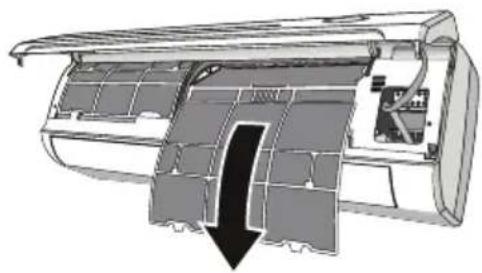
natural_image
Cross-sectional diagram of an air conditioner unit showing internal structure and airflow direction (no text or labels)1 Filtar zraka
3 Filtar operite vodom; ako je filtar zaprljan uljem, može se oprati toplom vodom (ne višom od 45 °C). Ostavite neka se osuši na hladnom i suhom mjestu.
4 Držeći jednom rukom prednju ploču podignutom, drugom rukom umetnite filtar zraka.
5 Zatvorite.
natural_image
Diagram showing two stages of battery charging process: one with left-side arrow indicating direction, the other with right-side arrows indicating charge distribution (no text or symbols)
VAROVÁNÍ

Přijímač signálu
flowchart
graph TD
    A["Swing"] --> B["Room"]
    C["SwingTemp"] --> B
    D["Room Temp. (°C/℉5 s)"] --> B
    E["Sleep"] --> F["↑"]
    G["Timer"] --> H["✓"]
    I["Set Cancel"] --> H
    B --> J["SET UP"]
    F --> J
    H --> J
Režim vytápění
Režim ventilátoru
Jet Mode (Režim turbo)
Ovládání výkyvu
Svislý výkyv
natural_image
Diagram of a mechanical component with an inset showing two clamped parts (no text or symbols present)POZNÁMKA
natural_image
Technical line drawing of a cylindrical air duct or duct component with directional arrows indicating flow or movement (no text or symbols)natural_image
Cutaway diagram of an air conditioner showing internal structure and housing (no text or labels)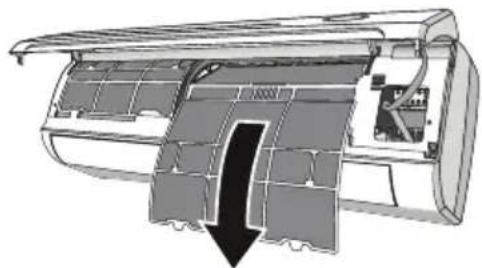
natural_image
Cross-sectional diagram of an air conditioner unit showing internal structure and airflow direction (no text or symbols)1 Vzduchový filtr
Olulised ohutusjuhised....4
KASUTAMINE....11
Olulised ohutusjuhised

OHT
natural_image
Diagram showing two battery cell designs with arrows indicating process (no text or symbols)
HOIATUS

Signaali vastuvõtja
1 Esipaneel
2 Avariinupp
HOIATUS
Kuivatusrežiim
Kütterežiim
Ventileerimisrežiim
Valgustus välja
natural_image
Diagram of a car air duct with an inset showing two mechanical joints under compression (no text or labels)MÄRKUS
Topeltandur
Ruumi temperatuur
natural_image
Technical line drawing of a cylindrical air duct or duct component with directional arrows indicating flow or movement (no text or symbols)natural_image
Cross-sectional diagram of an air conditioner unit showing internal compartments and housing (no text or labels)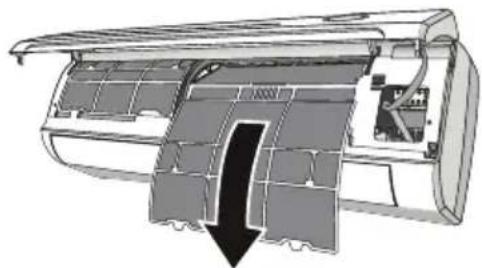
natural_image
Cross-sectional diagram of an air conditioner unit showing internal structure and airflow direction (no text or symbols)1 Öhufilter
1 Pannell ta' quddiem
2 Filtru tal-arja
3 Filtru falkultttiv (jekk installat)
4 Displej tal-LED
5 Ricevitur tas-sinjali
6 Ghatu tal-blokka tat-terminal
7 Generatur tal-jonizzatur (jekk installat)
8 Devjaturi
9 Buttuna tal-emergenza
natural_image
Diagram showing two stages of battery charging process: one with left vent and arrow, the other with a battery pack and load gauge (no text or symbols)
TWISSIJA
- Uža 2 batteriji LR03 AAA (1.5V). Tužax batteriji rikarikabbli. Ibdel il-batteriji qodma ma' oħrajn godda tal-istess tip meta d-displej ma jibqax jinqara.
- Tarmix batteriji bhala skart municipali mhux magħżul. Il-ġbir ta’ skart bħal dan separatament għal trattament specjali huwa meħtieġ.
NOTA

Ričevitur tas-sinjali
1 Pannell ta' Quddiem
2 Buttuna tal-emergenza

TWISSIJA
Modalità Awtomatika (modalità ta' bidla awtomatika / tħaddim awtomatiku)
Modalità Niexfa
Modalità tat-Tishin
Modalità tal-Fann
Dawl Mitfi
Ixghel/itfi d-displej LED fuq il-pannell.
Biex titfi d-displej tal-pannell, agħfas il-buttuna Light Off.
Biex terga' tixghel id-displej tal-pannell, aghfas il-buttuna Light Off.
Kontroll tat-Tbandil
Tbandil Vertikalment
Aghfas il-buttuna biex tattiva t-"Tbandil Vertikalment".
- Jekk l-intervall tal-hin tal-ghafis ikun ta' 2 sekondi, it-tbandil se jiččikla kif ğej:

- Jekk tagħfas il-buttuna fit-tul, il-medda tal-angolu tat-tbandil se tiċċikla kif ğej:

Tbandil Orizzontalment
Aghfas il-buttuna biex tattiva t-"Tbandil Orizzontalment".
- Jekk l-intervall tal-hin tal-ghafis ikun ta' 2 sekondi, it-tbandil se jiččikla kif gej:

- Jekk tagħfas il-buttuna fit-tul, il-medda tal-angolu tat-tbandil se tiċċikla kif ğej:

NOTA
- Jiddependi fuq il-mudell, l-ağğustament orizzontali tad-direzzjoni tal-fluss tal-arja jista' ma jkunx appoğğjat.
• L-ağğustament tad-diflettur tal-arja b'mod arbitrarju jista' jikkawża ŋsara fil-prodott. - Qatt tippożizzjona manwalment, il-mekkaniżmu delikat tista' ssirlu ŋsara serja! (Mudelli mingħajr Tbandil Orizzontali jistgħu jaġgustaw manwalment.)
- Qatt ma ghandek iddahhal subghajk, bsaten jew oggetti ohra fil-bokok tal-arja diehla jew hierga. Kuntatt accidentali bhal dan jista' jikkawza hsara jew korriment imprevedibbli.
• L-ağğustament tal-bidla fl-angolu tat-tbandil jista' ma jkunx appoğğat, skont il-mudell.
natural_image
Diagram of a car air duct with an inset showing two mechanical joints under compression (no text or labels)NOTA
- Mudelli minghajr Tbandil Orizzontali jistghu jagğustaw manwalment. Iğbed il-manku bil-mod meta tagğusta l-angolu tat-tbandil.
- Il-forma u l-pożizzjoni tad-difletturi u l-mankijiet jistghu jkunu differenti skont il-mudell, iżda l-funzjoni tagħhom hija l-istess.
Iffrankar tal-Energija
F'din il-modalità l-apparat awtomatikament jissettja t-thaddim biex jiffranka l-energija.
1 Ixghel l-apparat u agħżel modalità ta' Tkessiħ u Tishin.
2 Agħfas il-buttuna "Energy Saving", l-apparat se jaħdem fil-modalità tal-Iffrankar tal-Energija.
3 Jekk terga' taghfas il-buttuna "Energy Saving" terga' tikkančella I-modalità, is-simbolu mhux se jibqa' jintwera fuq l-iskrin LCD.
Fil-modalità tal-Iffrankar tal-Energija, it-temperatura ①, il-velocità ② u d-direzzjoni tal-fluss tal-arja ③ jistghu jigu agğustati billi taghfas il-buttuni indikati.
Senser Doppju
Aghfas il-buttuna "Dual Sensing", l-apparat se jaħdem fil-modalità ta' Senser Doppju.
Jekk terga' tagħfas il-buttuna "Dual Sensing" se tikkančella I-modalità, is-simbolu 📁hmhux se jibqa' jintwera fuq I-iskrin LCD.
Temperatura tal-Kamra
It-temperatura tal-kamra tintwera ghal bejn wiehed u iehor 5 sekondi jekk taghfas il-buttuna Room Temp..
natural_image
Technical line drawing of a cylindrical mechanical component with an arrow indicating direction (no text or symbols)natural_image
Cutaway diagram of an air conditioner showing internal panel structure (no text or labels)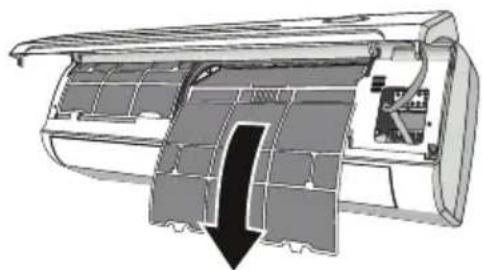
natural_image
Cross-sectional diagram of an air conditioner unit showing internal structure and airflow direction (no text or labels)1 Filtru tal-arja
INSTRUCTIUNI DE SIGURANTĂ....3
INSTRUCTIUNI DE SIGURANTĂ IMPORTANTE ....4
OPERAREA....11
Note privind operarea....11
Unitate de interior....11
Unitate de exterior....11
natural_image
Diagram showing two stages of battery charging process: one with internal circuit switch and arrow, the other with battery pack and load (no text or symbols)
AVERTISMENT

Afişaj
Mod uscare
Modul de încălzire
Modul de ventilare
Mod Jet
Control balansare
natural_image
Diagram of a car air duct with an inset showing two mechanical joints under compression (no text or labels)NOTĂ
Detectare dublă
natural_image
Technical line drawing of a cylindrical air duct or duct component with directional arrows indicating flow or movement (no text or symbols)natural_image
Cross-sectional diagram of an air conditioner unit showing internal panel structure (no text or labels)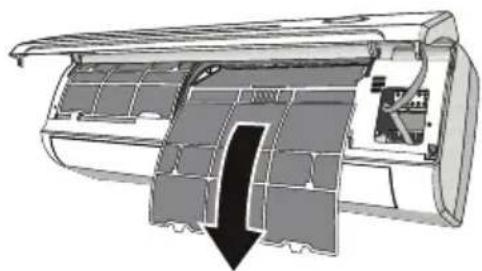
natural_image
Cross-sectional diagram of an air conditioner unit showing internal structure and airflow direction (no text or labels)1 Filtru de aer
DÔLEŽITÉ BEZPEČNOSTNÉ POKYNY 4
PREVÁDZKA 11
DÔLEŽITÉ BEZPEČNOSTNÉ POKYNY

VAROVANIE
natural_image
Diagram showing two battery cell designs with arrows indicating process (no text or symbols)
VAROVANIE
1 Prijímač signálu
1 Predný panel
2 Núdzové tlačidlo

VAROVANIE
Režim Sušenie
Režim Vykurovanie
Zhasnuté svetlo
Zapnutie/vypnutie LED displeja na paneli.
Ak chcete vypnút' displej na paneli, stlačte tlačidlo Light Off.
Ak chcete displej na paneli znova zapnút, stlačte tlačidlo Light Off.
Ovládanie natočenia
natural_image
Diagram of a car air duct with an inset showing two clamps inserted into the air gap (no text or labels)POZNÁMKA
Duálne snímanie
natural_image
Technical line drawing of a cylindrical mechanical component with an arrow indicating direction (no text or symbols)natural_image
Cross-sectional diagram of an air conditioner unit showing internal compartments and housing (no text or labels)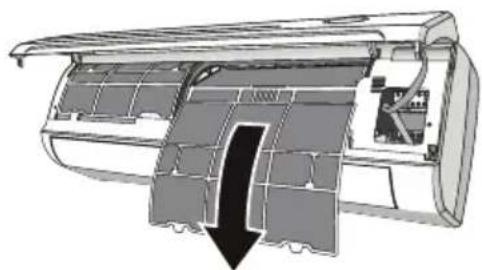
natural_image
Cross-sectional diagram of an air conditioner unit showing internal structure and airflow direction (no text or symbols)1 Vzduchový filter
natural_image
Diagram showing two battery casing configurations with arrows indicating movement (no text or symbols)
OPOZORILO

Sprejemnik signala
Samodejno delovanje (Samodejni preklop načina/ Samodejni način delovanja)
Način Ogrevanja
Način Ogrevanja klimatski napravi omogoča, da ogreje prostor.
Način Ventilator
Deluje samo ventilator klimatske naprave.
Izklop luči
Vklopite/izklopite LED-zaslon na plošči.
Hitri način
Za aktivacijo Hitrega načina pritiskajte gumb Jet Mode ali pritiskajte gumb Fan Speed, dokler se na zaslonu ne prikaže simbolPo.
Za preklic te funkcije pritisnite gumb Fan Speed, da spremenite hitrost ventilatorja ali pa ponovno pritisnite gumb Jet Mode.
Upravljanje pomika
Navpični pomik
natural_image
Diagram of a car air duct with an inset showing two mechanical joints under compression (no text or labels)OPOMBA
2 Pritisnite gumb Sleep.
natural_image
Technical line drawing of a cylindrical air duct or duct component with directional arrows indicating flow or movement (no text or symbols)natural_image
Cross-sectional diagram of an air conditioner unit showing internal compartments and housing (no text or labels)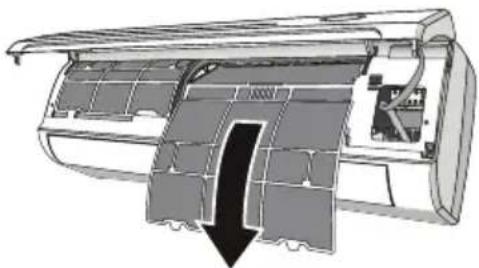
natural_image
Cross-sectional diagram of an air conditioner unit showing internal structure and airflow direction (no text or labels)1 Zračni filter
VEIDS: PIESTIPRINÃMS PIE SIENAS
Pýðing á upprunalegu kennsla
This manual may contain images or content different from the model you purchased. This manual is subject to revision by the manufacturer.
DROŠĪBAS NORĀDĪJUMI....3
natural_image
Diagram showing two battery cell designs with arrows indicating process (no text or symbols)
BRĪDINĀJUMS

Signāla receptors
Žāvēšanas režīms
Sildīšanas režīms
Ventilēšanas režīms
Gaisma izslēgta
natural_image
Diagram of a mechanical component with an inset showing two views of a joint or bracket (no text or symbols present)PIEZIME
Duālais sensors
Telpas temp.
natural_image
Line drawing of a cylindrical object with a flat top and side profile, showing a curved edge and an arrow indicating direction (no text or symbols)natural_image
Cross-sectional diagram of an air conditioner unit showing internal panel structure (no text or labels)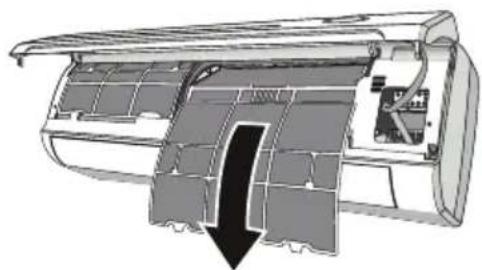
natural_image
Cross-sectional diagram of an air conditioner unit showing internal structure and airflow direction (no text or labels)1 Gaisa filtrs
NURODYMAI DËL SAUGOS....3
natural_image
Diagram showing two stages of battery charging process: one with internal circuit switch, the other with motor and battery casing (no text or symbols)
PERSPÈJIMAS

Signalų imtuvas
1 Priekinis skydelis
2 Avarinis mygtukas

PERSPÈJIMAS
Automatinis režimas (automatinio perjungimo / automatinio veikimo režimas)
Šildymo režimas
Šviesa išjungta
Pasukimo valdymas
Vertikalus pasukimas
natural_image
Diagram of a mechanical component with an inset showing two finger joints (no text or symbols present)PASTABA
Dvigubas jutimas
natural_image
Simple line drawing of a star with radiating lines, no text or symbols presentnatural_image
Line drawing of a cylindrical object with a flat top and side profile, showing a curved edge and an arrow indicating direction (no text or symbols)natural_image
Cross-sectional diagram of an air conditioner unit showing internal compartments and housing (no text or labels)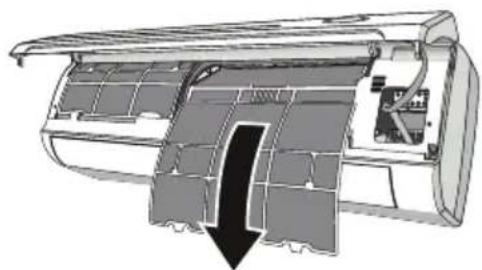
natural_image
Cross-sectional diagram of an air conditioner unit showing internal structure and airflow direction (no text or labels)1 Oro filtras
LÁMHLEABHAR AN ÚINÉARA
AERCHÓIRITHEOIR

natural_image
Diagram showing two stages of battery charging process: one with internal circuit switch, the other with motor and battery casing (no text or symbols)
RABHADH

Glacadóir comhartha
Ag socrú ama
1 Cuir isteach na cadhnraí (cuir cadhnra arís más curtha cheana/nó úsáid an cnaipe atosaigh).
1 Painéal tosaigh
2 Cnaipe éigeandála
RABHADH
Modh Tirim
Modh Téamhú
Modh Fean
Modh Soice
natural_image
Diagram of a car air duct with an inset showing two mechanical joints under compression (no text or labels)NÓTA
natural_image
Simple line drawing of a star with radiating lines, no text or symbols presentnatural_image
Technical line drawing of a cylindrical air duct or duct component with an arrow indicating direction (no text or symbols present)natural_image
Cross-sectional diagram of an air conditioner unit showing internal panel structure (no text or labels)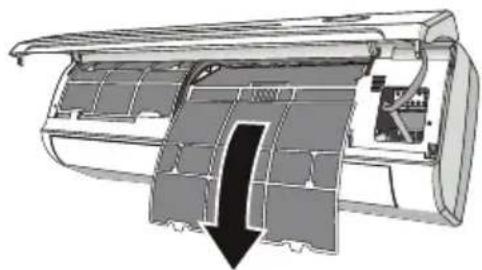
natural_image
Cross-sectional diagram of an air conditioner unit showing internal structure and airflow direction (no text or labels)1 Scagaire aeir
3 Glan an scagaire le huisce; má bhíonn scagaire salach le hola, is féidir é a nigh le huisce bogthe (gan dul thar 45 °C).
Fág le triomú in áit fuar tirim.
4 Coinnigh an painéal tosaigh ardaithe le lámh amháin, cuir isteach an scagaire aeir leis an lámh eile.
5 Dún.
VAŽNA BEZBEDNOSNA UPUTSTVA 4
RAD....11
Napomene za rad....11
VAŽNA BEZBEDNOSNA UPUTSTVA

UPOZORENJE
1 Prednji panel
2 Filter za vazduh
3 Opcionalni filter (ako je postavljen)
4 LED ekran
5 Prijemnik signala
6 Poklopac priključnog bloka
7 Generator jonizatora (ako je postavljen)
8 Usmerivači vazduha
9 Taster za hitne slučajeve
10 Oznaka na unutrašnjoj jedinici
11 Krilca za usmeravanje protoka vazduha
12 Daljinski upravljač
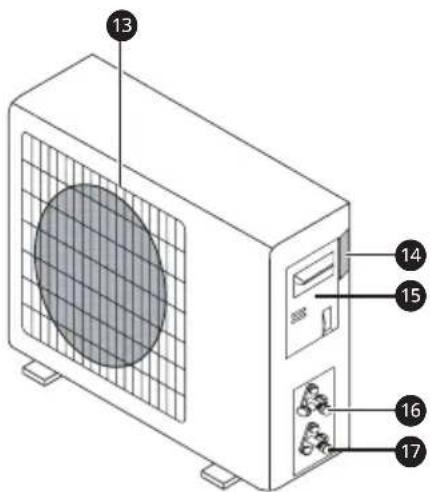
13 Rešetka za odvod vazduha
14 Oznaka spoljašnje jedinice
15 Poklopac priključnog bloka
16 Ventil za gas
17 Ventil za tečnost
NAPOMENA
- Broj i položaj lampica za rad mogu da se razlikuju zavisno od modela klima uređaja.
- Funkcija može biti izmenjena u zavisnosti od vrste modela.
Zamena baterija
natural_image
Diagram showing two battery casing configurations with arrows indicating movement (no text or symbols)
UPOZORENJE

Prijemnik signala
1 Prednji panel
2 Taster za hitne slučajeve
UPOZORENJE
- Oblik i položaj tastera za hitne slučajeve može da se razlikuje u zavisnosti od modela, ali je funkcija ista.
NAPOMENA
- Spoljašnji statički pritisak toplotne pumpe iznosi 0 Pa za sve modele.
- Taster za hitne slučajeve može biti na desnoj strani jedinice ispod prednjeg panela na nekim modelima.
Automatski režim (automatska promena režima / automatski režim rada)
U Automatskom režimu, klima uređaj će raditi automatski prema sobnoj temperaturi.
Da biste aktivirali Automatski režim rada, pritisnite taster Mode na daljinskom upravljaču dok se na ekranu ne pojavi simbol Ⓐ.
Da biste optimizovali funkciju klima uređaja, podesite temperaturu ①, brzinu ② i smer protoka vazduha ③ tako što ćete pritisnuti navedene tastere.
Režim sušenja
Ova funkcija smanjuje vlažnost vazduha da bi prostorija bila prijatnija.
Da biste aktivirali režim rada Sušenje, pritisnite taster Mode na daljinskom upravljaču dok se na ekranu ne pojavi simbol △.
Režim grejanja
Režim ventilatora
Isključivanje svetla
natural_image
Diagram of a car air duct with an inset showing two mechanical joints under compression (no text or labels)NAPOMENA
Dvostruki senzor
Pritisnite taster „Dual Sensing“ i uređaj će raditi u režimu dvostrukog senzora.
Ponovno pritiskanje tastera „Dual Sensing“ će otkazati režim, a simbol više neće biti prikazan na LCD ekranu.
Ova funkcija omogućava da daljinski upravljač meri temperaturu na trenutnoj lokaciji i šalje ovaj signal 7 puta u 2 sata na klima uređaj da bi klima uređaj optimizovao temperaturu oko vas i osigurao maksimalnu udobnost.
Automatski će se deaktivirati nakon 2 sata.
U režimu dvostrukog senzora, temperatura ①, brzina ② i smer protoka vazduha ③ mogu da se podese pritiskom na navedene tastere.
Savet da se daljinski upravljač postavi na mesto gde unutrašnja jedinica lako prima signal.
Sobna temperatura
Sobna temperatura se prikazuje oko 5 sekundi ako pritisnete taster Room Temp..
Promena Celzijusa u Farenhajte °C\~°F
Pritisnite taster Room Temp. 5 sekundi.
- Ponovite isti postupak za ponovnu promenu.
Podešavanje tajmera za uključivanje/isključivanje
Otkazivanje tajmera za uključivanje
1 Pritisnite taster Timer
- Ikona niže treperi na dnu ekrana.
2 Pritisnite taster za Set/Cancel da završite.
Podešavanje tajmera za isključivanje
1 Pritisnite taster .Timer
- Ikona niže treperi na dnu ekrana.
2 Pritisnite taster ▼ ili ▲ da biste izabrali minute.
3 Pritisnite taster za Set/Cancel da završite.
- Nakon podešavanja tajmera, prikazuju se trenutno vreme i ikona OKFA ekranu i ukazuju da je željeno vreme podešeno.
Otkazivanje tajmera za isključivanje
1 Pritisnite taster Timer
- Ikona niže treperi na dnu ekrana.
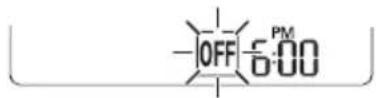
2 Pritisnite taster za Set/Cancel da završite.
NAPOMENA
- Tajmer za uključivanje/isključivanje se ne može podesiti istovremeno.
- Tajmer za uključivanje dostupan je kada je proizvod isključen.
- Tajmer za isključivanje dostupan je kada je proizvod uključen.
Korišćenje funkcije spavanja
1 Uključite uređaj.
2 Pritisnite taster Sleep.
- Ikona niže treperi na dnu ekrana.
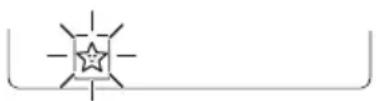
3 Ponovo to učinite da biste deaktivirali ovu funkciju.
natural_image
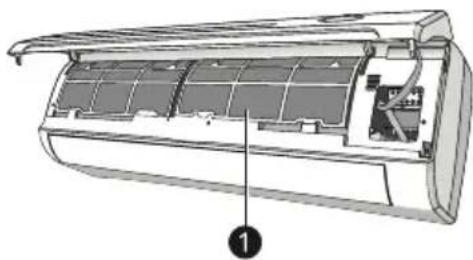
Technical line drawing of a cylindrical air duct or duct component with directional arrows indicating flow or movement (no text or symbols)2 Držeći prednji panel podignut jednom rukom, izvadite filter za vazduh drugom rukom.
natural_image
Cross-sectional diagram of an air conditioner unit showing internal compartments and housing (no text or labels)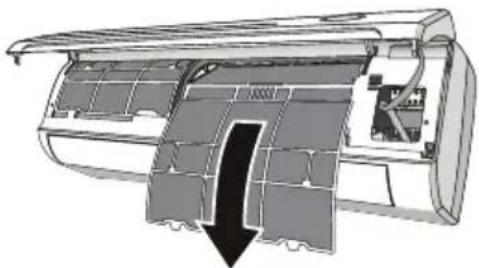
natural_image
Cross-sectional diagram of an air conditioner unit showing internal structure and airflow direction (no text or labels)1 Filter za vazduh
3 Filter očistite vodom, a ako je filter prljav od ulja, možete ga oprati toplom vodom (ne preko 45 °C). Ostavite da se osuši na hladnom i suvom mestu.
4 Držeći prednji panel podignut jednom rukom, umetnite filter za vazduh drugom rukom.
5 Zatvorite.
natural_image
Diagram showing two stages of battery charging process: one with left vent and arrow, the other with a battery pack and load gauge (no text or symbols)ПРЕДУПРЕДУВАЊЕ
1 Рецептор за сигнал
Режим на сушење
Режим на греење
Режим на вентилатор
Брзина на вентилатор
Изгаснато светло
Контрола на нишање
Вертикално нишање
natural_image
Diagram of a car air duct with an inset showing hand positioning on a branch (no text or labels)НАПОМЕНА
Двојно препознавање
natural_image
Simple line drawing of a star with radiating lines, no text or symbols presentnatural_image
Technical line drawing of a cylindrical air duct or duct component with directional arrows indicating flow or movement (no text or symbols)natural_image
Cross-sectional diagram of an air conditioner unit showing internal compartments and housing (no text or labels)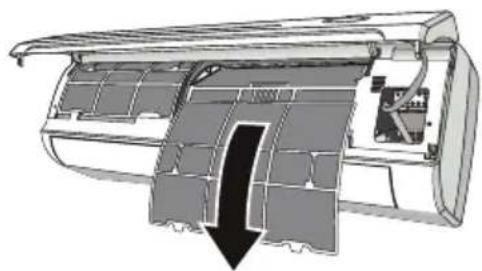
natural_image
Cross-sectional diagram of an air conditioner unit showing internal structure and airflow direction (no text or labels)1 Филтер за воздух
natural_image
Diagram showing two stages of battery charging process: one with internal circuit switch, the other with battery pack and load (no text or symbols)PARALAJMËRIM
1 Receptori i sinjalit
1 Paneli i përparmë
Modaliteti automatik (modaliteti i ndërrimit automatik / funksionimit automatik)
Modaliteti Tharje
Modaliteti Ngrohje
Modaliteti i ventilatorit
Drita e fikur
Kontrolli i lëkundjes
Lëkundje vertikale
natural_image
Diagram of a car air duct with an inset showing two mechanical joints under compression (no text or labels)SHËNIM
2 Shtypni butonin Sleep.
natural_image
Technical line drawing of a cylindrical mechanical component with an arrow indicating direction (no text or symbols)natural_image
Cross-sectional diagram of an air conditioner unit showing internal compartments and ventilation slots (no text or labels)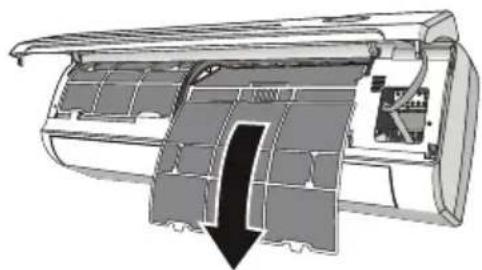
natural_image
Cross-sectional diagram of an air conditioner unit showing internal structure and airflow direction (no text or labels)1 Filtri i ajrit
SIGURNOSNA UPUTSTVA....3
VAŽNA SIGURNOSNA UPUTSTVA....4
RAD....11
Napomene za rad....11
VAŽNA SIGURNOSNA UPUTSTVA

UPOZORENJE
Da biste smanjili opasnost od eksplozije, požara, smrti, strujnog udara, povrede ili opekotina za osobe prilikom korištenja ovog proizvoda, pridržavajte se osnovnih mjera predostrožnosti, uključujući sljedeće:
Djecu u domaćinstvu
Ovaj uređaj nije namijenjen za upotrebu od strane osoba (uključujući djecu) sa smanjenim fizičkim, senzornim ili mentalnim sposobnostima, ili s nedostatkom iskustva i znanja, osim u slučaju da su te osobe pod stalnim nadzorom ili su instruirane po pitanju korištenja uređaja od strane osobe koja je odgovorna za njihovu sigurnost. Djeca trebaju biti pod nadzorom kako bi se osiguralo da se ne igraju s uređajem.
Ugradnja
1 Prednja ploča
2 Filter za zrak
3 Opcioni filter (ako je ugrađen)
4 LED displej
5 Prijemnik signala
6 Poklopac priključnog bloka
7 Generator jonizatora (ako je ugrađen)
8 Usmjerivači
9 Tipka za hitnu pomoć
natural_image
Diagram showing two battery casing configurations with arrows indicating movement (no text or symbols)
UPOZORENJE
- Koristite baterije 2 LR03 AAA (1,5V). Nemojte koristiti baterije koje se mogu puniti. Zamijenite stare baterije novima iste vrste kada displej više nije čitljiv.
- Nemojte odlagati baterije kao nerazvrstani komunalni otpad. Neophodno je prikupljanje takvog otpada zbog specijalnog postupka.
NAPOMENA

Prijemnik signala
Postavljanje trenutnog vremena
1 Umetnite baterije (izvadite i stavite bateriju ako je već umetnuta/ili upotrijebite dugme za resetovanje).
1 Prednja ploča
2 Tipka za hitnu pomoć
UPOZORENJE
- Oblik i položaj tipke za hitnu pomoć može se razlikovati od jednog do drugog modela, ali je njena funkcija ista.
NAPOMENA
- Vanjski statički tlak toplotnih pumpi je 0 Pa za sve modele.
- Tipka za hitnu pomoć na nekim modelima može biti na desnom dijelu jedinice, ispod prednje ploče.
Režim Grijanje
Funkcija grijanja omogućava da klima uređaj grije prostoriju.
Za aktiviranje rada u režimu Grijanje, držite pritisnuto dugme Mode (Režim) na daljinskom upravljaču dok se na displeju ne pojavi ⚙️.
Način rada ventilatora
Svjetlo isključeno
Jet režim
Za aktiviranje funkcije Jet režim, pritisnite dugme Jet Mode (Jet režim) ili dugme Fan Speed (Brzina ventilatora) dok se na displeju ne pojavi Po.
Za otkazivanje ove funkcije, pritisnite dugme Jet Speed (Brzina ventilatora) da biste prešli na drugu brzinu ventilatora ili ponovo pritisnite dugme Jet Mode (Jet režim).
U režimu Hlađenje / Automatski rad / Grijanje / Ventilator, kada izaberete funkciju Jet režim, uređaj će koristiti najveću brzinu ventilatora kako bi duvao jak protok zraka.
Upravljanje njihanjem
Vertikalno njihanje
Pritisnite dugme kako biste aktivirali "Vertically Swing" (Vertikalno njihanje).
natural_image
Diagram of a car air duct with an inset showing two mechanical joints under compression (no text or labels)NAPOMENA
- Modeli bez horizontalnog njihanja se mogu ručno podešavati. Sasvim malo povucite ručicu prilikom podešavanja ugla njihanja.
- Oblik i položaj usmjerivača i ručice može se razlikovati od jednog do drugog modela, ali je njihova funkcija ista.
Ušteda energije
Temp. prostorije
Temperatura prostorije se prikazuje oko 5 sekundi ako pritisnete dugme Room Temp. (Temp. prostorije).
Promjena Celzijusa na Fahrenheit °C\~°F
Pritisnite dugme Room Temp. (Temp. prostorije) na 5 sekundi.
Otkazivanje vremena uključivanja tajmera
1 Pritisnite dugme Timer
natural_image
Technical line drawing of a cylindrical air duct or duct component with directional arrows indicating flow or movement (no text or symbols)natural_image
Cutaway diagram of an air conditioner showing internal structure and housing (no text or labels)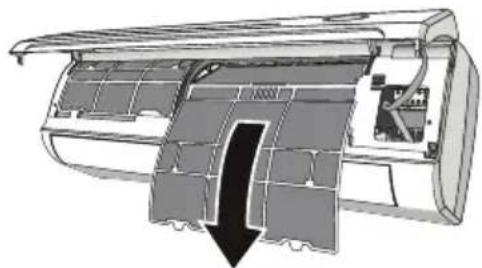
natural_image
Cross-sectional diagram of an air conditioner unit showing internal structure and airflow direction (no text or symbols)1 Filter za zrak
3 Očistite filter vodom, ako je filter zaprljan uljem, može se oprati toplom vodom (koja nije toplija od 45°C). Ostavite da se osuši na hladnom i suhom mjestu.
4 Pridržavajući prednju ploču jednom rukom, umetnite filter za zrak drugom rukom.
5 Zatvorite.
natural_image
Diagram showing two stages of battery charging process: one with internal circuit switch, the other with battery pack and load (no text or symbols)
ADVERTÈNCIA

Receptor del senyal
1 Panell frontal
2 Botó d'emergència
ADVERTÈNCIA
Mode sec
Mode de Calefacció
Mode de Ventilador
Jet Mode
natural_image
Diagram of a mechanical component with an inset showing two hands holding a tool, illustrating the process (no text or symbols present)NOTA
natural_image
Technical line drawing of a cylindrical mechanical component with an arrow indicating direction (no text or symbols)natural_image
Cutaway diagram of an air conditioner showing internal panel structure (no text or labels)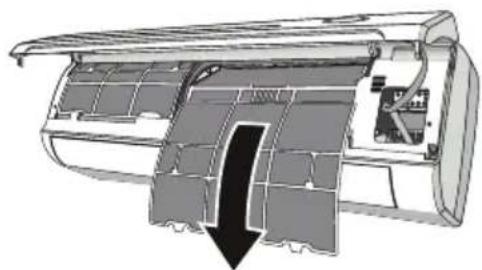
natural_image
Cross-sectional diagram of an air conditioner unit showing internal structure and airflow direction (no text or labels)1 Filtre d'aire